9. كود مصدر البرنامج
9.1. عميل TCP العام
تعمل العديد من الخدمات التي تم إنشاؤها في بدايات الإنترنت وفقًا لنموذج خادم الصدى الذي تمت دراسته سابقًا: تتكون التبادلات بين العميل والخادم من تبادل أسطر النص. سنكتب عميل TCP عامًا سيتم تشغيله على النحو التالي: java cltTCPgenerique server port
سيتصل عميل TCP هذا بمنفذ الخادم. وبمجرد الاتصال، سيقوم بإنشاء مؤشرين:
- خيط مسؤول عن قراءة الأوامر المكتوبة على لوحة المفاتيح وإرسالها إلى الخادم
- خيط مسؤول عن قراءة استجابات الخادم وعرضها على الشاشة
لماذا خيطان؟ لكل خدمة TCP-IP بروتوكولها الخاص، وقد تنشأ الحالات التالية أحيانًا:
- يجب على العميل إرسال عدة أسطر من النص قبل تلقي الرد
- قد يحتوي رد الخادم على عدة أسطر من النص
لذلك، فإن الحلقة التي ترسل سطراً واحداً إلى الخادم وتستقبل سطراً واحداً من الخادم ليست مناسبة دائماً. ولذلك سننشئ حلقتين منفصلتين:
- حلقة لقراءة الأوامر المكتوبة على لوحة المفاتيح لإرسالها إلى الخادم. سيشير المستخدم إلى نهاية الأوامر باستخدام الكلمة الرئيسية "fin".
- حلقة لاستقبال وعرض ردود الخادم. وستكون هذه حلقة لا نهائية لا تتوقف إلا عندما يقوم الخادم بقطع الاتصال بالشبكة أو عندما يكتب المستخدم الأمر «end» على لوحة المفاتيح.
للحصول على هاتين الحلقتين المنفصلتين، نحتاج إلى خيطين مستقلين. لنلقِ نظرة على مثال للتنفيذ حيث يتصل عميل TCP العام لدينا بخدمة SMTP (بروتوكول نقل البريد البسيط). هذه الخدمة مسؤولة عن توجيه البريد الإلكتروني إلى مستلميه. وهي تعمل على المنفذ 25 وتستخدم بروتوكول تبادل نصي.
Dos>java clientTCPgenerique istia.univ-angers.fr 25
Commandes :
<-- 220 istia.univ-angers.fr ESMTP Sendmail 8.11.6/8.9.3; Mon, 13 May 2002 08:37:26 +0200
help
<-- 502 5.3.0 Sendmail 8.11.6 -- HELP not implemented
mail from: machin@univ-angers.fr
<-- 250 2.1.0 machin@univ-angers.fr... Sender ok
rcpt to: serge.tahe@istia.univ-angers.fr
<-- 250 2.1.5 serge.tahe@istia.univ-angers.fr... Recipient ok
data
<-- 354 Enter mail, end with "." on a line by itself
Subject: test

ligne1
ligne2
ligne3
.
<-- 250 2.0.0 g4D6bks25951 Message accepted for delivery
quit
<-- 221 2.0.0 istia.univ-angers.fr closing connection
[fin du thread de lecture des réponses du serveur]
fin
[fin du thread d'envoi des commandes au serveur]
دعونا نعلق على هذه التبادلات بين العميل والخادم:
- ترسل خدمة SMTP رسالة ترحيب عندما يتصل بها العميل:
- تحتوي بعض الخدمات على أمر "help" يوفر معلومات حول الأوامر المتاحة لتلك الخدمة. هذا ليس هو الحال هنا. أوامر SMTP المستخدمة في المثال هي كما يلي:
- mail from: sender، لتحديد عنوان البريد الإلكتروني للمرسل
- rcpt to: recipient، لتحديد عنوان البريد الإلكتروني لمستلم الرسالة. إذا كان هناك عدة مستلمين، يتم تكرار الأمر rcpt to: عدة مرات حسب الحاجة لكل مستلم.
- data، الذي يشير إلى خادم SMTP بأن الرسالة على وشك الإرسال. كما هو موضح في استجابة الخادم، هذه سلسلة من الأسطر تنتهي بسطر يحتوي على نقطة فقط. قد تحتوي الرسالة على رؤوس مفصولة عن نص الرسالة بسطر فارغ. في مثالنا، قمنا بتضمين موضوع باستخدام الكلمة الرئيسية Subject:
- بمجرد إرسال الرسالة، يمكننا إخبار الخادم بأننا انتهينا باستخدام الأمر quit. ثم يقوم الخادم بإغلاق اتصال الشبكة. يمكن لسلسلة القراءة اكتشاف هذا الحدث والتوقف.
- ثم يكتب المستخدم "end" على لوحة المفاتيح لإيقاف مؤشر الترابط الذي يقرأ الأوامر المكتوبة على لوحة المفاتيح أيضًا.
إذا تحققنا من البريد الإلكتروني المستلم، فسنرى ما يلي (Outlook):
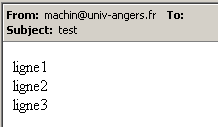
لاحظ أن خدمة SMTP لا يمكنها تحديد ما إذا كان المرسل صالحًا أم لا. لذلك، لا يمكنك أبدًا الوثوق بحقل "من" في الرسالة. في هذه الحالة، لم يكن المرسل machin@univ-angers.fr موجودًا.
يتيح لنا عميل TCP العام هذا اكتشاف بروتوكول اتصال خدمات الإنترنت، ومن ثم إنشاء فئات متخصصة لعملاء هذه الخدمات. دعونا نستكشف بروتوكول اتصال خدمة POP (بروتوكول مكتب البريد)، الذي يتيح لنا استرداد رسائل البريد الإلكتروني المخزنة على الخادم. يعمل هذا البروتوكول على المنفذ 110.
Dos> java clientTCPgenerique istia.univ-angers.fr 110
Commandes :
<-- +OK Qpopper (version 4.0.3) at istia.univ-angers.fr starting.
help
<-- -ERR Unknown command: "help".
user st
<-- +OK Password required for st.
pass monpassword
<-- +OK st has 157 visible messages (0 hidden) in 11755927 octets.
list
<-- +OK 157 visible messages (11755927 octets)
<-- 1 892847
<-- 2 171661
...
<-- 156 2843
<-- 157 2796
<-- .
retr 157
<-- +OK 2796 octets
<-- Received: from lagaffe.univ-angers.fr (lagaffe.univ-angers.fr [193.49.144.1])
<--     by istia.univ-angers.fr (8.11.6/8.9.3) with ESMTP id g4D6wZs26600;
<--     Mon, 13 May 2002 08:58:35 +0200
<-- Received: from jaume ([193.49.146.242])
<--     by lagaffe.univ-angers.fr (8.11.1/8.11.2/GeO20000215) with SMTP id g4D6wSd37691;
<--     Mon, 13 May 2002 08:58:28 +0200 (CEST)
...
<-- ------------------------------------------------------------------------
<-- NOC-RENATER2                  Tl.  : 0800 77 47 95
<-- Fax : (+33) 01 40 78 64 00 ,  Email : noc-r2@cssi.renater.fr
<-- ------------------------------------------------------------------------
<--
<-- .
quit
<-- +OK Pop server at istia.univ-angers.fr signing off.
[fin du thread de lecture des réponses du serveur]
fin
[fin du thread d'envoi des commandes au serveur]
الأوامر الرئيسية هي كما يلي:
- تسجيل دخول المستخدم، حيث تقوم بإدخال معلومات تسجيل الدخول الخاصة بك على الجهاز الذي يستضيف بريدك الإلكتروني
- كلمة مرور، حيث تدخل كلمة المرور المرتبطة باسم المستخدم السابق
- list، للحصول على قائمة بالرسائل بالصيغة رقم، الحجم بالبايت
- retr i، لقراءة الرسالة رقم i
- الخروج، لإنهاء الجلسة.
دعونا الآن نستكشف بروتوكول الاتصال بين العميل وخادم الويب، الذي يعمل عادةً على المنفذ 80:
Dos> java clientTCPgenerique istia.univ-angers.fr 80
Commandes :
GET /index.html HTTP/1.0

<-- HTTP/1.1 200 OK
<-- Date: Mon, 13 May 2002 07:30:58 GMT
<-- Server: Apache/1.3.12 (Unix)  (Red Hat/Linux) PHP/3.0.15 mod_perl/1.21
<-- Last-Modified: Wed, 06 Feb 2002 09:00:58 GMT
<-- ETag: "23432-2bf3-3c60f0ca"
<-- Accept-Ranges: bytes
<-- Content-Length: 11251
<-- Connection: close
<-- Content-Type: text/html
<--
<-- <html>
<--
<-- <head>
<-- <meta http-equiv="Content-Type"
<-- content="text/html; charset=iso-8859-1">
<-- <meta name="GENERATOR" content="Microsoft FrontPage Express 2.0">
<-- <title>Bienvenue a l'ISTIA - Universite d'Angers</title>
<-- </head>
....
<-- face="Verdana"> - Dernire mise  jour le <b>10 janvier 2002</b></font></p>
<-- </body>
<-- </html>
<--
[fin du thread de lecture des réponses du serveur]
fin
[fin du thread d'envoi des commandes au serveur]
يرسل عميل الويب أوامره إلى الخادم وفقًا للنمط التالي:
لا يستجيب خادم الويب إلا بعد استلام السطر الفارغ. في هذا المثال، استخدمنا أمرًا واحدًا فقط:
الذي يطلب عنوان URL /index.html من الخادم ويشير إلى أنه يستخدم الإصدار 1.0 من HTTP. أحدث إصدار من هذا البروتوكول هو 1.1. يوضح المثال أن الخادم استجاب بإرسال محتويات ملف index.html ثم أغلق الاتصال، كما نرى في قراءة الاستجابة التي تشير إلى إنهاء الخيط. قبل إرسال محتويات ملف index.html، أرسل خادم الويب سلسلة من الرؤوس تليها سطر فارغ:
<-- HTTP/1.1 200 OK
<-- Date: Mon, 13 May 2002 07:30:58 GMT
<-- Server: Apache/1.3.12 (Unix)  (Red Hat/Linux) PHP/3.0.15 mod_perl/1.21
<-- Last-Modified: Wed, 06 Feb 2002 09:00:58 GMT
<-- ETag: "23432-2bf3-3c60f0ca"
<-- Accept-Ranges: bytes
<-- Content-Length: 11251
<-- Connection: close
<-- Content-Type: text/html
<--
<-- <html>
السطر <html> هو السطر الأول من ملف /index.html. يُطلق على النص السابق اسم رؤوس HTTP (بروتوكول نقل النص التشعبي). لن نتطرق إلى تفاصيل هذه الرؤوس هنا، ولكن ضع في اعتبارك أن عميلنا العام يوفر الوصول إليها، مما قد يساعد في فهمها. على سبيل المثال، السطر الأول:
يشير إلى أن خادم الويب الذي تم الاتصال به يدعم بروتوكول HTTP/1.1 وأنه عثر بنجاح على الملف المطلوب (200 OK)، حيث 200 هو رمز استجابة HTTP. الأسطر
يُعلم العميل بأنه سيتلقى 11,251 بايت من نص HTML (لغة ترميز النص التشعبي) وأن الاتصال سيُغلق بمجرد إرسال البيانات.
إذن، لدينا هنا عميل TCP مفيد للغاية. إنه بالتأكيد أقل قدرة من برنامج telnet الذي استخدمناه سابقًا، لكن كان من المثير للاهتمام أن نكتبه بأنفسنا. برنامج عميل TCP العام هو كما يلي:
// imported packages
import java.io.*;
import java.net.*;
public class clientTCPgenerique{
// receives the characteristics of a service as a parameter in the form
// server port
// connects to the service
// creates a thread to read keyboard commands
// these will be sent to the
// creates a thread to read server responses
// these will be displayed on the screen
// the whole thing ends with the command end typed on the keyboard
// instance variable
private static Socket client;
public static void main(String[] args){
// syntax
final String syntaxe="pg serveur port";
// number of arguments
if(args.length != 2)
erreur(syntaxe,1);
// note the server name
String serveur=args[0];
// port must be integer >0
int port=0;
boolean erreurPort=false;
Exception E=null;
try{
port=Integer.parseInt(args[1]);
}catch(Exception e){
E=e;
erreurPort=true;
}
erreurPort=erreurPort || port <=0;
if(erreurPort)
erreur(syntaxe+"\n"+"Port incorrect ("+E+")",2);
client=null;
// there may be problems
try{
// connect to the service
client=new Socket(serveur,port);
}catch(Exception ex){
// error
erreur("Impossible de se connecter au service ("+ serveur
+","+port+"), erreur : "+ex.getMessage(),3);
// end
return;
}//catch
// create read/write threads
new ClientSend(client).start();
new ClientReceive(client).start();
// end thread main
return;
}// hand
// error display
public static void erreur(String msg, int exitCode){
// error display
System.err.println(msg);
// stop with error
System.exit(exitCode);
}//error
}//class
class ClientSend extends Thread {
// class for reading keyboard commands
// and send them to a server via a tcp client passed in parameter
private Socket client; // tcp client
// manufacturer
public ClientSend(Socket client){
// we note the tcp client
this.client=client;
}//manufacturer
// thread Run method
public void run(){
// local data
PrintWriter OUT=null; // network write streams
BufferedReader IN=null; // keyboard flow
String commande=null; // command read from keyboard
// error management
try{
// network write stream creation
OUT=new PrintWriter(client.getOutputStream(),true);
// keyboard input stream creation
IN=new BufferedReader(new InputStreamReader(System.in));
// order entry-send loop
System.out.println("Commandes : ");
while(true){
// read command typed on keyboard
commande=IN.readLine().trim();
// finished?
if (commande.toLowerCase().equals("fin")) break;
// send order to server
OUT.println(commande);
// next order
}//while
}catch(Exception ex){
// error
System.err.println("Envoi : L'erreur suivante s'est produite : " + ex.getMessage());
}//catch
// end - close flows
try{
OUT.close();client.close();
}catch(Exception ex){}
// signals the end of the thread
System.out.println("[Envoi : fin du thread d'envoi des commandes au serveur]");
}//run
}//class
class ClientReceive extends Thread{
// class responsible for reading lines of text intended for a
// tcp client passed as parameter
private Socket client; // tcp client
// manufacturer
public ClientReceive(Socket client){
// we note the tcp client
this.client=client;
}//manufacturer
// thread Run method
public void run(){
// local data
BufferedReader IN=null; // network read stream
String réponse=null; // server response
// error management
try{
// create network read stream
IN=new BufferedReader(new InputStreamReader(client.getInputStream()));
// loop read text lines from IN stream
while(true){
// network streaming
réponse=IN.readLine();
// closed flow?
if(réponse==null) break;
// display
System.out.println("<-- "+réponse);
}//while
}catch(Exception ex){
// error
System.err.println("Réception : L'erreur suivante s'est produite : " + ex.getMessage());
}//catch
// end - we close the feeds
try{
IN.close();client.close();
}catch(Exception ex){}
// signals the end of the thread
System.out.println("[Réception : fin du thread de lecture des réponses du serveur]");
}//run
}//class
9.2. خادم TCP العام
الآن سنلقي نظرة على خادم
- يعرض على الشاشة الأوامر المرسلة من قبل عملائه
- ويرسل إليهم، رداً على ذلك، أسطر النص التي يكتبها المستخدم على لوحة المفاتيح. وبالتالي، فإن المستخدم هو الذي يقوم بدور الخادم.
يتم تشغيل البرنامج بواسطة: java genericTCPserver listeningPort، حيث listeningPort هو المنفذ الذي يجب على العملاء الاتصال به. سيتم التعامل مع خدمة العميل بواسطة خيطين:
- خيط مخصص حصريًا لقراءة أسطر النص المرسلة من العميل
- خيط مخصص حصريًا لقراءة الردود التي يكتبها المستخدم على لوحة المفاتيح. سيشير هذا الخيط، باستخدام الأمر `fin`، إلى أنه يغلق الاتصال مع العميل.
يقوم الخادم بإنشاء خيطين لكل عميل. إذا كان هناك n عميل، فسيكون هناك 2n خيطًا نشطًا في نفس الوقت. لا يتوقف الخادم نفسه أبدًا ما لم يضغط المستخدم على Ctrl-C على لوحة المفاتيح. دعونا نلقي نظرة على بعض الأمثلة.
يعمل الخادم على المنفذ 100، ونستخدم العميل العام للتواصل معه. تبدو نافذة العميل كما يلي:
E:\data\serge\MSNET\c#\réseau\client tcp générique> java clientTCPgenerique localhost 100
Commandes :
commande 1 du client 1
<-- réponse 1 au client 1
commande 2 du client 1
<-- réponse 2 au client 1
fin
L'erreur suivante s'est produite : Impossible de lire les données de la connexion de transport.
[fin du thread de lecture des réponses du serveur]
[fin du thread d'envoi des commandes au serveur]
السطور التي تبدأ بـ <-- هي تلك المرسلة من الخادم إلى العميل؛ أما البقية فهي من العميل إلى الخادم. نافذة الخادم هي كما يلي:
Dos> java serveurTCPgenerique 100
Serveur générique lancé sur le port 100
Thread de lecture des réponses du serveur au client 1 lancé
1 : Thread de lecture des demandes du client 1 lancé
<-- commande 1 du client 1
réponse 1 au client 1
1 : <-- commande 2 du client 1
réponse 2 au client 1
1 : [fin du Thread de lecture des demandes du client 1]
fin
[fin du Thread de lecture des réponses du serveur au client 1]
السطور التي تبدأ بـ <-- هي تلك المرسلة من العميل إلى الخادم. السطور N: هي تلك المرسلة من الخادم إلى العميل N. لا يزال الخادم أعلاه نشطًا على الرغم من انتهاء العميل 1. نقوم بتشغيل عميل ثانٍ لنفس الخادم:
Dos> java clientTCPgenerique localhost 100
Commandes :
commande 3 du client 2
<-- réponse 3 au client 2
fin
L'erreur suivante s'est produite : Impossible de lire les données de la connexion de transport.
[fin du thread de lecture des réponses du serveur]
[fin du thread d'envoi des commandes au serveur]
تبدو نافذة الخادم بعد ذلك كما يلي:
Dos> java serveurTCPgenerique 100
Serveur générique lancé sur le port 100
Thread de lecture des réponses du serveur au client 1 lancé
1 : Thread de lecture des demandes du client 1 lancé
<-- commande 1 du client 1
réponse 1 au client 1
1 : <-- commande 2 du client 1
réponse 2 au client 1
1 : [fin du Thread de lecture des demandes du client 1]
fin
[fin du Thread de lecture des réponses du serveur au client 1]
Thread de lecture des réponses du serveur au client 2 lancé
2 : Thread de lecture des demandes du client 2 lancé
<-- commande 3 du client 2
réponse 3 au client 2
2 : [fin du Thread de lecture des demandes du client 2]
fin
[fin du Thread de lecture des réponses du serveur au client 2]
^C
الآن دعونا نحاكي خادم ويب عن طريق تشغيل خادمنا العام على المنفذ 88:
Dos> java serveurTCPgenerique 88
Serveur générique lancé sur le port 88
الآن دعونا نفتح متصفحًا ونطلب عنوان URL http://localhost:88/exemple.html. سيتصل المتصفح بعد ذلك بالمنفذ 88 على جهاز localhost ويطلب الصفحة /example.html:
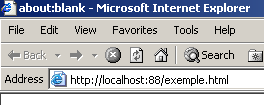
الآن دعونا نلقي نظرة على نافذة الخادم لدينا:
Dos>java serveurTCPgenerique 88
Serveur générique lancé sur le port 88
Thread de lecture des réponses du serveur au client 2 lancé
2 : Thread de lecture des demandes du client 2 lancé
<-- GET /exemple.html HTTP/1.1
<-- Accept: image/gif, image/x-xbitmap, image/jpeg, image/pjpeg, application/msword, */*
<-- Accept-Language: fr
<-- Accept-Encoding: gzip, deflate
<-- User-Agent: Mozilla/4.0 (compatible; MSIE 6.0; Windows NT 5.0; .NET CLR 1.0.3705; .NET CLR 1.0.2
914)
<-- Host: localhost:88
<-- Connection: Keep-Alive
<--
يُظهر هذا رؤوس HTTP التي يرسلها المتصفح. وهذا يتيح لنا التعرف تدريجيًا على بروتوكول HTTP. في مثال سابق، أنشأنا عميل ويب يكتفي بإرسال أمر GET فقط. وكان ذلك كافيًا. أما هنا، فنرى أن المتصفح يرسل معلومات أخرى إلى الخادم. وتهدف هذه المعلومات إلى إعلام الخادم بنوع العميل الذي يتعامل معه. كما نلاحظ أن رؤوس HTTP تنتهي بسطر فارغ.
لنصمم استجابة لعميلنا. المستخدم الذي يجلس أمام لوحة المفاتيح هو الخادم الفعلي هنا ويمكنه تصميم استجابة يدويًا. تذكر الاستجابة التي أرسلها خادم الويب في المثال السابق:
<-- HTTP/1.1 200 OK
<-- Date: Mon, 13 May 2002 07:30:58 GMT
<-- Server: Apache/1.3.12 (Unix) (Red Hat/Linux) PHP/3.0.15 mod_perl/1.21
<-- Last-Modified: Wed, 06 Feb 2002 09:00:58 GMT
<-- ETag: "23432-2bf3-3c60f0ca"
<-- Accept-Ranges: bytes
<-- Content-Length: 11251
<-- Connection: close
<-- Content-Type: text/html
<--
<-- <html>
دعونا نحاول تقديم استجابة مماثلة:
...
<-- Host: localhost:88
<-- Connection: Keep-Alive
<--
2 : HTTP/1.1 200 OK
2 : Server: serveur tcp generique
2 : Connection: close
2 : Content-Type: text/html
2 :
2 : <html>
2 :   <head><title>Serveur generique</title></head>
2 :   <body>
2 :     <center>
2 :       <h2>Reponse du serveur generique</h2>
2 :     </center>
2 :    </body>
2 : </html>
2 : fin
L'erreur suivante s'est produite : Impossible de lire les données de la connexion de transport.
[fin du Thread de lecture des demandes du client 2]
[fin du Thread de lecture des réponses du serveur au client 2]
السطور التي تبدأ بـ 2: يتم إرسالها من الخادم إلى العميل رقم 2. يغلق الأمر "end" الاتصال من الخادم إلى العميل. في ردنا، اقتصرنا على رؤوس HTTP التالية:
HTTP/1.1 200 OK
2 : Server: serveur tcp generique
2 : Connection: close
2 : Content-Type: text/html
2 :
نحن لا نحدد حجم الملف الذي نرسله (Content-Length)، بل نشير ببساطة إلى أننا سنغلق الاتصال (Connection: close) بعد إرساله. وهذا يكفي للمتصفح. عند رؤية الاتصال مغلقًا، سيعرف أن استجابة الخادم قد اكتملت وسيعرض صفحة HTML التي تم إرسالها إليه. الصفحة هي كما يلي:
2 : <html>
2 :   <head><title>Serveur generique</title></head>
2 :   <body>
2 :     <center>
2 :       <h2>Reponse du serveur generique</h2>
2 :     </center>
2 :    </body>
2 : </html>
ثم يقوم المستخدم بإغلاق الاتصال بالعميل عن طريق كتابة الأمر "fin". عندئذٍ يدرك المتصفح أن استجابة الخادم قد اكتملت ويمكنه عرضها:
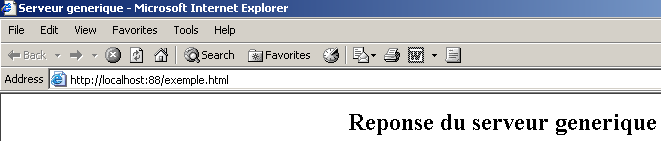
إذا قمت، في المثال أعلاه، بتحديد "عرض/المصدر" (View/Source) لمعرفة ما تلقّاه المتصفح، فستحصل على:
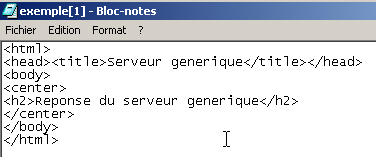
أي، بالضبط ما تم إرساله من الخادم العام.
فيما يلي كود خادم TCP العام:
// packages
import java.io.*;
import java.net.*;

public class serveurTCPgenerique{

    // main program
    public static void main (String[] args){

    // receives the port of listening to customer requests
     // creates a thread to read client requests
     // these will be displayed on the screen
     // creates a thread to read keyboard commands
     // these will be sent as a reply to the customer
     // the whole thing ends with the command end typed on the keyboard

    final String syntaxe="Syntaxe : pg port";
   // instance variable
         // is there an argument
     if(args.length != 1)
        erreur(syntaxe,1);

         // port must be integer >0
        int port=0;
        boolean erreurPort=false;
        Exception E=null;
        try{
            port=Integer.parseInt(args[0]);
        }catch(Exception e){
            E=e;
            erreurPort=true;
        }
        erreurPort=erreurPort || port <=0;
        if(erreurPort)
            erreur(syntaxe+"\n"+"Port incorrect ("+E+")",2);

     // we create the listening service
    ServerSocket ecoute=null;
    int nbClients=0;    // no. of customers handled
        try{
             // create the service
            ecoute=new ServerSocket(port);
             // follow-up
            System.out.println("Serveur générique lancé sur le port " + port);

             // customer service loop
            Socket client=null;
            while (true){ // infinite loop - will be stopped by Ctrl-C
                 // waiting for a customer
                client=ecoute.accept();

                 // the service is provided by separate threads
                nbClients++;

                 // create read/write threads
        new ServeurSend(client,nbClients).start();
        new ServeurReceive(client,nbClients).start();

                // back to listening to requests
            }// end while
        }catch(Exception ex){
             // we report the error
            erreur("L'erreur suivante s'est produite : " + ex.getMessage(),3);
        }//catch
    }// fine hand

     // error display
    public static void erreur(String msg, int exitCode){
         // error display
        System.err.println(msg);
         // stop with error
        System.exit(exitCode);
    }//error
}//class

class ServeurSend extends Thread{
    // class responsible for reading typed responses
     // and send them to a client via a tcp client passed to the

    Socket client;    // tcp client
    int numClient;        // customer no

     // manufacturer
    public ServeurSend(Socket client, int numClient){
         // we note the tcp client
        this.client=client;
         // and its
        this.numClient=numClient;
    }//manufacturer

     // thread Run method
    public void run(){

        // local data
        PrintWriter OUT=null;        // network write streams
        String réponse=null;        // answer read from keyboard
    BufferedReader IN=null;    // keyboard flow

        // follow-up
        System.out.println("Thread de lecture des réponses du serveur au client "+ numClient + " lancé");
         // error management
        try{
             // network write stream creation
            OUT=new PrintWriter(client.getOutputStream(),true);
      // keyboard flow creation
      IN=new BufferedReader(new InputStreamReader(System.in));
            // order entry-send loop
            while(true){
                 // customer identification
                System.out.print("--> " + numClient + " : ");
                 // read response typed on keyboard
                réponse=IN.readLine().trim();
                // finished?
                if (réponse.toLowerCase().equals("fin")) break;
                // send response to server
                OUT.println(réponse);
                 // following response
            }//while
        }catch(Exception ex){
             // error
            System.err.println("L'erreur suivante s'est produite : " + ex.getMessage());
        }//catch
         // end - close flows
        try{
            OUT.close();client.close();
        }catch(Exception ex){}
         // signals the end of the thread
        System.out.println("[fin du Thread de lecture des réponses du serveur au client "+ numClient+ "]");
    }//run
}//class

class ServeurReceive extends Thread{
    // class responsible for reading text lines sent to the server
     // via a tcp client passed to the builder

    Socket client;    // tcp client
    int numClient;        // customer no

     // manufacturer
    public ServeurReceive(Socket client, int numClient){
         // we note the tcp client
        this.client=client;
         // and its
        this.numClient=numClient;
    }//manufacturer

     // thread Run method
    public void run(){

        // local data
        BufferedReader IN=null;        // network read stream
        String réponse=null;        // server response

         // follow-up
        System.out.println("Thread de lecture des demandes du client "+ numClient + " lancé");
         // error management
        try{
             // create network read stream
            IN=new BufferedReader(new InputStreamReader(client.getInputStream()));
            // loop read text lines from IN stream
            while(true){
                 // network streaming
                réponse=IN.readLine();
                 // closed flow?
                if(réponse==null) break;
                // display
                System.out.println("<-- "+réponse);
            }//while
        }catch(Exception ex){
            // error
            System.err.println("L'erreur suivante s'est produite : " + ex.getMessage());
        }//catch
         // end - close flows
        try{
            IN.close();client.close();
        }catch(Exception ex){}
         // signals the end of the thread
        System.out.println("[fin du Thread de lecture des demandes du client "+ numClient+"]");
    }//run
}//class