10. جافا سكريبت
نعرض في هذا القسم ثلاثة أمثلة على استخدام جافا سكريبت في صفحات WEB. نركز هنا على إدارة النماذج، لكن جافا سكريبت يمكنه القيام بأكثر من ذلك بكثير.
10.1. استرداد المعلومات من نموذج
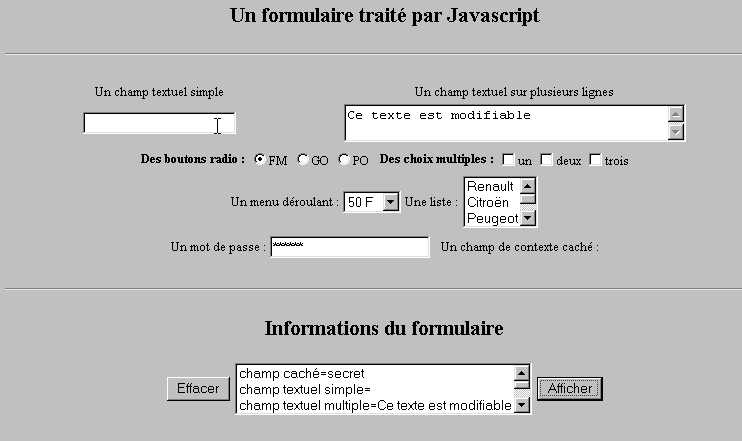
يوضح المثال أدناه كيفية استرداد البيانات التي أدخلها المستخدم في نموذج ما داخل المتصفح. ويتيح ذلك عمومًا إجراء معالجات مسبقة قبل إرسالها إلى الخادم.
10.1.1. النموذج
لدينا نموذج يضم المكونات الأكثر شيوعًا وزر «عرض» يسمح بعرض المدخلات التي أدخلها المستخدم.
10.1.2. الكود
<html>
<head>
<title>Un formulaire traité par Javascript</title>
<script language="javascript">
function afficher(){
// عرض معلومات النموذج في قائمة
// يتم المسح أولاً
effacerInfos();
// يتم عرض قيمة الحقول #
with(document.frmExemple){
// حقل مخفي
ecrire("champ caché="+cache.value);
// حقل نصي بسيط
ecrire("champ textuel simple="+simple.value);
// حقل نصي متعدد
ecrire("champ textuel multiple="+lignes.value);
// أزرار الاختيار
for(i=0;i<radio.length;i++){
texte="radio["+i+"]="+radio[i].value;
if(radio[i].checked) texte+=", coché";
ecrire(texte);
}//for
// مربعات الاختيار
for(i=0;i<qcm.length;i++){
texte="qcm["+i+"]="+qcm[i].value;
if(qcm[i].checked) texte+=", coché";
ecrire(texte);
}//for
//قائمة منسدلة
ecrire("index sélectionné dans le menu="+menu.selectedIndex);
for(i=0;i<menu.length;i++){
texte="menu["+i+"]="+menu.options[i].text;
if(menu.options[i].selected) texte+=",sélectionné";
ecrire(texte);
}//لـ
//قائمة الاختيارات المتعددة
for(i=0;i<lstVoitures.length;i++){
texte="lstVoitures["+i+"]="+lstVoitures.options[i].text;
if(lstVoitures.options[i].selected) texte+=",sélectionné";
ecrire(texte);
}//لـ
//كلمة المرور
ecrire("mot de passe="+passwd.value);
}//مع
}//وظيفة
function ecrire(texte){
// كتابة نص في قائمة المعلومات
frmInfos.lstInfos.options[frmInfos.lstInfos.length]=new Option(texte);
}//كتابة
function effacerInfos(){
frmInfos.lstInfos.length=0;
}//effacerInfos
</script>
</head>
<body bgcolor="#C0C0C0" onload="afficher()">
<center>
<h2>Un formulaire traité par Javascript</h2>
<hr>
<form method="POST" name="frmExemple">
<input type="hidden" name="cache" value="secret">
<table border="0">
<tr>
<td align="center">Un champ textuel simple</td>
<td align="center" width="100"> </td>
<td align="center">Un champ textuel sur plusieurs lignes</td>
</tr>
<tr>
<td align="center"><input type="text" size="20" name="simple"></td>
<td align="center" width="100"> </td>
<td align="center">
<textarea name="lignes" rows="2" cols="40">Ce texte est modifiable</textarea>
</td>
</tr>
</table>
<table border="0">
<tr>
<td><strong>Des boutons radio :</strong></td>
<td>
<input type="radio" checked name="radio" value="FM">FM
</td>
<td>
<input type="radio" name="radio" value="GO">GO
</td>
<td>
<input type="radio" name="radio" value="PO">PO
</td>
<td> </td>
<td><strong>Des choix multiples :</strong></td>
<td>
<input type="checkbox" name="qcm" value="un">un
</td>
<td>
<input type="checkbox" name="qcm" value="deux">deux
</td>
<td>
<input type="checkbox" name="qcm" value="trois">trois
</td>
</tr>
</table>
<table border="0">
<tr>
<td>Un menu déroulant : </td>
<td>
<select name="menu" size="1">
<option>50 F</option>
<option>60 F</option>
<option>70 F</option>
<option>100 F</option>
</select>
</td>
<td>Une liste :</td>
<td>
<select name="lstVoitures" multiple size="3">
<option>Renault</option>
<option>Citroën</option>
<option>Peugeot</option>
<option>Fiat</option>
<option>Audi</option>
</select>
</td>
</tr>
</table>
<table border="0">
<tr>
<td>Un mot de passe : </td>
<td><input type="password" size="21" name="passwd"></td>
<td> </td>
<td>Un champ de contexte caché : </td>
</tr>
</table>
</form>
<hr>
<h2>Informations du formulaire</h2>
<form name="frmInfos">
<table>
<tr>
<td><input type="button" value="Effacer" onclick="effacerInfos()"></td>
<td>
<select name="lstInfos" multiple size="3">
</select>
</td>
<td>
<input type="button" name="cmdAfficher" value="Afficher" onclick="afficher()">
</td>
</tr>
</form>
</body>
</html>
10.2. التعبيرات النمطية في جافا سكريبت
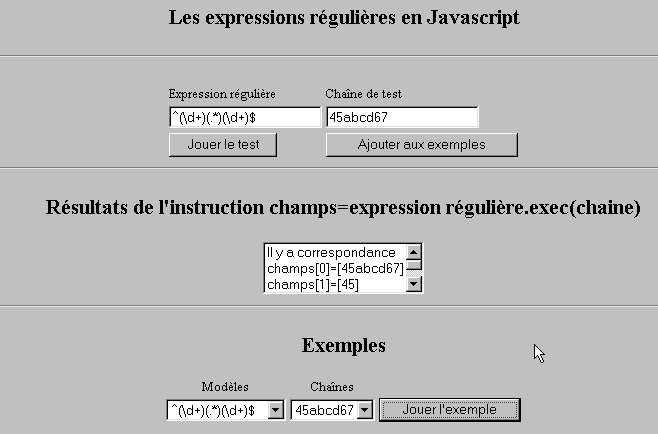
على صعيد المتصفح، يمكن استخدام جافا سكريبت للتحقق من صحة البيانات التي يدخلها المستخدم قبل إرسالها إلى الخادم. فيما يلي برنامج لاختبار هذه التعبيرات النمطية.
10.2.1. صفحة الاختبار
10.2.2. كود الصفحة
<html>

  <head>
    <title>Les expressions régulières en Javascript</title>
    <script language="javascript">
      function afficherInfos(){
        with(document.frmRegExp){
                    // هل هناك شيء يجب فعله؟
          if (! verifier()) return;
          // حسناً - سنحذف النتائج السابقة
          effacerInfos();
                    // التحقق من النموذج
          modele=new RegExp(txtModele.value);
          champs=modele.exec(txtChaine.value);
          if(champs==null)
                        // لا يوجد تطابق بين النموذج والسلسلة
            ecrireInfos("pas de correspondance");
          else{
                        // تطابق - يتم عرض النتائج التي تم الحصول عليها
            ecrireInfos("Il y a correspondance");
            for(i=0;i<champs.length;i++)
              ecrireInfos("champs["+i+"]=["+champs[i]+"]");
          }//وإلا
        }//مع
      }//الدالة

      function ecrireInfos(texte){
        // كتابة نص في قائمة المعلومات
        document.frmRegExp.lstInfos.options[document.frmRegExp.lstInfos.length]=new Option(texte);
      }//كتابة

      function effacerInfos(){
        frmRegExp.lstInfos.length=0;
      }//effacerInfos

      function jouer(){
                // يختبر النموذج مقابل السلسلة في المثال المختار
        with(document.frmRegExp){
          txtModele.value=lstModeles.options[lstModeles.selectedIndex].text
          txtChaine.value=lstChaines.options[lstChaines.selectedIndex].text
          afficherInfos();
        }//مع
      }//تشغيل

      function ajouter(){
                //يضيف الاختبار الحالي إلى الأمثلة
        with(document.frmRegExp){
          // هل هناك ما يجب فعله؟
          if (! verifier()) return;
          // إضافة
          lstModeles.options[lstModeles.length]=new Option(txtModele.value);
          lstChaines.options[lstChaines.length]=new Option(txtChaine.value);
          // مسح المدخلات
          txtModele.value="";
          txtChaine.value="";
        }//مع
      }//إضافة

      function verifier(){
                // التحقق من أن حقول الإدخال غير فارغة
        with(document.frmRegExp){
          champs=/^\s*$/.exec(txtModele.value);
          if(champs!=null){
            alert("Vous n'avez pas indiqué de modèle");
            txtModele.focus();
            return false;
          }//إذا
          champs=/^\s*$/.exec(txtChaine.value);
          if(champs!=null){
            alert("Vous n'avez pas indiqué de chaîne de test");
            txtChaine.focus();
            return false;
          }//إذا
          // حسناً
          return true;
        }//مع
      }//التحقق
    </script>
  </head>

  <body bgcolor="#C0C0C0">
    <center>
     <h2>Les expressions régulières en Javascript</h2>
    <hr>
    <form name="frmRegExp">
      <table>
        <tr>
          <td>Expression régulière</td>
          <td>Chaîne de test</td>
        </tr>
        <tr>
          <td><input type="text" name="txtModele" size="20"></td>
          <td><input type="text" name="txtChaine" size="20"></td>
        </tr>
        <tr>
          <td>
            <input type="button" name="cmdAfficher" value="Jouer le test" onclick="afficherInfos()">
          </td>
          <td>
            <input type="button" name="cmdAjouter" value="Ajouter aux exemples" onclick="ajouter()">
          </td>
        </tr>
      </table>
      <hr>
      <h2>Résultats de l'instruction champs=expression régulière.exec(chaine)</h2>
      <table>
        <tr>
          <td>
            <select name="lstInfos" size="3">
            </select>
          </td>
        </tr>
      </table>
      <hr>
      <h2>Exemples</h2>
      <table>
 <tr>
          <td align="center">Modèles</td>
          <td align="center">Chaînes</td>
        </tr>
        <tr>
          <td>
            <select name="lstModeles" size="1">
              <option>^\d+$</option>
              <option>^(\d+) (\d+)$</option>
              <option>^(\d+)(.*)(\d+)$</option>
              <option>^(\d+)(\s+)(\d+)$</option>
            </select>
          </td>
          <td>
            <select name="lstChaines" size="1">
              <option>67</option>
              <option>56 84</option>
              <option>45abcd67</option>
              <option>45   67</option>
            </select>
          </td>
          <td>
            <input type="button" name="cmdJouer" value="Jouer l'exemple" onclick="jouer()">
          </td>
        </tr>
    </form>
  </body>
</html>
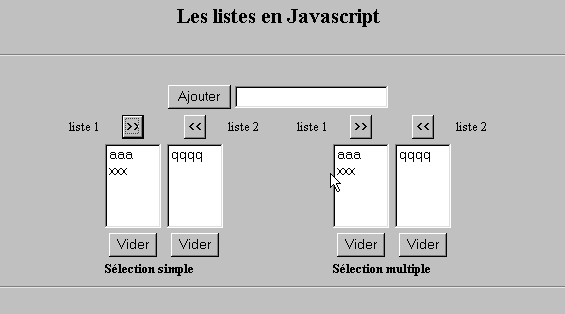
10.3. إدارة القوائم في JavaScript
10.3.1. النموذج
10.3.2. الرمز
<html>

  <head>
    <title>Les listes en Javascript</title>

    <script language="javascript">
            // إضافة
      function ajouter(L1,L2,T){
                // يضيف قيمة الحقل T إلى القوائم L1،L2
                    // هل هناك ما يجب فعله؟
          champs=/^\s*$/.exec(T.value);
          if(champs!=null){
            // الحقل فارغ
            alert("Vous n'avez pas indiqué la valeur à ajouter");
            txtElement.focus();
            return;
          }//if
                    // يتم إضافة العنصر
          L1.options[L1.length]=new Option(T.value);
          L2.options[L2.length]=new Option(T.value);
          T.value="";
      }//إضافة

            //إفراغ
      function vider(L){
                // إفراغ القائمة L
        L.length=0;
      }//إفراغ

     //نقل
      function transfert(L1,L2,simple){
        //ينقل العناصر المحددة في القائمة L1 إلى L2

                // هل هناك ما يجب فعله؟
                // فهرس العنصر المحدد في L1
        index1=L1.selectedIndex;
        if(index1==-1){
          alert("Vous n'avez pas sélectionné d'élément");
          return;
        }//if
                // ما هو وضع تحديد العناصر في القوائم
        if(simple){ // التحديد الفردي
          element1=L1.options[index1].text;
                    //إضافة في L2
          L2.options[L2.length]=new Option(element1);
          //الحذف في L1
          L1.options[index1]=null;
        }//بسيط
        if(! simple){ //اختيار متعدد
                    //تصفح القائمة 1 في الاتجاه المعاكس
          for(i=L1.length-1;i>=0;i--){
            //هل العنصر محدد؟
            if(L1.options[i].selected){
                            //إضافته إلى L2
              L2.options[L2.length]=new Option(L1.options[i].text);
              //حذفه من L1
              L1.options[i]=null;
            }//إذا
          }//لـ i
        }//if ! بسيط
      }//نقل
   </script>
  </head>

  <body bgcolor="#C0C0C0">
    <center>
     <h2>Les listes en Javascript</h2>
    <hr>
    <form name="frmListes">
      <table>
        <tr>
          <td>
            <input type="button" name="cmdAjouter" value="Ajouter" onclick="ajouter(lst1A,lst1B,txtElement)">
          </td>
          <td>
            <input type="text" name="txtElement">
          </td>
        </tr>
      </table>
      <table>
        <tr>
          <td align="center">liste 1</td>
          <td align="center"><input type="button" value=">>" onclick="transfert(lst1A,lst2A,true)"</td>
          <td align="center"><input type="button" value="<<" onclick="transfert(lst2A,lst1A,true)"</td>
          <td align="center">liste 2</td>
          <td width="30"></td>
          <td align="center">liste 1</td>
          <td align="center"><input type="button" value=">>" onclick="transfert(lst1B,lst2B,false)"</td>
          <td align="center"><input type="button" value="<<" onclick="transfert(lst2B,lst1B,false)"</td>
          <td align="center">liste 2</td>
        </tr>
         <tr>
          <td></td>
          <td align="center">
            <select name="lst1A" size="5">
            </select>
          </td>
          <td align="center">
            <select name="lst2A" size="5">
            </select>
          </td>
          <td></td>
          <td></td>
          <td></td>
          <td align="center">
            <select name="lst1B" size="5" multiple >
            </select>
          </td>
          <td align="center">
            <select name="lst2B" size="5" multiple>
            </select>
          </td>

        </tr>
        <tr>
          <td></td>
          <td align="center"><input type="button" value="Vider" onclick="vider(lst1A)"</td>
          <td align="center"><input type="button" value="Vider" onclick="vider(lst2A)"</td>
          <td></td>
          <td></td>
          <td></td>
          <td align="center"><input type="button" value="Vider" onclick="vider(lst1B)"</td>
          <td align="center"><input type="button" value="Vider" onclick="vider(lst2B)"</td>
          <td></td>
        </tr>
        <tr>
          <td></td>
          <td colspan="2"><strong>Sélection simple</strong></td>
          <td></td>
          <td></td>
          <td></td>
          <td colspan="2"><strong>Sélection multiple</strong></td>
          <td></td>
        </tr>

      </table>
      <hr>
    </form>
  </body>
</html>