Skip to content

11. مثال [nuxt-08]: برامج الوسيطة للتوجيه

في هذا المثال، نقدم مفهوم برمجيات التوجيه الوسيطة، وهي نصوص برمجية يتم تنفيذها كلما تغير مسار.

يتم إنشاء المثال [nuxt-08] مبدئيًا عن طريق استنساخ مشروع [nuxt-01]:
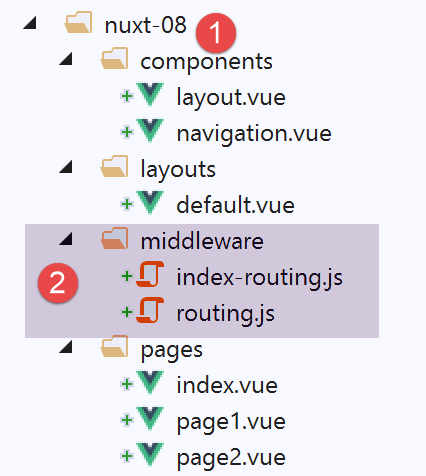
Image

يجب وضع برامج التوجيه الوسيطة في مجلد باسم [middleware] [2]. يمكن أن يكون هناك توجيه من مستويين:

  • التوجيه المطبق على كل عملية تنقل. يتم إعلان ذلك بعد ذلك في ملف [nuxt.config.js
  • التوجيه المطبق على صفحة معينة، عندما تكون تلك الصفحة هي هدف التوجيه. يتم بعد ذلك إعلان هذا التوجيه في تلك الصفحة المستهدفة؛

11.1. التوجيه العام

سيتولى ملف [middleware/routing.js] التوجيه العام. يتم إعلانه على النحو التالي في ملف [nuxt.config.js]:


  router: {
    base: '/nuxt-08/',
    middleware: ['routing']
},

تعد برامج الوسيطة العامة للتوجيه إحدى خصائص جهاز التوجيه (السطر 1). يمكن أن يكون هناك عدة مكونات لبرامج الوسيطة للتوجيه. ولهذا السبب، في السطر 3، تكون قيمة خاصية [middleware] عبارة عن مصفوفة. لاحظ أننا لا نستخدم مسارًا لتحديد برامج الوسيطة. سيتم البحث عنها تلقائيًا في مجلد [middleware] الخاص بالمشروع؛

تقوم برمجيات التوجيه [routing] بتسجيل الدخول هنا فقط:


/* eslint-disable no-undef */
/* eslint-disable no-console */
export default function(...args) {
  // who executes this code?
  console.log('[routing], process.server=', process.server, 'process.client=', process.client)
  const who = process.server ? 'server' : 'client'
  const routing = '[routing ' + who + ']'
  // number of arguments
  console.log(routing + ', il y a', args.length, 'argument(s)')
 
  // 1st argument
  const context = args[0]
  // key context
  dumpkeys(routing + ', context', context)
  // the application
  dumpkeys(routing + ', context.app', context.app)
  // the road
  dumpkeys(routing + ', context.route', context.route)
  console.log(routing + ', context.route=', context.route)
  // the router
  dumpkeys(routing + ', context.app.router', context.app.router)
  // on router.options.routes
  dumpkeys(routing + ', context.app.router.options.routes', context.app.router.options.routes)
  console.log(routing + ', context.app.router.options.routes=', context.app.router.options.routes)
}
 
function dumpkeys(message, object) {
  // list of [object] keys
  const ligne = 'Liste des clés [' + message + ']'
  console.log(ligne)
  // kEY LIST
  if (object) {
    console.log(Object.keys(object))
  }
}
  • السطر 3: سنرى أن البرمجيات الوسيطة تتلقى حجة: سياق المنفذ (الخادم أو العميل)؛
  • الأسطر 4–25: نعرض خصائص كائنات مختلفة لتحديد ما هو قابل للاستخدام. سنجد أن سياق البرمجيات الوسيطة مطابق تقريبًا لسياق المكون الإضافي؛

11.2. توجيه صفحة معينة

نريد التحكم في كيفية وصول المستخدمين إلى صفحة [index]. للقيام بذلك، نحتاج إلى إضافة خاصية [middleware] إلى صفحة [index] هذه:


<script>
/* eslint-disable no-undef */
/* eslint-disable no-console */
/* eslint-disable nuxt/no-env-in-hooks */
 
import Navigation from '@/components/navigation'
import Layout from '@/components/layout'
 
export default {
  name: 'Home',
  // components used
  components: {
    Layout,
    Navigation
  },
  // life cycle
  beforeCreate() {
    // client and server
    console.log('[home beforeCreate]')
  },
  created() {
    // client and server
    console.log('[home created]')
  },
  beforeMount() {
    // customer only
    console.log('[home beforeMount]')
  },
  mounted() {
    // customer only
    console.log('[home mounted]')
  },
  // routing
  middleware: ['index-routing']
}
</script>
  • السطر 34: تسرد الخاصية [middleware] البرامج النصية التي سيتم تنفيذها كلما كانت الصفحة التالية المعروضة هي صفحة [index]. ومرة أخرى، سيتم البحث عن هذه البرامج النصية في مجلد [middleware] الخاص بالمشروع؛

البرمجيات الوسيطة [index-routing] هي كما يلي:


/* eslint-disable no-undef */
/* eslint-disable no-console */
export default function(...args) {
  // who executes this code?
  console.log('[index-routing], process.server=', process.server, 'process.client=', process.client)
  const who = process.server ? 'server' : 'client'
  const indexRouting = '[index-routing ' + who + ']'
  // number of arguments
  console.log(indexRouting + ', il y a', args.length, 'argument(s)')
 
  // 1st argument
  const context = args[0]
  // key context
  dumpkeys(indexRouting + ', context', context)
  // the application
  dumpkeys(indexRouting + ', context.app', context.app)
  // the road
  dumpkeys(indexRouting + ', context.route', context.route)
  console.log(indexRouting + ', context.route=', context.route)
  // the router
  dumpkeys(indexRouting + ', context.app.router', context.app.router)
  // on router.options.routes
  dumpkeys(indexRouting + ', context.app.router.options.routes', context.app.router.options.routes)
  console.log(indexRouting + ', context.app.router.options.routes=', context.app.router.options.routes)
  // where do we come from?
  if (context.from) {
    console.log('from=', context.from)
  }
}
 
function dumpkeys(message, object) {
  // list of [object] keys
  const ligne = 'Liste des clés [' + message + ']'
  console.log(ligne)
  // kEY LIST
  if (object) {
    console.log(Object.keys(object))
  }
}

كود [index-routing] مطابق لكود [routing] ويُنتج نفس النتائج. ما يهمنا هو معرفة متى يتم تنفيذ هذين الوسيطين.

11.3. تشغيل المشروع

نقوم بتشغيل المشروع. السجلات هي كما يلي:

يتم تنفيذ البرنامج النصي [routing] أولاً بواسطة الخادم:

[routing], process.server= true process.client= false
[routing server], il y a 1 argument(s)
Liste des clés [[routing server], context]
[ 'isStatic',
  'isDev',
  'isHMR',
  'app',
  'payload',
  'error',
  'base',
  'env',
  'req',
  'res',
  'ssrContext',
  'redirect',
  'beforeNuxtRender',
  'route',
  'next',
  '_redirected',
  '_errored',
  'params',
  'query',
  '$axios' ]
Liste des clés [[routing server], context.app]
[ 'router',
  'nuxt',
  'head',
  'render',
  'data',
  'beforeCreate',
  'created',
  'mounted',
  'watch',
  'computed',
  'methods',
  'components',
  'context',
  '$axios' ]
Liste des clés [[routing server], context.route]
[ 'name',
  'meta',
  'path',
  'hash',
  'query',
  'params',
  'fullPath',
  'matched' ]
[routing server], context.route= { name: 'index',
  meta: [ {} ],
  path: '/',
  hash: '',
  query: {},
  params: {},
  fullPath: '/',
  matched:
   [ { path: '',
       regex: /^(?:\/(?=$))?$/i,
       components: [Object],
       instances: {},
       name: 'index',
       parent: undefined,
       matchAs: undefined,
       redirect: undefined,
       beforeEnter: undefined,
       meta: {},
       props: {} } ] }
Liste des clés [[routing server], context.app.router]
[ 'app',
  'apps',
  'options',
  'beforeHooks',
  'resolveHooks',
  'afterHooks',
  'matcher',
  'fallback',
  'mode',
  'history' ]
Liste des clés [[routing server], context.app.router.options.routes]
[ '0', '1', '2' ]
[routing server], context.app.router.options.routes= [ { path: '/page1',
    component: [Function: _61cefe10],
    name: 'page1' },
  { path: '/page2',
    component: [Function: _61dd1591],
    name: 'page2' },
  { path: '/', component: [Function: _00d5e140], name: 'index' } ]

هذه هي نفس النتيجة التي حصلنا عليها مع المكونات الإضافية.

  • السطر 15: غالبًا ما تُستخدم الخاصية [redirect] في البرامج الوسيطة؛ فهي تسمح لك بتغيير وجهة التوجيه الحالي؛

ثم، نظرًا لأن الصفحة المراد عرضها هي صفحة [index]، يقوم الخادم بتنفيذ البرنامج النصي [index-routing] ويعرض السجلات التالية:

[index-routing], process.server= true process.client= false
[index-routing server], il y a 1 argument(s)
Liste des clés [[index-routing server], context]
[ 'isStatic',
  'isDev',
  'isHMR',
  'app',
  'payload',
  'error',
  'base',
  'env',
  'req',
  'res',
  'ssrContext',
  'redirect',
  'beforeNuxtRender',
  'route',
  'next',
  '_redirected',
  '_errored',
  'params',
  'query',
  '$axios' ]
Liste des clés [[index-routing server], context.app]
[ 'router',
  'nuxt',
  'head',
  'render',
  'data',
  'beforeCreate',
  'created',
  'mounted',
  'watch',
  'computed',
  'methods',
  'components',
  'context',
  '$axios' ]
Liste des clés [[index-routing server], context.route]
[ 'name',
  'meta',
  'path',
  'hash',
  'query',
  'params',
  'fullPath',
  'matched' ]
[index-routing server], context.route= { name: 'index',
  meta: [ {} ],
  path: '/',
  hash: '',
  query: {},
  params: {},
  fullPath: '/',
  matched:
   [ { path: '',
       regex: /^(?:\/(?=$))?$/i,
       components: [Object],
       instances: {},
       name: 'index',
       parent: undefined,
       matchAs: undefined,
       redirect: undefined,
       beforeEnter: undefined,
       meta: {},
       props: {} } ] }
Liste des clés [[index-routing server], context.app.router]
[ 'app',
  'apps',
  'options',
  'beforeHooks',
  'resolveHooks',
  'afterHooks',
  'matcher',
  'fallback',
  'mode',
  'history' ]
Liste des clés [[index-routing server], context.app.router.options.routes]
[ '0', '1', '2' ]
[index-routing server], context.app.router.options.routes= [ { path: '/page1',
    component: [Function: _61cefe10],
    name: 'page1' },
  { path: '/page2',
    component: [Function: _61dd1591],
    name: 'page2' },
  { path: '/', component: [Function: _00d5e140], name: 'index' } ]

النتائج التي تم الحصول عليها باستخدام البرنامج النصي [index-routing] مشابهة لتلك التي تم الحصول عليها باستخدام البرنامج النصي [routing].

بمجرد استلام متصفح العميل لصفحة [index]، تتولى البرامج النصية الخاصة بالعميل زمام الأمور. وتصبح السجلات كما يلي:

1
2
3
4
[home beforeCreate]
[home created]
[home beforeMount]
[home mounted]

يمكننا أن نرى، بالتالي، أنه عند بدء تشغيل التطبيق، لا يقوم العميل بتنفيذ أي برمجيات وسيطة. وهذا يعني أن هذا سيحدث في كل مرة يقوم فيها المستخدم بإرسال طلب إلى الخادم. لا يتم تنفيذ البرمجيات الوسيطة من قبل العميل إلا عند التنقل داخل العميل. على سبيل المثال، دعونا ننتقل إلى الصفحة [page1] (نحن حالياً على الصفحة [index]) باستخدام الرابط [Page 1]. تكون السجلات عندئذٍ كما يلي:

[routing], process.server= false process.client= true
[routing client], il y a 1 argument(s)
Liste des clés [[routing client], context]
(18) ["isStatic", "isDev", "isHMR", "app", "payload", "error", "base", "env", "redirect", "nuxtState", "route", "next", "_redirected", "_errored", "params", "query", "$axios", "from"]
Liste des clés [[routing client], context.app]
(14) ["router", "nuxt", "head", "render", "data", "beforeCreate", "created", "mounted", "watch", "computed", "methods", "components", "context", "$axios"]
Liste des clés [[routing client], context.route]
(8) ["name", "meta", "path", "hash", "query", "params", "fullPath", "matched"]
[routing client], context.route= {name: "page1", meta: Array(1), path: "/page1", hash: "", query: {}, }
Liste des clés [[routing client], context.app.router]
(10) ["app", "apps", "options", "beforeHooks", "resolveHooks", "afterHooks", "matcher", "fallback", "mode", "history"]
Liste des clés [[routing client], context.app.router.options.routes]
(3) ["0", "1", "2"]
[routing client], context.app.router.options.routes= (3) [{}, {}, {}]0: {path: "/page1", name: "page1", component: ƒ}1: {path: "/page2", name: "page2", component: ƒ}2: {path: "/", name: "index", component: ƒ}length: 3__proto__: Array(0)
[page1 beforeCreate]
[page1 created]
[page1 beforeMount]
[page1 mounted]
  • السطر 2: يتم تنفيذ البرمجيات الوسيطة [routing] بواسطة العميل؛
  • السطر 4: لاحظ الخاصية [from]: هذا هو المسار الذي أتينا منه؛
  • السطر 9: [context.route] هو المسار الذي سنذهب إليه؛
  • الأسطر 15–18: عرض الصفحة [page1

الآن دعونا نعود إلى صفحة [index] باستخدام رابط [Home]. تكون السجلات عندئذٍ كما يلي:

[routing], process.server= false process.client= true
[routing client], il y a 1 argument(s)
Liste des clés [[routing client], context]
(18) ["isStatic", "isDev", "isHMR", "app", "payload", "error", "base", "env", "redirect", "nuxtState", "route", "next", "_redirected", "_errored", "params", "query", "$axios", "from"]
Liste des clés [[routing client], context.app]
(14) ["router", "nuxt", "head", "render", "data", "beforeCreate", "created", "mounted", "watch", "computed", "methods", "components", "context", "$axios"]
Liste des clés [[routing client], context.route]
(8) ["name", "meta", "path", "hash", "query", "params", "fullPath", "matched"]
[routing client], context.route= {name: "index", meta: Array(1), path: "/", hash: "", query: {}, }
Liste des clés [[routing client], context.app.router]
(10) ["app", "apps", "options", "beforeHooks", "resolveHooks", "afterHooks", "matcher", "fallback", "mode", "history"]
Liste des clés [[routing client], context.app.router.options.routes]
(3) ["0", "1", "2"]
[routing client], context.app.router.options.routes= (3) [{}, {}, {}]0: {path: "/page1", name: "page1", component: ƒ}1: {path: "/page2", name: "page2", component: ƒ}2: {path: "/", name: "index", component: ƒ}length: 3__proto__: Array(0)
[index-routing], process.server= false process.client= true
[index-routing client], il y a 1 argument(s)
Liste des clés [[index-routing client], context]
(18) ["isStatic", "isDev", "isHMR", "app", "payload", "error", "base", "env", "redirect", "nuxtState", "route", "next", "_redirected", "_errored", "params", "query", "$axios", "from"]
Liste des clés [[index-routing client], context.app]
(14) ["router", "nuxt", "head", "render", "data", "beforeCreate", "created", "mounted", "watch", "computed", "methods", "components", "context", "$axios"]
Liste des clés [[index-routing client], context.route]
(8) ["name", "meta", "path", "hash", "query", "params", "fullPath", "matched"]
[index-routing client], context.route= {name: "index", meta: Array(1), path: "/", hash: "", query: {}, }
Liste des clés [[index-routing client], context.app.router]
(10) ["app", "apps", "options", "beforeHooks", "resolveHooks", "afterHooks", "matcher", "fallback", "mode", "history"]
Liste des clés [[index-routing client], context.app.router.options.routes]
(3) ["0", "1", "2"]
[index-routing client], context.app.router.options.routes= (3) [{}, {}, {}]0: {path: "/page1", name: "page1", component: ƒ}1: {path: "/page2", name: "page2", component: ƒ}2: {path: "/", name: "index", component: ƒ}length: 3__proto__: Array(0)
from= {name: "page1", meta: Array(1), path: "/page1", hash: "", query: {}, }
[home beforeCreate]
[home created]
[home beforeMount]
[home mounted]
  • الأسطر 1-15: يقوم العميل بتنفيذ البرمجيات الوسيطة [routing]. وهذا أمر طبيعي. يتم تنفيذه في كل مرة يتغير فيها المسار؛
  • الأسطر 16–29: يقوم العميل بتنفيذ البرمجيات الوسيطة [index-routing]، وذلك لأن:
    • [index] هو هدف المسار الحالي (انظر السطر 23)؛
    • لقد حددت صفحة [index] برنامجًا وسيطًا باسم [index-routing

يمكننا أن نرى، إذن، أن البرمجيات الوسيطة العامة للتوجيه يتم تنفيذها من قبل العميل قبل البرمجيات الوسيطة المرتبطة بالصفحات.