12. مثال [nuxt-09]: التحكم في التنقل
يستخدم المثال [nuxt-09] برنامج وسيط للتحكم في تنقل العميل. علاوة على ذلك، تمت إضافة عرض جديد للحالات التي يطلب فيها المستخدم من الخادم URL غير موجود في التطبيق.
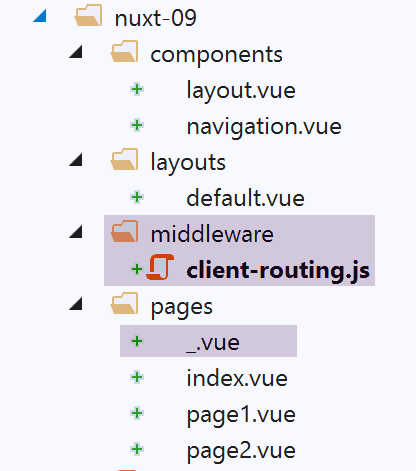
يتم الحصول على المثال [nuxt-09] في البداية عن طريق نسخ المثال [nuxt-01]:
12.1. الصفحة [_.vue]
لقد ذكرنا أن مسارات التطبيق يتم إنشاؤها من محتوى المجلد [pages]. هنا، أضفنا إلى هذا المجلد الصفحة [_.vue]. يتم عرض هذه الصفحة المحددة في كل مرة يتم توجيه التطبيق إلى صفحة غير موجودة. في مثالنا هذا، لا يمكن أن يحدث ذلك بالنسبة للعميل. ولكن يمكن أن يحدث ذلك بالنسبة للخادم إذا طُلب منه، على سبيل المثال، URL [/nuxt-09/abcd]. نظرًا لعدم وجود الصفحة [abcd]، فسيتم عرض الصفحة [_.vue]. وهنا، ستكون كما يلي:
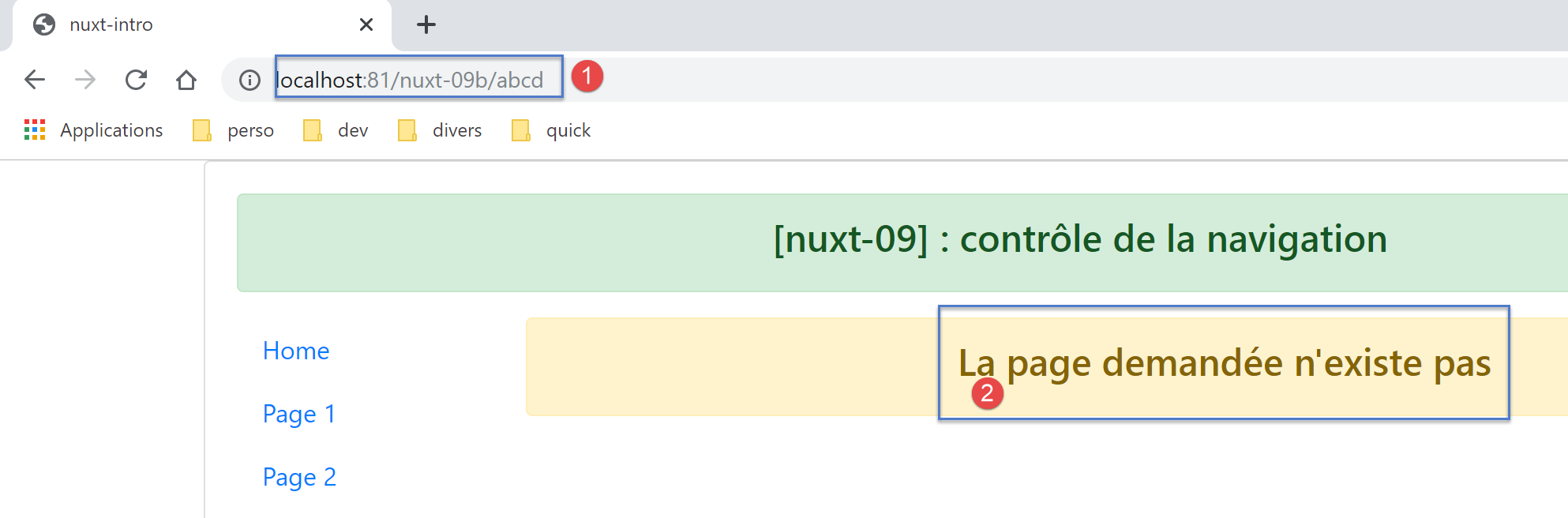
رمز الصفحة [_.vue] هو التالي:
<!-- تعريف HTML للعرض -->
<template>
  <!-- تنسيق الصفحة -->
  <Layout :left="true" :right="true">
    <!-- تنبيه في العمود الأيمن -->
    <template slot="right">
      <!-- رسالة على خلفية صفراء -->
      <b-alert show variant="warning" align="center">
        <h4>La page demandée n'existe pas</h4>
      </b-alert>
    </template>
    <!-- قائمة التنقل في العمود الأيسر -->
    <Navigation slot="left" />
  </Layout>
</template>

<script>
/* eslint-disable no-undef */
/* eslint-disable no-console */
/* eslint-disable nuxt/no-env-in-hooks */

import Layout from '@/components/layout'
import Navigation from '@/components/navigation'

export default {
  name: '404',
  // المكونات المستخدمة
  components: {
    Layout,
    Navigation
  },
  // دورة الحياة
  beforeCreate() {
    // العميل والخادم
    console.log('[404 beforeCreate]')
  },
  created() {
    // العميل والخادم
    console.log('[404 created]')
  },
  beforeMount() {
    // العميل فقط
    console.log('[404 beforeMount]')
  },
  mounted() {
    // العميل فقط
    console.log('[404 mounted]')
  }
}
</script>
12.2. برنامج الوسيط الخاص بالعميل
رمز البرمجيات الوسيطة للعميل [client-routing] هو التالي:
/* eslint-disable no-undef */
/* eslint-disable no-console */
export default function({ route, from, redirect }) {
  // العميل فقط
  if (process.client) {
    console.log('[client-routing]')
    // ترتيب التنقل المطلوب
    const routes = ['index', 'page1', 'page2', 'index']
    // الطريق الحالي
    const current = route.name
    // الطريق السابق
    const previous = from.name
    // نريد تنقلًا دائريًا
    // طرق[i] إلى طرق[i+1]
    for (let i = 0; i < routes.length - 1; i++) {
      if (previous === routes[i] && current !== routes[i + 1]) {
        // نبقى على نفس الصفحة
        redirect({ name: routes[i] })
        return
      }
    }
  }
}
- السطر 3: نعلم أن وظيفة التوجيه لا تتلقى سوى معلمة واحدة، وهي الكائن [context] الخاص بالجهة التي تنفذها، سواء كانت الخادم أو العميل. الترميز [function({ route, from, redirect })]
- مكافئ لـ [function({ route:route, from:from, redirect:redirect })]؛
- مما يجعل { route:route, from:from, redirect:redirect } <-- context ؛
- مما ينتج عنه ثلاثة معلمات [route, from, redirect] على النحو التالي:
- route=context.route؛
- redirect=context.redirect ;
- from=context.from؛
تستخدم وثائق [nuxt] هذه الترميزات بكثرة. يجب معرفتها؛
- السطر 8: جدول بأسماء الصفحات بالترتيب المطلوب للتنقل
- السطر 10: اسم الصفحة المقصودة للتوجيه الحالي؛
- السطر 12: اسم الصفحة السابقة للتوجيه الحالي؛
- السطر 14: كتمرين، لن نسمح إلا بالتنقل الدائري [index --> page1 --> page2 --> index]؛
- الأسطر 15-21: نستعرض الجدول الذي يعطي ترتيب التنقل المطلوب؛
- السطر 16: إذا اكتشفنا أن routes[i] كانت آخر صفحة تم توجيهها، فإن الصفحة التالية يجب أن تكون routes[i+1]؛
- السطور 18-19: إذا لم يكن الأمر كذلك، يتم إعادة توجيه التطبيق إلى routes[i]، أي لا يتم تغيير الصفحة: يتم رفض التنقل؛
12.3. Exécution
يتم تنفيذ المثال باستخدام الملف [nuxt.config.js] التالي:
export default {
  mode: 'universal',
  /*
   ** Headers of the page
   */
  head: {
    title: process.env.npm_package_name || "Introduction à nuxt.js par l'exemple",
    meta: [
      { charset: 'utf-8' },
      { name: 'viewport', content: 'width=device-width, initial-scale=1' },
      { hid: 'description', name: 'description', content: process.env.npm_package_description || '' }
    ],
    link: [{ rel: 'icon', type: 'image/x-icon', href: '/favicon.ico' }]
  },
  /*
   ** Customize the progress-bar color
   */
  loading: { color: '#fff' },
  /*
   ** Global CSS
   */
  css: [],
  /*
   ** Plugins to load before mounting the App
   */
  plugins: [],
  /*
   ** Nuxt.js dev-modules
   */
  buildModules: [
    // الوثيقة: https://github.com/nuxt-community/eslint-module
    '@nuxtjs/eslint-module'
  ],
  /*
   ** Nuxt.js modules
   */
  modules: [
    // الوثيقة: https://bootstrap-vue.js.org
    'bootstrap-vue/nuxt'،
    // الوثيقة: https://axios.nuxtjs.org/usage
    '@nuxtjs/axios'
  ],
  /*
   ** Axios module configuration
   ** See https://axios.nuxtjs.org/options
   */
  axios: {},
  /*
   ** Build configuration
   */
  build: {
    /*
     ** You can extend webpack config here
     */
    extend(config, ctx) {}
  },
  // مجلد شفرة المصدر
  srcDir: 'nuxt-09',
  router: {
    base: '/nuxt-09/',
    middleware: ['client-routing']
  },
  // الخادم
  server: {
    port: 81, // الافتراضي: 3000
    host: 'localhost' // الافتراضي: localhost
  }
}
تحقق من النقاط التالية:
- عندما تكون في الصفحة [Home]، لا يمكنك التنقل إلا إلى الصفحة [Page 1]؛
- عندما تكون في الصفحة [Page 1]، لا يمكنك الانتقال إلا إلى الصفحة [Page 2]؛
- عندما تكون في الصفحة [Page 2]، لا يمكنك الانتقال إلا إلى الصفحة [Home]؛
- عندما تطلب URL غير صحيحة مثل [http://localhost:81/nuxt-09b/abcd]، ستحصل على عرض يشير إلى أن الصفحة المطلوبة غير موجودة؛