6. 文本文件
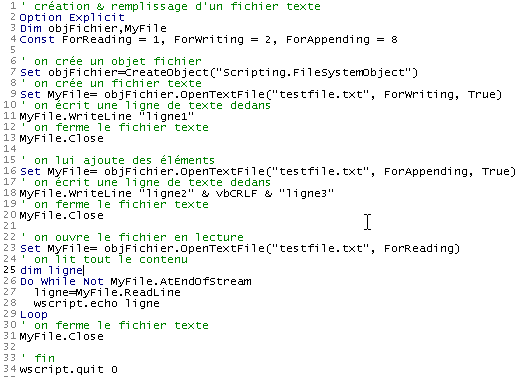
文本文件是包含文本行的文件。让我们通过示例来探讨此类文件的创建与使用。
6.1. 创建与使用
程序 |
 |
结果 |
注释
- 第 7 行通过函数 CreateObject("Scripting.FileSystemObject") 创建了一个类型为 "Scripting.FileSystemObject" 的文件对象。此类对象允许访问系统中的任何文件,而不仅仅是文本文件。
- 第 9 行创建了一个名为“TextStream”的对象。该对象的创建与文件 testfile.txt 的创建相关联。 该文件并非通过 c:\dir1\dir2\....\testfile.txt 这样的绝对路径命名,而是采用 testfile.txt 这种相对路径。因此,它将被创建在执行该文件命令的目录中。
- Windows 文件系统并不区分“文本文件”或“非文本文件”的概念,它只识别“文件”。因此,应由调用该文件的程序来决定将其作为文本文件处理还是不作为文本文件处理。
- 第 9 行创建了一个对象,其中包含用于赋值的命令 set。创建文本文件对象需要创建两个对象:
- 创建 Scripting.FileSystemObject 对象(第 7 行)
- 随后通过 Scripting.FileSystemObject 对象的 OpenTextFile 方法创建“TextStream”对象(文本文件),该方法支持多个参数:
- 待处理文件的名称(必填)
- 文件的使用模式。这是一个整数,有3个可能的值:
- 1:以读取模式使用文件
- 2:以写入模式使用文件。若文件尚未存在,且第三个参数存在且值为true,则创建该文件;否则不创建。若文件已存在,则覆盖原文件。
- 8:追加模式,c.a.d。在文件末尾写入内容。如果文件尚未存在,且第三个参数存在且值为true,则创建该文件;否则不创建。
- 第11行使用已创建的TextStream对象的WriteLine方法写入一行文本。
- 第13行“关闭”文件。此后将无法再对该文件进行读写操作。
- 第16行创建了一个新的“TextStream”对象,用于处理与之前相同的文件,但这次采用“追加”模式。新写入的行将追加到现有行之后。
- 第 18 行写入两行新内容,其中常量 vbCRLF 表示文本文件的换行符。
- 第 20 行再次关闭文件
- 第23行以“读取”模式重新打开文件:我们将读取文件内容。
- 第27行使用对象TextStream的ReadLine方法读取一行文本。当文件刚被“打开”时,光标位于该文件的第一行文本处。 当该行通过 ReadLine 方法读取后,光标将定位到第二行。因此,Readline 方法不仅会读取当前行,还会自动“前进”到下一行。
- 对于所有文本行,必须在循环中反复应用方法 ReadLine。 该方法(第26行)将在对象 TextStream 的属性 AtEndOfStream 取值为 true 时结束。这意味着文件中已无更多行可读取。
6.2. 错误情况
常见两种错误情况:
- 尝试以读取模式打开不存在的文件
- 以写入或追加模式打开不存在的文件,且在调用 OpenTextFile 方法时将第三个参数设为 false。
以下程序演示了如何检测这些错误:
程序
' 创建并填充文本文件
Option Explicit
Dim objFichier,MyFile
Const ForReading = 1, ForWriting = 2, ForAppending = 8
Dim codeErreur

' 创建文件对象
Set objFichier=CreateObject("Scripting.FileSystemObject")

' 以只读方式打开已存在的文本文件
On Error Resume Next
Set MyFile= objFichier.OpenTextFile("abcd", ForReading)
codeErreur=err.number
On Error GoTo 0
If codeErreur<>0 Then
     ' 文件不存在
    wscript.echo "Le fichier [abcd] n'existe pas"
Else
     ' 关闭文本文件
    MyFile.Close
End If


' 以写入模式打开一个必须已存在的文本文件
On Error Resume Next
Set MyFile= objFichier.OpenTextFile("abcd", ForWriting, False)
codeErreur=err.number
On Error GoTo 0
If codeErreur<>0 Then
    wscript.echo "Le fichier [abcd] n'existe pas"
Else
     ' 关闭文本文件
    MyFile.Close
End If

' 以追加模式打开一个应已存在的文本文件
On Error Resume Next
Set MyFile= objFichier.OpenTextFile("abcd", ForAppending, False)
codeErreur=err.number
On Error GoTo 0
If codeErreur<>0 Then
    wscript.echo "Le fichier [abcd] n'existe pas"
Else
     ' 关闭文本文件
    MyFile.Close
End If

' 结束
wscript.quit 0
结果
6.3. 应用程序 IMPOTS 及文本文件
我们继续使用该税款计算应用程序,假设计算税款所需的数据位于名为 data.txt 的文本文件中:
12620 13190 15640 24740 31810 39970 48360 55790 92970 127860 151250 172040 195000 0
0 0,05 0,1 0,15 0,2 0,25 0,3 0,35 0,4 0,45 0,5 0,55 0,6 0,65
0 631 1290,5 2072,5 3309,5 4900 6898,5 9316,5 12106 16754,5 23147,5 30710 39312 49062
这三行分别包含应用程序中限额表 coeffR 和 coeffN 的数据。得益于应用程序的模块化设计,修改主要集中在负责构建这三个表的 getData 过程。新程序如下:
程序
' 计算纳税人的税款
' 调用该程序时需提供三个参数:已婚 子女 工资
' 已婚:已婚用字母 O,未婚用字母 N
' 子女:子女数量
' 工资:年薪(不包含分)

' 变量声明
Option Explicit
Dim erreur

' 通过验证参数有效性来获取参数
Dim marie, enfants, salaire
erreur=getArguments(marie,enfants,salaire)
' 错误?
If erreur(0)<>0 Then wscript.echo erreur(1) : wscript.quit erreur(0)

' 获取计算税款所需的数据
Dim limites, coeffR, coeffN
erreur=getData(limites,coeffR,coeffN)
' 错误?
If erreur(0)<>0 Then wscript.echo erreur(1) : wscript.quit 5

' 显示结果
wscript.echo "impôt=" & calculerImpot(marie,enfants,salaire,limites,coeffR,coeffN)

' 无错误退出
wscript.quit 0

' ------------ 函数与过程

' ----------- getArguments
Function getArguments(byref marie, ByRef enfants, ByRef salaire)
     ' 需从主程序中获取三个作为参数传递的值
     ' 参数在传递给程序时前后不带空格
     ' 将使用正则表达式来验证数据的有效性

     ' 返回一个包含两个值的错误数组变量
     ' error(0):错误代码,无错误时为0
     ' error(1):若发生错误则返回错误信息,否则返回空字符串

    Dim syntaxe
    syntaxe= _
    "Syntaxe : pg marié enfants salaire" & vbCRLF & _
    "marié : caractère O si marié, N si non marié" & vbCRLF & _
    "enfants : nombre d'enfants (entier >=0)" & vbCRLF & _
    "salaire : salaire annuel sans les centimes (entier >=0)"

     ' 检查参数是否为3个
    Dim nbArguments
    nbArguments=wscript.arguments.count
    If nbArguments<>3 Then
         ' 错误消息
        getArguments= array(1,syntaxe & vbCRLF & vbCRLF & "erreur : nombre d'arguments incorrect")
         ' 结束
        Exit Function
    End If

    Dim modele, correspondances
    Set modele=new regexp

     ' 婚姻状况必须包含在字符范围内 oOnN
    modele.pattern="^[oOnN]$"
    Set correspondances=modele.execute(wscript.arguments(0))
    If correspondances.count=0 Then
         ' 错误信息
        getArguments=array(2,syntaxe & vbCRLF & vbCRLF & "erreur : argument marie incorrect")
         ' 退出
        Exit Function
    End If
     ' 获取值
    If lcase(wscript.arguments(0)) = "o"Then
        marie=true
    Else
        marie=false
    End If

     ' 子女数必须是 >=0 的整数
    modele.pattern="^\d{1,2}$"
    Set correspondances=modele.execute(wscript.arguments(1))
    If correspondances.count=0 Then
         ' 错误
        getArguments= array(3,syntaxe & vbCRLF & vbCRLF & "erreur : argument enfants incorrect")
         ' 退出
        Exit Function
    End If
     ' 获取值
    enfants=cint(wscript.arguments(1))

     ' 工资必须是大于等于0的整数
    modele.pattern="^\d{1,9}$"
    Set correspondances=modele.execute(wscript.arguments(2))
    If correspondances.count=0 Then
         ' 错误
        getArguments= array(4,syntaxe & vbCRLF & vbCRLF & "erreur : argument salaire incorrect")
         ' 退出
        Exit Function
    End If
     ' 获取值
    salaire=clng(wscript.arguments(2))

     ' 已正常完成
    getArguments=array(0,"")
End Function

' ----------- getData
Function getData(byref limites, ByRef coeffR, ByRef coeffN)
     ' 三个边界数组的数据,coeffR、coeffN 已存入文本文件
     ' 名为 data.txt。每个数组占用一行,格式为 val1 val2 ... valn
     ' 中依次包含限值 coeffR、coeffN

     ' 返回一个包含 2 个元素的错误数组变体,用于处理可能出现的错误
     ' 错误(0):若无错误则为0,否则为大于0的整数
    ' 错误(1):若发生错误,则返回错误信息

    Dim objFichier,MyFile,codeErreur
    Const ForReading = 1, dataFileName="data.txt"

     ' 创建文件对象
    Set objFichier=CreateObject("Scripting.FileSystemObject")
     ' 以读取模式打开文件 data.txt
    On Error Resume Next
    Set MyFile= objFichier.OpenTextFile(dataFileName, ForReading)
     ' 错误?
    codeErreur=err.number
    On Error GoTo 0
    If codeErreur<>0 Then
         ' 发生错误 - 记录下来
        getData=array(1,"Impossible d'ouvrir le fichier des données [" & dataFileName & "] en lecture")
         ' 输入
        Exit Function
    End If

     ' 现在假设内容正确,且不进行任何验证
     ' 读取这3行

     ' 限制
    Dim ligne, i
    ligne=MyFile.ReadLine
    getDataFromLine ligne,limites

     ' coeffR
    ligne=MyFile.ReadLine
    getDataFromLine ligne,coeffR


     ' coeffN
    ligne=MyFile.ReadLine
    coeffN=split(ligne," ")
    getDataFromLine ligne,coeffN

     ' 关闭文件
    MyFile.close

     ' 已无错误地完成
    getData=array(0,"")
End Function

' ----------- getDataFromLine
Sub getDataFromLine(byref ligne, ByRef tableau)
     ' 将行中的数值放入数组
     ' 这些数值之间用一个或多个空格分隔

     ' 初始时数组为空
    tableau=array()
     ' 定义行模板
    Dim modele, correspondances
    Set modele= New RegExP
    With modele
        .pattern="\d+,\d+|\d+"    ' 140,5 ou 140
        .global=true              ' toutes les valeurs
    End With

     ' 分析该行
    Set correspondances=modele.execute(ligne)
    Dim i
    For i=0 To correspondances.count-1
         ' 调整数组大小
        ReDim Preserve tableau(i)
         ' 为新元素赋值
        tableau(i)=cdbl(correspondances(i).value)
    Next

     '结束
End Sub


' ----------- calculerImpot
Function calculerImpot(byval marie,ByVal enfants,ByVal salaire, ByRef limites, ByRef coeffR, ByRef coeffN)

     ' 计算份额数
    Dim nbParts
    If marie=true Then
        nbParts=(enfants/2)+2
    Else
        nbParts=(enfants/2)+1
    End If
    If enfants>=3 Then nbParts=nbParts+0.5

     ' 计算家庭分额和应税收入
    Dim revenu, qf
    revenu=0.72*salaire
    qf=revenu/nbParts

     ' 计算税额
    Dim i, impot
    i=0
    Do While i<ubound(limites) And qf>limites(i)
        i=i+1
    Loop
    calculerImpot=int(revenu*coeffr(i)-nbParts*coeffn(i))
End Function
注释:
- 在文本文件 data.txt 中,各值之间可能包含一个或多个空格,因此无法使用 split 函数来提取该行的值。最终不得不通过正则表达式来处理
- 函数 getData 除了返回三个边界数组 coeffR、coeffN 之外,还会返回一个结果,用于指示是否发生错误。该结果是一个包含两个元素的数组变量。 第一个元素是错误代码(无错误时为0),第二个元素是发生错误时的错误信息。
- 函数 getData 不会验证在文件 data.txt 中找到的值的有效性。在实际应用中,它应该进行此验证。