5. 函数和过程
5.1. VBScript 的预定义函数
一种语言的丰富性很大程度上源于其函数库,因为这些函数可以封装在对象中,并以方法的形式呈现。从这个角度来看,VBScript 可以说相当有限。
下表列出了 VBScript 中对象之外的函数。我们不会对它们进行详细说明。这些函数的名称通常能反映其用途。读者如需了解特定函数的详细信息,请查阅相关文档。
Abs | 数组 | Asc | Atn |
CBool | CByte | CCur | CDate |
CDbl | Chr | CInt | CLng |
转换 | Cos | CreateObject | CSng |
Date | DateAdd | DateDiff | DatePart |
日期序列 | DateValue | Day | 派生数学 |
Eval | Exp | Filter | 货币格式 |
格式化日期和时间 | 数字格式 | 百分比格式 | GetLocale |
GetObject | GetRef | 十六进制 | Hour |
InputBox | InStr | InStrRev | Int, Fixs |
IsArray | IsDate | IsEmpty | IsNull |
IsNumeric | IsObject | Join | LBound |
LCase | Left | Len | LoadPicture |
Log | LTrim、RTrim 和 Trims | 数学 | Mid |
Minute | 月 | MonthName | MsgBox |
现在 | 10月 | 替换 | RGB |
右 | Rnd | Round | 脚本引擎 |
脚本引擎构建版本 | ScriptEngineMajorVersion | ScriptEngineMinorVersion | 秒 |
设置区域设置 | Sgn | 罪 | 空间 |
分裂 | 平方 | 字符串比较 | 字符串 |
Tan | 时间 | Timer | TimeSerial |
TimeValue | 类型名称 | UBound | UCase |
VarType | 星期 | 星期名称 | 年 |
5.2. 模块化编程
描述一个问题的编程解决方案,即描述计算机能够执行且能够解决该问题的一系列基本操作。根据编程语言的不同,这些基本操作的复杂程度各异。例如:
- 从键盘或磁盘读取数据
- 将数据写入屏幕、打印机、磁盘等
- 计算表达式
- 在文件中进行导航
- ……
描述一个复杂的问题可能需要数千条甚至更多的这类基本指令。因此,人类的大脑很难把握程序的全貌。面对这种难以把握问题整体的困难,我们将问题分解为更容易解决的子问题。考虑以下问题:对通过键盘输入的一组数值列表进行排序,并将排序后的列表显示在屏幕上。
我们最初可以采用以下形式描述解决方案:
  début
        lire les valeurs et les mettre dans un tableau T
        trier le tableau T
        écrire les valeurs triées du tableau T à l'écran
  fin
我们将该问题分解为 3 个子问题,这样更容易解决。算法记法通常比之前的更规范,该算法可写为:
其中 T 代表一个数组。这些操作
是非基本操作,必须通过基本操作来描述。这一过程在所谓的模块中完成。数据 T 被称为模块参数。它是调用程序传递给被调用模块(输入参数)或从被调用模块接收(输出参数)的信息。因此,模块的参数就是调用程序与被调用模块之间交换的信息。
module read_array(T) | 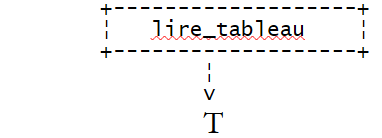 |
模块 sort_array(T) | 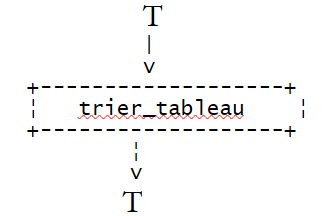 |
模块 read_array(T) | 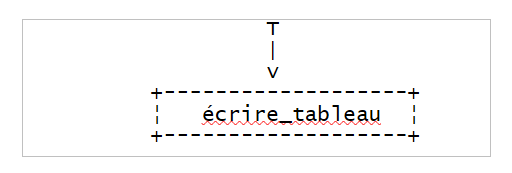 |
read_array(T) 模块可描述如下:
début
    écrire "Tapez la suite de valeurs à trier sous la forme val1 val2 ... : "
    lire valeurs
    construire tableau T à partir de la chaîne valeurs
fin
至此,我们已充分描述了 read_array 模块。事实上,这三个必要操作均可直接转换为 VBScript 代码。最后一个操作需要使用 Split 函数。如果 VBScript 没有这个函数,那么操作 3 则必须进一步分解为在 VBScript 中有直接对应操作的基本操作。
write_array(T) 模块可描述如下:
début
    construire chaîne texte "valeur1,valeur2,...." à partir du tableau T
    écrire texte
fin
write_array(T) 模块可描述如下(假设 T 中元素的索引从 0 开始):
début
      N<-- indice dernier élément du tableau T
      pour IFIN variant de N à 1
      faire
          //on recherche l'indice IMAX du plus gd élément de T
          // IFIN est l'indice du dernier élément de T

          chercher_max(T, IFIN, IMAX)

          // on échange l'élément le plus grand de T avec le dernier élément de T

          échanger (T, IMAX, IFIN)

      finfaire
FIN
在此,算法再次使用了非基本操作:
 . chercher_max(T, IFIN, IMAX)
 . échanger(T, IMAX, IFIN)
find_max(T, IFIN, IMAX) 返回数组 T 中最大元素的索引 IMAX,该数组的最后一个元素索引为 IFIN。
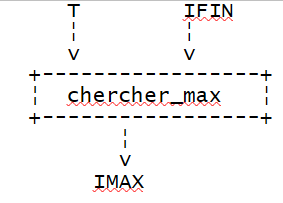 |
swap(T, IMAX, IFIN) 交换数组 T 中索引为 IMAX 和 IFIN 的两个元素。
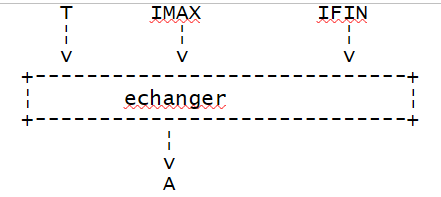 |
因此,我们必须描述这些新的非基本操作。
模块 find_max(A, IFIN, IMAX) | |
交换模块(T IMAX, IFIN) |
已使用基本的VBScript操作对初始问题进行了完整描述,因此现在可以将其转换为该语言。请注意,不同语言的基本操作可能存在差异,因此对问题的分析在某个阶段必须考虑到所使用的编程语言。一种语言中存在的对象在另一种语言中可能不存在,从而改变所使用的算法。因此,如果某种语言具有排序函数,那么在此处不使用它将是荒谬的。
此处应用的原则被称为自顶向下分析。若概述解决方案的框架,则如下所示:
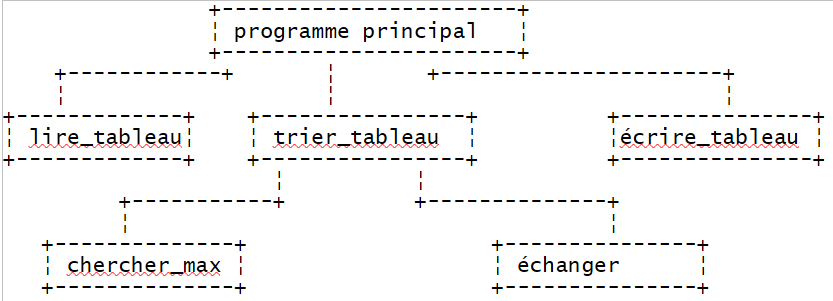 |
我们有一个树形结构。
5.3. VBScript 函数与过程
完成模块化分析后,程序员可以将算法的各个模块转换为 VBScript 函数或过程。函数和过程均可接受输入/输出参数,但函数会返回结果,因此可以在表达式中使用,而过程则不会。
5.3.1. VBScript 函数和过程的声明
VBScript 过程的声明如下
以及函数的定义
要返回结果,函数必须包含一个赋值语句,将结果赋给与函数同名的变量:
functionName=result
函数或过程的执行有两种结束方式:
- 遇到 end function 或 end sub 语句时
- 遇到 exit function 或 exit sub 语句时
对于函数,请注意,在函数通过 end function 或 exit function 结束之前,其结果必须已赋值给一个与该函数同名的变量。
5.3.2. 函数或过程的参数传递模式
在函数或过程的输入输出参数声明中,需指定从调用程序到被调用程序的参数传递模式(byRef、byVal):
sub nomProcédure([Byref/Byval] param1, [Byref/Byval] param2, ...)

function nomFonction([Byref/Byval] param1, [Byref/Byval] param2, ...)
如果未指定 byRef 或 byVal 模式,则使用 byRef 模式。
实际参数,形式参数
考虑一个定义为
在函数或过程定义中使用的参数 paramForm1 称为形式参数。可以通过以下语句从主程序或另一个模块调用上述函数:
在调用函数或过程时使用的参数 paramEffi 称为实际参数。当函数 functionName 开始执行时,形式参数会接收相应实际参数的值。关键字 byRef 和 byVal 决定了这些值的传递方式。
按值传递模式 (byVal)
当形式参数指定此传递模式时,形式参数与实际参数是两个不同的变量。在函数或过程执行之前,实际参数的值会被复制到形式参数中。如果函数或过程在执行过程中修改了形式参数的值,这不会影响相应实际参数的值。这种传递方法非常适合用作函数或过程的输入参数。
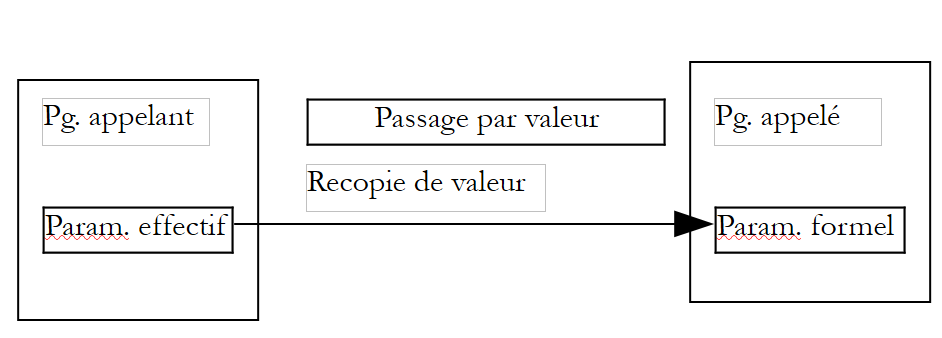 |
按引用传递模式 (byRef)
如果未指定参数传递模式,则此传递模式为默认模式。当形式参数指定此传递模式时,形式参数与相应的实际参数是同一个变量。因此,如果函数修改了形式参数,实际参数也会随之被修改。此传递模式非常适合:
- 输出参数,因为其值必须传递回调用程序
- 复制成本较高的输入参数,例如数组
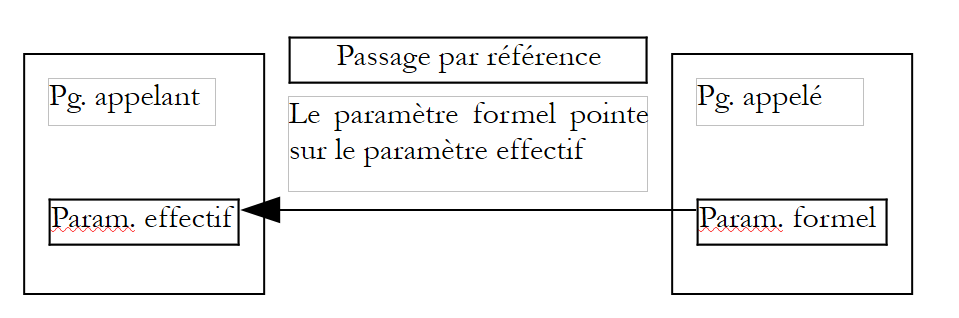 |
以下程序展示了参数传递的示例:
程序
Sub proc1(byval i, ByRef j, k)
  ' i is passed by value (byval) - the effective parameter and the formal parameter are then different
  ' j is passed by value (byref) - the effective parameter and the formal parameter are then identical
  ' the k passage mode is not specified. The default is by reference
  i=i+1
  j=j+1
  k=k+1
  affiche "dans proc1",i,j,k
End Sub

 Sub affiche(byval msg, ByVal i, ByVal j, ByVal k)
  ' displays the values of i and j and k
  wscript.echo msg & " i=" & i & " j=" & j & " k=" & k
End Sub


' ------------- calls to functions and procedures

' init i and j
  i=4:j=5 : k=6

' check
  affiche "dans programme principal, avant l'appel à proc1 :",i,j,k

' call proc1 procedure
  proc1 i,j,k

' check
  affiche "dans programme principal, après l'appel à proc1 :",i,j,k

' end
  wscript.quit 0
结果
dans programme principal, avant l'appel à proc1 : i=4 j=5 k=6
dans proc1 i=5 j=6 k=7
dans programme principal, après l'appel à proc1 : i=4 j=6 k=7
注释
- 在 VBScript 脚本中,函数和过程没有特定的位置。它们可以出现在源代码的任何位置。通常,它们会集中在开头或结尾,而主程序则以连续代码块的形式组织。
5.3.3. 调用函数和过程的语法
设 p 是一个接受形式参数 pf1、pf2、... 的过程
- 对过程 p 的调用形式为
参数周围不加圆括号
- 如果过程 p 不接受参数,可以使用 call p 或 p(),声明时则使用 sub p 或 sub p()
设 f 是一个接受形式参数 pf1、pf2、... 的函数
- 函数 f 的调用形式为
参数周围必须使用圆括号。如果函数 f 不带参数,可以使用 f 或 f() 进行调用,也可以使用 function f 或 function f() 进行声明。
- 调用程序可以忽略函数 f 的返回值。此时,函数 f 被视为一个过程,并遵循调用过程的规则。我们写 f pe1, pe2, ...(不带圆括号)来调用函数 f。
如果函数或过程是对象方法,其规则似乎有所不同且不一致。
- 因此,我们可以写 MyFile.WriteLine "This is a test." 或 MyFile.WriteLine("This is a test.")
- 虽然我们可以写 wscript.echo 4,但不能写 wscript.echo(4)。
我们将遵循以下规则:
- 作为过程使用的函数或过程的参数周围不加圆括号
- 函数的参数需用圆括号括起
5.3.4. 函数的示例
以下是函数定义和使用的几个示例:
程序
 Function plusgrandque(byval i, ByVal j)
  ' returns boolean true if i>j, boolean false otherwise

  ' data verification
  If isnumeric(i) And isnumeric(j) Then
    If i>j Then
      plusgrandque=true
    Else
      plusgrandque=false
    End If
  Else
    wscript.echo "Arguments (" & i & "," & j & ") erronés"
    plusgrandque=false
  End If
  Exit Function
End Function

 Function rendUnTableau(byval n)
  ' makes an array of n elements
  tableau=array()
  ' check validity of parameter n
  If isnumeric(n) And n>=1 Then
    ReDim Preserve tableau(n)
    For i= 0 To n-1
      tableau(i)=i
    Next
  Else
    wscript.echo "Argument [" & n & "] erroné"
  End If
  ' we return the result
  rendUnTableau=tableau
End Function

 Function argumentsVariables(byref arguments)
  ' arguments is an array of numbers whose sum is returned
  somme=0
  For i=0 To ubound(arguments)
    somme=somme+arguments(i)
  Next
  argumentsVariables=somme
End Function

  ' two parameter-free functions declared in 2 different ways
  Function sansParametres1
    sansParametres=4
  End Function

  Function sansParametres2()
    sansParametres=4
  End Function


' ------------- calls to functions and procedures

' calls function plusgrandque
  wscript.echo "plusgrandque(10,6)=" & plusgrandque(10,6)
  wscript.echo "plusgrandque(6,10)=" & plusgrandque(6,10)
  wscript.echo "plusgrandque(6,6)=" & plusgrandque(6,6)
  wscript.echo "plusgrandque(6,'a')=" & plusgrandque(6,"a")

' calls to the rendUnTableau function
  monTableau=rendUnTableau(10)
  For i=0 To ubound(monTableau)
    wscript.echo monTableau(i)
  Next
  monTableau=rendUnTableau(-6)
  For i=0 To ubound(monTableau)
    wscript.echo monTableau(i)
  Next

' calls to the argumentsVariables function
  wscript.echo "somme=" & argumentsVariables(array(-1,2,7,8))
  wscript.echo "somme=" & argumentsVariables(array(-1,10,12))

' function calls without parameters
  res=sansParametres1
  res=sansParametres1()
  sansParametres1
  sansParametres1()

  res=sansParametres2
  res=sansParametres2()
  sansParametres2
  sansParametres2()

' end
  wscript.quit 0
结果
plusgrandque(10,6)=Vrai
plusgrandque(6,10)=Faux
plusgrandque(6,6)=Faux
Arguments (6,a) erronés
plusgrandque(6,'a')=Faux
0
1
2
3
4
5
6
7
8
9

Argument [-6] erroné
somme=16
somme=21
somme=10
注释
- `rendUnTableau` 函数演示了函数可以返回多个结果,而不仅仅是一个。它只需将这些结果放入一个数组变量中,并将该变量作为结果返回即可。
- 反之,argumentsVariables 函数则展示了如何编写一个接受可变数量参数的函数。同样,你只需将参数放入数组变量中,并将该变量作为函数参数传入即可。
5.3.5. 输出参数或函数结果
假设对某个应用程序的分析表明,需要一个具有输入参数 Ei 和输出参数 Sj 的模块 M。请记住,输入参数是调用程序提供给被调用程序的信息,反之,输出参数则是被调用程序提供给调用程序的信息。在 VBScript 中,针对输出参数有几种解决方案:
- 如果只有一个输出参数,可以将其设为函数的结果。这样就不再有输出参数,而仅仅是函数结果。
- 如果有 n 个输出参数,其中一个可以作为函数结果,其余 n-1 个则作为输出参数。或者,也可以不用函数,而使用一个带有 n 个输出参数的过程。还可以使用一个返回数组的函数,该数组包含要返回给调用程序的 n 个值。 请注意,被调用程序通常按值将结果返回给调用程序。当输出参数按引用传递时,可以避免这种复制操作。因此,后一种方案能够节省时间。
5.4. 用于排序值的 VBScript 程序
我们从对通过键盘输入的数值进行排序的算法研究开始,探讨了模块化编程。以下是可用的 VBScript 实现:
程序
' main program
Option Explicit

Dim T        ' the table of values to be sorted

' reading values
T=lire_tableau

' value sorting
trier_tableau T

' display of sorted values
ecrire_tableau T

' end
wscript.quit 0

' ---------- functions & procedures

' -------- lire_tableau
Function lire_tableau
    ' values are requested
    wscript.stdout.write "Tapez les valeurs à trier sous la forme val1 val2  ... valn : "
    ' we read them
    Dim valeurs
    valeurs=wscript.stdin.readLine
    ' we put them in a table
    lire_tableau=split(valeurs," ")
End Function

' -------- ecrire_tableau
Sub ecrire_tableau(byref T)
    ' displays the contents of table T
    wscript.echo join(T," ")
End Sub

' -------- trier_tableau
Sub trier_tableau (byref T)
    ' sorts array T in ascending order

    ' find the imax index of the T[0..ifin] array
    ' to exchange T[imax] with the last element of array T[0..ifin]
    ' then start again with an array with 1 fewer element

    Dim ifin, imax, temp
    For ifin=ubound(T) To 1 Step -1
        ' find the imax index of the T[0..ifin] array
        imax=chercher_max(T,ifin)
        ' we exchange the max with the last element of array T[0..ifin]
        temp=T(ifin):T(ifin)=T(imax):T(imax)=temp
    Next
End Sub

' -------- chercher_max
Function chercher_max(byRef T, ByVal ifin)
    ' find the imax index of the T[0..ifin] array
    Dim i, imax
    imax=0
    For i=1 To ifin
        If cdbl(T(i))>cdbl(T(imax)) Then imax=i
    Next

    ' We return the result
    chercher_max=imax
End Function
结果
注释:
- 初始算法中定义的交换模块在此并未作为 VBScript 模块实现,因为其结构过于简单,无需单独创建模块。
5.5. 模块化形式的TAX程序
我们重新审视该税务计算程序,此次采用模块化形式编写
程序
' calculating a taxpayer's tax liability
' the program must be called with three parameters: married children salary
' married: character Y if married, N if unmarried
' children: number of children
' salary: annual salary without cents

' mandatory variable declaration
Option Explicit
Dim erreur

' retrieve arguments and check their validity
Dim marie, enfants, salaire
erreur=getArguments(marie,enfants,salaire)
' mistake?
If erreur(0)<>0 Then wscript.echo erreur(1) : wscript.quit erreur(0)

' retrieve the data needed to calculate taxes
Dim limites, coeffR, coeffN
getData limites,coeffR,coeffN

' the result is displayed
wscript.echo "impôt=" & calculerImpot(marie,enfants,salaire,limites,coeffR,coeffN)

' leave without error
wscript.quit 0

' ------------ functions and procedures

' ----------- getArguments
Function getArguments(byref marie, ByRef enfants, ByRef salaire)
    ' must retrieve three values passed as arguments to the main program
    ' an argument is passed to the program without spaces in front and behind it
    ' use regular expressions to check data validity

    ' returns an error array variant with 2 values
    ' error(0): error code, 0 if no error
    ' error(1): error message if error otherwise empty string

    Dim syntaxe
    syntaxe= _
    "Syntaxe : pg marié enfants salaire" & vbCRLF & _
    "marié : caractère O si marié, N si non marié" & vbCRLF & _
    "enfants : nombre d'enfants (entier >=0)" & vbCRLF & _
    "salaire : salaire annuel sans les centimes (entier >=0)"

    ' we check that there are 3 arguments
    Dim nbArguments
    nbArguments=wscript.arguments.count
    If nbArguments<>3 Then
        ' error msg
        getArguments= array(1,syntaxe & vbCRLF & vbCRLF & "erreur : nombre d'arguments incorrect")
        ' end
        Exit Function
    End If

    Dim modele, correspondances
    Set modele=new regexp

    ' marital status must be among the characters oOnN
    modele.pattern="^[oOnN]$"
    Set correspondances=modele.execute(wscript.arguments(0))
    If correspondances.count=0 Then
        ' error msg
        getArguments=array(2,syntaxe & vbCRLF & vbCRLF & "erreur : argument marie incorrect")
        ' we leave
        Exit Function
    End If
    ' the value
    If lcase(wscript.arguments(0)) = "o"Then
        marie=true
    Else
        marie=false
    End If

    ' children must be an integer >=0
    modele.pattern="^\d{1,2}$"
    Set correspondances=modele.execute(wscript.arguments(1))
    If correspondances.count=0 Then
        ' error
        getArguments= array(3,syntaxe & vbCRLF & vbCRLF & "erreur : argument enfants incorrect")
        ' we leave
        Exit Function
    End If
    ' the value
    enfants=cint(wscript.arguments(1))

    ' salary must be an integer >=0
    modele.pattern="^\d{1,9}$"
    Set correspondances=modele.execute(wscript.arguments(2))
    If correspondances.count=0 Then
        ' error
        getArguments= array(4,syntaxe & vbCRLF & vbCRLF & "erreur : argument salaire incorrect")
        ' we leave
        Exit Function
    End If
    ' the value
    salaire=clng(wscript.arguments(2))

    ' finished without error
    getArguments=array(0,"")
End Function

' ----------- getData
Sub getData(byref limites, ByRef coeffR, ByRef coeffN)
    ' we define the data needed to calculate the tax in 3 tables
    limites=array(12620,13190,15640,24740,31810,39970,48360, _
    55790,92970,127860,151250,172040,195000,0)
    coeffr=array(0,0.05,0.1,0.15,0.2,0.25,0.3,0.35,0.4,0.45, _
    0.5,0.55,0.6,0.65)
    coeffn=array(0,631,1290.5,2072.5,3309.5,4900,6898.5,9316.5, _
    12106,16754.5,23147.5,30710,39312,49062)
End Sub

' ----------- calculerImpot
Function calculerImpot(byval marie,ByVal enfants,ByVal salaire, ByRef limites, ByRef coeffR, ByRef coeffN)

    ' the number of shares is calculated
    Dim nbParts
    If marie=true Then
        nbParts=(enfants/2)+2
    Else
        nbParts=(enfants/2)+1
    End If
    If enfants>=3 Then nbParts=nbParts+0.5

    ' we calculate the family quotient and taxable income
    Dim revenu, qf
    revenu=0.72*salaire
    qf=revenu/nbParts

    ' tax calculation
    Dim i, impot
    i=0
    Do While i<ubound(limites) And qf>limites(i)
        i=i+1
    Loop
    calculerImpot=int(revenu*coeffr(i)-nbParts*coeffn(i))
End Function
注释
- getArguments 函数用于获取纳税人的信息(配偶、子女、工资)。在此,这些信息作为参数传递给 VBScript 程序。如果情况发生变化——例如,这些参数来自图形用户界面——只需重写 getArguments 过程,其他部分无需修改。
- getArguments 函数能够检测参数中的错误。当发生这种情况时,有人可能会考虑在 getArguments 函数内部使用 wscript.quit 语句来终止程序的执行。但这绝不应该在函数或过程内部进行。如果函数或过程检测到错误,必须以某种方式向调用程序发出信号。是否终止执行应由调用程序决定,而非过程本身。 在本例中,调用程序可能会决定要求用户通过键盘重新输入错误数据,而不是停止执行。
- 在此,getArguments 函数返回一个数组变量,其第一个元素是错误代码(无错误时为 0),第二个元素是发生错误时的错误消息。通过检查返回结果,调用程序可以判断是否发生了错误。
- getData 过程用于获取计算税款所需的数据。在此,这些数据直接在 getData 过程内部定义。如果这些数据来自其他来源(例如文件或数据库),则只需重写 getData 过程,其他过程无需修改。
- `calculerImpot` 函数在获取所有数据后进行税额计算,无论数据通过何种方式获取。
- 因此请注意,模块化编程允许在不同场景中(重复)使用特定模块。过去二十年来,这一概念已在面向对象编程的框架下得到了深入发展。