3. 控制器对表单的处理
现在我们关注当用户点击表单中的 [Envoyer] 按钮时,控制器如何处理表单数据。
3.1. 文件 struts-config.xml
Struts 控制器的新配置文件 struts-config.xml 如下所示:
<?xml version="1.0" encoding="ISO-8859-1" ?>

<!DOCTYPE struts-config PUBLIC
          "-//Apache Software Foundation//DTD Struts Configuration 1.1//EN"
          "http://jakarta.apache.org/struts/dtds/struts-config_1_1.dtd">

<struts-config>
    <form-beans>
        <form-bean
            name="frmPersonne"
            type="istia.st.struts.personne.FormulaireBean"
        />
    </form-beans>

    <action-mappings>
      <action
          path="/main"
          name="frmPersonne"
            scope="session"
            validate="true"
            input="/erreurs.do"
          parameter="/vues/main.html"
          type="org.apache.struts.actions.ForwardAction"
      />
      <action
          path="/erreurs"
          parameter="/vues/erreurs.personne.jsp"
          type="org.apache.struts.actions.ForwardAction"
      />
      <action
          path="/reponse"
          parameter="/vues/reponse.personne.jsp"
          type="org.apache.struts.actions.ForwardAction"
      />
      <action
          path="/formulaire"
          parameter="/vues/formulaire.personne.jsp"
          type="org.apache.struts.actions.ForwardAction"
      />
    </action-mappings>

    <message-resources parameter="ressources.personneressources"/>
</struts-config>
我们已将更改部分标出:
- 出现了一个 <form-beans> 部分。它用于定义应用程序中每个表单关联的类。应用程序中 <form-bean> 标签的数量必须与表单的数量相同。这里我们只有一个表单,因此只有一个 <form-bean> 部分。对于每个表单,我们需要定义:
- 表单名称(name属性)
- 负责存储表单值的、从 ActionForm 派生的类名(type 属性)
这两个属性不能随意设定。它们必须与表单代码 HTML 中 <html:form> 标签所使用的属性完全一致。让我们回顾一下该表单(姓名、年龄)的代码:
表单在文件 struts-config.html 中必须以相同方式声明。此处即为该操作:
- /main 动作的配置已发生变更。该动作负责处理表单中的数据。因此,我们需要在表单中提供其所需的必要信息:
      <action
          path="/main"
          name="frmPersonne"
            scope="session"
            validate="true"
            input="/erreurs.do"
          parameter="/vues/main.html"
          type="org.apache.struts.actions.ForwardAction"
      />
/main Servlet 将处理一个表单,需要为其指定名称。name 属性负责此项工作。该名称必须引用某个 <form-bean> 节中的 name 属性,此处为 frmPersonne。
scope="session" 属性表示表单的值必须存储在会话中。这并非总是必要的,但在本例中是必需的。因为在 /reponse.do 和 /erreurs.do 视图中,存在指向该表单的链接。 在这两种情况下,我们都希望显示包含用户在先前客户端-服务器交互中输入的值的表单。因此,有必要将表单存储在会话中。
validate 属性用于指定是否需要调用 frmPersonne 对象的 validate 方法。该方法用于验证表单数据的有效性。在此,我们指定必须对数据进行验证,这意味着我们需要在 FormulaireBean 类中编写一个 validate 方法。 表单的 validate 方法由 Struts 控制器在调用 /main Servlet 之前调用。它返回一个 ActionErrors 类型的对象,该对象相当于一个错误列表。如果该列表存在且不为空,Struts 控制器将在此处停止,并返回由 input 属性指定的视图。 视图将在请求中接收 ActionErrors 列表,并可通过 <html:errors> 标签将其显示出来。如上所述,若出现错误,/main Servlet 应返回 /erreurs.do 视图。 需要提醒的是,该视图关联了以下视图:URL /vues/erreurs.reponse.jsp:
<%@ taglib uri="/WEB-INF/struts-html.tld" prefix="html" %>

<html>
    <head>
      <title>Personne</title>
  </head>
  <body>
      <h2>Les erreurs suivantes se sont produites</h2>
        <html:errors/>
    <html:link page="/formulaire.do">
            Retour au formulaire
        </html:link>
    </body>
</html>
该视图正确使用了 <html:errors> 标签,该标签将用于显示错误列表。在此错误列表中,我们看到的并非错误消息本身,而是存在于 <message-resources> 标签所引用的文件中的消息标识符(注意:resources 仅有一个 s):
下面的标签表明,应用程序使用的消息文件位于 WEB-INF/classes/ressources/personneressources.properties 文件中:
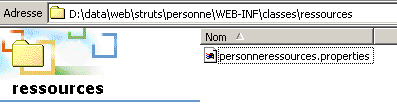
该文件中包含什么内容?这是一个对应于 Java Properties 类的属性文件,即一组键值对:
errors.header=<ul>
errors.footer=</ul>
personne.formulaire.nom.vide=<li>Vous devez indiquer un nom</li>
personne.formulaire.age.incorrect=<li>L'âge [{0}] est incorrect</li>
该消息文件至少有两个功能:
- 它允许在不重新编译应用程序的情况下更改应用程序的消息
- 它支持 Struts 应用程序的国际化。实际上,可以创建多个资源文件,每种语言一个。只要在文件命名上遵守某些规范,Struts 就会自动使用正确的消息文件。
- 如果表单的validate方法返回一个空的错误列表,那么Struts控制器将调用Servlet ForwardAction的execute方法。 这里需要理解的是,当 Servlet 的 execute 方法被调用时,说明表单数据已被视为有效(当然,前提是已通过 validate="true" 进行了验证)。开发人员是在与该 Action 关联的 Servlet 的 execute 方法中实际处理表单的。 这里才是处理的核心所在(应用逻辑、业务类和数据访问类的使用)。最终,该方法返回一个类型为 ActionForward 的结果,该结果指示构建器应向客户端返回哪个视图。 此处我们使用了 Struts 的预定义操作 ForwardAction。其 execute 方法仅返回一个指向由 parameter 属性指定的 URL 的 ActionForward:
      <action
          path="/main"
          name="frmPersonne"
            validate="true"
            input="/erreurs.do"
          parameter="/vues/main.html"
          type="org.apache.struts.actions.ForwardAction"
      />
因此,如果表单数据有效,那么 /main 操作将返回我们之前已经使用过的 /vues/main.html 视图。
3.2. 新类 FormulaireBean
我们已经创建了类 FormulaireBean 的第一个版本,该类负责存储表单 formulaire.personne.jsp 中的数据(姓名、年龄)。该版本并未验证数据的有效性。 现在,我们必须进行数据验证,因为我们在文件 struts-config.xml 中已指定表单数据在传输至 Servlet ForwardAction 之前必须经过验证(validate="true")。该类的代码如下:
package istia.st.struts.personne;

import javax.servlet.http.*;
import org.apache.struts.action.*;

public class FormulaireBean
  extends ActionForm {
   // 姓名
  private String nom = null;
  public String getNom() {
    return nom;
  }

  public void setNom(String nom) {
    this.nom = nom;
  }

   // 年龄
  private String age = null;
  public String getAge() {
    return age;
  }

  public void setAge(String age) {
    this.age = age;
  }

   // 验证
  public ActionErrors validate(ActionMapping mapping, HttpServletRequest request) {
    // 错误处理
    ActionErrors erreurs = new ActionErrors();
     // 姓名字段不能为空
    if (nom == null || nom.trim().equals("")) {
      erreurs.add("nomvide", new ActionError("personne.formulaire.nom.vide"));
       // 年龄必须为正整数
    }
    if (age == null || age.trim().equals("")) {
      erreurs.add("agevide", new ActionError("personne.formulaire.age.vide"));
    }
    else {
      // 年龄必须为正整数
      if (!age.matches("^\\s*\\d+\\s*$")) {
        erreurs.add("ageincorrect", new ActionError("personne.formulaire.age.incorrect", age));
        // 返回错误列表
      }
    } //if
     // 返回错误列表
    return erreurs;
  }
}
新内容在于validate方法的编写。当Struts控制器将表单中同名字段的值赋给该类的name和age属性后,会调用此方法。该方法需验证name和age属性的有效性。上述代码非常容易理解:
- 创建一个空的错误列表(ActionErrors errors)
- 验证“name”字段。若为空,则使用方法 ActionErrors.add("键", ActionError) 将错误添加到错误列表中。
- 如果“age”字段不是整数,则执行同样的操作。
- validate 方法将错误列表(ActionErrors 错误)返回给 Struts 控制器。如果错误为 null 或 erreurs.size() 返回值为 0,则控制器认为没有发生错误。 此时,它将执行与该操作(type="org.apache.struts.actions.ForwardAction")关联的 Action 类的 execute 方法。否则,它将返回与表单中错误情况(input="/erreurs.do")关联的视图。
通过 ActionErrors.add("cléErreur", new ActionError("cléMessage"[,param0, param1, param2, param3]))。 第一个参数“cléErreur”用于在列表 ActionErrors 中唯一标识一个 ActionError 元素,类似于字典中的条目。该参数可以是任意值。 ActionError 是一个对象,通过其构造函数 ActionError 与一条错误消息相关联(String cléMessage[,String param0, String param1, String param2, String param3]),其中 cléMessage 是与该错误关联的消息标识符,并可选地包含多达 4 个参数。 标识符 cléMessage 并非随意生成的。它是文件 struts-config.xml 中 <message-resources> 标签所指向的文件中出现的标识符之一:
需要指出的是,该文件(实际路径为 WEB-INF/classes/resources/personneressources.properties)包含以下键:
errors.header=<ul>
errors.footer=</ul>
personne.formulaire.nom.vide=<li>Vous devez indiquer un nom</li>
personne.formulaire.age.incorrect=<li>L'âge [{0}] est incorrect</li>
可以验证,FormulaireBean 类中 validate 方法所使用的消息键确实存在于上述文件中。 我们为每个错误消息使用了 HTML <li> 标签,以便 <html:errors> 标签将其显示为 HTML 列表。 我们看到,ActionError 对象不仅可以使用消息键构建,还可以使用附加参数:
如果 ActionError 是通过附加参数(最多四个)构建的,则可以通过 {0} 到 {3} 的表示法在消息正文中访问这些参数。 因此,FormulaireBean 的 validate 方法会生成一个 ActionError,其中包含密钥 personne.formulaire.age.incorrect 以及额外参数 param0 的值:
在消息的 .properties 文件中,与键 personne.formulaire.age.incorrect 关联的消息为
{0} 将被年龄的数值替换。 最后,具有键值 errors.header 和 errors.footer 的消息将分别写在错误列表的前后。在此,这两个键值将用于包含 HTML 标签 <ul> 和 </ul>,这些标签必须包围 <li> 标签。
3.3. 表单有效性测试
现在我们可以进行表单有效性测试了。下面再次说明应用程序各组件的放置位置:
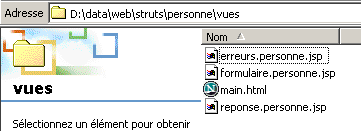 | |
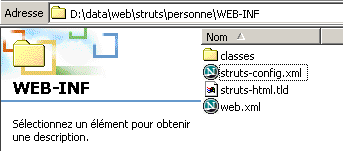 | |
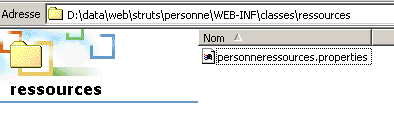 | |
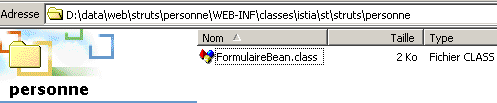 |
3.3.1. 测试 1
重启 Tomcat 使其读取新的配置文件,然后请求 URL http://localhost:8080/strutspersonne/formulaire.do:
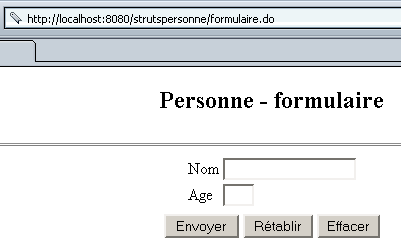
说明:
- 在 struts-config.html 中,利用了以下部分:
      <action
          path="/formulaire"
          parameter="/vues/formulaire.personne.jsp"
          type="org.apache.struts.actions.ForwardAction"
      />
如果我们查看收到的页面中的代码 HTML,可以看到该页面的 <form> 标签如下:
因此,类型为 submit 的按钮 [Envoyer] 将把表单数据发送至 URL /strutspersonne/main.do。
3.3.2. 测试 2
使用按钮 [Envoyer] 并留空所有输入字段。我们得到以下响应:
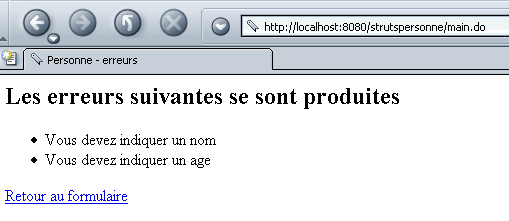
说明:
- 如上所述,表单数据已发送至 URL /strutspersonne/main.do。随后使用了 struts-config.xml 文件中的以下部分:
        <form-bean
            name="frmPersonne"
            type="istia.st.struts.personne.FormulaireBean"
            scope="session"
        />
....
      <action
          path="/main"
          name="frmPersonne"
            validate="true"
            input="/erreurs.do"
          parameter="/vues/main.html"
          type="org.apache.struts.actions.ForwardAction"
      />
已触发 /main 操作。该操作使用表单 frmPersonne(name="frmPersonne")。 因此,Struts 控制器在必要时实例化了一个 FormulaireBean 类的对象(form-bean 标签中的 type="istia.st.struts.personne.FormulaireBean")。 它将该对象的 name 和 age 属性填充了来自表单 HTML 中同名字段的数据:
          <table>
            <tr>
              <td>Nom</td>
            <td><html:text property="nom" size="20"/></td>
          </tr>
          <tr>
              <td>Age</td>
            <td><html:text property="age" size="3"/></td>
          </tr>
            <tr>
        </table>
完成上述操作后,Struts 控制器调用了 FormulaireBean 对象的 validate 方法,因为在配置文件中,/main 操作的 validate 属性被设置为 true:
      <action
          path="/main"
          name="frmPersonne"
            validate="true"
            input="/erreurs.do"
          parameter="/vues/main.html"
          type="org.apache.struts.actions.ForwardAction"
      />
类 FormulaireBean 的 validate 方法如下:
  // 验证
  public ActionErrors validate(ActionMapping mapping, HttpServletRequest request) {
    // 错误处理
    ActionErrors erreurs = new ActionErrors();
     // 名称不能为空
    if (nom == null || nom.trim().equals("")) {
      erreurs.add("nomvide", new ActionError("personne.formulaire.nom.vide"));
       // 年龄必须为正整数
    }
    if (age == null || age.trim().equals("")) {
      erreurs.add("agevide", new ActionError("personne.formulaire.age.vide"));
    }
    else {
      // 年龄必须为正整数
      if (!age.matches("^\\s*\\d+\\s*$")) {
        erreurs.add("ageincorrect", new ActionError("personne.formulaire.age.incorrect", age));
        // 返回错误列表
      }
    } //if
     // 返回错误列表
    return erreurs;
  }
由于字段 [nom] 和 [age] 为空,上述 validate 方法生成了一个包含两个错误的列表,并将其返回给 Struts 控制器。由于存在错误,控制器随后将与 input 属性关联的视图返回给客户端。 为了确定该视图的具体名称,它使用了配置文件中的以下部分:
      <action
          path="/erreurs"
          parameter="/vues/erreurs.personne.jsp"
          type="org.apache.struts.actions.ForwardAction"
      />
因此,他最终发送了视图 /vues/erreurs.personne.jsp。该视图的代码如下:
<%@ taglib uri="/WEB-INF/struts-html.tld" prefix="html" %>

<html>
    <head>
      <title>Personne</title>
  </head>
  <body>
      <h2>Les erreurs suivantes se sont produites</h2>
        <html:errors/>
    <html:link page="/formulaire.do">
            Retour au formulaire
        </html:link>
  </body>
</html>
<html:errors> 标签仅用于显示 Struts 控制器发送给它的错误消息列表。它使用由 <message-resources> 标签指定的消息文件:
其中包含以下键和消息:
personne.formulaire.nom.vide=<li>Vous devez indiquer un nom</li>
personne.formulaire.age.vide=<li>Vous devez indiquer un age</li>
personne.formulaire.age.incorrect=<li>L'âge [{0}] est incorrect</li>
errors.header=<ul>
errors.footer=</ul>
- 与密钥 errors.header 关联的消息已写入
- 写入接收到的 ActionErrors 列表中各密钥关联的消息
- 与密钥 errors.footer 关联的消息已写入
3.3.3. 测试 3
使用错误页面中的链接 [Retour au formulaire]。我们得到以下页面:
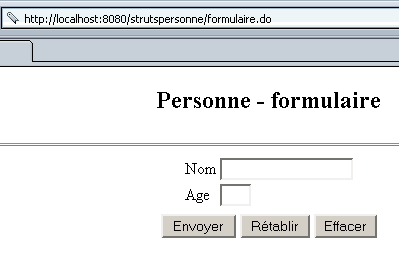
说明:
- 链接 [Retour au formulaire] 具有以下代码 HTML:
Struts 控制器使用了其配置文件中的以下部分:
      <action
          path="/formulaire"
          parameter="/vues/formulaire.personne.jsp"
          type="org.apache.struts.actions.ForwardAction"
      />
因此,它返回了视图 /vues/formulaire.personne.jsp。
3.3.4. 测试 4
我们填写以下表单,然后点击按钮 [Envoyer]:
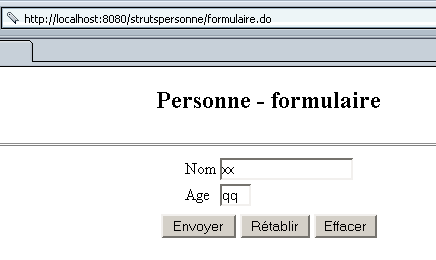
我们得到以下响应:
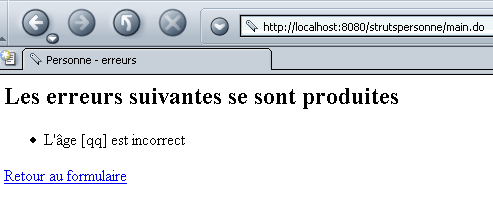
说明:与测试2相同。
3.3.5. 测试5
我们使用上述链接 [Retour au formulaire]。我们得到以下页面:
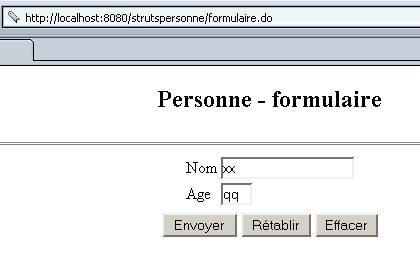
我们发现表单状态与提交时完全一致。
说明:与测试3相同,但补充以下信息:
- 显示的表单 HTML 包含以下标签:
          <table>
            <tr>
              <td>Nom</td>
            <td><html:text property="nom" size="20"/></td>
          </tr>
          <tr>
              <td>Age</td>
            <td><html:text property="age" size="3"/></td>
          </tr>
            <tr>
        </table>
<html:text> 标签具有两项功能:
- 当将表单值从客户端发送至服务器时,表单输入字段的值会被赋给 FormulaireBean 对象中同名的字段
- 当服务器将待显示表单的代码 HTML 发送给客户端时,与 <html:text> 标签关联的输入字段的 value 属性将初始化为 FormulaireBean 对象中同名字段的值。
这里涉及两种不同的客户端-服务器交互:
- 在第一种情况下,用户填写了表单并将其发送至服务器
- 在第二种情况下,用户通过链接 [Retour au formulaire] 返回表单。
要在第二种交互中使表单能以原始值重新显示,唯一的方法是将这些值存入客户端会话中。这正是配置 /main 操作部分所要求的:
      <action
          path="/main"
          name="frmPersonne"
            scope="session"
            validate="true"
            input="/erreurs.do"
          parameter="/vues/main.html"
          type="org.apache.struts.actions.ForwardAction"
      />
如果我们设置了 scope="request",表单数据就不会存储在会话中,那么在第二次交互时我们就无法获取这些值了。
3.3.6. 测试 6
回到表单,这次输入有效数据:
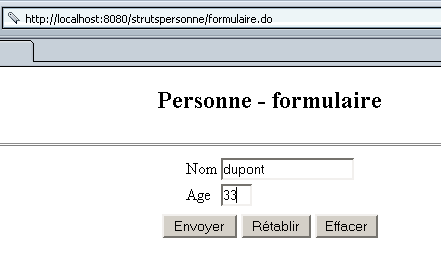
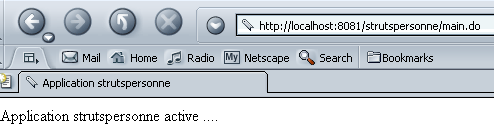
提交表单。我们得到以下结果:
说明:
- 由于按钮 [Envoyer] 将表单值发送至 URL /strutspersonne/main.do, 因此,直到 ActionErrors 结果(来自 FormulaireBean 的 validate 方法)返回至 Struts 控制器为止,其过程与测试 2 中的说明完全一致。但在此处,该列表为空。因此,控制器使用 /main 操作配置中的另一部分:
      <action
          path="/main"
          name="frmPersonne"
            scope="session"
            validate="true"
            input="/erreurs.do"
          parameter="/vues/main.html"
          type="org.apache.struts.actions.ForwardAction"
      />
Struts 控制器会在必要时创建一个由 type 属性指定的类型的对象。该类的 execute 方法将被执行,并应返回一个类型为 ActionForward 的对象,该对象指定了控制器应作为响应发送给客户端的视图。 此处 type 属性指定了预定义类 ForwardAction。 该类的 execute 方法不执行任何操作,仅返回一个指向由 parameter 属性定义的视图(此处为 /vues/main.html)的 ActionForward 对象。这实际上就是控制器返回的视图。
3.3.7. 测试 7
再次请求视图 /formulaire.do:
我们看到了与提交时完全一致的表单。原因已在前文说明。通过配置(scope="session"),我们要求表单保留在会话中。因此,在客户端与服务器的交互过程中,其值得以保留。
我们已接近完成。接下来需要为表单数据有效的情况创建一个真正的操作。目前,我们使用了预定义操作 ForwardAction 以简化演示。
3.4. /main 操作的新配置
我们不修改当前的配置文件 struts-config.xml,仅对其 /main 部分进行如下修改:
      <action
          path="/main"
          name="frmPersonne"
            scope="session"
            validate="true"
            input="/erreurs.do"
          type="istia.st.struts.personne.FormulaireAction"
      >
            <forward name="reponse" path="/reponse.do"/>
        </action>
type 属性现在指向另一个名为 FormulaireAction 的类,我们需要构建该类。如果表单 frmPersonne 的数据有效,则将执行该类的 execute 方法。 我们已说明,execute方法完成了其应有的任务,并返回了一个类型为ActionForward的对象,该对象指定了控制器应返回给客户端的视图。 根据表单处理结果的不同,通常会有多种可能的视图。各种可能视图的列表包含在 <action> 标签内的 <forward> 标签中。此类标签的语法如下:
任意名称,用于唯一标识视图 | |
URL 与该键关联的视图 |
3.5. 类 FormulaireAction
编写类 FormulaireAction 主要就是编写其 execute 方法:
package istia.st.struts.personne;

import org.apache.struts.action.Action;
import org.apache.struts.action.ActionMapping;
import org.apache.struts.action.ActionForm;
import org.apache.struts.action.ActionForward;
import javax.servlet.http.HttpServletRequest;
import javax.servlet.http.HttpServletResponse;
import java.io.IOException;
import javax.servlet.ServletException;

public class FormulaireAction extends Action {

  public ActionForward execute(ActionMapping mapping, ActionForm form,
                               HttpServletRequest request, HttpServletResponse response)
                                         throws IOException,ServletException {

     // 表单有效,否则不会到达此处
    FormulaireBean formulaire=(FormulaireBean)form;
    request.setAttribute("nom",formulaire.getNom());
    request.setAttribute("age",formulaire.getAge());
    return mapping.findForward("reponse");
  }//执行
}
execute 方法接收四个参数:
- ActionMapping 映射:正在执行的操作配置中的“图像”对象,因此这里是以下配置的图像:
      <action
          path="/main"
          name="frmPersonne"
            validate="true"
            input="/erreurs.do"
          type="istia.st.struts.personne.FormulaireAction"
      >
            <forward name="reponse" path="/reponse.do"/>
        </action>
因此,该操作可以访问与视图关联的键,这些键可在操作结束时返回给客户端。执行的方法必须返回其中一个键。
- ActionForm form:包含当前操作所用表单值的 Bean 对象。此处为类型为 FormulaireBean 的对象 frmPersonne。因此,操作可以访问表单的值。
- HttpServletRequest request:客户端的请求,可能已被不同的Servlet进行了扩展。因此,该操作不仅拥有初始请求(request.getParameter)的所有参数,还拥有添加到该初始请求中的所有属性 (request.getAttribute)。在本例中,execute方法通过添加姓名和年龄来丰富请求。这在此处完全没有必要,因为这两个值已经存在,但作为参数而非属性。此处代码仅供示例。
- HttpServletResponse response:将发送给客户端的响应。该操作本可以丰富此响应,但在此处并未进行此操作。
这里属于一种特殊情况。execute 方法几乎无需执行任何操作。它只需指定后续视图为 /reponse.do,并在请求中注明该视图将接收需显示的姓名和年龄信息。 它通过 ActionMapping 类的 findForward 方法实现,该方法接受一个参数,即操作配置中 forward 标签内找到的键之一。此处仅有一个此类标签:
因此,我们的方法执行后会返回一个键名为“reponse”的 ActionForward,以指示应发送视图 /reponse.do。
3.6. FormulaireAction 的测试
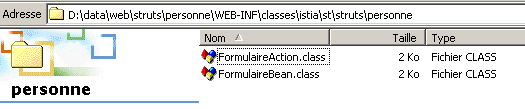
我们使用 JBuilder 编译上述类,并将生成的 .class 文件放置在 WEB-INF/classes 目录下:
我们修改视图 /vues/reponse.personne.jsp:
<%
     // 获取姓名、年龄数据
  String nom=(String)request.getAttribute("nom");
  String age=(String)request.getAttribute("age");
%>

<html>
    <head>
      <title>Personne</title>
  </head>
  <body>
      <h2>Personne - réponse</h2>
    <hr>
    <table>
        <tr>
          <td>Nom</td>
        <td><%= nom %>
      </tr>
        <tr>
          <td>Age</td>
        <td><%= age %>
      </tr>
    </table>
    <html:link page="/formulaire.do">
            Retour au formulaire
        </html:link>
  </body>
</html>
该视图从接收到的请求属性中提取姓名和年龄信息。我们向 URL http://localhost:8080/strutspersonne/formulaire.do 请求表单,然后填写表单:
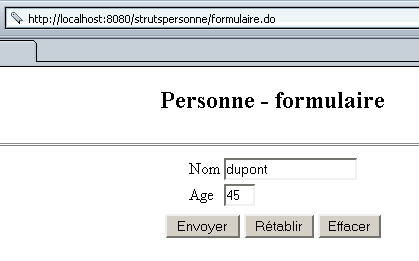
我们点击按钮 [Envoyer],并得到以下响应:
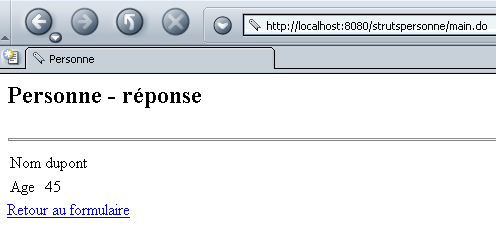
说明:
- 关于流程的开始部分,我们将沿用测试2中的说明。回顾一下/main操作的配置:
      <action
          path="/main"
          name="frmPersonne"
            scope="session"
            validate="true"
            input="/erreurs.do"
          type="istia.st.struts.personne.FormulaireAction"
      >
            <forward name="reponse" path="/reponse.do"/>
        </action>
- 在将表单发送至 URL / main.do 控制器后,该控制器创建或回收了一个类型为 FormulaireBean 的 frmPersonne 对象,并将表单中的值填入其中
- 调用 frmPersonne 对象的 validate 方法。由于数据有效,validate 方法返回了一个空的 ActionErrors 列表。
- 创建或回收了一个 FormulaireAction 对象,并调用了其 execute 方法。该方法返回了一个键为 "reponse" 的 ActionForward 对象。
- 随后控制器发送了与键 reponse 关联的视图 c.a.d。/reponse.do 以及 /vues/reponse.personne.jsp。
- 视图 reponse.personne.jsp 显示了由对象 FormulaireAction 的 execute 方法在请求中设置的值。
3.7. 结论
我们构建了一个完整但简单的应用程序。当实际使用 Struts、Tomcat 和 JBuilder 进行部署时,会出现许多出错的机会,特别是在应用程序的配置文件 XML 中。 乍看之下,不使用Struts,仅通过Servlet和JSP页面构建该应用程序似乎更为简单。对于初学者而言,这可能确实如此。但随着经验的积累,使用Struts进行开发会变得更加简单。许多企业出于以下原因,在其Web开发中强制采用Struts方法论:
- Struts 遵循 MVC 模型
- 当所有开发人员采用统一的工作方式时,由于应用程序具有标准架构,其维护工作将变得更加简单。