8. 创建插件
可以创建称为插件的应用程序,这些插件会在 Struts 应用程序启动时加载,并在其停止时卸载。这通常用于在应用程序启动时进行初始化,并在停止时释放资源。 这些操作也可以通过继承控制器类 ActionServlet 来实现,前面的应用程序中就是这样做的。插件是该解决方案的一种替代方案。插件可以是一个比简单环境初始化更复杂的应用程序。 我们在介绍声明式验证规则概念的课程中已看到过一个示例。插件需在 Struts 的配置文件中进行声明。例如,插件 ValidatorPlugIn 便是在使用它的应用程序的 struts-config.xml 文件中这样声明的:
    <plug-in className="org.apache.struts.validator.ValidatorPlugIn">
        <set-property
        property="pathnames"
      value="/WEB-INF/validator-rules.xml,/WEB-INF/validation.xml"
    />
    </plug-in>
现在,我们将介绍一个使用插件的 Struts 应用程序。
8.1. Struts /plugin1 应用程序的配置
我们计划构建一个配置如下所示的 Struts /plugin1 应用程序:
web.xml
<?xml version="1.0" encoding="ISO-8859-1"?>

<!DOCTYPE web-app
    PUBLIC "-//Sun Microsystems, Inc.//DTD Web Application 2.3//EN"
    "http://java.sun.com/dtd/web-app_2_3.dtd">

<web-app>
    <servlet>
      <servlet-name>action</servlet-name>
    <servlet-class>org.apache.struts.action.ActionServlet</servlet-class>
    <init-param>
        <param-name>config</param-name>
      <param-value>/WEB-INF/struts-config.xml</param-value>
    </init-param>
    <load-on-startup>1</load-on-startup>
  </servlet>
  <servlet-mapping>
      <servlet-name>action</servlet-name>
    <url-pattern>*.do</url-pattern>
  </servlet-mapping>

  <taglib>
      <taglib-uri>/WEB-INF/struts-bean.tld</taglib-uri>
    <taglib-location>/WEB-INF/struts-bean.tld</taglib-location>
  </taglib>
  <taglib>
      <taglib-uri>/WEB-INF/struts-logic.tld</taglib-uri>
    <taglib-location>/WEB-INF/struts-logic.tld</taglib-location>
  </taglib>

</web-app>
我们不会过多讨论这个标准文件。
struts-config.xml
<?xml version="1.0" encoding="ISO-8859-1" ?>

<!DOCTYPE struts-config PUBLIC
          "-//Apache Software Foundation//DTD Struts Configuration 1.1//EN"
          "http://jakarta.apache.org/struts/dtds/struts-config_1_1.dtd">

<struts-config>

    <plug-in className="istia.st.struts.plugins.MyPlugin">
        <set-property property="passwdFileName" value="data/passwd"/>
        <set-property property="groupFileName" value="data/group"/>
    </plug-in>

</struts-config>
我们只引入了一个部分,即插件部分。此处使用的<plug-in>标签属性如下:
插件的类名 | |
允许使用 (键, 值) 对初始化插件 |
本应用旨在演示插件如何获取其初始化参数,并将其提供给共享同一应用上下文的其他对象。我们将调用一个简单的视图 JSP 来显示插件的初始化值,这也解释了为何配置文件中没有任何操作。
8.2. 插件的 Java 类
作为Struts应用程序插件的Java类必须实现org.apache.struts.action.PlugIn接口。该实现需要编写两个方法:
- public void init(ActionServlet servlet, ModuleConfig conf)
- public void destroy()
当 Struts 应用程序加载时,其控制器会实例化 struts-config.xml 文件中声明的所有插件,随后执行每个插件的 init 方法。插件将在该方法中进行初始化。 在此,我们只需读取插件的初始化参数,并将它们放入应用程序上下文中,以便应用程序中的所有其他对象都能使用这些参数。当应用程序即将卸载时,控制器将执行每个已加载插件的 destroy 方法。此时应释放不再需要的资源。在此,我们无需执行任何操作。
该类的代码如下:
package istia.st.struts.plugins;

import javax.servlet.ServletException;
import org.apache.struts.action.ActionServlet;
import org.apache.struts.action.PlugIn;
import org.apache.struts.config.ModuleConfig;
import org.apache.struts.config.PlugInConfig;

public class MyPlugin implements PlugIn {

    // 删除应用程序上下文时调用的方法
    public void destroy() {
    }

     // 在应用程序上下文初始化时调用的方法
    public void init(ActionServlet servlet, ModuleConfig conf)
        throws ServletException {
         // 该对象的类名
        String className=this.getClass().getName();
        // 插件列表
        PlugInConfig[] pluginConfigs = conf.findPlugInConfigs();
         // 遍历插件以查找
         // 名称与该类相同的插件
        boolean trouvé=false;
        for (int i = 0; ! trouvé && i < pluginConfigs.length; i++) {
            // 插件名称
            String pluginClassName=pluginConfigs[i].getClassName();
             // 如果不是正确的插件,则继续
            if(! pluginClassName.equals(className)) continue;
            // 是正确的——将其属性存储在上下文中
            servlet.getServletContext().setAttribute("initialisations",pluginConfigs[i].getProperties());
            trouvé=true;
        }//for i
    } //初始化
} //类
请注意以下几点:
- init 方法接收一个名为 conf 的参数(类型为 ModuleConfig),该参数可访问 struts-config.xml 文件的内容。
- 方法 [ModuleConfig].findPlugInConfigs() 可将 Struts 配置文件中的所有 <plug-in> 部分以 PlugInConfig 对象数组的形式提取出来。
- 类 PluginConfig 表示配置文件中的一个 <plug-in> 部分。 方法 [PlugInConfig].getProperties 允许我们以字典 java.util.Map 的形式访问该部分中的 <set-property> 元素。
- 插件的属性字典被放置在应用程序上下文中。
- 由于可能存在多个插件,我们需要找到目标插件。该插件的名称与正在执行的类名称相同。
在此我们选择将整个字典放入上下文中。我们本可以利用该字典。以下代码片段展示了一种实现方式:
            Map initialisations = pluginConfigs[i].getProperties();
             // 遍历字典中的条目
            Iterator entrées = initialisations.entrySet().iterator();
            while (entrées.hasNext()) {
                 // 获取当前条目(键,值)
                Map.Entry entrée = (Map.Entry) entrées.next();
                String clé = (String) entrée.getKey();
                String valeur = (String) entrée.getValue();
                // 处理 (键,值)
                //...
            }
8.3. 视图代码 infos.jsp
视图 infos.jsp 负责显示已放入应用程序上下文中的插件属性字典的内容。由于视图 infos.jsp 是该上下文的一部分,因此它可以访问该字典。其代码如下:
<%@ taglib uri="/WEB-INF/struts-bean.tld" prefix="bean" %>
<%@ taglib uri="/WEB-INF/struts-logic.tld" prefix="logic" %>

<html>
    <head>
        <title>Plugin</title>
    </head>
    <body>
        <h3>Infos du plugin<br></h3>
        <table border="1">
            <tr>
                <th>Clé</th><th>Valeur</th>
            </tr>
            <logic:iterate id="element" name="initialisations">
                <tr>
                    <td><bean:write name="element" property="key"/></td>
                    <td><bean:write name="element" property="value"/></td>
                </tr>
            </logic:iterate>
        </table>
    </body>
</html>
注意事项:
- 我们使用了 struts-logic 和 struts-bean 标签库
- <logic:iterate> 标签允许我们显示由插件的 init 方法放入上下文中的初始化字典。name 属性指定了需要迭代的对象。该对象应类似于集合、迭代器等。系统会在所有作用域(页面、请求、会话、上下文)中搜索该对象。 在此示例中,该对象将在 context 作用域中被找到。id 参数用于在迭代过程中为集合中的当前元素命名。 在此,在 <logic:iterate> 标签的体内,element 将代表字典中的当前元素。该元素由对象 java.util.Map.Entry 表示,该对象大致相当于字典中的一个 (键, 值) 对。
- 在 <logic:iterate> 标签的正文中,我们通过 (<bean:write>) 显示当前元素 element 的内容。该元素被视为一个具有两个属性(property)的对象:键 key 和值 value。这两个属性都会被显示出来。
8.4. 部署
应用程序的上下文在 Tomcat 的配置文件 server.xml 中定义:
<Context path="/plugin11" reloadable="true" docBase="E:\data\serge\web\struts\plugins\1" />
应用程序的目录结构如下:
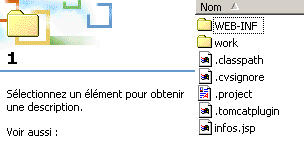 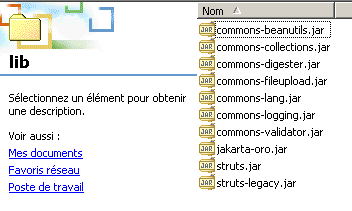 | 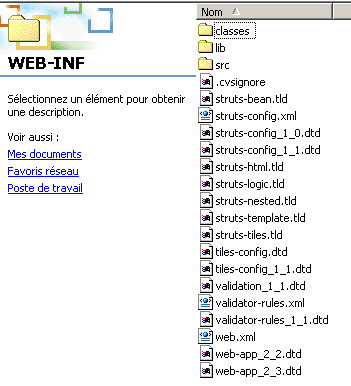 | |
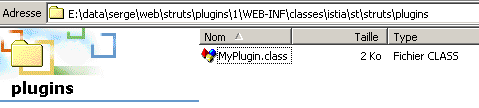 | ||
8.5. 测试
我们启动 Tomcat 并请求 URL http://localhost:8080/plugin1/infos.jsp:
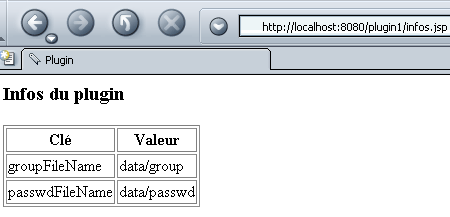
我们发现视图 infos.jsp 确实通过插件访问了存储在应用程序上下文中的信息。
8.6. 结论
我们已经证明,可以通过插件初始化一个 Struts 应用程序。这可以作为一种替代方案,而无需通过继承 ActionServlet 类来完成相同的工作。