2. React 入门
2.1. 示例 01:React 应用的结构
2.1.1. package.json 文件
examples 文件夹中的 [package.json] 文件声明了所用的库和项目命令:
| {
"name": "examples-react",
"private": true,
"version": "1.0.0",
"type": "module",
"scripts": {
"start": "vite --config vite.config.ts",
"build": "vite build --config vite.config.ts",
"check": "tsc --noEmit"
},
"dependencies": {
"@tanstack/react-query": "^5.104.0",
"bootstrap": "^5.3.8",
"i18next": "^26.4.2",
"react": "^19.3.0",
"react-dom": "^19.3.0",
"react-hook-form": "^7.89.0",
"react-i18next": "^17.0.15",
"react-router": "^8.4.0",
"zustand": "^5.0.15"
},
"devDependencies": {
"@types/react": "^19.2.18",
"@types/react-dom": "^19.2.7",
"@vitejs/plugin-react": "^6.1.1",
"typescript": "~6.0.2",
"vite": "^8.3.0"
}
}
|
下面逐段解析这个文件:
- 第 5 行:项目中的 [JavaScript] 文件是 ES 模块 ([import] / [export]),这是当前的语言标准;
- 第 6–10 行:项目命令,通过 [npm run <name>] 启动(对于 [npm start] ,则是 [start] 命令):
- [npm start 05-controlled-fields] 启动 [vite --config vite.config.ts 05-controlled-fields]:示例 05 的开发服务器;
- [npm run build 05-controlled-fields] 启动 [vite build ...]:示例 05 的生产版本,位于 [05-controlled-fields/dist/] 文件夹中;
- [npm run check] 启动 [TypeScript] 编译器([tsc]),它检查所有示例的类型但不生成任何输出([--noEmit]);
- 第 11–21 行:应用 在浏览器中需要的库:[react] (核心:组件、状态、Hook)和 [react-dom] (在网页上显示)、[react-router] (路由器,示例 17 和 18)、[react-hook-form] (示例 08)、[zustand] (示例 20)、[i18next] 和 [react-i18next] (多语言,示例 21)、[@tanstack/react-query] (读取服务器数据,示例 24),以及用于排版的 [Bootstrap] ;
- 第 22–28 行:开发工具:[Vite] ([vite])、它用于 [React] 的插件([@vitejs/plugin-react])、[TypeScript] 编译器,以及 [React] 面向 [TypeScript] 的类型描述([@types/react]、[@types/react-dom])。它们不属于交付给用户的应用。
版本号前缀 [^] ([^19.3.0])允许 [npm] 安装同一主版本(19.x.y)的更新版本;前缀 [~] ([~6.0.2])只允许热修复版本(6.0.x)。
在标准项目中,该文件由 [npm create vite@latest project-name -- --template react-ts] 命令创建,它会生成一个完整的、可直接运行的 [React] 应用。本课程的示例是手工编写的,以便将 25 个示例放在同一个文件夹中。
2.1.2. vite.config.ts 文件
[Vite] 是 [React] 应用推荐使用的构建工具:一个非常快的开发服务器和一个生产编译器。它的配置对所有示例通用:
| // =========================================================================
// vite.config.ts - Vite 的配置,对所有示例通用
// -------------------------------------------------------------------------
// Vite 是 React 的构建工具:一个开发服务器
// (npm start) 和一个生产环境编译器 (npm run build)。每个
// 示例都是一个拥有自己 index.html 页面的文件夹;它的
// 名称会传给 Vite,由 Vite 把它作为应用的根目录(ROOT):
//
// npm start 05-controlled-fields -> vite --config vite.config.ts 05-controlled-fields
// npm run build 05-controlled-fields -> 结果位于 05-controlled-fields/dist/
// =========================================================================
import { defineConfig } from 'vite';
import react from '@vitejs/plugin-react';
export default defineConfig({
// React 插件:支持 JSX 语法和“热”重载(修改
// 代码后页面会更新,且不会丢失已显示的状态)
plugins: [react()],
server: {
port: 5173,
// 代理(PROXY):浏览器发往 /api/... 的任何请求都会被转发
// 给 RdvMedecins JSON 服务器(端口 8080)。它只从
// 示例 22 开始才会用到(参见“与服务器通信”一章)。
proxy: {
'/api': 'http://localhost:8080',
},
},
});
|
- 第 9–10 行(注释):提供给命令的示例名称成为应用的 根目录 ([root]):[Vite] 在其中查找页面 [index.html] 和文件夹 [public/],并把构建结果([dist/])存放在其中;
- 第 19 行:[React] 插件:它编译 JSX 语法(见下文)并启用 热重载:对组件代码的修改会应用到页面而无需重新加载,并尽可能保留已显示的状态;
- 第 21 行:开发服务器的端口;
- 第 25–27 行:代理,从示例 22 开始才会用到:浏览器发往以 [/api] 开头的地址的任何请求都会被转发给 [RdvMedecins] JSON 服务器。稍后我们会再讨论。
2.1.3. tsconfig.json 文件
所有示例通用的 [TypeScript] 配置:
| {
"compilerOptions": {
"target": "ES2023",
"lib": ["ES2023", "DOM", "DOM.Iterable"],
"module": "ESNext",
"moduleResolution": "bundler",
"types": ["vite/client"],
"jsx": "react-jsx",
"strict": true,
"noUnusedLocals": true,
"noUnusedParameters": true,
"noFallthroughCasesInSwitch": true,
"noImplicitReturns": true,
"verbatimModuleSyntax": true,
"erasableSyntaxOnly": true,
"resolveJsonModule": true,
"skipLibCheck": true,
"noEmit": true
},
"include": ["*/src", "common", "vite.config.ts"]
}
|
- 第 3–6 行:现代 [JavaScript] 代码(ES2023)、浏览器定义([DOM]),以及按构建工具的方式解析模块;
- 第 7 行:[Vite] 专有的定义(例如,允许导入样式表,[import './App.css']);
- 第 8 行:接受 JSX 语法并为 [React] 编译它;
- 第 9–13 行:[TypeScript] 的严格模式(严格检查类型,包括 [null] 和 [undefined]),以及额外的检查:未使用的变量或参数会被报告为错误;
- 第 14 行:仅用于类型的导入写作 [import type { ... }] (或 [import { type X }]):这会告诉构建工具,它在生成的 [JavaScript] 文件中不再存在;
- 第 16 行:名为 JSON 的文件可以作为模块导入(示例 21);
- 第 18 行:[tsc] 只检查类型;真正编译代码的是 [Vite] (它只是去掉类型而不做检查:因此才有命令 [npm run check]);
- 第 20 行:被检查的文件:所有示例中的文件。
[VS Code] 编辑器会使用这个配置:组件中的拼写错误(用 [{titl}] 代替 [{title}])在输入时就会被红色波浪线标出。
2.1.4. index.html 页面
每个示例都有自己的 HTML 页面。示例 01 的页面:
| <!doctype html>
<html lang="en">
<head>
<meta charset="utf-8">
<title>Example 01 - a first application</title>
<meta name="viewport" content="width=device-width, initial-scale=1">
</head>
<body>
<!-- React 应用显示在这个元素中(参见 src/main.tsx) -->
<div id="root"></div>
<!-- 入口点:一个 JavaScript 模块,由 Vite 即时编译 -->
<script type="module" src="/src/main.tsx"></script>
</body>
</html>
|
这是浏览器唯一会加载的页面,它几乎是空的:
- 第 10 行:[React] 将在其中显示应用的元素;
- 第 12 行:应用的入口点,一个 [TypeScript] 模块。浏览器并不理解 [TypeScript]:当浏览器请求这个文件及其导入的文件时,由 [Vite] 来编译它们。
这里没有 [<link>] 标签:样式表由代码导入(见 [main.tsx]),并由 [Vite] 自行将它们添加到页面中。
2.1.5. 入口点:main.tsx
| // =========================================================================
// 01-first-application/src/main.tsx - 应用的入口点
// -------------------------------------------------------------------------
// index.html 会加载这个文件。它启动 React 应用:
// 1. createRoot(element):React 接管页面中的 <div id="root">
// 元素;
// 2. root.render(<App />):在其中显示根组件 App。
// 样式表和其他模块一样:用 import 导入。
// =========================================================================
import { StrictMode } from 'react';
import { createRoot } from 'react-dom/client';
import 'bootstrap/dist/css/bootstrap.min.css';
import App from './App';
// “!” 告诉 TypeScript:这个元素是存在的(它在 index.html 中)
createRoot(document.getElementById('root')!).render(
// StrictMode:仅在开发环境中,React 会执行额外的
// 检查(参见示例 13)。它本身不显示任何内容。
<StrictMode>
<App />
</StrictMode>,
);
|
[.tsx] 文件是包含 JSX 的 [TypeScript] 文件。
- 第 12 行:来自 [react-dom] 的函数,用于在网页中启动应用;
- 第 13 行:[Bootstrap] 的样式表:一个不带名称的导入,仅用于将它添加到页面;
- 第 14 行:应用的根组件,即 [App.tsx] 导出的函数;
- 第 17 行:[React] 接管 [<div id="root">] 元素。[document.getElementById('root')] 对 [TypeScript] 来说可能返回 [null]:[!] 断言它存在;
- 第 20–22 行:[render(...)] 在该元素中显示组件 [App] 。[<App />] 属于 JSX:把 [App] 组件当作标签使用。[<StrictMode>] 是 [React] 的一个组件,它本身不显示任何内容,但会在开发期间启用额外的检查(示例 13)。
2.1.6. 根组件:App.tsx 和 App.css
[React] 组件就是一个函数:
| // =========================================================================
// 01-first-application/src/App.tsx - 第一个组件
// -------------------------------------------------------------------------
// React 组件是一个函数,它的名称以大写
// 字母开头,它返回需要显示的内容,用 JSX 编写:即
// 写在 TypeScript 代码中的 HTML。React 调用这个函数来构建
// 页面;每当组件的状态变化时,它会再次调用该函数,并
// 用新的结果更新页面。
// =========================================================================
import { useState } from 'react';
// 样式表,由使用它的组件导入
import './App.css';
// “普通”数据,位于组件之外:它们永远不会改变
const title = 'Welcome to React';
const languages = ['TypeScript', 'HTML', 'CSS'];
export default function App() {
// useState(0):一份状态,初始值为 0。我们得到它的
// 当前值(counter)和修改它的函数(setCounter)。
// 调用 setCounter 会请求 React 再次调用 App 来更新
// 页面。我们自己从不修改页面。
const [counter, setCounter] = useState(0);
const [time, setTime] = useState(() => new Date().toLocaleTimeString());
// 由按钮调用的函数
function increment() {
setCounter((n) => n + 1);
setTime(new Date().toLocaleTimeString());
}
// 返回的 JSX:{ expression } 插入表达式的值;
// className 取代 HTML 属性 class(它是 JavaScript 中的保留字)
return (
<div className="container py-4">
<h1 className="h3">{title}</h1>
<p>This page is built in the browser, by React, from index.html, main.tsx and the App component.</p>
<p>
It is written in {languages.join(', ')} ({languages.length} languages).
</p>
{/* onClick:点击时要调用的函数(参见示例 04) */}
<button className="btn btn-primary" onClick={increment}>
Click me
</button>
<p className="mt-3 counter">
You clicked {counter} times (last click: {time}).
</p>
</div>
);
}
|
- 第 11 行:由 [React] 提供的 Hook [useState];
- 第 13 行:组件的样式表;
- 第 16–17 行:两个普通的数据项,声明在组件 之外:它们永远不会改变;
- 第 19 行:组件:名称以 大写字母 开头的函数(JSX 正是以此区分组件 [<App />] 与 HTML 元素 [<div>])。[export default]:这是模块默认导出的内容,由 [main.tsx] 通过 [import App from './App'] 导入;
- 第 24 行:[useState(0)] 创建一个初始值为 0 的 状态变量。它返回一个包含两个元素的数组,我们将其“解构”:当前值([counter])和修改它的函数([setCounter])。状态由 [React] 保存:它在函数的多次调用之间持续存在;
- 第 25 行:你可以给 [useState] 传入一个用来计算初始值的 函数;它只在页面第一次显示时被调用;
- 第 28–30 行:由按钮调用的函数。它不修改页面,而是改变状态。[setCounter((n) => n + 1)] 根据旧值计算新值。每次调用 函数 [setXxx] 都会指示 [React] 调用 [App];[React] 将新结果与旧结果比较,只更新页面中发生变化的部分;
- 第 35–51 行:返回的 JSX,即需要显示的内容:
- JSX 类似 HTML,但有几处不同:属性 [class] 写作 [className] ([class] 是 [JavaScript] 的保留字),每个标签都必须闭合([<br />]、[<input />]),并且整个结构必须只有一个根元素;
- 第 37 行:[{ expression }] 插入一个 [TypeScript] 表达式的值。它会被转义:如果 [title] 包含 [<b>],则 [<b>] 会原样显示,而不会把它当作标签来解释;
- 第 40 行:表达式可以是任何东西:方法调用、计算;
- 第 43 行:JSX 中的注释写作 [{/* ... */}];
- 第 44 行:点击按钮会调用函数 [increment] (见示例 04)。函数本身 不带 括号地传入:[onClick={increment()}] 会在渲染时立即调用它;
- 第 48 行:状态的当前值。状态改变时,[App] 会再次被调用,这段文字随之改变。
JSX 不等同于 HTML:它是函数调用的一种便捷写法。编译器把 [<h1 className="h3">{title}</h1>] 转换成形如 [jsx('h1', { className: 'h3', children: title })] 的调用,该调用创建一个描述元素的 对象 。因此组件返回的是一棵对象树(“虚拟 DOM”),[React] 会把它与上一棵树比较,以确定要修改实际页面的哪些部分。
及其样式表:
| /* 由 App.tsx 导入的样式表;警告:它作用于整个
page, and not only to the App component (cf. example 10) */
.counter {
font-weight: bold;
color: #087ea4;
}
|
与 [Angular] 或 [Vue.js] 不同,[React] 不会隔离组件的样式:导入的样式表会作用于 整个 页面。示例 10 将演示“CSS 模块”,它把一个类限制在单个组件内。
2.1.7. 运行
在 [examples-react] 文件夹下打开的控制台中:
npm start 01-first-application
控制台显示:
| > examples-react@1.0.0 start
> vite --config vite.config.ts 01-first-application
VITE v8.3.1 ready in 264 ms
➜ Local: http://localhost:5173/
➜ Network: use --host to expose
|
打开 URL http://localhost:5173/,点击按钮三次:
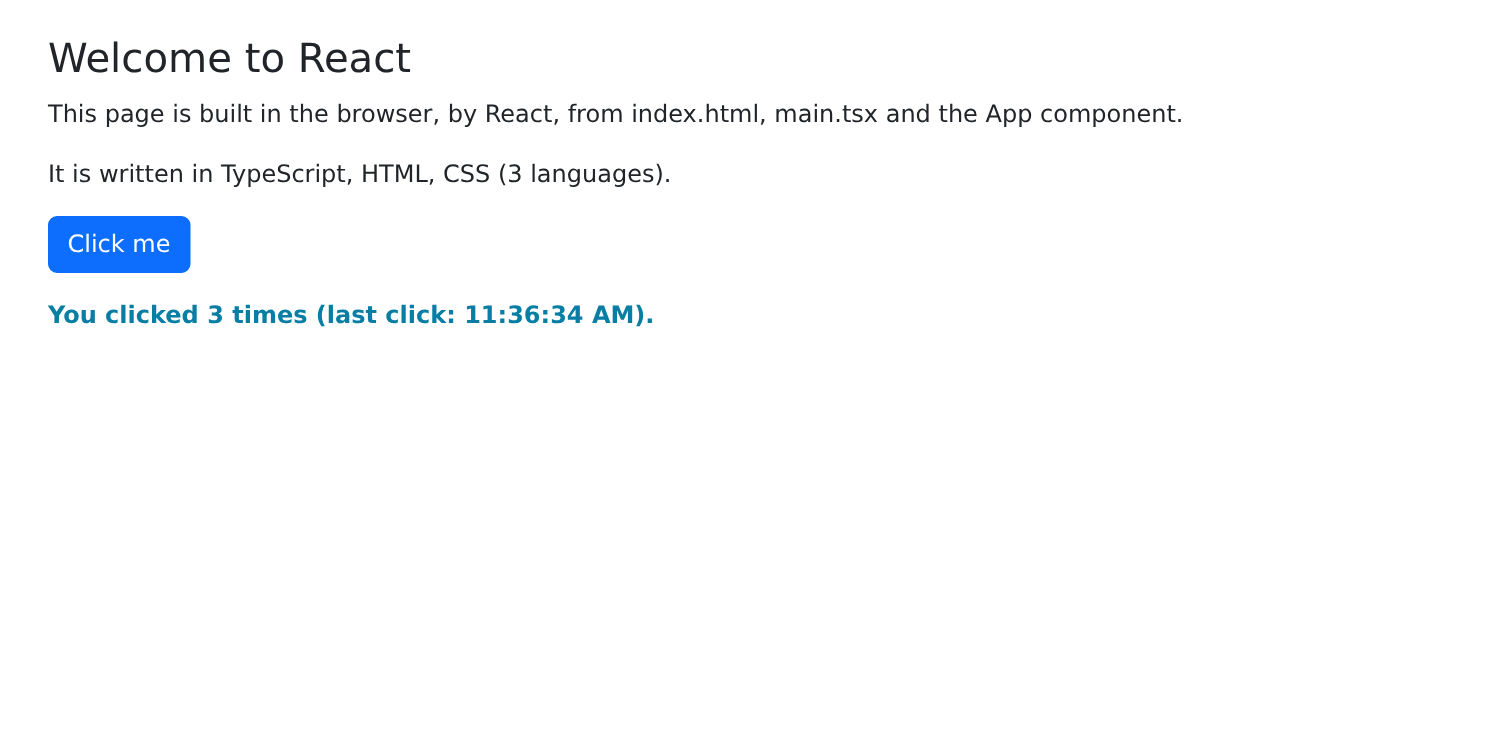
可以尝试两个实验:
- 修改 [App.tsx] 中的标题文字并保存文件:页面会立即更新,无需重新加载,计数器保留它的值。开发服务器会监视文件、重新编译修改并通知浏览器;
- 查看页面的源代码(Ctrl-U):你只会看到几乎为空的 [index.html] 页面。显示出来的 HTML 页面是由 [React] 在浏览器中生成的。要查看它,请使用开发者工具检查器(F12,Elements 选项卡)或 [React Developer Tools] 扩展,后者还会显示组件及其状态。
2.2. 示例 02:状态与计算值
状态是 [React] 的核心。本示例计算一件商品的含增值税价格:
| // =========================================================================
// 02-state/src/App.tsx - 状态、计算值、useEffect
// -------------------------------------------------------------------------
// 一个含增值税价格的小型计算器:
// - useState :一个状态值;修改它(setXxx)会再次调用
// 组件,由组件用新值构建页面;
// - 由状态计算得出的值不是状态:它只是
// 一个简单变量,每次调用组件时都会重新计算;
// - useMemo :效果相同,但只有当依赖项变化时才重新执行
// 计算(适用于开销大的计算);
// - useEffect :在显示之后、某些值变化时执行的代码:
// 即“副作用”(作用于页面之外的事物:
// 这里是标签页的标题)。
// =========================================================================
import { useEffect, useMemo, useState } from 'react';
// 一个按英文习惯格式化欧元金额的格式化器(€1,234.50)
const euros = new Intl.NumberFormat('en-US', { style: 'currency', currency: 'EUR' });
export default function App() {
const [label, setLabel] = useState('Pen');
const [priceExclVat, setPriceExclVat] = useState(2.5);
const [quantity, setQuantity] = useState(1);
const [vatRate, setVatRate] = useState(20); // 单位为 %
// 计算值:简单的常量,每次调用组件时都会重新
// 计算。它们始终是最新的,无需同步
const totalExclVat = quantity * priceExclVat;
const vatAmount = (totalExclVat * vatRate) / 100;
// useMemo(computation, [dependencies]):结果相同,但只有当某个依赖项自上一次调用以来
// 发生变化时,React 才会重新执行计算
const totalInclVat = useMemo(() => totalExclVat + vatAmount, [totalExclVat, vatAmount]);
// 含增值税总额的历史记录:它取决于总额的先后取值。
// 旧的总额保存在状态中;如果它与新的总额不同,
// 就在调用组件的过程中调整状态(React
// 随后会立即重新开始调用,在显示任何内容之前)
const [history, setHistory] = useState<{ id: number; text: string }[]>([]);
const [oldTotal, setOldTotal] = useState(totalInclVat);
if (totalInclVat !== oldTotal) {
setOldTotal(totalInclVat);
const text = `${euros.format(oldTotal)} -> ${euros.format(totalInclVat)}`;
// 每一行都有一个唯一的编号(id)来标识它(参见示例 03 的 key)
setHistory((h) => [{ id: (h[0]?.id ?? 0) + 1, text }, ...h].slice(0, 5));
}
// useEffect(effect, [dependencies]):副作用在第一次显示之后执行,
// 之后每次 totalInclVat 变化的显示之后再执行
useEffect(() => {
document.title = `Incl. VAT: ${euros.format(totalInclVat)}`;
}, [totalInclVat]);
// 更换商品会把数量重置为 1:这在事件处理函数中完成,
// 因为在那里我们知道状态为什么变化
function changeLabel(newValue: string) {
setLabel(newValue);
setQuantity(1);
}
function reset() {
setLabel('Pen');
setPriceExclVat(2.5);
setQuantity(1);
setVatRate(20);
}
return (
<div className="container py-4">
<h1 className="h3 mb-3">Example 02 - state and computed values</h1>
<div className="row g-4">
<div className="col-md-6">
<div className="card p-3">
{/* value + onChange:字段显示状态,每次按键都会修改状态(参见示例 05) */}
<label className="form-label" htmlFor="label">Item</label>
<input id="label" className="form-control mb-2" value={label}
onChange={(e) => changeLabel(e.target.value)} />
<label className="form-label" htmlFor="price">Unit price excl. VAT</label>
{/* valueAsNumber:字段的值,以数字形式给出(如果为空则为 NaN) */}
<input id="price" type="number" step="0.1" min="0" className="form-control mb-2" value={priceExclVat}
onChange={(e) => setPriceExclVat(e.target.valueAsNumber || 0)} />
<label className="form-label" htmlFor="quantity">Quantity (back to 1 if the item changes)</label>
<input id="quantity" type="number" min="0" className="form-control mb-2" value={quantity}
onChange={(e) => setQuantity(e.target.valueAsNumber || 0)} />
<label className="form-label" htmlFor="vat">VAT rate</label>
{/* <select> 的值是字符串:Number(...) 负责转换它 */}
<select id="vat" className="form-select mb-3" value={vatRate}
onChange={(e) => setVatRate(Number(e.target.value))}>
<option value={5.5}>5.5 %</option>
<option value={10}>10 %</option>
<option value={20}>20 %</option>
</select>
<button className="btn btn-outline-secondary" onClick={reset}>Reset</button>
</div>
</div>
<div className="col-md-6">
<div className="card p-3">
<h2 className="h5">{quantity} x {label}</h2>
<table className="table mb-0">
<tbody>
<tr><td>Total excl. VAT</td><td className="text-end">{euros.format(totalExclVat)}</td></tr>
<tr><td>VAT ({vatRate} %)</td><td className="text-end">{euros.format(vatAmount)}</td></tr>
<tr className="fw-bold"><td>Total incl. VAT</td><td className="text-end">{euros.format(totalInclVat)}</td></tr>
</tbody>
</table>
</div>
<div className="card p-3 mt-3">
<h2 className="h6">History of the total incl. VAT</h2>
<ul className="mb-0">
{history.map((line) => (
<li key={line.id}>{line.text}</li>
))}
</ul>
</div>
</div>
</div>
</div>
);
}
|
本示例(以及后面大多数示例)的 [main.tsx] 文件与示例 01 中的相同,只是去掉了注释。只会展示内容不同的 [main.tsx] 文件。
- 第 16 行:所用的 Hook,全部由 [React] 提供;
- 第 19 行:一个英文风格的金额格式化器(€1,234.50),在组件外一次性创建。示例 09 将介绍 API 和 [Intl] 文件;
- 第 22–25 行:四个状态值。它们的类型由初始值推导而来:[useState('Pen')] 是 [string] 类型的状态,而 [useState(2.5)] 是 [number] 类型的状态;
- 第 29–30 行:两个根据状态 计算 得出的值。它们不是状态:它们只是简单的常量,每次调用组件时都会重新计算,因此始终是最新的。这是 [React] 中的一条重要规则:只把无法计算得出的数据存入状态;其他一切都在显示时计算;
- 第 33 行:[useMemo(computation, [dependencies])] 给出相同的结果,但 [React] 会保存该值,仅当依赖项自上一次调用以来有变化时才重新计算。对于加法来说这没有必要;它用于计算开销大的操作(对很长的列表排序……)。我们在这里使用它是为了演示其语法;
- 第 39–45 行:含增值税总额的历史记录取决于总额的 先后 取值,而计算值无法表达这一点。我们把旧的总额存入状态([oldTotal]);如果在显示时它与新的总额不同,我们就在 组件被调用的过程中更新状态。[React] 允许这样做:它会丢弃当前结果,并在显示任何内容之前,立即用新状态再次调用组件。历史记录的每一行都被分配一个唯一编号 [id],它的用途将在示例 03 中说明;
- 第 50–52 行:[useEffect(effect, [dependencies])]:函数 [effect] 在显示 之后 执行:最初执行一次,之后每当某个依赖项(这里是 [totalInclVat])变化时再执行。它用于 副作用:影响组件显示内容之外的事物(这里是浏览器标签页的标题;在其他地方可能是定时器、HTTP 请求);
- 第 56–58 行:更换商品会把数量重置为 1。这是在处理字段变化的函数中完成的,因为在那里我们知道状态 为什么 变化。这是 [React] 推荐的做法:与其用一个“监视”名称的副作用,不如在事件处理函数中执行该操作;
- 第 61–65 行:连续的多次状态修改。[React] 会将它们合并处理:组件只在处理函数结束时被调用一次。
JSX:
- 第 76–77 行:一个 受控字段(见示例 05):[value] 显示状态;[onChange] 在每次按键时通过 [e] 事件被调用;[e.target.value] 是字段中的文本。在 JSX 中,label 的属性 [for] 写作 [htmlFor];
- 第 80–81 行:对于数值字段,[e.target.valueAsNumber] 以数字形式返回值(如果字段为空则为 [NaN] ,因此使用 [|| 0]);
- 第 87–92 行:[<select>] 的值始终是字符串:[Number(...)] 负责转换它;
- 第 110 行:[map] 为历史记录中的每一行生成一个 [<li>] 元素(见示例 03)。
在开发服务器运行时([npm start 02-state]),我们修改商品、价格、数量和税率:
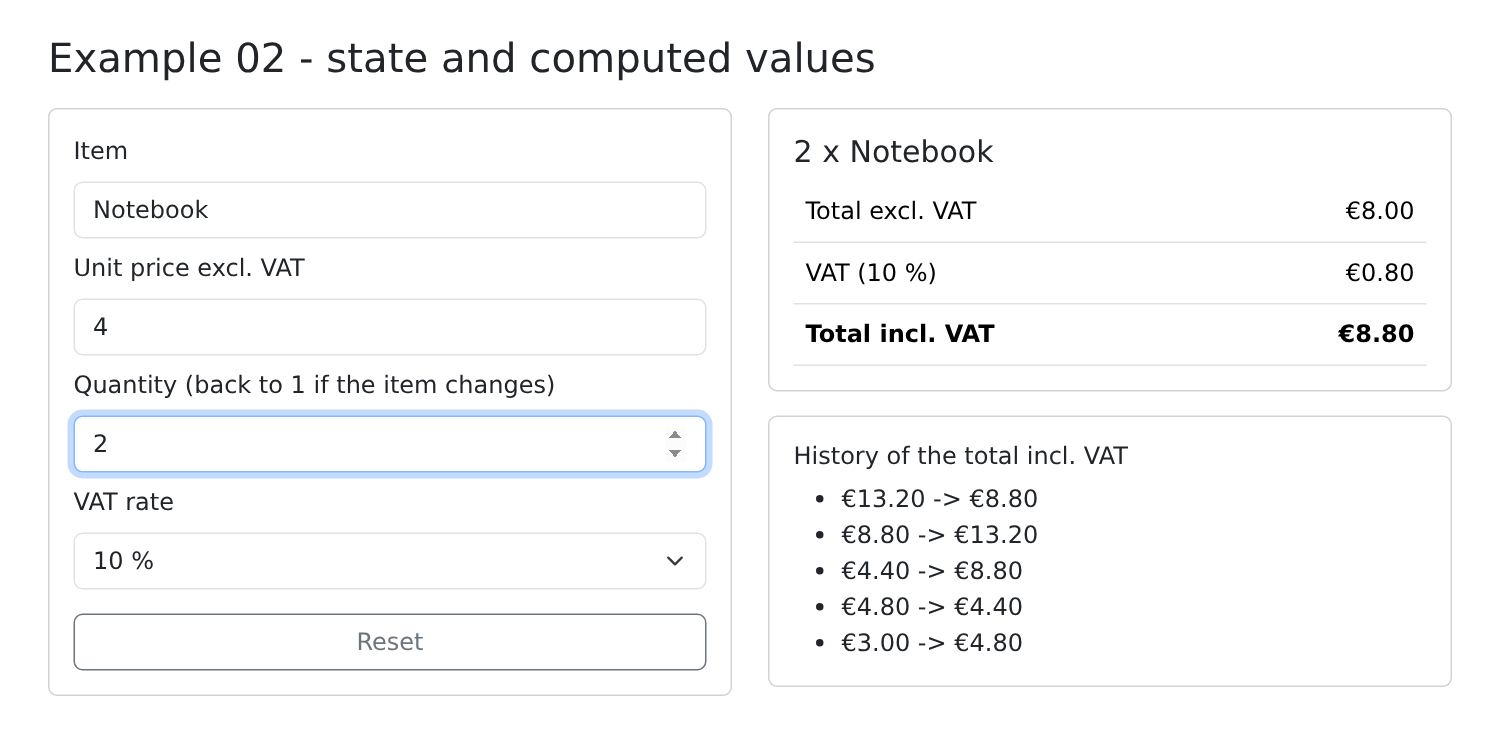
每当含增值税总额发生变化,历史记录中就会增加一行,标签页标题也随之改变。更换商品会把数量重置为 1。
与 [Angular] 和 [Vue.js] 的区别 是根本性的。在这些框架中,数据是 响应式的 (信号、[ref]):框架知道页面的某个部分用到了哪些数据,并且只更新该部分。[React] 采用更简单的做法:每当状态改变,它就 重新执行整个 组件 函数 (以及其子组件的函数),然后将结果与上一次比较。这样代码读起来就像普通函数:计算值是变量,条件就是 [if]。代价是:你必须遵守若干规则(绝不直接修改状态,始终以相同的顺序调用 Hook),并且要考虑副作用及其依赖项。
2.3. 示例 03:JSX 语法
JSX 是写在 [TypeScript] 代码中的 HTML,其中花括号内的一切都是表达式。本示例显示一个可以过滤的医生列表:
| // =========================================================================
// 03-jsx/src/App.tsx - JSX 语法
// -------------------------------------------------------------------------
// JSX 是写在 TypeScript 代码内部的 HTML。每个标签都会变成
// 一次函数调用,花括号之间的一切都是普通的
// TypeScript 表达式:
// - attribute={expression} :属性的值(src、disabled……);
// - className={...} :CSS 类,一个由我们计算的字符串;
// - style={{ prop: value }} :一个 CSS 属性对象(驼峰命名);
// - {condition && <p/>} :只有当条件为真时才存在的
// 元素;
// - {c ? <A/> : <B/>} :二选一;
// - {list.map((x) => <li key={x.id}/>)} :为列表中的每个元素生成一个
// 元素;key 给出每个元素的标识。
// 条件和循环没有特殊语法:就是普通的
// TypeScript。return 之前的一切都是普通代码。
// =========================================================================
import { useState } from 'react';
// 一个 TypeScript 接口描述列表中对象的形状
interface Doctor {
id: number;
title: string;
firstName: string;
lastName: string;
specialty: 'general practitioner' | 'pediatrician' | 'cardiologist';
available: boolean;
}
const DOCTORS: Doctor[] = [
{ id: 1, title: 'Mme', firstName: 'Marie', lastName: 'PELISSIER', specialty: 'general practitioner', available: true },
{ id: 2, title: 'Mr', firstName: 'Paul', lastName: 'TATOU', specialty: 'pediatrician', available: false },
{ id: 3, title: 'Melle', firstName: 'Sophie', lastName: 'DUPONT', specialty: 'cardiologist', available: true },
];
// “根据某个值在多个块中选一个”:在函数中使用 switch
function icon(specialty: Doctor['specialty']) {
switch (specialty) {
case 'pediatrician':
return <span title="children">🧸</span>;
case 'cardiologist':
return <span title="heart">❤️</span>;
default:
return <span title="all patients">🩺</span>;
}
}
export default function App() {
const [doctors] = useState(DOCTORS);
const [filter, setFilter] = useState(''); // 搜索的文本
const [onlyAvailable, setOnlyAvailable] = useState(false);
const [showHelp, setShowHelp] = useState(true);
// 显示的列表:一个普通变量,每次调用时重新计算
const text = filter.trim().toLowerCase();
const displayed = doctors.filter(
(m) => (!onlyAvailable || m.available) && `${m.firstName} ${m.lastName} ${m.specialty}`.toLowerCase().includes(text),
);
// “三个块之一”:它在 return 之前用 if 计算
let content;
if (doctors.length === 0) {
content = <p className="text-muted">No doctor.</p>;
} else if (displayed.length === 0) {
content = <p className="text-warning">No doctor matches "{filter}".</p>;
} else {
content = (
<table className="table">
<thead>
<tr><th>#</th><th>Doctor</th><th>Specialty</th><th>Status</th></tr>
</thead>
<tbody>
{/* 每位医生一行;key:每一行的标识,以便
React knows which row to add, move or remove */}
{displayed.map((m, i) => (
<tr key={m.id} className={m.available ? '' : 'opacity-50'}>
<td>{i + 1}</td>
<td>{m.title} {m.firstName} {m.lastName}</td>
<td>{icon(m.specialty)} {m.specialty}</td>
<td>
{/* 由模板字符串计算出的类字符串 */}
<span className={`badge ${m.available ? 'text-bg-success' : 'text-bg-secondary'}`}>
{m.available ? 'available' : 'unavailable'}
</span>
</td>
</tr>
))}
</tbody>
</table>
);
}
return (
// <> ... </>:“片段”,用于返回多个元素,而
// 无需用额外的 HTML 元素包裹它们
<>
<div className="container py-4">
<h1 className="h3 mb-3">
{/* 图片位于示例的 public/ 文件夹中:按原样提供 */}
<img src="/doctor.svg" alt="logo" width={32} height={32} /> Example 03 - the JSX syntax
</h1>
<div className="d-flex flex-wrap gap-3 align-items-center mb-3">
<input className="form-control w-auto" placeholder="search..." value={filter}
onChange={(e) => setFilter(e.target.value)} />
<label className="form-check-label">
<input type="checkbox" className="form-check-input" checked={onlyAvailable}
onChange={(e) => setOnlyAvailable(e.target.checked)} /> available only
</label>
<button className="btn btn-sm btn-outline-secondary" onClick={() => setShowHelp((a) => !a)}>
{showHelp ? 'Hide help' : 'Show help'}
</button>
</div>
{/* &&:只有当 showHelp 为 true 时,段落才存在 */}
{showHelp && (
<p className="alert alert-info">Type a name or a specialty. Unavailable doctors are greyed out.</p>
)}
{content}
{/* style:一个对象;单独的数字会被理解为像素 */}
<p style={{ fontSize: 12 + displayed.length * 2 }}>
{displayed.length} doctor(s) displayed - the size of this text depends on it.
</p>
</div>
</>
);
}
|
- 第 22–27 行:一个 [TypeScript] 接口描述列表中对象的格式;[specialty] 只能取三个值;
- 第 38–47 行:“根据某个值在多个块中选一个”。JSX 没有为此提供的语法:它就是一个普通函数,用 [switch] 返回 JSX。[Doctor['specialty']] 是属性 [specialty] 的类型。[🧸] 是 HTML 实体(一个表情符号),在 JSX 中是允许的;
- 第 50–53 行:页面状态。只保留 [useState(DOCTORS)] 的值;这里从不修改它;
- 第 56–59 行:显示的列表:一个变量,每次调用组件时重新计算;
- 第 62–68 行:在 [if] 于 [return] 之前选出三种可能内容之一。一段 JSX 和其他值一样:可以存放在变量中;
- 第 76–88 行:列表:[map] 把每位医生转换成一行 [<tr>]。[i] 是医生在列表中的序号;
- 第 77 行:属性 [key] 标识每一行。列表变化时,[React] 借助它来确定要添加、移动或删除哪一行,而不是重建整个列表。key 在列表元素中必须唯一,并且 稳定 (前后两次显示保持一致):应使用标识符,而不是序号。[React] 会在控制台中提示列表没有 key;
- 第 77 行:CSS 类是一个经过计算的字符串,这里使用的是 [? :] 运算符;
- 第 80 行:由 [icon] 函数返回的 JSX;
- 第 83 行:模板字符串([
badge ${...}])构建类列表:[badge] 和一个计算得出的类。
[return]:
- 第 97 行:片段([<>...</>])允许返回多个元素,而无需用额外的 HTML 元素包裹它们(这里只有一个元素——仅作示例);
- 第 101 行:图片位于示例的 [public/] 文件夹中:[Vite] 按原样在网站根路径提供它。[width={32}]:一个放在花括号中的数值;
- 第 105–106 行:搜索字段,它是受控的;对于复选框,读写的是 [checked];
- 第 111 行:直接写在属性中的“箭头”函数:它切换状态;
- 第 117–119 行:[condition && <p>...</p>]:只有当条件为真时,段落才 存在(如果为假,对于 [React] [false]、[null] 或 [undefined],不显示任何内容)。要当心这个陷阱:[{list.length && <p/>}] 在列表为空时会显示“0”;应改写为 [list.length > 0 && ...];
- 第 121 行:上面选出的内容;
- 第 124 行:属性 [style] 接收一个 对象 (因此是双花括号:外层是表达式,内层是对象),其 CSS 属性采用“驼峰命名法”([fontSize] 对应 [font-size])。单独的数字会被解释为像素。
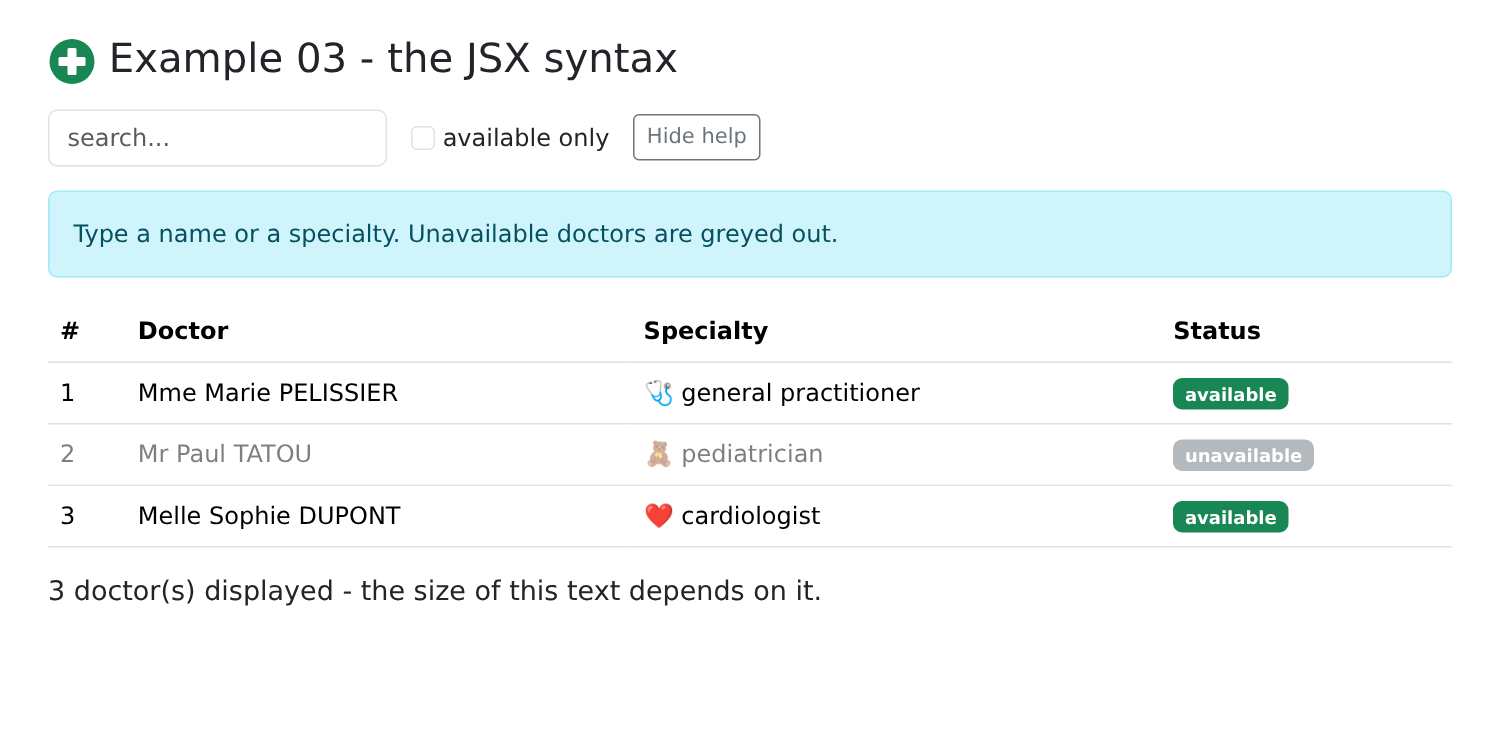
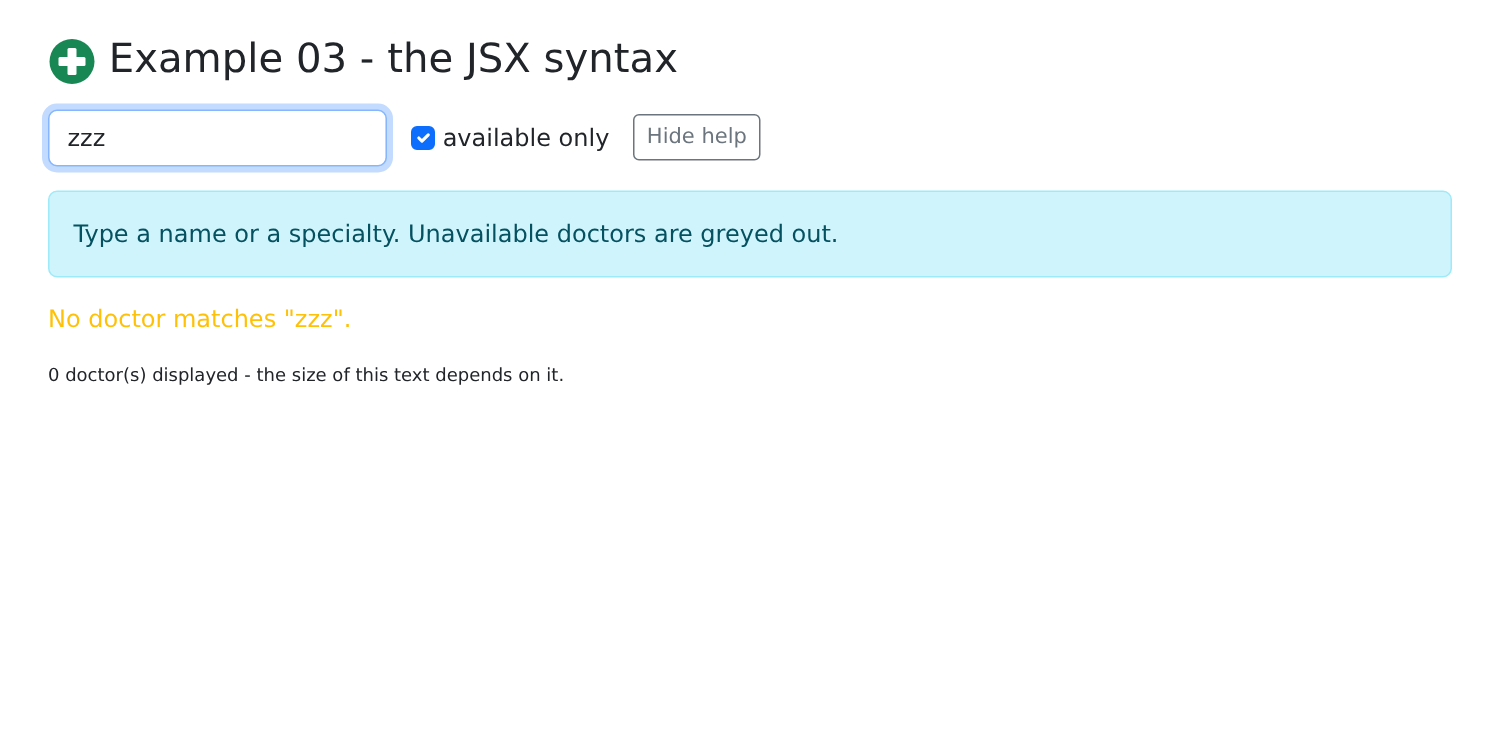
输入“gen”并勾选“仅显示可预约”,然后输入“zzz”:
2.4. 示例 04:事件
| // =========================================================================
// 04-events/src/App.tsx - 响应用户的操作
// -------------------------------------------------------------------------
// onEvent={function}:当元素触发
// 该事件时,调用这个函数:
// - onClick={f} 调用 f(event);
// - onClick={() => remove(t)} 一个箭头函数,用来传入自己的
// 参数;
// - 收到的事件是 React 的“合成事件”,它与浏览器的事件具有
// 相同的接口(preventDefault()、
// target、key……);event.nativeEvent 给出原始事件;
// - useRef:对 HTML 元素的引用(ref={field}),用于读取或
// 操作元素本身(field.current.value、.focus()……)。
// 这里输入字段没有状态:我们自己读取它。
// =========================================================================
import { useRef, useState, type FormEvent, type KeyboardEvent, type MouseEvent } from 'react';
interface Task {
id: number;
label: string;
done: boolean;
}
// 可点击区域的样式:一个对象,与 style 属性一样
const areaStyle = { background: '#e7f5ff', height: 80, cursor: 'crosshair' };
export default function App() {
const [tasks, setTasks] = useState<Task[]>([
{ id: 1, label: 'Install Node.js', done: true },
{ id: 2, label: 'Read the chapter on events', done: false },
]);
const [log, setLog] = useState<string[]>([]);
// 对新任务的 <input> 的引用(在它显示之前为 null)
const field = useRef<HTMLInputElement>(null);
// 引用还可以保存不用于显示的值:修改
// 它不会再次调用组件
const nextId = useRef(3);
function trace(message: string) {
setLog((j) => [`${new Date().toLocaleTimeString()} ${message}`, ...j]);
}
// onSubmit:在字段中按回车或点击按钮。preventDefault()
// 阻止浏览器发送表单(并重新加载页面)
function add(event: FormEvent<HTMLFormElement>) {
event.preventDefault();
const input = field.current!;
const label = input.value.trim();
if (label === '') {
return;
}
// 包含数组的状态:它被一个新数组替换
// (旧数组从不被修改:否则 React 看不到变化)
setTasks((t) => [...t, { id: nextId.current++, label, done: false }]);
trace(`added "${label}"`);
input.value = '';
input.focus();
}
// 按键:event.key 给出它的名称
function onKeyDown(event: KeyboardEvent<HTMLInputElement>) {
if (event.key === 'Escape') {
event.currentTarget.value = '';
}
}
function toggle(task: Task, done: boolean) {
setTasks((t) => t.map((x) => (x.id === task.id ? { ...x, done } : x)));
trace(`"${task.label}": ${done ? 'done' : 'to do'}`);
}
function remove(task: Task) {
setTasks((t) => t.filter((x) => x.id !== task.id));
trace(`removed "${task.label}"`);
}
// 原始事件(nativeEvent)包含相对于该区域的坐标
function position(event: MouseEvent<HTMLDivElement>) {
trace(`click at (${event.nativeEvent.offsetX}, ${event.nativeEvent.offsetY})`);
}
return (
<div className="container py-4">
<h1 className="h3 mb-3">Example 04 - events</h1>
<form className="d-flex gap-2 mb-3" onSubmit={add}>
<input ref={field} className="form-control" placeholder="new task (Esc to clear)" onKeyDown={onKeyDown} />
<button type="submit" className="btn btn-primary">Add</button>
</form>
<ul className="list-group mb-3">
{tasks.map((t) => (
<li key={t.id} className="list-group-item d-flex align-items-center gap-2">
{/* e.target:本行的复选框;checked:它的状态 */}
<input type="checkbox" className="form-check-input" checked={t.done}
onChange={(e) => toggle(t, e.target.checked)} />
<span className={`flex-grow-1 ${t.done ? 'text-decoration-line-through text-muted' : ''}`}>{t.label}</span>
{/* 箭头函数:以本行的任务作为参数 */}
<button className="btn btn-sm btn-outline-danger" onClick={() => remove(t)}>Delete</button>
</li>
))}
</ul>
<div className="p-3 mb-3 rounded" style={areaStyle} onClick={position}>Click in this area</div>
<h2 className="h6">Log</h2>
<ul className="small">
{log.map((line, i) => (
// key:从最先添加的那一行开始计数的行序号(它
// 的 key 始终是 1):当其他行出现在列表顶部时,
// 每一行都保持同一个 key
<li key={log.length - i}>{line}</li>
))}
</ul>
</div>
);
}
|
- 第 17 行:[FormEvent]、[KeyboardEvent]、[MouseEvent] 是 [React] 事件类型(因此有术语 [type]);
- 第 26 行:可点击区域的样式,一个对象;
- 第 35 行:[useRef] 创建一个 引用:一个 [{ current: ... }] 对象,[React] 会在两次显示之间保留它。把它赋给元素的 [ref] 属性(第 88 行)后,它在元素显示出来之后指向 HTML 元素本身:[field.current.value], [field.current.focus()]……;
- 第 38 行:引用还可以保存任何 不用于显示 的值。修改它([nextId.current++])不会重新渲染组件,这与状态不同;
- 第 46–59 行:由表单的 [onSubmit] 事件调用,在字段中按回车键或点击 [submit] 按钮时触发:
- 第 47 行:阻止浏览器把表单提交给服务器(那会重新加载页面);
- 第 48 行:[<input>] 元素;[!] 确认它存在(它已被显示);
- 第 55 行:一个包含数组的状态:它 被替换 为一个新数组([[...t, newTask]]:即 [t] 的各元素,后面跟上新任务)。我们绝不修改状态本身([t.push(...)]):[React] 会比较新旧值;如果是同一个数组,它就认为什么都没有改变,也就不显示任何更新;
- 第 57–58 行:清空字段并把焦点还给它,直接作用于 HTML 元素;
- 第 62–66 行:[event.key] 返回按键的名称。[currentTarget] 是持有该处理函数的元素(此处为该字段);
- 第 69 行:修改数组元素:生成一个新数组,其中相应元素被替换为修改后的副本([{ ...x, done }]);
- 第 74 行:删除一个元素:生成一个不含该元素的新数组;
- 第 79–81 行:[React] 的事件是“合成”事件,其接口与浏览器的事件相同;[nativeEvent] 提供原始事件,这里包含相对于该区域的点击坐标([offsetX])。
JSX:
- 第 87 行:表单的处理函数;
- 第 88 行:引用以及按键处理函数。这个字段是非受控的(没有 [value]):浏览器管理它的值,需要时再读取;
- 第 96–97 行:就地编写处理函数:一个箭头函数,用本行的任务调用 [toggle];
- 第 100 行:同样的原理:[onClick={remove(t)}] 会调用 [remove] 并且在显示期间立即执行;
- 第 113 行:日志行的 key。
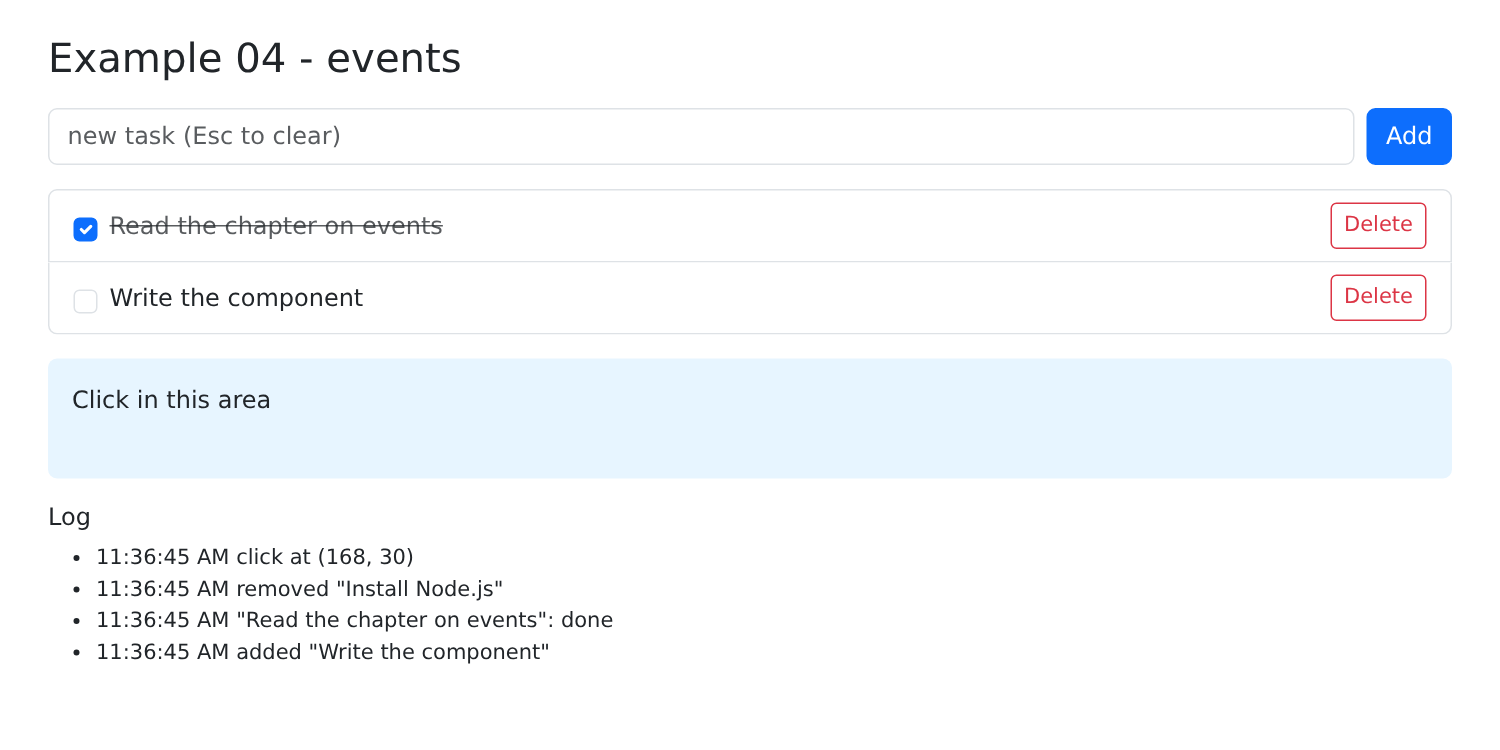
添加一个任务,勾选第二个,删除第一个,然后点击字段:
2.5. 示例 05:受控字段
一个包含所有类型字段、并与状态相关联的表单:
| // =========================================================================
// 05-controlled-fields/src/App.tsx - 所有字段类型,“受控”
// -------------------------------------------------------------------------
// 受控字段显示状态中的一个值(value={...}),并在每次变化时通知
// 组件(onChange={...}),由组件更新
// 状态。状态是唯一的数据来源:在字段中输入会修改
// 状态,而(通过代码)修改状态也会修改字段。
// 这就是“双向”绑定,只不过是手工编写的。事件中读取
// 什么取决于字段:
// - 文本输入框、textarea -> e.target.value(字符串)
// - input type="number" -> e.target.valueAsNumber(为空时为 NaN)
// - checkbox -> e.target.checked(布尔值)
// - 单选按钮 -> 所选按钮的 e.target.value
// - select -> e.target.value
// - select multiple -> e.target.selectedOptions(多个)
// - input type="date" -> e.target.value,格式为 "yyyy-MM-dd"
// 与 NestJS 课程的示例 18 是同一个表单;但这里没有
// 服务器:一切都在浏览器中进行。
// =========================================================================
import { useState, type FormEvent } from 'react';
const TITLES = ['Mr', 'Mme', 'Melle'];
const HOBBIES = ['sport', 'music', 'reading', 'cinema'];
const COUNTRIES = [
{ code: 'fr', label: 'France' },
{ code: 'be', label: 'Belgium' },
{ code: 'ch', label: 'Switzerland' },
];
export default function App() {
// 表单的每个字段对应一个状态
const [title, setTitle] = useState('Mme');
const [name, setName] = useState('');
const [age, setAge] = useState<number | null>(30);
const [presentation, setPresentation] = useState('');
const [newsletter, setNewsletter] = useState(false);
const [hobbies, setHobbies] = useState<string[]>(['reading']);
const [country, setCountry] = useState('fr');
const [languages, setLanguages] = useState<string[]>([]);
const [birthDate, setBirthDate] = useState('');
const [sent, setSent] = useState<string | null>(null);
// 所有的值,汇集成一个对象(即将发送给服务器的内容)
const model = { title, name: name.trim(), age, presentation, newsletter, hobbies, country, languages, birthDate };
// 多个复选框对应同一个数组:值被添加或移除
function toggleHobby(hobby: string, checked: boolean) {
setHobbies((l) => (checked ? [...l, hobby] : l.filter((x) => x !== hobby)));
}
function send(event: FormEvent<HTMLFormElement>) {
event.preventDefault(); // 不发送给服务器,不重新加载页面
setSent(JSON.stringify(model));
}
return (
<div className="container py-4">
<h1 className="h3 mb-3">Example 05 - controlled fields</h1>
<div className="row g-4">
<form className="col-md-7" onSubmit={send}>
<div className="mb-3">
<span className="form-label d-block">Title</span>
{/* 单选按钮:共用同一个状态;checked 指明哪一个被选中 */}
{TITLES.map((t) => (
<div key={t} className="form-check form-check-inline">
<input type="radio" className="form-check-input" name="title" id={`title-${t}`} value={t}
checked={title === t} onChange={(e) => setTitle(e.target.value)} />
<label className="form-check-label" htmlFor={`title-${t}`}>{t}</label>
</div>
))}
</div>
<div className="row g-3 mb-3">
<div className="col-8">
<label className="form-label" htmlFor="name">Name</label>
<input id="name" className="form-control" value={name} onChange={(e) => setName(e.target.value)} />
</div>
<div className="col-4">
<label className="form-label" htmlFor="age">Age</label>
{/* 空字段得到 NaN:状态中存放 null,字段中存放 '' */}
<input id="age" type="number" className="form-control" value={age ?? ''}
onChange={(e) => setAge(Number.isNaN(e.target.valueAsNumber) ? null : e.target.valueAsNumber)} />
</div>
</div>
<div className="mb-3">
<label className="form-label" htmlFor="presentation">About you (updated when leaving the field)</label>
{/* 非受控字段:defaultValue 是它的初始值,之后
the browser manages it alone; onBlur only notifies on leaving */}
<textarea id="presentation" rows={2} className="form-control" defaultValue={presentation}
onBlur={(e) => setPresentation(e.target.value)} />
</div>
<div className="mb-3 form-check">
{/* 单个复选框:true / false */}
<input id="newsletter" type="checkbox" className="form-check-input" checked={newsletter}
onChange={(e) => setNewsletter(e.target.checked)} />
<label htmlFor="newsletter" className="form-check-label">Receive the newsletter</label>
</div>
<div className="mb-3">
<span className="form-label d-block">Hobbies</span>
{HOBBIES.map((l) => (
<div key={l} className="form-check form-check-inline">
<input type="checkbox" className="form-check-input" id={`hobby-${l}`} checked={hobbies.includes(l)}
onChange={(e) => toggleHobby(l, e.target.checked)} />
<label className="form-check-label" htmlFor={`hobby-${l}`}>{l}</label>
</div>
))}
</div>
<div className="row g-3 mb-3">
<div className="col-6">
<label className="form-label" htmlFor="country">Country</label>
{/* value 写在 <select> 上(而不是把 selected 写在 <option> 上) */}
<select id="country" className="form-select" value={country} onChange={(e) => setCountry(e.target.value)}>
{COUNTRIES.map((p) => (
<option key={p.code} value={p.code}>{p.label}</option>
))}
</select>
</div>
<div className="col-6">
<label className="form-label" htmlFor="languages">Spoken languages</label>
{/* multiple:value 是一个数组;selectedOptions 是被选中的选项 */}
<select id="languages" multiple size={3} className="form-select" value={languages}
onChange={(e) => setLanguages([...e.target.selectedOptions].map((o) => o.value))}>
<option value="fr">French</option>
<option value="en">English</option>
<option value="es">Spanish</option>
</select>
</div>
</div>
<div className="mb-3">
<label className="form-label" htmlFor="birthDate">Date of birth</label>
<input id="birthDate" type="date" className="form-control w-auto" value={birthDate}
onChange={(e) => setBirthDate(e.target.value)} />
</div>
<button type="submit" className="btn btn-primary">Send</button>
</form>
<div className="col-md-5">
<h2 className="h6">The model, live</h2>
{/* JSON.stringify(object, null, 2):JSON,缩进 2 个空格 */}
<pre className="bg-light p-2 rounded small">{JSON.stringify(model, null, 2)}</pre>
{sent !== null && (
<>
<h2 className="h6">Last sending</h2>
<pre className="bg-success-subtle p-2 rounded small text-wrap">{sent}</pre>
</>
)}
</div>
</div>
</div>
);
}
|
原理(第 4–6 行):受控字段显示来自状态的值([value={...}]),并在值有任何变化时通知组件([onChange={...}]),再由组件更新状态。状态是唯一的数据来源:字段只显示状态所说的内容。如果 [onChange] 处理函数不更新状态,字段就不会接受用户的输入。
- 第 33–41 行:每个字段对应一个状态;
- 第 45 行:所有值合并成一个对象——也就是将发送给服务器的内容。这是一个计算值;[name.trim()] 去掉首尾空格;
- 第 48–50 行:多个复选框对应同一个数组:值被添加或移除;
- 第 52–55 行:提交表单而不重新加载页面。
JSX,逐个字段:
- 第 65–68 行:单选按钮:它们共用同一个状态;[checked] 指明哪一个被选中。[key={t}]:每个按钮的 key;
- 第 76 行:文本字段;
- 第 81–82 行:数值字段:空字段得到 [NaN];此时我们在状态中保存 [null] 并显示 ['']([age ?? '']:若 [age] 等于 [null] 或 [undefined],则取 ['']);
- 第 89–90 行:非受控字段:[defaultValue] 是它的初始值,之后由浏览器自行处理;[onBlur] 在离开字段时通知组件。因此状态只在离开字段时才更新;
- 第 94 行:单个复选框:[checked] 和 [e.target.checked];
- 第 100–103 行:兴趣爱好复选框;
- 第 112 行:列表:[value] 用在 [<select>] 上,而不是把 [selected] 用在 [<option>] 上;
- 第 121–122 行:多选列表:[value] 是一个 数组;[e.target.selectedOptions] 提供被选中的选项,它们被转换成值的数组([[...list]] 把集合转换成数组);
- 第 131 行:日期,形式为 [yyyy-MM-dd] 字符串;
- 第 140 行:模板,JSON 格式,缩进 2 个空格。
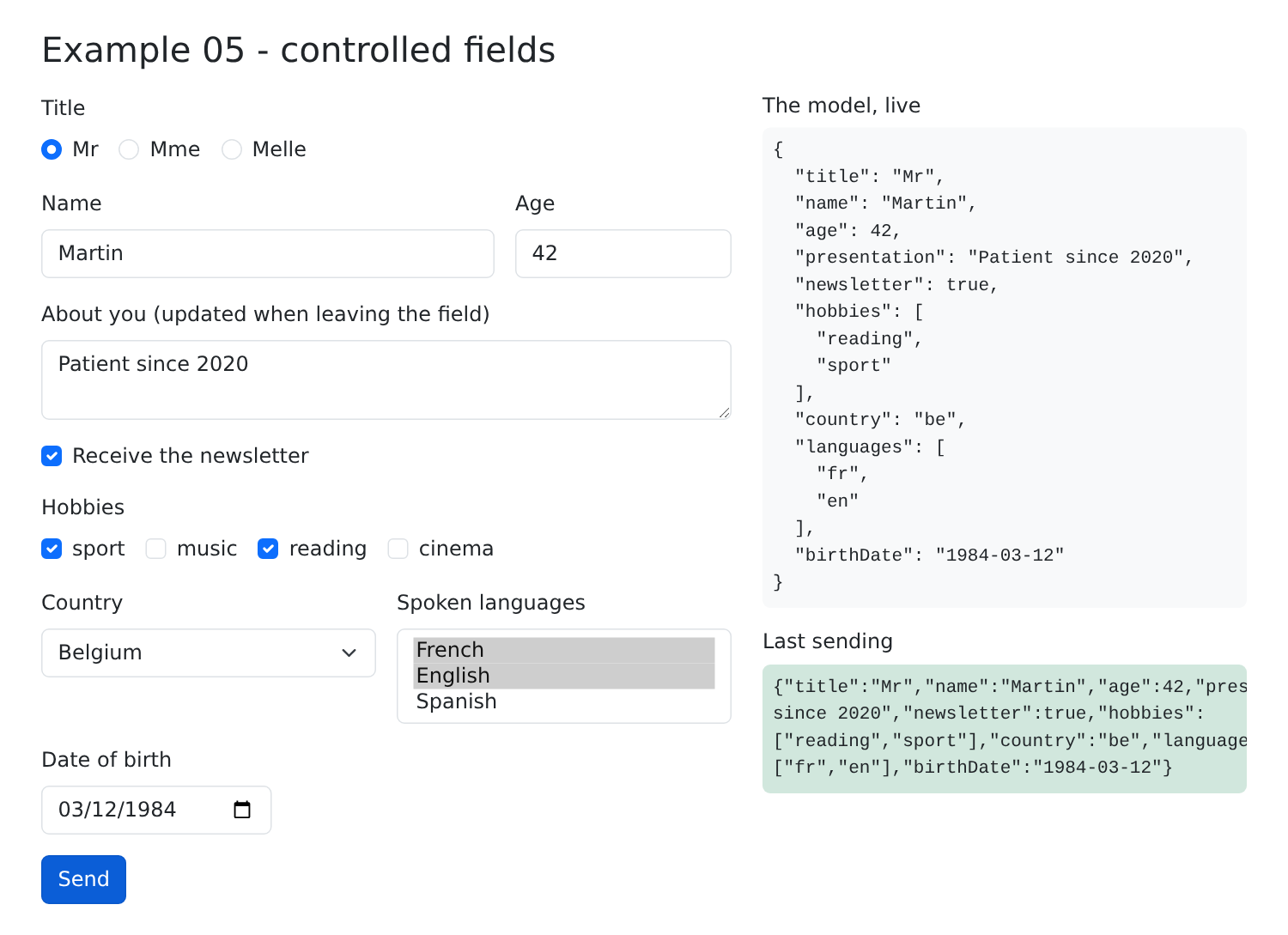
在每个字段中都写 [value] 和 [onChange] 是重复劳动:这是 [React] 追求简洁所付出的代价,它没有相当于 [v-model] (对于 [Vue.js] )或 [[(ngModel)]] (对于 [Angular])的机制。后面的示例展示了如何减少这种重复:使用单个状态对象(示例 06)、使用生成字段属性的函数(示例 06 和 07),以及使用一个库(示例 08)。
2.6. 示例 06:表单、对象与 reducer
| // =========================================================================
// 06-use-reducer/src/App.tsx - 表单、对象与 reducer
// -------------------------------------------------------------------------
// 示例 05 为每个字段使用一个 useState。对于真正的表单,我们
// 更倾向于用一个包含所有值的对象,即模型(MODEL),并且
// 在一个函数,即 reducer(REDUCER)中描述它的变化:
//
// reducer(currentState, action) -> newState
//
// useReducer(reducer, initialState) 返回状态和一个函数
// dispatch(action):组件不再修改状态,而是描述
// 发生了什么({ type: 'edit', field: 'lastName', value: 'Dupont' }),由
// reducer 据此推导出新状态。所有逻辑集中在一处,
// 而且它是一个纯函数(相同输入,相同输出,没有副
// 作用),易于测试。
//
// 状态还会为每个字段记录它是否被“访问过”(至少离开过
// 一次);由此推导出它是否“已修改”(它的值与
// 初始值不同)以及它是否被禁用。
// =========================================================================
import { useReducer, type ChangeEvent } from 'react';
// 表单数据的形状
interface Profile {
title: string;
firstName: string;
lastName: string;
age: number;
newsletter: boolean;
email: string;
country: string;
birthDate: string;
presentation: string;
}
const INITIAL: Profile = {
title: 'Mme',
firstName: 'Marie',
lastName: 'PELISSIER',
age: 30,
newsletter: false,
email: '',
country: 'fr',
birthDate: '',
presentation: '',
};
type Field = keyof Profile; // 'title' | 'firstName' | ...:字段的名称
interface State {
values: Profile;
touched: Partial<Record<Field, boolean>>; // 已经离开过的字段
}
// 可能的 action:按 type 属性区分的“可辨识联合类型”
type Action =
| { type: 'edit'; field: Field; value: Profile[Field] }
| { type: 'leave'; field: Field }
| { type: 'uppercase' }
| { type: 'reset' };
// reducer:它绝不修改收到的状态,而是返回一个新的状态
function reducer(state: State, action: Action): State {
switch (action.type) {
case 'edit':
return { ...state, values: { ...state.values, [action.field]: action.value } };
case 'leave':
return { ...state, touched: { ...state.touched, [action.field]: true } };
case 'uppercase': {
const { firstName, lastName } = state.values;
return { ...state, values: { ...state.values, firstName: firstName.toUpperCase(), lastName: lastName.toUpperCase() } };
}
case 'reset':
return { values: { ...INITIAL }, touched: {} };
}
}
const TITLES = ['Mr', 'Mme', 'Melle'];
const TRACKED_FIELDS: Field[] = ['firstName', 'lastName', 'age', 'email'];
export default function App() {
const [state, dispatch] = useReducer(reducer, { values: { ...INITIAL }, touched: {} });
const v = state.values;
// 由状态推导出的值
const modified = (c: Field) => v[c] !== INITIAL[c];
const disabled = (c: Field) => c === 'email' && !v.newsletter; // 电子邮件要求订阅邮件
const formModified = (Object.keys(INITIAL) as Field[]).some(modified);
// 文本字段的通用属性:一个构建它们的函数
// (id、value、onChange、onBlur、disabled),用于“展开”到元素上:{...bind('lastName')}
function bind(field: 'firstName' | 'lastName' | 'email' | 'birthDate' | 'presentation' | 'country') {
return {
id: field,
value: v[field],
disabled: disabled(field),
onChange: (e: ChangeEvent<HTMLInputElement | HTMLTextAreaElement | HTMLSelectElement>) =>
dispatch({ type: 'edit', field, value: e.target.value }),
onBlur: () => dispatch({ type: 'leave', field }),
};
}
return (
<div className="container py-4">
<h1 className="h3 mb-3">Example 06 - a form, an object, a reducer</h1>
<div className="row g-4">
<form className="col-md-7" onSubmit={(e) => e.preventDefault()}>
<div className="mb-3">
<span className="form-label d-block">Title</span>
{TITLES.map((t) => (
<div key={t} className="form-check form-check-inline">
<input type="radio" className="form-check-input" id={`title-${t}`} name="title" value={t}
checked={v.title === t} onChange={() => dispatch({ type: 'edit', field: 'title', value: t })} />
<label className="form-check-label" htmlFor={`title-${t}`}>{t}</label>
</div>
))}
</div>
<div className="row g-3 mb-3">
<div className="col-5">
<label className="form-label" htmlFor="firstName">First name</label>
{/* {...object}:对象的每个属性都成为一个属性 */}
<input className="form-control" {...bind('firstName')} />
</div>
<div className="col-5">
<label className="form-label" htmlFor="lastName">Last name</label>
<input className="form-control" {...bind('lastName')} />
</div>
<div className="col-2">
<label className="form-label" htmlFor="age">Age</label>
<input id="age" type="number" className="form-control" value={v.age}
onChange={(e) => dispatch({ type: 'edit', field: 'age', value: e.target.valueAsNumber || 0 })}
onBlur={() => dispatch({ type: 'leave', field: 'age' })} />
</div>
</div>
<div className="row g-3 mb-3 align-items-end">
<div className="col-5">
<div className="form-check">
<input id="newsletter" type="checkbox" className="form-check-input" checked={v.newsletter}
onChange={(e) => dispatch({ type: 'edit', field: 'newsletter', value: e.target.checked })} />
<label htmlFor="newsletter" className="form-check-label">Receive the newsletter</label>
</div>
</div>
<div className="col-7">
<label className="form-label" htmlFor="email">E-mail (if newsletter)</label>
<input type="email" className="form-control" {...bind('email')} />
</div>
</div>
<div className="row g-3 mb-3">
<div className="col-6">
<label className="form-label" htmlFor="country">Country</label>
<select className="form-select" {...bind('country')}>
<option value="fr">France</option>
<option value="be">Belgium</option>
<option value="ch">Switzerland</option>
</select>
</div>
<div className="col-6">
<label className="form-label" htmlFor="birthDate">Date of birth</label>
<input type="date" className="form-control" {...bind('birthDate')} />
</div>
</div>
<div className="mb-3">
<label className="form-label" htmlFor="presentation">About you</label>
<textarea rows={2} className="form-control" {...bind('presentation')} />
</div>
<div className="d-flex gap-2">
<button type="button" className="btn btn-outline-primary" onClick={() => dispatch({ type: 'uppercase' })}>
Name in uppercase
</button>
<button type="button" className="btn btn-outline-secondary" onClick={() => dispatch({ type: 'reset' })}>
Reset
</button>
</div>
</form>
<div className="col-md-5">
<h2 className="h6">The model, live</h2>
<pre className="bg-light p-2 rounded small">{JSON.stringify(v, null, 2)}</pre>
<h2 className="h6">The state of the fields</h2>
<table className="table table-sm small">
<thead><tr><th>field</th><th>touched</th><th>modified</th><th>disabled</th></tr></thead>
<tbody>
{TRACKED_FIELDS.map((c) => (
<tr key={c}>
<td>{c}</td>
<td>{String(state.touched[c] ?? false)}</td>
<td>{String(modified(c))}</td>
<td>{String(disabled(c))}</td>
</tr>
))}
</tbody>
</table>
<p className="small mb-0">form modified: <strong>{String(formModified)}</strong></p>
</div>
</div>
</div>
);
}
|
- 第 25–35 行:表单的数据结构;[INITIAL] (第 37–47 行)是它们的初始值;
- 第 49 行:[keyof Profile] 是 [Profile] 的属性名类型:['title' | 'firstName' | ...];
- 第 51–54 行:完整的状态:各个值,以及已被“访问过”(至少离开过一次)的字段。[Partial<Record<Field, boolean>>]:一个以字段名为键的对象,所有键都是可选的;
- 第 57–61 行:可能的 action,采用“可辨识联合类型”的形式:每个 action 都有一个 [type] 属性,指明它是哪种 action,以及它自己的数据;
- 第 64–77 行:reducer:一个接收当前状态和一个 action、返回新状态的函数。它从不修改收到的状态(而是创建一个修改后的副本,[{ ...state, ... }]),也不做任何其他事情:它是一个 纯函数,易于理解和测试。[[action.field]: action.value]:属性名是计算得出的属性;
- 第 83 行:[useReducer(reducer, initialState)] 返回状态和一个函数 [dispatch(action)]:组件不再修改状态;它 描述 发生了什么([dispatch({ type: 'leave', field: 'lastName' })]),然后由 [React] 调用 reducer 推导出新状态;
- 第 87–89 行:由状态派生的值:如果字段的值与初始值不同,就认为它被“修改过”;只要“订阅邮件”复选框未勾选,电子邮件字段就被禁用;
- 第 93–102 行:一个生成字段通用属性的函数:[id]、[value]、[disabled]、[onChange]、[onBlur]。它们通过 [{...object}] 语法被“应用”到元素上(第 123 行):对象的每个属性都成为一个属性。这样一行代码就足以把字段与表单关联起来。
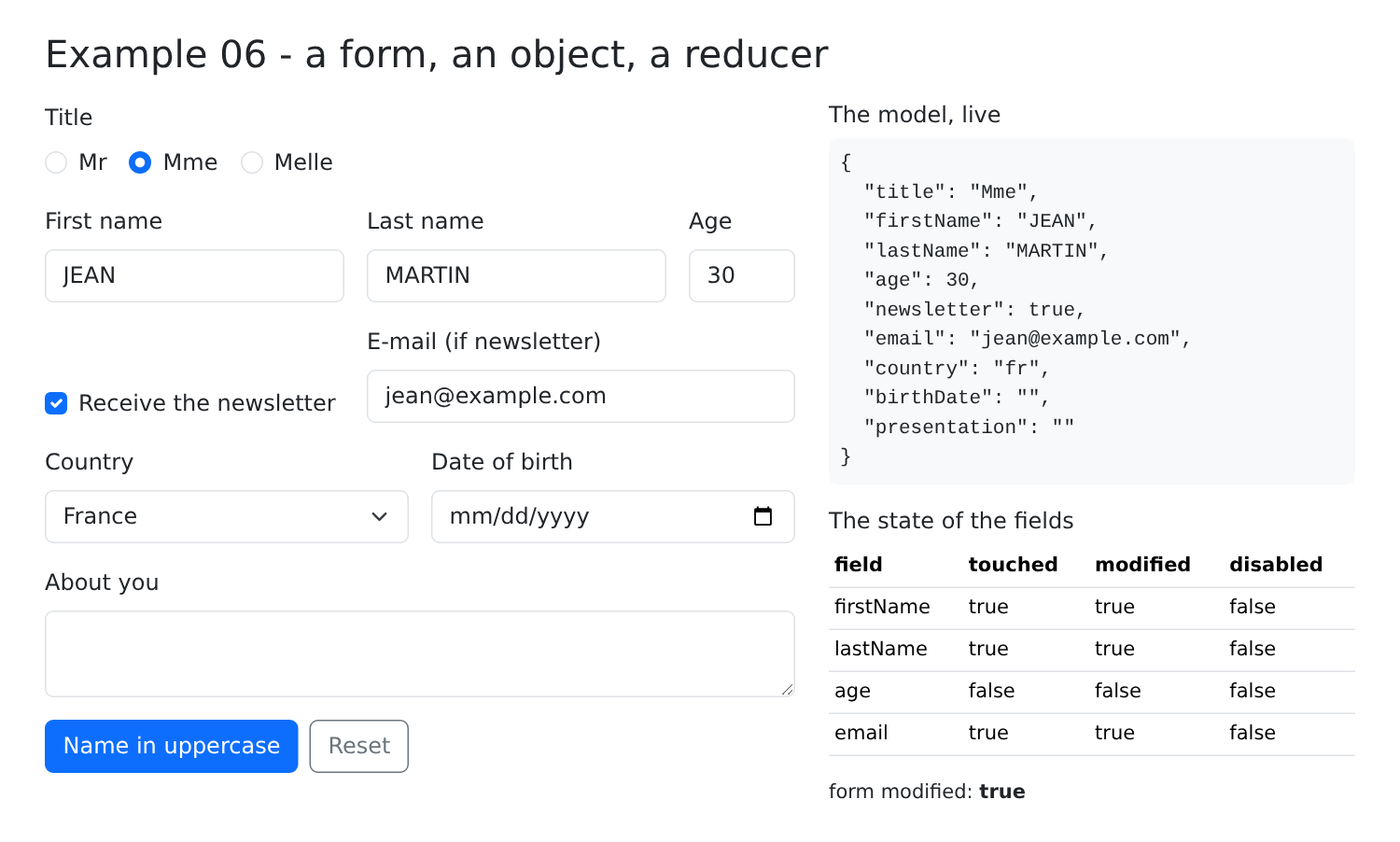
在 JSX 中,特定字段(单选按钮、年龄、复选框)直接调用 [dispatch] ;“姓名转大写”和“重置”按钮触发相应的 action。右侧是实时的模板和字段状态。
输入名字,输入姓氏,勾选订阅邮件,输入电子邮件地址,然后点击“姓名转大写”:
[useState] 适用于彼此独立的数据;[useReducer] 适用于复合状态,其变化遵循规则:所有逻辑集中在一处,位于组件之外。这与 [Redux] 或 [Vuex] 中的“store”是同一个概念,只是处于组件层面。
2.7. 示例 07:表单验证
| // =========================================================================
// 07-validation/src/App.tsx - 在浏览器中验证表单
// -------------------------------------------------------------------------
// React 没有验证系统:它只是普通的代码。一个
// 纯函数 validate(account) 返回各字段的错误;它
// 在每次显示时被调用,因此错误始终是最新的。
// 错误不会立即显示(一个满屏红色的空表单
// 很不友好):只对已经离开过的字段(“touched”)显示。提交
// 会把所有字段标记为已访问,然后只有在表单
// 有效时才执行操作。
//
// 与 RdvMedecins 服务器(“创建账户”表单)的规则相同。
// 警告:这种验证只是为了方便用户(立即
// 反馈,无需往返服务器)。它不提供任何
// 保护:任何人都可以向服务器发送手工构造的
// 请求(curl……)。因此服务器总是重新验证一切(参见示例 25)。
// =========================================================================
import { useState, type FormEvent } from 'react';
interface Account {
title: string;
firstName: string;
lastName: string;
login: string;
password: string;
confirmation: string;
}
type Field = keyof Account;
// 每个字段最多一条错误消息
type Errors = Partial<Record<Field, string>>;
const TITLES = ['Mr', 'Mme', 'Melle'];
const LOGIN_FORMAT = /^[a-z0-9._-]{1,30}$/;
const PASSWORD_MIN = 6;
// 规则:一个纯函数,只依赖于它的参数
function validate(c: Account): Errors {
const errors: Errors = {};
if (!TITLES.includes(c.title)) errors.title = 'Choose a title from the list.';
if (c.firstName.trim() === '') errors.firstName = 'The first name is required.';
else if (c.firstName.length > 20) errors.firstName = 'The first name must not exceed 20 characters.';
if (c.lastName.trim() === '') errors.lastName = 'The last name is required.';
else if (c.lastName.length > 20) errors.lastName = 'The last name must not exceed 20 characters.';
if (c.login === '') errors.login = 'The login is required.';
else if (!LOGIN_FORMAT.test(c.login)) errors.login = 'Unaccented lower-case letters, digits, dot, hyphen, underscore.';
if (c.password === '') errors.password = 'The password is required.';
else if (c.password.length < PASSWORD_MIN) errors.password = `At least ${PASSWORD_MIN} characters.`;
// 一条比较两个字段的规则
if (c.confirmation !== c.password) errors.confirmation = 'The confirmation does not match the password.';
return errors;
}
const EMPTY: Account = { title: 'Mr', firstName: '', lastName: '', login: '', password: '', confirmation: '' };
const ALL: Record<Field, boolean> = { title: true, firstName: true, lastName: true, login: true, password: true, confirmation: true };
export default function App() {
const [account, setAccount] = useState<Account>(EMPTY);
const [touched, setTouched] = useState<Partial<Record<Field, boolean>>>({});
const [submitAttempted, setSubmitAttempted] = useState(false);
const [success, setSuccess] = useState(false);
// 错误:每次显示时重新计算,从不存入状态
const errors = validate(account);
const errorCount = Object.keys(errors).length;
// 字段的 Bootstrap 类:红色(is-invalid)或绿色(is-valid),
// 只在字段被访问过之后才应用
function cssClass(field: Field, base = 'form-control'): string {
if (!touched[field]) return base;
return `${base} ${errors[field] ? 'is-invalid' : 'is-valid'}`;
}
// 所有字段的通用属性
function bind(field: Field) {
return {
id: field,
value: account[field],
onChange: (e: { target: { value: string } }) => {
setAccount((c) => ({ ...c, [field]: e.target.value }));
setSuccess(false);
},
onBlur: () => setTouched((t) => ({ ...t, [field]: true })),
};
}
function send(event: FormEvent<HTMLFormElement>) {
event.preventDefault();
setSubmitAttempted(true);
setTouched(ALL); // 所有的错误都显示在
// 这里,账户会被发送给服务器(参见示例 25)
setSuccess(errorCount === 0);
}
return (
<div className="container py-4" style={{ maxWidth: 640 }}>
<h1 className="h3 mb-3">Example 07 - the validation of a form</h1>
{/* noValidate:禁用浏览器自带的验证,以便
display OUR messages, in OUR style */}
<form className="card p-4" noValidate onSubmit={send}>
<div className="mb-3">
<label className="form-label" htmlFor="title">Title</label>
<select className={cssClass('title', 'form-select')} {...bind('title')}>
{TITLES.map((t) => <option key={t}>{t}</option>)}
</select>
<div className="invalid-feedback">{errors.title}</div>
</div>
<div className="row g-3 mb-3">
<div className="col-sm-6">
<label className="form-label" htmlFor="firstName">First name</label>
{/* is-invalid 给字段加上红框,并且显示
.invalid-feedback that follows it: the error of the field is written there */}
<input className={cssClass('firstName')} {...bind('firstName')} />
<div className="invalid-feedback">{errors.firstName}</div>
</div>
<div className="col-sm-6">
<label className="form-label" htmlFor="lastName">Last name</label>
<input className={cssClass('lastName')} {...bind('lastName')} />
<div className="invalid-feedback">{errors.lastName}</div>
</div>
</div>
<div className="mb-3">
<label className="form-label" htmlFor="login">Login</label>
<input className={cssClass('login')} autoComplete="username" {...bind('login')} />
<div className="invalid-feedback">{errors.login}</div>
</div>
<div className="row g-3 mb-4">
<div className="col-sm-6">
<label className="form-label" htmlFor="password">Password</label>
<input type="password" className={cssClass('password')} autoComplete="new-password" {...bind('password')} />
<div className="invalid-feedback">{errors.password}</div>
</div>
<div className="col-sm-6">
<label className="form-label" htmlFor="confirmation">Confirmation</label>
<input type="password" className={cssClass('confirmation')} autoComplete="new-password" {...bind('confirmation')} />
<div className="invalid-feedback">{errors.confirmation}</div>
</div>
</div>
<button type="submit" className="btn btn-primary">Create the account</button>
{submitAttempted && errorCount > 0 && (
<div className="alert alert-danger mt-3 mb-0">The form contains {errorCount} error(s).</div>
)}
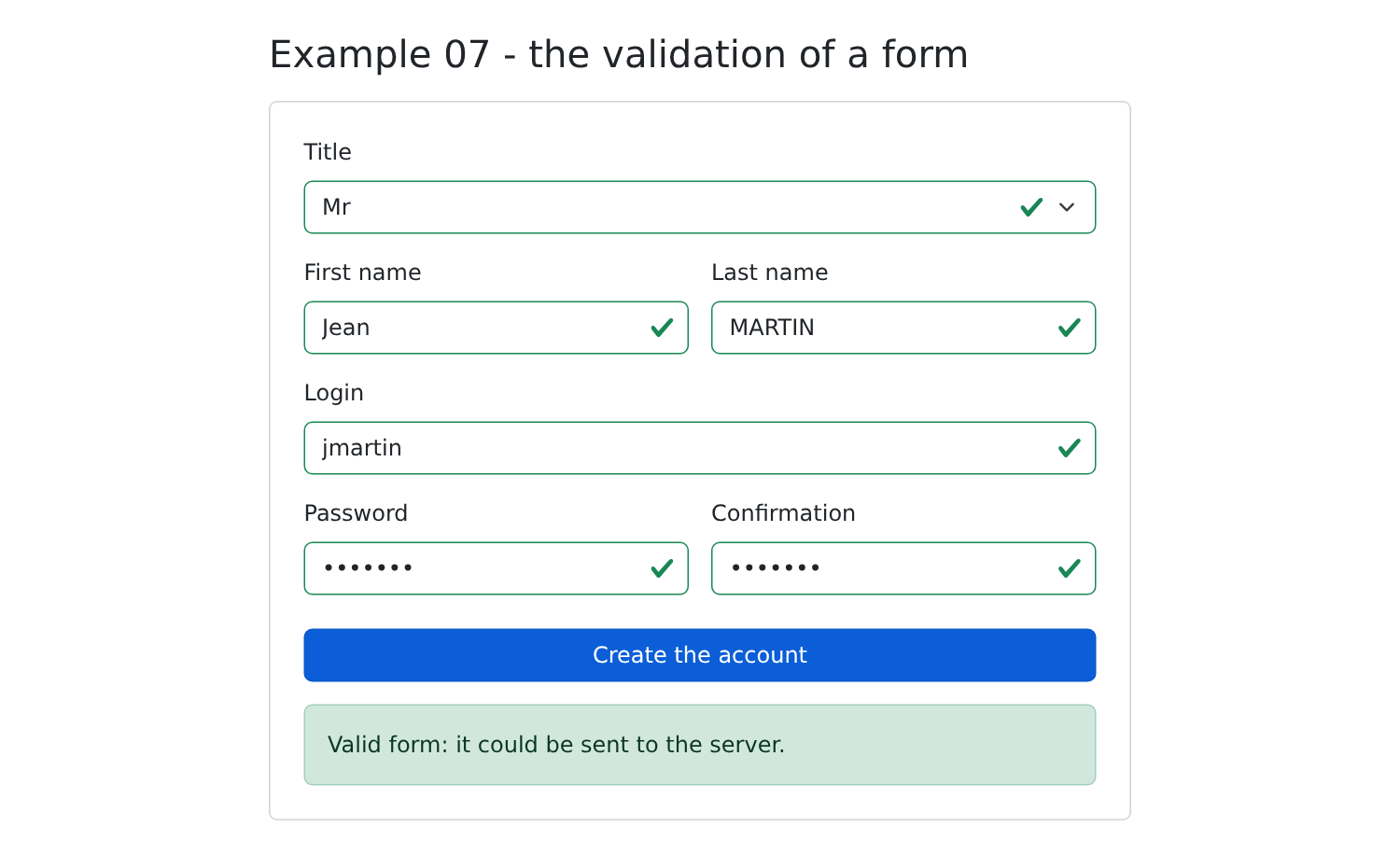
{success && <div className="alert alert-success mt-3 mb-0">Valid form: it could be sent to the server.</div>}
</form>
</div>
);
}
|
[React] 没有验证系统:它只是普通的代码。
- 第 30–32 行:每个字段最多一条错误信息;
- 第 39–53 行:规则:一个返回字段错误的纯函数;这些规则与 [RdvMedecins] 服务器创建账户时的规则相同。最后一条规则比较两个字段;
- 第 65 行:错误在每次显示页面时 重新计算 ,从不缓存;因此它们始终是最新的;
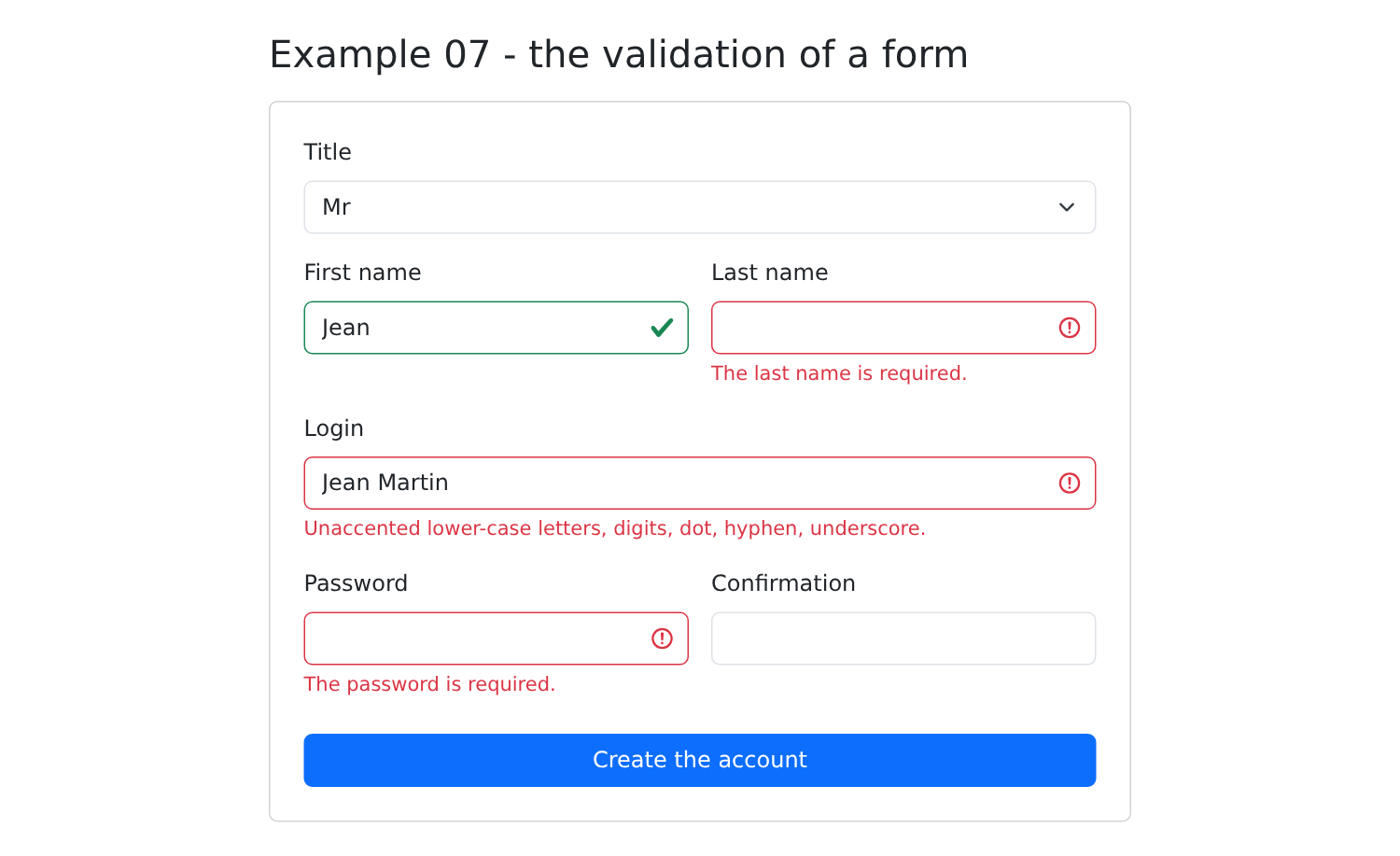
- 第 70–73 行:字段的 [Bootstrap] 类——[is-invalid] (红框)或 [is-valid] (绿框)——只有 在字段被访问过之后才应用:一个满屏红色的空表单会很不美观;
- 第 76–86 行:与示例 06 一样,字段的通用属性;离开字段就把它标记为已访问;
- 第 88–94 行:提交表单会把所有字段标记为已填写(它们的错误随之显示出来),只有表单有效时提交才会成功。
JSX:
- 第 101 行:禁用浏览器自带的验证,以便用我们的样式显示我们自己的消息;
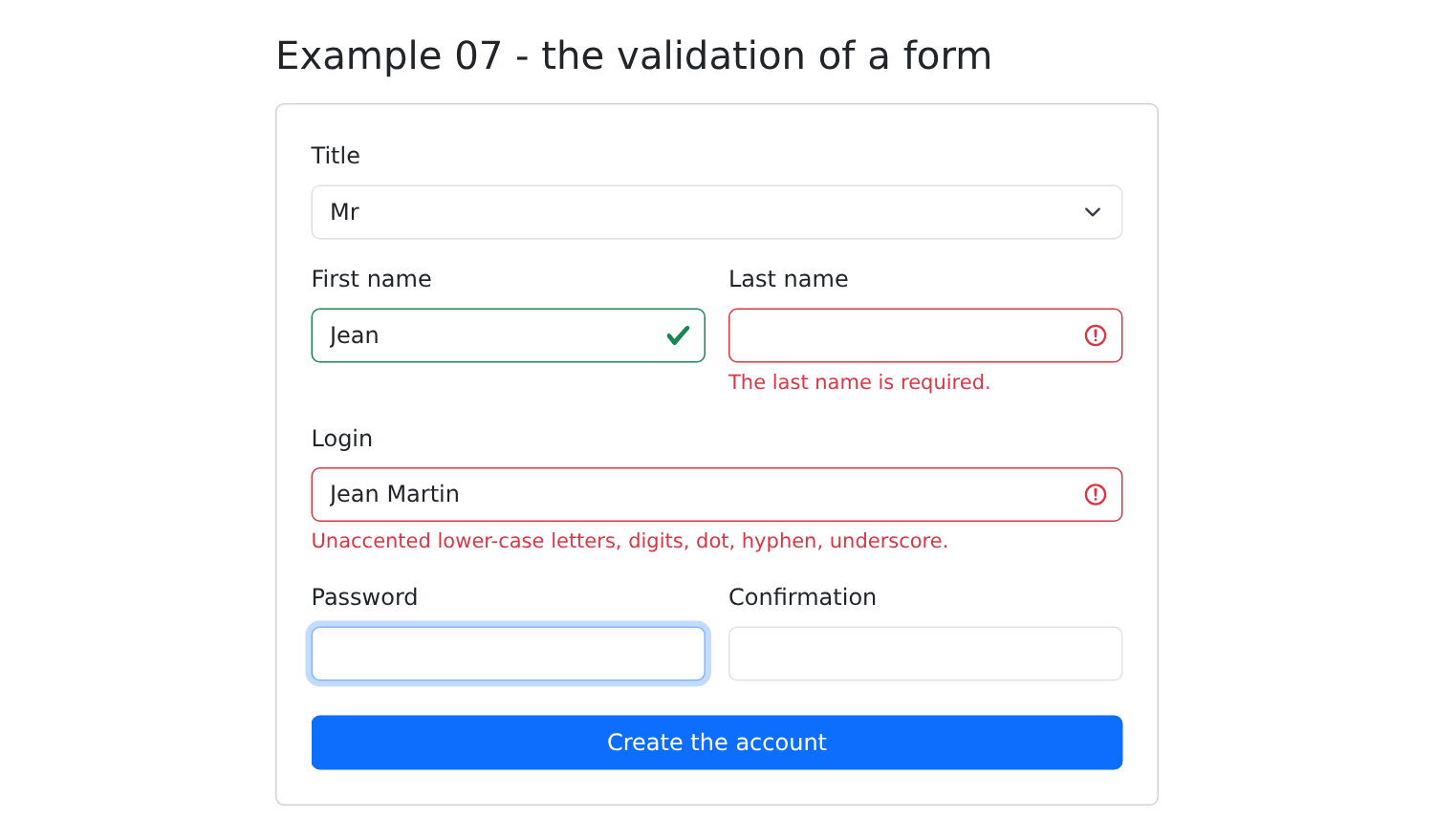
- 第 114–115 行:[is-invalid] 类给字段加上红框,并且显示紧随其后的 [.invalid-feedback],字段的错误信息就写在其中。
输入名字,输入姓氏,输入一个无效的登录名:
点击“创建账户”:
全部更正之后:
警告:这种验证只是为了方便 用户 (立即反馈,无需往返服务器)。它不提供任何保护:任何人都可以向服务器发送手工构造的请求([curl]……)。因此服务器总是重新验证一切(见示例 25)。
示例 07 的表单,改用 [React Hook Form] 编写,这是 [React] 中使用最广泛的表单库:
| // =========================================================================
// 08-react-hook-form/src/App.tsx - 表单库
// -------------------------------------------------------------------------
// 示例 07 的表单,用 React Hook Form 编写,这是 React 中最常用的表单
// 库。大多数
// 现有应用中都能见到它。
// - useForm<T>() 返回类型为 T 的表单所需的工具;
// - register('lastName', rules) 把 HTML 字段与表单的 "lastName" 字段
// 关联起来:它返回要展开到元素上的属性(name、
// ref、onChange、onBlur)。这些字段不是受控的:由
// 库在页面中读取它们的值,而不会在每次按键时
// 再次调用组件;
// - 规则:required、maxLength、minLength、pattern、validate(一条
// “自制”规则),每条规则都有自己的消息;
// - formState.errors:每个字段的错误;
// - handleSubmit(action):验证一切;只有当表单
// 有效时才调用 action。
// =========================================================================
import { useState } from 'react';
import { useForm } from 'react-hook-form';
interface Account {
title: string;
firstName: string;
lastName: string;
login: string;
password: string;
confirmation: string;
}
const TITLES = ['Mr', 'Mme', 'Melle'];
export default function App() {
const {
register,
handleSubmit,
getValues,
formState: { errors, isSubmitted },
} = useForm<Account>({
// 初始值
defaultValues: { title: 'Mr', firstName: '', lastName: '', login: '', password: '', confirmation: '' },
// 何时验证:离开字段时,之后每次按键时
mode: 'onTouched',
});
const [sent, setSent] = useState('');
// 如果字段有错误,就把它标记为出错(errors.lastName 存在)
const cssClass = (field: keyof Account) => `form-control${errors[field] ? ' is-invalid' : ''}`;
// 由 handleSubmit 调用,仅当表单有效时;它
// 接收带类型的值
function create(account: Account) {
setSent(JSON.stringify(account));
}
return (
<div className="container py-4" style={{ maxWidth: 640 }}>
<h1 className="h3 mb-3">Example 08 - React Hook Form</h1>
<form className="card p-4" noValidate onSubmit={handleSubmit(create, () => setSent(''))}>
<div className="mb-3">
<label className="form-label" htmlFor="title">Title</label>
<select id="title" className="form-select" {...register('title', { required: true })}>
{TITLES.map((t) => <option key={t}>{t}</option>)}
</select>
</div>
<div className="row g-3 mb-3">
<div className="col-sm-6">
<label className="form-label" htmlFor="firstName">First name</label>
<input id="firstName" className={cssClass('firstName')}
{...register('firstName', {
required: 'The first name is required.',
maxLength: { value: 20, message: '20 characters at most.' },
})} />
{/* errors.firstName?.message:失败规则的消息 */}
<div className="invalid-feedback">{errors.firstName?.message}</div>
</div>
<div className="col-sm-6">
<label className="form-label" htmlFor="lastName">Last name</label>
<input id="lastName" className={cssClass('lastName')}
{...register('lastName', {
required: 'The last name is required.',
maxLength: { value: 20, message: '20 characters at most.' },
})} />
<div className="invalid-feedback">{errors.lastName?.message}</div>
</div>
</div>
<div className="mb-3">
<label className="form-label" htmlFor="login">Login</label>
<input id="login" className={cssClass('login')}
{...register('login', {
required: 'The login is required.',
pattern: { value: /^[a-z0-9._-]{1,30}$/, message: 'Unaccented lower-case letters, digits, dot, hyphen, underscore.' },
})} />
<div className="invalid-feedback">{errors.login?.message}</div>
</div>
<div className="row g-3 mb-4">
<div className="col-sm-6">
<label className="form-label" htmlFor="password">Password</label>
<input id="password" type="password" className={cssClass('password')}
{...register('password', {
required: 'The password is required.',
minLength: { value: 6, message: 'At least 6 characters.' },
// deps:当密码变化时,同时重新验证确认密码
deps: ['confirmation'],
})} />
<div className="invalid-feedback">{errors.password?.message}</div>
</div>
<div className="col-sm-6">
<label className="form-label" htmlFor="confirmation">Confirmation</label>
{/* validate:一条“自制”规则;getValues 读取另一个字段 */}
<input id="confirmation" type="password" className={cssClass('confirmation')}
{...register('confirmation', {
validate: (value) => value === getValues('password') || 'The confirmation does not match the password.',
})} />
<div className="invalid-feedback">{errors.confirmation?.message}</div>
</div>
</div>
<button type="submit" className="btn btn-primary">Create the account</button>
{isSubmitted && (
<div className={`alert mt-3 mb-0 ${sent ? 'alert-success' : 'alert-danger'}`}>
{sent ? <>Valid form: <code>{sent}</code></> : 'Invalid form.'}
</div>
)}
</form>
</div>
);
}
|
- 第 21 行:该库的主要 Hook;
- 第 35–40 行:[useForm<Account>(options)] 返回一个 [Account] 类型表单的各个组成部分,这里将它们解构:[register]、[handleSubmit]、[getValues] 和 [formState],即表单状态(包括 [errors],即字段错误,以及 [isSubmitted],它在第一次提交之后为 true);
- 第 42 行:初始值;
- 第 44 行:何时验证:离开字段时,之后每次按键时;
- 第 49 行:如果字段有错误,就把它标记为有错误;
- 第 53–55 行:提交动作,仅当表单有效时才由 [handleSubmit] 调用 ;它接收输入的值;
- 第 60 行:[handleSubmit(onValid, onInvalid)] 创建提交处理函数:它验证所有字段,然后调用其中一个函数;
- 第 71–74 行:[register('firstName', rules)] 使用其规则把 HTML 字段与表单中的 [firstName] 字段关联起来:[required]、[maxLength]、[minLength]、[pattern] 和 [validate] (一条“自定义”规则),每条规则都有自己的消息。[register] 返回要应用到元素上的属性([name]、[ref]、[onChange]、[onBlur])。这些字段不是受控的:库通过 ref 从页面中读取它们的值;因此组件不会在每次按键时被重新调用,这对大型表单很重要;
- 第 76 行:验证规则失败时的消息([?.]:如果字段没有错误则为 [undefined] );
- 第 105 行:当密码变化时,同时重新验证确认密码;
- 第 114 行:一条比较两个字段的自定义规则:[getValues('password')] 读取另一个字段的值。它返回 [true] (有效)或错误消息。
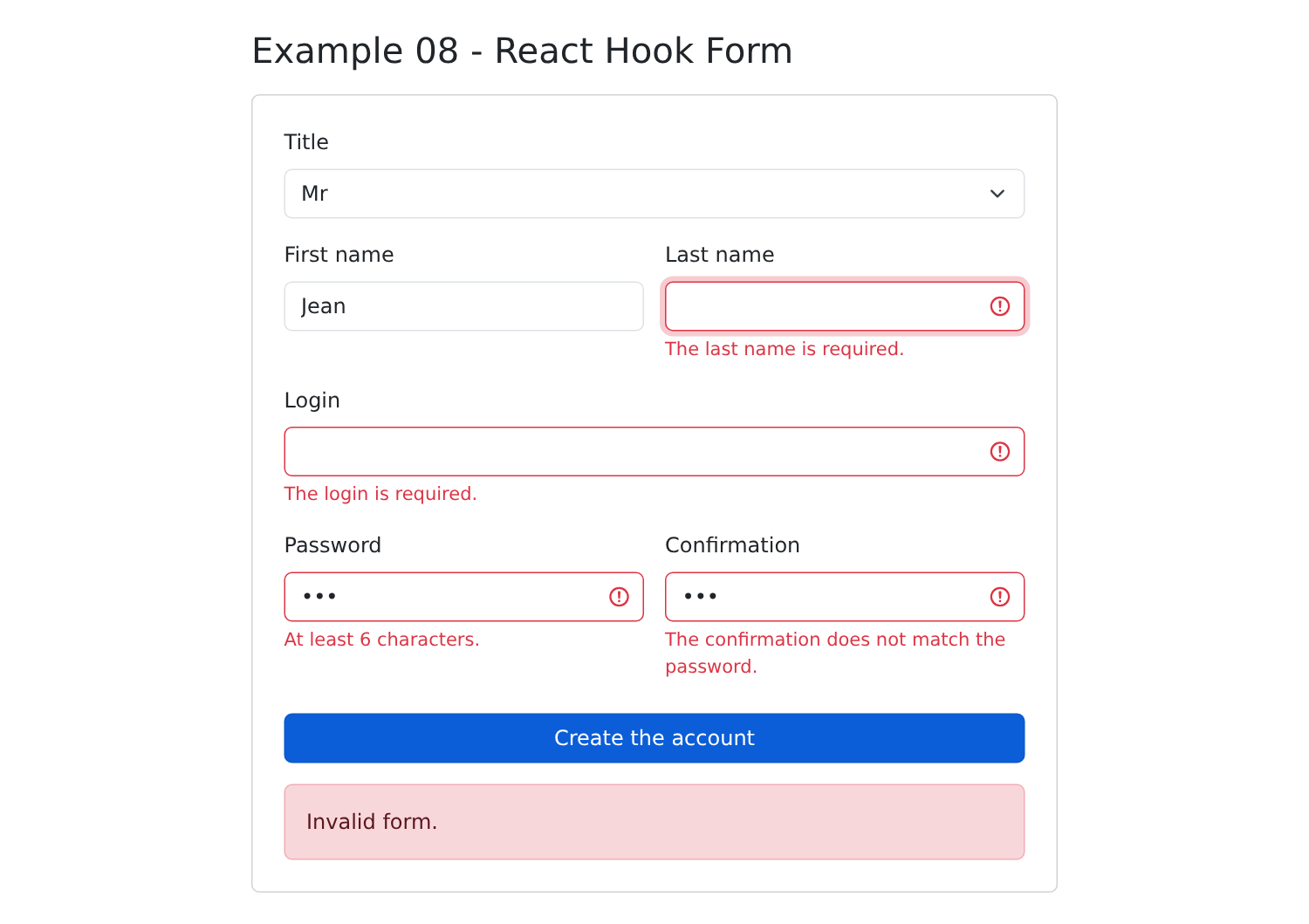
对于 [React],每种需求都有多个相互竞争的库。对于表单,我们还会遇到 [Formik]、[TanStack Form],而用于描述规则的则有 [Zod] 或 [Yup] (验证“模式”,可与 [Node.js] 服务器共享)。在案例研究中,所有验证都由服务器完成,我们不会使用库:受控字段加一个自定义 Hook 就足够了。
2.9. 示例 09:值的格式化
[Angular] 有自己的“管道”,用于在模板中格式化值。[React] 没有自己的机制:在 JSX 中,我们调用存放在模块里的函数。对于日期、数字和金额,浏览器提供了 [Intl] API,它了解各种语言的惯例。
2.9.1. 格式化函数
| // =========================================================================
// 09-formatting/src/formatting.ts - “自制”的格式化函数
// -------------------------------------------------------------------------
// React 没有自己的格式化机制(Angular 有
// “管道”,Vue.js 有函数):在 JSX 中,我们调用存放在模块中、
// 可单独测试的普通函数:
// {timeRange(slot)} -> "8:00 - 8:20"
// {timeRange(slot, 'start')} -> "8:00"
// 对于日期、数字、金额,浏览器提供了 Intl
// API,它了解各种语言的惯例。
// =========================================================================
export interface Slot {
startHour: number;
startMinute: number;
endHour: number;
endMinute: number;
}
// 是 "8:05" 而不是 "8:5"
function time(h: number, m: number): string {
return `${h}:${String(m).padStart(2, '0')}`;
}
export function timeRange(c: Slot, part: 'all' | 'start' | 'end' = 'all'): string {
switch (part) {
case 'start':
return time(c.startHour, c.startMinute);
case 'end':
return time(c.endHour, c.endMinute);
default:
return `${time(c.startHour, c.startMinute)} - ${time(c.endHour, c.endMinute)}`;
}
}
// "marie pelissier" -> "Marie Pelissier"
export function capitalize(text: string): string {
return text.replace(/\p{L}+/gu, (word) => word[0].toUpperCase() + word.slice(1).toLowerCase());
}
// "Marie PELISSIER" -> "MP"
export function initials(fullName: string): string {
return fullName
.split(/\s+/)
.filter((word) => word !== '')
.map((word) => word[0].toUpperCase())
.join('');
}
// "2026-10-05"(RdvMedecins API 的格式)-> 一个 UTC 午夜的 Date
export function toDate(day: string): Date {
return new Date(`${day}T00:00:00Z`);
}
|
- 第 13–18 行:一个时间段,与 [RdvMedecins] 服务器发送的格式一致(开始和结束的小时与分钟);
- 第 21–23 行:[padStart(2, '0')] 在字符串左侧补齐:“5”变成“05”;
- 第 25–34 行:“8:00 – 8:20”,或者只显示开始或结束时间,取决于 [part] 参数,该参数是可选的(默认值为 ['all']);
- 第 37–39 行:[\p{L}+] 表示一串字母,包括带重音的字符(选项 [u]):首字母大写;
- 第 51–53 行:形如 API 的日期(["2026-10-05"])变成 UTC 午夜的 [Date] 对象。
2.9.2. 页面
| // =========================================================================
// 09-formatting/src/App.tsx - 在 JSX 中格式化值
// -------------------------------------------------------------------------
// 表格的每一行显示一段代码及其显示的结果。
// Intl 格式化器在组件之外一次性创建:
// 创建它们的开销比使用它们更大。
// =========================================================================
import { useState } from 'react';
import { timeRange, initials, capitalize, toDate, type Slot } from './formatting';
// 日期:dateStyle / timeStyle,或者指定要显示的各个部分
const shortDate = new Intl.DateTimeFormat('en-US', { dateStyle: 'medium' });
const fullDate = new Intl.DateTimeFormat('en-US', { dateStyle: 'full' });
const timeOnly = new Intl.DateTimeFormat('en-US', { timeStyle: 'medium' });
const longDay = new Intl.DateTimeFormat('en-US', { weekday: 'long', day: 'numeric', month: 'long', year: 'numeric', timeZone: 'UTC' });
const frenchDay = new Intl.DateTimeFormat('fr-FR', { dateStyle: 'long', timeZone: 'UTC' });
// 数字和金额
const euros = new Intl.NumberFormat('en-US', { style: 'currency', currency: 'EUR' });
const integer = new Intl.NumberFormat('en-US', { maximumFractionDigits: 0 });
const percent = new Intl.NumberFormat('en-US', { style: 'percent', minimumFractionDigits: 1 });
const day = '2026-10-05'; // RdvMedecins API 格式的日期
const price = 1234.5;
const rate = 0.055;
const name = 'marie pelissier';
const doctor = { title: 'Mme', firstName: 'Marie', lastName: 'PELISSIER' };
const languages = ['TypeScript', 'HTML', 'CSS', 'JavaScript', 'SQL'];
const slots: Slot[] = [
{ startHour: 8, startMinute: 0, endHour: 8, endMinute: 20 },
{ startHour: 8, startMinute: 20, endHour: 8, endMinute: 40 },
{ startHour: 14, startMinute: 5, endHour: 14, endMinute: 25 },
];
export default function App() {
const [now, setNow] = useState(() => new Date());
// [显示的代码, 值]:表格的一行
const rows: [string, string][] = [
['shortDate.format(now)', shortDate.format(now)],
['fullDate.format(now)', fullDate.format(now)],
['timeOnly.format(now)', timeOnly.format(now)],
['longDay.format(toDate(day))', longDay.format(toDate(day))],
['frenchDay.format(toDate(day))', frenchDay.format(toDate(day))],
['now.toLocaleDateString()', now.toLocaleDateString()],
['euros.format(price)', euros.format(price)],
['integer.format(price)', integer.format(price)],
['percent.format(rate)', percent.format(rate)],
['name.toUpperCase()', name.toUpperCase()],
['capitalize(name)', capitalize(name)],
["'RDV'.toLowerCase()", 'RDV'.toLowerCase()],
["languages.slice(0, 3).join(', ')", languages.slice(0, 3).join(', ')],
['JSON.stringify(doctor)', JSON.stringify(doctor)],
// 连续的两个函数:第一个的结果交给第二个
['initials(capitalize(name))', initials(capitalize(name))],
];
return (
<div className="container py-4" style={{ maxWidth: 820 }}>
<h1 className="h3 mb-3">Example 09 - the formatting of values</h1>
<table className="table table-sm align-middle">
<thead><tr><th>In the code</th><th>Displayed</th></tr></thead>
<tbody>
{rows.map(([code, value]) => (
<tr key={code}><td><code>{`{${code}}`}</code></td><td>{value}</td></tr>
))}
</tbody>
</table>
<h2 className="h6">Object.entries: going through the properties of an object</h2>
<ul>
{Object.entries(doctor).map(([key, value]) => (
<li key={key}>{key} = {value}</li>
))}
</ul>
<h2 className="h6">A home-made function: timeRange</h2>
<ul>
{slots.map((c) => (
<li key={timeRange(c)}>{timeRange(c)} (start: {timeRange(c, 'start')})</li>
))}
</ul>
<button className="btn btn-sm btn-outline-primary" onClick={() => setNow(new Date())}>Refresh the time</button>
</div>
);
}
|
- 第 13–17 行:日期格式化器,[Intl.DateTimeFormat(language, options)]:[dateStyle] 和 [timeStyle] 提供预定义的格式([full]、[long]、[medium]、[short]);你也可以指定要显示的部分([weekday]、[day]、[month]、[year])。[timeZone: 'UTC']:日期 [2026-10-05T00:00:00Z] 无论浏览器的时区如何,都必须保持为 10 月 5 日;
- 第 19–21 行:数字格式化器:欧元金额、不带小数的数字、百分比;
- 第 39–56 行:表格各行:代码及其值。最后一行串联了两个函数;
- 第 65 行:放在花括号中的代码;
- 第 72–74 行:[Object.entries(object)] 返回对象的 [key, value] 键值对,再用 [map] 遍历它们;
- 第 79–81 行:自定义函数 [timeRange]。
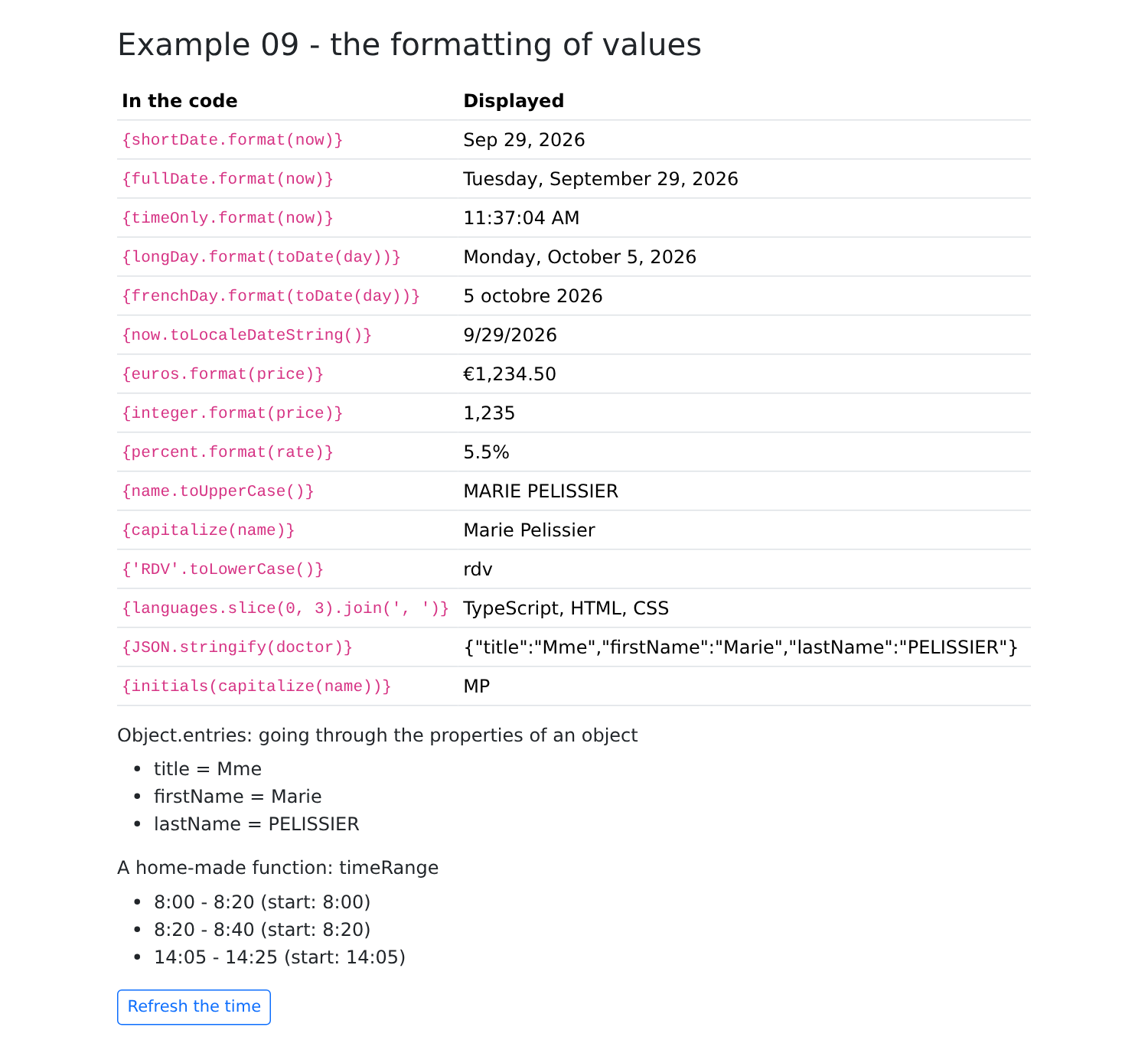
[Intl] 生成器在组件之外一次性创建:创建它们的开销比使用它们更大。语言在这里是写死的([en-US],法语那一行用 [fr-FR]);示例 21 将展示如何跟随用户选择的语言。