Skip to content

10. 案例研究:RdvMedecins 应用的 React 客户端

10.1. 问题

[RdvMedecins] 应用允许用户在诊所预约就诊。[NestJS] 课程把它写成了一个 HTML 应用,由服务器生成页面。在这里,我们编写 [React] 客户端应用:完全相同的页面,由浏览器根据“RdvMedecins 服务器:一个黑盒”一章中描述的服务器 JSON 数据生成。

客户端必须提供 HTML 应用提供的一切:

  • 一个带验证码(CAPTCHA)保护的登录页面,并可创建患者账户;
  • 某位医生某一天的日程,支持预约(带患者选择窗口)和取消;
  • 对于管理员,提供医生和客户的管理(列表、添加、编辑、删除);
  • 对于患者,提供个人面板(显示即将到来的预约,并可取消)和账户管理;
  • 两种语言:法语和英语;
  • 唯一的 URL([/schedule?doctorId=1&day=...]),可以重新加载、加入书签,并可使用浏览器的后退/前进按钮导航。

10.2. 安装与运行

必须已安装并运行 JSON 服务器(见“RdvMedecins 服务器:一个黑盒”一章)。要在浏览器中使用客户端,不需要验证码测试模式:可以让服务器 的 [CAPTCHA_TEST] 字段 在 [.env] 文件中保持为空。

在 [rdvmedecins-react] 文件夹下打开的控制台窗口中:

npm install
npm start

然后在浏览器中打开 http://localhost:5173。演示账户列在登录页面上(密码 = 登录名)。

示例同样使用 5173 端口:请先停止当前正在运行的示例([Ctrl-C])。你也可以让客户端在另一个端口上启动:[npm start -- --port 5174]。

10.3. 使用应用

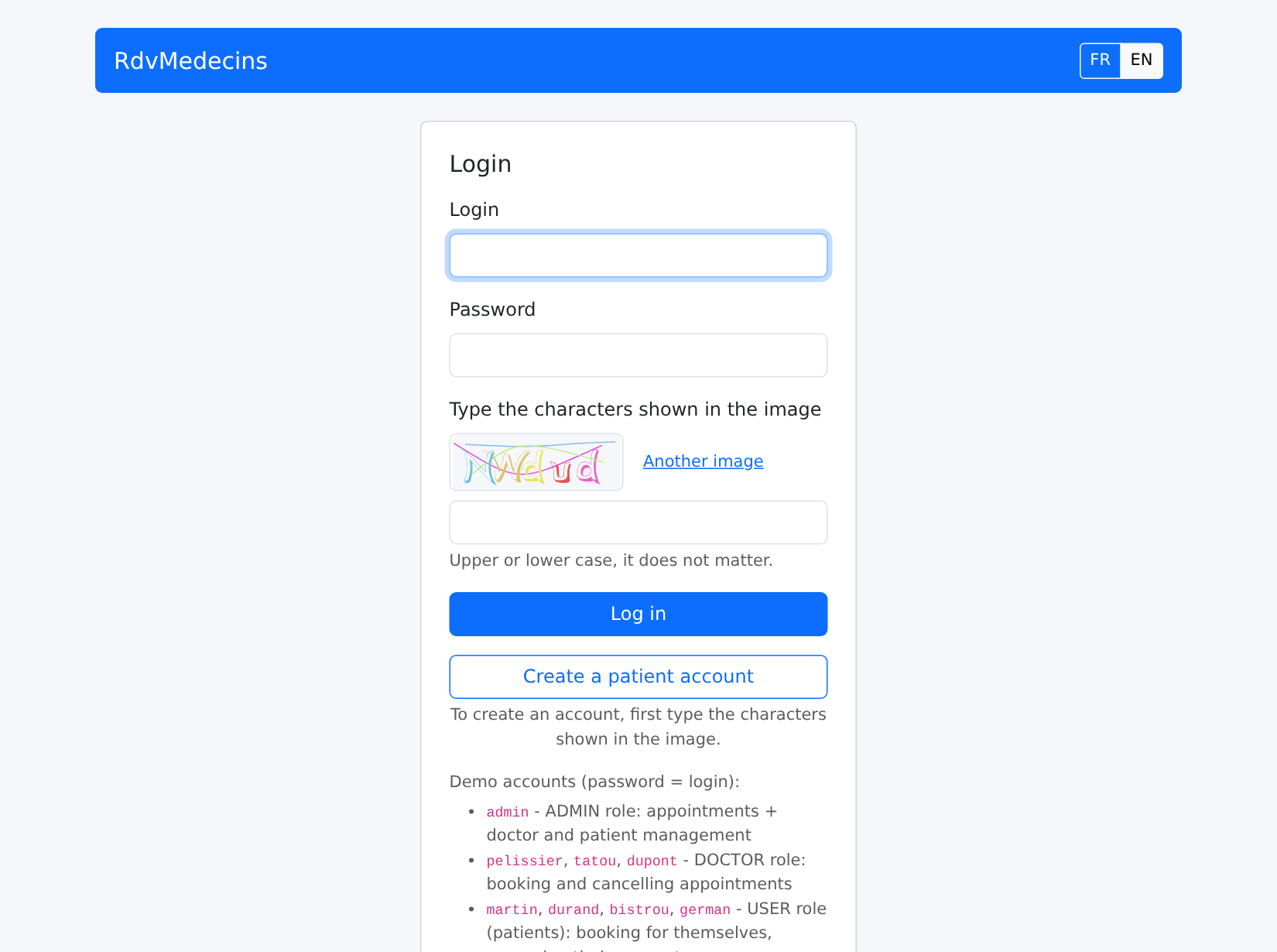
10.3.1. 登录页面
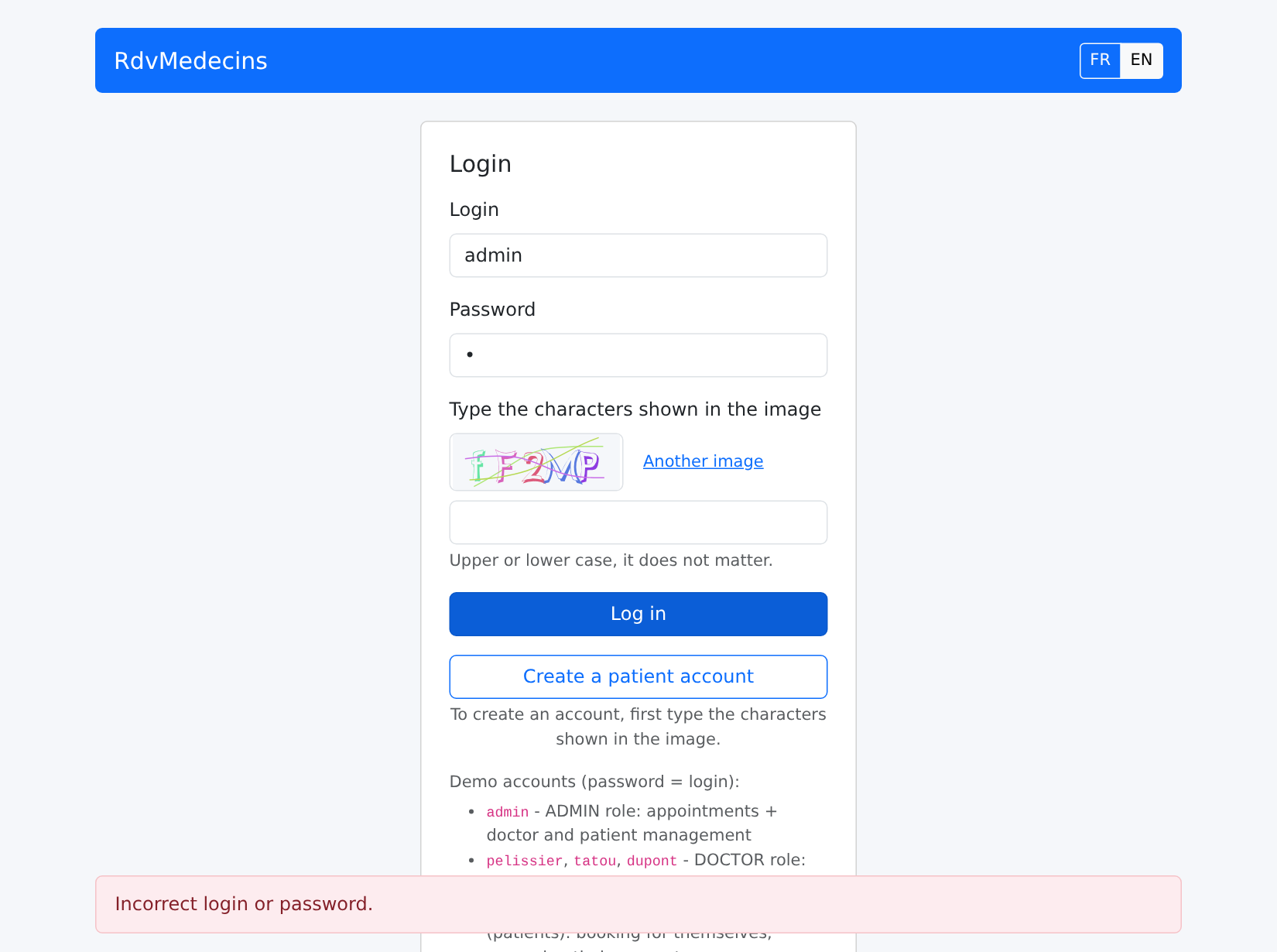
Image

密码错误:消息出现在页面底部,并显示一张新图片(每张图片只能使用一次):

Image

10.3.2. 日程,管理员和医生所见

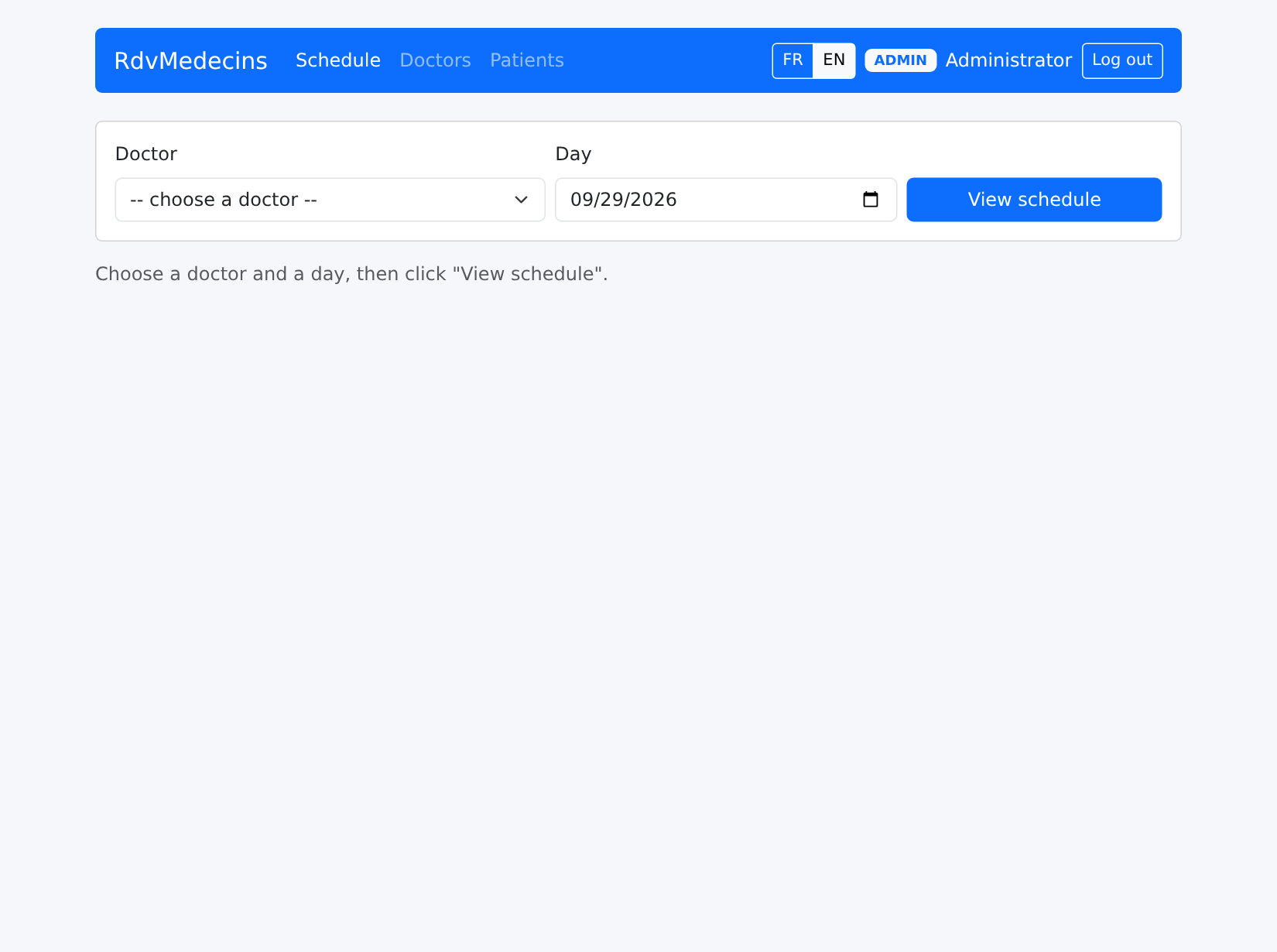
以 [admin] 登录后,你会进入日程页面:
Image

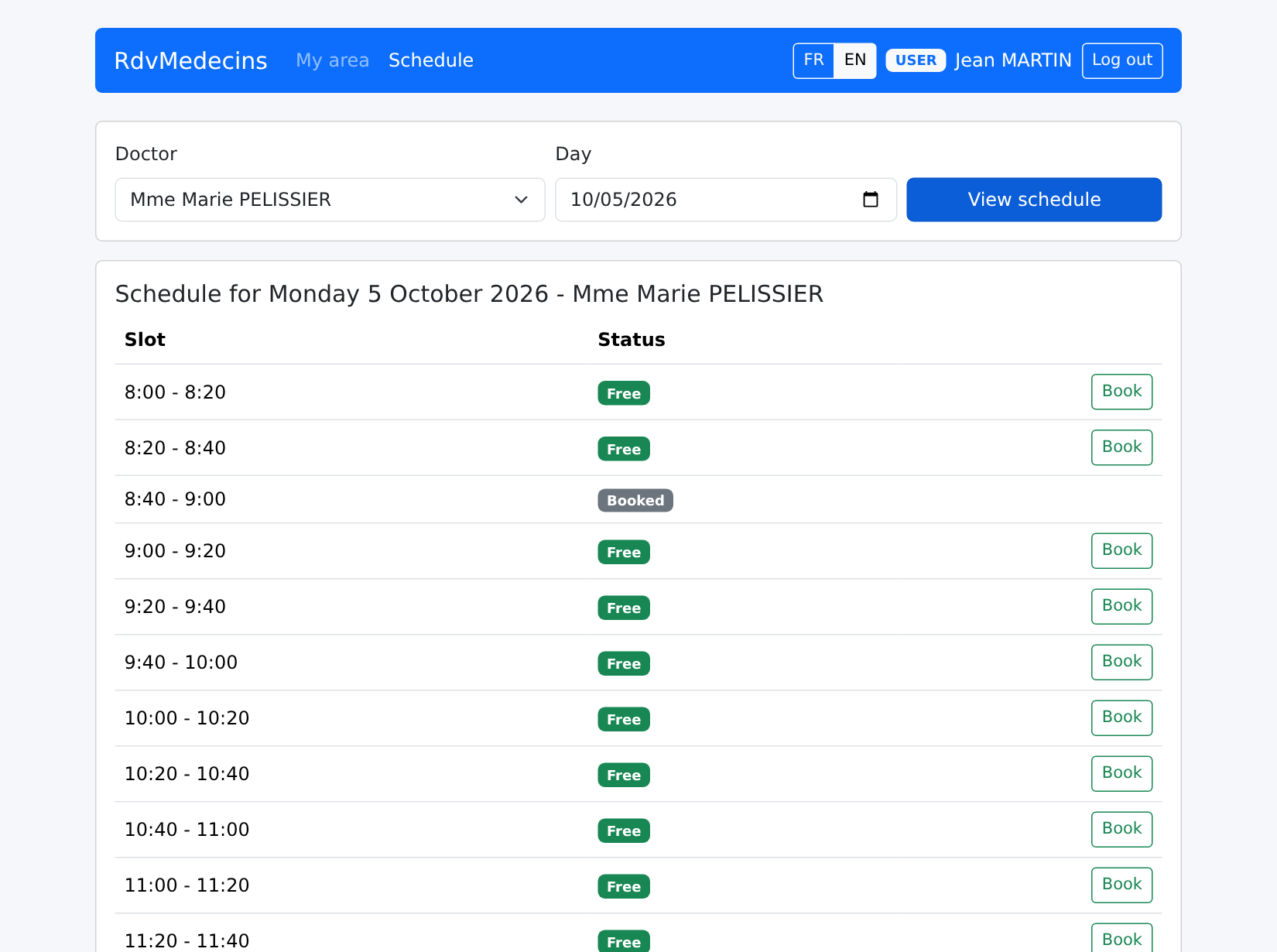
选择一位医生和一个日期,然后点击“查看日程”。URL 变为 [/schedule?doctorId=1&day=2026-10-05]:
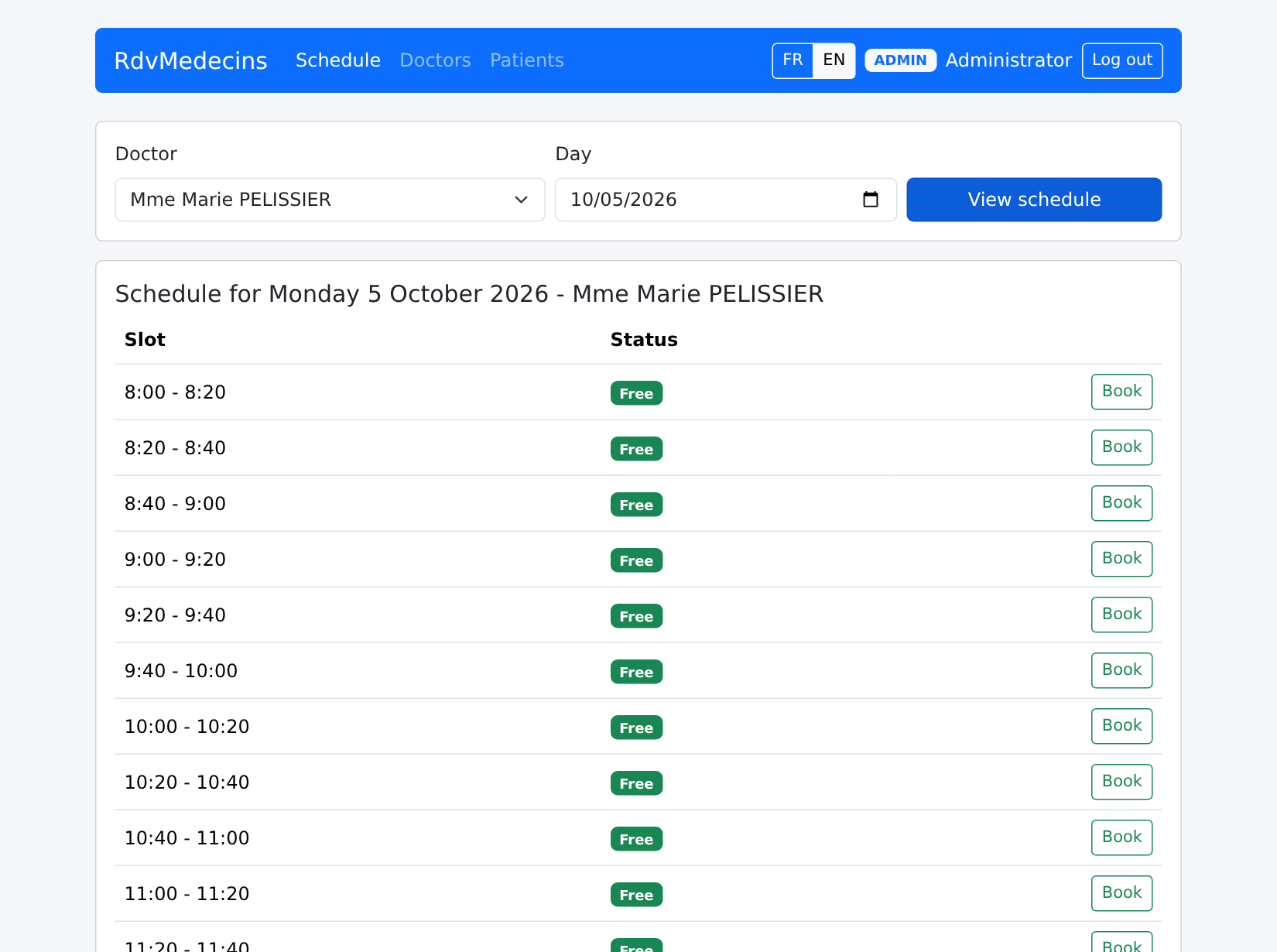
Image

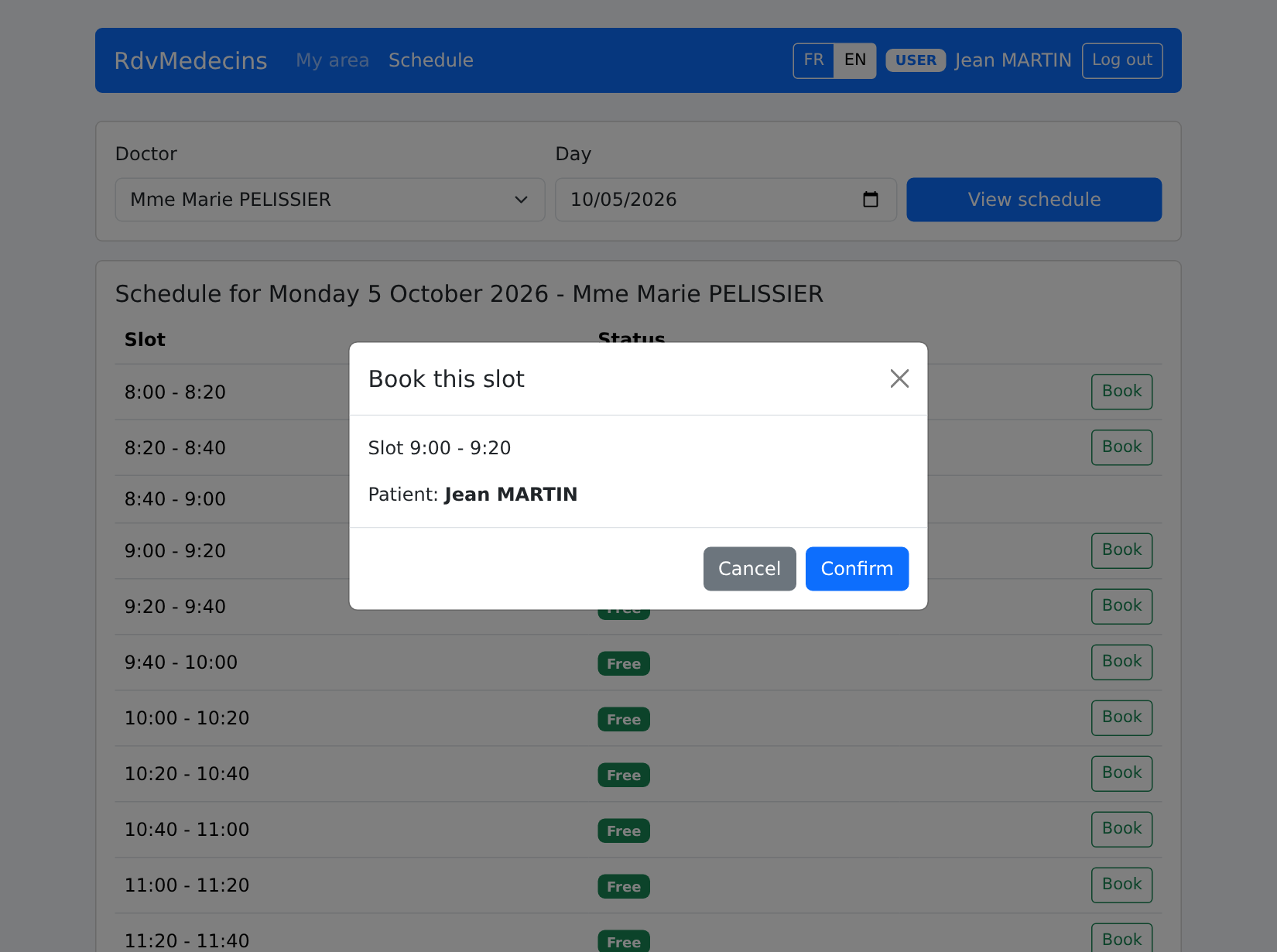
“预约”会打开预约窗口。URL 变为 [/schedule?doctorId=1&day=2026-10-05&book=3]:重新加载页面(F5)会重新打开同一个窗口。
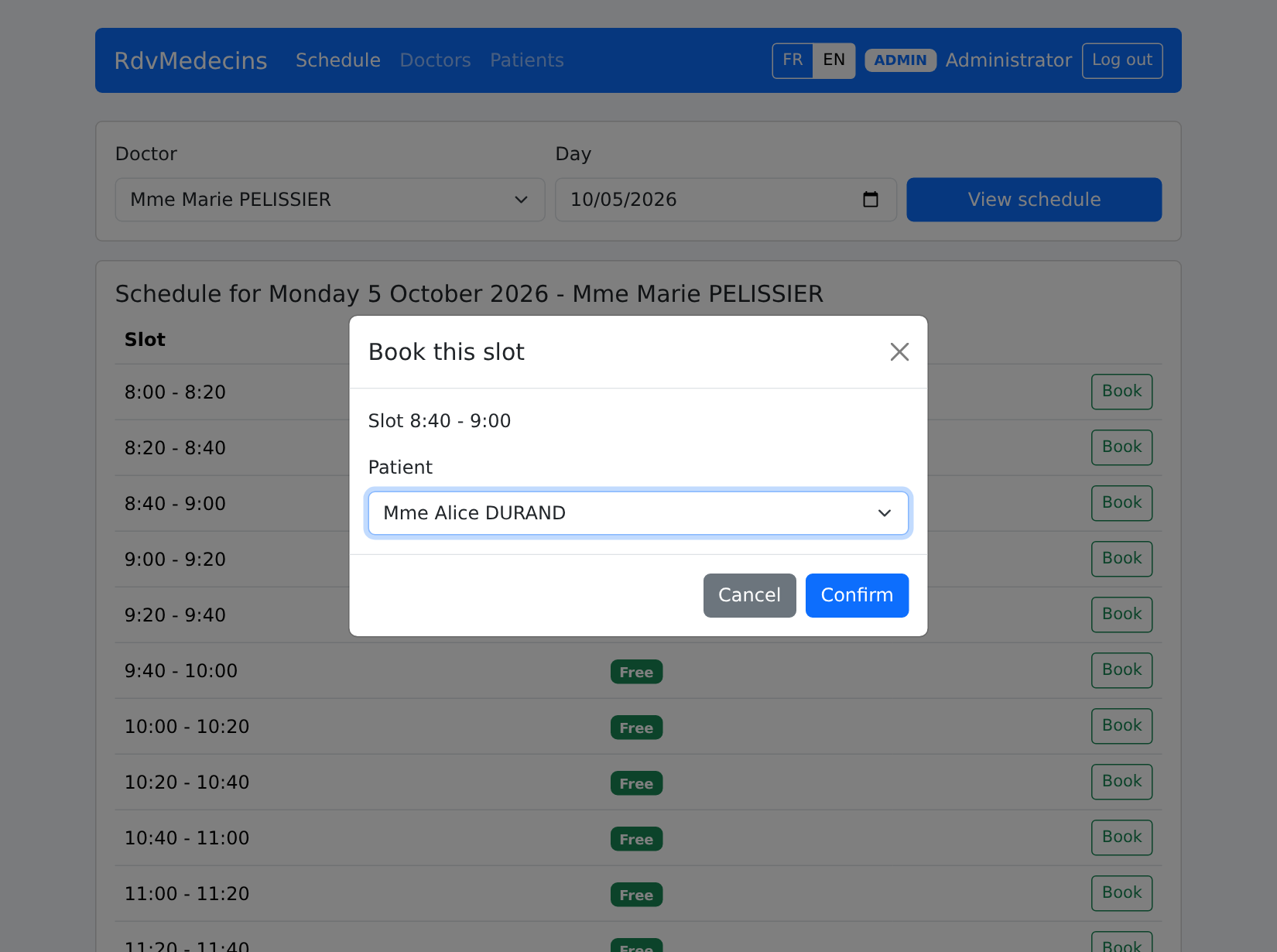
Image

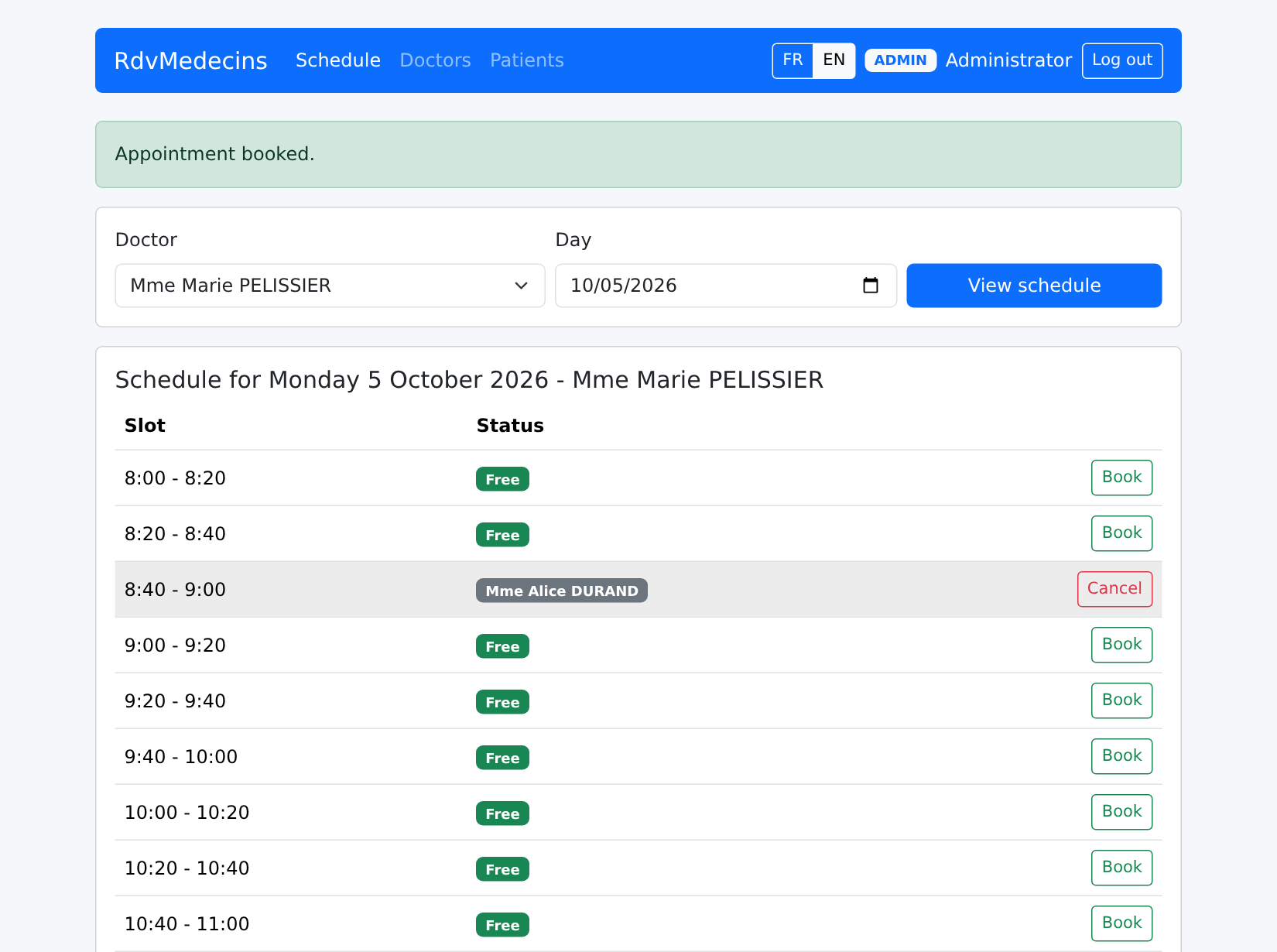
预约已保存:

Image

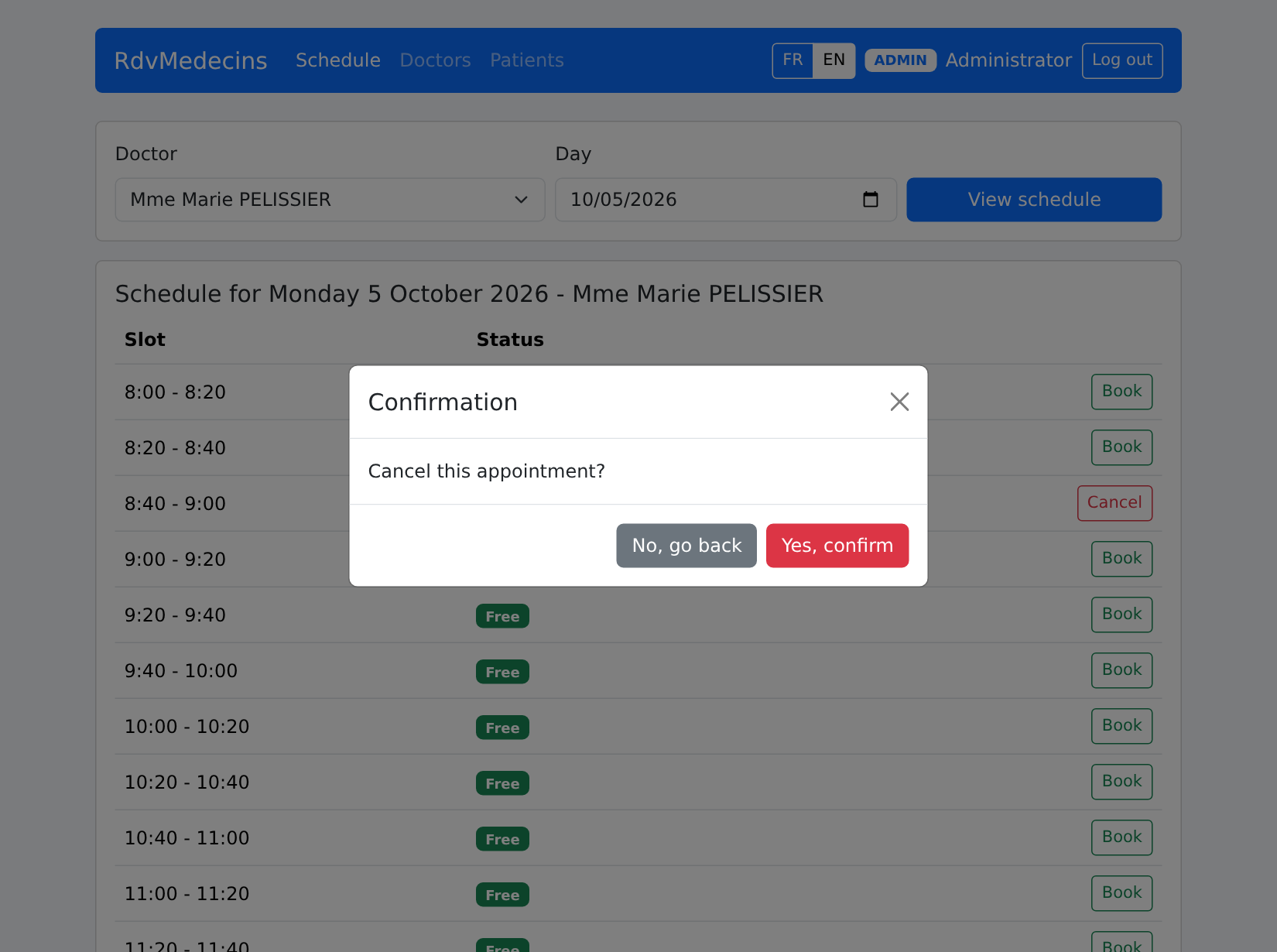
“取消”会要求确认:

Image

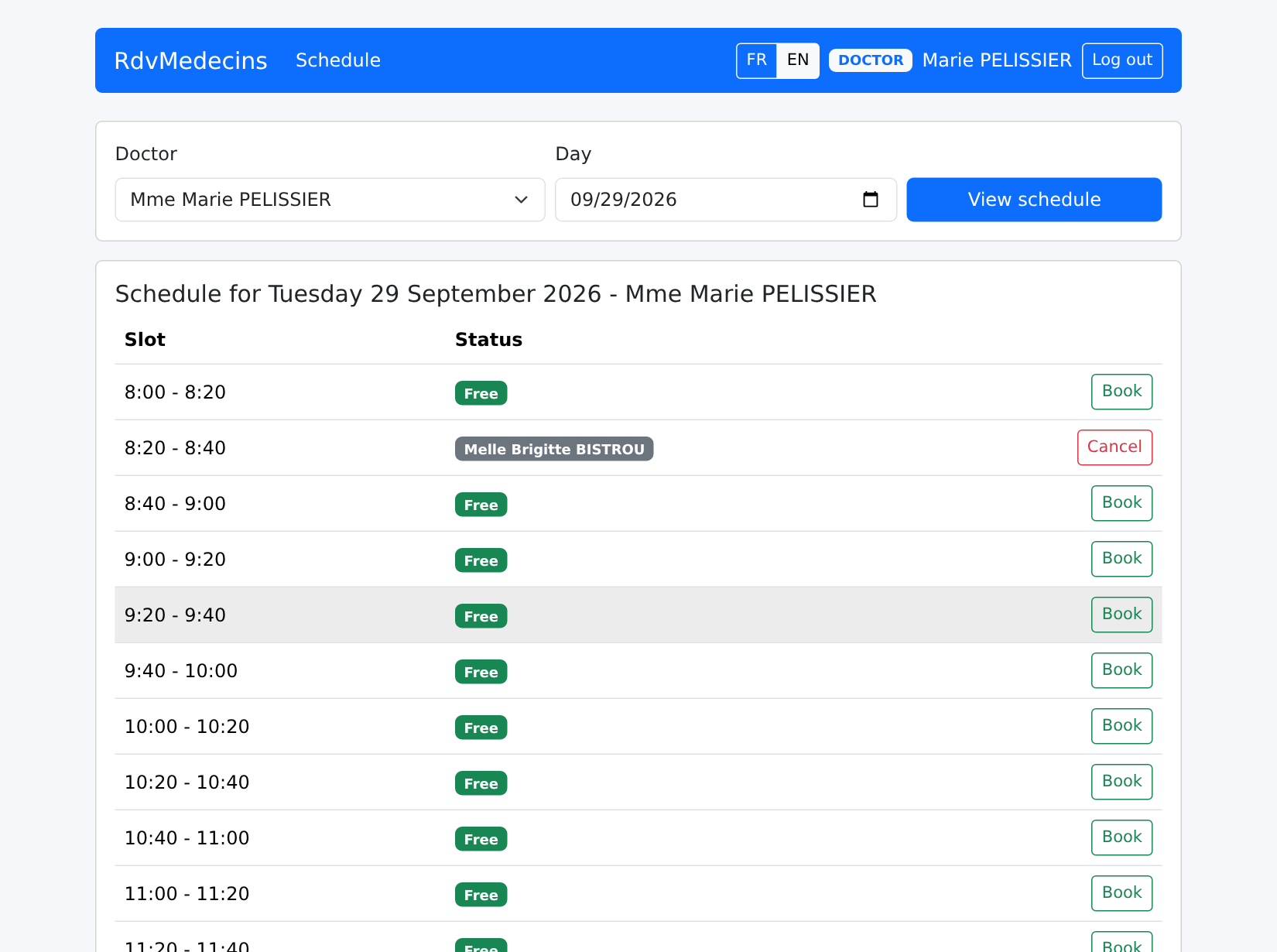
医生会被直接带到他自己的当日日程:

Image

10.3.3. 患者门户

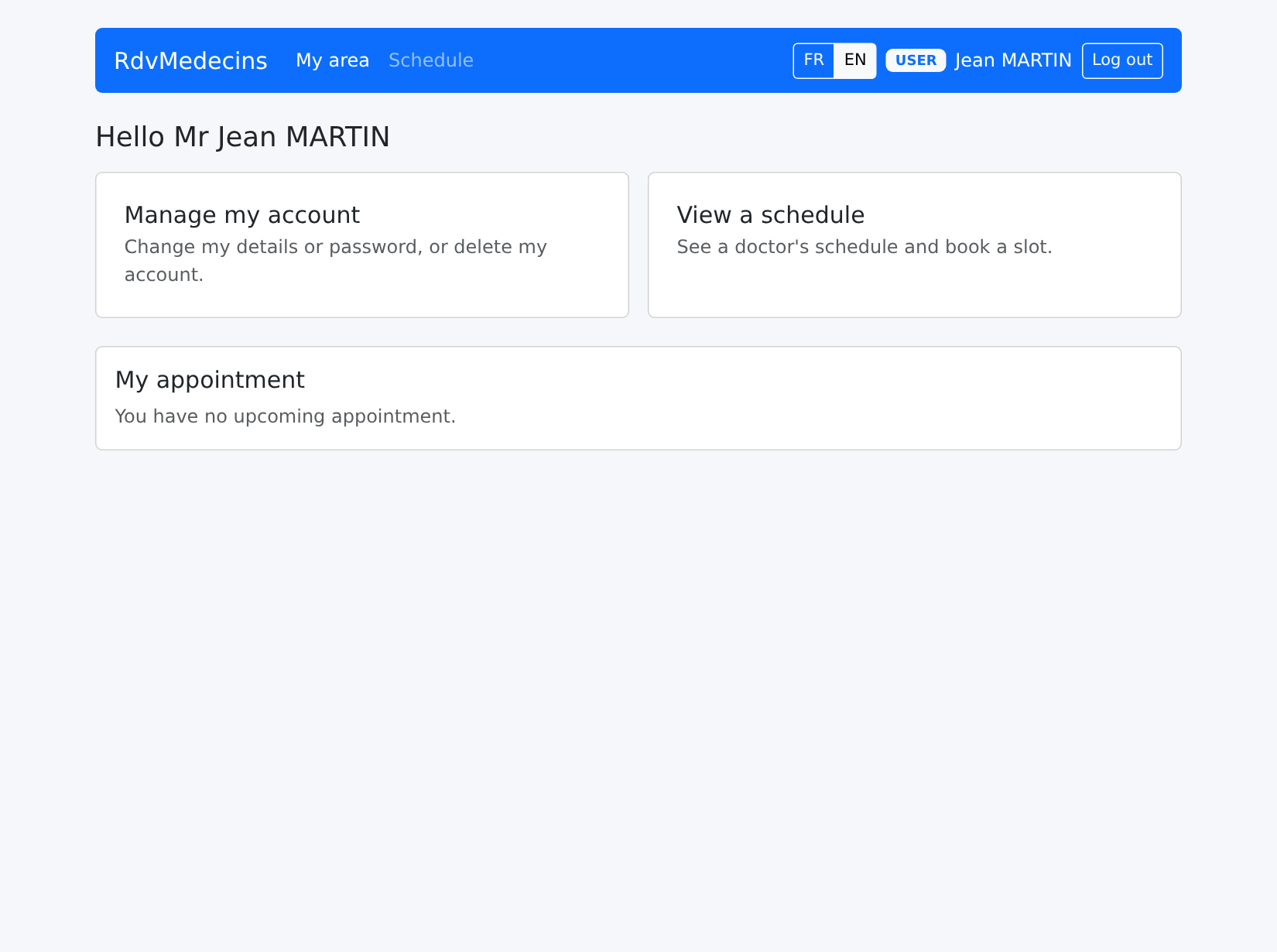
患者([martin])进入“我的空间”:

Image

在日程中,他在其他患者的预约时间段旁看到“已预约”:

Image

他无需选择患者,就能为自己预约:

Image

他的预约显示在他的姓名下;“预约”按钮不再可用(只能有一个即将到来的预约),并有一条消息解释原因:
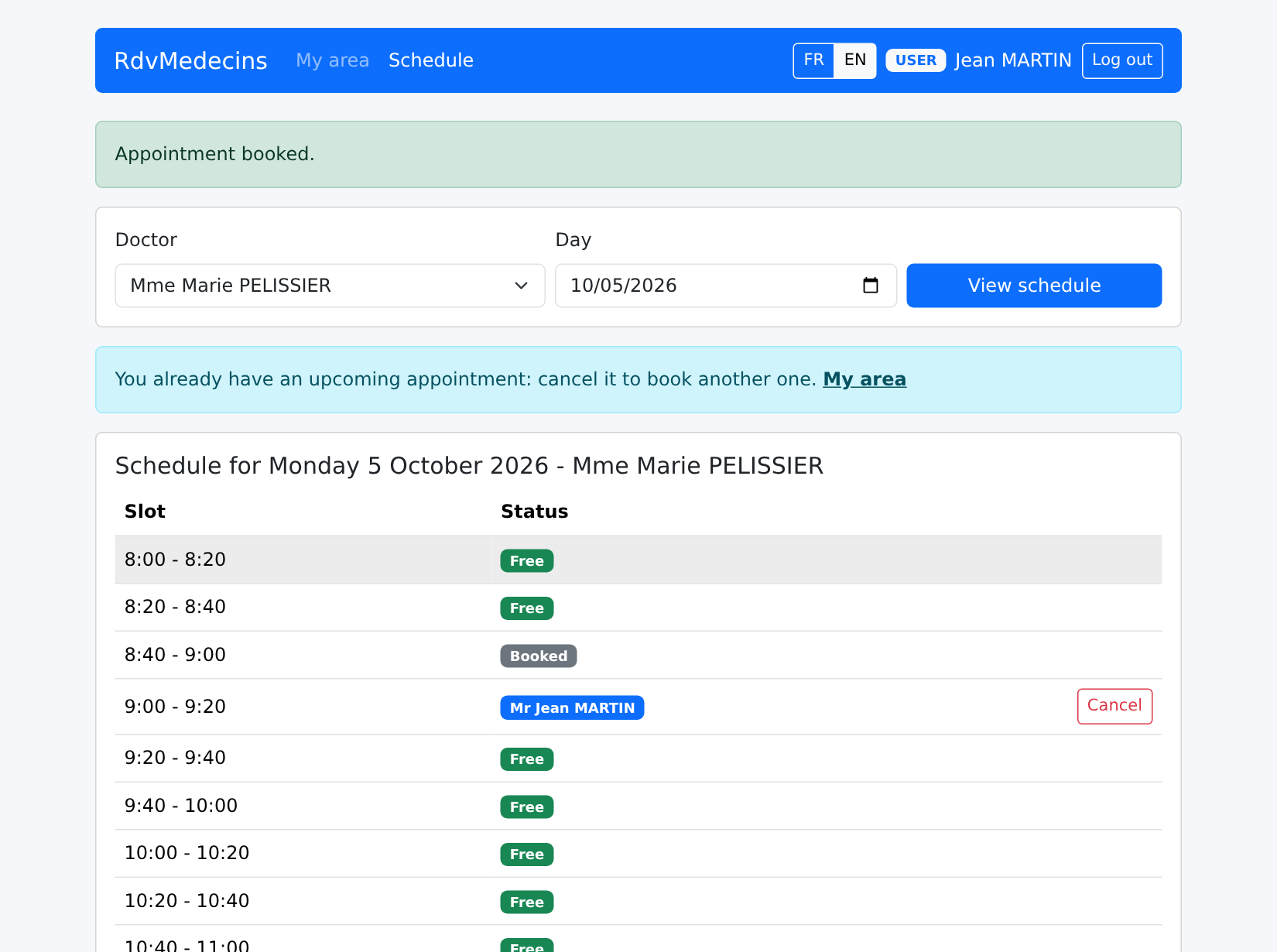
Image

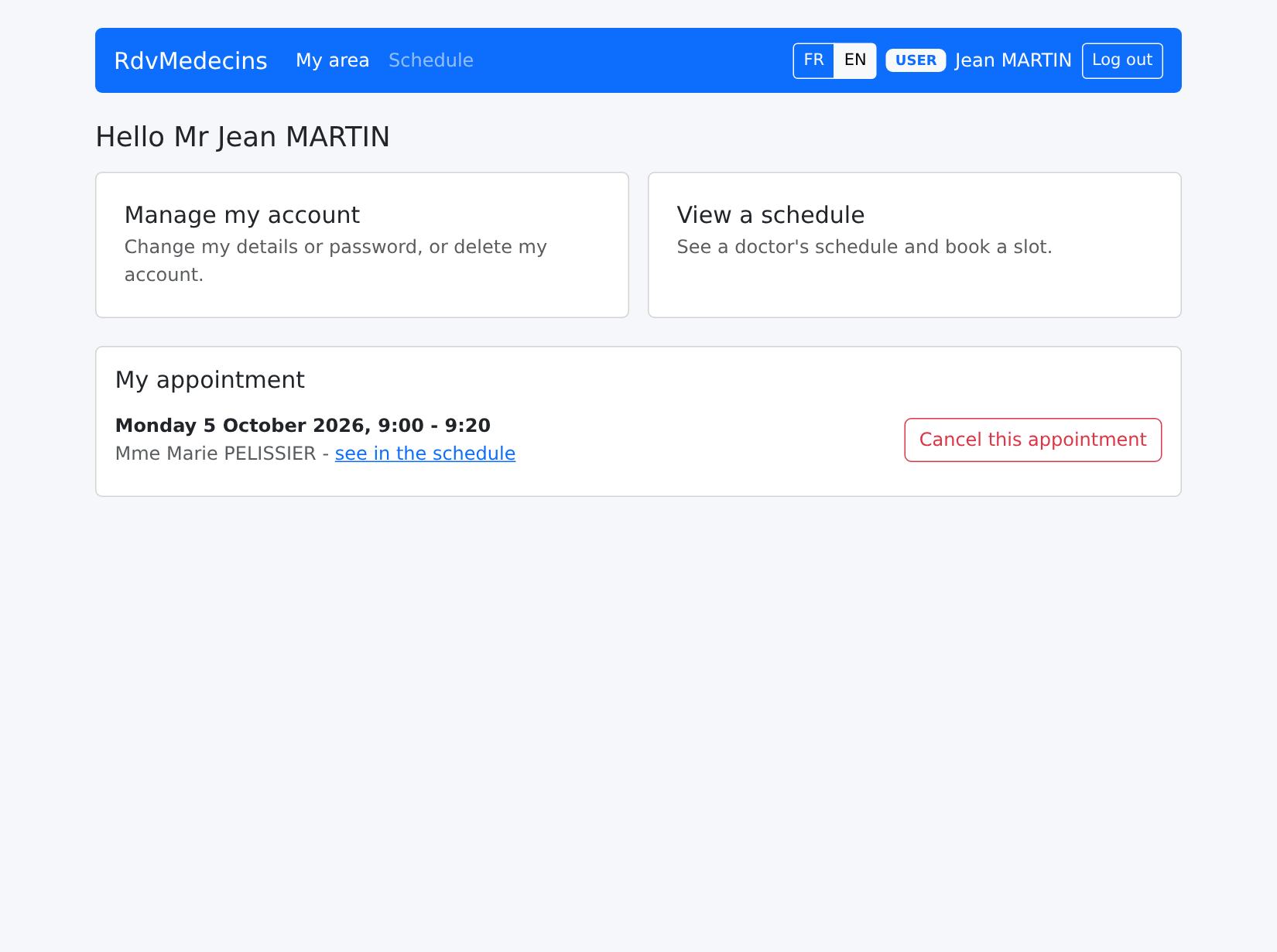
他的面板显示如下内容:

Image

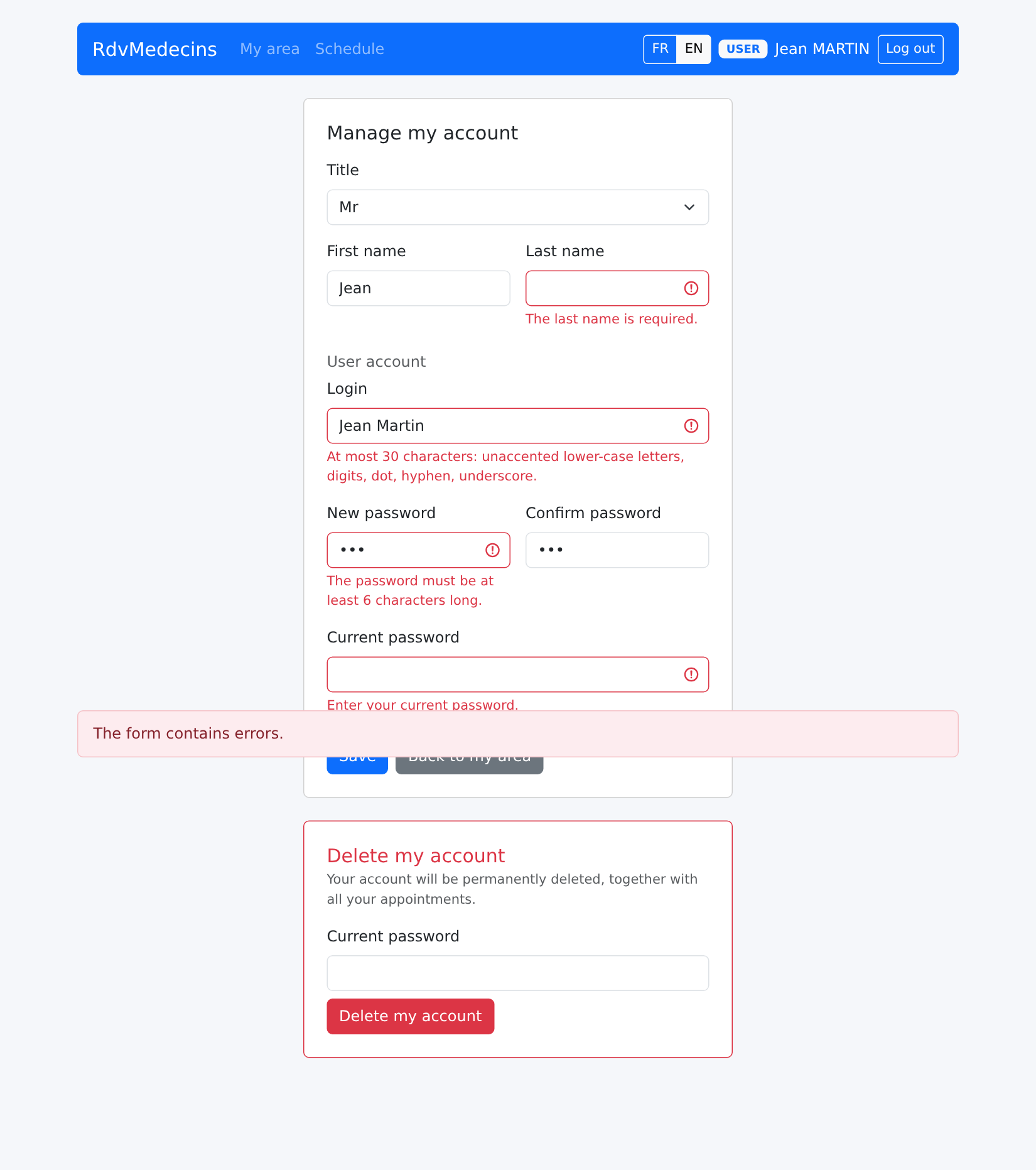
“管理我的账户”:任何修改都需要当前密码;错误来自服务器端:

Image

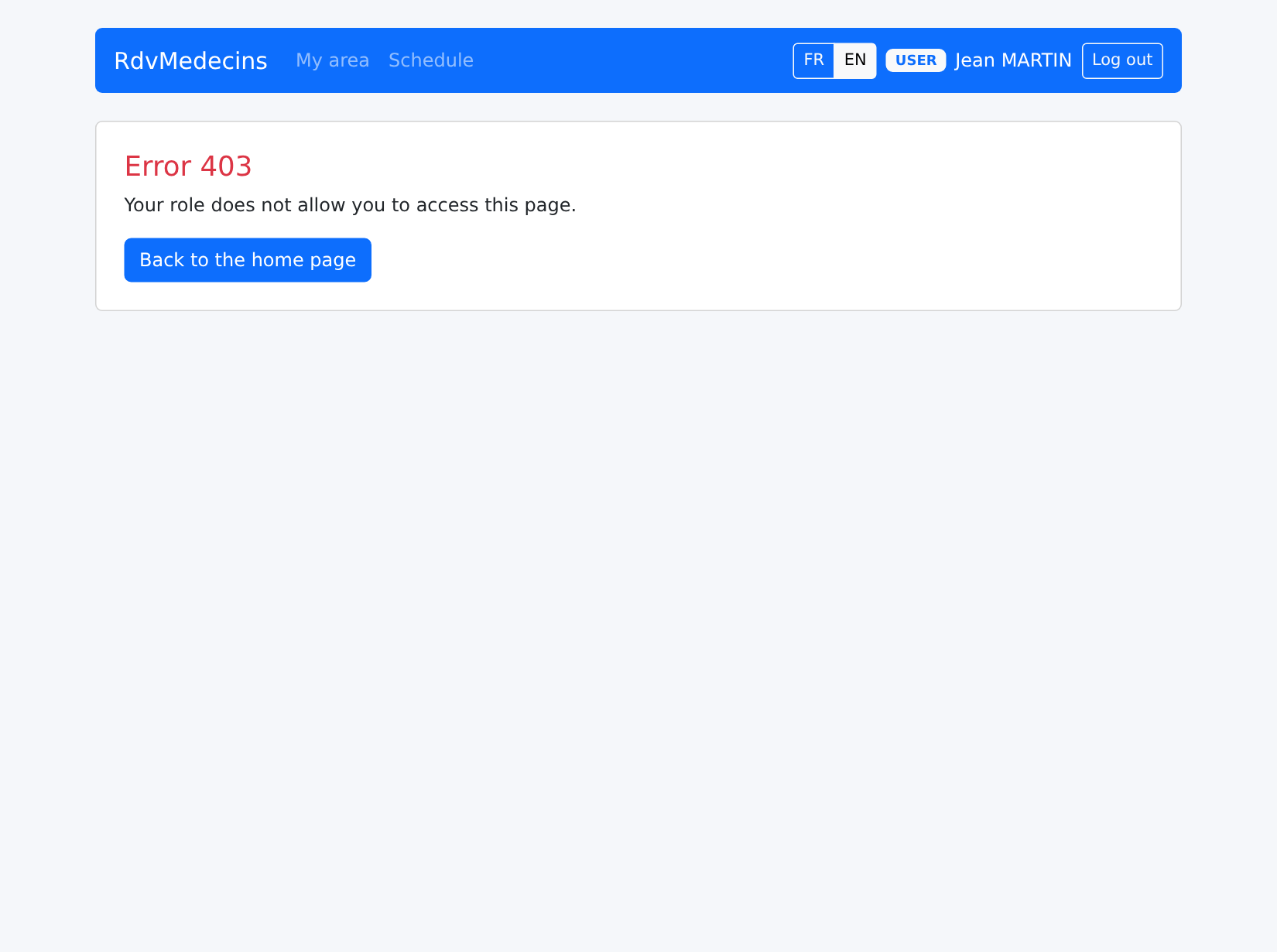
如果他输入专属于管理员的地址 /doctors:

Image

10.3.4. 管理医生和客户

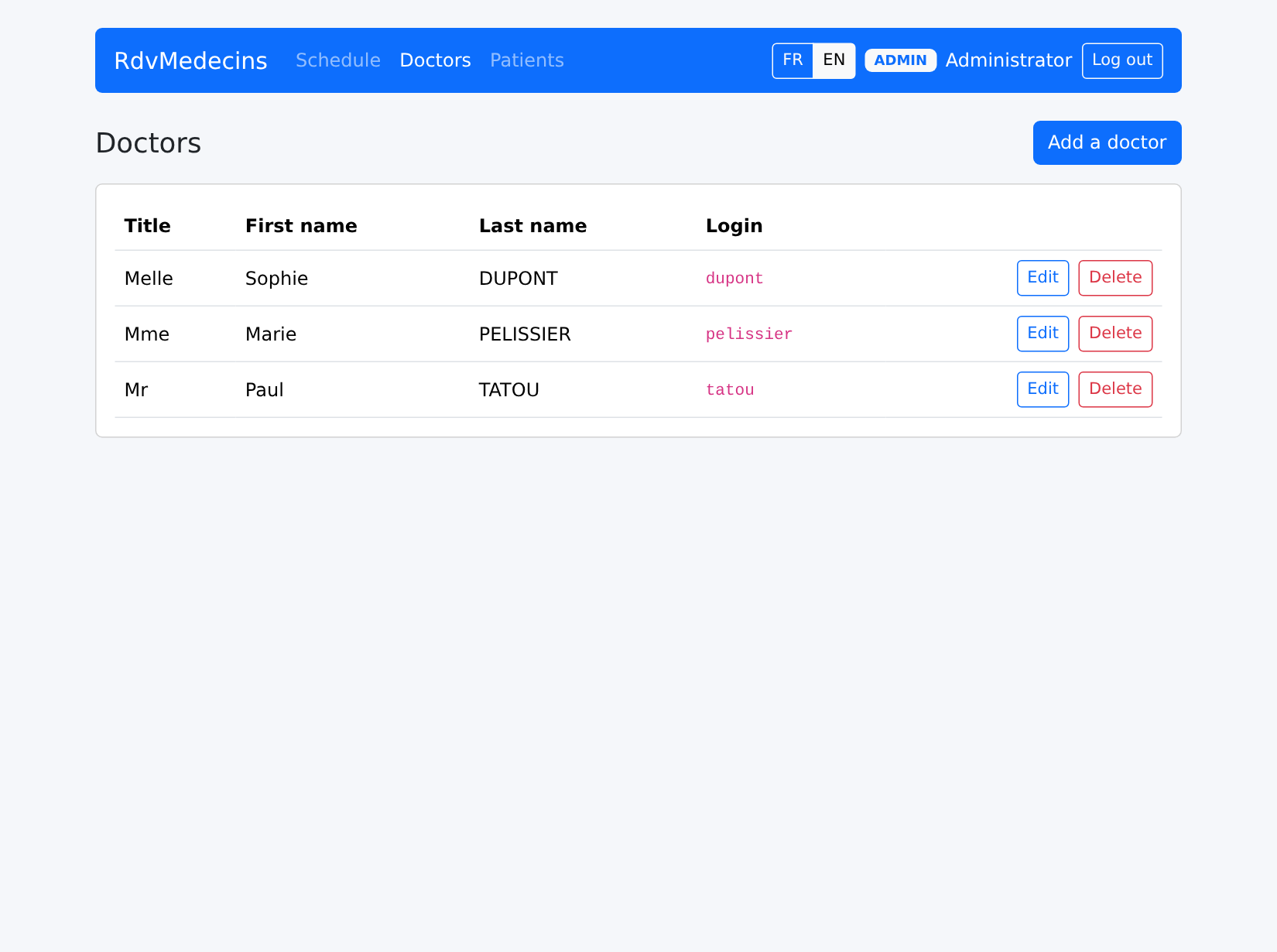
Image

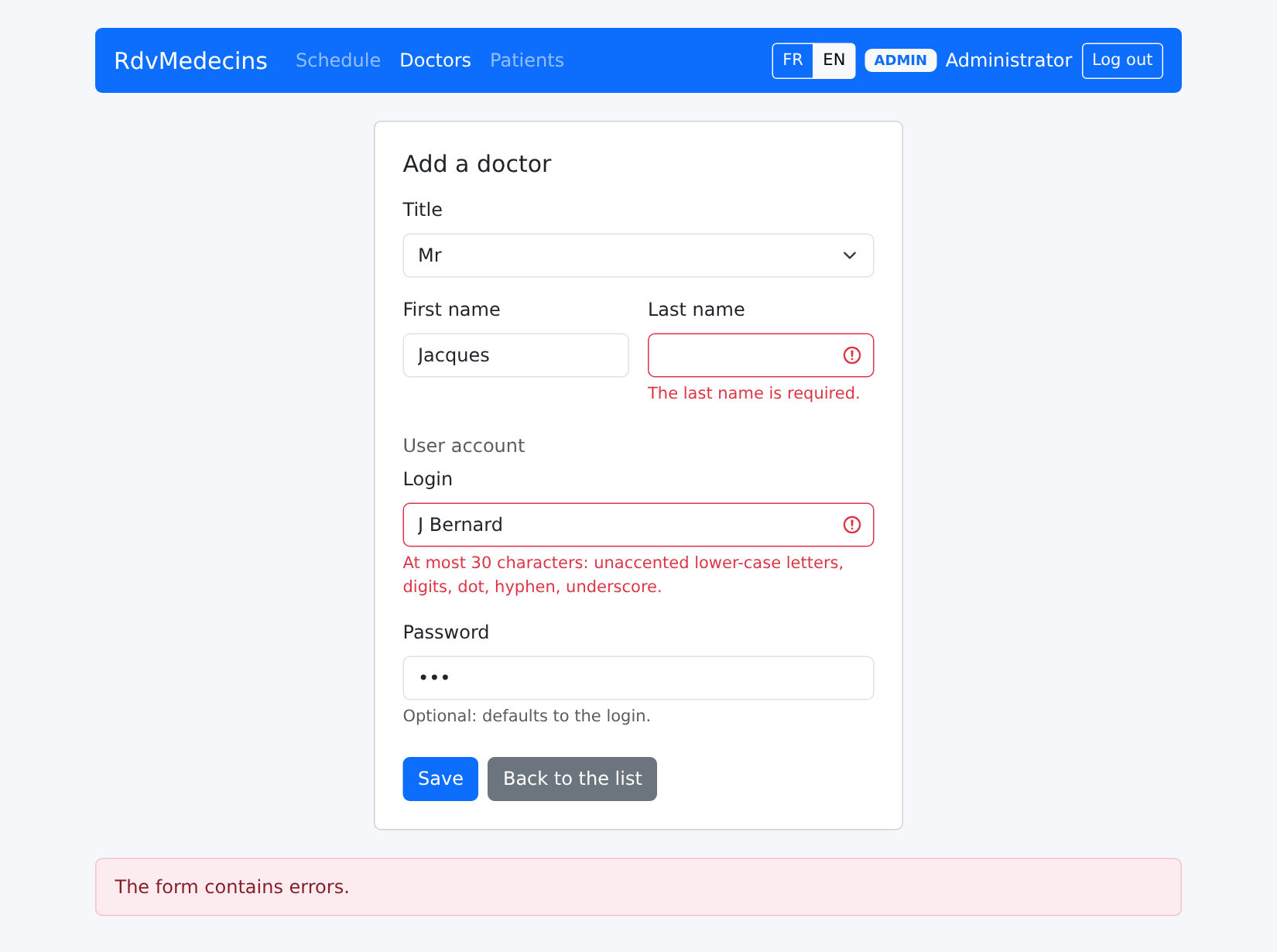
填写有误的条目:

Image

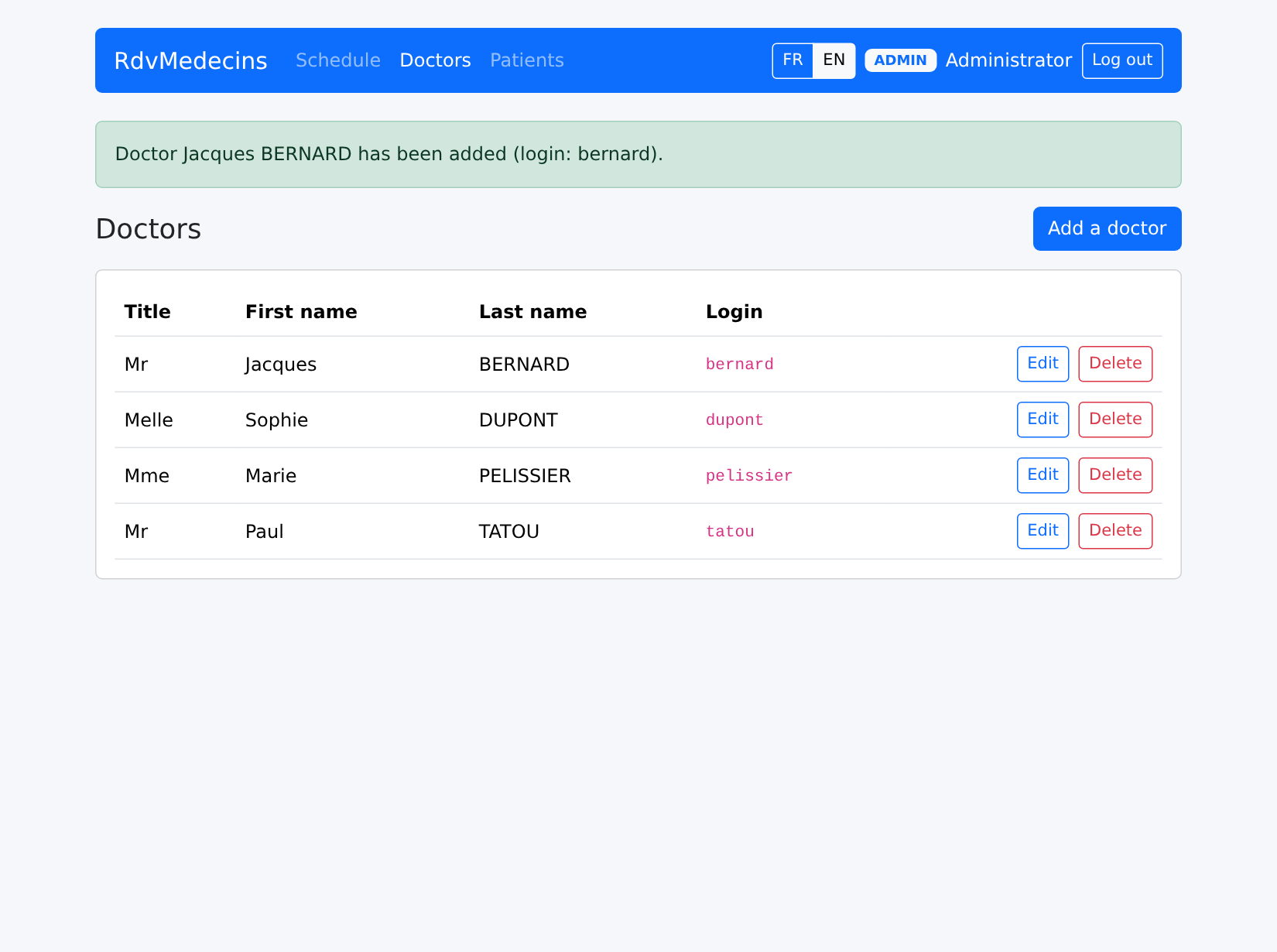
添加成功:

Image

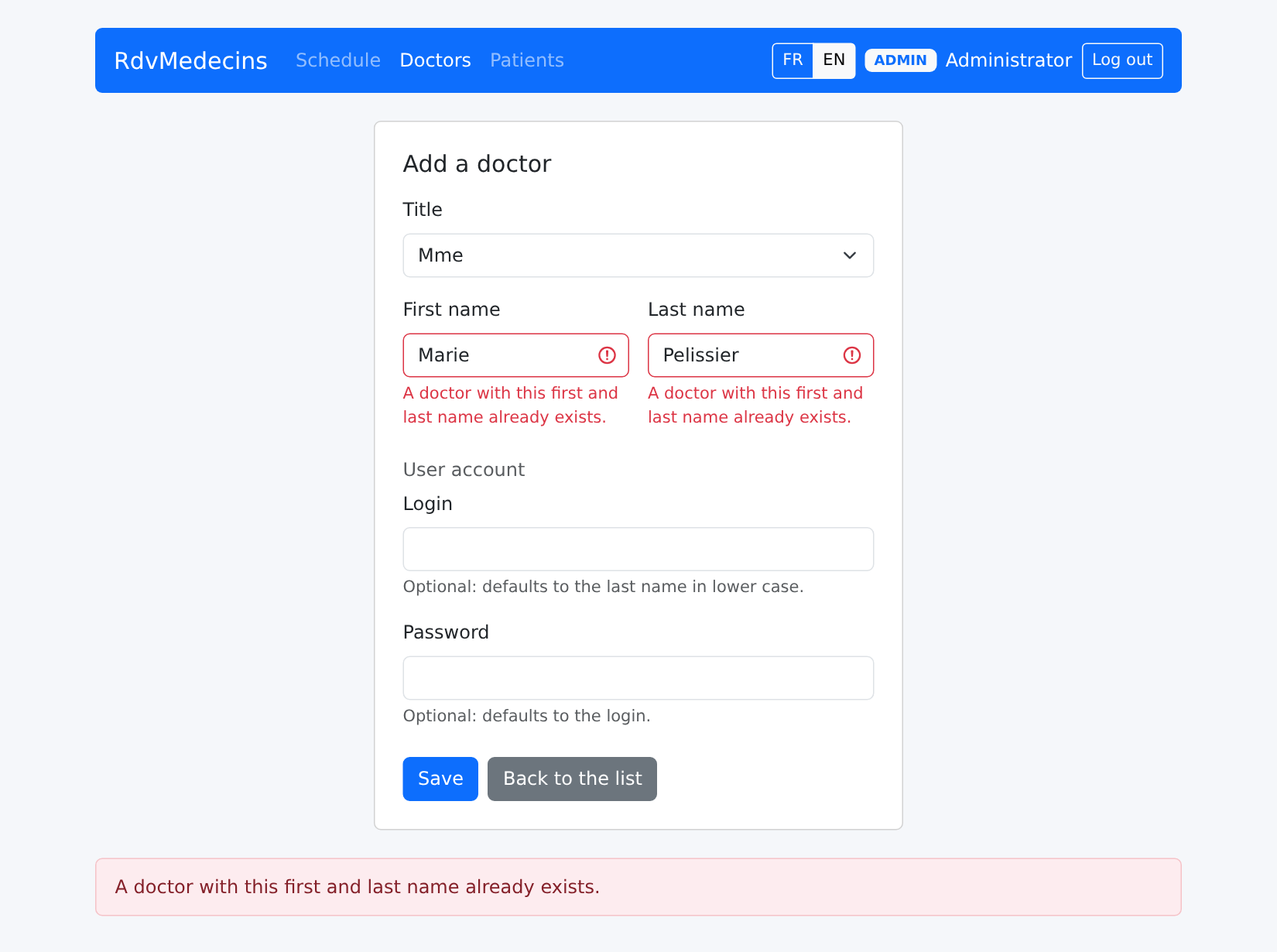
重名:

Image

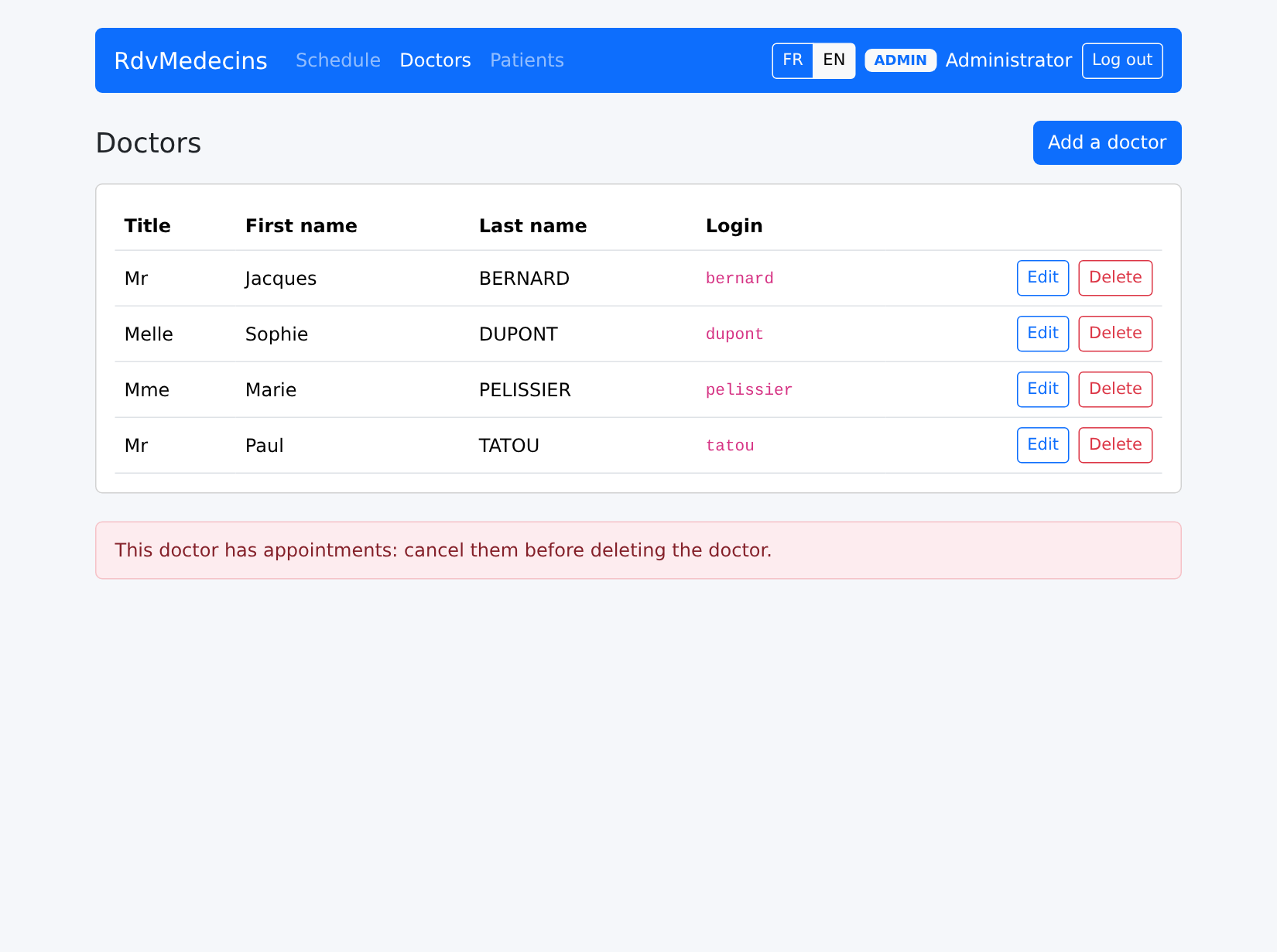
删除有预约的医生的请求会被拒绝:

Image

10.3.5. 创建账户

在登录页面上,输入验证码(CAPTCHA),然后点击“创建患者账户”。表单填写有误,被服务器拒绝:
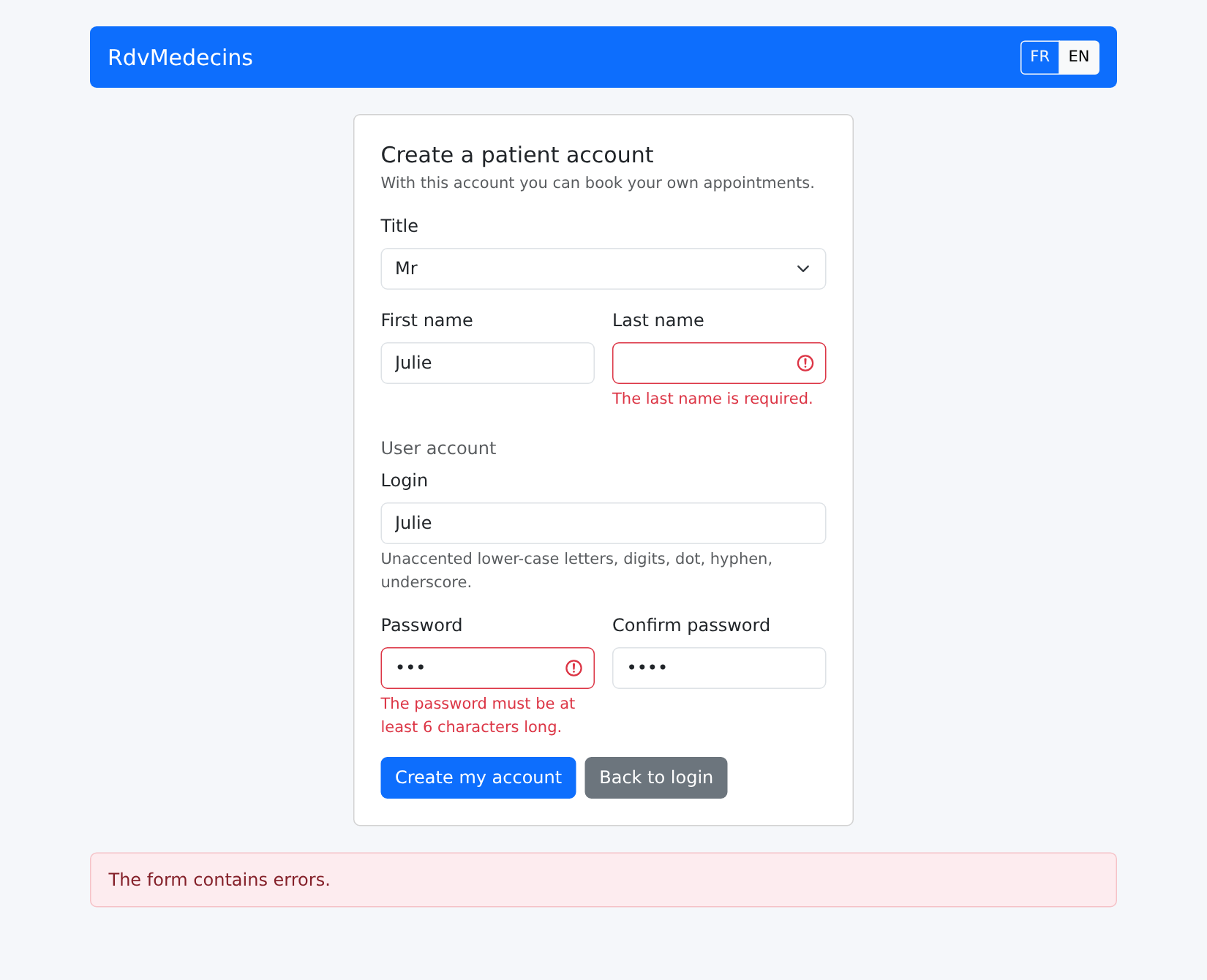
Image

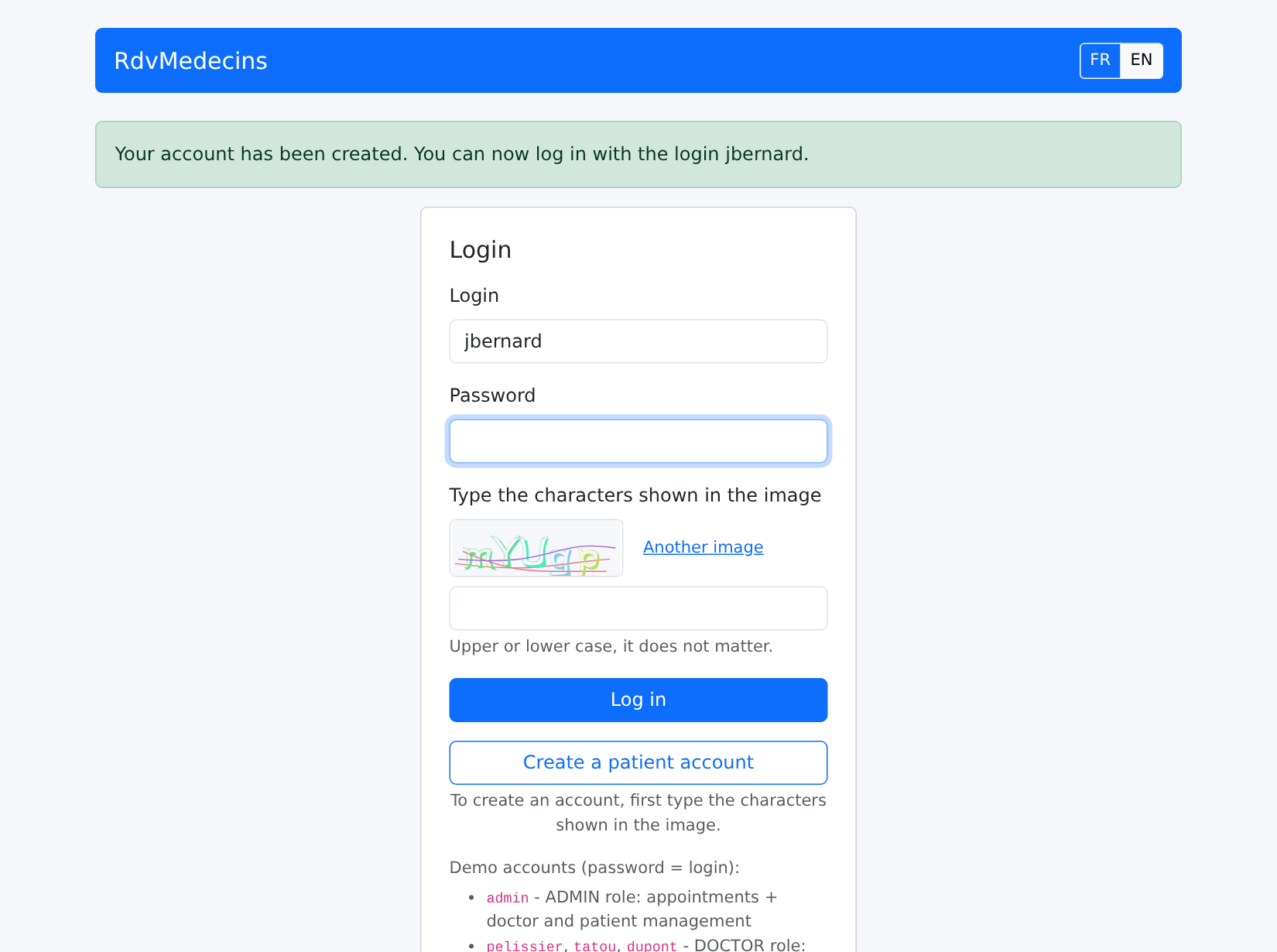
账户创建之后,返回登录页面;登录字段已预先填好:

Image

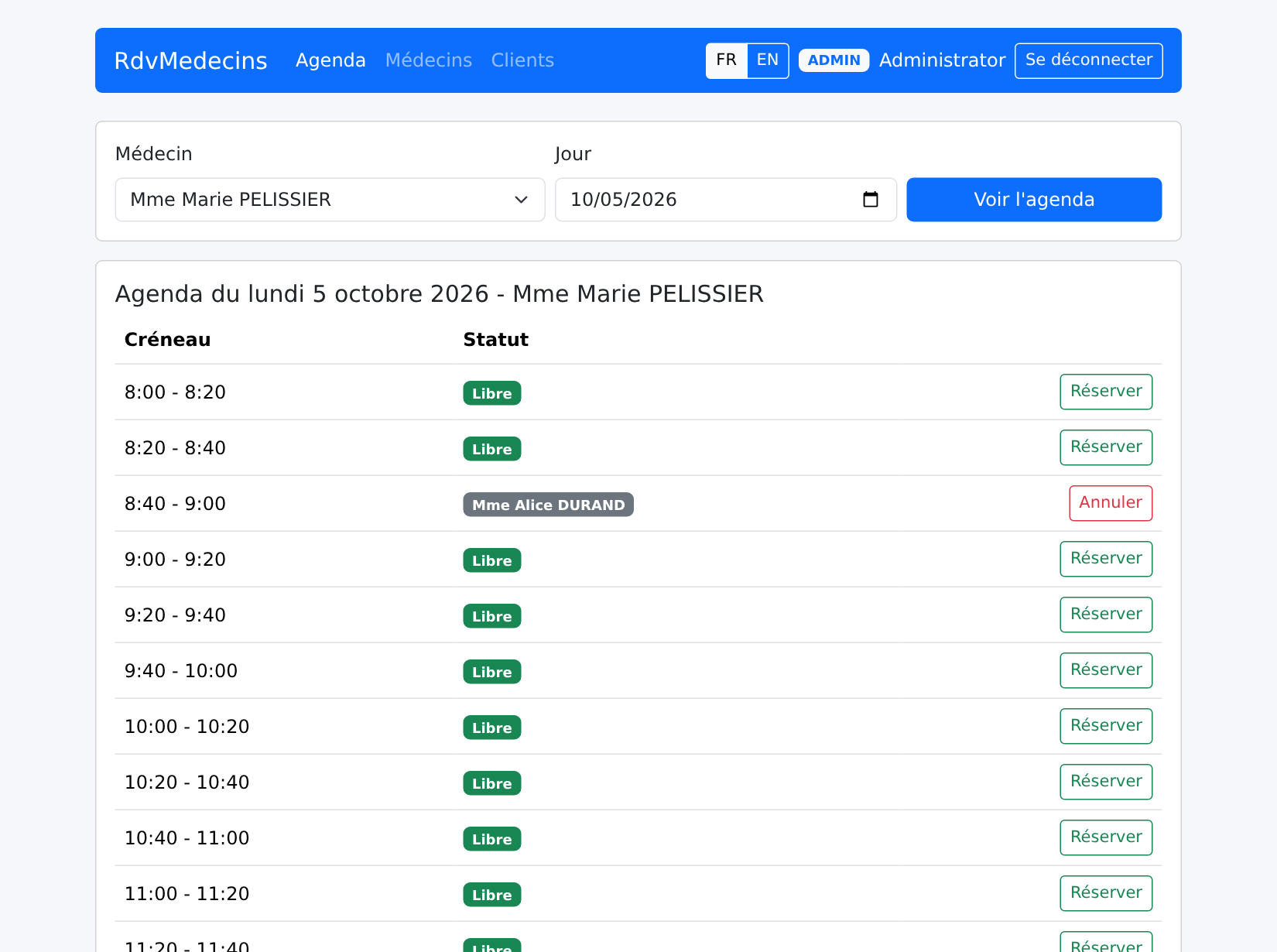
10.3.6. 法语界面

FR / EN 按钮会当场翻译页面,无需向服务器发出任何请求;浏览器标签页的标题也会被翻译:
Image

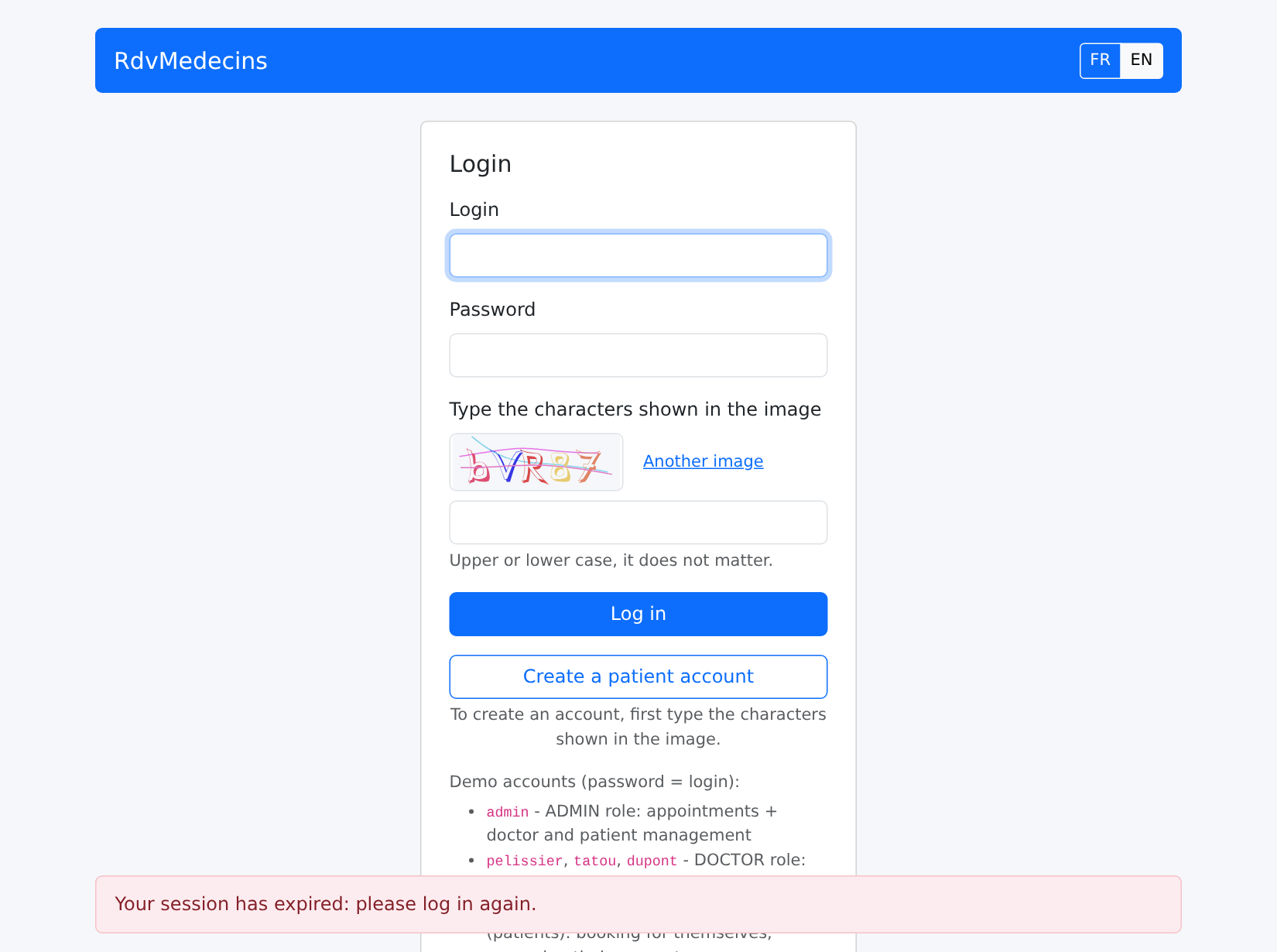
10.3.7. 会话过期、未知地址

如果令牌过期(或者 Cookie 被删除),下一个请求会收到 401 响应;客户端被重定向到登录页面:
Image

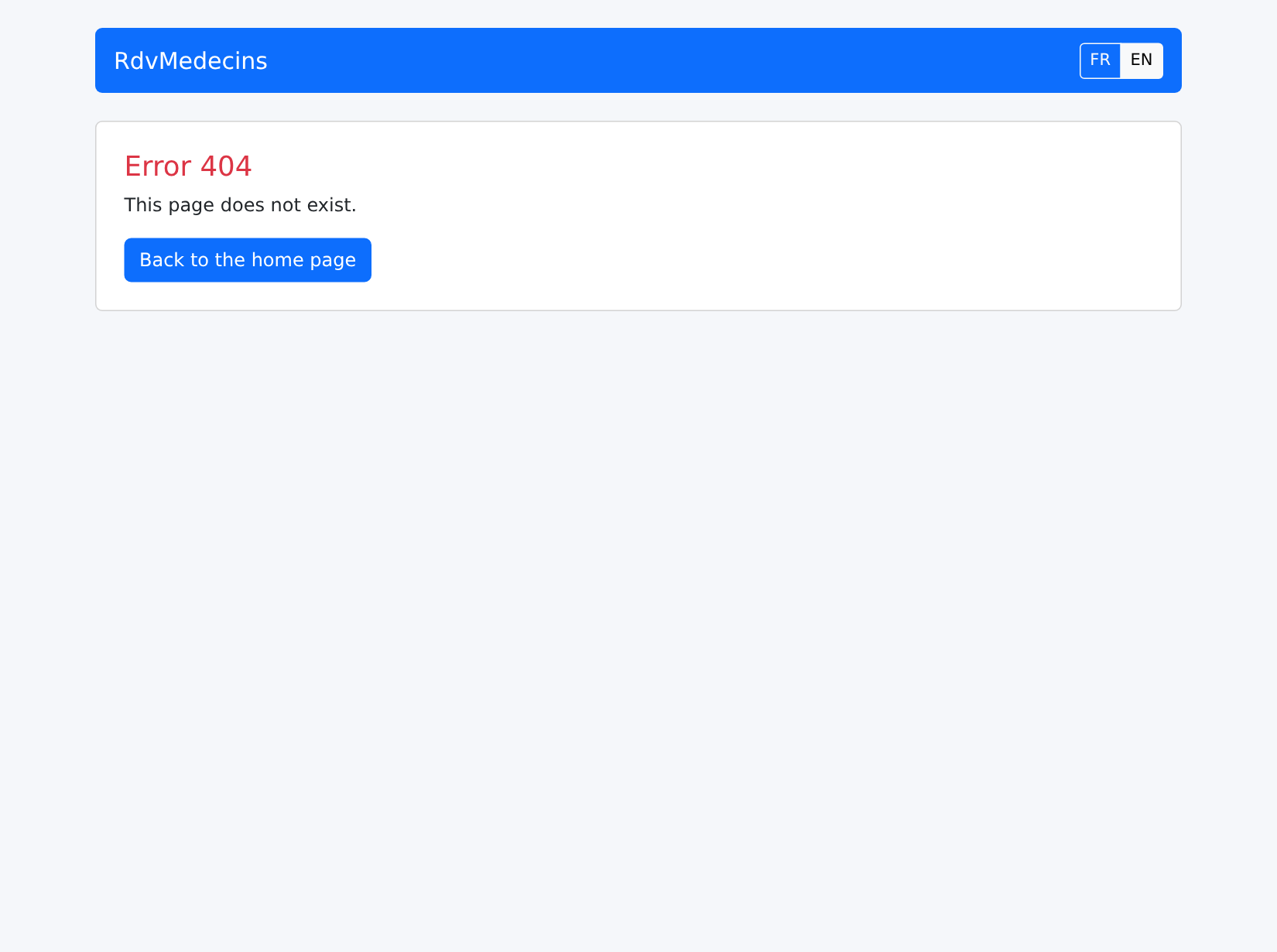
一个未知的地址:

Image

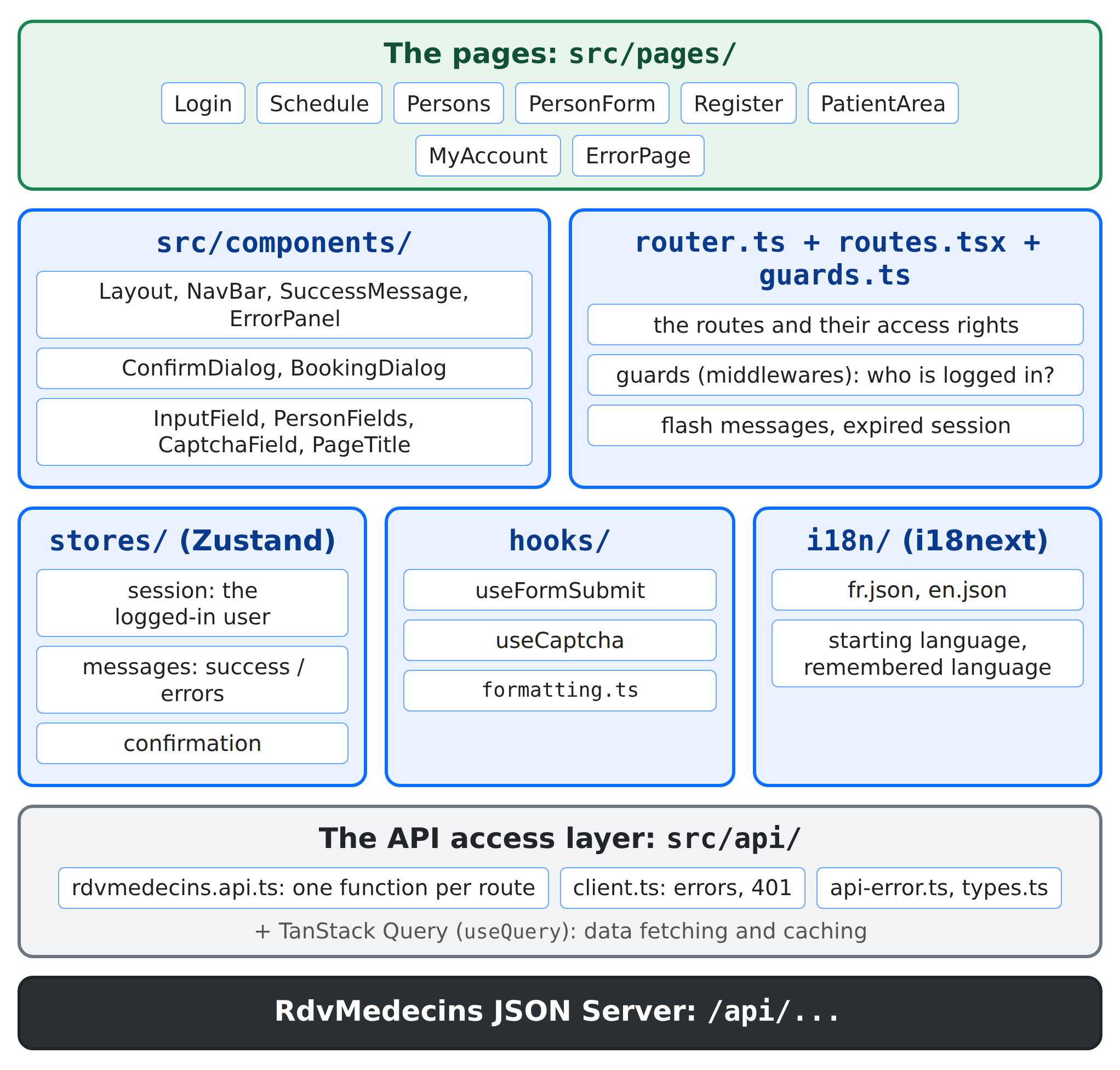
10.4. 客户端架构

rdvmedecins-react/
├── package.json, vite.config.ts, tsconfig.json
├── index.html                THE page of the application
├── public/favicon.svg        the tab icon
└── src/
    ├── main.tsx              the startup
    ├── router.ts             the router, the expired session, the flash messages
    ├── routes.tsx            the pages and their access rights
    ├── guards.ts             the router guards
    ├── styles.css
    ├── formatting.ts         the formatting
    ├── api/                  the API access layer
    ├── i18n/                 the languages
    ├── stores/               session, messages, confirmation (Zustand)
    ├── hooks/                form submission, the captcha
    ├── components/           the layout and the reusable components
    └── pages/                the pages

Image

下表对比了 [NestJS] 课程中的 HTML 应用与这个客户端:

HTML 应用(NestJS)
React 客户端
服务器生成每个页面([res.render])
服务器返回 JSON;[src/pages/] 中的组件生成页面
[views/layout.hbs] 及其局部视图
[Layout.tsx] 以及 [src/components/] 中的组件
控制器的路由([@Controller('schedule')])
客户端路由([routes.tsx]);服务器只有 /api/... 路由
[JwtAuthGuard] 和 [RolesGuard] 重定向到 /login 或 403 页面
路由守卫;服务器仍保留自己的守卫,返回 401 或 403
保存在 Cookie 中的闪现消息
保存在 store 中的闪现消息,[useMessages]
由服务器读取的词典,辅助函数 [{{t}}]
客户端上的词典,[i18next];服务器只返回键
语言保存在 Cookie 中
语言保存在 [localStorage] 中
表单被拒绝:服务器重新加载页面
表单被拒绝:400/409 响应;客户端在字段下方 显示错误
确认窗口:一个小脚本,[public/js/app.js]
一个 store 和一个组件,[ConfirmDialog]
应用在没有 JavaScript 的情况下也能工作
应用本身就是 JavaScript

前几课中的 [Vue.js] 和 [Angular] 客户端具有完全相同的结构:[Pinia] 中的“store”和 [Angular] 中的服务,在这里就是 [Zustand] store;“组合式函数”就是 Hook,视图就是页面。

下面列出了客户端的所有文件。它们都有大量注释;这些注释是课程的一部分。

10.4.1. 项目配置

10.4.1.1. package.json

{
  "name": "rdvmedecins-react",
  "private": true,
  "version": "1.0.0",
  "description": "React client of the medical appointment booking application [RdvMedecins] - client of the JSON server [rdvmedecins-nestjs-json]",
  "type": "module",
  "scripts": {
    "start": "vite",
    "build": "tsc --noEmit && vite build",
    "preview": "vite preview"
  },
  "dependencies": {
    "@tanstack/react-query": "^5.104.0",
    "bootstrap": "^5.3.8",
    "i18next": "^26.4.2",
    "react": "^19.3.0",
    "react-dom": "^19.3.0",
    "react-i18next": "^17.0.15",
    "react-router": "^8.4.0",
    "zustand": "^5.0.15"
  },
  "devDependencies": {
    "@types/react": "^19.2.18",
    "@types/react-dom": "^19.2.7",
    "@vitejs/plugin-react": "^6.1.1",
    "typescript": "~6.0.2",
    "vite": "^8.3.0"
  }
}
  • 第 8–10 行:[npm start] 启动开发服务器;[npm run build] 先检查类型([tsc --noEmit],见下文),然后构建生产版本;[npm run preview] 提供构建好的版本用于测试;
  • 第 12–21 行:应用使用的库:[React]、[React Router]、[TanStack Query]、[Zustand]、[i18next]、[Bootstrap];
  • 第 22–28 行:开发工具:[Vite] 及其用于 [React] 的插件、[TypeScript],以及 [React] 的类型。

没有表单库([React Hook Form],示例 08):与示例 25 一样,所有输入验证规则都由服务器检查,客户端只显示结果。

10.4.1.2. vite.config.ts

// =========================================================================
// vite.config.ts - 客户端的构建工具
// -------------------------------------------------------------------------
//   - npm start      :开发服务器(http://localhost:5173),
//                      它把 /api/... 转发给 JSON 服务器(端口 8080);
//   - npm run build  :已编译的应用,位于 dist/;
//   - npm run preview:提供 dist/(使用相同的代理),以便试用。
// =========================================================================

import { defineConfig } from 'vite';
import react from '@vitejs/plugin-react';

// 代理:页面和 API 因此具有相同的源(localhost:5173);令牌的
// httpOnly Cookie 无需任何配置即可传递,也没有 CORS
const proxy = { '/api': 'http://localhost:8080' };

export default defineConfig({
  plugins: [react()],
  server: { port: 5173, proxy },
  preview: { port: 4173, proxy },
  // 在生产环境中:库的代码(React、React Router、
  // i18next……)放在一个单独的文件 "libraries-XXXX.js" 中。它很少
  // 变化:浏览器会在不同版本之间把它保留在缓存中。
  build: {
    rolldownOptions: {
      output: { codeSplitting: { groups: [{ name: 'libraries', test: /node_modules/ }] } },
    },
  },
});
  • 第 15 行:示例 22 中的代理:/api/... 请求会被转发给 JSON 服务器;
  • 第 19 行:开发服务器;
  • 第 20 行:[npm run preview] 服务器,使用相同的代理;
  • 第 24–28 行:在生产环境中,库的代码存放在单独的文件中(见“部署”一章)。

10.4.1.3. tsconfig.json

{
  "compilerOptions": {
    "target": "ES2023",
    "lib": ["ES2023", "DOM", "DOM.Iterable"],
    "module": "ESNext",
    "moduleResolution": "bundler",
    "types": ["vite/client"],
    "jsx": "react-jsx",
    "strict": true,
    "noUnusedLocals": true,
    "noUnusedParameters": true,
    "noFallthroughCasesInSwitch": true,
    "noImplicitReturns": true,
    "verbatimModuleSyntax": true,
    "erasableSyntaxOnly": true,
    "resolveJsonModule": true,
    "skipLibCheck": true,
    "noEmit": true
  },
  "include": ["src", "vite.config.ts"]
}
  • 第 8 行:JSX 被编译成对 [jsx(...)] 的调用,它们会被自动导入:无需在每个文件中写 [import React];
  • 第 9 行:[TypeScript] 的严格模式;
  • 第 14 行:仅用于类型的导入写作 [import type]:它在编译时消失;
  • 第 15 行:只允许使用那些可以简单地擦除以得到 [JavaScript] 的 [TypeScript] 语法(不允许 [enum],也不允许参数属性):这正是不检查类型的 [Vite] 所做的事;
  • 第 16 行:导入 JSON 文件(词典);
  • 第 18 行:[TypeScript] 不生成任何文件:它只负责检查([tsc --noEmit]);[Vite] 才负责编译。

10.4.2. 启动应用

10.4.2.1. index.html

<!doctype html>
<!--
  index.html - THE page of the application (Single Page Application).
  The server never sends any other: everything else is built in the
  browser by React, in <div id="root">. lang and title are updated
  by the application according to the language and the page displayed.
-->
<html lang="en">
<head>
  <meta charset="utf-8">
  <title>RdvMedecins</title>
  <meta name="viewport" content="width=device-width, initial-scale=1">
  <link rel="icon" href="/favicon.svg" type="image/svg+xml">
</head>
<body>
  <div id="root"></div>
  <!-- 没有 JavaScript,React 应用什么也显示不了:我们对此作出提示 -->
  <noscript>RdvMedecins requires JavaScript. / RdvMedecins a besoin de JavaScript.</noscript>
  <script type="module" src="/src/main.tsx"></script>
</body>
</html>
  • 第 16 行:[React] 显示应用的元素;
  • 第 18 行:没有 [JavaScript],[React] 应用就无法显示任何内容:这里对此作了说明;
  • 第 19 行:应用的入口点。开发期间,[Vite] 按需编译 [main.tsx] ;在生产环境中,这一行会被编译后的文件取代(见“部署”一章)。

10.4.2.2. src/main.tsx

// =========================================================================
// main.tsx - 应用的启动
// -------------------------------------------------------------------------
//   - 样式表(Bootstrap、styles.css);
//   - i18next(法语和英语);
//   - TanStack Query,它读取服务器的数据:其失败的请求
//     会在错误面板中显示消息,集中在同一个位置
//     (声明自行处理错误的请求除外:
//     meta.errorHandled);
//   - 路由器,它显示当前地址对应的页面。
// =========================================================================

import { StrictMode } from 'react';
import { createRoot } from 'react-dom/client';
import { QueryCache, QueryClient, QueryClientProvider } from '@tanstack/react-query';
import { RouterProvider } from 'react-router/dom';
import 'bootstrap/dist/css/bootstrap.min.css';
import './styles.css';
import './i18n/i18n';
import { useMessages } from './stores/messages';
import { router } from './router';

const queryClient = new QueryClient({
  queryCache: new QueryCache({
    onError: (error, query) => {
      if (!query.meta?.errorHandled) {
        useMessages.getState().showApiError(error);
      }
    },
  }),
  defaultOptions: {
    queries: {
      retry: false, // 错误会立即显示,不会重试
      refetchOnWindowFocus: false, // 返回该标签页时不重新读取
    },
  },
});

createRoot(document.getElementById('root')!).render(
  <StrictMode>
    <QueryClientProvider client={queryClient}>
      <RouterProvider router={router} />
    </QueryClientProvider>
  </StrictMode>,
);
  • 第 17–19 行:样式表,随后是 [i18next] 的配置,它在模块加载时执行一次;
  • 第 23–37 行:[TanStack Query] 客户端(示例 24),带有两项设置:
    • 第 24–30 行:每个失败的请求都会调用 [onError]:它的错误消息显示在错误区域中,集中在一处。自己处理错误的查询会在它的元数据中声明这一点:[meta: { errorHandled: true }];
    • 第 33–34 行:默认情况下,[TanStack Query] 会对失败的请求重试三次,并在你回到标签页时重新加载数据:在这里,错误会立即显示,数据只在被请求时才改变;
  • 第 42 行:路由器(在 [router.ts] 中构建)显示当前地址对应的页面。

10.4.2.3. src/router.ts

// =========================================================================
// router.ts - 应用的路由器,以及依赖于它的内容
// -------------------------------------------------------------------------
// 路由器在这里创建,位于任何组件之外,以便两种
// 机制都能使用它:
//   1. 受保护请求的 401 响应(会话过期):用户
//      被遗忘,消息被准备好,然后我们前往
//      登录页面(参见 api/client.ts);
//   2. “flash”消息:每次导航结束时,上一个页面的消息
//      消失,留给下一个页面的消息
//      出现(参见 stores/messages.ts)。
// =========================================================================

import { createBrowserRouter } from 'react-router';
import { routes } from './routes';
import { whenSessionExpired } from './api/client';
import { useSession } from './stores/session';
import { useMessages } from './stores/messages';

export const router = createBrowserRouter(routes);

// 1. 会话过期
whenSessionExpired(() => {
  useSession.getState().forget();
  useMessages.getState().flash('error', 'ERRORS.SESSION_EXPIRED');
  router.navigate('/login');
});

// 2. subscribe:路由器状态每次变化时都会调用该函数。
// 导航在不再进行(idle)且地址已改变时即告完成
// (每个访问过的地址都有唯一的键
// location.key - 即使只有参数变化,例如 /schedule?...)
let locationKey = router.state.location.key;
router.subscribe((state) => {
  if (state.navigation.state === 'idle' && state.location.key !== locationKey) {
    locationKey = state.location.key;
    useMessages.getState().newPage();
  }
});
  • 第 20 行:“数据”模式(示例 17)的路由器,在任何组件之外创建:因此不是组件的代码也可以使用它([router.navigate]);
  • 第 23–27 行:受保护的请求收到 401 响应时该做什么(见 [api/client.ts]):忘记用户、为下一个页面准备消息、转到登录页面;
  • 第 33–39 行:[router.subscribe(function)]:每当路由器的状态变化时,就会调用该函数。每次导航结束时,上一个页面的消息消失,“闪现”消息出现(见 [stores/messages.ts])。

10.4.2.4. src/styles.css

/* =========================================================================
   styles.css - a few settings on top of Bootstrap
   (taken from public/css/styles.css of the HTML application)
   ========================================================================= */

body {
  background-color: #f5f7fa;
}

.free-slot:hover {
  background-color: #e9f7ef;
}

/* -------------------------------------------------------------------------
   .error-panel: the error messages, at the bottom of the page, on a light pink
   background (see components/ErrorPanel.tsx).
   position: sticky + bottom: if the page is taller than the window, the
   panel stays stuck to the bottom of the window instead of disappearing below the
   fold - without ever covering the content when the page is
   short. z-index: above the grey backdrop of the modal dialogs.
   pointer-events: none: the panel contains nothing clickable; if it
   overlaps a button, the click goes through.
   ------------------------------------------------------------------------- */
.error-panel {
  position: sticky;
  bottom: 1rem;
  z-index: 1060;
  pointer-events: none;
  margin-top: 1.5rem;
  padding: 0.75rem 1rem;
  background-color: #fdecef; /* 浅粉色 */
  border: 1px solid #f5c2c7;
  border-radius: 0.375rem;
  color: #842029;
}

/* 患者“我的空间”页面的两个主要选项 */
.option-card {
  transition: border-color 0.15s, box-shadow 0.15s;
}

.option-card:hover {
  border-color: #0d6efd;
  box-shadow: 0 0.25rem 0.75rem rgba(13, 110, 253, 0.15);
}

/* 验证码图像(150 x 50 像素的 SVG),通过 dangerouslySetInnerHTML 插入:
   a style of the global sheet, like all the others */
.captcha-image svg {
  display: block;
  border: 1px solid #dee2e6;
  border-radius: 0.375rem;
}

HTML 应用的样式表,几乎原样照搬。唯一需要注意的是错误区域(第 24–35 行),当页面较高时,它被定位在窗口底部。

10.4.3. API 访问层

10.4.3.1. src/api/types.ts

// =========================================================================
// api/types.ts - 与服务器交换的 JSON 对象
// -------------------------------------------------------------------------
// 把“服务器,一个黑盒”一章中描述的 API 翻译成
// TypeScript 接口。这样编译器就能检查客户端
// 只使用确实存在的字段。
// =========================================================================

export type Role = 'ADMIN' | 'DOCTOR' | 'USER';

// POST /api/auth/login, GET /api/auth/me, PUT /api/my-account
export interface User {
  login: string;
  name: string; // 显示名称:"Marie PELISSIER"
  role: Role;
}

// GET /api/captcha
export interface Captcha {
  id: string;
  svg: string;
}

// 称谓、名、姓
export interface Identity {
  title: string;
  firstName: string;
  lastName: string;
}

// 一名医生或一位客户:GET /api/doctors、GET /api/clients/:id……
export interface Person extends Identity {
  id: number;
  version: number; // 乐观锁:更新时需要回传
  login?: string; // 仅限 ADMIN
}

// 创建/更新一个人员(ADMIN)时发送的内容
export interface PersonData extends Identity {
  login: string; // '' = 默认值(创建)或保持不变(更新)
  password: string; // 同上
  version?: number;
}

export interface Slot {
  id: number;
  startHour: number;
  startMinute: number;
  endHour: number;
  endMinute: number;
}

// 日程中的一行,带有已登录用户的权限
export interface ScheduleSlot extends Slot {
  free: boolean;
  patient: Identity | null; // null:空闲,或已被其他患者预约
  mine: boolean; // 已登录患者的预约
  bookable: boolean;
  appointmentId: number | null; // 如果用户可以取消则填写
}

// GET /api/schedule?doctorId=...&day=...
export interface Schedule {
  doctor: Person;
  day: string; // "yyyy-MM-dd"
  slots: ScheduleSlot[];
  info: string | null; // 翻译键(已有预约的患者)
}

// GET /api/my-area
export interface MyArea {
  patient: Identity;
  appointments: { id: number; day: string; slot: Slot; doctor: Person }[];
}

// GET /api/my-account
export interface MyAccount extends Identity {
  login: string;
  version: number;
}

// PUT /api/my-account
export interface MyAccountUpdate extends Identity {
  login: string;
  password: string; // '' = 保持不变
  confirmation: string;
  currentPassword: string;
  version: number;
}

// POST /api/register
export interface Registration extends Identity {
  login: string;
  password: string;
  confirmation: string;
}

“RdvMedecins 服务器:一个黑盒”一章中描述的 API 的 JSON 对象,被翻译成 [TypeScript] 接口:

  • 第 25–29 行:称谓、名、姓——医生、客户和患者在预约时的共同点;
  • 第 32–36 行:医生或客户。[version]:服务器的 乐观锁;修改时会带回读取到的版本:如果在此期间有人修改了该记录,服务器就会拒绝([ERRORS.CONCURRENT_UPDATE]);
  • 第 54–60 行:日程中的一项。服务器指明已登录用户的权限:[bookable]、[appointmentId] (如果用户可以取消,则填入该值);客户端无需重新计算它们;
  • 第 67 行:一个翻译键,用于已经有预约的患者。

10.4.3.2. src/api/api-error.ts

// =========================================================================
// api/api-error.ts - 用同一个类表示 API 的所有错误
// -------------------------------------------------------------------------
// 取自示例中的 common/api-error.ts。请求的任何错误
// (服务器返回 4xx / 5xx 响应、服务器无法访问、代理的响应)
// 都会变成一个 ApiError,它携带消息的翻译键、
// 参数,以及被拒绝表单中每个字段的错误。
// =========================================================================

export class ApiError extends Error {
  readonly statusCode: number; // 0:服务器没有响应
  readonly key: string; // 翻译键:'ERRORS.LOGIN_TAKEN'
  readonly params: Record<string, string>;
  readonly fields: Record<string, string>; // 每个字段的错误

  constructor(statusCode: number, key: string, params: Record<string, string> = {}, fields: Record<string, string> = {}) {
    super(key);
    this.name = 'ApiError';
    this.statusCode = statusCode;
    this.key = key;
    this.params = params;
    this.fields = fields;
  }
}

// 错误响应(4xx、5xx)-> 一个 ApiError
export async function fromResponse(response: Response): Promise<ApiError> {
  let body: { key?: string; params?: Record<string, string>; fields?: Record<string, string> } = {};
  try {
    const json: unknown = await response.json();
    if (typeof json === 'object' && json !== null) {
      body = json;
    }
  } catch {
    // 不是 JSON:回应的不是我们的服务器
  }
  return new ApiError(
    response.status,
    // 没有键:回应的不是我们的服务器,而是代理
    // (Vite:不带 JSON 响应体的 500 或 502;nginx:502、504……)
    body.key ?? (response.status >= 500 ? 'ERRORS.SERVER_UNREACHABLE' : 'ERRORS.SERVER_ERROR'),
    body.params,
    body.fields,
  );
}

示例 24 中的 [ApiError] 类,原样不变:任何请求错误都会变成一个 [ApiError],其中包含消息的翻译键、它的参数,以及被拒绝表单中每个字段的错误。

10.4.3.3. src/api/client.ts

// =========================================================================
// api/client.ts - 所有对 API 的请求都经过这里
// -------------------------------------------------------------------------
// 取自示例中的 common/api.ts,并增加了一个新特性:
// 集中处理 401 响应。
//
// 401 可能随时出现:令牌已过期(2 小时)、
// 账户已被删除、服务器用另一个密钥重新启动了……
// 与其在每个组件中处理这种情况,不如
// 在这里统一处理一次。但这个文件既不了解路由器,也不了解
// 消息(它不依赖任何东西):它调用启动时交给它的
// 一个函数(whenSessionExpired,参见 router.ts),该函数会清除
// 用户信息并跳转回登录页面。
//
// 有些请求自行处理它们的 401(登录、GET
// /api/auth/me……):它们是“公开”的(参见 rdvmedecins.api.ts)。
// =========================================================================

import { fromResponse, ApiError } from './api-error';

// 当服务器对受保护的请求返回 401 时该怎么做
let sessionExpired: () => void = () => {};

export function whenSessionExpired(action: () => void): void {
  sessionExpired = action;
}

export type Method = 'GET' | 'POST' | 'PUT' | 'DELETE';

// isPublic:对自行处理 401 的路由为 true
export async function request<T>(method: Method, url: string, body?: unknown, isPublic = false): Promise<T> {
  let response: Response;
  try {
    response = await fetch(`/api${url}`, {
      method,
      headers: body === undefined ? {} : { 'Content-Type': 'application/json' },
      body: body === undefined ? undefined : JSON.stringify(body),
    });
  } catch {
    // 没有响应:网络中断、服务器已停止
    throw new ApiError(0, 'ERRORS.SERVER_UNREACHABLE');
  }
  if (!response.ok) {
    const error = await fromResponse(response);
    if (error.statusCode === 401 && !isPublic) {
      sessionExpired();
    }
    throw error;
  }
  return (await response.json()) as T;
}

示例 24 中的 [request] 函数,增加了一项新功能:处理 401 响应。

  • 第 22–26 行:受保护的请求收到 401 响应时要调用的函数。这个文件没有任何依赖(既不依赖路由器,也不依赖消息):[router.ts] 在启动时把这个函数赋给它。这样避免了循环依赖(客户端导入路由器,路由器导入各路由,各路由导入各页面,各页面又导入客户端……);
  • 第 31 行:有些请求自己处理 401 错误:登录(密码错误:401)、[GET /api/auth/me] (没有人登录:401)……;
  • 第 45–47 行:受保护的请求收到 401:会话已过期。先报告这一情况,然后像其他任何错误一样拒绝 promise:等待响应的组件没有特定的操作需要执行。

10.4.3.4. src/api/rdvmedecins.api.ts

// =========================================================================
// api/rdvmedecins.api.ts - API 的每个路由对应一个函数
// -------------------------------------------------------------------------
// 客户端的“数据访问层”:组件调用这些带类型的函数
// ,而无需了解 URL、fetch 或 JSON 的任何细节。如果
// API 发生变化,只需修改这个文件。
// 每个函数都返回一个 PROMISE:组件用 async / await 把
// 请求串联起来。失败时,promise 会以
// ApiError 被 reject(参见 client.ts)。
// =========================================================================

import { request } from './client';
import type {
  Schedule,
  Captcha,
  PersonData,
  Registration,
  MyAccountUpdate,
  MyAccount,
  MyArea,
  Person,
  User,
} from './types';

// /api/doctors 或 /api/clients:两者的管理方式相同
export type PersonType = 'doctors' | 'clients';

type Empty = Record<string, never>;

export const api = {
  // ──────────────────────────────── 登录(公开路由)
  captcha: () => request<Captcha>('GET', '/captcha', undefined, true),
  me: () => request<User>('GET', '/auth/me', undefined, true),
  logIn: (login: string, password: string, captchaId: string, captcha: string) =>
    request<User>('POST', '/auth/login', { login, password, captchaId, captcha }, true),
  logOut: () => request<Empty>('POST', '/auth/logout', {}, true),

  // ──────────────────────────────── 创建账户(公开)
  registrationAccess: (captchaId: string, captcha: string) =>
    request<Empty>('POST', '/register/access', { captchaId, captcha }, true),
  registrationAccessStatus: () => request<{ valid: boolean }>('GET', '/register/access', undefined, true),
  register: (data: Registration) => request<{ login: string }>('POST', '/register', data, true),

  // ──────────────────────────────── 日程和预约
  // doctorId 为 null:对已登录的医生,返回他自己的日程
  schedule(doctorId: number | null, day: string) {
    const params = new URLSearchParams({ day });
    if (doctorId !== null) {
      params.set('doctorId', String(doctorId));
    }
    return request<Schedule>('GET', `/schedule?${params}`);
  },
  book: (day: string, slotId: number, clientId: number | null) =>
    request<{ id: number }>('POST', '/appointments', { day, slotId, clientId: clientId ?? undefined }),
  cancelAppointment: (appointmentId: number) => request<Empty>('DELETE', `/appointments/${appointmentId}`),

  // ──────────────────────────────── 医生和客户
  list: (type: PersonType) => request<Person[]>('GET', `/${type}`),
  read: (type: PersonType, id: number) => request<Person>('GET', `/${type}/${id}`),
  add: (type: PersonType, data: PersonData) => request<Person>('POST', `/${type}`, data),
  edit: (type: PersonType, id: number, data: PersonData) => request<Person>('PUT', `/${type}/${id}`, data),
  remove: (type: PersonType, id: number) => request<Empty>('DELETE', `/${type}/${id}`),

  // ──────────────────────────────── 患者的个人空间
  myArea: () => request<MyArea>('GET', '/my-area'),
  myAccount: () => request<MyAccount>('GET', '/my-account'),
  editMyAccount: (data: MyAccountUpdate) => request<User>('PUT', '/my-account', data),
  deleteMyAccount: (currentPassword: string) => request<Empty>('DELETE', '/my-account', { currentPassword }),
};

API 的每个路由对应一个带类型的函数:组件调用 [api.schedule(1, '2026-10-05')] ,而无需了解 URL 或 JSON 的任何信息。如果 API 发生变化,只需修改这个文件。

  • 第 32–36 行:登录相关的路由,它们是公开的([request] 的最后一个参数:[true]);
  • 第 39–42 行:账户创建,分两步:在登录页面解答验证码(CAPTCHA)会得到一个“通行证”(一个 Cookie),路由 [POST /api/register] 要求提供它;
  • 第 46–52 行:[URLSearchParams] 生成地址参数(并对它们编码)。对于已登录的医生,没有 [doctorId]:服务器返回他自己的日程;
  • 第 54 行:患者为自己预约:没有 [clientId]。[JSON.stringify] 会省略值为 [undefined] 的属性;
  • 第 58–62 行:医生和客户以相同的方式处理:类型是一个参数;
  • 第 28 行:空对象 [{}] 的类型,某些路由会返回它。

10.4.4. 语言

10.4.4.1. src/i18n/i18n.ts

// =========================================================================
// i18n/i18n.ts - 法语和英语(i18next,参见示例 21)
// -------------------------------------------------------------------------
// fr.json 和 en.json 字典取自 NestJS 课程
// (i18n/*.json),并补充了几个客户端特有的键
// (ERRORS.SERVER_UNREACHABLE……)。JSON 服务器只返回键
// ('ERRORS.LOGIN_TAKEN'):它们与字典中的键相同。
//
// 所选语言保存在 localStorage 中(这是偏好设置,不是
// 敏感数据);若不可用,则使用浏览器的语言。
// =========================================================================

import i18n from 'i18next';
import { initReactI18next } from 'react-i18next';
import fr from './fr.json';
import en from './en.json';

export type Language = 'fr' | 'en';
export const LANGUAGES: Language[] = ['fr', 'en'];
const STORAGE_KEY = 'rdvmedecins.language';

function initialLanguage(): Language {
  try {
    const stored = localStorage.getItem(STORAGE_KEY);
    if (stored === 'fr' || stored === 'en') {
      return stored;
    }
  } catch {
    // localStorage 不可用(严格的隐私浏览模式等):无关紧要
  }
  return navigator.language.toLowerCase().startsWith('fr') ? 'fr' : 'en';
}

// 每次切换语言时:保存所选语言,并更新页面的
// lang 属性(屏幕阅读器、拼写检查器、断字)
i18n.on('languageChanged', (language) => {
  document.documentElement.lang = language;
  try {
    localStorage.setItem(STORAGE_KEY, language);
  } catch {
    // 无关紧要
  }
});

i18n.use(initReactI18next).init({
  // 字典是应用代码的一部分:无需发起请求
  resources: { fr: { translation: fr }, en: { translation: en } },
  lng: initialLanguage(),
  fallbackLng: 'en',
  interpolation: { escapeValue: false }, // React 已经对所有内容做了转义
});

export default i18n;

示例 21 的配置:

  • 第 22–32 行:已保存的语言,否则使用浏览器的语言。访问 [localStorage] 可能失败(严格的隐私浏览模式):[try / catch];
  • 第 36–43 行:每次语言变化时,都会保存它,并更新页面的 [lang] 属性;
  • 第 47 行:词典作为模块导入,属于编译后代码的一部分,无需额外的请求;
  • 第 50 行:[React] 已经对它显示的一切内容做了转义:无需重复转义。

这里没有与 [Angular] 的“标题策略”对应的东西:每个页面用 [<title>] 标签声明自己的标题,[React] 19 会把它放到文档头部(见 [components/PageTitle.tsx])。

10.4.4.2. 词典

词典 [fr.json] 和 [en.json] 就是 [NestJS] 课程中 HTML 应用的词典,并补充了少量客户端专用的键([ERRORS.SERVER_UNREACHABLE]……)。它们的参数语法 [{{min}}] 与 [i18next] 的完全相同。JSON 服务器返回的是同样的键。

{
  "APP": {
    "TITLE": "RdvMedecins",
    "LOGOUT": "Se déconnecter",
    "MENU_SCHEDULE": "Agenda",
    "MENU_DOCTORS": "Médecins",
    "MENU_PATIENTS": "Clients",
    "MENU_MY_AREA": "Mon espace",
    "LOADING": "Chargement...",
    "LANGUAGE": "Langue"
  },
  "LOGIN": {
    "TITLE": "Connexion",
    "LOGIN_LABEL": "Login",
    "PASSWORD_LABEL": "Mot de passe",
    "SUBMIT": "Se connecter",
    "ERROR": "Login ou mot de passe incorrect.",
    "DEMO_ACCOUNTS": "Comptes de démonstration (mot de passe = login) :",
    "DEMO_ADMIN": "rôle ADMIN : rendez-vous + gestion des médecins et des clients",
    "DEMO_DOCTOR": "rôle DOCTOR : prise et annulation de rendez-vous",
    "DEMO_USER": "rôle USER (patients) : réservation pour eux-mêmes, gestion de leur compte",
    "CREATE_ACCOUNT": "Créer un compte client",
    "CREATE_ACCOUNT_HELP": "Pour créer un compte, recopiez d'abord les caractères de l'image."
  },
  "DOCTOR_DAY_PICKER": {
    "DOCTOR_LABEL": "Médecin",
    "CHOOSE_DOCTOR": "-- choisir un médecin --",
    "DAY_LABEL": "Jour",
    "VIEW_SCHEDULE": "Voir l'agenda"
  },
  "SCHEDULE": {
    "PAGE_TITLE": "Agenda",
    "TITLE_PREFIX": "Agenda du",
    "COLUMN_SLOT": "Créneau",
    "COLUMN_STATUS": "Statut",
    "FREE": "Libre",
    "BOOK": "Réserver",
    "CANCEL_APPOINTMENT": "Annuler",
    "CANCEL_CONFIRM": "Annuler ce rendez-vous ?",
    "EMPTY_STATE": "Choisissez un médecin et un jour, puis cliquez sur « Voir l'agenda ».",
    "NO_SLOTS": "Ce médecin n'a aucun créneau horaire.",
    "BOOKED": "Rendez-vous enregistré.",
    "CANCELLED": "Rendez-vous annulé.",
    "BOOKED_BY_OTHER": "Réservé",
    "ALREADY_BOOKED_INFO": "Vous avez déjà un rendez-vous à venir : annulez-le pour en prendre un autre."
  },
  "BOOKING_DIALOG": {
    "TITLE": "Réserver ce créneau",
    "CLOSE_ARIA": "Fermer",
    "SLOT": "Créneau de {{time}}",
    "PATIENT_LABEL": "Patient",
    "CHOOSE_PATIENT": "-- choisir un patient --",
    "CANCEL": "Annuler",
    "CONFIRM": "Confirmer"
  },
  "PERSONS": {
    "COLUMN_TITLE": "Titre",
    "COLUMN_FIRSTNAME": "Prénom",
    "COLUMN_LASTNAME": "Nom",
    "COLUMN_LOGIN": "Login",
    "EDIT": "Modifier",
    "DELETE": "Supprimer",
    "SAVE": "Enregistrer",
    "BACK": "Retour à la liste",
    "TITLE_LABEL": "Titre",
    "FIRSTNAME_LABEL": "Prénom",
    "LASTNAME_LABEL": "Nom",
    "LOGIN_LABEL": "Login",
    "PASSWORD_LABEL": "Mot de passe",
    "LOGIN_HELP_CREATE": "Facultatif : par défaut, le nom en minuscules.",
    "LOGIN_HELP_EDIT": "Laisser vide pour ne pas le changer.",
    "PASSWORD_HELP_CREATE": "Facultatif : par défaut, identique au login.",
    "PASSWORD_HELP_EDIT": "Laisser vide pour ne pas le changer.",
    "ACCOUNT_SECTION": "Compte utilisateur"
  },
  "DOCTORS": {
    "TITLE": "Médecins",
    "ADD": "Ajouter un médecin",
    "EDIT": "Modifier un médecin",
    "EMPTY": "Aucun médecin.",
    "DELETE_CONFIRM": "Supprimer ce médecin, ses créneaux horaires et son compte utilisateur ?",
    "ADDED": "Le médecin {{name}} a été ajouté (login : {{login}}).",
    "UPDATED": "Le médecin {{name}} a été modifié.",
    "DELETED": "Le médecin {{name}} a été supprimé."
  },
  "CLIENTS": {
    "TITLE": "Clients",
    "ADD": "Ajouter un client",
    "EDIT": "Modifier un client",
    "EMPTY": "Aucun client.",
    "DELETE_CONFIRM": "Supprimer ce client, son compte utilisateur et tous ses rendez-vous ?",
    "ADDED": "Le client {{name}} a été ajouté (login : {{login}}).",
    "UPDATED": "Le client {{name}} a été modifié.",
    "DELETED": "Le client {{name}} a été supprimé."
  },
  "ERROR_PAGE": {
    "TITLE": "Erreur",
    "BACK": "Retour à l'accueil"
  },
  "ERRORS": {
    "LOGIN_TAKEN": "Ce login est déjà utilisé par un autre compte.",
    "DOCTOR_ALREADY_EXISTS": "Un médecin portant ce prénom et ce nom existe déjà.",
    "PATIENT_ALREADY_EXISTS": "Un client portant ce prénom et ce nom existe déjà.",
    "DOCTOR_HAS_APPOINTMENTS": "Ce médecin a des rendez-vous : annulez-les avant de le supprimer.",
    "SLOT_ALREADY_BOOKED": "Ce créneau vient d'être réservé par quelqu'un d'autre.",
    "CONCURRENT_UPDATE": "Cette fiche a été modifiée entre-temps par un autre utilisateur. Revenez à la liste et rouvrez-la avant de recommencer.",
    "DOCTOR_NOT_FOUND": "Ce médecin n'existe pas (ou plus).",
    "PATIENT_NOT_FOUND": "Ce client n'existe pas (ou plus).",
    "SLOT_NOT_FOUND": "Ce créneau n'existe pas (ou plus).",
    "APPOINTMENT_NOT_FOUND": "Ce rendez-vous n'existe pas (ou plus).",
    "INVALID_DATE": "La date demandée n'est pas valide.",
    "CHOOSE_PATIENT": "Choisissez un patient.",
    "INVALID_FORM": "Le formulaire contient des erreurs.",
    "INVALID_TITLE": "Choisissez un titre dans la liste.",
    "FIRSTNAME_REQUIRED": "Le prénom est obligatoire.",
    "FIRSTNAME_TOO_LONG": "Le prénom ne doit pas dépasser 20 caractères.",
    "LASTNAME_REQUIRED": "Le nom est obligatoire.",
    "LASTNAME_TOO_LONG": "Le nom ne doit pas dépasser 20 caractères.",
    "INVALID_LOGIN": "30 caractères au plus : lettres minuscules non accentuées, chiffres, point, tiret, souligné.",
    "PASSWORD_TOO_LONG": "Le mot de passe ne doit pas dépasser 72 caractères.",
    "SESSION_EXPIRED": "Votre session a expiré : reconnectez-vous.",
    "BAD_REQUEST": "La requête est invalide.",
    "FORBIDDEN": "Votre rôle ne vous permet pas d'accéder à cette page.",
    "NOT_FOUND": "Cette page n'existe pas.",
    "SERVER_ERROR": "Une erreur inattendue s'est produite. Réessayez plus tard.",
    "TOO_MANY_ATTEMPTS": "Trop de tentatives infructueuses. Réessayez dans {{minutes}} minute(s).",
    "WRONG_CAPTCHA": "Les caractères recopiés ne correspondent pas à l'image. Une nouvelle image vous est proposée.",
    "TOO_MANY_ACCOUNTS": "Trop de comptes ont été créés depuis votre connexion. Réessayez dans {{minutes}} minute(s).",
    "LOGIN_REQUIRED": "Le login est obligatoire.",
    "PASSWORD_REQUIRED": "Le mot de passe est obligatoire.",
    "PASSWORD_TOO_SHORT": "Le mot de passe doit comporter au moins {{min}} caractères.",
    "CONFIRMATION_REQUIRED": "Confirmez le mot de passe.",
    "PASSWORDS_DIFFER": "La confirmation ne correspond pas au mot de passe.",
    "CURRENT_PASSWORD_REQUIRED": "Saisissez votre mot de passe actuel.",
    "WRONG_CURRENT_PASSWORD": "Mot de passe actuel incorrect.",
    "PAST_DATE": "On ne peut pas prendre de rendez-vous à une date passée.",
    "PATIENT_HAS_UPCOMING_APPOINTMENT": "Ce patient a déjà un rendez-vous à venir : il faut l'annuler avant d'en prendre un autre.",
    "CAPTCHA_BEFORE_ACCOUNT": "Pour créer un compte, recopiez d'abord correctement les caractères de l'image, puis cliquez sur « Créer un compte client ».",
    "AUTH_REQUIRED": "Connectez-vous pour accéder à cette page.",
    "JSON_REQUIRED": "Requête refusée : le serveur attend du JSON.",
    "SERVER_UNREACHABLE": "Le serveur ne répond pas. Réessayez plus tard."
  },
  "CAPTCHA": {
    "LABEL": "Recopiez les caractères de l'image",
    "IMAGE_ALT": "Image de vérification anti-robots",
    "NEW_IMAGE": "Autre image",
    "HELP": "Majuscules ou minuscules, peu importe."
  },
  "REGISTRATION": {
    "TITLE": "Créer un compte client",
    "INTRO": "Ce compte vous permettra de prendre vous-même vos rendez-vous.",
    "LOGIN_HELP": "Lettres minuscules non accentuées, chiffres, point, tiret, souligné.",
    "PASSWORD_HELP": "Au moins {{min}} caractères.",
    "SUBMIT": "Créer mon compte",
    "BACK_TO_LOGIN": "Retour à la connexion",
    "DONE": "Votre compte a été créé. Vous pouvez vous connecter avec le login {{login}}."
  },
  "ACCOUNT": {
    "CONFIRMATION_LABEL": "Confirmation du mot de passe"
  },
  "AREA": {
    "TITLE": "Mon espace",
    "HELLO": "Bonjour {{name}}",
    "MANAGE_ACCOUNT": "Gérer mon compte",
    "MANAGE_ACCOUNT_HELP": "Modifier mes informations, mon mot de passe, ou supprimer mon compte.",
    "VIEW_SCHEDULE": "Voir un agenda",
    "VIEW_SCHEDULE_HELP": "Consulter l'agenda d'un médecin et réserver un créneau.",
    "MY_APPOINTMENT": "Mon rendez-vous",
    "SEE_IN_SCHEDULE": "voir dans l'agenda",
    "CANCEL_APPOINTMENT": "Annuler ce rendez-vous",
    "NO_APPOINTMENT": "Vous n'avez aucun rendez-vous à venir."
  },
  "MY_ACCOUNT": {
    "TITLE": "Gérer mon compte",
    "NEW_PASSWORD_LABEL": "Nouveau mot de passe",
    "CURRENT_PASSWORD_LABEL": "Mot de passe actuel",
    "CURRENT_PASSWORD_HELP": "Obligatoire pour enregistrer une modification.",
    "BACK": "Retour à mon espace",
    "DELETE_TITLE": "Supprimer mon compte",
    "DELETE_HELP": "Votre compte sera définitivement supprimé, ainsi que tous vos rendez-vous.",
    "DELETE_CONFIRM": "Supprimer définitivement votre compte ? Votre rendez-vous éventuel sera annulé.",
    "DELETE_SUBMIT": "Supprimer mon compte",
    "UPDATED": "Votre compte a été modifié.",
    "DELETED": "Votre compte a été supprimé."
  },
  "CONFIRMATION": {
    "TITLE": "Confirmation",
    "NO": "Non, revenir",
    "YES": "Oui, confirmer"
  }
}
{
  "APP": {
    "TITLE": "RdvMedecins",
    "LOGOUT": "Log out",
    "MENU_SCHEDULE": "Schedule",
    "MENU_DOCTORS": "Doctors",
    "MENU_PATIENTS": "Patients",
    "MENU_MY_AREA": "My area",
    "LOADING": "Loading...",
    "LANGUAGE": "Language"
  },
  "LOGIN": {
    "TITLE": "Login",
    "LOGIN_LABEL": "Login",
    "PASSWORD_LABEL": "Password",
    "SUBMIT": "Log in",
    "ERROR": "Incorrect login or password.",
    "DEMO_ACCOUNTS": "Demo accounts (password = login):",
    "DEMO_ADMIN": "ADMIN role: appointments + doctor and patient management",
    "DEMO_DOCTOR": "DOCTOR role: booking and cancelling appointments",
    "DEMO_USER": "USER role (patients): booking for themselves, managing their account",
    "CREATE_ACCOUNT": "Create a patient account",
    "CREATE_ACCOUNT_HELP": "To create an account, first type the characters shown in the image."
  },
  "DOCTOR_DAY_PICKER": {
    "DOCTOR_LABEL": "Doctor",
    "CHOOSE_DOCTOR": "-- choose a doctor --",
    "DAY_LABEL": "Day",
    "VIEW_SCHEDULE": "View schedule"
  },
  "SCHEDULE": {
    "PAGE_TITLE": "Schedule",
    "TITLE_PREFIX": "Schedule for",
    "COLUMN_SLOT": "Slot",
    "COLUMN_STATUS": "Status",
    "FREE": "Free",
    "BOOK": "Book",
    "CANCEL_APPOINTMENT": "Cancel",
    "CANCEL_CONFIRM": "Cancel this appointment?",
    "EMPTY_STATE": "Choose a doctor and a day, then click \"View schedule\".",
    "NO_SLOTS": "This doctor has no time slots.",
    "BOOKED": "Appointment booked.",
    "CANCELLED": "Appointment cancelled.",
    "BOOKED_BY_OTHER": "Booked",
    "ALREADY_BOOKED_INFO": "You already have an upcoming appointment: cancel it to book another one."
  },
  "BOOKING_DIALOG": {
    "TITLE": "Book this slot",
    "CLOSE_ARIA": "Close",
    "SLOT": "Slot {{time}}",
    "PATIENT_LABEL": "Patient",
    "CHOOSE_PATIENT": "-- choose a patient --",
    "CANCEL": "Cancel",
    "CONFIRM": "Confirm"
  },
  "PERSONS": {
    "COLUMN_TITLE": "Title",
    "COLUMN_FIRSTNAME": "First name",
    "COLUMN_LASTNAME": "Last name",
    "COLUMN_LOGIN": "Login",
    "EDIT": "Edit",
    "DELETE": "Delete",
    "SAVE": "Save",
    "BACK": "Back to the list",
    "TITLE_LABEL": "Title",
    "FIRSTNAME_LABEL": "First name",
    "LASTNAME_LABEL": "Last name",
    "LOGIN_LABEL": "Login",
    "PASSWORD_LABEL": "Password",
    "LOGIN_HELP_CREATE": "Optional: defaults to the last name in lower case.",
    "LOGIN_HELP_EDIT": "Leave empty to keep it unchanged.",
    "PASSWORD_HELP_CREATE": "Optional: defaults to the login.",
    "PASSWORD_HELP_EDIT": "Leave empty to keep it unchanged.",
    "ACCOUNT_SECTION": "User account"
  },
  "DOCTORS": {
    "TITLE": "Doctors",
    "ADD": "Add a doctor",
    "EDIT": "Edit a doctor",
    "EMPTY": "No doctors.",
    "DELETE_CONFIRM": "Delete this doctor, their time slots and their user account?",
    "ADDED": "Doctor {{name}} has been added (login: {{login}}).",
    "UPDATED": "Doctor {{name}} has been updated.",
    "DELETED": "Doctor {{name}} has been deleted."
  },
  "CLIENTS": {
    "TITLE": "Patients",
    "ADD": "Add a patient",
    "EDIT": "Edit a patient",
    "EMPTY": "No patients.",
    "DELETE_CONFIRM": "Delete this patient, their user account and all their appointments?",
    "ADDED": "Patient {{name}} has been added (login: {{login}}).",
    "UPDATED": "Patient {{name}} has been updated.",
    "DELETED": "Patient {{name}} has been deleted."
  },
  "ERROR_PAGE": {
    "TITLE": "Error",
    "BACK": "Back to the home page"
  },
  "ERRORS": {
    "LOGIN_TAKEN": "This login is already used by another account.",
    "DOCTOR_ALREADY_EXISTS": "A doctor with this first and last name already exists.",
    "PATIENT_ALREADY_EXISTS": "A patient with this first and last name already exists.",
    "DOCTOR_HAS_APPOINTMENTS": "This doctor has appointments: cancel them before deleting the doctor.",
    "SLOT_ALREADY_BOOKED": "This slot has just been booked by someone else.",
    "CONCURRENT_UPDATE": "This record was changed by another user in the meantime. Go back to the list and reopen it before trying again.",
    "DOCTOR_NOT_FOUND": "This doctor does not exist (any more).",
    "PATIENT_NOT_FOUND": "This patient does not exist (any more).",
    "SLOT_NOT_FOUND": "This slot does not exist (any more).",
    "APPOINTMENT_NOT_FOUND": "This appointment does not exist (any more).",
    "INVALID_DATE": "The requested date is not valid.",
    "CHOOSE_PATIENT": "Choose a patient.",
    "INVALID_FORM": "The form contains errors.",
    "INVALID_TITLE": "Choose a title from the list.",
    "FIRSTNAME_REQUIRED": "The first name is required.",
    "FIRSTNAME_TOO_LONG": "The first name must not exceed 20 characters.",
    "LASTNAME_REQUIRED": "The last name is required.",
    "LASTNAME_TOO_LONG": "The last name must not exceed 20 characters.",
    "INVALID_LOGIN": "At most 30 characters: unaccented lower-case letters, digits, dot, hyphen, underscore.",
    "PASSWORD_TOO_LONG": "The password must not exceed 72 characters.",
    "SESSION_EXPIRED": "Your session has expired: please log in again.",
    "BAD_REQUEST": "The request is invalid.",
    "FORBIDDEN": "Your role does not allow you to access this page.",
    "NOT_FOUND": "This page does not exist.",
    "SERVER_ERROR": "An unexpected error occurred. Please try again later.",
    "TOO_MANY_ATTEMPTS": "Too many failed attempts. Try again in {{minutes}} minute(s).",
    "WRONG_CAPTCHA": "The characters you typed do not match the image. A new image is shown.",
    "TOO_MANY_ACCOUNTS": "Too many accounts have been created from your connection. Try again in {{minutes}} minute(s).",
    "LOGIN_REQUIRED": "The login is required.",
    "PASSWORD_REQUIRED": "The password is required.",
    "PASSWORD_TOO_SHORT": "The password must be at least {{min}} characters long.",
    "CONFIRMATION_REQUIRED": "Please confirm the password.",
    "PASSWORDS_DIFFER": "The confirmation does not match the password.",
    "CURRENT_PASSWORD_REQUIRED": "Enter your current password.",
    "WRONG_CURRENT_PASSWORD": "Incorrect current password.",
    "PAST_DATE": "Appointments cannot be booked for a past date.",
    "PATIENT_HAS_UPCOMING_APPOINTMENT": "This patient already has an upcoming appointment: it must be cancelled before booking another one.",
    "CAPTCHA_BEFORE_ACCOUNT": "To create an account, first type the characters shown in the image correctly, then click \"Create a patient account\".",
    "AUTH_REQUIRED": "Please log in to access this page.",
    "JSON_REQUIRED": "Request refused: the server expects JSON.",
    "SERVER_UNREACHABLE": "The server does not respond. Please try again later."
  },
  "CAPTCHA": {
    "LABEL": "Type the characters shown in the image",
    "IMAGE_ALT": "Anti-robot verification image",
    "NEW_IMAGE": "Another image",
    "HELP": "Upper or lower case, it does not matter."
  },
  "REGISTRATION": {
    "TITLE": "Create a patient account",
    "INTRO": "With this account you can book your own appointments.",
    "LOGIN_HELP": "Unaccented lower-case letters, digits, dot, hyphen, underscore.",
    "PASSWORD_HELP": "At least {{min}} characters.",
    "SUBMIT": "Create my account",
    "BACK_TO_LOGIN": "Back to login",
    "DONE": "Your account has been created. You can now log in with the login {{login}}."
  },
  "ACCOUNT": {
    "CONFIRMATION_LABEL": "Confirm password"
  },
  "AREA": {
    "TITLE": "My area",
    "HELLO": "Hello {{name}}",
    "MANAGE_ACCOUNT": "Manage my account",
    "MANAGE_ACCOUNT_HELP": "Change my details or password, or delete my account.",
    "VIEW_SCHEDULE": "View a schedule",
    "VIEW_SCHEDULE_HELP": "See a doctor's schedule and book a slot.",
    "MY_APPOINTMENT": "My appointment",
    "SEE_IN_SCHEDULE": "see in the schedule",
    "CANCEL_APPOINTMENT": "Cancel this appointment",
    "NO_APPOINTMENT": "You have no upcoming appointment."
  },
  "MY_ACCOUNT": {
    "TITLE": "Manage my account",
    "NEW_PASSWORD_LABEL": "New password",
    "CURRENT_PASSWORD_LABEL": "Current password",
    "CURRENT_PASSWORD_HELP": "Required to save any change.",
    "BACK": "Back to my area",
    "DELETE_TITLE": "Delete my account",
    "DELETE_HELP": "Your account will be permanently deleted, together with all your appointments.",
    "DELETE_CONFIRM": "Permanently delete your account? Any appointment you have will be cancelled.",
    "DELETE_SUBMIT": "Delete my account",
    "UPDATED": "Your account has been updated.",
    "DELETED": "Your account has been deleted."
  },
  "CONFIRMATION": {
    "TITLE": "Confirmation",
    "NO": "No, go back",
    "YES": "Yes, confirm"
  }
}

10.4.5. store

10.4.5.1. src/stores/session.ts

// =========================================================================
// stores/session.ts - 谁已登录?
// -------------------------------------------------------------------------
// 已登录的用户(或 null),保存在一个 Zustand store 中(参见示例
// 20):既能被组件读取(useSession),也能被
// 非组件的代码读取(路由器的守卫:useSession.getState())。
//
// JWT 令牌本身不在这里:它在 httpOnly Cookie 中,
// 只有浏览器才会处理。store 只保存服务器返回的
// 用户的描述信息({ login, name, role })。
//
// 启动时(以及刷新(F5)后),store 是空的:check() 只向
// 服务器询问一次谁已登录(GET /api/auth/me)。
// =========================================================================

import { create } from 'zustand';
import { api } from '../api/rdvmedecins.api';
import type { Role, User } from '../api/types';

interface Session {
  user: User | null;
  check: () => Promise<void>;
  logIn: (login: string, password: string, captchaId: string, captcha: string) => Promise<void>;
  update: (u: User) => void;
  logOut: () => Promise<void>;
  forget: () => void;
}

// 是否已经向服务器询问过“谁已登录?”
// (一个模块变量:无需显示它)
let checking: Promise<void> | null = null;

export const useSession = create<Session>()((set, get) => ({
  user: null,

  // 在每次导航之前由路由器的守卫调用;只有第一次才询问
  // 服务器(promise 会被保留并复用)
  check() {
    checking ??= api
      .me()
      .then((u) => set({ user: u }))
      .catch(() => set({ user: null })); // 401:无人登录;或服务器无法访问
    return checking;
  },

  async logIn(login, password, captchaId, captcha) {
    set({ user: await api.logIn(login, password, captchaId, captcha) });
  },

  // 用户修改了自己的姓名或登录名(PUT /api/my-account)
  update: (u) => set({ user: u }),

  async logOut() {
    try {
      await api.logOut();
    } finally {
      get().forget();
    }
  },

  // 无需询问服务器:会话已过期、账户已被删除
  forget: () => set({ user: null }),
}));

// 由用户推导出的内容:普通函数
export const role = (u: User | null): Role | null => u?.role ?? null;
export const isAdmin = (u: User | null) => role(u) === 'ADMIN';
export const isPatient = (u: User | null) => role(u) === 'USER';
// ADMIN 和 DOCTOR:可以为任何患者预约和取消预约
export const isManager = (u: User | null) => role(u) === 'ADMIN' || role(u) === 'DOCTOR';
// 每个角色登录后立即进入的主页
export const homePage = (u: User | null) => (isPatient(u) ? '/my-area' : '/schedule');

已登录的用户,保存在 [Zustand] store 中(示例 20)。store 既可以被组件读取([useSession((s) => s.user)]),也可以 被不属于组件的代码读取:[useSession.getState()] (路由守卫)。

  • 第 21 行:用户的描述([{ login, name, role }])。而 JWT 令牌则存放在 httpOnly Cookie 中:客户端永远看不到它;
  • 第 31–44 行:[check()] 只询问一次服务器当前登录的是谁:promise 被保存并复用([??=]:当变量为 [null] 时赋值)。守卫在每次导航之前都会调用它:只有第一个调用才真正需要等待;
  • 第 46–48 行:登录:服务器返回的用户被存入 store;
  • 第 53–59 行:登出。[finally]:即使服务器没有响应,客户端也会忘记用户;
  • 第 66–72 行:由用户推断出的信息:以用户为参数的普通函数。组件在从 store 读取 [user] 之后写 [isAdmin(user)] ;当用户变化时,它会被重新显示。

10.4.5.2. src/stores/messages.ts

// =========================================================================
// stores/messages.ts - 显示给用户的消息
// -------------------------------------------------------------------------
// 与 HTML 应用的呈现相同:
//   - 成功消息显示在页面顶部(绿色横幅);
//   - 错误消息显示在页面底部,浅粉色背景(“sticky”面板)。
// 消息是一个翻译键(加上它的参数):因此
// 如果用户切换语言,它会自行重新翻译。
//
// “flash”消息:以页面切换结束的操作
// (预约、添加医生……)用 flash() 留下它的消息;
// 该消息会显示在下一个页面上,然后在再下一次导航时
// 消失。由路由器在每次导航结束时
// 调用 newPage()(参见 router.ts)。在服务器端,这曾是
// 短期 Cookie "rdvmedecins_flash" 的作用。
// =========================================================================

import { create } from 'zustand';
import { ApiError } from '../api/api-error';

export interface Message {
  key: string;
  params?: Record<string, string>;
}

interface Messages {
  success: Message | null;
  error: Message | null;
  // 要在下一个页面上显示的消息
  pending: { success: Message | null; error: Message | null } | null;
  showSuccess: (key: string, params?: Record<string, string>) => void;
  showError: (key: string, params?: Record<string, string>) => void;
  showApiError: (e: unknown) => void;
  clear: () => void;
  flash: (type: 'success' | 'error', key: string, params?: Record<string, string>) => void;
  newPage: () => void;
}

export const useMessages = create<Messages>()((set) => ({
  success: null,
  error: null,
  pending: null,

  showSuccess: (key, params) => set({ success: { key, params }, error: null }),
  showError: (key, params) => set({ error: { key, params }, success: null }),

  // 一个 ApiError -> 页面的消息;任何其他错误都是
  // 客户端的 bug,会被放行(浏览器控制台)
  showApiError(e) {
    if (!(e instanceof ApiError)) {
      throw e;
    }
    set({ error: { key: e.key, params: e.params }, success: null });
  },

  clear: () => set({ success: null, error: null }),

  // 用于下一个页面
  flash: (type, key, params) =>
    set((m) => ({ pending: { success: null, error: null, ...m.pending, [type]: { key, params } } })),

  // 新页面:上一个页面的消息消失,
  // flash 消息出现
  newPage: () =>
    set((m) => ({ success: m.pending?.success ?? null, error: m.pending?.error ?? null, pending: null })),
}));

显示给用户的消息:页面顶部的成功消息,页面底部的错误消息。

  • 第 21–24 行:消息是一个翻译键及其参数,而不是纯文本:如果用户切换语言,它会自动重新翻译;
  • 第 49–54 行:[ApiError] 会变成页面的错误消息。其他任何错误都是客户端的问题(编程错误):它会被重新抛出,以便出现在浏览器控制台中;
  • 第 59–60 行:[flash] 为下一个页面设置一条消息。以页面切换结束的操作(添加医生,然后返回列表)会使用它:立即显示的消息会在用户导航时消失;
  • 第 64–65 行:由路由器在每次导航结束时调用:待显示的消息成为该页面的消息。

10.4.5.3. src/stores/confirmation.ts

// =========================================================================
// stores/confirmation.ts - “确定吗?”
// -------------------------------------------------------------------------
// 取自示例 16,改写成 store 的形式:confirm(key) 打开
// 确认对话框(components/ConfirmDialog.tsx,在布局中只放置一次)
// 并返回一个 promise,其结果为 true(是)或
// false(否)。消息是一个翻译键:对话框会把它
// 翻译成当前语言。
//
//     if (await confirm('SCHEDULE.CANCEL_CONFIRM')) { ... }
// =========================================================================

import { create } from 'zustand';
import { useMessages } from './messages';

interface Confirmation {
  messageKey: string | null; // null:对话框已关闭
  answer: (yes: boolean) => void;
}

// 用于 resolve 当前 promise 的函数(无需显示:放在状态之外)
let respond: ((yes: boolean) => void) | null = null;

export const useConfirmation = create<Confirmation>()((set) => ({
  messageKey: null,
  answer(yes) {
    set({ messageKey: null });
    const r = respond;
    respond = null;
    r?.(yes);
  },
}));

// 一个普通函数,可在任何地方使用
export function confirm(key: string): Promise<boolean> {
  respond?.(false); // 还有未回答的问题?按“否”处理
  // 新的问题:上一个操作的消息已经过时
  useMessages.getState().clear();
  useConfirmation.setState({ messageKey: key });
  return new Promise<boolean>((resolve) => {
    respond = resolve;
  });
}

示例 16 中的确认窗口,实现为一个 store 和一个普通函数:

  • 第 17 行:提出的问题(一个翻译键),或者 [null]:窗口([components/ConfirmDialog.tsx])已关闭;
  • 第 22 行:用来解析当前问题的 promise 的函数。无需显示:它不是状态,而是一个模块变量;
  • 第 35–43 行:[confirm] 打开窗口并返回一个 promise,由 [answer] 解析为 [true] (是)或 [false] (否)。页面只需写 [if (await confirm('SCHEDULE.CANCEL_CONFIRM')) { ... }]。与示例 16 不同,这里不需要上下文:store 在任何地方都可以访问。

10.4.6. Hook

10.4.6.1. src/hooks/useFormSubmit.ts

// =========================================================================
// hooks/useFormSubmit.ts - 向服务器提交表单
// -------------------------------------------------------------------------
// 应用中的所有表单都遵循与示例 25 相同的模式:
// 不在浏览器中检查任何规则(规则
// 只存在于一个地方,即服务器),表单被拒绝时:
//   - 每个字段的错误(ApiError.fields)显示在该
//     字段下方,并用红色框出;
//   - 总体消息(ApiError.key)显示在页面底部。
// 这个 Hook 把这些动作集中起来。每个表单在页面中调用它一次:
//
//     const submission = useFormSubmit();
//     if (await submission.submit(() => api.register(form))) { ... }
//     <InputField ... error={submission.errors.lastName} />
// =========================================================================

import { useCallback, useState } from 'react';
import { ApiError } from '../api/api-error';
import { useMessages } from '../stores/messages';

export function useFormSubmit() {
  const showApiError = useMessages((m) => m.showApiError);
  // 每个字段的错误:一个翻译键
  const [errors, setErrors] = useState<Record<string, string>>({});
  // 错误消息的参数({min}……),由服务器返回
  const [params, setParams] = useState<Record<string, string>>({});
  const [submitting, setSubmitting] = useState(false);

  // 执行提交;成功则返回 true。遇到 ApiError 时,
  // 显示错误并返回 false。
  const submit = useCallback(
    async (action: () => Promise<unknown>): Promise<boolean> => {
      setErrors({});
      setParams({});
      setSubmitting(true);
      try {
        await action();
        return true;
      } catch (e) {
        showApiError(e); // (重新抛出所有不是 ApiError 的错误)
        const error = e as ApiError;
        setErrors(error.fields);
        setParams(error.params);
        return false;
      } finally {
        setSubmitting(false);
      }
    },
    [showApiError],
  );

  // 用户修改某个字段:它的错误消失
  const clearError = useCallback((field: string) => {
    setErrors((e) => {
      if (!(field in e)) return e; // 没有需要清除的内容:返回同一个对象(不会重新渲染)
      const { [field]: _cleared, ...rest } = e;
      return rest;
    });
  }, []);

  return { errors, params, submitting, submit, clearError };
}

应用中的所有表单都遵循示例 25 所示的模式:浏览器中不检查任何验证规则,如果服务器拒绝提交,每个字段的错误就显示在该字段下方,并在页面底部显示一条总体错误消息。这个自定义 Hook(示例 15)负责处理以下事项:

  • 第 24–27 行:它的状态:每个字段的错误(一个翻译键)、它们的参数,以及“提交中”(用于禁用按钮);
  • 第 31–50 行:[submit(action)] 执行提交,如果成功则返回 [true] 。如果得到的是 [ApiError],就显示这些错误,并且函数返回 [false]。[useCallback]:该函数在两次显示之间保持不变;
  • 第 53–59 行:用户修改某个字段:它的错误消失。如果该字段没有错误,就返回同一个对象;[React] 不会重新显示任何内容。[const { [field]: _cleared, ...rest } = e]:[rest] 是 [e] 的副本,只是没有 [field] 属性。

10.4.6.2. src/hooks/useCaptcha.ts

// =========================================================================
// hooks/useCaptcha.ts - 一张验证码图像,以及更换它的方法
// -------------------------------------------------------------------------
// 在使用它的组件显示时加载一个验证码(GET /api/captcha)。
// reload() 请求另一个:每次尝试之后都需要调用它
// ,因为一张图像只能使用一次(服务器一旦
// 检查完就会忘掉它)。登录页面把它与组件
// CaptchaField 一起使用,后者显示图像和输入字段。
// =========================================================================

import { useCallback, useEffect, useState } from 'react';
import { api } from '../api/rdvmedecins.api';
import type { Captcha } from '../api/types';

export function useCaptcha() {
  const [captcha, setCaptcha] = useState<Captcha | null>(null);

  const reload = useCallback(async () => {
    try {
      setCaptcha(await api.captcha());
    } catch {
      setCaptcha(null); // 服务器无法访问:登录将失败,并给出清晰的消息
    }
  }, []);

  useEffect(() => {
    reload();
  }, [reload]);

  // captchaId:所显示图像的标识符,随答案一起发送
  return { svg: captcha?.svg ?? '', captchaId: captcha?.id ?? '', reload };
}

一个在组件显示时加载的验证码(CAPTCHA)图片,以及用来请求另一张图片的 [reload()] :每次尝试之后都必须这样做,因为服务器一旦验证了图片就会将其丢弃。

10.4.7. 格式化

10.4.7.1. src/formatting.ts

// =========================================================================
// formatting.ts - 人员、时间和日期的显示
// -------------------------------------------------------------------------
// 服务器发送的是原始数据(startHour: 8, startMinute: 0;day:
// "2026-10-05");与语言相关的格式化
// 是客户端的事(参见示例 09)。
// =========================================================================

import type { Slot, Identity } from './api/types';

// "Mme Alice DURAND"
export function label(p: Identity): string {
  return `${p.title} ${p.firstName} ${p.lastName}`;
}

// 是 "8:05" 而不是 "8:5"
export function time(h: number, m: number): string {
  return `${h}:${String(m).padStart(2, '0')}`;
}

// "8:00 - 8:20"
export function timeRange(s: Slot): string {
  return `${time(s.startHour, s.startMinute)} - ${time(s.endHour, s.endMinute)}`;
}

// 今天的日期,格式为 "yyyy-MM-dd"(即 <input type="date"> 和 API 使用的格式)
export function today(): string {
  const d = new Date();
  return `${d.getFullYear()}-${String(d.getMonth() + 1).padStart(2, '0')}-${String(d.getDate()).padStart(2, '0')}`;
}

// 如果 [day] 是存在的日期且符合 yyyy-MM-dd 格式,则为 true
export function isValidDate(day: unknown): day is string {
  if (typeof day !== 'string' || !/^\d{4}-\d{2}-\d{2}$/.test(day)) {
    return false;
  }
  const date = new Date(`${day}T00:00:00Z`);
  return !isNaN(date.getTime()) && date.toISOString().slice(0, 10) === day;
}

// "lundi 5 octobre 2026" / "Monday 5 October 2026"
export function longDate(day: string, language: string): string {
  return new Intl.DateTimeFormat(language === 'en' ? 'en-GB' : 'fr-FR', {
    dateStyle: 'full',
    timeZone: 'UTC', // "2026-10-05T00:00:00Z" 无论在哪个时区都必须保持为 5 日
  }).format(new Date(`${day}T00:00:00Z`));
}

服务器发送的是原始数据([startHour: 8, startMinute: 0]; [day: "2026-10-05"]);格式化由客户端负责(示例 09)。这些都是普通函数:[React] 不需要“管道”,JSX 这样的表达式可以调用任何函数([{timeRange(c)}])。

  • 第 33–39 行:[day is string]:一个 类型谓词:如果函数返回 [true],[TypeScript] 就知道 [day] 是字符串。一个“真实存在”的日期:[2026-02-30] 格式正确,但 [new Date] 会把它转换为 3 月 2 日;然后把得到的日期与原字符串进行比较;
  • 第 42–47 行:用用户的语言完整拼写出的日期,使用 [Intl.DateTimeFormat]。[timeZone: 'UTC']:日期是在午夜(UTC)构造的;如果按马提尼克岛的时区(UTC-4)格式化,它仍然是前一天。

10.4.8. 路由器

10.4.8.1. src/routes.tsx

// =========================================================================
// routes.tsx - 应用的页面及其访问权限
// -------------------------------------------------------------------------
// 地址与 HTML 应用相同(/login、/schedule、/doctors、
// /my-area……),但它们现在是客户端的路由。
// 浏览器只在加载最初的第一个页面时才向服务器发送请求;
// 之后由路由器改变地址和所显示的组件。
//
// 不利的一面是:如果用户重新加载 /schedule(刷新 F5),浏览器
// 确实会向服务器请求 /schedule,服务器此时必须
// 返回 index.html(开发环境中由 Vite 完成;生产环境中
// 参见 JSON 服务器的 web/client-spa.ts)。
//
// 所有页面都是根路由的子路由,根路由的组件
// Layout 把它们显示在自己的 <Outlet /> 中。page() 函数描述一个
// 页面:它的地址、它的组件(不常访问的页面
// 按需加载),以及检查其权限的守卫。
// =========================================================================

import type { ComponentType } from 'react';
import { redirect, type MiddlewareFunction, type RouteObject } from 'react-router';
import type { PersonType } from './api/rdvmedecins.api';
import { guard, registrationGuard, type Rights } from './guards';
import Layout from './components/Layout';
import Login from './pages/Login';
import Schedule from './pages/Schedule';
import ErrorPage from './pages/ErrorPage';

// 一个页面:组件立即加载(Component)或按需加载
// (load);otherGuards:页面专属的守卫,位于通用守卫之后
interface Page {
  path: string;
  rights: Rights;
  Component?: ComponentType;
  load?: () => Promise<ComponentType>;
  otherGuards?: MiddlewareFunction[];
}

function page({ path, rights, Component, load, otherGuards = [] }: Page): RouteObject {
  return {
    path,
    // 守卫在页面加载之前运行
    middleware: [guard(rights), ...otherGuards],
    ...(load ? { lazy: async () => ({ Component: await load() }) } : { Component }),
  };
}

// 医生和客户的管理页面(ADMIN),采用同一个
// 模型;组件通过 prop 接收类型
function personPages(type: PersonType): RouteObject[] {
  const rights: Rights = { roles: ['ADMIN'] };
  const list = async () => {
    const { default: Persons } = await import('./pages/Persons');
    return () => <Persons type={type} />;
  };
  const form = async () => {
    const { default: PersonForm } = await import('./pages/PersonForm');
    return () => <PersonForm type={type} />;
  };
  return [
    page({ path: type, rights, load: list }),
    page({ path: `${type}/add`, rights, load: form }),
    page({ path: `${type}/:id/edit`, rights, load: form }),
  ];
}

export const routes: RouteObject[] = [
  {
    path: '/',
    Component: Layout,
    // 在最初的第一次导航期间显示(等待向
    // 服务器询问谁已登录的这段时间)
    HydrateFallback: () => null,
    children: [
      // "/":跳转到 /login,若用户已登录,/login 本身会再跳转到该角色的主页
      // (一个什么都不显示的组件:重定向发生在此之前)
      { index: true, loader: () => redirect('/login'), Component: () => null },
      page({ path: 'login', rights: { public: true }, Component: Login }),
      page({ path: 'schedule', rights: {}, Component: Schedule }),
      ...personPages('doctors'),
      ...personPages('clients'),
      page({
        path: 'register',
        rights: { public: true },
        load: async () => (await import('./pages/Register')).default,
        otherGuards: [registrationGuard],
      }),
      page({ path: 'my-area', rights: { roles: ['USER'] }, load: async () => (await import('./pages/PatientArea')).default }),
      page({ path: 'my-account', rights: { roles: ['USER'] }, load: async () => (await import('./pages/MyAccount')).default }),
      page({ path: 'forbidden', rights: {}, Component: () => <ErrorPage code={403} /> }),
      page({ path: '*', rights: { public: true }, Component: () => <ErrorPage code={404} /> }),
    ],
  },
];

与 HTML 应用使用的地址完全相同,但它们现在是客户端的路由:

  • 第 31–37 行:页面的描述:它的地址、访问权限,以及组件,组件要么立即提供([Component]),要么按需加载([load]);
  • 第 39–46 行:[page()] 生成对应的路由:
    • 第 43 行:通用守卫,根据页面的权限生成,之后是该页面专属的守卫。它们在页面加载之前运行(示例 18);
    • 第 44 行:[lazy]:页面代码在第一次访问时加载(示例 17)。登录页面和日程页面(所有人都能看到)立即加载;ADMIN 页面和患者页面按需加载;
  • 第 50–65 行:管理医生、再管理客户的三个页面,使用同一个模板。组件被包裹在一个无参数的组件中,[() => <Persons type={type} />]:这样它就能以 prop 的形式接收类型;
  • 第 69–70 行:根路由。它的组件 [Layout] 在它的 [<Outlet />] 中显示当前页面;
  • 第 73 行:在第一次导航期间,守卫向服务器询问当前登录的是谁时显示的内容:什么都不显示;
  • 第 77 行:地址 [/] 重定向到 [/login],如果用户已登录,它的守卫本身会把用户重定向到该角色的主页;
  • 第 78–79 行:[rights: { public: true }]:无需登录即可访问该页面;[rights: {}]:必须已登录,不论角色是什么;
  • 第 83–87 行:创建公开账户还有第二个守卫 [registrationGuard];
  • 第 88–89 行:[roles: ['USER']]:患者的页面;
  • 第 90 行:403 页面;
  • 第 91 行:404 页面:[*] 表示其他任何路由都不认识的地址。

提醒:如果用户重新加载 [/schedule] (F5),浏览器确实会向服务器请求 [/schedule] ,服务器此时必须返回 [index.html]:[Vite] 开发服务器就是这样做的,而在生产环境中则由 JSON 服务器来做(见“部署”一章)。

10.4.8.2. src/guards.ts

// =========================================================================
// guards.ts - 路由器的守卫(中间件,参见示例 18)
// -------------------------------------------------------------------------
// guard(rights) 根据页面的访问权限创建该页面的守卫:
//   - public :无需登录即可访问;
//   - roles  :允许的角色(缺省 = 所有已登录的角色)。
// 每个页面声明自己的权限(参见 routes.tsx)。在每次导航
// 到该页面之前,守卫会:
//   1. 第一次(启动、刷新 F5)时,询问服务器谁已
//      登录(useSession.getState().check());
//   2. 检查页面的权限,必要时进行重定向。
//
// 提醒:这些检查只是一种便利(避免显示无用的
// 页面)。数据的保护由服务器保证,服务器
// 在每次请求时都会再次检查令牌和角色。
// =========================================================================

import { redirect, type MiddlewareFunction } from 'react-router';
import type { Role } from './api/types';
import { api } from './api/rdvmedecins.api';
import { homePage, useSession } from './stores/session';
import { useMessages } from './stores/messages';

export interface Rights {
  public?: boolean;
  roles?: Role[];
}

export function guard(rights: Rights): MiddlewareFunction {
  return async ({ request }) => {
    await useSession.getState().check();
    // getState():在组件之外读取 store 的状态
    const user = useSession.getState().user;
    const url = new URL(request.url);

    if (rights.public) {
      // 已经登录:登录页面不再有意义
      if (url.pathname === '/login' && user !== null) {
        throw redirect(homePage(user));
      }
      return;
    }
    if (user === null) {
      // 记住所请求的页面,以便登录后返回
      throw redirect(`/login?redirect=${encodeURIComponent(url.pathname + url.search)}`);
    }
    if (rights.roles && !rights.roles.includes(user.role)) {
      throw redirect('/forbidden');
    }
  };
}

// /register 路由专属的守卫:没有通行证(在登录页面
// 已通过的验证码),就退回登录页面
export const registrationGuard: MiddlewareFunction = async () => {
  const { valid } = await api.registrationAccessStatus().catch(() => ({ valid: false }));
  if (!valid) {
    useMessages.getState().flash('error', 'ERRORS.CAPTCHA_BEFORE_ACCOUNT');
    throw redirect('/login');
  }
};
  • 第 24–27 行:页面的访问权限;
  • 第 29–51 行:[guard(rights)] 创建一个守卫,即路由器中间件(示例 18):
    • 第 31 行:第一次(启动、F5)时,向服务器询问当前登录的是谁;之后则已有现成的响应;
    • 第 36–42 行:公开页面。已登录的用户在登录页面上无需再做任何事:他们会被重定向到自己的主页;
    • 第 43–46 行:没有人登录:重定向到登录页面,同时保留所请求的页面([?redirect=...]),以便登录后返回;
    • 第 47–49 行:角色未获授权:显示 403 页面;
    • [throw redirect(...)]:守卫“抛出”一个重定向:当前的导航被放弃,转而前往新地址;
  • 第 55–61 行:页面 [/register] 专属的守卫:没有通行证(在登录页面上解答的验证码(CAPTCHA)),就带着一条消息返回登录页面。服务器无论如何都会拒绝创建账户。

这些检查只是一种便利措施:不显示无用的页面。数据保护由服务器保证,服务器在每次请求时都会重新验证令牌和角色。

10.4.9. 组件

10.4.9.1. src/components/Layout.tsx

// =========================================================================
// components/Layout.tsx - 所有页面共用的布局
// -------------------------------------------------------------------------
// 根路由的组件(参见 routes.tsx),相当于
// HTML 应用的 views/layout.hbs:
//   - 导航栏;
//   - 顶部的成功消息;
//   - 当前页面(<Outlet />);
//   - 底部的错误面板;
//   - 确认对话框,整个应用只有一个。
// =========================================================================

import { Outlet } from 'react-router';
import NavBar from './NavBar';
import SuccessMessage from './SuccessMessage';
import ErrorPanel from './ErrorPanel';
import ConfirmDialog from './ConfirmDialog';

export default function Layout() {
  return (
    <>
      <div className="container py-4">
        <NavBar />
        <SuccessMessage />
        <Outlet />
        <ErrorPanel />
      </div>
      <ConfirmDialog />
    </>
  );
}

根路由的组件,相当于 HTML 应用中的 [views/layout.hbs] :导航栏、顶部的成功消息、当前页面([<Outlet />]),以及底部的错误区域。确认窗口在整个应用中只放置在这里一次。

10.4.9.2. src/components/PageTitle.tsx

// =========================================================================
// components/PageTitle.tsx - 标签页的标题,已翻译
// -------------------------------------------------------------------------
// React 19 会把组件渲染的任何 <title> 元素放到页面的 <head> 中
// (参见示例 17)。每个页面都显示 <PageTitle titleKey="..." />
// ,并传入其标题的键:标签页显示“Schedule - RdvMedecins”,
// 语言变化时会重新翻译。
// =========================================================================

import { useTranslation } from 'react-i18next';

export default function PageTitle({ titleKey }: { titleKey: string }) {
  const { t } = useTranslation();
  return <title>{`${t(titleKey)} - ${t('APP.TITLE')}`}</title>;
}

[React] 19 会在页面头部([<head>])放入由组件渲染的任何 [<title>] 元素(示例 17)。每个页面显示 [<PageTitle titleKey="SCHEDULE.PAGE_TITLE" />]:标签页显示“Schedule - RdvMedecins”,并在语言变化时重新翻译。

10.4.9.3. src/components/NavBar.tsx

// =========================================================================
// components/NavBar.tsx - 导航栏
// -------------------------------------------------------------------------
// 内容与 HTML 应用的导航栏相同(views/partials/navbar.hbs):
// 标题、按角色显示的菜单、FR / EN、角色、姓名、退出登录。
// “Doctors”和“Patients”只对 ADMIN 显示:这只是
// 显示上的便利,真正的保护在服务器端。
// =========================================================================

import { NavLink, useNavigate } from 'react-router';
import { useTranslation } from 'react-i18next';
import { LANGUAGES } from '../i18n/i18n';
import { isAdmin, isPatient, useSession } from '../stores/session';

export default function NavBar() {
  const { t, i18n } = useTranslation();
  const user = useSession((s) => s.user);
  const logOut = useSession((s) => s.logOut);
  const navigate = useNavigate();

  async function onLogOut() {
    await logOut().catch(() => {}); // 即使服务器没有响应
    navigate('/login');
  }

  return (
    <nav className="navbar navbar-expand-sm navbar-dark bg-primary rounded mb-4 px-3">
      <span className="navbar-brand mb-0">{t('APP.TITLE')}</span>

      {user ? (
        <ul className="navbar-nav me-auto">
          {isPatient(user) && (
            <li className="nav-item">
              {/* NavLink 会给所显示页面对应的菜单设置 "active" 类(Bootstrap) */}
              <NavLink className="nav-link" to="/my-area">{t('APP.MENU_MY_AREA')}</NavLink>
            </li>
          )}
          <li className="nav-item">
            <NavLink className="nav-link" to="/schedule">{t('APP.MENU_SCHEDULE')}</NavLink>
          </li>
          {isAdmin(user) && (
            <>
              <li className="nav-item">
                <NavLink className="nav-link" to="/doctors">{t('APP.MENU_DOCTORS')}</NavLink>
              </li>
              <li className="nav-item">
                <NavLink className="nav-link" to="/clients">{t('APP.MENU_PATIENTS')}</NavLink>
              </li>
            </>
          )}
        </ul>
      ) : (
        <div className="me-auto"></div>
      )}

      <div className="d-flex align-items-center gap-2">
        {/* FR / EN:不向服务器发请求,页面原地重新翻译 */}
        <div className="btn-group btn-group-sm" role="group" aria-label={t('APP.LANGUAGE')}>
          {LANGUAGES.map((l) => (
            <button key={l} type="button" className={`btn ${i18n.language === l ? 'btn-light' : 'btn-outline-light'}`}
                    aria-pressed={i18n.language === l} onClick={() => i18n.changeLanguage(l)}>
              {l.toUpperCase()}
            </button>
          ))}
        </div>

        {user && (
          <>
            <span className="badge text-bg-light text-primary">{user.role}</span>
            <span className="text-white">{user.name}</span>
            <button type="button" className="btn btn-sm btn-outline-light" onClick={onLogOut}>{t('APP.LOGOUT')}</button>
          </>
        )}
      </div>
    </nav>
  );
}
  • 第 17–18 行:组件从会话 store 读取用户和登出函数;用户变化时(登录、登出、会话过期)它会被重新显示;
  • 第 21–24 行:登出,然后转到登录页面。即使服务器没有响应,客户端也会忘记用户(见 [stores/session.ts]):错误被忽略([catch(() => {})]);
  • 第 32–37 行:菜单取决于角色;
  • 第 35 行:[NavLink] (示例 17)在当前显示页面的菜单上设置来自 [active] 的 [Bootstrap] 类;
  • 第 59–64 行:FR / EN 按钮。[i18n.changeLanguage(l)]:不向服务器发送任何请求;整个页面在本地重新渲染。[aria-pressed]:屏幕阅读器会把当前语言按钮读作“已按下”;
  • 第 67–73 行:角色、姓名和登出按钮。

10.4.9.4. src/components/SuccessMessage.tsx 和 ErrorPanel.tsx

// =========================================================================
// components/SuccessMessage.tsx - 成功消息,位于页面顶部
// (预约已保存、医生已添加……)- 参见 stores/messages.ts。
// role="status":屏幕阅读器会播报它,而不会打断用户。
// =========================================================================

import { useTranslation } from 'react-i18next';
import { useMessages } from '../stores/messages';

export default function SuccessMessage() {
  const { t } = useTranslation();
  const success = useMessages((m) => m.success);
  return success && <div className="alert alert-success" role="status">{t(success.key, success.params)}</div>;
}
// =========================================================================
// components/ErrorPanel.tsx - 错误面板,位于每个页面的底部,
// 浅粉色背景(类 .error-panel,参见 styles.css)- 与 HTML 应用的
// views/partials/errors.hbs 相同。
// role="alert":消息一出现,屏幕阅读器就会播报。
// =========================================================================

import { useTranslation } from 'react-i18next';
import { useMessages } from '../stores/messages';

export default function ErrorPanel() {
  const { t } = useTranslation();
  const error = useMessages((m) => m.error);
  return error && <div className="error-panel" role="alert">{t(error.key, error.params)}</div>;
}

两个小组件,显示来自 [useMessages] store 的消息,并翻译成当前语言。[role="status"] 和 [role="alert"]:屏幕阅读器在消息出现时就会朗读它——成功消息不打扰,错误消息则立即朗读。组件可以返回 [null] (或 [false]):这时它什么都不显示。

10.4.9.5. src/components/ConfirmDialog.tsx

// =========================================================================
// components/ConfirmDialog.tsx
// -------------------------------------------------------------------------
// 示例 16 的“确定吗?”对话框,并为键盘操作做了完善
// ,与 HTML 应用的 public/js/app.js 相同:
//   - 打开时,焦点移到“No, go back”:心不在焉地按下
//     Enter 不会删除任何东西;
//   - Escape 关闭对话框(= 否);
//   - Tab 和 Shift+Tab 停留在对话框内部(否则焦点会跑到
//     后面变灰的页面上);
//   - 关闭时,焦点回到原来拥有它的元素(例如被点击的
//     “Delete”按钮)。
// 用“No, go back”而不是“Cancel”:有时问题是“Cancel this
// appointment?”,在这里“Cancel”按钮会有歧义。
// 该组件在布局中只放置一次;只要确认 store 中
// 没有问题,它就什么都不显示(参见 stores/confirmation.ts)。
// =========================================================================

import { useEffect, useRef, type KeyboardEvent, type MouseEvent } from 'react';
import { createPortal } from 'react-dom';
import { useTranslation } from 'react-i18next';
import { useConfirmation } from '../stores/confirmation';

export default function ConfirmDialog() {
  const { t } = useTranslation();
  const key = useConfirmation((c) => c.messageKey);
  const answer = useConfirmation((c) => c.answer);
  const dialog = useRef<HTMLDivElement>(null);
  const noButton = useRef<HTMLButtonElement>(null);

  // 对话框打开:记住拥有焦点的元素,并把焦点交给
  // “No”按钮;对话框关闭(清理):把焦点还回去
  const open = key !== null;
  useEffect(() => {
    if (!open) return;
    const previousFocus = document.activeElement as HTMLElement | null;
    noButton.current?.focus();
    return () => previousFocus?.focus();
  }, [open]);

  if (key === null) {
    return null; // 对话框已关闭:无需显示任何内容
  }

  function onKeydown(e: KeyboardEvent<HTMLDivElement>) {
    if (e.key === 'Escape') {
      answer(false);
    } else if (e.key === 'Tab' && dialog.current) {
      const buttons = [...dialog.current.querySelectorAll('button')];
      const first = buttons[0];
      const last = buttons[buttons.length - 1];
      if (e.shiftKey && document.activeElement === first) {
        e.preventDefault();
        last?.focus();
      } else if (!e.shiftKey && document.activeElement === last) {
        e.preventDefault();
        first?.focus();
      }
    }
  }

  // 点击变灰的背景遮罩(而不是对话框本身)= 否
  function onBackdropClick(e: MouseEvent<HTMLDivElement>) {
    if (e.target === e.currentTarget) {
      answer(false);
    }
  }

  return createPortal(
    <div onKeyDown={onKeydown}>
      <div className="modal-backdrop fade show"></div>
      <div ref={dialog} className="modal fade show d-block" tabIndex={-1} role="alertdialog" aria-modal="true"
           aria-labelledby="confirmation-title" aria-describedby="confirmation-message" onClick={onBackdropClick}>
        <div className="modal-dialog modal-dialog-centered">
          <div className="modal-content">
            <div className="modal-header">
              <h5 id="confirmation-title" className="modal-title">{t('CONFIRMATION.TITLE')}</h5>
              <button type="button" className="btn-close" aria-label={t('BOOKING_DIALOG.CLOSE_ARIA')} onClick={() => answer(false)}></button>
            </div>
            <div className="modal-body">
              <p id="confirmation-message" className="mb-0">{t(key)}</p>
            </div>
            <div className="modal-footer">
              <button ref={noButton} type="button" className="btn btn-secondary" onClick={() => answer(false)}>
                {t('CONFIRMATION.NO')}
              </button>
              <button type="button" className="btn btn-danger" onClick={() => answer(true)}>{t('CONFIRMATION.YES')}</button>
            </div>
          </div>
        </div>
      </div>
    </div>,
    document.body,
  );
}

示例 16 中的窗口,与确认 store 相连,并为键盘操作作了补充:

  • 第 26–27 行:提出的问题([null]:窗口关闭)以及回答它的函数;
  • 第 33–39 行:一个依赖 [open] 的副作用:窗口打开时,保留当前拥有焦点的元素(被点击的“删除”按钮),并把焦点交给“不,返回”按钮:不小心按下回车键不会删除任何东西。关闭时执行的副作用清理会把焦点还给所保留的元素;
  • 第 41–43 行:窗口已关闭:没有什么需要显示。Hook 在这个 [return] 之前调用:每次显示窗口时,它们都必须以相同的顺序被调用;
  • 第 45–60 行:Esc 表示“否”。Tab 和 Shift+Tab 把焦点保持在窗口内部:Tab 从最后一个按钮移到第一个按钮,反之亦然;否则,焦点就会移到后面变灰的页面上;
  • 第 63–67 行:点击变灰的背景被视为“否”。[e.target] 是被点击的元素,而 [e.currentTarget] 是 持有处理函数的元素:如果点击发生在背景本身,而不是窗口内部,两者就相等;
  • 第 69–94 行:[createPortal] (示例 16)把窗口显示在 [<body>] 的末尾,即页面之外:任何页面样式都无法使它变形;
  • 第 72 行:对屏幕阅读器来说,这是一个要求紧急响应的窗口;[aria-labelledby] 和 [aria-describedby] 指向它的标题和问题。

10.4.9.6. src/components/InputField.tsx

// =========================================================================
// components/InputField.tsx - 一个完整的表单字段
// -------------------------------------------------------------------------
// 标签 + 字段 + 帮助消息或错误消息。应用中的所有
// 表单都使用它:
//
//   <InputField fieldId="lastName" label="PERSONS.LASTNAME_LABEL" maxLength={20}
//               value={form.lastName} onChange={(v) => edit('lastName', v)} error={submission.errors.lastName} />
//
// 它是一个受控组件(参见示例 11):值属于
// 父表单。错误是由服务器返回的(参见
// hooks/useFormSubmit.ts)。label、help 和 error 是翻译
// 键;params 是它们消息的参数({min}……)。
// =========================================================================

import { useTranslation } from 'react-i18next';

interface Props {
  fieldId: string; // <input> 的 id,与 <label> 相关联
  label: string;
  value: string;
  onChange: (value: string) => void;
  error?: string;
  help?: string;
  params?: Record<string, string>;
  type?: 'text' | 'password';
  maxLength?: number;
  autoComplete?: string;
  required?: boolean;
  autoFocus?: boolean;
  className?: string; // 块的类(mb-3、col-sm-6……)
}

export default function InputField({
  fieldId, label, value, onChange, error, help, params = {}, type = 'text', maxLength,
  autoComplete = 'off', required = false, autoFocus = false, className = '',
}: Props) {
  const { t } = useTranslation();
  const messageId = `${fieldId}-message`;

  return (
    <div className={className}>
      <label className="form-label" htmlFor={fieldId}>{t(label)}</label>
      <input id={fieldId} type={type} className={`form-control ${error ? 'is-invalid' : ''}`} value={value}
             onChange={(e) => onChange(e.target.value)} maxLength={maxLength} autoComplete={autoComplete}
             required={required} autoFocus={autoFocus} aria-invalid={error ? true : undefined} aria-describedby={messageId} />
      {error ? (
        <div className="invalid-feedback" id={messageId}>{t(error, params)}</div>
      ) : (
        help && <div className="form-text" id={messageId}>{t(help, params)}</div>
      )}
    </div>
  );
}

一个完整的表单字段:标签、字段、帮助消息或错误消息。应用中的所有表单都使用它。

  • 第 18–32 行:它的 props;[label]、[help] 和 [error] 是翻译用的 props(键);
  • 第 34–37 行:解构 props,并带有默认值([type = 'text']);
  • 第 39 行:帮助消息或错误消息的标识符,由 [aria-describedby] 把它与字段关联起来;屏幕阅读器会在读字段的同时读出它;
  • 第 44–46 行:一个受控字段(示例 05):它的值属于父表单,父表单通过 [onChange] 接收它。[is-invalid]:来自 [Bootstrap] 的红框;
  • 第 47–51 行:服务器返回的错误,否则显示帮助文本。

10.4.9.7. src/components/PersonFields.tsx

// =========================================================================
// components/PersonFields.tsx - 称谓、名、姓
// -------------------------------------------------------------------------
// 身份字段,三个表单共用:ADMIN 的医生/客户
// 表单、“Create a patient account”和“Manage my account”(相当于
// 局部视图 views/partials/personFields.hbs)。父组件向它传入
// 值、错误,以及修改字段的函数:
//     <PersonFields values={form} errors={submission.errors} onChange={edit} />
// =========================================================================

import { useTranslation } from 'react-i18next';
import type { Identity } from '../api/types';
import InputField from './InputField';

const TITLES = ['Mr', 'Mme', 'Melle'];

interface Props {
  values: Identity;
  errors: Record<string, string>;
  onChange: (field: keyof Identity, value: string) => void;
}

export default function PersonFields({ values, errors, onChange }: Props) {
  const { t } = useTranslation();
  return (
    <>
      <div className="mb-3">
        <label className="form-label" htmlFor="title">{t('PERSONS.TITLE_LABEL')}</label>
        <select id="title" className={`form-select ${errors.title ? 'is-invalid' : ''}`} value={values.title}
                onChange={(e) => onChange('title', e.target.value)}>
          {TITLES.map((title) => <option key={title}>{title}</option>)}
        </select>
        {errors.title && <div className="invalid-feedback">{t(errors.title)}</div>}
      </div>
      <div className="row g-3 mb-3">
        <InputField className="col-sm-6" fieldId="firstName" label="PERSONS.FIRSTNAME_LABEL" maxLength={20} required
                    value={values.firstName} onChange={(v) => onChange('firstName', v)} error={errors.firstName} />
        <InputField className="col-sm-6" fieldId="lastName" label="PERSONS.LASTNAME_LABEL" maxLength={20} required
                    value={values.lastName} onChange={(v) => onChange('lastName', v)} error={errors.lastName} />
      </div>
    </>
  );
}

称谓、名和姓:三种表单(ADMIN 的医生或客户表单、账户创建、账户管理)共有的字段。相当于 HTML 应用中的局部视图 [views/partials/personFields.hbs] 。

  • 第 20 行:[keyof Identity]:类型 ['title' | 'firstName' | 'lastName'];编译器会拒绝任何其他字段名;
  • 第 31 行:没有 [<option>] [value] 的 option 以它的文本作为值。

10.4.9.8. src/components/CaptchaField.tsx

// =========================================================================
// components/CaptchaField.tsx - 验证码图像和输入字段
// -------------------------------------------------------------------------
// 一个展示组件:图像(svg)、“Another image”链接
// (onReload),以及由父表单控制的字段(value、
// onChange)。图像及其标识符来自 useCaptcha Hook,由
// 父组件调用它(参见 pages/Login.tsx):需要它们的是父组件
// ,因为要用它们发送答案。
//
// dangerouslySetInnerHTML:SVG 图像被原样插入。在这里
// 没有危险,因为它由我们自己的服务器生成(库
// svg-captcha),不包含任何来自用户的内容 - 参见
// 示例 22。
// =========================================================================

import { useTranslation } from 'react-i18next';

interface Props {
  svg: string;
  value: string;
  onChange: (value: string) => void;
  onReload: () => void;
  error?: string;
}

export default function CaptchaField({ svg, value, onChange, onReload, error }: Props) {
  const { t } = useTranslation();
  return (
    <div className="mb-3">
      <label className="form-label" htmlFor="captcha">{t('CAPTCHA.LABEL')}</label>
      <div className="d-flex align-items-center gap-3 mb-2">
        <div className="captcha-image" role="img" aria-label={t('CAPTCHA.IMAGE_ALT')} dangerouslySetInnerHTML={{ __html: svg }} />
        <button type="button" className="btn btn-link btn-sm p-0" onClick={onReload}>{t('CAPTCHA.NEW_IMAGE')}</button>
      </div>
      <input id="captcha" type="text" maxLength={10} autoComplete="off" autoCapitalize="off" spellCheck={false}
             className={`form-control ${error ? 'is-invalid' : ''}`} value={value} onChange={(e) => onChange(e.target.value)} />
      {error ? <div className="invalid-feedback">{t(error)}</div> : <div className="form-text">{t('CAPTCHA.HELP')}</div>}
    </div>
  );
}

一个展示组件:图片、“换一张图片”按钮,以及由父表单控制的字段。图片及其标识符来自页面调用的 [useCaptcha] Hook:页面需要它们来发送答案。

  • 第 32 行:SVG 图片被原样插入(示例 22)。在这里是安全的:它由我们的服务器生成,不含任何用户提供的内容。[role="img"] 和 [aria-label]:对屏幕阅读器来说,这是一张带说明的图片;
  • 第 35 行:[autoCapitalize="off"] 和 [spellCheck={false}]:不自动大写(手机)、不拼写检查。

10.4.9.9. src/components/BookingDialog.tsx

// =========================================================================
// components/BookingDialog.tsx - 时段的预约对话框
// -------------------------------------------------------------------------
// 与 HTML 应用的 views/partials/booking.hbs 相同的对话框:
// 模态对话框的 Bootstrap 类,以“写死”的方式显示(show
// d-block)。
//
// 该组件不与服务器通信:它调用
//   - onConfirm,传入所选的患者(为自己预约的患者则为 null
//     );
//   - onClose。
// 如何处理它由日程页面决定(pages/Schedule.tsx)。
// =========================================================================

import { useEffect, useState, type FormEvent, type MouseEvent } from 'react';
import { createPortal } from 'react-dom';
import { useTranslation } from 'react-i18next';
import type { Person } from '../api/types';
import { label } from '../formatting';

interface Props {
  time: string; // "8:00 - 8:20"
  clients: readonly Person[]; // ADMIN / DOCTOR:可供选择的患者
  patient: string | null; // USER:患者就是用户本人
  submitting: boolean;
  onConfirm: (clientId: number | null) => void;
  onClose: () => void;
}

export default function BookingDialog({ time, clients, patient, submitting, onConfirm, onClose }: Props) {
  const { t } = useTranslation();
  const [clientId, setClientId] = useState<number | null>(null);

  // Escape,在页面的任何位置:关闭
  useEffect(() => {
    const onKeydown = (e: globalThis.KeyboardEvent) => {
      if (e.key === 'Escape') onClose();
    };
    document.addEventListener('keydown', onKeydown);
    return () => document.removeEventListener('keydown', onKeydown);
  }, [onClose]);

  function confirm(e: FormEvent<HTMLFormElement>) {
    e.preventDefault();
    onConfirm(clientId);
  }

  // 点击变灰的背景遮罩(而不是对话框本身)会关闭对话框
  function onBackdropClick(e: MouseEvent<HTMLDivElement>) {
    if (e.target === e.currentTarget) {
      onClose();
    }
  }

  return createPortal(
    <>
      <div className="modal-backdrop fade show"></div>
      <div className="modal fade show d-block" tabIndex={-1} role="dialog" aria-modal="true" aria-labelledby="booking-title"
           onClick={onBackdropClick}>
        <div className="modal-dialog modal-dialog-centered">
          <form className="modal-content" onSubmit={confirm}>
            <div className="modal-header">
              <h5 id="booking-title" className="modal-title">{t('BOOKING_DIALOG.TITLE')}</h5>
              <button type="button" className="btn-close" aria-label={t('BOOKING_DIALOG.CLOSE_ARIA')} onClick={onClose}></button>
            </div>

            <div className="modal-body">
              <p>{t('BOOKING_DIALOG.SLOT', { time })}</p>
              {/* 患者为自己预约:没有列表(并且服务器
                  would ignore a possible clientId anyway) */}
              {patient !== null ? (
                <p className="mb-0">{t('BOOKING_DIALOG.PATIENT_LABEL')}: <strong>{patient}</strong></p>
              ) : (
                <>
                  <label className="form-label" htmlFor="clientId">{t('BOOKING_DIALOG.PATIENT_LABEL')}</label>
                  {/* autoFocus:显示时,焦点位于列表上 */}
                  <select id="clientId" className="form-select" autoFocus value={clientId ?? ''}
                          onChange={(e) => setClientId(e.target.value === '' ? null : Number(e.target.value))}>
                    <option value="">{t('BOOKING_DIALOG.CHOOSE_PATIENT')}</option>
                    {clients.map((c) => <option key={c.id} value={c.id}>{label(c)}</option>)}
                  </select>
                </>
              )}
            </div>

            <div className="modal-footer">
              <button type="button" className="btn btn-secondary" onClick={onClose}>{t('BOOKING_DIALOG.CANCEL')}</button>
              {/* 没有列表时,焦点在确认按钮上 */}
              <button type="submit" className="btn btn-primary" autoFocus={patient !== null} disabled={submitting}>
                {t('BOOKING_DIALOG.CONFIRM')}
              </button>
            </div>
          </form>
        </div>
      </div>
    </>,
    document.body,
  );
}

预约窗口。它不与服务器通信:它带着所选患者调用 [onConfirm] ,或调用 [onClose];日程页面决定如何处理它。

  • 第 21–28 行:[clients]:患者列表,供 ADMIN 和医生使用;[patient]:为自己预约的患者的姓名(对于 ADMIN 和医生为 [null] );
  • 第 32 行:从列表中选中的患者;
  • 第 35–41 行:在页面任何位置按 Esc 都会关闭窗口。副作用订阅文档的 [keydown] 事件,并在关闭时由其清理函数取消订阅。[globalThis.KeyboardEvent]:浏览器事件,而不是同名的 [React] 事件;
  • 第 43–46 行:[preventDefault()] 阻止浏览器提交表单;
  • 第 71–83 行:患者为自己预约:没有列表。无论如何,服务器都会忽略任何 [clientId];
  • 第 78 行:[<option>] 的值始终是字符串:它被转换成数字;
  • 第 89 行:没有列表时,确认按钮获得焦点。

10.4.10. 页面

10.4.10.1. src/pages/Login.tsx

// =========================================================================
// pages/Login.tsx - 登录页面(/login)
// -------------------------------------------------------------------------
// 与 HTML 应用的 views/login.hbs 相同的页面:登录名、密码、
// 验证码,以及第二个按钮“Create a patient account”,它会先检查
// 同一个验证码,然后才打开账户创建页面。
//
// /login?login=jbernard:登录字段已预先填写(紧接在
// 创建账户之后)。
// /login?redirect=/doctors:登录后打开这个页面
// (由路由器的守卫留下),而不是该角色的主页。
// =========================================================================

import { useState, type FormEvent } from 'react';
import { useNavigate, useSearchParams } from 'react-router';
import { useTranslation } from 'react-i18next';
import { api } from '../api/rdvmedecins.api';
import { homePage, useSession } from '../stores/session';
import { useMessages } from '../stores/messages';
import { useFormSubmit } from '../hooks/useFormSubmit';
import { useCaptcha } from '../hooks/useCaptcha';
import CaptchaField from '../components/CaptchaField';
import PageTitle from '../components/PageTitle';

export default function Login() {
  const { t } = useTranslation();
  const [params] = useSearchParams();
  const navigate = useNavigate();
  const logIn = useSession((s) => s.logIn);
  const clearMessages = useMessages((m) => m.clear);
  const submission = useFormSubmit();
  const captcha = useCaptcha();

  // URL 中的登录名(如果有):字段的初始值
  const urlLogin = (params.get('login') ?? '').slice(0, 30);
  const [form, setForm] = useState({ login: urlLogin, password: '', captcha: '' });

  function edit(field: keyof typeof form, value: string) {
    setForm((f) => ({ ...f, [field]: value }));
    submission.clearError(field);
  }

  // 两个按钮共用这一流程:提交,然后在失败时
  // 显示错误消息并换一张新图像(每张图像只能使用一次)
  async function attempt(action: () => Promise<unknown>): Promise<void> {
    clearMessages();
    const succeeded = await submission.submit(action);
    if (!succeeded) {
      setForm((f) => ({ ...f, captcha: '' }));
      await captcha.reload();
    }
  }

  async function onLogIn(e: FormEvent<HTMLFormElement>) {
    e.preventDefault();
    await attempt(async () => {
      await logIn(form.login.trim(), form.password, captcha.captchaId, form.captcha);
      const redirect = params.get('redirect');
      // 只允许内部路径:绝不重定向到其他站点
      const internal = redirect !== null && redirect.startsWith('/') && !redirect.startsWith('//');
      await navigate(internal ? redirect : homePage(useSession.getState().user));
    });
  }

  async function createAccount() {
    await attempt(async () => {
      await api.registrationAccess(captcha.captchaId, form.captcha);
      await navigate('/register');
    });
  }

  return (
    <div className="row justify-content-center">
      <PageTitle titleKey="LOGIN.TITLE" />
      <div className="col-sm-8 col-md-6 col-lg-5">
        <div className="card p-4">
          <h5 className="card-title mb-3">{t('LOGIN.TITLE')}</h5>

          <form onSubmit={onLogIn}>
            <div className="mb-3">
              <label className="form-label" htmlFor="login">{t('LOGIN.LOGIN_LABEL')}</label>
              {/* 必填:只要字段为空,浏览器就拒绝提交表单。
                  autoFocus: the focus on the login... or on the password if the login is already filled in */}
              <input id="login" type="text" className="form-control" autoComplete="username" required
                     autoFocus={urlLogin === ''} value={form.login} onChange={(e) => edit('login', e.target.value)} />
            </div>
            <div className="mb-3">
              <label className="form-label" htmlFor="password">{t('LOGIN.PASSWORD_LABEL')}</label>
              <input id="password" type="password" className="form-control" autoComplete="current-password" required
                     autoFocus={urlLogin !== ''} value={form.password} onChange={(e) => edit('password', e.target.value)} />
            </div>

            <CaptchaField svg={captcha.svg} value={form.captcha} onChange={(v) => edit('captcha', v)}
                          onReload={captcha.reload} error={submission.errors.captcha} />

            {/* type="submit":在字段中按 Enter 会触发“Log in” */}
            <button type="submit" className="btn btn-primary w-100" disabled={submission.submitting}>{t('LOGIN.SUBMIT')}</button>

            {/* type="button":这个按钮不提交表单(因此不会
                ignores the required fields, useless here) */}
            <button type="button" className="btn btn-outline-primary w-100 mt-3" disabled={submission.submitting} onClick={createAccount}>
              {t('LOGIN.CREATE_ACCOUNT')}
            </button>
            <div className="form-text text-center">{t('LOGIN.CREATE_ACCOUNT_HELP')}</div>
          </form>

          <div className="text-muted small mt-3">
            {t('LOGIN.DEMO_ACCOUNTS')}
            <ul className="mb-0 mt-1">
              <li><code>admin</code> - {t('LOGIN.DEMO_ADMIN')}</li>
              <li><code>pelissier</code>, <code>tatou</code>, <code>dupont</code> - {t('LOGIN.DEMO_DOCTOR')}</li>
              <li><code>martin</code>, <code>durand</code>, <code>bistrou</code>, <code>german</code> - {t('LOGIN.DEMO_USER')}</li>
            </ul>
          </div>
        </div>
      </div>
    </div>
  );
}

HTML 应用的 [views/login.hbs] 页面:登录名、密码、验证码(CAPTCHA),以及第二个“创建患者账户”按钮,它会先验证同一个验证码(CAPTCHA),然后才允许开始账户创建流程。

  • 第 29–32 行:页面需要的东西:登录(会话存储)、清除消息、提交表单,以及验证码(CAPTCHA)(我们的两个 Hook);
  • 第 35–36 行:[/login?login=jbernard]:创建账户之后,登录名会立即预先填好。[slice(0, 30)]:我们不会取超过登录名最大长度的内容。URL 只提供字段的初始值;
  • 第 38–41 行:当输入字段时,它的新值会出现,任何错误消息随之消失。[[field]: value]:属性名是计算得出的属性;
  • 第 45–52 行:两个按钮遵循相同的流程:提交,然后如果失败,就清空验证码(CAPTCHA)并加载一张新图片;每张图片只使用一次;
  • 第 54–63 行:登录,然后转到下一个页面:
    • 第 58 行:登录之前请求的页面,由路由器缓存([/login?redirect=/doctors]);
    • 第 60 行:只允许内部路径:[/doctors],而不允许 [https://malicious-site.com] 或 [//malicious-site.com] (一个“省略协议”的地址,它指向另一个站点)。否则,像 [/login?redirect=https://...] 这样的恶意链接会把刚刚登录的用户送到另一个站点:这就是所谓的“开放重定向”漏洞;
    • 第 61 行:否则,转到该角色的主页。[useSession.getState()]:用户刚刚被存入 store;而组件里的变量要到下次加载页面时才会改变;
  • 第 65–70 行:第二个按钮:验证码(CAPTCHA)由服务器验证,服务器会为页面 [/register] 返回一个令牌(一个 Cookie);
  • 第 84–85 行:[required]:只要字段为空,浏览器就拒绝提交表单。这是在浏览器中进行的唯一验证——它只是一项便利功能。[autoFocus]:焦点在登录名字段上,如果登录名已填写,则在密码字段上(第 90 行);
  • 第 97 行:[type="submit"]:在字段中按回车会触发“登录”按钮;
  • 第 101 行:[type="button"]:这个按钮不提交表单,因此会忽略 [required] 字段,这些字段在这里是不必要的。

10.4.10.2. src/pages/Schedule.tsx

应用中功能最丰富的页面。与 HTML 应用一样,它的全部状态都在 URL 中:

/schedule?doctorId=1&day=2026-10-05              the schedule
/schedule?doctorId=1&day=2026-10-05&book=7       + the booking dialog

页面跟随 URL:它读取 URL 的参数,并据此决定显示什么;用户的操作则反过来修改 URL。这样你就可以重新加载页面、把它加入书签,并使用浏览器的后退和前进按钮。

// =========================================================================
// pages/Schedule.tsx - 日程页面(/schedule)
// -------------------------------------------------------------------------
// 三个块,与 HTML 应用的 views/schedule.hbs 相同:
//   1. 选择医生和日期;
//   2. 该医生在那一天的日程;
//   3. 时段的预约对话框。
//
// 与 HTML 应用一样,页面的全部状态都在它的 URL 中:
//     /schedule?doctorId=1&day=2026-10-05             日程
//     /schedule?doctorId=1&day=2026-10-05&book=7      + 预约对话框
// 因此可以重新加载页面、加入书签,浏览器的后退 /
// 前进按钮也能正常工作。页面跟随它的 URL:它读取自己的
// 三个参数(useSearchParams),并据此推导出要显示的内容;
// 日程是一个 TanStack Query 查询,其键包含医生
// 和日期(参见示例 24);而用户的操作则会
// 改变 URL(navigate)。
//
// 每个用户能看到什么、能做什么,由服务器决定(每个时段的
// patient、mine、bookable、appointmentId 字段):页面只是
// 显示它。患者甚至收不到其他患者的姓名。
// =========================================================================

import { useCallback, useEffect, useState, type FormEvent } from 'react';
import { Link, useNavigate, useSearchParams } from 'react-router';
import { useQuery, useQueryClient } from '@tanstack/react-query';
import { useTranslation } from 'react-i18next';
import { ApiError } from '../api/api-error';
import { api } from '../api/rdvmedecins.api';
import type { ScheduleSlot, Person } from '../api/types';
import { today, isValidDate, timeRange, longDate, label } from '../formatting';
import { isManager, isPatient, useSession } from '../stores/session';
import { useMessages } from '../stores/messages';
import { confirm } from '../stores/confirmation';
import BookingDialog from '../components/BookingDialog';
import PageTitle from '../components/PageTitle';

// "3" -> 3;"", "abc", "-2", 缺失 (null) -> null
function positiveInteger(value: string | null): number | null {
  const n = Number(value);
  return value !== null && value !== '' && Number.isInteger(n) && n > 0 ? n : null;
}

// 日程的地址(不带预约对话框,或带预约对话框)
function scheduleUrl(doctorId: number | null, day: string, book?: number): string {
  const params = new URLSearchParams({ doctorId: String(doctorId ?? ''), day });
  if (book !== undefined) {
    params.set('book', String(book));
  }
  return `/schedule?${params}`;
}

// -------------------------------------------------------------------------
// 1. 选择医生和日期:一个小表单,它的状态
// 只在提交之前使用。它以 URL 中的值作为起点;页面给
// 它一个随这些值变化的 key:React 随即重新创建它,它
// 就从新的值重新开始(后退按钮等)。
// -------------------------------------------------------------------------
interface PickerProps {
  doctors: Person[];
  doctorId: number | null;
  day: string;
  onView: (doctorId: number | null, day: string) => void;
}

function DoctorDayPicker({ doctors, doctorId, day, onView }: PickerProps) {
  const { t } = useTranslation();
  const [chosenDoctor, setChosenDoctor] = useState(doctorId);
  const [chosenDay, setChosenDay] = useState(day);

  function view(e: FormEvent<HTMLFormElement>) {
    e.preventDefault();
    onView(chosenDoctor, chosenDay);
  }

  return (
    <form className="card p-3 mb-3" onSubmit={view}>
      <div className="row g-2 align-items-end">
        <div className="col-sm-5">
          <label className="form-label" htmlFor="doctorId">{t('DOCTOR_DAY_PICKER.DOCTOR_LABEL')}</label>
          <select id="doctorId" className="form-select" required value={chosenDoctor ?? ''}
                  onChange={(e) => setChosenDoctor(positiveInteger(e.target.value))}>
            <option value="">{t('DOCTOR_DAY_PICKER.CHOOSE_DOCTOR')}</option>
            {doctors.map((d) => <option key={d.id} value={d.id}>{label(d)}</option>)}
          </select>
        </div>
        <div className="col-sm-4">
          <label className="form-label" htmlFor="day">{t('DOCTOR_DAY_PICKER.DAY_LABEL')}</label>
          <input id="day" type="date" className="form-control" required value={chosenDay}
                 onChange={(e) => setChosenDay(e.target.value)} />
        </div>
        <div className="col-sm-3">
          <button type="submit" className="btn btn-primary w-100">{t('DOCTOR_DAY_PICKER.VIEW_SCHEDULE')}</button>
        </div>
      </div>
    </form>
  );
}

// -------------------------------------------------------------------------
// 页面
// -------------------------------------------------------------------------
export default function Schedule() {
  const { t, i18n } = useTranslation();
  const navigate = useNavigate();
  const queryClient = useQueryClient();
  const user = useSession((s) => s.user);
  // messages store 的 action:这些函数永远不会
  // 变化;getState() 可以获取它们,而无需让页面订阅 messages
  const { showSuccess, showError, showApiError, flash } = useMessages.getState();
  const [submitting, setSubmitting] = useState(false);

  // URL 的参数
  const [params] = useSearchParams();
  const urlDoctorId = positiveInteger(params.get('doctorId'));
  const urlDay = params.get('day');
  const bookId = positiveInteger(params.get('book'));
  // 日期:若 URL 中的日期有效则取它,否则取今天
  const invalidDay = urlDay !== null && !isValidDate(urlDay);
  const day = urlDay !== null && !invalidDay ? urlDay : today();

  // 列表:医生列表面向所有人;患者列表只面向
  // 有权读取的人(ADMIN、DOCTOR:预约对话框)
  const doctors = useQuery({ queryKey: ['doctors'], queryFn: () => api.list('doctors') });
  const clients = useQuery({
    queryKey: ['clients'],
    queryFn: () => api.list('clients'),
    enabled: isManager(user),
  });

  // 日程:URL 中没有医生时,DOCTOR 看到的是他自己的日程(
  // 服务器根据令牌找到它);其他人什么也看不到
  const withSchedule = !invalidDay && (urlDoctorId !== null || user?.role === 'DOCTOR');
  const schedule = useQuery({
    queryKey: ['schedule', urlDoctorId, day],
    queryFn: () => api.schedule(urlDoctorId, day),
    enabled: withSchedule,
  });
  const s = withSchedule ? schedule.data : undefined;
  // 所显示的医生:URL 中的医生,或收到的日程中的医生(DOCTOR)
  const doctorId = urlDoctorId ?? s?.doctor.id ?? null;

  // URL 中的日期无效:显示一条消息(一个副作用:它作用于
  // messages store,而不是这个组件的渲染)
  useEffect(() => {
    if (invalidDay) {
      showError('ERRORS.INVALID_DATE');
    }
  }, [invalidDay, showError]);

  // 预约对话框处于打开状态的时段(?book=7),
  // 仅当该用户可以预约它时
  const slotToBook = s?.slots.find((c) => c.id === bookId && c.bookable) ?? null;
  // 已登录患者(USER)的姓名,对 ADMIN 和 DOCTOR 则为 null
  const patient = isPatient(user) ? (user?.name ?? '') : null;

  // -----------------------------------------------------------------------
  // 操作
  // -----------------------------------------------------------------------

  // “View schedule”:我们改变 URL,页面随之变化
  function viewSchedule(chosenDoctorId: number | null, chosenDay: string) {
    navigate(scheduleUrl(chosenDoctorId, chosenDay));
  }

  // useCallback:每次渲染之间都是同一个函数(预约
  // 对话框在副作用的依赖项中使用它)
  const closeBooking = useCallback(() => navigate(scheduleUrl(doctorId, day)), [navigate, doctorId, day]);

  // 以服务器为准:每次操作之后,都会重新读取日程
  // (以及显示该患者预约的个人空间)
  const reload = () =>
    Promise.all([queryClient.invalidateQueries({ queryKey: ['schedule'] }), queryClient.invalidateQueries({ queryKey: ['my-area'] })]);

  async function confirmBooking(clientId: number | null) {
    if (slotToBook === null) {
      return;
    }
    setSubmitting(true);
    try {
      await api.book(day, slotToBook.id, isManager(user) ? clientId : null);
      flash('success', 'SCHEDULE.BOOKED');
    } catch (e) {
      if (e instanceof ApiError && e.key === 'ERRORS.CHOOSE_PATIENT') {
        // 没有选择患者:对话框保持打开
        showError(e.key);
        return; // (finally 无论如何都会执行)
      }
      if (!(e instanceof ApiError)) {
        throw e;
      }
      // 时段在此期间被占用、患者已有预约……:
      // 消息会显示在日程页面上,对话框已关闭
      flash('error', e.key, e.params);
    } finally {
      setSubmitting(false);
    }
    await closeBooking();
    await reload();
  }

  async function cancel(c: ScheduleSlot) {
    if (c.appointmentId === null || !(await confirm('SCHEDULE.CANCEL_CONFIRM'))) {
      return;
    }
    try {
      await api.cancelAppointment(c.appointmentId);
      showSuccess('SCHEDULE.CANCELLED');
    } catch (e) {
      showApiError(e);
    }
    await reload();
  }

  // -----------------------------------------------------------------------
  // 渲染
  // -----------------------------------------------------------------------
  let content;
  if (schedule.isLoading && !s) {
    content = <p className="text-muted">{t('APP.LOADING')}</p>;
  } else if (s) {
    content = (
      <div className="card p-3">
        <h5>{t('SCHEDULE.TITLE_PREFIX')} {longDate(s.day, i18n.language)} - {label(s.doctor)}</h5>
        {s.slots.length > 0 ? (
          <table className="table table-hover align-middle">
            <thead>
              <tr>
                <th>{t('SCHEDULE.COLUMN_SLOT')}</th>
                <th>{t('SCHEDULE.COLUMN_STATUS')}</th>
                <th></th>
              </tr>
            </thead>
            <tbody>
              {s.slots.map((c) => (
                <tr key={c.id} className={c.bookable ? 'free-slot' : ''}>
                  <td>{timeRange(c)}</td>
                  <td>
                    {c.free ? (
                      <span className="badge text-bg-success">{t('SCHEDULE.FREE')}</span>
                    ) : c.patient ? (
                      <span className={`badge ${c.mine ? 'text-bg-primary' : 'text-bg-secondary'}`}>{label(c.patient)}</span>
                    ) : (
                      <span className="badge text-bg-secondary">{t('SCHEDULE.BOOKED_BY_OTHER')}</span>
                    )}
                  </td>
                  <td className="text-end">
                    {/* “Book”是一个链接:它在 URL 中添加 &book=...,而
                        opens the booking dialog */}
                    {c.bookable && (
                      <Link className="btn btn-sm btn-outline-success" to={scheduleUrl(doctorId, day, c.id)}>
                        {t('SCHEDULE.BOOK')}
                      </Link>
                    )}
                    {c.appointmentId !== null && (
                      <button type="button" className="btn btn-sm btn-outline-danger" onClick={() => cancel(c)}>
                        {t('SCHEDULE.CANCEL_APPOINTMENT')}
                      </button>
                    )}
                  </td>
                </tr>
              ))}
            </tbody>
          </table>
        ) : (
          <p className="text-muted mb-0">{t('SCHEDULE.NO_SLOTS')}</p>
        )}
      </div>
    );
  } else {
    content = <p className="text-muted">{t('SCHEDULE.EMPTY_STATE')}</p>;
  }

  return (
    <>
      <PageTitle titleKey="SCHEDULE.PAGE_TITLE" />
      <DoctorDayPicker key={`${doctorId}|${day}`} doctors={doctors.data ?? []} doctorId={doctorId} day={day}
                       onView={viewSchedule} />

      {/* 患者已有一个即将到来的预约:因此没有“Book”按钮 */}
      {s?.info && (
        <div className="alert alert-info">
          {t(s.info)} <Link to="/my-area" className="alert-link">{t('APP.MENU_MY_AREA')}</Link>
        </div>
      )}

      {content}

      {/* 3. 预约对话框,仅当 URL 中包含 &book=... 时才显示 */}
      {slotToBook && (
        <BookingDialog time={timeRange(slotToBook)} clients={clients.data ?? []} patient={patient}
                       submitting={submitting} onConfirm={confirmBooking} onClose={closeBooking} />
      )}
    </>
  );
}
  • 第 39–42 行:URL 的一个参数是由任何人输入的字符串;只保留正整数;
  • 第 45–51 行:日程的 URL,带或不带预约窗口;
  • 第 66–98 行:用于选择医生和日期的表单,是同一文件中的一个组件。它的状态只在提交之前使用:它用 URL 中的值填充(第 68–69 行)。然而,[useState(value)] 只在显示时使用它的值:如果 URL 改变(使用“后退”按钮),表单会保留之前的选择。因此页面在下方给它分配了 key;
  • 第 114–120 行:URL 的参数。日期:如果 URL 中的日期有效就用它,否则用今天;
  • 第 124–129 行:这些列表使用 [TanStack Query] (示例 24)。键 [['doctors']] 指向缓存中的数据:另一个请求同一个键的页面无需新的请求就能得到它。[enabled]:只为有权查看的人读取患者(预约窗口中的 ADMIN 和医生);对于患者,不会发送该请求;
  • 第 133–138 行:日程。它的键包含医生和日期:当 URL 变化时,键随之变化,[TanStack Query] 会自行发送新的请求。如果 URL 中没有医生,已登录的医生看到的是他自己的日程;其他人什么也看不到;
  • 第 141 行:显示的医生:URL 中的那位,否则是收到的日程中的那位;
  • 第 145–149 行:URL 中的日期无效:显示一条消息。这是一个副作用:我们操作的是消息 store,而不是这个组件的显示。在显示进行期间,我们从不修改另一个状态;
  • 第 153 行:预约窗口打开的那个时间段([?book=7]),仅当该用户可以预约它时才会打开:手工构造的 URL 不会打开任何东西;
  • 第 162–164 行:“查看日程”会改变 URL;页面随之更新;
  • 第 168 行:关闭窗口会返回日程的 URL。[useCallback]:两次显示之间保持同一个函数,因为预约窗口把它用在某个副作用的依赖项中(见 [BookingDialog.tsx]):如果每次显示都是一个新函数,副作用每次都会被触发;
  • 第 172–173 行:以服务器的数据为准:每次操作之后,日程(以及显示患者预约的患者空间)都会被刷新。[TanStack Query] 会立即重新读取正在显示的数据;没有显示的数据会在下次使用时重新读取;
  • 第 175–200 行:预约:
    • 第 181 行:ADMIN 和医生发送所选的患者;患者为自己预约;
    • 第 182 行:消息会在关闭窗口的导航动作之后出现;
    • 第 184–188 行:没有选择患者:窗口保持打开,并显示消息。在 [return] [try] 中:[finally] 块无论如何都会执行;
    • 第 194 行:其他错误(时间段已被占用、患者已有预约等)会在窗口关闭的状态下显示在日程上;
  • 第 202–213 行:确认之后取消:[await confirm(...)] 等待用户的响应(见 [stores/confirmation.ts]);
  • 第 218–272 行:主要内容,在 JSX 之前计算:等待消息、日程,或选择医生的提示。标准的 [if / else] 通常比在 JSX 中层层嵌套的 [? :] 更易读;
  • 第 239–245 行:时间段的状态:可预约、患者的姓名(如果是已登录的患者则为蓝色),或“已预约”:患者不会收到其他患者的姓名;服务器不会发送它们;
  • 第 250–254 行:“预约”是一个链接 [<Link>]:它在 URL 中添加 [&book=...] ,从而打开预约窗口;
  • 第 255 行:“取消”,如果服务器指明用户可以取消这个预约;
  • 第 277 行:表单的 key 包含医生和日期。当它们变化时,key 随之变化:[React] 销毁该表单并创建一个新的,新表单从新值开始。[React] 就是这样“重置”组件的;
  • 第 281–285 行:已经有即将到来的预约的患者:这解释了为什么没有“预约”按钮;
  • 第 290–293 行:只有当 URL 包含 [&book=...] 时,才会出现预约窗口。

10.4.10.3. src/pages/persons.config.ts

// =========================================================================
// pages/persons.config.ts - 医生还是客户?
// -------------------------------------------------------------------------
// 医生和客户的管理页面完全相同:同样的
// 列表,同样的表单。与 HTML 应用一样(抽象类
// PersonsController),它们只编写一次(Persons.tsx、
// PersonForm.tsx);只有 API 的地址和
// 标签的键不同,在这里描述。路由器把类型传给每个页面
// (参见 routes.tsx)。
// =========================================================================

import type { PersonType } from '../api/rdvmedecins.api';

export interface PersonKeys {
  title: string; // "Doctors"
  add: string; // "Add a doctor"
  edit: string; // "Edit a doctor"
  empty: string; // "No doctor."
  confirmDelete: string;
  added: string; // "Doctor {name} has been added (login: {login})."
  edited: string;
  deleted: string;
}

export const PERSON_KEYS: Record<PersonType, PersonKeys> = {
  doctors: {
    title: 'DOCTORS.TITLE',
    add: 'DOCTORS.ADD',
    edit: 'DOCTORS.EDIT',
    empty: 'DOCTORS.EMPTY',
    confirmDelete: 'DOCTORS.DELETE_CONFIRM',
    added: 'DOCTORS.ADDED',
    edited: 'DOCTORS.UPDATED',
    deleted: 'DOCTORS.DELETED',
  },
  clients: {
    title: 'CLIENTS.TITLE',
    add: 'CLIENTS.ADD',
    edit: 'CLIENTS.EDIT',
    empty: 'CLIENTS.EMPTY',
    confirmDelete: 'CLIENTS.DELETE_CONFIRM',
    added: 'CLIENTS.ADDED',
    edited: 'CLIENTS.UPDATED',
    deleted: 'CLIENTS.DELETED',
  },
};

// “added / updated / deleted”消息中的 {name} 和 {login}
export function messageParams(p: { firstName: string; lastName: string; login?: string }): Record<string, string> {
  return { name: `${p.firstName} ${p.lastName}`, login: p.login ?? '' };
}

管理医生和客户的页面是完全相同的:同样的列表,同样的表单。与 HTML 应用(抽象类 [PersonsController])一样,它们只写一次;唯一变化的是 API 的地址(类型,['doctors'] 或 ['clients'])和标签键,它们在这里描述。

  • 第 14–23 行:每种类型专属的翻译键;
  • 第 25 行:[Record<PersonType, PersonKeys>]:每种类型恰好有一个属性的对象;[doctors] 和 [clients]:编译器会报告缺失的元素;
  • 第 49–51 行:用于“已添加 / 已修改 / 已删除”消息的参数 [{{name}}] 和 [{{login}}] 。

10.4.10.4. src/pages/Persons.tsx

// =========================================================================
// pages/Persons.tsx - 医生或客户的列表(ADMIN)
// -------------------------------------------------------------------------
// 一个页面同时服务于两者:类型('doctors' 或 'clients')通过
// prop 传入(参见 routes.tsx);各自特有的标签放在
// persons.config.ts 中。相当于 HTML 应用的
// views/persons/list.hbs。
// =========================================================================

import { Link } from 'react-router';
import { useQuery, useQueryClient } from '@tanstack/react-query';
import { useTranslation } from 'react-i18next';
import { api, type PersonType } from '../api/rdvmedecins.api';
import type { Person } from '../api/types';
import { useMessages } from '../stores/messages';
import { confirm } from '../stores/confirmation';
import PageTitle from '../components/PageTitle';
import { PERSON_KEYS, messageParams } from './persons.config';

export default function Persons({ type }: { type: PersonType }) {
  const { t } = useTranslation();
  const queryClient = useQueryClient();
  const keys = PERSON_KEYS[type];
  // 列表;键中包含类型:医生和客户各有各的列表
  const persons = useQuery({ queryKey: [type], queryFn: () => api.list(type) });

  async function remove(p: Person) {
    if (!(await confirm(keys.confirmDelete))) {
      return;
    }
    const messages = useMessages.getState();
    try {
      await api.remove(type, p.id);
      messages.showSuccess(keys.deleted, messageParams(p));
    } catch (e) {
      // 仍有预约的医生:409 ERRORS.DOCTOR_HAS_APPOINTMENTS
      messages.showApiError(e);
    }
    await queryClient.invalidateQueries({ queryKey: [type] });
  }

  const list = persons.data;
  let content;
  if (list === undefined) {
    // 尚未加载(或加载失败:消息显示在页面底部)
    content = <p className="text-muted mb-0">{t('APP.LOADING')}</p>;
  } else if (list.length === 0) {
    content = <p className="text-muted mb-0">{t(keys.empty)}</p>;
  } else {
    content = (
      <table className="table table-hover align-middle mb-0">
        <thead>
          <tr>
            <th>{t('PERSONS.COLUMN_TITLE')}</th>
            <th>{t('PERSONS.COLUMN_FIRSTNAME')}</th>
            <th>{t('PERSONS.COLUMN_LASTNAME')}</th>
            <th>{t('PERSONS.COLUMN_LOGIN')}</th>
            <th></th>
          </tr>
        </thead>
        <tbody>
          {list.map((p) => (
            <tr key={p.id}>
              <td>{p.title}</td>
              <td>{p.firstName}</td>
              <td>{p.lastName}</td>
              <td><code>{p.login}</code></td>
              <td className="text-end">
                <div className="d-inline-flex gap-2">
                  <Link className="btn btn-sm btn-outline-primary" to={`/${type}/${p.id}/edit`}>{t('PERSONS.EDIT')}</Link>
                  <button type="button" className="btn btn-sm btn-outline-danger" onClick={() => remove(p)}>
                    {t('PERSONS.DELETE')}
                  </button>
                </div>
              </td>
            </tr>
          ))}
        </tbody>
      </table>
    );
  }

  return (
    <>
      <PageTitle titleKey={keys.title} />
      <div className="d-flex justify-content-between align-items-center mb-3">
        <h4 className="mb-0">{t(keys.title)}</h4>
        <Link className="btn btn-primary" to={`/${type}/add`}>{t(keys.add)}</Link>
      </div>
      <div className="card p-3">{content}</div>
    </>
  );
}

医生或客户的列表。类型以 prop 的形式传入(见 [routes.tsx])。

  • 第 25 行:列表。它的键是类型:医生和客户各有自己的键。医生列表与日程列表是同一份数据(键 [['doctors']]):两者都受益于缓存;
  • 第 27–40 行:确认之后删除,然后重新加载列表。仍有预约的医生不能被删除:服务器返回 409 响应,并在页面底部显示一条消息;
  • 第 31 行:[getState()] 提供 store 的功能,而不让页面订阅消息:消息变化时无需重新加载页面;
  • 第 44–81 行:内容:“加载中……”、“没有医生”或表格;
  • 第 70 行:“编辑”是指向表单页面的链接。

10.4.10.5. src/pages/PersonForm.tsx

// =========================================================================
// pages/PersonForm.tsx - 创建或更新医生或
// 客户(ADMIN)
// -------------------------------------------------------------------------
//     /doctors/add               -> 创建(没有 id 参数)
//     /doctors/3/edit            -> 更新(id 参数 = "3")
// (/clients 下的地址同理)。相当于 HTML 应用的
// views/persons/form.hbs。
//
// 两个组件:
//   - PersonForm 读取要更新的记录(如果有的话);
//   - Form 只有在记录读取完毕后才显示:它以记录的值作为起点
//     (初始状态),无需事后再复制这些值。
// 这里不检查任何规则:由服务器验证一切,它的错误
// 显示在字段下方(参见 hooks/useFormSubmit.ts)。
// 随记录一起读取的 VERSION 会随更新一并回传:如果另一个
// ADMIN 在此期间修改了它,服务器将返回 409 CONCURRENT_UPDATE。
// =========================================================================

import { useEffect, useState, type FormEvent } from 'react';
import { Link, useNavigate, useParams } from 'react-router';
import { useQuery, useQueryClient } from '@tanstack/react-query';
import { useTranslation } from 'react-i18next';
import { ApiError } from '../api/api-error';
import { api, type PersonType } from '../api/rdvmedecins.api';
import type { PersonData } from '../api/types';
import { useMessages } from '../stores/messages';
import { useFormSubmit } from '../hooks/useFormSubmit';
import PersonFields from '../components/PersonFields';
import InputField from '../components/InputField';
import PageTitle from '../components/PageTitle';
import ErrorPage from './ErrorPage';
import { PERSON_KEYS, messageParams } from './persons.config';

const EMPTY: PersonData = { title: 'Mr', firstName: '', lastName: '', login: '', password: '' };

// -------------------------------------------------------------------------
// 表单本身
// -------------------------------------------------------------------------
interface FormProps {
  type: PersonType;
  id: number | null; // null:创建
  initial: PersonData;
}

function Form({ type, id, initial }: FormProps) {
  const { t } = useTranslation();
  const navigate = useNavigate();
  const queryClient = useQueryClient();
  const submission = useFormSubmit();
  const [form, setForm] = useState(initial);
  const keys = PERSON_KEYS[type];
  const creating = id === null;

  function edit(field: keyof PersonData, value: string) {
    setForm((f) => ({ ...f, [field]: value }));
    submission.clearError(field);
  }

  async function save(e: FormEvent<HTMLFormElement>) {
    e.preventDefault();
    const messages = useMessages.getState();
    const succeeded = await submission.submit(async () => {
      const p = id === null ? await api.add(type, form) : await api.edit(type, id, form);
      messages.flash('success', creating ? keys.added : keys.edited, messageParams(p));
    });
    const key = useMessages.getState().error?.key;
    if (succeeded) {
      await queryClient.invalidateQueries({ queryKey: [type] }); // 列表已发生变化
      navigate(`/${type}`);
    } else if (key === 'ERRORS.DOCTOR_NOT_FOUND' || key === 'ERRORS.PATIENT_NOT_FOUND') {
      // 在此期间被另一个 ADMIN 删除:返回列表
      messages.flash('error', key);
      navigate(`/${type}`);
    }
  }

  return (
    <div className="row justify-content-center">
      <div className="col-md-8 col-lg-6">
        <div className="card p-4">
          <h5 className="card-title mb-3">{t(creating ? keys.add : keys.edit)}</h5>
          {/* noValidate:由服务器负责验证(以服务器为准) */}
          <form noValidate onSubmit={save}>
            <PersonFields values={form} errors={submission.errors} onChange={edit} />

            <h6 className="mt-4 text-muted">{t('PERSONS.ACCOUNT_SECTION')}</h6>
            <InputField className="mb-3" fieldId="login" label="PERSONS.LOGIN_LABEL" maxLength={30}
                        value={form.login} onChange={(v) => edit('login', v)} error={submission.errors.login}
                        help={creating ? 'PERSONS.LOGIN_HELP_CREATE' : 'PERSONS.LOGIN_HELP_EDIT'} />
            {/* 绝不预先填入:密码永远不会从服务器返回 */}
            <InputField className="mb-4" fieldId="password" type="password" label="PERSONS.PASSWORD_LABEL" maxLength={72}
                        autoComplete="new-password" value={form.password} onChange={(v) => edit('password', v)}
                        error={submission.errors.password} params={submission.params}
                        help={creating ? 'PERSONS.PASSWORD_HELP_CREATE' : 'PERSONS.PASSWORD_HELP_EDIT'} />

            <div className="d-flex gap-2">
              <button type="submit" className="btn btn-primary" disabled={submission.submitting}>{t('PERSONS.SAVE')}</button>
              <Link className="btn btn-secondary" to={`/${type}`}>{t('PERSONS.BACK')}</Link>
            </div>
          </form>
        </div>
      </div>
    </div>
  );
}

// -------------------------------------------------------------------------
// 页面:创建,或读取要更新的记录
// -------------------------------------------------------------------------
export default function PersonForm({ type }: { type: PersonType }) {
  const { id: urlId } = useParams(); // 创建时为 undefined
  const navigate = useNavigate();
  const keys = PERSON_KEYS[type];
  const validId = urlId === undefined || /^\d+$/.test(urlId);
  const id = urlId === undefined || !validId ? null : Number(urlId);

  // 更新:读取记录(包括它的版本)
  //   - gcTime: 0:访问结束后记录不会保留在缓存中;
  //     下次访问会再次读取,始终是最新的(否则表单
  //     会以过时的版本作为起点:409 CONCURRENT_UPDATE);
  //   - meta.errorHandled:读取错误在这里处理,而不是
  //     由通用的错误处理器处理(参见 main.tsx)
  const details = useQuery({
    queryKey: [type, id],
    queryFn: () => api.read(type, id!),
    enabled: id !== null,
    gcTime: 0,
    meta: { errorHandled: true },
  });

  // 不存在的记录(在此期间被删除等):返回列表
  useEffect(() => {
    if (details.error instanceof ApiError) {
      useMessages.getState().flash('error', details.error.key, details.error.params);
      navigate(`/${type}`);
    }
  }, [details.error, navigate, type]);

  // /doctors/abc/edit:这个地址不存在
  if (!validId) {
    return <ErrorPage code={404} />;
  }

  const p = details.data;
  return (
    <>
      <PageTitle titleKey={id === null ? keys.add : keys.edit} />
      {id === null ? (
        <Form type={type} id={null} initial={EMPTY} />
      ) : (
        p && (
          <Form type={type} id={id}
                initial={{ title: p.title, firstName: p.firstName, lastName: p.lastName, login: p.login ?? '', password: '', version: p.version }} />
        )
      )}
    </>
  );
}

同一个页面既用于创建([/doctors/add])也用于编辑([/doctors/3/edit]),由两个组件组成:

  • 第 46–106 行:表单本身。它只在记录读取完成之后才显示,并以记录的值开始([useState(initial)]):无需在记录到达后再在副作用中复制它们:
    • 第 55–58 行:输入字段,它的错误随之消失;
    • 第 60–76 行:保存操作。对于更新,[form] 包含与记录一起读取的版本号:如果另一位 ADMIN 在此期间修改了它,服务器会返回 409 [ERRORS.CONCURRENT_UPDATE];
    • 第 68–70 行:如果成功,列表就发生了变化:使它失效,然后带着消息返回列表;
    • 第 71–75 行:记录在此期间已被删除:返回列表。其他错误仍显示在表单上;
    • 第 84 行:[noValidate]:浏览器不验证 [required] 字段;由服务器验证,而服务器的验证才算数;
    • 第 91 行:密码字段从不预先填充:服务器从不返回密码;
  • 第 111–159 行:页面:
    • 第 112 行:路由参数 [:id],新建时它不存在;
    • 第 124–130 行:为编辑而读取记录。[gcTime: 0]:访问结束后不缓存该记录;下次访问会重新读取它,使其保持最新(否则表单会以过时的版本开始)。[meta: { errorHandled: true }]:读取错误在这里处理,而不是由通用处理函数处理(见 [main.tsx]);
    • 第 133–138 行:记录不存在(在此期间已被删除、地址是手工输入的……):带着一条消息返回列表;
    • 第 141–143 行:[/doctors/abc/edit]:这个地址不存在;
    • 第 149–156 行:新建:空表单;编辑:记录读取完成后的表单。[login: p.login ?? '']:人员的登录名只发送给 ADMIN;它在 [Person] 类型中是可选的。

10.4.10.6. src/pages/Register.tsx

// =========================================================================
// pages/Register.tsx - “Create a patient account”(/register)
// -------------------------------------------------------------------------
// 只有在复制了登录页面的验证码之后才会来到这里
// (按钮“Create a patient account”):此时服务器已经签发了
// 一张通行证,路由的守卫已检查过它(参见 guards.ts)。
// 字段与 ADMIN 的表单相同,但登录名和
// 密码是必填的,且需要确认。相当于 HTML 应用的
// views/account/registration.hbs。
// =========================================================================

import { useState, type FormEvent } from 'react';
import { Link, useNavigate } from 'react-router';
import { useTranslation } from 'react-i18next';
import { api } from '../api/rdvmedecins.api';
import type { Registration } from '../api/types';
import { useMessages } from '../stores/messages';
import { useFormSubmit } from '../hooks/useFormSubmit';
import PersonFields from '../components/PersonFields';
import InputField from '../components/InputField';
import PageTitle from '../components/PageTitle';

// 患者所选密码的最小长度:与服务器的值相同
// (服务器在 PASSWORD_TOO_SHORT 错误中也会返回 {min})
const PASSWORD_MIN = '6';

export default function Register() {
  const { t } = useTranslation();
  const navigate = useNavigate();
  const submission = useFormSubmit();
  const [form, setForm] = useState<Registration>({
    title: 'Mr', firstName: '', lastName: '', login: '', password: '', confirmation: '',
  });
  // 帮助消息和密码错误消息的参数
  const passwordParams = { min: PASSWORD_MIN, ...submission.params };

  function edit(field: keyof Registration, value: string) {
    setForm((f) => ({ ...f, [field]: value }));
    submission.clearError(field);
  }

  async function create(e: FormEvent<HTMLFormElement>) {
    e.preventDefault();
    let login = '';
    const succeeded = await submission.submit(async () => {
      login = (await api.register(form)).login;
    });
    const messages = useMessages.getState();
    if (succeeded) {
      // 返回登录页面,登录名已预先填写
      messages.flash('success', 'REGISTRATION.DONE', { login });
      navigate(`/login?login=${encodeURIComponent(login)}`);
    } else if (messages.error?.key === 'ERRORS.CAPTCHA_BEFORE_ACCOUNT') {
      // 通行证已过期(15 分钟):返回验证码
      messages.flash('error', 'ERRORS.CAPTCHA_BEFORE_ACCOUNT');
      navigate('/login');
    }
  }

  return (
    <div className="row justify-content-center">
      <PageTitle titleKey="REGISTRATION.TITLE" />
      <div className="col-md-8 col-lg-6">
        <div className="card p-4">
          <h5 className="card-title mb-1">{t('REGISTRATION.TITLE')}</h5>
          <p className="text-muted small mb-3">{t('REGISTRATION.INTRO')}</p>
          <form noValidate onSubmit={create}>
            <PersonFields values={form} errors={submission.errors} onChange={edit} />

            <h6 className="mt-4 text-muted">{t('PERSONS.ACCOUNT_SECTION')}</h6>
            <InputField className="mb-3" fieldId="login" label="PERSONS.LOGIN_LABEL" maxLength={30} autoComplete="username"
                        required value={form.login} onChange={(v) => edit('login', v)} error={submission.errors.login}
                        help="REGISTRATION.LOGIN_HELP" />
            <div className="row g-3 mb-3">
              <InputField className="col-sm-6" fieldId="password" type="password" label="PERSONS.PASSWORD_LABEL" maxLength={72}
                          autoComplete="new-password" required value={form.password} onChange={(v) => edit('password', v)}
                          error={submission.errors.password} params={passwordParams} help="REGISTRATION.PASSWORD_HELP" />
              <InputField className="col-sm-6" fieldId="confirmation" type="password" label="ACCOUNT.CONFIRMATION_LABEL"
                          maxLength={72} autoComplete="new-password" required value={form.confirmation}
                          onChange={(v) => edit('confirmation', v)} error={submission.errors.confirmation} />
            </div>
            <div className="d-flex gap-2">
              <button type="submit" className="btn btn-primary" disabled={submission.submitting}>{t('REGISTRATION.SUBMIT')}</button>
              <Link className="btn btn-secondary" to="/login">{t('REGISTRATION.BACK_TO_LOGIN')}</Link>
            </div>
          </form>
        </div>
      </div>
    </div>
  );
}

创建患者账户。只有在输入登录页面上的验证码(CAPTCHA)之后,你才能进入这里:服务器已签发了通行证,守卫已验证过它。

  • 第 25 行:密码的最小长度,用于帮助消息(“至少 6 个字符。”)。服务器也会在错误 [ERRORS.PASSWORD_TOO_SHORT] 中返回它;
  • 第 35 行:帮助消息和密码错误的参数:如果服务器有参数,则以服务器的参数为准;
  • 第 42–58 行:创建账户:
    • 第 52 行:如果成功,返回登录页面,并预先填好登录名;
    • 第 53–57 行:令牌已过期(15 分钟):返回登录页面,重新输入验证码(CAPTCHA)。

10.4.10.7. src/pages/PatientArea.tsx

// =========================================================================
// pages/PatientArea.tsx - “My area”(/my-area,角色 USER)
// -------------------------------------------------------------------------
// 患者登录后立即进入的主页:
//   - 两个选项:[Manage my account] 和 [View a schedule];
//   - 他即将到来的预约(如果有的话),并可取消它。
// 相当于 HTML 应用的 views/patient/area.hbs。
// =========================================================================

import { Link } from 'react-router';
import { useQuery, useQueryClient } from '@tanstack/react-query';
import { useTranslation } from 'react-i18next';
import { api } from '../api/rdvmedecins.api';
import { timeRange, longDate, label } from '../formatting';
import { useMessages } from '../stores/messages';
import { confirm } from '../stores/confirmation';
import PageTitle from '../components/PageTitle';

export default function PatientArea() {
  const { t, i18n } = useTranslation();
  const queryClient = useQueryClient();
  const area = useQuery({ queryKey: ['my-area'], queryFn: api.myArea });

  async function cancel(appointmentId: number) {
    if (!(await confirm('SCHEDULE.CANCEL_CONFIRM'))) {
      return;
    }
    const messages = useMessages.getState();
    try {
      await api.cancelAppointment(appointmentId);
      messages.showSuccess('SCHEDULE.CANCELLED');
    } catch (e) {
      messages.showApiError(e);
    }
    // 个人空间和日程都已发生变化
    await queryClient.invalidateQueries({ queryKey: ['my-area'] });
    await queryClient.invalidateQueries({ queryKey: ['schedule'] });
  }

  const a = area.data;
  if (!a) {
    return (
      <>
        <PageTitle titleKey="AREA.TITLE" />
        <p className="text-muted">{t('APP.LOADING')}</p>
      </>
    );
  }
  return (
    <>
      <PageTitle titleKey="AREA.TITLE" />
      <h4 className="mb-3">{t('AREA.HELLO', { name: label(a.patient) })}</h4>
      <div className="row g-3 mb-4">
        <div className="col-sm-6">
          <Link className="card p-4 h-100 text-decoration-none option-card" to="/my-account">
            <h5 className="mb-1">{t('AREA.MANAGE_ACCOUNT')}</h5>
            <span className="text-muted">{t('AREA.MANAGE_ACCOUNT_HELP')}</span>
          </Link>
        </div>
        <div className="col-sm-6">
          <Link className="card p-4 h-100 text-decoration-none option-card" to="/schedule">
            <h5 className="mb-1">{t('AREA.VIEW_SCHEDULE')}</h5>
            <span className="text-muted">{t('AREA.VIEW_SCHEDULE_HELP')}</span>
          </Link>
        </div>
      </div>

      <div className="card p-3">
        <h5>{t('AREA.MY_APPOINTMENT')}</h5>
        {/* 通常只有一个(规则“同一时间只能有一个即将到来的预约”),
            but the page can display several */}
        {a.appointments.map((appointment, i) => (
          <div key={appointment.id} className={`d-flex flex-wrap justify-content-between align-items-center gap-2 py-2 ${i < a.appointments.length - 1 ? 'border-bottom' : ''}`}>
            <div>
              <div className="fw-semibold">{longDate(appointment.day, i18n.language)}, {timeRange(appointment.slot)}</div>
              <div className="text-muted">
                {label(appointment.doctor)} -{' '}
                {/* 该医生当天的日程:患者能在其中看到自己的姓名 */}
                <Link to={`/schedule?${new URLSearchParams({ doctorId: String(appointment.doctor.id), day: appointment.day })}`}>
                  {t('AREA.SEE_IN_SCHEDULE')}
                </Link>
              </div>
            </div>
            <button type="button" className="btn btn-outline-danger" onClick={() => cancel(appointment.id)}>{t('AREA.CANCEL_APPOINTMENT')}</button>
          </div>
        ))}
        {a.appointments.length === 0 && <p className="text-muted mb-0">{t('AREA.NO_APPOINTMENT')}</p>}
      </div>
    </>
  );
}

患者的主页:两个选项,“管理我的账户”和“查看日程”,以及他即将到来的预约,他可以取消该预约。

  • 第 22 行:患者的空间。[queryFn: api.myArea]:直接传入函数本身,而不把它包在箭头函数中;它没有参数;
  • 第 24–38 行:确认之后取消。空间和日程都已变化:两者都被置为失效;
  • 第 41–48 行:只要空间尚未读取完成,就显示“加载中……”;
  • 第 55–58 行:整张 [Bootstrap] 卡片是一个链接:[<Link>] 接受任何内容;
  • 第 72–86 行:即将到来的预约。通常只有一个(“一次只能有一个即将到来的预约”规则),但页面可以显示多个;
  • 第 79 行:指向医生当天日程的链接,患者在那里可以看到自己的姓名。

10.4.10.8. src/pages/MyAccount.tsx

// =========================================================================
// pages/MyAccount.tsx - “Manage my account”(/my-account,角色 USER)
// -------------------------------------------------------------------------
// 两个相互独立的表单,与 views/patient/account.hbs 相同:
//   1. 更新(身份信息、登录名、可选的新密码);
//   2. 删除账户 - 同时也会取消它的预约。
// 两者都需要当前密码(由服务器检查)。
// 两个表单,因此有两个状态和两个 useFormSubmit(两组
// 错误)。与 PersonForm 一样,更新表单只有在账户读取完毕后才
// 显示,并以账户的值作为起点。
// =========================================================================

import { useState, type FormEvent } from 'react';
import { Link, useNavigate } from 'react-router';
import { useQuery, useQueryClient } from '@tanstack/react-query';
import { useTranslation } from 'react-i18next';
import { api } from '../api/rdvmedecins.api';
import type { MyAccountUpdate, MyAccount as Account } from '../api/types';
import { useSession } from '../stores/session';
import { useMessages } from '../stores/messages';
import { confirm } from '../stores/confirmation';
import { useFormSubmit } from '../hooks/useFormSubmit';
import PersonFields from '../components/PersonFields';
import InputField from '../components/InputField';
import PageTitle from '../components/PageTitle';

// -------------------------------------------------------------------------
// 1. 更新
// -------------------------------------------------------------------------
function Update({ account }: { account: Account }) {
  const { t } = useTranslation();
  const navigate = useNavigate();
  const queryClient = useQueryClient();
  const submission = useFormSubmit();
  const [form, setForm] = useState<MyAccountUpdate>({ ...account, password: '', confirmation: '', currentPassword: '' });

  function edit(field: keyof MyAccountUpdate, value: string) {
    setForm((f) => ({ ...f, [field]: value }));
    submission.clearError(field);
  }

  async function save(e: FormEvent<HTMLFormElement>) {
    e.preventDefault();
    const succeeded = await submission.submit(async () => {
      // 服务器已签发新的令牌(姓名、登录名):导航
      // 栏必须随之更新
      useSession.getState().update(await api.editMyAccount(form));
      useMessages.getState().flash('success', 'MY_ACCOUNT.UPDATED');
    });
    if (succeeded) {
      await queryClient.invalidateQueries({ queryKey: ['my-area'] });
      navigate('/my-area');
    } else {
      // 被拒绝的提交之后,字段中绝不能残留密码;
      // 值的修改不经过 edit(),以免清除
      // 服务器刚刚附加在它上面的错误
      setForm((f) => ({ ...f, currentPassword: '' }));
    }
  }

  return (
    <div className="card p-4 mb-4">
      <h5 className="card-title mb-3">{t('MY_ACCOUNT.TITLE')}</h5>
      <form noValidate onSubmit={save}>
        <PersonFields values={form} errors={submission.errors} onChange={edit} />

        <h6 className="mt-4 text-muted">{t('PERSONS.ACCOUNT_SECTION')}</h6>
        <InputField className="mb-3" fieldId="login" label="PERSONS.LOGIN_LABEL" maxLength={30} autoComplete="username"
                    required value={form.login} onChange={(v) => edit('login', v)} error={submission.errors.login} />
        <div className="row g-3 mb-3">
          <InputField className="col-sm-6" fieldId="password" type="password" label="MY_ACCOUNT.NEW_PASSWORD_LABEL"
                      maxLength={72} autoComplete="new-password" value={form.password}
                      onChange={(v) => edit('password', v)} error={submission.errors.password} params={submission.params}
                      help="PERSONS.PASSWORD_HELP_EDIT" />
          <InputField className="col-sm-6" fieldId="confirmation" type="password" label="ACCOUNT.CONFIRMATION_LABEL"
                      maxLength={72} autoComplete="new-password" value={form.confirmation}
                      onChange={(v) => edit('confirmation', v)} error={submission.errors.confirmation} />
        </div>
        <InputField className="mb-4" fieldId="currentPassword" type="password" label="MY_ACCOUNT.CURRENT_PASSWORD_LABEL"
                    maxLength={72} autoComplete="current-password" required value={form.currentPassword}
                    onChange={(v) => edit('currentPassword', v)} error={submission.errors.currentPassword}
                    help="MY_ACCOUNT.CURRENT_PASSWORD_HELP" />
        <div className="d-flex gap-2">
          <button type="submit" className="btn btn-primary" disabled={submission.submitting}>{t('PERSONS.SAVE')}</button>
          <Link className="btn btn-secondary" to="/my-area">{t('MY_ACCOUNT.BACK')}</Link>
        </div>
      </form>
    </div>
  );
}

// -------------------------------------------------------------------------
// 2. 删除:一个只有单个字段的表单
// -------------------------------------------------------------------------
function Deletion() {
  const { t } = useTranslation();
  const navigate = useNavigate();
  const submission = useFormSubmit();
  const [currentPassword, setCurrentPassword] = useState('');

  async function remove(e: FormEvent<HTMLFormElement>) {
    e.preventDefault();
    if (!(await confirm('MY_ACCOUNT.DELETE_CONFIRM'))) {
      return;
    }
    const succeeded = await submission.submit(() => api.deleteMyAccount(currentPassword));
    if (succeeded) {
      useSession.getState().forget(); // 服务器已清除令牌 Cookie
      useMessages.getState().flash('success', 'MY_ACCOUNT.DELETED');
      navigate('/login');
    }
  }

  return (
    <div className="card p-4 border-danger">
      <h5 className="card-title text-danger mb-1">{t('MY_ACCOUNT.DELETE_TITLE')}</h5>
      <p className="text-muted small">{t('MY_ACCOUNT.DELETE_HELP')}</p>
      <form className="d-flex flex-wrap gap-2 align-items-end" noValidate onSubmit={remove}>
        <InputField className="flex-grow-1" fieldId="deletePassword" type="password" label="MY_ACCOUNT.CURRENT_PASSWORD_LABEL"
                    maxLength={72} autoComplete="current-password" required value={currentPassword}
                    onChange={(v) => {
                      setCurrentPassword(v);
                      submission.clearError('currentPassword');
                    }}
                    error={submission.errors.currentPassword} />
        <button type="submit" className="btn btn-danger" disabled={submission.submitting}>{t('MY_ACCOUNT.DELETE_SUBMIT')}</button>
      </form>
    </div>
  );
}

// -------------------------------------------------------------------------
// 页面
// -------------------------------------------------------------------------
export default function MyAccount() {
  const { t } = useTranslation();
  // gcTime: 0:每次访问都重新读取(其版本必须是最新的)
  const account = useQuery({ queryKey: ['my-account'], queryFn: api.myAccount, gcTime: 0 });

  return (
    <div className="row justify-content-center">
      <PageTitle titleKey="MY_ACCOUNT.TITLE" />
      <div className="col-md-8 col-lg-6">
        {account.data ? <Update account={account.data} /> : <p className="text-muted">{t('APP.LOADING')}</p>}
        <Deletion />
      </div>
    </div>
  );
}

两个相互独立的表单,因此是两个组件,各有自己的状态和 [useFormSubmit] (两组错误):

  • 第 30–90 行:修改身份信息、登录名,以及(可选的)密码:
    • 第 35 行:表单以账户的值(包括它的版本号)开始,密码字段为空;
    • 第 47 行:服务器已签发一个新令牌,带有新的姓名和新的登录名,并重定向用户:它被存入会话 store,导航栏随之更新;
    • 第 53–58 行:提交被拒绝:密码绝不能留在字段中。我们不通过 [edit()] 而直接修改该值,以免清除服务器刚刚附加到该字段上的错误;
  • 第 95–130 行:删除账户,同时也会取消它的预约:
    • 第 99 行:只有一个字段的表单:一个字符串;
    • 第 107–111 行:账户被删除,服务器已清除令牌 Cookie:客户端忘记用户,然后转到登录页面,并带上消息;
  • 第 135–149 行:页面。[gcTime: 0]:每次访问都会重新读取账户;它的版本号必须是最新的。删除操作立即显示;修改操作则在账户读取完成之后显示。

10.4.10.9. src/pages/ErrorPage.tsx

// =========================================================================
// pages/ErrorPage.tsx - 错误页面:404(未知地址)或 403
// (角色不足,参见 guards.ts)。相当于 views/error.hbs。
// =========================================================================

import { Link } from 'react-router';
import { useTranslation } from 'react-i18next';
import PageTitle from '../components/PageTitle';

export default function ErrorPage({ code }: { code: 403 | 404 }) {
  const { t } = useTranslation();
  return (
    <div className="card p-4">
      <PageTitle titleKey="ERROR_PAGE.TITLE" />
      <h4 className="text-danger">{t('ERROR_PAGE.TITLE')} {code}</h4>
      <p>{t(code === 403 ? 'ERRORS.FORBIDDEN' : 'ERRORS.NOT_FOUND')}</p>
      <Link to="/" className="btn btn-primary align-self-start">{t('ERROR_PAGE.BACK')}</Link>
    </div>
  );
}

错误页面:404(未知地址)或 403(权限不足)。[code: 403 | 404]:这个属性只能取这两个值。