9. PHP 网络函数
接下来我们将讨论 PHP 的网络函数,这些函数允许我们进行 TCP/IP(传输控制协议/互联网协议)编程。
9.1. 检索互联网上某台机器的名称或 IP 地址 (inet_01)
<?php

// functions machine name <--> address IP machine
ini_set("display_errors", "off");
// constants
$HOTES = array("istia.univ-angers.fr", "www.univ-angers.fr", "www.ibm.com", "localhost", "", "xx");
// IP addresses of $HOTES machines
for ($i = 0; $i < count($HOTES); $i++) {
  getIPandName($HOTES[$i]);
}
// end
exit;

//------------------------------------------------
function getIPandName($nomMachine) {
//$nomMachine: name of the machine whose address is required IP: name of the machine whose address is required IP: name of the machine whose address is required
// nomMachine-->adresse IP
  $ip = gethostbyname($nomMachine);
  if ($ip != $nomMachine) {
    print "ip[$nomMachine]=$ip\n";
// address IP --> nomMachine
    $name = gethostbyaddr($ip);
    if ($name != $ip) {
      print "name[$ip]=$name\n";
    } else {
      print "Erreur, machine[$ip] non trouvée\n";
    }
  } else {
    print "Erreur, machine[$nomMachine] non trouvée\n";
  }
}
结果:
ip[istia.univ-angers.fr]=193.49.146.171
name[193.49.146.171]=istia.istia.univ-angers.fr
ip[www.univ-angers.fr]=193.49.144.40
name[193.49.144.40]=ametys-fo.univ-angers.fr
ip[www.ibm.com]=129.42.56.216
Erreur, machine[129.42.56.216] non trouvée
ip[localhost]=127.0.0.1
name[127.0.0.1]=localhost127.0.0.1
ip[]=192.168.1.11
name[192.168.1.11]=st-PC.home
Erreur, machine[xx] non trouvée
注释
- 第 4 行:我们指示系统不要显示运行时错误。
第 15 行的 getIpandName 函数中使用了 PHP 的网络函数。
- 第 18 行:gethostbyname($name) 函数用于获取名为 $name 的机器的 IP 地址“ip3.ip2.ip1.ip0”。如果名为 $name 的机器不存在,该函数将返回 $name 作为结果。
- 第 22 行:gethostbyaddr($ip) 函数用于获取 IP 地址为 $ip 的机器的主机名,格式为“ip3.ip2.ip1.ip0”。如果 $ip 对应的机器不存在,该函数将返回 $ip 作为结果。
9.2. 一个 Web 客户端( inet_02)
一个用于获取网站首页内容的脚本。
<?php

// error management
ini_set("display_errors","off");
// otain the text HTML from URL
// list of websites
$SITES = array("istia.univ-angers.fr", "www.univ-angers.fr", "www.ibm.com", "xx");
// reading the index pages of the sites in the $SITES table
for ($i = 0; $i < count($SITES); $i++) {
// read site index page $SITES[$i]
  $résultat = getIndex($SITES[$i]);
// result display
  print "$résultat\n";
}//for
// end
exit;

//-----------------------------------------------------------------------
function getIndex($site) {
// reads the URL $site/ and stores it in the $site.html file
// create file $site.html
  $html = fopen("$site.html", "w");
  if (!$html)
    return "Erreur lors de la création du fichier $site.html";

// open a connection on port 80 of $site
  $connexion = fsockopen($site, 80);
// return if error
  if (!$connexion)
    return "Echec de la connexion au site ($site,80) : $erreur";
// $connexion represents a bidirectional communication flow
// between the client (this program) and the contacted web server
// this channel is used for the exchange of orders and information
// the dialog protocol is HTTP
// the customer sends the get command to request URL /
// syntaxe get URL HTTP/1.0
// protocol HTTP headers must end with an empty line
  fputs($connexion, "GET / HTTP/1.0\n\n");
// the server will now respond on channel $connexion. It will send all
// then close the channel. The client therefore reads everything that arrives from $connexion
// until the channel closes
  while ($ligne = fgets($connexion, 1000))
    fputs($html, $ligne);
// the customer in turn closes the connection
  fclose($connexion);
// close file $html
  fclose($html);
// return
  return "Transfert réussi de la page index du site $site";
}
结果:例如,网站 [www.ibm.com] 收到的文件:
- 第 1–11 行是服务器响应的 HTTP 头
- 第 1 行:服务器指示客户端重定向至第 8 行指定的 URL
- 第2行:响应的日期和时间
- 第 3 行:Web 服务器标识
- 第 4 行:服务器发送的内容。此处为从第 13 行开始的 HTML 页面
- 第 12 行:结束 HTTP 头信息的空行
- 第13–19行:Web服务器发送的HTML页面。
代码注释:
- 第 7 行:我们想要获取其首页的网站 URL 列表。这些 URL 将存储在文本文件 [sitename.html] 中。
- 第 11 行:getIndex 函数负责执行此操作
- 第 19 行:getIndex($site) 函数下载 $site 网站的根页面(或首页),并将其存储在文本文件 $site.html 中。
- 第 27 行:fsockopen($site,$port) 函数与运行在 $site 机器 $port 端口上的 TCP/IP 服务建立连接。一旦客户端/服务器连接建立,许多 TCP/IP 服务都会交换文本行。此处的情况正是如此,使用的是 HTTP(超文本传输协议)。 来自服务器的数据流可被视为文本文件,来自客户端的数据流亦是如此。
- 第 38 行:fpsut 函数允许客户端向服务器发送数据。此处发送的文本行含义如下:“我想要(GET)我所连接的网站的根页面(/)。我使用的是 HTTP 1.0 版本。”该协议的当前版本为 1.1。
- 第 42 行:可通过 while 循环逐行读取服务器响应的文本行,并将其保存到文本文件 [$site.html] 中。一旦 Web 服务器发送了请求的页面,它就会关闭与客户端的连接。在客户端,这将被检测为文件结束。
9.3. SMTP 客户端 (inet_03)
在 TCP/IP 协议中,SMTP(简单邮件传输协议)是邮件投递服务的通信协议。
注意事项:
- 在安装了杀毒软件的 Windows 机器上,杀毒软件可能会阻止 PHP 脚本连接到 SMTP 服务器的 25 号端口。因此,您必须禁用杀毒软件。以 McAfee 为例,您可以这样操作:
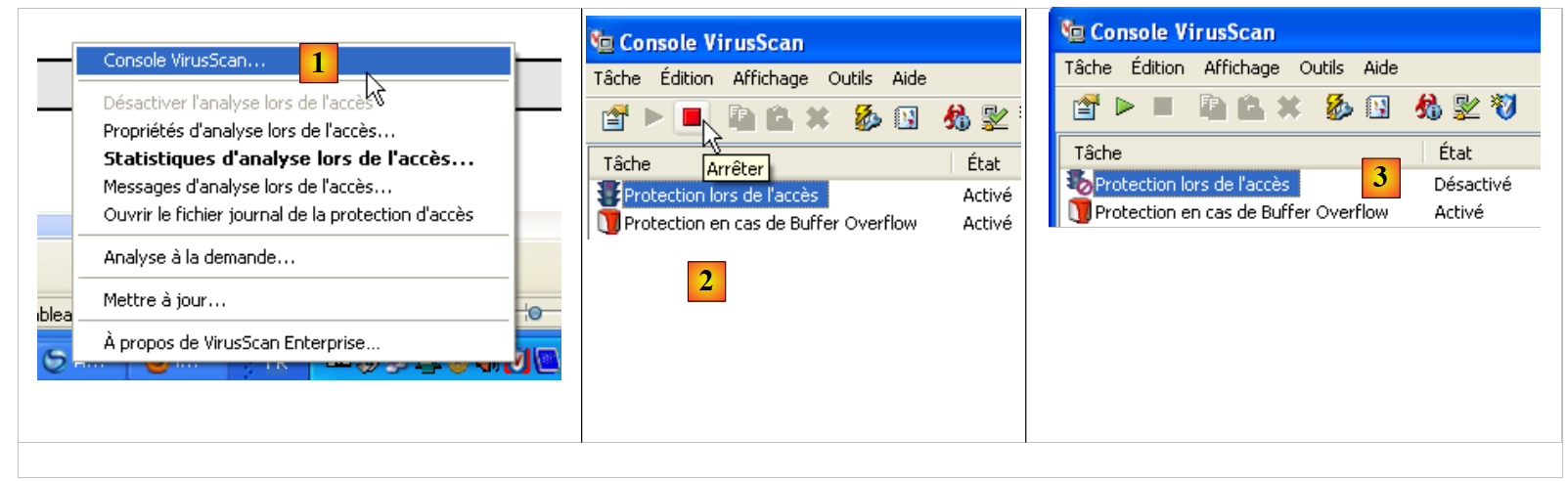 |
- 在 [1] 中,打开 VirusScan 控制台
- 在 [2] 中,停止 [On-Access Protection] 服务
- 在 [3] 中,该服务已停止
脚本:
<?php

// client SMTP (SendMail Transfer Protocol) for sending a message
// information is taken from a $INFOS file containing the following lines
// line 1: smtp, sender, recipient
// next lines: message text
// sender: email sender
// recipient: email recipient
// smtp: name of smtp server to use
// communication protocol SMTP client-server
// -> client connects to smtp server port 25
// <- server sends him a welcome message
// -> customer sends command EHLO: machine name
// <- server responds OK or not
// -> customer sends mail order from: <sender>
// <- server responds OK or not
// -> client sends the rcpt to command: <recipient>
// <- server responds OK or not
// -> customer sends data order
// <- server responds OK or not
// -> client sends all the lines of its message and ends with a line containing the
// single character .
// <- server responds OK or not
// -> customer sends quit order
// <- server responds OK or not
// server responses have the form xxx text where xxx is a 3-digit number. Any number xxx >=500
// indicates an error. The answer may consist of several lines all beginning with xxx except the last one
// of the form xxx(space)
// exchanged text lines must end with the characters RC(#13) and LF(#10)

// data
$INFOS = "mail.txt"; // mail settings
// retrieve mail parameters
list($erreur, $smtpServer, $expéditeur, $destinataire, $message) = getInfos($INFOS);
// mistake?
if ($erreur) {
  print "$erreur\n";
  exit;
}
print "Envoi du message [$smtpServer,$expéditeur,$destinataire]\n";
// sending mail in verbose mode
$résultat = sendmail($smtpServer, $expéditeur, $destinataire, $message, 1);
print "Résultat de l'envoi : $résultat\n";
// end
exit;

//-----------------------------------------------------------------------
function getInfos($fichier) {
// returns information ($smtp,$expéditeur,$destinataire,$message) taken from text file $fichier
// line 1: smtp, sender, recipient
// next lines: message text

// opening of $fichier
  $infos = fopen($fichier, "r");
// does the $fichier file exist?
  if (!$infos)
    return array("Le fichier $fichier n'a pu être ouvert en lecture");
// read the 1st line
  $ligne = fgets($infos, 1000);
// delete end-of-line mark
  $ligne = cutNewLineChar($ligne);
// retrieving smtp, sender and recipient fields
  $champs = explode(",", $ligne);
// do we have the right number of fields?
  if (count($champs) != 3)
    return "La ligne 1 du fichier $fichier (serveur smtp, expéditeur, destinataire) a un
nombre de champs incorrect";
// "processing" the recovered information
  for ($i = 0; $i < count($champs); $i++)
    $champs[$i] = trim($champs[$i]);
// field recovery
  list($smtpServer, $expéditeur, $destinataire) = $champs;
// read message
  $message = "";
  while ($ligne = fgets($infos, 1000))
    $message.=$ligne;
  fclose($infos);
// return
  return array("", $smtpServer, $expéditeur, $destinataire, $message);
}

//-----------------------------------------------------------------------

function sendmail($smtpServer, $expéditeur, $destinataire, $message, $verbose) {
// sends $message to smtp server $smtpserver from $expéditeur
// for $destinataire. If $verbose=1, tracks client-server exchanges
// retrieve the customer's name
  $client = gethostbyaddr(gethostbyname(""));
// open a connection on port 25 of $smtpServer
  $connexion = fsockopen($smtpServer, 25);
// return if error
  if (!$connexion)
    return "Echec de la connexion au site ($smtpServer,25)";
// $connexion represents a bidirectional communication flow
// between the client (this program) and the smtp server contacted
// this channel is used for the exchange of orders and information

// after connection, the server sends a welcome message which is read as follows
  $erreur = sendCommand($connexion, "", $verbose, 1);
  if ($erreur) {
    fclose($connexion);
    return $erreur;
  }

// cmde ehlo:
  $erreur = sendCommand($connexion, "EHLO $client", $verbose, 1);
  if ($erreur) {
    fclose($connexion);
    return $erreur;
  }

// cmde mail from:
  $erreur = sendCommand($connexion, "MAIL FROM: <$expéditeur>", $verbose, 1);
  if ($erreur) {
    fclose($connexion);
    return $erreur;
  }

// cmde rcpt to:
  $erreur = sendCommand($connexion, "RCPT TO: <$destinataire>", $verbose, 1);
  if ($erreur) {
    fclose($connexion);
    return $erreur;
  }

// cmde data
  $erreur = sendCommand($connexion, "DATA", $verbose, 1);
  if ($erreur) {
    fclose($connexion);
    return $erreur;
  }

// prepare message to send
  // it must contain the lines
  // From: expéditeur
  // To: recipient
  // blank line
  // Message
  // .
  $data = "From: $expéditeur\r\nTo: $destinataire\r\n$message\r\n.\r\n";
  $erreur = sendCommand($connexion, $data, $verbose, 0);
  if ($erreur) {
    fclose($connexion);
    return $erreur;
  }

// cmde quit
  $erreur = sendCommand($connexion, "QUIT", $verbose, 1);
  if ($erreur) {
    fclose($connexion);
    return $erreur;
  }

// end
  fclose($connexion);
  return "Message envoyé";
}

// --------------------------------------------------------------------------

function sendCommand($connexion, $commande, $verbose, $withRCLF) {
// sends $commande to the $connexion channel
// verbose mode if $verbose=1
// if $withRCLF=1, adds sequence RCLF to exchange

// data
  if ($withRCLF)
    $RCLF = "\r\n"; else
    $RCLF="";

// send cmde if $commande not empty
  if ($commande) {
    fputs($connexion, "$commande$RCLF");

// possible echo
    if ($verbose)
      affiche($commande, 1);
  }////if

// reading response
  $réponse = fgets($connexion, 1000);

// possible echo
  if ($verbose)
    affiche($réponse, 2);

// error code recovery
  $codeErreur = substr($réponse, 0, 3);

// last line of the answer?
  while (substr($réponse, 3, 1) == "-") {

     // reading response
    $réponse = fgets($connexion, 1000);

     // possible echo
    if ($verbose)
      affiche($réponse, 2);
  }////while
// answer completed

// error returned by the server?
  if ($codeErreur >= 500)
    return substr($réponse, 4);

// error-free return
  return "";
}

// --------------------------------------------------------------------------

function affiche($échange, $sens) {
// displays $échange on screen
// if $sens=1 displays -->$echange
// if $sens=2 displays <-- $échange without the last 2 characters RCLF
  switch ($sens) {
    case 1:
      print "--> [$échange]\n";
      return;
    case 2:
      $L = strlen($échange);
      print "<-- [" . substr($échange, 0, $L - 2) . "]\n";
      return;
  }////switch
}

// --------------------------------------------------------------------------

function cutNewLinechar($ligne) {
// delete the end-of-line mark from $ligne if it exists
  ...
}
infos.txt 文件:
- 第1行:[smtp.orange.fr] 用于发送电子邮件的服务器,[serge.tahe@univ-angers.fr] 发件人地址,[serge.tahe@istia.univ-angers.fr] 收件人地址
- 第2行:邮件头。此处仅有一项,即邮件主题。
- 第3行:空行结束邮件头
- 第 4–7 行:邮件正文
屏幕显示结果:
- 第 1 行:脚本执行跟踪消息
- 第 2 行:来自 SMTP 服务器的首次响应。这是客户端连接到 SMTP 服务器 25 端口后的响应。服务器响应以 [xxx 消息] 或 [xxx-消息] 的形式呈现。第一种语法表示响应已完成。xxx 是状态码。大于或等于 500 的值表示发生错误。第二种语法表示响应尚未完成,后续将有另一行内容。
- 第 2 行:SMTP 服务器表示已准备好接收命令
- 第 3 行:客户端发送命令 [EHLO machineName],其中 machineName 是客户端运行所在机器的主机名
- 第 4–10 行:SMTP 服务器的响应
- 第 11 行:客户端发送命令 [MAIL FROM: <sender>],该命令指定了发件人的电子邮件地址。
- 第 12 行:SMTP 服务器表示接受该地址。如果语法不正确,它本可能会拒绝该地址。不过,它不会验证该电子邮件地址是否实际存在。
- 第 13 行:客户端发送命令 [RCPT TO: <recipient>],指定邮件收件人的电子邮件地址。
- 第 14 行:SMTP 服务器响应表示接受该地址。此时同样会进行语法检查。
- 第 15 行:客户端发送 [DATA] 命令,告知用户后续行是邮件正文。
- 第 16 行:服务器响应,表示可以发送邮件。邮件是一系列文本行,必须以单字符行(句点)结尾。
- 第 17–25 行:客户端发送的消息
- 第 17–19 行:消息头 [From:, To:, Subject:] 分别表示消息的发件人、收件人和主题。
- 第 20 行:空行,表示标题结束
- 第 21–23 行:消息正文
- 第 24 行:由单个句点组成的行,表示邮件的结束。
- 第 26 行:SMTP 服务器响应,表示接受该消息
- 第 27 行:客户端发送 [QUIT] 命令,表示操作已完成
- 第 28 行:SMTP 服务器响应称将关闭与客户端的连接
代码注释
由于脚本代码已添加了大量注释,因此我们将不再对其进行详细说明。
- 第 48–80 行:处理 [infos.txt] 文件的函数,该文件包含待发送的消息以及发送所需的必要信息。该函数返回一个数组 ($error, $smtpServer, $sender, $recipient, $message),其中:
- $error:可能出现的错误信息;否则为空。
- $smtpServer:要连接的 SMTP 服务器名称
- $sender:发件人的电子邮件地址
- $recipient:收件人的电子邮件地址
- $message:待发送的消息。除消息正文外,可能还包含头部信息。
- 第 84-157 行:sendMail 函数负责发送邮件。其参数如下:
- $smtpServer:要连接的 SMTP 服务器名称
- $sender:发件人的电子邮件地址
- $recipient:收件人的电子邮件地址
- $message:待发送的消息。
- $verbose:设置为 1 表示应将与 SMTP 服务器的通信记录到控制台。
sendMail 函数返回一条错误消息;如果没有错误,则返回一个空字符串。
- 第 88 行:获取运行 Windows 操作系统的计算机的 Windows 名称。
- 第 99 行:我们已经看到,客户端/服务器对话遵循以下模式:
- 客户端发送一行命令
- 服务器在一行或多行中进行响应
- 第 161–208 行:`sendCommand` 函数接受以下参数:
- $connection:连接客户端与服务器的 TCP/IP 通道
- $command:要通过此通道发送的命令。将读取服务器对此命令的响应。
- $verbose:设置为 1 表示应在控制台上显示与 SMTP 服务器的交互内容。
- $withRCLF:设置为 1 表示必须在命令末尾添加换行标记 "\r\n"
- 第 173 行:客户端发送命令
- 第 181 行:读取 SMTP 服务器响应的第一行,格式为 xxx 文本或 xxx-文本。后一种情况表示服务器还有另一行要发送。xxx 是服务器发送的错误代码。
- 第 188 行 – 从响应中提取错误代码
- 第 191–199 行:读取响应中的其余行
- 第 203–204 行:如果错误代码 >=500,则表示 SMTP 服务器报告了错误。
9.4. 第二个用于发送电子邮件的程序(inet_04)
该脚本与前一个脚本功能相同:发送电子邮件。为此我们使用了 PEAR 库中的模块。该库包含数十个涵盖各个领域的模块。我们将使用以下模块:
- Net/SMTP:用于与 SMTP 服务器通信的模块
- Mail:用于通过多种协议管理邮件发送的模块
- Mail/Mime:用于创建可包含附件的邮件的模块。
要使用这些模块,您必须先将其安装在运行 PHP 脚本的机器上。安装 WampServer 软件包时已安装了 PHP 解释器。在其目录结构中,您可以安装 PEAR 模块。
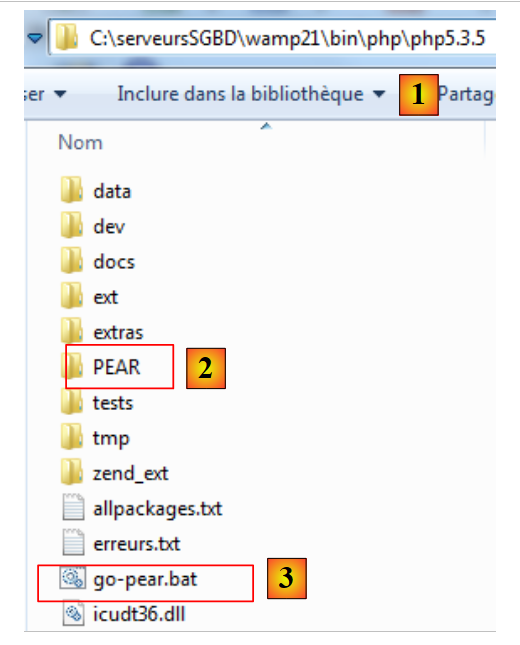 |
- 在 [1] 中,即 PHP 解释器的安装目录
- [2] 表示将存放待安装 PEAR 模块的 PEAR 文件夹
- [3] 是用于初始化 PEAR 库的 [go-pear.bat] 批处理文件
要初始化 PEAR 库,请打开一个 DOS 窗口并运行 [go-pear.bat] 文件。该脚本将连接到 PEAR 库网站,因此需要互联网连接。
连接到 PEAR 库网站后,脚本将下载若干文件。其中包括一个新脚本 [pear.bat]。我们将使用此脚本安装所需的各种 PEAR 模块。调用此脚本时需提供参数。其中,[help] 参数会显示脚本支持的命令列表:
C:\serveursSGBD\wamp21\bin\PHP\php5.3.5>pear help
Commands:
build                  Build an Extension From C Source
bundle                 Unpacks a Pecl Package
channel-add            Add a Channel
channel-alias          Specify an alias to a channel name
channel-delete         Remove a Channel From the List
channel-discover       Initialize a Channel from its server
channel-info           Retrieve Information on a Channel
channel-login          Connects and authenticates to remote channel server
channel-logout         Logs out from the remote channel server
channel-update         Update an Existing Channel
clear-cache            Clear Web Services Cache
config-create          Create a Default configuration file
config-get             Show One Setting
config-help            Show Information About Setting
config-set             Change Setting
config-show            Show All Settings
convert                Convert a package.xml 1.0 to package.xml 2.0 format
cvsdiff                Run a "cvs diff" for all files in a package
cvstag                 Set CVS Release Tag
download               Download Package
download-all           Downloads each available package from the default channel

info                   Display information about a package
install                Install Package
list                   List Installed Packages In The Default Channel
list-all               List All Packages
list-channels          List Available Channels
list-files             List Files In Installed Package
list-upgrades          List Available Upgrades
login                  Connects and authenticates to remote server [Deprecated i
n favor of channel-login]
logout                 Logs out from the remote server [Deprecated in favor of c
hannel-logout]
makerpm                Builds an RPM spec file from a PEAR package
package                Build Package
package-dependencies   Show package dependencies
package-validate       Validate Package Consistency
pickle                 Build PECL Package
remote-info            Information About Remote Packages
remote-list            List Remote Packages
run-scripts            Run Post-Install Scripts bundled with a package
run-tests              Run Regression Tests
search                 Search remote package database
shell-test             Shell Script Test
sign                   Sign a package distribution file
svntag                 Set SVN Release Tag
uninstall              Un-install Package
update-channels        Update the Channel List
upgrade                Upgrade Package
upgrade-all            Upgrade All Packages [Deprecated in favor of calling upgr
ade with no parameters]
Usage: pear [options] command [command-options] <parameters>
Type "pear help options" to list all options.
Type "pear help shortcuts" to list all command shortcuts.
Type "pear help <command>" to get the help for the specified command.
[install] 命令用于安装 PEAR 模块。您可以获取 [install] 命令的帮助:
C:\serveursSGBD\wamp21\bin\PHP\php5.3.5>pear help install
pear install [options] [channel/]<package> ...
Installs one or more PEAR packages.  You can specify a package to install in four ways:

"Package-1.0.tgz" : installs from a local file

"http://example.com/Package-1.0.tgz" : installs from anywhere on the net.

"package.xml" : installs the package described in package.xml.  Useful for testing, or for wrapping a PEAR package in another package manager such as RPM.

"Package[-version/state][.tar]" : queries your default channel's server(pear.php.net) and downloads the newest package with the preferred quality/state (stable).

To retrieve Package version 1.1, use "Package-1.1," to retrieve Package state beta, use "Package-beta."  To retrieve an uncompressed file, append .tar (make sure there is no file by the same name first)

To download a package from another channel, prefix with the channel name like "channel/Package"

More than one package may be specified at once.  It is ok to mix these four ways of specifying packages.

Options:
  -f, --force
        will overwrite newer installed packages
  -l, --loose
        do not check for recommended dependency version
  -n, --nodeps
        ignore dependencies, install anyway
  -r, --register-only
        do not install files, only register the package as installed
  -s, --soft
        soft install, fail silently, or upgrade if already installed
  -B, --nobuild
        don't build C extensions
  -Z, --nocompress
        request uncompressed files when downloading
  -R DIR, --installroot=DIR
        root directory used when installing files (ala PHP's INSTALL_ROOT), use packagingroot for RPM
  -P DIR, --packagingroot=DIR
        root directory used when packaging files, like RPM packaging
  --ignore-errors
        force install even if there were errors
  -a, --alldeps
        install all required and optional dependencies
  -o, --onlyreqdeps
        install all required dependencies
  -O, --offline
        do not attempt to download any urls or contact channels
  -p, --pretend
        Only list the packages that would be downloaded
需要安装的 PEAR 模块包括:[Mail]、[Mail_Mime]、[Net_SMTP]。在命令提示符窗口中,依次输入以下命令:
<PHP_installDir>pear install Mail
...
<PHP_installDir>pear install Mail_Mime
…
<PHP_installDir>pear install Net_SMTP
…
其中 <PHP_installDir> 是 PHP 解释器的安装目录(本例中为 C:\serveursSGBD\wamp21\bin\PHP\php5.3.5)
您可以查看已安装的模块:
C:\serveursSGBD\wamp21\bin\PHP\php5.3.5>pear list
INSTALLED PACKAGES, CHANNEL PEAR.php.NET:
=========================================
PACKAGE          VERSION STATE
Archive_Tar      1.3.7   stable
Console_Getopt   1.3.1   stable
Mail             1.2.0   stable
Mail_Mime        1.8.1   stable
Net_SMTP         1.6.0   stable
Net_Socket       1.0.10  stable
PEAR             1.9.4   stable
PHPUnit          1.3.2   stable
Structures_Graph 1.0.4   stable
XML_Util         1.2.1   stable
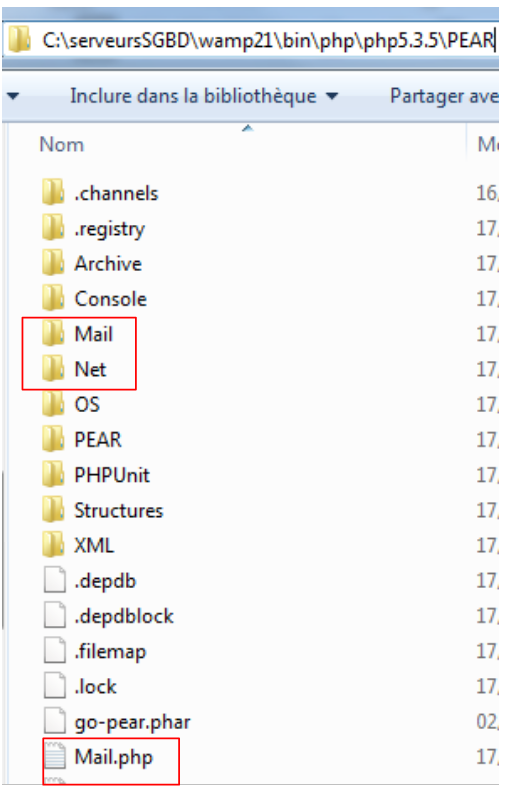
这些模块安装在 <PHP_installDir>/PEAR 文件夹中:
 |
安装 PEAR 模块后,用于发送电子邮件的 PHP 脚本如下所示:
<?php

// error management
ini_set("display_errors", "off");
// modules
ini_set("include_path", ".;C:\serveursSGBD\wamp21\bin\PHP\php5.3.5\PEAR");
require_once "Mail.php";
require_once "Mail/Mime.php";
require_once "Net/SMTP.php";


// client SMTP (SendMail Transfer Protocol) for sending a message
// information is taken from a $INFOS file containing the following lines
// line 1: smtp, sender, recipient, attachment
// next lines: message text
// sender:email sender
// recipient: email recipient
// smtp: name of smtp server to use
// attachment: name of the document to be attached
//
// data
$INFOS = "mail2.txt"; // mail settings
// retrieve mail parameters
list($erreur, $smtpServer, $expéditeur, $destinataire, $message, $sujet, $attachement) = getInfos($INFOS);
// mistake?
if ($erreur) {
  print "$erreur\n";
  exit;
}
print "Envoi du message [$smtpServer,$expéditeur,$destinataire,$sujet, $attachement]\n";
// sending mail in verbose mode
$résultat = sendmail($smtpServer, $expéditeur, $destinataire, $message, $sujet, $attachement);
print "Résultat de l'envoi : $résultat\n";
// end
exit;

//-----------------------------------------------------------------------
function getInfos($fichier) {
// returns information ($smtp,$expéditeur,$destinataire,$message, $sujet, $attachement) taken from text file $fichier
// line 1: smtp, sender, recipient, subject, attachment
// next lines: message text
...
// return
  return array("", $smtpServer, $expéditeur, $destinataire, $message, $sujet, $attachement);
}

//getInfos
//-----------------------------------------------------------------------

function sendmail($smtpServer, $expéditeur, $destinataire, $message, $sujet, $attachement) {
// sends $message to smtp server $smtpserver from $expéditeur
// for $destinataire. Document $attachement is attached to the message
// message has subject $sujet
//
  // message
  $msg = new Mail_Mime();
  $msg->setTXTBody($message);
  $msg->addAttachment($attachement);
  $headers = $msg->headers(array("From" => $expéditeur, "To" => $destinataire, "Subject" => $sujet));
  // shipping
  $mailer = &Mail::factory("smtp", array("host" => $smtpServer, "port" => 25));
  $envoi = $mailer->send($expéditeur, $headers, $msg->get());
  if ($envoi === TRUE) {
    return "Message envoyé";
  } else {
    return $envoi;
  }
}

// --------------------------------------------------------------------------

function cutNewLinechar($ligne) {
// delete the end-of-line mark from $ligne if it exists
  …
}
[mail2.txt] 文件:
- 第1行:依次为SMTP服务器、发件人地址、收件人地址、邮件主题、待附加的文档。
- 第2至4行:邮件正文
屏幕显示结果
Envoi du message [smtp.orange.fr,serge.tahe@univ-angers.fr,serge.tahe@univ-angers.fr,test, document.pdf]
Résultat de l'envoi : Message envoyé
评论
该脚本与前一个脚本的唯一区别在于使用了sendmail函数。下面我们将对此函数进行说明:
- 第 6 行:PEAR 模块的 PHP 脚本安装在 PHP 解释器默认不搜索的目录中。为了确保解释器能够找到 PEAR 模块,我们需要手动指定它应搜索的目录。可以在运行时修改 PHP 解释器的某些配置参数。这种修改仅对进行修改的脚本可见,且仅在该脚本执行期间有效。 PHP 解释器的默认配置位于文件 <PHP_installdir>/PHP.ini 中。该文件包含以下格式的行:
键的值可在运行时通过函数 ini_set(key, new_value) 进行修改。用于指定脚本所引用的 PHP 函数和类搜索路径的键是 'include_path'。在此,我们将脚本目录 (.) 以及 PHP 解释器安装目录内的 PEAR 目录都添加到了搜索路径中。
- 第 7–9 行:加载用于发送电子邮件的 PHP 脚本。
- 第 50 行:sendmail 函数,用于处理电子邮件的发送。其参数如下:
- $smtpServer:要连接的 SMTP 服务器名称
- $sender:发件人的电子邮件地址
- $recipient:收件人的电子邮件地址
- $message:待发送的邮件正文
- $subject:邮件的主题
- $attachment:要附加到消息中的文档名称
sendMail 函数返回一条错误消息;若未发生错误,则该消息为空。
- 第 56 行:创建一个 Mail_Mime 消息。该消息由头部(发件人、收件人、主题)和正文(消息本身)组成
- 第 57 行:设置 Mail_Mime 消息的正文。
- 第 58 行:将文档附加到邮件中
- 第 59 行:设置 Mail_Mime 消息的头部(发件人、收件人、主题)
- 第 61 行:创建负责发送 Mail_Mime 消息的类。该方法的第一个参数是要使用的协议名称,本例中为 SMTP 协议。第二个参数是一个数组,指定要使用的 SMTP 服务名称和端口
- 第 62 行:发送消息。send 方法接受三个参数:发件人地址、Mail_Mime 消息的头部以及 Mail_Mime 消息的正文。如果消息发送成功,send 函数返回布尔值 TRUE;否则返回错误消息。