7. 使用 MySQL 数据库管理系统
我们将编写使用 MySQL 数据库的 PHP 脚本:
 |
MySQL 数据库管理系统包含在 WampServer 软件包中(参见第 2.1.1 节)。我们将演示如何创建数据库和 MySQL 用户。
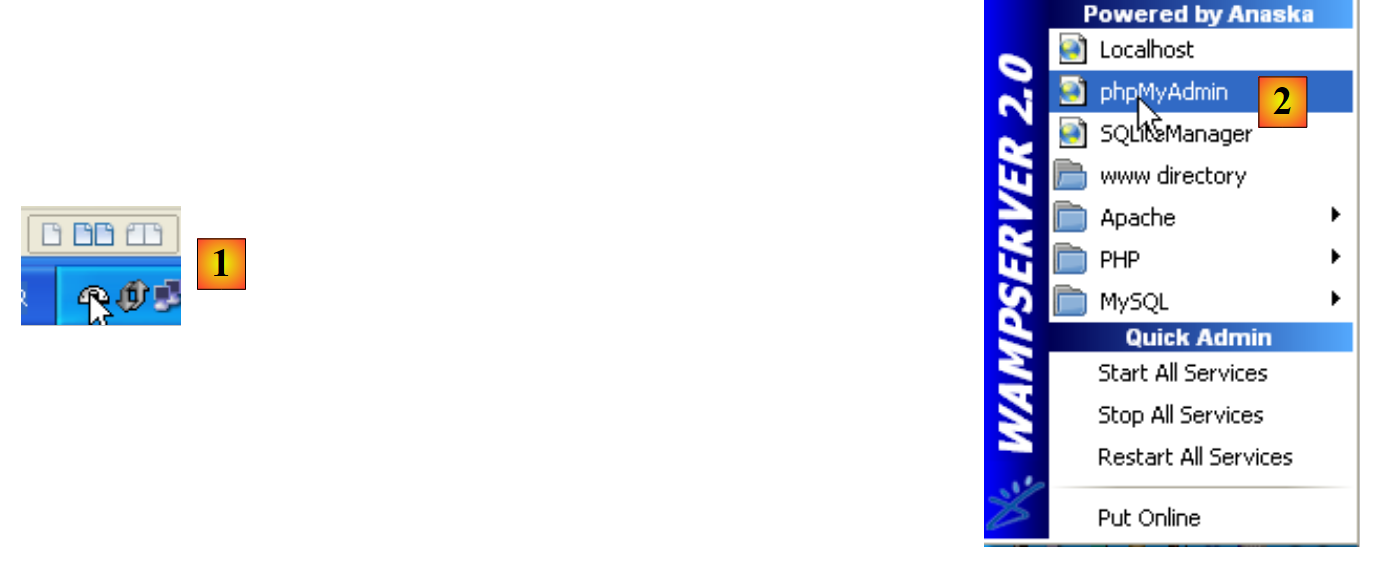 |
- 启动后,可通过任务栏右下角的图标 [1] 管理 WampServer。
- 在 [2] 处,启动 MySQL 管理工具
创建数据库 [dbpersonnes]:
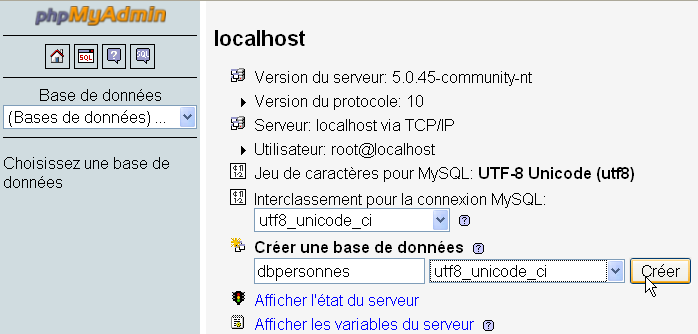
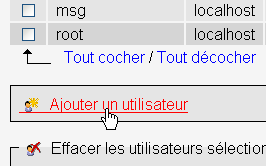
创建用户 [admpersonnes],密码设为 [nobody]:
 |  |
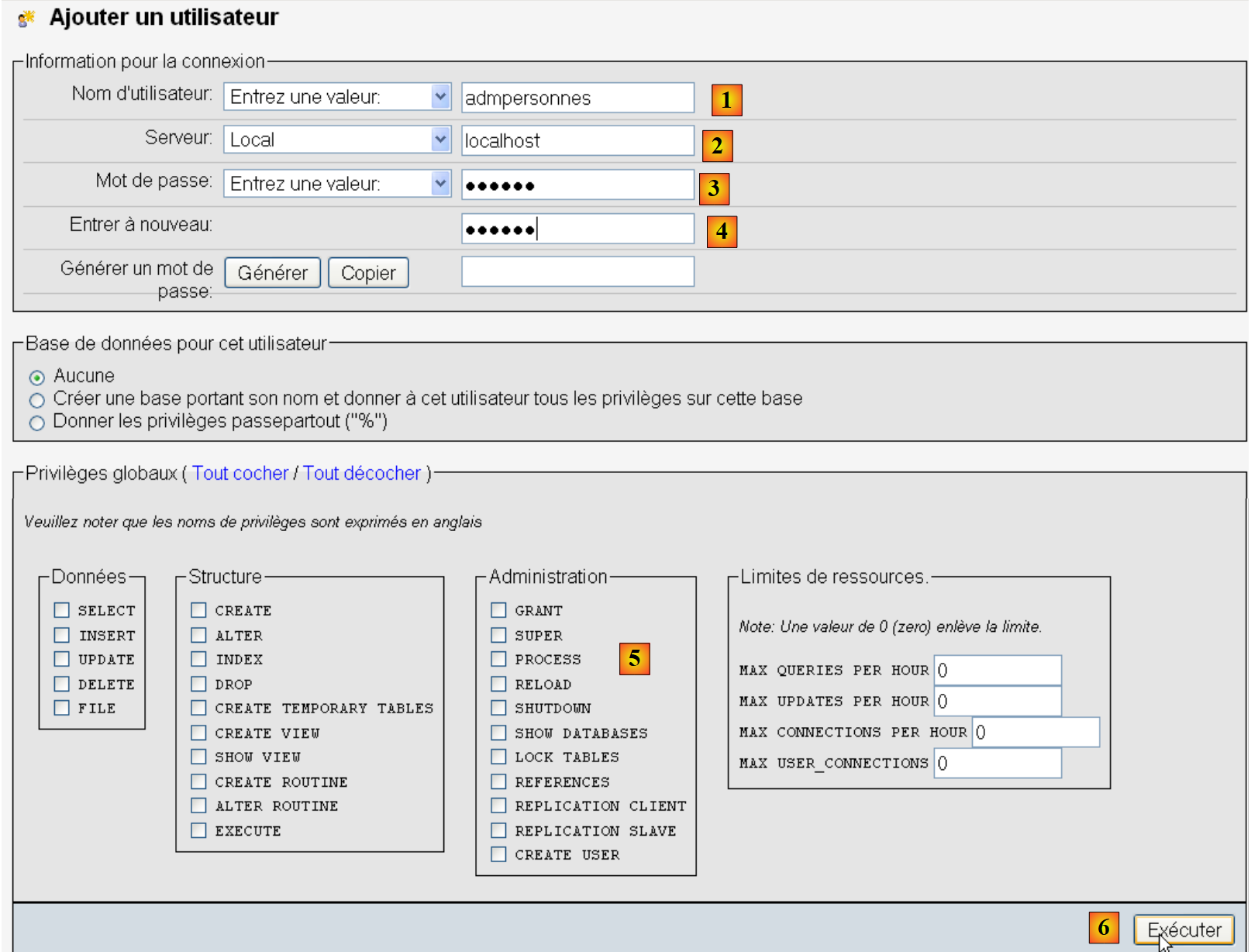 |
- 在[1]中,用户名
- 在[2]中,您授予权限的DBMS服务器
- 在 [3] 中,其密码
- 在 [4] 中,与上述相同
- 在 [5] 中,我们不向该用户授予任何权限
- 在 [6] 中,创建该用户
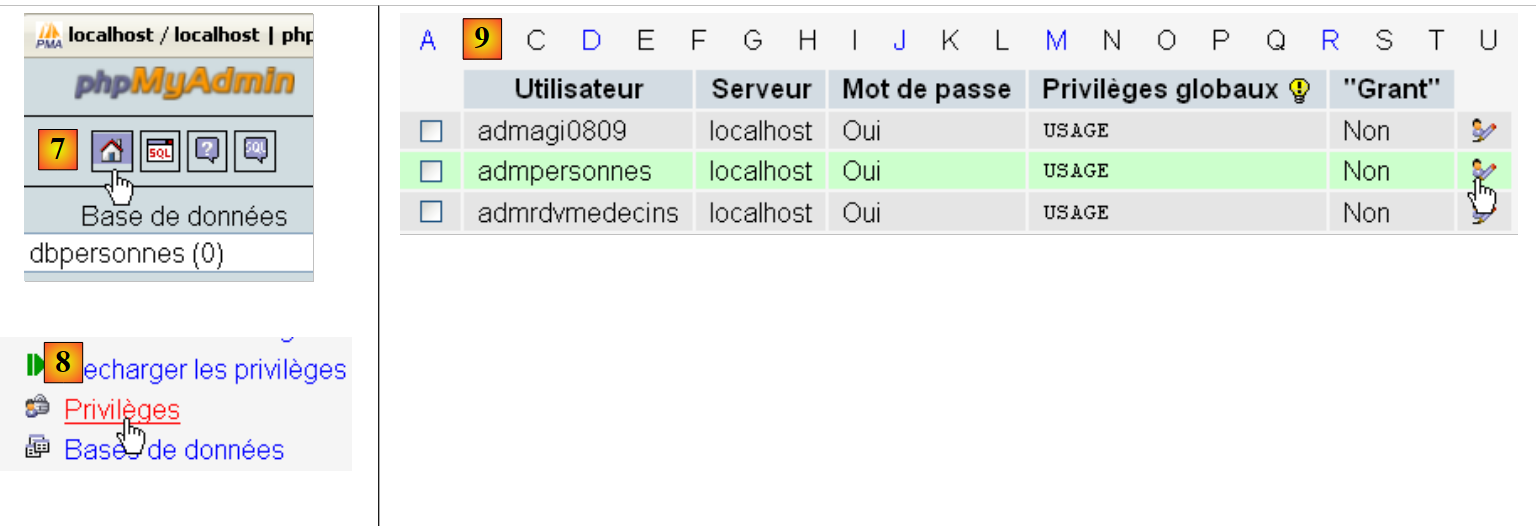 |
- 在 [7] 中,返回 phpMyAdmin 主页
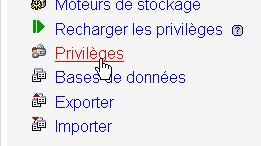
- 在 [8],使用本页上的 [权限] 链接来修改用户 [admpersonnes] 的权限 [9]。
 |

- 在 [10] 中,指定要授予用户 [admpersonnes] 对 [dbpersonnes] 数据库的权限
- 在 [11] 中,确认所选内容
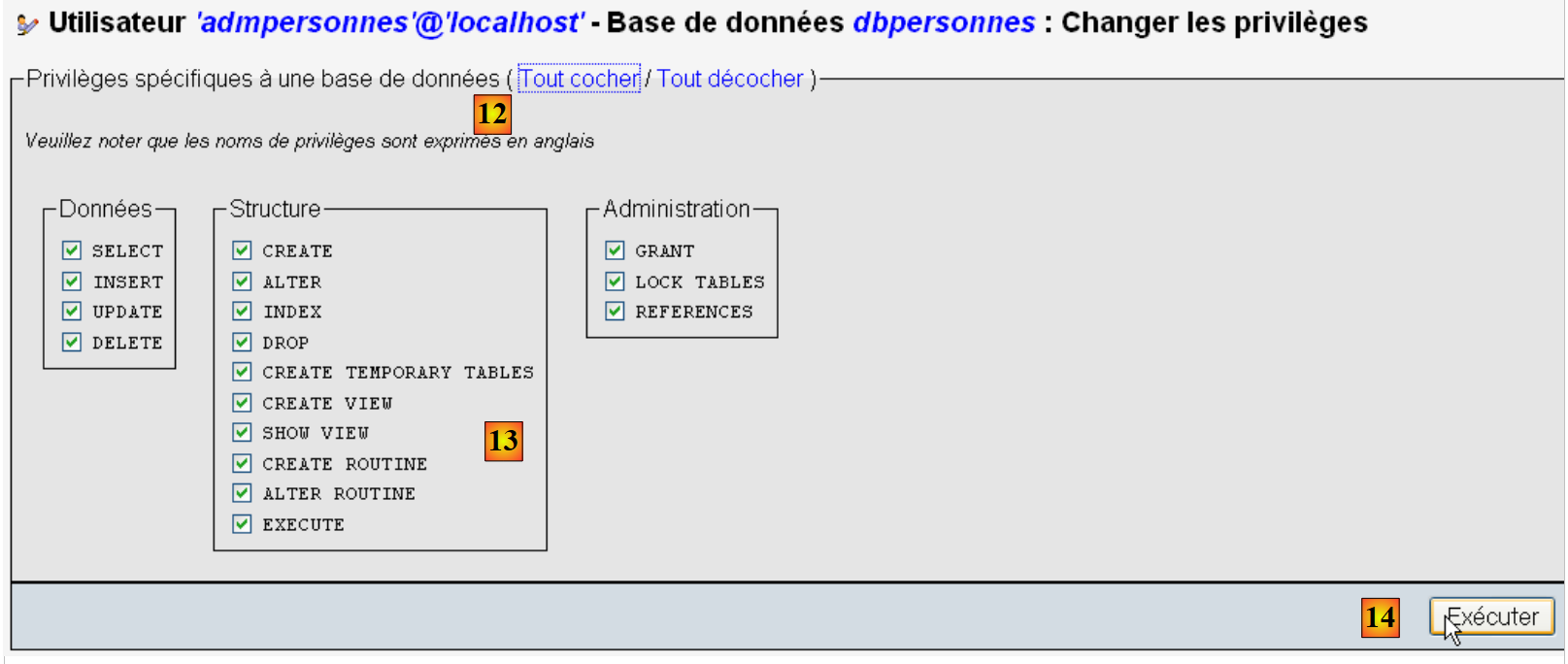 |
- ,通过 [12] [全选] 链接,授予用户 [admpersonnes] 对 [dbpersonnes] 数据库的所有权限 [13]
- 在 [14] 中确认
现在我们拥有:
- 一个 MySQL 数据库 [dbpersonnes]
- 一个用户 [admpersonnes / nobody],该用户对该数据库拥有完全访问权限
我们将编写 PHP 脚本来操作该数据库。PHP 提供了多种用于管理数据库的库。我们将使用 PDO(PHP Data Objects)库,它充当 PHP 代码与数据库管理系统(DBMS)之间的接口:
 |
PDO 库使 PHP 脚本能够抽象化处理所用 DBMS 的具体特性。因此,如上所示,MySQL DBMS 可以被 Postgres DBMS 替换,而对 PHP 脚本代码的影响微乎其微。该库默认不可用。您可以按以下方式在 上检查其可用性:
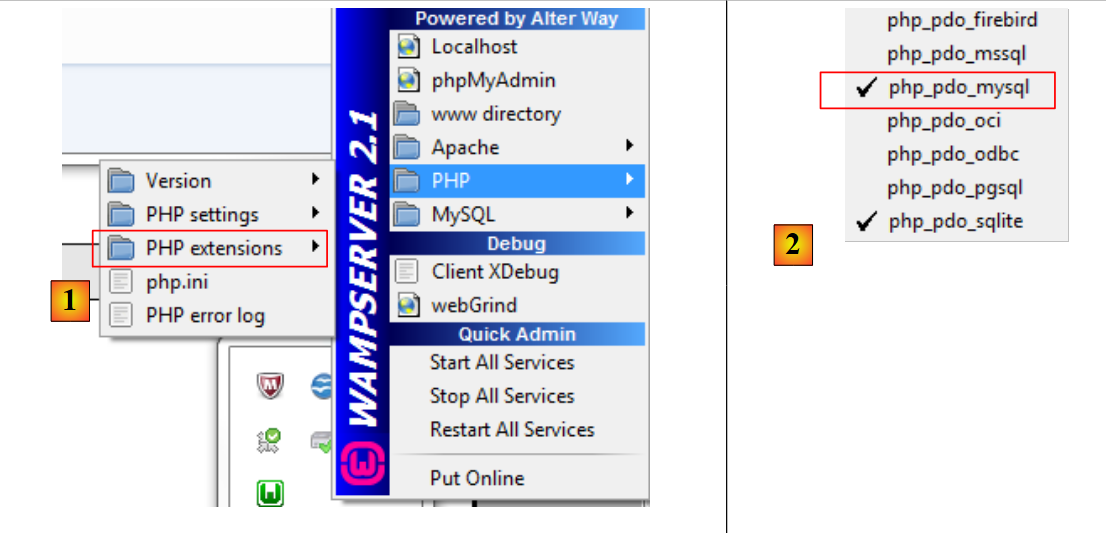 |
- 1: 从 WampServer 管理图标中,选择 [PHP / PHP 扩展] 选项
- 2: 您将看到各种可用的 PDO 扩展及其当前启用的状态:[PHP_pdo_mysql] 对应 MySQL 数据库管理系统,[PHP_pdo_sqlite] 对应 SQLite 数据库管理系统。要启用某个扩展,只需单击它即可。随后 PHP 解释器将重新启动,并启用该新扩展。
7.1. 连接到 MySQL 数据库 – 1 (mysql_01)
连接到数据库管理系统(DBMS)是通过创建一个 PDO 对象来实现的。构造函数接受多种参数:
这些参数的含义如下:
$dsn | (数据源名称)是一个字符串,用于指定数据库管理系统(DBMS)的类型及其在互联网上的位置。字符串 "mysql:host=localhost" 表示我们正在处理运行在本地服务器上的 MySQL 数据库管理系统。该字符串 可能包含其他参数,例如 DBMS 的监听端口以及 :"mysql:host=localhost:port=3306:dbname=dbpersonnes"。 |
$user | 登录用户的用户名 |
$passwd | 其密码 |
$driver_options | DBMS 驱动程序的选项数组 |
仅第一个参数是必需的。以此方式创建的对象将作为执行所有针对已连接数据库的操作的载体。如果无法创建 PDO 对象,则会抛出 PDOException。
以下是一个连接示例:
<?php

// connection to a MySql database
// user identity is (admpersonnes,nobody)
$ID = "admpersonnes";
$PWD = "nobody";
$HOTE = "localhost";

try {
  // connection
  $dbh = new PDO("mysql:host=$HOTE", $ID, $PWD);
  print "Connexion réussie\n";
  // closure
  $dbh = null;
} catch (PDOException $e) {
  print "Erreur : " . $e->getMessage() . "\n";
  exit();
}
结果:
评论
- 第 11 行:通过创建 PDO 对象来建立与 DBMS 的连接。此处的构造函数使用了以下参数:
- 一个字符串,用于指定数据库管理系统(DBMS)的类型及其在互联网上的位置。字符串“mysql:host=localhost”表示我们正在处理运行在本地服务器上的MySQL数据库管理系统。端口未被指定,因此默认使用3306端口。数据库名称也未指定。随后将建立与MySQL数据库管理系统的连接,具体数据库的选择将在稍后进行。
- 用户 ID
- 其密码
- 第 14 行:通过销毁最初创建的 PDO 对象来关闭连接。
- 第 15 行:连接数据库管理系统可能会失败。在此情况下,将抛出 PDOException 异常。
7.2. 创建 MySQL 表 (mysql_02)
<?php

// connection to the MySql database
// user identity
$ID = "admpersonnes";
$PWD = "nobody";
// base identity
$DSN = "mysql:host=localhost;dbname=dbpersonnes";

// connection
list($erreur, $connexion) = connecte($DSN, $ID, $PWD);
if ($erreur) {
  print "Erreur lors de la connexion à la base [$DSN] sous l'identité ($ID,$PWD) : $erreur\n";
  exit;
}

// delete the people table if it exists
$requête = "drop table personnes";
$erreur = exécuteRequête($connexion, $requête);
//was there a mistake?
if ($erreur)
  print "$requête : Erreur ($erreur)\n";
else
  print "$requête: Exécution réussie\n";
// create people table
$requête = "create table personnes (prenom varchar(30) NOT NULL, nom varchar(30) NOT NULL, age integer NOT NULL, primary key(nom,prenom))";
$erreur = exécuteRequête($connexion, $requête);
//was there a mistake?
if ($erreur)
  print "$requête : Erreur ($erreur)\n";
else
  print "$requête: Exécution réussie\n";
// disconnect and exit
déconnecte($connexion);
exit;

// ---------------------------------------------------------------------------------
function connecte($dsn, $login, $pwd) {
  // connects ($login,$pwd) to base $dsn
  // returns the connection id and an error code
  try {
    // connection
    $dbh = new PDO($dsn, $login, $pwd);
    // error-free return
    return array("", $dbh);
  } catch (PDOException $e) {
    // return with error
    return array($e->getMessage(), null);
  }
}

// ---------------------------------------------------------------------------------
function déconnecte($connexion) {
  // closes the connection identified by $connexion
  $connexion = null;
}

// ---------------------------------------------------------------------------------
function exécuteRequête($connexion, $sql) {
  // executes the $sql request on the $connexion connection
  try {
    $connexion->exec($sql);
    // error-free return
    return "";
  } catch (PDOException $e) {
    // return with error
    return $e->getMessage();
  }
}
结果:
drop table personnes: Exécution réussie
create table personnes (prenom varchar(30) NOT NULL, nom varchar(30) NOT NULL, age integer NOT NULL, primary key(nom,prenom)): Exécution réussie
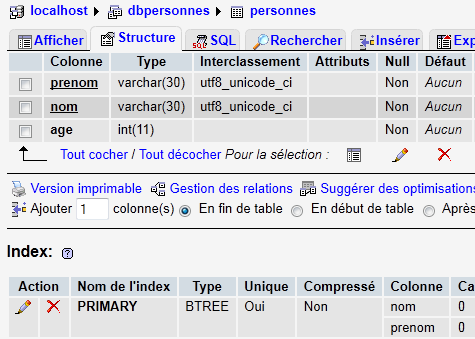
在 PHPMyAdmin 中,您可以看到该表已存在:
 |
评论
- 第 38–50 行:
connect函数用于建立与数据库管理系统 (DBMS) 的连接。它返回一个数组($error, $connection*),其中$connection*是已建立的连接,若连接未建立则返回null。在后一种情况下,$error包含错误信息。 - 第 53–56 行:
*disconnect* 函数用于关闭连接 - 第 59 行:
*executeQuery函数允许您在连接上执行 SQL 语句。该连接是一个 PDO 对象。在 PDO 对象上执行 SQL 语句的方法是exec* 方法(第 63 行)。执行查询可能会抛出 PDOException。因此,此处进行了异常处理。如果发生错误,该函数返回错误消息;否则返回空字符串。
7.3. 填充 people 表 (mysql_03)
以下脚本执行位于文本文件 [creation.txt] 中的 SQL 语句:
drop table personnes
create table personnes (prenom varchar(30) not null, nom varchar(30) not null, age integer not null, primary key (nom,prenom))
insert into personnes values('Paul','Langevin',48)
insert into personnes values ('Sylvie','Lefur',70)
insert into personnes values ('Pierre','Nicazou',35)
insert into personnes values ('Geraldine','Colou',26)
insert into personnes values ('Paulette','Girond',56)
<?php

// connection to the MySql database
// user identity
$ID = "admpersonnes";
$PWD = "nobody";
// base identity
$DSN = "mysql:host=localhost;dbname=dbpersonnes";
// identity of the SQL command text file to be executed
$TEXTE = "creation.txt";

// connection
list($erreur, $connexion) = connecte($DSN, $ID, $PWD);
if ($erreur) {
  print "Erreur lors de la connexion à la base [$DSN] sous l'identité ($ID,$PWD) : $erreur\n";
  exit;
}

// table creation and filling
$erreurs = exécuterCommandes($connexion, $TEXTE, 1, 0);
//display number of errors
print "il y a eu $erreurs[0] erreurs\n";
for ($i = 1; $i < count($erreurs); $i++)
  print "$erreurs[$i]\n";

// disconnect and exit
déconnecte($connexion);
exit;

// ---------------------------------------------------------------------------------
function connecte($dsn, $login, $pwd) {
...
}

// ---------------------------------------------------------------------------------
function déconnecte($connexion) {
 ...
}

// ---------------------------------------------------------------------------------
function exécuteRequête($connexion, $sql) {
  // executes the $sql request on the $connexion connection
  // returns 1 error msg if error, empty string otherwise
  ...
}

// ---------------------------------------------------------------------------------
function exécuterCommandes($connexion, $SQL, $suivi=0, $arrêt=1) {
  // uses the $connexion connection
  // executes the SQL commands contained in the $SQL text file
  // this is a file of SQL commands to be executed one per line
  // if $suivi=1 then each execution of a SQL order is displayed as a success or failure
  // if $arrêt=1, the function stops on the 1st error encountered, otherwise it executes all sql commands
  // the function returns an array (nb of errors, error1, error2, ...)

  // check for the presence of the $SQL file
  if (! file_exists($SQL))
    return array(1, "Le fichier $SQL n'existe pas");

  // execution of SQL queries contained in $SQL
  // we put them in a table
  $requêtes = file($SQL);
  // we run them - initially no errors
  $erreurs = array(0);
  for ($i = 0; $i < count($requêtes); $i++) {
    //do we have an empty query
    if (preg_match("/^\s*$/", $requêtes[$i]))
      continue;
    // execute query $i
    $erreur = exécuteRequête($connexion, $requêtes[$i]);
    //was there a mistake?
    if ($erreur) {
      // one more mistake
      $erreurs[0]++;
      // error msg
      $msg = "$requêtes[$i] : Erreur ($erreur)\n";
      $erreurs[] = $msg;
      // screen tracking or not?
      if ($suivi)
        print "$msg\n";
      // shall we stop?
      if ($arrêt)
        return $erreurs;
    } else
    if ($suivi)
      print "$requêtes[$i] : Exécution réussie\n";
  }//for
  // return
  return $erreurs;
}
屏幕显示结果:
drop table personnes : Exécution réussie
create table personnes (prenom varchar(30) not null, nom varchar(30) not null, age integer not null, primary key (nom,prenom)) : Exécution réussie
insert into personnes values('Paul','Langevin',48) : Exécution réussie
insert into personnes values ('Sylvie','Lefur',70) : Exécution réussie
insert into personnes values ('Pierre','Nicazou',35) : Exécution réussie
insert into personnes values ('Geraldine','Colou',26) : Exécution réussie
insert into personnes values ('Paulette','Girond',56) : Exécution réussie
il y a eu 0 erreurs
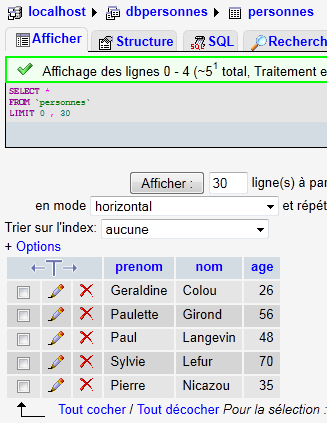
在 phpMyAdmin 中可以查看已插入的数据:
 |
评论
新功能是第48至90行中的executeCommands函数。该函数在$connection上执行名为$SQL的文本文件中的SQL命令。它返回一个错误数组($nbErrors, $msg1, $msg2, …),其中$nbErrors表示错误数量,$msg1表示第i条错误信息。如果没有错误,返回的数组为array(0)。
7.4. 执行任意 SQL 查询 (mysql_04)
以下脚本演示了如何执行来自文本文件 [sql.txt] 中的 SQL 命令:
select * from personnes
select nom,prenom from personnes order by nom asc, prenom desc
select * from personnes where age between 20 and 40 order by age desc, nom asc, prenom asc
insert into personnes values('Josette','Bruneau',46)
update personnes set age=47 where nom='Bruneau'
select * from personnes where nom='Bruneau'
delete from personnes where nom='Bruneau'
select * from personnes where nom='Bruneau'
xselect * from personnes where nom='Bruneau'
在这些 SQL 语句中,有用于从数据库中返回结果的 SELECT 语句;有用于修改数据库但不返回结果的 INSERT、UPDATE 和 DELETE 语句;最后还有像最后一个(xselect)这样的无效语句。
<?php

// connection to the MySql database
// user identity
$ID = "admpersonnes";
$PWD = "nobody";
// base identity
$DSN = "mysql:host=localhost;dbname=dbpersonnes";
// identity of the SQL command text file to be executed
$TEXTE = "sql.txt";

// connection
list($erreur, $connexion) = connecte($DSN, $ID, $PWD);
if ($erreur) {
  print "Erreur lors de la connexion à la base [$DSN] sous l'identité ($ID,$PWD) : $erreur\n";
  exit;
}

// order execution SQL
$erreurs = exécuterCommandes($connexion, $TEXTE, 1, 0);
//display number of errors
print "il y a eu $erreurs[0] erreur(s)\n";
for ($i = 1; $i < count($erreurs); $i++)
  print "$erreurs[$i]\n";

// disconnect and exit
déconnecte($connexion);
exit;

// ---------------------------------------------------------------------------------
function connecte($dsn, $login, $pwd) {
  // connects ($login,$pwd) to base $dsn
  // returns the connection id and an error msg
  ...
}

// ---------------------------------------------------------------------------------
function déconnecte($connexion) {
  ...
}

// ---------------------------------------------------------------------------------
function exécuteRequête($connexion, $sql) {
  // executes the $sql request on the $connexion connection
  // returns an array of 2 elements ($erreur,$résultat)

  // determine whether it's a select or not
  $commande = "";
  if (preg_match("/^\s*(\S+)/", $sql, $champs)) {
    $commande = $champs[0];
  }
  // order processing
  try {
    if (strtolower($commande) == "select") {
      $res = $connexion->query($sql);
    } else {
      $res = $connexion->exec($sql);
      if($res===FALSE){
        $info=$connexion->errorInfo();
        return array($info[2],null);
      }
    }
    // error-free return
    return array("", $res);
  } catch (PDOException $e) {
    // return with error
    return array($e->getMessage(), null);
  }
}

// ---------------------------------------------------------------------------------
function exécuterCommandes($connexion, $SQL, $suivi=0, $arrêt=1) {
  // uses the $connexion connection
  // executes the SQL commands contained in the $SQL text file
  // this is a file of SQL commands to be executed one per line
  // if $suivi=1 then each execution of a SQL order is displayed as a success or failure
  // if $arrêt=1, the function stops on the 1st error encountered, otherwise it executes all sql commands
  // the function returns an array (nb of errors, error1, error2, ...)
  // check for the presence of the $SQL file
  if (!file_exists($SQL))
    return array(1, "Le fichier $SQL n'existe pas");

  // execution of SQL queries contained in $TEXTE
  // we put them in a table
  $requêtes = file($SQL);
  // we run them - initially no errors
  $erreurs = array(0);
  for ($i = 0; $i < count($requêtes); $i++) {
    //do we have an empty query
    if (preg_match("/^\s*$/", $requêtes[$i]))
      continue;
    // execute query $i
    list($erreur, $res) = exécuteRequête($connexion, $requêtes[$i]);
    //was there a mistake?
    if ($erreur) {
      // one more mistake
      $erreurs[0]++;
      // error msg
      $msg = "$requêtes[$i] : Erreur ($erreur)\n";
      $erreurs[] = $msg;
      // screen tracking or not?
      if ($suivi)
        print "$msg\n";
      // shall we stop?
      if ($arrêt)
        return $erreurs;
    } else
    if ($suivi) {
      print "$requêtes[$i] : Exécution réussie\n";
      // information on the result of the query
      afficherInfos($res);
    }
  }//for
  // return
  return $erreurs;
}

// ---------------------------------------------------------------------------------
function afficherInfos($résultat) {
  // displays the $résultat result of an sql query
  // was it a select?
  if ($résultat instanceof PDOStatement) {
    // displays field names
    $titre = "";
    $nbColonnes = $résultat->columnCount();
    for ($i = 0; $i < $nbColonnes; $i++) {
      $infos = $résultat->getColumnMeta($i);
      $titre.=$infos['name'] . ",";
    }
    // remove the last character ,
    $titre = substr($titre, 0, strlen($titre) - 1);
    // displays the list of fields
    print "$titre\n";
    // dividing line
    $séparateurs = "";
    for ($i = 0; $i < strlen($titre); $i++) {
      $séparateurs.="-";
    }
    print "$séparateurs\n";
    // data
    foreach ($résultat as $ligne) {
      $data = "";
      for ($i = 0; $i < $nbColonnes; $i++) {
        $data.=$ligne[$i] . ",";
      }

      // remove the last character ,
      $data = substr($data, 0, strlen($data) - 1);
      // on affiche
      print "$data\n";
    }
  } else {
    // it wasn't a select
    print " $résultat lignes(s) a (ont) été modifiée(s)\n";
  }
}
屏幕结果:
select * from personnes
 : Exécution réussie
prenom,nom,age
--------------
Geraldine,Colou,26
Paulette,Girond,56
Paul,Langevin,48
Sylvie,Lefur,70
Pierre,Nicazou,35
select nom,prenom from personnes order by nom asc, prenom desc : Exécution réussie
nom,prenom
----------
Colou,Geraldine
Girond,Paulette
Langevin,Paul
Lefur,Sylvie
Nicazou,Pierre
select * from personnes where age between 20 and 40 order by age desc, nom asc, prenom asc : Exécution réussie
prenom,nom,age
--------------
Pierre,Nicazou,35
Geraldine,Colou,26
insert into personnes values('Josette','Bruneau',46) : Exécution réussie
 1 lignes(s) a (ont) été modifiée(s)
update personnes set age=47 where nom='Bruneau' : Exécution réussie
 1 lignes(s) a (ont) été modifiée(s)
select * from personnes where nom='Bruneau' : Exécution réussie
prenom,nom,age
--------------
Josette,Bruneau,47
delete from personnes where nom='Bruneau' : Exécution réussie
 1 lignes(s) a (ont) été modifiée(s)
select * from personnes where nom='Bruneau' : Exécution réussie
prenom,nom,age
--------------
xselect * from personnes where nom='Bruneau' : Erreur (You have an error in your SQL syntax; check the manual that corresponds to your MySQL server version for the right syntax to use near 'xselect * from personnes where nom='Bruneau'' at line 1)

il y a eu 1 erreur(s)
xselect * from personnes where nom='Bruneau' : Erreur (You have an error in your SQL syntax; check the manual that corresponds to your MySQL server version for the right syntax to use near 'xselect * from personnes where nom='Bruneau'' at line 1)
评论
文本文件 [sql.txt] 中的每条命令均由第 43 行的 exécuteRequête 函数执行。
- 第 43 行:该函数的两个参数分别是用于执行 SQL 命令的连接 ($connexion) 以及待执行的 SQL 命令 ($sql)。该函数返回一个包含两个值的数组 ($erreur, $résultat),其中
- $error 表示错误信息,若未发生错误则该字段为空
- $result:执行 SQL 语句返回的结果。该结果取决于语句是 SELECT 语句,还是 INSERT、UPDATE 或 DELETE 语句。
- 第 48–51 行:我们提取 SQL 语句的第一个元素,以确定它是 SELECT 语句,还是 INSERT、UPDATE 或 DELETE 语句。
- 第 55 行:如果是 SELECT 语句,则使用 [PDO]->query("SELECT 语句") 方法执行它。返回的结果是一个 PDOStatement 对象。
- 第 57 行:对于 INSERT、UPDATE 或 DELETE 语句,需使用 [PDO]->exec("SQL 语句") 方法进行执行。返回的结果是该 SQL 语句修改的行数。因此,如果一个 DELETE SQL 语句删除了两行,则返回结果为整数 2。如果执行过程中发生错误,返回结果为布尔值 false。 此时,[PDO]->errorinfo() 方法会以数组形式提供错误信息。该数组的第 2 个元素即为错误消息。
- 第 58–60 行:处理 [PDO]->exec("SQL 语句") 操作产生的任何错误。
- 第 65–68 行:处理任何异常
- 第 72 行:
executeCommands函数在连接*$connection*上执行存储在文本文件*$SQL*中的 SQL 命令。这是我们已经见过的代码,只有一个细微的区别:第 111 行。 - 第 111 行:
executeQuery函数返回了一个数组(*$error*, *$result*),其中$result*是执行 SQL 命令的结果。该结果取决于 SQL 命令是SELECT*语句,还是INSERT*、UPDATE*或DELETE*语句。displayInfo* 函数用于显示该结果的相关信息。 - 第 122 行:如果 SQL 语句是 SELECT 语句,则结果类型为 PDOStatement。该类型表示由行和列组成的表。
- 第 125 行:方法 [PDOStatement]->getColumnCount() 返回由 SELECT 语句生成的表中的列数
- 第 127 行:[PDOStatement]->getMeta(i) 方法返回一个字典,其中包含 SELECT 结果表中第 i 列的相关信息。在此字典中,与 'name' 键关联的值即为该列的列名。
- 第 127–129 行:将 SELECT 结果表中的列名拼接成一个字符串。
- 第 141–145 行:可以使用 foreach 循环遍历 PDOStatement 对象。在每次迭代中,返回的元素是 SELECT 结果表中的一行,形式为一个数组,该数组包含代表该行各列值的数值。我们使用 for 循环显示所有这些值。
- 第 154 行:执行 INSERT、UPDATE 或 DELETE 语句的结果是该语句修改的行数。