8. [SimuPaie] 应用程序 – 版本 4 – ASP.NET / 多视图 / 单页
推荐阅读:参考文献 [1],《ASP.NET 1.1 Web 开发》,章节:
-
服务器组件与应用程序控制器
-
基于 ASP 服务器组件的 MVC 应用程序示例
接下来,我们将探讨之前讨论过的三层 ASP.NET 应用程序的一个衍生版本,该版本增加了新功能。我们的应用程序架构演变如下:
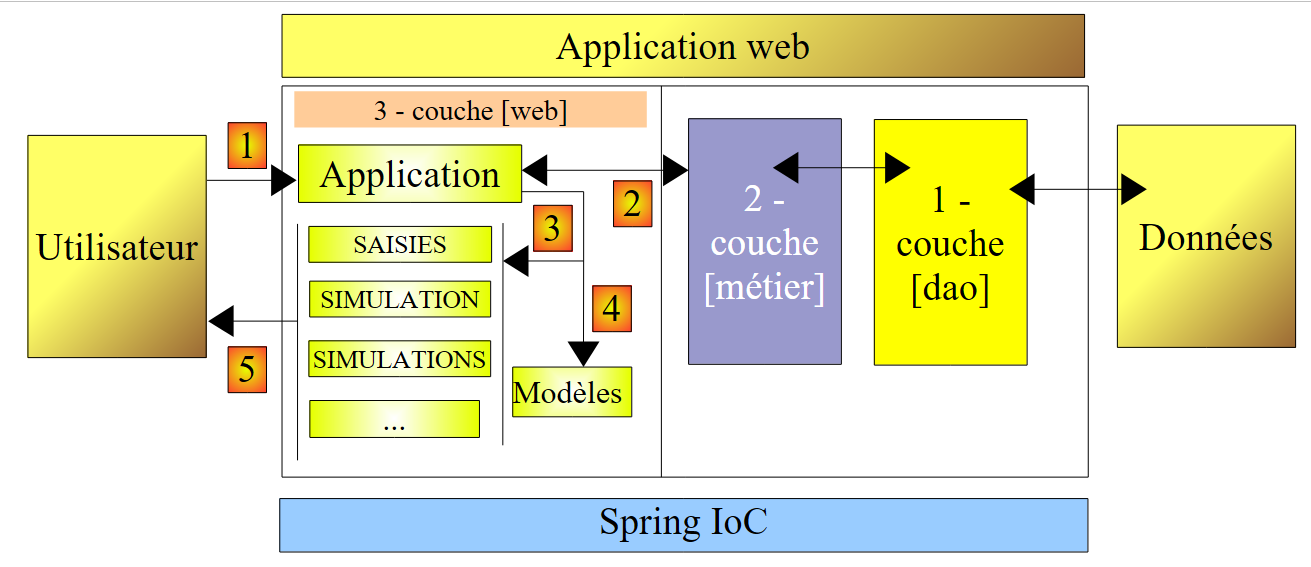 |
客户端请求的处理流程如下:
- 客户端向应用程序发出请求。
- 应用程序处理该请求。为此,它可能需要[业务]层的协助,而[业务]层若需与数据库交换数据,则可能需要[DAO]层的协助。应用程序从[业务]层接收响应。
- 基于该响应,它选择 (3) 要发送给客户端的视图(即响应),并向客户端提供 (4) 其所需的信息(模型)。
- 响应被发送给客户端(5)
这是一种被称为 MVC(模型–视图–控制器)的 Web 架构:
- [应用程序]是控制器。它处理所有客户端请求。
- [输入、模拟、模拟结果等] 属于视图。在 .NET 中,视图是标准的 ASP/HTML 代码,其中包含需要初始化的组件。必须提供给这些组件的值构成了视图的模型。
在此,我们将按以下方式实现 MVC 设计模式:
- 视图将作为 [View] 组件位于单页 [Default.aspx] 中
- 控制器则是该单页的 [Default.aspx.cs] 代码。
只有基础应用程序才能支持这种 MVC 实现。实际上,每次请求时,[Default.aspx] 页面的所有组件都会被实例化,即所有视图。 在发送响应时,应用程序的控制代码会通过简单地将相应的 [View] 组件设为可见并隐藏其余组件,来选定其中一个视图。如果应用程序拥有大量视图,[Default.aspx] 页面将包含大量组件,而实例化它们的开销可能会变得难以承受。 此外,由于视图过多,页面的 [Design] 模式可能会变得难以管理。这种架构适用于视图较少且由单人开发的应用程序。当可以采用这种架构时,它能非常简单地实现 MVC 架构的开发。这正是我们将在新版本中探讨的内容。
8.1. 应用程序的视图
向用户展示的不同视图如下:
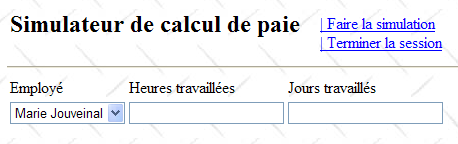
- [VueSaisies] 视图,用于显示模拟表单
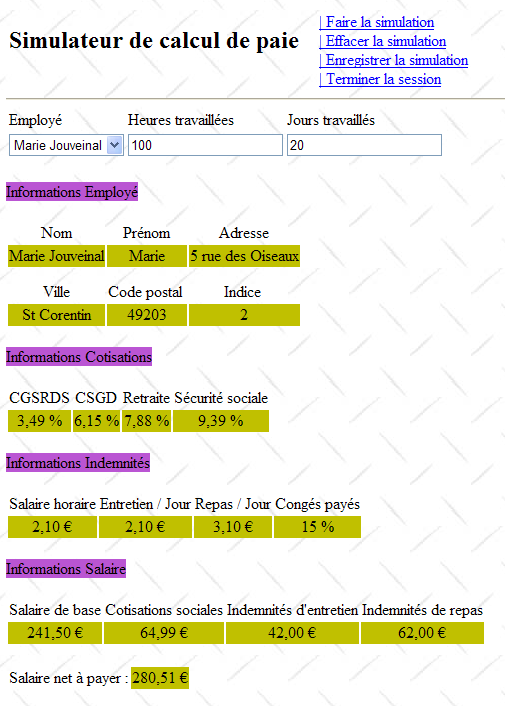
- [VueSimulation] 视图,用于显示模拟的详细结果:
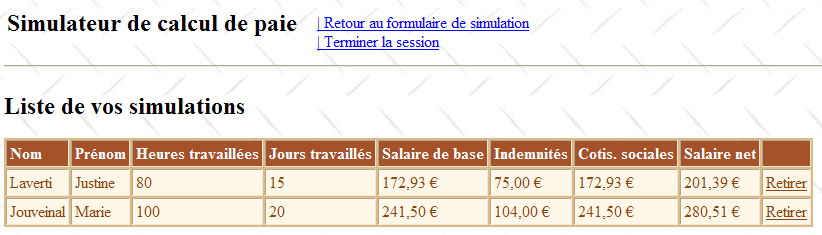
- [VueSimulations] 视图,用于列出客户端执行的模拟
- [EmptySimulationsView],表示客户端没有模拟或已无更多模拟:
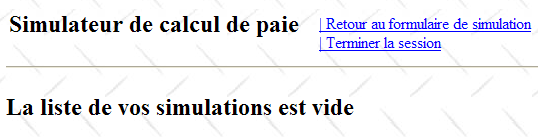
- [ErrorView] 视图,表示存在一个或多个错误:
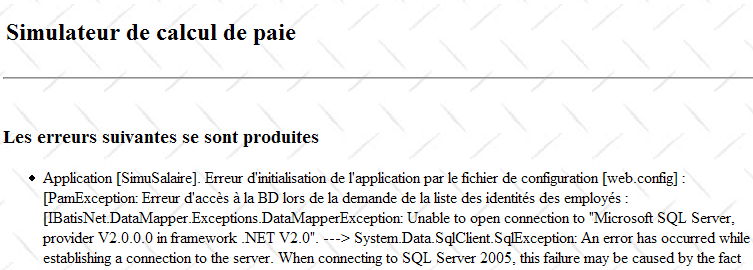
8.2. [web] 层的 Visual Web Developer 项目
[web] 层的 Visual Web Developer 项目如下:
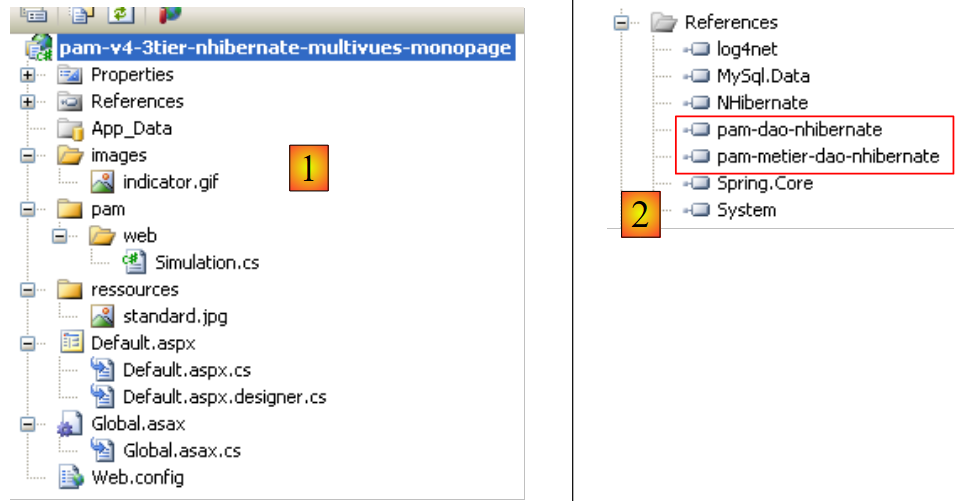 |
- 在 [1] 中我们发现:
- 应用程序的配置文件 [Web.config] 与前一个应用程序的配置文件完全相同。
- 处理 Web 应用程序事件的 [Global.cs] 文件(在此情况下处理其启动)与前一个应用程序的完全相同,只是它还处理用户会话的启动。
- 应用程序的 [Default.aspx] 表单——包含应用程序的各种视图。
- 在 [2] 中是项目引用——它们与上一版本的完全相同
8.3. [Global.cs] 文件
负责处理 Web 应用程序事件的 [Global.cs] 文件与上一版应用程序中的完全相同,唯一的区别在于它还处理用户会话的启动:
Global.cs
using System;
using System.Web;
using Pam.Dao.Entites;
using Pam.Metier.Service;
using Spring.Context.Support;
using System.Collections.Generic;
using istia.st.pam.web;

namespace pam_v4
{
    public class Global : HttpApplication
    {

        // --- static application data ---
        public static Employe[] Employes;
        public static string Msg = string.Empty;
        public static bool Erreur = false;
        public static IPamMetier PamMetier = null;

        // application startup
        public void Application_Start(object sender, EventArgs e)
        {
...
        }

        // start user session
        public void Session_Start(object sender, EventArgs e)
        {
            // put an empty simulation list in the session
            Session["simulations"] = new List<Simulation>();
        }

    }
}
- 第 27–34 行:我们处理会话的开始。我们将把用户执行的模拟列表放入此会话中。
- 第 30 行:创建一个空的模拟列表。模拟是一个 [Simulation] 类型的对象,我们稍后将详细描述。
- 第 31 行:将模拟列表放入与“simulations”键关联的会话中
8.4. [Simulation] 类
[Simulation] 类型的对象用于封装模拟表中的一行:
其代码如下:
namespace Pam.Web
{

    public class Simulation
    {
        // simulation data
        public string Nom { get; set; }
        public string Prenom { get; set; }
        public double HeuresTravaillees { get; set; }
        public int JoursTravailles { get; set; }
        public double SalaireBase { get; set; }
        public double Indemnites { get; set; }
        public double CotisationsSociales { get; set; }
        public double SalaireNet { get; set; }

        // manufacturers
        public Simulation()
        {

        }

        public Simulation(string nom, string prenom, double heuresTravailllees, int joursTravailles, double salaireBase, double indemnites, double cotisationsSociales, double salaireNet)
        {
            {
                this.Nom = nom;
                this.Prenom = prenom;
                this.HeuresTravaillees = heuresTravailllees;
                this.JoursTravailles = joursTravailles;
                this.SalaireBase = salaireBase;
                this.Indemnites = indemnites;
                this.CotisationsSociales = cotisationsSociales;
                this.SalaireNet = salaireNet;
            }
        }
    }
}
该类的字段对应于模拟表的列。
8.5. [Default.aspx] 页面
8.5.1. 概述
[Default.aspx] 页面包含多个 [View] 组件,每个视图对应一个组件。其框架结构如下:
<%@ Page Language="C#" AutoEventWireup="true" CodeFile="Default.aspx.cs" Inherits="pam_v4.PagePam" %>
<!DOCTYPE html PUBLIC "-//W3C//DTD XHTML 1.0 Transitional//EN" "http://www.w3.org/TR/xhtml1/DTD/xhtml1-transitional.dtd">
<html xmlns="http://www.w3.org/1999/xhtml">
<head id="Head1" runat="server">
<title>Simulateur de paie</title>
</head>
<body background="ressources/standard.jpg">
<form id="form1" runat="server">
<asp:ScriptManager ID="ScriptManager1" runat="server" EnablePartialRendering="true" />
<asp:UpdatePanel runat="server" ID="UpdatePanelPam" UpdateMode="Conditional">
<ContentTemplate>
<table>
<tr>
<td>
<h2>
Simulateur de calcul de paie</h2>
</td>
<td>
<label>
 </label>
<asp:UpdateProgress ID="UpdateProgress1" runat="server">
<ProgressTemplate>
<img src="images/indicator.gif" />
<asp:Label ID="Label5" runat="server" BackColor="#FF8000"
EnableViewState="False" Text="Calcul en cours. Patientez ....">
</asp:Label>
</ProgressTemplate>
</asp:UpdateProgress>
</td>
<td>
<asp:LinkButton ID="LinkButtonFaireSimulation" runat="server"
CausesValidation="False" OnClick="LinkButtonFaireSimulation_Click">
| Faire la simulation<br /></asp:LinkButton>
<asp:LinkButton ID="LinkButtonEffacerSimulation" runat="server"
CausesValidation="False" OnClick="LinkButtonEffacerSimulation_Click">
| Effacer la simulation<br /></asp:LinkButton>
<asp:LinkButton ID="LinkButtonVoirSimulations" runat="server"
CausesValidation="False" OnClick="LinkButtonVoirSimulations_Click">
| Voir les simulations<br /></asp:LinkButton>
<asp:LinkButton ID="LinkButtonFormulaireSimulation" runat="server"
CausesValidation="False" OnClick="LinkButtonFormulaireSimulation_Click">
| Retour au formulaire de simulation<br /></asp:LinkButton>
<asp:LinkButton ID="LinkButtonEnregistrerSimulation" runat="server"
CausesValidation="False" OnClick="LinkButtonEnregistrerSimulation_Click">
| Enregistrer la simulation<br /></asp:LinkButton>
<asp:LinkButton ID="LinkButtonTerminerSession" runat="server"
CausesValidation="False" OnClick="LinkButtonTerminerSession_Click">
| Terminer la session<br /></asp:LinkButton>
</td>
</table>
<hr />
<asp:MultiView ID="Vues1" ActiveViewIndex="0" runat="server">
<asp:View ID="VueSaisies" runat="server">
...
</asp:View>
</asp:MultiView>
<asp:MultiView ID="Vues2" runat="server">
<asp:View ID="VueSimulation" runat="server">
...
</asp:View>
<asp:View ID="VueSimulations" runat="server">
...
</asp:View>
<asp:View ID="VueSimulationsVides" runat="server">
...
</asp:View>
<asp:View ID="VueErreurs" runat="server">
...
</asp:View>
</asp:MultiView>
</ContentTemplate>
</asp:UpdatePanel>
</form>
</body>
</html>
- 第 10 行:用于启用 Ajax 扩展的标签
- 第 11–73 行:由 Ajax 调用更新的 UpdatePanel 容器
- 第 12–72 行:UpdatePanel 的内容
- 第 13–52 行:将在每个视图中显示的标题。它以链接列表的形式向用户展示可执行的操作。
- 第 33 行:请注意 CausesValidation="False" 属性,它确保在点击链接时不会隐式执行页面验证器。若省略此属性,其默认值为 True。可通过在服务器端代码中使用 Page.Validate 操作显式执行页面验证。
- 第 53–57 行:一个包含单个视图 [VueSaisies] 的 [MultiView] 组件。因此,第 53 行中硬编码了要显示的视图编号:ActiveViewIndex="0"
- 第 53–67 行: 一个包含四个视图的 [MultiView] 组件:[VueSimulation] 视图(第 59–61 行)、[VueSimulations] 视图(第 62–64 行)、[VueSimulationsVides] 视图(第 65–67 行)以及 [VueErreurs] 视图(第 68–70 行)。 [MultiView] 组件每次仅显示一个视图。要显示 Vues2 组件的第 i 个视图,请编写以下代码:
8.5.2. en 页眉
该标头由以下组件构成:
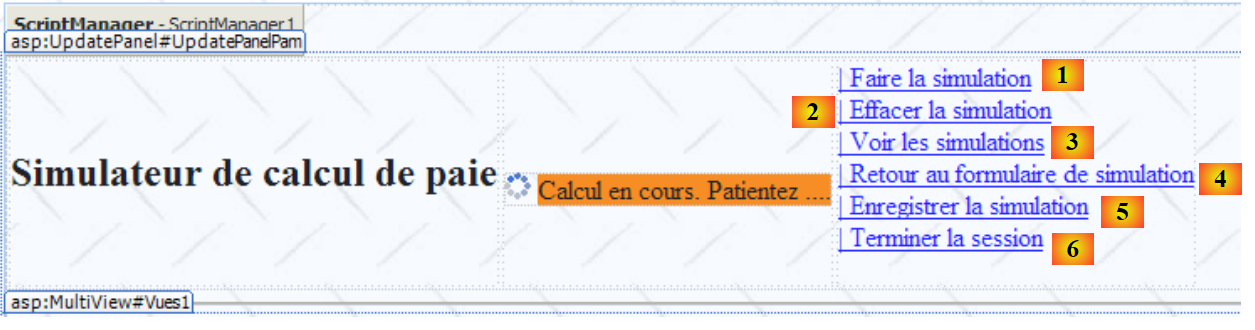 |
编号 | 类型 | 名称 | 角色 |
链接按钮 | LinkButtonRunSimulation | 请求进行模拟计算 | |
链接按钮 | LinkButtonClearSimulation | 清除输入表单 | |
链接按钮 | LinkButtonViewSimulations | 显示已执行的模拟列表 | |
链接按钮 | LinkButtonSimulationForm | 返回输入表单 | |
LinkButton | LinkButtonSaveSimulation | 将当前模拟保存到模拟列表中 | |
链接按钮 | LinkButtonEndSession | 结束当前会话 |
8.5.3. [ Saisies]视图
名为 [VueSaisies] 的 [View] 组件如下所示:
 |
编号 | 类型 | 名称 | 角色 |
下拉列表 | 员工下拉列表 | 包含员工姓名列表 | |
文本框 | TextBoxHours | 实际工作小时数 | |
文本框 | TextBoxDays | 工作天数 – 整数 | |
必填字段验证器 | 必填字段验证器(小时) | 检查字段 [2] [TextBoxHours] 是否不为空 | |
正则表达式验证器 | 正则表达式验证器(小时) | 检查 [2] [TextBoxHours] 字段是否为大于等于 0 的实数 | |
必填字段验证器 | 必填字段验证器(天数) | 检查 [3] [TextBoxDays] 字段是否不为空 | |
正则表达式验证器 | 正则表达式验证器(天数) | 检查 [3] [TextBoxDays] 字段是否为大于等于 0 的整数 |
8.5.4. 名为 [Simulati on] 的视图
名为 [SimulationView] 的 [View] 组件如下所示:
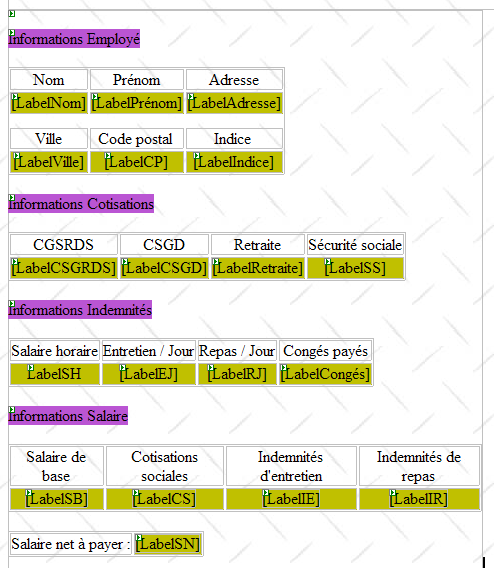
它仅由上述 ID 对应的 [Label] 组件构成。
8.5.5. [Simu lations]视图
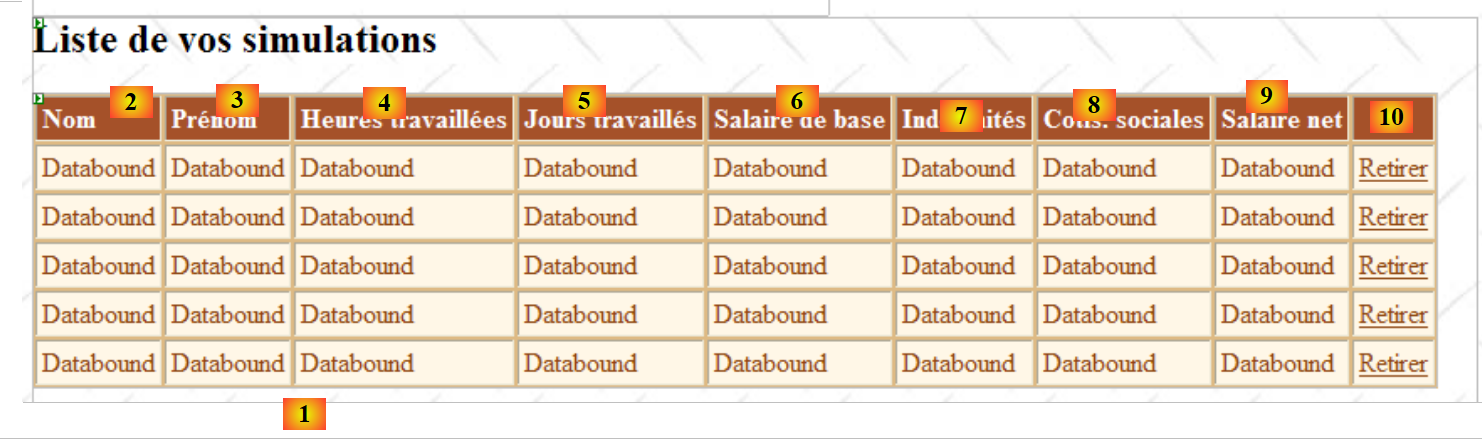
名为 [SimulationView] 的 [View] 组件如下所示:
 |
编号 | 类型 | 名称 | 角色 |
GridView | GridViewSimulations | 包含模拟列表 |
[GridViewSimulations] 组件的属性定义如下:
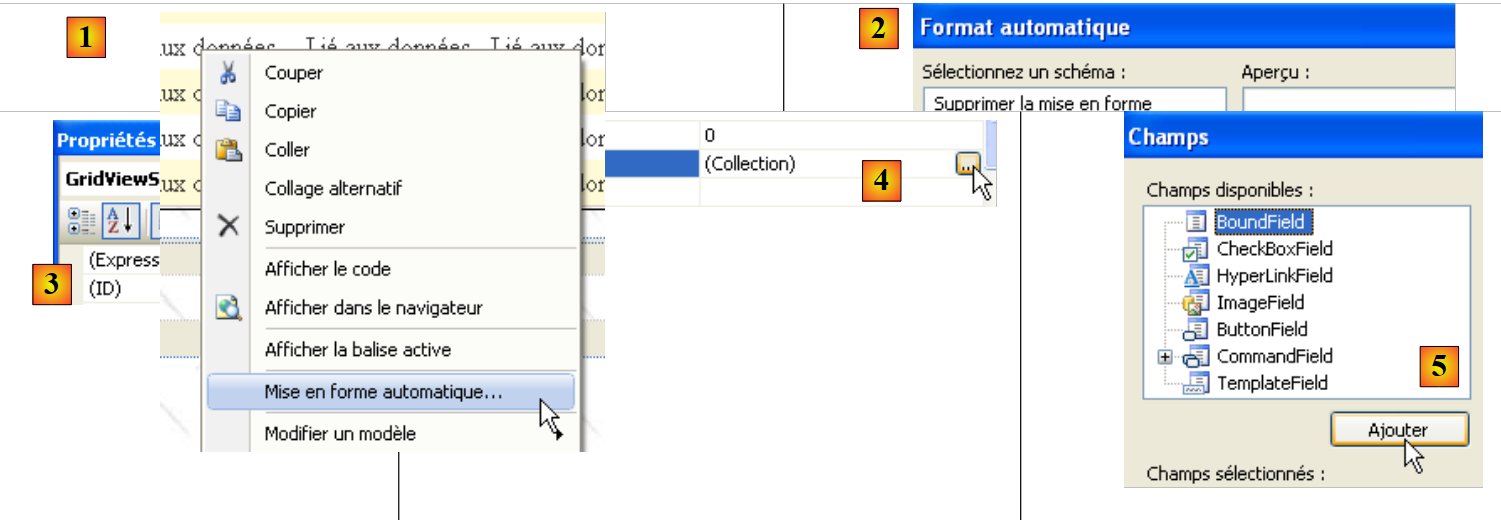 |
- 在 [1] 中:右键单击 [GridView] / [自动格式] 选项
- 在 [2] 中:为 [GridView] 选择显示类型
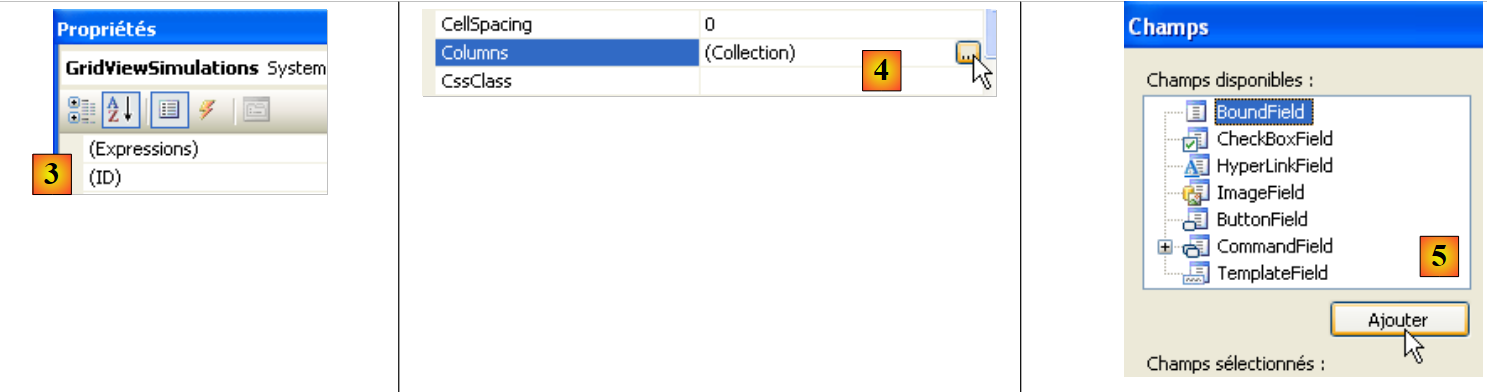 |
- 在 [3] 中:选择 [GridView] 的属性
- 在 [4] 中:编辑 [GridView] 的列
- 在 [5] 中:添加一个 [BoundField] 列,将其绑定到要显示在 [GridView] 行中的对象的某个公共属性。此处显示的对象将是一个 [Simulation] 对象。
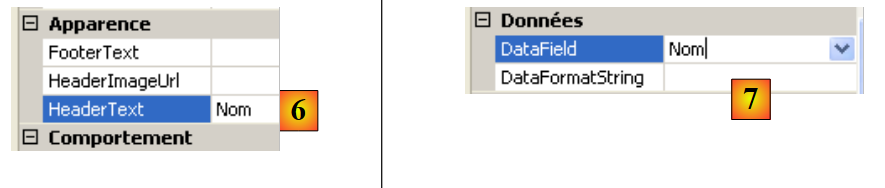 |
- 在 [6] 中:输入列标题
- 在 [7] 中:指定将与该列关联的 [Simulation] 类的属性名称。
- [DataFormatString] 指定了该列中显示的值应采用何种格式。
[GridViewSimulations] 组件的列具有以下属性:
编号 | 属性 |
类型:BoundField,标题文本:姓名,数据字段:姓名 | |
类型:绑定字段,标题文本:姓氏,数据字段:姓氏 | |
类型:绑定字段,标题文本:工作小时数,数据字段:工作小时数 | |
类型:绑定字段,标题文本:工作日数,数据字段:DaysWorked | |
类型:BoundField,标题文本:基本工资,数据字段:BaseSalary,数据格式字符串:{0:C}(货币格式,C=货币)——将显示欧元符号。 | |
类型:绑定字段,标题文本:津贴,数据字段:Indemnites,数据格式字符串:{0:C} | |
类型:BoundField,标题文本:社会保障缴费,数据字段:SocialSecurityContributions,数据格式字符串:{0:C} | |
类型:绑定字段,标题文本:净工资,数据字段:NetSalary,数据格式字符串:{0:C} |
请注意,[DataField] 必须与 [Simulation] 类的现有属性相对应。本阶段结束时,所有类型为 [BoundField] 的列均已创建:
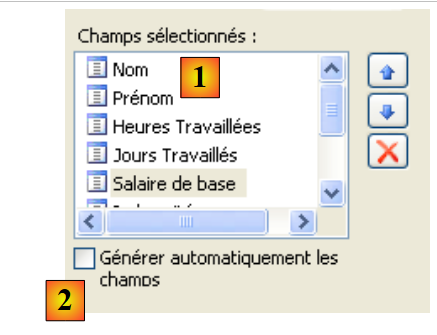 |
- 在 [1] 中:为 [GridView] 创建的列
- 在 [2] 中:当开发人员像我们刚才那样手动定义列时,必须禁用自动列生成功能。
我们还需要创建 [Remove] 链接列:

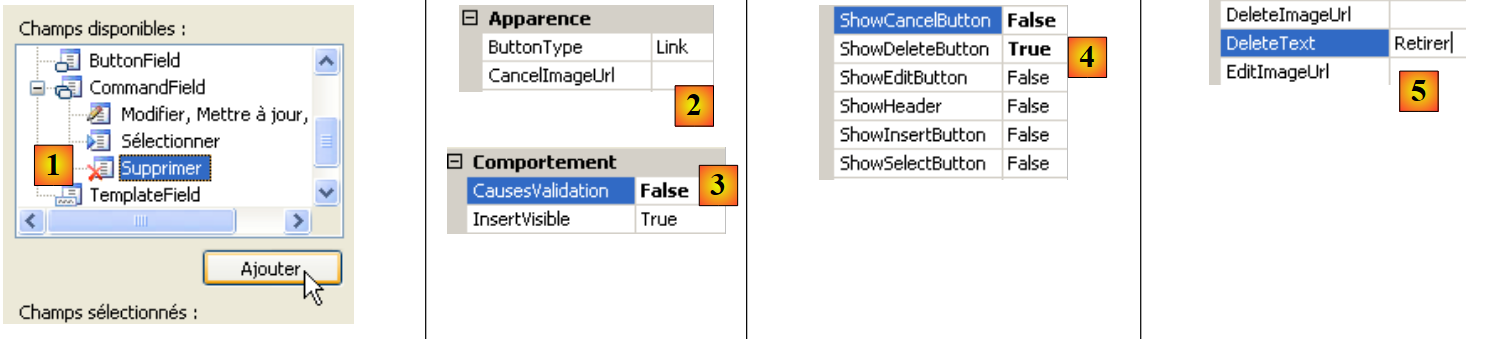 |
- 在 [1] 中:添加一个类型为 [CommandField / Delete] 的列
- 在 [2] 中:将 ButtonType 设为 Link,使该列显示链接而非按钮
- 在 [3] 中:CausesValidation=False;点击链接不会触发页面上可能存在的任何验证检查。事实上,删除模拟并不需要任何数据验证。
- 在 [4] 中:仅显示删除链接。
- 在 [5] 中:此链接的文本
8.5.6. [Simulation sVides]视图
名为 [VueSimulationsVides] 的 [View] 组件仅包含文本:
 |
8.5.7. [E rrors] 视图
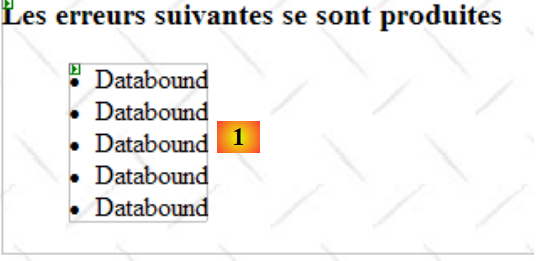
名为 [VueErreurs] 的 [View] 组件如下所示:
 |
编号 | 类型 | 名称 | 角色 |
中继器 | RptErrors | 显示错误消息列表 |
[Repeater] 组件允许您针对数据源中的每个对象(通常是集合)重复执行 ASP.NET/HTML 代码。该代码直接定义在页面的 ASP.NET 源代码中:
                <asp:Repeater ID="RptErreurs" runat="server">
                    <ItemTemplate>
                        <li>
                            <%# Container.DataItem %>
                        </li>
                    </ItemTemplate>
</asp:Repeater>
- 第 2 行:<ItemTemplate> 定义了将在数据源中的每个项目上重复执行的代码。
- 第 4 行:显示 Container.DataItem 表达式的值,该表达式指代数据源中的当前元素。由于该元素是一个对象,因此使用该对象的 ToString 方法将其包含在页面的 HTML 输出中。我们的对象集合将是一个包含错误消息的 List(Of String) 集合。第 3–5 行将在页面的 HTML 输出中包含 <li>Message</li> 序列。
8.6. 控制器 [Default.aspx.cs]
8.6.1. 概述
让我们回到应用程序的 MVC 架构:
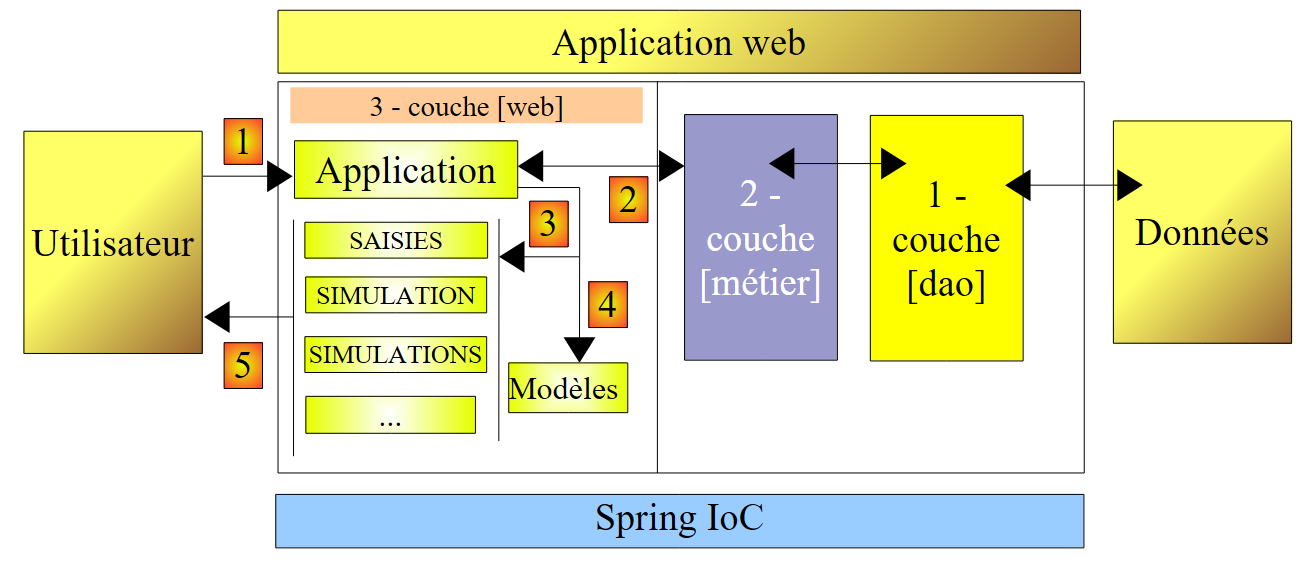 |
- [Default.aspx.cs] 是单页 [Default.aspx] 的代码,它充当应用程序控制器。
- [Global] 是 [HttpApplication] 对象,它负责初始化应用程序,并引用了 [业务] 层。
[Default.aspx.cs] 控制器代码的框架如下:
using System.Collections.Generic;
...

public partial class PagePam : Page
{

    private void setVues(bool boolVues1, bool boolVues2, int index)
    {
        // display the requested views
        // boolVues1 : true if Vues1 multi-view is to be visible
        // boolVues1 : true if the Vues2 multiview is to be visible
        // index: index of the Vues2 view to be displayed
...
    }

    private void setMenu(bool boolFaireSimulation, bool boolEnregistrerSimulation, bool boolEffacerSimulation, bool boolFormulaireSimulation, bool boolVoirSimulations, bool boolTerminerSession)
    {
        // set menu options
        // each Boolean is assigned to the Visible property of the corresponding link
...
    }

    // page loading
    protected void Page_Load(object sender, System.EventArgs e)
    {
        // initial request processing
        if (!IsPostBack)
        {
...
        }
    }

    protected void LinkButtonFaireSimulation_Click(object sender, System.EventArgs e)
    {
...
    }

    protected void LinkButtonEffacerSimulation_Click(object sender, System.EventArgs e)
    {
....
    }

    protected void LinkButtonVoirSimulations_Click(object sender, System.EventArgs e)
    {
...
    }

    protected void LinkButtonEnregistrerSimulation_Click(object sender, System.EventArgs e)
    {
...
    }

    protected void LinkButtonTerminerSession_Click(object sender, System.EventArgs e)
    {
...
    }

    protected void LinkButtonFormulaireSimulation_Click(object sender, System.EventArgs e)
    {
...
    }


    protected void GridViewSimulations_RowDeleting(object sender, GridViewDeleteEventArgs e)
    {
...
    }
}
针对用户的初始请求(GET),仅处理第 24–31 行中的 Load 事件。对于通过菜单链接发起的后续请求(POST),将处理两个事件:
- Load 事件(第 24–31 行),但第 27 行对 Page.IsPostback 的布尔检查确保不会执行任何操作。
- 与被点击的链接关联的事件:
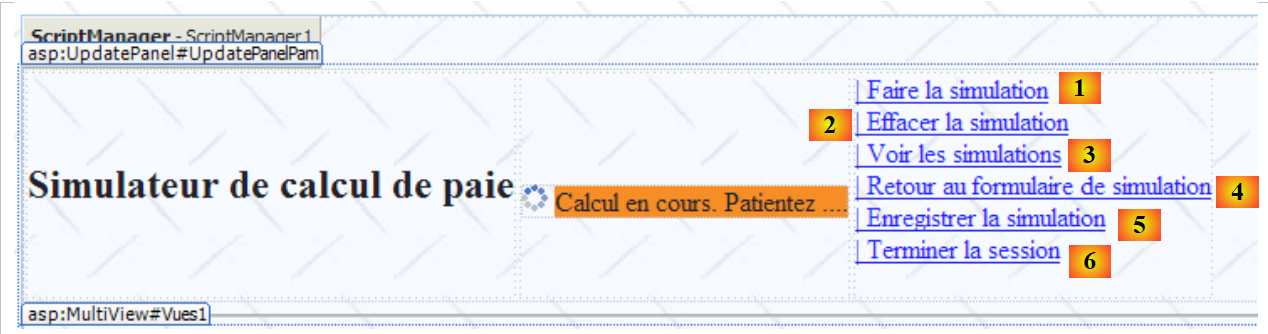 |
- 第 33–36 行:处理链接 [1] 的点击
- 第 38–41 行:处理链接 [2] 的点击
- 第 43–46 行:处理链接 [3] 的点击事件
- 第 58–61 行:处理链接 [4] 的点击事件
- 第 48–51 行:处理链接 [5] 的点击
- 第 53–56 行:处理链接 [6] 的点击事件
为了提取频繁重复的代码片段,已创建了两个内部方法:
- setVues,第 7–14 行:设置要显示的视图
- setMenu,第 16–21 行:设置要显示的菜单选项
8.6.2. Load 事件
推荐阅读:参考资料 [1],《ASP.NET 1.1 Web 开发》:
- 关于 [Repeater] 组件和数据绑定的章节。
用户最初看到的视图是空表单:
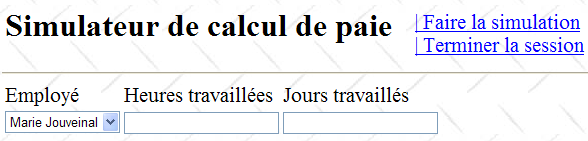
初始化应用程序需要访问数据源,此过程可能会失败。在这种情况下,显示的首个页面将是错误页面:
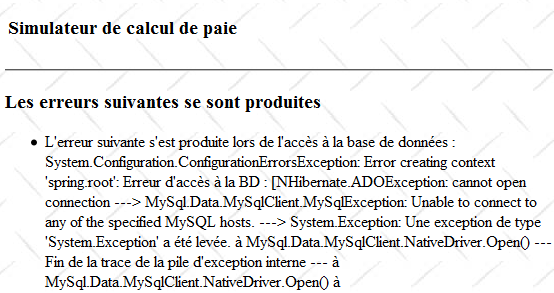
[Load] 事件的处理方式与之前的 ASP.NET 版本类似:
    // page loading
    protected void Page_Load(object sender, System.EventArgs e)
    {
        // initial request processing
        if (!IsPostBack)
        {
            // initialization errors?
            if (Global.Erreur)
            {
                // display view [errors]
...
                // menu positioning
                ...
                return;
            }
            // loading employee names into the combo
...
            // menu positioning
...
            // view display [input]
 ...
        }
}
问题:请补全上面的代码
8.6.3. 操作:运行模拟
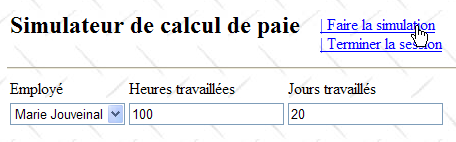
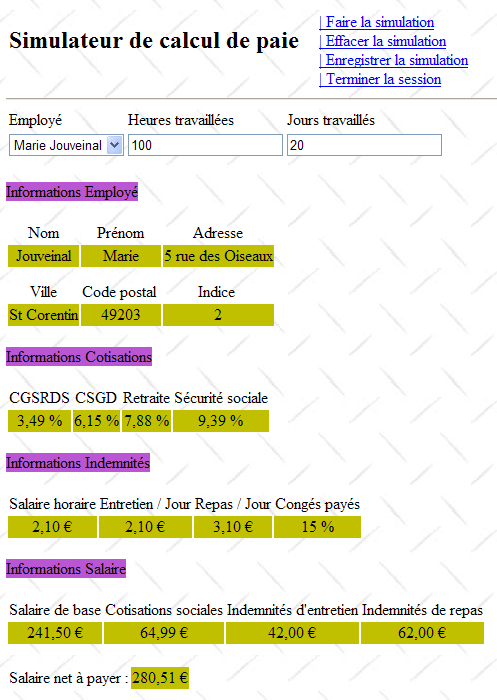
下文中的屏幕 (1) 是用户的请求,屏幕 (2) 是 Web 应用程序发送给用户的响应。用户可以在主屏幕上启动模拟:
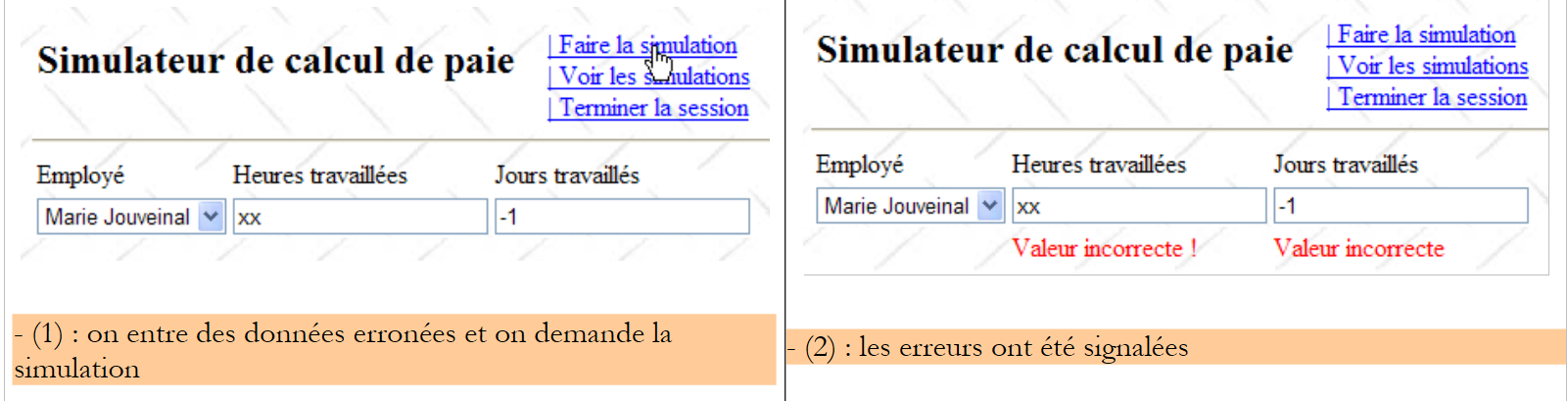 |
处理此操作的流程可能如下所示:
    protected void LinkButtonFaireSimulation_Click(object sender, System.EventArgs e)
    {
        // wage calculation
        // valid page?
        Page.Validate();
        if (!Page.IsValid)
        {
            // view display [input]
            ...
            return;
        }
        // the page is validated - inputs are retrieved
        double HeuresTravaillées = ...;
        int JoursTravaillés = ...;
        // we calculate the employee's salary
        FeuilleSalaire feuillesalaire;
        try
        {
            feuillesalaire = ...
        }
        catch (PamException ex)
        {
            // display view [errors]
...
            return;
        }
        // put the result in the session
        Session["simulation"] = ...
        // displaying results
...
        // display views [entry, employee, salary]
        ...
        // menu display
        ...
}
问题:请补全上面的代码
8.6.4. 操作:保存模拟
模拟完成后,用户可以请求保存它:
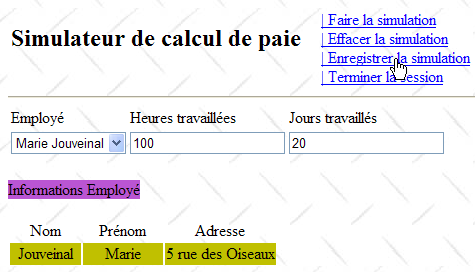 |
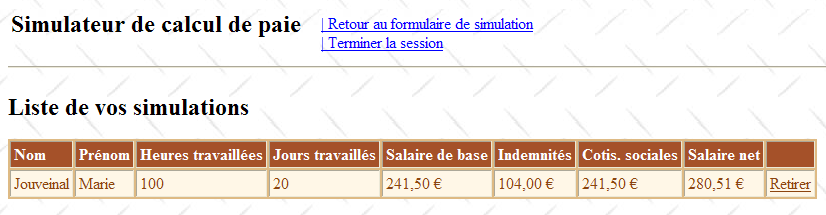
处理此操作的流程可能如下所示:
    protected void LinkButtonEnregistrerSimulation_Click(object sender, System.EventArgs e)
    {
        // save the current simulation in the list of simulations in the session
        ...
        // the [simulations] view is displayed
        ...
}
问题:请补全上述代码
8.6.5. 操作:返回模拟表单
推荐阅读:参考文献 [1],《使用 ASP.NET 1.1 进行 Web 开发》:隐藏字段 _VIEWSTATE 的作用
一旦显示了模拟列表,用户可以请求返回模拟表单:
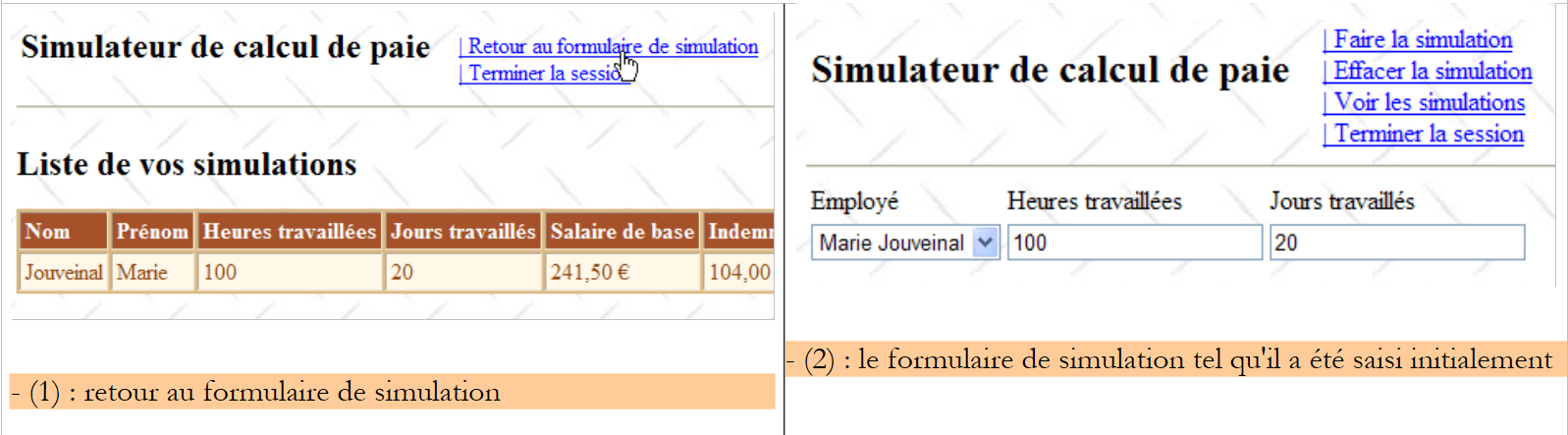 |
请注意,屏幕 (2) 显示的是表单被提交时的状态。这里需要特别注意的是,这些不同的视图都属于同一个页面。在请求之间,如果控件的 EnableViewState 属性设置为 true,则控件的值会通过 ViewState 机制进行保存。
处理此操作的程序可能如下所示:
    protected void LinkButtonFormulaireSimulation_Click(object sender, System.EventArgs e)
    {
        // view display [input]
        ...
        // menu positioning
        ...
}
问题:完成上面的代码
8.6.6. 操作:清除模拟
返回模拟表单后,用户可以请求清除当前输入的内容:
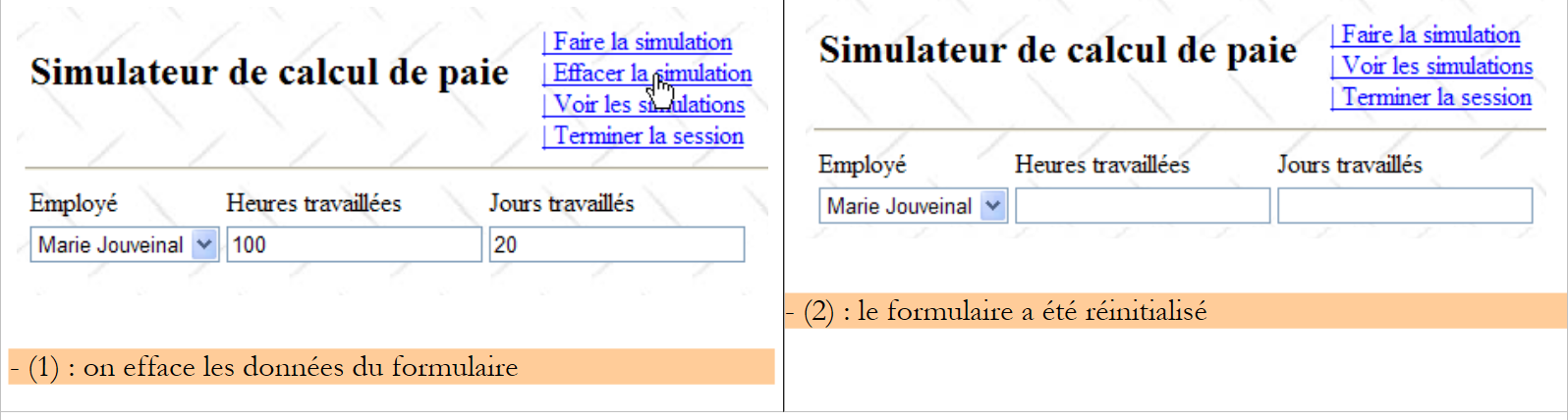 |
处理此操作的流程可能如下所示:
    protected void LinkButtonEffacerSimulation_Click(object sender, System.EventArgs e)
    {
        // RAZ of the form
        ...
}
问题:完成上述代码
8.6.7. 操作:查看模拟
用户可以请求查看他们已经创建的模拟:
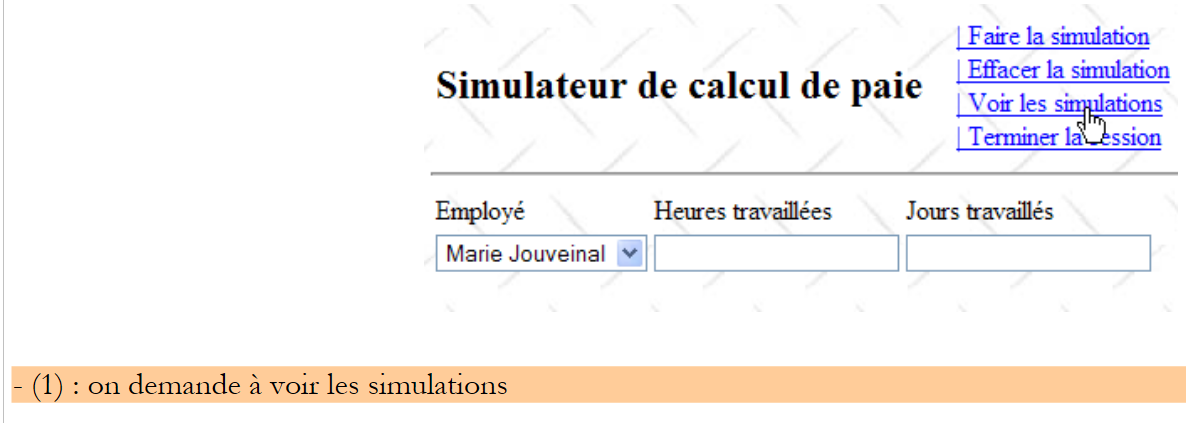 |
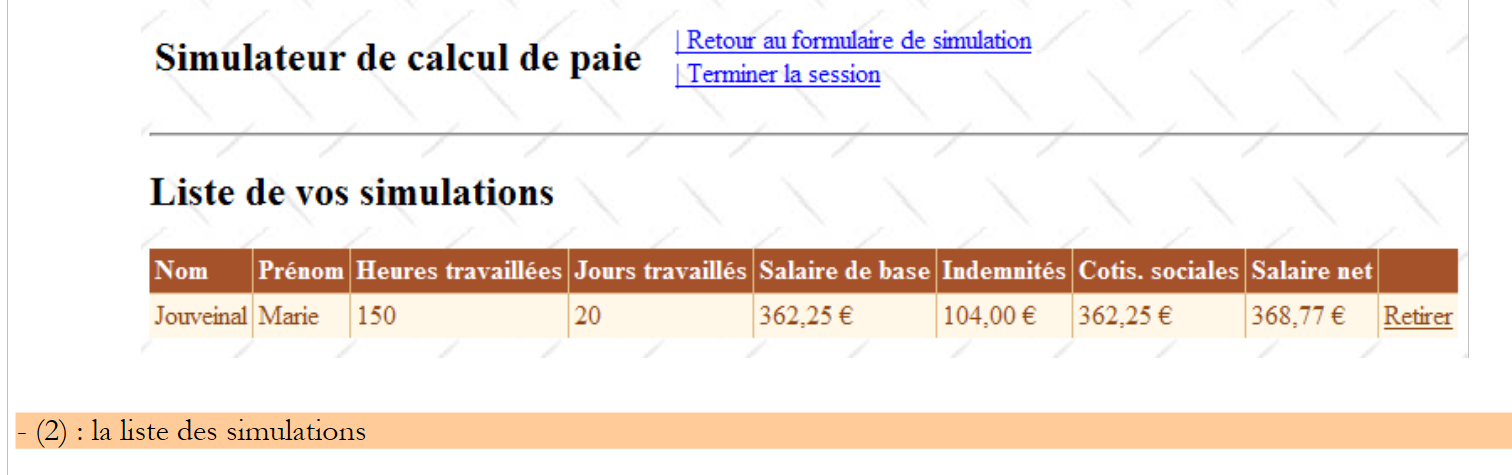 |
处理此操作的程序可能如下所示:
protected void LinkButtonVoirSimulations_Click(object sender, System.EventArgs e)
    {
        // simulations are retrieved from the
        ...
        // are there any simulations?
        if (...)
        {
            // view [simulations] visible
...
        }
        else
        {
            // view [SimulationsVides]
            ...
        }
        // set the menu
        ...
    }
问题:完成上述代码
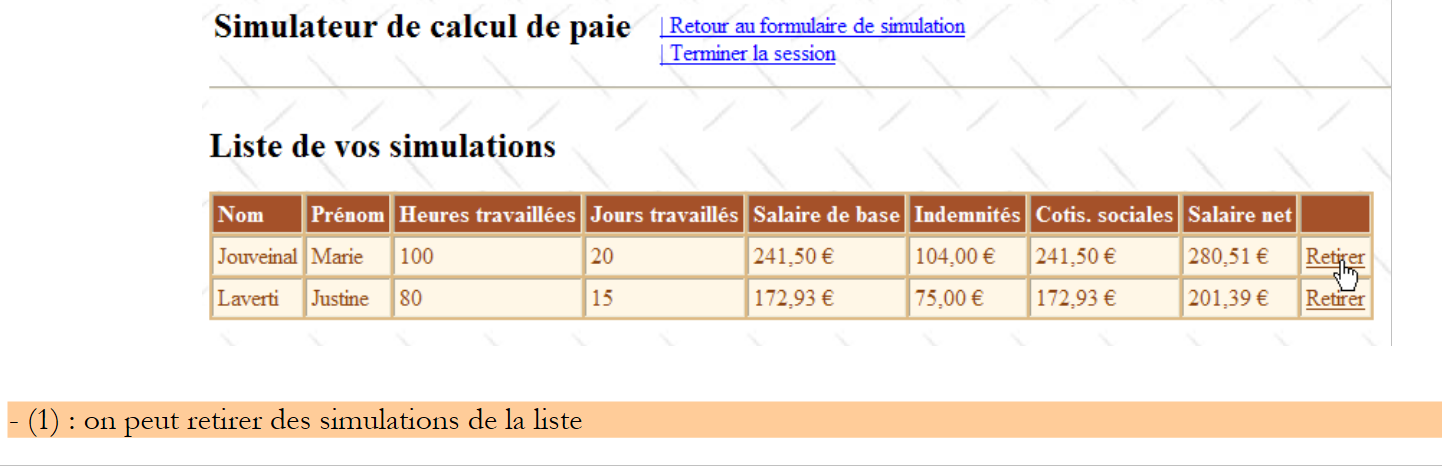
8.6.8. 操作:删除模拟
用户可以请求删除一个模拟:
 |
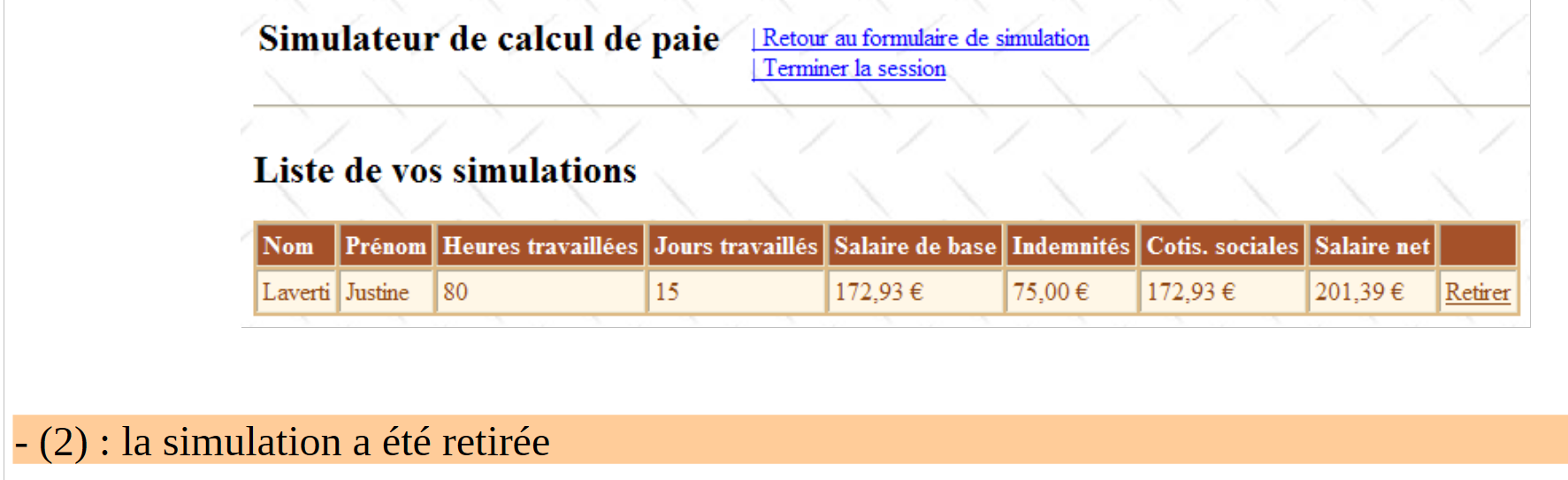 |
处理此操作的 [GridViewSimulations_RowDeleting] 过程可能如下所示:
    protected void GridViewSimulations_RowDeleting(object sender, GridViewDeleteEventArgs e)
    {
        // simulations are retrieved from the
        ...
        // delete the designated simulation (e.RowIndex is the number of the deleted line)
        ...
        // are there any simulations left?
        if (...)
        {
            // fill in the GridView
 ...
        }
        else
        {
            // view [SimulationsVides]
            ...
        }
}
问题:完成上面的代码
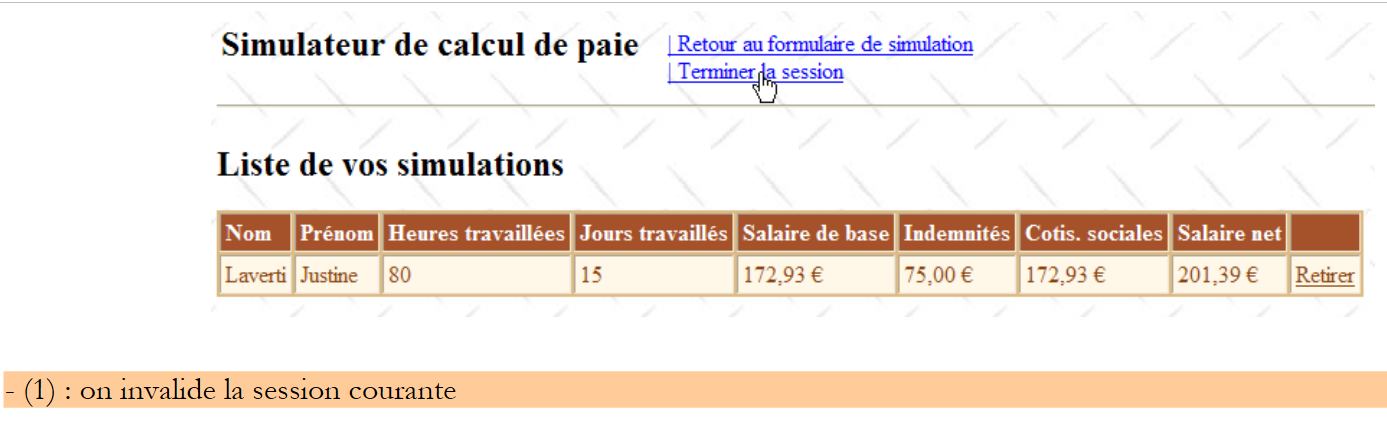
8.6.9. 操作:结束会话
用户可以请求结束其模拟会话。这将丢弃会话内容并显示一个空表单:
 |
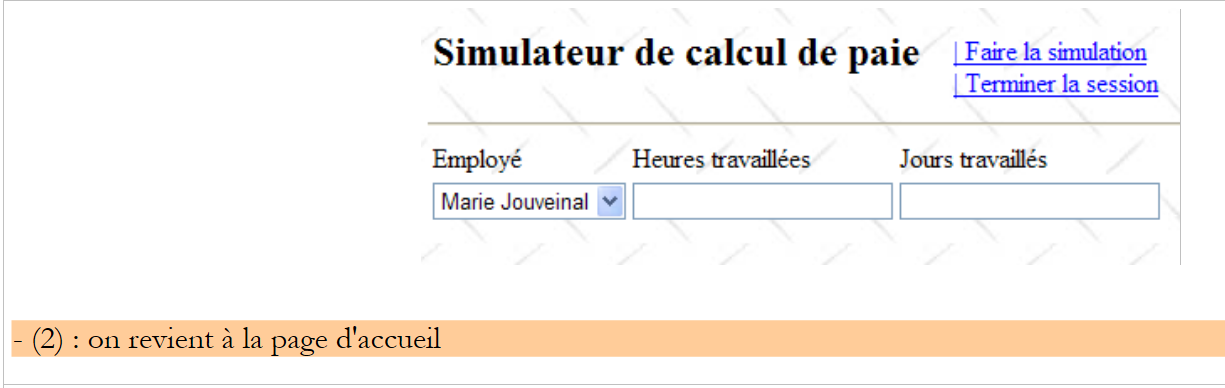 |
处理此操作的程序可能如下所示:
    protected void LinkButtonTerminerSession_Click(object sender, System.EventArgs e)
    {
        // quit session
        ...
        // display [entries] view
        ...
        // menu positioning
        ...
}
问题:请补全上面的代码
实践练习:在您的机器上实现前面的 Web 应用程序。为其添加 Ajax 功能。