10. [SimuPaie] 应用程序——第 6 版——一个 Web 服务的 ASP.NET 客户端
10.1. 应用程序架构
我们正在按以下方式演进 NUnit 测试的客户端/服务器架构:
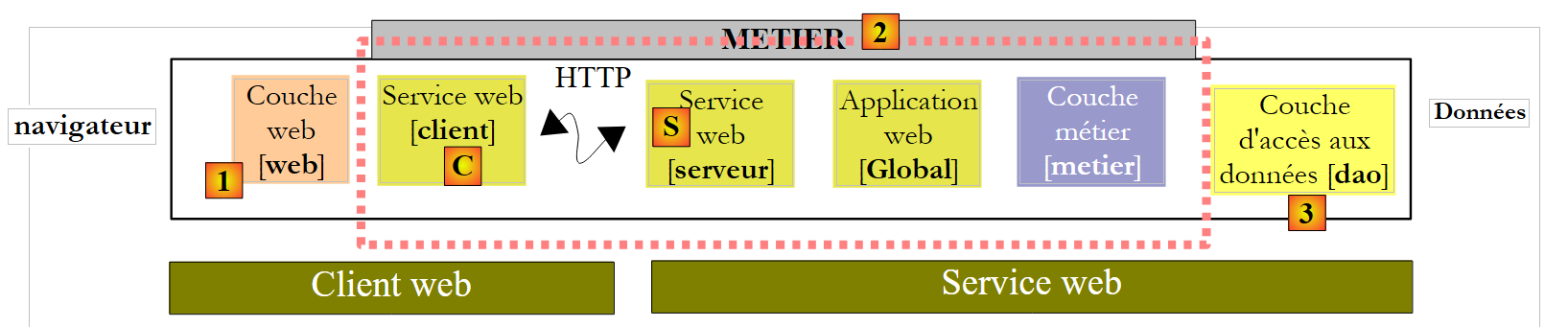 |
在[1]中,NUnit测试已被第8版Web应用程序所取代。这里需要特别指出的是,该架构中包含两个未显示的Web服务器:
- 一个运行 [S] Web 服务的 Web 服务器。它将在第一个 Visual Web Developer 实例中运行。
- 一个运行 Web 客户端 [1] 的 Web 服务器。它将在第二个 Visual Web Developer 实例中运行。
10.2. 用于 [web] 客户端的 Visual Web Developer 项目
我们创建一个新的 ASP.NET Web 项目:
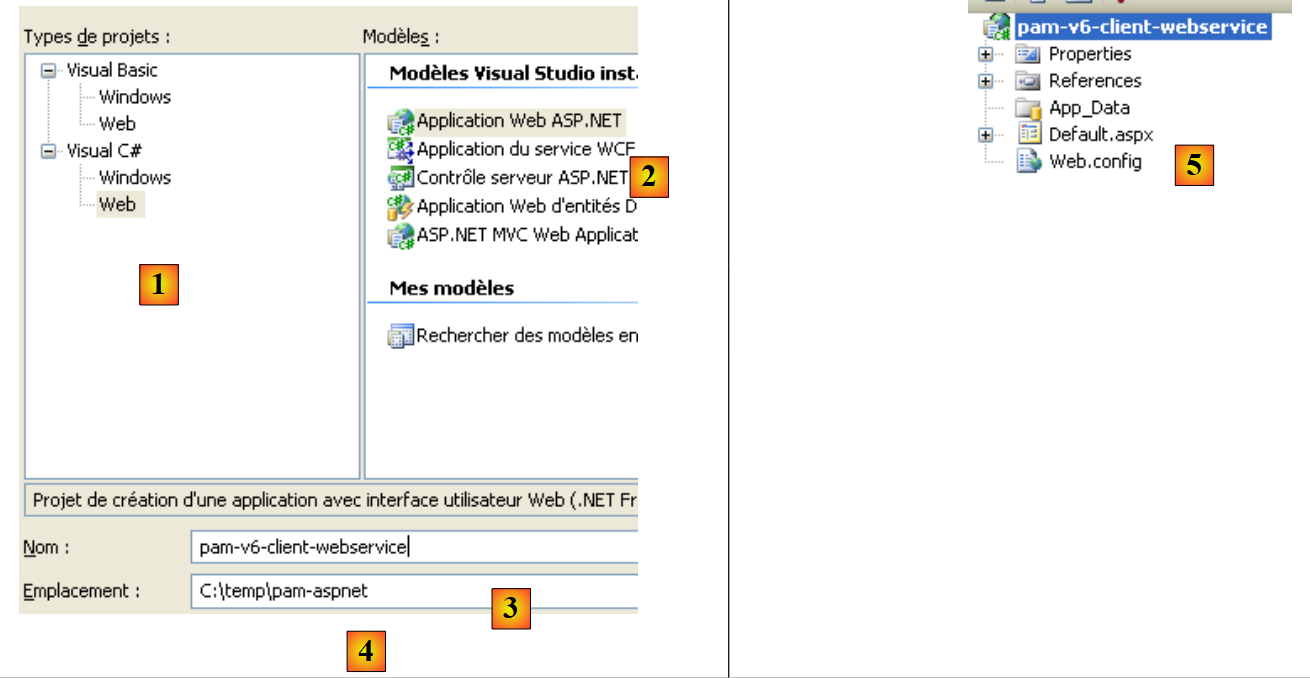 |
- 在 [1] 中,我们选择 C# Web 项目
- 在 [2] 中,我们选择“ASP.NET Web 应用程序”
- 在 [3] 中,我们为 Web 项目命名
- 在 [4] 中,我们指定该项目的保存位置
- 在 [5] 中,项目已创建
我们修改了几个项目属性:
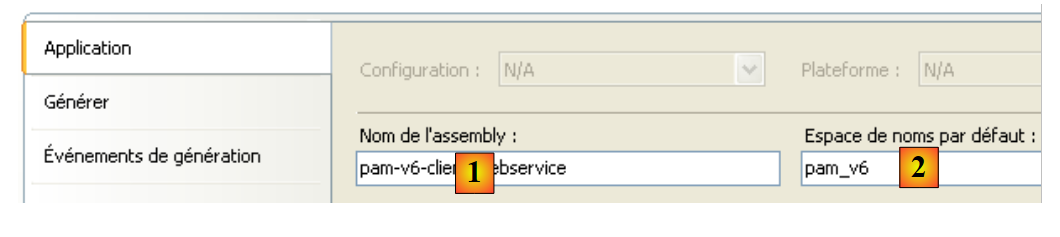 |
- 在 [1] 中,指定将生成的程序集名称
- 在 [2] 中,将要创建的类和接口的默认命名空间
要构建 [pam-v6-client-webservice] 项目,我们可以从 [pam-v4-3tier-nhibernate-multivues-monopage] Web 项目中提取 [Global.asax] 和 [Default.aspx] 文件,并将它们复制到 [pam-v6-client-webservice] 项目中。首先,我们使用 Windows 资源管理器进行此操作:
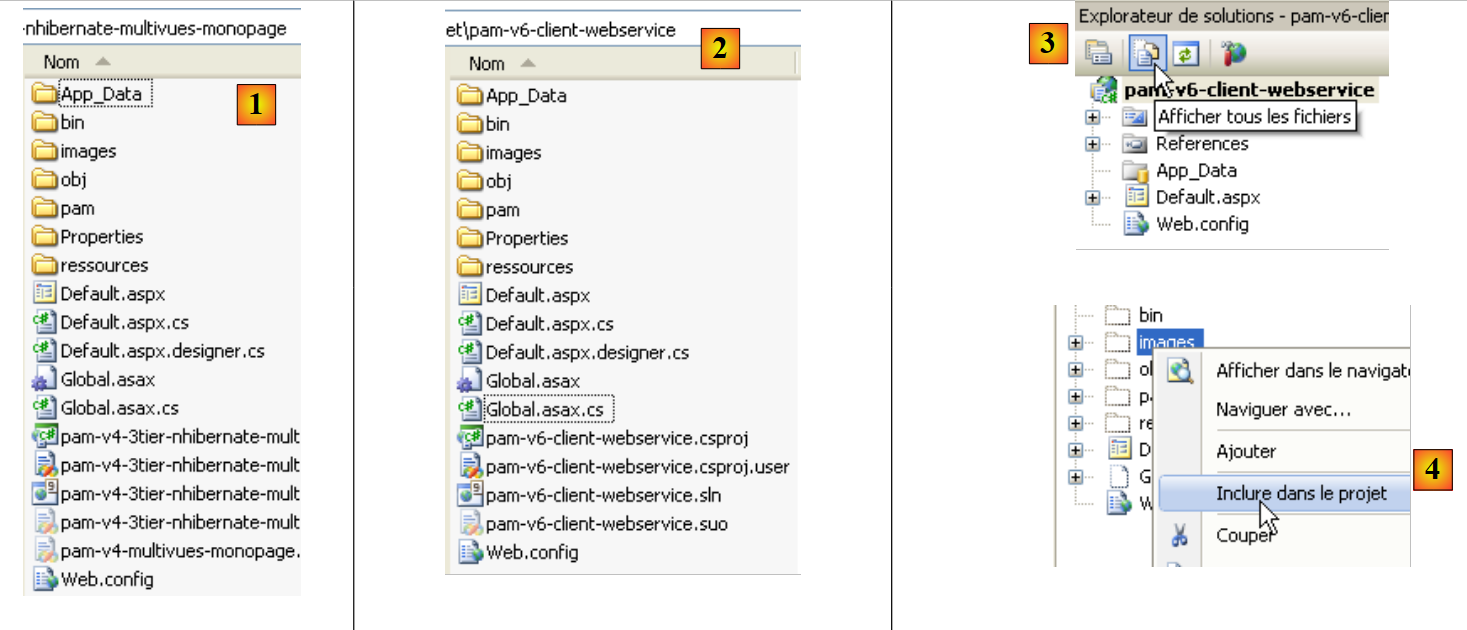 |
- 在 [1] 中,[pam-v4-3tier-nhibernate-multivues-monopage] 项目文件夹
- [2] 处为复制后的 [pam-v6-client-webservice] 项目文件夹
- [images, pam, resources] 文件夹
- 文件 [Global.asax, Global.asax.cs]
- 文件 [Default.aspx、Default.aspx.cs、Default.aspx.designer.cs]
- 在 [3] 中,在 Visual Studio Express 中,显示所有项目文件以显示新添加的文件
- 在 [4] 中,将添加的文件夹和文件纳入项目
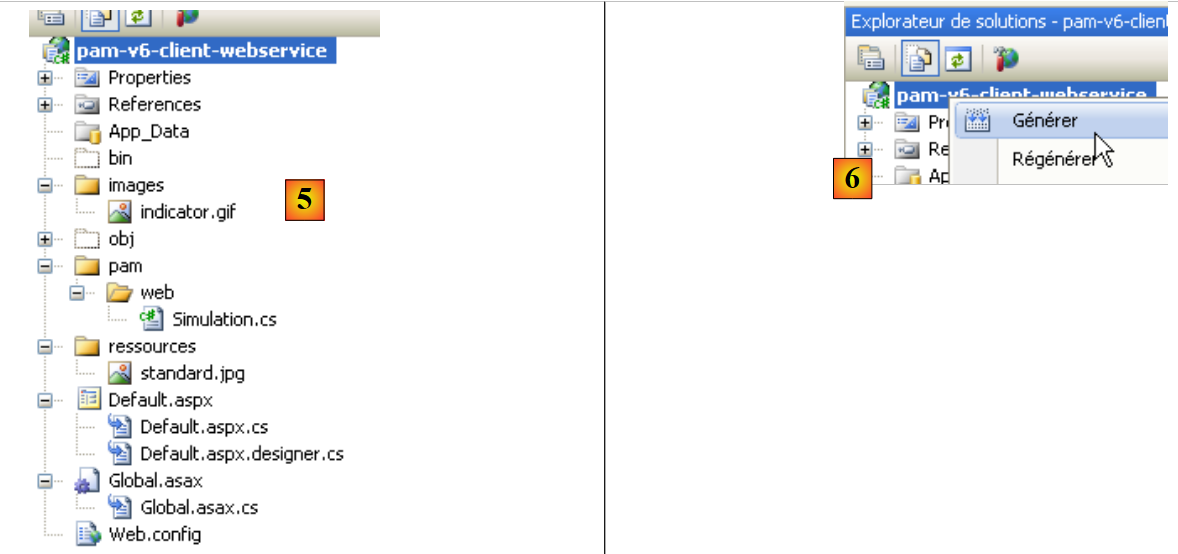 |
- 在 [5] 中,新建项目 [pam-v6-client-webservice]
此时,您可以首次构建该项目 [6]。您将收到以下错误:
要理解并解决这些错误,我们需要了解正在开发的 Web 项目的架构:
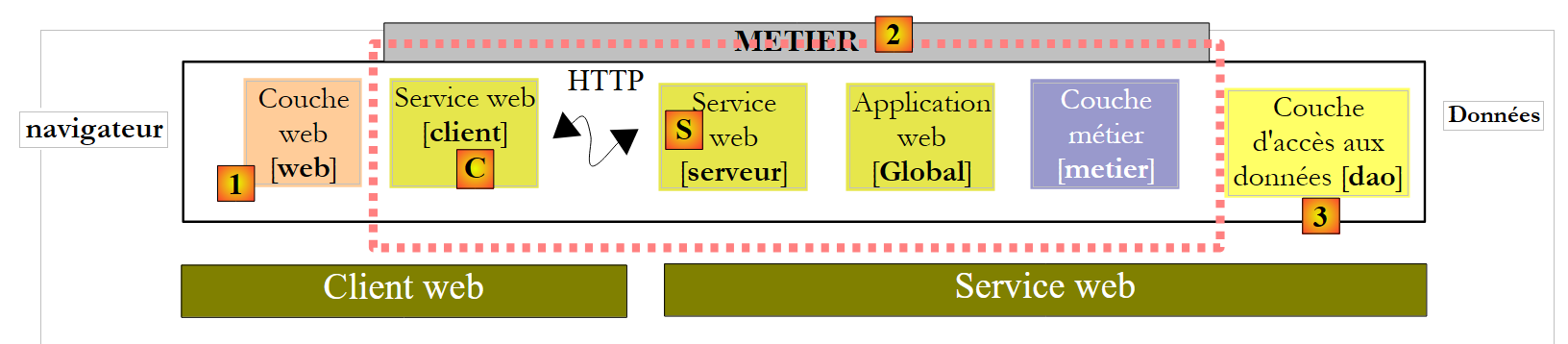 |
[pam-v6-client-webservice] 项目即上图中的 [Web] 层 [1]。我们可以看到,该层与 Web 服务客户端 [C] 进行通信,该客户端我们将稍后生成。
- 错误 2、5 和 7 的根源在于,[pam-v4] 中的代码引用了 [业务] 层的 DLL,而该 DLL 现在位于服务器端而非客户端。
- 错误 1 和 3 的原因相同,但这次涉及的是 [DAO] 层的 DLL。
- 错误 4 的原因是 [Global.asax] 中的代码使用了 Spring,而我们的项目未引用 Spring DLL。我们将添加此引用。
- 错误 6 的原因是 [Employee] 类定义在 [DAO] 层中,而该层在客户端并不存在。
命名空间错误 1、2、4、5、6 和 7 将通过生成 Web 服务的 C 客户端来解决。错误 3 通过在项目中添加对 Spring DLL 的引用来解决。我们可以按以下步骤进行:
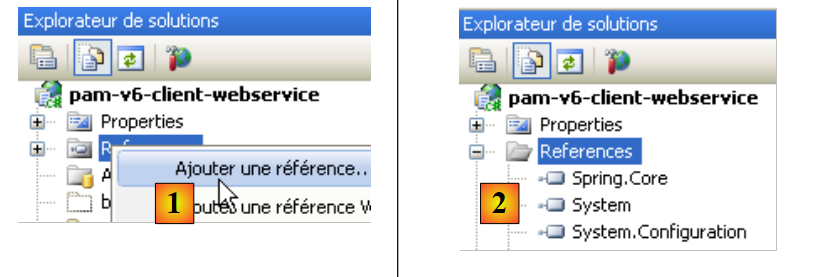 |
- 在 [1] 中,添加对 [pam-v6-client-webservice] 项目的引用
- 在 [4] 中,我们在 [lib] 文件夹中添加了对 [Spring.Core] DLL 的引用。
向 Spring 添加此引用后,项目生成时的错误减少了一个。其余所有错误均源于引用了 [business] 和 [DAO] 层对象的代码行,而这些对象现已位于服务器端。我们将看到,这些缺失的对象将在 Web 服务客户端 [C] 中生成。
 |
在生成 Web 服务客户端 [C] 之前,我们将修改现有各类类的命名空间。它们目前位于 [pam-v4] 命名空间中。我们将该命名空间更改为 [pam-v6]。涉及的文件如下:Default.aspx.cs、Default.aspx.designer.cs、Global.asax.cs。例如:
....
namespace pam_v6
{
  public class Global : System.Web.HttpApplication
  {
    // --- static application data ---
    public static Employe[] Employes;
    public static IPamMetier PamMetier = null;
....
第 2 行:pam_v4 命名空间已被 pam_v6 命名空间取代。
此外,您必须修改以下文件中的标记:Default.aspx 和 Global.asax:
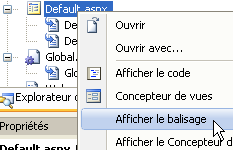 |
[Default.aspx] 的标记变为:
<%@ Page Language="C#" AutoEventWireup="true" CodeFile="Default.aspx.cs" Inherits="pam_v6.PagePam" %>


<!DOCTYPE html PUBLIC "-//W3C//DTD XHTML 1.0 Transitional//EN" "http://www.w3.org/TR/xhtml1/DTD/xhtml1-transitional.dtd">
.....
第 1 行:Inherits 属性指定了 [Default.aspx.cs] 文件的类名。我们更改了命名空间。
[Global.asax] 的标记变为:
<%@ Application Codebehind="Global.asax.cs" Inherits="pam_v6.Global" Language="C#" %>
在上文中,我们更改了 Inherits 属性的命名空间。
现在,我们生成 Web 服务客户端 [C]。
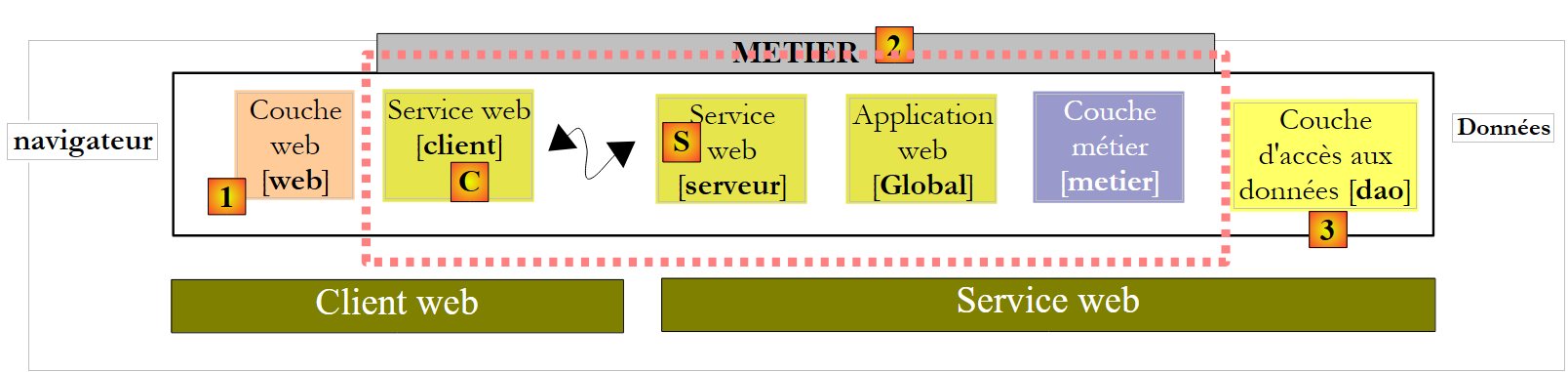 |
要执行以下步骤,Web 服务 [S] [pam-v5-webservice] 必须在另一个 Visual Web Developer 实例中运行。
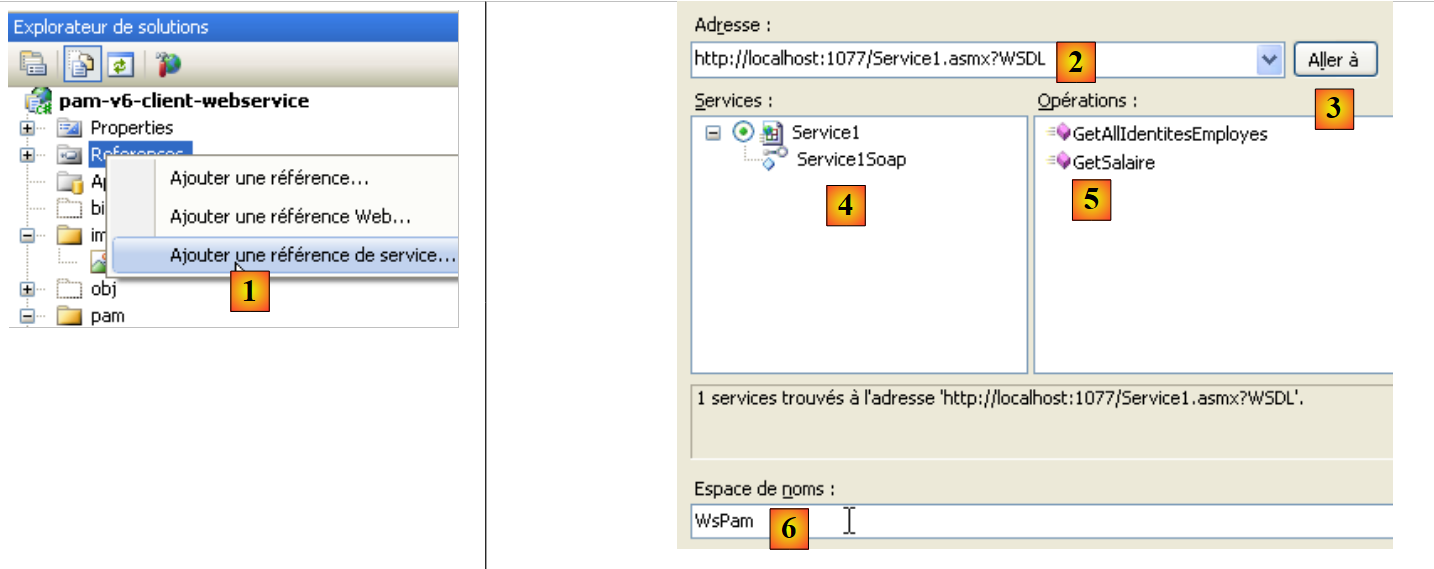 |
- 在 [1] 中,我们将 Web 服务 [pam-v5-webservice] 添加为项目 [pam-v6-client-webservice] 的引用
- 在 [2] 中,输入 Web 服务 [pam-v5-webservice] 的 URI。这是该 Web 服务的 WSDL 文件的 URL。在构建 Web 服务 [pam-v5-webservice] 时,我们已指定了如何查找此 URL。
- 在 [3] 中,请向向导指定使用 [2] 中指定的 WSDL 文件
- 在 [4] 中,选择已发现的 Web 服务 [Service1Soap],并在 [5] 中选择其暴露的远程方法。
- 在 [6] 中,我们设置了将生成客户端 [C] 的类和接口的命名空间
- 开始生成客户端 [C]
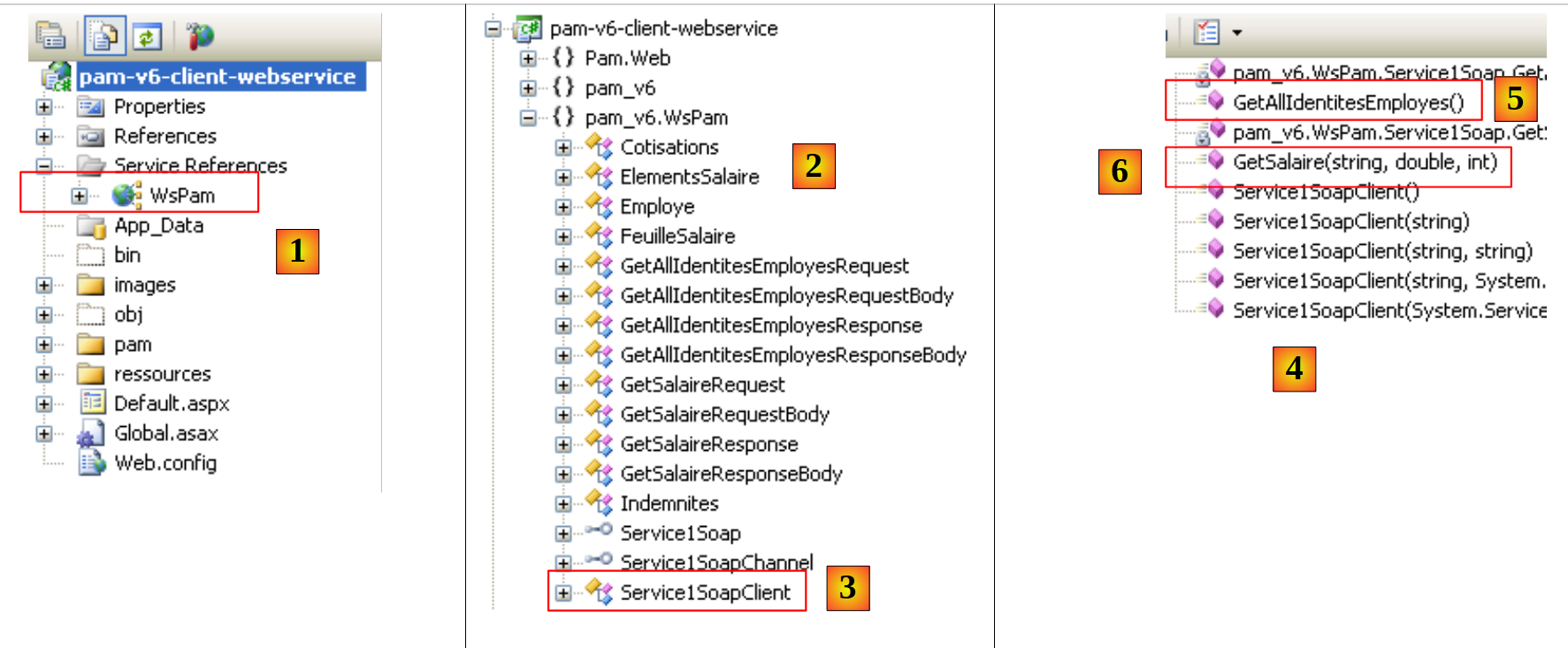 |
- 在[1]中,生成的客户端。双击它以查看其内容。
- 在 [2] 中,对象资源管理器中显示了 pam_v6.WsPam 命名空间的类和接口。这是生成的客户端的命名空间。
- [3] 显示了实现 Web 服务客户端的类。
- 在 [4] 中,显示了客户端 [Service1SoapClient] 实现的方法。在此处,我们可以找到远程 Web 服务的两个方法 [5] 和 [6]。
- 在[2]中,展示了各层的实体图:
- [business] : 薪资, 薪资明细
- [DAO]:员工、缴费、津贴
接下来,请注意这些远程实体的表示位于客户端,且位于 pam_v6.WsPam 命名空间中。
让我们来查看其中一个对象所暴露的方法和属性:
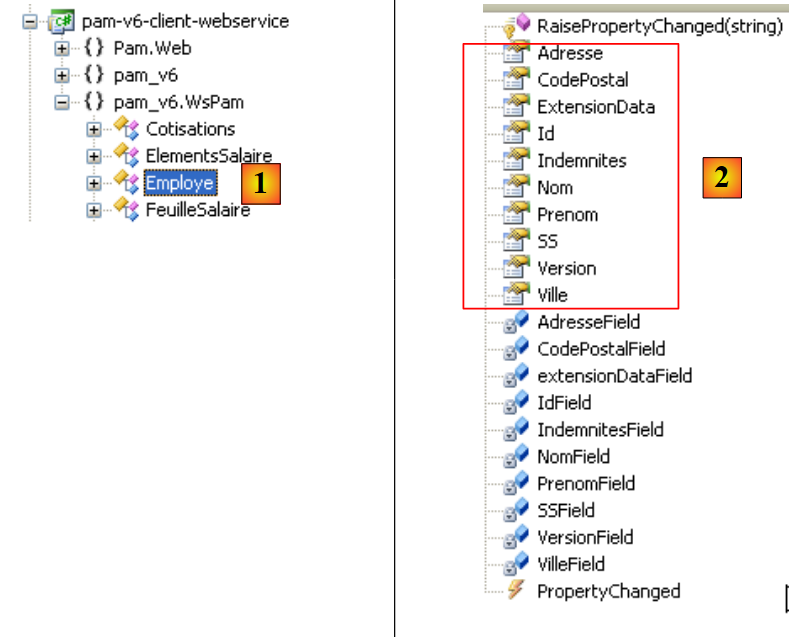 |
- 在[1]中,我们选取本地[Employee]类
- 在 [2] 中,我们可以看到远程 [Employee] 实体的属性,以及用于满足本地实体特定需求的私有字段。
让我们检查 [Global.asax.cs] 中包含错误的代码:
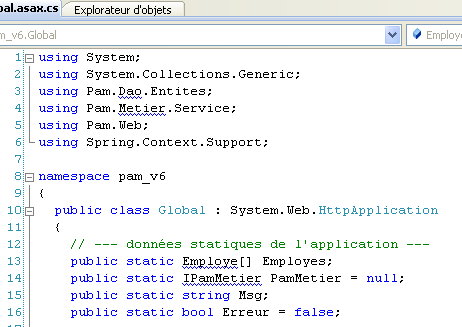 |
- 第 3 行和第 4 行使用的命名空间在服务器端存在,但在客户端不存在。
- 第 13 行使用了 [Employee] 类,但该类的正确命名空间尚未声明
- 第 14 行使用了客户端未识别的 IPamMetier 接口。
我们在前面讨论的 C# 客户端中已经遇到过类似的问题。
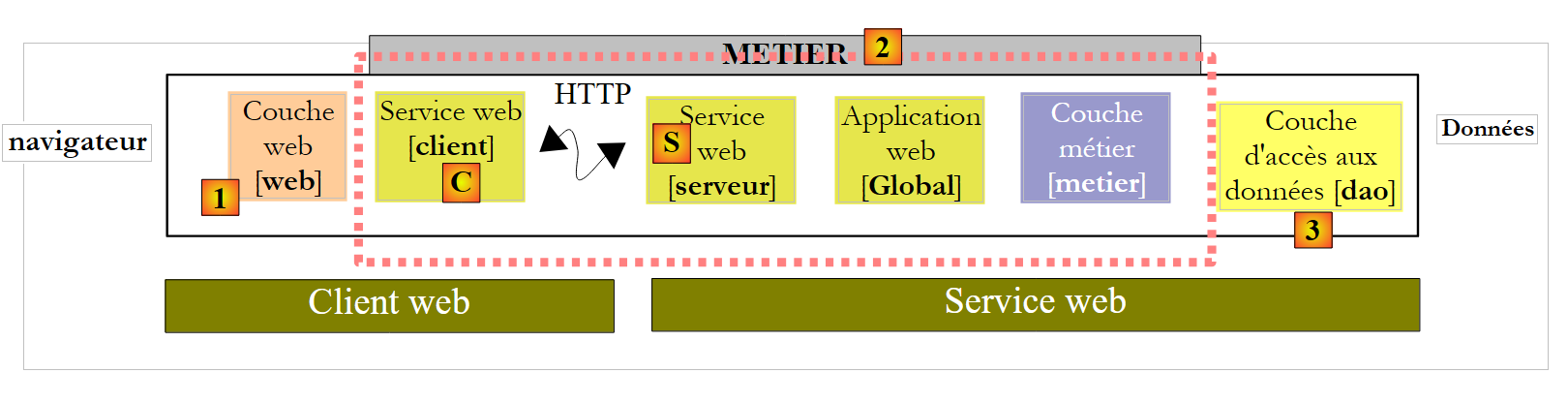
在架构中:
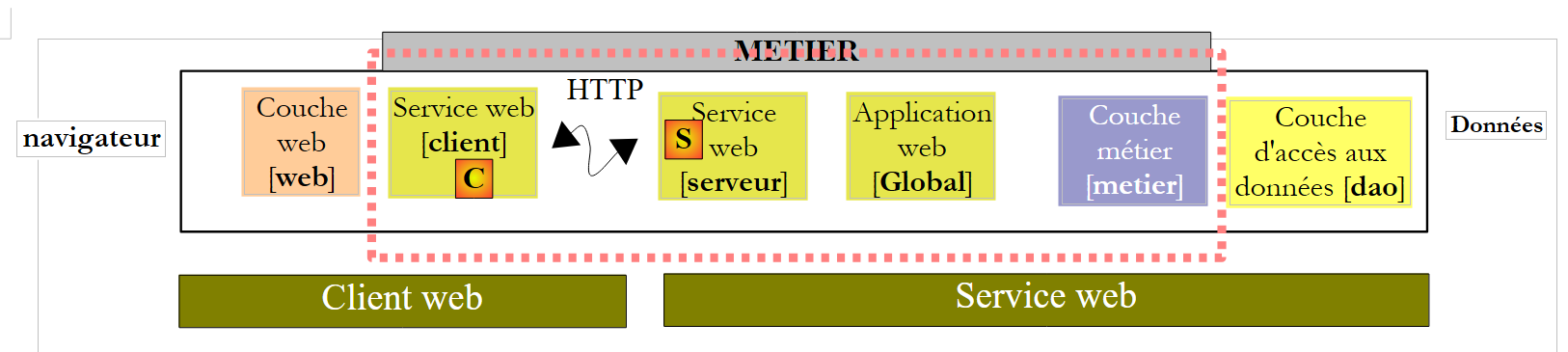 |
- 本地 [业务] 层由类型为 pam_v6.WsPam.Service1SoapClient 的客户端 [C] 实现,尽管它拥有同名的方法,但并未实现 IPamMetier 接口。
- 生成的 [C] 客户端所处理的实体(Employee、Benefits、Contributions)位于 pam_v6.WsPam 命名空间中
[Global.asax.cs] 中的代码更改如下:
using System;
using System.Collections.Generic;
using Pam.Web;
using Spring.Context.Support;
using pam_v6.WsPam;

namespace pam_v6
{
  public class Global : System.Web.HttpApplication
  {
    // --- static application data ---
    public static Employe[] Employes;
    public static Service1SoapClient PamMetier = null;
    public static string Msg;
    public static bool Erreur = false;

    // application startup
    public void Application_Start(object sender, EventArgs e)
    {
      // using the configuration file
      try
      {
        // instantiation layer [metier]
        PamMetier = ContextRegistry.GetContext().GetObject("pammetier") as Service1SoapClient;
        // simplified list of employees
        Employes = PamMetier.GetAllIdentitesEmployes();
        // we succeeded
        Msg = "Base chargée...";
      }
      catch (Exception ex)
      {
        // we note the error
        Msg = string.Format("L'erreur suivante s'est produite lors de l'accès à la base de données : {0}", ex);
        Erreur = true;
      }
    }

    public void Session_Start(object sender, EventArgs e)
    {
      // put an empty simulation list in the session
      List<Simulation> simulations = new List<Simulation>();
      Session["simulations"] = simulations;
    }
  }
}
第 24 行使用 Spring 实例化层 [C]。此实例化所需的配置在 [web.config] 中定义:
<configSections>
      <sectionGroup name="system.web.extensions" type="System.Web.Configuration.SystemWebExtensionsSectionGroup, System.Web.Extensions, Version=3.5.0.0, Culture=neutral, PublicKeyToken=31BF3856AD364E35">
 ...
      </sectionGroup>
      <sectionGroup name="spring">
        <section name="context" type="Spring.Context.Support.ContextHandler, Spring.Core" />
        <section name="objects" type="Spring.Context.Support.DefaultSectionHandler, Spring.Core" />
      </sectionGroup>
    </configSections>

  <spring>
    <context>
      <resource uri="config://spring/objects" />
    </context>
      <objects xmlns="http://www.springframework.net">
        <object id="pammetier" type="pam_v6.WsPam.Service1SoapClient,pam-v6-client-webservice"/>
      </objects>
</spring>
第 16 行:[business] 层是 [pam_v6.WsPam.Service1SoapClient] 类的实例,该类位于 [pam-v6-client-webservice] DLL 中。请注意,我们已将 [pam-v6-client-webservice] 项目配置为生成此 DLL。
[Default.aspx.cs] 中仍存在一些错误:
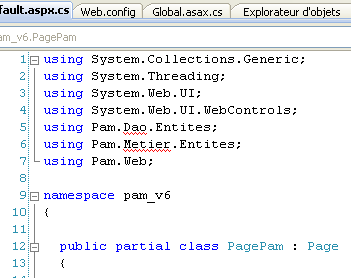 | 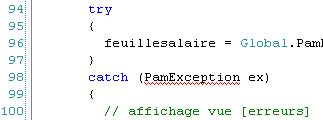 |
- 第 5、6 行:这些命名空间已不存在。实体现在位于 pam_v6 或 pam_v6.WsPam 命名空间中。
- 第 98 行:生成的客户端 [C] 类未从 [dao] 层继承 [PamException] 类。由于 Web 服务未暴露此异常,因此无法进行继承。我们选择用其父类 Exception 替换 PamException。
代码变为:
...
using System.Web.UI.WebControls;
using pam_v6.WsPam;

namespace pam_v6
{

  public partial class PagePam : Page
  {
...
...
      try
      {
        feuillesalaire = Global.PamMetier.GetSalaire(DropDownListEmployes.SelectedValue, HeuresTravaillées, JoursTravaillés);
      }
      catch (Exception ex)
      {
...
修正这些错误后,我们就可以运行该 Web 应用程序了:
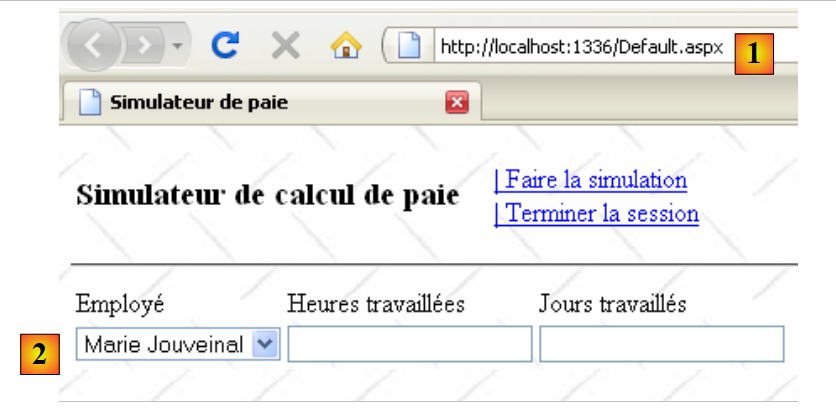 |
- 在 [1] 中,远程 Web 服务的 Web 客户端 URL
- 在 [2] 中,员工下拉列表已加载完毕。其中包含的数据来自 Web 服务。
我们邀请读者测试此第 6 版,该版本是第 4 版的副本。