6. PostgreSQL 9.2.1 案例研究
6.1. 工具安装
需要安装的工具如下:
- SGBD:[http://www.enterprisedb.com/products-services-training/pgdownload#windows];
- 一个管理工具:EMS SQL Manager for PostgreSQL Freeware [http://www.sqlmanager.net/fr/products/postgresql/manager/download]。
在下面的示例中,用户 postgres 的密码为 postgres。
先运行 PostgreSQL,然后运行 [SQL Manager Lite for PostgreSQL] 工具,用它来管理 SGBD。
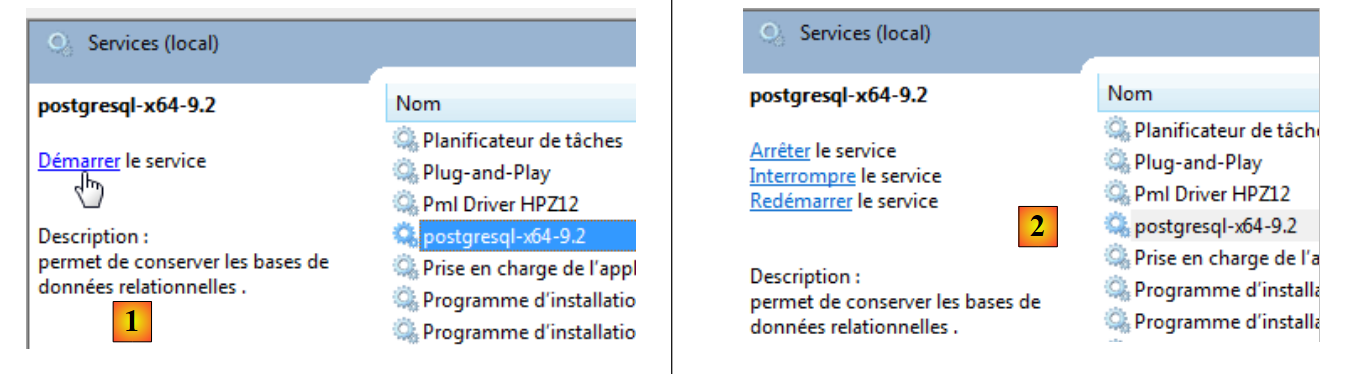 |
- 在 [1] 中,我们通过 Windows 服务启动 SGBD 和 PostgreSQL;
- 在 [2] 阶段,服务已启动;
现在我们启动工具 [SQL Manager Lite for MySQL],用于管理 SGBD 和 [3]。
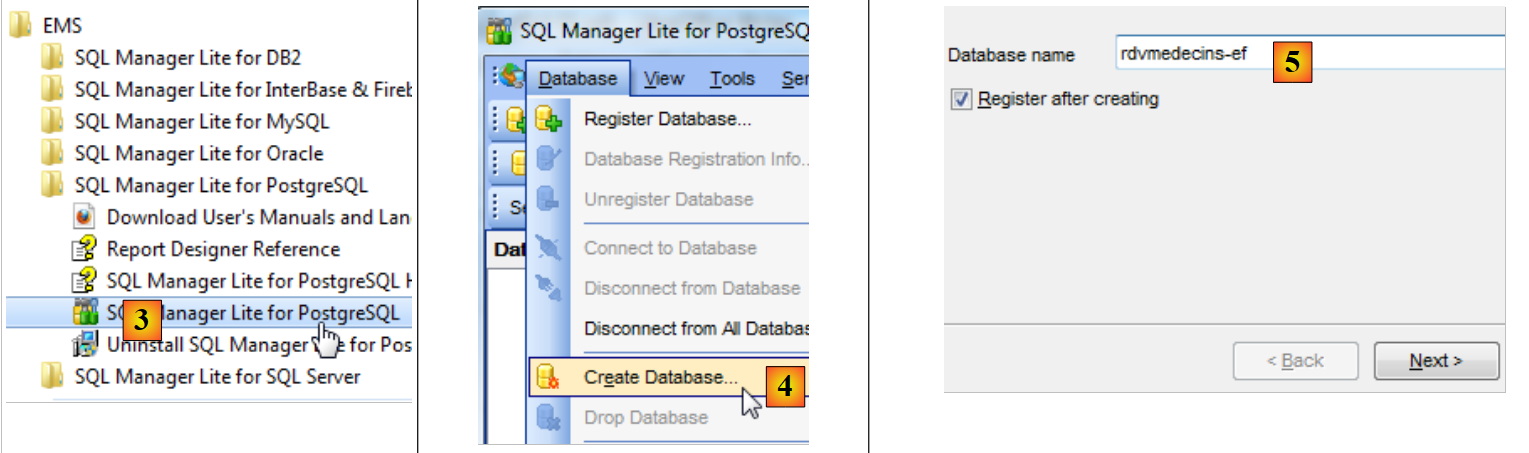 |
- 在 [4] 中,我们创建一个新数据库;
- 在 [5] 中,指定数据库名称;
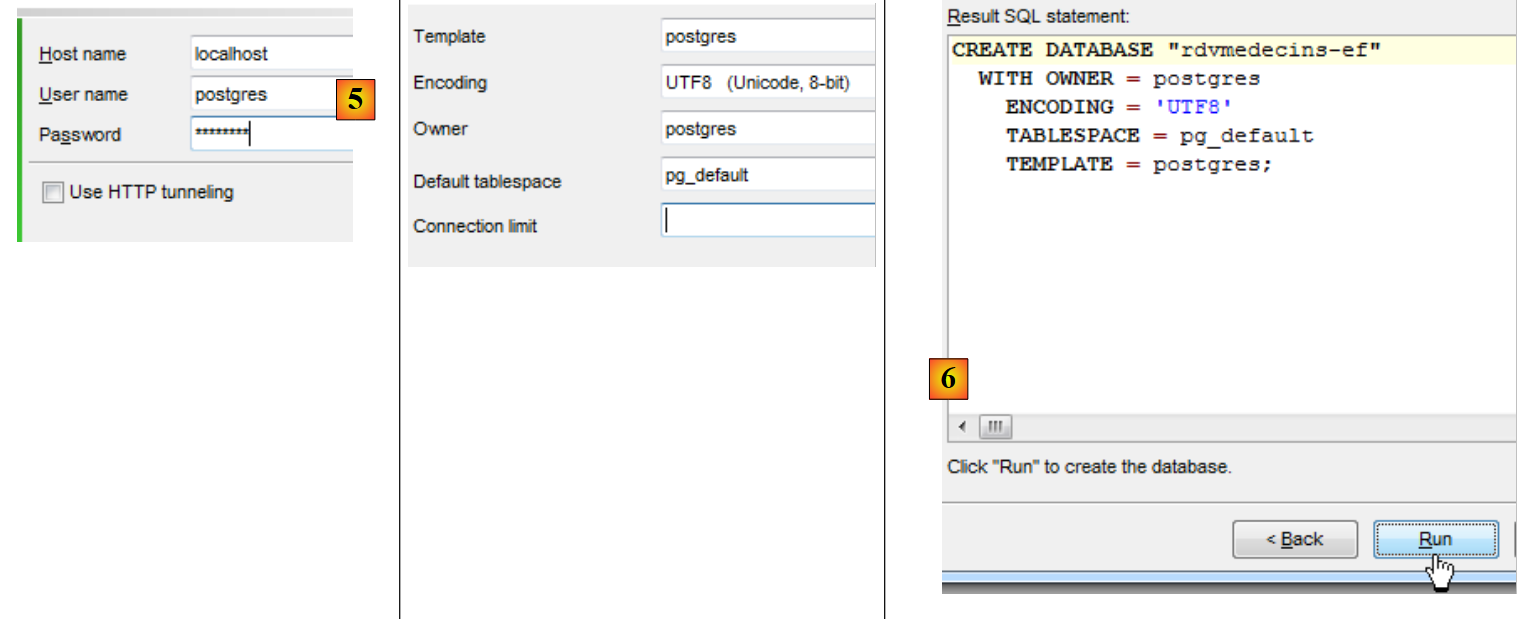 |
- 在 [5] 中,以 postgres / postgres 身份登录;
- 在 [6] 中,输入一些信息;
- 在 [7] 中,确认即将执行的 SQL 命令;
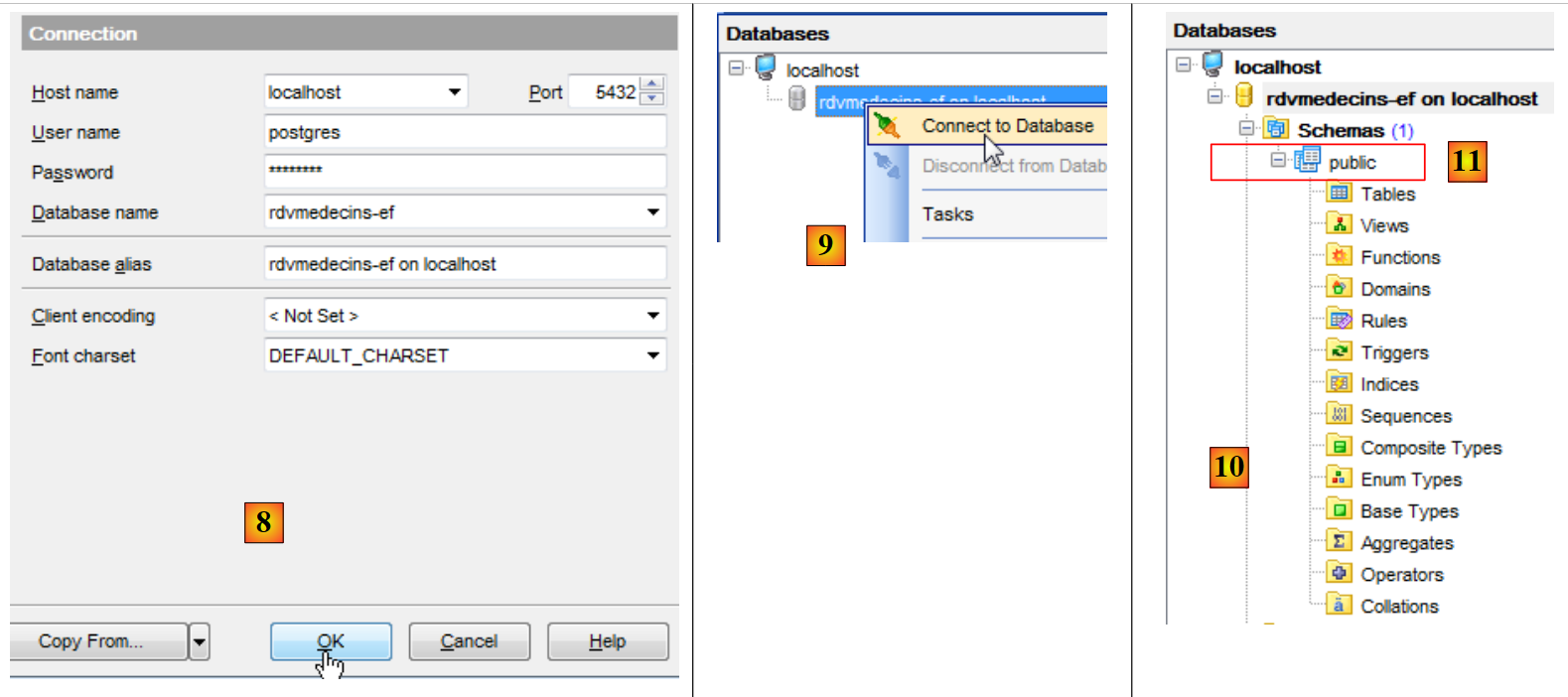 |
- 在 [8] 中,数据库已创建。现在必须在 [EMS Manager] 中将其注册。信息正确。执行 [OK];
- 在 [9] 中,我们连接到该数据库;
- 在 [10] 中,[EMS Manager] 显示了该数据库,目前为空。请注意,表将属于一个名为 public [11] 的模式。
现在我们将一个名为 VS 2012 的项目连接到该数据库。
6.2. 基于实体创建数据库
首先,我们将项目 [RdvMedecins-SqlServer-01] 的文件夹复制到 [RdvMedecins-PostgreSQL-01] 和 [1] 中:
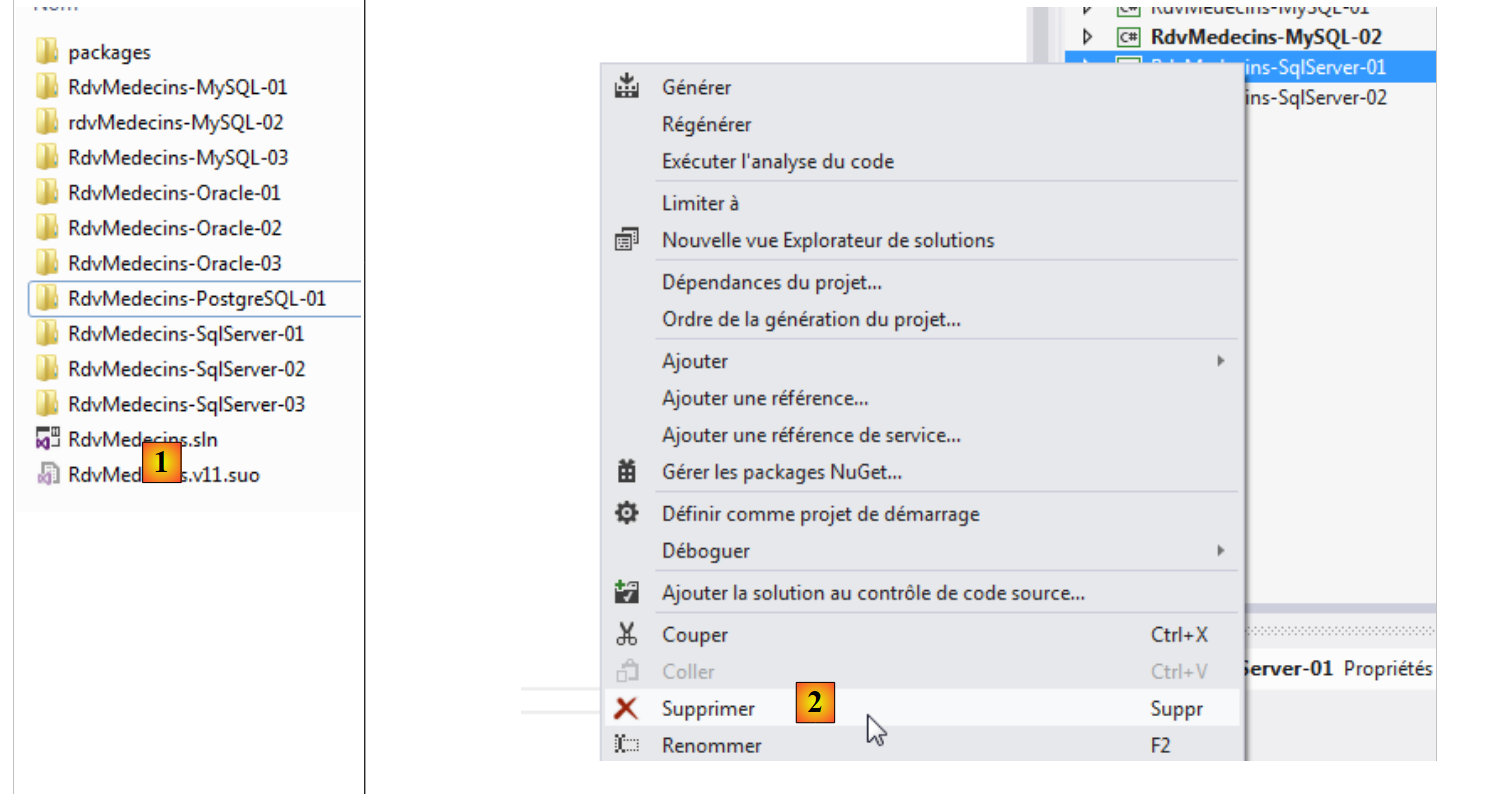 |
- 在 [2] 中,在 VS 2012 中,我们将项目 [RdvMedecins-SqlServer-01] 从解决方案中删除;
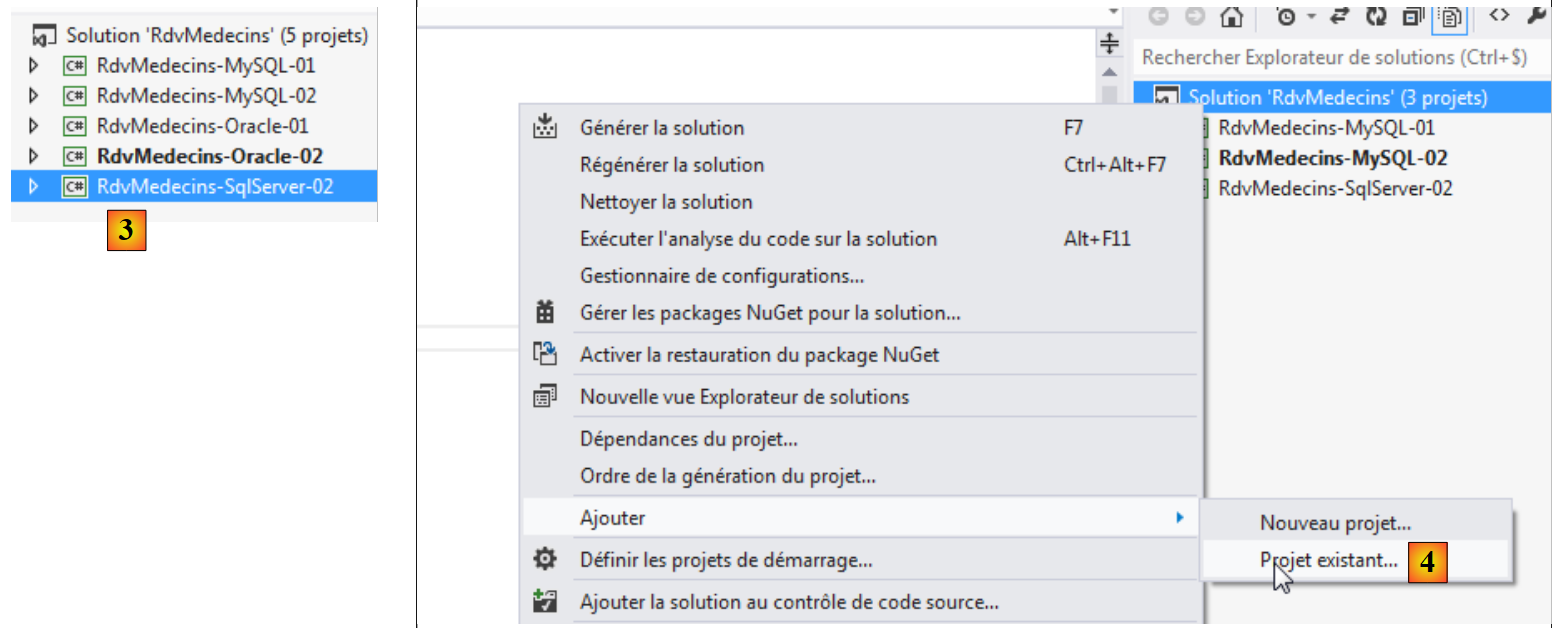 |
- 在 [3] 中,该项目已被删除;
- 在 [4] 中,我们添加了另一个项目。该项目位于我们之前创建的 [RdvMedecins-PostgreSQL-01] 文件夹中;
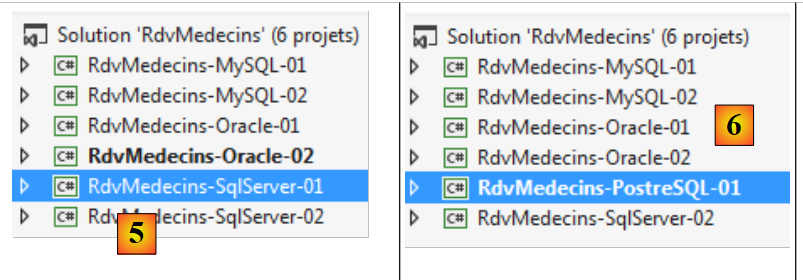 |
- 在 [5] 中,加载的项目名为 [RdvMedecins-SqlServer-01];
- 将其从 [6] 重命名为 [RdvMedecins-PostgreSQL-01];
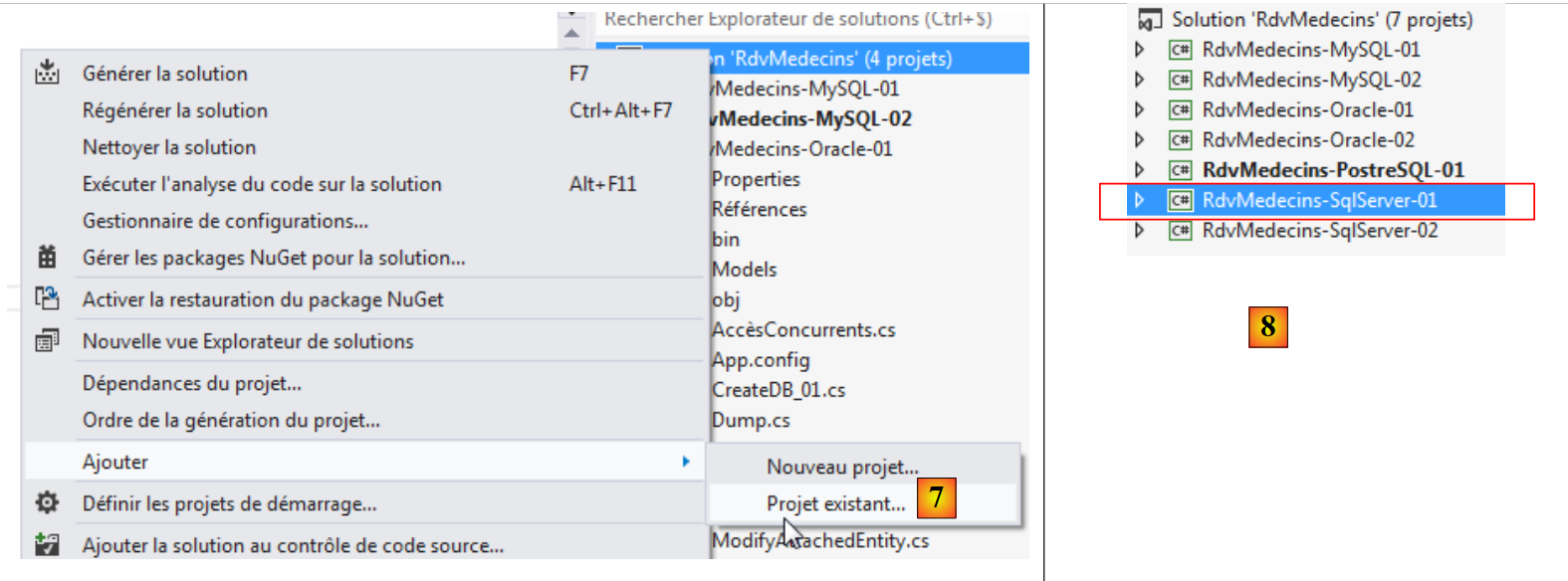 |
- 在 [7] 中,向解决方案中添加了另一个项目。该项目位于我们之前从解决方案中删除的 [RdvMedecins-SqlServer-01] 项目文件夹中;
- 在 [8] 中,项目 [RdvMedecins-SqlServer-01] 已重新加入到解决方案中。
项目 [RdvMedecins-PostgreSQL-01] 与项目 [RdvMedecins-SqlServer-01] 完全相同。我们需要进行一些修改。 在 [App.config] 中,我们将修改连接字符串,并需将 [DbProviderFactory] 适配至每个 SGBD。
<!-- 数据库连接字符串 -->
  <connectionStrings>
    <add name="monContexte" connectionString="Server=127.0.0.1;Port=5432;Database=rdvmedecins-ef;User Id=postgres;Password=postgres;" providerName="Npgsql" />
  </connectionStrings>
  <!-- 工厂提供者 -->
  <system.data>
    <DbProviderFactories>
      <add name="Npgsql Data Provider" invariant="Npgsql" support="FF" description=".Net Framework Data Provider for Postgresql Server" type="Npgsql.NpgsqlFactory, Npgsql, Version=2.0.11.0, Culture=neutral, PublicKeyToken=5d8b90d52f46fda7" />
    </DbProviderFactories>
  </system.data>
- 第 3 行:用户名及其密码;
- 第7-9行:DbProviderFactory。第8行引用了DLL和[Npgsql],但我们没有这两个文件。 可通过 NuGet [1] 获取:
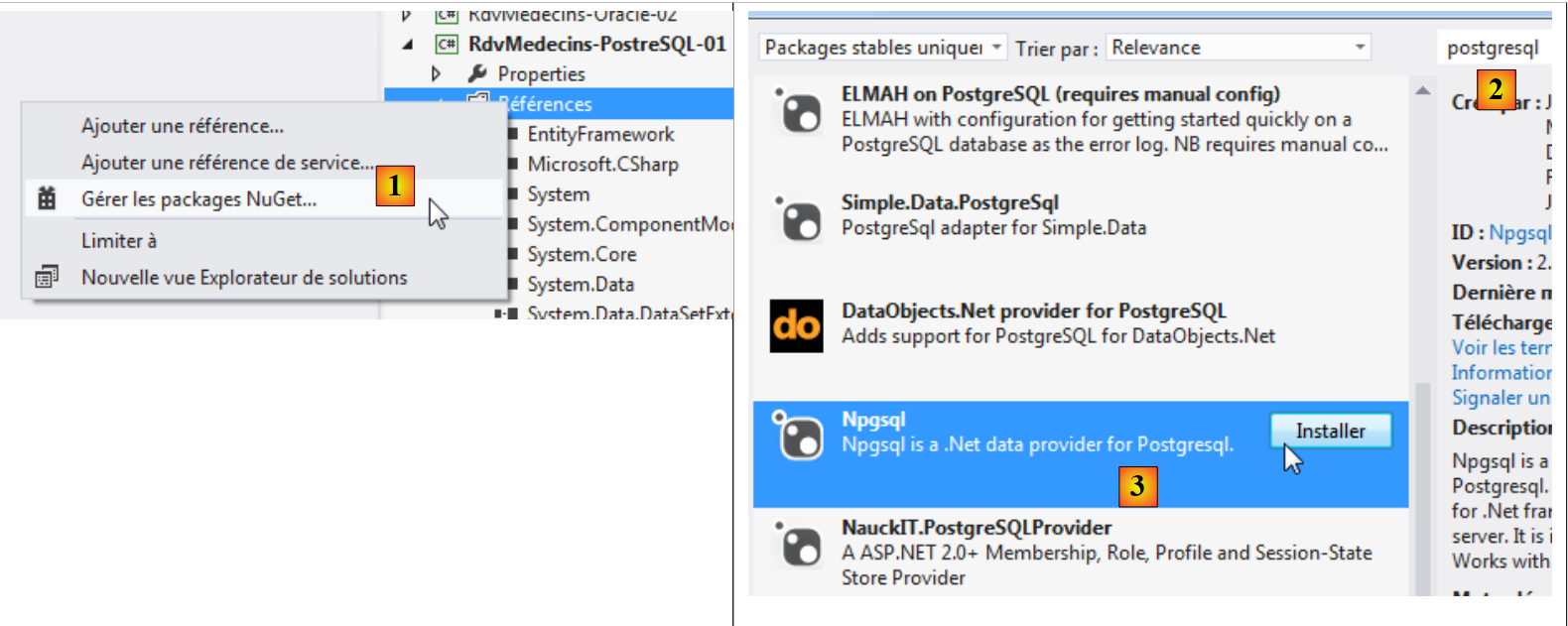 |
- 在 [2] 中,在搜索框中输入关键词 postgresql;
- 在 [3] 中,选择软件包 [Npgsql]。这是一个用于 PostgreSQL 的连接器 ADO.NET;
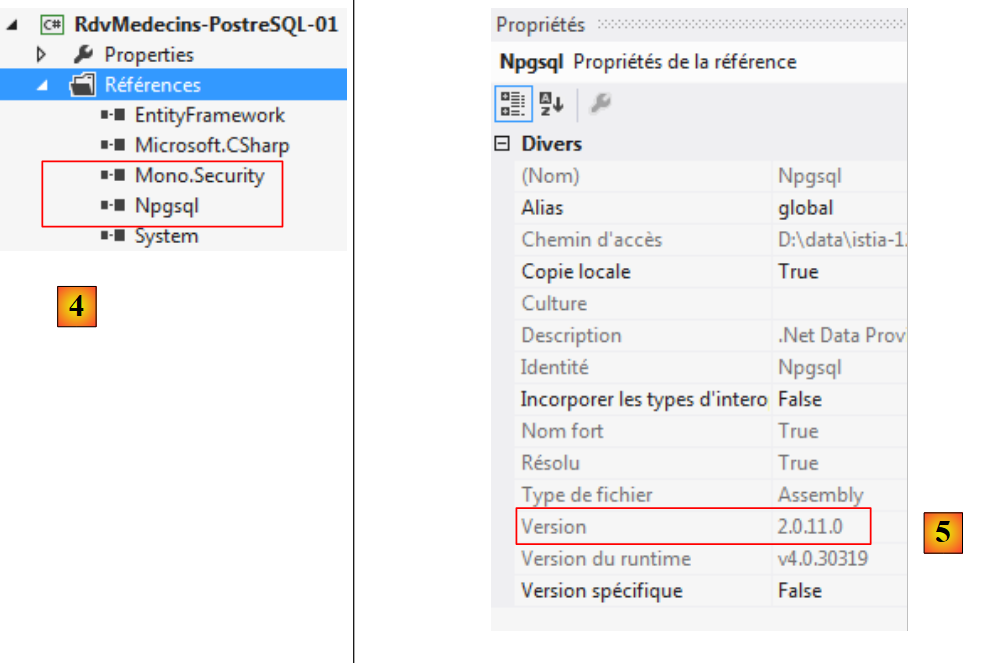 |
- 在 [4] 中,已添加两个参考;
- 在 [5] 中,对于 [App.config],需填写 DLL 的正确版本。该版本可在其属性中找到。
在文件 [Entites.cs] 中,需调整即将生成的表的结构:
  [Table("MEDECINS", Schema = "public")]
  public class Medecin : Personne
  {...}

  [Table("CLIENTS", Schema = "public")]
  public class Client : Personne
  {...}

  [Table("CRENEAUX", Schema = "public")]
  public class Creneau
  {...}

  [Table("RVS", Schema = "public")]
  public class Rv
  {...}
我们在之前创建数据库 PostgreSQL 时看到,这些表属于一个名为 public 的模式。
我们配置项目的执行:
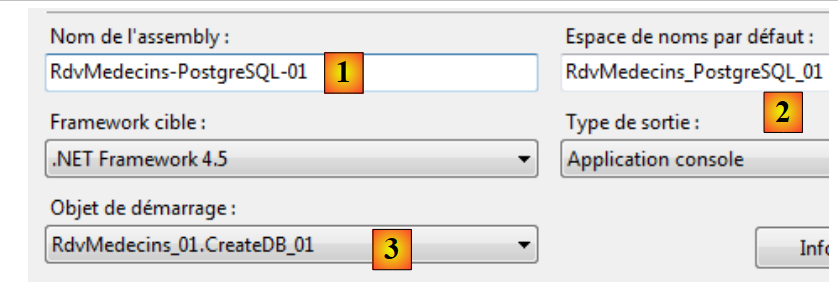 |
- 在 [1] 中,为即将生成的程序集指定了另一个名称;
- 在 [2] 中,同时指定另一个默认命名空间;
- 在 [3] 中,指定要执行的程序。
至此,编译未出现错误。运行程序 [CreateDB_01]。会得到以下异常:
我们记得在 MySQL 和 Oracle 环境中也遇到过相同的错误。这与实体中字段 Timestamp 的类型有关。我们进行与 Oracle 环境相同的修改。在实体中,我们将以下三行
    [Column("TIMESTAMP")]
    [Timestamp]
    public byte[] Timestamp { get; set; }
替换为以下内容:
    [ConcurrencyCheck]
    [Column("VERSIONING")]
    public int? Versioning { get; set; }
我们将该列的类型从 byte[] 更改为 int?。在 SGBD 中,我们将使用存储过程,在每次插入或修改行时将该整数递增 1。
对四个实体进行上述修改后,重新运行应用程序。此时会出现以下错误:
第 1 行指出,PostgreSQL 的连接器 ADO.NET 无法删除现有数据库。 这与 Oracle 的情况完全相同。因此,我们需要使用工具 [EMS Manager for PostgreSQL] 手动构建数据库 [RDVMEDECINS-EF]。本文不详述所有步骤,仅介绍最重要的部分。
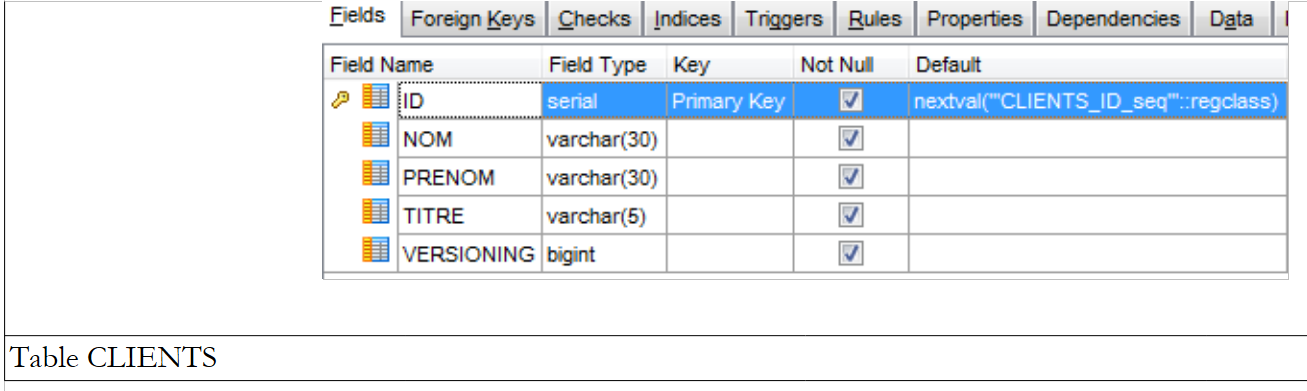
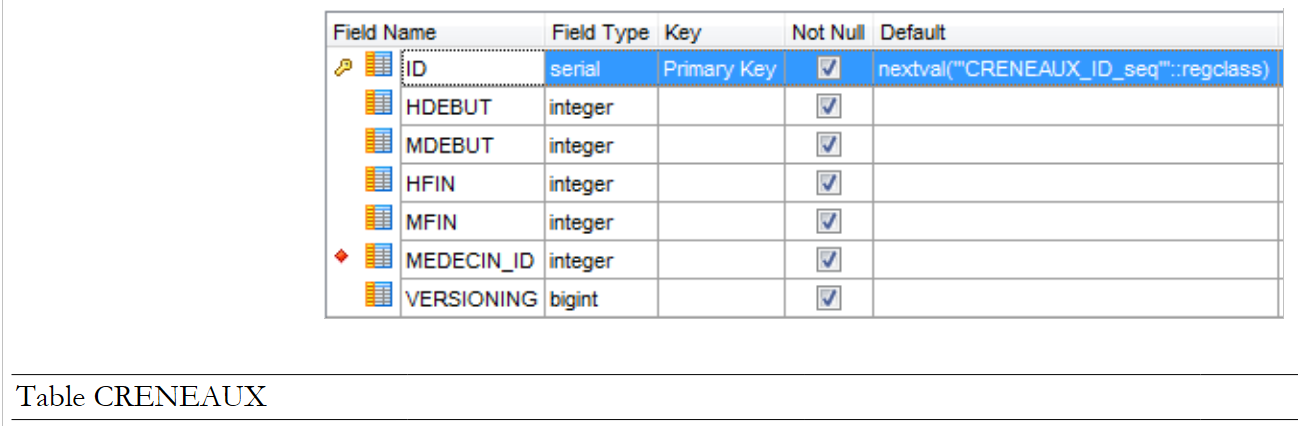
PostgreSQL 数据库结构如下:
表
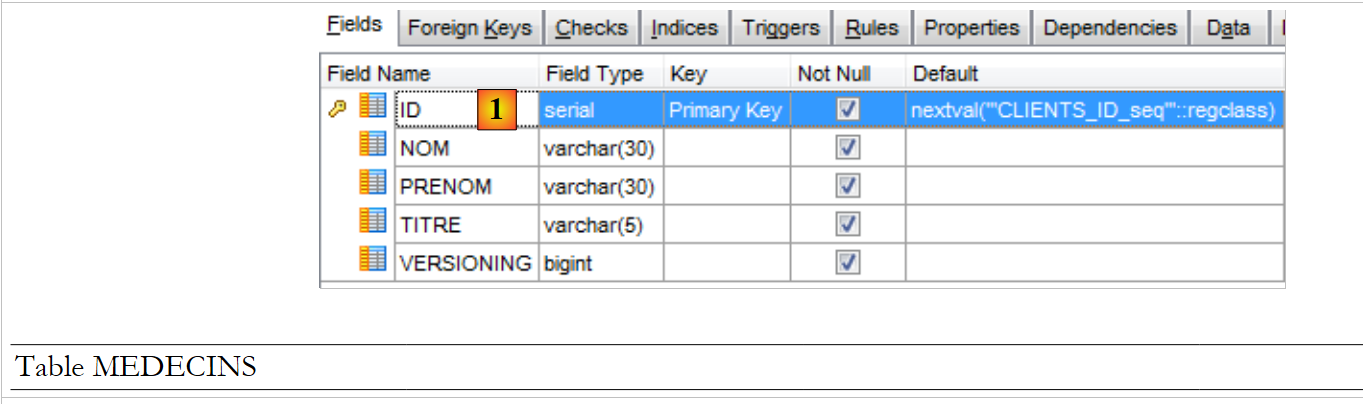 |
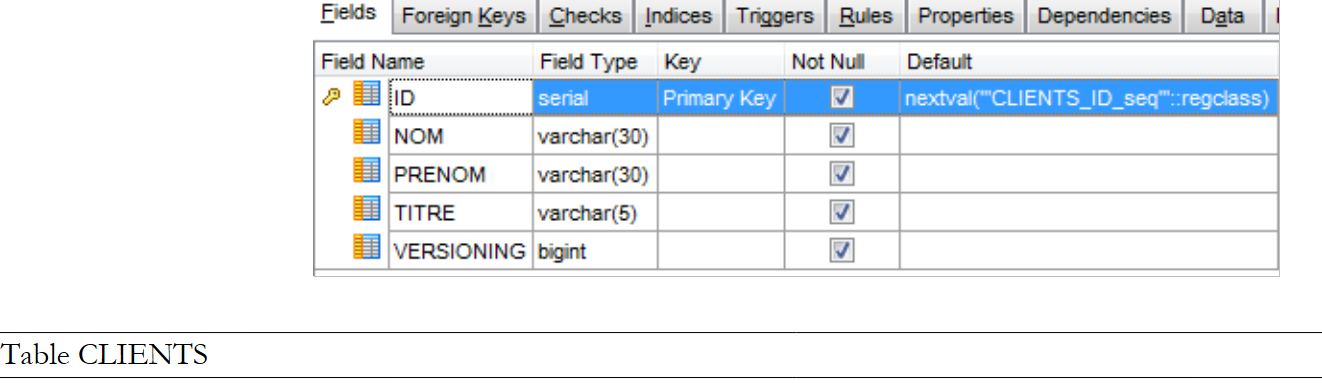
- 在 [1] 中,ID 是类型为 serial 的主键。该类型 PostgreSQL 是由 SGBD 自动生成的整数。
 |
 |
 |
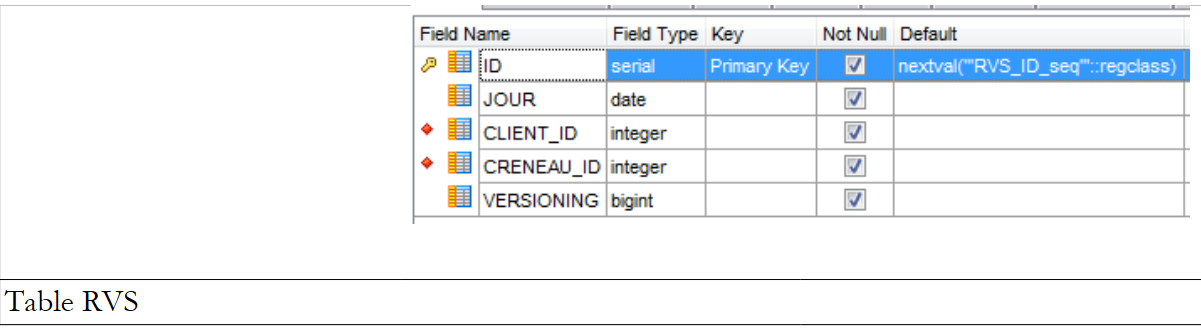 |
各个表拥有与前面的示例中相同的表的主键和外键。外键具有属性 ON DELETE CASCADE。
序列
与 Oracle 类似,我们在此创建了序列。它们是连续数字的生成器。共有 5 个:[1]。
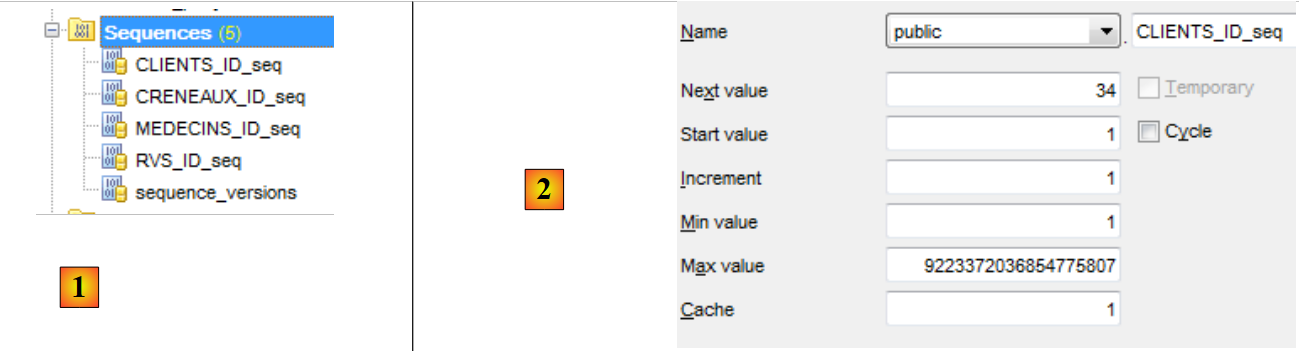 |
- 在 [2] 中,我们可以看到序列 [CLIENTS_ID_SEQ] 的属性。它生成从 1 开始、以 1 为增量、直至非常大值的连续数字。
所有序列均基于相同的模式构建。
- [CLIENTS_ID_seq] 将用于生成表 [CLIENTS] 的主键;
- [MEDECINS_ID_seq] 将用于生成表 [MEDECINS] 的主键;
- [CRENEAUX_ID_seq] 将用于生成表 [CRENEAUX] 的主键;
- [RVS_ID_seq] 将用于生成表 [RVS] 的主键;
- [sequence_versions] 将用于生成所有表中 [VERSIONING] 列的值。
触发器
触发器是由 SGBD 在表中发生某项事件(插入、修改、删除)之前或之后执行的存储过程。我们有 4 个 [1]:
 |
让我们查看触发器 [CLIENTS_tr] 的代码 DDL,该触发器为表 [CLIENTS] 的列 [VERSIONING] 提供数据:
- 第 1-3 行:在表 [CLIENTS] 上执行每次 INSERT 或 UPDATE 操作之前;
- 第 4 行:执行过程 [public.trigger_versions()]。
过程 [public.trigger_versions()] 如下:
- 第2行:NEW 表示即将插入或修改的行。NEW。“VERSIONING”是该行的[VERSIONING]列。 为其分配数字生成器的下一个值“sequence_versions”。 因此,每当在表 [CLIENTS] 上执行 INSERT / UPDATE 操作时,列 ["VERSIONING"] 就会发生变化。
触发器 [MEDECINS_tr, CRENEAUX_tr, RVS_tr] 的工作原理与此类似。四个 ["VERSIONING"] 列的值均来自同一序列。
用于生成数据库表的脚本 PostgreSQL 和 [RDVMEDECINS-EF] 已放置在文件夹 [RdvMedecins / databases / postgreSQL] 中。读者可加载并执行该脚本以创建表。
完成上述操作后,即可运行项目中的各个程序。它们产生的结果与 SQL Server 相同,但 [ModifyDetachedEntities] 程序除外——该程序会因与在 Oracle 环境中相同的理由而崩溃。解决该问题的方法与之前相同。 只需将 [RdvMedecins-Oracle-01] 项目中的 [ModifyDetachedEntities] 程序复制到 [RdvMedecins-PostgreSQL-01] 项目中即可。
程序 [LazyEagerLoading] 因以下异常而崩溃:
错误代码如下:
      using (var context = new RdvMedecinsContext())
      {
        // 时段编号 0
        creneau = context.Creneaux.Include("Medecin").Single<Creneau>(c => c.Id == idCreneau);
        Console.WriteLine(creneau.ShortIdentity());
}
从异常的第 1 行来看,报告的错误似乎与连接操作有关,因为 LEFT 是连接操作的关键字。 由于上述代码的第 4 行要求立即加载实体 [Creneau] 的依赖项 [Medecin], EF 对表 [CRENEAUX] 和 [MEDECINS] 进行了连接。 但似乎连接器 ADO.NET 生成了一个错误的 SQL 命令。我们将代码重写如下:
      using (var context = new RdvMedecinsContext())
      {
        // 时段编号 0
        creneau = context.Creneaux.Find(idCreneau);
        Console.WriteLine(creneau.ShortIdentity());
        // 强制加载关联医生
        // 这是可能的,因为我们仍处于开放上下文中
        Medecin medecin = creneau.Medecin;
}
- 第 4 行:检索无连接的时段;
- 第8行:获取缺失的依赖项。
运行成功。我们再次发现,SGBD的变更对代码产生了影响。实际上,问题并非出在SGBD本身,而是其连接器ADO.NET。
6.3. 基于 EF 的多层架构 5
让我们回到第 2 段中描述的案例研究。
 |
我们将首先构建数据访问层 [DAO]。 为此,我们将控制台项目 VS 2012 [RdvMedecins-SqlServer-02] 复制到 [RdvMedecins-PostgreSQL-02] [1] 中:
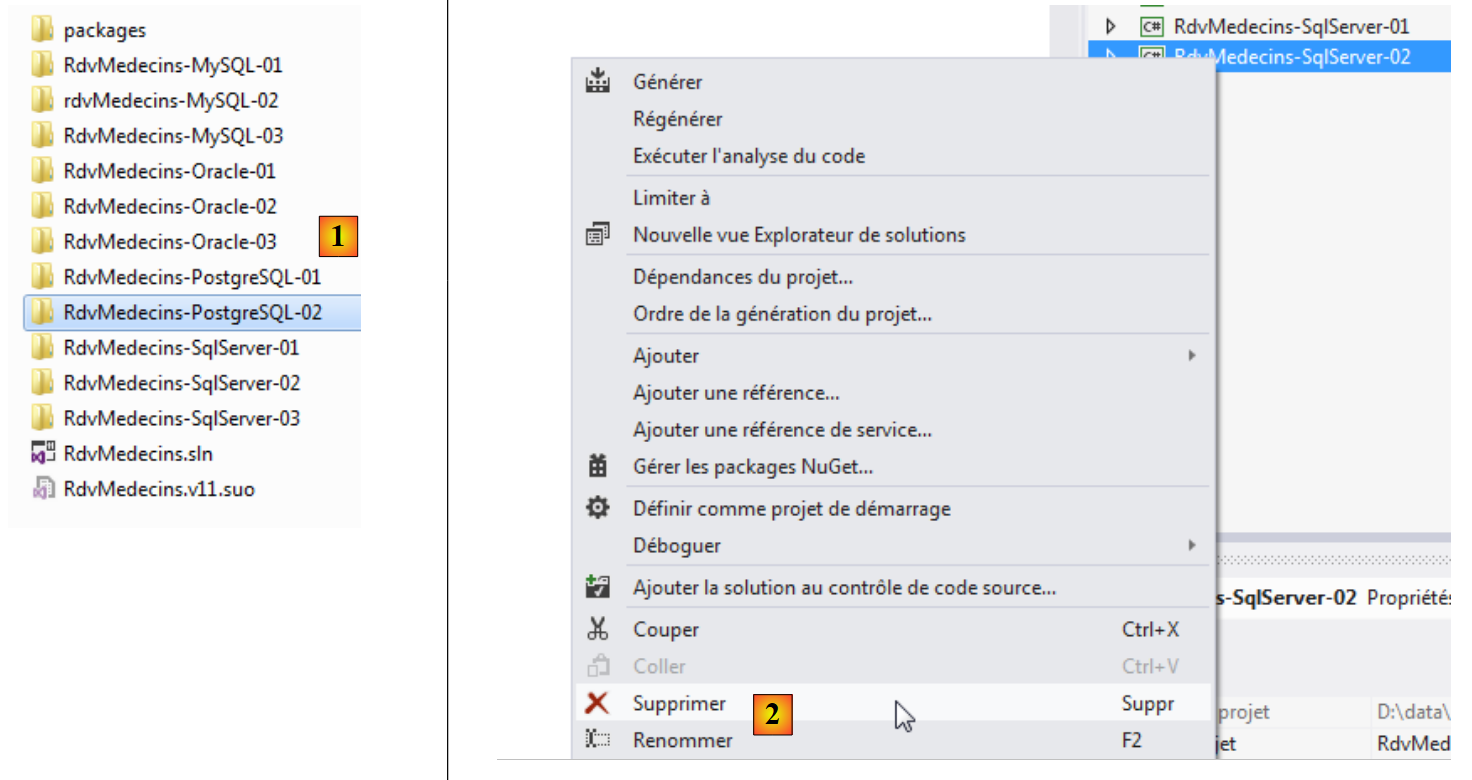 |
- 在 [2] 中,删除项目 [RdvMedecins-SqlServer-02];
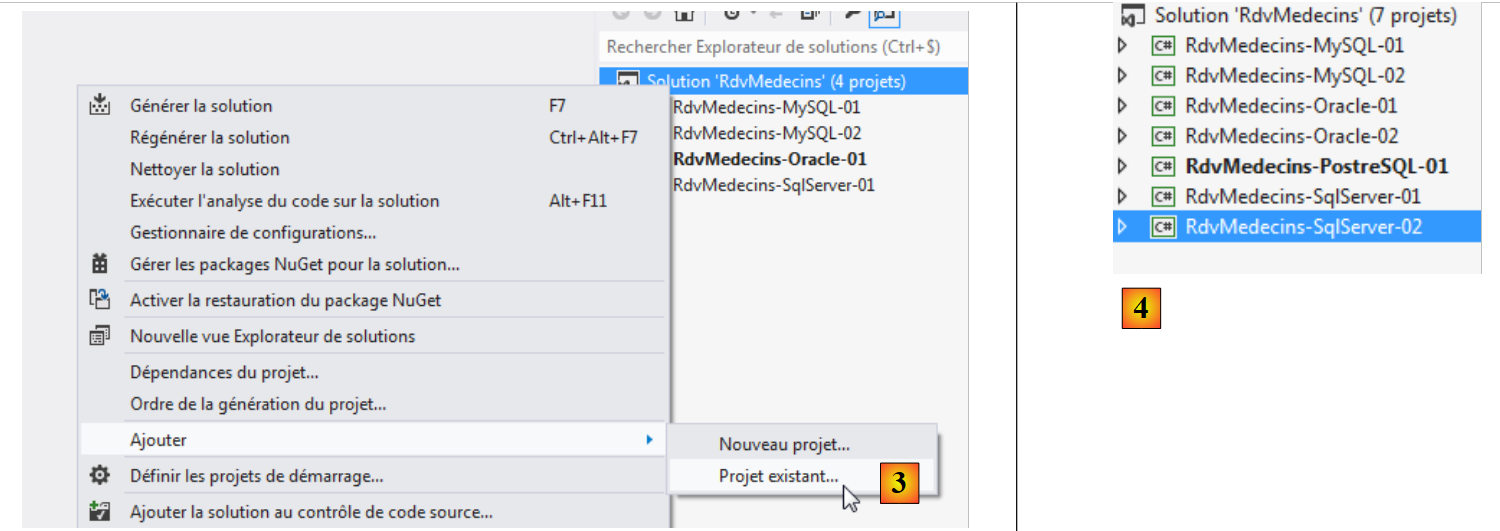 |
- 在 [3] 中,将现有项目添加到解决方案中。该项目取自刚刚创建的 [RdvMedecins-PostgreSQL-02] 文件夹;
- 在 [4] 中,新项目名称与被删除的项目相同。我们将更改其名称;
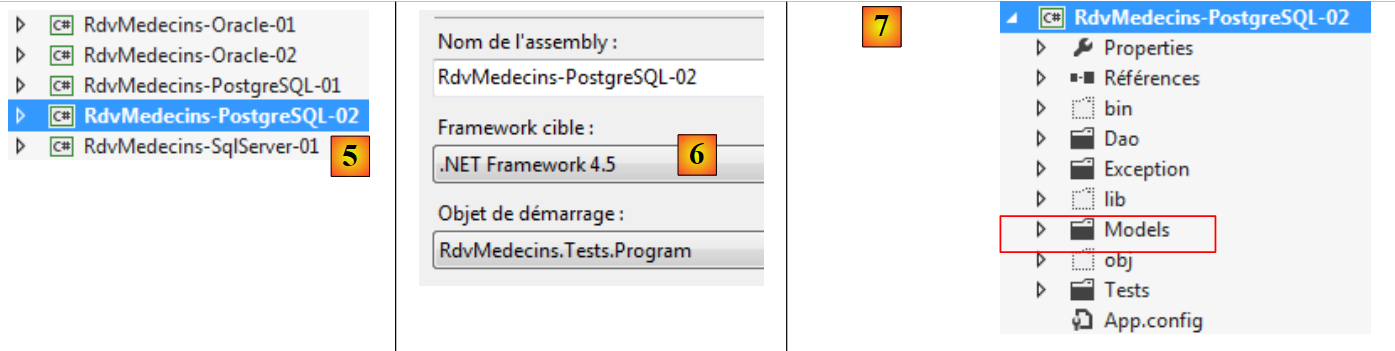 |
- 在 [5] 中,我们已更改了项目名称;
- 在 [6] 中,修改了其部分属性,例如此处的程序集名称;
- 更名为 [7],删除文件夹 [Models],并用项目 [RdvMedecins-PostgreSQL-01] 中的文件夹 [Models] 替换。因为这两个项目共享相同的模板。
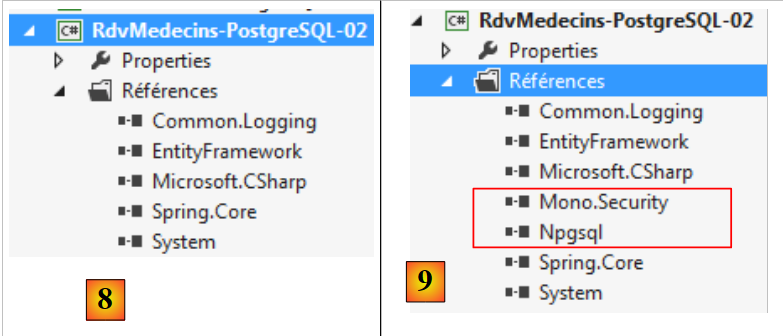 |
- 在 [8] 中,项目当前的引用;
- 在 [9] 中,使用工具 NuGet 将 PostgreSQL 的连接器 ADO.NET 添加至该项目。
在文件 [App.config] 中,将 SQL 服务器的数据库信息替换为 PostgreSQL 服务器的数据库信息。 这些信息可在项目 [RdvMedecins-PostgreSQL-01] 的文件 [App.config] 中找到:
  <!-- 数据库连接字符串 -->
  <connectionStrings>
    <add name="monContexte" connectionString="Server=127.0.0.1;Port=5432;Database=rdvmedecins-ef;User Id=postgres;Password=postgres;" providerName="Npgsql" />
  </connectionStrings>
  <!-- 工厂提供者 -->
  <system.data>
    <DbProviderFactories>
      <add name="Npgsql Data Provider" invariant="Npgsql" support="FF" description=".Net Framework Data Provider for Postgresql Server" type="Npgsql.NpgsqlFactory, Npgsql, Version=2.0.11.0, Culture=neutral, PublicKeyToken=5d8b90d52f46fda7" />
    </DbProviderFactories>
</system.data>
Spring管理的对象也会发生变化。目前我们有:
  <!-- Spring配置 -->
  <spring>
    <context>
      <resource uri="config://spring/objects" />
    </context>
    <objects xmlns="http://www.springframework.net">
      <object id="rdvmedecinsDao" type="RdvMedecins.Dao.Dao,RdvMedecins-SqlServer-02" />
    </objects>
</spring>
第 7 行引用了项目 [RdvMedecins-SqlServer-02] 的程序集。该程序集现已更改为 [RdvMedecins-PostgreSQL-02]。
完成上述操作后,我们已准备好执行 [DAO] 层的测试。在此之前,需先确保已填充数据库(即 [RdvMedecins-PostgreSQL-01] 项目中的 [Fill] 程序)。测试程序因以下异常而崩溃:
第13行,错误信息显示错误发生在[DAO]层中的[GetCreneauxMedecin]方法中。该方法如下:
    // 特定医生的预约时段列表
    public List<Creneau> GetCreneauxMedecin(int idMedecin)
    {
      // 时段列表
      try
      {
        // 打开持久化上下文
        using (var context = new RdvMedecinsContext())
        {
          // 获取医生及其可用时段
          Medecin medecin = context.Medecins.Include("Creneaux").Single(m => m.Id == idMedecin);
          // 返回该医生的时段列表
          return medecin.Creneaux.ToList<Creneau>();
        }
      }
      catch (Exception ex)
      {
        throw new RdvMedecinsException(3, "GetCreneauxMedecin", ex);
      }
}
第 11 行,可以看到关键字 Include,它曾导致过之前的程序崩溃。上述代码可替换为以下内容:
    // 指定医生的时段列表
    public List<Creneau> GetCreneauxMedecin(int idMedecin)
    {
      // 时段列表
      try
      {
        // 打开持久化上下文
        using (var context = new RdvMedecinsContext())
        {
          // 返回医生的时段列表
          return context.Creneaux.Where(c => c.MedecinId == idMedecin).ToList<Creneau>();
        }
      }
      catch (Exception ex)
      {
        throw new RdvMedecinsException(3, "GetCreneauxMedecin", ex);
      }
}
新代码看起来甚至比旧代码更连贯。无论如何,这次测试程序通过了。
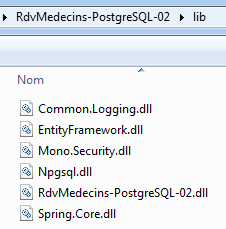
我们按照之前处理 [RdvMedecins-SqlServer-02] 项目的方式创建该项目的 DLL,并将该项目的所有 DLL 文件都收集到在 [RdvMedecins-PostgreSQL-02] 中创建的 [lib] 文件夹中。这些将作为后续 Web 项目 [RdvMedecins-PostgreSQL-03] 的参考。
 |
现在,我们已准备好构建应用程序的 [ASP.NET] 层:
 |
我们将基于项目 [RdvMedecins-SqlServer-03] 进行操作。我们将该项目的文件夹复制到 [RdvMedecins-PostgreSQL-03] 和 [1] 中:
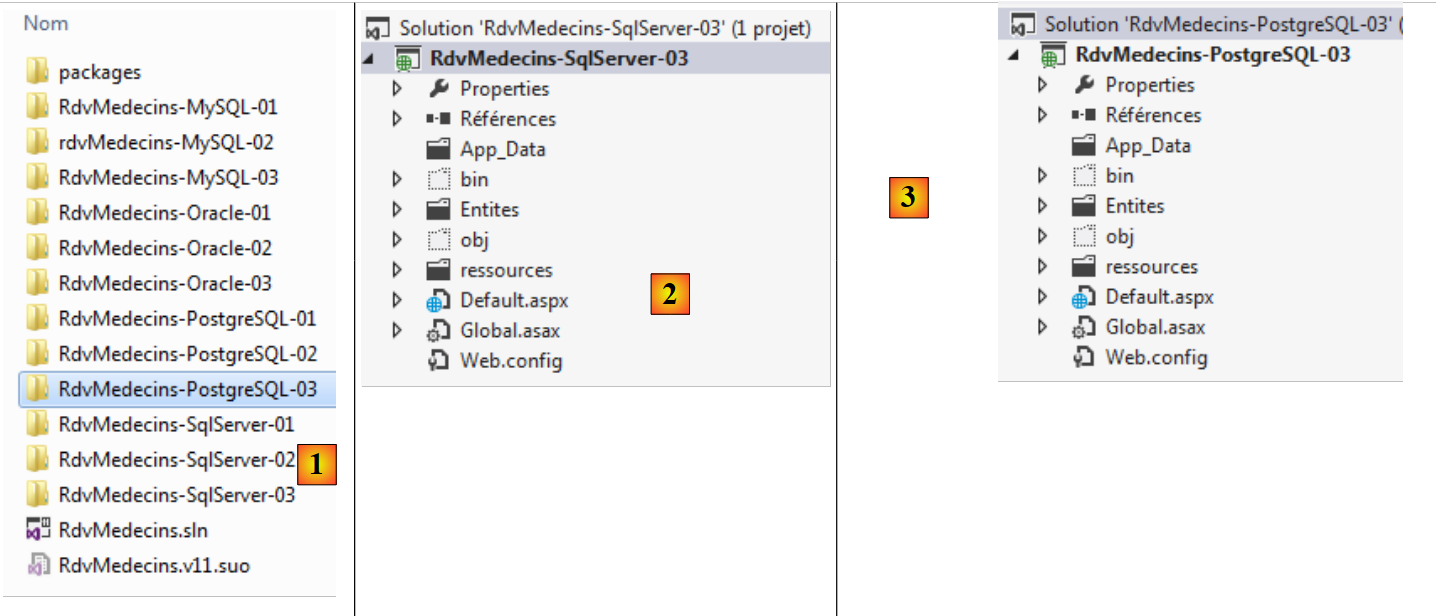 |
- 在 [2] 中,使用 VS 2012 Express for the Web,我们打开 [RdvMedecins-PostgreSQL-03] 文件夹中的解决方案;
- 在 [3] 中,我们将解决方案名称和项目名称进行修改;
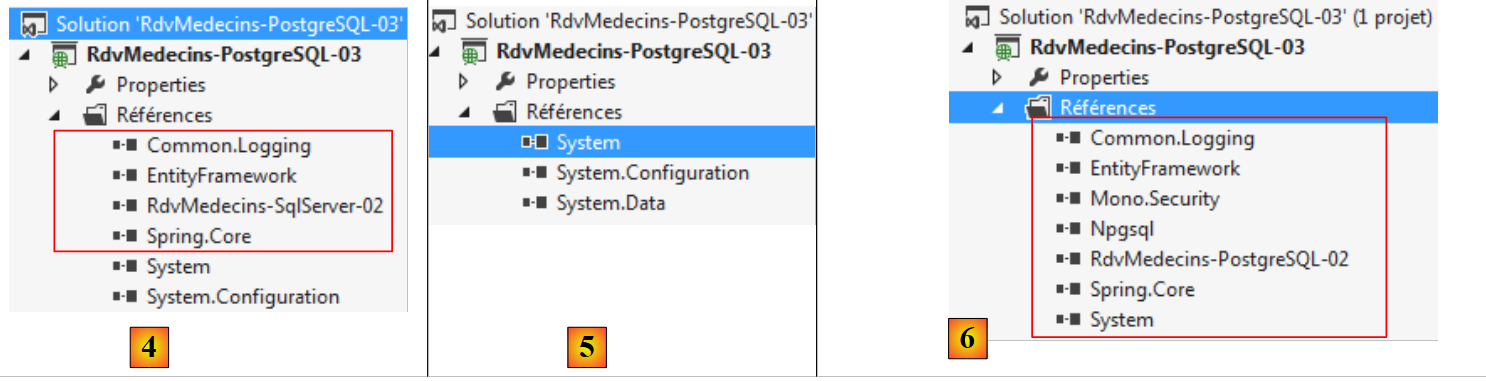 |
- 在 [4] 中,当前的项目引用;
- 在 [5] 中,将其删除;
- 并将其替换为对 DLL 的引用,该文件我们刚刚存储在项目 [RdvMedecins-PostgreSQL-02] 的文件夹 [lib] 中。
接下来只需修改文件 [Web.config],将其当前内容替换为项目 [RdvMedecins-PostgreSQL-02] 中文件 [App.config] 的内容。完成上述操作后,运行 Web 项目。项目运行正常。 请务必在运行Web应用程序前先填充数据库。