13. [Cours]: Spring ile bir veritabanını web üzerinde sunma MVC
Anahtar kelimeler: çok katmanlı mimari, Spring, bağımlılık enjeksiyonu, web hizmeti / jSON, istemci / sunucu
13.1. Support
 |  |
Bu bölümdeki projeler [support / chap-13] klasöründe bulunur. SQL [dbintrospringdata.sql] komut dosyası, testler için gerekli olan MySQL temelini oluşturmaya olanak tanır.
13.2. Spring MVC'in bir web uygulamasındaki yeri
Spring MVC'in bir web uygulaması geliştirme sürecindeki yerini belirleyelim. Çoğu zaman, bu uygulama aşağıdaki gibi çok katmanlı bir mimari üzerine inşa edilir:
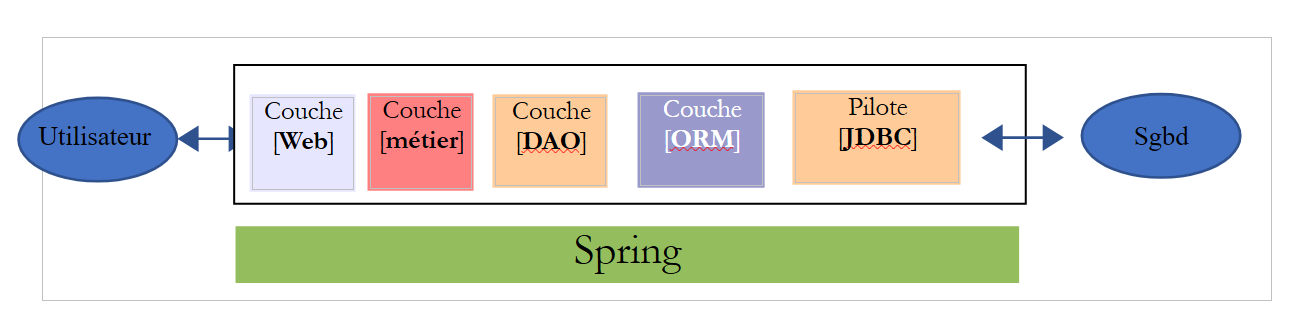 |
- [Web] katmanı, web uygulamasının kullanıcısıyla temas halinde olan katmandır. Kullanıcı, bir tarayıcı aracılığıyla görüntülenen web sayfaları vasıtasıyla web uygulamasıyla etkileşime girer. Spring MVC bu katmanda yer alır ve yalnızca bu katmanda bulunur;
- [métier] katmanı, maaş veya fatura hesaplaması gibi uygulama yönetim kurallarını uygular. Bu katman, [Web] katmanı aracılığıyla kullanıcıdan gelen verileri ve SGBD katmanından [DAO] katmanı aracılığıyla gelen verileri kullanır;
- [DAO] katmanı (Veri Erişim Nesneleri), [ORM] katmanı (Nesne-İlişkisel Eşleştirici) ve JDBC sürücüsü, SGBD'teki verilere erişimi yönetir. [ORM] katmanı, [DAO] katmanı tarafından işlenen nesneler ile ilişkisel bir veritabanındaki tabloların satırları ve sütunları arasında bir köprü görevi görür. JPA (Java Persistence API) spesifikasyonu, kullanılan ORM katmanının bu spesifikasyonları uyguladığı durumlarda, bu katmandan soyutlaşmaya olanak tanır. Bu durumda, bundan sonra ORM katmanını JPA katmanı olarak adlandıracağız;
- katmanların entegrasyonu Spring çerçeve yapısı tarafından gerçekleştirilir;
13.3. Spring MVC geliştirme modeli
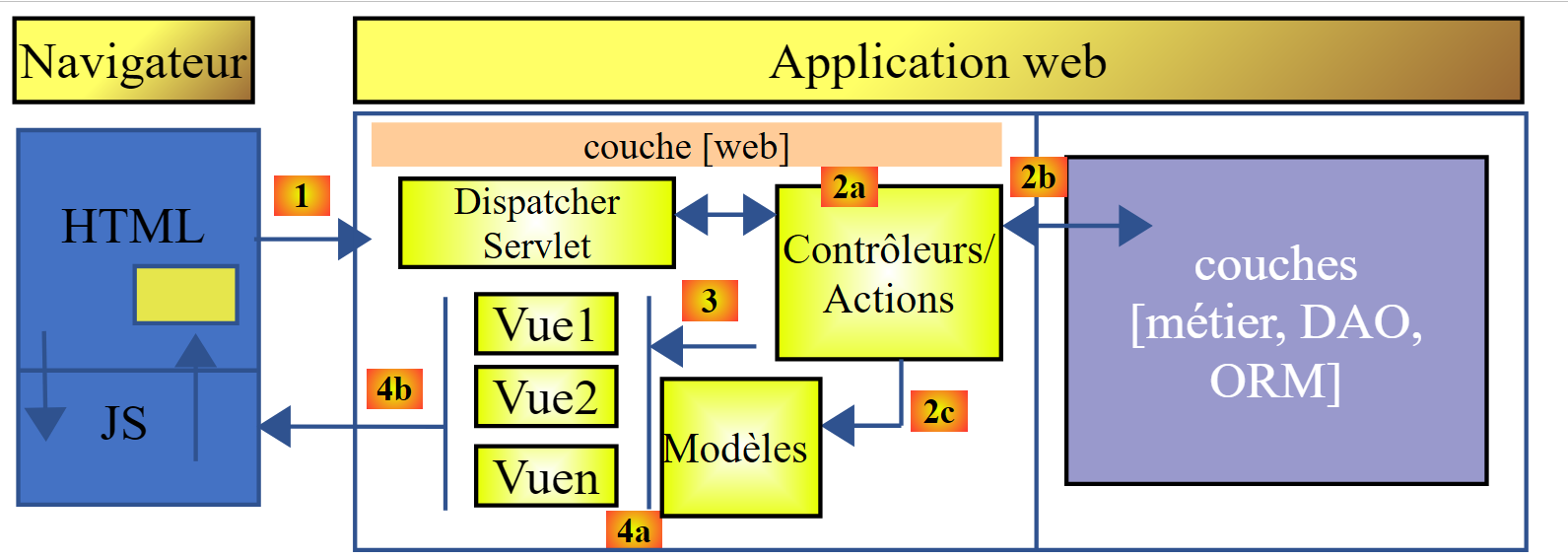
Spring MVC, MVC olarak adlandırılan mimari modelini (Model – Görünüm – Denetleyici) şu şekilde uygular:
 |
Bir istemciden gelen isteğin işlenmesi şu şekilde gerçekleşir:
- istek - istenen URL'ler http://machine:port/contexte/Action/param1/param2/....?p1=v1&p2=v2&... biçimindedir. [Front Controller], isteği doğru denetleyiciye ve bu denetleyici içindeki doğru eyleme "yönlendirmek" için bir yapılandırma dosyası veya Java açıklamaları kullanır. Bunun için, URL'in [Action] alanını kullanır. URL ile [/param1/param2/...] arasındaki kısım, eyleme iletilecek isteğe bağlı parametrelerden oluşur. Burada MVC'teki C, [Front Controller, Contrôleur, Action] dizesidir. İstenen eylemi işleyebilecek hiçbir denetleyici yoksa, web sunucusu istenen URL'in bulunamadığını bildirir.
- İşleme
- Seçilen eylem, [Front Controller] tarafından kendisine iletilen parami parametrelerini kullanabilir. Bu parametreler çeşitli kaynaklardan gelebilir:
- URL'in [/param1/param2/...] yolundan,
- URL'in [p1=v1&p2=v2] parametrelerinden,
- tarayıcı tarafından istekle birlikte gönderilen parametrelerden;
- kullanıcının isteğinin işlenmesi sırasında, eylem [métier] ve [2b] katmanlarına ihtiyaç duyabilir. Müşterinin isteği işlendikten sonra, bu işlem çeşitli yanıtları tetikleyebilir. Klasik bir örnek şudur:
- istek düzgün bir şekilde işlenemediğinde bir hata sayfası
- aksi takdirde bir onay sayfası
- eylem, belirli bir görünümün görüntülenmesini ister: [3]. Bu görünüm, görünüm modeli olarak adlandırılan verileri gösterecektir. Bu, MVC'teki M'dir. Eylem, bu M şablonunu [2c] oluşturacak ve bir V görünümünün görüntülenmesini isteyecektir [3];
- yanıt - seçilen V görünümü, eylemin oluşturduğu M şablonunu kullanarak, müşteriye göndermesi gereken HTML yanıtının dinamik kısımlarını başlatır ve ardından bu yanıtı gönderir.
Bir web hizmeti / jSON için, önceki mimari biraz değiştirilmiştir:
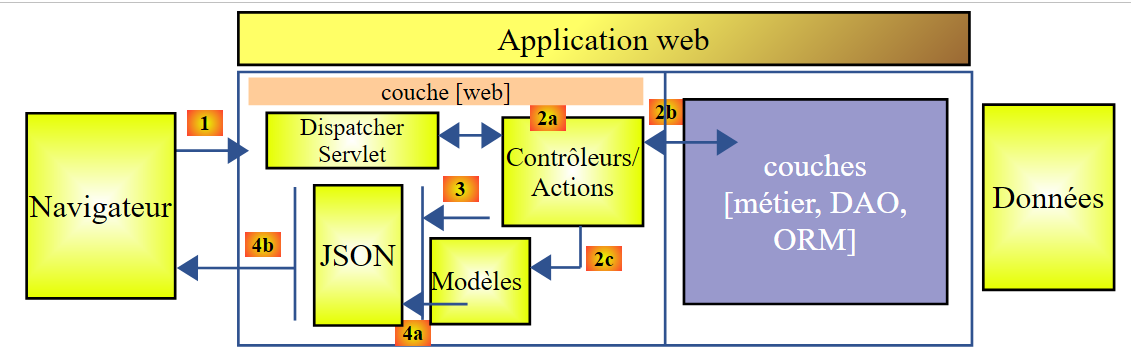 |
- [4a]'te, bir Java sınıfı olan şablon, bir kütüphane tarafından jSON dizesine dönüştürülür;
- [4b]'te, bu jSON dizesi tarayıcıya gönderilir;
Şimdi, MVC web mimarisi ile katmanlı mimari arasındaki bağlantıyı açıklayalım. Modele verilen tanıma göre, bu iki kavram birbiriyle ilişkili olabilir ya da olmayabilir. Tek katmanlı bir Spring web uygulaması olan MVC’i ele alalım:
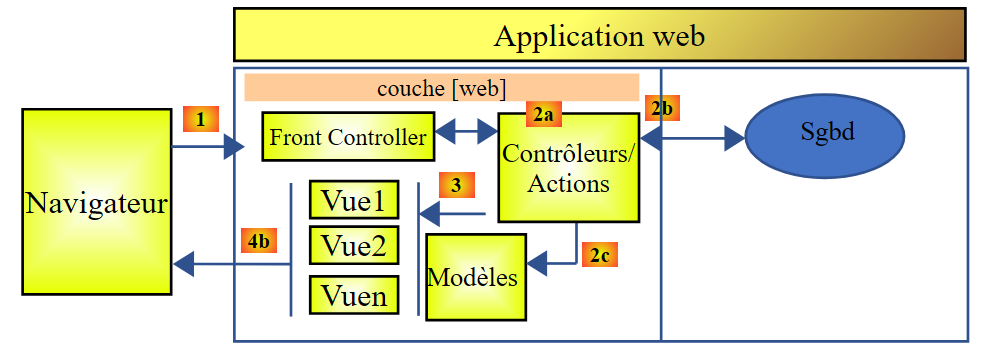 |
[Web] katmanını Spring MVC ile uygularsak, bir web mimarisine sahip oluruz, ancak bu çok katmanlı bir mimari değildir. Burada, [web] katmanı her şeyi üstlenecektir: sunum, iş mantığı, veri erişimi. Bu işleri gerçekleştirecek olanlar eylemlerdir.
Şimdi, çok katmanlı bir web mimarisini ele alalım:
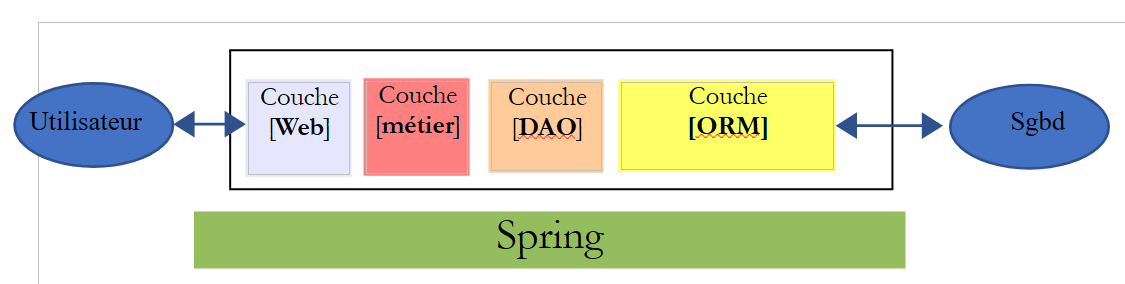 |
[Web] katmanı, herhangi bir çerçeve kullanmadan ve MVC modelini takip etmeden uygulanabilir. Bu durumda gerçekten çok katmanlı bir mimariye sahip oluruz, ancak web katmanı MVC modelini uygulamaz.
Örneğin, .NET ortamında yukarıdaki [Web] katmanıyukarıdaki [Web] katmanı, ASP.NET ve MVC ile uygulanabilir ve böylece MVC türünde bir [Web] katmanına sahip katmanlı bir mimari elde edilir. Bu işlem tamamlandıktan sonra, bu ASP.NET ve MVC katmanını, geri kalan (iş mantığı, DAO, ORM) aynı şekilde koruyarak değiştirebiliriz. Böylece, artık MVC türü olmayan bir [Web] katmanına sahip katmanlı bir mimari elde ederiz.
MVC'te, M modelinin V görünümü olan c.a.d'in modeli olduğunu belirtmiştik. Bu, V görünümü tarafından görüntülenen verilerin tamamıdır. MVC'in M modeline ilişkin başka bir tanım da şöyledir:
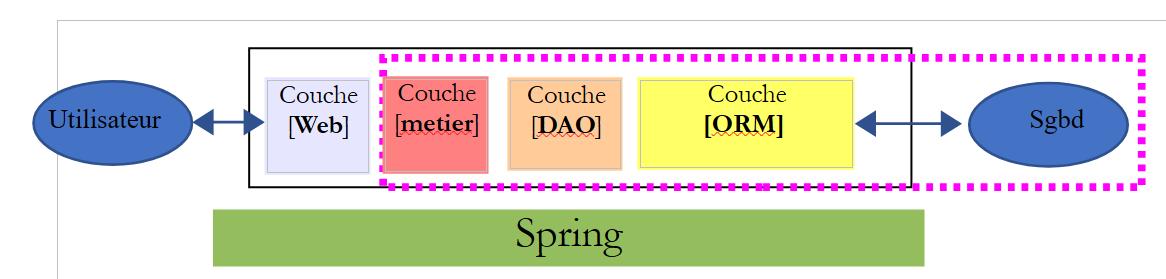 |
Birçok yazar, [Web] katmanının sağındaki kısmın, MVC'in M modelini oluşturduğunu düşünmektedir. Belirsizlikleri önlemek için şunlardan söz edilebilir:
- [Web] katmanının sağındaki her şeyi ifade ederken alan modelinden
- bir V görünümü tarafından görüntülenen verileri ifade ederken "görünüm modeli"
Bundan sonra, "M modeli" terimi yalnızca bir V görünümünün modelini ifade edecektir.
13.4. Spring ile bir web projesi / jSON
[http://spring.io/guides] sitesi, Spring ekosistemini keşfetmek için başlangıç kılavuzları sunmaktadır. Bir Spring projesi MVC için gerekli Maven yapılandırmasını öğrenmek üzere bu kılavuzlardan birini takip edeceğiz.
13.4.1. Demo projesi
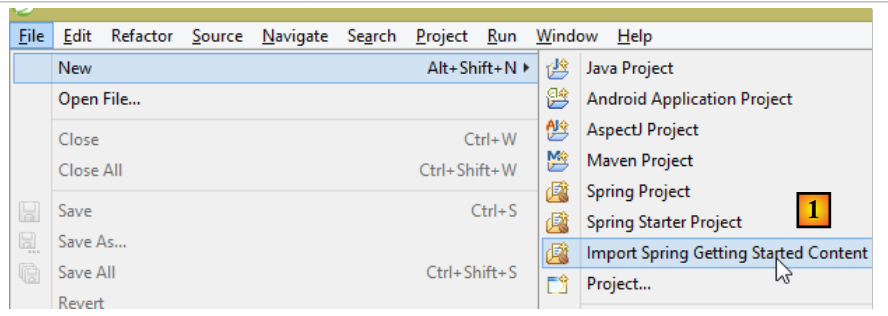 |
- [1]'te, Spring kılavuzlarından birini içe aktarıyoruz;
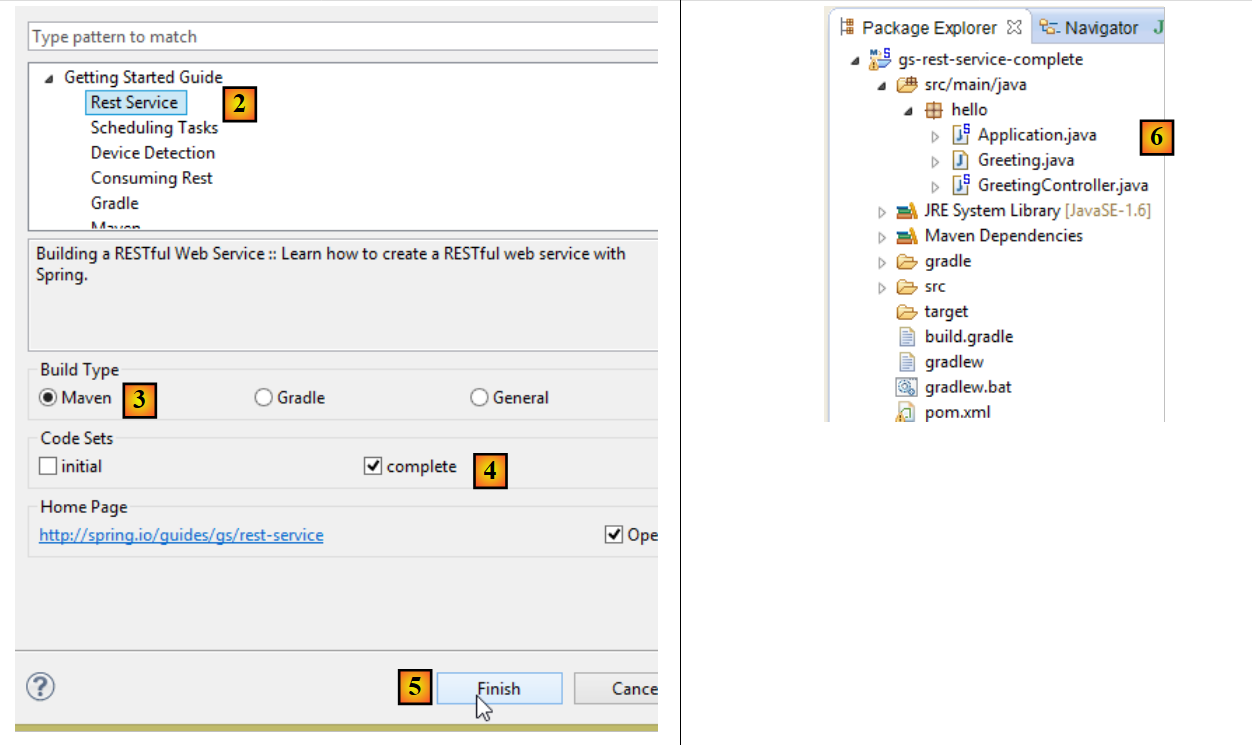 |
- [2]'te, [Rest Service] örneğini seçiyoruz;
- [3]'te, Maven projesini seçiyoruz;
- [4]'te kılavuzun son sürümünü seçiyoruz;
- [5]'te onaylıyoruz;
- [6]'te, içe aktarılan proje;
Standart URL aracılığıyla erişilebilen ve jSON metni sağlayan web hizmetleri genellikle REST (REpresentational State Transfer) hizmetleri olarak adlandırılır. Bir hizmet, belirli kurallara uyuyorsa Restful olarak adlandırılır.
Şimdi içe aktarılan projeyi, öncelikle Maven yapılandırmasını inceleyelim.
13.4.2. Maven Yapılandırması
[pom.xml] dosyası şu şekildedir:
<?xml version="1.0" encoding="UTF-8"?>
<project xmlns="http://maven.apache.org/POM/4.0.0" xmlns:xsi="http://www.w3.org/2001/XMLSchema-instance"
    xsi:schemaLocation="http://maven.apache.org/POM/4.0.0 http://maven.apache.org/xsd/maven-4.0.0.xsd">
    <modelVersion>4.0.0</modelVersion>

    <groupId>org.springframework</groupId>
    <artifactId>gs-rest-service</artifactId>
    <version>0.1.0</version>

    <parent>
        <groupId>org.springframework.boot</groupId>
        <artifactId>spring-boot-starter-parent</artifactId>
        <version>1.2.2.RELEASE</version>
    </parent>

    <dependencies>
        <dependency>
            <groupId>org.springframework.boot</groupId>
            <artifactId>spring-boot-starter-web</artifactId>
        </dependency>
    </dependencies>

    <properties>
        <start-class>hello.Application</start-class>
    </properties>

    <build>
        <plugins>
            <plugin>
                <groupId>org.springframework.boot</groupId>
                <artifactId>spring-boot-maven-plugin</artifactId>
            </plugin>
        </plugins>
    </build>

    <repositories>
        <repository>
            <id>spring-releases</id>
            <url>https://repo.spring.io/libs-release</url>
        </repository>
    </repositories>
    <pluginRepositories>
        <pluginRepository>
            <id>spring-releases</id>
            <url>https://repo.spring.io/libs-release</url>
        </pluginRepository>
    </pluginRepositories>
</project>
- 6-8. satırlar: Maven projesinin özellikleri. Maven derlemesi sonucunda üretilen dosyanın türünü belirten [<packaging>] etiketi eksik. Bu etiket olmadığında, [jar] türü kullanılır. Dolayısıyla uygulama, konsol türü bir yürütülebilir uygulamadır; paketleme türü [war] olacak bir web uygulaması değildir;
- 10-14. satırlar: Maven projesinin [spring-boot-starter-parent] adlı bir üst projesi vardır. Projenin bağımlılıklarının büyük kısmını bu üst proje tanımlar. Bu bağımlılıklar yeterli olabilir; bu durumda başka bağımlılık eklenmez, ya da yeterli olmayabilir; bu durumda eksik olan bağımlılıklar eklenir;
- satır 17-20: [spring-boot-starter-web] artefaktı, oluşturulmuş görünümlerin bulunmadığı bir web hizmeti türü Spring projesi olan MVC için gerekli kütüphaneleri beraberinde getirir. Bu artefakt, gömülü bir Tomcat sunucusuna ait olanlar da dahil olmak üzere çok sayıda kütüphaneyi beraberinde getirir. Uygulama bu sunucu üzerinde çalıştırılacaktır;
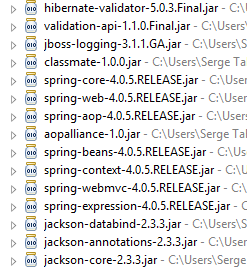
Bu yapılandırma ile birlikte gelen kütüphanelerin sayısı oldukça fazladır:
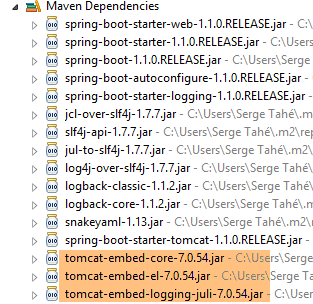 |  |
Yukarıda Tomcat sunucusuna ait üç arşiv dosyası görülüyor.
13.4.3. Bir Spring hizmetinin mimarisi [web / jSON]
Bir web hizmeti / jSON için Spring MVC, MVC modelini şu şekilde uygular:
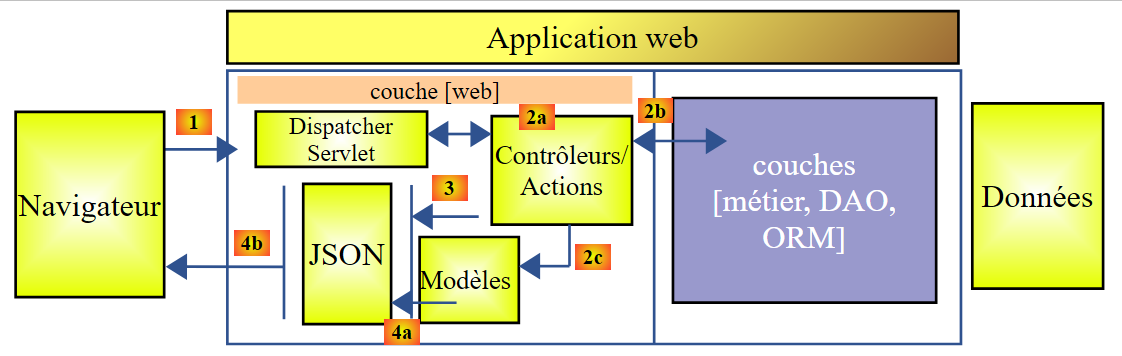 |
- [4a]'te, bir Java sınıfı olan model, jSON kütüphanesi tarafından jSON dizesine dönüştürülür;
- [4b]'e dönüştürüldüğünde, bu jSON dizesi tarayıcıya gönderilir;
13.4.4. C denetleyicisi
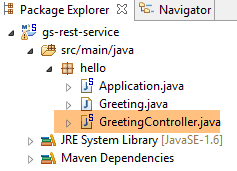 |
İçe aktarılan uygulama aşağıdaki denetleyiciye sahiptir:
package hello;

import java.util.concurrent.atomic.AtomicLong;
import org.springframework.web.bind.annotation.RequestMapping;
import org.springframework.web.bind.annotation.RequestParam;
import org.springframework.web.bind.annotation.RestController;

@RestController
public class GreetingController {

    private static final String template = "Hello, %s!";
    private final AtomicLong counter = new AtomicLong();

    @RequestMapping("/greeting")
    public Greeting greeting(@RequestParam(value = "name", defaultValue = "World") String name) {
        return new Greeting(counter.incrementAndGet(), String.format(template, name));
    }
}
- 9. satır: [@RestController] anotasyonu, [GreetingController] sınıfını bir Spring denetleyicisi haline getirir; yani, bu sınıfın yöntemleri URL'leri işlemek üzere kaydedilir. Benzer bir anotasyon olan [@Controller]'i daha önce görmüştük. Bu denetleyicinin yöntemlerinin sonucu, görüntülenecek görünümün adı olan [String] türündeydi. Burada durum farklıdır. [@RestController] türündeki bir denetleyicinin yöntemleri, tarayıcıya gönderilmek üzere serileştirilmiş nesneler döndürür. Uygulanan serileştirme türü, Spring MVC yapılandırmasına bağlıdır. Burada, nesneler jSON olarak serileştirilecektir. Projenin bağımlılıkları arasında bir jSON kütüphanesinin bulunması, Spring Boot'un otomatik yapılandırma yoluyla projeyi bu şekilde yapılandırmasına neden olur;
- 14. satır: [@RequestMapping] anotasyonu, yöntemin işlediği URL'i belirtir; burada bu, URL ve [/greeting]'tir;
- 15. satır: [@RequestParam] etiketini daha önce açıklamıştık. Yöntemin döndürdüğü sonuç, [Greeting] türünde bir nesnedir.
- 12. satır: atomik türde bir uzun tamsayı. Bu, erişim eşzamanlılığını desteklediği anlamına gelir. Birden fazla iş parçacığı, [counter] değişkenini aynı anda artırmak isteyebilir. Bu işlem düzgün bir şekilde gerçekleştirilecektir. Bir iş parçacığı, sayacın değerini ancak onu değiştiren iş parçacığı değişikliğini tamamladıktan sonra okuyabilir.
13.4.5. M Modeli
Önceki yöntemle üretilen M modeli, aşağıdaki [Greeting] nesnesidir:
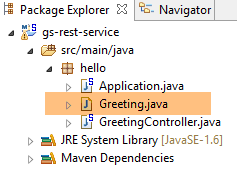 |
package hello;

public class Greeting {

    private final long id;
    private final String content;

    public Greeting(long id, String content) {
        this.id = id;
        this.content = content;
    }

    public long getId() {
        return id;
    }

    public String getContent() {
        return content;
    }
}
Bu nesnenin jSON dönüşümü, {"id":n,"content":"metin"} karakter dizisini oluşturacaktır. Sonuç olarak, denetleyici yöntemi tarafından üretilen jSON dizisi şu şekilde olacaktır:
veya
13.4.6. Çalıştırma
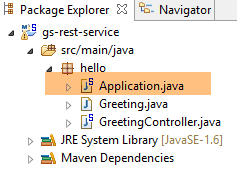 |
[Application.java] sınıfı, projenin yürütülebilir sınıfıdır. Kodu şöyledir:
package hello;

import org.springframework.boot.autoconfigure.EnableAutoConfiguration;
import org.springframework.boot.SpringApplication;
import org.springframework.context.annotation.ComponentScan;

@ComponentScan
@EnableAutoConfiguration
public class Application {

    public static void main(String[] args) {
        SpringApplication.run(Application.class, args);
    }

}
Bu kodu önceki örnekte daha önce görmüş ve açıklamıştık.
13.4.7. Projenin çalıştırılması
Projeyi çalıştıralım:
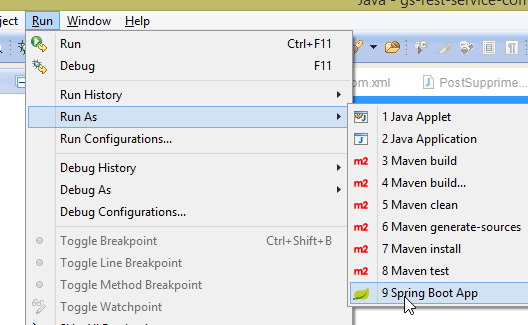 |
Aşağıdaki konsol günlükleri elde edilir:
- 13. satır: Tomcat sunucusu 8080 numaralı bağlantı noktasında başlatılır (12. satır);
- 17. satır: [DispatcherServlet] servleti mevcut;
- 20. satır: [GreetingController.greeting] yöntemi tespit edildi;
Web uygulamasını test etmek için URL ve [http://localhost:8080/greeting]'e erişilir:
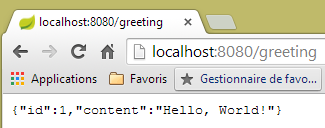 | 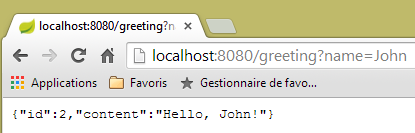 |
Beklenen jSON dizesi başarıyla alınır. Sunucu tarafından gönderilen HTTP başlıklarını incelemek ilginç olabilir. Bunun için, [Advanced Rest Client] adlı Chrome uzantısını kullanacağız (Chrome / Ctrl-T / [Applications] Menüsü / [Advanced Rest Client] - bkz. Ekler, paragraf 22.5):
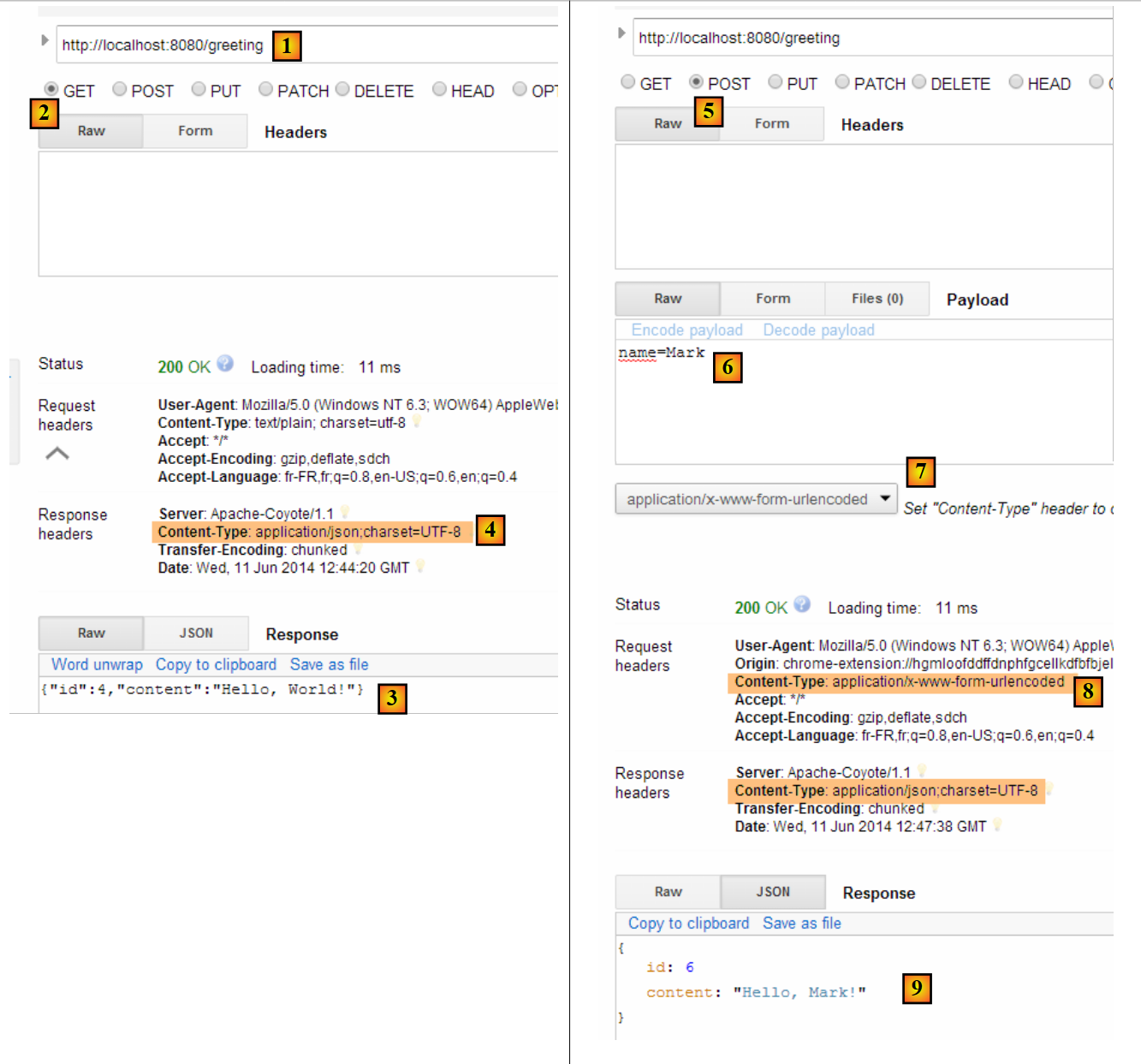 |
- [1]'te, istenen URL;
- [2]'te, GET yöntemi kullanılmaktadır;
- [3]'te, yanıt jSON;
- [4]'te, sunucu jSON biçiminde bir yanıt gönderdiğini belirtmiştir;
- [5]'te, aynı URL isteniyor, ancak bu sefer POST ile;
- [7]'te, bilgiler sunucuya [urlencoded] biçiminde gönderilir;
- [6]'te, name parametresi ve değeri;
- [8]'te, tarayıcı sunucuya [urlencoded] bilgilerini gönderdiğini bildirir;
- [9]'te, sunucunun jSON yanıtı;
13.4.8. Çalıştırılabilir bir arşiv oluşturma
Şimdi bir yürütülebilir arşiv oluşturuyoruz:
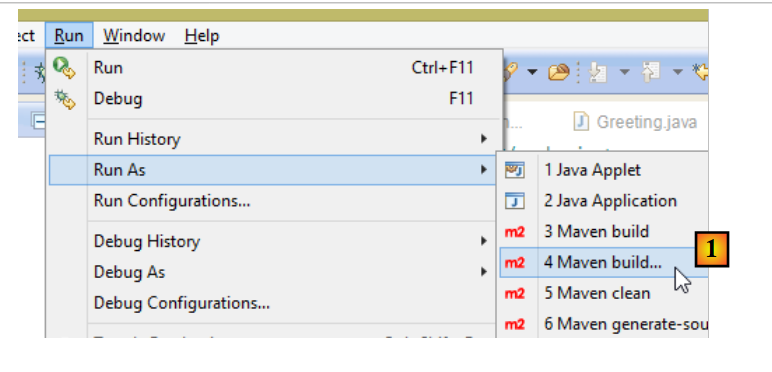 |
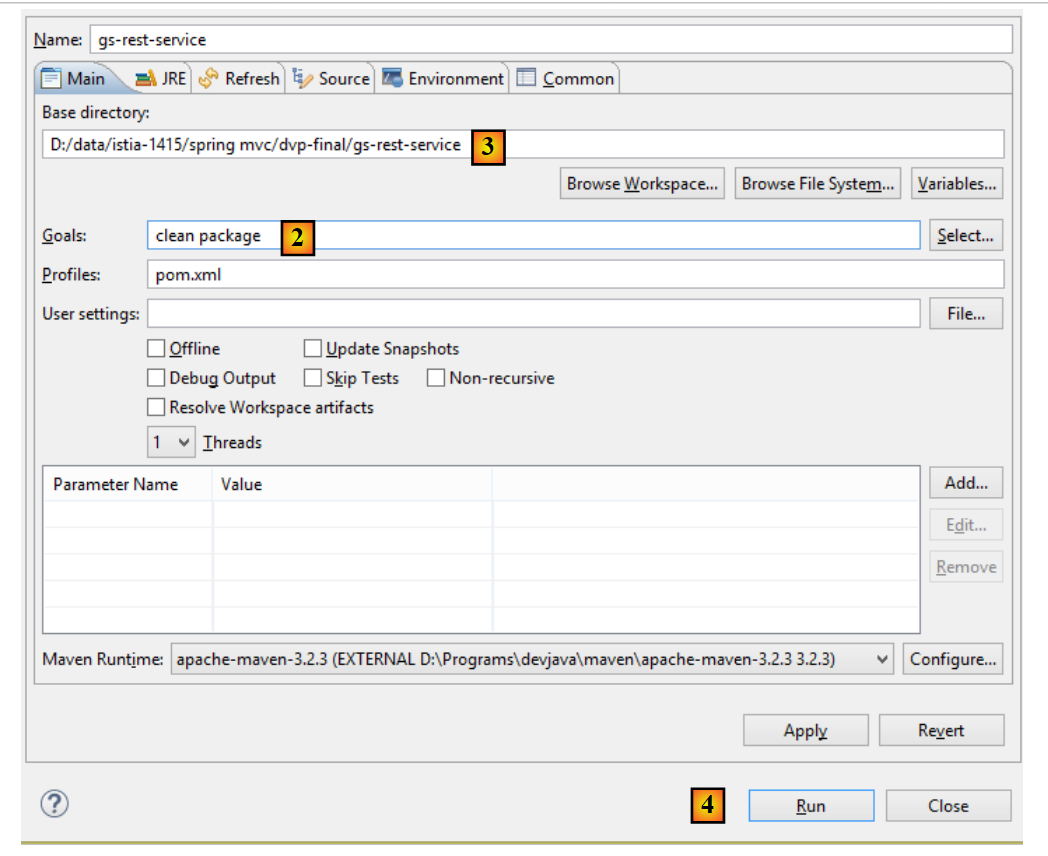 |
- [1]'te: bir Maven hedefi çalıştırıyoruz;
- [2]'te: iki hedef (goal) vardır: [clean], Maven projesinden [target] klasörünü silmek için; [package] ise bu klasörü yeniden oluşturmak içindir;
- [3]'te: Oluşturulan [target] klasörü bu klasörde oluşturulacaktır;
- [4]'te: hedef oluşturulur;
Konsolda görüntülenen günlüklerde, [spring-boot-maven-plugin] eklentisinin göründüğünden emin olun. Yürütülebilir arşivi oluşturan bu eklentidir.
Bir konsol kullanarak oluşturulan klasöre girin:
D:\Temp\wksSTS\gs-rest-service\target>dir
 ...
11/06/2014  15:30    <DIR>          classes
11/06/2014  15:30    <DIR>          generated-sources
11/06/2014  15:30        11 073 572 gs-rest-service-0.1.0.jar
11/06/2014  15:30             3 690 gs-rest-service-0.1.0.jar.original
11/06/2014  15:30    <DIR>          maven-archiver
11/06/2014  15:30    <DIR>          maven-status
...
- 5. satır: oluşturulan arşiv;
Bu arşiv şu şekilde çalıştırılır:
D:\Temp\wksSTS\gs-rest-service-complete\target>java -jar gs-rest-service-0.1.0.jar

  .   ____          _            __ _ _
 /\\ / ___'_ __ _ _(_)_ __  __ _ \ \ \ \
( ( )\___ | '_ | '_| | '_ \/ _` | \ \ \ \
 \\/  ___)| |_)| | | | | || (_| |  ) ) ) )
  '  |____| .__|_| |_|_| |_\__, | / / / /
 =========|_|==============|___/=/_/_/_/
 :: Spring Boot ::        (v1.1.0.RELEASE)

2014-06-11 15:32:47.088  INFO 4972 --- [           main] hello.Application
                  : Starting Application on Gportpers3 with PID 4972 (D:\Temp\wk
sSTS\gs-rest-service-complete\target\gs-rest-service-0.1.0.jar started by ST in
D:\Temp\wksSTS\gs-rest-service-complete\target)
...
Artık web uygulaması başlatıldığına göre, bir tarayıcıyla erişilebilir:
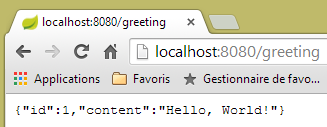 |
13.4.9. Uygulamayı bir Tomcat sunucusuna dağıtma
Önceki projede olduğu gibi, [pom.xml] dosyasını şu şekilde değiştiriyoruz:
<?xml version="1.0" encoding="UTF-8"?>
<project xmlns="http://maven.apache.org/POM/4.0.0" xmlns:xsi="http://www.w3.org/2001/XMLSchema-instance"
    xsi:schemaLocation="http://maven.apache.org/POM/4.0.0 http://maven.apache.org/xsd/maven-4.0.0.xsd">
    <modelVersion>4.0.0</modelVersion>

    <groupId>org.springframework</groupId>
    <artifactId>gs-rest-service</artifactId>
    <version>0.1.0</version>
    <packaging>war</packaging>

    ...
</project>
- 9. satır: bir war arşivi (Web ARchive) oluşturulacağını belirtmek gerekir;
Ayrıca web uygulamasını da yapılandırmamız gerekiyor. [web.xml] dosyası bulunmadığından, bu işlem [SpringBootServletInitializer] sınıfından miras alan bir sınıfla gerçekleştirilir:
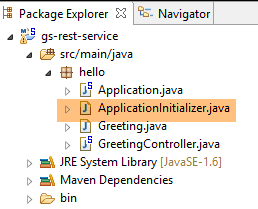 |
[ApplicationInitializer] sınıfı şu şekildedir:
package hello;

import org.springframework.boot.builder.SpringApplicationBuilder;
import org.springframework.boot.context.web.SpringBootServletInitializer;

public class ApplicationInitializer extends SpringBootServletInitializer {

    @Override
    protected SpringApplicationBuilder configure(SpringApplicationBuilder application) {
        return application.sources(Application.class);
    }

}
- 6. satır: [ApplicationInitializer] sınıfı, [SpringBootServletInitializer] sınıfını genişletir;
- 9. satır: [configure] yöntemi yeniden tanımlanmıştır (8. satır);
- 10. satır: Projeyi yapılandıran sınıf belirtilir;
Projeyi çalıştırmak için şu adımları uygulayabilirsiniz:
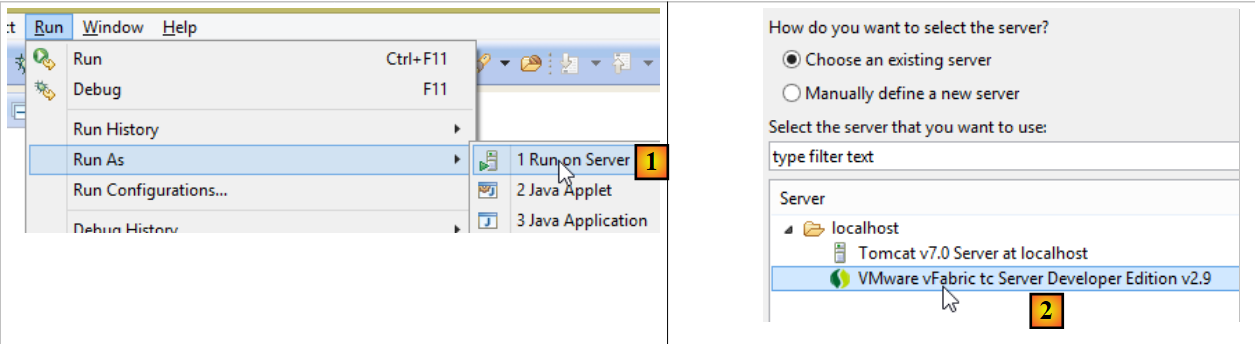 |
- [1-2]'te, projeyi Eclipse'te kayıtlı sunuculardan birinde çalıştırın;
Bu işlem tamamlandıktan sonra, bir tarayıcıda URL [http://localhost:8080/gs-rest-service/greeting/?name=Mitchell] adresini girebilirsiniz:
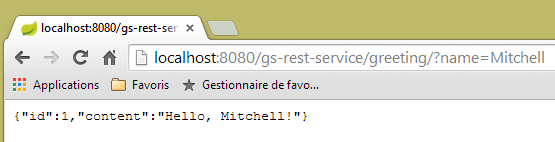 |
13.4.10. Sonuç
Web uygulamasının tarayıcıya bir akış gönderdiği bir tür Spring projesi tanıttık. Şimdi, [Introduction à Spring Data] eğitiminde incelediğimiz [dbintrospringdata] veritabanını web üzerinde sunmak için bir web uygulaması / jSON geliştireceğiz.
13.5. [dbintrospringdata] veritabanını web üzerinde yayınlama
13.5.1. Web hizmeti mimarisi / jSON
Aşağıdaki mimariyi kuracağız:
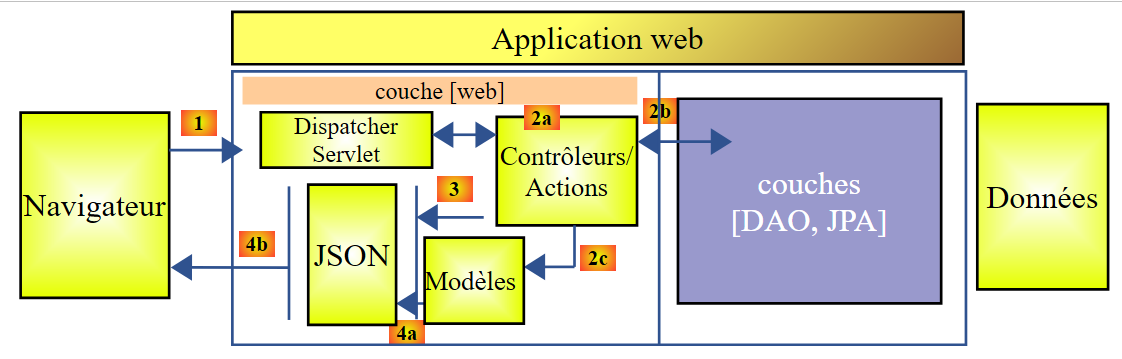 |
[DAO] ve [JPA] katmanları, [Introduction à Spring Data] eğitiminde yazılan uygulama tarafından uygulanmaktadır.
13.5.2. Veritabanının kurulumu
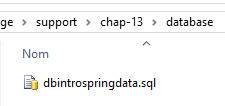 |
SQL ve [dbintrospringdata.sql] komut dosyaları, testler için gerekli olan MySQL veritabanını oluşturmaya olanak tanır.
13.5.3. Web hizmeti Eclipse projesi / jSON
Web hizmeti / jSON'in Eclipse projesi şu şekildedir:
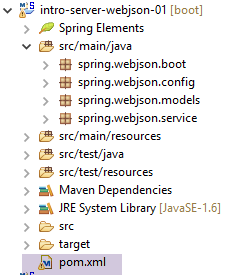 |
Bu bir Maven projesidir ve [pom.xml] dosyası şu şekildedir:
<project xmlns="http://maven.apache.org/POM/4.0.0" xmlns:xsi="http://www.w3.org/2001/XMLSchema-instance"
    xsi:schemaLocation="http://maven.apache.org/POM/4.0.0 http://maven.apache.org/xsd/maven-4.0.0.xsd">
    <modelVersion>4.0.0</modelVersion>
    <groupId>istia.st.webjson</groupId>
    <artifactId>intro-server-webjson01</artifactId>
    <version>0.0.1-SNAPSHOT</version>

    <name>intro-server-webjson01</name>
    <description>démo spring mvc</description>

    <parent>
        <groupId>org.springframework.boot</groupId>
        <artifactId>spring-boot-starter-parent</artifactId>
        <version>1.2.7.RELEASE</version>
    </parent>

    <dependencies>
        <dependency>
            <groupId>istia.st.springdata</groupId>
            <artifactId>intro-spring-data-01</artifactId>
            <version>0.0.1-SNAPSHOT</version>
        </dependency>
        <dependency>
            <groupId>org.springframework.boot</groupId>
            <artifactId>spring-boot-starter-web</artifactId>
        </dependency>
        <dependency>
            <groupId>org.springframework.boot</groupId>
            <artifactId>spring-boot-starter</artifactId>
        </dependency>
    </dependencies>

    <build>
        <plugins>
            <plugin>
                <groupId>org.springframework.boot</groupId>
                <artifactId>spring-boot-maven-plugin</artifactId>
            </plugin>
            <plugin>
                <groupId>org.apache.maven.plugins</groupId>
                <artifactId>maven-surefire-plugin</artifactId>
                <version>2.18.1</version>
            </plugin>
        </plugins>
    </build>

</project>
- 11-15. satırlar: [DAO] katmanı için halihazırda kullanılan üst Maven projesi;
- 18-22. satırlar: [DAO] katmanına olan bağımlılık;
- 23-26. satırlar: [spring-boot-starter-web] artefaktına olan bağımlılık. Bu artefakt, bir web hizmeti / jSON oluşturmak için gerekli tüm bağımlılıkları beraberinde getirir. Aynı zamanda gereksiz kütüphaneleri de beraberinde getirir. Bu nedenle daha ayrıntılı bir yapılandırma gerekli olacaktır. Ancak bu yapılandırma başlangıç için kullanışlıdır;
- 28-30. satırlar: [spring-boot-starter] artefaktına olan bağımlılık, Spring Boot anotasyonlarının yönetilmesini sağlar;
Bu yapılandırmanın getirdiği bağımlılıklar şunlardır:
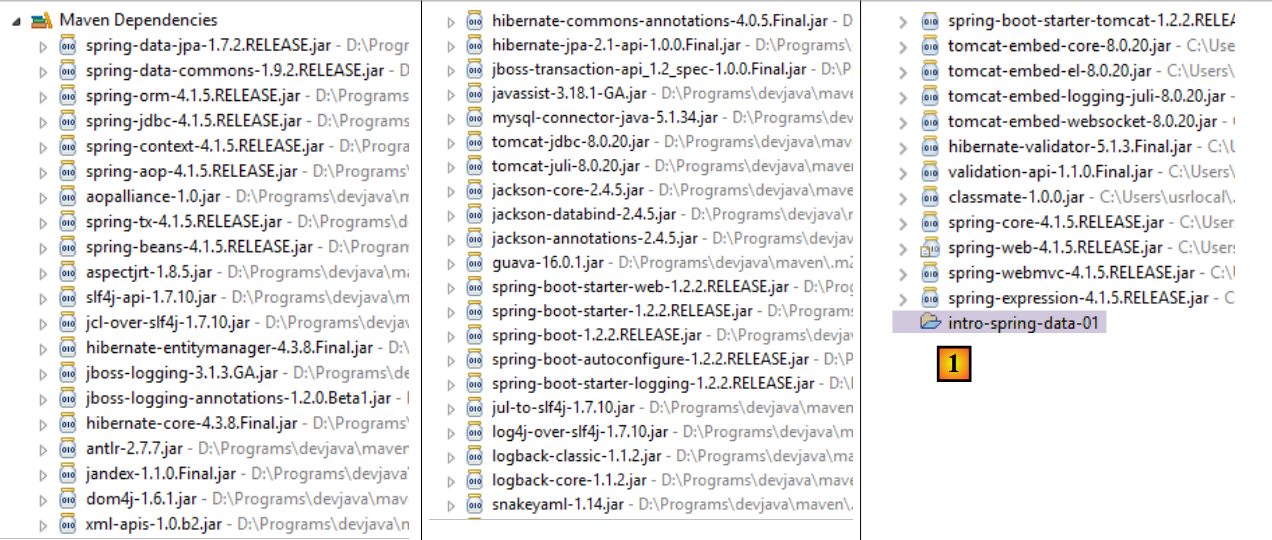 |
- [1]'te, Eclipse'in [intro-spring-data-01] proje arşivine olan bağımlılığı algıladığı görülmektedir;
Yukarıdaki bağımlılıklar hem [DAO] katmanına hem de [web] katmanına aittir.
13.5.3.1. [web] katmanının yapılandırılması
[web] katmanı, [AppConfig] dosyası ile yapılandırılır:
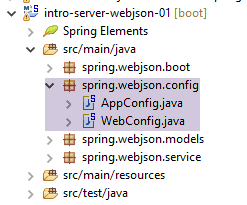 |
[WebConfig] sınıfı, [web] katmanını yapılandırır:
package spring.webjson.config;

import org.springframework.beans.factory.annotation.Autowired;
import org.springframework.boot.context.embedded.EmbeddedServletContainerFactory;
import org.springframework.boot.context.embedded.ServletRegistrationBean;
import org.springframework.boot.context.embedded.tomcat.TomcatEmbeddedServletContainerFactory;
import org.springframework.context.ApplicationContext;
import org.springframework.context.annotation.Bean;
import org.springframework.web.context.WebApplicationContext;
import org.springframework.web.servlet.DispatcherServlet;
import org.springframework.web.servlet.config.annotation.EnableWebMvc;
import org.springframework.web.servlet.config.annotation.WebMvcConfigurerAdapter;

import com.fasterxml.jackson.databind.ObjectMapper;
import com.fasterxml.jackson.databind.ser.impl.SimpleBeanPropertyFilter;
import com.fasterxml.jackson.databind.ser.impl.SimpleFilterProvider;

@EnableWebMvc
public class WebConfig extends WebMvcConfigurerAdapter {

    // -------------------------------- [web] katmanı yapılandırması
    @Autowired
    private ApplicationContext context;

    @Bean
    public DispatcherServlet dispatcherServlet() {
        DispatcherServlet servlet = new DispatcherServlet((WebApplicationContext) context);
        return servlet;
    }

    @Bean
    public ServletRegistrationBean servletRegistrationBean(DispatcherServlet dispatcherServlet) {
        return new ServletRegistrationBean(dispatcherServlet, "/*");
    }

    @Bean
    public EmbeddedServletContainerFactory embeddedServletContainerFactory() {
        return new TomcatEmbeddedServletContainerFactory("", 8080);
    }

    // filtreler jSON
    @Bean(name = "jsonMapper")
    public ObjectMapper jsonMapper() {
        return new ObjectMapper();
    }

    @Bean(name = "jsonMapperCategorieWithProduits")
    public ObjectMapper jsonMapperCategorieWithProduits() {
        // eşleştirici jSON
        ObjectMapper mapper = new ObjectMapper();
        // filtreler
        mapper.setFilters(
                new SimpleFilterProvider().addFilter("jsonFilterCategorie", SimpleBeanPropertyFilter.serializeAllExcept())
                        .addFilter("jsonFilterProduit", SimpleBeanPropertyFilter.serializeAllExcept("categorie")));
        // sonuç
        return mapper;
    }

    @Bean(name = "jsonMapperProduitWithCategorie")
    public ObjectMapper jsonMapperProduitWithCategorie() {
        // eşleştirici jSON
        ObjectMapper mapper = new ObjectMapper();
        // filtreler
        mapper.setFilters(
                new SimpleFilterProvider().addFilter("jsonFilterProduit", SimpleBeanPropertyFilter.serializeAllExcept())
                        .addFilter("jsonFilterCategorie", SimpleBeanPropertyFilter.serializeAllExcept("produits")));
        // sonuç
        return mapper;
    }

    @Bean(name = "jsonMapperCategorieWithoutProduits")
    public ObjectMapper jsonMapperCategorieWithoutProduits() {
        // eşleştirici jSON
        ObjectMapper mapper = new ObjectMapper();
        // filtreler
        mapper.setFilters(new SimpleFilterProvider().addFilter("jsonFilterCategorie",
                SimpleBeanPropertyFilter.serializeAllExcept("produits")));
        // sonuç
        return mapper;
    }

    @Bean(name = "jsonMapperProduitWithoutCategorie")
    public ObjectMapper jsonMapperProduitWithoutCategorie() {
        // eşleştirici jSON
        ObjectMapper mapper = new ObjectMapper();
        // filtreler
        mapper.setFilters(new SimpleFilterProvider().addFilter("jsonFilterProduit",
                SimpleBeanPropertyFilter.serializeAllExcept("categorie")));
        // sonuç
        return mapper;
    }
}
- 18. satır: [@EnableWebMvc] anotasyonu, Spring MVC çerçeve için otomatik yapılandırmalar oluşturur;
- 19. satır: [WebConfig] sınıfı, Spring [WebMvcConfigurerAdapter] sınıfını genişleterek bazı bean'leri yeniden tanımlar (26-40. satırlar);
- 22-23. satırlar: Spring bağlamının enjeksiyonu;
- satır 25-29: Spring çerçevesinin MVC servlet'inin tanımı; bu servlet, HTTP isteklerini doğru denetleyiciye ve doğru yönteme yönlendirir. [DispatcherServlet] bir Spring sınıfıdır;
- satır 31-34: Bu servletin tüm URL isteklerini işlediği belirtilir;
- 36-39. satırlar: Proje arşivlerinde bulunan Tomcat sunucusunu etkinleştirecek olan bu bean'dir. Sunucu, 8080 numaralı bağlantı noktasında istekleri bekleyecektir;
- satır 42-91: jSON filtrelerini yönetmek için kullanılacak bean'ler;
- 42-45. satırlar: filtre içermeyen bir jSON eşleştirici;
- satır 47-57: Bir kategoriyi ürünleriyle birlikte görüntülemeyi sağlayan jSON eşleştiricisi. Bir kategoriyi ürünleriyle birlikte talep edildiğinde, hem [Categorie] sınıfının jSON filtresini hem de [Produit] sınıfının jSON filtresini yapılandırmak gerektiğine dikkat edilmelidir. Bu durum her zaman böyledir. Bir sınıfı jSON'te serileştirirken/deserileştirirken, sınıfın jSON filtresini ve bu sınıfa dahil edilecek tüm bağımlılıkların filtrelerini yapılandırmak gerekir;
- 59-69. satırlar: Bir ürünü kendi kategorisiyle birlikte elde etmeyi sağlayan jSON eşleştiricisi;
- 71-80. satırlar: Ürünler olmadan bir kategoriyi görüntülemeyi sağlayan jSON eşleştiricisi;
- satır 82-91: bir ürünü kategorisi olmadan görüntülemeyi sağlayan jSON eşleştiricisi;
[AppConfig] sınıfı, uygulamanın tamamını, yani [web] ve [DAO] katmanlarını yapılandırır:
package spring.webjson.config;

import org.springframework.context.annotation.ComponentScan;
import org.springframework.context.annotation.Import;

import spring.data.config.DaoConfig;

@ComponentScan(basePackages = { "spring.webjson" })
@Import({ DaoConfig.class, WebConfig.class})
public class AppConfig {

}
- 9. satır: [DAO] katmanındaki ve [web] katmanındaki bean'ler içe aktarılır;
- 8. satır: diğer Spring bean'lerinin hangi paketlerde bulunduğunu belirtir;
Hiçbir yerde [@EnableAutoConfiguration] anotasyonunu kullanmadığımızı belirtmek isteriz. Yapılandırmayı kendimiz kontrol etmeyi tercih ettik.
13.5.4. Uygulama modeli
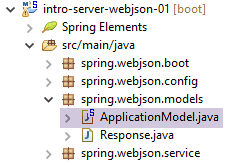 |
[ApplicationModel] sınıfı şu şekildedir:
package spring.webjson.models;

import java.util.List;

import org.springframework.beans.factory.annotation.Autowired;
import org.springframework.stereotype.Component;

import spring.data.dao.IDao;
import spring.data.entities.Categorie;
import spring.data.entities.Produit;

@Component
public class ApplicationModel implements IDao {

    // katman [DAO]
    @Autowired
    private IDao dao;

    @Override
    public void addProduits(List<Produit> produits) {
        dao.addProduits(produits);
    }

    @Override
    public void deleteAllProduits() {
        dao.deleteAllProduits();
    }

    @Override
    public void updateProduits(List<Produit> produits) {
        dao.updateProduits(produits);
    }

    @Override
    public List<Produit> getAllProduits() {
        return dao.getAllProduits();
    }

    @Override
    public void addCategories(List<Categorie> categories) {
        dao.addCategories(categories);
    }

    @Override
    public void deleteAllCategories() {
        dao.deleteAllCategories();
    }

    @Override
    public void updateCategories(List<Categorie> categories) {
        dao.updateCategories(categories);
    }

    @Override
    public List<Categorie> getAllCategories() {
        return dao.getAllCategories();
    }

    @Override
    public Produit getProduitByIdWithCategorie(Long idProduit) {
        return dao.getProduitByIdWithCategorie(idProduit);
    }

    @Override
    public Produit getProduitByNameWithCategorie(String nom) {
        return dao.getProduitByNameWithCategorie(nom);
    }

    @Override
    public Categorie getCategorieByIdWithProduits(Long idCategorie) {
        return dao.getCategorieByIdWithProduits(idCategorie);
    }

    @Override
    public Categorie getCategorieByNameWithProduits(String nom) {
        return dao.getCategorieByNameWithProduits(nom);
    }

    @Override
    public Produit getProduitByIdWithoutCategorie(Long idProduit) {
        return dao.getProduitByIdWithoutCategorie(idProduit);
    }

    @Override
    public Categorie getCategorieByIdWithoutProduits(Long idCategorie) {
        return dao.getCategorieByIdWithoutProduits(idCategorie);
    }

    @Override
    public Produit getProduitByNameWithoutCategorie(String nom) {
        return dao.getProduitByNameWithoutCategorie(nom);
    }

    @Override
    public Categorie getCategorieByNameWithoutProduits(String nom) {
        return dao.getCategorieByNameWithoutProduits(nom);
    }

}
- 12. satır: sınıf, bir Spring singleton'udur;
- 13. satır: [DAO] katmanının [IDao] arayüzünü uygular;
- 16-17. satırlar: [DAO] katmanına bir referans enjeksiyonu;
- satır 19-99: [IDao] arayüzünün uygulanması;
Web katmanının mimarisi şu şekilde gelişmektedir:
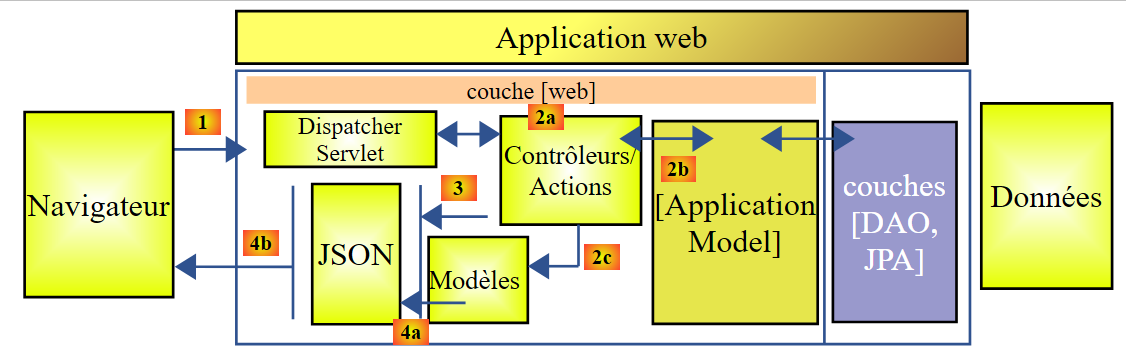 |
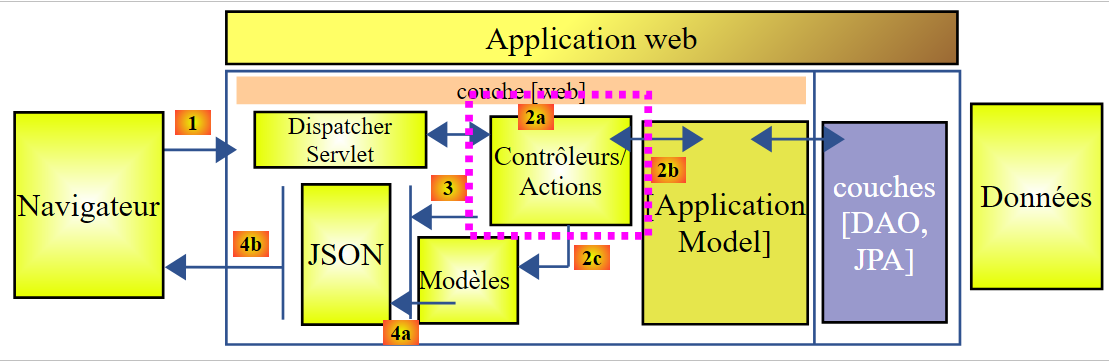
- [2b]'te, kontrolörlerin yöntemleri [ApplicationModel] tekil nesnesiyle iletişim kurar;
Bu strateji, olası bir önbelleğin yönetimi konusunda esneklik sağlar. [ApplicationModel] sınıfı, [DAO] katmanından elde edilen bilgileri veya yapılandırma verilerini depolamak için kullanılabilir. Bu, [DAO] katmanının kontrolünün elimizde olmadığı durumlarda yararlı olabilir. Bu önbellek stratejisi zaman içinde değişebilir. Yapılacak değişiklikler, denetleyici(ler)in kodunu hiçbir şekilde etkilemeyecektir.
13.5.5. denetleyicisi
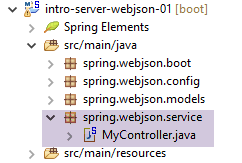 |
Burada tek bir denetleyici var: [MyController] sınıfı.
13.5.5.1. Bu denetleyici tarafından sunulan URL'ler
Bu denetleyici tarafından sunulan URL sınıfları şunlardır:
| Veritabanına ürünler eklenir. Bu ürünler yayınlanır. Yanıt, birincil anahtarlarıyla birlikte eklenen ürünlerin listesini içeren jSON dizesidir. |
| Veritabanındaki tüm ürünleri siler. |
| Veritabanındaki ürünleri günceller. Bu ürünler yayınlanır. Yanıt, güncellenen ürün listesinden alınan jSON dizesidir. |
| Tüm ürünlerden jSON dizesini alır. |
| Veritabanına kategoriler ekler. Bunlar yayınlanır. Yanıt, birincil anahtarlarıyla birlikte eklenen kategorilerin listesini içeren jSON dizesidir. Kategoriler ürün içeriyorsa, bunlar da veritabanına eklenir. |
| Veritabanındaki tüm kategorileri ve bunlara ait tüm ürünleri siler. İşlem tamamlandığında veritabanı boş kalır. |
| Veritabanındaki kategorileri günceller. Bunlar gönderilir. Yanıt, güncellenen kategorilerin listesidir. Kategoriler ürün içeriyorsa, bunlar da veritabanında güncellenir. Değiştirilen kategorilerin jSON dizesini döndürür; |
| Tüm kategorilerden jSON dizesini alır. |
| ID'siyle belirtilen bir ürünün, kategorisi ile birlikte jSON dizesini alır. |
| ID'siyle belirtilen bir ürünün, kategorisi hariç olmak üzere jSON dizesini alır. |
| Adıyla belirtilen bir ürünün, kategorisi ile birlikte jSON dizesini alır. |
| Kategorisiz, adıyla belirtilen bir üründen jSON dizesini alır. |
| ID'siyle belirtilen bir kategoriden, o kategorideki ürünlerle birlikte jSON dizesini alır. |
| Adıyla belirtilen bir kategoriden, ürünleriyle birlikte jSON dizesini alır. |
| Adıyla belirtilen bir kategoriden, ürünleri hariç olmak üzere jSON dizesini alır. |
| ID'siyle belirtilen bir kategoriden, ürünleri hariç olmak üzere jSON dizesini alır. |
Gösterilen URL kodları, [IDao] arayüzünün [DAO] katmanındaki yöntemlere karşılık gelir. /jSON web hizmetinin yöntemlerinin tümü aynı şablona göre oluşturulmuştur. Bunlardan birkaçını inceleyeceğiz.
13.5.5.2. Denetleyicinin iskeleti
Denetleyicinin iskeleti şu şekildedir:
package spring.webjson.service;

import java.util.ArrayList;
import java.util.List;
import java.util.Set;

import javax.servlet.http.HttpServletRequest;

import org.springframework.beans.factory.annotation.Autowired;
import org.springframework.beans.factory.annotation.Qualifier;
import org.springframework.stereotype.Controller;
import org.springframework.web.bind.annotation.PathVariable;
import org.springframework.web.bind.annotation.RequestMapping;
import org.springframework.web.bind.annotation.RequestMethod;
import org.springframework.web.bind.annotation.ResponseBody;

import com.fasterxml.jackson.core.JsonProcessingException;
import com.fasterxml.jackson.core.type.TypeReference;
import com.fasterxml.jackson.databind.ObjectMapper;
import com.google.common.io.CharStreams;

import spring.data.dao.DaoException;
import spring.data.entities.Categorie;
import spring.data.entities.Produit;
import spring.webjson.models.ApplicationModel;
import spring.webjson.models.Response;

@Controller
public class MyController {

    // Spring bağımlılıkları
    @Autowired
    private ApplicationModel application;

    // filtreler jSON
    @Autowired
    @Qualifier("jsonMapper")
    private ObjectMapper jsonMapper;
    @Autowired
    @Qualifier("jsonMapperCategorieWithProduits")
    private ObjectMapper jsonMapperCategorieWithProduits;
    @Autowired
    @Qualifier("jsonMapperProduitWithCategorie")
    private ObjectMapper jsonMapperProduitWithCategorie;
    @Autowired
    @Qualifier("jsonMapperCategorieWithoutProduits")
    private ObjectMapper jsonMapperCategorieWithoutProduits;
    @Autowired
    @Qualifier("jsonMapperProduitWithoutCategorie")
    private ObjectMapper jsonMapperProduitWithoutCategorie;

    // [MyController] sınıfı bir singleton'dur ve bean yalnızca bir kez örneklenir

    public MyController() {
        // System.out.println("MyController");
    }

    @RequestMapping(value = "/addProduits", method = RequestMethod.POST, consumes = "application/json; charset=UTF-8", produces = "application/json; charset=UTF-8")
    @ResponseBody
    public String addProduits(HttpServletRequest request) throws JsonProcessingException {
        ...
    }
- 28. satır: [@Controller] anotasyonu, sınıfı bir Spring bileşeni haline getirir;
- 32-33. satırlar: [ApplicationModel] sınıfına bir referans enjeksiyonu;
- 36-50. satırlar: jSON eşleştiricilerine referans enjeksiyonları;
- 58. satır: Açıklanan URL, [/addProduits]'tir. İstemci, isteğini yapmak için [POST] yöntemini kullanmalıdır (method = RequestMethod.POST). Gönderilen değeri jSON biçiminde bir dize olarak göndermelidir (consumes = "application/json; charset=UTF-8"). Yöntem, yanıtı müşteriye kendisi geri gönderir (satır 59). Bu, bir karakter dizisi olacaktır (satır 60). HTTP [Content-type : application/json; charset=UTF-8] başlığı, müşteriye bir jSON dizesi alacağını belirtmek için gönderilecektir (satır 58);
- 60. satır: [addProduits] yöntemi, veritabanına eklenen ürün listesinden jSON dizesini döndürür;
13.5.5.3. Denetleyicinin yöntemlerinin yanıtı
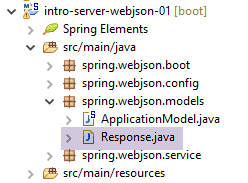
Denetleyicinin tüm yöntemleri, aşağıdaki gibi [Response] türünde bir yanıt döndürür:
 |
package spring.webjson.service;

import java.util.List;

public class Response<T> {

    // ----------------- özellikler
    // işlem durumu
    private int status;
    // olası hata mesajları
    private List<String> messages;
    // yanıtın gövdesi
    private T body;

    // yapıcılar
    public Response() {

    }

    public Response(int status, List<String> messages, T body) {
        this.status = status;
        this.messages = messages;
        this.body = body;
    }

    // getter ve setter'lar
    ...
}
- 5. satır: yanıt, T türünü içerir;
- 13. satır: T türündeki yanıt;
- 9-11. satırlar: Bir yöntemin bir istisna ile karşılaşması mümkündür. Bu durumda, aşağıdaki şekilde bir yanıt döndürür:
- 9. satır: status!=0;
- satır 11: karşılaşılan hataların listesi;
13.5.5.4. L'URL [/addProduits]
L'URL [/addProduits] aşağıdaki yöntemle işlenir:
@RequestMapping(value = "/addProduits", method = RequestMethod.POST, consumes = "application/json; charset=UTF-8", produces = "application/json; charset=UTF-8")
    @ResponseBody
    public String addProduits(HttpServletRequest request) throws JsonProcessingException {
        // yanıt
        Response<List<Produit>> response;
        try {
            // gönderilen değer alınır
            String body = CharStreams.toString(request.getReader());
            List<Produit> produits = jsonMapperProduitWithoutCategorie.readValue(body, new TypeReference<List<Produit>>() {
            });
            // ürünler ve kategoriler arasındaki bağlantıyı yeniden kurulur
            for (Produit produit : produits) {
                produit.setCategorie(application.getCategorieByIdWithoutProduits(produit.getIdCategorie()));
            }
            // ürünleri kalıcı hale getirme
            application.addProduits(produits);
            response = new Respon    se<List<Produit>>(0, null, produits);
        } catch (DaoException e1) {
            response = new Response<List<Produit>>(1000, e1.getErreurs(), null);
        } catch (Exception e2) {
            response = new Response<List<Produit>>(1000, getErreursForException(e2), null);
        }
        // yanıt jSON
        return jsonMapperProduitWithoutCategorie.writeValueAsString(response);
    }
- 3. satır: Yöntem, istemcinin isteğiyle ilgili tüm bilgileri içeren [HttpServletRequest request] parametresini kabul eder;
- 5. satır: müşteriye gönderilecek yanıt: bir ürün listesi;
- 8. satır: Gönderilen değer alınır. [CharStreams] sınıfı, [Google Guava] kütüphanesine aittir ve bu kütüphaneye ait referans, [pom.xml] dosyasına eklenmiştir. Müşteri tarafından gönderilen jSON dizesini elde ederiz. Bu diziyi işlemek için deserialize etmemiz gerekir;
- 8-10. satırlar: Deserializasyon işlemi gerçekleştirilir. Her bir ürünün [categorie=null] alanına sahip olduğu bir ürün listesi elde edilir;
- 12-14. satırlar: listedeki tüm ürünlerin [categorie] alanı sıfırlanır. Bunun için, önceden başlatılmış olan ürünün [idCategorie] alanı kullanılır;
- 16. satır: Ürünler veritabanına eklenir;
- 17. satır: [response] nesnesi, ürün listesiyle başlatılır;
- 18-19. satırlar: Yöntemin [DAO] katmanından bir istisna ile karşılaştığı durumlar. Yanıt, [status=1000] (hata kodu) [messages=e1.getMessages()] ile başlatılır; yani sunucu tarafında karşılaşılan hataların listesi istemciye iletilir;
- 20-21. satırlar: Yöntemin başka bir istisna türüyle karşılaştığı durum. Yanıt, [status=1000] (hata kodu) [messages=getErreursForException(e)]; burada [getErreursForException], e'nin istisna yığınındaki istisnalarla ilişkili hata listesini döndüren sınıfın özel bir yöntemidir ve [body=null];
- 24. satır: yanıt olarak jSON dizesi döndürülür;
13.5.5.5. URL [/getAllProduits]
URL [/getAllProduits] aşağıdaki yöntemle işlenir:
    @RequestMapping(value = "/getAllProduits", method = RequestMethod.GET, produces = "application/json; charset=UTF-8")
    @ResponseBody
    public String getAllProduits() throws JsonProcessingException {
        // yanıt
        Response<List<Produit>> response;
        try {
            response = new Response<List<Produit>>(0, null, application.getAllProduits());
        } catch (DaoException e1) {
            response = new Response<List<Produit>>(1003, e1.getErreurs(), null);
        } catch (Exception e2) {
            response = new Response<List<Produit>>(1003, getErreursForException(e2), null);
        }
        // yanıt jSON
        return jsonMapperProduitWithoutCategorie.writeValueAsString(response);
}
- 1. satır: URL [/getAllProduits], bir [GET] işlemiyle talep edilir. Bu işlem, jSON'i üretir;
- 2. satır: Yöntem, jSON yanıtını kendisi müşteriye gönderir;
- 5. satır: Yöntem, [Response<List<Produit>>] türündeki jSON dizesini gönderir;
- 7. satır: Ürünler, kategorileri belirtilmeden istenir;
- satır 8-12: hata durumunda, yanıt bir hata kodu ve hata mesajlarıyla başlatılır;
- 14. satır: Yanıtın jSON dizesi müşteriye gönderilir;
13.5.5.6. Conclusion
Denetleyicinin diğer yöntemlerini burada ele almayacağız. Bunlar, az önce sunduğumuz iki yöntemden birine benziyor.
13.5.6. Web hizmetinin yürütme sınıfı / jSON
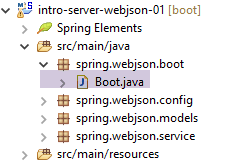 |
[Boot] sınıfı, projenin yürütülebilir sınıfıdır:
package spring.webjson.boot;

import org.springframework.boot.SpringApplication;

import spring.webjson.server.config.AppConfig;

public class Boot {

    public static void main(String[] args) {
        SpringApplication.run(AppConfig.class, args);
    }
}
- 10. satır: [SpringApplication.run] statik yöntemi yürütülür. [SpringApplication] sınıfı, [Spring Boot] projesine ait bir sınıftır (3. satır). Bu sınıfa iki parametre aktarılır:
- [AppConfig.class]: Uygulamanın tamamını yapılandıran sınıf;
- [args]: 9. satırdaki [main] yöntemine aktarılan olası argümanlar. Bu parametre burada kullanılmamaktadır;
Bu sınıf çalıştırıldığında aşağıdaki günlük kayıtları elde edilir:
- 17-19. satırlar: / jSON web hizmetini çalıştıracak Tomcat sunucusunun başlatılması;
- satır 25-33: [DAO] katmanının oluşturulması;
- 32-51. satırlar: Açığa çıkan URL'ler tespit edilir;
13.5.7. / jSON web hizmetinin testleri
Testleri yapmak için, SQL [dbintrospringdata.sql] komut dosyasından MySQL [dbintrospringdata] veritabanını oluşturuyoruz:
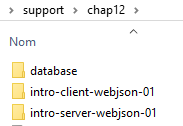 |
Bunu yaptıktan sonra, / jSON web hizmeti tarafından sunulan URL verilerini sorgulamak için [Advanced Rest Client] istemcisini kullanıyoruz tarafından sunulan URL dosyalarını sorgulamak için kullanıyoruz (/ jSON web hizmeti başlatılmış olmalıdır).
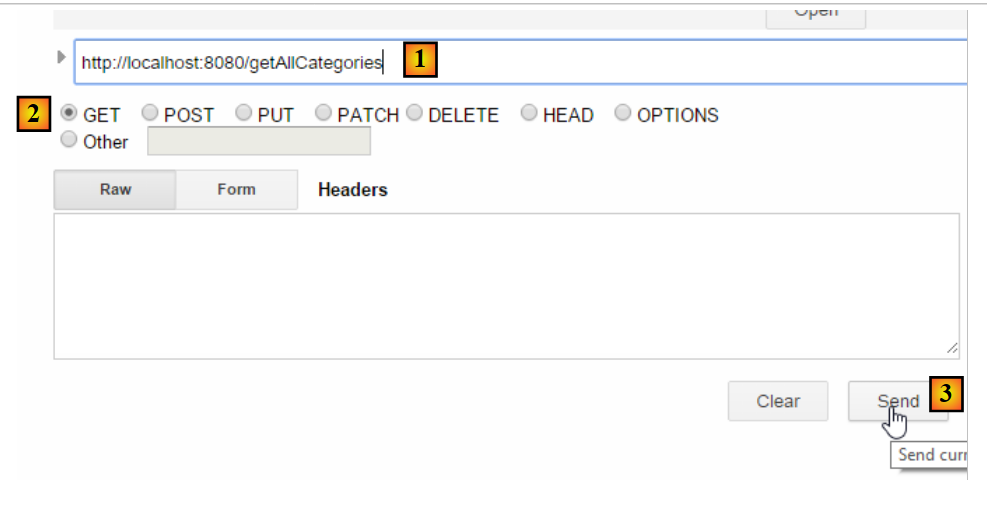 |
- [1-3]'te, URL ve [/getAllCategories]'i HTTP ve GET komutları aracılığıyla talep ediyoruz;
Aşağıdaki yanıtı alıyoruz:
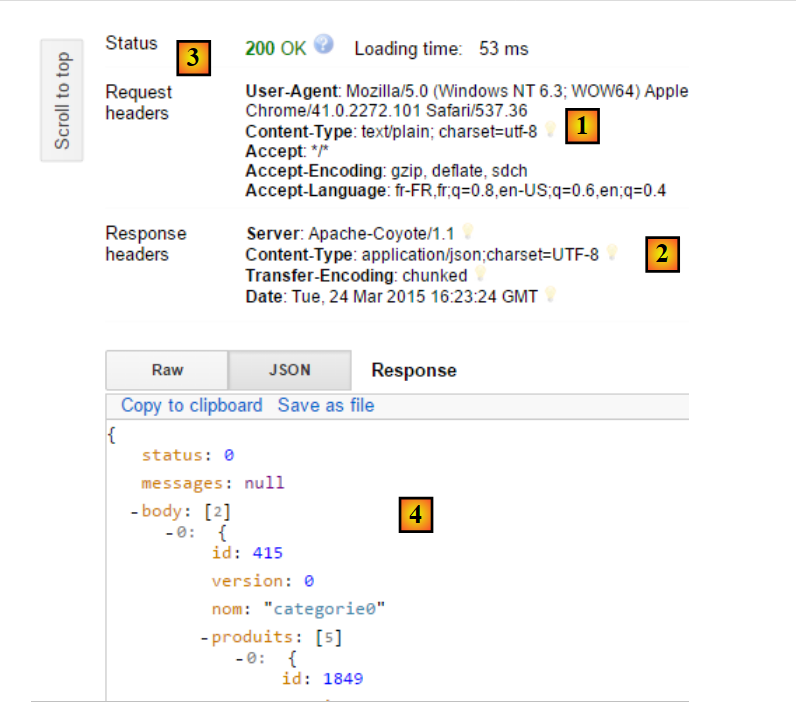 |
- [1]'te, istemcinin HTTP isteği;
- [2]'e, sunucunun HTTP yanıtı;
- [3]'e, [200 OK] durumu, sunucunun isteği başarıyla işlediğini gösterir;
- [4]'te, sunucunun jSON yanıtı;
jSON yanıtının tamamı şöyledir:
{"status":0,"messages":null,"body":[{"id":415,"version":0,"nom":"categorie0","produits":[{"id":1849,"version":0,"nom":"produit00","idCategorie":415,"prix":100.0,"description":"desc00"},{"id":1850,"version":0,"nom":"produit01","idCategorie":415,"prix":101.0,"description":"desc01"},{"id":1851,"version":0,"nom":"produit02","idCategorie":415,"prix":102.0,"description":"desc02"},{"id":1852,"version":0,"nom":"produit03","idCategorie":415,"prix":103.0,"description":"desc03"},{"id":1853,"version":0,"nom":"produit04","idCategorie":415,"prix":104.0,"description":"desc04"}]},{"id":416,"version":0,"nom":"categorie1","produits":[{"id":1856,"version":0,"nom":"produit12","idCategorie":416,"prix":112.0,"description":"desc12"},{"id":1857,"version":0,"nom":"produit13","idCategorie":416,"prix":113.0,"description":"desc13"},{"id":1858,"version":0,"nom":"produit14","idCategorie":416,"prix":114.0,"description":"desc14"},{"id":1854,"version":0,"nom":"produit10","idCategorie":416,"prix":110.0,"description":"desc10"},{"id":1855,"version":0,"nom":"produit11","idCategorie":416,"prix":111.0,"description":"desc11"}]}]}
- status:0, sunucu tarafında hata olmadığını gösterir;
- mesajlar: null, hata mesajı olmadığı anlamına gelir;
- body: yanıtın gövdesidir; burada, ürünleri ile birlikte kategori listesi yer almaktadır. Her biri 5 ürün içeren iki kategori bulunmaktadır;
[categorie1] kategorisine [produit15] ürününü ekleyeceğiz. Bunun için aşağıdaki koda sahip URL ve [/addCategories] kodlarını kullanacağız:
@RequestMapping(value = "/addCategories", method = RequestMethod.POST, consumes = "application/json; charset=UTF-8", produces = "application/json; charset=UTF-8")
    @ResponseBody
    public String addCategories(HttpServletRequest request) throws JsonProcessingException {
        Response<List<Categorie>> response;
        ObjectMapper mapper = context.getBean(ObjectMapper.class);
        // kategoriler korunur
        try {
            // kaydedilen değer alınır
            String body = CharStreams.toString(request.getReader());
            mapper.setFilters(jsonFilterCategorieWithProduits);
            List<Categorie> categories = mapper.readValue(body, new TypeReference<List<Categorie>>() {
            });
            // ürünler ve kategoriler arasındaki bağlantı yeniden kurulur
            for (Categorie categorie : categories) {
                Set<Produit> produits = categorie.getProduits();
                if (produits != null) {
                    for (Produit produit : categorie.getProduits()) {
                        produit.setCategorie(categorie);
                    }
                }
            }
            // kategoriler kalıcı hale getiriliyor
            application.addCategories(categories);
            response = new Response<List<Categorie>>(0, null, categories);
        } catch (Exception e) {
            response = new Response<List<Categorie>>(1004, getErreursForException(e), null);
        }
        // yanıt jSON
        return mapper.writeValueAsString(response);
    }
- 1. satır: müşteri POST oluşturmalı ve gönderilen değer jSON dizesi olmalıdır;
- 9-12. satırlar: gönderilen değer, ilgili ürünleriyle birlikte bir kategori listesi olmalıdır;
[categorie2] adlı bir kategori ve [produit21] adlı bir ürün oluşturacağız. Bu durumda gönderilecek jSON dizesi şu şekildedir:
[{"id":null,"version":0,"nom":"categorie2","produits":[{"id":null,"version":0,"nom":"produit21","idCategorie":null,"prix":111.0,"description":"desc21"}]}]
/jSON web hizmetine yapılan istek şu şekilde gerçekleştirilir:
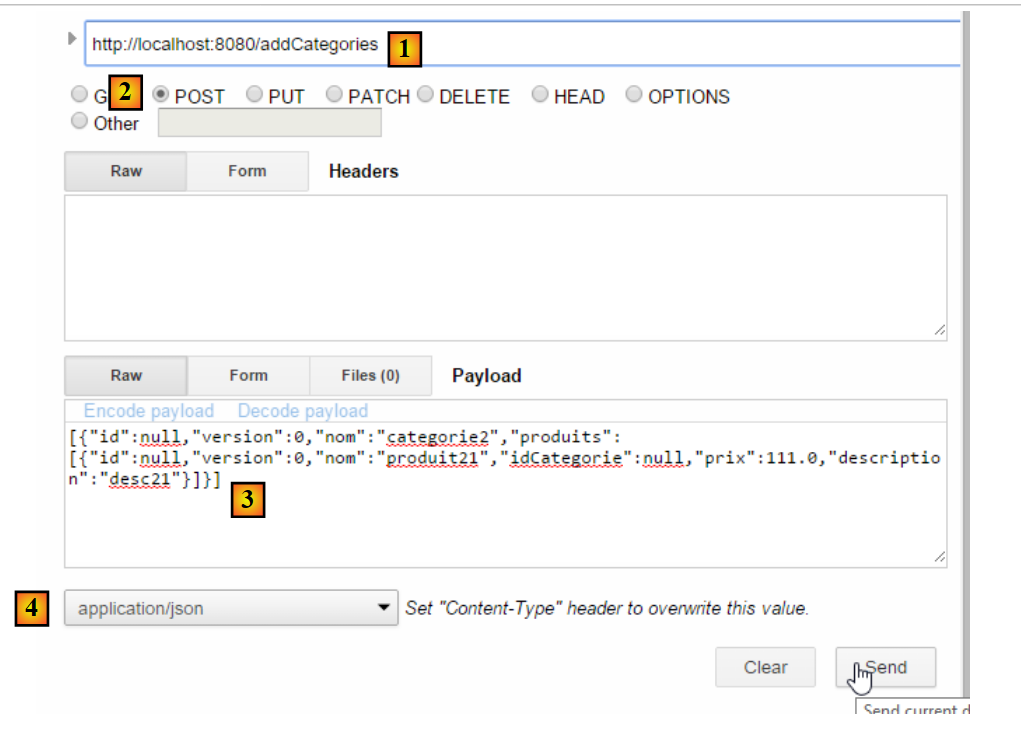 |
- [1]'te, istenen URL;
- [2]'te, POST işlemi aracılığıyla talep edilir;
- [3]'te, jSON dizesi gönderilir;
- [4]'te, sunucuya jSON'i göndereceğimiz belirtilir;
Sunucunun yanıtı şöyledir:
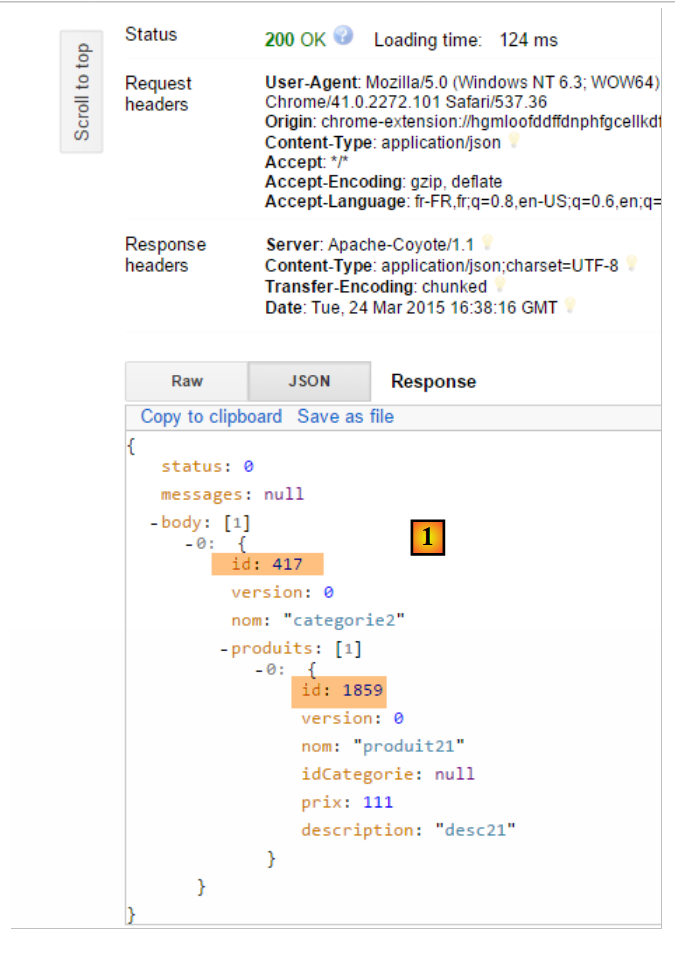 |
- [1]'te, hem kategorinin hem de ürünün artık bir birincil anahtara sahip olduğu görülüyor; bu da muhtemelen veritabanına eklendiklerini gösteriyor. Bunu URL ve [/getCategorieByNameWithProduits/categorie2]'i kullanarak doğrulayacağız:
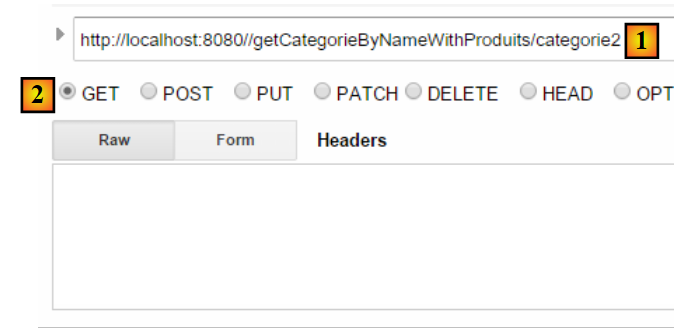 |
Aşağıdaki sonucu elde ediyoruz:
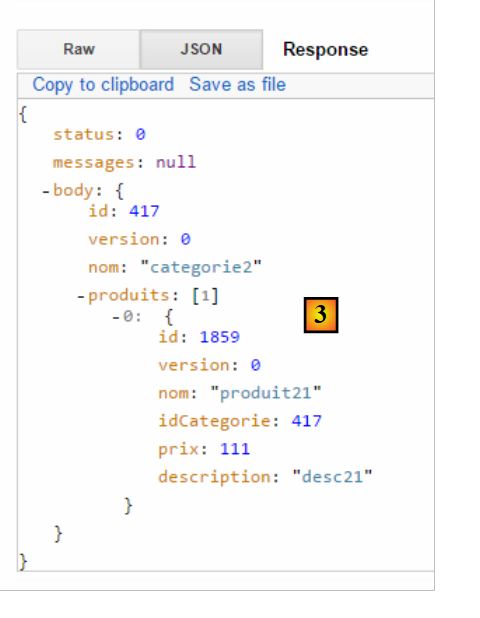 |
[categorie2] kategorisini ve bu kategorideki tek ürünü olan [produit21]'i doğru bir şekilde elde ettik. Yalnızca ürünü de sorgulayabiliriz. Bunun için URL ve [/getProduitByIdWithoutCategorie/1859]'i kullanalım:
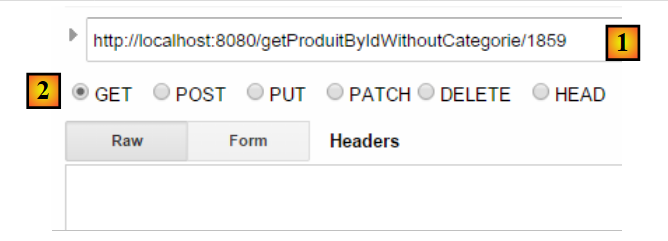 |
Şu sonucu elde ediyoruz:
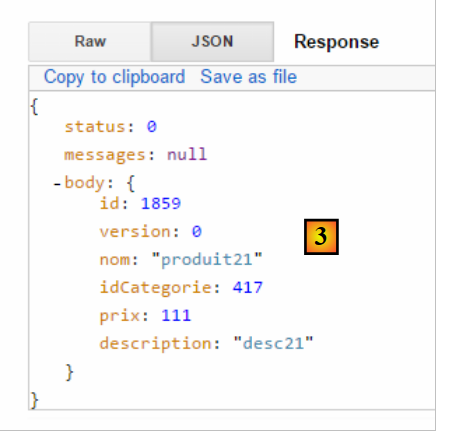 |
Tüm [GET] işlemleri basit bir tarayıcıda gerçekleştirilebilir:
 |
Okuyucunun, web hizmeti / json'daki diğer URL işlemlerini denemesi önerilir.
13.6. / jSON web hizmeti için programlanmış bir istemci
Artık [dbintrospringdata] veritabanı web üzerinde mevcut olduğuna göre, bunu kullanan bir uygulama yazacağız. Böylece şu istemci / sunucu mimarisine sahip olacağız:
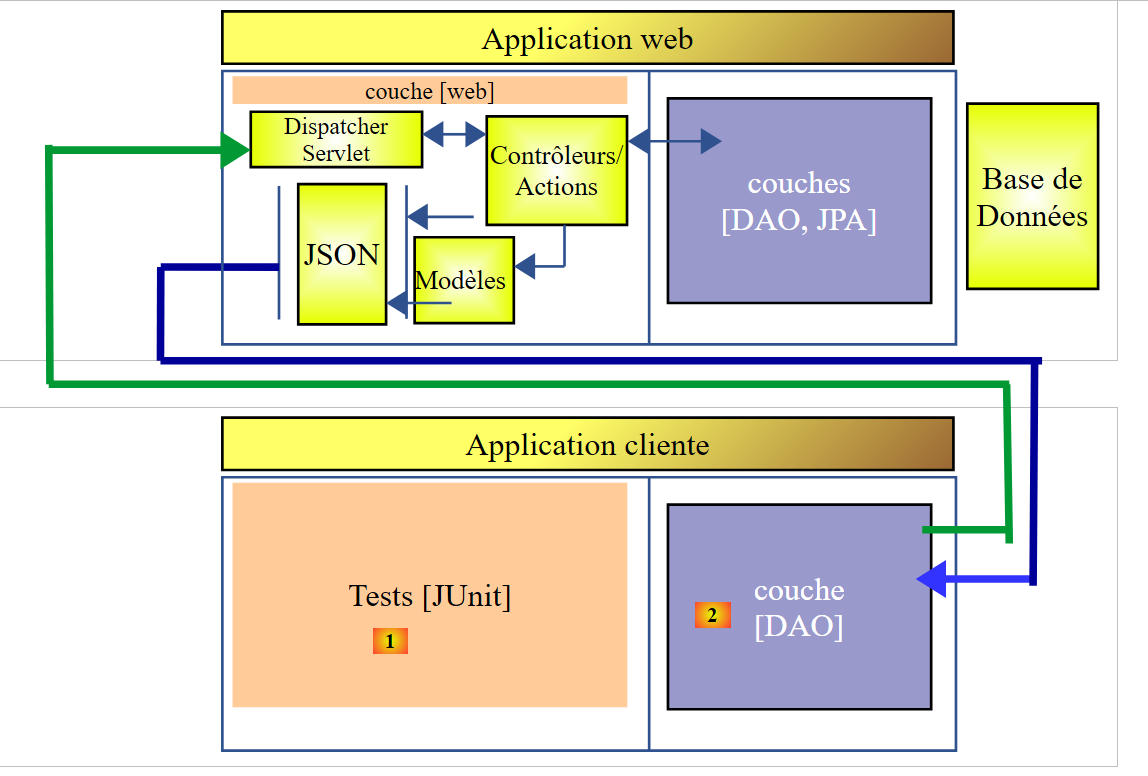 |
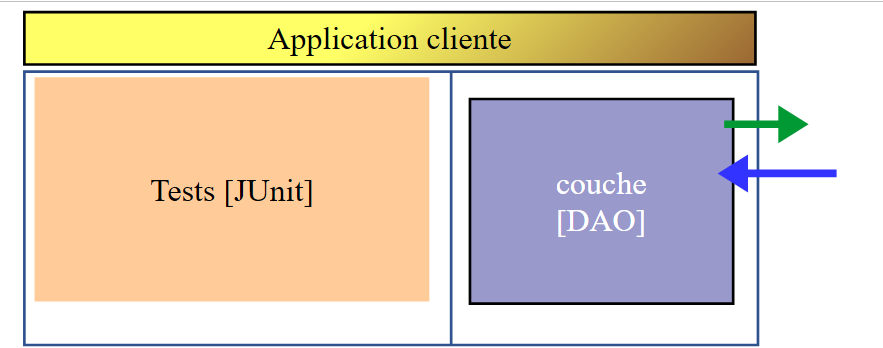
İstemci uygulaması iki katmandan oluşacak:
- veritabanını sunan web uygulaması / jSON ile iletişim kurmak için bir [DAO] [2] katmanı;
- istemci ve sunucunun düzgün çalıştığını doğrulamak için bir test katmanı (JUnit [1]);
13.6.1. Eclipse Projesi
Müşterinin Eclipse projesi şu şekildedir:
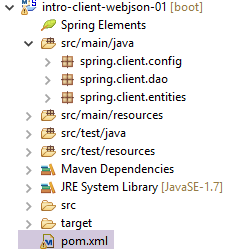 |
- [src/main/java] klasörü, [DAO] katmanını uygular;
- [src/test/java] klasörü, JUnit testlerini uygular;
13.6.2. Projenin Maven Yapılandırması
Proje, aşağıdaki [pom.xml] dosyası ile yapılandırılmış bir Maven projesidir:
<project xmlns="http://maven.apache.org/POM/4.0.0" xmlns:xsi="http://www.w3.org/2001/XMLSchema-instance"
    xsi:schemaLocation="http://maven.apache.org/POM/4.0.0 http://maven.apache.org/xsd/maven-4.0.0.xsd">
    <modelVersion>4.0.0</modelVersion>
    <groupId>istia.st.webjson</groupId>
    <artifactId>intro-client-webjson-01</artifactId>
    <version>0.0.1-SNAPSHOT</version>
    <description>Client console du serveur web / jSON</description>

    <properties>
        <project.build.sourceEncoding>UTF-8</project.build.sourceEncoding>
        <java.version>1.8</java.version>
    </properties>

    <parent>
        <groupId>org.springframework.boot</groupId>
        <artifactId>spring-boot-starter-parent</artifactId>
        <version>1.2.7.RELEASE</version>
    </parent>

    <dependencies>
        <!-- Spring -->
        <dependency>
            <groupId>org.springframework</groupId>
            <artifactId>spring-web</artifactId>
        </dependency>
        <!-- Spring tarafından kullanılan jSON kütüphanesi -->
        <dependency>
            <groupId>com.fasterxml.jackson.core</groupId>
            <artifactId>jackson-core</artifactId>
        </dependency>
        <dependency>
            <groupId>com.fasterxml.jackson.core</groupId>
            <artifactId>jackson-databind</artifactId>
        </dependency>
        <!-- Spring tarafından kullanılan bileşen RestTemplate -->
        <dependency>
            <groupId>org.apache.httpcomponents</groupId>
            <artifactId>httpclient</artifactId>
        </dependency>
        <!-- Google Guava -->
        <dependency>
            <groupId>com.google.guava</groupId>
            <artifactId>guava</artifactId>
            <version>16.0.1</version>
            <scope>test</scope>
        </dependency>
        <!-- günlük kütüphanesi -->
        <dependency>
            <groupId>org.springframework.boot</groupId>
            <artifactId>spring-boot-starter-logging</artifactId>
        </dependency>
        <!-- Spring Boot Testi -->
        <dependency>
            <groupId>org.springframework.boot</groupId>
            <artifactId>spring-boot-starter-test</artifactId>
            <scope>test</scope>
        </dependency>
        <!-- Spring Boot -->
        <dependency>
            <groupId>org.springframework.boot</groupId>
            <artifactId>spring-boot</artifactId>
            <scope>test</scope>
        </dependency>
    </dependencies>
    <!-- eklentiler -->
    <build>
        <plugins>
            <plugin>
                <artifactId>maven-assembly-plugin</artifactId>
                <configuration>
                    <descriptorRefs>
                        <descriptorRef>jar-with-dependencies</descriptorRef>
                    </descriptorRefs>
                </configuration>
            </plugin>
            <plugin>
                <groupId>org.apache.maven.plugins</groupId>
                <artifactId>maven-surefire-plugin</artifactId>
                <version>2.18.1</version>
            </plugin>
        </plugins>
    </build>

    <name>intro-client-webjson-01</name>
</project>
- 14-18. satırlar: [spring-boot-starter-parent] adlı üst Maven projesi, sürümleri belirtilmeden bir dizi bağımlılığı tanımlamamıza olanak tanır; sürümler üst projede tanımlanmıştır;
- 22-25. satırlar: bir web uygulaması yazmıyor olsak da, bir web uygulamasıyla / jSON ile kolayca arayüz oluşturmamızı sağlayan [RestTemplate] sınıfını beraberinde getiren [spring-web] bağımlılığına ihtiyacımız var;
- 27-34. satırlar: bir jSON kütüphanesi;
- satır 36-39: İstemcinin HTTP isteklerine bir timeout eklememizi sağlayacak bir bağımlılık. timeout, sunucudan yanıt alınması için maksimum bekleme süresidir. Bu süre aşıldığında, istemci bir istisna oluşturarak timeout hatasını bildirir;
- 41-46. satırlar: Testte kullanılan Google Guava kütüphanesi JUnit. Bu nedenle, kapsamını [test] olarak belirledik (satır 45). Bu, söz konusu bağımlılığın yalnızca [src/test/java] dalındaki kodlar çalıştırıldığında dahil edileceği anlamına gelir;
- 48-51. satırlar: günlük kütüphanesi;
- satır 52-63: JUnit test bağımlılığı. Bu bağımlılık, özellikle testler için gerekli olan JUnit 4 kütüphanesini içerir. Bu bağımlılıklar, yalnızca test aşaması için gerekli olduklarını belirten [<scope>test</scope>] özniteliğine sahiptir. Bunlar, projenin nihai arşivine dahil edilmez;
13.6.3. [DAO] katmanının uygulanması
 |
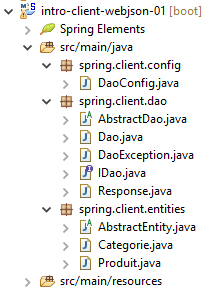 |
- [spring.client.config] paketi, [DAO] katmanının Spring yapılandırmasını içerir;
- [spring.client.dao] paketi, [DAO] katmanının uygulamasını içerir;
- [spring.client.entities] paketi, /jSON web hizmeti ile alışverişi yapılan nesneleri içerir;
13.6.3.1. Configuration
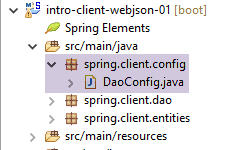 |
[DaoConfig] sınıfı, [DAO] katmanının Spring yapılandırmasını gerçekleştirir. Kod şöyledir:
package spring.client.config;

import org.springframework.context.annotation.Bean;
import org.springframework.context.annotation.ComponentScan;
import org.springframework.context.annotation.Configuration;
import org.springframework.http.client.HttpComponentsClientHttpRequestFactory;
import org.springframework.web.client.RestTemplate;

import com.fasterxml.jackson.databind.ObjectMapper;
import com.fasterxml.jackson.databind.ser.impl.SimpleBeanPropertyFilter;
import com.fasterxml.jackson.databind.ser.impl.SimpleFilterProvider;

@ComponentScan({ "spring.client.dao" })
public class DaoConfig {

    // sabitler
    static private final int TIMEOUT = 1000;
    static private final String URL_WEBJSON = "http://localhost:8080";

    @Bean
    public RestTemplate restTemplate(int timeout) {
        // bileşen oluşturma RestTemplate
        HttpComponentsClientHttpRequestFactory factory = new HttpComponentsClientHttpRequestFactory();
        RestTemplate restTemplate = new RestTemplate(factory);
        // iletişim zaman aşımı
        factory.setConnectTimeout(timeout);
        factory.setReadTimeout(timeout);
        // sonuç
        return restTemplate;
    }

    @Bean
    public int timeout() {
        return TIMEOUT;
    }

    @Bean
    public String urlWebJson() {
        return URL_WEBJSON;
    }

    // filtreler jSON
    @Bean(name = "jsonMapper")
    public ObjectMapper jsonMapper() {
        return new ObjectMapper();
    }

    @Bean(name = "jsonMapperCategorieWithProduits")
    public ObjectMapper jsonMapperCategorieWithProduits() {
        // eşleştirici jSON
        ObjectMapper mapper = new ObjectMapper();
        // filtreler
        mapper.setFilters(
                new SimpleFilterProvider().addFilter("jsonFilterCategorie", SimpleBeanPropertyFilter.serializeAllExcept())
                        .addFilter("jsonFilterProduit", SimpleBeanPropertyFilter.serializeAllExcept("categorie")));
        // sonuç
        return mapper;
    }

    @Bean(name = "jsonMapperProduitWithCategorie")
    public ObjectMapper jsonMapperProduitWithCategorie() {
        // eşleştirici jSON
        ObjectMapper mapper = new ObjectMapper();
        // filtreler
        mapper.setFilters(
                new SimpleFilterProvider().addFilter("jsonFilterProduit", SimpleBeanPropertyFilter.serializeAllExcept())
                        .addFilter("jsonFilterCategorie", SimpleBeanPropertyFilter.serializeAllExcept("produits")));
        // sonuç
        return mapper;
    }

    @Bean(name = "jsonMapperCategorieWithoutProduits")
    public ObjectMapper jsonMapperCategorieWithoutProduits() {
        // eşleştirici jSON
        ObjectMapper mapper = new ObjectMapper();
        // filtreler
        mapper.setFilters(new SimpleFilterProvider().addFilter("jsonFilterCategorie",
                SimpleBeanPropertyFilter.serializeAllExcept("produits")));
        // sonuç
        return mapper;
    }

    @Bean(name = "jsonMapperProduitWithoutCategorie")
    public ObjectMapper jsonMapperProduitWithoutCategorie() {
        // eşleştirici jSON
        ObjectMapper mapper = new ObjectMapper();
        // filtreler
        mapper.setFilters(new SimpleFilterProvider().addFilter("jsonFilterProduit",
                SimpleBeanPropertyFilter.serializeAllExcept("categorie")));
        // sonuç
        return mapper;
    }
}
- 13. satır: Sınıf, bir Spring yapılandırma sınıfıdır — Spring bileşenleri [spring.client.dao] paketinde aranmalıdır;
- 17. satır: timeout değeri bir saniye (1000 ms) olarak belirlenir;
- 32-35. satırlar: bu değeri döndüren bean;
- 18. satır: web hizmetinin URL / jSON;
- satır 37-40: bu değeri döndüren bean;
- satır 20-30: / jSON web hizmeti ile iletişimi sağlayan [RestTemplate] sınıfının yapılandırması. Yapılandırılması gerekmediğinde, kodda basit bir [new RestTemplate()] ile kullanılabilir. Burada, /jSON web hizmeti ile veri alışverişi için timeout değerini belirlemek istiyoruz. 36. satırdaki [timeout] bean'i, 24. satırdaki [restTemplate] yöntemine parametre olarak aktarılmıştır;
- 23. satır: [HttpComponentsClientHttpRequestFactory] bileşeni, iletişimde timeout değerini belirlememizi sağlayan bileşendir (29-30. satırlar);
- 24. satır: [RestTemplate] sınıfı bu bileşenle oluşturulmuştur. Bu sınıf, /jSON web hizmeti ile iletişim kurmak için bu bileşene dayandığından, veri alışverişleri timeout'e tabi olacaktır;
- istemci ve sunucu arasında metin satırları alışverişi yapılacaktır. Bir dönüştürücü, bir nesneyi metne serileştirir ve tersine, bir metni nesneye deserileştirir. [RestTemplate] sınıfıyla ilişkili birden fazla dönüştürücü olabilir ve belirli bir anda hangisinin seçileceği, sunucu tarafından gönderilen HTTP başlıklarına bağlıdır. Burada herhangi bir dönüştürücü kullanmayacağız. Dolayısıyla, [RestTemplate] bileşeni, aşağıdaki iki öğeyi hiçbir şekilde dönüştürmeye çalışmayacaktır:
- gönderilen metin;
- yanıt olarak alınan metin;
Bu metinler, jSON dizeleri olacak ve dolayısıyla [RestTemplate] bileşeni tarafından olduğu gibi bırakılacaktır. Gerekli jSON serileştirme/deserileştirme işlemlerini biz geliştiriciler yapacağız. Bunun nedeni, gönderilen değere ve alınan yanıta uygulanacak filtrelerin farklı olabilmesidir; deneyimler, [RestTemplate] bileşenini doğru jSON dönüştürücüsünü kullanacak şekilde yapılandırmaya çalışmaktansa, bunları kendimiz yönetmenin daha kolay olduğunu göstermektedir;
- satır 42-92: jSON filtrelerini tanımlar. Bunlar, 13.5.3.1 paragrafında sunulan ve açıklanan sunucu filtreleriyle aynıdır;
- 43-46. satırlar: filtre içermeyen bir jSON eşleştiricisi;
- 64-68. satırlar: Ürünleri içermeyen bir kategori oluşturmak için jSON eşleştiricisi;
- 48-58. satırlar: ürünleriyle birlikte bir kategoriye sahip olmak için jSON eşleştiricisi;
- satır 83-92: bir ürünün kategorisi olmadan görüntülenmesi için jSON eşleştiricisi;
- 60-70. satırlar: bir ürünün kendi kategorisiyle birlikte gösterilmesi için jSON eşleştiricisi;
Tüm bu bean'ler, [DAO] katmanındaki kodlarda ve Junit testinde kullanılabilir olacaktır.
13.6.3.2. Varlıklar
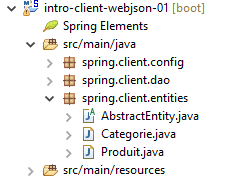 |
[DAO] katmanı tarafından işlenen varlıklar, bu katmanın /jSON web hizmeti ile alışveriş yaptığı varlıklardır. Bunlar, ürünler ve ürün kalemleridir. Sunucu tarafında, bu varlıklar JPA kalıcılık anotasyonlarına sahipti. Burada bu anotasyonlar kaldırılmıştır. Hatırlatma amacıyla varlıkların kodunu tekrar veriyoruz:
[AbstractEntity]
package spring.client.entities;

import com.fasterxml.jackson.core.JsonProcessingException;
import com.fasterxml.jackson.databind.ObjectMapper;

public abstract class AbstractEntity {
    // özellikler
    protected Long id;
    protected Long version;

    // oluşturucular
    public AbstractEntity() {

    }

    public AbstractEntity(Long id, Long version) {
        this.id = id;
        this.version = version;
    }

    // [equals] ve [hashcode] yeniden tanımlaması
    @Override
    public int hashCode() {
        return (id != null ? id.hashCode() : 0);
    }

    @Override
    public boolean equals(Object entity) {
        if (!(entity instanceof AbstractEntity)) {
            return false;
        }
        String class1 = this.getClass().getName();
        String class2 = entity.getClass().getName();
        if (!class2.equals(class1)) {
            return false;
        }
        AbstractEntity other = (AbstractEntity) entity;
        return id != null && this.id == other.id.longValue();
    }

    // imza jSON
    public String toString() {
        ObjectMapper mapper = new ObjectMapper();
        try {
            return mapper.writeValueAsString(this);
        } catch (JsonProcessingException e) {
            e.printStackTrace();
            return null;
        }
    }

    // alıcı ve ayarlayıcılar
...
}
[Categorie]
package spring.client.entities;

import java.util.HashSet;
import java.util.Set;

import com.fasterxml.jackson.annotation.JsonFilter;

@JsonFilter("jsonFilterCategorie")
public class Categorie extends AbstractEntity {

    // özellikler
    private String nom;

    // ilgili ürünler
    public Set<Produit> produits = new HashSet<Produit>();

    // yapıcılar
    public Categorie() {

    }

    public Categorie(String nom) {
        this.nom = nom;
    }

    // yöntemler
    public void addProduit(Produit produit) {
        // ürünü ekliyoruz
        produits.add(produit);
        // kategorisi belirlenir
        produit.setCategorie(this);
    }

    // getter ve setter'lar
    ...
}
[Produit]
package spring.webjson.client.entities;

import com.fasterxml.jackson.annotation.JsonFilter;

@JsonFilter("jsonFilterProduit")
public class Produit extends AbstractEntity {

    // ad
    private String nom;
   // kategori numarası
    private Long idCategorie;
   // fiyat
    private double prix;
   // açıklama
    private String description;

    // kategori
    private Categorie categorie;

    // üreticiler
    public Produit() {

    }

    public Produit(String nom, double prix, String description) {
        this.nom = nom;
        this.prix = prix;
        this.description = description;
    }

    // getter ve setter'lar
...
}
13.6.3.3. [DaoException] sınıfı
 |
[DAO] katmanı bir hatayla karşılaştığında, [DaoException] türünde bir istisna oluşturur. Bu sınıf, sunucu tarafında kullanılan ve 11.3.7. paragrafında açıklanan sınıftır.
13.6.3.4. [DAO] katmanının arayüzü
 |
[DAO] katmanı, 11.3.7. paragrafında açıklanan [IDao] arayüzünü sunar.
package spring.client.dao;

import java.util.List;

import spring.client.entities.Categorie;
import spring.client.entities.Produit;

public interface IDao {

    // ürün listesinin eklenmesi
    public List<Produit> addProduits(List<Produit> produits);

    // tüm ürünlerin silinmesi
    public void deleteAllProduits();

    // ürün listesinin güncellenmesi
    public List<Produit> updateProduits(List<Produit> produits);

    // tüm ürünleri alma
    public List<Produit> getAllProduits();

    // kategori listesi ekleme
    public List<Categorie> addCategories(List<Categorie> categories);

    // tüm kategorilerin silinmesi
    public void deleteAllCategories();

    // kategori listesinin güncellenmesi
    public List<Categorie> updateCategories(List<Categorie> categories);

    // tüm kategorileri alma
    public List<Categorie> getAllCategories();

    // belirli bir ürün
    public Produit getProduitByIdWithCategorie(Long idProduit);

    public Produit getProduitByIdWithoutCategorie(Long idProduit);

    public Produit getProduitByNameWithCategorie(String nom);

    public Produit getProduitByNameWithoutCategorie(String nom);

    // belirli bir kategori
    public Categorie getCategorieByIdWithProduits(Long idCategorie);

    public Categorie getCategorieByIdWithoutProduits(Long idCategorie);

    public Categorie getCategorieByNameWithProduits(String nom);

    public Categorie getCategorieByNameWithoutProduits(String nom);

}
13.6.3.5. Web hizmetinin yanıtı / jSON
 |
/ jSON web hizmetinin tüm URL öğelerinin, 13.5.5.3. paragrafında tanımlanan [Response] türünü döndürdüğünü gördük. Bu sınıfı burada tekrar veriyoruz:
package spring.client.dao;

import java.util.List;

public class Response<T> {

    // ----------------- özellikler
    // işlemin durumu
    private int status;
    // olası hata mesajları
    private List<String> messages;
    // yanıt gövdesi
    private T body;

    // yapıcılar
    public Response() {

    }

    public Response(int status, List<String> messages, T body) {
        this.status = status;
        this.messages = messages;
        this.body = body;
    }

    // alıcı ve ayarlayıcılar
    ...
}
13.6.3.6. Web hizmeti / jSON ile veri alışverişinin uygulanması
 |
[AbstractDao] sınıfı , web hizmeti / jSON ile veri alışverişini gerçekleştirir:
package spring.client.dao;

import java.net.URI;
import java.net.URISyntaxException;

import org.springframework.beans.factory.annotation.Autowired;
import org.springframework.core.ParameterizedTypeReference;
import org.springframework.http.MediaType;
import org.springframework.http.RequestEntity;
import org.springframework.web.client.RestTemplate;

public abstract class AbstractDao {

    // veri
    @Autowired
    protected RestTemplate restTemplate;
    @Autowired
    protected String urlServiceWebJson;

    // genel istek
    protected String getResponse(String url, String jsonPost) {

        // URL: URL ile iletişime geçin
        // jsonPost: gönderilecek jSON değeri
        try {
            // isteğin yürütülmesi
            RequestEntity<?> request;
            if (jsonPost != null) {
                // POST isteği
                request = RequestEntity.post(new URI(String.format("%s%s", urlServiceWebJson, url)))
                        .header("Content-Type", "application/json").accept(MediaType.APPLICATION_JSON).body(jsonPost);
            } else {
                // GET isteği
                request = RequestEntity.get(new URI(String.format("%s%s", urlServiceWebJson, url)))
                        .accept(MediaType.APPLICATION_JSON).build();
            }
            // sorgu çalıştırılıyor
            return restTemplate.exchange(request, new ParameterizedTypeReference<String>() {
            }).getBody();
        } catch (URISyntaxException e1) {
            throw new DaoException(20, e1);
        } catch (RuntimeException e2) {
            throw new DaoException(21, e2);
        }
    }

}
- 15-16. satırlar: sunucu ile iletişimi sağlayan [RestTemplate] bileşeninin eklenmesi;
- 17-18. satırlar: web hizmeti / jSON'e ait URL bileşeninin eklenmesi;
Sunucuyla iletişim yöntemlerinin uygulaması, [getResponse] yönteminde faktörleştirilmiştir:
- 21. satır: Yöntem 2 parametre alır:
- [url]: istenen URL;
- [jsonPost]: gönderilecek jSON dizesi, aksi takdirde null. [jsonPost==null] ise, URL'e yönelik istek bir GET ile yapılır, aksi takdirde bir POST ile yapılır;
- 38. satır: Sunucuya isteği gönderen ve yanıtını alan komut. [RestTemplate] bileşeni, sunucuyla iletişim kurmak için çok sayıda yöntem sunar. Burada [exchange] yöntemini seçtik, ancak başka yöntemler de mevcuttur;
- 27-36. satırlar: [RequestEntity] türünde bir istek oluşturmamız gerekiyor. Bu istek, istek yapmak için GET mi yoksa POST mi kullanıldığına göre farklılık gösterir;
- 30-31. satırlar: GET için sorgu. [RequestEntity] sınıfı, GET, POST, HEAD... sorgularını oluşturmak için statik yöntemler sunar. [RequestEntity.get] yöntemi, bunu oluşturan çeşitli yöntemleri zincirleyerek bir GET isteği oluşturulmasına olanak tanır:
- [RequestEntity.get] yöntemi, hedef URL'i bir URI örneği biçiminde parametre olarak kabul eder,
- [accept] yöntemi, HTTP ve [Accept] başlık öğelerini tanımlamaya olanak tanır. Burada, sunucunun göndereceği [application/json] türünü kabul ettiğimizi belirtiriz;
- [build] yöntemi, bu farklı bilgileri kullanarak isteğin [RequestEntity] türünü oluşturur;
- 34-35. satırlar: bir POST için istek. [RequestEntity.post] yöntemi, bunu oluşturan çeşitli yöntemleri zincirleyerek bir POST isteği oluşturulmasına olanak tanır:
- [RequestEntity.post] yöntemi, hedef URL'i bir URI örneği biçiminde parametre olarak kabul eder,
- [header] yöntemi, bir HTTP başlığını tanımlar. Burada, sunucuya [Content-Type: application/json] başlığını göndererek, gönderilen değerin jSON dizesi biçiminde ulaşacağını bildiririz;
- [accept] yöntemi, sunucunun göndereceği [application/json] türünü kabul ettiğimizi belirtmemizi sağlar;
- [body] yöntemi, gönderilen değeri belirler. Bu değer, genel [getResponse] yönteminin (1. satır) 4. parametresidir;
- 38. satır: [RestTemplate].exchange yöntemi, sunucunun yanıtının tamamını (HTTP başlıkları ve belge gövdesi) kapsayan bir [ResponseEntity<String>] türü döndürür. [ResponseEntity].getBody() yöntemi, sunucunun yanıtını temsil eden bu gövdeye (burada bir karakter dizisi) erişilmesini sağlar;
13.6.3.7. [IDao] arayüzünün uygulanması
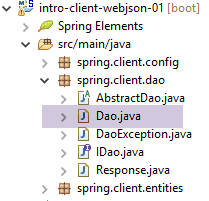 |
[Dao] sınıfı, [IDao] arayüzünü uygular:
package spring.client.dao;

import java.io.IOException;
import java.util.List;

import org.springframework.beans.factory.annotation.Autowired;
import org.springframework.beans.factory.annotation.Qualifier;
import org.springframework.context.ApplicationContext;
import org.springframework.stereotype.Component;

import com.fasterxml.jackson.core.type.TypeReference;
import com.fasterxml.jackson.databind.ObjectMapper;

import spring.client.entities.Categorie;
import spring.client.entities.Produit;

@Component
public class Dao extends AbstractDao implements IDao {

    @Autowired
    private ApplicationContext context;

    // filtreler jSON
    @Autowired
    @Qualifier("jsonMapper")
    private ObjectMapper jsonMapper;
    @Autowired
    @Qualifier("jsonMapperCategorieWithProduits")
    private ObjectMapper jsonMapperCategorieWithProduits;
    @Autowired
    @Qualifier("jsonMapperProduitWithCategorie")
    private ObjectMapper jsonMapperProduitWithCategorie;
    @Autowired
    @Qualifier("jsonMapperCategorieWithoutProduits")
    private ObjectMapper jsonMapperCategorieWithoutProduits;
    @Autowired
    @Qualifier("jsonMapperProduitWithoutCategorie")
    private ObjectMapper jsonMapperProduitWithoutCategorie;

    @Override
    public List<Produit> addProduits(List<Produit> produits) {
        // ----------- ürünleri (kategorileri olmadan) ekle
        ...
}
- 17. satır: [Dao] sınıfı, içine diğer Spring bileşenlerinin enjekte edilebildiği bir Spring bileşenidir;
- 18. satır: [Dao] sınıfı, az önce incelediğimiz [AbstractDao] sınıfını genişletir ve [IDao] arayüzünü uygular;
- 20-21. satırlar: Bean'lere erişebilmek için Spring bağlamı enjekte edilir;
- 24-38. satırlar: 13.6.2. paragrafında tanıtılan [AppConfig] sınıfında tanımlanan jSON eşleştiricilerinin eklenmesi;
[IDao] arayüzünün çeşitli yöntemlerinin uygulamaları, hepsi aynı şemayı izler. Burada, biri [POST] işlemine, diğeri ise [GET] işlemine dayanan iki yöntemi ele alacağız.
[GET] örneği: [getCategorieByNameWithProduits]
@Override
    public Categorie getCategorieByNameWithProduits(String nom) {
        // ----------- adıyla belirtilen kategoriyi, içindeki ürünlerle birlikte al
        try {
            // sorgu
            Response<Categorie> response = jsonMapperCategorieWithProduits.readValue(
                    getResponse(String.format("/getCategorieByNameWithProduits/%s", nom), null),
                    new TypeReference<Response<Categorie>>() {
                    });
            // hata mı?
            if (response.getStatus() != 0) {
                // 1 istisna atılıyor
                throw new DaoException(response.getStatus(), response.getMessages());
            } else {
                // sunucu yanıtının ana kısmı döndürülüyor
                return response.getBody();
            }
        } catch (DaoException e1) {
            throw e1;
        } catch (RuntimeException | IOException e2) {
            throw new DaoException(113, e2);
        }
    }
- 7. satır: üst sınıftaki [getResponse] yöntemi çağrılır. Web hizmeti / jSON ile iletişimi sağlayan bu yöntemdir. Parametreleri şunlardır:
getResponse(String.format("/getCategorieByNameWithProduits/%s", nom), null)
- (devam)
- sorgulanan hizmetin URL'i [/getCategorieByNameWithProduits/nom];
- gönderilen değer. Burada böyle bir değer yoktur;
[getResponse] yöntemi, sunucu tarafından gönderilen jSON yanıtını içeren bir String türü döndürür. Bu jSON yanıtını şu şekilde deserialize ederiz:
jsonMapperCategorieWithProduits.readValue(
                    jsonResponse,
                    new TypeReference<Response<Categorie>>() {
});
çünkü jSON dizesi, bir [Response<Categorie>] türünün serileştirilmesidir;
- 11-17. satırlar: yanıtın durumu kontrol edilir. Durum 0'dan farklıysa, sunucu tarafında bir hata meydana gelmiştir. Bu durumda, yanıtta yer alan bilgileri (durum ve hata mesajları listesi) kullanarak bir istisna atılır (13. satır);
- 16. satır: Sunucu tarafında hata oluşmamışsa, [Response<Categorie>] türündeki gövde, yani istenen kategori döndürülür;
- satır 18-19: 16. satırda atılan istisna işlenir;
- 20-22. satırlar: diğer tüm istisnaları işler;
[POST] örneği: [addCategories]
@Override
    public List<Categorie> addCategories(List<Categorie> categories) {
        // ----------- kategoriler ekleniyor (ürünleriyle birlikte)
        try {
            // istek
            Response<List<Categorie>> response = jsonMapperCategorieWithProduits.readValue(
                    getResponse("/addCategories", jsonMapperCategorieWithProduits.writeValueAsString(categories)),
                    new TypeReference<Response<List<Categorie>>>() {
                    });
            // hata mı?
            if (response.getStatus() != 0) {
                // 1 istisna tetikleniyor
                throw new DaoException(response.getStatus(), response.getMessages());
            } else {
                // sunucunun yanıtının ana kısmı döndürülüyor
                return response.getBody();
            }
        } catch (DaoException e1) {
            throw e1;
        } catch (RuntimeException | IOException e2) {
            throw new DaoException(104, e2);
        }
    }
- 2. satır: [addCategories] yöntemi, parametre olarak geçirilen kategorileri veritabanına kaydetmek için kullanılır. Bu yöntem, söz konusu kategorileri birincil anahtarlarıyla zenginleştirir. Kategoriler ürünlerle birlikte geçirilirse, bu ürünler de veritabanına kaydedilir;
- 7. satır: Web hizmeti / jSON ile veri alışverişi yapmak için üst sınıfın [getResponse] yöntemini çağırır;
- 1. parametre URL [/addCategories]'tir;
- ikinci parametre, gönderilen değerdir; burada kalıcı hale getirilecek kategorilerin listesi yer alır;
getResponse("/addCategories", jsonMapperCategorieWithProduits.writeValueAsString(categories))
Elde edilen jSON dizesi daha sonra, beklenen [Response<List<Categorie>] türünü elde etmek için deserialize edilir:
Response<List<Categorie>> response = jsonMapperCategorieWithProduits.readValue(
                    jsonResponse,
                    new TypeReference<Response<List<Categorie>>>() {
                    });
- 11-17. satırlar: sunucu yanıtının yönetimi (hata olup olmadığı);
- 20-22. satırlar: istisnaların yönetimi;
Diğer tüm yöntemler, sunulan bu iki yöntemin şablonunu takip eder.
13.6.4. JUnit testi
Şu anda oluşturulmakta olan istemci/sunucu mimarisine geri dönelim:
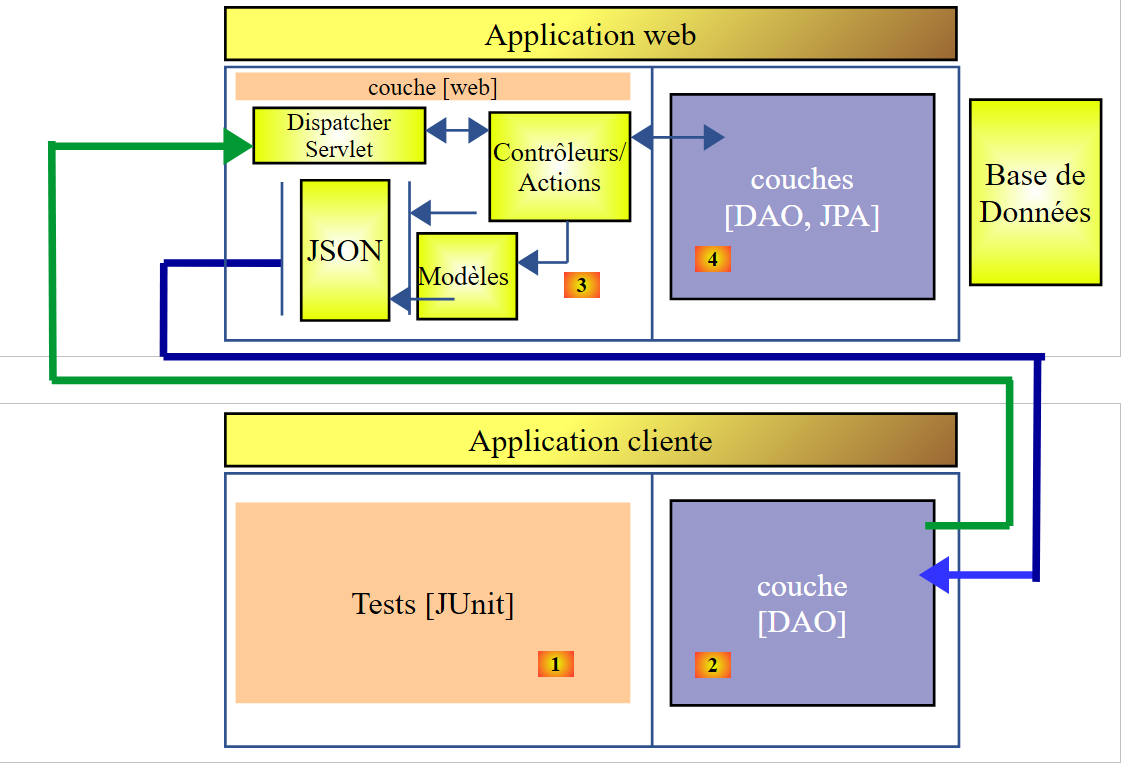 |
[DAO] [4] katmanıyla aynı arayüze sahip bir [DAO] [2] katmanı oluşturduk. Dolayısıyla, [DAO] [2] katmanını test etmek için, [DAO] [4] katmanını test etmekte kullanılan JUnit testini kullanabiliriz. Hatırlatmak gerekirse, bu test şu şekildedir:
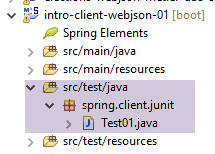 |
package spring.client.junit;

import java.util.ArrayList;
import java.util.List;
import java.util.Set;

import org.junit.Assert;
import org.junit.Before;
import org.junit.Test;
import org.junit.runner.RunWith;
import org.springframework.beans.BeansException;
import org.springframework.beans.factory.annotation.Autowired;
import org.springframework.beans.factory.annotation.Qualifier;
import org.springframework.boot.test.SpringApplicationConfiguration;
import org.springframework.test.context.junit4.SpringJUnit4ClassRunner;

import com.fasterxml.jackson.core.JsonProcessingException;
import com.fasterxml.jackson.databind.ObjectMapper;
import com.google.common.collect.Lists;

import spring.client.config.DaoConfig;
import spring.client.dao.DaoException;
import spring.client.dao.IDao;
import spring.client.entities.Categorie;
import spring.client.entities.Produit;

@SpringApplicationConfiguration(classes = DaoConfig.class)
@RunWith(SpringJUnit4ClassRunner.class)
public class Test01 {

    // [DAO] katmanı
    @Autowired
    private IDao dao;

    // jSON filtreleri
    @Autowired
    @Qualifier("jsonMapper")
    private ObjectMapper jsonMapper;
    @Autowired
    @Qualifier("jsonMapperCategorieWithProduits")
    private ObjectMapper jsonMapperCategorieWithProduits;
    @Autowired
    @Qualifier("jsonMapperProduitWithCategorie")
    private ObjectMapper jsonMapperProduitWithCategorie;
    @Autowired
    @Qualifier("jsonMapperCategorieWithoutProduits")
    private ObjectMapper jsonMapperCategorieWithoutProduits;
    @Autowired
    @Qualifier("jsonMapperProduitWithoutCategorie")
    private ObjectMapper jsonMapperProduitWithoutCategorie;

    @Before
    public void cleanAndFill() {
        // her testten önce veritabanı temizlenir
        log("Vidage de la base de données", 1);
        // [CATEGORIES] tablosu boşaltılır - buna bağlı olarak [PRODUITS] tablosu da boşaltılacaktır
        dao.deleteAllCategories();
        // --------------------------------------------------------------------------------------
        log("Remplissage de la base", 1);
        // tablolar doldurulur
        List<Categorie> categories = new ArrayList<Categorie>();
        for (int i = 0; i < 2; i++) {
            Categorie categorie = new Categorie(String.format("categorie%d", i));
            for (int j = 0; j < 5; j++) {
                categorie.addProduit(new Produit(String.format("produit%d%d", i, j), 100 * (1 + (double) (i * 10 + j) / 100),
                        String.format("desc%d%d", i, j)));
            }
            categories.add(categorie);
        }
        // kategori eklenir - zincirleme olarak ürünler de eklenecektir
        categories = dao.addCategories(categories);
    }

    @Test
    public void showDataBase() throws BeansException, JsonProcessingException {
        // kategori listesi
        log("Liste des catégories", 2);
        List<Categorie> categories = dao.getAllCategories();
        affiche(categories, jsonMapperCategorieWithoutProduits);
        // ürün listesi
        log("Liste des produits", 2);
        List<Produit> produits = dao.getAllProduits();
        affiche(produits, jsonMapperProduitWithoutCategorie);
        // bazı kontroller
        Assert.assertEquals(2, categories.size());
        Assert.assertEquals(10, produits.size());
        Categorie categorie = findCategorieByName("categorie0", categories);
        Assert.assertNotNull(categorie);
        Produit produit = findProduitByName("produit03", produits);
        Assert.assertNotNull(produit);
        Long idCategorie = produit.getIdCategorie();
        Assert.assertEquals(categorie.getId(), idCategorie);
    }

    @Test
    public void getCategorieByNameWithProduits() {
        log("getCategorieByNameWithProduits", 1);
        Categorie categorie1 = dao.getCategorieByNameWithProduits("categorie1");
        Assert.assertNotNull(categorie1);
        Assert.assertEquals(5, categorie1.getProduits().size());
    }

    @Test
    public void getCategorieByNameWithoutProduits() {
        log("getCategorieByNameWithoutProduits", 1);
        Categorie categorie1 = dao.getCategorieByNameWithoutProduits("categorie1");
        Assert.assertNotNull(categorie1);
        Assert.assertEquals("categorie1", categorie1.getNom());
    }

    @Test
    public void getCategorieByIdWithProduits() {
        log("getCategorieByIdWithProduits", 1);
        Categorie categorie1 = dao.getCategorieByNameWithProduits("categorie1");
        Categorie categorie2 = dao.getCategorieByIdWithProduits(categorie1.getId());
        Assert.assertNotNull(categorie2);
        Assert.assertEquals(categorie1.getId(), categorie2.getId());
        Assert.assertEquals(categorie1.getNom(), categorie2.getNom());
    }

    @Test
    public void getCategorieByIdWithoutProduits() {
        log("getCategorieByIdWithoutProduits", 1);
        Categorie categorie1 = dao.getCategorieByNameWithProduits("categorie1");
        Categorie categorie2 = dao.getCategorieByIdWithoutProduits(categorie1.getId());
        Assert.assertNotNull(categorie2);
        Assert.assertEquals(categorie1.getNom(), categorie2.getNom());
    }

    @Test
    public void getProduitByNameWithCategorie() {
        log("getProduitByNameWithCategorie", 1);
        Produit produit = dao.getProduitByNameWithCategorie("produit03");
        Assert.assertNotNull(produit);
        Assert.assertNotNull(produit.getCategorie());
    }

    @Test
    public void getProduitByNameWithoutCategorie() {
        log("getProduitByNameWithoutCategorie", 1);
        Produit produit = dao.getProduitByNameWithoutCategorie("produit03");
        Assert.assertNotNull(produit);
        Assert.assertEquals("produit03", produit.getNom());
    }

    @Test
    public void getProduitByIdWithCategorie() {
        log("getProduitByNameWithCategorie", 1);
        Produit produit = dao.getProduitByNameWithCategorie("produit03");
        Produit produit2 = dao.getProduitByIdWithCategorie(produit.getId());
        Assert.assertNotNull(produit2);
        Assert.assertEquals(produit2.getNom(), produit.getNom());
        Assert.assertEquals(produit2.getId(), produit.getId());
        Assert.assertEquals(produit.getCategorie().getId(), produit2.getCategorie().getId());
    }

    @Test
    public void getProduitByIdWithoutCategorie() {
        log("getProduitByIdWithoutCategorie", 1);
        Produit produit = dao.getProduitByNameWithCategorie("produit03");
        Produit produit2 = dao.getProduitByIdWithoutCategorie(produit.getId());
        Assert.assertNotNull(produit2);
        Assert.assertEquals(produit2.getNom(), produit.getNom());
        Assert.assertEquals(produit2.getId(), produit.getId());
    }

    @Test
    public void doInsertsInTransaction() {
        log("Ajout d'une catégorie [cat1] avec deux produits de même nom", 1);
        // ekleme işlemi yapılıyor
        Categorie categorie = new Categorie("cat1");
        categorie.addProduit(new Produit("x", 1.0, ""));
        categorie.addProduit(new Produit("x", 1.0, ""));
        // kategori ekleniyor - buna bağlı olarak ürünler de sırayla eklenecek
        try {
            categorie = dao.addCategories(Lists.newArrayList(categorie)).get(0);
        } catch (DaoException e) {
            show("Les erreurs suivantes se sont produites :", e.getErreurs());
        }
        // kontroller
        List<Categorie> categories = dao.getAllCategories();
        Assert.assertEquals(2, categories.size());
        List<Produit> produits = dao.getAllProduits();
        Assert.assertEquals(10, produits.size());
    }

    @Test
    public void updateDataBase() {
        log("Mise à jour du prix des produits de [categorie1]", 1);
        Categorie categorie1 = dao.getCategorieByNameWithProduits("categorie1");
        Categorie categorie1Saved = dao.getCategorieByNameWithProduits("categorie1");
        Set<Produit> produits = categorie1.getProduits();
        for (Produit produit : produits) {
            produit.setPrix(1.1 * produit.getPrix());
        }
        List<Produit> produits2 = Lists.newArrayList(produits);
        produits2 = dao.updateProduits(produits2);
        // kontroller
        List<Produit> produitsSaved = Lists.newArrayList(categorie1Saved.getProduits());
        for (Produit produit2 : produits2) {
            Produit produit = findProduitByName(produit2.getNom(), produitsSaved);
            Assert.assertEquals(produit2.getPrix(), produit.getPrix() * 1.1, 1e-6);
        }
    }

    @Test
    public void addProduits() throws BeansException, JsonProcessingException {
        log("Ajout de deux produits de catégorie [categorie0]", 1);
        Categorie categorie0 = dao.getCategorieByNameWithoutProduits("categorie0");
        Long idCategorie = categorie0.getId();
        Produit p1 = new Produit("x", 1, "");
        p1.setIdCategorie(idCategorie);
        p1.setCategorie(categorie0);
        Produit p2 = new Produit("y", 1, "");
        p2.setIdCategorie(idCategorie);
        p2.setCategorie(categorie0);
        List<Produit> produits = new ArrayList<Produit>();
        produits.add(p1);
        produits.add(p2);
        produits = dao.addProduits(produits);
        // doğrulama
        affiche(produits, jsonMapperProduitWithoutCategorie);
    }

    // -------------- özel yöntemler
    private Produit findProduitByName(String nom, List<Produit> produits) {
        for (Produit produit : produits) {
            if (produit.getNom().equals(nom)) {
                return produit;
            }
        }
        return null;
    }

    private Categorie findCategorieByName(String nom, List<Categorie> categories) {
        for (Categorie categorie : categories) {
            if (categorie.getNom().equals(nom)) {
                return categorie;
            }
        }
        return null;
    }

    // T türünde bir öğenin görüntülenmesi
    static private <T> void affiche(T element, ObjectMapper jsonMapper) throws JsonProcessingException {
        System.out.println(jsonMapper.writeValueAsString(element));
    }

    // T türündeki öğelerin listesini görüntüleme
    static private <T> void affiche(List<T> elements, ObjectMapper jsonMapper) throws JsonProcessingException {
        for (T element : elements) {
            affiche(element, jsonMapper);
        }
    }

    private static void log(String message, int mode) {
        // mesaj görüntüleme
        String toPrint = null;
        switch (mode) {
        case 1:
            toPrint = String.format("%s --------------------------------", message);
            break;
        case 2:
            toPrint = String.format("-- %s", message);
            break;
        }
        System.out.println(toPrint);
    }

    private static void show(String title, List<String> messages) {
        // başlık
        System.out.println(String.format("%s : ", title));
        // mesajlar
        for (String message : messages) {
            System.out.println(String.format("- %s", message));
        }
    }

}
Çalıştırma başarılı oldu ve konsolda şu sonuçları verdi:
Vidage de la base de données --------------------------------
Remplissage de la base --------------------------------
Ajout de deux produits de catégorie [categorie0] --------------------------------
{"id":6285,"version":0,"nom":"x","idCategorie":1319,"prix":1.0,"description":""}
{"id":6286,"version":0,"nom":"y","idCategorie":1319,"prix":1.0,"description":""}
Vidage de la base de données --------------------------------
Remplissage de la base --------------------------------
Mise à jour du prix des produits de [categorie1] --------------------------------
Vidage de la base de données --------------------------------
Remplissage de la base --------------------------------
getCategorieByIdWithoutProduits --------------------------------
Vidage de la base de données --------------------------------
Remplissage de la base --------------------------------
getProduitByNameWithoutCategorie --------------------------------
Vidage de la base de données --------------------------------
Remplissage de la base --------------------------------
getCategorieByNameWithProduits --------------------------------
Vidage de la base de données --------------------------------
Remplissage de la base --------------------------------
getCategorieByNameWithoutProduits --------------------------------
Vidage de la base de données --------------------------------
Remplissage de la base --------------------------------
getProduitByNameWithCategorie --------------------------------
Vidage de la base de données --------------------------------
Remplissage de la base --------------------------------
getProduitByNameWithCategorie --------------------------------
Vidage de la base de données --------------------------------
Remplissage de la base --------------------------------
getProduitByIdWithoutCategorie --------------------------------
Vidage de la base de données --------------------------------
Remplissage de la base --------------------------------
-- Liste des catégories
{"id":1337,"version":0,"nom":"categorie0"}
{"id":1338,"version":0,"nom":"categorie1"}
-- Liste des produits
{"id":6367,"version":0,"nom":"produit00","idCategorie":1337,"prix":100.0,"description":"desc00"}
{"id":6368,"version":0,"nom":"produit01","idCategorie":1337,"prix":101.0,"description":"desc01"}
{"id":6369,"version":0,"nom":"produit02","idCategorie":1337,"prix":102.0,"description":"desc02"}
{"id":6370,"version":0,"nom":"produit03","idCategorie":1337,"prix":103.0,"description":"desc03"}
{"id":6371,"version":0,"nom":"produit04","idCategorie":1337,"prix":104.0,"description":"desc04"}
{"id":6372,"version":0,"nom":"produit10","idCategorie":1338,"prix":110.0,"description":"desc10"}
{"id":6373,"version":0,"nom":"produit11","idCategorie":1338,"prix":111.0,"description":"desc11"}
{"id":6374,"version":0,"nom":"produit12","idCategorie":1338,"prix":112.0,"description":"desc12"}
{"id":6375,"version":0,"nom":"produit13","idCategorie":1338,"prix":113.0,"description":"desc13"}
{"id":6376,"version":0,"nom":"produit14","idCategorie":1338,"prix":114.0,"description":"desc14"}
Vidage de la base de données --------------------------------
Remplissage de la base --------------------------------
getCategorieByIdWithProduits --------------------------------
Vidage de la base de données --------------------------------
Remplissage de la base --------------------------------
Ajout d'une catégorie [cat1] avec deux produits de même nom --------------------------------
Les erreurs suivantes se sont produites :
- org.hibernate.exception.ConstraintViolationException: could not execute statement
- could not execute statement
- Duplicate entry 'x' for key 'NOM'
11:24:37.650 [Thread-1] INFO  o.s.c.a.AnnotationConfigApplicationContext - Closing org.springframework.context.annotation.AnnotationConfigApplicationContext@f8c1ddd: startup date [Fri Nov 20 11:24:34 CET 2015]; root of context hierarchy