10. Serviços Web
10.1. Introdução
No capítulo anterior, apresentámos várias aplicações cliente-servidor TCP/IP. Uma vez que os clientes e o servidor trocam linhas de texto, estas podem ser escritas em qualquer linguagem de programação. O cliente deve simplesmente conhecer o protocolo de comunicação esperado pelo servidor. Os serviços Web são aplicações de servidor TCP/IP que apresentam as seguintes características:
- São alojados em servidores Web e, por conseguinte, o protocolo de comunicação cliente-servidor é o HTTP (HyperText Transport Protocol), um protocolo que se sobrepõe ao TCP-IP.
- O serviço Web possui um protocolo de comunicação padrão, independentemente do serviço prestado. Um serviço Web oferece diversos serviços: S1, S2, …, Sn. Cada um deles espera parâmetros fornecidos pelo cliente e devolve-lhe um resultado. Para cada serviço, o cliente precisa de saber:
- o nome exato do serviço, se
- a lista de parâmetros que deve fornecer e o respetivo tipo
- o tipo de resultado devolvido pelo serviço
Uma vez conhecidos estes elementos, o diálogo cliente-servidor segue o mesmo formato, independentemente do serviço web consultado. A programação dos clientes é, assim, normalizada.
- Por razões de segurança face a ataques provenientes da Internet, muitas organizações dispõem de redes privadas e apenas abrem na Internet determinadas portas dos seus servidores: essencialmente a porta 80 do serviço web. Todas as outras portas estão bloqueadas. Assim, as aplicações cliente-servidor, tal como apresentadas no capítulo anterior, são construídas no seio da rede privada (intranet) e, em geral, não são acessíveis a partir do exterior. Alojar um serviço num servidor web torna-o acessível a toda a comunidade da Internet.
- O serviço Web pode ser modelado como um objeto remoto. Os serviços oferecidos tornam-se, assim, métodos desse objeto. Um cliente pode aceder a esse objeto remoto como se fosse local. Isto oculta toda a parte da comunicação de rede e permite construir um cliente independente dessa camada. Se esta vier a mudar, o cliente não precisa de ser alterado. Esta é uma enorme vantagem e, provavelmente, o principal trunfo dos serviços Web.
- Tal como nas aplicações cliente-servidor TCP/IP apresentadas no capítulo anterior, o cliente e o servidor podem ser escritos em qualquer linguagem de programação. Trocam linhas de texto. Estas incluem duas partes:
- os cabeçalhos necessários ao protocolo HTTP
- o corpo da mensagem. No caso de uma resposta do servidor ao cliente, este corpo está no formato XML (eXtensible Markup Language). No caso de um pedido do cliente ao servidor, o corpo da mensagem pode assumir várias formas, incluindo XML. A solicitação XML do cliente pode ter um formato específico denominado SOAP (Simple Object Access Protocol). Neste caso, a resposta do servidor também segue o formato SOAP.
10.2. Os navegadores e o XML
Os serviços Web enviam XML aos seus clientes. Os navegadores podem reagir de forma diferente ao receberem este fluxo XML. O Internet Explorer possui uma folha de estilo predefinida que permite a sua visualização. O Netscape Communicator, por sua vez, não dispõe dessa folha de estilo e não exibe o código XML recebido. É necessário visualizar o código-fonte da página recebida para aceder ao XML. Eis um exemplo para o seguinte código XML:
<?xml version="1.0" encoding="utf-8"?>
<string xmlns="st.istia.univ-angers.fr">bonjour de nouveau !</string>
O Internet Explorer apresentará a seguinte página:

enquanto o Netscape Navigator exibirá:

Se visualizarmos o código-fonte da página recebida pelo Netscape, obtemos:

O Netscape recebeu efetivamente o mesmo que o Internet Explorer, mas apresentou-o de forma diferente. Daqui em diante, utilizaremos o Internet Explorer para as capturas de ecrã.
10.3. Um primeiro serviço Web
Vamos descobrir os serviços Web através de um exemplo muito simples, apresentado em três versões.
10.3.1. Versão 1
Para esta primeira versão, vamos utilizar o VS.NET, que tem a vantagem de poder gerar uma estrutura de serviço Web imediatamente operacional. Assim que compreendermos esta arquitetura, poderemos começar a trabalhar de forma autónoma. Esse será o objetivo das versões seguintes.
Com o VS.NET, vamos criar um novo projeto com a opção [Fichier/Nouveau/Projet]:
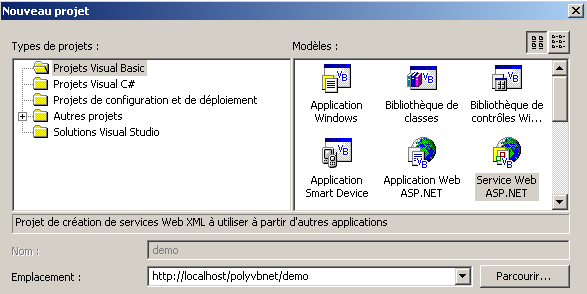
É importante ter em conta os seguintes pontos:
- o tipo de projeto é Visual Basic (painel esquerdo)
- o modelo do projeto é Serviço Web ASP.NET (painel direito)
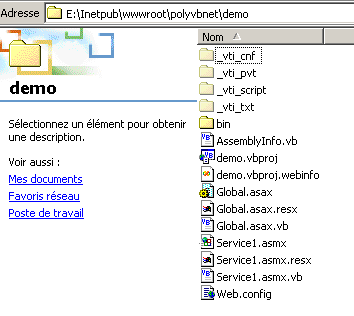
- a localização é livre. Neste caso, o serviço Web será alojado num servidor Web local IIS. O seu endereço será, portanto, http://localhost/[chemin], onde [chemin] deve ser definido. Aqui, escolhemos o caminho http://localhost/polyvbnet/demo. O VS.NET irá então criar uma pasta para este projeto. Onde? O servidor IIS tem uma raiz para a árvore de documentos web que disponibiliza. Chamemos a esta raiz <IISroot>. Ela corresponde ao URL http://localhost. Deduz-se que o URL http://localhost/polyvbnet/demo será associado à pasta <IISroot>/polyvbnet/demo. <IISroot> é normalmente a pasta \inetpub\wwwroot no disco onde foi instalado o IIS. No nosso exemplo, trata-se do disco E. A pasta criada pelo VS.NET é, portanto, a pasta e:\inetpub\wwwroot\polyvbnet\demo:
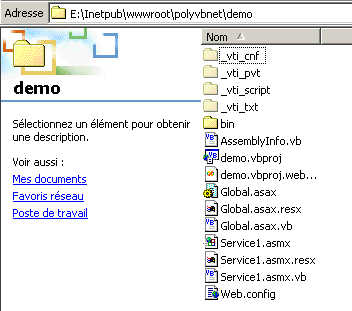
Como sempre, há uma profusão de pastas criadas. Nem sempre são úteis. Iremos explicar apenas aquelas de que precisamos num determinado momento. O VS.NET criou um projeto:
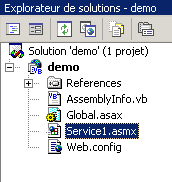
Encontramos alguns dos ficheiros presentes na pasta física do projeto. O mais interessante para nós é o ficheiro com a extensão asmx. Esta é a extensão dos serviços web. Um serviço web é gerido pelo VS.NET como uma aplicação Windows, c.a.d — uma aplicação que possui uma interface gráfica e código para a gerir. É por isso que temos uma janela de design:
Um serviço web normalmente não tem interface gráfica. Representa um objeto que pode ser chamado remotamente. Possui métodos, e as aplicações chamam esses métodos. Vamos, portanto, considerá-lo como um objeto clássico, com a particularidade de poder ser instanciado remotamente através da rede. Por isso, não utilizaremos a janela de design apresentada por VS.NET. Vamos, em vez disso, concentrar-nos no código do serviço, utilizando a opção Exibir/Código:

Há vários pontos a destacar:
- o ficheiro chama-se Service1.asmx.vb e não Service1.asmx. Voltaremos ao conteúdo do ficheiro Service1.asmx um pouco mais adiante.
- Encontramos uma janela de código semelhante à que tínhamos quando criávamos aplicações Windows com o VS.NET
O código gerado pelo VS.NET é o seguinte:
Imports System.Web.Services

<System.Web.Services.WebService(Namespace := "http://tempuri.org/demo/Service1")> _
Public Class Service1
    Inherits System.Web.Services.WebService

#Região «Código gerado pelo Concepteur des services Web»

    Public Sub New()
        MyBase.New()

        'Esta chamada é exigida pelo Web Service Designer.
        InitializeComponent()

        'Adicione o seu código de inicialização após a chamada InitializeComponent()

    End Sub

    'Exigido pelo Web Service Designer
    Private components As System.ComponentModel.IContainer

    'REMARQUE: o procedimento seguinte é exigido pelo Web Service Designer
    'Pode ser alterado utilizando o Web Services Designer.
    'Não o altere utilizando o editor de código.
    <System.Diagnostics.DebuggerStepThrough()> Private Sub InitializeComponent()
        components = New System.ComponentModel.Container()
    End Sub

    Protected Overloads Overrides Sub Dispose(ByVal disposing As Boolean)
        'CODEGEN: este procedimento é exigido pelo Web Services Designer
        'Não a altere utilizando o editor de código.
        If disposing Then
            If Not (components Is Nothing) Then
                components.Dispose()
            End If
        End If
        MyBase.Dispose(disposing)
    End Sub

#Fim da região

    ' EXEMPLE DE SERVICE WEB
    ' O exemplo de serviço HelloWorld() devolve a cadeia «Hello World».
    ' Para gerar, não comente as linhas seguintes, guarde e gere o projeto.
    ' Para testar este serviço Web, certifique-se de que o ficheiro .asmx é a página inicial
    ' e clique em F5.
    '
    '<WebMethod()> Função Pública HelloWorld() As String
    '    HelloWorld = "Hello World"
    ' End Function

End Class
Em primeiro lugar, note-se que temos aqui uma classe, a classe Service1, que deriva da classe WebService:
Isto leva-nos a importar o espaço de nomes System.Web.Services:
Imports System.Web.Services
A declaração da classe é precedida por um atributo de compilação:
<System.Web.Services.WebService(Namespace := "http://tempuri.org/demo/Service1")> _
Public Class Service1
    Inherits System.Web.Services.WebService
O atributo System.Web.Services.WebService() indica que a classe que se segue é um serviço web. Este atributo admite vários parâmetros, incluindo um denominado NameSpace. Serve para colocar o serviço web num espaço de nomes. Com efeito, é possível imaginar que existam vários serviços web denominados «meteo» em todo o mundo. Precisamos de uma forma de os diferenciar. É o espaço de nomes que isso permite. Um pode chamar-se [espacenom1].meteo e outro [espacenom2].meteo. Estamos perante um conceito análogo aos espaços de nomes das classes. O VS.NET gerou automaticamente código que colocou numa região do código-fonte:
Se analisarmos este código, reconhecemos aquele que o designer gerava quando se criavam aplicações Windows. Trata-se de um código que podemos simplesmente eliminar se não tivermos uma interface gráfica, o que será o nosso caso para os serviços web.
A aula termina com um exemplo do que poderia ser um serviço web:
#Fim da Região

    ' EXEMPLE DE SERVICE WEB
    ' O exemplo de serviço HelloWorld() devolve a cadeia «Hello World».
    ' Para gerar, não comente as linhas seguintes, guarde e gere o projeto.
    ' Para testar este serviço Web, certifique-se de que o ficheiro .asmx é a página inicial
    ' e clique em F5.
    '
    '<WebMethod()> Função Pública HelloWorld() As String
    '    HelloWorld = "Hello World"
    ' End Function
Com base no que acabou de ser dito, simplificamos o código para que fique da seguinte forma:
Imports System.Web.Services

<System.Web.Services.WebService(Namespace:="st.istia.univ-angers.fr")> _
Public Class Bonjour
    Inherits System.Web.Services.WebService

    <WebMethod()> Public Function Bonjour() As String
        Return "bonjour !"
    End Function
End Class
Agora fica um pouco mais claro.
- Um serviço web é uma classe derivada da classe WebService
- A classe é qualificada pelo atributo <System.Web.Services.WebService(Namespace:="st.istia.univ-angers.fr")>. Assim, colocamos o nosso serviço no espaço de nomes st.istia.univ-angers.fr.
- Os métodos da classe são qualificados por um atributo <WebMethod()>, indicando que se trata de um método que pode ser chamado remotamente através da rede
A classe que fornece o nosso serviço web chama-se, portanto, Bonjour e tem um único método, também chamado Bonjour, que devolve uma cadeia de caracteres. Estamos prontos para um primeiro teste.
- Iniciemos o servidor web IIS, caso ainda não o tenhamos feito
- utilizemos a opção Depurar/Executar sem depuração. VS.NET
O VS.NET irá então compilar toda a aplicação, iniciar um navegador (geralmente o Internet Explorer, se estiver presente) e apresentar o URL http://localhost/polyvbnet/demo/Service1.asmx:
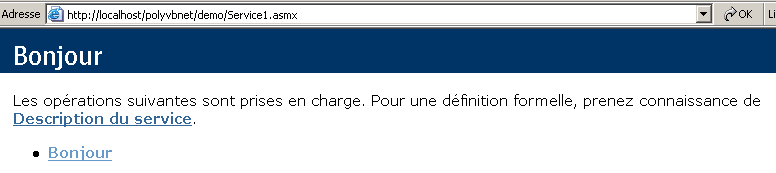
Por que razão a URL http://localhost/polyvbnet/demo/Service1.asmx? Porque era o único ficheiro .asmx do projeto:
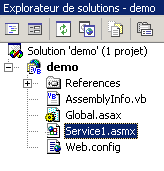
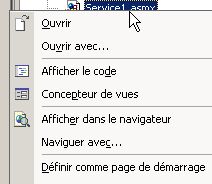
Se houvesse vários ficheiros .asmx, teríamos de especificar qual deles deveria ser executado em primeiro lugar. Para tal, basta clicar com o botão direito do rato no ficheiro .asmx em questão e selecionar a opção [Définir comme page de démarrage].
Talvez seja interessante saber o que contém o ficheiro service1.asmx. De facto, com o VS.NET, trabalhámos no ficheiro service1.asmx.vb e não no ficheiro service1.asmx. Este ficheiro encontra-se na pasta do projeto:
Abramos-o com um editor de texto (Bloco de Notas ou outro). Obtemos o seguinte conteúdo:
O ficheiro contém uma simples diretiva destinada ao servidor IIS, indicando:
- que se trata de um serviço web (palavra-chave WebService)
- que a linguagem da classe deste serviço é o Visual Basic (Language="vb")
- que o código-fonte desta classe se encontra no ficheiro Service1.asmx.vb (Codebehind="Service1.asmx.vb")
- que a classe que implementa o serviço chama-se demo.Bonjour (Class="demo.Bonjour"). Note-se que VS.NET colocou a classe Bonjour no espaço de nomes demo, que é também o nome do projeto.
Voltemos à página obtida no URL http://localhost/polyvbnet/demo/Service1.asmx:
Quem escreveu o código HTML da página acima? Não fomos nós, isso sabemos. Foi o IIS, que apresenta os serviços web de forma padronizada. Esta página apresenta-nos dois links. Sigamos o primeiro, [Description du service]:
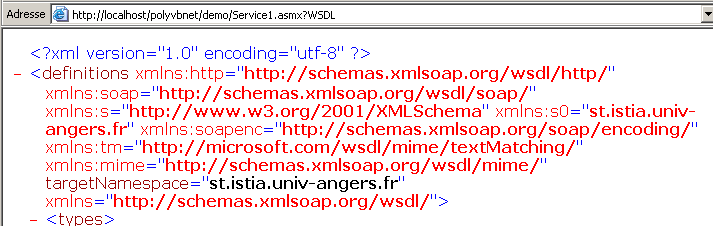
Oops... isto é um XML bastante obscuro. Repare, no entanto, no URL
http://localhost/polyvbnet/demo/Service1.asmx?WSDL. Abra um navegador e digite diretamente esta URL. Obterá o mesmo resultado que anteriormente. Recordemos, portanto, que a URL http://serviceweb?WSDL dá acesso à descrição XML do serviço web. Voltemos à página inicial e selecionemos o link [Bonjour]. Lembremo-nos de que «Bonjour» é um método do serviço web. Se tivéssemos vários métodos, todos eles teriam sido apresentados aqui. Obtemos a seguinte nova página:
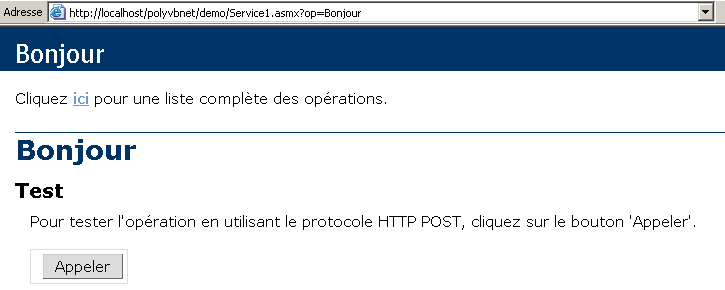
Truncámos deliberadamente a página obtida para não sobrecarregar a nossa demonstração. Repare novamente no URL obtido:
Se introduzirmos diretamente esta URL num navegador, obteremos o mesmo resultado que acima. Somos encorajados a utilizar o botão [Appeler]. Vamos fazê-lo. Obtemos uma nova página:

Trata-se novamente de XML. Encontramos aqui duas informações que estavam presentes no nosso serviço web:
- o espaço de nomes st.istia.univ-angers.fr do nosso serviço
<System.Web.Services.WebService(Namespace:="st.istia.univ-angers.fr")>
- o valor devolvido pelo método Bonjour:
Return "bonjour !"
O que aprendemos?
- como escrever um serviço web S
- como o chamar
Vamos agora dedicar-nos à criação de um serviço web sem a ajuda do VS.NET.
10.3.2. Versão 2
No exemplo anterior, o VS.NET fez muitas coisas sozinho. Será possível criar um serviço web sem essa ferramenta? A resposta é sim e vamos demonstrá-lo agora. Com um editor de texto, vamos criar o seguinte serviço web:
Imports System.Web.Services

<System.Web.Services.WebService(Namespace:="st.istia.univ-angers.fr")> _
Public Class Bonjour2
    Inherits System.Web.Services.WebService

    <WebMethod()> Public Function getBonjour() As String
        Return "bonjour de nouveau !"
    End Function
End Class
A classe chama-se Bonjour2 e tem um método chamado getBonjour. Foi colocada no ficheiro demo2.vb, que por sua vez se encontra na árvore de diretórios do servidor IIS, na pasta E:\Inetpub\wwwroot\polyvbnet\demo2. Trata-se de uma classe VB.NET clássica, que pode, portanto, ser compilada:
dos>vbc /out:demo2 /t:library /r:system.dll /r:system.web.services.dll demo2.vb

dos>dir
02/03/2004  18:04                  286 demo2.vb
02/03/2004  18:10                   77 demo2.asmx
02/03/2004  18:12                3 072 demo2.dll
Colocamos a compilação demo2.dll numa pasta chamada «bin» (este nome é obrigatório):
Criamos agora o ficheiro demo2.asmx. É este ficheiro que será chamado pelos clientes web. O seu conteúdo é o seguinte:
Já nos deparámos com esta diretiva. Ela indica que:
- a classe do serviço web chama-se Bonjour2 e encontra-se no assembly demo2.dll. O IIS irá procurar este assembly em vários locais, nomeadamente na pasta bin do serviço web. É por isso que colocámos aí o assembly demo2.dll.
Agora podemos realizar vários testes. Certificamo-nos de que o IIS está ativo e acedemos, através de um navegador, à URL http://localhost/polyvbnet/demo2/demo2.asmx:
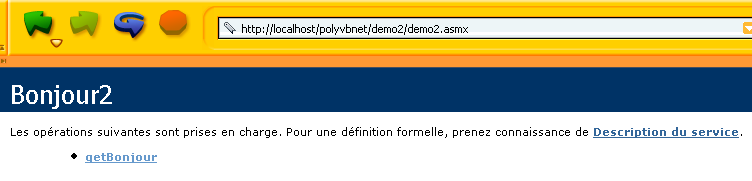
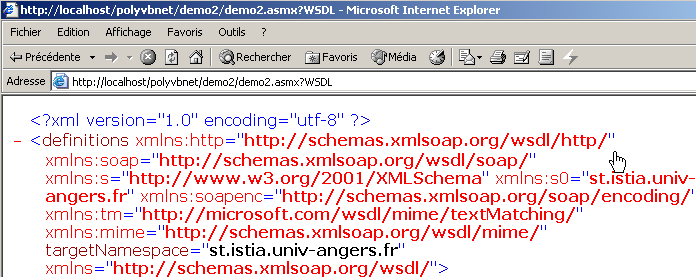
Em seguida, a URL http://localhost/polyvbnet/demo2/demo2.asmx?WSDL
Depois, o URL http://localhost/polyvbnet/demo2/demo2.asmx?op=getBonjour, em que getBonjour é o nome do único método do nosso serviço web:
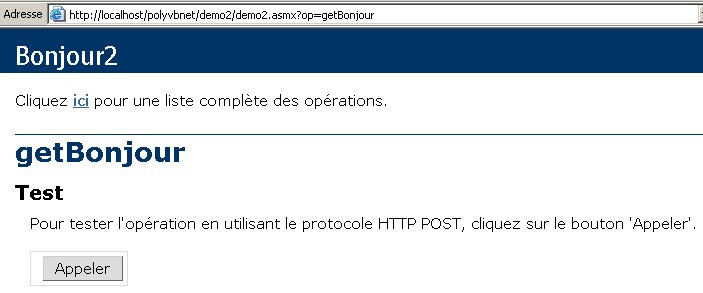
Utilizamos o botão [Appeler] acima:

Obtenemos, de facto, o resultado da chamada ao método getBonjour do serviço web. Sabemos agora como construir um serviço web sem o vs.net. A partir de agora, iremos ignorar a forma como o serviço web está construído para nos concentrarmos apenas nos ficheiros fundamentais.
10.3.3. Versão 3
As duas versões anteriores do serviço web [Bonjour] utilizavam dois ficheiros:
- um ficheiro .asmx, ponto de entrada do serviço web
- um ficheiro .vb, código-fonte do serviço web
Mostramos aqui que basta utilizar apenas o ficheiro .asmx. O código do serviço demo3.asmx é o seguinte:
Constatamos que o código-fonte do serviço está agora diretamente no ficheiro-fonte do ficheiro demo3.asmx. A diretiva
já não faz referência a uma classe num assembly externo, mas sim a uma classe que se encontra no mesmo ficheiro-fonte. Vamos colocá-lo na pasta <IISroot>\polyvbnet\demo3:
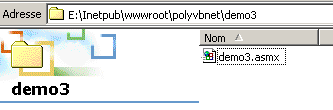
Vamos executar o IIS e aceder ao URL http://localhost/polyvbnet/demo3/demo3.asmx:
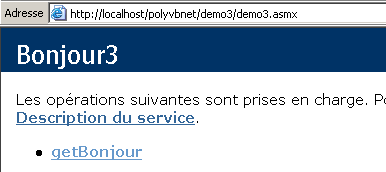
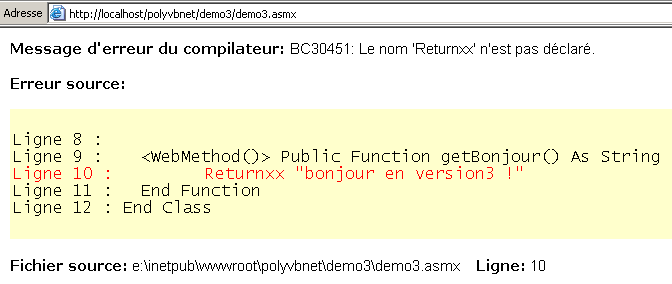
Constatamos uma diferença importante em relação à versão anterior: não foi necessário compilar o código VB do serviço. O IIS realizou essa compilação por si próprio, através do compilador VB.NET instalado na mesma máquina. Em seguida, apresentou a página. Se houver um erro de compilação, este será sinalizado pelo IIS:
10.3.4. Versão 4
Aqui, estamos interessados na configuração do servidor IIS. Até agora, sempre colocámos os nossos serviços web na árvore de diretórios raiz <IISroot> do servidor IIS, neste caso o [e:\inetpub\wwwroot]. Mostramos aqui que podemos colocar o serviço web em qualquer local. Isto é feito através das pastas virtuais do IIS. Vamos colocar o nosso serviço na seguinte pasta:
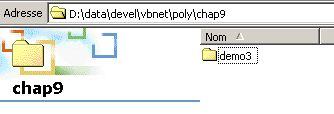
A pasta [D:\data\devel\vbnet\poly\chap9\demo3] não se encontra na árvore de pastas do servidor IIS. É necessário indicar-lhe isso criando uma pasta virtual IIS. Iniciemos o IIS e selecionemos a opção [Avancé] abaixo:
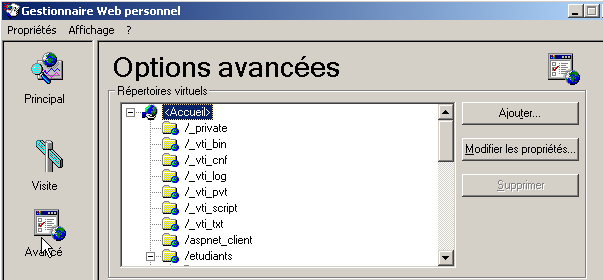
É-nos apresentada uma lista de diretórios virtuais. Não nos deteremos nesta lista. Criamos um novo diretório virtual com o botão [Ajouter] acima:
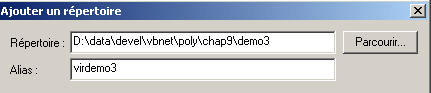
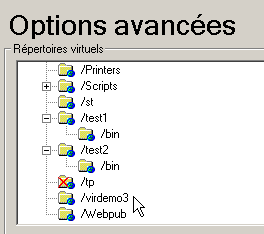
Através do botão [Parcourir], indicamos a pasta física que contém o serviço web, neste caso a pasta [D:\data\devel\vbnet\poly\chap9\demo3]. Atribuímos um nome lógico (virtual) a esta pasta: [virdemo3]. Isto significa que os documentos contidos na pasta física [D:\data\devel\vbnet\poly\chap9\demo3] ficarão acessíveis na rede através do URL [http://<machine>/virdemo3]. A caixa de diálogo acima contém outros parâmetros que deixamos inalterados. Confirmamos a caixa de diálogo. A nova pasta virtual aparece na lista de pastas virtuais de IIS:
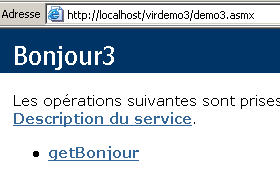
Agora, abrimos um navegador e acedemos à URL [http://localhost/virdemo3/demo3.asmx]. Obtemos o mesmo resultado que anteriormente:
10.3.5. Conclusão
Mostrámos várias formas de proceder para criar um serviço web. Posteriormente, utilizaremos o método da versão 3 para a criação do serviço e o método 4 para a sua localização. Assim, não precisaremos do VS.NET. No entanto, vale a pena referir a utilidade de utilizar o VS.NET pela ajuda que presta na depuração. Existem ferramentas gratuitas para desenvolver aplicações web, nomeadamente o produto WebMatrix, patrocinado pela Microsoft, que pode ser encontrado no URL [http://www.asp.net/webmatrix]. Trata-se de uma excelente ferramenta para dar os primeiros passos na programação web sem investimento prévio.
10.4. Um serviço web de operações
Consideremos um serviço Web que oferece cinco funções:
- adicionar(a,b), que devolve a+b
- subtrair(a,b), que devolverá a-b
- multiplicar(a,b), que devolverá a*b
- dividir(a,b), que devolve a/b
- fazer-tudo(a,b), que devolve o tabuleiro [a+b, a-b, a*b, a/b]
O código VB.NET deste serviço é o seguinte:
<%@ WebService language="VB" class=operations %>

imports system.web.services

<WebService(Namespace:="st.istia.univ-angers.fr")> _
   Public Class operations
      Inherits WebService

      <WebMethod>  _
      Function ajouter(a As Double, b As Double) As Double
         Return a + b
      End Function

      <WebMethod>  _
      Function soustraire(a As Double, b As Double) As Double
         Return a - b
      End Function

      <WebMethod>  _
      Function multiplier(a As Double, b As Double) As Double
         Return a * b
      End Function

      <WebMethod>  _
      Function diviser(a As Double, b As Double) As Double
         Return a / b
      End Function

      <WebMethod>  _
      Function toutfaire(a As Double, b As Double) As Double()
         Return New Double() {a + b, a - b, a * b, a / b}
      End Function
   End Class
Retomamos aqui algumas explicações já dadas, mas que merecem ser relembradas ou complementadas. A classe operations assemelha-se a uma classe VB.NET, com, no entanto, alguns pontos a destacar:
- os métodos são precedidos por um atributo <WebMethod()> que indica ao compilador quais os métodos que devem ser «publicados» (c.a.d) e disponibilizados ao cliente. Um método que não seja precedido por este atributo seria invisível para os clientes remotos. Poderia tratar-se de um método interno utilizado por outros métodos, mas que não se destina a ser publicado.
- A classe deriva da classe WebService definida no espaço de nomes System.Web.Services. Esta herança nem sempre é obrigatória. Neste exemplo, em particular, seria possível prescindir dela.
- A própria classe é precedida por um atributo <WebService(Namespace="st.istia.univ-angers.fr")> destinado a atribuir um espaço de nomes ao serviço web. Um fornecedor de classes atribui um espaço de nomes às suas classes para lhes conferir um nome único e, assim, evitar conflitos com classes de outros fornecedores que possam ter o mesmo nome. No caso dos serviços web, o princípio é o mesmo. Cada serviço web deve poder ser identificado por um nome único, neste caso, st.istia.univ-angers.fr.
- Não definimos nenhum construtor. Por isso, será utilizado implicitamente o construtor da classe pai.
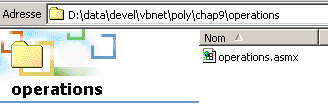
O código-fonte anterior não se destina diretamente ao compilador VB.NET, mas sim ao servidor Web IIS. Deve ter o sufixo .asmx e ser guardado na estrutura de diretórios do servidor Web. Aqui, guardamo-lo com o nome operations.asmx na pasta <IISroot>\polyvbnet\operations:
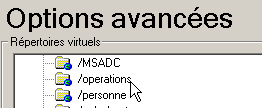
Associamos a esta pasta física a pasta virtual IIS [operations]:
 |  |
Acedamos ao serviço através de um navegador. O URl a solicitar é o [http://localhost/operations/operations.asmx]:
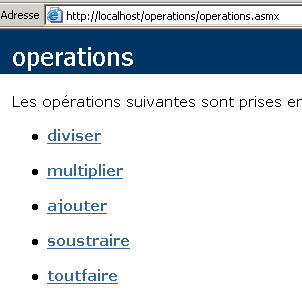
Obtemos um documento Web com um link para cada um dos métodos definidos no serviço Web operations. Sigamos o link ajouter:
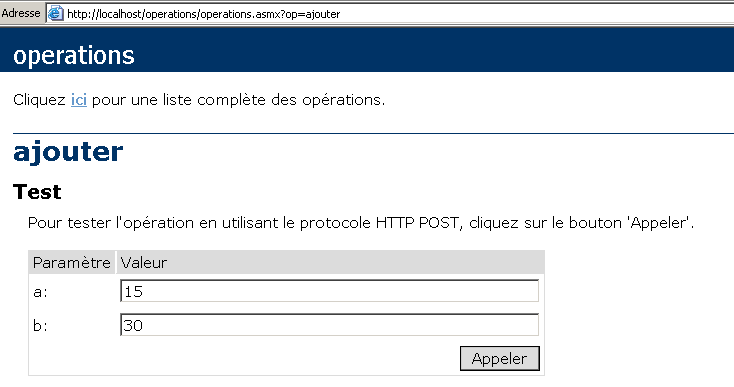
A página obtida sugere-nos que testemos o método ajouter, fornecendo-lhe os dois argumentos a e b de que necessita. Recordemos a definição do método ajouter:
Note-se que a página retomou os nomes dos argumentos a e b utilizados na definição do método. Utiliza-se o botão Appeler e obtém-se a seguinte resposta numa janela separada do navegador:

Se, no exemplo acima, utilizarmos [Affichage/Source], obtemos o seguinte código:

Repitamos a operação para o método [toutfaire]:
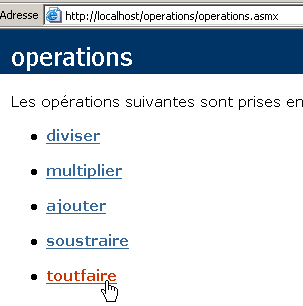
Obtemos a seguinte página:
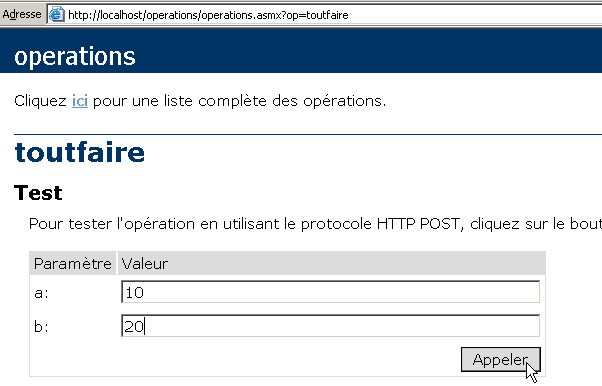
Utilizemos o botão [Appeler] acima:
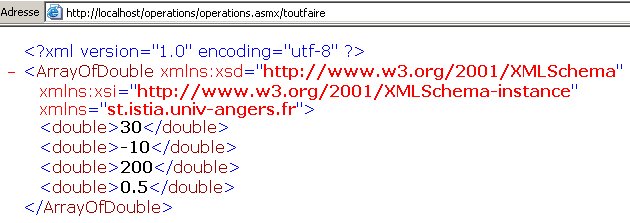
Em todos os casos, a resposta do servidor tem o seguinte formato:
- a resposta está no formato XML
- a linha 1 é padrão e está sempre presente na resposta
- as linhas seguintes dependem do tipo de resultado (duplo, ArrayOfDouble), do número de resultados e do espaço de nomes do serviço web (st.istia.univ-angers.fr, neste caso).
Existem vários métodos para consultar um serviço web e obter a sua resposta. Voltemos ao URL do serviço:
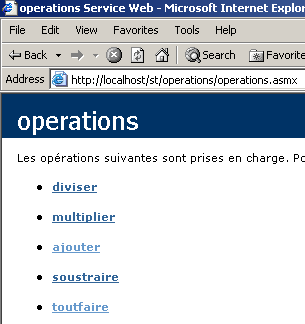
e sigamos a ligação [ajouter]. Na página apresentada, são expostos dois métodos para consultar a função [ajouter] do serviço web:
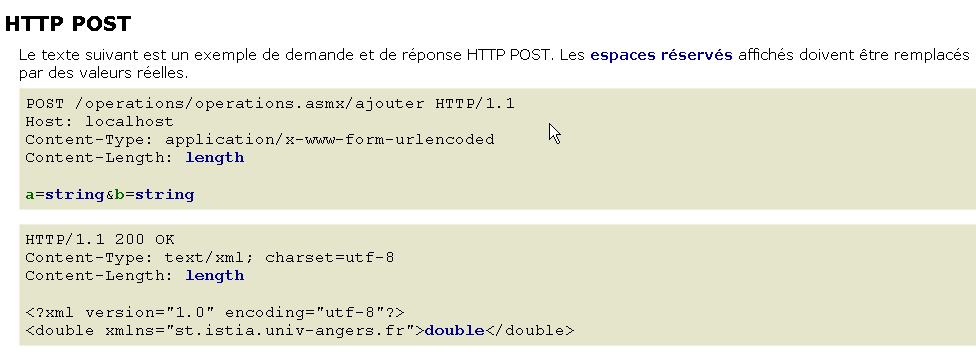
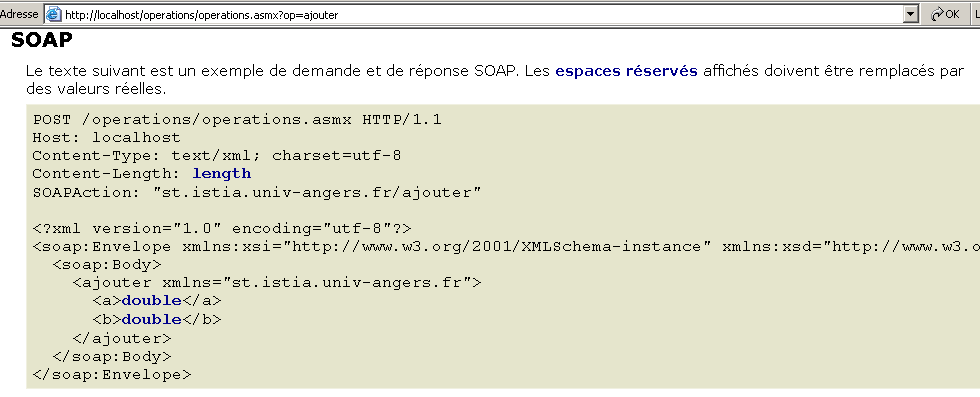
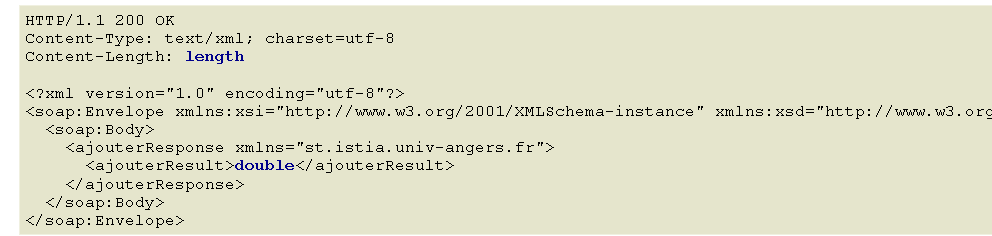
Estes dois métodos de acesso às funções de um serviço web são designados, respetivamente, por: HTTP-POST e SOAP. Vamos analisá-los agora, um a um.
Nota: nas primeiras versões do VS.NET, existia um terceiro método denominado HTTP-GET. À data da redação deste documento (março de 2004), este método parece já não estar disponível. Isto significa que o serviço web gerado pelo VS.NET não aceita pedidos GET. Isso não significa que não seja possível criar serviços web que aceitem pedidos GET, nomeadamente com outras ferramentas além do VS.NET ou simplesmente manualmente.
10.5. Um cliente HTTP-POST
Seguimos o método proposto pelo serviço web:
Vamos comentar o que está escrito. Em primeiro lugar, o cliente web deve enviar os seguintes cabeçalhos HTTP:
O cliente web efetua uma solicitação POST para o URL /operations/operations.asmx/adicionar, de acordo com o protocolo HTTP versão 1.1 | |
Especifica-se a máquina de destino do pedido. Neste caso, localhost. Este cabeçalho tornou-se obrigatório a partir da versão 1.1 do protocolo HTTP | |
Especifica-se aqui que, após os cabeçalhos HTTP, serão enviados parâmetros adicionais no formato urlencoded. Este formato substitui determinados caracteres pelo seu código hexadecimal. | |
Este é o número de caracteres da cadeia de parâmetros que será enviada após os cabeçalhos HTTP. |
Os cabeçalhos HTTP são seguidos por uma linha em branco e, em seguida, pela cadeia de parâmetros do POST, composta por [Content-Length] caracteres, na forma a=XX&b=YY, em que XX e YY são as cadeias «urlencodadas» dos valores dos parâmetros a e b. Sabemos o suficiente para reproduzir o que foi descrito acima com o nosso cliente TCP genérico, já utilizado no capítulo sobre programação TCP/IP:
- iniciamos o IIS
- o serviço está disponível na URL [http://localhost/operations/operations.asmx]
- utilizamos o cliente TCP genérico numa janela DOS
dos>clttcpgenerique localhost 80
Commandes :
POST /operations/operations.asmx/ajouter HTTP/1.1
HOST: localhost
Connection: close
Content-Type: application/x-www-form-urlencoded
Content-length: 7
<-- HTTP/1.1 100 Continue
<-- Server: Microsoft-IIS/5.0
<-- Date: Wed, 03 Mar 2004 13:55:17 GMT
<-- X-Powered-By: ASP.NET
<--
a=2&b=3
<-- HTTP/1.1 200 OK
<-- Server: Microsoft-IIS/5.0
<-- Date: Wed, 03 Mar 2004 13:55:26 GMT
<-- X-Powered-By: ASP.NET
<-- Connection: close
<-- X-AspNet-Version: 1.1.4322
<-- Cache-Control: private, max-age=0
<-- Content-Type: text/xml; charset=utf-8
<-- Content-Length: 90
<--
<-- <?xml version="1.0" encoding="utf-8"?>
<-- <double xmlns="st.istia.univ-angers.fr">5</double>
[fin du thread de lecture des réponses du serveur]
fin
[fin du thread d'envoi des commandes au serveur]
Note-se, em primeiro lugar, que adicionámos o cabeçalho [Connection: close] para solicitar ao servidor que encerre a ligação após enviar a resposta. Isto é necessário neste caso. Se não for especificado, por predefinição, o servidor manterá a ligação aberta. Ora, a resposta do servidor é uma sequência de linhas de texto, sendo que a última não termina com um caractere de fim de linha. Acontece que o nosso cliente genérico TCP lê linhas de texto terminadas com o caractere de fim de linha utilizando o método ReadLine. Se o servidor não fechar a ligação após o envio da última linha, o cliente fica bloqueado porque aguarda um caractere de fim de linha que não chega. Se o servidor fechar a ligação, o método ReadLine do cliente termina e o cliente não fica bloqueado.
Imediatamente após receber a linha vazia que sinaliza o fim dos cabeçalhos HTTP, o servidor IIS envia uma primeira resposta:
<-- HTTP/1.1 100 Continue
<-- Server: Microsoft-IIS/5.0
<-- Date: Wed, 03 Mar 2004 13:55:17 GMT
<-- X-Powered-By: ASP.NET
<--
Esta resposta, composta exclusivamente por cabeçalhos HTTP, indica ao cliente que pode enviar os 7 caracteres que disse querer enviar. O que fazemos:
É importante notar aqui que o nosso cliente TCP envia mais de 7 caracteres, uma vez que os envia com um marcador de fim de linha (WriteLine). Isso não incomoda o servidor, que, dos caracteres recebidos, apenas aceitará os primeiros 7, uma vez que, em seguida, a ligação é encerrada (Connection: close). Esses caracteres em excesso teriam sido um problema se a ligação tivesse permanecido aberta, pois, nesse caso, teriam sido interpretados como provenientes do comando seguinte do cliente. Assim que os parâmetros são recebidos, o servidor envia a sua resposta:
<-- HTTP/1.1 200 OK
<-- Server: Microsoft-IIS/5.0
<-- Date: Wed, 03 Mar 2004 13:55:26 GMT
<-- X-Powered-By: ASP.NET
<-- Connection: close
<-- X-AspNet-Version: 1.1.4322
<-- Cache-Control: private, max-age=0
<-- Content-Type: text/xml; charset=utf-8
<-- Content-Length: 90
<--
<-- <?xml version="1.0" encoding="utf-8"?>
<-- <double xmlns="st.istia.univ-angers.fr">5</double>
Já dispomos dos elementos necessários para escrever um cliente programado para o nosso serviço web. Será um cliente de consola denominado httpPost2 e que se utiliza da seguinte forma:
dos>httpPost2 http://localhost/operations/operations.asmx
Tapez vos commandes au format : [ajouter|soustraire|multiplier|diviser] a b
ajouter 6 7
--> POST /operations/operations.asmx/ajouter HTTP/1.1
--> Host: localhost:80
--> Content-Type: application/x-www-form-urlencoded
--> Content-Length: 7
--> Connection: Keep-Alive
-->
<-- HTTP/1.1 100 Continue
<-- Server: Microsoft-IIS/5.0
<-- Date: Wed, 03 Mar 2004 14:56:38 GMT
<-- X-Powered-By: ASP.NET
<--
--> a=6&b=7
<-- HTTP/1.1 200 OK
<-- Server: Microsoft-IIS/5.0
<-- Date: Wed, 03 Mar 2004 14:56:38 GMT
<-- X-Powered-By: ASP.NET
<-- X-AspNet-Version: 1.1.4322
<-- Cache-Control: private, max-age=0
<-- Content-Type: text/xml; charset=utf-8
<-- Content-Length: 91
<--
<-- <?xml version="1.0" encoding="utf-8"?>
<-- <double xmlns="st.istia.univ-angers.fr">13</double>
[résultat=13]
soustraire 8 9
--> POST /operations/operations.asmx/soustraire HTTP/1.1
--> Host: localhost:80
--> Content-Type: application/x-www-form-urlencoded
--> Content-Length: 7
--> Connection: Keep-Alive
-->
<-- HTTP/1.1 100 Continue
<-- Server: Microsoft-IIS/5.0
<-- Date: Wed, 03 Mar 2004 14:56:47 GMT
<-- X-Powered-By: ASP.NET
<--
--> a=8&b=9
<-- HTTP/1.1 200 OK
<-- Server: Microsoft-IIS/5.0
<-- Date: Wed, 03 Mar 2004 14:56:47 GMT
<-- X-Powered-By: ASP.NET
<-- X-AspNet-Version: 1.1.4322
<-- Cache-Control: private, max-age=0
<-- Content-Type: text/xml; charset=utf-8
<-- Content-Length: 91
<--
<-- <?xml version="1.0" encoding="utf-8"?>
<-- <double xmlns="st.istia.univ-angers.fr">-1</double>
[résultat=-1]
fin
dos>
O cliente é chamado passando-lhe o URL do serviço web:
Em seguida, o cliente lê os comandos introduzidos pelo teclado e executa-os. Estes têm o seguinte formato:
onde «função» é a função do serviço web chamada (somar, subtrair, multiplicar, dividir) e «a» e «b» são os valores sobre os quais essa função irá operar. Por exemplo:
A partir daí, o cliente enviará a solicitação HTTP necessária ao servidor web e obterá uma resposta. As trocas entre cliente e servidor são reproduzidas no ecrã para uma melhor compreensão do processo:
ajouter 6 7
--> POST /operations/operations.asmx/ajouter HTTP/1.1
--> Host: localhost:80
--> Content-Type: application/x-www-form-urlencoded
--> Content-Length: 7
--> Connection: Keep-Alive
-->
<-- HTTP/1.1 100 Continue
<-- Server: Microsoft-IIS/5.0
<-- Date: Wed, 03 Mar 2004 14:56:38 GMT
<-- X-Powered-By: ASP.NET
<--
--> a=6&b=7
<-- HTTP/1.1 200 OK
<-- Server: Microsoft-IIS/5.0
<-- Date: Wed, 03 Mar 2004 14:56:38 GMT
<-- X-Powered-By: ASP.NET
<-- X-AspNet-Version: 1.1.4322
<-- Cache-Control: private, max-age=0
<-- Content-Type: text/xml; charset=utf-8
<-- Content-Length: 91
<--
<-- <?xml version="1.0" encoding="utf-8"?>
<-- <double xmlns="st.istia.univ-angers.fr">13</double>
[résultat=13]
Vemos acima a troca de dados já observada com o cliente TCP genérico, com uma única diferença: o cabeçalho HTTP Connection: Keep-Alive solicita ao servidor que não encerre a ligação. Esta permanece, assim, aberta para a operação seguinte do cliente, que não precisa, portanto, de se voltar a ligar ao servidor. No entanto, isto obriga-o a utilizar um método diferente de ReadLine() para ler a resposta do servidor, uma vez que sabemos que esta é uma sequência de linhas cuja última não termina com um caractere de fim de linha. Assim que toda a resposta do servidor for obtida, o cliente analisa-a para encontrar o resultado da operação solicitada e apresentá-lo:
Vamos analisar o código do nosso cliente:
' espaços de nomes
Imports System
Imports System.Net.Sockets
Imports System.IO
Imports System.Text.RegularExpressions
Imports System.Collections
Imports Microsoft.VisualBasic
Imports System.Web
' cliente de um serviço web de operações
Public Module clientPOST
Public Sub Main(ByVal args() As String)
' sintaxe
Const syntaxe As String = "pg URI"
Dim fonctions As String() = {"ajouter", "soustraire", "multiplier", "diviser"}
' número de argumentos
If args.Length <> 1 Then
erreur(syntaxe, 1)
End If
' regista-se o URI solicitado
Dim URIstring As String = args(0)
' estabelece-se a ligação ao servidor
Dim uri As Uri = Nothing ' l'URI du service web
Dim client As TcpClient = Nothing ' la liaison tcp du client avec le serveur
Dim [IN] As StreamReader = Nothing ' le flux de lecture du client
Dim OUT As StreamWriter = Nothing ' le flux d'écriture du client
Try
' ligação ao servidor
uri = New Uri(URIstring)
client = New TcpClient(uri.Host, uri.Port)
' criam-se os fluxos de entrada e saída do cliente TCP
[IN] = New StreamReader(client.GetStream())
OUT = New StreamWriter(client.GetStream())
OUT.AutoFlush = True
Catch ex As Exception
' URI incorreto ou outro problema
erreur("L'erreur suivante s'est produite : " + ex.Message, 2)
End Try
' criação de um dicionário de funções do serviço web
Dim dicoFonctions As New Hashtable
Dim i As Integer
For i = 0 To fonctions.Length - 1
dicoFonctions.Add(fonctions(i), True)
Next i
' as solicitações do utilizador são introduzidas através do teclado
' na forma função a b
' terminam com o comando «fin»
Dim commande As String = Nothing ' commande tapée au clavier
Dim champs As String() = Nothing ' champs d'une ligne de commande
Dim fonction As String = Nothing ' nom d'une fonction du service web
Dim a, b As String ' les arguments des fonctions du service web
' solicita ao utilizador
Console.Out.WriteLine("Tapez vos commandes au format : [ajouter|soustraire|multiplier|diviser] a b")
' gestão de erros
Dim erreurCommande As Boolean
Try
' ciclo de introdução dos comandos digitados no teclado
While True
' sem erros no início
erreurCommande = False
' leitura do comando
commande = Console.In.ReadLine().Trim().ToLower()
' Concluído?
If commande Is Nothing Or commande = "fin" Then
Exit While
End If
' decomposição do comando em campos
champs = Regex.Split(commande, "\s+")
Try
' são necessários três campos
If champs.Length <> 3 Then
Throw New Exception
End If
' o campo 0 deve ser uma função reconhecida
fonction = champs(0)
If Not dicoFonctions.ContainsKey(fonction) Then
Throw New Exception
End If
' o campo 1 deve ser um número válido
a = champs(1)
Double.Parse(a)
' o campo 2 deve ser um número válido
b = champs(2)
Double.Parse(b)
Catch
' comando inválido
Console.Out.WriteLine("syntaxe : [ajouter|soustraire|multiplier|diviser] a b")
erreurCommande = True
End Try
' a solicitação é enviada ao serviço web
If Not erreurCommande Then executeFonction([IN], OUT, uri, fonction, a, b)
End While
Catch e As Exception
Console.Out.WriteLine(("L'erreur suivante s'est produite : " + e.Message))
End Try
' fim da ligação cliente-servidor
Try
[IN].Close()
OUT.Close()
client.Close()
Catch
End Try
End Sub
...........
' exibição de erros
Public Sub erreur(ByVal msg As String, ByVal exitCode As Integer)
' exibição do erro
System.Console.Error.WriteLine(msg)
' encerramento com erro
Environment.Exit(exitCode)
End Sub
End Module
Temos aqui elementos que já encontrámos várias vezes e que não requerem comentários específicos. Analisemos agora o código do método executeFonction, onde se encontram as novidades:
' executeFonction
Public Sub executeFonction(ByVal [IN] As StreamReader, ByVal OUT As StreamWriter, ByVal uri As Uri, ByVal fonction As String, ByVal a As String, ByVal b As String)
' executa a função (a,b) no serviço web com o URI URI
' as trocas cliente-servidor são efetuadas através dos fluxos IN e OUT
' o resultado da função encontra-se na linha
' <double xmlns="st.istia.univ-angers.fr">double</double>
' enviada pelo servidor
' construção da cadeia de consulta
Dim requête As String = "a=" + HttpUtility.UrlEncode(a) + "&b=" + HttpUtility.UrlEncode(b)
Dim nbChars As Integer = requête.Length
' construção da tabela de cabeçalhos HTTP a enviar
Dim entetes(5) As String
entetes(0) = "POST " + uri.AbsolutePath + "/" + fonction + " HTTP/1.1"
entetes(1) = "Host: " & uri.Host & ":" & uri.Port
entetes(2) = "Content-Type: application/x-www-form-urlencoded"
entetes(3) = "Content-Length: " & nbChars
entetes(4) = "Connection: Keep-Alive"
entetes(5) = ""
' envio dos cabeçalhos HTTP para o servidor
Dim i As Integer
For i = 0 To entetes.Length - 1
' envio para o servidor
OUT.WriteLine(entetes(i))
' eco no ecrã
Console.Out.WriteLine(("--> " + entetes(i)))
Next i
' leitura da primeira resposta do servidor Web HTTP/1.1 100
Dim ligne As String = Nothing
' uma linha do fluxo de leitura
ligne = [IN].ReadLine()
While ligne <> ""
'eco
Console.Out.WriteLine(("<-- " + ligne))
' linha seguinte
ligne = [IN].ReadLine()
End While
'eco da última linha
Console.Out.WriteLine(("<-- " + ligne))
' envio dos parâmetros da solicitação
OUT.Write(requête)
' eco
Console.Out.WriteLine(("--> " + requête))
' construção da expressão regular que permite determinar o tamanho da resposta XML
' no fluxo da resposta do servidor web
Dim modèleLength As String = "^Content-Length: (.+?)\s*$"
Dim RegexLength As New Regex(modèleLength) '
Dim MatchLength As Match = Nothing
Dim longueur As Integer = 0
' leitura da segunda resposta do servidor web após o envio da solicitação
' memoriza-se o valor da linha Content-Length
ligne = [IN].ReadLine()
While ligne <> ""
' saída no ecrã
Console.Out.WriteLine(("<-- " + ligne))
' Content-Length?
MatchLength = RegexLength.Match(ligne)
If MatchLength.Success Then
longueur = Integer.Parse(MatchLength.Groups(1).Value)
End If
' linha seguinte
ligne = [IN].ReadLine()
End While
' exibição da última linha
Console.Out.WriteLine("<--")
' construção da expressão regular que permite recuperar o resultado
' no fluxo da resposta do servidor web
Dim modèle As String = "<double xmlns=""st.istia.univ-angers.fr"">(.+?)</double>"
Dim ModèleRésultat As New Regex(modèle)
Dim MatchRésultat As Match = Nothing
' lê-se o resto da resposta do servidor web
Dim chrRéponse(longueur) As Char
[IN].Read(chrRéponse, 0, longueur)
Dim strRéponse As String = New [String](chrRéponse)
' a resposta é dividida em linhas de texto
Dim lignes As String() = Regex.Split(strRéponse, ControlChars.Lf)
' percorre-se as linhas de texto à procura do resultado
Dim strRésultat As String = "?" ' résultat de la fonction
For i = 0 To lignes.Length - 1
' acompanhamento
Console.Out.WriteLine(("<-- " + lignes(i)))
' comparação da linha atual com o modelo
MatchRésultat = ModèleRésultat.Match(lignes(i))
' Encontrou-se algo?
If MatchRésultat.Success Then
' regista-se o resultado
strRésultat = MatchRésultat.Groups(1).Value
End If
Next i
' exibe-se o resultado
Console.Out.WriteLine(("[résultat=" + strRésultat + "]" + ControlChars.Lf))
End Sub
Em primeiro lugar, o cliente HTTP-POST envia o seu pedido no formato POST:
' construção da cadeia de consulta
Dim requête As String = "a=" + HttpUtility.UrlEncode(a) + "&b=" + HttpUtility.UrlEncode(b)
Dim nbChars As Integer = requête.Length
' construção da tabela de cabeçalhos HTTP a enviar
Dim entetes(5) As String
entetes(0) = "POST " + uri.AbsolutePath + "/" + fonction + " HTTP/1.1"
entetes(1) = "Host: " & uri.Host & ":" & uri.Port
entetes(2) = "Content-Type: application/x-www-form-urlencoded"
entetes(3) = "Content-Length: " & nbChars
entetes(4) = "Connection: Keep-Alive"
entetes(5) = ""
' envio dos cabeçalhos HTTP para o servidor
Dim i As Integer
For i = 0 To entetes.Length - 1
' envio para o servidor
OUT.WriteLine(entetes(i))
' saída no ecrã
Console.Out.WriteLine(("--> " + entetes(i)))
Next i
No cabeçalho
deve indicar-se o tamanho dos parâmetros que serão enviados pelo cliente a seguir aos cabeçalhos HTTP:
Para tal, utiliza-se o seguinte código:
' construção da cadeia de consulta
Dim requête As String = "a=" + HttpUtility.UrlEncode(a) + "&b=" + HttpUtility.UrlEncode(b)
Dim nbChars As Integer = requête.Length
O método HttpUtility.UrlEncode(string cadeia) transforma alguns dos caracteres de chaîne em %n1n2, em que n1n2 é o código ASCII do caractere transformado. Os caracteres abrangidos por esta transformação são todos aqueles que têm um significado específico numa consulta POST (o espaço, o sinal =, o sinal &, etc.). Neste caso, o método HttpUtility.UrlEncode é normalmente desnecessário, uma vez que a e b são números que não contêm nenhum desses caracteres específicos. É aqui utilizado a título de exemplo. Requer o espaço de nomes System.Web. Assim que o cliente enviar os seus cabeçalhos HTTP:
--> POST /operations/operations.asmx/ajouter HTTP/1.1
--> Host: localhost:80
--> Content-Type: application/x-www-form-urlencoded
--> Content-Length: 7
--> Connection: Keep-Alive
-->
o servidor responde com o cabeçalho HTTP 100 Continue:
<-- HTTP/1.1 100 Continue
<-- Server: Microsoft-IIS/5.0
<-- Date: Wed, 03 Mar 2004 14:56:47 GMT
<-- X-Powered-By: ASP.NET
<--
O código limita-se a ler e a apresentar no ecrã esta primeira resposta:
' leitura da primeira resposta do servidor Web HTTP/1.1 100
Dim ligne As String = Nothing
' uma linha do fluxo de leitura
ligne = [IN].ReadLine()
While ligne <> ""
'eco
Console.Out.WriteLine(("<-- " + ligne))
' linha seguinte
ligne = [IN].ReadLine()
End While
'eco da última linha
Console.Out.WriteLine(("<-- " + ligne))
Depois de ler esta primeira resposta, o cliente deve enviar os seus parâmetros:
Faz-o com o seguinte código:
' envio dos parâmetros da solicitação
OUT.Write(requête)
' eco
Console.Out.WriteLine(("--> " + requête))
O servidor irá então enviar a sua resposta. Esta é composta por duas partes:
- os cabeçalhos HTTP, terminados por uma linha em branco
- a resposta no formato XML
<-- HTTP/1.1 200 OK
<-- Server: Microsoft-IIS/5.0
<-- Date: Wed, 03 Mar 2004 14:56:38 GMT
<-- X-Powered-By: ASP.NET
<-- X-AspNet-Version: 1.1.4322
<-- Cache-Control: private, max-age=0
<-- Content-Type: text/xml; charset=utf-8
<-- Content-Length: 91
<--
<-- <?xml version="1.0" encoding="utf-8"?>
<-- <double xmlns="st.istia.univ-angers.fr">13</double>
Numa primeira fase, o cliente lê os cabeçalhos HTTP para encontrar a linha Content-Length e obter o tamanho da resposta XML (neste caso, 90). Este valor é obtido através de uma expressão regular. Poderíamos ter feito isto de outra forma e, sem dúvida, de forma mais eficiente.
' construção da expressão regular que permite determinar o tamanho da resposta XML
' no fluxo da resposta do servidor web
Dim modèleLength As String = "^Content-Length: (.+?)\s*$"
Dim RegexLength As New Regex(modèleLength) '
Dim MatchLength As Match = Nothing
Dim longueur As Integer = 0
' leitura da segunda resposta do servidor web após o envio da solicitação
' memoriza-se o valor da linha Content-Length
ligne = [IN].ReadLine()
While ligne <> ""
' saída no ecrã
Console.Out.WriteLine(("<-- " + ligne))
' Content-Length?
MatchLength = RegexLength.Match(ligne)
If MatchLength.Success Then
longueur = Integer.Parse(MatchLength.Groups(1).Value)
End If
' linha seguinte
ligne = [IN].ReadLine()
End While
' saída da última linha
Console.Out.WriteLine("<--")
Assim que se obtém o comprimento N da resposta XML, basta ler N caracteres no fluxo IN da resposta do servidor. Esta cadeia de N caracteres é redividida em linhas de texto para efeitos de acompanhamento no ecrã. Entre estas linhas, procura-se a linha do resultado:
novamente por meio de uma expressão regular. Assim que o resultado for encontrado, é apresentado.
O final do código do cliente é o seguinte:
' construção da expressão regular que permite recuperar o resultado
' no fluxo da resposta do servidor web
Dim modèle As String = "<double xmlns=""st.istia.univ-angers.fr"">(.+?)</double>"
Dim ModèleRésultat As New Regex(modèle)
Dim MatchRésultat As Match = Nothing
' lê-se o resto da resposta do servidor web
Dim chrRéponse(longueur) As Char
[IN].Read(chrRéponse, 0, longueur)
Dim strRéponse As String = New [String](chrRéponse)
' a resposta é dividida em linhas de texto
Dim lignes As String() = Regex.Split(strRéponse, ControlChars.Lf)
' percorre-se as linhas de texto à procura do resultado
Dim strRésultat As String = "?" ' résultat de la fonction
For i = 0 To lignes.Length - 1
' acompanhamento
Console.Out.WriteLine(("<-- " + lignes(i)))
' comparação da linha atual com o modelo
MatchRésultat = ModèleRésultat.Match(lignes(i))
' Encontrou-se algo?
If MatchRésultat.Success Then
' regista-se o resultado
strRésultat = MatchRésultat.Groups(1).Value
End If
Next i
' exibe-se o resultado
Console.Out.WriteLine(("[résultat=" + strRésultat + "]" + ControlChars.Lf))
End Sub
10.6. Um cliente SOAP
Analisamos aqui um segundo cliente que irá utilizar um diálogo cliente-servidor do tipo SOAP (Simple Object Access Protocol). É-nos apresentado um exemplo de diálogo para a função ajouter:
O pedido do cliente é um pedido POST. Vamos, portanto, reencontrar alguns dos mecanismos do cliente anterior. A principal diferença é que, enquanto o cliente HTTP-POST enviava os parâmetros a e b na forma
, o cliente SOAP envia-os num formato XML mais complexo:
POST /operations/operations.asmx HTTP/1.1
Host: localhost
Content-Type: text/xml; charset=utf-8
Content-Length: length
SOAPAction: "st.istia.univ-angers.fr/ajouter"
<?xml version="1.0" encoding="utf-8"?>
<soap:Envelope xmlns:xsi="http://www.w3.org/2001/XMLSchema-instance" xmlns:xsd="http://www.w3.org/2001/XMLSchema" xmlns:soap="http://schemas.xmlsoap.org/soap/envelope/">
<soap:Body>
<ajouter xmlns="st.istia.univ-angers.fr">
<a>double</a>
<b>double</b>
</ajouter>
</soap:Body>
</soap:Envelope>
Em resposta, recebe uma resposta XML, igualmente mais complexa do que as respostas vistas anteriormente:
HTTP/1.1 200 OK
Content-Type: text/xml; charset=utf-8
Content-Length: length
<?xml version="1.0" encoding="utf-8"?>
<soap:Envelope xmlns:xsi="http://www.w3.org/2001/XMLSchema-instance" xmlns:xsd="http://www.w3.org/2001/XMLSchema" xmlns:soap="http://schemas.xmlsoap.org/soap/envelope/">
<soap:Body>
<ajouterResponse xmlns="st.istia.univ-angers.fr">
<ajouterResult>double</ajouterResult>
</ajouterResponse>
</soap:Body>
</soap:Envelope>
Embora a solicitação e a resposta sejam mais complexas, trata-se, de facto, do mesmo mecanismo HTTP que para o cliente HTTP-POST. O código do cliente SOAP pode, assim, ser copiado a partir do código do cliente HTTP-POST. Eis um exemplo de execução:
dos>clientsoap1 http://localhost/operations/operations.asmx
Tapez vos commandes au format : [ajouter|soustraire|multiplier|diviser] a b
ajouter 3 4
--> POST /operations/operations.asmx HTTP/1.1
--> Host: localhost:80
--> Content-Type: text/xml; charset=utf-8
--> Content-Length: 321
--> Connection: Keep-Alive
--> SOAPAction: "st.istia.univ-angers.fr/ajouter"
-->
<-- HTTP/1.1 100 Continue
<-- Server: Microsoft-IIS/5.0
<-- Date: Thu, 04 Mar 2004 07:28:29 GMT
<-- X-Powered-By: ASP.NET
<--
--> <?xml version="1.0" encoding="utf-8"?>
<soap:Envelope xmlns:xsi="http://www.w3.org/2001/XMLSchema-instance" xmlns:xsd="http://www.w3.org/2001/XMLSchema" xmlns:soap="http://schemas.xmlsoap.org/soap/envelope/">
<soap:Body>
<ajouter xmlns="st.istia.univ-angers.fr">
<a>3</a>
<b>4</b>
</ajouter>
</soap:Body>
</soap:Envelope>
<-- HTTP/1.1 200 OK
<-- Server: Microsoft-IIS/5.0
<-- Date: Thu, 04 Mar 2004 07:28:33 GMT
<-- X-Powered-By: ASP.NET
<-- X-AspNet-Version: 1.1.4322
<-- Cache-Control: private, max-age=0
<-- Content-Type: text/xml; charset=utf-8
<-- Content-Length: 345
<--
<-- <?xml version="1.0" encoding="utf-8"?><soap:Envelope xmlns:soap="http://schemas.xmlsoap.org/soap/envelope/" xmlns:xsi="http://www.w3.org/2001/XMLSchema-inst
ance" xmlns:xsd="http://www.w3.org/2001/XMLSchema"><soap:Body><ajouterResponse xmlns="st.istia.univ-angers.fr"><ajouterResult>7</ajouterResult></ajouterResponse
></soap:Body></soap:Envelope>
[résultat=7]
Apenas o método executeFonction muda. O cliente SOAP envia os cabeçalhos HTTP do seu pedido. Estes são simplesmente um pouco mais complexos do que os de HTTP-POST:
ajouter 3 4
--> POST /operations/operations.asmx HTTP/1.1
--> Host: localhost:80
--> Content-Type: text/xml; charset=utf-8
--> Content-Length: 321
--> Connection: Keep-Alive
--> SOAPAction: "st.istia.univ-angers.fr/ajouter"
-->
O código que os gera:
' executeFonction
Public Sub executeFonction(ByVal [IN] As StreamReader, ByVal OUT As StreamWriter, ByVal uri As Uri, ByVal fonction As String, ByVal a As String, ByVal b As String)
' executa a função (a, b) no serviço web com o URI URI
' as trocas cliente-servidor são efetuadas através dos fluxos IN e OUT
' o resultado da função encontra-se na linha
' <double xmlns="st.istia.univ-angers.fr">double</double>
' enviada pelo servidor
' construção da cadeia de consulta SOAP
Dim requêteSOAP As String = "<?xml version=" + """1.0"" encoding=""utf-8""?>" + ControlChars.Lf
requêteSOAP += "<soap:Envelope xmlns:xsi=""http://www.w3.org/2001/XMLSchema-instance"" xmlns:xsd=""http://www.w3.org/2001/XMLSchema"" xmlns:soap=""http://schemas.xmlsoap.org/soap/envelope/"">" + ControlChars.Lf
requêteSOAP += "<soap:Body>" + ControlChars.Lf
requêteSOAP += "<" + fonction + " xmlns=""st.istia.univ-angers.fr"">" + ControlChars.Lf
requêteSOAP += "<a>" + a + "</a>" + ControlChars.Lf
requêteSOAP += "<b>" + b + "</b>" + ControlChars.Lf
requêteSOAP += "</" + fonction + ">" + ControlChars.Lf
requêteSOAP += "</soap:Body>" + ControlChars.Lf
requêteSOAP += "</soap:Envelope>"
Dim nbCharsSOAP As Integer = requêteSOAP.Length
' construção da tabela de cabeçalhos HTTP a enviar
Dim entetes(6) As String
entetes(0) = "POST " + uri.AbsolutePath + " HTTP/1.1"
entetes(1) = "Host: " & uri.Host & ":" & uri.Port
entetes(2) = "Content-Type: text/xml; charset=utf-8"
entetes(3) = "Content-Length: " & nbCharsSOAP
entetes(4) = "Connection: Keep-Alive"
entetes(5) = "SOAPAction: ""st.istia.univ-angers.fr/" + fonction + """"
entetes(6) = ""
' envio dos cabeçalhos HTTP para o servidor
Dim i As Integer
For i = 0 To entetes.Length - 1
' envio para o servidor
OUT.WriteLine(entetes(i))
' eco no ecrã
Console.Out.WriteLine(("--> " + entetes(i)))
Next i
Ao receber este pedido, o servidor envia a sua primeira resposta, que o cliente apresenta:
<-- HTTP/1.1 100 Continue
<-- Server: Microsoft-IIS/5.0
<-- Date: Thu, 04 Mar 2004 07:28:29 GMT
<-- X-Powered-By: ASP.NET
<--
O código de leitura desta primeira resposta é o seguinte:
' leitura da primeira resposta do servidor Web HTTP/1.1 100
Dim ligne As String = Nothing
' uma linha do fluxo de leitura
ligne = [IN].ReadLine()
While ligne <> ""
'eco
Console.Out.WriteLine(("<-- " + ligne))
' linha seguinte
ligne = [IN].ReadLine()
End While 'while
'eco da última linha
Console.Out.WriteLine(("<-- " + ligne))
O cliente vai agora enviar os seus parâmetros no formato XML dentro do que se denomina um «envelope» SOAP:
--> <?xml version="1.0" encoding="utf-8"?>
<soap:Envelope xmlns:xsi="http://www.w3.org/2001/XMLSchema-instance" xmlns:xsd="http://www.w3.org/2001/XMLSchema" xmlns:soap="http://schemas.xmlsoap.org/soap/envelope/">
<soap:Body>
<ajouter xmlns="st.istia.univ-angers.fr">
<a>3</a>
<b>4</b>
</ajouter>
</soap:Body>
</soap:Envelope>
O código:
O servidor enviará então a sua resposta definitiva:
<-- HTTP/1.1 200 OK
<-- Server: Microsoft-IIS/5.0
<-- Date: Thu, 04 Mar 2004 07:28:33 GMT
<-- X-Powered-By: ASP.NET
<-- X-AspNet-Version: 1.1.4322
<-- Cache-Control: private, max-age=0
<-- Content-Type: text/xml; charset=utf-8
<-- Content-Length: 345
<--
<-- <?xml version="1.0" encoding="utf-8"?><soap:Envelope xmlns:soap="http://schemas.xmlsoap.org/soap/envelope/" xmlns:xsi="http://www.w3.org/2001/XMLSchema-inst
ance" xmlns:xsd="http://www.w3.org/2001/XMLSchema"><soap:Body><ajouterResponse xmlns="st.istia.univ-angers.fr"><ajouterResult>7</ajouterResult></ajouterResponse
></soap:Body></soap:Envelope>
O cliente apresenta no ecrã os cabeçalhos HTTP recebidos, procurando simultaneamente a linha Content-Length:
' construção da expressão regular que permite determinar o tamanho da resposta XML
' no fluxo da resposta do servidor web
Dim modèleLength As String = "^Content-Length: (.+?)\s*$"
Dim RegexLength As New Regex(modèleLength) '
Dim MatchLength As Match = Nothing
Dim longueur As Integer = 0
' leitura da segunda resposta do servidor web após o envio do pedido
' memoriza-se o valor da linha Content-Length
ligne = [IN].ReadLine()
While ligne <> ""
' saída no ecrã
Console.Out.WriteLine(("<-- " + ligne))
' Content-Length?
MatchLength = RegexLength.Match(ligne)
If MatchLength.Success Then
longueur = Integer.Parse(MatchLength.Groups(1).Value)
End If
' linha seguinte
ligne = [IN].ReadLine()
End While 'while
' imprimir a última linha
Console.Out.WriteLine("<--")
Assim que o tamanho N da resposta XML for conhecido, o cliente lê N caracteres do fluxo da resposta do servidor, divide a cadeia recuperada em linhas de texto para as apresentar no ecrã e procura nela a baliza XML do resultado: <ajouterResult>7</ajouterResult> e exibe este último:
' construção da expressão regular que permite recuperar o resultado
' no fluxo da resposta do servidor web
Dim modèle As String = "<" + fonction + "Result>(.+?)</" + fonction + "Result>"
Dim ModèleRésultat As New Regex(modèle)
Dim MatchRésultat As Match = Nothing
' lê-se o resto da resposta do servidor web
Dim chrRéponse(longueur) As Char
[IN].Read(chrRéponse, 0, longueur)
Dim strRéponse As String = New [String](chrRéponse)
' a resposta é dividida em linhas de texto
Dim lignes As String() = Regex.Split(strRéponse, ControlChars.Lf)
' percorre-se as linhas de texto à procura do resultado
Dim strRésultat As String = "?" ' résultat de la fonction
For i = 0 To lignes.Length - 1
' acompanhamento
Console.Out.WriteLine(("<-- " + lignes(i)))
' comparação da linha atual com o modelo
MatchRésultat = ModèleRésultat.Match(lignes(i))
' Encontrou-se algo?
If MatchRésultat.Success Then
' regista-se o resultado
strRésultat = MatchRésultat.Groups(1).Value
End If
'linha seguinte
Next i
' exibe-se o resultado
Console.Out.WriteLine(("[résultat=" + strRésultat + "]" + ControlChars.Lf))
End Sub
10.7. Encapsulamento das trocas cliente-servidor
Imaginemos que o nosso serviço web operations seja utilizado por várias aplicações. Seria interessante disponibilizar a estas aplicações uma classe que fizesse a interface entre a aplicação cliente e o serviço web e que ocultasse a maior parte das trocas de dados em rede, que, para a maioria dos programadores, não são triviais. Teríamos assim o seguinte esquema:
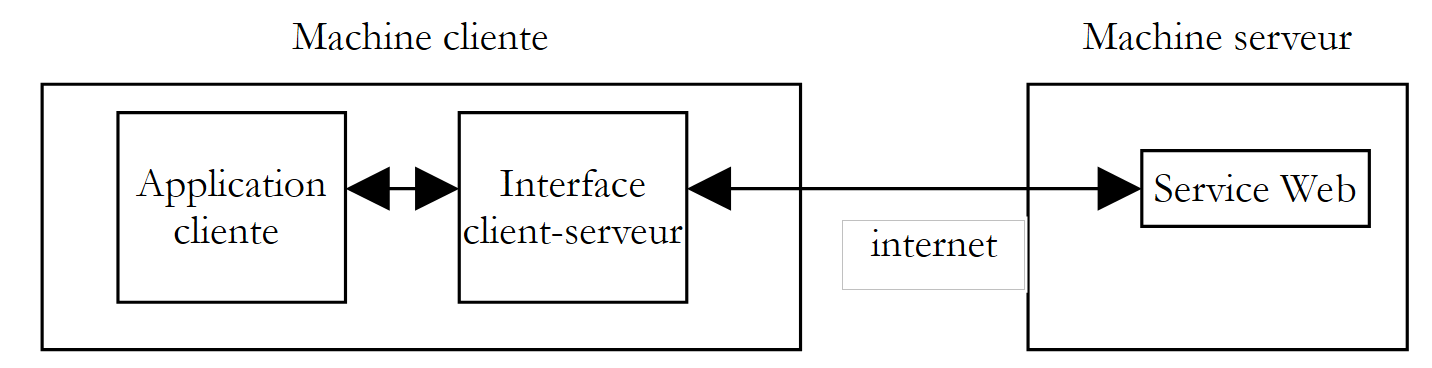 |
A aplicação cliente dirigir-se-ia à interface cliente-servidor para efetuar os seus pedidos ao serviço web. Esta interface realizaria todas as comunicações de rede necessárias com o servidor e devolveria o resultado obtido à aplicação cliente. Esta já não teria de se ocupar das comunicações com o servidor, o que facilitaria grandemente a sua programação.
10.7.1. A classe de encapsulamento
Após o que foi abordado nos parágrafos anteriores, conhecemos agora bem as trocas de dados entre o cliente e o servidor. Vimos até três métodos. Optamos por encapsular o método SOAP. A classe é a seguinte:
' espaços de nomes
Imports System
Imports System.Net.Sockets
Imports System.IO
Imports System.Text.RegularExpressions
Imports System.Collections
Imports System.Web
Imports Microsoft.VisualBasic
' clientSOAP do serviço Web operations
Public Class clientSOAP
' variáveis de instância
Private uri As uri = Nothing ' l'URI du service web
Private client As TcpClient = Nothing ' la liaison tcp du client avec le serveur
Private [IN] As StreamReader = Nothing ' le flux de lecture du client
Private OUT As StreamWriter = Nothing ' le flux d'écriture du client
' dicionário de funções
Private dicoFonctions As New Hashtable
' lista de funções
Private fonctions As String() = {"ajouter", "soustraire", "multiplier", "diviser"}
' detalhado
Private verbose As Boolean = False ' à vrai, affiche à l'écran les échanges client-serveur
' construtor
Public Sub New(ByVal uriString As String, ByVal verbose As Boolean)
' modo detalhado
Me.verbose = verbose
' ligação ao servidor
uri = New Uri(uriString)
client = New TcpClient(uri.Host, uri.Port)
' criação dos fluxos de entrada e saída do cliente TCP
[IN] = New StreamReader(client.GetStream())
OUT = New StreamWriter(client.GetStream())
OUT.AutoFlush = True
' criação do dicionário de funções do serviço web
Dim i As Integer
For i = 0 To fonctions.Length - 1
dicoFonctions.Add(fonctions(i), True)
Next i
End Sub
' encerramento da ligação ao servidor
Public Sub Close()
' fim da ligação cliente-servidor
[IN].Close()
OUT.Close()
client.Close()
End Sub
' executeFonction
Public Function executeFonction(ByVal fonction As String, ByVal a As String, ByVal b As String) As String
' executa a função (a, b) no serviço web com o URI URI
' as trocas cliente-servidor são efetuadas através dos fluxos IN e OUT
' o resultado da função encontra-se na linha
' <double xmlns="st.istia.univ-angers.fr">double</double>
' enviada pelo servidor
' função válida?
fonction = fonction.Trim().ToLower()
If Not dicoFonctions.ContainsKey(fonction) Then
Return "[fonction [" + fonction + "] indisponible : (ajouter, soustraire,multiplier,diviser)]"
End If
' argumentos a e b válidos?
Dim doubleA As Double = 0
Try
doubleA = Double.Parse(a)
Catch
Return "[argument [" + a + "] incorrect (double)]"
End Try
Dim doubleB As Double = 0
Try
doubleB = Double.Parse(b)
Catch
Return "[argument [" + b + "] incorrect (double)]"
End Try
' divisão por zero?
If fonction = "diviser" And doubleB = 0 Then
Return "[division par zéro]"
End If
' construção da cadeia de consulta SOAP
Dim requêteSOAP As String = "<?xml version=" + """1.0"" encoding=""utf-8""?>" + ControlChars.Lf
requêteSOAP += "<soap:Envelope xmlns:xsi=""http://www.w3.org/2001/XMLSchema-instance"" xmlns:xsd=""http://www.w3.org/2001/XMLSchema"" xmlns:soap=""http://schemas.xmlsoap.org/soap/envelope/"">" + ControlChars.Lf
requêteSOAP += "<soap:Body>" + ControlChars.Lf
requêteSOAP += "<" + fonction + " xmlns=""st.istia.univ-angers.fr"">" + ControlChars.Lf
requêteSOAP += "<a>" + a + "</a>" + ControlChars.Lf
requêteSOAP += "<b>" + b + "</b>" + ControlChars.Lf
requêteSOAP += "</" + fonction + ">" + ControlChars.Lf
requêteSOAP += "</soap:Body>" + ControlChars.Lf
requêteSOAP += "</soap:Envelope>"
Dim nbCharsSOAP As Integer = requêteSOAP.Length
' construção da tabela de cabeçalhos HTTP a enviar
Dim entetes(6) As String
entetes(0) = "POST " + uri.AbsolutePath + " HTTP/1.1"
entetes(1) = "Host: " + uri.Host + ":" + uri.Port.ToString
entetes(2) = "Content-Type: text/xml; charset=utf-8"
entetes(3) = "Content-Length: " + nbCharsSOAP.ToString
entetes(4) = "Connection: Keep-Alive"
entetes(5) = "SOAPAction: ""st.istia.univ-angers.fr/" + fonction + """"
entetes(6) = ""
' envio dos cabeçalhos HTTP para o servidor
Dim i As Integer
For i = 0 To entetes.Length - 1
' envio para o servidor
OUT.WriteLine(entetes(i))
' eco no ecrã
If verbose Then
Console.Out.WriteLine(("--> " + entetes(i)))
End If
Next i
' leitura da primeira resposta do servidor Web HTTP/1.1 100
Dim ligne As String = Nothing
' uma linha do fluxo de leitura
ligne = [IN].ReadLine()
While ligne <> ""
'eco
If verbose Then
Console.Out.WriteLine(("<-- " + ligne))
End If
' linha seguinte
ligne = [IN].ReadLine()
End While
'eco da última linha
If verbose Then
Console.Out.WriteLine(("<-- " + ligne))
End If
' envio dos parâmetros da solicitação
OUT.Write(requêteSOAP)
' eco
If verbose Then
Console.Out.WriteLine(("--> " + requêteSOAP))
End If
' construção da expressão regular que permite determinar o tamanho da resposta XML
' no fluxo da resposta do servidor web
Dim modèleLength As String = "^Content-Length: (.+?)\s*$"
Dim RegexLength As New Regex(modèleLength) '
Dim MatchLength As Match = Nothing
Dim longueur As Integer = 0
' leitura da segunda resposta do servidor web após o envio da solicitação
' memoriza-se o valor da linha Content-Length
ligne = [IN].ReadLine()
While ligne <> ""
' saída no ecrã
If verbose Then
Console.Out.WriteLine(("<-- " + ligne))
End If
' Content-Length?
MatchLength = RegexLength.Match(ligne)
If MatchLength.Success Then
longueur = Integer.Parse(MatchLength.Groups(1).Value)
End If
' linha seguinte
ligne = [IN].ReadLine()
End While
' saída da última linha
If verbose Then
Console.Out.WriteLine("<--")
End If
' construção da expressão regular que permite recuperar o resultado
' no fluxo da resposta do servidor web
Dim modèle As String = "<" + fonction + "Result>(.+?)</" + fonction + "Result>"
Dim ModèleRésultat As New Regex(modèle)
Dim MatchRésultat As Match = Nothing
' lê-se o resto da resposta do servidor web
Dim chrRéponse(longueur) As Char
[IN].Read(chrRéponse, 0, longueur)
Dim strRéponse As String = New [String](chrRéponse)
' a resposta é dividida em linhas de texto
Dim lignes As String() = Regex.Split(strRéponse, ControlChars.Lf)
' percorre-se as linhas de texto à procura do resultado
Dim strRésultat As String = "?" ' résultat de la fonction
For i = 0 To lignes.Length - 1
' seguimento
If verbose Then
Console.Out.WriteLine(("<-- " + lignes(i)))
End If ' comparaison ligne courante au modèle
MatchRésultat = ModèleRésultat.Match(lignes(i))
' Encontrou-se?
If MatchRésultat.Success Then
' regista-se o resultado
strRésultat = MatchRésultat.Groups(1).Value
End If
Next i
' envia-se o resultado
Return strRésultat
End Function
End Class
Não encontramos nada de novo em relação ao que já vimos. Simplesmente retomámos o código do cliente SOAP que analisámos e reorganizámo-lo ligeiramente para o transformar numa classe. Esta classe tem um construtor e dois métodos:
' fabricante
Public Sub New(ByVal uriString As String, ByVal verbose As Boolean)
' executeFonction
Public Function executeFonction(ByVal fonction As String, ByVal a As String, ByVal b As String) As String
' encerramento da ligação ao servidor
Public Sub Close()
e possui os seguintes atributos:
' variáveis de instância
Private uri As Uri = Nothing ' l'URI du service web
Private client As TcpClient = Nothing ' la liaison tcp du client avec le serveur
Private [IN] As StreamReader = Nothing ' le flux de lecture du client
Private OUT As StreamWriter = Nothing ' le flux d'écriture du client
' dicionário de funções
Private dicoFonctions As New Hashtable
' lista de funções
Private fonctions As String() = {"ajouter", "soustraire", "multiplier", "diviser"}
' detalhado
Private verbose As Boolean = False ' à vrai, affiche à l'écran les échanges client-serveur
Passam-se dois parâmetros ao construtor:
- o URI do serviço web ao qual se deve ligar
- um valor booleano verbose que, na verdade, determina que as trocas de dados de rede sejam apresentadas no ecrã; caso contrário, não serão apresentadas.
Durante a construção, criam-se os fluxos IN de leitura de rede, OUT de escrita de rede, bem como o dicionário das funções geridas pelo serviço. Assim que o objeto for criado, a ligação cliente-servidor é estabelecida e os seus fluxos IN e OUT ficam disponíveis.
O método Close permite encerrar a ligação com o servidor.
O método ExecuteFonction é aquele que foi escrito para o cliente SOAP analisado, com algumas pequenas diferenças:
- Os parâmetros uri, IN e OUT, que anteriormente eram passados como parâmetros para o método, já não precisam de o ser, uma vez que são agora atributos de instância acessíveis a todos os métodos da instância
- O método ExecuteFonction, que anteriormente devolvia um tipo void e exibia o resultado da função no ecrã, devolve agora esse resultado e, consequentemente, um tipo string.
Normalmente, um cliente utilizará a classe clientSOAP da seguinte forma:
- criação de um objeto clientSOAP que irá estabelecer a ligação com o serviço web
- utilização repetida do método executeFonction
- encerramento da ligação com o serviço Web através do método Close.
Analisemos um primeiro cliente.
10.7.2. Um cliente de consola
Retomamos aqui o cliente SOAP analisado quando a classe clientSOAP ainda não existia e reestruturamo-lo para que utilize agora essa classe:
' espaços de nomes
Imports System
Imports System.IO
Imports System.Text.RegularExpressions
Imports Microsoft.VisualBasic
Public Module testClientSoap
' solicita o URI do serviço web operations
' executa de forma interativa os comandos introduzidos pelo teclado
Public Sub Main(ByVal args() As String)
' sintaxe
Const syntaxe As String = "pg URI [verbose]"
' número de argumentos
If args.Length <> 1 And args.Length <> 2 Then
erreur(syntaxe, 1)
End If
' detalhado?
Dim verbose As Boolean = False
If args.Length = 2 Then
verbose = args(1).ToLower() = "verbose"
End If
' estabelece ligação ao serviço web
Dim client As clientSOAP = Nothing
Try
client = New clientSOAP(args(0), verbose)
Catch ex As Exception
' erro de ligação
erreur("L'erreur suivante s'est produite lors de la connexion au service web : " + ex.Message, 2)
End Try
' as solicitações do utilizador são introduzidas através do teclado
' na forma função a b — terminam com o comando «fin»
Dim commande As String = Nothing ' commande tapée au clavier
Dim champs As String() = Nothing ' champs d'une ligne de commande
' solicitação ao utilizador
Console.Out.WriteLine("Tapez vos commandes au format : [ajouter|soustraire|multiplier|diviser] a b" + ControlChars.Lf)
' gestão de erros
Dim erreurCommande As Boolean
Try
' ciclo de introdução dos comandos digitados no teclado
While True
' inicialmente, sem erros
erreurCommande = False
' leitura do comando
commande = Console.In.ReadLine().Trim().ToLower()
' Concluído?
If commande Is Nothing Or commande = "fin" Then
Exit While
End If
' decomposição do comando em campos
champs = Regex.Split(commande, "\s+")
' são necessários três campos
If champs.Length <> 3 Then
Console.Out.WriteLine("syntaxe : [ajouter|soustraire|multiplier|diviser] a b")
' regista-se o erro
erreurCommande = True
End If
' envia-se o pedido ao serviço web
If Not erreurCommande Then Console.Out.WriteLine(("résultat=" + client.executeFonction(champs(0).Trim().ToLower(), champs(1).Trim(), champs(2).Trim())))
' próximo pedido
End While
Catch e As Exception
Console.Out.WriteLine(("L'erreur suivante s'est produite : " + e.Message))
End Try
' fim da ligação cliente-servidor
Try
client.Close()
Catch
End Try
End Sub
' exibição dos erros
Public Sub erreur(ByVal msg As String, ByVal exitCode As Integer)
' exibição do erro
System.Console.Error.WriteLine(msg)
' encerramento com erro
Environment.Exit(exitCode)
End Sub
End Module
O cliente está agora consideravelmente mais simples e não contém qualquer comunicação de rede. O cliente aceita dois parâmetros:
- o URI do serviço web operations
- a palavra-chave opcional verbose. Se estiver presente, as trocas de dados de rede serão apresentadas no ecrã.
Estes dois parâmetros são utilizados para criar um objeto clientSOAP que irá assegurar as trocas de dados com o serviço web.
' ligação ao serviço web
Dim client As clientSOAP = Nothing
Try
client = New clientSOAP(args(0), verbose)
Catch ex As Exception
' erro de ligação
erreur("L'erreur suivante s'est produite lors de la connexion au service web : " + ex.Message, 2)
End Try
Assim que a ligação ao serviço web for estabelecida, o cliente pode enviar os seus pedidos. Estes são introduzidos através do teclado, analisados e, em seguida, enviados para o servidor através da chamada ao método executeFonction do objeto clientSOAP.
' envio do pedido ao serviço web
If Not erreurCommande Then Console.Out.WriteLine(("résultat=" + client.executeFonction(champs(0).Trim().ToLower(), champs(1).Trim(), champs(2).Trim())))
A classe clientSOAP é compilada num «assembly»:
dos>vbc /r:clientSOAP.dll testClientSOAP.vb
dos>dir
04/03/2004 08:46 6 913 clientSOAP.vb
04/03/2004 09:07 7 168 clientSOAP.dll
A aplicação cliente testClientSoap é, em seguida, compilada por:
dos>vbc /r:clientSOAP.dll /r:system.dll testClientSOAP.vb
dos>dir
04/03/2004 09:08 2 711 testClientSOAP.vb
04/03/2004 09:08 4 608 testClientSOAP.exe
Eis um exemplo de execução sem comentários:
dos>testclientsoap http://localhost/st/operations/operations.asmx
Tapez vos commandes au format : [ajouter|soustraire|multiplier|diviser] a b
ajouter 1 3
résultat=4
soustraire 6 7
résultat=-1
multiplier 4 5
résultat=20
diviser 1 2
résultat=0.5
x
syntaxe : [ajouter|soustraire|multiplier|diviser] a b
x 1 2
résultat=[fonction [x] indisponible : (ajouter, soustraire,multiplier,diviser)]
ajouter a b
résultat=[argument [a] incorrect (double)]
ajouter 1 b
résultat=[argument [b] incorrect (double)]
diviser 1 0
résultat=[division par zéro]
fin
É possível acompanhar as trocas de dados na rede solicitando uma execução «verbosa»:
dos>testClientSOAP http://localhost/operations/operations.asmx detalhado
Tapez vos commandes au format : [ajouter|soustraire|multiplier|diviser] a b
ajouter 4 8
--> POST /operations/operations.asmx HTTP/1.1
--> Host: localhost:80
--> Content-Type: text/xml; charset=utf-8
--> Content-Length: 321
--> Connection: Keep-Alive
--> SOAPAction: "st.istia.univ-angers.fr/ajouter"
-->
<-- HTTP/1.1 100 Continue
<-- Server: Microsoft-IIS/5.0
<-- Date: Thu, 04 Mar 2004 08:15:25 GMT
<-- X-Powered-By: ASP.NET
<--
--> <?xml version="1.0" encoding="utf-8"?>
<soap:Envelope xmlns:xsi="http://www.w3.org/2001/XMLSchema-instance" xmlns:xsd="http://www.w3.org/2001/XMLSchema" xmlns:soap="http://schemas.xmlsoap.org/soap/envelope/">
<soap:Body>
<ajouter xmlns="st.istia.univ-angers.fr">
<a>4</a>
<b>8</b>
</ajouter>
</soap:Body>
</soap:Envelope>
<-- HTTP/1.1 200 OK
<-- Server: Microsoft-IIS/5.0
<-- Date: Thu, 04 Mar 2004 08:15:25 GMT
<-- X-Powered-By: ASP.NET
<-- X-AspNet-Version: 1.1.4322
<-- Cache-Control: private, max-age=0
<-- Content-Type: text/xml; charset=utf-8
<-- Content-Length: 346
<--
<-- <?xml version="1.0" encoding="utf-8"?><soap:Envelope xmlns:soap="http://schemas.xmlsoap.org/soap/envelope/" xmlns:xsi="http://www.w3.org/2001/XMLSchema-inst
ance" xmlns:xsd="http://www.w3.org/2001/XMLSchema"><soap:Body><ajouterResponse xmlns="st.istia.univ-angers.fr"><ajouterResult>12</ajouterResult></ajouterResponse></soap:Body></soap:Envelope>
résultat=12
fin
Vamos agora criar um cliente gráfico.
10.7.3. Um cliente gráfico para Windows
Vamos agora consultar o nosso serviço web com um cliente gráfico que também utilizará a classe clientSOAP. A interface gráfica será a seguinte:
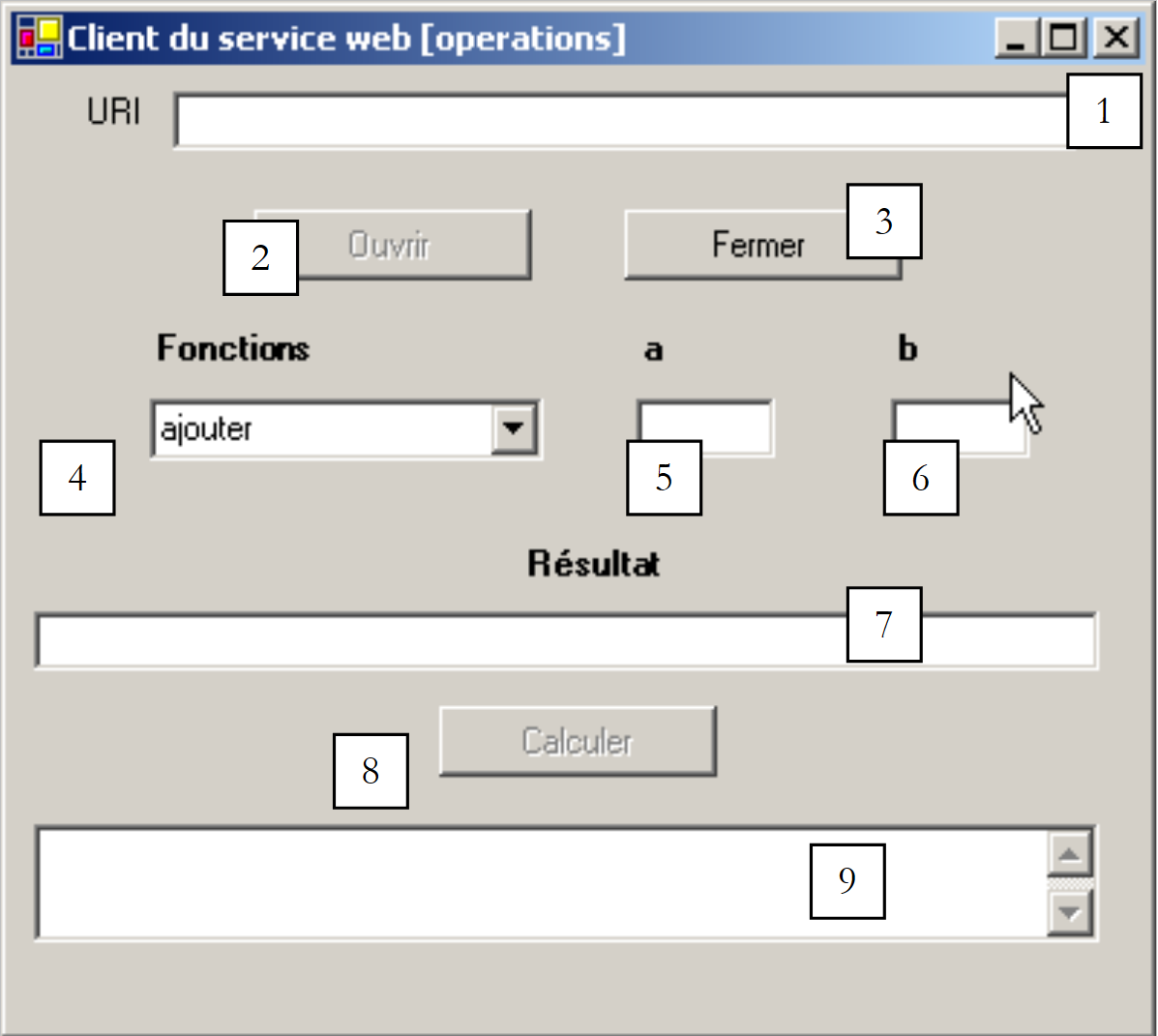 |
Os controlos são os seguintes:
n.º | tipo | nome | função |
TextBox | txtURI | o URI do serviço web operations | |
Botão | btnOuvrir | abre a ligação com o serviço Web | |
Botão | btnFermer | encerra a ligação com o serviço Web | |
ComboBox | cmbFonctions | a lista de operações (somar, subtrair, multiplicar, dividir) | |
TextBox | txtA | os argumentos das funções | |
TextBox | txtB | o argumento b das funções | |
TextBox | txtRésultat | o resultado da função (a, b) | |
Botão | btnCalculer | inicia o cálculo da função(a,b) | |
TextBox | txtErreur | exibe uma mensagem de estado da ligação |
Existem algumas restrições de funcionamento:
- o botão btnOuvrir só está ativo se o campo txtURI não estiver vazio e se ainda não houver uma ligação aberta
- o botão btnFermer só fica ativo quando tiver sido aberta uma ligação com o serviço web
- o botão btnCalculer só fica ativo quando uma ligação estiver aberta e os campos txtA e txtB não estiverem vazios
- os campos txtRésultat e txtErreur têm o atributo ReadOnly definido como verdadeiro
O cliente começa por estabelecer a ligação com o serviço web utilizando o botão [Ouvrir]:
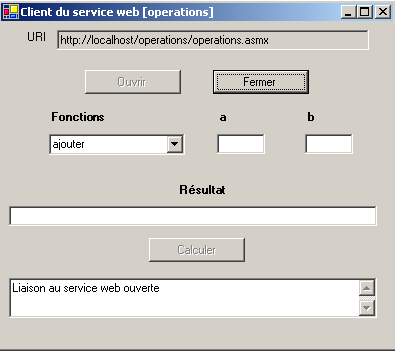
Em seguida, o utilizador pode escolher uma função e valores para a e b:
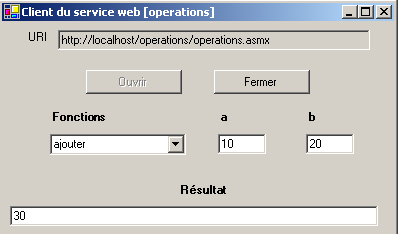
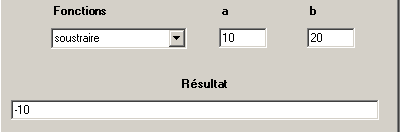
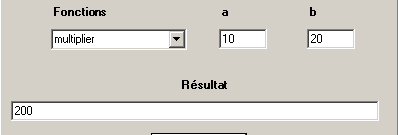
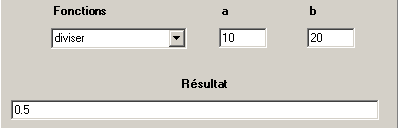
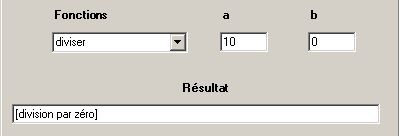
Segue-se o código da aplicação. Omitimos o código do formulário, que não é relevante neste contexto.
'espaços de nomes
Imports System
Imports System.Windows.Forms
' a classe do formulário
Public Class FormClientSOAP
Inherits System.Windows.Forms.Form
' atributos de instância
Dim client As clientSOAP ' client SOAP du service web operations
#Região «Código gerado pelo Windows Form Designer»
Public Sub New()
MyBase.New()
'Esta chamada é exigida pelo Windows Form Designer.
InitializeComponent()
' outras inicializações
myInit()
End Sub
'O método substituído Dispose do formulário para limpar a lista de componentes.
Protected Overloads Overrides Sub Dispose(ByVal disposing As Boolean)
....
End Sub
...
Private Sub InitializeComponent()
....
End Sub
#Fim da Região
Private Sub myInit()
' inicialização do formulário
cmbFonctions.SelectedIndex = 0
btnOuvrir.Enabled = False
btnFermer.Enabled = True
btnCalculer.Enabled = False
End Sub
Private Sub txtURI_TextChanged(ByVal sender As Object, ByVal e As System.EventArgs) Handles txtURI.TextChanged
' o conteúdo do campo de introdução de dados foi alterado — define-se o estado do botão «Abrir»
btnOuvrir.Enabled = txtURI.Text.Trim <> ""
End Sub
Private Sub btnOuvrir_Click(ByVal sender As Object, ByVal e As System.EventArgs) Handles btnOuvrir.Click
' pedido para estabelecer uma ligação com o serviço web
Try
' criação de um objeto do tipo [clientSOAP]
client = New clientSOAP(txtURI.Text.Trim, False)
' estados dos botões
btnOuvrir.Enabled = False
btnFermer.Enabled = True
' o URI já não pode ser alterado
txtURI.ReadOnly = True
' estado do cliente
txtErreur.Text = "Liaison au service web ouverte"
Catch ex As Exception
' ocorreu um erro - é apresentado
txtErreur.Text = ex.Message
End Try
End Sub
Private Sub btnFermer_Click(ByVal sender As Object, ByVal e As System.EventArgs) Handles btnFermer.Click
' encerrar a ligação ao serviço web
client.Close()
' estados dos botões
btnOuvrir.Enabled = True
btnFermer.Enabled = False
' URI
txtURI.ReadOnly = False
' estado do cliente
txtErreur.Text = "Liaison au service web fermée"
End Sub
Private Sub btnCalculer_Click(ByVal sender As Object, ByVal e As System.EventArgs) Handles btnCalculer.Click
' cálculo de uma função f(a,b)
' apaga-se o resultado anterior
txtRésultat.Text = ""
Try
txtRésultat.Text = client.executeFonction(cmbFonctions.Text, txtA.Text.Trim, txtB.Text.Trim)
Catch ex As Exception
' ocorreu um erro de rede
txtErreur.Text = ex.Message
' fechar a ligação
btnFermer_Click(Nothing, Nothing)
End Try
End Sub
Private Sub txtA_TextChanged(ByVal sender As Object, ByVal e As System.EventArgs) Handles txtA.TextChanged
' alteração do valor de A
btnCalculer.Enabled = txtA.Text.Trim <> "" And txtB.Text.Trim <> ""
End Sub
Private Sub txtB_TextChanged(ByVal sender As Object, ByVal e As System.EventArgs) Handles txtB.TextChanged
' alteração do valor de B
txtA_TextChanged(Nothing, Nothing)
End Sub
' método principal
Public Shared Sub main()
Application.Run(New FormClientSOAP)
End Sub
End Class
Mais uma vez, a classe clientSOAP oculta toda a parte de rede da aplicação. A aplicação foi construída da seguinte forma:
- o assembly clientSOAP.dll, que contém a classe clientSOAP, foi colocado na pasta do projeto
- a interface gráfica clientsoapgui.vb foi criada com VS.NET e, em seguida, compilada numa janela do DOS:
dos>vbc /r:system.dll /r:system.windows.forms.dll /r:system.drawing.dll /r:clientSOAP.dll clientsoapgui.vb
dos>dir
04/03/2004 09:13 7 168 clientSOAP.dll
04/03/2004 16:44 9 866 clientsoapgui.vb
04/03/2004 16:44 11 264 clientsoapgui.exe
A interface gráfica foi, em seguida, iniciada por:
10.8. Um cliente proxy
Recapitulemos o que acabou de ser feito. Criámos uma classe intermédia que encapsula as trocas de dados de rede entre um cliente e um serviço web, de acordo com o esquema abaixo:
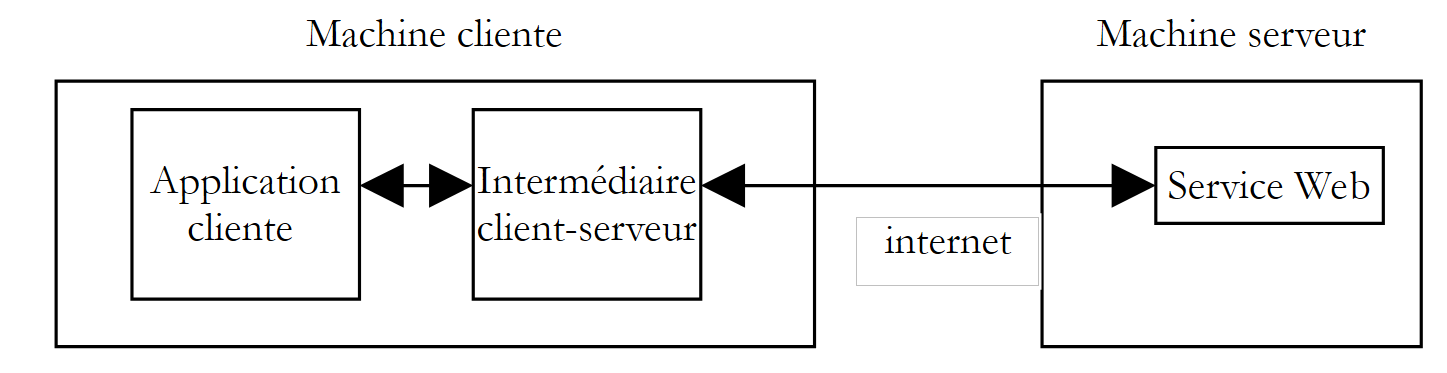 |
A plataforma .NET leva esta lógica mais longe. Assim que se sabe qual o serviço web a aceder, podemos gerar automaticamente a classe que nos servirá de intermediário para aceder às funções do serviço web e que ocultará toda a parte de rede. Chamamos a esta classe um proxy para o serviço web para o qual foi gerada.
Como gerar a classe proxy de um serviço Web? Um serviço Web é sempre acompanhado por um ficheiro de descrição no formato XML. Se o URI do nosso serviço Web «operations» for http://localhost/operations/operations.asmx, o seu ficheiro de descrição está disponível em http://localhost/operations/operations.asmx?wsdl, como mostra a captura de ecrã seguinte:

Trata-se de um ficheiro XML que descreve com precisão todas as funções do serviço web, indicando, para cada uma delas, o tipo e o número de parâmetros, bem como o tipo de resultado. Este ficheiro é designado por ficheiro WSDL do serviço, uma vez que utiliza a linguagem WSDL (Web Services Description Language). A partir deste ficheiro, é possível gerar uma classe proxy utilizando a ferramenta wsdl:
dos>wsdl http://localhost/operations/operations.asmx?wsdl /language=vb
Microsoft (R) Web Services Description Language Utility
[Microsoft (R) .NET Framework, Version 1.1.4322.573]
Copyright (C) Microsoft Corporation 1998-2002. All rights reserved.
Écriture du fichier 'D:\data\devel\vbnet\poly\chap9\clientproxy\operations.vb'.
dos>dir
04/03/2004 17:17 6 663 operations.vb
A ferramenta wsdl gera um ficheiro fonte VB.NET (opção /language=vb) com o nome da classe que implementa o serviço web, neste caso operations. Vejamos uma parte do código gerado:
'------------------------------------------------------------------------------
' <gerado automaticamente>
' Este código foi gerado por uma ferramenta.
' Versão de execução: 1.1.4322.573
'
' As alterações a este ficheiro podem causar um comportamento incorreto e serão perdidas se
' o código for regenerado.
' </autogenerated>
'------------------------------------------------------------------------------
Option Strict Off
Option Explicit On
Imports System
Imports System.ComponentModel
Imports System.Diagnostics
Imports System.Web.Services
Imports System.Web.Services.Protocols
Imports System.Xml.Serialization
'
'Este código-fonte foi té gerado automaticamente généré pelo wsdl, Versão=1.1.4322.573.
'
'<remarks/>
<System.Diagnostics.DebuggerStepThroughAttribute(), _
System.ComponentModel.DesignerCategoryAttribute("code"), _
System.Web.Services.WebServiceBindingAttribute(Name:="operationsSoap", [Namespace]:="st.istia.univ-angers.fr")> _
Public Class operations
Inherits System.Web.Services.Protocols.SoapHttpClientProtocol
'<remarks/>
Public Sub New()
MyBase.New
Me.Url = "http://localhost/operations/operations.asmx"
End Sub
'<observações/>
<System.Web.Services.Protocols.SoapDocumentMethodAttribute("st.istia.univ-angers.fr/ajouter", RequestNamespace:="st.istia.univ-angers.fr", ResponseNamespace:="st.istia.univ-angers.fr", Use:=System.Web.Services.Description.SoapBindingUse.Literal, ParameterStyle:=System.Web.Services.Protocols.SoapParameterStyle.Wrapped)> _
Public Function ajouter(ByVal a As Double, ByVal b As Double) As Double
Dim results() As Object = Me.Invoke("ajouter", New Object() {a, b})
Return CType(results(0),Double)
End Function
'<observações/>
Public Function Beginajouter(ByVal a As Double, ByVal b As Double, ByVal callback As System.AsyncCallback, ByVal asyncState As Object) As System.IAsyncResult
Return Me.BeginInvoke("ajouter", New Object() {a, b}, callback, asyncState)
End Function
'<observações/>
Public Function Endajouter(ByVal asyncResult As System.IAsyncResult) As Double
Dim results() As Object = Me.EndInvoke(asyncResult)
Return CType(results(0),Double)
End Function
....
Este código parece um pouco complexo à primeira vista. Não precisamos de compreender os pormenores para o podermos utilizar. Vamos, em primeiro lugar, analisar a declaração da classe:
A classe tem o nome operations do serviço web para o qual foi criada. Deriva da classe SoapHttpClientProtocol:
A nossa classe proxy tem um único construtor:
O construtor atribui ao atributo url o valor URL do serviço web associado ao proxy. A classe operations acima referida não define, por si própria, o atributo url. Este é herdado da classe da qual o proxy deriva: System.Web.Services.Protocols.SoapHttpClientProtocol. Vejamos agora o que se refere ao método ajouter:
Public Function ajouter(ByVal a As Double, ByVal b As Double) As Double
Dim results() As Object = Me.Invoke("ajouter", New Object() {a, b})
Return CType(results(0),Double)
End Function
Pode-se verificar que tem a mesma assinatura que no serviço Web operations, onde estava definida da seguinte forma:
      <WebMethod>  _
      Function ajouter(a As Double, b As Double) As Double
         Return a + b
End Function 'ajouter
A forma como esta classe interage com o serviço Web não é apresentada aqui. Essa interação é inteiramente gerida pela classe pai System.Web.Services.Protocols.SoapHttpClientProtocol. No proxy, apenas se encontra o que o diferencia dos outros proxies:
- o URL do serviço Web associado
- a definição dos métodos do serviço associado.
Para utilizar os métodos do serviço Web operations, um cliente necessita apenas da classe proxy operations gerada anteriormente. Vamos compilar esta classe num ficheiro assembly:
Agora, vamos escrever um cliente de consola. É chamado sem parâmetros e executa os pedidos digitados no teclado:
dos>testclientproxy
Tapez vos commandes au format : [ajouter|soustraire|multiplier|diviser|toutfaire] a b
ajouter 4 5
résultat=9
soustraire 9 8
résultat=1
multiplier 10 4
résultat=40
diviser 6 7
résultat=0,857142857142857
toutfaire 10 20
résultats=[30,-10,200,0,5]
diviser 5 0
résultat=+Infini
fin
O código do cliente é o seguinte:
' espaços de nomes
Imports System
Imports System.IO
Imports System.Text.RegularExpressions
Imports System.Collections
Imports Microsoft.VisualBasic
Public Module testClientProxy
' executa de forma interativa os comandos digitados no teclado
' e envia-os para o serviço web «operations»
Public Sub Main()
' já não há argumentos — o URL do serviço web está codificado de forma fixa no proxy
' criação de um dicionário das funções do serviço web
Dim fonctions As String() = {"ajouter", "soustraire", "multiplier", "diviser", "toutfaire"}
Dim dicoFonctions As New Hashtable
Dim i As Integer
For i = 0 To fonctions.Length - 1
dicoFonctions.Add(fonctions(i), True)
Next i
' é criado um objeto proxy de operações
Dim myOperations As operations = Nothing
Try
myOperations = New operations
Catch ex As Exception
' erro de ligação
erreur("L'erreur suivante s'est produite lors de la connexion au proxy dy service web : " + ex.Message, 2)
End Try
' as solicitações do utilizador são digitadas no teclado
' na forma função a b — terminam com o comando «fin»
Dim commande As String = Nothing ' commande tapée au clavier
Dim champs As String() = Nothing ' champs d'une ligne de commande
' solicita ao utilizador
Console.Out.WriteLine("Tapez vos commandes au format : [ajouter|soustraire|multiplier|diviser|toutfaire] a b" + ControlChars.Lf)
' alguns dados locais
Dim erreurCommande As Boolean
Dim fonction As String
Dim a, b As Double
' ciclo de introdução dos comandos digitados no teclado
While True
' inicialmente, sem erros
erreurCommande = False
' leitura do comando
commande = Console.In.ReadLine().Trim().ToLower()
' terminado?
If commande Is Nothing Or commande = "fin" Then
Exit While
End If
' decomposição do comando em campos
champs = Regex.Split(commande, "\s+")
Try
' são necessários três campos
If champs.Length <> 3 Then
Throw New Exception
End If
' o campo 0 deve ser uma função reconhecida
fonction = champs(0)
If Not dicoFonctions.ContainsKey(fonction) Then
Throw New Exception
End If
' o campo 1 deve ser um número válido
a = Double.Parse(champs(1))
' o campo 2 deve ser um número válido
b = Double.Parse(champs(2))
Catch
' comando inválido
Console.Out.WriteLine("syntaxe : [ajouter|soustraire|multiplier|diviser] a b")
erreurCommande = True
End Try
' a solicitação é enviada ao serviço web
If Not erreurCommande Then
Try
Dim résultat As Double
Dim résultats() As Double
If fonction = "ajouter" Then
résultat = myOperations.ajouter(a, b)
Console.Out.WriteLine(("résultat=" + résultat.ToString))
End If
If fonction = "soustraire" Then
résultat = myOperations.soustraire(a, b)
Console.Out.WriteLine(("résultat=" + résultat.ToString))
End If
If fonction = "multiplier" Then
résultat = myOperations.multiplier(a, b)
Console.Out.WriteLine(("résultat=" + résultat.ToString))
End If
If fonction = "diviser" Then
résultat = myOperations.diviser(a, b)
Console.Out.WriteLine(("résultat=" + résultat.ToString))
End If
If fonction = "toutfaire" Then
résultats = myOperations.toutfaire(a, b)
Console.Out.WriteLine(("résultats=[" + résultats(0).ToString + "," + résultats(1).ToString + "," + _
résultats(2).ToString + "," + résultats(3).ToString + "]"))
End If
Catch e As Exception
Console.Out.WriteLine(("L'erreur suivante s'est produite : " + e.Message))
End Try
End If
End While
End Sub
' exibição de erros
Public Sub erreur(ByVal msg As String, ByVal exitCode As Integer)
' exibição do erro
System.Console.Error.WriteLine(msg)
' interrupção com erro
Environment.Exit(exitCode)
End Sub
End Module
Analisamos apenas o código específico da utilização da classe proxy. Em primeiro lugar, é criado um objeto proxy operations:
' criação de um objeto proxy de operações
Dim myOperations As operations = Nothing
Try
myOperations = New operations
Catch ex As Exception
' erro de ligação
erreur("L'erreur suivante s'est produite lors de la connexion au proxy dy service web : " + ex.Message, 2)
End Try
As linhas de função a e b são digitadas no teclado. A partir destas informações, são chamados os métodos apropriados do proxy:
' envio do pedido ao serviço web
If Not erreurCommande Then
Try
Dim résultat As Double
Dim résultats() As Double
If fonction = "ajouter" Then
résultat = myOperations.ajouter(a, b)
Console.Out.WriteLine(("résultat=" + résultat.ToString))
End If
If fonction = "soustraire" Then
résultat = myOperations.soustraire(a, b)
Console.Out.WriteLine(("résultat=" + résultat.ToString))
End If
If fonction = "multiplier" Then
résultat = myOperations.multiplier(a, b)
Console.Out.WriteLine(("résultat=" + résultat.ToString))
End If
If fonction = "diviser" Then
résultat = myOperations.diviser(a, b)
Console.Out.WriteLine(("résultat=" + résultat.ToString))
End If
If fonction = "toutfaire" Then
résultats = myOperations.toutfaire(a, b)
Console.Out.WriteLine(("résultats=[" + résultats(0).ToString + "," + résultats(1).ToString + "," + _
résultats(2).ToString + "," + résultats(3).ToString + "]"))
End If
Catch e As Exception
Console.Out.WriteLine(("L'erreur suivante s'est produite : " + e.Message))
End Try
Trata-se aqui, pela primeira vez, da operação toutfaire, que realiza as quatro operações. Esta tinha sido ignorada até agora, pois envia um tabuleiro de números encapsulado num envelope XML, mais complicado de gerir do que as respostas simples XML das outras funções, que fornecem apenas um único resultado. Vê-se que, aqui, com a classe proxy, utilizar o método toutfaire não é mais complicado do que utilizar os outros métodos. A aplicação foi compilada numa janela do DOS da seguinte forma:
dos>vbc /r:operations.dll /r:system.dll /r:system.web.services.dll testClientProxy.vb
dos>dir
04/03/2004  17:17                6 663 operations.vb
04/03/2004  17:24                7 680 operations.dll
04/03/2004 17:41 4 099 testClientProxy.vb
04/03/2004 17:41 5 632 testClientProxy.exe
10.9. Configurar um serviço Web
Um serviço Web pode necessitar de informações de configuração para ser inicializado corretamente. Com o servidor IIS, essas informações podem ser colocadas num ficheiro denominado web.config, localizado na mesma pasta que o serviço Web. Suponhamos que se pretenda criar um serviço Web que necessite de duas informações para se inicializar: um nome e uma idade. Estas duas informações podem ser colocadas no ficheiro web.config da seguinte forma:
<?xml version="1.0" encoding="UTF-8" ?>
<configuration>
  <appSettings>
    <add key="nom" value="tintin"/>
    <add key="age" value="27"/>
  </appSettings>
</configuration>
Os parâmetros de inicialização estão contidos num envelope XML:
Um parâmetro de inicialização com o nome P e o valor V será declarado com a linha:
<add key="P" value="V"/>
Como é que o serviço Web recupera estas informações? Quando o IIS carrega um serviço Web, verifica se existe, na mesma pasta, um ficheiro web.config. Se sim, lê-o. O valor V de um parâmetro P é obtido através da instrução:
onde ConfigurationSettings é uma classe no espaço de nomes System.Configuration.
Vamos verificar esta técnica no seguinte serviço web:
<%@ WebService language="VB" class=personne %>

Imports System.Web.Services
imports System.Configuration

<WebService([Namespace] := "st.istia.univ-angers.fr")> _
Public Class personne
   Inherits WebService

   ' atributos
   Private nom As String
   Private age As Integer

   ' construtor
   Public Sub New()
      ' inicialização de atributos
      nom = ConfigurationSettings.AppSettings("nom")
      age = Integer.Parse(ConfigurationSettings.AppSettings("age"))
   End Sub

   <WebMethod>  _
   Function id() As String
      Return "[" + nom + "," + age.ToString + "]"
   End Function

End Class
O serviço web personne tem dois atributos, nom e age, que são inicializados no seu construtor sem parâmetros a partir dos valores lidos no ficheiro de configuração web.config do serviço personne. Este ficheiro é o seguinte:
<configuration>
    <appSettings>
        <add key="nom" value="tintin"/>
        <add key="age" value="27"/>
    </appSettings>
</configuration>
O serviço web possui ainda um <WebMethod> com um identificador sem parâmetros, que se limita a devolver os atributos nom e age. O serviço está registado no ficheiro fonte personne.asmx, que se encontra, juntamente com o seu ficheiro de configuração, na pasta c:\inetpub\wwwroot\st\personne:
Vamos associar uma pasta virtual IIS/config à pasta física anterior. Vamos iniciar o IIS e, em seguida, aceder através de um navegador à URL http://localhost/config/personne.asmx do serviço personne:
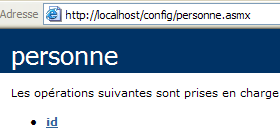
Vamos seguir o link do único ID do método:
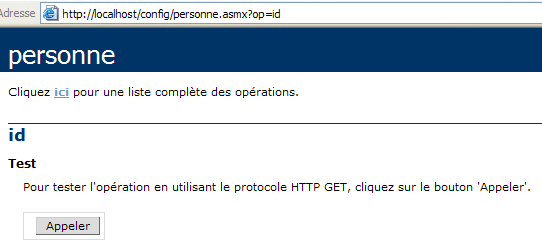
O método id não tem parâmetros. Utilizemos o botão Appeler:
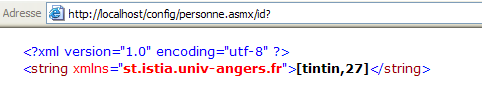
Conseguimos recuperar com sucesso as informações contidas no ficheiro web.config do serviço.
10.10. O serviço Web IMPOTS
Retomamos a aplicação IMPOTS, agora já bem conhecida. Da última vez que trabalhámos com ela, transformámo-la num servidor remoto que podia ser acedido através da Internet. Agora, transformamo-la num serviço Web.
10.10.1. O serviço Web
Partimos da classe impôt, criada no capítulo sobre bases de dados e que se baseia nas informações contidas numa base de dados ODBC:
' opções
Option Strict On
Option Explicit On

' espaços de nomes
Imports System
Imports System.Data
Imports Microsoft.Data.Odbc
Imports System.Collections

Public Class impôt
    ' os dados necessários para o cálculo do imposto
    ' provêm de uma fonte externa
    Private limites(), coeffR(), coeffN() As Decimal

    ' construtor
    Public Sub New(ByVal LIMITES() As Decimal, ByVal COEFFR() As Decimal, ByVal COEFFN() As Decimal)
        ' verifica-se se as 3 tabelas têm o mesmo tamanho
        Dim OK As Boolean = LIMITES.Length = COEFFR.Length And LIMITES.Length = COEFFN.Length
        If Not OK Then
            Throw New Exception("Les 3 tableaux fournis n'ont pas la même taille(" & LIMITES.Length & "," & COEFFR.Length & "," & COEFFN.Length & ")")
        End If
        ' está tudo bem
        Me.limites = LIMITES
        Me.coeffR = COEFFR
        Me.coeffN = COEFFN
    End Sub

    ' construtor 2
    Public Sub New(ByVal DSNimpots As String, ByVal Timpots As String, ByVal colLimites As String, ByVal colCoeffR As String, ByVal colCoeffN As String)
        ' inicializa os três tabuletos de limites, coeffR, coeffN a partir
        ' do conteúdo da tabela Timpots da base de dados ODBC DSNimpots
        ' colLimites, colCoeffR, colCoeffN são as três colunas desta tabela
        ' pode lançar uma exceção
        Dim connectString As String = "DSN=" + DSNimpots + ";"        ' chaîne de connexion à la base
        Dim impotsConn As OdbcConnection = Nothing        ' la connexion
        Dim sqlCommand As OdbcCommand = Nothing        ' la commande SQL
        ' a consulta SELECT
        Dim selectCommand As String = "select " + colLimites + "," + colCoeffR + "," + colCoeffN + " from " + Timpots
        ' tabelas para recuperar os dados
        Dim tLimites As New ArrayList
        Dim tCoeffR As New ArrayList
        Dim tCoeffN As New ArrayList

        ' tenta-se aceder à base de dados
        impotsConn = New OdbcConnection(connectString)
        impotsConn.Open()
        ' está a ser criado um objeto de comando
        sqlCommand = New OdbcCommand(selectCommand, impotsConn)
        ' executa-se a consulta
        Dim myReader As OdbcDataReader = sqlCommand.ExecuteReader()
        ' Análise da tabela recuperada
        While myReader.Read()
            ' os dados da linha atual são colocados nas tabelas
            tLimites.Add(myReader(colLimites))
            tCoeffR.Add(myReader(colCoeffR))
            tCoeffN.Add(myReader(colCoeffN))
        End While
        ' libertação dos recursos
        myReader.Close()
        impotsConn.Close()

        ' as tabelas dinâmicas são transferidas para tabelas estáticas
        Me.limites = New Decimal(tLimites.Count) {}
        Me.coeffR = New Decimal(tLimites.Count) {}
        Me.coeffN = New Decimal(tLimites.Count) {}
        Dim i As Integer
        For i = 0 To tLimites.Count - 1
            limites(i) = Decimal.Parse(tLimites(i).ToString())
            coeffR(i) = Decimal.Parse(tCoeffR(i).ToString())
            coeffN(i) = Decimal.Parse(tCoeffN(i).ToString())
        Next i
    End Sub

    ' cálculo do imposto
    Public Function calculer(ByVal marié As Boolean, ByVal nbEnfants As Integer, ByVal salaire As Integer) As Long
        ' cálculo do número de quotas
        Dim nbParts As Decimal
        If marié Then
            nbParts = CDec(nbEnfants) / 2 + 2
        Else
            nbParts = CDec(nbEnfants) / 2 + 1
        End If
        If nbEnfants >= 3 Then
            nbParts += 0.5D
        End If
        ' cálculo do rendimento tributável e do quociente familiar
        Dim revenu As Decimal = 0.72D * salaire
        Dim QF As Decimal = revenu / nbParts
        ' cálculo do imposto
        limites((limites.Length - 1)) = QF + 1
        Dim i As Integer = 0
        While QF > limites(i)
            i += 1
        End While
        ' retorno do resultado
        Return CLng(revenu * coeffR(i) - nbParts * coeffN(i))
    End Function
End Class
No serviço web, só é possível utilizar um construtor sem parâmetros. Assim, o construtor da classe passará a ser o seguinte:
    ' função de construção
    Public Sub New()
        ' inicializa as três tabelas de limites, coeffR, coeffN a partir
        ' do conteúdo da tabela Timpots da base de dados ODBC DSNimpots
        ' colLimites, colCoeffR, colCoeffN são as três colunas desta tabela
        ' pode lançar uma exceção

        ' recupera-se os parâmetros de configuração do serviço
        Dim DSNimpots As String = ConfigurationSettings.AppSettings("DSN")
        Dim Timpots As String = ConfigurationSettings.AppSettings("TABLE")
        Dim colLimites As String = ConfigurationSettings.AppSettings("COL_LIMITES")
        Dim colCoeffR As String = ConfigurationSettings.AppSettings("COL_COEFFR")
        Dim colCoeffN As String = ConfigurationSettings.AppSettings("COL_COEFFN")

        ' a base de dados é consultada
        Dim connectString As String = "DSN=" + DSNimpots + ";"     ' chaîne de connexion à la base
Os cinco parâmetros do construtor da classe anterior são agora lidos no ficheiro web.config do serviço. O código do ficheiro fonte impots.asmx é o seguinte. Este retoma a maior parte do código anterior. Limitámo-nos a destacar as partes do código específicas do serviço web:
<%@ WebService language="VB" class=impots %>

' criação de um serviço web de impostos
Imports System
Imports System.Data
Imports Microsoft.Data.Odbc
Imports System.Collections
Imports System.Configuration
Imports System.Web.Services

<WebService([Namespace]:="st.istia.univ-angers.fr")> _
Public Class impôt
    Inherits WebService

    ' os dados necessários para o cálculo do imposto
    ' provêm de uma fonte externa
    Private limites(), coeffR(), coeffN() As Decimal
    Private OK As Boolean = False
    Private errMessage As String = ""


    ' construtor
    Public Sub New()
        ' inicializa as três tabelas de limites, coeffR, coeffN a partir
        ' do conteúdo da tabela Timpots da base de dados ODBC DSNimpots
        ' colLimites, colCoeffR, colCoeffN são as três colunas desta tabela
        ' pode lançar uma exceção

        ' recupera-se os parâmetros de configuração do serviço
        Dim DSNimpots As String = ConfigurationSettings.AppSettings("DSN")
        Dim Timpots As String = ConfigurationSettings.AppSettings("TABLE")
        Dim colLimites As String = ConfigurationSettings.AppSettings("COL_LIMITES")
        Dim colCoeffR As String = ConfigurationSettings.AppSettings("COL_COEFFR")
        Dim colCoeffN As String = ConfigurationSettings.AppSettings("COL_COEFFN")

        ' a base de dados é consultada
        Dim connectString As String = "DSN=" + DSNimpots + ";"     ' chaîne de connexion à la base
        Dim impotsConn As OdbcConnection = Nothing     ' la connexion
        Dim sqlCommand As OdbcCommand = Nothing     ' la commande SQL
        Dim myReader As OdbcDataReader     ' lecteur de données Odbc

        ' a consulta SELECT
        Dim selectCommand As String = "select " + colLimites + "," + colCoeffR + "," + colCoeffN + " from " + Timpots

        ' tabelas para recuperar os dados
        Dim tLimites As New ArrayList
        Dim tCoeffR As New ArrayList
        Dim tCoeffN As New ArrayList

        ' tenta-se aceder à base de dados
        Try
            impotsConn = New OdbcConnection(connectString)
            impotsConn.Open()
            ' cria-se um objeto de comando
            sqlCommand = New OdbcCommand(selectCommand, impotsConn)
            ' executa-se a consulta
            myReader = sqlCommand.ExecuteReader()
            ' Análise da tabela recuperada
            While myReader.Read()
                ' os dados da linha atual são colocados nas tabelas
                tLimites.Add(myReader(colLimites))
                tCoeffR.Add(myReader(colCoeffR))
                tCoeffN.Add(myReader(colCoeffN))
            End While
            ' libertação dos recursos
            myReader.Close()
            impotsConn.Close()

            ' as tabelas dinâmicas são transferidas para tabelas estáticas
            Me.limites = New Decimal(tLimites.Count) {}
            Me.coeffR = New Decimal(tLimites.Count) {}
            Me.coeffN = New Decimal(tLimites.Count) {}
            Dim i As Integer
            For i = 0 To tLimites.Count - 1
                limites(i) = Decimal.Parse(tLimites(i).ToString())
                coeffR(i) = Decimal.Parse(tCoeffR(i).ToString())
                coeffN(i) = Decimal.Parse(tCoeffN(i).ToString())
            Next i
            ' Tudo bem
            OK = True
            errMessage = ""
        Catch ex As Exception
            ' erro
            OK = False
            errMessage += "[" + ex.Message + "]"
        End Try
    End Sub

    ' cálculo do imposto
    <WebMethod()> _
    Function calculer(ByVal marié As Boolean, ByVal nbEnfants As Integer, ByVal salaire As Integer) As Long
        ' cálculo do número de quotas
        Dim nbParts As Decimal
        If marié Then
            nbParts = CDec(nbEnfants) / 2 + 2
        Else
            nbParts = CDec(nbEnfants) / 2 + 1
        End If
        If nbEnfants >= 3 Then
            nbParts += 0.5D
        End If
        ' cálculo do rendimento tributável e do quociente familiar
        Dim revenu As Decimal = 0.72D * salaire
        Dim QF As Decimal = revenu / nbParts
        ' cálculo do imposto
        limites((limites.Length - 1)) = QF + 1
        Dim i As Integer = 0
        While QF > limites(i)
            i += 1
        End While
        ' retorno do resultado
        Return CLng(revenu * coeffR(i) - nbParts * coeffN(i))
    End Function

    ' ID
    <WebMethod()> _
    Function id() As String
        ' para verificar se está tudo correto OK
        Return "[" + OK + "," + errMessage + "]"
    End Function
End Class
Vamos explicar as poucas alterações feitas à classe impots, para além das necessárias para a transformar num serviço web:
- a leitura da base de dados no construtor pode falhar. Por isso, adicionámos dois atributos à nossa classe e um método:
- A variável booleana OK assume o valor vrai se a base de dados tiver sido lida e o valor faux caso contrário
- a cadeia errMessage contém uma mensagem de erro se não for possível ler a base de dados.
- O método id, sem parâmetros, permite obter o valor destes dois atributos.
- Para gerir um eventual erro de acesso à base de dados, a parte do código do construtor relacionada com este acesso foi colocada entre try-catch.
O ficheiro de configuração do serviço web.config é o seguinte:
<configuration>
    <appSettings>
        <add key="DSN" value="mysql-impots" />
        <add key="TABLE" value="timpots" />
        <add key="COL_LIMITES" value="limites" />
        <add key="COL_COEFFR" value="coeffr" />
        <add key="COL_COEFFN" value="coeffn" />
    </appSettings>
</configuration>
Durante uma primeira tentativa de carregamento do serviço impots, o compilador indicou que não encontrou o espaço de nomes Microsoft.Data.Odbc utilizado na diretiva:
Após consultar a documentação
- foi adicionada uma diretiva de compilação no web.config para indicar que era necessário utilizar o assembly Microsoft.Data.odbc
- foi colocada uma cópia do ficheiro microsoft.data.odbc.dll na pasta bin do projeto. Esta pasta é sistematicamente explorada pelo compilador de um serviço web quando procura um «assembly».
Outras soluções parecem possíveis, mas não foram aprofundadas aqui. O ficheiro de configuração passou, portanto, a ser:
<configuration>
    <appSettings>
        <add key="DSN" value="mysql-impots" />
        <add key="TABLE" value="timpots" />
        <add key="COL_LIMITES" value="limites" />
        <add key="COL_COEFFR" value="coeffr" />
        <add key="COL_COEFFN" value="coeffn" />
    </appSettings>
    <system.web>
        <compilation>
            <assemblies>
                <add assembly="Microsoft.Data.Odbc" />
            </assemblies>
        </compilation>
    </system.web>
</configuration>
Conteúdo da pasta impots\bin:
O serviço e o seu ficheiro de configuração foram colocados em impots:
A pasta física do serviço web foi associada à pasta virtual /impots de IIS. A página do serviço é, então, a seguinte:
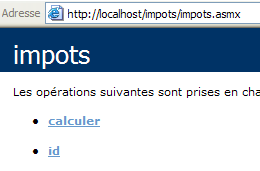
Se seguirmos o link id:
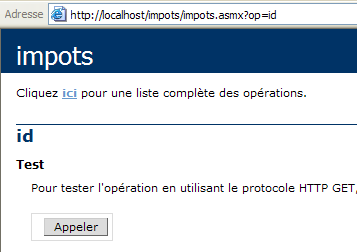
Se utilizarmos o botão Appeler:
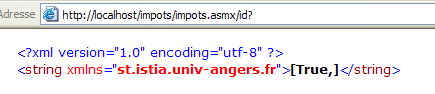
O resultado anterior apresenta os valores dos atributos OK (true) e errMessage (""). Neste exemplo, a base de dados foi carregada corretamente. Nem sempre foi assim e foi por isso que adicionámos o método id para ter acesso à mensagem de erro. O erro consistia no facto de o nome DSN da base de dados ter sido definido como DSN (utilizador), quando deveria ter sido definido como DSN (sistema). Esta distinção é feita no gestor de fontes ODBC de 32 bits:
 |
Voltemos à página do serviço:
Sigamos a ligação calculer:
Definimos os parâmetros da chamada e executamo-la:

O resultado está correto.
10.10.2. Gerar o proxy do serviço impots
Agora que temos um serviço web impots operacional, podemos gerar a sua classe proxy. Recorde-se que esta será utilizada por aplicações cliente para aceder ao serviço web impots de forma transparente. Primeiro, utiliza-se o utilitário wsdl para gerar o ficheiro fonte da classe proxy; em seguida, este é compilado numa DLL.
dos>wsdl /language=vb http://localhost/impostos/impots.asmx
Microsoft (R) Web Services Description Language Utility
[Microsoft (R) .NET Framework, Version 1.1.4322.573]
Copyright (C) Microsoft Corporation 1998-2002. All rights reserved.

Écriture du fichier 'D:\data\serge\devel\vbnet\poly\chap9\impots\impots.vb'.

D:\data\serge\devel\vbnet\poly\chap9\impots>dir
09/03/2004  10:20    <REP>          bin
09/03/2004  10:58             4 651 impots.asmx
09/03/2004  11:05             3 364 impots.vb
09/03/2004  10:19               431 web.config

dos>vbc /t:library /r:system.dll /r:system.web.services.dll /r:system.xml.dll impots.vb
Compilateur Microsoft (R) Visual Basic .NET version 7.10.3052.4
pour Microsoft (R) .NET Framework version 1.1.4322.573
Copyright (C) Microsoft Corporation 1987-2002. Tous droits réservés.

dos>dir
09/03/2004  10:20    <REP>          bin
09/03/2004  10:58             4 651 impots.asmx
09/03/2004  11:09             5 120 impots.dll
09/03/2004  11:05             3 364 impots.vb
09/03/2004  10:19               431 web.config
10.10.3. Utilizar o proxy com um cliente
No capítulo sobre bases de dados, criámos uma aplicação de consola que permite calcular o imposto:
dos>dir
27/02/2004  16:56             5 120 impots.dll
27/02/2004  17:12             3 586 impots.vb
27/02/2004  17:08             6 144 testimpots.exe
27/02/2004  17:18             3 328 testimpots.vb

dos>testimpots
pg DSNimpots tabImpots colLimites colCoeffR colCoeffN

dos>testimpots odbc-mysql-dbimpots impots limites coeffr coeffn
Paramètres du calcul de l'impôt au format marié nbEnfants salaire ou rien pour arrêter :o 2 200000
impôt=22504 F
O programa testimpots utilizava, na altura, a classe impôt clássica, a que se encontra no ficheiro impots.dll. O código do programa testimpots.vb era o seguinte:
Option Explicit On
Option Strict On

' espaços de nomes
Imports System
Imports Microsoft.VisualBasic

' página de teste
Module testimpots
    Sub Main(ByVal arguments() As String)
        ' programa interativo de cálculo de impostos
        ' o utilizador introduz três dados através do teclado: casado nbEnfants salário
        ' o programa apresenta então o imposto a pagar
        Const syntaxe1 As String = "pg DSNimpots tabImpots colLimites colCoeffR colCoeffN"
        Const syntaxe2 As String = "syntaxe : marié nbEnfants salaire" + ControlChars.Lf + "marié : o pour marié, n pour non marié" + ControlChars.Lf + "nbEnfants : nombre d'enfants" + ControlChars.Lf + "salaire : salaire annuel en F"

        ' verificação dos parâmetros do programa
        If arguments.Length <> 5 Then
            ' mensagem de erro
            Console.Error.WriteLine(syntaxe1)
            ' fim
            Environment.Exit(1)
        End If        'if
        ' recuperam-se os argumentos
        Dim DSNimpots As String = arguments(0)
        Dim tabImpots As String = arguments(1)
        Dim colLimites As String = arguments(2)
        Dim colCoeffR As String = arguments(3)
        Dim colCoeffN As String = arguments(4)

        ' criação de um objeto de imposto
        Dim objImpôt As impôt = Nothing
        Try
            objImpôt = New impôt(DSNimpots, tabImpots, colLimites, colCoeffR, colCoeffN)
        Catch ex As Exception
            Console.Error.WriteLine(("L'erreur suivante s'est produite : " + ex.Message))
            Environment.Exit(2)
        End Try

        ' loop infinito
        While True
            ' inicialmente, sem erros
            Dim erreur As Boolean = False

            ' solicitam-se os parâmetros para o cálculo do imposto
            Console.Out.Write("Paramètres du calcul de l'impôt au format marié nbEnfants salaire ou rien pour arrêter :")
            Dim paramètres As String = Console.In.ReadLine().Trim()

            ' O que se deve fazer?
            If paramètres Is Nothing Or paramètres = "" Then
                Exit While
            End If

            ' verificação do número de argumentos na linha introduzida
            Dim args As String() = paramètres.Split(Nothing)
            Dim nbParamètres As Integer = args.Length
            If nbParamètres <> 3 Then
                Console.Error.WriteLine(syntaxe2)
                erreur = True
            End If
            Dim marié As String
            Dim nbEnfants As Integer
            Dim salaire As Integer
            If Not erreur Then
                ' verificação da validade dos parâmetros
                ' casado
                marié = args(0).ToLower()
                If marié <> "o" And marié <> "n" Then
                    Console.Error.WriteLine((syntaxe2 + ControlChars.Lf + "Argument marié incorrect : tapez o ou n"))
                    erreur = True
                End If
                ' nbEnfants
                nbEnfants = 0
                Try
                    nbEnfants = Integer.Parse(args(1))
                    If nbEnfants < 0 Then
                        Throw New Exception
                    End If
                Catch
                    Console.Error.WriteLine(syntaxe2 + "\nArgument nbEnfants incorrect : tapez un entier positif ou nul")
                    erreur = True
                End Try
                ' salário
                salaire = 0
                Try
                    salaire = Integer.Parse(args(2))
                    If salaire < 0 Then
                        Throw New Exception
                    End If
                Catch
                    Console.Error.WriteLine(syntaxe2 + "\nArgument salaire incorrect : tapez un entier positif ou nul")
                    erreur = True
                End Try
            End If
            If Not erreur Then
                ' os parâmetros estão corretos — calcula-se o imposto
                Console.Out.WriteLine(("impôt=" & objImpôt.calculer(marié = "o", nbEnfants, salaire).ToString + " F"))
            End If
        End While
    End Sub
End Module
Retomamos o mesmo programa para que agora utilize o serviço web impots através da classe proxy impots criada anteriormente. Temos de alterar ligeiramente o código:
- enquanto a classe original impôt tinha um construtor com cinco argumentos, a classe proxy impots tem um construtor sem parâmetros. Os cinco parâmetros, como vimos, estão agora definidos no ficheiro de configuração do serviço web.
- Por isso, já não é necessário passar esses cinco parâmetros como argumentos para o programa de teste
O novo código é o seguinte:
Imports System
Imports Microsoft.VisualBasic

' página de teste
Module testimpots

    Public Sub Main(ByVal arguments() As String)
        ' programa interativo de cálculo de impostos
        ' o utilizador introduz três dados através do teclado: casado nbEnfants salário
        ' o programa apresenta então o imposto a pagar
        Const syntaxe2 As String = "syntaxe : marié nbEnfants salaire" + ControlChars.Lf + "marié : o pour marié, n pour non marié" + ControlChars.Lf + "nbEnfants : nombre d'enfants" + ControlChars.Lf + "salaire : salaire annuel en F"

        ' criação de um objeto «imposto»
        Dim objImpôt As impôt = Nothing
        Try
            objImpôt = New impôt
        Catch ex As Exception
            Console.Error.WriteLine(("L'erreur suivante s'est produite : " + ex.Message))
            Environment.Exit(2)
        End Try

        ' loop infinito
        Dim erreur As Boolean
        While True
            ' inicialmente, sem erros
            erreur = False
            ' são solicitados os parâmetros para o cálculo do imposto
            Console.Out.Write("Paramètres du calcul de l'impôt au format marié nbEnfants salaire ou rien pour arrêter :")
            Dim paramètres As String = Console.In.ReadLine().Trim()
            ' O que se deve fazer?
            If paramètres Is Nothing Or paramètres = "" Then
                Exit While
            End If
            ' verificação do número de argumentos na linha introduzida
            Dim args As String() = paramètres.Split(Nothing)
            Dim nbParamètres As Integer = args.Length
            If nbParamètres <> 3 Then
                Console.Error.WriteLine(syntaxe2)
                erreur = True
            End If
            If Not erreur Then
                ' verificação da validade dos parâmetros
                ' casado
                Dim marié As String = args(0).ToLower()
                If marié <> "o" And marié <> "n" Then
                    Console.Error.WriteLine((syntaxe2 + ControlChars.Lf + "Argument marié incorrect : tapez o ou n"))
                    erreur = True
                End If
                ' nbEnfants
                Dim nbEnfants As Integer = 0
                Try
                    nbEnfants = Integer.Parse(args(1))
                    If nbEnfants < 0 Then
                        Throw New Exception
                    End If
                Catch
                    Console.Error.WriteLine((syntaxe2 + ControlChars.Lf + "Argument nbEnfants incorrect : tapez un entier positif ou nul"))
                    erreur = True
                End Try
                ' salário
                Dim salaire As Integer = 0
                Try
                    salaire = Integer.Parse(args(2))
                    If salaire < 0 Then
                        Throw New Exception
                    End If
                Catch
                    Console.Error.WriteLine((syntaxe2 + ControlChars.Lf + "Argument salaire incorrect : tapez un entier positif ou nul"))
                    erreur = True
                End Try
                ' se os parâmetros estiverem corretos - calcula-se o imposto
                If Not erreur Then Console.Out.WriteLine(("impôt=" + objImpôt.calculer(marié = "o", nbEnfants, salaire).ToString + " F"))
            End If
        End While
    End Sub
End Module
Temos o proxy impots.dll e o código-fonte testimpots na mesma pasta.
dos>dir
09/03/2004  11:28    <REP>          bin
09/03/2004  11:09             5 120 impots.dll
09/03/2004  11:34             3 396 testimpots.vb
09/03/2004  10:19               431 web.config
Estamos a compilar o código-fonte testimpots.vb:
dos>vbc /r:impots.dll /r:microsoft.visualbasic.dll /r:system.web.services.dll /r:system.dll testimpots.vb
dos>dir
09/03/2004  11:28    <REP>          bin
09/03/2004  11:09             5 120 impots.dll
09/03/2004  11:05             3 364 impots.vb
09/03/2004  11:35             5 632 testimpots.exe
09/03/2004  11:34             3 396 testimpots.vb
09/03/2004  10:19               431 web.config
e, em seguida, executamo-lo:
dos>testimpots
Paramètres du calcul de l'impôt au format marié nbEnfants salaire ou rien pour arrêter :o 2 200000
impôt=22504 F
Obtenemos, de facto, o resultado esperado.