9. Utilização do SGBD MySQL
 |
9.1. Instalação do módulo MySQLdb
Vamos escrever scripts utilizando uma base de dados MySQL:
 |
As funções Python para a gestão de uma base de dados MySQL estão encapsuladas num módulo MySQLdb que não está incluído na distribuição inicial do Python. Por isso, é necessário descarregar e instalar o módulo. Eis uma forma de o fazer:
 |
- No menu de programas, selecione o gestor de pacotes Python [1]. A janela de comandos [2] será então exibida.
Procure a palavra-chave mysql nos pacotes:
C:\Documents and Settings\st>pypm search mysql
Get: [pypm-be.activestate.com] :repository-index:
Get: [pypm-free.activestate.com] :repository-index:
autosync: synced 2 repositories
  chartio                    Setup wizard and connection client for connecting
  chartio-setup              Setup wizard and connection client for connecting
  cns.recipe.zmysqlda        Recipe for installing ZMySQLDA
  collective.recipe.zmysqlda Recipe for installing ZMySQLDA
  django-mysql-manager       DESCRIPTION_DESCRIPTION_DESCRIPTION
  jaraco.mysql               MySQLDB-compatible MySQL wrapper by Jason R. Coomb
  lovely.testlayers          mysql, postgres nginx, memcached cassandra test la
  mtstat-mysql               MySQL Plugins for mtstat
  mysql-autodoc              Generate HTML documentation from a mysql database
  mysql-python               Python interface to MySQL
  mysqldbda                  MySQL Database adapter
  products.zmysqlda          MySQL Zope2 adapter.
  pymysql                    Pure Python MySQL Driver
  pymysql-sa                 PyMySQL dialect for SQLAlchemy.
  pymysql3                   Pure Python MySQL Driver
  sa-mysql-dt                Alternative implementation of DateTime column for
  schemaobject               Iterate over a MySQL database schema as a Python o
  schemasync                 A MySQL Schema Synchronization Utility
  simplestore                A datastore layer built on top of MySQL in Python.
  sqlbean                    A auto maping ORM for MYSQL and can bind with memc
  sqlwitch                   sqlwitch offers idiomatic SQL generation on top of
  tiddlywebplugins.mysql     MySQL-based store for tiddlyweb
  tiddlywebplugins.mysql2    MySQL-based store for tiddlyweb
zest.recipe.mysql          A Buildout recipe to setup a MySQL database.
Foram listados todos os módulos cujo nome ou descrição contém a palavra-chave mysql. O que nos interessa é o [mysql-python], na linha 14. Instalamo-lo:
C:\Documents and Settings\st>pypm install mysql-python
The following packages will be installed into "%APPDATA%\Python" (2.7):
 mysql-python-1.2.3
Hit: [pypm-free.activestate.com] mysql-python 1.2.3
Installing mysql-python-1.2.3

C:\Documents and Settings\st>echo %APPDATA%
C:\Documents and Settings\st\Application Data
- linha 5: o pacote mysql-python-1.2.3 foi instalado na pasta «%APPDATA%\Python», em que APPDATA é a pasta indicada na linha 8.
Esta operação pode falhar se:
- o interpretador Python utilizado for uma versão de 64 bits;
- o caminho %APPDATA% contiver caracteres acentuados.
9.2. Instalação do MySQL
Existem várias formas de instalar o SGBD MySQL. Aqui, utilizámos o WampServer, um pacote que reúne vários programas:
- um servidor web Apache. Iremos utilizá-lo para escrever scripts web em Python;
- o SGBD MySQL;
- a linguagem de script PHP;
- uma ferramenta de administração do SGBD MySQL escrita em PHP: phpMyAdmin.
O WampServer pode ser descarregado (junho de 2011) no seguinte endereço:
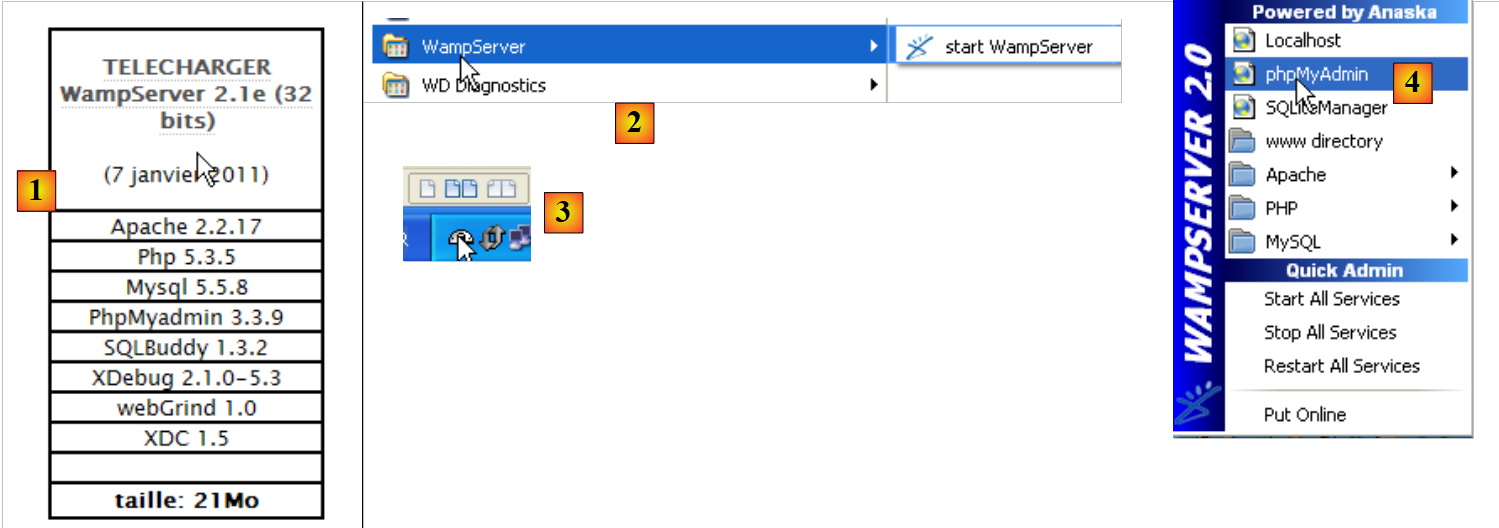 |
- no [1], descarrega-se a versão adequada do WampServer;
- no caso do [2], uma vez instalado, deve-se iniciá-lo. Isto irá iniciar o servidor Web Apache e o SGBD MySQL;
- no [3], depois de iniciado, o WampServer pode ser gerido a partir de um ícone [3] localizado no canto inferior direito da barra de tarefas;
- no [4], inicia-se a ferramenta de administração do MySQL.
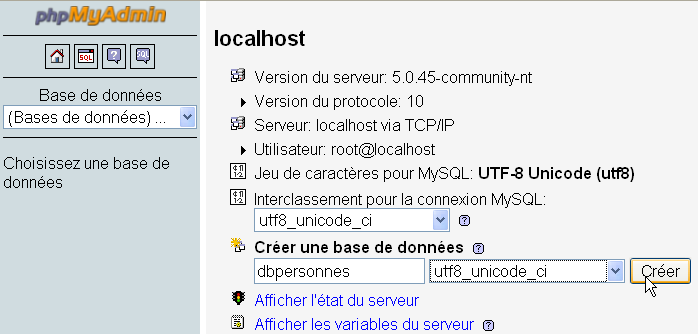
Cria-se uma base de dados [dbpersonnes]:
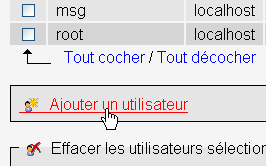
Cria-se um utilizador [admpersonnes] com a palavra-passe [nobody]:
 |  |
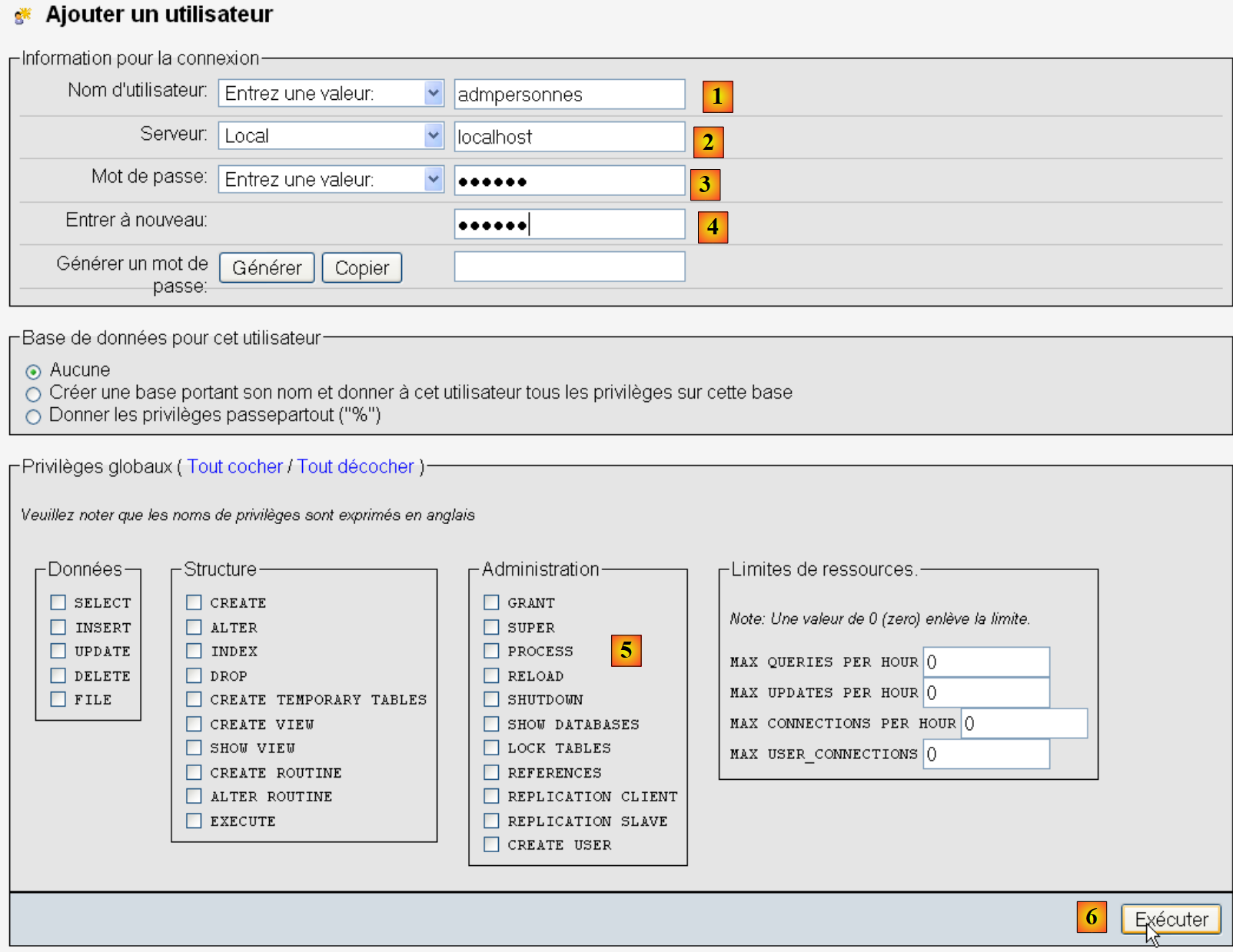 |
- em [1], o nome do utilizador;
- em [2], o computador de SGBD no qual lhe são atribuídos direitos;
- em [3], a sua palavra-passe [nobody];
- em [4], o mesmo;
- em [5], não se concede qualquer direito a este utilizador;
- em [6], é criado.
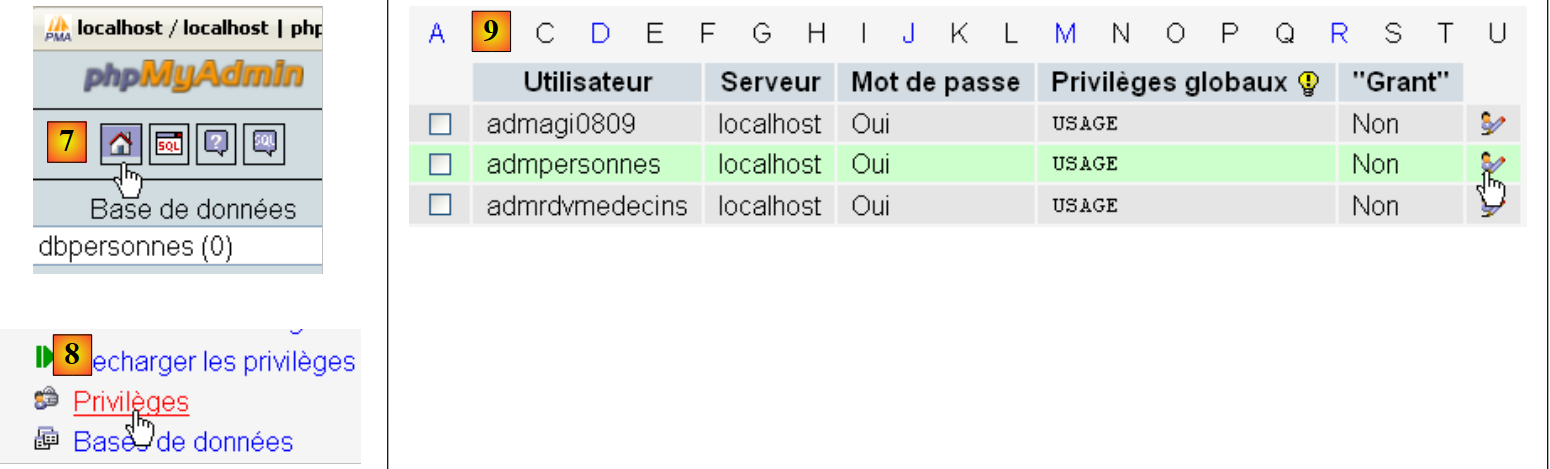 |
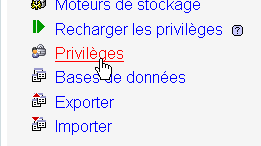
- em [7], regressa-se à página inicial de phpMyAdmin;
- em [8], utiliza-se o link [Privileges] desta página para ir alterar os do utilizador [admpersonnes] [9].
 |
- em [10], indica-se que se pretende conceder ao utilizador [admpersonnes] direitos sobre a base de dados [dbpersonnes];
- em [11], confirma-se a escolha.
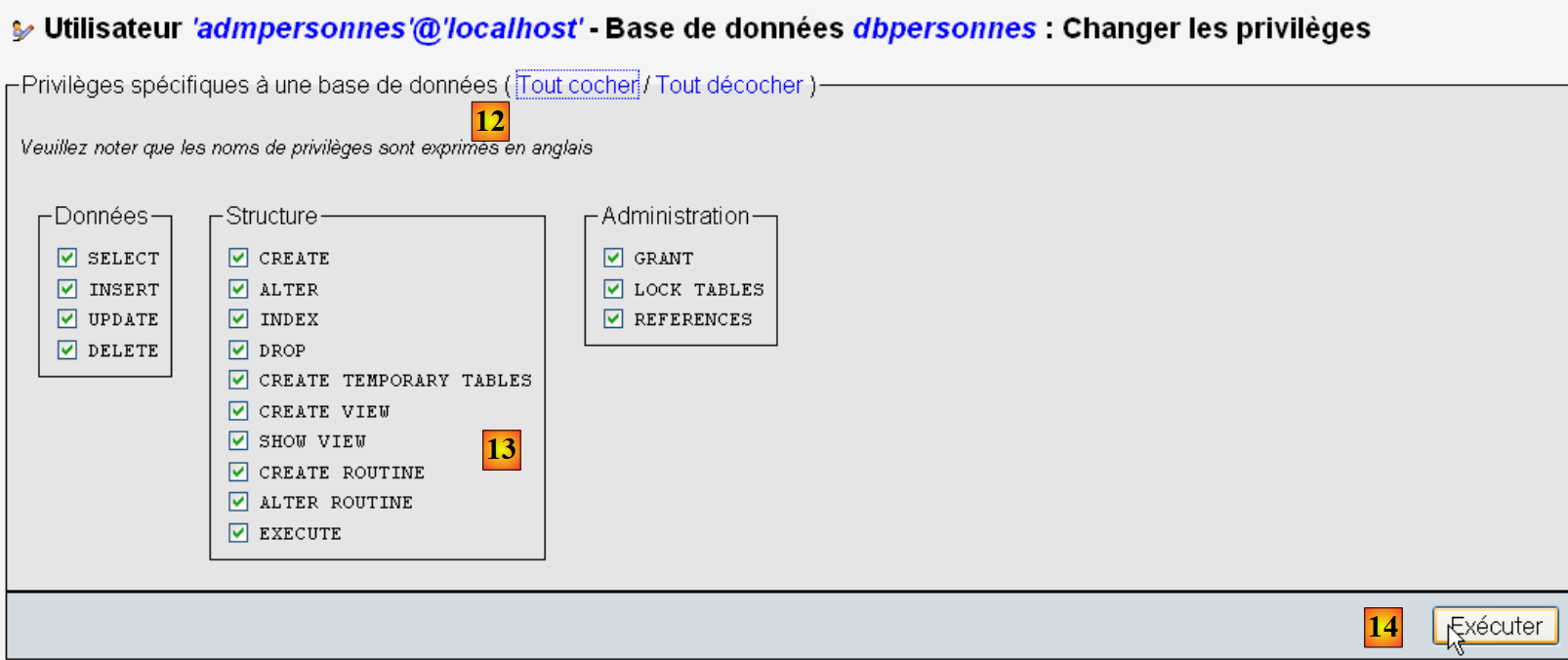 |
- através da ligação [12] [Tout cocher], concedem-se ao utilizador [admpersonnes] todos os direitos sobre a base de dados [dbpersonnes] [13];
- confirmamos em [14].
Agora temos:
- uma base de dados MySQL e [dbpersonnes];
- um utilizador [admpersonnes / nobody] que tem todos os direitos sobre esta base de dados.
Vamos escrever scripts em Python para explorar a base de dados.
9.3. Ligação a uma base de dados MySQL - 1
# importação do módulo MySQLdb
import sys
sys.path.append("D:\Programs\ActivePython\site-packages")
import MySQLdb

# ligação a uma base de dados MySQL
....
Notas:
- linhas 2-4: os scripts que contêm operações com o SGBD e o MySQL têm de importar o módulo MySQLdb. Recorde-se que instalámos este módulo na pasta [%APPDATA%\Python]. A pasta [%APPDATA%\Python] é pesquisada automaticamente quando um código Python solicita um módulo. Na verdade, são pesquisadas todas as pastas declaradas no sys.path. Aqui está um exemplo que apresenta essas pastas:
# -*- coding=utf-8 -*-

import sys

# visualização das pastas de sys.path
for dossier in sys.path:
    print dossier
A exibição no ecrã é a seguinte:
Na linha 8, a pasta [site-packages], onde o MySQLdb tinha sido instalado inicialmente. Movemos a pasta [site-packages], que é a pasta onde o utilitário pypm instala os módulos Python. Para adicionar uma nova pasta que o Python irá explorar à procura de módulos, adicionamo-la à lista sys.path:
# importação do módulo MySQLdb
import sys
sys.path.append("D:\Programs\ActivePython\site-packages")
import MySQLdb

# ligação a uma base de dados MySQL
....
Na linha 3, adiciona-se a pasta para onde foi movido o módulo MySQLdb.
O código completo do exemplo é o seguinte:
# importação do módulo MySQLdb
import sys
sys.path.append("D:\Programs\ActivePython\site-packages")
import MySQLdb

# ligação a uma base de dados MySQL
# a identidade do utilizador é (admpersonnes,nobody)
user="admpersonnes"
pwd="nobody"
host="localhost"
connexion=None
try:
    print "connexion..."
    # ligação
    connexion=MySQLdb.connect(host=host,user=user,passwd=pwd)
    # acompanhamento
    print "Connexion a MySQL reussie sous l'identite host={0},user={1},passwd={2}".format(host,user,pwd)
except MySQLdb.OperationalError,message:
    print "Erreur : {0}".format(message)
finally:
    try:
        connexion.close()
    except:
        pass
- linhas 8-11: o script irá ligar (linha 15) o utilizador [admpersonnes / nobody] ao SGBD MySQL da máquina [localhost]. Não o ligamos a uma base de dados específica;
- linhas 12-24: a ligação pode falhar. Por isso, é realizada num bloco «try / except / finally»;
- linha 15: o método connect do módulo MySQLdb aceita vários parâmetros nomeados:
- user: utilizador proprietário da ligação [admpersonnes];
- pwd: palavra-passe do utilizador [nobody];
- host: máquina do SGBD MySQL [localhost];
- db: a base de dados à qual se estabelece a ligação. Opcional.
- linha 18: se for lançada uma exceção, esta será do tipo [ MySQLdb.OperationalError] e a mensagem de erro associada estará na variável [message];
- linhas 20-23: na cláusula [finally], encerra-se a ligação. Em caso de exceção, esta é interceptada (linha 23), mas não se faz nada com ela (linha 24).
connexion...
Connexion a MySQL reussie sous l'identite host=localhost,user=admpersonnes,passwd=nobody
9.4. Ligação a uma base de dados MySQL - 2
# importação do módulo MySQLdb
import sys
sys.path.append("D:\Programs\ActivePython\site-packages")
import MySQLdb

# ---------------------------------------------------------------------------------
def testeConnexion(hote,login,pwd):
    # liga-se e, em seguida, desliga-se (login, pwd) do SGBD MySQL do servidor anfitrião
    # lança a exceção MySQLdb.operationalError
    # ligação
    connexion=MySQLdb.connect(host=hote,user=login,passwd=pwd)
    print "Connexion a MySQL reussie sous l'identite (%s,%s,%s)" % (hote,login,passwd)
    # a ligação é encerrada
    connexion.close()
    print "Fermeture connexion MySQL reussie\n"


# ---------------------------------------------- main
# ligação à base de dados MySQL
# identidade do utilizador
user="admpersonnes"
passwd="nobody"
host="localhost"
# teste de ligação
try:
    testeConnexion(host,user,passwd)
except MySQLdb.OperationalError,message:
    print message
# com um utilizador inexistente
try:
    testeConnexion(host,"xx","xx")
except MySQLdb.OperationalError,message:
    print message
Notas:
- linhas 7-15: uma função que tenta ligar e, em seguida, desligar um utilizador a um SGBD MySQL. Apresenta o resultado;
- linhas 18-34: programa principal – chama duas vezes o método testeConnexion e apresenta as eventuais exceções.
9.5. Criação de uma tabela MySQL
Agora que sabemos como estabelecer uma ligação com um SGBD MySQL, começamos a emitir comandos SQL nesta ligação. Para tal, vamos ligar-nos à base de dados criada [dbpersonnes] e utilizar a ligação para criar uma tabela nessa base de dados.
# importação do módulo MySQLdb
import sys
sys.path.append("D:\Programs\ActivePython\site-packages")
import MySQLdb

# ---------------------------------------------------------------------------------
def executeSQL(connexion,update):
    # executa uma consulta de atualização na ligação
    # solicita-se um cursor
    curseur=connexion.cursor()
    # executa a consulta SQL na ligação
    try:
        curseur.execute(update)
        connexion.commit()
    except Exception, erreur:
        connexion.rollback()
        raise
    finally:
        curseur.close()

# ---------------------------------------------- main
# ligação à base de dados MySQL
# a identidade do utilizador
ID="admpersonnes"
PWD="nobody"
# o computador anfitrião do SGBD
HOTE="localhost"
# identidade da base de dados
BASE="dbpersonnes"
# ligação
try:
    connexion=MySQLdb.connect(host=HOTE,user=ID,passwd=PWD,db=BASE)
except MySQLdb.OperationalError,message:
    print message
    sys.exit()

# eliminação da tabela «pessoas», caso exista
# se não existir, ocorrerá um erro
# ignora-se
requete="drop table personnes"
try:
    executeSQL(connexion,requete)
except:
    pass
# criação da tabela «pessoas»
requete="create table personnes (prenom varchar(30) NOT NULL, nom varchar(30) NOT NULL, age integer NOT NULL, primary key(nom,prenom))"
try:
    executeSQL(connexion,requete)
except MySQLdb.OperationalError,message:
    print message
    sys.exit()
# desligar-se e sair
try:
    connexion.close()
except MySQLdb.OperationalError,message:
    print message
sys.exit()
Notas:
- linha 7: a função executeSQL executa uma consulta SQL numa ligação aberta;
- linha 10: as operações SQL na ligação são realizadas através de um objeto específico denominado cursor;
- linha 10: obtenção de um cursor;
- linha 13: execução da consulta SQL;
- linha 14: a transação atual é validada;
- linha 15: em caso de exceção, a mensagem de erro é recuperada na variável «erro»;
- linha 16: a transação atual é invalidada;
- linha 17: a exceção é reenviada;
- linha 19: quer haja erro ou não, o cursor é fechado. Isto liberta os recursos que lhe estão associados.
create table personnes (prenom varchar(30) NOT NULL, nom varchar(30) NOT NULL, age integer NOT NULL, primary key(nom,prenom)) : requete reussie
Verificação com phpMyAdmin:
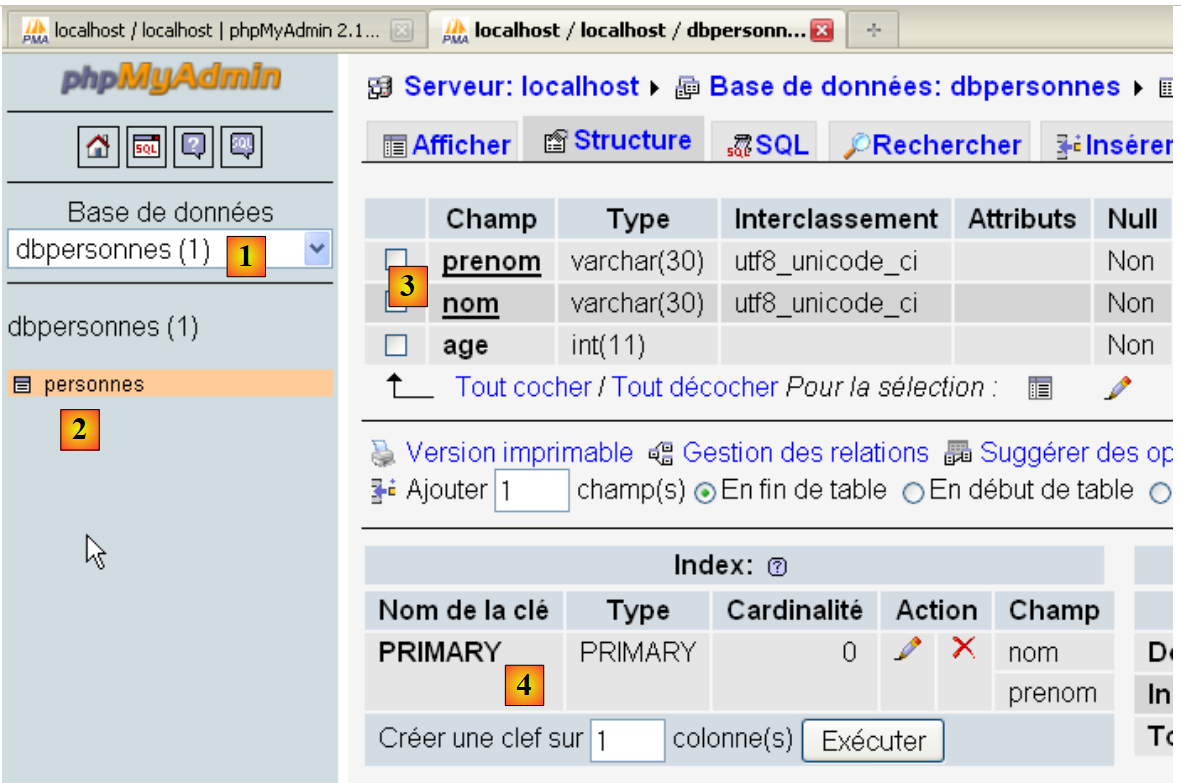 |
- A base de dados [dbpersonnes] [1] possui uma tabela [personnes] [2] que tem a estrutura [3] e a chave primária [4].
9.6. Preenchimento da tabela [personnes]
Depois de termos criado anteriormente a tabela [personnes], vamos agora preenchê-la.
# importação do módulo MySQLdb
import sys
sys.path.append("D:\Programs\ActivePython\site-packages")
import MySQLdb
# outros módulos
import re

# ---------------------------------------------------------------------------------
def executerCommandes(HOTE,ID,PWD,BASE,SQL,suivi=False,arret=True):
    # utiliza a ligação (HOTE,ID,PWD,BASE)
    # executa nesta ligação os comandos SQL contidos no ficheiro de texto SQL
    # este ficheiro é um ficheiro de comandos SQL a executar à razão de um por linha
    # se «seguimento=True», então cada execução de um comando SQL é acompanhada por uma mensagem indicando o seu sucesso ou falha
    # se «arret» for «True», a função pára ao primeiro erro encontrado; caso contrário, executa todos os comandos SQL
    # a função devolve uma lista (n.º de erros, erro1, erro2, ...)

    # verifica-se a existência do ficheiro SQL
    data=None
    try:
        data=open(SQL,"r")
    except:
        return [1,"Le fichier %s n'existe pas" % (SQL)]

    # ligação
    try:
        connexion=MySQLdb.connect(host=HOTE,user=ID,passwd=PWD,db=BASE)
    except MySQLdb.OperationalError,erreur:
        return [1,"Erreur lors de la connexion a MySQL sous l'identite (%s,%s,%s,%s) : %s" % (HOTE, ID, PWD, BASE, erreur)]

    # solicita-se um cursor
    curseur=connexion.cursor()
    # execução das consultas SQL contidas no ficheiro SQL
    # colocam-se numa tabela
    requetes=data.readlines()
    # executam-se uma a uma — inicialmente, sem erros
    erreurs=[0]
    for i in range(len(requetes)):
        # memoriza-se a consulta atual
        requete=requetes[i]
        # a consulta está vazia? Se sim, passa-se para a consulta seguinte
        if re.match(r"^\s*$",requete):
            continue
        # execução da consulta i
        erreur=""
        try:
            curseur.execute(requete)
        except Exception, erreur:
            pass
        #: ocorreu algum erro?
        if erreur:
            # Mais um erro
            erreurs[0]+=1
            # mensagem de erro
            msg="%s : Erreur (%s)" % (requete,erreur)
            erreurs.append(msg)
            # acompanhar no ecrã ou não?
            if suivi:
                print msg
            # paramos?
            if arret:
                return erreurs
        else:
            if suivi:
                print "%s : Execution reussie" % (requete)
    # encerramento da ligação e libertação dos recursos
    curseur.close()
    connexion.commit()
    # desligar-se
    try:
        connexion.close()
    except MySQLdb.OperationalError,erreur:
        # mais um erro
        erreurs[0]+=1
        # mensagem de erro
        msg="%s : Erreur (%s)" % (requete,erreur)
        erreurs.append(msg)

    # voltar
    return erreurs


# ---------------------------------------------- main
# ligação à base de dados MySQL
# identidade do utilizador
ID="admpersonnes"
PWD="nobody"
# o computador anfitrião do SGBD
HOTE="localhost"
# identidade da base de dados
BASE="dbpersonnes"
# identidade do ficheiro de texto com os comandos SQL a executar
TEXTE="sql.txt";

# criação e preenchimento da tabela
erreurs=executerCommandes(HOTE,ID,PWD,BASE,TEXTE,True,False)
#exibição do número de erros
print "il y a eu %s erreur(s)" % (erreurs[0])
for i in range(1,len(erreurs)):
    print erreurs[i]
O ficheiro sql.txt:
Foi inserido deliberadamente um erro na linha 5.
Resultados no ecrã:
drop table personnes : Execution reussie
create table personnes (prenom varchar(30) not null, nom varchar(30) not null, age integer not null, primary key (nom,prenom)) : Execution reussie
insert into personnes values('Paul','Langevin',48) : Execution reussie
insert into personnes values ('Sylvie','Lefur',70) : Execution reussie
xx : Erreur ((1064, "You have an error in your SQL syntax; check the manual that corresponds to your MySQL server version for the right syntax to use near 'xx' at
 line 1"))
insert into personnes values ('Pierre','Nicazou',35) : Execution reussie
insert into personnes values ('Geraldine','Colou',26) : Execution reussie
insert into personnes values ('Paulette','Girond',56) : Execution reussie
il y a eu 1 erreur(s)
xx : Erreur ((1064, "You have an error in your SQL syntax; check the manual that corresponds to your MySQL server version for the right syntax to use near 'xx' at line 1"))
Verificação com phpMyAdmin:
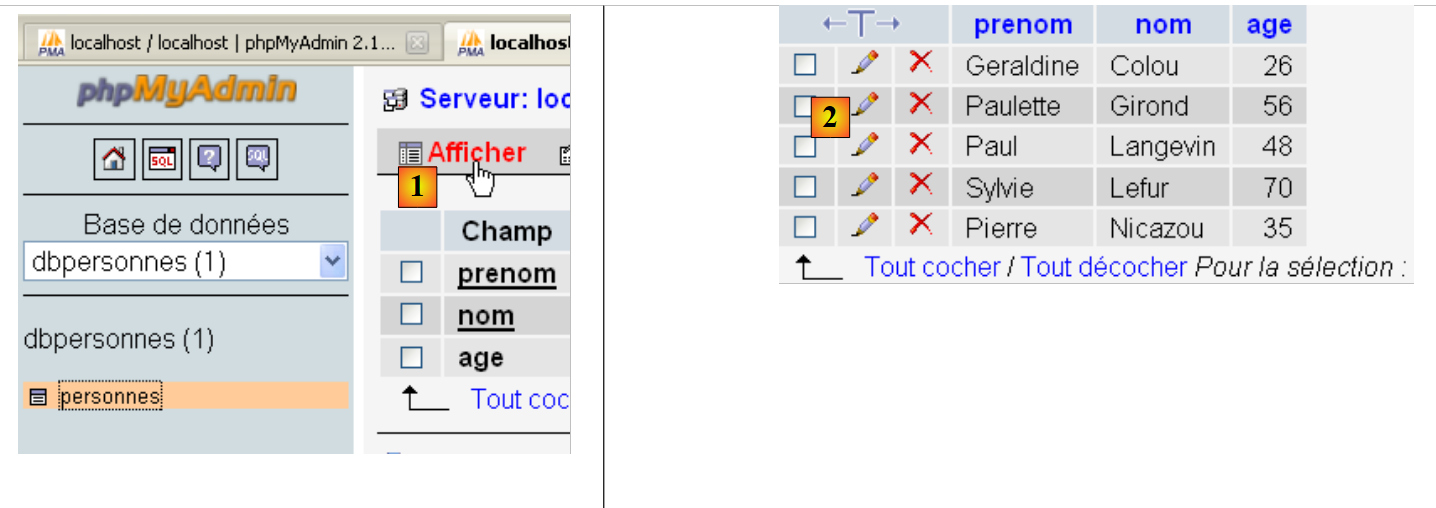
- em [1], a ligação [Afficher] permite aceder ao conteúdo da tabela [personnes] [2].
9.7. Execução de quaisquer consultas SQL
O seguinte script permite executar um ficheiro de comandos SQL e apresentar o resultado de cada um deles:
- o resultado do SELECT se a ordem for um SELECT;
- o número de linhas alteradas se o comando for INSERT, UPDATE ou DELETE.
# importação do módulo MySQLdb
import sys
sys.path.append("D:\Programs\ActivePython\site-packages")
import MySQLdb
# outros módulos
import re

def cutNewLineChar(ligne):
    # elimina-se o marcador de fim de linha de [ligne], caso exista
    l=len(ligne)
    while(ligne[l-1]=="\n" or ligne[l-1]=="\r"):
        l-=1
    return(ligne[0:l])

# ---------------------------------------------------------------------------------
def afficherInfos(curseur):
    # exibe o resultado de uma consulta SQL
    # tratava-se de um SELECT?
    if curseur.description:
        # existe uma descrição — portanto, trata-se de um SELECT
        # descrição[i] é a descrição da coluna n.º i da instrução SELECT
        # descriçãoQZXW2HTMLBW2ldZQXQZXW2HTMLBWzBdZQX é o nome da coluna n.º i do select
        # são apresentados os nomes dos campos
        titre=""
        for i in range(len(curseur.description)):
            titre+=curseur.description[i][0]+","
        # é apresentada a lista de campos sem a vírgula final
        print titre[0:len(titre)-1]
        # linha separadora
        print "-"*(len(titre)-1)
        # linha atual do select
        ligne=curseur.fetchone()
        while ligne:
            print ligne
            # linha seguinte do menu de seleção
            ligne=curseur.fetchone()
    else:
        # não há campos — não era um menu de seleção
        print "%s lignes(s) a (ont) ete modifiee(s)" % (curseur.rowcount)


# ---------------------------------------------------------------------------------
def executerCommandes(HOTE,ID,PWD,BASE,SQL,suivi=False,arret=True):
    # utiliza a ligação (HOTE,ID,PWD,BASE)
    # executa nesta ligação os comandos SQL contidos no ficheiro de texto SQL
    # este ficheiro é um ficheiro de comandos SQL a executar à razão de um por linha
    # se acompanhamento=1, então cada execução de um comando SQL é acompanhada por uma mensagem indicando o seu sucesso ou falha
    # se «paragem» = 1, a função pára ao primeiro erro encontrado; caso contrário, executa todos os comandos SQL
    # a função devolve um array (n.º de erros, erro1, erro2, ...)

    # verifica-se a existência do ficheiro SQL
    data=None
    try:
        data=open(SQL,"r")
    except:
        return [1,"Le fichier %s n'existe pas" % (SQL)]

    # ligação
    try:
        connexion=MySQLdb.connect(host=HOTE,user=ID,passwd=PWD,db=BASE)
    except MySQLdb.OperationalError,erreur:
        return [1,"Erreur lors de la connexion a MySQL sous l'identite (%s,%s,%s,%s) : %s" % (HOTE, ID, PWD, BASE, erreur)]

    # solicita-se um cursor
    curseur=connexion.cursor()
    # execução das consultas SQL contidas no ficheiro SQL
    # colocam-se numa tabela
    requetes=data.readlines()
    # executam-se uma a uma — inicialmente, sem erros
    erreurs=[0]
    for i in range(len(requetes)):
        # memoriza-se a consulta atual
        requete=requetes[i]
        # a consulta está vazia? Se sim, passa-se para a consulta seguinte
        if re.match(r"^\s*$",requete):
            continue
        # execução da consulta i
        erreur=""
        try:
            curseur.execute(requete)
        except Exception, erreur:
            pass
        #: ocorreu algum erro?
        if erreur:
            # Mais um erro
            erreurs[0]+=1
            # mensagem de erro
            msg="%s : Erreur (%s)" % (requete,erreur)
            erreurs.append(msg)
            # acompanhar no ecrã ou não?
            if suivi:
                print msg
            # paramos?
            if arret:
                return erreurs
        else:
            if suivi:
                print "%s : Execution reussie" % (requete)
                # informações sobre o resultado da consulta executada
                afficherInfos(curseur)

    # encerramento da ligação e libertação dos recursos
    curseur.close()
    connexion.commit()
    # desligar-se
    try:
        connexion.close()
    except MySQLdb.OperationalError,erreur:
        # mais um erro
        erreurs[0]+=1
        # mensagem de erro
        msg="%s : Erreur (%s)" % (requete,erreur)
        erreurs.append(msg)

    # retorno
    return erreurs


# ---------------------------------------------- main
# ligação à base de dados MySQL
# identidade do utilizador
ID="admpersonnes"
PWD="nobody"
# o computador anfitrião do SGBD
HOTE="localhost"
# identidade da base de dados
BASE="dbpersonnes"
# identidade do ficheiro de texto com os comandos SQL a executar
TEXTE="sql2.txt"


# criação e preenchimento da tabela
erreurs=executerCommandes(HOTE,ID,PWD,BASE,TEXTE,True,False)
#exibição do número de erros
print "il y a eu %s erreur(s)" % (erreurs[0])
for i in range(1,len(erreurs)):
    print erreurs[i]
Notas:
- a novidade está na linha 100 do script: após a execução de uma ordem SQL, são solicitadas informações sobre o cursor utilizado por esta consulta. Estas informações são fornecidas pela função afficheInfos nas linhas 16-40;
- linhas 19 e 39: se a consulta SQL executada fosse uma SELECT, o atributo [curseur.description] é uma matriz cujo elemento n.º i descreve o campo n.º i do resultado da consulta SELECT. Caso contrário, o atributo [curseur.rowcount] (linha 39) é o número de linhas alteradas pela consulta INSERT, UPDATE ou DELETE;
- linhas 32 e 36: o método [curseur.fetchone] permite recuperar a linha atual do SELECT. Existe um método [curseur.fetchall] que permite recuperá-las todas de uma só vez.
O ficheiro das consultas executadas:
Resultados no ecrã:
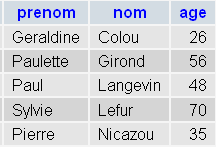
Verificação PhpMyadmin:
 |