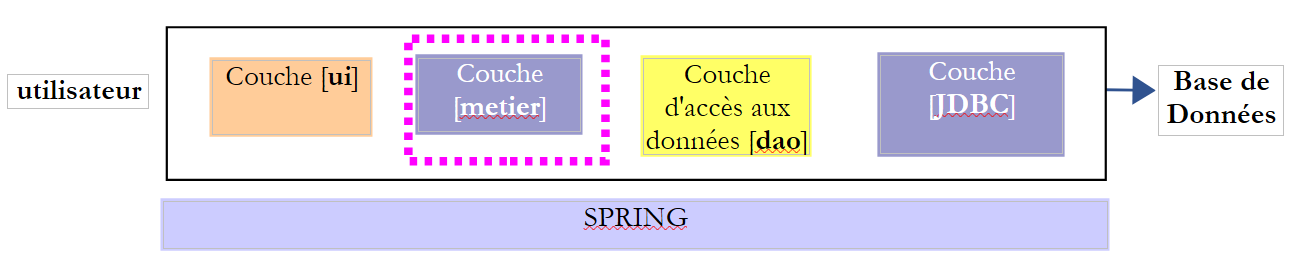
8. [TD]: A camada [business]
Palavras-chave: arquitetura multicamadas, Spring, injeção de dependências.
 |
8.1. Suporte
 | 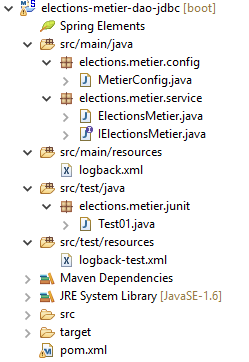 |
A pasta [support / chap-08] contém o projeto Eclipse para este capítulo.
8.2. Configuração do Maven
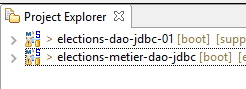 |
O projeto [elections-metier-dao-jdbc] será baseado no projeto [elections-dao-jdbc-01]. Iremos instalar o ficheiro JAR deste último projeto no repositório local do Maven:
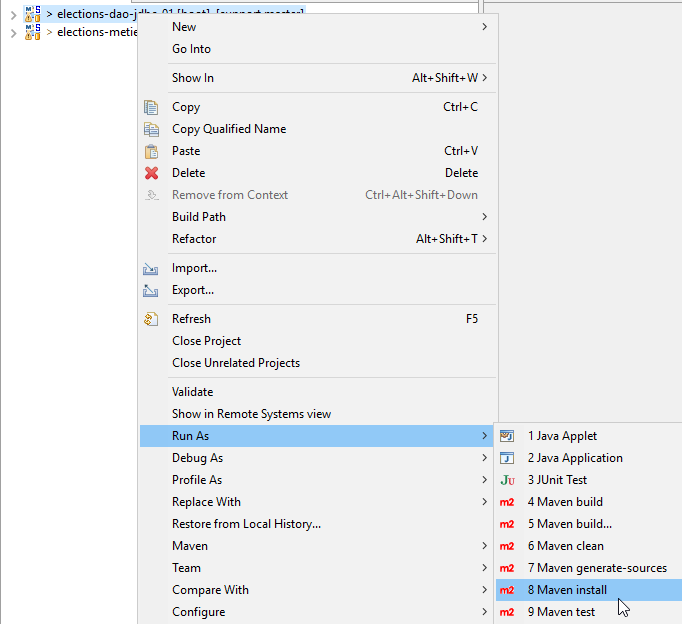 |
Depois de fazer isto, a configuração do Maven para o projeto Eclipse [elections-metier-dao-jdbc] fica assim:
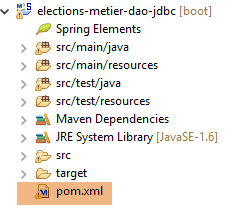 |
<project xmlns="http://maven.apache.org/POM/4.0.0" xmlns:xsi="http://www.w3.org/2001/XMLSchema-instance"
    xsi:schemaLocation="http://maven.apache.org/POM/4.0.0 http://maven.apache.org/xsd/maven-4.0.0.xsd">
    <modelVersion>4.0.0</modelVersion>
    <groupId>istia.st.elections</groupId>
    <artifactId>elections-metier-dao-jdbc</artifactId>
    <version>0.0.1-SNAPSHOT</version>

    <parent>
        <groupId>org.springframework.boot</groupId>
        <artifactId>spring-boot-starter-parent</artifactId>
        <version>1.2.7.RELEASE</version>
    </parent>

    <properties>
        <project.build.sourceEncoding>UTF-8</project.build.sourceEncoding>
        <java.version>1.8</java.version>
    </properties>

    <dependencies>
        <!-- DAO -->
        <dependency>
            <groupId>istia.st.elections</groupId>
            <artifactId>elections-dao-jdbc-01</artifactId>
            <version>0.0.1-SNAPSHOT</version>
        </dependency>
        <!-- Spring Boot -->
        <dependency>
            <groupId>org.springframework.boot</groupId>
            <artifactId>spring-boot</artifactId>
            <scope>test</scope>
        </dependency>
        <!-- Spring Boot Test -->
        <dependency>
            <groupId>org.springframework.boot</groupId>
            <artifactId>spring-boot-starter-test</artifactId>
            <scope>test</scope>
        </dependency>
    </dependencies>

    <!-- plugins -->
    <build>
        <plugins>
            <plugin>
                <artifactId>maven-assembly-plugin</artifactId>
                <configuration>
                    <archive>
                        <manifest>
                            <mainClass>config.AppConfig</mainClass>
                        </manifest>
                    </archive>
                    <descriptorRefs>
                        <descriptorRef>jar-with-dependencies</descriptorRef>
                    </descriptorRefs>
                </configuration>
            </plugin>
            <!-- to install the project artifact in the local Maven repository -->
            <plugin>
                <groupId>org.apache.maven.plugins</groupId>
                <artifactId>maven-surefire-plugin</artifactId>
                <version>2.18.1</version>
            </plugin>
        </plugins>
    </build>
</project>
- Linhas 21–25: a dependência do ficheiro JAR do projeto [elections-jdbc-01]. Copie estas linhas diretamente para o ficheiro [pom.xml] do projeto que pretende importar:
<project xmlns="http://maven.apache.org/POM/4.0.0" xmlns:xsi="http://www.w3.org/2001/XMLSchema-instance" xsi:schemaLocation="http://maven.apache.org/POM/4.0.0 http://maven.apache.org/xsd/maven-4.0.0.xsd">
    <modelVersion>4.0.0</modelVersion>
    <groupId>istia.st.elections</groupId>
    <artifactId>elections-dao-jdbc-01</artifactId>
    <version>0.0.1-SNAPSHOT</version>
...
- Linhas 26–37: as dependências necessárias para o teste. Embora estejam presentes no ficheiro [pom.xml] do projeto [elections-jdbc-01], temos de as incluir aqui porque o seu atributo [<scope>test</scope>] significa que não foram incluídas no ficheiro JAR colocado no repositório local do Maven;
8.3. Configuração Spring
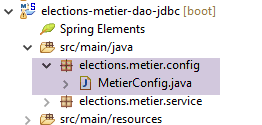 |
package elections.metier.config;

import org.springframework.cache.annotation.EnableCaching;
import org.springframework.context.annotation.ComponentScan;
import org.springframework.context.annotation.Import;

@Import({ elections.dao.config.AppConfig.class })
@EnableCaching
@ComponentScan(basePackages = { "elections.metier.service" })
public class MetierConfig {
}
- Linha 7: Importamos todos os beans definidos na camada [DAO];
- linha 8: ativamos o cache. Não redefinimos o bean [CacheManager], uma vez que já está definido na camada [DAO];
- linha 9: a camada [business] define novos beans no pacote [elections.business.service];
8.4. A interface [ IElectionsMetier]
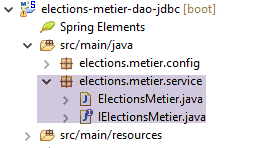 |
A camada [business] terá a interface apresentada na secção 4.2. Aqui fica um lembrete:
public interface IElectionsMetier {

    public ListeElectorale[] getListesElectorales();

    public int getNbSiegesAPourvoir();

    public double getSeuilElectoral();

    public void recordResultats(ListeElectorale[] listesElectorales);

    public ListeElectorale[] calculerSieges(ListeElectorale[] listesElectorales);

}
8.5. A classe de implementação [ ElectionsMetier]
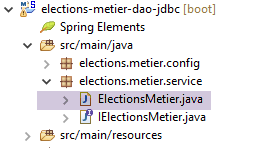 |
Esta classe implementa a interface [IElectionsMetier]. A implementação proposta terá a seguinte estrutura:
package elections.metier.service;

import org.springframework.beans.factory.annotation.Autowired;
import org.springframework.cache.annotation.Cacheable;
import org.springframework.stereotype.Component;

import elections.dao.entities.ListeElectorale;
import elections.dao.service.IElectionsDao;

@Component
public class ElectionsMetier implements IElectionsMetier {

    // the access point to the [dao] layer instantiated by [Spring]
    @SuppressWarnings("unused")
    @Autowired
    private IElectionsDao electionsDao;

    // calculation of seats obtained
  @Override
    public ListeElectorale[] calculerSieges(ListeElectorale[] listesElectorales) {
        throw new RuntimeException("[calculerSieges] not yet implemented");
    }

    // competing lists
  @Override
    public ListeElectorale[] getListesElectorales() {
        throw new RuntimeException("[getListesElectorales] not yet implemented");
    }

    // saving results
  @Override
    public void recordResultats(ListeElectorale[] listesElectorales) {
        throw new RuntimeException("[recordResultats] not yet implemented");
    }

    // number of seats to be filled
    @Override
    public int getNbSiegesAPourvoir() {
        throw new RuntimeException("[getNbSiegesAPourvoir] not yet implemented");
    }

    // electoral threshold
    @Override
    public double getSeuilElectoral() {
        throw new RuntimeException("[getSeuilElectoral] not yet implemented");
    }

}
- linha 10: a classe [ElectionsMetier] é um componente Spring;
- linha 11: a classe [ElectionsMetier] implementa a interface [IElectionsMetier];
- linhas 15–16: injeção Spring de uma referência à camada [DAO];
- linhas 37 e 44: o número de lugares a preencher e o limiar eleitoral são armazenados em cache;
Tarefa: Escreva a classe [ElectionsMetier]. Utilize os comentários quando disponíveis. Não tentaremos capturar (try/catch) exceções [ElectionsException] que sejam propagadas a partir da camada [DAO]. Deixaremos que elas se propaguem para a camada [UI]. Como a classe [ElectionsException] é um tipo de exceção não verificada, não há necessidade de tratá-la com um bloco try/catch.
8.6. A classe de teste
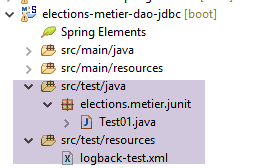 |
A classe de teste JUnit terá o seguinte formato:
package tests;

import org.junit.Test;
import org.junit.runner.RunWith;
import org.springframework.beans.factory.annotation.Autowired;
import org.springframework.boot.test.SpringApplicationConfiguration;
import org.springframework.test.context.junit4.SpringJUnit4ClassRunner;

import dao.config.AppConfig;
import dao.entities.ElectionsException;
import metier.service.IElectionsMetier;

@SpringApplicationConfiguration(classes = MetierConfig.class)
@RunWith(SpringJUnit4ClassRunner.class)
public class Test01 {

    // business] layer
    @Autowired
    static private IElectionsMetier electionsMetier;

    /**
     * vérification 1 : méthode de calcul des sièges on fixe en dur les listes
     */
    @Test
    public void calculSieges1() {
        // create a table of the 7 candidate lists (name, vote)

        // the seats for each list are calculated

        // we check the results (seats, votes, eliminates)

        // temporary
        throw new RuntimeException("[calculSieges1] not yet implemented");
    }

    /**
     * vérification 2 : méthode de calcul des sièges on demande les listes à la
     * couche [metier] puis on fixe en dur les voix
     */
    @Test
    public void calculSieges2() {
        // the table of 7 candidate lists is retrieved as a base

        // the voices are hard-fixed

        // the seats obtained by each list are calculated

        // we check the results (seats, votes, eliminates)

        // temporary
        throw new RuntimeException("[calculSieges2] not yet implemented");
    }

    /**
     * vérification 3 méthode de calcul des sièges on provoque une exception
     */
    @Test(expected = ElectionsException.class)
    // write a test that causes an exception of type [ElectionsException]
    public void calculSieges3() {
        // create a table of 25 candidate lists, each with 1 vote
        // all 25 lists will have the same number of votes (4%)

        // calculation of seats - normally there should be a ElectionsException
        // with an electoral threshold of 5%

        // temporary
        throw new RuntimeException("[calculSieges3] not yet implemented");
    }

    /**
     * enregistrement des résultats de l'élection
     */
    @Test
    public void ecritureResultatsElections() {
        // create the table of 7 candidate lists

        // the voices are hard-fixed

        // the seats obtained by each list are calculated

        // results are entered into the database

        // reread lists in base

        // we check the results (seats, votes, eliminates)

        // temporary
        throw new RuntimeException("[ecritureResultatsElections] not yet implemented");
    }
}
Tarefa: Escreva os quatro métodos de teste usando os comentários como guia. Lembre-se de que, quando estes métodos forem executados, o campo [electionsMetier] na linha 19 já terá sido inicializado. Verifique se o teste JUnit é bem-sucedido.
8.7. Criação do arquivo da camada [business]
Tal como fizemos para a camada [DAO], colocamos o arquivo do projeto [elections-metier-dao-jdbc] no repositório local do Maven:
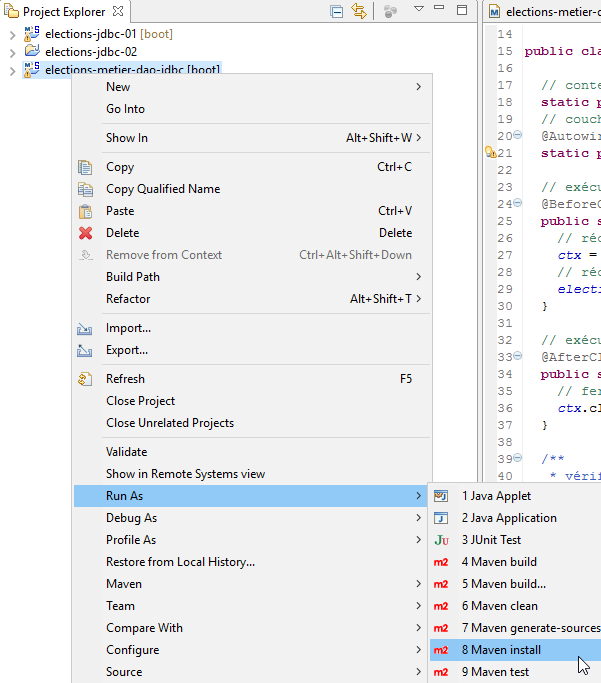 |
Nota: Esta operação pode falhar se o seu projeto Eclipse estiver associado a um JRE (Java Runtime Environment) em vez de um JDK (Java Development Kit). Para verificar isto, siga as instruções na secção 3.1. Se verificar que tem um JRE e não um JDK, associe o seu projeto a um JDK, conforme descrito nessa secção.
8.8. Conclusão
Vamos rever a arquitetura geral da aplicação [Eleições] que estamos a construir:
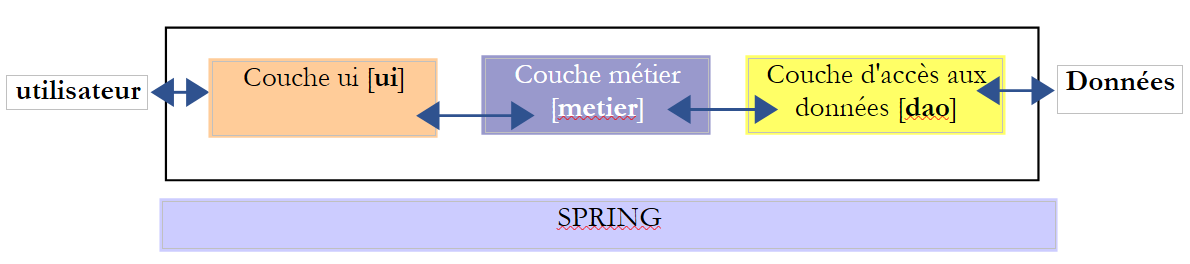 |
Já construímos as camadas [business] e [DAO]. Vamos agora construir a camada [UI]. Vamos propor duas implementações para esta camada:
- uma implementação de «consola»
- uma implementação de interface gráfica do utilizador