10. JavaScript
In questa sezione illustriamo tre esempi di utilizzo di Javascript nelle pagine WEB. Ci concentriamo sulla gestione dei moduli, ma Javascript offre molte altre possibilità.
10.1. Recuperare le informazioni da un modulo
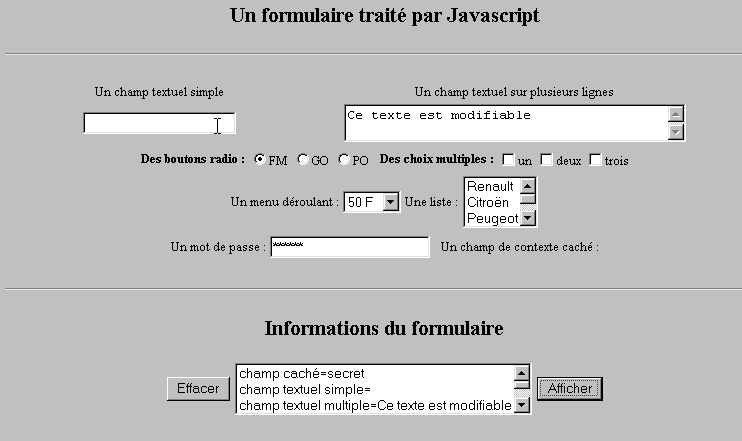
L'esempio riportato di seguito mostra come recuperare all'interno del browser i dati inseriti dall'utente in un modulo. Ciò consente in genere di effettuare operazioni di pre-elaborazione prima di inviarli al server.
10.1.1. Il modulo
Abbiamo un modulo che riunisce i componenti più comuni e un pulsante «Visualizza» che consente di visualizzare i dati inseriti dall’utente.
10.1.2. Il codice
<html>
<head>
<title>Un formulaire traité par Javascript</title>
<script language="javascript">
function afficher(){
// visualizza in un elenco le informazioni del modulo
// si cancella prima
effacerInfos();
// si visualizza il valore dei # campi
with(document.frmExemple){
// campo nascosto
ecrire("champ caché="+cache.value);
// campo di testo singolo
ecrire("champ textuel simple="+simple.value);
// campo di testo multiplo
ecrire("champ textuel multiple="+lignes.value);
// pulsanti di opzione
for(i=0;i<radio.length;i++){
texte="radio["+i+"]="+radio[i].value;
if(radio[i].checked) texte+=", coché";
ecrire(texte);
}//for
// caselle di selezione
for(i=0;i<qcm.length;i++){
texte="qcm["+i+"]="+qcm[i].value;
if(qcm[i].checked) texte+=", coché";
ecrire(texte);
}//for
//elenco a discesa
ecrire("index sélectionné dans le menu="+menu.selectedIndex);
for(i=0;i<menu.length;i++){
texte="menu["+i+"]="+menu.options[i].text;
if(menu.options[i].selected) texte+=",sélectionné";
ecrire(texte);
}//per
//elenco a scelta multipla
for(i=0;i<lstVoitures.length;i++){
texte="lstVoitures["+i+"]="+lstVoitures.options[i].text;
if(lstVoitures.options[i].selected) texte+=",sélectionné";
ecrire(texte);
}//per
//password
ecrire("mot de passe="+passwd.value);
}//con
}//funzione
function ecrire(texte){
// scrive il testo nell'elenco delle informazioni
frmInfos.lstInfos.options[frmInfos.lstInfos.length]=new Option(texte);
}//scrivere
function effacerInfos(){
frmInfos.lstInfos.length=0;
}//effacerInfos
</script>
</head>
<body bgcolor="#C0C0C0" onload="afficher()">
<center>
<h2>Un formulaire traité par Javascript</h2>
<hr>
<form method="POST" name="frmExemple">
<input type="hidden" name="cache" value="secret">
<table border="0">
<tr>
<td align="center">Un champ textuel simple</td>
<td align="center" width="100"> </td>
<td align="center">Un champ textuel sur plusieurs lignes</td>
</tr>
<tr>
<td align="center"><input type="text" size="20" name="simple"></td>
<td align="center" width="100"> </td>
<td align="center">
<textarea name="lignes" rows="2" cols="40">Ce texte est modifiable</textarea>
</td>
</tr>
</table>
<table border="0">
<tr>
<td><strong>Des boutons radio :</strong></td>
<td>
<input type="radio" checked name="radio" value="FM">FM
</td>
<td>
<input type="radio" name="radio" value="GO">GO
</td>
<td>
<input type="radio" name="radio" value="PO">PO
</td>
<td> </td>
<td><strong>Des choix multiples :</strong></td>
<td>
<input type="checkbox" name="qcm" value="un">un
</td>
<td>
<input type="checkbox" name="qcm" value="deux">deux
</td>
<td>
<input type="checkbox" name="qcm" value="trois">trois
</td>
</tr>
</table>
<table border="0">
<tr>
<td>Un menu déroulant : </td>
<td>
<select name="menu" size="1">
<option>50 F</option>
<option>60 F</option>
<option>70 F</option>
<option>100 F</option>
</select>
</td>
<td>Une liste :</td>
<td>
<select name="lstVoitures" multiple size="3">
<option>Renault</option>
<option>Citroën</option>
<option>Peugeot</option>
<option>Fiat</option>
<option>Audi</option>
</select>
</td>
</tr>
</table>
<table border="0">
<tr>
<td>Un mot de passe : </td>
<td><input type="password" size="21" name="passwd"></td>
<td> </td>
<td>Un champ de contexte caché : </td>
</tr>
</table>
</form>
<hr>
<h2>Informations du formulaire</h2>
<form name="frmInfos">
<table>
<tr>
<td><input type="button" value="Effacer" onclick="effacerInfos()"></td>
<td>
<select name="lstInfos" multiple size="3">
</select>
</td>
<td>
<input type="button" name="cmdAfficher" value="Afficher" onclick="afficher()">
</td>
</tr>
</form>
</body>
</html>
10.2. Espressioni regolari in JavaScript
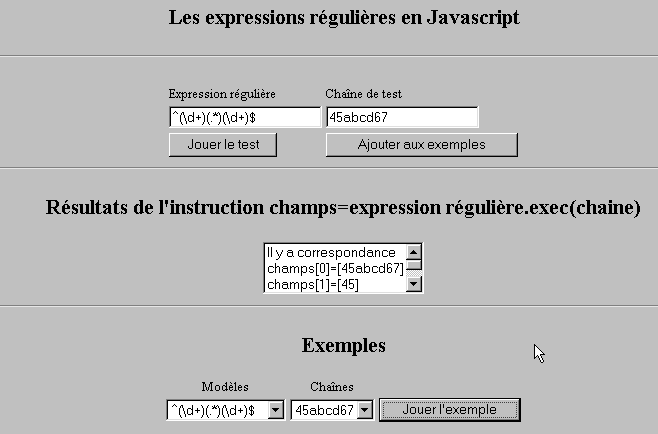
A livello di browser, JavaScript può essere utilizzato per verificare la validità dei dati inseriti dall'utente prima di inviarli al server. Ecco un programma per testare queste espressioni regolari.
10.2.1. La pagina di test
10.2.2. Il codice della pagina
<html>

  <head>
    <title>Les expressions régulières en Javascript</title>
    <script language="javascript">
      function afficherInfos(){
        with(document.frmRegExp){
           // c'è qualcosa da fare?
          if (! verifier()) return;
          // Va bene - si cancellano i risultati precedenti
          effacerInfos();
           // verifica del modello
          modele=new RegExp(txtModele.value);
          champs=modele.exec(txtChaine.value);
          if(champs==null)
             // nessuna corrispondenza tra modello e stringa
            ecrireInfos("pas de correspondance");
          else{
             // corrispondenza - si visualizzano i risultati ottenuti
            ecrireInfos("Il y a correspondance");
            for(i=0;i<champs.length;i++)
              ecrireInfos("champs["+i+"]=["+champs[i]+"]");
          }//altrimenti
        }//con
      }//funzione

      function ecrireInfos(texte){
        // scrive il testo nell'elenco delle informazioni
        document.frmRegExp.lstInfos.options[document.frmRegExp.lstInfos.length]=new Option(texte);
      }//scrivere

      function effacerInfos(){
        frmRegExp.lstInfos.length=0;
      }//effacerInfos

      function jouer(){
         // verifica la corrispondenza del modello con la stringa nell'esempio selezionato
        with(document.frmRegExp){
          txtModele.value=lstModeles.options[lstModeles.selectedIndex].text
          txtChaine.value=lstChaines.options[lstChaines.selectedIndex].text
          afficherInfos();
        }//con
      }//riproduci

      function ajouter(){
         //aggiunge il test corrente agli esempi
        with(document.frmRegExp){
          // c'è qualcosa da fare?
          if (! verifier()) return;
          // aggiunta
          lstModeles.options[lstModeles.length]=new Option(txtModele.value);
          lstChaines.options[lstChaines.length]=new Option(txtChaine.value);
          // azzeramento degli inserimenti
          txtModele.value="";
          txtChaine.value="";
        }//con
      }//aggiungere

      function verifier(){
         // verifica che i campi di inserimento non siano vuoti
        with(document.frmRegExp){
          champs=/^\s*$/.exec(txtModele.value);
          if(champs!=null){
            alert("Vous n'avez pas indiqué de modèle");
            txtModele.focus();
            return false;
          }//se
          champs=/^\s*$/.exec(txtChaine.value);
          if(champs!=null){
            alert("Vous n'avez pas indiqué de chaîne de test");
            txtChaine.focus();
            return false;
          }//se
          // va bene
          return true;
        }//con
      }//verificare
    </script>
  </head>

  <body bgcolor="#C0C0C0">
    <center>
     <h2>Les expressions régulières en Javascript</h2>
    <hr>
    <form name="frmRegExp">
      <table>
        <tr>
          <td>Expression régulière</td>
          <td>Chaîne de test</td>
        </tr>
        <tr>
          <td><input type="text" name="txtModele" size="20"></td>
          <td><input type="text" name="txtChaine" size="20"></td>
        </tr>
        <tr>
          <td>
            <input type="button" name="cmdAfficher" value="Jouer le test" onclick="afficherInfos()">
          </td>
          <td>
            <input type="button" name="cmdAjouter" value="Ajouter aux exemples" onclick="ajouter()">
          </td>
        </tr>
      </table>
      <hr>
      <h2>Résultats de l'instruction champs=expression régulière.exec(chaine)</h2>
      <table>
        <tr>
          <td>
            <select name="lstInfos" size="3">
            </select>
          </td>
        </tr>
      </table>
      <hr>
      <h2>Exemples</h2>
      <table>
 <tr>
          <td align="center">Modèles</td>
          <td align="center">Chaînes</td>
        </tr>
        <tr>
          <td>
            <select name="lstModeles" size="1">
              <option>^\d+$</option>
              <option>^(\d+) (\d+)$</option>
              <option>^(\d+)(.*)(\d+)$</option>
              <option>^(\d+)(\s+)(\d+)$</option>
            </select>
          </td>
          <td>
            <select name="lstChaines" size="1">
              <option>67</option>
              <option>56 84</option>
              <option>45abcd67</option>
              <option>45   67</option>
            </select>
          </td>
          <td>
            <input type="button" name="cmdJouer" value="Jouer l'exemple" onclick="jouer()">
          </td>
        </tr>
    </form>
  </body>
</html>
10.3. Gestione delle liste in JavaScript
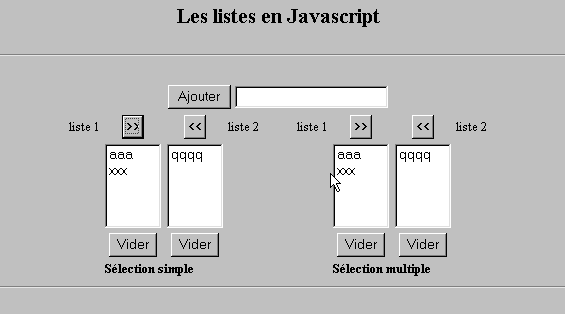
10.3.1. Il modulo
10.3.2. Il codice
<html>

  <head>
    <title>Les listes en Javascript</title>

    <script language="javascript">
       // aggiungere
      function ajouter(L1,L2,T){
         // aggiunge il valore del campo T alle liste L1,L2
           // c'è qualcosa da fare?
          champs=/^\s*$/.exec(T.value);
          if(champs!=null){
            // il campo è vuoto
            alert("Vous n'avez pas indiqué la valeur à ajouter");
            txtElement.focus();
            return;
          }//if
           // si aggiunge l'elemento
          L1.options[L1.length]=new Option(T.value);
          L2.options[L2.length]=new Option(T.value);
          T.value="";
      }//aggiungere

       //svuotare
      function vider(L){
         // svuota la lista L
        L.length=0;
      }//svuota

     //trasferire
      function transfert(L1,L2,simple){
        //trasferisce in L2 gli elementi selezionati nell'elenco L1

         // c'è qualcosa da fare?
         // indice dell'elemento selezionato in L1
        index1=L1.selectedIndex;
        if(index1==-1){
          alert("Vous n'avez pas sélectionné d'élément");
          return;
        }//if
         // qual è la modalità di selezione degli elementi delle liste
        if(simple){ // selezione singola
          element1=L1.options[index1].text;
           //aggiunta in L2
          L2.options[L2.length]=new Option(element1);
          //eliminazione in L1
          L1.options[index1]=null;
        }//semplice
        if(! simple){ //selezione multipla
           //scorrimento in ordine inverso dell'elenco 1
          for(i=L1.length-1;i>=0;i--){
            //elemento selezionato?
            if(L1.options[i].selected){
               //lo si aggiunge a L2
              L2.options[L2.length]=new Option(L1.options[i].text);
              //lo si elimina da L1
              L1.options[i]=null;
            }//se
          }//per i
        }//if ! semplice
      }//trasferimento
   </script>
  </head>

  <body bgcolor="#C0C0C0">
    <center>
     <h2>Les listes en Javascript</h2>
    <hr>
    <form name="frmListes">
      <table>
        <tr>
          <td>
            <input type="button" name="cmdAjouter" value="Ajouter" onclick="ajouter(lst1A,lst1B,txtElement)">
          </td>
          <td>
            <input type="text" name="txtElement">
          </td>
        </tr>
      </table>
      <table>
        <tr>
          <td align="center">liste 1</td>
          <td align="center"><input type="button" value=">>" onclick="transfert(lst1A,lst2A,true)"</td>
          <td align="center"><input type="button" value="<<" onclick="transfert(lst2A,lst1A,true)"</td>
          <td align="center">liste 2</td>
          <td width="30"></td>
          <td align="center">liste 1</td>
          <td align="center"><input type="button" value=">>" onclick="transfert(lst1B,lst2B,false)"</td>
          <td align="center"><input type="button" value="<<" onclick="transfert(lst2B,lst1B,false)"</td>
          <td align="center">liste 2</td>
        </tr>
         <tr>
          <td></td>
          <td align="center">
            <select name="lst1A" size="5">
            </select>
          </td>
          <td align="center">
            <select name="lst2A" size="5">
            </select>
          </td>
          <td></td>
          <td></td>
          <td></td>
          <td align="center">
            <select name="lst1B" size="5" multiple >
            </select>
          </td>
          <td align="center">
            <select name="lst2B" size="5" multiple>
            </select>
          </td>

        </tr>
        <tr>
          <td></td>
          <td align="center"><input type="button" value="Vider" onclick="vider(lst1A)"</td>
          <td align="center"><input type="button" value="Vider" onclick="vider(lst2A)"</td>
          <td></td>
          <td></td>
          <td></td>
          <td align="center"><input type="button" value="Vider" onclick="vider(lst1B)"</td>
          <td align="center"><input type="button" value="Vider" onclick="vider(lst2B)"</td>
          <td></td>
        </tr>
        <tr>
          <td></td>
          <td colspan="2"><strong>Sélection simple</strong></td>
          <td></td>
          <td></td>
          <td></td>
          <td colspan="2"><strong>Sélection multiple</strong></td>
          <td></td>
        </tr>

      </table>
      <hr>
    </form>
  </body>
</html>