22. Esercizio dell'applicazione – Versione 11
È ancora comune che i servizi web inviino la loro risposta come feed XML piuttosto che come feed JSON:
- il flusso JSON è più leggero, ma è necessaria una guida per comprenderlo;
- il feed XML è più dettagliato ma è auto-documentante. È immediatamente comprensibile;
Modifichiamo la versione 11 client/server in modo che il server invii ora un feed XML come risposta ai propri client:
22.1. Il server
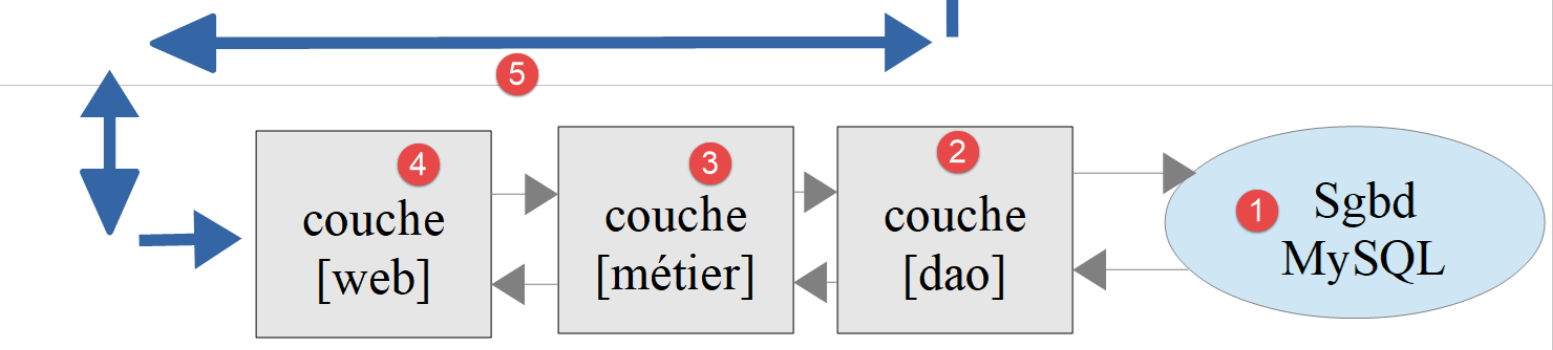
Questa architettura sarà implementata dai seguenti script:
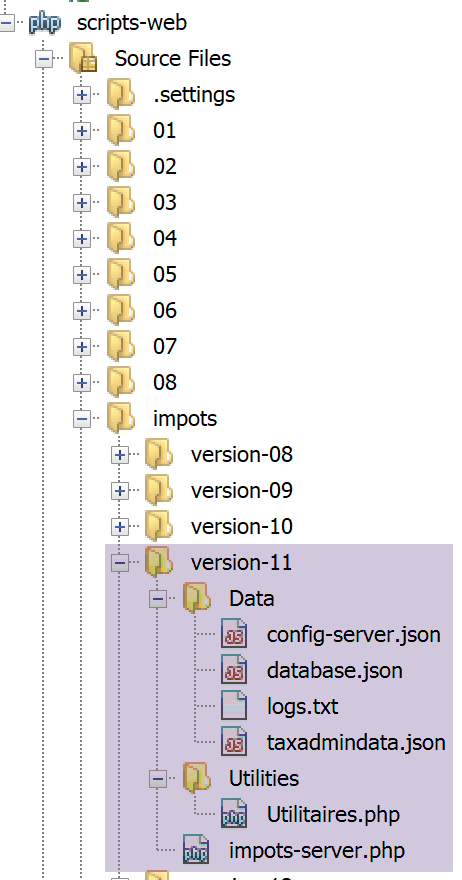
22.1.1. La classe [Utilities]
Stiamo riutilizzando la classe [Utilities] utilizzata a partire dalla versione 03 (vedi paragrafo collegato):
<?php

// namespace
namespace Application;

// a class of utility functions
abstract class Utilitaires {

  public static function cutNewLinechar(string $ligne): string {
    …
  }


  // from https://stackoverflow.com/questions/1397036/how-to-convert-array-to-simplexml
  public static function getXmlForArrayOfAttributes(array $arrayOfAttributes,
    \SimpleXmlElement &$node): void {
    // scan array attributes
    foreach ($arrayOfAttributes as $attribute => $value) {
      // is the attribute numeric?
      if (is_numeric($attribute)) {
        // table index case (but also other cases)
        $attribute = 'i' . $attribute;
      }
      // is $value an array?
      if (is_array($value)) {
        // we'll explore the [$value] array in turn
        // we add a node to the XML graph
        $subnode = $node->addChild($attribute);
        // recursive call to explore the [$value] array
        Utilitaires::getXmlForArrayOfAttributes($value, $subnode);
      } else {
        // we add the node to the XML graph
        $node->addChild("$attribute", htmlspecialchars("$value"));
      }
    }
  }
}
Commenti
- righe 14–36: introduciamo il metodo statico [getXmlForArrayOfAttributes], che restituisce la stringa XML di un array [arrayOfAttributes] passato come parametro. Il secondo parametro è il riferimento a un nodo del grafico XML di tipo [SimpleXmlElement]. Dopo l'esecuzione, questo nodo contiene l'albero XML dell'array [arrayOfAttributes];
Scriviamo il seguente test [testXml.php]:
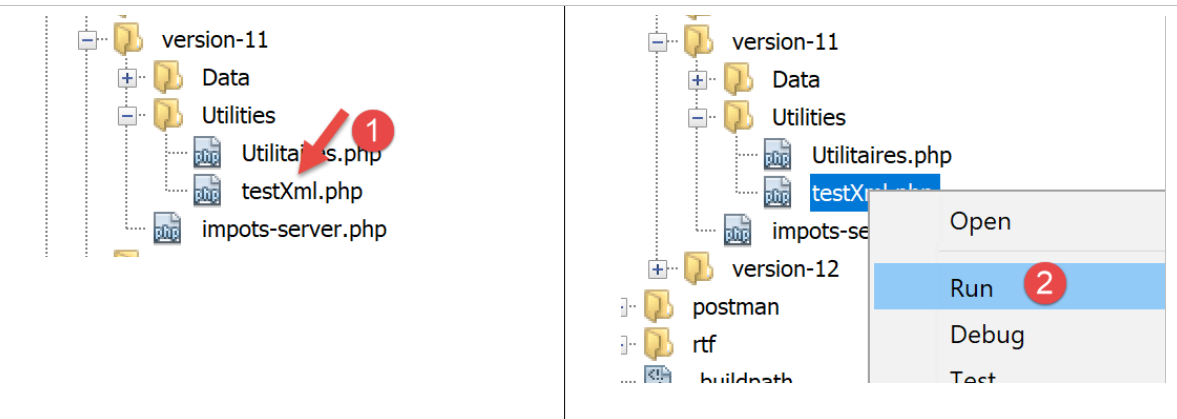
<?php

// dependency
require __DIR__ . "/Utilitaires.php";
// associative table
$array = ["nom" => "amédée", "prénom" => "sylvain", "âge" => 40,
  "enfants" => [["nom" => "amédée", "prénom" => "béatrice", "âge" => 6],
    ["nom" => "amédée", "prénom" => "bertrand", "âge" => 4]]];
// xml
header("Content-Type: application/xml");
$node = new \SimpleXMLElement("<?xml version='1.0' encoding='UTF-8'?><root></root>");
\Application\Utilitaires::getXmlForArrayOfAttributes($array, $node);
print $node->asXML();
Quando eseguiamo questo script [2], otteniamo il seguente risultato in un browser Chrome:
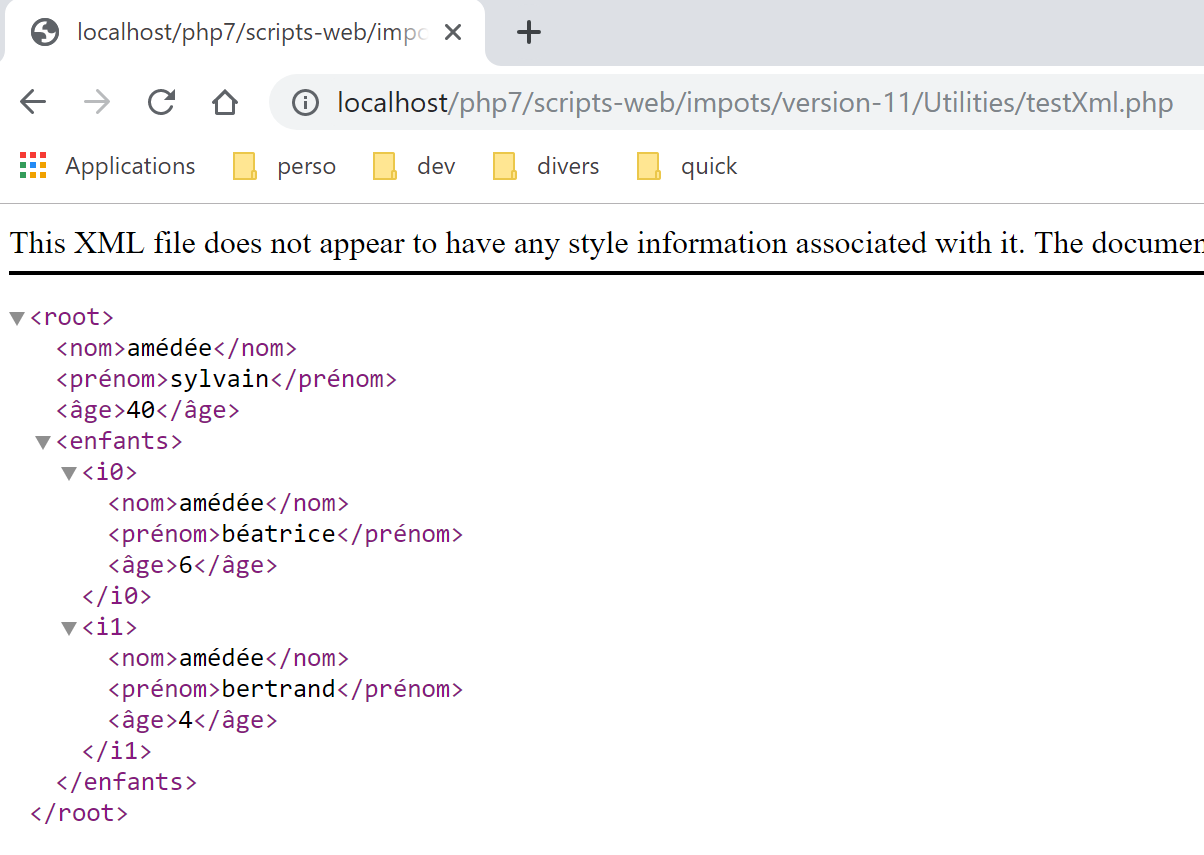
22.1.2. Lo script del server
Lo script del server [impots-server.php] deve essere modificato, così come il suo file di configurazione [config-server.json]:
{
    "rootDirectory": "C:/myprograms/laragon-lite/www/php7/scripts-web/impots/version-11",
    "databaseFilename": "Data/database.json",
    "relativeDependencies": [
        "/../version-08/Entities/BaseEntity.php",
        "/../version-08/Entities/ExceptionImpots.php",
        "/../version-08/Entities/TaxAdminData.php",
        "/../version-08/Entities/Database.php",
        "/../version-08/Dao/InterfaceServerDao.php",
        "/../version-08/Dao/ServerDao.php",
        "/../version-09/Dao/ServerDaoWithSession.php",
        "/../version-08/Métier/InterfaceServerMetier.php",
        "/../version-08/Métier/ServerMetier.php",
        "/../version-09/Utilities/Logger.php",
        "/../version-09/Utilities/SendAdminMail.php",
        "/Utilities/Utilitaires.php"
    ],
    "absoluteDependencies": [
        "C:/myprograms/laragon-lite/www/vendor/autoload.php",
        "C:/myprograms/laragon-lite/www/vendor/predis/predis/autoload.php"
    ],
    "users": [
        {
            "login": "admin",
            "passwd": "admin"
        }
    ],
    "adminMail": {
        "smtp-server": "localhost",
        "smtp-port": "25",
        "from": "guest@localhost",
        "to": "guest@localhost",
        "subject": "plantage du serveur de calcul d'impôts",
        "tls": "FALSE",
        "attachments": []
    },
    "logsFilename": "Data/logs.txt"
}
Commenti
- La radice del progetto è ora la cartella della versione 11;
- riga 16: è inclusa la nuova classe [Utilities];
Le modifiche allo script del server sono le seguenti:
<?php

// strict adherence to declared types of function parameters
declare (strict_types=1);

// namespace
namespace Application;

…
// prepare JSON server response
$response = new Response();
$response->headers->set("content-type", "application/xml");
$response->setCharset("utf-8");
…
// creation of the [business] layer
$métier = new ServerMetier($dao);
// tAX CALCULATION
$result = $métier->calculerImpot($marié, (int) $enfants, (int) $salaire);
// we return the answer
sendResponse($response, $result, Response::HTTP_OK, [], $logger, $redis);
// end
exit;

function doInternalServerError(string $message, Response $response, array $infos,
  …
}

// function to send HTTP response to client
function sendResponse(Response $response, array $result, int $statusCode,
  array $headers, Logger $logger = NULL, \Predis\Client $predisClient = NULL) {
  // $response : answer HTTP
  // $result: results table
  // $statusCode: HTTP response status
  // $headers: HTTP headers to be included in the response
  // $logger: application logger
  // $predisClient: a customer [predis]
  //
  // status HTTTP
  $response->setStatusCode($statusCode);
  // body XML
  $node = new \SimpleXMLElement("<?xml version='1.0' encoding='UTF-8'?><réponse></réponse>");
  Utilitaires::getXmlForArrayOfAttributes($result, $node);
  $response->setContent($node->asXML());
  // headers
  $response->headers->add($headers);
  // shipping
  $response->send();
  // log
  if ($logger != NULL) {
    // log in jSON
    $log = \json_encode(["réponse" => $result], JSON_UNESCAPED_UNICODE);
    $logger->write("$log\n");
    $logger->close();
  }
  // close connection [redis]
  if ($predisClient != NULL) {
    $predisClient->disconnect();
  }
}
Commenti
- riga 12: specifica che la risposta è di tipo [application/xml];
- righe 29–59: la risposta del server è ora in formato XML;
- riga 41: creazione del nodo radice [<response></response>] del grafico XML;
- riga 42: questo albero viene popolato con l'albero XML proveniente dall'array [$result] dei risultati da inviare al client;
- riga 43: l'albero XML viene convertito in una stringa XML per l'invio al client;
Test
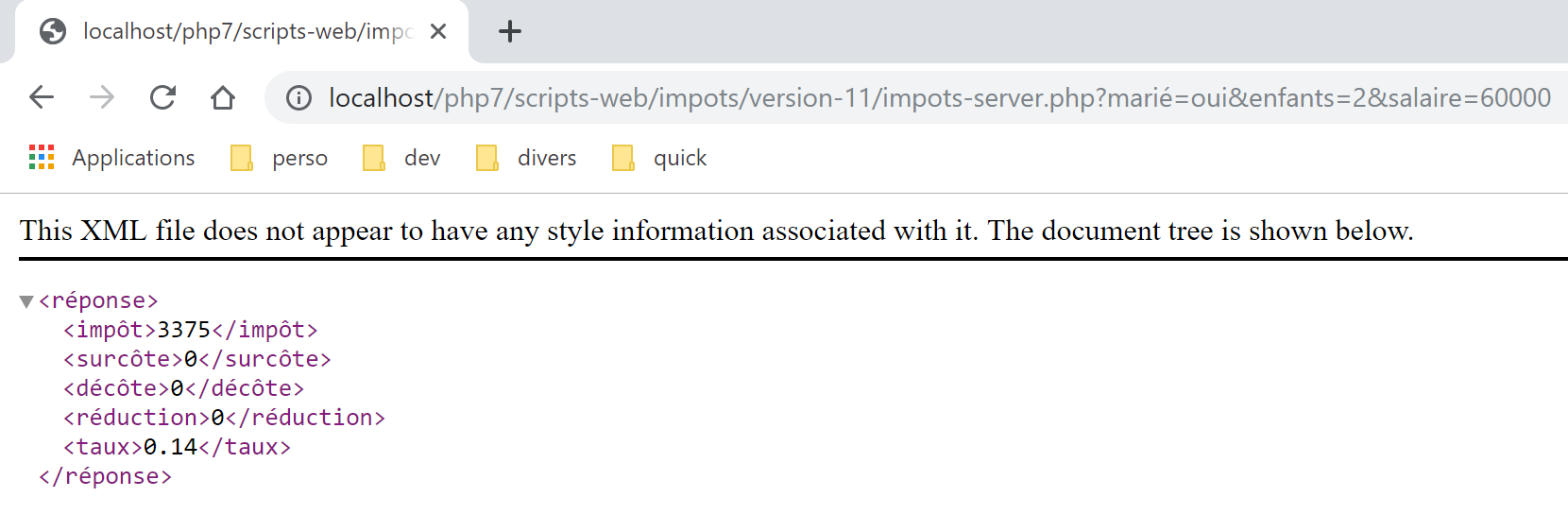
Direttamente in un browser Chrome, inserisci l'URL [http://localhost/php7/scripts-web/impots/version-11/impots-server.php?mari%C3%A9=oui&enfants=2&salaire=60000]. Il seguente risultato [1] viene visualizzato in un browser Chrome:
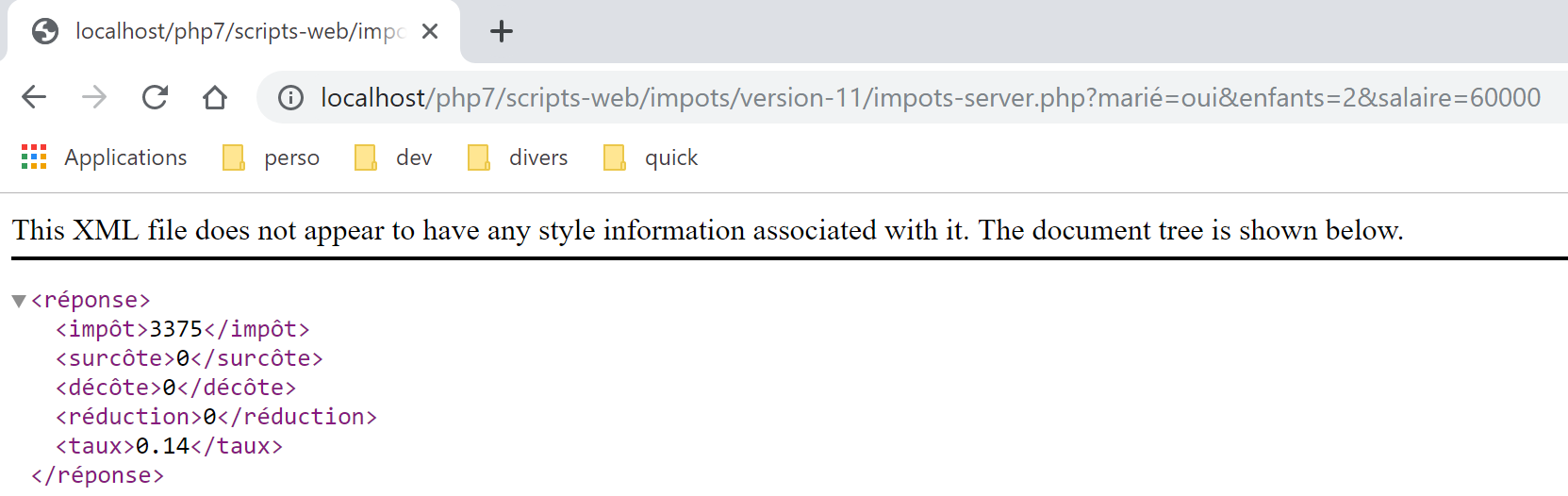
22.2. Il client
Ci concentreremo ora sul lato client dell'applicazione.
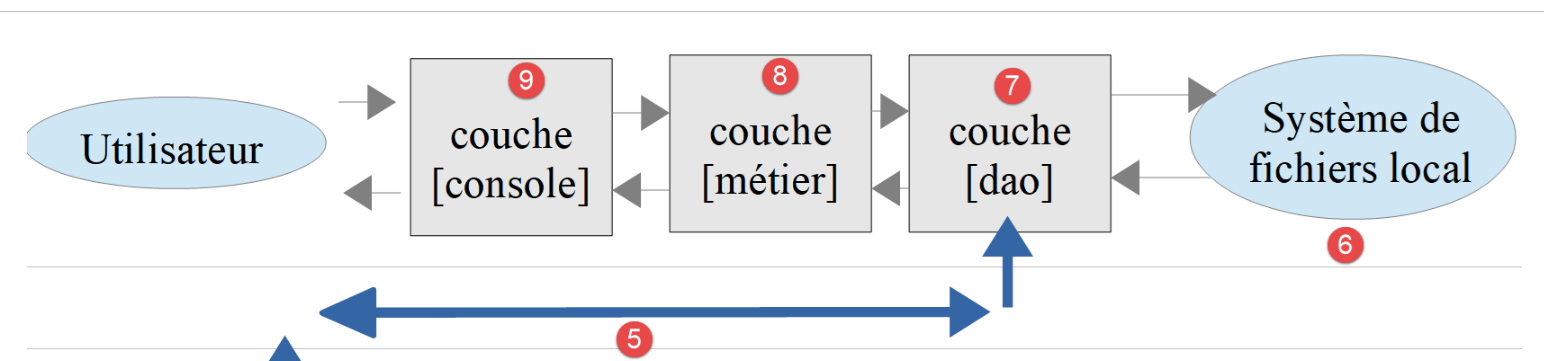
Questa architettura sarà implementata dai seguenti script:
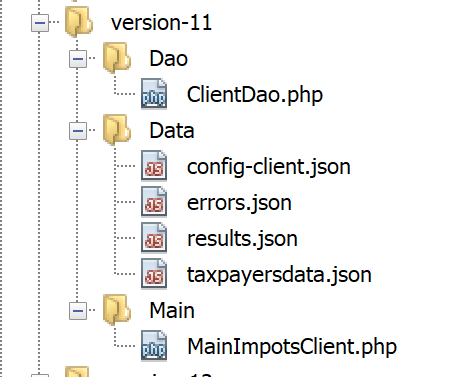
Nella nuova versione, le uniche modifiche sono:
- il file di configurazione [config-client.json];
- il livello [dao] del client;
Il file di configurazione [config-client.json] diventa il seguente:
{
    "rootDirectory": "C:/Data/st-2019/dev/php7/poly/scripts-console/impots/version-11",
    "taxPayersDataFileName": "Data/taxpayersdata.json",
    "resultsFileName": "Data/results.json",
    "errorsFileName": "Data/errors.json",
    "dependencies": [
        "/../version-08/Entities/BaseEntity.php",
        "/../version-08/Entities/TaxPayerData.php",
        "/../version-08/Entities/ExceptionImpots.php",
        "/../version-08/Utilities/Utilitaires.php",
        "/../version-08/Dao/InterfaceClientDao.php",
        "/../version-08/Dao/TraitDao.php",
        "/Dao/ClientDao.php",
        "/../version-08/Métier/InterfaceClientMetier.php",
        "/../version-08/Métier/ClientMetier.php"
    ],
    "absoluteDependencies": [
        "C:/myprograms/laragon-lite/www/vendor/autoload.php"
    ],
    "user": {
        "login": "admin",
        "passwd": "admin"
    },
    "urlServer": "https://localhost:443/php7/scripts-web/impots/version-11/impots-server.php"
}
22.2.1. Il livello [dao]
Il client [ClientDao.php] (riga 13 sopra) viene modificato per tenere conto del nuovo formato di risposta. Utilizziamo [simpleXML] per elaborarlo:
<?php

namespace Application;

// dependencies
use \Symfony\Component\HttpClient\HttpClient;

class ClientDao implements InterfaceClientDao {
  // using a Trait
  use TraitDao;
  // attributes
  private $urlServer;
  private $user;
  private $sessionCookie;

  // manufacturer
  public function __construct(string $urlServer, array $user) {
    $this->urlServer = $urlServer;
    $this->user = $user;
  }

  // tAX CALCULATION
  public function calculerImpot(string $marié, int $enfants, int $salaire): array {
    …
    // we retrieve the XML response
    $réponse = $response->getContent(false);
    $xml = new \SimpleXMLElement($réponse);
    // logs
    // print "$réponse";
    // retrieve response status
    $statusCode = $response->getStatusCode();
    // mistake?
    if ($statusCode !== 200) {
      // we have an error - we throw an exception
      $message = \json_encode(["statut HTTP" => $statusCode, "réponse" => $xml], JSON_UNESCAPED_UNICODE);
      throw new ExceptionImpots($message);
    }
    if (!$this->sessionCookie) {
      // retrieve the session cookie
      $headers = $response->getHeaders();
      if (isset($headers["set-cookie"])) {
        // session cookie ?
        foreach ($headers["set-cookie"] as $cookie) {
          $match = [];
          $match = preg_match("/^PHPSESSID=(.+?);/", $cookie, $champs);
          if ($match) {
            $this->sessionCookie = "PHPSESSID=" . $champs[1];
          }
        }
      }
    }
    // the answer is given in the form of a table
    return \json_decode(\json_encode($xml, JSON_UNESCAPED_UNICODE), true);
  }

}
Commenti
- righe 26-27: viene letta la risposta del server. Si tratta di un documento XML [<response>…</response>]. Viene creato un oggetto [SimpleXMLElement] dal documento XML ricevuto;
- righe 33-37: in caso di errore, il messaggio di eccezione sarà la stringa JSON della risposta del server anziché la stringa XML. Questo perché la stringa JSON è più concisa;
- riga 53: l'array dei risultati viene restituito in due fasi:
- l'oggetto [$xml] di tipo [\SimpleXMLElement] viene convertito in JSON;
- Convertiamo la stringa JSON risultante in un array associativo. Questo è il risultato da restituire;
Test
Se eseguiamo il client in un ambiente adeguato (database, autenticazione, log), otteniamo i risultati usuali (controllare i file [taxpayersdata.json, results.txt, errors.json]). Sul lato server, i log sono i seguenti:
06/07/19 07:41:32:877 :
---nouvelle requête
06/07/19 07:41:32:882 : Autentification en cours…
06/07/19 07:41:32:883 : Authentification réussie [admin, admin]
06/07/19 07:41:32:883 : paramètres ['marié'=>oui, 'enfants'=>2, 'salaire'=>55555] valides
06/07/19 07:41:32:908 : données fiscales prises en base de données
06/07/19 07:41:32:959 : {"réponse":{"impôt":2814,"surcôte":0,"décôte":0,"réduction":0,"taux":0.14}}
06/07/19 07:41:33:070 :
---nouvelle requête
06/07/19 07:41:33:077 : Authentification prise en session…
06/07/19 07:41:33:077 : paramètres ['marié'=>oui, 'enfants'=>2, 'salaire'=>50000] valides
06/07/19 07:41:33:099 : données fiscales prises dans redis
06/07/19 07:41:33:100 : {"réponse":{"impôt":1384,"surcôte":0,"décôte":384,"réduction":347,"taux":0.14}}
06/07/19 07:41:33:189 :
---nouvelle requête
06/07/19 07:41:33:202 : Authentification prise en session…
06/07/19 07:41:33:202 : paramètres ['marié'=>oui, 'enfants'=>3, 'salaire'=>50000] valides
06/07/19 07:41:33:233 : données fiscales prises dans redis
06/07/19 07:41:33:233 : {"réponse":{"impôt":0,"surcôte":0,"décôte":720,"réduction":0,"taux":0.14}}
06/07/19 07:41:33:318 :
…
22.2.2. Test [Codeception]
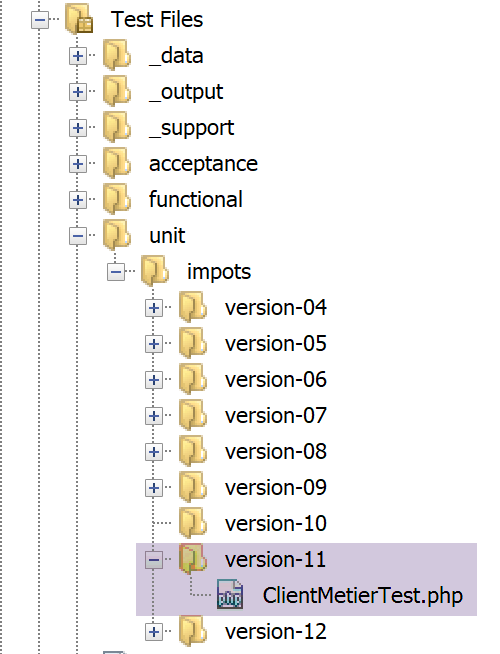
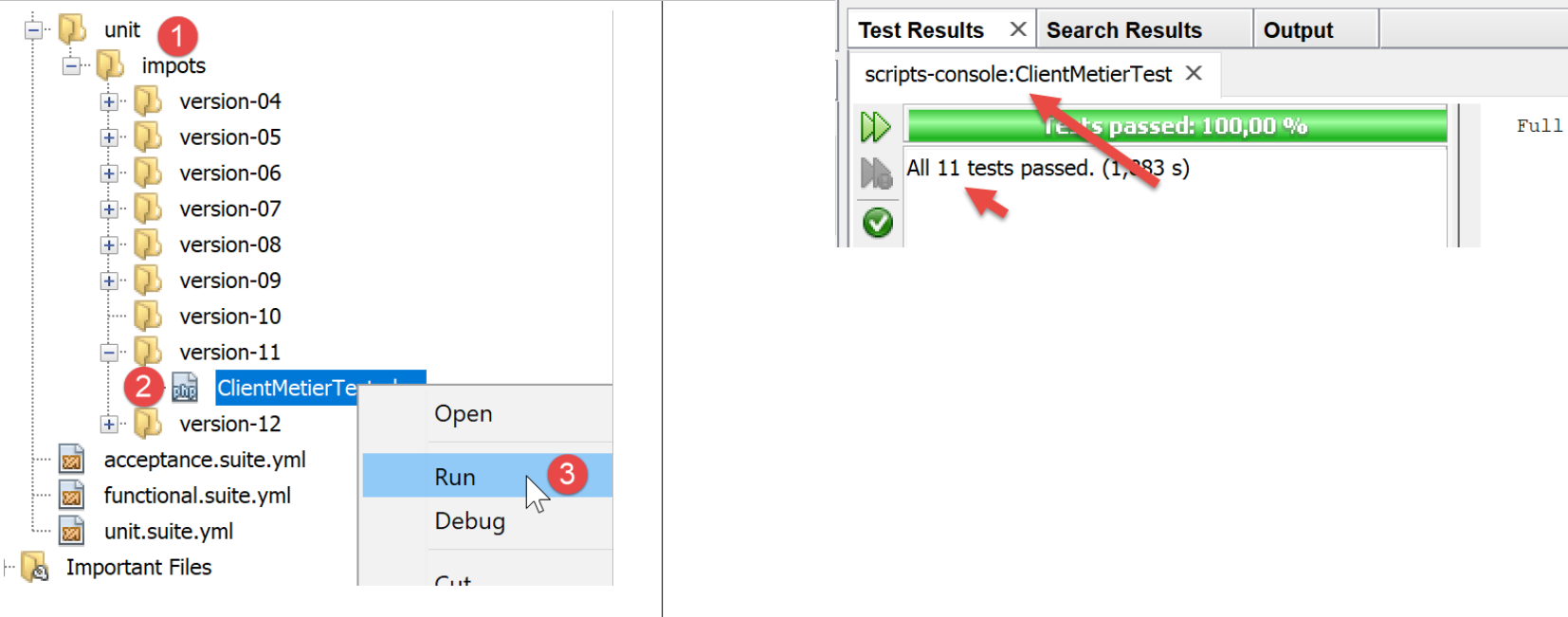
Il test [ClientMetierTest] è il seguente:
<?php

// strict adherence to declared types of function parameters
declare (strict_types=1);

// namespace
namespace Application;

// definition of constants
define("ROOT", "C:/Data/st-2019/dev/php7/poly/scripts-console/impots/version-11");

// configuration file path
define("CONFIG_FILENAME", ROOT . "/Data/config-client.json");

// we retrieve the configuration
$config = \json_decode(file_get_contents(CONFIG_FILENAME), true);

…
// test class
class ClientMetierTest extends Unit {
  // business layer
  private $métier;

  public function __construct() {
    parent::__construct();
    // we retrieve the configuration
    $config = \json_decode(\file_get_contents(CONFIG_FILENAME), true);
    // creation of the [dao] layer
    $clientDao = new ClientDao($config["urlServer"], $config["user"]);
    // creation of the [business] layer
    $this->métier = new ClientMetier($clientDao);
  }

  // tests
  …
}
I risultati dei test sono i seguenti: