3. Articolo 2 - Esempi di architetture web a tre livelli
Obiettivi dell’articolo:
- architetture a 3 livelli
- architettura web di base MVC
- architettura Struts MVC
- Architettura Spring MVC
Strumenti utilizzati:
- Spring: http://www.springframework.org/
- Ibatis SqlMap: http://www.ibatis.com/
- JUnit: http://www.junit.org/index.htm
- Eclipse: http://www.eclipse.org/
- Struts: http://struts.apache.org/
- Firebird: http://firebird.sourceforge.net/: SGBD, driver JDBC. In realtà, qualsiasi versione di JDBC va bene.
- IBExpert, edizione personale: http://www.hksoftware.net/download/ibep_2005.2.14.1_full.exe (marzo 2005). IBExpert consente di gestire graficamente SGBD Firebird.
- Tomcat: http://jakarta.apache.org/tomcat/
- Plugin Tomcat per Eclipse: http://www.sysdeo.com/eclipse/tomcatPlugin.html. Vedi anche il documento https://tahe.developpez.com/java/eclipse/
La comprensione di questo documento richiede diversi prerequisiti. Alcuni di essi possono essere acquisiti nei documenti che ho scritto. In tal caso, li cito. È ovvio che si tratta solo di un suggerimento e che il lettore può utilizzare i propri documenti preferiti.
- Linguaggio Java: [https://tahe.developpez.com/java/cours]
- programmazione web in Java: [https://tahe.developpez.com/java/web/]
- programmazione web con Java, Eclipse, Tomcat: [https://tahe.developpez.com/java/eclipse/]
- programmazione web con Struts: [https://tahe.developpez.com/java/struts/]
- utilizzo dell'aspetto IoC di Spring: [https://tahe.developpez.com/java/springioc]
- Libreria di tag JSTL: [https://tahe.developpez.com/java/eclipse/] (in parte)
- Documentazione Ibatis SqlMap: [https://prdownloads.sourceforge.net/ibatisnet/DevGuide.pdf?download]
- Firebird: [http://firebird.sourceforge.net/pdfmanual/Firebird-1.5-QuickStart.pdf] (marzo 2005).
Le idee contenute in questo documento traggono origine da un libro letto nell'estate del 2004, un magnifico lavoro di Rod Johnson: J2EE Development without EJB, edito da Wrox.
3.1. L'applicazione webarticles
Desideriamo presentare qui alcuni elementi di un’applicazione web di e-commerce. Questa consentirà agli utenti del web
- di consultare un elenco di articoli provenienti da un database
- di aggiungerne alcuni a un carrello elettronico
- e di confermarlo. Tale conferma avrà come unico effetto l’aggiornamento, nel database, delle scorte degli articoli acquistati.
Le diverse viste presentate all’utente saranno le seguenti:
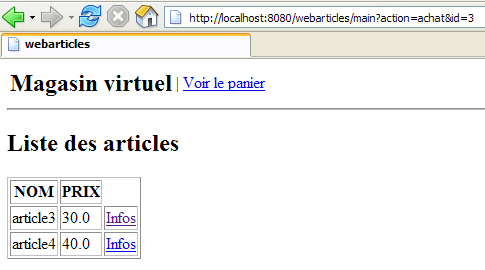
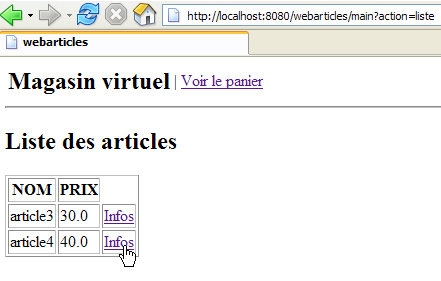
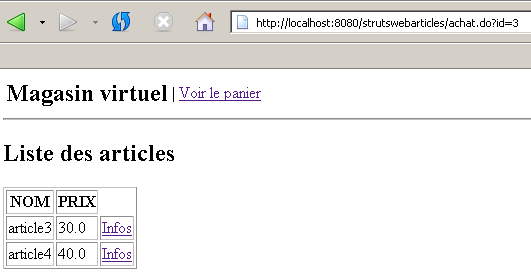
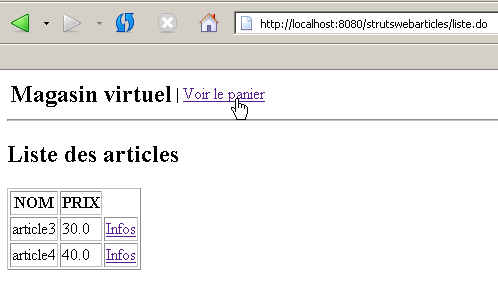
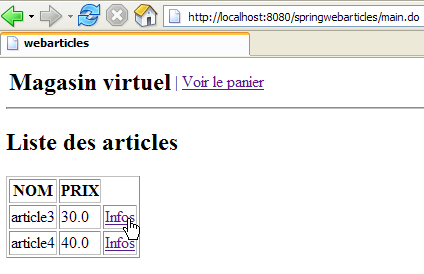
- la vista [LISTE] che presenta un elenco degli articoli in vendita
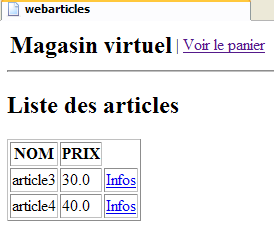
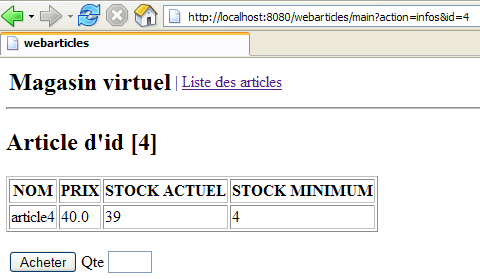
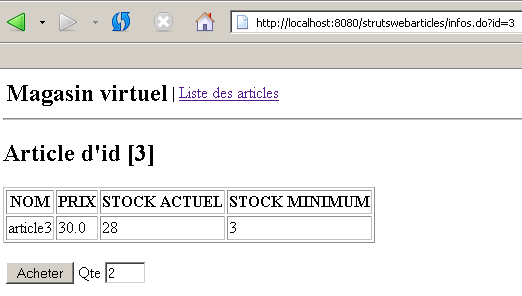
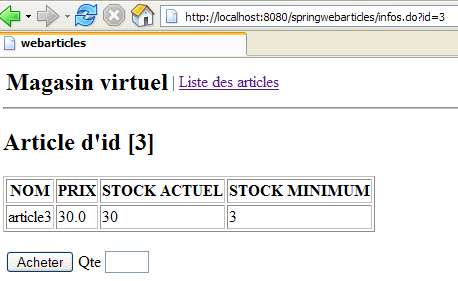
- la vista [INFOS] che fornisce ulteriori informazioni su un prodotto:
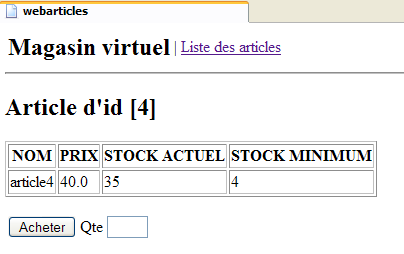
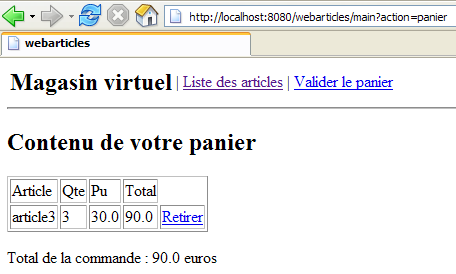
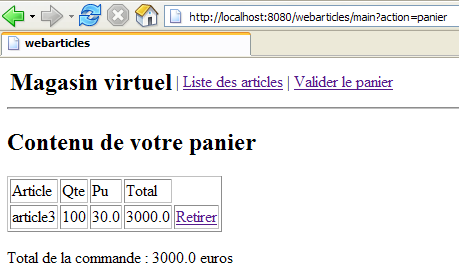
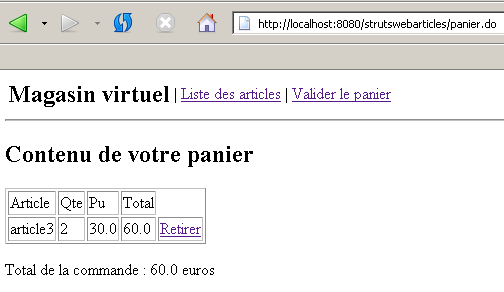
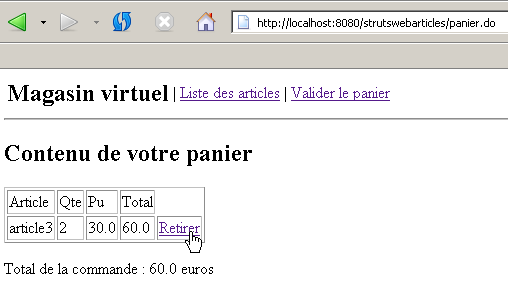
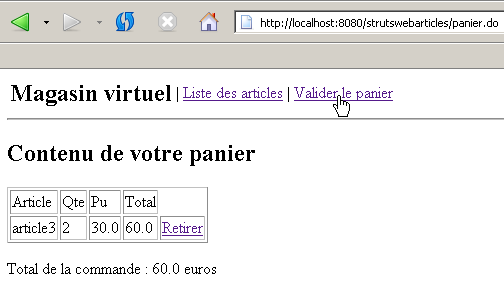
- la vista [PANIER] che mostra il contenuto del carrello del cliente
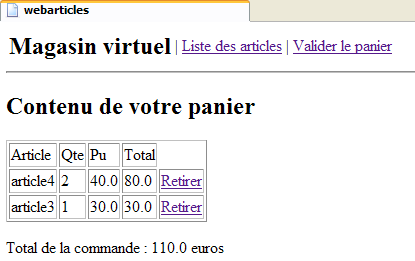
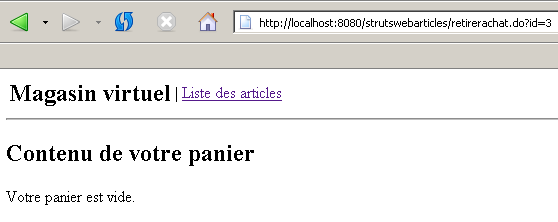
- la vista [PANIERVIDE] nel caso in cui il carrello del cliente sia vuoto
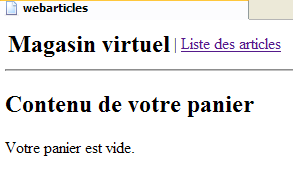
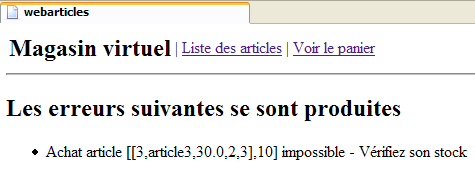
- la vista [ERREURS] che segnala eventuali errori dell'applicazione
3.2. Architettura generale dell'applicazione
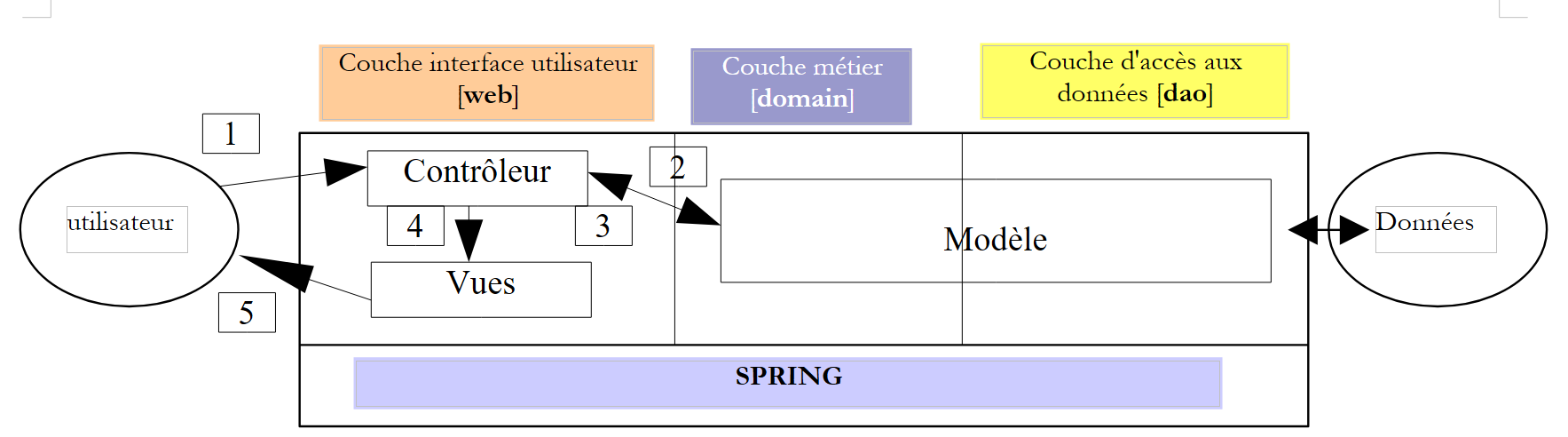
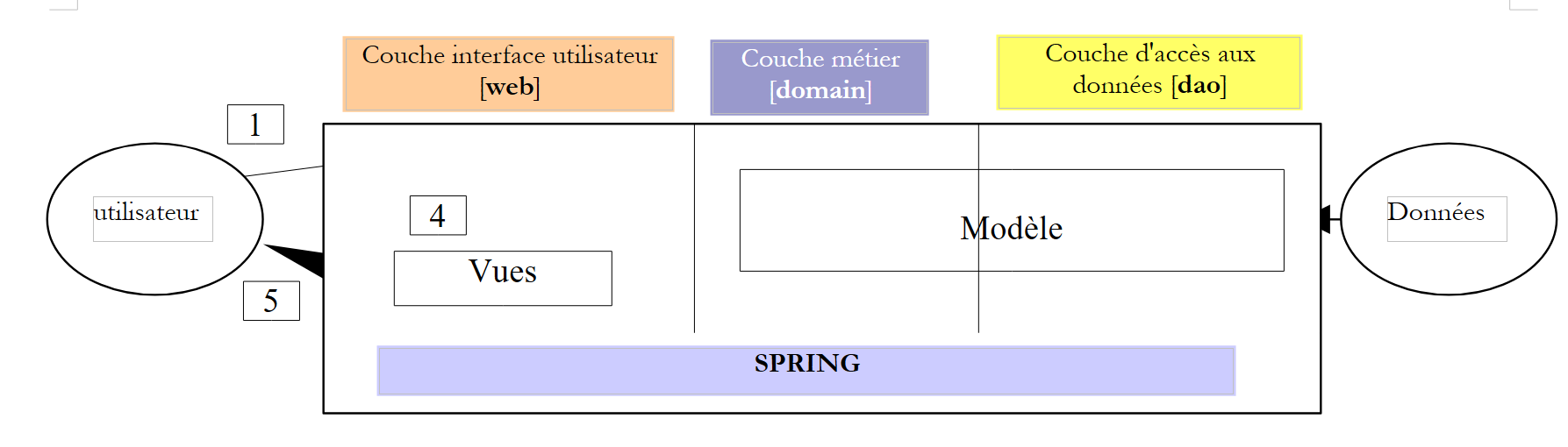
Si desidera realizzare un'applicazione con la seguente struttura a tre livelli:
- i tre livelli sono resi indipendenti grazie all'utilizzo di interfacce Java
- l'integrazione dei diversi livelli è realizzata tramite Spring
- ogni livello è costituito da pacchetti separati: web (livello interfaccia utente), domain (livello business) e dao (livello di accesso ai dati).
In questa sede supporremo che i livelli [domain] e [dao] siano già realizzati. Ci concentreremo esclusivamente sul livello [web], che intendiamo realizzare in diversi modi:
- utilizzando una tecnologia classica basata su servlet controller - pagine JSP
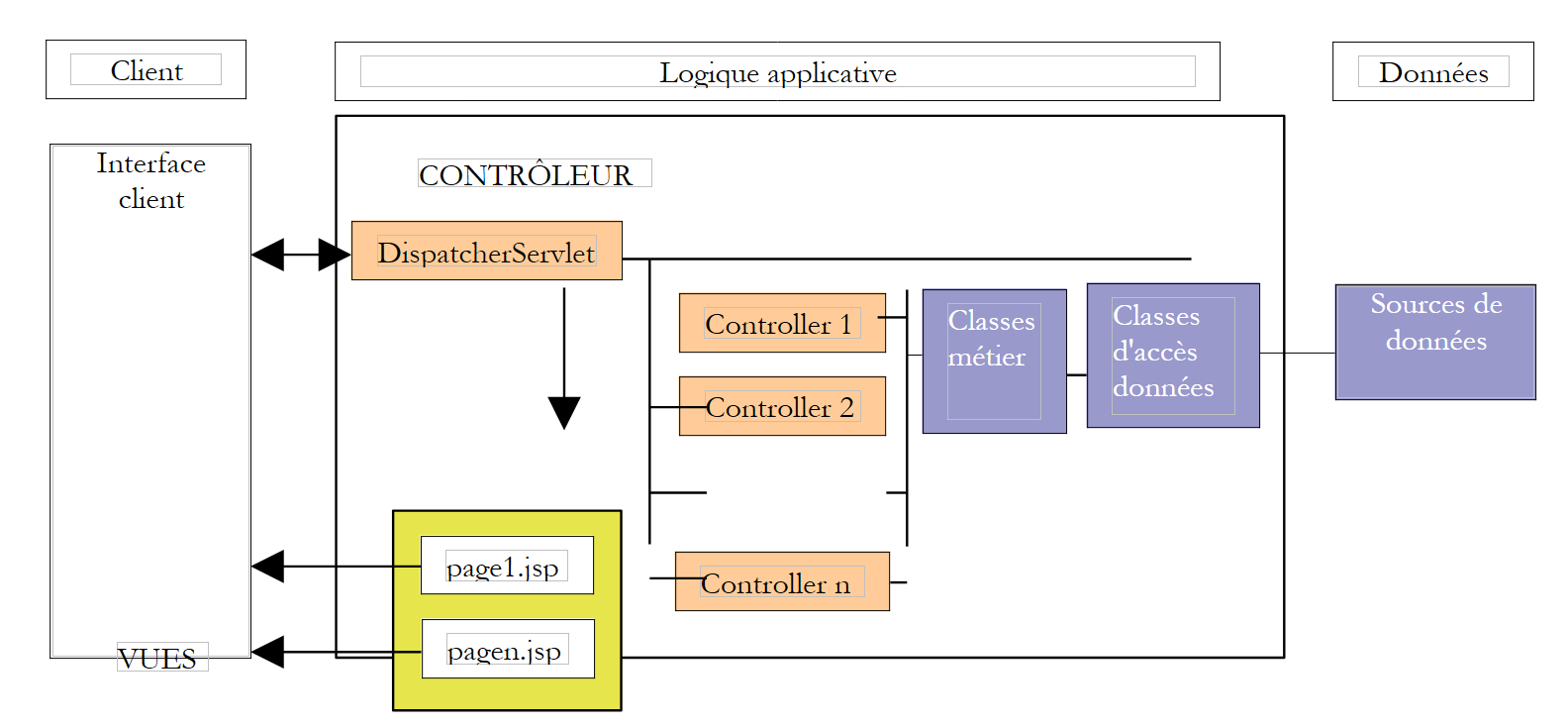
- utilizzando la tecnologia Struts MVC
- utilizzando la tecnologia Spring MVC
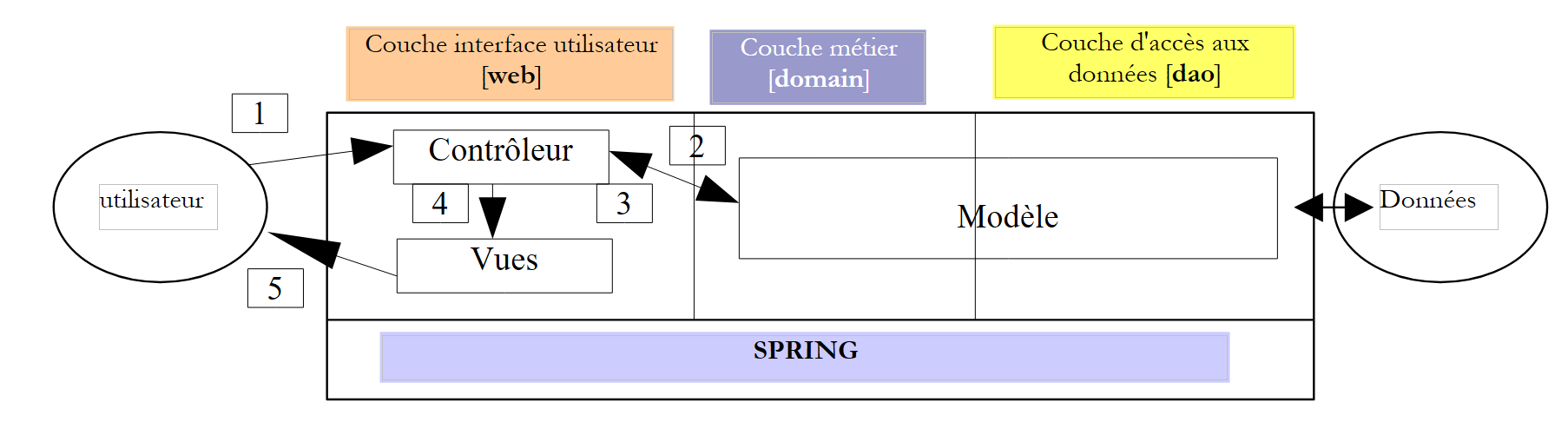
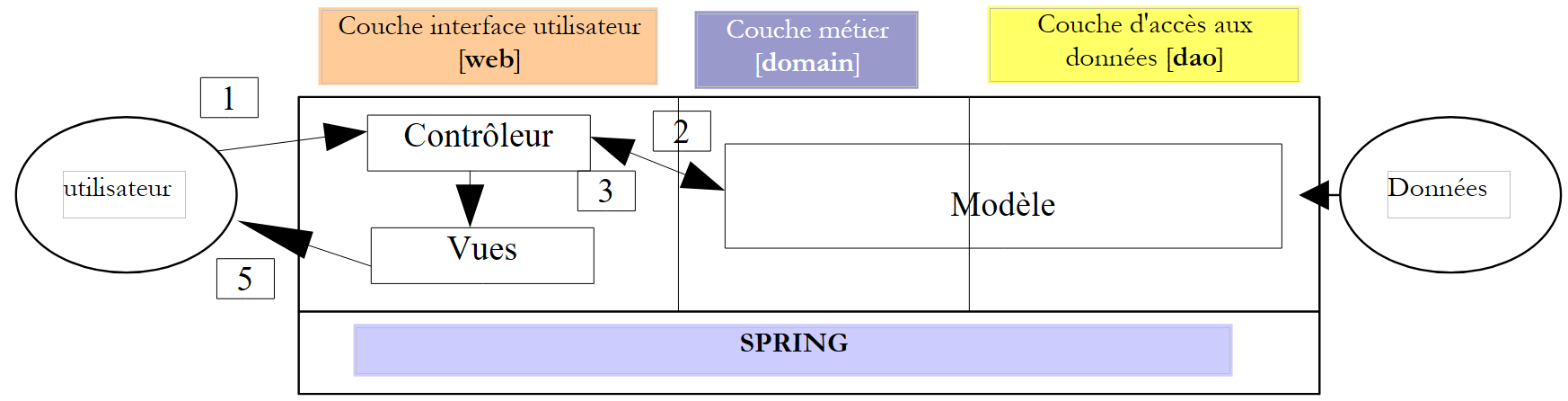
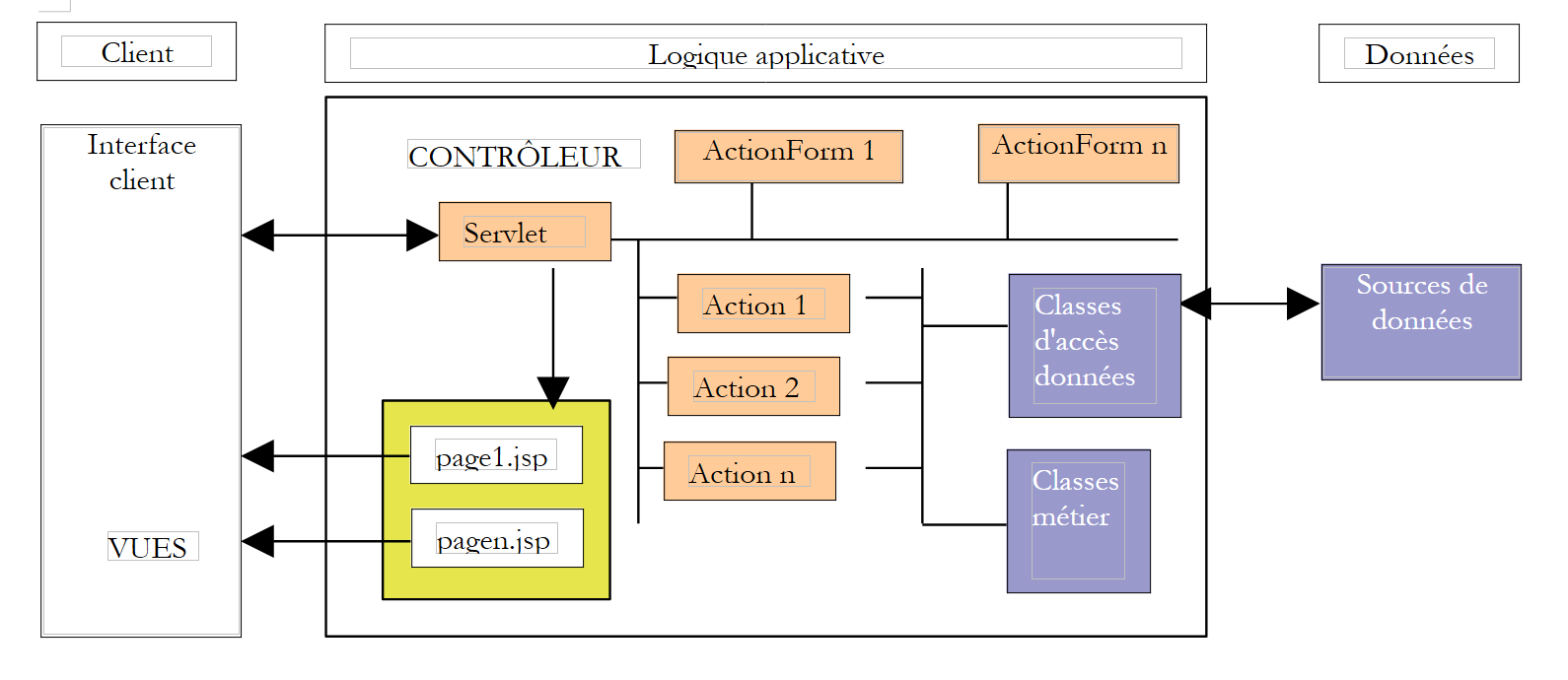
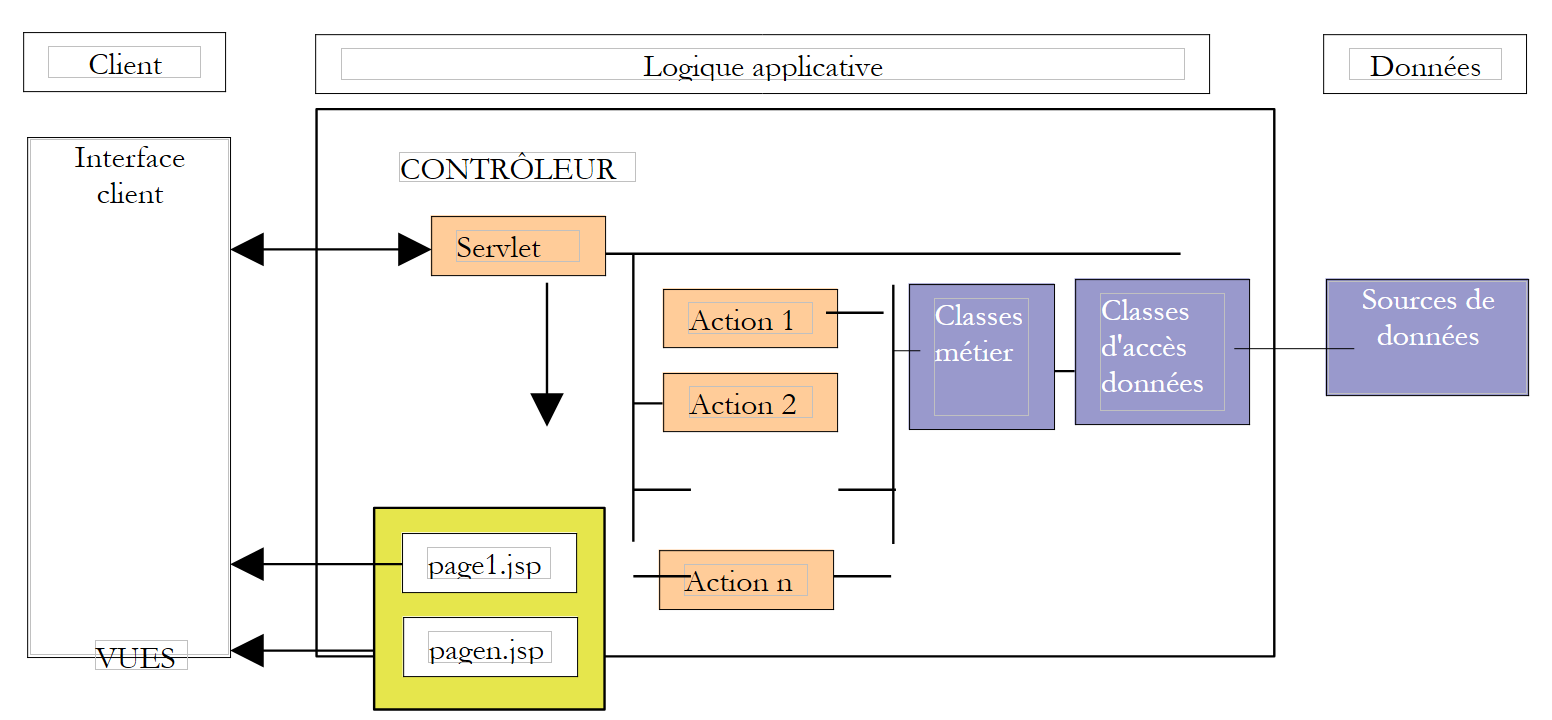
In ogni caso, l’applicazione rispetterà un’architettura MVC (Modello - Vista - Controller). Se riprendiamo lo schema a livelli riportato sopra, l’architettura MVC si integra in esso nel modo seguente:
L'elaborazione di una richiesta da parte di un cliente si svolge secondo le seguenti fasi:
- il cliente invia una richiesta al controller. Questo controller è un servlet che gestisce tutte le richieste dei clienti. Rappresenta il punto di ingresso dell’applicazione. È la «C» di MVC.
- il controller elabora questa richiesta. A tal fine, potrebbe aver bisogno dell’aiuto del livello di business, ovvero il modello M nella struttura MVC.
- Il controller riceve una risposta dal livello di business. La richiesta del cliente è stata elaborata. Ciò può comportare diverse possibili risposte. Un esempio classico è
- una pagina di errore se la richiesta non è stata elaborata correttamente
- una pagina di conferma in caso contrario
- il controller sceglie la risposta (= vista) da inviare al cliente. Si tratta, nella maggior parte dei casi, di una pagina contenente elementi dinamici. Il controller fornisce tali elementi alla vista.
- La vista viene inviata al cliente. È la V di MVC.
3.3. Il modello
Qui esaminiamo la M di MVC. Il modello è costituito dai seguenti elementi:
- le classi di business
- le classi di accesso ai dati
- il database
3.3.1. Il database
Il database contiene una sola tabella denominata ARTICLES. Questa è stata generata con i seguenti comandi SQL:
| CREATE TABLE ARTICLES (
ID INTEGER NOT NULL,
NOM VARCHAR(30) NOT NULL,
PRIX NUMERIC(15,2) NOT NULL,
STOCKACTUEL INTEGER NOT NULL,
STOCKMINIMUM INTEGER NOT NULL
);
/* vincoli */
ALTER TABLE ARTICLES ADD CONSTRAINT CHK_STOCKACTUEL check (STOCKACTUEL>=0);
ALTER TABLE ARTICLES ADD CONSTRAINT CHK_STOCKMINIMUM check (STOCKMINIMUM>=0);
ALTER TABLE ARTICLES ADD CONSTRAINT CHK_PRIX check (PRIX>=0);
ALTER TABLE ARTICLES ADD CONSTRAINT CHK_NOM check (NOM<>'');
/* chiave primaria */
ALTER TABLE ARTICLES ADD CONSTRAINT PK_ARTICLES PRIMARY KEY (ID);
|
| chiave primaria che identifica in modo univoco un articolo |
| nome dell’articolo |
| il suo prezzo |
| disponibilità attuale |
| la quantità di magazzino al di sotto della quale è necessario effettuare un ordine di rifornimento |
Nei test che seguono è stato utilizzato un database [Firebird]. [Firebird] è un SGBD "open source". Il driver JDBC [firebirdsql-full.jar] è collocato nella cartella [WEB-INF/lib] dell'applicazione web.
3.3.2. I pacchetti del modello
Il modello M è qui fornito sotto forma di tre archivi:
- istia.st.articles.dao: contiene le classi di accesso ai dati del livello [dao]
- istia.st.articles.exception: contiene una classe di eccezioni per la gestione degli articoli
- istia.st.articles.domain: contiene le classi di business del livello [domain]
archive | contenu | rôle |
istia.st.articles.dao | - contiene il pacchetto [istia.st.articles.dao], che a sua volta contiene i seguenti elementi: - [IArticlesDao]: l'interfaccia di accesso al livello Dao. È l'unica interfaccia visibile al livello [domain]. Non ne vede altre. - [Article]: classe che definisce un articolo - [ArticlesDaoSqlMap]: classe di implementazione dell’interfaccia [IArticlesDao] tramite lo strumento SqlMap | livello di accesso ai dati – si trova interamente nel livello [dao] dell’architettura a tre livelli dell’applicazione web |
istia.st.articles.domain | - contiene il pacchetto [istia.st.articles.domain], che a sua volta contiene i seguenti elementi: - [IArticlesDomain]: l'interfaccia di accesso al livello [domain]. È l'unica interfaccia visibile al livello web. Non ne vede altre. - [AchatsArticles]: una classe che implementa [IArticlesDomain] - [Achat]: classe che rappresenta l’acquisto di un cliente - [Panier]: classe che rappresenta l'insieme degli acquisti di un cliente | rappresenta il modello degli acquisti sul web - si trova interamente nel livello [domain] dell'architettura a tre livelli dell'applicazione web |
istia.st.articles.exception | - contiene il pacchetto [istia.st.articles.exception], che a sua volta contiene i seguenti elementi: - [UncheckedAccessArticlesException]: classe che definisce un'eccezione di tipo [RuntimeException]. Questo tipo di eccezione viene generata dal livello [dao] non appena si verifica un problema di accesso ai dati. | |
3.3.3. Il pacchetto [istia.st.articles.dao]
La classe che definisce un articolo è la seguente:
| package istia.st.articles.dao;
import istia.st.articles.exception.UncheckedAccessArticlesException;
/**
* @author ST - ISTIA
*
*/
public class Article {
private int id;
private String nom;
private double prix;
private int stockActuel;
private int stockMinimum;
/**
* constructeur par défaut
*/
public Article() {
}
public Article(int id, String nom, double prix, int stockActuel,
int stockMinimum) {
// inizializzazione degli attributi di istanza
setId(id);
setNom(nom);
setPrix(prix);
setStockActuel(stockActuel);
setStockMinimum(stockMinimum);
}
// getter - setter
public int getId() {
return id;
}
public void setId(int id) {
// ID valido?
if (id < 0)
throw new UncheckedAccessArticlesException("id[" + id + "] invalide");
this.id = id;
}
public String getNom() {
return nom;
}
public void setNom(String nom) {
// nome valido?
if(nom==null || nom.trim().equals("")){
throw new UncheckedAccessArticlesException("Le nom est [null] ou vide");
}
this.nom = nom;
}
public double getPrix() {
return prix;
}
public void setPrix(double prix) {
// prezzo valido?
if(prix<0) throw new UncheckedAccessArticlesException("Prix["+prix+"]invalide");
this.prix = prix;
}
public int getStockActuel() {
return stockActuel;
}
public void setStockActuel(int stockActuel) {
// scorte valide?
if (stockActuel < 0)
throw new UncheckedAccessArticlesException("stockActuel[" + stockActuel + "] invalide");
this.stockActuel = stockActuel;
}
public int getStockMinimum() {
return stockMinimum;
}
public void setStockMinimum(int stockMinimum) {
// scorte valide?
if (stockMinimum < 0)
throw new UncheckedAccessArticlesException("stockMinimum[" + stockMinimum + "] invalide");
this.stockMinimum = stockMinimum;
}
public String toString() {
return "[" + id + "," + nom + "," + prix + "," + stockActuel + ","
+ stockMinimum + "]";
}
}
|
Questa classe offre:
- un costruttore che consente di impostare le 5 informazioni relative a un articolo
- metodi di accesso, spesso denominati getter/setter, che servono a leggere e scrivere le 5 informazioni. I nomi di questi metodi seguono lo standard JavaBean. È prassi comune utilizzare oggetti JavaBean nel livello DAO per interfacciarsi con i dati del SGBD.
- una verifica dei dati inseriti nell’articolo. In caso di dati errati, viene generata un’eccezione.
- un metodo toString che consente di ottenere il valore di un articolo sotto forma di stringa di caratteri. Ciò è spesso utile per il debug di un'applicazione.
L'interfaccia [IArticlesDao] è definita come segue:
| package istia.st.articles.dao;
import istia.st.articles.domain.Article;
import java.util.List;
/**
* @author ST-ISTIA
*
*/
public interface IArticlesDao {
/**
* @return : liste de tous les articles
*/
public List getAllArticles();
/**
* @param unArticle :
* l'article à ajouter
*/
public int ajouteArticle(Article unArticle);
/**
* @param idArticle :
* id de l'article à supprimer
*/
public int supprimeArticle(int idArticle);
/**
* @param unArticle :
* l'article à modifier
*/
public int modifieArticle(Article unArticle);
/**
* @param idArticle :
* id de l'article cherché
* @return : l'article trouvé ou null
*/
public Article getArticleById(int idArticle);
/**
* vide la table des articles
*/
public void clearAllArticles();
/**
*
* @param idArticle id de l'article dont on change le stock
* @param mouvement valeur à ajouter au stock (valeur signée)
*/
public int changerStockArticle(int idArticle, int mouvement);
}
|
Il ruolo dei diversi metodi dell’interfaccia è il seguente:
| restituisce tutti gli articoli della tabella ARTICLES in un elenco di oggetti [Article] |
| svuota la tabella ARTICLES |
| restituisce l'oggetto [Article] identificato dalla sua chiave primaria |
| consente di aggiungere un articolo alla tabella ARTICLES |
| consente di modificare un articolo della tabella [ARTICLES] |
| consente di eliminare un articolo dalla tabella [ARTICLES] |
| consente di modificare lo stock di un articolo della tabella [ARTICLES] |
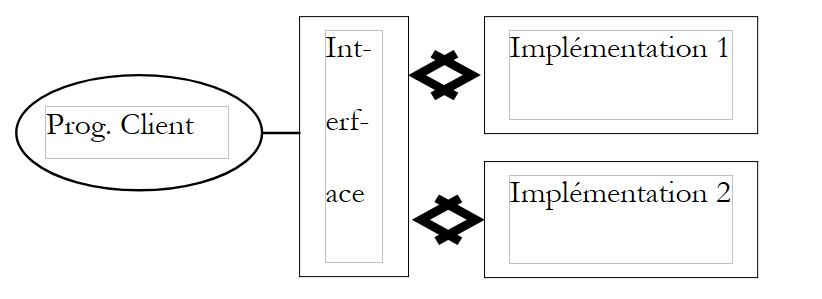
L'interfaccia mette a disposizione dei programmi client una serie di metodi definiti esclusivamente dalle loro firme. Non si occupa del modo in cui tali metodi saranno effettivamente implementati. Ciò garantisce flessibilità all'applicazione. Il programma client effettua le chiamate su un'interfaccia e non su una sua specifica implementazione.
La scelta di una specifica implementazione avverrà tramite un file di configurazione Spring. In questa sede proponiamo di implementare l’interfaccia IArticlesDao utilizzando un prodotto open source denominato SqlMap. Ciò ci consentirà di rimuovere qualsiasi istruzione SQL dal codice Java.
La classe di implementazione [ArticlesDaoSqlMap] è definita come segue:
| package istia.st.articles.dao;
// Importazioni
import com.ibatis.sqlmap.client.SqlMapClient;
import istia.st.articles.domain.Article;
import java.util.List;
public class ArticlesDaoSqlMap implements IArticlesDao {
// Campi
private SqlMapClient sqlMap;
// Costruttori
public ArticlesDaoSqlMap(String sqlMapConfigFileName) { }
// Metodi
public SqlMapClient getSqlMap() {}
public void setSqlMap(SqlMapClient sqlMap) { }
public synchronized List getAllArticles() {}
public synchronized int ajouteArticle(Article unArticle) {}
public synchronized int supprimeArticle(int idArticle) {}
public synchronized int modifieArticle(Article unArticle) {}
public synchronized Article getArticleById(int idArticle) {}
public synchronized void clearAllArticles() { }
public synchronized int changerStockArticle(int idArticle, int mouvement) {}
}
|
Tutti i metodi di accesso ai dati sono stati sincronizzati per evitare problemi di accesso concorrente alla fonte dei dati. In un dato momento, un solo thread ha accesso a un determinato metodo.
La classe [ArticlesDaoSqlMap] utilizza lo strumento [Ibatis SqlMap]. L’utilità di questo strumento consiste nel consentire di estrarre il codice SQL relativo all’accesso ai dati dal codice Java. Esso viene quindi inserito in un file di configurazione. Avremo modo di tornarci sopra. Per essere inizializzata, la classe [ArticlesDaoSqlMap] necessita di un file di configurazione il cui nome viene passato come parametro al costruttore della classe. Questo file di configurazione definisce le informazioni necessarie per:
- accedere al SGBD in cui si trovano gli articoli
- gestire un pool di connessioni
- gestire le transazioni
Nel nostro esempio, si chiamerà [sqlmap-config-firebird.xml] e definirà l’accesso a un database Firebird:
| <?xml version="1.0" encoding="UTF-8" ?>
<!DOCTYPE sqlMapConfig
PUBLIC "-//iBATIS.com//DTD SQL Map Config 2.0//EN"
"http://www.ibatis.com/dtd/sql-map-config-2.dtd">
<sqlMapConfig>
<transactionManager type="JDBC">
<dataSource type="SIMPLE">
<property name="JDBC.Driver" value="org.firebirdsql.jdbc.FBDriver"/>
<property name="JDBC.ConnectionURL"
value="jdbc:firebirdsql:localhost/3050:D:/data/Databases/firebird/dbarticles.gdb"/>
<property name="JDBC.Username" value="sysdba"/>
<property name="JDBC.Password" value="masterkey"/>
<property name="JDBC.DefaultAutoCommit" value="true"/>
</dataSource>
</transactionManager>
<sqlMap resource="articles.xml"/>
</sqlMapConfig>
|
Il file di configurazione [articles.xml] citato sopra consente di definire come creare un'istanza della classe [istia.st.articles.dao.Article] a partire da una riga della tabella [ARTICLES] del SGBD. Definisce inoltre le query SQL che consentiranno al livello [dao] di ottenere i dati dalla fonte dati Firebird.
| <?xml version="1.0" encoding="UTF-8" ?>
<!DOCTYPE sqlMap
PUBLIC "-//iBATIS.com//DTD SQL Map 2.0//EN"
"http://www.ibatis.com/dtd/sql-map-2.dtd">
<sqlMap namespace="Articles">
<!-- un alias sulla classe istia.st.articles.dao.Article -->
<typeAlias alias="article" type="istia.st.articles.dao.Article"/>
<!-- il mapping ORM : riga della tabella ARTICLES - istanza della classe Articolo -->
<resultMap id="article" class="article">
<result property="id" column="ID"/>
<result property="nom" column="NOM"/>
<result property="prix" column="PRIX"/>
<result property="stockActuel" column="STOCKACTUEL"/>
<result property="stockMinimum" column="STOCKMINIMUM"/>
</resultMap>
<!-- la query SQL per ottenere tutti gli articoli -->
<statement id="getAllArticles" resultMap="article">
select id, nom, prix,
stockactuel, stockminimum from ARTICLES
</statement>
<!-- la query SQL per eliminare tutti gli articoli -->
<statement id="clearAllArticles">delete from ARTICLES</statement>
<!-- la query SQL per inserire un articolo -->
<statement id="insertArticle">
insert into ARTICLES (id, nom, prix,
stockactuel, stockminimum) values
(#(id#,#nome#,#prezzo#,#stockattuale#,#stockminimo#)
</statement>
<!-- la query SQL per eliminare un determinato articolo -->
<statement id="deleteArticle">delete FROM ARTICLES where id=#id#</statement>
<!-- la richiesta SQL per modificare un determinato articolo -->
<statement id="modifyArticle">
update ARTICLES set nom=#nome#,
prix=#prezzo#,stockattuale=#stockattuale#,stockminimo=#stockminimo# where
id=#id#
</statement>
<!-- la query SQL per recuperare un determinato articolo -->
<statement id="getArticleById" resultMap="article">
select id, nom, prix,
stockactuel, stockminimum FROM ARTICLES where id=#id#
</statement>
<!-- la richiesta SQL per modificare la giacenza di un determinato articolo -->
<statement id="changerStockArticle">
update ARTICLES set
stockActuel=stockActuel+#movimento#
where id=#id# e stockActuel+#movimento#>=0
</statement>
</sqlMap>
|
Il codice del pacchetto [dao] è riportato in allegato.
3.3.4. Il pacchetto [istia.st.articles.domain]
L'interfaccia [IArticlesDomain] disaccoppia il livello [métier] dal livello [web]. Quest'ultimo accede al livello [métier/domain] tramite questa interfaccia senza preoccuparsi della classe che lo implementa effettivamente. L'interfaccia definisce le seguenti azioni per l'accesso al livello di business:
| package istia.st.articles.domain;
// Importazioni
import java.util.ArrayList;
import java.util.List;
public abstract interface IArticlesDomain {
// Metodi
void acheter(Panier panier);
List getAllArticles();
Article getArticleById(int idArticle);
ArrayList getErreurs();
}
|
| restituisce l’elenco di oggetti [Article] da presentare al cliente |
Article getArticleById(int idArticle)
| restituisce l’oggetto [Article] identificato da [idArticle] |
void acheter(Panier panier)
| conferma il carrello del cliente sottraendo dalle scorte degli articoli acquistati la quantità acquistata - l'operazione potrebbe non andare a buon fine se le scorte sono insufficienti |
| restituisce l'elenco degli errori verificatisi - vuoto se non ci sono errori |
In questo caso, l’interfaccia [IArticlesDomain] verrà implementata dalla seguente classe [AchatsArticles]:
| package istia.st.articles.domain;
// Importazioni
import istia.st.articles.dao.IArticlesDao;
import istia.st.articles.exception.UncheckedAccessArticlesException;
import java.util.ArrayList;
import java.util.List;
public class AchatsArticles implements IArticlesDomain {
// Campi
private IArticlesDao articlesDao;
private ArrayList erreurs;
// Costruttori
public AchatsArticles(IArticlesDao articlesDao) { }
// Metodi
public ArrayList getErreurs() {}
public List getAllArticles() {}
public Article getArticleById(int id) {}
public void acheter(Panier panier) { }
}
|
Questa classe implementa i quattro metodi dell'interfaccia [IArticlesDomain]. Ha due campi privati:
| l'oggetto di accesso ai dati fornito dal livello di accesso ai dati |
| l'elenco degli eventuali errori |
Per creare un'istanza della classe, è necessario fornire l'oggetto che consente l'accesso ai dati di SGBD:
public AchatsArticles(IArticlesDao articlesDao)
| costruttore |
La classe [Achat] rappresenta un acquisto effettuato dal cliente:
| package istia.st.articles.domain;
public class Achat {
// Campi
private Article article;
private int qte;
// Costruttori
public Achat(Article article, int qte) { }
// Metodi
public double getTotal() {}
public Article getArticle() {}
public void setArticle(Article article) { }
public int getQte() {}
public void setQte() { }
public String toString() {}
}
|
La classe [Achat] è una JavaBean con i seguenti campi e metodi:
| l'articolo acquistato |
| la quantità acquistata |
| indica l'importo dell'acquisto |
| stringa di identificazione dell'oggetto |
La classe [Panier] rappresenta l'insieme degli acquisti del cliente:
| package istia.st.articles.domain;
// Importazioni
import java.util.ArrayList;
public class Panier {
// Campi
private ArrayList achats;
// Costruttori
public Panier() { }
// Metodi
public ArrayList getAchats() {}
public void ajouter(Achat unAchat) { }
public void enlever(int idAchat) { }
public double getTotal() {}
public String toString() { }
}
|
La classe [Panier] è una JavaBean con i seguenti campi e metodi:
| l'elenco degli acquisti del cliente - elenco di oggetti di tipo [Achat] |
void ajouter(Achat unAchat)
| aggiunge un acquisto all'elenco degli acquisti |
void enlever(int idArticle)
| rimuove l'acquisto dell'articolo idArticle |
| calcola l'importo totale degli acquisti |
| restituisce la stringa di identificazione del carrello |
| restituisce l'elenco degli acquisti |
Il codice del pacchetto [domain] è riportato in allegato.
3.3.5. Il pacchetto [istia.st.articles.exception]
Questo pacchetto contiene la classe che definisce l’eccezione generata dal livello [dao] quando si verifica un problema di accesso alla fonte dati:
| package istia.st.articles.exception;
public class UncheckedAccessArticlesException
extends RuntimeException {
public UncheckedAccessArticlesException() {
super();
}
public UncheckedAccessArticlesException(String mesg) {
super(mesg);
}
public UncheckedAccessArticlesException(String mesg, Throwable th) {
super(mesg, th);
}
}
|
3.3.6. Test del modello
Il modello M è stato testato in Eclipse con la seguente configurazione:
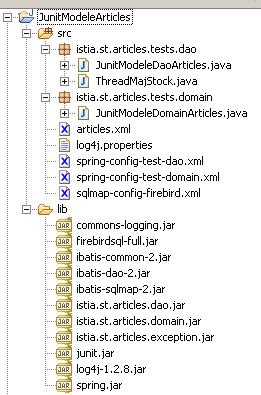
Commenti:
- in [WEB-INF/lib] si trovano:
- gli archivi necessari allo strumento [ibatis SqlMap] incaricato di accedere al Firebird SGBD: ibatis-*.jar
- quello necessario per lo strumento [spring]: spring.jar
- il driver JDBC per SGBD e [Firebird]: firebirdsql-full.jar
- gli archivi necessari per i log: log4-*.jar, commons-logging.jar
- i tre file del modello testato: istia.st.articles.*.jar
- l'archivio necessario per lo strumento di test [junit]
- in [WEB-INF/src] si trovano i file di configurazione che verranno automaticamente copiati in [WEB-INF/classes] da Eclipse:
- i file di configurazione dello strumento [sqlmap]: sqlmap-config-firebird.xml, articles.xml
- quello dello strumento [spring]: spring-config-test-dao.xml, spring-config-test-domain.xml
- il file di configurazione dello strumento [log4j]: log4j.properties
- nel pacchetto [istia.st.articles.tests] sono presenti le classi di test del modello
3.3.6.1. Test del livello [dao]
La classe di test JUnit del livello [dao] è la seguente. La sua lettura permette di comprendere come vengono utilizzati i metodi dell’interfaccia [IArticlesDao]:
| package istia.st.articles.tests.dao;
import java.util.List;
import junit.framework.TestCase;
import istia.st.articles.dao.IArticlesDao;
import istia.st.articles.dao.Article;
import org.springframework.beans.factory.xml.XmlBeanFactory;
import org.springframework.core.io.ClassPathResource;
// Test della classe ArticlesDaoSqlMap
public class JunitModeleDaoArticles extends TestCase {
// un'istanza della classe sottoposta a test
private IArticlesDao articlesDao;
protected void setUp() throws Exception {
// recupera un'istanza di accesso ai dati
articlesDao = (IArticlesDao) (new XmlBeanFactory(new ClassPathResource(
"spring-config-test-dao.xml"))).getBean("articlesDao");
}
public void testGetAllArticles() {
// visualizza gli articoli
listArticles();
}
public void testClearAllArticles() {
// svuota la tabella degli articoli
articlesDao.clearAllArticles();
// legge la tabella ARTICLES
List articles = articlesDao.getAllArticles();
assertEquals(0, articles.size());
}
public void testAjouteArticle() {
// cancella il contenuto di ARTICLES
articlesDao.clearAllArticles();
// legge la tabella ARTICLES
List articles = articlesDao.getAllArticles();
assertEquals(0, articles.size());
// inserimento
articlesDao.ajouteArticle(new Article(3, "article3", 30, 30, 3));
articlesDao.ajouteArticle(new Article(4, "article4", 40, 40, 4));
// legge la tabella ARTICLES
articles = articlesDao.getAllArticles();
assertEquals(2, articles.size());
//la visualizza
listArticles();
}
public void testSupprimeArticle() {
// cancella il contenuto di ARTICLES
articlesDao.clearAllArticles();
// legge la tabella ARTICLES
List articles = articlesDao.getAllArticles();
assertEquals(0, articles.size());
// inserimento
articlesDao.ajouteArticle(new Article(3, "article3", 30, 30, 3));
articlesDao.ajouteArticle(new Article(4, "article4", 40, 40, 4));
// legge la tabella ARTICLES
articles = articlesDao.getAllArticles();
assertEquals(2, articles.size());
// eliminazione
articlesDao.supprimeArticle(4);
// legge la tabella ARTICLES
articles = articlesDao.getAllArticles();
assertEquals(1, articles.size());
// visualizza la tabella
listArticles();
}
public void testModifieArticle() {
// cancella il contenuto di ARTICLES
articlesDao.clearAllArticles();
// legge la tabella ARTICLES
List articles = articlesDao.getAllArticles();
assertEquals(0, articles.size());
// inserimento
articlesDao.ajouteArticle(new Article(3, "article3", 30, 30, 3));
articlesDao.ajouteArticle(new Article(4, "article4", 40, 40, 4));
// legge la tabella ARTICLES
articles = articlesDao.getAllArticles();
assertEquals(2, articles.size());
// getById
Article unArticle = articlesDao.getArticleById(3);
assertEquals(unArticle.getNom(), "article3");
unArticle = articlesDao.getArticleById(4);
assertEquals(unArticle.getNom(), "article4");
// modifica
articlesDao.modifieArticle(new Article(4, "article4", 44, 44, 44));
// getById
unArticle = articlesDao.getArticleById(4);
assertEquals(unArticle.getPrix(), 44, 1e-6);
// visualizza la tabella
listArticles();
}
public void testGetArticleById() {
// cancella il contenuto di ARTICLES
articlesDao.clearAllArticles();
// legge la tabella ARTICLES
List articles = articlesDao.getAllArticles();
assertEquals(0, articles.size());
// inserimento
articlesDao.ajouteArticle(new Article(3, "article3", 30, 30, 3));
articlesDao.ajouteArticle(new Article(4, "article4", 40, 40, 4));
// legge la tabella ARTICLES
articles = articlesDao.getAllArticles();
assertEquals(2, articles.size());
// getById
Article unArticle = articlesDao.getArticleById(3);
assertEquals(unArticle.getNom(), "article3");
unArticle = articlesDao.getArticleById(4);
assertEquals(unArticle.getNom(), "article4");
}
private void listArticles() {
// legge la tabella ARTICLES
List articles = articlesDao.getAllArticles();
// vengono visualizzati gli articoli letti
for (int i = 0; i < articles.size(); i++) {
System.out.println(((Article) articles.get(i)).toString());
}
}
public void testChangerStockArticle() throws InterruptedException {
// cancella il contenuto di ARTICLES
articlesDao.clearAllArticles();
// inserimento
int nbArticles = articlesDao.ajouteArticle(new Article(3, "article3",
30, 101, 3));
assertEquals(nbArticles, 1);
nbArticles = articlesDao.ajouteArticle(new Article(4, "article4", 40,
40, 4));
assertEquals(nbArticles, 1);
// creazione di 100 thread per l'aggiornamento delle scorte dell'articolo 3
Thread[] taches = new Thread[100];
for (int i = 0; i < taches.length; i++) {
taches[i] = new ThreadMajStock("thread-" + i, articlesDao);
taches[i].start();
}
// si attende il completamento dei thread
for (int i = 0; i < taches.length; i++) {
taches[i].join();
}
// recuperare l'articolo 3 e verificarne le scorte
Article unArticle = articlesDao.getArticleById(3);
assertEquals(unArticle.getNom(), "article3");
assertEquals(1, unArticle.getStockActuel());
// modifica delle scorte dell'articolo 4
boolean erreur = false;
int nbLignes = articlesDao.changerStockArticle(4, -100);
assertEquals(0, nbLignes);
// visualizza la tabella
listArticles();
}
}
|
Commenti:
- la classe di test memorizza, tramite il suo metodo setUp, un'istanza della classe da testare:
| // un'istanza della classe testata
private IArticlesDao articlesDao;
protected void setUp() throws Exception {
// recupera un'istanza di accesso ai dati
articlesDao = (IArticlesDao) (new XmlBeanFactory(new ClassPathResource(
"spring-config-test-dao.xml"))).getBean("articlesDao");
}
|
- L'oggetto da testare viene fornito da [Spring]. Nel codice sopra riportato, viene richiesto il bean Spring denominato [articlesDao]. Questo bean è definito nel file di configurazione di Spring [spring-config-test-dao.xml]:
| <?xml version="1.0" encoding="UTF-8"?>
<!DOCTYPE beans SYSTEM "http://www.springframework.org/dtd/spring-beans.dtd">
<beans>
<!-- la classe di accesso ai dati -->
<bean id="articlesDao" class="istia.st.articles.dao.ArticlesDaoSqlMap">
<constructor-arg index="0">
<value>sqlmap-config-firebird.xml</value>
</constructor-arg>
</bean>
</beans>
|
Come si vede sopra, il bean [articlesDao] è un'istanza della classe [istia.st.articles.dao.ArticlesDaoSqlMap]. Questa classe dispone di un costruttore che richiede come parametro il nome del file di configurazione dello strumento [SqlMap]. Tale nome viene qui fornito: si tratta di [sqlmap-config-firebird.xml], già descritto in precedenza. Esso fornisce tutte le informazioni necessarie per accedere ai dati di SGBD.
Il metodo [testChangerStockArticle] crea 100 thread incaricati di decrementare lo stock di un determinato articolo. Lo scopo è qui quello di testare gli accessi concorrenti al SGBD. Poiché il metodo [changerStockArticle] della classe [istia.st.articles.dao.ArticlesDaoSqlMap] è stato sincronizzato, questo test viene superato. Se si rimuove la sincronizzazione, il test non viene più superato. La classe incaricata di aggiornare le scorte è la seguente:
| package istia.st.articles.tests;
import istia.st.articles.dao.IArticlesDao;
public class ThreadMajStock extends Thread {
/**
* nom du thread
*/
private String name;
/**
* objet d'accès aux données
*/
private IArticlesDao articlesDao;
/**
*
* @param name
* le nom du thread afin de l'identifier
* @param articlesDao
* l'objet d'accès aux données du sgbd
*/
public ThreadMajStock(String name, IArticlesDao articlesDao) {
this.name = name;
this.articlesDao = articlesDao;
}
/**
* décrémente le stock de l'article 3 d'une unité fait un suivi écran des
* opérations
*/
public void run() {
// monitoraggio
System.out.println(name + " lancé");
// modifica delle scorte dell'articolo 3
articlesDao.changerStockArticle(3, -1);
// monitoraggio
System.out.println(name + " terminé");
}
}
|
- la classe sopra indicata decrementa di 1 lo stock dell’articolo n. 3
3.3.6.2. Test del livello [domain]
La classe di test JUnit del livello [domain] è la seguente:
| package istia.st.articles.tests.domain;
import java.util.List;
import junit.framework.TestCase;
import istia.st.articles.dao.Article;
import istia.st.articles.dao.IArticlesDao;
import istia.st.articles.domain.Achat;
import istia.st.articles.domain.IArticlesDomain;
import istia.st.articles.domain.Panier;
import org.springframework.beans.factory.xml.XmlBeanFactory;
import org.springframework.core.io.ClassPathResource;
// test della classe ArticlesDaoSqlMap
public class JunitModeleDomainArticles extends TestCase {
     // un'istanza della classe di accesso al dominio
    private IArticlesDomain articlesDomain;

     // un'istanza della classe di accesso ai dati
    private IArticlesDao articlesDao;

    protected void setUp() throws Exception {
         // recupera un'istanza di accesso al dominio
        articlesDomain = (IArticlesDomain) (new XmlBeanFactory(
                new ClassPathResource("spring-config-test-domain.xml")))
                .getBean("articlesDomain");
         // recupera un'istanza di accesso ai dati
        articlesDao = (IArticlesDao) (new XmlBeanFactory(new ClassPathResource(
                "spring-config-test-domain.xml"))).getBean("articlesDao");
    }
// recupero di un articolo specifico
public void testGetArticleById() {
// eliminazione del contenuto di ARTICLES
articlesDao.clearAllArticles();
// legge la tabella ARTICLES
List articles = articlesDao.getAllArticles();
assertEquals(0, articles.size());
// inserimento
articlesDao.ajouteArticle(new Article(3, "article3", 30, 30, 3));
articlesDao.ajouteArticle(new Article(4, "article4", 40, 40, 4));
// legge la tabella ARTICLES
articles = articlesDomain.getAllArticles();
assertEquals(2, articles.size());
// getById
Article unArticle = articlesDomain.getArticleById(3);
assertEquals(unArticle.getNom(), "article3");
unArticle = articlesDao.getArticleById(4);
assertEquals(unArticle.getNom(), "article4");
}
// visualizzazione sullo schermo
private void listArticles() {
// legge la tabella ARTICLES
List articles = articlesDomain.getAllArticles();
// vengono visualizzati gli articoli letti
for (int i = 0; i < articles.size(); i++) {
System.out.println(((Article) articles.get(i)).toString());
}
}
// acquisti di articoli
public void testAchatPanier(){
// eliminazione del contenuto di ARTICLES
articlesDao.clearAllArticles();
// legge la tabella ARTICLES
List articles = articlesDao.getAllArticles();
assertEquals(0, articles.size());
// inserimento
Article article3=new Article(3, "article3", 30, 30, 3);
articlesDao.ajouteArticle(article3);
Article article4=new Article(4, "article4", 40, 40, 4);
articlesDao.ajouteArticle(article4);
// legge la tabella ARTICLES
articles = articlesDomain.getAllArticles();
assertEquals(2, articles.size());
// creazione di un carrello con due articoli
Panier panier=new Panier();
panier.ajouter(new Achat(article3,10));
panier.ajouter(new Achat(article4,10));
// verifiche
assertEquals(700.0,panier.getTotal(),1e-6);
assertEquals(2,panier.getAchats().size());
// conferma del carrello
articlesDomain.acheter(panier);
// verifiche
assertEquals(0,articlesDomain.getErreurs().size());
assertEquals(0,panier.getAchats().size());
// cerca l'articolo n. 3
article3=articlesDomain.getArticleById(3);
assertEquals(20,article3.getStockActuel());
// cerca articolo n. 4
article4=articlesDomain.getArticleById(4);
assertEquals(30,article4.getStockActuel());
// nuovo carrello
panier.ajouter(new Achat(article3,100));
// conferma carrello
articlesDomain.acheter(panier);
// verifiche - si è acquistato troppo
// deve esserci un errore
assertEquals(1,articlesDomain.getErreurs().size());
// cerca articolo n. 3
article3=articlesDomain.getArticleById(3);
// le scorte non dovrebbero essere cambiate
assertEquals(20,article3.getStockActuel());
}
// rimuovere gli acquisti
public void testRetirerAchats(){
// eliminazione del contenuto di ARTICLES
articlesDao.clearAllArticles();
// legge la tabella ARTICLES
List articles = articlesDao.getAllArticles();
assertEquals(0, articles.size());
// inserimento
Article article3=new Article(3, "article3", 30, 30, 3);
articlesDao.ajouteArticle(article3);
Article article4=new Article(4, "article4", 40, 40, 4);
articlesDao.ajouteArticle(article4);
// legge la tabella ARTICLES
articles = articlesDomain.getAllArticles();
assertEquals(2, articles.size());
// creazione di un carrello con due articoli
Panier panier=new Panier();
panier.ajouter(new Achat(article3,10));
panier.ajouter(new Achat(article4,10));
// verifiche
assertEquals(700.0,panier.getTotal(),1e-6);
assertEquals(2,panier.getAchats().size());
// aggiunge un articolo già acquistato
panier.ajouter(new Achat(article3,10));
// verifiche
// il totale deve essere portato a 1000
assertEquals(1000.0,panier.getTotal(),1e-6);
// ci sono ancora 2 articoli nel carrello
assertEquals(2,panier.getAchats().size());
// la quantità dell'articolo 3 deve essere portata a 20
Achat achat=(Achat)panier.getAchats().get(0);
assertEquals(20,achat.getQte());
// l'articolo 3 viene rimosso dal carrello
panier.enlever(3);
// verifiche
// il totale deve essere stato portato a 400
assertEquals(400.0,panier.getTotal(),1e-6);
// Solo 1 articolo nel carrello
assertEquals(1,panier.getAchats().size());
// deve trattarsi dell'articolo n. 4
assertEquals(4,((Achat)panier.getAchats().get(0)).getArticle().getId());
}
}
|
Commenti:
- la classe di test memorizza, tramite il suo metodo setUp, un'istanza della classe da testare e un'istanza della classe di accesso ai dati. Quest'ultimo punto è controverso. In teoria, la classe di test non dovrebbe aver bisogno di accedere al livello [dao], che non dovrebbe nemmeno conoscere. In questo caso, abbiamo ignorato questa “etica” che, se rispettata, ci avrebbe costretti a creare nuovi metodi nella nostra interfaccia [IArticlesDomain].
| // un'istanza della classe di accesso al dominio
private IArticlesDomain articlesDomain;
// un'istanza della classe di accesso ai dati
private IArticlesDao articlesDao;
protected void setUp() throws Exception {
         // recupera un'istanza di accesso al dominio
        articlesDomain = (IArticlesDomain) (new XmlBeanFactory(
                new ClassPathResource("spring-config-test-domain.xml")))
                .getBean("articlesDomain");
         // recupera un'istanza di accesso ai dati
        articlesDao = (IArticlesDao) (new XmlBeanFactory(new ClassPathResource(
                "spring-config-test-domain.xml"))).getBean("articlesDao");
}
|
- L’oggetto da testare è fornito da [Spring]. Sopra, viene richiesto il bean Spring denominato [articlesDomain]. Questo bean è definito nel file di configurazione di Spring [spring-config-test-domain.xml]:
| <?xml version="1.0" encoding="UTF-8"?>
<!DOCTYPE beans SYSTEM "http://www.springframework.org/dtd/spring-beans.dtd">
<beans>
<!-- la classe di accesso ai dati -->
<bean id="articlesDao" class="istia.st.articles.dao.ArticlesDaoSqlMap">
<constructor-arg index="0">
<value>sqlmap-config-firebird.xml</value>
</constructor-arg>
</bean>
<!-- la classe di business -->
<bean id="articlesDomain" class="istia.st.articles.domain.AchatsArticles">
<constructor-arg index="0">
<ref bean="articlesDao"/>
</constructor-arg>
</bean>
</beans>
|
Come si può vedere sopra, il bean [articlesDomain] è un'istanza della classe [istia.st.articles.domain.AchatsArticles]. Questa classe dispone di un costruttore che richiede come parametro un oggetto di accesso al livello [dao] di tipo [IArticlesDao]. In questo caso, il file di configurazione indica che tale oggetto è il bean denominato [articlesDao]. Ciò obbliga Spring a istanziare questo bean. L’istanziazione del bean [articlesDao] è stata spiegata in precedenza. Pertanto, alla fine, sono stati istanziati due bean:
- [articlesDao] di tipo [istia.st.articles.dao.ArticlesDaoSqlMap]
- [articlesDomain] di tipo [ istia.st.articles.domain.AchatsArticles]
Queste due istanze sono state create dalla prima chiamata a Spring:
| // recupera un'istanza di accesso al dominio
articlesDomain = (IArticlesDomain) (new XmlBeanFactory(
new ClassPathResource("spring-config-test-domain.xml")))
.getBean("articlesDomain");
|
Viene quindi recuperato il bean [articlesDomain]. Al secondo richiamo a Spring:
| // recupera un'istanza di accesso ai dati
articlesDao = (IArticlesDao) (new XmlBeanFactory(new ClassPathResource(
"spring-config-test-domain.xml"))).getBean("articlesDao");
|
[Spring] si limita a restituire un riferimento al bean [articlesDao], già creato durante la chiamata precedente. È il principio del singleton. Se si richiede un bean a Spring, questo lo istanzia se non esiste già, altrimenti restituisce un riferimento al bean esistente.
3.4. Applicazione web MVC a tre livelli
Di seguito, intendiamo realizzare la seguente applicazione web a tre livelli:
L’applicazione avrà un’architettura MVC. Il modello M è stato scritto e testato. È quello descritto in precedenza. Ci viene fornito in tre archivi [istia.st.articles.dao, istia.st.articles.domain, istia.st.articles.exception]. Dobbiamo scrivere il controller C e le viste V.
Consideriamo innanzitutto un approccio classico, in cui:
- il controller C è gestito da un unico servlet
- le viste V sono gestite da pagine JSP
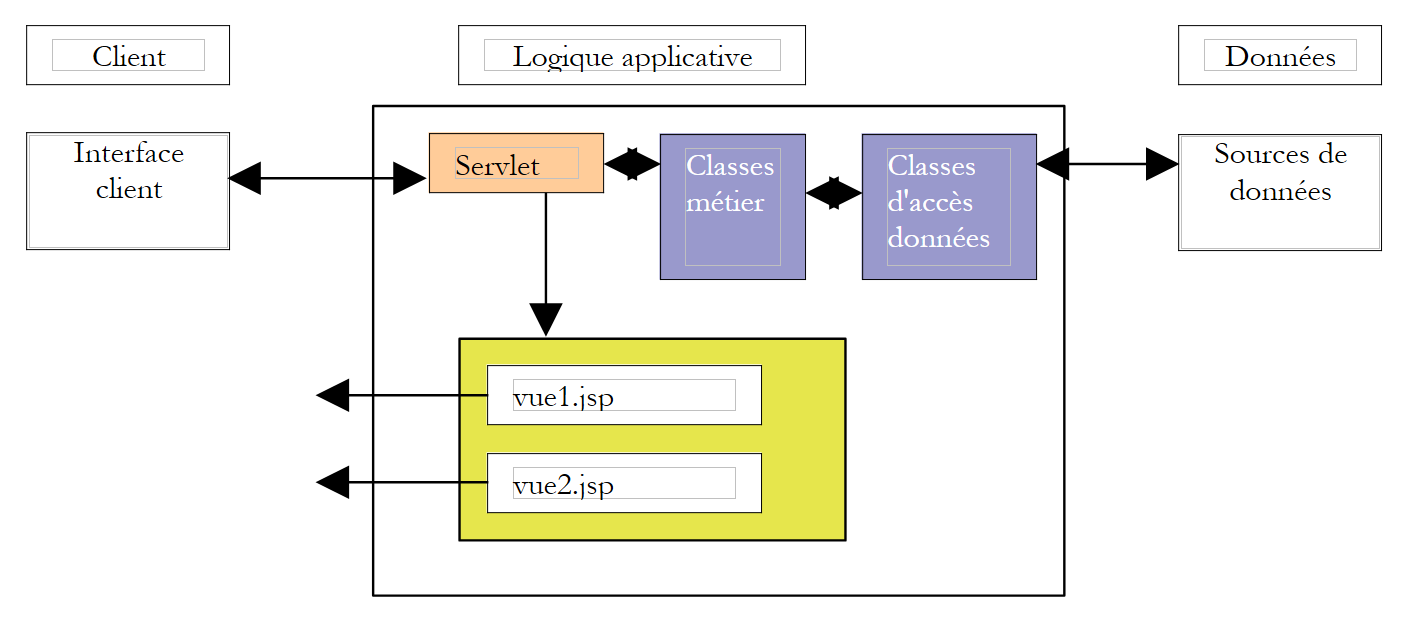
3.5. Architettura MVC basata su un servlet di controllo e su pagine JSP
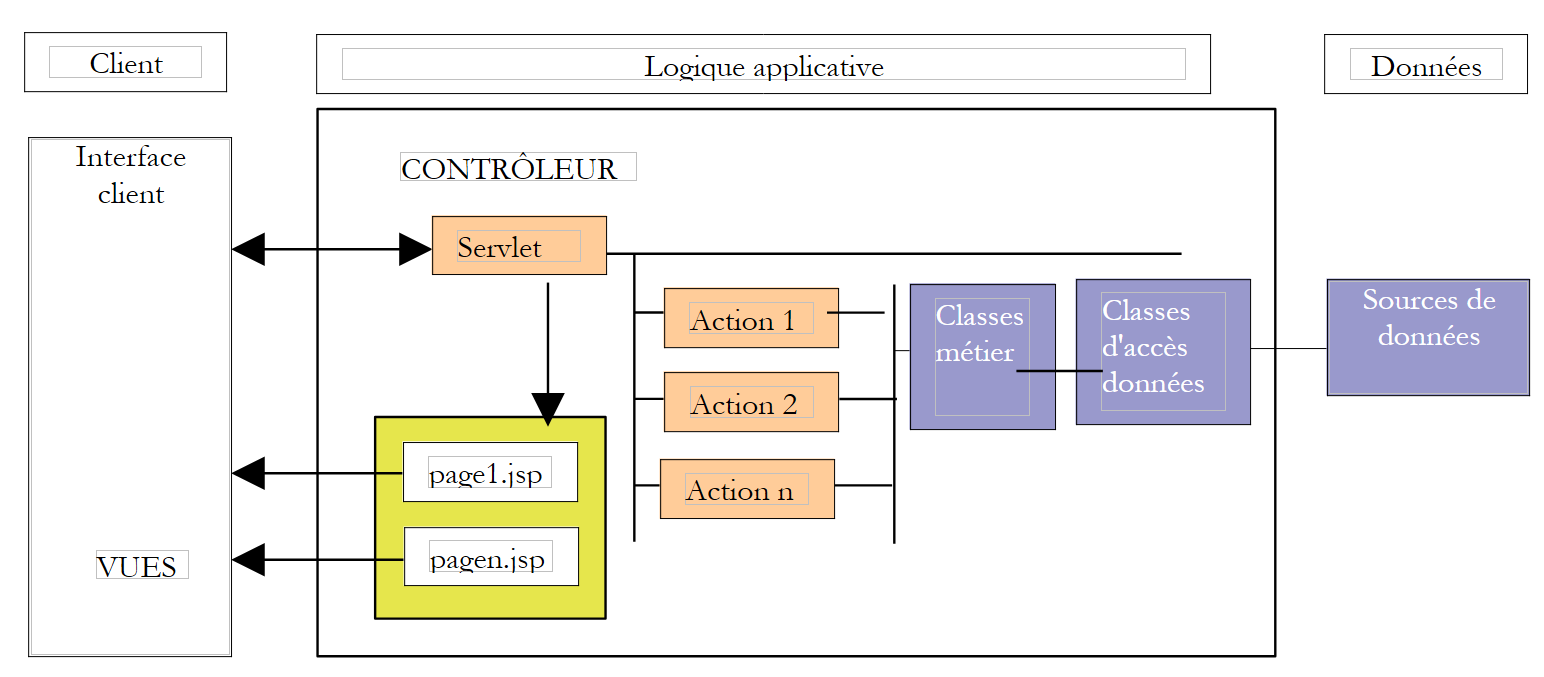
L’architettura MVC dell’applicazione sarà la seguente:
| le classi di business, le classi di accesso ai dati e il database |
| le pagine JSP |
| il servlet per l'elaborazione delle richieste dei clienti |
3.5.1. Il modello
È stato presentato in precedenza. È costituito dagli archivi Java [istia.st.articles.dao, istia.st.articles.domain, istia.st.articles.exception].
3.5.2. Le viste
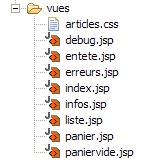
Le viste corrispondono a quelle presentate all’inizio del documento:
| liste.jsp | Le viste sono raccolte nella cartella [vues] dell’applicazione 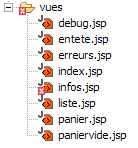 |
| infos.jsp |
| panier.jsp |
| paniervide.jsp |
| erreurs.jsp |
3.5.3. Il controller
Il controller sarà costituito da un unico servlet denominato [WebArticles]. Esso elaborerà le diverse richieste dei client. Queste saranno formalizzate dalla presenza di un parametro [action] nella richiesta HTTP del client:
| significato | azione del controller | risposte possibili |
| il cliente desidera l'elenco degli articoli | - richiede l'elenco degli articoli al livello di business | - [LISTE] - [ERREURS] |
| il cliente richiede informazioni su uno degli articoli visualizzati nella vista [LISTE] | - richiede l'articolo al livello business | - [INFOS] - [ERREURS] |
| il cliente acquista un articolo | - richiede l'articolo al livello applicativo e lo aggiunge al carrello del cliente | - [INFOS] in caso di errore nella quantità - [LISTE] se non c'è errore |
| il cliente desidera eliminare un acquisto dal proprio carrello | - recupera il carrello dalla sessione e lo modifica | - [PANIER] - [PANIERVIDE] - [ERREURS] |
| il cliente desidera visualizzare il proprio carrello | - recupera il carrello dalla sessione | - [PANIER] - [PANIERVIDE] - [ERREURS] |
| il cliente ha completato gli acquisti e passa alla fase di pagamento | - aggiorna nel database le giacenze degli articoli acquistati - svuota il carrello del cliente dagli articoli di cui il cui acquisto è stato confermato | - [LISTE] - [ERREURS] |
3.5.4. Configurazione dell'applicazione
Cercheremo di configurare l'applicazione in modo da renderla il più flessibile possibile rispetto a modifiche quali:
- la modifica degli URL delle diverse viste
- la modifica delle classi che implementano le interfacce [IArticlesDao] e [IArticlesDomain]
- la modifica del SGBD, del database, della tabella degli articoli
3.5.5. Modifiche agli URL
I nomi degli URL delle viste saranno inseriti nel file di configurazione dell’applicazione [web.xml] insieme ad alcuni altri parametri:
| <?xml version="1.0" encoding="ISO-8859-1"?>
<!DOCTYPE web-app
PUBLIC "-//Sun Microsystems, Inc.//DTD Web Application 2.3//EN"
"http://java.sun.com/dtd/web-app_2_3.dtd">
<web-app>
<servlet>
<servlet-name>webarticles</servlet-name>
<servlet-class>istia.st.articles.web.WebArticles</servlet-class>
<init-param>
<param-name>springConfigFileName</param-name>
<param-value>spring-config-sqlmap-firebird.xml</param-value>
</init-param>
<init-param>
<param-name>urlMain</param-name>
<param-value>/main</param-value>
</init-param>
<init-param>
<param-name>urlErreurs</param-name>
<param-value>/vues/erreurs.jsp</param-value>
</init-param>
<init-param>
<param-name>urlListe</param-name>
<param-value>/vues/liste.jsp</param-value>
</init-param>
<init-param>
<param-name>urlInfos</param-name>
<param-value>/vues/infos.jsp</param-value>
</init-param>
<init-param>
<param-name>urlPanier</param-name>
<param-value>/vues/panier.jsp</param-value>
</init-param>
<init-param>
<param-name>urlPanierVide</param-name>
<param-value>/vues/paniervide.jsp</param-value>
</init-param>
<init-param>
<param-name>urlDebug</param-name>
<param-value>/vues/debug.jsp</param-value>
</init-param>
</servlet>
<welcome-file-list>
<welcome-file>/vues/index.jsp</welcome-file>
</welcome-file-list>
<servlet-mapping>
<servlet-name>webarticles</servlet-name>
<url-pattern>/main</url-pattern>
</servlet-mapping>
</web-app>
|
Nel file [web.xml] si trovano
- gli URL delle diverse viste dell'applicazione
- il nome [springConfigFileName] del file di configurazione di Spring che consentirà la creazione degli oggetti singleton per l'accesso ai livelli business e DAO
- la vista [/vues/index.jsp] che verrà visualizzata quando l'URL richiesto dal client sarà /<context>, dove <context> è il contesto dell'applicazione
3.5.6. La modifica delle classi di implementazione delle interfacce
In linea con le architetture a tre livelli, i livelli devono essere isolati l'uno dall'altro. Tale isolamento si ottiene nel modo seguente:
- i livelli comunicano tra loro tramite interfacce e non tramite classi concrete
- il codice di un livello non istanzia mai direttamente la classe di un altro livello per utilizzarla. Si limita semplicemente a richiedere a uno strumento esterno, in questo caso [Spring], un'istanza di implementazione dell'interfaccia del livello che intende utilizzare. A tal fine, sappiamo che non ha bisogno di conoscere il nome della classe di implementazione, ma solo il nome del bean Spring di cui desidera un riferimento.
Nella nostra applicazione, il file di configurazione Spring potrebbe essere il seguente:
| <?xml version="1.0" encoding="UTF-8"?>
<!DOCTYPE beans SYSTEM "http://www.springframework.org/dtd/spring-beans.dtd">
<beans>
<!-- la classe di accesso ai dati -->
<bean id="articlesDao" class="istia.st.articles.dao.ArticlesDaoSqlMap">
<constructor-arg index="0">
<value>sqlmap-config-firebird.xml</value>
</constructor-arg>
</bean>
<!-- la classe di business -->
<bean id="articlesDomain" class="istia.st.articles.domain.AchatsArticles">
<constructor-arg index="0">
<ref bean="articlesDao"/>
</constructor-arg>
</bean>
</beans>
|
Per accedere al livello [métier], una classe del livello [Interface utilisateur, UI] potrà richiedere il bean [articlesDomain]. Spring istanzierà quindi un oggetto di tipo [istia.st.articles.domain.AchatsArticles]. Per questa istanziazione, ha bisogno di un bean di tipo [articlesDao], ovvero di un oggetto di tipo [istia.st.articles.dao.ArticlesDaoSqlMap]. Spring istanzierà quindi un oggetto di questo tipo. Tale istanziazione avverrà sulla base delle informazioni contenute nel file [sqlmap-config-firebird.xml], file di configurazione per l’accesso ai dati tramite SqlMap. Al termine dell’operazione, la classe [UI] che ha richiesto il bean [articlesDomain] dispone dell’intera catena che la collega ai dati del SGBD:
3.5.7. Modifiche relative al SGBD o al database
L’indipendenza dell’applicazione web rispetto alle modifiche relative al SGBD o al database è garantita in questo caso dai file di configurazione del SqlMap. Ce ne sono due:
- il file [sql-map-config-firebird.xml]
| <?xml version="1.0" encoding="UTF-8" ?>
<!DOCTYPE sqlMapConfig
PUBLIC "-//iBATIS.com//DTD SQL Map Config 2.0//EN"
"http://www.ibatis.com/dtd/sql-map-config-2.dtd">
<sqlMapConfig>
<transactionManager type="JDBC">
<dataSource type="SIMPLE">
<property name="JDBC.Driver" value="org.firebirdsql.jdbc.FBDriver"/>
<property name="JDBC.ConnectionURL"
value="jdbc:firebirdsql:localhost/3050:d:/data/databases/firebird/dbarticles.gdb"/>
<property name="JDBC.Username" value="sysdba"/>
<property name="JDBC.Password" value="masterkey"/>
<property name="JDBC.DefaultAutoCommit" value="true"/>
</dataSource>
</transactionManager>
<sqlMap resource="articles.xml"/>
</sqlMapConfig>
|
Questo file fa riferimento a un database Firebird. È sufficiente modificare il nome del driver JDBC per lavorare con un altro driver, ad esempio SGBD.
- il file [articles.xml] che raccoglie le diverse istruzioni SQL necessarie all’applicazione:
| <?xml version="1.0" encoding="UTF-8" ?>
<!DOCTYPE sqlMap
PUBLIC "-//iBATIS.com//DTD SQL Map 2.0//EN"
"http://www.ibatis.com/dtd/sql-map-2.dtd">
<sqlMap namespace="Articles">
<!-- un alias della classe istia.st.articles.dao.Article -->
<typeAlias alias="article" type="istia.st.articles.dao.Article"/>
<!-- il mapping ORM : riga della tabella ARTICLES - istanza della classe Articolo -->
<resultMap id="article" class="article">
<result property="id" column="ID"/>
<result property="nom" column="NOM"/>
<result property="prix" column="PRIX"/>
<result property="stockActuel" column="STOCKACTUEL"/>
<result property="stockMinimum" column="STOCKMINIMUM"/>
</resultMap>
<!-- la query SQL per ottenere tutti gli articoli -->
<statement id="getAllArticles" resultMap="article">
select id, nom, prix,
stockactuel, stockminimum from ARTICLES
</statement>
<!-- la query SQL per eliminare tutti gli articoli -->
<statement id="clearAllArticles">delete from ARTICLES</statement>
<!-- la query SQL per inserire un articolo -->
<statement id="insertArticle">
insert into ARTICLES (id, nom, prix,
stockactuel, stockminimum) values
(#(id#,#nome#,#prezzo#,#stockattuale#,#stockminimo#)
</statement>
<!-- la query SQL per eliminare un determinato articolo -->
<statement id="deleteArticle">delete FROM ARTICLES where id=#id#</statement>
<!-- la richiesta SQL per modificare un determinato articolo -->
<statement id="modifyArticle">
update ARTICLES set nom=#nome#,
prix=#prezzo#,stockattuale=#stockattuale#,stockminimo=#stockminimo# where
id=#id#
</statement>
<!-- la query SQL per recuperare un determinato articolo -->
<statement id="getArticleById" resultMap="article">
select id, nom, prix,
stockactuel, stockminimum FROM ARTICLES where id=#id#
</statement>
<!-- la richiesta SQL per modificare la giacenza di un determinato articolo -->
<statement id="changerStockArticle">
update ARTICLES set
stockActuel=stockActuel+#movimento#
where id=#id# e stockActuel+#movimento#>=0
</statement>
</sqlMap>
|
Se i nomi della tabella degli articoli o delle colonne dovessero cambiare, si dovrebbe riscrivere le query in questo file di configurazione senza dover modificare il codice Java. Ciò varrebbe anche nel caso in cui una query venisse sostituita da una procedura memorizzata per motivi di prestazioni.
3.5.8. L'architettura complessiva dell'applicazione [webarticles]
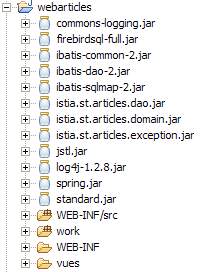
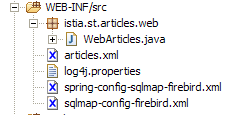
Un’applicazione web Java è un puzzle composto da numerosi elementi. Dotarla di un’architettura MVC ne aumenta in genere il numero. La struttura dell’applicazione [webarticles] sotto [eclipse] è la seguente:
structure générale - on voit ci-dessous les
 archives Java utilisées par le projet
 Eclipse.
spring : pour Spring
ibatis : pour SqlMap
log4j, commons-logging : pour les logs
 de Spring et Sqlmap
firebird : pour le SGBD firebird
mysql : pour le SGBD MySQL
jstl, standard : pour la bibliothèque
 de balises JSTL
|
le dossier des sources java : contient le code Java
 ainsi que les fichiers de configuration
 spring et sqlmap. Eclipse recopie
 automatiquement ces fichiers
dans [WEB-INF/classes].
C'est là que l'application les trouvera.
|
 |  |
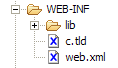
le dossier [WEB-INF] de l'application : contient le
 descripteur [web.xml] de l'application ainsi que le
 fichiers de définition de la bibliothèques JSTL
| |
 |  |
3.5.9. Le viste JSP
Le viste JSP utilizzano la libreria di tag JSTL.
3.5.9.1. entete.jsp
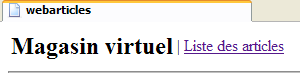
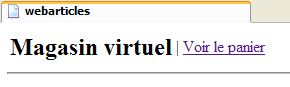
Per garantire una certa uniformità alle diverse viste, queste condivideranno la stessa intestazione, quella che mostra il nome dell’applicazione con il menu:
Il menu è dinamico e definito dal controller. Quest’ultimo inserisce nella richiesta inviata alla pagina JSP un attributo chiave "actions" il cui valore associato è un array di tipo Hastable[]. Ogni elemento di questo array è un dizionario destinato a generare un’opzione del menu dell’intestazione. Ogni dizionario ha due chiavi:
- href: l'URL associato all'opzione di menu
- lien: il testo del menu
Le altre viste dell’applicazione utilizzeranno l’intestazione definita da [entete.jsp] tramite il seguente tag JSP:
<jsp:include page="entete.jsp"/>
Una volta eseguito, questo tag avrà l'effetto di includere nel codice della pagina JSP, che lo contiene, il codice della pagina [entete.jsp]. Poiché l'URL della pagina è relativo (manca il /), la pagina [entete.jsp] verrà cercata nella stessa cartella della pagina che contiene il tag <jsp:include>.
Codice:
| <%@ page language="java" %>
<%@ taglib uri="/WEB-INF/c.tld" prefix="c" %>
<html>
<head>
<title>webarticles</title>
</head>
<body>
<table>
<tr>
<td><h2>Magasin virtuel</h2></td>
<c:forEach items="${actions}" var="action">
<td>|</td>
<td><a href="<c:out value="${action.href}"/>"><c:out value="${action.lien}"/></a></td>
</c:forEach>
</tr>
</table>
<hr>
|
3.5.9.2. liste.jsp
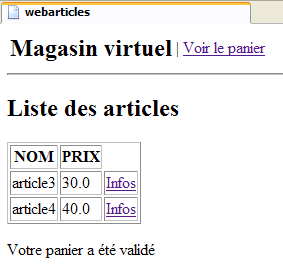
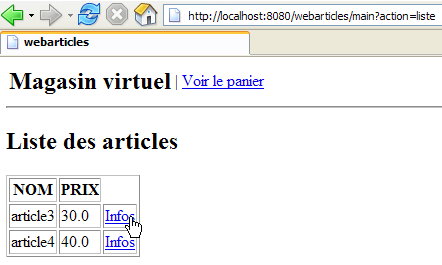
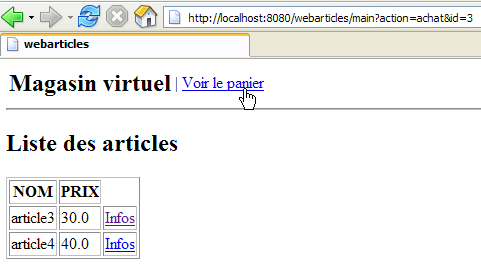
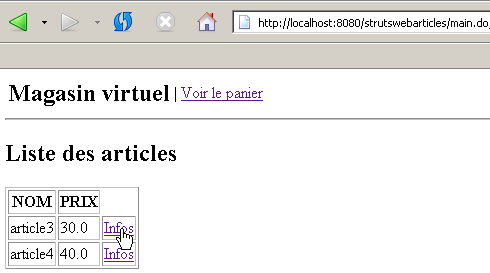
Questa vista mostra l’elenco degli articoli disponibili per la vendita:
Viene visualizzata a seguito di una richiesta /main?action=liste o /main?action=validationpanier. Gli elementi della richiesta del controller sono i seguenti:
| oggetto Hashtable[] - l'array delle opzioni del menu |
| ArrayList oggetti di tipo [Article] |
| oggetto String - messaggio da visualizzare in fondo alla pagina |
Ogni link [Infos] dell'array HTML degli articoli ha un URL della forma [?action=infos&id=ID], dove ID è il campo id dell'articolo visualizzato.
Codice:
| <%@ page language="java" %>
<%@ taglib uri="/WEB-INF/c.tld" prefix="c" %>
<jsp:include page="entete.jsp"/>
<h2>Liste des articles</h2>
<table border="1">
<tr>
<th>NOM</th><th>PRIX</th>
</tr>
<c:forEach var="article" items="${listarticles}">
<tr>
<td><c:out value="${article.nom}"/></td>
<td><c:out value="${article.prix}"/></td>
<td><a href="<c:out value="?action=infos&id=${article.id}"/>">Infos</a></td>
</tr>
</c:forEach>
</table>
<p>
<c:out value="${message}"/>
</body>
</html>
|
3.5.9.3. infos.jsp
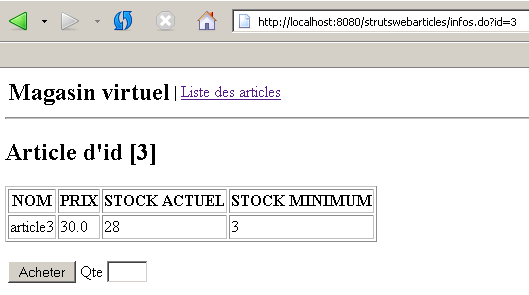
Questa vista mostra le informazioni relative a un articolo e ne consente anche l'acquisto:
Viene visualizzata a seguito di una richiesta /main?action=infos&id=ID o di una richiesta /main?action=acquisto&id=ID quando la quantità acquistata è errata. Gli elementi della richiesta del controller sono i seguenti:
| oggetto Hashtable[] - l'array delle opzioni del menu |
| oggetto di tipo [Article] - articolo da visualizzare |
| oggetto String - messaggio da visualizzare in caso di errore sulla quantità |
| oggetto String - valore da visualizzare nel campo di immissione [Qte] |
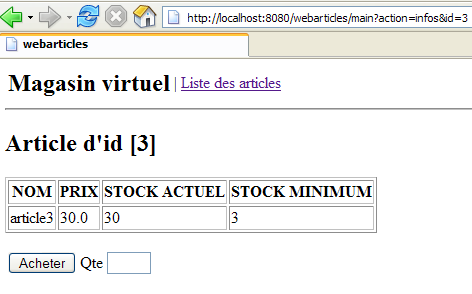
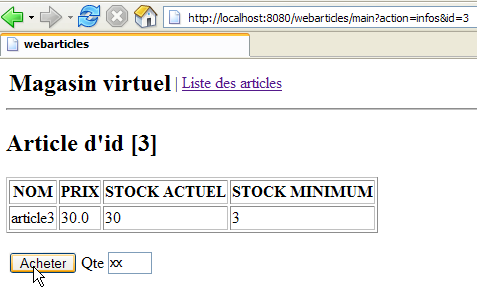
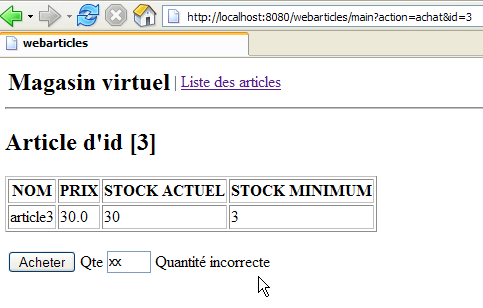
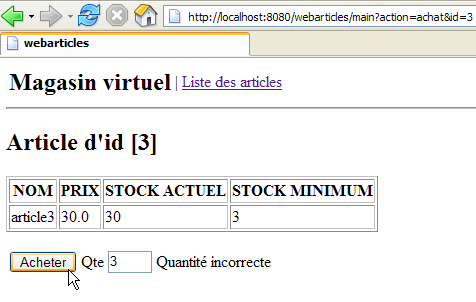
I campi [msg] e [qte] vengono utilizzati in caso di errore di immissione della quantità:
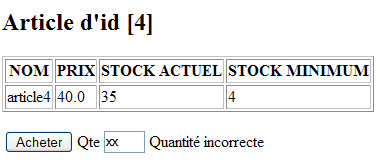
Questa pagina contiene un modulo che viene inviato tramite il pulsante [Acheter]. L'URL di destinazione di POST è [?action=achat&id=ID], dove ID è l'ID dell'articolo acquistato.
Codice:
| <%@ page language="java" %>
<%@ taglib uri="/WEB-INF/c.tld" prefix="c" %>
<jsp:include page="entete.jsp"/>
<h2>Article d'id [<c:out value="${article.id}"/>]</h2>
<table border="1">
<tr>
<th>NOM</th><th>PRIX</th><th>STOCK ACTUEL</th><th>STOCK MINIMUM</th>
</tr>
<tr>
<td><c:out value="${article.nom}"/></td>
<td><c:out value="${article.prix}"/></td>
<td><c:out value="${article.stockActuel}"/></td>
<td><c:out value="${article.stockMinimum}"/></td>
</tr>
</table>
<p>
<form method="post" action="?action=achat&id=<c:out value="${article.id}"/>"/>
<table>
<tr>
<td><input type="submit" value="Acheter"></td>
<td>Qte <input type="text" name="qte" size="3" value="<c:out value="${qte}"/>"></td>
<td><c:out value="${msg}"/></td>
</tr>
</table>
</form>
</body>
</html>
|
3.5.9.4. panier.jsp
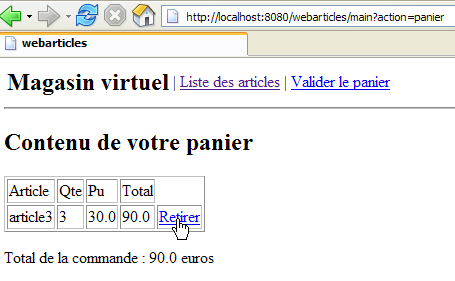
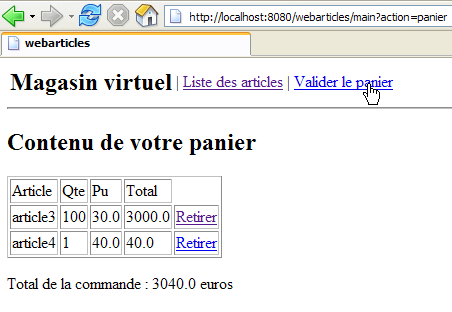
Questa schermata mostra il contenuto del carrello:
Viene visualizzata a seguito di una richiesta /main?action=carrello o /main?action=ritira&id=ID. Gli elementi della richiesta del controller sono i seguenti:
| oggetto Hashtable[] - l'array delle opzioni del menu |
| oggetto di tipo [Panier] - il carrello da visualizzare |
Ogni link [Retirer] dell'array HTML degli acquisti nel carrello ha un URL della forma [?action=retirerachat&id=ID], dove ID è il campo [id] dell'articolo che si desidera rimuovere dal carrello.
Codice:
| <%@ page language="java" %>
<%@ taglib uri="/WEB-INF/c.tld" prefix="c" %>
<jsp:include page="entete.jsp"/>
<h2>Contenu de votre panier</h2>
<table border="1">
<tr>
<td>Article</td><td>Qte</td><td>Pu</td><td>Total</td>
</tr>
<c:forEach var="achat" items="${panier.achats}">
<tr>
<td><c:out value="${achat.article.nom}"/></td>
<td><c:out value="${achat.qte}"/></td>
<td><c:out value="${achat.article.prix}"/></td>
<td><c:out value="${achat.total}"/></td>
<td><a href="<c:out value="?action=retirerachat&id=${achat.article.id}"/>">Retirer</a></td>
</tr>
</c:forEach>
</table>
<p>
Total de la commande : <c:out value="${panier.total}"/> euros
</body>
</html>
|
3.5.9.5. paniervide.jsp
Questa schermata mostra l'informazione che indica che il carrello è vuoto:
Viene visualizzata a seguito di una richiesta /main?action=carrello o /main?action=ritira&id=ID. Gli elementi della richiesta del controller sono i seguenti:
| oggetto Hashtable[] - l'array delle opzioni del menu |
Codice:
| <%@ page language="java" %>
<%@ taglib uri="/WEB-INF/c.tld" prefix="c" %>
<jsp:include page="entete.jsp"/>
<h2>Contenu de votre panier</h2>
<p>
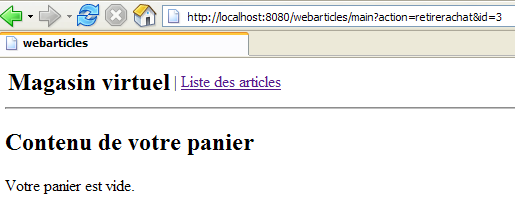
Votre panier est vide.
</body>
</html>
|
3.5.9.6. erreurs.jsp
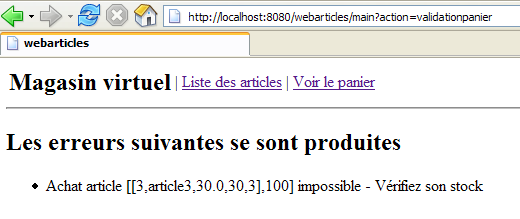
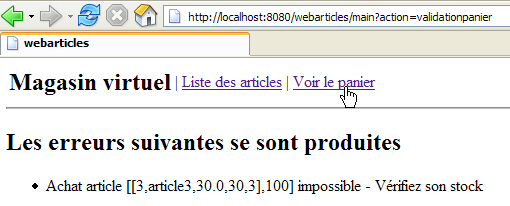
Questa schermata viene visualizzata in caso di errori:
Viene visualizzata a seguito di qualsiasi richiesta che generi un errore, ad eccezione dell'azione di acquisto con una quantità errata, gestita dalla vista [INFOS]. Gli elementi della richiesta del controller sono i seguenti:
| oggetto Hashtable[] - l’array delle opzioni del menu |
| ArrayList oggetti String che rappresentano i messaggi di errore da visualizzare |
Codice:
| <%@ page language="java" %>
<%@ taglib uri="/WEB-INF/c.tld" prefix="c" %>
<jsp:include page="entete.jsp"/>
<h2>Les erreurs suivantes se sont produites</h2>
<ul>
<c:forEach var="erreur" items="${erreurs}">
<li><c:out value="${erreur}"/></li>
</c:forEach>
</ul>
</body>
</html>
|
3.5.9.7. index.jsp
Questa pagina è definita come pagina iniziale dell'applicazione nel file [web.xml] dell'applicazione:
| <?xml version="1.0" encoding="ISO-8859-1"?>
<!DOCTYPE web-app
PUBLIC "-//Sun Microsystems, Inc.//DTD Web Application 2.3//EN"
"http://java.sun.com/dtd/web-app_2_3.dtd">
<web-app>
<servlet>
....
</servlet>
<servlet-mapping>
....
</servlet-mapping>
<welcome-file-list>
<welcome-file>/vues/index.jsp</welcome-file>
</welcome-file-list>
</web-app>
|
La vista [index.jsp] si limita a reindirizzare il client al punto di ingresso dell'applicazione:
| <%@ page language="java" %>
<%@ taglib uri="/WEB-INF/c.tld" prefix="c" %>
<c:redirect url="/main?action=liste"/>
|
3.5.10. Il controller
Resta da scrivere il cuore della nostra applicazione web, il controller. Il suo ruolo consiste nel:
- recuperare la richiesta del client,
- elaborare l'azione richiesta dal cliente utilizzando le classi di business,
- inviare in risposta la vista appropriata.
3.5.10.1. Inizializzazione del controller
Quando la classe del controller viene caricata dal server dei servlet, viene eseguito il suo metodo [init]. Ciò avverrà una sola volta. Una volta caricato in memoria, il controller vi rimarrà e gestirà le richieste dei diversi client. Ogni client è oggetto di un thread di esecuzione e i metodi del controller vengono quindi eseguiti simultaneamente da thread diversi. Si ricorda che, per questo motivo, il controller non deve avere campi che i suoi metodi possano modificare. I suoi campi devono essere di sola lettura. Essi vengono inizializzati dal metodo [init], il cui ruolo principale è proprio questo. Questo metodo ha infatti la particolarità di essere eseguito una sola volta da un unico thread. Non sussistono quindi problemi di accesso concorrente ai campi del controller in questo metodo. Il metodo [init] ha lo scopo di inizializzare gli oggetti necessari all’applicazione web, che saranno condivisi in sola lettura da tutti i thread client. Questi oggetti condivisi possono essere collocati in due posizioni:
- i campi privati del controller
- il contesto di esecuzione dell’applicazione (ServletContext)
Il metodo [init] dell’applicazione [webarticles] eseguirà le seguenti azioni:
- verificherà la presenza, nel file [web.xml], dei parametri necessari al corretto funzionamento dell’applicazione. Questi sono stati descritti nel paragrafo 3.5.5.
- imposterà un campo privato [ArrayList erreurs] contenente l’elenco degli eventuali errori. Tale elenco sarà vuoto in assenza di errori, ma sarà comunque presente.
- Se si sono verificati errori, il metodo [init] termina qui. In caso contrario, crea un oggetto di tipo [IArticlesDomain] che costituirà l’oggetto di business che il controller utilizzerà per le proprie esigenze. Come spiegato al punto 3.5.6, il controller richiederà al framework Spring il bean di cui ha bisogno. Questa operazione di istanziazione può causare diversi errori. In tal caso, anche questi saranno memorizzati nel campo [erreurs] del controller.
3.5.10.2. Metodi doGet, doPost
Questi due metodi gestiscono le richieste HTTP, GET e POST provenienti dai clienti. Queste richieste verranno elaborate in modo indifferenziato. Il metodo [doPost] potrà quindi reindirizzare al metodo [doGet] o viceversa. La richiesta del cliente verrà elaborata nel modo seguente:
- verrà verificato il campo [erreurs]. Se non è vuoto, significa che si sono verificati degli errori durante l’inizializzazione dell’applicazione e che questa non può funzionare. Verrà quindi inviata, in risposta, la vista [ERREURS].
- il parametro [action] della richiesta verrà recuperato e verificato. Se non corrisponde a un’azione nota, verrà inviata la vista [ERREURS] con un messaggio di errore appropriato.
- Se il parametro [action] è valido, la richiesta del client viene inoltrata a una procedura specifica dell’azione per l’elaborazione. La procedura che gestisce l’azione [uneAction] avrà la seguente firma:
| /**
* @param request la requête du client
* @param response la réponse au client
* @throws IOException
* @throws ServletException
*/
private void doUneAction(HttpServletRequest request, HttpServletResponse response)
throws ServletException, IOException;
|
3.5.10.3. Elaborazione delle diverse azioni
I metodi che gestiscono le diverse azioni possibili dell’applicazione sono i seguenti:
metodo | richiesta | elaborazione | risposte possibili |
| GET /main?action=liste | - richiedere l'elenco degli articoli alla classe di business - visualizzarla | [LISTE] o [ERREURS] |
| GET /main?action=infos&id=ID | - richiedere l'articolo con id=ID alla classe di business - visualizzarlo | [INFOS] o [ERREURS] |
| POST /main?action=acquisto&id=ID - la quantità acquistata fa parte dei parametri inviati | - richiedere l'articolo con id=ID a classe di business - inserirlo nel carrello durante sessione del cliente | [LISTE] o [INFOS] o [ERREURS] |
| GET /main?action=ritiro&id=ID | - rimuovere l'articolo con id=ID dall' lista degli acquisti nel carrello sessione del cliente | [PANIER] |
| GET /main?action=carrello | - visualizza il carrello della sessione cliente | [PANIER] o [PANIERVIDE] |
| GET /main?action=confermacarrello | - ridurre nel database le scorte di tutti gli articoli presenti nel carrello della sessione del cliente | [LISTE] o [ERREURS] |
3.5.10.4. Il codice
| package istia.st.articles.web;
import java.io.IOException;
import java.util.ArrayList;
import java.util.Hashtable;
import java.util.List;
import istia.st.articles.domain.Achat;
import istia.st.articles.dao.Article;
import istia.st.articles.domain.IArticlesDomain;
import istia.st.articles.domain.Panier;
import istia.st.articles.exception.UncheckedAccessArticlesException;
import javax.servlet.ServletConfig;
import javax.servlet.ServletException;
import javax.servlet.http.HttpServlet;
import javax.servlet.http.HttpServletRequest;
import javax.servlet.http.HttpServletResponse;
import javax.servlet.http.HttpSession;
import org.springframework.beans.factory.xml.XmlBeanFactory;
import org.springframework.core.io.ClassPathResource;
/**
* @author ST
*
*/
public class WebArticles extends HttpServlet {
// campi privati
private ArrayList erreurs = new ArrayList();
private IArticlesDomain articlesDomain = null;
private final String URL_MAIN = "urlMain";
private final String URL_ERREURS = "urlErreurs";
private final String URL_LISTE = "urlListe";
private final String URL_INFOS = "urlInfos";
private final String URL_PANIER = "urlPanier";
private final String URL_PANIER_VIDE = "urlPanierVide";
private final String URL_DEBUG = "urlDebug";
private final String SPRING_CONFIG_FILENAME = "springConfigFileName";
private final String[] parameters =
{
URL_MAIN,
URL_ERREURS,
URL_LISTE,
URL_INFOS,
URL_PANIER,
URL_PANIER_VIDE,
URL_DEBUG,
SPRING_CONFIG_FILENAME };
private ServletConfig config;
private final String ACTION_LISTE = "liste";
private final String ACTION_PANIER = "panier";
private final String ACTION_ACHAT = "achat";
private final String ACTION_INFOS = "infos";
private final String ACTION_RETIRER_ACHAT = "retirerachat";
private final String ACTION_VALIDATION_PANIER = "validationpanier";
private String urlActionListe;
private final String lienActionListe = "Liste des articles";
private String urlActionPanier;
private final String lienActionPanier = "Voir le panier";
private String urlActionValidationPanier;
private final String lienActionValidationPanier = "Valider le panier";
private Hashtable hActionListe = new Hashtable(2);
private Hashtable hActionPanier = new Hashtable(2);
private Hashtable hActionValidationPanier = new Hashtable(2);
public void init() {
// si recuperano i parametri di inizializzazione del servlet
config = getServletConfig();
String param = null;
for (int i = 0; i < parameters.length; i++) {
param = config.getInitParameter(parameters[i]);
if (param == null) {
// si memorizza l'errore
erreurs.add(
"Paramètre ["
+ parameters[i]
+ "] absent dans le fichier [web.xml]");
}
}
// errori?
if (erreurs.size() != 0) {
return;
}
// si crea un oggetto IArticlesDomain per l'accesso al livello business
try {
articlesDomain =
(IArticlesDomain)
(
new XmlBeanFactory(
new ClassPathResource(
(String) config.getInitParameter(
SPRING_CONFIG_FILENAME)))).getBean(
"articlesDomain");
} catch (Exception ex) {
// si registra l'errore
erreurs.add(
"Erreur de configuration de l'accès aux données : "
+ ex.toString());
return;
}
// si memorizzano alcuni URL dell'applicazione
hActionListe.put("href", "?action=" + ACTION_LISTE);
hActionListe.put("lien", lienActionListe);
hActionPanier.put("href", "?action=" + ACTION_PANIER);
hActionPanier.put("lien", lienActionPanier);
hActionValidationPanier.put(
"href",
"?action=" + ACTION_VALIDATION_PANIER);
hActionValidationPanier.put("lien", lienActionValidationPanier);
// È tutto
return;
}
public void doGet(HttpServletRequest request, HttpServletResponse response)
throws IOException, ServletException {
// si verifica l'esito dell'inizializzazione del servlet
if (erreurs.size() != 0) {
// si dispone dell'URL della pagina degli errori?
if (config.getInitParameter(URL_ERREURS) == null) {
throw new ServletException(erreurs.toString());
}
// si visualizza la pagina degli errori
request.setAttribute("erreurs", erreurs);
request.setAttribute("actions", new Hashtable[] {
});
getServletContext()
.getRequestDispatcher(config.getInitParameter(URL_ERREURS))
.forward(request, response);
// fine
return;
}
// si elabora l'azione
String action = request.getParameter("action");
if (action == null) {
// elenco degli articoli
doListe(request, response);
return;
}
if (action.equals(ACTION_LISTE)) {
// elenco degli articoli
doListe(request, response);
return;
}
if (action.equals(ACTION_INFOS)) {
// informazioni su un articolo
doInfos(request, response);
return;
}
if (action.equals(ACTION_ACHAT)) {
// acquisto di un articolo
doAchat(request, response);
return;
}
if (action.equals(ACTION_PANIER)) {
// visualizzazione del carrello
doPanier(request, response);
return;
}
if (action.equals(ACTION_RETIRER_ACHAT)) {
// rimozione di un articolo dal carrello
doRetirerAchat(request, response);
return;
}
if (action.equals(ACTION_VALIDATION_PANIER)) {
// conferma del carrello
doValidationPanier(request, response);
return;
}
// azione sconosciuta
ArrayList erreurs = new ArrayList();
erreurs.add("action [" + action + "] inconnue");
// viene visualizzata la pagina degli errori
request.setAttribute("actions", new Hashtable[] { hActionListe });
afficheErreurs(request, response, erreurs);
// fine
return;
}
private void doValidationPanier(
HttpServletRequest request,
HttpServletResponse response)
throws ServletException, IOException {
// l'acquirente ha confermato il carrello
Panier panier = (Panier) request.getSession().getAttribute("panier");
// conferma del carrello
try {
articlesDomain.acheter(panier);
} catch (UncheckedAccessArticlesException ex) {
// anomalia
erreurs.add("Erreur d'accès aux données [" + ex.toString() + "]");
request.setAttribute("actions", new Hashtable[] { hActionListe });
afficheErreurs(request, response, erreurs);
return;
}
// vengono recuperati gli errori
ArrayList erreurs = articlesDomain.getErreurs();
if (erreurs.size() != 0) {
request.setAttribute(
"actions",
new Hashtable[] { hActionListe, hActionPanier });
afficheErreurs(request, response, erreurs);
return;
}
// si visualizza l'elenco degli articoli
request.setAttribute("message", "Votre panier a été validé");
doListe(request, response);
// fine
return;
}
private void doRetirerAchat(
HttpServletRequest request,
HttpServletResponse response)
throws ServletException, IOException {
// si rimuove un articolo dal carrello
try {
Panier panier =
(Panier) request.getSession().getAttribute("panier");
String strIdAchat = request.getParameter("id");
panier.enlever(Integer.parseInt(strIdAchat));
} catch (NumberFormatException ignored) {
} catch (NullPointerException ignored) {
}
// visualizza il carrello
doPanier(request, response);
}
private void doPanier(
HttpServletRequest request,
HttpServletResponse response)
throws ServletException, IOException {
// visualizza il carrello
Panier panier = (Panier) request.getSession().getAttribute("panier");
// carrello vuoto?
if (panier == null || panier.getAchats().size() == 0) {
request.setAttribute("actions", new Hashtable[] { hActionListe });
getServletContext()
.getRequestDispatcher(config.getInitParameter(URL_PANIER_VIDE))
.forward(request, response);
// fine
return;
}
// c'è qualcosa nel carrello
request.setAttribute("panier", panier);
request.setAttribute(
"actions",
new Hashtable[] { hActionListe, hActionValidationPanier });
getServletContext()
.getRequestDispatcher(config.getInitParameter(URL_PANIER))
.forward(request, response);
// fine
return;
}
private void doAchat(
HttpServletRequest request,
HttpServletResponse response)
throws ServletException, IOException {
// acquisto di un articolo
// si recupera la quantità
int qté = 0;
try {
qté = Integer.parseInt(request.getParameter("qte"));
if (qté <= 0)
throw new NumberFormatException();
} catch (NumberFormatException ex) {
// quantità errata
request.setAttribute("msg", "Quantité incorrecte");
request.setAttribute("qte", request.getParameter("qte"));
String url =
config.getInitParameter(URL_MAIN)
+ "?action=infos&id="
+ request.getParameter("id");
getServletContext().getRequestDispatcher(url).forward(
request,
response);
// fine
return;
}
// recupero della sessione del cliente
HttpSession session = request.getSession();
// si crea l'acquisto
Article article = (Article) session.getAttribute("article");
Achat achat = new Achat(article, qté);
// si aggiunge l'acquisto al carrello del cliente
Panier panier = (Panier) session.getAttribute("panier");
if (panier == null) {
panier = new Panier();
session.setAttribute("panier", panier);
}
panier.ajouter(achat);
// si torna all'elenco degli articoli
String url = config.getInitParameter(URL_MAIN) + "?action=liste";
getServletContext().getRequestDispatcher(url).forward(
request,
response);
// fine
return;
}
private void afficheDebugInfos(
HttpServletRequest request,
HttpServletResponse response,
ArrayList infos)
throws ServletException, IOException {
// viene visualizzato l'elenco degli articoli
request.setAttribute("infos", infos);
getServletContext()
.getRequestDispatcher(config.getInitParameter(URL_DEBUG))
.forward(request, response);
// fine
return;
}
public void doPost(
HttpServletRequest request,
HttpServletResponse response)
throws IOException, ServletException {
// come sopra get
doGet(request, response);
}
private void doInfos(
HttpServletRequest request,
HttpServletResponse response)
throws IOException, ServletException {
// l'elenco degli errori
ArrayList erreurs = new ArrayList();
// si recupera l'ID richiesto
String strId = request.getParameter("id");
// qualcosa?
if (strId == null) {
// non è normale
erreurs.add("action incorrecte([infos,id=null]");
request.setAttribute("actions", new Hashtable[] { hActionListe });
afficheErreurs(request, response, erreurs);
return;
}
// si trasforma strId in un numero intero
int id = 0;
try {
id = Integer.parseInt(strId);
} catch (Exception ex) {
// non è normale
erreurs.add("action incorrecte([infos,id=" + strId + "]");
request.setAttribute("actions", new Hashtable[] { hActionListe });
afficheErreurs(request, response, erreurs);
return;
}
// si richiede l'ID della voce
Article article = null;
try {
article=articlesDomain.getArticleById(id);
} catch (UncheckedAccessArticlesException ex) {
// non normale
erreurs.add("Erreur d'accès aux données [" + ex.toString() + "]");
request.setAttribute("actions", new Hashtable[] { hActionListe });
afficheErreurs(request, response, erreurs);
return;
}
if (article == null) {
// non corretto
erreurs.add("Article de clé [" + id + "] inexistant");
request.setAttribute("actions", new Hashtable[] { hActionListe });
afficheErreurs(request, response, erreurs);
return;
}
// si inserisce l'articolo nella sessione
request.getSession().setAttribute("article", article);
// viene visualizzata la pagina informativa
request.setAttribute("actions", new Hashtable[] { hActionListe });
/ / request.setAttribute("urlMain",config.getInitParameter(URL_MAIN));
getServletContext()
.getRequestDispatcher(config.getInitParameter(URL_INFOS))
.forward(request, response);
// fine
return;
}
private void afficheErreurs(
HttpServletRequest request,
HttpServletResponse response,
ArrayList erreurs)
throws ServletException, IOException {
// viene visualizzata la pagina degli errori
request.setAttribute("erreurs", erreurs);
getServletContext()
.getRequestDispatcher(config.getInitParameter(URL_ERREURS))
.forward(request, response);
// fine
return;
}
private void doListe(
HttpServletRequest request,
HttpServletResponse response)
throws IOException, ServletException {
// l'elenco degli errori
ArrayList erreurs = new ArrayList();
// viene richiesta la lista degli articoli
List articles = null;
try {
articles = articlesDomain.getAllArticles();
} catch (UncheckedAccessArticlesException ex) {
// si memorizza l'errore
erreurs.add(
"Erreur lors de l'obtention de tous les articles : "
+ ex.toString());
}
// Ci sono errori?
if (erreurs.size() != 0) {
// viene visualizzata la pagina degli errori
request.setAttribute("erreurs", erreurs);
request.setAttribute("actions", new Hashtable[] { hActionListe });
getServletContext()
.getRequestDispatcher(config.getInitParameter(URL_ERREURS))
.forward(request, response);
// fine
return;
}
// visualizza l'elenco degli articoli
request.setAttribute("listarticles", articles);
request.setAttribute("message","");
request.setAttribute("actions", new Hashtable[] { hActionPanier });
getServletContext()
.getRequestDispatcher(config.getInitParameter(URL_LISTE))
.forward(request, response);
// fine
return;
}
/**
* suivi console pour débogage
* @param message : le message à afficher
*/
private void affiche(String message) {
System.out.println(message);
}
}
|
Lasciamo al lettore il tempo necessario per leggere e comprendere questo codice. Speriamo che i commenti possano essergli d’aiuto.
3.5.10.5. Test dell’applicazione
Mostriamo alcuni screenshot dei test. Innanzitutto, la pagina iniziale dell’applicazione:
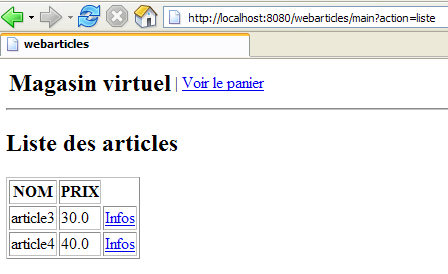
L'URL richiesto era in realtà [http://localhost:8080/webarticles]. Il lettore noterà che nel file [web.xml] definiamo una pagina iniziale per l'applicazione:
<welcome-file-list>
<welcome-file>/vues/index.jsp</welcome-file>
</welcome-file-list>
La vista [index.jsp] è definita come segue:
<%@ page language="java" %>
<%@ taglib uri="/WEB-INF/c.tld" prefix="c" %>

<c:redirect url="/main?action=liste"/>
Si è quindi verificato un reindirizzamento all'URL [http://localhost:8080/webarticles/main?action=liste], come mostra l'URL del browser nella schermata. È stato quindi richiesto l’URL [/main?action=liste]. Sempre in [web.xml], l’URL /main è associato al servlet [webarticles]:
<servlet-mapping>
<servlet-name>webarticles</servlet-name>
<url-pattern>/main</url-pattern>
</servlet-mapping>
Sempre in [web.xml], il servlet [webarticles] è associato al servlet [ istia.st.articles.web.WebArticles]:
<servlet-name>webarticles</servlet-name>
<servlet-class>istia.st.articles.web.WebArticles</servlet-class>
La servlet [ istia.st.articles.web.WebArticles] viene quindi caricata dal contenitore di servlet Tomcat, se non lo era già, e viene eseguito il suo metodo [init]:
| public void init() {
// si recuperano i parametri di inizializzazione del servlet
config = getServletConfig();
String param = null;
for (int i = 0; i < parameters.length; i++) {
param = config.getInitParameter(parameters[i]);
if (param == null) {
// si memorizza l'errore
erreurs.add(
"Paramètre ["
+ parameters[i]
+ "] absent dans le fichier [web.xml]");
}
}
// Ci sono errori?
if (erreurs.size() != 0) {
return;
}
// si crea un oggetto IArticlesDomain per l'accesso al livello business
try {
articlesDomain =
(IArticlesDomain)
(
new XmlBeanFactory(
new ClassPathResource(
(String) config.getInitParameter(
SPRING_CONFIG_FILENAME)))).getBean(
"articlesDomain");
} catch (Exception ex) {
// si memorizza l'errore
erreurs.add(
"Erreur de configuration de l'accès aux données : "
+ ex.toString());
return;
}
// si memorizzano alcuni URL dell'applicazione
hActionListe.put("href", "?action=" + ACTION_LISTE);
hActionListe.put("lien", lienActionListe);
hActionPanier.put("href", "?action=" + ACTION_PANIER);
hActionPanier.put("lien", lienActionPanier);
hActionValidationPanier.put(
"href",
"?action=" + ACTION_VALIDATION_PANIER);
hActionValidationPanier.put("lien", lienActionValidationPanier);
// operazione completata
return;
}
|
Note: il metodo [init]
- verifica la presenza di determinati parametri di configurazione
- istanzia un servizio di accesso al dominio dell’applicazione tramite Spring
- imposta un elenco di errori per segnalare eventuali errori di inizializzazione
- alcuni campi privati:
- errori: l'elenco degli errori rilevati da [init]
- [hActionListe, hActionPanier, hActionValidationPanier]: dizionari. Ciascuno di essi contiene le informazioni necessarie per visualizzare un'opzione del menu principale visualizzato dalla vista [entete.jsp]
- acticlesDomain: il servizio di accesso al modello dell'applicazione
Il metodo [init] viene eseguito una sola volta, al caricamento iniziale del servlet. Successivamente, viene eseguito uno dei metodi [doGet, doPost] in base al tipo [GET, POST] della richiesta del client. In questo caso, entrambi i metodi eseguono la stessa operazione e il codice è stato inserito in [doGet]:
| public void doGet(HttpServletRequest request, HttpServletResponse response)
throws IOException, ServletException {
// si verifica l'esito dell'inizializzazione del servlet
if (erreurs.size() != 0) {
// si dispone dell'URL della pagina degli errori?
if (config.getInitParameter(URL_ERREURS) == null) {
throw new ServletException(erreurs.toString());
}
// si visualizza la pagina degli errori
request.setAttribute("erreurs", erreurs);
request.setAttribute("actions", new Hashtable[] {
});
getServletContext()
.getRequestDispatcher(config.getInitParameter(URL_ERREURS))
.forward(request, response);
// fine
return;
}
// si elabora l'azione
String action = request.getParameter("action");
if (action == null) {
// elenco degli articoli
doListe(request, response);
return;
}
if (action.equals(ACTION_LISTE)) {
// elenco degli articoli
doListe(request, response);
return;
}
if (action.equals(ACTION_INFOS)) {
// informazioni su un articolo
doInfos(request, response);
return;
}
if (action.equals(ACTION_ACHAT)) {
// acquisto di un articolo
doAchat(request, response);
return;
}
if (action.equals(ACTION_PANIER)) {
// visualizzazione del carrello
doPanier(request, response);
return;
}
if (action.equals(ACTION_RETIRER_ACHAT)) {
// rimozione di un articolo dal carrello
doRetirerAchat(request, response);
return;
}
if (action.equals(ACTION_VALIDATION_PANIER)) {
// conferma del carrello
doValidationPanier(request, response);
return;
}
// azione sconosciuta
ArrayList erreurs = new ArrayList();
erreurs.add("action [" + action + "] inconnue");
// viene visualizzata la pagina degli errori
request.setAttribute("actions", new Hashtable[] { hActionListe });
afficheErreurs(request, response, erreurs);
// fine
return;
}
|
- il metodo [doGet] inizia verificando se si sono verificati errori di inizializzazione al termine del metodo [init]. In caso affermativo, visualizza la vista [ERREURS] e il processo termina.
- In caso contrario, recupera il parametro [action] dalla richiesta del client. Ricordiamo che l’applicazione è stata progettata per rispondere a richieste in cui è obbligatoriamente presente un parametro [action].
- L'applicazione esegue il metodo associato all'azione. In questo caso si tratterà del metodo [doListe].
Il metodo [doListe] è il seguente:
| private void doListe(
HttpServletRequest request,
HttpServletResponse response)
throws IOException, ServletException {
// elenco degli errori
ArrayList erreurs = new ArrayList();
// viene richiesta la lista degli articoli
List articles = null;
try {
articles = articlesDomain.getAllArticles();
} catch (UncheckedAccessArticlesException ex) {
// si memorizza l'errore
erreurs.add(
"Erreur lors de l'obtention de tous les articles : "
+ ex.toString());
}
// Ci sono errori?
if (erreurs.size() != 0) {
// viene visualizzata la pagina degli errori
request.setAttribute("erreurs", erreurs);
request.setAttribute("actions", new Hashtable[] { hActionListe });
getServletContext()
.getRequestDispatcher(config.getInitParameter(URL_ERREURS))
.forward(request, response);
// fine
return;
}
// visualizza l'elenco degli articoli
request.setAttribute("listarticles", articles);
request.setAttribute("message","");
request.setAttribute("actions", new Hashtable[] { hActionPanier });
getServletContext()
.getRequestDispatcher(config.getInitParameter(URL_LISTE))
.forward(request, response);
// fine
return;
}
|
- Ricordiamo che il metodo [init] ha memorizzato il servizio di accesso al modello dell’applicazione (livello di dominio) in un campo privato del servlet:
// campi privati
private IArticlesDomain articlesDomain = null;
- A partire da questo servizio di accesso, è possibile richiedere l'elenco degli articoli:
| // l'elenco degli errori
ArrayList erreurs = new ArrayList();
// si richiede l'elenco degli articoli
List articles = null;
try {
articles = articlesDomain.getAllArticles();
} catch (UncheckedAccessArticlesException ex) {
// si memorizza l'errore
erreurs.add(
"Erreur lors de l'obtention de tous les articles : "
+ ex.toString());
}
|
- Se si verificano degli errori, viene inviata la vista [ERREURS]:
| // Ci sono errori?
if (erreurs.size() != 0) {
// viene visualizzata la pagina degli errori
request.setAttribute("erreurs", erreurs);
request.setAttribute("actions", new Hashtable[] { hActionListe });
getServletContext()
.getRequestDispatcher(config.getInitParameter(URL_ERREURS))
.forward(request, response);
// fine
return;
}
|
- altrimenti viene inviata la vista [LISTE]:
| // visualizza l'elenco degli articoli
request.setAttribute("listarticles", articles);
request.setAttribute("message","");
request.setAttribute("actions", new Hashtable[] { hActionPanier });
getServletContext()
.getRequestDispatcher(config.getInitParameter(URL_LISTE))
.forward(request, response);
|
Nel nostro esempio, tutto è andato a buon fine e abbiamo ottenuto la vista [LISTE]. Si invita il lettore a rileggere il codice della vista [LISTE] per verificare che i parametri dinamici richiesti da questa vista siano effettivamente forniti dal controller come sopra indicato. Lo stesso tipo di verifica va effettuato per ogni vista:
- individuare i parametri dinamici della vista
- assicurarsi che il controller li inserisca correttamente negli attributi della richiesta trasmessa alla vista
Ora illustriamo semplicemente il percorso delle schermate che un utente dell’applicazione si trova ad affrontare. Il lettore è invitato a ripetere ogni volta un ragionamento analogo al precedente:
Partendo dall’elenco degli articoli, l’utente può scegliere un articolo:
Qui l’acquirente può acquistare l’articolo n. 3. Commettiamo un errore di digitazione nella quantità:
L'errore è stato segnalato. Ora acquistiamo alcuni articoli:
L'acquisto è stato registrato e l'elenco degli articoli è stato aggiornato. Controlliamo il carrello:
L'acquisto è presente nel carrello. Rimuoviamolo:
L'articolo è stato rimosso dal carrello, che è stato aggiornato. Ora è vuoto.
Acquistiamo 100 articoli n. 3 e 2 articoli n. 4:
L'acquisto dell'articolo n. 3 non è stato possibile perché si volevano acquistarne 100 e ce n'erano solo 30 in magazzino. Questo articolo è rimasto nel carrello:
L'articolo n. 4 è stato invece acquistato, come dimostra la sua nuova disponibilità pari a 39 (40-1):
3.6. Architettura MVC con Struts
3.6.1. Architettura generale dell’applicazione
Torniamo all’architettura MVC dell’applicazione:
Nella versione precedente:
- il controllo era gestito da un servlet
- le viste erano gestite da pagine JSP
- il modello era gestito da un insieme di tre file .jar
Nella versione Struts:
- il controller sarà gestito da un servlet derivato dal servlet generico [ActionServlet] di Struts
- le viste saranno gestite dalle stesse pagine JSP di prima, con qualche piccola differenza
- il modello sarà gestito dagli stessi tre file .jar
Scopriremo che il passaggio all'applicazione Struts rispetto a quella precedente consiste nelle seguenti operazioni:
- le azioni che venivano gestite in metodi specifici del servlet/controller sono ora gestite da istanze di classi derivate dalla classe [Action] di Struts
- scrivere i file di configurazione [web.xml] e [struts-config.xml]
- apportare alcune modifiche alle pagine JSP
Ricordiamo l’architettura generica MVC utilizzata da STRUTS:
| le classi di business, le classi di accesso ai dati e il database |
| le pagine JSP |
| il servlet di elaborazione delle richieste dei clienti, gli oggetti [Action] e i bean [ActionForm] associati ai moduli. |
- Il controller è il cuore dell’applicazione. Tutte le richieste del client passano attraverso di esso. Si tratta di un servlet generico fornito da STRUTS. In alcuni casi potrebbe essere necessario derivarla. Per i casi semplici, ciò non è necessario. Questo servlet generico preleva le informazioni di cui ha bisogno da un file solitamente denominato struts-config.xml.
- Se la richiesta del client contiene parametri di modulo, questi vengono inseriti dal controller in un oggetto Bean. Gli oggetti Bean così creati nel corso del tempo vengono memorizzati nella sessione o nella richiesta del client. Questo aspetto è configurabile. Non è necessario ricrearli se sono già stati creati.
- Nel file di configurazione struts-config.xml, a ogni URL che deve essere elaborato dal programma (e che quindi non corrisponde a una vista JSP che si potrebbe richiedere direttamente) vengono associate alcune informazioni:
- il nome della classe di tipo Action incaricata di elaborare la richiesta. Anche in questo caso, l’oggetto Action istanziato può essere conservato nella sessione o nella richiesta.
- se la URL richiesta è parametrizzata (nel caso dell’invio di un modulo al controller), viene indicato il nome del bean incaricato di memorizzare le informazioni del modulo.
- Grazie a queste informazioni fornite dal proprio file di configurazione, alla ricezione di una richiesta di URL da parte di un client, il controller è in grado di determinare se esiste un bean da creare e quale. Una volta istanziato, il bean può verificare se i dati che ha memorizzato, provenienti dal modulo, sono validi o meno. Un metodo del bean denominato `validate` viene chiamato automaticamente dal controller. Il bean viene implementato dallo sviluppatore, il quale inserisce nel metodo `validate` il codice che verifica la validità dei dati del modulo. Se i dati risultano non validi, il controller non proseguirà oltre, ma passerà il controllo a una vista il cui nome troverà nel proprio file di configurazione. A questo punto lo scambio è terminato. Si noti che lo sviluppatore può richiedere che la validità del modulo non venga verificata. Lo fa anch’in questo caso nel file struts-config.xml. In tal caso, il controller non chiama il metodo validate del bean.
- Se i dati del bean sono corretti, se non è prevista alcuna verifica o se non esiste alcun bean, il controller passa il controllo all’oggetto di tipo Action associato a URL. Lo fa richiedendo l’esecuzione del metodo `execute` di tale oggetto, al quale trasmette il riferimento al bean che ha eventualmente costruito. È qui che lo sviluppatore svolge il proprio compito: dovrà eventualmente ricorrere a classi di business o a classi di accesso ai dati. Al termine dell’elaborazione, l’oggetto `Action` restituisce al controller il nome della vista che deve inviare in risposta al client.
- Nel proprio file di configurazione, il controller troverà l’oggetto URL associato al nome della vista che gli è stato chiesto di visualizzare. A quel punto invia quest’ultima. Lo scambio con il client è terminato.
Nella nostra applicazione non utilizzeremo oggetti [Bean] come oggetti buffer tra il client e le classi [Action]. L’oggetto [Action] recupererà direttamente i parametri della richiesta del client dall’oggetto [HttpServletRequest] che riceverà. Ciò facilita il porting della nostra applicazione iniziale. L’architettura finale della nostra applicazione sarà quindi la seguente:
| le classi di business, le classi di accesso ai dati e il database |
| le pagine JSP |
| il servlet di elaborazione delle richieste dei clienti, gli oggetti [Action] |
3.6.2. Il modello
È stato presentato in precedenza. È costituito dagli archivi Java [istia.st.articles.dao, istia.st.articles.domain, istia.st.articles.exception].
3.6.3. Configurazione dell'applicazione
3.6.3.1. Architettura generale
L'architettura generale del progetto Eclipse è la seguente:
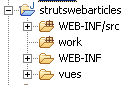
3.6.3.2. Configurazione dell'accesso ai dati
Poiché l'interfaccia di accesso ai dati rimane invariata, i file di configurazione associati sono gli stessi della versione precedente. Sono definiti in [WEB-INF/src]:
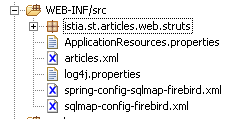
Nello screenshot sopra riportato, i file [articles.xml, spring-config-sqlmap-firebird.xml, sqlmap-config-firebird.xml, log4j.properties] sono quelli della versione precedente.
3.6.3.3. La directory degli archivi
In [WEB-INF/lib] si trovano gli stessi archivi della versione precedente, più quello necessario a Struts:
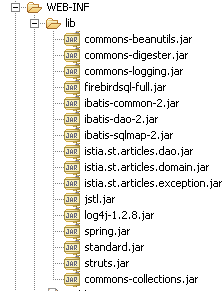
3.6.3.4. Configurazione dell’applicazione
L'applicazione viene configurata tramite due file: [web.xml, struts-config.xml] nella cartella [WEB-INF]:
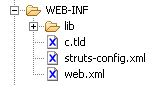
Il file [web.xml] è il seguente:
| <?xml version="1.0" encoding="ISO-8859-1"?>
<!DOCTYPE web-app
PUBLIC "-//Sun Microsystems, Inc.//DTD Web Application 2.3//EN"
"http://java.sun.com/dtd/web-app_2_3.dtd">
<web-app>
<servlet>
<servlet-name>strutswebarticles</servlet-name>
<servlet-class>istia.st.articles.web.struts.MainServlet</servlet-class>
<init-param>
<param-name>config</param-name>
<param-value>/WEB-INF/struts-config.xml</param-value>
</init-param>
<init-param>
<param-name>springConfigFileName</param-name>
<param-value>spring-config-sqlmap-firebird.xml</param-value>
</init-param>
</servlet>
<servlet-mapping>
<servlet-name>strutswebarticles</servlet-name>
<url-pattern>*.do</url-pattern>
</servlet-mapping>
    <welcome-file-list>
        <welcome-file>/vues/index.jsp</welcome-file>
    </welcome-file-list>
</web-app>
|
Cosa contiene questo file?
- la pagina iniziale dell'applicazione è [vues/index.jsp] (welcome-file)
- le richieste URL del tipo *.do verranno reindirizzate al servlet [strutswebarticles] (servlet-mapping)
- il servlet [strutswebarticles] è un'istanza della classe [ istia.st.articles.web.struts.MainServlet] (servlet-name, servlet-class)
- questo servlet accetta due parametri di inizializzazione
- il nome del file di configurazione di Struts (config)
- il nome del file di configurazione di Spring (springConfigFileName)
Il file [struts-config.xml] è il seguente:
| <?xml version="1.0" encoding="ISO-8859-1" ?>
<!DOCTYPE struts-config PUBLIC
"-//Apache Software Foundation//DTD Struts Configuration 1.1//EN"
"http://jakarta.apache.org/struts/dtds/struts-config_1_1.dtd">
<struts-config>
<action-mappings>
<action path="/main" type="istia.st.articles.web.struts.ListeArticlesAction">
<forward name="afficherListeArticles" path="/vues/liste.jsp"/>
<forward name="afficherErreurs" path="/vues/erreurs.jsp"/>
</action>
<action path="/liste" type="istia.st.articles.web.struts.ListeArticlesAction">
<forward name="afficherListeArticles" path="/vues/liste.jsp"/>
<forward name="afficherErreurs" path="/vues/erreurs.jsp"/>
</action>
<action path="/infos" type="istia.st.articles.web.struts.InfosArticleAction">
<forward name="afficherInfosArticle" path="/vues/infos.jsp"/>
<forward name="afficherErreurs" path="/vues/erreurs.jsp"/>
</action>
<action
path="/achat" type="istia.st.articles.web.struts.AchatArticleAction">
<forward name="afficherInfosArticle" path="/vues/infos.jsp"/>
<forward name="afficherListeArticles" path="/main.do"/>
</action>
<action
path="/panier" type="istia.st.articles.web.struts.VoirPanierAction">
<forward name="afficherPanier" path="/vues/panier.jsp"/>
<forward name="afficherPanierVide" path="/vues/paniervide.jsp"/>
</action>
<action
path="/retirerachat" type="istia.st.articles.web.struts.RetirerAchatAction">
<forward name="afficherPanier" path="/panier.do"/>
<forward name="afficherErreurs" path="/vues/erreurs.jsp"/>
</action>
<action
path="/validerpanier" type="istia.st.articles.web.struts.ValiderPanierAction">
<forward name="afficherListeArticles" path="/main.do"/>
<forward name="afficherErreurs" path="/vues/erreurs.jsp"/>
</action>
</action-mappings>
<message-resources parameter="ApplicationResources" null="false" />
</struts-config>
|
Cosa indica questo file di configurazione?
- che il nostro controller gestirà i seguenti URL:
| per visualizzare l'elenco degli articoli |
| per visualizzare l'elenco degli articoli |
| per visualizzare le informazioni su un determinato articolo |
| per acquistare un determinato articolo |
| per visualizzare il carrello |
| per rimuovere un articolo dal carrello |
| per confermare il carrello |
- le azioni precedenti corrispondono una a una alle azioni gestite dal servlet nella versione precedente. Per ciascuna di esse sono specificate le seguenti informazioni:
- il nome della classe incaricata di gestire tale azione
- le possibili risposte (= viste) dopo l'elaborazione dell'azione. Il controller ne sceglierà una sola.
- il nome di un file di messaggi per l’applicazione (message-resources). In questo caso, il file esisterà ma sarà vuoto. Non verrà utilizzato. Deve essere collocato nel [ClassPath] dell’applicazione. Qui verrà collocato nel [WEB-INF/classes]. In Eclipse, si ottiene questo risultato collocandolo nel [WEB-INF/src]:
3.6.4. Le viste JSP
Anche le viste JSP utilizzate sono quelle della versione precedente. Sono state modificate pochissime cose: si tratta degli URL del tipo [?action=XX?id=YY& ...] che diventano [/XX.do?id=YY&....]. Riportiamo qui alcune spiegazioni già fornite in precedenza per evitare che l’utente debba tornare indietro. È importante comprendere che le informazioni trasmesse alla vista dal controller sono esattamente le stesse in entrambe le versioni. Nulla è stato modificato su questo punto.
3.6.4.1. entete.jsp
Per garantire una certa omogeneità alle diverse viste, queste condivideranno la stessa intestazione, quella che mostra il nome dell’applicazione con il menu:
Il menu è dinamico e definito dal controller. Quest’ultimo inserisce nella richiesta inviata alla pagina JSP un attributo chiave "actions" il cui valore associato è un array di tipo Hastable[]. Ogni elemento di questo array è un dizionario destinato a generare un’opzione del menu dell’intestazione. Ogni dizionario ha due chiavi:
- href: l'URL associato all'opzione di menu
- lien: il testo del menu
Le altre viste dell’applicazione utilizzeranno l’intestazione definita da [entete.jsp] tramite il seguente tag JSP:
<jsp:include page="entete.jsp"/>
All'esecuzione, questo tag avrà l'effetto di includere nel codice della pagina JSP che la contiene, quello della pagina [entete.jsp]. Poiché l'URL della pagina è relativo (manca il /), la pagina [entete.jsp] verrà cercata nella stessa cartella della pagina che contiene il tag <jsp:include>.
Codice:
| <%@ page language="java" %>
<%@ taglib uri="/WEB-INF/c.tld" prefix="c" %>
<html>
<head>
<title>webarticles</title>
</head>
<body>
<table>
<tr>
<td><h2>Magasin virtuel</h2></td>
<c:forEach items="${actions}" var="action">
<td>|</td>
<td><a href="<c:out value="${action.href}"/>"><c:out value="${action.lien}"/></a></td>
</c:forEach>
</tr>
</table>
<hr>
|
Commenti: nessuna modifica rispetto alla versione precedente
3.6.4.2. liste.jsp
Questa vista mostra l'elenco degli articoli disponibili per la vendita:
Viene visualizzata a seguito di una richiesta /main.do o /validerpanier.do. Gli elementi della richiesta del controller sono i seguenti:
| oggetto Hashtable[] - l'array delle opzioni del menu |
| ArrayList di oggetti di tipo [Article] |
| oggetto String - messaggio da visualizzare in fondo alla pagina |
Ogni link [Infos] dell'array HTML degli articoli ha un URL della forma [/infos.do?id=ID], dove ID è il campo id dell'articolo visualizzato.
Codice:
| <%@ page language="java" %>
<%@ taglib uri="/WEB-INF/c.tld" prefix="c" %>
<jsp:include page="entete.jsp"/>
<h2>Liste des articles</h2>
<table border="1">
<tr>
<th>NOM</th><th>PRIX</th>
</tr>
<c:forEach var="article" items="${listarticles}">
<tr>
<td><c:out value="${article.nom}"/></td>
<td><c:out value="${article.prix}"/></td>
<td><a href="<c:out value="infos.do?id=${article.id}"/>">Infos</a></td>
</tr>
</c:forEach>
</table>
<p>
<c:out value="${message}"/>
</body>
</html>
|
Commenti: una modifica (evidenziata sopra)
3.6.4.3. infos.jsp
Questa pagina mostra le informazioni relative a un articolo e consente anche di acquistarlo:
Viene visualizzata a seguito di una richiesta /infos.do?id=ID o di una richiesta /achat.do?id=ID quando la quantità acquistata è errata. Gli elementi della richiesta del controller sono i seguenti:
| oggetto Hashtable[] - l'array delle opzioni del menu |
| oggetto di tipo [Article] - articolo da visualizzare |
| oggetto String - messaggio da visualizzare in caso di errore sulla quantità |
| Oggetto String - valore da visualizzare nel campo di immissione [Qte] |
I campi [msg] e [qte] vengono utilizzati in caso di errore di immissione della quantità:
Questa pagina contiene un modulo che viene inviato tramite il pulsante [Acheter]. L'URL di destinazione di POST è [/achat.do?id=ID], dove ID è l'ID dell'articolo acquistato.
Codice:
| <%@ page language="java" %>
<%@ taglib uri="/WEB-INF/c.tld" prefix="c" %>
<jsp:include page="entete.jsp"/>
<h2>Article d'id [<c:out value="${article.id}"/>]</h2>
<table border="1">
<tr>
<th>NOM</th><th>PRIX</th><th>STOCK ACTUEL</th><th>STOCK MINIMUM</th>
</tr>
<tr>
<td><c:out value="${article.nom}"/></td>
<td><c:out value="${article.prix}"/></td>
<td><c:out value="${article.stockActuel}"/></td>
<td><c:out value="${article.stockMinimum}"/></td>
</tr>
</table>
<p>
<form method="post" action="achat.do?id=<c:out value="${article.id}"/>"/>
<table>
<tr>
<td><input type="submit" value="Acheter"></td>
<td>Qte <input type="text" name="qte" size="3" value="<c:out value="${qte}"/>"></td>
<td><c:out value="${msg}"/></td>
</tr>
</table>
</form>
</body>
</html>
|
Commenti: una modifica (evidenziata sopra)
3.6.4.4. panier.jsp
Questa schermata mostra il contenuto del carrello:
Viene visualizzata a seguito di una richiesta /panier.do o /retirerachat.do?id=ID. Gli elementi della richiesta del controller sono i seguenti:
| oggetto Hashtable[] - l'array delle opzioni del menu |
| oggetto di tipo [Panier] - il carrello da visualizzare |
Ogni link [Retirer] dell'array HTML relativo agli acquisti nel carrello ha un URL della forma [retirerachat.do?id=ID], dove ID è il campo [id] dell'articolo che si desidera rimuovere dal carrello.
Codice:
| <%@ page language="java" %>
<%@ taglib uri="/WEB-INF/c.tld" prefix="c" %>
<jsp:include page="entete.jsp"/>
<h2>Contenu de votre panier</h2>
<table border="1">
<tr>
<td>Article</td><td>Qte</td><td>Pu</td><td>Total</td>
</tr>
<c:forEach var="achat" items="${panier.achats}">
<tr>
<td><c:out value="${achat.article.nom}"/></td>
<td><c:out value="${achat.qte}"/></td>
<td><c:out value="${achat.article.prix}"/></td>
<td><c:out value="${achat.total}"/></td>
<td><a href="<c:out value="retirerachat.do?id=${achat.article.id}"/>">Retirer</a></td>
</tr>
</c:forEach>
</table>
<p>
Total de la commande : <c:out value="${panier.total}"/> euros
</body>
</html>
|
Commenti: una modifica (evidenziata sopra)
3.6.4.5. paniervide.jsp
Questa schermata mostra l'informazione che indica che il carrello è vuoto:
Viene visualizzata a seguito di una richiesta /panier.do o /retirerachat.do?id=ID. Gli elementi della richiesta del controller sono i seguenti:
| oggetto Hashtable[] - l'array delle opzioni del menu |
Codice:
| <%@ page language="java" %>
<%@ taglib uri="/WEB-INF/c.tld" prefix="c" %>
<jsp:include page="entete.jsp"/>
<h2>Contenu de votre panier</h2>
<p>
Votre panier est vide.
</body>
</html>
|
Commenti: nessuna modifica.
3.6.4.6. erreurs.jsp
Questa schermata viene visualizzata in caso di errori:
Viene visualizzata a seguito di qualsiasi richiesta che generi un errore, ad eccezione dell'azione di acquisto con una quantità errata, gestita dalla vista [INFOS]. Gli elementi della richiesta del controller sono i seguenti:
| oggetto Hashtable[] - l’array delle opzioni del menu |
| ArrayList oggetti String che rappresentano i messaggi di errore da visualizzare |
Codice:
| <%@ page language="java" %>
<%@ taglib uri="/WEB-INF/c.tld" prefix="c" %>
<jsp:include page="entete.jsp"/>
<h2>Les erreurs suivantes se sont produites</h2>
<ul>
<c:forEach var="erreur" items="${erreurs}">
<li><c:out value="${erreur}"/></li>
</c:forEach>
</ul>
</body>
</html>
|
Commenti: nessuna modifica.
3.6.4.7. index.jsp
Questa pagina è definita come pagina iniziale dell'applicazione nel file [web.xml] dell'applicazione:
| <?xml version="1.0" encoding="ISO-8859-1"?>
<!DOCTYPE web-app
PUBLIC "-//Sun Microsystems, Inc.//DTD Web Application 2.3//EN"
"http://java.sun.com/dtd/web-app_2_3.dtd">
<web-app>
<servlet>
....
</servlet>
<servlet-mapping>
....
</servlet-mapping>
<welcome-file-list>
<welcome-file>/vues/index.jsp</welcome-file>
</welcome-file-list>
</web-app>
|
La vista [index.jsp] si limita a reindirizzare il client al punto di ingresso dell'applicazione:
<%@ page language="java" %>
<%@ taglib uri="/WEB-INF/c.tld" prefix="c" %>
<c:redirect url="/main.do"/>
Commenti: una modifica (evidenziata sopra)
3.6.5. Il controller Struts
Struts dispone di un controller generico denominato [ActionServlet]. È noto che un servlet dispone di un metodo [init] che consente di inizializzare l'applicazione all'avvio. Se utilizziamo il controller generico di Struts [ActionServlet], non abbiamo accesso al suo metodo [init]. In questo caso, abbiamo alcune operazioni da eseguire all’avvio dell’applicazione, essenzialmente la creazione di un’istanza di un oggetto di accesso al modello. Abbiamo quindi bisogno di un metodo [init]. Deriviamo quindi la classe [Actionservlet] dalla seguente classe [MainServlet]:
| package istia.st.articles.web.struts;
import istia.st.articles.domain.IArticlesDomain;
import java.util.ArrayList;
import java.util.Hashtable;
import javax.servlet.ServletConfig;
import javax.servlet.ServletException;
import org.apache.struts.action.ActionServlet;
import org.springframework.beans.factory.xml.XmlBeanFactory;
import org.springframework.core.io.ClassPathResource;
/**
* @author ST - ISTIA
*
*/
public class MainServlet extends ActionServlet {
// campi privati
private ArrayList erreurs = new ArrayList();
private IArticlesDomain articlesDomain = null;
private final String SPRING_CONFIG_FILENAME = "springConfigFileName";
private final String[] parameters = { SPRING_CONFIG_FILENAME };
private ServletConfig config;
private final String ACTION_LISTE = "liste.do";
private final String ACTION_PANIER = "panier.do";
private final String ACTION_ACHAT = "achat.do";
private final String ACTION_INFOS = "infos.do";
private final String ACTION_RETIRER_ACHAT = "retirerachat.do";
private final String ACTION_VALIDATION_PANIER = "validerpanier.do";
private String urlActionListe;
private final String lienActionListe = "Liste des articles";
private String urlActionPanier;
private final String lienActionPanier = "Voir le panier";
private String urlActionValidationPanier;
private final String lienActionValidationPanier = "Valider le panier";
private Hashtable hActionListe = new Hashtable(2);
private Hashtable hActionPanier = new Hashtable(2);
private Hashtable hActionValidationPanier = new Hashtable(2);
// getter - setter
public IArticlesDomain getArticlesDomain() {
return articlesDomain;
}
public void setArticlesDomain(IArticlesDomain articlesDomain) {
this.articlesDomain = articlesDomain;
}
public ArrayList getErreurs() {
return erreurs;
}
public void setErreurs(ArrayList erreurs) {
this.erreurs = erreurs;
}
public Hashtable getHActionListe() {
return hActionListe;
}
public void setHActionListe(Hashtable actionListe) {
hActionListe = actionListe;
}
public Hashtable getHActionPanier() {
return hActionPanier;
}
public void setHActionPanier(Hashtable actionPanier) {
hActionPanier = actionPanier;
}
public Hashtable getHActionValidationPanier() {
return hActionValidationPanier;
}
public void setHActionValidationPanier(Hashtable actionValidationPanier) {
hActionValidationPanier = actionValidationPanier;
}
public void init() throws ServletException{
// inizializzazione della classe padre
super.init();
// si recuperano i parametri di inizializzazione del servlet
config = getServletConfig();
String param = null;
for (int i = 0; i < parameters.length; i++) {
param = config.getInitParameter(parameters[i]);
if (param == null) {
// si memorizza l'errore
erreurs.add("Paramètre [" + parameters[i]
+ "] absent dans le fichier [web.xml]");
}
}
// Ci sono errori?
if (erreurs.size() != 0) {
return;
}
// si crea un oggetto IArticlesDomain per l'accesso al livello business
try {
articlesDomain = (IArticlesDomain) (new XmlBeanFactory(
new ClassPathResource((String) config
.getInitParameter(SPRING_CONFIG_FILENAME))))
.getBean("articlesDomain");
} catch (Exception ex) {
// si memorizza l'errore
erreurs.add("Erreur de configuration de l'accès aux données : "
+ ex.toString());
return;
}
// si memorizzano alcuni URL dell'applicazione
hActionListe.put("href", ACTION_LISTE);
hActionListe.put("lien", lienActionListe);
hActionPanier.put("href", ACTION_PANIER);
hActionPanier.put("lien", lienActionPanier);
hActionValidationPanier.put("href", ACTION_VALIDATION_PANIER);
hActionValidationPanier.put("lien", lienActionValidationPanier);
// È tutto
return;
}
}
|
Commenti:
- l’utilità della classe risiede nel suo metodo [init] e nei suoi campi privati
- il metodo [init] svolge la stessa funzione del metodo [init] del controller della versione precedente:
- verifica la presenza di determinati parametri di configurazione
- istanzia un servizio di accesso al dominio dell'applicazione tramite Spring
- imposta un elenco di errori per segnalare eventuali errori di inizializzazione
- prima di iniziare a funzionare, il metodo [init] chiama il metodo [init] della classe padre [ActionServlet]. È quest’ultimo che gestirà il file di configurazione di Struts [struts-config.xml].
- Sono definiti alcuni campi privati con i relativi accessori:
- errori: l’elenco degli errori rilevati da [init]
- [hActionListe, hActionPanier, hActionValidationPanier]: dizionari. Ciascuno di essi contiene le informazioni necessarie per visualizzare un'opzione del menu principale visualizzato dalla vista [entete.jsp]
- acticlesDomain: il servizio di accesso al modello dell'applicazione
- il controller di un'applicazione Struts è accessibile alle classi [Action] incaricate di gestire le diverse azioni possibili. Queste classi avranno accesso ai campi privati precedenti poiché questi sono dotati di accessori pubblici.
L'istanziazione di questo controller è garantita dal file [web.xml]:
| <web-app>
<servlet>
<servlet-name>strutswebarticles</servlet-name>
<servlet-class>istia.st.articles.web.struts.MainServlet</servlet-class>
<init-param>
<param-name>config</param-name>
<param-value>/WEB-INF/struts-config.xml</param-value>
</init-param>
<init-param>
<param-name>springConfigFileName</param-name>
<param-value>spring-config-sqlmap-firebird.xml</param-value>
</init-param>
</servlet>
<servlet-mapping>
<servlet-name>strutswebarticles</servlet-name>
<url-pattern>*.do</url-pattern>
</servlet-mapping>
</web-app>
|
Ogni URL che termina con .do verrà elaborato da un'istanza della classe [istia.st.articles.web.struts.MainServlet]
3.6.6. Le azioni dell'applicazione Struts
3.6.6.1. Introduzione
Ogni azione Struts sarà oggetto di una classe. Nella versione precedente, ogni azione era oggetto di un metodo nel controller dell’applicazione. La scrittura della classe [Action] consiste il più delle volte nel:
- copiare e incollare il metodo utilizzato nella versione precedente
- adattare il codice alle convenzioni di Struts
3.6.6.2. main.do, liste.do
Queste due azioni sono identiche e definite in [struts-config.xml] tramite:
| <action path="/main" type="istia.st.articles.web.struts.ListeArticlesAction">
<forward name="afficherListeArticles" path="/vues/liste.jsp"/>
<forward name="afficherErreurs" path="/vues/erreurs.jsp"/>
</action>
<action path="/liste" type="istia.st.articles.web.struts.ListeArticlesAction">
<forward name="afficherListeArticles" path="/vues/liste.jsp"/>
<forward name="afficherErreurs" path="/vues/erreurs.jsp"/>
</action>
|
Quando una di queste azioni [main.do, liste.do] viene eseguita in un browser, si ottiene il seguente risultato:
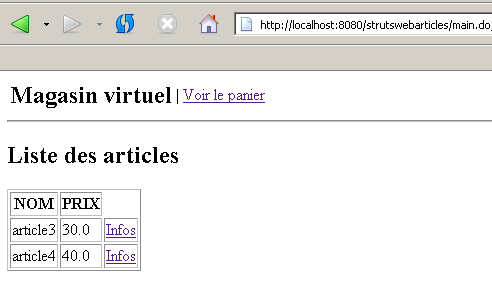
Il codice della classe [ListeArticlesAction] è il seguente:
| package istia.st.articles.web.struts;
import istia.st.articles.domain.IArticlesDomain;
import istia.st.articles.exception.UncheckedAccessArticlesException;
import java.io.IOException;
import java.util.ArrayList;
import java.util.Hashtable;
import java.util.List;
import javax.servlet.ServletException;
import javax.servlet.http.HttpServletRequest;
import javax.servlet.http.HttpServletResponse;
import org.apache.struts.action.Action;
import org.apache.struts.action.ActionForm;
import org.apache.struts.action.ActionForward;
import org.apache.struts.action.ActionMapping;
/**
* @author ST - ISTIA
*
*/
public class ListeArticlesAction extends Action {
/**
* affichage de la liste des articles - s'appuie sur la couche [domain]
*
* @param mapping :
* configuration de l'action dans struts-config.xml
* @param form :
* le formulaire passé à l'action - ici aucun
* @param request :
* la requête HTTP du client
* @param response :
* la réponse HTTP au client
*/
public ActionForward execute(ActionMapping mapping, ActionForm form,
HttpServletRequest request, HttpServletResponse response)
throws IOException, ServletException {
// il servlet di controllo
MainServlet mainServlet = (MainServlet) this.getServlet();
// errori di inizializzazione?
ArrayList erreursInit = mainServlet.getErreurs();
if (erreursInit.size() != 0) {
// viene visualizzata la pagina degli errori
request.setAttribute("erreurs", erreursInit);
request.setAttribute("actions", new Hashtable[] {});
return mapping.findForward("afficherErreurs");
}
// l'oggetto di accesso al dominio
IArticlesDomain articlesDomain = mainServlet.getArticlesDomain();
// l'elenco degli errori
ArrayList erreurs = new ArrayList();
// viene richiesta la lista degli articoli
List articles = null;
try {
articles = articlesDomain.getAllArticles();
} catch (UncheckedAccessArticlesException ex) {
// si memorizza l'errore
erreurs.add("Erreur lors de l'obtention de tous les articles : "
+ ex.toString());
}
// di errori?
if (erreurs.size() != 0) {
// viene visualizzata la pagina degli errori
request.setAttribute("erreurs", erreurs);
request.setAttribute("actions", new Hashtable[] { mainServlet
.getHActionListe() });
return mapping.findForward("afficherErreurs");
}
// viene visualizzato l'elenco degli articoli
request.setAttribute("listarticles", articles);
request.setAttribute("message", "");
request.setAttribute("actions", new Hashtable[] { mainServlet
.getHActionPanier() });
return mapping.findForward("afficherListeArticles");
}
}
|
Commenti:
- scrivere il codice di una classe [Action] consiste essenzialmente nello scrivere il codice del suo metodo [execute]
- alcune informazioni sono state memorizzate nell’istanza del controller. Si recupera un riferimento a quest’ultima tramite:
// il servlet di controllo
MainServlet mainServlet = (MainServlet) this.getServlet();
- si recupera l'elenco degli errori di inizializzazione memorizzati dal controller. Se tale elenco non è vuoto, la vista [ERREURS] viene inviata al client:
| // errori di inizializzazione?
ArrayList erreursInit = mainServlet.getErreurs();
if (erreursInit.size() != 0) {
// viene visualizzata la pagina degli errori
request.setAttribute("erreurs", erreursInit);
request.setAttribute("actions", new Hashtable[] {});
return mapping.findForward("afficherErreurs");
}
|
La vista che verrà effettivamente inviata al cliente ci viene fornita da [struts-config.xml]:
<action path="/main" type="istia.st.articles.web.struts.ListeArticlesAction">
<forward name="afficherListeArticles" path="/vues/liste.jsp"/>
<forward name="afficherErreurs" path="/vues/erreurs.jsp"/>
</action>
Si tratta della vista [/vues/erreurs.jsp]. Il lettore è invitato a verificare cosa ci si aspetta da questa vista. Queste informazioni sono fornite dall'azione nell'oggetto [request] sotto forma di attributi.
- Sempre grazie al controller, l’azione può recuperare l’oggetto di accesso al modello dell’applicazione (livello di dominio):
// l'oggetto di accesso al dominio
IArticlesDomain articlesDomain = mainServlet.getArticlesDomain();
- Fatto ciò, è possibile richiedere l’elenco degli articoli:
| // l'elenco degli errori
ArrayList erreurs = new ArrayList();
// viene richiesta la lista degli articoli
List articles = null;
try {
articles = articlesDomain.getAllArticles();
} catch (UncheckedAccessArticlesException ex) {
// si memorizza l'errore
erreurs.add("Erreur lors de l'obtention de tous les articles : "
+ ex.toString());
}
|
- Se si verificano degli errori, viene inviata la vista [ERREURS]:
| // di errori?
if (erreurs.size() != 0) {
// viene visualizzata la pagina degli errori
request.setAttribute("erreurs", erreurs);
request.setAttribute("actions", new Hashtable[] { mainServlet
.getHActionListe() });
return mapping.findForward("afficherErreurs");
}
|
- altrimenti viene inviata la vista [LISTE]:
| // viene visualizzato l'elenco degli articoli
request.setAttribute("listarticles", articles);
request.setAttribute("message", "");
request.setAttribute("actions", new Hashtable[] { mainServlet
.getHActionPanier() });
return mapping.findForward("afficherListeArticles");
|
La vista che verrà effettivamente inviata al cliente ci viene fornita da [struts-config.xml]:
<action path="/main" type="istia.st.articles.web.struts.ListeArticlesAction">
<forward name="afficherListeArticles" path="/vues/liste.jsp"/>
<forward name="afficherErreurs" path="/vues/erreurs.jsp"/>
</action>
Si tratta della vista [/vues/liste.jsp]. Si invita il lettore a verificare cosa ci si aspetta da questa vista. Queste informazioni sono fornite dall’azione nell’oggetto [request] sotto forma di attributi.
3.6.6.3. infos.do
Questa azione serve a fornire informazioni su uno degli articoli visualizzati nella vista [LISTE]:
Questa azione è configurata come segue in [struts-config.xml]:
<action path="/infos" type="istia.st.articles.web.struts.InfosArticleAction">
<forward name="afficherInfosArticle" path="/vues/infos.jsp"/>
<forward name="afficherErreurs" path="/vues/erreurs.jsp"/>
</action>
Il codice della classe [InfosArticleAction] è il seguente:
| package istia.st.articles.web.struts;
import istia.st.articles.dao.Article;
import istia.st.articles.domain.IArticlesDomain;
import istia.st.articles.exception.UncheckedAccessArticlesException;
import java.io.IOException;
import java.util.ArrayList;
import java.util.Hashtable;
import javax.servlet.ServletException;
import javax.servlet.http.HttpServletRequest;
import javax.servlet.http.HttpServletResponse;
import org.apache.struts.action.Action;
import org.apache.struts.action.ActionForm;
import org.apache.struts.action.ActionForward;
import org.apache.struts.action.ActionMapping;
/**
* @author ST-ISTIA
*
*/
public class InfosArticleAction extends Action {
public ActionForward execute(ActionMapping mapping, ActionForm form,
HttpServletRequest request, HttpServletResponse response)
throws IOException, ServletException {
// il servlet di controllo
MainServlet mainServlet = (MainServlet) this.getServlet();
// errori di inizializzazione?
ArrayList erreursInit = mainServlet.getErreurs();
if (erreursInit.size() != 0) {
// viene visualizzata la pagina degli errori
request.setAttribute("erreurs", erreursInit);
request.setAttribute("actions", new Hashtable[] {});
return mapping.findForward("afficherErreurs");
}
// l'oggetto di accesso al dominio
IArticlesDomain articlesDomain = mainServlet.getArticlesDomain();
// l'elenco degli errori
ArrayList erreurs = new ArrayList();
// si recupera l'ID richiesto
String strId = request.getParameter("id");
// qualcosa?
if (strId == null) {
// non è normale
erreurs.add("action incorrecte([infos,id=null]");
request.setAttribute("erreurs", erreurs);
request.setAttribute("actions", new Hashtable[] { mainServlet
.getHActionListe() });
return mapping.findForward("afficherErreurs");
}
// si trasforma strId in un numero intero
int id = 0;
try {
id = Integer.parseInt(strId);
} catch (Exception ex) {
// non è normale
erreurs.add("action incorrecte([infos,id=" + strId + "]");
request.setAttribute("erreurs", erreurs);
request.setAttribute("actions", new Hashtable[] { mainServlet
.getHActionListe() });
return mapping.findForward("afficherErreurs");
}
// si richiede l'ID della voce
Article article = null;
try {
article = articlesDomain.getArticleById(id);
} catch (UncheckedAccessArticlesException ex) {
// non normale
erreurs.add("Erreur d'accès aux données [" + ex.toString() + "]");
request.setAttribute("erreurs", erreurs);
request.setAttribute("actions", new Hashtable[] { mainServlet
.getHActionListe() });
return mapping.findForward("afficherErreurs");
}
if (article == null) {
// non corretto
erreurs.add("Article de clé [" + id + "] inexistant");
request.setAttribute("erreurs", erreurs);
request.setAttribute("actions", new Hashtable[] { mainServlet
.getHActionListe() });
return mapping.findForward("afficherErreurs");
}
// si inserisce l'articolo nella sessione
request.getSession().setAttribute("article", article);
// viene visualizzata la pagina informativa
request.setAttribute("actions", new Hashtable[] { mainServlet
.getHActionListe() });
return mapping.findForward("afficherInfosArticle");
}
}
|
Commenti:
- l'inizio del metodo [execute] è identico a quello esaminato in precedenza. Lo stesso vale anche per le altre azioni.
- Il metodo recupera il parametro [id] che normalmente dovrebbe trovarsi nell'URL. Quest'ultimo deve infatti avere la forma [/infos.do?id=X]. Vengono effettuati diversi test per verificare la presenza e la validità del parametro [id]. In caso di problemi, viene inviata la vista [ERREURS].
- Se [id] è valido, l’articolo corrispondente viene richiesto al livello [domain]. Se quest’ultimo genera un’eccezione o se l’articolo non viene trovato, anche in questo caso viene inviata la vista [ERREURS].
- Se tutto va bene, l’articolo ottenuto viene inserito nella sessione. Si tratta di un punto discutibile. In questo caso, si parte dal presupposto che il cliente possa acquistare quell’articolo. Se lo fa, lo si recupererà dalla sessione, anziché richiederlo nuovamente al livello [domain].
- Infine, viene visualizzata la vista [INFOS]. La vista che verrà effettivamente inviata al cliente ci viene fornita da [struts-config.xml]:
<action path="/infos" type="istia.st.articles.web.struts.InfosArticleAction">
<forward name="afficherInfosArticle" path="/vues/infos.jsp"/>
<forward name="afficherErreurs" path="/vues/erreurs.jsp"/>
</action>
Si tratta della vista [/vues/infos.jsp]. Il lettore è invitato a verificare cosa ci si aspetta da questa vista. Queste informazioni sono fornite dall’azione nell’oggetto [request] sotto forma di attributi.
3.6.6.4. achat.do
Questa azione serve per acquistare l’articolo visualizzato dalla vista precedente [INFOS]:
Una volta acquistato l’articolo, viene nuovamente visualizzata la vista [LISTE] (vista a destra). Se si osserva il codice HTML della vista a sinistra sopra riportata, si nota che il tag <form> è definito come segue:
| <form method="post" action="achat.do?id=3"/>
<table>
<tr>
<td><input type="submit" value="Acheter"></td>
<td>Qte <input type="text" name="qte" size="3" value=""></td>
<td></td>
</tr>
</table>
</form>
|
Si nota quindi che il modulo viene inviato al controller con l’azione [achat.do].
Questa azione è configurata come segue in [struts-config.xml]:
<action
path="/achat" type="istia.st.articles.web.struts.AchatArticleAction">
<forward name="afficherInfosArticle" path="/vues/infos.jsp"/>
<forward name="afficherListeArticles" path="/main.do"/>
</action>
Il codice della classe [AchatArticleAction] è il seguente:
| package istia.st.articles.web.struts;
import istia.st.articles.dao.Article;
import istia.st.articles.domain.Achat;
import istia.st.articles.domain.Panier;
import java.io.IOException;
import java.util.ArrayList;
import java.util.Hashtable;
import javax.servlet.ServletException;
import javax.servlet.http.HttpServletRequest;
import javax.servlet.http.HttpServletResponse;
import javax.servlet.http.HttpSession;
import org.apache.struts.action.Action;
import org.apache.struts.action.ActionForm;
import org.apache.struts.action.ActionForward;
import org.apache.struts.action.ActionMapping;
/**
* @author ST
*
*/
public class AchatArticleAction extends Action {
public ActionForward execute(ActionMapping mapping, ActionForm form,
HttpServletRequest request, HttpServletResponse response)
throws IOException, ServletException {
// il servlet di controllo
MainServlet mainServlet = (MainServlet) this.getServlet();
// errori di inizializzazione?
ArrayList erreursInit = mainServlet.getErreurs();
if (erreursInit.size() != 0) {
// si visualizza la pagina degli errori
request.setAttribute("erreurs", erreursInit);
request.setAttribute("actions", new Hashtable[] {});
return mapping.findForward("afficherErreurs");
}
// l'elenco degli errori relativi a questa azione
ArrayList erreurs = new ArrayList();
// si recupera la quantità acquistata
int qté = 0;
try {
qté = Integer.parseInt(request.getParameter("qte"));
if (qté <= 0)
throw new NumberFormatException();
} catch (NumberFormatException ex) {
// quantità errata
request.setAttribute("msg", "Quantité incorrecte");
request.setAttribute("qte", request.getParameter("qte"));
request.setAttribute("actions", new Hashtable[] { mainServlet
.getHActionListe() });
return mapping.findForward("afficherInfosArticle");
}
// si recupera la sessione del cliente
HttpSession session = request.getSession();
// si recupera l'articolo aggiunto alla sessione
Article article = (Article) session.getAttribute("article");
// sessione scaduta?
if(article==null){
// viene visualizzata la pagina degli errori
erreurs.add("Votre session a expiré");
request.setAttribute("erreurs", erreurs);
request.setAttribute("actions", new Hashtable[] { mainServlet
.getHActionListe() });
return mapping.findForward("afficherErreurs");
}
// si crea il nuovo acquisto
Achat achat = new Achat(article, qté);
// si aggiunge l'acquisto al carrello del cliente
Panier panier = (Panier) session.getAttribute("panier");
if (panier == null) {
panier = new Panier();
session.setAttribute("panier", panier);
}
panier.ajouter(achat);
// si torna all'elenco degli articoli
return mapping.findForward("afficherListeArticles");
}
}
|
Commenti:
- l'inizio del metodo [execute] è identico a quelli esaminati in precedenza.
- Ricordiamo la struttura del modulo inviato al controller:
| <form method="post" action="achat.do?id=3"/>
<table>
<tr>
<td><input type="submit" value="Acheter"></td>
<td>Qte <input type="text" name="qte" size="3" value=""></td>
<td></td>
</tr>
</table>
</form>
|
- Nella richiesta sono presenti due parametri: [id]: numero dell'articolo acquistato, [qte]: quantità acquistata.
- Vengono verificate la presenza e la validità del parametro [qte]. Se tale parametro viene riconosciuto come errato, all’utente viene restituita la vista [INFOS] accompagnata da un messaggio di errore:
| // elenco degli errori relativi a questa azione
ArrayList erreurs = new ArrayList();
// si recupera la quantità acquistata
int qté = 0;
try {
qté = Integer.parseInt(request.getParameter("qte"));
if (qté <= 0)
throw new NumberFormatException();
} catch (NumberFormatException ex) {
// quantità errata
request.setAttribute("msg", "Quantité incorrecte");
request.setAttribute("qte", request.getParameter("qte"));
request.setAttribute("actions", new Hashtable[] { mainServlet
.getHActionListe() });
return mapping.findForward("afficherInfosArticle");
}
|
- l'articolo acquistato viene recuperato dalla sessione. È possibile che la sessione sia scaduta. In tal caso, viene inviata la vista [ERREURS]:
| // si recupera la sessione del cliente
HttpSession session = request.getSession();
// recupera l'articolo aggiunto alla sessione
Article article = (Article) session.getAttribute("article");
// sessione scaduta?
if(article==null){
// viene visualizzata la pagina degli errori
erreurs.add("Votre session a expiré");
request.setAttribute("erreurs", erreurs);
request.setAttribute("actions", new Hashtable[] { mainServlet
.getHActionListe() });
return mapping.findForward("afficherErreurs");
}
|
- se la sessione non è scaduta, l'articolo viene aggiunto al carrello, anch'esso recuperato dalla sessione:
| // si recupera la sessione del cliente
HttpSession session = request.getSession();
// si recupera l'articolo aggiunto al carrello
Article article = (Article) session.getAttribute("article");
// sessione scaduta?
if(article==null){
// viene visualizzata la pagina degli errori
erreurs.add("Votre session a expiré");
request.setAttribute("erreurs", erreurs);
request.setAttribute("actions", new Hashtable[] { mainServlet
.getHActionListe() });
return mapping.findForward("afficherErreurs");
}
// si crea il nuovo acquisto
Achat achat = new Achat(article, qté);
// si aggiunge l'acquisto al carrello del cliente
Panier panier = (Panier) session.getAttribute("panier");
if (panier == null) {
panier = new Panier();
session.setAttribute("panier", panier);
}
panier.ajouter(achat);
|
- infine, si invia la vista [LISTE]:
// si torna all'elenco degli articoli
return mapping.findForward("afficherListeArticles");
- La vista che verrà effettivamente inviata al cliente ci viene fornita da [struts-config.xml]:
<action
path="/achat" type="istia.st.articles.web.struts.AchatArticleAction">
<forward name="afficherInfosArticle" path="/vues/infos.jsp"/>
<forward name="afficherListeArticles" path="/main.do"/>
</action>
Si tratta della vista [/main.do]. Questa vista non è una vista, ma un'azione. L'azione [/main.do] descritta in precedenza verrà quindi eseguita e visualizzerà l'elenco degli articoli.
3.6.6.5. panier.do
Questa azione serve a visualizzare tutti gli acquisti del cliente. È disponibile tramite l’opzione di menu [Voir le panier]:
Il codice HTML associato al link [Voir le panier] è il seguente:
<a href="panier.do">Voir le panier</a>
L'azione [panier.do] è configurata come segue in [struts-config.xml]:
<action
path="/panier" type="istia.st.articles.web.struts.VoirPanierAction">
<forward name="afficherPanier" path="/vues/panier.jsp"/>
<forward name="afficherPanierVide" path="/vues/paniervide.jsp"/>
</action>
Il codice della classe [VoirPanierAction] è il seguente:
| package istia.st.articles.web.struts;
import istia.st.articles.domain.Panier;
import java.io.IOException;
import java.util.ArrayList;
import java.util.Hashtable;
import javax.servlet.ServletException;
import javax.servlet.http.HttpServletRequest;
import javax.servlet.http.HttpServletResponse;
import org.apache.struts.action.Action;
import org.apache.struts.action.ActionForm;
import org.apache.struts.action.ActionForward;
import org.apache.struts.action.ActionMapping;
/**
* @author ST-ISTIA
*
*/
public class VoirPanierAction extends Action {
public ActionForward execute(ActionMapping mapping, ActionForm form,
HttpServletRequest request, HttpServletResponse response)
throws IOException, ServletException {
// il servlet di controllo
MainServlet mainServlet = (MainServlet) this.getServlet();
// errori di inizializzazione?
ArrayList erreursInit = mainServlet.getErreurs();
if (erreursInit.size() != 0) {
// viene visualizzata la pagina degli errori
request.setAttribute("erreurs", erreursInit);
request.setAttribute("actions", new Hashtable[] {});
return mapping.findForward("afficherErreurs");
}
// visualizzazione del carrello
Panier panier = (Panier) request.getSession().getAttribute("panier");
if (panier == null || panier.getAchats().size() == 0) {
// carrello vuoto
request.setAttribute("actions", new Hashtable[] { mainServlet
.getHActionListe() });
return mapping.findForward("afficherPanierVide");
} else {
// c'è qualcosa nel carrello
request.setAttribute("actions", new Hashtable[] { mainServlet
.getHActionListe(), mainServlet.getHActionValidationPanier() });
return mapping.findForward("afficherPanier");
}
}
}
|
Commenti:
- l'inizio del metodo [execute] è identico a quelli esaminati in precedenza.
- Il carrello viene prelevato dalla sessione in cui si trova normalmente. La sessione potrebbe essere scaduta e quindi non si dispone di alcun carrello. Non si considera questo caso come un errore, ma si presume semplicemente che il carrello sia vuoto.
- Se il carrello è vuoto, viene visualizzata la vista [PANIERVIDE]
- altrimenti, viene visualizzata la vista [PANIER]
Le viste effettivamente inviate al cliente sono definite dall’azione:
<action
path="/panier" type="istia.st.articles.web.struts.VoirPanierAction">
<forward name="afficherPanier" path="/vues/panier.jsp"/>
<forward name="afficherPanierVide" path="/vues/paniervide.jsp"/>
</action>
3.6.6.6. retirerachat.do
Questa azione serve a rimuovere un acquisto dal carrello:
Dopo l'azione [retirerachat.do], il carrello viene visualizzato nuovamente (immagine a destra sopra). Se si osserva il codice HTML del link [Valider le panier] nell'immagine a sinistra sopra, si ottiene quanto segue:
<a href="retirerachat.do?id=3">Retirer</a>
L'azione [retirerachat.do] riceve quindi come parametro l'ID dell'articolo da rimuovere dal carrello. Questa azione è configurata come segue in [struts-config.xml]:
<action
path="/retirerachat" type="istia.st.articles.web.struts.RetirerAchatAction">
<forward name="afficherPanier" path="/panier.do"/>
<forward name="afficherErreurs" path="/vues/erreurs.jsp"/>
</action>
Il codice della classe [RetirerAchatAction] è il seguente:
| package istia.st.articles.web.struts;
import istia.st.articles.domain.Panier;
import java.io.IOException;
import java.util.ArrayList;
import java.util.Hashtable;
import javax.servlet.ServletException;
import javax.servlet.http.HttpServletRequest;
import javax.servlet.http.HttpServletResponse;
import org.apache.struts.action.Action;
import org.apache.struts.action.ActionForm;
import org.apache.struts.action.ActionForward;
import org.apache.struts.action.ActionMapping;
/**
* @author ST-ISTIA
*
*/
public class RetirerAchatAction extends Action {
public ActionForward execute(ActionMapping mapping, ActionForm form,
HttpServletRequest request, HttpServletResponse response)
throws IOException, ServletException {
// il servlet di controllo
MainServlet mainServlet = (MainServlet) this.getServlet();
// errori di inizializzazione?
ArrayList erreursInit = mainServlet.getErreurs();
if (erreursInit.size() != 0) {
// viene visualizzata la pagina degli errori
request.setAttribute("erreurs", erreursInit);
request.setAttribute("actions", new Hashtable[] {});
return mapping.findForward("afficherErreurs");
}
// l'elenco degli errori relativi a questa azione
ArrayList erreurs = new ArrayList();
// si recupera il carrello
Panier panier = (Panier) request.getSession().getAttribute("panier");
if (panier == null) {
// sessione scaduta
erreurs.add("Votre session a expiré");
request.setAttribute("erreurs", erreurs);
request.setAttribute("actions", new Hashtable[] { mainServlet
.getHActionListe() });
return mapping.findForward("afficherPanierVide");
}
// si recupera l'ID dell'articolo da rimuovere
String strId = request.getParameter("id");
// qualcosa?
if (strId == null) {
// non è normale
erreurs.add("action incorrecte([retirerachat,id=null]");
request.setAttribute("erreurs", erreurs);
request.setAttribute("actions", new Hashtable[] { mainServlet
.getHActionListe() });
return mapping.findForward("afficherErreurs");
}
// si trasforma strId in un numero intero
int id = 0;
try {
id = Integer.parseInt(strId);
} catch (Exception ex) {
// non è normale
erreurs.add("action incorrecte([retirerachat,id=" + strId + "]");
request.setAttribute("erreurs", erreurs);
request.setAttribute("actions", new Hashtable[] { mainServlet
.getHActionListe() });
return mapping.findForward("afficherErreurs");
}
// si rimuove l'acquisto
panier.enlever(id);
// si visualizza nuovamente il carrello
return mapping.findForward("afficherPanier");
}
}
|
Commenti:
- l'inizio del metodo [execute] è identico a quelli esaminati in precedenza.
- il codice che segue ha lo scopo di verificare la presenza e la validità del parametro [id]. Se risulta errato, viene inviata la vista [ERREURS].
- In caso contrario, l'acquisto viene rimosso dal carrello:
// si rimuove l'acquisto
panier.enlever(id);
- quindi il carrello viene visualizzato nuovamente:
// si visualizza nuovamente il carrello
return mapping.findForward("afficherPanier");
La vista effettivamente inviata al client è definita dall'azione:
<action
path="/retirerachat" type="istia.st.articles.web.struts.RetirerAchatAction">
<forward name="afficherPanier" path="/panier.do"/>
<forward name="afficherErreurs" path="/vues/erreurs.jsp"/>
</action>
Si nota che, per quanto riguarda la vista, verrà attivata l'azione [/panier.do]. Questa è già stata descritta. Visualizzerà la vista [PANIER] o [PANIERVIDE] a seconda dello stato del carrello.
3.6.6.7. validerpanier.do
Questa azione serve a confermare gli acquisti effettuati dal cliente. In pratica, ciò si traduce in un'unica operazione: le scorte degli articoli acquistati vengono ridotte delle quantità acquistate nel database. Questa azione proviene dal seguente menu:
Il codice HTML del link [Valider le panier] è il seguente:
<a href="validerpanier.do">Valider le panier</a>
Quando questo link viene attivato, le scorte vengono decrescute e l'elenco degli articoli viene nuovamente visualizzato.
Questa azione è configurata come segue in [struts-config.xml]:
<action
path="/validerpanier" type="istia.st.articles.web.struts.ValiderPanierAction">
<forward name="afficherListeArticles" path="/main.do"/>
<forward name="afficherErreurs" path="/vues/erreurs.jsp"/>
</action>
Il codice della classe [ValiderPanierAction] è il seguente:
| package istia.st.articles.web.struts;
import istia.st.articles.domain.IArticlesDomain;
import istia.st.articles.domain.Panier;
import istia.st.articles.exception.UncheckedAccessArticlesException;
import java.io.IOException;
import java.util.ArrayList;
import java.util.Hashtable;
import javax.servlet.ServletException;
import javax.servlet.http.HttpServletRequest;
import javax.servlet.http.HttpServletResponse;
import org.apache.struts.action.Action;
import org.apache.struts.action.ActionForm;
import org.apache.struts.action.ActionForward;
import org.apache.struts.action.ActionMapping;
/**
* @author ST-ISTIA
*
*/
public class ValiderPanierAction extends Action {
public ActionForward execute(ActionMapping mapping, ActionForm form,
HttpServletRequest request, HttpServletResponse response)
throws IOException, ServletException {
// il servlet di controllo
MainServlet mainServlet = (MainServlet) this.getServlet();
// errori di inizializzazione?
ArrayList erreursInit = mainServlet.getErreurs();
if (erreursInit.size() != 0) {
// visualizza la pagina degli errori
request.setAttribute("erreurs", erreursInit);
request.setAttribute("actions", new Hashtable[] {});
return mapping.findForward("afficherErreurs");
}
// l'oggetto di accesso al dominio
IArticlesDomain articlesDomain = mainServlet.getArticlesDomain();
// l'elenco degli errori relativi a questa azione
ArrayList erreurs = new ArrayList();
// l'acquirente ha confermato il carrello
Panier panier = (Panier) request.getSession().getAttribute("panier");
if (panier == null) {
// sessione scaduta
erreurs.add("Votre session a expiré");
request.setAttribute("erreurs", erreurs);
request.setAttribute("actions", new Hashtable[] { mainServlet
.getHActionListe() });
return mapping.findForward("afficherErreurs");
}
// conferma del carrello
try {
articlesDomain.acheter(panier);
} catch (UncheckedAccessArticlesException ex) {
// non normale
erreurs.add("Erreur d'accès aux données [" + ex.toString() + "]");
request.setAttribute("erreurs", erreurs);
request.setAttribute("actions", new Hashtable[] { mainServlet
.getHActionListe() });
return mapping.findForward("afficherErreurs");
}
// si recuperano eventuali errori
erreurs = articlesDomain.getErreurs();
if (erreurs.size() != 0) {
request.setAttribute("erreurs", erreurs);
request.setAttribute("actions", new Hashtable[] { mainServlet
.getHActionListe(),mainServlet.getHActionPanier() });
return mapping.findForward("afficherErreurs");
}
// tutto sembra a posto OK - si visualizza l'elenco degli articoli
return mapping.findForward("afficherListeArticles");
}
}
|
Commenti:
- l'inizio del metodo [execute] è identico a quelli esaminati in precedenza.
- Si recupera il carrello dalla sessione. Se questa è scaduta, si invia la vista [ERREURS]:
| // elenco degli errori relativi a questa azione
ArrayList erreurs = new ArrayList();
// l'acquirente ha confermato il carrello
Panier panier = (Panier) request.getSession().getAttribute("panier");
if (panier == null) {
// sessione scaduta
erreurs.add("Votre session a expiré");
request.setAttribute("erreurs", erreurs);
request.setAttribute("actions", new Hashtable[] { mainServlet
.getHActionListe() });
return mapping.findForward("afficherErreurs");
}
|
- Si confermano gli acquisti nel carrello. Possono verificarsi errori se le scorte sono insufficienti a soddisfare gli acquisti. In questo caso, si invia la vista [ERREURS]:
| // conferma del carrello
try {
articlesDomain.acheter(panier);
} catch (UncheckedAccessArticlesException ex) {
// anomalia
erreurs.add("Erreur d'accès aux données [" + ex.toString() + "]");
request.setAttribute("erreurs", erreurs);
request.setAttribute("actions", new Hashtable[] { mainServlet
.getHActionListe() });
return mapping.findForward("afficherErreurs");
}
// si recuperano eventuali errori
erreurs = articlesDomain.getErreurs();
if (erreurs.size() != 0) {
request.setAttribute("erreurs", erreurs);
request.setAttribute("actions", new Hashtable[] { mainServlet
.getHActionListe(),mainServlet.getHActionPanier() });
return mapping.findForward("afficherErreurs");
}
|
- se tutto è andato a buon fine, viene nuovamente visualizzato l’elenco degli articoli:
// tutto sembra a posto OK - si visualizza l'elenco degli articoli
return mapping.findForward("afficherListeArticles");
La vista effettivamente inviata al cliente è definita dall’azione:
<action
path="/validerpanier" type="istia.st.articles.web.struts.ValiderPanierAction">
<forward name="afficherListeArticles" path="/main.do"/>
<forward name="afficherErreurs" path="/vues/erreurs.jsp"/>
</action>
Si nota che, per quanto riguarda la vista, verrà attivata l'azione [/main.do]. Questa è già stata descritta. Visualizzerà la vista [LISTE].
3.7. Architettura di MVC con Spring
3.7.1. Architettura generale dell’applicazione
Torniamo all’architettura MVC dell’applicazione:
Nella prima versione:
- il controllo era gestito da un servlet
- le viste erano gestite da pagine JSP
- il modello era gestito da un insieme di tre file .jar
Nella versione Struts:
- il controller era gestito da un servlet derivato dal servlet generico [ActionServlet] di Struts
- le viste erano gestite dalle stesse pagine JSP della versione [Struts]
- il modello era gestito dagli stessi tre file .jar
Nella versione Spring:
- il controller sarà gestito da una servlet fornita da Spring [DispatcherServlet]
- le viste saranno gestite dalle stesse pagine JSP di prima, con qualche piccola differenza
- il modello sarà gestito dagli stessi tre file
Scopriremo che il passaggio da Struts a Spring della nostra applicazione è semplice se si accetta di non utilizzare tutti gli elementi raccomandati per un'architettura Spring MVC ortodossa. Le principali modifiche sono le seguenti:
- le azioni che in Struts venivano gestite in metodi specifici del servlet/controller, oppure tramite istanze di classi derivate dalla classe [Action], sono ora gestite da istanze di classi che implementano l’interfaccia Spring [Controller]
- i file di configurazione necessari sono i seguenti:
- [web.xml], poiché si tratta di un’applicazione web. Questo file contiene un Listener che, al momento dell’inizializzazione dell’applicazione, utilizzerà il file [applicationContext.xml]
- [applicationContext.xml] che consentirà di creare i bean necessari all’applicazione, in particolare quello del servizio di accesso al modello
- le viste JSP saranno identiche a quelle di Struts. Sarà necessario crearne una nuova.
Ricordiamo l’architettura MVC STRUTS utilizzata nella versione precedente:
| le classi di business, le classi di accesso ai dati e il database |
| le pagine JSP |
| il servlet di elaborazione delle richieste dei clienti, gli oggetti [Action] |
Con Spring, adottiamo un'architettura identica:
| le classi di business, le classi di accesso ai dati e il database |
| le pagine JSP |
| il servlet per l'elaborazione delle richieste dei clienti, gli oggetti che implementano l'interfaccia [Controller] |
- il controller è il cuore dell’applicazione. Tutte le richieste del client transitano attraverso di esso. Si tratta di un servlet generico fornito da SPRING. È di tipo [DispatcherServlet]. D’ora in poi chiameremo questo controller «controller [Spring]».
- Il controller [Spring] indirizzerà la richiesta del client verso una delle istanze di tipo [Controller]. Ci sarà un’istanza di questo tipo per ogni azione da elaborare. Questa è definita nell’URL richiesto, come avviene con Struts. In questo modo sapremo che l’azione richiesta è l’azione [liste] perché l’URL richiesto è [liste.do]
- se C è il contesto dell’applicazione, il controller [Spring] utilizza un file [C-servlet.xml] che svolge il ruolo del file di configurazione struts-config.xml, nella versione Struts. A ogni azione che deve essere elaborata dall’applicazione viene associato il nome della classe di tipo Controller incaricata di gestire la richiesta.
- Il controller passa il controllo all'oggetto di tipo Controller associato all'azione. Lo fa richiedendo l'esecuzione del metodo handleRequest di tale oggetto, al quale trasmette la richiesta del client. È qui che lo sviluppatore svolge il proprio compito: dovrà eventualmente ricorrere a classi di business o a classi di accesso ai dati. Al termine dell’elaborazione, l’oggetto Controller restituisce al controller il nome della vista che deve inviare in risposta al client.
- Nel proprio file di configurazione, il controller troverà la classe URL associata al nome della vista che gli è stato chiesto di visualizzare. A quel punto invia quest'ultima. Lo scambio con il client è terminato.
3.7.2. Il modello
È lo stesso delle due versioni precedenti. È costituito dagli archivi Java [istia.st.articles.dao, istia.st.articles.domain, istia.st.articles.exception].
3.7.3. Configurazione dell’applicazione
3.7.3.1. Architettura generale
L’architettura generale del progetto Eclipse è la seguente:
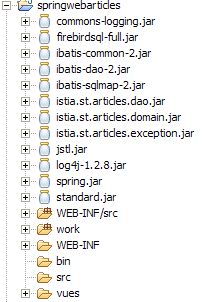
3.7.3.2. Configurazione dell'accesso ai dati
Poiché l'interfaccia di accesso ai dati rimane invariata, i file di configurazione associati sono gli stessi della versione precedente. Sono definiti in [WEB-INF/src]:
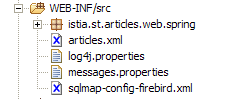
Nello screenshot sopra riportato, i file [articles.xml, spring-config-sqlmap-firebird.xml, sqlmap-config-firebird.xml, log4j.properties] sono quelli delle versioni precedenti.
3.7.3.3. La directory degli archivi
In [WEB-INF/lib] si trovano gli stessi archivi della versione precedente, ad eccezione di quelli relativi a Struts, che non è più necessario:
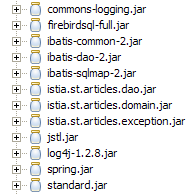
3.7.3.4. Configurazione dell’applicazione
L'applicazione viene configurata tramite tre file: [web.xml, applicationContext.xml, springwebarticles-servlet.xml] nella cartella [WEB-INF]:
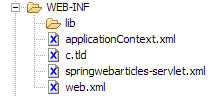
Il file [web.xml] è il seguente:
| <?xml version="1.0" encoding="ISO-8859-1"?>
<!DOCTYPE web-app PUBLIC
"-//Sun Microsystems, Inc.//DTD Web Application 2.3//EN"
"http://java.sun.com/dtd/web-app_2_3.dtd">
<web-app>
<!-- caricatore del contesto Spring dell'applicazione -->
<listener>
<listener-class>
org.springframework.web.context.ContextLoaderListener</listener-class>
</listener>
<!-- il servlet -->
<servlet>
<servlet-name>springwebarticles</servlet-name>
<servlet-class>
org.springframework.web.servlet.DispatcherServlet</servlet-class>
</servlet>
<!-- il mapping degli URL -->
<servlet-mapping>
<servlet-name>springwebarticles</servlet-name>
<url-pattern>*.do</url-pattern>
</servlet-mapping>
<!-- il documento di input -->
<welcome-file-list>
<welcome-file>/vues/index.jsp</welcome-file>
</welcome-file-list>
</web-app>
|
Cosa contiene questo file?
- la pagina iniziale dell’applicazione è [/vues/index.jsp] (welcome-file)
- le richieste URL del tipo *.do verranno reindirizzate al servlet [springwebarticles] (servlet-mapping)
- il servlet [springwebarticles] è un'istanza della classe [org.springframework.web.servlet.DispatcherServlet] (servlet-name, servlet-class) fornita da Spring.
- Il listener [org.springframework.web.context.ContextLoaderListener] verrà avviato all'avvio dell'applicazione. Il suo ruolo principale sarà quello di istanziare i bean Spring definiti nel file [applicationContext.xml]
Il file [applicationContext.xml] è il seguente:
| <?xml version="1.0" encoding="UTF-8"?>
<!DOCTYPE beans SYSTEM "http://www.springframework.org/dtd/spring-beans.dtd">
<beans>
<!-- la classe di accesso ai dati -->
<bean id="articlesDao" class="istia.st.articles.dao.ArticlesDaoSqlMap">
<constructor-arg index="0">
<value>sqlmap-config-firebird.xml</value>
</constructor-arg>
</bean>
<!-- la classe di business -->
<bean id="articlesDomain" class="istia.st.articles.domain.AchatsArticles">
<constructor-arg index="0">
<ref bean="articlesDao"/>
</constructor-arg>
</bean>
<!-- la configurazione dell'applicazione web-->
<bean id="config" class="istia.st.articles.web.spring.Config" init-method="init">
<property name="articlesDomain">
<ref bean="articlesDomain"/>
</property>
</bean>
</beans>
|
Si ritrovano elementi noti e altri meno conosciuti. Tre bean verranno istanziati durante l’inizializzazione dell’applicazione:
- articlesDao: servizio di accesso al livello [dao]
- articlesDomain: servizio di accesso al modello
- config: un bean in cui raccoglieremo le informazioni che tutti i client devono condividere. Questo bean svolgerà il ruolo che tradizionalmente ricopre il contesto dell’applicazione, ma con informazioni tipizzate anziché non tipizzate.
L'ultimo file [springwebarticles.xml] definisce le azioni accettate dall'applicazione in modo molto simile a quello utilizzato dal file Struts [struts-config.xml]. Il suo contenuto è il seguente:
| <?xml version="1.0" encoding="UTF-8"?>
<!DOCTYPE beans PUBLIC "-//SPRING//DTD BEAN//EN" "http://www.springframework.org/dtd/spring-beans.dtd">
<beans>
<!-- i gestori delle azioni = controller -->
<bean id="ListController" class="istia.st.articles.web.spring.ListController">
<property name="config">
<ref bean="config"/>
</property>
</bean>
<bean id="InfosController"
class="istia.st.articles.web.spring.InfosController">
<property name="config">
<ref bean="config"/>
</property>
</bean>
<bean id="AchatController"
class="istia.st.articles.web.spring.AchatController">
<property name="config">
<ref bean="config"/>
</property>
</bean>
<bean id="VoirPanierController"
class="istia.st.articles.web.spring.VoirPanierController">
<property name="config">
<ref bean="config"/>
</property>
</bean>
<bean id="RetirerAchatController"
class="istia.st.articles.web.spring.RetirerAchatController">
<property name="config">
<ref bean="config"/>
</property>
</bean>
<bean id="ValiderPanierController"
class="istia.st.articles.web.spring.ValiderPanierController">
<property name="config">
<ref bean="config"/>
</property>
</bean>
<!-- mappatura dell'applicazione-->
<bean id="urlMapping"
class="org.springframework.web.servlet.handler.SimpleUrlHandlerMapping">
<property name="mappings">
<props>
<prop key="/liste.do">ListController</prop>
<prop key="/main.do">ListController</prop>
<prop key="/infos.do">InfosController</prop>
<prop key="/achat.do">AchatController</prop>
<prop key="/panier.do">VoirPanierController</prop>
<prop key="/retirerachat.do">RetirerAchatController</prop>
<prop key="/validerpanier.do">ValiderPanierController</prop>
</props>
</property>
</bean>
<!-- gestore delle viste -->
<bean id="viewResolver"
class="org.springframework.web.servlet.view.InternalResourceViewResolver">
<property name="viewClass">
<value>org.springframework.web.servlet.view.JstlView</value>
</property>
<property name="prefix">
<value>/vues/</value>
</property>
<property name="suffix">
<value>.jsp</value>
</property>
</bean>
<!-- il file dei messaggi -->
<bean id="messageSource"
class="org.springframework.context.support.ResourceBundleMessageSource">
<property name="basename">
<value>messages</value>
</property>
</bean>
</beans>
|
Cosa indica questo file di configurazione?
- che il nostro controller gestirà i seguenti URL:
| per visualizzare l'elenco degli articoli |
| per visualizzare l'elenco degli articoli |
| per visualizzare le informazioni su un determinato articolo |
| per acquistare un determinato articolo |
| per visualizzare il carrello |
| per rimuovere un articolo dal carrello |
| per confermare il carrello |
- le azioni precedenti corrispondono una a una alle azioni gestite dal controller nelle versioni precedenti. Per ciascuna di esse è specificato il nome della classe incaricata di gestirla. Prendiamo l'esempio dell'azione [/panier.do]:
- deve essere gestita dal bean [VoirPanierController]. Questo nome è arbitrario. Si tratta di una semplice chiave.
<prop key="/panier.do">VoirPanierController</prop>
- la chiave [VoirPanierController] è il nome di un bean definito nello stesso file di configurazione:
<bean id="VoirPanierController"
class="istia.st.articles.web.spring.VoirPanierController">
<property name="config">
<ref bean="config"/>
</property>
</bean>
- Il bean [VoirPanierController] definisce:
- la classe da istanziare [ istia.st.articles.web.spring.VoirPanierController] per gestire l'azione
- come istanziarla. In questo caso, il bean [config], definito da [applicationContext.xml] e istanziato all'avvio dell'applicazione, viene fornito come parametro. Ciò avverrà per tutte le azioni [Controller]. In questo modo, ciascuna di esse disporrà, in un campo privato, dell’oggetto [config], nel quale troverà tutte le informazioni condivise tra tutti i client.
- Come devono essere risolti i nomi delle viste:
<!-- gestore delle viste -->
<bean id="viewResolver"
class="org.springframework.web.servlet.view.InternalResourceViewResolver">
<property name="viewClass">
<value>org.springframework.web.servlet.view.JstlView</value>
</property>
<property name="prefix">
<value>/vues/</value>
</property>
<property name="suffix">
<value>.jsp</value>
</property>
</bean>
Come con Struts, l'istanza [Controller] che elabora un'azione restituirà, al termine dell'elaborazione, una chiave al controller Spring per indicargli quale vista deve visualizzare. A partire da questa chiave, possono esistere diverse strategie per generare la vista associata alla chiave. La strategia scelta è quella definita dal bean [viewResolver]. In questo caso, tale bean è associato alla classe [org.springframework.web.servlet.view.InternalResourceViewResolver] con diversi parametri di inizializzazione. Senza entrare nei dettagli, il bean [viewResolver] specifica in questo caso che se la chiave della vista è "XX", allora la vista generata sarà [/vues/XX.jsp]. Il tipo di viste inviate al client può essere modificato in vari modi:
- cambiando la classe di implementazione del bean [viewResolver]
- modificando i parametri di inizializzazione della classe di implementazione
In questo modo, è possibile passare da una vista HTML a una vista XML semplicemente modificando il valore del bean [viewResolver]
- il nome di un file di messaggi per l’applicazione (messageSource). In questo caso, il file esisterà ma sarà vuoto. Non verrà utilizzato. Deve essere collocato nel [ClassPath] dell’applicazione. Qui verrà collocato in [WEB-INF/classes]. In Eclipse, si ottiene questo risultato collocandolo in [WEB-INF/src]:
3.7.4. Le viste JSP
Le viste JSP utilizzate saranno quelle impiegate da Struts. Nessuna di esse viene modificata:
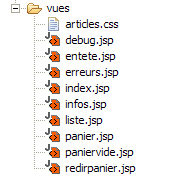
Viene creata una sola nuova vista: redirpanier.jsp. Serve esclusivamente a reindirizzare il client all’azione [/panier.do]. Il suo codice è il seguente:
<%@ page language="java" %>
<%@ taglib uri="/WEB-INF/c.tld" prefix="c" %>
<c:redirect url="/panier.do"/>
Si invita il lettore a rileggere la definizione delle diverse viste nella versione Struts.
3.7.5. Elaborazione delle azioni
Le classi necessarie per l'elaborazione delle diverse azioni sono state raggruppate nel pacchetto [istia.st.articles.web.spring]:
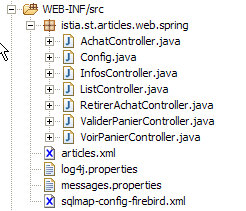
Ricordiamo il funzionamento dell'applicazione Spring con un esempio:
- l'utente richiede l'URL [http://localhost:8080/springwebarticles/main.do]
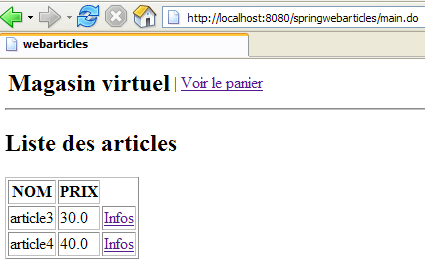
Cosa è successo?
- è stato consultato il file [web.xml] dell’applicazione [springwebarticles]:
| <?xml version="1.0" encoding="ISO-8859-1"?>
<!DOCTYPE web-app PUBLIC
"-//Sun Microsystems, Inc.//DTD Web Application 2.3//EN"
"http://java.sun.com/dtd/web-app_2_3.dtd">
<web-app>
<!-- caricatore del contesto Spring dell'applicazione -->
<listener>
<listener-class>
org.springframework.web.context.ContextLoaderListener</listener-class>
</listener>
<!-- il servlet -->
<servlet>
<servlet-name>springwebarticles</servlet-name>
<servlet-class>
org.springframework.web.servlet.DispatcherServlet</servlet-class>
</servlet>
<!-- mappatura degli URL -->
<servlet-mapping>
<servlet-name>springwebarticles</servlet-name>
<url-pattern>*.do</url-pattern>
</servlet-mapping>
<!-- il documento di input -->
<welcome-file-list>
<welcome-file>/vues/index.jsp</welcome-file>
</welcome-file-list>
</web-app>
|
- Se si trattava della prima richiesta all'applicazione, sono state attivate alcune operazioni:
- è stato caricato il listener [ org.springframework.web.context.ContextLoaderListener]
- ha utilizzato il file di configurazione [applicationContext.xml]:
| <?xml version="1.0" encoding="UTF-8"?>
<!DOCTYPE beans SYSTEM "http://www.springframework.org/dtd/spring-beans.dtd">
<beans>
<!-- la classe di accesso ai dati -->
<bean id="articlesDao" class="istia.st.articles.dao.ArticlesDaoSqlMap">
<constructor-arg index="0">
<value>sqlmap-config-firebird.xml</value>
</constructor-arg>
</bean>
<!-- la classe di business -->
<bean id="articlesDomain" class="istia.st.articles.domain.AchatsArticles">
<constructor-arg index="0">
<ref bean="articlesDao"/>
</constructor-arg>
</bean>
<!-- la configurazione dell'applicazione web-->
<bean id="config" class="istia.st.articles.web.spring.Config" init-method="init">
<property name="articlesDomain">
<ref bean="articlesDomain"/>
</property>
</bean>
</beans>
|
- i bean sopra indicati sono stati creati nel contesto dell'applicazione
- è stato quindi utilizzato il file [springwebarticles-servlet.xml]:
| <?xml version="1.0" encoding="UTF-8"?>
<!DOCTYPE beans PUBLIC "-//SPRING//DTD BEAN//EN" "http://www.springframework.org/dtd/spring-beans.dtd">
<beans>
<!-- i gestori delle azioni = controller -->
<bean id="ListController" class="istia.st.articles.web.spring.ListController">
<property name="config">
<ref bean="config"/>
</property>
</bean>
<bean id="InfosController"
class="istia.st.articles.web.spring.InfosController">
<property name="config">
<ref bean="config"/>
</property>
</bean>
<bean id="AchatController"
class="istia.st.articles.web.spring.AchatController">
<property name="config">
<ref bean="config"/>
</property>
</bean>
<bean id="VoirPanierController"
class="istia.st.articles.web.spring.VoirPanierController">
<property name="config">
<ref bean="config"/>
</property>
</bean>
<bean id="RetirerAchatController"
class="istia.st.articles.web.spring.RetirerAchatController">
<property name="config">
<ref bean="config"/>
</property>
</bean>
<bean id="ValiderPanierController"
class="istia.st.articles.web.spring.ValiderPanierController">
<property name="config">
<ref bean="config"/>
</property>
</bean>
<!-- mappatura dell'applicazione-->
<bean id="urlMapping"
class="org.springframework.web.servlet.handler.SimpleUrlHandlerMapping">
<property name="mappings">
<props>
<prop key="/liste.do">ListController</prop>
<prop key="/main.do">ListController</prop>
<prop key="/infos.do">InfosController</prop>
<prop key="/achat.do">AchatController</prop>
<prop key="/panier.do">VoirPanierController</prop>
<prop key="/retirerachat.do">RetirerAchatController</prop>
<prop key="/validerpanier.do">ValiderPanierController</prop>
</props>
</property>
</bean>
<!-- gestore delle viste -->
<bean id="viewResolver"
class="org.springframework.web.servlet.view.InternalResourceViewResolver">
<property name="viewClass">
<value>org.springframework.web.servlet.view.JstlView</value>
</property>
<property name="prefix">
<value>/vues/</value>
</property>
<property name="suffix">
<value>.jsp</value>
</property>
</bean>
<!-- il file dei messaggi -->
<bean id="messageSource"
class="org.springframework.context.support.ResourceBundleMessageSource">
<property name="basename">
<value>messages</value>
</property>
</bean>
</beans>
|
- sono stati creati anche i bean [Controller] definiti da questo file
- Ora è tutto pronto per elaborare la richiesta del client. La richiesta era: [http://localhost:8080/springwebarticles]. In questo caso, non viene richiesto un URL del contesto, ma il contesto stesso. Viene quindi utilizzata la sezione [welcome-file] del file [web.xml].
<welcome-file-list>
<welcome-file>/vues/index.jsp</welcome-file>
</welcome-file-list>
- la vista [index.jsp] è la seguente:
<%@ page language="java" %>
<%@ taglib uri="/WEB-INF/c.tld" prefix="c" %>
<c:redirect url="/main.do"/>
- il client viene quindi invitato a reindirizzarsi all'URL [http://localhost:8080/springwebarticles/main.do]. E lo fa.
- Il controller Spring riceve quindi una nuova richiesta. Utilizza il proprio file [springwebarticles-servlet.xml]:
| <?xml version="1.0" encoding="UTF-8"?>
<!DOCTYPE beans PUBLIC "-//SPRING//DTD BEAN//EN" "http://www.springframework.org/dtd/spring-beans.dtd">
<beans>
<!-- gestori di azioni = controller -->
<bean id="ListController" class="istia.st.articles.web.spring.ListController">
<property name="config">
<ref bean="config"/>
</property>
</bean>
....
</bean>
<!-- mappatura dell'applicazione-->
<bean id="urlMapping"
class="org.springframework.web.servlet.handler.SimpleUrlHandlerMapping">
<property name="mappings">
<props>
<prop key="/liste.do">ListController</prop>
<prop key="/main.do">ListController</prop>
<prop key="/infos.do">InfosController</prop>
<prop key="/achat.do">AchatController</prop>
<prop key="/panier.do">VoirPanierController</prop>
<prop key="/retirerachat.do">RetirerAchatController</prop>
<prop key="/validerpanier.do">ValiderPanierController</prop>
</props>
</property>
</bean>
</beans>
|
- questo file gli indica che l’azione [/main.do] deve essere gestita dal bean [ListController].
- La richiesta del client viene inoltrata al metodo [handleRequest] del bean [ListController]. Quest’ultimo esegue la propria operazione e restituisce al controller la chiave della vista da visualizzare. In questo caso, se tutto va bene, tale chiave sarà [liste].
- Il controller Spring utilizza il bean [viewResolver] del file di configurazione [springwebarticles-servlet.xml] per determinare la vista associata a tale chiave. In questo caso, sarà la vista [/vues/liste.jsp]
- la vista [/vues/liste.jsp] viene inviata al client
3.7.6. Inizializzazione dell’applicazione Spring
Abbiamo detto che all’avvio dell’applicazione vengono istanziati i bean del file [applicationContext.xml]:
| <?xml version="1.0" encoding="UTF-8"?>
<!DOCTYPE beans SYSTEM "http://www.springframework.org/dtd/spring-beans.dtd">
<beans>
<!-- la classe di accesso ai dati -->
<bean id="articlesDao" class="istia.st.articles.dao.ArticlesDaoSqlMap">
<constructor-arg index="0">
<value>sqlmap-config-firebird.xml</value>
</constructor-arg>
</bean>
<!-- la classe di business -->
<bean id="articlesDomain" class="istia.st.articles.domain.AchatsArticles">
<constructor-arg index="0">
<ref bean="articlesDao"/>
</constructor-arg>
</bean>
<!-- la configurazione dell'applicazione web-->
<bean id="config" class="istia.st.articles.web.spring.Config" init-method="init">
<property name="articlesDomain">
<ref bean="articlesDomain"/>
</property>
</bean>
</beans>
|
Conosciamo i bean [articlesDao, articlesDomain] ma non il bean [config]. Quest’ultimo è definito dalla seguente classe Java:
| package istia.st.articles.web.spring;
import java.util.Hashtable;
import istia.st.articles.domain.IArticlesDomain;
/**
* @author ST - ISTIA
*/
public class Config {
     // campi privati
    private IArticlesDomain articlesDomain = null;
private final String ACTION_LISTE = "liste.do";
private final String ACTION_PANIER = "panier.do";
private final String ACTION_VALIDATION_PANIER = "validerpanier.do";
private final String lienActionListe = "Liste des articles";
private final String lienActionPanier = "Voir le panier";
private final String lienActionValidationPanier = "Valider le panier";
private Hashtable hActionListe = new Hashtable(2);
private Hashtable hActionPanier = new Hashtable(2);
private Hashtable hActionValidationPanier = new Hashtable(2);
// getter e setter
public IArticlesDomain getArticlesDomain() {
return articlesDomain;
}
public void setArticlesDomain(IArticlesDomain articlesDomain) {
this.articlesDomain = articlesDomain;
}
public Hashtable getHActionListe() {
return hActionListe;
}
public Hashtable getHActionPanier() {
return hActionPanier;
}
public Hashtable getHActionValidationPanier() {
return hActionValidationPanier;
}
// inizializzazione dell'applicazione web
public void init() {
// si memorizzano alcuni URL dell'applicazione
hActionListe.put("href", ACTION_LISTE);
hActionListe.put("lien", lienActionListe);
hActionPanier.put("href", ACTION_PANIER);
hActionPanier.put("lien", lienActionPanier);
hActionValidationPanier.put("href", ACTION_VALIDATION_PANIER);
hActionValidationPanier.put("lien", lienActionValidationPanier);
// È tutto
return;
}
}
|
Questa classe esegue ciò che fa il metodo [init] di un servlet di un’applicazione web. Inizializza l’applicazione. In questo caso, ciò avviene nel modo seguente:
- poiché il bean [config] è definito come segue in [applicationContext.xml]:
<!-- configurazione dell'applicazione web-->
<bean id="config" class="istia.st.articles.web.spring.Config" init-method="init">
<property name="articlesDomain">
<ref bean="articlesDomain"/>
</property>
</bean>
al momento della creazione, il suo campo privato [articlesDomain] è stato inizializzato
- Successivamente, a causa dell'attributo [init-method="init"] del bean sopra indicato, viene eseguito il metodo [init] della classe associata al bean. Qui, il metodo inizializza i tre dizionari [hActionListe, hActionPanier, hActionValidationPanier] utilizzati per generare i tre possibili collegamenti del menu offerto all’utente.
- Vengono creati dei metodi di accesso pubblici per rendere accessibili questi campi privati alle istanze di tipo [Controller] che gestiranno le azioni.
3.7.7. Le azioni [Controller] dell’applicazione Spring
3.7.7.1. Introduzione
Ogni azione Spring sarà oggetto di una classe di tipo [Controller]. Nella versione Struts, ogni azione era oggetto di una classe di tipo [Action]. La scrittura della classe [Controller] consiste, nella maggior parte dei casi, nel:
- nel copiare e incollare la classe [Action] utilizzata nella versione Struts
- ad adattare il codice alle convenzioni di Spring
3.7.7.2. main.do, liste.do
Queste due azioni sono identiche e definite in [springwebarticles-servlet.xml] da:
| <!-- mappatura dell'applicazione-->
<bean id="urlMapping"
class="org.springframework.web.servlet.handler.SimpleUrlHandlerMapping">
<property name="mappings">
<props>
<prop key="/liste.do">ListController</prop>
<prop key="/main.do">ListController</prop>
...
</props>
</property>
</bean>
<bean id="ListController" class="istia.st.articles.web.spring.ListController">
<property name="config">
<ref bean="config"/>
</property>
</bean>
|
Sono associate alla classe [ istia.st.articles.web.spring.ListController] che descriveremo in dettaglio tra poco. Quando una di queste azioni viene eseguita in un browser, si ottiene il seguente risultato:
Il codice della classe [istia.st.articles.web.spring.ListController] è il seguente:
| package istia.st.articles.web.spring;
import istia.st.articles.exception.UncheckedAccessArticlesException;
import java.util.ArrayList;
import java.util.Hashtable;
import java.util.List;
import javax.servlet.http.HttpServletRequest;
import javax.servlet.http.HttpServletResponse;
import org.springframework.web.servlet.ModelAndView;
import org.springframework.web.servlet.mvc.Controller;
public class ListController implements Controller {
// configurazione dell'applicazione web
Config config;
public void setConfig(Config config) {
this.config = config;
}
// elaborazione della richiesta
public ModelAndView handleRequest(HttpServletRequest request,
HttpServletResponse response) throws Exception {
// viene richiesta la lista degli articoli
List articles = null;
try {
articles = config.getArticlesDomain().getAllArticles();
} catch (UncheckedAccessArticlesException ex) {
// si registra l'errore
ArrayList erreurs = new ArrayList();
erreurs.add("Erreur lors de l'obtention de tous les articles : "
+ ex.toString());
// viene visualizzata la pagina degli errori
request.setAttribute("erreurs", erreurs);
request.setAttribute("actions", new Hashtable[] { config
.getHActionListe() });
// invia la pagina degli errori
return new ModelAndView("erreurs");
}
// viene visualizzato l'elenco degli articoli
request.setAttribute("listarticles", articles);
request.setAttribute("message", "");
request.setAttribute("actions", new Hashtable[] { config
.getHActionPanier() });
// invia la vista
return new ModelAndView("liste");
}
}
|
Commenti:
- la classe ha un campo privato [config]. Questo campo è stato inizializzato da Spring al momento dell’istanziazione del bean [ListController]:
<bean id="ListController" class="istia.st.articles.web.spring.ListController">
<property name="config">
<ref bean="config"/>
</property>
</bean>
Come si può vedere sopra, il campo [config] di [ListController] viene inizializzato con il bean [config]. Di cosa si tratta? Si tratta del bean [config] definito in [applicationContext.xml], c.a.d e di un’istanza di [istia.st.articles.web.spring.Config] descritta in precedenza.
- Scrivere il codice di una classe [Controller] consiste essenzialmente nello scrivere il codice del suo metodo [handleRequest]
- si richiede l’elenco degli articoli al modello. Quest’ultimo è accessibile tramite [config.getArticlesDomain()]. Se si verifica un’eccezione, viene inviata la vista [ERREURS]. Il risultato restituito da [handleRequest] deve essere di tipo [ModelAndView]. È possibile istanziare questa classe in diversi modi. In questo caso, e così sarà sempre, si crea un’istanza di [ModelAndView] passandole la chiave della vista da visualizzare. Si ricorda che, in base alla configurazione del bean [viewResolver], la richiesta di visualizzazione della vista con chiave XX comporterà l’invio della vista [/vues/XX.jsp].
| // si richiede l'elenco degli articoli
List articles = null;
try {
articles = config.getArticlesDomain().getAllArticles();
} catch (UncheckedAccessArticlesException ex) {
// si registra l'errore
ArrayList erreurs = new ArrayList();
erreurs.add("Erreur lors de l'obtention de tous les articles : "
+ ex.toString());
// visualizza la pagina degli errori
request.setAttribute("erreurs", erreurs);
request.setAttribute("actions", new Hashtable[] { config
.getHActionListe() });
// invia la pagina degli errori
return new ModelAndView("erreurs");
}
|
- se non ci sono errori, viene inviata la vista [LISTE]:
| // visualizza l'elenco degli articoli
request.setAttribute("listarticles", articles);
request.setAttribute("message", "");
request.setAttribute("actions", new Hashtable[] { config
.getHActionPanier() });
// invia la vista
return new ModelAndView("liste");
|
3.7.7.3. infos.do
Questa azione serve a fornire informazioni su uno degli articoli visualizzati nella vista [LISTE]:
Questa azione è definita in [springwebarticles-servlet.xml] da:
| <!-- la mappatura dell'applicazione-->
<bean id="urlMapping"
class="org.springframework.web.servlet.handler.SimpleUrlHandlerMapping">
<property name="mappings">
<props>
<prop key="/infos.do">InfosController</prop>
...
</props>
</property>
</bean>
...
<bean id="InfosController"
class="istia.st.articles.web.spring.InfosController">
<property name="config">
<ref bean="config"/>
</property>
</bean>
|
Il codice della classe [InfosController] è il seguente:
| package istia.st.articles.web.spring;
import istia.st.articles.dao.Article;
import istia.st.articles.exception.UncheckedAccessArticlesException;
import java.util.ArrayList;
import java.util.Hashtable;
import javax.servlet.http.HttpServletRequest;
import javax.servlet.http.HttpServletResponse;
import org.springframework.web.servlet.ModelAndView;
import org.springframework.web.servlet.mvc.Controller;
public class InfosController implements Controller {
// la configurazione dell'applicazione web
Config config;
public void setConfig(Config config) {
this.config = config;
}
// elaborazione della richiesta
public ModelAndView handleRequest(HttpServletRequest request,
HttpServletResponse response) throws Exception {
// l'elenco degli errori
ArrayList erreurs = new ArrayList();
// si recupera l'ID richiesto
String strId = request.getParameter("id");
// qualcosa?
if (strId == null) {
// non è normale
erreurs.add("action incorrecte([infos,id=null]");
request.setAttribute("erreurs", erreurs);
request.setAttribute("actions", new Hashtable[] { config.getHActionListe() });
return new ModelAndView("erreurs");
}
// si trasforma strId in un numero intero
int id = 0;
try {
id = Integer.parseInt(strId);
} catch (Exception ex) {
// non è normale
erreurs.add("action incorrecte([infos,id=" + strId + "]");
request.setAttribute("erreurs", erreurs);
request.setAttribute("actions", new Hashtable[] { config.getHActionListe() });
return new ModelAndView("erreurs");
}
// si richiede l'ID della voce
Article article = null;
try {
article = config.getArticlesDomain().getArticleById(id);
} catch (UncheckedAccessArticlesException ex) {
// non normale
erreurs.add("Erreur d'accès aux données [" + ex.toString() + "]");
request.setAttribute("erreurs", erreurs);
request.setAttribute("actions", new Hashtable[] { config.getHActionListe() });
return new ModelAndView("erreurs");
}
if (article == null) {
// non corretto
erreurs.add("Article de clé [" + id + "] inexistant");
request.setAttribute("erreurs", erreurs);
request.setAttribute("actions", new Hashtable[] { config.getHActionListe() });
return new ModelAndView("erreurs");
}
// si inserisce l'articolo nella sessione
request.getSession().setAttribute("article", article);
// viene visualizzata la pagina informativa
request.setAttribute("actions", new Hashtable[] { config.getHActionListe() });
return new ModelAndView("infos");
}
}
|
Commenti:
- il metodo [handleRequest] recupera il parametro [id] che normalmente dovrebbe trovarsi nell'URL. Quest'ultimo deve infatti avere la forma [/infos.do?id=X]. Vengono effettuati diversi test per verificare la presenza e la validità del parametro [id]. In caso di problema, viene inviata la vista [ERREURS].
- Se [id] è valido, l’articolo corrispondente viene richiesto al livello [domain]. Se quest’ultimo genera un’eccezione o se l’articolo non viene trovato, anche in questo caso viene inviata la vista [ERREURS].
- Se tutto va bene, l’articolo ottenuto viene inserito nella sessione. Si tratta di un punto discutibile. In questo caso, si parte dal presupposto che il cliente possa acquistare quell’articolo. Se lo fa, lo si recupererà dalla sessione, anziché richiederlo nuovamente al livello [domain].
- Infine, viene visualizzata la vista [INFOS].
3.7.7.4. achat.do
Questa azione serve ad acquistare l’articolo visualizzato dalla vista precedente [INFOS]:
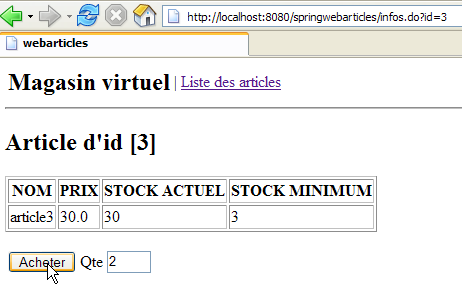
Se si esamina il codice HTML di questa vista, si nota che il tag <form> è definito come segue:
        <form method="post" action="achat.do?id=3"/>
            <table>
                <tr>
                    <td><input type="submit" value="Acheter"></td>
                    <td>Qte <input type="text" name="qte" size="3" value=""></td>
                    <td></td>
                </tr>
            </table>
        </form>
Si vede quindi che il modulo viene inviato al controller con l'azione [achat.do].
Tale azione è configurata come segue in [springwebarticles-servlet.xml]:
<!-- mappatura dell'applicazione-->
<bean id="urlMapping"
class="org.springframework.web.servlet.handler.SimpleUrlHandlerMapping">
<property name="mappings">
<props>
...
<prop key="/achat.do">AchatController</prop>
...
</props>
</property>
</bean>
<bean id="AchatController"
class="istia.st.articles.web.spring.AchatController">
<property name="config">
<ref bean="config"/>
</property>
</bean>
Il codice della classe [AchatController] è il seguente:
| package istia.st.articles.web.spring;
import istia.st.articles.dao.Article;
import istia.st.articles.domain.Achat;
import istia.st.articles.domain.Panier;
import java.util.ArrayList;
import java.util.Hashtable;
import javax.servlet.http.HttpServletRequest;
import javax.servlet.http.HttpServletResponse;
import javax.servlet.http.HttpSession;
import org.springframework.web.servlet.ModelAndView;
import org.springframework.web.servlet.mvc.Controller;
public class AchatController implements Controller {
// la configurazione dell'applicazione web
Config config;
public void setConfig(Config config) {
this.config = config;
}
// elaborazione della richiesta
public ModelAndView handleRequest(HttpServletRequest request,
HttpServletResponse response) throws Exception {
// l'elenco degli errori relativi a questa azione
ArrayList erreurs = new ArrayList();
// si recupera la quantità acquistata
int qté = 0;
try {
qté = Integer.parseInt(request.getParameter("qte"));
if (qté <= 0)
throw new NumberFormatException();
} catch (NumberFormatException ex) {
// quantità errata
request.setAttribute("msg", "Quantité incorrecte");
request.setAttribute("qte", request.getParameter("qte"));
request.setAttribute("actions", new Hashtable[] { config
.getHActionListe() });
return new ModelAndView("infos");
}
// recupero della sessione del cliente
HttpSession session = request.getSession();
// si recupera l'articolo aggiunto alla sessione
Article article = (Article) session.getAttribute("article");
// sessione scaduta?
if (article == null) {
// viene visualizzata la pagina degli errori
erreurs.add("Votre session a expiré");
request.setAttribute("erreurs", erreurs);
request.setAttribute("actions", new Hashtable[] { config
.getHActionListe() });
return new ModelAndView("erreurs");
}
// si crea il nuovo acquisto
Achat achat = new Achat(article, qté);
// si aggiunge l'acquisto al carrello del cliente
Panier panier = (Panier) session.getAttribute("panier");
if (panier == null) {
panier = new Panier();
session.setAttribute("panier", panier);
}
panier.ajouter(achat);
// si torna all'elenco degli articoli
return new ModelAndView("index");
}
}
|
Commenti:
- ricordiamo la struttura del modulo inviato al controller:
        <form method="post" action="achat.do?id=3"/>
            <table>
                <tr>
                    <td><input type="submit" value="Acheter"></td>
                    <td>Qte <input type="text" name="qte" size="3" value=""></td>
                    <td></td>
                </tr>
            </table>
        </form>
- Nella richiesta sono presenti due parametri: [id]: numero dell'articolo acquistato, [qte]: quantità acquistata.
- Vengono verificate la presenza e la validità del parametro [qte]. Se tale parametro viene riconosciuto come errato, all’utente viene restituita la vista [INFOS] accompagnata da un messaggio di errore:
| // elenco degli errori relativi a questa azione
ArrayList erreurs = new ArrayList();
// si recupera la quantità acquistata
int qté = 0;
try {
qté = Integer.parseInt(request.getParameter("qte"));
if (qté <= 0)
throw new NumberFormatException();
} catch (NumberFormatException ex) {
// quantità errata
request.setAttribute("msg", "Quantité incorrecte");
request.setAttribute("qte", request.getParameter("qte"));
request.setAttribute("actions", new Hashtable[] { config
.getHActionListe() });
return new ModelAndView("infos");
}
|
- l'articolo acquistato viene recuperato dalla sessione. È possibile che la sessione sia scaduta. In tal caso, viene inviata la vista [ERREURS]:
| // si recupera la sessione del cliente
HttpSession session = request.getSession();
// si recupera l'articolo aggiunto alla sessione
Article article = (Article) session.getAttribute("article");
// sessione scaduta?
if (article == null) {
// viene visualizzata la pagina degli errori
erreurs.add("Votre session a expiré");
request.setAttribute("erreurs", erreurs);
request.setAttribute("actions", new Hashtable[] { config
.getHActionListe() });
return new ModelAndView("erreurs");
}
|
- se la sessione non è scaduta, l'articolo viene aggiunto al carrello, anch'esso recuperato dalla sessione:
| // si crea il nuovo acquisto
Achat achat = new Achat(article, qté);
// si aggiunge l'acquisto al carrello del cliente
Panier panier = (Panier) session.getAttribute("panier");
if (panier == null) {
panier = new Panier();
session.setAttribute("panier", panier);
}
panier.ajouter(achat);
|
- infine, si invia la vista [LISTE]:
// si torna all'elenco degli articoli
return new ModelAndView("index");
- Sopra, viene inviata la vista [/vues/index.jsp]. Sappiamo che questa richiede al browser client di reindirizzarsi all’URL [/main.do]. È questo reindirizzamento che visualizzerà l’elenco degli articoli.
3.7.7.5. panier.do
Questa azione serve a visualizzare tutti gli acquisti del cliente. È disponibile tramite il menu:
Il codice HTML associato al link sopra indicato è il seguente:
<a href="panier.do">Voir le panier</a>
La pagina a cui rimanda questo link è la seguente:
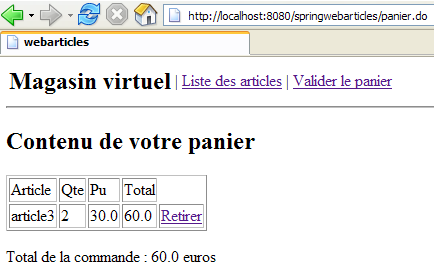
Questa azione è configurata come segue in [springwebarticles-servlet.xml]:
| <!-- mappatura dell'applicazione-->
<bean id="urlMapping"
class="org.springframework.web.servlet.handler.SimpleUrlHandlerMapping">
<property name="mappings">
<props>
...
<prop key="/panier.do">VoirPanierController</prop>
...
</props>
</property>
</bean>
...
<bean id="VoirPanierController"
class="istia.st.articles.web.spring.VoirPanierController">
<property name="config">
<ref bean="config"/>
</property>
</bean>
|
Il codice della classe [VoirPanierController] è il seguente:
| package istia.st.articles.web.spring;
import istia.st.articles.domain.Panier;
import java.util.Hashtable;
import javax.servlet.http.HttpServletRequest;
import javax.servlet.http.HttpServletResponse;
import org.springframework.web.servlet.ModelAndView;
import org.springframework.web.servlet.mvc.Controller;
public class VoirPanierController implements Controller {
// configurazione dell'applicazione web
Config config;
public void setConfig(Config config) {
this.config = config;
}
// elaborazione della richiesta
public ModelAndView handleRequest(HttpServletRequest request,
HttpServletResponse response) throws Exception {
// visualizzazione del carrello
Panier panier = (Panier) request.getSession().getAttribute("panier");
if (panier == null || panier.getAchats().size() == 0) {
// carrello vuoto
request.setAttribute("actions", new Hashtable[] { config
.getHActionListe() });
return new ModelAndView("paniervide");
} else {
// c'è qualcosa nel carrello
request.setAttribute("actions", new Hashtable[] {
config.getHActionListe(), config.getHActionValidationPanier() });
return new ModelAndView("panier");
}
}
}
|
Commenti:
- il carrello viene prelevato dalla sessione in cui si trova normalmente. È possibile che la sessione sia scaduta e quindi non sia presente alcun carrello. In questo caso non viene generato un errore, ma si considera semplicemente che il carrello sia vuoto.
- Se il carrello è vuoto, viene visualizzata la vista [PANIERVIDE]
- altrimenti, viene visualizzata la vista [PANIER]
3.7.7.6. retirerachat.do
Questa azione serve a rimuovere un articolo dal carrello:
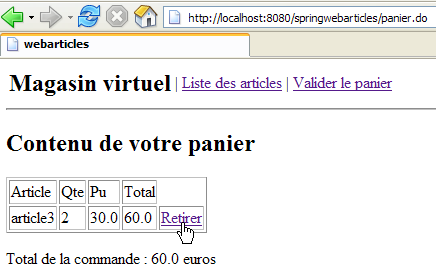
Se si osserva il codice HTML del link sopra riportato, si ottiene quanto segue:
<a href="retirerachat.do?id=3">Retirer</a>
L'azione [retirerachat.do] riceve quindi come parametro l'ID dell'articolo da rimuovere dal carrello. Questa azione è configurata come segue in [springwebarticles-servlet.xml]:
| <!-- mappatura dell'applicazione-->
<bean id="urlMapping"
class="org.springframework.web.servlet.handler.SimpleUrlHandlerMapping">
<property name="mappings">
<props>
...
<prop key="/retirerachat.do">RetirerAchatController</prop>
</props>
</property>
</bean>
...
<bean id="RetirerAchatController"
class="istia.st.articles.web.spring.RetirerAchatController">
<property name="config">
<ref bean="config"/>
</property>
</bean>
|
Il codice della classe [RetirerAchatController] è il seguente:
| package istia.st.articles.web.spring;
import istia.st.articles.domain.Panier;
import java.util.ArrayList;
import java.util.Hashtable;
import javax.servlet.http.HttpServletRequest;
import javax.servlet.http.HttpServletResponse;
import org.springframework.web.servlet.ModelAndView;
import org.springframework.web.servlet.mvc.Controller;
public class RetirerAchatController implements Controller {
// la configurazione dell'applicazione web
Config config;
public void setConfig(Config config) {
this.config = config;
}
// elaborazione della richiesta
public ModelAndView handleRequest(HttpServletRequest request,
HttpServletResponse response) throws Exception {
// l'elenco degli errori relativi a questa azione
ArrayList erreurs = new ArrayList();
// recupero del carrello
Panier panier = (Panier) request.getSession().getAttribute("panier");
if (panier == null) {
// sessione scaduta
erreurs.add("Votre session a expiré");
request.setAttribute("erreurs", erreurs);
request.setAttribute("actions", new Hashtable[] { config
.getHActionListe() });
return new ModelAndView("erreurs");
}
// recupero dell'ID dell'articolo da rimuovere
String strId = request.getParameter("id");
// qualcosa?
if (strId == null) {
// non è normale
erreurs.add("action incorrecte([retirerachat,id=null]");
request.setAttribute("erreurs", erreurs);
request.setAttribute("actions", new Hashtable[] { config
.getHActionListe() });
return new ModelAndView("erreurs");
}
// si trasforma strId in un numero intero
int id = 0;
try {
id = Integer.parseInt(strId);
} catch (Exception ex) {
// non è normale
erreurs.add("action incorrecte([retirerachat,id=" + strId + "]");
request.setAttribute("erreurs", erreurs);
request.setAttribute("actions", new Hashtable[] { config
.getHActionListe() });
return new ModelAndView("erreurs");
}
     // si rimuove l'acquisto
    panier.enlever(id);
// si visualizza nuovamente il carrello
request.setAttribute("actions",
new Hashtable[] { config.getHActionListe() });
return new ModelAndView("redirpanier");
}
}
|
Commenti:
- il codice verifica la presenza e la validità del parametro [id]. Se risulta errato, viene inviata la vista [ERREURS].
- Altrimenti, l’acquisto viene rimosso dal carrello:
// si rimuove l'acquisto
panier.enlever(id);
- quindi il carrello viene visualizzato nuovamente:
// si visualizza nuovamente il carrello
request.setAttribute("actions",
new Hashtable[] { config.getHActionListe() });
return new ModelAndView("redirpanier");
Ricordiamo il codice della vista [/vues/redirpanier.jsp]:
<%@ page language="java" %>
<%@ taglib uri="/WEB-INF/c.tld" prefix="c" %>

<c:redirect url="/panier.do"/>
Si nota che il cliente verrà reindirizzato all’azione [/panier.do]. Quest’ultima è già stata descritta. Visualizzerà la vista [PANIER] o [PANIERVIDE] a seconda dello stato del carrello.
3.7.7.7. validerpanier.do
Questa azione serve a confermare gli acquisti effettuati dal cliente. In pratica, ciò si traduce in un’unica operazione: le scorte degli articoli acquistati vengono ridotte delle quantità acquistate nel database. Questa azione proviene dal seguente menu:
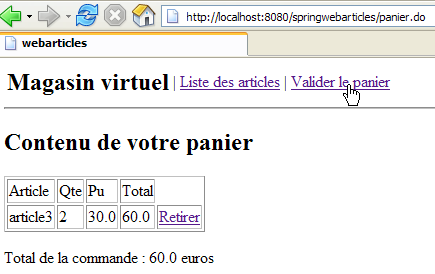
Il codice HTML del link [Valider le panier] è il seguente:
<a href="validerpanier.do">Valider le panier</a>
Quando questo collegamento viene attivato, le scorte vengono ridotte e l’elenco degli articoli viene nuovamente visualizzato.
Questa azione è configurata come segue in [springwebarticles-servlet.xml]:
| <!-- mappatura dell'applicazione-->
<bean id="urlMapping"
class="org.springframework.web.servlet.handler.SimpleUrlHandlerMapping">
<property name="mappings">
<props>
...
<prop key="/validerpanier.do">ValiderPanierController</prop>
</props>
</property>
</bean>
...
<bean id="ValiderPanierController"
class="istia.st.articles.web.spring.ValiderPanierController">
<property name="config">
<ref bean="config"/>
</property>
</bean>
|
Il codice della classe [ValiderPanierController] è il seguente:
| package istia.st.articles.web.spring;
import istia.st.articles.domain.Panier;
import istia.st.articles.exception.UncheckedAccessArticlesException;
import java.util.ArrayList;
import java.util.Hashtable;
import javax.servlet.http.HttpServletRequest;
import javax.servlet.http.HttpServletResponse;
import org.springframework.web.servlet.ModelAndView;
import org.springframework.web.servlet.mvc.Controller;
public class ValiderPanierController implements Controller {
// configurazione dell'applicazione web
Config config;
public void setConfig(Config config) {
this.config = config;
}
// elaborazione della richiesta
public ModelAndView handleRequest(HttpServletRequest request,
HttpServletResponse response) throws Exception {
// l'elenco degli errori relativi a questa azione
ArrayList erreurs = new ArrayList();
// l'acquirente ha confermato il carrello
Panier panier = (Panier) request.getSession().getAttribute("panier");
if (panier == null) {
// sessione scaduta
erreurs.add("Votre session a expiré");
request.setAttribute("erreurs", erreurs);
request.setAttribute("actions", new Hashtable[] { config
.getHActionListe() });
return new ModelAndView("erreurs");
}
// conferma del carrello
try {
config.getArticlesDomain().acheter(panier);
} catch (UncheckedAccessArticlesException ex) {
// non normale
erreurs.add("Erreur d'accès aux données [" + ex.toString() + "]");
request.setAttribute("erreurs", erreurs);
request.setAttribute("actions", new Hashtable[] { config
.getHActionListe() });
return new ModelAndView("erreurs");
}
// si recuperano eventuali errori
erreurs = config.getArticlesDomain().getErreurs();
if (erreurs.size() != 0) {
request.setAttribute("erreurs", erreurs);
request.setAttribute("actions", new Hashtable[] { config
.getHActionListe(), config.getHActionPanier() });
return new ModelAndView("erreurs");
}
// tutto sembra a posto OK - si visualizza l'elenco degli articoli
return new ModelAndView("index");
}
}
|
Commenti:
- si recupera il carrello dalla sessione. Se questa è scaduta, si invia la vista [ERREURS]:
| // elenco degli errori relativi a questa azione
ArrayList erreurs = new ArrayList();
// l'acquirente ha confermato il carrello
Panier panier = (Panier) request.getSession().getAttribute("panier");
if (panier == null) {
// sessione scaduta
erreurs.add("Votre session a expiré");
request.setAttribute("erreurs", erreurs);
request.setAttribute("actions", new Hashtable[] { config
.getHActionListe() });
return new ModelAndView("erreurs");
}
|
- Si confermano gli acquisti nel carrello. Possono verificarsi errori se le scorte sono insufficienti a soddisfare gli acquisti. In questo caso, si invia la vista [ERREURS]:
| // conferma del carrello
try {
config.getArticlesDomain().acheter(panier);
} catch (UncheckedAccessArticlesException ex) {
// anomalia
erreurs.add("Erreur d'accès aux données [" + ex.toString() + "]");
request.setAttribute("erreurs", erreurs);
request.setAttribute("actions", new Hashtable[] { config
.getHActionListe() });
return new ModelAndView("erreurs");
}
// si recuperano eventuali errori
erreurs = config.getArticlesDomain().getErreurs();
if (erreurs.size() != 0) {
request.setAttribute("erreurs", erreurs);
request.setAttribute("actions", new Hashtable[] { config
.getHActionListe(), config.getHActionPanier() });
return new ModelAndView("erreurs");
}
|
- se tutto è andato a buon fine, viene nuovamente visualizzato l’elenco degli articoli:
// tutto sembra a posto OK - si visualizza l'elenco degli articoli
return new ModelAndView("index");
Sappiamo che la vista [/vues/index.jsp] reindirizza il cliente all’azione [/main.do]. Questa azione visualizzerà la vista [LISTE].