10. جاوااسکریپت
در این بخش، سه مثال از نحوه استفاده از جاوااسکریپت در صفحات WEB را نشان میدهیم. ما بر روی پردازش فرم تمرکز میکنیم، اما جاوااسکریپت میتواند کارهای بسیار بیشتری انجام دهد.
10.1. بازیابی اطلاعات از یک فرم
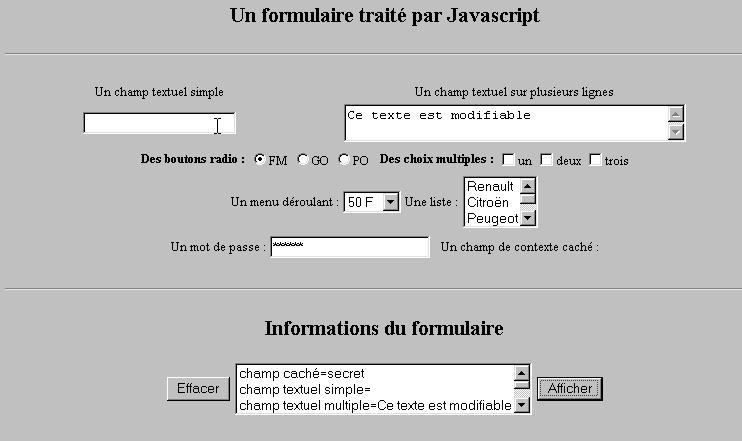
مثال زیر نشان میدهد چگونه میتوان دادههای وارد شده توسط کاربر در یک فرم را در مرورگر بازیابی کرد. این کار عموماً امکان پیشپردازش را پیش از ارسال دادهها به سرور فراهم میکند.
10.1.1. فرم
ما یک فرم حاوی رایجترین اجزا و یک دکمه «نمایش» داریم که امکان نمایش ورودیهای کاربر را فراهم میکند.
10.1.2. کد
<html>
<head>
<title>Un formulaire traité par Javascript</title>
<script language="javascript">
function afficher(){
// دادههای فرم را در یک لیست نمایش میدهد
//ابتدا پاک کردن
effacerInfos();
//نمایش مقادیر فیلدهای #
with(document.frmExemple){
// میدان مخفی
ecrire("champ caché="+cache.value);
// میدان متن تک
ecrire("champ textuel simple="+simple.value);
// میدان متنی چندگانه
ecrire("champ textuel multiple="+lignes.value);
//دکمههای رادیویی
for(i=0;i<radio.length;i++){
texte="radio["+i+"]="+radio[i].value;
if(radio[i].checked) texte+=", coché";
ecrire(texte);
}//برای
// چکباکسها
for(i=0;i<qcm.length;i++){
texte="qcm["+i+"]="+qcm[i].value;
if(qcm[i].checked) texte+=", coché";
ecrire(texte);
}//برای
//لیست کشویی
ecrire("index sélectionné dans le menu="+menu.selectedIndex);
for(i=0;i<menu.length;i++){
texte="menu["+i+"]="+menu.options[i].text;
if(menu.options[i].selected) texte+=",sélectionné";
ecrire(texte);
}//برای
//فهرست چندگزینهای
for(i=0;i<lstVoitures.length;i++){
texte="lstVoitures["+i+"]="+lstVoitures.options[i].text;
if(lstVoitures.options[i].selected) texte+=",sélectionné";
ecrire(texte);
}//برای
//رمز عبور
ecrire("mot de passe="+passwd.value);
}//با
}//تابع
function ecrire(texte){
// متن را به فهرست اطلاعات مینویسد
frmInfos.lstInfos.options[frmInfos.lstInfos.length]=new Option(texte);
}//write
function effacerInfos(){
frmInfos.lstInfos.length=0;
}//effacerInfos
</script>
</head>
<body bgcolor="#C0C0C0" onload="afficher()">
<center>
<h2>Un formulaire traité par Javascript</h2>
<hr>
<form method="POST" name="frmExemple">
<input type="hidden" name="cache" value="secret">
<table border="0">
<tr>
<td align="center">Un champ textuel simple</td>
<td align="center" width="100"> </td>
<td align="center">Un champ textuel sur plusieurs lignes</td>
</tr>
<tr>
<td align="center"><input type="text" size="20" name="simple"></td>
<td align="center" width="100"> </td>
<td align="center">
<textarea name="lignes" rows="2" cols="40">Ce texte est modifiable</textarea>
</td>
</tr>
</table>
<table border="0">
<tr>
<td><strong>Des boutons radio :</strong></td>
<td>
<input type="radio" checked name="radio" value="FM">FM
</td>
<td>
<input type="radio" name="radio" value="GO">GO
</td>
<td>
<input type="radio" name="radio" value="PO">PO
</td>
<td> </td>
<td><strong>Des choix multiples :</strong></td>
<td>
<input type="checkbox" name="qcm" value="un">un
</td>
<td>
<input type="checkbox" name="qcm" value="deux">deux
</td>
<td>
<input type="checkbox" name="qcm" value="trois">trois
</td>
</tr>
</table>
<table border="0">
<tr>
<td>Un menu déroulant : </td>
<td>
<select name="menu" size="1">
<option>50 F</option>
<option>60 F</option>
<option>70 F</option>
<option>100 F</option>
</select>
</td>
<td>Une liste :</td>
<td>
<select name="lstVoitures" multiple size="3">
<option>Renault</option>
<option>Citroën</option>
<option>Peugeot</option>
<option>Fiat</option>
<option>Audi</option>
</select>
</td>
</tr>
</table>
<table border="0">
<tr>
<td>Un mot de passe : </td>
<td><input type="password" size="21" name="passwd"></td>
<td> </td>
<td>Un champ de contexte caché : </td>
</tr>
</table>
</form>
<hr>
<h2>Informations du formulaire</h2>
<form name="frmInfos">
<table>
<tr>
<td><input type="button" value="Effacer" onclick="effacerInfos()"></td>
<td>
<select name="lstInfos" multiple size="3">
</select>
</td>
<td>
<input type="button" name="cmdAfficher" value="Afficher" onclick="afficher()">
</td>
</tr>
</form>
</body>
</html>
10.2. بیانهای منظم در جاوااسکریپت
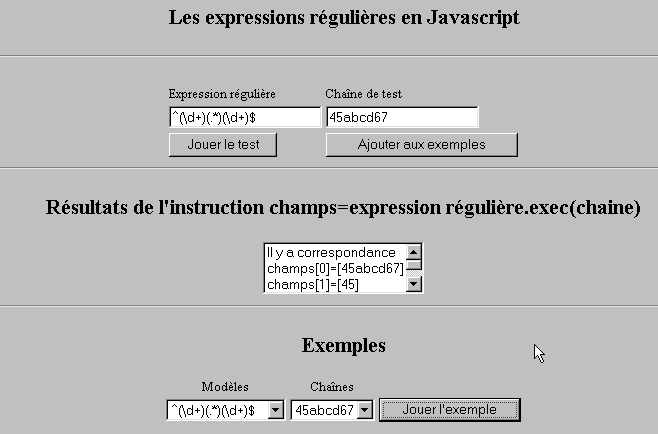
در سمت مرورگر، میتوان از جاوااسکریپت برای بررسی اعتبار دادههای واردشده توسط کاربر پیش از ارسال آنها به سرور استفاده کرد. در اینجا برنامهای برای آزمون این عبارتهای منظم ارائه شده است.
10.2.1. صفحهٔ آزمون
10.2.2. کد صفحه
<html>
<head>
<title>Les expressions régulières en Javascript</title>
<script language="javascript">
function afficherInfos(){
with(document.frmRegExp){
// آیا کاری برای انجام دادن هست؟
if (! verifier()) return;
// مشکلی نیست – بیایید نتایج قبلی را پاک کنیم
effacerInfos();
//در حال بررسی قالب
modele=new RegExp(txtModele.value);
champs=modele.exec(txtChaine.value);
if(champs==null)
//تطابقی بین الگو و رشته وجود ندارد
ecrireInfos("pas de correspondance");
else{
//تطابق – نمایش نتایج
ecrireInfos("Il y a correspondance");
for(i=0;i<champs.length;i++)
ecrireInfos("champs["+i+"]=["+champs[i]+"]");
}//در غیر این صورت
}//با
}//تابع
function ecrireInfos(texte){
// متن را به فهرست اطلاعات مینویسد
document.frmRegExp.lstInfos.options[document.frmRegExp.lstInfos.length]=new Option(texte);
}//نوشتن
function effacerInfos(){
frmRegExp.lstInfos.length=0;
}//effacerInfos
function jouer(){
//قالب را با رشته موجود در مثال انتخابشده بررسی میکند
with(document.frmRegExp){
txtModele.value=lstModeles.options[lstModeles.selectedIndex].text
txtChaine.value=lstChaines.options[lstChaines.selectedIndex].text
afficherInfos();
}//با
}//اجرا
function ajouter(){
//تست فعلی را به مثالها اضافه میکند
with(document.frmRegExp){
// آیا کاری با آن دارد؟
if (! verifier()) return;
// افزودن
lstModeles.options[lstModeles.length]=new Option(txtModele.value);
lstChaines.options[lstChaines.length]=new Option(txtChaine.value);
// پاک کردن ورودیها
txtModele.value="";
txtChaine.value="";
}//با
}//اضافه کنید
function verifier(){
//بررسی کنید که فیلدهای ورودی خالی نباشند
with(document.frmRegExp){
champs=/^\s*$/.exec(txtModele.value);
if(champs!=null){
alert("Vous n'avez pas indiqué de modèle");
txtModele.focus();
return false;
}//اگر
champs=/^\s*$/.exec(txtChaine.value);
if(champs!=null){
alert("Vous n'avez pas indiqué de chaîne de test");
txtChaine.focus();
return false;
}//اگر
// همه چیز درست است
return true;
}//با
}//بررسی
</script>
</head>
<body bgcolor="#C0C0C0">
<center>
<h2>Les expressions régulières en Javascript</h2>
<hr>
<form name="frmRegExp">
<table>
<tr>
<td>Expression régulière</td>
<td>Chaîne de test</td>
</tr>
<tr>
<td><input type="text" name="txtModele" size="20"></td>
<td><input type="text" name="txtChaine" size="20"></td>
</tr>
<tr>
<td>
<input type="button" name="cmdAfficher" value="Jouer le test" onclick="afficherInfos()">
</td>
<td>
<input type="button" name="cmdAjouter" value="Ajouter aux exemples" onclick="ajouter()">
</td>
</tr>
</table>
<hr>
<h2>Résultats de l'instruction champs=expression régulière.exec(chaine)</h2>
<table>
<tr>
<td>
<select name="lstInfos" size="3">
</select>
</td>
</tr>
</table>
<hr>
<h2>Exemples</h2>
<table>
<tr>
<td align="center">Modèles</td>
<td align="center">Chaînes</td>
</tr>
<tr>
<td>
<select name="lstModeles" size="1">
<option>^\d+$</option>
<option>^(\d+) (\d+)$</option>
<option>^(\d+)(.*)(\d+)$</option>
<option>^(\d+)(\s+)(\d+)$</option>
</select>
</td>
<td>
<select name="lstChaines" size="1">
<option>67</option>
<option>56 84</option>
<option>45abcd67</option>
<option>45 67</option>
</select>
</td>
<td>
<input type="button" name="cmdJouer" value="Jouer l'exemple" onclick="jouer()">
</td>
</tr>
</form>
</body>
</html>
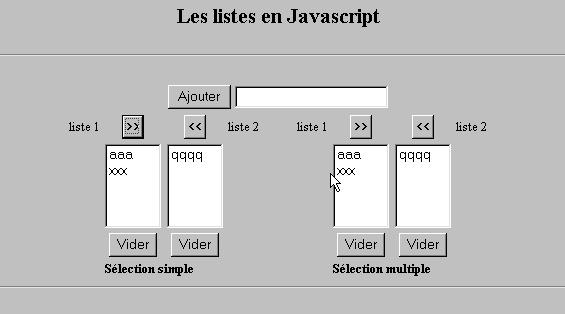
10.3. مدیریت لیست در JavaScript
10.3.1. فرم
10.3.2. کد
<html>
<head>
<title>Les listes en Javascript</title>
<script language="javascript">
//اضافه کردن
function ajouter(L1,L2,T){
//مقدار فیلد T را به لیستهای L1 و L2 اضافه میکند
//آیا اقدام خاصی لازم است؟
champs=/^\s*$/.exec(T.value);
if(champs!=null){
// میدان خالی است
alert("Vous n'avez pas indiqué la valeur à ajouter");
txtElement.focus();
return;
}//اگر
//عنصر اضافه میشود
L1.options[L1.length]=new Option(T.value);
L2.options[L2.length]=new Option(T.value);
T.value="";
}//اضافه
//پاک کردن
function vider(L){
// لیست L را پاک میکند
L.length=0;
}//clear
//انتقال
function transfert(L1,L2,simple){
//موارد انتخابشده از لیست L1 را به L2 منتقل میکند
// آیا کاری برای انجام دادن دارد؟
// شاخص آیتم انتخابشده در L1
index1=L1.selectedIndex;
if(index1==-1){
alert("Vous n'avez pas sélectionné d'élément");
return;
}//اگر
// حالت انتخاب برای آیتمهای لیست چیست
if(simple){ //انتخاب تکی
element1=L1.options[index1].text;
//افزودن به L2
L2.options[L2.length]=new Option(element1);
//حذف در L1
L1.options[index1]=null;
}//تک
if(! simple){ //انتخاب چندگانه
//فهرست 1 را به صورت معکوس پیمایش میکند
for(i=L1.length-1;i>=0;i--){
//انتخاب شده است؟
if(L1.options[i].selected){
//آن را به L2 اضافه میکند
L2.options[L2.length]=new Option(L1.options[i].text);
//آن را از L1 حذف میکند
L1.options[i]=null;
}//اگر
}//برای i
}//اگر ! ساده
}//انتقال
</script>
</head>
<body bgcolor="#C0C0C0">
<center>
<h2>Les listes en Javascript</h2>
<hr>
<form name="frmListes">
<table>
<tr>
<td>
<input type="button" name="cmdAjouter" value="Ajouter" onclick="ajouter(lst1A,lst1B,txtElement)">
</td>
<td>
<input type="text" name="txtElement">
</td>
</tr>
</table>
<table>
<tr>
<td align="center">liste 1</td>
<td align="center"><input type="button" value=">>" onclick="transfert(lst1A,lst2A,true)"</td>
<td align="center"><input type="button" value="<<" onclick="transfert(lst2A,lst1A,true)"</td>
<td align="center">liste 2</td>
<td width="30"></td>
<td align="center">liste 1</td>
<td align="center"><input type="button" value=">>" onclick="transfert(lst1B,lst2B,false)"</td>
<td align="center"><input type="button" value="<<" onclick="transfert(lst2B,lst1B,false)"</td>
<td align="center">liste 2</td>
</tr>
<tr>
<td></td>
<td align="center">
<select name="lst1A" size="5">
</select>
</td>
<td align="center">
<select name="lst2A" size="5">
</select>
</td>
<td></td>
<td></td>
<td></td>
<td align="center">
<select name="lst1B" size="5" multiple >
</select>
</td>
<td align="center">
<select name="lst2B" size="5" multiple>
</select>
</td>
</tr>
<tr>
<td></td>
<td align="center"><input type="button" value="Vider" onclick="vider(lst1A)"</td>
<td align="center"><input type="button" value="Vider" onclick="vider(lst2A)"</td>
<td></td>
<td></td>
<td></td>
<td align="center"><input type="button" value="Vider" onclick="vider(lst1B)"</td>
<td align="center"><input type="button" value="Vider" onclick="vider(lst2B)"</td>
<td></td>
</tr>
<tr>
<td></td>
<td colspan="2"><strong>Sélection simple</strong></td>
<td></td>
<td></td>
<td></td>
<td colspan="2"><strong>Sélection multiple</strong></td>
<td></td>
</tr>
</table>
<hr>
</form>
</body>
</html>