9. Layered Architecture and Data Access
The previous examples stored their data in memory or in the cache. A real application stores it in a database and is organized into layers (see the diagram in the introduction):
- the web layer (controllers, forms, views): read the request, call the business layer, select the view;
- the business layer: business rules;
- the DAO layer (Data Access Object): database queries.
Each layer is aware only of the layer below it, and as few of its details as possible: the web layer is unaware of SQL, and the business layer is unaware of HTML. This separation makes each layer easier to understand, test, and evolve. Example 28 applies this to managing a list of people: it is, on a smaller scale, the management of doctors and clients from the case study.
In [PHP], database access is organized across several layers:
- The PDO extension (PHP Data Objects) of [PHP] defines a common interface for all DBMS extensions: open a connection, execute a SQL command, and read rows. Each DBMS has its own driver: [pdo_mysql] for [MySQL] (and [MariaDB]), included with [PHP];
- The DBAL framework (Database Abstraction Layer) adds connection and transaction management, a query builder, type conversion, and translates errors from each DBMS into common exceptions (a uniqueness constraint violation becomes a [UniqueConstraintViolationException], regardless of the DBMS);
- Doctrine ORM (Object-Relational Mapper) maps classes (entities) to database tables and transforms the retrieved rows into objects. It follows the so-called Data Mapper model: entities are ordinary objects that know nothing about the database; a separate object, the entity manager, reads and saves them. This is the difference between [Eloquent] and ORM (which is derived from [Laravel]), which follows the Active Record model (each object knows how to read and save itself, [$person->save()]).
[Doctrine] does not belong to [Symfony]: it is an independent project, but ORM is the one recommended by [Symfony], and DoctrineBundle integrates it into the application. It is the equivalent of [JDBC], [JPA], and [Hibernate] in [Java] (which [Doctrine] was based on), [Entity Framework Core] into [C#], or [SQLAlchemy] into [Python]. Note a consequence of how [PHP] works: since nothing survives the request, each request opens its own connection to the database (upon its first request, SQL) and closes it upon termination. There is no connection pool as in [Java] or [Python]; opening a connection to [MySQL] on the same machine takes only a fraction of a millisecond.
The example requires a running [MySQL] (or [MariaDB]) server: the appendix explains how to install one using [Laragon].
9.1. Example 28: A Three-Tier Personnel Management System
| 28-layers/
├── .env
├── config/
│ ├── bundles.php
│ └── packages/
│ ├── doctrine.yaml
│ ├── framework.yaml
│ └── twig.yaml
├── database/
│ └── dbpersons.sql
├── public/
│ ├── css/
│ │ └── styles.css
│ └── js/
│ └── app.js
├── src/
│ ├── Controller/
│ │ └── PersonsController.php
│ ├── Dao/
│ │ └── PersonsDao.php
│ ├── Entity/
│ │ └── Person.php
│ ├── Form/
│ │ ├── PersonInput.php
│ │ └── PersonType.php
│ └── Business/
│ ├── PersonData.php
│ ├── BusinessException.php
│ └── PersonsBusiness.php
├── templates/
│ ├── fragments/
│ │ └── confirmation.html.twig
│ ├── layout.html.twig
│ └── persons/
│ ├── form.html.twig
│ └── list.html.twig
└── ...
|
9.1.1. The database
The [dbpersons] database is created by the SQL script. Using [Laragon], you can run it, for example, in the [HeidiSQL] tool (File menu / Run a SQL file), or from the command line, from the example folder:
| mysql -u root < database/dbpersons.sql
|
The [database/dbpersons.sql] file:
| -- database of example 28: a single table, [persons]
-- the script is written in UTF-8
SET NAMES utf8mb4;
DROP DATABASE IF EXISTS dbpersons;
CREATE DATABASE dbpersons CHARACTER SET utf8mb4 COLLATE utf8mb4_unicode_ci;
USE dbpersons;
CREATE TABLE persons (
id INT NOT NULL AUTO_INCREMENT,
-- the version of the row, increased at each modification (see DAO layer)
version INT NOT NULL DEFAULT 0,
first_name VARCHAR(30) NOT NULL,
last_name VARCHAR(30) NOT NULL,
age INT NOT NULL,
PRIMARY KEY (id),
-- two persons cannot have the same first and last names
CONSTRAINT unq_persons_first_name_last_name UNIQUE (first_name, last_name)
) ENGINE = InnoDB;
INSERT INTO persons (first_name, last_name, age) VALUES
('Marie', 'Pélissier', 42),
('Jacques', 'Bromard', 35),
('Philippe', 'Jandot', 58);
|
- Line 3: The script is written in [UTF-8]; this is specified to the server so that the accents in the data ([Pélissier]) remain intact;
- Line 5: The character set [utf8mb4] accepts all characters (accents, emojis, etc.). The [utf8mb4_unicode_ci] collation compares strings without regard to uppercase letters or accents: for [MySQL], [pelissier], and [Pélissier] are equal;
- line 11: a version number, incremented each time the line is modified (see “optimistic lock,” below);
- line 17: a named uniqueness constraint: the database does not allow two people with the same first and last names.
[Doctrine] can also create the tables itself, based on entities (command [bin/console doctrine:schema:create]), or through migrations: [PHP] classes that describe, step by step, the creation and modification of each table (library [DoctrineMigrationsBundle], command [bin/console doctrine:migrations:migrate]). We maintain a script, SQL, which is common to all versions of the case study and shows exactly what the database contains.
9.1.2. Configuration
DoctrineBundle is added to the list of bundles:
| <?php
// config/bundles.php: the bundles of the application; the DoctrineBundle integrates
// Doctrine (DBAL and ORM), the database access library
return [
Symfony\Bundle\FrameworkBundle\FrameworkBundle::class => ['all' => true],
Symfony\Bundle\TwigBundle\TwigBundle::class => ['all' => true],
Doctrine\Bundle\DoctrineBundle\DoctrineBundle::class => ['all' => true],
];
|
The connection to the database is described in the file [.env] by a URL:
| # .env: the configuration of example 28 (see example 01)
APP_ENV=dev
APP_SECRET=fe7d5dd3bafdb5b7ffcab097dd4e1c0c
# the database connection: the MySQL DBMS, on this machine (127.0.0.1), port 3306,
# the dbpersons database, the root user without password (Laragon's settings)
DATABASE_URL="mysql://root:@127.0.0.1:3306/dbpersons?serverVersion=8.0.32&charset=utf8mb4"
|
The URL [DATABASE_URL] combines all the connection parameters: the DBMS ([mysql]), the username and password ([root], with nothing following [:]), the host and port, and finally the database name. If your server has a password, enter it after [:] ([root:secret@...]). Two parameters follow [?]: [serverVersion], the server version ([Doctrine] adapts the SQL it generates for each version; for [MariaDB], for example, we would write [serverVersion=10.11.2-MariaDB]), and [charset], the character set used for communication with the server, which is the database’s character set. The configuration of DoctrineBundle:
| # config/packages/doctrine.yaml: the configuration of the DoctrineBundle
doctrine:
# DBAL: the database connection, described by a URL (.env file)
dbal:
url: '%env(resolve:DATABASE_URL)%'
# the SQL statements are written to the log (the console) in debug mode
logging: '%kernel.debug%'
# ORM: the ENTITIES, the classes associated with the tables, are the classes of the
# src/Entity folder; their mapping to the tables is described by PHP attributes
orm:
mappings:
App:
type: attribute
dir: '%kernel.project_dir%/src/Entity'
prefix: 'App\Entity'
|
- line 5: the connection. The prefix [resolve:] replaces any references to other parameters ([%...%]) in the variable’s value, if present;
- line 7: In debug mode, each SQL command is written to the log, which we can view in the console (Example 24). This is also the default setting;
- lines 10–15: The entities are the classes in the [src/Entity] folder, whose namespace begins with [App\Entity]; their mapping to the tables is described by [PHP] attributes.
The other configuration files are those from Example 21: the session, anti-CSRF protection, and the methods PUT and DELETE ([framework.yaml]), as well as the form theme [Bootstrap] ([twig.yaml]). There is nothing else to configure: the classes for the three layers are created by the [Symfony] container, which injects the layer below into each one (the controller receives the business layer, the business layer receives the DAO layer), and DoctrineBundle registers the entity manager ([EntityManagerInterface]) with the container.
9.1.3. The Person entity
| <?php
// src/Entity/Person.php: a row of the [persons] table, a Doctrine ENTITY
namespace App\Entity;
use Doctrine\DBAL\Types\Types;
use Doctrine\ORM\Mapping as ORM;
// #[ORM\Entity]: the class is an entity; #[ORM\Table]: its table
#[ORM\Entity]
#[ORM\Table(name: 'persons')]
class Person
{
// the primary key, generated by the database (AUTO_INCREMENT); null before the insertion
#[ORM\Id]
#[ORM\GeneratedValue]
#[ORM\Column]
private ?int $id = null;
// the VERSION of the row: Doctrine increases it at each modification, and only
// modifies the row if its version has not changed since it was read (optimistic
// lock); the type of the column must be given explicitly
#[ORM\Version]
#[ORM\Column(type: Types::INTEGER)]
private int $version = 0;
// the columns: their SQL type is deduced from the PHP type (string: VARCHAR)
#[ORM\Column(name: 'first_name', length: 30)]
private string $firstName;
#[ORM\Column(name: 'last_name', length: 30)]
private string $lastName;
#[ORM\Column]
private int $age;
public function __construct(string $firstName, string $lastName, int $age)
{
$this->edit($firstName, $lastName, $age);
}
public function edit(string $firstName, string $lastName, int $age): void
{
$this->firstName = $firstName;
$this->lastName = $lastName;
$this->age = $age;
}
public function getId(): ?int
{
return $this->id;
}
public function getVersion(): int
{
return $this->version;
}
public function getFirstName(): string
{
return $this->firstName;
}
public function getLastName(): string
{
return $this->lastName;
}
public function getAge(): int
{
return $this->age;
}
}
|
- lines 10–11: the attribute [#[ORM\Entity]] designates the class as an entity; [#[ORM\Table]] specifies the name of its table (otherwise, [Doctrine] would take the name of the class, [person]). [ORM] is an alias for the namespace [Doctrine\ORM\Mapping] (line 7): [use ... as ORM] allows attributes to be written in a shorthand form;
- Lines 15–18: The primary key ([#[ORM\Id]]), generated by the database ([#[ORM\GeneratedValue]]: derived from [AUTO_INCREMENT], which is derived from [MySQL]). It is [null] until the entity has been inserted;
- lines 23–25: the row version. The [#[ORM\Version]] attribute grants [Doctrine] the optimistic lock, described below;
- lines 28–35: the columns. Each property marked [#[ORM\Column]] corresponds to the column of the same name; its type, SQL, is derived from the type [PHP] ([string]: [VARCHAR], of length [length]; [int]: [INT]). Unlike [Eloquent], the columns are declared: the class specifies exactly what the table contains;
- lines 37–72: the entity is an ordinary class: a constructor, a method that modifies the person, and accessors. The properties are private: a person can only be modified through its methods. [Doctrine], on the other hand, reads and writes the properties directly (via reflection), without going through the constructor or the methods.
In a standard project, the [bin/console make:entity] command from [MakerBundle] writes the entity, asking a few questions about its properties.
9.1.4. The DAO layer
| <?php
// src/Dao/PersonsDao.php: the DAO layer, queries, no business rule
namespace App\Dao;
use App\Entity\Person;
use Doctrine\ORM\EntityManagerInterface;
class PersonsDao
{
// Doctrine's ENTITY MANAGER: it reads and writes the entities
public function __construct(private EntityManagerInterface $em)
{
}
// SELECT ... FROM persons ORDER BY last_name, first_name
/** @return list<Person> */
public function list(): array
{
return $this->em->getRepository(Person::class)->findBy([], ['lastName' => 'ASC', 'firstName' => 'ASC']);
}
// SELECT ... FROM persons WHERE id = ?; null if the person does not exist
public function read(int $id): ?Person
{
return $this->em->find(Person::class, $id);
}
// a person with the same first and last names, other than [$exceptId], written in DQL,
// Doctrine's query language: it speaks of entities and properties, not
// of tables and columns
public function namesake(string $firstName, string $lastName, int $exceptId = 0): ?Person
{
return $this->em->createQuery(
'SELECT p FROM App\Entity\Person p WHERE p.firstName = :firstName AND p.lastName = :lastName AND p.id <> :id')
->setParameters(['firstName' => $firstName, 'lastName' => $lastName, 'id' => $exceptId])
->setMaxResults(1)
->getOneOrNullResult();
}
// INSERT (new entity) or UPDATE (entity read, then modified): persist entrusts
// the entity to the manager, flush sends the necessary SQL statements to the database
public function save(Person $person): void
{
$this->em->persist($person);
$this->em->flush();
}
// DELETE FROM persons WHERE id = ?
public function delete(Person $person): void
{
$this->em->remove($person);
$this->em->flush();
}
}
|
The DAO layer contains only queries, with no business logic. It receives the entity manager (line 12), which uses the connection from the current query and participates in the open transaction—if there is one—initiated by the business layer.
- Lines 18–21: Each entity has a repository (repository), an object that retrieves it from the database: [getRepository]. Its method [findBy(criteria, orderBy)] returns the list of entities that match the criteria (in this case, none: all of them), in the requested order. (A repository also has [findAll], [findOneBy], [count].... ; an application can write its own repository class, with its own queries: this is what [make:entity] generates.) ;
- lines 24–27: [find]: retrieval by primary key, or [null];
- lines 32–39: a query written in DQL (Doctrine Query Language), the query language of [Doctrine]. It resembles SQL, but refers to entities and properties ([App\Entity\Person p], [p.firstName]), which [Doctrine] translates into tables and columns. The values are named parameters ([:firstName]), provided by [setParameters]: they are transmitted to the database separately and are never copied into the text of the SQL command, which makes SQL injection impossible. [setMaxResults(1)] limits the result to one line ([LIMIT 1]); [getOneOrNullResult] returns the found entity, or [null];
- Lines 43–47: The record. [persist] assigns a new entity to the manager (an entity read by the manager has already been assigned to him); [flush] sends all necessary SQL commands to the database: a [INSERT] for a new entity, and a [UPDATE] containing only the modified columns for an entity that was read and then modified. The manager compares each entity it has read to its original state: this is change tracking. After a [INSERT], [Doctrine] stores the ID generated by the database in the entity;
- lines 50–54: the deletion: [remove], followed by [flush], which triggers [DELETE].
9.1.5. The business layer
| <?php
// src/Business/PersonData.php: the data of a person, as the web layer passes them on
namespace App\Business;
readonly class PersonData
{
public function __construct(
public string $firstName,
public string $lastName,
public int $age,
) {
}
}
|
A person’s data, as transmitted by the web layer to the business layer: a simple object, unrelated to [Symfony].
| <?php
// src/Business/BusinessException.php: a business rule refuses the operation; the
// message is intended for the user
namespace App\Business;
use RuntimeException;
class BusinessException extends RuntimeException
{
}
|
An exception class specific to the business layer: a business rule rejects the operation, and the exception message is intended for the user. It inherits from [RuntimeException] without adding anything to it—only its name matters.
| <?php
// src/Business/PersonsBusiness.php: the BUSINESS layer, the business rules, and only
// them. Each operation that writes is a TRANSACTION: committed (COMMIT) if the
// function ends normally, cancelled (ROLLBACK) if an exception comes out of it
namespace App\Business;
use App\Dao\PersonsDao;
use App\Entity\Person;
use Doctrine\DBAL\Exception\UniqueConstraintViolationException;
use Doctrine\ORM\EntityManagerInterface;
use Doctrine\ORM\OptimisticLockException;
class PersonsBusiness
{
private const NAMESAKE = 'A person already has these first and last names.';
private const MODIFIED = 'This record has been modified meanwhile: reload it.';
private const UNKNOWN = 'This person does not exist (anymore).';
public function __construct(private PersonsDao $dao, private EntityManagerInterface $em)
{
}
/** @return list<Person> */
public function list(): array
{
return $this->dao->list();
}
public function read(int $id): Person
{
return $this->dao->read($id) ?? throw new BusinessException(self::UNKNOWN);
}
public function add(PersonData $data): Person
{
// wrapInTransaction: the function is executed in a transaction
return $this->transaction(function () use ($data) {
// rule 1: no two persons with the same first and last names
if ($this->dao->namesake($data->firstName, $data->lastName)) {
throw new BusinessException(self::NAMESAKE);
}
$person = new Person($data->firstName, $data->lastName, $data->age);
$this->dao->save($person);
return $person;
});
}
public function edit(int $id, int $version, PersonData $data): Person
{
return $this->transaction(function () use ($id, $version, $data) {
$person = $this->read($id);
// rule 2: we do not modify a record modified meanwhile by someone else
if ($person->getVersion() !== $version) {
throw new BusinessException(self::MODIFIED);
}
if ($this->dao->namesake($data->firstName, $data->lastName, $id)) {
throw new BusinessException(self::NAMESAKE);
}
$person->edit($data->firstName, $data->lastName, $data->age);
// Doctrine's UPDATE "WHERE id = ... AND version = ..." raises an
// OptimisticLockException if it has modified no row (see transaction)
$this->dao->save($person);
return $person;
});
}
public function delete(int $id): Person
{
return $this->transaction(function () use ($id) {
$person = $this->read($id);
$this->dao->delete($person);
return $person;
});
}
// the [$operation] function, executed in a transaction. Two errors of the
// database are business errors: the uniqueness constraint (two simultaneous adds),
// and the optimistic lock (two simultaneous edits)
private function transaction(callable $operation): Person
{
try {
return $this->em->wrapInTransaction($operation);
} catch (UniqueConstraintViolationException $e) {
throw new BusinessException(self::NAMESAKE, previous: $e);
} catch (OptimisticLockException $e) {
throw new BusinessException(self::MODIFIED, previous: $e);
}
}
}
|
- lines 16–20: the business rule messages;
- lines 32–35: a nonexistent person is a business error. The operator [??] accepts an expression [throw] on the right-hand side: if the person is [null], the exception is thrown;
- lines 37–49: Rule No. 1: No two people may have the same first and last names. The rule is checked before writing to the database, and a [BusinessException] exception is thrown if it is not satisfied. But this check is not sufficient: two simultaneous requests could both verify that there are no namesakes, and then both proceed to insert the records. The database’s uniqueness constraint then rejects the second [INSERT], and [Doctrine] triggers a [UniqueConstraintViolationException], which the [transaction] method transforms into the same [BusinessException]. The database is the last line of defense;
- lines 51–68: Rule No. 2: Do not modify a record that has been modified in the meantime by someone else. The update form carries the version of the record that was read (in a hidden field); if it differs from the current version, the record has changed since it was displayed. There remains the case where the concurrent modification occurs between the read in line 54 and the save in line 65: this is detected by the optimistic lock in [Doctrine]. For an entity that has a version, [UPDATE] checks two conditions—the ID and the read version—and increments the version by 1; if another query has modified the row in the meantime—its version has changed—the [UPDATE] lock does not modify any rows, and [Doctrine] releases a [OptimisticLockException] lock. This is the principle of optimistic locking: nothing is blocked, but concurrent modifications are detected. ([Doctrine] does this itself, as do [Hibernate] and [SQLAlchemy]; the [Laravel] version of this course had to write the condition by hand.);
- lines 70–77: Deletion marks the person as deleted for the confirmation message;
- Lines 82–91: Every operation that writes data is executed within a transaction: [wrapInTransaction] opens the transaction, executes the function, submits the pending changes ([flush]), then commits the transaction ([COMMIT]) and returns the function’s value; If an exception is thrown from the function, the transaction is rolled back ([ROLLBACK]): none of the changes made within the function are retained, and the exception is propagated. The business layer thus determines the scope of transactions: one business operation, one transaction. The two database errors that are business errors become [BusinessException]; the parameter named [previous] attaches the original exception to the new one for the log. Another error is returned as-is: it is not a business error, but a programming error (or a system failure). After an exception, [Doctrine] closes the entity manager, whose state is no longer reliable: it can no longer be used during the query, which is not a problem here, since the query is ending.
The parameter [callable] of the method [transaction] refers to an arbitrary function; the anonymous functions on lines 40, 53, and 72 capture, via [use], the variables they need.
9.1.6. The Web Layer
Form input is described by a class, and its constraints by attributes (Example 19):
| <?php
// src/Form/PersonInput.php: the fields of the form, and their constraints (see example 19)
namespace App\Form;
use App\Entity\Person;
use App\Business\PersonData;
use Symfony\Component\Validator\Constraints as Assert;
class PersonInput
{
#[Assert\NotBlank(message: 'The first name is required.')]
#[Assert\Length(max: 30, maxMessage: '30 characters at most.')]
public ?string $firstName = null;
#[Assert\NotBlank(message: 'The last name is required.')]
#[Assert\Length(max: 30, maxMessage: '30 characters at most.')]
public ?string $lastName = null;
#[Assert\NotNull(message: 'The age is required.')]
#[Assert\Range(notInRangeMessage: 'The age must be between 0 and 150.', min: 0, max: 150)]
public ?int $age = null;
// the version of the record, carried by a hidden field (edit only)
public ?int $version = null;
// the input, pre-filled with an existing person
public static function from(Person $p): self
{
$input = new self();
$input->firstName = $p->getFirstName();
$input->lastName = $p->getLastName();
$input->age = $p->getAge();
$input->version = $p->getVersion();
return $input;
}
// the validated data, for the business layer
public function data(): PersonData
{
return new PersonData(trim($this->firstName), trim($this->lastName), $this->age);
}
}
|
- lines 12–22: the constraints, with messages in English;
- line 25: the record version, carried by a hidden field (edit mode only);
- lines 28–36: a pre-filled entry with an existing person, for the update form;
- lines 39–42: the validated data, in the format expected by the business layer.
We could have linked the form directly to the [Person] entity (option [data_class], Example 19) and placed the constraints on it: this is common with [Symfony]. However, the form would then modify the entity before the business layer had verified its rules, and an invalid entity would be passed to the entity manager. A separate input class keeps the layers distinct: the web layer transmits only validated data to the business layer.
| <?php
// src/Form/PersonType.php: the form of a person (see example 18)
namespace App\Form;
use Symfony\Component\Form\AbstractType;
use Symfony\Component\Form\Extension\Core\Type\HiddenType;
use Symfony\Component\Form\Extension\Core\Type\IntegerType;
use Symfony\Component\Form\Extension\Core\Type\TextType;
use Symfony\Component\Form\FormBuilderInterface;
use Symfony\Component\OptionsResolver\OptionsResolver;
class PersonType extends AbstractType
{
public function buildForm(FormBuilderInterface $builder, array $options): void
{
$builder
->add('firstName', TextType::class, ['label' => 'First name', 'attr' => ['maxlength' => 30]])
->add('lastName', TextType::class, ['label' => 'Last name', 'attr' => ['maxlength' => 30]])
->add('age', IntegerType::class, ['label' => 'Age', 'attr' => ['min' => 0, 'max' => 150],
'invalid_message' => 'The age must be an integer.']);
// the version: a hidden field, in the edit form only
if ($options['edit']) {
$builder->add('version', HiddenType::class);
}
}
// the options of the form: the class of the data, and an option of our own
public function configureOptions(OptionsResolver $resolver): void
{
$resolver->setDefaults(['data_class' => PersonInput::class, 'edit' => false]);
}
}
|
- lines 20–21: an integer field; [invalid_message] is the message displayed when the input cannot be converted to an integer;
- lines 23–25: the hidden version field, in the update form only, according to the option [edit];
- lines 29–32: [configureOptions] declares the form options and their default values: the data class, and a custom option, [edit].
| <?php
// src/Controller/PersonsController.php: the WEB layer; it only knows the business layer
namespace App\Controller;
use App\Form\PersonInput;
use App\Form\PersonType;
use App\Business\BusinessException;
use App\Business\PersonsBusiness;
use Symfony\Bundle\FrameworkBundle\Controller\AbstractController;
use Symfony\Component\Form\FormInterface;
use Symfony\Component\HttpFoundation\Request;
use Symfony\Component\HttpFoundation\Response;
use Symfony\Component\HttpKernel\Exception\AccessDeniedHttpException;
use Symfony\Component\Routing\Attribute\Route;
// name: a prefix for the name of all the routes of the class (persons_list...)
#[Route(name: 'persons_')]
class PersonsController extends AbstractController
{
public function __construct(private PersonsBusiness $business)
{
}
#[Route('/', name: 'home', methods: ['GET'])]
public function home(): Response
{
return $this->redirectToRoute('persons_list');
}
#[Route('/persons', name: 'list', methods: ['GET'])]
public function list(): Response
{
return $this->render('persons/list.html.twig', ['persons' => $this->business->list()]);
}
// GET: the empty form; POST: the sent form
#[Route('/persons/add', name: 'add', methods: ['GET', 'POST'])]
public function add(Request $request): Response
{
$input = new PersonInput();
$form = $this->createForm(PersonType::class, $input);
$form->handleRequest($request);
if ($form->isSubmitted() && $form->isValid()) {
try {
$p = $this->business->add($input->data());
$this->addFlash('success', "{$p->getFirstName()} {$p->getLastName()} has been added.");
return $this->redirectToRoute('persons_list');
} catch (BusinessException $e) {
// a business rule refuses: the form is displayed again, with the
// input, and the message, at the bottom of the page
return $this->formPage('Add a person', $form, $e->getMessage());
}
}
return $this->formPage('Add a person', $form);
}
// GET: the edit form, pre-filled
#[Route('/persons/{id<\d+>}/edit', name: 'edit_form', methods: ['GET'])]
public function editForm(int $id): Response
{
try {
$p = $this->business->read($id);
} catch (BusinessException $e) {
$this->addFlash('error', $e->getMessage());
return $this->redirectToRoute('persons_list');
}
return $this->formPage('Edit a person', $this->editFormFor($id, PersonInput::from($p)));
}
// PUT: the sent edit form
#[Route('/persons/{id<\d+>}', name: 'edit', methods: ['PUT'])]
public function edit(Request $request, int $id): Response
{
$input = new PersonInput();
$form = $this->editFormFor($id, $input);
$form->handleRequest($request);
if ($form->isSubmitted() && $form->isValid()) {
try {
$p = $this->business->edit($id, (int) $input->version, $input->data());
$this->addFlash('success', "{$p->getFirstName()} {$p->getLastName()} has been edited.");
return $this->redirectToRoute('persons_list');
} catch (BusinessException $e) {
return $this->formPage('Edit a person', $form, $e->getMessage());
}
}
return $this->formPage('Edit a person', $form);
}
#[Route('/persons/{id<\d+>}', name: 'delete', methods: ['DELETE'])]
public function delete(Request $request, int $id): Response
{
if (! $this->isCsrfTokenValid("delete-person-$id", $request->request->getString('_token'))) {
throw new AccessDeniedHttpException('invalid anti-CSRF token');
}
try {
$p = $this->business->delete($id);
$this->addFlash('success', "{$p->getFirstName()} {$p->getLastName()} has been deleted.");
} catch (BusinessException $e) {
// no form to display again: the error also travels as a flash message
$this->addFlash('error', $e->getMessage());
}
return $this->redirectToRoute('persons_list');
}
// the edit form: sent by the PUT method, to the /persons/{id} URL
private function editFormFor(int $id, PersonInput $input): FormInterface
{
return $this->createForm(PersonType::class, $input, ['edit' => true,
'method' => 'PUT', 'action' => $this->generateUrl('persons_edit', ['id' => $id])]);
}
private function formPage(string $title, FormInterface $form, ?string $error = null): Response
{
// a business error: the 422 code, as for an invalid form (see example 19)
return $this->render('persons/form.html.twig',
['title' => $title, 'form' => $form, 'error' => $error],
new Response(status: $error ? 422 : 200));
}
}
|
- line 18: The class attribute [#[Route]] prefixes only the route names here: the route named [list] is actually called [persons_list];
- line 21: the business layer, the only layer known to the controller;
- lines 38–56: the process, in three steps: form validation (input errors, Example 19); the call to the business layer (business rules); then the PRG schema, with a success flash message (Example 20). A [BusinessException] re-displays the form, along with the entered data and the exception message, which the template will display at the bottom of the page. Input errors and business logic errors are thus handled in the same way;
- lines 59–69: the edit form, pre-filled with the retrieved person. If the person does not exist, the user is redirected to the list with a flash error message;
- lines 72–88: the update, following the same pattern as the add operation;
- lines 90–104: deletion, protected by a CSRF token unique to each person (example 21). There is no form to redisplay: any error is also conveyed in a flash message, [error];
- lines 107–111: the edit form is submitted using the method PUT (option [method]: [form_start] then adds the hidden field [_method], Example 21), to URL [/persons/{id}] (option [action]);
- lines 113–119: the form page. A business error is returned with code 422, indicating an invalid form.
The web layer contains neither SQL nor any business rules: it translates the request into a call to the business layer and the result into a page.
The views:
| <!doctype html>
<html lang="en">
<head>
<meta charset="utf-8">
<meta name="viewport" content="width=device-width, initial-scale=1">
<title>Persons</title>
<link rel="stylesheet" href="{{ path('bootstrap', {file: 'css/bootstrap.min.css'}) }}">
<link rel="stylesheet" href="{{ asset('css/styles.css') }}">
</head>
<body>
<div class="container py-3" style="max-width: 40rem">
{# the success message ([success] flash message): at the top #}
{% for message in app.flashes('success') %}
<div class="alert alert-success" role="status">{{ message }}</div>
{% endfor %}
<main>
{% block content %}{% endblock %}
</main>
{# the errors: at the bottom; an [error] flash message, or the [error] variable of the view #}
{% for message in app.flashes('error') %}
<div class="error-area" role="alert">{{ message }}</div>
{% endfor %}
{% if error is defined and error %}
<div class="error-area" role="alert">{{ error }}</div>
{% endif %}
</div>
{% include 'fragments/confirmation.html.twig' %}
<script src="{{ asset('js/app.js') }}"></script>
</body>
</html>
|
- lines 13–15: the success message at the top of the page (example 20);
- Lines 20–25: errors; at the bottom of the page: a flash message (after a redirect), or the view variable [error] (form re-displayed). The test [is defined] prevents an error on pages that do not have this variable.
| {% extends 'layout.html.twig' %}
{% block content %}
<h1 class="h3">Persons</h1>
<table class="table align-middle">
<thead><tr><th>First name</th><th>Last name</th><th>Age</th><th></th></tr></thead>
<tbody>
{% for p in persons %}
<tr>
<td>{{ p.firstName }}</td>
<td>{{ p.lastName }}</td>
<td>{{ p.age }}</td>
<td class="text-end">
<a class="btn btn-sm btn-outline-primary" href="{{ path('persons_edit_form', {id: p.id}) }}">Edit</a>
<form method="post" class="d-inline" action="{{ path('persons_delete', {id: p.id}) }}"
data-confirmation="Delete {{ p.firstName }} {{ p.lastName }}?">
<input type="hidden" name="_method" value="DELETE">
<input type="hidden" name="_token" value="{{ csrf_token('delete-person-' ~ p.id) }}">
<button class="btn btn-sm btn-outline-danger" type="submit">Delete</button>
</form>
</td>
</tr>
{% endfor %}
</tbody>
</table>
<a class="btn btn-primary" href="{{ path('persons_add') }}">Add a person</a>
{% endblock %}
|
The list includes the links and buttons from Example 21, along with its confirmation window (the files [fragments/confirmation.html.twig] and [public/js/app.js] are those from Example 21). The properties [p.firstName], [p.lastName]... are read by the accessors [getFirstName()], [getLastName()]... : [Twig] finds them on its own (Example 13).
| {% extends 'layout.html.twig' %}
{% block content %}
<h1 class="h3">{{ title }}</h1>
{# novalidate: the validation is the server's one (see example 19); form_start
also writes the hidden _method field of a PUT form #}
{{ form_start(form, {attr: {novalidate: 'novalidate'}}) }}
{{ form_widget(form) }}
<button class="btn btn-primary" type="submit">Save</button>
<a class="btn btn-link" href="{{ path('persons_list') }}">Cancel</a>
{{ form_end(form) }}
{% endblock %}
|
A view used for both adding and modifying records. [form_widget] renders all form fields, including the hidden version field and the anti-CSRF token.
9.1.7. Execution
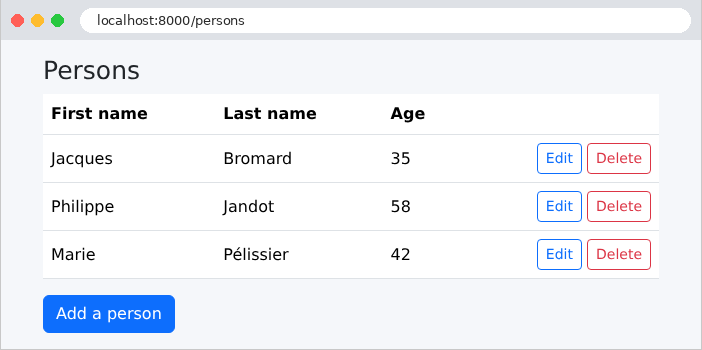
The list of people:
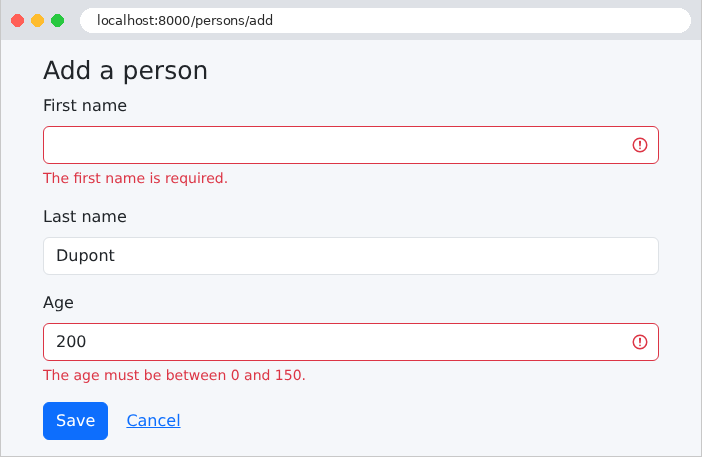
An incorrectly filled-out add form: input errors are detected by the web layer.
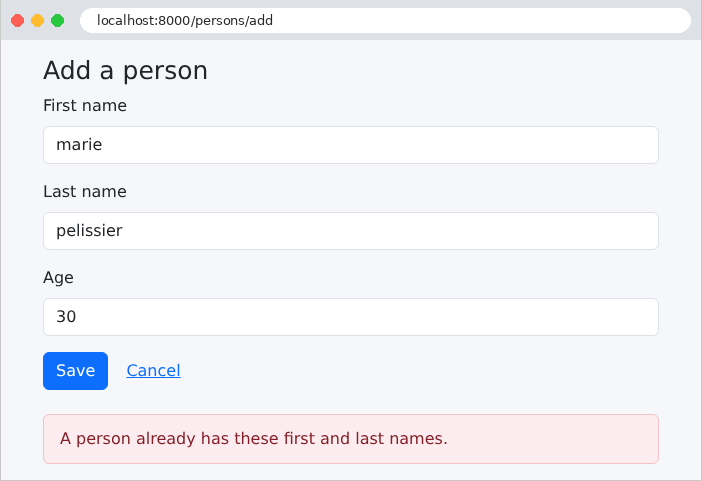
A homonym: the entry is correct, but the business layer rejects the addition. Since the comparison is performed by the database, it ignores both uppercase letters and accents: [marie pelissier] is a homonym of [Marie Pélissier].
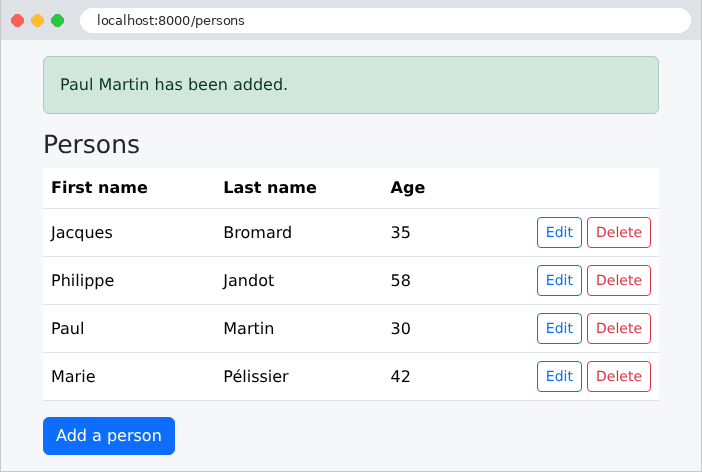
A successful addition:
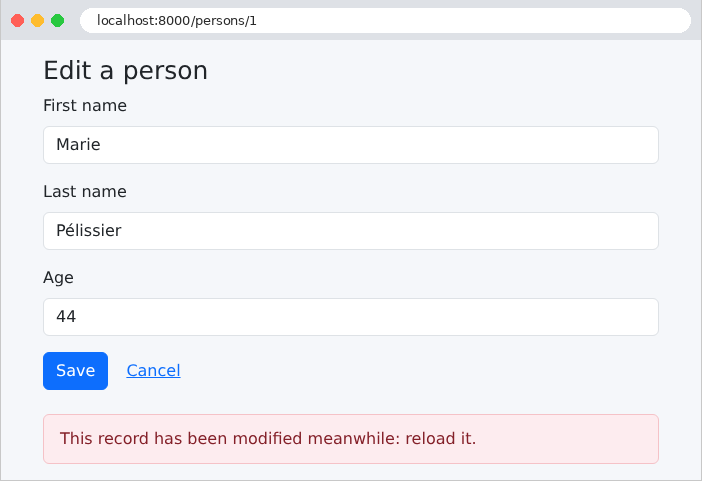
To test Rule #2, let’s open the same record in two tabs. In the first tab, let’s change the age and save. In the second tab, which still displays the old version, let’s also modify the record:
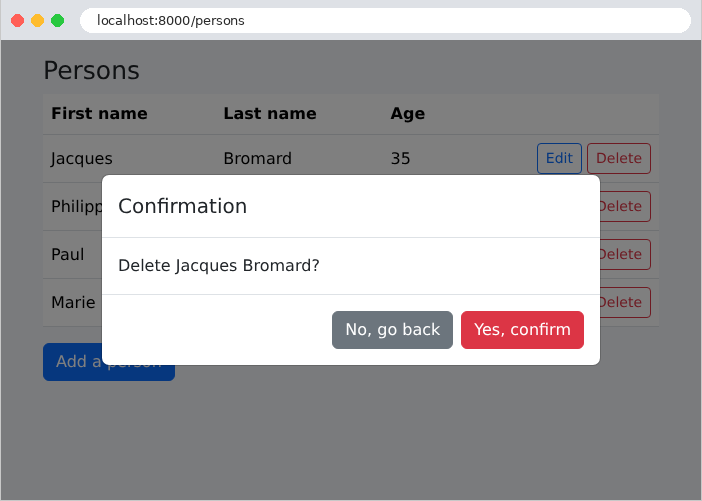
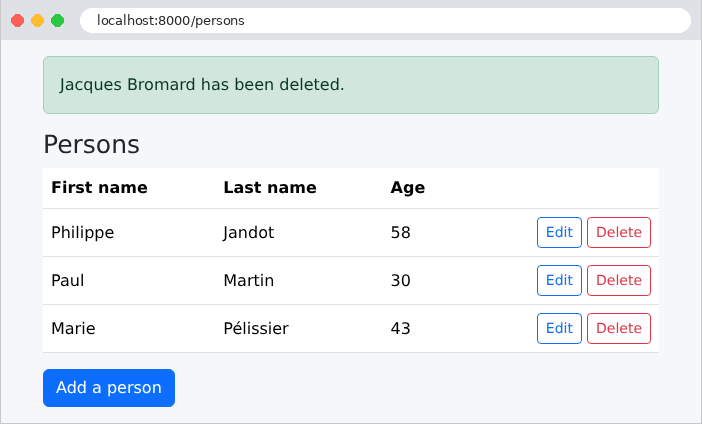
The deletion, with its confirmation:
9.1.8. The SQL commands
Let’s track the SQL commands for a modification in the console (the dates and lines from the development server have been removed). The display of the modification form for person #1:
| [info] Connecting with parameters [array]
[debug] Executing statement: SELECT t0.id AS id_1, t0.version AS version_2, t0.first_name AS first_name_3, t0.last_name AS last_name_4, t0.age AS age_5 FROM persons t0 WHERE t0.id = ? (parameters: [array], types: [array])
[info] Disconnecting
|
A connection, a read by primary key (whose value is passed as a parameter—[?]), followed by a disconnect at the end of the query. There is no transaction: an isolated read does not require one. [Doctrine] assigns an alias to each table ([t0]) and to each column ([id_1]). The parameter values are an array, which the minimal log for [Symfony] does not display ([[array]]); [Monolog], or the debug bar of [Symfony] ([WebProfilerBundle], installed by [composer require --dev profiler]), would display them. The master record update, with a new age:
| [debug] Beginning transaction
[debug] Executing statement: SELECT t0.id AS id_1, t0.version AS version_2, t0.first_name AS first_name_3, t0.last_name AS last_name_4, t0.age AS age_5 FROM persons t0 WHERE t0.id = ? (parameters: [array], types: [array])
[debug] Executing statement: SELECT p0_.id AS id_0, p0_.version AS version_1, p0_.first_name AS first_name_2, p0_.last_name AS last_name_3, p0_.age AS age_4 FROM persons p0_ WHERE p0_.first_name = ? AND p0_.last_name = ? AND p0_.id <> ? LIMIT 1 (parameters: [array], types: [array])
[debug] Executing statement: SAVEPOINT DOCTRINE_2
[debug] Executing statement: UPDATE persons SET age = ?, version = version + 1 WHERE id = ? AND version = ? (parameters: [array], types: [array])
[debug] Executing statement: SELECT version FROM persons WHERE id = ? (parameters: [array], types: [array])
[debug] Executing statement: RELEASE SAVEPOINT DOCTRINE_2
[debug] Committing transaction
|
In a single transaction, we can see: the read of the record, the search for a namesake (the query DQL, translated to SQL), followed by [UPDATE]. This transaction modifies only the column that has changed ([age]), increments the version number, and sets the optimistic lock condition ([AND version = ?]). [Doctrine] then reads the new version again to save it to the entity. [flush] opens a transaction itself; since there is already one—the business layer transaction—it simply creates a savepoint ([SAVEPOINT]), a nested transaction that is committed ([RELEASE]) at the end of [flush]. Now let’s submit the same form a second time, still using the old version:
| [debug] Beginning transaction
[debug] Executing statement: SELECT t0.id AS id_1, t0.version AS version_2, t0.first_name AS first_name_3, t0.last_name AS last_name_4, t0.age AS age_5 FROM persons t0 WHERE t0.id = ? (parameters: [array], types: [array])
[debug] Rolling back transaction
|
The version being read is not the one from the form: the business layer triggered a [BusinessException], which rolled back the transaction ([ROLLBACK]), and the page displays “This record has been modified meanwhile: reload it.” Similarly, adding a namesake stops after the namesake search, without a [INSERT].