Skip to content

8. Authentication and Authorization

Two distinct questions arise for each request:

  • Who is the user? This is authentication: the user has identified themselves with a username and password, and every subsequent request must prove that it comes from them;
  • Do they have permission to access this page? This is authorization: in the case study, only a user with the role ADMIN manages doctors and clients.

Identity proof must be included with every request. [Symfony] typically stores the logged-in user in its session (see the section on scopes), which is the simplest solution for a web application. The case study, in all its versions ([ASP.NET Core MVC], [Spring MVC], [NestJS], [Flask], [Laravel]), instead uses a token (JWT, JSON Web Token), which we will use here: After login, the server generates a token containing the user’s identity and signs it with a secret key (this is the principle behind the signed cookie in Example 23). The token is stored in a cookie; the browser sends it back with every request; the server verifies the signature. The user can read their token but cannot modify it: any modification invalidates the signature. The format is standardized (RFC 7519), understood by all programming languages, and the token includes its expiration date. Most importantly, the server doesn’t need to store anything: any server that knows the key can verify the token.

[Symfony] has a comprehensive security component, integrated by SecurityBundle, whose elements we will use as-is:

  • the application’s URL are distributed across firewalls (firewalls), each with its own method of authenticating users;
  • authentication is handled by authenticators (authenticators): objects that determine the user’s identity for each request. [Symfony] provides several of these (login form, session, API token, etc.); we will write our own, which reads the JWT token. The rest of the application sees only the result: the authenticated user, provided by [#[CurrentUser]], [$this->getUser()], and, in the views, [app.user];
  • users are provided by a user provider, and their passwords are hashed by the PasswordHasher component (algorithm [bcrypt]);
  • authorizations are role-based: page protection is described by access control rules ([access_control]) or by the [#[IsGranted]] attribute of actions; views check for a right using [is_granted];
  • Login attempts are limited by the RateLimiter component (Example 27).

All of this is accomplished by kernel event listeners (previous chapter): the firewall listens for [kernel.request] (priority 8), [#[IsGranted]] is read on [kernel.controller_arguments], and access denials are exceptions, handled on [kernel.exception].

Token generation and verification are handled by the [firebase/php-jwt] library, the most commonly used one in [PHP], installed by the [composer.json] file from the examples. (There is a widely used bundle for tokens—JWT and [LexikJWTAuthenticationBundle]—designed for API; for a web application, just a few lines are sufficient, and they better illustrate the mechanism.)

8.1. Example 25: Login, Token, Protected Page

25-jwt/
├── .env
├── config/
│   ├── bundles.php
│   └── packages/
│       ├── framework.yaml
│       └── security.yaml
├── src/
│   ├── Controller/
│   │   ├── AuthController.php
│   │   └── ProfileController.php
│   └── Security/
│       ├── AuthService.php
│       ├── TokenAuthenticator.php
│       ├── User.php
│       └── UsersService.php
├── templates/
│   ├── auth/
│   │   └── login.html.twig
│   ├── layout.html.twig
│   └── profile/
│       └── profile.html.twig
└── ...

8.1.1. Configuration: .env, bundles.php, and framework.yaml

The token is signed with a secret key, which must not be hard-coded. It’s time to truly separate the configuration from the code. The settings specific to an installation are in the file [.env] (Example 01), which now contains three new lines (a comment, followed by two variables):

1
2
3
4
5
6
# .env: the configuration of example 25 (see example 01)
APP_ENV=dev
APP_SECRET=6144ddf9f821deebee2291ab7742d7a9
# the key that signs the JWT tokens (at least 32 characters), and their lifetime
JWT_SECRET=a-secret-key-of-at-least-32-characters-for-example-25
JWT_DURATION_MINUTES=60

The standard requires that the algorithm used (HMAC-SHA256) have a key of at least 256 bits, or 32 bytes; the library rejects any shorter key. The code itself does not read the [.env] file directly: the [Dotenv] component (example 01) has converted it into environment variables, which the container provides to the services that request them (we’ll see this with the [AuthService] service). A real environment variable takes precedence over the [.env] file: under [Linux] or [macOS], the application would be launched with a different key as follows:

JWT_SECRET="another-key-of-at-least-thirty-two-characters" php -d variables_order=EGPCS -S localhost:8000 -t public

and under [Windows] (PowerShell):

$env:JWT_SECRET="another-key-of-at-least-thirty-two-characters"
php -d variables_order=EGPCS -S localhost:8000 -t public

(The option [-d variables_order=EGPCS] instructs [PHP] to populate the array [$_ENV] with environment variables, which its default configuration does not always do.) In production, secrets are often entrusted to the [Symfony] vault (secrets vault, command [bin/console secrets:set]), which stores them encrypted within the project.

SecurityBundle is added to the list of bundles:

1
2
3
4
5
6
7
8
<?php
// config/bundles.php: the bundles of the application; the SecurityBundle integrates
// the security component (authentication, authorization)
return [
    Symfony\Bundle\FrameworkBundle\FrameworkBundle::class => ['all' => true],
    Symfony\Bundle\TwigBundle\TwigBundle::class => ['all' => true],
    Symfony\Bundle\SecurityBundle\SecurityBundle::class => ['all' => true],
];

The session is used here solely for the anti-CSRF token of the login form (Example 21):

1
2
3
4
5
6
7
8
# config/packages/framework.yaml: the configuration of the FrameworkBundle
framework:
    secret: '%env(APP_SECRET)%'
    # the session: it is only used for the anti-CSRF token of the login form
    session:
        handler_id: null
        save_path: '%kernel.project_dir%/var/sessions/%kernel.environment%'
    csrf_protection: true

8.1.2. Security configuration: config/packages/security.yaml

# config/packages/security.yaml: the configuration of the SecurityBundle
security:
    # the hashing of the passwords of the users of the User class: bcrypt
    password_hashers:
        App\Security\User:
            algorithm: bcrypt

    # the user PROVIDER: the object that finds a user from their login
    providers:
        users:
            id: App\Security\UsersService

    # the FIREWALLS: each one protects the URLs that match its pattern
    firewalls:
        # the Bootstrap files: no security
        resources:
            pattern: ^/bootstrap/
            security: false
        # all the other URLs
        main:
            # stateless: the user is not stored in the session, they are
            # found again at each request, from their token
            stateless: true
            provider: users
            # the authenticator: it reads the token of the cookie, at each request
            custom_authenticators:
                - App\Security\TokenAuthenticator

    # the ACCESS CONTROL: the URLs starting with /profile require an authenticated
    # user; the others are public
    access_control:
        - { path: ^/profile, roles: IS_AUTHENTICATED }
  • lines 4–6: the password hashing algorithm for users from the [User] class: [bcrypt]. (The value [auto] would select the best available algorithm and be able to verify hashes from other algorithms);
  • lines 9–11: the user provider—the service that finds a user based on their ID (here, our class [UsersService]). [Symfony] provides several: [memory] (a list written in this file), [entity] (a database table; see case study)...;
  • Lines 14–27: the firewalls. Each one applies to the URL entries that match its pattern ([pattern]), with the first matching entry being selected. The first, [resources], covers the files of [Bootstrap] (Example 15), with no security ([security: false]): there is no need to look for a user to serve a stylesheet. The second, [main], has no specific reason: it covers all other URL files;
  • line 23: the firewall is stateless (stateless): the authenticated user is not stored in the session; they are identified with each request based on their token;
  • Lines 26–27: the firewall’s authenticator, our class [TokenAuthenticator];
  • Lines 31–32: Access control: a list of rules, examined in order, of which the first one—corresponding to URL—applies. The URL rules that begin with [/profile] require an authenticated user ([IS_AUTHENTICATED]); the others are public.

In a standard project, this file is written by [Symfony Flex] when the bundle ([composer require security]) is installed, and the [bin/console make:user] command from [MakerBundle] writes the user class and its provider.

8.1.3. Users: src/Security/User.php and UsersService.php

<?php
// src/Security/User.php: a user. UserInterface: the interface that
// Symfony expects from authenticated users; PasswordAuthenticatedUserInterface:
// a user who has a password

namespace App\Security;

use Symfony\Component\Security\Core\User\PasswordAuthenticatedUserInterface;
use Symfony\Component\Security\Core\User\UserInterface;

readonly class User implements UserInterface, PasswordAuthenticatedUserInterface
{
    public function __construct(
        public string $login,
        public string $name,
        // the role: USER or ADMIN
        public string $role,
        // the HASH of the password (empty for a user read from a token)
        public string $passwordHash = '',
        // the content of the token that authenticated the user
        public array $claims = [],
    ) {
    }

    // the identifier of the user: their login
    public function getUserIdentifier(): string
    {
        return $this->login;
    }

    // the roles, in Symfony's sense: strings that start with ROLE_
    public function getRoles(): array
    {
        return ['ROLE_'.$this->role];
    }

    public function getPassword(): string
    {
        return $this->passwordHash;
    }
}
  • Line 11: a user. [Symfony] expects authenticated users to implement the [UserInterface] interface: its methods provide it with the user’s ID and roles. The [PasswordAuthenticatedUserInterface] interface adds the hashed password. In a typical application, the [Doctrine] entity in the user table (next chapter) implements these methods;
  • Lines 13–23: the login, name, role, password hash, and the contents of the token that authenticated the user (empty for a user retrieved from the user list). A server never stores a password, even in encrypted form: if the database were stolen, the passwords would be stolen as well (and many people use the same password everywhere). It stores the result of a hash function, a one-way function: you can calculate the hash of a password, but you cannot recover a password from its hash. To verify an entered password, you calculate its hash and compare it to the one on file;
  • lines 32–35: roles, as defined by [Symfony]: strings that begin with [ROLE_]. The role [USER] from the case study becomes [ROLE_USER].
<?php
// src/Security/UsersService.php: the users, in memory (example 28
// and the case study will put them in a database). UserProviderInterface: a user
// PROVIDER, in Symfony's sense (see config/packages/security.yaml)

namespace App\Security;

use Symfony\Component\Security\Core\Exception\UnsupportedUserException;
use Symfony\Component\Security\Core\Exception\UserNotFoundException;
use Symfony\Component\Security\Core\User\UserInterface;
use Symfony\Component\Security\Core\User\UserProviderInterface;

class UsersService implements UserProviderInterface
{
    // we NEVER keep a password, only its bcrypt hash, computed
    // once and for all by: php -r "echo password_hash('marie', PASSWORD_BCRYPT);"
    private const USERS = [
        'marie' => ['Marie Pélissier', 'USER', '$2y$10$2DnOgGBiVcyc07su9rj2E.EvOoyPFzHN/h9PLKDuoW5P7UGtclW6W'],
        'admin' => ['Administrator', 'ADMIN', '$2y$10$m5o9euCi0EdgoZkLVw.UsO58RxJcqhMBfVrlLMCIOh2LyGSjuN29K'],
    ];

    public function find(string $login): ?User
    {
        if (! isset(self::USERS[$login])) {
            return null;
        }
        [$name, $role, $hash] = self::USERS[$login];
        return new User($login, $name, $role, $hash);
    }

    // the three methods of UserProviderInterface
    public function loadUserByIdentifier(string $identifier): UserInterface
    {
        return $this->find($identifier) ?? throw new UserNotFoundException();
    }

    // the user stored in the session, to reload: never called here,
    // since the firewall is stateless
    public function refreshUser(UserInterface $user): UserInterface
    {
        throw new UnsupportedUserException();
    }

    public function supportsClass(string $class): bool
    {
        return $class === User::class;
    }
}
  • Lines 17–20: Two test users, hard-coded (Example 28 and the case study will store them in a database): for each login, the name, role, and password hash. The hash is generated using the bcrypt algorithm, designed for passwords. It has two distinctive features. It is intentionally slow, with an adjustable level of slowness (the cost, here set to 10: 2^10 computational cycles, resulting in the hash [$10$]): a few tens of milliseconds, imperceptible to a user, but which make it very costly for a hacker to try billions of passwords. It is salted: a randomly generated salt is mixed with the password before hashing and stored within the hash itself (the 22 characters following [$10$]); thus, two users with the same password will have different hashes. The hashes were calculated once and for all by the function [password_hash] from [PHP] (line 16), or by the command [bin/console security:hash-password] from [Symfony]: Calculating them with every request would be an unnecessary waste of time, since the application is rebuilt with every request. [bcrypt] only takes into account the first 72 bytes of a password: the case study accounts for this;
  • lines 22–29: the user of a login, or [null]. [isset] checks for the existence of a key; the assignment [[$name, $role, $hash] = ...] destructures an array: each variable receives the corresponding element;
  • lines 32–47: the three methods of the [UserProviderInterface] interface, which make the class a user provider: [loadUserByIdentifier] returns the user associated with an identifier, or throws the [UserNotFoundException] exception; [refreshUser] reloads the user stored in the session (unnecessary with a stateless firewall); [supportsClass] specifies the class of the provided users. The operator [??] followed by [throw] raises the exception when the left-hand side expression evaluates to [null].

8.1.4. The authentication service: src/Security/AuthService.php

<?php
// src/Security/AuthService.php: the checking of the passwords and the JWT tokens

namespace App\Security;

use Firebase\JWT\JWT;
use Firebase\JWT\Key;
use Symfony\Component\DependencyInjection\Attribute\Autowire;
use Symfony\Component\PasswordHasher\Hasher\UserPasswordHasherInterface;
use Throwable;

class AuthService
{
    // the name of the cookie that carries the token
    public const COOKIE = 'token';

    public function __construct(
        private UsersService $users,
        // the password hashing service (see config/packages/security.yaml)
        private UserPasswordHasherInterface $hasher,
        // #[Autowire(env: ...)]: the value of an environment variable (.env file);
        // the int: prefix converts it into an integer
        #[Autowire(env: 'JWT_SECRET')] private string $secret,
        #[Autowire(env: 'int:JWT_DURATION_MINUTES')] public readonly int $durationMinutes,
    ) {
    }

    // the user, or null if the login is unknown or the password wrong.
    // isPasswordValid hashes the entered password with the salt of the stored hash,
    // then compares the two results
    public function validate(?string $login, ?string $password): ?User
    {
        if (! $login || $password === null) {
            return null;
        }
        $user = $this->users->find($login);
        if ($user === null || ! $this->hasher->isPasswordValid($user, $password)) {
            return null;
        }
        return $user;
    }

    // the JWT token of the user, signed with the secret key (HMAC-SHA256)
    public function createToken(User $user): string
    {
        $now = time();
        // the content of the token: the "claims" (statements about the user)
        $claims = [
            'sub' => $user->login,
            'name' => $user->name,
            'role' => $user->role,
            'iat' => $now,
            'exp' => $now + $this->durationMinutes * 60,
        ];
        return JWT::encode($claims, $this->secret, 'HS256');
    }

    // the user described by a token whose signature and expiration date
    // are valid; null otherwise (forged, expired or unreadable token)
    public function check(string $token): ?User
    {
        try {
            // decode returns an object; (array) converts it into an associative array
            $claims = (array) JWT::decode($token, new Key($this->secret, 'HS256'));
        } catch (Throwable) {
            return null;
        }
        return new User($claims['sub'], $claims['name'], $claims['role'], claims: $claims);
    }
}
  • Lines 17–26: The service receives the user provider, the password hashing service ([UserPasswordHasherInterface], which applies the algorithm selected in [security.yaml]), and two configuration values. The attribute [#[Autowire(env: 'NAME')]] provides the value of an environment variable; a prefix converts it: [int:] to an integer (there are others: [bool:], [json:], [base64:]...). The lifetime is a read-only public property: the controller will use it;
  • lines 31–41: verification of a username and password. [isPasswordValid] hashes the entered password using the stored hash salt and compares the two hashes. An unknown username and an incorrect password yield the same result, [null];
  • Lines 44–56: Token generation. The token contains an array of statements (claims) about the user. Some have standardized names: [sub] (subject), the user ID; [iat] (issued at), the creation date; [exp] (expiration), the expiration date. Dates are expressed in seconds elapsed since January 1, 1970 (the function [time()] of [PHP]). The other fields are optional: here, the name and role. [JWT::encode] generates the token and signs it using the algorithm [HS256] (HMAC-SHA256, a signature using a shared secret key);
  • lines 60–69: token verification. [JWT::decode] verifies the signature and expiration date, then returns the assertions (an object, converted to an array by [(array)]). Any anomaly (forged, expired, or malformed token) raises an exception; [catch (Throwable)] catches them all ([Throwable] is the interface for all exceptions and errors from [PHP]; the variable name is optional when not used). The [Key] object associates the key with an algorithm: a token that specifies a different algorithm (or none at all, [none]) would be rejected. The valid token becomes a [User], without a hash, along with its claims (parameter named [claims]).

8.1.5. The authenticator: src/Security/TokenAuthenticator.php

<?php
// src/Security/TokenAuthenticator.php: the AUTHENTICATOR of the firewall (see
// config/packages/security.yaml): at each request, it establishes who the user is,
// from the JWT token of the [token] cookie

namespace App\Security;

use Symfony\Component\HttpFoundation\RedirectResponse;
use Symfony\Component\HttpFoundation\Request;
use Symfony\Component\HttpFoundation\Response;
use Symfony\Component\Security\Core\Authentication\Token\TokenInterface;
use Symfony\Component\Security\Core\Exception\AuthenticationException;
use Symfony\Component\Security\Core\Exception\CustomUserMessageAuthenticationException;
use Symfony\Component\Security\Http\Authenticator\AbstractAuthenticator;
use Symfony\Component\Security\Http\Authenticator\Passport\Badge\UserBadge;
use Symfony\Component\Security\Http\Authenticator\Passport\Passport;
use Symfony\Component\Security\Http\Authenticator\Passport\SelfValidatingPassport;
use Symfony\Component\Security\Http\EntryPoint\AuthenticationEntryPointInterface;

class TokenAuthenticator extends AbstractAuthenticator implements AuthenticationEntryPointInterface
{
    public function __construct(private AuthService $auth)
    {
    }

    // the authenticator acts only if the request carries the token cookie;
    // otherwise, the visitor remains anonymous
    public function supports(Request $request): ?bool
    {
        return $request->cookies->has(AuthService::COOKIE);
    }

    // the PASSPORT of the user: who they are (the badge), and how to check it.
    // The token has already been checked: the passport validates itself (SelfValidatingPassport)
    public function authenticate(Request $request): Passport
    {
        $user = $this->auth->check($request->cookies->get(AuthService::COOKIE));
        if ($user === null) {
            throw new CustomUserMessageAuthenticationException('invalid token');
        }
        // the badge: the login, and a function that returns the user (here, the one of the
        // token, without consulting the list of the users)
        return new SelfValidatingPassport(new UserBadge($user->login, fn () => $user));
    }

    // a valid token: null, the request continues on its way to the action
    public function onAuthenticationSuccess(Request $request, TokenInterface $token, string $firewallName): ?Response
    {
        return null;
    }

    // an invalid token (expired, forged): off to /login, and we delete the cookie
    public function onAuthenticationFailure(Request $request, AuthenticationException $exception): ?Response
    {
        $response = new RedirectResponse('/login');
        $response->headers->clearCookie(AuthService::COOKIE);
        return $response;
    }

    // the ENTRY POINT: the response given to an anonymous visitor who requests a
    // protected page; here, a redirect to the login page
    public function start(Request $request, ?AuthenticationException $authException = null): Response
    {
        return new RedirectResponse('/login');
    }
}

For each request that passes through the firewall, [Symfony] calls the authenticator’s methods in this order:

  • lines 28–31: [supports]: Is the authenticator involved in this request? Yes, if it contains the token cookie. Otherwise, nothing happens: the visitor remains anonymous;
  • lines 35–44: [authenticate] constructs a passport: the user’s identity (a badge, [UserBadge]), and the credentials to be verified. A standard login form would include the entered password in the passport, which [Symfony] would verify itself. Here, the proof is the token, already verified by [AuthService]: the passport validates itself ([SelfValidatingPassport]). The badge contains the login and a function that identifies the user: in this case, the user described by the token, without consulting the user list (without this function, [Symfony] would request the user from the provider). An invalid token raises an authentication exception;
  • lines 47–50: [onAuthenticationSuccess]: authentication succeeded. Returning [null] allows the request to proceed to the action with an authenticated user. (A login form would redirect to the home page here);
  • lines 53–58: [onAuthenticationFailure]: authentication failed (token expired or forged). The response redirects to the login page and takes the opportunity to clear the cookie: [clearCookie] adds an empty, already expired cookie to the response;
  • lines 62–65: [start] is the method of the [AuthenticationEntryPointInterface] interface: the firewall’s entry point, i.e., the response sent to an anonymous visitor requesting a protected page. In this case, a redirect to the login page.

The authenticator does not deny access: it determines who the user is, or determines that the user is anonymous. This is authentication. Denials are the responsibility of access control.

8.1.6. The controllers

<?php
// src/Controller/AuthController.php: login and logout

namespace App\Controller;

use App\Security\AuthService;
use Symfony\Bundle\FrameworkBundle\Controller\AbstractController;
use Symfony\Component\HttpFoundation\Cookie;
use Symfony\Component\HttpFoundation\Request;
use Symfony\Component\HttpFoundation\Response;
use Symfony\Component\HttpKernel\Exception\AccessDeniedHttpException;
use Symfony\Component\Routing\Attribute\Route;

class AuthController extends AbstractController
{
    public function __construct(private AuthService $auth)
    {
    }

    #[Route('/', methods: ['GET'])]
    public function home(): Response
    {
        return $this->redirect('/profile');
    }

    #[Route('/login', methods: ['GET'])]
    public function form(): Response
    {
        return $this->render('auth/login.html.twig');
    }

    #[Route('/login', methods: ['POST'])]
    public function login(Request $request): Response
    {
        // the anti-CSRF token of the form (see example 21)
        if (! $this->isCsrfTokenValid('login', $request->getPayload()->getString('_csrf_token'))) {
            throw new AccessDeniedHttpException('invalid anti-CSRF token');
        }
        $login = $request->getPayload()->getString('login');
        $user = $this->auth->validate($login, $request->getPayload()->getString('password'));
        if ($user === null) {
            // a deliberately vague message: we do not say whether it is the login or the password
            return $this->render('auth/login.html.twig', ['login' => $login,
                'error' => 'Incorrect login or password.']);
        }
        // the token, in a cookie: the JavaScript of the page cannot read it
        // (httpOnly); it does not go with the POST requests coming from other sites
        // (sameSite); it disappears at the same time as the token expires
        $response = $this->redirect('/profile');
        $response->headers->setCookie(Cookie::create(AuthService::COOKIE, $this->auth->createToken($user))
            ->withExpires(time() + $this->auth->durationMinutes * 60)
            ->withHttpOnly(true)
            ->withSameSite(Cookie::SAMESITE_LAX));
        return $response;
    }

    // logging out: POST only (a simple link, placed on another site, cannot
    // log the user out without their knowledge); we delete the cookie
    #[Route('/logout', methods: ['POST'])]
    public function logout(Request $request): Response
    {
        if (! $this->isCsrfTokenValid('logout', $request->getPayload()->getString('_csrf_token'))) {
            throw new AccessDeniedHttpException('invalid anti-CSRF token');
        }
        $response = $this->redirect('/login');
        $response->headers->clearCookie(AuthService::COOKIE);
        return $response;
    }
}
  • lines 36–38: The login form is protected against forged requests, like all forms (Example 21);
  • lines 40–45: the login process. If it fails, the form is redisplayed with the entered username and a deliberately vague message: saying “unknown username” would reveal to a hacker which usernames exist;
  • Lines 49–54: If successful, the token is stored in a cookie, and the user is redirected to the protected page (schema PRG). The cookie is [httpOnly]: the page’s [JavaScript] cannot read it, which protects the token against script injection (XSS); it is [SameSite=Lax]: the browser does not send it with a POST request originating from another site, which protects the application against CSRF attacks; its expiration date ([withExpires], here a number of seconds since 1970) is the same as the token’s. In production, to HTTPS, we would add [withSecure(true)]: the cookie would never be sent over an unencrypted connection;
  • Lines 59–68: Logging out deletes the cookie ([clearCookie]). This is an action POST, protected by an anti-CSRF token: a simple link to [/logout], placed on another site or within an image, cannot log the user out without their knowledge. Note a limitation of tokens: the token itself remains valid until it expires. Someone who has made a copy of it could still use it. That is why their lifetime is limited.

[Symfony] can also handle form-based login (the [form_login] authenticator) and logout (the [logout] firewall option) on its own; but they store the user in the session, whereas we want a token.

<?php
// src/Controller/ProfileController.php: a page reserved for authenticated users
// (see access_control in config/packages/security.yaml)

namespace App\Controller;

use App\Security\User;
use Symfony\Bundle\FrameworkBundle\Controller\AbstractController;
use Symfony\Component\HttpFoundation\Response;
use Symfony\Component\Routing\Attribute\Route;
use Symfony\Component\Security\Http\Attribute\CurrentUser;

class ProfileController extends AbstractController
{
    // #[CurrentUser]: the authenticated user of the request, the one found by
    // the authenticator
    #[Route('/profile', methods: ['GET'])]
    public function display(#[CurrentUser] User $user): Response
    {
        return $this->render('profile/profile.html.twig', ['user' => $user]);
    }
}
  • line 18: the [#[CurrentUser]] attribute provides the authenticated user, the one established by the authenticator. The action is protected by the rule [access_control] from [security.yaml]: it is guaranteed to receive a user. We would also get it via [$this->getUser()].

8.1.7. The views

{% extends 'layout.html.twig' %}

{% block content %}
  <h1 class="h3">Login</h1>
  <form method="post" action="/login">
    <input type="hidden" name="_csrf_token" value="{{ csrf_token('login') }}">
    <div class="mb-2">
      <label class="form-label" for="login">Login</label>
      <input class="form-control" id="login" name="login" value="{{ login ?? '' }}" required>
    </div>
    <div class="mb-3">
      <label class="form-label" for="password">Password</label>
      <input class="form-control" type="password" id="password" name="password" required>
    </div>
    <button class="btn btn-primary" type="submit">Log in</button>
  </form>
  {% if error is defined %}
    <div class="alert alert-danger mt-3">{{ error }}</div>
  {% endif %}
  <p class="text-muted small mt-3">Test accounts (password = login): marie (USER), admin (ADMIN).</p>
{% endblock %}
  • line 6: the form’s anti-CSRF token (Example 21);
  • line 9: the entered login is redisplayed after a failure ([??]: an empty string when the variable [login] does not exist).
{% extends 'layout.html.twig' %}

{% block content %}
  <h1 class="h3">Hello {{ user.name }}</h1>
  <p>Your role: <b>{{ user.role == 'ADMIN' ? 'administrator' : 'user' }}</b>.</p>
  <p>The content of your token:</p>
  <table class="table table-sm w-auto">
    {% for key, value in user.claims %}
      <tr><td><code>{{ key }}</code></td><td>{{ value }}</td></tr>
    {% endfor %}
  </table>
  {# logging out: a POST form reduced to its button #}
  <form method="post" action="/logout">
    <input type="hidden" name="_csrf_token" value="{{ csrf_token('logout') }}">
    <button class="btn btn-outline-secondary" type="submit">Log out</button>
  </form>
{% endblock %}
  • lines 8–10: the token’s content, displayed for illustrative purposes. A loop from [for] to [Twig] can iterate through the keys and values of an associative array ([for key, value in ...]);
  • lines 13–16: Logout, via a form reduced to a single button.

The authenticated user is also available in all views under the name [app.user].

8.1.8. Execution

Let’s request the protected page [/profile] without being logged in:

curl -i http://localhost:8000/profile
1
2
3
4
HTTP/1.1 302 Found
...
Location: /login
...

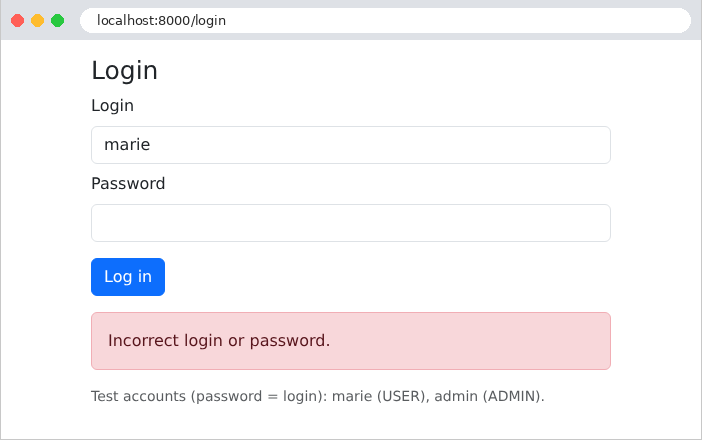
An incorrect password:

Image

Login successful. With [curl], you must first request the form to obtain the anti-CSRF token and the session cookie (example 21), then submit the form while retaining the received cookie:

curl -c token.txt -b token.txt http://localhost:8000/login
curl -i -c token.txt -b token.txt -d "_csrf_token=...&login=marie&password=marie" http://localhost:8000/login
1
2
3
4
HTTP/1.1 302 Found
Location: /profile
Set-Cookie: token=eyJ0eXAiOiJKV1QiLCJhbGciOiJIUzI1NiJ9.eyJzdWIiOiJtYXJpZSIsIm5hbWUiOiJNYXJpZSBQXHUwMGU5bGlzc2llciIsInJvbGUiOiJVU0VSIiwiaWF0IjoxNzkwNTAyNzM3LCJleHAiOjE3OTA1MDYzMzd9.ijkEBdAyfFX9yFEyHOLAi-WhkFvShYW4mxoPIG2LqOI; expires=Sun, 27 Sep 2026 10:52:17 GMT; Max-Age=3600; path=/; httponly; samesite=lax
...

The token consists of three parts, separated by periods, each encoded in Base64: the header, the content, and the signature. The first two parts can be decoded without any key:

{"typ":"JWT","alg":"HS256"}
{"sub":"marie","name":"Marie P\u00e9lissier","role":"USER","iat":1790502737,"exp":1790506337}

(The [é] is written in its escaped form, JSON, [\u00e9].) The expiration time is one hour (3,600 seconds) after creation. In the browser, the profile page displays this same content:
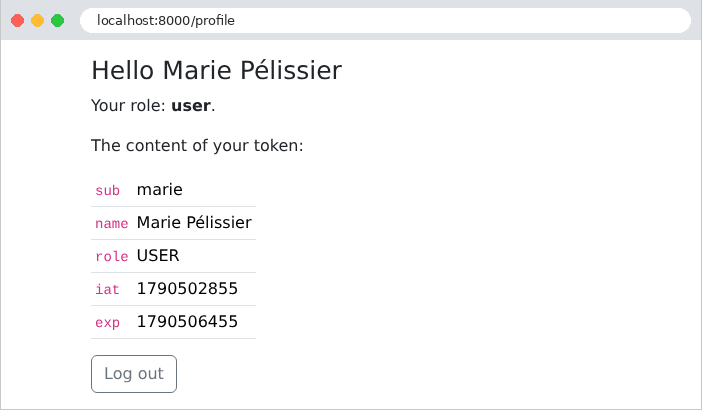
Image

A malicious user modifies their token: they replace the role ***[USER]*** with ***[ADMIN]*** in the content, re-encode this part in Base64, and keep the original signature. The server recalculates the signature of the modified content, which no longer matches:

curl -i -b "token=eyJ0eXAiOiJKV1QiLCJhbGciOiJIUzI1NiJ9.<modified content>.ijkEBdAyfFX9yFEyHOLAi-WhkFvShYW4mxoPIG2LqOI" http://localhost:8000/profile
1
2
3
4
HTTP/1.1 302 Found
Location: /login
Set-Cookie: token=deleted; expires=Sat, 27 Sep 2025 09:52:20 GMT; Max-Age=0; path=/; httponly
...

The forged token is rejected and deleted (the value [deleted] and the expired date instruct the browser to delete the cookie). To generate a valid signature, one would need to know the secret key—hence the importance of keeping it secret and choosing a long, random key.

8.2. Example 26: Roles

Example 26 adds an administration page, restricted to the role ADMIN. Only new or modified files are displayed.

8.2.1. The configuration: config/packages/security.yaml

# config/packages/security.yaml: the configuration of the SecurityBundle (see example 25)
security:
    password_hashers:
        App\Security\User:
            algorithm: bcrypt

    providers:
        users:
            id: App\Security\UsersService

    # the HIERARCHY of the roles: an administrator also has the rights of a user
    role_hierarchy:
        ROLE_ADMIN: ROLE_USER

    firewalls:
        resources:
            pattern: ^/bootstrap/
            security: false
        main:
            stateless: true
            provider: users
            custom_authenticators:
                - App\Security\TokenAuthenticator
            # an authenticated user, but who does not have the requested right: our 403 page
            access_denied_handler: App\Security\AccessDenied

    # /profile: any authenticated user; /admin is protected by the #[IsGranted]
    # attribute of its controller; we could have written here:
    # - { path: ^/admin, roles: ROLE_ADMIN }
    access_control:
        - { path: ^/profile, roles: IS_AUTHENTICATED }
  • Lines 12–13: the role hierarchy: the role [ROLE_ADMIN] includes the role [ROLE_USER]. An administrator thus has all the rights of a user without needing to be assigned both roles;
  • Line 25: The firewall access denial handler ([access_denied_handler]): the class that generates the response sent to an authenticated user who requests a page they are not authorized to view;
  • Lines 27–31: The page [/admin] could be protected here with an additional rule; instead, we protect it in its controller to demonstrate an alternative approach.

The difference between the two denial responses is important: an anonymous visitor requesting a protected page is redirected to the firewall’s entry point (the login page, Example 25); an authenticated user who does not have the requested role receives a 403 error (Forbidden): logging in would be pointless, since they are already authenticated.

8.2.2. Access Denied: src/Security/AccessDenied.php

<?php
// src/Security/AccessDenied.php: the response given to an AUTHENTICATED user who
// requests a page that is forbidden to them (see access_denied_handler in security.yaml)

namespace App\Security;

use Symfony\Component\HttpFoundation\Request;
use Symfony\Component\HttpFoundation\Response;
use Symfony\Component\Security\Core\Exception\AccessDeniedException;
use Symfony\Component\Security\Http\Authorization\AccessDeniedHandlerInterface;
use Twig\Environment;

class AccessDenied implements AccessDeniedHandlerInterface
{
    public function __construct(private Environment $twig)
    {
    }

    public function handle(Request $request, AccessDeniedException $accessDeniedException): ?Response
    {
        return new Response($this->twig->render('errors/403.html.twig'), Response::HTTP_FORBIDDEN);
    }
}
  • line 13: the class implements the [AccessDeniedHandlerInterface] interface, whose sole method, [handle], returns the denial response;
  • line 21: the 403 error page, generated by [Twig] (like the [ErrorPage] listener in Example 24), with the code 403 ([Response::HTTP_FORBIDDEN], a constant of the [Response] class).

Without this handler, the denial would result in a [AccessDeniedHttpException] exception, and the user would see the 403 error page for [Symfony] (detailed in debug mode). The [templates/errors/403.html.twig] page is a standard error page, with a link back to the profile.

8.2.3. The controller: src/Controller/AdminController.php

<?php
// src/Controller/AdminController.php: a page reserved for the ADMIN role

namespace App\Controller;

use App\Security\User;
use Symfony\Bundle\FrameworkBundle\Controller\AbstractController;
use Symfony\Component\HttpFoundation\Response;
use Symfony\Component\Routing\Attribute\Route;
use Symfony\Component\Security\Http\Attribute\CurrentUser;
use Symfony\Component\Security\Http\Attribute\IsGranted;

class AdminController extends AbstractController
{
    // #[IsGranted]: the action is executed only if the user has the ADMIN role
    #[Route('/admin', methods: ['GET'])]
    #[IsGranted('ROLE_ADMIN')]
    public function display(#[CurrentUser] User $user): Response
    {
        return $this->render('admin/admin.html.twig', ['name' => $user->name]);
    }
}
  • Line 17: The [#[IsGranted]] attribute allows the action to be executed only by a user who has the required permission, in this case the [ROLE_ADMIN] role. An anonymous visitor is redirected to the entry point; an authenticated user without this role is denied access. When applied to the class, the attribute would protect all of its actions.

The controller does not perform any checks itself. In the code, a permission would be checked using [$this->isGranted('ROLE_ADMIN')] (which returns a Boolean) or [$this->denyAccessUnlessGranted('ROLE_ADMIN')] (which throws a denial exception). For rules that are more granular than a role (“a user can only edit their own appointments”), [Symfony] allows you to define “voters” (voters): classes that determine a permission, which [#[IsGranted]] and [is_granted] query as if they were roles.

8.2.4. The profile view

{% extends 'layout.html.twig' %}

{% block content %}
  <h1 class="h3">Hello {{ user.name }}</h1>
  <p>Your role: <b>{{ user.role == 'ADMIN' ? 'administrator' : 'user' }}</b>.</p>
  {# is_granted: does the user have this role? The block is displayed only in that case #}
  {% if is_granted('ROLE_ADMIN') %}
    <p><a href="/admin">The administration area</a></p>
  {% else %}
    <p><a href="/admin">The administration area</a> (which is forbidden to you)</p>
  {% endif %}
  <p>The content of your token:</p>
  <table class="table table-sm w-auto">
    {% for key, value in user.claims %}
      <tr><td><code>{{ key }}</code></td><td>{{ value }}</td></tr>
    {% endfor %}
  </table>
  {# logging out: a POST form reduced to its button #}
  <form method="post" action="/logout">
    <input type="hidden" name="_csrf_token" value="{{ csrf_token('logout') }}">
    <button class="btn btn-outline-secondary" type="submit">Log out</button>
  </form>
{% endblock %}
  • Lines 7–11: The function [is_granted] from [Twig] checks a user’s permission. This prevents a link from being displayed that would lead to an error; however, this is merely a convenience feature: the real protection comes from the action itself.

8.2.5. Execution

Marie, with the role USER, follows the link to the administration page:
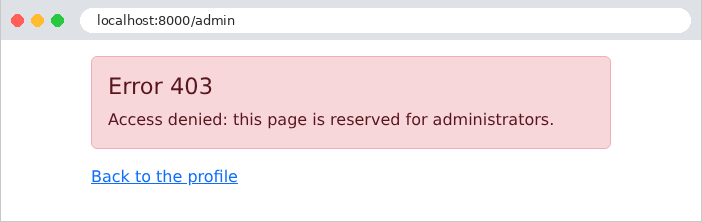
Image

The administrator, on the other hand, has access to it:
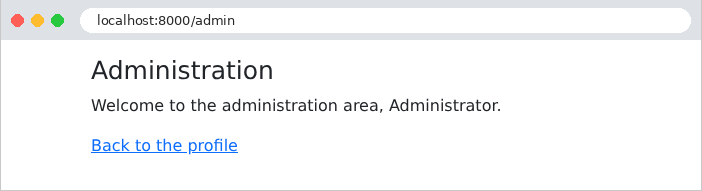
Image

With [curl]: a user with role USER (logged in as in Example 25, with cookies stored in the file [token.txt]), followed by an anonymous visitor:

curl -i -b token.txt http://localhost:8000/admin
curl -i http://localhost:8000/admin
HTTP/1.1 403 Forbidden
...
        <div class="alert alert-danger">
    <h1 class="h4">Error 403</h1>
    <p class="mb-0">Access denied: this page is reserved for administrators.</p>
  </div>
...
HTTP/1.1 302 Found
...
Location: /login
...

Protecting routes one by one has a flaw: if one is overlooked, the page becomes accessible to everyone. The case study will reverse this logic: all URL pages are protected by default through a general [access_control] rule, and only a few URL pages (the login page, the registration page) are exempt.

8.3. Example 27: CAPTCHA and Attempt Limits

A login form is a target: a program can try thousands of passwords per minute (brute-force attack). Two protections complement each other:

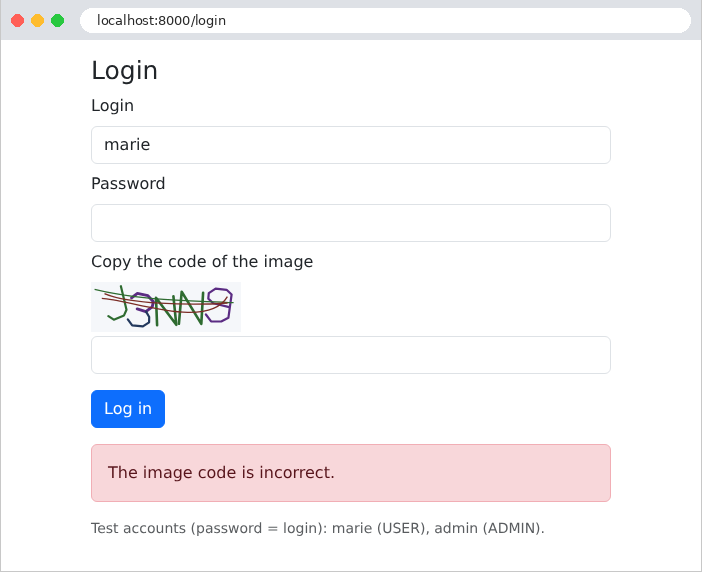
  • a CAPTCHA (Completely Automated Public Turing test to tell Computers and Humans Apart): an image containing a distorted code that is easy for a human to read but difficult for a program;
  • an attempt limit: after three failed attempts, the client’s address IP is blocked for one minute.

Example 27 builds on Example 25 and adds these two security measures.

8.3.1. The CAPTCHA image: src/Security/CaptchaDrawing.php

<?php
// src/Security/CaptchaDrawing.php: the drawing of a captcha, an SVG image (XML text)
// built by hand

namespace App\Security;

class CaptchaDrawing
{
    public const WIDTH = 150;

    public const HEIGHT = 50;

    // The "font": each character is a list of strokes, each stroke a
    // sequence of x, y points in a 4 x 6 grid (y downwards).
    // Characters too easy to confuse with each other: excluded (0 O, 1 I L).
    private const FONT = [
        'A' => [[0, 6, 2, 0, 4, 6], [0.8, 3.8, 3.2, 3.8]],
        'B' => [[0, 0, 0, 6, 3, 6, 4, 5, 4, 4, 3, 3, 0, 3], [0, 0, 3, 0, 4, 1, 4, 2, 3, 3]],
        'C' => [[4, 1, 3, 0, 1, 0, 0, 1, 0, 5, 1, 6, 3, 6, 4, 5]],
        'D' => [[0, 0, 0, 6, 2.5, 6, 4, 4.5, 4, 1.5, 2.5, 0, 0, 0]],
        'E' => [[4, 0, 0, 0, 0, 6, 4, 6], [0, 3, 3, 3]],
        'F' => [[4, 0, 0, 0, 0, 6], [0, 3, 3, 3]],
        'G' => [[4, 1, 3, 0, 1, 0, 0, 1, 0, 5, 1, 6, 3, 6, 4, 5, 4, 3.5, 2.5, 3.5]],
        'H' => [[0, 0, 0, 6], [4, 0, 4, 6], [0, 3, 4, 3]],
        'J' => [[4, 0, 4, 5, 3, 6, 1, 6, 0, 5]],
        'K' => [[0, 0, 0, 6], [4, 0, 0, 3.5], [1.3, 2.6, 4, 6]],
        'M' => [[0, 6, 0, 0, 2, 3.5, 4, 0, 4, 6]],
        'N' => [[0, 6, 0, 0, 4, 6, 4, 0]],
        'P' => [[0, 6, 0, 0, 3, 0, 4, 1, 4, 2, 3, 3, 0, 3]],
        'Q' => [[1, 0, 3, 0, 4, 1, 4, 5, 3, 6, 1, 6, 0, 5, 0, 1, 1, 0], [2.5, 4.5, 4, 6.3]],
        'R' => [[0, 6, 0, 0, 3, 0, 4, 1, 4, 2, 3, 3, 0, 3], [2, 3, 4, 6]],
        'S' => [[4, 1, 3, 0, 1, 0, 0, 1, 0, 2, 1, 3, 3, 3, 4, 4, 4, 5, 3, 6, 1, 6, 0, 5]],
        'T' => [[0, 0, 4, 0], [2, 0, 2, 6]],
        'U' => [[0, 0, 0, 5, 1, 6, 3, 6, 4, 5, 4, 0]],
        'V' => [[0, 0, 2, 6, 4, 0]],
        'W' => [[0, 0, 1, 6, 2, 2.5, 3, 6, 4, 0]],
        'X' => [[0, 0, 4, 6], [4, 0, 0, 6]],
        'Y' => [[0, 0, 2, 3, 4, 0], [2, 3, 2, 6]],
        'Z' => [[0, 0, 4, 0, 0, 6, 4, 6]],
        '2' => [[0, 1, 1, 0, 3, 0, 4, 1, 4, 2, 0, 6, 4, 6]],
        '3' => [[0, 1, 1, 0, 3, 0, 4, 1, 4, 2, 3, 3, 1.5, 3], [3, 3, 4, 4, 4, 5, 3, 6, 1, 6, 0, 5]],
        '4' => [[3, 6, 3, 0, 0, 4, 4, 4]],
        '5' => [[4, 0, 0, 0, 0, 3, 3, 3, 4, 4, 4, 5, 3, 6, 1, 6, 0, 5]],
        '6' => [[4, 1, 3, 0, 1, 0, 0, 1, 0, 5, 1, 6, 3, 6, 4, 5, 4, 4, 3, 3, 0, 3]],
        '7' => [[0, 0, 4, 0, 1.5, 6]],
        '8' => [[1, 3, 0, 2, 0, 1, 1, 0, 3, 0, 4, 1, 4, 2, 3, 3, 1, 3, 0, 4, 0, 5, 1, 6, 3, 6, 4, 5,
            4, 4, 3, 3]],
        '9' => [[4, 3, 1, 3, 0, 2, 0, 1, 1, 0, 3, 0, 4, 1, 4, 5, 3, 6, 1, 6, 0, 5]],
    ];

    // a few dark colors, easy to read on the light background
    private const COLORS = ['#1f4e79', '#7b2d26', '#2e6b30', '#5b2c83', '#8a5a00', '#23395d', '#9c2a5b'];

    // a random text. random_int is a "cryptographic" generator,
    // unpredictable (unlike rand or mt_rand, whose sequence could be guessed)
    public static function randomText(int $length): string
    {
        $alphabet = array_keys(self::FONT);
        $text = '';
        for ($i = 0; $i < $length; $i++) {
            $text .= $alphabet[random_int(0, count($alphabet) - 1)];
        }
        return $text;
    }

    // a floating-point number, at random, between $minimum and $maximum
    private static function random(float $minimum, float $maximum): float
    {
        return $minimum + ($maximum - $minimum) * random_int(0, PHP_INT_MAX) / PHP_INT_MAX;
    }

    private static function color(): string
    {
        return self::COLORS[random_int(0, count(self::COLORS) - 1)];
    }

    public static function svg(string $text): string
    {
        $l = self::WIDTH;
        $h = self::HEIGHT;
        $pieces = ["<svg xmlns=\"http://www.w3.org/2000/svg\" width=\"$l\" height=\"$h\" viewBox=\"0 0 $l $h\">",
            '<rect width="100%" height="100%" fill="#f5f7fa"/>'];

        // the characters: each one enlarged, tilted, shifted, and each point
        // slightly moved at random
        $step = ($l - 20) / strlen($text);
        foreach (str_split($text) as $i => $character) {
            $scale = self::random(4.6, 5.6);    // size of a unit of the grid, in pixels
            $angle = self::random(-0.35, 0.35);   // rotation, in radians (about ±20°)
            $cx = 10 + $step * ($i + 0.5) + self::random(-3, 3);    // center of the character
            $cy = $h / 2 + self::random(-4, 4);
            foreach (self::FONT[$character] as $stroke) {
                $d = [];
                for ($k = 0; $k < count($stroke); $k += 2) {
                    // point of the grid, centered on (2, 3), distorted, rotated, placed
                    $x = ($stroke[$k] - 2 + self::random(-0.2, 0.2)) * $scale;
                    $y = ($stroke[$k + 1] - 3 + self::random(-0.2, 0.2)) * $scale;
                    $px = $cx + $x * cos($angle) - $y * sin($angle);
                    $py = $cy + $x * sin($angle) + $y * cos($angle);
                    $d[] = sprintf('%s%.1f %.1f', $k === 0 ? 'M' : 'L', $px, $py);
                }
                $pieces[] = sprintf('<path d="%s" fill="none" stroke="%s" stroke-width="%.1f" '
                    .'stroke-linecap="round" stroke-linejoin="round"/>',
                    implode(' ', $d), self::color(), self::random(2.2, 3));
            }
        }

        // 3 scrambling lines: curves that cross the image
        for ($n = 0; $n < 3; $n++) {
            $pieces[] = sprintf('<path d="M%.1f %.1f C%.1f %.1f %.1f %.1f %.1f %.1f" fill="none" '
                .'stroke="%s" stroke-width="1.3"/>',
                self::random(0, 20), self::random(5, 45), self::random(30, 60), self::random(0, 50),
                self::random(90, 120), self::random(0, 50), self::random(130, 150), self::random(5, 45),
                self::color());
        }
        $pieces[] = '</svg>';
        return implode('', $pieces);
    }
}

The image is in the SVG format (Scalable Vector Graphics): a vector drawing described in XML—that is, text—which the server generates without a graphics library, and which the browser displays directly on the page. This class is pure [PHP], with nothing specific to a framework: it is the same as the [Laravel] version of this course.

  • Lines 16–49: a minimalist “font”: each character is a list of strokes, and each stroke is a list of [x, y] coordinates in a 4 × 6 grid. Characters that are easily confused ([0] and [O], [1], [I], and [L]) are excluded;
  • Lines 56–64: a random string selected from the characters in the font ([array_keys], the keys in the table). The functions [rand] and [mt_rand] of [PHP] produce predictable number sequences (anyone who knows a few values can guess the next ones): they are suitable for simulations, not for security. [random_int] is a cryptographic generator; it is unpredictable;
  • lines 67–70: a random floating-point number, generated from a random integer ([PHP_INT_MAX] is the largest integer in [PHP]);
  • lines 77–118: the drawing. Each character is randomly scaled, rotated, and moved, and each of its points is slightly offset; each line becomes an element [<path>] of the SVG ([M]: displacement, [L]: line). Three curves ([C]: Bézier curve) cross the image to interfere with recognition programs. The [sprintf] function formats a string: [%s] inserts a string into it, and [%.1f] inserts a number with one decimal place. [str_split] splits a string into characters.

The class [Captcha] combines a CAPTCHA’s ID with its image:

<?php
// src/Security/Captcha.php: a captcha: its identifier, and its image (SVG)

namespace App\Security;

readonly class Captcha
{
    public function __construct(
        public string $id,
        public string $svg,
    ) {
    }
}

8.3.2. The CAPTCHA service: src/Security/CaptchaService.php

<?php
// src/Security/CaptchaService.php: the pending captchas, kept by the server,
// in the cache (see example 20)

namespace App\Security;

use Psr\Cache\CacheItemPoolInterface;

class CaptchaService
{
    // the lifetime of a captcha, in seconds
    private const LIFETIME = 600;

    public function __construct(private CacheItemPoolInterface $cache)
    {
    }

    public function generate(): Captcha
    {
        $text = CaptchaDrawing::randomText(5);
        // a random identifier, impossible to guess: 12 bytes drawn by a
        // cryptographic generator (random_bytes), written in hexadecimal (bin2hex)
        $id = bin2hex(random_bytes(12));
        // the expected answer, in the cache, for 10 minutes (expiresAfter): the
        // cache will forget it by itself afterwards
        $item = $this->cache->getItem("captcha.$id");
        $this->cache->save($item->set($text)->expiresAfter(self::LIFETIME));
        return new Captcha($id, CaptchaDrawing::svg($text));
    }

    // the captcha is CONSUMED in all cases: an image is used only once
    public function check(?string $id, ?string $answer): bool
    {
        // a malformed identifier cannot be a key of the cache
        if ($id === null || ! ctype_xdigit($id) || $answer === null) {
            return false;
        }
        $item = $this->cache->getItem("captcha.$id");
        // deleteItem: the answer is removed from the cache, whether it is right or not
        $this->cache->deleteItem("captcha.$id");
        if (! $item->isHit()) {
            return false;    // unknown identifier, or expired captcha
        }
        // strcasecmp returns 0 for two equal strings, case-insensitively
        return strcasecmp($item->get(), trim($answer)) === 0;
    }
}
  • Lines 18–29: a new CAPTCHA: random text, a random and unguessable identifier, and the image. For each identifier, the server stores the expected response in the cache (example 20) for ten minutes: the [expiresAfter] method of the cache element sets its lifetime in seconds. After this time, the cache automatically discards it. The page receives only the identifier and the image: the response never leaves the server;
  • lines 32–46: the validation. The identifier comes from the client: we first verify that it consists of hexadecimal digits ([ctype_xdigit]), since certain characters ([{}()/\@:]) are prohibited in cache keys, which would throw an exception. The element is read, then removed from the cache ([deleteItem]): the CAPTCHA is consumed in all cases, whether successful or not. Without this, a program could try all possible answers on the same image. The comparison ignores case ([strcasecmp] returns 0 for two equal strings, regardless of uppercase or lowercase letters) and spaces around the input ([trim]).

8.3.3. Attempt limit: config/packages/framework.yaml

# config/packages/framework.yaml: the configuration of the FrameworkBundle
framework:
    secret: '%env(APP_SECRET)%'
    # the session: it is only used for the anti-CSRF token of the login form
    session:
        handler_id: null
        save_path: '%kernel.project_dir%/var/sessions/%kernel.environment%'
    csrf_protection: true
    # the locks (see example 20): the limiter uses them to count without error
    # the simultaneous attempts
    lock: 'flock://%kernel.project_dir%/var/lock'
    # the RATE limiters (RateLimiter component); this one, named [login],
    # accepts 3 "tokens" per window of 60 seconds
    rate_limiter:
        login:
            policy: fixed_window
            limit: 3
            interval: '60 seconds'
  • line 11: locks (example 20): the limiter uses these to ensure that two simultaneous requests do not skew its count;
  • lines 14–18: a rate limiter, named [login]. A rate limiter distributes “tokens” (unrelated to the token JWT): each restricted action consumes one, and when there are no more left, the action is denied. The [fixed_window] policy (fixed window) grants 3 tokens per 60-second period, counted from the first token consumed. There are other policies: [sliding_window] (a sliding window, more regular), [token_bucket] (a bucket that fills at a given rate). The counters are stored in the application cache.

For each declared limiter, [Symfony] creates a limiter factory service ([RateLimiterFactoryInterface]), which is obtained via injection under a parameter name consisting of the limiter's name followed by [Limiter]: [$loginLimiter].

8.3.4. The controller: src/Controller/AuthController.php

<?php
// src/Controller/AuthController.php: login (with captcha and limitation of the
// attempts) and logout

namespace App\Controller;

use App\Security\AuthService;
use App\Security\CaptchaService;
use Symfony\Bundle\FrameworkBundle\Controller\AbstractController;
use Symfony\Component\HttpFoundation\Cookie;
use Symfony\Component\HttpFoundation\Request;
use Symfony\Component\HttpFoundation\Response;
use Symfony\Component\HttpKernel\Exception\AccessDeniedHttpException;
use Symfony\Component\RateLimiter\RateLimiterFactoryInterface;
use Symfony\Component\Routing\Attribute\Route;

class AuthController extends AbstractController
{
    // $loginLimiter: the factory of the [login] limiter (see config/packages/framework.yaml);
    // the name of the parameter designates the limiter
    public function __construct(
        private AuthService $auth,
        private CaptchaService $captchas,
        private RateLimiterFactoryInterface $loginLimiter,
    ) {
    }

    #[Route('/', methods: ['GET'])]
    public function home(): Response
    {
        return $this->redirect('/profile');
    }

    #[Route('/login', methods: ['GET'])]
    public function form(): Response
    {
        return $this->loginPage();
    }

    #[Route('/login', methods: ['POST'])]
    public function login(Request $request): Response
    {
        $inputs = $request->getPayload();
        if (! $this->isCsrfTokenValid('login', $inputs->getString('_csrf_token'))) {
            throw new AccessDeniedHttpException('invalid anti-CSRF token');
        }
        $login = $inputs->getString('login');
        // the limiter of THIS client: the key of its failure counter is its IP address
        $limiter = $this->loginLimiter->create($request->getClientIp());

        // 1. a blocked address is not even listened to; consume(0) consults the
        // counter without consuming anything
        $state = $limiter->consume(0);
        if ($state->getRemainingTokens() === 0) {
            $seconds = $state->getRetryAfter()->getTimestamp() - time();
            return $this->loginPage($login, "Too many attempts: try again in $seconds s.");
        }
        // 2. the captcha first (cheap), the password (bcrypt, expensive) afterwards;
        // consume(): one more failure
        if (! $this->captchas->check($inputs->getString('captchaId'), $inputs->getString('captcha'))) {
            $limiter->consume();
            return $this->loginPage($login, 'The image code is incorrect.');
        }
        $user = $this->auth->validate($login, $inputs->getString('password'));
        if ($user === null) {
            $limiter->consume();
            return $this->loginPage($login, 'Incorrect login or password.');
        }
        // a successful login clears the failures
        $limiter->reset();
        $response = $this->redirect('/profile');
        $response->headers->setCookie(Cookie::create(AuthService::COOKIE, $this->auth->createToken($user))
            ->withExpires(time() + $this->auth->durationMinutes * 60)
            ->withHttpOnly(true)
            ->withSameSite(Cookie::SAMESITE_LAX));
        return $response;
    }

    #[Route('/logout', methods: ['POST'])]
    public function logout(Request $request): Response
    {
        if (! $this->isCsrfTokenValid('logout', $request->getPayload()->getString('_csrf_token'))) {
            throw new AccessDeniedHttpException('invalid anti-CSRF token');
        }
        $response = $this->redirect('/login');
        $response->headers->clearCookie(AuthService::COOKIE);
        return $response;
    }

    // each display of the form builds a NEW captcha
    private function loginPage(?string $login = null, ?string $error = null): Response
    {
        return $this->render('auth/login.html.twig', ['login' => $login, 'error' => $error,
            'captcha' => $this->captchas->generate()]);
    }
}
  • lines 21–26: the controller receives the factory for the limiter [login];
  • line 49: this client’s limiter, [create(key)], returns a limiter that has its own counter under this key—in this case, the client’s address IP ([getClientIp()]);
  • lines 53–57: A blocked address is not even listened to. [consume(0)] queries the limiter without consuming anything; the [RateLimit] object it returns provides the number of remaining tokens ([getRemainingTokens()]) and the date when the action will be permitted again ([getRetryAfter()]), from which we can deduce the number of seconds to wait;
  • Lines 60–68: The CAPTCHA is verified before the password; verifying it costs almost nothing, whereas [bcrypt] is intentionally slow. A program that enters the wrong CAPTCHA would therefore not trigger [bcrypt]. Each failure—whether for the CAPTCHA or the password—consumes a token ([consume()], which consumes one by default). After the third failure, no tokens remain: the address is blocked until the end of the 60-second window, counted from the first failure;
  • line 70: a successful login clears the failed attempts ([reset()]);
  • lines 91–95: Each time the form is displayed, a new CAPTCHA is generated, even after a failed attempt.

SecurityBundle also provides a built-in connection limit (the [login_throttling] firewall option), which applies to its own login authenticators ([form_login]...), not to our action. To limit the number of requests for a route, we would use a limiter in the same way, either within the action or in a listener for [kernel.request]. We chose to count only the failed attempts, so as not to inconvenience a user who is logging in normally.

8.3.5. The view: templates/auth/login.html.twig

{% extends 'layout.html.twig' %}

{% block content %}
  <h1 class="h3">Login</h1>
  <form method="post" action="/login">
    <input type="hidden" name="_csrf_token" value="{{ csrf_token('login') }}">
    <div class="mb-2">
      <label class="form-label" for="login">Login</label>
      <input class="form-control" id="login" name="login" value="{{ login }}" required>
    </div>
    <div class="mb-2">
      <label class="form-label" for="password">Password</label>
      <input class="form-control" type="password" id="password" name="password" required>
    </div>
    <div class="mb-3">
      <label class="form-label" for="captcha">Copy the code of the image</label>
      {# the SVG image, built by the server: inserted without escaping (raw filter) #}
      <div class="mb-1">{{ captcha.svg|raw }}</div>
      {# the captcha identifier travels in a hidden field; the answer stays on the server #}
      <input type="hidden" name="captchaId" value="{{ captcha.id }}">
      <input class="form-control" id="captcha" name="captcha" autocomplete="off" required>
    </div>
    <button class="btn btn-primary" type="submit">Log in</button>
  </form>
  {% if error %}
    <div class="alert alert-danger mt-3">{{ error }}</div>
  {% endif %}
  <p class="text-muted small mt-3">Test accounts (password = login): marie (USER), admin (ADMIN).</p>
{% endblock %}
  • Line 18: The image SVG is inserted into the page as-is, without escaping (filter [raw], example 14). This is legitimate: this HTML was generated by the server; it does not contain any user input;
  • line 20: the captcha ID, in a hidden field;
  • line 21: the browser does not suggest any previous entries for this field.

8.3.6. Execution
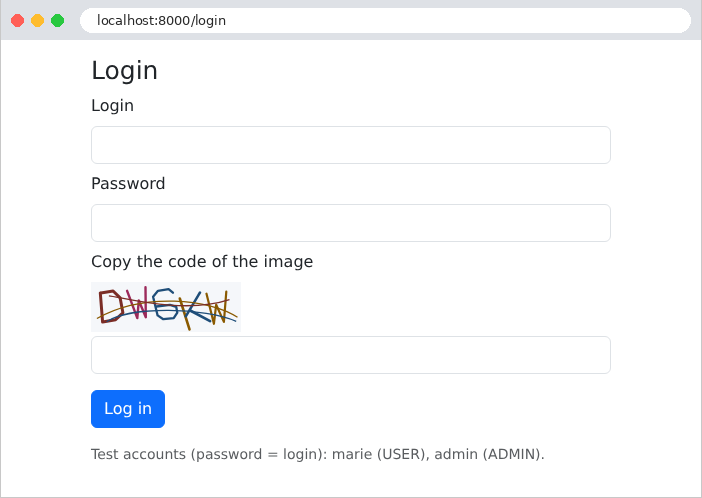
Image

An incorrectly copied code:

Image

After three failed attempts, the address is blocked:
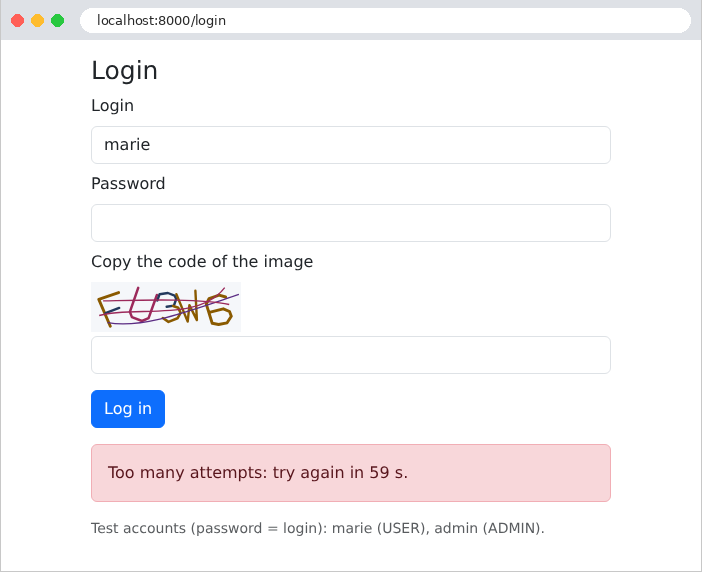
Image

With [curl], four attempts using a made-up CAPTCHA ID (after obtaining, as in Example 25, the session cookie and the anti-CSRF token):

curl -b cookies.txt -d "_csrf_token=...&login=marie&password=marie&captchaId=abc&captcha=XXXXX" http://localhost:8000/login
1
2
3
4
      <div class="alert alert-danger mt-3">The image code is incorrect.</div>
      <div class="alert alert-danger mt-3">The image code is incorrect.</div>
      <div class="alert alert-danger mt-3">The image code is incorrect.</div>
      <div class="alert alert-danger mt-3">Too many attempts: try again in 60 s.</div>

Even with the correct password, the fourth attempt is rejected without being processed.