2. An MVC Development Approach for Web/PHP
Here we propose an approach for developing web/PHP applications that follow the MVC architecture. It is intended only to provide a starting point. The reader should adapt it to their own preferences and needs.
- We will begin by defining all the views of the application. These are the web pages presented to the user. We will adopt the user’s perspective when designing the views. There are three types of views:
- the input form, which is designed to collect information from the user. It typically includes a button to submit the entered information to the server.
- The response page, which serves only to provide information to the user. This often includes one or more links allowing the user to continue using the application on another page.
- the mixed page: the controller has sent the client a page containing information it generated. This same page will be used by the client to provide the controller with new information from the user.
- Each view will generate a PHP page. For each of these:
- we will design the page’s layout
- we will determine which parts of it are dynamic:
- the information intended for the user that must be provided by the controller as parameters to the PHP view. A simple solution is as follows:
- The controller places the information it wants to provide to a view V into a dictionary $dResponse
- The controller displays the view V. If this corresponds to the source file V.php, this display is achieved simply by the include V.php statement.
- The previous inclusion is a code inclusion within the controller. The $dReponse dictionary populated by the controller is directly accessible by the code in V.php.
- The input data that must be transmitted to the main program for processing. This data must be part of an HTML form (<form> tag).
- the information intended for the user that must be provided by the controller as parameters to the PHP view. A simple solution is as follows:
- We can schematize the I/O for each view
 |
- Inputs are the data that the controller must provide to the PHP page
- Outputs are the data that the PHP page must provide to the application controller. They are part of an HTML form, and the controller will retrieve them using an operation such as $_GET["param"] (GET method) or $_POST["param"] (POST method).
- Often, the final page sent to the client is not a single view but a composition of views. For example, the page sent to a user might look like this:
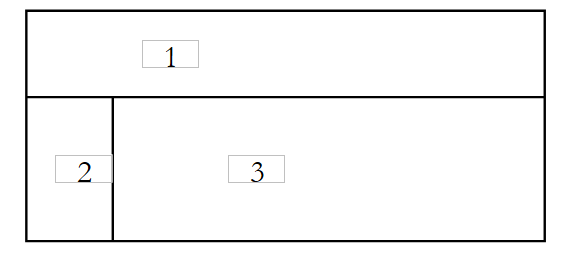 |
Area 1 can be a header banner, area 2 a menu banner, and area 3 a content area. In PHP, this composition can be achieved using the following HTML/PHP code:
<table>
    <tr>
        <td><?php include zone1.php ?></td>
    </tr>
    <tr>
        <td><?php include zone2.php ?></td>
        <td><?php include zone3.php ?></td>
    </tr>
</table>
You can make this code dynamic by writing:
<table>
    <tr>
        <td><?php include $dReponse['urlZone1'] ?></td>
    </tr>
    <tr>
        <td><?php include $dReponse['urlZone2'] ?></td>
        <td><?php include $dReponse['urlZone3'] ?></td>
    </tr>
</table>
This view composition can be the sole format of the response sent to the user. In this case, each response to the client must set the three URLs to be loaded into the three zones before displaying the response page. We can generalize this example by imagining that there are several possible templates for the response page. The response to the client must therefore:
- determine the template to use
- determine the elements to include in it
- request the display of the template
- We will write the PHP/HTML code for each response template. Its code is generally simple. The code for the example above could be:
<?php
    // initializations for testing without a controller
...
?>
<html>
    <head>
      <title><?php echo $dReponse['titre'] ?></title>
      <link type="text/css" href="<?php echo $dReponse['style']['url'] ?>" rel="stylesheet" />
    </head>
  <body>
    <table>
        <tr>
            <td><?php include $dReponse['urlZone1'] ?></td>
        </tr>
        <tr>
            <td><?php include $dReponse['urlZone2'] ?></td>
            <td><?php include $dReponse['urlZone3'] ?></td>
        </tr>
    </table>
  <body>
</html>
Whenever possible, we will use a stylesheet so that we can change the "look" of the response without having to modify the PHP/HTML code.
- We will write the PHP/HTML code for each basic view. It will most often take the following form:
<?php
     // a few initializations may be necessary, particularly in the debugging phase
    ...
?>

<balise>
...
         // here we'll try to minimize the php code
</balise>
Note that a basic view is embedded within a template. Its HTML code is integrated into the template’s code. Most often, the template already includes the tags <html>, <head>, and <body>. It is therefore rare to find these tags in a basic view.
- We can proceed to test the various response templates and basic views
- Each response template is tested. If a template is named modele1.php, we will request the URL http://localhost/chemin/modele1.php using a browser. The template expects values from the controller. Here, we call it directly rather than through the controller. The template will not receive the expected parameters. To enable testing nonetheless, we will manually initialize the expected parameters in the template’s PHP page using constants.
- Each model is tested, as well as all the basic views. This is also the time to develop the first elements of the style sheets used.
- Next, we write the application logic:
- The controller, or main program, generally handles several actions. The action to be performed must be defined in the requests it receives. This can be done using a request parameter, which we will call `action` here:
- if the request comes from a form (<form>), this parameter can be a hidden form parameter:
<form ... action="/C/main.php" method="post"  ...>
<input type="hidden" name="action" value="uneAction">
...
</form>
- (continued)
- If the request comes from a link, you can configure it as follows:
The controller can start by reading the value of this parameter and then delegate the processing of the request to a module responsible for handling this type of request. Here, we’ve assumed that everything is controlled by a single script called main.php. If the application needs to handle actions action1, action2, ..., actionx, you can create a function for each action within the controller. If there are many actions, this can lead to a "dinosaur" controller. Alternatively, one can create scripts action1.php, action2.php, ..., actionx.php responsible for handling each action. The controller tasked with handling action actionx will simply load the code from the corresponding script using an instruction such as include "actionx.php". The advantage of this method is that you work outside the controller’s code. Each member of the development team can thus work on the script handling an actionx action relatively independently. Including the code from the actionx.php script into the controller’s code at runtime also has the advantage of reducing the amount of code loaded into memory. Only the code for handling the current action is loaded. This code inclusion means that controller variables may conflict with those in the action script. We will see that we can limit controller variables to a few well-defined ones, which should then be avoided in the scripts.
- We will systematically seek to isolate the business logic or the code for accessing persistent data into separate modules. The controller acts as a sort of team leader that receives requests from its clients (web clients) and has them executed by the most appropriate entities (the business modules). When writing the controller, we will determine the interface of the business modules to be written. This applies if these business modules need to be built. If they already exist, then the controller will adapt to the interface of these existing modules.
- We will write the skeleton of the business modules required by the controller. For example, if the controller uses a `getCodes` module that returns an array of strings, we can initially simply write:
- We can then move on to testing the controller and the associated PHP scripts:
- the controller, action scripts, models, views, and resources required by the application (images, etc.) are placed in the DC folder associated with the application’s C context.
- Once this is done, the application is tested and the initial errors are corrected. If main.php is the controller and C is the application context, we will request the URL http://localhost/C/main.php. At the end of this phase, the application architecture is operational. This testing phase can be challenging, given that there are few debugging tools available if you are not using advanced development environments, which are generally paid. You can use echo "message" statements, which write to the HTML stream sent to the client and thus appear on the web page displayed by the browser.
- Finally, we write the business classes required by the controller. This typically involves the standard development of a PHP class, which is usually independent of any web application. It will first be tested outside of this environment, using a console application, for example. Once a business class has been written, we integrate it into the web application’s deployment architecture and test its proper integration. We proceed in this manner for each business class.