4. An illustrative application
We propose to illustrate the previous method with an example of tax calculation.
4.1. The problem
We aim to write a program to calculate a taxpayer’s tax. We consider the simplified case of a taxpayer who has only their salary to report:
- we calculate the number of tax brackets for the employee nbParts=nbEnfants/2 +1 if they are unmarried, nbEnfants/2+2 if they are married, where nbEnfants is the number of children. The number of shares is increased by 0.5 if there are three or more children.
- We calculate his taxable income R = 0.72 * S, where S is his annual salary
- we calculate his family coefficient Q = R/N
- We calculate his tax I based on the following data
| Each row has 3 limit fields: coeffR, coeffN. To calculate tax I, we look for the first row where QF <= limit. For example, if QF = 30000, we will find the row: 31810 0.2 3309.5. Tax I is then equal to 0.2*R - 3309.5*nbParts. If QF is such that the relation QF<=limit is never satisfied, then the coefficients of the last line are used: 0 0.65 49062, which gives the tax I=0.65*R - 49062*nbParts. |
4.2. The database
The preceding data is stored in a database named MySQL called dbimpots. The user seldbimpots with password mdpseldbimpots has read-only access to the database’s contents. The database contains a single table named impots with the following structure:

Its contents are as follows:

4.3. The application's architecture
The application will have the following architecture:
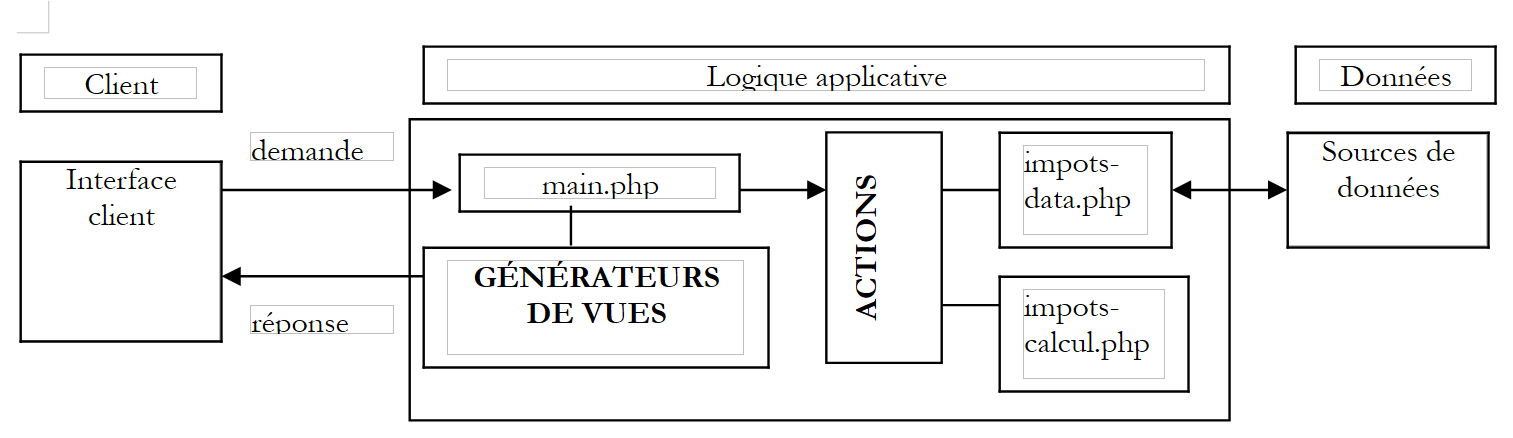 |
- The main.php controller will be the generic controller described above
- The client request is sent to the controller in the form of a request of the form main.php?action=xx. The value of the action parameter determines which ACTIONS block script to execute. The executed action script returns a variable to the controller indicating the state in which the web application should be placed. Armed with this state, the controller will activate one of the view generators to send the response to the client.
- impots-data.php is the class responsible for providing the controller with the data it needs
- impots-calcul.php is the business class that calculates the tax
4.4. The data access class
The data access class is designed to hide the data source from the web application. Its interface includes a method named getData that returns the three data arrays needed to calculate the tax. In our example, the data is retrieved from a database named MySQL. To make the class independent of the actual type of SGBD, we will use the pear::DB library described in the appendix. The class code is as follows:
<?php

   // libraries
  require_once 'DB.php';

  class impots_data{
     // data source access class DBIMPOTS

       // attributes
        var $sDSN;         // the connection chain
        var $sDatabase;    // base name
        var $oDB;          // connection to base
        var $aErreurs;     // error list
        var $oRésultats;   // query result
        var $connecté;     // boolean indicating whether or not you are connected to the database
        var $sQuery ;      // the last query executed

     // manufacturer
    function impots_data($dDSN){

         // $dDSN: dictionary defining the link to be established
       // $dDSN['sgbd']: type of SGBD to be connected to
       // $dDSN['host']: name of the host machine hosting it
       // $dDSN['database']: name of the database to be connected to
       // $dDSN['user']: a bse user
       // $dDSN['mdp']: its password

       // creates in $oDB a connection to the database defined by $dDSN as $dDSN['user']
       // if the connection is successful
           // sets $sDSN to the database connection string
           // sets $sDataBase to the name of the database to which you are connecting
         // sets $connecté to true
       // if the connection fails
           // sets the appropriate error msg in the $aErreurs list
         // closes the connection if necessary
         // sets $connecté to false

       // raz error list
            $this->aErreurs=array();

       // create a connection to the $sDSN database
      $this->sDSN=$dDSN["sgbd"]."://".$dDSN["user"].":".$dDSN["mdp"]."@".$dDSN["host"]."/".$dDSN["database"];
      $this->sDatabase=$dDSN["database"];
      $this->connect();

       // connected?
      if( ! $this->connecté) return;

       // the connection was successful
      $this->connecté=TRUE;
    }//manufacturer

    // ------------------------------------------------------------------
    function connect(){
         // (re)connecting to the base
       // raz error list
            $this->aErreurs=array();

       // create a connection to the $sDSN database
        $this->oDB=DB::connect($this->sDSN,true);

         // mistake?
        if(DB::iserror($this->oDB)){
           // we note the error
          $this->aErreurs[]="Echec de la connexion à la base [".$this->sDatabase."] : [".$this->oDB->getMessage()."]";
         // connection failed
        $this->connecté=FALSE;
         // end
        return;
      }

       // we're connected
      $this->connecté=TRUE;
    }//connect

    // ------------------------------------------------------------------
    function disconnect(){
       // if connected, closes the connection to the $sDSN database
        if($this->connecté){
              $this->oDB->disconnect();
           // we are disconnected
        $this->connecté=FALSE;
            }//if
    }//disconnect

    // -------------------------------------------------------------------
    function execute($sQuery){
         // $sQuery: query to execute

         // memorize the request
            $this->sQuery=$sQuery;

       // are we connected?
      if(! $this->connecté){
           // we note the error
        $this->aErreurs[]="Pas de connexion existante à la base [$this->sDatabase]";
         // end
        return;
      }//if

       // query execution
      $this->oRésultats=$this->oDB->query($sQuery);

         // mistake?
        if(DB::iserror($this->oRésultats)){
             // we note the error
            $this->aErreurs[]="Echec de la requête [$sQuery] : [".$this->oRésultats->getMessage()."]";
           // return
        return;
      }//if
    }//execute

    // ------------------------------------------------------------------
    function getData(){
       // we retrieve the 3 limit data series, coeffr, coeffn
      $this->execute('select limites, coeffR, coeffN from impots');
       // mistakes?
      if(count($this->aErreurs)!=0) return array();
       // browse the result of the select
      while ($ligne = $this->oRésultats->fetchRow(DB_FETCHMODE_ASSOC)) {
        $limites[]=$ligne['limites'];
        $coeffr[]=$ligne['coeffR'];
        $coeffn[]=$ligne['coeffN'];
      }//while
      return array($limites,$coeffr,$coeffn);
    }//getDataImpots

  }//class
?>
A test program could look like this:
<?php

  // library
  require_once "c-impots-data.php";
  require_once "DB.php";

    // testing the impots-data class
  ini_set('track_errors','on');
  ini_set('display_errors','on');

     // dbimpots base configuration
    $dDSN=array(
        "sgbd"=>"mysql",
        "user"=>"seldbimpots",
        "mdp"=>"mdpseldbimpots",
        "host"=>"localhost",
        "database"=>"dbimpots"
    );

  // opening of the session
  $oImpots=new impots_data($dDSN);
  // mistakes?
  if(checkErreurs($oImpots)){
    exit(0);
  }
  // follow-up
  echo "Connecté à la base...\n";

  // recovery of limit data, coeffr, coeffn
  list($limites,$coeffr,$coeffn)=$oImpots->getData();
  // mistakes?
  if( ! checkErreurs($oImpots)){
    // content
    echo "données : \n";
    for($i=0;$i<count($limites);$i++){
      echo "[$limites[$i],$coeffr[$i],$coeffn[$i]]\n";
    }//for
  }//if

  // we disconnect
  $oImpots->disconnect();
  // follow-up
  echo "Déconnecté de la base...\n";
  // end
  exit(0);

  // ----------------------------------
  function checkErreurs(&$oImpots){
      // mistakes?
    if(count($oImpots->aErreurs)!=0){
        // display
      for($i=0;$i<count($oImpots->aErreurs);$i++){
          echo $oImpots->aErreurs[$i]."\n";
      }//for
      // errors
      return true;
    }//if
    // no errors
    return false;
  }//checkErreurs

?>
Running this test program yields the following results:
Connecté à la base...
données :
[12620,0,0]
[13190,0.05,631]
[15640,0.1,1290.5]
[24740,0.15,2072.5]
[31810,0.2,3309.5]
[39970,0.25,4900]
[48360,0.3,6898]
[55790,0.35,9316.5]
[92970,0.4,12106]
[127860,0.45,16754]
[151250,0.5,23147.5]
[172040,0.55,30710]
[195000,0.6,39312]
[0,0.65,49062]
Déconnecté de la base...
4.5. The tax calculation class
This class is used to calculate a taxpayer's tax. The data required for this calculation is provided to its constructor. It then calculates the corresponding tax. The class code is as follows:
<?php

  class impots_calcul{
    // tax calculation class

    // manufacturer
    function impots_calcul(&$perso,&$data){
      // $perso: dictionary with the following keys
      // children : number of children
      // salary: annual salary
      // married: Boolean indicating whether the taxpayer is married or not
      // impot(s): tax payable calculated by this manufacturer
      // $data: dictionary with the following keys
      // limits: tranche limits table
      // coeffr: income coefficients table
      // coeffn tablaeu of coefficients for the number of shares
      // the 3 arrays have the same number of elements

      // calculating the number of shares
      if($perso['marié'])
        $nbParts=$perso['enfants']/2+2;
        else $nbParts=$perso['enfants']/2+1;
      if ($perso['enfants']>=3) $nbParts+=0.5;

      // taxable income
      $revenu=0.72*$perso['salaire'];

      // family quotient
      $QF=$revenu/$nbParts;

      // search for tax bracket corresponding to QF
      $nbTranches=count($data['limites']);
      $i=0;
      while($i<$nbTranches-2 && $QF>$data['limites'][$i]) $i++;

      // tax
      $perso['impot']=floor($data['coeffr'][$i]*$revenu-$data['coeffn'][$i]*$nbParts);
    }//manufacturer
  }//class
?>
A test program could look like this:
<?php

  // library
  require_once "c-impots-data.php";
  require_once "c-impots-calcul.php";

     // dbimpots base configuration
    $dDSN=array(
        "sgbd"=>"mysql",
        "user"=>"seldbimpots",
        "mdp"=>"mdpseldbimpots",
        "host"=>"localhost",
        "database"=>"dbimpots"
    );

  // opening of the session
  $oImpots=new impots_data($dDSN);
  // mistakes?
  if(checkErreurs($oImpots)){
    exit(0);
  }
  // follow-up
  echo "Connecté à la base...\n";
  // recovery of limit data, coeffr, coeffn
  list($limites,$coeffr,$coeffn)=$oImpots->getData();
  // mistakes?
  if(checkErreurs($oImpots)){
    exit(0);
  }
  // we disconnect
  $oImpots->disconnect();
  // follow-up
  echo "Déconnecté de la base...\n";

  // tax calculation
  $dData=array('limites'=>&$limites,'coeffr'=>&$coeffr,'coeffn'=>&$coeffn);
  $dPerso=array('enfants'=>2,'salaire'=>200000,'marié'=>true,'impot'=>0);
  new impots_calcul($dPerso,$dData);
  dump($dPerso);
  $dPerso=array('enfants'=>3,'salaire'=>200000,'marié'=>false,'impot'=>0);
  new impots_calcul($dPerso,$dData);
  dump($dPerso);
  $dPerso=array('enfants'=>3,'salaire'=>20000,'marié'=>true,'impot'=>0);
  new impots_calcul($dPerso,$dData);
  dump($dPerso);
  $dPerso=array('enfants'=>3,'salaire'=>2000000,'marié'=>true,'impot'=>0);
  new impots_calcul($dPerso,$dData);
  dump($dPerso);

  // end
  exit(0);

  // ----------------------------------
  function checkErreurs(&$oImpots){
      // mistakes?
    if(count($oImpots->aErreurs)!=0){
        // display
      for($i=0;$i<count($oImpots->aErreurs);$i++){
          echo $oImpots->aErreurs[$i]."\n";
      }//for
      // errors
      return true;
    }//if
    // no errors
    return false;
  }//checkErreurs

?>
Running this test program yields the following results:
Connecté à la base...
Déconnecté de la base...
[enfants,2] [salaire,200000] [marié,1] [impot,22506]
[enfants,3] [salaire,200000] [marié,] [impot,22506]
[enfants,3] [salaire,20000] [marié,1] [impot,0]
[enfants,3] [salaire,2000000] [marié,1] [impot,706752]
4.6. How the application works
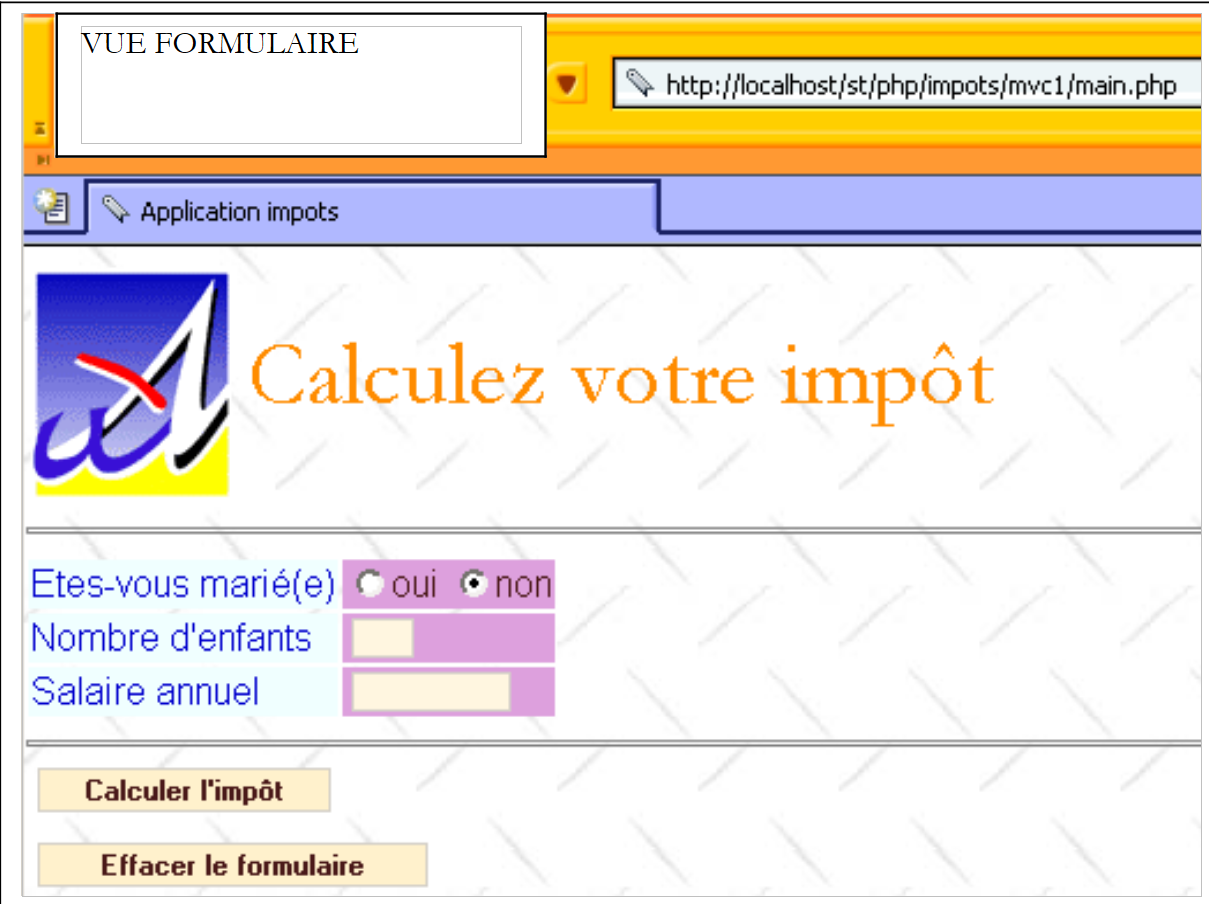
When the web-based tax calculation application is launched, the following view [v-formulaire] appears:
 |
The user fills in the fields and requests the tax calculation:
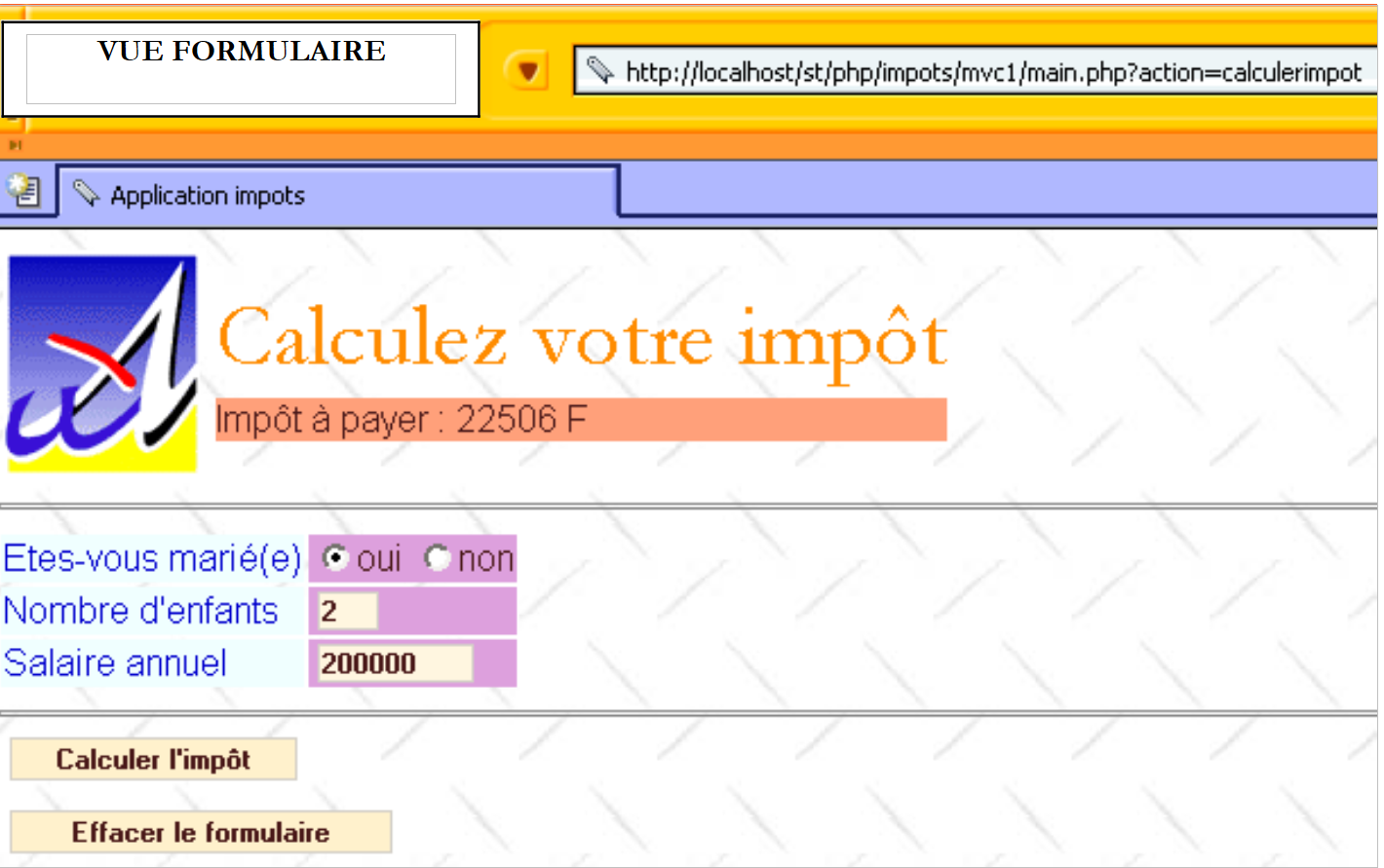 |
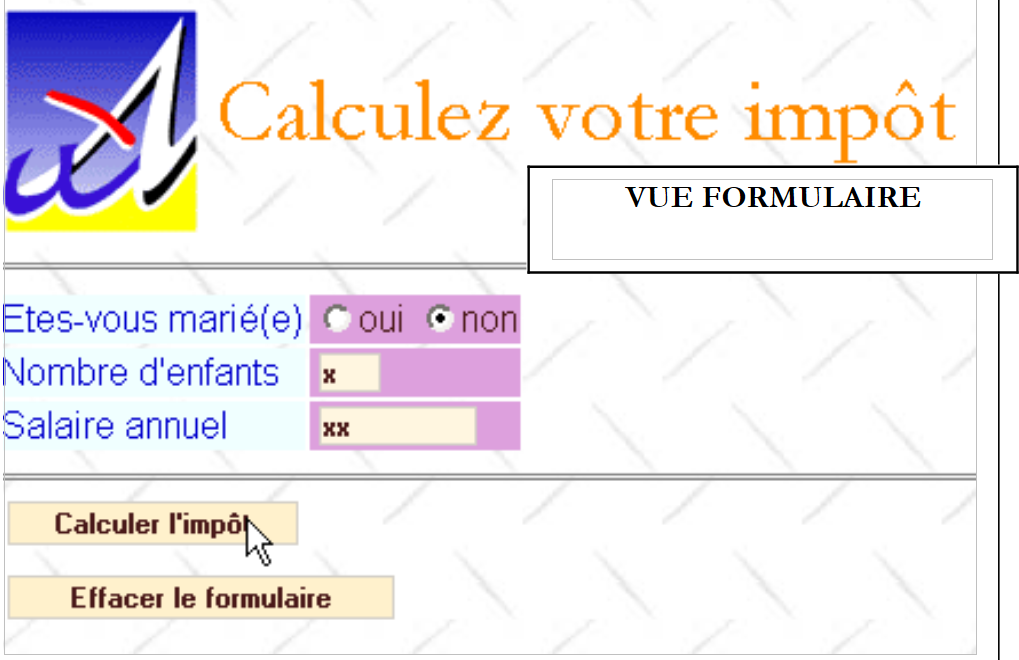
Note that the form is regenerated in the state in which the user submitted it and also displays the amount of tax due. The user may make data entry errors. These are flagged by an error page, which we will refer to as view [v-erreurs].
 |
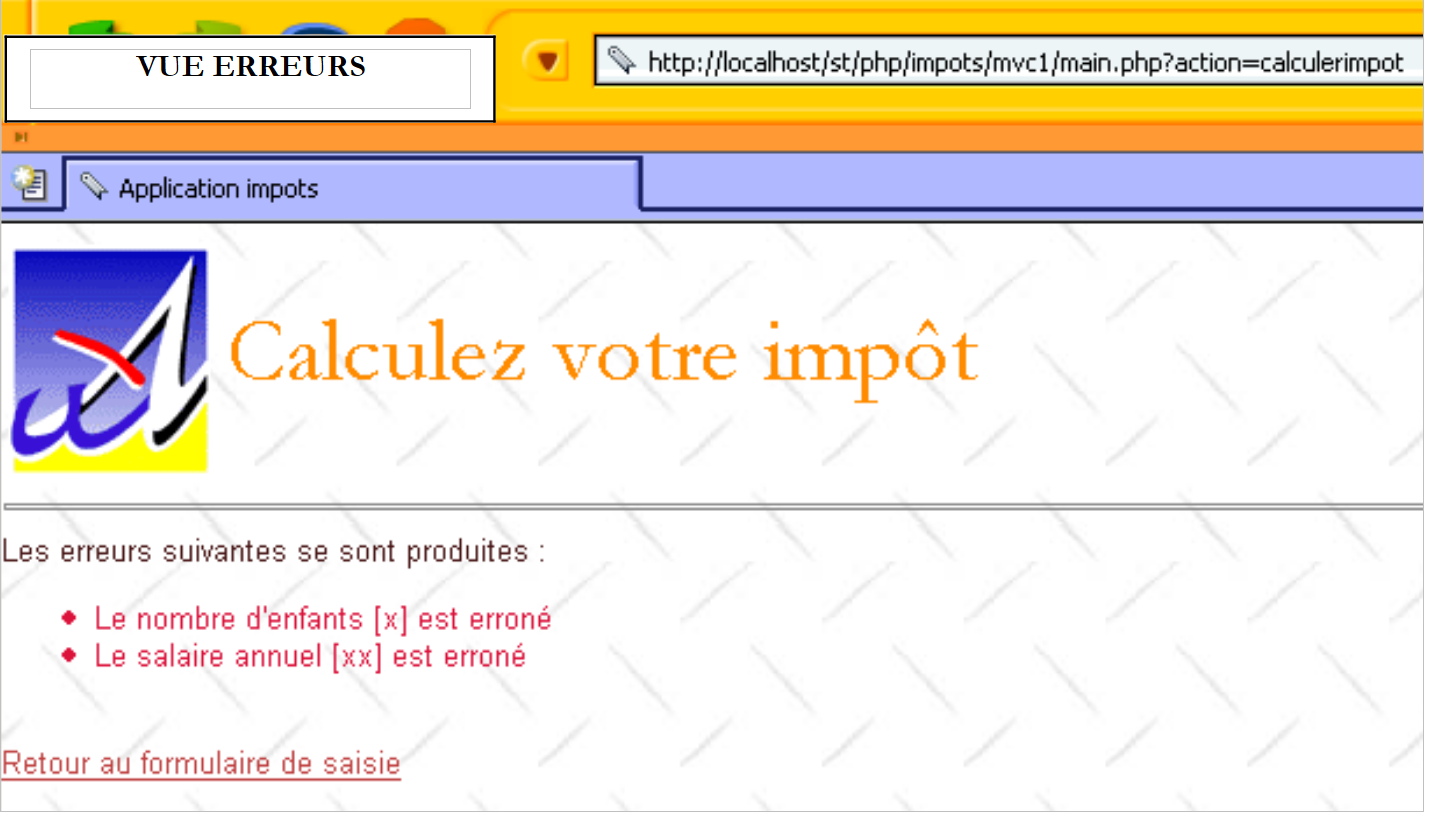 |
The link [Retour au formulaire de saisie] allows the user to retrieve the form as they submitted it.
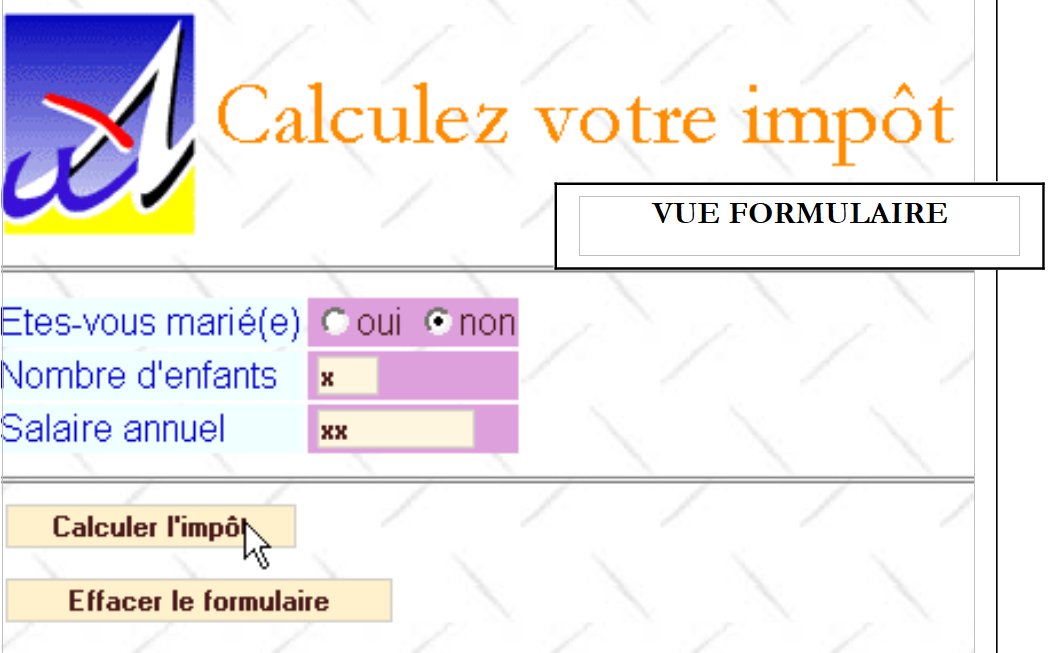 |
Finally, the [Effacer le formulaire] button resets the form to its initial state, c.a.d, as the user received it during the initial request.
4.7. Overview of the application's architecture
The application has the following architecture:
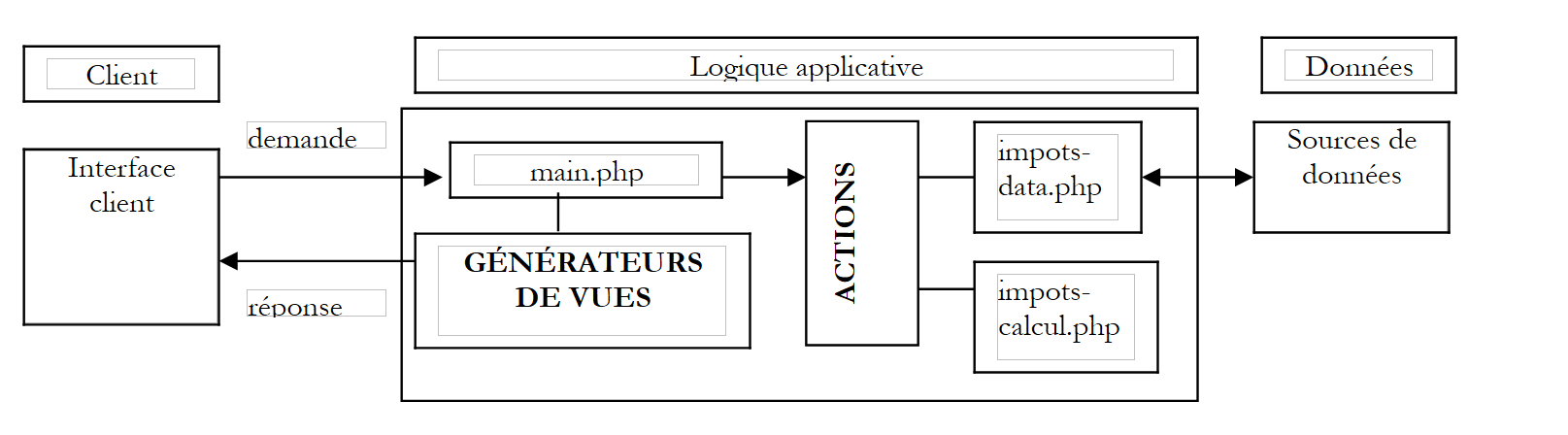 |
We have just described the two classes impots-data.php and impots-calcul.php. We will now describe the other elements of the architecture.
4.8. The application controller
The application’s main.php controller is the one described in the first part of this chapter. It is a generic controller independent of the application.
<?php
     // generic controller

  // reading config
  include 'config.php';

  // including libraries
  for($i=0;$i<count($dConfig['includes']);$i++){
      include($dConfig['includes'][$i]);
  }//for

  // start or resume session
  session_start();
  $dSession=$_SESSION["session"];
  if($dSession) $dSession=unserialize($dSession);

  // retrieve the action to be taken
  $sAction=$_GET['action'] ? strtolower($_GET['action']) : 'init';
  $sAction=strtolower($_SERVER['REQUEST_METHOD']).":$sAction";

     // is the sequence of actions normal?
  if( ! enchainementOK($dConfig,$dSession,$sAction)){
    // abnormal sequence
    $sAction='enchainementinvalide';
  }//if

     // share processing
  $scriptAction=$dConfig['actions'][$sAction] ?
    $dConfig['actions'][$sAction]['url'] :
    $dConfig['actions']['actionInvalide']['url'];
  include $scriptAction;


  // send response(view) to customer
  $sEtat=$dSession['etat']['principal'];
  $scriptVue=$dConfig['etats'][$sEtat]['vue'];
  include $scriptVue;

  // end of script - we shouldn't get there unless there's a bug
  trace ("Erreur de configuration.");
  trace("Action=[$sAction]");
  trace("scriptAction=[$scriptAction]");
  trace("Etat=[$sEtat]");
  trace("scriptVue=[$scriptVue]");
  trace ("Vérifiez que les script existent et que le script [$scriptVue] se termine par l'appel à finSession.");
  exit(0);

  // ---------------------------------------------------------------
  function finSession(&$dConfig,&$dReponse,&$dSession){
    // $dConfig: configuration dictionary
      // $dSession: dictionary containing session information
         // $dReponse: the dictionary of arguments for the response page

    // session registration
    if(isset($dSession)){
      // put the query parameters in the session
      $dSession['requete']=strtolower($_SERVER['REQUEST_METHOD'])=='get' ? $_GET :
          strtolower($_SERVER['REQUEST_METHOD'])=='post' ? $_POST : array();
        $_SESSION['session']=serialize($dSession);
      session_write_close();
    }else{
        // no session
      session_destroy();
    }

        // we present the answer
        include $dConfig['vuesReponse'][$dReponse['vuereponse']]['url'];

    // end of script
    exit(0);
  }//endsession

  //--------------------------------------------------------------------
    function enchainementOK(&$dConfig,&$dSession,$sAction){
      // checks whether the current action is authorized with respect to the previous state
    $etat=$dSession['etat']['principal'];
    if(! isset($etat)) $etat='sansetat';

    // check action
    $actionsautorisees=$dConfig['etats'][$etat]['actionsautorisees'];
    $autorise= ! isset($actionsautorisees) || in_array($sAction,$actionsautorisees);
        return $autorise;
  }

  //--------------------------------------------------------------------
  function dump($dInfos){
      // displays an information dictionary
    while(list($clé,$valeur)=each($dInfos)){
        echo "[$clé,$valeur]<br>\n";
    }//while
  }//follow-up

  //--------------------------------------------------------------------
  function trace($msg){
      echo $msg."<br>\n";
  }//follow-up
?>
4.9. Web application actions
There are four actions:
- get:init: this is the action triggered during the initial request to the controller without parameters. It generates the empty 'form' view.
- post:clearform: action triggered by the [Effacer le formulaire] button. It generates the empty [v-formulaire] view.
- post:calculateTax: action triggered by the [Calculer l'impôt] button. It generates either the [v-formulaire] view with the amount of tax due, or the [v-erreurs] view.
- get:returnform: action triggered by the [Retour au formulaire de saisie] link. It generates the [v-formulaire] view pre-filled with the incorrect data.
These actions are configured as follows in the configuration file:
<?php
…
  // configuration of application actions
  $dConfig['actions']['get:init']=array('url'=>'a-init.php');
  $dConfig['actions']['post:calculerimpot']=array('url'=>'a-calculimpot.php');
  $dConfig['actions']['get:retourformulaire']=array('url'=>'a-retourformulaire.php');
  $dConfig['actions']['post:effacerformulaire']=array('url'=>'a-init.php');
  $dConfig['actions']['enchainementinvalide']=array('url'=>'a-enchainementinvalide.php');
  $dConfig['actions']['actionInvalide']=array('url'=>'a-actioninvalide.php');
Each action is associated with the script responsible for processing it. Each action will take the web application to a state defined by the element $dSession['etat']['principal']. This state is intended to be saved in the session. In addition, the action stores in the $dReponse dictionary the information needed to display the view associated with the new state the application will be in.
4.10. Web application reports
There are two:
- [e-formulaire]: report showing the different variants of view [v-formulaire].
- [e-erreurs]: report displaying the view [v-erreurs].
The actions allowed in these reports are as follows:
<?php
…
  // application status configuration
  $dConfig['etats']['formulaire']=array(
       'actionsautorisees'=>array('post:calculerimpot','get:init','post:effacerformulaire'),
    'vue'=>'e-formulaire.php');
  $dConfig['etats']['erreurs']=array(
      'actionsautorisees'=>array('get:retourformulaire','get:init'),
      'vue'=>'e-erreurs.php');
  $dConfig['etats']['sansetat']=array('actionsautorisees'=>array('get:init'));
In a state, the allowed actions correspond to the targets of the links or buttons in the view associated with that state. Additionally, the ':init' action is always allowed. This allows the user to retrieve the URL main.php from their browser's URL list and play it back regardless of the application's state. It is a kind of 'manual' reset. The 'stateless' state exists only when the application starts.
Each application state is associated with a script responsible for generating the view associated with that state:
- state [e-formulaire]: script e-form.php
- state [e-erreurs]: script e-errors.php
Report [e-formulaire] will display view [v-formulaire] with variations. Specifically, view [v-formulaire] can be displayed empty, pre-filled, or with the tax amount. The action that brings the application to report [e-formulaire] specifies the main report of the application in the variable $dSession['etat']['principal']. The controller uses only this information. In our application, the action that leads to state [e-formulaire] will add to $dSession['etat']['secondaire'] additional information allowing the response generator to determine whetherit should generate an empty form, a pre-filled form, or a form with or without the tax amount. We could have taken a different approach by assuming there were three different states and therefore three view generators to write.
4.11. The web application configuration file config.php
<?php

     // php configuration
  ini_set("register_globals","off");
  ini_set("display_errors","off");
  ini_set("expose_php","off");

  // list of modules to be included
  $dConfig['includes']=array('c-impots-data.php','c-impots-calcul.php');

  // application controller
  $dConfig['webapp']=array('titre'=>"Calculez votre impôt");

  // aplication view configuration
  $dConfig['vuesReponse']['modele1']=array('url'=>'m-reponse.php');
  $dConfig['vuesReponse']['modele2']=array('url'=>'m-reponse2.php');
  $dConfig['vues']['formulaire']=array('url'=>'v-formulaire.php');
  $dConfig['vues']['erreurs']=array('url'=>'v-erreurs.php');
  $dConfig['vues']['formulaire2']=array('url'=>'v-formulaire2.php');
  $dConfig['vues']['erreurs2']=array('url'=>'v-erreurs2.php');
  $dConfig['vues']['bandeau']=array('url'=>'v-bandeau.php');
  $dConfig['vues']['menu']=array('url'=>'v-menu.php');
  $dConfig['style']['url']='style1.css';

  // configuration of application actions
  $dConfig['actions']['get:init']=array('url'=>'a-init.php');
  $dConfig['actions']['post:calculerimpot']=array('url'=>'a-calculimpot.php');
  $dConfig['actions']['get:retourformulaire']=array('url'=>'a-retourformulaire.php');
  $dConfig['actions']['post:effacerformulaire']=array('url'=>'a-init.php');
  $dConfig['actions']['enchainementinvalide']=array('url'=>'a-enchainementinvalide.php');
  $dConfig['actions']['actionInvalide']=array('url'=>'a-actioninvalide.php');

  // application status configuration
  $dConfig['etats']['e-formulaire']=array(
       'actionsautorisees'=>array('post:calculerimpot','get:init','post:effacerformulaire'),
    'vue'=>'e-formulaire.php');
  $dConfig['etats']['e-erreurs']=array(
      'actionsautorisees'=>array('get:retourformulaire','get:init'),
      'vue'=>'e-erreurs.php');
  $dConfig['etats']['sansetat']=array('actionsautorisees'=>array('get:init'));

  // model application configuration
    $dConfig["DSN"]=array(
        "sgbd"=>"mysql",
        "user"=>"seldbimpots",
        "mdp"=>"mdpseldbimpots",
        "host"=>"localhost",
        "database"=>"dbimpots"
    );
?>
4.12. Web Application Actions
4.12.1. General operation of action scripts
- An action script is called by the controller based on the action parameter it received from the client.
- After execution, the action script must indicate to the controller the state in which to place the application. This state must be specified in $dSession['etat']['principal'].
- An action script may want to place information in the session. It does so by placing this information in the $dSession dictionary, which is automatically saved to the session by the controller at the end of the request-response cycle.
- An action script may have information to pass to views. This aspect is independent of the controller. It is the interface between actions and views, an interface specific to each application. In the example discussed here, the actions will provide information to the view generators via a dictionary called $dReponse.
4.12.2. The action get:init
This is the action that generates the empty form. The configuration file shows that it will be handled by the script a-init.php:
The code for the a-init.php script is as follows:
<?php
     // the input form is displayed
  $dSession['etat']=array('principal'=>'e-formulaire', 'secondaire'=>'init');
?>
This script simply sets the state in which the application must be in within $dSession['etat']['principal'], the state [e-formulaire], and provides further details about this state in $dSession['etat']['secondaire']. The configuration file shows us that the controller will execute the e-form.php script to generate the response to the client.
<?php
…
  $dConfig['etats']['e-formulaire']=array(
       'actionsautorisees'=>array('post:calculerimpot','get:init','post:effacerformulaire'),
    'vue'=>'e-formulaire.php');
The e-formulaire.php script will generate the [v-formulaire] view in its variants [init] and c.a.d. The empty form.
4.12.3. The action post:calculateTax
This is the action that calculates the tax based on the data entered in the form. The configuration file specifies that the script a-calculimpot.php will handle this action:
The code for the script a-calculimpot.php is as follows:
<?php
     // tax calculation request

  // we first check the validity of the parameters
  $sOptMarie=$_POST['optmarie'];
  if($sOptMarie!='oui' && $sOptMarie!='non'){
      $erreurs[]="L'état marital [$sOptMarie] est erroné";
  }
  $sEnfants=trim($_POST['txtenfants']);
  if(! preg_match('/^\d{1,3}$/',$sEnfants)){
      $erreurs[]="Le nombre d'enfants [$sEnfants] est erroné";
  }
  $sSalaire=trim($_POST['txtsalaire']);
  if(! preg_match('/^\d+$/',$sSalaire)){
      $erreurs[]="Le salaire annuel [$sSalaire] est erroné";
  }

  // if there are mistakes, it's over
  if(count($erreurs)!=0){
      // preparing the error page
    $dReponse['erreurs']=&$erreurs;
    $dSession['etat']=array('principal'=>'e-erreurs','secondaire'=>'saisie');
      return;
  }//if

  // the data entered is correct
  // retrieve the data needed to calculate taxes
  if(! $dSession['limites']){
      // the data is not in the session
    // we retrieve them from the data source
    list($erreurs,$limites,$coeffr,$coeffn)=getData($dConfig['DSN']);
    // if there are errors, the error page is displayed
    if(count($erreurs)!=0){
        // preparing the error page
      $dReponse['erreurs']=&$erreurs;
        $dSession['etat']=array('principal'=>'e-erreurs','secondaire'=>'database');
      return;
    }//if
    // no errors - data put into session
    $dSession['limites']=&$limites;
    $dSession['coeffr']=&$coeffr;
    $dSession['coeffn']=&$coeffn;
  }//if

  // here you have the data you need to calculate your taxes
  // we calculate this one
  $dData=array('limites'=>&$dSession['limites'],
      'coeffr'=>&$dSession['coeffr'],
    'coeffn'=>&$dSession['coeffn']);
  $dPerso=array('enfants'=>$sEnfants,'salaire'=>$sSalaire,'marié'=>($sOptMarie=='oui'),'impot'=>0);
  new impots_calcul($dPerso,$dData);

    // preparing the answer page
  $dSession['etat']=array('principal'=>'e-formulaire','secondaire'=>'calculimpot');
  $dReponse['impot']=$dPerso['impot'];
  return;

  //-----------------------------------------------------------------------
  function getData($dDSN){
      // connection to the data source defined by the $dDSN dictionary
        $oImpots=new impots_data($dDSN);
    if(count($oImpots->aErreurs)!=0) return array($oImpots->aErreurs);
    // recovery of limit data, coeffr, coeffn
        list($limites,$coeffr,$coeffn)=$oImpots->getData();
         // we disconnect
        $oImpots->disconnect();
    // we return the result
    if(count($oImpots->aErreurs)!=0) return array($oImpots->aErreurs);
        else return array(array(),$limites,$coeffr,$coeffn);
  }//getData
The script does what it is supposed to do: calculate the tax. We leave it to the reader to decipher the processing code. We are interested in the states that may occur as a result of this action:
- the entered data is incorrect or data access fails: the application is set to status [e-erreurs]. The configuration file shows that the script e-erreurs.php will be responsible for generating the response view:
<?php
…
  $dConfig['etats']['e-erreurs']=array(
      'actionsautorisees'=>array('get:retourformulaire','get:init'),
      'vue'=>'e-erreurs.php');
- In all other cases, the application is placed in state [e-formulaire] with the tax calculation variant specified in $dSession['etat']['secondaire']. The configuration file shows that the e-form.php script will generate the response view. It will use the value from $dSession['etat']['secondaire'] to generate a pre-filled form with the values entered by the user and the tax amount.
4.12.4. The action post:clearform
It is associated by configuration with the a-init.php script already described.
4.12.5. The get:return-form action
It allows you to return to state [e-formulaire] from state [e-erreurs]. The script a-retourformulaire.php handles this action:
The a-retourformulaire.php script is as follows:
<?php
     // the input form is displayed
  $dSession['etat']=array('principal'=>'e-formulaire','secondaire'=>'retourformulaire');
?>
We simply request that the application be placed in state [e-formulaire] in its variant [retourformulaire]. The configuration file shows us that the controller will execute the script e-formulaire.php to generate the response to the client.
<?php
…
  $dConfig['etats']['e-formulaire']=array(
       'actionsautorisees'=>array('post:calculerimpot','get:init','post:effacerformulaire'),
    'vue'=>'e-formulaire.php');
The e-form.php script will generate the [v-formulaire] view in its variants [retourformulaire] and c.a.d. the form pre-filled with the values entered by the user but without the tax amount.
4.13. Invalid sequence of actions
The valid actions from a given state of the application are set by configuration:
<?php
…
  // application status configuration
  $dConfig['etats']['e-formulaire']=array(
       'actionsautorisees'=>array('post:calculerimpot','get:init','post:effacerformulaire'),
    'vue'=>'e-formulaire.php');
  $dConfig['etats']['e-erreurs']=array(
      'actionsautorisees'=>array('get:retourformulaire','get:init'),
      'vue'=>'e-erreurs.php');
  $dConfig['etats']['sansetat']=array('actionsautorisees'=>array('get:init'));
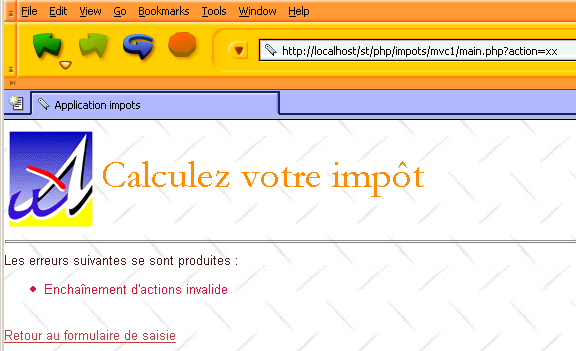
We have already explained this configuration. If an invalid sequence of actions is detected, the script a-invalid-sequence.php is executed:
The code for this script is as follows:
<?php
     // invalid sequence of actions
  $dReponse['erreurs']=array("Enchaînement d'actions invalide");
  $dSession['etat']=array('principal'=>'e-erreurs','secondaire'=>'enchainementinvalide');
?>
This sets the application to the [e-erreurs] state. We provide information in $dSession['etat']['secondaire'] that will be used by the error page generator. As we have already seen, this generator is e-errors.php:
<?php
…
  $dConfig['etats']['e-erreurs']=array(
      'actionsautorisees'=>array('get:retourformulaire','get:init'),
      'vue'=>'e-erreurs.php');
We will look at the code for this generator later. The view sent to the client is as follows:
4.14. The application's views
4.14.1. Displaying the final view
Let's look at how the controller sends the response to the client once the action requested by the client has been executed:
<?php
…
....
  // start or resume session
  session_start();
  $dSession=$_SESSION["session"];
  if($dSession) $dSession=unserialize($dSession);

  // retrieve the action to be taken
  $sAction=$_GET['action'] ? strtolower($_GET['action']) : 'init';
  $sAction=strtolower($_SERVER['REQUEST_METHOD']).":$sAction";

     // is the sequence of actions normal?
  if( ! enchainementOK($dConfig,$dSession,$sAction)){
    // abnormal sequence
    $sAction='enchainementinvalide';
  }//if

     // share processing
  $scriptAction=$dConfig['actions'][$sAction] ?
    $dConfig['actions'][$sAction]['url'] :
    $dConfig['actions']['actionInvalide']['url'];
  include $scriptAction;

  // send response(view) to customer
  $sEtat=$dSession['etat']['principal'];
  $scriptVue=$dConfig['etats'][$sEtat]['vue'];
  include $scriptVue;

.....

  // ---------------------------------------------------------------
  function finSession(&$dConfig,&$dReponse,&$dSession){
    // $dConfig: configuration dictionary
      // $dSession: dictionary containing session information
         // $dReponse: the dictionary of arguments for the response page

    // session registration
...

         // reply sent to customer
        include $dConfig['vuesReponse'][$dReponse['vuereponse']]['url'];

    // end of script
    exit(0);
  }//endsession
Upon return from an action script, the controller retrieves from $dSession['etat']['principal'] the state in which it must set the application. This state was determined by the action that was just executed. The controller then executes the view generator associated with the state. It finds the name of the view generator in the configuration file. The role of the view generator is as follows:
- sets the name of the response template to be used in $dReponse['vuereponse']. This information will be passed to the controller. A template is a composition of basic views that, when combined, form the final view.
- prepares the dynamic information to be displayed in the final view. This step is independent of the controller. It serves as the interface between the view generator and the final view. It is specific to each application.
- must end with a call to the controller’s finSession function. This function will
- save the session
- send the response
The code for the finSession function is as follows:
<?php
…
  // ---------------------------------------------------------------
  function finSession(&$dConfig,&$dReponse,&$dSession){
    // $dConfig: configuration dictionary
      // $dSession: dictionary containing session information
         // $dReponse: the dictionary of arguments for the response page

    // session registration
...

         // reply sent to customer
        include $dConfig['vuesReponse'][$dReponse['vuereponse']]['url'];

    // end of script
    exit(0);
  }//endsession
The view sent to the user is defined by the entity $dReponse['vuereponse'], which defines the template to be used for the final response.
4.14.2. Response template
The application will generate its various responses based on the following single template:
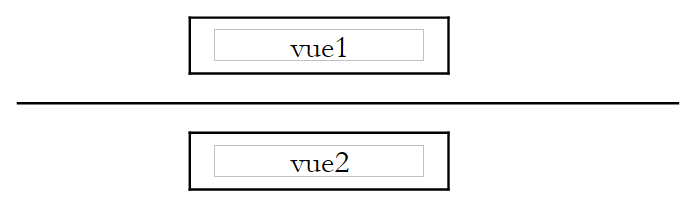 |
This template is associated with the key 'modele1' in the dictionary $dConfig['vuesreponse']:
The script m-reponse.php is responsible for generating this template:
<html>
    <head>
      <title>Application impots</title>
      <link type="text/css" href="<?php echo $dReponse['urlstyle'] ?>" rel="stylesheet" />
  </head>
  <body>
    <?php
            include $dReponse['vue1'];
        ?>
    <hr>
    <?php
            include $dReponse['vue2'];
        ?>
    </body>
</html>
This script has three dynamic elements stored in a dictionary named $dReponse and associated with the following keys:
- urlstyle: url of the template's style sheet
- view1: name of the script responsible for generating view1
- view2: name of the script responsible for generating the view2 view
A view generator wishing to use the modèle1 template must define these three dynamic elements. We now define the basic views that can replace the [vue1] and [vue2] elements of the template.
4.14.3. The basic view v-bandeau.php
The script v-bandeau.php generates a view that will be placed in the area [vue1]:
<table>
    <tr>
      <td><img src="univ01.gif"></td>
    <td>
      <table>
        <tr>
          <td><div class='title'><?php echo $dReponse['title'] ?></div></td>
        </tr>
        <tr>
            <td><div class='resultat'><?php echo $dReponse['resultat']?></div></td>
        </tr>
      </table>
    </td>
  </tr>
</table>
The view generator must define two dynamic elements placed in a dictionary named $dReponse and associated with the following keys:
- title: title to display
- result: amount of tax due
4.14.4. The basic view v-form.php
The [vue2] section corresponds to either the [v-formulaire] view or the [v-erreurs] view. The view [v-formulaire] is generated by the script v-form.php:
<form method="post" action="main.php?action=calculerimpot">
    <table>
      <tr>
        <td class="libelle">Etes-vous marié(e)</td>
      <td class="valeur">
          <input type="radio" name="optmarie" <?php echo $dReponse['optoui'] ?> value="yes">yes
          <input type="radio" name="optmarie" <?php echo $dReponse['optnon'] ?> value="non">non
      <td>
    <tr>
        <td class="libelle">Nombre d'children</td>
      <td class="valeur">
          <input type="text" class="text" name="txtenfants" size="3" value="<?php echo $dReponse['enfants'] ?>"
      </td>
    </tr>
    <tr>
        <td class="libelle">Salaire annuel</td>
      <td class="valeur">
          <input type="text" class="text" name="txtsalaire" size="10" value="<?php echo $dReponse['salaire'] ?>"
      </td>
    </tr>
    </table>
  <hr>
  <input type="submit" class="submit" value="Calculer l'impôt">
</form>
<form method="post" action="main.php?action=effacerformulaire">
  <input type="submit" class="submit" value="Effacer le formulaire">
</form>
The dynamic parts of this view that must be defined by the view generator are associated with the following keys in the $dReponse dictionary:
- optoui: state of the radio button named optoui
- optnon: state of the radio button named optnon
- children: number of children to be placed in the txtenfants field
- salary: annual salary to be placed in the txtsalary field
4.14.5. The elementary view v-erreurs.php
The view [v-erreurs] is generated by the script v-errors.php:
Les erreurs suivantes se sont produites :
<ul>
    <?php
        for($i=0;$i<count($dReponse["erreurs"]);$i++){
            echo "<li class='erreur'>".$dReponse["erreurs"][$i]."</li>\n";
        }//for
    ?>
</ul>
<div class="info"><?php echo $dReponse["info"] ?></div>
<br>
<a href="<?php echo $dReponse["href"] ?>"><?php echo $dReponse["lien"] ?></a>
The dynamic parts of this view to be defined by the view generator are associated with the following keys in the $dReponse dictionary:
- errors: array of error messages
- info: information message
- link: link text
- href: url target of the link above
4.14.6. The style sheet
All views are styled by a stylesheet. To change the visual appearance of the application, modify its stylesheet. The following stylesheet style1.css:
div.menu {
    background-color: #FFD700;
    color: #F08080;
    font-weight: bolder;
    text-align: center;
}
td.separateur {
    background: #FFDAB9;
    width: 20px;
}

table.modele2 {
    width: 600px;
}

BODY {
    background-image : url(standard.jpg);
    margin-left : 0px;
    margin-top : 6px;
    color : #4A1919;
    font-size: 10pt;
    font-family: Arial, Helvetica, sans-serif;
    scrollbar-face-color:#F2BE7A;
    scrollbar-arrow-color:#4A1919;
    scrollbar-track-color:#FFF1CC;
    scrollbar-3dlight-color:#CBB673;
    scrollbar-darkshadow-color:#CBB673;
}

div.titre {
    font: 30pt Garamond;
    color: #FF8C00;
    background-color: Yellow;
}

table.menu {
    background-color: #ADD8E6;
}


A:HOVER {
    text-decoration: underline;
    color: #FF0000;
    background-color : transparent;
}
A:ACTIVE {
    text-decoration: underline;
    color : #BF4141;
    background-color : transparent;
}
A:VISITED {
    color : #BF4141;
    background-color : transparent;
}

.error {
    color : red;
    font-weight : bold;
}

INPUT.text {
    margin-left : 3px;
    font-size:8pt;
    font-weight:bold;
    color:#4A1919;
    background-color:#FFF6E0;
    border-right:1px solid;
    border-left:1px solid;
    border-top:1px solid;
    border-bottom:1px solid;
}
td.libelle {
    background-color: #F0FFFF;
    color: #0000CD;
}

td.valeur {
    background-color: #DDA0DD;
}

DIV.resultat {
    background-color : #FFA07A;
    font : bold 12pt;
}

div.info {
    color: #FA8072;
}

li.erreur {
    color: #DC143C;
}

INPUT.submit {
    margin-left : 6px;
    font-size:8pt;
    font-weight:bold;
    color:#4A1919;
    background-color:#FFF1CC;
    border-right:1px solid;
    border-left:1px solid;
    border-top:1px solid;
    border-bottom:1px solid;
}
4.15. View generators
4.15.1. Role of a view generator
Let’s review the controller code snippet that executes a view generator:
<?php
…
     // share processing
  $scriptAction=$dConfig['actions'][$sAction] ?
    $dConfig['actions'][$sAction]['url'] :
    $dConfig['actions']['actionInvalide']['url'];
  include $scriptAction;

  // send response(view) to customer
  $sEtat=$dSession['etat']['principal'];
  $scriptVue=$dConfig['etats'][$sEtat]['vue'];
  include $scriptVue;
A view generator is linked to the state in which the application will be placed. The link between the state and the view generator is set via configuration:
<?php
…
  // application status configuration
  $dConfig['etats']['e-formulaire']=array(
       'actionsautorisees'=>array('post:calculerimpot','get:init','post:effacerformulaire'),
    'vue'=>'e-formulaire.php');
  $dConfig['etats']['e-erreurs']=array(
      'actionsautorisees'=>array('get:retourformulaire','get:init'),
      'vue'=>'e-erreurs.php');
  $dConfig['etats']['sansetat']=array('actionsautorisees'=>array('get:init'));
We have already explained the role of a view generator. Let’s review it here. A view generator:
- specifies in $dReponse['vuereponse'] the name of the response template to use. This information is passed to the controller. A template is a composition of basic views that, when combined, form the final view.
- prepares the dynamic information to be displayed in the final view. This step is independent of the controller. It serves as the interface between the view generator and the final view. It is specific to each application.
- must end with a call to the controller’s finSession function. This function will
- save the session
- send the response
4.15.2. The view generator associated with report [e-formulaire]
The script responsible for generating the view associated with report [e-formulaire] is called e-form.php:
<?php
…
  $dConfig['etats']['e-formulaire']=array(
       'actionsautorisees'=>array('post:calculerimpot','get:init','post:effacerformulaire'),
    'vue'=>'e-formulaire.php');
Its code is as follows:
<?php
  // we prepare the answer form
  $dReponse['titre']=$dConfig['webapp']['titre'];
    $dReponse['vuereponse']='modele1';
  $dReponse['vue1']=$dConfig['vues']['bandeau']['url'];
  $dReponse['vue2']=$dConfig['vues']['formulaire']['url'];
  $dReponse['urlstyle']=$dConfig['style']['url'];
  $dReponse['titre']=$dConfig['webapp']['titre'];

  // configuration according to the type of form to be generated
    $type=$dSession['etat']['secondaire'];
  if($type=='init'){
      // empty form
    $dReponse['optnon']='checked';
  }//if
  if($type=='calculimpot'){
      // we need to redisplay the input parameters stored in the query
    $dReponse['optoui']=$_POST['optmarie']=='oui' ? 'checked' : '';
    $dReponse['optnon']=$dReponse['optoui'] ? '' : 'checked';
    $dReponse['enfants']=$_POST['txtenfants'];
    $dReponse['salaire']=$_POST['txtsalaire'];
    $dReponse['resultat']='Impôt à payer : '.$dReponse['impot'].' F';
  }//if
  if($type=='retourformulaire'){
      // we need to redisplay the input parameters stored in the session
    $dReponse['optoui']=$dSession['requete']['optmarie']=='oui' ? 'checked' : '';
    $dReponse['optnon']=$dReponse['optoui']=='' ? 'checked' : '';
    $dReponse['enfants']=$dSession['requete']['txtenfants'];
    $dReponse['salaire']=$dSession['requete']['txtsalaire'];
  }//if
  // we send the answer
  finSession($dConfig,$dReponse,$dSession);
?>
Note that the view generator complies with the requirements imposed on a view generator:
- Set the response template to use in $dReponse['vuereponse']
- pass information to this template. Here, it is passed via the dictionary $dReponse.
- end with a call to the controller's function finSession
Here, the template used is 'template1'. Therefore, the generator defines the two pieces of information required by this template: $dReponse['vue1'] and $dReponse['vue2'].
In the specific case of our application, the view associated with state [e-formulaire] depends on information stored in variable $dSession['etat']['secondaire']. This is a design choice. Another application might choose to pass additional information in a different way. Furthermore, here all the information needed to display the final view is placed in the dictionary $dReponse. Again, this is a choice left to the developer. The state [e-formulaire] can occur after four different actions: init, calculateTax, returnForm, clearForm. The view to be displayed is not exactly the same in all cases. Therefore, three cases have been distinguished here in $dSession['etat']['secondaire']:
- init: the form is displayed empty
- calculateTax: the form is displayed with the tax amount and the data used to calculate it
- retourformulaire: the form is displayed with the data initially entered
Above, the e-form.php script uses this information to present the response according to these three variants.
4.15.3. The view associated with report [e-erreurs]
The script responsible for generating the view associated with report [e-erreurs] is called e-errors.php and is as follows:
<?php

  // we prepare the answer errors
  $dReponse['titre']=$dConfig['webapp']['titre'];
    $dReponse['vuereponse']='modele1';
  $dReponse['vue1']=$dConfig['vues']['bandeau']['url'];
  $dReponse['vue2']=$dConfig['vues']['erreurs']['url'];
  $dReponse['urlstyle']=$dConfig['style']['url'];
  $dReponse['titre']=$dConfig['webapp']['titre'];
  $dReponse['lien']='Retour au formulaire de saisie';
  $dReponse['href']='main.php?action=retourformulaire';

  // additional information
  $type=$dSession['etat']['secondaire'];
  if($type=='database'){
      $dReponse['info']="Veuillez avertir l'administrateur de l'application";
  }

  // we send the answer
  finSession($dConfig,$dReponse,$dSession);
?>
4.15.4. Displaying the final view
Both scripts generating the two final views end with a call to the controller's finSession function:
<?php
…
  function finSession(&$dConfig,&$dReponse,&$dSession){
    // $dConfig: configuration dictionary
      // $dSession: dictionary containing session information
         // $dReponse: the dictionary of arguments for the response page

....

         // we present the answer
        include $dConfig['vuesReponse'][$dReponse['vuereponse']]['url'];

    // end of script
    exit(0);
  }//endsession
The view sent to the user is defined by the entity $dReponse['vuereponse'], which defines the template to be used for the final response. For reports [e-formulaire] and [e-erreurs], this template has been set to template1:
This template corresponds in the configuration to the script m-reponse.php:
4.16. Modifying the response template
Here, we assume that we decide to change the visual appearance of the response sent to the client, and we are interested in understanding the implications this has on the code.
4.16.1. The new template
The structure of the response will now be as follows:
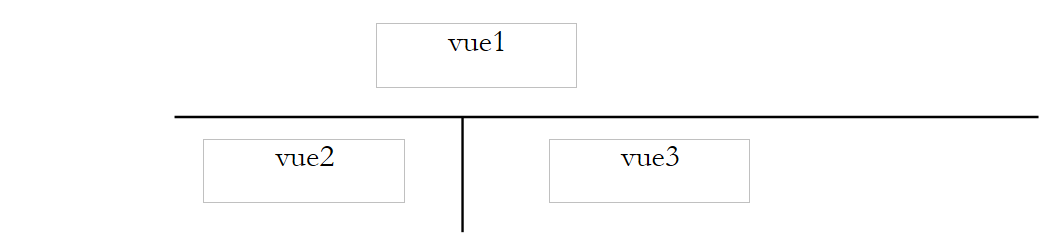 |
This template will be called template2, and the script responsible for generating this template will be called m-response2.php:
The script corresponding to this template is as follows:
<html>
    <head>
      <title>Application impots</title>
      <link type="text/css" href="<?php echo $dReponse['urlstyle'] ?>" rel="stylesheet" />
  </head>
  <body>
      <table class='modele2'>
        <!-- start banner -->
        <tr>
          <td colspan="2"><?php    include $dReponse['vue1']; ?></td>
      </tr>
        <!-- slim band -->
      <tr>
            <!-- start menu -->
          <td><?php include $dReponse['vue2']; ?></td>
            <!-- end menu -->
            <!-- start zone 3 -->
          <td><?php include $dReponse['vue3']; ?></td>
            <!-- end of zone 3 -->
      </tr>
   </table>
    </body>
</html>
The dynamic elements of the template are as follows:
- $dReponse['urlstyle']: the style sheet to use
- $dReponse['vue1']: the script to use to generate [vue1]
- $dReponse['vue2']: the script to use to generate [vue2]
- $dReponse['vue3']: the script to use to generate [vue3]
These elements must be set by the view generators.
4.16.2. The various response pages
The application will now present the following responses to the user. Upon the initial call, the response page will be as follows:
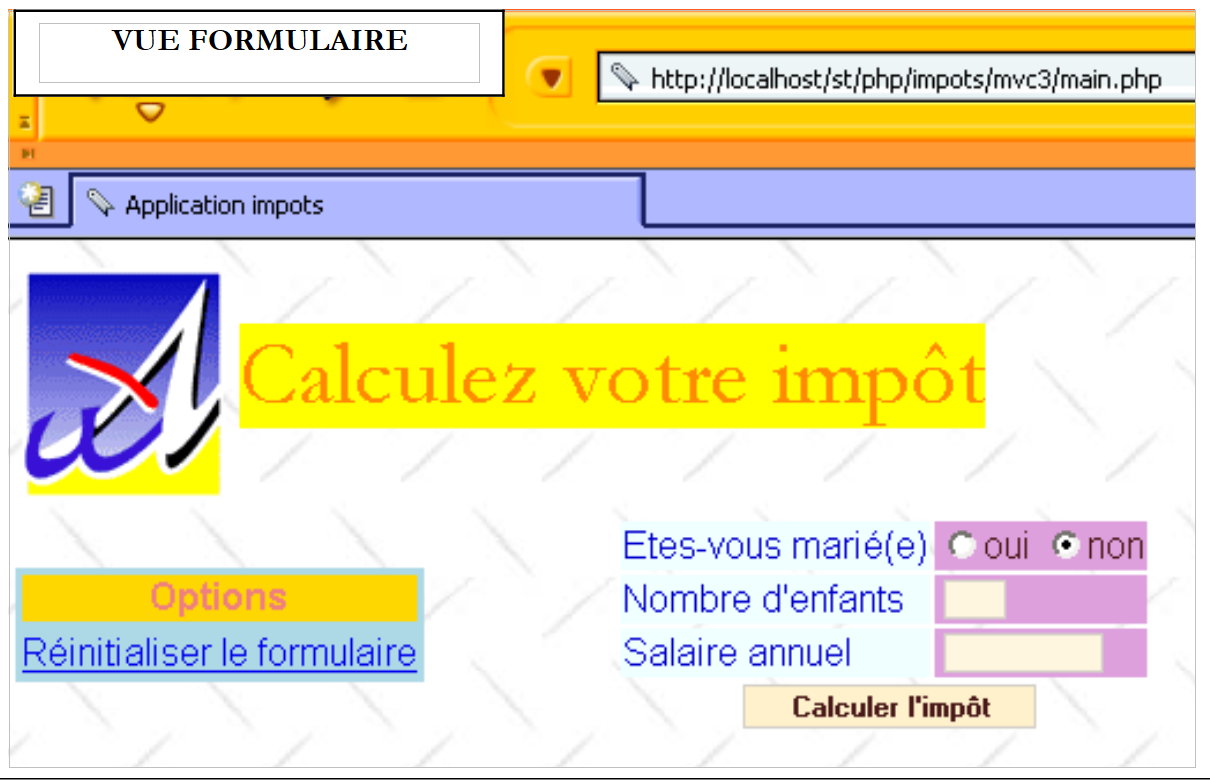 |
If the user provides valid data, the tax is calculated:
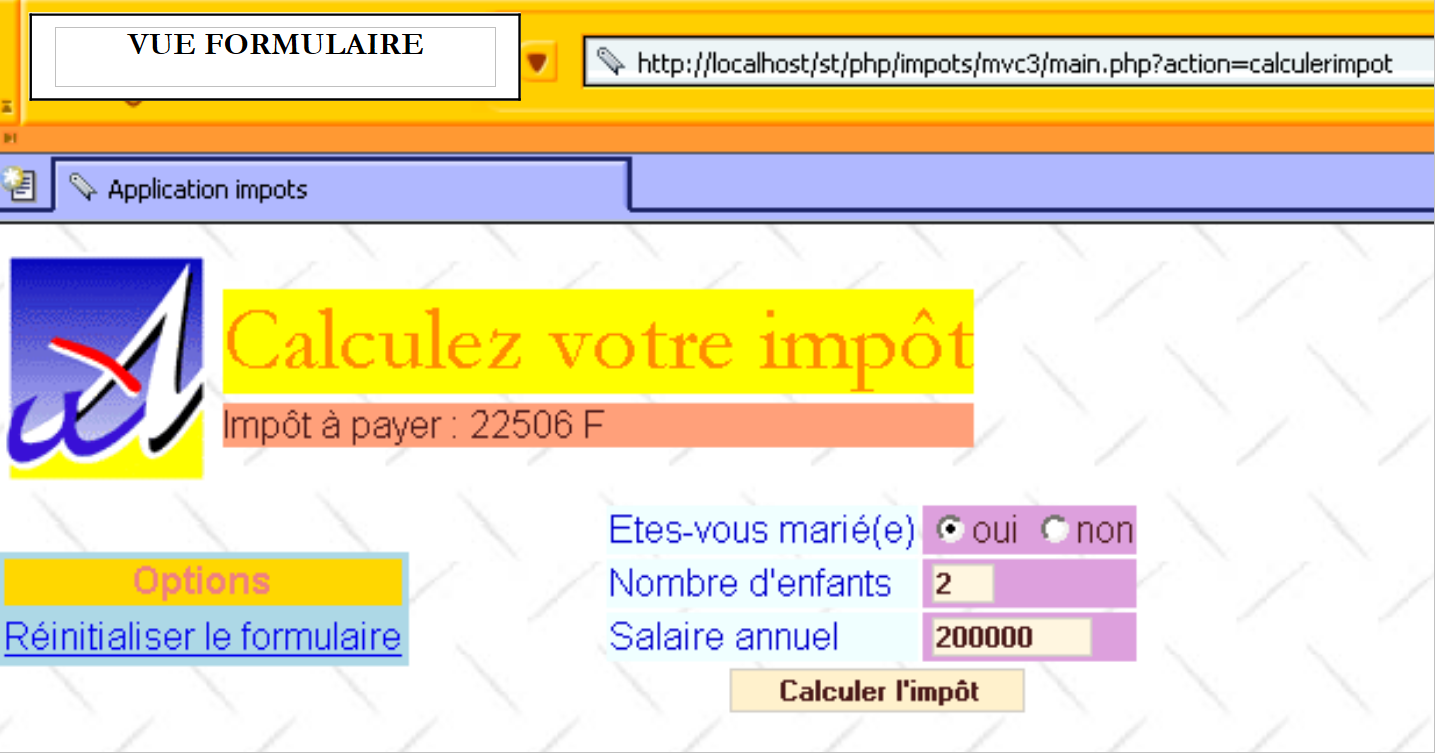 |
If they make input errors, the error page is displayed:
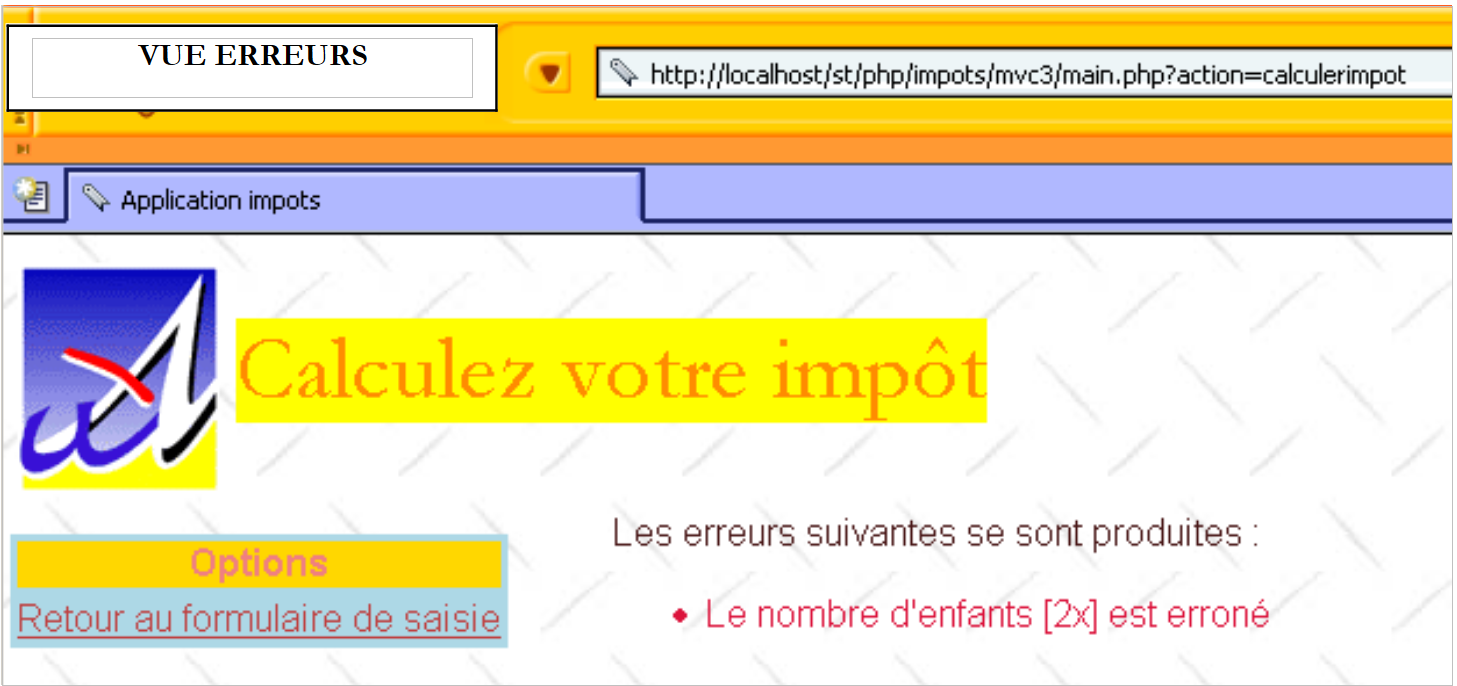 |
If they use the link [Retour au formulaire de saisie], they will see the form exactly as they submitted it:
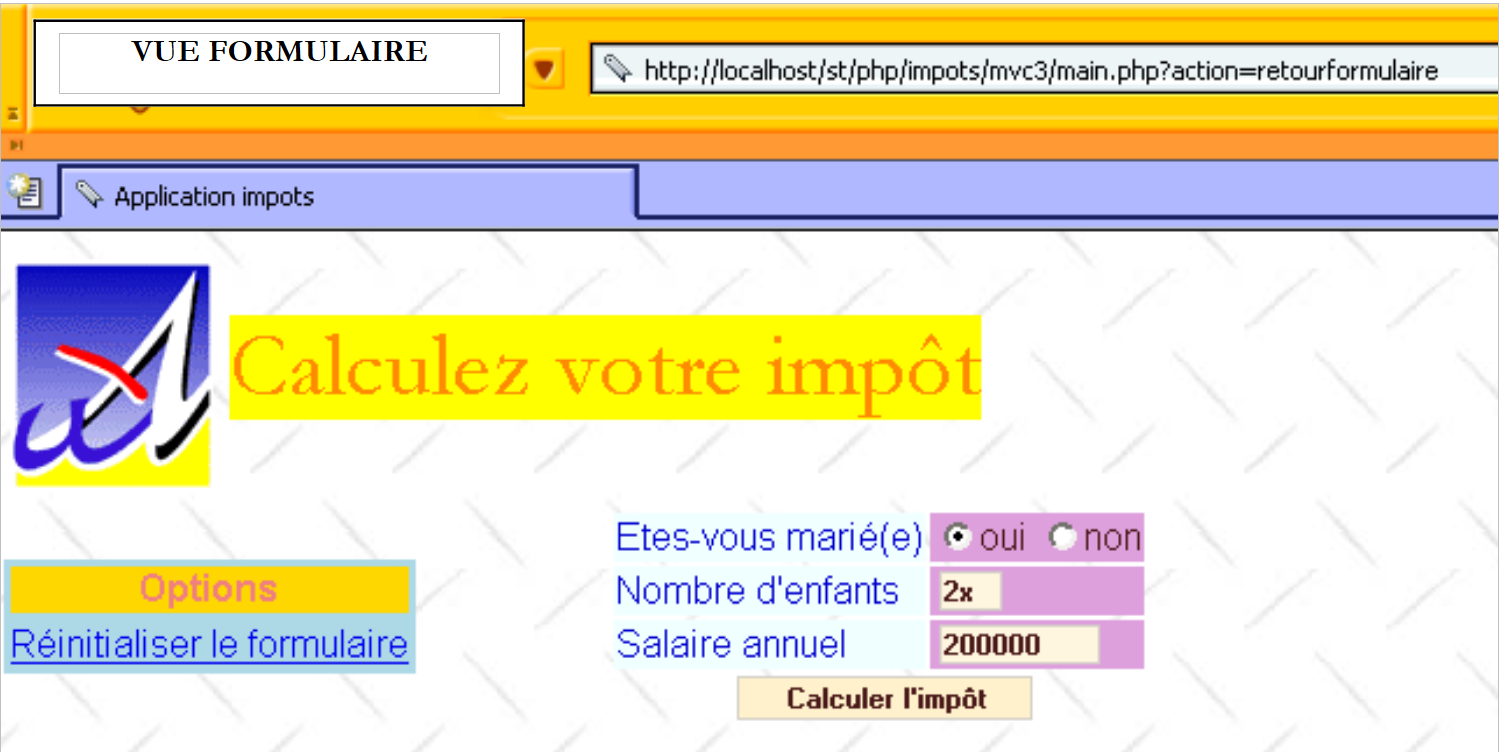 |
If, as shown above, they use the link [Réinitialiser le formulaire], they will see an empty form:
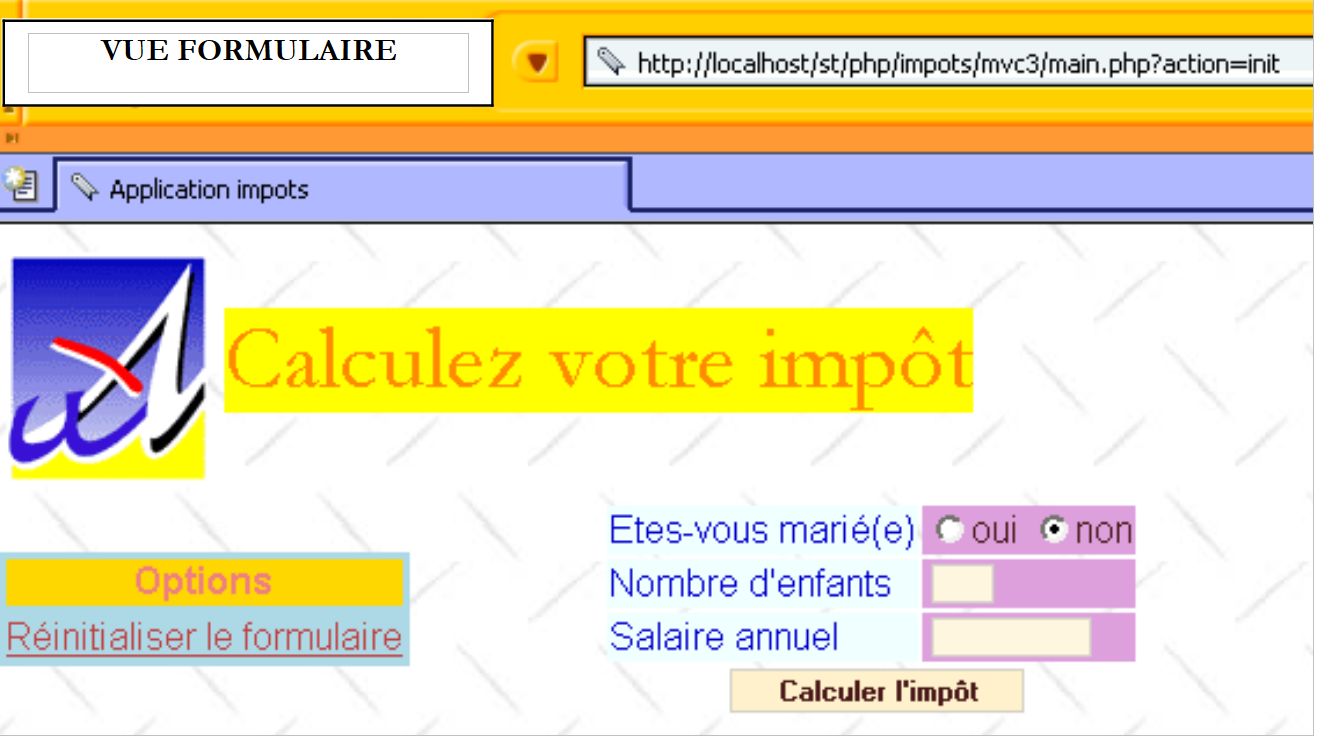 |
Note that the application is indeed using the same actions as before. Only the appearance of the responses has changed.
4.16.3. Basic views
The basic view [vue1] will, as in the previous example, be associated with the script v-bandeau.php:
<table>
    <tr>
      <td><img src="univ01.gif"></td>
    <td>
      <table>
        <tr>
          <td><div class='title'><?php echo $dReponse['title'] ?></div></td>
        </tr>
        <tr>
            <td><div class='resultat'><?php echo $dReponse['resultat']?></div></td>
        </tr>
      </table>
    </td>
  </tr>
</table>
This view has two dynamic elements:
- $dReponse['titre']: title to display
- $dReponse['resultat']: amount of tax due
The basic view [vue2] will be associated with the following v-menu.php script:
<table class="menu">
    <tr>
      <td><div class="menu">Options</div></td>
  </tr>
  <?php
      for($i=0;$i<count($dReponse['liens']);$i++){
        echo '<tr><td><div class="option"><a href="'.
          $dReponse['liens'][$i]['url'].
        '">'.$dReponse['links'][$i]['text']."</a></div></td></tr>";
    }//$i
  ?>
</table>
This view has the following dynamic elements:
- $dReponse['liens']: array of links to display in [vue2]. Each element of the array is a two-key dictionary:
- 'url': target URL of the link
- 'text': link text
The basic view [vue3] will be associated with the script v-form2.php if you want to display the input form, or with the script v-errors2.php if you want to display the error page. The code for the v-form2.php script is as follows:
<form method="post" action="main.php?action=calculerimpot">
    <table>
      <tr>
        <td class="libelle">Etes-vous marié(e)</td>
      <td class="valeur">
          <input type="radio" name="optmarie" <?php echo $dReponse['optoui'] ?> value="yes">yes
          <input type="radio" name="optmarie" <?php echo $dReponse['optnon'] ?> value="non">non
      </td>
    </tr>
    <tr>
        <td class="libelle">Nombre d'children</td>
      <td class="valeur">
          <input type="text" class="text" name="txtenfants" size="3" value="<?php echo $dReponse['enfants'] ?>"
      </td>
    </tr>
    <tr>
        <td class="libelle">Salaire annuel</td>
      <td class="valeur">
          <input type="text" class="text" name="txtsalaire" size="10" value="<?php echo $dReponse['salaire'] ?>"
      </td>
    </tr>
    <tr>
        <td colspan="2" align="center"><input type="submit" class="submit" value="Calculer l'impôt"></td>
    </tr>
    </table>
</form>
The dynamic parts of this view that must be defined by the view generator are associated with the following keys in the $dReponse dictionary:
- optoui: status of the radio button named optoui
- optnon: state of the radio button named optnon
- children: number of children to be placed in the txtenfants field
- salary: annual salary to be placed in the txtsalary field
The script that generates the error page is named v-erreurs2.php. Its code is as follows:
Les erreurs suivantes se sont produites :
<ul>
    <?php
        for($i=0;$i<count($dReponse["erreurs"]);$i++){
            echo "<li class='erreur'>".$dReponse["erreurs"][$i]."</li>\n";
        }//for
    ?>
</ul>
<div class="info"><?php echo $dReponse["info"] ?></div>
The dynamic parts of this view to be defined by the view generator are associated with the following keys in the $dReponse dictionary:
- errors: array of error messages
- info: information message
4.16.4. The style sheet
It has not changed. It is still style1.css.
4.16.5. The new configuration file
To introduce these new views, we need to modify certain lines in the configuration file.
<?php

     // php configuration
  ini_set("register_globals","off");
  ini_set("display_errors","off");
  ini_set("expose_php","off");

  // list of modules to be included
  $dConfig['includes']=array('c-impots-data.php','c-impots-calcul.php');

  // application controller
  $dConfig['webapp']=array('titre'=>"Calculez votre impôt");

  // aplication view configuration
  $dConfig['vuesReponse']['modele1']=array('url'=>'m-reponse.php');
  $dConfig['vuesReponse']['modele2']=array('url'=>'m-reponse2.php');
  $dConfig['vues']['formulaire']=array('url'=>'v-formulaire.php');
  $dConfig['vues']['erreurs']=array('url'=>'v-erreurs.php');
  $dConfig['vues']['formulaire2']=array('url'=>'v-formulaire2.php');
  $dConfig['vues']['erreurs2']=array('url'=>'v-erreurs2.php');
  $dConfig['vues']['bandeau']=array('url'=>'v-bandeau.php');
  $dConfig['vues']['menu']=array('url'=>'v-menu.php');
  $dConfig['style']['url']='style1.css';

  // configuration of application actions
  $dConfig['actions']['get:init']=array('url'=>'a-init.php');
  $dConfig['actions']['post:calculerimpot']=array('url'=>'a-calculimpot.php');
  $dConfig['actions']['get:retourformulaire']=array('url'=>'a-retourformulaire.php');
  $dConfig['actions']['post:effacerformulaire']=array('url'=>'a-init.php');
  $dConfig['actions']['enchainementinvalide']=array('url'=>'a-enchainementinvalide.php');
  $dConfig['actions']['actionInvalide']=array('url'=>'a-actioninvalide.php');

  // application status configuration
  $dConfig['etats']['e-formulaire']=array(
       'actionsautorisees'=>array('post:calculerimpot','get:init','post:effacerformulaire'),
    'vue'=>'e-formulaire2.php');
  $dConfig['etats']['e-erreurs']=array(
      'actionsautorisees'=>array('get:retourformulaire','get:init'),
      'vue'=>'e-erreurs2.php');
  $dConfig['etats']['sansetat']=array('actionsautorisees'=>array('get:init'));

  // model application configuration
    $dConfig["DSN"]=array(
        "sgbd"=>"mysql",
        "user"=>"seldbimpots",
        "mdp"=>"mdpseldbimpots",
        "host"=>"localhost",
        "database"=>"dbimpots"
    );
?>
The key change involves modifying the view generators associated with reports [e-formulaire] and [e-erreurs]. Once this is done, the new view generators are responsible for generating the new response pages.
4.16.6. The view generator associated with report [e-formulaire]
In the configuration file, report [e-formulaire] is now associated with the view generator e-formulaire2.php. The code for this script is as follows:
<?php
  // we prepare the answer form
  $dReponse['titre']=$dConfig['webapp']['titre'];
    $dReponse['vuereponse']='modele2';
  $dReponse['vue1']=$dConfig['vues']['bandeau']['url'];
  $dReponse['vue2']=$dConfig['vues']['menu']['url'];
  $dReponse['vue3']=$dConfig['vues']['formulaire2']['url'];
  $dReponse['urlstyle']=$dConfig['style']['url'];
  $dReponse['titre']=$dConfig['webapp']['titre'];
  $dReponse['liens']=array(
      array('texte'=>'Réinitialiser le formulaire', 'url'=>'main.php?action=init')
  );

  // configuration according to the type of form to be generated
    $type=$dSession['etat']['secondaire'];
  if($type=='init'){
      // empty form
    $dReponse['optnon']='checked';
  }//if
  if($type=='calculimpot'){
      // we need to redisplay the input parameters stored in the query
    $dReponse['optoui']=$_POST['optmarie']=='oui' ? 'checked' : '';
    $dReponse['optnon']=$dReponse['optoui'] ? '' : 'checked';
    $dReponse['enfants']=$_POST['txtenfants'];
    $dReponse['salaire']=$_POST['txtsalaire'];
    $dReponse['resultat']='Impôt à payer : '.$dReponse['impot'].' F';
  }//if
  if($type=='retourformulaire'){
      // we need to redisplay the input parameters stored in the session
    $dReponse['optoui']=$dSession['requete']['optmarie']=='oui' ? 'checked' : '';
    $dReponse['optnon']=$dReponse['optoui']=='' ? 'checked' : '';
    $dReponse['enfants']=$dSession['requete']['txtenfants'];
    $dReponse['salaire']=$dSession['requete']['txtsalaire'];
  }//if
  // we send the answer
  finSession($dConfig,$dReponse,$dSession);
?>
The main changes are as follows:
- the view generator indicates that it wants to use the response template modele2
- for this reason, it populates the dynamic elements $dReponse['vue1'], $dReponse['vue2'], $dReponse['vue3'], all three of which are required by response template modele2.
- The generator also populates the dynamic element $dReponse['liens'], which determines the links to be displayed in the [vue2] area of the response.
4.16.7. The view generator associated with report [e-erreurs]
In the configuration file, report [e-erreurs] is now associated with view generator e-erreurs2.php. The code for this script is as follows:
<?php

  // we prepare the answer errors
  $dReponse['titre']=$dConfig['webapp']['titre'];
    $dReponse['vuereponse']='modele2';
  $dReponse['vue1']=$dConfig['vues']['bandeau']['url'];
  $dReponse['vue2']=$dConfig['vues']['menu']['url'];
  $dReponse['vue3']=$dConfig['vues']['erreurs2']['url'];
  $dReponse['urlstyle']=$dConfig['style']['url'];
  $dReponse['titre']=$dConfig['webapp']['titre'];
  $dReponse['liens']=array(
      array('texte'=>'Retour au formulaire de saisie', 'url'=>'main.php?action=retourformulaire')
  );

  // additional information
  $type=$dSession['etat']['secondaire'];
  if($type=='database'){
      $dReponse['info']="Veuillez avertir l'administrateur de l'application";
  }

  // we send the answer
  finSession($dConfig,$dReponse,$dSession);
?>
The changes made are identical to those made to the e-form2.php view generator.
4.17. Conclusion
We were able to demonstrate, using an example, the benefits of our generic controller. We did not have to write it ourselves. We simply wrote the action scripts, view generators, and application views. We also demonstrated the benefits of separating actions from views. This allowed us to change the appearance of the responses without modifying a single line of code in the action scripts. Only the scripts involved in view generation were modified. For this to be possible, the action script must make no assumptions about the view that will display the information it has calculated. It must simply return this information to the controller, which passes it to the view generator to format it. This is an absolute rule: an action must be completely decoupled from the views.
In this chapter, we have explored the Struts philosophy, well-known to Java developers. An open-source project called php.mvc enables web development using the Struts philosophy. Visit the website http://www.phpmvc.net/ for more information.