2. Spring/NHibernate Integration
The Spring framework provides utility classes for working with the NHibernate framework. Using these classes makes it easier to write code for accessing data from a database management system. Consider the following multi-layer architecture:
 |
In the following sections, we will build a [DAO] layer using [Spring / NHibernate] by commenting on the code of a working solution. We will not attempt to cover all possible configurations or uses of the [Spring / NHibernate] framework. Readers can adapt the proposed solution to their own needs with the help of the Spring.NET documentation [Spring.NET | Homepage ] (December 2011).
2.1. The [DAO] data access layer
 |
The database is the MySQL database [dbpam_nhibernate] already presented in section 1.2. The [DAO] layer implements the following C# interface:
using Pam.Dao.Entites;

namespace Pam.Dao.Service {
    public interface IPamDao {
         // list of all employee identities
        Employe[] GetAllIdentitesEmployes();
         // an individual employee with benefits
        Employe GetEmploye(string ss);
         // list of all contributions
        Cotisations GetCotisations();
    }
}
2.1.1. The Visual Studio C# project for the [DAO] layer
The Visual Studio project for the [dao] layer is as follows:
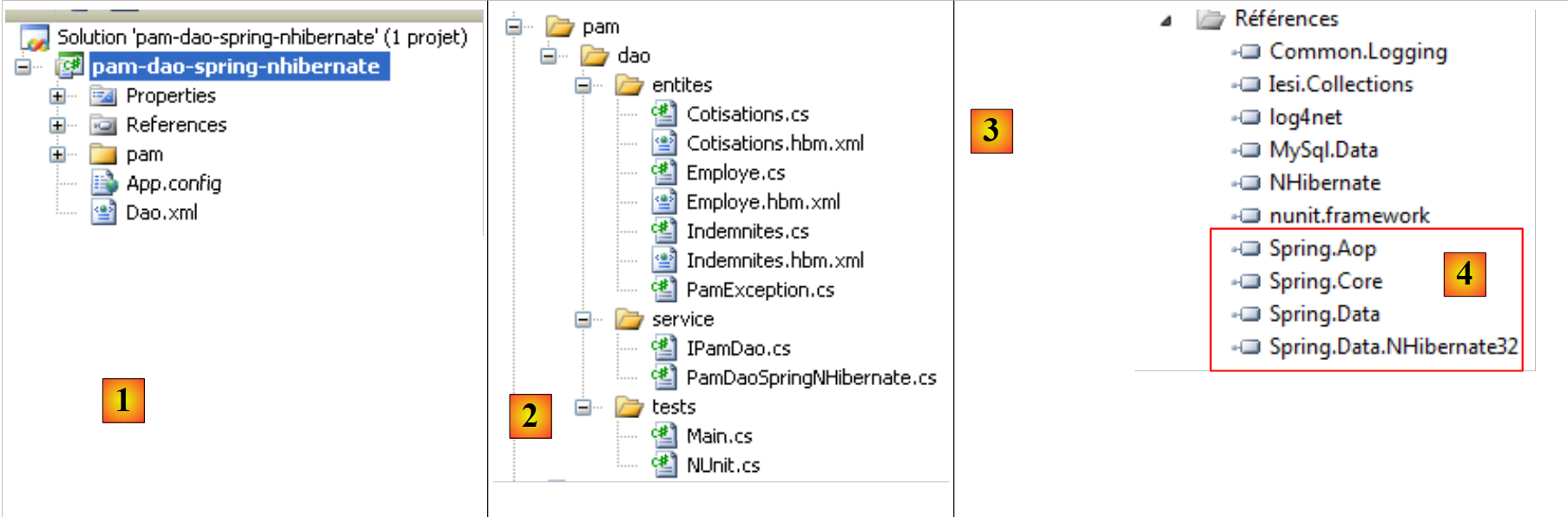 |
- in [1], the project as a whole
- the [pam] folder contains the project classes as well as the NHibernate entity configuration
- the [App.config] and [Dao.xml] files configure the Spring/NHibernate framework. We will need to describe the contents of these two files.
- in [2], the various classes of the project
- in the [entities] folder, we find the NHibernate entities studied in the previous project (see page 14)
- In the [service] folder, we find the [IPamDao] interface and its implementation with the Spring/NHibernate framework [PamDaoSpringNHibernate].
- The [tests] folder contains the tests for the [IPamDao] interface.
- In [3], the project references. The Spring/NHibernate integration requires new DLLs [4].
In the project references [3], we find the following DLLs:
- NHibernate: for the NHibernate ORM
- MySql.Data: the ADO.NET driver for the MySQL 5 DBMS
- Spring.Core: for the Spring framework, which handles layer integration
- log4net: a logging library
- nunit.framework: a unit testing library
- Spring.Aop, Spring.Data, and Spring.Data.NHibernate32: provide Spring/NHibernate support.
We will ensure that the "Copy to Local" property for all these DLLs is set to True.
2.1.2. Configuring the C# project
The project is configured as follows:
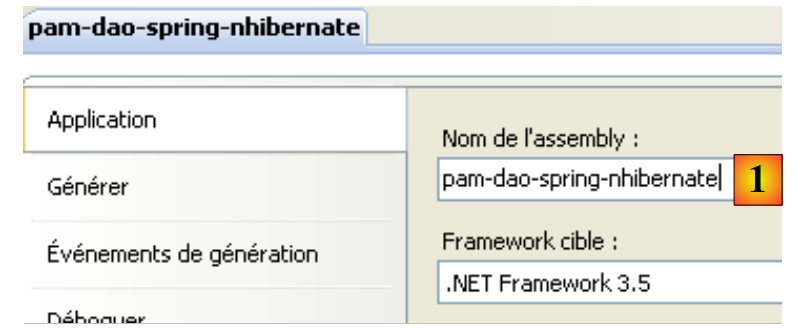 |
- In [1], the project assembly name is [pam-dao-spring-nhibernate]. This name appears in various project configuration files.
2.1.3. Entities in the [dao] layer
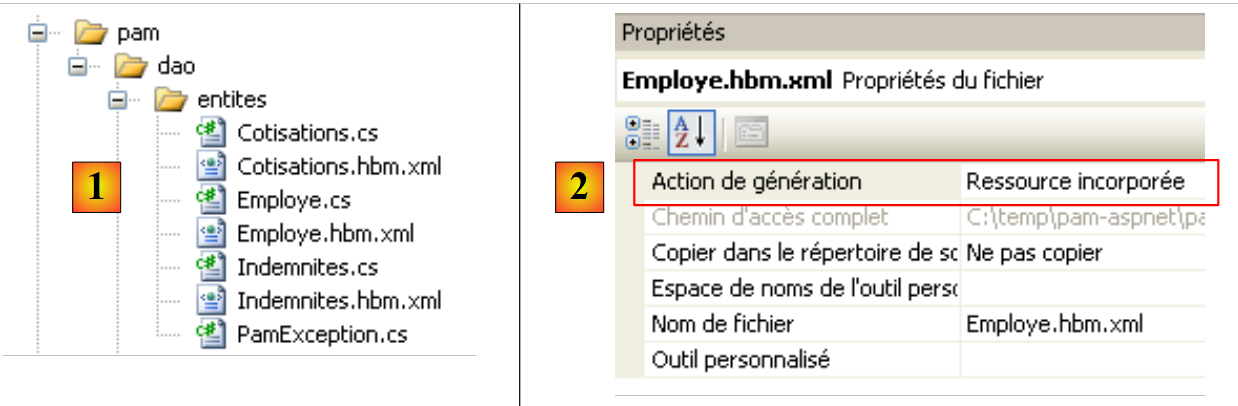 |
The entities (objects) required for the [dao] layer have been gathered in the [entities] folder [1] of the project. These entities are the same as those in the previous project (see section 1.3.2), with one difference found in the NHibernate configuration files. Take, for example, the [Employee.hbm.xml] file:
- in [2], the file is configured to be included in the project assembly
Its content is as follows:
<?xml version="1.0" encoding="utf-8" ?>
<hibernate-mapping xmlns="urn:nhibernate-mapping-2.2"
namespace="Pam.Dao.Entites" assembly="pam-dao-spring-nhibernate">
    <class name="Employe" table="EMPLOYES">
        <id name="Id" column="ID">
            <generator class="native" />
        </id>
        <version name="Version" column="VERSION"/>
        <property name="SS" column="SS" length="15" not-null="true" unique="true"/>
        <property name="Nom" column="NOM" length="30" not-null="true"/>
        <property name="Prenom" column="PRENOM" length="20" not-null="true"/>
        <property name="Adresse" column="ADRESSE" length="50" not-null="true" />
        <property name="Ville" column="VILLE" length="30" not-null="true"/>
        <property name="CodePostal" column="CP" length="5" not-null="true"/>
        <many-to-one name="Indemnites" column="INDEMNITE_ID" cascade="all" lazy="false"/>
    </class>
</hibernate-mapping>
- line 3: the assembly attribute indicates that the file [Employe.hbm.xml] will be found in the assembly [pam-dao-spring-nhibernate]
Additionally, in the [entities] folder, we find an exception class used by the project:
using System;
namespace Pam.Dao.Entites {

    public class PamException : Exception {

         // the error code
        public int Code { get; set; }

         // manufacturers
        public PamException() {
        }

        public PamException(int Code)
            : base() {
            this.Code = Code;
        }

        public PamException(string message, int Code)
            : base(message) {
            this.Code = Code;
        }

        public PamException(string message, Exception ex, int Code)
            : base(message, ex) {
            this.Code = Code;
        }
    }
}
The [PamException] class was derived from the [Exception] class (line 4) to add an error code (line 7).
2.1.4. Spring / NHibernate Configuration
Let’s return to the Visual C# project:
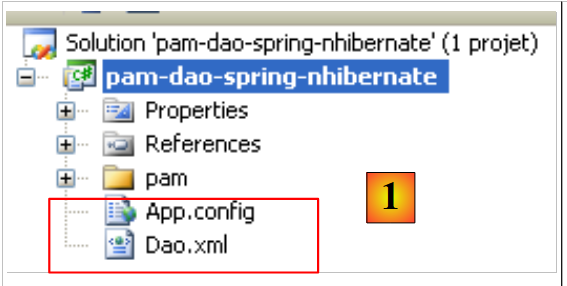 |
- In [1], the [App.config] and [Dao.xml] files configure the Spring / NHibernate integration
2.1.4.1. The [ App.config] file
The [App.config] file is as follows:
<?xml version="1.0" encoding="utf-8" ?>
<configuration>
     <!-- configuration sections -->
    <configSections>
        <sectionGroup name="spring">
            <section name="parsers" type="Spring.Context.Support.NamespaceParsersSectionHandler, Spring.Core" />
            <section name="objects" type="Spring.Context.Support.DefaultSectionHandler, Spring.Core" />
            <section name="context" type="Spring.Context.Support.ContextHandler, Spring.Core" />
        </sectionGroup>
        <section name="log4net" type="log4net.Config.Log4NetConfigurationSectionHandler,log4net" />
    </configSections>


     <!-- spring configuration -->
    <spring>
        <parsers>
            <parser type="Spring.Data.Config.DatabaseNamespaceParser, Spring.Data" />
        </parsers>
        <context>
            <resource uri="Dao.xml" />
        </context>
    </spring>

     <!-- This section contains the log4net configuration settings -->
     <!-- NOTE IMPORTANTE: logs are not active by default. They must be activated by program
    avec l'instruction log4net.Config.XmlConfigurator.Configure();
    ! -->
    <log4net>
        <appender name="ConsoleAppender" type="log4net.Appender.ConsoleAppender">
            <layout type="log4net.Layout.PatternLayout">
                <conversionPattern value="%-5level %logger - %message%newline" />
            </layout>
        </appender>

         <!-- Set default logging level to DEBUG -->
        <root>
            <level value="DEBUG" />
            <appender-ref ref="ConsoleAppender" />
        </root>

         <!-- Set logging for Spring . Logger names in Spring correspond to the namespace -->
        <logger name="Spring">
            <level value="INFO" />
        </logger>

        <logger name="Spring.Data">
            <level value="DEBUG" />
        </logger>

        <logger name="NHibernate">
            <level value="DEBUG" />
        </logger>
    </log4net>

</configuration>
The [App.config] file above configures Spring (lines 5–9, 15–22), log4net (line 10, lines 28–53), but not NHibernate. Spring objects are not configured in [App.config] but in the [Dao.xml] file (line 20). The Spring/NHibernate configuration, which consists of declaring specific Spring objects, will therefore be found in this file.
2.1.4.2. The [Dao.xml] file
The [Dao.xml] file, which contains the objects managed by Spring, is as follows:
<?xml version="1.0" encoding="utf-8" ?>
<objects xmlns="http://www.springframework.net"
         xmlns:db="http://www.springframework.net/database">

     <!-- Referenced by main application context configuration file -->
    <description>
        Application Spring / NHibernate
    </description>

     <!-- Database and NHibernate Configuration -->
    <db:provider id="DbProvider"
                   provider="MySql.Data.MySqlClient"
                   connectionString="Server=localhost;Database=dbpam_nhibernate;Uid=root;Pwd=;"/>

    <object id="NHibernateSessionFactory" type="Spring.Data.NHibernate.LocalSessionFactoryObject, Spring.Data.NHibernate32">
        <property name="DbProvider" ref="DbProvider"/>
        <property name="MappingAssemblies">
            <list>
                <value>pam-dao-spring-nhibernate</value>
            </list>
        </property>
        <property name="HibernateProperties">
            <dictionary>
                <entry key="dialect" value="NHibernate.Dialect.MySQL5Dialect"/>
                <entry key="hibernate.show_sql" value="false"/>
            </dictionary>
        </property>
        <property name="ExposeTransactionAwareSessionFactory" value="true" />
    </object>

     <!-- transaction manager -->
    <object id="transactionManager"
        type="Spring.Data.NHibernate.HibernateTransactionManager, Spring.Data.NHibernate32">
        <property name="DbProvider" ref="DbProvider"/>
        <property name="SessionFactory" ref="NHibernateSessionFactory"/>
    </object>

     <!-- Hibernate Template -->
    <object id="HibernateTemplate" type="Spring.Data.NHibernate.Generic.HibernateTemplate">
        <property name="SessionFactory" ref="NHibernateSessionFactory" />
        <property name="TemplateFlushMode" value="Auto" />
        <property name="CacheQueries" value="true" />
    </object>

     <!-- Data Access Objects -->
    <object id="pamdao" type="Pam.Dao.Service.PamDaoSpringNHibernate, pam-dao-spring-nhibernate" init-method="init" destroy-method="destroy">
        <property name="HibernateTemplate" ref="HibernateTemplate"/>
    </object>
</objects>
- Lines 11–13 configure the connection to the [dbpam_nhibernate] database. They include:
- the ADO.NET provider required for the connection, in this case the MySQL DBMS provider. This requires the [Mysql.Data] DLL to be included in the project references.
- the database connection string (server, database name, connection owner, and password)
- Lines 15–29 configure the NHibernate SessionFactory, the object used to obtain NHibernate sessions. Note that all database operations are performed within an NHibernate session. In line 15, we can see that the SessionFactory is implemented by the Spring class Spring.Data.NHibernate.LocalSessionFactoryObject, found in the Spring.Data.NHibernate32 DLL.
- Line 16: The DbProvider property sets the database connection parameters (ADO.NET provider and connection string). Here, this property references the DbProvider object defined earlier on lines 11–13.
- Lines 17–20: Specify the list of assemblies containing [*.hbm.xml] files that configure entities managed by NHibernate. Line 19 indicates that these files will be found in the project assembly. Note that this name is found in the C# project properties. Also note that all [*.hbm.xml] files have been configured to be included in the project assembly.
- Lines 22–27: NHibernate-specific properties.
- Line 24: The SQL dialect used will be MySQL
- Line 25: The SQL generated by NHibernate will not appear in the console logs. Setting this property to true allows you to see the SQL statements generated by NHibernate. This can help you understand, for example, why an application is slow when accessing the database.
- Line 28: Setting the ExposeTransactionAwareSessionFactory property to true will cause Spring to manage the transaction management annotations found in the C# code. We will return to this when we write the class implementing the [DAO] layer.
- Lines 32–36 define the transaction manager. Again, this manager is a Spring class from the Spring.Data.NHibernate32 DLL. This manager requires the database connection parameters (line 34) as well as the NHibernate SessionFactory (line 35).
- Lines 39–43 define the properties of the HibernateTemplate class, which is also a Spring class. This class will be used as a utility class in the class implementing the [DAO] layer. It facilitates interactions with NHibernate objects. This class has certain properties that must be initialized:
- line 40: the NHibernate SessionFactory
- line 41: the TemplateFlushMode property sets the synchronization mode of the NHibernate persistence context with the database. The Auto mode ensures that synchronization occurs:
- at the end of a transaction
- before a SELECT operation
- line 42: HQL (Hibernate Query Language) queries will be cached. This can lead to a performance gain.
- Lines 46–48 define the implementation class for the [dao] layer
- line 46: the [dao] layer will be implemented by the [PamdaoSpringNHibernate] class in the [pam-dao-spring-nhibernate] DLL. After the class is instantiated, the class’s init method will be executed immediately. When the Spring container is closed, the class’s destroy method will be executed.
- Line 47: The [PamDaoSpringNHibernate] class will have a HibernateTemplate property that will be initialized with the HibernateTemplate property from line 39.
2.1.5. Implementation of the [dao] layer
2.1.5.1. The skeleton of the implementation class
The [IPamDao] interface is as follows:
using Pam.Dao.Entites;

namespace Pam.Dao.Service {
    public interface IPamDao {
         // list of all employee identities
        Employe[] GetAllIdentitesEmployes();
         // an individual employee with benefits
        Employe GetEmploye(string ss);
         // list of all contributions
        Cotisations GetCotisations();
    }
}
- Line 1: We import the namespace for entities in the [dao] layer.
- Line 3: The [dao] layer is in the [Pam.Dao.Service] namespace. Elements in the [Pam.Dao.Entities] namespace can be created in multiple instances. Elements in the [Pam.Dao.Service] namespace are created as a single instance (singleton). This is what justified the choice of namespace names.
- Line 4: The interface is named [IPamDao]. It defines three methods:
- Line 6: [GetAllIdentitesEmployes] returns an array of objects of type [Employe] representing the list of child care providers in a simplified format (last name, first name, SS).
- Line 8: [GetEmploye] returns an [Employe] object: the employee with the social security number passed as a parameter to the method, along with the benefits associated with their pay grade.
- Line 10, [GetCotisations] returns the [Cotisations] object, which encapsulates the rates of the various social security contributions to be deducted from the gross salary.
The skeleton of the implementation class for this interface using Spring/NHibernate could be as follows:
using System;
using System.Collections;
using System.Collections.Generic;
using Pam.Dao.Entites;
using Spring.Data.NHibernate.Generic.Support;
using Spring.Transaction.Interceptor;

namespace Pam.Dao.Service {
    public class PamDaoSpringNHibernate : HibernateDaoSupport, IPamDao {
         // private fields
        private Cotisations cotisations;
        private Employe[] employes;

         // init
        [Transaction(ReadOnly = true)]
        public void init() {
...
        }

         // delete object
        public void destroy() {
            if (HibernateTemplate.SessionFactory != null) {
                HibernateTemplate.SessionFactory.Close();
            }
        }

         // list of all employee identities
        public Employe[] GetAllIdentitesEmployes() {
            return employes;
        }


         // an individual employee with benefits
        [Transaction(ReadOnly = true)]
        public Employe GetEmploye(string ss) {
....
        }

         // list of contributions
        public Cotisations GetCotisations() {
            return cotisations;
        }
    }
}
- Line 9: The [PamDaoSpringNHibernate] class correctly implements the [dao] layer interface [IPamDao]. It also derives from the Spring class [HibernateDaoSupport]. This class has a [HibernateTemplate] property that is initialized by the Spring configuration that was set up (line 2 below):
    <object id="pamdao" type="Pam.Dao.Service.PamDaoSpringNHibernate, pam-dao-spring-nhibernate" init-method="init" destroy-method="destroy">
        <property name="HibernateTemplate" ref="HibernateTemplate"/>
</object>
- In line 1 above, we see that the definition of the [pamdao] object specifies that the init and destroy methods of the [PamDaoSpringNHibernate] class must be executed at specific times. These two methods are indeed present in the class on lines 16 and 21.
- Lines 15, 34: annotations that ensure the annotated method will be executed within a transaction. The ReadOnly=true attribute indicates that the transaction is read-only. The method executed within the transaction may throw an exception. In this case, Spring automatically rolls back the transaction. This annotation eliminates the need to manage a transaction within the method.
- Line 16: The init method is executed by Spring immediately after the class is instantiated. We will see that its purpose is to initialize the private fields on lines 11 and 12. It will run within a transaction (line 15).
- The methods of the [IPamDao] interface are implemented on lines 28, 35, and 40.
- Lines 28–30: The [GetAllIdentitesEmployes] method simply returns the attribute from line 12, which was initialized by the init method.
- Lines 40–42: The [GetCotisations] method simply returns the attribute from line 11, which was initialized by the init method.
2.1.5.2. Useful methods of the HibernateTemplate class
We will use the following methods of the HibernateTemplate class:
executes the HQL query and returns a list of objects of type T | |
executes an HQL query parameterized by ?. The values of these parameters are provided by the array of objects. | |
returns all entities of type T |
There are other useful methods that we won’t have the opportunity to use, which allow you to retrieve, save, update, and delete entities:
Adds the entity of type T with the primary key id to the NHibernate session. | |
Inserts (INSERT) or updates (UPDATE) the entity object depending on whether it has a primary key (UPDATE) or not (INSERT). The absence of a primary key can be configured using the `unsaved-values` attribute in the entity's configuration file. After the `SaveOrUpdate` operation, the entity object is in the NHibernate session. | |
removes the entity object from the NHibernate session. |
2.1.5.3. Implementation of the init method
The init method of the [PamDaoSpringNHibernate] class is, by configuration, the method executed after Spring instantiates the class. Its purpose is to cache the simplified employee identities (last name, first name, SSN) and contribution rates locally. Its code could be as follows.
[Transaction(ReadOnly = true)]
        public void init() {
            try {
                 // retrieve the simplified list of employees
                IList<object[]> lignes = HibernateTemplate.Find<object[]>("select e.SS,e.Nom,e.Prenom from Employe e");
                 // we put it in a table
                employes = new Employe[lignes.Count];
                int i = 0;
                foreach (object[] ligne in lignes) {
                    employes[i] = new Employe() { SS = ligne[0].ToString(), Nom = ligne[1].ToString(), Prenom = ligne[2].ToString() };
                    i++;
                }
                 // we put the contribution rates in a
                cotisations = (HibernateTemplate.LoadAll<Cotisations>())[0];
            } catch (Exception ex) {
                // on transforme l'exception
                throw new PamException(string.Format("Erreur d'accès à la BD : [{0}]", ex.ToString()), 43);
            }
        }
- line 5: An HQL query is executed. It retrieves the SS, LastName, and FirstName fields from all Employee entities. It returns a list of objects. If we had requested the entire Employee record using "select e from Employee e", we would have retrieved a list of objects of type Employee.
- lines 7–12: this list of objects is copied into an array of objects of type Employee.
- Line 14: We retrieve the list of all entities of type Contributions. We know that this list has only one element. We therefore retrieve the first element of the list to obtain the contribution rates.
- Lines 7 and 14 initialize the class’s two private fields.
2.1.5.4. Implementation of the GetEmployee method
The GetEmployee method must return the Employee entity with a given SSN. Its code could be as follows:
[Transaction(ReadOnly = true)]
        public Employe GetEmploye(string ss) {
            IList<Employe> employés = null;
            try {
                 // request
                employés = HibernateTemplate.Find<Employe>("select e from Employe e where e.SS=?", new object[]{ss});
            } catch (Exception ex) {
                // on transforme l'exception
                throw new PamException(string.Format("Erreur d'accès à la BD lors de la demande de l'employé de n° ss [{0}] : [{1}]", ss, ex.ToString()), 41);
            }
             // has an employee been recovered?
            if (employés.Count == 0) {
                 // we report the fact
                throw new PamException(string.Format("L'employé de n° ss [{0}] n'existe pas", ss), 42);
            } else {
                return employés[0];
            }
        }
- line 6: retrieves the list of employees with a given SS number
- line 12: normally, if the employee exists, we should get a list with one element
- line 14: if not, throw an exception
- line 16: if so, returns the first employee in the list
2.2. [DAO] layer tests
2.2.1. The Visual Studio project
The Visual Studio project has already been presented. As a reminder:
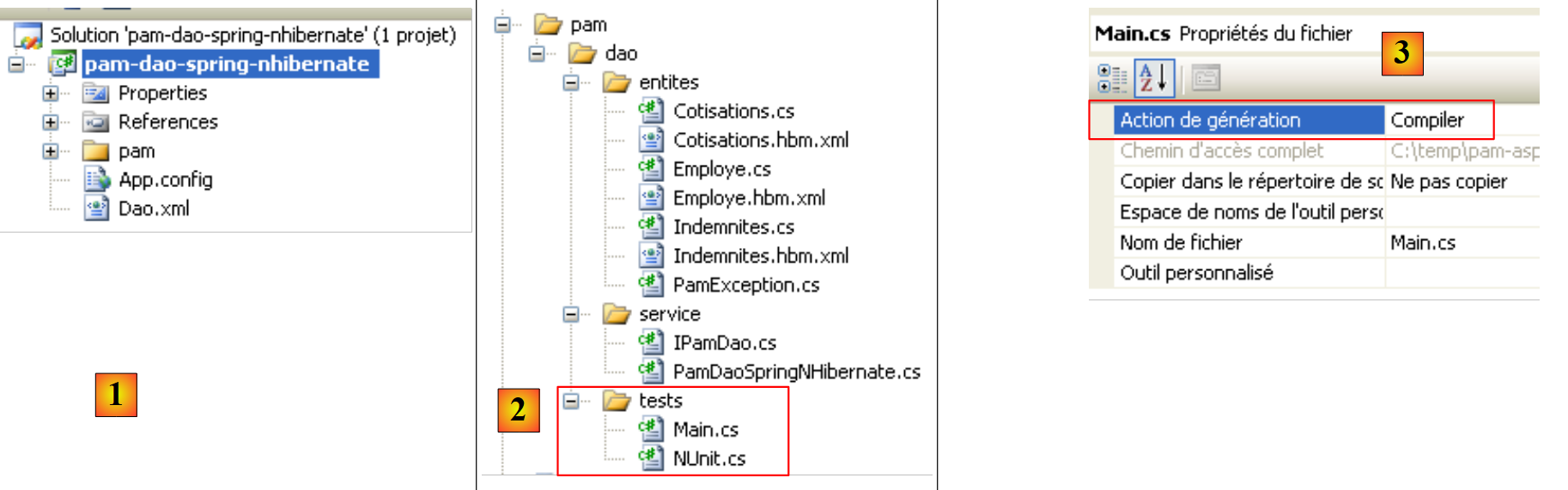 |
- in [1], the project as a whole
- in [2], the various classes of the project. The [tests] folder contains a console test [Main.cs] and a unit test [NUnit.cs].
- in [3], the program [Main.cs] is compiled.
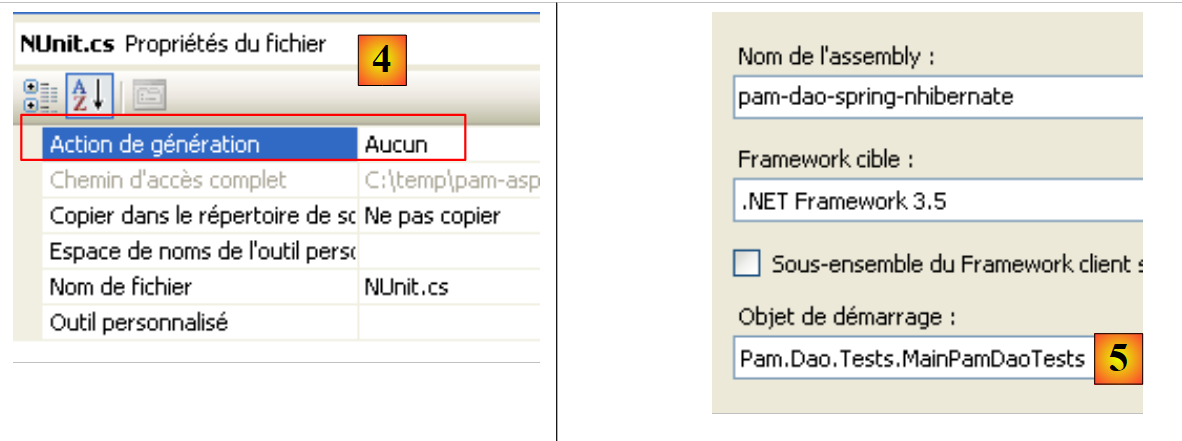 |
- in [4], the file [NUnit.cs] is not generated.
- The project is a console application. The class being executed is the one specified in [5], the class in the [Main.cs] file.
2.2.2. The console test program [Main.cs]
The test program [Main.cs] runs in the following architecture:
 |
It is responsible for testing the methods of the [IPamDao] interface. A basic example might be the following:
using System;
using Pam.Dao.Entites;
using Pam.Dao.Service;
using Spring.Context.Support;

namespace Pam.Dao.Tests {
    public class MainPamDaoTests {
        public static void Main() {
            try {
                 // layer instantiation [dao]
                IPamDao pamDao = (IPamDao)ContextRegistry.GetContext().GetObject("pamdao");
                 // list of employee identities
                foreach (Employe Employe in pamDao.GetAllIdentitesEmployes()) {
                    Console.WriteLine(Employe.ToString());
                }
                 // an employee with benefits
                Console.WriteLine("------------------------------------");
                Console.WriteLine(pamDao.GetEmploye("254104940426058"));
                Console.WriteLine("------------------------------------");
                 // list of contributions
                Cotisations cotisations = pamDao.GetCotisations();
                Console.WriteLine(cotisations.ToString());
            } catch (Exception ex) {
                 // exception display
                Console.WriteLine(ex.ToString());
            }
             //break
            Console.ReadLine();
        }
    }
}
- Line 11: We ask Spring for a reference to the [dao] layer.
- lines 13–15: testing the [GetAllEmployeeIDs] method of the [IPamDao] interface
- line 18: testing the [GetEmploye] method of the [IPamDao] interface
- line 21: testing the [GetCotisations] method of the [IPamDao] interface
Spring, NHibernate, and log4net are configured via the [ App.config] file discussed in Section 2.1.4.1.
Running the program with the database described in section 1.2 produces the following console output:
- lines 1-2: the 2 employees of type [Employee] with only the information [SS, Last Name, First Name]
- line 4: the employee of type [Employee] with social security number [254104940426058]
- line 5: contribution rates
2.2.3. Unit tests with NUnit
We will now move on to a NUnit unit test. The Visual Studio project for the [dao] layer will evolve as follows:
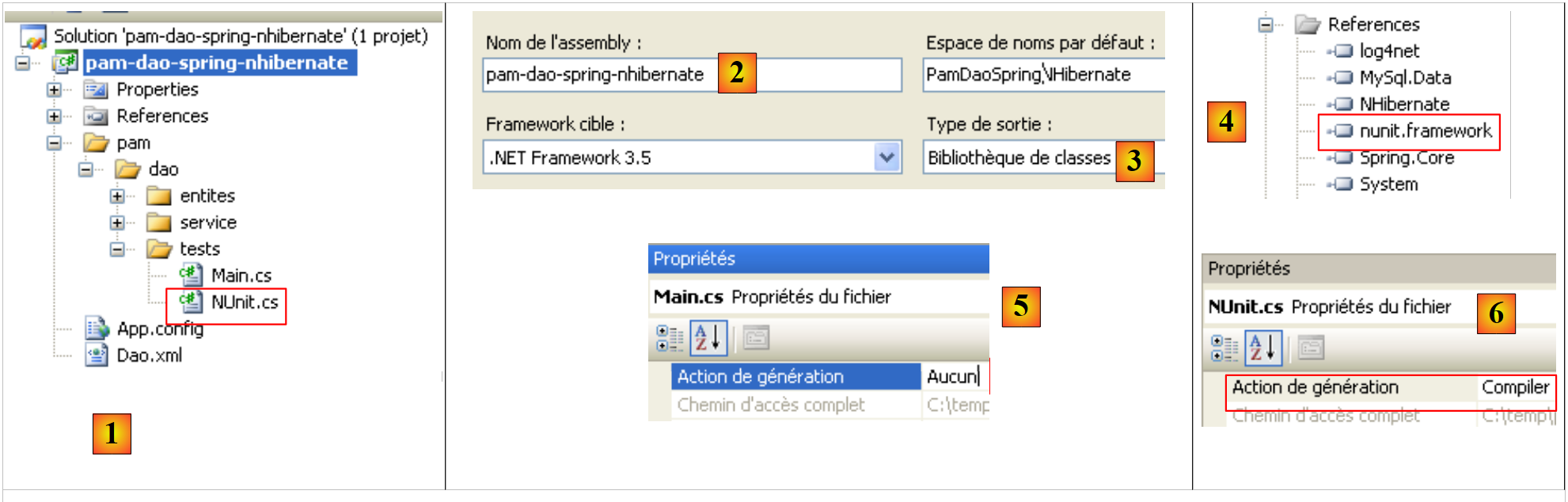 |
- in [1], the test program [NUnit.cs]
- in [2,3], the project will generate a DLL named [pam-dao-spring-nhibernate.dll]
- in [4], the reference to the NUnit framework DLL: [nunit.framework.dll]
- in [5], the [Main.cs] class will not be included in the [pam-dao-spring-nhibernate] DLL
- in [6], the [NUnit.cs] class will be included in the [pam-dao-spring-nhibernate] DLL
The NUnit test class is as follows:
using System.Collections;
using NUnit.Framework;
using Pam.Dao.Service;
using Pam.Dao.Entites;
using Spring.Objects.Factory.Xml;
using Spring.Core.IO;
using Spring.Context.Support;

namespace Pam.Dao.Tests {

    [TestFixture]
    public class NunitPamDao : AssertionHelper {
         // the [dao] layer to be tested
        private IPamDao pamDao = null;

         // manufacturer
        public NunitPamDao() {
             // layer instantiation [dao]
            pamDao = (IPamDao)ContextRegistry.GetContext().GetObject("pamdao");
        }

         // init
        [SetUp]
        public void Init() {

        }

        [Test]
        public void GetAllIdentitesEmployes() {
             // audit no. of employees
            Expect(2, EqualTo(pamDao.GetAllIdentitesEmployes().Length));
        }

        [Test]
        public void GetCotisations() {
             // checking contribution rates
            Cotisations cotisations = pamDao.GetCotisations();
            Expect(3.49, EqualTo(cotisations.CsgRds).Within(1E-06));
            Expect(6.15, EqualTo(cotisations.Csgd).Within(1E-06));
            Expect(9.39, EqualTo(cotisations.Secu).Within(1E-06));
            Expect(7.88, EqualTo(cotisations.Retraite).Within(1E-06));
        }

        [Test]
        public void GetEmployeIdemnites() {
             // individual verification
            Employe employe1 = pamDao.GetEmploye("254104940426058");
            Employe employe2 = pamDao.GetEmploye("260124402111742");
            Expect("Jouveinal", EqualTo(employe1.Nom));
            Expect(2.1, EqualTo(employe1.Indemnites.BaseHeure).Within(1E-06));
            Expect("Laverti", EqualTo(employe2.Nom));
            Expect(1.93, EqualTo(employe2.Indemnites.BaseHeure).Within(1E-06));
        }

        [Test]
        public void GetEmployeIdemnites2() {
             // non-existent individual verification
            bool erreur = false;
            try {
                Employe employe1 = pamDao.GetEmploye("xx");
            } catch {
                erreur = true;
            }
            Expect(erreur, True);
        }
    }
}
- line 11: the class has the [TestFixture] attribute, which makes it an [NUnit] test class.
- line 12: the class derives from the AssertionHelper utility class of the NUnit framework (starting with version 2.4.6).
- line 14: the private field [pamDao] is an instance of the interface providing access to the [dao] layer. Note that the type of this field is an interface, not a class. This means that the [pamDao] instance makes only methods accessible—specifically, those of the [IPamDao] interface.
- The methods tested in the class are those with the [Test] attribute. For all these methods, the testing process is as follows:
- The method with the [SetUp] attribute is executed first. It is used to prepare the resources (network connections, database connections, etc.) required for the test.
- Then the method to be tested is executed
- and finally, the method with the [TearDown] attribute is executed. It is generally used to release the resources allocated by the method with the [SetUp] attribute.
- In our test, there are no resources to allocate before each test and then deallocate afterward. Therefore, we do not need methods with the [SetUp] and [TearDown] attributes. For the example, we have included, on lines 23–26, a method with the [SetUp] attribute.
- Lines 17–20: The class constructor initializes the private field [pamDao] using Spring and [App.config].
- Lines 29–32: Test the [GetAllIdentitesEmployes] method
- Lines 35–42: Test the [GetCotisations] method
- Lines 45–53: Test the [GetEmploye] method
- Lines 56–65: Test the [GetEmploye] method when an exception occurs.
Project generation creates the DLL [pam-dao-spring-nhibernate.dll] in the [bin/Release] folder:
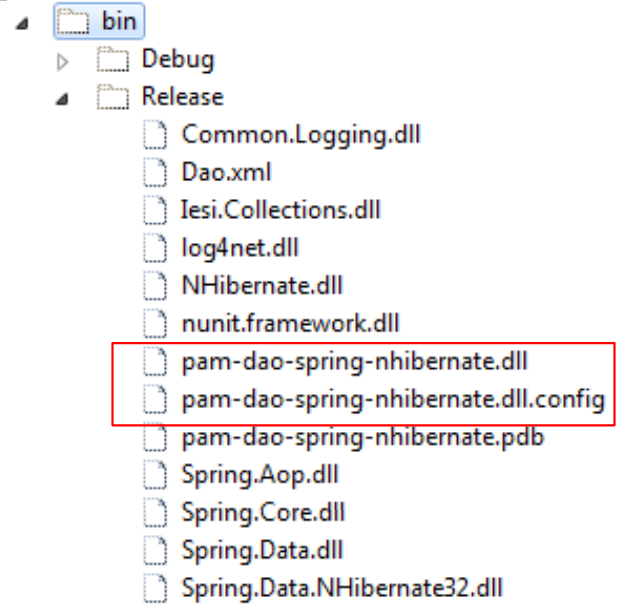 |
We load the DLL [pam-dao-spring-nhibernate.dll] using the [NUnit-Gui] tool, version 2.5, and run the tests:
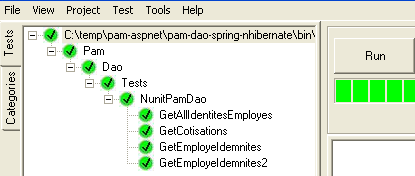
Above, the tests were successful.
2.2.4. Generating the [dao] layer DLL with
Once the [PamDaoNHibernate] class has been written and tested, we will generate the [dao] layer DLL as follows:
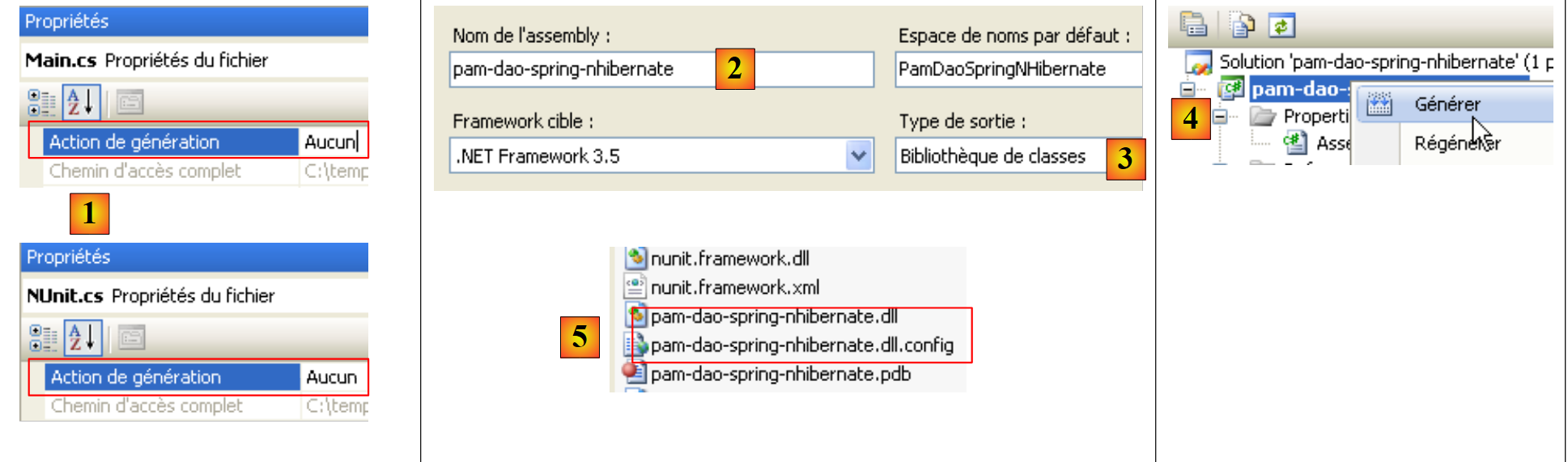 |
- [1], the test programs are excluded from the project assembly
- [2,3], project configuration
- [4], project generation
- The DLL is generated in the [bin/Release] folder [5].