9. Layered Architecture and Data Access
The previous examples stored their data in memory or in the cache. A real application stores it in a database and is organized into layers (see the diagram in the introduction):
- the web layer (controllers, views): read the request, call the business layer, select the view;
- the business layer: business rules;
- the DAO layer (*Data Access Object*): database queries.
Each layer is aware only of the layer below it, and as few details about it as possible: the web layer is unaware of the SQL layer, and the business layer is unaware of the HTML layer. This separation makes each layer easier to understand, test, and evolve. Example 28 applies this to managing a list of people: it is, on a smaller scale, the management of doctors and clients from the case study.
In [PHP], database access is organized across several layers:
- the PDO extension (*PHP Data Objects*) of [PHP] defines an interface common to all SGBD modules: opening a connection, executing a SQL command, and reading rows. Each SGBD has its own driver: [pdo_mysql] for [MySQL] (and [MariaDB]), included with [PHP];
- the query builder (*query builder*) of [Laravel] ([DB] facade) constructs the SQL commands from method calls ([where], [orderBy]...), regardless of the SGBD, and manages connections and transactions;
- Eloquent, the ORM (*Object-Relational Mapper*) of [Laravel], maps classes (models, as defined by [Eloquent]) to database tables and transforms the retrieved rows into objects. It follows the so-called *Active Record* model: each object knows how to read and save itself ([Person::find(1)], [$person->save()]).
This is the equivalent of converting [JDBC], [JPA], and [Hibernate] to [Java], [Entity Framework Core] to [C#], or [SQLAlchemy] to [Python]. Note a consequence of how [PHP] works: since nothing survives the request, each request opens its own connection to the database (upon its first SQL request) and closes it upon termination. There is no connection pool as in [Java] or [Python]; opening a connection to [MySQL] on the same machine takes only a fraction of a millisecond.
This example requires a [MySQL] (or [MariaDB]) server to be running: the appendix explains how to install one using [Laragon].
9.1. Example 28: A Three-Tier Personnel Management System
| 28-layers/
├── app/
│ ├── Dao/
│ │ └── PersonsDao.php
│ ├── Http/
│ │ ├── Controllers/
│ │ │ └── PersonsController.php
│ │ └── Requests/
│ │ └── PersonRequest.php
│ ├── Business/
│ │ ├── PersonData.php
│ │ ├── BusinessException.php
│ │ └── PersonsBusiness.php
│ └── Models/
│ └── Person.php
├── bootstrap/
│ └── app.php
├── database/
│ └── dbpersons.sql
├── public/
│ ├── css/
│ │ └── styles.css
│ └── js/
│ └── app.js
├── resources/
│ └── views/
│ ├── components/
│ │ └── field.blade.php
│ ├── fragments/
│ │ └── confirmation.blade.php
│ ├── layout.blade.php
│ └── persons/
│ ├── form.blade.php
│ └── list.blade.php
├── routes/
│ └── web.php
└── ...
|
9.1.1. The database
The [dbpersons] database is created by the SQL script. Using [Laragon], you can run it, for example, in the [HeidiSQL] tool (File menu / Run a SQL file), or from the command line, from the example folder:
| mysql -u root < database/dbpersons.sql
|
The [database/dbpersons.sql] file:
| -- database of example 28: a single table, [persons]
-- the script is written in UTF-8
SET NAMES utf8mb4;
DROP DATABASE IF EXISTS dbpersons;
CREATE DATABASE dbpersons CHARACTER SET utf8mb4 COLLATE utf8mb4_unicode_ci;
USE dbpersons;
CREATE TABLE persons (
id INT NOT NULL AUTO_INCREMENT,
-- the version of the row, increased at each modification (see DAO layer)
version INT NOT NULL DEFAULT 0,
first_name VARCHAR(30) NOT NULL,
last_name VARCHAR(30) NOT NULL,
age INT NOT NULL,
PRIMARY KEY (id),
-- two persons cannot have the same first and last names
CONSTRAINT unq_persons_first_name_last_name UNIQUE (first_name, last_name)
) ENGINE = InnoDB;
INSERT INTO persons (first_name, last_name, age) VALUES
('Marie', 'Pélissier', 42),
('Jacques', 'Bromard', 35),
('Philippe', 'Jandot', 58);
|
- Line 3: The script is written in [UTF-8]; this is specified to the server so that the accents in the data ([Pélissier]) remain intact;
- line 5: the character set [utf8mb4] accepts all characters (accents, emojis, etc.). The [utf8mb4_unicode_ci] collation compares strings without regard to uppercase letters or accents: for [MySQL], [pelissier], and [Pélissier] are equal;
- line 11: a version number, incremented each time the line is modified (see “optimistic lock,” below);
- line 17: a named uniqueness constraint: the database does not allow two people with the same first and last names. The name will be used to identify the error.
[Laravel] can also create the tables itself, using migrations: [PHP] classes that describe, step by step, the creation and modifications of each table (command [php artisan migrate]). We maintain a script, SQL, which is common to all versions of the case study and shows exactly what the database contains.
9.1.2. Configuration
The database connection is defined in the file [.env]:
| # the database connection: the MySQL DBMS, on this machine (127.0.0.1), port 3306,
# the dbpersons database, the root user without password (Laragon's settings)
DB_CONNECTION=mysql
DB_HOST=127.0.0.1
DB_PORT=3306
DB_DATABASE=dbpersons
DB_USERNAME=root
DB_PASSWORD=
# true: the SQL statements sent to the database are displayed in the console
DB_LOG=false
|
[DB_CONNECTION] refers to one of the connections described by the configuration in [Laravel] ([mysql], [mariadb], [pgsql], [sqlite], [sqlsrv]); the following lines configure it. If your server has a password, enter it in [DB_PASSWORD]. The [mysql] connection communicates with the server using [utf8mb4], the database character set. [DB_LOG] is a variable we define, read by [bootstrap/app.php]:
| <?php
// bootstrap/app.php: the application of example 28
use Illuminate\Database\Events\QueryExecuted;
use Illuminate\Database\Events\TransactionBeginning;
use Illuminate\Database\Events\TransactionCommitted;
use Illuminate\Database\Events\TransactionRolledBack;
use Illuminate\Foundation\Application;
use Illuminate\Support\Facades\DB;
use Illuminate\Support\Facades\Event;
(require __DIR__.'/../../vendor/autoload.php')->addPsr4('App\\', __DIR__.'/../app/');
return Application::configure(basePath: dirname(__DIR__))
->withRouting(
web: __DIR__.'/../routes/web.php',
// the route that serves Bootstrap (see example 15)
then: fn () => require __DIR__.'/../../common/bootstrap.php')
->withMiddleware()
->withExceptions()
->booted(function () {
// DB_LOG=true (.env file): each SQL statement, and each step of a
// transaction, is displayed in the console of the server
if (env('DB_LOG')) {
DB::listen(fn (QueryExecuted $q) =>
error_log($q->sql.' '.json_encode($q->bindings, JSON_UNESCAPED_UNICODE)));
Event::listen(TransactionBeginning::class, fn () => error_log('BEGIN'));
Event::listen(TransactionCommitted::class, fn () => error_log('COMMIT'));
Event::listen(TransactionRolledBack::class, fn () => error_log('ROLLBACK'));
}
})
->create();
|
- Lines 24–30: If [DB_LOG] equals [true], each SQL command is displayed in the console. [DB::listen] registers a function called after each SQL command, with a [QueryExecuted] object (the command text, its parameters, and its duration). [Event::listen] logs a function called for each event of a given type: [Laravel] thus signals, among other things, the start, confirmation, and cancellation of transactions. Events are another way—along with middleware—to intervene in the framework’s operation. (We read [env] directly, for brevity; a typical application would use a configuration file; see Example 25.)
There is nothing else to configure: the classes of the three layers are created by the [Laravel] container, which injects the layer below into each one (the controller receives the business layer, and the business layer receives the DAO layer).
9.1.3. The Person Model
| <?php
// app/Models/Person.php: a row of the [persons] table, an Eloquent "model"
namespace App\Models;
use Illuminate\Database\Eloquent\Model;
// Model: the parent class of the entities of Eloquent, Laravel's ORM. The columns
// of the table become, without declaring anything, properties of the object ($p->last_name)
class Person extends Model
{
// the name of the table (Eloquent would deduce it from the name of the class: people)
protected $table = 'persons';
// the table does not have the created_at and updated_at columns that Eloquent maintains by default
public $timestamps = false;
// the columns that can be mass-filled: new Person([...]), update([...])
protected $fillable = ['first_name', 'last_name', 'age'];
// the type conversions, column by column
protected function casts(): array
{
return ['age' => 'integer', 'version' => 'integer'];
}
}
|
- Line 10: A model named [Eloquent] inherits from the class [Model]. The table columns are not declared: [Eloquent] reads the row, and each column becomes a property of the object ([$p->last_name], [$p->version]). The primary key is, by default, the column [id], generated by the database ([AUTO_INCREMENT]);
- line 13: the table associated with the class. [Eloquent] would derive it itself from the class name by putting it in the plural (in English);
- line 16: By default, [Eloquent] maintains two columns, [created_at] and [updated_at], which it assumes are present in every table. Ours does not have them;
- line 19: the columns that can be filled in “in bulk” from an array ([Person::create([...])]). This is a precaution: an array from a form might contain other columns ([version], [id]...), which we do not want to be filled in this way;
- Lines 22–25: Type conversions: the driver converts certain numeric columns to strings; [casts] ensures they are integers. There are conversions for Booleans, dates ([Carbon] objects), decimals, arrays (a JSON column)...
9.1.4. The DAO layer
| <?php
// app/Dao/PersonsDao.php: the DAO layer, queries, no business rule
namespace App\Dao;
use App\Business\PersonData;
use App\Models\Person;
use Illuminate\Database\Eloquent\Collection;
use Illuminate\Support\Facades\DB;
class PersonsDao
{
// SELECT * FROM persons ORDER BY last_name, first_name
public function list(): Collection
{
return Person::orderBy('last_name')->orderBy('first_name')->get();
}
// SELECT * FROM persons WHERE id = ? LIMIT 1; null if the person does not exist
public function read(int $id): ?Person
{
return Person::find($id);
}
// a person with the same first and last names, other than [$exceptId]:
// SELECT * FROM persons WHERE first_name = ? AND last_name = ? AND id <> ? LIMIT 1
public function namesake(string $firstName, string $lastName, int $exceptId = 0): ?Person
{
return Person::where('first_name', $firstName)->where('last_name', $lastName)
->where('id', '<>', $exceptId)->first();
}
// INSERT INTO persons (first_name, last_name, age) VALUES (?, ?, ?); the database generates
// the id, which Eloquent stores in the object
public function add(PersonData $data): Person
{
return Person::create(['first_name' => $data->firstName, 'last_name' => $data->lastName,
'age' => $data->age]);
}
// the OPTIMISTIC LOCK: UPDATE ... SET ..., version = version + 1
// WHERE id = ? AND version = ?; returns the number of modified rows (0: the
// row has been modified, or deleted, since it was read)
public function edit(int $id, int $version, PersonData $data): int
{
return Person::where('id', $id)->where('version', $version)->update([
'first_name' => $data->firstName, 'last_name' => $data->lastName, 'age' => $data->age,
// DB::raw: an SQL expression, written as is in the SQL statement
'version' => DB::raw('version + 1'),
]);
}
// DELETE FROM persons WHERE id = ?
public function delete(int $id): void
{
Person::whereKey($id)->delete();
}
}
|
The DAO layer contains only queries, with no business logic. Each method uses the connection for the current query and participates in the open transaction, if there is one, initiated by the business layer.
- Lines 14–17: [Person::orderBy(...)] initiates a query on the people table; the methods are chained together ([orderBy] adds a sort), and [get()] executes the query. The result is a collection [Eloquent] (example 03) of objects [Person];
- lines 20–23: [find]: retrieval by primary key, or [null];
- lines 27–31: [where(column, value)] adds an equality condition; [where(column, operator, value)] adds any condition. The values are passed to the database as parameters of the SQL command (the [?] commands), and are never copied into its text, which makes injection via SQL impossible. [first()] returns the first line ([LIMIT 1]) or [null];
- lines 35–39: [Person::create] creates the object from an array (within the scope of [$fillable]) and inserts it into the database; [Eloquent] stores the ID generated by the database in the object;
- lines 44–51: the update, with an optimistic lock. The [UPDATE] command has two conditions: the person’s ID and the version read when the form was displayed. It increments the version by 1: [DB::raw] inserts an expression SQL as-is ([version + 1]), instead of a value. If another query has modified the row in the meantime, its version has changed, and [UPDATE] does not modify any rows: [update] returns the number of modified rows, which is 0 in this case. This is the principle of optimistic locking: nothing is locked, but concurrent modifications are detected. ([Eloquent] does not manage a version number itself, unlike [Hibernate] or [SQLAlchemy]: the condition is written by hand.);
- lines 54–57: a [DELETE], constructed in the same way ([whereKey]: a condition on the primary key).
9.1.5. The business layer
| <?php
// app/Business/PersonData.php: the data of a person, as the web layer passes them on
namespace App\Business;
readonly class PersonData
{
public function __construct(
public string $firstName,
public string $lastName,
public int $age,
) {
}
}
|
A person's data, as transmitted by the web layer to the business layer: a simple object, unrelated to [Laravel].
| <?php
// app/Business/BusinessException.php: a business rule refuses the operation; the
// message is intended for the user
namespace App\Business;
use RuntimeException;
class BusinessException extends RuntimeException
{
}
|
An exception class specific to the business layer: a business rule rejects the operation, and the exception message is intended for the user. It inherits from [RuntimeException] without adding anything to it—only its name matters.
| <?php
// app/Business/PersonsBusiness.php: the BUSINESS layer, the business rules, and only
// them. Each operation that writes is a TRANSACTION: committed (COMMIT) if the
// function ends normally, cancelled (ROLLBACK) if an exception comes out of it
namespace App\Business;
use App\Dao\PersonsDao;
use App\Models\Person;
use Exception;
use Illuminate\Database\Eloquent\Collection;
use Illuminate\Database\QueryException;
use Illuminate\Support\Facades\DB;
class PersonsBusiness
{
private const NAMESAKE = 'A person already has these first and last names.';
private const MODIFIED = 'This record has been modified meanwhile: reload it.';
private const UNKNOWN = 'This person does not exist (anymore).';
public function __construct(private PersonsDao $dao)
{
}
public function list(): Collection
{
return $this->dao->list();
}
public function read(int $id): Person
{
return $this->dao->read($id) ?? throw new BusinessException(self::UNKNOWN);
}
public function add(PersonData $data): Person
{
try {
// DB::transaction: the function is executed in a transaction
return DB::transaction(function () use ($data) {
// rule 1: no two persons with the same first and last names
if ($this->dao->namesake($data->firstName, $data->lastName)) {
throw new BusinessException(self::NAMESAKE);
}
return $this->dao->add($data);
});
} catch (QueryException $e) {
throw self::translate($e);
}
}
public function edit(int $id, int $version, PersonData $data): Person
{
try {
return DB::transaction(function () use ($id, $version, $data) {
$person = $this->read($id);
// rule 2: we do not modify a record modified meanwhile by someone else
if ($person->version !== $version) {
throw new BusinessException(self::MODIFIED);
}
if ($this->dao->namesake($data->firstName, $data->lastName, $id)) {
throw new BusinessException(self::NAMESAKE);
}
// the UPDATE "WHERE id = ... AND version = ..." modified no row:
// another request modified the record since it was read
if ($this->dao->edit($id, $version, $data) === 0) {
throw new BusinessException(self::MODIFIED);
}
// the record, read again: its new values and its new version
return $this->read($id);
});
} catch (QueryException $e) {
throw self::translate($e);
}
}
public function delete(int $id): Person
{
return DB::transaction(function () use ($id) {
$person = $this->read($id);
$this->dao->delete($id);
return $person;
});
}
// two simultaneous additions: the uniqueness constraint of the database refused the
// second one; getMessage() contains MySQL's message, with the name of the constraint
private static function translate(QueryException $e): Exception
{
if (str_contains($e->getMessage(), 'unq_persons_first_name_last_name')) {
return new BusinessException(self::NAMESAKE, previous: $e);
}
return $e;
}
}
|
- lines 17–21: the business rule messages;
- lines 32–35: a nonexistent person is a business error. The operator [??] accepts an expression [throw] on the right-hand side: if the person is [null], the exception is thrown;
- lines 37–51: Rule No. 1: No two people may have the same first and last names. [DB::transaction] executes the function within a transaction: if the function completes normally, the transaction is committed ([COMMIT]), and [DB::transaction] returns the function’s value; if an exception is thrown, the transaction is rolled back ([ROLLBACK]): none of the changes made within the function are retained, and the exception proceeds. The business layer thus determines the scope of transactions: one business operation, one transaction. The rule is checked before writing, and a [BusinessException] is raised if it is not followed. But this check is not sufficient: two simultaneous queries could both verify that there is no duplicate, and then both insert the data. The database’s uniqueness constraint then rejects the second [INSERT], and [Laravel] triggers a [QueryException], which the [translate] method transforms into the same [BusinessException]. The database is the last line of defense;
- lines 53–76: Rule No. 2: Do not modify a record that has been modified in the meantime by someone else. The update form carries the version of the record that was read (in a hidden field); if it differs from the current version, the record has changed since it was displayed. Here again, the database (via the optimistic lock in layer DAO) detects when a concurrent modification occurs between the read operation and the [UPDATE] transaction: the [UPDATE] transaction then does not modify any rows. The record is then read again, with its new values;
- lines 78–85: The deletion marks the person as deleted for the confirmation message;
- lines 89–95: [getMessage()] contains the message from [MySQL], including the name of the violated constraint. Another error is returned as-is: this is not a business error, but a programming error. The parameter named [previous] attaches the original exception to the new one for the log.
9.1.6. The Web Layer
| <?php
// app/Http/Requests/PersonRequest.php: the fields of the form and their constraints (see example 19)
namespace App\Http\Requests;
use App\Business\PersonData;
use Illuminate\Foundation\Http\FormRequest;
class PersonRequest extends FormRequest
{
public function rules(): array
{
return [
'first_name' => 'required|max:30',
'last_name' => 'required|max:30',
'age' => 'required|integer|between:0,150',
// the version of the record, carried by a hidden field (edit only)
'version' => 'nullable|integer',
];
}
public function messages(): array
{
return [
'first_name.required' => 'The first name is required.',
'first_name.max' => '30 characters at most.',
'last_name.required' => 'The last name is required.',
'last_name.max' => '30 characters at most.',
'age.required' => 'The age is required.',
'age.integer' => 'The age must be an integer.',
'age.between' => 'The age must be between 0 and 150.',
];
}
// the validated data, for the business layer
public function personData(): PersonData
{
return new PersonData($this->validated('first_name'), $this->validated('last_name'),
(int) $this->validated('age'));
}
}
|
The form request (Example 19). The hidden field [version] is optional (add form). The method [personData] returns the validated data in the format expected by the business layer.
| <?php
// app/Http/Controllers/PersonsController.php: the WEB layer; it only knows the business layer
namespace App\Http\Controllers;
use App\Http\Requests\PersonRequest;
use App\Business\BusinessException;
use App\Business\PersonsBusiness;
use Illuminate\Http\RedirectResponse;
use Illuminate\View\View;
class PersonsController
{
public function __construct(private PersonsBusiness $business)
{
}
public function home(): RedirectResponse
{
return redirect()->route('persons.list');
}
public function list(): View
{
return view('persons.list', ['persons' => $this->business->list()]);
}
public function addForm(): View
{
return view('persons.form', ['title' => 'Add a person',
'action' => route('persons.add'), 'person' => null]);
}
// PersonRequest: an invalid form does not get this far (see example 19)
public function add(PersonRequest $request): RedirectResponse
{
try {
$p = $this->business->add($request->personData());
} catch (BusinessException $e) {
// a business rule refuses: back to the form, with the input, and the
// message, at the bottom of the page
return back()->withInput()->with('error', $e->getMessage());
}
return redirect()->route('persons.list')->with('success', "$p->first_name $p->last_name has been added.");
}
public function editForm(int $id): View|RedirectResponse
{
try {
$p = $this->business->read($id);
} catch (BusinessException $e) {
return redirect()->route('persons.list')->with('error', $e->getMessage());
}
return view('persons.form', ['title' => 'Edit a person',
'action' => route('persons.edit', $id), 'person' => $p]);
}
public function edit(PersonRequest $request, int $id): RedirectResponse
{
try {
$p = $this->business->edit($id, (int) $request->validated('version'), $request->personData());
} catch (BusinessException $e) {
return back()->withInput()->with('error', $e->getMessage());
}
return redirect()->route('persons.list')->with('success', "$p->first_name $p->last_name has been edited.");
}
public function delete(int $id): RedirectResponse
{
try {
$p = $this->business->delete($id);
} catch (BusinessException $e) {
// no form to display again: the error also travels as a flash message
return redirect()->route('persons.list')->with('error', $e->getMessage());
}
return redirect()->route('persons.list')->with('success', "$p->first_name $p->last_name has been deleted.");
}
}
|
- line 14: the business layer, the only layer known to the controller;
- lines 35–45: the addition process, in three steps: form validation (input errors), performed before the action is called by the form request; the call to the business layer (business rules); then the PRG schema, with a success flash message. A [BusinessException] returns to the form: [back()] redirects to the previous page (the form page), [withInput()] preserves the input for [old] (example 19), and [with('error', ...)] returns the error message, which the template will display at the bottom of the page. This is exactly what [Laravel] does for an invalid form: input errors and business logic errors are handled the same way;
- lines 47–56: the edit form, pre-filled with the retrieved person. If the person does not exist, the user is redirected to the list with a pop-up error message;
- lines 58–66: the update, following the same pattern as the add operation;
- lines 68–77: deletion. There is no form to redisplay: any error is also conveyed in a pop-up message, [error].
The web layer contains neither SQL nor any business rules: it translates the request into a call to the business layer and the result into a page. The routing table:
| <?php
// routes/web.php: the routes of example 28
use App\Http\Controllers\PersonsController;
use Illuminate\Support\Facades\Route;
Route::controller(PersonsController::class)->name('persons.')->group(function () {
Route::get('/', 'home');
Route::get('persons', 'list')->name('list');
Route::get('persons/add', 'addForm')->name('addForm');
Route::post('persons/add', 'add')->name('add');
Route::get('persons/{id}/edit', 'editForm')->whereNumber('id')->name('editForm');
Route::put('persons/{id}', 'edit')->whereNumber('id')->name('edit');
Route::delete('persons/{id}', 'delete')->whereNumber('id')->name('delete');
});
|
- line 7: within a group, [name] provides a prefix for route names: the route named [list] is actually called [persons.list];
- Lines 13–14: The modification is a request PUT, and the deletion is a request DELETE, simulated by forms POST (Example 21).
The views:
| <!doctype html>
<html lang="en">
<head>
<meta charset="utf-8">
<title>Persons</title>
<link rel="stylesheet" href="{{ route('bootstrap', 'css/bootstrap.min.css') }}">
<link rel="stylesheet" href="{{ asset('css/styles.css') }}">
</head>
<body>
<div class="container py-3" style="max-width: 40rem">
{{-- the success message ([success] flash message): at the top --}}
@session('success')
<div class="alert alert-success" role="status">{{ $value }}</div>
@endsession
<main>
@yield('content')
</main>
{{-- the error ([error] flash message): at the bottom --}}
@session('error')
<div class="error-area" role="alert">{{ $value }}</div>
@endsession
</div>
@include('fragments.confirmation')
<script src="{{ asset('js/app.js') }}"></script>
</body>
</html>
|
- lines 12–14: the success message, at the top of the page (example 20);
- lines 19–21: the error message at the bottom of the page.
| @extends('layout')
@section('content')
<h1 class="h3">Persons</h1>
<table class="table align-middle">
<thead><tr><th>First name</th><th>Last name</th><th>Age</th><th></th></tr></thead>
<tbody>
@foreach ($persons as $p)
<tr>
<td>{{ $p->first_name }}</td>
<td>{{ $p->last_name }}</td>
<td>{{ $p->age }}</td>
<td class="text-end">
<a class="btn btn-sm btn-outline-primary" href="{{ route('persons.editForm', $p->id) }}">Edit</a>
<form method="post" class="d-inline" action="{{ route('persons.delete', $p->id) }}"
data-confirmation="Delete {{ $p->first_name }} {{ $p->last_name }}?">
@csrf
@method('DELETE')
<button class="btn btn-sm btn-outline-danger" type="submit">Delete</button>
</form>
</td>
</tr>
@endforeach
</tbody>
</table>
<a class="btn btn-primary" href="{{ route('persons.addForm') }}">Add a person</a>
@endsection
|
The list includes the links and buttons from Example 21, along with its confirmation window (the files [fragments/confirmation.blade.php] and [public/js/app.js] are those from Example 21).
| @extends('layout')
@section('content')
<h1 class="h3">{{ $title }}</h1>
<form method="post" action="{{ $action }}" novalidate>
@csrf
{{-- an edit: the PUT method, and the version of the record read --}}
@if ($person)
@method('PUT')
<input type="hidden" name="version" value="{{ old('version', $person->version) }}">
@endif
<x-field name="first_name" label="First name" :value="$person?->first_name" required maxlength="30" />
<x-field name="last_name" label="Last name" :value="$person?->last_name" required maxlength="30" />
<x-field name="age" label="Age" type="number" :value="$person?->age" required min="0" max="150" />
<button class="btn btn-primary" type="submit">Save</button>
<a class="btn btn-link" href="{{ route('persons.list') }}">Cancel</a>
</form>
@endsection
|
- Lines 8–11: A view common to both adding and modifying records: for a modification ([$person] is not [null]), the PUT method, and the hidden field that carries the version of the record being read. [old('version', $person->version)]: the version previously entered (after returning to the form), or the version from the record;
- lines 12–14: the component from Example 19, which also receives the initial value of the field ([$person?->first_name]: [null] for an addition).
| {{-- an input field, with its label and its FIRST error message (see
example 19); [value]: the initial value of the field, displayed if the form
has not been sent yet --}}
@props(['name', 'label', 'type' => 'text', 'value' => null])
<div class="mb-2">
<label class="form-label" for="{{ $name }}">{{ $label }}</label>
<input {{ $attributes->class(['form-control', 'is-invalid' => $errors->has($name)]) }}
type="{{ $type }}" id="{{ $name }}" name="{{ $name }}"
@if ($type !== 'password') value="{{ old($name, $value) }}" @endif>
{{-- @error: the block is displayed only if the field has an error, whose
first message is in the $message variable --}}
@error($name)
<div class="invalid-feedback">{{ $message }}</div>
@enderror
</div>
|
- line 4: the component has one additional parameter, [value];
- line 9: [old] accepts a default value, which is used if the form has not yet been submitted: the field’s initial value.
9.1.7. Execution
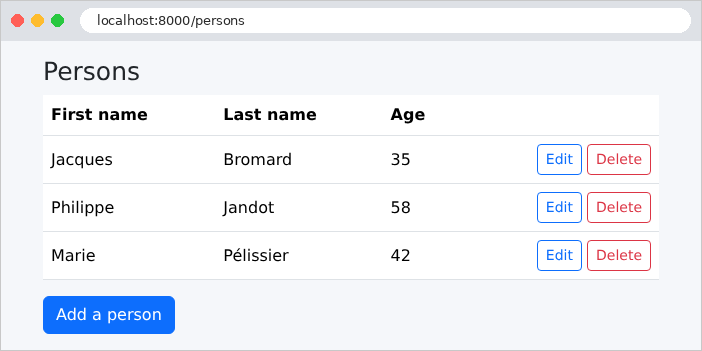
The list of people:
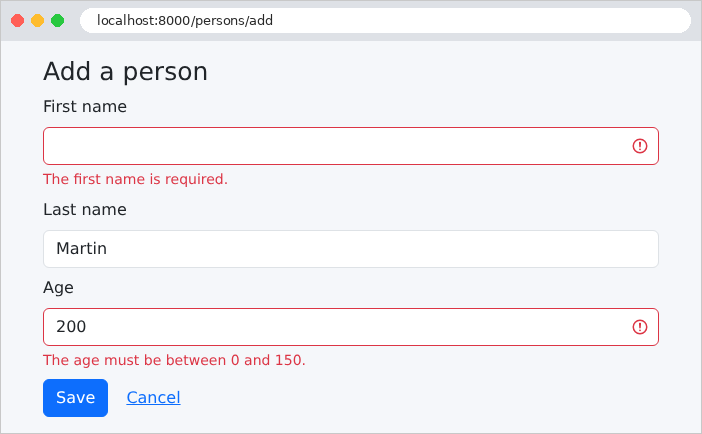
An incorrectly filled-out add form: input errors are detected by the web layer.
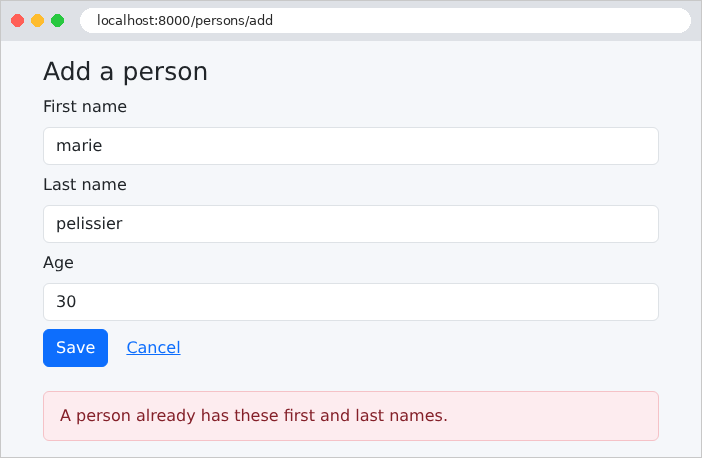
A homonym: the entry is correct, but the business layer rejects the addition. Since the comparison is performed by the database, it ignores both uppercase letters and accents: [marie pelissier] is a homonym of [Marie Pélissier].
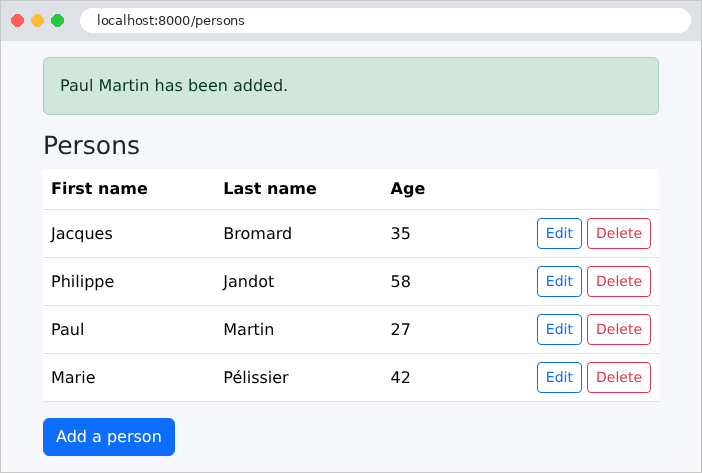
A successful addition:
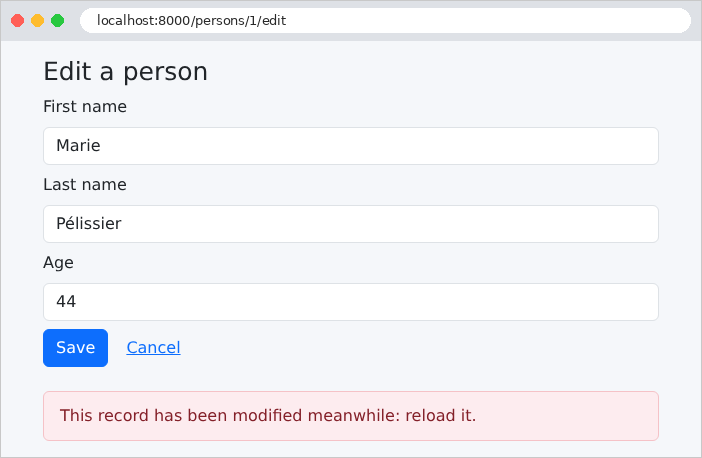
To test Rule #2, let’s open the same record in two tabs. In the first tab, let’s change the age and save. In the second tab, which still displays the old version, let’s also modify the record:
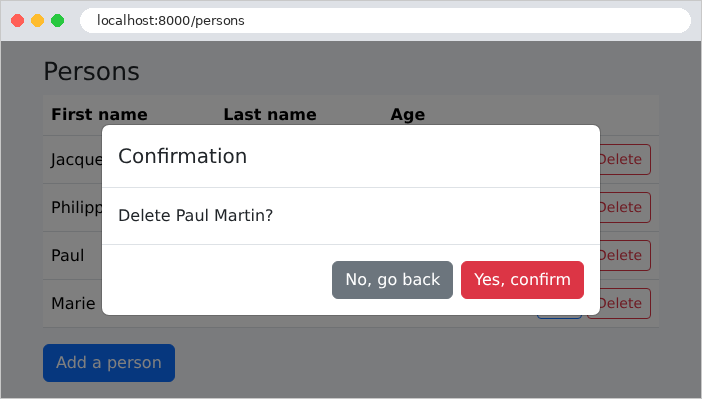
The deletion, with its confirmation:
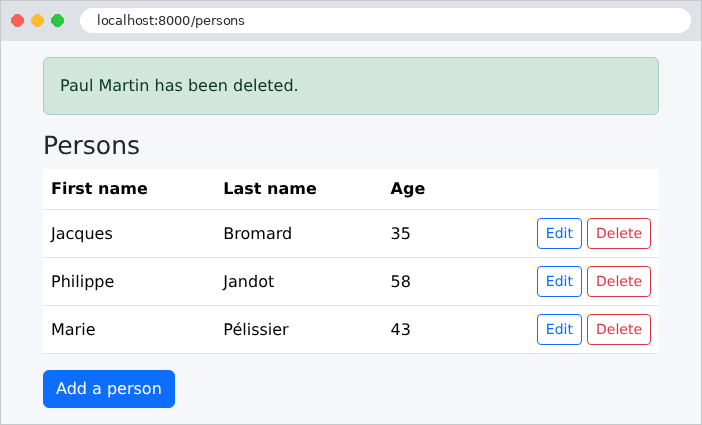
9.1.8. The commands SQL
Let’s restart the application with the environment variable [DB_LOG=true] (under [Linux] and [macOS]: [DB_LOG=true php artisan serve]; for [Windows]: [$env:DB_LOG="true"] before [php artisan serve]; or by modifying the file [.env]), and then monitor the SQL commands for a modification in the console. The display of the modification form for person #1:
| select * from `persons` where `persons`.`id` = ? limit 1 [1]
|
A read operation using the primary key, whose value is passed as a parameter ([?]), without a transaction: an isolated read does not require one. Saving the record with a new age:
| BEGIN
select * from `persons` where `persons`.`id` = ? limit 1 [1]
select * from `persons` where `first_name` = ? and `last_name` = ? and `id` <> ? limit 1 ["Marie","Pélissier",1]
update `persons` set `first_name` = ?, `last_name` = ?, `age` = ?, `version` = version + 1 where `id` = ? and `version` = ? ["Marie","Pélissier",44,1,1]
select * from `persons` where `persons`.`id` = ? limit 1 [1]
COMMIT
|
In a single transaction, we can see: the read of the master record, the search for a namesake, the [UPDATE], and the re-read. The [UPDATE] increments the version ([version + 1], written as-is thanks to [DB::raw]), and sets the optimistic lock condition ([and version = ?], with the read version, here 1). [Laravel] surrounds table and column names with grave accents ([persons]), which is how these names are written in [MySQL]. Now let’s submit the same form a second time, still with version 1:
| BEGIN
select * from `persons` where `persons`.`id` = ? limit 1 [1]
ROLLBACK
|
The version being read (2) is not the same as the one in the form (1): the business layer raised a [BusinessException], which rolled back the transaction ([ROLLBACK]), and the page displays “This record has been modified meanwhile: reload it.” Similarly, the process of adding a namesake stops after the namesake search, without a [INSERT].