6. Data Scopes
A web application serves many users at once, and each user makes numerous requests. Data can therefore be shared at several levels, known as its scope:
- application scope: the data is shared by all users throughout the application’s lifetime (the list of doctors, for example);
- request scope: the data exists only for the duration of a request (a view’s model, the logged-in user as identified for that request);
- session scope: the data is specific to a user and must persist from one request to the next (the selected language, a shopping cart);
- client scope: data stored in the browser itself, in a cookie.
In [PHP], these scopes behave in a particular way because the application is rebuilt with every request (Example 01): nothing survives in memory from one request to the next. Any data that needs to last longer than a single request is therefore stored outside of [PHP]: in the cache, a database, files, or on the client’s side. This is the so-called “shared-nothing” architecture: each request is processed in isolation by a process that shares nothing with those processing other requests. This approach has significant advantages: an error affects only a single request, no data leaks from one user to another, and multiple identical servers can be run behind a load balancer, provided they share the same cache and database.
In [Laravel], each scope has its own container:
Scope | Container | Lifetime |
application | the cache ([Cache] front end, example 20), or the database | the selected duration, or unlimited |
query | the container’s objects (a singleton exists for only one query), the query’s attributes (example 12) | processing a query |
session | the session ([$request->session()], [session()]), stored by the server and retrieved using a cookie | Default 2-hour inactivity period ([SESSION_LIFETIME]) |
client | a cookie ([withCookie], example 22), encrypted by default | the cookie’s specified duration |
The session for [Laravel] is a server-maintained session, like those for [Java] ([JSESSIONID]) or the classic [PHP] ([PHPSESSID]): its data is stored on the server (one file per session, with the configuration from our examples), and the browser only holds the identifier in an encrypted cookie (Example 20). This differs from [Flask], whose entire session is stored in a signed cookie on the client side.
6.1. Example 23: Scopes
6.1.1. The objects: app/Services/CounterService.php and RequestInfo.php
- Lines 13–20: an application scope counter: a number stored in the cache under a key and incremented by 1 on each call. The cache provides a method [Cache::increment], but with the “file” store used in our examples, it is not atomic: it reads the value, increments it, and then writes it, and two concurrent requests could read the same value—resulting in a lost visit. A lock (example 20) therefore protects both the read and the write operations. (With a store such as [Redis] or a database, [Cache::increment] is atomic, and the lock is unnecessary.) The function returns the value of the lock, which is the same as the value returned by the function it protects;
- lines 22–25: the visit counter.
- lines 8–10: properties declared as [readonly] one by one (rather than the entire class): they can only be assigned once, by the constructor;
- lines 12–18: request-scope information: a number, derived from a counter shared by all requests (the counter from the previous class, under a different key), and the time of the request. The function [now()] returns the current time as a [Carbon] date; the format [v] specifies the milliseconds.
6.1.2. Configuration: bootstrap/app.php
- Line 18: The cookie [myVisits] is not encrypted; all others are (Example 22);
- Lines 22–23: Both services are registered with the container. [withSingletons] (example 06): a single object, created on the first request. [withScopedSingletons]: a single object per request. In a standard [PHP], the two are equivalent, since each request rebuilds the application and its container. The difference becomes apparent with [Laravel Octane], an application server that keeps the application in memory from one request to the next to improve performance: a singleton is shared by all requests, while a “scoped” singleton is recreated for each one. Declaring the desired scope ensures the code is correct in both cases.
6.1.3. The controller: app/Http/Controllers/ScopesController.php
- line 14: the action receives the request and the two services, provided by the container;
- line 17: the application scope;
- line 20: the session scope. [$request->session()] returns the user’s session; its method [increment] increments the value of a key by 1 (or sets it to 0 if it does not exist), and returns the new value. A value is read using [get('visits')] and written using [put('visits', 3)]; the function [session('visits')] is a shortcut for reading. [Laravel] saves the session at the end of the request (the [StartSession] middleware from the [web] group);
- lines 23–24: the client scope, with two cookies. Their values are strings provided by the browser and may therefore be missing or invalid: the [(int)] conversion returns 0 for [null] or for text that is not a number;
- Lines 25–30: To set a cookie, you need the response object: [response()->view(...)] constructs it from the view (Example 13), and then [withCookie] adds the cookies to it. Without an expiration time, a cookie lasts until the browser is closed (this is a “session” cookie, as defined by browsers).
6.1.4. The view: resources/views/scopes/scopes.blade.php
- Line 13: The [@inject] directive requests an object from the container, from within the view, and stores it in a variable (here, [$info]). During the same request, this is the same [RequestInfo] object as the one from the action: the view displays its number, which must be the one received from the action;
- Line 18: The session is also accessible in the views.
6.1.5. Execution
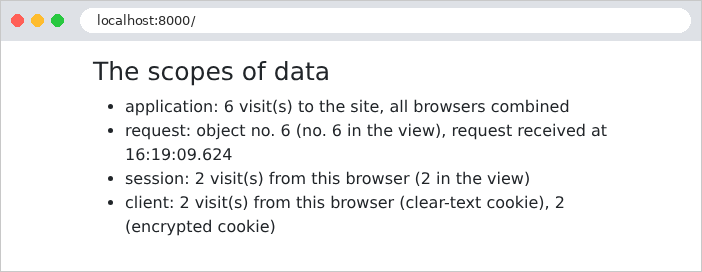
After a few visits in a browser:
Let’s track the requests with [curl], which acts as a first browser by storing its cookies in the file [a.txt]:
The response sets four cookies. The first, [myVisits], contains the value in plain text. The second, [myEncryptedVisits], contains the same value, encrypted: the visible part is a Base64-encoded string (JSON), which contains the encryption initialization vector ([iv]), the encrypted value ([value]), and an authentication code ([mac]), which ensures that the value has not been altered. The last two are for the session and anti-CSRF protection (example 20). A second visit, with the same cookies:
A second “browser,” with its own cookie file, which is initially empty:
The application counter continued running; the session and cookies for the second browser start over at 1. Each request had its own [RequestInfo] object, and in each one, the action and view were the same. Finally, a malicious user forges their own cookies: 1,000 visits in [myVisits], 999 in [myEncryptedVisits], and a session ID of their own invention:
The unencrypted cookie was accepted as is: 1,001 visits. The cookie [myEncryptedVisits], however, could not be decrypted: [Laravel] ignored it, as if it were absent. The same applies to the session cookie: the user cannot choose another user’s session and is assigned a new one. This is the key difference between a regular cookie and an encrypted cookie. Let’s remember the rule: data coming from the client is trustworthy only if it is protected by the server (encrypted, as here, or signed, like the token in the chapter on authentication); data that has nothing to hide, and whose value is verified by the server (the language in Example 22), can remain in plaintext.