3. Article 2 - Examples of Three-Tier Web Architectures
Objectives of this article:
- 3-layer architectures
- basic MVC web architecture
- Struts architecture MVC
- Spring architecture MVC
Tools used:
- Spring: http://www.springframework.org/
- iBatis SqlMap: http://www.ibatis.com/
- JUnit: http://www.junit.org/index.htm
- Eclipse: http://www.eclipse.org/
- Struts: http://struts.apache.org/
- Firebird: http://firebird.sourceforge.net/ : SGBD, driver JDBC. In fact, any JDBC source will do.
- IBExpert, personal edition: http://www.hksoftware.net/download/ibep_2005.2.14.1_full.exe (March 2005). IBExpert allows for graphical administration of SGBD Firebird.
- Tomcat: http://jakarta.apache.org/tomcat/
- Tomcat plugin for Eclipse: http://www.sysdeo.com/eclipse/tomcatPlugin.html. See also the document https://tahe.developpez.com/java/eclipse/
Understanding this document requires various prerequisites. Some of these can be found in documents I have written. In such cases, I cite them. Obviously, this is only a suggestion, and readers are free to use their own preferred documents.
- Java language: [https://tahe.developpez.com/java/cours]
- Web programming in Java: [https://tahe.developpez.com/java/web/]
- Web programming with Java, Eclipse, and Tomcat: [https://tahe.developpez.com/java/eclipse/]
- Web programming with Struts: [https://tahe.developpez.com/java/struts/]
- Using the Spring aspect: IoC
- JSTL tag library: [https://tahe.developpez.com/java/eclipse/] (in part)
- Ibatis documentation SqlMap: [https://prdownloads.sourceforge.net/ibatisnet/DevGuide.pdf?download]
- Firebird: [http://firebird.sourceforge.net/pdfmanual/Firebird-1.5-QuickStart.pdf] (March 2005).
The ideas in this document originated from a book I read in the summer of 2004, a magnificent work by Rod Johnson: J2EE Development without EJB, published by Wrox.
3.1. The webarticles application
Here we would like to present some elements of an e-commerce web application. This application will allow web users
- to view a list of items from a database
- add some of them to an online shopping cart
- and to confirm the cart. This confirmation will simply update the database with the stock levels of the purchased items.
The different views presented to the user will be as follows:
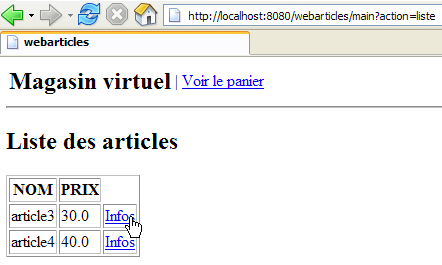
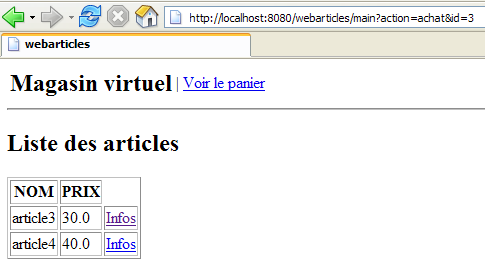
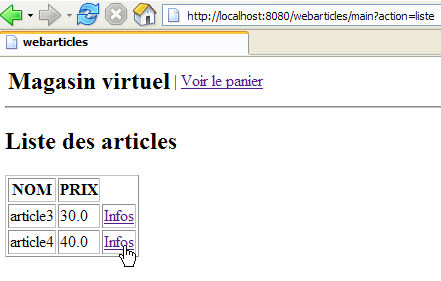
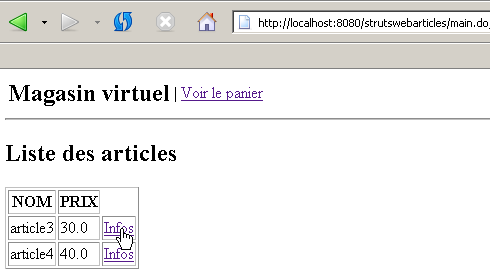
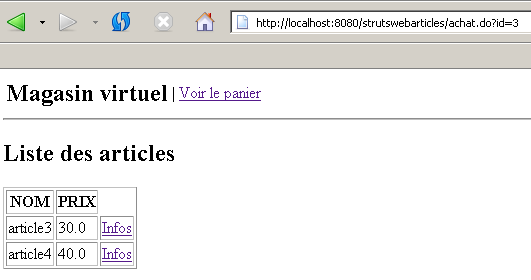
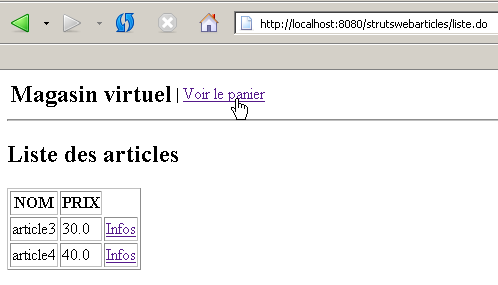
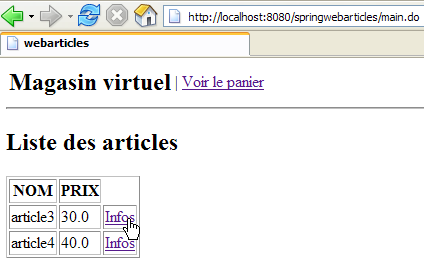
- the [LISTE] view, which displays a list of items for sale
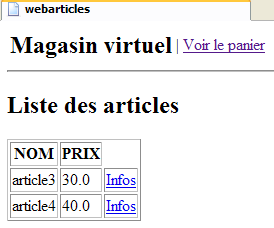
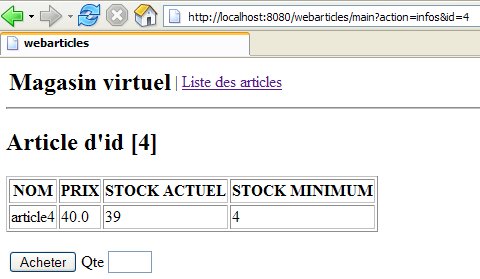
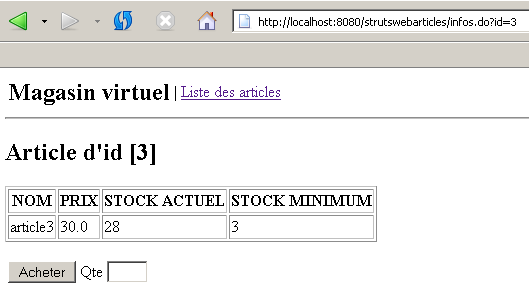
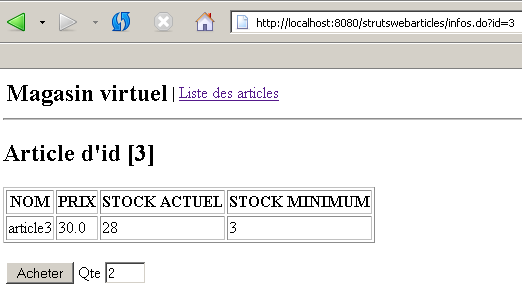
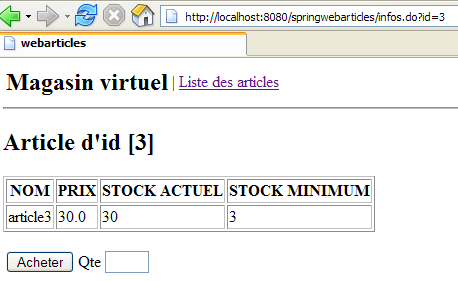
- the [INFOS] view, which provides additional information about a product:
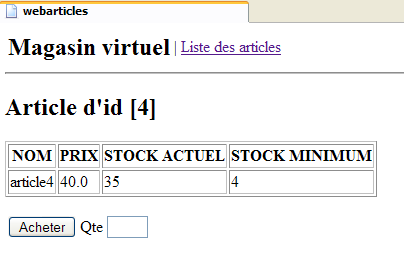
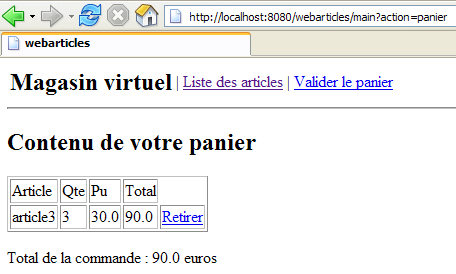
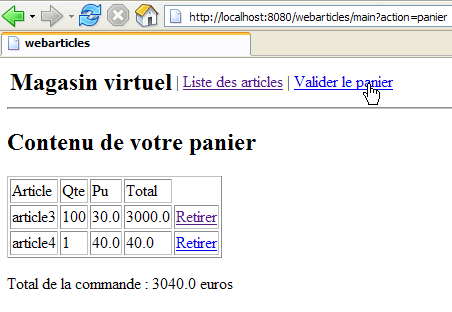
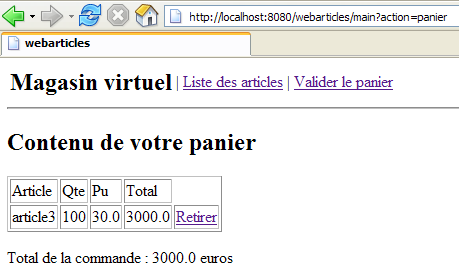
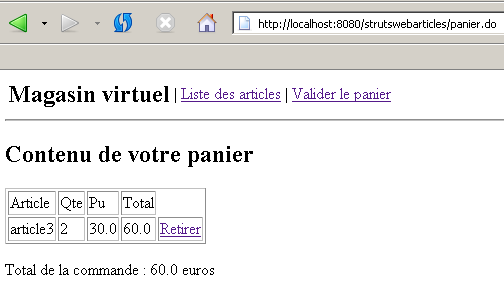
- the [PANIER] view, which displays the contents of the customer’s shopping cart
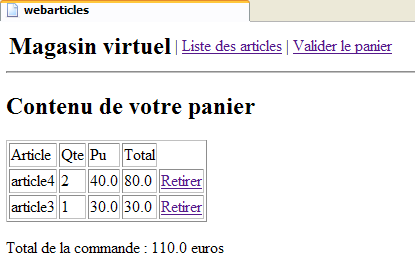
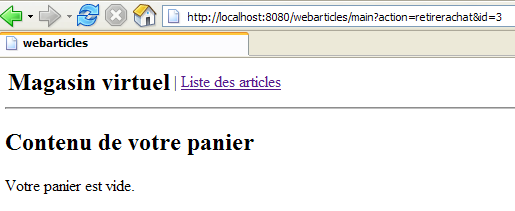
- the [PANIERVIDE] view in case the customer's shopping cart is empty
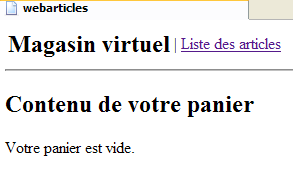
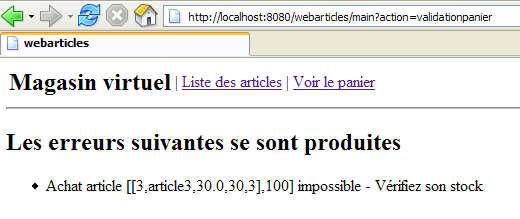
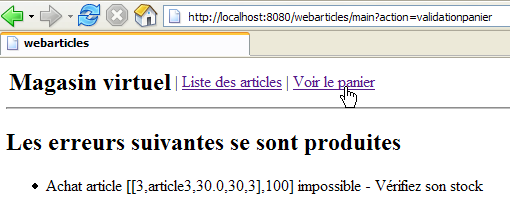
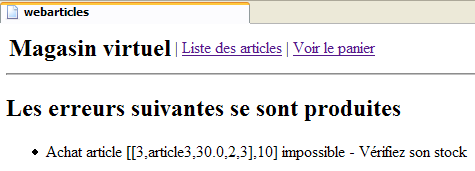
- the [ERREURS] view, which reports any application errors
3.2. General application architecture
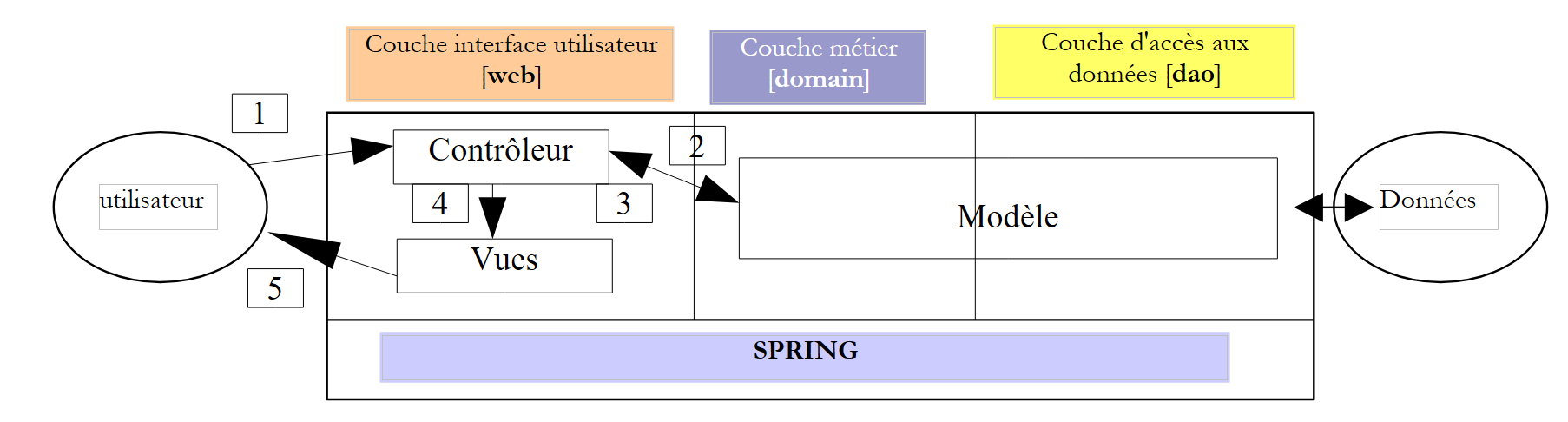
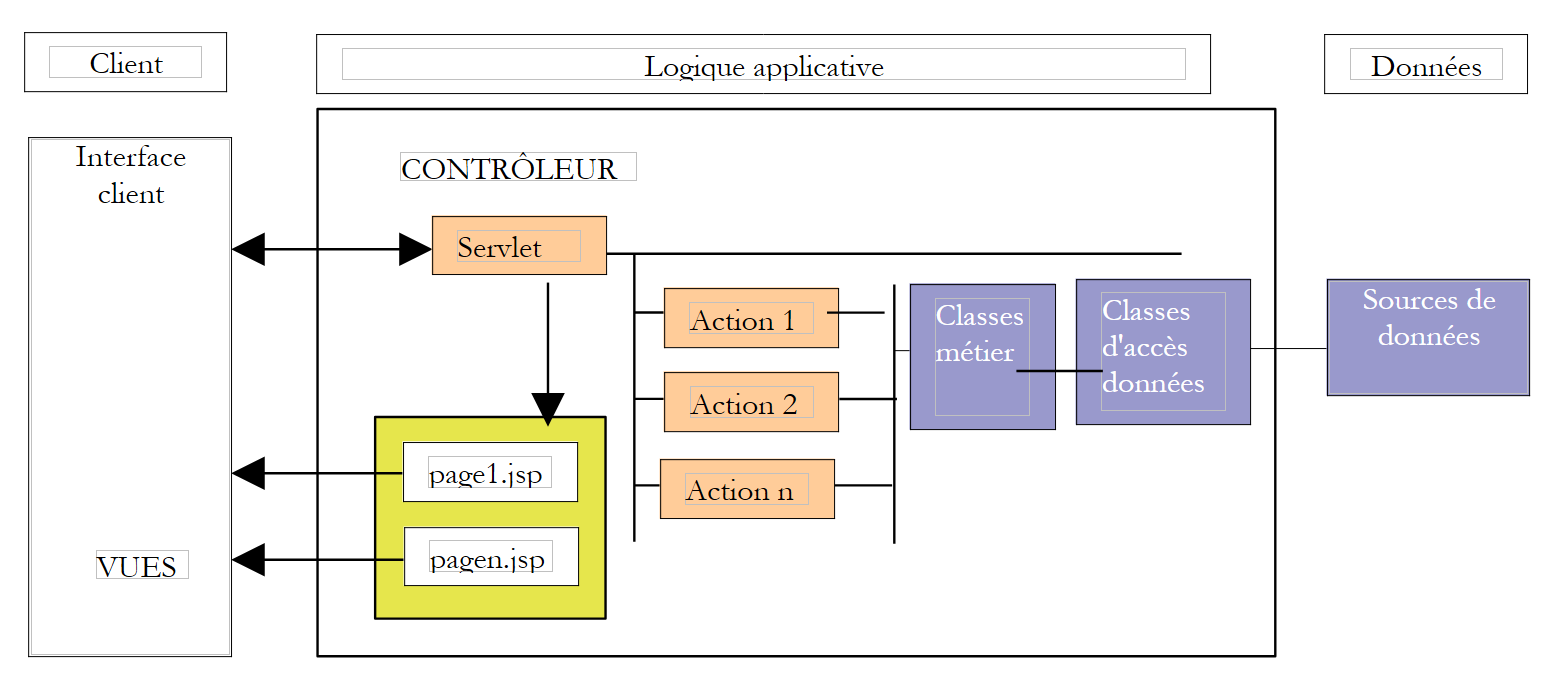
We want to build an application with the following three-tier architecture:
- The three layers are made independent through the use of Java interfaces
- The integration of the different layers is handled by Spring
- Each layer is contained in separate packages: web (user interface layer), domain (business logic layer), and dao (data access layer).
We will assume here that the [domain] and [dao] layers are already in place. We will focus only on the [web] layer, which we propose to build in several ways:
- using traditional servlet controller technology - JSP pages
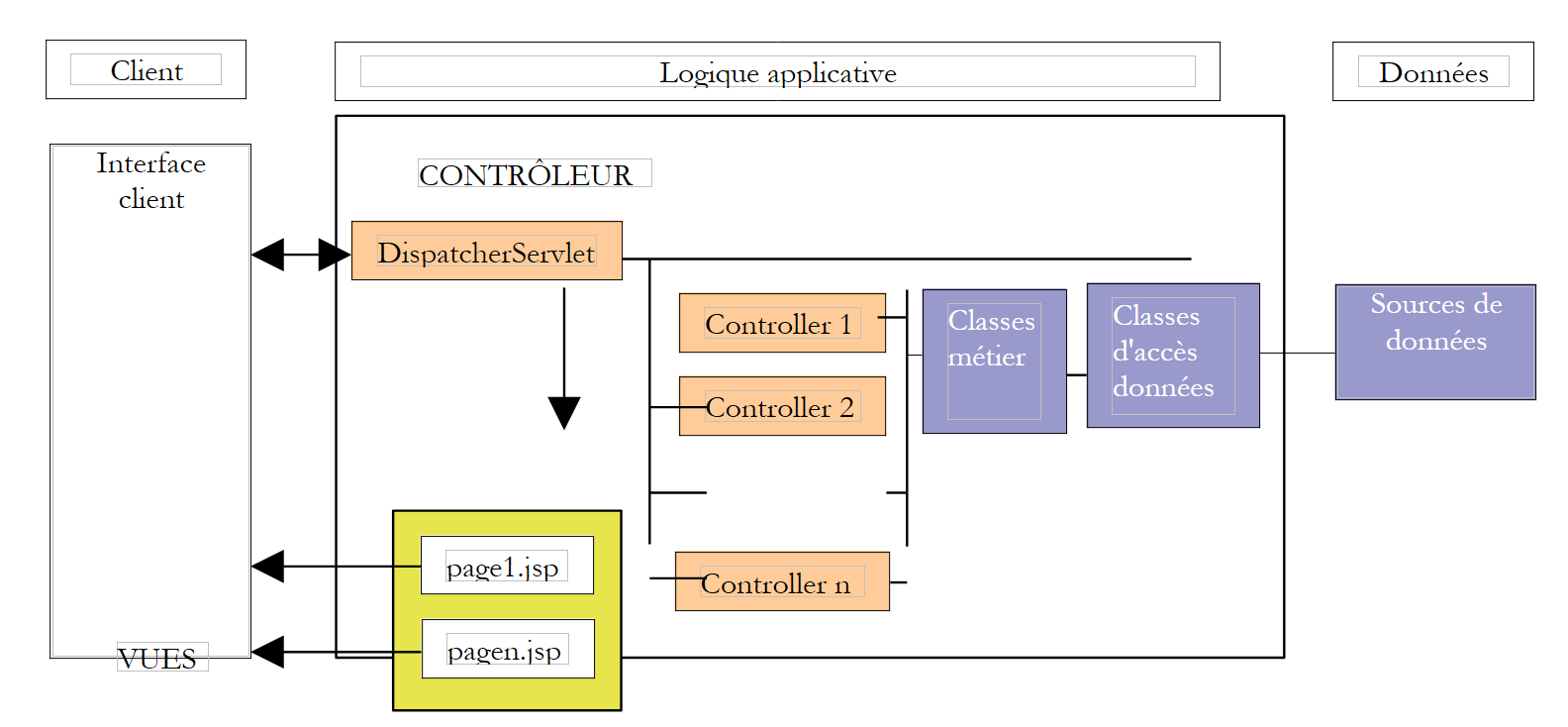
- using Struts technology MVC
- using Spring technology MVC
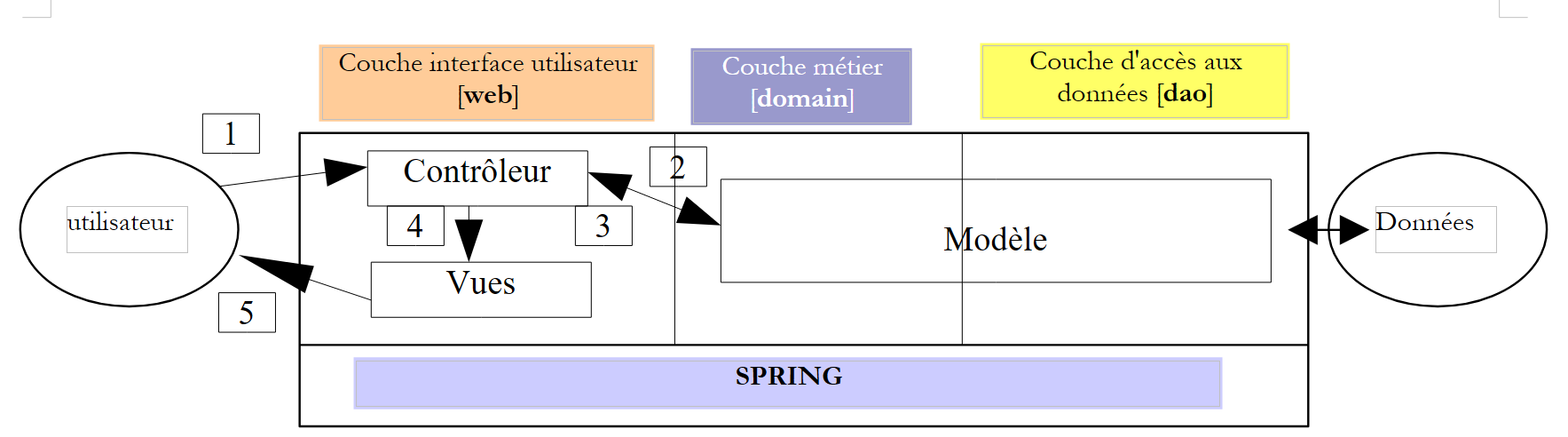
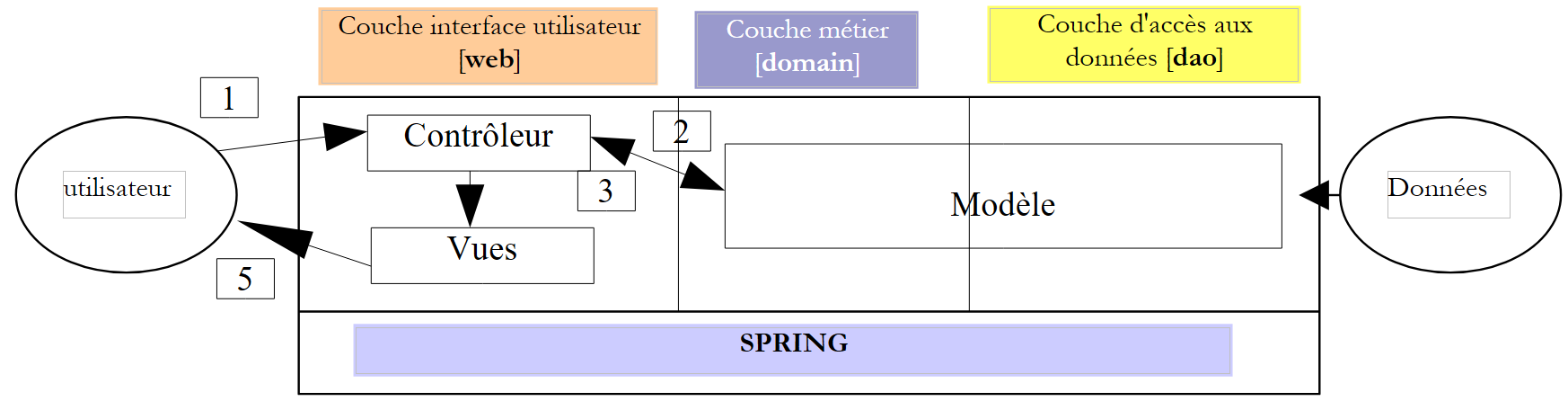
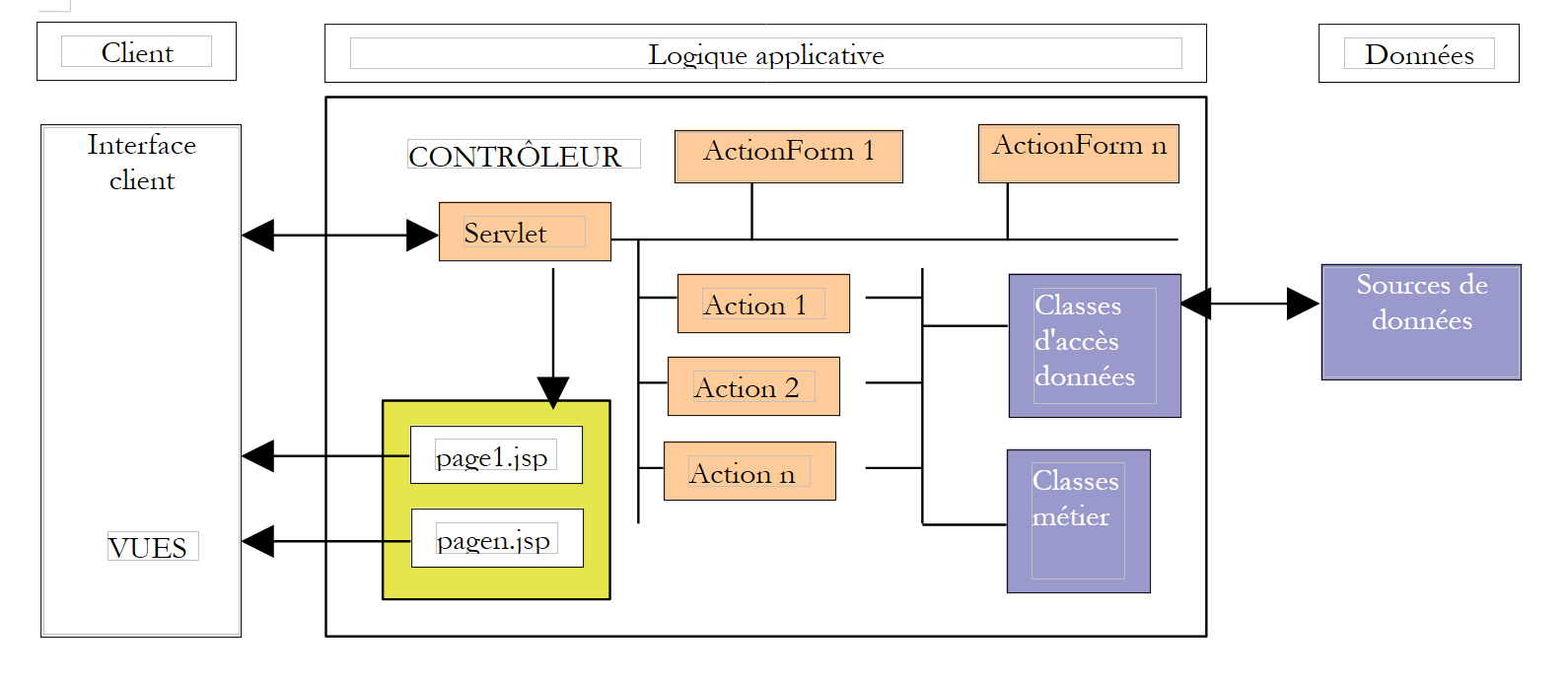
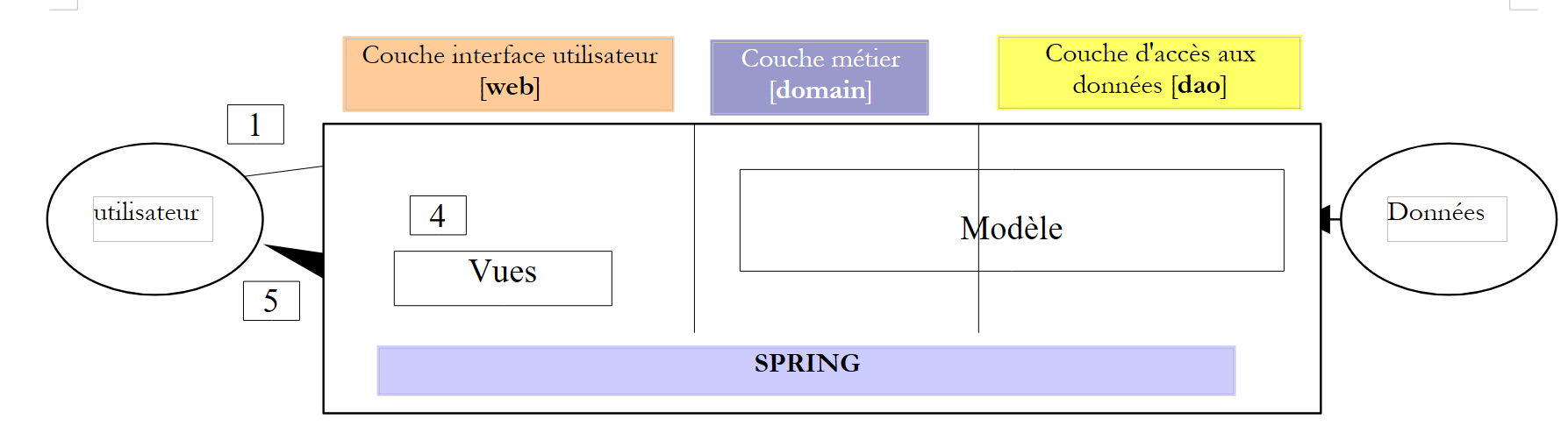
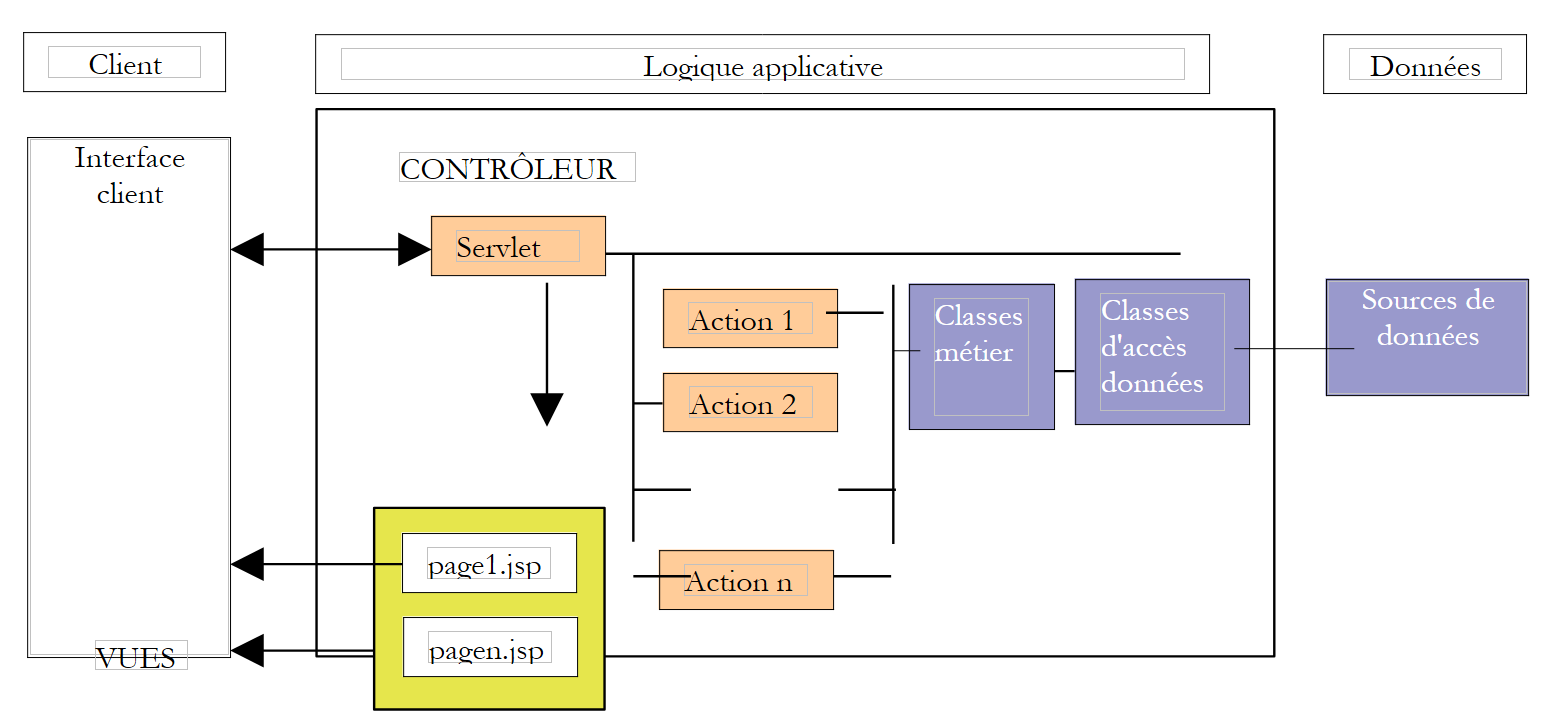
In all cases, the application will follow a MVC architecture (Model-View-Controller). If we refer to the layered diagram above, the MVC architecture fits into it as follows:
The processing of a client request proceeds as follows:
- The client sends a request to the controller. This controller is a servlet that handles all requests from the clients. It is the application’s entry point. It is the C in MVC.
- The controller processes this request. To do so, it may need assistance from the business layer, known as the M model in the MVC architecture.
- The controller receives a response from the business layer. The client’s request has been processed. This can result in several possible responses. A classic example is
- an error page if the request could not be processed correctly
- a confirmation page otherwise
- The controller selects the response (= view) to send to the client. This is most often a page containing dynamic elements. The controller provides these to the view.
- The view is sent to the client. This is the V in MVC.
3.3. The Model
Here we examine the M in MVC. The model consists of the following elements:
- the business classes
- data access classes
- the database
3.3.1. The database
The database contains only one table named ARTICLES. This table was generated using the following SQL commands:
| CREATE TABLE ARTICLES (
ID INTEGER NOT NULL,
NOM VARCHAR(30) NOT NULL,
PRIX NUMERIC(15,2) NOT NULL,
STOCKACTUEL INTEGER NOT NULL,
STOCKMINIMUM INTEGER NOT NULL
);
/* constraints */
ALTER TABLE ARTICLES ADD CONSTRAINT CHK_STOCKACTUEL check (STOCKACTUEL>=0);
ALTER TABLE ARTICLES ADD CONSTRAINT CHK_STOCKMINIMUM check (STOCKMINIMUM>=0);
ALTER TABLE ARTICLES ADD CONSTRAINT CHK_PRIX check (PRIX>=0);
ALTER TABLE ARTICLES ADD CONSTRAINT CHK_NOM check (NOM<>'');
/* primary key */
ALTER TABLE ARTICLES ADD CONSTRAINT PK_ARTICLES PRIMARY KEY (ID);
|
| primary key uniquely identifying an item |
| item name |
| its price |
| current stock |
| the stock level below which a reorder must be placed |
In the following tests, a [Firebird] database was used. [Firebird] is an "open source" version of SGBD. The JDBC [firebirdsql-full.jar] driver is located in the [WEB-INF/lib] folder of the web application.
3.3.2. The model packages
The M template is provided here in the form of three archives:
- istia.st.articles.dao: contains the data access classes for the [dao] layer
- istia.st.articles.exception: contains an exception class for this article management
- istia.st.articles.domain: contains the business classes of the [domain] layer
archive | content | role |
istia.st.articles.dao | - contains the package [istia.st.articles.dao], which itself contains the following elements: - [IArticlesDao]: the access interface to the Dao layer. This is the only interface visible to the [domain] layer. It sees no others. - [Article]: class defining an item - [ArticlesDaoSqlMap]: implementation class for the [IArticlesDao] interface using the SqlMap tool | data access layer – is located entirely in the [dao] layer of the web application's 3-tier architecture |
istia.st.articles.domain | - contains the package [istia.st.articles.domain], which itself contains the following elements: - [IArticlesDomain]: the access interface to the [domain] layer. This is the only interface visible to the web layer. It sees no others. - [AchatsArticles]: a class implementing [IArticlesDomain] - [Achat]: a class representing a customer's purchase - [Panier]: a class representing all of a customer's purchases | represents the web purchase model - is located entirely in the [domain] layer of the web application's 3-tier architecture |
istia.st.articles.exception | - contains the package [istia.st.articles.exception], which itself contains the following elements: - [UncheckedAccessArticlesException]: a class defining an exception of type [RuntimeException]. This type of exception is thrown by the [dao] layer as soon as a data access problem occurs. | |
3.3.3. The [istia.st.articles.dao] package
The class defining an article is as follows:
| package istia.st.articles.dao;
import istia.st.articles.exception.UncheckedAccessArticlesException;
/**
* @author ST - ISTIA
*
*/
public class Article {
private int id;
private String nom;
private double prix;
private int stockActuel;
private int stockMinimum;
/**
* constructeur par défaut
*/
public Article() {
}
public Article(int id, String nom, double prix, int stockActuel,
int stockMinimum) {
// init instance attributes
setId(id);
setNom(nom);
setPrix(prix);
setStockActuel(stockActuel);
setStockMinimum(stockMinimum);
}
// getters - setters
public int getId() {
return id;
}
public void setId(int id) {
// id valid?
if (id < 0)
throw new UncheckedAccessArticlesException("id[" + id + "] invalide");
this.id = id;
}
public String getNom() {
return nom;
}
public void setNom(String nom) {
// valid name?
if(nom==null || nom.trim().equals("")){
throw new UncheckedAccessArticlesException("Le nom est [null] ou vide");
}
this.nom = nom;
}
public double getPrix() {
return prix;
}
public void setPrix(double prix) {
// valid price?
if(prix<0) throw new UncheckedAccessArticlesException("Prix["+prix+"]invalide");
this.prix = prix;
}
public int getStockActuel() {
return stockActuel;
}
public void setStockActuel(int stockActuel) {
// valid stock?
if (stockActuel < 0)
throw new UncheckedAccessArticlesException("stockActuel[" + stockActuel + "] invalide");
this.stockActuel = stockActuel;
}
public int getStockMinimum() {
return stockMinimum;
}
public void setStockMinimum(int stockMinimum) {
// valid stock?
if (stockMinimum < 0)
throw new UncheckedAccessArticlesException("stockMinimum[" + stockMinimum + "] invalide");
this.stockMinimum = stockMinimum;
}
public String toString() {
return "[" + id + "," + nom + "," + prix + "," + stockActuel + ","
+ stockMinimum + "]";
}
}
|
This class provides:
- a constructor for setting the 5 pieces of information for an item
- accessors, often called getters/setters, used to read and write the 5 pieces of information. The names of these methods follow the JavaBean standard. It is common practice to use JavaBean objects in the DAO layer to interface with data from SGBD.
- A validation of the data entered in the item. If the data is incorrect, an exception is thrown.
- A method toString that allows you to retrieve the value of an item as a character string. This is often useful for debugging an application.
The [IArticlesDao] interface is defined as follows:
| package istia.st.articles.dao;
import istia.st.articles.domain.Article;
import java.util.List;
/**
* @author ST-ISTIA
*
*/
public interface IArticlesDao {
/**
* @return : liste de tous les articles
*/
public List getAllArticles();
/**
* @param unArticle :
* l'item to add
*/
public int ajouteArticle(Article unArticle);
/**
* @param idArticle :
* id de l'article to be deleted
*/
public int supprimeArticle(int idArticle);
/**
* @param unArticle :
* l'article to be modified
*/
public int modifieArticle(Article unArticle);
/**
* @param idArticle :
* id de l'item searched
* @return : l'item found or null
*/
public Article getArticleById(int idArticle);
/**
* vide la table des articles
*/
public void clearAllArticles();
/**
*
* @param idArticle id de l'item whose stock is being changed
* @param mouvement valeur à ajouter au stock (valeur signée)
*/
public int changerStockArticle(int idArticle, int mouvement);
}
|
The roles of the various methods in the interface are as follows:
| returns all items from table ARTICLES in a list of [Article] objects |
| clears the table ARTICLES |
| returns the [Article] object identified by its primary key |
| allows you to add an article to the ARTICLES table |
| allows you to modify an article in the [ARTICLES] table |
| allows you to delete an item from the [ARTICLES] table |
| allows you to modify the stock of an item in table [ARTICLES] |
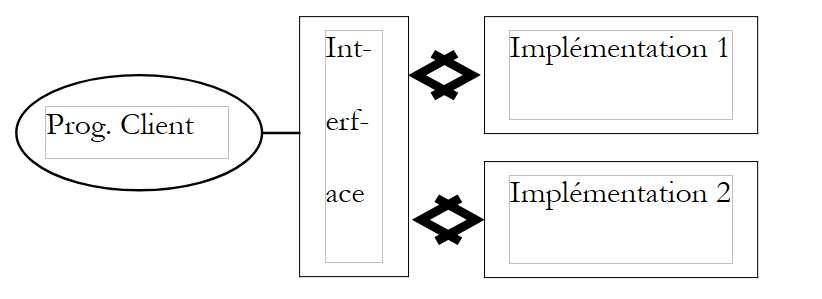
The interface provides the clients programs with a number of methods defined solely by their signatures. It does not concern itself with how these methods will actually be implemented. This provides flexibility within an application. The client program makes calls to an interface rather than to a specific implementation of that interface.
The choice of a specific implementation will be made via a Spring configuration file. Here, we propose to implement the IArticlesDao interface using an open-source product called SqlMap. This will allow us to remove all SQL statements from the Java code.
The [ArticlesDaoSqlMap] implementation class is defined as follows:
| package istia.st.articles.dao;
// Imports
import com.ibatis.sqlmap.client.SqlMapClient;
import istia.st.articles.domain.Article;
import java.util.List;
public class ArticlesDaoSqlMap implements IArticlesDao {
// Fields
private SqlMapClient sqlMap;
// Constructors
public ArticlesDaoSqlMap(String sqlMapConfigFileName) { }
// Methods
public SqlMapClient getSqlMap() {}
public void setSqlMap(SqlMapClient sqlMap) { }
public synchronized List getAllArticles() {}
public synchronized int ajouteArticle(Article unArticle) {}
public synchronized int supprimeArticle(int idArticle) {}
public synchronized int modifieArticle(Article unArticle) {}
public synchronized Article getArticleById(int idArticle) {}
public synchronized void clearAllArticles() { }
public synchronized int changerStockArticle(int idArticle, int mouvement) {}
}
|
All data access methods have been synchronized to prevent concurrent access issues to the data source. At any given time, only one thread has access to a given method.
The [ArticlesDaoSqlMap] class uses the [Ibatis SqlMap] tool. The purpose of this tool is to extract the SQL data access code from the Java code. It is then placed in a configuration file. We will have the opportunity to return to this later. To be instantiated, the [ArticlesDaoSqlMap] class requires a configuration file whose name is passed as a parameter to the class constructor. This configuration file defines the information necessary to:
- access the SGBD database containing the articles
- manage a connection pool
- manage transactions
In our example, it will be named [sqlmap-config-firebird.xml] and will define access to a Firebird database:
| <?xml version="1.0" encoding="UTF-8" ?>
<!DOCTYPE sqlMapConfig
PUBLIC "-//iBATIS.com//DTD SQL Map Config 2.0//EN"
"http://www.ibatis.com/dtd/sql-map-config-2.dtd">
<sqlMapConfig>
<transactionManager type="JDBC">
<dataSource type="SIMPLE">
<property name="JDBC.Driver" value="org.firebirdsql.jdbc.FBDriver"/>
<property name="JDBC.ConnectionURL"
value="jdbc:firebirdsql:localhost/3050:D:/data/Databases/firebird/dbarticles.gdb"/>
<property name="JDBC.Username" value="sysdba"/>
<property name="JDBC.Password" value="masterkey"/>
<property name="JDBC.DefaultAutoCommit" value="true"/>
</dataSource>
</transactionManager>
<sqlMap resource="articles.xml"/>
</sqlMapConfig>
|
The [articles.xml] configuration file referenced above defines how to construct an instance of the [istia.st.articles.dao.Article] class from a row in the [ARTICLES] table of the SGBD schema. It also defines the SQL queries that will allow the [dao] layer to retrieve data from the Firebird data source.
| <?xml version="1.0" encoding="UTF-8" ?>
<!DOCTYPE sqlMap
PUBLIC "-//iBATIS.com//DTD SQL Map 2.0//EN"
"http://www.ibatis.com/dtd/sql-map-2.dtd">
<sqlMap namespace="Articles">
<!-- an alias to the istia.st.articles.dao.Article class -->
<typeAlias alias="article" type="istia.st.articles.dao.Article"/>
<!-- mapping ORM : row table ARTICLES - instance class Article -->
<resultMap id="article" class="article">
<result property="id" column="ID"/>
<result property="nom" column="NOM"/>
<result property="prix" column="PRIX"/>
<result property="stockActuel" column="STOCKACTUEL"/>
<result property="stockMinimum" column="STOCKMINIMUM"/>
</resultMap>
<!-- query SQL to obtain all items -->
<statement id="getAllArticles" resultMap="article">
select id, nom, prix,
stockactuel, stockminimum from ARTICLES
</statement>
<!-- query SQL to delete all items -->
<statement id="clearAllArticles">delete from ARTICLES</statement>
<!-- the SQL query to insert an article -->
<statement id="insertArticle">
insert into ARTICLES (id, nom, prix,
stockactuel, stockminimum) values
(#id#,#nom#,#prix#,#stockactuel#,#stockminimum#)
</statement>
<!-- the SQL query to delete a given item -->
<statement id="deleteArticle">delete FROM ARTICLES where id=#id#</statement>
<!-- query SQL to modify a given item -->
<statement id="modifyArticle">
update ARTICLES set nom=#nom#,
prix=#prix#,stockactuel=#stockactuel#,stockminimum=#stockminimum# where
id=#id#
</statement>
<!-- query SQL to obtain a given item -->
<statement id="getArticleById" resultMap="article">
select id, nom, prix,
stockactuel, stockminimum FROM ARTICLES where id=#id#
</statement>
<!-- query SQL to modify the stock of a given item -->
<statement id="changerStockArticle">
update ARTICLES set
stockActuel=stockActuel+#mouvement#
where id=#id# and stockActuel+#mouvement#>=0
</statement>
</sqlMap>
|
The code for package [dao] can be found in the appendix.
3.3.4. Package [istia.st.articles.domain]
The [IArticlesDomain] interface decouples the [métier] layer from the [web] layer. The latter accesses the [métier/domain] layer via this interface without concerning itself with the class that actually implements it. The interface defines the following actions for accessing the business layer:
| package istia.st.articles.domain;
// Imports
import java.util.ArrayList;
import java.util.List;
public abstract interface IArticlesDomain {
// Methods
void acheter(Panier panier);
List getAllArticles();
Article getArticleById(int idArticle);
ArrayList getErreurs();
}
|
| returns the list of [Article] objects to be displayed to the client |
Article getArticleById(int idArticle)
| returns the [Article] object identified by [idArticle] |
void acheter(Panier panier)
| processes the customer's cart by decrementing the stock of purchased items by the quantity purchased - may fail if stock is insufficient |
| returns the list of errors that occurred - empty if no errors |
Here, the [IArticlesDomain] interface will be implemented by the following [AchatsArticles] class:
| package istia.st.articles.domain;
// Imports
import istia.st.articles.dao.IArticlesDao;
import istia.st.articles.exception.UncheckedAccessArticlesException;
import java.util.ArrayList;
import java.util.List;
public class AchatsArticles implements IArticlesDomain {
// Fields
private IArticlesDao articlesDao;
private ArrayList erreurs;
// Manufacturers
public AchatsArticles(IArticlesDao articlesDao) { }
// Methods
public ArrayList getErreurs() {}
public List getAllArticles() {}
public Article getArticleById(int id) {}
public void acheter(Panier panier) { }
}
|
This class implements the four methods of the [IArticlesDomain] interface. It has two private fields:
| the data access object provided by the data access layer |
| the list of any errors |
To create an instance of the class, you must provide the data access object from SGBD:
public AchatsArticles(IArticlesDao articlesDao)
| constructor |
The [Achat] class represents a customer purchase:
| package istia.st.articles.domain;
public class Achat {
// Fields
private Article article;
private int qte;
// Manufacturers
public Achat(Article article, int qte) { }
// Methods
public double getTotal() {}
public Article getArticle() {}
public void setArticle(Article article) { }
public int getQte() {}
public void setQte() { }
public String toString() {}
}
|
The [Achat] class is a JavaBean with the following fields and methods:
| the purchased item |
| the quantity purchased |
| returns the purchase amount |
| object identifier string |
The [Panier] class represents all of the customer's purchases:
| package istia.st.articles.domain;
// Imports
import java.util.ArrayList;
public class Panier {
// Fields
private ArrayList achats;
// Manufacturers
public Panier() { }
// Methods
public ArrayList getAchats() {}
public void ajouter(Achat unAchat) { }
public void enlever(int idAchat) { }
public double getTotal() {}
public String toString() { }
}
|
The class [Panier] is a JavaBean with the following fields and methods:
| the customer's list of purchases - a list of objects of type [Achat] |
void ajouter(Achat unAchat)
| adds a purchase to the list of purchases |
void enlever(int idArticle)
| removes the purchase of item idArticle |
| returns the total amount of purchases |
| returns the string representation of the shopping cart |
| returns the list of purchases |
The code for package [domain] can be found in the appendix.
3.3.5. The [istia.st.articles.exception] package
This package contains the class defining the exception thrown by the [dao] layer when it encounters a problem accessing the data source:
| package istia.st.articles.exception;
public class UncheckedAccessArticlesException
extends RuntimeException {
public UncheckedAccessArticlesException() {
super();
}
public UncheckedAccessArticlesException(String mesg) {
super(mesg);
}
public UncheckedAccessArticlesException(String mesg, Throwable th) {
super(mesg, th);
}
}
|
3.3.6. Model Testing
The M model was tested in Eclipse with the following configuration:
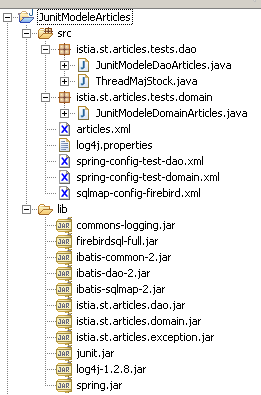
Comments:
- In [WEB-INF/lib], you will find:
- the archives required by the [ibatis SqlMap] tool responsible for accessing the SGBD Firebird database: ibatis-*.jar
- the one required for the [spring] tool: spring.jar
- the JDBC driver for SGBD [Firebird]: firebirdsql-full.jar
- the archives required for the logs: log4-*.jar, commons-logging.jar
- the three archives of the tested model: istia.st.articles.*.jar
- the archive required for the testing tool: [junit]
- In [WEB-INF/src], you will find the configuration files that will be automatically copied to [WEB-INF/classes] by Eclipse:
- the configuration files for the [sqlmap] tool: sqlmap-config-firebird.xml, articles.xml
- the one for the [spring] tool: spring-config-test-dao.xml, spring-config-test-domain.xml
- the configuration file for the [log4j] tool: log4j.properties
- In the [istia.st.articles.tests] package, we find the model test classes
3.3.6.1. Tests for the [dao] layer
The test class JUnit for the [dao] layer is as follows. Reading it helps to understand how the methods of the [IArticlesDao] interface are used:
| package istia.st.articles.tests.dao;
import java.util.List;
import junit.framework.TestCase;
import istia.st.articles.dao.IArticlesDao;
import istia.st.articles.dao.Article;
import org.springframework.beans.factory.xml.XmlBeanFactory;
import org.springframework.core.io.ClassPathResource;
// test the ArticlesDaoSqlMap class
public class JunitModeleDaoArticles extends TestCase {
     // an instance of the class under test
    private IArticlesDao articlesDao;

    protected void setUp() throws Exception {
         // retrieves a data access instance
        articlesDao = (IArticlesDao) (new XmlBeanFactory(new ClassPathResource(
                "spring-config-test-dao.xml"))).getBean("articlesDao");
    }
public void testGetAllArticles() {
// displays articles
listArticles();
}
public void testClearAllArticles() {
// empties item table
articlesDao.clearAllArticles();
// reads the ARTICLES table
List articles = articlesDao.getAllArticles();
assertEquals(0, articles.size());
}
public void testAjouteArticle() {
// delete contents of ARTICLES
articlesDao.clearAllArticles();
// reads the ARTICLES table
List articles = articlesDao.getAllArticles();
assertEquals(0, articles.size());
// insertion
articlesDao.ajouteArticle(new Article(3, "article3", 30, 30, 3));
articlesDao.ajouteArticle(new Article(4, "article4", 40, 40, 4));
// reads the ARTICLES table
articles = articlesDao.getAllArticles();
assertEquals(2, articles.size());
//the poster
listArticles();
}
public void testSupprimeArticle() {
// delete contents of ARTICLES
articlesDao.clearAllArticles();
// reads the ARTICLES table
List articles = articlesDao.getAllArticles();
assertEquals(0, articles.size());
// insertion
articlesDao.ajouteArticle(new Article(3, "article3", 30, 30, 3));
articlesDao.ajouteArticle(new Article(4, "article4", 40, 40, 4));
// reads the ARTICLES table
articles = articlesDao.getAllArticles();
assertEquals(2, articles.size());
// delete
articlesDao.supprimeArticle(4);
// reads the ARTICLES table
articles = articlesDao.getAllArticles();
assertEquals(1, articles.size());
// displays the table
listArticles();
}
public void testModifieArticle() {
// delete contents of ARTICLES
articlesDao.clearAllArticles();
// reads the ARTICLES table
List articles = articlesDao.getAllArticles();
assertEquals(0, articles.size());
// insertion
articlesDao.ajouteArticle(new Article(3, "article3", 30, 30, 3));
articlesDao.ajouteArticle(new Article(4, "article4", 40, 40, 4));
// reads the ARTICLES table
articles = articlesDao.getAllArticles();
assertEquals(2, articles.size());
// getById
Article unArticle = articlesDao.getArticleById(3);
assertEquals(unArticle.getNom(), "article3");
unArticle = articlesDao.getArticleById(4);
assertEquals(unArticle.getNom(), "article4");
// change
articlesDao.modifieArticle(new Article(4, "article4", 44, 44, 44));
// getById
unArticle = articlesDao.getArticleById(4);
assertEquals(unArticle.getPrix(), 44, 1e-6);
// displays the table
listArticles();
}
public void testGetArticleById() {
// delete contents of ARTICLES
articlesDao.clearAllArticles();
// reads the ARTICLES table
List articles = articlesDao.getAllArticles();
assertEquals(0, articles.size());
// insertion
articlesDao.ajouteArticle(new Article(3, "article3", 30, 30, 3));
articlesDao.ajouteArticle(new Article(4, "article4", 40, 40, 4));
// reads the ARTICLES table
articles = articlesDao.getAllArticles();
assertEquals(2, articles.size());
// getById
Article unArticle = articlesDao.getArticleById(3);
assertEquals(unArticle.getNom(), "article3");
unArticle = articlesDao.getArticleById(4);
assertEquals(unArticle.getNom(), "article4");
}
private void listArticles() {
// reads the ARTICLES table
List articles = articlesDao.getAllArticles();
// display read articles
for (int i = 0; i < articles.size(); i++) {
System.out.println(((Article) articles.get(i)).toString());
}
}
public void testChangerStockArticle() throws InterruptedException {
// delete contents of ARTICLES
articlesDao.clearAllArticles();
// insertion
int nbArticles = articlesDao.ajouteArticle(new Article(3, "article3",
30, 101, 3));
assertEquals(nbArticles, 1);
nbArticles = articlesDao.ajouteArticle(new Article(4, "article4", 40,
40, 4));
assertEquals(nbArticles, 1);
// creation of 100 threads to update the stock of item 3
Thread[] taches = new Thread[100];
for (int i = 0; i < taches.length; i++) {
taches[i] = new ThreadMajStock("thread-" + i, articlesDao);
taches[i].start();
}
// we wait for the end of threads
for (int i = 0; i < taches.length; i++) {
taches[i].join();
}
// retrieve item 3 and check stock
Article unArticle = articlesDao.getArticleById(3);
assertEquals(unArticle.getNom(), "article3");
assertEquals(1, unArticle.getStockActuel());
// modification stock article 4
boolean erreur = false;
int nbLignes = articlesDao.changerStockArticle(4, -100);
assertEquals(0, nbLignes);
// displays the table
listArticles();
}
}
|
Comments:
- The test class uses its setUp method to store an instance of the class under test:
| // an instance of the class under test
private IArticlesDao articlesDao;
protected void setUp() throws Exception {
// retrieves a data access instance
articlesDao = (IArticlesDao) (new XmlBeanFactory(new ClassPathResource(
"spring-config-test-dao.xml"))).getBean("articlesDao");
}
|
- The object to be tested is provided by [Spring]. Above, we request the Spring bean named [articlesDao]. This bean is defined in the Spring configuration file [spring-config-test-dao.xml]:
| <?xml version="1.0" encoding="UTF-8"?>
<!DOCTYPE beans SYSTEM "http://www.springframework.org/dtd/spring-beans.dtd">
<beans>
<!-- data access class -->
<bean id="articlesDao" class="istia.st.articles.dao.ArticlesDaoSqlMap">
<constructor-arg index="0">
<value>sqlmap-config-firebird.xml</value>
</constructor-arg>
</bean>
</beans>
|
As shown above, the bean [articlesDao] is an instance of the class [istia.st.articles.dao.ArticlesDaoSqlMap]. This class has a constructor that takes as a parameter the name of the configuration file for the tool [SqlMap]. This name is provided here. It is [sqlmap-config-firebird.xml]. The latter has already been described. It provides all the necessary information to access the data of SGBD.
The [testChangerStockArticle] method creates 100 threads responsible for decrementing the stock of a given item. The purpose here is to test concurrent access to SGBD. Because the [changerStockArticle] method of the [istia.st.articles.dao.ArticlesDaoSqlMap] class has been synchronized, this test passes. If we remove the synchronization, it no longer passes. The class responsible for updating the stock is as follows:
| package istia.st.articles.tests;
import istia.st.articles.dao.IArticlesDao;
public class ThreadMajStock extends Thread {
/**
* nom du thread
*/
private String name;
/**
* objet d'accès aux données
*/
private IArticlesDao articlesDao;
/**
*
* @param name
* le nom du thread afin de l'identifier
* @param articlesDao
* l'objet d'accès aux données du sgbd
*/
public ThreadMajStock(String name, IArticlesDao articlesDao) {
this.name = name;
this.articlesDao = articlesDao;
}
/**
* décrémente le stock de l'article 3 d'une unité fait un suivi écran des
* opérations
*/
public void run() {
// follow-up
System.out.println(name + " lancé");
// modification stock article 3
articlesDao.changerStockArticle(3, -1);
// follow-up
System.out.println(name + " terminé");
}
}
|
- The class above decrements the stock of item #3 by 1
3.3.6.2. Tests for the [domain] layer
The test class JUnit for the [domain] layer is as follows:
| package istia.st.articles.tests.domain;
import java.util.List;
import junit.framework.TestCase;
import istia.st.articles.dao.Article;
import istia.st.articles.dao.IArticlesDao;
import istia.st.articles.domain.Achat;
import istia.st.articles.domain.IArticlesDomain;
import istia.st.articles.domain.Panier;
import org.springframework.beans.factory.xml.XmlBeanFactory;
import org.springframework.core.io.ClassPathResource;
// test the ArticlesDaoSqlMap class
public class JunitModeleDomainArticles extends TestCase {
     // an instance of the domain access class
    private IArticlesDomain articlesDomain;

     // an instance of the data access class
    private IArticlesDao articlesDao;

    protected void setUp() throws Exception {
         // retrieves a domain access instance
        articlesDomain = (IArticlesDomain) (new XmlBeanFactory(
                new ClassPathResource("spring-config-test-domain.xml")))
                .getBean("articlesDomain");
         // retrieves a data access instance
        articlesDao = (IArticlesDao) (new XmlBeanFactory(new ClassPathResource(
                "spring-config-test-domain.xml"))).getBean("articlesDao");
    }
// retrieve a specific item
public void testGetArticleById() {
// delete contents of ARTICLES
articlesDao.clearAllArticles();
// reads the ARTICLES table
List articles = articlesDao.getAllArticles();
assertEquals(0, articles.size());
// insertion
articlesDao.ajouteArticle(new Article(3, "article3", 30, 30, 3));
articlesDao.ajouteArticle(new Article(4, "article4", 40, 40, 4));
// reads the ARTICLES table
articles = articlesDomain.getAllArticles();
assertEquals(2, articles.size());
// getById
Article unArticle = articlesDomain.getArticleById(3);
assertEquals(unArticle.getNom(), "article3");
unArticle = articlesDao.getArticleById(4);
assertEquals(unArticle.getNom(), "article4");
}
// screen display
private void listArticles() {
// reads the ARTICLES table
List articles = articlesDomain.getAllArticles();
// display read articles
for (int i = 0; i < articles.size(); i++) {
System.out.println(((Article) articles.get(i)).toString());
}
}
// article purchases
public void testAchatPanier(){
// delete contents of ARTICLES
articlesDao.clearAllArticles();
// reads the ARTICLES table
List articles = articlesDao.getAllArticles();
assertEquals(0, articles.size());
// insertion
Article article3=new Article(3, "article3", 30, 30, 3);
articlesDao.ajouteArticle(article3);
Article article4=new Article(4, "article4", 40, 40, 4);
articlesDao.ajouteArticle(article4);
// reads the ARTICLES table
articles = articlesDomain.getAllArticles();
assertEquals(2, articles.size());
// create a basket with two purchases
Panier panier=new Panier();
panier.ajouter(new Achat(article3,10));
panier.ajouter(new Achat(article4,10));
// checks
assertEquals(700.0,panier.getTotal(),1e-6);
assertEquals(2,panier.getAchats().size());
// shopping cart validation
articlesDomain.acheter(panier);
// checks
assertEquals(0,articlesDomain.getErreurs().size());
assertEquals(0,panier.getAchats().size());
// search article n° 3
article3=articlesDomain.getArticleById(3);
assertEquals(20,article3.getStockActuel());
// search article n° 4
article4=articlesDomain.getArticleById(4);
assertEquals(30,article4.getStockActuel());
// new basket
panier.ajouter(new Achat(article3,100));
// shopping cart validation
articlesDomain.acheter(panier);
// checks - we bought too much
// we must have an error
assertEquals(1,articlesDomain.getErreurs().size());
// search article n° 3
article3=articlesDomain.getArticleById(3);
// its stock must not have changed
assertEquals(20,article3.getStockActuel());
}
// withdraw purchases
public void testRetirerAchats(){
// delete contents of ARTICLES
articlesDao.clearAllArticles();
// reads the ARTICLES table
List articles = articlesDao.getAllArticles();
assertEquals(0, articles.size());
// insertion
Article article3=new Article(3, "article3", 30, 30, 3);
articlesDao.ajouteArticle(article3);
Article article4=new Article(4, "article4", 40, 40, 4);
articlesDao.ajouteArticle(article4);
// reads the ARTICLES table
articles = articlesDomain.getAllArticles();
assertEquals(2, articles.size());
// create a basket with two purchases
Panier panier=new Panier();
panier.ajouter(new Achat(article3,10));
panier.ajouter(new Achat(article4,10));
// checks
assertEquals(700.0,panier.getTotal(),1e-6);
assertEquals(2,panier.getAchats().size());
// add a previously purchased item
panier.ajouter(new Achat(article3,10));
// checks
// the total must be increased to 1000
assertEquals(1000.0,panier.getTotal(),1e-6);
// always 2 items in the basket
assertEquals(2,panier.getAchats().size());
// qty item 3 increased to 20
Achat achat=(Achat)panier.getAchats().get(0);
assertEquals(20,achat.getQte());
// article 3 is removed from the basket
panier.enlever(3);
// checks
// the total must be increased to 400
assertEquals(400.0,panier.getTotal(),1e-6);
// 1 item only in basket
assertEquals(1,panier.getAchats().size());
// this must be article no. 4
assertEquals(4,((Achat)panier.getAchats().get(0)).getArticle().getId());
}
}
|
Comments:
- The test class stores, using its setUp method, an instance of the class under test as well as an instance of the data access class. This last point is controversial. Theoretically, the test class should not need access to the [dao] layer, which it is not even supposed to know about. Here, we have disregarded this "ethic," which, if followed, would have required us to create new methods in our [IArticlesDomain] interface.
| // an instance of the domain access class
private IArticlesDomain articlesDomain;
// an instance of the data access class
private IArticlesDao articlesDao;
protected void setUp() throws Exception {
         // retrieves a domain access instance
        articlesDomain = (IArticlesDomain) (new XmlBeanFactory(
                new ClassPathResource("spring-config-test-domain.xml")))
                .getBean("articlesDomain");
         // retrieves a data access instance
        articlesDao = (IArticlesDao) (new XmlBeanFactory(new ClassPathResource(
                "spring-config-test-domain.xml"))).getBean("articlesDao");
}
|
- The object to be tested is provided by [Spring]. Above, we request the Spring bean named [articlesDomain]. This bean is defined in the Spring configuration file [spring-config-test-domain.xml]:
| <?xml version="1.0" encoding="UTF-8"?>
<!DOCTYPE beans SYSTEM "http://www.springframework.org/dtd/spring-beans.dtd">
<beans>
<!-- data access class -->
<bean id="articlesDao" class="istia.st.articles.dao.ArticlesDaoSqlMap">
<constructor-arg index="0">
<value>sqlmap-config-firebird.xml</value>
</constructor-arg>
</bean>
<!-- the business class -->
<bean id="articlesDomain" class="istia.st.articles.domain.AchatsArticles">
<constructor-arg index="0">
<ref bean="articlesDao"/>
</constructor-arg>
</bean>
</beans>
|
As shown above, the bean [articlesDomain] is an instance of the class [istia.st.articles.domain.AchatsArticles]. This class has a constructor that expects, as a parameter, an access object to the [dao] layer of type [IArticlesDao]. Here, the configuration file specifies that this object is the bean named [articlesDao]. This forces Spring to instantiate this bean. The instantiation of the [articlesDao] bean was explained earlier. So ultimately, two beans have been instantiated:
- [articlesDao] of type [istia.st.articles.dao.ArticlesDaoSqlMap]
- [articlesDomain] of type [ istia.st.articles.domain.AchatsArticles]
These two instantiations are triggered by the first call to Spring:
| // retrieves a domain access instance
articlesDomain = (IArticlesDomain) (new XmlBeanFactory(
new ClassPathResource("spring-config-test-domain.xml")))
.getBean("articlesDomain");
|
The bean [articlesDomain] is then retrieved. During the second call to Spring:
| // retrieves a data access instance
articlesDao = (IArticlesDao) (new XmlBeanFactory(new ClassPathResource(
"spring-config-test-domain.xml"))).getBean("articlesDao");
|
[Spring] simply returns a reference to the [articlesDao] bean that was already created during the previous call. This is the singleton principle. If we request a bean from Spring, it instantiates it if it does not already exist; otherwise, it returns a reference to the existing bean.
3.4. Three-tier web application MVC
Next, we want to build the following three-tier web application:
The application will have a MVC architecture. The M model has been written and tested. It is the one described previously. It is provided to us in three archives [istia.st.articles.dao, istia.st.articles.domain, istia.st.articles.exception]. We need to write the C controller and the V views.
First, we will consider a classic approach, where:
- the controller C is handled by a single servlet
- the views V are handled by JSP pages
3.5. MVC architecture based on a controller servlet and JSP pages
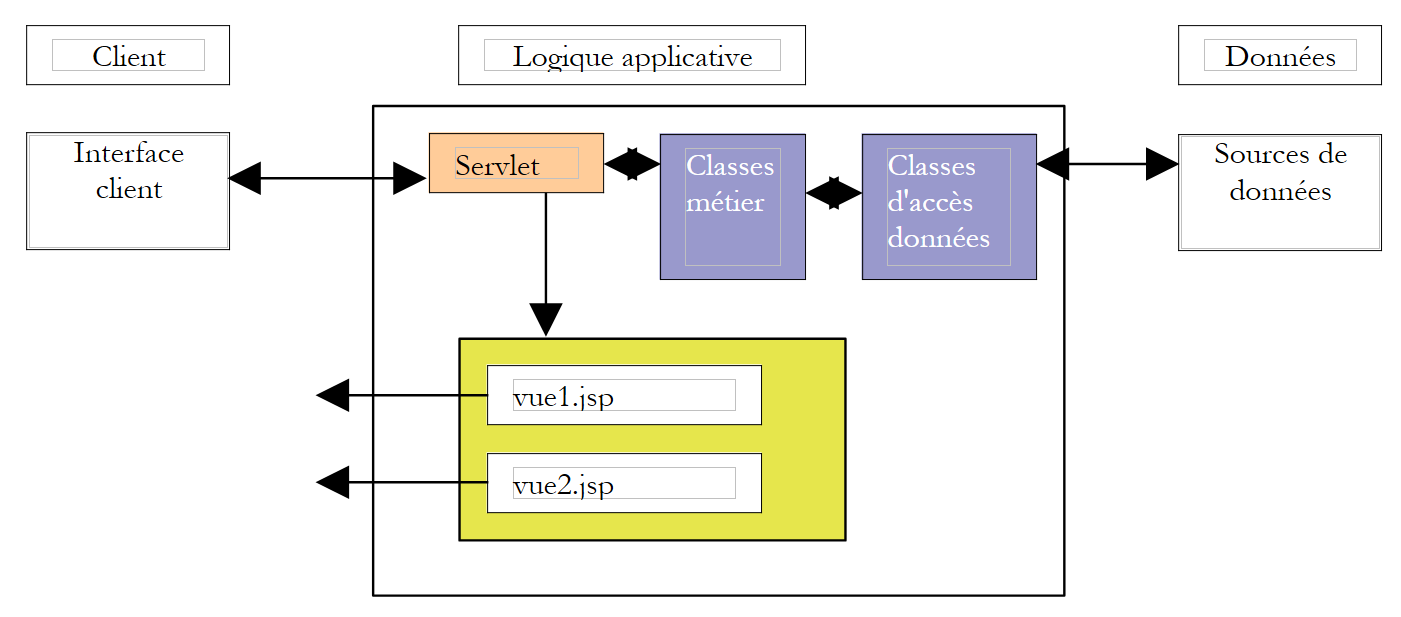
The application’s MVC architecture will be as follows:
| business classes, data access classes, and the database |
| the JSP pages |
| the servlet for processing client requests |
3.5.1. The model
It was presented earlier. It consists of the Java archives [istia.st.articles.dao, istia.st.articles.domain, istia.st.articles.exception].
3.5.2. The views
The views correspond to those presented at the beginning of this document:
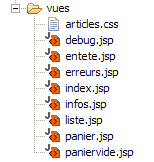
| liste.jsp | The views are collected in the [vues] folder of the application 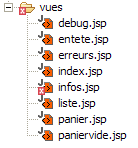 |
| infos.jsp |
| panier.jsp |
| paniervide.jsp |
| erreurs.jsp |
3.5.3. The Controller
The controller will consist of a single servlet named [WebArticles]. It will process the various requests from clients. These will be identified by the presence of a [action] parameter in the client’s HTTP request:
| meaning | controller action | possible answers |
| The client wants the list of items | - requests the list of items from the business | - [LISTE] - [ERREURS] |
| The customer requests information about one of the items displayed in the view [LISTE] | - requests the item from the business layer | - [INFOS] - [ERREURS] |
| the customer purchases an item | - requests the item from the business layer and adds it to the customer's cart | - [INFOS] if quantity error - [LISTE] if no error |
| the customer wants to remove an purchase from their cart | - retrieves the cart from the session and modifies it | - [PANIER] - [PANIERVIDE] - [ERREURS] |
| the customer wants to view their shopping cart | - retrieves the shopping cart from the session | - [PANIER] - [PANIERVIDE] - [ERREURS] |
| The customer has finished shopping and proceeds to the payment phase | - updates the database with the stock levels of the purchased items - removes from the customer's cart the items have been confirmed | - [LISTE] - [ERREURS] |
3.5.4. Application configuration
We will configure the application to make it as flexible as possible with regard to changes such as:
- changes to the url classes for the various views
- changes to the classes implementing the [IArticlesDao] and [IArticlesDomain] interfaces
- changes to the SGBD, the database, and the product table
3.5.5. Changes to url
The names of the url views will be placed in the [web.xml] application configuration file along with a few other parameters:
| <?xml version="1.0" encoding="ISO-8859-1"?>
<!DOCTYPE web-app
PUBLIC "-//Sun Microsystems, Inc.//DTD Web Application 2.3//EN"
"http://java.sun.com/dtd/web-app_2_3.dtd">
<web-app>
<servlet>
<servlet-name>webarticles</servlet-name>
<servlet-class>istia.st.articles.web.WebArticles</servlet-class>
<init-param>
<param-name>springConfigFileName</param-name>
<param-value>spring-config-sqlmap-firebird.xml</param-value>
</init-param>
<init-param>
<param-name>urlMain</param-name>
<param-value>/main</param-value>
</init-param>
<init-param>
<param-name>urlErreurs</param-name>
<param-value>/vues/erreurs.jsp</param-value>
</init-param>
<init-param>
<param-name>urlListe</param-name>
<param-value>/vues/liste.jsp</param-value>
</init-param>
<init-param>
<param-name>urlInfos</param-name>
<param-value>/vues/infos.jsp</param-value>
</init-param>
<init-param>
<param-name>urlPanier</param-name>
<param-value>/vues/panier.jsp</param-value>
</init-param>
<init-param>
<param-name>urlPanierVide</param-name>
<param-value>/vues/paniervide.jsp</param-value>
</init-param>
<init-param>
<param-name>urlDebug</param-name>
<param-value>/vues/debug.jsp</param-value>
</init-param>
</servlet>
<welcome-file-list>
<welcome-file>/vues/index.jsp</welcome-file>
</welcome-file-list>
<servlet-mapping>
<servlet-name>webarticles</servlet-name>
<url-pattern>/main</url-pattern>
</servlet-mapping>
</web-app>
|
In [web.xml]
- the url files for the application's various views
- the name [springConfigFileName] of the Spring configuration file that will enable the creation of singleton objects for accessing the business layers, and Dao
- the view [/vues/index.jsp], which will be displayed when the url requested by the client is /<context>, where <context> is the application context
3.5.6. Changing the classes that implement the interfaces
In the spirit of three-tier architectures, the layers must be isolated from one another. This isolation is achieved as follows:
- the layers communicate with each other via interfaces and not via concrete classes
- the code of one layer never instantiates the class of another layer itself in order to use it. It simply requests an instance of the interface implementation for the layer it wants to use from an external tool, in this case [Spring]. To do this, we know that it does not need to know the name of the implementation class, but only the name of the Spring bean for which it wants a reference.
In our application, the Spring configuration file could look like this:
| <?xml version="1.0" encoding="UTF-8"?>
<!DOCTYPE beans SYSTEM "http://www.springframework.org/dtd/spring-beans.dtd">
<beans>
<!-- data access class -->
<bean id="articlesDao" class="istia.st.articles.dao.ArticlesDaoSqlMap">
<constructor-arg index="0">
<value>sqlmap-config-firebird.xml</value>
</constructor-arg>
</bean>
<!-- the business class -->
<bean id="articlesDomain" class="istia.st.articles.domain.AchatsArticles">
<constructor-arg index="0">
<ref bean="articlesDao"/>
</constructor-arg>
</bean>
</beans>
|
To access the [métier] layer, a class in the [Interface utilisateur, UI] layer can request the [articlesDomain] bean. Spring will then instantiate an object of type [istia.st.articles.domain.AchatsArticles]. For this instantiation, it requires a bean of type [articlesDao], that is, an object of type [istia.st.articles.dao.ArticlesDaoSqlMap]. Spring will then instantiate such an object. This instantiation will be based on the information contained in the [sqlmap-config-firebird.xml] file, a configuration file for data access via SqlMap. At the end of the operation, the [UI] class that requested the [articlesDomain] bean has the entire chain connecting it to the data in SGBD:
The web application’s independence from changes related to SGBD or the database is ensured here by the SqlMap configuration files. There are two of them:
- the [sql-map-config-firebird.xml] file
| <?xml version="1.0" encoding="UTF-8" ?>
<!DOCTYPE sqlMapConfig
PUBLIC "-//iBATIS.com//DTD SQL Map Config 2.0//EN"
"http://www.ibatis.com/dtd/sql-map-config-2.dtd">
<sqlMapConfig>
<transactionManager type="JDBC">
<dataSource type="SIMPLE">
<property name="JDBC.Driver" value="org.firebirdsql.jdbc.FBDriver"/>
<property name="JDBC.ConnectionURL"
value="jdbc:firebirdsql:localhost/3050:d:/data/databases/firebird/dbarticles.gdb"/>
<property name="JDBC.Username" value="sysdba"/>
<property name="JDBC.Password" value="masterkey"/>
<property name="JDBC.DefaultAutoCommit" value="true"/>
</dataSource>
</transactionManager>
<sqlMap resource="articles.xml"/>
</sqlMapConfig>
|
This file refers to a Firebird database. Simply change the name of the JDBC driver to work with another one, such as SGBD.
- The [articles.xml] file, which contains the various SQL statements required by the application:
| <?xml version="1.0" encoding="UTF-8" ?>
<!DOCTYPE sqlMap
PUBLIC "-//iBATIS.com//DTD SQL Map 2.0//EN"
"http://www.ibatis.com/dtd/sql-map-2.dtd">
<sqlMap namespace="Articles">
<!-- an alias to the istia.st.articles.dao.Article class -->
<typeAlias alias="article" type="istia.st.articles.dao.Article"/>
<!-- mapping ORM : row table ARTICLES - instance class Article -->
<resultMap id="article" class="article">
<result property="id" column="ID"/>
<result property="nom" column="NOM"/>
<result property="prix" column="PRIX"/>
<result property="stockActuel" column="STOCKACTUEL"/>
<result property="stockMinimum" column="STOCKMINIMUM"/>
</resultMap>
<!-- query SQL to obtain all items -->
<statement id="getAllArticles" resultMap="article">
select id, nom, prix,
stockactuel, stockminimum from ARTICLES
</statement>
<!-- query SQL to delete all items -->
<statement id="clearAllArticles">delete from ARTICLES</statement>
<!-- the SQL query to insert an article -->
<statement id="insertArticle">
insert into ARTICLES (id, nom, prix,
stockactuel, stockminimum) values
(#id#,#nom#,#prix#,#stockactuel#,#stockminimum#)
</statement>
<!-- the SQL query to delete a given item -->
<statement id="deleteArticle">delete FROM ARTICLES where id=#id#</statement>
<!-- query SQL to modify a given item -->
<statement id="modifyArticle">
update ARTICLES set nom=#nom#,
prix=#prix#,stockactuel=#stockactuel#,stockminimum=#stockminimum# where
id=#id#
</statement>
<!-- query SQL to obtain a given item -->
<statement id="getArticleById" resultMap="article">
select id, nom, prix,
stockactuel, stockminimum FROM ARTICLES where id=#id#
</statement>
<!-- query SQL to modify the stock of a given item -->
<statement id="changerStockArticle">
update ARTICLES set
stockActuel=stockActuel+#mouvement#
where id=#id# and stockActuel+#mouvement#>=0
</statement>
</sqlMap>
|
If the names of the item table or columns were to change, we would need to rewrite the queries in this configuration file without having to change the Java code. This would also be the case if a query were to be replaced by a stored procedure for performance reasons.
3.5.8. The overall architecture of the [webarticles] application
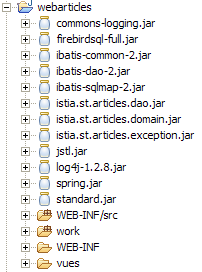
A Java web application is a puzzle with many pieces. Giving it a MVC architecture generally increases the number of these pieces. The structure of the [webarticles] application under [eclipse] is as follows:
structure générale - on voit ci-dessous les
 archives Java utilisées par le projet
 Eclipse.
spring : pour Spring
ibatis : pour SqlMap
log4j, commons-logging : pour les logs
 de Spring et Sqlmap
firebird : pour le SGBD firebird
mysql : pour le SGBD MySQL
jstl, standard : pour la bibliothèque
 de balises JSTL
|
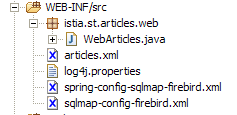
le dossier des sources java : contient le code Java
 ainsi que les fichiers de configuration
 spring et sqlmap. Eclipse recopie
 automatiquement ces fichiers
dans [WEB-INF/classes].
C'is where the application will find them.
|
 |  |
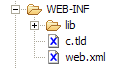
le dossier [WEB-INF] de l'application: contains the
descripteur [web.xml] de l'application and
 fichiers de définition de la bibliothèques JSTL
| |
 |  |
3.5.9. The JSP views
The JSP views use the JSTL tag library.
3.5.9.1. entete.jsp
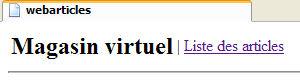
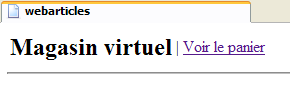
To ensure consistency across the different views, they will share the same header, which displays the application name along with the menu:
The menu is dynamic and set by the controller. The controller includes in the request sent to the JSP page an "actions" key attribute with an associated value of a Hastable[] array. Each element of this array is a dictionary intended to generate a option for the header menu. Each dictionary has two keys:
- href: the url associated with the option menu
- link: the menu text
The other views of the application will use the header defined by [entete.jsp] using the following JSP tag:
<jsp:include page="entete.jsp"/>
At runtime, this tag will include the code from the [entete.jsp] page into the code of the JSP page that contains it. Since the url of the page is a relative url (no /), the [entete.jsp] page will be searched for in the same folder as the page containing the <jsp:include> tag.
Code:
| <%@ page language="java" %>
<%@ taglib uri="/WEB-INF/c.tld" prefix="c" %>
<html>
<head>
<title>webarticles</title>
</head>
<body>
<table>
<tr>
<td><h2>Magasin virtuel</h2></td>
<c:forEach items="${actions}" var="action">
<td>|</td>
<td><a href="<c:out value="${action.href}"/>"><c:out value="${action.lien}"/></a></td>
</c:forEach>
</tr>
</table>
<hr>
|
3.5.9.2. liste.jsp
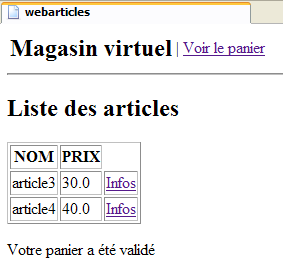
This view displays the list of items available for sale:
It is displayed following a request to /main?action=list or /main?action=cartvalidation. The controller request parameters are as follows:
| Hashtable[] object - the array of menu options |
| ArrayList of objects of type [Article] |
| object String - message to display at the bottom of the page |
Each link [Infos] in the HTML array of articles has a url of the form [?action=infos&id=ID] where ID is the id of the displayed item.
Code:
| <%@ page language="java" %>
<%@ taglib uri="/WEB-INF/c.tld" prefix="c" %>
<jsp:include page="entete.jsp"/>
<h2>Liste des articles</h2>
<table border="1">
<tr>
<th>NOM</th><th>PRIX</th>
</tr>
<c:forEach var="article" items="${listarticles}">
<tr>
<td><c:out value="${article.nom}"/></td>
<td><c:out value="${article.prix}"/></td>
<td><a href="<c:out value="?action=infos&id=${article.id}"/>">Infos</a></td>
</tr>
</c:forEach>
</table>
<p>
<c:out value="${message}"/>
</body>
</html>
|
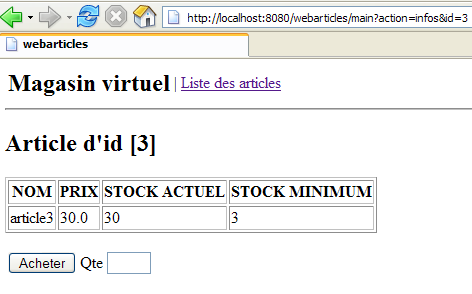
3.5.9.3. infos.jsp
This view displays information about an item and also allows you to purchase it:
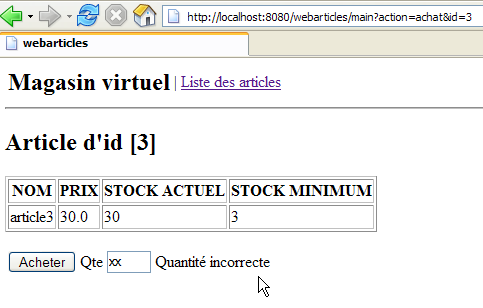
It is displayed following a request to /main?action=infos&id=ID or a request to /main?action=purchase&id=ID when the quantity purchased is incorrect. The elements of the controller request are as follows:
| object Hashtable[] - the array of menu options |
| object of type [Article] - item to display |
| object String - message to display in case of a quantity error |
| object String - value to display in the input field [Qte] |
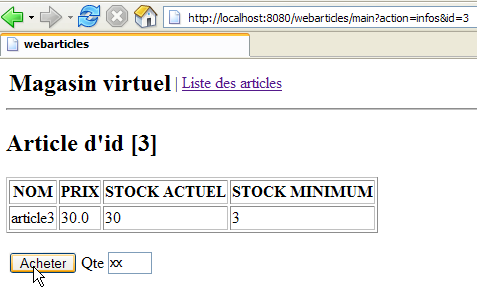
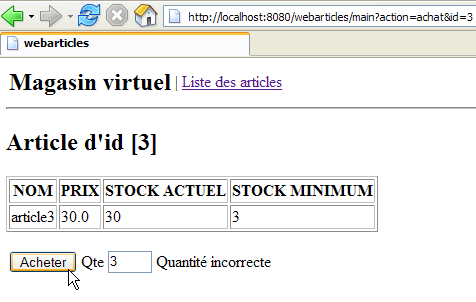
The fields [msg] and [qte] are used in case of a quantity entry error:
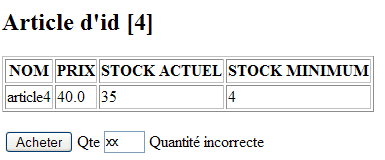
This page contains a form that is submitted via the [Acheter] button. The url target of POST is [?action=achat&id=ID], where ID is the id of the purchased item.
Code:
| <%@ page language="java" %>
<%@ taglib uri="/WEB-INF/c.tld" prefix="c" %>
<jsp:include page="entete.jsp"/>
<h2>Article d'id [<c:out value="${article.id}"/>]</h2>
<table border="1">
<tr>
<th>NOM</th><th>PRIX</th><th>STOCK ACTUEL</th><th>STOCK MINIMUM</th>
</tr>
<tr>
<td><c:out value="${article.nom}"/></td>
<td><c:out value="${article.prix}"/></td>
<td><c:out value="${article.stockActuel}"/></td>
<td><c:out value="${article.stockMinimum}"/></td>
</tr>
</table>
<p>
<form method="post" action="?action=achat&id=<c:out value="${article.id}"/>"/>
<table>
<tr>
<td><input type="submit" value="Acheter"></td>
<td>Qte <input type="text" name="qte" size="3" value="<c:out value="${qte}"/>"></td>
<td><c:out value="${msg}"/></td>
</tr>
</table>
</form>
</body>
</html>
|
3.5.9.4. panier.jsp
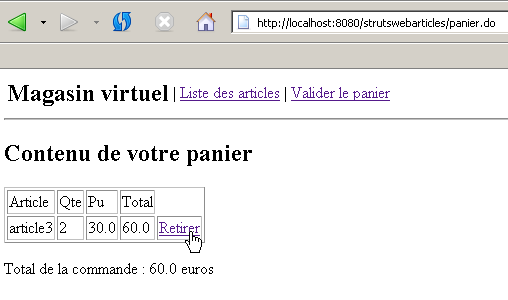
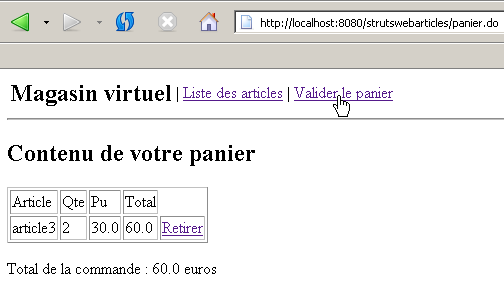
This view displays the contents of the shopping cart:
It is displayed following a request for /main?action=cart or /main?action=checkout&id=ID. The controller request parameters are as follows:
| Hashtable[] object - the array of menu options |
| object of type [Panier] - the shopping cart to display |
Each link [Retirer] in the HTML array of shopping cart items has a url of the form [?action=retirerachat&id=ID] where ID is the [id] of the item we want to remove from the cart.
Code:
| <%@ page language="java" %>
<%@ taglib uri="/WEB-INF/c.tld" prefix="c" %>
<jsp:include page="entete.jsp"/>
<h2>Contenu de votre panier</h2>
<table border="1">
<tr>
<td>Article</td><td>Qte</td><td>Pu</td><td>Total</td>
</tr>
<c:forEach var="achat" items="${panier.achats}">
<tr>
<td><c:out value="${achat.article.nom}"/></td>
<td><c:out value="${achat.qte}"/></td>
<td><c:out value="${achat.article.prix}"/></td>
<td><c:out value="${achat.total}"/></td>
<td><a href="<c:out value="?action=retirerachat&id=${achat.article.id}"/>">Retirer</a></td>
</tr>
</c:forEach>
</table>
<p>
Total de la commande : <c:out value="${panier.total}"/> euros
</body>
</html>
|
3.5.9.5. paniervide.jsp
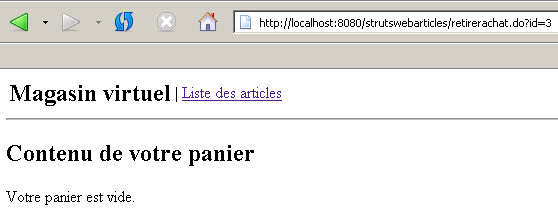
This view displays information indicating that the cart is empty:
It is displayed following a request to /main?action=cart or /main?action=checkout&id=ID. The controller request parameters are as follows:
| Hashtable[] object - the array of menu options |
Code:
| <%@ page language="java" %>
<%@ taglib uri="/WEB-INF/c.tld" prefix="c" %>
<jsp:include page="entete.jsp"/>
<h2>Contenu de votre panier</h2>
<p>
Votre panier est vide.
</body>
</html>
|
3.5.9.6. erreurs.jsp
This view is displayed in case of errors:
It is displayed following any request that results in an error, except for the purchase action with an incorrect quantity, which is handled by the [INFOS] view. The elements of the controller request are as follows:
| Hashtable[] object - the array of menu options |
| ArrayList of String objects representing the error messages to be displayed |
Code:
| <%@ page language="java" %>
<%@ taglib uri="/WEB-INF/c.tld" prefix="c" %>
<jsp:include page="entete.jsp"/>
<h2>Les erreurs suivantes se sont produites</h2>
<ul>
<c:forEach var="erreur" items="${erreurs}">
<li><c:out value="${erreur}"/></li>
</c:forEach>
</ul>
</body>
</html>
|
3.5.9.7. index.jsp
This page is defined as the application's home page in the application's [web.xml] file:
| <?xml version="1.0" encoding="ISO-8859-1"?>
<!DOCTYPE web-app
PUBLIC "-//Sun Microsystems, Inc.//DTD Web Application 2.3//EN"
"http://java.sun.com/dtd/web-app_2_3.dtd">
<web-app>
<servlet>
....
</servlet>
<servlet-mapping>
....
</servlet-mapping>
<welcome-file-list>
<welcome-file>/vues/index.jsp</welcome-file>
</welcome-file-list>
</web-app>
|
The [index.jsp] view simply redirects the client to the application's entry point:
| <%@ page language="java" %>
<%@ taglib uri="/WEB-INF/c.tld" prefix="c" %>
<c:redirect url="/main?action=liste"/>
|
3.5.10. The Controller
We still need to write the core of our web application, the controller. Its role is to:
- retrieve the client's request,
- process the action requested by the client using business classes,
- send the appropriate view in response.
3.5.10.1. Initializing the Controller
When the controller class is loaded by the servlet server, its [init] method is executed. This will happen only once. Once loaded into memory, the controller will remain there and process requests from the various clients instances. Each client is handled by an execution thread, and the controller’s methods are thus executed simultaneously by different threads. Note that, for this reason, the controller must not have any fields that its methods could modify. Its fields must be read-only. They are initialized by the [init] method, which is its primary role. This method has the unique characteristic of being executed only once by a single thread. There are therefore no issues with concurrent access to the controller’s fields within this method. The purpose of the [init] method is to initialize the objects required by the web application, which will be shared in read-only mode by all clients threads. These shared objects can be placed in two locations:
- the controller’s private fields
- the application's execution context (ServletContext)
The [init] method of the [webarticles] application will perform the following actions:
- check the file [web.xml] for the parameters necessary for the application to function properly. These were described in section 3.5.5.
- set a private field [ArrayList erreurs] with a list of any errors. This list will be empty if there are no errors, but it will exist regardless.
- If errors occurred, the [init] method stops there. Otherwise, it creates an object of type [IArticlesDomain], which will be the business object that the controller uses for its needs. As explained in 3.5.6, the controller will request the bean it needs from the Spring framework. This instantiation operation may result in various errors. If this is the case, they will, once again, be stored in the controller’s [erreurs] field.
3.5.10.2. Methods doGet, doPost
These two methods handle the requests HTTP, GET, and POST from clients. These will be handled interchangeably. The [doPost] method may thus refer to the [doGet] method or vice versa. The client request will be processed as follows:
- The [erreurs] field will be checked. If it is not empty, this means that errors occurred during application initialization and that the application cannot run. In response, the [ERREURS] view will be sent.
- The [action] parameter of the request will be retrieved and checked. If it does not correspond to a known action, the [ERREURS] view is sent with an appropriate error message.
- If the [action] parameter is valid, the client’s request is passed to an action-specific procedure for processing. The procedure handling the [uneAction] action will have the following signature:
| /**
* @param request la requête du client
* @param response la réponse au client
* @throws IOException
* @throws ServletException
*/
private void doUneAction(HttpServletRequest request, HttpServletResponse response)
throws ServletException, IOException;
|
3.5.10.3. Handling different actions
The methods that handle the various possible actions of the application are as follows:
method | request | processing | possible responses |
| GET /main?action=list | - request the list of items from the business class - display it | [LISTE] or [ERREURS] |
| GET /main?action=infos&id=ID | - request the article from id=ID to the business unit - display it | [INFOS] or [ERREURS] |
| POST /main?action=purchase&id=ID - The purchased quantity is included in the posted parameters | - Request the item from id=ID to the business class - add it to the cart in the customer session | [LISTE] or [INFOS] or [ERREURS] |
| GET /main?action=removepurchase&id=ID | - Remove the item from id=ID from the shopping cart's purchase list the customer session | [PANIER] |
| GET /main?action=cart | - display the shopping cart for the client session | [PANIER] or [PANIERVIDE] |
| GET /main?action=cartvalidation | - Decrement the inventory of all items in the customer's customer's session | [LISTE] or [ERREURS] |
3.5.10.4. The code
| package istia.st.articles.web;
import java.io.IOException;
import java.util.ArrayList;
import java.util.Hashtable;
import java.util.List;
import istia.st.articles.domain.Achat;
import istia.st.articles.dao.Article;
import istia.st.articles.domain.IArticlesDomain;
import istia.st.articles.domain.Panier;
import istia.st.articles.exception.UncheckedAccessArticlesException;
import javax.servlet.ServletConfig;
import javax.servlet.ServletException;
import javax.servlet.http.HttpServlet;
import javax.servlet.http.HttpServletRequest;
import javax.servlet.http.HttpServletResponse;
import javax.servlet.http.HttpSession;
import org.springframework.beans.factory.xml.XmlBeanFactory;
import org.springframework.core.io.ClassPathResource;
/**
* @author ST
*
*/
public class WebArticles extends HttpServlet {
// private fields
private ArrayList erreurs = new ArrayList();
private IArticlesDomain articlesDomain = null;
private final String URL_MAIN = "urlMain";
private final String URL_ERREURS = "urlErreurs";
private final String URL_LISTE = "urlListe";
private final String URL_INFOS = "urlInfos";
private final String URL_PANIER = "urlPanier";
private final String URL_PANIER_VIDE = "urlPanierVide";
private final String URL_DEBUG = "urlDebug";
private final String SPRING_CONFIG_FILENAME = "springConfigFileName";
private final String[] parameters =
{
URL_MAIN,
URL_ERREURS,
URL_LISTE,
URL_INFOS,
URL_PANIER,
URL_PANIER_VIDE,
URL_DEBUG,
SPRING_CONFIG_FILENAME };
private ServletConfig config;
private final String ACTION_LISTE = "liste";
private final String ACTION_PANIER = "panier";
private final String ACTION_ACHAT = "achat";
private final String ACTION_INFOS = "infos";
private final String ACTION_RETIRER_ACHAT = "retirerachat";
private final String ACTION_VALIDATION_PANIER = "validationpanier";
private String urlActionListe;
private final String lienActionListe = "Liste des articles";
private String urlActionPanier;
private final String lienActionPanier = "Voir le panier";
private String urlActionValidationPanier;
private final String lienActionValidationPanier = "Valider le panier";
private Hashtable hActionListe = new Hashtable(2);
private Hashtable hActionPanier = new Hashtable(2);
private Hashtable hActionValidationPanier = new Hashtable(2);
public void init() {
// retrieve servlet initialization parameters
config = getServletConfig();
String param = null;
for (int i = 0; i < parameters.length; i++) {
param = config.getInitParameter(parameters[i]);
if (param == null) {
// we memorize the error
erreurs.add(
"Paramètre ["
+ parameters[i]
+ "] absent dans le fichier [web.xml]");
}
}
// mistakes?
if (erreurs.size() != 0) {
return;
}
// create a IArticlesDomain business layer access object
try {
articlesDomain =
(IArticlesDomain)
(
new XmlBeanFactory(
new ClassPathResource(
(String) config.getInitParameter(
SPRING_CONFIG_FILENAME)))).getBean(
"articlesDomain");
} catch (Exception ex) {
// we memorize the error
erreurs.add(
"Erreur de configuration de l'accès aux données : "
+ ex.toString());
return;
}
// we store some url of the application
hActionListe.put("href", "?action=" + ACTION_LISTE);
hActionListe.put("lien", lienActionListe);
hActionPanier.put("href", "?action=" + ACTION_PANIER);
hActionPanier.put("lien", lienActionPanier);
hActionValidationPanier.put(
"href",
"?action=" + ACTION_VALIDATION_PANIER);
hActionValidationPanier.put("lien", lienActionValidationPanier);
// it's over
return;
}
public void doGet(HttpServletRequest request, HttpServletResponse response)
throws IOException, ServletException {
// check how the initialization of the servelet went
if (erreurs.size() != 0) {
// do we have the url of the error page?
if (config.getInitParameter(URL_ERREURS) == null) {
throw new ServletException(erreurs.toString());
}
// the error page is displayed
request.setAttribute("erreurs", erreurs);
request.setAttribute("actions", new Hashtable[] {
});
getServletContext()
.getRequestDispatcher(config.getInitParameter(URL_ERREURS))
.forward(request, response);
// end
return;
}
// action is processed
String action = request.getParameter("action");
if (action == null) {
// list of items
doListe(request, response);
return;
}
if (action.equals(ACTION_LISTE)) {
// list of items
doListe(request, response);
return;
}
if (action.equals(ACTION_INFOS)) {
// article info
doInfos(request, response);
return;
}
if (action.equals(ACTION_ACHAT)) {
// purchase an item
doAchat(request, response);
return;
}
if (action.equals(ACTION_PANIER)) {
// basket display
doPanier(request, response);
return;
}
if (action.equals(ACTION_RETIRER_ACHAT)) {
// remove an item from the basket
doRetirerAchat(request, response);
return;
}
if (action.equals(ACTION_VALIDATION_PANIER)) {
// shopping cart validation
doValidationPanier(request, response);
return;
}
// unknown share
ArrayList erreurs = new ArrayList();
erreurs.add("action [" + action + "] inconnue");
// the error page is displayed
request.setAttribute("actions", new Hashtable[] { hActionListe });
afficheErreurs(request, response, erreurs);
// end
return;
}
private void doValidationPanier(
HttpServletRequest request,
HttpServletResponse response)
throws ServletException, IOException {
// the buyer has confirmed his basket
Panier panier = (Panier) request.getSession().getAttribute("panier");
// validate this basket
try {
articlesDomain.acheter(panier);
} catch (UncheckedAccessArticlesException ex) {
// not normal
erreurs.add("Erreur d'accès aux données [" + ex.toString() + "]");
request.setAttribute("actions", new Hashtable[] { hActionListe });
afficheErreurs(request, response, erreurs);
return;
}
// error recovery
ArrayList erreurs = articlesDomain.getErreurs();
if (erreurs.size() != 0) {
request.setAttribute(
"actions",
new Hashtable[] { hActionListe, hActionPanier });
afficheErreurs(request, response, erreurs);
return;
}
// displays the list of items
request.setAttribute("message", "Votre panier a été validé");
doListe(request, response);
// end
return;
}
private void doRetirerAchat(
HttpServletRequest request,
HttpServletResponse response)
throws ServletException, IOException {
// remove a purchase from the basket
try {
Panier panier =
(Panier) request.getSession().getAttribute("panier");
String strIdAchat = request.getParameter("id");
panier.enlever(Integer.parseInt(strIdAchat));
} catch (NumberFormatException ignored) {
} catch (NullPointerException ignored) {
}
// the basket is displayed
doPanier(request, response);
}
private void doPanier(
HttpServletRequest request,
HttpServletResponse response)
throws ServletException, IOException {
// the basket is displayed
Panier panier = (Panier) request.getSession().getAttribute("panier");
// empty basket?
if (panier == null || panier.getAchats().size() == 0) {
request.setAttribute("actions", new Hashtable[] { hActionListe });
getServletContext()
.getRequestDispatcher(config.getInitParameter(URL_PANIER_VIDE))
.forward(request, response);
// end
return;
}
// there's something in the basket
request.setAttribute("panier", panier);
request.setAttribute(
"actions",
new Hashtable[] { hActionListe, hActionValidationPanier });
getServletContext()
.getRequestDispatcher(config.getInitParameter(URL_PANIER))
.forward(request, response);
// end
return;
}
private void doAchat(
HttpServletRequest request,
HttpServletResponse response)
throws ServletException, IOException {
// purchase an item
// we recover the quantity
int qté = 0;
try {
qté = Integer.parseInt(request.getParameter("qte"));
if (qté <= 0)
throw new NumberFormatException();
} catch (NumberFormatException ex) {
// wrong qty
request.setAttribute("msg", "Quantité incorrecte");
request.setAttribute("qte", request.getParameter("qte"));
String url =
config.getInitParameter(URL_MAIN)
+ "?action=infos&id="
+ request.getParameter("id");
getServletContext().getRequestDispatcher(url).forward(
request,
response);
// end
return;
}
// retrieve the client session
HttpSession session = request.getSession();
// we create the purchase
Article article = (Article) session.getAttribute("article");
Achat achat = new Achat(article, qté);
// the purchase is added to the customer's basket
Panier panier = (Panier) session.getAttribute("panier");
if (panier == null) {
panier = new Panier();
session.setAttribute("panier", panier);
}
panier.ajouter(achat);
// we return to the list of items
String url = config.getInitParameter(URL_MAIN) + "?action=liste";
getServletContext().getRequestDispatcher(url).forward(
request,
response);
// end
return;
}
private void afficheDebugInfos(
HttpServletRequest request,
HttpServletResponse response,
ArrayList infos)
throws ServletException, IOException {
// displays the list of items
request.setAttribute("infos", infos);
getServletContext()
.getRequestDispatcher(config.getInitParameter(URL_DEBUG))
.forward(request, response);
// end
return;
}
public void doPost(
HttpServletRequest request,
HttpServletResponse response)
throws IOException, ServletException {
// idem get
doGet(request, response);
}
private void doInfos(
HttpServletRequest request,
HttpServletResponse response)
throws IOException, ServletException {
// list of errors
ArrayList erreurs = new ArrayList();
// the requested id is retrieved
String strId = request.getParameter("id");
// anything?
if (strId == null) {
// not normal
erreurs.add("action incorrecte([infos,id=null]");
request.setAttribute("actions", new Hashtable[] { hActionListe });
afficheErreurs(request, response, erreurs);
return;
}
// transform strId into an integer
int id = 0;
try {
id = Integer.parseInt(strId);
} catch (Exception ex) {
// not normal
erreurs.add("action incorrecte([infos,id=" + strId + "]");
request.setAttribute("actions", new Hashtable[] { hActionListe });
afficheErreurs(request, response, erreurs);
return;
}
// key item id is requested
Article article = null;
try {
article=articlesDomain.getArticleById(id);
} catch (UncheckedAccessArticlesException ex) {
// not normal
erreurs.add("Erreur d'accès aux données [" + ex.toString() + "]");
request.setAttribute("actions", new Hashtable[] { hActionListe });
afficheErreurs(request, response, erreurs);
return;
}
if (article == null) {
// not normal
erreurs.add("Article de clé [" + id + "] inexistant");
request.setAttribute("actions", new Hashtable[] { hActionListe });
afficheErreurs(request, response, erreurs);
return;
}
// put the article in the session
request.getSession().setAttribute("article", article);
// the info page is displayed
request.setAttribute("actions", new Hashtable[] { hActionListe });
/ / request.setAttribute("urlMain",config.getInitParameter(URL_MAIN));
getServletContext()
.getRequestDispatcher(config.getInitParameter(URL_INFOS))
.forward(request, response);
// end
return;
}
private void afficheErreurs(
HttpServletRequest request,
HttpServletResponse response,
ArrayList erreurs)
throws ServletException, IOException {
// the error page is displayed
request.setAttribute("erreurs", erreurs);
getServletContext()
.getRequestDispatcher(config.getInitParameter(URL_ERREURS))
.forward(request, response);
// end
return;
}
private void doListe(
HttpServletRequest request,
HttpServletResponse response)
throws IOException, ServletException {
// error list
ArrayList erreurs = new ArrayList();
// the list of items is requested
List articles = null;
try {
articles = articlesDomain.getAllArticles();
} catch (UncheckedAccessArticlesException ex) {
// we memorize the error
erreurs.add(
"Erreur lors de l'obtention de tous les articles : "
+ ex.toString());
}
// mistakes?
if (erreurs.size() != 0) {
// the error page is displayed
request.setAttribute("erreurs", erreurs);
request.setAttribute("actions", new Hashtable[] { hActionListe });
getServletContext()
.getRequestDispatcher(config.getInitParameter(URL_ERREURS))
.forward(request, response);
// end
return;
}
// displays the list of items
request.setAttribute("listarticles", articles);
request.setAttribute("message","");
request.setAttribute("actions", new Hashtable[] { hActionPanier });
getServletContext()
.getRequestDispatcher(config.getInitParameter(URL_LISTE))
.forward(request, response);
// end
return;
}
/**
* suivi console pour débogage
* @param message : le message à afficher
*/
private void affiche(String message) {
System.out.println(message);
}
}
|
We’ll let the reader take their time to read and understand this code. We hope the comments will help.
3.5.10.5. Application Testing
Let’s look at a few test screenshots. First, the application’s home page:
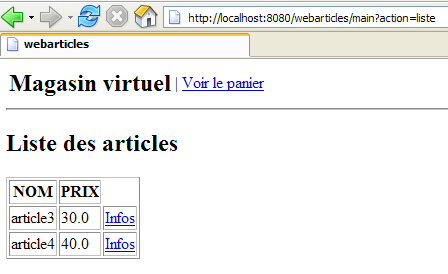
The requested url was actually [http://localhost:8080/webarticles]. The reader will see that in the [web.xml] file, we define a home page for the application:
<welcome-file-list>
<welcome-file>/vues/index.jsp</welcome-file>
</welcome-file-list>
The view [index.jsp] is defined as follows:
<%@ page language="java" %>
<%@ taglib uri="/WEB-INF/c.tld" prefix="c" %>

<c:redirect url="/main?action=liste"/>
There was therefore a redirection to url [http://localhost:8080/webarticles/main?action=liste], as shown by the browser's url in the screenshot. The url [/main?action=liste] was therefore requested. Also in [web.xml], the url /main is associated with the [webarticles] servlet:
<servlet-mapping>
<servlet-name>webarticles</servlet-name>
<url-pattern>/main</url-pattern>
</servlet-mapping>
Also in [web.xml], the servlet [webarticles] is associated with the servlet [ istia.st.articles.web.WebArticles]:
<servlet-name>webarticles</servlet-name>
<servlet-class>istia.st.articles.web.WebArticles</servlet-class>
The [ istia.st.articles.web.WebArticles] servlet is therefore loaded by the Tomcat servlet container if it was not already loaded, and its [init] method is executed:
| public void init() {
// retrieve servlet initialization parameters
config = getServletConfig();
String param = null;
for (int i = 0; i < parameters.length; i++) {
param = config.getInitParameter(parameters[i]);
if (param == null) {
// we memorize the error
erreurs.add(
"Paramètre ["
+ parameters[i]
+ "] absent dans le fichier [web.xml]");
}
}
// mistakes?
if (erreurs.size() != 0) {
return;
}
// create a IArticlesDomain business layer access object
try {
articlesDomain =
(IArticlesDomain)
(
new XmlBeanFactory(
new ClassPathResource(
(String) config.getInitParameter(
SPRING_CONFIG_FILENAME)))).getBean(
"articlesDomain");
} catch (Exception ex) {
// we memorize the error
erreurs.add(
"Erreur de configuration de l'accès aux données : "
+ ex.toString());
return;
}
// we store some url of the application
hActionListe.put("href", "?action=" + ACTION_LISTE);
hActionListe.put("lien", lienActionListe);
hActionPanier.put("href", "?action=" + ACTION_PANIER);
hActionPanier.put("lien", lienActionPanier);
hActionValidationPanier.put(
"href",
"?action=" + ACTION_VALIDATION_PANIER);
hActionValidationPanier.put("lien", lienActionValidationPanier);
// it's over
return;
}
|
Comments: The [init] method
- checks for the presence of certain configuration parameters
- instantiates a service to access the application domain using Spring
- sets an error list to indicate any initialization errors
- a number of private fields:
- errors: the list of errors detected by [init]
- [hActionListe, hActionPanier, hActionValidationPanier]: dictionaries. Each contains the information needed to display a option from the main menu displayed by the [entete.jsp] view
- acticlesDomain: the application model access service
The [init] method is executed only once, upon the initial loading of the servlet. After that, one of the [doGet, doPost] methods is executed depending on the [GET, POST] type of the client request. Here, both methods do the same thing, and the code has been placed in [doGet]:
| public void doGet(HttpServletRequest request, HttpServletResponse response)
throws IOException, ServletException {
// check how the initialization of the servelet went
if (erreurs.size() != 0) {
// do we have the url of the error page?
if (config.getInitParameter(URL_ERREURS) == null) {
throw new ServletException(erreurs.toString());
}
// the error page is displayed
request.setAttribute("erreurs", erreurs);
request.setAttribute("actions", new Hashtable[] {
});
getServletContext()
.getRequestDispatcher(config.getInitParameter(URL_ERREURS))
.forward(request, response);
// end
return;
}
// action is processed
String action = request.getParameter("action");
if (action == null) {
// list of items
doListe(request, response);
return;
}
if (action.equals(ACTION_LISTE)) {
// list of items
doListe(request, response);
return;
}
if (action.equals(ACTION_INFOS)) {
// article info
doInfos(request, response);
return;
}
if (action.equals(ACTION_ACHAT)) {
// purchase an item
doAchat(request, response);
return;
}
if (action.equals(ACTION_PANIER)) {
// basket display
doPanier(request, response);
return;
}
if (action.equals(ACTION_RETIRER_ACHAT)) {
// remove an item from the basket
doRetirerAchat(request, response);
return;
}
if (action.equals(ACTION_VALIDATION_PANIER)) {
// shopping cart validation
doValidationPanier(request, response);
return;
}
// unknown share
ArrayList erreurs = new ArrayList();
erreurs.add("action [" + action + "] inconnue");
// the error page is displayed
request.setAttribute("actions", new Hashtable[] { hActionListe });
afficheErreurs(request, response, erreurs);
// end
return;
}
|
- The [doGet] method begins by checking whether any initialization errors occurred at the end of the [init] method. If so, it displays the [ERREURS] view and the process is complete.
- Otherwise, it retrieves the [action] parameter from the client request. Recall that the application was built to respond to requests that must contain a [action] parameter.
- It executes the method associated with the action. Here, that will be the [doListe] method.
The [doListe] method is as follows:
| private void doListe(
HttpServletRequest request,
HttpServletResponse response)
throws IOException, ServletException {
// list of errors
ArrayList erreurs = new ArrayList();
// the list of items is requested
List articles = null;
try {
articles = articlesDomain.getAllArticles();
} catch (UncheckedAccessArticlesException ex) {
// we memorize the error
erreurs.add(
"Erreur lors de l'obtention de tous les articles : "
+ ex.toString());
}
// mistakes?
if (erreurs.size() != 0) {
// the error page is displayed
request.setAttribute("erreurs", erreurs);
request.setAttribute("actions", new Hashtable[] { hActionListe });
getServletContext()
.getRequestDispatcher(config.getInitParameter(URL_ERREURS))
.forward(request, response);
// end
return;
}
// displays the list of items
request.setAttribute("listarticles", articles);
request.setAttribute("message","");
request.setAttribute("actions", new Hashtable[] { hActionPanier });
getServletContext()
.getRequestDispatcher(config.getInitParameter(URL_LISTE))
.forward(request, response);
// end
return;
}
|
- Recall that the [init] method has stored the service for accessing the application model (domain layer) in a private field of the servlet:
// private fields
private IArticlesDomain articlesDomain = null;
- From this access service, you can request a list of articles:
| // error list
ArrayList erreurs = new ArrayList();
// the list of items is requested
List articles = null;
try {
articles = articlesDomain.getAllArticles();
} catch (UncheckedAccessArticlesException ex) {
// we memorize the error
erreurs.add(
"Erreur lors de l'obtention de tous les articles : "
+ ex.toString());
}
|
- If errors occur, the view [ERREURS] is sent:
| // mistakes?
if (erreurs.size() != 0) {
// the error page is displayed
request.setAttribute("erreurs", erreurs);
request.setAttribute("actions", new Hashtable[] { hActionListe });
getServletContext()
.getRequestDispatcher(config.getInitParameter(URL_ERREURS))
.forward(request, response);
// end
return;
}
|
- otherwise, the [LISTE] view is sent:
| // displays the list of items
request.setAttribute("listarticles", articles);
request.setAttribute("message","");
request.setAttribute("actions", new Hashtable[] { hActionPanier });
getServletContext()
.getRequestDispatcher(config.getInitParameter(URL_LISTE))
.forward(request, response);
|
In our example, everything went smoothly and we successfully obtained the view [LISTE]. The reader is invited to review the code for the [LISTE] view to verify that the dynamic parameters expected by this view are indeed provided above by the controller. The same type of verification should be performed for each view:
- identify the view’s dynamic parameters
- ensure that the controller includes these in the request attributes sent to the view
We will now simply outline the sequence of screens encountered by an application user. The reader is invited to follow a line of reasoning similar to the previous one each time:
From the list of items, the user can select an item:
The buyer can purchase item #3 here. Let’s make a typo in the quantity:
The error has been flagged. Now, let’s purchase a few items:
The purchase has been recorded and the list of items has been re-displayed. Let’s check the cart:
The purchase is indeed in the shopping cart. Let’s remove it:
The purchase has been removed from the shopping cart, and the cart has been reloaded. Here, it is empty.
Let’s purchase 100 items #3 and 2 items #4:
It was not possible to purchase item #3 because we wanted to buy 100 of them, but there were only 30 in stock. This purchase remained in the cart:
Item No. 4, however, was purchased, as shown by its new stock level of 39 (40-1):
3.6. MVC architecture with Struts
3.6.1. General Application Architecture
Let’s revisit the MVC architecture of the application:
In the previous version:
- the controller was provided by a servlet
- the views were handled by JSP pages
- the model was handled by a set of three .jar archives
In the Struts version:
- the controller will be handled by a servlet derived from Struts’ generic [ActionServlet] servlet
- The views will be handled by the same pages JSP as before, with a few minor differences
- the model will be handled by the same three archives
We will see that migrating the previous application to Struts involves the following tasks:
- actions that were previously handled in specific methods of the servlet/controller are now handled by instances of classes derived from the Struts class [Action]
- Write the configuration files [web.xml] and [struts-config.xml]
- Make some modifications to the JSP pages
Recall the generic architecture MVC used by STRUTS:
| business classes, data access classes, and the database |
| the JSP pages |
| the servlet for processing client requests, the [Action] objects, and the [ActionForm] beans associated with the forms. |
- The controller is the heart of the application. All client requests pass through it. It is a generic servlet provided by STRUTS. In some cases, you may need to extend it. For simple cases, this is not necessary. This generic servlet retrieves the information it needs from a file most often named struts-config.xml.
- If the client request contains form parameters, the controller places them in a Bean object. The Bean objects created over time are stored in the session or the client request. This setting is configurable. They do not need to be recreated if they have already been created.
- In the configuration file struts-config.xml, for each URL that must be processed programmatically (and therefore does not correspond to a JSP view that could be requested directly), certain information is associated:
- the name of the Action class responsible for processing the request. Here again, the instantiated Action object can be stored in the session or the request.
- if the requested URL is configured (as in the case of sending a form to the controller), the name of the bean responsible for storing the form data is specified.
- Armed with this information provided by its configuration file, upon receiving a request for URL from a client, the controller is able to determine whether a bean needs to be created and which one. Once instantiated, the bean can verify whether the data it has stored—which comes from the form—is valid or not. A method in the bean called `validate` is automatically called by the controller. The bean is constructed by the developer. The developer therefore places the code that verifies the validity of the form data within the `validate` method. If the data is found to be invalid, the controller will not proceed further. It will pass control to a view whose name it finds in its configuration file. The interaction is then complete. Note that the developer can choose not to have the form’s validity checked. This is also done in the struts-config.xml file. In this case, the controller does not call the bean’s validate method.
- If the bean’s data is correct, or if there is no validation, or if there is no bean, the controller passes control to the Action-type object associated with URL. It does this by calling the `execute` method of that object, passing it the reference to the bean it may have constructed. This is where the developer does what needs to be done: they may need to call business classes or data access classes. At the end of processing, the Action object returns to the controller the name of the view it must send in response to the client.
- In its configuration file, the controller will find the URL associated with the name of the view it was asked to display. It then sends the view. The interaction with the client is complete.
In our application, we will not use [Bean] objects as buffer objects between the client and the [Action] classes. The [Action] object will directly retrieve the parameters of the client’s request from the [HttpServletRequest] object it receives. This simplifies the porting of our original application. The final architecture of our application will therefore be as follows:
| business classes, data access classes, and the database |
| the JSP pages |
| the servlet for processing client requests, the objects [Action] |
3.6.2. The model
It was presented earlier. It consists of the Java archives [istia.st.articles.dao, istia.st.articles.domain, istia.st.articles.exception].
3.6.3. Application Configuration
3.6.3.1. General Architecture
The general architecture of the Eclipse project is as follows:
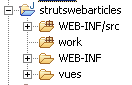
3.6.3.2. Data Access Configuration
Since the data access interface remains unchanged, the associated configuration files are the same as in the previous version. They are defined in [WEB-INF/src]:
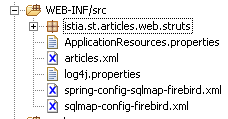
In the screenshot above, the [articles.xml, spring-config-sqlmap-firebird.xml, sqlmap-config-firebird.xml, log4j.properties] files are those from the previous version.
3.6.3.3. The archive directory
In [WEB-INF/lib], you will find the same archives as in the previous version, plus the one required by Struts:
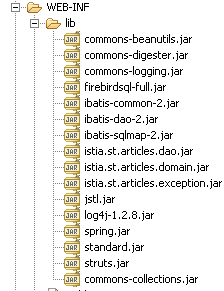
3.6.3.4. Application configuration
The application is configured using two files: [web.xml, struts-config.xml] in the [WEB-INF] folder:
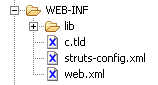
The [web.xml] file is as follows:
| <?xml version="1.0" encoding="ISO-8859-1"?>
<!DOCTYPE web-app
PUBLIC "-//Sun Microsystems, Inc.//DTD Web Application 2.3//EN"
"http://java.sun.com/dtd/web-app_2_3.dtd">
<web-app>
<servlet>
<servlet-name>strutswebarticles</servlet-name>
<servlet-class>istia.st.articles.web.struts.MainServlet</servlet-class>
<init-param>
<param-name>config</param-name>
<param-value>/WEB-INF/struts-config.xml</param-value>
</init-param>
<init-param>
<param-name>springConfigFileName</param-name>
<param-value>spring-config-sqlmap-firebird.xml</param-value>
</init-param>
</servlet>
<servlet-mapping>
<servlet-name>strutswebarticles</servlet-name>
<url-pattern>*.do</url-pattern>
</servlet-mapping>
    <welcome-file-list>
        <welcome-file>/vues/index.jsp</welcome-file>
    </welcome-file-list>
</web-app>
|
What does this file say?
- The application's home page is [vues/index.jsp] (welcome-file)
- Requests for url in the form *.do will be redirected to the [strutswebarticles] servlet (servlet-mapping)
- The servlet [strutswebarticles] is an instance of the class [ istia.st.articles.web.struts.MainServlet] (servlet-name, servlet-class)
- This servlet accepts two initialization parameters
- the name of the Struts configuration file (config)
- the name of the Spring configuration file (springConfigFileName)
The file [struts-config.xml] is as follows:
| <?xml version="1.0" encoding="ISO-8859-1" ?>
<!DOCTYPE struts-config PUBLIC
"-//Apache Software Foundation//DTD Struts Configuration 1.1//EN"
"http://jakarta.apache.org/struts/dtds/struts-config_1_1.dtd">
<struts-config>
<action-mappings>
<action path="/main" type="istia.st.articles.web.struts.ListeArticlesAction">
<forward name="afficherListeArticles" path="/vues/liste.jsp"/>
<forward name="afficherErreurs" path="/vues/erreurs.jsp"/>
</action>
<action path="/liste" type="istia.st.articles.web.struts.ListeArticlesAction">
<forward name="afficherListeArticles" path="/vues/liste.jsp"/>
<forward name="afficherErreurs" path="/vues/erreurs.jsp"/>
</action>
<action path="/infos" type="istia.st.articles.web.struts.InfosArticleAction">
<forward name="afficherInfosArticle" path="/vues/infos.jsp"/>
<forward name="afficherErreurs" path="/vues/erreurs.jsp"/>
</action>
<action
path="/achat" type="istia.st.articles.web.struts.AchatArticleAction">
<forward name="afficherInfosArticle" path="/vues/infos.jsp"/>
<forward name="afficherListeArticles" path="/main.do"/>
</action>
<action
path="/panier" type="istia.st.articles.web.struts.VoirPanierAction">
<forward name="afficherPanier" path="/vues/panier.jsp"/>
<forward name="afficherPanierVide" path="/vues/paniervide.jsp"/>
</action>
<action
path="/retirerachat" type="istia.st.articles.web.struts.RetirerAchatAction">
<forward name="afficherPanier" path="/panier.do"/>
<forward name="afficherErreurs" path="/vues/erreurs.jsp"/>
</action>
<action
path="/validerpanier" type="istia.st.articles.web.struts.ValiderPanierAction">
<forward name="afficherListeArticles" path="/main.do"/>
<forward name="afficherErreurs" path="/vues/erreurs.jsp"/>
</action>
</action-mappings>
<message-resources parameter="ApplicationResources" null="false" />
</struts-config>
|
What does this configuration file say?
- that our controller will handle the following url requests:
| to display the list of items |
| to display the list of items |
| to display information about a specific item |
| to purchase a specific item |
| to view the shopping cart |
| to remove a purchase from the shopping cart |
| to confirm a shopping cart |
- The actions listed above correspond one-to-one with the actions handled by the servlet in the previous version. For each of them, the following information is provided:
- the name of the class responsible for handling this action
- the possible responses (= views) after the action is processed. Only one of them will be selected by the controller.
- the name of a message file for the application (message-resources). Here, the file will exist but will be empty. It will not be used. It must be placed in the application’s [ClassPath]. Here it will be placed in [WEB-INF/classes]. In Eclipse, this result is achieved by placing it in [WEB-INF/src]:
3.6.4. The JSP views
The JSP views used here are also those from the previous version. Very few things have changed: these are the url files in the form [?action=XX?id=YY& ...], which become [/XX.do?id=YY&....]. We are repeating explanations already provided here to avoid requiring the user to go back. It is important to understand that the information transmitted to the view by the controller is exactly the same in both versions. Nothing has changed in this regard.
3.6.4.1. entete.jsp
To ensure consistency across the different views, they will share the same header, which displays the application name along with the menu:
The menu is dynamic and defined by the controller. The controller includes an "actions" key attribute in the request sent to the JSP page, with an associated value of a Hastable[] array. Each element of this array is a dictionary intended to generate a option for the header menu. Each dictionary has two keys:
- href: the url associated with the option menu
- link: the menu text
The other views of the application will use the header defined by [entete.jsp] using the following JSP tag:
<jsp:include page="entete.jsp"/>
At runtime, this tag will include the code from the [entete.jsp] page into the code of the JSP page that contains it. Since the url of the page is a relative url (no /), the [entete.jsp] page will be searched for in the same folder as the page containing the <jsp:include> tag.
Code:
| <%@ page language="java" %>
<%@ taglib uri="/WEB-INF/c.tld" prefix="c" %>
<html>
<head>
<title>webarticles</title>
</head>
<body>
<table>
<tr>
<td><h2>Magasin virtuel</h2></td>
<c:forEach items="${actions}" var="action">
<td>|</td>
<td><a href="<c:out value="${action.href}"/>"><c:out value="${action.lien}"/></a></td>
</c:forEach>
</tr>
</table>
<hr>
|
Comments: No changes from the previous version
3.6.4.2. liste.jsp
This view displays the list of items available for sale:
It is displayed following a /main.do or /validerpanier.do request. The elements of the controller request are as follows:
| Hashtable[] object - the array of menu options |
| ArrayList of objects of type [Article] |
| object String - message to display at the bottom of the page |
Each link [Infos] in the HTML array of articles has a url of the form [/infos.do?id=ID] where ID is the id of the displayed item.
Code:
| <%@ page language="java" %>
<%@ taglib uri="/WEB-INF/c.tld" prefix="c" %>
<jsp:include page="entete.jsp"/>
<h2>Liste des articles</h2>
<table border="1">
<tr>
<th>NOM</th><th>PRIX</th>
</tr>
<c:forEach var="article" items="${listarticles}">
<tr>
<td><c:out value="${article.nom}"/></td>
<td><c:out value="${article.prix}"/></td>
<td><a href="<c:out value="infos.do?id=${article.id}"/>">Infos</a></td>
</tr>
</c:forEach>
</table>
<p>
<c:out value="${message}"/>
</body>
</html>
|
Comments: one change (highlighted above)
3.6.4.3. infos.jsp
This view displays information about an item and also allows it to be purchased:
It is displayed following a request /infos.do?id=ID or a request /achat.do?id=ID when the purchased quantity is incorrect. The elements of the controller’s request are as follows:
| object Hashtable[] - the array of menu options |
| object of type [Article] - item to display |
| object String - message to display in case of an error with the quantity |
| object String - value to display in the input field [Qte] |
The fields [msg] and [qte] are used in case of a quantity entry error:
This page contains a form that is submitted via the [Acheter] button. The url target of POST is [/achat.do?id=ID], where ID is the id of the purchased item.
Code:
| <%@ page language="java" %>
<%@ taglib uri="/WEB-INF/c.tld" prefix="c" %>
<jsp:include page="entete.jsp"/>
<h2>Article d'id [<c:out value="${article.id}"/>]</h2>
<table border="1">
<tr>
<th>NOM</th><th>PRIX</th><th>STOCK ACTUEL</th><th>STOCK MINIMUM</th>
</tr>
<tr>
<td><c:out value="${article.nom}"/></td>
<td><c:out value="${article.prix}"/></td>
<td><c:out value="${article.stockActuel}"/></td>
<td><c:out value="${article.stockMinimum}"/></td>
</tr>
</table>
<p>
<form method="post" action="achat.do?id=<c:out value="${article.id}"/>"/>
<table>
<tr>
<td><input type="submit" value="Acheter"></td>
<td>Qte <input type="text" name="qte" size="3" value="<c:out value="${qte}"/>"></td>
<td><c:out value="${msg}"/></td>
</tr>
</table>
</form>
</body>
</html>
|
Comments: one change (highlighted above)
3.6.4.4. panier.jsp
This view displays the contents of the shopping cart:
It is displayed following a request for /panier.do or /retirerachat.do?id=ID. The elements of the controller request are as follows:
| Hashtable[] object - the array of menu options |
| object of type [Panier] - the shopping cart to be displayed |
Each link [Retirer] in the HTML array of shopping cart items has a url of the form [retirerachat.do?id=ID], where ID is the [id] of the item we want to remove from the cart.
Code:
| <%@ page language="java" %>
<%@ taglib uri="/WEB-INF/c.tld" prefix="c" %>
<jsp:include page="entete.jsp"/>
<h2>Contenu de votre panier</h2>
<table border="1">
<tr>
<td>Article</td><td>Qte</td><td>Pu</td><td>Total</td>
</tr>
<c:forEach var="achat" items="${panier.achats}">
<tr>
<td><c:out value="${achat.article.nom}"/></td>
<td><c:out value="${achat.qte}"/></td>
<td><c:out value="${achat.article.prix}"/></td>
<td><c:out value="${achat.total}"/></td>
<td><a href="<c:out value="retirerachat.do?id=${achat.article.id}"/>">Retirer</a></td>
</tr>
</c:forEach>
</table>
<p>
Total de la commande : <c:out value="${panier.total}"/> euros
</body>
</html>
|
Comments: one change (highlighted above)
3.6.4.5. paniervide.jsp
This view displays a message indicating that the shopping cart is empty:
It is displayed following a request for /panier.do or /retirerachat.do?id=ID. The elements of the controller request are as follows:
| Hashtable[] object - the array of menu options |
Code:
| <%@ page language="java" %>
<%@ taglib uri="/WEB-INF/c.tld" prefix="c" %>
<jsp:include page="entete.jsp"/>
<h2>Contenu de votre panier</h2>
<p>
Votre panier est vide.
</body>
</html>
|
Comments: no changes.
3.6.4.6. erreurs.jsp
This view is displayed in case of errors:
It is displayed following any request that results in an error, except for the purchase action with an incorrect quantity, which is handled by the [INFOS] view. The elements of the controller request are as follows:
| Hashtable[] object - the array of menu options |
| ArrayList of String objects representing the error messages to be displayed |
Code:
| <%@ page language="java" %>
<%@ taglib uri="/WEB-INF/c.tld" prefix="c" %>
<jsp:include page="entete.jsp"/>
<h2>Les erreurs suivantes se sont produites</h2>
<ul>
<c:forEach var="erreur" items="${erreurs}">
<li><c:out value="${erreur}"/></li>
</c:forEach>
</ul>
</body>
</html>
|
Comments: no changes.
3.6.4.7. index.jsp
This page is defined as the application's home page in the application's [web.xml] file:
| <?xml version="1.0" encoding="ISO-8859-1"?>
<!DOCTYPE web-app
PUBLIC "-//Sun Microsystems, Inc.//DTD Web Application 2.3//EN"
"http://java.sun.com/dtd/web-app_2_3.dtd">
<web-app>
<servlet>
....
</servlet>
<servlet-mapping>
....
</servlet-mapping>
<welcome-file-list>
<welcome-file>/vues/index.jsp</welcome-file>
</welcome-file-list>
</web-app>
|
The [index.jsp] view simply redirects the client to the application's entry point:
<%@ page language="java" %>
<%@ taglib uri="/WEB-INF/c.tld" prefix="c" %>
<c:redirect url="/main.do"/>
Comments: one change (highlighted above)
3.6.5. The Struts controller
Struts has a generic controller called [ActionServlet]. We know that a servlet has a method named [init] that allows the application to be initialized when it starts. If we use the Struts generic controller [ActionServlet], we do not have access to its method [init]. Here, we have tasks to perform when the application starts, primarily instantiating a model access object. Therefore, we need a method named [init]. We thus derive the [Actionservlet] class from the following [MainServlet] class:
| package istia.st.articles.web.struts;
import istia.st.articles.domain.IArticlesDomain;
import java.util.ArrayList;
import java.util.Hashtable;
import javax.servlet.ServletConfig;
import javax.servlet.ServletException;
import org.apache.struts.action.ActionServlet;
import org.springframework.beans.factory.xml.XmlBeanFactory;
import org.springframework.core.io.ClassPathResource;
/**
* @author ST - ISTIA
*
*/
public class MainServlet extends ActionServlet {
// private fields
private ArrayList erreurs = new ArrayList();
private IArticlesDomain articlesDomain = null;
private final String SPRING_CONFIG_FILENAME = "springConfigFileName";
private final String[] parameters = { SPRING_CONFIG_FILENAME };
private ServletConfig config;
private final String ACTION_LISTE = "liste.do";
private final String ACTION_PANIER = "panier.do";
private final String ACTION_ACHAT = "achat.do";
private final String ACTION_INFOS = "infos.do";
private final String ACTION_RETIRER_ACHAT = "retirerachat.do";
private final String ACTION_VALIDATION_PANIER = "validerpanier.do";
private String urlActionListe;
private final String lienActionListe = "Liste des articles";
private String urlActionPanier;
private final String lienActionPanier = "Voir le panier";
private String urlActionValidationPanier;
private final String lienActionValidationPanier = "Valider le panier";
private Hashtable hActionListe = new Hashtable(2);
private Hashtable hActionPanier = new Hashtable(2);
private Hashtable hActionValidationPanier = new Hashtable(2);
// getters - setters
public IArticlesDomain getArticlesDomain() {
return articlesDomain;
}
public void setArticlesDomain(IArticlesDomain articlesDomain) {
this.articlesDomain = articlesDomain;
}
public ArrayList getErreurs() {
return erreurs;
}
public void setErreurs(ArrayList erreurs) {
this.erreurs = erreurs;
}
public Hashtable getHActionListe() {
return hActionListe;
}
public void setHActionListe(Hashtable actionListe) {
hActionListe = actionListe;
}
public Hashtable getHActionPanier() {
return hActionPanier;
}
public void setHActionPanier(Hashtable actionPanier) {
hActionPanier = actionPanier;
}
public Hashtable getHActionValidationPanier() {
return hActionValidationPanier;
}
public void setHActionValidationPanier(Hashtable actionValidationPanier) {
hActionValidationPanier = actionValidationPanier;
}
public void init() throws ServletException{
// init parent class
super.init();
// retrieve servlet initialization parameters
config = getServletConfig();
String param = null;
for (int i = 0; i < parameters.length; i++) {
param = config.getInitParameter(parameters[i]);
if (param == null) {
// we memorize the error
erreurs.add("Paramètre [" + parameters[i]
+ "] absent dans le fichier [web.xml]");
}
}
// mistakes?
if (erreurs.size() != 0) {
return;
}
// create a IArticlesDomain business layer access object
try {
articlesDomain = (IArticlesDomain) (new XmlBeanFactory(
new ClassPathResource((String) config
.getInitParameter(SPRING_CONFIG_FILENAME))))
.getBean("articlesDomain");
} catch (Exception ex) {
// we memorize the error
erreurs.add("Erreur de configuration de l'accès aux données : "
+ ex.toString());
return;
}
// we store some url of the application
hActionListe.put("href", ACTION_LISTE);
hActionListe.put("lien", lienActionListe);
hActionPanier.put("href", ACTION_PANIER);
hActionPanier.put("lien", lienActionPanier);
hActionValidationPanier.put("href", ACTION_VALIDATION_PANIER);
hActionValidationPanier.put("lien", lienActionValidationPanier);
// it's over
return;
}
}
|
Comments:
- The value of the class lies in its [init] method and its private fields
- The [init] method does the same thing as the [init] method in the controller of the previous version:
- it checks for the presence of certain configuration parameters
- it instantiates a service to access the application domain using Spring
- it sets an error list to indicate any initialization errors
- Before starting work, the [init] method calls the [init] method of the parent class [ActionServlet]. This method processes the Struts configuration file [struts-config.xml].
- A number of private fields with their accessors are defined:
- errors: the list of errors detected by [init]
- [hActionListe, hActionPanier, hActionValidationPanier]: dictionaries. Each contains the information needed to display a option from the main menu displayed by the [entete.jsp] view
- acticlesDomain: the service providing access to the application model
- The controller of a Struts application is accessible to the [Action] classes responsible for handling the various possible actions. These classes will have access to the preceding private fields because they are provided with public accessors.
This controller is instantiated by the file [web.xml]:
| <web-app>
<servlet>
<servlet-name>strutswebarticles</servlet-name>
<servlet-class>istia.st.articles.web.struts.MainServlet</servlet-class>
<init-param>
<param-name>config</param-name>
<param-value>/WEB-INF/struts-config.xml</param-value>
</init-param>
<init-param>
<param-name>springConfigFileName</param-name>
<param-value>spring-config-sqlmap-firebird.xml</param-value>
</init-param>
</servlet>
<servlet-mapping>
<servlet-name>strutswebarticles</servlet-name>
<url-pattern>*.do</url-pattern>
</servlet-mapping>
</web-app>
|
Any URL ending in .do will be processed by an instance of the [istia.st.articles.web.struts.MainServlet] class
3.6.6. Struts application actions
3.6.6.1. Introduction
Each Struts action will be the subject of a class. In the previous version, each action was the subject of a method in the application controller. Writing the [Action] class usually consists of:
- copying and pasting the method used in the previous version
- adapting the code to Struts conventions
3.6.6.2. main.do, liste.do
These two actions are identical and defined in [struts-config.xml] as follows:
| <action path="/main" type="istia.st.articles.web.struts.ListeArticlesAction">
<forward name="afficherListeArticles" path="/vues/liste.jsp"/>
<forward name="afficherErreurs" path="/vues/erreurs.jsp"/>
</action>
<action path="/liste" type="istia.st.articles.web.struts.ListeArticlesAction">
<forward name="afficherListeArticles" path="/vues/liste.jsp"/>
<forward name="afficherErreurs" path="/vues/erreurs.jsp"/>
</action>
|
When one of these [main.do, liste.do] actions is executed in a browser, the following result is obtained:
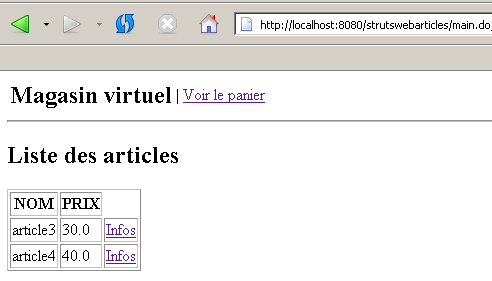
The code for the [ListeArticlesAction] class is as follows:
| package istia.st.articles.web.struts;
import istia.st.articles.domain.IArticlesDomain;
import istia.st.articles.exception.UncheckedAccessArticlesException;
import java.io.IOException;
import java.util.ArrayList;
import java.util.Hashtable;
import java.util.List;
import javax.servlet.ServletException;
import javax.servlet.http.HttpServletRequest;
import javax.servlet.http.HttpServletResponse;
import org.apache.struts.action.Action;
import org.apache.struts.action.ActionForm;
import org.apache.struts.action.ActionForward;
import org.apache.struts.action.ActionMapping;
/**
* @author ST - ISTIA
*
*/
public class ListeArticlesAction extends Action {
/**
* affichage de la liste des articles - s'appuie sur la couche [domain]
*
* @param mapping :
* configuration de l'action dans struts-config.xml
* @param form :
* le formulaire passé à l'action - ici aucun
* @param request :
* la requête HTTP du client
* @param response :
* la réponse HTTP au client
*/
public ActionForward execute(ActionMapping mapping, ActionForm form,
HttpServletRequest request, HttpServletResponse response)
throws IOException, ServletException {
// the control servlet
MainServlet mainServlet = (MainServlet) this.getServlet();
// initialization errors?
ArrayList erreursInit = mainServlet.getErreurs();
if (erreursInit.size() != 0) {
// the error page is displayed
request.setAttribute("erreurs", erreursInit);
request.setAttribute("actions", new Hashtable[] {});
return mapping.findForward("afficherErreurs");
}
// domain access object
IArticlesDomain articlesDomain = mainServlet.getArticlesDomain();
// list of errors
ArrayList erreurs = new ArrayList();
// the list of items is requested
List articles = null;
try {
articles = articlesDomain.getAllArticles();
} catch (UncheckedAccessArticlesException ex) {
// we memorize the error
erreurs.add("Erreur lors de l'obtention de tous les articles : "
+ ex.toString());
}
// mistakes?
if (erreurs.size() != 0) {
// the error page is displayed
request.setAttribute("erreurs", erreurs);
request.setAttribute("actions", new Hashtable[] { mainServlet
.getHActionListe() });
return mapping.findForward("afficherErreurs");
}
// displays the list of items
request.setAttribute("listarticles", articles);
request.setAttribute("message", "");
request.setAttribute("actions", new Hashtable[] { mainServlet
.getHActionPanier() });
return mapping.findForward("afficherListeArticles");
}
}
|
Comments:
- Writing the code for a [Action] class essentially involves writing the code for its [execute] method
- A certain amount of information has been stored in the controller instance. We retrieve a reference to it using:
// the control servlet
MainServlet mainServlet = (MainServlet) this.getServlet();
- We retrieve the list of initialization errors stored by the controller. If this list is not empty, the [ERREURS] view is sent to the client:
| // initialization errors?
ArrayList erreursInit = mainServlet.getErreurs();
if (erreursInit.size() != 0) {
// the error page is displayed
request.setAttribute("erreurs", erreursInit);
request.setAttribute("actions", new Hashtable[] {});
return mapping.findForward("afficherErreurs");
}
|
The view that will actually be sent to the client is provided by [struts-config.xml]:
<action path="/main" type="istia.st.articles.web.struts.ListeArticlesAction">
<forward name="afficherListeArticles" path="/vues/liste.jsp"/>
<forward name="afficherErreurs" path="/vues/erreurs.jsp"/>
</action>
This is view [/vues/erreurs.jsp]. The reader is encouraged to verify what this view expects. This information is provided here by the action in object [request] as attributes.
- Still using the controller, the action can retrieve the object providing access to the application model (domain layer):
// domain access object
IArticlesDomain articlesDomain = mainServlet.getArticlesDomain();
- Once this is done, we can request the list of articles:
| // error list
ArrayList erreurs = new ArrayList();
// the list of items is requested
List articles = null;
try {
articles = articlesDomain.getAllArticles();
} catch (UncheckedAccessArticlesException ex) {
// we memorize the error
erreurs.add("Erreur lors de l'obtention de tous les articles : "
+ ex.toString());
}
|
- If errors occur, the view [ERREURS] is sent:
| // mistakes?
if (erreurs.size() != 0) {
// the error page is displayed
request.setAttribute("erreurs", erreurs);
request.setAttribute("actions", new Hashtable[] { mainServlet
.getHActionListe() });
return mapping.findForward("afficherErreurs");
}
|
- otherwise, the view [LISTE] is sent:
| // displays the list of items
request.setAttribute("listarticles", articles);
request.setAttribute("message", "");
request.setAttribute("actions", new Hashtable[] { mainServlet
.getHActionPanier() });
return mapping.findForward("afficherListeArticles");
|
The view that will actually be sent to the client is provided by [struts-config.xml]:
<action path="/main" type="istia.st.articles.web.struts.ListeArticlesAction">
<forward name="afficherListeArticles" path="/vues/liste.jsp"/>
<forward name="afficherErreurs" path="/vues/erreurs.jsp"/>
</action>
This is the view [/vues/liste.jsp]. The reader is invited to verify what is expected by this view. This information is provided here by the action in the [request] object as attributes.
3.6.6.3. infos.do
This action is used to provide information about one of the items displayed in the [LISTE] view:
This action is configured as follows in [struts-config.xml]:
<action path="/infos" type="istia.st.articles.web.struts.InfosArticleAction">
<forward name="afficherInfosArticle" path="/vues/infos.jsp"/>
<forward name="afficherErreurs" path="/vues/erreurs.jsp"/>
</action>
The code for the [InfosArticleAction] class is as follows:
| package istia.st.articles.web.struts;
import istia.st.articles.dao.Article;
import istia.st.articles.domain.IArticlesDomain;
import istia.st.articles.exception.UncheckedAccessArticlesException;
import java.io.IOException;
import java.util.ArrayList;
import java.util.Hashtable;
import javax.servlet.ServletException;
import javax.servlet.http.HttpServletRequest;
import javax.servlet.http.HttpServletResponse;
import org.apache.struts.action.Action;
import org.apache.struts.action.ActionForm;
import org.apache.struts.action.ActionForward;
import org.apache.struts.action.ActionMapping;
/**
* @author ST-ISTIA
*
*/
public class InfosArticleAction extends Action {
public ActionForward execute(ActionMapping mapping, ActionForm form,
HttpServletRequest request, HttpServletResponse response)
throws IOException, ServletException {
// the control servlet
MainServlet mainServlet = (MainServlet) this.getServlet();
// initialization errors?
ArrayList erreursInit = mainServlet.getErreurs();
if (erreursInit.size() != 0) {
// the error page is displayed
request.setAttribute("erreurs", erreursInit);
request.setAttribute("actions", new Hashtable[] {});
return mapping.findForward("afficherErreurs");
}
// domain access object
IArticlesDomain articlesDomain = mainServlet.getArticlesDomain();
// list of errors
ArrayList erreurs = new ArrayList();
// the requested id is retrieved
String strId = request.getParameter("id");
// anything?
if (strId == null) {
// not normal
erreurs.add("action incorrecte([infos,id=null]");
request.setAttribute("erreurs", erreurs);
request.setAttribute("actions", new Hashtable[] { mainServlet
.getHActionListe() });
return mapping.findForward("afficherErreurs");
}
// transform strId into an integer
int id = 0;
try {
id = Integer.parseInt(strId);
} catch (Exception ex) {
// not normal
erreurs.add("action incorrecte([infos,id=" + strId + "]");
request.setAttribute("erreurs", erreurs);
request.setAttribute("actions", new Hashtable[] { mainServlet
.getHActionListe() });
return mapping.findForward("afficherErreurs");
}
// key item id is requested
Article article = null;
try {
article = articlesDomain.getArticleById(id);
} catch (UncheckedAccessArticlesException ex) {
// not normal
erreurs.add("Erreur d'accès aux données [" + ex.toString() + "]");
request.setAttribute("erreurs", erreurs);
request.setAttribute("actions", new Hashtable[] { mainServlet
.getHActionListe() });
return mapping.findForward("afficherErreurs");
}
if (article == null) {
// not normal
erreurs.add("Article de clé [" + id + "] inexistant");
request.setAttribute("erreurs", erreurs);
request.setAttribute("actions", new Hashtable[] { mainServlet
.getHActionListe() });
return mapping.findForward("afficherErreurs");
}
// put the article in the session
request.getSession().setAttribute("article", article);
// the info page is displayed
request.setAttribute("actions", new Hashtable[] { mainServlet
.getHActionListe() });
return mapping.findForward("afficherInfosArticle");
}
}
|
Comments:
- The beginning of the [execute] method is identical to the one discussed previously. This will also be the case for the other actions.
- The method retrieves the parameter [id], which should normally be found in url. This should indeed be in the form [/infos.do?id=X]. Various checks are performed to verify the presence and validity of the [id] parameter. If there is a problem, the [ERREURS] view is sent.
- If [id] is valid, the corresponding item is requested from the [domain] layer. If this layer throws an exception or if the item is not found, the [ERREURS] view is sent again.
- If everything goes well, the retrieved item is placed in the session. This is a debatable point. Here, we assume that the customer might purchase this item. If they do, we will retrieve it from the session rather than requesting it again from the [domain] layer.
- Finally, the [INFOS] view is displayed. The view that will actually be sent to the client is provided by [struts-config.xml]:
<action path="/infos" type="istia.st.articles.web.struts.InfosArticleAction">
<forward name="afficherInfosArticle" path="/vues/infos.jsp"/>
<forward name="afficherErreurs" path="/vues/erreurs.jsp"/>
</action>
This is the view [/vues/infos.jsp]. The reader is invited to verify what is expected by this view. This information is provided here by the action in the object [request] as attributes.
3.6.6.4. achat.do
This action is used to purchase the item displayed by the previous view [INFOS]:
Once the item is purchased, the [LISTE] view is redisplayed (right view). If we look at the HTML code for the left view above, we see that the <form> tag is defined as follows:
| <form method="post" action="achat.do?id=3"/>
<table>
<tr>
<td><input type="submit" value="Acheter"></td>
<td>Qte <input type="text" name="qte" size="3" value=""></td>
<td></td>
</tr>
</table>
</form>
|
We can see that the form is posted to the controller with the action [achat.do].
This action is configured as follows in [struts-config.xml]:
<action
path="/achat" type="istia.st.articles.web.struts.AchatArticleAction">
<forward name="afficherInfosArticle" path="/vues/infos.jsp"/>
<forward name="afficherListeArticles" path="/main.do"/>
</action>
The code for class [AchatArticleAction] is as follows:
| package istia.st.articles.web.struts;
import istia.st.articles.dao.Article;
import istia.st.articles.domain.Achat;
import istia.st.articles.domain.Panier;
import java.io.IOException;
import java.util.ArrayList;
import java.util.Hashtable;
import javax.servlet.ServletException;
import javax.servlet.http.HttpServletRequest;
import javax.servlet.http.HttpServletResponse;
import javax.servlet.http.HttpSession;
import org.apache.struts.action.Action;
import org.apache.struts.action.ActionForm;
import org.apache.struts.action.ActionForward;
import org.apache.struts.action.ActionMapping;
/**
* @author ST
*
*/
public class AchatArticleAction extends Action {
public ActionForward execute(ActionMapping mapping, ActionForm form,
HttpServletRequest request, HttpServletResponse response)
throws IOException, ServletException {
// the control servlet
MainServlet mainServlet = (MainServlet) this.getServlet();
// initialization errors?
ArrayList erreursInit = mainServlet.getErreurs();
if (erreursInit.size() != 0) {
// the error page is displayed
request.setAttribute("erreurs", erreursInit);
request.setAttribute("actions", new Hashtable[] {});
return mapping.findForward("afficherErreurs");
}
// the list of errors on this action
ArrayList erreurs = new ArrayList();
// the quantity purchased is recovered
int qté = 0;
try {
qté = Integer.parseInt(request.getParameter("qte"));
if (qté <= 0)
throw new NumberFormatException();
} catch (NumberFormatException ex) {
// wrong qty
request.setAttribute("msg", "Quantité incorrecte");
request.setAttribute("qte", request.getParameter("qte"));
request.setAttribute("actions", new Hashtable[] { mainServlet
.getHActionListe() });
return mapping.findForward("afficherInfosArticle");
}
// retrieve the client session
HttpSession session = request.getSession();
// we retrieve the session item
Article article = (Article) session.getAttribute("article");
// session expired?
if(article==null){
// the error page is displayed
erreurs.add("Votre session a expiré");
request.setAttribute("erreurs", erreurs);
request.setAttribute("actions", new Hashtable[] { mainServlet
.getHActionListe() });
return mapping.findForward("afficherErreurs");
}
// create the new purchase
Achat achat = new Achat(article, qté);
// the purchase is added to the customer's basket
Panier panier = (Panier) session.getAttribute("panier");
if (panier == null) {
panier = new Panier();
session.setAttribute("panier", panier);
}
panier.ajouter(achat);
// we return to the list of items
return mapping.findForward("afficherListeArticles");
}
}
|
Comments:
- The beginning of the [execute] method is identical to those studied previously.
- Let’s recall the format of the form sent to the controller:
| <form method="post" action="achat.do?id=3"/>
<table>
<tr>
<td><input type="submit" value="Acheter"></td>
<td>Qte <input type="text" name="qte" size="3" value=""></td>
<td></td>
</tr>
</table>
</form>
|
- There are two parameters in the request: [id]: item number purchased, [qte]: quantity purchased.
- The presence and validity of the parameter [qte] are checked. If this parameter is found to be incorrect, the view [INFOS] is returned to the user along with an error message:
| // the list of errors on this action
ArrayList erreurs = new ArrayList();
// the quantity purchased is recovered
int qté = 0;
try {
qté = Integer.parseInt(request.getParameter("qte"));
if (qté <= 0)
throw new NumberFormatException();
} catch (NumberFormatException ex) {
// wrong qty
request.setAttribute("msg", "Quantité incorrecte");
request.setAttribute("qte", request.getParameter("qte"));
request.setAttribute("actions", new Hashtable[] { mainServlet
.getHActionListe() });
return mapping.findForward("afficherInfosArticle");
}
|
- The purchased item is retrieved from the session. The session may have expired. In this case, the view [ERREURS] is sent:
| // retrieve the client session
HttpSession session = request.getSession();
// we retrieve the article placed in session
Article article = (Article) session.getAttribute("article");
// session expired?
if(article==null){
// the error page is displayed
erreurs.add("Votre session a expiré");
request.setAttribute("erreurs", erreurs);
request.setAttribute("actions", new Hashtable[] { mainServlet
.getHActionListe() });
return mapping.findForward("afficherErreurs");
}
|
- if the session has not expired, the item is added to the cart, which is also retrieved from the session:
| // retrieve the client session
HttpSession session = request.getSession();
// we retrieve the article placed in session
Article article = (Article) session.getAttribute("article");
// session expired?
if(article==null){
// the error page is displayed
erreurs.add("Votre session a expiré");
request.setAttribute("erreurs", erreurs);
request.setAttribute("actions", new Hashtable[] { mainServlet
.getHActionListe() });
return mapping.findForward("afficherErreurs");
}
// create the new purchase
Achat achat = new Achat(article, qté);
// the purchase is added to the customer's basket
Panier panier = (Panier) session.getAttribute("panier");
if (panier == null) {
panier = new Panier();
session.setAttribute("panier", panier);
}
panier.ajouter(achat);
|
- Finally, we send the view [LISTE]:
// we return to the list of items
return mapping.findForward("afficherListeArticles");
- The view that will actually be sent to the client is provided by [struts-config.xml]:
<action
path="/achat" type="istia.st.articles.web.struts.AchatArticleAction">
<forward name="afficherInfosArticle" path="/vues/infos.jsp"/>
<forward name="afficherListeArticles" path="/main.do"/>
</action>
This is the view [/main.do]. This view is not a view but an action. The action [/main.do] described above will therefore execute and display the list of items.
3.6.6.5. panier.do
This action is used to display all of the customer's purchases. It is available via the option menu item in [Voir le panier]:
The code associated with the [Voir le panier] link is as follows:
<a href="panier.do">Voir le panier</a>
The [panier.do] action is configured as follows in [struts-config.xml]:
<action
path="/panier" type="istia.st.articles.web.struts.VoirPanierAction">
<forward name="afficherPanier" path="/vues/panier.jsp"/>
<forward name="afficherPanierVide" path="/vues/paniervide.jsp"/>
</action>
The code for class [VoirPanierAction] is as follows:
| package istia.st.articles.web.struts;
import istia.st.articles.domain.Panier;
import java.io.IOException;
import java.util.ArrayList;
import java.util.Hashtable;
import javax.servlet.ServletException;
import javax.servlet.http.HttpServletRequest;
import javax.servlet.http.HttpServletResponse;
import org.apache.struts.action.Action;
import org.apache.struts.action.ActionForm;
import org.apache.struts.action.ActionForward;
import org.apache.struts.action.ActionMapping;
/**
* @author ST-ISTIA
*
*/
public class VoirPanierAction extends Action {
public ActionForward execute(ActionMapping mapping, ActionForm form,
HttpServletRequest request, HttpServletResponse response)
throws IOException, ServletException {
// the control servlet
MainServlet mainServlet = (MainServlet) this.getServlet();
// initialization errors?
ArrayList erreursInit = mainServlet.getErreurs();
if (erreursInit.size() != 0) {
// the error page is displayed
request.setAttribute("erreurs", erreursInit);
request.setAttribute("actions", new Hashtable[] {});
return mapping.findForward("afficherErreurs");
}
// the basket is displayed
Panier panier = (Panier) request.getSession().getAttribute("panier");
if (panier == null || panier.getAchats().size() == 0) {
// empty basket
request.setAttribute("actions", new Hashtable[] { mainServlet
.getHActionListe() });
return mapping.findForward("afficherPanierVide");
} else {
// there's something in the basket
request.setAttribute("actions", new Hashtable[] { mainServlet
.getHActionListe(), mainServlet.getHActionValidationPanier() });
return mapping.findForward("afficherPanier");
}
}
}
|
Comments:
- The beginning of the [execute] method is identical to those discussed previously.
- The shopping cart is retrieved from the session where it is normally located. The session may have expired, in which case there is no shopping cart. This is not treated as an error; we simply assume that the shopping cart is empty.
- If the shopping cart is empty, the view [PANIERVIDE] is displayed
- otherwise, it is view [PANIER]
The views actually sent to the client are defined by the action:
<action
path="/panier" type="istia.st.articles.web.struts.VoirPanierAction">
<forward name="afficherPanier" path="/vues/panier.jsp"/>
<forward name="afficherPanierVide" path="/vues/paniervide.jsp"/>
</action>
3.6.6.6. retirerachat.do
This action is used to remove an item from the cart:
After the [retirerachat.do] action, the cart is re-displayed (view on the right above). If we look at the HTML code for the [Valider le panier] link in the view on the left above, we see the following:
<a href="retirerachat.do?id=3">Retirer</a>
The [retirerachat.do] action therefore receives, as a parameter, the id of the item to be removed from the shopping cart. This action is configured as follows in [struts-config.xml]:
<action
path="/retirerachat" type="istia.st.articles.web.struts.RetirerAchatAction">
<forward name="afficherPanier" path="/panier.do"/>
<forward name="afficherErreurs" path="/vues/erreurs.jsp"/>
</action>
The code for class [RetirerAchatAction] is as follows:
| package istia.st.articles.web.struts;
import istia.st.articles.domain.Panier;
import java.io.IOException;
import java.util.ArrayList;
import java.util.Hashtable;
import javax.servlet.ServletException;
import javax.servlet.http.HttpServletRequest;
import javax.servlet.http.HttpServletResponse;
import org.apache.struts.action.Action;
import org.apache.struts.action.ActionForm;
import org.apache.struts.action.ActionForward;
import org.apache.struts.action.ActionMapping;
/**
* @author ST-ISTIA
*
*/
public class RetirerAchatAction extends Action {
public ActionForward execute(ActionMapping mapping, ActionForm form,
HttpServletRequest request, HttpServletResponse response)
throws IOException, ServletException {
// the control servlet
MainServlet mainServlet = (MainServlet) this.getServlet();
// initialization errors?
ArrayList erreursInit = mainServlet.getErreurs();
if (erreursInit.size() != 0) {
// the error page is displayed
request.setAttribute("erreurs", erreursInit);
request.setAttribute("actions", new Hashtable[] {});
return mapping.findForward("afficherErreurs");
}
// the list of errors on this action
ArrayList erreurs = new ArrayList();
// we pick up the basket
Panier panier = (Panier) request.getSession().getAttribute("panier");
if (panier == null) {
// session expired
erreurs.add("Votre session a expiré");
request.setAttribute("erreurs", erreurs);
request.setAttribute("actions", new Hashtable[] { mainServlet
.getHActionListe() });
return mapping.findForward("afficherPanierVide");
}
// retrieve the id of the item to be removed
String strId = request.getParameter("id");
// anything?
if (strId == null) {
// not normal
erreurs.add("action incorrecte([retirerachat,id=null]");
request.setAttribute("erreurs", erreurs);
request.setAttribute("actions", new Hashtable[] { mainServlet
.getHActionListe() });
return mapping.findForward("afficherErreurs");
}
// transform strId into an integer
int id = 0;
try {
id = Integer.parseInt(strId);
} catch (Exception ex) {
// not normal
erreurs.add("action incorrecte([retirerachat,id=" + strId + "]");
request.setAttribute("erreurs", erreurs);
request.setAttribute("actions", new Hashtable[] { mainServlet
.getHActionListe() });
return mapping.findForward("afficherErreurs");
}
// we remove the purchase
panier.enlever(id);
// the basket is displayed again
return mapping.findForward("afficherPanier");
}
}
|
Comments:
- The beginning of the [execute] method is identical to those discussed previously.
- The following code checks for the presence and validity of the [id] parameter. If it is found to be incorrect, the [ERREURS] view is sent.
- Otherwise, the purchase is removed from the cart:
// we remove the purchase
panier.enlever(id);
- then the cart is re-displayed:
// the basket is displayed again
return mapping.findForward("afficherPanier");
The view actually sent to the client is defined by the action:
<action
path="/retirerachat" type="istia.st.articles.web.struts.RetirerAchatAction">
<forward name="afficherPanier" path="/panier.do"/>
<forward name="afficherErreurs" path="/vues/erreurs.jsp"/>
</action>
As for the view, it is the action [/panier.do] that will be triggered. This action has already been described. It will display the view [PANIER] or [PANIERVIDE] depending on the state of the shopping cart.
3.6.6.7. validerpanier.do
This action is used to confirm the customer’s purchases. In practice, this results in a single action: the inventory of the purchased items is reduced by the quantities purchased in the database. This action comes from the following menu:
The code HTML for the link [Valider le panier] is as follows:
<a href="validerpanier.do">Valider le panier</a>
When this link is clicked, the stock levels are reduced and the list of items is displayed again.
This action is configured as follows in [struts-config.xml]:
<action
path="/validerpanier" type="istia.st.articles.web.struts.ValiderPanierAction">
<forward name="afficherListeArticles" path="/main.do"/>
<forward name="afficherErreurs" path="/vues/erreurs.jsp"/>
</action>
The code for class [ValiderPanierAction] is as follows:
| package istia.st.articles.web.struts;
import istia.st.articles.domain.IArticlesDomain;
import istia.st.articles.domain.Panier;
import istia.st.articles.exception.UncheckedAccessArticlesException;
import java.io.IOException;
import java.util.ArrayList;
import java.util.Hashtable;
import javax.servlet.ServletException;
import javax.servlet.http.HttpServletRequest;
import javax.servlet.http.HttpServletResponse;
import org.apache.struts.action.Action;
import org.apache.struts.action.ActionForm;
import org.apache.struts.action.ActionForward;
import org.apache.struts.action.ActionMapping;
/**
* @author ST-ISTIA
*
*/
public class ValiderPanierAction extends Action {
public ActionForward execute(ActionMapping mapping, ActionForm form,
HttpServletRequest request, HttpServletResponse response)
throws IOException, ServletException {
// the control servlet
MainServlet mainServlet = (MainServlet) this.getServlet();
// initialization errors?
ArrayList erreursInit = mainServlet.getErreurs();
if (erreursInit.size() != 0) {
// the error page is displayed
request.setAttribute("erreurs", erreursInit);
request.setAttribute("actions", new Hashtable[] {});
return mapping.findForward("afficherErreurs");
}
// domain access object
IArticlesDomain articlesDomain = mainServlet.getArticlesDomain();
// the list of errors on this action
ArrayList erreurs = new ArrayList();
// the buyer has confirmed his basket
Panier panier = (Panier) request.getSession().getAttribute("panier");
if (panier == null) {
// session expired
erreurs.add("Votre session a expiré");
request.setAttribute("erreurs", erreurs);
request.setAttribute("actions", new Hashtable[] { mainServlet
.getHActionListe() });
return mapping.findForward("afficherErreurs");
}
// validate basket
try {
articlesDomain.acheter(panier);
} catch (UncheckedAccessArticlesException ex) {
// not normal
erreurs.add("Erreur d'accès aux données [" + ex.toString() + "]");
request.setAttribute("erreurs", erreurs);
request.setAttribute("actions", new Hashtable[] { mainServlet
.getHActionListe() });
return mapping.findForward("afficherErreurs");
}
// recover any errors
erreurs = articlesDomain.getErreurs();
if (erreurs.size() != 0) {
request.setAttribute("erreurs", erreurs);
request.setAttribute("actions", new Hashtable[] { mainServlet
.getHActionListe(),mainServlet.getHActionPanier() });
return mapping.findForward("afficherErreurs");
}
// everything looks OK - the item list is displayed
return mapping.findForward("afficherListeArticles");
}
}
|
Comments:
- The beginning of the [execute] method is identical to those discussed previously.
- The shopping cart is retrieved from the session. If the session has expired, the [ERREURS] view is sent:
| // the list of errors on this action
ArrayList erreurs = new ArrayList();
// the buyer has confirmed his basket
Panier panier = (Panier) request.getSession().getAttribute("panier");
if (panier == null) {
// session expired
erreurs.add("Votre session a expiré");
request.setAttribute("erreurs", erreurs);
request.setAttribute("actions", new Hashtable[] { mainServlet
.getHActionListe() });
return mapping.findForward("afficherErreurs");
}
|
- We process the purchases in the shopping cart. Errors may occur if stock levels are insufficient to fulfill the purchases. In this case, we send the view [ERREURS]:
| // validate basket
try {
articlesDomain.acheter(panier);
} catch (UncheckedAccessArticlesException ex) {
// not normal
erreurs.add("Erreur d'accès aux données [" + ex.toString() + "]");
request.setAttribute("erreurs", erreurs);
request.setAttribute("actions", new Hashtable[] { mainServlet
.getHActionListe() });
return mapping.findForward("afficherErreurs");
}
// recover any errors
erreurs = articlesDomain.getErreurs();
if (erreurs.size() != 0) {
request.setAttribute("erreurs", erreurs);
request.setAttribute("actions", new Hashtable[] { mainServlet
.getHActionListe(),mainServlet.getHActionPanier() });
return mapping.findForward("afficherErreurs");
}
|
- If everything went well, we display the list of items again:
// everything looks OK - the item list is displayed
return mapping.findForward("afficherListeArticles");
The view actually sent to the client is defined by the action:
<action
path="/validerpanier" type="istia.st.articles.web.struts.ValiderPanierAction">
<forward name="afficherListeArticles" path="/main.do"/>
<forward name="afficherErreurs" path="/vues/erreurs.jsp"/>
</action>
We can see that, in terms of the view, the [/main.do] action will be triggered. This has already been described. It will display the [LISTE] view.
3.7. MVC Architecture with Spring
3.7.1. General Application Architecture
Let’s revisit the MVC architecture of the application:
In the first version:
- the controller was handled by a servlet
- the views were handled by JSP pages
- the model was handled by a set of three .jar archives
In the Struts version:
- the controller was handled by a servlet derived from Struts' generic [ActionServlet] servlet
- The views were handled by the same pages JSP as in version [Struts]
- the model was handled by the same three archives
In the version Spring:
- the controller will be handled by a servlet provided by Spring [DispatcherServlet]
- the views will be handled by the same pages JSP as before, with a few minor differences
- the model will be handled by the same three files
We will find that migrating our application from Struts to Spring is straightforward if we are willing to forego using all the elements recommended for an orthodox Spring architecture MVC. The main changes are as follows:
- Actions that were previously handled in specific methods of the servlet/controller, or by instances of classes derived from the [Action] class in Struts, are now handled by class instances implementing the Spring [Controller] interface
- The required configuration files are now as follows:
- [web.xml] because this is a web application. This file contains a Listener that, upon application initialization, will utilize the file [applicationContext.xml]
- [applicationContext.xml] which will allow the creation of the beans required by the application, notably the model access service bean
- The JSP views will be identical to those of Struts. We will need to create a new one.
Recall the architecture MVC STRUTS used in the previous version:
| business classes, data access classes, and the database |
| the JSP pages |
| the servlet for processing client requests, the [Action] objects |
With Spring, we adopt an identical architecture:
| business classes, data access classes, and the database |
| the JSP pages |
| the servlet for processing client requests, objects implementing the [Controller] interface |
- The controller is the heart of the application. All client requests pass through it. It is a generic servlet provided by SPRING. It is of type [DispatcherServlet]. We will henceforth refer to this controller as the [Spring] controller.
- The [Spring] controller will route the client’s request to one of the instances of type [Controller]. There will be one such instance per action to be processed. This is defined in the url action, as with Struts. Thus, we will know that the requested action is [liste] because the requested url is [liste.do]
- If C is the application context, the [Spring] controller uses a [C-servlet.xml] file that serves as the struts-config.xml configuration file in the version Struts framework. For each action to be processed by the application, the name of the Controller-type class responsible for handling the request is associated with it.
- The controller hands control over to the Controller-type object associated with the action. It does this by calling the handleRequest method of that object and passing the client’s request to it. This is where the developer performs the necessary tasks: they may need to call business classes or data access classes. At the end of processing, the Controller object returns to the controller the name of the view it must send in response to the client.
- In its configuration file, the controller will find the URL associated with the name of the view it was asked to display. It then sends the view. The exchange with the client is complete.
3.7.2. The model
It is the same as in the two previous versions. It consists of the Java archives [istia.st.articles.dao, istia.st.articles.domain, istia.st.articles.exception].
3.7.3. Application configuration
3.7.3.1. General architecture
The overall architecture of the Eclipse project is as follows:
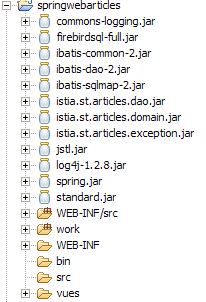
3.7.3.2. Data Access Configuration
Since the data access interface remains unchanged, the associated configuration files are the same as in the previous version. They are defined in [WEB-INF/src]:
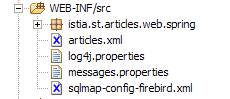
In the screenshot above, the [articles.xml, spring-config-sqlmap-firebird.xml, sqlmap-config-firebird.xml, log4j.properties] files are those from previous versions.
3.7.3.3. The archive directory
In [WEB-INF/lib], you will find the same archives as in the previous version, except for those related to Struts, which is no longer required:
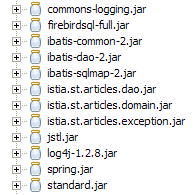
3.7.3.4. Application configuration
The application is configured using three files: [web.xml, applicationContext.xml, springwebarticles-servlet.xml] in the [WEB-INF] folder:
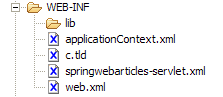
The [web.xml] file is as follows:
| <?xml version="1.0" encoding="ISO-8859-1"?>
<!DOCTYPE web-app PUBLIC
"-//Sun Microsystems, Inc.//DTD Web Application 2.3//EN"
"http://java.sun.com/dtd/web-app_2_3.dtd">
<web-app>
<!-- application spring context loader -->
<listener>
<listener-class>
org.springframework.web.context.ContextLoaderListener</listener-class>
</listener>
<!-- the servlet -->
<servlet>
<servlet-name>springwebarticles</servlet-name>
<servlet-class>
org.springframework.web.servlet.DispatcherServlet</servlet-class>
</servlet>
<!-- url mapping -->
<servlet-mapping>
<servlet-name>springwebarticles</servlet-name>
<url-pattern>*.do</url-pattern>
</servlet-mapping>
<!-- entry document -->
<welcome-file-list>
<welcome-file>/vues/index.jsp</welcome-file>
</welcome-file-list>
</web-app>
|
What does this file say?
- The application's home page is [/vues/index.jsp] (welcome-file)
- Requests for url in the form *.do will be redirected to the [springwebarticles] servlet (servlet-mapping)
- The [springwebarticles] servlet is an instance of the [org.springframework.web.servlet.DispatcherServlet] class (servlet-name, servlet-class) provided by Spring.
- The [org.springframework.web.context.ContextLoaderListener] listener will be launched when the application starts. Its main role will be to instantiate the Spring beans defined in the [applicationContext.xml] file
The [applicationContext.xml] file is as follows:
| <?xml version="1.0" encoding="UTF-8"?>
<!DOCTYPE beans SYSTEM "http://www.springframework.org/dtd/spring-beans.dtd">
<beans>
<!-- data access class -->
<bean id="articlesDao" class="istia.st.articles.dao.ArticlesDaoSqlMap">
<constructor-arg index="0">
<value>sqlmap-config-firebird.xml</value>
</constructor-arg>
</bean>
<!-- the business class -->
<bean id="articlesDomain" class="istia.st.articles.domain.AchatsArticles">
<constructor-arg index="0">
<ref bean="articlesDao"/>
</constructor-arg>
</bean>
<!-- web application configuration-->
<bean id="config" class="istia.st.articles.web.spring.Config" init-method="init">
<property name="articlesDomain">
<ref bean="articlesDomain"/>
</property>
</bean>
</beans>
|
Some elements are familiar, while others are less so. Three beans will be instantiated during application initialization:
- articlesDao: service providing access to the [dao] layer
- articlesDomain: service for accessing the model
- config: a bean in which we will collect the information that all clients instances must share. This bean will play the role traditionally played by the application context but with typed rather than untyped information.
The last file, [springwebarticles.xml], defines the actions accepted by the application in a manner very similar to that used by the Struts file [struts-config.xml]. Its content is as follows:
| <?xml version="1.0" encoding="UTF-8"?>
<!DOCTYPE beans PUBLIC "-//SPRING//DTD BEAN//EN" "http://www.springframework.org/dtd/spring-beans.dtd">
<beans>
<!-- stock managers = controllers -->
<bean id="ListController" class="istia.st.articles.web.spring.ListController">
<property name="config">
<ref bean="config"/>
</property>
</bean>
<bean id="InfosController"
class="istia.st.articles.web.spring.InfosController">
<property name="config">
<ref bean="config"/>
</property>
</bean>
<bean id="AchatController"
class="istia.st.articles.web.spring.AchatController">
<property name="config">
<ref bean="config"/>
</property>
</bean>
<bean id="VoirPanierController"
class="istia.st.articles.web.spring.VoirPanierController">
<property name="config">
<ref bean="config"/>
</property>
</bean>
<bean id="RetirerAchatController"
class="istia.st.articles.web.spring.RetirerAchatController">
<property name="config">
<ref bean="config"/>
</property>
</bean>
<bean id="ValiderPanierController"
class="istia.st.articles.web.spring.ValiderPanierController">
<property name="config">
<ref bean="config"/>
</property>
</bean>
<!-- application mapping-->
<bean id="urlMapping"
class="org.springframework.web.servlet.handler.SimpleUrlHandlerMapping">
<property name="mappings">
<props>
<prop key="/liste.do">ListController</prop>
<prop key="/main.do">ListController</prop>
<prop key="/infos.do">InfosController</prop>
<prop key="/achat.do">AchatController</prop>
<prop key="/panier.do">VoirPanierController</prop>
<prop key="/retirerachat.do">RetirerAchatController</prop>
<prop key="/validerpanier.do">ValiderPanierController</prop>
</props>
</property>
</bean>
<!-- view manager -->
<bean id="viewResolver"
class="org.springframework.web.servlet.view.InternalResourceViewResolver">
<property name="viewClass">
<value>org.springframework.web.servlet.view.JstlView</value>
</property>
<property name="prefix">
<value>/vues/</value>
</property>
<property name="suffix">
<value>.jsp</value>
</property>
</bean>
<!-- message file -->
<bean id="messageSource"
class="org.springframework.context.support.ResourceBundleMessageSource">
<property name="basename">
<value>messages</value>
</property>
</bean>
</beans>
|
What does this configuration file say?
- that our controller will process the following url files:
| to display the list of items |
| to display the list of items |
| to display information about a specific item |
| to purchase a specific item |
| to view the shopping cart |
| to remove a purchase from the shopping cart |
| to confirm a shopping cart |
- The actions listed above correspond one-to-one with the actions handled by the controller in previous versions. For each one, the name of the class responsible for handling it is specified. Let’s take the example of the action [/panier.do]:
- it must be handled by the bean [VoirPanierController]. This name is arbitrary. It is simply a key.
<prop key="/panier.do">VoirPanierController</prop>
- The key [VoirPanierController] is the name of a bean defined in the same configuration file:
<bean id="VoirPanierController"
class="istia.st.articles.web.spring.VoirPanierController">
<property name="config">
<ref bean="config"/>
</property>
</bean>
- The bean [VoirPanierController] defines:
- the class to be instantiated, [ istia.st.articles.web.spring.VoirPanierController], to handle the action
- how to instantiate it. Here, the bean [config], defined by [applicationContext.xml] and instantiated at application startup, is provided as a parameter. This will be done for all [Controller] actions. Thus, each of them will have, in a private field, the [config] object, in which it will find all the information shared among all clients instances.
- How view names should be resolved:
<!-- view manager -->
<bean id="viewResolver"
class="org.springframework.web.servlet.view.InternalResourceViewResolver">
<property name="viewClass">
<value>org.springframework.web.servlet.view.JstlView</value>
</property>
<property name="prefix">
<value>/vues/</value>
</property>
<property name="suffix">
<value>.jsp</value>
</property>
</bean>
As with Struts, the [Controller] instance that processes an action will return, after processing, a key to the Spring controller to indicate which view it should display. Based on this key, there may be various strategies for generating the view associated with the key. The strategy used is the one defined by the [viewResolver] bean. Here, this bean is associated with the [org.springframework.web.servlet.view.InternalResourceViewResolver] class with different initialization parameters. Without going into detail, the [viewResolver] bean specifies here that if the view key is "XX," then the generated view will be [/vues/XX.jsp]. The type of views sent to the client can be changed in various ways:
- by changing the implementation class for the [viewResolver] bean
- by changing the initialization parameters of the implementation class
Thus, you can switch from a view named HTML to a view named XML simply by changing the value of the bean [viewResolver]
- the name of a message file for the application (messageSource). Here, the file will exist but will be empty. It will not be used. It must be placed in the application’s [ClassPath]. Here it will be placed in [WEB-INF/classes]. In Eclipse, this result is obtained by placing it in [WEB-INF/src]:
3.7.4. The JSP views
The JSP views used will be those used by Struts. None are modified:
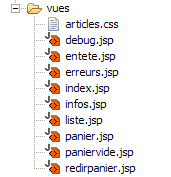
A single new view is created: redirpanier.jsp. It is used solely to redirect the client to the [/panier.do] action. Its code is as follows:
<%@ page language="java" %>
<%@ taglib uri="/WEB-INF/c.tld" prefix="c" %>
<c:redirect url="/panier.do"/>
The reader is encouraged to review the definition of the various views in the version Struts.
3.7.5. Action Processing
The classes required for processing the various actions have been grouped into the [istia.st.articles.web.spring] package:
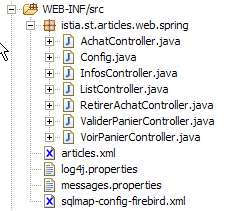
Let’s review how the Spring application works using an example:
- The user requests the url [http://localhost:8080/springwebarticles/main.do]
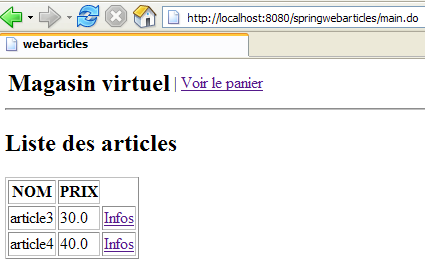
What happened?
- The [web.xml] file from the [springwebarticles] application was accessed:
| <?xml version="1.0" encoding="ISO-8859-1"?>
<!DOCTYPE web-app PUBLIC
"-//Sun Microsystems, Inc.//DTD Web Application 2.3//EN"
"http://java.sun.com/dtd/web-app_2_3.dtd">
<web-app>
<!-- application spring context loader -->
<listener>
<listener-class>
org.springframework.web.context.ContextLoaderListener</listener-class>
</listener>
<!-- the servlet -->
<servlet>
<servlet-name>springwebarticles</servlet-name>
<servlet-class>
org.springframework.web.servlet.DispatcherServlet</servlet-class>
</servlet>
<!-- url mapping -->
<servlet-mapping>
<servlet-name>springwebarticles</servlet-name>
<url-pattern>*.do</url-pattern>
</servlet-mapping>
<!-- entry document -->
<welcome-file-list>
<welcome-file>/vues/index.jsp</welcome-file>
</welcome-file-list>
</web-app>
|
- If this was the first request to the application, a number of things were triggered:
- the [ org.springframework.web.context.ContextLoaderListener] listener was loaded
- it processed the configuration file [applicationContext.xml]:
| <?xml version="1.0" encoding="UTF-8"?>
<!DOCTYPE beans SYSTEM "http://www.springframework.org/dtd/spring-beans.dtd">
<beans>
<!-- data access class -->
<bean id="articlesDao" class="istia.st.articles.dao.ArticlesDaoSqlMap">
<constructor-arg index="0">
<value>sqlmap-config-firebird.xml</value>
</constructor-arg>
</bean>
<!-- the business class -->
<bean id="articlesDomain" class="istia.st.articles.domain.AchatsArticles">
<constructor-arg index="0">
<ref bean="articlesDao"/>
</constructor-arg>
</bean>
<!-- web application configuration-->
<bean id="config" class="istia.st.articles.web.spring.Config" init-method="init">
<property name="articlesDomain">
<ref bean="articlesDomain"/>
</property>
</bean>
</beans>
|
- The beans above were created within the application context
- The file [springwebarticles-servlet.xml] was then used:
| <?xml version="1.0" encoding="UTF-8"?>
<!DOCTYPE beans PUBLIC "-//SPRING//DTD BEAN//EN" "http://www.springframework.org/dtd/spring-beans.dtd">
<beans>
<!-- stock managers = controllers -->
<bean id="ListController" class="istia.st.articles.web.spring.ListController">
<property name="config">
<ref bean="config"/>
</property>
</bean>
<bean id="InfosController"
class="istia.st.articles.web.spring.InfosController">
<property name="config">
<ref bean="config"/>
</property>
</bean>
<bean id="AchatController"
class="istia.st.articles.web.spring.AchatController">
<property name="config">
<ref bean="config"/>
</property>
</bean>
<bean id="VoirPanierController"
class="istia.st.articles.web.spring.VoirPanierController">
<property name="config">
<ref bean="config"/>
</property>
</bean>
<bean id="RetirerAchatController"
class="istia.st.articles.web.spring.RetirerAchatController">
<property name="config">
<ref bean="config"/>
</property>
</bean>
<bean id="ValiderPanierController"
class="istia.st.articles.web.spring.ValiderPanierController">
<property name="config">
<ref bean="config"/>
</property>
</bean>
<!-- application mapping-->
<bean id="urlMapping"
class="org.springframework.web.servlet.handler.SimpleUrlHandlerMapping">
<property name="mappings">
<props>
<prop key="/liste.do">ListController</prop>
<prop key="/main.do">ListController</prop>
<prop key="/infos.do">InfosController</prop>
<prop key="/achat.do">AchatController</prop>
<prop key="/panier.do">VoirPanierController</prop>
<prop key="/retirerachat.do">RetirerAchatController</prop>
<prop key="/validerpanier.do">ValiderPanierController</prop>
</props>
</property>
</bean>
<!-- view manager -->
<bean id="viewResolver"
class="org.springframework.web.servlet.view.InternalResourceViewResolver">
<property name="viewClass">
<value>org.springframework.web.servlet.view.JstlView</value>
</property>
<property name="prefix">
<value>/vues/</value>
</property>
<property name="suffix">
<value>.jsp</value>
</property>
</bean>
<!-- message file -->
<bean id="messageSource"
class="org.springframework.context.support.ResourceBundleMessageSource">
<property name="basename">
<value>messages</value>
</property>
</bean>
</beans>
|
- The beans [Controller] defined by this file have also been created
- Everything is now in place to process the client's request. The request was: [http://localhost:8080/springwebarticles]. Here, we are not requesting a URL from the context but the context itself. It is therefore the [welcome-file] section of the [web.xml] file that is used.
<welcome-file-list>
<welcome-file>/vues/index.jsp</welcome-file>
</welcome-file-list>
- The view [index.jsp] is as follows:
<%@ page language="java" %>
<%@ taglib uri="/WEB-INF/c.tld" prefix="c" %>
<c:redirect url="/main.do"/>
- The client is therefore prompted to redirect to url [http://localhost:8080/springwebarticles/main.do]. It does so.
- The Spring controller then receives a new request. It processes its [springwebarticles-servlet.xml] file:
| <?xml version="1.0" encoding="UTF-8"?>
<!DOCTYPE beans PUBLIC "-//SPRING//DTD BEAN//EN" "http://www.springframework.org/dtd/spring-beans.dtd">
<beans>
<!-- stock managers = controllers -->
<bean id="ListController" class="istia.st.articles.web.spring.ListController">
<property name="config">
<ref bean="config"/>
</property>
</bean>
....
</bean>
<!-- application mapping-->
<bean id="urlMapping"
class="org.springframework.web.servlet.handler.SimpleUrlHandlerMapping">
<property name="mappings">
<props>
<prop key="/liste.do">ListController</prop>
<prop key="/main.do">ListController</prop>
<prop key="/infos.do">InfosController</prop>
<prop key="/achat.do">AchatController</prop>
<prop key="/panier.do">VoirPanierController</prop>
<prop key="/retirerachat.do">RetirerAchatController</prop>
<prop key="/validerpanier.do">ValiderPanierController</prop>
</props>
</property>
</bean>
</beans>
|
- This file tells it that the [/main.do] action must be handled by the [ListController] bean.
- The client's request is passed to the [handleRequest] method of the [ListController] bean. This method does its job and returns the key for the view to be displayed to the controller. Here, if all goes well, this key will be [liste].
- The Spring controller uses the [viewResolver] bean from the [springwebarticles-servlet.xml] configuration file to determine the view associated with this key. Here, it will be the [/vues/liste.jsp] view
- The view [/vues/liste.jsp] is sent to the client
3.7.6. Initialization of the Spring application
We mentioned that when the application starts, the beans in the [applicationContext.xml] file are instantiated:
| <?xml version="1.0" encoding="UTF-8"?>
<!DOCTYPE beans SYSTEM "http://www.springframework.org/dtd/spring-beans.dtd">
<beans>
<!-- data access class -->
<bean id="articlesDao" class="istia.st.articles.dao.ArticlesDaoSqlMap">
<constructor-arg index="0">
<value>sqlmap-config-firebird.xml</value>
</constructor-arg>
</bean>
<!-- the business class -->
<bean id="articlesDomain" class="istia.st.articles.domain.AchatsArticles">
<constructor-arg index="0">
<ref bean="articlesDao"/>
</constructor-arg>
</bean>
<!-- web application configuration-->
<bean id="config" class="istia.st.articles.web.spring.Config" init-method="init">
<property name="articlesDomain">
<ref bean="articlesDomain"/>
</property>
</bean>
</beans>
|
We are familiar with the beans [articlesDao, articlesDomain] but not the bean [config]. This bean is defined by the following Java class:
| package istia.st.articles.web.spring;
import java.util.Hashtable;
import istia.st.articles.domain.IArticlesDomain;
/**
* @author ST - ISTIA
*/
public class Config {
     // private fields
    private IArticlesDomain articlesDomain = null;
private final String ACTION_LISTE = "liste.do";
private final String ACTION_PANIER = "panier.do";
private final String ACTION_VALIDATION_PANIER = "validerpanier.do";
private final String lienActionListe = "Liste des articles";
private final String lienActionPanier = "Voir le panier";
private final String lienActionValidationPanier = "Valider le panier";
private Hashtable hActionListe = new Hashtable(2);
private Hashtable hActionPanier = new Hashtable(2);
private Hashtable hActionValidationPanier = new Hashtable(2);
// getters-setters
public IArticlesDomain getArticlesDomain() {
return articlesDomain;
}
public void setArticlesDomain(IArticlesDomain articlesDomain) {
this.articlesDomain = articlesDomain;
}
public Hashtable getHActionListe() {
return hActionListe;
}
public Hashtable getHActionPanier() {
return hActionPanier;
}
public Hashtable getHActionValidationPanier() {
return hActionValidationPanier;
}
// init web application
public void init() {
// we store some url of the application
hActionListe.put("href", ACTION_LISTE);
hActionListe.put("lien", lienActionListe);
hActionPanier.put("href", ACTION_PANIER);
hActionPanier.put("lien", lienActionPanier);
hActionValidationPanier.put("href", ACTION_VALIDATION_PANIER);
hActionValidationPanier.put("lien", lienActionValidationPanier);
// it's over
return;
}
}
|
This class performs the same function as the [init] method of a web application servlet. It initializes the application. Here, this is done as follows:
- because the [config] bean is defined as follows in [applicationContext.xml]:
<!-- web application configuration-->
<bean id="config" class="istia.st.articles.web.spring.Config" init-method="init">
<property name="articlesDomain">
<ref bean="articlesDomain"/>
</property>
</bean>
When it is created, its private field [articlesDomain] is initialized
- then, due to the [init-method="init"] attribute of the bean above, the [init] method of the class associated with the bean is executed. Here, it initializes the three dictionaries [hActionListe, hActionPanier, hActionValidationPanier] used to generate the three possible links in the menu presented to the user.
- Public accessors are created to make these private fields accessible to instances of type [Controller] that will handle the actions.
3.7.7. The [Controller] actions of the Spring application
3.7.7.1. Introduction
Each Spring action will be the subject of a class of type [Controller]. In the version Struts framework, each action was the subject of a class of type [Action]. Writing the [Controller] class usually involves:
- copying and pasting the [Action] class that was used in the version Struts
- adapting the code to Spring conventions
3.7.7.2. main.do, liste.do
These two actions are identical and defined in [springwebarticles-servlet.xml] by:
| <!-- application mapping-->
<bean id="urlMapping"
class="org.springframework.web.servlet.handler.SimpleUrlHandlerMapping">
<property name="mappings">
<props>
<prop key="/liste.do">ListController</prop>
<prop key="/main.do">ListController</prop>
...
</props>
</property>
</bean>
<bean id="ListController" class="istia.st.articles.web.spring.ListController">
<property name="config">
<ref bean="config"/>
</property>
</bean>
|
They are associated with the [ istia.st.articles.web.spring.ListController] class, which we will discuss in detail shortly. When one of these actions is executed in a browser, the following result is obtained:
The code for the [istia.st.articles.web.spring.ListController] class is as follows:
| package istia.st.articles.web.spring;
import istia.st.articles.exception.UncheckedAccessArticlesException;
import java.util.ArrayList;
import java.util.Hashtable;
import java.util.List;
import javax.servlet.http.HttpServletRequest;
import javax.servlet.http.HttpServletResponse;
import org.springframework.web.servlet.ModelAndView;
import org.springframework.web.servlet.mvc.Controller;
public class ListController implements Controller {
// web app configuration
Config config;
public void setConfig(Config config) {
this.config = config;
}
// query processing
public ModelAndView handleRequest(HttpServletRequest request,
HttpServletResponse response) throws Exception {
// the list of items is requested
List articles = null;
try {
articles = config.getArticlesDomain().getAllArticles();
} catch (UncheckedAccessArticlesException ex) {
// we memorize the error
ArrayList erreurs = new ArrayList();
erreurs.add("Erreur lors de l'obtention de tous les articles : "
+ ex.toString());
// the error page is displayed
request.setAttribute("erreurs", erreurs);
request.setAttribute("actions", new Hashtable[] { config
.getHActionListe() });
// send error view
return new ModelAndView("erreurs");
}
// displays the list of items
request.setAttribute("listarticles", articles);
request.setAttribute("message", "");
request.setAttribute("actions", new Hashtable[] { config
.getHActionPanier() });
// send view
return new ModelAndView("liste");
}
}
|
Comments:
- The class has a private field [config]. This field was initialized by Spring when the bean [ListController] was instantiated:
<bean id="ListController" class="istia.st.articles.web.spring.ListController">
<property name="config">
<ref bean="config"/>
</property>
</bean>
As shown above, the field [config] of [ListController] is initialized with the bean [config]. What is this? It is the bean [config] defined in [applicationContext.xml], c.a.d, and an instance of [istia.st.articles.web.spring.Config] described above.
- Writing the code for a [Controller] class essentially consists of writing the code for its [handleRequest] method
- We request the list of articles from the model. This is accessible via [config.getArticlesDomain()]. If an exception occurs, the view [ERREURS] is sent. The result returned by [handleRequest] must be of type [ModelAndView]. This class can be instantiated in various ways. Here, and this will always be the case, we construct an instance of [ModelAndView] by passing it the key of the view to be displayed. Note that, based on the configuration of the [viewResolver] bean, requesting the display of the view with key XX will result in the sending of the view [/vues/XX.jsp].
| // the list of items is requested
List articles = null;
try {
articles = config.getArticlesDomain().getAllArticles();
} catch (UncheckedAccessArticlesException ex) {
// we memorize the error
ArrayList erreurs = new ArrayList();
erreurs.add("Erreur lors de l'obtention de tous les articles : "
+ ex.toString());
// the error page is displayed
request.setAttribute("erreurs", erreurs);
request.setAttribute("actions", new Hashtable[] { config
.getHActionListe() });
// send error view
return new ModelAndView("erreurs");
}
|
- If there are no errors, the [LISTE] view is sent:
| // displays the list of items
request.setAttribute("listarticles", articles);
request.setAttribute("message", "");
request.setAttribute("actions", new Hashtable[] { config
.getHActionPanier() });
// send view
return new ModelAndView("liste");
|
3.7.7.3. infos.do
This action is used to provide information about one of the items displayed in the [LISTE] view:
This action is defined in [springwebarticles-servlet.xml] by:
| <!-- application mapping-->
<bean id="urlMapping"
class="org.springframework.web.servlet.handler.SimpleUrlHandlerMapping">
<property name="mappings">
<props>
<prop key="/infos.do">InfosController</prop>
...
</props>
</property>
</bean>
...
<bean id="InfosController"
class="istia.st.articles.web.spring.InfosController">
<property name="config">
<ref bean="config"/>
</property>
</bean>
|
The code for class [InfosController] is as follows:
| package istia.st.articles.web.spring;
import istia.st.articles.dao.Article;
import istia.st.articles.exception.UncheckedAccessArticlesException;
import java.util.ArrayList;
import java.util.Hashtable;
import javax.servlet.http.HttpServletRequest;
import javax.servlet.http.HttpServletResponse;
import org.springframework.web.servlet.ModelAndView;
import org.springframework.web.servlet.mvc.Controller;
public class InfosController implements Controller {
// web app configuration
Config config;
public void setConfig(Config config) {
this.config = config;
}
// query processing
public ModelAndView handleRequest(HttpServletRequest request,
HttpServletResponse response) throws Exception {
// error list
ArrayList erreurs = new ArrayList();
// the requested id is retrieved
String strId = request.getParameter("id");
// anything?
if (strId == null) {
// not normal
erreurs.add("action incorrecte([infos,id=null]");
request.setAttribute("erreurs", erreurs);
request.setAttribute("actions", new Hashtable[] { config.getHActionListe() });
return new ModelAndView("erreurs");
}
// transform strId into an integer
int id = 0;
try {
id = Integer.parseInt(strId);
} catch (Exception ex) {
// not normal
erreurs.add("action incorrecte([infos,id=" + strId + "]");
request.setAttribute("erreurs", erreurs);
request.setAttribute("actions", new Hashtable[] { config.getHActionListe() });
return new ModelAndView("erreurs");
}
// key item id is requested
Article article = null;
try {
article = config.getArticlesDomain().getArticleById(id);
} catch (UncheckedAccessArticlesException ex) {
// not normal
erreurs.add("Erreur d'accès aux données [" + ex.toString() + "]");
request.setAttribute("erreurs", erreurs);
request.setAttribute("actions", new Hashtable[] { config.getHActionListe() });
return new ModelAndView("erreurs");
}
if (article == null) {
// not normal
erreurs.add("Article de clé [" + id + "] inexistant");
request.setAttribute("erreurs", erreurs);
request.setAttribute("actions", new Hashtable[] { config.getHActionListe() });
return new ModelAndView("erreurs");
}
// put the article in the session
request.getSession().setAttribute("article", article);
// the info page is displayed
request.setAttribute("actions", new Hashtable[] { config.getHActionListe() });
return new ModelAndView("infos");
}
}
|
Comments:
- The [handleRequest] method retrieves the [id] parameter, which should normally be found in the url. This parameter must indeed be in the form [/infos.do?id=X]. Various checks are performed to verify the presence and validity of the [id] parameter. If there is a problem, the [ERREURS] view is sent.
- If [id] is valid, the corresponding item is requested from the [domain] layer. If this layer throws an exception or if the item is not found, the [ERREURS] view is sent again.
- If everything goes well, the retrieved item is placed in the session. This is a debatable point. Here, we assume that the customer might purchase this item. If they do, we will retrieve it from the session rather than requesting it again from the [domain] layer.
- Finally, the [INFOS] view is displayed.
3.7.7.4. achat.do
This action is used to purchase the item displayed by the previous view [INFOS]:
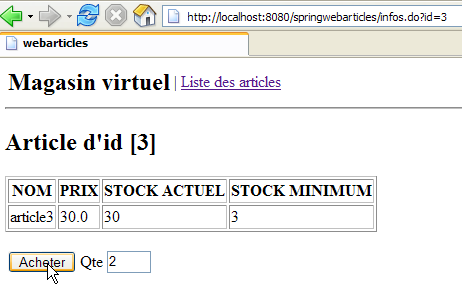
If we look at the HTML code for this view, we see that the <form> tag is defined as follows:
        <form method="post" action="achat.do?id=3"/>
            <table>
                <tr>
                    <td><input type="submit" value="Acheter"></td>
                    <td>Qte <input type="text" name="qte" size="3" value=""></td>
                    <td></td>
                </tr>
            </table>
        </form>
We can see that the form is posted to the controller with the action [achat.do].
This action is configured as follows in [springwebarticles-servlet.xml]:
<!-- application mapping-->
<bean id="urlMapping"
class="org.springframework.web.servlet.handler.SimpleUrlHandlerMapping">
<property name="mappings">
<props>
...
<prop key="/achat.do">AchatController</prop>
...
</props>
</property>
</bean>
<bean id="AchatController"
class="istia.st.articles.web.spring.AchatController">
<property name="config">
<ref bean="config"/>
</property>
</bean>
The code for class [AchatController] is as follows:
| package istia.st.articles.web.spring;
import istia.st.articles.dao.Article;
import istia.st.articles.domain.Achat;
import istia.st.articles.domain.Panier;
import java.util.ArrayList;
import java.util.Hashtable;
import javax.servlet.http.HttpServletRequest;
import javax.servlet.http.HttpServletResponse;
import javax.servlet.http.HttpSession;
import org.springframework.web.servlet.ModelAndView;
import org.springframework.web.servlet.mvc.Controller;
public class AchatController implements Controller {
// web app configuration
Config config;
public void setConfig(Config config) {
this.config = config;
}
// query processing
public ModelAndView handleRequest(HttpServletRequest request,
HttpServletResponse response) throws Exception {
// the list of errors on this action
ArrayList erreurs = new ArrayList();
// the quantity purchased is recovered
int qté = 0;
try {
qté = Integer.parseInt(request.getParameter("qte"));
if (qté <= 0)
throw new NumberFormatException();
} catch (NumberFormatException ex) {
// wrong qty
request.setAttribute("msg", "Quantité incorrecte");
request.setAttribute("qte", request.getParameter("qte"));
request.setAttribute("actions", new Hashtable[] { config
.getHActionListe() });
return new ModelAndView("infos");
}
// retrieve the client session
HttpSession session = request.getSession();
// we retrieve the article placed in session
Article article = (Article) session.getAttribute("article");
// session expired?
if (article == null) {
// the error page is displayed
erreurs.add("Votre session a expiré");
request.setAttribute("erreurs", erreurs);
request.setAttribute("actions", new Hashtable[] { config
.getHActionListe() });
return new ModelAndView("erreurs");
}
// create the new purchase
Achat achat = new Achat(article, qté);
// the purchase is added to the customer's basket
Panier panier = (Panier) session.getAttribute("panier");
if (panier == null) {
panier = new Panier();
session.setAttribute("panier", panier);
}
panier.ajouter(achat);
// we return to the list of items
return new ModelAndView("index");
}
}
|
Comments:
- Let's review the format of the form sent to the controller:
        <form method="post" action="achat.do?id=3"/>
            <table>
                <tr>
                    <td><input type="submit" value="Acheter"></td>
                    <td>Qte <input type="text" name="qte" size="3" value=""></td>
                    <td></td>
                </tr>
            </table>
        </form>
- There are two parameters in the request: [id]: item number purchased, [qte]: quantity purchased.
- The presence and validity of the parameter [qte] are checked. If this parameter is found to be incorrect, the view [INFOS] is returned to the user along with an error message:
| // the list of errors on this action
ArrayList erreurs = new ArrayList();
// the quantity purchased is recovered
int qté = 0;
try {
qté = Integer.parseInt(request.getParameter("qte"));
if (qté <= 0)
throw new NumberFormatException();
} catch (NumberFormatException ex) {
// wrong qty
request.setAttribute("msg", "Quantité incorrecte");
request.setAttribute("qte", request.getParameter("qte"));
request.setAttribute("actions", new Hashtable[] { config
.getHActionListe() });
return new ModelAndView("infos");
}
|
- The purchased item is retrieved from the session. The session may have expired. In this case, we send the view [ERREURS]:
| // retrieve the client session
HttpSession session = request.getSession();
// we retrieve the article placed in session
Article article = (Article) session.getAttribute("article");
// session expired?
if (article == null) {
// the error page is displayed
erreurs.add("Votre session a expiré");
request.setAttribute("erreurs", erreurs);
request.setAttribute("actions", new Hashtable[] { config
.getHActionListe() });
return new ModelAndView("erreurs");
}
|
- if the session has not expired, the item is added to the cart, which is also retrieved from the session:
| // create the new purchase
Achat achat = new Achat(article, qté);
// the purchase is added to the customer's basket
Panier panier = (Panier) session.getAttribute("panier");
if (panier == null) {
panier = new Panier();
session.setAttribute("panier", panier);
}
panier.ajouter(achat);
|
- Finally, we send the view [LISTE]:
// we return to the list of items
return new ModelAndView("index");
- Above, we send the view [/vues/index.jsp]. We know that this view instructs the client browser to redirect to url [/main.do]. It is this redirect that will display the list of items.
3.7.7.5. panier.do
This action is used to display all of the customer’s purchases. It is available via the menu:
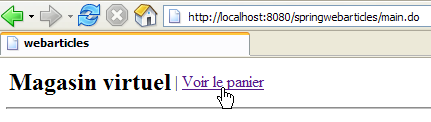
The code HTML associated with the link above is as follows:
<a href="panier.do">Voir le panier</a>
The page returned by this link is as follows:
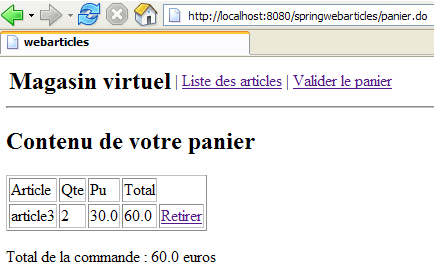
This action is configured as follows in [springwebarticles-servlet.xml]:
| <!-- application mapping-->
<bean id="urlMapping"
class="org.springframework.web.servlet.handler.SimpleUrlHandlerMapping">
<property name="mappings">
<props>
...
<prop key="/panier.do">VoirPanierController</prop>
...
</props>
</property>
</bean>
...
<bean id="VoirPanierController"
class="istia.st.articles.web.spring.VoirPanierController">
<property name="config">
<ref bean="config"/>
</property>
</bean>
|
The code for class [VoirPanierController] is as follows:
| package istia.st.articles.web.spring;
import istia.st.articles.domain.Panier;
import java.util.Hashtable;
import javax.servlet.http.HttpServletRequest;
import javax.servlet.http.HttpServletResponse;
import org.springframework.web.servlet.ModelAndView;
import org.springframework.web.servlet.mvc.Controller;
public class VoirPanierController implements Controller {
// web app configuration
Config config;
public void setConfig(Config config) {
this.config = config;
}
// query processing
public ModelAndView handleRequest(HttpServletRequest request,
HttpServletResponse response) throws Exception {
// the basket is displayed
Panier panier = (Panier) request.getSession().getAttribute("panier");
if (panier == null || panier.getAchats().size() == 0) {
// empty basket
request.setAttribute("actions", new Hashtable[] { config
.getHActionListe() });
return new ModelAndView("paniervide");
} else {
// there's something in the basket
request.setAttribute("actions", new Hashtable[] {
config.getHActionListe(), config.getHActionValidationPanier() });
return new ModelAndView("panier");
}
}
}
|
Comments:
- The shopping cart is retrieved from the session where it is normally stored. The session may have expired, in which case there is no shopping cart. We do not treat this as an error but simply assume that the shopping cart is empty.
- If the shopping cart is empty, the view [PANIERVIDE] is displayed
- otherwise, it is view [PANIER]
3.7.7.6. retirerachat.do
This action is used to remove a purchase from the shopping cart:
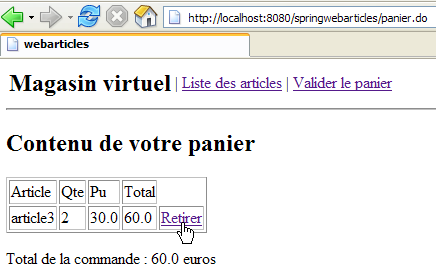
If we look at the code HTML from the link above, we see the following:
<a href="retirerachat.do?id=3">Retirer</a>
The [retirerachat.do] action therefore receives, as a parameter, the id of the item to be removed from the cart. This action is configured as follows in [springwebarticles-servlet.xml]:
| <!-- application mapping-->
<bean id="urlMapping"
class="org.springframework.web.servlet.handler.SimpleUrlHandlerMapping">
<property name="mappings">
<props>
...
<prop key="/retirerachat.do">RetirerAchatController</prop>
</props>
</property>
</bean>
...
<bean id="RetirerAchatController"
class="istia.st.articles.web.spring.RetirerAchatController">
<property name="config">
<ref bean="config"/>
</property>
</bean>
|
The code for class [RetirerAchatController] is as follows:
| package istia.st.articles.web.spring;
import istia.st.articles.domain.Panier;
import java.util.ArrayList;
import java.util.Hashtable;
import javax.servlet.http.HttpServletRequest;
import javax.servlet.http.HttpServletResponse;
import org.springframework.web.servlet.ModelAndView;
import org.springframework.web.servlet.mvc.Controller;
public class RetirerAchatController implements Controller {
// web app configuration
Config config;
public void setConfig(Config config) {
this.config = config;
}
// query processing
public ModelAndView handleRequest(HttpServletRequest request,
HttpServletResponse response) throws Exception {
// the list of errors on this action
ArrayList erreurs = new ArrayList();
// we pick up the basket
Panier panier = (Panier) request.getSession().getAttribute("panier");
if (panier == null) {
// session expired
erreurs.add("Votre session a expiré");
request.setAttribute("erreurs", erreurs);
request.setAttribute("actions", new Hashtable[] { config
.getHActionListe() });
return new ModelAndView("erreurs");
}
// retrieve the id of the item to be removed
String strId = request.getParameter("id");
// anything?
if (strId == null) {
// not normal
erreurs.add("action incorrecte([retirerachat,id=null]");
request.setAttribute("erreurs", erreurs);
request.setAttribute("actions", new Hashtable[] { config
.getHActionListe() });
return new ModelAndView("erreurs");
}
// transform strId into an integer
int id = 0;
try {
id = Integer.parseInt(strId);
} catch (Exception ex) {
// not normal
erreurs.add("action incorrecte([retirerachat,id=" + strId + "]");
request.setAttribute("erreurs", erreurs);
request.setAttribute("actions", new Hashtable[] { config
.getHActionListe() });
return new ModelAndView("erreurs");
}
     // we remove the purchase
    panier.enlever(id);
// the basket is displayed again
request.setAttribute("actions",
new Hashtable[] { config.getHActionListe() });
return new ModelAndView("redirpanier");
}
}
|
Comments:
- The code checks for the presence and validity of the [id] parameter. If it is found to be incorrect, the [ERREURS] view is sent.
- Otherwise, the purchase is removed from the cart:
// we remove the purchase
panier.enlever(id);
- then the cart is reloaded:
// the basket is displayed again
request.setAttribute("actions",
new Hashtable[] { config.getHActionListe() });
return new ModelAndView("redirpanier");
Let’s review the code for the [/vues/redirpanier.jsp] view:
<%@ page language="java" %>
<%@ taglib uri="/WEB-INF/c.tld" prefix="c" %>

<c:redirect url="/panier.do"/>
We can see that the client will be redirected to the [/panier.do] action. This has already been described. It will display the [PANIER] or [PANIERVIDE] view depending on the state of the shopping cart.
3.7.7.7. validerpanier.do
This action is used to validate the customer’s purchases. In practice, this involves a single action: the inventory of the purchased items is reduced by the quantities purchased in the database. This action comes from the following menu:
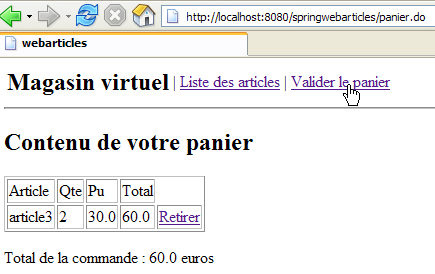
The code HTML for the link [Valider le panier] is as follows:
<a href="validerpanier.do">Valider le panier</a>
When this link is clicked, the stock levels are reduced and the list of items is displayed again.
This action is configured as follows in [springwebarticles-servlet.xml]:
| <!-- application mapping-->
<bean id="urlMapping"
class="org.springframework.web.servlet.handler.SimpleUrlHandlerMapping">
<property name="mappings">
<props>
...
<prop key="/validerpanier.do">ValiderPanierController</prop>
</props>
</property>
</bean>
...
<bean id="ValiderPanierController"
class="istia.st.articles.web.spring.ValiderPanierController">
<property name="config">
<ref bean="config"/>
</property>
</bean>
|
The code for class [ValiderPanierController] is as follows:
| package istia.st.articles.web.spring;
import istia.st.articles.domain.Panier;
import istia.st.articles.exception.UncheckedAccessArticlesException;
import java.util.ArrayList;
import java.util.Hashtable;
import javax.servlet.http.HttpServletRequest;
import javax.servlet.http.HttpServletResponse;
import org.springframework.web.servlet.ModelAndView;
import org.springframework.web.servlet.mvc.Controller;
public class ValiderPanierController implements Controller {
// web app configuration
Config config;
public void setConfig(Config config) {
this.config = config;
}
// query processing
public ModelAndView handleRequest(HttpServletRequest request,
HttpServletResponse response) throws Exception {
// the list of errors on this action
ArrayList erreurs = new ArrayList();
// the buyer has confirmed his basket
Panier panier = (Panier) request.getSession().getAttribute("panier");
if (panier == null) {
// session expired
erreurs.add("Votre session a expiré");
request.setAttribute("erreurs", erreurs);
request.setAttribute("actions", new Hashtable[] { config
.getHActionListe() });
return new ModelAndView("erreurs");
}
// validate basket
try {
config.getArticlesDomain().acheter(panier);
} catch (UncheckedAccessArticlesException ex) {
// not normal
erreurs.add("Erreur d'accès aux données [" + ex.toString() + "]");
request.setAttribute("erreurs", erreurs);
request.setAttribute("actions", new Hashtable[] { config
.getHActionListe() });
return new ModelAndView("erreurs");
}
// recover any errors
erreurs = config.getArticlesDomain().getErreurs();
if (erreurs.size() != 0) {
request.setAttribute("erreurs", erreurs);
request.setAttribute("actions", new Hashtable[] { config
.getHActionListe(), config.getHActionPanier() });
return new ModelAndView("erreurs");
}
// everything looks OK - the item list is displayed
return new ModelAndView("index");
}
}
|
Comments:
- We retrieve the shopping cart from the session. If the session has expired, we send the view [ERREURS]:
| // the list of errors on this action
ArrayList erreurs = new ArrayList();
// the buyer has confirmed his basket
Panier panier = (Panier) request.getSession().getAttribute("panier");
if (panier == null) {
// session expired
erreurs.add("Votre session a expiré");
request.setAttribute("erreurs", erreurs);
request.setAttribute("actions", new Hashtable[] { config
.getHActionListe() });
return new ModelAndView("erreurs");
}
|
- We process the purchases in the shopping cart. Errors may occur if stock levels are insufficient to fulfill the purchases. In this case, we send the view [ERREURS]:
| // validate basket
try {
config.getArticlesDomain().acheter(panier);
} catch (UncheckedAccessArticlesException ex) {
// not normal
erreurs.add("Erreur d'accès aux données [" + ex.toString() + "]");
request.setAttribute("erreurs", erreurs);
request.setAttribute("actions", new Hashtable[] { config
.getHActionListe() });
return new ModelAndView("erreurs");
}
// recover any errors
erreurs = config.getArticlesDomain().getErreurs();
if (erreurs.size() != 0) {
request.setAttribute("erreurs", erreurs);
request.setAttribute("actions", new Hashtable[] { config
.getHActionListe(), config.getHActionPanier() });
return new ModelAndView("erreurs");
}
|
- If everything went well, we display the list of items again:
// everything looks OK - the item list is displayed
return new ModelAndView("index");
We know that the view [/vues/index.jsp] redirects the client to the action [/main.do]. This action will display the view [LISTE].