2. Article 1 - Spring IoC
Objectives of this document:
- to explore the configuration and integration possibilities of the Spring framework (http://www.springframework.org)
- define and use the concept of IoC (Inversion of Control), also known as Dependency Injection
2.1. Configuring a 3-tier application with Spring
Consider a classic 3-tier application:
 |
We will assume that access to the business and DAO layers is controlled by Java interfaces:
- the [IArticlesDao] interface for the data access layer
- the [IArticlesManager] interface for the business layer
In the data access layer or DAO layer (Data Access Object), it is common to work with a SGBD and therefore with a JDBC driver. Consider the skeleton of a class accessing an article table in a SGBD:
To perform an operation on SGBD, any method requires a [Connection] object that represents the connection to the database, through which data will be exchanged between the database and the Java code. To construct this object, four pieces of information are required:
the name of the JDBC driver class of the SGBD | |
the URL of the database to be used | |
the username used to establish the connection | |
the password for this identity |
How can our previous [ArticlesDaoPlainJdbc] class obtain this information? There are several possibilities:
Solution 1 - the information is hard-coded in the class:
The downside of this solution is that you have to modify the Java code whenever any of this information changes, such as when the password is changed.
Solution 2 - the information is passed to the object during its construction:
Here, the object receives the information it needs to function when it is constructed. The problem then shifts to the code that passed it the four pieces of information. How did it obtain them? The following class, [ArticlesManagerWithDataBase], from the business layer could construct an object, [ArticlesDaoPlainJdbc], from the data access layer:
 |
We can see that, once again, the information needed to construct the object [ArticlesDaoPlainJdbc] is provided to the constructor of the object [ArticlesManagerWithDataBase]. We can imagine that this information is passed to it by a higher-level layer, such as the user interface layer. We thus gradually reach the highest layer of the application. Due to its position, this layer is not called by a layer that could transmit the configuration information it needs. We must therefore find an alternative to constructor-based configuration. The standard approach for configuring an application at its highest layer is to use a file containing all the information that may change over time. There may be several such files. Upon application startup, an initialization layer will then create all or part of the objects required by the application’s various layers.
There is a wide variety of configuration files. The current trend is to use XML files. This is the approach taken by Spring. The file configuring a [ArticlesDaoPlainJdbc] object might look like this:
An application is a set of objects that Spring calls beans, because they follow the JavaBean standard for naming getters and setters of an object’s private fields. Objects in an application that are designed to provide a service are often created as a single instance. These are called singletons. Thus, in the multi-tier application example we are examining here, access to the product database will be handled by a single instance of the [ArticlesDaoPlainJdbc] class. In a web application, these service objects serve multiple clients instances at the same time. A service object is not created for each client.
The Spring configuration file above allows you to create a single service object of type [ArticlesDaoPlainJdbc] in a package named [istia.st.articles.dao]. The four pieces of information required by the constructor of this object are defined within a <bean>...</bean> tag. There will be as many such <bean> tags as there are singletons to be constructed.
When will the objects defined in the Spring file be constructed? Application initialization can be delegated to the main method of that application, if it has one. For a web application, this might be the [init] method of the main servlet. Every application has a method that is guaranteed to be the first to execute. It is generally within this method that the construction of singletons takes place.
Let’s take an example. Suppose we want to test the previous class [ArticlesDaoPlainJdbc] using a test JUnit. A test class JUnit has a method [setUp] that is executed before any other method. This is where we will create the singleton [ArticlesDaoPlainJdbc].
If we follow the solution of passing configuration information via the constructor, we will have the following test class:
The calling class [TestArticlesPlainJdbc] must know the four pieces of information required to initialize the singleton [ArticlesDaoPlainJdbc] to be constructed.
If we follow the approach of passing configuration information via a configuration file, we could have the following test class using the Spring file described above.
Here, the calling class [TestSpringArticlesPlainJdbc] does not need to know the information required to initialize the singleton to be constructed. It simply needs to know:
- [springArticlesPlainJdbc.xml]: the name of the Spring configuration file described above
- [articlesDao]: the name of the singleton to be created
Any changes to the configuration file, outside of these two entities, have no impact on the Java code. This method of configuring an application’s objects is very flexible. To configure itself, the application needs to know only two things:
- the name of the Spring file containing the definitions of the singletons to be created
- the names of these singletons, which the Java code uses to obtain a reference to the objects they have been associated with via the configuration file
2.2. Dependency Injection and Inversion of Control
Let’s now introduce the concept of Dependency Injection used by Spring to configure applications. The term Inversion of Control (IOC) is also used. Consider the construction of the [ArticlesManagerWithDataBase] singleton in the business layer of our application:
 |
To access the data in SGBD, the business layer must use the services of an object implementing the [IArticlesDao] interface, for example, an object of type [ArticlesDaoPlainJdbc]. The code for the [ArticlesManagerWithDataBase] class might look like the following:
public class ArticlesManagerWithDataBase implements IArticlesManager {

    // a data access instance
    private IArticlesDao articlesDao;
 ....
    public ArticlesManagerWithDataBase (String driverClassName, String url, String user, String pwd, ...) {
        ...
         // creation of a data access service
        articlesDao =(IArticlesDao)new ArticlesDaoPlainJdbc(driverClassName,url,user,pwd);
    ...
    }

    public ... doSomething(...){
        ...
    }
}
The class [ArticlesDaoPlainJdbc] is supposed to implement the interface [IArticlesDao] here:
To create the [IArticlesDao] singleton required for the class to function, its constructor explicitly uses the name of the class that implements the [IArticlesDao] interface:
We therefore have a hard-coded dependency on the class name in the code. If the implementation class of the [IArticlesDao] interface were to change, the code of the previous constructor would need to be modified. We have the following relationships between the objects:
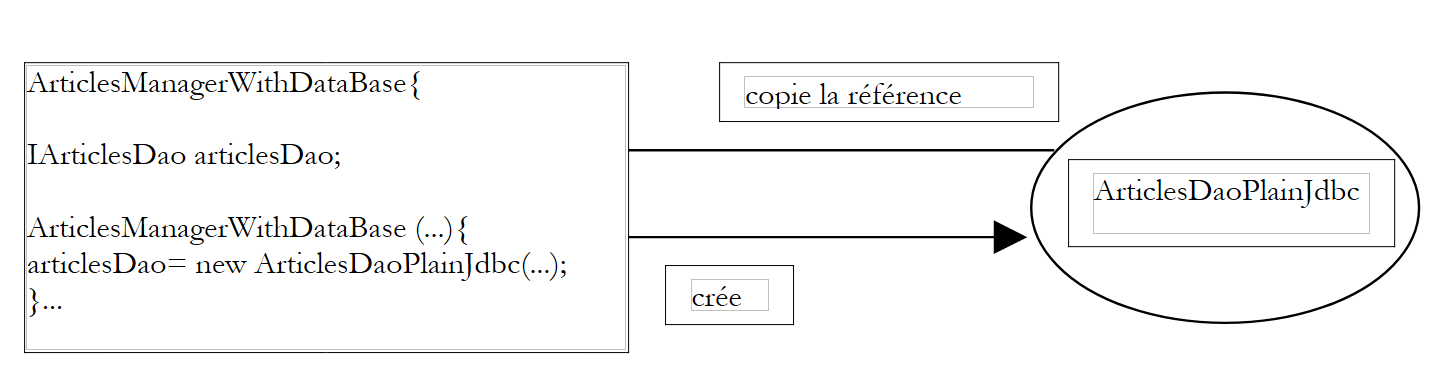 |
The [ArticlesManagerWithDataBase] class itself takes the initiative to create the [ArticlesDaoPlainJdbc] object it needs. Returning to the term "inversion of control," we can say that it is the one that has the "control" to create the object it needs.
If we were to write a test class JUnit for the class [ArticlesManagerWithDataBase], it might look something like this:
The test class creates an instance of the business class [ArticlesManagerWithDataBase], which in turn creates, in its constructor, an instance of the data access class [ArticlesDaoPlainJdbc].
The Spring solution will eliminate the need for the business class [ArticlesManagerWithDataBase] to know the name ([ArticlesDaoPlainJdbc]) of the data access class it requires. This will allow the data access class to be changed without modifying the Java code of the business class. Spring will allow both singletons—the one for the data access layer and the one for the business layer—to be created simultaneously. The Spring configuration file will define a new bean:
The new feature is the bean defining the singleton of the business class to be created:
    <bean id="articlesManager" class="istia.st.articles.domain.ArticlesManagerWithDataBase">
        <property name="articlesDao">
            <ref bean="articlesDao"/>
        </property>
    </bean>
- The class implementing the bean [articlesManager] is defined: [ArticlesManagerWithDataBase]
- The [articlesDao] field of the bean is assigned a value via the <property name="articlesDao"> tag. This is the field defined in the [ArticlesManagerWithDataBase] class:
In order for the [articlesDao] field to be initialized by Spring and its <property> tag, the field must follow the JavaBean standard, and there must be a [setArticlesDao] method to initialize the [articlesDao] field. Note that the method name is derived very precisely from the field name. Similarly, there is often a [get...] method to retrieve the field’s value. Here, it is the [getArticlesDao] method. In this new version, the [ArticlesManagerWithDataBase] class no longer has a constructor. It no longer needs one.
- The value that Spring will assign to the [articlesDao] field is that of the [articlesDao] bean defined in its configuration file:
    <bean id="articlesManager" class="istia.st.articles.domain.ArticlesManagerWithDataBase">
        <property name="articlesDao">
            <ref bean="articlesDao"/>
        </property>
    </bean>
    <bean id="articlesDao" class="istia.st.articles.dao.ArticlesDaoPlainJdbc">
        <constructor-arg index="0">
    .............
    </bean>
- When Spring constructs the singleton [ArticlesManagerWithDataBase], it will also create the singleton [ArticlesDaoPlainJdbc]:
- Spring will build a dependency graph of the beans and see that the bean [articlesManager] depends on the bean [articlesDao]
- it will construct the bean [articlesDao], which is an object of type [ArticlesDaoPlainJdbc]
- then it will construct the bean [articlesManager] of type [ArticlesManagerWithDataBase]
Now let’s imagine a test JUnit for the class [ArticlesManagerWithDataBase]. It might look like the following:
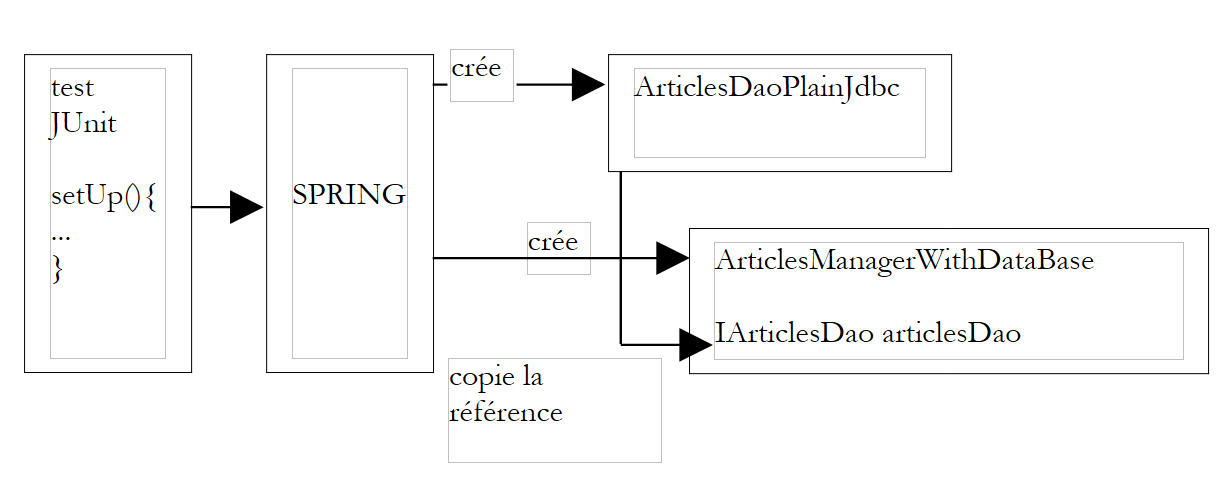
Let’s follow the creation process of the two singletons defined in the Spring file named [springArticlesManagerWithDataBase.xml].
- The [setUp] method above requests a reference to the bean named [articlesManager]
- Spring consults its configuration file and finds the bean [articlesManager]. If it has already been created, it simply returns a reference to the object (singleton); otherwise, it creates it.
- Spring detects the dependency of the bean [articlesManager] on the bean [articlesDao]. It therefore creates the singleton [articlesDao] of type [ArticlesDaoPlainJdbc] if it has not already been created (singleton).
- It creates the singleton [articlesManager] of type [ArticlesManagerWithDataBase]
This mechanism could be schematized as follows:
 |
Recall the skeleton of the [ArticlesManagerWithDataBase] class:
Once Spring has finished constructing the singletons, we have an object of type [ArticlesManagerWithDataBase] whose [articlesDao] field is initialized without it knowing how. We say that a dependency has been injected into the [ArticlesManagerWithDataBase] object. We also say that we have inverted control: it is no longer the [ArticlesManagerWithDataBase] object that takes the initiative to create the object implementing the [IArticlesDao] interface that it needs; but rather the top-level application (when it initializes) takes care of creating all the objects it needs by managing their interdependencies.
The main benefit of configuring the [ArticlesManagerWithDataBase] singleton via a Spring file is that we can now change the implementation class corresponding to the [articlesDao] field of the [ArticlesManagerWithDataBase] class without modifying the code of the latter. Simply change the class name in the definition of the [articlesDao] bean in the Spring file:
will become, for example:
The [ArticlesManagerWithDataBase] bean will work with this new data access class without even knowing it.
2.3. Spring IoC in Practice
2.3.1. Example 1
Consider the following class:
The class has:
- two private fields, name and age
- read (get) and write (set) methods for these two fields
- a method toString to retrieve the value of the object [Personne] as a string
- an init method that will be called by Spring when the object is created, and a close method that will be called when the object is destroyed
To create objects of type [Personne], we will use the following Spring file:
This file will be named config.xml.
- It defines two beans with the respective keys "person1" and "person2" of type [Personne]
- It initializes the [nom, age] fields for each person
- It defines the methods to be called during the initial construction of the [init-method] object and during the destruction of the [destroy-method] object
For our tests, we will use a single test class JUnit to which we will successively add methods. The first method version of this class will be as follows:
Comments:
- To retrieve the beans defined in the [config.xml] file, we use an object of type [ListableBeanFactory]. There are other object types that allow access to beans. The [ListableBeanFactory] object is obtained in the [setUp] method of the test class and stored in a private variable. It will thus be available to all test methods.
- The file [config.xml] will be placed in the application’s [ClassPath], c.a.d, in one of the directories searched by the Java virtual machine when it looks for a class referenced by the application. The [ClassPathResource] object is used to search for a resource in an application’s [ClassPath], in this case the [config.xml] file.
- Spring can use configuration files in various formats. The [XmlBeanFactory] object is used to parse a configuration file in the XML format.
- Parsing a Spring file yields an object of type [ListableBeanFactory], in this case the object bf. With this object, a bean identified by the key C is obtained via bf.getBean(C).
- The method [test1] retrieves and displays the values of the beans with keys "person1" and "person2".
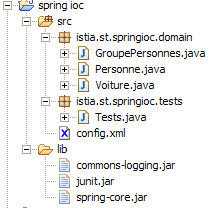
The structure of our application’s Eclipse project is as follows:
Comments:
- The [src] folder contains the source code. The compiled code will go into a [bin] folder not shown here.
- The file [config.xml] is located at the root of the [src] folder. Building the project automatically copies it to the [bin] folder, which is part of the application’s [ClassPath] folder. This is where it is located by the [ClassPathResource] object.
- The [lib] folder contains three Java libraries required by the application:
- commons-logging.jar and spring-core.jar for the Spring classes
- junit.jar for the JUnit classes
- The [lib] folder is also part of the application’s [ClassPath]
Executing the [test1] method of the JUnit test yields the following results:
Comments:
- Spring logs a number of events using the [commons-logging.jar] library. These logs help us better understand how Spring works.
- The [config.xml] file was loaded and then processed
- The operation*
forced the creation of the bean [personne1]. We can see the Spring log regarding this. Because in the definition of the bean [personne1] we had written [init-method="init"], the method [init] of the created object [Personne] was executed. The corresponding message is displayed.
- The operation
displayed the value of the created object [Personne].
- The same phenomenon occurs for the key bean [personne2].
- The last operation
    personne2 = (Personne) bf.getBean("personne2");
    System.out.println("personne2=" + personne2.toString());
did not result in the creation of a new object of type [Personne]. If that had been the case, the [init] method would have been displayed, which is not the case here. This is the principle of the singleton. By default, Spring creates only a single instance of the beans in its configuration file. It is an object reference service. If asked for a reference to an object that has not yet been created, it creates it and returns a reference. If the object has already been created, Spring simply returns a reference to it.
- We can see that there is no trace of the [close] method of the [Personne] object, even though we had written it in the definition of the [destroy-method=close] bean. It is possible that this method is only executed when the memory occupied by the object is reclaimed by the garbage collector. By the time this happens, the application has already terminated, and writing to the screen has no effect. To be verified.
Now that we have a solid grasp of the basics of a Spring configuration, we will be able to move through our explanations a bit more quickly.
2.3.2. Example 2
Consider the following new class [Voiture]:
The class has:
- three private fields: type, make, and owner. These fields can be initialized and read using the public get and set methods. They can also be initialized using the Car(String, String, Person) constructor. The class also has a no-argument constructor to comply with the JavaBean standard.
- a method toString to retrieve the value of the [Voiture] object as a string
- an init method that will be called by Spring immediately after the object is created, a close method that will be called when the object is destroyed
To create objects of type [Voiture], we will use the following Spring file [config.xml]:
This file adds a bean with the key "car1" and type [Voiture] to the previous definitions. To initialize this bean, we could have written:
Rather than choosing the method already presented, we have chosen here to use the class's Car(String, String, Person) constructor. Additionally, the [voiture1] bean defines the method to be called during the initial construction of the [init-method] object and the method to be called during the destruction of the [destroy-method] object.
For our tests, we will use the JUnit test class already presented, adding the following [test2] method to it:
The [test2] method retrieves the [voiture1] bean and displays it.
The structure of the Eclipse project remains the same as in the previous test. Executing the [test2] method of the JUnit test yields the following results:
Comments:
- The [test2] method requests a reference to the [voiture1] bean
- line 4: Spring begins creating the [voiture1] bean because this bean has not yet been created (singleton)
- line 6: because the [voiture1] bean references the [personne2] bean, the latter bean is in turn constructed
- line 7: the bean [personne2] has been created. Its method [init] is then executed.
- Line 9: Spring indicates that it will use a constructor to create the bean [voiture1]
- line 10: the bean [voiture1] has been created. Its method [init] is then executed.
- Line 11: The method [test2] displays the value of the bean [voiture1]
2.3.3. Example 3
We introduce the following new class [GroupePersonnes]:
Its two private members are:
members: an array of people who are members of the group
groupesDeTravail: a dictionary mapping a person to a workgroup
Note here that the [GroupePersonnes] class does not define a no-argument constructor to comply with the JavaBean standard. Recall that in the absence of any constructor, there is a "default" constructor, which is the no-argument constructor that does nothing.
The goal here is to demonstrate how Spring allows for the initialization of complex objects, such as those with array or dictionary-type fields. We add a new bean to the previous Spring file [config.xml]:
- The <list> tag allows you to initialize a field of type array or one that implements the List interface with different values.
- The <map> tag allows you to do the same with a field that implements the Map interface
For our tests, we will use the JUnit test class already presented, adding the following [test3] method to it:
The [test3] method retrieves the [groupe1] bean and displays it.
The structure of the Eclipse project remains the same as in the previous test. Executing the [test3] method from the JUnit test yields the following results:
Comments:
- The [test3] method requires a reference to the [groupe1] bean
- line 4: Spring begins creating this bean
- because the bean [groupe1] references the beans [personne1] and [personne2], these two beans are created (lines 6 and 9) and their init method is executed (lines 7 and 10)
- Line 11: The bean [groupe1] has been created. Its method [init] is now executed.
- Line 12: Display requested by the [test3] method.
2.4. Spring for configuring three-tier web applications
2.4.1. General application architecture
We want to build a 3-tier application with the following structure:
 |
- The three layers will be made independent through the use of Java interfaces
- The integration of the three layers will be handled by Spring
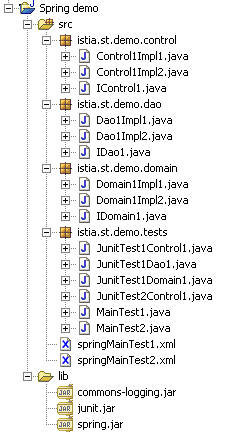
- We will create separate packages for each of the three layers, which we will name Control, Domain, and Dao. An additional package will contain the test applications.
The application structure in Eclipse could be as follows:
2.4.2. The DAO data access layer
The DAO layer will implement the following interface:
package istia.st.demo.dao;

public interface IDao1 {
  public int doSometingInDaoLayer(int a, int b);
}
- Write two classes, Dao1Impl1 and Dao1Impl2, that implement the IDao1 interface. The method Dao1Impl1.doSomethingInDaoLayer will return a+b, and the method Dao1Impl2.doSomethingInDaoLayer will return a-b.
- Write a test class JUnit that tests the two previous classes
2.4.3. The business layer
The business layer will implement the following interface:
package istia.st.demo.domain;

public interface IDomain1 {
  public int doSomethingInDomainLayer(int a, int b);
}
- Write two classes, Domain1Impl1 and Domain1Impl2, that implement the IDomain1 interface. These classes will have a constructor that takes a parameter of type IDao1. The method Domain1Impl1.doSomethingInDomainLayer will increment a and b by one, then pass these two parameters to the method doSomethingInDaoLayer of the received object of type IDao1. The method Domain1Impl2.doSomethingInDomainLayer, on the other hand, will decrement a and b by one before doing the same thing.
- Write a test class JUnit to test the two previous classes
2.4.4. The user interface layer
The user interface layer will implement the following interface:
package istia.st.demo.control;

public interface IControl1 {
  public int doSometingInControlLayer(int a, int b);
}
- Write two classes, Control1Impl1 and Control1Impl2, that implement the IControl1 interface. These classes will have a constructor that takes a parameter of type IDomain1. The method Control1Impl1.doSomethingInControlLayer will increment a and b by one, then pass these two parameters to the method doSomethingInDomainLayer of the received object of type IDomain1. The Control11Impl2.doSomethingInControlLayer method, on the other hand, will decrement a and b by one before doing the same thing.
- Write a test class JUnit to test the two previous classes
2.4.5. Integration with Spring
- Write a Spring configuration file that will determine which classes each of the three previous layers should use
- Write a test class JUnit using different Spring configurations to highlight the flexibility of the application
- Write a standalone application (main method) that passes two parameters to the IControl1 interface and displays the result rendered by the interface.
2.4.6. A solution
2.4.6.1. The Eclipse project
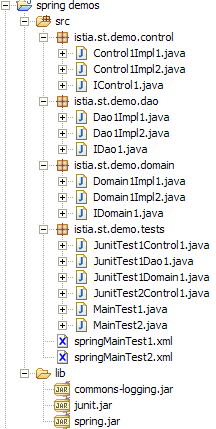
The archives from the [lib] folder have been added to the [ClassPath] project.
2.4.6.2. The [istia.st.demo.dao] package
The interface:
A first implementation class:
A second implementation class:
2.4.6.3. The [istia.st.demo.domain] package
The interface:
A first implementation class:
A second implementation class:
2.4.6.4. The [istia.st.demo.control] package
The interface
A first implementation class:
A second implementation class:
2.4.6.5. The [Spring] configuration files
A first [springMainTest1.xml]:
A second [springMainTest2.xml]:
2.4.6.6. The [istia.st.demo.tests] test package
A test of type [main]:
Results displayed in the Eclipse console:
Another test using the second configuration file [Spring]:
Results displayed in the Eclipse console:
Finally, a JUnit test:
2.5. Conclusion
The Spring framework offers true flexibility in both application architecture and configuration. We used the IoC concept, one of Spring’s two pillars. The other pillar is AOP (Aspect-Oriented Programming), which we have not covered. It allows you to add "behavior" to a class method through configuration without modifying the method’s code. In simple terms, AOP allows you to filter calls to certain methods:
 |
- the filter can be executed before or after the target method M, or both.
- The M method is unaware of these filters. They are defined in the Spring configuration file.
- The code for method M remains unchanged. Filters are Java classes that need to be created. Spring provides predefined filters, including ones for managing transactions for SGBD.
- Filters are beans and, as such, are defined in the Spring configuration file as beans.
A common filter is the transactional filter. Consider a business layer method M that performs two inseparable operations on data (a unit of work). It calls two methods, M1 and M2, from the DAO layer to perform these two operations.
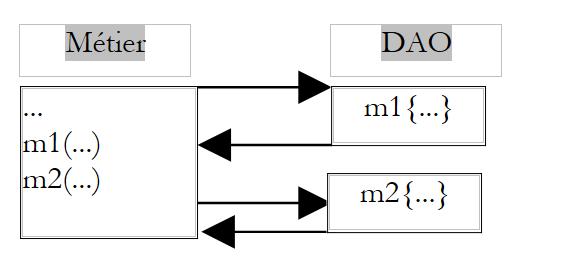 |
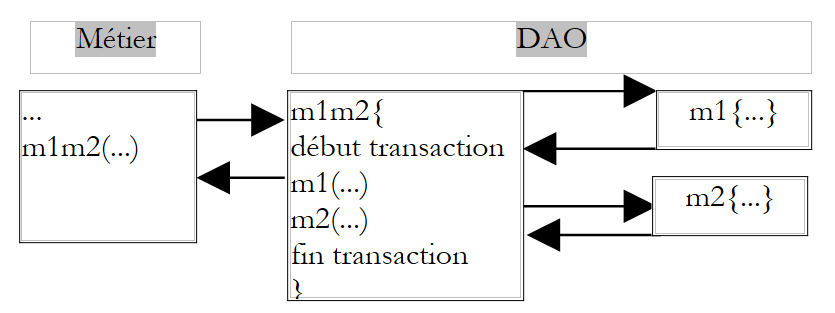
Because it is in the business layer, method M abstracts away the data storage. It does not, for example, need to assume that the data is in a SGBD or that it needs to place the two calls to methods M1 and M2 within a SGBD transaction. It is up to the DAO layer to handle these details. One solution to the previous problem is to create a method in the DAO layer that would itself call methods M1 and M2, calls that it would enclose within a transaction in SGBD.
 |
The AOP filtering solution is more flexible. It allows you to define a filter that, before calling M, will start a transaction and, after the call, will perform a commit or rollback as appropriate.
 |
There are several advantages to this approach:
- once the filter is defined, it can be applied to multiple methods, for example, all those that require a transaction
- the methods filtered in this way do not need to be rewritten
- since the filters to be used are defined via configuration, they can be changed
In addition to the IoC and AOP concepts, Spring provides numerous support classes for three-tier applications:
- for JDBC, SqlMap (iBatis), and for Hibernate, JDO (JavaObject) in the DAO layer
- for the MVC model in the User Interface layer
For more information: http://www.springframework.org.