5. Internationalization
An internationalized application displays its text in the user’s language. The case study is in French and English. The principle is simple: the templates contain text marked as “to be translated,” and a dictionary for each language associates each text with its translation. The selected language is stored in a cookie.
[Django] uses [gettext] for this purpose, the translation system from the GNU project, which [Python] also recognizes (the [gettext] module from the standard library), and which is found in many open-source software programs. With [gettext], the key for a text is the text itself, written in the original language: a template written in [{% translate "Home" %}], and the French dictionary associates “Home” with “Accueil.” A page thus remains readable and functional even without a dictionary: the text is displayed in the original language. This differs from versions [Symfony], [Laravel], [Flask], [Spring MVC], [ASP.NET Core MVC], and [NestJS] from the case study, which used abstract keys ([MENU.HOME]). Dictionaries are text files in the [.po] (Portable Object) format, which tools can extract from the code and which translation software can edit; [Django] reads their compiled version, the [.mo] (Machine Object) files. [gettext] can also inflect text into the plural form according to the rules of each language. [Django] is itself translated in this way: it is thanks to its dictionaries that it can display its error messages in French (since Example 08, they have been in English, the default language). The formatting of dates and amounts remains the same as in Example 16.
5.1. Example 22: A Bilingual Application
5.1.1. The configuration: config/settings.py
- Line 14: the application’s default language, which is used for requests that do not specify a language (Example 08). This is also the language of the template texts; therefore, English does not require a dictionary;
- Lines 15–18: the languages supported by the application;
- Line 20: [LOCALE_PATHS], the folders where [Django] searches for the application's dictionaries, in addition to the [locale] folders for each application (including those for [Django] itself). Each dictionary is stored in a [<language>/LC_MESSAGES] folder, under the name [django.po] (and [django.mo]): this is the organization required by [gettext];
- line 22: the name of the cookie that stores the selected language. [django_language] is the default value; we include it here so it is visible;
- lines 29–33: the [LocaleMiddleware] middleware from [Django] replaces our [SetLanguage] middleware from Example 16. For each request, it selects the language from among those specified in the [LANGUAGES] setting: the language specified in the language cookie, if one exists; otherwise, the browser’s preferred language, based on the [Accept-Language] header (Example 12); otherwise, [LANGUAGE_CODE]. It activates it ([translation.activate], Example 16), and stores it in [request.LANGUAGE_CODE]. Finally, it adds the header [Content-Language] (the page’s language) to the response, along with the header [Vary: Accept-Language], which notifies caches that the response depends on this header;
- line 43: the context processor [i18n] adds the variables [LANGUAGE_CODE] (the language of the request), [LANGUAGES], and [LANGUAGE_BIDI] (true for a language written from right to left) to the templates.
5.1.2. The dictionary: locale/fr/LC_MESSAGES/django.po
A [.po] file is a sequence of entries, separated by blank lines:
- lines 1–4: a comment;
- lines 5–11: the header entry: an empty string ([msgid ""]), whose “translation” ([msgstr]) contains the dictionary information: the language, the character set, and the language’s plural rule ([Plural-Forms]: in French, two forms, the second for any number greater than 1);
- lines 13–15: a standard entry: [msgid] is the source text, as written in the template; [msgstr] is its translation. The line [#:] indicates where the text was found (a template and a line): this is a comment for the translator;
- lines 25–28: text containing a variable. In the dictionary, a variable is written as [%(name)s] (the syntax for format strings from [Python], example 10); the line [#, python-format] flags this to the tools. The translation may reposition the variable or change the punctuation surrounding it (in French, the exclamation point is preceded by a space);
- lines 47–52: a plural form: [msgid] is the singular form, [msgid_plural] is the plural form, and each form in the translation is numbered ([msgstr[0]], [msgstr[1]]), in the order specified by the rule [Plural-Forms]. In French, 0 and 1 are singular, whereas in English 0 is plural (“0 products”): [gettext] knows this, thanks to this rule. This is an improvement over the “product(s)” used in previous versions of the case study.
This file is not written by hand. The command:
scans the project’s templates and the [Python] code, extracts all text marked “to be translated,” and creates or updates the [locale/fr/LC_MESSAGES/django.po] file: new text is added to it with an empty translation, and existing translations are preserved. All that remains is to write the translations, either in a text editor or in specialized software ([Poedit], for example). The command:
It then compiles each [.po] file into a [.mo] file—a binary file that is quick to read—which is the one used by [Django]. You must restart the server after a compilation: the dictionaries are loaded once and for all. These two commands use the programs from [gettext] ([xgettext], [msgfmt]...), which must be installed (for [Linux], the [gettext] package; for [Windows], for example, the binaries distributed on the mlocati.github.io website). Since the [django.mo] file is provided with the example, it is not necessary to install these packages to run it.
5.1.3. Language selection: routes and views
- Line 12: [re_path] describes a route using a regular expression, rather than the syntax of [path] (Example 02). [^] and [$] mark the start and end of the path; [(?P<code>fr|en)] is a named group: the text it recognizes—[fr] or [en] (the vertical bar means “or”)—is passed to the view in the [code] parameter. Another language does not match any route: [/language/de] returns a 404 error.
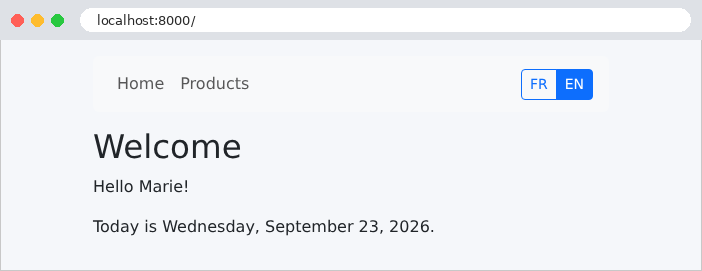
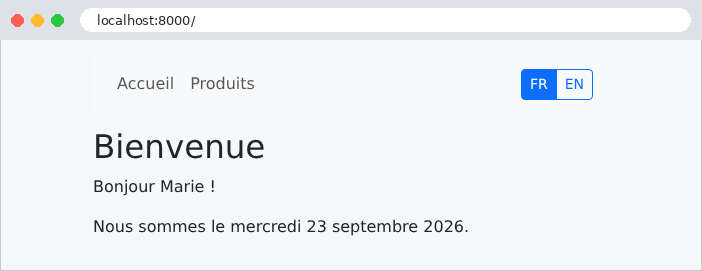
- Lines 14–25: The home and product views do not know the language; they provide raw data (a name, a date, amounts in cents). Translation and formatting are handled by the templates. The class [Product] has a name and a price in cents; the library [formats] is the one from Example 16: its filter [long_date] writes a date in the “full” format of the active language (“Wednesday, September 23, 2026,” “mercredi 23 septembre 2026”), and its filter [money] displays an amount;
- lines 30–37: the language-change view responds by redirecting the user back to the page they came from; the user is returned to their original page in the new language;
- lines 35–36: The response includes a cookie, which the browser will send back with every request. [set_cookie] receives its name, value, and options: [max_age], its lifetime in seconds (one year); [httponly=True] makes it invisible to the [JavaScript] on the page; [samesite="Lax"] prevents the browser from sending it with a POST request originating from another site. It is added to the response as a [Set-Cookie] header;
- lines 43–49: the original page is specified by the [Referer] header in the request (the misspelled version, with a single [r], is that of the HTTP standard), which the browser populates with the URL from the page that contained the link. But this header comes from the client, which can put anything in it. Blindly redirecting to this address would turn our application into an open redirect: a malicious link bearing our domain name could send the user to a malicious site. The function [url_has_allowed_host_and_scheme] in [Django] ([django.utils.http]) checks whether an address is relative or whether it points to one of the allowed machines (in this case, the one from the request: [request.get_host()]); otherwise, the user is redirected to the home page.
[Django] also provides a ready-made view for changing the language, [django.views.i18n.set_language], which performs the same task using a form (POST); we wrote our own to demonstrate it and to allow language switching via a simple link.
5.1.4. Translating in Templates
- line 4: the page’s [lang] attribute indicates its language to browsers, search engines, and screen readers; [LANGUAGE_CODE] is the language of the request, provided by the context processor [i18n];
- Line 9: The page title is provided by the page itself, already translated (block [title]).
- line 2: the translation tags are in the [i18n] library, which each template must load (example 16);
- lines 6–7: The [{% translate %}] tag returns the translation of a text into the language of the request (or the text itself, if it has no translation);
- lines 10–17: The [{% get_available_languages %}] tag stores the languages from the [LANGUAGES] setting—pairs of (code, name)—in a variable, which the loop then parses ([for code, name in languages]). One button per language, which links to the [/language/<code>] view. The current language is highlighted ([btn-primary], solid button).
- line 4: the [title] block, translated, for the parent template;
- line 9: the [{% blocktranslate %}] tag translates text containing variables: [{{ name }}] becomes [%(name)s] in the dictionary. Only simple variables are allowed here (no filters or periods);
- line 11: a calculated variable can therefore only be included in the text via [with]: the date, formatted in the query language by the filter [long_date], is stored in the variable [date] in the text.
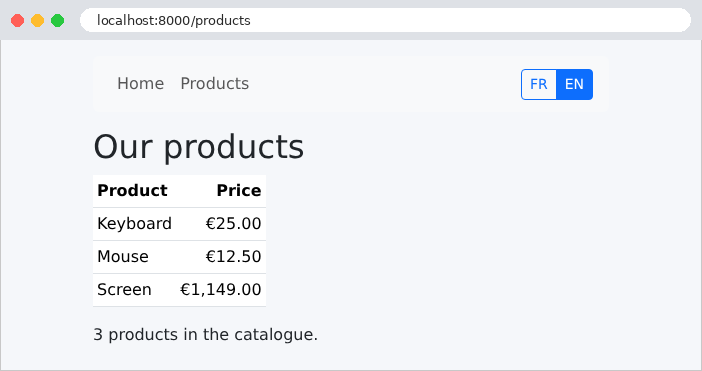
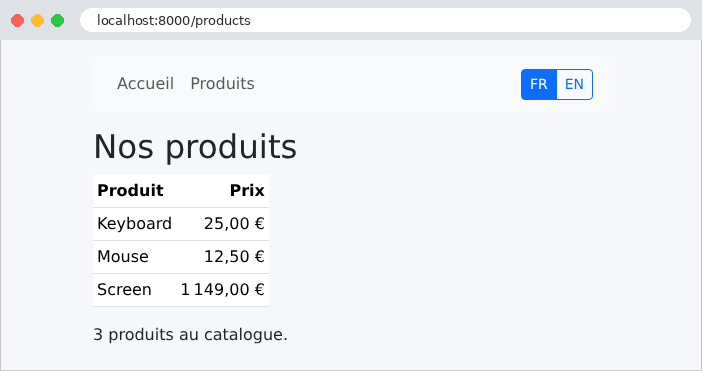
- line 15: the filter [money], whose result depends on the language;
- line 21: the plural. [count n=products|length] returns the number that determines the form ([length], example 14); the [{% plural %}] tag separates the singular form from the plural form, written in the source language. Product names, however, are not translated: they are data that, in a real-world application, would come from a database.
Outside of templates, translation is handled by the functions of the [django.utils.translation] module: [gettext("Home")] (often imported under the short name [_]: [_("Home")]), [ngettext] for the plural, and [gettext_lazy], a “lazy” translation performed only when the text is used: this is the one to use for text defined when a module is loaded (the label of a form field, for example), when the language of the request is not yet known. The case study uses it.
5.1.5. Execution
The home page, in English (the default language), then in French after clicking the “FR” button:
The products page, in both languages. The amounts follow the conventions of each language:
The language switch, as seen with [curl]. The option [-H] provides the header [Referer] that the browser would send:
The redirect takes you back to the original page, and the cookie is set to last for one year. The response itself is still in English ([Content-Language: en]): the language was only selected when the request arrived, before the cookie existed. A [Referer] that points to another site does not allow you to be redirected there:
The user returns to the home page and remains on our site. Finally, the home page, requested with the cookie [django_language=fr] (option [-b] of [curl]):
The cookie is not signed: it is transmitted in plain text, and the user can modify it. This is not a problem: it contains no confidential information, and [LocaleMiddleware] only accepts the languages specified in the [LANGUAGES] setting. The following example illustrates the level of trust that can be placed in a cookie. Without a cookie, [LocaleMiddleware] reads the browser’s [Accept-Language] header: [curl -H "Accept-Language: fr-FR,fr;q=0.9" http://localhost:8000/] renders the page in French. The two mechanisms thus combine naturally: the browser’s language on the first visit, followed by the language the user has chosen. A third, common approach places the language in the URL ([/fr/products]): the [i18n_patterns] function of [Django] then prefixes the routes with the language, and [LocaleMiddleware] reads it from the path. This case study focuses on the cookie.