11. Case Study: The RdvMedecins Application
11.1. The Problem
The RdvMedecins application manages appointments for a medical practice. Each doctor has time slots (from 8:00 a.m. to 12:00 p.m. in 20-minute increments, for example); an appointment consists of a day, a time slot, and a client (a patient). This is the exact port, in [Django], of the [Symfony] application from the previous lesson (which was itself ported from versions [Laravel], [Flask], [Spring MVC], and [ASP.NET Core MVC]): same database, same business rules, same pages, same URLs, same text. The HTML pages are generated by the server using templates from [Django]; access to the database is routed through ORM from [Django].
Three user roles share the application:
Role | Who | Permissions |
ADMIN | The administrator ([admin]) | View schedules, make and cancel appointments for any patient; manage (list, add, edit, delete) doctors and patients |
DOCTOR | Doctors | View schedules, make appointments, and cancel appointments for any patient |
USER | clients (patients) | view schedules without seeing other patients’ names; book an appointment for themselves; cancel their appointment; manage their account; create an account |
Key management rules:
- No appointments in the past;
- A time slot is reserved only once a day;
- a patient has only one upcoming appointment at a time;
- two doctors (or two clients) cannot have the same first and last names, and a login belongs to only one account;
- A doctor with appointments cannot be deleted; A client is deleted along with their appointments;
- the login page is protected against bots (CAPTCHA, limited attempts), and creating a patient account requires first solving the CAPTCHA on that page.
11.2. Using the Application
11.2.1. The login page
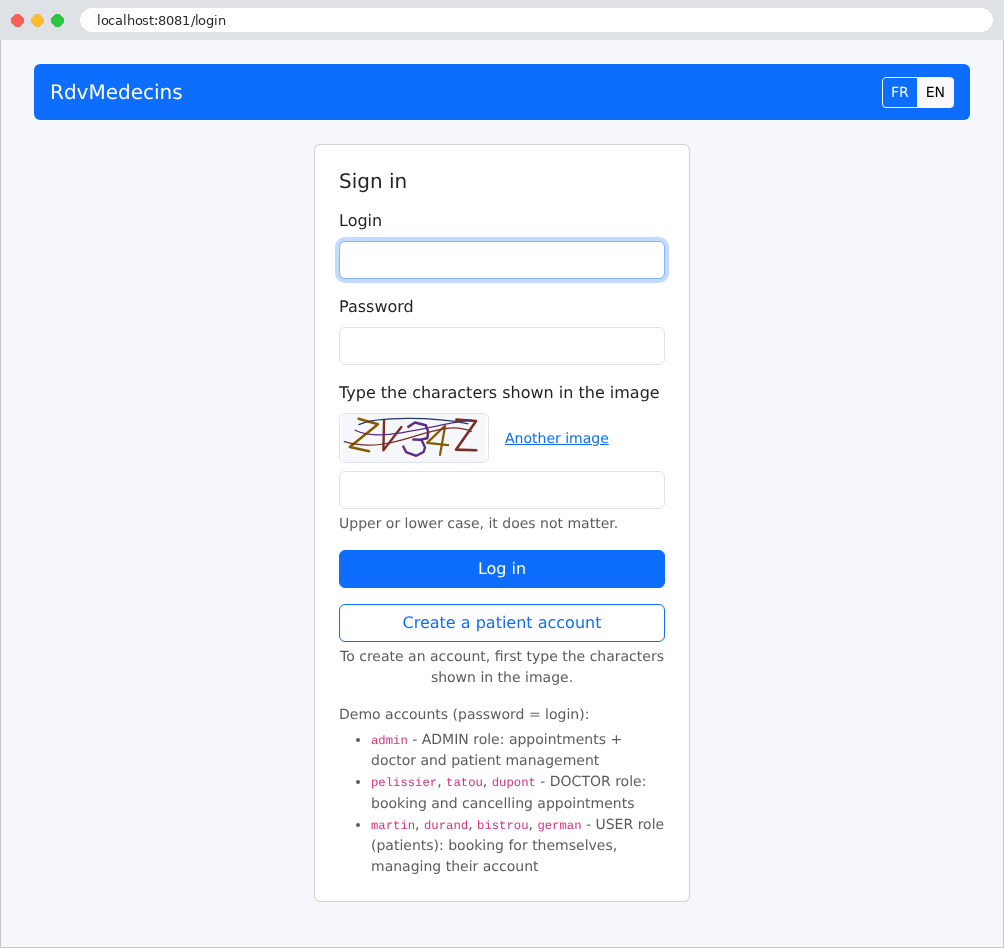
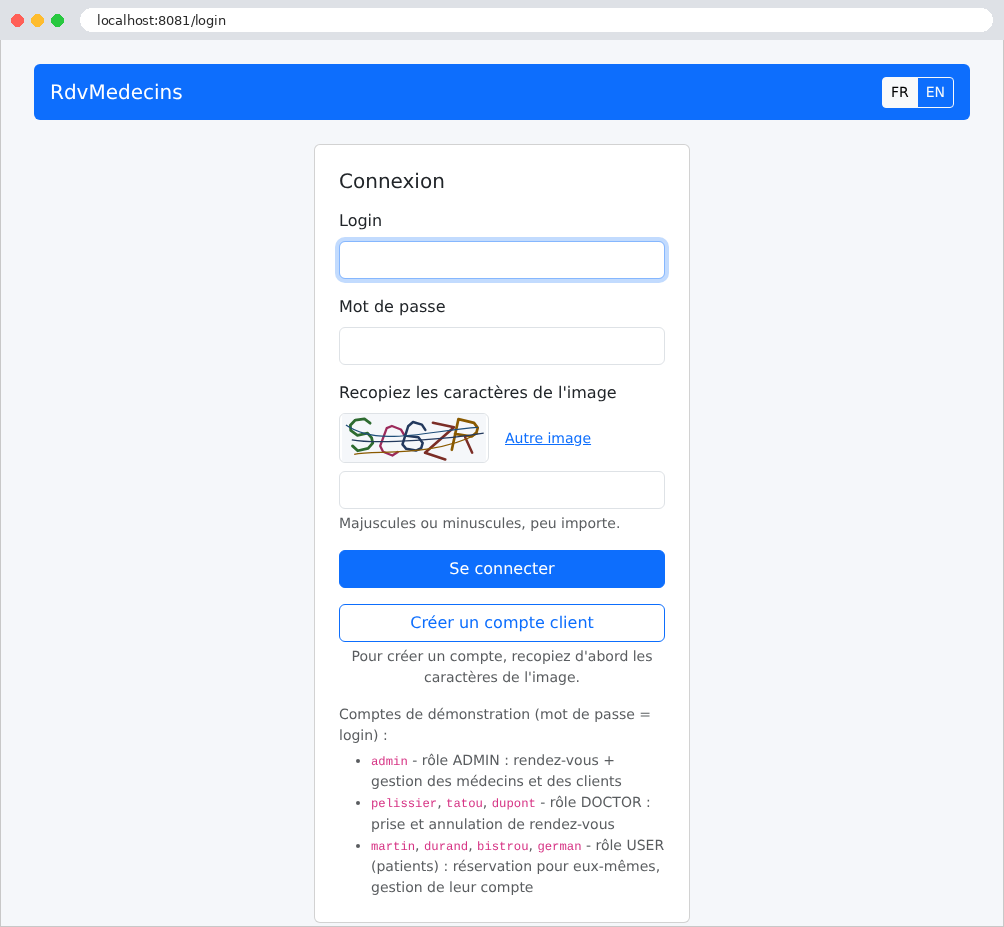
The page features two buttons: Log in and Create a patient account. Both require you to enter the characters shown in the image. The buttons FR / EN change the language:
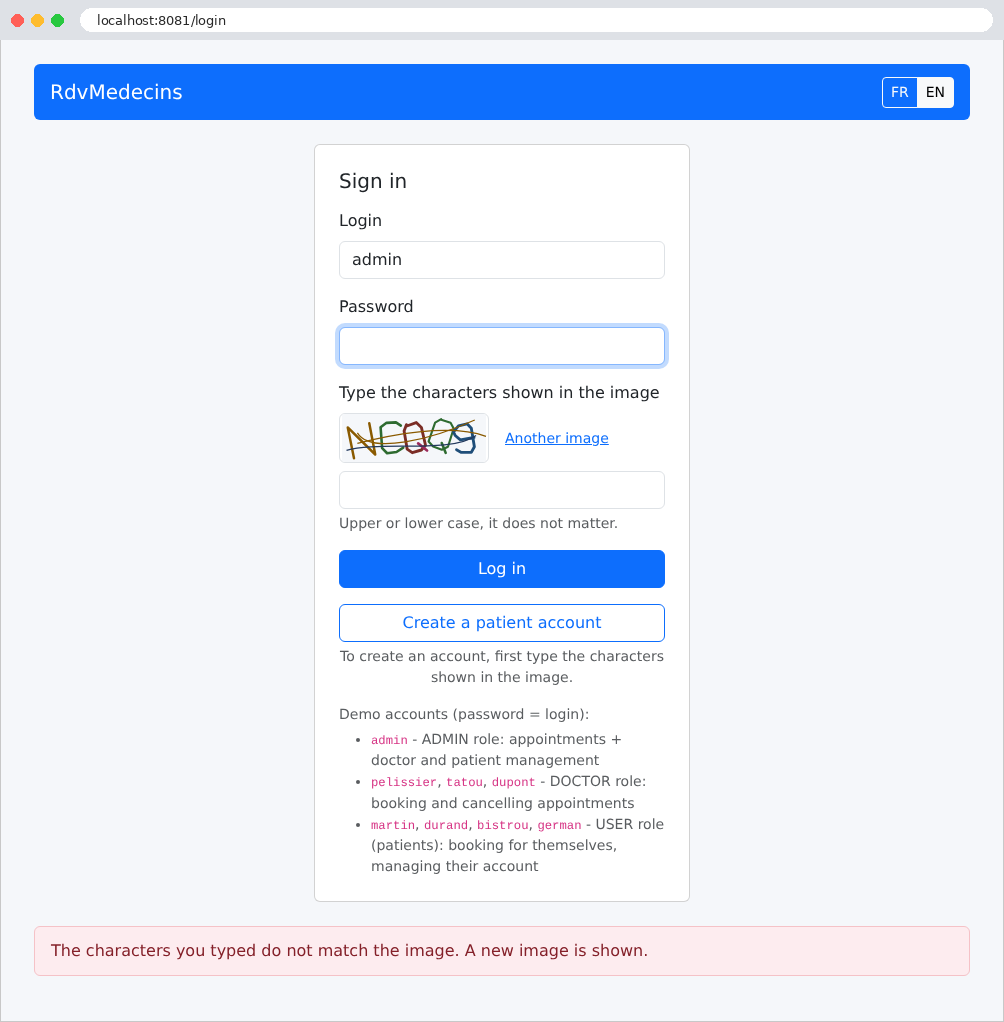
An error (in this case, an incorrectly entered CAPTCHA) is displayed at the bottom of the page on a light pink background:
11.2.2. The calendar, as seen by the administrator and doctors
Once logged in, the administrator is taken to the calendar page. They select a doctor and a day:
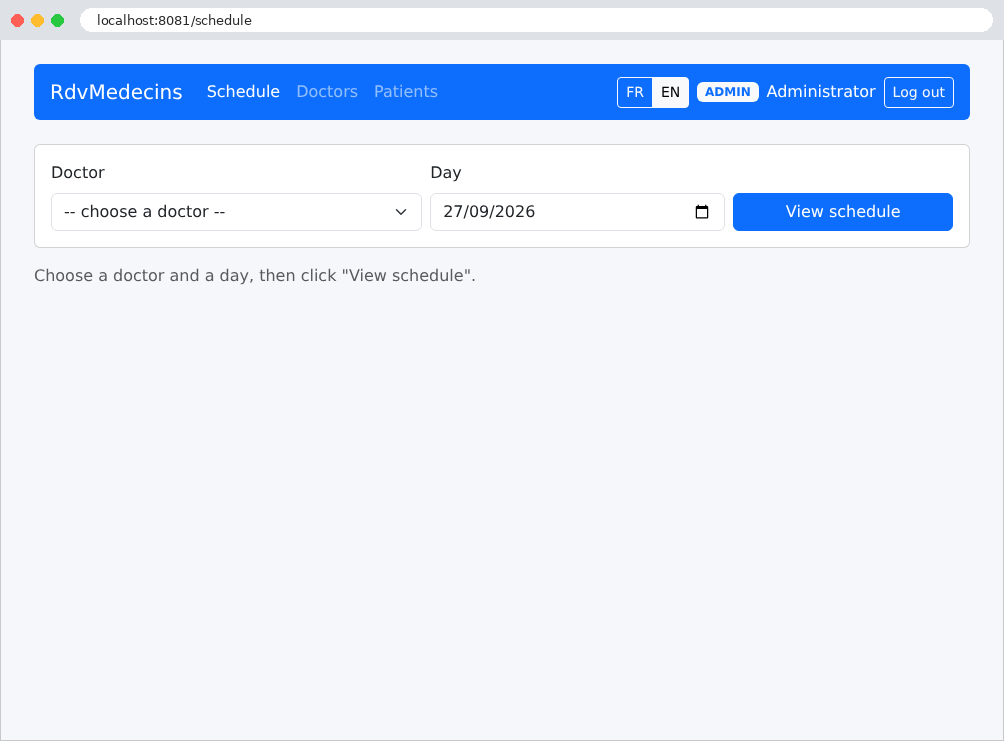
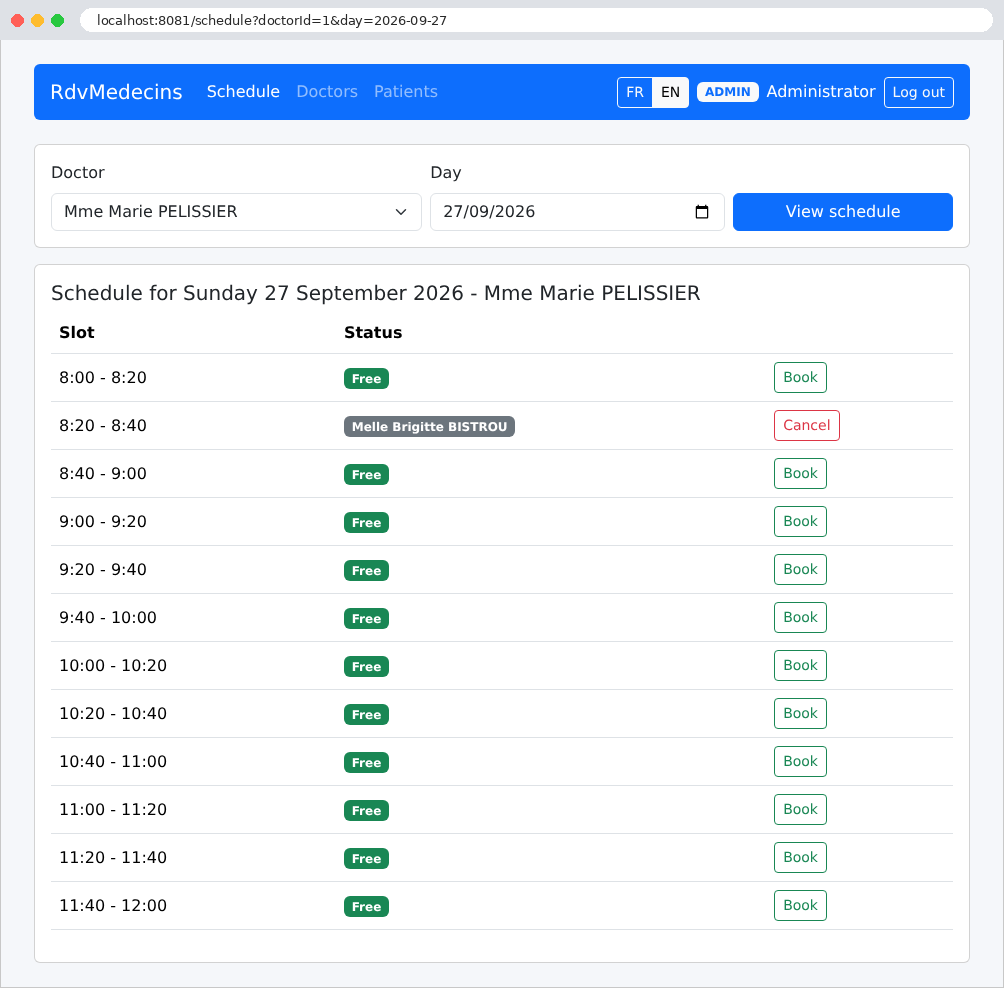
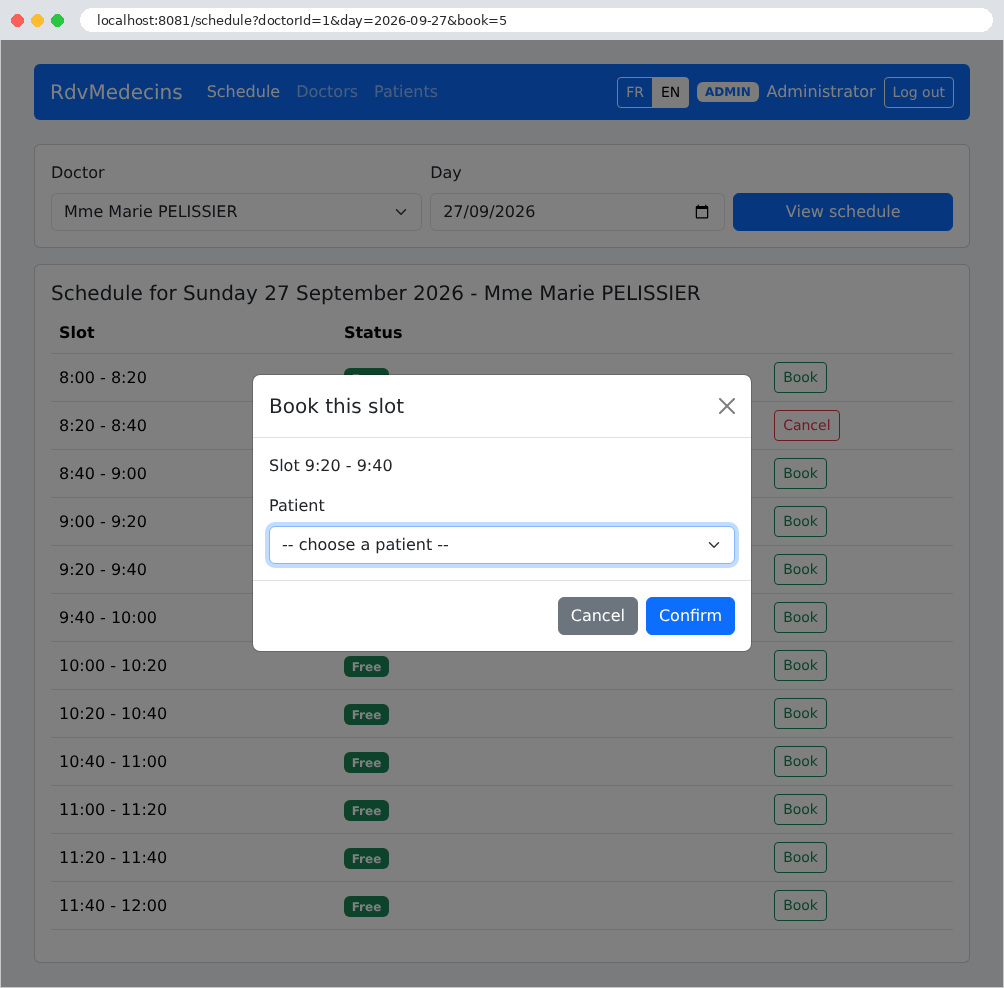
Each time slot is either available (Book button) or occupied (patient’s name, Cancel button). Clicking Book opens a window asking for the patient’s information. This window is generated by the server, just like the rest of the page: the URL now contains the parameter [book=5], which is the number of the selected time slot:
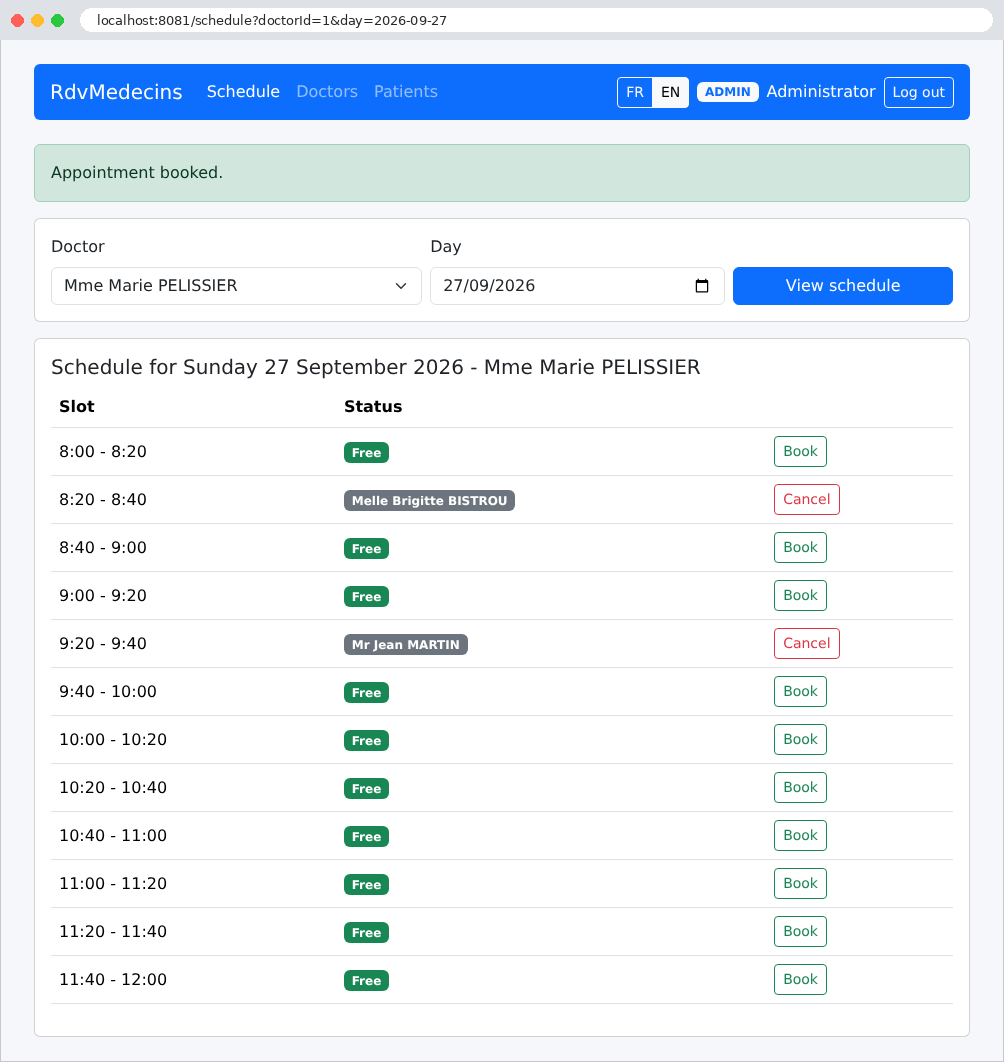
After the booking, a message confirms the appointment:
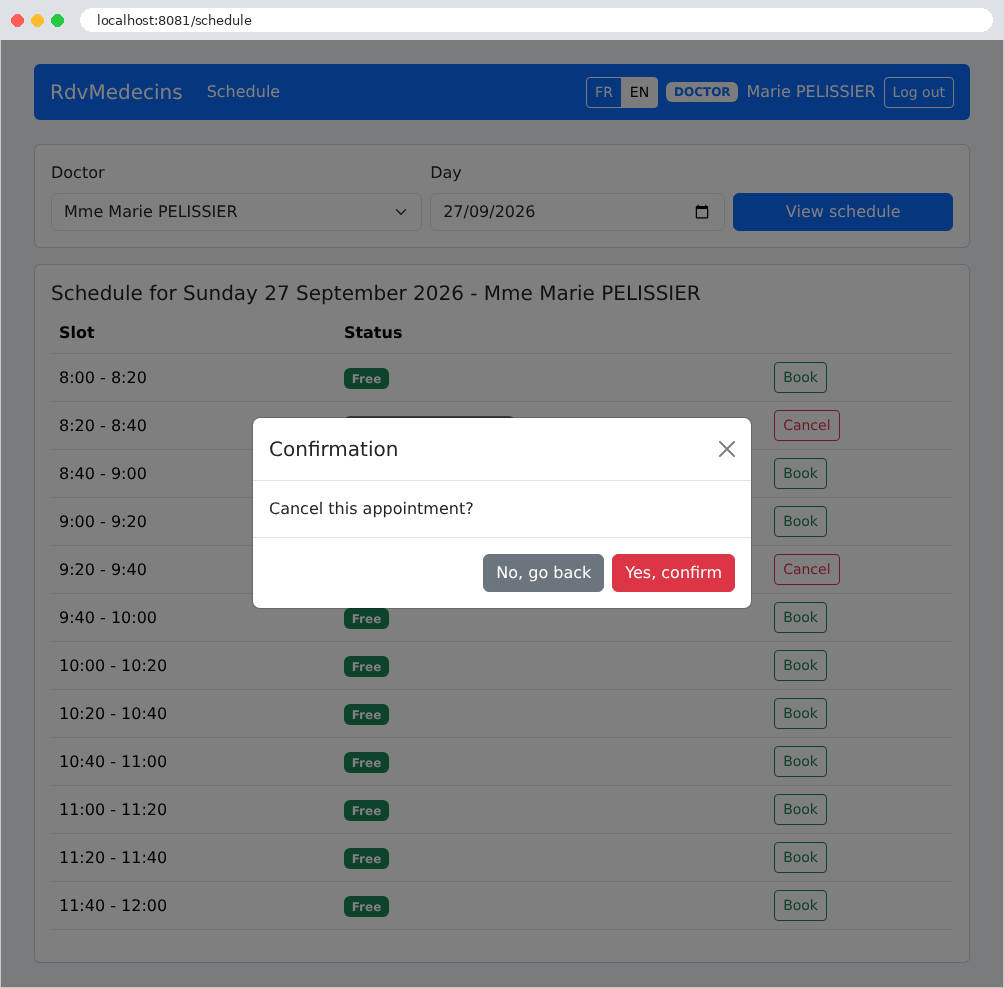
Clicking “Cancel” prompts a confirmation (here by Dr. Pélissier, whose navigation bar does not include the administration menus):
11.2.3. The Patient Portal
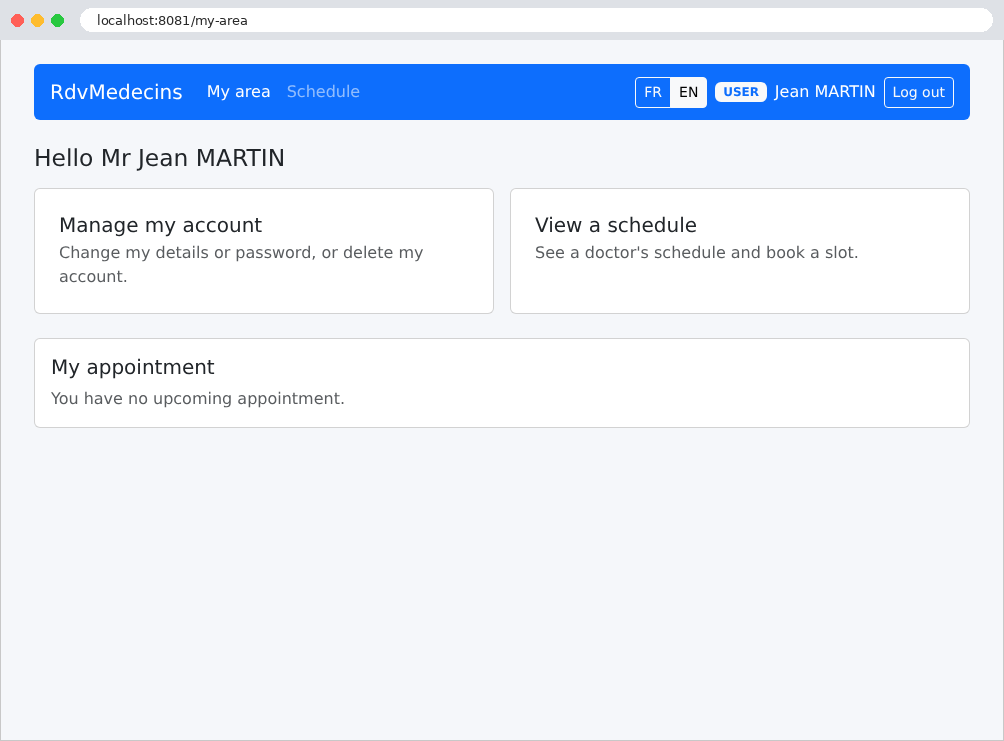
A patient (role USER) arrives at “My area”: their upcoming appointment, which they can cancel, and links to manage their account and view their calendar. Here, they do not yet have an appointment:
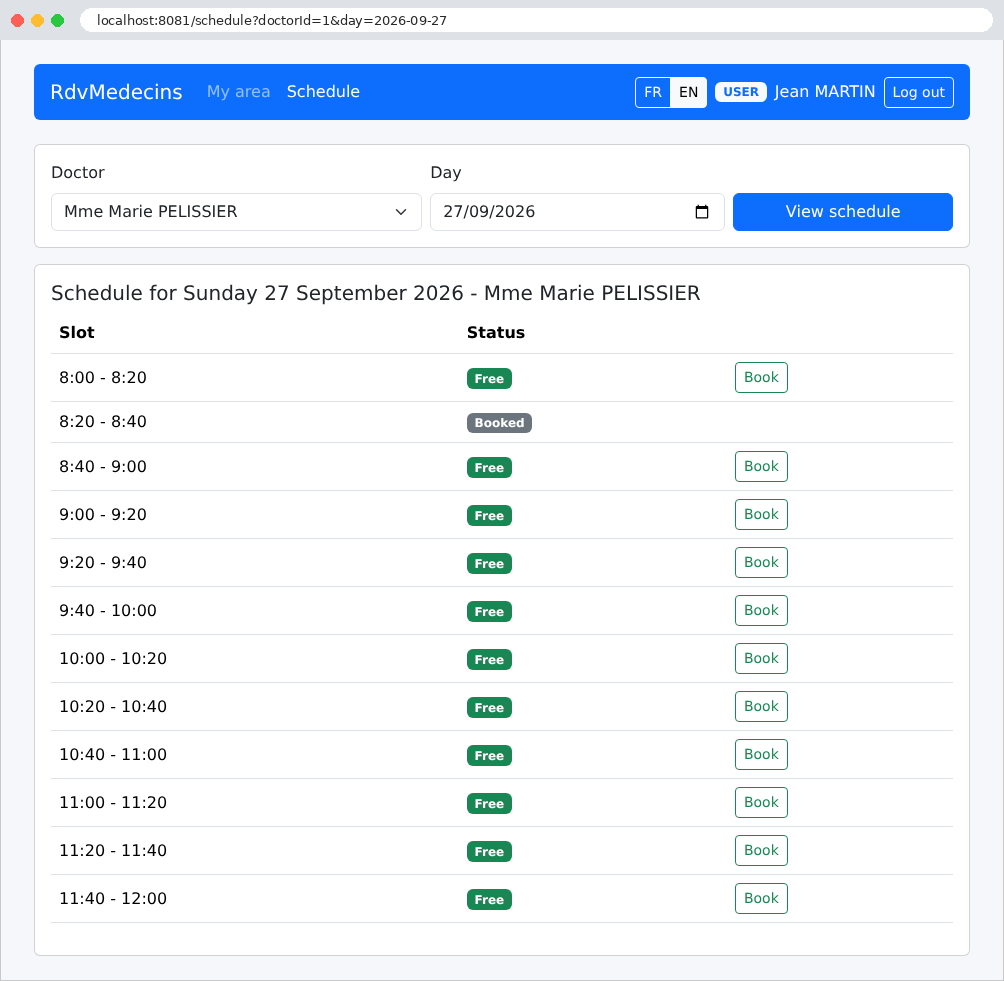
In the calendar, they do not see the names of other patients; these are replaced by “Booked”: this name does not even appear in the page’s source code. They can book an available time slot:
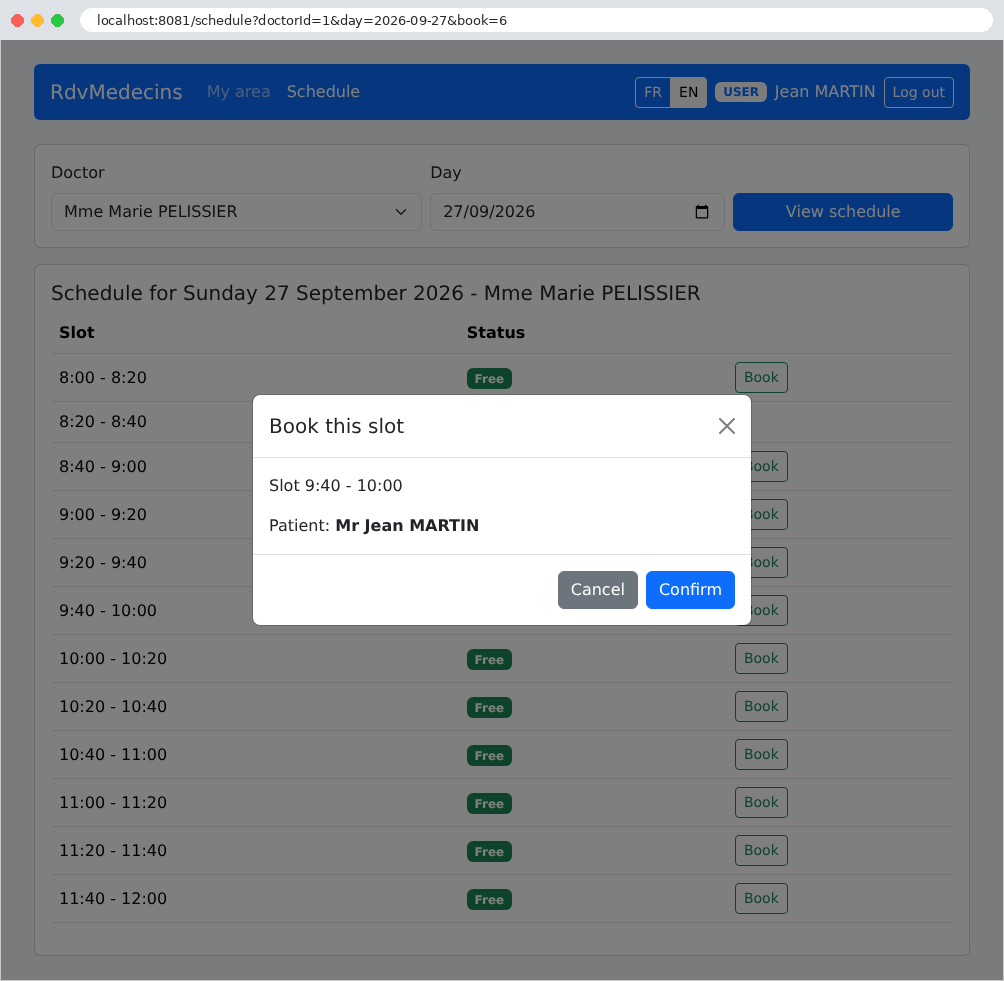
The booking window does not prompt him to select a patient: he books the appointment for himself.
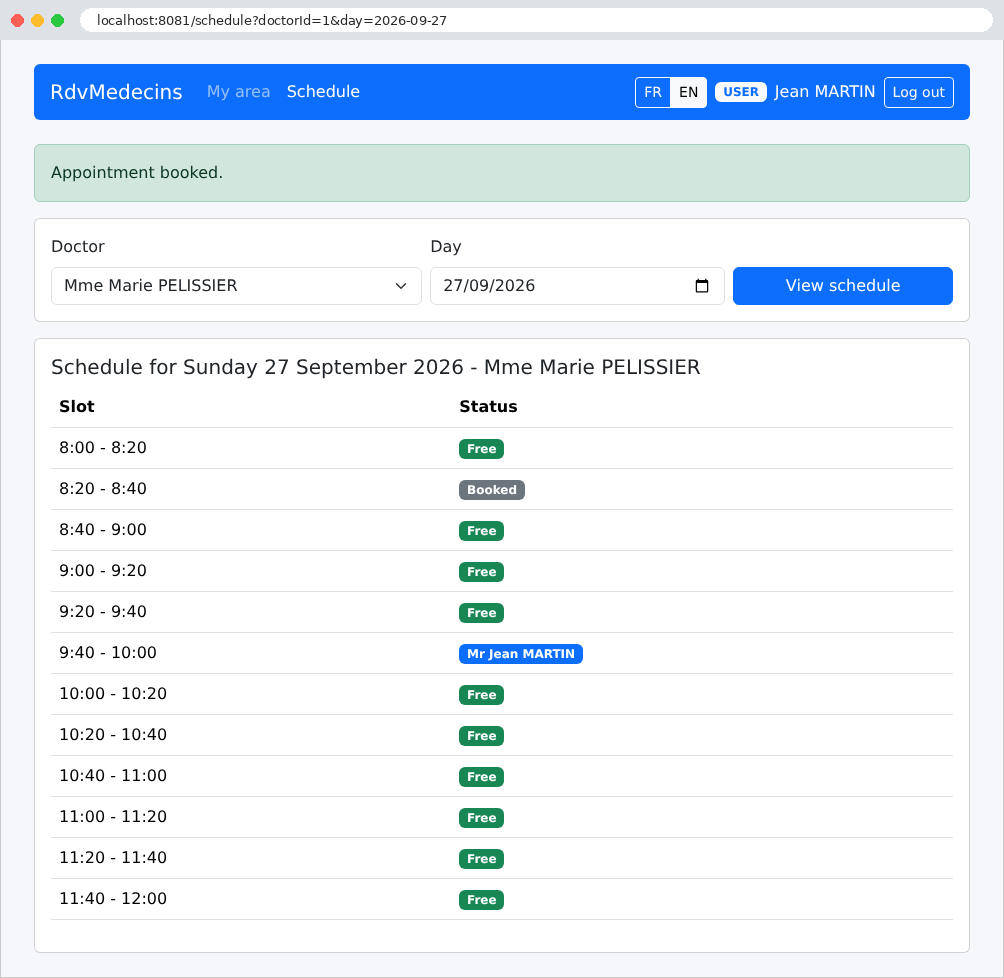
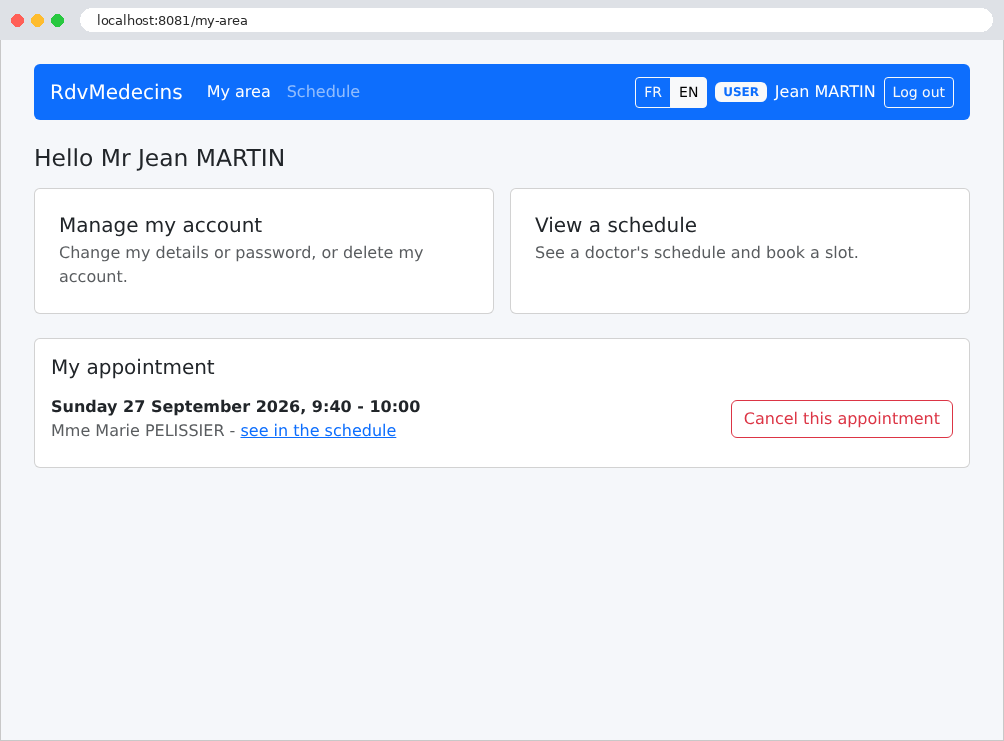
His dashboard now shows his upcoming appointment, which he can cancel:
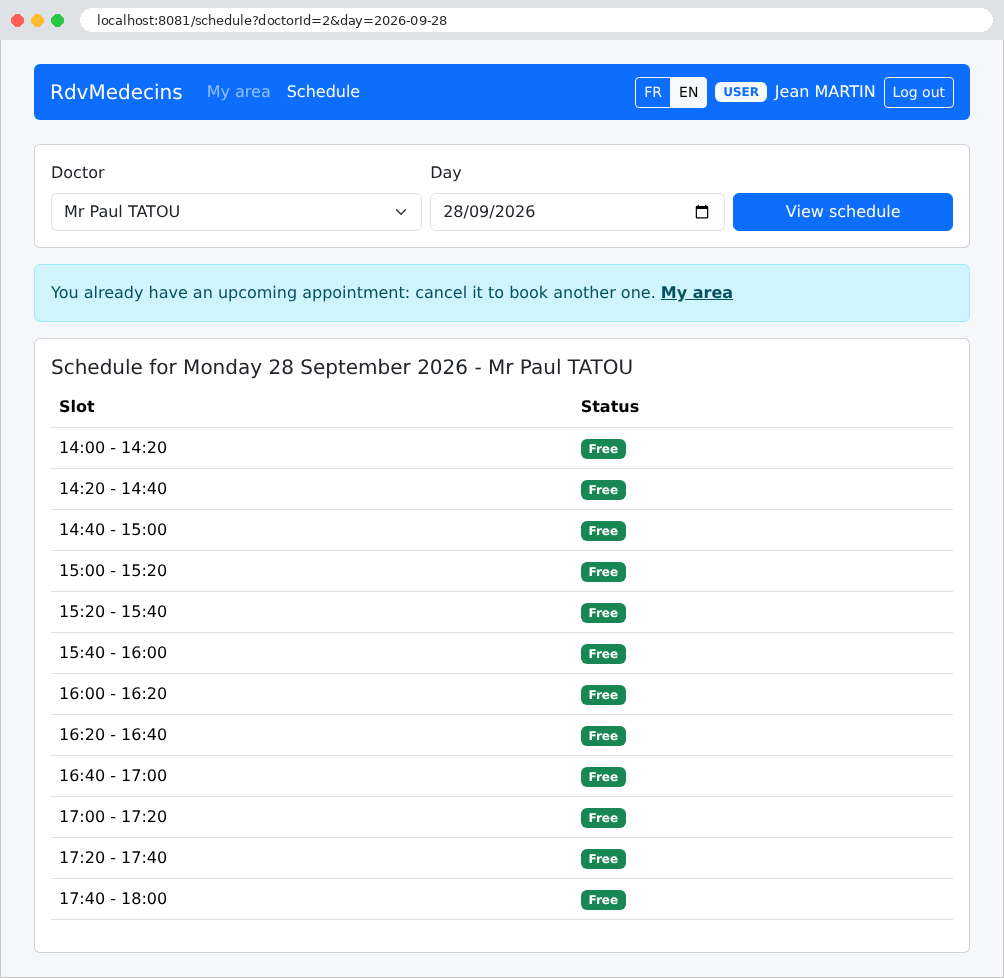
Since he has an upcoming appointment, he cannot schedule another one: the “Book” button is not displayed, and on the calendar for another day or another doctor, a message explains why:
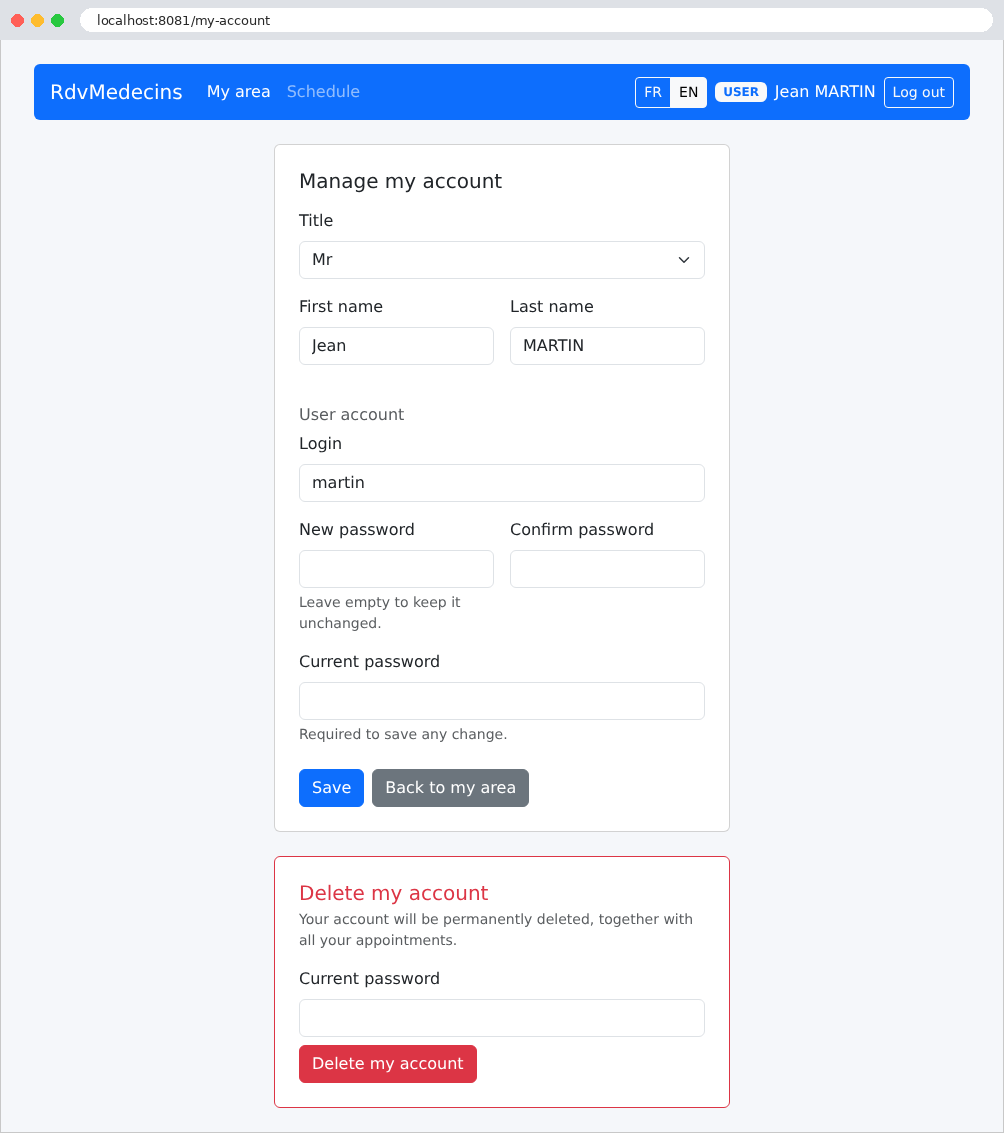
Account management: edit their information, change their password, or delete their account (and appointments). The current password is required for any changes:
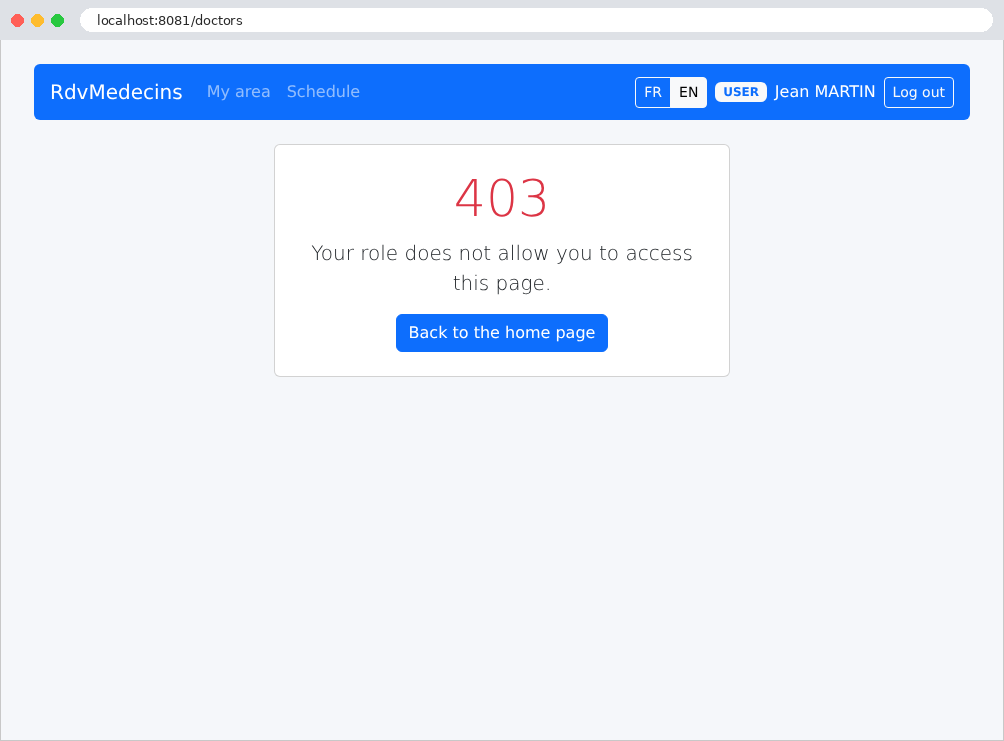
A patient who attempts to open a page reserved for the administrator (here, [/doctors], typed manually) receives an error page:
11.2.4. Managing Doctors and Patients
The administrator has two additional menus, Doctors and Patients:
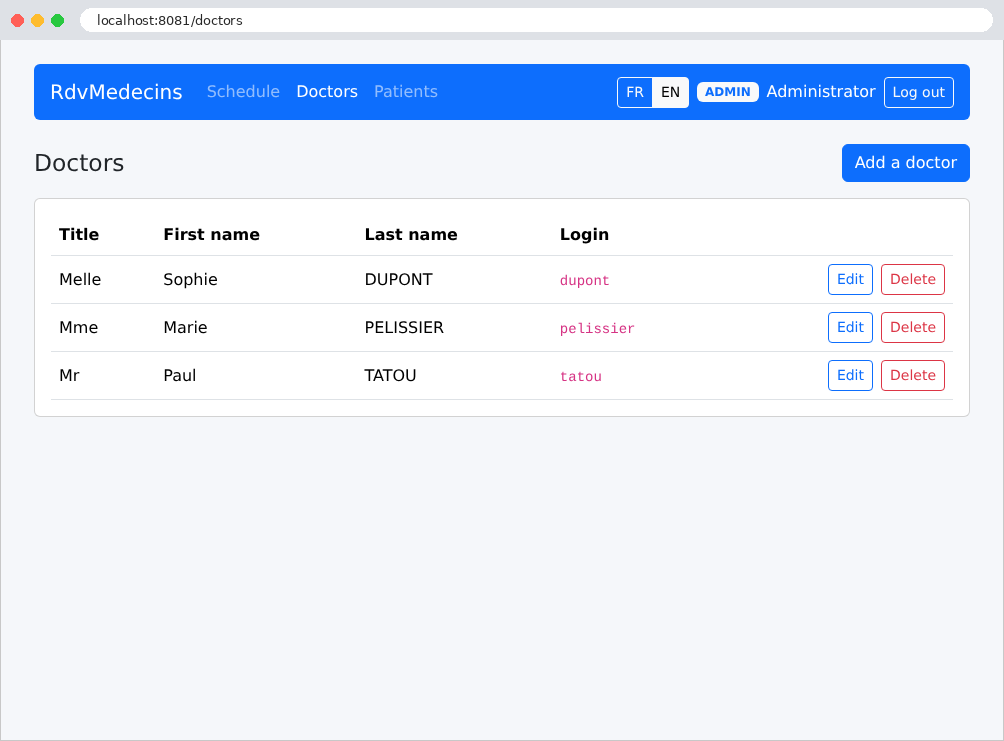
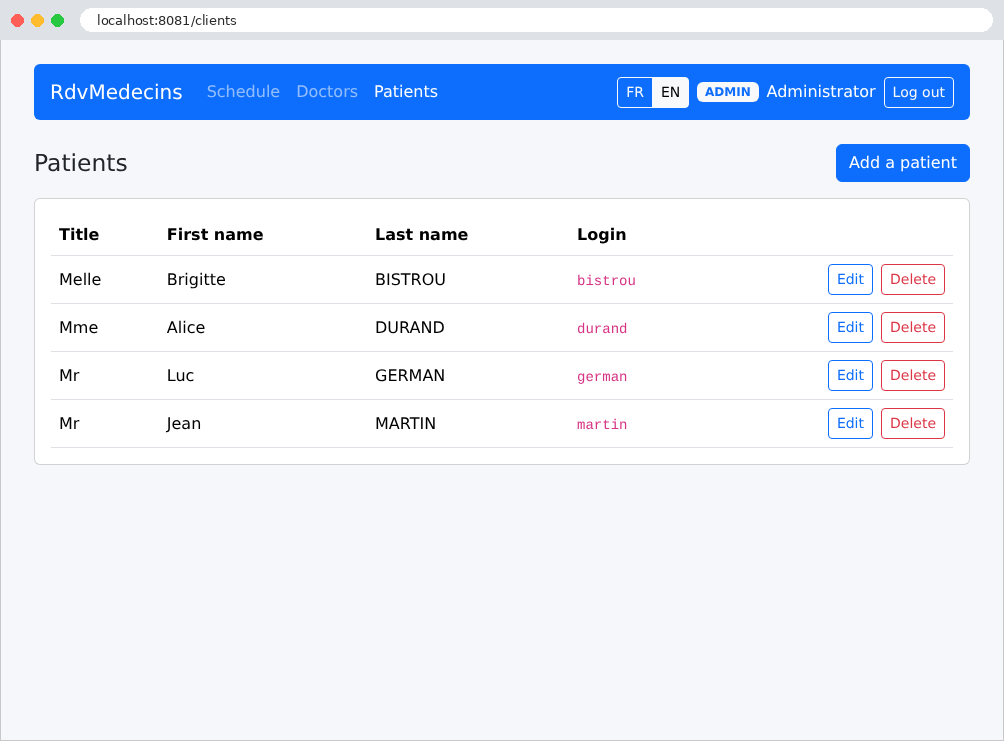
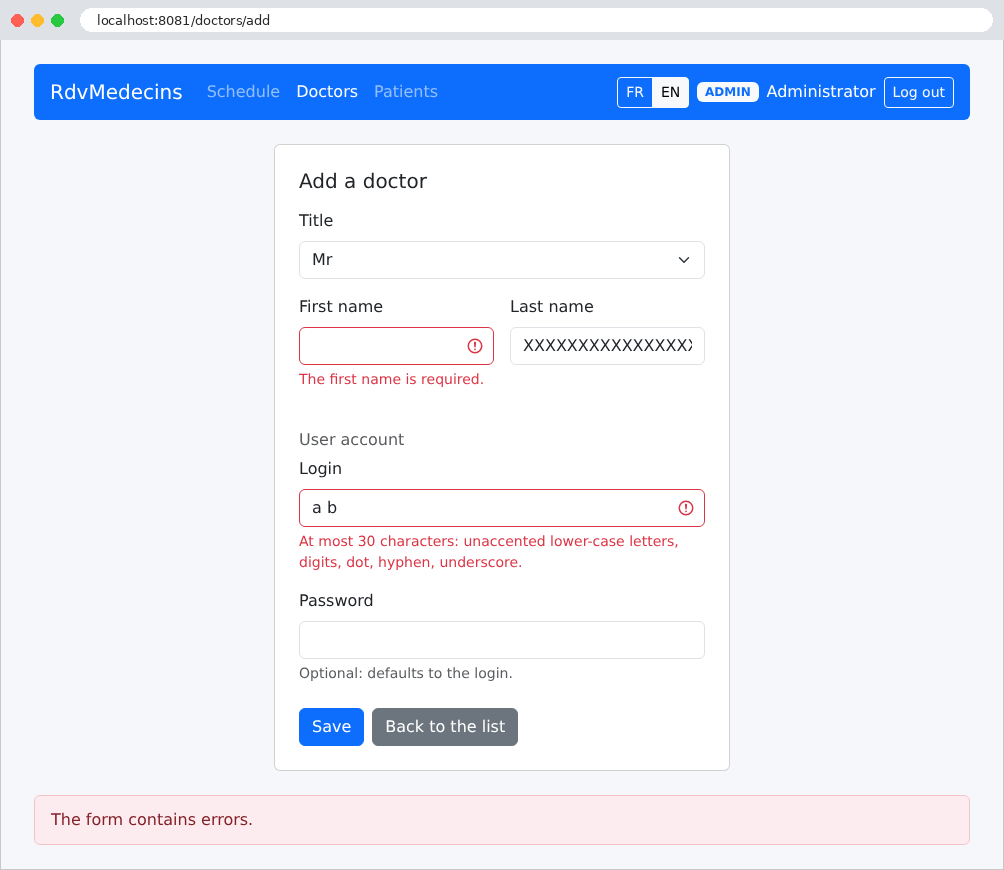
The form for adding a doctor, submitted with errors:
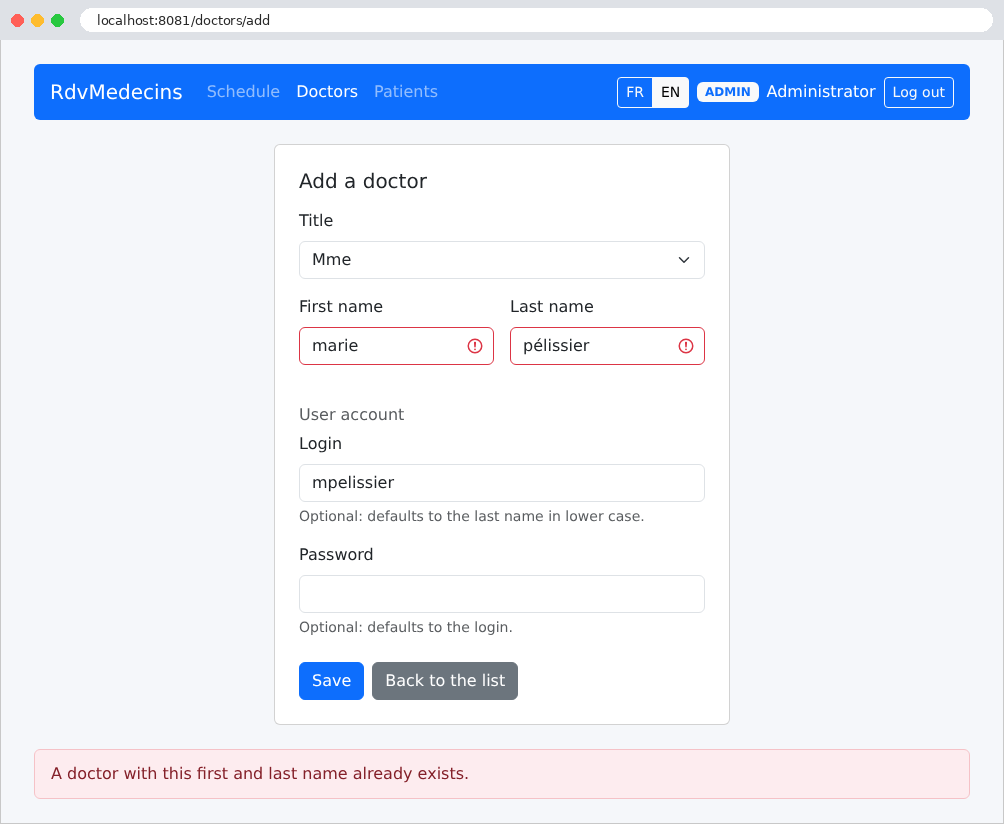
A name that is the same as an existing doctor’s is rejected, even when written in lowercase and with an accent (the database itself compares names without distinguishing between uppercase and lowercase letters or accents; see example 28):
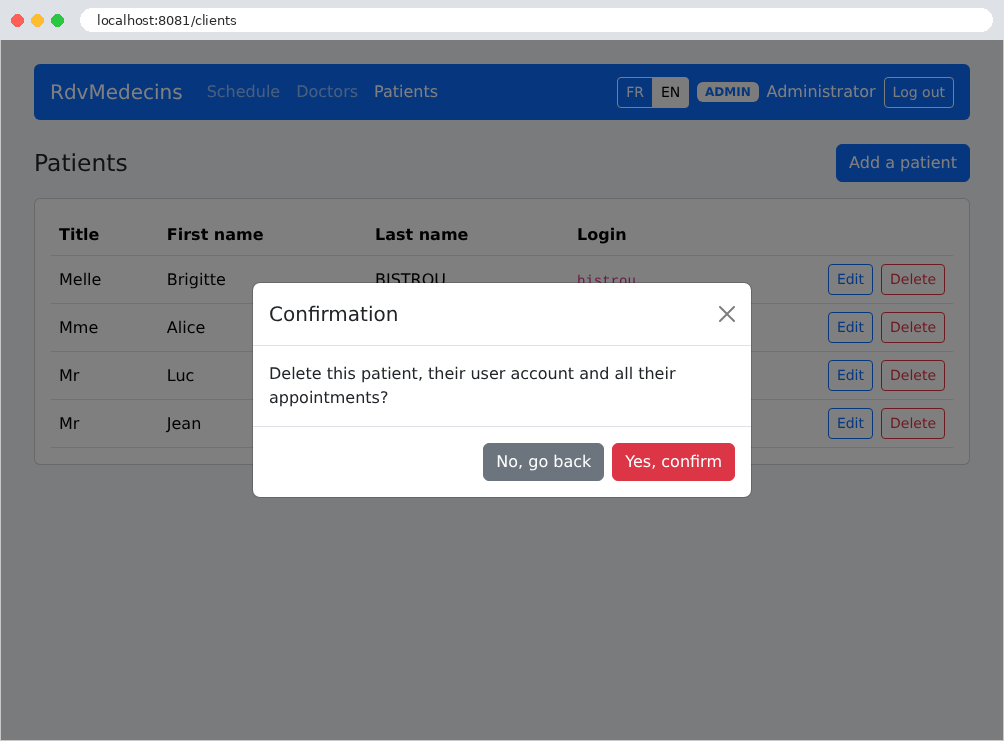
Deleting a patient requires confirmation:
11.2.5. Creating a patient account
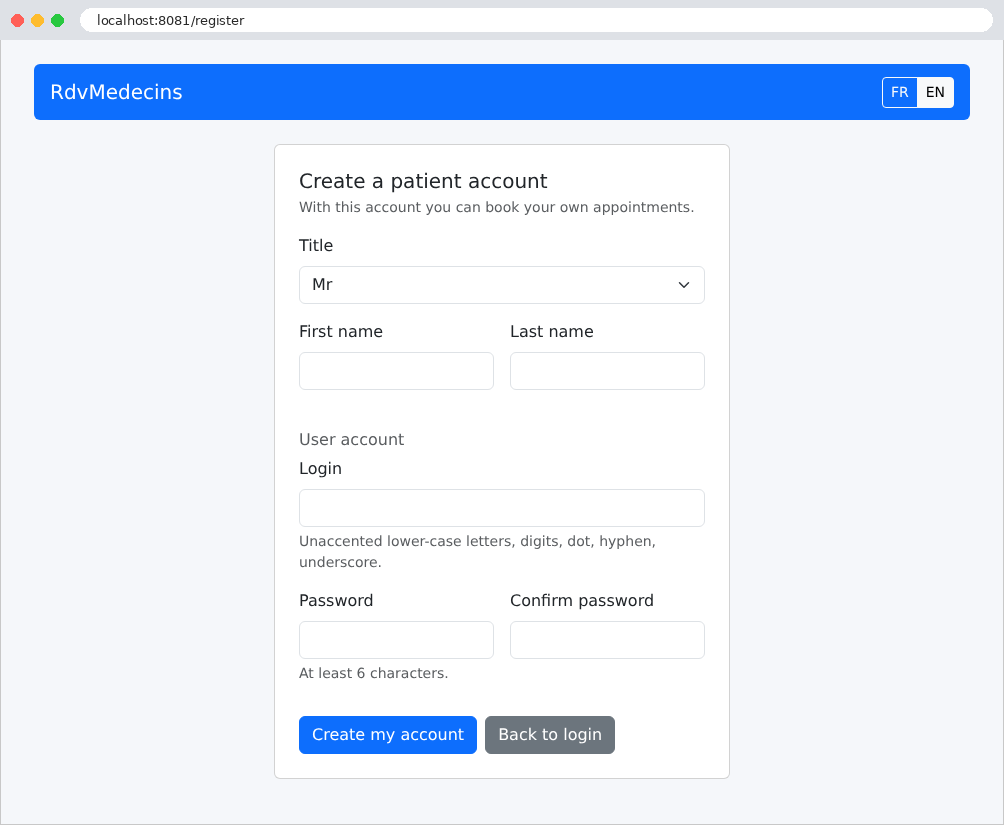
From the login page, the “Create a patient account” button only opens the form if the CAPTCHA has been entered correctly:
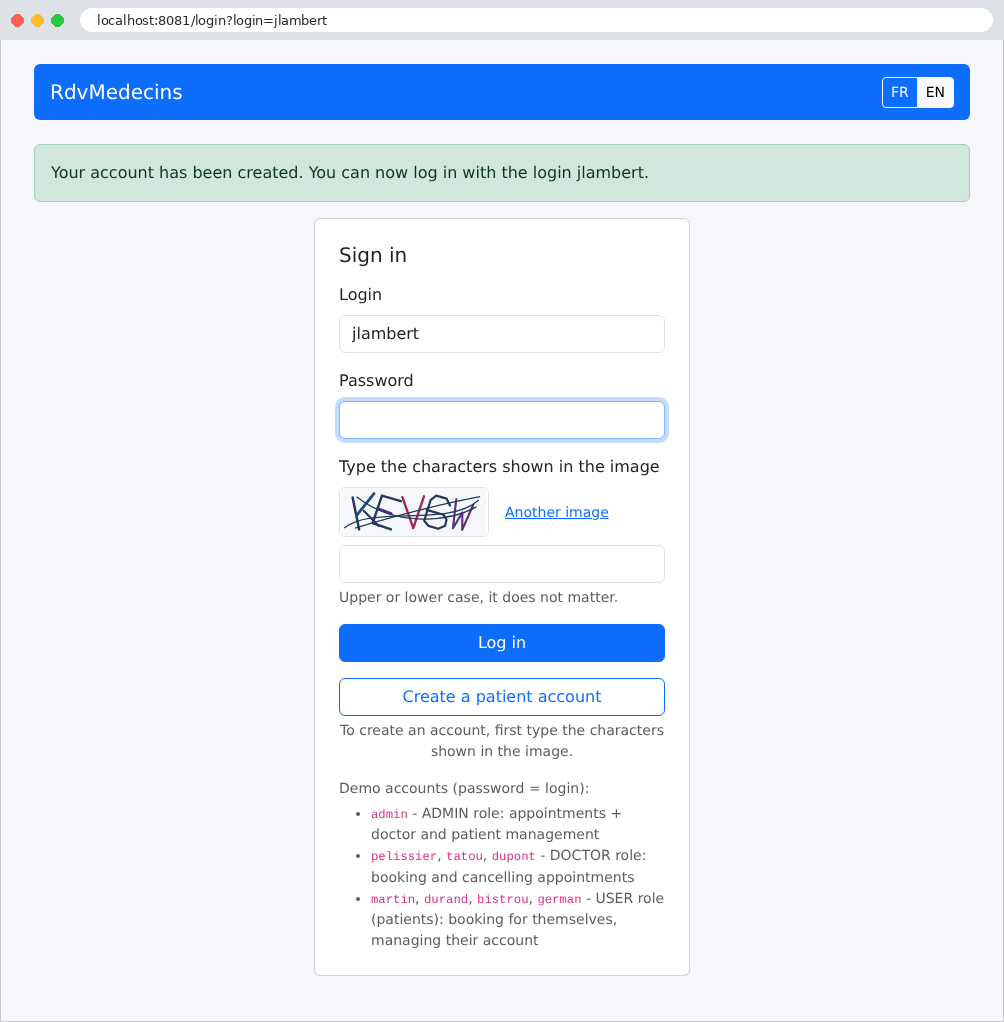
Once the account is created, the user is redirected to the login page with their username already filled in:
11.2.6. Logout
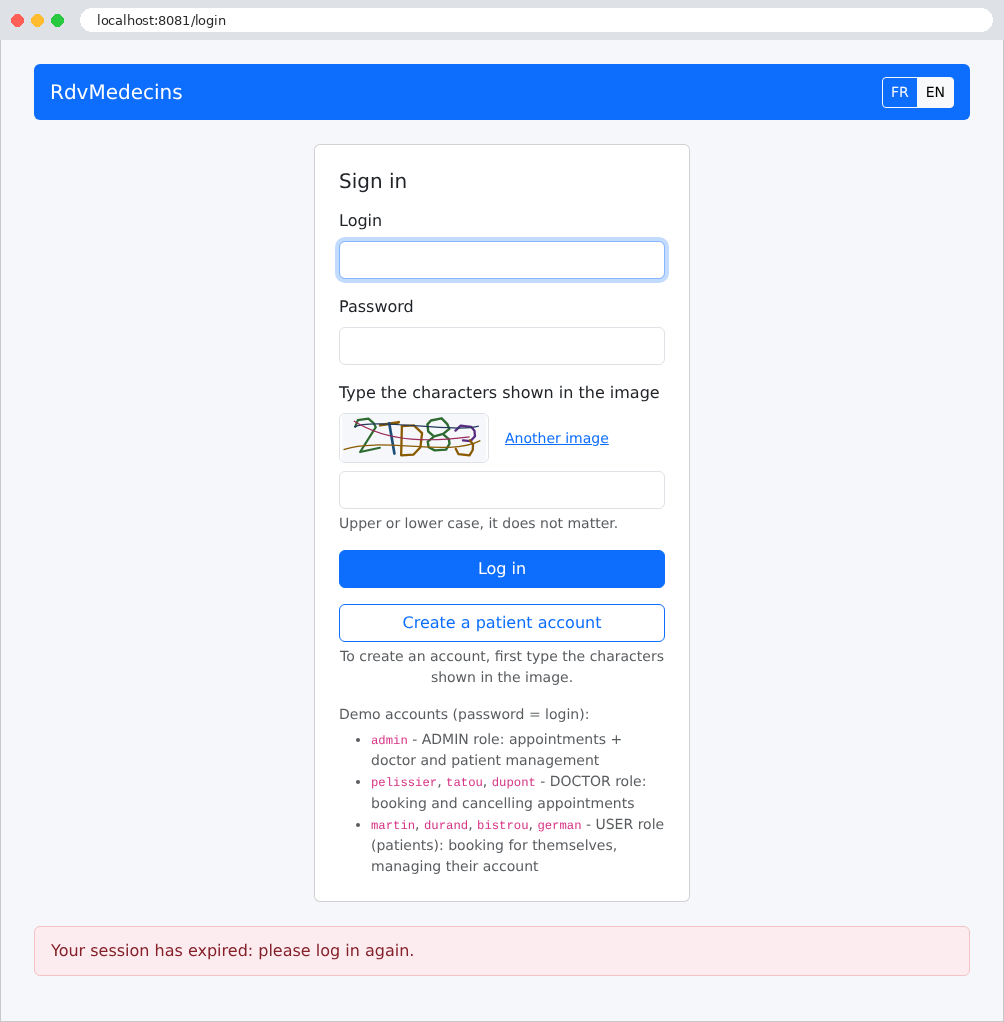
The login token is valid for two hours. After that time (or if the token has been tampered with), the requested page redirects to the login page with the following message:
11.3. Installation and Execution
The application is located in the [rdvmedecins2-django] folder, next to the [examples] folder. It is a standalone project, with its own [requirements.txt] and [.env] files, and its own virtual environment. The [README.md] file in the folder contains all of the following. The introduction to this document has already described the installation; we’ll provide additional details here.
11.3.1. Required Software
Two software packages are sufficient:
- [Python] 3.12 or later ([Django] 6.1 requires [Python] 3.12). Verify the installation in a terminal:
- Under [Linux] and [macOS], the command is often referred to as [python3]. Under [Linux], compiling [mysqlclient] also requires a few system packages (see appendices);
- a [MySQL] server version 8.4 or later, such as the one from [Laragon] running under [Windows] (see appendices). [MariaDB] 10.11 or later is also suitable. These are the minimum versions of [Django] 6.1: with [MySQL] 8.0, [Django] refuses to connect ([MySQL 8.4 or later is required]).
The recommended editor is [Visual Studio Code], along with the extensions [Python] and [Django] (see appendices); however, everything can be done via the command line.
11.3.2. Install the libraries
The libraries are not provided: create a virtual environment once and for all in the application folder, and install the libraries there in a terminal opened to the [rdvmedecins2-django] folder (you must be connected to the Internet):
| python -m venv .venv
.venv\Scripts\activate
pip install -r requirements.txt
|
(under [Linux] and [macOS], the second command is written as [source .venv/bin/activate]). [pip] reads the file [requirements.txt] (discussed below), downloads [Django], [mysqlclient], [PyJWT], [bcrypt], and the libraries they depend on, and installs them in the [.venv] folder. The environment must be activated in each new terminal ([Visual Studio Code] does this automatically once the environment interpreter has been selected; see the introduction).
11.3.3. Create the database
The [dbrdvmedecins2] database is created by the [database/dbrdvmedecins2.sql] script. Using [Laragon], open the [HeidiSQL] tool (Database button), then run the script via the File / Run SQL menu (see introduction). At the command line, in the application folder:
| mysql -u root -p < database/dbrdvmedecins2.sql
|
The [-p] option prompts for the [root] password; omit it if the account does not have one (as is the case with [Laragon]). This is the same database as in other versions of the application: if it already exists, this step is optional. The script can be run at any time to revert to the original data.
All installation configuration is contained in the file [.env] (discussed further below). By default, the application connects to [MySQL] on [127.0.0.1], port 3306, using the user [root] without a password: these are the default settings for [Laragon]. If your [root] account has a password, enter it in this file on the [DB_PASSWORD=] line. A system environment variable takes precedence over the file (example 25): this allows you to specify the password without writing it to a project file.
11.3.5. Run the application
In a terminal window open to the [rdvmedecins2-django] folder, with the virtual environment activated:
| python manage.py runserver 8081
|
| Watching for file changes with StatReloader
Performing system checks...
System check identified no issues (0 silenced).
September 27, 2026 - 19:30:12
Django version 6.1.1, using settings 'config.settings'
Starting WSGI development server at http://127.0.0.1:8081/
Quit the server with CONTROL-C.
|
Next, open the URL [http://localhost:8081] in a browser, and stop the application using [Ctrl-C]. Port 8081 allows you to run a course example (port 8000) at the same time; other versions of the application also use port 8081: do not run them simultaneously.
11.3.6. Demo Accounts
The password for each account is its username; you must also enter the characters shown in the image, in uppercase or lowercase:
Username | Role |
[admin] | ADMIN (the administrator) |
[pelissier], [tatou], [dupont] | DOCTOR (the doctors) |
[martin], [durand], [bistrou], [german] | USER (patients) |
A guide to exploring the app:
- [admin]: Schedule, Ms. Marie PELISSIER, today: a time slot is already booked by Ms. Brigitte BISTROU. Book a slot for Mr. Jean MARTIN, then try to book a second appointment for him (declined). Doctors and Patients menus: add, edit, delete (Dr. PELISSIER, who has appointments, cannot be deleted);
- [pelissier]: his daily schedule is displayed directly; the address [/doctors], entered manually, returns a 403 error page;
- [martin]: My area, their appointment, the calendar where other patients appear as “Booked” (view the page’s source code: their names do not appear there); Manage my account;
- Login page: Create a patient account, then log in with the new account;
- buttons FR / EN: the entire interface changes languages, including dates.
11.3.7. Development Mode
The provided [.env] file configures the application for development ([DJANGO_DEBUG=1]):
- the server console displays every request and every SQL command sent to the database (Example 28). For example, to display a calendar (after the two commands to open the connection, Example 28; lines abbreviated):
| (0.000) SELECT `doctors`.`id`, ..., `users`.`role` FROM `doctors` INNER JOIN `users` ON (`doctors`.`user` = `users`.`id`) WHERE `doctors`.`id` = 1 ORDER BY `doctors`.`id` ASC LIMIT 1; args=(1,); alias=default
(0.003) SELECT `appointments`.`id`, ..., `clients`.`user` FROM `appointments` INNER JOIN `slots` ON (`appointments`.`slot_id` = `slots`.`id`) INNER JOIN `clients` ON (`appointments`.`client_id` = `clients`.`id`) WHERE (`appointments`.`day` = '2026-09-28' AND `slots`.`doctor_id` = 1); args=('2026-09-28', 1); alias=default
(0.000) SELECT `slots`.`id`, ..., `slots`.`end_minute` FROM `slots` WHERE `slots`.`doctor_id` = 1 ORDER BY `slots`.`start_hour` ASC, `slots`.`start_minute` ASC; args=(1,); alias=default
[27/Sep/2026 19:50:21] "GET /schedule?doctorId=1&day=2026-09-28 HTTP/1.1" 200 9186
|
Three requests can be identified here: the doctor and their account (a join), today’s appointments and their patients, and the doctor’s available time slots. The list of doctors in the drop-down menu, however, is not retrieved; it comes from the cache (see below). The logged-in user is not retrieved either; they are identified by their token (Example 25);
- an unexpected exception displays the [Django] debug page (example 03), along with the exception message and the call stack. In production, the application displays its own 500 error page instead;
- there is nothing to restart after a change: the development server restarts automatically when a [Python] file changes (example 01), and a modified template is re-read on the next request.
The debugger for the [Python] extension of [Visual Studio Code] also allows you to step through the application: all you need is a “Django”-style launch configuration (file [.vscode/launch.json], which the extension offers to create), with the parameters [runserver 8081 --noreload]. The [django-debug-toolbar] extension (to be installed via [pip]) displays, next to each page, the details of the request: the SQL commands and their durations, the templates used, the settings, the signals...
11.3.8. A production server
The [Django] development server is not intended for production. In production, the application is served by a WSGI server (example 01): [gunicorn] under [Linux] ([gunicorn config.wsgi:application --workers 4]), [waitress] under [Windows] ([waitress-serve --port=8081 config.wsgi:application]), typically behind a web server ([nginx], [Apache]) that receives connections from HTTPS, serves the static files itself, and delegates the rest to the WSGI server. In the [.env] file, you must specify production mode, change the secret keys, declare the site name, and specify that the site is served by HTTPS:
| DJANGO_DEBUG=0
DJANGO_SECRET_KEY=a-long-random-string
DJANGO_ALLOWED_HOSTS=rdvmedecins.example.com
JWT_SECRET=another-long-random-string
COOKIE_SECURE=1
|
A suitable random string can be obtained using [Python] itself: [python -c "import secrets; print(secrets.token_hex(32))"]. The application is then prepared using two commands:
| python manage.py collectstatic
python manage.py check --deploy
|
The first command copies all static files (those from the application and those from [Django]) to the [var/static] folder (setting [STATIC_ROOT]), which the web server will serve (Example 15). The second script checks the security settings of a deployment and flags any missing ones (the HSTS headers, the redirect to HTTPS, etc.). To test production mode with the development server, which no longer serves static files: [python manage.py runserver 8081 --insecure].
11.3.9. Common Issues
With [MySQL], the [runserver] command connects to the database as soon as it starts up: its project checks (system checks, example 01) require knowledge of the server version. An inaccessible database therefore prevents it from starting: the console displays a long call stack, which ends with the error. For example, with a database that does not exist:
| django.db.utils.OperationalError: (1049, "Unknown database 'dbrdvmedecins2'")
|
A production server ([gunicorn]...) does not perform these checks: the error then appears in the log on the first page that queries the database (the login page does not query the database; the login process itself does). The most common messages:
Message | Cause |
[ModuleNotFoundError: No module named 'django'] | The virtual environment is not enabled, or [pip install -r requirements.txt] has not been executed |
[Django 6.1 requires Python 3.12 or later] (during installation) | The version of [Python] is earlier than 3.12 |
[OperationalError: (2002, "Can't connect to server on '127.0.0.1' ...")] | [MySQL] has not been started, or is not listening on [127.0.0.1:3306] |
[OperationalError: (1045, "Access denied for user 'root'@'localhost' ...")] | The password for [MySQL] must be entered in [DB_PASSWORD] (see “Configuring Database Access”) |
[OperationalError: (1049, "Unknown database 'dbrdvmedecins2'")] | The script [database/dbrdvmedecins2.sql] was not executed |
[NotSupportedError: MySQL 8.4 or later is required] | The [MySQL] server is too old: upgrade to [MySQL] 8.4 or [MariaDB] 10.11 |
[ImproperlyConfigured: JWT_SECRET must be at least 32 characters long (see .env).] | The token secret key is too short in [.env] |
[Error: That port is already in use.] | Port 8081 is already in use (is another version of the application running?): stop it, or choose a different port |
11.4. Application Architecture
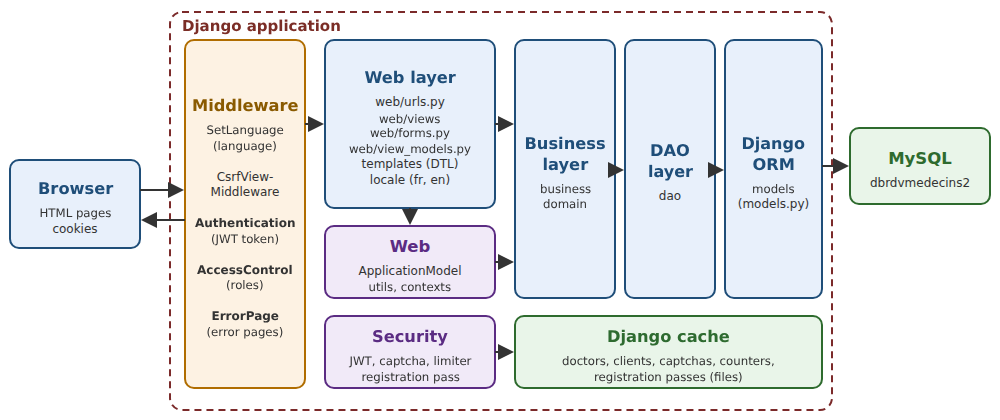
- The browser sends its requests to the server ([runserver], or [nginx] + [gunicorn]), which forwards them to [Django] via the WSGI application in the [config/wsgi.py] file. The request passes through the middleware layers (see the chapter on the lifecycle): the request language ([SetLanguage]), anti-CSRF protection, flash messages, and then authentication: the user is identified based on the JWT token in their cookie ([Authentication]); after routing, [AccessControl] denies access to protected pages for visitors who are not authorized. Errors are handled by pages HTML ([ErrorPage], and the error views);
- [web]: the web layer. Views ([web/views]), a family of pages per module, and their routes ([web/urls.py]); forms and their constraints ([web/forms.py]); the template models ([web/view_models.py]). They all pass through a single object, [ApplicationModel] ([web/application.py]), which caches the lists of doctors and clients and forwards other requests to the business layer;
- [security]: JWT tokens, authentication and access control middleware, CAPTCHA, attempt limits, and account creation pass;
- [business]: business rules and transactions; [domain]: calendar objects, calculated by the business layer;
- [dao]: the DAO layer, one module per table (or family of tables);
- [models]: the templates from ORM (Example 28), which the DAO layer reads from and writes to the database;
- [templates]: the templates, which generate the HTML pages; [locale]: the French dictionary; [static]: the style sheet, the page script, and [Bootstrap];
- The [config] folder and the [.env] file: the configuration that brings it all together.
The application folder (excluding [.venv] and [var]):
| rdvmedecins2-django/
├── business/
│ ├── README.md
│ ├── __init__.py
│ ├── business.py
│ ├── dates.py
│ ├── descriptor.py
│ ├── errors.py
│ ├── person_data.py
│ ├── provider.py
│ └── service.py
├── config/
│ ├── __init__.py
│ ├── settings.py
│ ├── urls.py
│ └── wsgi.py
├── dao/
│ ├── README.md
│ ├── __init__.py
│ ├── appointments.py
│ ├── persons.py
│ ├── slots.py
│ └── users.py
├── database/
│ ├── README.md
│ └── dbrdvmedecins2.sql
├── domain/
│ ├── README.md
│ ├── __init__.py
│ └── schedule.py
├── locale/
│ └── fr/
│ └── LC_MESSAGES/
│ ├── django.mo
│ └── django.po
├── models/
│ ├── README.md
│ ├── __init__.py
│ ├── apps.py
│ └── models.py
├── security/
│ ├── README.md
│ ├── __init__.py
│ ├── access.py
│ ├── auth.py
│ ├── captcha_drawing.py
│ ├── captchas.py
│ ├── connected_user.py
│ ├── errors.py
│ ├── limiter.py
│ ├── middleware.py
│ ├── passwords.py
│ └── registration_pass.py
├── static/
│ ├── css/
│ │ └── styles.css
│ ├── js/
│ │ └── app.js
│ └── lib/
│ └── bootstrap/
├── templates/
│ ├── forms/
│ │ └── field.html
│ ├── fragments/
│ │ ├── booking.html
│ │ ├── captcha.html
│ │ ├── confirmation.html
│ │ ├── errors.html
│ │ ├── navbar.html
│ │ └── success.html
│ ├── persons/
│ │ ├── form.html
│ │ └── list.html
│ ├── README.md
│ ├── account.html
│ ├── area.html
│ ├── error.html
│ ├── layout.html
│ ├── login.html
│ ├── macros.html
│ ├── registration.html
│ └── schedule.html
├── web/
│ ├── templatetags/
│ │ ├── __init__.py
│ │ └── rdv.py
│ ├── views/
│ │ ├── README.md
│ │ ├── __init__.py
│ │ ├── area.py
│ │ ├── auth.py
│ │ ├── errors.py
│ │ ├── language.py
│ │ ├── persons.py
│ │ ├── registration.py
│ │ └── schedule.py
│ ├── README.md
│ ├── __init__.py
│ ├── application.py
│ ├── apps.py
│ ├── contexts.py
│ ├── forms.py
│ ├── middleware.py
│ ├── rendering.py
│ ├── urls.py
│ ├── utils.py
│ └── view_models.py
├── .env
├── .gitignore
├── README.md
├── manage.py
└── requirements.txt
|
This is the structure of a typical [Django] project (Example 01): a configuration package ([config]), a [manage.py] file, and code packages. Only two of these are [Django] applications, declared in [INSTALLED_APPS]: [models], because it contains templates from ORM (which [Django] searches for only in applications), and [web], because it contains a tag library ([templatetags], example 16). The others ([dao], [business], [security], [domain]) are simply [Python] packages that the others import: they have nothing to report to [Django]. [Django] does not enforce any of these folders, and a typical project would instead have one application per domain (calendars, accounts, etc.), each with its own models, views, and templates; we preferred, as in the other versions of the case study, a layer-based organization, as shown in Example 28. [Bootstrap] is part of the application this time (folder [static/lib/bootstrap]): the case study is self-contained.
11.5. The Database
The [dbrdvmedecins2] database has five tables:
- [users]: users authorized to log in;
- [doctors] and [clients]: doctors and patients, each linked to their user account;
- [slots]: each doctor’s available time slots;
- [appointments]: appointments, one client per time slot on a given day.
11.5.1. database/dbrdvmedecins2.sql
| -- =========================================================================
-- Database [dbrdvmedecins2] - MySQL 8
--
-- Evolution of [dbrdvmedecins]:
-- 1. the [doctors] and [clients] tables get a [user] column,
-- foreign key to users(id): every doctor and every client is
-- now also a user able to log in;
-- 2. a third role appears: DOCTOR (in addition to ADMIN and USER);
-- 3. the script creates a [users] row for each doctor (role DOCTOR)
-- and for each client (role USER):
-- - login = last name in lower case
-- - password = last name in lower case, hashed with bcrypt (10 rounds)
-- - display name = first name + last name
--
-- 4. uniqueness constraints, all NAMED (the application recognizes
-- the name of the violated constraint in the MySQL error message):
-- - unq_users_login : a login belongs to one account only;
-- - unq_doctors_first_name_last_name : two doctors cannot have the
-- same first and last names;
-- - unq_clients_first_name_last_name : same for the clients.
-- Beware: the utf8mb4_unicode_ci collation compares regardless of
-- case and accents - "Hélène DUPONT" and "helene dupont"
-- are therefore considered identical.
--
-- The [users] table must now be created BEFORE [doctors] and [clients]
-- (they reference it), and dropped AFTER them.
-- =========================================================================
-- the script is written in UTF-8
SET NAMES utf8mb4;
-- we start again from an empty database on each run of the script (handy in development)
CREATE DATABASE IF NOT EXISTS dbrdvmedecins2 CHARACTER SET utf8mb4 COLLATE utf8mb4_unicode_ci;
USE dbrdvmedecins2;
-- drop order: from the "child" tables to the "parent" tables
DROP TABLE IF EXISTS appointments;
DROP TABLE IF EXISTS slots;
DROP TABLE IF EXISTS clients;
DROP TABLE IF EXISTS doctors;
DROP TABLE IF EXISTS users;
-- -------------------------------------------------------------------------
-- table [users]: the users allowed to log in to the application
-- -------------------------------------------------------------------------
CREATE TABLE users (
id INT AUTO_INCREMENT PRIMARY KEY,
version INT NOT NULL DEFAULT 0,
login VARCHAR(30) NOT NULL, -- login identifier
password VARCHAR(100) NOT NULL, -- HASHED password (bcrypt) - never in clear
name VARCHAR(40) NOT NULL, -- name displayed once logged in
role VARCHAR(10) NOT NULL, -- 'ADMIN', 'DOCTOR' or 'USER'
-- a login can belong to one account only
CONSTRAINT unq_users_login UNIQUE (login)
);
-- -------------------------------------------------------------------------
-- table [doctors]: the doctors of the practice
-- -------------------------------------------------------------------------
CREATE TABLE doctors (
id INT AUTO_INCREMENT PRIMARY KEY, -- primary key (technical identifier)
version INT NOT NULL DEFAULT 0, -- row version number (optimistic lock)
title VARCHAR(5) NOT NULL, -- Melle, Mme, Mr
last_name VARCHAR(20) NOT NULL,
first_name VARCHAR(20) NOT NULL,
`user` INT NOT NULL, -- foreign key -> users(id)
CONSTRAINT fk_doctors_user FOREIGN KEY (`user`) REFERENCES users(id),
-- one account per doctor, and one doctor per account
CONSTRAINT unq_doctors_user UNIQUE (`user`),
-- two doctors cannot have the same first and last names
CONSTRAINT unq_doctors_first_name_last_name UNIQUE (first_name, last_name)
);
-- -------------------------------------------------------------------------
-- table [clients]: the doctors' patients
-- -------------------------------------------------------------------------
CREATE TABLE clients (
id INT AUTO_INCREMENT PRIMARY KEY,
version INT NOT NULL DEFAULT 0,
title VARCHAR(5) NOT NULL,
last_name VARCHAR(20) NOT NULL,
first_name VARCHAR(20) NOT NULL,
`user` INT NOT NULL, -- foreign key -> users(id)
CONSTRAINT fk_clients_user FOREIGN KEY (`user`) REFERENCES users(id),
-- one account per client, and one client per account
CONSTRAINT unq_clients_user UNIQUE (`user`),
-- two clients cannot have the same first and last names
CONSTRAINT unq_clients_first_name_last_name UNIQUE (first_name, last_name)
);
-- -------------------------------------------------------------------------
-- table [slots]: the time slots of each doctor
-- -------------------------------------------------------------------------
CREATE TABLE slots (
id INT AUTO_INCREMENT PRIMARY KEY,
version INT NOT NULL DEFAULT 0,
doctor_id INT NOT NULL, -- foreign key -> doctors(id)
start_hour INT NOT NULL, -- start hour of the slot
start_minute INT NOT NULL, -- start minute of the slot
end_hour INT NOT NULL, -- end hour of the slot
end_minute INT NOT NULL, -- end minute of the slot
CONSTRAINT fk_slots_doctor FOREIGN KEY (doctor_id) REFERENCES doctors(id)
);
-- -------------------------------------------------------------------------
-- table [appointments]: the appointments booked by the clients
-- -------------------------------------------------------------------------
CREATE TABLE appointments (
id INT AUTO_INCREMENT PRIMARY KEY,
version INT NOT NULL DEFAULT 0,
day DATE NOT NULL, -- day of the appointment
slot_id INT NOT NULL, -- foreign key -> slots(id)
client_id INT NOT NULL, -- foreign key -> clients(id)
CONSTRAINT fk_appointments_slot FOREIGN KEY (slot_id) REFERENCES slots(id),
CONSTRAINT fk_appointments_client FOREIGN KEY (client_id) REFERENCES clients(id),
-- the same slot, on the same day, can be booked only once
CONSTRAINT unq1_appointments UNIQUE (day, slot_id)
);
-- =========================================================================
-- Demo data
-- =========================================================================
-- the users: passwords hashed with bcrypt (10 salt rounds)
-- admin/admin (ADMIN)
-- one DOCTOR account per doctor, one USER account per client
-- (the user/user demo account is gone: a USER account is
-- now ALWAYS a client's account, who can book and manage the account)
-- (login = password = last name in lower case)
INSERT INTO users (login, password, name, role) VALUES
('admin', '$2b$10$YSNBJXXHX9mp13nPZb6YGu8M1jR6uvPwO1s2X73z0QAqBR7TOQjoq', 'Administrator', 'ADMIN'),
-- doctors
('pelissier', '$2b$10$DnSDOK5ONrdMxTTr1NKCHOphR3WSp5QAyG9S9ueruw9HwlxI.16ba', 'Marie PELISSIER', 'DOCTOR'),
('tatou', '$2b$10$PeovBO.gmJUKP4PglI/fwu4xtWOYSxoM5VTWjTj7uQ4wcd9P9.htS', 'Paul TATOU', 'DOCTOR'),
('dupont', '$2b$10$az7wvPKC1h0EiAxXwu/PU.vYjzmB04rd5B7QnK0mvxp4niYIHVoc.', 'Sophie DUPONT', 'DOCTOR'),
-- clients
('martin', '$2b$10$GT6S5pp.WdGapFw/UmocXesbC6LEjJfZzgatCUyG9Sf4o1iBNlqZW', 'Jean MARTIN', 'USER'),
('durand', '$2b$10$l2gl/zCder8E7Nh4VxGRX.0.SsO3FDiXt6YwqYq3v9nFzgC/jQCy6', 'Alice DURAND', 'USER'),
('bistrou', '$2b$10$naeRp2YUU6c.QDl5itJMAum3Y5aHdUV6jwIcsbp0D.64jPG4F6E9m', 'Brigitte BISTROU', 'USER'),
('german', '$2b$10$tTWxh3ROWF7NjhZOMnWDMOsZcnSWUiwwfy5C3G0.xhccTXALKyLeW', 'Luc GERMAN', 'USER');
-- the doctors: the [user] column is looked up from the login,
-- rather than assuming the values of the primary keys of [users]
INSERT INTO doctors (title, last_name, first_name, `user`) VALUES
('Mme', 'PELISSIER', 'Marie', (SELECT id FROM users WHERE login = 'pelissier')),
('Mr', 'TATOU', 'Paul', (SELECT id FROM users WHERE login = 'tatou')),
('Melle','DUPONT', 'Sophie', (SELECT id FROM users WHERE login = 'dupont'));
INSERT INTO clients (title, last_name, first_name, `user`) VALUES
('Mr', 'MARTIN', 'Jean', (SELECT id FROM users WHERE login = 'martin')),
('Mme', 'DURAND', 'Alice', (SELECT id FROM users WHERE login = 'durand')),
('Melle','BISTROU', 'Brigitte', (SELECT id FROM users WHERE login = 'bistrou')),
('Mr', 'GERMAN', 'Luc', (SELECT id FROM users WHERE login = 'german'));
-- slots of doctor PELISSIER (doctor_id = 1): from 8:00 to 12:00 in 20-minute steps
INSERT INTO slots (doctor_id, start_hour, start_minute, end_hour, end_minute) VALUES
(1, 8, 0, 8, 20), (1, 8, 20, 8, 40), (1, 8, 40, 9, 0),
(1, 9, 0, 9, 20), (1, 9, 20, 9, 40), (1, 9, 40, 10, 0),
(1, 10, 0, 10, 20), (1, 10, 20, 10, 40), (1, 10, 40, 11, 0),
(1, 11, 0, 11, 20), (1, 11, 20, 11, 40), (1, 11, 40, 12, 0);
-- slots of doctor TATOU (doctor_id = 2): from 14:00 to 18:00 in 20-minute steps
INSERT INTO slots (doctor_id, start_hour, start_minute, end_hour, end_minute) VALUES
(2, 14, 0, 14, 20), (2, 14, 20, 14, 40), (2, 14, 40, 15, 0),
(2, 15, 0, 15, 20), (2, 15, 20, 15, 40), (2, 15, 40, 16, 0),
(2, 16, 0, 16, 20), (2, 16, 20, 16, 40), (2, 16, 40, 17, 0),
(2, 17, 0, 17, 20), (2, 17, 20, 17, 40), (2, 17, 40, 18, 0);
-- an appointment already booked, to see an occupied slot right away in the schedule
INSERT INTO appointments (day, slot_id, client_id) VALUES
(CURDATE(), 2, 3);
|
- line 33: the database is created if it does not exist, with the character set [utf8mb4] and the collation [utf8mb4_unicode_ci], which compares strings without regard to uppercase letters or accents (example 28);
- lines 37–41: The tables are dropped and then recreated; the script restores the database to its initial state. The order matters: a table cannot be dropped as long as another table references it via a foreign key;
- lines 46–55: users: a login, a password hashed by [bcrypt] (example 25), the display name once logged in, and the role ([ADMIN], [DOCTOR], or [USER]). The constraint [unq_users_login] ensures that a username belongs to only one account;
- Lines 60–72: Each table has a primary key [id], generated by the database, and a column [version], which is the optimistic lock (Example 28). The column [user] is a foreign key to [users(id)]: the database rejects any value that is not the ID of an existing user. Since [user] is a word in the SQL language, it is surrounded by grave accents. Three constraints: [fk_doctors_user] (the foreign key), [unq_doctors_user] (one account per doctor, and one doctor per account), and [unq_doctors_first_name_last_name] (no homonyms). All constraints are named: the application recognizes a violated constraint by its name;
- lines 77–89: the [clients] table has exactly the same columns;
- lines 94–103: a time slot belongs to a doctor; its start and end times are stored in hours and minutes;
- lines 108–118: an appointment consists of a day (type [DATE], without a time), a time slot, and a client. The constraint [unq1_appointments] prevents the same time slot from being booked twice on the same day: the database enforces this rule, even if two users attempt to book it at the same time;
- Lines 130–140: Demo users, whose password is their login. The hashes begin with [$2b$10$]: the algorithm ([bcrypt], variant [2b]) and the cost (10: 2^10 computation rounds). Next come the salt (22 characters) and the hash. These hashes were calculated by the [Flask] version of the application, using the [bcrypt] library from [Python], which is also used by this version;
- lines 144–147: the [user] column for each doctor is retrieved via a subquery based on the login, rather than by assuming the values of the primary keys;
- lines 170–171: an appointment already scheduled for today ([CURDATE()]) in Dr. PELISSIER’s second time slot for Ms. BISTROU: the calendar thus immediately shows that the time slot is booked.
Unlike in the case of [Django], the database is not created by the migrations for [Django] (Example 28): it is shared with the other versions of the application, and the script SQL is common to all of them. The templates are therefore declared as [managed = False], and the [python manage.py makemigrations] command has no action to perform. The [python manage.py inspectdb] command is used to compare the database to the templates.
11.6. Project configuration
11.6.1. requirements.txt
| # the libraries of the application: pip install -r requirements.txt
Django==6.1.1
mysqlclient==2.3.0
PyJWT==2.15.0
bcrypt==5.0.0
|
The four libraries required by the application, with their exact versions (see introduction): [Django], the driver [MySQL] ([mysqlclient], Example 28), the tokens JWT ([PyJWT], Example 25), and [bcrypt], for the database passwords (see below). [pip] also installs the libraries on which they depend ([asgiref] and [sqlparse], for [Django]). The command [pip freeze] outputs the exact list of what is installed in the environment, including dependencies: this is the way to obtain a file that locks in all versions. A larger project would use a project management tool, such as [uv] or [Poetry], which separates the requested libraries (file [pyproject.toml]) from the exact versions installed (a lock file, such as [composer.lock] for [PHP]).
11.6.2. .env
| # =========================================================================
# .env: the settings specific to THIS installation, read at startup by
# config/settings.py. Each NAME=value line becomes an environment variable
# of the process; a real environment variable of the system
# takes precedence over this file.
# =========================================================================
# 1: development (detailed error pages); 0: production (see README.md)
DJANGO_DEBUG=1
# the secret key of Django (signatures, anti-CSRF tokens...). In production: another
# value, long and random
DJANGO_SECRET_KEY=Hayf1oPBd4cm9qXHUGusMtUqCFqEyyj1nnwGxKvuJKYI0EDjjn
# the host names the application agrees to serve (comma-separated)
DJANGO_ALLOWED_HOSTS=localhost,127.0.0.1
# ---- the MySQL database [dbrdvmedecins2] (script: database/dbrdvmedecins2.sql): the
# server, its port, the database, the user and its password (those of Laragon:
# root, without password)
DB_HOST=127.0.0.1
DB_PORT=3306
DB_NAME=dbrdvmedecins2
DB_USER=root
DB_PASSWORD=
# ---- authentication (see security/auth.py)
# secret key of the JWT tokens: at least 32 characters (HMAC-SHA256)
JWT_SECRET=229b83fd9cc502aaebd911d2662753a8393b340edb296724
# validity duration of a token, in minutes (120 min = 2 h)
JWT_DURATION_MINUTES=120
# 1 in production (site served over HTTPS): the cookies never travel unencrypted
COOKIE_SECURE=0
# ---- protection against robots (see security/limiter.py)
# login failures allowed for the same login from the same IP address, then
# block for this duration (in minutes); an IP address is also blocked if it
# accumulates LOGIN_MAX_FAILURES_IP failures, all logins together (a robot trying
# thousands of different logins)
LOGIN_MAX_FAILURES=5
LOGIN_MAX_FAILURES_IP=25
LOGIN_BLOCK_MINUTES=15
# client accounts created at most per hour and per IP address. In a classroom, all
# the computers often go out through the same address: increase if needed
REGISTRATION_MAX_PER_HOUR=10
|
The file containing settings specific to this installation (example 25): these vary from one machine to another (the database, its credentials) or are secrets (the keys). In a real-world project, this file is never released with the code: each installation has its own, and production secrets are often provided via actual environment variables. [Django] does not read a [.env] file on its own: the [config/settings.py] file reads it (as described later). The [python-dotenv] library would do the same, and [django-environ] would add value conversion to it.
- Line 9: debug mode (example 01): 1 during development (detailed error pages, SQL commands in the console), 0 in production;
- line 12: the secret key for [Django], which is used for anti-CSRF tokens (example 18) and all signatures (signed cookies, flash messages, examples 20 and 23);
- line 14: accepted hostnames (example 01);
- lines 19–23: the database connection (example 28);
- lines 25–43: application-specific settings: the JWT tokens (example 25), setting cookies to [Secure] mode (discussed later), and protection against bots (example 27).
11.6.3. config/settings.py
The settings file contains the entire configuration, written in [Python] (example 01):
| # =========================================================================
# config/settings.py: the configuration of the RdvMedecins application.
#
# The settings specific to an installation (passwords, secret keys, thresholds)
# are read from environment variables, which the .env file provides in
# development (see read_env). Everything else is written here.
# =========================================================================
import os
from pathlib import Path
# the project folder (the one that contains manage.py)
BASE_DIR = Path(__file__).resolve().parent.parent
# -------------------------------------------------------------------------
# reads the .env file: each NAME=value line becomes an environment
# variable, EXCEPT if it already exists (setdefault): a real environment
# variable of the system takes precedence over the file. Empty lines and
# comments (#) are ignored; quotes around the value are removed
# -------------------------------------------------------------------------
def read_env(file: Path) -> None:
if not file.exists():
return
for line in file.read_text(encoding="utf-8").splitlines():
line = line.strip()
if line and not line.startswith("#") and "=" in line:
name, value = line.split("=", 1)
os.environ.setdefault(name.strip(), value.strip().strip('"'))
read_env(BASE_DIR / ".env")
# an environment variable: a text, an integer, a boolean (1/0)
def env(name: str, default: str = "") -> str:
return os.environ.get(name, default)
def env_int(name: str, default: int) -> int:
return int(env(name, str(default)))
def env_bool(name: str, default: bool) -> bool:
return env(name, "1" if default else "0") == "1"
# ---- debug mode and security
DEBUG = env_bool("DJANGO_DEBUG", False)
SECRET_KEY = env("DJANGO_SECRET_KEY")
ALLOWED_HOSTS = [h.strip() for h in env("DJANGO_ALLOWED_HOSTS", "localhost").split(",")]
# ---- the applications: Django itself (static files, flash messages,
# forms), and our two applications: models (the tables) and web (the
# template tags). The other folders (dao, business, security...) are
# plain Python packages: they have neither models nor templates
INSTALLED_APPS = [
"django.contrib.staticfiles",
"django.contrib.messages",
"django.forms",
"models",
"web",
]
# ---- the middlewares, in order (see example 24):
# - SetLanguage: the language of the request (cookie rdvmedecins_language);
# - CsrfViewMiddleware: the anti-CSRF token of every POST request;
# - MessageMiddleware: the flash messages;
# - Authentication: the user, from the JWT token of their cookie;
# - AccessControl: the access rule of each URL (after routing);
# - ErrorPage: errors become pages of the application
MIDDLEWARE = [
"web.middleware.SetLanguage",
"django.middleware.csrf.CsrfViewMiddleware",
"django.contrib.messages.middleware.MessageMiddleware",
"security.middleware.Authentication",
"security.middleware.AccessControl",
"web.middleware.ErrorPage",
]
ROOT_URLCONF = "config.urls"
WSGI_APPLICATION = "config.wsgi.application"
# ---- the database: MySQL (or MariaDB), the dbrdvmedecins2 database
DATABASES = {
"default": {
"ENGINE": "django.db.backends.mysql",
"HOST": env("DB_HOST", "127.0.0.1"),
"PORT": env("DB_PORT", "3306"),
"NAME": env("DB_NAME", "dbrdvmedecins2"),
"USER": env("DB_USER", "root"),
"PASSWORD": env("DB_PASSWORD"),
"OPTIONS": {"charset": "utf8mb4"},
},
}
# ---- the CACHE: files of the var/cache folder, SHARED by all the
# processes of the server (captchas, failure counters, passes, lists of
# doctors and clients). An in-memory cache (LocMemCache) would be specific to
# each process: a production server starts several of them
CACHES = {
"default": {
"BACKEND": "django.core.cache.backends.filebased.FileBasedCache",
"LOCATION": BASE_DIR / "var" / "cache",
},
}
# ---- the templates (templates folder) and their context processors
TEMPLATES = [
{
"BACKEND": "django.template.backends.django.DjangoTemplates",
"DIRS": [BASE_DIR / "templates"],
"APP_DIRS": True,
"OPTIONS": {
"context_processors": [
"django.template.context_processors.request",
"django.template.context_processors.i18n",
"django.contrib.messages.context_processors.messages",
# the logged-in user, in all the templates (see web/contexts.py)
"web.contexts.user",
],
},
},
]
# the form fields are drawn with the Bootstrap 5 classes (see
# example 18 and templates/forms/field.html)
FORM_RENDERER = "web.rendering.BootstrapRenderer"
# ---- the languages (see example 22): English by default, French; the
# dictionaries are in the locale folder
LANGUAGE_CODE = "en"
LANGUAGES = [("fr", "Français"), ("en", "English")]
LOCALE_PATHS = [BASE_DIR / "locale"]
# the cookie that remembers the chosen language (see web/views/language.py)
LANGUAGE_COOKIE_NAME = "rdvmedecins_language"
# ---- the time zone: that of the medical practice. It sets today's date (no
# appointment in the past, see business/dates.py)
TIME_ZONE = "Europe/Paris"
USE_TZ = True
# ---- the static files (static folder): Bootstrap, the style sheet, the script
STATIC_URL = "static/"
STATICFILES_DIRS = [BASE_DIR / "static"]
# in production, collectstatic gathers all the static files there (see README.md)
STATIC_ROOT = BASE_DIR / "var" / "static"
# ---- the flash messages: in a signed cookie (see example 20)
MESSAGE_STORAGE = "django.contrib.messages.storage.cookie.CookieStorage"
# ---- the cookies: never readable by the JavaScript of the page (HttpOnly, even the
# anti-CSRF cookie, which Django leaves readable by default), never sent with a
# POST request coming from another site (Lax), never unencrypted in production (Secure)
COOKIE_SECURE = env_bool("COOKIE_SECURE", False)
CSRF_COOKIE_NAME = "rdvmedecins_csrf"
CSRF_COOKIE_SECURE = COOKIE_SECURE
CSRF_COOKIE_HTTPONLY = True
CSRF_COOKIE_SAMESITE = "Lax"
# a missing or wrong anti-CSRF token: our 419 error page (see web/views/errors.py)
CSRF_FAILURE_VIEW = "web.views.errors.csrf_rejected"
# ---- our own settings: authentication (see security/auth.py)...
JWT_SECRET = env("JWT_SECRET")
JWT_DURATION_MINUTES = env_int("JWT_DURATION_MINUTES", 120)
# ... and protection against robots (see security/limiter.py)
LOGIN_MAX_FAILURES = env_int("LOGIN_MAX_FAILURES", 5)
LOGIN_MAX_FAILURES_IP = env_int("LOGIN_MAX_FAILURES_IP", 25)
LOGIN_BLOCK_MINUTES = env_int("LOGIN_BLOCK_MINUTES", 15)
REGISTRATION_MAX_PER_HOUR = env_int("REGISTRATION_MAX_PER_HOUR", 10)
# ---- logging: in debug mode, the SQL statements sent to the database are written to
# the console (see example 28)
LOGGING = {
"version": 1,
"disable_existing_loggers": False,
"handlers": {"console": {"class": "logging.StreamHandler"}},
"loggers": {
"django.db.backends": {"handlers": ["console"], "level": "DEBUG"},
},
}
|
- Lines 22–32: Reading the file [.env]. [read_text] reads the entire file, while [splitlines] splits it into lines. Each line of [NAME=value], excluding comments, becomes an environment variable for the process ([split("=", 1)]: split only at the first occurrence of [=], as a value may contain it). [setdefault] does not overwrite an existing variable: a real environment variable takes precedence over the file (example 25);
- lines 36–45: three small functions that read an environment variable—with a default value—and convert it (to an integer or a Boolean value of 1 or 0);
- lines 49–51: debug mode, the secret key, and the hostnames, read from the environment. If [.env] is not present, debug mode is disabled: this is the safe choice. [ALLOWED_HOSTS] is a list, constructed from a string of names separated by commas;
- lines 57–63: the applications (see the architecture): three applications from [Django] (static files, Example 15; flash messages, Example 20; form templates, Example 18) and our two;
- lines 72–79: the six middleware components, in the order in which the request passes through them (example 24). The order matters: the language is set first, so that all pages—even error pages—are in the correct language; anti-CSRF protection comes before authentication; authentication (which identifies the user) comes before access control (which evaluates the user); and [ErrorPage], the last one, is the first to handle exceptions thrown by the views ([process_exception] is called in the reverse order, Example 24);
- lines 85–95: the database (Example 28), whose parameters come from the environment;
- lines 101–106: the application cache (Example 27). It is stored in files ([FileBasedCache]) within the [var/cache] folder, which [Django] creates itself: unlike the in-memory cache in Example 27, it survives server restarts (on a development server, after every code change), and it is shared by all processes on a production server (see the chapter on scopes). The application stores lists of doctors and clients, CAPTCHAs, attempt counters, and passes in this cache. With multiple servers, one would choose a shared cache, such as [Redis];
- lines 109–124: the templates (Example 13), along with the application templates ([APP_DIRS], for those in [django.forms], Example 18), and four context processors: the request, the language (Example 22), flash messages (Example 20), and ours, which makes the logged-in user available to all templates (see below);
- line 128: the form rendering engine, with the classes from [Bootstrap] (example 18);
- lines 132–136: the languages and the dictionary (Example 22). The language cookie has a name specific to the application;
- lines 140–141: the firm’s time zone. [USE_TZ = True] (the default value) causes [Django] to operate in Coordinated Universal Time (UTC) and convert times to this time zone for display; [timezone.localdate()] returns the current date in this time zone. The current date is used for a business rule (no appointments in the past): in Paris, between midnight and 2:00 a.m. during daylight saving time, the date in Coordinated Universal Time is still the previous day; therefore, the firm’s time zone takes precedence;
- lines 144–147: static files (example 15): the application’s [static] folder, and the folder where [collectstatic] collects them for production;
- line 150: flash messages, in a signed cookie (example 20);
- lines 155–161: the cookies from [Django]. [COOKIE_SECURE], read from [.env], will also be used for our own cookies (the token, language, etc.) : In production, on HTTPS, no cookies are transmitted in plain text. The anti-CSRF token cookie is given a name specific to the application; it is rendered as [HttpOnly] (the [JavaScript] on the page does not need it: it does not send any requests itself) and [SameSite=Lax]. A missing or invalid anti-CSRF token will display a page from the application (see below), rather than the 403 page for [Django] (Example 18);
- lines 164–170: application-specific settings, read from the environment: the tokens JWT (Example 25) and bot protection (Example 27);
- lines 174–181: the SQL command log, in debug mode (example 28).
The [python manage.py diffsettings] command displays all settings that differ from the default values of [Django].
11.6.4. config/urls.py
| # config/urls.py: the main routing table
from django.urls import include, path
urlpatterns = [
path("", include("web.urls")),
]
# the views of the error pages that Django produces itself (see web/views/errors.py):
# in debug mode, Django replaces those of the 400, 404 and 500 errors with its
# detailed pages
handler400 = "web.views.errors.error_400"
handler403 = "web.views.errors.error_403"
handler404 = "web.views.errors.error_404"
handler500 = "web.views.errors.error_500"
|
All application routes are in the file [web/urls.py] (the web layer, discussed later), mounted at the root of the site (Example 04). The four views of the error pages that [Django] generates itself (Example 24) are designated here by strings (the full path to the function): [Django] will import them itself.
11.7. Launching the application
11.7.1. manage.py and config/wsgi.py
The files [manage.py] and [config/wsgi.py] are from Example 01: the command-line tool, and the application WSGI, which is launched by the development server and the production servers. Upon startup, [Django] reads the settings (the [config/settings.py] file then reads the [.env] file), loads the applications from [INSTALLED_APPS] (their models, their configuration, example 24), creates an object for each middleware component (example 03), and then waits for requests. Everything built at startup is shared by all requests as long as the process is running: this applies to unique application objects (the business layer, the [ApplicationModel] facade), which are created by their providers when first used (example 06).
Two things are checked at startup, and an error shuts down the server before any requests are processed: the JWT token key (if it is too short, it is rejected; see [security/auth.py]) and, with [MySQL], the database connection (see “Common Problems”).
11.8. The Templates
The templates for ORM (Example 28): one class per table, in the [models/models.py] file of the [models] application.
11.8.1. models/apps.py
| # models/apps.py: the configuration of the models application
from django.apps import AppConfig
class ModelsConfig(AppConfig):
name = "models"
|
The application configuration (example 24), reduced to its name. It is not required: [Django] would generate one; we write it so that each application has its own.
11.8.2. models/models.py
| # =========================================================================
# models/models.py: the Django MODELS, one class per table of the
# dbrdvmedecins2 database (see example 28).
#
# The tables already exist: they are created by the script
# database/dbrdvmedecins2.sql, the same as that of the other versions of
# the application. Each model tells Django so with managed = False: Django never
# creates, modifies or deletes these tables (no migrations).
#
# The foreign keys (ForeignKey, OneToOneField) are declared with
# on_delete=DO_NOTHING: when a row is deleted, Django does not look itself for
# the rows that reference it. It is the business layer that deletes, in the right
# order, what must be deleted (see business/service.py); the database constraints
# would refuse an incomplete deletion anyway.
#
# All the tables have a [version] column: the optimistic lock, which the DAO
# layer uses for its UPDATEs (see dao/persons.py).
# =========================================================================
from django.db import models
# the three roles of a user (column users.role):
# - ADMIN : the administrator - appointments + management of doctors and clients;
# - DOCTOR : a doctor - books and cancels appointments;
# - USER : a client (patient) - books for themselves, manages their account.
# TextChoices: a Django ENUMERATION, each value of which is a string (the one
# stored in the database); Role("ADMIN") goes the other way
class Role(models.TextChoices):
ADMIN = "ADMIN"
DOCTOR = "DOCTOR"
USER = "USER"
# a user allowed to log in (table [users]). Each doctor and each
# client owns THEIR account (column [user] of the tables [doctors] and [clients]).
# SQL uniqueness constraint: unq_users_login (a login belongs to one account
# only), recognized by its NAME in the business layer (see business/service.py)
class User(models.Model):
id = models.AutoField(primary_key=True)
version = models.IntegerField(default=0)
login = models.CharField(max_length=30)
# the HASHED password (bcrypt), never the password itself
password = models.CharField(max_length=100)
# the name displayed once logged in: "Marie PELISSIER"
name = models.CharField(max_length=40)
# choices: the possible values of the column
role = models.CharField(max_length=10, choices=Role.choices)
class Meta:
db_table = "users"
managed = False
def __str__(self):
return self.login
# -------------------------------------------------------------------------
# what doctors (table [doctors]) and clients (table
# [clients]) have in common: a title, a last name, a first name - and the associated
# user account (column [user]).
#
# The two tables have exactly the same columns: they are described ONCE,
# in this ABSTRACT model (abstract = True: a "Person" is never created, and
# it has no table of its own), which Doctor and Client inherit; each only specifies
# the name of its table.
#
# Beware: [Client] here means a PATIENT of the medical practice, not an HTTP
# client! It is the vocabulary of the original business domain, kept as is.
# -------------------------------------------------------------------------
class Person(models.Model):
id = models.AutoField(primary_key=True)
version = models.IntegerField(default=0)
# Mr, Mme, Melle
title = models.CharField(max_length=5)
last_name = models.CharField(max_length=20)
first_name = models.CharField(max_length=20)
# the RELATIONSHIP to the user account: a person has ONE account, designated by
# the foreign key [user] (db_column). OneToOneField: one account per person,
# one person per account. person.account returns a User object, read from the database on
# first access - or by the query itself, if it asks for it (select_related, see
# dao/persons.py). related_name: the name of the reverse relationship,
# user.doctor or user.client (%(class)s: the name of the model, in lower case)
account = models.OneToOneField(User, db_column="user", on_delete=models.DO_NOTHING,
related_name="%(class)s")
class Meta:
abstract = True
# "Mme Alice DURAND"
def label(self) -> str:
return f"{self.title} {self.first_name} {self.last_name}"
def __str__(self):
return self.label()
# a doctor (table [doctors]). SQL uniqueness constraint: unq_doctors_first_name_last_name
# (two doctors cannot have the same first and last names)
class Doctor(Person):
class Meta:
db_table = "doctors"
managed = False
# a client, that is to say a PATIENT (table [clients]). SQL uniqueness constraint:
# unq_clients_first_name_last_name
class Client(Person):
class Meta:
db_table = "clients"
managed = False
# a time slot of a doctor (table [slots]): 8:00 - 8:20, etc. The
# slots are created by the SQL script: the application only reads them
class Slot(models.Model):
id = models.AutoField(primary_key=True)
version = models.IntegerField(default=0)
# several slots for the same doctor: a foreign key, [doctor_id]
doctor = models.ForeignKey(Doctor, db_column="doctor_id", on_delete=models.DO_NOTHING,
related_name="slots")
start_hour = models.IntegerField()
start_minute = models.IntegerField()
end_hour = models.IntegerField()
end_minute = models.IntegerField()
class Meta:
db_table = "slots"
managed = False
# "8:00 - 8:20"; :02d: on two digits, "8:05" rather than "8:5"
def time_range(self) -> str:
return f"{self.start_hour}:{self.start_minute:02d} - {self.end_hour}:{self.end_minute:02d}"
# an appointment (table [appointments]): a client, on a slot, on a given day.
# SQL uniqueness constraint: unq1_appointments (day, slot_id) - a slot is booked
# only once per day; recognized by its name in the business layer
class Appointment(models.Model):
id = models.AutoField(primary_key=True)
version = models.IntegerField(default=0)
# DateField: the [day] column (SQL type DATE) becomes a Python date object
day = models.DateField()
slot = models.ForeignKey(Slot, db_column="slot_id", on_delete=models.DO_NOTHING,
related_name="appointments")
client = models.ForeignKey(Client, db_column="client_id", on_delete=models.DO_NOTHING,
related_name="appointments")
class Meta:
db_table = "appointments"
managed = False
|
- lines 29–32: the three roles, in the form of an enumeration of [Django] ([models.TextChoices]), itself built on the enumerations of [Python] (the [enum] module): a type whose only possible values are its members: [Role.ADMIN], [Role.DOCTOR], and [Role.USER]. Each element has a value, in this case the string in base; an element of [TextChoices] is itself a string: [Role.ADMIN == "ADMIN"] is true. [Role("ADMIN")] returns the corresponding element (and sets [ValueError] to an unknown value). [Role.choices] returns the list of (value, label) pairs, which can be passed to the [choices] parameter of a field;
- lines 39–55: the schema for table [users]: the primary key, the version (the optimistic lock, example 28), followed by the columns. [choices] (line 48) documents the possible values for the column; [Django] uses this to validate a form based on the schema and for the administration interface; the database itself does not perform any checks. [managed = False]: the table is created by the script SQL (Example 28);
- lines 71–95: the tables [doctors] and [clients] have the same columns. Their shared description is written once, in an abstract template ([abstract = True], line 88): a template that has no table of its own and serves only to be inherited. The templates [Doctor] and [Client] inherit from it: each has the fields of [Person] in its own table. ([Django] also supports true template hierarchies, where each child class has a table linked to that of the parent class; this is not the case here, where the two tables are independent);
- Lines 84–85: The relationship to the account. [OneToOneField]: A person has an account, and an account belongs to at most one person. [db_column] refers to the foreign key column, [user] (without this parameter, [Django] would refer to it as [account_id], the field name followed by [_id]). [on_delete] specifies what [Django] does when the account is deleted: [DO_NOTHING], nothing (the comment on lines 10–14 explains this choice; [CASCADE] would also delete the person, while [PROTECT] would reject the deletion). The attribute [account] is a [User] object, not a number: that is the purpose of a ORM. When the ORM reads a person, it also reads their account if the request specifies it ([select_related]; see the DAO layer); otherwise, it will retrieve it via an additional request upon the first access to [person.account]. The number itself is always available, without a query, under the name [account_id]. [related_name] refers to the inverse relationship: [user.doctor] or [user.client], the person associated with an account; [%(class)s] is replaced by the template name, in lowercase, which gives a different name to each of the two templates that inherit the field;
- lines 91–95: the name of a person, “Ms. Alice DURAND,” used by all pages;
- lines 100–111: two templates that specify only their table; everything else is inherited. A [Client] is a patient at the practice, not a client HTTP: this is the vocabulary of the original business domain, preserved in all versions of the application;
- lines 116–133: an appointment slot. [ForeignKey] (line 120): multiple appointment slots for the same doctor, via the foreign key [doctor_id]; the inverse relationship, [doctor.slots], returns a doctor’s time slots. The method [time_range] returns “8:00 - 8:20”: in an f-string, [{self.start_minute:02d}] writes an integer of at least two digits, padded with zeros ([8:05] rather than [8:5]);
- lines 139–151: an appointment. The column [day] (type SQL [DATE]) becomes a [date] object of type [Python] ([DateField]); the [date] objects are immutable ([day + timedelta(days=1)] is returned the next day, [day] remains unchanged). Two relationships: one to the time slot and one to the appointment’s client.
11.9. The domain: the calendar
11.9.1. domain/schedule.py
| # =========================================================================
# domain/schedule.py: the schedule of a doctor for a given day. "Business"
# objects COMPUTED by the business layer (BusinessService.get_doctor_day_schedule),
# which correspond to no table, then formatted for the template by the
# schedule view (web/views/schedule.py).
#
# frozen=True: the attributes are set once and for all by the constructor -
# exactly what is needed for a computed object, which nobody modifies afterwards.
# =========================================================================
from dataclasses import dataclass
from datetime import date
from models.models import Appointment, Doctor, Slot
# a time slot, and the appointment possibly booked on this slot on a given
# day (None if the slot is free)
@dataclass(frozen=True)
class DoctorDaySlot:
slot: Slot
appointment: Appointment | None
# the complete schedule of a doctor for a given day: the list of their slots,
# each free or taken
@dataclass(frozen=True)
class DoctorDaySchedule:
doctor: Doctor
day: date
doctor_day_slots: list[DoctorDaySlot]
|
Two calculated objects that do not correspond to any table: a time slot and its potential appointment on a given day; a doctor’s schedule for a single day, the list of their time slots. These are immutable data classes (example 03), whose attributes are typed: [Appointment | None] (an appointment, or [None] for an available time slot), [list[DoctorDaySlot]] (a list of time slots). [Python] does not validate these types at runtime, but the editors ([Pylance]) and analysis tools ([mypy]) read them.
11.10. The DAO layer
The DAO layer (Example 28) groups the queries: one module per table (doctors and clients share theirs), with no business rules. Its methods do not start a transaction: the business layer calls them within its own transactions. They are written using the [QuerySet] from the ORM (Example 28); the values there are query parameters: no SQL injection is possible. The DAO are classes, of which the business layer creates one object for each; they have no state: they are collections of functions.
11.10.1. dao/persons.py
| # =========================================================================
# dao/persons.py: the DAO layer common to doctors and clients.
#
# The DAOs of doctors and clients would be identical: the PersonDao class
# writes them only once. self.model is the model concerned (Doctor or
# Client): the queries apply to ITS table.
#
# The queries are written with the Django ORM (see example 28), which translates them
# into SQL. The values (first name, last name...) become PARAMETERS of the SQL statement:
# no string concatenation, hence no SQL injection. These methods open
# no transaction: it is the business layer that calls them, inside its own.
# =========================================================================
from django.db.models import F, QuerySet
from models.models import Client, Doctor, Person
class PersonDao:
# model: the CLASS of the model, Doctor or Client (in Python, a class is
# a value like any other, which can be stored in a variable)
def __init__(self, model: type[Person]):
self.model = model
# -----------------------------------------------------------------------
# a query on the table of the model, user account included.
# select_related("account"): the SQL join with the [users] table
# SELECT doctors.*, users.* FROM doctors INNER JOIN users ON ...
# the accounts are loaded BY THE SAME query. Without it, each access to
# person.account would trigger its own query
# -----------------------------------------------------------------------
def _query(self) -> QuerySet:
return self.model.objects.select_related("account")
# list sorted by last name then first name
def list(self) -> list[Person]:
return list(self._query().order_by("last_name", "first_name"))
# a person and their account; None if they do not exist
def read(self, id: int) -> Person | None:
return self._query().filter(id=id).first()
# the person whose user account is [user_id]; account_id: the
# column of the foreign key itself, without a join
def read_by_user(self, user_id: int) -> Person | None:
return self._query().filter(account_id=user_id).first()
# the person with these first and last names, if there is one. The comparison is
# made by MySQL, hence with the collation of the database (utf8mb4_unicode_ci: regardless
# of case and accents) - exactly the same rule as
# that of the SQL uniqueness constraint
def namesake(self, first_name: str, last_name: str) -> Person | None:
return self._query().filter(first_name=first_name, last_name=last_name).first()
# INSERT: the database generates the id, which Django stores in the created object
def add(self, title: str, last_name: str, first_name: str, account) -> Person:
return self.model.objects.create(title=title, last_name=last_name, first_name=first_name, account=account)
# -----------------------------------------------------------------------
# UPDATE with OPTIMISTIC LOCK (see example 28):
# UPDATE doctors SET title = ?, last_name = ?, first_name = ?, version = version + 1
# WHERE id = ? AND version = ?
# returns False if no row was modified: the record has changed (or disappeared)
# since it was read
# -----------------------------------------------------------------------
def update(self, id: int, version: int, title: str, last_name: str, first_name: str) -> bool:
return self.model.objects.filter(id=id, version=version).update(
title=title, last_name=last_name, first_name=first_name, version=F("version") + 1) == 1
# DELETE FROM doctors WHERE id = ?
def delete(self, id: int) -> None:
self.model.objects.filter(id=id).delete()
# the DAO of the doctors: everything is inherited from PersonDao
class DoctorDao(PersonDao):
def __init__(self):
super().__init__(Doctor)
# the DAO of the clients: that of the persons, plus a locking method
class ClientDao(PersonDao):
def __init__(self):
super().__init__(Client)
# -----------------------------------------------------------------------
# puts a LOCK on the row of a client until the end of the current
# transaction (SELECT ... FOR UPDATE), and returns its id (None if the client does not
# exist). A second transaction that requests the same lock WAITS until the
# first one is finished. select_for_update: the "pessimistic" lock of
# Django, which requires an open transaction.
# Used for booking an appointment (see BusinessService.add_appointment): two
# simultaneous bookings for the same patient are thus processed one
# AFTER the other, and the second sees the appointment created by the first.
# values_list("id", flat=True): the single id column, without a Client object
# -----------------------------------------------------------------------
def lock(self, id: int) -> int | None:
return Client.objects.select_for_update().filter(id=id).values_list("id", flat=True).first()
|
- Lines 19–23: The DAO objects for doctors and clients would be identical, except for the template: the [PersonDao] class creates them once and receives the template as a parameter to its constructor. [type[Person]] is the annotation of a class (not an object): [Person] or one of its child classes;
- lines 32–33: the base query, common to all methods. [select_related("account")] instructs ORM to also retrieve each person’s account using a join ([INNER JOIN users]; see the console output above): a single query, instead of one additional query per person. Without it, displaying the list of doctors with their logins would require one query for the list, then one per doctor: this is the so-called “N + 1 queries” problem, the most common pitfall of ORM. The underscore at the beginning of the method name indicates that it is internal to the class (example 06);
- lines 36–46: the reads. [account_id] (line 46) refers to the foreign key column itself: the condition applies to the people table, without a join;
- lines 52–53: searching for a homonym. The comparison is performed by [MySQL], using the database’s collation: case-insensitive and ignoring accents, exactly like the uniqueness constraint (example 28);
- lines 56–57: the insert; [account] is an instance of [User], which has already been inserted;
- lines 66–68: the update, with its optimistic lock (Example 28): [update] returns the number of modified lines, 0 if the version has changed;
- lines 71–72: the deletion, via a [QuerySet]: [delete()] sends a [DELETE] for all the lines it designates;
- lines 76–78: the DAO for doctors, which inherits everything. [super().__init__(Doctor)] calls the parent class constructor with the template;
- lines 82–98: the DAO for clients, with one additional method. [select_for_update()] adds to the [FOR UPDATE] query: [MySQL] places a lock on the read rows until the end of the current transaction. A second transaction requesting the same lock waits until the first one is complete. This is a “pessimistic” lock: it blocks the transaction, rather than detecting conflicts after the fact like an optimistic lock. It is only permitted within a transaction (otherwise, ORM throws an exception). [values_list("id", flat=True)] reads only the [id] column: a list of integers, not objects. The code comment explains the purpose of this lock; we’ll revisit this when discussing the business layer.
11.10.2. dao/slots.py
| # dao/slots.py: the DAO layer of the time slots
from models.models import Slot
class SlotDao:
# a slot and its doctor (a join)
def read(self, id: int) -> Slot | None:
return Slot.objects.select_related("doctor").filter(id=id).first()
# the slots of a doctor, in chronological order. doctor_id: the column
# of the foreign key, compared to an id
def list_by_doctor(self, doctor_id: int) -> list[Slot]:
return list(Slot.objects.filter(doctor_id=doctor_id).order_by("start_hour", "start_minute"))
# deletes all the slots of a doctor (deletion of a doctor):
# DELETE FROM slots WHERE doctor_id = ?
def delete_by_doctor(self, doctor_id: int) -> None:
Slot.objects.filter(doctor_id=doctor_id).delete()
|
A doctor’s appointment slots, in chronological order; an appointment slot and its doctor (a join); the deletion of a doctor’s appointment slots (which precedes the deletion of the doctor, due to the foreign key constraint).
11.10.3. dao/appointments.py
| # =========================================================================
# dao/appointments.py: the DAO layer of the appointments.
#
# The [appointments] table does not reference the doctor directly: it goes through the slot.
# The Django ORM writes the join itself when a filter follows a relationship:
# slot__doctor_id (two underscores: "the doctor of the slot").
# =========================================================================
from datetime import date
from models.models import Appointment, Client, Slot
class AppointmentDao:
# an appointment, its client and its slot
def read(self, id: int) -> Appointment | None:
return Appointment.objects.select_related("client", "slot").filter(id=id).first()
# the appointments of a doctor on a given day, with their client
def doctor_day_appointments(self, doctor_id: int, day: date) -> list[Appointment]:
return list(Appointment.objects.select_related("client")
.filter(day=day, slot__doctor_id=doctor_id))
# -----------------------------------------------------------------------
# the appointments of a client from the day [since] (included), in chronological
# order, with the slot AND the doctor of that slot (two joins:
# select_related("slot__doctor")). day__gte: day >= since (gte:
# "greater than or equal")
# -----------------------------------------------------------------------
def client_upcoming_appointments(self, client_id: int, since: date) -> list[Appointment]:
return list(Appointment.objects.select_related("slot__doctor")
.filter(client_id=client_id, day__gte=since)
.order_by("day", "slot__start_hour", "slot__start_minute"))
# number of appointments of a client from the day [since] (included):
# count() makes the database count (SELECT COUNT(*) ...)
def count_client_upcoming(self, client_id: int, since: date) -> int:
return Appointment.objects.filter(client_id=client_id, day__gte=since).count()
# number of appointments (past or future) of a doctor
def count_by_doctor(self, doctor_id: int) -> int:
return Appointment.objects.filter(slot__doctor_id=doctor_id).count()
# INSERT INTO appointments ...
def add(self, day: date, slot: Slot, client: Client) -> Appointment:
return Appointment.objects.create(day=day, slot=slot, client=client)
def delete(self, id: int) -> None:
Appointment.objects.filter(id=id).delete()
# deletes ALL the appointments (past and future) of a client
def delete_by_client(self, client_id: int) -> None:
Appointment.objects.filter(client_id=client_id).delete()
|
- Lines 20–22: a doctor’s appointments on a given day. The [appointments] table does not directly reference the doctor: [slot__doctor_id] (two underscores) follows the relationship to the time slot, then compares the [doctor_id] column of the time slot. ORM writes the join itself ([INNER JOIN slots]; see the console output above). The client for each appointment is retrieved by the same query;
- lines 30–33: a client’s upcoming appointments. [select_related("slot__doctor")] joins two tables: the time slot, then the client’s doctor (two joins). [day__gte]: The suffix [gte] (“greater than or equal,” example 28) performs a comparison using [>=]. The sort also follows the relationships;
- lines 37–42: [count()] counts the base ([SELECT COUNT(*)]) without reading the lines;
- lines 45–53: insertions and deletions.
11.10.4. dao/users.py
| # dao/users.py: the DAO layer of the user accounts. Creating (or deleting) a
# doctor or a client also creates (or deletes) their account - see business/service.py
from django.db.models import F
from models.models import User
class UserDao:
# None if no user has this login
def read_by_login(self, login: str) -> User | None:
return User.objects.filter(login=login).first()
def add(self, login: str, hash: str, name: str, role: str) -> User:
return User.objects.create(login=login, password=hash, name=name, role=role)
# UPDATE with optimistic lock (see dao/persons.py); hash None: the
# password is unchanged. **fields: the dictionary, "unpacked" into named parameters
def update(self, id: int, version: int, login: str, name: str, hash: str | None) -> bool:
fields = {"login": login, "name": name, "version": F("version") + 1}
if hash is not None:
fields["password"] = hash
return User.objects.filter(id=id, version=version).update(**fields) == 1
def delete(self, id: int) -> None:
User.objects.filter(id=id).delete()
|
User accounts. The modification (lines 19–23) has an optional parameter: the hash of the new password, or [None] to keep the existing one. The columns to be modified are grouped into a dictionary, which [**fields] passes to [update] as named parameters (the “unpacking” of a dictionary, example 08).
11.11. The business layer
The business layer (example 28): business rules and transactions. It knows nothing about the web: no requests, no responses, no templates.
11.11.1. business/dates.py
| # business/dates.py: today's date. It is used by BUSINESS RULES (no
# booking in the past, a single UPCOMING appointment per patient): it therefore lives
# in the business layer. The web layer reuses it.
from datetime import date
from django.utils import timezone
# today, in the time zone of the application (TIME_ZONE setting)
def today() -> date:
return timezone.localdate()
|
Today's date, in the application's time zone ([TIME_ZONE], see [config/settings.py]): [timezone.localdate()] converts Coordinated Universal Time to this time zone and then returns the date. The current date is used for two business rules (no appointments in the past, only one upcoming appointment): it is therefore calculated here, in a single location.
11.11.2. business/errors.py
| # =========================================================================
# business/errors.py: the exception raised by the business layer when a BUSINESS
# RULE is violated (login already taken, doctor who still has appointments,
# slot already booked...).
#
# It carries a CODE (LOGIN_TAKEN...), which the web layer can test, and the message
# intended for the user. This message is translated into French or English at the
# time it is displayed, in the language of the page: gettext_lazy returns a
# "lazy" translation, which is only computed when its text is requested
# (str), and not when the module is loaded (see example 22 and the locale folder).
#
# A BusinessError is not an anomaly: it is a normal answer ("this login
# is already used"), displayed to the user. Any other exception is a real
# anomaly, which ends in the 500 error page.
# =========================================================================
from django.utils.translation import gettext_lazy as _
# the codes of the business errors
LOGIN_TAKEN = "LOGIN_TAKEN"
DOCTOR_ALREADY_EXISTS = "DOCTOR_ALREADY_EXISTS"
CLIENT_ALREADY_EXISTS = "CLIENT_ALREADY_EXISTS"
DOCTOR_HAS_APPOINTMENTS = "DOCTOR_HAS_APPOINTMENTS"
SLOT_ALREADY_BOOKED = "SLOT_ALREADY_BOOKED"
CONCURRENT_UPDATE = "CONCURRENT_UPDATE"
DOCTOR_NOT_FOUND = "DOCTOR_NOT_FOUND"
CLIENT_NOT_FOUND = "CLIENT_NOT_FOUND"
PAST_DATE = "PAST_DATE"
PATIENT_HAS_APPOINTMENT = "PATIENT_HAS_APPOINTMENT"
# the message of each code
MESSAGES = {
LOGIN_TAKEN: _("This login is already used by another account."),
DOCTOR_ALREADY_EXISTS: _("A doctor with this first and last name already exists."),
CLIENT_ALREADY_EXISTS: _("A patient with this first and last name already exists."),
DOCTOR_HAS_APPOINTMENTS: _("This doctor has appointments: cancel them before deleting the doctor."),
SLOT_ALREADY_BOOKED: _("This slot has just been booked by someone else."),
CONCURRENT_UPDATE: _("This record was changed by another user in the meantime. "
"Go back to the list and reopen it before trying again."),
DOCTOR_NOT_FOUND: _("This doctor does not exist (any more)."),
CLIENT_NOT_FOUND: _("This patient does not exist (any more)."),
PAST_DATE: _("Appointments cannot be booked for a past date."),
PATIENT_HAS_APPOINTMENT: _("This patient already has an upcoming appointment: it must be cancelled "
"before booking another one."),
}
class BusinessError(Exception):
def __init__(self, code: str):
super().__init__(code)
self.code = code
# the message, in the language of the current request; @property: it is written
# error.message, without parentheses
@property
def message(self) -> str:
return str(MESSAGES[self.code])
|
- lines 20–29: business error codes and constants (example 09). The web layer can check an error code to associate it with the correct field in a form (see below);
- Lines 32–45: The message for each code, marked “to be translated.” [gettext_lazy], imported under the short name [_] (as used in Example 22), provides a lazy translation: an object that retrieves its translation only when the text is requested. A standard translation ([gettext]) would be performed when the module loads, at startup, once and for all, in the default language; the lazy translation is performed each time the content is displayed, in the language of the current request. Two strings written side by side are concatenated by [Python] (line 38);
- lines 48–57: the business-layer exception (example 28), which carries its own code. The [message] property (example 14) renders the message in the language of the request; [str] forces lazy translation.
A [BusinessError] is not an error: it is a normal response (“this login is already in use”), displayed to the user. Any other exception is a true error, which results in a 500 error page.
11.11.3. business/person_data.py
| # business/person_data.py: the data entered in a "doctor" or "client" form,
# as the web layer passes them to the business layer
from dataclasses import dataclass
@dataclass(frozen=True)
class PersonData:
title: str # Mr, Mme, Melle
last_name: str
first_name: str
# creation: optional (None), defaults to the last name in lower case
# update: optional, the login is unchanged if it is missing
login: str | None = None
# creation: optional, defaults to the login
# update: optional, the password is unchanged if it is missing
password: str | None = None
# update: the version of the record at the time the form was
# displayed (optimistic lock)
version: int | None = None
|
A person’s data, as transmitted by the web layer to the business layer (example 28). The last three attributes have a default value, [None]: they are optional. A comment following an attribute (line 9) is allowed: the comment extends from [#] to the end of the line.
11.11.4. business/business.py
| # =========================================================================
# business/business.py: the CONTRACT of the business layer: reads, schedule,
# appointments, management of doctors and clients.
#
# An abstract class (ABC, see example 06) describes the methods a class must
# have, without saying how they are written. BusinessService (the business layer) and
# ApplicationModel (the cache of the web layer) both inherit from it; Python
# refuses to create an object of a class that lacks an abstract method.
#
# X | None: a result that may be missing (a doctor who does not exist...).
# =========================================================================
from abc import ABC, abstractmethod
from datetime import date
from domain.schedule import DoctorDaySchedule
from models.models import Appointment, Client, Doctor, Slot
from .person_data import PersonData
class Business(ABC):
# ------------------------------------------------ reads
@abstractmethod
def get_all_clients(self) -> list[Client]: ...
@abstractmethod
def get_all_doctors(self) -> list[Doctor]: ...
@abstractmethod
def get_all_slots(self, doctor_id: int) -> list[Slot]: ...
@abstractmethod
def get_doctor_day_appointments(self, doctor_id: int, day: date) -> list[Appointment]: ...
@abstractmethod
def get_client_by_id(self, id: int) -> Client | None: ...
@abstractmethod
def get_doctor_by_id(self, id: int) -> Doctor | None: ...
@abstractmethod
def get_appointment_by_id(self, id: int) -> Appointment | None: ...
@abstractmethod
def get_slot_by_id(self, id: int) -> Slot | None: ...
@abstractmethod
def get_doctor_day_schedule(self, doctor_id: int, day: date) -> DoctorDaySchedule | None: ...
# the client (patient) whose user account is [user_id]
@abstractmethod
def get_client_by_user_id(self, user_id: int) -> Client | None: ...
# the appointments of a client, today or in the future, with slot and doctor
@abstractmethod
def get_client_upcoming_appointments(self, client_id: int) -> list[Appointment]: ...
# ------------------------------------------------ appointments (ADMIN, DOCTOR, USER)
# raises a BusinessError if:
# - the day is past (PAST_DATE);
# - the patient already has an upcoming appointment (PATIENT_HAS_APPOINTMENT);
# - the slot is already taken that day (SLOT_ALREADY_BOOKED).
@abstractmethod
def add_appointment(self, day: date, slot: Slot, client: Client) -> Appointment: ...
@abstractmethod
def delete_appointment(self, appointment: Appointment) -> None: ...
# ------------------------------------------------ doctors (ADMIN)
# creates the doctor AND their user account (role DOCTOR)
@abstractmethod
def add_doctor(self, data: PersonData) -> Doctor: ...
# updates the doctor AND their user account
@abstractmethod
def edit_doctor(self, id: int, data: PersonData) -> Doctor: ...
# deletes the doctor, their slots AND their account - refused if they have appointments
@abstractmethod
def delete_doctor(self, id: int) -> None: ...
# ------------------------------------------------ clients
# (the ADMIN; add_client is also used for the registration of a patient,
# edit_client and delete_client by the patient for their own account)
# creates the client AND their user account (role USER)
@abstractmethod
def add_client(self, data: PersonData) -> Client: ...
@abstractmethod
def edit_client(self, id: int, data: PersonData) -> Client: ...
# deletes the client, their account AND all their appointments (past and future)
@abstractmethod
def delete_client(self, id: int) -> None: ...
|
The business layer contract, an abstract class (example 06): all methods, along with their parameters and types, and, in comments, the rules they enforce. The body of an abstract method can be written on the same line as its signature ([: ...]). Two classes inherit from this contract: [BusinessService], the business layer itself, and [ApplicationModel], the web layer facade (discussed later), which can thus replace the business layer wherever a [Business] object is expected.
11.11.5. business/descriptor.py
| # business/descriptor.py: everything that distinguishes a doctor from a client for the
# business rules (see business/service.py). Doctors and clients follow the
# same rules: the common code is written ONCE, and parameterized by a descriptor.
from collections.abc import Callable
from dataclasses import dataclass
from dao.persons import PersonDao
@dataclass(frozen=True)
class Descriptor:
dao: PersonDao
role: str # DOCTOR or USER
not_found_code: str # error if the person does not exist
already_exists_code: str # error if the same first and last names already exist
# optional (None): if present, the deletion is REFUSED as long as the
# person has appointments (count_appointments(id) > 0), with the error has_appointments_code.
# Callable[[int], int]: a function that receives an integer and returns an integer
count_appointments: Callable[[int], int] | None
has_appointments_code: str | None
# optional: what must be deleted BEFORE the person (the rows that
# reference them through a foreign key); receives their id
before_delete: Callable[[int], None] | None
|
Doctors and clients follow the same management rules, with a few minor differences: their account roles, their error codes, and what prevents or facilitates their deletion. A descriptor consolidates these details; the common code, in [BusinessService], is defined once and receives the descriptor. The last three attributes are functions: [Callable[[int], int]] declares a function that takes an integer and returns an integer (the module [collections.abc] provides these abstract types); [| None]: or nothing.
11.11.6. business/provider.py
| # business/provider.py: the provider of the business layer (see example 06):
# ONE BusinessService object, created on the first request, then shared by all the
# requests as long as the server runs. It has no state specific to a request:
# sharing it is safe, even between several threads
from functools import cache
from .service import BusinessService
@cache
def business() -> BusinessService:
return BusinessService()
|
The business layer provider (example 06): a single [BusinessService] object, created on the first request, then shared by all requests. This is safe, even with multiple execution threads (example 20): the object has no request-specific state (its DAO objects do not have any either), and each thread has its own connection to the database (the ORM of [Django] opens one connection per execution thread).
11.11.7. business/service.py
| # =========================================================================
# business/service.py: the implementation of the business layer.
#
# The management of doctors and clients obeys three business rules:
#
# 1. a person (doctor or client) and their user account ALWAYS go
# together: they are created, updated and deleted together, in the same
# TRANSACTION - either everything succeeds, or nothing is written;
# 2. the login is unique in the whole application, and two doctors (or two
# clients) cannot have the same first and last names;
# 3. deletion:
# - a DOCTOR who has appointments cannot be deleted (their patients
# would lose their appointment without being warned): they must first be
# cancelled. Their time slots disappear with them;
# - a CLIENT, on the other hand, disappears with ALL their appointments (past and future) -
# whether the deletion comes from the ADMIN or from the patient themselves.
#
# And two rules for booking appointments, whatever the role of the one who
# books (ADMIN, DOCTOR or the patient themselves):
# 4. no appointment in the past;
# 5. a patient has only ONE upcoming appointment at a time.
#
# Doctors and clients follow exactly the same rules: the common code is
# written ONCE (methods _xxx_person), and parameterized by a descriptor that says
# which type of person we are dealing with.
#
# The TRANSACTIONS are opened by the _transaction method (at the end of the file),
# which also translates into BusinessError the errors reported by the database.
# =========================================================================
import re
from collections.abc import Callable
from datetime import date
from django.db import IntegrityError, transaction
from dao.slots import SlotDao
from dao.persons import ClientDao, DoctorDao
from dao.appointments import AppointmentDao
from dao.users import UserDao
from domain.schedule import DoctorDaySchedule, DoctorDaySlot
from models.models import Appointment, Client, Doctor, Person, Role, Slot
from security import passwords
from . import errors
from .dates import today
from .descriptor import Descriptor
from .person_data import PersonData
from .errors import BusinessError
from .business import Business
# -------------------------------------------------------------------------
# Database errors -> BusinessError
#
# When a UNIQUE constraint refuses a write, Django raises an IntegrityError,
# whose message is that of MySQL. It quotes the NAME of the constraint:
# (1062, "Duplicate entry 'Marie-PELISSIER' for key 'doctors.unq_doctors_first_name_last_name'")
# (MySQL 8 prefixes the name with that of the table, MariaDB does not). That is why
# the SQL script NAMES all its constraints. The regular expression CONSTRAINT
# extracts this name: (?:[^'.]*\.)? skips the optional prefix, ([^']+) captures the name
# -------------------------------------------------------------------------
CONSTRAINT_ERRORS = {
"unq_users_login": errors.LOGIN_TAKEN,
"unq_doctors_first_name_last_name": errors.DOCTOR_ALREADY_EXISTS,
"unq_clients_first_name_last_name": errors.CLIENT_ALREADY_EXISTS,
"unq1_appointments": errors.SLOT_ALREADY_BOOKED,
}
CONSTRAINT = re.compile(r"for key '(?:[^'.]*\.)?([^']+)'")
# a BusinessError CONCURRENT_UPDATE, raised INSIDE a transaction so that it
# is rolled back: an UPDATE modified no row (optimistic lock)
class _StaleVersion(Exception):
pass
class BusinessService(Business):
# the DAOs, created once and for all; they have no state: a single object of
# each serves all the requests
def __init__(self):
self.doctors = DoctorDao()
self.clients = ClientDao()
self.slots = SlotDao()
self.appointments = AppointmentDao()
self.users = UserDao()
self.doctor = Descriptor(
dao=self.doctors,
role=Role.DOCTOR,
not_found_code=errors.DOCTOR_NOT_FOUND,
already_exists_code=errors.DOCTOR_ALREADY_EXISTS,
# self.appointments.count_by_doctor: the method itself, without calling it (a
# "bound method" of the object self.appointments, which will be called later)
count_appointments=self.appointments.count_by_doctor,
has_appointments_code=errors.DOCTOR_HAS_APPOINTMENTS,
# a doctor without appointments may still have time slots:
# they make no sense without them, they are deleted with them (otherwise the
# foreign key slots.doctor_id would forbid the deletion)
before_delete=self.slots.delete_by_doctor)
self.client = Descriptor(
dao=self.clients,
role=Role.USER,
not_found_code=errors.CLIENT_NOT_FOUND,
already_exists_code=errors.CLIENT_ALREADY_EXISTS,
# no count_appointments: the deletion of a client is never refused;
# their appointments (past and future) are deleted with them (otherwise
# the foreign key appointments.client_id would forbid the deletion)
count_appointments=None,
has_appointments_code=None,
before_delete=self.appointments.delete_by_client)
# =======================================================================
# reads
# =======================================================================
def get_all_clients(self) -> list[Client]:
return self.clients.list()
def get_all_doctors(self) -> list[Doctor]:
return self.doctors.list()
def get_all_slots(self, doctor_id: int) -> list[Slot]:
return self.slots.list_by_doctor(doctor_id)
def get_doctor_day_appointments(self, doctor_id: int, day: date) -> list[Appointment]:
return self.appointments.doctor_day_appointments(doctor_id, day)
def get_client_by_id(self, id: int) -> Client | None:
return self.clients.read(id)
def get_doctor_by_id(self, id: int) -> Doctor | None:
return self.doctors.read(id)
def get_appointment_by_id(self, id: int) -> Appointment | None:
return self.appointments.read(id)
def get_slot_by_id(self, id: int) -> Slot | None:
return self.slots.read(id)
def get_client_by_user_id(self, user_id: int) -> Client | None:
return self.clients.read_by_user(user_id)
def get_client_upcoming_appointments(self, client_id: int) -> list[Appointment]:
return self.appointments.client_upcoming_appointments(client_id, today())
# the schedule of a doctor on a given day: their slots, and for each one the
# appointment booked that day (None if it is free)
def get_doctor_day_schedule(self, doctor_id: int, day: date) -> DoctorDaySchedule | None:
doctor = self.get_doctor_by_id(doctor_id)
if doctor is None:
return None
# a dictionary COMPREHENSION: slot no. -> appointment booked on this slot
bookings = {a.slot_id: a for a in self.get_doctor_day_appointments(doctor_id, day)}
# get(key): the value, or None if the key is missing
doctor_day_slots = [DoctorDaySlot(slot, bookings.get(slot.id))
for slot in self.get_all_slots(doctor_id)]
return DoctorDaySchedule(doctor, day, doctor_day_slots)
# =======================================================================
# appointments
# =======================================================================
# -----------------------------------------------------------------------
# booking an appointment, in a transaction:
# 1. no appointment in the past;
# 2. the patient's row is LOCKED (SELECT ... FOR UPDATE): if the same
# patient books two slots at the same moment (two tabs, double
# click...), the second transaction waits for the end of the first - and then sees
# the appointment it has just created;
# 3. a single upcoming appointment per patient;
# 4. finally the insertion. If the slot has just been taken by ANOTHER patient,
# it is the SQL constraint unq1_appointments (day, slot_id) that refuses
# the insertion - translated into BusinessError by _transaction.
# A function defined INSIDE a method (work) sees the variables of
# that method (day, slot, client): it is a "closure"
# -----------------------------------------------------------------------
def add_appointment(self, day: date, slot: Slot, client: Client) -> Appointment:
def work():
if day < today():
raise BusinessError(errors.PAST_DATE)
patient_id = self.clients.lock(client.id)
if patient_id is None:
raise BusinessError(errors.CLIENT_NOT_FOUND)
if self.appointments.count_client_upcoming(patient_id, today()) > 0:
raise BusinessError(errors.PATIENT_HAS_APPOINTMENT)
return self.appointments.add(day, slot, client)
return self._transaction(work)
def delete_appointment(self, appointment: Appointment) -> None:
# lambda: an anonymous function reduced to an expression
self._transaction(lambda: self.appointments.delete(appointment.id))
# =======================================================================
# doctors and clients - the public methods delegate to the common
# methods, with the right descriptor
# =======================================================================
def add_doctor(self, data: PersonData) -> Doctor:
return self._add_person(self.doctor, data)
def edit_doctor(self, id: int, data: PersonData) -> Doctor:
return self._edit_person(self.doctor, id, data)
def delete_doctor(self, id: int) -> None:
self._delete_person(self.doctor, id)
def add_client(self, data: PersonData) -> Client:
return self._add_person(self.client, data)
def edit_client(self, id: int, data: PersonData) -> Client:
return self._edit_person(self.client, id, data)
# the client, their account AND all their appointments (ADMIN, or the patient themselves
# from "Manage my account": same method, same rule)
def delete_client(self, id: int) -> None:
self._delete_person(self.client, id)
# -----------------------------------------------------------------------
# creation: the user account, THEN the person (who references it through their
# foreign key [user]), in ONE transaction
# -----------------------------------------------------------------------
def _add_person(self, d: Descriptor, data: PersonData) -> Person:
last_name = data.last_name.strip().upper()
first_name = data.first_name.strip()
# the rules of the dbrdvmedecins2 database: login = last name in lower case,
# password = login - unless the ADMIN (or the patient) entered other ones
login = (data.login or last_name).lower()
password = data.password or login
def work():
self._check_person_unique(d, first_name, last_name, None)
self._check_login_free(login)
account = self.users.add(login, passwords.hash_password(password), f"{first_name} {last_name}", d.role)
return d.dao.add(data.title, last_name, first_name, account)
return self._transaction(work)
# -----------------------------------------------------------------------
# update: the person AND their account (the displayed name "first name LAST NAME" must
# follow; the login and the password only change if they were entered).
# -----------------------------------------------------------------------
def _edit_person(self, d: Descriptor, id: int, data: PersonData) -> Person:
def work():
person = d.dao.read(id)
if person is None:
raise BusinessError(d.not_found_code)
# optimistic lock: if the version in the database is no longer that of the
# form, someone has modified this record in the meantime - we refuse
# rather than silently overwrite their changes
if data.version is not None and data.version != person.version:
raise BusinessError(errors.CONCURRENT_UPDATE)
last_name = data.last_name.strip().upper()
first_name = data.first_name.strip()
self._check_person_unique(d, first_name, last_name, id)
# their account: the displayed name, and, if they were entered, the login and the
# password
account = person.account
login = data.login.lower() if data.login else account.login
if login != account.login:
self._check_login_free(login)
hash = passwords.hash_password(data.password) if data.password else None
# the UPDATEs, with their optimistic lock: if the record (or the account) has
# been modified AFTER the read above, no row is modified
if not d.dao.update(id, person.version, data.title, last_name, first_name):
raise _StaleVersion()
if not self.users.update(account.id, account.version, login, f"{first_name} {last_name}", hash):
raise _StaleVersion()
# the person read again, with their account: the saved values
return d.dao.read(id)
return self._transaction(work)
# -----------------------------------------------------------------------
# deletion, in ONE transaction, in the order imposed by the foreign
# keys:
# 1. possible refusal if appointments remain (doctor);
# 2. what references the person (slots of a doctor, appointments of a
# client);
# 3. the person (who references their account), then their account.
# -----------------------------------------------------------------------
def _delete_person(self, d: Descriptor, id: int) -> None:
def work():
person = d.dao.read(id)
if person is None:
raise BusinessError(d.not_found_code)
if d.count_appointments is not None and d.count_appointments(id) > 0:
raise BusinessError(d.has_appointments_code)
if d.before_delete is not None:
d.before_delete(id)
d.dao.delete(id)
self.users.delete(person.account_id)
self._transaction(work)
# refuses first and last names already used by ANOTHER person of the same type
# (current_id: the person being updated, who obviously has the right
# to keep their own first and last names; None for a creation)
def _check_person_unique(self, d: Descriptor, first_name: str, last_name: str,
current_id: int | None) -> None:
namesake = d.dao.namesake(first_name, last_name)
if namesake is not None and namesake.id != current_id:
raise BusinessError(d.already_exists_code)
def _check_login_free(self, login: str) -> None:
if self.users.read_by_login(login) is not None:
raise BusinessError(errors.LOGIN_TAKEN)
# -----------------------------------------------------------------------
# runs [work] in a transaction (transaction.atomic, see example 28):
# if the function ends normally, the transaction is committed (COMMIT);
# if an exception comes out of it (BusinessError included), it is rolled back
# (ROLLBACK): nothing is written.
#
# The "free login" and "unique first + last name" checks are made BEFORE
# the write, to give a clear message. But two ADMINs could
# save the same login (or the same doctor) at the same moment: in this
# rare case, it is an SQL uniqueness constraint that refuses the second write.
# Likewise, two simultaneous updates of the same record are settled by the
# optimistic lock. These errors are therefore intercepted AROUND the transaction,
# to translate them into BusinessError. Any other error is a real anomaly:
# it is left to propagate.
# -----------------------------------------------------------------------
def _transaction(self, work: Callable):
try:
with transaction.atomic():
return work()
except IntegrityError as e:
# str(e): the MySQL message
found = CONSTRAINT.search(str(e))
if found and found.group(1) in CONSTRAINT_ERRORS:
# from e: the new exception keeps track of the one that caused it
raise BusinessError(CONSTRAINT_ERRORS[found.group(1)]) from e
raise
except _StaleVersion as e:
raise BusinessError(errors.CONCURRENT_UPDATE) from e
|
11.11.7.1. Dependencies and Descriptors
- lines 62–69: translation of database errors into business errors (see “Transactions,” below);
- lines 74–75: an internal exception, which signals a [UPDATE] with no effect (the optimistic lock);
- lines 81–86: the DAO objects, created once and for all by the constructor;
- lines 88–112: the two descriptors. The functions are methods of the DAO, passed without parentheses (line 95): these are bound methods—functions that retain a reference to their object—and will be called later ([d.count_appointments(id)], line 286). A doctor who has appointments cannot be deleted; their time slots are deleted along with them. A client is deleted along with their appointments. The parameters are named: you can immediately see what each value is for.
11.11.7.2. Read operations and the calendar
- lines 118–146: the readings, delegated to the DAO layer. The current date is calculated here (line 146), not by DAO: this is a business rule (“upcoming”);
- lines 150–159: a doctor’s schedule for a given day. A read-only dictionary (example 18) associates each time slot number with the appointment booked for that slot on that day ([a.slot_id]: the foreign key, without a query; see the templates); then, for each of the doctor’s time slots, the corresponding appointment, or [None]. Only two queries, regardless of the number of time slots: the day’s appointments and the time slots (plus the doctor’s notes), as shown in the console (“Development Mode”).
11.11.7.3. Appointment Scheduling
- Lines 179–189: Scheduling an appointment in a transaction. The function [work], defined in the method, receives its parameters ([day], [slot], [client]): this is a closure (example 08). It is passed to [_transaction], which executes it within a transaction;
- lines 181–182: no appointments in the past;
- lines 183–185: the “pessimistic” lock on the patient’s record ([SELECT ... FOR UPDATE]; see layer DAO). Here’s why. The “only one upcoming appointment” rule is verified by a count (line 186), then the appointment is inserted (line 188). If the same patient books two time slots at the same time (two tabs, a double-click), two transactions could both count zero appointments and then both insert the appointment: no database constraint would prevent this, since the two time slots are different. The lock on the patient’s row causes the second transaction to wait until the first one is complete: it then counts one appointment and fails. The database cannot enforce this rule on its own: it is the business layer that enforces it, with the database’s assistance;
- lines 186–187: only one upcoming appointment per patient;
- line 188: the insertion. If the time slot has just been taken by another patient, it is the database constraint [unq1_appointments] that rejects the insertion, and [_transaction] translates the error (further on);
- lines 191–193: canceling an appointment. [lambda: ...] is an anonymous function, reduced to a single expression (in this case, a call): the equivalent of a three-line function [def].
11.11.7.4. Managing Doctors and Patients
- lines 200–218: public methods delegate to common methods, using the correct descriptor;
- lines 224–237: creating a person. The name is capitalized ([PELISSIER], the database convention), and spaces surrounding the input are removed. The rules of the [dbrdvmedecins2] database: By default, the login is the name in lowercase, and the password is, by default, the login ([a or b]: [a] if it is “true” (a non-empty string), [b] otherwise). In the transaction: the validations (homonym check, free username), then the account (with the password hash; see [security/passwords.py]), then the person, who references the account by its foreign key: the order is fixed;
- lines 243–271: modifying a person and their account. The form version is compared to the version read (line 251): this is the first level of the optimistic lock, which returns a clear message. The second level is that of the [UPDATE] (lines 265–268): if the record has been modified between the read operation (line 245) and the write operation, [UPDATE] does not modify anything, and the exception [_StaleVersion] rolls back the entire transaction (so the account is not modified either). The login and password change only if they have been entered; the displayed account name follows the person;
- lines 281–292: deletion, in the order dictated by the foreign keys: the reference to the person (their time slots or appointments), the person, then their account. [person.account_id] is the foreign key, read without a query;
- lines 297–305: the two uniqueness checks, performed before the write operation, to ensure a clear message. A person being edited has the right to retain their own first and last names: [current_id] excludes this.
11.11.7.5. Database Transactions and Errors
- lines 322–334: every write operation is executed within a transaction ([transaction.atomic], example 28): if [work] completes normally, the transaction is committed ([COMMIT]); if an exception occurs (including a [BusinessError]), it is rolled back ([ROLLBACK]): nothing is written. The business layer thus determines the scope of transactions: one business operation, one transaction;
- Lines 326–332: The checks performed before writing are not always sufficient: two administrators could save the same login at the same time. In this case, a database uniqueness constraint rejects the second write, and ORM triggers a [IntegrityError], whose message is that of [MySQL]: [(1062, "Duplicate entry 'Marie-PELISSIER' for key 'doctors.unq_doctors_first_name_last_name'")]. The regular expression [CONSTRAINT] (line 69) extracts the name of the constraint ([search] searches for the expression in the string; [group(1)] returns what the first group captured in parentheses; [(?:...)] is a non-capturing group, and [?] makes it optional: [MySQL] 8 prefixes the name with the table name, [MariaDB] does not). This is why the script SQL names all its constraints. A known constraint becomes the corresponding [BusinessError]; another, [IntegrityError], is re-raised as-is ([raise] with no parameters): this is a genuine anomaly. [raise ... from e] attaches the original exception to the new one (example 28);
- Lines 333–334: A failed optimistic lock results in the error [CONCURRENT_UPDATE]. The exception [_StaleVersion] is thrown within the block [atomic] to roll back the transaction, then propagated outside the block.
Exceptions are caught outside the [with transaction.atomic()] block, not inside it: after a database error, the transaction is no longer valid and must first be rolled back, which is what exiting the block does (Example 28).
11.12. Authentication and Security
The [security] file covers everything related to authentication (who is the user?), permissions (does the user have access to this page?), and protection against bots. This is the complete version of Examples 25 through 27.
11.12.1. security/passwords.py
| # =========================================================================
# security/passwords.py: the hashing of the passwords, with the bcrypt algorithm
# (bcrypt library), 10 rounds, like the hashes of the SQL script.
#
# A HASH is one-way: the password cannot be recovered from
# it. To check an entered password, it is hashed with the "salt" (a
# random value) contained in the stored hash, and the two
# results are compared: that is what bcrypt.checkpw does.
#
# The hashes of the SQL script start with $2b$; those of the other versions of
# the application, which share the same database, with $2y$ (PHP) or $2a$ (Java):
# bcrypt checks the three forms.
#
# bcrypt only takes into account the first 72 BYTES of the password (and the
# library refuses to hash more): the forms therefore limit the
# length of the passwords (see web/forms.py).
# =========================================================================
import bcrypt
# the number of rounds: the hash costs 2^10 elementary computations
ROUNDS = 10
MAX_BYTES = 72
def hash_password(password: str) -> str:
# encode: the string into bytes (UTF-8); decode: the bytes into a string
return bcrypt.hashpw(password.encode(), bcrypt.gensalt(ROUNDS)).decode()
def check_password(password: str, hash: str) -> bool:
data = password.encode()
if len(data) > MAX_BYTES:
return False
return bcrypt.checkpw(data, hash.encode())
|
Passwords in the database are hashed by [bcrypt] (the SQL script mentioned above), not by PBKDF2, the default algorithm of [Django] (Example 25). The [bcrypt] library verifies them directly:
- lines 26–28: the hash of a password. [gensalt(10)] generates a random salt with a cost of 10; [hashpw] calculates the hash, which contains the algorithm, the cost, and the salt (Example 25). The library operates on bytes: [encode()] converts the string to bytes ([UTF-8]), and [decode()] performs the reverse operation;
- lines 31–35: verification. [checkpw] retrieves the cost and salt from the stored hash, hashes the entered password using them, and compares the results (in constant time, Example 23). [bcrypt] considers only the first 72 bytes of a password, and the library, since version 5, refuses to hash any more than that (it throws an exception): a longer password is therefore rejected outright. Forms also limit password length (web layer, discussed later).
[Django] could have verified these hashes itself, using its [BCryptPasswordHasher] algorithm (setting [PASSWORD_HASHERS]): but it expects hashes prefixed with [bcrypt$], and the database is shared with other versions of the application, which do not recognize this prefix.
11.12.2. security/connected_user.py
| # =========================================================================
# security/connected_user.py: the logged-in user, as described by their JWT token
# (see example 25).
#
# The claims of our tokens (see security/auth.py):
# sub : the id of the user account (JWT convention: "subject"), as text
# login : the login
# name : the displayed name ("Marie PELISSIER"), for the navigation bar
# role : ADMIN, DOCTOR or USER
# iat, exp : creation and expiration dates of the token
#
# This object does NOT come from the database: it is rebuilt, on each request, from
# the token, whose signature guarantees the content.
# =========================================================================
from dataclasses import dataclass
from models.models import Role
@dataclass(frozen=True)
class ConnectedUser:
user_id: int
login: str
name: str
role: str
# the user described by the claims of an already checked token; None if a claim
# is missing or does not have the expected form. @staticmethod: a function stored in
# the class, which receives neither object nor class
@staticmethod
def from_claims(claims: dict) -> "ConnectedUser | None":
role = claims.get("role")
sub = str(claims.get("sub", ""))
# Role.values: the values of the enumeration; isdigit: only digits
if role not in Role.values or not sub.isdigit() or "login" not in claims or "name" not in claims:
return None
return ConnectedUser(int(sub), str(claims["login"]), str(claims["name"]), role)
@property
def is_admin(self) -> bool:
return self.role == Role.ADMIN
@property
def is_doctor(self) -> bool:
return self.role == Role.DOCTOR
@property
def is_patient(self) -> bool:
return self.role == Role.USER
|
The logged-in user, as described by their token (example 25). This object does not come from the database: it is reconstructed with each request from the token, whose signature guarantees its content.
- Lines 31–38: a static method ([@staticmethod]): a method defined within the class that takes neither an object nor a class as an argument, and is called [ConnectedUser.from_claims(claims)]. It constructs the user object based on the claims in a token that has already been verified. Even if signed by us, a token is carefully verified: an unknown role, an identifier that is not a number, or a missing claim will result in the user being denied access ([None]). [Role.values] is the list of enumeration values; [isdigit] verifies that a string consists only of digits. The annotation for the returned type is enclosed in quotation marks: the class is not yet fully defined at this point;
- lines 40–50: three properties for templates (example 26).
11.12.3. security/auth.py
| # =========================================================================
# security/auth.py: the authentication logic:
# - validate() : checks a login / password pair;
# - set_token() : builds the JWT token of a validated user, and
# puts it in a cookie of the response;
# - user() : the user described by a token.
#
# Where does the JWT token travel? In a COOKIE (see example 25): a browser that
# displays ordinary HTML pages thus presents it by itself, on each request.
# The options of this cookie matter for security:
# - HttpOnly: the JavaScript of the page cannot read the cookie (an injected
# script could therefore not steal the token);
# - SameSite=Lax: the browser does NOT send the cookie with a POST coming from another
# site (first protection against the so-called CSRF attack; the second is
# the anti-CSRF token of the forms);
# - Secure: in production (HTTPS), the cookie never travels unencrypted;
# - lifetime: the cookie disappears at the same time as the token expires.
# =========================================================================
import time
import jwt
from django.conf import settings
from django.core.exceptions import ImproperlyConfigured
from dao.users import UserDao
from models.models import User
from . import passwords
from .connected_user import ConnectedUser
# the name of the cookie that carries the token
COOKIE = "rdvmedecins_jwt"
# HMAC-SHA256 requires a key of at least 256 bits: we say it clearly, as soon as the
# module is loaded, rather than letting the library fail further on
if len(settings.JWT_SECRET) < 32:
raise ImproperlyConfigured("JWT_SECRET must be at least 32 characters long (see .env).")
_users = UserDao()
# None if the login does not exist or if the password is wrong
def validate(login: str, password: str) -> User | None:
user = _users.read_by_login(login)
if user is None or not passwords.check_password(password, user.password):
return None
return user
# -------------------------------------------------------------------------
# the JWT token of [user], put in the cookie that carries it. The token is
# SIGNED (HMAC-SHA256) with the secret key: the browser can read it (it is not
# encrypted), but not modify it - any modification would make the signature
# invalid.
# -------------------------------------------------------------------------
def set_token(response, user: User):
now = int(time.time())
duration = settings.JWT_DURATION_MINUTES * 60
claims = {
"sub": str(user.id),
"login": user.login,
"name": user.name,
"role": user.role,
"iat": now,
"exp": now + duration,
}
token = jwt.encode(claims, settings.JWT_SECRET, algorithm="HS256")
response.set_cookie(COOKIE, token, max_age=duration, secure=settings.COOKIE_SECURE,
httponly=True, samesite="Lax")
return response
# clears the token cookie: the response carries a cookie of the same name, empty, already expired
def clear_token(response):
response.delete_cookie(COOKIE, samesite="Lax")
return response
# -------------------------------------------------------------------------
# the user described by a token; None if the token is expired, forged or
# malformed. jwt.decode checks the signature AND the expiration date (claim exp).
# -------------------------------------------------------------------------
def user(token: str) -> ConnectedUser | None:
try:
claims = jwt.decode(token, settings.JWT_SECRET, algorithms=["HS256"])
except jwt.InvalidTokenError:
return None
return ConnectedUser.from_claims(claims)
|
The authentication service from Example 25, with a few differences:
- Lines 37–38: The token key is verified when the module loads, that is, when the application starts: If the key is too short, the process stops entirely, with a clear error message ([ImproperlyConfigured] is the exception to [Django] for an incorrect configuration), rather than a simple warning like [PyJWT] (Example 25);
- lines 44–48: verification of a username and password by the DAO layer (the account, retrieved from the database) and by the password module. The web layer calls this module directly: authentication is a security matter, not a business rule;
- lines 57–71: generating the token and storing it in a cookie in the response (Example 25). The account ID ([sub]) is written in plain text: the JWT standard requires this. The cookie is [Secure] in production ([COOKIE_SECURE], see [config/settings.py]);
- lines 75–77: Deletion of the cookie: a cookie with the same name, empty, and already expired (Example 25);
- lines 84–89: the user is identified by a token, or [None] (example 25).
11.12.4. security/access.py
| # =========================================================================
# security/access.py: THE ACCESS RULE of each URL.
#
# The rules are examined in order; the first one whose pattern (a
# regular expression) matches the path of the URL applies:
# - a few PUBLIC URLs: the home page, login, the choice of language, the
# creation of an account;
# - URLs reserved to certain roles (a set of roles: ONE of them is enough);
# - all the OTHERS require an authenticated user (last rule).
# It is the rule "everything is forbidden except what is allowed": a URL added
# later, which we forgot to protect, is protected automatically.
#
# The AccessControl middleware (see security/middleware.py) applies these rules: a
# refused anonymous visitor is sent to the login page; an
# authenticated user without the required role gets a 403 error page.
# =========================================================================
import re
from models.models import Role
# two special values instead of a set of roles
PUBLIC = "PUBLIC"
AUTHENTICATED = "AUTHENTICATED"
# re.compile: the regular expression, parsed once and for all
RULES = [
(re.compile(r"^/$"), PUBLIC),
(re.compile(r"^/(login|logout)$"), PUBLIC),
(re.compile(r"^/language/"), PUBLIC),
(re.compile(r"^/register"), PUBLIC),
# a patient cancels THEIR appointment from "My area", not from the schedule
(re.compile(r"^/schedule/cancel$"), {Role.ADMIN, Role.DOCTOR}),
(re.compile(r"^/(doctors|clients)"), {Role.ADMIN}),
(re.compile(r"^/my-"), {Role.USER}),
(re.compile(r"^/"), AUTHENTICATED),
]
# the rule of the path [path]: PUBLIC, AUTHENTICATED, or a set of roles
def rule(path: str):
for pattern, requirement in RULES:
if pattern.match(path):
return requirement
return AUTHENTICATED
|
The application’s access rules, grouped into a single list. Example 26 protected each view with a decorator; here, protection is centralized, as was done by the [access_control] rules of [Symfony]:
- lines 27–37: Each rule associates a pattern (a regular expression, compiled once and for all by [re.compile]) with a requirement: [PUBLIC], [AUTHENTICATED], or a set of roles, any one of which is sufficient. [^] marks the start of the path, [$] marks its end; [(login|logout)]: either one. The public URL pages are the home page, login, language selection, and account creation. Next are the URL pages reserved for certain roles: cancellation from the calendar (a patient cancels from “My area”), management of doctors and clients, and the patient’s account. The last rule, [^/], applies to all remaining URL rules and requires an authenticated user;
- lines 41–45: the path rule: the first one that matches ([match]: the recognized expression at the beginning of the string).
This is the “everything is prohibited except what is permitted” rule: a URL added later—which might have been forgotten to be protected—is automatically protected. The opposite error (a public URL that was forgotten to be made public) is immediately obvious; the error of a forgotten protected page is much less so.
11.12.5. security/middleware.py
| # =========================================================================
# security/middleware.py: the two security middlewares (see examples 24 to 26).
#
# 1. Authentication, BEFORE routing: who is the user? From the
# JWT token of their cookie. It refuses nothing itself: a missing or
# invalid token leaves the visitor ANONYMOUS (request.user is None); the
# cookie of an invalid token is cleared from the response;
# 2. AccessControl, AFTER routing (process_view): is the user allowed
# to access this URL? The rules are in security/access.py. A URL
# that has no route does not get this far: it gets a 404 page.
# =========================================================================
from django.contrib import messages
from django.core.exceptions import PermissionDenied
from django.shortcuts import redirect
from django.utils.translation import gettext as _
from . import access, auth
class Authentication:
def __init__(self, get_response):
self.get_response = get_response
def __call__(self, request):
token = request.COOKIES.get(auth.COOKIE, "")
request.user = auth.user(token) if token else None
response = self.get_response(request)
# an invalid token (expired, forged): the cookie is cleared, on the response
# whatever it is - unless the request has just set a new one (a
# successful login)
if token and request.user is None and auth.COOKIE not in response.cookies:
auth.clear_token(response)
return response
class AccessControl:
def __init__(self, get_response):
self.get_response = get_response
def __call__(self, request):
return self.get_response(request)
def process_view(self, request, view_func, view_args, view_kwargs):
# path_info: the path of the URL, without its parameters
requirement = access.rule(request.path_info)
if requirement == access.PUBLIC:
return None
user = request.user
if user is None:
# an anonymous visitor: off to the login page. If they had a
# token cookie, it means their token is no longer valid (expired,
# forged): their session has expired, we tell them so
if auth.COOKIE in request.COOKIES:
messages.error(request, _("Your session has expired: please log in again."))
return redirect("login")
if requirement != access.AUTHENTICATED and user.role not in requirement:
# authenticated, but without the required role: 403 error (handler403 view, see config/urls.py)
raise PermissionDenied("insufficient role")
return None
|
The two security middleware components:
- lines 21–34: authentication (example 25), before routing. It does not reject anything: a missing or invalid token leaves the visitor anonymous. It deletes the cookie associated with an invalid token in the response, regardless of what that response is, unless the response sets a new one (a successful login): [response.cookies] is the dictionary of cookies that the response sets;
- Lines 37–60: access control, after routing (its method [process_view], Example 24). A URL that has no route therefore does not reach this point: it receives a 404 page directly, without the visitor being asked to log in. [request.path_info] is the path of URL, without its parameters. An anonymous visitor who is denied access is sent to the login page; if they had a token cookie, it means their token is no longer valid: a pop-up message informs them that their session has expired (see the screenshot titled “End of Session”). An authenticated user who does not have the required role triggers [PermissionDenied]: since the exception is thrown in [process_view]—not in the view—[Django] itself transforms it into a response via the application’s [handler403] view (Example 24), in both debug and production modes.
The message is translated by [gettext] (line 16), not by [gettext_lazy]: it is translated during the request, in its language; lazy translation is only useful for text defined when a module is loaded.
11.12.6. security/errors.py
| # security/errors.py: the token is valid, but the account it designates no longer
# exists: it has been deleted since login (by the patient themselves in another
# tab, or by the ADMIN). This case is treated as an expired session: the
# ErrorPage middleware clears the cookie and redirects to the login page.
class InvalidSession(Exception):
pass
|
A special case: the token is valid, but the account it refers to no longer exists (the patient deleted it in another tab, or the administrator deleted it). Views that require the account then throw this exception, which the [ErrorPage] middleware treats as an expired session (see below).
11.12.7. security/captchas.py and captcha_drawing.py
| # =========================================================================
# security/captchas.py: a CAPTCHA ("test to tell a human from a robot")
# made by the server itself, without any external service (see example 27).
#
# How it works:
# 1. generate() draws a random text, makes an image of it, and stores the right
# answer IN THE CACHE of the server, under a random identifier;
# 2. the page displays the image and puts the identifier in a hidden field of the
# form (the answer itself never leaves the server);
# 3. verify(id, input) compares the input with the expected answer, then FORGETS
# this captcha: each image is used only once, a robot cannot replay
# an answer already found.
#
# Why the cache, and not a simple variable of the module? Because a production
# server starts SEVERAL processes (see README.md), which do not share their
# memory: the request that checks the captcha is not necessarily processed by the
# process that made it. The cache of the application (files, see
# config/settings.py) is, for its part, shared by all.
# =========================================================================
import secrets
from dataclasses import dataclass
from django.core.cache import cache
from . import captcha_drawing
# validity duration of an image, in seconds: 10 minutes to fill in the form
LIFETIME = 600
# a captcha: its identifier, to put in the hidden field [captcha_id] of the
# form, and its image (SVG), to insert as is in the page
@dataclass(frozen=True)
class Captcha:
id: str
svg: str
def generate() -> Captcha:
text = captcha_drawing.random_text(5) # 5 characters
id = secrets.token_hex(12) # an identifier impossible to guess
# the cache will forget the answer by itself after 10 minutes
cache.set(f"captcha.{id}", text, LIFETIME)
return Captcha(id, captcha_drawing.svg(text))
# true if [answer] is the right answer to the captcha [id] (regardless of
# case). The captcha is consumed in all cases.
def verify(id: str, answer: str) -> bool:
# the identifier comes from the browser: 24 hexadecimal digits, or nothing
if len(id) != 24 or any(c not in "0123456789abcdef" for c in id) or not answer:
return False
expected = cache.get(f"captcha.{id}")
# delete returns True if the item existed: if two requests present the same
# captcha at the same moment, only one really deletes it - the other fails
if expected is None or not cache.delete(f"captcha.{id}"):
return False
return expected.casefold() == answer.strip().casefold()
|
The CAPTCHA service from Example 27, with two additional precautions:
- lines 51–52: The identifier comes from the browser; we verify that it consists of 24 hexadecimal digits (those of [token_hex(12)]) before using it as the cache key. [any] returns [True] if any of the elements produced by the generating expression is true;
- lines 53–56: [cache.delete] returns [True] if the element existed. If two requests present the same CAPTCHA at the same time, only one actually removes it; the other fails. An image is used only once.
The file's comment (lines 17–22) explains why the CAPTCHAs are stored in the cache (a set of files shared by all server processes) rather than in a module variable. The file [security/captcha_drawing.py] is the one from Example 27, with a longer header comment: each character is drawn with lines, never written as text, otherwise a bot would simply have to read the image’s source code.
11.12.8. security/limiter.py
| # =========================================================================
# security/limiter.py: second barrier against robots (the first is the
# captcha): attempts are COUNTED, and beyond a threshold they are BLOCKED for a
# while (see example 27).
#
# - login: after LOGIN_MAX_FAILURES failures (wrong captcha or wrong
# password) for the same login from the same IP address, this pair is blocked
# until the end of a window of LOGIN_BLOCK_MINUTES minutes, counted from
# the first failure. The same IP address is also blocked if it accumulates
# LOGIN_MAX_FAILURES_IP failures, all logins together (a robot trying
# thousands of different logins);
# - account creation: at most REGISTRATION_MAX_PER_HOUR accounts created per hour
# from the same IP address.
#
# Beware in a classroom: all the computers often go out to the Internet through the
# SAME IP address. That is why the login block applies first to the
# (IP, login) pair - a student who mistypes their password does not block their
# neighbours - and why the thresholds are configurable (.env file).
#
# Each counter is stored in the cache (see security/captchas.py), with the end
# of its window: {"count": 3, "end": 1790531419.2}.
# =========================================================================
import hashlib
import math
import time
from django.conf import settings
from django.core.cache import cache
# ---------------------------------------------------------------- login
# number of remaining minutes of block (0 = the attempt is allowed)
def login_block_minutes(ip: str, login: str) -> int:
return max(_remaining_minutes(_login_key(ip, login), settings.LOGIN_MAX_FAILURES),
_remaining_minutes(f"login_ip.{ip}", settings.LOGIN_MAX_FAILURES_IP))
# one more failure; the first one opens a window of LOGIN_BLOCK_MINUTES minutes,
# at the end of which the counter starts again from zero
def login_failure(ip: str, login: str) -> None:
duration = settings.LOGIN_BLOCK_MINUTES * 60
_count(_login_key(ip, login), duration)
_count(f"login_ip.{ip}", duration)
# a successful login resets the counter of THIS login
def login_success(ip: str, login: str) -> None:
cache.delete(_login_key(ip, login))
# ---------------------------------------------------------------- registration
def registration_block_minutes(ip: str) -> int:
return _remaining_minutes(f"registration.{ip}", settings.REGISTRATION_MAX_PER_HOUR)
def registration_success(ip: str) -> None:
_count(f"registration.{ip}", 3600)
# ---------------------------------------------------------------- common mechanics
# the key of the (IP, login) pair. The login comes from the browser: it may contain
# anything (spaces...). Its SHA-256 fingerprint, made of 64 hexadecimal
# digits, gives a cache key that is always valid
def _login_key(ip: str, login: str) -> str:
fingerprint = hashlib.sha256(f"{ip}|{login.strip().lower()}".encode()).hexdigest()
return f"login.{fingerprint}"
# the minutes left until the end of the window if the counter has reached the
# limit, 0 otherwise; the seconds are rounded UP to the minute (ceil):
# 30 s -> "1 minute"
def _remaining_minutes(key: str, limit: int) -> int:
state = cache.get(key)
if state is None or state["count"] < limit:
return 0
return max(1, math.ceil((state["end"] - time.time()) / 60))
# one more attempt in the current window (or in a new window of
# [duration] seconds). The cache forgets the counter at the end of the window (timeout).
# The read then the write are not ATOMIC: two simultaneous attempts
# could count as only one. For a failure counter, it does not matter
def _count(key: str, duration: int) -> None:
state = cache.get(key) or {"count": 0, "end": time.time() + duration}
state["count"] += 1
cache.set(key, state, timeout=max(1, math.ceil(state["end"] - time.time())))
|
The attempt limit in Example 27, more refined:
- lines 34–49: the login. Failed attempts are counted for each pair (address IP, username): five failed attempts (setting [LOGIN_MAX_FAILURES]) block that username from that address for fifteen minutes, starting from the first failed attempt. In a classroom, where all computers often access the Internet via the same address IP, a student who enters the wrong password does not block their neighbors. However, the same address is also blocked if it accumulates 25 failed attempts across all logins: this is the case for a bot that tries thousands of different logins. A successful login clears the failed attempts for that login;
- lines 53–58: account creation: a maximum of ten accounts per hour per IP address;
- lines 65–67: the pair’s key (IP, login). The login comes from the browser: it can contain anything. Its fingerprint SHA-256 ([hashlib.sha256], from the standard library), consisting of 64 hexadecimal digits, yields a cache key that is always valid and of fixed length;
- lines 73–77: the remaining lockout minutes, rounded up to the next minute ([math.ceil]: 30 seconds equal “1 minute”);
- lines 84–87: the counter, within a fixed window (Example 27). [cache.get(key) or {...}]: the current state, or a new state. The code comment acknowledges the weakness of Example 27 (two simultaneous failures may count as only one); for a failure counter, this is not a serious issue.
11.12.9. security/registration_pass.py
| # =========================================================================
# security/registration_pass.py: the "pass" of account creation.
#
# To open the "Create a patient account" page, the captcha of the authentication page
# must first have been typed (see web/views/registration.py, POST
# /register/access). The server then issues a pass:
# - a random identifier, stored in an HttpOnly cookie;
# - valid for 15 minutes (the time to fill in the form, even after several
# attempts following input errors);
# - consumed as soon as an account is created: ONE solved captcha = ONE account at most.
# A robot cannot create accounts in series.
#
# Without a valid pass, GET and POST /register redirect to the
# authentication page (see the @registration_pass_required decorator): typing
# the URL /register directly does not bypass the captcha.
#
# Like the captchas, the passes live in the cache.
# =========================================================================
import secrets
from functools import wraps
from django.conf import settings
from django.contrib import messages
from django.core.cache import cache
from django.shortcuts import redirect
from django.utils.translation import gettext as _
COOKIE = "rdvmedecins_registration"
# the cookie is sent by the browser only to the /register... addresses
PATH = "/register"
# lifetime of a pass, in minutes
LIFETIME = 15
# issues a new pass, in a cookie of the response
def issue(response):
id = secrets.token_hex(12)
cache.set(f"pass.{id}", True, LIFETIME * 60)
response.set_cookie(COOKIE, id, max_age=LIFETIME * 60, path=PATH,
secure=settings.COOKIE_SECURE, httponly=True, samesite="Lax")
return response
# true if [id] is an existing, unexpired pass
def is_valid(id: str | None) -> bool:
return bool(id) and id.isalnum() and cache.get(f"pass.{id}") is not None
# the pass has been used: it is forgotten...
def consume(id: str | None) -> None:
if id and id.isalnum():
cache.delete(f"pass.{id}")
# ... and its cookie is cleared by a cookie of the same name and the same path, already expired
def clear_cookie(response):
response.delete_cookie(COOKIE, path=PATH, samesite="Lax")
return response
# -------------------------------------------------------------------------
# @registration_pass_required: a decorator (see example 26), put on the views that
# require a pass (GET and POST /register). Without a valid pass,
# the view is not called: back to the authentication page, with a message
# -------------------------------------------------------------------------
def registration_pass_required(view):
@wraps(view)
def wrapper(request, *args, **kwargs):
if not is_valid(request.COOKIES.get(COOKIE)):
messages.error(request, _("To create an account, first type the characters shown in the image "
"correctly, then click \"Create a patient account\"."))
return redirect("login")
return view(request, *args, **kwargs)
return wrapper
|
The account creation token. To create an account, you must first enter the CAPTCHA from the login page (the “Create a patient account” button): the server then issues a token, a random identifier stored in the cache and in a cookie. Without a passcode, the account creation page redirects to the login page: typing URL or [/register] directly does not bypass the CAPTCHA; and a passcode is only used to create an account: a bot cannot create accounts in bulk.
- lines 29–33: the cookie is sent by the browser only to addresses beginning with [/register] (cookie parameter [path]): it does not travel with other requests;
- lines 37–42: the cookie is issued for fifteen minutes—enough time to fill out the form, even if you have to try several times after making input errors;
- lines 46–59: verification, usage, and deletion of the cookie (which must have the same path as the cookie to be deleted). [isalnum] verifies that the identifier consists only of letters and numbers;
- lines 67–75: the decorator [@registration_pass_required] (example 26), applied to the account creation view.
11.13. The Web Layer: Shared Services
The [web] folder contains the [Django] application for the web layer (declared in [INSTALLED_APPS]; see [config/settings.py]; its file [web/apps.py] contains only its name). It brings together the routes, views, forms, and what all views have in common: that is the focus of this section.
11.13.1. web/application.py
| # =========================================================================
# web/application.py: the cache / facade of the business layer (the equivalent of the
# [ApplicationModel] class of the other versions of the application): the lists of
# doctors and clients are read from the database once, then served from the cache.
#
# Why the Django CACHE, and not simply an attribute of this object? A
# Python process does keep its objects from one request to the next (see example 20);
# but a production server starts SEVERAL processes, each of which would have ITS
# copy of the lists: the ADMIN who adds a doctor would only update that of the
# process that handled their request. The cache of the application (files, see
# config/settings.py) is, for its part, shared by all the processes.
#
# These lists can CHANGE (the ADMIN adds, updates, deletes doctors and
# clients): each write therefore goes through this facade, which FORGETS the list
# concerned right after; the next request that needs it reads it again from the database. That is
# the whole point of a SINGLE entry point to the business layer: the rule
# "write => cache update" is written only here.
# =========================================================================
from datetime import date
from functools import cache as once
from django.core.cache import cache
from domain.schedule import DoctorDaySchedule
from business.person_data import PersonData
from business.provider import business
from business.business import Business
from models.models import Appointment, Client, Doctor, Slot
DOCTORS = "rdvmedecins.doctors"
CLIENTS = "rdvmedecins.clients"
# same contract as the business layer
class ApplicationModel(Business):
def __init__(self):
self.business = business()
# ------------------------------------------------ reads from the cache
# get_or_set(key, function, timeout): the value of the cache if it exists; otherwise,
# the function is called, and its result stored in the cache (timeout=None:
# without time limit) before being returned. The objects are stored there serialized
# (pickle module): each request that reads them gets copies of them
def get_all_doctors(self) -> list[Doctor]:
return cache.get_or_set(DOCTORS, self.business.get_all_doctors, timeout=None)
def get_all_clients(self) -> list[Client]:
return cache.get_or_set(CLIENTS, self.business.get_all_clients, timeout=None)
# the doctor whose user account is [user_id] - used to preselect,
# for a logged-in doctor, their own schedule
def get_doctor_by_user_id(self, user_id: int) -> Doctor | None:
return next((d for d in self.get_all_doctors() if d.account_id == user_id), None)
# ------------------------------------------------ simple delegations
def get_all_slots(self, doctor_id: int) -> list[Slot]:
return self.business.get_all_slots(doctor_id)
def get_doctor_day_appointments(self, doctor_id: int, day: date) -> list[Appointment]:
return self.business.get_doctor_day_appointments(doctor_id, day)
def get_client_by_id(self, id: int) -> Client | None:
return self.business.get_client_by_id(id)
def get_doctor_by_id(self, id: int) -> Doctor | None:
return self.business.get_doctor_by_id(id)
def get_appointment_by_id(self, id: int) -> Appointment | None:
return self.business.get_appointment_by_id(id)
def get_slot_by_id(self, id: int) -> Slot | None:
return self.business.get_slot_by_id(id)
def get_doctor_day_schedule(self, doctor_id: int, day: date) -> DoctorDaySchedule | None:
return self.business.get_doctor_day_schedule(doctor_id, day)
# no cache here: it is the most recent data that counts (a patient who
# has just updated or deleted their account)
def get_client_by_user_id(self, user_id: int) -> Client | None:
return self.business.get_client_by_user_id(user_id)
def get_client_upcoming_appointments(self, client_id: int) -> list[Appointment]:
return self.business.get_client_upcoming_appointments(client_id)
def add_appointment(self, day: date, slot: Slot, client: Client) -> Appointment:
return self.business.add_appointment(day, slot, client)
def delete_appointment(self, appointment: Appointment) -> None:
self.business.delete_appointment(appointment)
# ------------------------------------------------ writes => cache forgotten
# (delete: the item is removed from the cache)
def add_doctor(self, data: PersonData) -> Doctor:
doctor = self.business.add_doctor(data)
cache.delete(DOCTORS)
return doctor
def edit_doctor(self, id: int, data: PersonData) -> Doctor:
doctor = self.business.edit_doctor(id, data)
cache.delete(DOCTORS)
return doctor
def delete_doctor(self, id: int) -> None:
self.business.delete_doctor(id)
cache.delete(DOCTORS)
def add_client(self, data: PersonData) -> Client:
client = self.business.add_client(data)
cache.delete(CLIENTS)
return client
def edit_client(self, id: int, data: PersonData) -> Client:
client = self.business.edit_client(id, data)
cache.delete(CLIENTS)
return client
def delete_client(self, id: int) -> None:
self.business.delete_client(id)
cache.delete(CLIENTS)
# the provider of the facade: a single, shared object (see business/provider.py)
@once
def application() -> ApplicationModel:
return ApplicationModel()
|
All versions of the application have a [ApplicationModel] class: a single entry point from the web layer to the business layer, which keeps the lists of doctors and clients in memory. These lists are requested by almost all pages (the drop-down list of doctors in the calendar, the list of patients in the booking window, the administration pages), and rarely change.
A [Python] process retains its objects from one request to the next (Example 20): the [Flask] version therefore simply stored these lists in the attributes of a single object. The header comment explains why this version instead stores them in the cache of [Django] (Example 20): a production server runs multiple processes, and each would have its own copy of the lists.
- line 36: the class inherits the contract [Business], just like [BusinessService]: the views call the same methods, regardless of which class serves them;
- Lines 45–49: [get_or_set(key, function, timeout)] returns the value stored under this key; if it does not exist, it calls the function (here, a bound method from the business layer, passed without parentheses, which reads the list from the database), stores its result in the cache indefinitely ([timeout=None]), and returns it. The first request that needs the list reads it from the database; subsequent requests find it in the cache. The cache stores the list serialized by module [pickle] (Example 20), and reconstructs it upon retrieval, along with the already-loaded relationships: each person’s account, retrieved via the join [select_related("account")] from layer DAO. The reconstructed objects are copies: they are used for display, never for writing (the business layer always re-reads from the database what it modifies);
- lines 53–54: the physician associated with an account, retrieved from the cache list. [next(generator, None)] returns the first element produced by the generating expression, or [None] if there is none (example 06);
- Lines 57–90: The other methods in the contract simply delegate to the business layer. An account’s client ([get_client_by_user_id]) is always retrieved from the database, not from the cache: the most recent data is what matters (a patient who has just modified or deleted their account);
- Lines 94–120: the updates. Each write operation for a doctor or client clears the relevant list ([delete]): the next query that needs it will read it from the database again. This is the whole point of a single entry point: the rule “a write operation updates the cache” is implemented only here. If the write operation fails (a [BusinessError]), the exception exits the method before the [delete]: the list is not overwritten; it has not changed. An application that writes to the database via a different path (another program, another version of the application using the same database) would leave the cache out of date: in that case, it would suffice to clear the [var/cache] folder;
- Lines 124–126: The facade provider, modeled after the business layer provider: a single object, created on the first request. [functools.cache], imported under the name [once], stores the result of a function (example 06): the function [application()] executes only once, then always returns the same object.
11.13.2. web/utils.py
| # =========================================================================
# web/utils.py: small utility functions of the web layer:
# - dates: "yyyy-mm-dd", days "Wednesday 23 September 2026";
# - input: reading a positive integer, a date, sent by the browser;
# - user: the logged-in user, and their patient (Client model).
# =========================================================================
import re
from datetime import date, datetime
from django.utils import dateformat
from models.models import Client
from security.errors import InvalidSession
from security.connected_user import ConnectedUser
from .application import application
# ----------------------------------------------------------------- dates
# the date, if [text] is a date that exists in the yyyy-mm-dd format; None otherwise.
# strptime refuses dates that do not exist ("2026-02-30")
def valid_date(text: str | None) -> date | None:
if text is None or not re.fullmatch(r"\d{4}-\d{2}-\d{2}", text):
return None
try:
return datetime.strptime(text, "%Y-%m-%d").date()
except ValueError:
return None
# "2026-09-23"
def iso(day: date) -> str:
return day.isoformat()
# "Wednesday 23 September 2026" / "mercredi 23 septembre 2026", in the active
# language (see web/middleware.py). dateformat.format formats a date like the
# date filter of the templates: l the day of the week in full, j the day,
# F the month in full, Y the year; the names are translated by Django
def format_day(day: date) -> str:
return dateformat.format(day, "l j F Y")
# ----------------------------------------------------------------- input
# "3" -> 3; "", "abc", "-2", "+2", None -> None
def positive_integer(value: str | None) -> int | None:
if value is None or not re.fullmatch(r"\d{1,9}", value):
return None
n = int(value)
return n if n > 0 else None
# ----------------------------------------------------------------- user
# the logged-in user. The protected views are only called if they exist (see
# security/middleware.py); as a precaution, their absence is treated as an
# expired session
def user(request) -> ConnectedUser:
if request.user is None:
raise InvalidSession()
return request.user
# -------------------------------------------------------------------------
# The patient (Client model) that corresponds to the logged-in user.
#
# The JWT token only contains the id of the ACCOUNT (users.id). For a USER role, the
# corresponding client is found thanks to the clients.user column.
#
# If there is none, the account has been deleted since login while
# its token is still valid: it is treated as an expired session.
# -------------------------------------------------------------------------
def connected_patient(request) -> Client:
client = application().get_client_by_user_id(user(request).user_id)
if client is None:
raise InvalidSession()
return client
# the IP address of the client
def ip(request) -> str:
return request.META.get("REMOTE_ADDR", "")
|
Some utility functions that all views require:
- Lines 23–29: the date of a parameter [yyyy-mm-dd] or [None]. Two checks: the format (a regular expression; [fullmatch] requires that the entire string match), then the existence of the date: [strptime] raises a [ValueError] for February 30;
- lines 41–42: “Wednesday 23 September 2026” or “mercredi 23 septembre 2026,” depending on the language of the query. [dateformat.format] formats a date like the [date] filter in the templates (example 16), using the same codes; the names of the days and months are translated by [Django] itself, in the active language;
- lines 47–51: a query parameter is a string, or [None]. Only digits are accepted (up to nine: a reasonable number that the database accepts), and the number must be strictly positive;
- lines 58–61: the logged-in user, determined by the middleware [Authentication]. Protected views are called only for an authenticated user (access control), but the absence of a user is still handled as an expired session;
- lines 73–77: the patient ([Client]) associated with the logged-in user. The token contains only the account ID; the client is identified by the [clients.user] column. If it does not exist, the account has been deleted since the user logged in: [InvalidSession] (the [ErrorPage] middleware, discussed later);
- lines 81–82: the client’s address (IP) for the attempt limiter. [REMOTE_ADDR] is the address of the machine that established the connection. Behind a reverse proxy (see “A production server”), this would always be the proxy’s address: you would then need to read the header it adds ([X-Forwarded-For]), and only the one it adds, since the browser can send any header.
11.13.3. web/contexts.py
| # =========================================================================
# web/contexts.py: a context processor (see example 15): the variables that
# ALL the pages need:
# - user: the logged-in user (or None), for the navigation bar;
# - menu: the entries of the menu of the navigation bar, which depend on the role.
#
# The menu is computed HERE, in Python, and not in the template: "Doctors" and
# "Patients" only appear for the ADMIN. It is only a display convenience: the
# real protection is the access rules (a USER who types /doctors by
# hand gets a 403 page).
# =========================================================================
from dataclasses import dataclass
from django.urls import reverse
from django.utils.translation import gettext_lazy as _
from security import auth
# a menu entry: its URL, its label, and whether it is the one of the current page
@dataclass(frozen=True)
class MenuEntry:
url: str
label: str
active: bool
def user(request):
# the user established by the Authentication middleware. As a precaution, if it
# is missing (an error page due to an error that occurred before this middleware), it is
# read directly from the token, so that the navigation bar is complete
connected = getattr(request, "user", None)
if connected is None and request.COOKIES.get(auth.COOKIE):
connected = auth.user(request.COOKIES[auth.COOKIE])
return {"user": connected, "menu": menu(request, connected)}
# the menu entries: (name of the route, label, prefixes of the paths for
# which the entry is active)
def menu(request, connected):
if connected is None:
return []
entries = []
if connected.is_patient:
# active for /my-area AND /my-account
entries.append(("area", _("My area"), ["/my-"]))
entries.append(("schedule", _("Schedule"), ["/schedule"]))
if connected.is_admin:
entries.append(("doctors_list", _("Doctors"), ["/doctors"]))
entries.append(("clients_list", _("Patients"), ["/clients"]))
# any: true if one of the prefixes matches
return [MenuEntry(reverse(route), label, any(request.path.startswith(p) for p in prefixes))
for route, label, prefixes in entries]
|
A context processor (Example 15), declared in [config/settings.py]: the variables required by all pages, within the context of all templates:
- [user]: the logged-in user, or [None], for the navigation bar. Usually, this is the one from the [Authentication] middleware; [getattr(object, name, default)] reads an attribute or returns the default value if it does not exist. As a precaution, if it is missing, the user is read directly from the token (lines 34–35);
- [menu]: the navigation bar menu entries, which depend on the role (lines 41–54). Each entry is a [MenuEntry] object (a data class, lines 22–26): the URL (generated by [reverse], example 04), the translated label, and the indicator for the active entry—the one on the currently displayed page—which the template highlights. The [My area] entry is active for all URL entries that begin with [/my-]: [/my-area] and [/my-account].
The menu is calculated in [Python], not in the template (there is no logic in the templates; more on this later). Hiding the “Doctors” and “Patients” entries is merely a display convenience: the real protection comes from the access rules.
| # =========================================================================
# web/templatetags/rdv.py: the tags of our templates (see example 16), loaded
# by {% load rdv %}.
#
# {% success_zone %}: the SUCCESS flash messages, at the top of the page;
# {% error_zone %}: the error zone, at the BOTTOM of each page, on a light pink
# background. It gathers the three possible sources of error:
# - [error]: the error of the displayed page (invalid date, mistyped captcha,
# login already taken...), passed on by the view;
# - the error flash messages, left by the previous view before a
# redirection (slot already booked, deletion refused...);
# - the input errors of an invalid form (see example 19): their
# messages are displayed UNDER the fields; here, if there is no other
# message, a simple sentence "The form contains errors.".
# =========================================================================
from django import template
from django.contrib import messages as flash
from django.utils.translation import gettext as _
register = template.Library()
# takes_context: the function receives the context of the template that calls it; messages:
# the variable of the context processor of the flash messages; level: the level of a message
@register.inclusion_tag("fragments/success.html", takes_context=True)
def success_zone(context):
return {"texts": [m.message for m in context.get("messages", []) if m.level == flash.SUCCESS]}
@register.inclusion_tag("fragments/errors.html", takes_context=True)
def error_zone(context):
texts = [m.message for m in context.get("messages", []) if m.level == flash.ERROR]
if context.get("error"):
texts.insert(0, context["error"])
form = context.get("form")
# a BOUND (sent) and invalid form, without any other message
if not texts and form is not None and form.is_bound and form.errors:
texts.append(_("The form contains errors."))
return {"texts": texts}
|
Two inclusion tags (example 16), loaded into the templates by [{% load rdv %}]. Each returns a small template (a fragment, discussed later), containing the variables returned by the function:
- Lines 26–28: [{% success_zone %}]: success flash messages (example 20), displayed at the top of the page. [takes_context=True]: The function receives the context of the template that calls it, where the message context processor has stored the variable [messages]. [level] is the level of a message ([flash.SUCCESS], [flash.ERROR]...);
- lines 31–40: [{% error_zone %}]: the error area, at the bottom of each page. It groups the three possible sources of errors: the page error (the variable [error], passed by the view and placed at the top of the list by [insert(0, ...)]), flash error messages (set by the previous view before a redirect), and input errors from an invalid form, whose messages are displayed below the fields: the error area then simply displays the phrase, “The form contains errors.” [is_bound]: the form has received an entry (example 19).
Both tags read the same list, with each retaining only one level. A list of messages that has been read is cleared at the end of the request (example 20): each message is displayed only once.
11.13.5. web/middleware.py
| # =========================================================================
# web/middleware.py: two middlewares of the web layer (see example 24).
# =========================================================================
from django.conf import settings
from django.contrib import messages
from django.core.exceptions import BadRequest, PermissionDenied
from django.http import Http404
from django.shortcuts import redirect
from django.utils import translation
from django.utils.translation import gettext as _
from security import auth
from security.errors import InvalidSession
from .views.errors import error_page
# -------------------------------------------------------------------------
# the language of the request (see example 22): that of the cookie [rdvmedecins_language]
# if it is a supported language, English otherwise. Placed at the top of the list of
# middlewares, it acts for ALL the requests, even those that end in
# no route (404 page): their error page is in the right language
# -------------------------------------------------------------------------
class SetLanguage:
# the supported languages; the default language is LANGUAGE_CODE
LANGUAGES = [code for code, name in settings.LANGUAGES]
def __init__(self, get_response):
self.get_response = get_response
def __call__(self, request):
language = request.COOKIES.get(settings.LANGUAGE_COOKIE_NAME)
if language not in self.LANGUAGES:
language = settings.LANGUAGE_CODE
translation.activate(language)
# the language of the request, stored as LocaleMiddleware does (see example 22)
request.LANGUAGE_CODE = language
return self.get_response(request)
# -------------------------------------------------------------------------
# how errors become HTML pages. Three cases:
# 1. an InvalidSession (account deleted since login) -> back to the
# login page, as for an expired session;
# 2. an HTTP error raised by a view: invalid request (BadRequest, 400),
# insufficient role (PermissionDenied, 403), unknown object (Http404) -> the error
# page, with the original code;
# 3. any other exception (a real anomaly): Django writes it to the
# log, with its stack trace; in production (DEBUG false), the user
# sees the 500 error page (handler500, see config/urls.py) - never the stack
# trace; in development, the Django debug page.
# A refused HTTP method (405) is not an exception: the decorators
# require_GET... return an empty 405 response, which __call__ replaces with our page.
# -------------------------------------------------------------------------
class ErrorPage:
CODES = {BadRequest: 400, PermissionDenied: 403, Http404: 404}
def __init__(self, get_response):
self.get_response = get_response
def __call__(self, request):
response = self.get_response(request)
if response.status_code == 405 and not response.content:
page = error_page(request, 405)
# the Allow header: the accepted methods
page["Allow"] = response["Allow"]
return page
return response
def process_exception(self, request, exception):
if isinstance(exception, InvalidSession):
messages.error(request, _("Your session has expired: please log in again."))
return auth.clear_token(redirect("login"))
for cls, code in self.CODES.items():
if isinstance(exception, cls):
return error_page(request, code)
return None
|
The two middleware components of the web layer (Example 24). Recall their order in the list [MIDDLEWARE] from [config/settings.py]: [SetLanguage] first, [ErrorPage] last.
- Lines 25–39: the request language; if it matches the language of the [rdvmedecins_language] cookie, that language is used; otherwise, English is used. This is the [SetLanguage] middleware from Example 16, not [LocaleMiddleware] (Example 22): [LocaleMiddleware] would select the browser’s preferred language if no cookie is present; the other versions of the application always start in English, and this one does the same. The supported languages are read from the [LANGUAGES] setting (line 27, a read-only list executed once when the class is loaded). [translation.activate] (line 36) sets the active language (example 16): the language used for translations, dates, and the [LANGUAGE_CODE] variable in the templates (context processor [i18n], example 22). The language is also stored in [request.LANGUAGE_CODE] (line 38), as is the case with [LocaleMiddleware], for views that need to access it. Placed at the top, this middleware applies to all requests before any other processing: all pages, including error pages, are in the correct language;
- Lines 62–69: A rejected HTTP method (a GET call to [/logout], which only accepts POST) does not throw an exception: the decorators [require_GET], [require_POST]... return a 405 response with no content. [__call__] replaces it with the error page, retaining the [Allow] header (the accepted methods), which is required in a 405 response;
- Lines 71–78: Exceptions thrown by views ([process_exception], Example 24). A [InvalidSession] (the account has been deleted): the “session expired” message, deletion of the token cookie, and the login page. A HTTP error thrown by a view ([BadRequest], [PermissionDenied], [Http404]): the error page, with its code, in both production and development. Any other exception is a true anomaly: the method returns [None], and [Django] handles it itself; it logs it, along with its call stack, and then displays its debug page in development and the 500 error page ([handler500]) in production. The user never sees the call stack of an application in production.
| $ curl -si http://localhost:8081/logout
HTTP/1.1 405 Method Not Allowed
Content-Type: text/html; charset=utf-8
Allow: POST
...
<!doctype html>
...
|
Code 405 (Method Not Allowed) is presented to the user as a page not found (the error page message, discussed below). A URL that does not match any route does not go through [ErrorPage]: [Django] directly calls the [handler404] view in production and displays its detailed 404 page in development (Example 24).
11.14. Dictionaries
The interface text is the same as in other versions of the application, which stored it in JSON files under keys ([LOGIN.TITLE] referred to the text [Sign in]). [Django] works differently (example 22): the original text, in English, is written directly in the code ([_("Sign in")]) and in the templates ([{% translate "Sign in" %}]); it serves as the key in the French dictionary, the file [locale/fr/LC_MESSAGES/django.po]:
| #: web/views/schedule.py:202 web/views/area.py:75
msgid "Appointment cancelled."
msgstr "Rendez-vous annulé."
#: web/views/auth.py:62 web/views/area.py:142
#, python-format
msgid "Too many failed attempts. Try again in %(minutes)d minute."
msgid_plural "Too many failed attempts. Try again in %(minutes)d minutes."
msgstr[0] "Trop de tentatives infructueuses. Réessayez dans %(minutes)d minute."
msgstr[1] ""
"Trop de tentatives infructueuses. Réessayez dans %(minutes)d minutes."
|
This file, containing approximately 140 texts, is not reproduced here. It was generated by the command [python manage.py makemessages -l fr], which retrieves all texts marked with the code and templates, then completed manually, and compiled into [django.mo] by [python manage.py compilemessages] (example 22). The compiled [django.mo] file is delivered with the code: the application runs without the [gettext] tools. There is no English dictionary: text without a translation is displayed as-is, that is, in English.
The [#:] lines indicate where each text is used; [#, python-format] identifies a text with parameters ([%(minutes)d]), whose translation [makemessages] will verify. [gettext] enables something the other versions could not do: the plural (“1 minute,” “15 minutes”), with [ngettext] in the code (see below) and [msgid_plural] in the dictionary (example 22). Some text has been added: the message on page 419, which the other versions do not have.
Form error messages are translated in the same way (see below). The messages that [Django] generates itself (number too large, invalid email address, etc.) are translated using the dictionaries from [Django].
“Person” forms are [Django] forms (examples 18 and 19): a class describes the fields and their constraints; the view builds the form with the user’s input ([PersonForm(request.POST)]), then checks whether it is valid ([is_valid]). An invalid form is redisplayed, showing the user’s input and error messages below the fields (excluding passwords: a [PasswordInput] field is never redisplayed). The anti-CSRF token is verified for all forms by the [CsrfViewMiddleware] middleware.
| # =========================================================================
# web/forms.py: the "person" forms and their constraints (see
# examples 18 and 19). Three forms share the same identity fields
# (title, first name, last name):
#
# PersonFieldsForm title, first name, last name
# ├─ PersonForm + OPTIONAL login / password, version
# │ (the ADMIN adds or updates a doctor / client)
# ├─ RegistrationForm + REQUIRED login / password / confirmation
# │ (a patient creates their account)
# └─ MyAccountForm + login, optional new password, REQUIRED
# CURRENT password, version
# (a patient updates their account)
#
# The child classes INHERIT from PersonFieldsForm: they have its fields, plus
# their own. The validated input (cleaned_data) is turned into PersonData
# for the business layer by the person_data() method.
#
# The labels, the help texts and the error messages are translated (gettext_lazy,
# see business/errors.py). The maximum lengths are those of the SQL columns.
# =========================================================================
from django import forms
from django.core.exceptions import ValidationError
from django.core.validators import RegexValidator
from django.utils.translation import gettext_lazy as _
from business.person_data import PersonData
from security import passwords
TITLES = ["Mr", "Mme", "Melle"]
# minimum length of a password CHOSEN by a patient
PASSWORD_MIN = 6
# login: lower-case letters, digits, dot, hyphen, underscore - 30 characters at most
LOGIN_FORMAT = RegexValidator(r"^[a-z0-9._-]{1,30}$", message=_(
"At most 30 characters: unaccented lower-case letters, digits, dot, hyphen, underscore."))
# bcrypt only takes into account the first 72 bytes of a password (see
# security/passwords.py); an accented letter takes two bytes in UTF-8
def bcrypt_length(value: str) -> None:
if len(value.encode()) > passwords.MAX_BYTES:
raise ValidationError(_("The password must not exceed 72 characters."))
# -------------------------------------------------------------------------
# a login is always in lower case: the field converts the input BEFORE its
# validation (to_python is called before the validators)
# -------------------------------------------------------------------------
class LoginField(forms.CharField):
def to_python(self, value):
text = super().to_python(value)
return text.lower() if text else text
# a password field: never redisplayed, and without stripping spaces
# (strip=False: a space is part of the password)
def password_field(label, required, help_text="", min_length=None):
messages = {
"required": _("The password is required."),
# %(limit_value)d: the minimum length, put in the message by Django
"min_length": _("The password must be at least %(limit_value)d characters long."),
}
return forms.CharField(label=label, required=required, help_text=help_text, strip=False,
min_length=min_length, validators=[bcrypt_length],
error_messages=messages,
widget=forms.PasswordInput(attrs={"maxlength": 72,
"autocomplete": "new-password"}))
# -------------------------------------------------------------------------
# the parent class of our forms (see example 18): each input zone receives
# the Bootstrap CSS class that suits it; flag() frames in red (class
# is-invalid) the fields that have an input error, and those that a BUSINESS error
# designates (a login already taken...), the message then being at the bottom of the page
# -------------------------------------------------------------------------
class BootstrapForm(forms.Form):
def __init__(self, *args, **kwargs):
super().__init__(*args, **kwargs)
for field in self.fields.values():
css_class = "form-select" if isinstance(field.widget, forms.Select) else "form-control"
field.widget.attrs["class"] = css_class
def flag(self, fields=()):
# errors: the input errors; |: the union of two sets
for name in set(self.errors) | set(fields):
if name in self.fields:
self.fields[name].widget.attrs["class"] += " is-invalid"
return self
class PersonFieldsForm(BootstrapForm):
title = forms.ChoiceField(label=_("Title"), choices=[(t, t) for t in TITLES], error_messages={
"required": _("Choose a title from the list."),
"invalid_choice": _("Choose a title from the list.")})
first_name = forms.CharField(label=_("First name"), max_length=20, error_messages={
"required": _("The first name is required."),
"max_length": _("The first name must not exceed 20 characters.")})
last_name = forms.CharField(label=_("Last name"), max_length=20, error_messages={
"required": _("The last name is required."),
"max_length": _("The last name must not exceed 20 characters.")})
# the validated input -> the data expected by the business layer. An empty
# field is None (or None: an empty string is "falsy")
def person_data(self) -> PersonData:
d = self.cleaned_data
return PersonData(d["title"], d["last_name"], d["first_name"], d.get("login") or None,
d.get("password") or None, d.get("version"))
# the form of a doctor or a client (ADMIN): OPTIONAL login and
# password; creation=False: the update form, with the version
class PersonForm(PersonFieldsForm):
def __init__(self, *args, creation=True, **kwargs):
super().__init__(*args, **kwargs)
# an empty field is accepted: the validators only apply to an entered value
self.fields["login"] = LoginField(
label=_("Login"), required=False, max_length=30, validators=[LOGIN_FORMAT],
help_text=_("Optional: defaults to the last name in lower case.") if creation
else _("Leave empty to keep it unchanged."),
widget=forms.TextInput(attrs={"class": "form-control", "autocomplete": "off"}))
self.fields["password"] = password_field(
_("Password"), False,
_("Optional: defaults to the login.") if creation
else _("Leave empty to keep it unchanged."))
self.fields["password"].widget.attrs["class"] = "form-control"
# update: the version of the displayed record, in a hidden field (the
# optimistic lock)
if not creation:
self.fields["version"] = forms.IntegerField(widget=forms.HiddenInput)
# -------------------------------------------------------------------------
# the password and its confirmation: two fields, compared by clean (see
# example 19). Common to registration (required) and to the patient's account
# (optional: empty = password unchanged)
# -------------------------------------------------------------------------
class WithConfirmation(PersonFieldsForm):
def add_passwords(self, required: bool):
self.fields["login"] = LoginField(
label=_("Login"), max_length=30, validators=[LOGIN_FORMAT],
help_text=_("Unaccented lower-case letters, digits, dot, hyphen, underscore.")
if required else "",
error_messages={"required": _("The login is required.")},
widget=forms.TextInput(attrs={"class": "form-control", "autocomplete": "username"}))
self.fields["password"] = password_field(
_("Password") if required else _("New password"), required,
_("At least 6 characters.") if required else _("Leave empty to keep it unchanged."),
min_length=PASSWORD_MIN)
self.fields["confirmation"] = password_field(_("Confirm password"), required)
self.fields["confirmation"].error_messages["required"] = _("Please confirm the password.")
for name in ("password", "confirmation"):
self.fields[name].widget.attrs["class"] = "form-control"
# the validation of the whole form, after that of each field
def clean(self):
data = super().clean()
password = data.get("password")
confirmation = data.get("confirmation")
if password and password != confirmation and "confirmation" not in self.errors:
self.add_error("confirmation", _("The confirmation does not match the password."))
return data
# "Create a patient account": REQUIRED login, password and confirmation
class RegistrationForm(WithConfirmation):
def __init__(self, *args, **kwargs):
super().__init__(*args, **kwargs)
self.add_passwords(required=True)
# "Manage my account" (a patient): required login, optional new password,
# REQUIRED CURRENT password, version
class MyAccountForm(WithConfirmation):
def __init__(self, *args, **kwargs):
super().__init__(*args, **kwargs)
self.add_passwords(required=False)
# the CURRENT password, required for any update of the account
self.fields["current_password"] = forms.CharField(
label=_("Current password"), strip=False,
help_text=_("Required to save any change."),
error_messages={"required": _("Enter your current password.")},
widget=forms.PasswordInput(attrs={"class": "form-control", "maxlength": 72,
"autocomplete": "current-password"}))
self.fields["version"] = forms.IntegerField(widget=forms.HiddenInput)
|
Three forms share the identity fields (title, first name, last name): the administrator form (for a doctor or a client), the patient account creation form, and “Manage my account.” The header comment outlines their inheritance hierarchy: their common parent class, [PersonFieldsForm], defines the identity fields; each child adds its own. The labels, tooltips, and messages are translated lazily ([gettext_lazy]): they are defined when the module loads and translated each time the page is displayed, into the language of the request (the business layer, mentioned above).
- Lines 36–37: a login form, a validator ([RegexValidator]) that checks for a regular expression. A validator is a callable object that raises [ValidationError] for an incorrect value (Example 19); it is assigned to a field via its parameter [validators];
- lines 42–44: a validator written as a simple function. [bcrypt] considers only the first 72 bytes of a password (the security layer, discussed above): the limit applies to bytes, not characters ([encode()]: an accented letter takes up two bytes in [UTF-8]);
- lines 51–54: a username is always in lowercase. A custom field, a child of [CharField], redefines [to_python], the method that converts the input into a Python value: it is called before the validators, which therefore check the input after it has already been converted. [super().to_python(value)] first performs the standard processing of [CharField] (removing spaces surrounding the input);
- Lines 59–69: a function that creates a password field. [strip=False]: spaces are not removed; they can be part of a password. [min_length]: the minimum length, which [Django] checks itself; its message contains [%(limit_value)d], the parameter that [Django] places there. The [PasswordInput] widget is never redrawn; the HTML attribute [maxlength] prevents users from typing more than 72 characters; [autocomplete="new-password"] instructs the browser to prompt for a new password, rather than filling the field with the saved password;
- lines 78–90: the parent class of our forms (Example 18). Its constructor assigns each input field the appropriate subclass of CSS ([form-select] for a list, [form-control] for the others). The [flag] method adds the [is-invalid] class (a red border) to fields with input errors and to those flagged by a business rule error (a username that is already in use): [set(a) | set(b)] is the union of two sets. It returns the form itself: the views call it when passing the form to the template;
- lines 93–102: the title, a list ([ChoiceField], example 18); the first and last names, 20 characters maximum, the column widths SQL (the [maxlength] field in the input area is added by [Django] itself). Each error message is replaced with our own ([error_messages], example 19). [invalid_choice] is the message for a value not included in the list (a manually crafted query). The spaces surrounding an entry are removed by [CharField];
- lines 106–109: the validated input ([cleaned_data]), converted to [PersonData] for the business layer: the business layer is not familiar with forms. [d.get(key)] returns [None] for a field that the form does not have; [x or None] converts an empty string to [None] (unchanged, or the default value);
- lines 114–131: the administrator’s form. The parameter [creation], which we have created, distinguishes between creation and modification; it is placed after [*args]: it is a required parameter ([PersonForm(request.POST, creation=False)]). The fields specific to this form are added by the builder in the [self.fields] dictionary: their options depend on [creation] (the tooltips differ: “Optional: defaults to the last name in lower case.”, “Leave empty to keep it unchanged.”). The username and password are optional ([required=False]): a validator applies only to an entered value, so an empty field is accepted. Only the “modify” field has the hidden “version” field (the optimistic lock, business layer);
- lines 139–163: the password and its confirmation, which are common to both registration and the patient’s account. The two fields are compared using the form’s [clean] method (Example 19), which is called after each field is validated. [add_error] attaches the message to the confirmation field, unless that field already contains an error (“Please confirm the password.”): only one message per field. The minimum length requirement applies only to a password chosen by a patient (6 characters);
- lines 167–170: creating a patient account: login, password, and confirmation are required;
- lines 175–186: “Manage my account”: the new password is optional (blank: unchanged), the current password is required. It is not validated by the form, but by the view: an incorrect password must be counted by the attempt limiter as a failed login. [autocomplete="current-password"]: Here, the browser may suggest the saved password.
11.15.2. web/rendering.py
| # web/rendering.py: the rendering engine of the forms (see example 18): a complete
# field (label, input zone, help, errors) is drawn by the template
# templates/forms/field.html, with the Bootstrap 5 classes
from django.forms.renderers import TemplatesSetting
class BootstrapRenderer(TemplatesSetting):
field_template_name = "forms/field.html"
|
The form rendering engine in Example 18, defined by the setting [FORM_RENDERER] of [config/settings.py]: Each complete field (label, input field, tooltip, error messages) is rendered using the [templates/forms/field.html] template (discussed later), with classes from [Bootstrap].
11.16. View templates
| # =========================================================================
# web/view_models.py: the "view models": objects built
# in one go by a view, which the template merely reads. Rule followed by
# all the pages: no logic in the templates. The views prepare
# ALREADY formatted data ("Mme Marie PELISSIER", "8:00 - 8:20",
# selected = True...) already filtered according to the role of the user; the
# templates merely put them in the HTML.
# =========================================================================
from dataclasses import dataclass
# an option of a drop-down list (doctor, patient)
@dataclass(frozen=True)
class OptionView:
id: int
label: str
selected: bool
# a row of the displayed schedule (a slot)
@dataclass(frozen=True)
class ScheduleRow:
slot_id: int
time_range: str # "8:00 - 8:20"
free: bool
# name displayed for a taken slot; None = "Booked"
patient: str | None
me: bool # the appointment of the logged-in patient
bookable: bool # display the "Book" button?
book_url: str
# set only if the "Cancel" button is displayed
appointment_id: int | None
# the displayed schedule: the doctor, the day, the rows
@dataclass(frozen=True)
class ScheduleView:
doctor: str # "Mme Marie PELISSIER"
day: str # "Wednesday 23 September 2026"
rows: list[ScheduleRow]
# the booking dialog of a slot
@dataclass(frozen=True)
class BookingView:
slot_id: int
time_range: str
# ADMIN / DOCTOR: the patients to choose from
clients: list[OptionView]
# USER: the patient is themselves
patient: str | None
# an upcoming appointment, in the patient's area
@dataclass(frozen=True)
class AppointmentView:
id: int
day: str # "Wednesday 23 September 2026"
time_range: str # "8:00 - 8:20"
doctor: str # "Mme Marie PELISSIER"
schedule_url: str # the schedule of the doctor that day
|
The file [web/view_models.py] contains the view templates: objects constructed by a view, which the template simply reads. The rule, followed by all pages: no logic in the templates. The views prepare data that is already formatted (“Ms. Marie PELISSIER,” “8:00 – 8:20”) and already filtered according to the user’s role; the templates place them in the HTML. These are fixed data classes ([frozen=True], example 08): once constructed, a view template never changes.
- Lines 14–18: An option from a drop-down list: the ID, the label, and whether the option is selected?
- Lines 22–33: A calendar entry: a time slot, and what the logged-in user is authorized to view and do with it. [patient] is populated only if the user is authorized to see the patient’s name; [bookable] indicates whether to display the “Book” button; [appointment_id] indicates whether to display the “Cancel” button;
- lines 37–52: the displayed calendar and the booking window: for the administrator and doctors, the list of patients to choose from; for a patient, their own name;
- lines 56–62: an upcoming appointment in the patient’s section.
11.17. The Web Layer: Routes and Views
11.17.1. Routes
| # =========================================================================
# web/urls.py: the routes of the application. Their protection is not written here,
# but in security/access.py (one rule per URL prefix).
# =========================================================================
from django.urls import path, re_path
from .views import area, auth, language, registration, schedule
from .views.persons import clients, doctors
urlpatterns = [
# login
path("", auth.home, name="home"),
path("login", auth.login, name="login"),
path("logout", auth.logout, name="logout"),
# the language: fr or en only
re_path(r"^language/(?P<code>fr|en)$", language.change, name="language"),
# the schedule
path("schedule", schedule.show, name="schedule"),
path("schedule/book", schedule.book, name="schedule_book"),
path("schedule/cancel", schedule.cancel, name="schedule_cancel"),
# the creation of a client account
path("register/access", registration.access, name="registration_access"),
path("register", registration.registration, name="registration"),
# the patient's area
path("my-area", area.area, name="area"),
path("my-area/cancel", area.cancel_appointment, name="area_cancel"),
path("my-account", area.account, name="account"),
path("my-account/delete", area.delete_account, name="account_delete"),
# the management of doctors and clients: the routes built by the two
# PersonManagement objects; * "unpacks" the list they return
*doctors.urls(),
*clients.urls(),
]
|
The application’s routes, mounted at the root of the site by [config/urls.py]. The routes for managing doctors and clients are generated by two objects (discussed later); [*list] places the elements of one list into another list (lines 32–33). The command [show_urls] does not exist in [Django] (it comes from an extension); a short script, launched by [python manage.py shell], lists them all, along with their names:
| $ python manage.py shell -v 0 -c "from django.urls import get_resolver; [print(f'{str(p.pattern):32} {p.name}') for p in get_resolver().url_patterns[0].url_patterns]"
home
login login
logout logout
^language/(?P<code>fr|en)$ language
schedule schedule
schedule/book schedule_book
schedule/cancel schedule_cancel
register/access registration_access
register registration
my-area area
my-area/cancel area_cancel
my-account account
my-account/delete account_delete
doctors doctors_list
doctors/add doctors_add
doctors/<int:id>/edit doctors_edit
doctors/<int:id>/delete doctors_delete
clients clients_list
clients/add clients_add
clients/<int:id>/edit clients_edit
clients/<int:id>/delete clients_delete
|
The URL files are those from other versions of the application: they do not have a trailing slash ([/schedule], not [/schedule/]), and editing and deleting a doctor are POST requests ([/doctors/{id}/edit], [/doctors/{id}/delete]), not PUT and DELETE as in Example 28. The code always generates the URL codes based on the route names ([redirect("login")], [reverse("schedule")], [{% url 'schedule' %}] in the templates, Example 04): changing a URL requires modifying only its route.
The methods accepted by each route are declared by the [require_GET], [require_POST], and [require_http_methods] decorators in the views (example 02). Access rules are not in the views, but in the [security/access.py] file, as seen above: one rule per URL prefix ([^/(doctors|clients)] for the administrator, [^/my-] for patients...), and a final rule requiring an authenticated user for all other URL files. The URL URLs in the application were chosen for this purpose: all pages within the same role begin the same way.
11.17.2. web/views/errors.py
| # =========================================================================
# web/views/errors.py: the error page (400, 403, 404, 405, 419, 500), and the views
# that Django calls for the errors it detects itself (see config/urls.py:
# handler400, handler403, handler404, handler500, and the CSRF_FAILURE_VIEW setting).
# =========================================================================
from django.shortcuts import render
from django.utils.translation import gettext_lazy as _
# the message of each code
MESSAGES = {
400: _("The request is invalid."),
403: _("Your role does not allow you to access this page."),
404: _("This page does not exist."),
405: _("This page does not exist."),
419: _("The page has expired: reload it, then try again."),
500: _("An unexpected error occurred. Please try again later."),
}
def error_page(request, code: int):
return render(request, "error.html", {
"page_title": _("Error"), "code": code, "message": MESSAGES.get(code, MESSAGES[500]),
}, status=code)
# the views of the errors detected by Django (exception: the exception that caused
# the error; the 500 view does not receive it)
def error_400(request, exception):
return error_page(request, 400)
def error_403(request, exception):
return error_page(request, 403)
def error_404(request, exception):
return error_page(request, 404)
def error_500(request):
return error_page(request, 500)
# -------------------------------------------------------------------------
# a missing or wrong anti-CSRF token: the page has probably been displayed a
# long time ago, in another tab, before a change of the token cookie... Error
# 419, the (unofficial, but widespread) code of an expired page. reason: the reason
# for the refusal, given by CsrfViewMiddleware (in English)
# -------------------------------------------------------------------------
def csrf_rejected(request, reason=""):
return error_page(request, 419)
|
The error page and the error views that [Django] detects itself:
- lines 11–18: the message for each code. Code 405 is displayed as a “page not found” error;
- lines 21–24: the error page, template [error.html], with response code HTTP ([status=code]). An unknown code receives the 500 error message ([dict.get(key, default)]);
- lines 29–42: the four views [handler400]... [handler500], referred to as [config/urls.py] (example 24). Their signature is determined by [Django]: the request and the exception that caused the error (except for error 500);
- lines 51–52: a missing or invalid anti-CSRF token. The [CsrfViewMiddleware] middleware rejects the request before calling the view (Example 21), and instead calls the view associated with the [CSRF_FAILURE_VIEW] setting (see [config/settings.py]): the 419 error page, the (unofficial but widely used) code for an expired page. This occurs when a page has remained open in a tab for a long time, even though the token cookie has since changed. The page then displays: “The page has expired: reload it, then try again.” Its parameter [reason] is the reason for the rejection, in English, intended for the log rather than the user.
11.17.3. web/views/language.py
| # =========================================================================
# web/views/language.py: GET /language/fr, GET /language/en: the two FR / EN buttons of
# the navigation bar. Public route: the language must be changeable before
# logging in.
#
# The choice is remembered in a cookie: on each following request, the middleware
# SetLanguage reads it again and sets the language of the request. Then we go back to the page
# we came from (see example 22).
# =========================================================================
from urllib.parse import urlsplit
from django.conf import settings
from django.shortcuts import redirect
from django.views.decorators.http import require_GET
# code: fr or en (see web/urls.py: /language/de gives a 404 page)
@require_GET
def change(request, code):
response = redirect(origin_page(request))
response.set_cookie(settings.LANGUAGE_COOKIE_NAME, code, max_age=365 * 24 * 3600,
secure=settings.COOKIE_SECURE, httponly=True, samesite="Lax")
return response
# -------------------------------------------------------------------------
# the previous page, from the HTTP "Referer" header sent by the browser. Only
# its path and parameters are kept (/schedule?...): redirecting to a
# full address provided by the request would allow sending the user to
# another site (so-called "open redirect" flaw). urlsplit splits a URL into its
# components: scheme (http), netloc (the machine), path, query...
# -------------------------------------------------------------------------
def origin_page(request) -> str:
referer = urlsplit(request.headers.get("Referer", ""))
path = referer.path
# "//site.com/..." would be understood by the browser as an address on
# ANOTHER site: refused too
if not referer.scheme or not path.startswith("/") or path.startswith("//") \
or path.startswith("/language/"):
return "/"
return f"{path}?{referer.query}" if referer.query else path
|
The FR / EN buttons on the navigation bar: the language selection is stored in a cookie for one year (example 22), after which the browser returns to the page it came from. The cookie is [HttpOnly]: the [JavaScript] on the page does not need to read it. It is not signed: the [SetLanguage] middleware verifies its value, and an unknown value results in English (see the chapter on scopes).
- Line 20: [code] is equivalent to [fr] or [en]: the route (a regular expression, [re_path], example 02) accepts only these two values. [/language/de] does not match any route (404 page);
- lines 34–42: The previous page is specified by the header HTTP [Referer] that the browser sends with the request. This data is provided by the client and is therefore suspect: redirecting to a full URL from the request would allow an attacker to send the user to their own site via a link to [/language/fr] with a fake [Referer] (the so-called “open redirect” vulnerability). Therefore, we retain only the path and parameters ([/schedule?doctorId=1&...]), extracted by the [urlsplit] function from the standard library, which splits a URL into its parts ([scheme], [netloc], [path], [query]...). A path that begins with [//] is also rejected: a browser interprets [//site.com/page] as an address on another site. Finally, you cannot return to [/language/...]: a loop. A backslash ([\]) at the end of a line ([Python]) extends the instruction to the next line.
| $ curl -si http://localhost:8081/language/fr -H "Referer: http://localhost:8081/schedule?doctorId=1&day=2026-09-30"
HTTP/1.1 302 Found
Location: /schedule?doctorId=1&day=2026-09-30
Set-Cookie: rdvmedecins_language=fr; expires=Mon, 27 Sep 2027 17:56:57 GMT; HttpOnly; Max-Age=31536000; Path=/; SameSite=Lax
...
$ curl -si http://localhost:8081/language/fr -H "Referer: https://pirate.com//page"
HTTP/1.1 302 Found
Location: /
...
|
11.17.4. web/views/auth.py
| # =========================================================================
# web/views/auth.py: the PUBLIC routes of login:
# GET / redirects to the home page of the role (or to /login)
# GET /login displays the login form (with its captcha)
# POST /login checks attempt limit, captcha, login / password
# POST /logout logout
#
# Protection against robots, in this order:
# 1. too many recent failures for this login from this IP address?
# -> immediate refusal, without even looking at the password;
# 2. wrong answer to the captcha? -> refusal (counted as a failure);
# 3. only then, check of the password.
# The password of an attempt refused at steps 1 or 2 is NEVER checked:
# a robot can therefore learn nothing by insisting.
# =========================================================================
from django.shortcuts import redirect, render
from django.utils.translation import gettext as _, ngettext
from django.views.decorators.http import require_GET, require_http_methods, require_POST
from models.models import Role
from security import auth, captchas, limiter
from .. import utils
# the home page of each role, just after login: the name of its route
def home_page(role: str) -> str:
return "area" if role == Role.USER else "schedule"
# GET /: the route is public; the user, if there is one, is known
@require_GET
def home(request):
if request.user is not None:
return redirect(home_page(request.user.role))
return redirect("login")
# GET /login[?login=xxx]: the form; the optional parameter pre-fills the
# login field (used just after the creation of an account, see views/registration.py).
# POST /login: login
@require_http_methods(["GET", "POST"])
def login(request):
if request.method == "POST":
return log_in(request)
# already logged in (token still valid): straight to the home page
if request.user is not None:
return redirect(home_page(request.user.role))
# [:30]: 30 characters at most
return page(request, request.GET.get("login", "")[:30], None)
def log_in(request):
login = request.POST.get("login", "")
password = request.POST.get("password", "")
ip = utils.ip(request)
# 1. too many recent failures? ngettext: the singular or the plural, according to the number
minutes = limiter.login_block_minutes(ip, login)
if minutes > 0:
return page(request, login, ngettext(
"Too many failed attempts. Try again in %(minutes)d minute.",
"Too many failed attempts. Try again in %(minutes)d minutes.",
minutes) % {"minutes": minutes})
# 2. the captcha
if not captchas.verify(request.POST.get("captcha_id", ""), request.POST.get("captcha", "")):
limiter.login_failure(ip, login)
return page(request, login, _("The characters you typed do not match the image. "
"A new image is shown."))
# 3. the password
user = auth.validate(login, password) if login and password else None
if user is None:
limiter.login_failure(ip, login)
return page(request, login, _("Incorrect login or password."))
limiter.login_success(ip, login)
return auth.set_token(redirect(home_page(user.role)), user)
# POST /logout: clear the token cookie, then go to the login page.
# POST only: a simple link (GET), put on another site, cannot
# log the user out without their knowledge
@require_POST
def logout(request):
return auth.clear_token(redirect("login"))
# the form, always with a NEW captcha (each image is used only
# once); the entered login is displayed again, never the password. An error: the
# 422 code, as for an invalid form (see example 19)
def page(request, login: str, error: str | None):
return render(request, "login.html", {
"page_title": _("Sign in"), "error": error, "login": login,
"captcha": captchas.generate(),
}, status=422 if error else 200)
|
The connection, which follows Example 27:
- lines 28–29: the home page for each role, along with its route name: “My area” for a patient, and the calendar for others;
- lines 33–37: the address [/] redirects to the role’s home page or to the login page. The route is public (security/access.py): [request.user] is the user established by the middleware [Authentication], if there is one;
- lines 43–51: A user who is already logged in is taken directly to their home page. The optional parameter [login] of URL pre-fills the field (after an account is created); [[:30]] truncates it to 30 characters;
- lines 54–76: the login process, in the order shown in Example 27: potential blocking, the CAPTCHA, the password (the anti-CSRF token has already been verified by the middleware). A password is never verified for an attempt rejected by the limiter or the CAPTCHA: a bot learns nothing by persisting. [ngettext(singular, plural, number)] (lines 61–64) selects the appropriate format for the number in the language of the request (Example 22); the parameter [%(minutes)d] is set after translation. If the attempt fails, the page is rendered directly (no redirection): the re-displayed form always has a new CAPTCHA and the entered login. If successful, the login counter is reset to zero, and the browser is redirected to the role’s home page with the token cookie;
- lines 82–84: Logout deletes the token cookie (Example 25). It only accepts POST, along with the anti-CSRF token: a simple link placed on another site cannot log the user out without their knowledge;
- lines 90–94: the login page. An error is returned with code 422 (Unprocessable Content), such as an invalid form (example 19).
The login page receives the variable [page_title], the page title, which has already been translated: all views provide this to their template for the [<title>] tag and the page title (see below).
11.17.5. web/views/schedule.py
| # =========================================================================
# web/views/schedule.py: the schedule page: choice of a doctor and a day,
# schedule of this doctor that day, booking and cancellation of appointments.
#
# GET /schedule?doctorId=1&day=2026-09-23 the page
# GET /schedule?doctorId=1&day=2026-09-23&book=7 the same page, with the
# booking dialog
# of slot 7 open
# POST /schedule/book creates an appointment
# POST /schedule/cancel cancels an appointment
#
# The whole page is described by its URL: it can be reloaded, bookmarked,
# the "Back" button of the browser can be used - without a single line of
# JavaScript.
#
# What each one sees and can do:
#
# | role | taken slot displayed | Book | Cancel |
# |---------------|-----------------------------------|--------------------|---------|
# | ADMIN, DOCTOR | name of the patient | for a patient | yes |
# | | | chosen in a list | |
# | USER (patient)| "Booked", or THEIR name if it is | for themselves, if | no (*) |
# | | their own appointment | they have no | |
# | | | upcoming appt. | |
#
# (*) the patient cancels their appointment from their "My area" page.
#
# CONFIDENTIALITY: for a patient, the name of the OTHER patients is not
# simply hidden by the template - it is never passed to the template. The HTML
# sent to the browser therefore does not contain it, even hidden (a simple "View
# page source" would reveal it otherwise).
#
# No booking in the past: the "Book" button only appears for
# today and the following days (and the business layer would refuse it
# anyway).
#
# Security: all the /schedule URLs require an authenticated user, and
# /schedule/cancel the ADMIN or DOCTOR role (see security/access.py).
# =========================================================================
from dataclasses import dataclass
from datetime import date
from urllib.parse import urlencode
from django.contrib import messages
from django.core.exceptions import BadRequest
from django.shortcuts import redirect, render
from django.urls import reverse
from django.utils.translation import gettext as _
from django.views.decorators.http import require_GET, require_POST
from domain.schedule import DoctorDaySchedule
from business import errors
from business.dates import today
from business.errors import BusinessError
from models.models import Client, Person, Role
from .. import utils
from ..application import application
from ..view_models import BookingView, OptionView, ScheduleRow, ScheduleView
# who is logged in, and what are they allowed to do on this page?
@dataclass(frozen=True)
class Rights:
manager: bool # ADMIN or DOCTOR
patient: Client | None # the logged-in client (USER role), otherwise None
patient_can_book: bool # a USER without an upcoming appointment
# -------------------------------------------------------------------------
# GET /schedule
# The URL parameters are read raw (request.GET), to distinguish a
# MISSING parameter (None) from an EMPTY parameter (?doctorId=).
# -------------------------------------------------------------------------
@require_GET
def show(request):
error = None
user = utils.user(request)
rights = compute_rights(request)
app = application()
# the day: that of the URL if it is valid, otherwise today
day = today()
raw_day = request.GET.get("day")
if raw_day is not None:
requested_day = utils.valid_date(raw_day)
if requested_day is not None:
day = requested_day
else:
error = _("The requested date is not valid.")
bookable_day = day >= today()
# the doctor: that of the URL; failing that, for a logged-in doctor, themselves
raw_doctor_id = request.GET.get("doctorId")
doctor_id = utils.positive_integer(raw_doctor_id)
if raw_doctor_id is None and user.role == Role.DOCTOR:
doctor = app.get_doctor_by_user_id(user.user_id)
doctor_id = doctor.id if doctor else None
# the drop-down list of the doctors
doctors = [option(d, d.id == doctor_id) for d in app.get_all_doctors()]
# the schedule, if a doctor is chosen (and the date valid)
schedule = None
if doctor_id is not None and error is None:
doctor_schedule = app.get_doctor_day_schedule(doctor_id, day)
if doctor_schedule is None:
error = _("This doctor does not exist (any more).")
else:
schedule = schedule_view(doctor_schedule, rights, bookable_day)
# the booking dialog: only if the requested slot can be booked by
# this user
booking = None
slot_id = utils.positive_integer(request.GET.get("book"))
if schedule is not None and slot_id is not None:
row = next((r for r in schedule.rows if r.slot_id == slot_id and r.bookable), None)
if row is not None:
booking = BookingView(
row.slot_id,
row.time_range,
[option(c, False) for c in app.get_all_clients()] if rights.manager else [],
rights.patient.label() if rights.patient else None)
return render(request, "schedule.html", {
"page_title": _("Schedule"),
"error": error,
"doctors": doctors,
"doctor_id": doctor_id,
"day": utils.iso(day),
"schedule": schedule,
"booking": booking,
# the displayed schedule, without booking dialog
"back_url": schedule_url(doctor_id, day) if doctor_id is not None else reverse("schedule"),
"info": patient_info(rights, schedule),
})
# -------------------------------------------------------------------------
# POST /schedule/book fields: doctorId, day, slotId, clientId
#
# For a patient (USER), the clientId field is IGNORED: they always book for
# themselves. Trusting a field sent by the browser would allow a
# clever patient to book in the name of another one.
#
# "Post / Redirect / Get" pattern: whatever the result, no page is built
# here - a flash message is left and we redirect to the schedule (see example 20).
# -------------------------------------------------------------------------
@require_POST
def book(request):
doctor_id, day = requested_schedule(request)
slot_id = utils.positive_integer(request.POST.get("slotId"))
if doctor_id is None or slot_id is None:
# -> "invalid request" page (see web/middleware.py)
raise BadRequest("invalid schedule or slot")
app = application()
user = utils.user(request)
if user.is_patient:
client = utils.connected_patient(request)
else:
client_id = utils.positive_integer(request.POST.get("clientId"))
if client_id is None:
# no patient chosen: the booking dialog is opened again
messages.error(request, _("Choose a patient."))
return redirect(schedule_url(doctor_id, day, slot_id))
client = app.get_client_by_id(client_id)
slot = app.get_slot_by_id(slot_id)
if client is None:
messages.error(request, _("This patient does not exist (any more)."))
elif slot is None or slot.doctor_id != doctor_id:
messages.error(request, _("This slot does not exist (any more)."))
else:
try:
# the rules (not in the past, a single upcoming appointment per
# patient, free slot) are checked by the business layer
app.add_appointment(day, slot, client)
messages.success(request, _("Appointment booked."))
except BusinessError as e:
# same rule, but a message in the 2nd person when it is the patient
# themselves who books ("You already have..." rather than "This patient...").
# The other exceptions (real anomalies) are not caught: 500 page
if e.code == errors.PATIENT_HAS_APPOINTMENT and user.is_patient:
messages.error(request, _("You already have an upcoming appointment: "
"cancel it to book another one."))
else:
messages.error(request, e.message)
return redirect(schedule_url(doctor_id, day))
# -------------------------------------------------------------------------
# POST /schedule/cancel fields: appointmentId, doctorId, day
# (a patient cancels THEIR appointment from "My area", not from here)
# -------------------------------------------------------------------------
@require_POST
def cancel(request):
doctor_id, day = requested_schedule(request)
appointment_id = utils.positive_integer(request.POST.get("appointmentId"))
if doctor_id is None or appointment_id is None:
raise BadRequest("invalid schedule or appointment")
app = application()
appointment = app.get_appointment_by_id(appointment_id)
if appointment is None:
# already cancelled (by someone else, or double click)
messages.error(request, _("This appointment does not exist (any more)."))
else:
app.delete_appointment(appointment)
messages.success(request, _("Appointment cancelled."))
return redirect(schedule_url(doctor_id, day))
# -------------------------------------------------------------------------
# who is logged in, and what are they allowed to do on this page?
# -------------------------------------------------------------------------
def compute_rights(request) -> Rights:
if not utils.user(request).is_patient:
return Rights(manager=True, patient=None, patient_can_book=False)
patient = utils.connected_patient(request)
upcoming = application().get_client_upcoming_appointments(patient.id)
# not list: true for an empty list
return Rights(manager=False, patient=patient, patient_can_book=not upcoming)
# -------------------------------------------------------------------------
# the schedule of the doctor, formatted for the template - and filtered according to the rights
# -------------------------------------------------------------------------
def schedule_view(doctor_schedule: DoctorDaySchedule, rights: Rights, bookable_day: bool) -> ScheduleView:
doctor_id = doctor_schedule.doctor.id
day = doctor_schedule.day
rows = []
for dds in doctor_schedule.doctor_day_slots:
slot = dds.slot
appointment = dds.appointment
free = appointment is None
# the appointment of the logged-in patient?
me = appointment is not None and rights.patient is not None and appointment.client_id == rights.patient.id
rows.append(ScheduleRow(
slot_id=slot.id,
time_range=slot.time_range(),
free=free,
# THE confidentiality point: a patient only receives the name of THEIR
# appointment; for the others, None (the template displays "Booked")
patient=appointment.client.label() if appointment is not None and (rights.manager or me) else None,
me=me,
bookable=free and bookable_day and (rights.manager or rights.patient_can_book),
book_url=schedule_url(doctor_id, day, slot.id),
appointment_id=appointment.id if appointment is not None and rights.manager else None))
return ScheduleView(doctor_schedule.doctor.label(), utils.format_day(day), rows)
# ----------------------------------------------------------------- utility functions
# the hidden fields doctorId / day of the POST forms; (None, None) if they are
# invalid
def requested_schedule(request) -> tuple[int | None, date | None]:
doctor_id = utils.positive_integer(request.POST.get("doctorId"))
day = utils.valid_date(request.POST.get("day"))
return (None, None) if doctor_id is None or day is None else (doctor_id, day)
# /schedule?doctorId=1&day=2026-09-23[&book=7]: reverse builds the path of the
# route, urlencode the URL parameters, correctly encoded (see example 04)
def schedule_url(doctor_id: int, day: date, book: int | None = None) -> str:
parameters = {"doctorId": doctor_id, "day": utils.iso(day)}
if book is not None:
parameters["book"] = book
return f"{reverse('schedule')}?{urlencode(parameters)}"
def option(p: Person, selected: bool) -> OptionView:
return OptionView(p.id, p.label(), selected)
# -------------------------------------------------------------------------
# the information message of a patient who already has an upcoming appointment (why
# there is no "Book" button), or None. Useless if THEIR appointment appears
# in the displayed schedule (in blue): this is the case just after they have
# booked it, where the message would be out of place
# -------------------------------------------------------------------------
def patient_info(rights: Rights, schedule: ScheduleView | None) -> str | None:
if rights.patient is None or rights.patient_can_book:
return None
appointment_shown = schedule is not None and any(r.me for r in schedule.rows)
return None if appointment_shown else _("You already have an upcoming appointment: "
"cancel it to book another one.")
|
The application’s main page. The header comment summarizes what each user sees and can do.
11.17.5.1. The URL elements of the page
The entire page is described by its URL: [/schedule?doctorId=1&day=2026-09-30] displays Doctor 1’s schedule for that day; [&book=4] also opens the window for booking Slot 4. You can reload the page, bookmark it, or use the browser’s Back button without a single line of [JavaScript]. The form at the top of the page (for selecting the doctor and the day) is a GET form (example 17): it reloads the page with new parameters. The appointment booking window is opened by a simple link and closed by a link to the same page without the [book] parameter.
11.17.5.2. GET /schedule
Lines 76–131:
- the parameters for URL are read as raw data ([request.GET.get("day")]), without a form: a missing parameter ([None]) is not an error (it defaults to today or no doctor); an invalid date is an error, displayed at the bottom of the page (the doctor and day selections remain displayed, but not the calendar); a doctor or time slot number that is not a positive integer is simply ignored;
- A logged-in user who has not selected a doctor sees their own schedule: the system searches for their doctor based on their account ([get_doctor_by_user_id]);
- the drop-down list of doctors: a parsed list converts each doctor's name to [OptionView];
- the calendar, formatted and filtered according to the user’s permissions ([schedule_view], below);
- the booking window, only if the requested time slot is bookable by that user: a patient who attempts to generate the URL [&book=2] for a booked time slot would get nothing. [next(...)] returns the first line of the appropriate calendar, or [None]. The list of patients is provided only to the administrator and doctors; a patient sees only their own name;
- the template receives its variables ([render], example 13), including [page_title] and [error], which are read by the base template.
11.17.5.3. POST /schedule/book
Lines 144–182:
- the hidden fields of the appointment form (doctor, day, time slot). Invalid; this can only be a manually created request: [BadRequest], the “invalid request” page (400), via the middleware [ErrorPage];
- For a patient, the field [clientId] is ignored: the patient always books for themselves ([utils.connected_patient]). Trusting a field sent by the browser would allow a malicious patient to make a reservation in someone else’s name. For the administrator and doctors, a patient must have been selected; otherwise, the reservation window reopens with a message;
- the time slot must belong to the doctor on the page ([slot.doctor_id]: the foreign key, without a query);
- the business rules (not in the past, only one upcoming appointment, available time slot) are verified by the business logic layer. A [BusinessError] becomes a flash error message. The same rejection, “one upcoming appointment,” is displayed to the second person on behalf of the patient themselves (“You already have…”). Any other exception is not intercepted: this is a true error (500 page);
- in all cases, the Post/Redirect/Get pattern (example 20) applies: a pop-up message and a redirect to the calendar.
11.17.5.4. POST /schedule/cancel
Lines 189–203: Cancellation of an appointment by the administrator or a doctor (rule [^/schedule/cancel$] derived from [security/access.py]). An appointment that no longer exists (already canceled by someone else, or due to a double-click) is not an error: it’s just a message.
- lines 64–68 and 209–215: what the user is authorized to do on the page, within a data class: is the user an administrator (ADMIN or DOCTOR)? a patient (and which one)? Can this patient make a reservation (no upcoming appointments)? [not list] is true for an empty list;
- Lines 221–242: the doctor’s schedule, converted into rows for the template. The confidentiality issue is on line 237: a patient is shown only the name of their appointment. For the others, the attribute [patient] is set to [None], and the template displays “Booked.” The name is not masked by the template: it is never transmitted to the template and therefore does not appear in the page’s source code, where it would be easy to read. The “Book” button is displayed for an available time slot on a future date to an administrator or a patient who can make a reservation; the “Cancel” button is displayed only to administrators. The named parameters ([slot_id=slot.id]) make the construction of an object with eight attributes readable;
- lines 248–251: the hidden fields of the POST forms. The function returns a tuple, which the view unpacks into two variables ([doctor_id, day = requested_schedule(request)], lines 146 and 191);
- lines 256–260: the URL for a doctor’s schedule on a given day. [reverse("schedule")] returns the route path; [urlencode] generates the parameters, correctly encoded: [/schedule?doctorId=1&day=2026-09-30];
- lines 273–278: the message explaining to a patient why there is no “Book” button (they already have an upcoming appointment), unless that appointment is in the displayed calendar (immediately after booking it, the message would be moved). [any(...)]: Does at least one line check the condition?
11.17.6. web/views/persons.py
| # =========================================================================
# web/views/persons.py: the management of doctors and that of clients (reserved to
# the ADMIN) are IDENTICAL: same list, same form, same rules. Rather than
# writing the same views twice, they are written once, as the METHODS
# of a class, PersonManagement; two OBJECTS of this class, doctors and
# clients, only differ by what distinguishes them: the name of the section
# (doctors or clients), the texts, and the methods of the ApplicationModel to call.
#
# A method of an object is called with the object (self): the view object.list(request)
# thus knows which section it is about. The urls() method builds the routes of
# the section:
#
# GET /doctors list doctors_list
# GET /doctors/add empty form doctors_add
# POST /doctors/add creation doctors_add
# GET /doctors/{id}/edit pre-filled form doctors_edit
# POST /doctors/{id}/edit update doctors_edit
# POST /doctors/{id}/delete deletion doctors_delete
#
# (and the same URLs under /clients). The templates are common too:
# templates/persons/list.html and persons/form.html.
#
# SECURITY: the rule ^/(doctors|clients) of security/access.py reserves all these
# URLs to the ADMIN - including those that would be added later.
# =========================================================================
from collections.abc import Callable
from dataclasses import dataclass
from django.contrib import messages
from django.http import Http404
from django.shortcuts import redirect, render
from django.urls import path, reverse
from django.utils.translation import gettext_lazy as _
from django.views.decorators.http import require_GET, require_http_methods, require_POST
from business import errors
from business.errors import BusinessError
from models.models import Person
from ..application import application
from ..forms import PersonForm
# the form fields concerned by each "input" business error (a
# duplicate): they are framed in red, the message being at the bottom of the page
BUSINESS_ERROR_FIELDS = {
errors.LOGIN_TAKEN: ["login"],
errors.DOCTOR_ALREADY_EXISTS: ["first_name", "last_name"],
errors.CLIENT_ALREADY_EXISTS: ["first_name", "last_name"],
}
# the texts specific to each type of person; %(name)s, %(login)s: the
# parameters of the messages
@dataclass(frozen=True)
class Texts:
title: str # "Doctors"
add: str # "Add a doctor"
edit: str # "Edit a doctor"
empty: str # "No doctors."
confirm_delete: str # "Delete this doctor... ?"
added: str # "Doctor %(name)s has been added (login: %(login)s)."
updated: str
deleted: str
class PersonManagement:
def __init__(self, section: str, texts: Texts, list_all: Callable, find: Callable,
create: Callable, update: Callable, remove: Callable):
# "doctors" or "clients": the start of the path and of the name of the routes
self.section = section
self.texts = texts
# the methods of the ApplicationModel to call (functions, see below)
self.list_all = list_all
self.find = find
self.create = create
self.update = update
self.remove = remove
# the routes of the section; self.list: the method bound to THIS object
def urls(self):
s = self.section
return [
path(f"{s}", require_GET(self.list), name=f"{s}_list"),
path(f"{s}/add", require_http_methods(["GET", "POST"])(self.add), name=f"{s}_add"),
path(f"{s}/<int:id>/edit", require_http_methods(["GET", "POST"])(self.edit),
name=f"{s}_edit"),
path(f"{s}/<int:id>/delete", require_POST(self.delete), name=f"{s}_delete"),
]
# -------------------------------------------------------------------
# GET /doctors (or /clients)
# -------------------------------------------------------------------
def list(self, request):
return render(request, "persons/list.html", {
"page_title": self.texts.title, "texts": self.texts, "section": self.section,
"add_url": reverse(f"{self.section}_add"), "persons": self.list_all()})
# -------------------------------------------------------------------
# GET /doctors/add: the empty form; POST: the creation
# -------------------------------------------------------------------
def add(self, request):
if request.method == "GET":
return self.page(request, PersonForm(initial={"title": "Mr"}), None)
form = PersonForm(request.POST)
if not form.is_valid():
return self.page(request, form, None)
try:
person = self.create(form.person_data())
except BusinessError as e:
return self.business_error(request, e, form, None)
messages.success(request, str(self.texts.added) % parameters(person))
return redirect(f"{self.section}_list")
# -------------------------------------------------------------------
# GET /doctors/{id}/edit: the pre-filled form; POST: the update.
# <int:id>: a parameter made of digits (see example 02):
# /doctors/abc/edit matches no route (404 page)
# -------------------------------------------------------------------
def edit(self, request, id):
person = self.find(id)
if person is None:
raise Http404("unknown person")
if request.method == "GET":
# the form, pre-filled with the values of the person (the
# password itself is never displayed)
form = PersonForm(creation=False, initial={
"title": person.title, "first_name": person.first_name, "last_name": person.last_name,
"login": person.account.login, "version": person.version})
return self.page(request, form, person)
form = PersonForm(request.POST, creation=False)
if not form.is_valid():
return self.page(request, form, person)
try:
person = self.update(id, form.person_data())
except BusinessError as e:
return self.business_error(request, e, form, person)
messages.success(request, str(self.texts.updated) % parameters(person))
return redirect(f"{self.section}_list")
# -------------------------------------------------------------------
# POST /doctors/{id}/delete (the "Are you sure?" confirmation is requested
# before the form is sent, see static/js/app.js)
# -------------------------------------------------------------------
def delete(self, request, id):
person = self.find(id)
try:
self.remove(id)
messages.success(request, str(self.texts.deleted) % parameters(person))
except BusinessError as e:
messages.error(request, e.message)
return redirect(f"{self.section}_list")
# ----------------------------------------------------------------- internal functions
# person None: creation form; otherwise: update form.
# A refused form (invalid input, or business rule): the 422 code
def page(self, request, form, person, error=None, invalid_fields=()):
refused = error is not None or (form.is_bound and bool(form.errors))
title = self.texts.add if person is None else self.texts.edit
return render(request, "persons/form.html", {
"page_title": title,
"form": form.flag(invalid_fields),
"error": error,
"list_url": reverse(f"{self.section}_list"),
}, status=422 if refused else 200)
# a business rule has refused the write: the form is displayed again, with
# the input of the user (without the password), the message of the business
# layer (at the bottom of the page), and the fields concerned, if any, framed in
# red so that the user immediately sees what to correct
def business_error(self, request, e: BusinessError, form, person):
if e.code in (errors.DOCTOR_NOT_FOUND, errors.CLIENT_NOT_FOUND):
# deleted in the meantime by another ADMIN: back to the list
messages.error(request, e.message)
return redirect(f"{self.section}_list")
return self.page(request, form, person, e.message, BUSINESS_ERROR_FIELDS.get(e.code, []))
# the %(name)s and %(login)s parameters of the "added / updated / deleted" messages
def parameters(person: Person | None) -> dict:
if person is None:
return {"name": "", "login": ""}
return {"name": f"{person.first_name} {person.last_name}", "login": person.account.login}
# -------------------------------------------------------------------------
# the two objects. lambda: a small anonymous function, which calls the right
# method of the ApplicationModel at the time of the request. The texts are translated
# "lazily" (gettext_lazy): at the time they are displayed, in the
# language of the request, and not when the module is loaded
# -------------------------------------------------------------------------
doctors = PersonManagement(
"doctors",
Texts(_("Doctors"), _("Add a doctor"), _("Edit a doctor"), _("No doctors."),
_("Delete this doctor, their time slots and their user account?"),
_("Doctor %(name)s has been added (login: %(login)s)."),
_("Doctor %(name)s has been updated."), _("Doctor %(name)s has been deleted.")),
list_all=lambda: application().get_all_doctors(),
find=lambda id: application().get_doctor_by_id(id),
create=lambda data: application().add_doctor(data),
update=lambda id, data: application().edit_doctor(id, data),
remove=lambda id: application().delete_doctor(id))
clients = PersonManagement(
"clients",
Texts(_("Patients"), _("Add a patient"), _("Edit a patient"), _("No patients."),
_("Delete this patient, their user account and all their appointments?"),
_("Patient %(name)s has been added (login: %(login)s)."),
_("Patient %(name)s has been updated."), _("Patient %(name)s has been deleted.")),
list_all=lambda: application().get_all_clients(),
find=lambda id: application().get_client_by_id(id),
create=lambda data: application().add_client(data),
update=lambda id, data: application().edit_client(id, data),
remove=lambda id: application().delete_client(id))
|
The management of doctors and clients is identical: same list, same form, same rules. The views are written once, like the methods of a class, [PersonManagement]; two objects of this class, [doctors] and [clients], differ only in what sets them apart: the section name, the text, and the methods of [ApplicationModel] to be called. A view does not have to be a function: it is any callable object that receives a request and returns a response. [self.list], a method associated with an object, is one such view: [Django] calls it with the request, and the method also receives its object ([self]), which is its section. To add a view to the doctor management and client management sections, simply write it here.
- Lines 46–50: the fields affected by each business-logic data entry error: a duplicate username affects the “login” field; a name conflict affects the “first name” and “last name” fields. These fields will be highlighted in red;
- Lines 55–64: The texts specific to each section, in a data class;
- lines 68–78: the constructor. The last five parameters are functions ([Callable]): read the list, find, create, modify, or delete a person;
- lines 81–89: the routes of the section. Decorators are called here as functions ([require_GET(self.list)]: the decorated view [self.list]): this is exactly what the syntax [@require_GET] does when placed above a function (Example 02). The prefix for the path and the route names is the section: the view [list] becomes the routes [doctors_list] ([/doctors]) and [clients_list] ([/clients]);
- lines 94–97: the list. The template is shared by both sections: it receives the text from the section and the URL from the add button;
- lines 102–113: the add function. A single view for GET (the empty form, with the title [Mr] selected via [initial], Example 18) and POST (creation), as shown in Example 19. An invalid entry re-displays the form. A valid entry proceeds to the business layer, which may reject the write operation (due to a homonym or a login already in use); otherwise, a success message flashes and the user returns to the list (schema PRG). The message text is a lazy translation: [str(...)] translates it before the [%] operator inserts its parameters;
- lines 120–139: the update, for a person who exists; otherwise, [Http404] returns a 404 page. [<int:id>] accepts only numbers for the [id] parameter (e.g., 02) and converts it to an integer. The GET form is pre-filled with the person’s values and their version; a POST form receives the input;
- lines 145–152: deletion. The form requested confirmation in the browser (example 21). The person is retrieved before deletion for the success message (“Doctor Paul TATOU has been deleted.”);
- lines 157–165: the form, for creation ([person] equals [None]) or modification. A rejected form (invalid input or business rule violation) is returned with status code 422 (example 19). Here, [flag] highlights the fields with errors in red;
- lines 171–176: the business layer rejected the write operation. If a person has been deleted in the meantime (by another administrator): return to the list. Otherwise, the form is redisplayed directly (without redirection), as with an input error: it already contains the user’s input. Added to this are the business layer message (displayed at the bottom of the page, in the error area) and the fields to be highlighted in red;
- lines 180–183: the parameters [%(name)s] and [%(login)s] for success messages;
- lines 193–215: the two objects. Each [lambda] calls the appropriate method of [ApplicationModel] when the request is made: the facade is not created when the module loads, but when it is first used.
11.17.7. web/views/registration.py
| # =========================================================================
# web/views/registration.py: "Create a patient account": a patient who does not
# have an account yet creates it themselves. PUBLIC routes (one has no account yet,
# by definition):
#
# POST /register/access "Create a patient account" button of the
# authentication page: checks the captcha of THIS
# page, then opens the form
# GET /register the form
# POST /register the creation, then back to the login page
#
# The path is protected against robots by ONE captcha, that of the
# authentication page:
# 1. the "Create a patient account" button sends the login form to
# /register/access; if the captcha is typed correctly, the server issues a
# pass (see security/registration_pass.py);
# 2. without a valid pass, /register sends back to the
# authentication page (decorator @registration_pass_required);
# 3. the pass is consumed on creation: a solved captcha allows the creation of
# ONE account;
# 4. in addition, the number of accounts created per hour and per IP address is limited
# (see security/limiter.py).
#
# The account created is exactly the one the ADMIN would create from the "Patients" page
# (same method of the business layer: add_client), except that the patient
# CHOOSES their login and password (required, with confirmation).
# =========================================================================
from urllib.parse import urlencode
from django.contrib import messages
from django.shortcuts import redirect, render
from django.urls import reverse
from django.utils.translation import gettext as _, ngettext
from django.views.decorators.http import require_http_methods, require_POST
from business.errors import BusinessError
from security import captchas, limiter, registration_pass
from security.registration_pass import registration_pass_required
from .. import utils
from ..application import application
from ..forms import RegistrationForm
from .persons import BUSINESS_ERROR_FIELDS
# the "too many accounts created" message, in the singular or in the plural
def too_many_accounts(minutes: int) -> str:
return ngettext(
"Too many accounts have been created from your connection. Try again in %(minutes)d minute.",
"Too many accounts have been created from your connection. Try again in %(minutes)d minutes.",
minutes) % {"minutes": minutes}
# -------------------------------------------------------------------------
# POST /register/access fields: captcha_id, captcha (those of the
# authentication page; login and password, also sent, are ignored)
# -------------------------------------------------------------------------
@require_POST
def access(request):
ip = utils.ip(request)
# too many accounts created recently from this address: no point going further
minutes = limiter.registration_block_minutes(ip)
if minutes > 0:
messages.error(request, too_many_accounts(minutes))
return redirect("login")
# missing or wrong captcha: back to the authentication page, with a
# new image (a failure counts as a login failure)
if not captchas.verify(request.POST.get("captcha_id", ""), request.POST.get("captcha", "")):
limiter.login_failure(ip, "")
messages.error(request, _("To create an account, first type the characters shown in the image "
"correctly, then click \"Create a patient account\"."))
return redirect("login")
# correct captcha: the pass is issued and the form is opened
return registration_pass.issue(redirect("registration"))
# -------------------------------------------------------------------------
# GET /register: the form; POST /register: the creation. The
# pass has been checked BEFORE the call of the view (@registration_pass_required).
# The form validates ALL the input (fields and password confirmation):
# the user corrects all their errors in one go
# -------------------------------------------------------------------------
@require_http_methods(["GET", "POST"])
@registration_pass_required
def registration(request):
if request.method == "GET":
return page(request, RegistrationForm(initial={"title": "Mr"}))
form = RegistrationForm(request.POST)
if not form.is_valid():
return page(request, form)
ip = utils.ip(request)
# 1. too many accounts created recently from this address?
minutes = limiter.registration_block_minutes(ip)
if minutes > 0:
return page(request, form, too_many_accounts(minutes))
# 2. the creation (client + USER account, in a transaction)
data = form.person_data()
try:
application().add_client(data)
except BusinessError as e:
# login or first + last name already taken: the pass remains valid
return page(request, form, e.message, BUSINESS_ERROR_FIELDS.get(e.code, []))
# 3. the pass has been used: it will not allow the creation of a 2nd account
registration_pass.consume(request.COOKIES.get(registration_pass.COOKIE))
limiter.registration_success(ip)
# 4. back to the login page, login pre-filled
messages.success(request, _("Your account has been created. You can now log in with "
"the login %(login)s.") % {"login": data.login})
url = f"{reverse('login')}?{urlencode({'login': data.login})}"
return registration_pass.clear_cookie(redirect(url))
# the form; a refused form: the 422 code
def page(request, form, error=None, invalid_fields=()):
refused = error is not None or (form.is_bound and bool(form.errors))
return render(request, "registration.html", {
"page_title": _("Create a patient account"),
"form": form.flag(invalid_fields), "error": error,
}, status=422 if refused else 200)
|
The patient creates a patient account themselves. The flow is protected by a CAPTCHA, the same one used on the login page.
- Lines 59–75: The “Create a patient account” button on the login page submits the login form to this address (which later becomes the template [login.html]). If too many accounts have been created recently from this address (IP), there is no need to proceed further. If the CAPTCHA is missing or incorrect: return to the login page with a new image and a message; the failure counts as a failed login attempt (with an empty username). If the CAPTCHA is correct: a token is stored in a cookie, and the user is redirected to the form;
- lines 84–91: the form. The [@registration_pass_required] decorator (line 85) checks the token before calling the view. The order of the decorators matters: the one closest to the function is applied first; [require_http_methods], placed above, therefore rejects a prohibited method before any other checks. The form validates the entire input, including password confirmation: the user sees all their errors at once;
- Lines 92–111: account creation. The client and their account are created using the same business-logic method as for the administrator ([add_client]); only the username and password are chosen by the patient. If a username or a homonym is already taken: return to the form without consuming the token. Creating an account consumes the token (one solved CAPTCHA equals one account), counts toward the hourly limit, and redirects to the login page with the username pre-filled (parameter [?login=...], generated by [urlencode]), along with a success message. The pass cookie is cleared.
11.17.8. web/views/area.py
| # =========================================================================
# web/views/area.py: the PERSONAL pages of the patient (USER role), the one they
# see just after logging in:
#
# GET /my-area home page: [Manage my account], [View a
# schedule], and their upcoming appointment
# POST /my-area/cancel cancels THEIR appointment
# GET /my-account update form of their account
# POST /my-account update
# POST /my-account/delete deletion of the account (and of its appointments)
#
# Golden rule of this module: the patient concerned is ALWAYS the one of the token
# (utils.connected_patient), never an identifier sent by the browser. A
# patient can therefore neither see, nor modify, nor cancel what belongs to another
# patient, even by building their requests themselves.
#
# Any update or deletion of the account requires the CURRENT password:
# someone who found a session left open could neither change the
# password, nor delete the account. The current password errors are
# counted as login failures (same limit).
#
# Security: all these URLs are reserved to the USER role (rule ^/my- of
# security/access.py).
# =========================================================================
from django.contrib import messages
from django.shortcuts import redirect, render
from django.utils.translation import gettext as _, ngettext
from django.views.decorators.http import require_GET, require_http_methods, require_POST
from business.errors import BusinessError
from models.models import Client
from security import auth, limiter
from .. import utils
from ..application import application
from ..forms import MyAccountForm
from ..view_models import AppointmentView
from .schedule import schedule_url
from .persons import BUSINESS_ERROR_FIELDS
# -------------------------------------------------------------------------
# GET /my-area
# -------------------------------------------------------------------------
@require_GET
def area(request):
patient = utils.connected_patient(request)
appointments = [AppointmentView(
a.id,
utils.format_day(a.day),
a.slot.time_range(),
a.slot.doctor.label(),
# link to the schedule of the doctor that day: the patient sees their name there
schedule_url(a.slot.doctor_id, a.day))
for a in application().get_client_upcoming_appointments(patient.id)]
return render(request, "area.html", {"page_title": _("My area"),
"patient": patient.label(), "appointments": appointments})
# -------------------------------------------------------------------------
# POST /my-area/cancel field: appointmentId
# -------------------------------------------------------------------------
@require_POST
def cancel_appointment(request):
patient = utils.connected_patient(request)
appointment_id = utils.positive_integer(request.POST.get("appointmentId"))
appointment = application().get_appointment_by_id(appointment_id) if appointment_id is not None else None
# an appointment that does not exist, and that of ANOTHER patient, get the same
# answer: nothing is revealed about the appointments of the others
if appointment is None or appointment.client_id != patient.id:
messages.error(request, _("This appointment does not exist (any more)."))
else:
application().delete_appointment(appointment)
messages.success(request, _("Appointment cancelled."))
return redirect("area")
# -------------------------------------------------------------------------
# GET /my-account: the form, pre-filled with the values of the patient;
# POST /my-account: the update
# -------------------------------------------------------------------------
@require_http_methods(["GET", "POST"])
def account(request):
patient = utils.connected_patient(request)
if request.method == "GET":
return page(request, MyAccountForm(initial={
"title": patient.title, "first_name": patient.first_name, "last_name": patient.last_name,
"login": patient.account.login, "version": patient.version}))
form = MyAccountForm(request.POST)
if not form.is_valid():
return page(request, form)
# the current password; wrong: the message goes UNDER the field (an error added
# to the field by add_error), and at the bottom of the page
error = check_current_password(request, patient, form.cleaned_data["current_password"])
if error is not None:
form.add_error("current_password", error)
return page(request, form, error)
try:
client = application().edit_client(patient.id, form.person_data())
except BusinessError as e:
return page(request, form, e.message, BUSINESS_ERROR_FIELDS.get(e.code, []))
# the login and the displayed name are IN the token: a new one is issued, otherwise
# the navigation bar would keep the old name
messages.success(request, _("Your account has been updated."))
return auth.set_token(redirect("area"), client.account)
# -------------------------------------------------------------------------
# POST /my-account/delete field: current_password
# The account, the client and ALL their appointments disappear together, then the
# patient is logged out.
# -------------------------------------------------------------------------
@require_POST
def delete_account(request):
patient = utils.connected_patient(request)
error = check_current_password(request, patient, request.POST.get("current_password", ""))
if error is not None:
messages.error(request, error)
return redirect("account")
application().delete_client(patient.id)
messages.success(request, _("Your account has been deleted."))
return auth.clear_token(redirect("login"))
# ----------------------------------------------------------------- internal functions
# the account page; a refused form: the 422 code
def page(request, form, error=None, invalid_fields=()):
refused = error is not None or (form.is_bound and bool(form.errors))
return render(request, "account.html", {
"page_title": _("Manage my account"),
"form": form.flag(invalid_fields), "error": error,
}, status=422 if refused else 200)
# None if the current password is correct; otherwise the error message
def check_current_password(request, patient: Client, password: str) -> str | None:
ip = utils.ip(request)
login = patient.account.login
minutes = limiter.login_block_minutes(ip, login)
if minutes > 0:
return ngettext("Too many failed attempts. Try again in %(minutes)d minute.",
"Too many failed attempts. Try again in %(minutes)d minutes.",
minutes) % {"minutes": minutes}
if not password or auth.validate(login, password) is None:
limiter.login_failure(ip, login)
return _("Incorrect current password.")
return None
|
The patient’s personal pages. The golden rule of this module: the patient in question is always the one associated with the token ([utils.connected_patient]), never an identifier sent by the browser. A patient cannot therefore view, modify, or cancel information belonging to another patient, even if they generate their own requests.
- Lines 46–58: My area: the patient’s name and their upcoming appointments, formatted ([AppointmentView]), each with a link to the doctor’s schedule for that day. The function [schedule_url] is part of the calendar module (line 39, [from .schedule import schedule_url]);
- lines 64–76: the cancellation of his appointment. Both a nonexistent appointment and another patient’s appointment receive the same response: no information is disclosed about other patients’ appointments (not even their existence);
- lines 83–92: the “Manage my account” form, pre-filled with the patient’s information, and its submission;
- lines 95–106: the modification. Any modification requires the current password: someone who found a session left open would be unable to change the password or do anything else. If the current password is incorrect, the form is redisplayed, with the message below the field and at the bottom of the page. [add_error(field, message)] adds an error to a field, as if validation had detected it (example 19). After the modification, a new token is generated: the login and the displayed name are included in the token, and the navigation bar would otherwise retain the old name until the next login;
- lines 114–123: deletion of the account, the client, and all their appointments, using the same business-logic method as for the administrator. This second form on the page is hand-coded (a single field: the current password). The patient is then logged out (the token cookie is cleared);
- lines 137–148: Verification of the current password. This is subject to the attempt limiter, just like a login: without this, someone with an open session could try thousands of passwords via the “Manage my account” form and discover the correct one.
11.18. The Templates
The templates in the [templates] folder (configuration [TEMPLATES] derived from [config/settings.py]): a parent template, fragments, named form fragments, and pages.
11.18.1. The parent template and fragments
11.18.1.1. templates/layout.html
| <!doctype html>
{% comment %}
=========================================================================
templates/layout.html
-------------------------------------------------------------------------
The PARENT template of all the pages (see example 15): each page
(schedule.html, login.html...) EXTENDS it ({% extends %}) and fills its
[content] block.
Django ESCAPES everything it displays with {{ ... }} (the characters < > & " '
become < >...): protection against HTML injection through an entered
name, for example. To insert HTML as is, it must be requested
explicitly (safe filter, see fragments/captcha.html).
Messages: a success is displayed at the TOP of the page, an error at the BOTTOM, on a light
pink background (success_zone and error_zone tags, see web/templatetags/rdv.py).
The template shares the variables of the page: [page_title] (the title of the
page, passed on by the view, already translated). LANGUAGE_CODE: the language of the
request (see web/middleware.py).
=========================================================================
{% endcomment %}
{% load static i18n rdv %}
<html lang="{{ LANGUAGE_CODE }}">
<head>
<meta charset="utf-8">
<meta name="viewport" content="width=device-width, initial-scale=1">
<title>{{ page_title }} - RdvMedecins</title>
{# static: the URL of a file of the static folder #}
<link rel="stylesheet" href="{% static 'lib/bootstrap/css/bootstrap.min.css' %}">
<link rel="stylesheet" href="{% static 'css/styles.css' %}">
</head>
<body>
<div class="container py-4">
{% include "fragments/navbar.html" %}
{% success_zone %}
<main>
{% block content %}{% endblock %}
</main>
{% error_zone %}
</div>
{# the "Are you sure?" dialog, hidden as long as it is not needed #}
{% include "fragments/confirmation.html" %}
<script src="{% static 'js/app.js' %}"></script>
</body>
</html>
|
The parent template for all pages (Example 15): each page extends it ([{% extends "layout.html" %}]) and fills in its [content] block (line 38).
- Line 23: the tag libraries used: [static] (static files), [i18n] (translations, Example 22), and [rdv], ours (web layer, above). A parent template does not pass its libraries on to the templates that extend it: each page loads the ones it needs;
- line 24: the page’s language, [fr] or [en]: the active language of the request, set by the [SetLanguage] middleware;
- line 28: the page title, already translated by the view, which passes it in the variable [page_title];
- lines 30–31: the [{% static %}] tag renders the URL from a file in the [static] folder (Example 15);
- lines 35–40: the navigation bar, the success messages at the top of the page, the page content, and the error area at the bottom of the page. The navigation bar snippet is inserted by [{% include %}] (Example 15): it accesses the page’s variables. The two message areas are the inclusion tags from [web/templatetags/rdv.py];
- lines 43–44: the “Are you sure?” window, hidden until needed, and the script that displays it.
The header comment (lines 2–22) is a [{% comment %}] tag: a template comment that can span multiple lines ([{# ... #}] fits on a single line, example 14). It is written after [<!doctype html>]: the first line of the sent page must be the document type declaration. The DTL escapes everything it displays using [{{ ... }}] (Example 14): a user-entered name containing HTML ([<script>]) is displayed as-is, without being interpreted. This prevents HTML (XSS) from being injected effortlessly into all pages.
11.18.1.2. templates/fragments/navbar.html
| {% comment %}
=========================================================================
templates/fragments/navbar.html - the navigation bar.
Title, FR/EN, role, name, logout - and the menu, whose entries depend
on the role: they are computed by the context processor web/contexts.py
(variable menu), with, for each one, its URL, its label, and whether it is the one
of the current page ("active" class).
user: the logged-in user, or None (see web/contexts.py).
=========================================================================
{% endcomment %}
{% load i18n %}
<nav class="navbar navbar-expand-sm navbar-dark bg-primary rounded mb-4 px-3">
<span class="navbar-brand mb-0">RdvMedecins</span>
<ul class="navbar-nav me-auto">
{% for entry in menu %}
<li class="nav-item">
<a class="nav-link{% if entry.active %} active{% endif %}" href="{{ entry.url }}">{{ entry.label }}</a>
</li>
{% endfor %}
</ul>
<div class="d-flex align-items-center gap-2">
{# FR / EN: simple links (GET /language/fr), the active language highlighted #}
{% get_available_languages as languages %}
<div class="btn-group btn-group-sm" role="group" aria-label="FR / EN">
{% for code, name in languages %}
<a class="btn {% if code == LANGUAGE_CODE %}btn-light{% else %}btn-outline-light{% endif %}"
href="{% url 'language' code %}">{{ code|upper }}</a>
{% endfor %}
</div>
{% if user %}
<span class="badge text-bg-light text-primary">{{ user.role }}</span>
<span class="text-white">{{ user.name }}</span>
{# logout is a POST: a form reduced to its button (and to the anti-CSRF token) #}
<form method="post" action="{% url 'logout' %}" class="m-0">
{% csrf_token %}
<button type="submit" class="btn btn-sm btn-outline-light">{% translate "Log out" %}</button>
</form>
{% endif %}
</div>
</nav>
|
The navigation bar. It simply displays what the [web/contexts.py] context processor has prepared: the logged-in user ([user]), and the menu items ([menu]), which depend on the role.
- lines 17–23: the menu, with each entry having its own URL and label; the [active] class of [Bootstrap] highlights the entry for the currently displayed page;
- Lines 27–32: the FR / EN buttons, simple links ([/language/fr]), with the active language highlighted. [{% get_available_languages as languages %}] (library [i18n]) stores the setting [LANGUAGES]—a list of (code, name) pairs—in the variable [languages], which the loop unpacks ([{% for code, name in languages %}]); the filter [upper] capitalizes the code. [{% url 'language' code %}] creates URL for a route that has a parameter (example 15);
- Lines 35–43: For a logged-in user, their role, name, and the logout button. Logout is a request for POST: a form reduced to just its button, with its anti-CSRF token ([{% csrf_token %}], Example 21).
11.18.1.3. templates/fragments/success.html and errors.html
| {# templates/fragments/success.html - the SUCCESS messages (success_zone tag, see web/templatetags/rdv.py) #}
{% for text in texts %}
<div class="alert alert-success" role="status">{{ text }}</div>
{% endfor %}
|
| {% comment %}
templates/fragments/errors.html - the error zone, at the BOTTOM of each page, on a
light pink background (class .error-zone, see static/css/styles.css). The messages
are gathered by the error_zone tag (see web/templatetags/rdv.py).
role="alert": a screen reader announces the message as soon as the page is displayed,
even if it is at the bottom.
{% endcomment %}
{% if texts %}
<div class="error-zone" role="alert">
{% for text in texts %}
<div>{{ text }}</div>
{% endfor %}
</div>
{% endif %}
|
The two inclusion tag templates [success_zone] and [error_zone] (web layer, above): they receive the list [texts], prepared by the tag, and display it. [role="status"]: A screen reader announces the success message. [role="alert"]: It announces the error section as soon as the page is displayed, even if it is at the bottom. The error section remains anchored at the bottom of the window when the page is long (see the stylesheet below).
11.18.1.4. templates/fragments/confirmation.html
| {% comment %}
=========================================================================
templates/fragments/confirmation.html - the "Are you sure?" modal dialog
(see example 21).
It replaces the window.confirm() box of the browser, which can neither be
styled nor translated (its buttons stay in the language of the browser, not
in that of the page).
A SINGLE dialog for the whole page, hidden (d-none) at first. Its labels
are translated here, by the server, like the rest of the page; the small script
static/js/app.js merely displays it, puts in it the message specific to the
form (data-confirmation attribute), and sends the form if
the user confirms.
=========================================================================
{% endcomment %}
{% load i18n %}
<div id="confirmation-modal" class="d-none">
<div class="modal-backdrop fade show"></div>
<div class="modal fade show d-block" tabindex="-1" role="alertdialog" aria-modal="true"
aria-labelledby="confirmation-modal-title" aria-describedby="confirmation-modal-message">
<div class="modal-dialog modal-dialog-centered">
<div class="modal-content">
<div class="modal-header">
<h5 class="modal-title" id="confirmation-modal-title">{% translate "Confirmation" %}</h5>
<button type="button" class="btn-close" data-action="no" aria-label="{% translate 'Close' %}"></button>
</div>
<div class="modal-body">
<p class="mb-0" id="confirmation-modal-message"></p>
</div>
<div class="modal-footer">
{# "No, go back" rather than "Cancel": the question is sometimes "Cancel this appointment?" #}
<button type="button" class="btn btn-secondary" data-action="no">{% translate "No, go back" %}</button>
<button type="button" class="btn btn-danger" data-action="yes">{% translate "Yes, confirm" %}</button>
</div>
</div>
</div>
</div>
</div>
|
The “Are you sure?” modal window from Example 21, which replaces the browser’s [window.confirm()] dialog box: this dialog box does not format correctly, and its buttons remain in the browser’s language, not the page’s language. A single window for the entire page, initially hidden (class [d-none] derived from [Bootstrap]); its labels are translated by the server, just like the rest of the page. The [static/js/app.js] script displays it, places the message from the form to be confirmed inside it (its [data-confirmation] attribute), and submits the form if the user confirms. The "Cancel" button is labeled “No, go back” rather than “Cancel”: the question is sometimes “Cancel this appointment?”, and a “Cancel” button would be ambiguous in that context. The attributes [role="alertdialog"], [aria-modal], [aria-labelledby], and [aria-describedby] describe the window to screen readers: a dialog box awaiting a response, its title, and its message.
11.18.1.5. templates/fragments/booking.html
| {% comment %}
=========================================================================
templates/fragments/booking.html - the booking dialog of the schedule.
The REAL Bootstrap classes of a modal dialog (.modal, .modal-backdrop...),
made visible "hard-coded" (show d-block) rather than by the JavaScript of
Bootstrap. It is the SERVER that decides to display it (&book=... parameter of
the URL), and closing it amounts to following a link to the same page without this
parameter.
The fragment directly reads the variables of the page that includes it
(booking, doctor_id, day, back_url).
=========================================================================
{% endcomment %}
{% load i18n %}
<div class="modal-backdrop fade show"></div>
<div class="modal fade show d-block" tabindex="-1" role="dialog" aria-modal="true" aria-labelledby="booking-title">
<div class="modal-dialog modal-dialog-centered">
<form method="post" action="{% url 'schedule_book' %}" class="modal-content">
<div class="modal-header">
<h5 class="modal-title" id="booking-title">{% translate "Book this slot" %}</h5>
<a class="btn-close" href="{{ back_url }}" aria-label="{% translate 'Close' %}"></a>
</div>
<div class="modal-body">
<p>{% blocktranslate with time_range=booking.time_range %}Slot {{ time_range }}{% endblocktranslate %}</p>
{# what the server must know in addition to the chosen patient #}
{% csrf_token %}
<input type="hidden" name="doctorId" value="{{ doctor_id }}">
<input type="hidden" name="day" value="{{ day }}">
<input type="hidden" name="slotId" value="{{ booking.slot_id }}">
{# a patient books for themselves: no list to choose from (and the server ignores any clientId anyway) #}
{% if booking.patient %}
<p class="mb-0">
<span>{% translate "Patient" %}</span>:
<strong>{{ booking.patient }}</strong>
</p>
{% else %}
<label class="form-label" for="clientId">{% translate "Patient" %}</label>
<select id="clientId" name="clientId" class="form-select" required autofocus>
<option value="">{% translate "-- choose a patient --" %}</option>
{% for client in booking.clients %}
<option value="{{ client.id }}">{{ client.label }}</option>
{% endfor %}
</select>
{% endif %}
</div>
<div class="modal-footer">
<a class="btn btn-secondary" href="{{ back_url }}">{% translate "Cancel" %}</a>
<button type="submit" class="btn btn-primary">{% translate "Confirm" %}</button>
</div>
</form>
</div>
</div>
|
The calendar booking window. It uses the actual classes of a modal window from [Bootstrap] ([modal], [modal-backdrop]...), but made visible "hard-coded" ([show d-block]), rather than via the [JavaScript] from [Bootstrap]: it is the server that decides to display it when URL contains [&book=...]. Closing it (using the X or the Cancel button) is equivalent to following a link to the same page without that parameter ([back_url]).
- Line 26: [{% blocktranslate with time_range=booking.time_range %}]: a translated text that contains a variable (example 22). In a [blocktranslate], only simple variables are allowed ([{{ time_range }}], not [{{ booking.time_range }}]): the [with] clause creates one;
- lines 29–32: the anti-CSRF token, and what the server needs to know: the doctor, the day, and the time slot;
- lines 35–48: a patient makes a reservation for themselves: their name, with no list to choose from (and the server ignores any [clientId] field anyway). The administrator and doctors select the patient from a list; [required] and [autofocus]: the browser requires a selection and places the cursor in the list.
11.18.1.6. templates/fragments/captcha.html
| {% comment %}
=========================================================================
templates/fragments/captcha.html - the captcha of the authentication page
(see security/captchas.py). It protects both login and access to the
account creation (button "Create a patient account"). It reads the variable
[captcha] of the page.
captcha.svg|safe: the SVG image is inserted AS IS in the page, without
escaping. It is safe here because this SVG is made by the server
itself and contains nothing that comes from the user - one would NEVER do
that with user input.
The hidden field captcha_id tells the server WHICH captcha to check; the right
answer, for its part, is never sent to the browser. "Another image" simply reloads
the page ({% url 'login' %}: the URL of the page, without its parameters).
=========================================================================
{% endcomment %}
{% load i18n %}
<div class="mb-3">
<label class="form-label" for="captcha">{% translate "Type the characters shown in the image" %}</label>
<div class="d-flex align-items-center gap-3 mb-2">
<div class="captcha-image" role="img" aria-label="{% translate 'Anti-robot verification image' %}">{{ captcha.svg|safe }}</div>
<a class="small" href="{% url 'login' %}">{% translate "Another image" %}</a>
</div>
<input type="hidden" name="captcha_id" value="{{ captcha.id }}">
<input id="captcha" name="captcha" type="text" maxlength="10" autocomplete="off" autocapitalize="off"
spellcheck="false" required class="form-control">
<div class="form-text">{% translate "Upper or lower case, it does not matter." %}</div>
</div>
|
The CAPTCHA (example 27). [captcha.svg|safe] inserts the image SVG as-is, without escaping it: otherwise, the browser would display its code XML. This is safe here because this SVG is generated by the server and contains nothing provided by the user: we would never do this with user input. The hidden field [captcha_id] tells the server which CAPTCHA to verify; the response itself is never sent to the browser. The “Another image” link reloads the login page—and thus the CAPTCHA. The attributes of the input fields ([autocomplete="off"], [autocapitalize="off"], [spellcheck="false"]) prevent the browser from suggesting a previous entry and the phone’s keyboard from capitalizing letters or correcting spelling.
| {% comment %}
templates/forms/field.html - a complete field of a form: label,
input zone, then its error message or its help (see example 18 and the
FORM_RENDERER setting). The input zone is framed in red (class
is-invalid) by the flag method of the form (see web/forms.py).
{% endcomment %}
<div class="mb-3">
<label class="form-label" for="{{ field.id_for_label }}">{{ field.label }}</label>
{{ field }}
{% if field.errors %}<div class="invalid-feedback d-block" id="{{ field.auto_id }}_error">{% for error in field.errors %}{{ error }}{% if not forloop.last %}<br>{% endif %}{% endfor %}</div>{% endif %}
{% if field.help_text and not field.errors %}<div class="form-text" id="{{ field.auto_id }}_helptext">{{ field.help_text }}</div>{% endif %}
</div>
|
The template for a complete field—that of the [BootstrapRenderer] rendering engine (web layer, above)—as shown in Example 18: the label, the input field ([{{ field }}], with the classes CSS provided by the form), followed by the error message or, if none, the help text. The classes [invalid-feedback] (the message in red) and [form-text] (the help text in gray) are those of [Bootstrap]; [d-block] displays the message even if the input field is not immediately preceding it. A field may have multiple errors: they are separated by a line break ([forloop.last], example 14).
The identifiers [..._error] and [..._helptext] are not chosen at random: these are the ones that [Django] refers to in the [aria-describedby] attributes of the input field, with [aria-invalid] for a field with an error. A screen reader thus reads the error message or help text along with the field:
| <div class="mb-3">
<label class="form-label" for="id_first_name">First name</label>
<input type="text" name="first_name" maxlength="20" class="form-control is-invalid" required aria-invalid="true" aria-describedby="id_first_name_error" id="id_first_name">
<div class="invalid-feedback d-block" id="id_first_name_error">The first name is required.</div>
</div>
|
The red border ([is-invalid]) was added by the form’s [flag] method; [maxlength] and [required] by [Django], based on the field’s options. The [required] attribute does not prevent an empty form from being submitted: the application’s forms carry the [novalidate] attribute (see below); validation is performed by the server.
11.18.2.2. templates/macros.html
| {% comment %}
templates/macros.html - the named fragments of the forms (see example 15).
identity: the identity fields (title, first name, last name), common to three
forms: doctor/client of the ADMIN, "Create a patient account" and "Manage my
account". It reads the [form] variable of the page that includes it:
{% include "macros.html#identity" %}.
{% endcomment %}
{% partialdef identity %}
{{ form.title.as_field_group }}
<div class="row g-3">
<div class="col-sm-6">{{ form.first_name.as_field_group }}</div>
<div class="col-sm-6">{{ form.last_name.as_field_group }}</div>
</div>
{% endpartialdef %}
|
A named fragment ([{% partialdef %}], example 15), used by the three pages that display a “person” form: the identification fields, the title, then the first name and last name side by side (the grid from [Bootstrap]: [row], [col-sm-6]). Each field is rendered by [as_field_group] (Example 18), that is, by the template [field.html]. A page inserts it using [{% include "macros.html#identity" %}]: the fragment reads the variable [form] from the page.
11.18.3. The pages
11.18.3.1. templates/login.html
| {% extends "layout.html" %}
{% comment %}
=========================================================================
templates/login.html - the login form (see web/views/auth.py).
An ordinary HTML <form>, written by hand: the browser itself sends login,
password and captcha answer in POST /login, without JavaScript. In case
of failure, the server sends back THIS page, with the login already entered, a NEW
captcha and the error, displayed at the bottom of the page by the parent template.
=========================================================================
{% endcomment %}
{% load i18n %}
{% block content %}
<div class="row justify-content-center">
<div class="col-sm-8 col-md-6 col-lg-5">
<div class="card p-4">
<h5 class="card-title mb-3">{% translate "Sign in" %}</h5>
<form method="post" action="{% url 'login' %}">
{% csrf_token %}
<div class="mb-3">
<label class="form-label" for="login">{% translate "Login" %}</label>
{# autofocus: a boolean attribute, written if the condition is true. The cursor goes to the first field to fill in #}
<input id="login" name="login" type="text" class="form-control" autocomplete="username"
value="{{ login }}" required{% if not login %} autofocus{% endif %}>
</div>
<div class="mb-3">
<label class="form-label" for="password">{% translate "Password" %}</label>
<input id="password" name="password" type="password" class="form-control"
autocomplete="current-password" required{% if login %} autofocus{% endif %}>
</div>
{% include "fragments/captcha.html" %}
<button type="submit" class="btn btn-primary w-100">{% translate "Log in" %}</button>
{% comment %}
no account yet: a patient can create one themselves. It is NOT
a simple link: it is a second submit button of THIS form, which goes
to another address (formaction). The server checks there the captcha
above before opening the account creation page (see
web/views/registration.py). formnovalidate: the browser does not require
login and password (useless to create an account). Enter in a
field always triggers the FIRST button of the form, "Log in".
{% endcomment %}
<button type="submit" class="btn btn-outline-primary w-100 mt-3"
formaction="{% url 'registration_access' %}" formnovalidate>{% translate "Create a patient account" %}</button>
<div class="form-text text-center">{% translate "To create an account, first type the characters shown in the image." %}</div>
</form>
<div class="text-muted small mt-3">
<span>{% translate "Demo accounts (password = login):" %}</span>
<ul class="mb-0 mt-1">
<li><code>admin</code> - <span>{% translate "ADMIN role: appointments + doctor and patient management" %}</span></li>
<li><code>pelissier</code>, <code>tatou</code>, <code>dupont</code> - <span>{% translate "DOCTOR role: booking and cancelling appointments" %}</span></li>
<li><code>martin</code>, <code>durand</code>, <code>bistrou</code>, <code>german</code> - <span>{% translate "USER role (patients): booking for themselves, managing their account" %}</span></li>
</ul>
</div>
</div>
</div>
</div>
{% endblock %}
|
The login form, a hand-coded [<form>], is sent via POST to [/login]. The [{% extends %}] tag is the first in the template (line 1), as required by DTL; the comment follows.
- Lines 24–30: The entered login is redisplayed after a failed attempt ([login]). The attribute [autofocus] places the cursor in the first field to be filled in: the username if it is empty, the password otherwise (after a failed login attempt or after creating an account). A Boolean attribute is either present or absent: [{% if not login %} autofocus{% endif %}];
- line 33: the CAPTCHA;
- lines 46–47: the “Create a patient account” button is not a link; it is a second button that submits the same form to a different address (button attribute [formaction]). The server verifies the CAPTCHA there before opening the account creation page ([registration.access]). [formnovalidate]: The browser does not require a username and password (attributes [required]), as they are not needed to create an account. Pressing the Enter key in a field always triggers the first form submission button: Log in;
- lines 51–58: demo accounts, for testing.
11.18.3.2. templates/schedule.html
| {% extends "layout.html" %}
{% comment %}
=========================================================================
templates/schedule.html - the main page (see web/views/schedule.py).
Three blocks:
1. the choice of the doctor and the day;
2. the schedule;
3. the booking dialog (booking fragment).
A possible error (invalid date, unknown doctor) is displayed at the bottom of
the page by the parent template (error_zone tag).
=========================================================================
{% endcomment %}
{% load i18n %}
{% block content %}
{# 1. choice of the doctor and the day: a GET form, which simply reloads this page with ?doctorId=...&day=... #}
<form method="get" action="{% url 'schedule' %}" class="card p-3 mb-3">
<div class="row g-2 align-items-end">
<div class="col-sm-5">
<label class="form-label" for="doctorId">{% translate "Doctor" %}</label>
<select id="doctorId" name="doctorId" class="form-select" required>
<option value="">{% translate "-- choose a doctor --" %}</option>
{% for doctor in doctors %}
<option value="{{ doctor.id }}"{% if doctor.selected %} selected{% endif %}>{{ doctor.label }}</option>
{% endfor %}
</select>
</div>
<div class="col-sm-4">
<label class="form-label" for="day">{% translate "Day" %}</label>
<input id="day" name="day" type="date" class="form-control" value="{{ day }}" required>
</div>
<div class="col-sm-3">
<button type="submit" class="btn btn-primary w-100">{% translate "View schedule" %}</button>
</div>
</div>
</form>
{# patient who already has an upcoming appointment: why there is no "Book" button #}
{% if info %}
<div class="alert alert-info">
<span>{{ info }}</span>
<a href="{% url 'area' %}" class="alert-link">{% translate "My area" %}</a>
</div>
{% endif %}
{# 2. the schedule #}
{% if schedule %}
<div class="card p-3">
<h5>{% translate "Schedule for" %} {{ schedule.day }} - {{ schedule.doctor }}</h5>
{% if schedule.rows %}
<table class="table table-hover align-middle">
<thead>
<tr>
<th>{% translate "Slot" %}</th>
<th>{% translate "Status" %}</th>
<th></th>
</tr>
</thead>
<tbody>
{% for row in schedule.rows %}
<tr{% if row.bookable %} class="free-slot"{% endif %}>
<td>{{ row.time_range }}</td>
<td>
{% comment %}
[patient] is only set if the user is allowed to see this
name (ADMIN, DOCTOR, or the patient for THEIR appointment) - otherwise,
simply "Booked"
{% endcomment %}
{% if row.free %}
<span class="badge text-bg-success">{% translate "Free" %}</span>
{% elif row.patient %}
<span class="badge {% if row.me %}text-bg-primary{% else %}text-bg-secondary{% endif %}">{{ row.patient }}</span>
{% else %}
<span class="badge text-bg-secondary">{% translate "Booked" %}</span>
{% endif %}
</td>
<td>
{% comment %}
the displayed buttons have been decided by the view (bookable, appointment_id)
according to the role of the user. "Book" is a simple link: it
reopens this page with the booking dialog of this slot
{% endcomment %}
{% if row.bookable %}
<a class="btn btn-sm btn-outline-success" href="{{ row.book_url }}">{% translate "Book" %}</a>
{% endif %}
{# "Cancel" MODIFIES data: it is therefore a POST #}
{% if row.appointment_id %}
<form method="post" action="{% url 'schedule_cancel' %}" class="m-0"
data-confirmation="{% translate 'Cancel this appointment?' %}">
{% csrf_token %}
<input type="hidden" name="appointmentId" value="{{ row.appointment_id }}">
<input type="hidden" name="doctorId" value="{{ doctor_id }}">
<input type="hidden" name="day" value="{{ day }}">
<button type="submit" class="btn btn-sm btn-outline-danger">{% translate "Cancel" %}</button>
</form>
{% endif %}
</td>
</tr>
{% endfor %}
</tbody>
</table>
{% else %}
<p class="text-muted mb-0">{% translate "This doctor has no time slots." %}</p>
{% endif %}
</div>
{% else %}
<p class="text-muted">{% translate 'Choose a doctor and a day, then click "View schedule".' %}</p>
{% endif %}
{# 3. the booking dialog, only if the URL contains &book=... #}
{% if booking %}
{% include "fragments/booking.html" %}
{% endif %}
{% endblock %}
|
The main page. Three sections: selecting a doctor and a day, the calendar, and the booking window.
- Lines 17–36: Selecting a doctor and a day: a GET form (example 17), which reloads the page with [?doctorId=...&day=...] in the URL. The day is a [type="date"] field: the browser displays a calendar and sends the date in [yyyy-mm-dd] format, regardless of how it displays it ([30/09/2026] in French); the initial value ([value]) is written in this same format;
- lines 39–44: for a patient who already has an upcoming appointment, why there is no “Book” button, with a link to “My area”;
- Lines 70–76: The slot status: Free (in green), the patient’s name (in blue for an appointment booked by the logged-in patient, in gray otherwise), or “Booked.” The template does not determine anything: [row.patient] is only displayed if the user has permission to view that name;
- lines 84–86: “Book” is a simple link: it reopens the page with the reservation window for that time slot ([row.book_url]). It does not modify anything: a GET is sufficient;
- lines 88–97: “Cancel” modifies data: it is a POST form (example 21), with its anti-CSRF token, the appointment to be canceled, and information to return to the same page (the doctor, the day). The [data-confirmation] attribute causes the page’s script to request confirmation; its text is represented by [{% translate %}], enclosed in single quotes within the attribute, which is itself enclosed in double quotes;
- lines 112–114: the booking window, if URL requests it (and if the time slot is bookable).
11.18.3.3. templates/persons/list.html
| {% extends "layout.html" %}
{% comment %}
=========================================================================
templates/persons/list.html - the list of the doctors OR of the clients (ADMIN).
A single template for both: the texts specific to each one arrive in
[texts], and [section] ("doctors" or "clients") gives the start of the names of the
routes (see web/views/persons.py).
=========================================================================
{% endcomment %}
{% load i18n %}
{% block content %}
<div class="d-flex justify-content-between align-items-center mb-3">
<h4 class="mb-0">{{ texts.title }}</h4>
<a class="btn btn-primary" href="{{ add_url }}">{{ texts.add }}</a>
</div>
<div class="card p-3">
{% if persons %}
<table class="table table-hover align-middle mb-0">
<thead>
<tr>
<th>{% translate "Title" %}</th>
<th>{% translate "First name" %}</th>
<th>{% translate "Last name" %}</th>
<th>{% translate "Login" %}</th>
<th></th>
</tr>
</thead>
<tbody>
{# person.account.login: the account, loaded by the same query (select_related) #}
{% for person in persons %}
<tr>
<td>{{ person.title }}</td>
<td>{{ person.first_name }}</td>
<td>{{ person.last_name }}</td>
<td><code>{{ person.account.login }}</code></td>
<td class="text-end">
<div class="d-inline-flex gap-2">
{# section|add:"_edit": "doctors_edit", the name of the route #}
<a class="btn btn-sm btn-outline-primary"
href="{% url section|add:'_edit' person.id %}">{% translate "Edit" %}</a>
{# data-confirmation: a confirmation dialog will open before the form is sent (see static/js/app.js) #}
<form method="post" action="{% url section|add:'_delete' person.id %}" class="m-0"
data-confirmation="{{ texts.confirm_delete }}">
{% csrf_token %}
<button type="submit" class="btn btn-sm btn-outline-danger">{% translate "Delete" %}</button>
</form>
</div>
</td>
</tr>
{% endfor %}
</tbody>
</table>
{% else %}
<p class="text-muted mb-0">{{ texts.empty }}</p>
{% endif %}
</div>
{% endblock %}
|
The list of doctors or clients: the text specific to each one is stored in the variable [texts], and the route names are generated from the section name: [section|add:'_edit'] yields [doctors_edit] or [clients_edit] (the filter [add] adds two numbers or, as in this case, concatenates two strings). [{% url %}] thus accepts, as a route name, a calculated expression followed by the route parameters ([person.id]). [person.account.login]: the account login, loaded along with the list (layer DAO), and stored with it in the cache. The Delete button is a POST form, with confirmation.
| {% extends "layout.html" %}
{% comment %}
=========================================================================
templates/persons/form.html - creation OR update of a doctor or
a client (ADMIN), with the PersonForm form.
When the input is refused (empty field, login already taken...), the view displays
THIS page again, and the template shows:
- the values already entered (except the password);
- the faulty fields framed in red (Bootstrap class "is-invalid");
- under a field refused by the validation, its message;
- the error message of the page, AT THE BOTTOM of the page (error_zone tag).
The form is sent to the URL of the page itself (no action attribute).
=========================================================================
{% endcomment %}
{% load i18n %}
{% block content %}
<div class="row justify-content-center">
<div class="col-md-8 col-lg-6">
<div class="card p-4">
<h5 class="card-title mb-3">{{ page_title }}</h5>
<form method="post" novalidate>
{% csrf_token %}
{# title, first name, last name: a fragment common to three forms #}
{% include "macros.html#identity" %}
<h6 class="mt-4 text-muted">{% translate "User account" %}</h6>
{{ form.login.as_field_group }}
{# never pre-filled: the password never goes back to the browser #}
{{ form.password.as_field_group }}
{# in update mode only: the version of the record, in a hidden field (the optimistic lock) #}
{% if form.version %}{{ form.version }}{% endif %}
<div class="d-flex gap-2 mt-4">
<button type="submit" class="btn btn-primary">{% translate "Save" %}</button>
<a class="btn btn-secondary" href="{{ list_url }}">{% translate "Back to the list" %}</a>
</div>
</form>
</div>
</div>
</div>
{% endblock %}
|
Creating or modifying a doctor or a client using the [PersonForm] form.
- Line 24: a POST form without the [action] attribute: it is sent to the URL of the page itself ([/doctors/add] or [/doctors/3/edit]). [novalidate] disables browser validation ([required], [maxlength]...) when the form is submitted: the server performs the validation, and its result is authoritative (example 19);
- line 27: title, first name, and last name, via the fragment [identity];
- lines 30–32: the username and password, which are never pre-filled. Their tooltips differ between creation and modification (depending on the form builder);
- line 34: for editing only, the hidden version field (the optimistic lock). [{{ form.version }}] populates the input field alone, without a label: [<input type="hidden" name="version" value="1" id="id_version">]. When creating a record, the form does not have a [version] field: the variable is empty, and the test evaluates to false.
Errors in the form itself that do not involve any fields ([non_field_errors], example 19) do not need to be displayed: the form does not generate any, and an invalid anti-CSRF token is rejected before the view (the 419 page).
11.18.3.5. templates/registration.html
| {% extends "layout.html" %}
{% comment %}
=========================================================================
templates/registration.html - "Create a patient account" (public page, see
web/views/registration.py), with the RegistrationForm form. Same identity
fields as the ADMIN form (identity fragment), but the login and the
password are required, with confirmation. No captcha HERE: this page
is only reached after typing the one of the
authentication page ("Create a patient account" button).
=========================================================================
{% endcomment %}
{% load i18n %}
{% block content %}
<div class="row justify-content-center">
<div class="col-md-8 col-lg-6">
<div class="card p-4">
<h5 class="card-title mb-1">{% translate "Create a patient account" %}</h5>
<p class="text-muted small mb-3">{% translate "With this account you can book your own appointments." %}</p>
<form method="post" action="{% url 'registration' %}" novalidate>
{% csrf_token %}
{% include "macros.html#identity" %}
<h6 class="mt-4 text-muted">{% translate "User account" %}</h6>
{{ form.login.as_field_group }}
{# the password and its confirmation, side by side #}
<div class="row g-3">
<div class="col-sm-6">{{ form.password.as_field_group }}</div>
<div class="col-sm-6">{{ form.confirmation.as_field_group }}</div>
</div>
<div class="d-flex gap-2 mt-3">
<button type="submit" class="btn btn-primary">{% translate "Create my account" %}</button>
<a class="btn btn-secondary" href="{% url 'login' %}">{% translate "Back to login" %}</a>
</div>
</form>
</div>
</div>
</div>
{% endblock %}
|
Creating a patient account: the identity fields, followed by the username, password, and password confirmation—all required fields—side by side (lines 28–31). The password help text specifies the minimum length: “At least 6 characters.” There is no CAPTCHA here: you can only reach this page after entering the CAPTCHA from the login page.
11.18.3.6. templates/area.html
| {% extends "layout.html" %}
{% comment %}
=========================================================================
templates/area.html - "My area": the home page of the patient (USER role),
displayed just after they log in.
- two options: [Manage my account] and [View a schedule];
- their upcoming appointment, if they have one, with the means to cancel it.
=========================================================================
{% endcomment %}
{% load i18n %}
{% block content %}
<h4 class="mb-3">{% blocktranslate %}Hello {{ patient }}{% endblocktranslate %}</h4>
<div class="row g-3 mb-4">
<div class="col-sm-6">
<a class="card p-4 h-100 text-decoration-none option-card" href="{% url 'account' %}">
<h5 class="mb-1">{% translate "Manage my account" %}</h5>
<span class="text-muted">{% translate "Change my details or password, or delete my account." %}</span>
</a>
</div>
<div class="col-sm-6">
<a class="card p-4 h-100 text-decoration-none option-card" href="{% url 'schedule' %}">
<h5 class="mb-1">{% translate "View a schedule" %}</h5>
<span class="text-muted">{% translate "See a doctor's schedule and book a slot." %}</span>
</a>
</div>
</div>
<div class="card p-3">
<h5>{% translate "My appointment" %}</h5>
{% comment %}
normally only one (rule "one upcoming appointment at a time"), but the page
can display several. {% for %} ... {% empty %}: a loop, and what
is displayed if the list is empty; forloop.last: last element?
{% endcomment %}
{% for appointment in appointments %}
<div class="d-flex flex-wrap justify-content-between align-items-center gap-2 py-2{% if not forloop.last %} border-bottom{% endif %}">
<div>
<div class="fw-semibold">{{ appointment.day }}, {{ appointment.time_range }}</div>
<div class="text-muted">
<span>{{ appointment.doctor }}</span> -
<a href="{{ appointment.schedule_url }}">{% translate "see in the schedule" %}</a>
</div>
</div>
<form method="post" action="{% url 'area_cancel' %}" class="m-0"
data-confirmation="{% translate 'Cancel this appointment?' %}">
{% csrf_token %}
<input type="hidden" name="appointmentId" value="{{ appointment.id }}">
<button type="submit" class="btn btn-outline-danger">{% translate "Cancel this appointment" %}</button>
</form>
</div>
{% empty %}
<p class="text-muted mb-0">{% translate "You have no upcoming appointment." %}</p>
{% endfor %}
</div>
{% endblock %}
|
“My area,” the patient’s home page: two large cards (“Manage my account,” “View a schedule”), and their upcoming appointment.
- line 13: [{% blocktranslate %}Hello {{ patient }}{% endblocktranslate %}]: a translated text containing a variable ([Bonjour %(patient)s] in the French dictionary);
- lines 37–55: [{% for %}] ... [{% empty %}] (Example 14) is a loop, followed by what to display if the list is empty. Normally, a patient has at most one upcoming appointment; however, the page is capable of displaying multiple appointments. [forloop.last] (Example 14): the last item has no separator;
- lines 46–51: each appointment has a cancellation form (POST, with confirmation), which sends only its ID: the server will verify that it belongs to the logged-in patient.
11.18.3.7. templates/account.html
| {% extends "layout.html" %}
{% comment %}
=========================================================================
templates/account.html - "Manage my account" (USER role). Two independent
forms on the same page:
1. the update (identity, login, optional new password), with
the MyAccountForm form;
2. the deletion of the account - which also cancels its appointments: a
form written by hand.
Both require the CURRENT password (current_password field).
=========================================================================
{% endcomment %}
{% load i18n %}
{% block content %}
<div class="row justify-content-center">
<div class="col-md-8 col-lg-6">
{# 1. update; novalidate: it is the SERVER that validates (see example 19) #}
<div class="card p-4 mb-4">
<h5 class="card-title mb-3">{% translate "Manage my account" %}</h5>
<form method="post" action="{% url 'account' %}" novalidate>
{% csrf_token %}
{% include "macros.html#identity" %}
<h6 class="mt-4 text-muted">{% translate "User account" %}</h6>
{{ form.login.as_field_group }}
<div class="row g-3">
<div class="col-sm-6">{{ form.password.as_field_group }}</div>
<div class="col-sm-6">{{ form.confirmation.as_field_group }}</div>
</div>
{{ form.current_password.as_field_group }}
{# the version of the record: a hidden field (the optimistic lock) #}
{{ form.version }}
<div class="d-flex gap-2 mt-4">
<button type="submit" class="btn btn-primary">{% translate "Save" %}</button>
<a class="btn btn-secondary" href="{% url 'area' %}">{% translate "Back to my area" %}</a>
</div>
</form>
</div>
{% comment %}
2. deletion. The password field has the same NAME as that of the first
form (current_password), but another id: two elements of the same
page cannot have the same id
{% endcomment %}
<div class="card p-4 border-danger">
<h5 class="card-title text-danger mb-1">{% translate "Delete my account" %}</h5>
<p class="text-muted small">{% translate "Your account will be permanently deleted, together with all your appointments." %}</p>
<form method="post" action="{% url 'account_delete' %}" class="d-flex flex-wrap gap-2 align-items-end"
data-confirmation="{% translate 'Permanently delete your account? Any appointment you have will be cancelled.' %}">
{% csrf_token %}
<div class="flex-grow-1">
<label class="form-label" for="delete_password">{% translate "Current password" %}</label>
<input id="delete_password" name="current_password" type="password" maxlength="72"
autocomplete="current-password" required class="form-control">
</div>
<button type="submit" class="btn btn-danger">{% translate "Delete my account" %}</button>
</form>
</div>
</div>
</div>
{% endblock %}
|
“Manage my account”: two independent forms on the same page.
- Lines 20–42: the update, using the [MyAccountForm] form: the identity fields, the login, the new password and its confirmation (optional), the current password (required), and the hidden version field;
- Lines 49–62: Account deletion, a handwritten form with its own field for the current password and a confirmation field. The field has the same name as the one on the first form ([current_password]), but a different ID: two elements on a page cannot have the same ID, as indicated by the attribute [for] for a label. The two forms are independent: the browser sends only the fields from the form whose button was clicked.
11.18.3.8. templates/error.html
| {% extends "layout.html" %}
{% comment %}
templates/error.html - the error page (400, 403, 404, 405, 419, 500...),
built by web/views/errors.py.
{% endcomment %}
{% load i18n %}
{% block content %}
<div class="row justify-content-center">
<div class="col-md-8 col-lg-6">
<div class="card p-4 text-center">
<h1 class="display-4 text-danger">{{ code }}</h1>
<p class="lead">{{ message }}</p>
<div><a class="btn btn-primary" href="{% url 'home' %}">{% translate "Back to the home page" %}</a></div>
</div>
</div>
</div>
{% endblock %}
|
The error page, generated by [web/views/errors.py]: the code HTTP, the message, and a link to the home page ([/], which redirects to the role’s home page or to the login page). It extends the parent template like the other pages: the navigation bar, including the user menu, is also included.
11.19. Static files
The [static] folder contains the files that the server sends as-is (example 15): [Bootstrap] ([lib/bootstrap], the stylesheet alone, and its license), a stylesheet, and a script. During development, the [Django] server serves them itself ([django.contrib.staticfiles] application); in production, they are copied to [var/static] by the command [collectstatic], and served by the web server (“A production server”).
11.19.1. static/css/styles.css
| /* =========================================================================
static/css/styles.css - a few settings on top of Bootstrap
(the same as in the other versions of this application).
========================================================================= */
body {
background-color: #f5f7fa;
}
.free-slot:hover {
background-color: #e9f7ef;
}
/* -------------------------------------------------------------------------
.error-zone: the error messages, at the bottom of the page, on a light pink background
(see templates/fragments/errors.html).
position: sticky + bottom: if the page is taller than the window (a
schedule of 12 slots, for example), the zone stays stuck to the bottom of the
window instead of disappearing below the fold - without ever
covering the content when the page is short.
z-index: above the grey background of the booking dialog (.modal-backdrop).
------------------------------------------------------------------------- */
.error-zone {
position: sticky;
bottom: 1rem;
z-index: 1060;
margin-top: 1.5rem;
padding: 0.75rem 1rem;
background-color: #fdecef; /* light pink */
border: 1px solid #f5c2c7;
border-radius: 0.375rem;
color: #842029;
}
/* the two big options of the patient's "My area" page */
.option-card {
transition: border-color 0.15s, box-shadow 0.15s;
}
.option-card:hover {
border-color: #0d6efd;
box-shadow: 0 0.25rem 0.75rem rgba(13, 110, 253, 0.15);
}
/* the captcha image (SVG of 150 x 50 pixels) */
.captcha-image svg {
display: block;
border: 1px solid #dee2e6;
border-radius: 0.375rem;
}
|
A few additional settings for [Bootstrap], the same as in the other versions of the application.
- lines 10–12: a bookable slot in the calendar turns green on mouseover;
- lines 23–33: the error area at the bottom of the page has a light pink background. [position: sticky] with [bottom: 1rem]: if the page is taller than the window (a calendar with 12 time slots), the area remains anchored to the bottom of the window instead of disappearing below the scroll bar; if the page is short, it stays in place without covering anything. [z-index]: It appears over the gray background of the booking window;
- lines 36–43: the two large “My area” cards, which light up when the mouse hovers over them;
- lines 46–50: the CAPTCHA image, with a border.
11.19.2. static/js/app.js
| // =========================================================================
// static/js/app.js - the ONLY JavaScript of the application.
// -------------------------------------------------------------------------
// The whole application works without JavaScript. This script adds a
// convenience: before sending a form that carries the attribute
// data-confirmation="...", a modal dialog asks "Are you sure?"
// (the dialog itself is in the page: templates/fragments/confirmation.html).
// If JavaScript is disabled, the form is simply sent without
// confirmation - nothing breaks ("progressive enhancement" principle).
//
// Why not window.confirm()? Its box cannot be styled, and its
// buttons stay in the language of the browser, not in that of the page.
// =========================================================================
(() => {
const modal = document.getElementById('confirmation-modal');
if (!modal) {
return;
}
const message = document.getElementById('confirmation-modal-message');
const noButton = modal.querySelector('.modal-footer [data-action="no"]');
let pendingForm = null; // the form to send if the user confirms
let previousFocus = null; // the element to give the focus back to on closing
function open(form) {
pendingForm = form;
previousFocus = document.activeElement;
// textContent (and not innerHTML): the message is displayed as TEXT,
// never interpreted as HTML
message.textContent = form.dataset.confirmation;
modal.classList.remove('d-none');
// the focus goes on "No": an absent-minded press on Enter deletes nothing
noButton.focus();
}
function close() {
modal.classList.add('d-none');
pendingForm = null;
if (previousFocus) {
previousFocus.focus();
}
}
// 1. we intercept the sending of the forms to confirm
document.querySelectorAll('form[data-confirmation]').forEach((form) => {
form.addEventListener('submit', (event) => {
event.preventDefault();
open(form);
});
});
// 2. the buttons of the dialog (Yes / No / close cross)
modal.addEventListener('click', (event) => {
const action = event.target.closest('[data-action]')?.dataset.action;
if (action === 'yes') {
const form = pendingForm;
close();
// form.submit() sends the form WITHOUT triggering the
// 'submit' event again: no new confirmation request
form.submit();
} else if (action === 'no') {
close();
} else if (event.target.classList.contains('modal')) {
close(); // click on the grey background, outside the dialog
}
});
// 3. keyboard: Escape closes the dialog; Tab stays INSIDE the dialog
// (otherwise the focus would go to the greyed-out page, behind)
modal.addEventListener('keydown', (event) => {
if (event.key === 'Escape') {
close();
} else if (event.key === 'Tab') {
const buttons = [...modal.querySelectorAll('button')];
const first = buttons[0];
const last = buttons[buttons.length - 1];
if (event.shiftKey && document.activeElement === first) {
event.preventDefault();
last.focus();
} else if (!event.shiftKey && document.activeElement === last) {
event.preventDefault();
first.focus();
}
}
});
})();
|
The only [JavaScript] in the application—the one from Example 21—with a few additions. The entire application works without [JavaScript]: this script adds convenience by providing a confirmation before submitting a form that carries the [data-confirmation] attribute. If [JavaScript] is disabled, the form submits without confirmation: nothing breaks (principle of progressive enhancement).
- Lines 15–19: The script is a function called as soon as it is defined ([(() => { ... })()]); its variables are not visible to the rest of the page. Without a confirmation window on the page, it does nothing;
- Lines 26–35: Opening the window: the form to be submitted if the user confirms is stored, and the form’s message is displayed in the window. [textContent], not [innerHTML]: the message is displayed as text and is never interpreted as HTML. Focus moves to the “No” button: accidentally pressing Enter does not delete anything;
- lines 37–43: closing the window; focus returns to the element that had it previously;
- lines 46–51: the submission of each form to be confirmed is intercepted ([preventDefault] prevents it), and the window opens. The [submit] event occurs only after the browser’s validations: the current password, which is required ([required]) in the account deletion form, is required before the prompt;
- lines 54–67: the buttons in the window. A single handler for the entire window: [closest('[data-action]')] finds the clicked button or the element containing it; [?.] ensures [undefined] returns no error if none match. “Yes” submits the form via [form.submit()], which does not trigger the [submit] event: no new confirmation prompt appears. Clicking on the grayed-out background outside the window closes it;
- lines 71–86: the keyboard. Esc closes the window; the Tab key moves the focus from one button to another without leaving the window (otherwise, it would move to the grayed-out page behind it): this is what users who navigate with the keyboard and screen readers expect.