11. Entity Framework Core
The previous chapter showed how a .NET application communicates with a database through an ADO.NET connector: a connection is opened, SQL commands are written, the result rows are read column by column, and they are copied into objects. This process of copying—from rows to objects and from objects to the [INSERT], [UPDATE], and [DELETE] commands—is repetitive. It can be automated using a tool: an ORM (Object-Relational Mapper). This chapter introduces Microsoft’s Entity Framework Core (EF Core).
The 2008 course did not mention ORM: it merely mentioned, at the conclusion of its chapter on databases, “third-party data access frameworks” (NHibernate, iBatis) and LINQ. Entity Framework was released a few months later (in 2008, with .NET 3.5 SP1), and in 2012 the author dedicated a course to it, titled “Introduction to Entity Framework 5 Code First Through Examples.” This chapter is entirely new. It builds on the sample database from the articles in Chapter 10 and concludes with version 7 of the tax calculation application, whose [dao] layer uses EF Core.
11.1. What is an ORM?
11.1.1. Objects and Tables
A C# application works with objects: an item has a name, a price, and a stock level; an order has a customer and a list of line items, each of which refers to an item. A relational database stores this same information in tables: one row in the [articles] table per item, one row in the [orders] table per order, with the relationships between rows expressed by foreign keys. The two worlds do not quite align:
- an object directly references other objects ([order.Client]); a row contains the primary key value of another row ([ClientId]);
- an object can contain a collection ([order.Lines]); a table contains only single values; the collection is represented by the rows of another table that point to the order;
- the C# types ([string], [decimal], [DateOnly], [bool]) and the types SQL ([varchar(30)], [decimal(10,2)], [date], [tinyint(1)]) are not the same;
- objects are queried using C# (and LINQ), and tables are queried using SQL.
An ORM bridges the two worlds. We define the mapping between classes and tables (the model) once and for all; it then takes care of:
- translating LINQ queries written in C# into SQL and [SELECT] commands;
- creating objects from the read rows (this is called materialization);
- storing the read objects and detecting those that have been modified, added, or deleted;
- generating the [INSERT], [UPDATE], and [DELETE] that reflect these changes in the database;
- and, if necessary, creating and updating the database schema (tables, columns, indexes) based on the classes.
The architecture of an application that uses EF Core with MySQL is as follows:
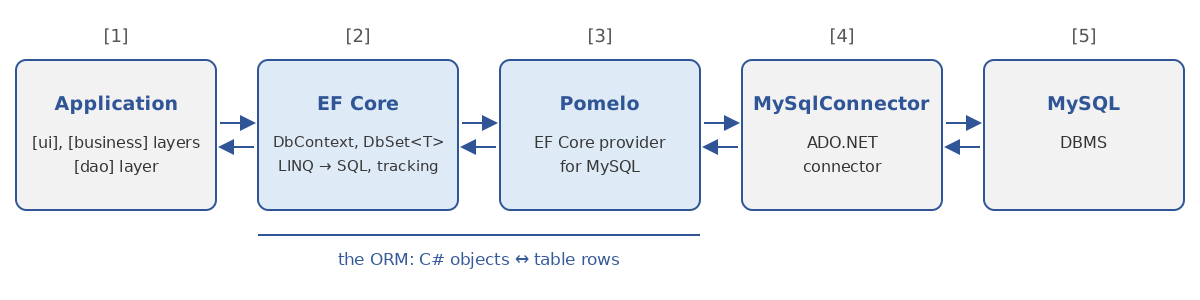
- [1]: the application. Its [dao] layer no longer communicates with an ADO.NET connector but with EF Core, via a [DbContext] object and LINQ queries;
- [2]: EF Core, independent of the DBMS: model, translation of LINQ queries, change tracking, migrations;
- [3]: the EF Core provider specific to the DBMS (here Pomelo for MySQL): it recognizes the SQL dialect of the DBMS and its column types;
- [4]: the ADO.NET connector for the DBMS, the one from Chapter 10 (MySqlConnector): EF Core does not replace ADO.NET; it uses it;
- [5]: the DBMS.
11.1.2. EF Core and Entity Framework 6
There are two products named Entity Framework:
- Entity Framework 6 (EF 6), the original product, designed for the .NET Framework on Windows (since version 6.3, it also works on .NET Core and its successors). It is still maintained but is no longer under active development;
- Entity Framework Core, a complete rewrite released in 2016 with .NET Core. It runs on all .NET platforms (Windows, Linux, macOS) and is the version that receives all new features. Its version number follows that of .NET: EF Core 8 with .NET 8, EF Core 9 with .NET 9, EF Core 10 with .NET 10.
For a new application, we use EF Core. Both products have similar APIs ([DbContext], [DbSet<T>], LINQ, migrations), so what is stated here remains largely true for EF 6.
11.1.3. Providers
EF Core accesses a DBMS through a provider, distributed in a NuGet package. Microsoft provides the providers for SQL Server, SQLite, and Azure Cosmos DB; the others are written by the DBMS publishers or by the community: [Npgsql.EntityFrameworkCore.PostgreSQL] for PostgreSQL, [Oracle.EntityFrameworkCore] for Oracle, [Pomelo.EntityFrameworkCore.MySql] and [MySql.EntityFrameworkCore] (from Oracle) for MySQL. We are using Pomelo, the most widely used MySQL provider, which is based on the [MySqlConnector] connector from Chapter 10.
A provider is compiled for a specific version of EF Core: Pomelo 9 works with EF Core 9, and Pomelo versions are often released several months after those of EF Core. The course uses EF Core 9.0.0 and Pomelo 9.0.0, on .NET 10. This combination works: EF Core 9 targets .NET 8 ([net8.0]), and a library compiled for .NET 8 works without modification on .NET 10. The transition to EF Core 10 will be accomplished by changing the package version numbers; the code in this chapter should then work without modification, apart from a few minor details in the generated SQL. However, in the section on LINQ, we will encounter a minor incompatibility between EF Core 9 and the C# 14 compiler.
The packages used in this chapter are as follows:
Package | Role |
[Microsoft.EntityFrameworkCore] 9.0.0 | EF Core itself |
[Pomelo.EntityFrameworkCore.MySql] 9.0.0 | The provider MySQL; it includes [Microsoft.EntityFrameworkCore.Relational] and [MySqlConnector] |
[Microsoft.EntityFrameworkCore.Design] 9.0.0 | the code used by the command-line tool [dotnet ef] (migrations) |
tool [dotnet-ef] 9.0.0 | the command-line tool [dotnet ef] |
The [dotnet ef] tool is installed once and for all on the development machine:
The “global” tools for .NET are installed in the [.dotnet/tools] folder within the user’s home directory, which the SDK installer adds to the executable path (on Linux, you must add it yourself: [export PATH=$PATH:$HOME/.dotnet/tools]).
11.1.4. Code First and Database First
The EF Core model (the mapping between classes and tables) can be built in two ways:
- Code First: You write the C# classes, and EF Core derives the database schema from them, which it can create on its own and then update as the application evolves (migrations). This is the approach taken in this chapter and in the author’s 2012 course;
- Database First: The database already exists, and you generate the classes from its schema using the [dotnet ef dbcontext scaffold] command. This is the approach used for applications that need to work with an existing database. The generated code is similar to what we would write by hand.
11.2. A First Example
11.2.1. The Project
Each example in this chapter is a console project: the [dotnet ef] tool, used for migrations, requires a [.csproj] project file. The projects are grouped within the [11-efcore/11-efcore.slnx] solution. The first one, [First], is created using the following commands:
Its project file is as follows:
- Lines 12–13: the two packages added by [dotnet add package].
The database used is the [efarticles] database on the local MySQL server, which is the Laragon server (see appendices). It does not need to exist: EF Core will create it.
11.2.2. The [Article] Entity
A class whose objects are stored in a table is called an entity. Our first entity is a store item, as in the [articles] table from the 2008 course, covered in Chapter 10:
- Line 4: A regular C# class. It does not inherit from any class in the EF Core and has no attributes; this is referred to as a POCO (Plain Old CLR Object);
- Line 7: The [Id] property will be the primary key of the table. This is a convention of the EF Core: a property named [Id] (or [ArticleId], the class name followed by [Id]) is the primary key. Since it is of type integer, its values will be generated by the DBMS (column [AUTO_INCREMENT] of MySQL);
- lines 9–12: Each public read/write property becomes a column with the same name. The property [Name] is initialized with an empty string to satisfy the compiler (nullable types enabled: a property of type [string] must not remain [null]);
- line 15: a convenient display of the article.
11.2.3. Context
Access to the database is handled through an object of type [DbContext]:
- Line 7: The class [DbContext] is derived from EF Core. An [ArticlesContext] object represents a work session with the database: it opens the connection when needed, stores the entities it has read, and can save changes to them;
- Line 10: A [DbSet<Article>] represents the articles table. This is where LINQ queries are executed and where articles are added or deleted. The property is defined as an expression-bodied member that calls [Set<Article>()]: each [DbSet<T>] declared in the context introduces the type [T] into the model;
- line 13: the [OnConfiguring] method is called by EF Core the first time the context is used, to configure it;
- line 15: the connection string, the same as in Chapter 10: server, port, database, username, and password (blank for the Laragon user [root]);
- line 18: the context uses the Pomelo provider. The second parameter specifies the MySQL server version: the generated SQL depends on it, as certain features are only available in recent versions. Laragon provides MySQL 8; we specify version 8.0.36. Pomelo also offers [ServerVersion.AutoDetect(connection)], which queries the server to determine its version. This is convenient, but it incurs an additional connection each time a context is configured, and the generated SQL then depends on the server encountered. Specifying a version explicitly makes the application’s behavior reproducible;
- line 20: the [LogTo] method instructs EF Core to write its log using the [Console.WriteLine] method. We retain only the [DbLoggerCategory.Database.Command] message category—that of executed SQL commands—at the [LogLevel.Information] level. Without this filter, the log is very verbose. Viewing the SQL sent to the server is the best way to understand what EF Core does: we’ll do this in all the examples.
11.2.4. The program
- line 4: creates the context. A [using] declaration (C# 8) ensures that it will be released ([Dispose]) at the end of the program, which closes any connection it may have opened;
- line 7: [context.Database.EnsureDeleted()] drops the database if it exists;
- line 8: [context.Database.EnsureCreated()] creates the database and its tables from the schema. These two methods are convenient for examples and testing; a real-world application updates its database using migrations, which we’ll cover later;
- Lines 11–13: Three articles are added to [DbSet]. Nothing has been sent to the server yet: the context only remembers that these three objects are to be inserted. We do not assign a value to the [Id] property, which will be generated by the DBMS;
- line 15: [SaveChanges] sends the server all the necessary SQL commands to save the stored changes and returns the number of affected rows;
- line 20: a LINQ query on [DbSet]: items in alphabetical order. It is executed by the DBMS when the [foreach] loop begins to iterate through it.
Results:
Comments:
- Each SQL command is preceded by a two-line header: the event type ([CommandExecuted]), the execution time, and the command parameters;
- Line 4: [EnsureDeleted] deleted the database, which already existed (the program had already been run);
- lines 7–20: [EnsureCreated] created the database, assigned it the character set [utf8mb4] (the full Unicode set of MySQL), then created the table [Articles] from the entity [Article]: the table name is that of the context property [DbSet], the columns are named after the properties, and the column [Id] is the primary key with a generated value ([AUTO_INCREMENT]). All columns are [NOT NULL]: the types [int] and [decimal] do not allow the value [null], nor does the type [string], since nullable types are enabled (we’ll come back to this later);
- Note the default types: [longtext] for a string (text of any length), and [decimal(65,30)] for a [decimal] (65 digits, 30 of which are after the decimal point). These are rarely the ones we want: the following paragraph shows how to specify them;
- lines 21–41: [SaveChanges] sent a single command containing three parameterized [INSERT] commands. Each is followed by a [SELECT] that reads back the primary key generated by MySQL ([LAST_INSERT_ID()]): EF Core copies it to the [Id] property of the inserted object. Parameter values are masked ('?'): these are application data, which may be confidential. During debugging, they can be displayed by adding the [.EnableSensitiveDataLogging()] option to the context configuration;
- Lines 42–50: The LINQ query [context.Articles.OrderBy(a => a.Name)] was translated into a command [SELECT ... ORDER BY]. EF Core created an [Article] object for each row read.
We did not write any SQL commands or any column-reading code: that is the whole point of an ORM. We can also see that this doesn’t eliminate the need to understand SQL: to determine whether the generated SQL is correct and effective, you need to know how to read it.
11.3. The model
EF Core builds its model from entities in three steps:
- First, it applies its conventions;
- it supplements or corrects them using the annotations (attributes) applied to the entities;
- finally, it applies the configuration written in C# in the [OnModelCreating] method of the context: the fluent API.
11.3.1. The Conventions
We saw the essentials of these in the first example:
- any public property with a [get] getter and a [set] (or [init]) setter is stored in a column of the same name;
- the property [Id] or [<Entity>Id] is the primary key; if it is an integer, its values are generated by the DBMS;
- the table name is that of the [DbSet] property of the context (or, failing that, that of the class);
- a property of a nullable type ([int?], [DateOnly?], [string?]) results in a column [NULL]; a property of a non-nullable type ([int], [decimal], [string] when nullable reference types are enabled) results in a [NOT NULL] column;
- a property that references another entity, or a collection of entities, defines a relationship (we’ll cover this later).
11.3.2. Annotations and the fluent API
The [Model] project defines two entities configured in two different ways. The first is configured using annotations:
- lines 1–2: the attributes used belong to these two namespaces of .NET. They are not specific to EF Core: the validation attributes ([Required], [MaxLength]) are also used to validate data in ASP.NET Core forms;
- line 7: the table name;
- Lines 11–12: The primary key is not named [Id]; the [Key] attribute identifies it;
- lines 15–16: a required column ([Required]: [NOT NULL]) with a maximum of 50 characters ([MaxLength(50)]: [varchar(50)]). [Required] is redundant here, as the non-nullable type [string] is sufficient to make the column required; it was essential prior to C# 8;
- lines 19–20: the type [string?] specifies an optional description: the column will accept the value [NULL];
- lines 23–24: [Column] specifies the column name and its SQL type: [decimal(10,2)], 10 digits, including 2 decimal places;
- line 27: an optional date. The type [DateOnly] (.NET 6) represents a date without a time: Pomelo associates it with the SQL type [date];
- lines 30–31: [NotMapped] excludes a property from the model. Here, this is unnecessary: a property without an accessor ([set]) is not registered. The attribute documents the intent.
The second entity has no attributes:
It is configured in context by the fluent API:
- Line 13: The [efmodel] database will never exist: this context is used solely to examine the model, which does not require a connection (the server version is specified explicitly);
- line 18: the [OnModelCreating] method receives a [ModelBuilder] object used to describe the model. It is called only once per context type: EF Core caches the model;
- line 20: [Entity<Supplier>(...)] receives a lambda that configures the [Supplier] entity. Each method returns the configuration object, which allows calls to be chained together: hence the name “fluent API”;
- line 22: the table name;
- line 23: the primary key is the property [Number];
- line 24: a required column with a maximum of 60 characters;
- line 25: a unique index on the company name: no two suppliers can have the same one. There is no equivalent validation attribute; EF Core provides the attribute [Index], placed on the class, which we will use for items;
- line 26: the property [Phone] is stored in the column [tel];
- line 27: the [CreationDate] column has a default value, calculated by the DBMS. During an insertion, EF Core will not send a value for this column if the property has the default value for its type, which will allow the DBMS to use [CURRENT_TIMESTAMP].
Everything that annotations do can be done with the fluent API, and the fluent API allows for even more (indexes, default values, composite keys, complex relationships). Annotations have the advantage of placing the configuration next to the property; the fluent API allows entities to remain independent of EF Core and consolidates the configuration in a single location. The two are often mixed: the fluent API takes precedence in case of a conflict.
The [Program.cs] program displays the model built by EF Core, followed by the SQL script, which would create the tables:
- line 8: the [Model] property of the context provides access to the model: its entities ([IEntityType]), and for each one, its properties ([IProperty]);
- Line 10: [ClrType] is the C# type of the entity, and [GetTableName()] is the name of its table;
- Lines 13–15: For each property, the column name, its SQL type, whether it accepts the value [NULL], and whether it is part of the primary key are displayed;
- line 22: [Database.GenerateCreateScript()] returns the SQL table creation script without executing it. This is the script that [EnsureCreated] would execute.
Results:
- Lines 8–12: The [Supplier] entity and its columns. The SQL types come from the configuration ([varchar(60)], [varchar(20)]) or from the provider’s choices for a C# type: [int] for [int], [datetime(6)] (microsecond precision) for [DateTime];
- lines 2–7: the entity [Product]. Nullable properties ([DateOnly?], [string?]) result in columns [NULL]; the property [PriceInclTax] does not appear in the model;
- Lines 16–33: the creation script. It contains the entire configuration: table and column names, data types ([NOT NULL]), default values, primary keys (with [AUTO_INCREMENT] for integer keys), and unique indexes. Text columns use the [utf8mb4] character set.
11.3.3. Nullable types and columns NULL
Nullable reference types (C# 8, enabled by [<Nullable>enable</Nullable>] in the course projects) have an impact on the model: EF Core reads the nullability annotations generated by the compiler. A [string] property results in a [NOT NULL] column, and a [string?] property results in a [NULL] column. In a project where nullable types are not enabled, all text columns accept [NULL], except those marked [Required].
You must therefore choose the type of each property carefully: it expresses both a C# code rule (“this value may be missing”) and a database constraint. For a required property, two notations are common:
The second is safer: the compiler rejects [new Article { Price = 10 }], where the name has been omitted. EF Core can create entities with [required] members: it does not go through the C# code’s object initializer. For navigation properties to another entity, which EF Core fills in itself, we encounter the notation [= null!]: we’ll look at this when discussing relationships.
11.4. The following examples: two shared libraries
The examples in the following paragraphs all use the [efarticles] database and its [articles] table, populated with the six articles from Chapter 10. Rather than repeating the entity and context in each project, we place them in a class library, [Articles.Data], which the projects reference. We also replace the EF Core log, which is too verbose for our examples, with a more compact log, placed in a second library, [Ef.Tools].
11.4.1. The compact SQL log
- lines 12–15: an extension member (C# 14, see Chapter 4) of type [DbContextOptionsBuilder], the type of the parameter of [OnConfiguring]. We’ll write [options.UseMySql(...).WithSqlLog()], as if the method had been written by EF Core. It calls another overload of [LogTo], which takes two functions: a filter, which selects the events to log, and a display method, which receives the event itself ([EventData]) rather than preformatted text;
- lines 19–22: the selected events. Each event in EF Core has an identifier; those for relational operations are constants of the [RelationalEventId] class. We log executed or failed SQL commands, as well as the start, commit, and rollback of transactions;
- Lines 27–43: Each event type corresponds to a class derived from [EventData], which provides details about it: [CommandExecutedEventData] contains the executed ADO.NET command ([DbCommand], see Chapter 10). The selection is made using a [switch] with filtering by type pattern and [when] clauses;
- lines 52–54: the command text, line by line, indented and preceded by [SQL>], with empty lines removed;
- lines 56–60: the command parameters and their values. We read these directly from the command; therefore, our log always displays them, whereas the EF Core log hides them by default. This is acceptable for a course, but not for a production application.
11.4.2. The Entity and the Context of the Articles
The [Article] entity from the [Articles.Data] library uses the annotations from the previous paragraph:
- line 8: the table is named [articles], as in Chapter 10;
- line 9: the attribute [Index] of EF Core (namespace [Microsoft.EntityFrameworkCore]) creates a unique index on the column [Name]: No two articles may have the same name, as in the 2008 course database;
- lines 16–17: a required name of no more than 30 characters. The member is [required]: the code that creates an item must specify its name;
- lines 20–21: a price in [decimal(10,2)].
The context is as follows:
- lines 10–11: the connection string and server version, which are public so that other projects can use them;
- line 14: a first constructor, with no parameters: the configuration will be handled by [OnConfiguring];
- line 17: a second constructor, which receives a pre-configured object ([DbContextOptions<ArticlesContext>]) and passes it to the constructor of the [DbContext] class. This is the constructor used by dependency injection (we’ll cover this later);
- line 25: [OnConfiguring] is called in both cases. [IsConfigured] checks whether the context received a configuration via its constructor. If not, the default configuration is used: MySQL, with the compact log;
- lines 33–48: a static method that recreates the database with its six articles. It creates a context with a configuration that does not include a log: we do not want to see the SQL from this initialization in the example results. [DbContextOptionsBuilder<T>] is the generic version of the object received by [OnConfiguring]; its property [Options] renders the built configuration. [AddRange] adds multiple entities at once.
The sample projects reference the [Articles.Data] library, which in turn references [Ef.Tools]:
The EF Core and Pomelo packages, referenced by [Articles.Data], are inherited by the projects that reference it.
11.5. Basic operations: add, read, modify, delete
11.5.1. The [Crud] program
The [Crud] project demonstrates the four basic operations (CRUD: Create, Read, Update, Delete):
Results:
Comments:
- Line 10: [Find(1)] searches for the record with primary key 1. The returned type is [Article?]: [Find] returns [null] if the key does not exist. The generated SQL (lines 2–7) is a parameterized [SELECT], limited to one row;
- line 13: the second call to [Find(1)] does not send any SQL commands, and returns the same object (line 10). The context stores the entities it has read or added: before querying the database, [Find] checks whether the requested entity is already being tracked. A context never contains two objects for the same row in the database;
- Lines 18–19: Adding an item. Before [SaveChanges], the item is in state [Added] and its [Id] value is 0 (line 12). [SaveChanges] sends an [INSERT] command, retrieves the generated key, and places it in [x.Id] (line 21). The item transitions to the [Unchanged] state: it is identical to the row in the database;
- line 26: to modify a row in the database, simply modify the object. No [Update] method is required: the context has retained a copy of the read values (the original values) and compares the current values to them. The item transitions to status [Modified] (line 23);
- line 27: [context.Entry(x)] provides access to the tracking information for the [x] entity: its status ([State]) and, for each property, its original value ([OriginalValue]) and its current value ([CurrentValue]);
- Line 29: The generated [UPDATE] command (lines 25–28) modifies only the column that has changed, [Price]. It is followed by a [SELECT ROW_COUNT()]: EF Core verifies that the command has indeed modified a row;
- lines 34–36: the deletion. [Remove] changes the item’s status to [Deleted]; [SaveChanges] sends the [DELETE] command. The object is then no longer tracked by the context: it is in state [Detached];
- lines 41–43: the object [context.ChangeTracker] (the “change tracking”) manages the tracked entities. [DetectChanges] compares the current values of the entities to their original values (EF Core automatically calls it in [SaveChanges], [Entry], and a few other methods). The property [DebugView.LongView] returns a description of all tracked entities (lines 38–44): the context now tracks only the bicycle, whose inventory has decreased from 10 to 9. The operator [!] in [bike!] tells the compiler that [bike], of type [Article?], is not [null] here.
Two details of the SQL generated by Pomelo:
- the command [INSERT], followed by [SELECT] from the generated key, is enclosed within a transaction (lines 13–20): the command contains two SQL commands that must succeed together. We’ll come back to transactions later;
- the isolated commands [UPDATE] and [DELETE] are not enclosed within a transaction. They are preceded by [SET AUTOCOMMIT = 1], a MySQL session setting (each command is committed as soon as it is executed) that the provider restores as a precaution. This setting has no effect on an explicitly opened transaction, as we will see.
11.5.2. The States of an Entity
Tracking changes is based on the state of each entity, a value from the [EntityState] enumeration:
State | Meaning |
[Detached] | The object is not tracked by the context (created by [new] and not yet added, or deleted from the database) |
[Added] | The object has been added to the context ([Add]): [SaveChanges] will insert it into the database |
[Unchanged] | The object was read from the database (or saved) and has not been modified since |
[Modified] | At least one property has been modified: [SaveChanges] will send an [UPDATE] command |
[Deleted] | The object has been marked for deletion ([Remove]): [SaveChanges] will send a [DELETE] command |
Note the work cycle with EF Core: entities are read, modified like ordinary objects, added, and deleted, then [SaveChanges] is called, which sends all necessary commands to the database in a single batch. The context acts as a “unit of work.” A context is a lightweight object designed for a short lifespan: a unit of work, such as an HTTP request in a web application. The same context is not used throughout the entire life of an application, as it would accumulate tracked entities.
11.5.3. Bulk Updates and Reading Without Tracking
Tracking changes comes at a cost: to increase the price of 100 items, you must read all 100 items, modify them one by one, and [SaveChanges] will send 100 [UPDATE] commands. EF Core 7 introduced two methods that directly send a SQL command covering all rows selected by a query: [ExecuteUpdate] and [ExecuteDelete]. The [BulkUpdate] project describes these, as well as read-only operations:
Results:
Comments:
- Lines 10–12: [ExecuteUpdate] applies to a query ([Where]) and receives a lambda that describes the columns to be modified: [SetProperty(property, new value)]. The new value may depend on the row itself ([a => a.MinimumStock * 2]). The SQL statement (lines 3–5) is executed immediately, without [SaveChanges], and returns the number of modified rows;
- lines 16–18: a 10% increase in low prices. Note that the C# code constants ([150], [1.1M]) are written within the text of the SQL command ([150.0], [1.1]);
- line 23: [ExecuteDelete] removes the rows selected by the query—in this case, the bow, the only item priced over 550 euros;
- line 28: [AsNoTracking()] requests a read without tracking: the entities read are not stored by the context (line 26). This is faster and more memory-efficient: it is used for data that is read without being modified (display, calculations). The trade-off is that [SaveChanges] ignores changes to these entities (line 27);
- lines 37–41: a pitfall. [ExecuteUpdate] operates directly on the database: it does not modify entities already loaded by the context. The bicycle tracked by the context retains its old price (line 37) until it is read again with [context.Entry(bike).Reload()]. [Single] returns the single element in the query and throws an exception if there are zero or more elements: this is why the generated SQL requests two rows ([LIMIT 2]).
11.6. LINQ translates to SQL
11.6.1. Queries
Chapter 5 introduced LINQ for in-memory collections. The same operators ([Where], [OrderBy], [Select], [First], [Count], [Sum]...) apply to a [DbSet<T>], but they are not executed by .NET: EF Core translates them into SQL, and it is the DBMS that executes them. The [Linq] project provides several examples:
Results:
Comments:
- Lines 10–13: [Where] and [OrderBy] become the clauses [WHERE] and [ORDER BY] (lines 5–6). The query is executed only when its results are requested, in this case by [ToList]: this is the deferred execution of LINQ (Chapter 5);
- Lines 18–20: a projection. [Select] creates an object of an anonymous type for each item, containing only the name and the inventory value. The generated SQL (line 9) retrieves only the relevant columns and performs the calculation itself. Objects of the anonymous type are not entities: they are not tracked by the context. The provider converts the stock, which is an integer, to [decimal(65,30)] before the multiplication, which explains the many decimal places in the result, which is then formatted using [{v.Value:0.00}];
- line 30: [FirstOrDefault] becomes [LIMIT 1]. The program variable [minPrice] becomes a parameter of the SQL command ([@__minPrice_0], line 21), whereas a constant written in the lambda is copied into the SQL text. Therefore, there is no need to worry about SQL injections: values coming from outside the program are always passed as parameters. This is the rule that Chapter 10 applied manually with parameterized queries;
- lines 35–36: The aggregates [Count] and [Sum] are calculated by the DBMS ([COUNT(*)], [SUM(...)]): only the result is transferred, not the rows. [COALESCE(..., 0.0)] returns 0 if the table is empty, just like [Sum] from LINQ;
- Lines 42–45: The .NET methods known to EF Core are translated to SQL: [a.Name.StartsWith("b")] becomes [LIKE 'b%'], and [names.Contains(a.Name)], which refers to a memory list, becomes [IN ('bow', 'pump', 'racket')] (line 35). There are many translated methods: operations on strings, dates, and mathematical functions;
- lines 51–52: [ToQueryString()] returns the SQL text of a query without executing it (lines 37–41). This is useful for debugging;
- lines 57–60: pagination, to display a long list page by page. [Skip] skips the items from previous pages, while [Take] keeps those from the requested page: they become the clauses [OFFSET] and [LIMIT] (line 46). Pagination only makes sense on a sorted list ([OrderBy]);
- line 61: this projection contains an interpolated string, which EF Core does not translate into SQL. This is not an error: when the untranslatable operation is the final [Select], EF Core requests the necessary columns ([Name] and [Price]) from the DBMS and performs the projection in memory on each row read. Note that the price is formatted according to the en-US locale, using a decimal point;
- lines 69–71: EF Core cannot translate the call to any method in the program: it does not know the code for it, and even if it did, it would not necessarily know how to write it in SQL. Executing the query triggers an [InvalidOperationException] (lines 50–51). The message (in English, like all exception messages in .NET), of which the program displays only the first sentence, then offers two solutions: rewrite the query, or explicitly switch to an in-memory evaluation;
- line 78: [AsEnumerable()] transfers the query from [IQueryable<T>] to [IEnumerable<T>]: the preceding part is translated into SQL (here, reading the entire table), and the following part is executed by LINQ in memory. The result is correct, but the entire table was loaded: with a large table, this should be avoided. It is better to write the condition in the lambda ([a.CurrentStock < a.MinimumStock]), as shown on line 11.
11.6.2. IQueryable and expression trees
How can the same lambda be executed in C# on a list and translated to SQL on a [DbSet]? Chapter 7 provided the answer: a [DbSet<T>] implements the [IQueryable<T>] interface, whose methods [Where], [OrderBy], [Select]... receive not delegates ([Func<T, bool>]) but expression trees ([Expression<Func<T, bool>>]). The compiler transforms the lambda [a => a.CurrentStock < a.MinimumStock] into a data structure that describes it (“ comparison [<] of property [CurrentStock] and property [MinimumStock] of parameter [a]”); EF Core traverses this structure and produces the equivalent SQL. A method such as [Rules.OutOfStock] appears in the tree only as a method call, whose code cannot be analyzed: hence the error.
Operators are composed: a query can be built in stages, with each stage returning a new [IQueryable<T>], and only the final execution ([ToList], [First], [Count], [foreach]...) sends a SQL command:
11.6.3. An incompatibility between EF Core 9 and C# 14
In the program [Linq], the list [names] was declared as type [List<string>] rather than [string[]], with a comment referencing this paragraph. With an array, the query [context.Articles.Where(a => names.Contains(a.Name))] compiles but fails at runtime with an [InvalidOperationException] error (“An exception was thrown while attempting to evaluate a LINQ query parameter expression”). In fact, C# 14 has made the conversion of an array to [ReadOnlySpan<T>] (the type introduced in Chapter 5) an implicit language conversion, which also applies to the object on which an extension method is called. For an array, the call [names.Contains(...)] therefore now refers to the extension method [MemoryExtensions.Contains(ReadOnlySpan<T>, T)] rather than [Enumerable.Contains(IEnumerable<T>, T)]: This is evident from examining the lambda’s expression tree, and the same program compiled in C# 13 ([<LangVersion>13</LangVersion>]) finds [Enumerable.Contains] and works. EF Core 9, released before C# 14, does not recognize this method: it attempts to evaluate the array conversion to [ReadOnlySpan<string>] to make it a SQL parameter, which fails (the internal exception is an [ArgumentException] thrown by the expression tree interpreter). EF Core 10, released alongside C# 14, supports this syntax. With EF Core 9, you can work around the issue by using a list, as shown here, or by writing [((IEnumerable<string>)names).Contains(a.Name)]. This is the only issue encountered in this chapter when using EF Core 9 with .NET 10.
11.7. Relationships
11.7.1. The Store Model
The tables in a database are linked to one another. EF Core represents these links using navigation properties: properties that reference another entity or a collection of entities. The [Relations] project uses an [efshop] database that describes a small store:
- a one-to-many relationship between [Category] and [Product]: a category contains multiple products (line 9), and a product belongs to a category (lines 19–20). The property [CategoryId] is the foreign key: by convention, the name of the navigation property followed by [Id]. It is optional in the code (EF Core would create it in the table if it did not exist in the class), but it is convenient: it allows you to determine a product’s category without loading it;
- a many-to-many relationship between [Product] and [Tag]: a product has multiple tags (line 22), and a tag is associated with multiple products (line 30). There is no foreign key: the relationship will be stored in an association table created by EF Core;
- the one-to-many relationships [Client] - [Order] and [Order] - [OrderLine], and the many-to-one relationship [OrderLine] - [Product]: a line item represents a quantity of a product;
- collections are initialized with an empty collection ([= []], a C# 12 collection expression). Navigation properties pointing to a single entity are initialized with [null!]: the value [null], accompanied by the operator [!], which tells the compiler not to flag a non-nullable property as receiving [null]. This is the conventional notation for a property that EF Core fills in itself during read operations, and which is never [null] in a properly loaded entity. Such a property defines a mandatory relationship (foreign key [NOT NULL]); a property of type [Category?] and a key of type [int?] would define an optional relationship.
The context is as follows:
- line 7: the context has a primary constructor (C# 12) whose optional parameter [log] allows the SQL to be omitted;
- lines 9–13: five [DbSet]. An entity does not need a [DbSet] to be part of the model: [OrderLine], reached via the navigation property [Order.Lines], is in fact part of it;
- line 19: the compact log is added if requested;
- line 28: the fluent API sets the price precision.
The tables created by [EnsureCreated] are as follows:
- Lines 5–11: one table per entity. The table [OrderLine] bears the name of the class, in the absence of the [DbSet] property; the table [ProductTag] is the association table for the many-to-many relationship;
- Line 22: The foreign key [CategoryId] in table [Products] references table [Categories]. The option [ON DELETE CASCADE] deletes products from a category when the category is deleted: this is the default behavior of EF Core for a mandatory relationship. EF Core also creates an index on each foreign key (line 21);
- lines 26–32: the association table has two columns, foreign keys to the two linked tables, which together form its primary key;
- line 17: we have not limited the length of the names, hence the type [longtext].
11.7.2. The program
1 2 3 4 5 6 7 8 9 10 11 12 13 14 15 16 17 18 19 20 21 22 23 24 25 26 27 28 29 30 31 32 33 34 35 36 37 38 39 40 41 42 43 44 45 46 47 48 49 50 51 52 53 54 55 56 57 58 59 60 61 62 63 64 65 66 67 68 69 70 71 72 73 74 75 76 77 78 79 80 81 82 83 84 85 86 87 88 89 90 91 92 93 94 95 96 97 98 99 100 101 102 103 104 105 106 107 108 109 110 111 112 113 114 115 116 117 118 119 120 121 122 123 124 125 126 127 128 129 130 131 132 133 134 135 136 137 138 139 140 141 | |
Results:
Comments:
- Lines 13–32: Three categories are added, along with their products and product tags: a graph of objects. EF Core iterates through the navigation properties and adds all encountered entities to the context. [SaveChanges] inserts them in the correct order (categories before the products that reference them) and populates the foreign keys and the association table. This initialization is performed without logging;
- lines 35–36: The property [Local] of a [DbSet] provides access to the entities already tracked by the context, without querying the database;
- lines 56–71: a customer, their order, and its two line items are added in a single call to [Add]. The SQL (lines 11–35) shows the order of insertions: the customer, then the order—whose foreign key ([ClientId]) receives the key generated for the customer ([@p1=2])—and finally the line items, whose foreign key ([OrderId]) receives the key from the order;
- Lines 79–80: By default, EF Core loads only the requested entity. The navigation properties [Client] and [Lines] of the order read were not populated (line 41): [Client] is equal to [null] (despite the non-nullable declaration, hence the [?.] operator), and the list of lines is empty. EF Core supports lazy loading: the navigation property is loaded automatically upon its first read. It must be explicitly enabled (package [Microsoft.EntityFrameworkCore.Proxies], navigation properties [virtual]); we do not use it because it hides database access;
- Lines 87–89: eager loading. [Include(c => c.Client)] instructs the system to load the customer for each order; [Include(c => c.Lines)] loads the order lines, and [ThenInclude(l => l.Product)] loads the product for each line. Everything is loaded by a single query [SELECT], using joins (lines 45–51). The display shows both orders and their lines;
- line 106: the explicit load. We load the collection of products from a category that has already been read: a second query, [SELECT], reads the products whose foreign key matches that of the category. For a navigation property to a single entity, we write [context.Entry(product).Reference(p => p.Category).Load()];
- Lines 114–116: Navigation properties are used in LINQ queries, without [Include]: [p.Tags.Any(...)] becomes a subquery [EXISTS] on the association table (lines 72–76), and [p.Category.Name] becomes a join;
- lines 125–126: a calculation across two relations—the amount of each order—entirely performed by the DBMS using a subquery (lines 81–84);
- lines 135–138: a group by. [GroupBy] groups products by category name; for each group ([g]), the key ([g.Key]), the number of products ([Count]), and the average price ([Average]) are calculated by the DBMS: the query becomes a [GROUP BY] (lines 90–93). The category [diving], which has no products, does not appear: the join with the category table is an inner join ([INNER JOIN]).
The so-called “N+1 query” problem is a risk for any user of an ORM. Suppose we want to display the customer name for each order, and we read the orders without [Include], then retrieve the customer for each one via an explicit load (or a deferred load, which amounts to the same thing without us realizing it): we execute one query for the N orders, then N queries, one per order. With a thousand orders, this results in a thousand and one round trips to the server, whereas a single round trip would have sufficed. The solutions are those shown in the example: [Include], or better yet, a projection ([Select]) that retrieves only the relevant data. The SQL log helps identify the problem: the same query repeated numerous times.
11.8. Migrations
11.8.1. The Principle
So far, the database has been created by [EnsureCreated], after being deleted by [EnsureDeleted]. This is impossible for a live application: its database contains data that must be preserved when the model evolves (a new column, a new table). Furthermore, [EnsureCreated] can only create a database that does not exist: if the database already exists with tables, it does nothing, even if the model has changed.
Migrations address this need. A migration is a C# class, generated by the [dotnet ef] tool, that describes the transition from one version of the model to the next: its [Up] method applies the change (create a table, add a column), while its [Down] method reverts it. The database contains a table named [__EFMigrationsHistory], where EF Core records the migrations that have been applied to it; this allows it to know which ones still need to be applied.
11.8.2. The project
The [Clients] project uses the [efclients] database. Its project file adds the [Microsoft.EntityFrameworkCore.Design] package, which is required by the [dotnet ef] tool:
- Lines 15–18: The element [PrivateAssets] (“all”) indicates that this package is intended for development only: it is not distributed to projects that reference it and is not required for execution. This is what the [dotnet add package Microsoft.EntityFrameworkCore.Design] command outputs.
The entity is a client:
In the first version of the application, the client does not have a phone number: lines 13–14 do not yet exist. We will add them in the second version.
The [dotnet ef] tool must be able to create a context to determine the model and, for certain commands, connect to the database. To do this, it uses, in order: a class from the project that implements the [IDesignTimeDbContextFactory<T>] interface, or the dependency injection container of an ASP.NET Core application, or, failing that, a parameterless constructor for the context. We’re writing a factory:
- line 7: the context receives its configuration via a primary constructor (C# 12), which it passes to the constructor of [DbContext]. It does not have an [OnConfiguring] method: it does not know its database; the code that creates it chooses it;
- Lines 13–21: the factory. Its [CreateDbContext] method builds the configuration ([DbContextOptionsBuilder<T>]) and creates the context. The parameter [args] receives any arguments passed to the tool; we do not use it.
11.8.3. The First Migration
The commands for the [dotnet ef] tool are entered in the project folder. The first migration, which we call [Initial], is created by the [dotnet ef migrations add] command:
The tool compiled the project, created a context with the factory, compared the model to that of the last migration (there isn’t one yet), and generated three files in a folder named [Migrations]:
The file names begin with the date and time the migration was created (year, month, day, hour, minute, second): migrations are applied in this order. The file [ClientsContextModelSnapshot.cs] contains a description of the model as it stands after the last migration: the tool uses this file to compare against the current model in order to generate the next migration. These files are part of the application’s source code: they are stored and managed along with the rest of the code (in a Git repository, for example).
The generated migration is as follows:
- line 9: a migration derives from the [Migration] class;
- lines 12–32: the [Up] method describes the operations to be performed, using a [MigrationBuilder] object: modify the database character set ([AlterDatabase]), create the table [Clients] ([CreateTable]) with its columns and primary key. The annotations [MySql:...] contain information specific to the Pomelo provider;
- lines 36–39: The method [Down] reverses the migration by deleting the table.
The code for a migration can be modified manually, for example, to add operations that the tool cannot deduce from the model ([migrationBuilder.Sql("...")] executes any SQL command).
11.8.4. Apply a migration
The command [dotnet ef database update] applies any migrations to the database that have not yet been applied, or, if given the name of a migration, all migrations up to and including that one:
The database [efclients] did not exist: it was created. The client [mysql] of MySQL shows its tables:
It contains the model table [Clients] and the table [__EFMigrationsHistory], which contains one row per applied migration.
11.8.5. A second migration
The application is evolving: the property [Phone], of type [string?] and limited to 20 characters, is added to the entity [Client] (this is the version of the file [Client.cs] shown above). A new migration is created:
The tool compared the current model to the snapshot and generated the following migration:
- Lines 13–18: [Up] adds the column [Phone], which is optional since the property is of type [string?]. The existing rows in the table will be assigned the value [NULL]. If the property had been required ([string]), a value would have had to be assigned to the existing rows: the migration would have done so using the empty string, which is the column’s default value ([defaultValue: ""]);
- lines 25–27: [Down] deletes the column.
The model snapshot has also been updated. Here are the key changes:
- line 12: the attribute [DbContext] associates the snapshot with the context [ClientsContext];
- lines 24–48: the description of the entity [Client], written using the fluent API: each property, its SQL type, its length, its required status ([IsRequired]), the primary key, and the table. The property [Phone] is included here (lines 42–44). By comparing this model to the current model in the code, the tool will determine the operations for the next migration. This file should never be modified manually; to undo the last migration (if it has not been applied), use [dotnet ef migrations remove], which deletes its files and restores the snapshot to its previous state.
The command [dotnet ef migrations list] lists the project’s migrations and those that have not yet been applied to the database:
The [dotnet ef migrations script] command generates the SQL script for a migration—or a series of migrations—without executing it. It is used when the production database is not updated by the developer, but by an administrator who wants to review and execute the SQL script themselves:
- Lines 4–10: The migration is executed within a transaction: the schema modification and the addition of the migration to the history table either succeed or fail together. Warning: Under MySQL, a schema modification command ([ALTER TABLE], [CREATE TABLE]) implicitly commits the current transaction. If an error occurs in the middle of a migration, the database may remain in an intermediate state;
- Line 7: The migration is logged in the history table, along with the version of EF Core that applied it.
11.8.6. Applying Migrations from the Application
An application can also apply migrations itself at startup. This is what the program in the [Clients] project does:
- line 5: the context is created using the factory provided by the tool;
- lines 8–9: the migrations applied to the database (read from the history table) and those that remain to be applied;
- line 12: [Migrate] applies the pending migrations (creating the database if necessary). This is equivalent to [dotnet ef database update];
- Lines 16–20: The new column is used.
Results:
The second migration was applied by the program. The history table now contains both migrations:
Applying migrations at startup is convenient for a small application or during development. For a large application deployed across multiple servers, it is preferable to apply them as a separate step in the deployment process (SQL script, or migration executable generated by [dotnet ef migrations bundle]). Note the following:
- [EnsureCreated]: for examples, tests, and prototypes, when the database can be deleted and recreated;
- migrations: as soon as the database contains data that needs to be retained. The two should not be mixed: a database created by [EnsureCreated] does not have a history table, and migrations cannot be applied to it.
11.9. Asynchrony
A database query is an I/O operation: while the server is working, the waiting thread does nothing. Chapter 9 showed how to free up this thread using [async] and [await]. EF Core provides an asynchronous version of all methods that access the database: [ToListAsync], [FirstOrDefaultAsync], [SingleAsync], [CountAsync], [SumAsync], [FindAsync], [SaveChangesAsync], etc. They are defined in the [Microsoft.EntityFrameworkCore] namespace (not [System.Linq]). The [Async] project uses them:
Results:
Comments:
- Line 7: A [DbContext] implements [IAsyncDisposable]: [await using] (C# 8, Chapter 9) releases it asynchronously;
- line 11: [ToListAsync] executes the query and returns a [Task<List<Article>>]. The query itself ([Where], [OrderBy]) is written as before: only the method that executes it changes;
- lines 14–15: the asynchronous versions of [FirstOrDefault] and [Count];
- line 21: the asynchronous save;
- line 26: [AsAsyncEnumerable()] returns the query as an asynchronous stream ([IAsyncEnumerable<T>], Chapter 9), which is iterated over using [await foreach]. Entities are processed as they are read, without forming a list: this is useful for processing a large number of rows;
- lines 33–39: Asynchronous methods accept a [CancellationToken] (Chapter 9). Here, the token is canceled before the call: [ToListAsync] immediately throws an [OperationCanceledException] (line 34). In a web application, the token from the HTTP request is passed: if the client aborts the request, the current read operation is interrupted.
An important rule: a context is not thread-safe and accepts only one operation at a time. Do not launch two simultaneous requests on the same context (for example, with [Task.WhenAll]): you must wait ([await]) for one operation to finish before starting another. EF Core often detects this error and throws an [InvalidOperationException] (“A second operation was started on this context instance before a previous operation completed”), but not always. For truly parallel requests, one context is used per task.
In a console application like our examples, asynchrony offers no visible benefit. It becomes particularly valuable in a server application (Chapters 12 and 13), where a thread freed up during a SQL request can serve other clients. This is why ASP.NET Core applications consistently use the asynchronous methods of EF Core.
11.10. Transactions and Concurrency
11.10.1. Transactions
Chapter 10 introduced transactions: a set of operations that either all succeed or all fail. With EF Core, there are two key points to note:
- [SaveChanges] is transactional: if it sends multiple commands, it executes them within a transaction. If any one of them fails, none are committed, and [SaveChanges] throws a [DbUpdateException];
- To group multiple calls to [SaveChanges] (or commands such as [ExecuteUpdate], [ExecuteSql]...) into a single transaction, you open an explicit transaction with [context.Database.BeginTransaction()] (or its asynchronous version), commit it with [Commit], and roll it back with [Rollback].
The [Transactions] project illustrates both cases:
Results:
Comments:
- Lines 11–15: Two items are added, the second of which has the same name as an existing item. [SaveChanges] opens a transaction (line 3) and sends both [INSERT] statements. The second one violates the unique index on the [Name] column: MySQL rejects the insertion, and [SaveChanges] throws a [DbUpdateException], whose internal exception is the error from the DBMS (line 15). The transaction was not committed: it is abandoned, and its operations are rolled back by MySQL. The racket, which had been successfully inserted, is not in the database (line 21);
- line 29: an explicit transaction. The returned object ([IDbContextTransaction]) is released by [await using]: if it has not been committed, the transaction is rolled back at this point;
- Lines 33–35: The first [SaveChangesAsync] records the sale of two bicycles. Since a transaction is already in progress, [SaveChanges] does not start a new one; instead, it is included in the existing one. The command [SET AUTOCOMMIT = 1], which precedes [UPDATE] (line 28), does not commit the current transaction: the subsequent lines show that the sale will indeed be canceled;
- lines 37–38: the second save fails (lines 38–40);
- line 40: the commit is never reached;
- line 46: in [catch], the transaction is rolled back (line 41). The sale of the bicycles, although recorded by the first [SaveChangesAsync], is canceled: the bicycle inventory remains at 10 (line 47);
- Lines 53–57: An asynchronous local function that re-reads an item with a new context to view the actual state of the database rather than the entities tracked by the working context.
11.10.2. Optimistic Concurrency
Two users read the same item, which has a stock of 10. The first user sells one item and updates the stock to 9. The second user, who read the stock before this update, sells three items and updates the stock to 7: the first user’s sale is lost. This is the problem of lost updates.
One solution would be to lock the row for the entire duration of each user’s operation (“pessimistic” concurrency): this blocks other users, sometimes for a long time. EF Core implements optimistic concurrency: nothing is locked, but at the time of the commit, the system verifies that the row has not been modified since it was read. To do this, one or more properties are designated as concurrency tokens: EF Core adds the condition “the token still has the value read” to the [WHERE] clause for the [UPDATE] and [DELETE] statements. If the command does not modify any rows, it means another user has already processed them: EF Core throws a [DbUpdateConcurrencyException].
The [Concurrency] project turns the stock into a concurrency token. Rather than modifying the [Article] entity shared by the other examples, it derives the context and supplements the model with the fluent API:
- line 11: the parent class configuration is retained;
- line 13: the property [CurrentStock] becomes a concurrency token. The equivalent annotation is the [ConcurrencyCheck] attribute applied to the property.
The program simulates the two users with two contexts:
Results:
Comments:
- lines 12–13: each user reads the bike in their own context;
- lines 17–18: The first user’s [UPDATE] command contains the condition [CurrentStock = @p2], with the value read, 10 (lines 13–16). The row is modified;
- lines 23–26: The second user’s command contains the same condition, with the value they read, 10, while the database inventory is now 9. No rows are modified: [SELECT ROW_COUNT()] returns 0, and EF Core throws a [DbUpdateConcurrencyException] (line 24);
- lines 34–36: The [Entries] property of the exception lists the conflicting entities. The resolution depends on the application: abort, warn the user, or, as here, re-read the entity from the database ([Reload]) and repeat the operation. The re-read inventory is 9 (line 31), and the sale of the three bicycles results in an inventory of 6, with the condition [CurrentStock = 9] (line 36).
The most common concurrency token is not business data but a dedicated column that is modified with each update to the row: a version number or a modification date. Under SQL Server, a property of type [byte[]] marked with the attribute [Timestamp] is associated with type [rowversion], which the DBMS modifies automatically; under MySQL, an integer or a date is often used that the application—or a trigger—modifies with each update.
11.11. The raw SQL
EF Core generates SQL from LINQ, but it is still possible to write the SQL for a query yourself, to use a feature specific to the DBMS or to optimize a complex query. The [RawSql] project presents the available methods:
Results:
Comments:
- Lines 11–13: [FromSql] executes a SQL query that returns rows from an entity’s table and instantiates entities (tracked by the context). Its parameter is an interpolated string: EF Core does not convert it to text; instead, it receives a [FormattableString] object that contains the text and the values to be inserted separately, and converts each value into a SQL parameter ([@p0], line 5). The result of [FromSql] is an [IQueryable<T>]: it can be completed with LINQ. The [OrderBy] clause was added by EF Core around our query, which became a subquery;
- lines 19–20: a SQL injection attempt. The value of [name] is passed as a parameter: it is compared as-is to the [Name] column, and no record matches (line 18);
- line 24: the same query constructed by concatenation and passed to [FromSqlRaw], which executes the text provided to it. The value of [name] becomes SQL code, the condition remains true, and the query returns all six items (line 24): this is a successful SQL injection. [FromSqlRaw] should only be used with constant text, with values passed as parameters ([FromSqlRaw("... WHERE Name = {0}", name)]);
- lines 29–31: [Database.SqlQuery<T>] (EF Core 7 for simple types, EF Core 8 for others) executes a query that returns values of any type, in this case strings. For a simple type, the returned column must be named [Value] (alias [AS Value]): this is the name that EF Core uses when it constructs the query with LINQ, as with the following [Single] (lines 28–32). [SqlQuery] also accepts any class, whose properties are assigned the columns of the same name;
- lines 40–42: [Database.ExecuteSql] executes an update command, also parameterized via interpolation, and returns the number of modified rows.
All of these methods have an asynchronous version ([ToListAsync] on the result of [FromSql], [ExecuteSqlAsync]).
11.12. Context and Dependency Injection
The previous examples created their contexts using [new]. In a layered application, and in all ASP.NET Core applications, contexts are created by the dependency injection container introduced in Chapter 6. EF Core provides two extension methods of [IServiceCollection] for this purpose:
- [AddDbContext<T>(options => ...)] registers the [T] context with a “scoped” lifetime: the container creates a context per scope, provides it to all services within that scope that request it, and releases it at the end of the scope. In a web application, a scope is created for each HTTP request: each request has its own context, which corresponds to the context’s unit of work;
- [AddDbContextFactory<T>(options => ...)] registers a context factory, [IDbContextFactory<T>], whose method [CreateDbContext] creates a new context on each call. It is used in long-running services (singletons), which cannot maintain the same context throughout the application’s lifetime, and in parallel processing, which requires one context per task.
In both cases, the lambda receives a [DbContextOptionsBuilder] and configures the context as [OnConfiguring] did; the context must have a constructor that accepts a [DbContextOptions<T>], such as the one in the [ArticlesContext] class.
The [Injection] project references the [Microsoft.Extensions.DependencyInjection] package (version 10.0.12, as in Chapter 6). It defines two services:
- line 7: a service that receives the context via its (primary) constructor. It must be registered with the same lifetime as the context (scoped);
- line 15: a service that receives a context factory;
- line 20: each call to the method creates a context and immediately releases it.
The program is as follows:
Results:
Comments:
- Lines 11–12: Context registration. The configuration given here is the one received by the context builder: [OnConfiguring] therefore evaluates [options.IsConfigured] as true and does not add the SQL log. It could be added here along with [WithSqlLog];
- line 13: the service [ArticlesDao], which is also scoped;
- line 17: [CreateScope()] creates a scope. “Scoped” services are obtained from the scope’s service provider ([scope.ServiceProvider]);
- lines 20–22: two requests for the context within the same scope return the same object (line 2);
- line 24: the container creates the service [ArticlesDao] by passing it the scope’s context;
- lines 27–31: another scope receives a different context (line 4);
- lines 36–38: at the end of its scope, the context was released by the container; using it throws an [ObjectDisposedException]. This is the classic error of a long-running service that retained a context received within a scope;
- lines 45–47: the context factory and a singleton service that uses it. The service can live as long as the application: it does not hold onto a context; it creates a new one for each calculation.
Keep in mind the rules for a context’s lifetime: short-lived (one unit of work), never shared among multiple threads, and always released ([using], or the container).
11.13. Sample Application—Version 7
11.13.1. The Architecture
Version 6 of the tax calculation application (Chapter 10) read the tax brackets from a MySQL database using ADO.NET. Version 7 does the same using EF Core. As with version 6, only the [dao] layer changes: the [business] and [ui] layers from version 5 (Chapter 6) are reused as-is via project references.
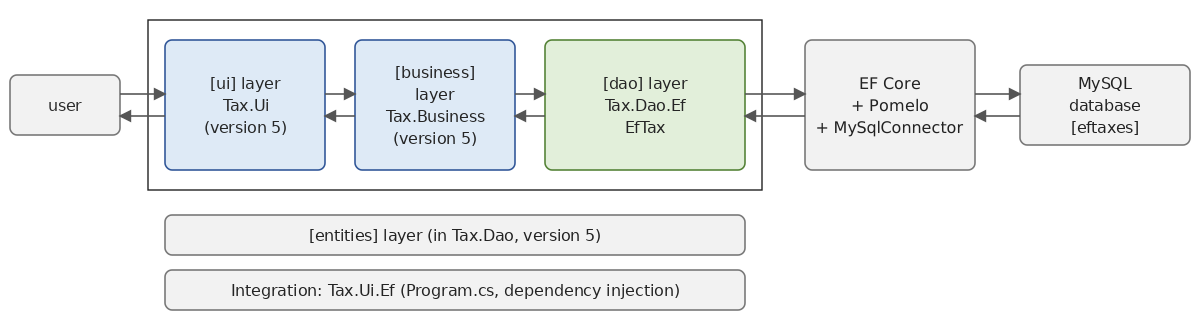
The solution includes two new projects in the [11-efcore/TaxV7] folder:
11.13.2. The [dao] layer
The [Tax.Dao.Ef] project references the [dao] layer from version 5, which contains the entities ([TaxBracket], [TaxException]) and the interface [ITaxDao]:
- line 11: the reference to the [Tax.Dao] project in version 5, using a relative path;
- lines 16–19: EF Core, Pomelo, and the package required for the [dotnet ef] tool.
The [Entities.TaxBracket] structure in version 5 cannot be an EF Core entity: it is a [readonly record struct], which is unmodifiable and has no primary key. It is not modified because it is part of the contract between the layers, shared by all versions. A persistence entity specific to the [dao] layer is created, whose role is to represent a row in the table:
- line 6: the table [brackets], as in version 7 of the 2008 course;
- line 10: the primary key, which is also used to sort the ranges;
- lines 12–19: the three columns, with appropriate [decimal] data types: the limit and the coefficient [coeffN] are amounts with two decimal places, and [coeffR] is a rate with four decimal places.
Context:
- line 6: the context is configured by its constructor: the main program will choose the database;
- lines 15–17: the seed data. To avoid rewriting the tax brackets, we reuse those from class [HardwiredTax] in version 5, which we number starting from 1 with the overload of [Select], which provides the element index;
- Line 18: [HasData] declares rows that are part of the model. Migrations insert them into the table, and if they change, the next migration will contain the necessary [UPDATE], [INSERT], or [DELETE] commands. Primary keys must be specified explicitly so that the tool can compare data across versions.
The factory used by tool [dotnet ef]:
It is used only by the tool during development: the connection string for the development database is hard-coded there. At runtime, the connection string comes from the application's configuration file.
The [EfTax] class implements the [ITaxDao] interface:
- line 11: the error codes for this implementation, as for [FileTax] and [JsonTax];
- line 17: the [dao] layer receives a context factory. It will be a singleton: it reads the brackets once and for all in its constructor, using a short-lived context that is released immediately (line 22);
- lines 24–28: reading the table, without tracking (the brackets will not be modified), in primary key order. The [Select] projection transforms each persistence entity into an [Entities.TaxBracket]: the rest of the application never sees the [TaxBracketEntity] entity. EF Core requests only the three relevant columns from the DBMS;
- lines 30–35: a DBMS error (database inaccessible, table missing, etc.) manifests as an exception derived from [DbException], the base class for ADO.NET connector exceptions (Chapter 10): [MySqlException] for MySqlConnector. As in other implementations, it is encapsulated in a [TaxException];
- lines 39–41: an empty table is also an error: the [business] layer requires at least one bracket.
11.13.3. The database
The [eftaxes] database is created by the [Initial] migration, generated by the [dotnet ef migrations add Initial] command entered in the [Tax.Dao.Ef] project folder. The tool accepted a class library as the startup project because it contains the [TaxContextFactory] factory and the [Microsoft.EntityFrameworkCore.Design] package (otherwise, an executable project is specified using the [--startup-project] option). The migration is as follows:
- lines 19–31: table creation;
- lines 35–46: insertion of seed data, one row per bracket;
- line 6: the generated code disables a code analyzer warning regarding multidimensional arrays ([new object[,]]).
The SQL migration script shows the commands that will be executed:
The table [__EFMigrationsHistory] is created if it does not exist (lines 4–8), and then the migration is applied in a transaction. Apply the migration:
and the table’s contents are verified:
The pay scale brackets are present, with the last one having a zero limit (it is not used by the [business] layer, which selects the last bracket when no other is suitable).
To set up the database on your end: the [Initial] migration is already included with the course codes in the [11-efcore/TaxV7/Tax.Dao.Ef/Migrations] folder. Therefore, you do not need to re-enter the [dotnet ef migrations add Initial] command (it was used to generate the migration, so that step is already complete). Simply:
- run MySQL (in Laragon; see the appendix; user [root] with no password);
- install the [dotnet-ef] tool if you haven’t already: [dotnet tool install --global dotnet-ef --version 9.0.0];
- navigate to the [11-efcore/TaxV7/Tax.Dao.Ef] folder and enter the single command [dotnet ef database update].
The [eftaxes] database is then created, with its [brackets] table populated with the seed data. If the command fails, verify that MySQL is running and that the connection string for the [TaxContextFactory] factory matches your server (port 3306, username [root], blank password).
11.13.4. Layer Integration
The executable project [Tax.Ui.Ef] consists of the following layers:
- lines 12–13: layers [business] and [ui] from version 5. The [Tax.Ui] project is an executable: it can be referenced as a library to use its [Ui.Dialog] class;
- Line 15: the new layer [dao];
- line 26: the configuration files. They are not named [appsettings.json]: the referenced project [Tax.Ui] already copies its own files [appsettings*.json] to the output folder, and two files with the same name would conflict.
The configuration file [tax-ef.json] contains the connection string:
The section [ConnectionStrings] is the usual location for connection strings in the .NET configuration: the method [config.GetConnectionString("Tax")] reads the key [ConnectionStrings:Tax]. The file [tax-ef-error.json] refers to a database named [eftaxesmissing], which does not exist.
The main program is the one from version 5, in which only the composition of the [dao] layer changes:
- lines 21–22: the connection string read from the configuration. A [throw] (C# 7) expression to the right of [??] throws an exception if it is missing;
- lines 27–28: a context factory [TaxContext], configured with the connection string from the configuration;
- line 30: the [dao] layer is an [EfTax]: the container will pass the context factory to it. A singleton [dao] layer cannot directly receive a context, which is “scoped”—hence the factory;
- line 32: the [business] layer from version 5;
- line 46: the dialog box from version 5.
11.13.5. Executions
The threshold values from previous versions are retained: 4,282 euros for a married couple with two children and a combined income of 60,000 euros, 2,959 euros for a family with three children, and 11,519 euros for a single person without children.
With the configuration file [tax-ef-error.json], which refers to a nonexistent database:
- line 6: the original exception, thrown by the MySqlConnector connector, via EF Core;
- line 4: the [dao] layer encapsulated it within a [TaxException], which was displayed by the main program.
The 2008 course demonstrated, in version 7, that the [dao] layer could switch DBMS (from MySQL to SQL Server Compact) simply by modifying the configuration file, thanks to the generic connector in ADO.NET. With EF Core, switching DBMS is equivalent to switching providers: replacing the Pomelo package with that of another DBMS (for example, [Microsoft.EntityFrameworkCore.SqlServer]) and the [UseMySql] call with the corresponding call ([UseSqlServer]), then regenerating the migrations, which contain provider-specific information. The code for class [EfTax], written as LINQ, remains unchanged.
11.14. Conclusion: ADO.NET, Dapper, or EF Core?
We now have two ways to access a database: ADO.NET (Chapter 10) and EF Core (this chapter). There is a third, intermediate method that is widely used: Dapper, a small library (a “micro-ORM”) that adds extension methods to the ADO.NET connection. These methods execute a hand-written SQL query and automatically convert the rows in the result into objects: [connection.Query<Article>("SELECT * FROM articles WHERE Price > @price", new { price = 200 })]. You write the SQL, and Dapper handles mapping the columns to properties.
Strengths | Weaknesses | |
ADO.NET | Full control over SQL; performance; no dependencies | a lot of repetitive code (parameters, reading columns); SQL in strings, not checked by the compiler |
Dapper | SQL hand-written but without the copying code; performance similar to ADO.NET | No change tracking or generation of [INSERT]/[UPDATE]; no migrations |
EF Core | LINQ queries verified by the compiler; change tracking; relationships; migrations; independent of the DBMS | an additional layer to understand; SQL generated to be monitored; less suitable for complex bulk processing |
The following guidelines can be proposed:
- EF Core is suitable for most management applications: a model of interconnected entities, operations for reading and updating entities, and a schema that evolves with the application. It is the default choice for ASP.NET Core applications;
- ADO.NET, or Dapper, is suitable when you want precise control over the SQL executed: complex reporting queries, stored procedures, processing very large volumes, or an existing database with a schema poorly suited to an object-oriented model;
- These approaches can be combined: an application can use EF Core for the most part and hand-written SQL code—using [FromSql], [SqlQuery], or Dapper—for a few critical queries. EF Core also provides access to the ADO.NET connection it uses ([context.Database.GetDbConnection()]).
In any case, knowing about ORM does not eliminate the need to understand SQL and how the DBMS works: the log of executed SQL commands, which we have displayed throughout this chapter, is the primary tool for verifying what EF Core actually does.
For further information, Microsoft’s documentation is comprehensive: Entity Framework Core. The Pomelo provider is documented on its repository: Pomelo.EntityFrameworkCore.MySql.