4. Classes, Structures, Interfaces
4.1. Objects by Example
4.1.1. Overview
We will now explore object-oriented programming through examples. An object is an entity that contains data defining its state (referred to as fields, attributes, etc.) and functions (referred to as methods). An object is created based on a template called a class:
Starting from the previous class [C1], you can create many objects such as [O1], [O2], … All of them will have the fields [p1], [p2], … and the methods [M3], [M4], … However, they will have different values for their [pi] fields, thus each having its own unique state. If [o1] is an object of type [C1], [o1.p1] refers to the field [p1] of [o1], and [o1.M3] refers to the method [M3] of [o1].
Let’s consider an initial object model: the [Person] class.
4.1.2. Creating the C# Project
In the examples from the previous chapter, a program fit into a single source file. From now on, a program may consist of multiple source files: one class per file, plus the main program. These files are grouped together in a project. The 2008 course created projects using the Visual Studio 2008 wizards; here we use the command-line tool [dotnet], which works the same way on Windows, Linux, and macOS. Chapter 2 showed how to open the same project in VS Code or Visual Studio.
In a terminal, navigate to the [04-classes] folder and create a console project named [Persons]:
The command creates a folder named [Persons] containing two files. The file [Persons.csproj] describes the project:
- Line 4: The project produces an executable;
- line 5: the target program is .NET 10;
- line 6: a set of common namespaces ([System], [System.IO], [System.Collections.Generic], [System.Linq], …) is implicitly imported into all source files in the project. This is why we can write
*[Console.WriteLine]without the***[using System;]** clause; - Line 7: Nullable reference types are enabled. The compiler issues a warning for any reference-type variable (a string, an object) that might take on the value [null] without the program expecting it. We’ll return to this in the section dedicated to these types; for now, just keep in mind that our programs must compile without any warnings.
The second file, [Program.cs], contains the main program. All [*.cs] files in the project folder (and its subfolders) are part of the project: to add a [Person] class, simply create the file [Person.cs] in the [Persons] folder. To run the project, type [dotnet run] in its folder: the command compiles the project, if it has changed, and then runs it.
All the projects in this chapter are grouped into a solution—a file that references a set of projects—which VS Code or Visual Studio can open all at once. The [.slnx] (XML) format, supported by the [dotnet] command since .NET 9 and the default format since .NET 10, replaces the old [.sln] format:
The [dotnet build 04-classes.slnx] command then compiles all projects in the solution.
4.1.3. Definition of the Person class
The definition of the [Person] class in the source file [Person.cs] will be as follows:
- Line 1: The class belongs to the [Persons] namespace (the project name). This form, [namespace Persons;]—known as “file scope”—places all types in the file within the namespace. Namespaces are discussed at the end of the chapter;
- Lines 6–8: The class’s three fields. The two strings are initialized with the empty string; otherwise, they would be set to [null] when the object is created, and the compiler—which has nullable types enabled—would issue a warning;
- lines 11–15: a method that sets the object’s state;
- lines 19–21: a method that displays the object’s state.
Here we have the definition of a class, and thus a data type. When we create variables of this type, we call them objects or class instances. A class is therefore a template from which objects are constructed.
The members of a class can be data (fields), methods (functions), or properties. Properties are special methods used to retrieve or set the value of an object’s fields. These members can be accompanied by one of the following keywords:
Keyword | Access |
[private] | A private member is accessible only by the class’s internal methods. This is the default access level |
[public] | A public member is accessible by any method, whether or not it is defined within the class |
[protected] | A protected member is accessible only through the internal methods of the class or a derived class (see the concept of inheritance below) |
[internal] | An internal member is accessible by any method within the same assembly (the same project) |
In general, a class’s data is declared private, while its methods and properties are declared public. This means that the user of an object (the programmer):
- will not have direct access to the object’s private data;
- can call the object’s public methods, including those that provide access to its private data.
The syntax for declaring a class [C] is as follows:
The order in which the members [private], [protected], and [public] are declared is arbitrary.
4.1.4. The Initialize method
What is the purpose of the [Initialize] method? Because [lastName], [firstName], and [age] are private members of the [Person] class, the statements:
are invalid. We need to initialize an object of type [Person] using a public method. This is the purpose of the [Initialize] method. We’ll write:
The notation [p1.Initialize] is valid because [Initialize] is publicly accessible.
4.1.5. The new operator
However, the previous sequence of statements is incorrect. The statement
declares [p1] as a reference to an object of type [Person]. This object does not yet exist, and therefore [p1] is not initialized. When we then write [p1.Initialize("Jean", "Dupont", 30)], we call the method [Initialize] of the object referenced by [p1]. However, this object does not exist, and the compiler reports the error: the local variable [p1] has not been assigned a value. If we write:
we explicitly indicate with the keyword [null] that the variable [p1] does not yet reference any object (the question mark in [Person?] indicates that the variable may be set to [null]). The compiler then issues only a warning (dereferencing a null reference), and at runtime, the method call throws a [NullReferenceException] exception. For [p1] to reference an object, you must write:
This creates an object of type [Person] that has not yet been initialized: its fields have their default values, in this case the empty string for [lastName] and [firstName], and 0 for [age] (a numeric field without an explicit initial value is 0; a reference-type field is [null]). Now that [p1] references an object, the initialization statement for that object, [p1.Initialize("Jean", "Dupont", 30)], is valid.
4.1.6. The this keyword
Let’s look at the code for the [Initialize] method:
The statement [this.firstName = p] means that the field [firstName] of the current object ([this]) is assigned the value [p]. The keyword [this] refers to the current object—the one on which the method is being executed. How do we know this? Let’s look at how the object referenced by [p1] is initialized in the calling program:
It is the method [Initialize] of the object [p1] that is called. When, within this method, the object [this] is referenced, it actually refers to the object [p1]. The method [Initialize] could also have been written as follows:
When a method of an object references a field [A] of that object, the notation [this.A] is implied. It must be used explicitly when there is a conflict of identifiers. This is the case with the statement [this.age = age;], where [age] refers to both a field of the current object and the parameter [age] received by the method. In this case, the ambiguity must be resolved by referring to the field [age] as [this.age].
4.1.7. A Test Program
Here is a short test program. It is written in the source file [Program.cs] of the project:
- Line 1: The main program is written using high-level statements that do not belong to any namespace. To refer to the class [Person] by its name alone, you must import its namespace [Persons] using the clause [using];
- Line 4: Creation of a [Person] object referenced by [p1];
- Line 5: Initialize the object;
- Line 6: Display its status.
Results:
4.1.8. Single-file applications
For a short example, a project is unnecessarily cumbersome. Since version 10, a standalone source file can be executed directly by .NET, without a [.csproj] file: this is a single-file application, which we used in the previous chapter. The project options (nullable types enabled, implicit [using]) are the same as those for a console project. We’ll use this format whenever the example contains only one or two classes.
The file then contains the top-level statements followed by the class declarations: the compiler enforces this order, as the top-level statements must precede any type declarations (class, structure, interface, etc.) in the file. Classes declared in this way do not belong to any namespace, which is irrelevant in a single-file program.
4.1.9. Another Method: Overloading
Let’s continue with the class *[Person] and add a second method, *[Initialize], to it. The program *[classes-01.cs]* is as follows:
- lines 2–7: the high-level instructions, i.e., the main program;
- Line 10: The class [Person] is declared after the high-level statements;
- lines 18–22: the method [Initialize] from the previous paragraph;
- lines 26–30: a second method, [Initialize].
We now have two methods named [Initialize]: this is valid as long as they accept different parameters (in number or type). The method [Initialize] is said to be overloaded. The compiler chooses which method to call based on the actual parameters: [p1.Initialize("Jean", "Dupont", 30)] (line 3) calls the first one, and [p2.Initialize(p1)] (line 6) calls the second one.
The parameter of the second method is a reference ([p]) to a person. The fields of the person ([p]) are then assigned to the current object ([this]). Note that the method [Initialize] has direct access to the fields of the object [p] even though they are private (lines 28–30). This is always true: a method of a class [C] has access to the private members of all objects of the same class [C].
Results:
4.1.10. Constructors of the Person class
A constructor is a method that bears the name of the class and is called when the object is created. It is generally used to initialize the object. It is a method that can accept parameters but does not return a value. Its declaration is not preceded by any type (not even [void]).
If a class [C] has a constructor that accepts n parameters, the declaration and initialization of an object of this class can be done as follows:
or
When a class [C] has one or more constructors, one of these constructors must be used to create an object of that class. If a class [C] has no constructors, it has a default constructor, which is the parameterless constructor [public C()]. The object’s fields then retain their initial values. This is what happened in the previous programs, where we had written [new Person()].
The program [classes-02.cs] provides three constructors for the class [Person]:
- lines 17–21: the “main” constructor initializes the three fields. Since its parameters have the same names as the fields, the fields are distinguished using [this];
- line 25: the copy constructor. The notation [: this(p.firstName, p.lastName, p.age)] means that before executing the (empty) body of the constructor, the constructor of the same class that accepts three parameters—[string], [string], [int]—is executed. This is referred to as chained constructors. The initialization code is thus written only once;
- line 30: the parameterless constructor, which is also chained to the main constructor. Since the class has declared constructors, it no longer has a default constructor: if we want to be able to write [new Person()], we must declare it;
- Lines 11–14: The two strings are no longer initialized upon declaration. This is no longer necessary: all constructors, either directly or through chaining, assign a value to them, and the compiler verifies this.
The 2008 course had constructors call the [Initialize] method. Chaining with [this(...)] is preferable: with nullable types enabled, the compiler does not inspect the contents of methods called by a constructor and would flag that the fields [firstName] and [lastName] could be set to [null] at the end of construction.
Results:
4.1.11. Object references
We use the [Person] class from the previous program, omitting its parameterless constructor but including the [Initialize(string, string, int)] method from the beginning of the chapter. The test program becomes the following [classes-03.cs] (we do not reproduce the class):
Results:
When the variable [p1] is declared as [Person p1 = new Person("Jean", "Dupont", 30);] (line 3), [p1] refers to the object [Person("Jean", "Dupont", 30)] but is not the object itself. In C, this would be referred to as a pointer—that is, the address of the created object. If we then write [p1 = null;], it is not the object [Person("Jean", "Dupont", 30)] that is modified; rather, it is the reference [p1] that changes its value. The object will be “lost” if it is not referenced by any other variable: the memory it occupies will later be reclaimed by the garbage collector for .NET.
When we write [Person p2 = p1;] (line 6), we initialize the reference [p2]: it “points” to the same object (it refers to the same object) as the reference [p1]. Thus, if the object “pointed to” (or referenced) by [p1] is modified, the object referenced by [p2] is also modified (lines 5–6 of the results).
When [Person p3 = new Person(p1);] is written (line 9), a new object, [Person], is created. This new object will be referenced by [p3]. If the object referenced by [p1] is modified, the object referenced by [p3] (line 7) remains unchanged.
Finally, on line 19, the operator [==], applied to two object references, indicates whether they refer to the same object: [p1] and [p2] refer to the same object, while [p1] and [p3] refer to two different objects, although they have the same content (line 8).
4.1.12. Passing Object Reference Parameters
In the previous chapter, we examined how function parameters are passed when they are simple types ([int], [double], …). Let’s see what happens when the parameter is an object reference. For this, we’ll use the class [StringBuilder] from .NET. A [string] object cannot be modified: an operation such as [s.ToUpper()] returns a new [string] object. An object [StringBuilder], on the other hand, is a mutable string: its method [Append] adds characters to the string without creating a new object.
The program [classes-04.cs] is as follows:
- line 1: the class [StringBuilder] belongs to the namespace [System.Text], which is not part of the implicitly imported namespaces;
- line 4: three [sb0, sb1, sb2] references to objects of type [StringBuilder];
- line 6: These are passed to the function [ChangeStringBuilder] with different modes: [sb0] and [sb1] with the default mode, [sb2] with the keyword [ref], and a fourth reference, [sb3], declared within the call itself ([out StringBuilder sb3]), with the keyword [out];
- lines 10–17: a local function with the formal parameters [sbf0, sbf1, sbf2, sbf3]. The relationships between the formal parameters [sbfi] and the actual parameters [sbi] are as follows:
- [sbf0] and [sb0] are, when the function starts, two distinct references that point to the same object (references are passed by value);
- the same applies to [sbf1] and [sb1];
- [sbf2] and [sb2] are one and the same reference (keyword [ref]);
- [sbf3] and [sb3] are also the same reference (keyword [out]), which the function must initialize.
Results:
Explanations:
- [sb0] and [sbf0] are two distinct references to the same object. This object was modified via [sbf0] (line 13). This modification is visible via [sb0] (line 5);
- [sb1] and [sbf1] are two distinct references to the same object. [sbf1] is assigned a new value within the function and now points to a new object (line 14). This does not change the value of [sb1], which continues to point to the original, unmodified object;
- [sb2] and [sbf2] are the same reference. [sbf2] now points to a new object (line 15). Since [sbf2] and [sb2] are one and the same entity, [sb2] also points to this new object;
- before the function call, [sb3] had no value. After the call, [sb3] refers to the object created by the function (line 16).
4.1.13. Temporary Objects
In an expression, you can explicitly call an object’s constructor: the object is created, but there is no variable to access it later (to modify it, for example). This temporary object is created for the purpose of evaluating the expression and is then discarded. The memory space it occupied will be automatically reclaimed later by the garbage collector, whose role is to reclaim memory space occupied by objects that are no longer referenced by the program’s data.
Consider the following program, [classes-05.cs], where the constructors of the [Person] class display a message:
- Line 2: The object [Person("Jean", "Dupont", 30)] is constructed and then passed to the copy constructor, which constructs a second object; the method [Identify] is then called on that object. Neither of the two objects is referenced by a variable.
Results:
The results show the successive creation of the two temporary objects.
4.1.14. Methods for Reading and Writing Private Fields
We add the necessary methods to the [Person] class to read or modify the state of the objects’ fields ([classes-06.cs]):
- lines 22–35: the read methods, called getters;
- lines 38–51: the write methods, called setters.
Results:
This approach is typical of the Java language. C# offers a more elegant mechanism: properties.
4.1.15. Properties
There is another way to access a class’s fields: by creating properties. These allow us to manipulate private fields as if they were public.
A property allows you to read ([get]) or set ([set]) the value of a field. A property is declared as follows:
where [Type] is generally the type of the field managed by the property. It may have two methods named [get] and [set]. The method [get] is usually responsible for returning the value of the field it manages (it could return something else; there’s nothing preventing it from doing so). The [set] method receives a parameter named [value], which it normally assigns to the field it manages. It can use this opportunity to verify the validity of the received value and, if necessary, throw an exception if the value is invalid.
Consider the program [classes-07.cs], where the previous accessors and mutators have been replaced by read-write properties:
The [set] methods for the three properties validate the received value (lines 52–57, 66–71, 80–85).
- Lines 53–55: The method [string.IsNullOrWhiteSpace] returns [true] if the string is [null], empty, or consists solely of spaces. The exception thrown is of type [ArgumentException], the exception defined by .NET to signal an invalid parameter. The 2008 version threw an exception of the general type [Exception], which requires the caller to catch all exceptions;
- lines 34–39: the constructor initializes the object via properties rather than fields. This allows it to take advantage of the validations performed by the [set] methods, which are implemented in only one place.
How are the methods [get] and [set] called? In the statement on line 3, the program attempts to retrieve the values of the properties [FirstName], [LastName], and [Age] for the person [p]. The [get] method for these properties is then called, and it returns the value of the field they manage. In the [p.Age = 56;] statement (line 4), we want to set the value of the [Age] property. The [set] method of this property is then called. It receives 56 as its [value] parameter.
A property [P] of a class [C] that defines only the method [get] is said to be read-only. If [c] is an object of class [C], the operation [c.P = value] will be rejected by the compiler.
Results:
Line 4 of the results shows that the assignment [p.Age = -4] (line 8) was rejected by the method [set] of the property [Age].
4.1.16. Object initializers
Properties can be used in conjunction with a constructor using the following syntax:
This syntax, known as an object initializer, is equivalent to the following code:
The order of the properties does not matter. In the previous program [classes-07.cs], the class [Person] has a parameterless constructor that does not initialize anything. Let’s return to the end of the main program:
Line 15: The parameterless constructor is used to create a person, which is then initialized by its properties. We could have written [new Person() { Age = 7, ... }], but parentheses are not required for the parameterless constructor in this syntax. The [set] methods are indeed called: on line 19, the name containing a space is rejected (line 6 of the results).
4.1.17. Automatic properties
In many cases, the methods [get] and [set] of a property simply read from and write to a private field without any further processing. In such cases, you can use an automatic property declared as follows:
The private field associated with the property is not declared; it is automatically generated by the compiler and can only be accessed through its property. Thus, instead of writing the field [firstName] and the property [FirstName] for the program [classes-07.cs], you can write:
without declaring the private field [firstName]. The expression [= ""] following the property is the initial value of the hidden field. The difference between the two properties is that the first one validates the first name in [set], while the second one performs no validation.
Is using the automatic property [FirstName] equivalent to declaring a public field [public string FirstName;]? For the user of the class, the syntax is the same. However, declaring a class field as public is not recommended: it violates the concept of encapsulation of an object’s state, which should be private and exposed through public methods. With an automatic property, checks can be added later in [set] without changing the code of the class’s users.
Automatic properties have several variants, as demonstrated by the program [classes-08.cs]:
- line 29: a read-write automatic property with an initial value;
- line 31: a read-only automatic property—it has no [set] and can only be set by a constructor (line 24);
- line 33: the [set] method may have more restricted access than the property: here, the [Age] property is readable by everyone but can only be modified by the class’s methods, such as [GrowOlder] (line 40);
- line 35: a [init] property (C# 9): it can be set by a constructor or an object initializer (line 2), but not afterward. This is a way to create immutable objects while taking advantage of the object initializer syntax;
- line 37: a read-only property whose value is computed. The notation [=> expression] is a shorthand form of [get { return expression; }]. It also applies to methods (line 40): these are referred to as expression-bodied members;
- line 46: a required property (C# 11): the keyword [required] requires the code that creates a [Contact] object to initialize the [Email] property in an object initializer (line 15). The compiler rejects line 17 if it is uncommented;
- lines 10–12: three statements that the compiler rejects, for the reasons given in the comments.
Recall that with the keyword [var] (line 2), the variable’s type is inferred from the expression that initializes it, in this case [Person].
Results:
Finally, an automatic property can be declared virtual ([public virtual string Prop { get; set; }]) and overridden in a derived class, for example, to add a validation in [set]. The keywords [virtual] and [override] are introduced with inheritance.
4.1.18. The field keyword (C# 14)
Between the automatic property, which does not perform any validation, and the full property in the [classes-07.cs] program, which requires a field to be declared, C# 14 offers an intermediate option: in a property’s accessors, the keyword [field] refers to the field created by the compiler. This allows you to write a validation without declaring a field:
- Lines 26–31: The property [FirstName]. Its method [get] is automatic ([get;]): it returns the value of the hidden field. Its method [set] checks the received value and assigns it—with leading and trailing spaces removed—to the hidden field designated by [field]. The expression [condition ? throw ... : value] uses a throw statement: if the condition is true, an exception is thrown; otherwise, the expression evaluates to [value.Trim()];
- line 32: the initial value of the hidden field;
- lines 42–51: a [set] written using a block of statements.
Results:
The first name “jean,” provided surrounded by spaces (line 2 of the program), was stored without them (line 2 of the results).
4.1.19. Class Methods and Attributes
Suppose we want to count the number of [Person] objects created in an application. We could manage a counter ourselves, but we risk overlooking temporary objects that are created here and there. It seems safer to include a statement in the constructors of the [Person] class that increments a counter. This counter cannot be a regular field, since each object has its own fields: it is a field of the class itself, not of a particular instance of that class. We declare it using the keyword [static]:
To refer to it, we write [Person.nbPersons] to indicate that it is a field of the [Person] class itself. Here, we have created a private field that cannot be accessed directly from outside the class. We therefore create a public property to provide access to the class field [nbPersons]. To return the value of [nbPersons], the [get] method of this property does not require a specific [Person] object: so we also need a property declared as [static], which will be called from the outside using the syntax [Person.NbPersons]. Here is an example of [classes-10.cs]:
- line 14: the class field. Like any numeric field, it is initialized to 0;
- lines 17–19: the read-only class property. It could have been written more simply as [public static long NbPersons { get; private set; }];
- lines 23–25: a class method. It is called using the class name: [Person.Unknown()] (line 7). A class method has no current object: the keyword [this] has no meaning here, and it can only directly access the class members [static];
- Line 39: The primary constructor increments the counter. The copy constructor, which is chained to the primary constructor, therefore increments it as well.
Results:
The program correctly counted the temporary object created on line 4. We have been using class members from the start: [Console.WriteLine], [int.Parse], and [Math.Sqrt] are methods of [static]. [Console] and [Math] are even static classes ([static class]): they contain only members of type [static], and no instances of them can be created.
4.1.20. An array of people
An object is a piece of data like any other, and as such, multiple objects can be grouped together in an array [classes-11.cs]:
- Line 2: creates an array of 3 elements of type [Person]. These 3 elements are initialized here with the value [null], meaning they do not reference any objects. Technically speaking, we refer to this as an “array of objects,” even though it is merely an array of object references. The creation of the array—which is itself an object (as indicated by [new])—does not create any objects of the same type as its elements; this must be done subsequently. Note that the compiler does not flag the fact that the elements of an array of type [Person[]] are equal to [null] immediately after its creation: this is a limitation of nullable type analysis;
- Lines 3–5: Create 3 objects of type [Person];
- lines 7–9: display the contents of the table [friends].
The class [Person], declared below, is derived from the program [classes-03.cs], reduced to its three-parameter constructor and its method [Identify]. Results:
4.1.21. new() expressions with a target type
When the type of the object to be created is known from the context, C# 9 allows the class name to be omitted after [new]. The program [classes-12.cs] demonstrates this:
- Line 3: The type of the object created by [new(...)] is that of the variable that receives it, [Person]. This syntax is the opposite of [var]: with [var], the type of the variable is inferred from the expression; with [new()], the type of the object is inferred from the variable;
- line 4: [new()] with an object initializer;
- lines 6–11: an array created and populated by a collection expression (C# 12): the elements are enclosed in square brackets and separated by commas. The type of the elements, [Person], is known: [new(...)] is sufficient to create them;
- line 18: the type of the created object is that of the parameter of the [Display] function.
Results:
4.2. Inheritance by Example
4.2.1. Overview
Here we discuss the concept of inheritance. The purpose of inheritance is to “customize” an existing class so that it meets our needs. Suppose we want to create a class named [Teacher]: a teacher is a specific type of person. They have attributes that other people do not have: the subject they teach, for example. But they also have the attributes common to all people: first name, last name, and age. A teacher is therefore a full member of the class [Person] but has additional attributes. Rather than creating a class [Teacher] from scratch, we prefer to build upon the existing class [Person] and adapt it to the specific characteristics of teachers. The concept of inheritance allows us to do this.
To indicate that the class [Teacher] inherits the properties of the class [Person], we write:
[Person] is called the parent (or base) class, and [Teacher] is called the derived (or child) class. A [Teacher] object has all the characteristics of a [Person] object: it has the same fields and methods. These fields and methods from the parent class are not repeated in the definition of the child class; we simply specify the fields and methods added by the child class. A C# class can be derived from only one parent class.
The examples in this section are two console projects, [Inheritance1] and [Inheritance2], from the [04-classes.slnx] solution. In the [Inheritance1] project, the [Person] class is defined as follows: [Person.cs]:
- line 6: the person counter from the previous paragraph, this time written as an automatic class property whose definition is reserved for the class;
- lines 9–15: the constructor initializes the object using its properties and displays a progress message;
- lines 19–34: three properties that validate their values using the keyword [field]. The validations for the first name and last name, which are identical, are factored into the private class method [Check] (lines 41–47);
- line 38: the [Identify] method from the previous examples has been replaced by the read-only property [Identity], which returns the person’s identity instead of displaying it.
We are creating a class named [Teacher] that inherits from the class [Person]: [Teacher.cs]:
The [Teacher] class adds to the methods and properties of the [Person] class:
- line 3: the class [Teacher] derives from the class [Person];
- line 16: a property [Section], which is the section number to which the teacher belongs within the teaching staff (roughly one section per subject);
- lines 6–12: a constructor used to initialize all of a teacher’s properties;
- line 19: a new property, [Identity], which will be discussed in more detail later.
4.2.2. Creating a Teacher Object
A child class does not inherit constructors from its parent class. It must define its own constructors. The constructor for the [Teacher] class is as follows:
The declaration on lines 6–7 specifies that the constructor takes four parameters: [firstName], [lastName], [age], [section], and passes three ([firstName], [lastName], [age]) to its base class, in this case the class [Person]. We know that this class has a constructor, [Person(string, string, int)], which will allow us to create a person using the passed parameters. Once the construction of the [Person] part is complete, the construction of the [Teacher] object continues with the execution of the constructor’s body (line 10).
Note that on the left side of the = sign, the [Section] property is used. If this property performed validity checks, the constructor would benefit from them. This avoids having to place these checks in two different places: the constructor and the property.
In summary, the constructor of a derived class:
- passes to its base class the parameters it needs to construct itself;
- uses the remaining parameters to initialize its own members.
We could have chosen to write:
This is impossible, for two reasons. First, the class *[Person] does not have a parameterless constructor: in the absence of ***[: base(...)], the compiler attempts to call this constructor and reports an error. Second, even if the private fields [firstName], [lastName], and [age] existed (here, these are the hidden fields of the properties), only objects of the class [Person] have direct access to them. All other objects, including objects of derived classes as in this case, must access them through public (or protected) members. This would have been different if the class *[Person] had declared these fields as protected (*[protected]*): it would then have allowed derived classes to access them directly. Using the parent class’s constructor is therefore the correct solution and the standard approach: when constructing a child object, first call the parent object’s constructor, then complete the initializations specific to the child object ([Section]* in our example).
If the class [Teacher] did not define a property [Identity], the expression [e.Identity]—where [e] is a teacher—would refer to the property [Identity] inherited from the class [Person]: it is public and, through inheritance, becomes a public property of the class [Teacher]. This would then yield the identity of the [Person] part of the teacher, without its section.
4.2.3. Hiding a property or method: the new keyword
To obtain a teacher’s full identity, the class [Teacher] defines its own property [Identity]:
The property [Identity] of class [Teacher] relies on the property [Identity] of its parent class, designated as [base.Identity], to obtain the “Person” portion and then supplements it with the section, which is specific to the class [Teacher].
Consider a teacher object [E]. This object contains a [Person] object:
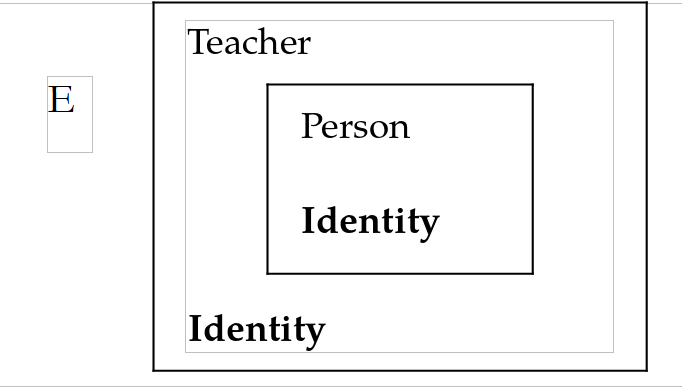
The property [Identity] is defined in both the class [Teacher] and its parent class [Person]. In the child class [Teacher], the property [Identity] is preceded by the keyword [new] to indicate that a new property, [Identity], is intentionally defined for the class [Teacher] (without [new], the compiler issues a warning). The class [Teacher] now has two properties, [Identity]:
- one inherited from the parent class [Person];
- its own.
If [E] is a [Teacher] object, [E.Identity] refers to the property [Identity] of the class [Teacher]. It is said that the property [Identity] of the child class masks (hides) the property [Identity] of the parent class. Generally speaking, if [O] is an object and [M] is a method, to execute the method [O.M], the compiler searches for a method [M] in the following order:
- in the class of the object [O];
- in its parent class, if it has one;
- in the parent class of its parent class, if it exists;
- and so on.
Inheritance therefore allows the child class to redefine methods and properties with the same names as those in the parent class. This is what enables the child class to be adapted to its own needs.
The test program [Program.cs] for project [Inheritance1] is as follows:
- line 4: creates a teacher;
- line 6: displays its identity, that of the class [Teacher];
- line 8: the conversion operator [(Person)] treats the object [e] as a [Person]: the property [Identity] of the class [Person] is then used;
- lines 12–13: call to the function [Display] (lines 20–22) with a teacher followed by a person. We’ll return to this in the next paragraph;
- lines 15–16: call to the [ToString] method on both objects. We’ll also come back to this.
Results:
We can see that:
- an object [Person] (line 2) was created before the object [Teacher] (line 3);
- [e.Identity] provided the teacher's full identity (line 4), and [((Person)e).Identity] provided the identity of its [Person] part (line 5).
4.2.4. Polymorphism
Consider a class hierarchy: C0 ← C1 ← C2 ← … ← Cn, where Ci ← Cj indicates that class Cj is derived from class Ci. This implies that class Cj has all the characteristics of class Ci plus additional ones. Let Oi be objects of type Ci. It is valid to write [Oi = Oj] with j > i. Indeed, by inheritance, class Cj has all the characteristics of class Ci plus additional ones. Therefore, an object Oj of type Cj contains an object of type Ci. The operation [Oi = Oj] causes Oi to be a reference to the object of type Ci contained within the object Oj.
The fact that a variable Oi of class Ci can actually reference not only an object of class Ci but any object derived from class Ci is called polymorphism: the ability of a variable to reference different types of objects.
Let’s take an example and consider the function [Display] from the previous program:
We can pass it either a *[Person]* or a *[Teacher]: In the latter case, the formal parameter [p], which is of type [Person], receives a value of type [Teacher]. Since the type [Teacher] is derived from the type [Person]*, this is valid.
The property [p.Identity] returns a string identifying the [Person] object [p]. What happens if the parameter passed to the [Display] function is an object of type [Teacher]? The previous results show that: the [p.Identity] statement executed the [Identity] property of a [Person] each time, first the person contained in the teacher [e] (line 7), then the person [p] itself (line 8). It did not adapt to the object actually passed as a parameter to [Display]. We would have preferred to have the full identity of the teacher [e]. For that to happen, the notation [p.Identity] would have had to refer to the property [Identity] of the object actually pointed to by [p], rather than the property [Identity] of the “Person” part of that object. With masking ([new]), the property is selected at compile time, based on the declared type of the variable ([Person]).
4.2.5. Redefinition and Polymorphism: virtual and override
It is possible to achieve the desired result by declaring [Identity] as a virtual property ([virtual]) in the base class [Person]. This is what the [Inheritance2] project does; its [Person] class is the same as the one in the [Inheritance1] project, with two changes:
- Line 38: The keyword [virtual] makes [Identity] a virtual property. This keyword can also be applied to methods. Child classes that override a virtual property or method must then use the keyword [override] instead of [new] to qualify their overridden property or method;
- line 41: a redefinition of the method [ToString], discussed in the following paragraph.
In the class [Teacher], the property [Identity] is redefined as follows:
- Line 18: The property [Identity] overrides the one in the parent class;
- Line 4: The class is sealed ([sealed]), which we’ll explain in more detail later.
With a virtual property or method, the choice of which property is executed by [p.Identity] is made at runtime, based on the actual type of the object referenced by [p]. The program [Program.cs] from the project [Inheritance2] is as follows:
Results:
This time, on line 4, the function [Display] correctly displayed the teacher’s full name.
4.2.6. The ToString method
The class [object] (the C# alias for class [System.Object]) is the “parent” class of all C# classes. So when you write:
you are implicitly writing:
The [object] class defines a virtual method, [ToString], which by default returns the full class name of the object. This is what the last two lines of output from the [Inheritance1] project displayed, with the calls to [e.ToString()] and [p.ToString()]: [Inheritance1.Teacher] and [Inheritance1.Person]. Although we did not override the [ToString] method in the [Person] and [Teacher] classes, the [ToString] method of the [object] class was able to display the object’s actual class name.
In the [Inheritance2] project, the [Person] class redefines the [ToString] method (see above):
Let’s return to the program [Program.cs] in the project [Inheritance2]:
In Line 10, the method [WriteLine] of class [Console] has no variant that accepts a parameter of type [Person]. Among the various variants of [WriteLine], there is one that accepts a parameter of type [object]. The compiler will use this method, [WriteLine(object o)], because this signature means that the parameter [o] can be of type [object] or a derived type. Since [object] is the superclass of all classes, any object can be passed as a parameter to [WriteLine]—including an object of type [Person] or [Teacher]. The [WriteLine(object o)] method writes [o.ToString()] to the console. Since the [ToString] method is virtual, the [ToString] method of the actual object is used—in this case, that of the [Person] class. This method returns [Identity], which is also a virtual property: For the teacher [e], it is therefore the property [Identity] of the class [Teacher] that is used, as shown in line 7 of the results. It is therefore unnecessary to redefine [ToString] in the class [Teacher], unlike in the 2008 course.
The same mechanism applies to string interpolation: in [$"{person}"] (line 16), the object [person] is converted to a string by its method [ToString]. The loop on lines 14–16 iterates over an array of references to [Person], which actually point to objects of different types: the method [GetType] (which is also inherited from [object]) returns the actual type of the object, whose property [Name] is the name.
4.2.7. Sealed classes
The class [Teacher] in the [Inheritance2] project is declared as [public sealed class Teacher : Person]. The keyword [sealed] prevents classes from being derived from the class [Teacher]: the declaration [class TeacherResearcher : Teacher] would be rejected by the compiler. A class is sealed when it is not intended to be derived from; the compiler and the runtime can also optimize calls to its virtual methods. The keyword also applies to a redefined method or property: [public sealed override string Identity] would prevent derived classes from redefining it again, without prohibiting derivation from the class.
Conversely, a method or property that is not declared as [virtual], [abstract] (see below), or [override] cannot be overridden with [override]: in C#, unlike in Java, methods are not virtual by default.
4.3. Redefining the meaning of an operator for a class
4.3.1. Introduction
Consider the expression [op1 + op2], where [op1] and [op2] are two operands. It is possible to redefine the meaning of the operator [+]. If the operand [op1] is an instance of class [C1], a static method must be defined in class [C1] with the following signature:
When the compiler encounters the expression [op1 + op2], it translates it to [C1.operator +(op1, op2)]. The type returned by the method [operator] is important. In fact, consider the operation [op1 + op2 + op3]. It is translated by the compiler as [(op1 + op2) + op3]. Let [res12] be the result of [op1 + op2]. The next operation performed is [res12 + op3]. If [res12] is of type [C1], it will also be translated to [C1.operator +(res12, op3)]. This allows operations to be chained together.
Unary operators with only one operand can also be redefined. Thus, if [op1] is an object of type [C1], the operation [op1++] can be redefined by a static method of the [C1] class:
What has been stated here applies to most operators, with a few exceptions:
- Operators [==] and [!=] must be redefined together, as must [<] and [>], [<=] and [>=];
- the operators [&&], [||], [=], [.], [?:], [??], and [new] cannot be redefined;
- up to C# 13, the compound assignment operators ([+=], [-=], …) could not be overridden: [a += b] was always compiled to [a = a + b]. C# 14 allows them to be overridden, as we will see.
4.3.2. An example
The [Lists] project in the solution defines a class named [ListOfPersons], which is a list of people. The classes [Person] and [Teacher] in this project are the same as those in the [Inheritance2] project, but without their tracking messages and the person counter. The 2008 course had the class *[ListOfPersons] derived from the class *[ArrayList]*, a list of objects of type *[object], which is now obsolete. We use the generic list [List<Person>] (generic classes are discussed later in this chapter; the class [List<T>] is covered in the next chapter) and, rather than inheriting from it, we place it in a private field of the class. This is referred to as using composition rather than inheritance: the class [ListOfPersons] thus exposes only the operations it has chosen. From the class [List<Person>], we use only the following elements:
- the method [L.Add(p)], which adds the person [p] to the list [L], and the method [L.AddRange(L2)], which adds all the elements of the list [L2] to it;
- the property [L.Count], which returns the number of elements in the list [L];
- The notation [L[i]], which refers to item No. i in the list [L].
The definition of class [ListOfPersons] is as follows: [ListOfPersons.cs]:
- line 6: the list of people. The keyword [readonly] indicates that the field can only be assigned at the time of its declaration or within a constructor: the list itself may change in content, but the field will always refer to the same list. [] is an empty collection expression: the type of the created collection, [List<Person>], is inferred from the field’s type;
- line 9: the number of people, a read-only property;
- lines 12–17: definition of the operator [+] for the operation [l + p], where [l] is of type [ListOfPersons] and [p] is of type [Person] or a derived type. The operator creates a new list (line 14), copies the people from [l] into it (line 15), and then adds the person [p] (line 16). As with the [+] operator for numbers or strings, the operands are not modified. Since the list [l] is of the same class, the operator has access to its private field [l.persons]. The resulting list is of type [ListOfPersons], which allows the [+] operators to be chained together as in [l + p1 + p2], interpreted (operator precedence) as [(l + p1) + p2];
- Lines 21–23: definition of the operator [+=] (C# 14). Unlike the other operators, this is not a static method but an instance method with no return value ([void]): it modifies the current object, in this case by adding the person [p] to it;
- lines 51–53: we redefine the method [ToString] to display a list of people in the form (person1, person2, ...), where personi is itself the result of the person’s [ToString] method. The static method [string.Join(separator, elements)] concatenates the textual representations of the elements, separating them with the separator. The 2008 course built this string manually using a [StringBuilder] object.
Note that the [ListOfPersons] class has no constructor. It therefore uses the default constructor [public ListOfPersons()], which does nothing other than initialize the [persons] field with the value specified in its declaration. Lines 26–46 are discussed in the following section.
The test program [Program.cs] begins as follows:
- line 5: creation of an empty list of people [l];
- line 7: adds two people using the [+] operator;
- line 11: [l + p] creates a new list [l2]; the list [l] remains unchanged;
- line 18: adds a teacher using the [+=] operator;
- Lines 9–13: Concatenating a string and an object uses the [ToString] method, which is redefined from the [ListOfPersons] class.
Results:
4.3.3. Compound assignment operators (C# 14)
Why define the operator [+=] when [l = l + p] produces the same output? If the class does not define [+=], the compiler translates [l += p] to [l = l + p]: a new list is created, all the people from [l] are copied into it, then [l] refers to this new list, and the old one is discarded by the garbage collector. With the operator [+=] defined by the class, the person is added to the existing list without being copied. Line 16 stores a second reference, [l3], to the list [l]; after the [l += ...] statement, both references still point to the same object (line 6 of the results), which proves that the list was not recreated. For a large list, or in a loop, the difference in performance is significant.
4.4. Defining an indexer for a class
Here, we continue to use the class [ListOfPersons]. If [l] is an instance of [ListOfPersons], we want to be able to use the notation [l[i]] to refer to person number i in the list [l], both for reading ([Person p = l[i]]) and writing ([l[i] = new Person(...)]).
To be able to write [l[i]], where [l[i]] refers to an object [Person], we need to define a specific property named [this] in the [ListOfPersons] class:
The property [this[int i]] is called an indexer because it gives meaning to the expression [obj[i]], which resembles array notation, whereas [obj] is not an array but an object. The method [get] of the indexer of the object [obj] is called when [variable = obj[i]] is written, and the method [set] is called when [obj[i] = value] is written.
- Lines 27–30: The position-based indexer. The method [get] returns person No. i from the private list [persons], and the method [set] assigns person [value] to it. The 2008 course, whose class was derived from [ArrayList], had to mask the parent class’s indexer with the keyword [new] and convert the element of type [object] that it returned to [Person]. With a generic list, no more conversion is needed;
- lines 34–46: we also want to be able to write [int i = l["lastName"]], that is, to index the list [l] not by an element number but by a person’s name. The result of [l[lastName]] is an integer: the position in the list of the person with the name [lastName], or -1 if that person is not in the list. Only the method [get] is defined, thereby preventing the syntax [l["lastName"] = value], which would have required the definition of a method [set]. A class can have multiple indexers, provided their parameters differ.
The test program continues as follows:
- line 25: call to the method [set] of the indexer [this[int]];
- line 27: call to its method [get];
- Line 34: Call to the [this[string]] indexer;
- line 37: call to the [this[int]] indexer.
Results:
4.5. Structures
4.5.1. Value and Reference
The C# structure is analogous to the C language structure and is very similar to the concept of a class. A structure is defined as follows:
Despite similarities in their declarations, there are significant differences between classes and structures. For example, the concept of inheritance does not exist with structures (a structure can, however, implement interfaces, which are discussed later). If we are writing a class that is not meant to be derived from, what are the differences between a structure and a class that will help us choose between the two? Let’s use the following example to find out: [classes-13.cs]:
- lines 33–36: a structure with two public fields: [Name], [Age];
- lines 40–43: a class with two public fields: [Name], [Age]. Public fields, which are generally discouraged, make this example more readable.
Results:
This structure does not have a constructor here. It could have one, as we will show later. By default, it always has a parameterless constructor—in this case, [SPerson()]—which sets all its fields to zero ([null] for the references).
The declaration on line 3 creates a structure ([Name], [Age]), and the value of [sp1] is this structure itself. Its fields do not yet have values: the compiler requires that they all be assigned (lines 4–5) before the structure is used (line 6). In the case of a class, the object ([Name], [Age]) must be created explicitly using the [new] operator (line 18). The statement creates a [CPerson] object (roughly equivalent to our structure), and the value of [op1] is then the address (the reference) of that object.
To summarize:
- in the case of the structure, the value of [sp1] is the structure itself;
- in the case of the class, the value of [op1] is the address of the created object.
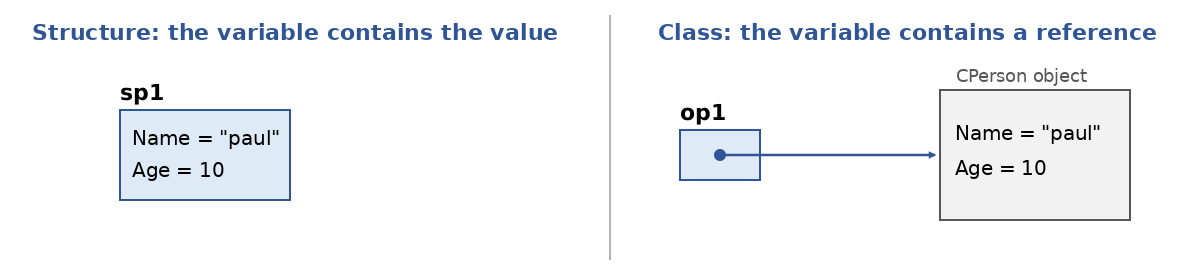
When [SPerson sp2 = sp1;] is written in the program (line 8), a new structure [sp2] ([Name], [Age]) is created and initialized with the value of [sp1], which is the structure itself:
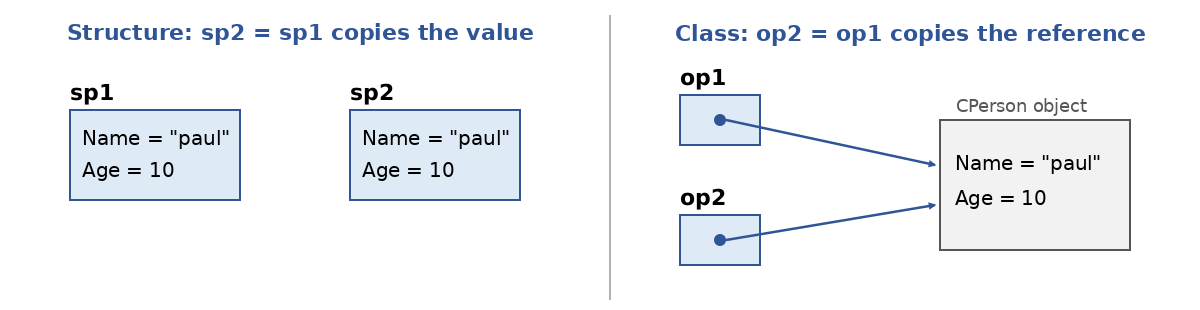
The structure of [sp1] is duplicated in [sp2] (left side of the diagram). This is a value copy. Now let’s consider the instruction [CPerson op2 = op1;] (line 23). In the case of classes, the value of [op1] is copied to [op2], but since this value is actually the object’s address, the object itself is not duplicated (right side of the diagram).
In the case of the structure, changing the value of [sp2] does not change the value of [sp1], as shown by the program (lines 4–5 of the results). In the case of the object, if you modify the object pointed to by [op2], the one pointed to by [op1] is also modified since they are the same (lines 8–9).
We can therefore conclude from these explanations that:
- the value of a variable of type structure is the structure itself;
- the value of a variable of type class is the address of the object it points to.
It is said that structures are value types and classes are reference types. The simple types in C# ([int], [double], [decimal], [bool], [char], …) are .NET structures ([System.Int32], [System.Double], …), whereas [string] and arrays are reference types. A structure is suitable for representing a small piece of data (a point, a color, a date, an amount…) that is treated as a value. A structure is not allocated individually on the garbage collector’s heap: a local variable of type structure is generally placed on the stack, and an array of structures contains the structures themselves rather than references to them.
4.5.2. A Structure with Properties and Constructors
Once the fundamental difference between a value and a reference is understood, a structure proves to be very similar to a class, as shown in the following example [classes-14.cs]:
- lines 34–37: a constructor with two parameters. The 2008 course explained that a struct constructor could not initialize fields via properties: this restriction has been removed (C# 11);
- line 40: Since C# 10, a struct can declare its own parameterless constructor, which is chained to the previous one here. It is called by [new SPerson()] (line 3) and by the object initializer on line 21, which then modifies the two properties;
- lines 45–46: two automatic properties. The property [Name] is declared as type [string?] (a string that could be [null]) because a struct can always be created without using a constructor: this is the case for its default value (line 24), where all fields are set to zero and the name is therefore [null], as well as for the elements of a newly created array of structures;
- lines 49–51: redefinition of the method [ToString]. A structure implicitly derives from the class [System.ValueType], which itself derives from [object];
- line 28: The [Equals] method, inherited from [ValueType], compares two structures field by field. The [==] operator, on the other hand, is not defined for a structure unless it is overridden.
Results:
At the end of the program, the structures [p1] and [p2] are different (lines 5–6): with a class, [p1] and [p2] would have referred to the same object.
4.5.3. Immutable Structures and Record Structures
A structure whose state can be modified can lead to unexpected results: since it is copied with every assignment or parameter pass, one often modifies a copy while believing one is modifying the original. Therefore, it is recommended to make structures immutable: once created, they can no longer be modified. The program [classes-15.cs] demonstrates both ways to do this:
- lines 26–40: a structure declared as [readonly] (C# 7.2). The compiler verifies that all its fields and properties are read-only. To “move” a point, the method [Move] returns a new point (line 38);
- line 44: a record structure (C# 10). This single line declares a structure whose constructor has two parameters, [X] and [Y], and which has two public read-write properties, [X] and [Y]. The compiler also generates a method named [ToString] that displays the structure’s name and its properties, the equality methods and operators [==] and [!=] (line 11), as well as support for the expression [with], which creates a copy of the structure by modifying certain properties (line 16);
- line 47: an immutable record structure: its properties are read-only (more precisely, [init]: they can only be set at creation), while the expression [with] remains valid (line 21).
Results:
The records ([record]) also exist as classes: we’ll examine them in detail a little later. For now, let’s just note that a [readonly record struct] is the most concise way to declare a small, immutable value-type data item: this is the type we’ll use for the tax brackets in this chapter’s example application.
4.6. Interfaces
4.6.1. A First Example
An interface is a set of method or property declarations that forms a contract. A class (or structure) that chooses to implement an interface commits to providing an implementation of all the methods and properties defined in the interface. The compiler verifies this implementation.
For example, here is the definition of the [System.Collections.IEnumerator] interface from .NET:
The properties and methods of the interface are defined only by their signatures. They are not implemented (they have no code). It is the classes that implement the interface that provide code for the interface’s methods and properties:
- Line 1: The class [C] implements the interface [IEnumerator]. Note that the symbol [:] used for implementing an interface is the same as the one used for deriving a class;
- Lines 4–6: The implementation of the methods and properties of the [IEnumerator] interface. They must be public.
By convention, an interface name begins with the letter I. The following examples make up the [Statistics] project in the solution. Consider the following interface, [IStats.cs]:
The [IStats] interface has:
- a read-only property [Average]: to calculate the average of a series of values;
- a method [StandardDeviation]: to calculate the standard deviation.
Note that it is not specified anywhere which set of values is being referred to. It could be the average grades of a class, the monthly average sales of a particular product, the average temperature in a given location… This is the principle behind interfaces: they assume the existence of methods in the object but not that of specific data.
A first implementation class for the [IStats] interface could be a class used to store the grades of students in a class for a given subject. A student is characterized by the following [Student] structure: [Student.cs]:
The student is identified by their first and last names. The 2008 course defined a structure with two automatic properties; an immutable record structure, as shown in the previous paragraph, is represented in a single line. A grade is characterized by the following structure: [Grade] [Grade.cs]:
The grade is defined by the student being graded and the grade itself. The structure redefines the method [ToString] generated by the compiler to display a grade in the form [firstName,lastName,value].
The grades of all students in a given subject are grouped in the following class [ArrayOfGrades]: [ArrayOfGrades.cs]:
- Line 3: The class [ArrayOfGrades] implements the interface [IStats]. It must therefore implement the property [Average] and the method [StandardDeviation]. These are implemented on line 8 ([Average]) and lines 35–37 ([StandardDeviation]);
- lines 6–8: three read-only automatic properties: the subject for which the object stores grades, the grade array, and the grade average;
- line 10: a field storing the standard deviation of the grades;
- lines 13–31: the constructor. Here, we assume that the grades passed to the constructor will not change afterward. Therefore, we use the constructor to immediately calculate the average and standard deviation of these grades and store them. A read-only property such as [Average] can be assigned a value in the constructor (line 24); it cannot be assigned a value afterward. The expressions [condition ? value1 : value2] set the mean and standard deviation of an empty array to -1;
- lines 41–43: the method [ToString] uses [string.Join] to concatenate the grades, each of which is converted to a string by the method [ToString] of the structure [Grade].
In the previous class, grades were stored in an array. It was not possible to add a new grade after the [ArrayOfGrades] object was created. We now offer a second implementation of the [IStats] interface, called [ListOfGrades], where this time the grades are stored in a list [List<Grade>], with the ability to add grades after the initial creation of the [ListOfGrades] object: [ListOfGrades.cs]:
- Line 3: The class [ListOfGrades] implements the interface [IStats];
- line 7: Grades are now stored in a list rather than an array;
- lines 20–25: You can now add a grade to those already stored. The mean and standard deviation are no longer calculated in the constructor but on demand, within the interface members themselves: [Average] (lines 29–34) and [StandardDeviation] (lines 39–42). Once calculated, these values are stored so they aren’t recalculated with every request: they are said to be cached. Adding a score invalidates the cache;
- lines 9–10: the cache. The type [double?] (C# 2) is a nullable value type: a variable of this type contains a [double] or [null], which here means “not yet calculated.” The 2008 course used the value -1 for this;
- line 33: the [??=] operator (C# 8) only assigns a value to the left-hand variable if it is [null]. The method [ComputeAverage] is therefore called only if the average has not yet been calculated. The property [Value] of a variable [double?] returns the value [double] that it contains.
A test program could look like this: [Program.cs]:
- line 4: creates an array of students;
- line 5: creation of an array of grades;
- line 7: a [ArrayOfGrades] object, whose mean and standard deviation are displayed on line 9;
- line 11: an object [ListOfGrades], whose mean and standard deviation are displayed on line 12. The class [List<Grade>] has a constructor that accepts a collection of grades, in this case the array [grades];
- line 14: a new grade is added, followed by a new display;
- lines 23–25: The function [DisplayStats] takes a [IStats] type as a parameter, which is an interface type. This means that the actual parameter can be any object that implements the [IStats] interface. When using a data object of an interface type, only the methods of the interface implemented by that object are used. The rest is ignored. This property is similar to the polymorphism we saw with classes. If a set of classes Ci that are not related to each other through inheritance (and therefore cannot use inheritance-based polymorphism) share a set of methods with the same signature, it may be useful to group these methods into an interface I that all the relevant classes would implement. Instances of these classes
Cican then be used as actual parameters of functions that accept a formal parameter of typeI—that is, functions that use only the methods of theCiobjects defined in the interfaceI, and not the specific fields and methods of the variousCiclasses; - lines 17–19: A variable can be of the type of an interface. It can then refer to any object of a class that implements the interface. The compiler allows access only to the members of the interface: the property [Average] and the method [StandardDeviation].
Results:
Finally, note that interfaces can have multiple implementations; that is, you can write:
where the Ij are interfaces: a class inherits from only one class, but can implement as many interfaces as it wishes.
4.6.2. Default Interface Methods
Starting with C# 8, an interface can provide a default implementation for some of its methods. A class that implements the interface can then use this implementation or provide its own. This makes it possible, for example, to add a method to an already published interface without requiring all classes that implement it to be modified. The program [classes-16.cs] provides an example:
- Lines 12–18: The [IShape] interface declares a method, [Area], to be implemented, and a method, [Description], with a default implementation. This method can use the other members of the interface ([Area]) and those of [object] ([GetType]). The [{Area():F2}] format displays the area with two decimal places;
- lines 22–31: The class [Square] implements only [Area]; it uses the method [Description] by default;
- lines 35–46: The class [Circle] provides its own method, [Description];
- line 10: the default method belongs to the interface, not to the [Square] class: it can only be called through a reference of type [IShape]. The call to [square.Description()] is rejected by the compiler.
Results:
Finally, starting with C# 11, an interface can declare abstract static members that the types implementing it must provide. These are used only with generics: we’ll cover them at the end of the section on generics.
4.7. Abstract Classes
An abstract class is a class that cannot be instantiated. You must create derived classes, which can be instantiated. Abstract classes can be used to refactor the code of a class hierarchy. Let’s examine the following example, which forms the [Users] project of the solution: [User.cs]:
- line 3: the class is declared abstract using the keyword [abstract];
- Lines 11–23: the constructor for the [User] class. This class stores information about a web application’s user. The application has various types of users who are authenticated via a username and password (lines 6–7). These two pieces of information are verified against a directory (LDAP) for some users, against a database for others, and so on. The constructor is [protected]: it can only be called by the constructors of derived classes;
- lines 14–15: the authentication information is stored;
- line 17: it is verified by a method named [Identify]. Because the authentication method is not known at this level, it is declared abstract (line 33) using the keyword [abstract]. An abstract method has no body: derived classes will provide one. A class that has an abstract method must itself be declared abstract. The method [Identify] returns a string specifying the user’s role (basically, what they are authorized to do), or [null] if the user is not recognized: its return type is therefore [string?];
- lines 19–21: if the user is not recognized, an exception is thrown;
- lines 27–29: the method [ToString], which identifies an instance of the class.
We assume here that the developer wants to have control over the construction of instances of the class [User] and its derived classes, perhaps because they want to ensure that an exception of a certain type is thrown if the user is not recognized. Derived classes can rely on this constructor. To do so, they must provide the method [Identify]. Note that the constructor here calls a method overridden by the derived classes even though those classes have not yet executed their own constructors: the method [Identify] must therefore not use any fields of the derived class, which have not yet been initialized. This is a practice that should be used with caution.
The [UnknownUserException] class is as follows:
- Line 3: It derives from the [Exception] class;
- line 5: it has only one constructor that takes an error message as a parameter. This parameter is passed to the parent class, which has the same constructor.
We now derive the child class [Administrator] from the class [User]:
- lines 6–7: the constructor simply passes the parameters it receives to its parent class;
- Lines 12–16: The [Identify] method of the [Administrator] class. Suppose an administrator is identified by a directory LDAP. This method overrides the abstract method [Identify] of its parent class: the keyword [override] is required (an abstract method is implicitly virtual). The 2008 course incorrectly stated the opposite. It retains the access specifier [protected] of the method it overrides.
We now derive the child class [Observer] from the class [User]:
- Lines 12–16: the [Identify] method of the [Observer] class. We assume that an observer is identified by verifying their identification data in a database.
Ultimately, the objects [Administrator] and [Observer] are initialized by the same constructor, that of the parent class [User]. This constructor uses the method [Identify] provided by these classes.
A third class, [Unknown], also derives from the [User] class:
- Line 16: The [Identify] method returns [null] to indicate that the user was not recognized.
A test program for [Program.cs] might look like this:
Note that in lines 3 and 4, the method [User.ToString()] is called by the method [WriteLine]. On line 7, the constructor throws a [UnknownUserException] exception, which is caught on line 9: the object is not created, and nothing is displayed by [WriteLine]. Line 13, if uncommented, is rejected by the compiler: you cannot create an object of an abstract class.
Results:
An abstract class is similar to an interface: both declare members that other classes must implement. However, an abstract class can have fields, constructors, and code common to its derived classes; conversely, a class can derive from only one abstract class, whereas it can implement multiple interfaces. The two are often combined: an interface defines the contract, and an abstract class that implements it factors out the code common to multiple implementations. This is what the example application in this chapter will do.
4.8. Generic Classes, Interfaces, and Methods
4.8.1. Generic Classes and Methods
Suppose we want to write a method that swaps two integers. This method could look like this:
Now, if we wanted to swap two references to [Person] objects, we would write:
What distinguishes the two methods is the type T of the parameters: [int] in [Swap1], and [Person] in [Swap2]. Generic classes, interfaces, and methods address the need for code that differs only in the type of certain data. They were introduced with C# 2: prior to that, the type [object] was used, which accepts any type, at the cost of type conversions at runtime and errors detected only at runtime. This is what the [ArrayList] class, mentioned in the section on operators, did.
The program [classes-17.cs] features a generic class, a generic method, and a second, more realistic generic class:
- lines 35–42: The class
*[Generic1]is parameterized by a type denoted as*[T]. You can name it whatever you want. This type, [T], is then used within the class just like any other type: for the two parameters to be swapped and for the temporary variable [temp]. The class [Generic1] is said to be a generic class; - Line 5: When using a generic class parameterized by the types T1, T2, …, these types must be “instantiated.” Here, we use the static method [Swap] of type [Generic1<int>] to indicate that the references passed to the method [Swap] are of type [int]. Lines 9 and 13: the same applies to the types [string] and [Person];
- Lines 47–49: The class [Generic2] is not generic, but its static method [Swap] is;
- line 17: the method [Swap] is called, specifying the type of the parameters between [<>]. In fact, the compiler is able to deduce, based on the type of the actual parameters, which variant of the method [Swap] to use. Therefore, the code on lines 20–22 is valid;
- lines 58–81: a generic class with a state: a stack of elements of type [T]. Elements are pushed onto the top of the stack and popped from the top. The elements are stored in a generic list of type [List<T>] (line 61), which is itself parameterized by the stack’s type, [T]. The expression [elements[^1]] (line 79) refers to the last element of the list;
- line 26: a stack of people. The compiler guarantees that it will contain only people: the statement on line 32 would be rejected. The method [Pop] returns an object of type [Person], without conversion.
Results:
Note that, to swap two variables, C# 7 now offers a more concise syntax based on tuples: [(a, b) = (b, a);].
4.8.2. Constraints on Generic Parameters
You can place constraints on generic parameters using the keyword [where]. The main ones are as follows:
Constraint | Meaning |
[where T : struct] | T must be a value type (structure), excluding nullable types such as [int?] |
[where T : class] | T must be a reference type (class, interface, array, delegate) |
[where T : notnull] | T must be a non-nullable type (value or reference) |
[where T : new()] | T must have a public constructor with no parameters. This constraint comes last |
[where T : BaseClass] | T must be the specified class or a derived class |
[where T : IInterface] | T must implement the specified interface. Multiple interfaces may be specified |
[where T : U] | T must be the type U or a type derived from U, where U is another generic parameter |
[where T : unmanaged] | T must be a value type that contains no references |
The program [classes-18.cs] uses two of them:
- lines 26–28: the generic method [Swap] requires that the type [T] be a reference type (constraint [where T : class]);
- line 7: if this line is uncommented, the compiler reports an error because the type [int] is not a class or an interface—it is a structure.
Here is the error message received when compiling the program after line 7 is uncommented:
The compiler message is displayed in the system language—in this case, English (on a computer configured for French, it would be in French). It lists the filename, the line and column numbers of the error, and the error code ([CS0452]), which can be looked up in the documentation.
Let’s return to the program [classes-18.cs]:
- Lines 37–39: The type [T] must implement the interface [IValue] (lines 52–54). This interface has a method named [Value], used on line 42, which returns the value of the object of type [T]. Without this constraint, the compiler would reject the call to [element1.Value()]: any object of type [T] does not have a method named [Value]. The two references [element1] and [element2] are swapped only if the value of [element1] is greater than the value of [element2]: the method [Order] sorts the two elements in ascending order by value;
- lines 58–68: the class [RandomValue] implements the interface [IValue]. The value of an instance is a random number between 0 and 99 (line 64), provided by a random number generator in the [Random] class shared by all instances (line 62). This generator is initialized with a fixed “seed”: it therefore always produces the same sequence of numbers, making the results reproducible. The 2008 course created a generator for each object, initialized with the current time, and had to wait one millisecond between creations to obtain different numbers. When reproducibility is not required, the shared generator [Random.Shared] can be used instead;
- lines 72–83: the [StringValue] class also implements the [IValue] interface: the value of an instance is the length of the string passed to the constructor;
- lines 12–17: Instances of type [RandomValue] are sorted;
- lines 20–23: instances of type [StringValue] are sorted.
Results:
4.8.3. A generic interface: IComparer<T>
To illustrate the concept of a generic interface, we will sort an array of people first by their names, then by their ages. The method that allows us to sort an array is the static method [Sort] of the class [Array]. It has different signatures (it is overloaded). We will use the following signature:
[Sort] is a generic method where [T] denotes any type. The method takes two parameters:
- [T[] array]: the array of elements of type [T] to be sorted;
- [IComparer<T>? comparer]: a reference to an object that implements the [IComparer<T>] interface.
[IComparer<T>] is a generic interface defined as follows (simplified definition):
The [IComparer<T>] interface has only one method. The [Compare] method:
- takes two parameters, [x] and [y], of type [T]. The type [T?] indicates that their values can be [null] (the keyword [in] is a technical detail that we will not explain here);
- returns a positive number if x > y, 0 if x == y, and a negative number if x < y. It is up to the developer to define the meaning of the operators <, ==, and >. For example, if [p1] and [p2] are two [Person] objects, we can say that p1 > p2 if the name of [p1] comes after the name of [p2] in alphabetical order. This will result in an ascending sort based on the people’s names. If we want to sort by age, we’ll say that p1 > p2 if the age of [p1] is greater than the age of [p2];
- to sort in descending order, simply reverse the sign of the results.
We now know enough to sort an array of people. The program [classes-19.cs] is as follows:
- Line 2: the array of people;
- line 6: sorting the table of people by last name and first name. The second parameter of the generic method [Sort] is an instance of the class [CompareNames], which implements the generic interface [IComparer<Person>];
- lines 40–54: the class [CompareNames]. Its method [Compare] implements the method [int Compare(T? x, T? y)] of the interface [IComparer<T>], where [T] = [Person]:
- lines 45–46: Since the parameters are declared as type [Person?], the compiler requires that a null reference be handled before using [p1] and [p2]. The static method [ArgumentNullException.ThrowIfNull] throws an exception if its parameter is [null]; the compiler knows that after it is called, the parameter is not null;
- line 48: the method [string.Compare] compares two strings in alphabetical order according to the current culture, in this case French;
- line 9: sorting the array of people by age, using an instance of the [CompareAges] class from lines 59–66. The [CompareTo] method for numeric types returns a negative, zero, or positive number depending on whether the number is less than, equal to, or greater than its parameter: this is exactly what the [Compare] method expects.
Results:
We will see in Chapter 7, which covers delegates, that we can also pass a simple comparison function to [Array.Sort] without writing a class: [Array.Sort(persons, (p1, p2) => p1.Age.CompareTo(p2.Age));].
4.8.4. Abstract Static Members and Generic Mathematics
Can we write a generic method that sums the elements of an array of numbers, regardless of their type ([int], [double], [decimal]…)? We would need to be able to write [sum + value] and have the zero element of type [T]. However, the operator [+] is a static method, and a standard interface constraint only allows the use of instance methods. Since C# 11, an interface can declare abstract static members ([static abstract]), which every type that implements it must provide. .NET 7 has derived “generic mathematics” from this: All numeric types implement the [INumber<T>] interface in the [System.Numerics] namespace, which declares the type’s zero ([T.Zero]), arithmetic operators, and so on. The program [classes-20.cs] demonstrates this:
- lines 13–20: The generic method
*[Sum]requires that*[T]implement*[INumber<T>]. It can then use the static member [T.Zero] (line 15) and the operator [+] of type [T]* (line 18); - lines 4–6: the same method adds together [int], [double], and [decimal]. Collection expressions create arrays of the expected type;
- lines 29–32: a custom interface that declares an abstract static property [Sound];
- lines 35–42: two classes implement the static property;
- Lines 24–26: The generic method [Describe] uses the static member [T.Sound] of type [T], without requiring an instance of that type. [typeof(T)] returns the description of the type [T], whose property [Name] is the name.
Results:
4.9. Namespaces
To write a line on the screen, we use the [Console.WriteLine(...)] statement. If we look at the definition of the class [Console] in the documentation for .NET, we find that it is part of the namespace [System]. This means that the class [Console] should be referred to as [System.Console], and we should actually write [System.Console.WriteLine(...)]. We avoid this by using a [using] clause:
This means that the [System] namespace is imported along with the [using] clause. When the compiler encounters a class name (in this case, [Console]), it searches for it in the various namespaces imported by the [using] clauses. Here, it finds the class [Console] in the namespace [System]. In a recent .NET project, we don’t even need to write [using System;]: this namespace is included in the project’s implicit **using** statements, as we saw at the beginning of the chapter.
The documentation provides a second piece of information about the [Console] class: the assembly that contains it, the [System.Console.dll] file. An assembly is the result of compiling a project: a [.dll] file (library) or an executable. To use the classes in an assembly, the compiler must be aware of it. The 2008 course demonstrated how to pass these references to the [csc] compiler via the command line ([csc /r:fic1.dll /r:fic2.dll prog.cs]). Today, we no longer call the compiler directly: the assemblies of the .NET framework are referenced automatically, and the [.csproj] file references the other libraries, either as packages ([PackageReference]), or as projects ([ProjectReference]), as we will see in Chapter 6, which is devoted to layered architectures.
When creating a class, you can create it within a namespace. The purpose of these namespaces is to avoid name conflicts between classes, for example, when they are distributed. Consider two companies, E1 and E2, distributing packaged classes in the assemblies [e1.dll] and [e2.dll], respectively. Suppose a client C purchases these two sets of classes, in which both companies have defined a class named [Person]. If the client’s program uses the class [Person], the compiler will not know whether to use the class [Person] from [e1.dll] or the one from [e2.dll]. It will report an error. If the company E1 creates its classes in a namespace named [E1] and the company E2 creates its classes in a namespace named [E2], the two classes named [Person] will then be named [E1.Person] and [E2.Person]. The client must use either [E1.Person] or [E2.Person] (or an alias) in its classes, but not [Person]. The namespace resolves this ambiguity.
To create a class in a namespace, the 2008 course stated:
This format remains valid (it allows you to include multiple namespaces in a single file), but since C# 10, the file-scope namespace—[namespace NamespaceName;]—placed at the beginning of the file is preferred, as it saves one level of indentation. This is the format we have been using since the beginning of this chapter.
The [Namespaces] project in the solution illustrates these concepts. It contains two classes, [Person], in two different namespaces. The first, [E1/Person.cs]:
The second, *[E2/Person.cs]*:
Note that a source file’s folder does not determine its namespace; only the declaration *[namespace]* matters. However, it is a useful convention to organize files from a single namespace into a folder with the same name.
The file [GlobalUsings.cs] contains the following clauses [global using] (C# 10):
A [global using] directive applies to all source files in the project. This is how implicit using statements are implemented: during compilation, the SDK file generates a [obj/Debug/net10.0/Namespaces.GlobalUsings.g.cs] file that contains the lines [global using System;], [global using System.Collections.Generic;], [global using System.IO;], [global using System.Linq;], [global using System.Net.Http;], [global using System.Threading;], and [global using System.Threading.Tasks;]. You can also add a global "using" statement in the file [.csproj]: [<Using Include="E1" />].
The main program, [Program.cs], is as follows:
- line 2: an alias: in this file, [PersonE2] refers to the class [E2.Person];
- line 3: Starting with C# 12, an alias can refer to any type; here, it refers to a tuple with two fields named [X] and [Y];
- line 6: [Person] refers to the class [E1.Person], thanks to the clause [global using E1;]. If the namespace [E2] were also imported, the name [Person] would be ambiguous and the compiler would reject it;
- line 8: use of the alias;
- line 10: the fully qualified class name resolves any ambiguity;
- line 13: the property [FullName] of a type returns its full name, prefixed by its namespace;
- line 14: the property [Assembly] of a type refers to the assembly that contains it;
- line 16: the class [System.Text.StringBuilder] is defined via the clause [global using System.Text;];
- line 19: use of the alias for the tuple type.
Results:
4.10. Records
Many classes serve only to carry data: a person, a grade, a tax bracket… For these, we always write the same code: a constructor that copies its parameters into properties, a [ToString] method that displays these properties, and often comparison methods. C# 9 introduced records: the compiler generates this code from a single-line declaration. We’ve already encountered the structure version ([record struct]); here’s the class version ([classes-21.cs]):
- Lines 33–36: a positional record. The declaration [record Person(string FirstName, string LastName, int Age)] generates:
- a constructor with three parameters;
- three read-only public properties: [FirstName], [LastName], and [Age] ([{ get; init; }]);
- a method [ToString] that displays the type name and its public properties (line 5);
- the methods [Equals] and [GetHashCode] and the operators [==] and [!=], which compare property values rather than references;
- a method [Deconstruct] that breaks the object down into variables (line 15);
- the expression [with];
- a record can also, like a class, have additional members; here, the property [Identity];
- Line 7: [r1] and [r2] are two distinct objects ([ReferenceEquals] returns [false]) but they are equal in the sense of [] because their properties have the same values. For an ordinary class, [] compares the references (line 22);
- line 11: Since a record is, in principle, immutable, it is not modified (line 9): the expression [with] creates a copy of [r1] in which certain properties have been changed;
- lines 40–42: A record can be derived from another record (not from an ordinary class). The parameters [FirstName], [LastName], and [Age] are passed to the parent record’s constructor. The property [Identity], declared as [virtual] in [Person], is redefined;
- line 30: record equality takes into account the actual type of the objects: a [Person] is never equal to a [Teacher], even if their common properties are equal;
- Lines 46–57: A class that resembles the record [Person]… except that the constructor and properties had to be written, and equality by value, [ToString] and [with] are not provided.
Results:
Note that the generated method [ToString] also displays the calculated property [Identity] (line 2), whereas the [ToString] method of the class [PersonC] simply displays the class name (line 7).
Let’s summarize the differences between a class and a record:
Class | Record | |
Equality: [==], [Equals] | same object (equal references) | same property values, same type |
[ToString] | type name | type name and public properties |
constructor and properties | to be written | Generated by the positional declaration, properties [init] |
modified copy | to be written | expression [with] |
inheritance | from a class | from a record |
A record is used for data defined by its value (a person retrieved from a database, a message exchanged over a network, a tax bracket), and a class is used for an object with an identity and behavior (a computing service, a connection, an editable list). A record is written as [record] (or [record class], which is identical) for a reference type, and [record struct] for a value type.
4.11. Primary constructors
Positional records declare their constructor parameters immediately after their name. Since C# 12, ordinary classes and structures can do the same: this is the primary constructor. The program [classes-22.cs] illustrates this:
- line 17: the class [Person] has a primary constructor with three parameters. Unlike those of a record, these parameters do not become public properties: they are parameters, visible throughout the entire body of the class;
- lines 20–21: the parameters [firstName] and [lastName] are used to initialize two read-only properties;
- line 23: the parameter [age] is used by members of the class: the property [Age], the method [GrowOlder] (line 30), and the property [Identity]. The compiler then stores it in a hidden field, which can be modified ([age++]). It is recommended not to mix these two uses for the same parameter (initializing a property and using it directly), as this may result in two copies of the same data;
- line 26: a class with a primary constructor may have other constructors, but these must call the primary constructor using [this(...)];
- line 36: A derived class passes some of the parameters from its primary constructor to the constructor of its parent class: [: Person(firstName, lastName, age)]. This is equivalent to [: base(firstName, lastName, age)] in a traditional constructor;
- line 44: A structure can also have a primary constructor.
Results:
The primary constructor eliminates repetitive code from constructors that merely store their parameters. It is widely used for classes that receive services during construction, as we will see with dependency injection (Chapter 6).
4.12. Extension Methods and Members
How do you add a method to a class that cannot be modified, such as the class [string] derived from .NET? C# 3 introduced extension methods: static methods that are used as instance methods of the extended type. C# 14 extends this mechanism to properties and static members with extension blocks. The program [classes-23.cs] demonstrates both:
- lines 20–29: Traditional extension methods are static methods of a static class. Their first parameter, preceded by the keyword [this], specifies the extended object:
- [Initials(this Person p)] extends the type [Person]: it is called [p.Initials()] (line 4);
- [FirstUpper(this string s)] extends the type [string]: it is called ["jean".FirstUpper()] (line 5). The expression [s[1..]] refers to the substring starting at character #1;
- line 7: an extension method remains an ordinary static method: the compiler translates ["jean".FirstUpper()] into this call. The method has access only to the public members of the extended object;
- lines 34–53: the C# 14 extension blocks, also declared within a static class:
- lines 37–41: the block
***[extension(Person p)]adds the instance members it contains to the type*[Person].*[p]* refers to the extended object. Properties can now be added ([IsAdult], [FullName]), which was not possible with traditional extension methods; - lines 45–47: the block [extension(Person)], with no parameter names, adds static members to the type [Person]: [Person.Unknown] (line 12) is written as if the property had been declared in the record [Person];
- Lines 51–53: An extension property of type [string], used on line 10.
- lines 37–41: the block
Results:
Extension methods are ubiquitous in .NET: the operators of LINQ ([Where], [Select], [OrderBy]…), discussed in the next chapter, are extension methods of the [IEnumerable<T>] interface. For an extension to be usable, the namespace of its static class must be imported.
4.13. Pattern Filtering on Objects
The expression [switch] and pattern filtering are not limited to simple values (numbers, strings); they also apply to objects. You can test an object’s type, check the values of its properties, and retrieve the object converted to the correct type—all in a single expression. The program [classes-24.cs] uses a hierarchy of three records:
- lines 52–54: a [Person] record and two derived records, [Teacher] and [Student];
- lines 2–11: an array of objects of various types (the type [object?] also accepts [null]);
- line 17: the pattern of type [o is Person p] is true if [o] references an object of type [Person] or a derived type; in this case, the variable [p], of type [Person], references this object. This avoids the sequence from the 2008 course: testing the type with [is], then converting with [(Person)o]. The pattern is false if [o] is equal to [null];
- line 27: the property pattern [{ Age: >= 18 }] (C# 8) tests the value of a property of the object, in this case using a relational pattern [>= 18] (C# 9). Multiple properties can be tested by separating them with commas;
- lines 39–49: the expression [switch] tries the patterns in order and returns the value associated with the first one that matches:
- line 41: a teacher from section 27;
- line 42: any other teacher. The order is important: if placed before the previous one, this pattern would have made it inaccessible, which the compiler would have flagged as an error;
- line 43: a positional pattern: it uses the method [Deconstruct] of the record [Student] to extract its properties in the order they were declared; [_] ignores a property;
- line 44: a minor;
- line 47: a positive integer, using the [and] combinator (C# 9); there are also [or] and [not];
- line 48: the pattern [null];
- line 49: the pattern [_] accepts everything. Without it, the compiler would report that the expression [switch] does not cover all cases.
Results:
Note that the type pattern also matches derived types: the type pattern loop (lines 2–6) captured the teachers and the student, who are people. Pattern matching is a useful alternative to cascading [if (o is ...)]; however, it should not replace polymorphism: when behavior depends on the object’s type and you have control over the class hierarchy, a virtual method redefined in each class remains the object-oriented solution.
4.14. Nullable reference types
Since the beginning of this chapter, our projects have had nullable reference types enabled ([<Nullable>enable</Nullable>] in [.csproj], an option enabled by default in single-file applications). The principle is as follows:
- A variable, field, parameter, or reference-type result declared without a question mark—for example, of type [Person]—is never supposed to be equal to [null];
- if it can be [null], it is declared with a question mark: [Person?];
- the compiler analyzes the program flow and issues a warning whenever a potentially null value is used without verification, or assigned to a non-nullable variable.
The language does not prohibit anything at runtime: these are compilation warnings, but a program that compiles without warnings is much less prone to the [NullReferenceException] exception, the most common runtime error. The 2008 course, which predates this feature (C# 8, 2019), obviously did not cover it. The program [classes-25.cs] demonstrates the operators associated with nullable types:
- lines 58–61: The class [Person] has two non-nullable properties, initialized by the constructor, and one nullable property, [MiddleName]: [null] means “no middle name”;
- line 6: the [?.] operator (C# 6) returns [null] if the object on its left is [null], and accesses the member otherwise. The result is of type [int?];
- line 8: the operator [??] returns its left operand if it is not [null], and its right operand otherwise;
- lines 37–46: the function [Find] returns the person being searched for or [null]; its return type is [Person?];
- line 13: the two operators are combined;
- lines 16–18: After the [is not null] check, the compiler knows that [found] is not equal to [null]: [found.FirstName] can be written without a warning;
- lines 21–22: the operator [??=] only assigns a value to the property if it is [null]: Jean’s middle name, “Marie,” is not replaced;
- lines 25–26: C# 14 allows [?.] on the left side of an assignment: the assignment is performed only if the object is not null. Dupont exists and is given a new middle name; Durand does not exist, and the statement does nothing;
- line 29: the [!] operator (a “null-forgiving” operator) tells the compiler that we know the value is not null: it does not issue a warning. It’s up to the developer to be sure of this: if the value is null at runtime, an error will occur later on. Use sparingly;
- lines 32–34: three statements that trigger warnings.
Results:
Let’s uncomment the last three lines of the main program and compile:
- Warning [CS8602]: The property [MiddleName] of a newly created person may be [null]: You cannot use its property [Length] without verification;
- Warning [CS8600]: The function [Find] may return [null], a value that is assigned to a non-nullable variable of type [Person];
- Warning [CS8625]: The constant [null] is assigned to an element of type [Person], which is non-nullable.
The program would run despite these warnings, but the first line would throw a [NullReferenceException] exception. In this course, all programs compile without any warnings: we correct the code (by declaring the type as nullable, checking the value, or providing a default value using [??]) rather than ignoring the warning or suppressing it with [!].
4.15. Sample Application - V2
We’ll revisit the tax calculation we covered in the previous chapter (Version 1) and implement it using classes and interfaces. Let’s review the problem. We aim to write a program to calculate a taxpayer’s tax. We’ll consider the simplified case of a taxpayer who has only a single salary to report (using the 2004 tax schedule for 2003 income, kept as-is: this is an exercise):
- we calculate the employee’s number of tax brackets: shares = nbChildren / 2 + 1 if they are unmarried, nbChildren / 2 + 2 if he is married, where nbChildren is the number of his children;
- if he has at least three children, he receives an additional half-share;
- his taxable income R is calculated as R = 0.72 × S, where S is his annual salary;
- his family quotient is calculated as QF = R / shares;
- his tax I is calculated using the following table:
threshold | coeffR | coeffN |
4962 | 0 | 0 |
8382 | 0.068 | 291.09 |
14,753 | 0.191 | 1,322.92 |
23,888 | 0.283 | 2,668.39 |
38,868 | 0.374 | 4,846.98 |
47,932 | 0.426 | 6,883.66 |
0 | 0.481 | 9,505.54 |
Each row has three fields. To calculate tax I, find the first row where QF ≤ the limit. For example, if QF = 5,000, the row (8,382; 0.068; 291.09) will be found. Tax I is then equal to 0.068 × R - 291.09 × shares. If QF is such that the condition QF ≤ limit is never satisfied, then the coefficients of the last row are used, resulting in tax I = 0.481 × R - 9,505.54 × shares.
The application forms the [TaxV2] project of the solution:
First, we define a type capable of encapsulating a row from the previous array [TaxBracket.cs]:
The 2008 course used a structure with three automatic read-write properties. We use an immutable record structure ([readonly record struct]):
- a structure because a bracket is a small piece of data without an identity, defined solely by its value: an array of brackets directly contains the brackets, without a separate object in memory for each one. With three [decimal] (48 bytes), the structure exceeds the size of approximately 16 bytes usually recommended for a structure; this is not a problem here: there are few brackets, and they are copied only when they are read;
- immutable ([readonly]) because there is no reason for a tax bracket to be modified once it has been created. The 2008 course, incidentally, modified the limit of the last tax bracket during the calculation—a side effect that we are eliminating;
- a record ([record]) because the compiler generates the constructor, the properties, [ToString], and the equality operator from a single line.
Then we define an interface [ITax] capable of calculating the tax [ITax.cs]:
- Line 6: The method for calculating the tax based on three pieces of data: the taxpayer’s marital status, the number of children, and annual salary. It returns the tax rounded down to the nearest euro.
Next, we define an abstract class that implements this interface [AbstractTax.cs]:
- Line 3: The class [AbstractTax] implements the interface [ITax];
- line 7: the scale data, in the form of a protected abstract property. The class [AbstractTax] does not know where this data comes from (written in the code, read from a file, a database, etc.). It leaves this up to the derived classes. This is why it is declared abstract, which prevents it from being instantiated. The 2008 course used a protected field that derived classes had to initialize; the abstract property requires derived classes to provide it: the compiler verifies this;
- lines 10–33: the implementation of the [Calculate] method of the [ITax] interface. Derived classes will not need to rewrite this method. The [AbstractTax] class thus serves as a factorization class for the derived classes: it contains what is common to all of them;
- line 13: the number of shares. The conversion [(decimal)nbChildren] is essential: without it, [nbChildren / 2] would be an integer division (3 / 2 = 1). The expression [married ? 2 : 1] equals 2 for a married taxpayer, 1 otherwise;
- Lines 19–20: taxable income and the family quotient. All calculations are performed using [decimal], a type adapted to the amounts: the suffix [m] of [0.72m] denotes a constant of this type;
- Lines 22–29: Determining the tax bracket. By default, this is the last bracket ([brackets[^1]], line 23). The loop iterates through all brackets except the last one and stops ([break]) at the first bracket whose limit is greater than or equal to the family quotient;
- line 33: tax calculation. The conversion [(int)] truncates the result [decimal] to its integer part.
A class that implements the [ITax] interface can be created by deriving it from the [AbstractTax] class. This is what we will now do with [HardwiredTax.cs]:
- Lines 6–8: The class [HardwiredTax] hard-codes the data needed to calculate the tax. These are class fields ([static]) that are read-only ([readonly]): they are shared by all instances and cannot be replaced by other arrays;
- lines 14–20: the constructor uses this data to build the tax bracket table;
- line 25: the parent class’s abstract property is implemented: it returns the tax bracket table.
The next chapter will add other classes derived from [AbstractTax], which will read the tax brackets from a text file or JSON: they will only need to provide the [TaxBrackets] property.
A test program might look like the following [Program.cs]:
The program above allows the user to perform repeated tax calculation simulations.
- lines 7–11: the help message is written as a raw string literal (C# 11), delimited by three quotation marks: the string can span multiple lines, and the common indentation of the lines, determined by the position of the closing quotation marks, is removed;
- Line 15: Creation of a [tax] object that implements the [ITax] interface. This object is obtained by instantiating a type [HardwiredTax], a type that implements the [ITax] interface. Note that the variable [tax] was not assigned the type [HardwiredTax] but rather the type [ITax]. By writing this, we indicate that we are only interested in the [Calculate] method of the [tax] object and not in the rest. To use data from a file, simply change this single line;
- lines 18–56: the loop for tax calculation simulations;
- line 22: the three parameters required for the [Calculate] method are requested in a single line entered via the keyboard. [Console.ReadLine] returns [null] if standard input is closed: the operator [??] then replaces [null] with an empty string, which terminates the program;
- line 29: the method [Split] splits the line into words separated by spaces, with the option [StringSplitOptions.RemoveEmptyEntries] removing empty words caused by consecutive spaces;
- lines 44–50: the method [int.TryParse] verifies that the last two fields are integers; the declaration [out int nbChildren] creates the variable that receives the number. The 2008 course used [int.Parse] within a [try / catch] block;
- line 56: call to the [Calculate] method of the [tax] object implementing the [ITax] interface.
Here is an example of the program in action:
The tax amounts are calculated correctly: 4,282 euros for a married taxpayer with two children and an annual salary of 60,000 euros (line 26), and 2,959 euros with three children (line 28). An unmarried taxpayer with no children pays 11,519 euros for the same salary (line 30).
Compared to Version 1, the calculation is now encapsulated in classes behind an interface: the dialog program only recognizes the [ITax] interface. Subsequent versions will build on this separation: Version 3 will change the data source by deriving new classes from [AbstractTax], and Version 4 will organize the application into layers.