14. JavaScript-HTTP-Clients des Steuerberechnungsdienstes
14.1. Einleitung
Hier schlagen wir vor, einen [Node.js]-Client für Version 14 des Steuerberechnungsdienstes zu schreiben. Die Client-Server-Architektur wird wie folgt aussehen:
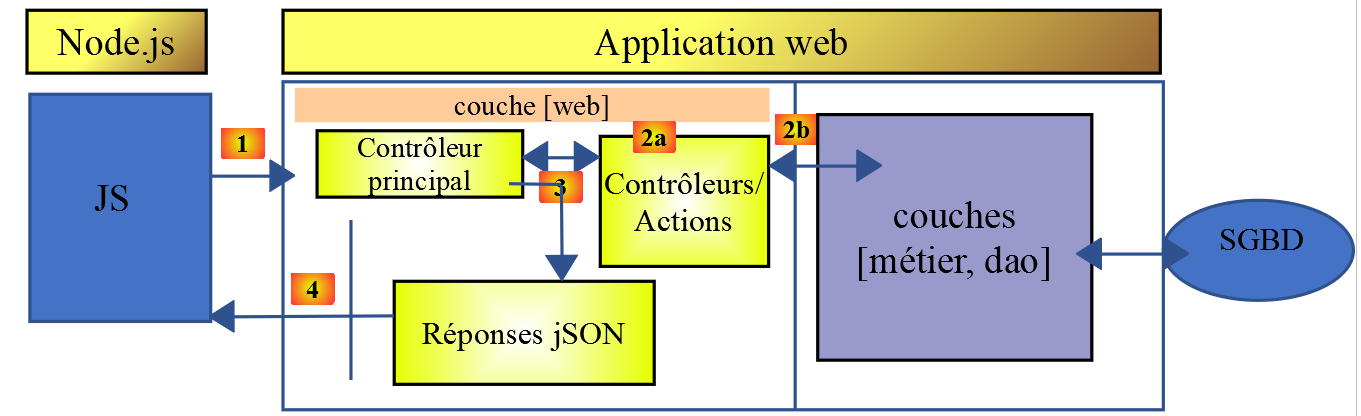
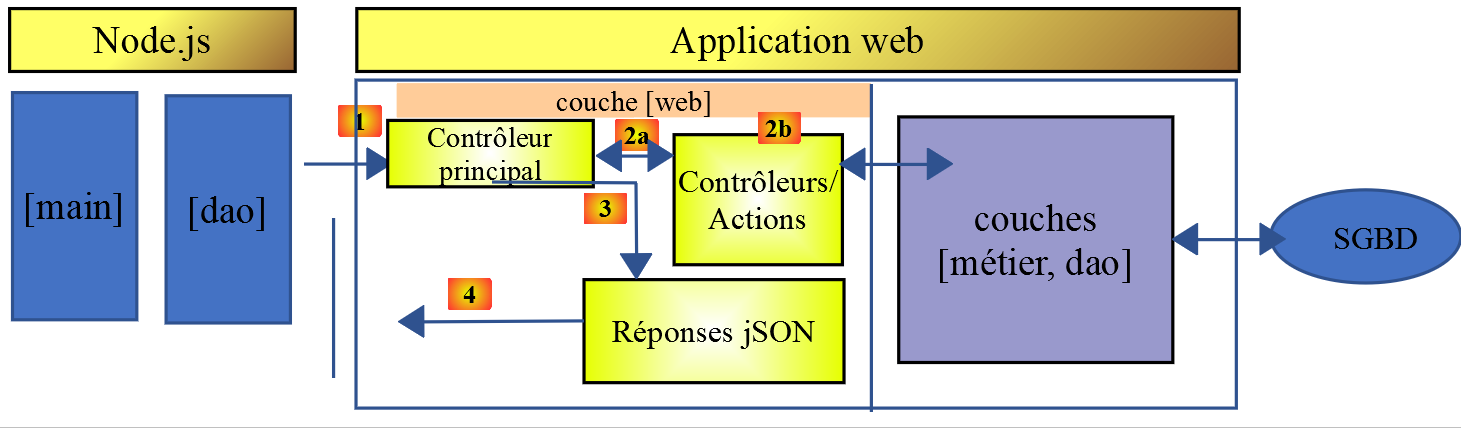
Wir werden zwei Versionen des Clients untersuchen:
- Version 1 des Clients wird die folgende [Main, DAO]-Schichtstruktur aufweisen:
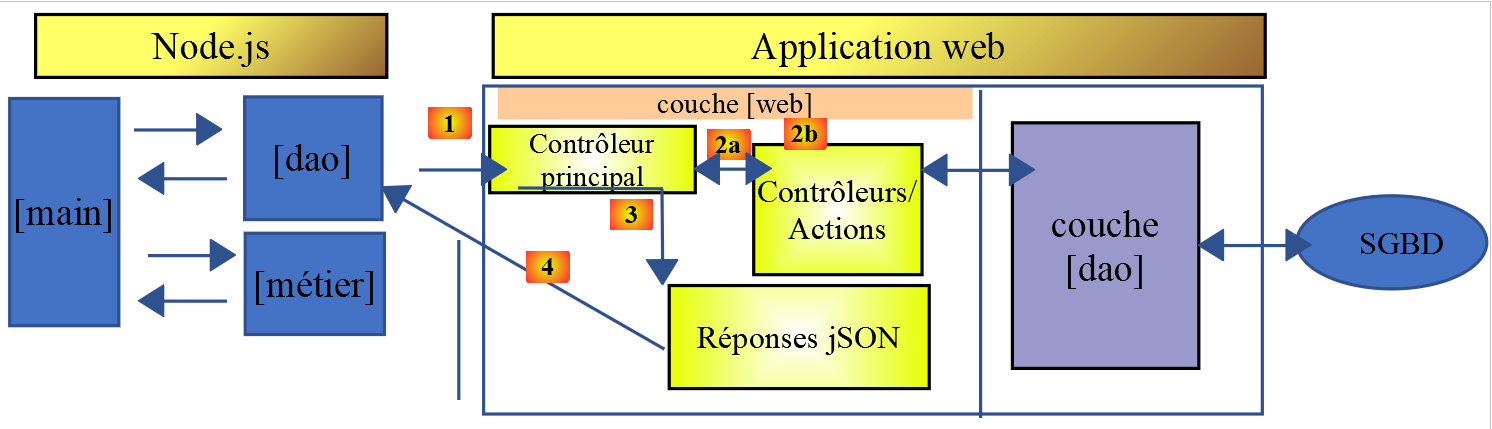
- Version 2 des Clients wird eine [Main, Business Logic, DAO]-Struktur aufweisen. Die [Business Logic]-Schicht des Servers wird auf den Client verlagert:
14.2. HTTP-Client 1
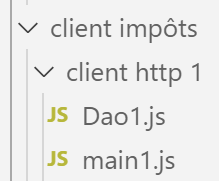
Wie bereits erwähnt, implementiert der HTTP-1-Client die folgende Client-Server-Architektur:
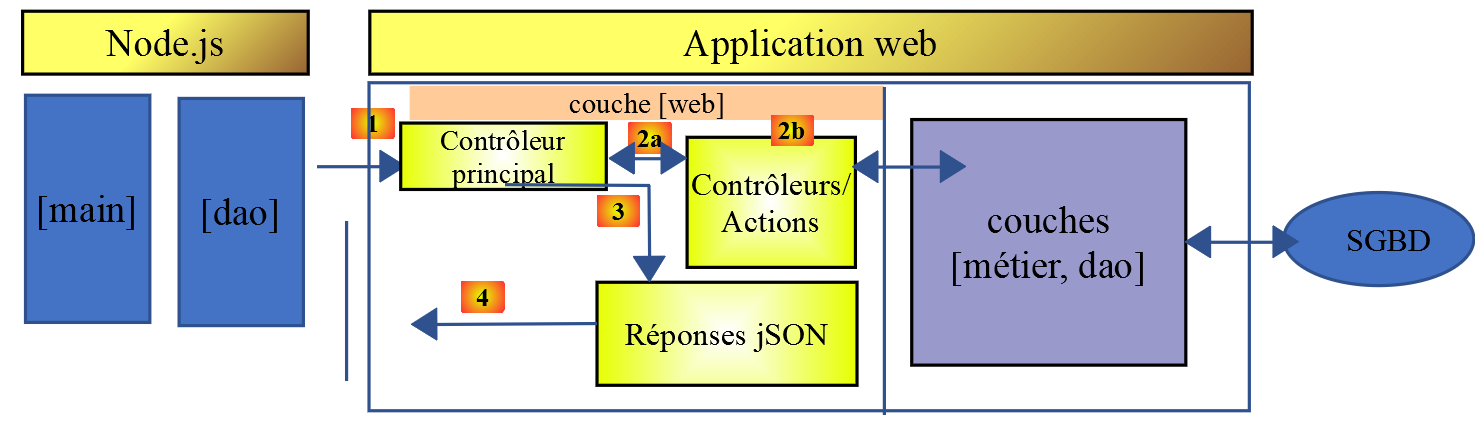
Wir werden Folgendes implementieren:
- die [DAO]-Schicht als Klasse;
- die [main]-Schicht als Skript unter Verwendung dieser Klasse;
14.2.1. Die [dao]-Schicht
Die [dao]-Schicht wird durch die folgende Klasse [Dao1.js] implementiert:
'use strict';

// imports
import qs from 'qs'

class Dao1 {

  // manufacturer
  constructor(axios) {
    // axios library for queries HTTP
    this.axios = axios;
    // session cookie
    this.sessionCookieName = "PHPSESSID";
    this.sessionCookie = '';
  }

  // init session
  async  initSession() {
    // query options HHTP [get /main.php?action=init-session&type=json]
    const options = {
      method: "GET",
      // URL parameters
      params: {
        action: 'init-session',
        type: 'json'
      }
    };
    // execute query HTTP
    return await this.getRemoteData(options);
  }

  async  authentifierUtilisateur(user, password) {
    // query options HHTP [post /main.php?action=authenticate-user]
    const options = {
      method: "POST",
      headers: {
        'Content-type': 'application/x-www-form-urlencoded',
      },
      // body of POST
      data: qs.stringify({
        user: user,
        password: password
      }),
      // URL parameters
      params: {
        action: 'authentifier-utilisateur'
      }
    };
    // execute query HTTP
    return await this.getRemoteData(options);
  }

  // tAX CALCULATION
  async  calculerImpot(marié, enfants, salaire) {
    // query options HHTP [post /main.php?action=calculate-tax]
    const options = {
      method: "POST",
      headers: {
        'Content-type': 'application/x-www-form-urlencoded',
      },
      // body of POST [married, children, salary]
      data: qs.stringify({
        marié: marié,
        enfants: enfants,
        salaire: salaire
      }),
      // URL parameters
      params: {
        action: 'calculer-impot'
      }
    };
    // execute query HTTP
    const data = await this.getRemoteData(options);
    // result
    return data;
  }

  // list of simulations
  async  listeSimulations() {
    // query options HHTP [get /main.php?action=lister-simulations]
    const options = {
      method: "GET",
      // URL parameters
      params: {
        action: 'lister-simulations'
      },
    };
    // execute query HTTP
    const data = await this.getRemoteData(options);
    // result
    return data;
  }

  // list of simulations
  async  supprimerSimulation(index) {
    // query options HHTP [get /main.php?action=suppress-simulation&number=index]
    const options = {
      method: "GET",
      // URL parameters
      params: {
        action: 'supprimer-simulation',
        numéro: index
      },
    };
    // execute query HTTP
    const data = await this.getRemoteData(options);
    // result
    return data;
  }

  async  getRemoteData(options) {
    // for the session cookie
    if (!options.headers) {
      options.headers = {};
    }
    options.headers.Cookie = this.sessionCookie;
    // execute query HTTP
    let response;
    try {
      // asynchronous request
      response = await this.axios.request('main.php', options);
    } catch (error) {
      // the [error] parameter is an exception instance - it can take various forms
      if (error.response) {
        // the server response is in [error.response]
        response = error.response;
      } else {
        // error restart
        throw error;
      }
    }
    // response is the entire HTTP response from the server (HTTP headers + response itself)
    // retrieve the session cookie if it exists
    const setCookie = response.headers['set-cookie'];
    if (setCookie) {
      // setCookie is an array
      // look for the session cookie in this table
      let trouvé = false;
      let i = 0;
      while (!trouvé && i < setCookie.length) {
        // look for the session cookie
        const results = RegExp('^(' + this.sessionCookieName + '.+?);').exec(setCookie[i]);
        if (results) {
          // the session cookie is stored
          // eslint-disable-next-line require-atomic-updates
          this.sessionCookie = results[1];
          // we found
          trouvé = true;
        } else {
          // next item
          i++;
        }
      }
    }
    // the server response is in [response.data]
    return response.data;
  }
}

// class export
export default Dao1;
- Hier wenden wir das an, was wir im verlinkten Abschnitt gelernt haben, in dem wir die Bibliothek [axios] vorgestellt haben, mit der wir sowohl in [node.js] als auch in einem Browser HTTP-Anfragen stellen können. Wir werden uns insbesondere das Skript im verlinkten Abschnitt ansehen;
- Zeilen 9–15: der Klassenkonstruktor. Diese Klasse wird drei Eigenschaften haben:
- [axios]: das [axios]-Objekt, das zum Absenden von HTTP-Anfragen verwendet wird. Dieses wird vom aufrufenden Code übergeben;
- [sessionCookieName]: Je nach Server hat das Session-Cookie unterschiedliche Namen. Hier lautet es [PHPSESSID];
- [sessionCookie]: das vom Server gesendete und vom Client gespeicherte Session-Cookie;
- Zeilen 53–76: Die asynchrone Funktion [calculateTax] führt die Anfrage [post /main.php?action=calculate-tax] durch, indem sie die Parameter [married, children, salary] übermittelt. Sie gibt die vom Server gesendete JSON-Zeichenkette als JavaScript-Objekt zurück;
- Zeilen 79–92: Die asynchrone Funktion [listSimulations] stellt die Anfrage [get /main.php?action=list-simulations]. Sie gibt die vom Server gesendete JSON-Zeichenkette als JavaScript-Objekt zurück;
- Zeilen 95–109: Die asynchrone Funktion [deleteSimulation] sendet die Anfrage [get /main.php?action=delete-simulation&number=index]. Sie gibt die vom Server gesendete JSON-Zeichenkette als JavaScript-Objekt zurück;
- Zeile 121: Die Notation [this.axios] wird verwendet, da hier das an den Konstruktor übergebene [axios]-Objekt in der Eigenschaft [this.axios] gespeichert wurde;
- Zeile 161: Die Klasse [Dao1] wird exportiert, damit sie verwendet werden kann;
14.2.2. Das Skript [main1.js]
Das Skript [main1.js] führt mithilfe der Klasse [Dao1] eine Reihe von Aufrufen an den Server durch:
- Initialisierung einer JSON-Sitzung;
- Authentifizierung mit [admin, admin];
- Anforderung von drei Steuerberechnungen;
- Anforderung der Liste der Simulationen;
- löscht eine davon;
Der Code lautet wie folgt:
// import axios
import axios from 'axios';
// dao1 class import
import Dao from './Dao1';

// asynchronous function [main]
async function main() {
  // axios configuration
  axios.defaults.timeout = 2000;
  axios.defaults.baseURL = 'http://localhost/php7/scripts-web/impots/version-14';
  // layer instantiation [dao]
  const dao = new Dao(axios);
  // using the [dao] layer
  try {
    // init session
    log("-----------init-session");
    let response = await dao.initSession();
    log(response);
    // authentication
    log("-----------authentifier-utilisateur");
    response = await dao.authentifierUtilisateur("admin", "admin");
    log(response);
    // tax calculations
    log("-----------calculer-impot x 3");
    response = await Promise.all([
      dao.calculerImpot("oui", 2, 45000),
      dao.calculerImpot("non", 2, 45000),
      dao.calculerImpot("non", 1, 30000)
    ]);
    log(response);
    // list of simulations
    log("-----------liste-des-simulations");
    response = await dao.listeSimulations();
    log(response);
    // deleting a simulation
    log("-----------suppression simulation n° 1");
    response = await dao.supprimerSimulation(1);
    log(response);
  } catch (error) {
    // we log the error
    console.log("erreur=", error.message);
  }
}

// log jSON
function log(object) {
  console.log(JSON.stringify(object, null, 2));
}

// execution
main();
Kommentare
- Zeile 2: Importiere die [axios]-Bibliothek;
- Zeile 4: Importiere die Klasse [Dao];
- Zeile 7: Die [main]-Funktion, die mit dem Server kommuniziert, ist asynchron;
- Zeilen 9–10: Standardkonfiguration für an den Server zu sendende HTTP-Anfragen:
- Zeile 9: [timeout] von 2 Sekunden;
- Zeile 10: Alle URLs werden mit der Basis-URL der Version 14 des Steuerberechnungsservers vorangestellt;
- Zeile 12: Die [Dao]-Schicht ist erstellt. Sie kann nun verwendet werden;
- Zeilen 46–48: Die [log]-Funktion wird verwendet, um die JSON-Zeichenkette eines JavaScript-Objekts formatiert anzuzeigen: vertikal mit einer Einrückung von zwei Leerzeichen (3. Parameter);
- Zeilen 15–18: Initialisierung der JSON-Sitzung;
- Zeilen 19–22: Authentifizierung;
- Zeilen 23–30: Es werden drei Steuerberechnungen parallel angefordert. Dank [await Promise.all] wird die Ausführung so lange blockiert, bis alle drei Ergebnisse vorliegen;
- Zeilen 31–34: Liste der Simulationen;
- Zeilen 35–38: Löschen einer Simulation;
- Zeilen 39–42: Behandlung von Ausnahmen;
Die Ausführungsergebnisse lauten wie folgt:
[Running] C:\myprograms\laragon-lite\bin\nodejs\node-v10\node.exe -r esm "c:\Data\st-2019\dev\es6\javascript\client impôts\client http 1\main1.js"
"-----------init-session"
{
  "action": "init-session",
  "état": 700,
  "réponse": "session démarrée avec type [json]"
}
"-----------authentifier-utilisateur"
{
  "action": "authentifier-utilisateur",
  "état": 200,
  "réponse": "Authentification réussie [admin, admin]"
}
"-----------calculer-impot x 3"
[
  {
    "action": "calculer-impot",
    "état": 300,
    "réponse": {
      "marié": "oui",
      "enfants": "2",
      "salaire": "45000",
      "impôt": 502,
      "surcôte": 0,
      "décôte": 857,
      "réduction": 126,
      "taux": 0.14
    }
  },
  {
    "action": "calculer-impot",
    "état": 300,
    "réponse": {
      "marié": "non",
      "enfants": "2",
      "salaire": "45000",
      "impôt": 3250,
      "surcôte": 370,
      "décôte": 0,
      "réduction": 0,
      "taux": 0.3
    }
  },
  {
    "action": "calculer-impot",
    "état": 300,
    "réponse": {
      "marié": "non",
      "enfants": "1",
      "salaire": "30000",
      "impôt": 1687,
      "surcôte": 0,
      "décôte": 0,
      "réduction": 0,
      "taux": 0.14
    }
  }
]
"-----------liste-des-simulations"
{
  "action": "lister-simulations",
  "état": 500,
  "réponse": [
    {
      "marié": "oui",
      "enfants": "2",
      "salaire": "45000",
      "impôt": 502,
      "surcôte": 0,
      "décôte": 857,
      "réduction": 126,
      "taux": 0.14,
      "arrayOfAttributes": null
    },
    {
      "marié": "non",
      "enfants": "2",
      "salaire": "45000",
      "impôt": 3250,
      "surcôte": 370,
      "décôte": 0,
      "réduction": 0,
      "taux": 0.3,
      "arrayOfAttributes": null
    },
    {
      "marié": "non",
      "enfants": "1",
      "salaire": "30000",
      "impôt": 1687,
      "surcôte": 0,
      "décôte": 0,
      "réduction": 0,
      "taux": 0.14,
      "arrayOfAttributes": null
    }
  ]
}
"-----------suppression simulation n° 1"
{
  "action": "supprimer-simulation",
  "état": 600,
  "réponse": [
    {
      "marié": "oui",
      "enfants": "2",
      "salaire": "45000",
      "impôt": 502,
      "surcôte": 0,
      "décôte": 857,
      "réduction": 126,
      "taux": 0.14,
      "arrayOfAttributes": null
    },
    {
      "marié": "non",
      "enfants": "1",
      "salaire": "30000",
      "impôt": 1687,
      "surcôte": 0,
      "décôte": 0,
      "réduction": 0,
      "taux": 0.14,
      "arrayOfAttributes": null
    }
  ]
}

[Done] exited with code=0 in 0.516 seconds
14.3. HTTP 2-Client
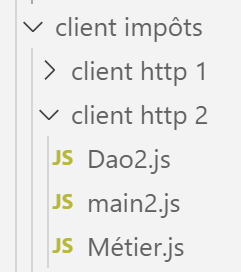
Die Architektur des HTTP2-Clients ist wie folgt:
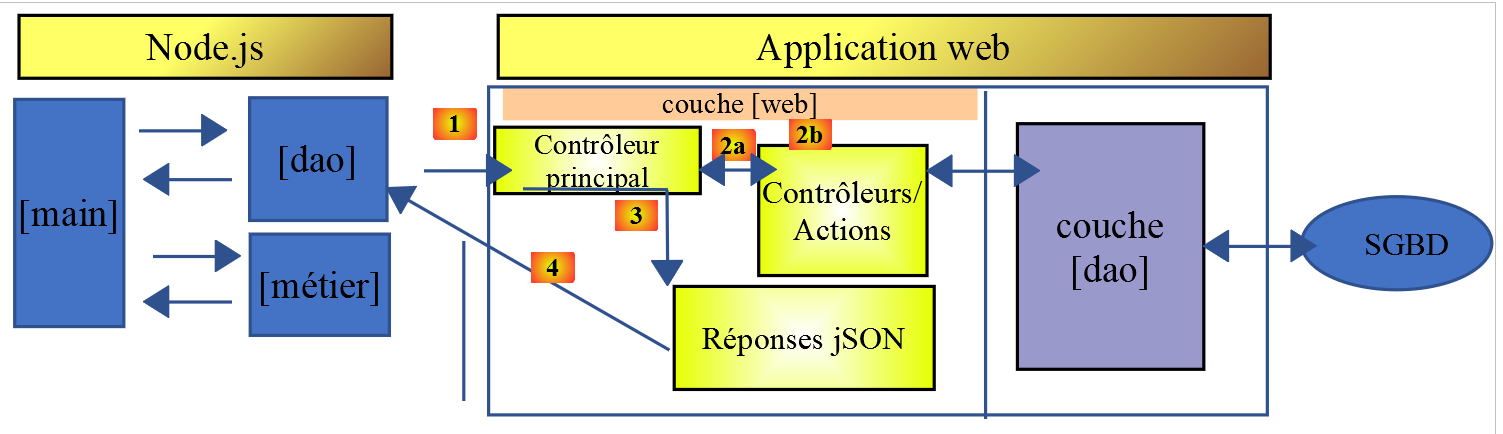
Wir haben die [Business]-Schicht vom Server auf den JavaScript-Client verlagert. Anders als im PHP7-Kurs muss die [Main]-Schicht nicht mehr über die [Business]-Schicht gehen, um die [DAO]-Schicht zu erreichen. Wir werden diese beiden Schichten als spezialisierte Komponenten verwenden:
- Die [Main]-Schicht durchläuft die [DAO]-Schicht, wann immer sie Daten benötigt, die sich auf dem Server befinden;
- die [main]-Schicht beauftragt die [business]-Schicht mit der Durchführung der Steuerberechnungen;
- die [Business]-Schicht ist unabhängig von der [DAO]-Schicht und ruft diese niemals auf;
14.3.1. Die JavaScript-Klasse [Business]
Das Wesentliche der [Business]-Klasse in PHP wurde im verlinkten Artikel beschrieben. Es handelt sich um einen recht komplexen Codeabschnitt, den wir hier nicht zur Erklärung, sondern zur Übersetzung in JavaScript wiedergeben:
<?php

// namespace
namespace Application;

class Metier implements InterfaceMetier {
  // dao layer
  private $dao;
  // tax administration data
  private $taxAdminData;

  //---------------------------------------------
  // setter couche [dao]
  public function setDao(InterfaceDao $dao) {
    $this->dao = $dao;
    return $this;
  }

  public function __construct(InterfaceDao $dao) {
    // a reference is stored on the [dao] layer
    $this->dao = $dao;
    // recover data for tax calculation
    // method [getTaxAdminData] may throw a ExceptionImpots exception
    // we then let it go back to the calling code
    $this->taxAdminData = $this->dao->getTaxAdminData();
  }

// tAX CALCULATION
// --------------------------------------------------------------------------
  public function calculerImpot(string $marié, int $enfants, int $salaire): array {
    // $marié : yes, no
    // $enfants : number of children
    // $salaire: annual salary
    // $this->taxAdminData: tax administration data
    //
    // we check that we have the correct data from the tax authorities
    if ($this->taxAdminData === NULL) {
      $this->taxAdminData = $this->getTaxAdminData();
    }
    // tax calculation with children
    $result1 = $this->calculerImpot2($marié, $enfants, $salaire);
    $impot1 = $result1["impôt"];
    // tax calculation without children
    if ($enfants != 0) {
      $result2 = $this->calculerImpot2($marié, 0, $salaire);
      $impot2 = $result2["impôt"];
      // application of the family allowance ceiling
      $plafonDemiPart = $this->taxAdminData->getPlafondQfDemiPart();
      if ($enfants < 3) {
        // $PLAFOND_QF_DEMI_PART euros for the first 2 children
        $impot2 = $impot2 - $enfants * $plafonDemiPart;
      } else {
        // $PLAFOND_QF_DEMI_PART euros for the first 2 children, double for subsequent children
        $impot2 = $impot2 - 2 * $plafonDemiPart - ($enfants - 2) * 2 * $plafonDemiPart;
      }
    } else {
      $impot2 = $impot1;
      $result2 = $result1;
    }
    // we take the highest tax
    if ($impot1 > $impot2) {
      $impot = $impot1;
      $taux = $result1["taux"];
      $surcôte = $result1["surcôte"];
    } else {
      $surcôte = $impot2 - $impot1 + $result2["surcôte"];
      $impot = $impot2;
      $taux = $result2["taux"];
    }
    // calculation of any discount
    $décôte = $this->getDecôte($marié, $salaire, $impot);
    $impot -= $décôte;
    // calculation of any tax reduction
    $réduction = $this->getRéduction($marié, $salaire, $enfants, $impot);
    $impot -= $réduction;
    // result
    return ["impôt" => floor($impot), "surcôte" => $surcôte, "décôte" => $décôte, "réduction" => $réduction, "taux" => $taux];
  }

// --------------------------------------------------------------------------
  private function calculerImpot2(string $marié, int $enfants, float $salaire): array {
    // $marié : yes, no
    // $enfants : number of children
    // $salaire: annual salary
    // $this->taxAdminData: tax administration data
    //
    // number of shares
    $marié = strtolower($marié);
    if ($marié === "oui") {
      $nbParts = $enfants / 2 + 2;
    } else {
      $nbParts = $enfants / 2 + 1;
    }
    // 1 part per child from the 3rd
    if ($enfants >= 3) {
      // an additional half share for each child from the 3rd onwards
      $nbParts += 0.5 * ($enfants - 2);
    }
    // taxable income
    $revenuImposable = $this->getRevenuImposable($salaire);
    // surcharge
    $surcôte = floor($revenuImposable - 0.9 * $salaire);
    // for rounding problems
    if ($surcôte < 0) {
      $surcôte = 0;
    }
    // family quotient
    $quotient = $revenuImposable / $nbParts;
    // tAX CALCULATION
    $limites = $this->taxAdminData->getLimites();
    $coeffR = $this->taxAdminData->getCoeffR();
    $coeffN = $this->taxAdminData->getCoeffN();
    // is set at the end of the limit array to stop the following loop
    $limites[count($limites) - 1] = $quotient;
    // tax rate search
    $i = 0;
    while ($quotient > $limites[$i]) {
      $i++;
    }
    // because $quotient has been placed at the end of the $limites array, the previous loop
    // cannot exceed the table $limites
    // now we can calculate the tax
    $impôt = floor($revenuImposable * $coeffR[$i] - $nbParts * $coeffN[$i]);
    // result
    return ["impôt" => $impôt, "surcôte" => $surcôte, "taux" => $coeffR[$i]];
  }

  // revenuImposable=annualwage-discount
  // the allowance has a minimum and a maximum
  private function getRevenuImposable(float $salaire): float {
    // 10% salary deduction
    $abattement = 0.1 * $salaire;
    // this allowance cannot exceed $this->taxAdminData->getAbattementDixPourCentMax()
    if ($abattement > $this->taxAdminData->getAbattementDixPourCentMax()) {
      $abattement = $this->taxAdminData->getAbattementDixPourcentMax();
    }
    // the allowance cannot be less than $this->taxAdminData->getAbattementDixPourcentMin()
    if ($abattement < $this->taxAdminData->getAbattementDixPourcentMin()) {
      $abattement = $this->taxAdminData->getAbattementDixPourcentMin();
    }
    // taxable income
    $revenuImposable = $salaire - $abattement;
    // result
    return floor($revenuImposable);
  }

// calculates any discount
  private function getDecôte(string $marié, float $salaire, float $impots): float {
    // at the outset, a zero discount
    $décôte = 0;
    // maximum tax amount to qualify for discount
    $plafondImpôtPourDécôte = $marié === "oui" ?
      $this->taxAdminData->getPlafondImpotCouplePourDecote() :
      $this->taxAdminData->getPlafondImpotCelibatairePourDecote();
    if ($impots < $plafondImpôtPourDécôte) {
      // maximum discount
      $plafondDécôte = $marié === "oui" ?
        $this->taxAdminData->getPlafondDecoteCouple() :
        $this->taxAdminData->getPlafondDecoteCelibataire();
      // theoretical discount
      $décôte = $plafondDécôte - 0.75 * $impots;
      // the discount cannot exceed the amount of tax due
      if ($décôte > $impots) {
        $décôte = $impots;
      }
      // no discount <0
      if ($décôte < 0) {
        $décôte = 0;
      }
    }
    // result
    return ceil($décôte);
  }

// calculates any reduction
  private function getRéduction(string $marié, float $salaire, int $enfants, float $impots): float {
    // the income ceiling to qualify for the 20% reduction
    $plafondRevenuPourRéduction = $marié === "oui" ?
      $this->taxAdminData->getPlafondRevenusCouplePourReduction() :
      $this->taxAdminData->getPlafondRevenusCelibatairePourReduction();
    $plafondRevenuPourRéduction += $enfants * $this->taxAdminData->getValeurReducDemiPart();
    if ($enfants > 2) {
      $plafondRevenuPourRéduction += ($enfants - 2) * $this->taxAdminData->getValeurReducDemiPart();
    }
    // taxable income
    $revenuImposable = $this->getRevenuImposable($salaire);
    // reduction
    $réduction = 0;
    if ($revenuImposable < $plafondRevenuPourRéduction) {
      // 20% discount
      $réduction = 0.2 * $impots;
    }
    // result
    return ceil($réduction);
  }

  // batch mode tax calculation
  public function executeBatchImpots(string $taxPayersFileName, string $resultsFileName, string $errorsFileName): void {
    // we let the exceptions coming from the [dao] layer flow upwards
    // retrieve taxpayer data
    $taxPayersData = $this->dao->getTaxPayersData($taxPayersFileName, $errorsFileName);
    // results table
    $results = [];
    // we exploit them
    foreach ($taxPayersData as $taxPayerData) {
      // tax calculation
      $result = $this->calculerImpot(
        $taxPayerData->getMarié(),
        $taxPayerData->getEnfants(),
        $taxPayerData->getSalaire());
      // complete [$taxPayerData]
      $taxPayerData->setMontant($result["impôt"]);
      $taxPayerData->setDécôte($result["décôte"]);
      $taxPayerData->setSurCôte($result["surcôte"]);
      $taxPayerData->setTaux($result["taux"]);
      $taxPayerData->setRéduction($result["réduction"]);
      // put the result in the results table
      $results [] = $taxPayerData;
    }
    // recording results
    $this->dao->saveResults($resultsFileName, $results);
  }

}
- Zeilen 19–26: der PHP-Klassenkonstruktor. Da wir gesagt haben, dass wir eine [Business]-Schicht unabhängig von der [DAO]-Schicht erstellen, nehmen wir zwei Änderungen an diesem Konstruktor in JavaScript vor:
- Er erhält keine Instanz der [DAO]-Schicht (er benötigt keine mehr);
- er wird keine Steuerdaten von der [taxAdminData]-Verwaltung aus der [dao]-Schicht anfordern: Der aufrufende Code wird diese Daten an den Konstruktor übergeben;
- Zeilen 197–122: Wir werden die Methode [executeBatchImpots] nicht implementieren, deren eigentlicher Zweck darin bestand, Simulationsergebnisse in einer Textdatei zu speichern. Wir wollen Code, der sowohl in [node.js] als auch in einem Browser funktioniert. Das Speichern von Daten im Dateisystem des Rechners, auf dem der Client-Browser läuft, ist jedoch nicht möglich;
Angesichts dieser Einschränkungen lautet der Code für die JavaScript-Klasse [Métier] wie folgt:
'use strict';

// job class
class Métier {

  // manufacturer
  constructor(taxAdmindata) {
    // this.taxAdminData: tax administration data
    this.taxAdminData = taxAdmindata;
  }

  // tAX CALCULATION
  // --------------------------------------------------------------------------
  calculerImpot(marié, enfants, salaire) {
    // married: yes, no
    // children: number of children
    // salary: annual salary
    // this.taxAdminData: tax administration data
    //
    // tax calculation with children
    const result1 = this.calculerImpot2(marié, enfants, salaire);
    const impot1 = result1["impôt"];
    // tax calculation without children
    let result2, impot2, plafondDemiPart;
    if (enfants !== 0) {
      result2 = this.calculerImpot2(marié, 0, salaire);
      impot2 = result2["impôt"];
      // application of the family allowance ceiling
      plafondDemiPart = this.taxAdminData.plafondQfDemiPart;
      if (enfants < 3) {
        // PLAFOND_QF_DEMI_PART euros for the first 2 children
        impot2 = impot2 - enfants * plafondDemiPart;
      } else {
        // PLAFOND_QF_DEMI_PART euros for the first 2 children, double for subsequent children
        impot2 = impot2 - 2 * plafondDemiPart - (enfants - 2) * 2 * plafondDemiPart;
      }
    } else {
      // no tax recalculation
      impot2 = impot1;
      result2 = result1;
    }
    // we take the highest tax in [impot1, impot2]
    let impot, taux, surcôte;
    if (impot1 > impot2) {
      impot = impot1;
      taux = result1["taux"];
      surcôte = result1["surcôte"];
    } else {
      surcôte = impot2 - impot1 + result2["surcôte"];
      impot = impot2;
      taux = result2["taux"];
    }
    // calculation of any discount
    const décôte = this.getDecôte(marié, impot);
    impot -= décôte;
    // calculation of any tax reduction
    const réduction = this.getRéduction(marié, salaire, enfants, impot);
    impot -= réduction;
    // result
    return {
      "impôt": Math.floor(impot), "surcôte": surcôte, "décôte": décôte, "réduction": réduction,
      "taux": taux
    };
  }

  // --------------------------------------------------------------------------
  calculerImpot2(marié, enfants, salaire) {
    // married: yes, no
    // children: number of children
    // salary: annual salary
    // this->taxAdminData: tax administration data
    //
    // number of shares
    marié = marié.toLowerCase();
    let nbParts;
    if (marié === "oui") {
      nbParts = enfants / 2 + 2;
    } else {
      nbParts = enfants / 2 + 1;
    }
    // 1 part per child from the 3rd
    if (enfants >= 3) {
      // an additional half share for each child from the 3rd onwards
      nbParts += 0.5 * (enfants - 2);
    }
    // taxable income
    const revenuImposable = this.getRevenuImposable(salaire);
    // surcharge
    let surcôte = Math.floor(revenuImposable - 0.9 * salaire);
    // for rounding problems
    if (surcôte < 0) {
      surcôte = 0;
    }
    // family quotient
    const quotient = revenuImposable / nbParts;
    // tAX CALCULATION
    const limites = this.taxAdminData.limites;
    const coeffR = this.taxAdminData.coeffR;
    const coeffN = this.taxAdminData.coeffN;
    // is set at the end of the limit table to stop the following loop
    limites[limites.length - 1] = quotient;
    // tax rate search
    let i = 0;
    while (quotient > limites[i]) {
      i++;
    }
    // because we've placed quotient at the end of the limit array, the previous loop
    // cannot go beyond the limit table
    // now we can calculate the tax
    const impôt = Math.floor(revenuImposable * coeffR[i] - nbParts * coeffN[i]);
    // result
    return { "impôt": impôt, "surcôte": surcôte, "taux": coeffR[i] };
  }

  // revenuImposable=annualwage-discount
  // the allowance has a minimum and a maximum
  getRevenuImposable(salaire) {
    // 10% salary deduction
    let abattement = 0.1 * salaire;
    // this allowance cannot exceed taxAdminData.getAbattementDixPourCentMax()
    if (abattement > this.taxAdminData.abattementDixPourCentMax) {
      abattement = this.taxAdminData.abattementDixPourcentMax;
    }
    // the allowance cannot be less than taxAdminData.getAbattementDixPourcentMin()
    if (abattement < this.taxAdminData.abattementDixPourcentMin) {
      abattement = this.taxAdminData.abattementDixPourcentMin;
    }
    // taxable income
    const revenuImposable = salaire - abattement;
    // result
    return Math.floor(revenuImposable);
  }

  // calculates any discount
  getDecôte(marié, impots) {
    // at the outset, a zero discount
    let décôte = 0;
    // maximum tax amount to qualify for discount
    let plafondImpôtPourDécôte = marié === "oui" ?
      this.taxAdminData.plafondImpotCouplePourDecote :
      this.taxAdminData.plafondImpotCelibatairePourDecote;
    let plafondDécôte;
    if (impots < plafondImpôtPourDécôte) {
      // maximum discount
      plafondDécôte = marié === "oui" ?
        this.taxAdminData.plafondDecoteCouple :
        this.taxAdminData.plafondDecoteCelibataire;
      // theoretical discount
      décôte = plafondDécôte - 0.75 * impots;
      // the discount cannot exceed the amount of tax due
      if (décôte > impots) {
        décôte = impots;
      }
      // no discount <0
      if (décôte < 0) {
        décôte = 0;
      }
    }
    // result
    return Math.ceil(décôte);
  }

  // calculates any reduction
  getRéduction(marié, salaire, enfants, impots) {
    // the income ceiling to qualify for the 20% reduction
    let plafondRevenuPourRéduction = marié === "oui" ?
      this.taxAdminData.plafondRevenusCouplePourReduction :
      this.taxAdminData.plafondRevenusCelibatairePourReduction;
    plafondRevenuPourRéduction += enfants * this.taxAdminData.valeurReducDemiPart;
    if (enfants > 2) {
      plafondRevenuPourRéduction += (enfants - 2) * this.taxAdminData.valeurReducDemiPart;
    }
    // taxable income
    const revenuImposable = this.getRevenuImposable(salaire);
    // reduction
    let réduction = 0;
    if (revenuImposable < plafondRevenuPourRéduction) {
      // 20% discount
      réduction = 0.2 * impots;
    }
    // result
    return Math.ceil(réduction);
  }
}

// class export
export default Métier;
- Der JavaScript-Code folgt weitgehend dem PHP-Code;
- Die Klasse [Business] wird exportiert, Zeile 187;
14.3.2. Die JavaScript-Klasse [Dao2]
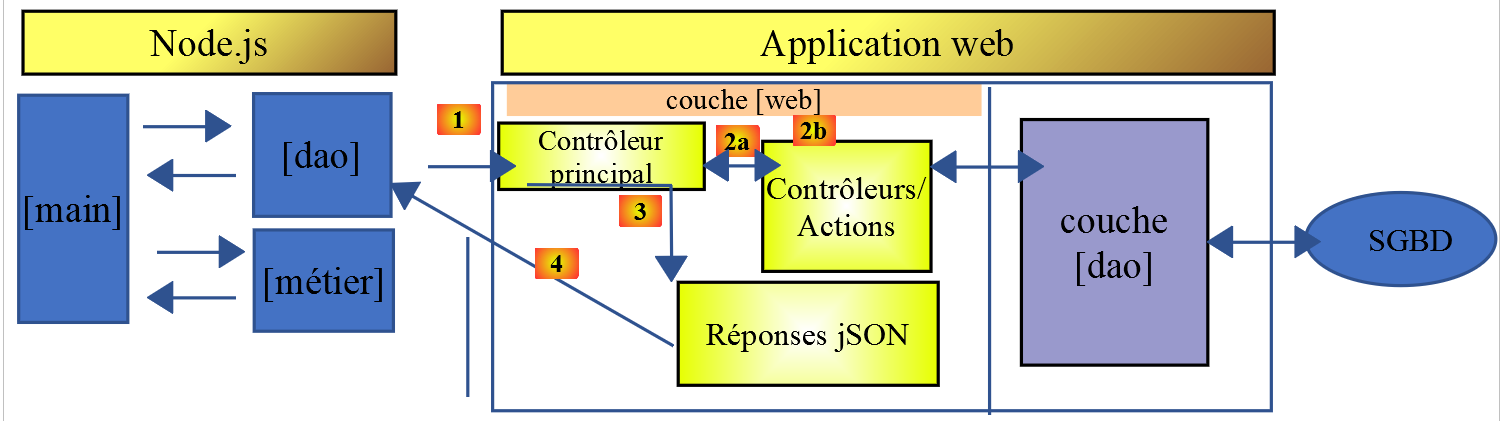
Die Klasse [Dao2] implementiert die [dao]-Schicht des oben genannten JavaScript-Clients wie folgt:
'use strict';

// imports
import qs from 'qs'

class Dao2 {

  // manufacturer
  constructor(axios) {
    this.axios = axios;
    // session cookie
    this.sessionCookieName = "PHPSESSID";
    this.sessionCookie = '';
  }

  // init session
  async  initSession() {
    // query options HHTP [get /main.php?action=init-session&type=json]
    const options = {
      method: "GET",
      // URL parameters
      params: {
        action: 'init-session',
        type: 'json'
      }
    };
    // execute query HTTP
    return await this.getRemoteData(options);
  }

  async  authentifierUtilisateur(user, password) {
    // query options HHTP [post /main.php?action=authenticate-user]
    const options = {
      method: "POST",
      headers: {
        'Content-type': 'application/x-www-form-urlencoded',
      },
      // body of POST
      data: qs.stringify({
        user: user,
        password: password
      }),
      // URL parameters
      params: {
        action: 'authentifier-utilisateur'
      }
    };
    // execute query HTTP
    return await this.getRemoteData(options);
  }

  async getAdminData() {
    // query options HHTP [get /main.php?action=get-admindata]
    const options = {
      method: "GET",
      // URL parameters
      params: {
        action: 'get-admindata'
      }
    };
    // execute query HTTP
    const data = await this.getRemoteData(options);
    // result
    return data;
  }

  async  getRemoteData(options) {
    // for the session cookie
    if (!options.headers) {
      options.headers = {};
    }
    options.headers.Cookie = this.sessionCookie;
    // execute query HTTP
    let response;
    try {
      // asynchronous request
      response = await this.axios.request('main.php', options);
    } catch (error) {
      // the [error] parameter is an exception instance - it can take various forms
      if (error.response) {
        // the server response is in [error.response]
        response = error.response;
      } else {
        // error restart
        throw error;
      }
    }
    // response is the entire HTTP response from the server (HTTP headers + response itself)
    // retrieve the session cookie if it exists
    const setCookie = response.headers['set-cookie'];
    if (setCookie) {
      // setCookie is an array
      // look for the session cookie in this table
      let trouvé = false;
      let i = 0;
      while (!trouvé && i < setCookie.length) {
        // look for the session cookie
        const results = RegExp('^(' + this.sessionCookieName + '.+?);').exec(setCookie[i]);
        if (results) {
          // the session cookie is stored
          // eslint-disable-next-line require-atomic-updates
          this.sessionCookie = results[1];
          // we found
          trouvé = true;
        } else {
          // next item
          i++;
        }
      }
    }
    // the server response is in [response.data]
    return response.data;
  }
}

// class export
export default Dao2;
Kommentare
- Die Klasse [Dao2] implementiert nur drei der möglichen Anfragen an den Steuerberechnungsserver:
- [init-session] (Zeilen 17–29): zur Initialisierung der JSON-Sitzung;
- [authenticate-user] (Zeilen 31–50): zur Authentifizierung;
- [get-admindata] (Zeilen 52–65): zum Abrufen der Steuerverwaltungsdaten, die für die Durchführung von Steuerberechnungen auf der Client-Seite benötigt werden;
- Zeilen 52–65: Wir führen eine neue Aktion [get-admindata] für den Server ein. Diese Aktion war bisher noch nicht implementiert. Das holen wir nun nach.
14.3.3. Änderung des Steuerberechnungsservers
Der Steuerberechnungsserver muss eine neue Aktion implementieren. Wir werden dies in Version 14 des Servers tun. Die zu implementierende Aktion weist folgende Merkmale auf:
- Sie wird durch eine Operation [get /main.php?action=get-admindata] angefordert;
- sie gibt die JSON-Zeichenkette eines Objekts zurück, das die Steuerverwaltungsdaten kapselt;
Wir werden uns ansehen, wie eine Aktion zu unserem Server hinzugefügt wird.
Die Änderung wird in NetBeans vorgenommen:
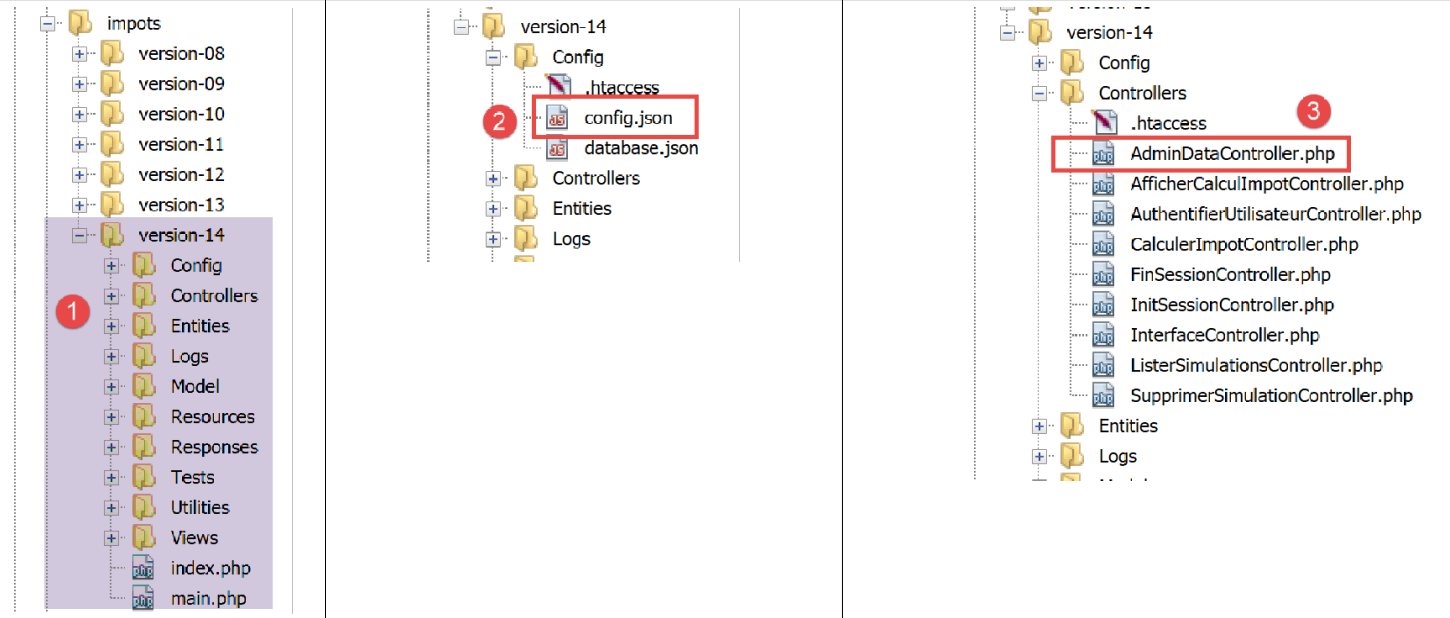
In [2] ändern wir die Datei [config.json], um die neue Aktion hinzuzufügen:
{
    "databaseFilename": "Config/database.json",
    "corsAllowed": true,
    "rootDirectory": "C:/myprograms/laragon-lite/www/php7/scripts-web/impots/version-14",
    "relativeDependencies": [

        "/Entities/BaseEntity.php",
        "/Entities/Simulation.php",
        "/Entities/Database.php",
        "/Entities/TaxAdminData.php",
        "/Entities/ExceptionImpots.php",

        "/Utilities/Logger.php",
        "/Utilities/SendAdminMail.php",

        "/Model/InterfaceServerDao.php",
        "/Model/ServerDao.php",
        "/Model/ServerDaoWithSession.php",
        "/Model/InterfaceServerMetier.php",
        "/Model/ServerMetier.php",

        "/Responses/InterfaceResponse.php",
        "/Responses/ParentResponse.php",
        "/Responses/JsonResponse.php",
        "/Responses/XmlResponse.php",
        "/Responses/HtmlResponse.php",

        "/Controllers/InterfaceController.php",
        "/Controllers/InitSessionController.php",
        "/Controllers/ListerSimulationsController.php",
        "/Controllers/AuthentifierUtilisateurController.php",
        "/Controllers/CalculerImpotController.php",
        "/Controllers/SupprimerSimulationController.php",
        "/Controllers/FinSessionController.php",
        "/Controllers/AfficherCalculImpotController.php",
        "/Controllers/AdminDataController.php"
    ],
    "absoluteDependencies": [
        "C:/myprograms/laragon-lite/www/vendor/autoload.php",
        "C:/myprograms/laragon-lite/www/vendor/predis/predis/autoload.php"
    ],
    "users": [
        {
            "login": "admin",
            "passwd": "admin"
        }
    ],
    "adminMail": {
        "smtp-server": "localhost",
        "smtp-port": "25",
        "from": "guest@localhost",
        "to": "guest@localhost",
        "subject": "plantage du serveur de calcul d'impôts",
        "tls": "FALSE",
        "attachments": []
    },
    "logsFilename": "Logs/logs.txt",
    "actions":
            {
                "init-session": "\\InitSessionController",
                "authentifier-utilisateur": "\\AuthentifierUtilisateurController",
                "calculer-impot": "\\CalculerImpotController",
                "lister-simulations": "\\ListerSimulationsController",
                "supprimer-simulation": "\\SupprimerSimulationController",
                "fin-session": "\\FinSessionController",
                "afficher-calcul-impot": "\\AfficherCalculImpotController",
                "get-admindata": "\\AdminDataController"
            },
    "types": {
        "json": "\\JsonResponse",
        "html": "\\HtmlResponse",
        "xml": "\\XmlResponse"
    },
    "vues": {
        "vue-authentification.php": [700, 221, 400],
        "vue-calcul-impot.php": [200, 300, 341, 350, 800],
        "vue-liste-simulations.php": [500, 600]
    },
    "vue-erreurs": "vue-erreurs.php"
}
Die Änderung umfasst:
- Zeile 67: Fügen Sie die Aktion [get-admindata] hinzu und ordnen Sie sie einem Controller zu;
- Zeile 36: Deklarieren Sie diesen Controller in der Liste der Klassen, die von der PHP-Anwendung geladen werden sollen;
Der nächste Schritt besteht darin, den Controller [AdminDataController] zu implementieren [3]:
<?php

namespace Application;

// symfony dependencies
use \Symfony\Component\HttpFoundation\Response;
use \Symfony\Component\HttpFoundation\Request;
use \Symfony\Component\HttpFoundation\Session\Session;
// layer alias [dao]
use \Application\ServerDaoWithSession as ServerDaoWithRedis;

class AdminDataController implements InterfaceController {

  // $config is the application configuration
  // traitement d'une requête Request
  // session and can modify it
  // $infos is additional information specific to each controller
  // renders an array [$statusCode, $état, $content, $headers]
  public function execute(
    array $config,
    Request $request,
    Session $session,
    array $infos = NULL): array {

    // you must have a single parameter GET
    $method = strtolower($request->getMethod());
    $erreur = $method !== "get" || $request->query->count() != 1;
    if ($erreur) {
      // we note the error
      $message = "il faut utiliser la méthode [get] avec l'unique paramètre [action] dans l'URL";
      $état = 1001;
      // return result to main controller
      return [Response::HTTP_BAD_REQUEST, $état, ["réponse" => $message], []];
    }

    // we can work
    // Redis
    \Predis\Autoloader::register();
    try {
      // customer [predis]
      $redis = new \Predis\Client();
      // connect to the server to see if it's there
      $redis->connect();
    } catch (\Predis\Connection\ConnectionException $ex) {
      // it didn't go well
      // return result with error to main controller
      $état = 1050;
      return [Response::HTTP_INTERNAL_SERVER_ERROR, $état,
        ["réponse" => "[redis], " . utf8_encode($ex->getMessage())], []];
    }

    // data recovery from tax authorities
    // first search the cache [redis]
    if (!$redis->get("taxAdminData")) {
      try {
        // retrieve tax data from the database
        $dao = new ServerDaoWithRedis($config["databaseFilename"], NULL);
        // taxAdminData
        $taxAdminData = $dao->getTaxAdminData();
        // put the recovered data into redis
        $redis->set("taxAdminData", $taxAdminData);
      } catch (\RuntimeException $ex) {
        // it didn't go well
        // return result with error to main controller
        $état = 1041;
        return [Response::HTTP_INTERNAL_SERVER_ERROR, $état,
          ["réponse" => utf8_encode($ex->getMessage())], []];
      }
    } else {
      // tax data are taken from the [redis] memory of the [application] scope
      $arrayOfAttributes = \json_decode($redis->get("taxAdminData"), true);
      // we instantiate an object [TaxAdminData] from the previous attribute array
      $taxAdminData = (new TaxAdminData())->setFromArrayOfAttributes($arrayOfAttributes);
    }

    // return result to main controller
    $état = 1000;
    return [Response::HTTP_OK, $état, ["réponse" => $taxAdminData], []];
  }

}
Kommentare
- Zeile 12: Wie die anderen Controller des Servers implementiert [AdminDataController] die Schnittstelle [InterfaceController], die aus der Methode [execute] in den Zeilen 19–79 besteht;
- Zeile 78: Wie bei den anderen Controllern des Servers gibt die Methode [AdminDataController.execute] ein Array [$status, $status, [‘response’=>$response]] zurück mit:
- [$status]: dem HTTP-Antwortstatuscode;
- [$status]: ein interner Anwendungscode, der den Zustand des Servers nach der Ausführung der Client-Anfrage angibt;
- [$response]: ein Array, das die an den Client zu sendende Antwort enthält. Dieses Array wird später in eine JSON-Zeichenkette umgewandelt;
- Zeilen 25–34: Wir überprüfen, ob die Aktion [get-admindata] des Clients syntaktisch korrekt ist;
- Zeilen 37–74: Abrufen eines [TaxAdminData]-Objekts, das entweder:
- Zeilen 56–59: aus der Datenbank, falls es nicht im [redis]-Cache gefunden wurde;
- Zeilen 70–73: im [redis]-Cache;
Dieser Code stammt aus dem Controller [CalculerImpotController], der im verlinkten Artikel erläutert wird. Tatsächlich musste dieser Controller auch das [TaxAdminData]-Objekt abrufen, das die Steuerverwaltungsdaten kapselt.
Beim Testen des JavaScript-Clients verursachte das JSON-Format von [TaxAdminData] Probleme, wenn dieses Objekt im [redis]-Cache gefunden wurde. Um zu verstehen, warum das so ist, schauen wir uns an, wie dieses Objekt in [redis] gespeichert wird:
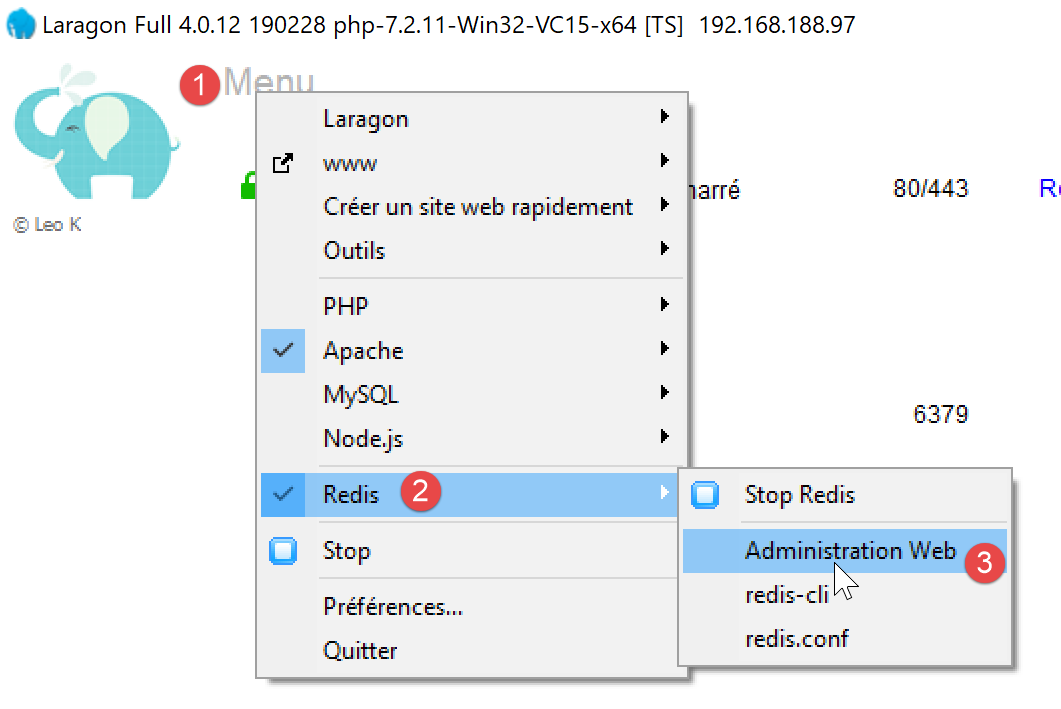
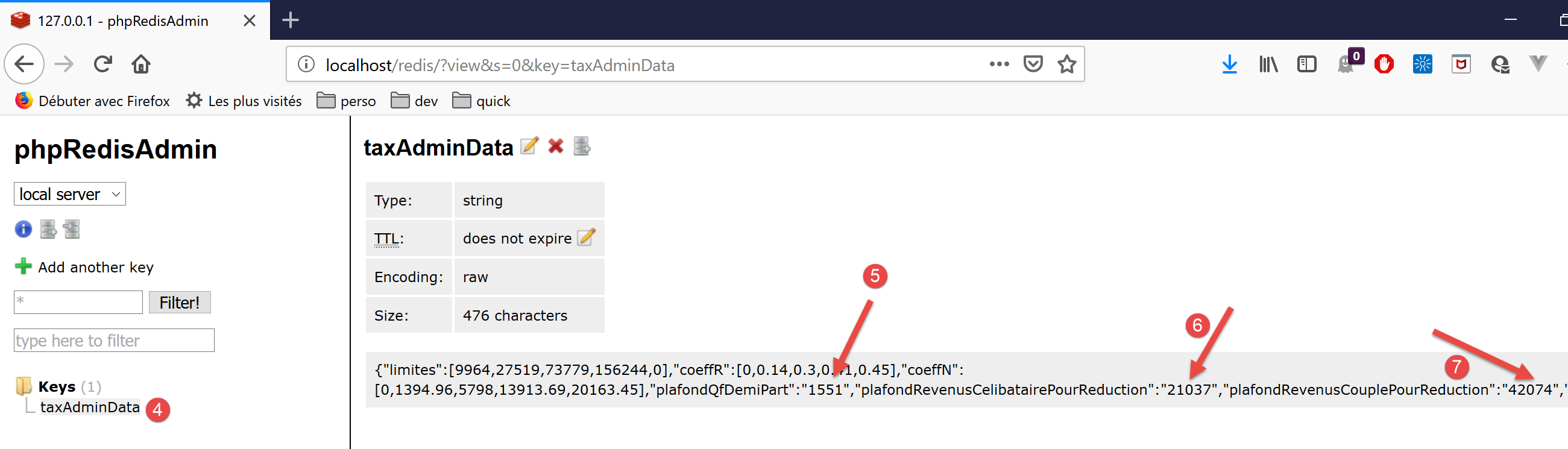
- In [5-7] sehen wir, dass numerische Werte als Zeichenfolgen gespeichert wurden. PHP hat dies verarbeitet, da der Operator + bei Berechnungen mit Zahlen und Zeichenfolgen implizit eine Typkonvertierung von einer Zeichenfolge in eine Zahl bewirkt. JavaScript verhält sich jedoch umgekehrt: Der Operator + bei Berechnungen mit Zahlen und Zeichenfolgen bewirkt implizit eine Typkonvertierung von einer Zahl in eine Zeichenfolge. Die Berechnungen in der JavaScript-Klasse [Métier] sind daher falsch;
Um dieses Problem zu beheben, ändern wir die Methode [TaxAdminData.setFromArrayOfAttributes], die in Zeile 71 des Controllers verwendet wird, um ein [TaxAdminData]-Objekt (siehe Artikel) aus der im [redis]-Cache befindlichen JSON-Zeichenkette zu instanziieren:
<?php

namespace Application;

class TaxAdminData extends BaseEntity {
  // tax brackets
  protected $limites;
  protected $coeffR;
  protected $coeffN;
  // tax calculation constants
  protected $plafondQfDemiPart;
  protected $plafondRevenusCelibatairePourReduction;
  protected $plafondRevenusCouplePourReduction;
  protected $valeurReducDemiPart;
  protected $plafondDecoteCelibataire;
  protected $plafondDecoteCouple;
  protected $plafondImpotCouplePourDecote;
  protected $plafondImpotCelibatairePourDecote;
  protected $abattementDixPourcentMax;
  protected $abattementDixPourcentMin;

  // initialization
  public function setFromJsonFile(string $taxAdminDataFilename) {
    // parent
    parent::setFromJsonFile($taxAdminDataFilename);
    // check attribute values
    $this->checkAttributes();
    // we return the object
    return $this;
  }

  protected function check($value): \stdClass {
    // $value is an array of string elements or a single element
    if (!\is_array($value)) {
      $tableau = [$value];
    } else {
      $tableau = $value;
    }
    // transform the array of strings into an array of reals
    $newTableau = [];
    $result = new \stdClass();
    // table elements must be positive or zero decimal numbers
    $modèle = '/^\s*([+]?)\s*(\d+\.\d*|\.\d+|\d+)\s*$/';
    for ($i = 0; $i < count($tableau); $i ++) {
      if (preg_match($modèle, $tableau[$i])) {
        // put the float in newTableau
        $newTableau[] = (float) $tableau[$i];
      } else {
        // we note the error
        $result->erreur = TRUE;
        // we leave
        return $result;
      }
    }
    // we return the result
    $result->erreur = FALSE;
    if (!\is_array($value)) {
      // a single value
      $result->value = $newTableau[0];
    } else {
      // a list of values
      $result->value = $newTableau;
    }
    return $result;
  }

  // initialization by an array of attributes
  public function setFromArrayOfAttributes(array $arrayOfAttributes) {
    // parent
    parent::setFromArrayOfAttributes($arrayOfAttributes);
    // check attribute values
    $this->checkAttributes();
    // we return the object
    return $this;
  }

  // checking attribute values
  protected function checkAttributes() {
    // check that attribute values are real >=0
    foreach ($this as $key => $value) {
      if (is_string($value)) {
        // $value must be a real number >=0 or an array of reals >=0
        $result = $this->check($value);
        // mistake?
        if ($result->erreur) {
          // throw an exception
          throw new ExceptionImpots("La valeur de l'attribut [$key] est invalide");
        } else {
          // we note the value
          $this->$key = $result->value;
        }
      }
    }

    // we return the object
    return $this;
  }

  // getters and setters
  ...

}
Kommentare
- Zeile 5: Die Klasse [TaxAdminData] erweitert die Klasse [BaseEntity], die bereits über die Methode [setFromArrayOfAttributes] verfügt. Da diese Methode nicht geeignet ist, definieren wir sie in den Zeilen 67–75 neu;
- Zeile 70: Die Methode [setFromArrayOfAttributes] der übergeordneten Klasse wird zunächst verwendet, um die Attribute der Klasse zu initialisieren;
- Zeile 72: Die Methode [checkAttributes] überprüft, ob die zugehörigen Werte tatsächlich Zahlen sind. Handelt es sich um Zeichenfolgen, werden diese in Zahlen umgewandelt;
- Zeile 74: Das resultierende [$this]-Objekt ist dann ein Objekt mit Attributen, die numerische Werte haben;
- Zeilen 78–93: Die Methode [checkAttributes] überprüft, ob die mit den Attributen des Objekts verknüpften Werte tatsächlich numerisch sind;
- Zeile 80: Die Liste der Attribute wird durchlaufen;
- Zeile 81: Wenn der Wert eines Attributs vom Typ [string] ist;
- Zeile 83: dann prüfen wir, ob diese Zeichenkette eine Zahl darstellt;
- Zeile 90: Ist dies der Fall, wird die Zeichenkette in eine Zahl umgewandelt und dem zu prüfenden Attribut zugewiesen;
- Zeilen 85–86: Ist dies nicht der Fall, wird eine Ausnahme ausgelöst;
- Zeilen 32–65: Die Funktion [check] leistet etwas mehr als nötig. Sie verarbeitet sowohl Arrays als auch Einzelwerte. Hier wird sie jedoch nur aufgerufen, um einen Wert vom Typ [string] zu prüfen. Sie gibt ein Objekt mit den Eigenschaften [error, value] zurück, wobei:
- [error] ein Boolescher Wert ist, der angibt, ob ein Fehler aufgetreten ist oder nicht;
- [value] der Parameter [value] aus Zeile 32 ist, der je nach Bedarf in eine Zahl oder ein Zahlenarray umgewandelt wurde;
Die Klasse [BaseEntity], die zuvor ein Attribut namens [arrayOfAttributes] hatte, wurde geändert, um dieses Attribut zu entfernen: Es verursachte Probleme mit der JSON-Zeichenkette [TaxAdminData]. Die Klasse wurde wie folgt umgeschrieben:
<?php

namespace Application;

class BaseEntity {

  // initialization from a JSON file
  public function setFromJsonFile(string $jsonFilename) {
    // retrieve the contents of the tax data file
    $fileContents = \file_get_contents($jsonFilename);
    $erreur = FALSE;
    // mistake?
    if (!$fileContents) {
      // we note the error
      $erreur = TRUE;
      $message = "Le fichier des données [$jsonFilename] n'existe pas";
    }
    if (!$erreur) {
      // retrieve the JSON code from the configuration file in an associative array
      $arrayOfAttributes = \json_decode($fileContents, true);
      // mistake?
      if ($arrayOfAttributes === FALSE) {
        // we note the error
        $erreur = TRUE;
        $message = "Le fichier de données JSON [$jsonFilename] n'a pu être exploité correctement";
      }
    }
    // mistake?
    if ($erreur) {
      // throw an exception
      throw new ExceptionImpots($message);
    }
    // initialization of class attributes
    foreach ($arrayOfAttributes as $key => $value) {
      $this->$key = $value;
    }
    // we check the presence of all attributes
    $this->checkForAllAttributes($arrayOfAttributes);
    // we return the object
    return $this;
  }

  public function checkForAllAttributes($arrayOfAttributes) {
    // check that all keys have been initialized
    foreach (\array_keys($arrayOfAttributes) as $key) {
      if (!isset($this->$key)) {
        throw new ExceptionImpots("L'attribut [$key] de la classe "
          . get_class($this) . " n'a pas été initialisé");
      }
    }
  }

  public function setFromArrayOfAttributes(array $arrayOfAttributes) {
    // initialize certain class attributes (not necessarily all)
    foreach ($arrayOfAttributes as $key => $value) {
      $this->$key = $value;
    }
    // object is returned
    return $this;
  }

  // toString
  public function __toString() {
    // object attributes
    $arrayOfAttributes = \get_object_vars($this);
    // string jSON of object
    return \json_encode($arrayOfAttributes, JSON_UNESCAPED_UNICODE);
  }

}
Kommentare
- Zeile 20: Das Attribut [$this→arrayOfAttributes] wurde in eine Variable umgewandelt, die nun an die Methode [checkForAllAttributes] in Zeile 38 übergeben werden muss, die zuvor auf das Attribut [$this→arrayOfAttributes] angewendet wurde;
Aufgrund dieser Änderung in [BaseEntity] muss auch die Klasse [Database] geringfügig angepasst werden:
<?php

namespace Application;

class Database extends BaseEntity {
  // attributes
  protected $dsn;
  protected $id;
  protected $pwd;
  protected $tableTranches;
  protected $colLimites;
  protected $colCoeffR;
  protected $colCoeffN;
  protected $tableConstantes;
  protected $colPlafondQfDemiPart;
  protected $colPlafondRevenusCelibatairePourReduction;
  protected $colPlafondRevenusCouplePourReduction;
  protected $colValeurReducDemiPart;
  protected $colPlafondDecoteCelibataire;
  protected $colPlafondDecoteCouple;
  protected $colPlafondImpotCelibatairePourDecote;
  protected $colPlafondImpotCouplePourDecote;
  protected $colAbattementDixPourcentMax;
  protected $colAbattementDixPourcentMin;

  // setter
  // initialization
  public function setFromJsonFile(string $jsonFilename) {
    // parent
    parent::setFromJsonFile($jsonFilename);
    // object is returned
    return $this;
  }

  // getters and setters
  ...
}
Kommentare
- Im ursprünglichen Code wurde nach Zeile 30 die Methode [parent::checkForAllAttributes] aufgerufen. Dies ist nicht mehr erforderlich, da dies nun automatisch von der Methode [parent::setFromJsonFile($jsonFilename)] übernommen wird;
14.3.4. [Postman]-Servertests
[Postman] wurde im verlinkten Artikel vorgestellt.
Wir verwenden die folgenden Postman-Tests:

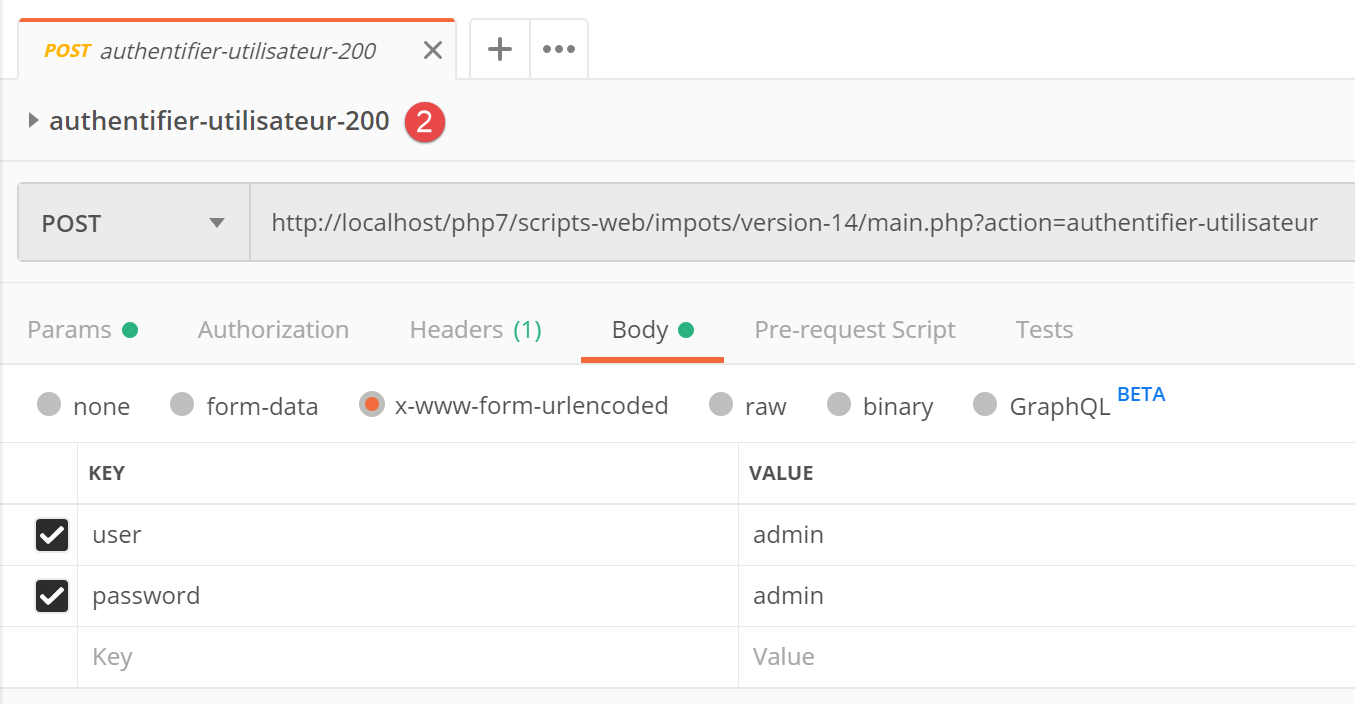
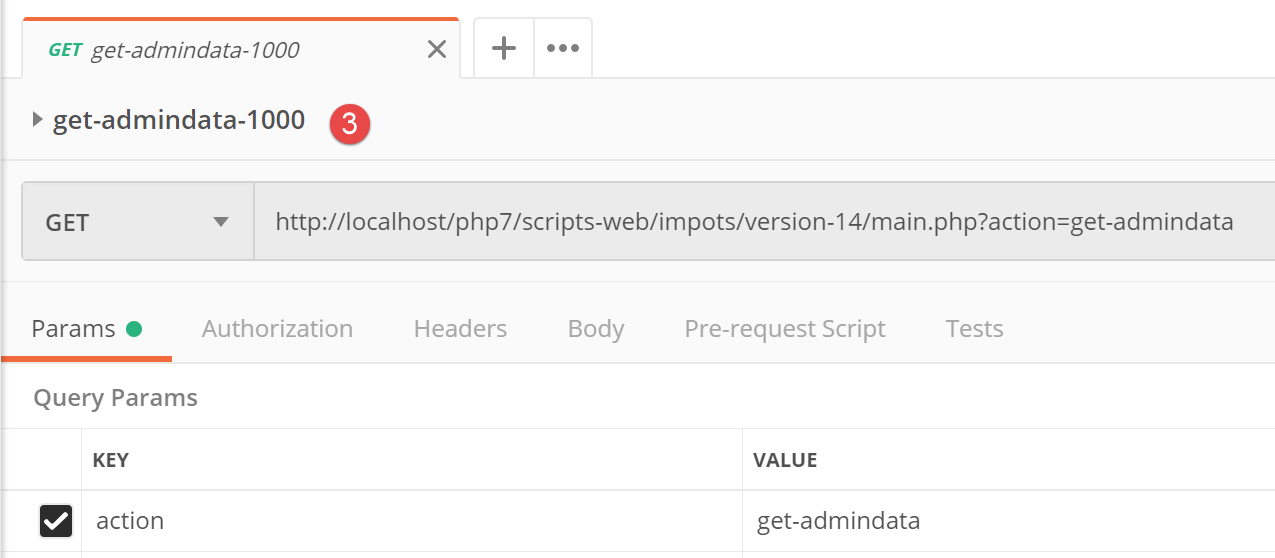
Das JSON-Ergebnis dieser letzten Anfrage lautet wie folgt:
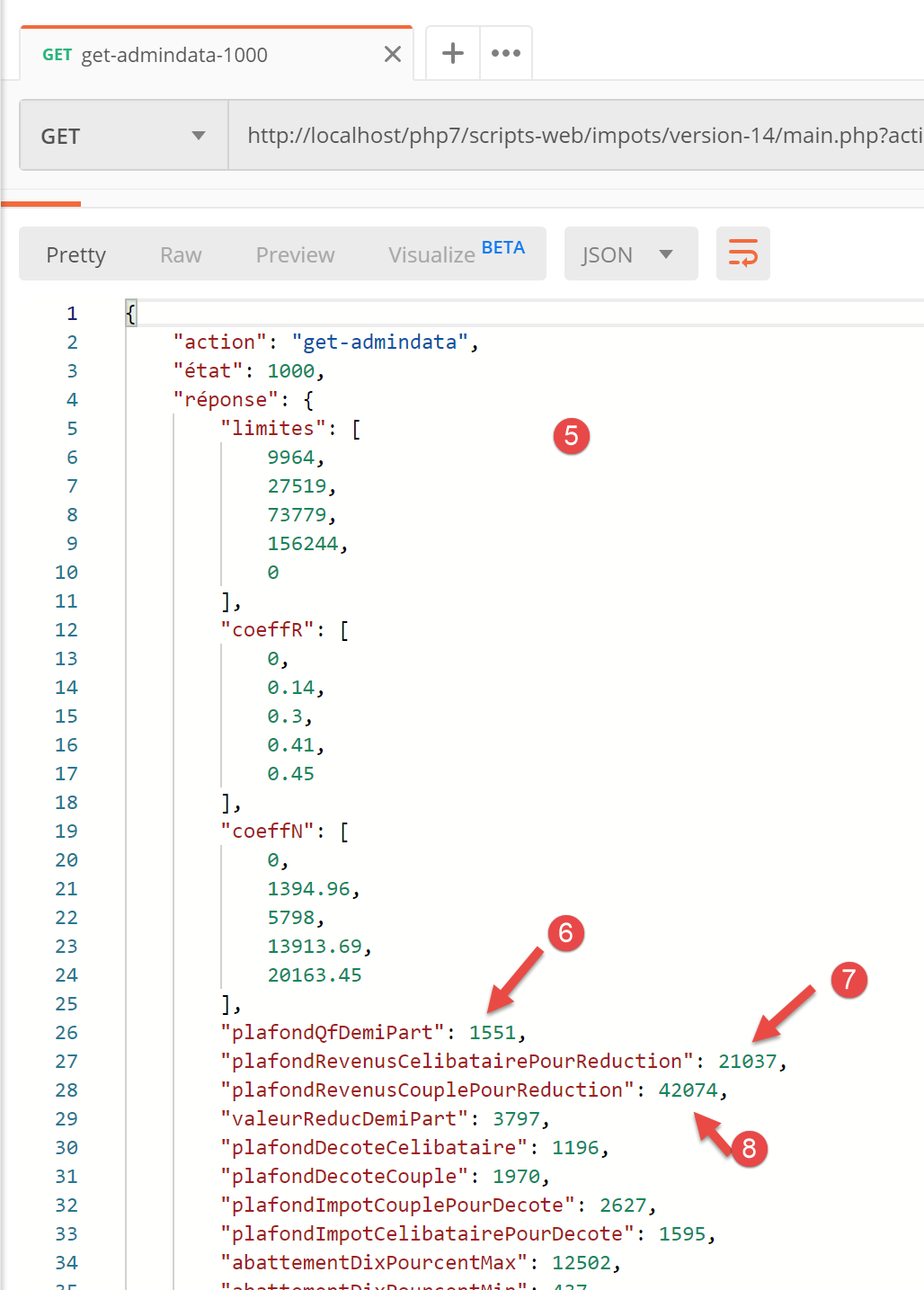
- In [5-8] ist zu sehen, dass die Attribute in der JSON-Zeichenkette tatsächlich numerische Werte (und keine Zeichenketten) haben. Dieses Ergebnis ermöglicht es der JavaScript-Klasse [Business], normal ausgeführt zu werden;
14.3.5. Das Hauptskript [main]
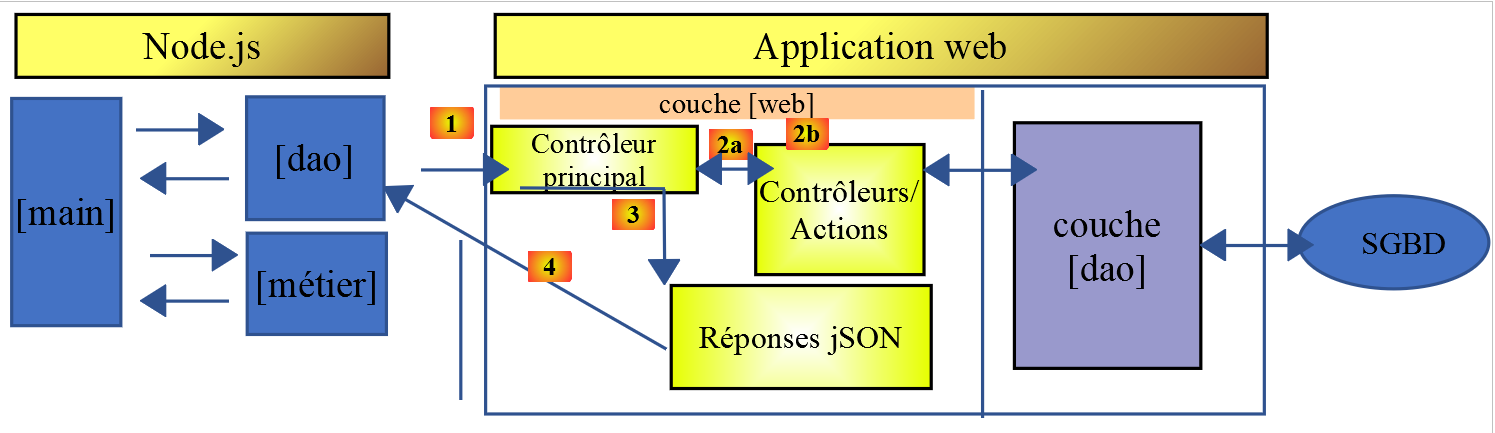
Das Hauptskript [main] des JavaScript-Clients lautet wie folgt:
// imports
import axios from 'axios';

// imports
import Dao from './Dao2';
import Métier from './Métier';

// asynchronous function [main]
async function main() {
  // axios configuration
  axios.defaults.timeout = 2000;
  axios.defaults.baseURL = 'http://localhost/php7/scripts-web/impots/version-14';
  // layer instantiation [dao]
  const dao = new Dao(axios);
  // requests HTTP
  let taxAdminData;
  try {
    // init session
    log("-----------init-session");
    let response = await dao.initSession();
    log(response);
    // authentication
    log("-----------authentifier-utilisateur");
    response = await dao.authentifierUtilisateur("admin", "admin");
    log(response);
    // tax information
    log("-----------get-admindata");
    response = await dao.getAdminData();
    log(response);
    taxAdminData = response.réponse;
  } catch (error) {
    // we log the error
    console.log("erreur=", error.message);
    // end
    return;
  }

  // instantiation layer [business]
  const métier = new Métier(taxAdminData);

  // tax calculations
  log("-----------calculer-impot x 3");
  const simulations = [];
  simulations.push(métier.calculerImpot("oui", 2, 45000));
  simulations.push(métier.calculerImpot("non", 2, 45000));
  simulations.push(métier.calculerImpot("non", 1, 30000));
  // list of simulations
  log("-----------liste-des-simulations");
  log(simulations);
  // deleting a simulation
  log("-----------suppression simulation n° 1");
  simulations.splice(1, 1);
  log(simulations);
}

// log jSON
function log(object) {
  console.log(JSON.stringify(object, null, 2));
}

// execution
main();
Kommentare
- Zeilen 5–6: Import der Klassen [Dao] und [Business];
- Zeile 9: die asynchrone Funktion [main], die die Kommunikation mit dem Server mithilfe der Klasse [Dao] übernimmt und die Klasse [Business] mit der Durchführung der Steuerberechnungen beauftragt;
- Zeilen 10–36: Das Skript ruft die Methoden [initSession, authenticateUser, getAdminData] der [Dao]-Schicht nacheinander und blockierend auf;
- Zeile 38: Wir benötigen die [dao]-Schicht nicht mehr. Wir verfügen über alle Elemente, die zur Ausführung der [business]-Schicht des JavaScript-Clients erforderlich sind;
- Zeilen 41–46: Wir führen drei Steuerberechnungen durch und speichern die Ergebnisse in einem Array [simulations];
- Zeile 49: Wir zeigen das Array „simulations“ an;
- Zeile 52: Wir entfernen eine davon;
Die Ergebnisse der Ausführung des Hauptskripts lauten wie folgt:
[Running] C:\myprograms\laragon-lite\bin\nodejs\node-v10\node.exe -r esm "c:\Data\st-2019\dev\es6\javascript\client impôts\client http 2\main2.js"
"-----------init-session"
{
  "action": "init-session",
  "état": 700,
  "réponse": "session démarrée avec type [json]"
}
"-----------authentifier-utilisateur"
{
  "action": "authentifier-utilisateur",
  "état": 200,
  "réponse": "Authentification réussie [admin, admin]"
}
"-----------get-admindata"
{
  "action": "get-admindata",
  "état": 1000,
  "réponse": {
    "limites": [
      9964,
      27519,
      73779,
      156244,
      0
    ],
    "coeffR": [
      0,
      0.14,
      0.3,
      0.41,
      0.45
    ],
    "coeffN": [
      0,
      1394.96,
      5798,
      13913.69,
      20163.45
    ],
    "plafondQfDemiPart": 1551,
    "plafondRevenusCelibatairePourReduction": 21037,
    "plafondRevenusCouplePourReduction": 42074,
    "valeurReducDemiPart": 3797,
    "plafondDecoteCelibataire": 1196,
    "plafondDecoteCouple": 1970,
    "plafondImpotCouplePourDecote": 2627,
    "plafondImpotCelibatairePourDecote": 1595,
    "abattementDixPourcentMax": 12502,
    "abattementDixPourcentMin": 437
  }
}
"-----------calculer-impot x 3"
"-----------liste-des-simulations"
[
  {
    "impôt": 502,
    "surcôte": 0,
    "décôte": 857,
    "réduction": 126,
    "taux": 0.14
  },
  {
    "impôt": 3250,
    "surcôte": 370,
    "décôte": 0,
    "réduction": 0,
    "taux": 0.3
  },
  {
    "impôt": 1687,
    "surcôte": 0,
    "décôte": 0,
    "réduction": 0,
    "taux": 0.14
  }
]
"-----------suppression simulation n° 1"
[
  {
    "impôt": 502,
    "surcôte": 0,
    "décôte": 857,
    "réduction": 126,
    "taux": 0.14
  },
  {
    "impôt": 1687,
    "surcôte": 0,
    "décôte": 0,
    "réduction": 0,
    "taux": 0.14
  }
]

[Done] exited with code=0 in 0.583 seconds
14.4. HTTP 3-Client
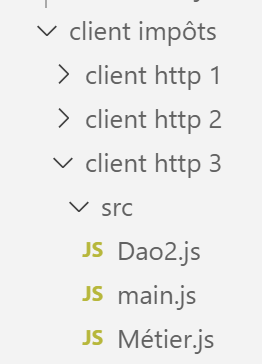
In diesem Abschnitt portieren wir die Anwendung [HTTP-Client 2] unter Verwendung der folgenden Architektur auf einen Browser:
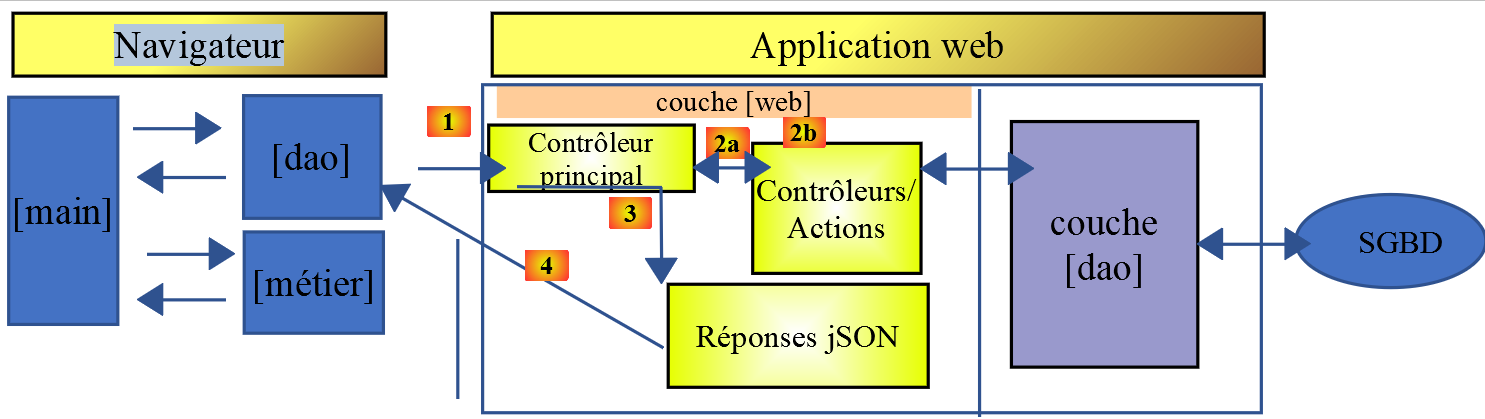
Der Portierungsprozess ist nicht ganz einfach. Während [node.js] ES6-JavaScript ausführen kann, ist dies bei Browsern in der Regel nicht der Fall. Wir müssen daher Tools verwenden, die ES6-Code in ES5-Code übersetzen, der von modernen Browsern verstanden wird. Glücklicherweise sind diese Tools sowohl leistungsstark als auch relativ einfach zu bedienen.
Hier haben wir uns an den Artikel [Wie man ES6-Code schreibt, der sicher im Browser ausgeführt werden kann – Web Developer's Journal] gehalten.
Im Ordner [client HTTP 3/src] haben wir die Dateien [main.js, Métier.js, Dao2.js] aus der soeben entwickelten Anwendung [Client Http 2] abgelegt.
14.4.1. Initialisierung des Projekts
Wir werden im Ordner [client http 3] arbeiten. Wir öffnen ein Terminal in [VSCode] und navigieren zu diesem Ordner:

Wir initialisieren dieses Projekt mit dem Befehl [npm init] und akzeptieren die Standardantworten auf die gestellten Fragen:
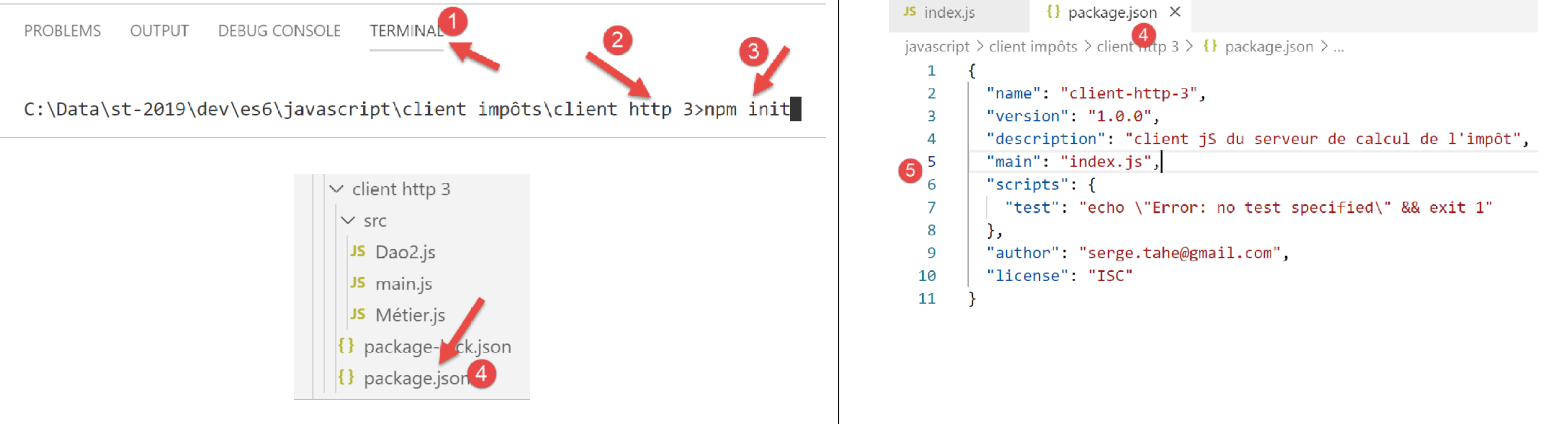
- in [4-5] die aus den verschiedenen Antworten generierte Projektkonfigurationsdatei [package.json];
14.4.2. Installieren der Projektabhängigkeiten
Wir werden die folgenden Abhängigkeiten installieren:
- [@babel/core]: der Kern des [Babel]-Tools [https://babeljs.io], das ES 2015+-Code in Code umwandelt, der sowohl in modernen als auch in älteren Browsern ausgeführt werden kann;
- [@babel/preset-env]: Teil des Babel-Toolkits. Wird vor der Transpilation von ES6 nach ES5 ausgeführt;
- [babel-loader]: Diese Abhängigkeit ermöglicht es dem [webpack]-Tool, das [Babel]-Tool aufzurufen;
- [webpack]: der Koordinator. Es ist [webpack], das Babel aufruft, um ES6-Code nach ES5 zu transkompilieren, und anschließend alle resultierenden Dateien zu einer einzigen Datei zusammenfügt;
- [webpack-cli]: wird von [webpack] benötigt;
- [@webpack-cli/init]: wird zur Konfiguration von [webpack] verwendet;
- [webpack-dev-server]: stellt einen Entwicklungswebserver bereit, der standardmäßig auf Port 8080 läuft. Wenn Quelldateien geändert werden, lädt er die Webanwendung automatisch neu;
Die Projektabhängigkeiten werden wie folgt in einem [VSCode]-Terminal installiert:
npm --save-dev install @babel/core @babel/preset-env babel-loader webpack webpack-cli webpack-dev-server @webpack-cli/init

Nach der Installation der Abhängigkeiten hat sich die Datei [package.json] wie folgt geändert:
{
  "name": "client-http-3",
  "version": "1.0.0",
  "description": "client jS du serveur de calcul de l'impôt",
  "main": "index.js",
  "scripts": {
    "test": "echo \"Error: no test specified\" && exit 1"
  },
  "author": "serge.tahe@gmail.com",
  "license": "ISC",
  "devDependencies": {
    "@babel/core": "^7.6.0",
    "@babel/preset-env": "^7.6.0",
    "@webpack-cli/init": "^0.2.2",
    "babel-loader": "^8.0.6",
    "cross-env": "^6.0.0",
    "webpack": "^4.40.2",
    "webpack-cli": "^3.3.9",
    "webpack-dev-server": "^3.8.1"
  }
}
- Zeilen 12–19: Die Abhängigkeiten des Projekts sind [devDependencies]: Wir benötigen sie während der Entwicklungsphase, nicht jedoch in der Produktionsphase. In der Produktion wird die Datei [dist/main.js] verwendet. Sie ist in ES5 geschrieben und benötigt keine Tools mehr, um ES6-Code in ES5 zu transpilieren;
Wir müssen dem Projekt zwei Abhängigkeiten hinzufügen:
- [core-js]: enthält „Polyfills“ für ECMAScript 2019. Ein Polyfill ermöglicht es, dass neuerer Code, wie beispielsweise ECMAScript 2019 (Sept. 2019), auf älteren Browsern ausgeführt werden kann;
- [regenerator-runtime]: laut der Website der Bibliothek --> [Quellcode-Transformer, der ECMAScript-6-Generatorfunktionen in modernem JavaScript ermöglicht];
Ab Babel 7 ersetzen diese beiden Abhängigkeiten die Abhängigkeit [@babel/polyfill], die zuvor diesen Zweck erfüllte und nun (Sept. 2019) veraltet ist. Sie werden wie folgt installiert:

Die Datei [package.json] ändert sich dann wie folgt:
{
  "name": "client-http-3",
  "version": "1.0.0",
  "description": "My webpack project",
  "main": "index.js",
  "scripts": {
    "test": "echo \"Error: no test specified\" && exit 1",
    "build": "webpack",
    "start": "webpack-dev-server"
  },
  "author": "serge.tahe@gmail.com",
  "license": "ISC",
  "devDependencies": {
    "@babel/core": "^7.6.0",
    "@babel/preset-env": "^7.6.0",
    "@webpack-cli/init": "^0.2.2",
    "babel-loader": "^8.0.6",
    "babel-plugin-syntax-dynamic-import": "^6.18.0",
    "html-webpack-plugin": "^3.2.0",
    "webpack": "^4.40.2",
    "webpack-cli": "^3.3.9",
    "webpack-dev-server": "^3.8.1"
  },
  "dependencies": {
    "core-js": "^3.2.1",
    "regenerator-runtime": "^0.13.3"
  }
}
Um die Abhängigkeiten [core-js, regenerator-runtime] zu nutzen, müssen die folgenden [Importe] (Zeilen 3–4) in das Hauptskript [src/main.js] eingefügt werden:
// imports
import axios from 'axios';
import "core-js/stable";
import "regenerator-runtime/runtime";

// imports
import Dao from './Dao2';
import Métier from './Métier';
14.4.3. [webpack]-Konfiguration
[webpack] ist das Tool, das folgende Aufgaben übernimmt:
- die Transpilation aller JavaScript-Dateien im Projekt von ES6 nach ES5;
- das Bündeln der generierten Dateien zu einer einzigen Datei;
Dieses Tool wird über eine Konfigurationsdatei [webpack.config.js] gesteuert, die mithilfe einer Abhängigkeit namens [@webpack-cli/init] (Sept. 2019) generiert werden kann. Diese Abhängigkeit wurde zusammen mit den anderen im Abschnitt „Link“ genannten installiert.
Wir führen den Befehl [npx webpack-cli init] in einem [VSCode]-Terminal aus:
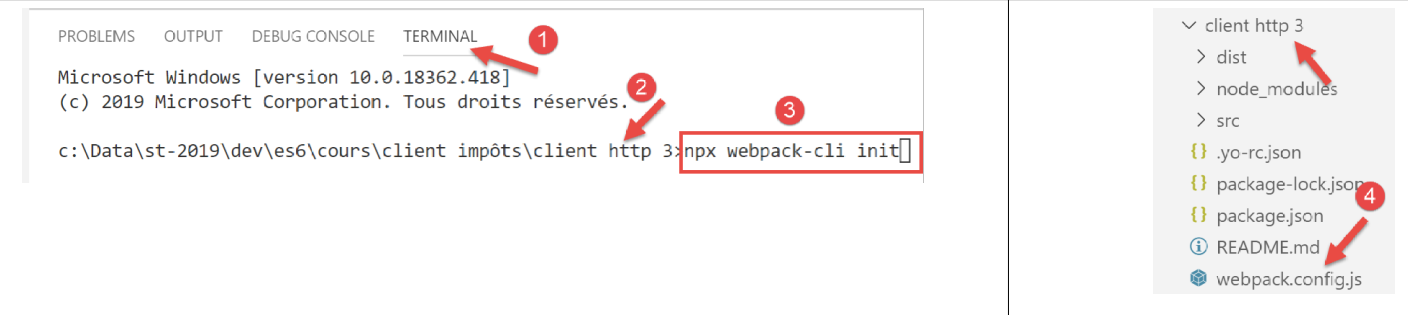
Nachdem wir die verschiedenen Fragen beantwortet haben (wobei wir die meisten Standardantworten übernehmen können), wird eine Datei [webpack.config.js] im Stammverzeichnis des Projekts generiert [4]:
Die Datei [webpack.config.js] sieht wie folgt aus:
/* eslint-disable */

const path = require('path');
const webpack = require('webpack');

/*
 * SplitChunksPlugin is enabled by default and replaced
 * deprecated CommonsChunkPlugin. It automatically identifies modules which
 * should be splitted of chunk by heuristics using module duplication count and
 * module category (i. e. node_modules). And splits the chunks…
 *
 * It is safe to remove "splitChunks" from the generated configuration
 * and was added as an educational example.
 *
 * https://webpack.js.org/plugins/split-chunks-plugin/
 *
 */

const HtmlWebpackPlugin = require('html-webpack-plugin');

/*
 * We've enabled HtmlWebpackPlugin for you! This generates a html
 * page for you when you compile webpack, which will make you start
 * developing and prototyping faster.
 *
 * https://github.com/jantimon/html-webpack-plugin
 *
 */

module.exports = {
    mode: 'development',
    entry: './src/index.js',

    output: {
        filename: '[name].[chunkhash].js',
        path: path.resolve(__dirname, 'dist')
    },

    plugins: [new webpack.ProgressPlugin(), new HtmlWebpackPlugin()],

    module: {
        rules: [
            {
                test: /.(js|jsx)$/,
                include: [path.resolve(__dirname, 'src')],
                loader: 'babel-loader',

                options: {
                    plugins: ['syntax-dynamic-import'],

                    presets: [
                        [
                            '@babel/preset-env',
                            {
                                modules: false
                            }
                        ]
                    ]
                }
            }
        ]
    },

    optimization: {
        splitChunks: {
            cacheGroups: {
                vendors: {
                    priority: -10,
                    test: /[\\/]node_modules[\\/]/
                }
            },

            chunks: 'async',
            minChunks: 1,
            minSize: 30000,
            name: true
        }
    },

    devServer: {
        open: true
    }
};
Ich verstehe nicht alle Details dieser Datei, aber ein paar Dinge fallen mir besonders auf:
- Zeile 1: Die Datei enthält keinen ES6-Code. [Eslint] meldet daraufhin Fehler, die sich bis zur Wurzel des [JavaScript]-Projekts ausbreiten. Das ist ärgerlich. Um zu verhindern, dass Eslint eine Datei analysiert, kommentiere einfach Zeile 1 aus;
- Zeile 31: Wir arbeiten im [Entwicklungs]-Modus;
- Zeile 32: Das Einstiegsskript befindet sich hier [src/index.js]. Das müssen wir ändern;
- Zeile 36: Der Ordner, in dem die Ausgabe von [webpack] abgelegt wird, ist der Ordner [dist];
- Zeile 46: Wir sehen, dass [webpack] [babel-loader] verwendet, eine der von uns installierten Abhängigkeiten;
- Zeile 54: Wir sehen, dass [webpack] [@babel-preset/env] verwendet, eine der von uns installierten Abhängigkeiten;
Durch die Initialisierung von [webpack] wurde die Datei [package.json] geändert (es wird um Erlaubnis gefragt):
{
  "name": "client-http-3",
  "version": "1.0.0",
  "description": "My webpack project",
  "main": "index.js",
  "scripts": {
    "test": "echo \"Error: no test specified\" && exit 1",
    "build": "webpack",
    "start": "webpack-dev-server"
  },
  "author": "serge.tahe@gmail.com",
  "license": "ISC",
  "devDependencies": {
    "@babel/core": "^7.6.0",
    "@babel/preset-env": "^7.6.0",
    "@webpack-cli/init": "^0.2.2",
    "babel-loader": "^8.0.6",
    "babel-plugin-syntax-dynamic-import": "^6.18.0",
    "html-webpack-plugin": "^3.2.0",
    "webpack": "^4.40.2",
    "webpack-cli": "^3.3.9",
    "webpack-dev-server": "^3.8.1"
  },
  "dependencies": {
    "core-js": "^3.2.1",
    "regenerator-runtime": "^0.13.3"
  }
}
- Zeile 4: wurde geändert;
- Zeilen 8–9, 18–19: Diese wurden hinzugefügt;
- Zeile 8: die [npm]-Aufgabe, die das Projekt kompiliert;
- Zeile 9: die [npm]-Aufgabe, die es ausführt;
- Zeile 18: ?
- Zeile 19: Erzeugt eine [dist/index.html]-Datei, die das von [webpack] generierte [dist/main.js]-Skript automatisch einbettet, und diese wird verwendet, wenn das Projekt ausgeführt wird;
Schließlich hat die [webpack]-Konfiguration eine Datei [src/index.js] generiert:
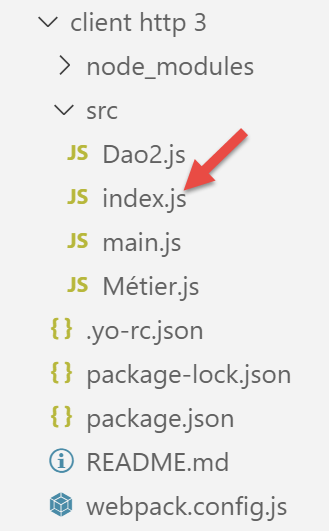
Der Inhalt von [index.js] lautet wie folgt (Sept. 2019):
console.log("Hello World from your main file!");
14.4.4. Kompilieren und Ausführen des Projekts
Die Datei [package.json] enthält drei [npm]-Aufgaben:
"scripts": {
    "test": "echo \"Error: no test specified\" && exit 1",
    "build": "webpack",
    "start": "webpack-dev-server"
},
Diese Aufgaben werden von [VSCode] erkannt, das sie zur Ausführung anbietet:
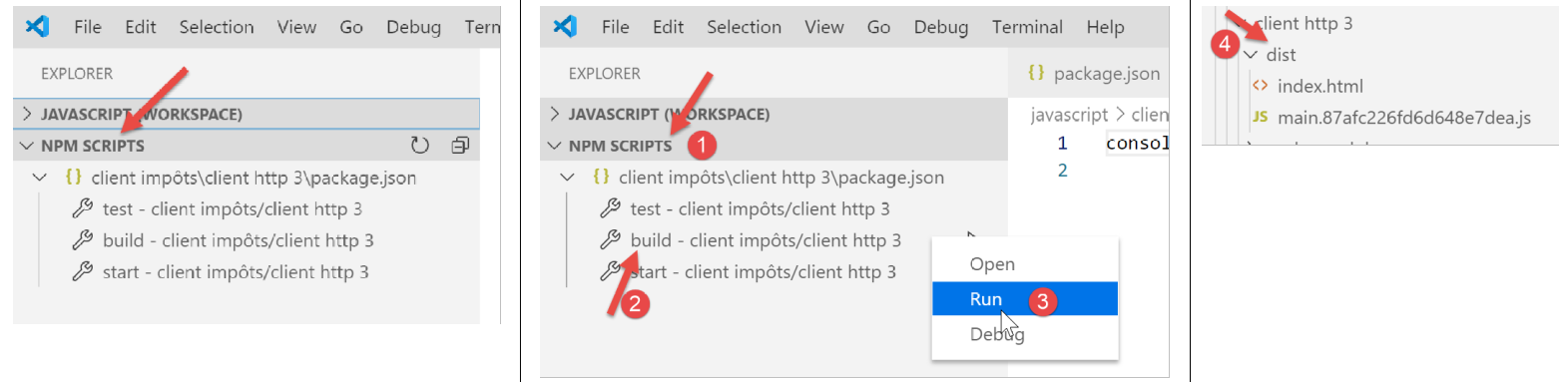
- in [1-3] wird das Projekt kompiliert;
- in [4]: Das Projekt wird in [dist/main.hash.js] kompiliert und eine Seite [dist/index.html] erstellt;
Die generierte Seite [index.html] sieht wie folgt aus:
<!DOCTYPE html>
<html>
  <head>
    <meta charset="UTF-8">
    <title>Webpack App</title>
  </head>
  <body>
  <script type="text/javascript" src="main.87afc226fd6d648e7dea.js"></script></body>
</html>
Diese Seite bündelt lediglich die von [webpack] generierte Datei [main.hash.js].
Das Projekt wird über die Aufgabe [start] ausgeführt:
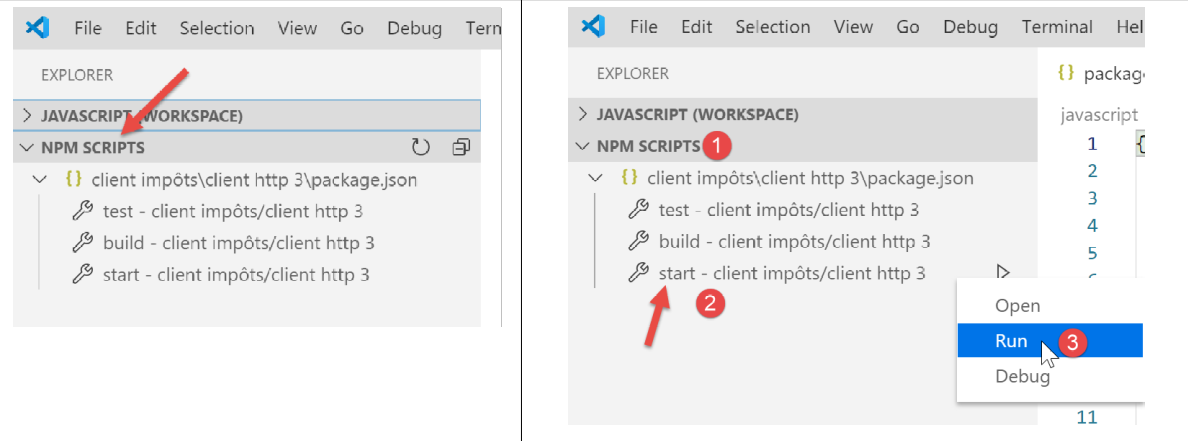
Die Seite [dist/index.html] wird dann auf einen Server geladen, der Teil der [webpack]-Suite ist, auf Port 8080 des lokalen Rechners läuft und vom Standardbrowser des Rechners angezeigt wird:
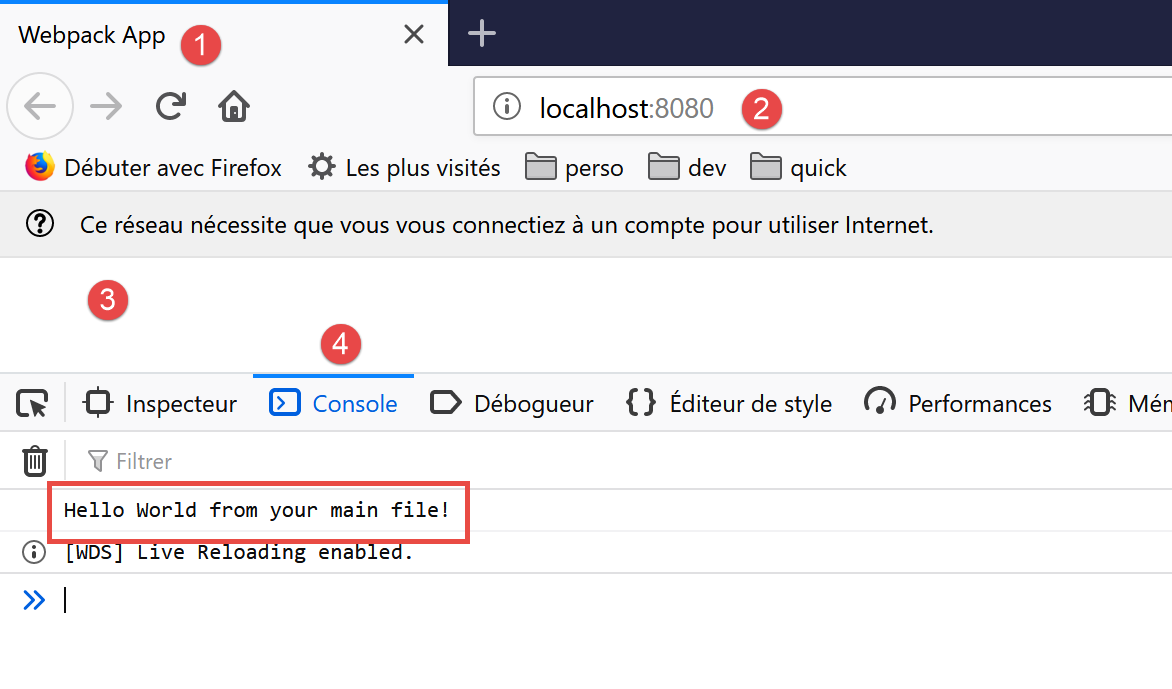
- in [2], dem Dienstport des [webpack]-Webservers;
- in [3] ist der Hauptteil der Seite [dist/index.html] leer;
- in [4], die Registerkarte [Konsole] der Entwicklertools des Browsers, hier Firefox (F12);
- in [5] das Ergebnis der Ausführung der Datei [src/index.js]. Zur Erinnerung: Ihr Inhalt lautete wie folgt:
Ändern wir nun diesen Inhalt in die folgende Zeile:
Automatisch (ohne Neukompilierung) werden neue Dateien [main.js, index.html] generiert und die neue Datei [index.html] wird im Browser geladen:
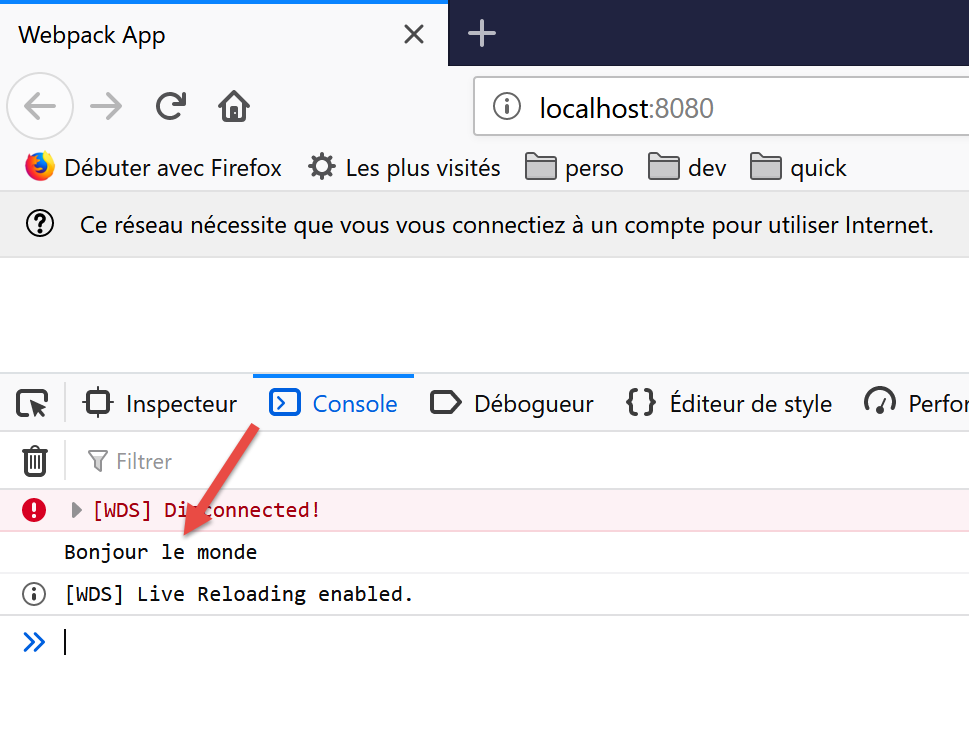
Es ist nicht notwendig, die [build]-Aufgabe vor der [start]-Aufgabe auszuführen: Letztere kompiliert das Projekt zunächst. Sie speichert die Ausgabe dieser Kompilierung nicht im [dist]-Ordner. Um dies zu überprüfen, löschen Sie einfach diesen Ordner. Wir werden dann sehen, dass die [start]-Aufgabe das Projekt kompiliert und ausführt, ohne den Ordner [dist] zu erstellen. Sie scheint ihre Ausgabe [index.html, main.hash.js] in einem für [webpackdev-server] spezifischen Ordner zu speichern. Dieses Verhalten reicht für unsere Tests aus.
Wenn der Entwicklungsserver läuft, lösen alle gespeicherten Änderungen an einer Projektdatei eine Neukompilierung aus. Aus diesem Grund deaktivieren wir den [Auto Save]-Modus von [VSCode]. Wir möchten nicht, dass das Projekt jedes Mal neu kompiliert wird, wenn wir Zeichen in eine Projektdatei eingeben. Eine Neukompilierung soll nur erfolgen, wenn Änderungen gespeichert werden:
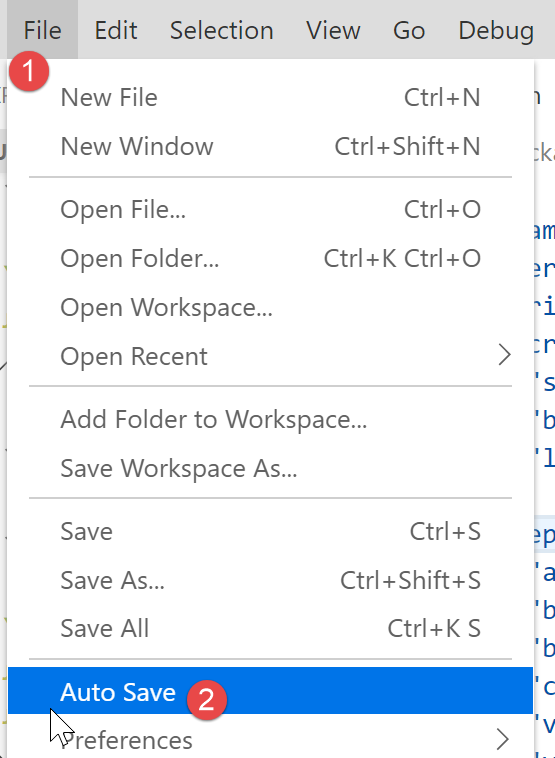
- In [2] darf die Option [Auto Save] nicht aktiviert sein;
14.4.5. Testen des JavaScript-Clients für den Steuerberechnungsserver
Um den JavaScript-Client des Steuerberechnungsservers zu testen, müssen Sie [main.js] [1] in der Datei [webpack.config.js] [2-3] als Einstiegspunkt des Projekts festlegen:
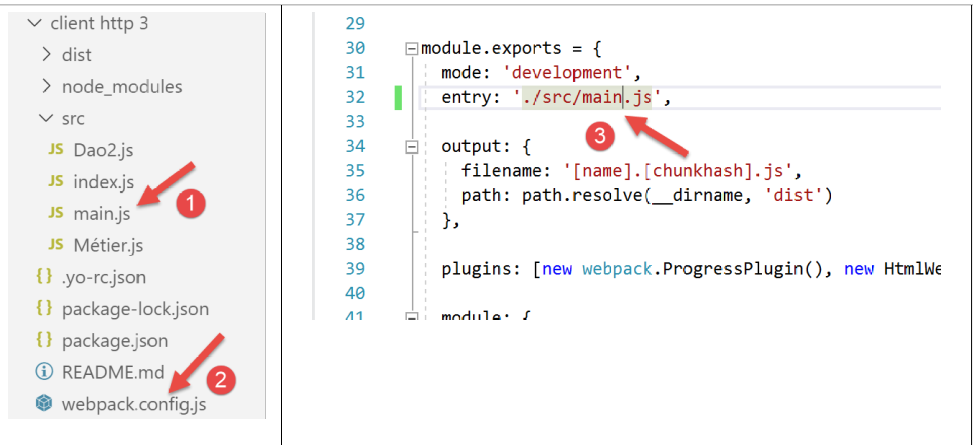
Beachten Sie, dass das Skript [main.js] im Vergleich zu seiner Version in [HTTP Client 2] zwei zusätzliche Importe enthalten muss:
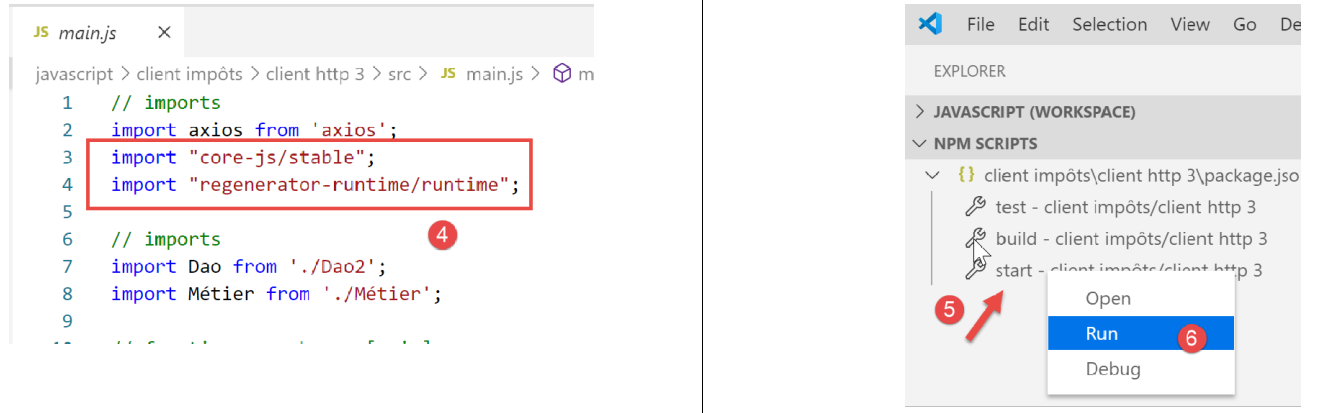
Außerdem haben wir den Code leicht angepasst, um Fehler zu behandeln, die der Server möglicherweise sendet:
// imports
import axios from 'axios';
import "core-js/stable";
import "regenerator-runtime/runtime";

// imports
import Dao from './Dao2';
import Métier from './Métier';

// asynchronous function [main]
async function main() {
  // axios configuration
  axios.defaults.timeout = 2000;
  axios.defaults.baseURL = 'http://localhost/php7/scripts-web/impots/version-14';
  // layer instantiation [dao]
  const dao = new Dao(axios);
  // requests HTTP
  let taxAdminData;
  try {
    // init session
    log("-----------init-session");
    let response = await dao.initSession();
    log(response);
    if (response.état != 700) {
      throw new Error(JSON.stringify(response.réponse));
    }
    // authentication
    log("-----------authentifier-utilisateur");
    response = await dao.authentifierUtilisateur("admin", "admin");
    log(response);
    if (response.état != 200) {
      throw new Error(JSON.stringify(response.réponse));
    }
    // tax information
    log("-----------get-admindata");
    response = await dao.getAdminData();
    log(response);
    if (response.état != 1000) {
      throw new Error(JSON.stringify(response.réponse));
    }
    taxAdminData = response.réponse;
  } catch (error) {
    // we log the error
    console.log("erreur=", error.message);
    // end
    return;
  }

  // instantiation layer [business]
  const métier = new Métier(taxAdminData);

  // tax calculations
  log("-----------calculer-impot x 3");
  const simulations = [];
  simulations.push(métier.calculerImpot("oui", 2, 45000));
  simulations.push(métier.calculerImpot("non", 2, 45000));
  simulations.push(métier.calculerImpot("non", 1, 30000));
  // list of simulations
  log("-----------liste-des-simulations");
  log(simulations);
  // deleting a simulation
  log("-----------suppression simulation n° 1");
  simulations.splice(1, 1);
  log(simulations);
}

// log jSON
function log(object) {
  console.log(JSON.stringify(object, null, 2));
}

// execution
main();
Kommentare
- In den Zeilen [24–26], [31–33] und [38–40] überprüfen wir den Code [response.status], der in der JSON-Antwort des Servers gesendet wurde. Wenn dieser Code einen Fehler anzeigt, wird eine Ausnahme ausgelöst, wobei die JSON-Zeichenkette aus der Antwort des Servers [response.response] als Fehlermeldung verwendet wird;
Sobald dies geschehen ist, führen wir das Projekt [5–6] aus.
Die Seite [index.html] wird dann generiert und im Browser geladen:
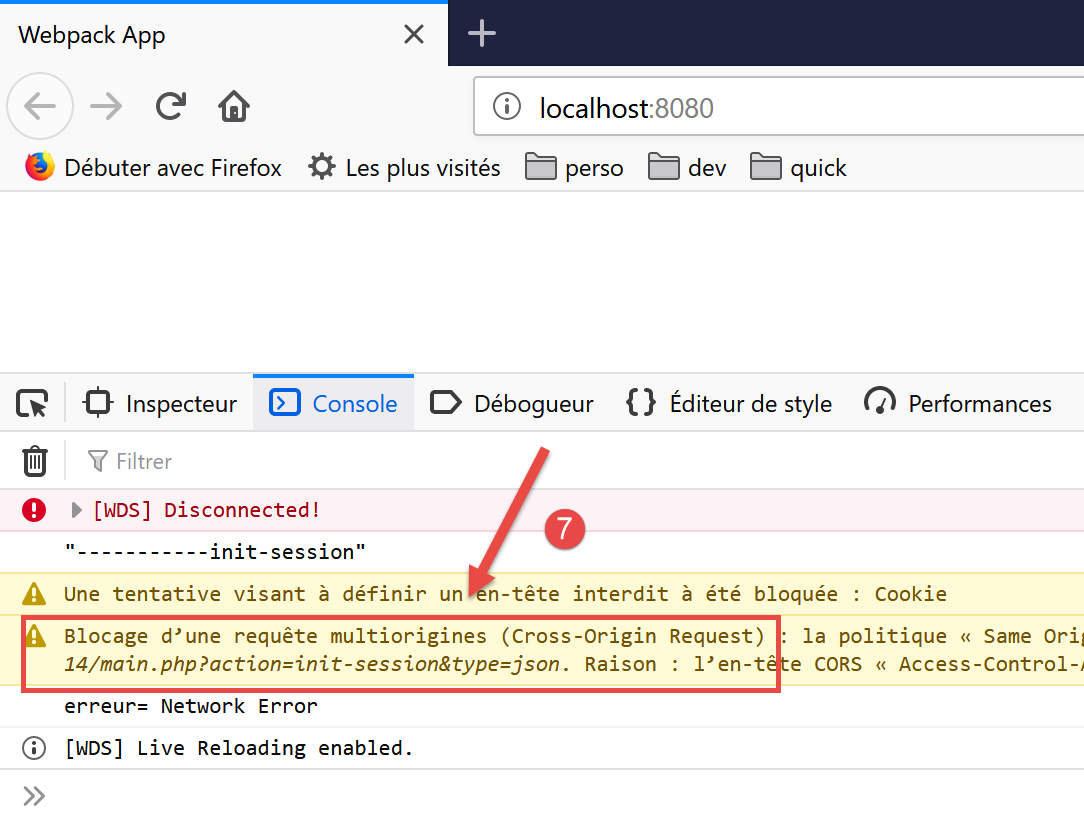
- In [7] sehen wir, dass die Aktion [init-session] aufgrund eines [CORS]-Problems (Cross-Origin Resource Sharing) nicht abgeschlossen werden konnte;
Das CORS-Problem ergibt sich aus der Client-Server-Beziehung:
- Unser JavaScript-Client wurde auf den Rechner [http://localhost:8080] heruntergeladen;
- Der Server für die Steuerberechnung läuft auf dem Rechner [http://localhost:80];
- Der Client und der Server befinden sich daher nicht auf derselben Domain (derselbe Rechner, aber unterschiedliche Ports);
- der Browser, auf dem der von dem Rechner [http://localhost:8080] geladene JavaScript-Client läuft, blockiert jede Anfrage, die nicht an [http://localhost:80] gerichtet ist. Dies ist eine Sicherheitsmaßnahme. Daher blockiert er die Anfrage des Clients an den Server, der auf dem Rechner [http://localhost:80] läuft;
Tatsächlich blockiert der Browser die Anfrage nicht vollständig. Er wartet vielmehr darauf, dass der Server ihm „mitteilt“, dass er domänenübergreifende Anfragen akzeptiert. Erhält er diese Autorisierung, übermittelt der Browser die domänenübergreifende Anfrage.
Der Server erteilt seine Autorisierung durch das Senden bestimmter HTTP-Header:
- Zeile 1: Der JavaScript-Client arbeitet auf der Domain [http://localhost:8080]. Der Server muss ausdrücklich antworten, dass er diese Domain akzeptiert;
- Zeile 2: Der JavaScript-Client verwendet in seinen Anfragen die HTTP-Header [Accept, Content-Type]:
- [Accept]: Dieser Header wird in jeder Anfrage gesendet;
- [Content-Type]: Dieser Header wird bei POST-Operationen verwendet, um den Typ der POST-Parameter anzugeben;
Der Server muss diese beiden HTTP-Header ausdrücklich akzeptieren;
- Zeile 3: Der JavaScript-Client verwendet GET- und POST-Anfragen. Der Server muss diese beiden Arten von Anfragen ausdrücklich akzeptieren;
- Zeile 4: Der JavaScript-Client sendet Session-Cookies. Der Server akzeptiert diese mit dem Header in Zeile 4;
Wir müssen daher den Server anpassen. Dies erfolgt in [NetBeans]. Das CORS-Problem tritt nur im Entwicklungsmodus auf. In der Produktionsumgebung arbeiten Client und Server innerhalb derselben Domäne [http://localhost:80], sodass keine CORS-Probleme auftreten. Wir benötigen daher eine Möglichkeit, CORS-Anfragen über die Serverkonfiguration zu aktivieren oder zu deaktivieren.
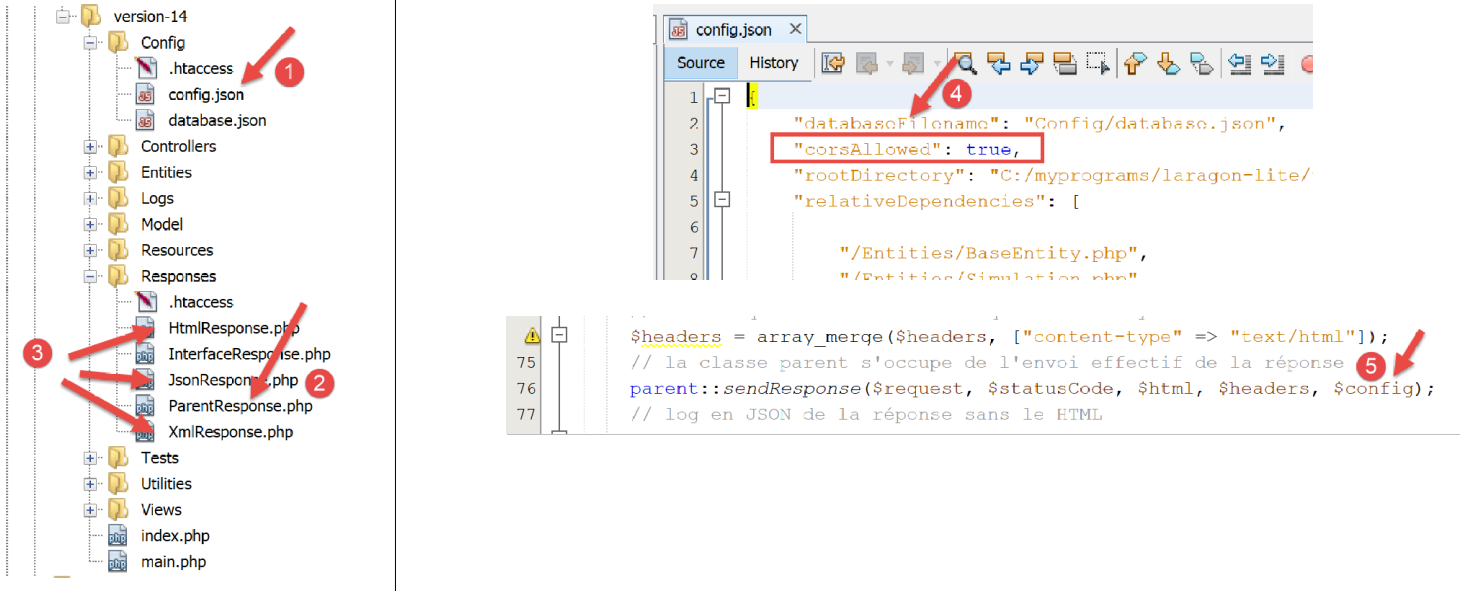
Serveränderungen werden an drei Stellen vorgenommen:
- [1, 4]: in der Konfigurationsdatei [config.json], um einen booleschen Wert festzulegen, der steuert, ob domänenübergreifende Anfragen akzeptiert werden oder nicht;
- [2]: in der Klasse [ParentResponse], die die Antwort an den JavaScript-Client sendet. Diese Klasse sendet die vom Client-Browser erwarteten CORS-Header;
- [3]: in den Klassen [HtmlResponse, JsonResponse, XmlResponse], die jeweils Antworten für die [html, json, xml]-Sitzungen generieren. Diese Klassen müssen den in [4] gefundenen booleschen Wert [corsAllowed] an ihre übergeordnete Klasse [2] übergeben. Dies geschieht in [5] durch die Übergabe des Bild-Arrays aus der JSON-Datei [2];
Die Klasse [ParentResponse] [2] entwickelt sich wie folgt:
<?php

namespace Application;

// symfony dependencies
use Symfony\Component\HttpFoundation\Response;
use Symfony\Component\HttpFoundation\Request;

class ParentResponse {

  // int $statusCode: HTTP response status code
  // string $content: the body of the response to be sent
  // depending on the case, this is a JSON, XML, HTML string
  // array $headers: HTTP headers to be added to the response

  public function sendResponse(
    Request $request,
    int $statusCode,
    string $content,
    array $headers,
    array $config): void {

    // preparing the server's text response
    $response = new Response();
    $response->setCharset("utf-8");
    // status code
    $response->setStatusCode($statusCode);
    // headers for cross-domain requests
    if ($config['corsAllowed']) {
      $origin = $request->headers->get("origin");
      if (strpos($origin, "http://localhost") === 0) {
        $headers = array_merge($headers,
          ["Access-Control-Allow-Origin" => $origin,
            "Access-Control-Allow-Headers" => "Accept, Content-Type",
            "Access-Control-Allow-Methods" => "GET, POST",
            "Access-Control-Allow-Credentials" => "true"
        ]);
      }
    }
    foreach ($headers as $text => $value) {
      $response->headers->set($text, $value);
    }
    // special case of the [OPTIONS] method
    // only the headers are important in this case
    $method = strtolower($request->getMethod());
    if ($method === "options") {
      $content = "";
      $response->setStatusCode(Response::HTTP_OK);
    }
    // we send the answer
    $response->setContent($content);
    $response->send();
  }

}
- Zeile 29: Wir prüfen, ob wir domänenübergreifende Anfragen bearbeiten müssen. Ist dies der Fall, generieren wir die CORS-HTTP-Header (Zeilen 33–37), auch wenn die aktuelle Anfrage keine domänenübergreifende Anfrage ist. Im letzteren Fall sind die CORS-Header unnötig und werden vom Client nicht verwendet;
- Zeile 30: Bei einer domänenübergreifenden Anfrage sendet der Client-Browser, der den Server abfragt, einen HTTP-Header [Origin: http://localhost:8080] (im konkreten Fall unseres JavaScript-Clients). In Zeile 30 holen wir diesen HTTP-Header aus der Anfrage [$request] ab;
- Zeile 31: Wir akzeptieren nur domänenübergreifende Anfragen, die von dem Rechner [http://localhost] stammen. Beachten Sie, dass diese Anfragen nur im Entwicklungsmodus des Projekts auftreten;
- Zeilen 32–36: Wir fügen die CORS-Header zu den bereits im Array [$headers] vorhandenen Headern hinzu;
- Zeilen 45–49: Die Art und Weise, wie der Client-Browser CORS-Berechtigungen anfordert, kann je nach verwendetem Browser variieren. Manchmal fordert der Client-Browser diese Berechtigungen über eine HTTP-[OPTIONS]-Anfrage an. Dies ist ein neues Szenario für unseren Server, der ursprünglich nur für die Verarbeitung von [GET]- und [POST]-Anfragen ausgelegt war. Im Falle einer [OPTIONS]-Anfrage generiert der Server derzeit eine Fehlerantwort. Zeilen 46–49: Wir korrigieren dies in letzter Sekunde: Wenn wir in Zeile 46 feststellen, dass es sich bei der aktuellen Anfrage um eine [OPTIONS]-Anfrage handelt, generieren wir Folgendes für den Client:
- Zeilen 47, 51: eine leere [$content]-Antwort;
- Zeile 48: einen Statuscode 200, der angibt, dass die Anfrage erfolgreich war. Das Einzige, was bei dieser Anfrage wichtig ist, ist das Senden der CORS-Header in den Zeilen 33–36. Das ist es, was der Browser des Clients erwartet;
Sobald der Server auf diese Weise korrigiert wurde, läuft der JavaScript-Client besser, zeigt jedoch einen neuen Fehler an:
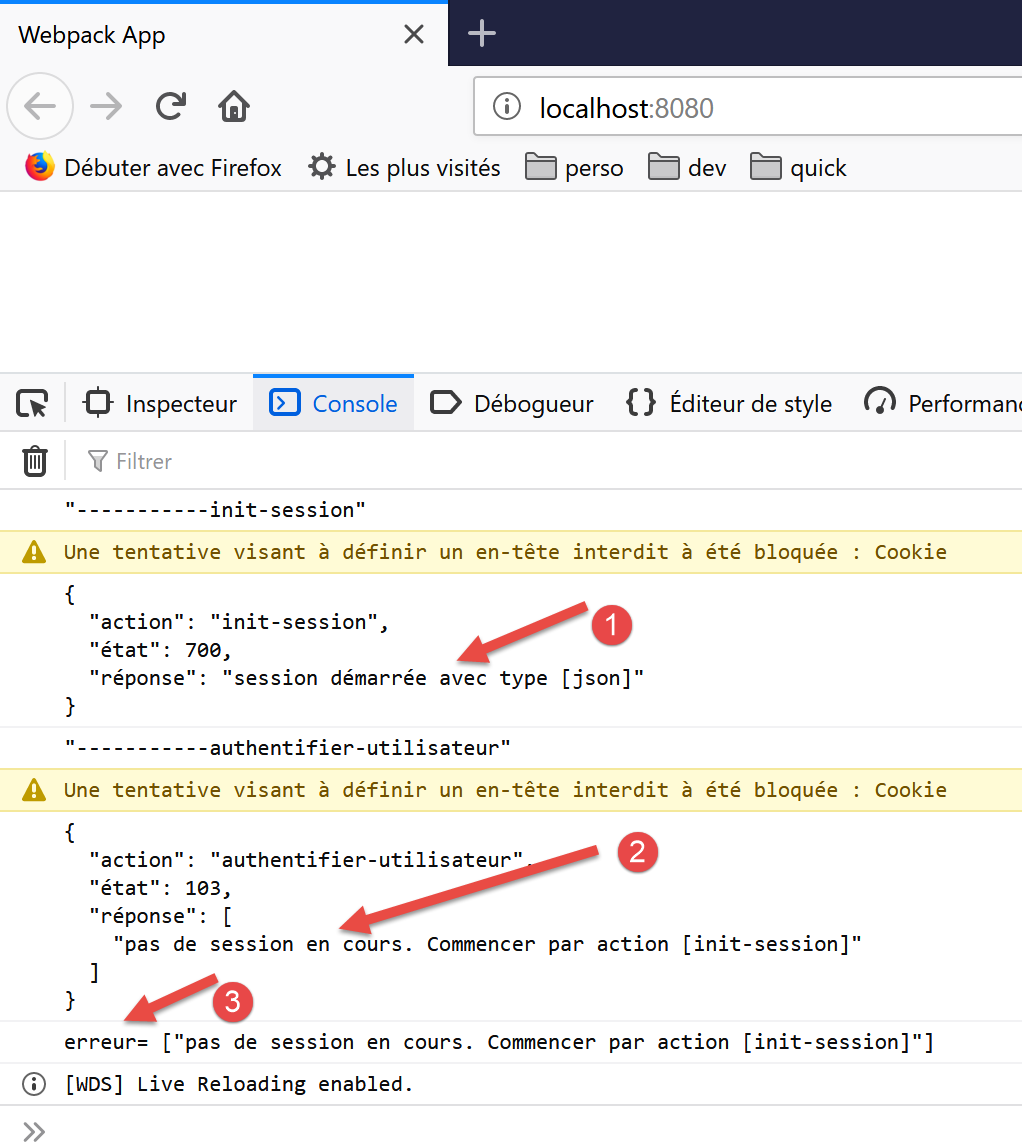
- In [1] wird die JSON-Sitzung korrekt initialisiert;
- In [2] schlägt die Aktion [authenticate-user] fehl: Der Server meldet, dass keine aktive Sitzung vorliegt. Das bedeutet, dass der JavaScript-Client das Sitzungs-Cookie, das er während der Aktion [init-session] gesendet hatte, nicht korrekt zurückgesendet hat;
Schauen wir uns einmal die Netzwerkinteraktionen an, die stattgefunden haben:
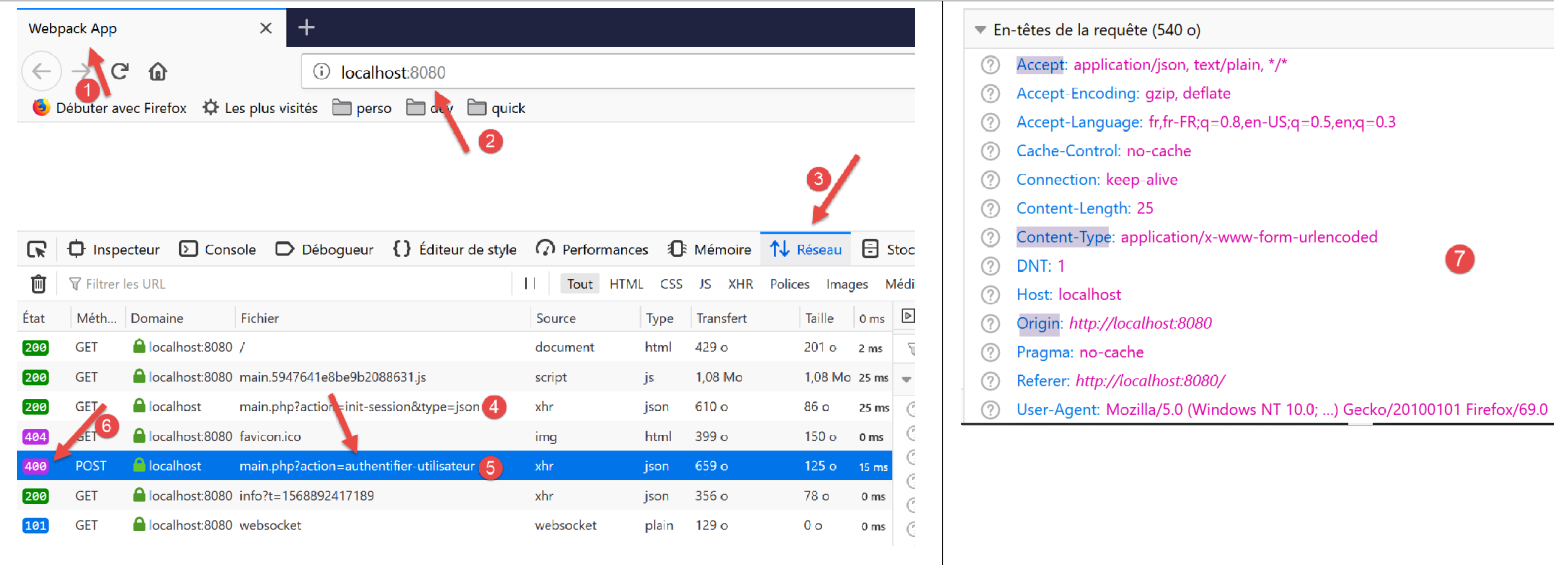
- in [4] die [init-session]-Anfrage. Sie wurde erfolgreich mit einem 200-Statuscode als Antwort abgeschlossen;
- in [5] die [authenticate-user]-Anfrage. Diese Anfrage schlägt mit einem 400-Statuscode (Bad Request) [6] in der Antwort fehl;
Wenn wir die HTTP-Header [7] der Anfrage [5] untersuchen, sehen wir, dass der JavaScript-Client den HTTP-Header [Cookie] nicht gesendet hat, der es ihm ermöglicht hätte, das ursprünglich vom Server gesendete Sitzungs-Cookie zurückzugeben. Aus diesem Grund meldet der Server, dass keine Sitzung vorliegt.
Damit der Client das Session-Cookie sendet, müssen Sie dem [axios]-Objekt eine Konfiguration hinzufügen:
// imports
import axios from 'axios';
import "core-js/stable";
import "regenerator-runtime/runtime";

// imports
import Dao from './Dao2';
import Métier from './Métier';

// asynchronous function [main]
async function main() {
  // axios configuration
  axios.defaults.timeout = 2000;
  axios.defaults.baseURL = 'http://localhost/php7/scripts-web/impots/version-14';
  axios.defaults.withCredentials = true;
  // layer instantiation [dao]
  const dao = new Dao(axios);
  // requests HTTP
  let taxAdminData;
...
Zeile 15 fordert an, dass Cookies in die HTTP-Header der [axios]-Anfrage aufgenommen werden. Beachten Sie, dass dies in der [node.js]-Umgebung nicht erforderlich war. Es gibt daher Codeunterschiede zwischen den beiden Umgebungen.
Sobald dieser Fehler behoben ist, läuft der JavaScript-Client normal:
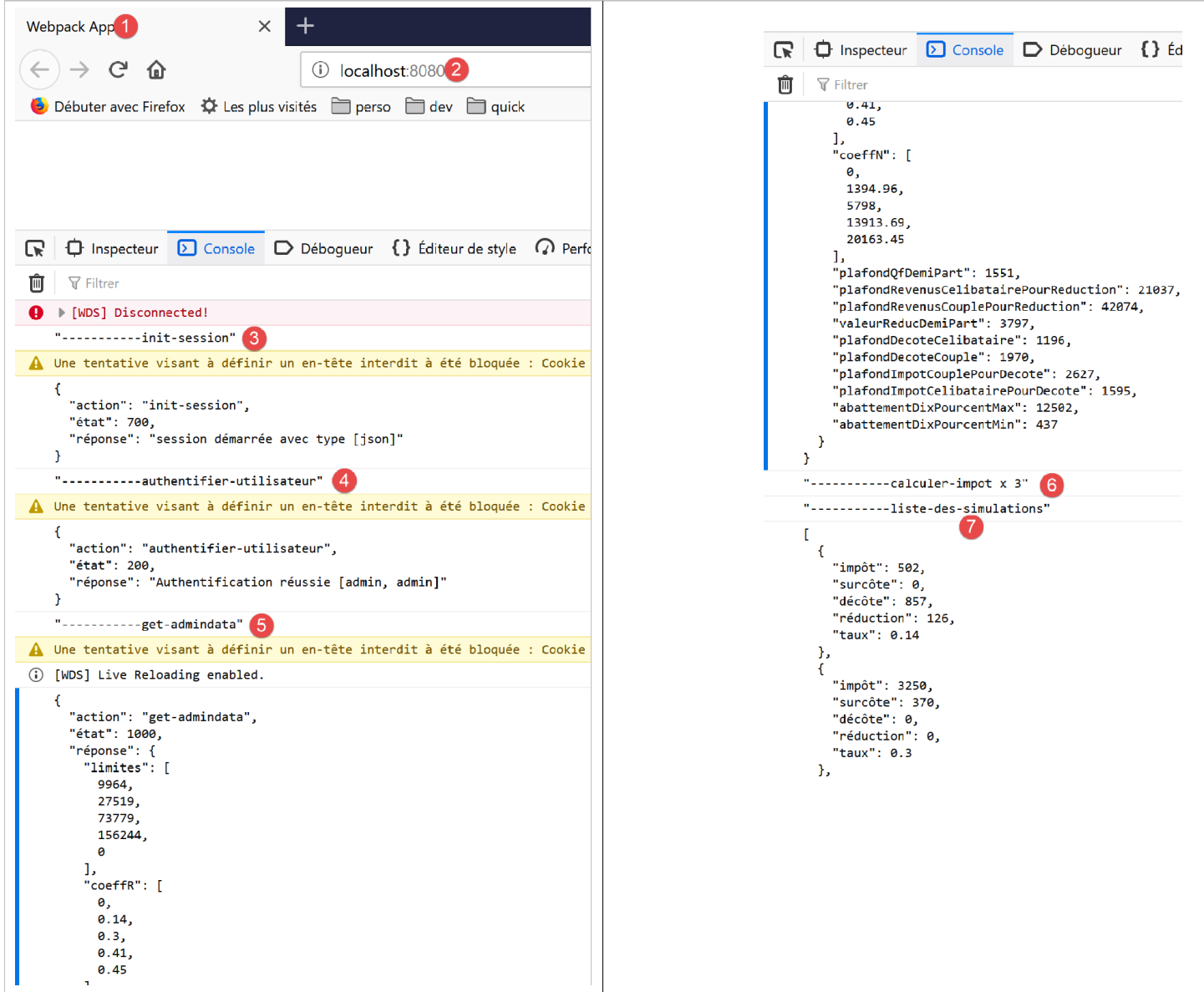
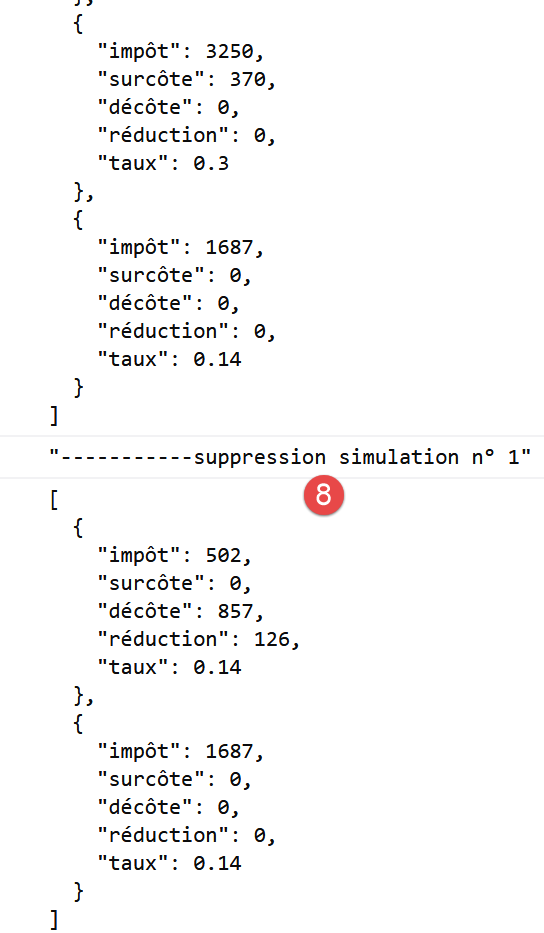
14.5. Verbesserung des HTTP-Clients 3
Wenn die vorherige [Dao2]-Klasse in einem Browser ausgeführt wird, ist eine Verwaltung von Sitzungscookies nicht erforderlich. Dies liegt daran, dass der Browser, der die [dao]-Schicht hostet, das Sitzungscookie verwaltet: Er sendet automatisch jedes Cookie zurück, das der Server an ihn sendet. Folglich kann die [Dao2]-Klasse als folgende [Dao3]-Klasse umgeschrieben werden:
"use strict";

// imports
import qs from "qs";

class Dao3 {
  // manufacturer
  constructor(axios) {
    this.axios = axios;
  }

  // init session
  async initSession() {
    // query options HHTP [get /main.php?action=init-session&type=json]
    const options = {
      method: "GET",
      // URL parameters
      params: {
        action: "init-session",
        type: "json"
      }
    };
    // execute query HTTP
    return await this.getRemoteData(options);
  }

  async authentifierUtilisateur(user, password) {
    // query options HHTP [post /main.php?action=authenticate-user]
    const options = {
      method: "POST",
      headers: {
        "Content-type": "application/x-www-form-urlencoded"
      },
      // body of POST
      data: qs.stringify({
        user: user,
        password: password
      }),
      // URL parameters
      params: {
        action: "authentifier-utilisateur"
      }
    };
    // execute query HTTP
    return await this.getRemoteData(options);
  }

  async getAdminData() {
    // query options HHTP [get /main.php?action=get-admindata]
    const options = {
      method: "GET",
      // URL parameters
      params: {
        action: "get-admindata"
      }
    };
    // execute query HTTP
    const data = await this.getRemoteData(options);
    // result
    return data;
  }

  async getRemoteData(options) {
    // execute query HTTP
    let response;
    try {
      // asynchronous request
      response = await this.axios.request("main.php", options);
    } catch (error) {
      // the [error] parameter is an exception instance - it can take various forms
      if (error.response) {
        // the server response is in [error.response]
        response = error.response;
      } else {
        // error restart
        throw error;
      }
    }
    // response is the entire HTTP response from the server (HTTP headers + response itself)
    // the server response is in [response.data]
    return response.data;
  }
}

// class export
export default Dao3;
Alles, was mit der Verwaltung des Verwaltungs-Cookies zu tun hat, ist verschwunden.
Wir ändern das vorherige Projekt wie folgt:
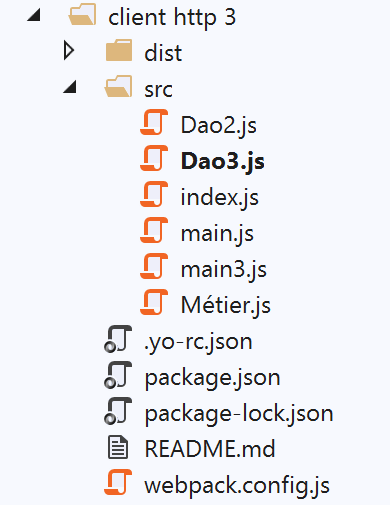
Im Ordner [src] haben wir zwei Dateien hinzugefügt:
- die soeben vorgestellte Klasse [Dao3];
- die Datei [main3], die für den Start der neuen Version zuständig ist;
Die Datei [main3] ist identisch mit der Datei [main] aus der vorherigen Version, verwendet nun aber die Klasse [Dao3]:
// imports
import axios from "axios";
import "core-js/stable";
import "regenerator-runtime/runtime";

// imports
import Dao from "./Dao3";
import Métier from "./Métier";

// asynchronous function [main]
async function main() {
  // axios configuration
  axios.defaults.timeout = 2000;
  axios.defaults.baseURL =
    "http://localhost/php7/scripts-web/impots/version-14";
  axios.defaults.withCredentials = true;
  // layer instantiation [dao]
  const dao = new Dao(axios);
  // requests HTTP
  ...
}

// log jSON
function log(object) {
  console.log(JSON.stringify(object, null, 2));
}

// execution
main();
Die Datei [webpack.config] wird so geändert, dass nun das Skript [main3] ausgeführt wird:
/* eslint-disable */

const path = require("path");
const webpack = require("webpack");

/*
 * SplitChunksPlugin is enabled by default and replaced
 * deprecated CommonsChunkPlugin. It automatically identifies modules which
 * should be splitted of chunk by heuristics using module duplication count and
 * module category (i. e. node_modules). And splits the chunks…
 *
 * It is safe to remove "splitChunks" from the generated configuration
 * and was added as an educational example.
 *
 * https://webpack.js.org/plugins/split-chunks-plugin/
 *
 */

const HtmlWebpackPlugin = require("html-webpack-plugin");

/*
 * We've enabled HtmlWebpackPlugin for you! This generates a html
 * page for you when you compile webpack, which will make you start
 * developing and prototyping faster.
 *
 * https://github.com/jantimon/html-webpack-plugin
 *
 */

module.exports = {
  mode: "development",
  //entry: "./src/mainjs",
  entry: "./src/main3.js",
  output: {
    filename: "[name].[chunkhash].js",
    path: path.resolve(__dirname, "dist")
  },

  plugins: [new webpack.ProgressPlugin(), new HtmlWebpackPlugin()],
...
};
Sobald dies erledigt ist, führen wir das Projekt aus, nachdem wir den Steuerberechnungsserver gestartet haben:
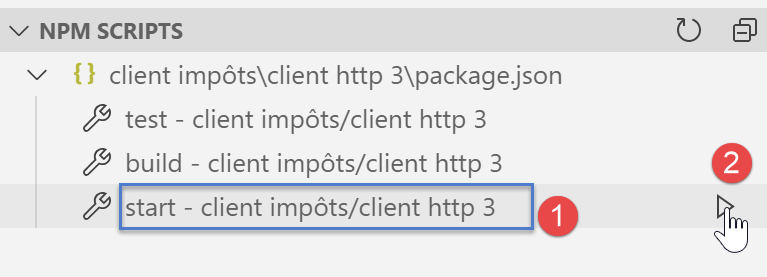
Die in der Browserkonsole angezeigten Ergebnisse sind identisch mit denen der vorherigen Version.
14.6. Fazit
Wir verfügen nun über alle notwendigen Werkzeuge, um JavaScript-Code für eine Webanwendung zu entwickeln. Wir können:
- den neuesten ECMAScript-Code verwenden;
- isolierte Teile dieses Codes in einer [node.js]-Umgebung testen, was das Debuggen und Testen vereinfacht;
- diesen Code anschließend mithilfe von [babel] und [webpack] in einen Browser portieren;