3. Die Grundlagen von JavaScript
Hinweis: Im Folgenden bezeichnet der Begriff [Javascript] stets den Standard ECMAScript 6.
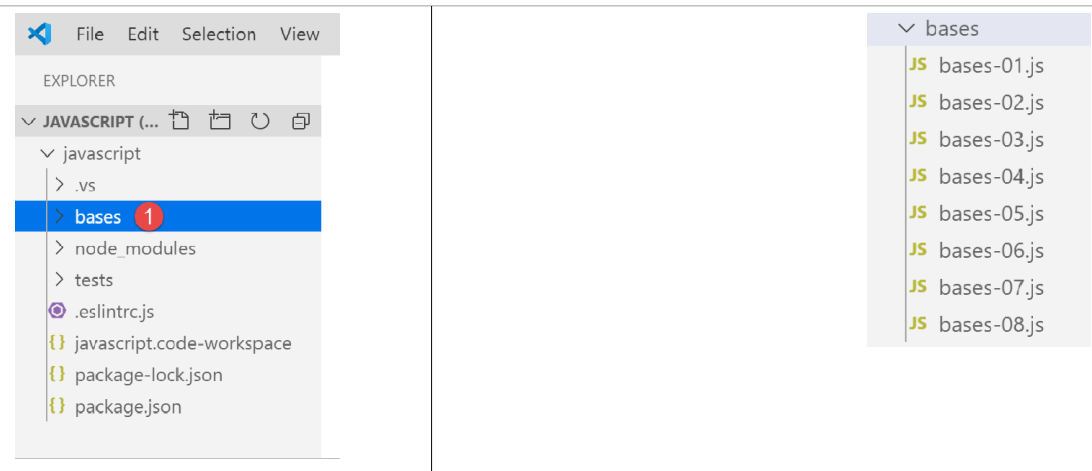
Erstellen Sie innerhalb des vorherigen JavaScript-Projekts einen Ordner mit dem Namen [bases]. Dort werden wir die Beispiele dieses Abschnitts ablegen:
3.1. Skript [bases-01]
Um die Grundlagen von PHP7 vorzustellen, hatten wir den folgenden Code verwendet (siehe Absatz „Link“):
<?php

// Dies ist ein Kommentar
// Variable, die ohne vorherige Deklaration verwendet wird
$nom = "dupont";
// eine Bildschirmausgabe
print "nom=$nom\n";
// ein Array mit Elementen unterschiedlichen Typs
$tableau = array("un", "deux", 3, 4);
// die Anzahl der Elemente
$n = count($tableau);
// eine Schleife
for ($i = 0; $i < $n; $i++) {
  print "tableau[$i]=$tableau[$i]\n";
}
// Initialisierung von 2 Variablen mit dem Inhalt eines Arrays
list($chaine1, $chaine2) = array("chaine1", "chaine2");
// Verkettung der beiden Zeichenfolgen
$chaine3 = $chaine1 . $chaine2;
// Anzeige des Ergebnisses
print "[$chaine1,$chaine2,$chaine3]\n";
// Verwendung einer Funktion
affiche($chaine1);
// Der Typ einer Variablen kann bekannt sein
afficheType("n", $n);
afficheType("chaine1", $chaine1);
afficheType("tableau", $tableau);
// Der Typ einer Variablen kann sich während der Ausführung ändern
$n = "a changé";
afficheType("n", $n);
// Eine Funktion kann ein Ergebnis zurückgeben
$res1 = f1(4);
print "res1=$res1\n";
// Eine Funktion kann ein Array von Werten zurückgeben
list($res1, $res2, $res3) = f2();
print "(res1,res2,res3)=[$res1,$res2,$res3]\n";
// Man hätte diese Werte in einem Array abrufen können
$t = f2();
for ($i = 0; $i < count($t); $i++) {
  print "t[$i]=$t[$i]\n";
}
// Tests
for ($i = 0; $i < count($t); $i++) {
  // zeigt nur Zeichenketten an
  if (getType($t[$i]) === "string") {
    print "t[$i]=$t[$i]\n";
  }
}
// Vergleichsoperatoren == und ===
if("2"==2){
  print "avec l'opérateur ==, la chaîne 2 est égale à l'entier 2\n";
}else{
  print "avec l'opérateur ==, la chaîne 2 n'est pas égale à l'entier 2\n";
}
if("2"===2){
  print "avec l'opérateur ===, la chaîne 2 est égale à l'entier 2\n";
}
else{
  print "avec l'opérateur ===, la chaîne 2 n'est pas égale à l'entier 2\n";
}
// weitere Tests
for ($i = 0; $i < count($t); $i++) {
  // zeigt nur ganze Zahlen >10 an
  if (getType($t[$i]) === "integer" and $t[$i] > 10) {
    print "t[$i]=$t[$i]\n";
  }
}
// eine while-Schleife
$t = [8, 5, 0, -2, 3, 4];
$i = 0;
$somme = 0;
while ($i < count($t) and $t[$i] > 0) {
  print "t[$i]=$t[$i]\n";
  $somme += $t[$i];   //$somme=$somme+$t[$i]
  $i++;               //$i=$i+1
}//while
print "somme=$somme\n";

// Programmende
exit;

//----------------------------------
function affiche($chaine) {
  // zeigt $chaine an
  print "chaine=$chaine\n";
}

//zeigt an
//----------------------------------
function afficheType($name, $variable) {
  // zeigt den Typ von $variable an
  print "type[variable $" . $name . "]=" . getType($variable) . "\n";
}

//afficheType
//----------------------------------
function f1($param) {
  // addiert 10 zu $param
  return $param + 10;
}

//----------------------------------
function f2() {
  // gibt 3 Werte zurück
  return array("un", 0, 100);
}
?>
In JavaScript übersetzt ergibt dies den folgenden Code:
'use strict';
// Dies ist ein Kommentar
// Konstante
const nom = "dupont";
// eine Bildschirmausgabe
console.log("nom : ", nom);
// ein Array mit Elementen unterschiedlichen Typs
const tableau = ["un", "deux", 3, 4];
// die Anzahl der Elemente
let n = tableau.length;
// eine Schleife
for (let i = 0; i < n; i++) {
  console.log("tableau[", i, "] = ", tableau[i]);
}
// Initialisierung von 2 Variablen mit dem Inhalt eines Arrays
let [chaine1, chaine2] = ["chaine1", "chaine2"];
// Verkettung der beiden Zeichenfolgen
const chaine3 = chaine1 + chaine2;
// Anzeige des Ergebnisses
console.log([chaine1, chaine2, chaine3]);
// Verwendung einer Funktion
affiche(chaine1);
// Der Typ einer Variablen kann bekannt sein
afficheType("n", n);
afficheType("chaine1", chaine1);
afficheType("tableau", tableau);
// Der Typ einer Variablen kann sich während der Ausführung ändern
n = "a changé";
afficheType("n", n);
// Eine Funktion kann ein Ergebnis zurückgeben
let res1 = f1(4);
console.log("res1=", res1);
// Eine Funktion kann ein Array von Werten zurückgeben
let res2, res3;
[res1, res2, res3] = f2();
console.log("(res1,res2,res3)=", [res1, res2, res3]);
// Man hätte diese Werte in einem Array abrufen können
let t = f2();
for (let i = 0; i < t.length; i++) {
  console.log("t[i]=", t[i]);
}
// Tests
for (let i = 0; i < t.length; i++) {
  // zeigt nur die Zeichenfolgen an
  if (typeof (t[i]) === "string") {
    console.log("t[i]=", t[i]);
  }
}
// Vergleichsoperatoren == und ===
if ("2" == 2) {
  console.log("avec l'opérateur ==, la chaîne 2 est égale à l'entier 2");
} else {
  console.log("avec l'opérateur ==, la chaîne 2 n'est pas égale à l'entier 2");
}
if ("2" === 2) {
  console.log("avec l'opérateur ===, la chaîne 2 est égale à l'entier 2");
} else {
  console.log("avec l'opérateur ===, la chaîne 2 n'est pas égale à l'entier 2");
}
// weitere Tests
for (let i = 0; i < t.length; i++) {
  // zeigt nur ganze Zahlen >10 an
  if (typeof (t[i]) === "number" && Math.floor(t[i]) === t[i] && t[i] > 10) {
    console.log("t[i]=", t[i]);
  }
}
// eine while-Schleife
t = [8, 5, 0, -2, 3, 4];
let i = 0;
let somme = 0;
while (i < t.length && t[i] > 0) {
  console.log("t[i]=", t[i]);
  somme += t[i];
  i++;
}
console.log("somme=", somme);

// Das Programm wird beendet, da kein ausführbarer Code mehr vorhanden ist

//zeigt an
//----------------------------------
function affiche(chaine) {
  // gibt eine Zeichenkette aus
  console.log("chaine=", chaine);
}

//afficheType
//----------------------------------
function afficheType(name, variable) {
  // zeigt den Variablentyp an
  console.log("type[variable ", name, "]=", typeof (variable));
}

//----------------------------------
function f1(param) {
  // addiert 10 zu „param“
  return param + 10;
}

//----------------------------------
function f2() {
  // gibt 3 Werte zurück
  return ["un", 0, 100];
}
Lassen Sie uns die Unterschiede zwischen den Codes PHP und ECMAScript 6 anhand der Deklaration [use strict] (Zeile 1) erläutern:
- Der erste Unterschied besteht darin, dass in ECMAScript die Variablen mit den folgenden Schlüsselwörtern deklariert werden:
- [let], um eine Variable zu deklarieren, deren Wert sich während der Ausführung des Codes ändern kann;
- [const], um eine Variable zu deklarieren, deren Wert sich während der Ausführung des Codes nicht ändert (also eine Konstante);
- Man kann anstelle von [let] auch das Schlüsselwort [var] verwenden. Dies war das Schlüsselwort, das bei ECMAScript 5 verwendet wurde. Wir werden es in diesem Kurs jedoch nicht verwenden;
- Zeile 6: Die Anzeigemethode [console.log] kann alle Arten von Daten anzeigen: Zeichenketten, Zahlen, Boolesche Werte, Arrays, Objekte. Die Methode PHP [print] kann Arrays und Objekte nicht nativ anzeigen. Im Ausdruck [console.log] ist [console] ein Objekt und [log] eine Methode dieses Objekts;
- Zeile 8: JavaScript-Arrays sind Objekte, auf die über einen Zeiger verwiesen wird. Wenn man schreibt:
const tableau = ["un", "deux", 3, 4];
ist die Variable [tableau] ein Zeiger auf das Literal-Array ["un", "deux", 3, 4]. Eine Änderung des Array-Inhalts hat keine Auswirkung auf den Zeiger. Daher wird ein Array meist mit dem Schlüsselwort [const] deklariert. In PHP wird ein Array nicht über einen Zeiger referenziert. Es handelt sich um einen Literalwert;
- Zeile 12: Die Schleifenvariable [i] wird (let) innerhalb der Schleife deklariert. Das Schlüsselwort [let] beachtet den Blockbereich (Code zwischen geschweiften Klammern). Somit ist die Variable [i] aus Zeile 12 nur innerhalb der Schleife bekannt;
- Zeile 18: Der Operator zur Verkettung von Zeichenketten ist in JavaScript der Operator „+“, in PHP der Operator „.“. Eine Besonderheit dieses Operators ist, dass er Vorrang vor dem Additionsoperator „+“ hat. Somit gilt:
- In PHP ergibt „1“ + 2 die Zahl 3;
- in JavaScript ergibt „1“ + 2 die Zeichenkette „12“;
- Zeile 20: [console.log] kann Arrays anzeigen;
- Zeile 82: In JavaScript ist es nicht möglich, den Typ der Parameter einer Funktion anzugeben;
- Zeile 91: Mit dem Operator [typeof] lässt sich der Typ eines Datums ermitteln. Es gibt vier davon: Zahl, Zeichenkette, Boolescher Wert und Objekt. Es sei angemerkt, dass es in JavaScript weder einen Typ [integer] noch einen Typ [tableau] gibt. Wie bereits erwähnt, werden Arrays über Zeiger verwaltet und fallen in die Kategorie der Objekte;
- Zeilen 50–59: Wie in PHP verfügt JavaScript über zwei Vergleichsoperatoren, == und „===“, die dieselbe Bedeutung haben wie in PHP. ESLint weist meist auf den Operator == als möglichen Fehler hin. Es sollte systematisch der Operator ‘===’ verwendet werden;
- Zeile 79: Man hätte die Anweisung [return] verwenden können, aber ESLint löst die Warnung aus, dass [return] nur innerhalb einer Funktion verwendet werden darf;
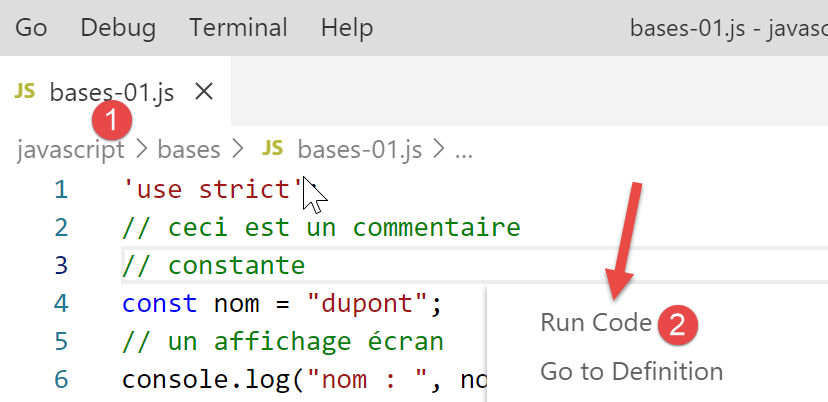
Führen wir diesen Code aus:
Die Ergebnisse der Ausführung:
[Running] C:\myprograms\laragon-lite\bin\nodejs\node-v10\node.exe "c:\Temp\19-09-01\javascript\bases\bases-01.js"
nom : dupont
tableau[ 0 ] = un
tableau[ 1 ] = deux
tableau[ 2 ] = 3
tableau[ 3 ] = 4
[ 'chaine1', 'chaine2', 'chaine1chaine2' ]
chaine= chaine1
type[variable n ]= number
type[variable chaine1 ]= string
type[variable tableau ]= object
type[variable n ]= string
res1= 14
(res1,res2,res3)= [ 'un', 0, 100 ]
t[ 0 ]= un
t[ 1 ]= 0
t[ 2 ]= 100
t[ 0 ]= un
avec l'opérateur ==, la chaîne 2 est égale à l'entier 2
avec l'opérateur ===, la chaîne 2 n'est pas égale à l'entier 2
t[ 2 ]= 100
t[ 0 ]= 8
t[ 1 ]= 5
somme= 13

[Done] exited with code=0 in 0.316 seconds
Im geschriebenen Code meldet ESLINT zwei Fehler:
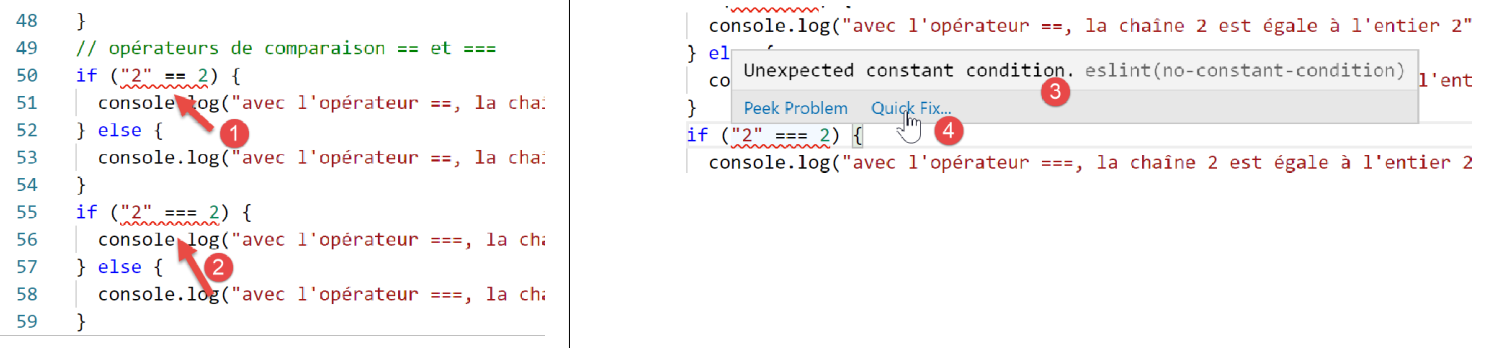
- Wenn man mit dem Mauszeiger über die rote Zeile der Warnung fährt, erscheint die Fehlermeldung [3]. Hier erkennt ESLint nicht, dass zwei Konstanten verglichen werden. Einer der beiden Operanden müsste eine Variable sein;
- in [4] gibt es eine Option [Quick Fix], mit der man die Warnung unterdrücken kann, wenn man den Fehler nicht beheben möchte;

- In [5] besteht die Möglichkeit, die Warnung für die aktuelle Zeile oder für die gesamte Datei zu deaktivieren. Wir wählen hier die letztere Option. Die Zeile [6] wird dann am Anfang der Datei generiert;
3.2. Skript [bases-02]
Das Skript [bases-02] veranschaulicht die Verwendung der Schlüsselwörter [let] und [const]:
'use strict';
// Um eine Variable zu initialisieren, verwendet man „let“ oder „const“
// „let“ für Variablen
let x = 4;
x++;
console.log(x);
// „const“ für Konstanten
const y = 10;
x += y;
// verboten
y++;
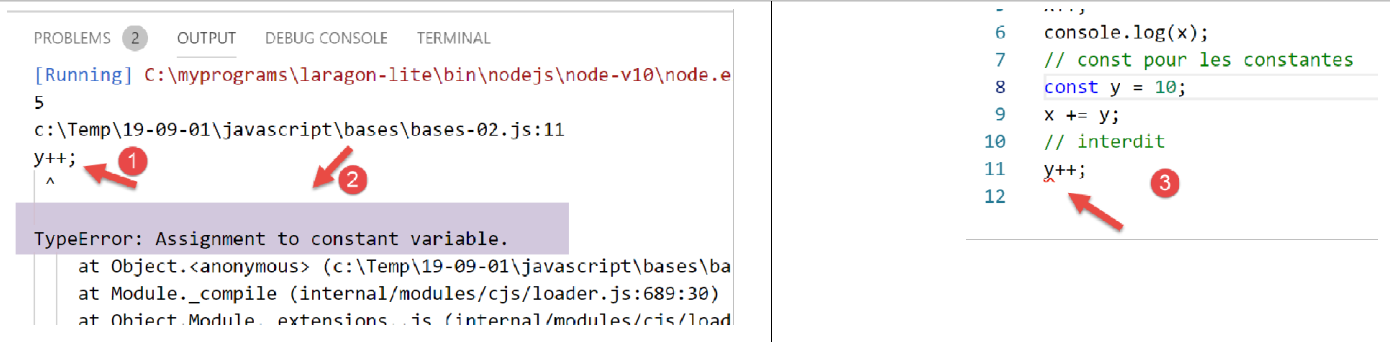
- Zeile 11 verursacht bei der Ausführung von [1-2] einen Fehler. Dieser wird vor der Ausführung von [3] durch ESLint gemeldet:
3.3. Skript [bases-03]
Das Skript [bases-03] überprüft den Gültigkeitsbereich der Variablen in JavaScript:
'use strict';
// Gültigkeitsbereich von Variablen
let count = 1;
function doSomething() {
  // „count“ ist hier bekannt
  console.log("count=",count);
}
// Aufruf
doSomething();
- Die außerhalb der Funktion [doSomething] deklarierte Variable [count] ist jedoch in dieser Funktion bekannt. Dies ist ein grundlegender Unterschied zu PHP;
Ausführung
[Running] C:\myprograms\laragon-lite\bin\nodejs\node-v10\node.exe "c:\Temp\19-09-01\javascript\bases\bases-03.js"
count= 1

[Done] exited with code=0 in 0.3 seconds
3.4. Skript [bases-04]
Eine lokale Variable überdeckt eine globale Variable mit demselben Namen:
'use strict';
// Gültigkeitsbereich der Variablen
const count = 1;
function doSomething() {
  // Die lokale Variable überdeckt die globale Variable
  const count = 2;
  console.log("count inside function=",count);
}
// globale Variable
console.log("count outside function=",count);
// lokale Variable
doSomething();
Ausführung
[Running] C:\myprograms\laragon-lite\bin\nodejs\node-v10\node.exe "c:\Temp\19-09-01\javascript\bases\bases-04.js"
count outside function= 1
count inside function= 2

[Done] exited with code=0 in 0.246 seconds
3.5. Skript [bases-05]
Eine in einer Funktion definierte Variable ist außerhalb dieser Funktion nicht bekannt:
'use strict';
// Gültigkeitsbereich von Variablen
function doSomething() {
  // lokale Variable innerhalb der Funktion
  const count = 2;
  console.log("count inside function=", count);
}
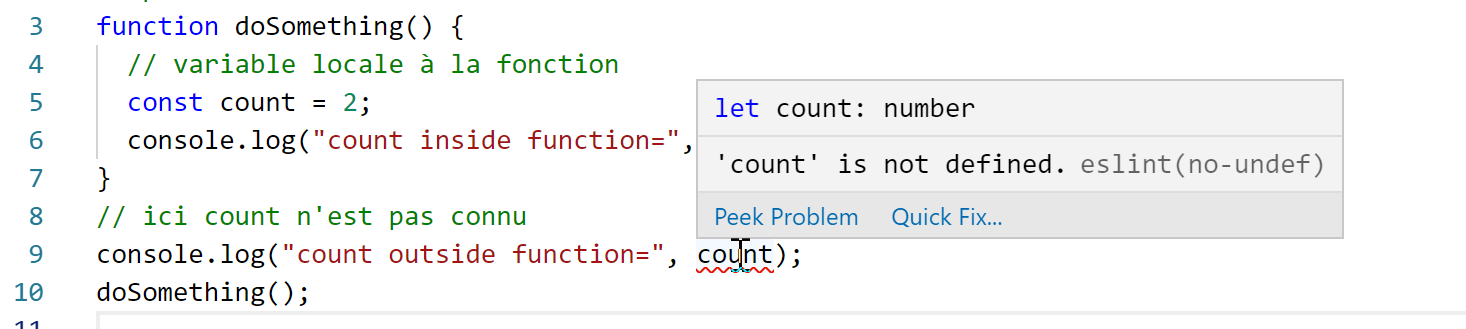
// Hier ist „count“ nicht bekannt
console.log("count outside function=", count);
doSomething();
ESLint meldet einen Fehler in Zeile 9:
3.6. Skript [bases-06]
Die Schlüsselwörter [let] und [const] definieren Variablen mit dem Geltungsbereich [bloc] (Code in geschweiften Klammern), das Schlüsselwort [var] jedoch nicht:
'use strict';
// Mit dem Schlüsselwort [let] lässt sich eine Variable mit Block-Gültigkeitsbereich definieren
{
  // Die Variable [count] ist nur in diesem Block bekannt
  let count = 1;
  console.log("count=", count);
}
// Hier ist die Variable [count] nicht bekannt
count++;

// Mit dem Schlüsselwort [const] kann eine Variable mit Blockgültigkeit definiert werden
{
  // Die Variable [count2] ist nur in diesem Block bekannt
  const count2 = 1;
  console.log("count=", count2);
}
// Hier ist die Variable [count2] nicht bekannt
count2++;

// Mit dem Schlüsselwort [var] kann keine Variable mit Blockgültigkeit definiert werden
{
  // Die Variable [count3] ist global bekannt
  var count3 = 1;
  console.log("count=", count3);
}
// Hier ist die Variable [count3] bekannt
count3++;
Anmerkungen
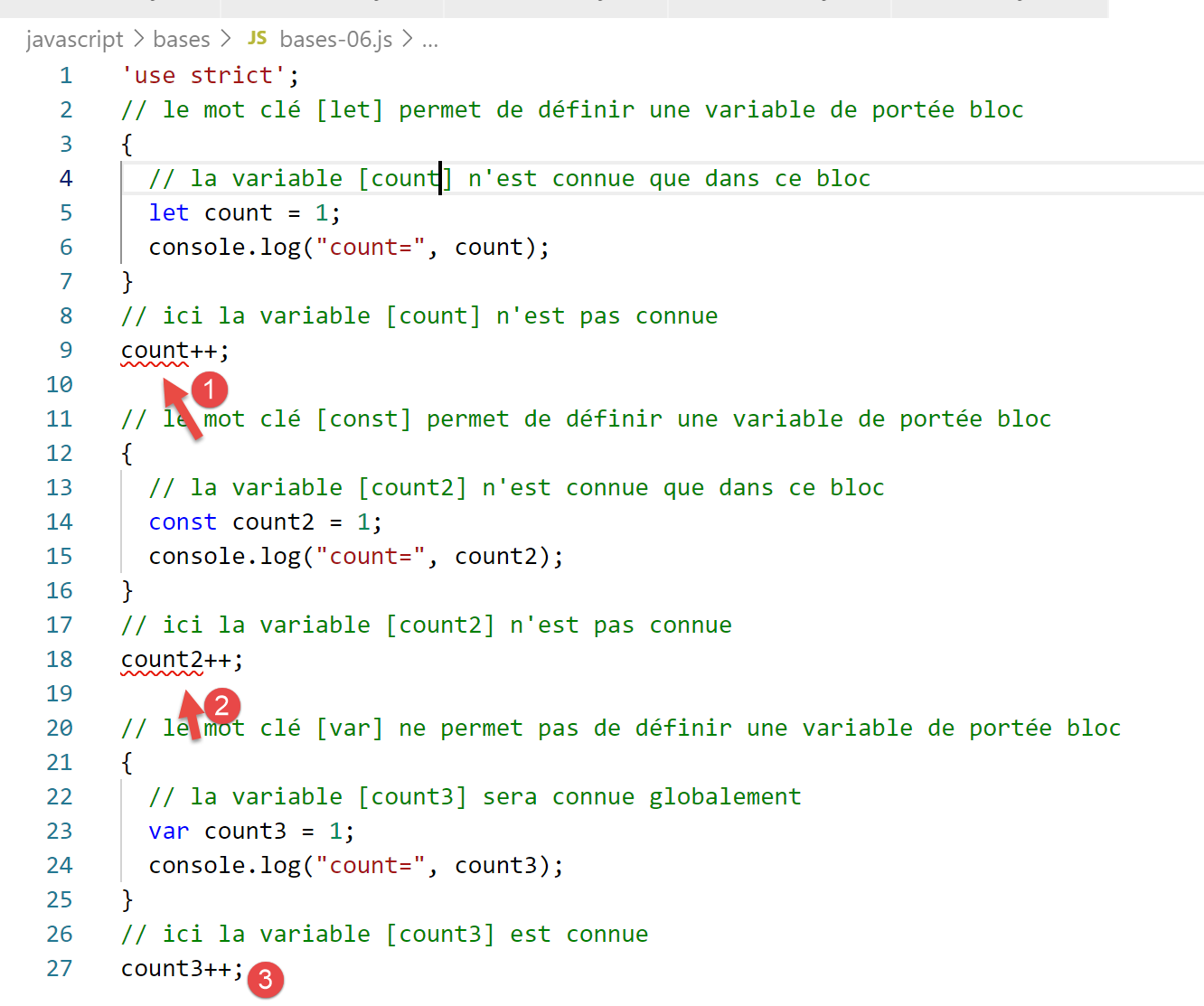
- Zeile 5: Die Variable [count] ist nur in dem Codeblock bekannt, in dem sie deklariert ist (Zeilen 3–7);
- Zeile 14: Die Konstante [count2] ist nur in dem Codeblock bekannt, in dem sie deklariert ist (Zeilen 12–16);
- Zeile 23: Die Variable [count3] ist außerhalb des Codeblocks bekannt, in dem sie deklariert ist (Zeilen 21–25);
ESLint meldet folgende Fehler:
Aus diesen Gründen, die mit dem Gültigkeitsbereich des Blocks zusammenhängen, werden wir im Folgenden nur die Schlüsselwörter [let] und [const] verwenden.
3.7. Skript [bases-07]
Datentypen in JavaScript:
'use strict';

// Datentyp jS
const var1 = 10;
const var2 = "abc";
const var3 = true;
const var4 = [1, 2, 3];
const var5 = {
  nom: 'axèle'
};
const var6 = function () {
  return +3;
}
// Anzeige der Datentypen
console.log("typeof(var1)=", typeof (var1));
console.log("typeof(var2)=", typeof (var2));
console.log("typeof(var3)=", typeof (var3));
console.log("typeof(var4)=", typeof (var4));
console.log("typeof(var5)=", typeof (var5));
console.log("typeof(var6)=", typeof (var6));
Ausführung
[Running] C:\myprograms\laragon-lite\bin\nodejs\node-v10\node.exe "c:\Temp\19-09-01\javascript\bases\bases-07.js"
typeof(var1)= number
typeof(var2)= string
typeof(var3)= boolean
typeof(var4)= object
typeof(var5)= object
typeof(var6)= function

[Done] exited with code=0 in 0.26 seconds
Kommentare
- Zeile 7 (Code): Ein Array ist ein Objekt. Insofern ist [var4] ein Zeiger auf das Array, nicht das Array selbst;
- Zeile 8 (Code): [var5] ist ein Zeiger auf ein Literalobjekt. Wir werden sehen, dass Literalobjekte in JavaScript den Klasseninstanzen von PHP sehr ähnlich sind. Auch sie werden über Zeiger referenziert;
- Zeile 11 (Code): Eine Variable kann vom Typ [fonction] sein (Zeile 7 der Ergebnisse);
3.8. Skript [bases-08]
Dieses Skript zeigt die möglichen Typänderungen in JavaScript.
'use strict';

// implizite Typumwandlungen
// Typ --> bool
console.log("---------------[Conversion implicite vers un booléen]------------------------------");
showBool("abcd");
showBool("");
showBool([1, 2, 3]);
showBool([]);
showBool(null);
showBool(0.0);
showBool(0);
showBool(4.6);
showBool({});
showBool(undefined);

function showBool(data) {
  // Die Konvertierung von Daten in einen booleschen Wert erfolgt automatisch im folgenden Test
  console.log("[data=", data, "], [type(data)]=", typeof (data), "[valeur booléenne(data)]=", data ? true : false);
}

// implizite Typumwandlungen in e inen numerischen Typ
console.log("---------------[Conversion implicite vers un nombre]------------------------------");
showNumber("12");
showNumber("45.67");
showNumber("abcd");

function showNumber(data) {
  // „data + 1“ funktioniert nicht, da jS in diesem Fall eine Zeichenfolgenverkettung anstelle einer Addition durchführt
  const nombre = data * 1;
  console.log("[data=", data, "], [type(data)]=", typeof (data), "[nombre]=", nombre, "[type(nombre)]=", typeof (nombre));
}

// Explizite Typumwandlungen in einen Booleschen Wert
console.log("---------------[Conversion explicite vers un booléen]------------------------------");
showBool2("abcd");
showBool2("");
showBool2([1, 2, 3]);
showBool2([]);
showBool2(null);
showBool2(0.0);
showBool2(0);
showBool2(4.6);
showBool2({});
showBool2(undefined);

function showBool2(data) {
  // Die Konvertierung von „data“ in einen Booleschen Wert erfolgt explizit im folgenden Test
  console.log("[", data, "], [type(data)]=", typeof (data), "[valeur booléenne(data)]=", Boolean(data));
}
// Explizite Typumwandlungen in „Number“
console.log("---------------[Conversion explicite vers un nombre]------------------------------");
showNumber2("12.45");
showNumber2(67.8);
showNumber2(true);
showNumber2(null);

function showNumber2(data) {
  const nombre = Number(data);
  console.log("[data=", data, "], [type(data)]=", typeof (data), "[nombre]=", nombre, "[type(nombre)]=", typeof (nombre));
}

// in String
console.log("---------------[Conversion explicite vers un string]------------------------------");
showString(5);
showString(6.7);
showString(false);
showString(null);

function showString(data) {
  const chaîne = String(data);
  console.log("[data=", data, "], [type(data)]=", typeof (data), "[chaîne]=", chaîne, "[type(chaîne)]=", typeof (chaîne));
}

// einige unerwartete implizite Konvertierungen
console.log("---------------[Autres cas]------------------------------");
const string1 = '1000.78';
// Standardmäßige Verkettung von Zeichenfolgen
const data1 = string1 + 1.034;
console.log("data1=", data1, "type=", typeof (data1));
const data2 = 1.034 + string1;
console.log("data2=", data2, "type=", typeof (data2));
// explizite Konvertierung in eine Zahl
const data3 = Number(string1) + 1.034;
console.log("data3=", data3, "type=", typeof (data3));
// „true“ wird in die Zahl 1 konvertiert
const data4 = true * 1.18;
console.log("data4=", data4, "type=", typeof (data4));
// „false“ wird in die Zahl 0 konvertiert
const data5 = false * 1.18;
console.log("data5=", data5, "type=", typeof (data5));
Ausführung
[Running] C:\myprograms\laragon-lite\bin\nodejs\node-v10\node.exe "c:\Data\st-2019\dev\es6\javascript\bases\bases-08.js"
---------------[Conversion implicite vers un booléen]------------------------------
[data= abcd ], [type(data)]= string [valeur booléenne(data)]= true
[data= ], [type(data)]= string [valeur booléenne(data)]= false
[data= [ 1, 2, 3 ] ], [type(data)]= object [valeur booléenne(data)]= true
[data= [] ], [type(data)]= object [valeur booléenne(data)]= true
[data= null ], [type(data)]= object [valeur booléenne(data)]= false
[data= 0 ], [type(data)]= number [valeur booléenne(data)]= false
[data= 0 ], [type(data)]= number [valeur booléenne(data)]= false
[data= 4.6 ], [type(data)]= number [valeur booléenne(data)]= true
[data= {} ], [type(data)]= object [valeur booléenne(data)]= true
[data= undefined ], [type(data)]= undefined [valeur booléenne(data)]= false
---------------[Conversion implicite vers un nombre]------------------------------
[data= 12 ], [type(data)]= string [nombre]= 12 [type(nombre)]= number
[data= 45.67 ], [type(data)]= string [nombre]= 45.67 [type(nombre)]= number
[data= abcd ], [type(data)]= string [nombre]= NaN [type(nombre)]= number
---------------[Conversion explicite vers un booléen]------------------------------
[ abcd ], [type(data)]= string [valeur booléenne(data)]= true
[ ], [type(data)]= string [valeur booléenne(data)]= false
[ [ 1, 2, 3 ] ], [type(data)]= object [valeur booléenne(data)]= true
[ [] ], [type(data)]= object [valeur booléenne(data)]= true
[ null ], [type(data)]= object [valeur booléenne(data)]= false
[ 0 ], [type(data)]= number [valeur booléenne(data)]= false
[ 0 ], [type(data)]= number [valeur booléenne(data)]= false
[ 4.6 ], [type(data)]= number [valeur booléenne(data)]= true
[ {} ], [type(data)]= object [valeur booléenne(data)]= true
[ undefined ], [type(data)]= undefined [valeur booléenne(data)]= false
---------------[Conversion explicite vers un nombre]------------------------------
[data= 12.45 ], [type(data)]= string [nombre]= 12.45 [type(nombre)]= number
[data= 67.8 ], [type(data)]= number [nombre]= 67.8 [type(nombre)]= number
[data= true ], [type(data)]= boolean [nombre]= 1 [type(nombre)]= number
[data= null ], [type(data)]= object [nombre]= 0 [type(nombre)]= number
---------------[Conversion explicite vers un string]------------------------------
[data= 5 ], [type(data)]= number [chaîne]= 5 [type(chaîne)]= string
[data= 6.7 ], [type(data)]= number [chaîne]= 6.7 [type(chaîne)]= string
[data= false ], [type(data)]= boolean [chaîne]= false [type(chaîne)]= string
[data= null ], [type(data)]= object [chaîne]= null [type(chaîne)]= string
---------------[Autres cas]------------------------------
data1= 1000.781.034 type= string
data2= 1.0341000.78 type= string
data3= 1001.814 type= number
data4= 1.18 type= number
data5= 0 type= number