Skip to content

9. استخدام نظام إدارة قواعد البيانات MySQL
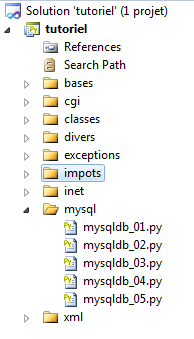
9.1. تثبيت وحدة MySQLdb

سنكتب نصوصًا برمجية باستخدام قاعدة بيانات MySQL:

يتم تضمين وظائف Python الخاصة بإدارة قاعدة بيانات MySQL في وحدة MySQLdb التي لا تتضمنها الحزمة الأولية لـ Python. لذلك يجب عليك تنزيل هذه الوحدة وتثبيتها. وإليك إحدى الطرق للقيام بذلك:

  • في قائمة البرامج، حدد [1] مدير حزم Python. ستظهر بعد ذلك نافذة الأوامر [2].

ابحث عن الكلمة الرئيسية mysql في الحزم:


C:\Documents and Settings\st>pypm search mysql
Get: [pypm-be.activestate.com] :repository-index:
Get: [pypm-free.activestate.com] :repository-index:
autosync: synced 2 repositories
  chartio                    Setup wizard and connection client for connecting
  chartio-setup              Setup wizard and connection client for connecting
  cns.recipe.zmysqlda        Recipe for installing ZMySQLDA
  collective.recipe.zmysqlda Recipe for installing ZMySQLDA
  django-mysql-manager       DESCRIPTION_DESCRIPTION_DESCRIPTION
  jaraco.mysql               MySQLDB-compatible MySQL wrapper by Jason R. Coomb
  lovely.testlayers          mysql, postgres nginx, memcached cassandra test la
  mtstat-mysql               MySQL Plugins for mtstat
  mysql-autodoc              Generate HTML documentation from a mysql database
  mysql-python               Python interface to MySQL
  mysqldbda                  MySQL Database adapter
  products.zmysqlda          MySQL Zope2 adapter.
  pymysql                    Pure Python MySQL Driver
  pymysql-sa                 PyMySQL dialect for SQLAlchemy.
  pymysql3                   Pure Python MySQL Driver
  sa-mysql-dt                Alternative implementation of DateTime column for
  schemaobject               Iterate over a MySQL database schema as a Python o
  schemasync                 A MySQL Schema Synchronization Utility
  simplestore                A datastore layer built on top of MySQL in Python.
  sqlbean                    A auto maping ORM for MYSQL and can bind with memc
  sqlwitch                   sqlwitch offers idiomatic SQL generation on top of
  tiddlywebplugins.mysql     MySQL-based store for tiddlyweb
  tiddlywebplugins.mysql2    MySQL-based store for tiddlyweb
zest.recipe.mysql          A Buildout recipe to setup a MySQL database.

تم سرد جميع الوحدات التي يحتوي اسمها أو وصفها على الكلمة الرئيسية "mysql". الوحدة التي تهمنا هي [mysql-python]، السطر 14. لنقم بتثبيتها:


C:\Documents and Settings\st>pypm install mysql-python
The following packages will be installed into "%APPDATA%\Python" (2.7):
 mysql-python-1.2.3
Hit: [pypm-free.activestate.com] mysql-python 1.2.3
Installing mysql-python-1.2.3
 
C:\Documents and Settings\st>echo %APPDATA%
C:\Documents and Settings\st\Application Data
  • السطر 5: تم تثبيت حزمة mysql-python-1.2.3 في المجلد "%APPDATA%\Python"، حيث APPDATA هو المجلد المحدد في السطر 8.

قد تفشل هذه العملية في الحالات التالية:

  • كان مترجم Python المستخدم إصدارًا 64 بت؛
  • كان مسار %APPDATA% يحتوي على أحرف ذات علامات تشكيل.

9.2. تثبيت MySQL

هناك طرق مختلفة لتثبيت نظام إدارة قواعد البيانات MySQL. وقد استخدمنا هنا WampServer، وهو حزمة تجمع بين عدة مكونات برمجية:

  • خادم ويب Apache. سنستخدمه لكتابة نصوص برمجية للويب بلغة Python؛
  • نظام إدارة قواعد البيانات MySQL؛
  • لغة البرمجة النصية PHP؛
  • أداة إدارة قاعدة بيانات MySQL مكتوبة بلغة PHP: phpMyAdmin.

يمكن تنزيل WampServer (يونيو 2011) من العنوان التالي:
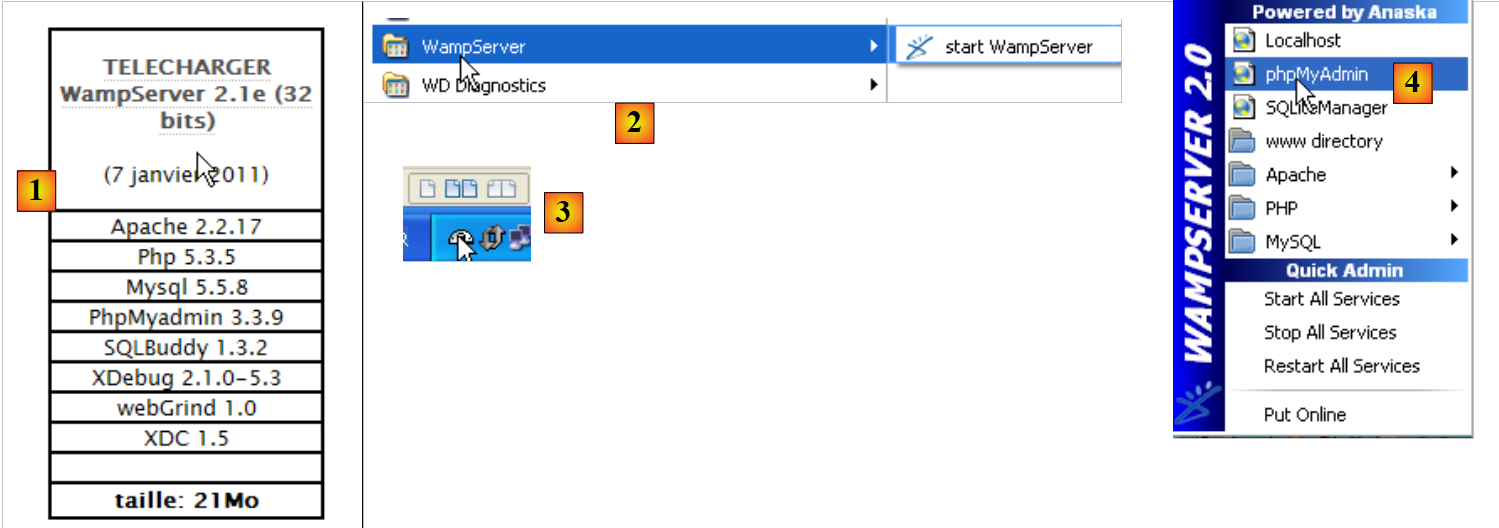
http://www.wampserver.com/download.php
  • في [1]، قم بتنزيل الإصدار المناسب من WampServer؛
  • في [2]، بمجرد التثبيت، قم بتشغيله. سيؤدي ذلك إلى تشغيل خادم الويب Apache ونظام إدارة قواعد البيانات MySQL؛
  • في [3]، بمجرد التشغيل، يمكن إدارة WampServer عبر أيقونة [3] الموجودة في أسفل يمين شريط المهام؛
  • في [4]، قم بتشغيل أداة إدارة MySQL.

قم بإنشاء قاعدة بيانات [dbpersonnes]:
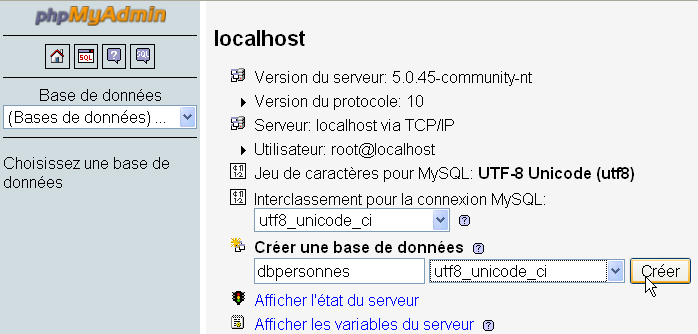
Image

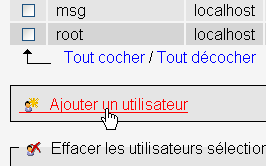
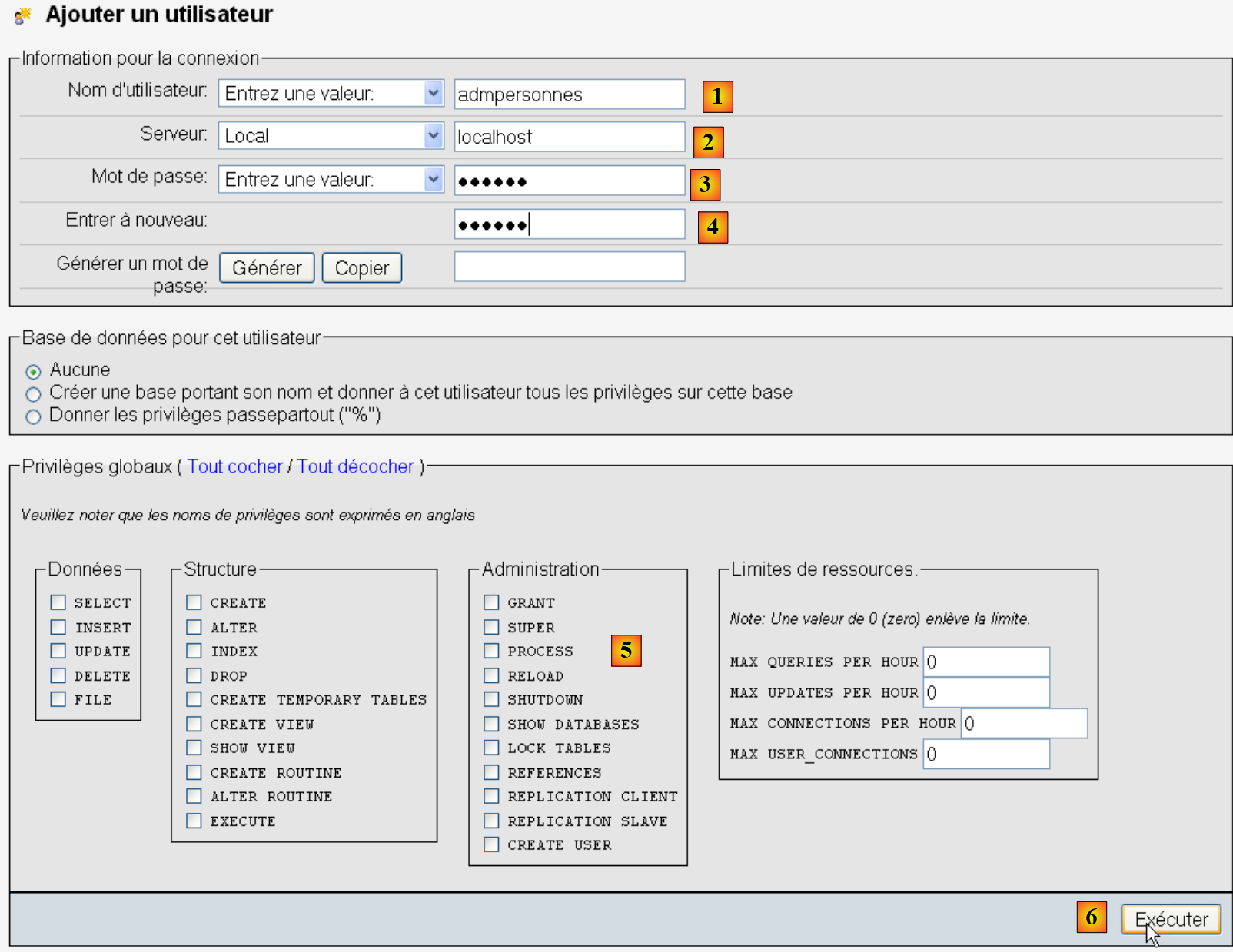
أنشئ مستخدمًا [admpersonnes] بكلمة مرور [nobody]:
  • في [1]، اسم المستخدم؛
  • في [2]، خادم نظام إدارة قواعد البيانات الذي تمنحهم أذونات عليه؛
  • في [3]، كلمة المرور الخاصة بهم [nobody
  • في [4]، كما هو مذكور أعلاه؛
  • في [5]، لا نمنح أي امتيازات لهذا المستخدم؛
  • في [6]، قم بإنشاء المستخدم.
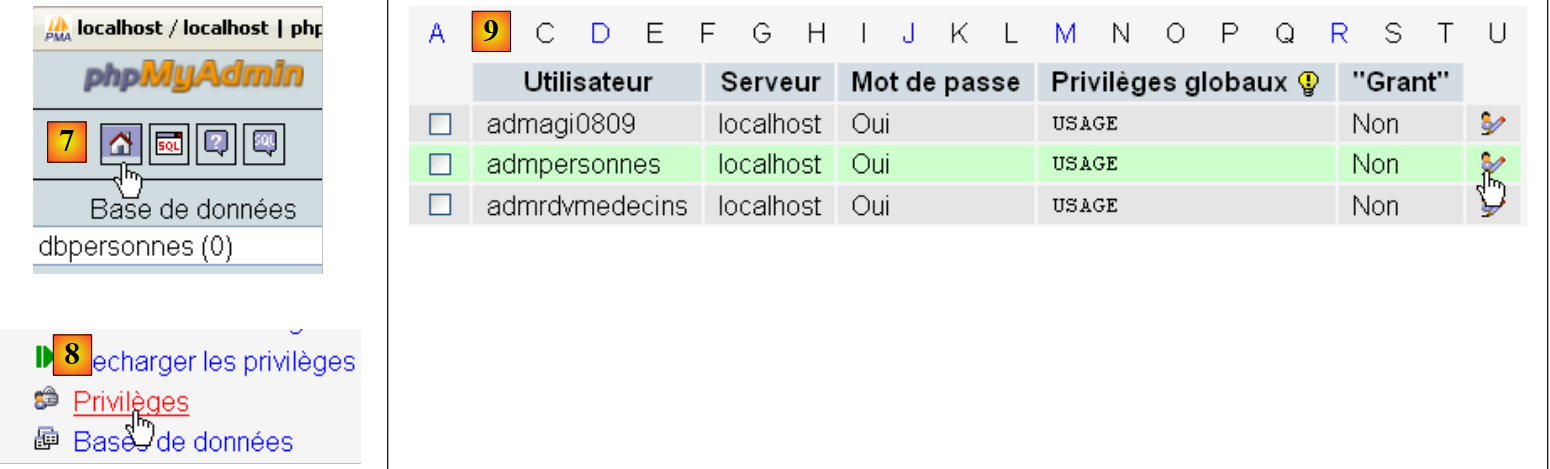
  • في [7]، نعود إلى الصفحة الرئيسية لـ phpMyAdmin؛
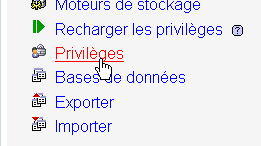
  • في [8]، استخدم رابط [Privileges] الموجود في هذه الصفحة لتعديل امتيازات المستخدم [admpersonnes] [9].

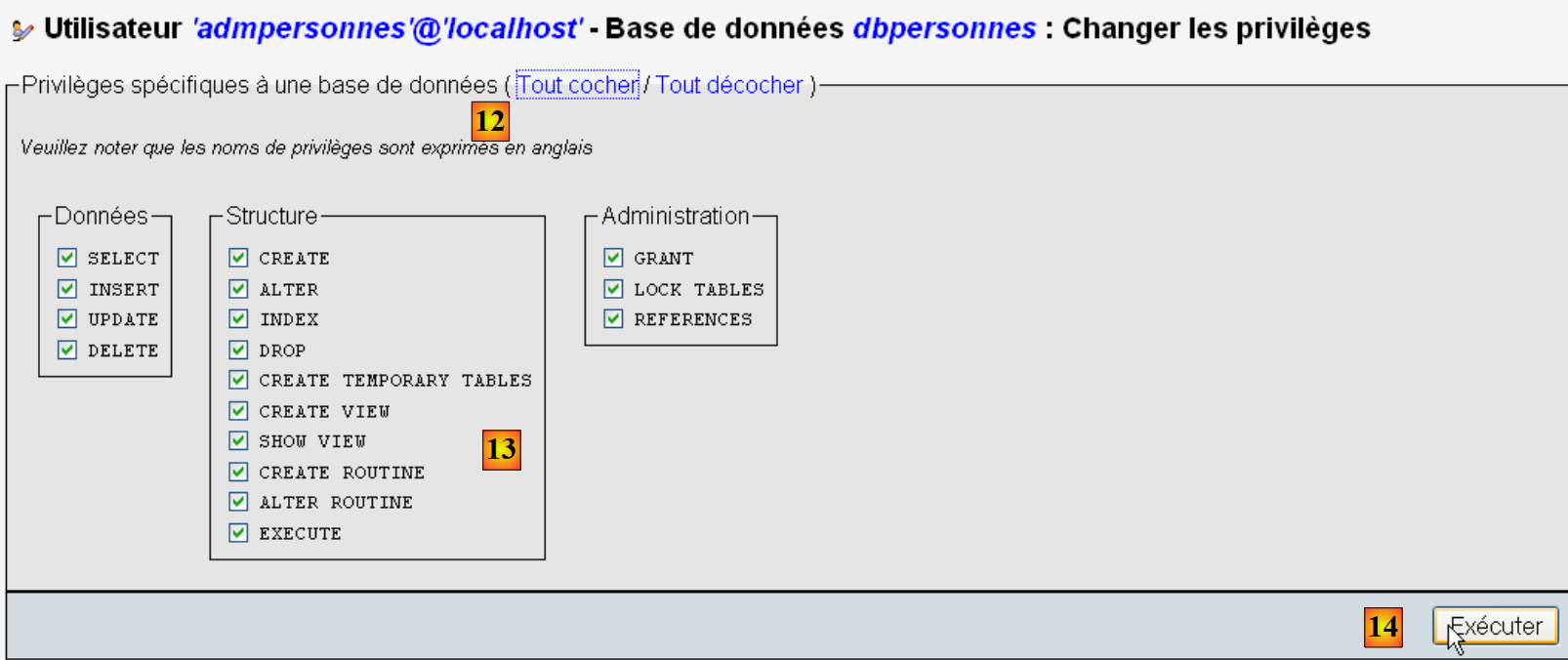
  • في [10]، حدد أنك تريد منح المستخدم [admpersonnes] حقوق الوصول إلى قاعدة البيانات [dbpersonnes
  • في [11]، قم بتأكيد الاختيار.
  • باستخدام الرابط [12] [تحديد الكل]، امنح المستخدم [admpersonnes] جميع الحقوق في قاعدة البيانات [dbpersonnes] [13]؛
  • نؤكد في [14].

الآن لدينا:

  • قاعدة بيانات MySQL [dbpersonnes
  • مستخدم [admpersonnes / nobody] لديه حق الوصول الكامل إلى قاعدة البيانات هذه.

سنكتب نصوص برمجية بلغة Python للعمل مع قاعدة البيانات.

9.3. الاتصال بقاعدة بيانات MySQL - 1


البرنامج (mysqldb_01)


# import du module MySQLdb
import sys
sys.path.append("D:\Programs\ActivePython\site-packages")
import MySQLdb
 
# connexion à une base MySQL
....

ملاحظات:

  • الأسطر 2–4: يجب أن تستورد البرامج النصية التي تحتوي على عمليات مع نظام إدارة قواعد البيانات MySQL وحدة MySQLdb. تذكر أننا قمنا بتثبيت هذه الوحدة في المجلد [%APPDATA%\Python]. يتم البحث تلقائيًا في المجلد [%APPDATA%\Python] عندما تطلب برنامج نصي Python وحدة. في الواقع، يتم البحث في جميع المجلدات المدرجة في sys.path. فيما يلي مثال يعرض هذه المجلدات:
1
2
3
4
5
6
7
#    -*- coding=utf-8 -*-

import sys

#    display of sys.path files
for dossier in sys.path:
    print dossier

يكون إخراج الشاشة كما يلي:

D:\data\istia-1112\python\tutoriel
C:\Windows\system32\python27.zip
D:\Programs\ActivePython\Python2.7.2\DLLs
D:\Programs\ActivePython\Python2.7.2\lib
D:\Programs\ActivePython\Python2.7.2\lib\plat-win
D:\Programs\ActivePython\Python2.7.2\lib\lib-tk
D:\Programs\ActivePython\Python2.7.2
C:\Users\Serge TahÚ\AppData\Roaming\Python\Python27\site-packages
D:\Programs\ActivePython\Python2.7.2\lib\site-packages
D:\Programs\ActivePython\Python2.7.2\lib\site-packages\win32
D:\Programs\ActivePython\Python2.7.2\lib\site-packages\win32\lib
D:\Programs\ActivePython\Python2.7.2\lib\site-packages\Pythonwin
D:\Programs\ActivePython\Python2.7.2\lib\site-packages\setuptools-0.6c11-py2.7.egg-info

السطر 8، مجلد [site-packages] حيث تم تثبيت MySQLdb في الأصل. نحن ننقل مجلد [site-packages]، وهو المكان الذي تقوم فيه الأداة المساعدة pypm بتثبيت وحدات Python. لإضافة مجلد جديد سيبحث فيه Python عن الوحدات، نضيفه إلى قائمة sys.path:


# import du module MySQLdb
import sys
sys.path.append("D:\Programs\ActivePython\site-packages")
import MySQLdb
 
# connexion à une base MySQL
....

في السطر 3، نضيف المجلد الذي تم نقل وحدة MySQLdb إليه.

في السطر 3، نضيف المجلد الذي تم نقل وحدة MySQLdb إليه.


# import du module MySQLdb
import sys
sys.path.append("D:\Programs\ActivePython\site-packages")
import MySQLdb
 
# connexion à une base MySQL
# l'identité de l'utilisateur est (admpersonnes,nobody)
user="admpersonnes"
pwd="nobody"
host="localhost"
connexion=None
try:
    print "connexion..."
    # connexion
    connexion=MySQLdb.connect(host=host,user=user,passwd=pwd)
    # suivi
    print "Connexion a MySQL reussie sous l'identite host={0},user={1},passwd={2}".format(host,user,pwd)
except MySQLdb.OperationalError,message:
    print "Erreur : {0}".format(message)
finally:
    try:
        connexion.close()
    except:
        pass
 
  • الأسطر 8–11: سيقوم البرنامج النصي بتوصيل (السطر 15) المستخدم [admpersonnes / nobody] بقاعدة بيانات MySQL الموجودة على الجهاز [localhost]. ولا يتصل بقاعدة بيانات محددة؛
  • الأسطر 12–24: قد يفشل الاتصال. لذلك، يتم تغليفه في كتلة try/except/finally؛
  • السطر 15: تقبل طريقة connect في وحدة MySQLdb معلمات مسماة متنوعة:
    • user: المستخدم صاحب الاتصال [admpersonnes
    • pwd: كلمة مرور المستخدم [nobody
    • host: الجهاز الذي يعمل عليه نظام إدارة قواعد البيانات MySQL [localhost
    • db: قاعدة البيانات المراد الاتصال بها. اختياري.
  • السطر 18: إذا تم إلقاء استثناء، فسيكون من النوع [MySQLdb.OperationalError] وستوجد رسالة الخطأ المرتبطة به في المتغير [message
  • الأسطر 20-23: في جملة [finally]، يتم إغلاق الاتصال. إذا حدث استثناء، يتم التقاطه (السطر 23) ولكن لا يتم اتخاذ أي إجراء (السطر 24).

النتائج

connexion...
Connexion a MySQL reussie sous l'identite host=localhost,user=admpersonnes,passwd=nobody

9.4. الاتصال بقاعدة بيانات MySQL - 2


البرنامج (mysqldb_02)

#    import module MySQLdb
import sys
sys.path.append("D:\Programs\ActivePython\site-packages")
import MySQLdb

# ---------------------------------------------------------------------------------
def testeConnexion(hote,login,pwd):
    #  connect then disconnect (login,pwd) mysql sgbd from host server
    #    launches eception MySQLdb.operationalError
    #    connection
    connexion=MySQLdb.connect(host=hote,user=login,passwd=pwd)
    print "Connexion a MySQL reussie sous l'identite (%s,%s,%s)" % (hote,login,passwd)
    #  close the connection
    connexion.close()
    print "Fermeture connexion MySQL reussie\n"


#    ---------------------------------------------- main
#  connection to the MySQL database
#    user identity
user="admpersonnes"
passwd="nobody"
host="localhost"
#    test connection
try:
    testeConnexion(host,user,passwd)
except MySQLdb.OperationalError,message:
    print message
#  with a non-existent user
try:
    testeConnexion(host,"xx","xx")
except MySQLdb.OperationalError,message:
    print message

ملاحظات:

  • الأسطر 7–15: دالة تحاول توصيل المستخدم بنظام إدارة قواعد البيانات MySQL ثم فصله عنه. تعرض النتيجة؛
  • الأسطر 18–34: البرنامج الرئيسي – يستدعي طريقة testConnection مرتين ويعرض أي استثناءات.

النتائج

1
2
3
4
Connexion a MySQL reussie sous l'identite (localhost,admpersonnes,nobody)
Fermeture connexion MySQL reussie

Echec de la connexion a MySQL : (1045, "Access denied for user 'xx'@'localhost'(using password: YES)")

9.5. إنشاء جدول MySQL

الآن بعد أن عرفنا كيفية إنشاء اتصال بنظام إدارة قواعد البيانات MySQL، سنبدأ في إصدار أوامر SQL عبر هذا الاتصال. للقيام بذلك، سنتصل بقاعدة البيانات التي تم إنشاؤها [dbpersonnes] ونستخدم الاتصال لإنشاء جدول في قاعدة البيانات.


البرنامج (mysqldb_03)


# import du module MySQLdb
import sys
sys.path.append("D:\Programs\ActivePython\site-packages")
import MySQLdb
 
# ---------------------------------------------------------------------------------
def executeSQL(connexion,update):
    # exécute une requête update de mise à jour sur la connexion
    # on demande un curseur
    curseur=connexion.cursor()
    # exécute la requête sql sur la connexion
    try:
        curseur.execute(update)
        connexion.commit()
    except Exception, erreur:
        connexion.rollback()
        raise
    finally:
        curseur.close()
 
# ---------------------------------------------- main
# connexion à la base MySQL
# l'identité de l'utilisateur
ID="admpersonnes"
PWD="nobody"
# la machine hôte du sgbd
HOTE="localhost"
# identité de la base
BASE="dbpersonnes"
# connexion
try:
    connexion=MySQLdb.connect(host=HOTE,user=ID,passwd=PWD,db=BASE)
except MySQLdb.OperationalError,message:
    print message
    sys.exit()
 
# suppression de la table personnes si elle existe
# si elle n'existe pas une erreur se produira
# on l'ignore
requete="drop table personnes"
try:
    executeSQL(connexion,requete)
except:
    pass
# création de la table personnes
requete="create table personnes (prenom varchar(30) NOT NULL, nom varchar(30) NOT NULL, age integer NOT NULL, primary key(nom,prenom))"
try:
    executeSQL(connexion,requete)
except MySQLdb.OperationalError,message:
    print message
    sys.exit()
# on se deconnecte et on quitte
try:
    connexion.close()
except MySQLdb.OperationalError,message:
    print message
sys.exit()

ملاحظات:

  • السطر 7: تقوم الدالة executeSQL بتنفيذ استعلام SQL على اتصال مفتوح؛
  • السطر 10: تُنفَّذ عمليات SQL على الاتصال من خلال كائن خاص يُسمَّى المؤشر؛
  • السطر 10: الحصول على مؤشر؛
  • السطر 13: تنفيذ استعلام SQL؛
  • السطر 14: يتم تثبيت المعاملة الحالية؛
  • السطر 15: في حالة حدوث استثناء، يتم تخزين رسالة الخطأ في متغير الخطأ؛
  • السطر 16: يتم التراجع عن المعاملة الحالية؛
  • السطر 17: إعادة إلقاء الاستثناء؛
  • السطر 19: سواء كان هناك خطأ أم لا، يتم إغلاق المؤشر. وهذا يحرر الموارد المرتبطة به.

النتائج

create table personnes (prenom varchar(30) NOT NULL, nom varchar(30) NOT NULL, age integer NOT NULL, primary key(nom,prenom)) : requete reussie

التحقق باستخدام phpMyAdmin:
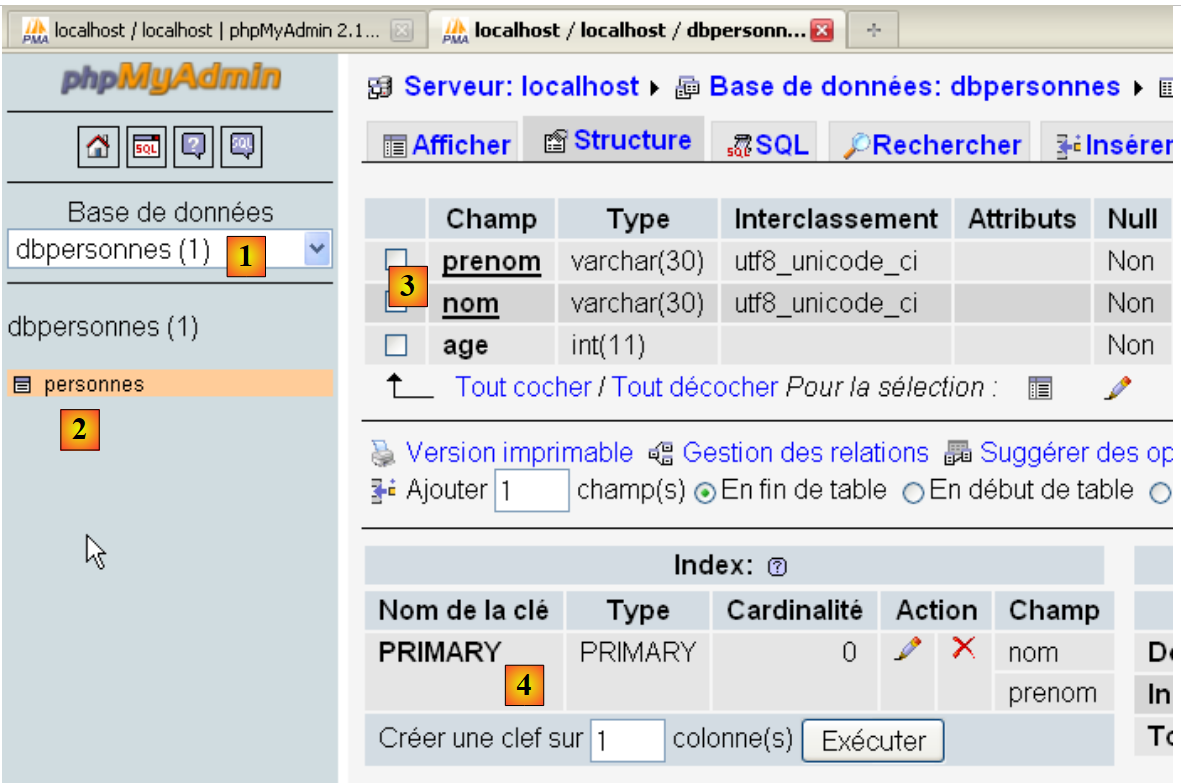
  • تحتوي قاعدة البيانات [dbpersonnes] [1] على جدول [personnes] [2] بهيكل [3] والمفتاح الأساسي [4].

9.6. ملء جدول [people]

بعد إنشاء جدول [people] سابقًا، نقوم الآن بملئه.


البرنامج (mysqldb_04)

#    import module MySQLdb
import sys
sys.path.append("D:\Programs\ActivePython\site-packages")
import MySQLdb
#    other modules
import re

# ---------------------------------------------------------------------------------
def executerCommandes(HOTE,ID,PWD,BASE,SQL,suivi=False,arret=True):
    #    uses connection (HOTE,ID,PWD,BASE)
    #  executes the SQL commands contained in the SQL text file on this connection
    #  this is a file of SQL commands to be executed one per line
    #  if followed=True then each execution of a SQL order is displayed, indicating success or failure
    #  if arret=True, the function stops on the 1st error encountered, otherwise it executes all sql commands
    #  the function returns a list (no. of errors, error1, error2, ...)

    #  check for the presence of the SQL file
    data=None
    try:
        data=open(SQL,"r")
    except:
        return [1,"Le fichier %s n'existe pas" % (SQL)]

    #    connection
    try:
        connexion=MySQLdb.connect(host=HOTE,user=ID,passwd=PWD,db=BASE)
    except MySQLdb.OperationalError,erreur:
        return [1,"Erreur lors de la connexion a MySQL sous l'identite (%s,%s,%s,%s) : %s" % (HOTE, ID, PWD, BASE, erreur)]

    #  a cursor is requested
    curseur=connexion.cursor()
    #  execution of SQL queries contained in the SQL file
    #  we put them in a table
    requetes=data.readlines()
    #    run them one by one - initially no errors
    erreurs=[0]
    for i in range(len(requetes)):
        #  store the current query
        requete=requetes[i]
        #  do we have an empty query? If so, move on to the next query
        if re.match(r"^\s*$",requete):
            continue
        #    query execution i
        erreur=""
        try:
            curseur.execute(requete)
        except Exception, erreur:
            pass
        #   was there a mistake?
        if erreur:
            #    one more mistake
            erreurs[0]+=1
            #  error msg
            msg="%s : Erreur (%s)" % (requete,erreur)
            erreurs.append(msg)
            #  screen tracking or not?
            if suivi:
                print msg
            #    shall we stop?
            if arret:
                return erreurs
        else:
            if suivi: 
                print "%s : Execution reussie" % (requete)
    #  close connection and release resources
    curseur.close()
    connexion.commit()
    #    we disconnect
    try:
        connexion.close()
    except MySQLdb.OperationalError,erreur:
        #    one more mistake
        erreurs[0]+=1
        #  error msg
        msg="%s : Erreur (%s)" % (requete,erreur)
        erreurs.append(msg)

    #    return
    return erreurs


#    ---------------------------------------------- main
#  connection to the MySQL database
#    user identity
ID="admpersonnes"
PWD="nobody"
#  the sgbd host machine
HOTE="localhost"
#    base identity
BASE="dbpersonnes"
#  identity of the SQL command text file to be executed
TEXTE="sql.txt";

#  table creation and filling
erreurs=executerCommandes(HOTE,ID,PWD,BASE,TEXTE,True,False)
# display number of errors
print "il y a eu %s erreur(s)" % (erreurs[0])
for i in range(1,len(erreurs)):
    print erreurs[i]

النتائج

ملف sql.txt:

1
2
3
4
5
6
7
8
9
drop table personnes
create table personnes (prenom varchar(30) not null, nom varchar(30) not null, age integer not null, primary key (nom,prenom))
insert into personnes values('Paul','Langevin',48)
insert into personnes values ('Sylvie','Lefur',70)
xx

insert into personnes values ('Pierre','Nicazou',35)
insert into personnes values ('Geraldine','Colou',26)
insert into personnes values ('Paulette','Girond',56)

تم إدراج خطأ متعمد في السطر 5.

نتائج الشاشة:

drop table personnes : Execution reussie
create table personnes (prenom varchar(30) not null, nom varchar(30) not null, age integer not null, primary key (nom,prenom)) : Execution reussie
insert into personnes values('Paul','Langevin',48) : Execution reussie
insert into personnes values ('Sylvie','Lefur',70) : Execution reussie
xx : Erreur ((1064, "You have an error in your SQL syntax; check the manual that corresponds to your MySQL server version for the right syntax to use near 'xx' at
 line 1"))
insert into personnes values ('Pierre','Nicazou',35) : Execution reussie
insert into personnes values ('Geraldine','Colou',26) : Execution reussie
insert into personnes values ('Paulette','Girond',56) : Execution reussie
il y a eu 1 erreur(s)
xx : Erreur ((1064, "You have an error in your SQL syntax; check the manual that corresponds to your MySQL server version for the right syntax to use near 'xx' at line 1"))

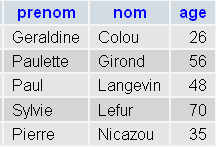
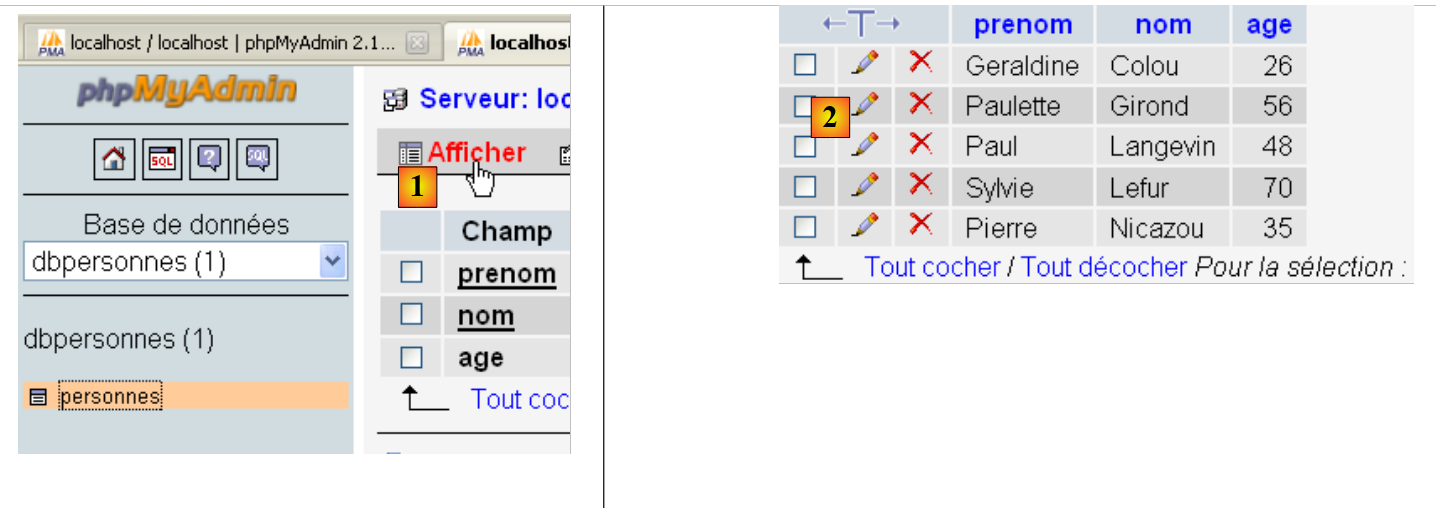
التحقق باستخدام phpMyAdmin:
Image

  • في [1]، يتيح لك رابط [عرض] الاطلاع على محتويات جدول [الأشخاص] [2].

9.7. تنفيذ استعلامات SQL عشوائية

يتيح لك البرنامج النصي التالي تنفيذ ملف أوامر SQL وعرض نتيجة كل منها:

  • نتيجة SELECT إذا كان الأمر هو SELECT؛
  • عدد الصفوف التي تم تعديلها إذا كان الأمر هو INSERT أو UPDATE أو DELETE.

البرنامج (mysqldb_05)

#    import module MySQLdb
import sys
sys.path.append("D:\Programs\ActivePython\site-packages")
import MySQLdb
#    other modules
import re

def cutNewLineChar(ligne):
    #  delete the [line] end-of-line mark if it exists
    l=len(ligne)
    while(ligne[l-1]=="\n" or ligne[l-1]=="\r"):
        l-=1
    return(ligne[0:l])

# ---------------------------------------------------------------------------------
def afficherInfos(curseur):
    #  displays the result of an sql query
    #    was it a select?
    if curseur.description:
        #    there's a description - so it's a select
        #  description[i] is the description of column no. i in the select
        #  description[i][0] is the name of column no. i in the select
        #  displays field names
        titre=""
        for i in range(len(curseur.description)):
            titre+=curseur.description[i][0]+","
        #  displays the list of fields without the trailing comma
        print titre[0:len(titre)-1]
        #  dividing line
        print "-"*(len(titre)-1)
        #  current select line
        ligne=curseur.fetchone()
        while ligne:
            print ligne
            #  next line of the select
            ligne=curseur.fetchone()
    else:
        #  there are no fields - it wasn't a select
        print "%s lignes(s) a (ont) ete modifiee(s)" % (curseur.rowcount)


# ---------------------------------------------------------------------------------
def executerCommandes(HOTE,ID,PWD,BASE,SQL,suivi=False,arret=True):
    #    uses connection (HOTE,ID,PWD,BASE)
    #  executes the SQL commands contained in the SQL text file on this connection
    #  this is a file of SQL commands to be executed one per line
    #  if followed=1 then each execution of a SQL order is displayed, indicating success or failure
    #  if arret=1, the function stops on the 1st error encountered, otherwise it executes all sql commands
    #  the function returns an array (nb of errors, error1, error2, ...)

    #  check for the presence of the SQL file
    data=None
    try:
        data=open(SQL,"r")
    except:
        return [1,"Le fichier %s n'existe pas" % (SQL)]

    #    connection
    try:
        connexion=MySQLdb.connect(host=HOTE,user=ID,passwd=PWD,db=BASE)
    except MySQLdb.OperationalError,erreur:
        return [1,"Erreur lors de la connexion a MySQL sous l'identite (%s,%s,%s,%s) : %s" % (HOTE, ID, PWD, BASE, erreur)]

    #  a cursor is requested
    curseur=connexion.cursor()
    #  execution of SQL queries contained in the SQL file
    #  we put them in a table
    requetes=data.readlines()
    #    run them one by one - initially no errors
    erreurs=[0]
    for i in range(len(requetes)):
        #  store the current query
        requete=requetes[i]
        #  do we have an empty query? If so, move on to the next query
        if re.match(r"^\s*$",requete):
            continue
        #    query execution i
        erreur=""
        try:
            curseur.execute(requete)
        except Exception, erreur:
            pass
        #   was there a mistake?
        if erreur:
            #    one more mistake
            erreurs[0]+=1
            #  error msg
            msg="%s : Erreur (%s)" % (requete,erreur)
            erreurs.append(msg)
            #  screen tracking or not?
            if suivi:
                print msg
            #    shall we stop?
            if arret:
                return erreurs
        else:
            if suivi: 
                print "%s : Execution reussie" % (requete)
                #  information on the result of the query
                afficherInfos(curseur)

    #  close connection and release resources
    curseur.close()
    connexion.commit()
    #    we disconnect
    try:
        connexion.close()
    except MySQLdb.OperationalError,erreur:
        #    one more mistake
        erreurs[0]+=1
        #  error msg
        msg="%s : Erreur (%s)" % (requete,erreur)
        erreurs.append(msg)

    #    return
    return erreurs


#    ---------------------------------------------- main
#  connection to the MySQL database
#    user identity
ID="admpersonnes"
PWD="nobody"
#  the sgbd host machine
HOTE="localhost"
#    base identity
BASE="dbpersonnes"
#  identity of the SQL command text file to be executed
TEXTE="sql2.txt"


#  table creation and filling
erreurs=executerCommandes(HOTE,ID,PWD,BASE,TEXTE,True,False)
# display number of errors
print "il y a eu %s erreur(s)" % (erreurs[0])
for i in range(1,len(erreurs)):
    print erreurs[i]

ملاحظات:

  • الميزة الجديدة هي السطر 100 من البرنامج النصي: بعد تنفيذ عبارة SQL، نطلب معلومات حول المؤشر المستخدم في ذلك الاستعلام. يتم توفير هذه المعلومات بواسطة الدالة displayInfo في الأسطر 16–40؛
  • السطران 19 و39: إذا كان استعلام SQL الذي تم تنفيذه هو SELECT، فإن السمة [cursor.description] هي مصفوفة حيث يصف العنصر i الحقل i من نتيجة SELECT. خلاف ذلك، فإن السمة [cursor.rowcount] (السطر 39) هي عدد الصفوف التي تم تعديلها بواسطة استعلام INSERT أو UPDATE أو DELETE؛
  • السطران 32 و 36: تسترد طريقة [cursor.fetchone] الصف الحالي لـ SELECT. وهناك طريقة [cursor.fetchall] تسترد جميع الصفوف دفعة واحدة.

النتائج

ملف الاستعلامات المنفذة:

1
2
3
4
5
6
7
8
9
select * from personnes
select nom,prenom from personnes order by nom asc, prenom desc
select * from personnes where age between 20 and 40 order by age desc, nom asc, prenom asc
insert into personnes values('Josette','Bruneau',46)
update personnes set age=47 where nom='Bruneau'
select * from personnes where nom='Bruneau'
delete from personnes where nom='Bruneau'
select * from personnes where nom='Bruneau'
xselect * from personnes where nom='Bruneau'

نتائج الشاشة:

select * from personnes : Execution reussie
prenom,nom,age
---------------
('Geraldine', 'Colou', 26L)
('Paulette', 'Girond', 56L)
('Paul', 'Langevin', 48L)
('Sylvie', 'Lefur', 70L)
('Pierre', 'Nicazou', 35L)
select nom,prenom from personnes order by nom asc, prenom desc : Execution reussie
nom,prenom
-----------
('Colou', 'Geraldine')
('Girond', 'Paulette')
('Langevin', 'Paul')
('Lefur', 'Sylvie')
('Nicazou', 'Pierre')
select * from personnes where age between 20 and 40 order by age desc, nom asc,prenom asc : Execution reussie
prenom,nom,age
---------------
('Pierre', 'Nicazou', 35L)
('Geraldine', 'Colou', 26L)
insert into personnes values('Josette','Bruneau',46) : Execution reussie
1 lignes(s) a (ont) ete modifiee(s)
update personnes set age=47 where nom='Bruneau' : Execution reussie
1 lignes(s) a (ont) ete modifiee(s)
select * from personnes where nom='Bruneau' : Execution reussie
prenom,nom,age
---------------
('Josette', 'Bruneau', 47L)
delete from personnes where nom='Bruneau' : Execution reussie
1 lignes(s) a (ont) ete modifiee(s)
select * from personnes where nom='Bruneau' : Execution reussie
prenom,nom,age
---------------
xselect * from personnes where nom='Bruneau' : Erreur ((1064, "You have an error in your SQL syntax; check the manual that corresponds to your MySQL server version for the right syntax to use near 'xselect * from personnes where nom='Bruneau'' at line 1"))

التحقق من PhpMyAdmin: