3. الأساسيات
 |
3.1. مثال على برنامج Python
فيما يلي برنامج يعرض الخصائص الأساسية للغة Python.
# -*- coding=utf-8 -*-

# ----------------------------------
def affiche(chaine):
    # يعرض سلسلة
    print "chaine=%s" % (chaine)


# ----------------------------------
def afficheType(variable):
    # يعرض نوع المتغير
    print "type[%s]=%s" % (variable,type(variable))

# ----------------------------------
def f1(param):
    # يضيف 10 إلى param
    return param+10

# ----------------------------------
def f2():
    # يعرض 3 قيم
    return ("un",0,100);


# -------------------------------- البرنامج الرئيسي ------------------------------------
# هذا تعليق
# متغير مستخدم دون أن يتم إعلانه
nom="dupont"

# عرض على الشاشة
print "nom=%s" % (nom)

# قائمة تحتوي على عناصر من أنواع مختلفة
liste=["un","deux",3,4]

# عدد عناصرها
n=len(liste)

# حلقة
for i in range(n):
  print "liste[%d]=%s" % (i,liste[i])

# تهيئة متغيرين باستخدام توبول
(chaine1,chaine2)=("chaine1","chaine2")

# تسلسل السلسلتين
chaine3=chaine1+chaine2

# عرض النتيجة
print "[%s,%s,%s]" % (chaine1,chaine2,chaine3)

# استخدام دالة
affiche(chaine1)

# يمكن معرفة نوع المتغير
afficheType(n)
afficheType(chaine1)
afficheType(liste)

# يمكن أن يتغير نوع المتغير أثناء التنفيذ
n="a change"
afficheType(n)

# يمكن للدالة أن تُرجع نتيجة
res1=f1(4)
print "res1=%s" % (res1)

# يمكن للدالة أن تُرجع قائمة من القيم
(res1,res2,res3)=f2()
print "(res1,res2,res3)=[%s,%s,%s]" % (res1,res2,res3)

# كان من الممكن تخزين هذه القيم في متغير
liste=f2()
for i in range(len(liste)):
    print "liste[%s]=%s" % (i, liste[i])

# اختبارات
for i in range(len(liste)):
    # لا تعرض سوى السلاسل
    if (type(liste[i])=="str"):
        print "liste[%s]=%s" % (i,liste[i])

# اختبارات أخرى
for i in range(len(liste)):
    # يعرض فقط الأعداد الصحيحة الأكبر من 10
    if (type(liste[i])=="int" and liste[i]>10):
        print "liste[%s]=%s" % (i,liste[i])

# حلقة while
liste=(8,5,0,-2,3,4)
i=0
somme=0
while(i<len(liste) and liste[i]>0):
    print "liste[%s]=%s" % (i,liste[i])
    somme+=liste[i] #المجموع=المجموع+t[i]
    i+=1 #i=i+1
print "somme=%s" % (somme)
# نهاية البرنامج
ملاحظة:
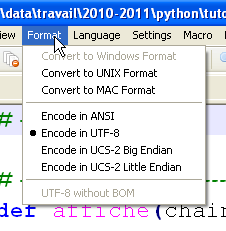
- السطر 1: تعليق خاص يُستخدم لتحديد نوع ترميز البرنامج النصي، وهو هنا UTF-8. ويعتمد ذلك على محرر النصوص المستخدم. هنا باستخدام Notepad++:
 |
- السطر 4: الكلمة الرئيسية def تُعرّف دالة؛
- السطران 5-6: محتوى الدالة. وهو مُحَرف إلى اليمين بمقدار مسافة تبويب واحدة. هذا التباعد، المقترن بالحرف : في الأمر def، هو الذي يحدد محتوى الدالة. وينطبق هذا على جميع الأوامر التي تحتوي على محتوى: if، else، while، for، try، except؛
- السطر 12: تدير لغة Python نوع المتغيرات داخليًّا. يمكن معرفة نوع متغير ما باستخدام الدالة type(variable) التي تُرجع متغيرًا من النوع 'type'. التعبير '%s' % (type(variable)) هو سلسلة أحرف تمثل نوع المتغير؛
- السطر 25: البرنامج الرئيسي. يأتي هذا البرنامج بعد تعريف جميع دوال البرنامج النصي. محتواه غير مسند؛
- السطر 28: في لغة Python، لا يتم تعريف المتغيرات. لغة Python تميز بين الأحرف الكبيرة والصغيرة. المتغير Nom يختلف عن المتغير nom. يمكن وضع سلسلة الأحرف بين علامتي اقتباس " أو علامات الفاصلة العليا '. لذا يمكن كتابة 'dupont' أو "dupont"؛
- السطر 31: التعبير "xxxx%syyyy%szzzz" % (100, 200) هو سلسلة الأحرف "xxxx100yyy200szzzz" حيث تم استبدال كل %s بعنصر من التوبول. %s هو تنسيق عرض سلاسل الأحرف. وهناك تنسيقات أخرى؛
- السطر 34: هناك فرق بين التوبول (1,2,3) (لاحظ الأقواس) والقائمة [1,2,3] (لاحظ الأقواس المعقوفة). التوبول غير قابل للتعديل بينما القائمة قابلة للتعديل. في كلتا الحالتين، يُرمز للعنصر رقم i بـ [i]؛
- السطر 40: range(n) هو التوبول (0,1,2,...,n-1)؛
- السطر 74: len(var) هو عدد عناصر المجموعة var (توبول، قائمة، قاموس، ...)؛
- السطر 86: العوامل المنطقية الأخرى هي or و not.
نتائج العرض على الشاشة هي كما يلي:
3.2. تغييرات الأنواع
نركز هنا على تغييرات الأنواع مع البيانات من النوع str (سلسلة أحرف)، int (عدد صحيح)، float (عدد عائم)، bool (منطقية).
# -*- coding=utf-8 -*-

# تغييرات في النوع
# int --> str، float، bool
x=4
print x, type(x)
x=str(4)
print x, type(x)
x=float(4)
print x, type(x)
x=bool(4)
print x, type(x)

# bool → int، float، str
x=True
print x, type(x)
x=int(True)
print x, type(x)
x=float(True)
print x, type(x)
x=str(True)
print x, type(x)

# str → int، float، bool
x="4"
print x, type(x)
x=int("4")
print x, type(x)
x=float("4")
print x, type(x)
x=bool("4")
print x, type(x)

# float → str، int، bool
x=4.32
print x, type(x)
x=str(4.32)
print x, type(x)
x=int(4.32)
print x, type(x)
x=bool(4.32)
print x, type(x)

# معالجة أخطاء تغيير النوع
try:
    x=int("abc")
    print x, type(x)
except ValueError, erreur:
    print erreur

# حالات متنوعة للقيمة المنطقية
x=bool("abc")
print x, type(x)
x=bool("")
print x, type(x)
x=bool(0)
print x, type(x)
x=None
print x, type(x)
x=bool(None)
print x, type(x)
هناك العديد من عمليات تغيير الأنواع الممكنة. قد تفشل بعضها، مثل تلك الموجودة في الأسطر 45-49 التي تحاول تحويل السلسلة 'abc' إلى عدد صحيح. تم التعامل مع الخطأ باستخدام بنية try / except. الشكل العام لهذه البنية هو كما يلي:
try:
    actions
except Exception, Message:
    actions
finally:
    actions
إذا أطلقت إحدى الإجراءات في جملة try استثناءً (أشارت إلى وجود خطأ)، يتم الانتقال فورًا إلى جملة except. إذا لم تطلق الإجراءات في جملة try أي استثناء، يتم تجاهل جملة except. تعتبر السمات Exception و Message الخاصة بالأمر except اختيارية. وعندما تكون موجودة، تحدد Exception نوع الاستثناء الذي تم اعتراضه بواسطة الأمر except، بينما تحتوي Message على رسالة الخطأ المرتبطة بالاستثناء. قد توجد عدة تعليمات except، إذا أردنا معالجة أنواع مختلفة من الاستثناءات في نفس التعليمات try.
التعليمات finally اختيارية. في حالة وجودها، يتم دائمًا تنفيذ الإجراءات الواردة في التعليمات finally سواء حدث استثناء أم لا.
سنعود إلى موضوع الاستثناءات لاحقًا.
تُظهر الأسطر 52-61 محاولات متنوعة لتحويل بيانات من النوع str، int، float، NoneType إلى قيم منطقية. وهذا ممكن دائمًا. والقواعد هي كما يلي:
- تكون قيمة bool(int i) هي False إذا كانت قيمة i تساوي 0، وتكون True في جميع الحالات الأخرى؛
- bool(float f) يساوي False إذا كان f يساوي 0.0، و True في جميع الحالات الأخرى؛
- bool(str chaine) تساوي False إذا كانت chaine مكونة من 0 حرف، و True في جميع الحالات الأخرى؛
- bool(None) تساوي False. None هي قيمة خاصة تعني أن المتغير موجود ولكن ليس له قيمة.
نتائج العرض على الشاشة هي كما يلي:
3.3. نطاق المتغيرات
# -*- coding=utf-8 -*-

# نطاق المتغيرات
def f1():
    # استخدام المتغير العام i
    global i
    i+=1
    j=10
    print "f1[i,j]=[%s,%s]" % (i,j)

def f2():
    # استخدام المتغير العام i
    global i
    i+=1
    j=20
    print "f2[i,j]=[%s,%s]" % (i,j)

def f3():
    # استخدام المتغير المحلي i
    i=1
    j=30
    print "f3[i,j]=[%s,%s]" % (i,j)

# اختبارات
i=0
j=0 # هذان المتغيران غير معروفين لدالة f
    # إلا إذا أعلنت الدالة عنهما صراحةً باستخدام الأمر global
    # أنها تريد استخدامهما
f1()
f2()
f3()
print "test[i,j]=[%s,%s]" % (i,j)
النتائج
ملاحظات:
- يُظهر البرنامج النصي استخدام المتغير i، المُعلن كمتغير عام في الدالتين f1 و f2. في هذه الحالة، يتشارك البرنامج الرئيسي والدالتين f1 و f2 نفس المتغير i.
3.4. القوائم والتوبلات والقواميس
3.4.1. القوائم أحادية البعد
# -*- coding=utf-8 -*-

# قوائم أحادية البعد
# التهيئة
list1=[0,1,2,3,4,5]

# التجول - 1
print "list1 a %s elements" % (len(list1))
for i in range(len(list1)):
    print "list1[%s]=%s" % (i, list1[i])

list1[1]=10;
# التصفح - 2
print "list1 a %s elements" % (len(list1))
for element in list1:
    print element

# إضافة عنصرين
list1[len(list1):]=[10,11]
print ("%s") % (list1)

# حذف العنصرين الأخيرين
list1[len(list1)-2:]=[]
print ("%s") % (list1)

# إضافة مجموعة إلى بداية القائمة
list1[:0]=[-10, -11, -12]
print ("%s") % (list1)

# إدراج عنصرين في منتصف القائمة
list1[3:3]=[100,101]
print ("%s") % (list1)

# حذف عنصرين من منتصف القائمة
list1[3:4]=[]
print ("%s") % (list1)
ملاحظات:
- يشير الترميز table[i:j] إلى العناصر من i إلى j-1 في المصفوفة؛
- يشير الترميز [i:] إلى العناصر i وما يليها من المصفوفة؛
- يشير الترميز [:i] إلى العناصر من 0 إلى i-1 في المصفوفة؛
- السطر 20: print (%s) % (list1) يعرض سلسلة الأحرف: "[ list1[0], list1[2], ..., list1[n-1]]".
النتائج
يمكن كتابة الرمز السابق بطريقة مختلفة (bases_03b) باستخدام بعض طرق القوائم:
# -*- coding=utf-8 -*-

# قوائم أحادية البعد

# التهيئة
list1=[0,1,2,3,4,5]

# التجول - 1
print "list1 a %s elements" % (len(list1))
for i in range(len(list1)):
    print "list1[%s]=%s" % (i, list1[i])

list1[1]=10
# التصفح - 2
print "list1 a %s elements" % (len(list1))
for element in list1:
    print element

# إضافة عنصرين
list1.extend([10,11])
print ("%s") % (list1)

# حذف العنصرين الأخيرين
del list1[len(list1)-2:]
print ("%s") % (list1)

# إضافة مجموعة إلى بداية القائمة
for i in (-12, -11, -10):
    list1.insert(0,i)
print ("%s") % (list1)

# إدراج في منتصف القائمة
for i in (101,100):
    list1.insert(3,i)
print ("%s") % (list1)

# حذف عنصر من منتصف القائمة
del list1[3:4]
print ("%s") % (list1)
النتائج التي تم الحصول عليها هي نفسها التي تم الحصول عليها في النسخة السابقة.
3.4.2. القاموس
# -*- coding=utf-8 -*-

def existe(conjoints,mari):
    # التحقق من وجود المفتاح «mari» في قاموس «conjoints»
    if(conjoints.has_key(mari)):
        print "La cle [%s] existe associee a la valeur [%s]" % (mari, conjoints[mari])
    else:
        print "La cle [%s] n'existe pas" % (mari)


# ----------------------------- Main
# القواميس
conjoints={"Pierre":"Gisele", "Paul":"Virginie", "Jacques":"Lucette","Jean":""}

# التصفح - 1
print "Nombre d'elements du dictionnaire : %s " % (len(conjoints))
for (cle,valeur) in conjoints.items():
    print "conjoints[%s]=%s" % (cle,valeur)

# قائمة مفاتيح القاموس
print "liste des cles-------------"
cles=conjoints.keys()
print ("%s") % (cles)

# قائمة قيم القاموس
print "liste des valeurs------------"
valeurs=conjoints.values()
print ("%s") % (valeurs)

# البحث عن مفتاح
existe(conjoints,"Jacques")
existe(conjoints,"Lucette")
existe(conjoints,"Jean")

# حذف مفتاح-قيمة
del (conjoints["Jean"])
print "Nombre d'elements du dictionnaire : %s " % (len(conjoints))
print ("%s") % (conjoints)
ملاحظات:
- السطر 17: تعرض الدالة conjoints.items() قائمة أزواج (المفتاح، القيمة) في القاموس بشكل مترابط؛
- السطر 22: تعرض الدالة conjoints.keys() مفاتيح القاموس المرتبط؛
- السطر 27: تعرض الدالة conjoints.values() القيم الموجودة في قاموس «conjoints»؛
- السطر 7: conjoints.has_key(mari) تُرجع True إذا كانت المفتاح mari موجودة في القاموس conjoints، وإلا فإنها تُرجع False؛
- السطر 38: يمكن عرض القاموس في سطر واحد.
3.4.3. المجموعات
# -*- coding=utf-8 -*-

# المجموعات
# التهيئة
tab1=(0,1,2,3,4,5)

# التصفح - 1
print "tab1 a %s elements" % (len(tab1))
for i in range(len(tab1)):
    print "tab1[%s]=%s" % (i, tab1[i])

# التصفح - 2
print "tab1 a %s elements" % (len(tab1))
for element in tab1:
    print element

# تعديل عنصر
tab1[0]=-1
ملاحظات:
- الأسطر 15-18 من النتائج: توضح أنه لا يمكن تعديل التوبول.
3.4.4. القوائم متعددة الأبعاد
# -*- coding=utf-8 -*-

# قوائم متعددة الأبعاد

# التهيئة
multi=[[0,1,2], [10,11,12,13], [20,21,22,23,24]]

# التصفح
for i1 in range(len(multi)):
    for i2 in range(len(multi[i1])):
        print "multi[%s][%s]=%s" % (i1,i2,multi[i1][i2])

# قواميس متعددة الأبعاد
# التهيئة
multi={"zero":[0,1], "un":[10,11,12,13], "deux":[20,21,22,23,24]}

# التصفح
for (cle,valeur) in multi.items():
    for i2 in range(len(multi[cle])):
        print "multi[%s][%s]=%s" % (cle,i2,multi[cle][i2])
3.4.5. الروابط بين القنوات والقوائم
# -*- coding=Utf-8 -*-

# تحويل السلسلة إلى قائمة
chaine='1:2:3:4'
tab=chaine.split(':')
print type(tab)

# عرض القائمة
print "tab a %s elements" % (len(tab))
print ("%s") % (tab)

# تحويل القائمة إلى سلسلة
chaine2=":".join(tab)
print "chaine2=%s" % (chaine2)

# إضافة حقل فارغ
chaine+=":"
print "chaine=%s" % (chaine)
tab=chaine.split(":")

# عرض القائمة
print "tab a %s elements" % (len(tab))
print ("%s") % (tab)

# لنضف حقلًا فارغًا مرة أخرى
chaine+=":"
print "chaine=%s" % (chaine)
tab=chaine.split(":")

# عرض القائمة
print "tab a %s elements" % (len(tab))
print ("%s") % (tab)
ملاحظات:
- السطر 5: تقوم الدالة chaine.split(فاصل) بتقسيم السلسلة chaine إلى عناصر مفصولة بـ séparateur وتعرضها في شكل قائمة. وبالتالي، فإن قيمة التعبير '1:2:3:4'.split(":") هي القائمة ('1','2','3','4')؛
- السطر 13: قيمة 'separateur'.join(liste) هي سلسلة الأحرف 'liste[0]+separateur+liste[1]+separateur+...'.
3.5. التعبيرات النمطية
# -*- coding=utf-8 -*-

import re

# --------------------------------------------------------------------------
def compare(modele,chaine):
    # مقارنة السلسلة «s» بالنموذج «model»
    # عرض النتائج
    print "\nResultats(%s,%s)" % (chaine,modele)
    match=re.match(modele,chaine)
    if match:
        print match.groups()
    else:
        print "La chaine [%s] ne correspond pas au modele [%s]" % (chaine,modele)


# التعبيرات النمطية في لغة بايثون
# استخراج الحقول المختلفة من سلسلة
# النمط: سلسلة من الأرقام محاطة بأي أحرف
# نريد استخراج سلسلة الأرقام فقط
modele=r"^.*?(\d+).*?$"

# مقارنة السلسلة بالنموذج
compare(modele,"xyz1234abcd")
compare(modele,"12 34")
compare(modele,"abcd")

# النمط: سلسلة من الأرقام محاطة بأحرف عشوائية
# نريد سلسلة الأرقام بالإضافة إلى الحقول التي تسبقها وتليها
modele=r"^(.*?)(\d+)(.*?)$"

# نقوم بمقارنة السلسلة بالنموذج
compare(modele,"xyz1234abcd")
compare(modele,"12 34")
compare(modele,"abcd")

# القالب - تاريخ بتنسيق يوم/شهر/سنة
modele=r"^\s*(\d\d)\/(\d\d)\/(\d\d)\s*$"
compare(modele,"10/05/97")
compare(modele," 04/04/01 ")
compare(modele,"5/1/01")

# القالب - رقم عشري
modele=r"^\s*([+|-]?)\s*(\d+\.\d*|\.\d+|\d+)\s*$"
compare(modele,"187.8")
compare(modele,"-0.6")
compare(modele,"4")
compare(modele,".6")
compare(modele,"4.")
compare(modele," + 4")
# النهاية
ملاحظات:
- لاحظ الوحدة المستوردة في السطر 3. فهي التي تحتوي على وظائف إدارة التعبيرات العادية؛
- السطر 10: تؤدي مقارنة سلسلة نصية بتعبير منتظم (نموذج) إلى إرجاع القيمة المنطقية True إذا كانت السلسلة تتطابق مع النموذج، وإلا فإنها ترجع القيمة المنطقية False؛
- السطر 12: match.groups() عبارة عن توبول تتكون عناصره من أجزاء السلسلة التي تتطابق مع عناصر التعبير النمطي المحاطة بأقواس. في النموذج:
- ^.*?(\d+).*?، فإن match.groups() ستكون مجموعة ذات عنصر واحد؛
- في النموذج: ^(.*?)(\d+)(.*?)$، سيكون match.groups() مجموعة مكونة من 3 عناصر.
3.6. طريقة تمرير معلمات الدوال
# -*- coding=utf-8 -*-

def f1(a):
    a=2

def f2(a,b):
    a=2
    b=3
    return (a,b)

# ------------------------ الرئيسي
x=1
f1(x)
print "x=%s" % (x)
(x,y)=(-1,-1)
(x,y)=f2(x,y)
print "x=%s, y=%s" % (x,y)
ملاحظات:
- كل شيء في لغة Python هو كائن. وتُسمى بعض الكائنات بـ«غير قابلة للتغيير»: لا يمكن تعديلها. وهذا هو الحال بالنسبة للأرقام وسلاسل الأحرف والمجموعات. وعندما يتم تمرير كائنات Python كمعلمات إلى الدوال، يتم تمرير مراجعها ما لم تكن هذه الكائنات «غير قابلة للتغيير»، وفي هذه الحالة يتم تمرير قيمة الكائن؛
- تهدف الدالتان f1 (السطر 3) و f2 (السطر 6) إلى توضيح تمرير معلمة إخراج. نريد أن يتم تعديل المعلمة الفعلية للدالة بواسطة الدالة نفسها؛
- السطران 3-4: تقوم الدالة f1 بتعديل معلمتها الشكلية a. نريد معرفة ما إذا كان المعلم الفعلي سيتغير هو الآخر.
- السطران 12-13: المعلمة الفعلية هي x=1. تظهر نتيجة السطر 1 أن المعلمة الفعلية لم تتغير. وبالتالي، فإن المعلمة الفعلية x والمعلمة الشكلية a هما كائنان مختلفان؛
- الأسطر 6-9: تقوم الدالة f2 بتعديل معلمتيها الشكليتين a و b، وتُرجعهما كنتائج؛
- الأسطر 15-16: يتم تمرير المعلمات الفعلية (x، y) إلى الدالة f2، ويتم إعادة تعيين نتيجة الدالة f2 في (x، y). ويُظهر السطر 2 من النتائج أن المعلمات الفعلية (x، y) قد تم تعديلها.
ونستنتج من ذلك أنه عندما تكون الكائنات «غير القابلة للتغيير» معلمات إخراج، يجب أن تكون جزءًا من النتائج التي ترجعها الدالة.
3.7. الملفات النصية
# -*- coding=utf-8 -*-

import sys

# معالجة متسلسلة لملف نصي
# وهو عبارة عن مجموعة من الأسطر بالصيغة login:pwd:uid:gid:infos:dir:shell
# يتم وضع كل سطر في قاموس بالصيغة login => [uid,gid,infos,dir,shell]

# --------------------------------------------------------------------------
def afficheInfos(dico,cle):
    # يعرض القيمة المرتبطة بالمفتاح في القاموس «dico» إن وجدت
    valeur=None
    if dico.has_key(cle):
        valeur=dico[cle]
    if 'list' in str(type(valeur)):
        print "[{0},{1}]".format(cle,":".join(valeur))
    else:
        # المفتاح ليس مفتاحًا في القاموس «dico»
        print "la cle [{0}] n'existe pas".format(cle)


def cutNewLineChar(ligne):
    # يتم حذف علامة نهاية السطر من السطر إذا كانت موجودة
    l=len(ligne);
    while(ligne[l-1]=="\n" or ligne[l-1]=="\r"):
        l-=1
    return(ligne[0:l]);

# يتم تحديد اسم الملف
INFOS="infos.txt"

# يتم فتحه في وضع الإنشاء
try:
    fic=open(INFOS,"w")
except:
    print "Erreur d'ouverture du fichier INFOS en écriture\n"
    sys.exit()

# يتم إنشاء محتوى عشوائي
for i in range(1,101):
    ligne="login%s:pwd%s:uid%s:gid%s:infos%s:dir%s:shell%s" % (i,i,i,i,i,i,i)
    fic.write(ligne+"\n")

# يتم إغلاق الملف
fic.close()

# يتم فتحه للقراءة
try:
    fic=open(INFOS,"r")
except:
    print "Erreur d'ouverture du fichier INFOS en écriture\n"
    sys.exit()

# القاموس فارغ في البداية
dico={}

# قراءة سطر
ligne=fic.readline()
while(ligne!=''):
    # إزالة حرف نهاية السطر
    ligne=cutNewLineChar(ligne)

    # نضع السطر في مصفوفة
    infos=ligne.split(":")

    # استرداد اسم المستخدم
    login=infos[0]

    # إزالة العنصرين الأولين [login,pwd]
    infos[0:2]=[]

    # يتم إنشاء إدخال في القاموس
    dico[login]=infos

    # قراءة السطر
    ligne=fic.readline()

# يتم إغلاق الملف
fic.close()

# استخدام القاموس
afficheInfos(dico,"login10")
afficheInfos(dico,"X")
ملاحظات:
- السطر 37: لإنهاء البرنامج النصي في منتصف الكود.
الملف infos.txt:
login0:pwd0:uid0:gid0:infos0:dir0:shell0
login1:pwd1:uid1:gid1:infos1:dir1:shell1
login2:pwd2:uid2:gid2:infos2:dir2:shell2
...
login98:pwd98:uid98:gid98:infos98:dir98:shell98
login99:pwd99:uid99:gid99:infos99:dir99:shell99
نتائج العرض على الشاشة: