7. [TD]: تنفيذ طبقة [DAO] في TD باستخدام واجهة برمجة تطبيقات JDBC
الكلمات المفتاحية: قواعد البيانات العلائقية، واجهة برمجة تطبيقات JDBC، SQLException.
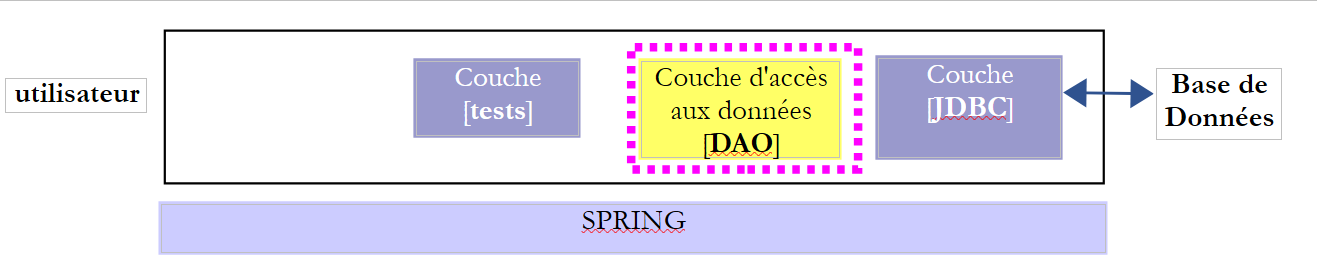
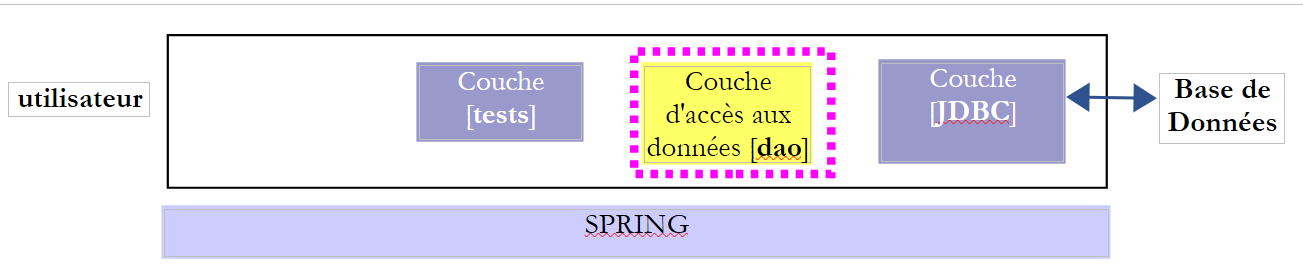
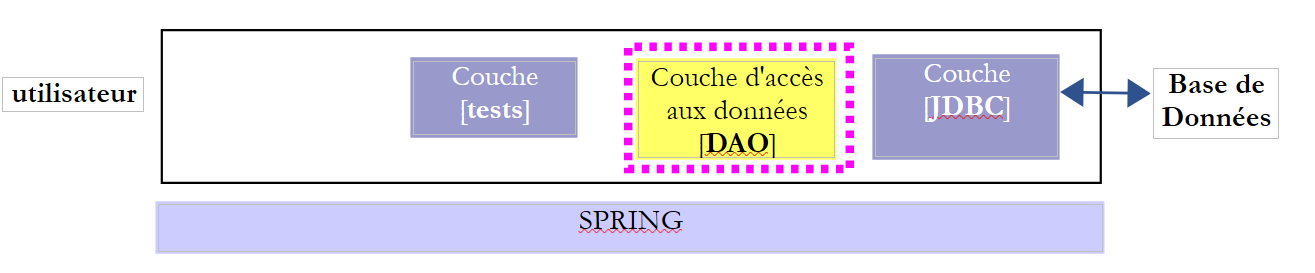
دعونا نعيد النظر في البنية الطبقية لتطبيقنا:
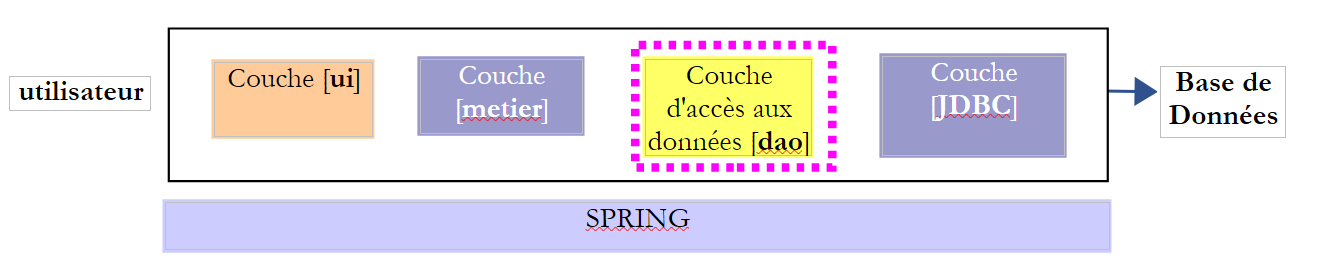 |
يتم تخزين البيانات المطلوبة للانتخابات في قاعدة بيانات MySQL [dbelections]
7.1. الدعم
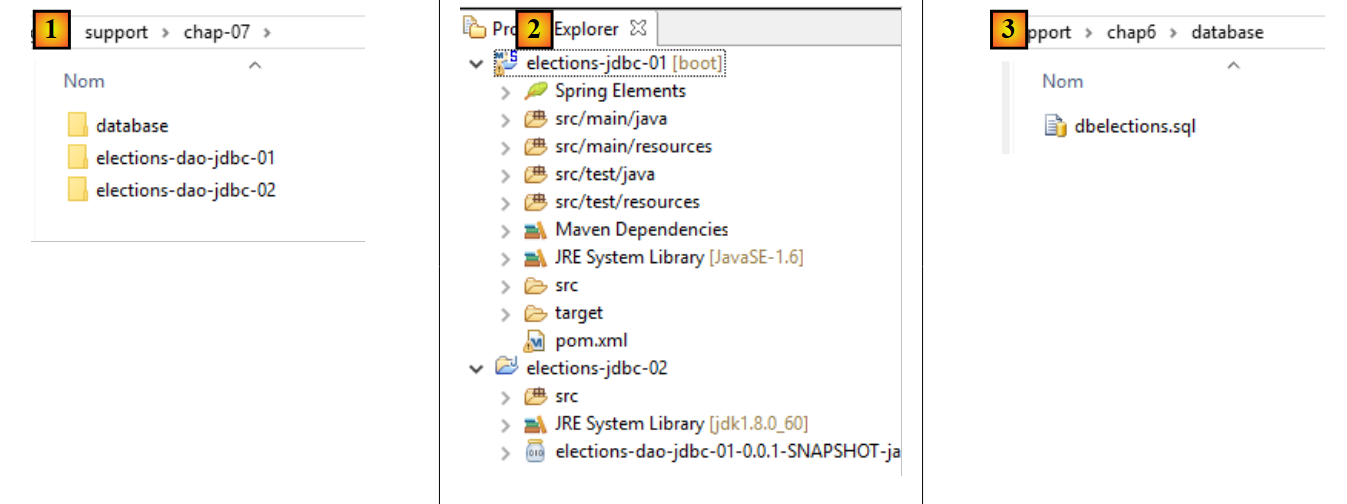 |
يحتوي المجلد [support / chap-07] [1] على:
- مشاريع Eclipse الخاصة بهذا الفصل [2]؛
- نص SQL لإنشاء قاعدة بيانات MySQL [dbelections] [3]؛
7.2. قاعدة البيانات [ dbelections]
المهمة: قم بإنشاء قاعدة بيانات MySQL [dblelections] باتباع الإجراء الموضح في القسم 6.4.2.
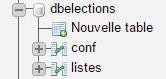
قاعدة البيانات [dbelections] هي قاعدة بيانات MySQL تحتوي على جدولين:
 |
يحتوي الجدول [conf] على معلومات تكوين الانتخابات:
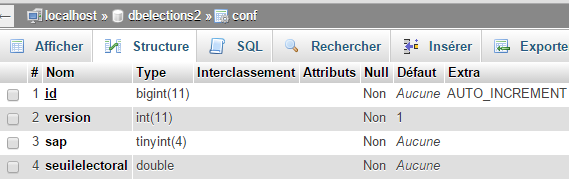 |
- [id]: مفتاح أساسي يتزايد تلقائيًا؛
- [version]: رقم إصدار السجل — يمكن تجاهله هنا؛
- [sap]: عدد المقاعد المطلوب شغلها؛
- [votingThreshold]: الحد الأدنى الذي إذا لم تتجاوزه القائمة يتم استبعادها؛
محتوياته هي كما يلي:
 |
يحتوي الجدول [listes] على قوائم المرشحين للانتخابات:
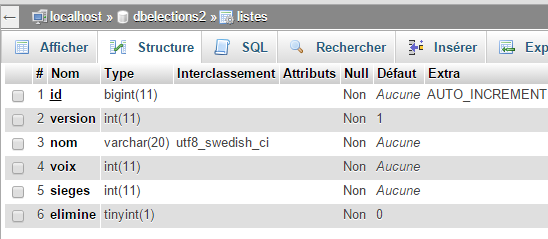 |
- [id]: مفتاح أساسي يتزايد تلقائيًا؛
- [version]: رقم إصدار السجل — يمكن تجاهله هنا؛
- [name]: اسم القائمة؛
- [votes]: الأصوات التي حصلت عليها القائمة — لا تُعرف إلا بعد إدخال المستخدم في طبقة [presentation]؛
- [seats]: عدد المقاعد التي تم الفوز بها — لا يُعرف إلا بعد الحساب بواسطة طبقة [business]؛
- [eliminated]: 1 إذا تم استبعاد القائمة، و0 في الحالات الأخرى — لا يُعرف إلا بعد حساب طبقة [business]؛
محتويات جدول [listes] هي كما يلي:
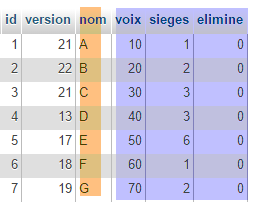 |
يُسمى البرنامج النصي SQL لإنشاء قاعدة البيانات [dbelections] بـ [dbelections.sql] وهو موجود على الخادم. وفيما يلي نصه:
-- phpMyAdmin SQL Dump
-- version 4.0.4
-- http://www.phpmyadmin.net
--
-- Customer: localhost
-- Generated on: Wed March 11, 2015 at 12:20 pm
-- Server version: 5.6.12-log
-- Version of PHP: 5.4.12

SET SQL_MODE = "NO_AUTO_VALUE_ON_ZERO";
SET time_zone = "+00:00";


/*!40101 SET @OLD_CHARACTER_SET_CLIENT=@@CHARACTER_SET_CLIENT */;
/*!40101 SET @OLD_CHARACTER_SET_RESULTS=@@CHARACTER_SET_RESULTS */;
/*!40101 SET @OLD_COLLATION_CONNECTION=@@COLLATION_CONNECTION */;
/*!40101 SET NAMES utf8 */;

--
-- Database: `dbelections`
--
CREATE DATABASE IF NOT EXISTS `dbelections` DEFAULT CHARACTER SET utf8 COLLATE utf8_swedish_ci;
USE `dbelections`;

-- --------------------------------------------------------

--
-- Structure of the `conf` table
--

CREATE TABLE IF NOT EXISTS `conf` (
  `id` bigint(11) NOT NULL AUTO_INCREMENT,
  `version` int(11) NOT NULL DEFAULT '1',
  `sap` tinyint(4) NOT NULL,
  `seuilelectoral` double NOT NULL,
  PRIMARY KEY (`id`)
) ENGINE=InnoDB  DEFAULT CHARSET=utf8 COLLATE=utf8_swedish_ci AUTO_INCREMENT=2 ;

--
-- Contents of the `conf` table
--

INSERT INTO `conf` (`id`, `version`, `sap`, `seuilelectoral`) VALUES
(1, 1, 6, 0.05);

-- --------------------------------------------------------

--
-- Structure of the `lists` table
--

CREATE TABLE IF NOT EXISTS `listes` (
  `id` bigint(11) NOT NULL AUTO_INCREMENT,
  `version` int(11) NOT NULL DEFAULT '1',
  `nom` varchar(20) COLLATE utf8_swedish_ci NOT NULL,
  `voix` int(11) NOT NULL,
  `sieges` int(11) NOT NULL,
  `elimine` tinyint(1) NOT NULL DEFAULT '0',
  PRIMARY KEY (`id`),
  UNIQUE KEY `nom` (`nom`)
) ENGINE=InnoDB  DEFAULT CHARSET=utf8 COLLATE=utf8_swedish_ci AUTO_INCREMENT=8 ;

--
-- Contents of the `lists` table
--

INSERT INTO `listes` (`id`, `version`, `nom`, `voix`, `sieges`, `elimine`) VALUES
(1, 21, 'A', 10, 1, 0),
(2, 22, 'B', 20, 2, 0),
(3, 21, 'C', 30, 3, 0),
(4, 13, 'D', 40, 3, 0),
(5, 17, 'E', 50, 6, 0),
(6, 18, 'F', 60, 1, 0),
(7, 19, 'G', 70, 2, 0);

/*!40101 SET CHARACTER_SET_CLIENT=@OLD_CHARACTER_SET_CLIENT */;
/*!40101 SET CHARACTER_SET_RESULTS=@OLD_CHARACTER_SET_RESULTS */;
/*!40101 SET COLLATION_CONNECTION=@OLD_COLLATION_CONNECTION */;
7.3. مشروع Eclipse
 |
سيكون مشروع Eclipse الخاص بطبقة [DAO] على النحو التالي:
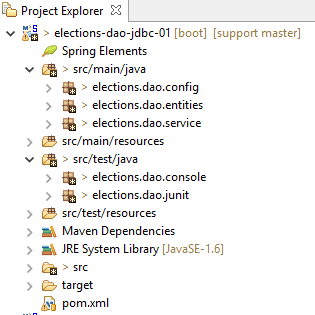 |
- تحتوي حزمة [elections.dao.entities] على الكائنات التي تتعامل معها طبقة [DAO]؛
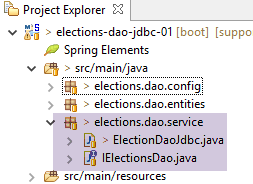
- تحتوي الحزمة [elections.dao.service] على تنفيذ طبقة [DAO]؛
- تحتوي حزمة [elections.dao.config] على تكوين طبقة [DAO]
- تحتوي حزمة [elections.dao.junit] على فئة اختبار JUnit للمشروع؛
- تحتوي حزمة [elections.dao.console] على فئة اختبار قابلة للتنفيذ؛
7.4. تكوين مشروع Maven
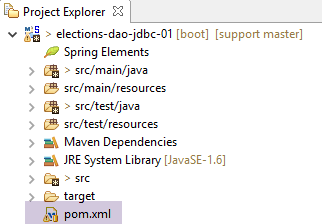 |
فيما يلي ملف [pom.xml] الذي يقوم بتكوين مشروع Maven:
<project xmlns="http://maven.apache.org/POM/4.0.0" xmlns:xsi="http://www.w3.org/2001/XMLSchema-instance"
    xsi:schemaLocation="http://maven.apache.org/POM/4.0.0 http://maven.apache.org/xsd/maven-4.0.0.xsd">
    <modelVersion>4.0.0</modelVersion>
    <groupId>istia.st.elections</groupId>
    <artifactId>elections-dao-jdbc-01</artifactId>
    <version>0.0.1-SNAPSHOT</version>

    <parent>
        <groupId>org.springframework.boot</groupId>
        <artifactId>spring-boot-starter-parent</artifactId>
        <version>1.2.7.RELEASE</version>
    </parent>

    <properties>
        <project.build.sourceEncoding>UTF-8</project.build.sourceEncoding>
        <java.version>1.8</java.version>
    </properties>

    <dependencies>
        <!-- MySQL -->
        <dependency>
            <groupId>mysql</groupId>
            <artifactId>mysql-connector-java</artifactId>
        </dependency>
        <!-- Spring -->
        <dependency>
            <groupId>org.springframework</groupId>
            <artifactId>spring-context</artifactId>
        </dependency>
        <!-- Tomcat Jdbc -->
        <dependency>
            <groupId>org.apache.tomcat</groupId>
            <artifactId>tomcat-jdbc</artifactId>
        </dependency>
        <!-- library jSON -->
        <dependency>
            <groupId>com.fasterxml.jackson.core</groupId>
            <artifactId>jackson-databind</artifactId>
        </dependency>
        <!-- Spring Boot -->
        <dependency>
            <groupId>org.springframework.boot</groupId>
            <artifactId>spring-boot</artifactId>
            <scope>test</scope>
        </dependency>
        <!-- Spring Boot Test -->
        <dependency>
            <groupId>org.springframework.boot</groupId>
            <artifactId>spring-boot-starter-test</artifactId>
            <scope>test</scope>
        </dependency>
        <!-- Spring Boot Logging -->
        <dependency>
            <groupId>org.springframework.boot</groupId>
            <artifactId>spring-boot-starter-logging</artifactId>
        </dependency>
    </dependencies>

    <!-- plugins -->
    <build>
        <plugins>
            <plugin>
                <artifactId>maven-assembly-plugin</artifactId>
                <configuration>
                    <archive>
                        <manifest>
                            <mainClass>config.AppConfig</mainClass>
                        </manifest>
                    </archive>
                    <descriptorRefs>
                        <descriptorRef>jar-with-dependencies</descriptorRef>
                    </descriptorRefs>
                </configuration>
            </plugin>
            <!-- to install the project artifact in the local Maven repository -->
            <plugin>
                <groupId>org.apache.maven.plugins</groupId>
                <artifactId>maven-surefire-plugin</artifactId>
                <version>2.18.1</version>
            </plugin>
        </plugins>
    </build>
</project>
هذا الملف مشابه للملف الموصوف في القسم 6.5.1. وقد تم إجراء التغييرات التالية:
- الأسطر 8–12: تم تعريف مشروع Maven أبوي. يحدد مشروع [spring-boot-starter-parent] (السطر 10) عددًا كبيرًا من التبعيات مع إصداراتها. عند استخدام إحداها (الأسطر 19–57)، لا داعي لتحديد الإصدار، لأنه محدد في مشروع Maven الأبوي؛
- الأسطر 40–51: التبعيات المطلوبة لفئة الاختبار في المشروع. تحتوي هذه التبعيات على السمة [<scope>test</scope>]، مما يعني أنها مطلوبة فقط للفئات الموجودة في المجلد [src/test/java]. لن يتم تضمين هذه التبعيات في أرشيف المشروع النهائي؛
- الأسطر 53–56: ستستخدم Spring مكتبة [spring-boot-starter-logging] لتسجيل الدخول إلى وحدة التحكم؛
- الأسطر 14–17: خصائص تكوين Maven:
- السطر 15: يحدد أن ملفات المصدر مشفرة بـ UTF-8؛
- السطر 16: يحدد أن إصدار المُجمِّع يجب أن يكون 1.8؛
7.5. الكيانات في طبقة [DAO]
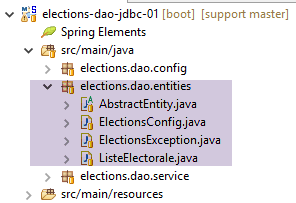 |
- [ElectionsConfig] هو نموذج الكائن المرتبط بصف في جدول [CONF]؛
- [VoterList] هو نموذج الكائن المرتبط بصف في جدول [LISTS]؛
- [AbstactEntity] هي الفئة الأم للفئتين السابقتين. وهي تغلف الحقول [id, version] المشتركة بين الفئتين؛
- [ElectionsException] هي فئة استثناء؛
7.5.1. فئة [ElectionsException]
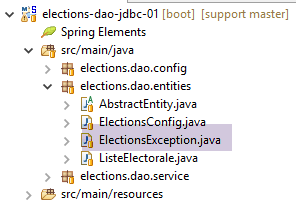 |
تم وصف فئة [ElectionsException] في القسم 4.3. وإليك شفرة البرمجة الخاصة بها مرة أخرى:
package ...;

import java.io.Serializable;
import java.util.ArrayList;
import java.util.List;

// exception class for the Elections application
// the exception is uncontrolled

public class ElectionsException extends RuntimeException implements Serializable {

    // serial ID
    private static final long serialVersionUID = 1L;

    // local fields
    private int code;
    private List<String> erreurs;

    // manufacturers
    public ElectionsException() {
        super();
    }

    public ElectionsException(int code, Throwable e) {
        // parent
        super(e);
        // local
        this.code = code;
        this.erreurs = getErreursForException(e);
    }

    public ElectionsException(int code, String message, Throwable e) {
        // parent
        super(message,e);
        // local
        this.code = code;
        this.erreurs = getErreursForException(e);
    }

    public ElectionsException(int code, String message) {
        // parent
        super(message);
        // local
        this.code = code;
        List<String> erreurs = new ArrayList<>();
        erreurs.add(message);
        this.erreurs = erreurs;
    }

    public ElectionsException(int code, List<String> erreurs) {
        // parent
        super();
        // local
        this.code = code;
        this.erreurs = erreurs;
    }

    // list of exception error messages
    private List<String> getErreursForException(Throwable th) {
        // retrieve the list of exception error messages
        Throwable cause = th;
        List<String> erreurs = new ArrayList<>();
        while (cause != null) {
            // the message is retrieved only if it is !=null and not blank
            String message = cause.getMessage();
            if (message != null) {
                message = message.trim();
                if (message.length() != 0) {
                    erreurs.add(message);
                }
            }
            // next cause
            cause = cause.getCause();
        }
        return erreurs;
    }

    // getters and setters
...
}
يتميز كائن [ElectionsException] بمعلومتين:
- السطر 16: رمز الخطأ؛
- السطر 17: قائمة برسائل الخطأ المرتبطة بتتبع مكدس الاستثناءات التي حدثت؛
- تحتوي الفئة على 5 منشئات (الأسطر 20 و24 و32 و40 و50)؛
- الأسطر 59-76: تسترد طريقة [getErrorsForException] رسائل الخطأ من مكدس الاستثناءات؛
7.5.2. فئة [AbstractEntity]
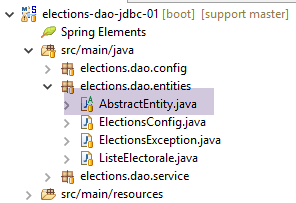 |
فئة [AbstractEntity] هي كما يلي:
package elections.dao.entities;

import java.io.Serializable;

import com.fasterxml.jackson.core.JsonProcessingException;
import com.fasterxml.jackson.databind.ObjectMapper;

public abstract class AbstractEntity implements Serializable {
    private static final long serialVersionUID = 1L;

    // fields
    protected Long id;
    protected Long version;

    // manufacturers
    public AbstractEntity() {

    }

    public AbstractEntity(Long id, Long version) {
        this.id = id;
        this.version = version;
    }

    // signature
    public String toString() {
        try {
            return new ObjectMapper().writeValueAsString(this);
        } catch (JsonProcessingException e) {
            e.printStackTrace();
            return null;
        }
    }

    // getters and setters
...
}
يخزن الحقول [ID، NAME] للصفوف في الجدولين [CONF] و[LISTS] (السطران 8–9).
- السطر 8: تحتوي الفئة على السمة [Abstract] التي تشير إلى أنه لا يمكن إنشاء مثيل لها. يمكن فقط اشتقاقها؛
- الأسطر 26–33: توقيع JSON للكائن؛
- السطر 28: يتم إرجاع سلسلة JSON لـ [this]. إذا كان [this] يمثل، في وقت التشغيل، كائنًا مشتقًا من [AbstractEntity]، يتم الحصول على سلسلة JSON للكائن المشتق. وبالتالي، لن تحتاج الفئات المشتقة إلى تعريف طريقة [toString]. يكفي استخدام الطريقة الموجودة في الفئة الأصلية؛
7.5.3. فئة [ElectionsConfig]
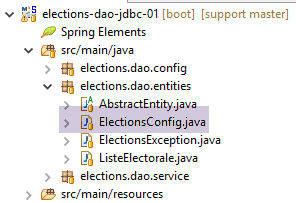 |
فئة [ElectionsConfig] هي كما يلي:
package elections.dao.entities;


public class ElectionsConfig extends AbstractEntity {

    private static final long serialVersionUID = 1L;
    // fields
    private int nbSiegesAPourvoir;
    private double seuilElectoral;

    // manufacturers
    public ElectionsConfig() {
    }

    public ElectionsConfig(Long id, Long version, int nbSiegesAPourvoir, double seuilElectoral) {
        // parent
        super(id, version);
        // local fields
        this.nbSiegesAPourvoir = nbSiegesAPourvoir;
        this.seuilElectoral = seuilElectoral;
    }

    // getters and setters
...
}
- السطر 4: الفئة تمتد من فئة [AbstractEntity]؛
- السطران 8-9: تخزين المعلومات من أعمدة [SAP، SEUILELECTORAL] في جدول [CONF]؛
7.5.4. فئة [VoterList]
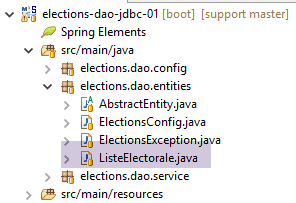 |
فئة [VoterList] هي كما يلي:
package elections.dao.entities;

public class ListeElectorale extends AbstractEntity {

    // fields
    private String nom;
    private int voix;
    private int sieges;
    private boolean elimine;

    // manufacturers
    public ListeElectorale() {
    }

    public ListeElectorale(String nom, int voix, int sieges, boolean elimine) {
        // parent
        super();
        // local fields
        initNom(nom);
        initVoix(voix);
        initSieges(sieges);
        this.elimine=elimine;
    }

    public ListeElectorale(Long id, Long version, String nom, int voix, int sieges, boolean elimine) {
        // parent
        super(id, version);
        // local fields
        initNom(nom);
        initVoix(voix);
        initSieges(sieges);
        this.elimine=elimine;
    }

    // private methods
    private void initNom(String nom) {
        this.nom = nom.trim();
        if ("".equals(nom)) {
            throw new ElectionsException(10, "Le nom ne peut être vide");
        }
    }

    private void initVoix(int voix) {
        this.voix = voix;
        if (voix < 0) {
            throw new ElectionsException(11, "Le nombre de voix ne peut être <0");
        }
    }

    private void initSieges(int sieges) {
        this.sieges = sieges;
        if (sieges < 0) {
            throw new ElectionsException(12, "Le nombre de sièges ne peut être <0");
        }
    }

    // getters and setters

    public String getNom() {
        return nom;
    }

    public void setNom(String nom) {
        initNom(nom);
    }

    public int getVoix() {
        return voix;
    }

    public void setVoix(int voix) {
        initVoix(voix);
    }

    public int getSieges() {
        return sieges;
    }

    public void setSieges(int sieges) {
        initSieges(sieges);
    }

    public boolean isElimine() {
        return elimine;
    }

    public void setElimine(boolean elimine) {
        this.elimine = elimine;
    }

}
- السطر 3: الفئة تمتد من فئة [AbstractEntity]؛
- الأسطر 6–9: تخزن الفئة الأعمدة [NAME، VOTES، SEATS، ELIMINATED] من جدول [LISTS]؛
7.6. تكوين Spring لطبقة [DAO]
 |
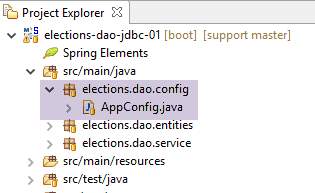 |
فئة [AppConfig] هي فئة تكوين في Spring تقوم بتكوين الوصول إلى قاعدة البيانات على النحو التالي:
package elections.dao.config;

import org.apache.tomcat.jdbc.pool.DataSource;
import org.springframework.cache.CacheManager;
import org.springframework.cache.annotation.EnableCaching;
import org.springframework.cache.concurrent.ConcurrentMapCacheManager;
import org.springframework.context.annotation.Bean;
import org.springframework.context.annotation.ComponentScan;
import org.springframework.context.annotation.Configuration;

@ComponentScan(basePackages = { "elections.dao.service" })
@EnableCaching
public class AppConfig {

    // constants
    public final static String URL = "jdbc:mysql://localhost:3306/dbelections";
    public final static String USER = "root";
    public final static String PASSWD = "";
    public final static String DRIVER_CLASSNAME = "com.mysql.jdbc.Driver";
    public final static String SELECT_LISTES = "SELECT ID, VERSION, NOM, VOIX, SIEGES, ELIMINE FROM LISTES";
    public final static String SELECT_CONF = "SELECT ID, VERSION, SAP, SEUILELECTORAL, SAP FROM CONF";
    public final static String UPDATE_LISTES = "UPDATE LISTES SET VOIX=?, SIEGES=?, ELIMINE=? WHERE ID=?";

    @Bean
    public DataSource dataSource() {
        // data source TomcatJdbc
        DataSource dataSource = new DataSource();
        // configuration access JDBC
        dataSource.setDriverClassName(DRIVER_CLASSNAME);
        dataSource.setUsername(USER);
        dataSource.setPassword(PASSWD);
        dataSource.setUrl(URL);
        // an initially open connection
        dataSource.setInitialSize(1);
        // result
        return dataSource;
    }

    @Bean
    public CacheManager cacheManager() {
        return new ConcurrentMapCacheManager("electionsConfig");
    }
}
- الأسطر 25–38: سيتم الوصول إلى قاعدة البيانات عبر مصدر بيانات [tomcat-jdbc]. تم استخدام هذا النوع من مصادر البيانات وشرحه في القسم 6.5؛
- الأسطر 17–23: مجموعة من الثوابت الثابتة التي يمكن لجميع الفئات في المشروع الوصول إليها؛
- السطر 13: تجعل العلامة [@Configuration] فئة [AppConfig] فئة تكوين Spring؛
- السطر 11: تحدد علامة [@ComponentScan] الحزم التي يمكن العثور فيها على كائنات Spring. هنا، سنقوم بتعريف كائن Spring في حزمة [dao]. تجعل علامة [@ComponentScan] الفئة فئة تكوين، مما يوفر علينا الحاجة إلى إضافة علامة [@Configuration]؛
- السطر 12 يتيح إدارة ذاكرة التخزين المؤقت. والمبدأ هو كما يلي:
- نطبق تعليق [@Cacheable('cache_name')] على طريقة M. و"cache_name" هو الاسم المستخدم في السطر 41؛
- عند استدعاء الطريقة M لأول مرة، يتم إرجاع نتائجها وتخزينها أيضًا في ذاكرة التخزين المؤقتة المسماة في التعليق التوضيحي؛
- عند استدعاء الدالة M لاحقًا بنفس المعلمات المستخدمة في المرة الأولى، لا يتم تنفيذها، ويقوم Spring ببساطة بإرجاع القيم المخزنة في ذاكرة التخزين المؤقت؛
7.7. تكوين السجل
 |
يتم تعريف مكتبات التسجيل من خلال التبعية التالية في ملف [pom.xml]:
        <!-- Spring Boot Logging -->
        <dependency>
            <groupId>org.springframework.boot</groupId>
            <artifactId>spring-boot-starter-logging</artifactId>
</dependency>
تتضمن هذه التبعية المكتبات التالية:
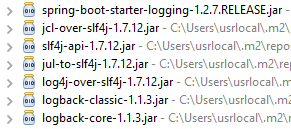 |
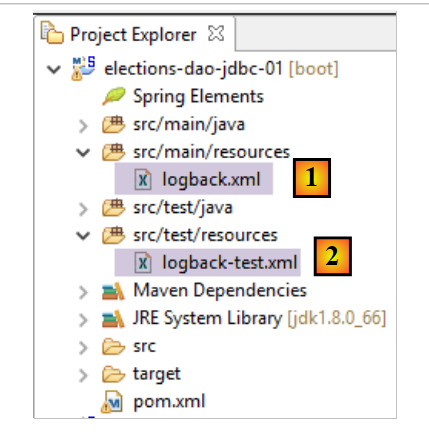
تتولى مكتبة [logback] عملية التسجيل. ويتم تكوينها بواسطة ملفين:
- [logback.xml] لفرع الكود الرئيسي؛
- [logback-test.xml] لفرع اختبار الكود. إذا كان هذا الملف مفقودًا، يتم استخدام الملف السابق بدلاً منه؛
يجب أن يكون هذان الملفان موجودين في [Classpath] الخاص بالمشروع. ولهذا السبب، يتم وضعهما في المجلد:
- [src/main/resources] لفرع الكود الرئيسي؛
- [src/test/resources] لفرع اختبار الكود؛
محتويات الملفين متطابقة هنا:
<configuration>

  <appender name="STDOUT" class="ch.qos.logback.core.ConsoleAppender">
    <!-- encoders are  by default assigned the type
         ch.qos.logback.classic.encoder.PatternLayoutEncoder -->
    <encoder>
      <pattern>%d{HH:mm:ss.SSS} [%thread] %-5level %logger{36} - %msg%n</pattern>
    </encoder>
  </appender>

  <!-- log level control -->
  <root level="info"> <!-- info, debug, warn -->
    <appender-ref ref="STDOUT" />
  </root>
</configuration>
كل شيء يحدث في السطر 12، حيث نحدد مستوى السجل المطلوب:
- [debug]: المستوى الأكثر تفصيلاً؛
- [off]: لا توجد سجلات؛
- [info]: مستوى التسجيل العادي؛
- [warn]: مثل [info] بالإضافة إلى رسائل تحذير. تشير هذه الرسائل إلى خطأ محتمل؛
قم بالتبديل إلى وضع [debug] فور ظهور الأخطاء أثناء التنفيذ.
7.8. تنفيذ طبقة [DAO]
 |
 |
واجهة [IDao] لطبقة [DAO] هي كما يلي:
package istia.st.elections.webapi.client.dao;

import istia.st.elections.webapi.client.entities.ElectionsConfig;
import istia.st.elections.webapi.client.entities.ListeElectorale;

public interface IDao {
    // election configuration
    public ElectionsConfig getElectionsConfig();

    // competing lists
    public ListeElectorale[] getListesElectorales();

    // save election results
    public void setListesElectorales(ListeElectorale[] listesElectorales);

}
سيكون الهيكل الأساسي لفئة [ElectionsDaoJdbc] التي تنفذ طبقة [dao] باستخدام قاعدة بيانات كما يلي:
package elections.dao.service;

import java.sql.Connection;
import java.sql.PreparedStatement;
import java.sql.ResultSet;
import java.sql.SQLException;

import org.apache.tomcat.jdbc.pool.DataSource;
import org.springframework.beans.factory.annotation.Autowired;
import org.springframework.cache.annotation.Cacheable;
import org.springframework.stereotype.Component;

import elections.dao.entities.ElectionsConfig;
import elections.dao.entities.ElectionsException;
import elections.dao.entities.ListeElectorale;

@Component
@SuppressWarnings("unused")
public class ElectionDaoJdbc implements IElectionsDao {

    @Autowired
    private DataSource dataSource;

    @Cacheable("electionsConfig")
    // obtaining conf of the election
    public ElectionsConfig getElectionsConfig() {
        throw new RuntimeException("[getElectionsConfig] not yet implemented");
    }

    // obtaining lists
    public ListeElectorale[] getListesElectorales() {
        throw new RuntimeException("[getListesElectorales] not yet implemented");
    }

    // list modification [votes, seats, eliminated]
    public void setListesElectorales(ListeElectorale[] listesElectorales) {
        throw new RuntimeException("[setListesElectorales] not yet implemented");
    }

    // -------------------- private methods

    // end-of-life management
    private ElectionsException doFinally(int code, ResultSet rs, PreparedStatement ps, Connection connexion) {
        // closure ResultSet
        if (rs != null) {
            try {
                rs.close();
            } catch (SQLException e1) {

            }
        }
        // closure [PreparedStatement]
        if (ps != null) {
            try {
                ps.close();
            } catch (SQLException e2) {

            }
        }
        // close connection
        if (connexion != null) {
            try {
                connexion.close();
            } catch (SQLException e3) {
                // returns a [ElectionsException]
                return new ElectionsException(code, e3);
            }
        }
        // no exceptions
        return null;
    }

    // wrestling management
    private ElectionsException doCatchException(int code1, int code2, Connection connexion, Throwable th) {
        // we generate a [ElectionsException]
        ElectionsException ex1 = new ElectionsException(code1, th);
        // cancel transaction
        try {
            if (connexion != null) {
                connexion.rollback();
            }
        } catch (SQLException e2) {
        }
        // we return the exception
        return ex1;
    }
}
- السطر 24: التعليق التوضيحي [@Cacheable] هو تعليق توضيحي في Spring يوجه النظام لتخزين نتائج طريقة [getElectionsConfig] مؤقتًا. وهذا ممكن هنا لأن محتويات جدول [CONF] لا تتغير أبدًا. ولن يكون من الممكن تطبيق هذا التعليق التوضيحي على طريقة [getListesElectorales] لأن محتويات جدول [LISTES] تتغير بمرور الوقت؛
- تُرجع الطريقتان [doCatchException] و[doFinally] نوع [ElectionsException]. وتُرجع الطريقة [doFinally] مؤشرًا فارغًا إذا تم تحرير الموارد دون حدوث أخطاء؛
المهمة: اكتب فئة [ElectionDaoJdbc]، مستوحياً من فئة [IntroJdbc02] التي تمت دراستها في القسم 6.5.2.
7.9. فئة الاختبار [Main]
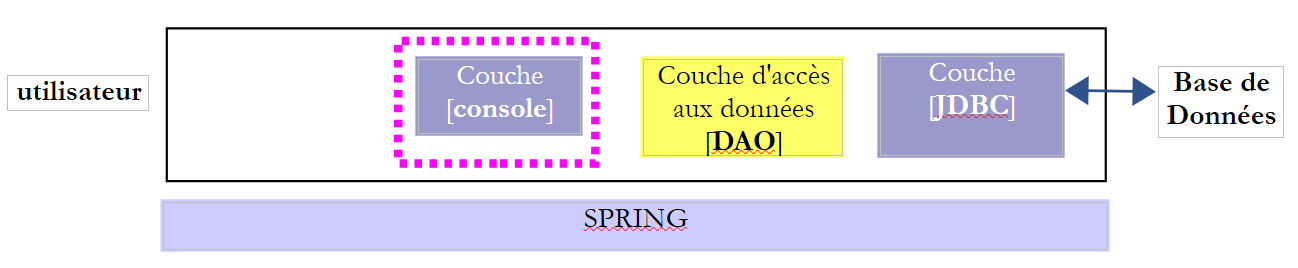 |
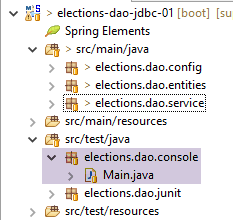 |
الفئة [Main] هي كما يلي:
package elections.dao.console;

import java.util.ArrayList;
import java.util.List;

import org.springframework.context.annotation.AnnotationConfigApplicationContext;

import elections.dao.config.AppConfig;
import elections.dao.entities.ElectionsConfig;
import elections.dao.entities.ElectionsException;
import elections.dao.entities.ListeElectorale;
import elections.dao.service.IElectionsDao;

public class Main {

    // data source
    private static IElectionsDao dao;

    public static void main(String[] args) {
        // retrieve the [DAO] layer reference after instantiating the Spring context
        try (AnnotationConfigApplicationContext ctx = new AnnotationConfigApplicationContext(AppConfig.class)) {
            // data source recovery
            dao = ctx.getBean(IElectionsDao.class);
        } catch (Exception e) {
            System.out.println("Les erreurs suivantes se sont produites lors de l'initialisation du contexte Spring -------");
            for (String erreur : getErreursForThrowable(e)) {
                System.out.println(erreur);
            }
            // end
            return;
        }
        // reading the BD
        ElectionsConfig electionsConfig = null;
        ListeElectorale[] listes;
        try {
            // contents of both tables
            electionsConfig = dao.getElectionsConfig();
            listes = dao.getListesElectorales();
        } catch (ElectionsException e) {
            System.out.println("Les erreurs suivantes se sont produites lors de la lecture des tables ----------");
            for (String erreur : e.getErreurs()) {
                System.out.println(erreur);
            }
            // end
            return;
        }
        // all went well - display
        System.out.println(String.format("Nombre de sièges à pourvoir : %d", electionsConfig.getNbSiegesAPourvoir()));
        System.out.println(String.format("Seuil électoral : %5.2f", electionsConfig.getSeuilElectoral()));
        System.out.println("Listes candidates----------------");
        for (ListeElectorale liste : listes) {
            System.out.println(liste);
        }
    }

    // private methods ------------------
    private static List<String> getErreursForThrowable(Throwable th) {
        // retrieve the list of exception error messages
        Throwable cause = th;
        List<String> erreurs = new ArrayList<>();
        while (cause != null) {
            // the message is retrieved only if it is !=null and not blank
            String message = cause.getMessage();
            if (message != null) {
                message = message.trim();
                if (message.length() != 0) {
                    erreurs.add(message);
                }
            }
            // next cause
            cause = cause.getCause();
        }
        return erreurs;
    }

}
- الأسطر 21–31: استرداد مرجع إلى طبقة [DAO]؛
- السطر 21: نستخدم صيغة تسمى try_with_resources. وصيغتها هي كما يلي:
try (T ressource=expression) {
            // exploitation de ressource
...
}
- (تابع)
- يجب أن ينفذ النوع T في السطر 1 واجهة [java.lang.AutoCloseable]؛
- عند الخروج من كتلة الأسطر 1-4، يتم تحرير المورد من النوع [java.lang.AutoCloseable] تلقائيًا، بغض النظر عما إذا حدث استثناء أم لا. سيتعرف من هم على دراية بلغة C# على هذا باعتباره نظيرًا نحويًا ووظيفيًا لعبارة using (T resource = expression)؛
- الأسطر 40–49: استخدام طبقة [DAO] لاسترداد محتويات الجداول [CONF] و[LISTES]؛
- الأسطر 41-47: يتم اختبار ذاكرة التخزين المؤقت [electionsconfig]. تم تعريف ذاكرة التخزين المؤقت هذه في مكانين:
- في فئة [ElectionsDaoJdbc]:
  @Cacheable("electionsConfig")
  public ElectionsConfig getElectionsConfig() {
- (تابع)
- في فئة التكوين [AppConfig]:
@EnableCaching
public class AppConfig {
...
  @Bean
  public CacheManager cacheManager() {
    return new ConcurrentMapCacheManager("electionsConfig");
  }
}
- السطر 59: إغلاق سياق Spring؛
- الأسطر 62–67: عرض المعلومات المسترجعة؛
النتائج التي تم الحصول عليها باستخدام طبقة [DAO] مطبقة هي كما يلي:
- الأسطر 2–4: توضح تأثير ذاكرة التخزين المؤقت:
- يستغرق الطلب 1 80 مللي ثانية؛
- يستغرق الاستعلام 2 1 مللي ثانية؛
عندما تكون قاعدة البيانات غير متصلة بالإنترنت، يتم الحصول على النتائج التالية:
7.10. اختبارات JUnit لفئة [ ElectionsDaoJdbc]
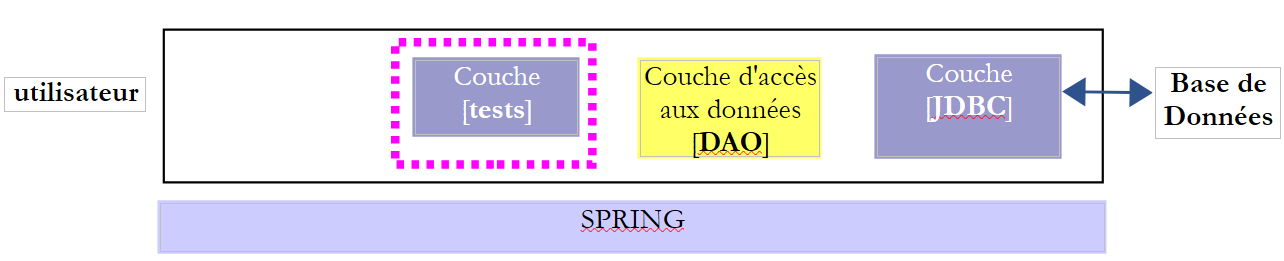 |
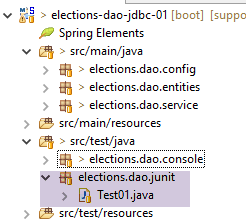 |
فئة [Test01] هي فئة الاختبار [JUnit] التالية:
package elections.dao.junit;

import org.junit.Assert;
import org.junit.Before;
import org.junit.Test;
import org.junit.runner.RunWith;
import org.springframework.beans.factory.annotation.Autowired;
import org.springframework.boot.test.SpringApplicationConfiguration;
import org.springframework.test.context.junit4.SpringJUnit4ClassRunner;

import elections.dao.config.AppConfig;
import elections.dao.entities.ElectionsConfig;
import elections.dao.entities.ListeElectorale;
import elections.dao.service.IElectionsDao;


@SpringApplicationConfiguration(classes = AppConfig.class)
@RunWith(SpringJUnit4ClassRunner.class)
public class Test01 {

    // layer [DAO]
    @Autowired
    private IElectionsDao electionsDao;

    @Before
    public void init() {
        // the table is cleaned [LISTES]
        // competing lists
        ListeElectorale[] listes = electionsDao.getListesElectorales();
        // set votes and seats to 0 and eliminate false
        int voix = 0;
        int sièges = 0;
        boolean elimine = false;
        for (ListeElectorale liste : listes) {
            liste.setVoix(voix);
            liste.setSieges(sièges);
            liste.setElimine(elimine);
        }
        // we make this data persistent using the [dao] layer
        electionsDao.setListesElectorales(listes);
    }

    @Test
    public void testElections01() {
        ...
    }
}
- السطر 17: تضمن علامة [RunWith]، وهي علامة [JUnit] (السطر 6)، التكامل مع Spring عبر فئة [SpringJUnit4ClassRunner]؛
- السطر 16: تعليق [SpringApplicationConfiguration] هو تعليق [Spring] (السطر 8) الذي يسمح لك بتحديد فئات التكوين لاختبار JUnit. هنا، نحدد فئة [AppConfig] المستخدمة لتكوين المشروع. وبذلك، يمكننا الوصول إلى جميع كائنات Spring المحددة بواسطة فئة التكوين هذه. وهكذا يمكننا، في السطرين 21-22، إدخال مرجع إلى طبقة [DAO] التي سيتم اختبارها؛
- السطر 25: تشير العلامة [Before] إلى طريقة يجب تنفيذها قبل كل اختبار؛
- الأسطر 26-41: تحدد طريقة [init] الأصوات والمقاعد في جدول [LISTES] إلى صفر والقيمة المنطقية [elimine] إلى [false]؛
طريقة الاختبار الوحيدة هي كما يلي:
@Test
    public void testElections01() {
        System.out.println("testElections01-------------------------------------");
        // election configuration recovery
        ElectionsConfig electionsConfig = electionsDao.getElectionsConfig();
        int nbSiegesAPourvoir = electionsConfig.getNbSiegesAPourvoir();
        double seuilElectoral = electionsConfig.getSeuilElectoral();
        Assert.assertEquals(6, nbSiegesAPourvoir);
        Assert.assertEquals(0.05, seuilElectoral, 1E-6);

        // competing lists
        ListeElectorale[] listes = electionsDao.getListesElectorales();
        // display read values
        System.out.println("Nombre de sièges à pourvoir : " + nbSiegesAPourvoir);
        System.out.println("Seuil électoral : " + seuilElectoral);
        System.out.println("Listes en compétition ---------------------");
        for (int i = 0; i < listes.length; i++) {
            System.out.println(listes[i]);
        }

        // votes and seats are allocated to lists
        int voix = 0;
        int sièges = 0;
        boolean elimine = false;
        for (ListeElectorale liste : listes) {
            liste.setVoix(voix);
            liste.setSieges(sièges);
            liste.setElimine(elimine);
            voix += 10;
            sièges += 1;
            elimine = !elimine;
        }

        // we make this data persistent using the [dao] layer
        electionsDao.setListesElectorales(listes);

        // data re-reading
        ListeElectorale[] listesElectorales2 = electionsDao.getListesElectorales();
        // check data read
        Assert.assertEquals(7, listesElectorales2.length);
        voix = 0;
        sièges = 0;
        elimine = false;
        for (ListeElectorale liste : listesElectorales2) {
            Assert.assertEquals(voix, liste.getVoix());
            Assert.assertEquals(sièges, liste.getSieges());
            Assert.assertEquals(elimine, liste.isElimine());
            voix += 10;
            sièges += 1;
            elimine = !elimine;
        }
        System.out.println("Listes en compétition ---------------------");
        for (int i = 0; i < listes.length; i++) {
            System.out.println(listes[i]);
        }
    }
- الأسطر 5-9: نتأكد من أنه يمكننا استرداد محتويات جدول [CONF]؛
- الأسطر 11–19: نعرض محتويات جدول [LISTES]. لا توجد اختبارات هنا، فقط فحص بصري؛
- الأسطر 21-35: نقوم بتعديل جدول [LISTES] في قاعدة البيانات عن طريق تعيين قيم لحقول القوائم [voices, seats, eliminated]؛
- الأسطر 37–51: نقرأ جدول [LISTES] مرة أخرى ونتحقق من أن النتيجة تتطابق مع ما تم إدخاله؛
- الأسطر 52–55: التحقق البصري؛
نتائج وحدة التحكم التي تم الحصول عليها باستخدام طبقة [DAO] مطبقة هي كما يلي:
- السطور 1-23: سجلات اختبار الربيع؛
- السطور 25-26: محتويات جدول [CONF]؛
- الأسطر 27-34: المحتويات الأولية لجدول [LISTES]؛
- الأسطر 35-42: محتويات جدول [LISTES] بعد تعيين قيم لحقول [voix, sieges, elimine]؛
بالإضافة إلى ذلك، اجتاز اختبار JUnit:
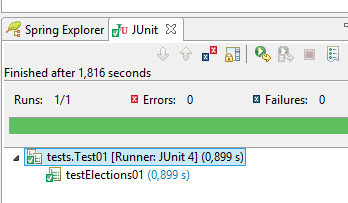 |
7.11. إنشاء أرشيف [with-dependencies] لطبقة [dao]
يتميز المشروع النهائي بالبنية التالية:
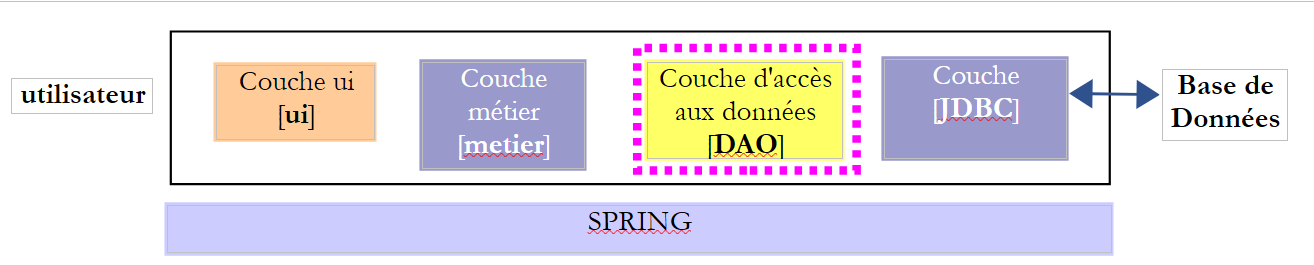 |
دعونا نستعرض تكوين Maven الخاص بالمشروع:
<project xmlns="http://maven.apache.org/POM/4.0.0" xmlns:xsi="http://www.w3.org/2001/XMLSchema-instance"
    xsi:schemaLocation="http://maven.apache.org/POM/4.0.0 http://maven.apache.org/xsd/maven-4.0.0.xsd">
    <modelVersion>4.0.0</modelVersion>
    <groupId>istia.st.elections</groupId>
    <artifactId>elections-dao-jdbc-01</artifactId>
    <version>0.0.1-SNAPSHOT</version>

    <parent>
        <groupId>org.springframework.boot</groupId>
        <artifactId>spring-boot-starter-parent</artifactId>
        <version>1.2.7.RELEASE</version>
    </parent>

    <dependencies>
        <!-- MySQL -->
        <dependency>
            <groupId>mysql</groupId>
            <artifactId>mysql-connector-java</artifactId>
        </dependency>
        <!-- Spring -->
        <dependency>
            <groupId>org.springframework</groupId>
            <artifactId>spring-context</artifactId>
        </dependency>
        <!-- Tomcat Jdbc -->
        <dependency>
            <groupId>org.apache.tomcat</groupId>
            <artifactId>tomcat-jdbc</artifactId>
        </dependency>
        <!-- library jSON -->
        <dependency>
            <groupId>com.fasterxml.jackson.core</groupId>
            <artifactId>jackson-databind</artifactId>
        </dependency>
        <!-- Spring Boot -->
        <dependency>
            <groupId>org.springframework.boot</groupId>
            <artifactId>spring-boot</artifactId>
            <scope>test</scope>
        </dependency>
        <!-- Spring Boot Test -->
        <dependency>
            <groupId>org.springframework.boot</groupId>
            <artifactId>spring-boot-starter-test</artifactId>
            <scope>test</scope>
        </dependency>
        <!-- Spring Boot Logging -->
        <dependency>
            <groupId>org.springframework.boot</groupId>
            <artifactId>spring-boot-starter-logging</artifactId>
        </dependency>
    </dependencies>

    <!-- plugins -->
    <build>
        <plugins>
            <plugin>
                <artifactId>maven-assembly-plugin</artifactId>
                <configuration>
                    <archive>
                        <manifest>
                            <mainClass>config.AppConfig</mainClass>
                        </manifest>
                    </archive>
                    <descriptorRefs>
                        <descriptorRef>jar-with-dependencies</descriptorRef>
                    </descriptorRefs>
                </configuration>
            </plugin>
            <!-- to install the project artifact in the local Maven repository -->
            <plugin>
                <groupId>org.apache.maven.plugins</groupId>
                <artifactId>maven-surefire-plugin</artifactId>
                <version>2.18.1</version>
            </plugin>
        </plugins>
    </build>
</project>
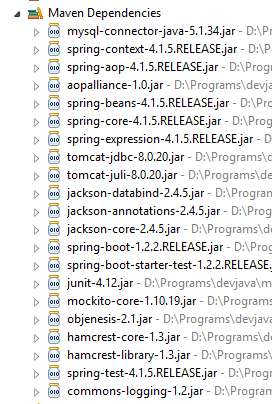 |
سنقوم بإنشاء ملف JAR واحد يحتوي على الفئات من جميع ملفات JAR المذكورة أعلاه بالإضافة إلى تلك الموجودة في مشروع طبقة [DAO]. ويتم ذلك عن طريق إجراء تغيير على ملف [pom.xml]:
<project xmlns="http://maven.apache.org/POM/4.0.0" xmlns:xsi="http://www.w3.org/2001/XMLSchema-instance"
    xsi:schemaLocation="http://maven.apache.org/POM/4.0.0 http://maven.apache.org/xsd/maven-4.0.0.xsd">
    <modelVersion>4.0.0</modelVersion>
    <groupId>istia.st.elections</groupId>
    <artifactId>elections-jdbc-01</artifactId>
    <version>0.0.1-SNAPSHOT</version>

    <parent>
        <groupId>org.springframework.boot</groupId>
        <artifactId>spring-boot-starter-parent</artifactId>
        <version>1.2.2.RELEASE</version>
    </parent>
    <properties>
        <project.build.sourceEncoding>UTF-8</project.build.sourceEncoding>
        <java.version>1.8</java.version>
    </properties>

    <dependencies>
        ...
    </dependencies>

    <!-- plugins -->
    <build>
        <plugins>
            <plugin>
                <artifactId>maven-assembly-plugin</artifactId>
                <configuration>
                    <archive>
                        <manifest>
                            <mainClass>console.Main</mainClass>
                        </manifest>
                    </archive>
                    <descriptorRefs>
                        <descriptorRef>jar-with-dependencies</descriptorRef>
                    </descriptorRefs>
                </configuration>
            </plugin>
        </plugins>
    </build>
</project>
- الأسطر 25–37: تكوين مكون إضافي لـ Maven لإنشاء ملف JAR؛
- السطر 15: تحديد إصدار Java المراد استخدامه للتجميع؛
بمجرد إجراء هذا التغيير، يمكنك إنشاء ملف JAR كما يلي [1-10]:
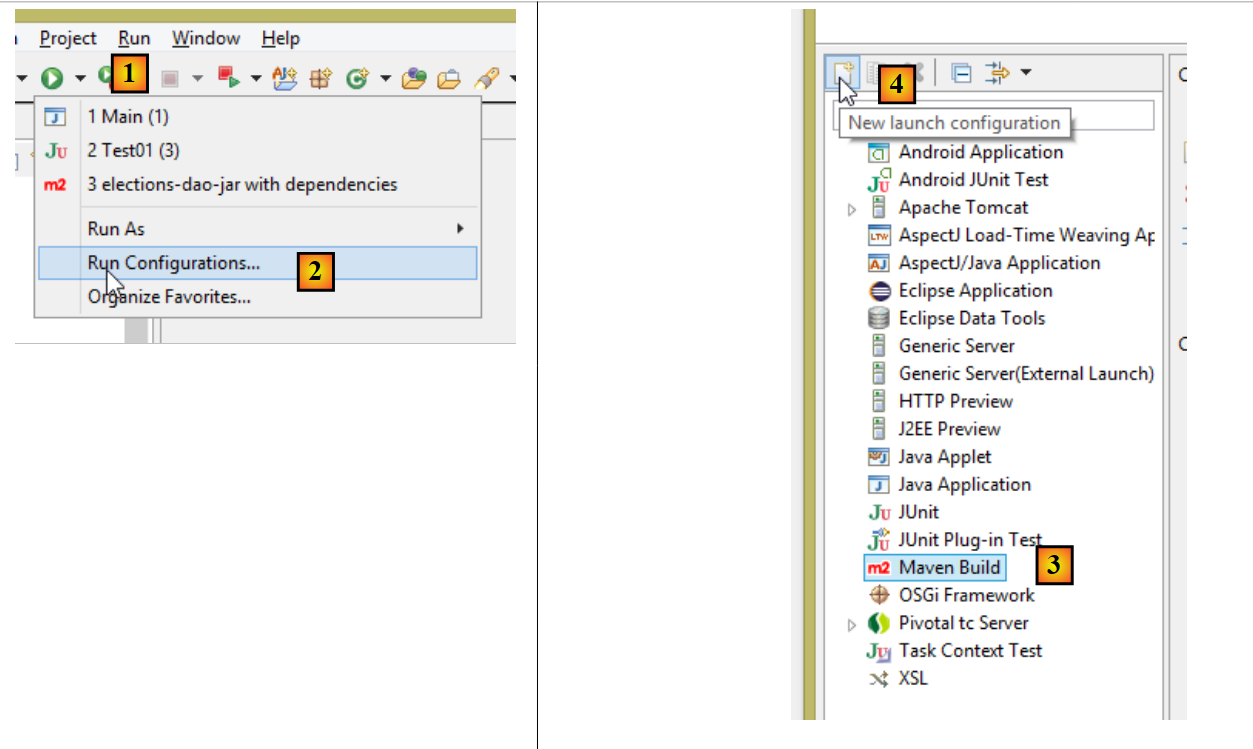 |
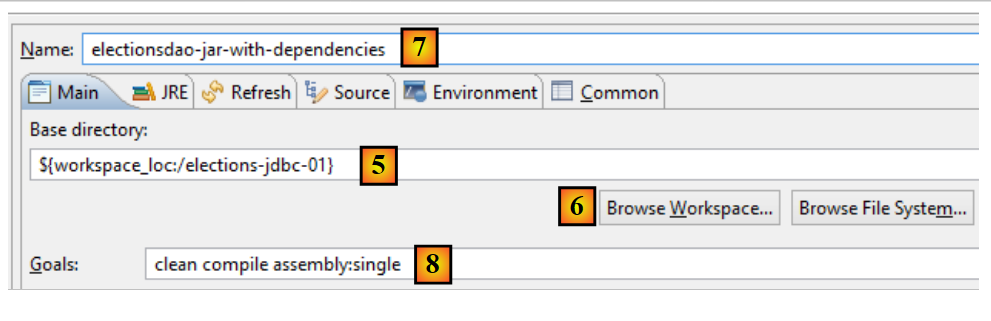 |
- في [5]، حدد مجلد المشروع باستخدام الزر [6]؛
- في [7]، قم بتسمية تكوين البناء؛
- في [8]، أدخل قائمة مهام Maven المطلوب تنفيذها:
- [clean]: يمسح مجلد [target] الخاص بالمشروع حيث سيتم وضع ملف JAR الذي تم إنشاؤه؛
- [compile]: يقوم بتجميع المشروع؛
- [assembly:single]: ينشئ ملف JAR واحدًا يحتوي على جميع فئات المشروع وتبعياته؛
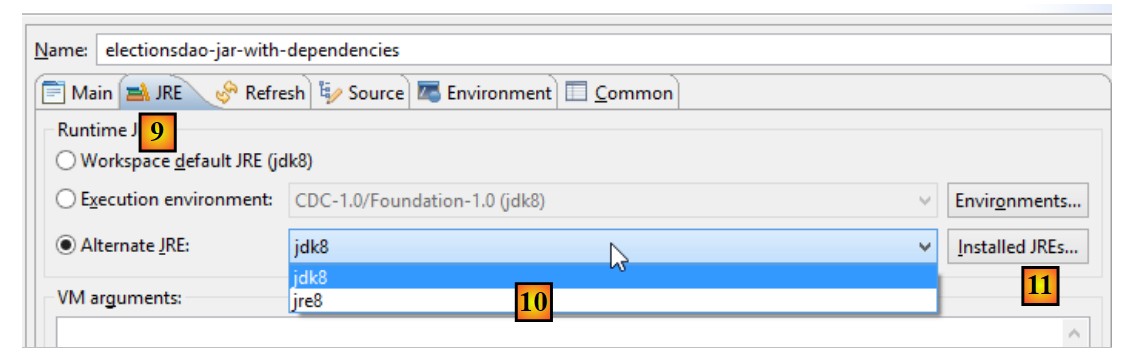 |
- في [9-10]، تحقق من أن لديك JDK (مجموعة أدوات تطوير Java) وليس JRE (بيئة تشغيل Java). الفرق هو أن JDK يتضمن مُجمِّعًا، بينما JRE لا يتضمنه. إذا لم يكن لديك JDK، فيجب عليك إضافة واحد في [10] باستخدام [11]. للقيام بذلك، اتبع الإجراء الموضح في القسم 3.1؛
 |
- في [17]، قم بتشغيل تكوين البناء؛
- في [13]، الأرشيف الذي تم إنشاؤه؛
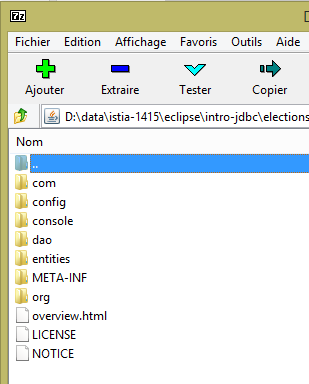
يمكنك فتح هذا الأرشيف باستخدام أداة فك الضغط:
 |
7.12. اختبار أرشيف طبقة [DAO]
لنقم بإنشاء مشروع Eclipse قياسي (وليس Maven) [1]:
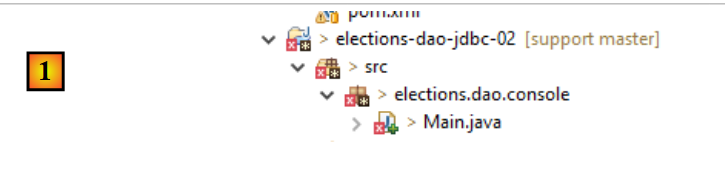 |
لننسخ الحزمة [dao.console] من مشروع [elections-dao-jdbc-01] ونلصقها في مشروع [elections-dao-jdbc-02] [2]. تظهر عدة أخطاء لأن الفئة [Main] تشير إلى فئات غير موجودة في [Classpath] الخاص بها. سنقوم بتعديل [Classpath].
أولاً، نقوم بإنشاء [2-8] مجلد [lib] في المشروع الجديد:
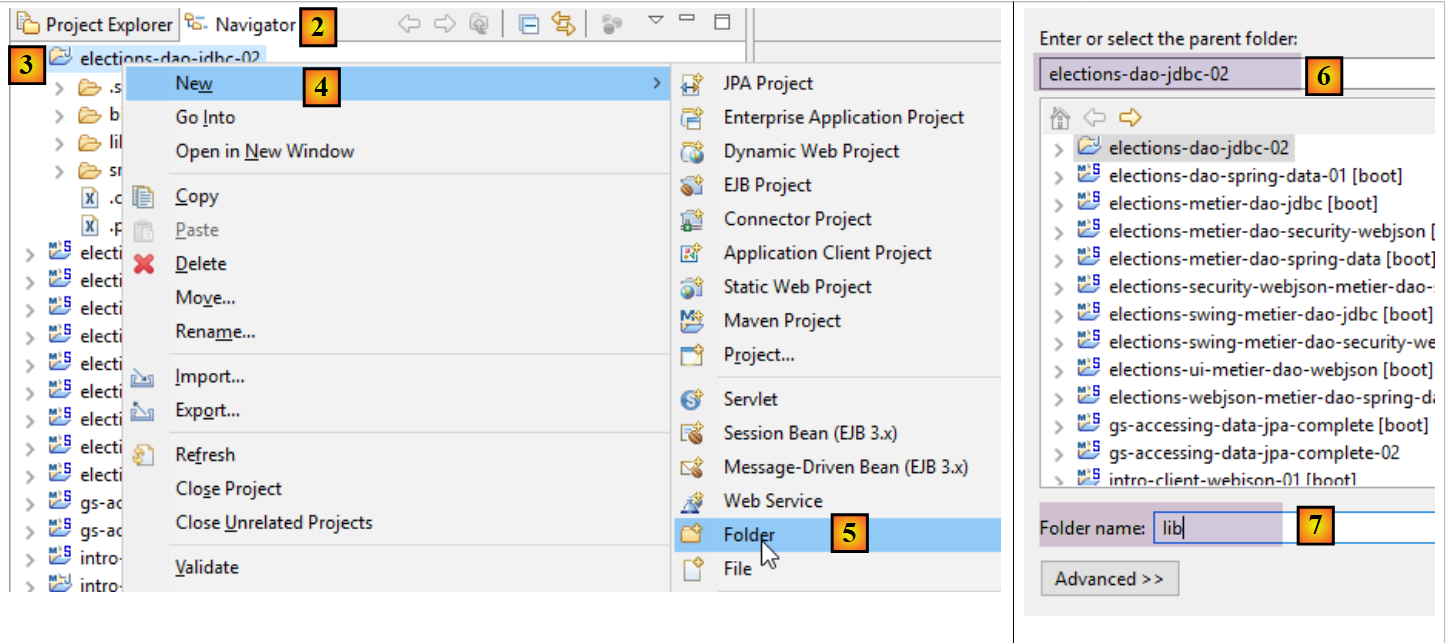 |
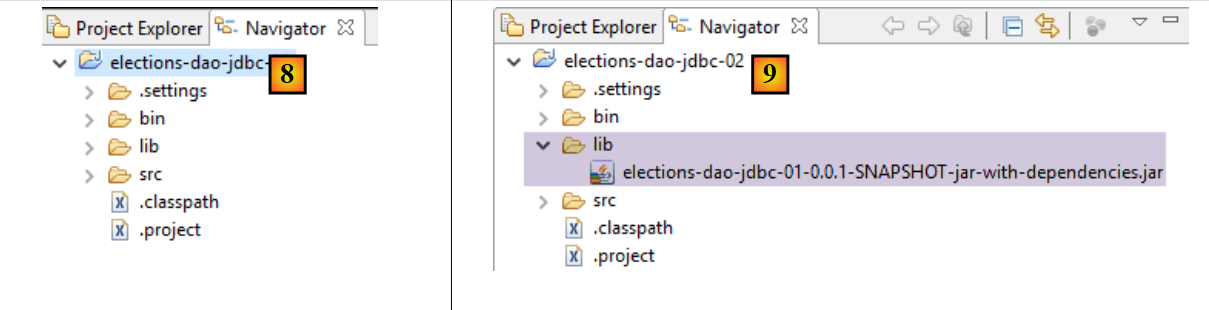 |
في [9]، نضع الأرشيف الذي تم إنشاؤه في الخطوة السابقة في مجلد [lib]، ثم نعدل مسار البناء للمشروع:
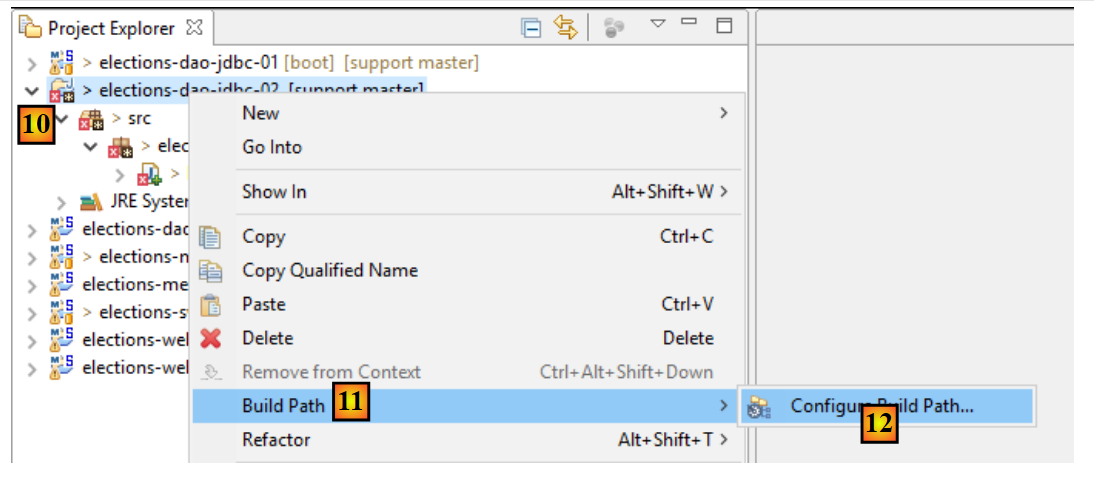 |
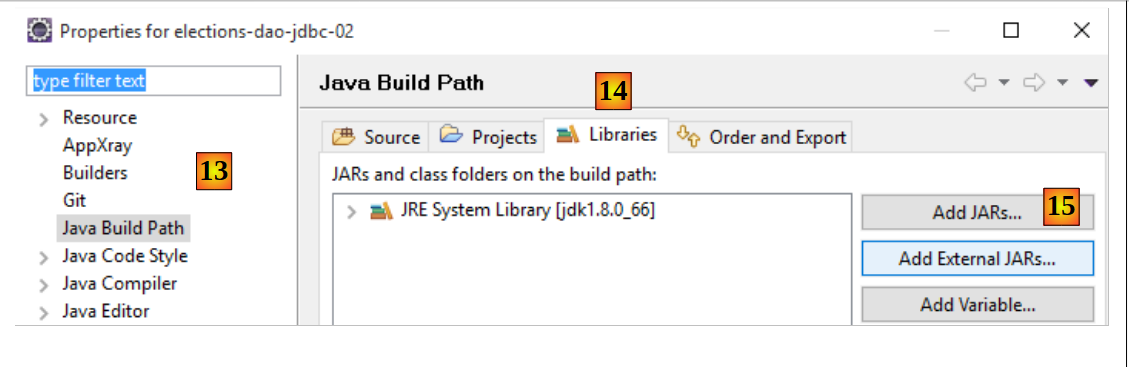 |
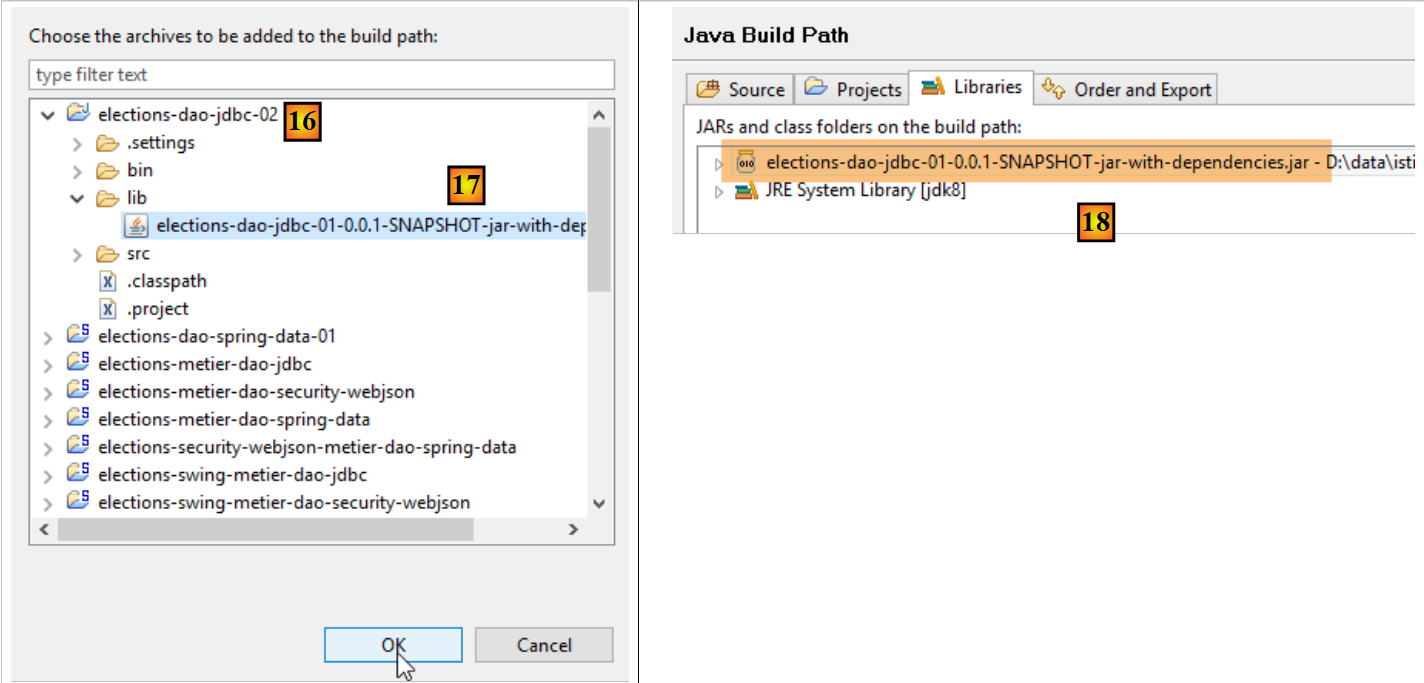 |
- في [18]، قمنا باستيراد أرشيف طبقة [DAO] التي تم إنشاؤها مسبقًا؛
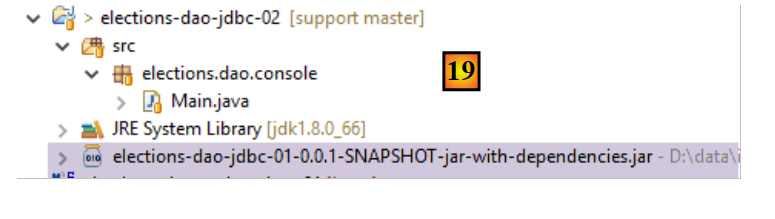 |
- في [19]، لم يعد المشروع يظهر أي أخطاء؛
يمكننا بعد ذلك تشغيل فئة [Main]. نحصل على نفس النتائج كما في السابق.