1. 第 1 部分
该文档的PDF版本可在此处获取 |HERE|。
文档中的示例可在此处查看 |HERE|。
1.1. 引言
本文的目标:
- 编写一个三层Web应用程序 [用户界面、业务逻辑、数据访问]
- 使用 Spring IOC 配置该应用程序
- 通过修改这三个层中一个或多个层的实现,编写不同版本的应用程序。
使用的工具:
- 开发使用 Visual Studio.NET——参见附录第 3.1 节;
- Cassini Web 服务器用于运行——参见附录第 3.2 节;
- Nunit 用于单元测试——参见附录第 3.4 节;
- Web 应用层的集成与配置使用 Spring——参见附录第 3.3 节;
按初级-中级-高级的难度等级划分,本文档属于[中级-高级]类别。理解本文需要具备多种先决条件。其中部分内容可在笔者撰写的其他文档中找到。遇到此类情况,我会进行引用。不言而喻,这仅为建议,读者可自由选用自己偏好的资源。
- VB.NET 语言:[通过示例了解 VB.NET];
- VB.NET Web 编程:[《ASP.NET 1.1 Web 开发》];
- Spring IoC 方面:[Spring IoC for .NET];
- Spring.NET 文档:[Spring.NET | 主页]
本文档的结构与针对 Java 编写的文档 [基于 Struts、Spring 和 Java 的三层架构与 MVC 架构] 相同。我们将使用 VB.NET 构建一个用 Java 编写的的三层 MVC Web 应用程序。我们在此想强调的是,Java 和 .NET 开发平台具有高度的相似性,因此在其中一个领域掌握的技能可以应用到另一个领域。
目前似乎尚无广受认可的 ASP.NET MVC 开发方案。 下文介绍的解决方案采用了文档[Web Development with ASP.NET 1.1]中提出的方法。虽然该方法具有运用J2EE开发中常见概念的优势,但仍应将其视为众多MVC开发方法中的一种。一旦ASP.NET中出现被广泛接受的MVC开发方法,就应予以采用。目前正在开发的.NET版Spring很可能成为首个解决方案。
1.2. webarticles 应用程序
本文将介绍一个简化的电子商务 Web 应用程序的组件。该应用程序将允许 Web 用户:
- 查看数据库中的商品列表
- 将部分商品加入在线购物车
- 确认购物车。此确认操作将仅更新数据库中已购商品的库存记录。
向用户展示的不同视图如下:
- “列表”视图,用于显示待售商品列表 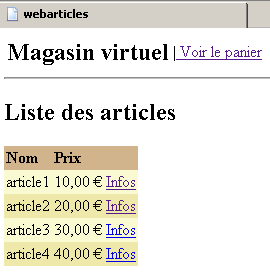 | - [INFO] 视图,提供有关产品的更多信息: 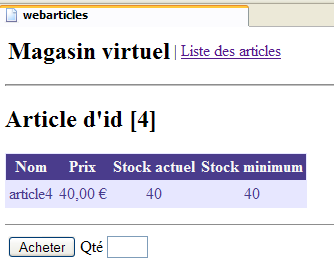 |
- [购物车] 和 [清空购物车] 视图,用于显示客户购物车中的商品
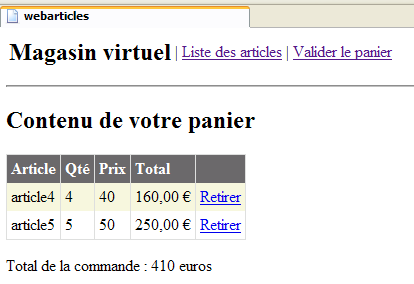 | 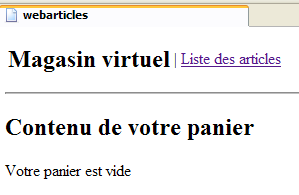 |
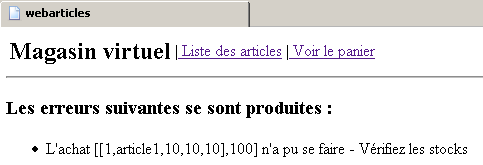
- [ERRORS] 视图,用于报告任何应用程序错误
1.3. 应用程序总体架构
我们希望构建一个具有以下三层结构的应用程序:
 |
- 通过使用接口,使这三层相互独立
- 不同层之间的集成由 Spring 负责
- 每个层都有自己的命名空间:web(UI层)、domain(业务层)和dao(数据访问层)。
该应用程序将遵循 MVC(模型-视图-控制器)架构。若参考上方的分层图,MVC 架构可按如下方式融入其中:
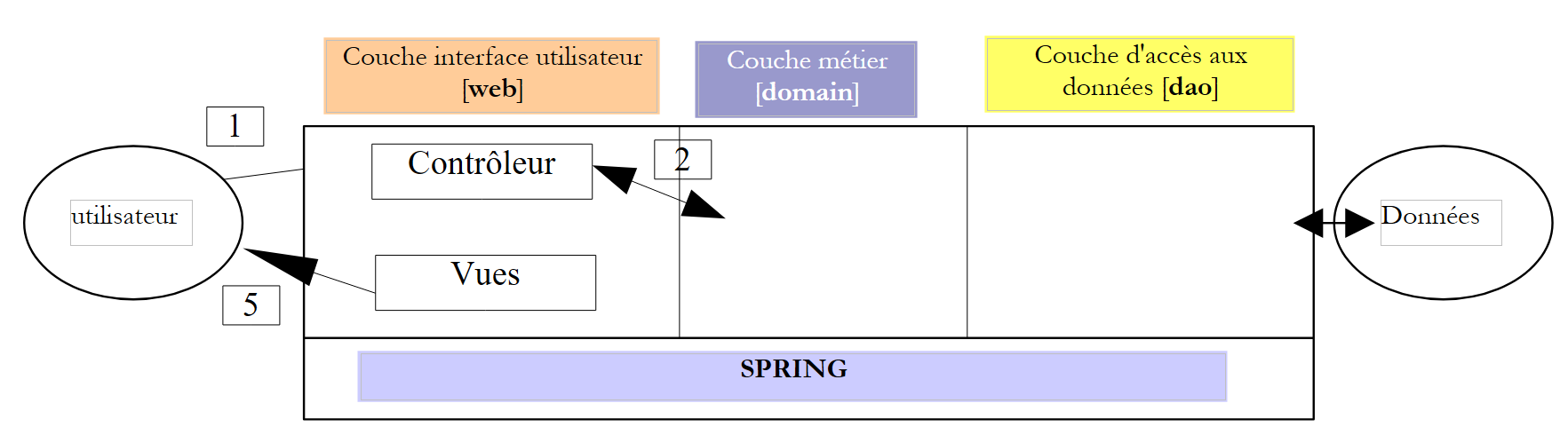 |
处理客户端请求的步骤如下:
- 客户端向控制器发送请求。在此情况下,控制器是一个承担特定角色的 .aspx 页面。它处理所有客户端请求,是应用程序的入口点,即 MVC 架构中的 C。
- 控制器处理此请求。为此,它可能需要业务层的协助,即 MVC 架构中的“M”。
- 控制器从业务层接收响应。客户端的请求已处理完毕。这可能触发多种响应。一个典型的例子是
- 如果请求无法正确处理,则显示错误页面
- 否则则显示确认页面
- 控制器选择要发送给客户端的响应(即视图)。这通常是一个包含动态元素的页面。控制器将这些元素提供给视图。
- 视图被发送给客户端。这就是 MVC 中的 V。
1.4. 模型
接下来我们将探讨MVC中的“M”。模型由以下元素组成:
1.4.1. 数据库
该数据库仅包含一个名为 ARTICLES 的表。该表是通过以下 SQL 命令生成的:
CREATE TABLE ARTICLES (
    ID            INTEGER NOT NULL,
    NOM           VARCHAR(20) NOT NULL,
    PRIX          NUMERIC(15,2) NOT NULL,
    STOCKACTUEL   INTEGER NOT NULL,
    STOCKMINIMUM  INTEGER NOT NULL
);
/* constraints */
ALTER TABLE ARTICLES ADD CONSTRAINT CHK_ID check (ID>0);
ALTER TABLE ARTICLES ADD CONSTRAINT CHK_PRIX check (PRIX>=0);
ALTER TABLE ARTICLES ADD CONSTRAINT CHK_STOCKACTUEL check (STOCKACTUEL>=0);
ALTER TABLE ARTICLES ADD CONSTRAINT CHK_STOCKMINIMUM check (STOCKMINIMUM>=0);
ALTER TABLE ARTICLES ADD CONSTRAINT CHK_NOM check (NOM<>'');
ALTER TABLE ARTICLES ADD CONSTRAINT UNQ_NOM UNIQUE (NOM);
/* primary key */
ALTER TABLE ARTICLES ADD CONSTRAINT PK_ARTICLES PRIMARY KEY (ID);
用于唯一标识商品的主键 | |
项目名称 | |
其价格 | |
当前库存 | |
库存水平低于该值时必须下达补货订单 |
1.4.2. 该模型的命名空间
此处以两个命名空间的形式提供了模型 M:
- istia.st.articles.dao:包含 [dao] 层的数据访问类
- istia.st.articles.domain:包含 [domain] 层的业务类
每个命名空间都将生成在各自的“assembly”文件中:
内容 | role | |
- [IArticlesDao]:用于访问 [dao] 层的接口。 这是 [domain] 层可见的唯一接口。它看不到其他接口。 - [Article]:定义文章的类 - [ArticlesDaoArrayList]: [IArticlesDao] 接口的实现类,使用 [ArrayList] | 数据访问层 - 完全位于 Web 应用程序的三层架构中的 Web 应用程序 | |
- [IArticlesDomain]:用于访问 [domain] 层的接口。这是 Web 层唯一可见的接口,它看不到其他接口。 - [AchatsArticles]:一个实现 [IArticlesDomain] 的类 - [Purchase]:表示客户购买行为的类 - [Cart]:表示客户总购买量的类 | 代表 Web 购买的模型 Web - 完全位于 [domain] 层 Web 应用程序的三层架构 |
1.4.3. [DAO]层
[DAO] 层包含以下元素:
-
[IArticlesDao]:用于访问 [dao] 层的接口
-
[Article]:定义文章的类
-
[ArticlesDaoArrayList]:使用 [ArrayList] 类实现 [IArticlesDao] 接口的类
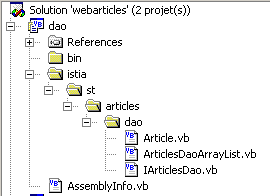
[dao] 层的 [Visual Studio] 项目结构如下:
注释:
- [dao] 项目属于 [类库] 类型
- 这些类已按树形结构放置在以 [istia] 文件夹为根目录的目录中。它们均位于 [istia.st.articles.dao] 命名空间下。
1.4.3.1. [Article] 类
定义文章的类如下:
Imports System

Namespace istia.st.articles.dao

    Public Class Article

        ' private fields
        Private _id As Integer
        Private _nom As String
        Private _prix As Double
        Private _stockactuel As Integer
        Private _stockminimum As Integer

        ' id article
        Public Property id() As Integer
            Get
                Return _id
            End Get
            Set(ByVal Value As Integer)
                If Value <= 0 Then
                    Throw New Exception("Le champ id [" + Value.ToString + "] est invalide")
                End If
                Me._id = Value
            End Set
        End Property

        ' item name
        Public Property nom() As String
            Get
                Return _nom
            End Get
            Set(ByVal Value As String)
                If Value Is Nothing OrElse Value.Trim.Equals("") Then
                    Throw New Exception("Le champ nom [" + Value + "] est invalide")
                End If
                Me._nom = Value
            End Set
        End Property

        ' item price
        Public Property prix() As Double
            Get
                Return _prix
            End Get
            Set(ByVal Value As Double)
                If Value < 0 Then
                    Throw New Exception("Le champ prix [" + Value.ToString + "] est invalide")
                End If
                Me._prix = Value
            End Set
        End Property

        ' current stock item
        Public Property stockactuel() As Integer
            Get
                Return _stockactuel
            End Get
            Set(ByVal Value As Integer)
                If Value < 0 Then
                    Throw New Exception("Le champ stockActuel [" + Value.ToString + "] est invalide")
                End If
                Me._stockactuel = Value
            End Set
        End Property

        ' minimum stock item
        Public Property stockminimum() As Integer
            Get
                Return _stockminimum
            End Get
            Set(ByVal Value As Integer)
                If Value < 0 Then
                    Throw New Exception("Le champ stockMinimum [" + Value.ToString + "] est invalide")
                End If
                Me._stockminimum = Value
            End Set
        End Property

        ' default builder
        Public Sub New()
        End Sub

        ' builder with properties
        Public Sub New(ByVal id As Integer, ByVal nom As String, ByVal prix As Double, ByVal stockactuel As Integer, ByVal stockminimum As Integer)
            Me.id = id
            Me.nom = nom
            Me.prix = prix
            Me.stockactuel = stockactuel
            Me.stockminimum = stockminimum
        End Sub

        ' article identification method
        Public Overrides Function ToString() As String
            Return "[" + id.ToString + "," + nom + "," + prix.ToString + "," + stockactuel.ToString + "," + stockminimum.ToString + "]"
        End Function
    End Class
End Namespace
该类提供:
- 一个用于设置项目 5 项信息的构造函数:[id, name, price, currentStock, minimumStock]
- 用于读写这5项信息的公共属性。
- 对商品输入数据的验证。若数据无效,将抛出异常。
- 一个 toString 方法,用于将项的值转换为字符串。这在调试应用程序时通常非常有用。
1.4.3.2. [IArticlesDao] 接口
[IArticlesDao] 接口定义如下:
Imports System
Imports System.Collections

Namespace istia.st.articles.dao

    Public Interface IArticlesDao
        ' list of all items
        Function getAllArticles() As IList
        ' add an article
        Function ajouteArticle(ByVal unArticle As Article) As Integer
        ' deletes an article
        Function supprimeArticle(ByVal idArticle As Integer) As Integer
        ' modify an article
        Function modifieArticle(ByVal unArticle As Article) As Integer
        ' search for an article
        Function getArticleById(ByVal idArticle As Integer) As Article
        ' deletes all articles
        Sub clearAllArticles()
        ' changes the stock of an item
        Function changerStockArticle(ByVal idArticle As Integer, ByVal mouvement As Integer) As Integer
    End Interface
End Namespace
该接口中各方法的作用如下:
返回数据源中的所有项目 | |
清空数据源 | |
返回由主键标识的 [Article] 对象 | |
允许您向数据源添加一篇文章 | |
允许您修改数据源中的文章 | |
允许您从数据源中删除一项 | |
允许您修改数据源中某项的库存 |
该接口为客户端程序提供了一系列仅由其签名定义的方法。它不涉及这些方法的实际实现方式。这为应用程序带来了灵活性。客户端程序调用的是接口本身,而非该接口的特定实现。
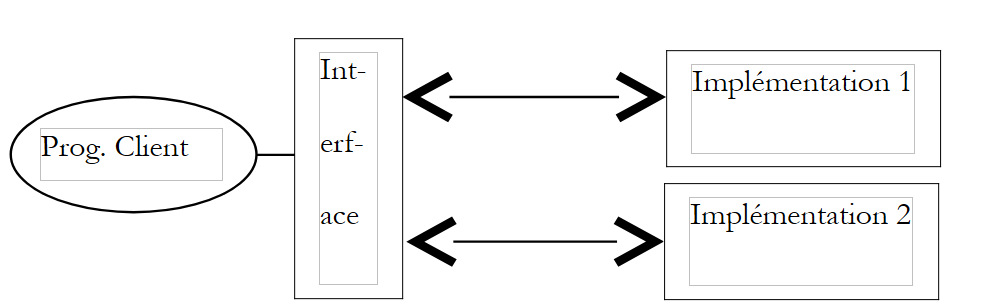 |
具体实现的选择将通过 Spring 配置文件来完成。为了说明在测试 Web 应用程序时,只有数据访问接口才重要——而非其实现类——我们将首先使用一个简单的 [ArrayList] 对象来实现数据源。稍后,我们将介绍基于数据库的解决方案。
1.4.3.3. 实现类 [ArticlesDaoArrayList]
实现类 [ArticlesDaoArrayList] 定义如下:
Imports System
Imports System.Collections

Namespace istia.st.articles.dao

    Public Class ArticlesDaoArrayList
        Implements istia.st.articles.dao.IArticlesDao

        Private articles As New ArrayList
        Private Const nbArticles As Integer = 4

        ' default builder
        Public Sub New()
            ' we build a few items
            For i As Integer = 1 To nbArticles
                articles.Add(New Article(i, "article" + i.ToString, i * 10, i * 10, i * 10))
            Next
        End Sub

        ' list of all items
        Public Function getAllArticles() As IList Implements IArticlesDao.getAllArticles
            ' returns the list of items
            SyncLock Me
                Return articles
            End SyncLock
        End Function

        ' delete all items
        Public Sub clearAllArticles() Implements IArticlesDao.clearAllArticles
            ' empty the list of items
            SyncLock Me
                articles.Clear()
            End SyncLock
        End Sub

        ' obtain an item identified by its key
        Public Function getArticleById(ByVal idArticle As Integer) As Article Implements IArticlesDao.getArticleById
            ' search for the item in the list
            SyncLock Me
                Dim ipos As Integer = posArticle(articles, idArticle)
                If ipos <> -1 Then
                    Return CType(articles(ipos), Article)
                Else
                    Return Nothing
                End If
            End SyncLock
        End Function

        ' add an item to the list of items
        Public Function ajouteArticle(ByVal unArticle As Article) As Integer Implements IArticlesDao.ajouteArticle
            ' add the item to the list of items
            SyncLock Me
                ' we check that it doesn't already exist
                Dim ipos As Integer = posArticle(articles, unArticle.id)
                If ipos <> -1 Then
                    Throw New Exception("L'article d'id [" + unArticle.id.ToString + "] existe déjà")
                End If
                ' we add the article
                articles.Add(unArticle)
                ' we return the result
                Return 1
            End SyncLock
        End Function

        ' modify an article
        Public Function modifieArticle(ByVal articleNouveau As Article) As Integer Implements IArticlesDao.modifieArticle
            ' modify an article
            SyncLock Me
                ' we check that
                Dim ipos As Integer = posArticle(articles, articleNouveau.id)
                ' if it doesn't exist
                If ipos = -1 Then Return 0
                ' it exists - we modify it
                articles(ipos) = articleNouveau
                ' we return the result
                Return 1
            End SyncLock
        End Function

        ' delete an item identified by its key
        Public Function supprimeArticle(ByVal idArticle As Integer) As Integer Implements IArticlesDao.supprimeArticle
            ' article deletion
            SyncLock Me
                ' we check that
                Dim ipos As Integer = posArticle(articles, idArticle)
                ' if it doesn't exist
                If ipos = -1 Then Return 0
                ' it exists - we remove it
                articles.RemoveAt(ipos)
                ' we return the result
                Return 1
            End SyncLock
        End Function

        ' change the stock of an item identified by its key
        Public Function changerStockArticle(ByVal idArticle As Integer, ByVal mouvement As Integer) As Integer Implements IArticlesDao.changerStockArticle
            ' change the stock of an item
            SyncLock Me
                ' we check that
                Dim ipos As Integer = posArticle(articles, idArticle)
                ' if it doesn't exist
                If ipos = -1 Then Return 0
                ' it exists - you modify your stock if you can
                Dim unArticle As Article = CType(articles(ipos), Article)
                ' only change stock if it is sufficient
                If unArticle.stockactuel + mouvement >= 0 Then
                    unArticle.stockactuel += mouvement
                    Return 1
                Else
                    Return 0
                End If
            End SyncLock
        End Function

        ' search for an item identified by its key
        Private Function posArticle(ByVal listArticles As ArrayList, ByVal idArticle As Integer) As Integer
            ' returns the position of item [idArticle] in the list or -1 if not found
            Dim unArticle As Article
            For i As Integer = 0 To listArticles.Count - 1
                unArticle = CType(listArticles(i), Article)
                If unArticle.id = idArticle Then
                    Return i
                End If
            Next
            ' not found
            Return -1
        End Function
    End Class

End Namespace
评论:
- 数据源由类型为 [ArrayList] 的私有字段 [articles] 模拟
- 该类的构造函数默认会在数据源中创建 4 个项目。
- 所有数据访问方法均已进行同步,以防止数据源的并发访问问题。在任何给定时刻,仅有一个线程可以访问某个特定方法。
- [posArticle] 方法返回由编号标识的文章在 [ArrayList] 数据源中的位置 [0..N]。如果文章不存在,该方法返回位置 -1。其他方法会反复调用此方法。
- [addArticle] 方法将一篇文章添加到文章列表中。它返回插入的文章数量:1。如果该文章已存在,则抛出异常。
- [modifyItem] 方法允许修改现有项目。它返回被修改的项目数:若该项目存在则返回 1,否则返回 0。
- [deleteArticle] 方法用于删除现有文章。它返回被删除的文章数量:若文章存在则返回 1,否则返回 0。
- [getAllArticles] 方法返回所有文章的列表
- [getArticleById] 方法根据 ID 检索一篇文章。如果文章不存在,则返回值 [nothing]。
- 该代码本身并不难。我们留给读者自行审阅和理解。
1.4.3.4. 生成 [dao] 层程序集
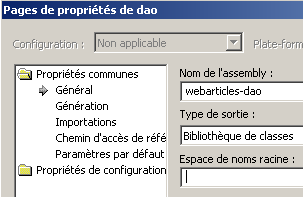
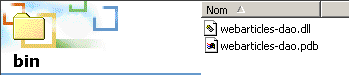
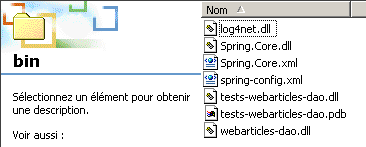
Visual Studio 项目已配置为生成 [webarticles-dao.dll] 程序集。该程序集生成在项目的 [bin] 文件夹中:
 |  |
1.4.3.5. 针对 [dao] 层的 NUnit 测试
在 Java 中,类测试使用 [JUnit] 框架。在 .NET 中,NUnit 框架提供了相同的单元测试功能:
Visual Studio 测试项目的结构如下:
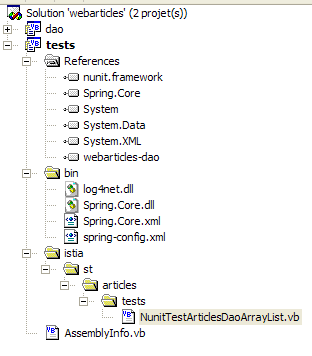
注释:
- [tests] 项目是一个 [类库]
- [NUnit] 测试需要引用 [nunit.framework.dll] 程序集
- [NUnit] 测试类通过 Spring 获取被测对象的实例。因此,
- 在 [bin] 文件夹中,Spring 的类文件
- 在 [References] 中,引用 [bin] 文件夹中的 [Spring-Core.dll] 程序集
- 在 [bin] 文件夹中,放置 Spring 的配置文件
- 该测试类需要来自 [dao] 层的 [webarticles-dao.dll] 程序集。该程序集已放置在 [bin] 文件夹中,并且其引用已添加到项目引用中。
一个 [NUnit] 测试类需要访问 [NUnit.Framework] 命名空间中的类。因此,包含以下导入语句:
[NUnit.Framework] 命名空间位于 [nunit.framework.dll] 程序集内,必须将其添加到项目引用中:
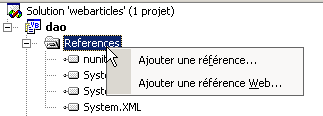 | 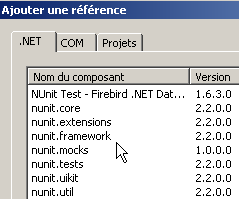 |
如果已安装 [NUnit],则 [nunit.framework.dll] 程序集应出现在提供的列表中。只需双击该程序集即可将其添加到项目中:
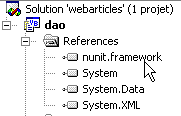
针对 [DAO] 层的 [NUnit] 测试类可能如下所示:
Imports System
Imports System.Collections
Imports NUnit.Framework
Imports istia.st.articles.dao
Imports System.Threading
Imports Spring.Objects.Factory.Xml
Imports System.IO

Namespace istia.st.articles.tests

    <TestFixture()> _
    Public Class NunitTestArticlesArrayList
        ' the test object
        Private articlesDao As IArticlesDao

        <SetUp()> _
        Public Sub init()
            ' retrieve an instance of the Spring object manufacturer
            Dim factory As XmlObjectFactory = New XmlObjectFactory(New FileStream("spring-config.xml", FileMode.Open))
            ' request instantiation of articlesdao object
            articlesDao = CType(factory.GetObject("articlesdao"), IArticlesDao)
        End Sub

        <Test()> _
        Public Sub testGetAllArticles()
            ' visual check
            listArticles()
        End Sub

        <Test()> _
        Public Sub testClearAllArticles()
            ' delete all articles
            articlesDao.clearAllArticles()
            ' all articles are requested
            Dim articles As IList = articlesDao.getAllArticles
            ' verification: there must be 0
            Assert.AreEqual(0, articles.Count)
        End Sub

        <Test()> _
        Public Sub testAjouteArticle()
            ' delete all items
            articlesDao.clearAllArticles()
            ' check: the item table must be empty
            Dim articles As IList = articlesDao.getAllArticles
            Assert.AreEqual(0, articles.Count)
            ' we add two items
            articlesDao.ajouteArticle(New Article(3, "article3", 30, 30, 3))
            articlesDao.ajouteArticle(New Article(4, "article4", 40, 40, 4))
            ' check: there must be two items
            articles = articlesDao.getAllArticles
            Assert.AreEqual(2, articles.Count)
            ' visual check
            listArticles()
        End Sub

        <Test()> _
        Public Sub testSupprimeArticle()
            ' delete all items
            articlesDao.clearAllArticles()
            ' check: the item table must be empty
            Dim articles As IList = articlesDao.getAllArticles
            Assert.AreEqual(0, articles.Count)
            ' we add two items
            articlesDao.ajouteArticle(New Article(3, "article3", 30, 30, 3))
            articlesDao.ajouteArticle(New Article(4, "article4", 40, 40, 4))
            ' check: there must be 2 items
            articles = articlesDao.getAllArticles
            Assert.AreEqual(2, articles.Count)
            ' we delete article 4
            articlesDao.supprimeArticle(4)
            ' check: there must be 1 item left
            articles = articlesDao.getAllArticles
            Assert.AreEqual(1, articles.Count)
            ' visual check
            listArticles()
        End Sub

        <Test()> _
        Public Sub testModifieArticle()
            ' delete all items
            articlesDao.clearAllArticles()
            ' check
            Dim articles As IList = articlesDao.getAllArticles
            Assert.AreEqual(0, articles.Count)
            ' 2 items added
            articlesDao.ajouteArticle(New Article(3, "article3", 30, 30, 3))
            articlesDao.ajouteArticle(New Article(4, "article4", 40, 40, 4))
            ' check
            articles = articlesDao.getAllArticles
            Assert.AreEqual(2, articles.Count)
            ' article 3 search
            Dim unArticle As Article = articlesDao.getArticleById(3)
            ' check
            Assert.AreEqual(unArticle.nom, "article3")
            ' research article 4
            unArticle = articlesDao.getArticleById(4)
            ' check
            Assert.AreEqual(unArticle.nom, "article4")
            ' modification article 4
            articlesDao.modifieArticle(New Article(4, "article4", 44, 44, 44))
            ' check
            unArticle = articlesDao.getArticleById(4)
            Assert.AreEqual(unArticle.prix, 44, 0.000001)
            ' visual check
            listArticles()
        End Sub

        <Test()> _
        Public Sub testGetArticleById()
            ' article deletion
            articlesDao.clearAllArticles()
            ' check
            Dim articles As IList = articlesDao.getAllArticles
            Assert.AreEqual(0, articles.Count)
            ' 2 items added
            articlesDao.ajouteArticle(New Article(3, "article3", 30, 30, 3))
            articlesDao.ajouteArticle(New Article(4, "article4", 40, 40, 4))
            ' check
            articles = articlesDao.getAllArticles
            Assert.AreEqual(2, articles.Count)
            ' research article 3
            Dim unArticle As Article = articlesDao.getArticleById(3)
            ' check
            Assert.AreEqual(unArticle.nom, "article3")
            ' research article 4
            unArticle = articlesDao.getArticleById(4)
            ' check
            Assert.AreEqual(unArticle.nom, "article4")
        End Sub

        ' screen listing
        Private Sub listArticles()
            Dim articles As IList = articlesDao.getAllArticles
            For i As Integer = 0 To articles.Count - 1
                Console.WriteLine(CType(articles(i), Article).ToString)
            Next
        End Sub

        <Test()> _
        Public Sub testArticleAbsent()
            ' delete all items
            articlesDao.clearAllArticles()
            ' research article 1
            Dim article As article = articlesDao.getArticleById(1)
            ' check
            Assert.IsNull(article)
            ' modification of a non-existent item
            Dim i As Integer = articlesDao.modifieArticle(New article(1, "1", 1, 1, 1))
            ' had to modify no line
            Assert.AreEqual(i, 0)
            ' deletion of non-existent item
            i = articlesDao.supprimeArticle(1)
            ' had to delete no line
            Assert.AreEqual(0, i)
        End Sub

        <Test()> _
        Public Sub testChangerStockArticle()
            ' delete all items
            articlesDao.clearAllArticles()
            ' add an item
            Dim nbArticles As Integer = articlesDao.ajouteArticle(New Article(3, "article3", 30, 101, 3))
            Assert.AreEqual(nbArticles, 1)
            ' add an item
            nbArticles = articlesDao.ajouteArticle(New Article(4, "article4", 40, 40, 4))
            Assert.AreEqual(nbArticles, 1)
            ' creation of 100 threads
            Dim taches(99) As Thread
            For i As Integer = 0 To taches.Length - 1
                ' create thread i
                taches(i) = New Thread(New ThreadStart(AddressOf décrémente))
                ' set the thread name
                taches(i).Name = "tache_" & i
                ' start execution of thread i
                taches(i).Start()
            Next
            ' wait for all threads to finish
            For i As Integer = 0 To taches.Length - 1
                taches(i).Join()
            Next
            ' checks - item 3 must have a stock of 1
            Dim unArticle As Article = articlesDao.getArticleById(3)
            Assert.AreEqual(unArticle.nom, "article3")
            Assert.AreEqual(1, unArticle.stockactuel)
            ' item 4 stock is decremented
            Dim erreur As Boolean = False
            Dim nbLignes As Integer = articlesDao.changerStockArticle(4, -100)
            ' check: its stock must not have changed
            Assert.AreEqual(0, nbLignes)
            ' visual check
            listArticles()
        End Sub

        Public Sub décrémente()
            ' thread launched
            System.Console.Out.WriteLine(Thread.CurrentThread.Name + " lancé")
            ' thread decrements stock
            articlesDao.changerStockArticle(3, -1)
            ' thread terminated
            System.Console.Out.WriteLine(Thread.CurrentThread.Name + " terminé")
        End Sub

    End Class
End Namespace
注释:
- 我们希望编写一个针对 [IArticlesDao] 接口的测试程序,使其独立于其实现类。因此,我们使用 Spring 来隐藏实现类的名称,使其在测试程序中不可见。
- <Setup()> 方法从 Spring 中获取待测试的 [articlesdao] 对象的引用。该引用在以下 [spring-config.xml] 文件中定义:
<?xml version="1.0" encoding="iso-8859-1" ?>
<!DOCTYPE objects PUBLIC "-//SPRING//DTD OBJECT//EN"
"http://www.springframework.net/dtd/spring-objects.dtd">

<objects>
    <object id="articlesdao" type="istia.st.articles.dao.ArticlesDaoArrayList, webarticles-dao"/>
</objects>
该文件指定了接口 [IArticlesDao] 的实现类名称 [istia.st.articles.dao.ArticlesDaoArrayList] 及其所在位置 [webarticles-dao.dll]。由于实例化不需要任何参数,因此此处未定义任何参数。
- 大多数测试都易于理解。建议读者阅读相关注释。
- [testChangerStockArticle] 方法需要稍作说明。它会创建 100 个线程,负责递减指定商品的库存。
        <Test()> _
        Public Sub testChangerStockArticle()
            ' delete all items
            articlesDao.clearAllArticles()
            ' add an item
            Dim nbArticles As Integer = articlesDao.ajouteArticle(New Article(3, "article3", 30, 101, 3))
            Assert.AreEqual(nbArticles, 1)
            ' add an item
            nbArticles = articlesDao.ajouteArticle(New Article(4, "article4", 40, 40, 4))
            Assert.AreEqual(nbArticles, 1)
            ' creation of 100 threads
            Dim taches(99) As Thread
            For i As Integer = 0 To taches.Length - 1
                ' create thread i
                taches(i) = New Thread(New ThreadStart(AddressOf décrémente))
                ' set the thread name
                taches(i).Name = "tache_" & i
                ' start execution of thread i
                taches(i).Start()
            Next
            ' wait for all threads to finish
            For i As Integer = 0 To taches.Length - 1
                taches(i).Join()
            Next
            ' checks - item 3 must have a stock of 1
            Dim unArticle As Article = articlesDao.getArticleById(3)
            Assert.AreEqual(unArticle.nom, "article3")
            Assert.AreEqual(1, unArticle.stockactuel)
            ' item 4 stock is decremented
            Dim erreur As Boolean = False
            Dim nbLignes As Integer = articlesDao.changerStockArticle(4, -100)
            ' check: its stock must not have changed
            Assert.AreEqual(0, nbLignes)
            ' visual check
            listArticles()
        End Sub
这是为了测试对数据源的并发访问。负责更新库存的方法如下:
        Public Sub décrémente()
            ' thread launched
            System.Console.Out.WriteLine(Thread.CurrentThread.Name + " lancé")
            ' thread decrements stock
            articlesDao.changerStockArticle(3, -1)
            ' thread terminated
            System.Console.Out.WriteLine(Thread.CurrentThread.Name + " terminé")
        End Sub
它将第 3 项的库存减少 1。如果我们参考 [testChangerStockArticle] 方法的代码,可以看到:
- 商品 #3 的库存初始化为 101
- 100 个线程将各自将该库存减少 1
- 因此,在所有线程执行完毕后,库存应为1
此外,仍在该方法内,我们尝试将第 4 项的库存设置为负值。这应该会失败。
为了测试 [dao] 层,我们在 [tests] 项目的 [bin] 文件夹中生成 DLL 文件 [tests-webarticles-dao.dll]:
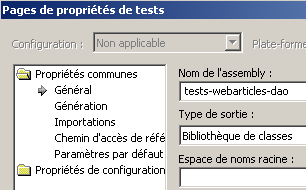 |  |
然后,使用 [Nunit-Gui] 应用程序加载此 DLL 并运行测试:
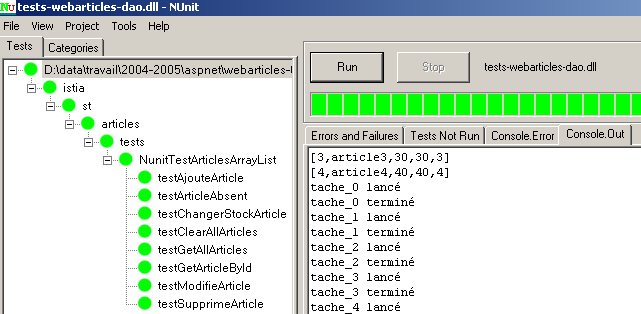
在左侧窗口中,我们可以看到已测试方法的列表。每个方法名称前面的圆点颜色表示该方法是否通过(绿色)或失败(红色)。在屏幕上查看本文档的读者会发现所有测试均已通过。因此,我们将认为 [dao] 层已正常运行。
1.4.4. [domain] 层
[domain] 层包含以下元素:
-
[IArticlesDomain]:用于访问 [domain] 层的接口
-
[Purchase]:定义购买行为的类
-
[ShoppingCart]:定义购物车的类
-
[ProductPurchases]:实现 [IArticlesDomain] 接口的类
[Visual Studio] 解决方案中 [domain] 层的结构如下:
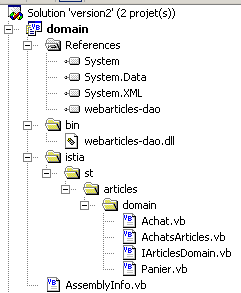
注释:
- [domain] 项目属于 [类库] 类型
- 类已按树形结构放置在以 [istia] 文件夹为根目录的目录树中。它们均位于 [istia.st.articles.domain] 命名空间下。
- [dao] 层的 DLL 已放置在新项目的 [bin] 文件夹中。此外,该 DLL 已被添加为该项目的引用。
1.4.4.1. [IArticlesDomain] 接口
[IArticlesDomain] 接口将 [business] 层与 [web] 层解耦。后者通过此接口访问 [business/domain] 层,而无需关心实际实现该接口的类。该接口定义了以下用于访问业务层的操作:
Imports Article = istia.st.articles.dao.Article

Namespace istia.st.articles.domain
    Public Interface IArticlesDomain
        ' methods
        Sub acheter(ByVal panier As Panier)
        Function getAllArticles() As IList
        Function getArticleById(ByVal idArticle As Integer) As Article
        ReadOnly Property erreurs() As ArrayList
    End Interface
End Namespace
返回来自关联数据源的 [Article] 对象列表 | |
返回由 [idArticle] 标识的 [Article] 对象 | |
处理客户的购物车,将已购商品的库存减去购买数量——若库存不足,操作可能失败 | |
返回发生的错误列表——若无错误则为空 |
1.4.4.2. [Purchase] 类
[Purchase] 类表示客户的购买行为:
Imports istia.st.articles.dao

Namespace istia.st.articles.domain

    Public Class Achat

        ' private fields
        Private _article As article
        Private _qte As Integer

        ' default builder
        Public Sub New()
        End Sub

        ' builder with parameters
        Public Sub New(ByVal unArticle As article, ByVal qte As Integer)
            ' we go through the properties
            Me.article = unArticle
            Me.qte = qte
        End Sub

        ' item purchased
        Public Property article() As article
            Get
                Return _article
            End Get
            Set(ByVal Value As article)
                _article = Value
            End Set
        End Property

        ' qty purchased
        Public Property qte() As Integer
            Get
                Return _qte
            End Get
            Set(ByVal Value As Integer)
                If Value < 0 Then
                    Throw New Exception("Quantité [" + Value.ToString + "] invalide")
                End If
                _qte = Value
            End Set
        End Property

        ' total purchase
        Public ReadOnly Property totalAchat() As Double
            Get
                Return _qte * _article.prix
            End Get
        End Property

        ' identity
        Public Overrides Function ToString() As String
            Return "[" + _article.ToString + "," + _qte.ToString + "]"
        End Function
    End Class

End Namespace
注释:
- [Purchase] 类具有以下属性和方法:
已购买的商品 | |
购买数量 | |
购买金额 | |
对象的字符串表示形式 |
- 它有一个构造函数,用于初始化定义购买行为的 [item, qty] 属性。
1.4.4.3. [Cart] 类
[Cart] 类表示客户的总购买量:
Namespace istia.st.articles.domain

Public Class Panier

    ' private fields
    Private _achats As New ArrayList
        Private _totalPanier As Double = 0

    ' default builder
    Public Sub New()
    End Sub

    ' list of purchases
    Public ReadOnly Property achats() As ArrayList
        Get
            Return _achats
        End Get
    End Property

    ' total purchases
    Public ReadOnly Property totalPanier() As Double
        Get
            Return _totalPanier
        End Get
    End Property

    ' methods
    Public Sub ajouter(ByVal unAchat As Achat)
        ' find out if the purchase already exists
        Dim iAchat As Integer = posAchat(unAchat.article.id)
        If iAchat <> -1 Then
            ' we found
                Dim achatCourant As Achat = CType(_achats(iAchat), Achat)
            achatCourant.qte += unAchat.qte
        Else
            ' we didn't find
            _achats.Add(unAchat)
        End If
        ' increment the basket total
        _totalPanier += unAchat.totalAchat
    End Sub

    ' remove a purchase
    Public Sub enlever(ByVal idAchat As Integer)
        ' we're looking to buy
            Dim iachat As Integer = posAchat(idAchat)
        ' if found, remove
        If iachat <> -1 Then
                Dim achatCourant As Achat = CType(_achats(iachat), Achat)
            ' remove from basket
            _achats.RemoveAt(iachat)
            ' decrement the basket total
            _totalPanier -= achatCourant.totalAchat
        End If
    End Sub

    Private Function posAchat(ByVal idArticle As Integer) As Integer
        ' search for a purchase in the purchase list
        ' returns its position in the list or -1 if not found
        Dim achatCourant As Achat
        Dim trouvé As Boolean = False
        Dim i As Integer = 0
            While Not trouvé AndAlso i < _achats.Count
                ' regular purchase
                achatCourant = CType(_achats(i), Achat)
                ' comparison with article searched
                If achatCourant.article.id = idArticle Then
                    Return i
                End If
                'next purchase
                i += 1
            End While
            ' not found
            Return -1
    End Function

    ' identity function
    Public Overrides Function ToString() As String
        Return _achats.ToString
    End Function
End Class

End Namespace
注释:
- [ShoppingCart] 类具有以下属性和方法:
客户的购物清单——由 [Purchase] 类型对象组成的列表 | |
将一项购买添加到购买列表中 | |
移除 idPurchase 对应的购买记录 | |
购物车中所有商品的总金额 | |
返回表示购物车的字符串 |
- [posAchat] 方法是一个实用方法,用于返回由商品编号标识的购买项在购买列表中的位置。购物清单的管理机制确保同一商品即使被多次购买,在列表中也仅占用一个位置。因此,可以通过商品编号来识别购买项。如果要查找的购买项不存在,[posAchat] 方法将返回 -1。
- [add] 方法将新的购买记录添加到购买列表中。如果所购商品尚未存在于列表中,则向购买列表添加新条目;如果已存在,则增加购买数量。
- [remove] 方法允许您从购买列表中移除一个由编号标识的购买记录。如果该购买记录不存在,则该方法不执行任何操作。
- 随着商品的添加和移除,购物车总金额 [totalPanier] 会相应更新。
1.4.4.4. [PurchaseItems] 类
[IArticlesDomain] 接口将由以下 [PurchaseItems] 类实现:
Imports istia.st.articles.dao

Namespace istia.st.articles.domain
    Public Class AchatsArticles
        Implements IArticlesDomain

        'private fields
        Private _articlesDao As IArticlesDao
        Private _erreurs As ArrayList

        ' manufacturer
        Public Sub New(ByVal articlesDao As IArticlesDao)
            _articlesDao = articlesDao
        End Sub

        ' error list
        Public ReadOnly Property erreurs() As ArrayList Implements IArticlesDomain.erreurs
            Get
                Return _erreurs
            End Get
        End Property

        ' list of items
        Public Function getAllArticles() As IList Implements IArticlesDomain.getAllArticles
            ' list of all items
            Try
                Return _articlesDao.getAllArticles
            Catch ex As Exception
                _erreurs = New ArrayList
                _erreurs.Add("Erreur d'accès aux données : " + ex.Message)
            End Try
        End Function

        ' get an item identified by its number
        Public Function getArticleById(ByVal idArticle As Integer) As Article Implements IArticlesDomain.getArticleById
            ' a special item
            Try
                Return _articlesDao.getArticleById(idArticle)
            Catch ex As Exception
                _erreurs = New ArrayList
                _erreurs.Add("Erreur d'accès aux données : " + ex.Message)
            End Try
        End Function


        ' buy a basket
        Public Sub acheter(ByVal panier As Panier) Implements IArticlesDomain.acheter
            ' basket purchase - stocks of purchased items must be decremented
            _erreurs = New ArrayList
            Dim achat As achat
            Dim achats As ArrayList = panier.achats
            For i As Integer = achats.Count - 1 To 0 Step -1
                ' decrement stock item i
                achat = CType(achats(i), achat)
                Try
                    If _articlesDao.changerStockArticle(achat.article.id, -achat.qte) = 0 Then
                        ' we couldn't do the operation
                        _erreurs.Add("L'achat " + achat.ToString + " n'a pu se faire - Vérifiez les stocks")
                    Else
                        ' the transaction has been completed - the purchase is removed from the basket
                        panier.enlever(achat.article.id)
                    End If
                Catch ex As Exception
                    _erreurs = New ArrayList
                    _erreurs.Add("Erreur d'accès aux données : " + ex.Message)
                End Try
            Next
        End Sub
    End Class

End Namespace
注释:
- 该类实现了 [IArticlesDomain] 接口的四个方法。它有两个私有字段:
数据访问对象 | |
可能出现的错误列表。可通过公共属性 [errors] 访问 |
- 要创建该类的实例,必须提供允许访问数据的对象:
- [getAllArticles] 和 [getArticleById] 方法依赖于 [dao] 层中同名的方法
- [buy] 方法用于验证购物车的购买操作。该验证仅涉及将所购商品的库存量减去购买数量。只有当库存充足时,才能购买该商品。若库存不足,购买请求将被拒绝:商品仍保留在购物车中,并在 [errors] 列表中报告错误。验证通过的购买商品将从购物车中移除,且相应商品的库存量将减少购买数量。
1.4.4.5. 生成 [domain] 层程序集
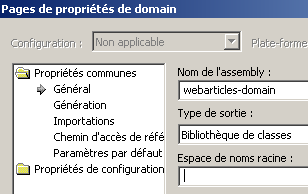
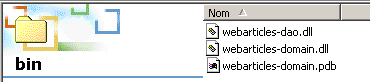
Visual Studio 项目已配置为生成 [webarticles-domain.dll] 程序集。该程序集生成在项目的 [bin] 文件夹中:
 |  |
1.4.4.6. 针对 [domain] 层的 NUnit 测试
Visual Studio 测试项目的结构如下:
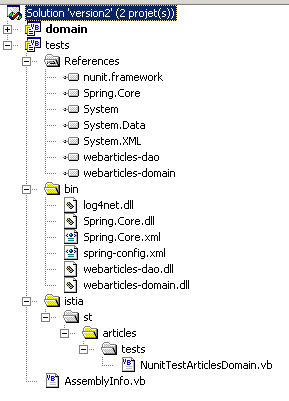
注释:
- [tests] 项目属于 [类库] 类型
- [NUnit] 测试需要引用 [nunit.framework.dll] 程序集
- [NUnit] 测试类通过 Spring 获取被测对象的实例。因此,
- 在 [bin] 文件夹中,Spring 的类文件
- 在 [References] 中,引用 [bin] 文件夹中的 [Spring-Core.dll] 程序集
- 在 [bin] 文件夹中,需放置 Spring 的配置文件
- 该测试类需要来自 [dao] 层的 [webarticles-dao.dll] 程序集以及来自 [domain] 层的 [webarticles-domain.dll] 程序集。这些文件已放置在 [bin] 文件夹中,并且已将其引用添加到项目引用中。
一个针对 [domain] 层的 NUnit 测试类可能如下所示:
Imports NUnit.Framework
Imports istia.st.articles.dao
Imports istia.st.articles.domain
Imports Spring.Objects.Factory.Xml
Imports System.IO

Namespace istia.st.articles.tests

    <TestFixture()> _
    Public Class NunitTestArticlesDomain

        ' the test object
        Private articlesDomain As IArticlesDomain
        Private articlesDao As IArticlesDao

        <SetUp()> _
        Public Sub init()
            ' retrieve an instance of the Spring object manufacturer
            Dim factory As XmlObjectFactory = New XmlObjectFactory(New FileStream("spring-config.xml", FileMode.Open))
            ' request instantiation of the articles dao object
            articlesDao = CType(factory.GetObject("articlesdao"), IArticlesDao)
            ' then the articlesdomain aobject
            articlesDomain = CType(factory.GetObject("articlesdomain"), IArticlesDomain)
        End Sub

        <Test()> _
        Public Sub getAllArticles()
            ' visual check
            listArticles()
        End Sub

        <Test()> _
        Public Sub getArticleById()
            ' article deletion
            articlesDao.clearAllArticles()
            ' check
            Dim articles As IList = articlesDomain.getAllArticles
            Assert.AreEqual(0, articles.Count)
            ' 2 items added
            articlesDao.ajouteArticle(New Article(3, "article3", 30, 30, 3))
            articlesDao.ajouteArticle(New Article(4, "article4", 40, 40, 4))
            ' check
            articles = articlesDomain.getAllArticles
            Assert.AreEqual(2, articles.Count)
            ' research article 3
            Dim unArticle As Article = articlesDomain.getArticleById(3)
            ' check
            Assert.AreEqual(unArticle.nom, "article3")
            ' research article 4
            unArticle = articlesDao.getArticleById(4)
            ' check
            Assert.AreEqual(unArticle.nom, "article4")
        End Sub

        <Test()> _
        Public Sub acheterPanier()
            ' article deletion
            articlesDao.clearAllArticles()
            ' check
            Dim articles As IList = articlesDomain.getAllArticles
            Assert.AreEqual(0, articles.Count)
            ' 2 items added
            articlesDao.ajouteArticle(New Article(3, "article3", 30, 30, 3))
            articlesDao.ajouteArticle(New Article(4, "article4", 40, 40, 4))
            ' check
            articles = articlesDomain.getAllArticles
            Assert.AreEqual(2, articles.Count)
            ' create a basket with two purchases
            Dim panier As New panier
            panier.ajouter(New Achat(New Article(3, "article3", 30, 30, 3), 10))
            panier.ajouter(New Achat(New Article(4, "article4", 40, 40, 4), 10))
            ' checks
            Assert.AreEqual(700, panier.totalPanier, 0.000001)
            Assert.AreEqual(2, panier.achats.Count)
            ' shopping cart validation
            articlesDomain.acheter(panier)
            ' checks
            Assert.AreEqual(0, articlesDomain.erreurs.Count)
            Assert.AreEqual(0, panier.achats.Count)
            ' research article 3
            Dim unArticle As Article = articlesDomain.getArticleById(3)
            ' check
            Assert.AreEqual(unArticle.stockactuel, 20)
            ' research article 4
            unArticle = articlesDao.getArticleById(4)
            ' check
            Assert.AreEqual(unArticle.stockactuel, 30)
            ' new basket
            panier.ajouter(New Achat(New Article(3, "article3", 30, 30, 3), 100))
            ' shopping cart validation
            articlesDomain.acheter(panier)
            ' checks
            Assert.AreEqual(1, articlesDomain.erreurs.Count)
            ' research article 3
            unArticle = articlesDomain.getArticleById(3)
            ' check
            Assert.AreEqual(unArticle.stockactuel, 20)
        End Sub

        <Test()> _
        Public Sub testRetirerAchats()
            ' delete contents of ARTICLES
            articlesDao.clearAllArticles()
            ' reads the ARTICLES table
            Dim articles As IList = articlesDao.getAllArticles()
            Assert.AreEqual(0, articles.Count)
            ' insertion
            Dim article3 As New Article(3, "article3", 30, 30, 3)
            articlesDao.ajouteArticle(article3)
            Dim article4 As New Article(4, "article4", 40, 40, 4)
            articlesDao.ajouteArticle(article4)
            ' reads the ARTICLES table
            articles = articlesDomain.getAllArticles()
            Assert.AreEqual(2, articles.Count)
            ' create a basket with two purchases
            Dim monPanier As New Panier
            monPanier.ajouter(New Achat(article3, 10))
            monPanier.ajouter(New Achat(article4, 10))
            ' checks
            Assert.AreEqual(700.0, monPanier.totalPanier, 0.000001)
            Assert.AreEqual(2, monPanier.achats.Count)
            ' add a previously purchased item
            monPanier.ajouter(New Achat(article3, 10))
            ' checks
            ' the total must be increased to 1000
            Assert.AreEqual(1000.0, monPanier.totalPanier, 0.000001)
            ' always 2 items in the basket
            Assert.AreEqual(2, monPanier.achats.Count)
            ' qty item 3 increased to 20
            Dim unAchat As Achat = CType(monPanier.achats(0), Achat)
            Assert.AreEqual(20, unAchat.qte)
            ' article 3 is removed from the basket
            monPanier.enlever(3)
            ' checks
            ' the total must be increased to 400
            Assert.AreEqual(400.0, monPanier.totalPanier, 0.000001)
            ' 1 item only in basket
            Assert.AreEqual(1, monPanier.achats.Count)
            ' this must be article no. 4
            Assert.AreEqual(4, CType(monPanier.achats(0), Achat).article.id)
        End Sub

        ' screen listing
        Private Sub listArticles()
            Dim articles As IList = articlesDomain.getAllArticles
            For i As Integer = 0 To articles.Count - 1
                Console.WriteLine(CType(articles(i), Article).ToString)
            Next
        End Sub

    End Class


End Namespace
注释:
- 我们希望编写一个针对 [IArticlesDomain] 接口的测试程序,使其独立于其实现类。因此,我们使用 Spring 来隐藏实现类的名称,使其在测试程序中不可见。
- <Setup()> 属性方法从 Spring 中获取待测试的 [articlesdomain] 和 [articlesdao] 对象的引用。这些对象在以下 [spring-config.xml] 文件中定义:
<?xml version="1.0" encoding="iso-8859-1" ?>
<!DOCTYPE objects PUBLIC "-//SPRING//DTD OBJECT//EN"
"http://www.springframework.net/dtd/spring-objects.dtd">
<objects>
    <object id="articlesdao" type="istia.st.articles.dao.ArticlesDaoArrayList, webarticles-dao" />
    <object id="articlesdomain" type="istia.st.articles.domain.AchatsArticles, webarticles-domain">
        <constructor-arg index="0">
            <ref object="articlesdao" />
        </constructor-arg>
    </object>
</objects>
此文件说明:
- (续)
- 对于单例 [articlesdao],指定了实现类的名称 [istia.st.articles.dao.ArticlesDaoArrayList] 及其所在位置 [webarticles-dao.dll]。由于实例化不需要任何参数,因此此处未定义任何参数。
- 对于单例 [articlesdomain],其实现类的名称为 [istia.st.articles.domain.AchatsArticles],位于 [webarticles-domain.dll] 中。类 [AchatsArticles] 有一个带有一个参数的构造函数:该参数是管理 [dao] 层访问权限的单例。此处,该参数被定义为之前定义的单例 [articlesdao]。
- 测试类获取了被测类 [articlesdomain] 的实例以及数据访问类 [articlesdao] 的实例。最后这一点存在争议。理论上,测试类不应需要访问 [dao] 层,甚至不应该知道该层的存在。 在此,我们忽略了这一“规范”,若遵循该规范,则需在 [IArticlesDomain] 接口中新增方法。
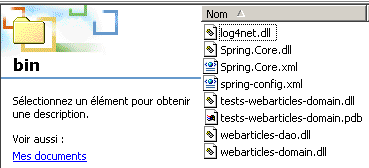
为了测试 [domain] 层,我们在 [tests] 项目的 [bin] 文件夹中生成 DLL 文件 [tests-webarticles-domain.dll]:
 |  |
然后,使用 [Nunit-Gui] 应用程序加载此 DLL 并运行测试:
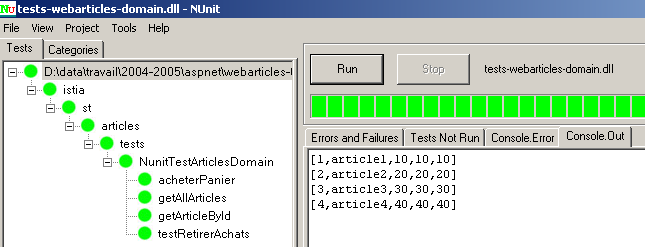
在屏幕上查看本文的读者会看到所有测试均已通过。现在,我们将 [domain] 层视为已投入运行。
1.4.5. 结论
请记住,我们要构建的是以下这个三层Web应用程序:
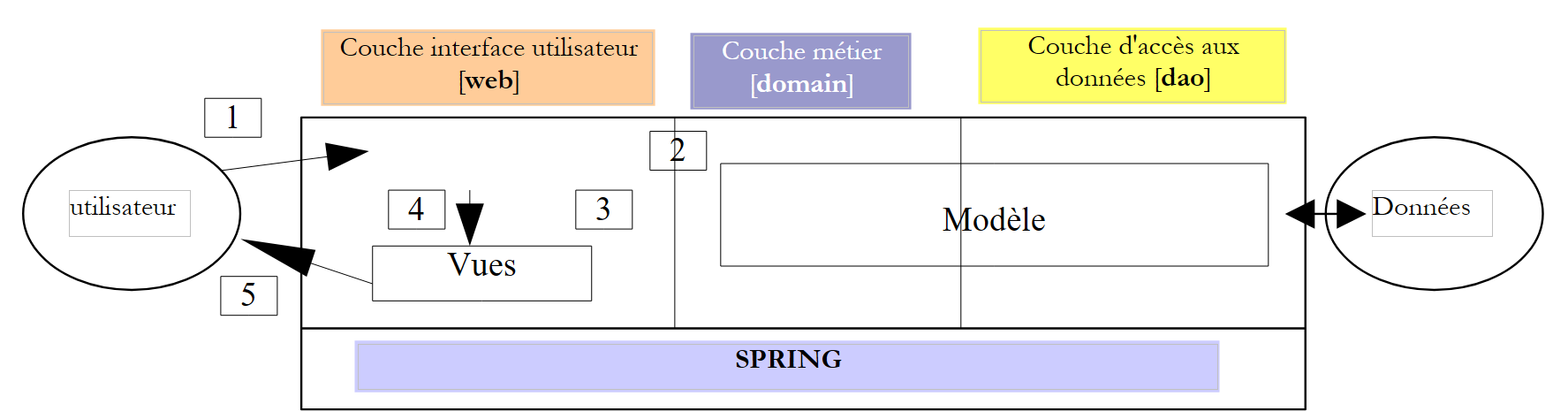 |
我们 MVC 应用程序的 M 层(模型层)现已编写并经过测试。它以两个 DLL 文件的形式提供给我们 [webarticles-dao.dll, webarticles-domain.dll]。我们可以继续进行到最后一层,即 [Web] 层,该层包含 C 控制器和 V 视图。我们将首先考虑文档 [Web Development with ASP.NET 1.1] 中介绍的一种方法
- C控制器由两个文件[global.asax, main.aspx]实现
- V 视图由 aspx 页面处理
1.5. [web]层
Web 应用程序的 MVC 架构如下:
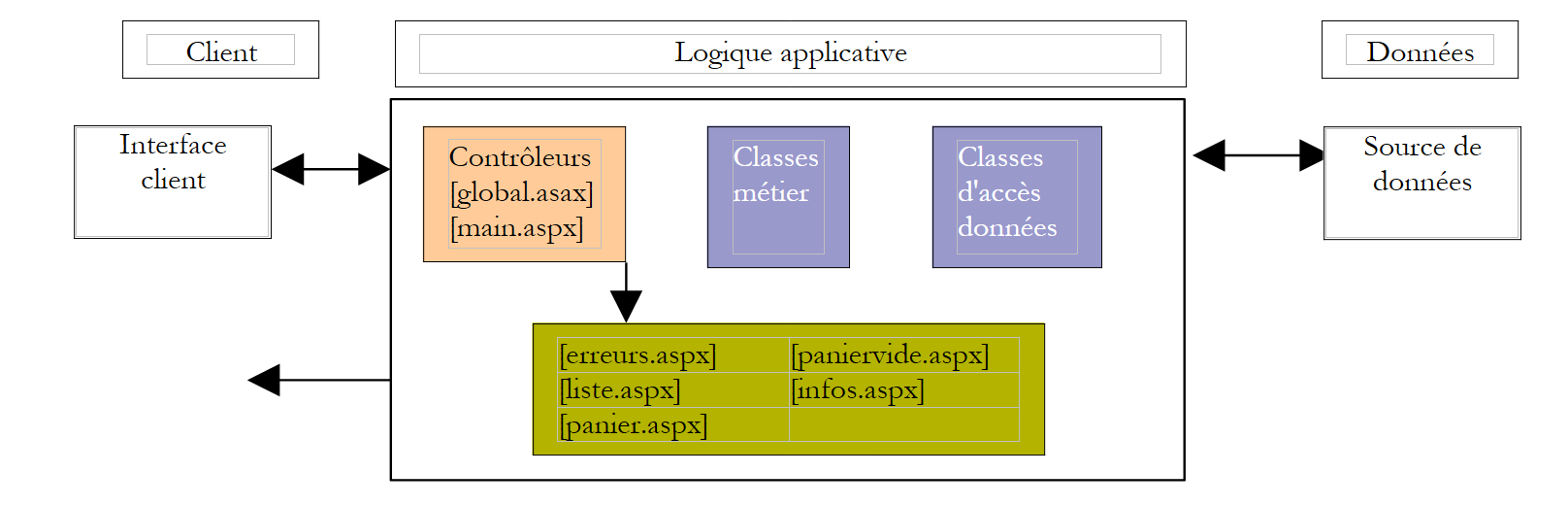 |
业务类 [领域]、数据访问类 [DAO] 以及数据源 | |
ASPX 页面 | |
所有 HTTP 客户端请求都会经过以下两个控制器: global.asax:处理与应用程序初始启动相关的事件 main.aspx:单独处理每个客户端的请求 |
1.5.1. 视图
视图对应本文开头所列的视图:
list.aspx | 视图位于应用程序的 [views] 文件夹中 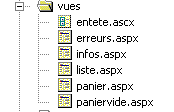 | |
info.aspx | ||
cart.aspx | ||
empty-cart.aspx | ||
errors.aspx |
1.5.2. 控制器
如前所述,控制器由两个部分组成:
- [global.asax, global.asax.vb]:主要用于初始化应用程序,并为不同客户端之间共享的所有数据设置上下文
- [main.aspx, main.aspx.vb]:实际的控制器,负责处理来自客户端的 HTTP 请求。
各种客户端请求将被发送至 [main.aspx] 控制器,并包含一个名为 [action] 的参数,用于指定客户端请求的操作:
request | 含义 | 控制器操作 | 可能的响应 |
客户端希望获取 项 | - 向图层请求项目列表 职业 | - [LIST] - [ERRORS] | |
客户端请求 关于视图中显示的 视图中显示的 [LIST] | - 从业务层请求该项目 | - [INFO] - [ERRORS] | |
客户购买商品 | - 向业务层请求该商品 并将该商品加入客户的购物车 | - [INFO] 若数量有误 - [LIST] 若无错误 | |
客户希望从购物车中移除 商品 | - 从会话中获取购物车 并对其进行修改 | - [购物车] - [清空购物车] - [错误] | |
客户希望查看他们的 购物车 | - 从会话中获取购物车 | - [购物车] - [购物车为空] - [错误] | |
顾客已完成购物 并进入结账流程 | - 根据已购商品的库存数量 - 将已确认购买的商品 已确认购买的商品 | - [列表] - [错误] |
1.5.3. 应用程序配置
我们将致力于配置应用程序,使其在应对以下变更时尽可能灵活:
- 各种视图的 URL 变更
- 实现 [IArticlesDao] 和 [IArticlesDomain] 接口的类发生变更
- 数据库管理系统(DBMS)、数据库或文章表的变更
1.5.3.1. URL 变更
视图 URL 的名称将与其他几个参数一起写入应用程序的 [web.config] 配置文件中:
<?xml version="1.0" encoding="utf-8" ?>
<configuration>
..
    <appSettings>
        <add key="urlMain" value="/webarticles/main.aspx"/>
        <add key="urlInfos" value="vues/infos.aspx"/>
        <add key="urlErreurs" value="vues/erreurs.aspx"/>
        <add key="urlListe" value="vues/liste.aspx"/>
        <add key="urlPanier" value="vues/panier.aspx"/>
        <add key="urlPanierVide" value="vues/paniervide.aspx"/>
    </appSettings>
</configuration>
1.5.3.2. 修改实现接口的类
遵循三层架构的原则,各层之间必须相互隔离。这种隔离通过以下方式实现:
- 各层通过接口而非具体类进行通信
- 某一层级的代码绝不会自行实例化另一层级的类以供使用。它只需向外部工具(本例中为 Spring)请求所需层级接口实现的实例。为此,我们知道它无需了解实现类的名称,只需知道其希望获取引用所对应的 Spring 单例的名称即可。
在我们的应用程序中,Spring将在Web应用程序的[web.config]文件中按如下方式进行配置:
<?xml version="1.0" encoding="iso-8859-1" ?>
<configuration>
    <configSections>
        <sectionGroup name="spring">
            <section name="context" type="Spring.Context.Support.ContextHandler, Spring.Core" />
            <section name="objects" type="Spring.Context.Support.DefaultSectionHandler, Spring.Core" />
        </sectionGroup>
    </configSections>
    <spring>
        <context type="Spring.Context.Support.XmlApplicationContext, Spring.Core">
            <resource uri="config://spring/objects" />
        </context>
        <objects>
    <object id="articlesDao" type="istia.st.articles.dao.ArticlesDaoArrayList, webarticles-dao" />
    <object id="articlesDomain" type="istia.st.articles.domain.AchatsArticles, webarticles-domain">
        <constructor-arg index="0">
            <ref object="articlesDao" />
        </constructor-arg>
    </object>
        </objects>
    </spring>
        <appSettings>
        <add key="urlMain" value="/webarticles/main.aspx"/>
        <add key="urlInfos" value="vues/infos.aspx"/>
        <add key="urlErreurs" value="vues/erreurs.aspx"/>
        <add key="urlListe" value="vues/liste.aspx"/>
        <add key="urlPanier" value="vues/panier.aspx"/>
        <add key="urlPanierVide" value="vues/paniervide.aspx"/>
    </appSettings>
</configuration>
要访问 [business] 层,[web] 层中的类可以请求 [articlesDomain] 单例。Spring 随后将实例化一个类型为 [istia.st.articles.domain.AchatsArticles] 的对象。 为此实例化过程,它需要一个 [articlesDao] 类型的对象,即 [istia.st.articles.dao.ArticlesDaoArrayList] 类型的对象。Spring 随后将实例化此类对象。操作结束时,请求 [articlesDomain] 单例的 [web] 层便拥有了连接其与数据源的完整链:
 |
1.5.3.3. 与 DBMS 或数据库相关的变更
由于我们正在处理一个不包含 DBMS 的测试应用程序,因此此处将忽略这一部分。我们将在后续章节中探讨基于 DBMS 的 [dao] 层的实现。
1.5.4. <asp:> 标签库
请看 [ERRORS] 视图,它用于显示错误列表:
[ERRORS]视图负责显示[main.aspx]控制器放置在请求上下文中、名称为[context.Items("errors")]的错误列表。编写此类页面有多种方法。在此,我们仅关注错误显示部分。
请记住,一个 ASPX 页面包含一个 HTML 呈现层和一个 .NET 代码层,后者负责准备呈现层必须显示的数据。这两个部分可以位于同一个 [aspx] 文件中(WebMatrix 解决方案),也可以分别位于两个文件中:[aspx] 用于呈现,[aspx.vb] 用于代码。后者是 Visual Studio 采用的方案。 更复杂的是,HTML 呈现层也可能包含 .NET 代码,这往往会模糊视图中 [控制器] 层与 [呈现] 层之间的界限。通常强烈不建议采用这种做法。要从 [呈现] 部分移除所有代码,需要创建标签库。这些标签库通过类似 HTML 标签的形式“隐藏”了代码。我们为 [ERRORS] 页面提供两种可能的解决方案。
我们的第一个解决方案是在页面的 [presentation] 部分使用 .NET 代码。该 ASPX 页面在其控制器部分 [errors.aspx.vb] 中检索请求中存在的错误列表:
        Protected erreurs As ArrayList

        Private Sub Page_Load(ByVal sender As System.Object, ByVal e As System.EventArgs) Handles MyBase.Load
...
            ' error recovery
            erreurs = CType(context.Items("erreurs"), ArrayList)
        End Sub
然后在 [presentation, errors.aspx] 部分中显示它们:
                <h2>Les erreurs suivantes se sont produites :</h2>
                <ul>
                <%
                    for i as integer=0 to erreurs.count-1
                        response.write("<li>" & erreurs(i).ToString & "</li>")
                    next
                %>
                </ul>
第二个解决方案使用了来自 ASP.NET <asp:> 标签库的 <asp:repeater> 标签。如果您通过图形化方式构建 ASPX 页面,该标签作为服务器控件可供使用,您可以将其拖放到设计表单上。如果您手动编写 ASPX 代码,则可以引用该标签库。
借助 <asp:> 标签库,前文 [ERRORS] 视图的 ASPX 代码将变为如下所示:
        <asp:Repeater id="rptErreurs" runat="server">
            <HeaderTemplate>
                <h3>Les erreurs suivantes se sont produites :
                </h3>
                <ul>
            </HeaderTemplate>
            <ItemTemplate>
                <li>
                    <%# Container.DataItem %>
                </li>
            </ItemTemplate>
            <FooterTemplate>
                </ul>
            </FooterTemplate>
        </asp:Repeater>
该
标签用于在数据源中的各个项目上重复显示一个 HTML 模板。其各个元素如下:
在显示数据源元素之前显示的 HTML 模板 | |
用于针对数据源中的每个项目重复显示的 HTML 模板。表达式 [<%# Container.DataItem %>] 用于显示数据源中当前项目的值 | |
在显示完数据源中的项目后显示的 HTML 模板 |
数据源通常绑定在页面的 [controller] 部分中的 标签上:
        Protected WithEvents rptErreurs As System.Web.UI.WebControls.Repeater

        Private Sub Page_Load(ByVal sender As System.Object, ByVal e As System.EventArgs) Handles MyBase.Load
..
            ' link errors to rptErreurs
            With rptErreurs
                .DataSource = context.Items("erreurs")
                .DataBind()
            End With
        End Sub
如果数据源已知(例如现有数据库),则此绑定也可在页面设计阶段完成。
在视图中,我们将使用另一个标签:<asp:datagrid>,它允许我们将数据源以表格形式显示出来。
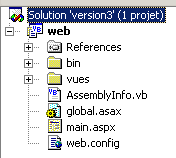
1.5.5. [webarticles] 应用程序的 Visual Studio 解决方案结构
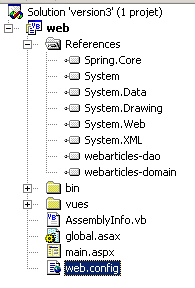
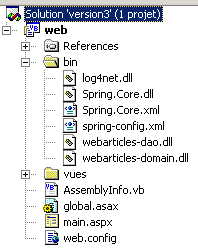
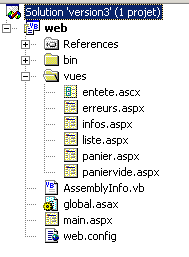
Web 应用程序就像一个由许多碎片组成的拼图。采用 MVC 架构通常会增加这些碎片的数量。[Visual Studio] 中 [webarticles] 应用程序的结构如下:
 |  |  |
 |
评论:
- 该 [web] 项目属于 [类库] 类型,而非人们通常预期的 [ASP.NET Web 应用程序] 类型。[ASP.NET Web 应用程序] 类型要求开发机或远程机器上安装 IIS Web 服务器。 Windows XP 家庭版计算机默认未预装 IIS 服务器。然而,许多个人电脑都预装了该版本。为了让使用 Windows XP 的读者能够实现本章所研究的应用程序,我们将使用微软免费提供的 Cassini Web 服务器(参见附录),并将 [ASP.NET Web 应用程序] 项目替换为 [类库] 项目。这会带来一些缺点,具体说明见附录。
- 该应用程序使用的 DLL 如下:
包含数据访问层的类 | |
包含业务层的类 | |
包含 Spring 类,用于集成 Web、领域和 DAO 层 | |
日志类——由 Spring 使用 |
这些 DLL 文件放置在 [bin] 文件夹中,并添加到项目引用中。
1.5.6. ASPX 视图
如前所述,我们将在 ASPX 视图中使用 <asp:> 标签库。
1.5.6.1. 用户组件 [entete.ascx]
为确保不同视图之间的一致性,它们将共享相同的页眉,该页眉会显示应用程序名称以及菜单:
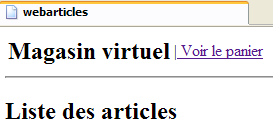 | 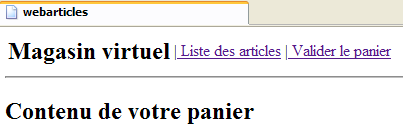 |
该菜单是动态的,由控制器设置。控制器会在发送给 ASPX 页面的请求中包含一个名为“actions”的键属性,其关联值为一个由 Hashtable() 元素组成的数组。该数组中的每个元素都是一个字典,用于生成一个页眉菜单选项。每个字典包含两个键:
- href:与菜单选项关联的 URL
- 链接:菜单文字
我们将把页眉转换为用户控件。用户控件将页面的一部分(布局及相关代码)封装成一个组件,该组件随后可在其他页面中重复使用。在此,我们希望在应用程序的其他视图中重复使用 [entete] 组件。 呈现代码将位于 [entete.ascx] 中,相关的控件代码则位于 [entete.ascx.vb] 中。呈现代码将使用 <asp:repeater> 组件来显示菜单选项表:
 |
否。 | 类型 | 名称 | 角色 |
1 | 重复器 | rptMenu 数据源:一个字典数组 包含两个键:href、link | 显示菜单选项 |
页面呈现代码如下:
评论:
- [repeater] 组件在第 6–14 行中定义
- 与该重复器关联的数据源中的每个元素都是一个字典,包含两个键:href(第 9 行)和 link(第 10 行)
相关的控制代码如下:
注释:
- [EnteteWebArticles] 组件有一个公共的、只写 [actions] 属性 - 第 7 行
- 该属性允许名为 [rptMenu] 的 <asp:repeater> 组件(第 10 行)绑定到由应用程序控制器计算出的选项数组(第 11–12 行)。
应用程序中的其他视图将使用 [entete.ascx] 定义的页眉。例如,[erreurs.aspx] 页面将使用以下代码包含该页眉:
注释:
- 第 1 行指定 <WA:entete> 标签必须与 [entete.ascx] 文件定义的组件相关联。[TagPrefix] 和 [TagName] 属性为可选。
- 完成此设置后,将通过第 9 行将该组件插入到页面的呈现代码中。在运行时,该标签会将 [entete.ascx] 页面中的代码包含到包含它的 ASPX 页面中。控件代码 [erreurs.aspx.vb] 将负责初始化此组件。具体操作如下:
注释:
- 第 6 行创建了一个类型为 [EnteteWebArticles] 的对象,这是正在创建的组件的类型
- 第 11 行初始化了该对象的 [actions] 属性
1.5.6.2. [liste.aspx] 视图
1.5.6.2.1. 简介
此视图显示了可供销售的商品列表:
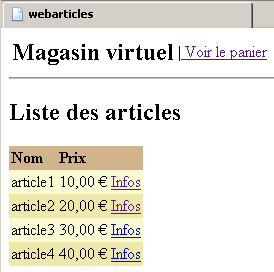 | 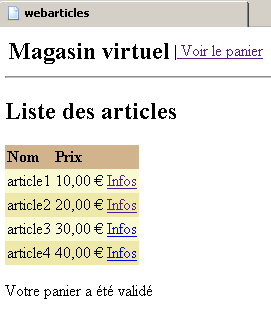 |
该视图在收到对 /main?action=list 或 /main?action=cartvalidation 的请求后显示。控制器请求的参数如下:
Hashtable() 对象 - 菜单选项数组 | |
[Item] 类型对象的 ArrayList | |
字符串对象 - 页面底部显示的消息 |
文章 HTML 表格中的每个 [Info] 链接都包含一个 URL,格式为 [?action=info&id=ID],其中 ID 是所显示文章的 id 字段。
1.5.6.2.2. 页面组件
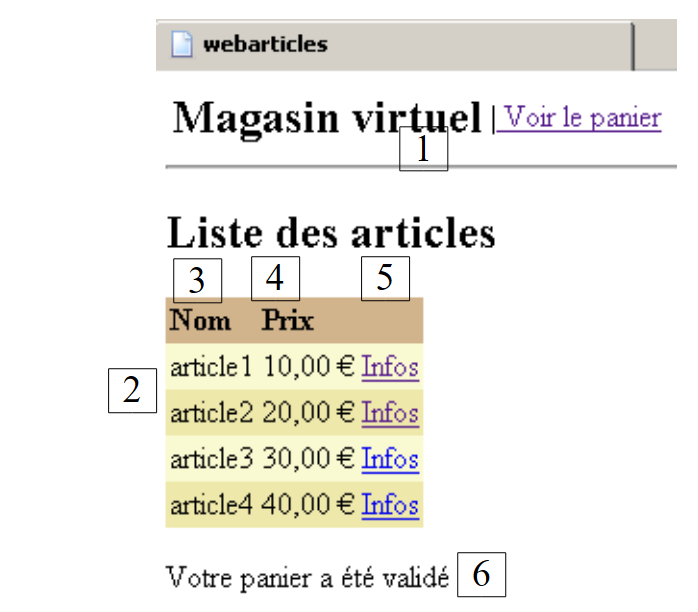 |
无 | 类型 | 名称 | 角色 |
用户组件 | 标题 | 显示标题 | |
数据网格 | DataGridArticles 3 - 关联列:标题:名称,字段:name 4 - 关联列:标题:价格,字段:price 5 - 超文本列:文本:Info,URL 字段:id, URL 格式:/webarticles/main.aspx?action=info&id={0} | 显示待售商品 | |
标签 | lblMessage | 显示一条消息 |
让我们回顾一下如何设置这些属性:
- 在 Visual Studio 中,选择 [DataGrid] 以访问其属性表:
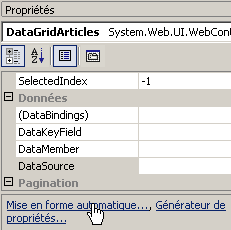
- 使用上方的 [AutoFormat] 链接来管理显示网格的布局
- 并使用 [属性生成器] 链接来管理其内容
1.5.6.2.3. 呈现代码 [liste.aspx]
注释:
- 第 9 行定义了页面标题
- 第 12–24 行定义了 [DataGrid] 的属性
- 第 26 行定义了 [lblMessage] 标签
1.5.6.2.4. 控制器代码 [liste.aspx.vb]
注释:
- 页面组件出现在第 13–15 行。请注意,我们需要使用 [new] 运算符创建 [EnteteWebArticles] 对象,而其他组件则无需如此。如果不进行这种显式创建,我们会遇到运行时错误,提示 [entete] 对象未引用任何内容。这一点值得进一步调查。目前尚未进行调查。
- 第 20 行从上下文中获取了页眉菜单选项表,用于初始化页面的 [entete] 组件
- 文章列表从上下文中获取——第 22 行
- 以初始化 [DataGridArticles] 组件——第 24–27 行
- [lblMessage] 组件通过上下文中放置的消息进行初始化——第 29 行
1.5.6.3. [infos.aspx]视图
1.5.6.3.1. 简介
此视图显示有关某项商品的信息,并允许购买该商品:
当发送 /main?action=infos&id=ID 请求,或发送 /main?action=achat&id=ID 请求且购买数量有误时,将显示此视图。控制器请求参数如下:
Hashtable() 对象 - 菜单选项数组 | |
类型为 [Article] 的对象 - 要显示的项目 | |
字符串对象 - 数量出现错误时显示的消息 | |
字符串对象 - 在 [数量] 输入字段中显示的值 |
当数量输入出现错误时,将使用 [msg] 和 [qte] 字段:
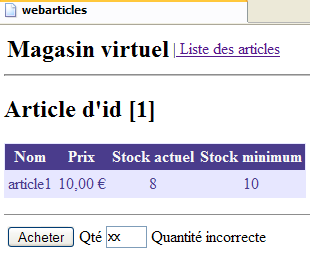
本页面包含一个表单,通过 [购买] 按钮提交。POST 请求的目标 URL 为 [?action=purchase&id=ID],其中 ID 是所购商品的 ID。
1.5.6.3.2. 页面组件
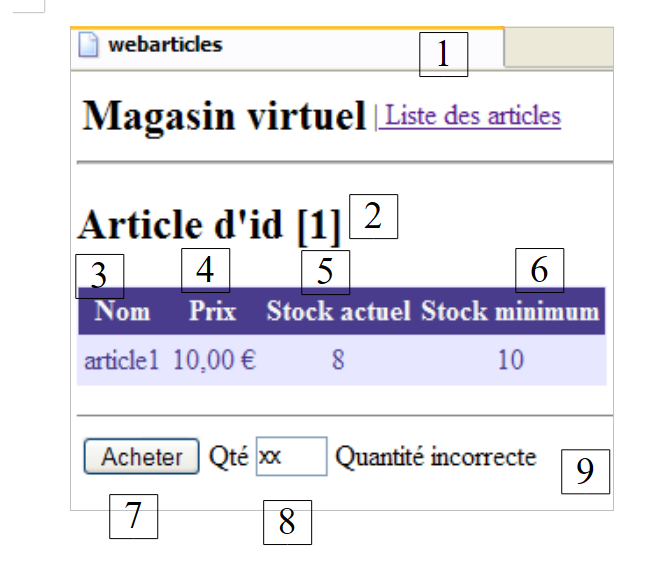 |
无 | 类型 | 名称 | 角色 |
用户组件 | 标题 | 显示标题 | |
字面量 | litID | 显示项目编号 | |
DataGrid | DataGridArticle 3 - 关联列:标题:名称,字段:name 4 - 关联列:标题:价格,字段:price 5 - 关联列:标题:当前库存,字段:currentStock 6 - 关联列:标题:最低库存,字段:stockMinimum | 显示一项 | |
HTML 提交 | 提交表单 | ||
HTML 输入框 runat=server | txtQty | 请输入购买数量 | |
标签 | lblMsgQte | 任何错误信息 |
1.5.6.3.3. 呈现代码 [infos.aspx]
评论:
- 该头文件已包含在页面中 - 第9行
- 字面量 [litId] 在第 10 行定义
- DataGrid [DataGridArticles] 定义在第 12–34 行
- 表单在第 36–46 行定义。其类型为 POST。
- POST 目标由变量 [strAction] 提供 - 第 36 行。该变量必须由控制器定义。
- 购买数量的输入字段在第 41 行定义。它是一个服务器端 HTML 组件(runat=server)。在代码端,通过一个对象访问它。
- 第 42 行定义了标签 [lblMsgQte],该标签将显示与输入数量相关的任何错误消息
1.5.6.3.4. 控制代码 [infos.aspx.vb]
注释:
- 页面组件定义在第 10–14 行
- 该类定义了一个公共属性 [strAction],用于指定表单的 POST 目标 - 第 17–25 行
- 待显示的文章是从应用程序上下文中获取的——第30行
- 从上下文中获取标题菜单选项数组以初始化页面的 [entete] 组件——第 32 行
- 第 33–39 行:将 [DataGridArticle] 组件绑定到类型为 [ArrayList] 的数据源,该数据源仅包含第 30 行检索到的文章
- 使用从上下文中获取的信息初始化 [lblMsgQte, txtQte] 组件 - 第 42-45 行
- [straction] 属性也使用从上下文中获取的信息进行初始化——第 47 行。该变量用于生成页面上 HTML 表单的 [action] 属性:
1.5.6.4. [panier.aspx] 视图
1.5.6.4.1. 简介
此视图显示购物车中的内容:
该视图会在响应诸如 /main?action=cart 或 /main?action=cancelpurchase&id=ID 之类的请求时显示。控制器的请求参数如下:
object Hashtable() - 菜单选项数组 | |
类型为 [Cart] 的对象 - 要显示的购物车 |
购物车商品HTML表格中的每个 [Remove] 链接都包含一个格式为 [?action=removeitem&id=ID] 的URL,其中ID是待从购物车中移除的商品的 [id] 字段。
1.5.6.4.2. 页面组件
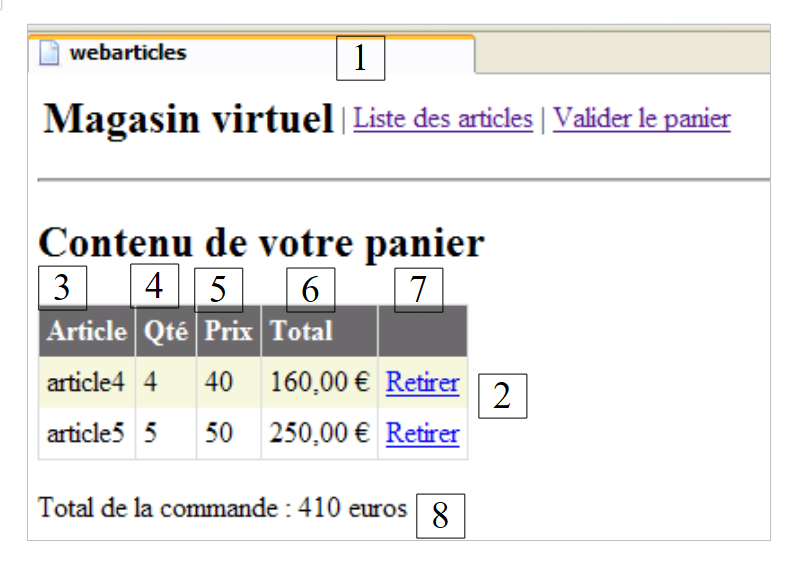 |
编号 | 类型 | 名称 | 角色 |
用户组件 | 标题 | 显示标题 | |
DataGrid | DataGridPurchases 3 - 关联列 - 标题:项目,字段:名称 4 - 关联列 - 标题:数量,字段:qty 5 - 关联列 - 标题:价格,字段:price 6 - 关联列 - 标题:总计,字段:total,格式 {0:C} 7 - 超文本列 - 文本:删除,URL:id,URL 格式:/webarticles/main.aspx?action=retirerachat&id={0} | 显示已购商品列表 | |
标签 | lblTotal | 显示应付金额 |
1.5.6.4.3. 呈现代码 [panier.aspx]
评论
- 第 9 行包含标题
- 第 12–27 行定义了 [DataGridAchats] 组件
- 第 29 行:定义了 [lblTotal] 组件
1.5.6.4.4. 控件代码 [panier.aspx.vb]
注释:
- 页面组件在第11至13行进行声明
- [header] 组件的初始化方式与之前学习的页面完全一致——第 17 行
- 待显示的购物车是从会话中获取的——第 19 行
- 使用 [DataGridAchats] 组件显示此购物车会遇到问题。困难源于该组件的初始化。让我们回顾一下其列:
- [Article] 列与数据源中的 [name] 字段相关联
- [Qty] 列与数据源中的 [qty] 字段相关联
- [Price] 列与数据源中的 [price] 字段相关联
- [Total] 列与数据源中的 [total] 字段相关联
我们拥有的数据源是购物车及其购物清单。后者将作为 [DataGrid] 的数据源。然而,用于填充 [DataGrid] 行内容的 [Purchase] 对象并不具备 [DataGrid] 所期望的 [name, qty, price, total] 属性。 因此,我们在此专门为 [DataGrid] 创建一个数据源,其元素具备 [DataGrid] 所期望的特征。这些元素将采用 [PurchaseLine] 类型,这是一个为此目的创建的类,并继承自 [Purchase] 类——第 36–66 行
- 定义 [PurchaseLine] 类后,[DataGridPurchases] 的数据源将基于会话中的购物车构建——第 20–30 行
- 使用 [Panier] 类的 [totalPanier] 属性显示总购买金额——第 32 行
1.5.6.5. [emptyCart.aspx] 视图
1.5.6.5.1. 简介
此视图显示购物车为空的相关信息:
在向 /main?action=panier 或 /main?action=retirerachat&id=ID 发送请求后,该页面将被显示。控制器请求参数如下:
Hashtable() 对象 - 菜单选项数组 |
1.5.6.5.2. 页面组件
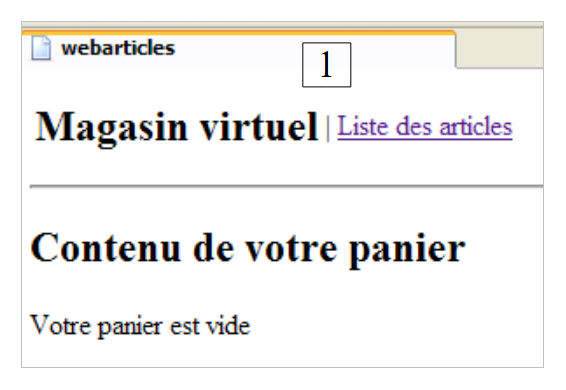 |
编号 | 类型 | 名称 | 角色 |
用户组件 | 标题 | 显示标题 |
1.5.6.5.3. 呈现代码 [emptycart.aspx]
评论:
- 第 9 行已包含标题
1.5.6.5.4. 控件代码 [paniervide.aspx.vb]
注释:
- 我们只需初始化页面中唯一的动态组件——第 10 行
1.5.6.6. [errors.aspx] 视图
1.5.6.6.1. 简介
当发生错误时,将显示此视图:
当任何请求导致错误时,该视图都会显示,但数量错误的购买操作除外,该情况由 [INFOS] 视图处理。控制器请求的元素如下:
Hashtable() 对象 - 菜单选项数组 | |
表示要显示的错误消息的 [String] 对象的 ArrayList |
1.5.6.6.2. 页面组件
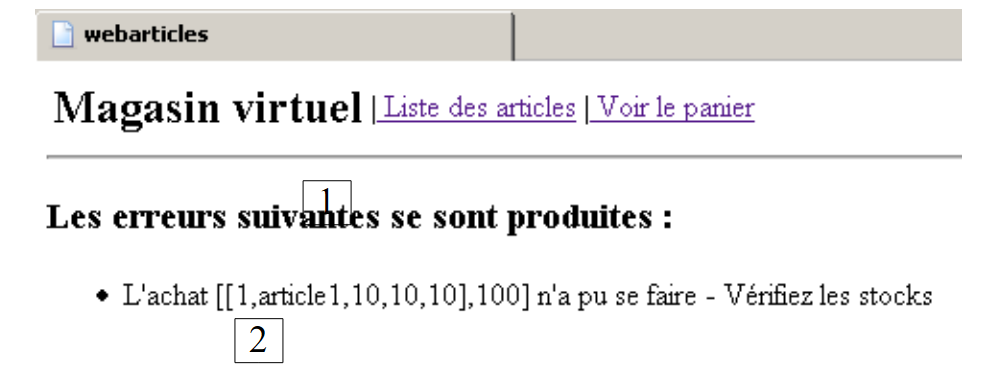 |
编号 | 类型 | 名称 | 角色 |
用户组件 | 标题 | 显示标题 | |
重复器 | rptErrors | 显示错误列表 |
1.5.6.6.3. 呈现代码 [errors.aspx]
注释:
- 该标头在第 9 行定义
- [rptErrors] 组件在第 13–19 行定义。其内容来自一个类型为 [ArrayList] 的数据源,该数据源包含 [String] 对象。
1.5.6.6.4. 控件代码 [errors.aspx.vb]
注释:
- [header] 组件按常规方式初始化,第 9 行和第 14 行
- [rptErrors] 组件使用上下文中找到的 [ArrayList] 错误列表进行初始化——第 16–19 行
1.5.7. global.asax 和 main.aspx 控制器
我们还需要编写 Web 应用程序的核心:控制器。其作用是:
- 获取客户端的请求,
- 使用业务类处理客户端请求的操作,
- 并返回相应的视图作为响应。
1.5.7.1. [global.asax.vb] 控制器
当应用程序接收到第一个请求时,[global.asax.vb] 文件中的 [Application_Start] 过程会被执行。这一过程仅会发生一次。[Application_Start] 过程的目的是初始化 Web 应用程序所需的对象,这些对象将以只读模式被所有客户端线程共享。这些共享对象可以放置在两个位置:
- 控制器的私有字段
- 应用程序的执行上下文 (Application)
[global.asax.vb] 文件中的 [Application_Start] 方法将执行以下操作:
- 检查 [web.config] 文件中是否包含应用程序正常运行所需的参数。这些参数已在第 1.5.3 节中进行过说明。
- 它将以 [ArrayList errors] 对象的形式,将应用程序上下文中的所有错误列表放入其中。如果没有错误,该列表将为空,但该列表仍会存在。
- 若存在错误,[Application_Start] 方法将在此处终止。 否则,它将请求一个类型为 [IArticlesDomain] 的单例引用,该单例将成为控制器用于满足其需求的业务对象。如 1.5.3.2 节所述,控制器将从 Spring 框架中请求此单例。此实例化操作可能会导致各种错误。如果发生错误,这些错误将再次存储在应用程序上下文的 [errors] 对象中。
[global.asax.vb] 控制器包含一个 [Session_Start] 过程,该过程会在每次有新客户端连接时运行。在此过程中,我们将为该客户端创建一个空购物车。该购物车将在该特定客户端的所有请求期间保持有效。相关代码如下:
注释:
- [web.config] 中预期的参数在第 18 行定义为一个数组
- 系统会在 [web.config] 中搜索这些参数。若存在,则将其存储在应用上下文中;否则,会在 [errors] 错误列表中记录错误 - 第 21-33 行
- 若无错误,则向 Spring 请求 [articlesDomain] 单例的引用,该单例负责管理对应用程序 [domain] 层的访问 - 第 35-47 行。任何错误都会记录在 [errors] 中。
- 错误将记录在应用程序上下文中 - 第 49 行
- 若发生任何错误,则退出该过程 - 第 51 行
- 我们创建一个包含三个字典的数组。每个字典有两个键:href 和 link。该数组代表三个可能的菜单选项——第 52–71 行
- 该数组存储在应用程序上下文中——第 73 行
- 对于每位新客户,都会执行 [Session_Start] 过程。在客户的会话中创建一个空购物车——第 78–81 行
1.5.7.2. [main.aspx.vb] 控制器
[main.aspx.vb] 控制器处理所有客户端请求。这些请求均遵循 [/webarticles/main.aspx?action=XX] 的格式。请求的处理流程如下:
- 检查应用程序上下文中的 [errors] 对象。如果该对象不为空,则表示应用程序初始化期间发生错误,应用程序无法运行。此时将返回 [ERRORS] 视图。
- 将检索并检查请求的 [action] 参数。如果它不对应于已知的操作,则发送 [ERRORS] 视图并附上相应的错误消息。
- 如果 [action] 参数有效,则将客户端的请求传递给该操作对应的特定处理程序进行处理:
方法 | 请求 | 处理 | 可能的响应 |
GET /main?action=list | - 请求项目列表 从业务类 - 显示 | [LIST] 或 [ERRORS] | |
GET /main?action=info&id=ID | - 从 业务类中 - 显示该项 | [INFO] 或 [ERRORS] | |
POST /main?action=purchase&id=ID - 购买数量包含在提交的参数中 | - 从 业务类中 - 将其添加到 客户会话中 | [LIST] 或 [INFO] 或 [ERRORS] | |
GET /main?action=removePurchase&id=ID | - 从 购物清单中 [CART] | [CART] | |
GET /main?action=cart | - 显示 客户端会话 | [CART] 或 [EMPTY_CART] | |
GET /main?action=cartvalidation | - 减少 所有商品的库存 在客户 [LIST] 或 [ERRORS] | [LIST] 或 [ERRORS] |
控制器模板 [main.aspx.vb] 可能如下所示:
注释:
- 该类有两个私有字段,将在各个方法之间共享——第 15–16 行:
- articlesDomain:用于访问 [domain] 层的单例
- options:包含菜单选项的字典数组
- [Page_Load] 过程:
- 将初始化该类的两个私有字段
- 从请求中获取 [action] 参数,并执行处理该操作的方法。
1.5.7.3. [Page_Load] 方法
此事件是页面上最早触发的事件。代码如下:
注释:
- 每次页面加载时,我们都会确保由 [global.asax] 执行的应用程序初始化成功。
- 为此,我们从应用程序上下文中检索由 [global.asax] 放置的错误列表——第 4 行
- 如果该列表不为空,则显示 [ERRORS] 视图——第 6–10 行
- 我们从应用程序上下文中检索由 [global.asax] 放置的 [articlesDomain] 单例,并将其存储在私有字段 [articlesDomain] 中,以便该类中的各种方法可以使用它——第 12 行
- 我们对菜单选项数组执行类似的操作——第 14 行
- 从请求中获取 [action] 参数——第 16 行
- 我们执行与请求操作对应的方法。未指定的操作将被视为 [list] 操作——第 16–36 行
1.5.7.4. 处理 [list] 操作
这涉及显示项目列表:
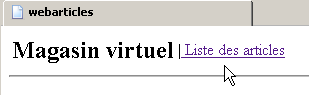
代码如下:
注释:
- 所有错误都会被放入一个 [ArrayList] 中 - 第 4 行
- 从 [articlesDomain] 单例中获取项目列表 - 第 5-12 行
- 如果存在错误,则渲染 [ERRORS] 视图 - 第 13-19 行
- 否则,返回 [LIST] 视图 - 第 20-24 行
1.5.7.5. 处理 [info] 操作
客户端请求了关于某个特定项的信息:
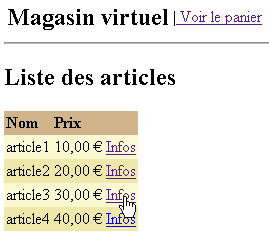
代码如下:
注释:
- 任何错误都会被放入一个 [ArrayList] 中 - 第 4 行
- 从请求中获取所请求项的ID - 第6行
- 对该ID进行验证。它必须存在且必须是整数。若不满足条件,则显示[ERRORS]视图并附上相应的错误信息 - 第7-27行
- ID验证通过后,从[articlesDomain]单例中请求该项目。若发生异常,则发送[ERRORS]视图 - 第29-39行
- 若未找到该项目,则发送 [ERRORS] 视图——第 41–48 行
- 若找到该商品,则将其放入用户的会话中,然后在 [INFO] 视图中显示——第 50-56 行
1.5.7.6. 处理 [purchase] 操作
客户已购买 [INFO] 视图中显示的商品。
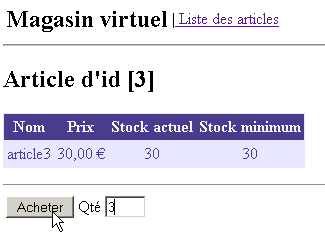
代码如下:
注释:
- 检索会话中存储的项目 - 第 5 行
- 如果未找到(会话可能已过期),则显示 [LIST] 视图 - 第 7-10 行
- 从查询中检索购买数量 - 第 12 行
- 检查其有效性 - 第13-29行
- 若无效,根据具体情况,显示 [LIST] 视图 - 第 16 行 或 [INFO] 视图 - 第 24-28 行
- 如果一切正常,将商品添加到购物车 - 第 31-32 行
- 随后发送 [LIST] 视图 - 第 34 行
1.5.7.7. 处理 [cart] 操作
客户已购买多件商品,并希望查看购物车:
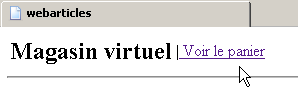
代码如下:
注释:
- 我们从会话中检索购物车——第 4 行。此处未检查是否实际检索到数据。我们应该进行此检查,因为会话可能已过期。
- 如果购物车为空,则发送 [EMPTY CART] 视图——第 6-10 行
- 否则,我们发送 [SHOPPINGCART] 视图——第 11–14 行
1.5.7.8. 处理 [removepurchase] 操作
客户希望从购物车中移除一件商品:
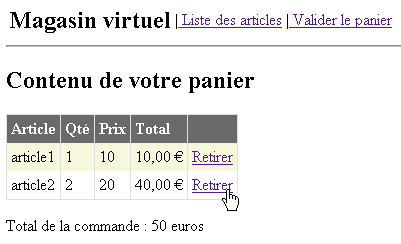
代码如下:
注释:
- 从会话中检索购物车 - 第 4 行。此处未检查是否实际检索到数据。应进行此检查,因为会话可能已过期。
- 从查询中获取待删除商品的 ID [id] —— 第 8 行。
- 从购物车中移除对应的商品 - 第 10 行
- 此处未对已购商品 ID 的有效性进行验证。若其类型无效,将引发异常并在第 11–13 行进行处理。若 ID 有效但不存在,则第 10 行的 [cart.remove] 方法将不执行任何操作。
- 显示新的购物车 - 第 16 行
1.5.7.9. 处理 [validateCart] 操作
客户希望确认购物车:
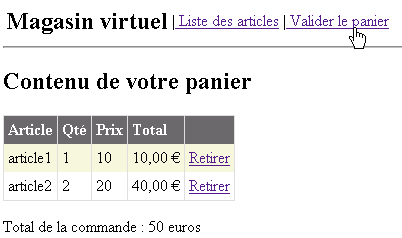
代码如下:
注释:
- 我们从会话中检索购物车——第 6 行。此处未检查是否实际检索到内容。我们应该进行此检查,因为会话可能已过期。
- 如果会话已过期,购物车的指针将为 [nothing],第 9 行的 [buy] 方法将抛出异常,并显示 [ERRORS] 视图。然而,错误信息对用户来说可能不够清晰。
- 第 8–16 行:我们尝试验证从会话中检索到的购物车。如果请求的数量超过所请求商品的库存,某些购买可能会失败。这些情况由 [buy] 方法存储在错误列表中,该列表在第 11 行被检索。
- 如果存在错误,则发送 [ERRORS] 视图——第 18–23 行
- 否则,发送 [LIST] 视图——第 25–26 行
1.6. 结论
在此,我们开发了一个采用 MVC 模式的应用程序。截至 2005 年 4 月,似乎尚无任何与 Java 平台(如 Struts、Spring 等)相媲美的专业 ASP.NET MVC 开发框架。[Spring.net] 项目预计将很快发布一个。在此之前,上述方法为中等规模的应用程序提供了一种可行的 MVC 开发方案。