5. Thymeleaf 视图
让我们回到 Spring MVC 应用程序的架构。
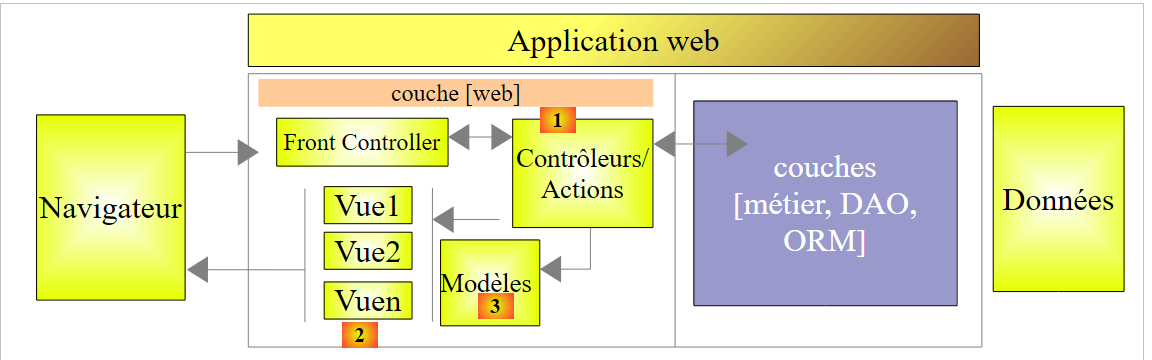 |
前两章介绍了块[1](即动作)的各个方面。接下来我们将讨论:
- V视图的块[2];
- 这些视图所展示的[3]模型(M);
自 Spring MVC 诞生以来,用于生成发送至客户端浏览器的 HTML 页面的技术一直是 JSP(Java Server Pages)。近年来,[Thymeleaf] [http://www.thymeleaf.org/] 技术也已问世。接下来我们将介绍这项技术。
5.1. STS 项目
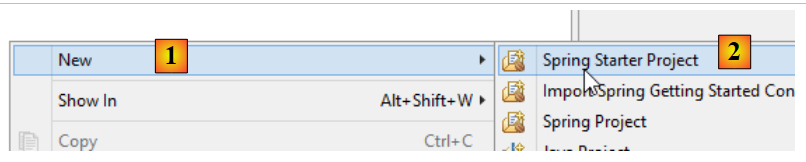
我们创建一个新项目:
 |
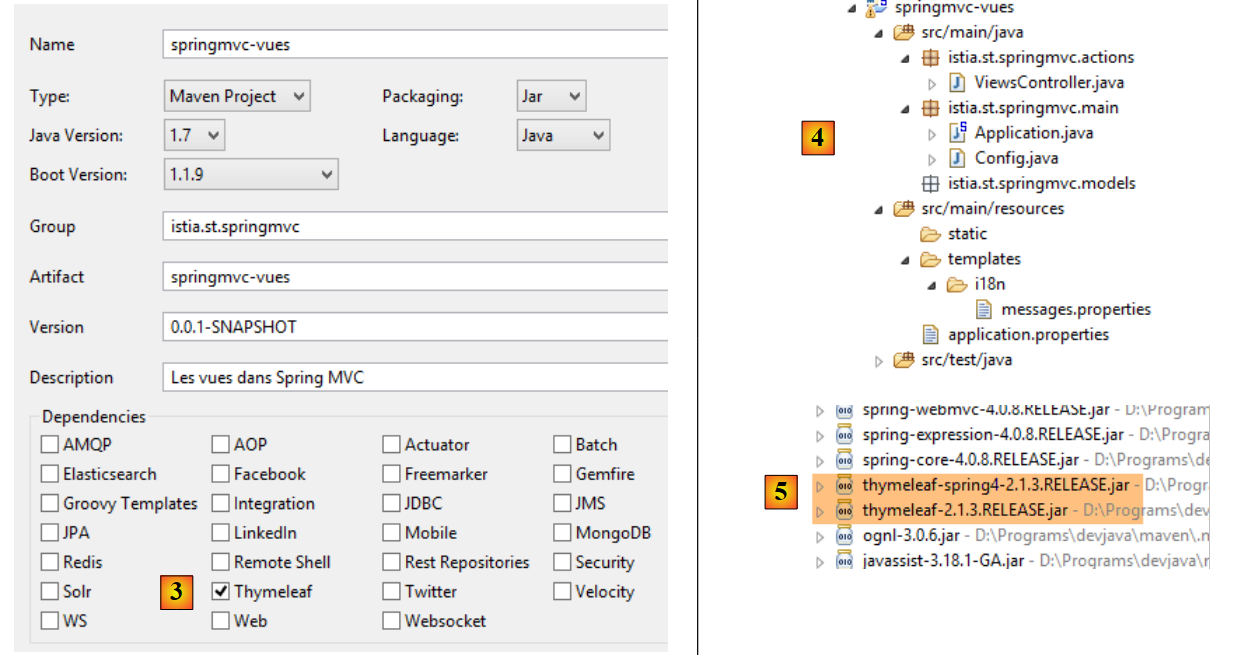 |
- 在 [3] 中,指定该项目需要 [Thymeleaf] 依赖项。这将把 [Thymeleaf] 框架依赖项 [5] 添加到上一个项目的 [Spring MVC] 依赖项中;
现在,让我们按以下方式扩展该项目:
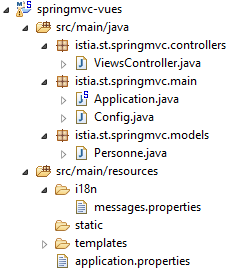 |
我们将借鉴之前的项目:
- [istia.st.springmvc.controllers] 将包含控制器;
- [istia.st.springmvc.models] 将包含操作模型和视图模型;
- [istia.st.springmvc.main] 是 Spring Boot 可执行类的包;
- [templates] 将包含 Thymeleaf 视图;
- [i18n] 将包含视图中显示的国际化消息;
[Application] 类如下所示:
package istia.st.springmvc.main;

import org.springframework.boot.SpringApplication;

public class Application {

    public static void main(String[] args) {
        SpringApplication.run(Config.class, args);
    }
}
[Config] 类如下所示:
package istia.st.springmvc.main;

import java.util.Locale;

import org.springframework.boot.autoconfigure.EnableAutoConfiguration;
import org.springframework.context.MessageSource;
import org.springframework.context.annotation.Bean;
import org.springframework.context.annotation.ComponentScan;
import org.springframework.context.annotation.Configuration;
import org.springframework.context.support.ResourceBundleMessageSource;
import org.springframework.web.servlet.config.annotation.InterceptorRegistry;
import org.springframework.web.servlet.config.annotation.WebMvcConfigurerAdapter;
import org.springframework.web.servlet.i18n.CookieLocaleResolver;
import org.springframework.web.servlet.i18n.LocaleChangeInterceptor;

@Configuration
@ComponentScan({ "istia.st.springmvc.controllers", "istia.st.springmvc.models" })
@EnableAutoConfiguration
public class Config extends WebMvcConfigurerAdapter {
    @Bean
    public MessageSource messageSource() {
        ResourceBundleMessageSource messageSource = new ResourceBundleMessageSource();
        messageSource.setBasename("i18n/messages");
        return messageSource;
    }

    @Bean
    public LocaleChangeInterceptor localeChangeInterceptor() {
        LocaleChangeInterceptor localeChangeInterceptor = new LocaleChangeInterceptor();
        localeChangeInterceptor.setParamName("lang");
        return localeChangeInterceptor;
    }

    @Override
    public void addInterceptors(InterceptorRegistry registry) {
        registry.addInterceptor(localeChangeInterceptor());
    }

    @Bean
    public CookieLocaleResolver localeResolver() {
        CookieLocaleResolver localeResolver = new CookieLocaleResolver();
        localeResolver.setCookieName("lang");
        localeResolver.setDefaultLocale(new Locale("fr"));
        return localeResolver;
    }
}
此配置目前启用了区域设置管理。
[ViewController] 如下所示:
package istia.st.springmvc.actions;

import org.springframework.stereotype.Controller;

@Controller
public class ViewsController {

}
- 第 5 行:[@Controller] 注解已取代 [@RestController] 注解,因为从现在起,操作方法将不再直接向客户端生成响应。取而代之的是,它们将:
- 构建一个模型 M
- 返回一个 [String] 类型的参数,该参数即负责显示该模型的 [Thymeleaf] 视图的名称。正是该视图 V 与该模型 M 的组合,将生成发送给客户端的 HTML 流;
[messages.properties] 文件目前为空。
5.2. [/v01]: Thymeleaf 基础
接下来我们将查看 [ViewsController] 中的下一个操作:
    // thymeleaf basics - 1
    @RequestMapping(value = "/v01", method = RequestMethod.GET)
    public String v01() {
        return "v01";
}
- 第 3 行:该操作返回 [String] 类型。这将是该操作的名称;
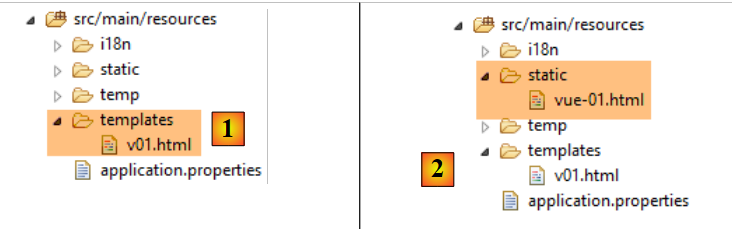
- 第 4 行:该视图名为 [v01]。默认情况下,它必须位于 [templates] 文件夹中,并命名为 [v01.html];
[v01.html] 视图内容如下:
 |
<!DOCTYPE html>
<html xmlns:th="http://www.thymeleaf.org">
<head>
<title th:text="'Les vues'">Spring 4 MVC</title>
<meta http-equiv="Content-Type" content="text/html; charset=UTF-8" />
</head>
<body>
    <h2 th:text="'Les vues dans Spring MVC'">Spring 4 MVC</h2>
</body>
</html>
这是一个 HTML 文件。其中明显使用了 Thymeleaf:
- 第 2 行中的 [th] 命名空间;
- 第 4 行和第 8 行的 [th:text] 属性中;
这是一个有效的 HTML 文件,可以进行查看。我们将它存放在 [static] 文件夹 [2] 中,命名为 [vue-01.html],并使用浏览器直接访问:
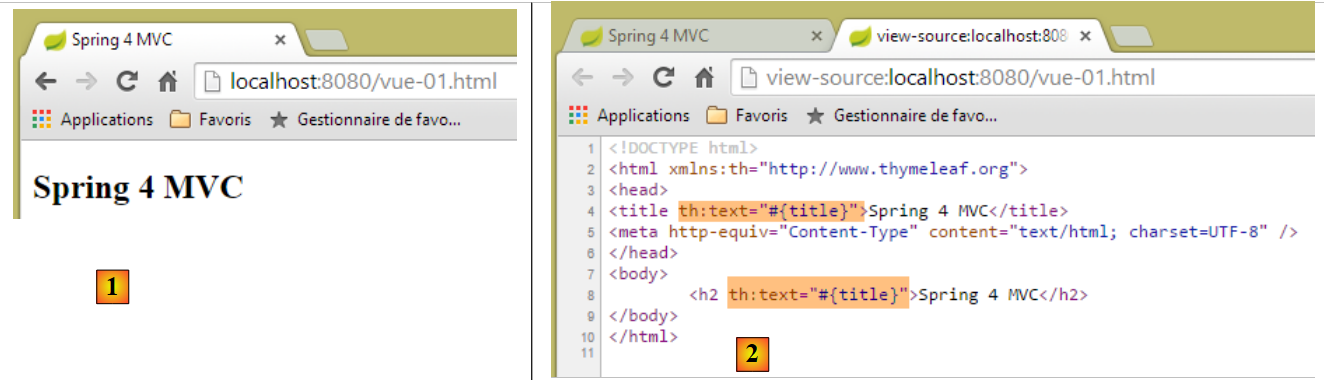 |
如果我们在 [2] 中查看该页面的源代码,可以看到 [th:text] 属性是由服务器发送的,但被浏览器忽略了。当视图是某个操作的结果时,Thymeleaf 就会介入,在将响应发送给客户端之前对 [th] 属性进行解析。
HTML 标签:
<title th:text="'Les vues'">Spring 4 MVC</title>
由 Thymeleaf 处理如下:
- th:text 的语法为 th:text="表达式",其中表达式是要被求值的表达式。当该表达式为字符串时(如本例),必须用单引号括起来;
- [表达式] 的值将替换 HTML 标签的文本,在本例中即替换 [title] 标签的文本;
处理后,上述标签变为:
<title>Les vues</title>
让我们调用该操作 [/v01]:
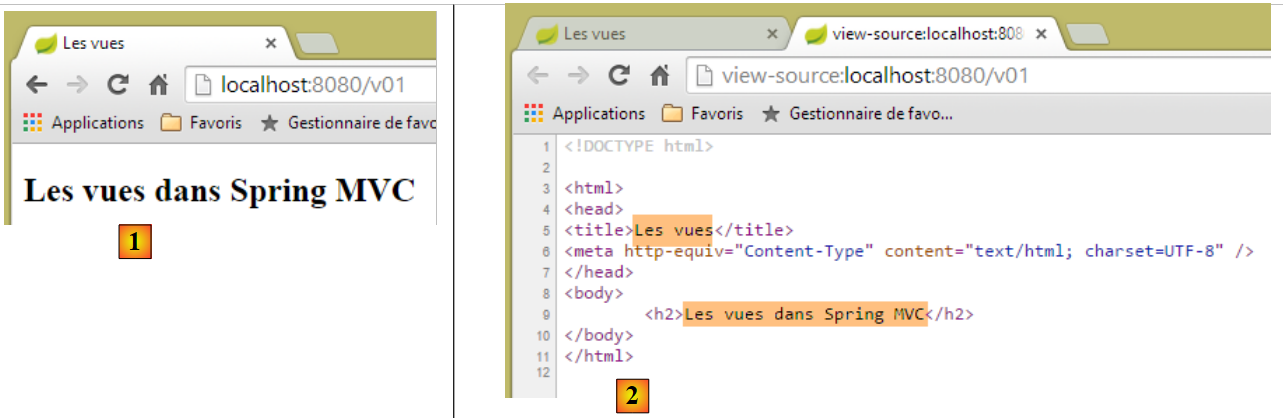 |
- 在 [2] 中,我们可以看到 Thymeleaf 执行的替换操作;
现在让我们请求 URL [http://localhost:8080/v01.html]:
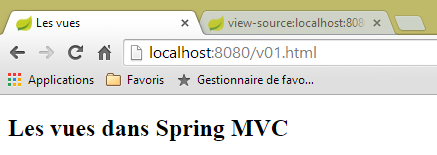 |
我们该如何理解这一点?视图 [templates/v01.html] 是否未经操作直接被返回了?为了澄清这一点,我们创建以下操作 [/v02]:
    // thymeleaf basics - 2
    @RequestMapping(value = "/v02", method = RequestMethod.GET)
    public String v02() {
        System.out.println("action v02");
        return "vue-02";
}
视图 [vue-02.html] 是 [v01.html] 的副本:
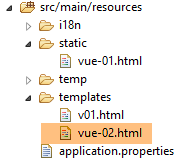 |
现在,让我们请求 URL [http://localhost:8080/vue-02.html]:
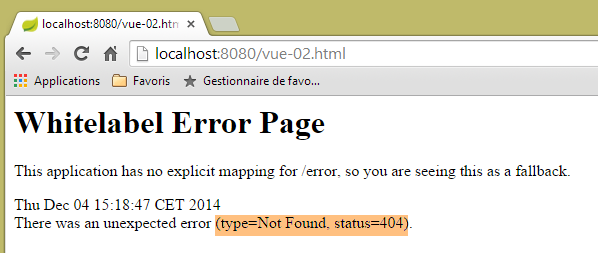 |
找不到该网址。现在让我们请求网址 [http://localhost:8080/v02.html]
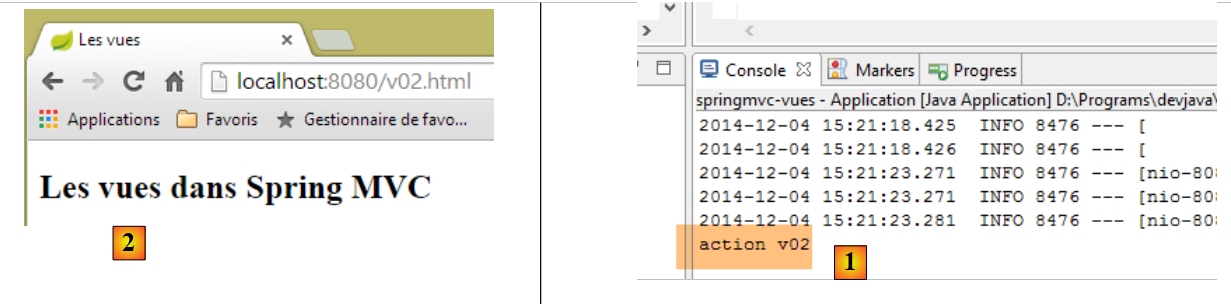 |
- 在 [1] 的控制台日志中,我们可以看到调用了 [/v02] 操作,这导致 [2] 处显示了 [vue-02.html] 视图;
现在我们知道,URL [http://localhost:8080/v02.html] 也可以指向 [static] 文件夹中的文件 [/v02.html]。如果该文件存在会发生什么?让我们试一试。我们在 [static] 文件夹中创建以下 [v02.html] 文件:
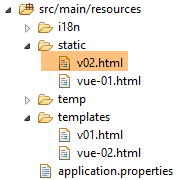 |
<!DOCTYPE html>
<html xmlns:th="http://www.thymeleaf.org">
<head>
<title>Spring 4 MVC</title>
<meta http-equiv="Content-Type" content="text/html; charset=UTF-8" />
</head>
<body>
    <h2>Spring 4 MVC</h2>
</body>
</html>
然后我们请求 URL [http://localhost:8080/v02.html]:
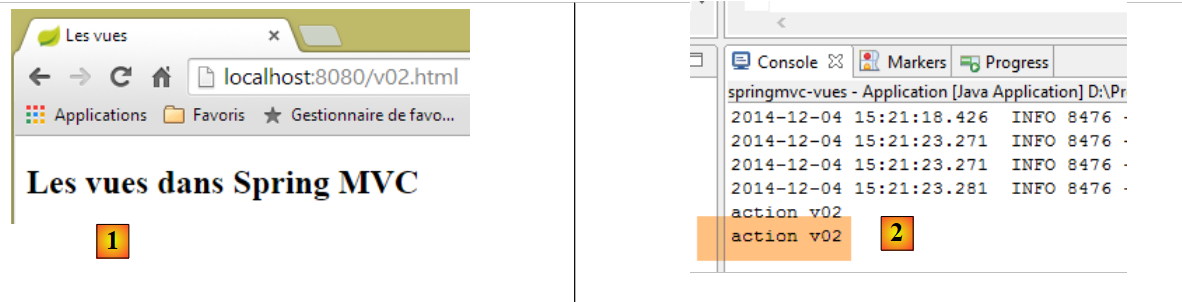 |
[1] 和 [2] 表明已调用 [/v02] 操作。因此我们可以得出结论:当请求的 URL 采用 [/x.html] 形式时,Spring / Thymeleaf:
- 会执行操作 [/x](如果该操作存在);
- 若页面 [/static/x.html] 存在,则返回该页面;
- 否则抛出 404 Not Found 异常;
为避免混淆,从现在起,操作和视图将不再使用相同的名称。
5.3. [/v03]: 视图国际化
Spring 与 Thymeleaf 的集成使 Thymeleaf 能够使用 Spring 消息文件。请看以下这个新操作 [/v03]:
    // internationalization of views
    @RequestMapping(value = "/v03", method = RequestMethod.GET)
    public String v03() {
        return "vue-03";
}
它显示以下视图 [vue-03.html]:
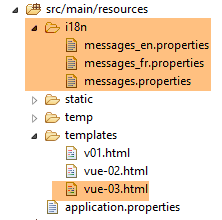 |
<!DOCTYPE html>
<html xmlns:th="http://www.thymeleaf.org">
<head>
<title th:text="#{title}">Spring 4 MVC</title>
<meta http-equiv="Content-Type" content="text/html; charset=UTF-8" />
</head>
<body>
    <h2 th:text="#{title}">Spring 4 MVC</h2>
</body>
</html>
在第 4 行和第 8 行中,[th:text] 属性的表达式为 #{title},其值为 [title] 键的消息。我们创建以下 [messages_fr.properties] 和 [messages_en.properties] 文件:
[messages_fr.properties]
title=Les vues dans Spring MVC
[messages_en.properties]
title=Views in Spring MVC
让我们请求以下 URL:[http://localhost:8080/v03.html?lang=fr] 和 [http://localhost:8080/v03.html?lang=en]:
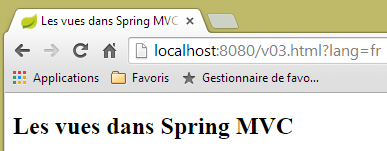 | 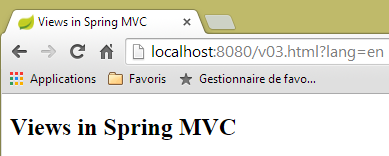 |
请注意,我们应用了最近学到的知识。我们不再将 [v03] 操作称为 [/v03],而是将其称为 [/v03.html]。
5.4. [/v04]: 为 V 视图创建 M 模板
请看以下新的操作 [/v04]:
    // creation of the M model of a V view
    @RequestMapping(value = "/v04", method = RequestMethod.GET)
    public String v04(Model model) {
        model.addAttribute("personne", new Personne(7, "martin", 17));
        System.out.println(String.format("Modèle=%s", model));
        return "vue-04";
}
- 第 4 行:视图模型被注入到操作参数中。默认情况下,这个初始模型是空的。我们将看到可以预先填充它;
- 第 4 行:类型为 [Model] 的模型是一种包含 <String, Object> 类型元素的字典。在第 4 行,我们向该字典添加了一条键为 [person]、值类型为 [Person] 的条目;
- 第 5 行:我们在控制台显示该模型,以查看其结构;
- 第 6 行:我们渲染视图 [vue-04.html];
[Person] 类是上一章中使用的类:
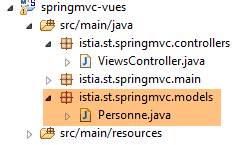 |
package istia.st.springmvc.models;

public class Personne {

    // identifier
    private Integer id;
    // name
    private String nom;
    // age
    private int age;

    // manufacturers
    public Personne() {

    }

    public Personne(String nom, int age) {
        this.nom = nom;
        this.age = age;
    }

    public Personne(Integer id, String nom, int age) {
        this(nom, age);
        this.id = id;
    }

    @Override
    public String toString() {
        return String.format("[id=%s, nom=%s,  age=%d]", id, nom, age);
    }

    // getters and setters
...
}
视图 [vue-04.html] 如下所示:
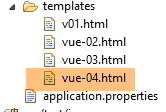 |
<!DOCTYPE html>
<html xmlns:th="http://www.thymeleaf.org">
    <head>
        <title th:text="#{title}">Spring 4 MVC</title>
        <meta http-equiv="Content-Type" content="text/html; charset=UTF-8" />
    </head>
    <body>
        <p>
            <span th:text="#{personne.nom}">Nom :</span>
            <span th:text="${personne.nom}">Bill</span>
        </p>
        <p>
            <span th:text="#{personne.age}">Age :</span>
            <span th:text="${personne.age}">56</span>
        </p>
    </body>
</html>
- 第 10 行引入了一种新的 Thymeleaf 表达式类型 ${var},其中 var 是视图 M 模型中的一个键。回顾一下,[/v04] 操作向模型中添加了一个键 [person],其关联类型为 Person[id, name, age];
- 第 10 行:显示模型中该人的姓名;
- 第 14 行:显示该人的年龄;
消息文件已进行修改,添加了第 9 行和第 13 行中的键 [person.name] 和 [person.age]。结果如下:
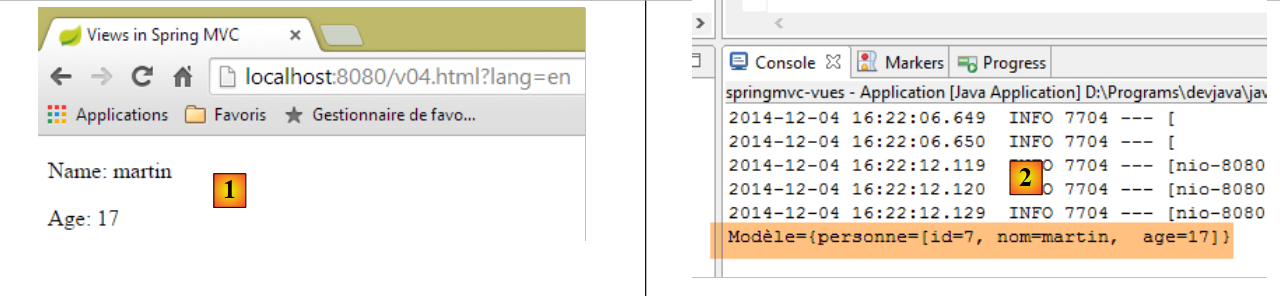 |
模型 M 的性质可在控制台日志中查阅 [2]。
有人可能会疑惑,为什么我们不将视图 [view-04] 编写如下:
<!DOCTYPE html>
<html xmlns:th="http://www.thymeleaf.org">
    <head>
        <title th:text="#{title}"></title>
        <meta http-equiv="Content-Type" content="text/html; charset=UTF-8" />
    </head>
    <body>
        <p>
            <span th:text="#{personne.nom}" /></span>
            <span th:text="${personne.nom}"></span>
        </p>
        <p>
            <span th:text="#{personne.age}"></span>
            <span th:text="${personne.age}"></span>
        </p>
    </body>
</html>
这种写法完全有效,且会产生与之前相同的结果。Thymeleaf 的目标之一是确保即使页面未经过 Thymeleaf 处理,也能正常显示。因此,让我们创建两个新的静态页面:
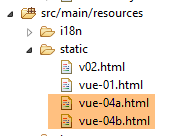 |
视图 [view-04b.html] 是视图 [view-04.html] 的副本。视图 [view-04a.html] 也是如此,但我们已从该页面中删除了静态文本。如果我们查看这两个页面,将得到以下结果:
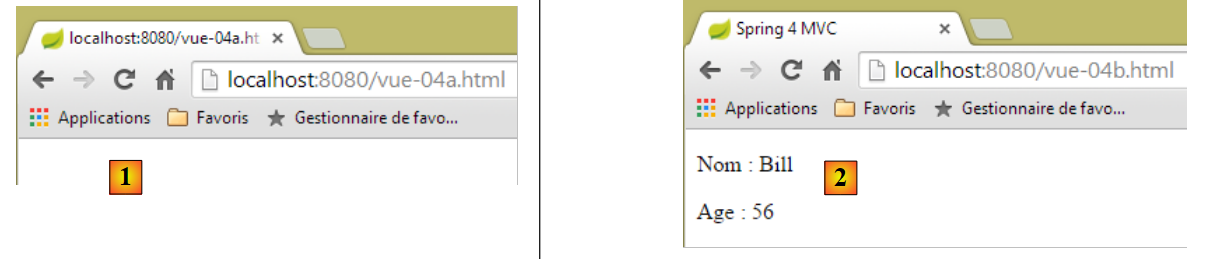 |
在情况 [1] 中,页面结构未显示,而在情况 [2] 中则清晰可见。这就是将静态文本放置在 Thymeleaf 视图中的优势,即使该文本将在运行时被其他文本替换。
现在,让我们关注一个技术细节。在视图 [vue-04.html] 中,我们使用 [Ctrl+Shift+F] 对代码进行格式化。结果如下:
<!DOCTYPE html>
<html xmlns:th="http://www.thymeleaf.org">
<head>
<title th:text="#{title}">Spring 4 MVC</title>
<meta http-equiv="Content-Type" content="text/html; charset=UTF-8" />
</head>
<body>
    <p>
        <span th:text="#{personne.nom}">Nom :</span> <span
            th:text="${personne.nom}">Bill</span>
    </p>
    <p>
        <span th:text="#{personne.age}">Age :</span> <span
            th:text="${personne.age}">56</span>
    </p>
</body>
</html>
标签对齐不齐,导致代码难以阅读。如果我们将 [vue-04.html] 重命名为 [vue-04.xml] 并重新格式化代码,标签就会重新对齐。 因此,[xml] 后缀会更实用。我们可以使用这个后缀进行开发。为此,我们需要配置 Thymeleaf。为了避免撤销我们已完成的工作,我们将正在学习的 [springmvc-vues] 项目复制为 [springmvc-vues-xml] 项目
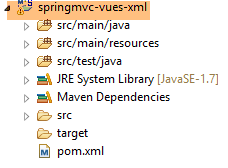 |
我们将 [pom.xml] 文件修改如下:
    <groupId>istia.st.springmvc</groupId>
    <artifactId>springmvc-vues-xml</artifactId>
    <version>0.0.1-SNAPSHOT</version>
    <packaging>jar</packaging>

    <name>springmvc-vues-xml</name>
<description>Les vues dans Spring MVC</description>
在第 2 行和第 6 行更改了项目名称。此外,我们还更改了 [templates] 文件夹中视图的后缀:
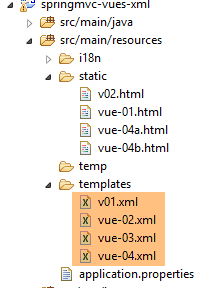 |
[http://docs.spring.io/spring-boot/docs/current/reference/html/common-application-properties.html] 文档列出了可在 [application.properties] 文件中使用的 Spring Boot 配置属性:
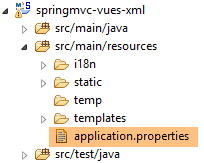 |
本文档列出了 Spring Boot 在自动配置过程中使用的属性,这些属性可以通过修改 [application.properties] 文件来调整。对于 Thymeleaf,自动配置属性如下:
# THYMELEAF (<a href="http://github.com/spring-projects/spring-boot/tree/v1.1.9.RELEASE/spring-boot-autoconfigure/src/main/java/org/springframework/boot/autoconfigure/thymeleaf/ThymeleafAutoConfiguration.java">ThymeleafAutoConfiguration</a>)
spring.thymeleaf.check-template-location=true
spring.thymeleaf.prefix=classpath:/templates/
spring.thymeleaf.suffix=.html
spring.thymeleaf.mode=HTML5
spring.thymeleaf.encoding=UTF-8
spring.thymeleaf.content-type=text/html # ;charset=<encoding> is added
spring.thymeleaf.cache=true # set to false for hot refresh
因此,我们只需添加以下这一行
spring.thymeleaf.suffix=.xml
。不过,我们将采用另一种方法:通过代码进行配置。我们将在 [Config] 类中配置 Thymeleaf:
package istia.st.springmvc.main;

import java.util.Locale;

...
import org.thymeleaf.spring4.SpringTemplateEngine;
import org.thymeleaf.spring4.templateresolver.SpringResourceTemplateResolver;

@Configuration
@ComponentScan({ "istia.st.springmvc.controllers", "istia.st.springmvc.models" })
@EnableAutoConfiguration
public class Config extends WebMvcConfigurerAdapter {
    ...

    @Bean
    public SpringResourceTemplateResolver templateResolver() {
        SpringResourceTemplateResolver templateResolver = new SpringResourceTemplateResolver();
        templateResolver.setPrefix("classpath:/templates/");
        templateResolver.setSuffix(".xml");
        templateResolver.setTemplateMode("HTML5");
        templateResolver.setCharacterEncoding("UTF-8");
     templateResolver.setCacheable(true);
        return templateResolver;
    }

    @Bean
    SpringTemplateEngine templateEngine(SpringResourceTemplateResolver templateResolver) {
        SpringTemplateEngine templateEngine = new SpringTemplateEngine();
        templateEngine.setTemplateResolver(templateResolver);
        return templateEngine;
    }

}
- 第 16–24 行配置了 Thymeleaf 的 [TemplateResolver]。该对象负责根据操作提供的视图名称查找相应的文件;
- 第 18 和 19 行设置了用于定位文件时需添加到视图名称前后的前缀和后缀。因此,如果视图名称为 [vue04],则查找的文件将是 [classpath:/templates/vue04.xml]。[classpath:/templates] 是 Spring 语法,指代位于项目类路径根目录下的 [/templates] 文件夹;
- 第 21 行:这样,发送给客户端的响应中的 HTTP 头部为:
Content-Type:text/html;charset=UTF-8
- 第 20 行:表示该视图符合 HTML5 标准;
- 第 22 行:表示 Thymeleaf 视图可以被缓存;
- 第 26–31 行:将视图解析引擎设置为 Spring/Thymeleaf 组合,并使用之前的解析引擎;
现在运行该新项目的可执行文件,并请求 URL [http://localhost:8080/v04.html?lang=en]:
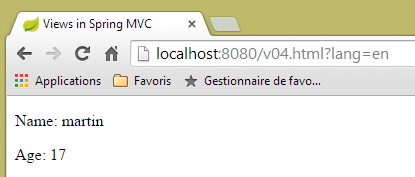 |
请注意,在 URL 中,操作 [/v04] 再次被替换为 [v04.html]。
5.5. [/v05]:将对象分解为 Thymeleaf 视图
我们创建以下 [/v05] 操作:
    // creation of the M model of a V - 2 view
    @RequestMapping(value = "/v05", method = RequestMethod.GET)
    public String v05(Model model) {
        model.addAttribute("personne", new Personne(7, "martin", 17));
        return "vue-05";
}
它与 [/v04] 操作完全相同。[vue-05.xml] 视图如下:
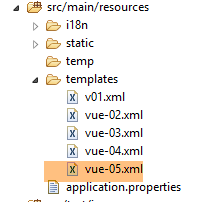 |
<!DOCTYPE html>
<html xmlns:th="http://www.thymeleaf.org">
    <head>
        <title th:text="#{title}">Spring 4 MVC</title>
        <meta http-equiv="Content-Type" content="text/html; charset=UTF-8" />
    </head>
    <body>
        <div th:object="${personne}">
            <p>
                <span th:text="#{personne.nom}">Nom :</span>
                <span th:text="*{nom}">Bill</span>
            </p>
            <p>
                <span th:text="#{personne.age}">Age :</span>
                <span th:text="*{age}">56</span>
            </p>
        </div>
    </body>
</html>
- 第 8–17 行:在这几行中,通过属性 [th:object="${person}"](第 8 行)定义了一个 Thymeleaf 对象。该对象是模型中键为 [person] 的对象:
- 第 11 行:Thymeleaf 表达式 [*{name}] 等同于 [${object.name}],其中 [object] 是当前的 Thymeleaf 对象。因此,此处的表达式 [*{name}] 等同于 [${person.name}];
- 第 15 行:同上;
结果:
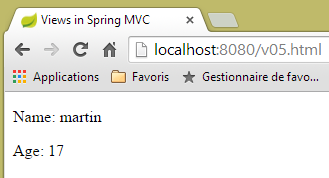 |
5.6. [/v06]: Thymeleaf 视图中的测试
请看以下 [/v06] 操作:
    // creation of the M model of a V - 3 view
    @RequestMapping(value = "/v06", method = RequestMethod.GET)
    public String v06(Model model) {
        model.addAttribute("personne", new Personne(7, "martin", 17));
        return "vue-06";
}
它与前两个操作完全相同。它显示以下视图 [vue-06.xml]:
<!DOCTYPE html>
<html xmlns:th="http://www.thymeleaf.org">
<head>
<title th:text="#{title}">Spring 4 MVC</title>
<meta http-equiv="Content-Type" content="text/html; charset=UTF-8" />
</head>
<body>
<div th:object="${personne}">
<p>
<span th:text="#{personne.nom}">Nom :</span>
<span th:text="*{nom}">Bill</span>
</p>
<p>
<span th:text="#{personne.age}">Age :</span>
<span th:text="*{age}">56</span>
</p>
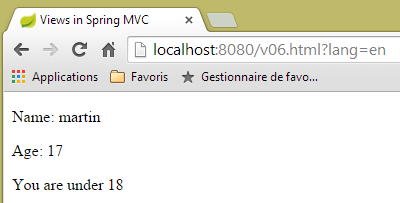
<p th:if="*{age} >= 18" th:text="#{personne.majeure}">Vous êtes majeur</p>
<p th:if="*{age} < 18" th:text="#{personne.mineure}">Vous êtes mineur</p>
</div>
</body>
</html>
- 第 17 行:[th:if] 属性用于评估一个布尔表达式。如果该表达式为真,则显示该标签;否则不显示。因此,在此处,如果 ${person.age} >= 18,则会显示文本 [#{person.majeure}],即消息文件中的消息键 [person.majeure];
- 第 18 行:您不能写 [*{age} < 18],因为 < 符号是保留字符。因此,您必须使用其 HTML 等效形式 [<],也称为 HTML 实体 [http://en.wikipedia.org/wiki/List_of_XML_and_HTML_character_entity_references];
消息文件已修改:
[messages_fr.properties]
title=Les vues dans Spring MVC
personne.nom=Nom :
personne.age=Age :
personne.mineure=Vous êtes mineur
personne.majeure=Vous êtes majeur
[messages_en.properties]
title=Views in Spring MVC
personne.nom=Name:
personne.age=Age:
personne.mineure=You are under 18
personne.majeure=You are over 18
结果如下:
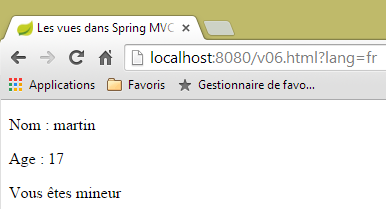 |  |
5.7. [/v07]: Thymeleaf 视图中的迭代
请看以下操作 [/v07]:
    // creation of the M model of a V - 4 view
    @RequestMapping(value = "/v07", method = RequestMethod.GET)
    public String v07(Model model) {
        model.addAttribute("liste", new Personne[] { new Personne(7, "martin", 17), new Personne(8, "lucie", 32),
                new Personne(9, "paul", 7) });
        return "vue-07";
}
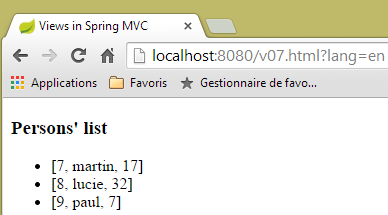
- 该操作创建了一个包含三人的列表,将其添加到与键 [list] 关联的模型中,并显示视图 [view-07];
视图 [view-07.xml] 如下所示:
<!DOCTYPE html>
<html xmlns:th="http://www.thymeleaf.org">
    <head>
        <title th:text="#{title}">Spring 4 MVC</title>
        <meta http-equiv="Content-Type" content="text/html; charset=UTF-8" />
    </head>
    <body>
        <h3 th:text="#{liste.personnes}">Liste de personnes</h3>
        <ul>
            <li th:each="element : ${liste}" th:text="'['+ ${element.id} + ', ' +${element.nom}+ ', ' + ${element.age} + ']'">[id,nom,age]</li>
        </ul>
    </body>
</html>
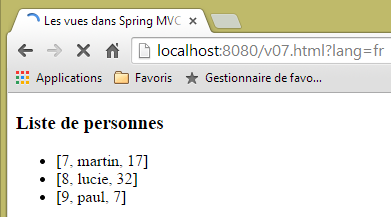
- 第 10 行:[th:each] 属性会重复其所在的标签,本例中即 <li> 标签。此处它有两个参数:[element : collection],其中 [collection] 是一个对象集合,本例中为人员列表。Thymeleaf 将遍历该集合,并生成与集合中元素数量相等的 <li> 标签。 对于每个 <li> 标签,[element] 将代表与该标签关联的集合元素。对于该元素,将评估 [th:text] 属性。此处的表达式是一个字符串拼接操作,生成结果 [id, name, age];
- 第 8 行:我们将键 [liste.personnes] 添加到消息文件中;
结果如下:
 |  |
5.8. [/v08-/v10]: @ModelAttribute
我们将重新探讨在学习动作时曾接触过的内容:[@ModelAttribute] 注解的作用。我们将添加以下新动作:
    // --------------- Binding and ModelAttribute ----------------------------------

    // if the parameter is an object, it is instantiated and possibly modified by the query parameters
    // it will automatically become part of the view model with the key [key]
    // for @ModelAttribute("xx") parameter, key will equal xx
    // for @ModelAttribute parameter, key will be equal to the parameter's lowercase class name
    // if @ModelAttribute is absent, then everything happens as if it were present without a key
    // note that this automatic presence in the model is not performed if the parameter is not a

    @RequestMapping(value = "/v08", method = RequestMethod.GET)
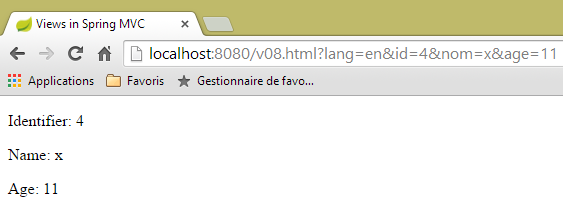
    public String v08(@ModelAttribute("someone") Personne p, Model model) {
        System.out.println(String.format("Modèle=%s", model));
        return "vue-08";
}
- 第 11 行:注解 [@ModelAttribute("someone")] 会自动将对象 [Person p] 添加到模型中,并关联键 [someone];
- 第 12 行:用于检查模型;
- 第 13 行:显示视图 [vue-08.xml];
视图 [view-08.xml] 如下所示:
<!DOCTYPE html>
<html xmlns:th="http://www.thymeleaf.org">
    <head>
        <title th:text="#{title}">Spring 4 MVC</title>
        <meta http-equiv="Content-Type" content="text/html; charset=UTF-8" />
    </head>
    <body>
        <div th:object="${someone}">
            <p>
                <span th:text="#{personne.id}">Id :</span>
                <span th:text="*{id}">14</span>
            </p>
            <p>
                <span th:text="#{personne.nom}">Nom :</span>
                <span th:text="*{nom}">Bill</span>
            </p>
            <p>
                <span th:text="#{personne.age}">Age :</span>
                <span th:text="*{age}">56</span>
            </p>
        </div>
    </body>
</html>
- 第 8 行:Thymeleaf 对象使用键对象 [someone] 进行初始化;
结果如下:
 |
而在控制台中,我们看到以下日志:
Modèle={someone=[id=4, nom=x, age=11], org.springframework.validation.BindingResult.someone=org.springframework.validation.BeanPropertyBindingResult: 0 errors}
现在,让我们考虑以下 [/v09] 操作:
    @RequestMapping(value = "/v09", method = RequestMethod.GET)
    public String v09(Personne p, Model model) {
        System.out.println(String.format("Modèle=%s", model));
        return "vue-09";
}
- 第 1 行:参数 [Person p] 的存在会自动将人 [p] 放入模型中。由于未指定键,因此使用的键是类名的首字母小写的名称。因此,[Person p] 等同于 [@ModelAttribute("person") Person p];
视图 [view.09.xml] 如下所示:
<!DOCTYPE html>
<html xmlns:th="http://www.thymeleaf.org">
    <head>
        <title th:text="#{title}">Spring 4 MVC</title>
        <meta http-equiv="Content-Type" content="text/html; charset=UTF-8" />
    </head>
    <body>
        <div th:object="${personne}">
            <p>
                <span th:text="#{personne.id}">Id :</span>
                <span th:text="*{id}">14</span>
            </p>
            <p>
                <span th:text="#{personne.nom}">Nom :</span>
                <span th:text="*{nom}">Bill</span>
            </p>
            <p>
                <span th:text="#{personne.age}">Age :</span>
                <span th:text="*{age}">56</span>
            </p>
        </div>
    </body>
</html>
- 第 8 行:使用的模板键是 [person];
以下是结果:
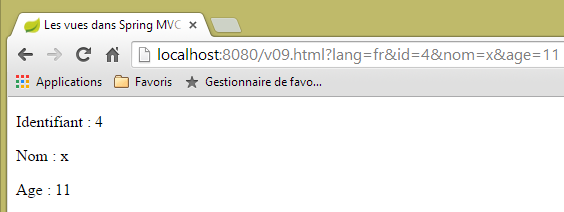 |
以及服务器控制台的日志:
Modèle={personne=[id=4, nom=x, age=11], org.springframework.validation.BindingResult.personne=org.springframework.validation.BeanPropertyBindingResult: 0 errors}
现在,让我们考虑以下新的操作 [/v10]:
    @ModelAttribute("uneAutrePersonne")
    private Personne getPersonne(){
        return new Personne(24,"pauline",55);
    }

    @RequestMapping(value = "/v10", method = RequestMethod.GET)
    public String v10(Model model) {
        System.out.println(String.format("Modèle=%s", model));
        return "vue-10";
}
- 第 1-4 行:定义一个方法,该方法针对每个请求在模型中创建一个键元素 [anotherPerson],并将其与对象 [new Person(24, "pauline", 55)] 关联;
- 第 6-10 行:动作 [/v10] 除了将接收到的模型传递给视图 [vue-10.xml] 之外,不执行任何操作。请注意,参数 [Model model] 仅在第 8 行的语句中需要。如果没有该语句,则无需该参数;
视图 [view-10.xml] 如下所示:
<!DOCTYPE html>
<html xmlns:th="http://www.thymeleaf.org">
    <head>
        <title th:text="#{title}">Spring 4 MVC</title>
        <meta http-equiv="Content-Type" content="text/html; charset=UTF-8" />
    </head>
    <body>
        <div th:object="${uneAutrePersonne}">
            <p>
                <span th:text="#{personne.id}">Id :</span>
                <span th:text="*{id}">14</span>
            </p>
            <p>
                <span th:text="#{personne.nom}">Nom :</span>
                <span th:text="*{nom}">Bill</span>
            </p>
            <p>
                <span th:text="#{personne.age}">Age :</span>
                <span th:text="*{age}">56</span>
            </p>
        </div>
    </body>
</html>
结果如下:
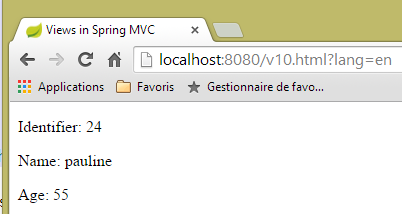 |
控制台日志如下:
5.9. [/v11]: @SessionAttributes
我们正在重新审视学习动作时曾接触过的内容:[@SessionAttributes]注解的作用。我们将添加以下新动作 [/v11]:
    @ModelAttribute("jean")
    private Personne getJean(){
        return new Personne(33,"jean",10);
    }

    @RequestMapping(value = "/v11", method = RequestMethod.GET)
    public String v11(Model model, HttpSession session) {
        System.out.println(String.format("Modèle=%s, Session[jean]=%s", model, session.getAttribute("jean")));
        return "vue-11";
}
这与我们刚才讨论的内容类似。区别在于类本身添加了 [@SessionAttributes] 注解:
@Controller
@SessionAttributes("jean")
public class ViewsController {
- 第 2 行:我们指定必须将模型中的 [jean] 键放入会话中;
因此,在操作的第 7 行,我们注入了会话。在第 8 行,我们显示了与会话键 [jean] 关联的值。
视图 [view-11.xml] 如下所示:
<!DOCTYPE html>
<html xmlns:th="http://www.thymeleaf.org">
    <head>
        <title th:text="#{title}">Spring 4 MVC</title>
        <meta http-equiv="Content-Type" content="text/html; charset=UTF-8" />
    </head>
    <body>
        <div th:object="${jean}">
            <p>
                <span th:text="#{personne.id}">Id :</span>
                <span th:text="*{id}">14</span>
            </p>
            <p>
                <span th:text="#{personne.nom}">Nom :</span>
                <span th:text="*{nom}">Bill</span>
            </p>
            <p>
                <span th:text="#{personne.age}">Age :</span>
                <span th:text="*{age}">56</span>
            </p>
        </div>
        <hr />
        <div th:object="${session.jean}">
            <p>
                <span th:text="#{personne.id}">Id :</span>
                <span th:text="*{id}">14</span>
            </p>
            <p>
                <span th:text="#{personne.nom}">Nom :</span>
                <span th:text="*{nom}">Bill</span>
            </p>
            <p>
                <span th:text="#{personne.age}">Age :</span>
                <span th:text="*{age}">56</span>
            </p>
        </div>
    </body>
</html>
显示了两个人:
- 第8–21行:模型中拥有键 [jean] 的用户;
- 第23–36行:在该会话中拥有键 [jean] 的用户;
结果如下:
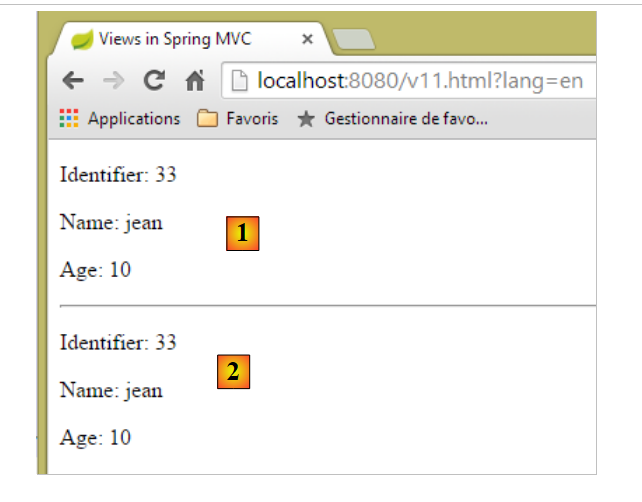 |
- 在 [1] 中,模型中拥有密钥 [jean] 的用户;
- 在 [2] 中,会话中拥有键 [jean] 的用户;
控制台日志如下:
Modèle={uneAutrePersonne=[id=24, nom=pauline, age=55], jean=[id=33, nom=jean, age=10]}, Session[jean]=null
从上文可以看出,键 [jean] 并未出现在该操作接收的会话中。我们可以推断,键 [jean] 是在操作执行后、视图渲染前添加到会话中的。
现在,让我们考虑一种情况:某个键同时被 [@ModelAttribute] 和 [@SessionAttributes] 引用。我们将创建以下两个操作:
    @RequestMapping(value = "/v12a", method = RequestMethod.GET)
    @ResponseBody
    public void v12a(HttpSession session) {
        session.setAttribute("paul", new Personne(51, "paul", 33));
    }

    // if the key of [@ModelAttribute] is also a key of [@SessionAttributes]
    // in this case, the corresponding parameter is initialized with the session value
    @RequestMapping(value = "/v12b", method = RequestMethod.GET)
    public String v12b(Model model, @ModelAttribute("paul") Personne p) {
        System.out.println(String.format("Modèle=%s", model));
        return "vue-12";
}
[/v12a] 操作仅用于将元素 ['paul', new Person(51, "paul", 33)] 存储在会话中。它不执行其他任何操作。它被标记为 [@ResponseBody] 表明它会生成发给客户端的响应。由于其类型为 [void],因此不会生成任何响应。
动作 [/v12b] 接受 [@ModelAttribute("paul") Person p] 作为参数。如果不执行其他操作,则会实例化一个 [Person] 对象,并使用请求参数对其进行初始化,而该对象与动作 [/v12a] 放置在会话中、键为 [paul] 的对象没有任何关联。 我们将把键 [paul] 添加到该类的会话属性中:
@Controller
@SessionAttributes({ "jean", "paul" })
public class ViewsController {
- 第 2 行现在有两个会话属性;
让我们回到操作参数 [/v12b]:
public String v12b(Model model, @ModelAttribute("paul") Personne p) {
现在,[Person p] 对象不会被实例化,而是会引用会话中键为 [paul] 的对象。后续流程保持不变。键为 [paul] 的对象将出现在即将显示的视图模板中。这就是我们在 [/v12b] 操作的第 11 行想要看到的内容。
视图 [vue-12.xml] 将如下所示:
<!DOCTYPE html>
<html xmlns:th="http://www.thymeleaf.org">
    <head>
        <title th:text="#{title}">Spring 4 MVC</title>
        <meta http-equiv="Content-Type" content="text/html; charset=UTF-8" />
    </head>
    <body>
        <div th:object="${paul}">
            <p>
                <span th:text="#{personne.id}">Id :</span>
                <span th:text="*{id}">14</span>
            </p>
            <p>
                <span th:text="#{personne.nom}">Nom :</span>
                <span th:text="*{nom}">Bill</span>
            </p>
            <p>
                <span th:text="#{personne.age}">Age :</span>
                <span th:text="*{age}">56</span>
            </p>
        </div>
    </body>
</html>
- 第 8 行:引用视图模型中的 [paul] 键;
这将产生以下结果(在执行 [/v12a] 操作后,该操作会将 [paul] 键放入会话中):
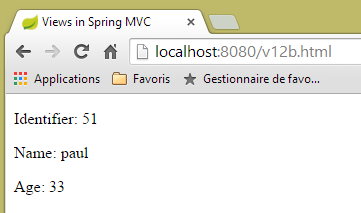 |
控制台日志如下:
Modèle={jean=[id=33, nom=jean, age=10], uneAutrePersonne=[id=24, nom=pauline, age=55], paul=[id=51, nom=paul, age=33], org.springframework.validation.BindingResult.paul=org.springframework.validation.BeanPropertyBindingResult: 0 errors}
键 [paul] 已成功添加到模型中,其值为会话中与键 [paul] 关联的值。
5.10. [/v13]: 生成输入表单
接下来我们将讨论表单输入和验证。我们将使用以下 [/v13] 操作构建第一个表单:
  // generates a form for entering a person
  @RequestMapping(value = "/v13", method = RequestMethod.GET)
  public String v13() {
    return "vue-13";
}
这仅会显示以下视图 [vue-13.xml]:
<!DOCTYPE html>
<html xmlns:th="http://www.thymeleaf.org">
    <head>
        <title th:text="#{title}">Spring 4 MVC</title>
        <meta http-equiv="Content-Type" content="text/html; charset=UTF-8" />
    </head>
    <body>
        <form action="/someURL" th:action="@{/v14.html}" method="post">
            <h2 th:text="#{personne.formulaire.titre}">Entrez les informations suivantes</h2>
            <div th:object="${personne}">
                <table>
                    <thead></thead>
                    <tbody>
                        <tr>
                            <td th:text="#{personne.id}">Id :</td>
                            <td>
                                <input type="text" name="id" value="11" th:value="''" />
                            </td>
                        </tr>
                        <tr>
                            <td th:text="#{personne.nom}">Nom :</td>
                            <td>
                                <input type="text" name="nom" value="Tintin" th:value="''" />
                            </td>
                        </tr>
                        <tr>
                            <td th:text="#{personne.age}">Age :</td>
                            <td>
                                <input type="text" name="age" value="17" th:value="''" />
                            </td>
                        </tr>
                    </tbody>
                </table>
            </div>
            <input type="submit" value="Valider" th:value="#{personne.formulaire.valider}" />
        </form>
    </body>
</html>
如果我们将此视图放在 [static] 文件夹下,命名为 [view-13.html],并请求 URL [http://localhost:8080/vue-13.html],我们将看到以下页面:
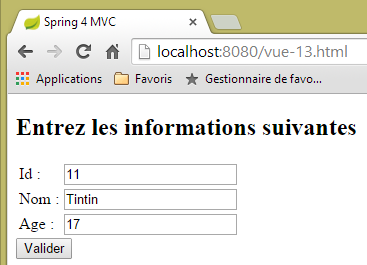 |
- 在表单的第 8 行,我们发现了一个带有 [th:action] 属性的 <form> 标签。该属性将由 Thymeleaf 进行解析,其值将替换 [action] 属性的当前值,因此 [action] 属性仅作为装饰存在。在此处,[th:action] 属性的值将是 [/v14.html];
- 在第 17、23 和 29 行,[th:value] 属性的值将替换 [value] 属性的值。在此处,该值将为空字符串;
当我们请求 URL [/v13.html] 时,会得到以下结果:
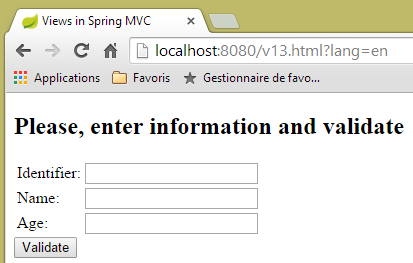 |
让我们来看看 Thymeleaf 生成的源代码:
<!DOCTYPE html>

<html>
    <head>
        <title>Views in Spring MVC</title>
        <meta http-equiv="Content-Type" content="text/html; charset=UTF-8" />
    </head>
    <body>
        <form action="/v14.html" method="post">
            <h2>Please, enter information and validate</h2>
            <div>
                <table>
                    <thead></thead>
                    <tbody>
                        <tr>
                            <td>Identifier:</td>
                            <td>
                                <input type="text" name="id" value="" />
                            </td>
                        </tr>
                        <tr>
                            <td>Name:</td>
                            <td>
                                <input type="text" name="nom" value="" />
                            </td>
                        </tr>
                        <tr>
                            <td>Age:</td>
                            <td>
                                <input type="text" name="age" value="" />
                            </td>
                        </tr>
                    </tbody>
                </table>
            </div>
            <input type="submit" value="Validate" />
        </form>
    </body>
</html>
第 9、18、24 和 30 行展示了 Thymeleaf 对 [th:action] 和 [th:value] 属性的评估。
5.11. [/v14]: 处理表单提交的值
[/v14] 操作是接收提交值的操作。其实现如下:
  // processes form values
  @RequestMapping(value = "/v14", method = RequestMethod.POST)
  public String v14(Personne p) {
    return "vue-14";
}
- 第 3 行:POST 请求的值被封装在一个对象 [Person p] 中。我们知道,该对象会自动成为由该操作显示的 V 视图的 M 模型的一部分,并关联到键 [person];
- 第 4 行:显示的视图是 [vue-14.xml] 视图;
视图 [view-14.xml] 如下所示:
<!DOCTYPE html>
<html xmlns:th="http://www.thymeleaf.org">
    <head>
        <title th:text="#{title}">Spring 4 MVC</title>
        <meta http-equiv="Content-Type" content="text/html; charset=UTF-8" />
    </head>
    <body>
    <h2 th:text="#{personne.formulaire.saisies}">Voici vos saisies</h2>
        <div th:object="${personne}">
            <p>
                <span th:text="#{personne.id}">Id :</span>
                <span th:text="*{id}">14</span>
            </p>
            <p>
                <span th:text="#{personne.nom}">Nom :</span>
                <span th:text="*{nom}">Bill</span>
            </p>
            <p>
                <span th:text="#{personne.age}">Age :</span>
                <span th:text="*{age}">56</span>
            </p>
        </div>
    </body>
</html>
- 第 9 行:从模型中检索与 [person] 键关联的对象;
- 第 12、16 和 20 行:我们显示该对象的属性;
这将产生以下结果:
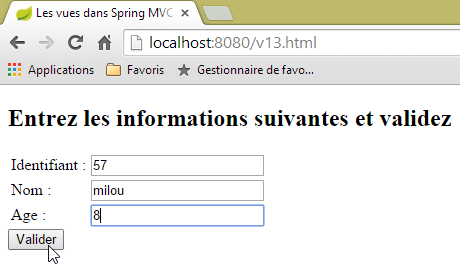 | 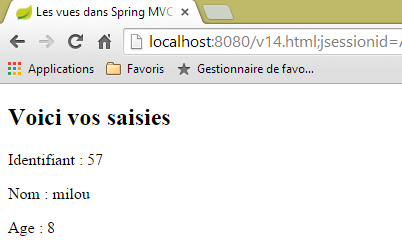 |
5.12. [/v15-/v16]: 模型验证
基于前面的示例,让我们来看一下以下序列:
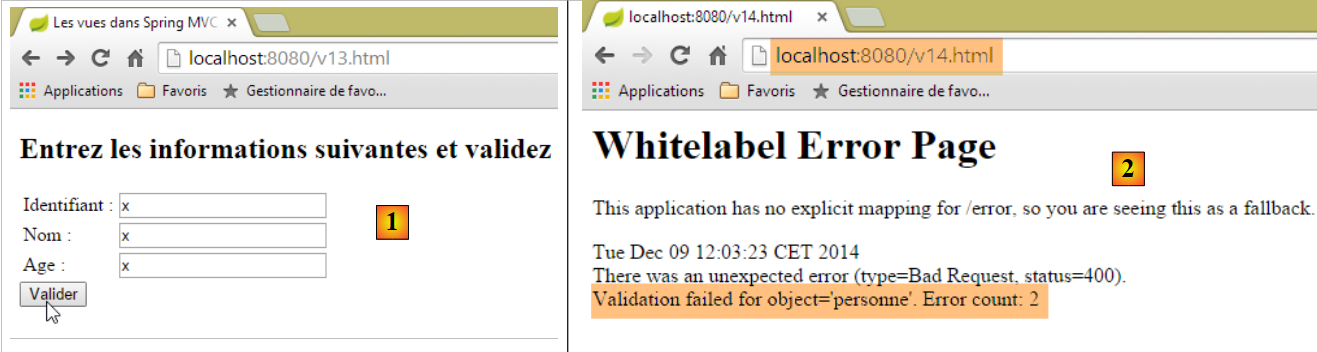 |
- 在 [1] 中,我们为类型为 [int] 的 [id] 和 [age] 字段输入了错误的值;
- 在 [2] 中,服务器的响应表明存在两个错误;
我们将使用相同的表单,但如果出现验证错误,系统会将用户重定向到一个列出这些错误的页面,以便用户进行修正。
[/v15] 操作如下:
    // ---------------------- form display
    @RequestMapping(value = "/v15", method = RequestMethod.GET)
    public String v15(SecuredPerson p) {
        return "vue-15";
}
它接收以下 [SecuredPerson] 类型的参数:
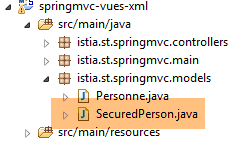 |
package istia.st.springmvc.models;

import javax.validation.constraints.NotNull;

import org.hibernate.validator.constraints.Length;
import org.hibernate.validator.constraints.Range;

public class SecuredPerson {

    @Range(min = 1)
    private int id;

    @Length(min = 4, max = 10)
    private String nom;

    @Range(min = 8, max = 14)
    private int age;

    // manufacturers
    public SecuredPerson() {

    }

    public SecuredPerson(int id, String nom, int age) {
        this.id=id;
        this.nom = nom;
        this.age = age;
    }

    // getters and setters
...
}
字段 [id, name, age] 已添加了验证约束。由操作 [/v15] 显示的视图 [view-15.xml] 如下:
<!DOCTYPE html>
<html xmlns:th="http://www.thymeleaf.org">
    <head>
        <title th:text="#{title}">Spring 4 MVC</title>
        <meta http-equiv="Content-Type" content="text/html; charset=UTF-8" />
    </head>
    <body>
        <form action="/someURL" th:action="@{/v16.html}" method="post">
            <h2 th:text="#{personne.formulaire.titre}">Entrez les informations suivantes</h2>
            <div th:object="${securedPerson}">
                <table>
                    <thead></thead>
                    <tbody>
                        <tr>
                            <td th:text="#{personne.id}">Id :</td>
                            <td>
                                <input type="text" name="id" value="11" th:value="*{id}" />
                            </td>
                            <td>
                                <span th:if="${#fields.hasErrors('id')}" th:errors="*{id}" style="color: red">Identifiant erroné</span>
                            </td>
                        </tr>
                        <tr>
                            <td th:text="#{personne.nom}">Nom :</td>
                            <td>
                                <input type="text" name="nom" value="Tintin" th:value="*{nom}" />
                            </td>
                            <td>
                                <span th:if="${#fields.hasErrors('nom')}" th:errors="*{nom}" style="color: red">Nom erroné</span>
                            </td>
                        </tr>
                        <tr>
                            <td th:text="#{personne.age}">Age :</td>
                            <td>
                                <input type="text" name="age" value="17" th:value="*{age}" />
                            </td>
                            <td>
                                <span th:if="${#fields.hasErrors('age')}" th:errors="*{age}" style="color: red">Âge erroné</span>
                            </td>
                        </tr>
                    </tbody>
                </table>
                <input type="submit" value="Valider" th:value="#{personne.formulaire.valider}" />
                <ul>
                    <li th:each="err : ${#fields.errors('*')}" th:text="${err}" style="color: red" />
                </ul>
            </div>
        </form>
    </body>
</html>
- 第 10-47 行:检索与 [securedPerson] 键关联的页面模型对象。GET 请求完成后,我们得到一个初始化值为 [id=0, name=null, age=0] 的对象;
- 第 17 行:[securedPerson.id] 字段的值;
- 第 20 行:表达式 [${#fields.hasErrors('id')}] 用于判断 [securedPerson.id] 字段是否存在验证错误。若存在,则属性 [th:errors="*{id}"] 将显示相应的错误信息;
- 此场景在第 29 行针对 [name] 字段以及第 38 行针对 [age] 字段重复出现;
- 第 45 行:表达式 [${#fields.errors('*')}] 指代 [securedPerson] 对象所有字段的错误。因此,第 44–46 行将显示的就是这组错误;
- 第 16 行:我们可以看到表单值将提交至 [/v16] 操作。具体如下:
    // -------------------- model validation------------------
    @RequestMapping(value = "/v16", method = RequestMethod.POST)
    public String v16(@Valid SecuredPerson p, BindingResult result) {
        // mistakes?
        if (result.hasErrors()) {
            return "vue-15";
        } else {
            return "vue-16";
        }
}
- 第 3 行:[@Valid SecuredPerson p] 注解用于强制验证提交的值;
- 第 5 行:检查操作模型是否无效;
- 第 6 行:如果无效,则返回表单 [vue-15.xml]。由于该表单会显示错误信息,因此我们将看到这些信息;
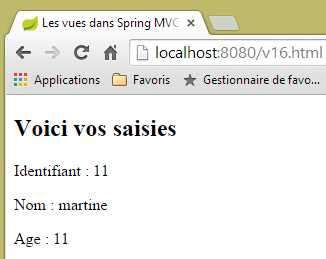
- 第 8 行:如果操作模型通过验证,则显示以下视图 [vue-16.xml]:
<!DOCTYPE html>
<html xmlns:th="http://www.thymeleaf.org">
    <head>
        <title th:text="#{title}">Spring 4 MVC</title>
        <meta http-equiv="Content-Type" content="text/html; charset=UTF-8" />
    </head>
    <body>
    <h2 th:text="#{personne.formulaire.saisies}">Voici vos saisies</h2>
        <div th:object="${securedPerson}">
            <p>
                <span th:text="#{personne.id}">Id :</span>
                <span th:text="*{id}">14</span>
            </p>
            <p>
                <span th:text="#{personne.nom}">Nom :</span>
                <span th:text="*{nom}">Bill</span>
            </p>
            <p>
                <span th:text="#{personne.age}">Age :</span>
                <span th:text="*{age}">56</span>
            </p>
        </div>
    </body>
</html>
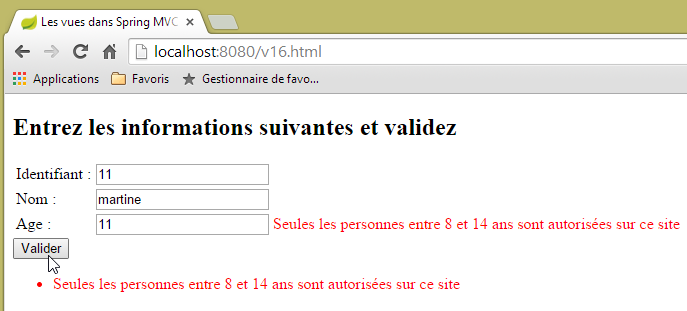
以下是一些执行示例:
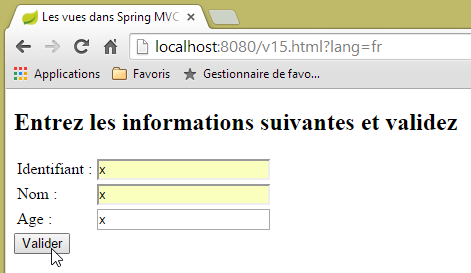 | 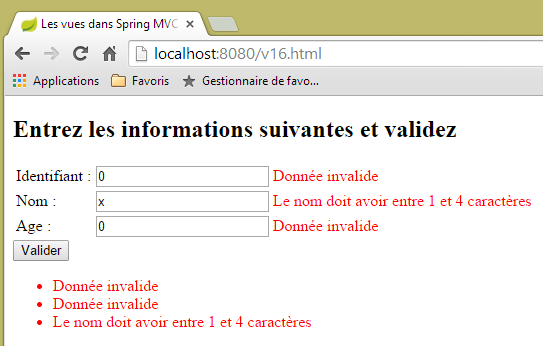 |
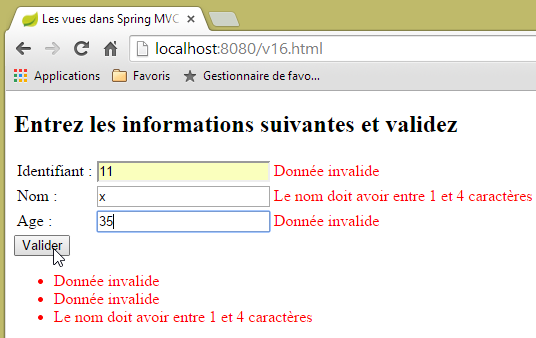 | 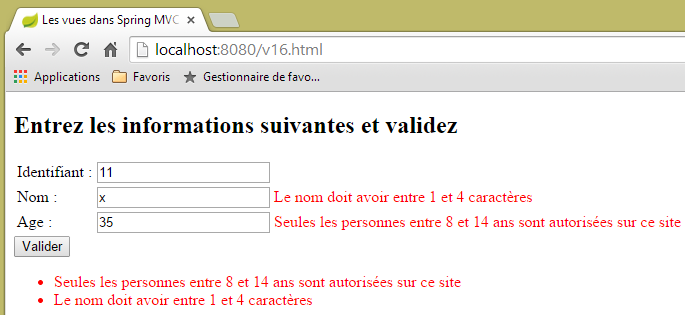 |
 |
 |
5.13. [/v17-/v18]: 检查错误消息
当首次请求 [/v15] 操作时,将得到以下结果:
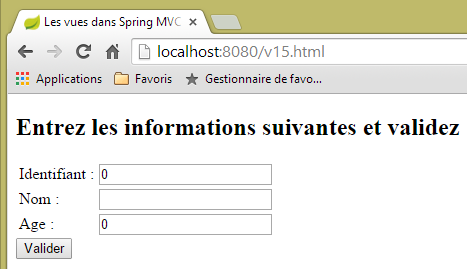 |
您可能希望 [Username, Age] 字段显示为空表单,而不是零。要实现这一点,我们按以下方式修改操作模型:
package istia.st.springmvc.models;

import javax.validation.constraints.Digits;

import org.hibernate.validator.constraints.Length;
import org.hibernate.validator.constraints.Range;

public class StringSecuredPerson {

    @Range(min = 1)
    @Digits(fraction = 0, integer = 4)
    private String id;

    @Length(min = 4, max = 10)
    private String nom;

    @Range(min = 8, max = 14)
    @Digits(fraction = 0, integer = 2)
    private String age;

    // manufacturers
    public StringSecuredPerson() {

    }

    public StringSecuredPerson(String id, String nom, String age) {
        this.id = id;
        this.nom = nom;
        this.age = age;
    }

    // getters and setters
...

}
- 第 12 行和第 19 行:将 [id] 和 [age] 字段的类型设置为 [String];
- 第 11 行:规定 [id] 字段必须是最多四位数的数字,且不包含小数;
- 第 18 行:[age] 字段同样如此,必须是最多两位数的整数;
[/v17] 操作变为如下形式:
    // ---------------------- form display
    @RequestMapping(value = "/v17", method = RequestMethod.GET)
    public String v17(StringSecuredPerson p) {
        return "vue-17";
}
由操作 [/v17] 显示的视图 [vue-17.xml] 如下:
<!DOCTYPE html>
<html xmlns:th="http://www.thymeleaf.org">
    <head>
        <title th:text="#{title}">Spring 4 MVC</title>
        <meta http-equiv="Content-Type" content="text/html; charset=UTF-8" />
    </head>
    <body>
        <form action="/someURL" th:action="@{/v18.html}" method="post">
            <h2 th:text="#{personne.formulaire.titre}">Entrez les informations suivantes</h2>
            <div th:object="${stringSecuredPerson}">
                <table>
                    <thead></thead>
                    <tbody>
                        <tr>
                            <td th:text="#{personne.id}">Id :</td>
                            <td>
                                <input type="text" name="id" value="11" th:value="*{id}" />
                            </td>
                            <td>
                                <span th:each="err,status : ${#fields.errors('id')}" th:if="${status.index}==0" th:text="${err}" style="color: red">
                                    Identifiant erroné
                                </span>
                            </td>
                        </tr>
                        <tr>
                            <td th:text="#{personne.nom}">Nom :</td>
                            <td>
                                <input type="text" name="nom" value="Tintin" th:value="*{nom}" />
                            </td>
                            <td>
                                <span th:if="${#fields.hasErrors('nom')}" th:errors="*{nom}" style="color: red">Nom erroné</span>
                            </td>
                        </tr>
                        <tr>
                            <td th:text="#{personne.age}">Age :</td>
                            <td>
                                <input type="text" name="age" value="17" th:value="*{age}" />
                            </td>
                            <td>
                                <span th:if="${#fields.hasErrors('age')}" th:errors="*{age}" style="color: red">Âge erroné</span>
                            </td>
                        </tr>
                    </tbody>
                </table>
                <input type="submit" value="Valider" th:value="#{personne.formulaire.valider}" />
                <ul>
                    <li th:each="err : ${#fields.errors('*')}" th:text="${err}" style="color: red" />
                </ul>
            </div>
        </form>
    </body>
</html>
以下几行进行了修改:
- 第 10 行:我们现在使用 [stringSecuredPerson] 键的模型对象;
- 第 20 行:我们遍历 [id] 字段的错误列表。在语法 [th:each="err,status : ${#fields.errors('id')}"] 中,变量 [err] 遍历该列表。变量 [status] 提供每次迭代的相关信息。它是一个 [index, count, size, current] 对象,其中:
- index:是当前元素的序号,
- current:是当前元素的值,
- count、size:表示正在遍历的列表的大小;
- 第 20 行:我们仅显示列表的第一个元素 [th:if="${status.index}==0"] ;
处理来自操作 [/v17] 的 POST 请求的操作 [/v18] 如下:
    // -------------------- model validation------------------
    @RequestMapping(value = "/v18", method = RequestMethod.POST)
    public String v18(@Valid StringSecuredPerson p, BindingResult result) {
        // mistakes?
        if (result.hasErrors()) {
            return "vue-17";
        } else {
            return "vue-18";
        }
}
消息文件更新如下:
[messages_fr.properties]
title=Les vues dans Spring MVC
personne.nom=Nom :
personne.age=Age :
personne.id=Identifiant :
personne.mineure=Vous êtes mineur
personne.majeure=Vous êtes majeur
liste.personnes=Liste de personnes
personne.formulaire.titre=Entrez les informations suivantes et validez
personne.formulaire.valider=Valider
personne.formulaire.saisies=Voici vos saisies
notNull=La donnée est obligatoire
Range.securedPerson.id=L''identifiant doit être un nombre entier >=1
Range.securedPerson.age=Seules les personnes entre 8 et 14 ans sont autorisées sur ce site
Length.securedPerson.nom=Le nom doit avoir entre 1 et 4 caractères
typeMismatch=Donnée invalide
Range.stringSecuredPerson.id=L''identifiant doit être un nombre entier >=1
Range.stringSecuredPerson.age=Seules les personnes entre 8 et 14 ans sont autorisées sur ce site
Length.stringSecuredPerson.nom=Le nom doit avoir entre 1 et 4 caractères
Digits.stringSecuredPerson.id=Tapez un nombre entier de 4 chiffres au plus
Digits.stringSecuredPerson.age=Tapez un nombre entier de 2 chiffres au plus
[messages_en.properties]
title=Views in Spring MVC
personne.nom=Name:
personne.age=Age:
personne.id=Identifier:
personne.mineure=You are under 18
personne.majeure=You are over 18
liste.personnes=Persons' list
personne.formulaire.titre=Please, enter information and validate
personne.formulaire.valider=Validate
personne.formulaire.saisies=Here are your inputs
NotNull=Data is required
Range.securedPerson.id=Identifier must be an integer >=1
Range.securedPerson.age=Only kids who are 8 to 14 years old are allowed on this site
Length.securedPerson.nom=Name must be 4 to 10 characters long
typeMismatch=Invalid format
Range.stringSecuredPerson.id=Identifier must be an integer >=1
Range.stringSecuredPerson.age=Only kids who are 8 to 14 years old are allowed on this site
Length.stringSecuredPerson.nom=Name must be 4 to 10 characters long
Digits.stringSecuredPerson.id=Should be an integer with at most four digits
Digits.stringSecuredPerson.age=Should be an integer with at most two digits
让我们来看几个示例:
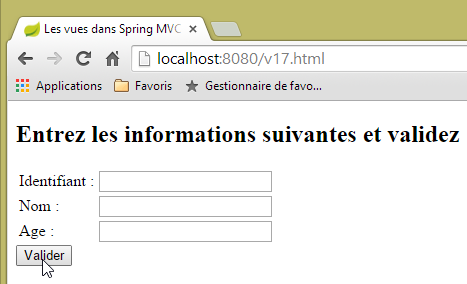 |
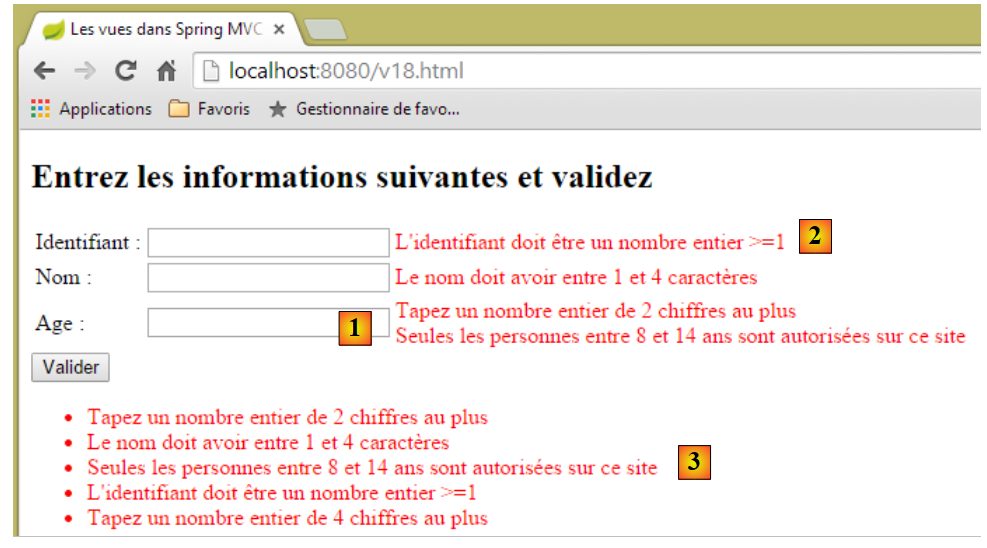 |
在[1]中,我们可以看到[age]字段的两个验证器均已执行:
    @Range(min = 8, max = 14)
    @Digits(fraction = 0, integer = 2)
    private String age;
错误消息是否有特定的显示顺序?对于 [age] 字段,验证器似乎是按 [Digits, Range] 的顺序执行的。但是,如果我们发出多个请求,会发现这个顺序可能会发生变化。 因此,我们不能依赖验证器的执行顺序。在[2]中,[id]字段的两个错误消息中仅显示了一个。而在[3]中,所有错误消息均被显示。
5.14. [/v19-/v20]:使用不同的验证器
考虑以下新的操作模型:
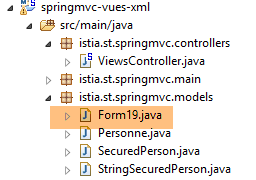 |
package istia.st.springmvc.models;

import java.util.Date;

import javax.validation.constraints.AssertFalse;
import javax.validation.constraints.AssertTrue;
import javax.validation.constraints.Future;
import javax.validation.constraints.Max;
import javax.validation.constraints.Min;
import javax.validation.constraints.NotNull;
import javax.validation.constraints.Past;
import javax.validation.constraints.Pattern;
import javax.validation.constraints.Size;

import org.hibernate.validator.constraints.Email;
import org.hibernate.validator.constraints.Length;
import org.hibernate.validator.constraints.NotBlank;
import org.hibernate.validator.constraints.NotEmpty;
import org.hibernate.validator.constraints.Range;
import org.hibernate.validator.constraints.URL;
import org.springframework.format.annotation.DateTimeFormat;

public class Form19 {

    @NotNull
    @AssertFalse
    private Boolean assertFalse;

    @NotNull
    @AssertTrue
    private Boolean assertTrue;

    @NotNull
    @Future
    @DateTimeFormat(pattern = "yyyy-MM-dd")
    private Date dateInFuture;

    @NotNull
    @Past
    @DateTimeFormat(pattern = "yyyy-MM-dd")
    private Date dateInPast;

    @NotNull
    @Max(value = 100)
    private Integer intMax100;

    @NotNull
    @Min(value = 10)
    private Integer intMin10;

    @NotNull
    @NotEmpty
    private String strNotEmpty;

    @NotNull
    @NotBlank
    private String strNotBlank;

    @NotNull
    @Size(min = 4, max = 6)
    private String strBetween4and6;

    @NotNull
    @Pattern(regexp = "^\\d{2}:\\d{2}:\\d{2}$")
    private String hhmmss;

    @NotNull
    @Email
    @NotBlank
    private String email;

    @NotNull
    @Length(max = 4, min = 4)
    private String str4;

    @Range(min = 10, max = 14)
    @NotNull
    private Integer int1014;

    @URL
    @NotBlank
    private String url;

    // getters and setters
...
}
它将通过以下 [/v19] 操作显示:
    // ------------------ form display
    @RequestMapping(value = "/v19", method = RequestMethod.GET, produces = "text/html; charset=UTF-8")
    public String v19(Form19 formulaire) {
        return "vue-19";
}
- 第 3 行:该操作接收一个 [Form19 form] 对象作为参数。如果 GET 请求未接收任何参数,则该对象将使用 Java 的默认值进行初始化;
- 第 4 行:显示视图 [vue-19.xml]。内容如下:
<!DOCTYPE HTML>
<html xmlns:th="http://www.thymeleaf.org">
    <head>
        <title>Spring 4 MVC</title>
        <meta http-equiv="Content-Type" content="text/html; charset=UTF-8" />
        <link rel="stylesheet" href="/css/form19.css" />
    </head>
    <body>
        <h3>Formulaire - Validations côté serveur</h3>
        <form action="/someURL" th:action="@{/v20.html}" method="post" th:object="${form19}">
            <table>
                <thead>
                    <tr>
                        <th class="col1">Contrainte</th>
                        <th class="col2">Saisie</th>
                        <th class="col3">Erreur</th>
                    </tr>
                </thead>
                <tbody>
                    <tr>
                        <td class="col1">@NotEmpty</td>
                        <td class="col2">
                            <input type="text" th:field="*{strNotEmpty}" />
                        </td>
                        <td class="col3">
                            <span th:if="${#fields.hasErrors('strNotEmpty')}" th:errors="*{strNotEmpty}" class="error">Donnée erronée</span>
                        </td>
                    </tr>
                    <tr>
                        <td class="col1">@NotBlank</td>
                        <td class="col2">
                            <input type="text" th:field="*{strNotBlank}" />
                        </td>
                        <td class="col3">
                            <span th:if="${#fields.hasErrors('strNotBlank')}" th:errors="*{strNotBlank}" class="error">Donnée erronée</span>
                        </td>
                    </tr>
                    <tr>
                        <td class="col1">@assertFalse</td>
                        <td class="col2">
                            <input type="radio" th:field="*{assertFalse}" value="true" />
                            <label th:for="${#ids.prev('assertFalse')}">True</label>
                            <input type="radio" th:field="*{assertFalse}" value="false" />
                            <label th:for="${#ids.prev('assertFalse')}">False</label>
                        </td>
                        <td class="col3">
                            <span th:if="${#fields.hasErrors('assertFalse')}" th:errors="*{assertFalse}" class="error">Donnée erronée</span>
                        </td>
                    </tr>
                    <tr>
                        <td class="col1">@assertTrue</td>
                        <td class="col2">
                            <select th:field="*{assertTrue}">
                                <option value="true">True</option>
                                <option value="false">False</option>
                            </select>
                        </td>
                        <td class="col3">
                            <span th:if="${#fields.hasErrors('assertTrue')}" th:errors="*{assertTrue}" class="error">Donnée erronée</span>
                        </td>
                    </tr>
                    <tr>
                        <td class="col1">@Past</td>
                        <td class="col2">
                            <input type="date" th:field="*{dateInPast}" th:value="*{dateInPast}" />
                        </td>
                        <td class="col3">
                            <span th:if="${#fields.hasErrors('dateInPast')}" th:errors="*{dateInPast}" class="error">Donnée erronée</span>
                        </td>
                    </tr>
                    <tr>
                        <td class="col1">@Future</td>
                        <td class="col2">
                            <input type="date" th:field="*{dateInFuture}" th:value="*{dateInFuture}" />
                        </td>
                        <td class="col3">
                            <span th:if="${#fields.hasErrors('dateInFuture')}" th:errors="*{dateInFuture}" class="error">Donnée erronée</span>
                        </td>
                    </tr>
                    <tr>
                        <td class="col1">@Max</td>
                        <td class="col2">
                            <input type="text" th:field="*{intMax100}" th:value="*{intMax100}" />
                        </td>
                        <td class="col3">
                            <span th:if="${#fields.hasErrors('intMax100')}" th:errors="*{intMax100}" class="error">Donnée erronée</span>
                        </td>
                    </tr>
                    <tr>
                        <td class="col1">@Min</td>
                        <td class="col2">
                            <input type="text" th:field="*{intMin10}" th:value="*{intMin10}" />
                        </td>
                        <td class="col3">
                            <span th:if="${#fields.hasErrors('intMin10')}" th:errors="*{intMin10}" class="error">Donnée erronée</span>
                        </td>
                    </tr>
                    <tr>
                        <td class="col1">@Size</td>
                        <td class="col2">
                            <input type="text" th:field="*{strBetween4and6}" th:value="*{strBetween4and6}" />
                        </td>
                        <td class="col3">
                            <span th:if="${#fields.hasErrors('strBetween4and6')}" th:errors="*{strBetween4and6}" class="error">Donnée erronée</span>
                        </td>
                    </tr>
                    <tr>
                        <td class="col1">@Pattern(hh:mm:ss)</td>
                        <td class="col2">
                            <input type="text" th:field="*{hhmmss}" th:value="*{hhmmss}" />
                        </td>
                        <td class="col3">
                            <span th:if="${#fields.hasErrors('hhmmss')}" th:errors="*{hhmmss}" class="error">Donnée erronée</span>
                        </td>
                    </tr>
                    <tr>
                        <td class="col1">@Email</td>
                        <td class="col2">
                            <input type="text" th:field="*{email}" th:value="*{email}" />
                        </td>
                        <td class="col3">
                            <span th:if="${#fields.hasErrors('email')}" th:errors="*{email}" class="error">Donnée erronée</span>
                        </td>
                    </tr>
                    <tr>
                        <td class="col1">@Length</td>
                        <td class="col2">
                            <input type="text" th:field="*{str4}" th:value="*{str4}" />
                        </td>
                        <td class="col3">
                            <span th:if="${#fields.hasErrors('str4')}" th:errors="*{str4}" class="error">Donnée erronée</span>
                        </td>
                    </tr>
                    <tr>
                        <td class="col1">@Range</td>
                        <td class="col2">
                            <input type="text" th:field="*{int1014}" th:value="*{int1014}" />
                        </td>
                        <td class="col3">
                            <span th:if="${#fields.hasErrors('int1014')}" th:errors="*{int1014}" class="error">Donnée erronée</span>
                        </td>
                    </tr>
                    <tr>
                        <td class="col1">@URL</td>
                        <td class="col2">
                            <input type="text" th:field="*{url}" th:value="*{url}" />
                        </td>
                        <td class="col3">
                            <span th:if="${#fields.hasErrors('url')}" th:errors="*{url}" class="error">Donnée erronée</span>
                        </td>
                    </tr>
                </tbody>
            </table>
            <p>
                <input type="submit" value="Valider" />
            </p>
        </form>
    </body>
</html>
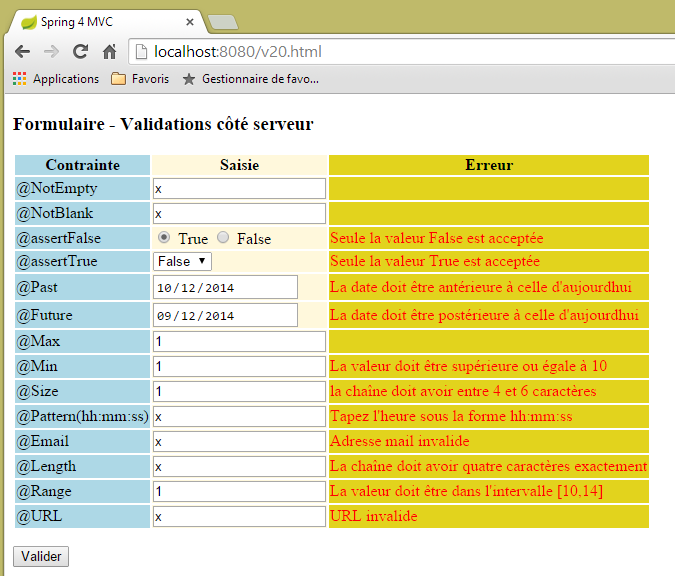
此代码显示以下视图:
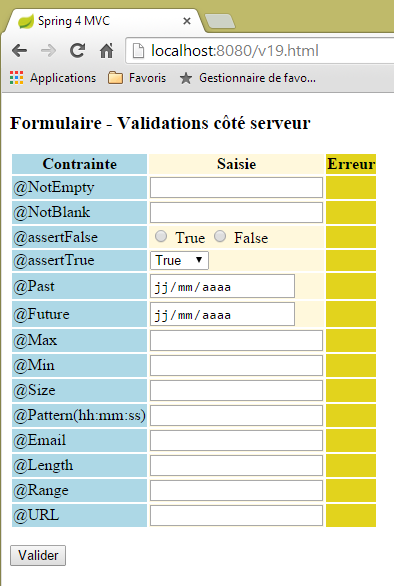 |
页面显示了一个三列表格:
- 第 1 列:输入字段验证器;
- 第 2 列:输入字段;
- 第3列:输入字段的错误提示;
让我们以 [@Pattern] 验证器的视图代码 [/v19.html] 为例进行分析:
                    <tr>
                        <td class="col1">@Pattern(hh:mm:ss)</td>
                        <td class="col2">
                            <input type="text" th:field="*{hhmmss}" th:value="*{hhmmss}" />
                        </td>
                        <td class="col3">
                            <span th:if="${#fields.hasErrors('hhmmss')}" th:errors="*{hhmmss}" class="error">Donnée erronée</span>
                        </td>
</tr>
我们看到的是刚才在 [Person] 表单中学习的代码:
- 第 2 行:第一列:正在测试的验证器的名称;
- 第 4 行:Thymeleaf 属性 [th:field="*{hhmmss}] 将生成 HTML 属性 [id="hhmmss"] 和 [name="hhmmss"]。 Thymeleaf 属性 [th:value="*{hhmmss}"] 将生成 HTML 属性 [value="[form19.hhmmss] 的值"];
- 第 7 行:如果 [form19.hhmmss] 字段输入的值不正确,则第 7 行将显示与该字段相关的错误信息;
提交的值由以下 [/v20] 操作进行处理:
    // ----------------- form template validation
    @RequestMapping(value = "/v20", method = RequestMethod.POST, produces = "text/html; charset=UTF-8")
    public String v20(@Valid Form19 formulaire, BindingResult result, RedirectAttributes redirectAttributes) {
        if (result.hasErrors()) {
            return "vue-19";
        } else {
            // redirection to [vue-19]
            redirectAttributes.addFlashAttribute("form19", formulaire);
            return "redirect:/v19.html";
        }
}
- 第 3 行:如果提交的值有效,它们将填充 [Form19 form] 对象的字段;
- 第4–6行:如果提交的值无效,则重新显示表单[view-19]并显示错误信息;
- 第6–10行:如果提交的值有效,则使用这些值构建的 [Form19] 对象将提供给下一个请求(本例中为重定向),随后该对象被销毁;
- 第 9 行:客户端被重定向至操作 [/v19.html]。这将重新显示表单 [vue-19],其中包含如下代码:
<form action="/someURL" th:action="@{/v20.html}" method="post" th:object="${form19}">
[th:object="${form19}"] 属性将检索与 Flash 属性 [form19] 关联的对象,从而按用户输入时的状态重新显示表单。
表单代码需要进一步说明。请看以下代码:
                    <tr>
                        <td class="col1">@assertFalse</td>
                        <td class="col2">
                            <input type="radio" th:field="*{assertFalse}" value="true" />
                            <label th:for="${#ids.prev('assertFalse')}">True</label>
                            <input type="radio" th:field="*{assertFalse}" value="false" />
                            <label th:for="${#ids.prev('assertFalse')}">False</label>
                        </td>
                        <td class="col3">
                            <span th:if="${#fields.hasErrors('assertFalse')}" th:errors="*{assertFalse}" class="error">Donnée erronée</span>
                        </td>
</tr>
这将生成以下 HTML 代码:
<tr>
  <td class="col1">@assertFalse</td>
  <td class="col2">
    <input type="radio" value="true" id="assertFalse1" name="assertFalse" />
    <label for="assertFalse1">True</label>
    <input type="radio" value="false" id="assertFalse2" name="assertFalse" />
    <label for="assertFalse2">False</label>
  </td>
  <td class="col3">
  </td>
</tr>
在代码中
<input type="radio" th:field="*{assertFalse}" value="true" />
<label th:for="${#ids.prev('assertFalse')}">True</label>
<input type="radio" th:field="*{assertFalse}" value="false" />
<label th:for="${#ids.prev('assertFalse')}">False</label>
第 1 行和第 3 行中的 Thymeleaf 属性 [th:field="*{assertFalse}"] 存在一个问题。 我们注意到,该属性会生成 [id=assertFalse] 和 [name=assertFalse] 这两个 HTML 属性。问题在于,由于这两行代码分别位于第 1 行和第 3 行,最终会导致出现两个完全相同的 [name] 属性和两个完全相同的 [id] 属性。虽然 [name] 属性允许这种情况,但 [id] 属性却不允许。 如生成的 HTML 代码所示,Thymeleaf 生成了两个不同的 [id] 属性:[id=assertFalse1] 和 [id=assertFalse2]。这本是好事。问题在于我们不知道这些标识符,而我们可能需要它们。第 2 行中的 [label] 标签就是这种情况。 HTML [label] 标签的 [for] 属性必须引用一个 [id] 属性,在此情况下即第 1 行 [input] 标签生成的那个。Thymeleaf 文档指出,表达式 [${#ids.prev('assertFalse')}] 可获取为 [assertFalse] 字段生成的最后一个 [id] 属性。
现在让我们看看表单下拉列表的代码:
<select th:field="*{assertTrue}">
   <option value="true">True</option>
   <option value="false">False</option>
</select>
此代码生成下拉列表的 HTML 代码:
提交的值将以名称 [name="assertTrue"] 发送。
视图 [vue-19.xml] 使用了一个样式表:
    <head>
        <title>Spring 4 MVC</title>
        <meta http-equiv="Content-Type" content="text/html; charset=UTF-8" />
        <link rel="stylesheet" href="/css/form19.css" />
</head>
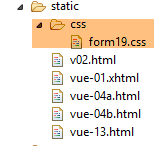
第 4 行:所使用的样式表必须放置在项目的 [static] 文件夹中:
 |
其内容如下:
@CHARSET "UTF-8";

.col1 {
    background: lightblue;
}

.col2 {
    background: Cornsilk;
}

.col3 {
    background: #e2d31d;
}

.error {
    color: red;
}
现在,让我们看看日期:
    @NotNull
    @Future
    @DateTimeFormat(pattern = "yyyy-MM-dd")
    private Date dateInFuture;

    @NotNull
    @Past
    @DateTimeFormat(pattern = "yyyy-MM-dd")
    private Date dateInPast;
在 Chrome 开发者工具(Ctrl+Shift+I)中检查网络流量可发现,日期是以 (yyyy-mm-dd) 格式发送的:
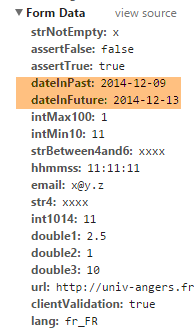 |
这就是为什么验证器会标记这些日期:
@DateTimeFormat(pattern = "yyyy-MM-dd")
该验证器用于设置提交日期值的预期格式。
最后,法语消息文件 [messages_fr.properties]:
title=Les vues dans Spring MVC
personne.nom=Nom :
personne.age=Age :
personne.id=Identifiant :
personne.mineure=Vous êtes mineur
personne.majeure=Vous êtes majeur
liste.personnes=Liste de personnes
personne.formulaire.titre=Entrez les informations suivantes et validez
personne.formulaire.valider=Valider
personne.formulaire.saisies=Voici vos saisies
NotNull=La donnée est obligatoire
Range.securedPerson.id=L''identifiant doit être un nombre entier >=1
Range.securedPerson.age=Seules les personnes entre 8 et 14 ans sont autorisées sur ce site
Length.securedPerson.nom=Le nom doit avoir entre 1 et 4 caractères
typeMismatch=Donnée invalide
Range.stringSecuredPerson.id=L''identifiant doit être un nombre entier >=1
Range.stringSecuredPerson.age=Seules les personnes entre 8 et 14 ans sont autorisées sur ce site
Length.stringSecuredPerson.nom=Le nom doit avoir entre 1 et 4 caractères
Digits.stringSecuredPerson.id=Tapez un nombre entier de 4 chiffres au plus
Digits.stringSecuredPerson.age=Tapez un nombre entier de 2 chiffres au plus
Future.form19.dateInFuture=La date doit être postérieure à celle d''aujourd'hui
Past.form19.dateInPast=La date doit être antérieure à celle d''aujourd'hui
Size.form19.strBetween4and6=la chaîne doit avoir entre 4 et 6 caractères
Min.form19.intMin10=La valeur doit être supérieure ou égale à 10
Max.form19.intMax100=La valeur doit être inférieure ou égale à 100
Length.form19.str4=La chaîne doit avoir quatre caractères exactement
Email.form19.email=Adresse mail invalide
URL.form19.url=URL invalide
Range.form19.int1014=La valeur doit être dans l''intervalle [10,14]
AssertTrue=Seule la valeur True est acceptée
AssertFalse=Seule la valeur False est acceptée
Pattern.form19.hhmmss=Tapez l''heure sous la forme hh:mm:ss
NotEmpty=La donnée ne peut être vide
NotBlank=La donnée ne peut être vide
让我们来看一些执行示例:
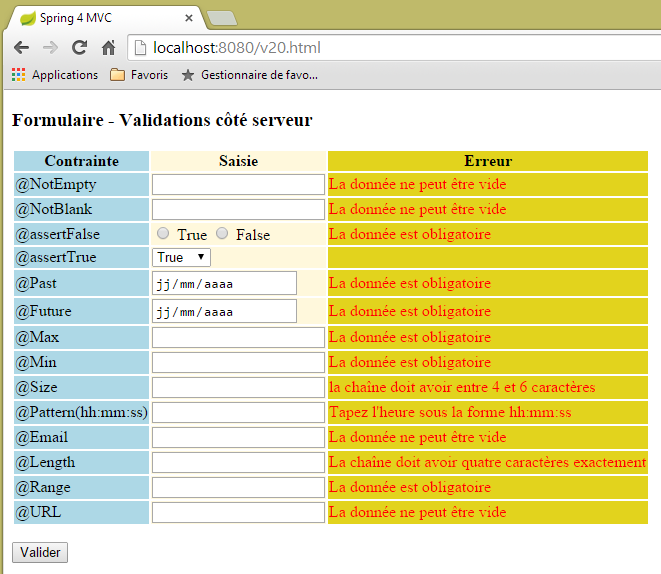 |
 |
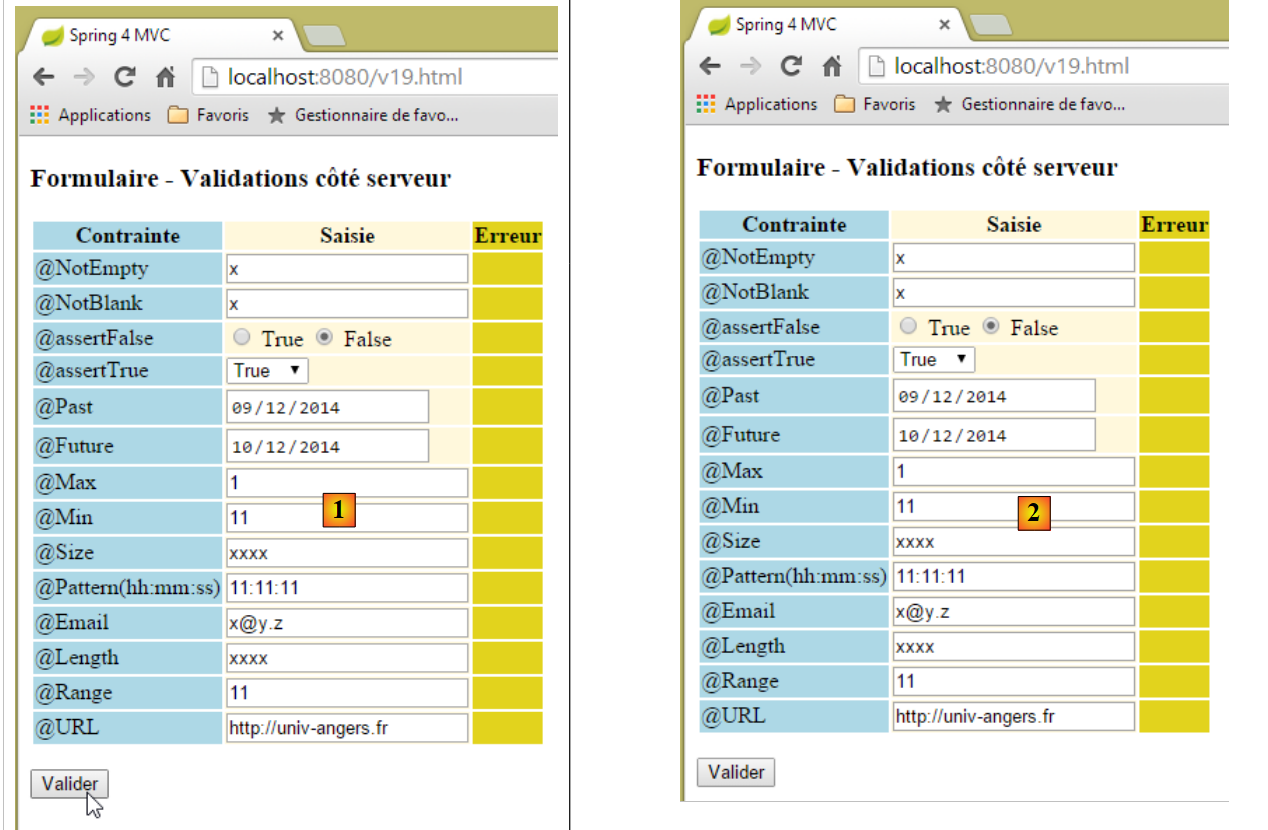 |
上图中,[1] 和 [2] 之间看似没有任何变化。然而,如果查看网络流量(Ctrl-Shift-I),我们会发现与服务器之间发生了两次网络交互:
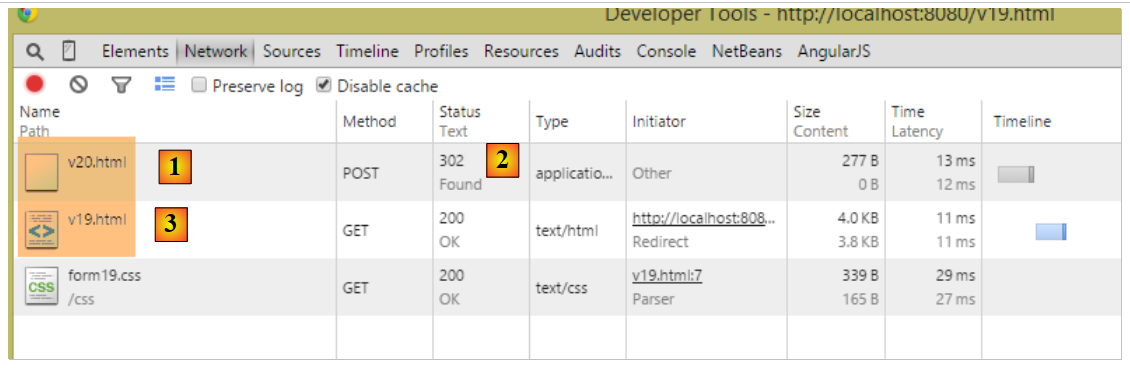 |
- 在 [1] 处,是对 [/v20] 的初始 POST 请求;
- 在 [2] 处,对此操作的响应是一个重定向;
- 在 [3] 处,第二次请求,这次是发送到 [/v19];
随后执行 [/v19] 操作:
    // ------------------ form display
    @RequestMapping(value = "/v19", method = RequestMethod.GET, produces = "text/html; charset=UTF-8")
    public String v19(Form19 formulaire) {
        return "vue-19";
}
- 第 3 行:[Form19 form] 参数通过 Flash 属性 [form19] 进行初始化,该属性由前一个操作 [/v19] 创建,是一个 [Form19] 类型的对象,其中包含提交给 [/v19] 操作的值;
- 第 4 行:视图 [view-19.xml] 将显示,其模板中包含一个 [Form19 form] 对象,该对象已使用提交的值进行初始化。这就是为什么用户看到的表单与他们提交的表单完全一致;
为何要进行重定向?为何不直接向上面的 [/v19] 操作提交数据?虽然结果相同,但会有一些区别:
- 浏览器地址栏中显示的将是 [http://localhost:8080/v20.html] 而不是此处的 [http://localhost:8080/v19.html],因为它显示的是上次调用的 URL;
- 如果用户刷新页面(F5),结果将完全不同:
- 在发生重定向的情况下,显示的 URL 是 [http://localhost:8080/v19.html],这是通过 GET 请求获得的。浏览器将重新执行此命令,并收到一个全新的表单(Flash 属性仅使用一次);
- 在无重定向的情况下,显示的 URL 是 [http://localhost:8080/v20.html],该地址通过 POST 请求获取。浏览器将重新执行此命令,因此会使用与之前相同的值再次执行 POST 请求。在此情况下,这不会产生任何后果,但这通常是不希望看到的,因此通常更倾向于使用重定向;
5.15. [/v21-/v22]: 处理单选按钮
考虑以下 Spring [Lists] 组件:
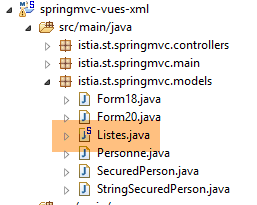 |
package istia.st.springmvc.models;

import org.springframework.stereotype.Component;

@Component
public class Listes {

    private String[] deplacements = new String[] { "0", "1", "2", "3", "4" };
    private String[] libellesDeplacements = new String[] { "vélo", "marche", "train", "avion", "autre" };
    private String[] libellesBijoux = new String[] { "émeraude", "rubis", "diamant", "opaline" };

    // getters and setters
  ...

}
- 第 5 行:[Lists] 类将是一个 Spring 组件;
- 第 8–10 行:用于填充单选按钮、复选框和下拉列表的列表;
在 [Config] 配置类中,写道:
@Configuration
@ComponentScan({ "istia.st.springmvc.controllers", "istia.st.springmvc.models" })
@EnableAutoConfiguration
public class Config extends WebMvcConfigurerAdapter {
- 第 2 行:Spring 将扫描包含 [Lists] 组件的 [models] 包;
我们创建以下新操作:
    // ------------------ form with radio buttons
    @Autowired
    private Listes listes;

    @RequestMapping(value = "/v21", method = RequestMethod.GET, produces = "text/html; charset=UTF-8")
    public String v21(@ModelAttribute("form") Form21 formulaire, Model model) {
        model.addAttribute("listes", listes);
        return "vue-21";
    }

    @RequestMapping(value = "/v22", method = RequestMethod.POST, produces = "text/html; charset=UTF-8")
    public String v22(@ModelAttribute("form") Form21 formulaire, RedirectAttributes redirectAttributes) {
        redirectAttributes.addFlashAttribute("form", formulaire);
        return "redirect:/v21.html";
}
- 第 2-3 行:将 [Lists] 组件注入到控制器中;
- 第 6 行:我们处理一个 [Form21] 表单,稍后将对此进行说明。请注意,我们在视图模型中为其指定了键 [form]。回顾一下,默认情况下,该键本应是 [form21];
- 第 7 行:我们将 [Lists] 组件注入到模型中。视图将需要它;
- 第 8 行:我们渲染视图 [vue-21.xml]。该视图将显示 [Form21] 表单,提交的值将在第 12–15 行发送至 [/v22] 操作;
- 第 12–15 行:[/v22] 操作仅将请求重定向至 [/v21] 操作,并将接收到的提交值放入一个键名为 [form] 的 Flash 属性中。此键必须与第 6 行中使用的键相匹配;
[Form21] 模型如下:
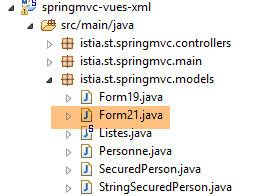 |
package istia.st.springmvc.models;

public class Form21 {

    // posted values
    private String marie = "non";
    private String deplacement = "4";
    private String[] couleurs;
    private String strCouleurs;
    private String[] bijoux;
    private String strBijoux;
    private int couleur2;
    private int[] bijoux2;
    private String strBijoux2;

    // getters and setters
    ...
}
视图 [view-21.xml] 如下所示:
<!DOCTYPE HTML>
<html xmlns:th="http://www.thymeleaf.org">
    <head>
        <title>Spring 4 MVC</title>
        <meta http-equiv="Content-Type" content="text/html; charset=UTF-8" />
        <link rel="stylesheet" href="/css/form19.css" />
    </head>
    <body>

        <h3>Formulaire - Boutons radio</h3>
        <form action="/someURL" th:action="@{/v22.html}" method="post" th:object="${form}">
            <table>
                <thead>
                    <tr>
                        <th class="col1">Texte</th>
                        <th class="col2">Saisie</th>
                        <th class="col3">Valeur</th>
                    </tr>
                </thead>
                <tbody>
                    <tr>
                        <td class="col1">Etes-vous marié(e)</td>
                        <td class="col2">
                            <input type="radio" th:field="*{marie}" value="oui" />
                            <label th:for="${#ids.prev('marie')}">Oui</label>
                            <input type="radio" th:field="*{marie}" value="non" />
                            <label th:for="${#ids.prev('marie')}">Non</label>
                        </td>
                        <td class="col3">
                            <span th:text="*{marie}"></span>
                        </td>
                    </tr>
                    <tr>
                        <td class="col1">Mode de déplacement</td>
                        <td class="col2">
                            <span th:each="mode, status : ${listes.deplacements}">
                                <input type="radio" th:field="*{deplacement}" th:value="${mode}" />
                                <label th:for="${#ids.prev('deplacement')}" th:text="${listes.libellesDeplacements[status.index]}">Autre</label>
                            </span>
                        </td>
                        <td class="col3">
                            <span th:text="*{deplacement}"></span>
                        </td>
                    </tr>
                </tbody>
            </table>
            <p>
                <input type="submit" value="Valider" />
            </p>
        </form>
    </body>
</html>
- 第 36–40 行:请注意模板中使用了 [Lists] 组件来生成复选框的标签;
- 第 3 列显示通过 POST 提交的值,或在初始 GET 请求中表单的初始值;
此代码将显示以下页面:
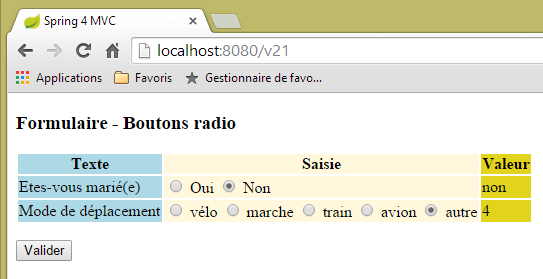 |
对应以下 HTML 代码:
<!DOCTYPE HTML>

<html>
    <head>
        <title>Spring 4 MVC</title>
        <meta http-equiv="Content-Type" content="text/html; charset=UTF-8" />
        <link rel="stylesheet" href="/css/form19.css" />
    </head>
    <body>

        <h3>Formulaire - Boutons radio</h3>
        <form action="/v22.html" method="post">
            <table>
                <thead>
                    <tr>
                        <th class="col1">Texte</th>
                        <th class="col2">Saisie</th>
                        <th class="col3">Valeur</th>
                    </tr>
                </thead>
                <tbody>
                    <tr>
                        <td class="col1">Etes-vous marié(e)</td>
                        <td class="col2">
                            <input type="radio" value="oui" id="marie1" name="marie" />
                            <label for="marie1">Oui</label>
                            <input type="radio" value="non" id="marie2" name="marie" checked="checked" />
                            <label for="marie2">Non</label>
                        </td>
                        <td class="col3">
                            <span>non</span>
                        </td>
                    </tr>
                    <tr>
                        <td class="col1">Mode de déplacement</td>
                        <td class="col2">
                            <span>
                                <input type="radio" value="0" id="deplacement1" name="deplacement" />
                                <label for="deplacement1">vélo</label>
                            </span>
                            <span>
                                <input type="radio" value="1" id="deplacement2" name="deplacement" />
                                <label for="deplacement2">marche</label>
                            </span>
                            <span>
                                <input type="radio" value="2" id="deplacement3" name="deplacement" />
                                <label for="deplacement3">train</label>
                            </span>
                            <span>
                                <input type="radio" value="3" id="deplacement4" name="deplacement" />
                                <label for="deplacement4">avion</label>
                            </span>
                            <span>
                                <input type="radio" value="4" id="deplacement5" name="deplacement" checked="checked" />
                                <label for="deplacement5">autre</label>
                            </span>
                        </td>
                        <td class="col3">
                            <span>4</span>
                        </td>
                    </tr>
                </tbody>
            </table>
            <p>
                <input type="submit" value="Valider" />
            </p>
        </form>
    </body>
</html>
我们可以看到,提交的值(name 属性)被提交到了 [Form21] 模型中的以下字段:
    private String marie = "non";
    private String deplacement = "4";
建议读者自行进行测试。请注意,提交的是单选按钮的 [value] 属性。
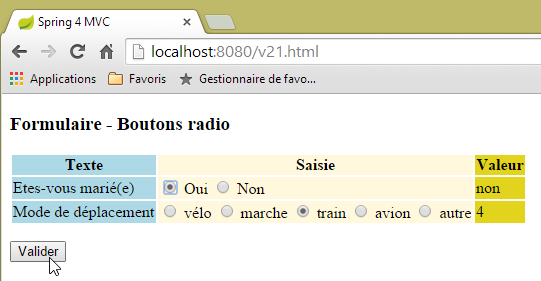 | 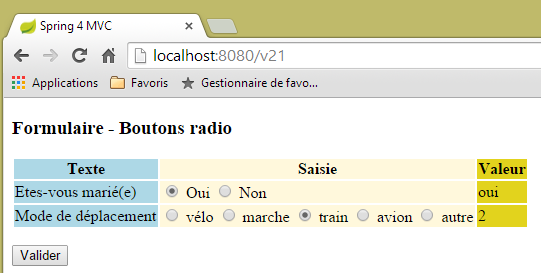 |
5.16. [/v23-/v24]: 管理复选框
我们添加了以下新操作:
    // ------------------ form with checkboxes
    @RequestMapping(value = "/v23", method = RequestMethod.GET, produces = "text/html; charset=UTF-8")
    public String av20(@ModelAttribute("form") Form21 formulaire, Model model) {
        model.addAttribute("listes", listes);
        return "vue-23";
}
- 第 3 行:我们继续使用 [Form21] 模型;
视图 [vue-23.xml] 如下所示:
<!DOCTYPE HTML>
<html xmlns:th="http://www.thymeleaf.org">
    <head>
        <title>Spring 4 MVC</title>
        <meta http-equiv="Content-Type" content="text/html; charset=UTF-8" />
        <link rel="stylesheet" href="/css/form19.css" />
    </head>
    <body>
        <h3>Formulaire - Cases à cocher</h3>
        <form action="/someURL" th:action="@{/v24.html}" method="post" th:object="${form}">
            <table>
                <thead>
                    <tr>
                        <th class="col1">Texte</th>
                        <th class="col2">Saisie</th>
                        <th class="col3">Valeur</th>
                    </tr>
                </thead>
                <tbody>
                    <tr>
                        <td class="col1">Vos couleurs préférées</td>
                        <td class="col2">
                            <input type="checkbox" th:field="*{couleurs}" value="0" />
                            <label th:for="${#ids.prev('couleurs')}">rouge</label>
                            <input type="checkbox" th:field="*{couleurs}" value="1" />
                            <label th:for="${#ids.prev('couleurs')}">vert</label>
                            <input type="checkbox" th:field="*{couleurs}" value="2" />
                            <label th:for="${#ids.prev('couleurs')}">bleu</label>
                        </td>
                        <td class="col3">
                            <span th:text="*{strCouleurs}"></span>
                        </td>
                    </tr>
                    <tr>
                        <td class="col1">Pierres préférées</td>
                        <td class="col2">
                            <span th:each="label, status : ${listes.libellesBijoux}">
                                <input type="checkbox" th:field="*{bijoux}" th:value="${status.index}" />
                                <label th:for="${#ids.prev('bijoux')}" th:text="${label}">Autre</label>
                            </span>
                        </td>
                        <td class="col3">
                            <span th:text="*{strBijoux}"></span>
                        </td>
                    </tr>
                </tbody>
            </table>
            <p>
                <input type="submit" value="Valider" />
            </p>
        </form>
    </body>
</html>
- 第 37–41 行:请注意使用 [Lists] 组件来生成复选框的标签;
此代码显示以下页面:
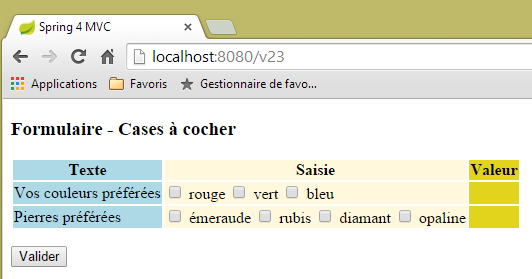 |
由以下 HTML 代码生成:
<!DOCTYPE HTML>

<html>
    <head>
        <title>Spring 4 MVC</title>
        <meta http-equiv="Content-Type" content="text/html; charset=UTF-8" />
        <link rel="stylesheet" href="/css/form19.css" />
    </head>
    <body>
        <h3>Formulaire - Cases à cocher</h3>
        <form action="/v24.html" method="post">
            <table>
                <thead>
                    <tr>
                        <th class="col1">Texte</th>
                        <th class="col2">Saisie</th>
                        <th class="col3">Valeur</th>
                    </tr>
                </thead>
                <tbody>
                    <tr>
                        <td class="col1">Vos couleurs préférées</td>
                        <td class="col2">
                            <input type="checkbox" value="0" id="couleurs1" name="couleurs" /><input type="hidden" name="_couleurs" value="on" />
                            <label for="couleurs1">rouge</label>
                            <input type="checkbox" value="1" id="couleurs2" name="couleurs" /><input type="hidden" name="_couleurs" value="on" />
                            <label for="couleurs2">vert</label>
                            <input type="checkbox" value="2" id="couleurs3" name="couleurs" /><input type="hidden" name="_couleurs" value="on" />
                            <label for="couleurs3">bleu</label>
                        </td>
                        <td class="col3">
                            <span></span>
                        </td>
                    </tr>
                    <tr>
                        <td class="col1">Pierres préférées</td>
                        <td class="col2">
                            <span>
                                <input type="checkbox" value="0" id="bijoux1" name="bijoux" /><input type="hidden" name="_bijoux" value="on" />
                                <label for="bijoux1">émeraude</label>
                            </span>
                            <span>
                                <input type="checkbox" value="1" id="bijoux2" name="bijoux" /><input type="hidden" name="_bijoux" value="on" />
                                <label for="bijoux2">rubis</label>
                            </span>
                            <span>
                                <input type="checkbox" value="2" id="bijoux3" name="bijoux" /><input type="hidden" name="_bijoux" value="on" />
                                <label for="bijoux3">diamant</label>
                            </span>
                            <span>
                                <input type="checkbox" value="3" id="bijoux4" name="bijoux" /><input type="hidden" name="_bijoux" value="on" />
                                <label for="bijoux4">opaline</label>
                            </span>
                        </td>
                        <td class="col3">
                            <span></span>
                        </td>
                    </tr>
                </tbody>
            </table>
            <p>
                <input type="submit" value="Valider" />
            </p>
        </form>
    </body>
</html>
请注意,提交的值(name 属性)将提交至 [Form21] 中的以下字段:
    private String[] couleurs;
    private String[] bijoux;
这些是数组,因为每个字段都有多个标有该字段名称的复选框。因此,可能会收到多个具有相同名称(即表单的 name 属性)的提交值。因此需要使用数组来获取它们。
让我们回到页面第 3 列的 Thymeleaf 代码:
  <td class="col3">
    <span th:text="*{strCouleurs}"></span>
  </td>
</tr>
<tr>
  <td class="col1">Pierres préférées</td>
  <td class="col2">
    <span th:each="label, status : ${listes.libellesBijoux}">
      <input type="checkbox" th:field="*{bijoux}" th:value="${status.index}" />
      <label th:for="${#ids.prev('bijoux')}" th:text="${label}">Autre</label>
    </span>
  </td>
  <td class="col3">
    <span th:text="*{strBijoux}"></span>
  </td>
</tr>
第 2 行和第 14 行中引用的字段如下:
    private String strCouleurs;
    private String strBijoux;
它们由处理 POST 请求的 [/v24] 操作进行计算:
    // mapper Jackson / jSON
    private ObjectMapper mapper = new ObjectMapper();

    @RequestMapping(value = "/v24", method = RequestMethod.POST, produces = "text/html; charset=UTF-8")
    public String av21(@ModelAttribute("form") Form21 formulaire, RedirectAttributes redirectAttributes) throws JsonProcessingException {
        redirectAttributes.addFlashAttribute("form", formulaire);
        formulaire.setStrCouleurs(mapper.writeValueAsString(formulaire.getCouleurs()));
        formulaire.setStrBijoux(mapper.writeValueAsString(formulaire.getBijoux()));
        return "redirect:/v23.html";
}
请注意,Jackson/JSON 库已包含在项目依赖项中。
- 第 2 行:我们创建了一个 [ObjectMapper] 类型,用于将对象序列化为 JSON 以及从 JSON 反序列化为对象。
- 第 7 行:我们将 colors 数组序列化为 JSON。结果被存储在 [strCouleurs] 字段中;
- 第 8 行:我们将 jewelry 数组序列化为 JSON。结果存储在 [strBijoux] 字段中;
以下是一个执行示例:
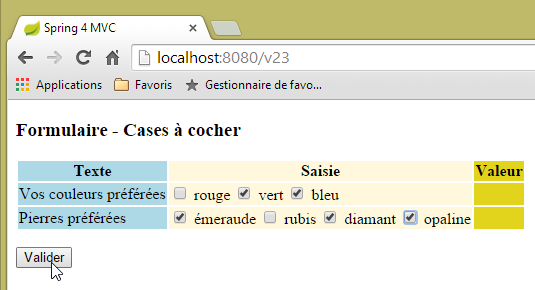 | 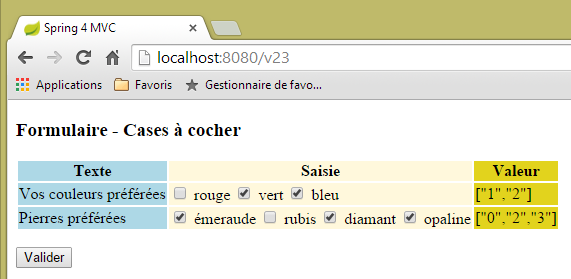 |
请注意,提交的是复选框的 [value] 属性。
5.17. [/25-/v26]: 列表管理
我们添加以下操作 [/v25]:
  // ------------------ form with lists
  @RequestMapping(value = "/v25", method = RequestMethod.GET, produces = "text/html; charset=UTF-8")
  public String v25(@ModelAttribute("form") Form21 formulaire, Model model) {
        model.addAttribute("listes", listes);
        return "vue-25";
}
视图 [vue-25.xml] 如下所示:
<!DOCTYPE HTML>
<html xmlns:th="http://www.thymeleaf.org">
    <head>
        <title>Spring 4 MVC</title>
        <meta http-equiv="Content-Type" content="text/html; charset=UTF-8" />
        <link rel="stylesheet" href="/css/form19.css" />
    </head>
    <body>

        <h3>Formulaire - Listes</h3>
        <form action="/someURL" th:action="@{/v26.html}" method="post"
            th:object="${form}">
            <table>
                <thead>
                    <tr>
                        <th class="col1">Texte</th>
                        <th class="col2">Saisie</th>
                        <th class="col3">Valeur</th>
                    </tr>
                </thead>
                <tbody>
                    <tr>
                        <td class="col1">Votre couleur préférée</td>
                        <td class="col2">
                            <select th:field="*{couleur2}">
                                <option value="0">rouge</option>
                                <option value="1">bleu</option>
                                <option value="2">vert</option>
                            </select>
                        </td>
                        <td class="col3">
                            <span th:text="*{couleur2}"></span>
                        </td>
                    </tr>
                    <tr>
                        <td class="col1">Pierres préférées (choix multiple)</td>
                        <td class="col2">
                            <select th:field="*{bijoux2}" multiple="multiple" size="3">
                                <option th:each="label, status : ${listes.libellesBijoux}"
                                    th:text="${label}" th:value="${status.index}">
                                </option>
                            </select>
                        </td>
                        <td class="col3">
                            <span th:text="*{strBijoux2}"></span>
                        </td>
                    </tr>

                </tbody>
            </table>
            <input type="submit" value="Valider" />
        </form>
    </body>
</html>
- 第38-42行:生成一个下拉列表,其中标签取自我们之前已使用的[Lists]组件;
显示的页面如下:
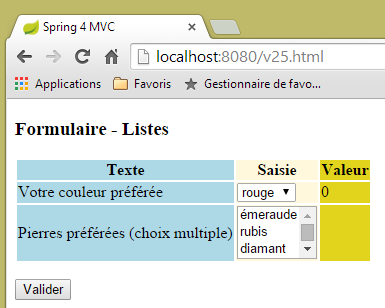 |
由以下 HTML 代码生成:
<!DOCTYPE HTML>

<html>
    <head>
        <title>Spring 4 MVC</title>
        <meta http-equiv="Content-Type" content="text/html; charset=UTF-8" />
        <link rel="stylesheet" href="/css/form19.css" />
    </head>
    <body>

        <h3>Formulaire - Listes</h3>
        <form action="/v26.html" method="post">
            <table>
                <thead>
                    <tr>
                        <th class="col1">Texte</th>
                        <th class="col2">Saisie</th>
                        <th class="col3">Valeur</th>
                    </tr>
                </thead>
                <tbody>
                    <tr>
                        <td class="col1">Votre couleur préférée</td>
                        <td class="col2">
                            <select id="couleur2" name="couleur2">
                                <option value="0" selected="selected">rouge</option>
                                <option value="1">bleu</option>
                                <option value="2">vert</option>
                            </select>
                        </td>
                        <td class="col3">
                            <span>0</span>
                        </td>
                    </tr>
                    <tr>
                        <td class="col1">Pierres préférées (choix multiple)</td>
                        <td class="col2">
                            <select multiple="multiple" size="3" id="bijoux2" name="bijoux2">
                                <option value="0">émeraude</option>
                                <option value="1">rubis</option>
                                <option value="2">diamant</option>
                                <option value="3">opaline</option>
                            </select>
                            <input type="hidden" name="_bijoux2" value="1" />
                        </td>
                        <td class="col3">
                            <span></span>
                        </td>
                    </tr>
                </tbody>
            </table>
            <p>
                <input type="submit" value="Valider" />
            </p>
        </form>
    </body>
</html>
- 第 44 行:请注意 Thymeleaf 生成了一个隐藏字段。我不明白它的用途:
- 提交的值(option 标签的 value 属性)将存储在 [Form21] 的以下字段(name 属性)中:
    private int couleur2;
    private int[] bijoux2;
- 第 38 行:列表 [jewelry2] 是一个多选列表。因此,可以向名称 [jewelry2] 关联多个值。要检索这些值,字段 [jewelry2] 必须是一个数组。请注意,这是一个整型数组。这是可行的,因为已关联的值可以转换为该类型;
这些值被发布到以下 [/v26] 操作中:
  @RequestMapping(value = "/v26", method = RequestMethod.POST, produces = "text/html; charset=UTF-8")
  public String v26(@ModelAttribute("form") Form21 formulaire, RedirectAttributes redirectAttributes) throws JsonProcessingException {
    redirectAttributes.addFlashAttribute("form", formulaire);
    formulaire.setStrBijoux2(mapper.writeValueAsString(formulaire.getBijoux2()));
    return "redirect:/v25.html";
}
这里的内容我们之前都见过。以下是一个执行示例:
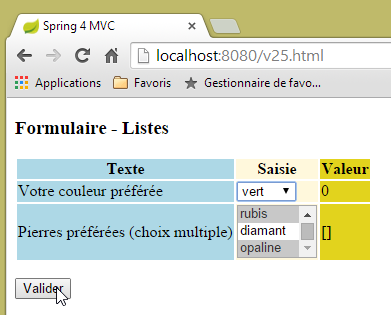 | 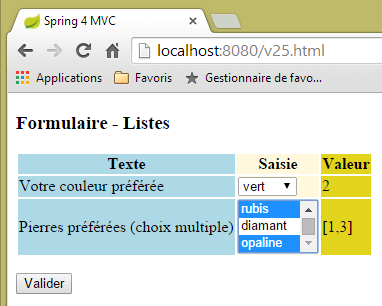 |
5.18. [/v27]: 配置消息
请考虑以下 [/v27] 操作:
  // ------------------ set messages
  @RequestMapping(value = "/v27", method = RequestMethod.GET, produces = "text/html; charset=UTF-8")
  public String v27(Model model) {
        model.addAttribute("param1","paramètre un");
        model.addAttribute("param2","paramètre deux");
        model.addAttribute("param3","paramètre trois");
        model.addAttribute("param4","messages.param4");
        return "vue-27";
}
该操作仅在模型中设置四个值,并显示以下视图 [view-27.xml]:
<!DOCTYPE html>
<html xmlns:th="http://www.thymeleaf.org">
    <head>
        <title th:text="#{messages.titre}">Spring 4 MVC</title>
        <meta http-equiv="Content-Type" content="text/html; charset=UTF-8" />
    </head>
    <body>
        <h2 th:text="#{messages.titre}">Spring 4 MVC</h2>
        <p th:text="#{messages.msg1(${param1})}"></p>
        <p th:text="#{messages.msg2(${param2},${param3})}"></p>
        <p th:text="#{messages.msg3(#{${param4}})}"></p>
    </body>
</html>
- 第 8 行:一条不带参数的消息;
- 第 9 行:包含一个从模板中提取的参数 [$param1] 的消息;
- 第 10 行:包含两个参数 [$param2, $param3] 的消息,这些参数取自模板;
- 第 11 行:一个带有一个参数的消息。该参数本身是一个消息键(由 # 表示)。该键由 [$param4] 提供;
法语消息文件如下:
[messages_fr.properties]
messages.titre=Messages paramétrés
messages.msg1=Un message avec un paramètre : {0}
messages.msg2=Un message avec deux paramètres : {0}, {1}
messages.msg3=Un message avec une clé de message comme paramètre : {0}
messages.param4=paramètre quatre
为了表示消息中包含参数,我们使用符号 {0}、{1}、...
将 [/v27] 操作生成的模板与 [vue-27] 视图合并后,将生成以下 HTML 代码:
<!DOCTYPE html>

<html>
    <head>
        <title>Messages paramétrés</title>
        <meta http-equiv="Content-Type" content="text/html; charset=UTF-8" />
    </head>
    <body>
        <h2>Messages paramétrés</h2>
        <p>Un message avec un paramètre : paramètre un</p>
        <p>Un message avec deux paramètre : paramètre deux, paramètre trois</p>
        <p>Un message avec une clé de message comme paramètre : paramètre quatre</p>
    </body>
</html>
这将生成以下视图:
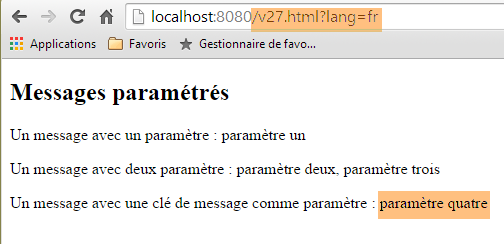 |
英文消息文件如下:
[messages_fr.properties]
messages.titre=Parameterized messages
messages.msg1=Message with one parameter: {0}
messages.msg2=Message with two parameters: {0}, {1}
messages.msg3=Message with a message key as a parameter: {0}
messages.param4=parameter four
将 [/v27] 操作生成的模板与 [vue-27] 视图合并后,将生成以下 HTML 代码:
<!DOCTYPE html>

<html>
    <head>
        <title>Parameterized messages</title>
        <meta http-equiv="Content-Type" content="text/html; charset=UTF-8" />
    </head>
    <body>
        <h2>Parameterized messages</h2>
        <p>Message with one parameter: paramètre un</p>
        <p>Message with two parameters: paramètre deux, paramètre trois</p>
        <p>Message with a message key as a parameter: parameter four</p>
    </body>
</html>
这将生成以下视图:
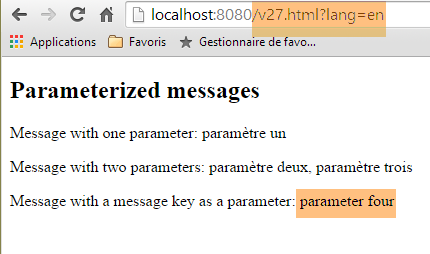 |
我们可以看到,最后一条消息已完全实现国际化,而前两条则并非如此。
5.19. 使用母版页
在 Web 应用程序中,视图通常会共享一些元素,这些元素可以提取到母版页中。以下是一个示例:
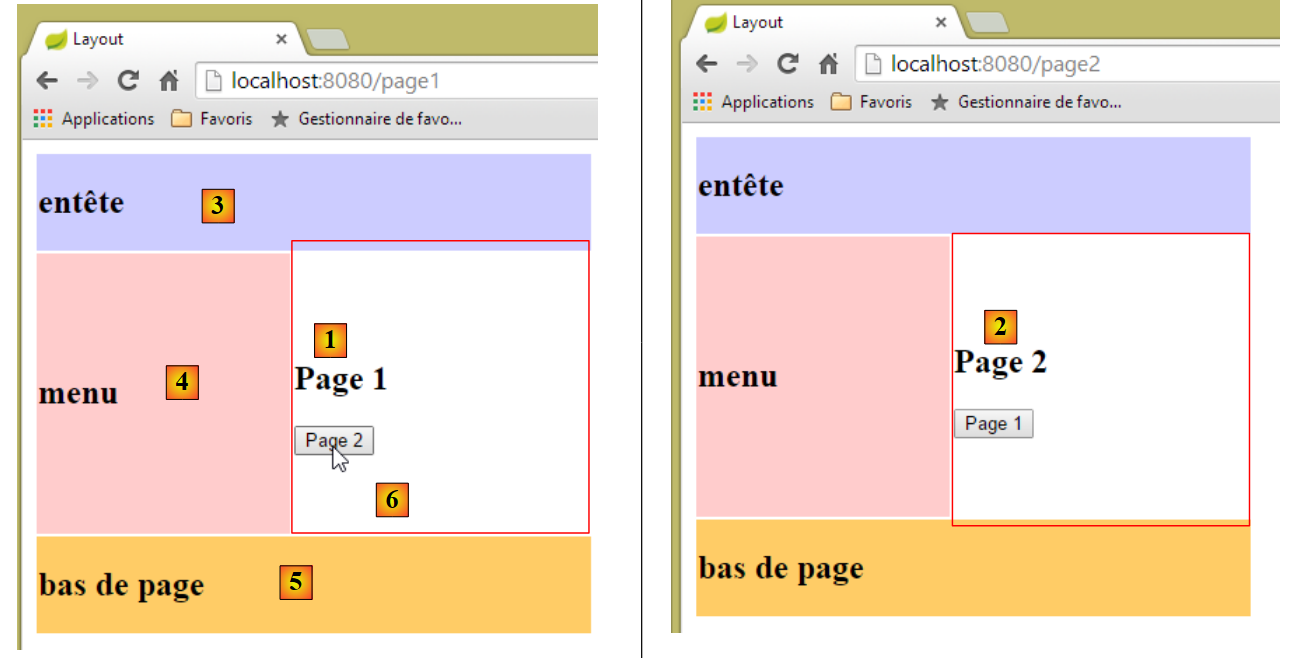 |
上图中有两个相似的页面,其中片段 [1] 已被片段 [2] 替换。该视图是一个母版页,包含三个固定片段 [3-5] 和一个可变片段 [6]。
5.19.1. 该项目
我们正在按照第5.1节所述的方法构建一个名为[springmvc-masterpage]的项目。
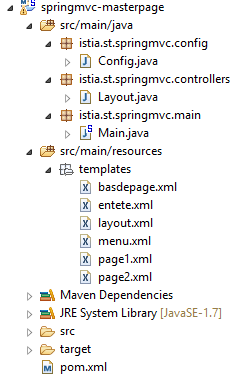 |
[pom.xml] 文件如下:
<?xml version="1.0" encoding="UTF-8"?>
<project xmlns="http://maven.apache.org/POM/4.0.0" xmlns:xsi="http://www.w3.org/2001/XMLSchema-instance"
    xsi:schemaLocation="http://maven.apache.org/POM/4.0.0 http://maven.apache.org/xsd/maven-4.0.0.xsd">
    <modelVersion>4.0.0</modelVersion>

    <groupId>istia.st.springmvc</groupId>
    <artifactId>springmvc-masterpage</artifactId>
    <version>0.0.1-SNAPSHOT</version>
    <packaging>jar</packaging>

    <name>springmvc-masterpage</name>
    <description>Page maître</description>

    <parent>
        <groupId>org.springframework.boot</groupId>
        <artifactId>spring-boot-starter-parent</artifactId>
        <version>1.1.9.RELEASE</version>
        <relativePath/> <!-- lookup parent from repository -->
    </parent>

    <dependencies>
        <dependency>
            <groupId>org.springframework.boot</groupId>
            <artifactId>spring-boot-starter-thymeleaf</artifactId>
        </dependency>
        <dependency>
            <groupId>org.springframework.boot</groupId>
            <artifactId>spring-boot-starter-test</artifactId>
            <scope>test</scope>
        </dependency>
    </dependencies>

    <properties>
        <project.build.sourceEncoding>UTF-8</project.build.sourceEncoding>
        <start-class>istia.st.springmvc.main.Main</start-class>
        <java.version>1.7</java.version>
    </properties>

    <build>
        <plugins>
            <plugin>
                <groupId>org.springframework.boot</groupId>
                <artifactId>spring-boot-maven-plugin</artifactId>
            </plugin>
        </plugins>
    </build>

</project>
此文件中包含的依赖项之一是主页面所必需的:
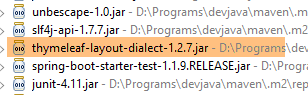 |
[config] 和 [main] 包与上一项目中同名的包完全相同。
5.19.2. 主页面
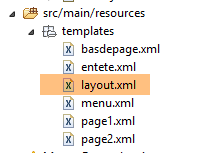 |
主页面是以下 [layout.xml] 视图:
<!DOCTYPE html>
<html xmlns:th="http://www.thymeleaf.org" xmlns:layout="http://www.ultraq.net.nz/thymeleaf/layout">
    <head>
        <title>Layout</title>
        <meta http-equiv="Content-Type" content="text/html; charset=UTF-8" />
    </head>
    <body>
        <table style="width: 400px">
            <tr>
                <td colspan="2" bgcolor="#ccccff">
                    <div th:include="entete" />
                </td>
            </tr>
            <tr style="height: 200px">
                <td bgcolor="#ffcccc">
                    <div th:include="menu" />
                </td>
                <td>
                    <section layout:fragment="contenu">
                        <h2>Contenu</h2>
                    </section>
                </td>
            </tr>
            <tr bgcolor="#ffcc66">
                <td colspan="2">
                    <div th:include="basdepage" />
                </td>
            </tr>
        </table>
    </body>
</html>
- 第 2 行:主页面必须定义命名空间 [xmlns:layout="http://www.ultraq.net.nz/thymeleaf/layout"],其元素在第 19 行被使用;
- 第 10–12 行:生成下方的 [1] 区域。Thymeleaf 标签 [th:include] 允许您将另一个文件中定义的片段包含到当前视图中。这使您能够在多个视图中复用片段;
- 第 15–17 行:生成下方的 [2] 区域;
- 第 19–20 行:生成下方的 [3] 区域。[layout:fragment] 属性属于 [xmlns:layout="http://www.ultraq.net.nz/thymeleaf/layout"] 命名空间。它表示一个可在运行时被其他片段替换的区域;
- 第 24–28 行:生成下方的 [4] 区域;
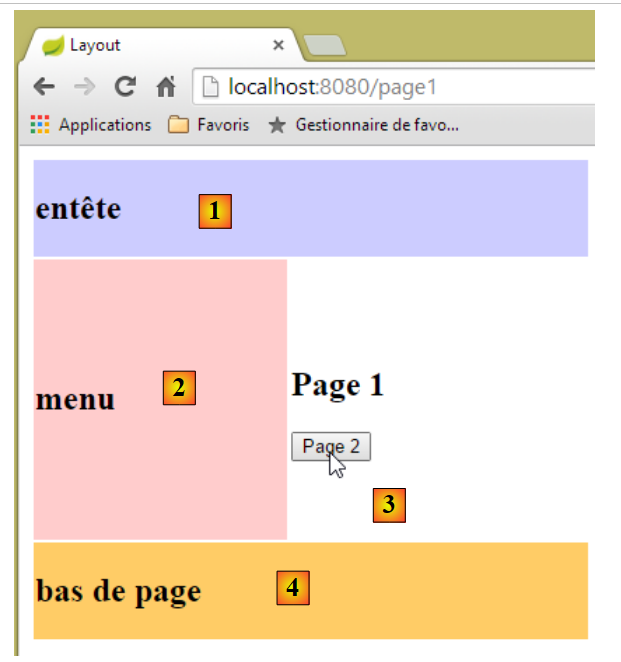 |
5.19.3. 片段
片段 [entete.xml]、[menu.xml] 和 [basdepage.xml] 如下所示:
[entete.xml]
<!DOCTYPE html>
<html>
    <h2>entête</h2>
</html>
[menu.xml]
<!DOCTYPE html>
<html>
    <h2>menu</h2>
</html>
[footer.xml]
<!DOCTYPE html>
<html>
    <h2>bas de page</h2>
</html>
片段 [page1.xml] 如下:
<!DOCTYPE html>
<html xmlns:th="http://www.thymeleaf.org" xmlns:layout="http://www.ultraq.net.nz/thymeleaf/layout" layout:decorator="layout">
    <section layout:fragment="contenu">
        <h2>Page 1</h2>
        <form action="/someURL" th:action="@{/page2.html}" method="post">
            <input type="submit" value="Page 2" />
        </form>
    </section>
</html>
- 第 2 行:[layout:decorator="layout"] 属性表明当前页面 [page1.xml] 已被“装饰”,即它属于一个母版页。此处为该属性的值,即视图 [layout.xml];
- 第 3 行:此处指定母版页 [page1.xml] 的哪个片段将被插入。属性 [layout:fragment="contenu"] 表示 [page1.xml] 将被插入到名为 [contenu] 的片段中,即母版页的区域 [3];
- 第 5–7 行:片段的内容是一个表单,其中包含一个指向操作 [/page2.html] 的 POST 按钮;
片段 [page2.xml] 的结构类似:
<!DOCTYPE html>
<html xmlns:th="http://www.thymeleaf.org" xmlns:layout="http://www.ultraq.net.nz/thymeleaf/layout"
    layout:decorator="layout">
    <section layout:fragment="contenu">
        <h2>Page 2</h2>
        <form action="/someURL" th:action="@{/page1.html}" method="post">
            <input type="submit" value="Page 1" />
        </form>
    </section>
</html>
5.19.4. 操作
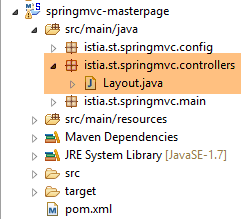 |
控制器 [Layout.java] 如下所示:
package istia.st.springmvc.controllers;

import org.springframework.stereotype.Controller;
import org.springframework.web.bind.annotation.RequestMapping;
import org.springframework.web.bind.annotation.RequestMethod;

@Controller
public class Layout {
    @RequestMapping(value = "/page1")
    public String page1() {
        return "page1";
    }

    @RequestMapping(value = "/page2", method=RequestMethod.POST)
    public String page2() {
        return "page2";
    }
}
- 第 10–12 行:[/page1] 操作仅显示 [page1.xml] 视图;
- 第 15–17 行:[/page2] 操作同样如此,它会显示 [page2.xml] 视图;