5. Spring IoC 实践指南
现在我们将通过实例,来实践之前所学的内容。
5.1. 示例 1
[Personne.vb] 类如下:
Namespace istia.st.springioc.demos
    Public Class Personne

         ' 私有字段
        Private _nom As String
        Private _age As Integer

         ' 默认构造函数
        Public Sub New()
        End Sub

         ' 与私有字段关联的属性
        Public Property nom() As String
            Get
                Return _nom
            End Get
            Set(ByVal Value As String)
                _nom = Value
            End Set
        End Property

        Public Property age() As Integer
            Get
                Return _age
            End Get
            Set(ByVal Value As Integer)
                _age = Value
            End Set
        End Property

         ' 标识符字符串
        Public Overrides Function tostring() As String
            Return String.Format("[{0},{1}]", nom, age)
        End Function

         ' init 方法
        Public Sub init()
            Console.WriteLine("init personne {0}", Me.ToString)
        End Sub

         ' close 方法
        Public Sub close()
            Console.WriteLine("destroy personne {0}", Me.ToString)
        End Sub

    End Class
End Namespace
该类包含:
- 两个私有字段 nom 和 age,可通过属性访问
- 一个方法 toString,用于以字符串形式获取对象 [Personne] 的值
- 一个 init 方法,将在 Spring 创建对象时被调用;一个 close 方法,将在对象销毁时被调用
要创建 [Personne] 类型的对象,我们将使用以下 Spring 配置文件 [spring-config-1.xml]:
<?xml version="1.0" encoding="iso-8859-1" ?>
<!DOCTYPE objects PUBLIC "-//SPRING//DTD OBJECT//EN"
"http://www.springframework.net/dtd/spring-objects.dtd">

<objects>
    <object id="personne1" type="istia.st.springioc.demos.Personne, demo1" init-method="init"
        destroy-method="close">
        <property name="nom">
            <value>Simon</value>
        </property>
        <property name="age">
            <value>40</value>
        </property>
    </object>
    <object id="personne2" type="istia.st.springioc.demos.Personne, demo1" init-method="init"
        destroy-method="close">
        <property name="nom">
            <value>Brigitte</value>
        </property>
        <property name="age">
            <value>20</value>
        </property>
    </object>
</objects>
该文件
- 定义了两个键对象,分别名为“personne1”和“personne2”,类型为[Personne]
- 它初始化了每个人的 [nom, age] 属性
- 它定义了在对象初始化时调用的方法 [init-method] 以及在对象销毁时调用的方法 [destroy-method]
在测试中,我们将使用 NUnit 测试类。第一个测试类如下:
Imports System
Imports Spring.Objects.Factory.Xml
Imports System.IO
Imports NUnit.Framework
Imports istia.st.springioc.demos

Namespace istia.st.springioc.tests

    <TestFixture()> _
    Public Class NunitTestSpringIocDemo1
         ' 待测试对象
        Private factory As XmlObjectFactory

        <SetUp()> _
        Public Sub init()
             ' 创建工厂实例
            factory = New XmlObjectFactory(New FileStream("spring-config-1.xml", FileMode.Open))
             ' 日志
            Console.WriteLine("setup test")
        End Sub

        <Test()> _
        Public Sub demo()
             ' 通过键从 Spring 文件中检索对象 [Personne]
            Dim personne1 As Personne = CType(factory.GetObject("personne1"), Personne)
            Console.WriteLine("personne1=" + personne1.ToString())
            Dim personne2 As Personne = CType(factory.GetObject("personne2"), Personne)
            Console.WriteLine("personne2=" + personne2.ToString())
            personne2 = CType(factory.GetObject("personne2"), Personne)
            Console.WriteLine("personne2=" + personne2.ToString())
        End Sub

        <TearDown()> _
        Public Sub destroy()
             ' 销毁单例
            factory.Dispose()
             ' 释放工厂资源
            factory = Nothing
             ' 跟踪
            Console.WriteLine("teardown test")
        End Sub

    End Class
End Namespace
注释:
- 为了获取在文件 [spring-config-1.xml] 中定义的对象,我们使用了一个类型为 [XmlObjectFactory] 的对象。还有其他类型的“工厂”可用于访问配置文件中的单例。 [XmlObjectFactory]对象是在测试类的[SetUp]属性方法中获取的,并存储在一个私有变量中。请注意,带有<Setup()>属性的方法会在每次测试之前执行。
- 文件 [spring-config-1.xml] 将被放置在应用程序的 [bin] 文件夹中
- Spring 支持多种格式的配置文件。[XmlObjectFactory] 对象可用于解析 XML 格式的配置文件。
- 解析一个 Spring 文件会得到一个 [XmlObjectFactory] 类型的对象,此处即为 factory 对象。利用该对象,可通过 factory.getObject(C) 获取由键 C 标识的单例。
- 方法 [demo] 用于获取并显示键为 "personne1" 和 "personne2" 的单例的值。
Visual Studio 项目的结构如下:
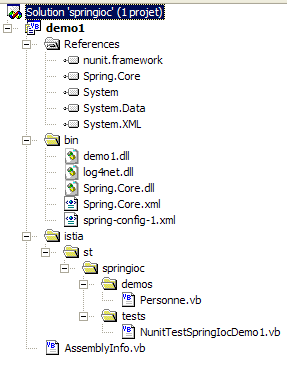
注释:
- 项目 VS 被命名为 [demo1]
- 文件夹 [istia] 包含源代码。编译后的代码将存入 DLL 中的 [bin] 文件夹 [demo1.dll]:
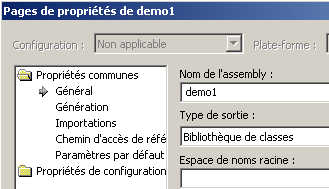
- 文件 [spring-config-1.xml] 位于该项目的 [bin] 文件夹中。
- [bin]文件夹包含应用程序所需的文件:
- Spring.Core.dll、Spring.Core.xml 用于 Spring 类
- log4net.dll 用于 Spring 日志
- demo1.dll 即由项目生成生成的 DLL
由项目生成生成的 DLL [demo1.dll] 被加载到图形化测试工具 [Nunit-Gui 2.2] 中。该工具会自动显示 DLL 中存在的 Nunit 类:
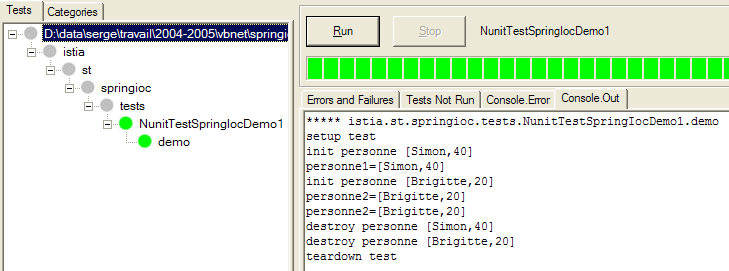
执行测试 NUnit 中的方法 [demo],将得到如上所述且如下所示的结果:
注释:
- 第 2 行:测试从执行属性方法 <Setup()> 开始
- 第 3 行:操作
操作强制创建了 Bean [personne1]。 由于在单例 [personne1] 的定义中写成了 [init-method="init"],因此执行了所创建的对象 [Personne] 的方法 [init]。并显示了相应的消息。
- 第 4 行:操作
操作已显示所创建对象 [Personne] 的值。
- 第 5-6 行:对于键 Bean [personne2],同样的情况再次发生。
- 第 7 行:最后一次操作
personne2 = CType(factory.GetObject("personne2"), Personne)
Console.WriteLine("personne2=" + personne2.ToString())
仅生成一行显示内容:
因此,它并未导致创建一个新的 [Personne] 类型的对象。如果确实如此,本应显示 [init] 方法,但此处并未发生。这就是单例模式的原理。 Spring默认情况下仅会创建配置文件中Bean的唯一实例。它是一个对象引用服务。如果请求一个尚未创建的对象的引用,它会创建该对象并返回一个引用;如果对象已存在,Spring则直接返回该对象的引用。
- 第8-10行:属性方法<TearDown()>被调用(第10行)。在其内部,执行操作
会触发 Spring 创建的单例对象的销毁。这会导致每个对象的 [close] 方法被执行,因为我们在配置文件中为每个对象都写了:"destroy-method=close"。显示内容正是如此:
既然已经掌握了Spring配置的基础知识,接下来的讲解将会更加简洁明了。
5.2. 示例 2
考虑以下新的 [Voiture] 类:
Imports istia.st.springioc.demos
Namespace istia.st.springioc.demos
Public Class Voiture
' 私有字段
Private _marque As String
Private _type As String
Private _propriétaire As Personne
' 公共属性
Public Property marque() As String
Get
Return _marque
End Get
Set(ByVal Value As String)
_marque = Value
End Set
End Property
Public Property type() As String
Get
Return _type
End Get
Set(ByVal Value As String)
_type = Value
End Set
End Property
Public Property propriétaire() As Personne
Get
Return _propriétaire
End Get
Set(ByVal Value As Personne)
_propriétaire = Value
End Set
End Property
' 默认构造函数
Public Sub New()
End Sub
' 三参数构造函数
Public Sub New(ByVal marque As String, ByVal type As String, ByVal propriétaire As Personne)
' 通过关联属性初始化私有字段
With Me
.marque = marque
.type = type
.propriétaire = propriétaire
End With
End Sub
' 汽车对象的标识符
Public Overrides Function tostring() As String
Return String.Format("[{0},{1},{2}]", marque, type, propriétaire.ToString)
End Function
' init-destroy 方法
Public Sub init()
Console.WriteLine("init voiture {0}", Me.ToString)
End Sub
Public Sub destroy()
Console.WriteLine("destroy voiture {0}", Me.ToString)
End Sub
End Class
End Namespace
该类包含:
- 三个私有字段 _type、_marque 和 _propriétaire。这些字段可以通过公共属性进行初始化和读取。它们也可以通过构造函数 Voiture(String, String, Personne) 进行初始化。 该类还提供了一个无参构造函数,可先创建一个未初始化的 [Voiture] 对象,随后通过其公共属性进行初始化。
- 一个 toString 方法,用于以字符串形式获取 [Voiture] 对象的值
- 一个 init 方法,将在对象创建后立即由 Spring 调用;一个 destroy 方法,将在对象销毁时被调用
要创建 [Voiture] 类型的对象,我们将使用以下 Spring [spring-config-2.xml] 文件:
<?xml version="1.0" encoding="iso-8859-1" ?>
<!DOCTYPE objects PUBLIC "-//SPRING//DTD OBJECT//EN"
"http://www.springframework.net/dtd/spring-objects.dtd">
<objects>
<!-- 人员 -->
<object id="personne1" type="istia.st.springioc.demos.Personne, demo1" init-method="init"
destroy-method="close">
<property name="nom">
<value>Simon</value>
</property>
<property name="age">
<value>40</value>
</property>
</object>
<object id="personne2" type="istia.st.springioc.demos.Personne, demo1" init-method="init"
destroy-method="close">
<property name="nom">
<value>Brigitte</value>
</property>
<property name="age">
<value>20</value>
</property>
</object>
<!-- 一辆汽车 -->
<object id="voiture1" type="istia.st.springioc.demos.Voiture, demo1" init-method="init"
destroy-method="destroy">
<constructor-arg index="0">
<value>Peugeot</value>
</constructor-arg>
<constructor-arg index="1">
<value>307</value>
</constructor-arg>
<constructor-arg index="2">
<ref object="personne2"/>
</constructor-arg>
</object>
</objects>
该文件在之前的定义基础上,新增了一个键对象“voiture1”,其类型为 [Voiture]。要初始化该对象,可以这样写:
<object id="voiture1" type="istia.st.springioc.demos.Voiture, demo1" init-method="init"
destroy-method="destroy">
<constructor-arg index="0">
<value>Peugeot</value>
</constructor-arg>
<constructor-arg index="1">
<value>307</value>
</constructor-arg>
<constructor-arg index="2">
<ref object="personne2"/>
</constructor-arg>
</object>
与其选择前面介绍过的这种方法,我们在这里选择使用该类的构造函数 Voiture(String, String, Personne)。 此外,单例类 [voiture1] 定义了在初始化 [init-method] 对象时应调用的方法,以及在销毁 [destroy-method] 对象时应调用的方法。
在测试中,我们将使用以下测试类 NUnit [NunitTestSpringIocDemo2]:
Imports System
Imports Spring.Objects.Factory.Xml
Imports System.IO
Imports NUnit.Framework
Imports istia.st.springioc.demos
Namespace istia.st.springioc.tests
<TestFixture()> _
Public Class NunitTestSpringIocDemo2
' 单例工厂
Private factory As XmlObjectFactory
<SetUp()> _
Public Sub init()
' 创建工厂实例
factory = New XmlObjectFactory(New FileStream("spring-config-2.xml", FileMode.Open))
' 日志
Console.WriteLine("setup test")
End Sub
<TearDown()> _
Public Sub destroy()
             ' 销毁单例
            factory.Dispose()
' 释放工厂
factory = Nothing
' 跟踪
Console.WriteLine("teardown test")
End Sub
<Test()> _
Public Sub demo2()
' 获取单例[voiture1]
Dim voiture1 As Voiture = CType(factory.GetObject("voiture1"), Voiture)
Console.WriteLine("Voiture1=[{0}]", voiture1)
End Sub
End Class
End Namespace
注释:
- 属性方法 <Setup()> 和 <TearDown()> 保持不变。
- 方法 [demo2] 获取单例 [voiture1] 的引用并显示该对象。
Visual Studio 项目的结构与之前保持一致。仅新增了两个类以及一个 Spring 配置文件:
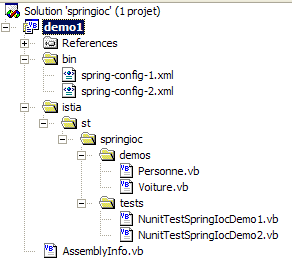
运行测试 NUnit 得到以下结果:
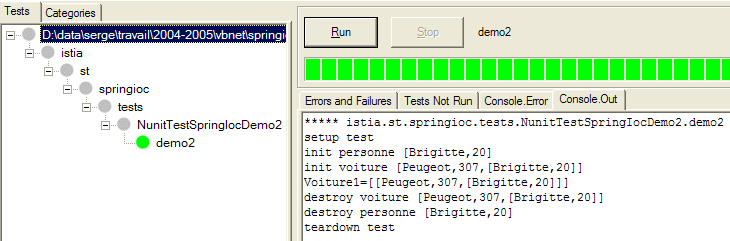
下面对屏幕显示内容进行说明:
说明:
- 第 2 行:在每次测试前执行的属性方法 [Setup],此处为 [demo]
- 第3行:Spring开始创建单例[voiture1]。该单例依赖于尚未存在的单例[personne2]。因此,后者被创建并执行其方法[init]。
- 第 4 行:现在可以创建单例 [voiture1]。随后执行其方法 [init]。
- 第 5 行:方法 [demo2] 显示单例 [voiture1] 的值
- 第 6-8 行:测试中的方法 [TearDown] 被执行。单例被销毁,因此其方法 [destroy] 被执行
5.3. 示例 3
我们引入以下新的类 [GroupePersonnes]:
Imports istia.st.springioc.demos

Namespace istia.st.springioc.demos

    Public Class GroupePersonnes
         ' 私有字段
        Private _membres() As Personne
        Private _groupesDeTravail As Hashtable

         ' 公共属性
        Public Property membres() As Personne()
            Get
                Return _membres
            End Get
            Set(ByVal Value() As Personne)
                _membres = Value
            End Set
        End Property

        Public Property groupesDeTravail() As Hashtable
            Get
                Return _groupesDeTravail
            End Get
            Set(ByVal Value As Hashtable)
                _groupesDeTravail = Value
            End Set
        End Property

         ' 默认构造函数
        Public Sub New()

        End Sub

         ' 对象标识符字符串 GroupeDePersonnes
        Public Overrides Function tostring() As String
             ' 遍历组成员列表
            Dim identité As String = "[membres=("
            Dim i As Integer
            For i = 0 To membres.Length - 2
                identité += membres(i).ToString + ","
            Next
            identité += membres(i).ToString + "), groupes de travail=("
             ' 遍历工作组字典
            Dim clés As IEnumerator = groupesDeTravail.Keys.GetEnumerator
            Dim clé As Object
            While clés.MoveNext
                clé = clés.Current
                identité += String.Format("[{0},{1}] ", clé, groupesDeTravail(clé))
            End While
             ' 返回结果
            Return identité + "]"
        End Function

         ' 初始化-销毁方法
        Public Sub init()
            Console.WriteLine("init GroupeDePersonnes {0}", Me.ToString)
        End Sub

        Public Sub destroy()
            Console.WriteLine("destroy GroupeDePersonnes {0}", Me.ToString)
        End Sub

    End Class
End Namespace
其两个私有成员为:
_membres:一个包含该组成员的数组
_groupesDeTravail:一个将人员分配到工作组的字典
这些私有成员通过公共属性对外公开。此处旨在展示 Spring 如何初始化复杂对象,例如包含数组或字典类型字段的对象。
Spring 配置文件 [spring-config-3.xml] 如下所示:
<?xml version="1.0" encoding="iso-8859-1" ?>
<!DOCTYPE objects PUBLIC "-//SPRING//DTD OBJECT//EN"
"http://www.springframework.net/dtd/spring-objects.dtd">
<objects>
     <!-- 人员 -->
    <object id="personne1" type="istia.st.springioc.demos.Personne, demo1" init-method="init"
        destroy-method="close">
        <property name="nom">
            <value>Simon</value>
        </property>
        <property name="age">
            <value>40</value>
        </property>
    </object>
    <object id="personne2" type="istia.st.springioc.demos.Personne, demo1" init-method="init"
        destroy-method="close">
        <property name="nom">
            <value>Brigitte</value>
        </property>
        <property name="age">
            <value>20</value>
        </property>
    </object>
     <!-- 一辆车 -->
    <object id="voiture1" type="istia.st.springioc.demos.Voiture, demo1" init-method="init"
        destroy-method="destroy">
        <constructor-arg index="0">
            <value>Peugeot</value>
        </constructor-arg>
        <constructor-arg index="1">
            <value>307</value>
        </constructor-arg>
        <constructor-arg index="2">
            <ref object="personne2" />
        </constructor-arg>
    </object>
     <!-- 一群人 -->
    <object id="groupe1" type="istia.st.springioc.demos.GroupePersonnes" init-method="init"
        destroy-method="destroy">
        <property name="membres">
            <list>
                <ref object="personne1" />
                <ref object="personne2" />
            </list>
        </property>
        <property name="groupesDeTravail">
            <dictionary>
                <entry key="Brigitte">
                    <value>Marketing</value>
                </entry>
                <entry key="Simon">
                    <value>Ressources humaines</value>
                </entry>
            </dictionary>
        </property>
    </object>
</objects>
- <list> 标签可用于为数组类型或 IList 类型的字段初始化不同的值。
- <dictionary> 标签可用于对实现 IDictionary 接口的字段执行相同操作
在测试中,我们将使用以下测试类:
Imports System
Imports Spring.Objects.Factory.Xml
Imports System.IO
Imports NUnit.Framework
Imports istia.st.springioc.demos

Namespace istia.st.springioc.tests

    <TestFixture()> _
    Public Class NunitTestSpringIocDemo3
         ' 待测对象
        Private factory As XmlObjectFactory

        <SetUp()> _
        Public Sub init()
             ' 创建工厂实例
            factory = New XmlObjectFactory(New FileStream("spring-config-3.xml", FileMode.Open))
             ' 日志
            Console.WriteLine("setup test")
        End Sub

        <TearDown()> _
        Public Sub destroy()
             ' 销毁单例
            factory.Dispose()
             ' 跟踪
            Console.WriteLine("teardown test")
        End Sub

        <Test()> _
    Public Sub demo3()
             ' 获取单例[groupe1]
            Dim groupe1 As GroupePersonnes = CType(factory.GetObject("groupe1"), GroupePersonnes)
            Console.WriteLine("groupe1={0}", groupe1)
        End Sub

    End Class
End Namespace
方法 [demo3] 获取单例 [groupe1] 并将其显示出来。
Visual Studio 项目的结构与之前相同,只是多出了两个类和一个配置文件。
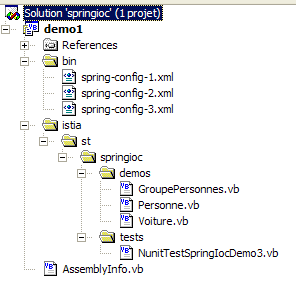
执行测试 NUnit 中的方法 [demo3] 会得到以下结果:
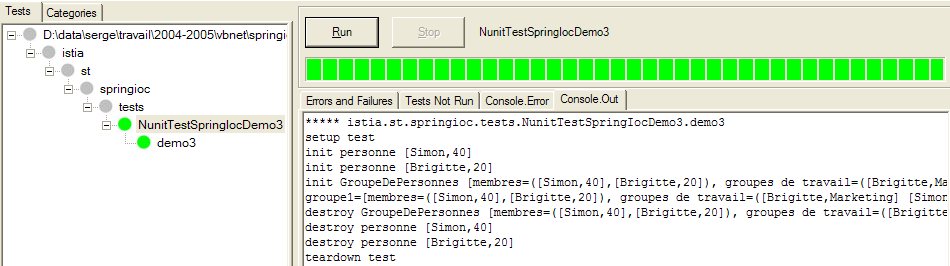
注释:
- 第 2 行:属性方法 [Setup] 在每次测试前执行,此处为 [demo]
- 第 3-4 行:Spring 开始创建单例 [groupe1]。该单例依赖于尚未存在的单例 [personne1, personne2]。随后创建了这些单例,并执行了它们的方法 [init]。
- 第 5 行:现在可以创建单例 [groupe1]。随后执行其方法 [init]。
- 第 6 行:方法 [demo3] 显示单例 [groupe1] 的值
- 第 7-10 行:测试中的 [TearDown] 方法被执行。单例被销毁,因此其 [destroy] 方法被执行