5. Spring IoC 实践
接下来我们将通过示例,将之前所学的内容付诸实践。
5.1. 示例 1
[Person.vb] 类如下所示:
Namespace istia.st.springioc.demos
    Public Class Personne

        ' private fields
        Private _nom As String
        Private _age As Integer

        ' default builder
        Public Sub New()
        End Sub

        ' properties associated with private fields
        Public Property nom() As String
            Get
                Return _nom
            End Get
            Set(ByVal Value As String)
                _nom = Value
            End Set
        End Property

        Public Property age() As Integer
            Get
                Return _age
            End Get
            Set(ByVal Value As Integer)
                _age = Value
            End Set
        End Property

        ' identity chain
        Public Overrides Function tostring() As String
            Return String.Format("[{0},{1}]", nom, age)
        End Function

        ' init method
        Public Sub init()
            Console.WriteLine("init personne {0}", Me.ToString)
        End Sub

        ' close method
        Public Sub close()
            Console.WriteLine("destroy personne {0}", Me.ToString)
        End Sub

    End Class
End Namespace
该类包含:
- 两个私有字段 name 和 age,可通过属性访问
- 一个 toString 方法,用于将 [Person] 对象的值转换为字符串
- 一个 init 方法,该方法将在 Spring 创建对象时被调用;以及一个 close 方法,该方法将在对象销毁时被调用
要创建 [Person] 类型的对象,我们将使用以下 Spring [spring-config-1.xml] 配置文件:
<?xml version="1.0" encoding="iso-8859-1" ?>
<!DOCTYPE objects PUBLIC "-//SPRING//DTD OBJECT//EN"
"http://www.springframework.net/dtd/spring-objects.dtd">

<objects>
    <object id="personne1" type="istia.st.springioc.demos.Personne, demo1" init-method="init"
        destroy-method="close">
        <property name="nom">
            <value>Simon</value>
        </property>
        <property name="age">
            <value>40</value>
        </property>
    </object>
    <object id="personne2" type="istia.st.springioc.demos.Personne, demo1" init-method="init"
        destroy-method="close">
        <property name="nom">
            <value>Brigitte</value>
        </property>
        <property name="age">
            <value>20</value>
        </property>
    </object>
</objects>
此文件
- 定义了两个对象,其键分别为“person1”和“person2”,类型为[Person]
- 它为每个人员初始化了 [name, age] 属性
- 它定义了在对象初始化时调用的方法 [init-method] 以及在对象销毁时调用的方法 [destroy-method]
在测试中,我们将使用 NUnit 测试类。第一个测试类如下所示:
Imports System
Imports Spring.Objects.Factory.Xml
Imports System.IO
Imports NUnit.Framework
Imports istia.st.springioc.demos

Namespace istia.st.springioc.tests

    <TestFixture()> _
    Public Class NunitTestSpringIocDemo1
        ' the test object
        Private factory As XmlObjectFactory

        <SetUp()> _
        Public Sub init()
            ' create a factory instance
            factory = New XmlObjectFactory(New FileStream("spring-config-1.xml", FileMode.Open))
            ' log
            Console.WriteLine("setup test")
        End Sub

        <Test()> _
        Public Sub demo()
            ' retrieve [Person] objects from the Spring file using their keys
            Dim personne1 As Personne = CType(factory.GetObject("personne1"), Personne)
            Console.WriteLine("personne1=" + personne1.ToString())
            Dim personne2 As Personne = CType(factory.GetObject("personne2"), Personne)
            Console.WriteLine("personne2=" + personne2.ToString())
            personne2 = CType(factory.GetObject("personne2"), Personne)
            Console.WriteLine("personne2=" + personne2.ToString())
        End Sub

        <TearDown()> _
        Public Sub destroy()
            ' we destroy the singletons
            factory.Dispose()
            ' release the factory resource
            factory = Nothing
            ' follow-up
            Console.WriteLine("teardown test")
        End Sub

    End Class
End Namespace
注释:
- 要获取 [spring-config-1.xml] 文件中定义的对象,我们使用 [XmlObjectFactory] 类型的对象。 还有其他类型的“工厂”可用于访问配置文件中的单例。在测试类的 [SetUp] 属性方法中获取 [XmlObjectFactory] 对象,并将其存储在私有变量中。请注意,带有 <Setup()> 属性的方法会在每次测试之前执行。
- [spring-config-1.xml] 文件将放置在应用程序的 [bin] 文件夹中
- Spring 支持多种格式的配置文件。[XmlObjectFactory] 对象用于解析 XML 格式的配置文件。
- 读取 Spring 文件会返回一个 [XmlObjectFactory] 类型的对象,本例中即
factory对象。利用该对象,可通过**factory.getObject(C)**获取键为**C**的单例。 - [demo] 方法用于获取并显示键为 "person1" 和 "person2" 的单例对象的值。
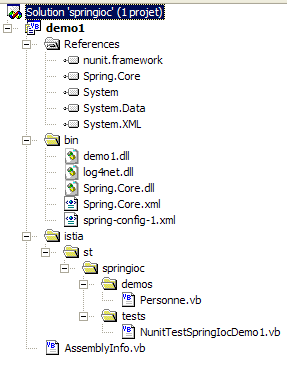
Visual Studio 项目的结构如下:
注释:
- 该 VS 项目名为 [demo1]
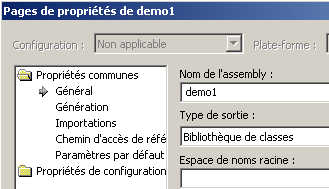
- [istia] 文件夹中包含源代码。编译后的代码将生成在 [bin] 文件夹中的 [demo1.dll] DLL 文件中:
- [spring-config-1.xml] 文件位于项目的 [bin] 文件夹中。
- [bin] 文件夹包含应用程序所需的文件:
- Spring.Core.dll、Spring.Core.xml(用于 Spring 类)
- log4net.dll(用于 Spring 日志)
- demo1.dll,即该项目生成的 DLL 文件
项目生成的 [demo1.dll] DLL 会被加载到图形化测试工具 [Nunit-Gui 2.2] 中。该工具会自动显示 DLL 中包含的 Nunit 类:
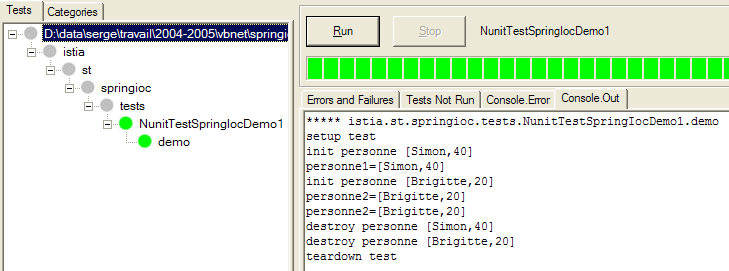
执行 NUnit 测试中的 [demo] 方法将产生如上所示及下列出的结果:
评论:
- 第2行:测试从执行<Setup()>属性方法开始
- 第 3 行:操作
强制创建了 Bean [person1]。由于在单例 [person1] 的定义中我们写了 [init-method="init"],因此生成的 [Person] 对象的 [init] 方法被执行。相应的消息被显示出来。
- 第 4 行:该操作
显示了所创建的 [Person] 对象的值。
- 第5-6行:对于键 bean [person2] 也会发生同样的情况。
- 第7行:最后一个操作
personne2 = CType(factory.GetObject("personne2"), Personne)
Console.WriteLine("personne2=" + personne2.ToString())
仅输出了一行:
因此,这并未导致创建一个新的 [Person] 类型对象。如果确实如此,[init] 方法本应被调用,但此处并未发生。 这就是单例模式的原理。默认情况下,Spring 仅在其配置文件中创建 Bean 的单个实例。它是一个对象引用服务。如果被请求提供尚未创建的对象的引用,它会创建该对象并返回其引用;如果对象已存在,Spring 则直接返回该对象的引用。
- 第 8–10 行:执行 <TearDown()> 方法(第 10 行)。在其内部,执行
会导致 Spring 创建的单例被销毁。这会触发每个单例执行其 [close] 方法,因为我们在配置文件中为每个单例都写了:"destroy-method=close"。显示的内容如下:
既然我们已经介绍了Spring配置的基础知识,接下来的讲解就可以稍微加快一点节奏了。
5.2. 示例 2
请看以下新的 [Car] 类:
Imports istia.st.springioc.demos

Namespace istia.st.springioc.demos

    Public Class Voiture
        ' private fields
        Private _marque As String
        Private _type As String
        Private _propriétaire As Personne

        ' public property
        Public Property marque() As String
            Get
                Return _marque
            End Get
            Set(ByVal Value As String)
                _marque = Value
            End Set
        End Property

        Public Property type() As String
            Get
                Return _type
            End Get
            Set(ByVal Value As String)
                _type = Value
            End Set
        End Property

        Public Property propriétaire() As Personne
            Get
                Return _propriétaire
            End Get
            Set(ByVal Value As Personne)
                _propriétaire = Value
            End Set
        End Property

        ' default builder
        Public Sub New()

        End Sub

        ' three-parameter constructor
        Public Sub New(ByVal marque As String, ByVal type As String, ByVal propriétaire As Personne)
            ' initialize private fields via their associated properties
            With Me
                .marque = marque
                .type = type
                .propriétaire = propriétaire
            End With
        End Sub

        ' car object identity string
        Public Overrides Function tostring() As String
            Return String.Format("[{0},{1},{2}]", marque, type, propriétaire.ToString)
        End Function

        ' init-destroy methods
        Public Sub init()
            Console.WriteLine("init voiture {0}", Me.ToString)
        End Sub

        Public Sub destroy()
            Console.WriteLine("destroy voiture {0}", Me.ToString)
        End Sub

    End Class
End Namespace
该类包含:
- 三个私有字段:_type、_make 和 _owner。这些字段可以通过公共属性进行初始化和读取,也可以通过 Car(String, String, Person) 构造函数进行初始化。该类还提供了一个无参构造函数,允许您先创建一个未初始化的 [Car] 对象,然后通过其公共属性进行初始化。
- 一个 toString 方法,用于将 [Car] 对象的值转换为字符串
- 一个由 Spring 在对象创建后立即调用的 init 方法,以及一个在对象销毁时调用的 destroy 方法
要创建 [Car] 类型的对象,我们将使用以下 Spring [spring-config-2.xml] 配置文件:
<?xml version="1.0" encoding="iso-8859-1" ?>
<!DOCTYPE objects PUBLIC "-//SPRING//DTD OBJECT//EN"
"http://www.springframework.net/dtd/spring-objects.dtd">
<objects>
     <!-- people -->
    <object id="personne1" type="istia.st.springioc.demos.Personne, demo1" init-method="init"
        destroy-method="close">
        <property name="nom">
            <value>Simon</value>
        </property>
        <property name="age">
            <value>40</value>
        </property>
    </object>
    <object id="personne2" type="istia.st.springioc.demos.Personne, demo1" init-method="init"
        destroy-method="close">
        <property name="nom">
            <value>Brigitte</value>
        </property>
        <property name="age">
            <value>20</value>
        </property>
    </object>
     <!-- a car -->
    <object id="voiture1" type="istia.st.springioc.demos.Voiture, demo1" init-method="init"
        destroy-method="destroy">
        <constructor-arg index="0">
            <value>Peugeot</value>
        </constructor-arg>
        <constructor-arg index="1">
            <value>307</value>
        </constructor-arg>
        <constructor-arg index="2">
            <ref object="personne2"/>
        </constructor-arg>
    </object>
</objects>
该文件在之前的定义中添加了一个键为“car1”、类型为[Car]的对象。要初始化该对象,我们可以这样写:
    <object id="voiture1" type="istia.st.springioc.demos.Voiture, demo1" init-method="init"
        destroy-method="destroy">
        <constructor-arg index="0">
            <value>Peugeot</value>
        </constructor-arg>
        <constructor-arg index="1">
            <value>307</value>
        </constructor-arg>
        <constructor-arg index="2">
            <ref object="personne2"/>
        </constructor-arg>
    </object>
我们没有选择之前介绍的方法,而是选择使用该类的 Car(String, String, Person) 构造函数。此外,单例 [car1] 定义了在对象初始化时调用的方法 [init-method] 以及在对象销毁时调用的方法 [destroy-method]。
在测试中,我们将使用以下 NUnit 测试类 [NunitTestSpringIocDemo2]:
Imports System
Imports Spring.Objects.Factory.Xml
Imports System.IO
Imports NUnit.Framework
Imports istia.st.springioc.demos

Namespace istia.st.springioc.tests

    <TestFixture()> _
    Public Class NunitTestSpringIocDemo2
        ' the singletons factory
        Private factory As XmlObjectFactory

        <SetUp()> _
        Public Sub init()
            ' create a factory instance
            factory = New XmlObjectFactory(New FileStream("spring-config-2.xml", FileMode.Open))
            ' log
            Console.WriteLine("setup test")
        End Sub

        <TearDown()> _
    Public Sub destroy()
            ' we destroy the singletons
            factory.Dispose()
            ' we free the factory
            factory = Nothing
            ' follow-up
            Console.WriteLine("teardown test")
        End Sub

        <Test()> _
        Public Sub demo2()
            ' singleton retrieval [car1]]
            Dim voiture1 As Voiture = CType(factory.GetObject("voiture1"), Voiture)
            Console.WriteLine("Voiture1=[{0}]", voiture1)
        End Sub

    End Class
End Namespace
注释:
- <Setup()> 和 <TearDown()> 属性方法保持不变。
- [demo2] 方法获取 [car1] 单例的引用并将其显示出来。
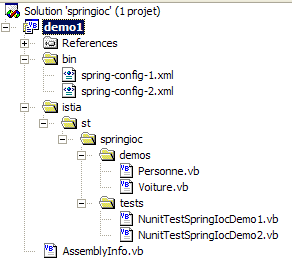
Visual Studio 项目结构与之前保持一致。仅新增了两个类以及一个 Spring 配置文件:
运行 NUnit 测试后得到以下结果:
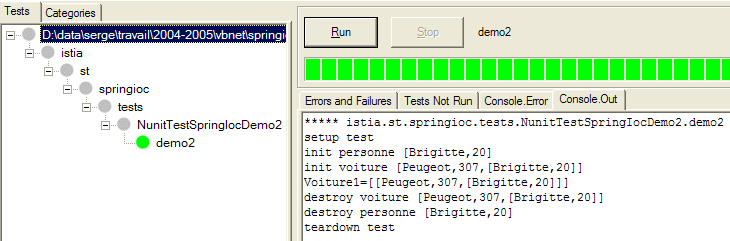
让我们来分析一下屏幕上的输出:
注释:
- 第 2 行:在每次测试前执行 [Setup] 属性方法,此处为 [demo]
- 第 3 行:Spring 开始创建单例 [car1]。该单例依赖于单例 [person2],而 [person2] 尚未存在。因此,[person2] 被创建,并执行其 [init] 方法。
- 第 4 行:现在可以创建单例 [car1]。随后执行其 [init] 方法。
- 第 5 行:[demo2] 方法显示单例 [car1] 的值
- 第 6–8 行:测试的 [TearDown] 方法被执行。单例被销毁,从而触发其 [destroy] 方法的执行
5.3. 示例 3
我们引入以下新类 [PersonGroup]:
Imports istia.st.springioc.demos

Namespace istia.st.springioc.demos

    Public Class GroupePersonnes
        ' private fields
        Private _membres() As Personne
        Private _groupesDeTravail As Hashtable

        ' public property
        Public Property membres() As Personne()
            Get
                Return _membres
            End Get
            Set(ByVal Value() As Personne)
                _membres = Value
            End Set
        End Property

        Public Property groupesDeTravail() As Hashtable
            Get
                Return _groupesDeTravail
            End Get
            Set(ByVal Value As Hashtable)
                _groupesDeTravail = Value
            End Set
        End Property

        ' default builder
        Public Sub New()

        End Sub

        ' object identity string GroupeDePersonnes
        Public Overrides Function tostring() As String
            ' browse the list of group members
            Dim identité As String = "[membres=("
            Dim i As Integer
            For i = 0 To membres.Length - 2
                identité += membres(i).ToString + ","
            Next
            identité += membres(i).ToString + "), groupes de travail=("
            ' browse the workgroup dictionary
            Dim clés As IEnumerator = groupesDeTravail.Keys.GetEnumerator
            Dim clé As Object
            While clés.MoveNext
                clé = clés.Current
                identité += String.Format("[{0},{1}] ", clé, groupesDeTravail(clé))
            End While
            ' we return the result
            Return identité + "]"
        End Function

        ' init-destroy methods
        Public Sub init()
            Console.WriteLine("init GroupeDePersonnes {0}", Me.ToString)
        End Sub

        Public Sub destroy()
            Console.WriteLine("destroy GroupeDePersonnes {0}", Me.ToString)
        End Sub

    End Class
End Namespace
它的两个私有成员是:
_members:一个包含该组成员的数组
_workGroups:一个字典,用于将人员与工作组进行映射
这些私有成员可通过公共属性访问。此处的目的是演示 Spring 如何允许您初始化复杂对象,例如包含数组或字典字段的对象。
Spring 配置文件 [spring-config-3.xml] 将如下所示:
<?xml version="1.0" encoding="iso-8859-1" ?>
<!DOCTYPE objects PUBLIC "-//SPRING//DTD OBJECT//EN"
"http://www.springframework.net/dtd/spring-objects.dtd">
<objects>
     <!-- people -->
    <object id="personne1" type="istia.st.springioc.demos.Personne, demo1" init-method="init"
        destroy-method="close">
        <property name="nom">
            <value>Simon</value>
        </property>
        <property name="age">
            <value>40</value>
        </property>
    </object>
    <object id="personne2" type="istia.st.springioc.demos.Personne, demo1" init-method="init"
        destroy-method="close">
        <property name="nom">
            <value>Brigitte</value>
        </property>
        <property name="age">
            <value>20</value>
        </property>
    </object>
     <!-- a car -->
    <object id="voiture1" type="istia.st.springioc.demos.Voiture, demo1" init-method="init"
        destroy-method="destroy">
        <constructor-arg index="0">
            <value>Peugeot</value>
        </constructor-arg>
        <constructor-arg index="1">
            <value>307</value>
        </constructor-arg>
        <constructor-arg index="2">
            <ref object="personne2" />
        </constructor-arg>
    </object>
     <!-- a group of people -->
    <object id="groupe1" type="istia.st.springioc.demos.GroupePersonnes" init-method="init"
        destroy-method="destroy">
        <property name="membres">
            <list>
                <ref object="personne1" />
                <ref object="personne2" />
            </list>
        </property>
        <property name="groupesDeTravail">
            <dictionary>
                <entry key="Brigitte">
                    <value>Marketing</value>
                </entry>
                <entry key="Simon">
                    <value>Ressources humaines</value>
                </entry>
            </dictionary>
        </property>
    </object>
</objects>
- <list> 标签允许您为数组类型或 IList 类型的字段初始化不同的值。
- <dictionary> 标签允许您对实现 IDictionary 接口的字段执行同样的操作
在我们的测试中,我们将使用以下 NUnit 测试类 [NunitTestSpringIocDemo3]:
Imports System
Imports Spring.Objects.Factory.Xml
Imports System.IO
Imports NUnit.Framework
Imports istia.st.springioc.demos

Namespace istia.st.springioc.tests

    <TestFixture()> _
    Public Class NunitTestSpringIocDemo3
        ' the test object
        Private factory As XmlObjectFactory

        <SetUp()> _
        Public Sub init()
            ' create a factory instance
            factory = New XmlObjectFactory(New FileStream("spring-config-3.xml", FileMode.Open))
            ' log
            Console.WriteLine("setup test")
        End Sub

        <TearDown()> _
        Public Sub destroy()
            ' we destroy the singletons
            factory.Dispose()
            ' follow-up
            Console.WriteLine("teardown test")
        End Sub

        <Test()> _
    Public Sub demo3()
            ' retrieving the singleton [group1]
            Dim groupe1 As GroupePersonnes = CType(factory.GetObject("groupe1"), GroupePersonnes)
            Console.WriteLine("groupe1={0}", groupe1)
        End Sub

    End Class
End Namespace
[demo3] 方法检索单例 [group1] 并将其显示出来。
Visual Studio 项目的结构与之前保持一致,只是现在增加了两个类和一个配置文件。
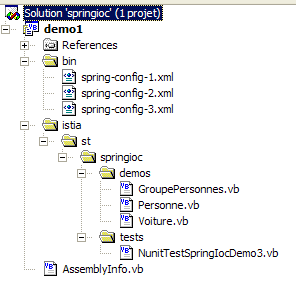
在 NUnit 测试中执行 [demo3] 方法会得到以下结果:
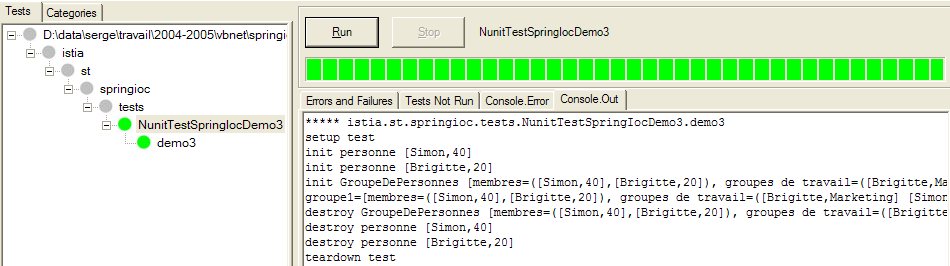
注释:
- 第2行:[Setup] 属性方法在每次测试前执行,此处为 [demo]
- 第3-4行:Spring开始创建单例[group1]。该单例依赖于单例[person1, person2],而它们此时尚未存在。这些单例被创建,并执行其[init]方法。
- 第 5 行:现在可以创建单例 [group1]。随后执行其 [init] 方法。
- 第 6 行:[demo3] 方法显示单例 [group1] 的值
- 第 7–10 行:测试的 [TearDown] 方法被执行。单例被销毁,从而触发其 [destroy] 方法的执行