4. 一个示例应用
我们将通过一个税款计算示例来说明上述方法。
4.1. 问题
我们计划编写一个程序来计算纳税人的税款。在此我们考虑一个简化情况,即纳税人仅需申报工资收入:
- 若未婚,则计算该雇员的税额份额 nbParts=nbEnfants/2 +1; 已婚者则为 nbEnfants/2+2,其中 nbEnfants 表示其子女数。若子女为三人或以上,则税额分额增加 0.5。
- 计算其应税收入 R=0.72*S,其中 S 为其年薪
- 计算其家庭系数 Q=R/N
- 根据以下数据计算其应纳税额 I
| 每行有3个限额字段:coeffR、coeffN。 要计算税款 I,需查找第一个满足 QF<=限额的行。例如,若 QF=30000,则会找到以下行: 31810 0.2 3309.5。此时税额 I 等于 0.2*R - 3309.5*nbParts。 若 QF 使得关系 QF<=限值 从未成立,则使用最后一行中的系数:0 0.65 49062,由此得出税额 I=0.65*R - 49062*nbParts。 |
4.2. 数据库
上述数据存储在名为 dbimpots 的 MySQL 数据库中。用户 seldbimpots(密码 mdpseldbimpots)对数据库内容拥有只读权限。该数据库包含一个名为 impots 的表,其结构如下:

其内容如下:

4.3. 应用程序的架构 MVC
该应用程序将采用以下架构:
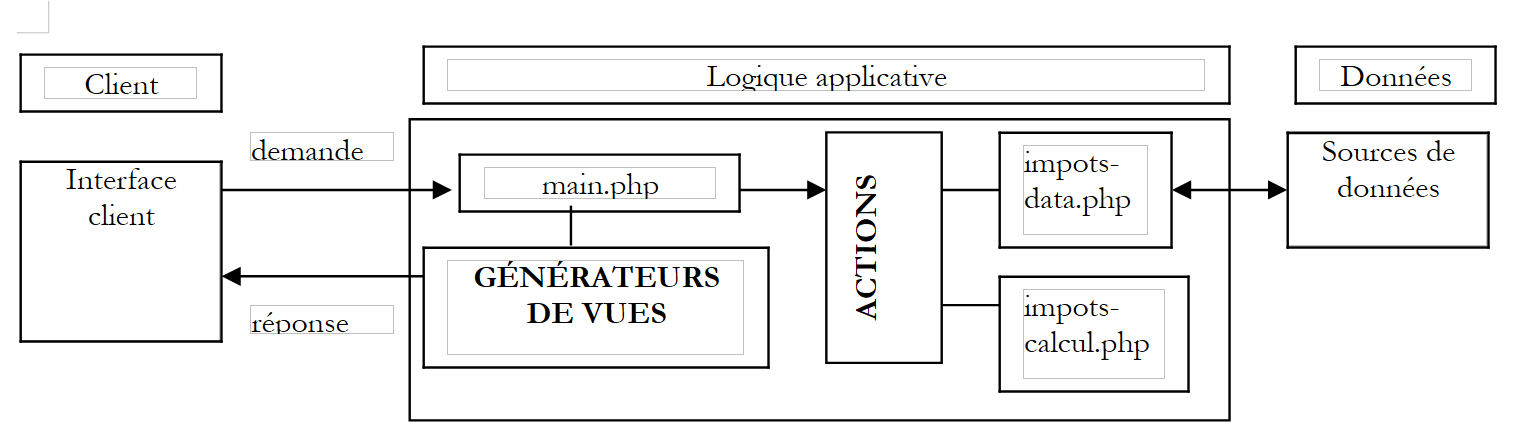 |
- 控制器 main.php 将是之前介绍的通用控制器
- 客户端请求以 main.php?action=xx 形式的请求发送至控制器。 action 参数的值决定了要执行的 ACTIONS 代码块脚本。执行的 action 脚本会向控制器返回一个变量,该变量指示 Web 应用程序应处于何种状态。根据该状态,控制器将调用其中一个视图生成器,向客户端发送响应。
- impots-data.php 是负责向控制器提供所需数据的类
- impots-calcul.php 是用于计算税款的业务类
4.4. 数据访问类
数据访问类的设计旨在向 Web 应用程序隐藏数据的来源。在其接口中,有一个名为 getData 的方法,该方法提供计算税款所需的三个数据数组。在本例中,数据取自 MySQL 数据库。 为了使该类与 SGBD 的实际类型解耦,我们将使用附录中描述的 pear::DB 库。该类的代码如下:
<?php

   // 库
  require_once 'DB.php';

  class impots_data{
     // 数据源访问类DBIMPOTS

       // 属性
        var $sDSN;         // 连接字符串
        var $sDatabase;    // 数据库名称
        var $oDB;          // 数据库连接
        var $aErreurs;     // 错误列表
        var $oRésultats;   // 查询结果
        var $connecté;     // 布尔值,表示是否已连接到数据库
        var $sQuery ;      // 最近执行的查询

     // 构造函数
    function impots_data($dDSN){

         // $dDSN:定义要建立的连接的字典
       // $dDSN['sgbd']:需要连接的 SGBD 类型
       // $dDSN['host']:托管该服务的主机名称
       // $dDSN['database']:需要连接的数据库名称
       // $dDSN['user']:数据库用户
       // $dDSN['mdp']:其密码

       // 在 $oDB 中创建连接,使用 $dDSN['user'] 身份连接由 $dDSN 定义的数据库
       // 如果连接成功
           // 将数据库连接字符串写入 $sDSN
           // 将要连接的数据库名称写入 $sDataBase
         // 将 $connecté 设为真
       // 如果连接失败
           // 将相应的错误消息放入列表 $aErreurs
         // 如有必要则关闭连接
         // 将 $connecté 设为假

       // 清空错误列表
            $this->aErreurs=array();

       // 建立与数据库的连接 $sDSN
      $this->sDSN=$dDSN["sgbd"]."://".$dDSN["user"].":".$dDSN["mdp"]."@".$dDSN["host"]."/".$dDSN["database"];
      $this->sDatabase=$dDSN["database"];
      $this->connect();

       // 已连接?
      if( ! $this->connecté) return;

       // 连接成功
      $this->connecté=TRUE;
    }//生成器

    // ------------------------------------------------------------------
    function connect(){
         // (重新)连接数据库
       // 清空错误列表
            $this->aErreurs=array();

       // 正在建立与数据库的连接 $sDSN
        $this->oDB=DB::connect($this->sDSN,true);

         // 错误?
        if(DB::iserror($this->oDB)){
           // 记录错误
          $this->aErreurs[]="Echec de la connexion à la base [".$this->sDatabase."] : [".$this->oDB->getMessage()."]";
         // 连接失败
        $this->connecté=FALSE;
         // 结束
        return;
      }

       // 已连接
      $this->connecté=TRUE;
    }//连接

    // ------------------------------------------------------------------
    function disconnect(){
       // 如果已连接,则关闭与服务器的连接$sDSN
        if($this->connecté){
              $this->oDB->disconnect();
           // 已断开连接
        $this->connecté=FALSE;
            }//如果
    }//断开连接

    // -------------------------------------------------------------------
    function execute($sQuery){
         // $sQuery:待执行的请求

         // 保存请求
            $this->sQuery=$sQuery;

       // 是否已连接?
      if(! $this->connecté){
           // 记录错误
        $this->aErreurs[]="Pas de connexion existante à la base [$this->sDatabase]";
         // 结束
        return;
      }//if

       // 执行请求
      $this->oRésultats=$this->oDB->query($sQuery);

         // 错误?
        if(DB::iserror($this->oRésultats)){
             // 记录错误
            $this->aErreurs[]="Echec de la requête [$sQuery] : [".$this->oRésultats->getMessage()."]";
           // 返回
        return;
      }//if
    }//执行

    // ------------------------------------------------------------------
    function getData(){
       // 获取 3 组极限数据、coeffr、coeffn
      $this->execute('select limites, coeffR, coeffN from impots');
       // 有错误吗?
      if(count($this->aErreurs)!=0) return array();
       // 遍历 select 查询的结果
      while ($ligne = $this->oRésultats->fetchRow(DB_FETCHMODE_ASSOC)) {
        $limites[]=$ligne['limites'];
        $coeffr[]=$ligne['coeffR'];
        $coeffn[]=$ligne['coeffN'];
      }//while
      return array($limites,$coeffr,$coeffn);
    }//getDataImpots

  }//类
?>
一个测试程序可以如下所示:
<?php

  // 库
  require_once "c-impots-data.php";
  require_once "DB.php";

    // 对类 impots-data 的测试
  ini_set('track_errors','on');
  ini_set('display_errors','on');

     // dbimpots 数据库配置
    $dDSN=array(
        "sgbd"=>"mysql",
        "user"=>"seldbimpots",
        "mdp"=>"mdpseldbimpots",
        "host"=>"localhost",
        "database"=>"dbimpots"
    );

  // 登录
  $oImpots=new impots_data($dDSN);
  // 错误?
  if(checkErreurs($oImpots)){
    exit(0);
  }
  // 跟踪
  echo "Connecté à la base...\n";

  // 获取限额数据、coeffr、coeffn
  list($limites,$coeffr,$coeffn)=$oImpots->getData();
  // 错误?
  if( ! checkErreurs($oImpots)){
    // 内容
    echo "données : \n";
    for($i=0;$i<count($limites);$i++){
      echo "[$limites[$i],$coeffr[$i],$coeffn[$i]]\n";
    }//for
  }//if

  // 正在断开连接
  $oImpots->disconnect();
  // 跟踪
  echo "Déconnecté de la base...\n";
  // 结束
  exit(0);

  // ----------------------------------
  function checkErreurs(&$oImpots){
      // 有错误吗?
    if(count($oImpots->aErreurs)!=0){
        // 显示
      for($i=0;$i<count($oImpots->aErreurs);$i++){
          echo $oImpots->aErreurs[$i]."\n";
      }//用于
      // 错误
      return true;
    }//if
    // 无错误
    return false;
  }//checkErreurs

?>
运行此测试程序得到以下结果:
Connecté à la base...
données :
[12620,0,0]
[13190,0.05,631]
[15640,0.1,1290.5]
[24740,0.15,2072.5]
[31810,0.2,3309.5]
[39970,0.25,4900]
[48360,0.3,6898]
[55790,0.35,9316.5]
[92970,0.4,12106]
[127860,0.45,16754]
[151250,0.5,23147.5]
[172040,0.55,30710]
[195000,0.6,39312]
[0,0.65,49062]
Déconnecté de la base...
4.5. 税款计算类
该类用于计算纳税人的税款。向其构造函数提供用于计算的数据,随后它将负责计算相应的税款。该类的代码如下:
<?php

  class impots_calcul{
    // 税额计算类

    // 构造函数
    function impots_calcul(&$perso,&$data){
      // $perso:包含以下键的字典
      // 子女:子女数量
      // 工资:年薪
      // 已婚:布尔值,表示纳税人是否已婚
      // 应缴税款:由该生成器计算的应缴税款
      // $data:包含以下键的字典
      // 限额:税率区间限额表
      // coeffr:收入系数表
      // 份额系数表
      // 这3个表的元素数量相同

      // 份额数量计算
      if($perso['marié'])
        $nbParts=$perso['enfants']/2+2;
        else $nbParts=$perso['enfants']/2+1;
      if ($perso['enfants']>=3) $nbParts+=0.5;

      // 应税收入
      $revenu=0.72*$perso['salaire'];

      // 家庭分摊系数
      $QF=$revenu/$nbParts;

      // 查询与QF对应的税率档位
      $nbTranches=count($data['limites']);
      $i=0;
      while($i<$nbTranches-2 && $QF>$data['limites'][$i]) $i++;

      // 税额
      $perso['impot']=floor($data['coeffr'][$i]*$revenu-$data['coeffn'][$i]*$nbParts);
    }//建设方
  }//类别
?>
一个测试程序可以如下所示:
<?php

  // 库
  require_once "c-impots-data.php";
  require_once "c-impots-calcul.php";

     // dbimpots 数据库基本配置
    $dDSN=array(
        "sgbd"=>"mysql",
        "user"=>"seldbimpots",
        "mdp"=>"mdpseldbimpots",
        "host"=>"localhost",
        "database"=>"dbimpots"
    );

  // 登录
  $oImpots=new impots_data($dDSN);
  // 错误?
  if(checkErreurs($oImpots)){
    exit(0);
  }
  // 跟踪
  echo "Connecté à la base...\n";
  // 获取限值、coeffr、coeffn数据
  list($limites,$coeffr,$coeffn)=$oImpots->getData();
  // 错误?
  if(checkErreurs($oImpots)){
    exit(0);
  }
  // 正在断开连接
  $oImpots->disconnect();
  // 跟踪
  echo "Déconnecté de la base...\n";

  // 计算税款
  $dData=array('limites'=>&$limites,'coeffr'=>&$coeffr,'coeffn'=>&$coeffn);
  $dPerso=array('enfants'=>2,'salaire'=>200000,'marié'=>true,'impot'=>0);
  new impots_calcul($dPerso,$dData);
  dump($dPerso);
  $dPerso=array('enfants'=>3,'salaire'=>200000,'marié'=>false,'impot'=>0);
  new impots_calcul($dPerso,$dData);
  dump($dPerso);
  $dPerso=array('enfants'=>3,'salaire'=>20000,'marié'=>true,'impot'=>0);
  new impots_calcul($dPerso,$dData);
  dump($dPerso);
  $dPerso=array('enfants'=>3,'salaire'=>2000000,'marié'=>true,'impot'=>0);
  new impots_calcul($dPerso,$dData);
  dump($dPerso);

  // 结束
  exit(0);

  // ----------------------------------
  function checkErreurs(&$oImpots){
      // 有错误?
    if(count($oImpots->aErreurs)!=0){
        // 显示
      for($i=0;$i<count($oImpots->aErreurs);$i++){
          echo $oImpots->aErreurs[$i]."\n";
      }//用于
      // 错误
      return true;
    }//if
    // 无错误
    return false;
  }//checkErreurs

?>
运行此测试程序得到以下结果:
Connecté à la base...
Déconnecté de la base...
[enfants,2] [salaire,200000] [marié,1] [impot,22506]
[enfants,3] [salaire,200000] [marié,] [impot,22506]
[enfants,3] [salaire,20000] [marié,1] [impot,0]
[enfants,3] [salaire,2000000] [marié,1] [impot,706752]
4.6. 应用程序的运行
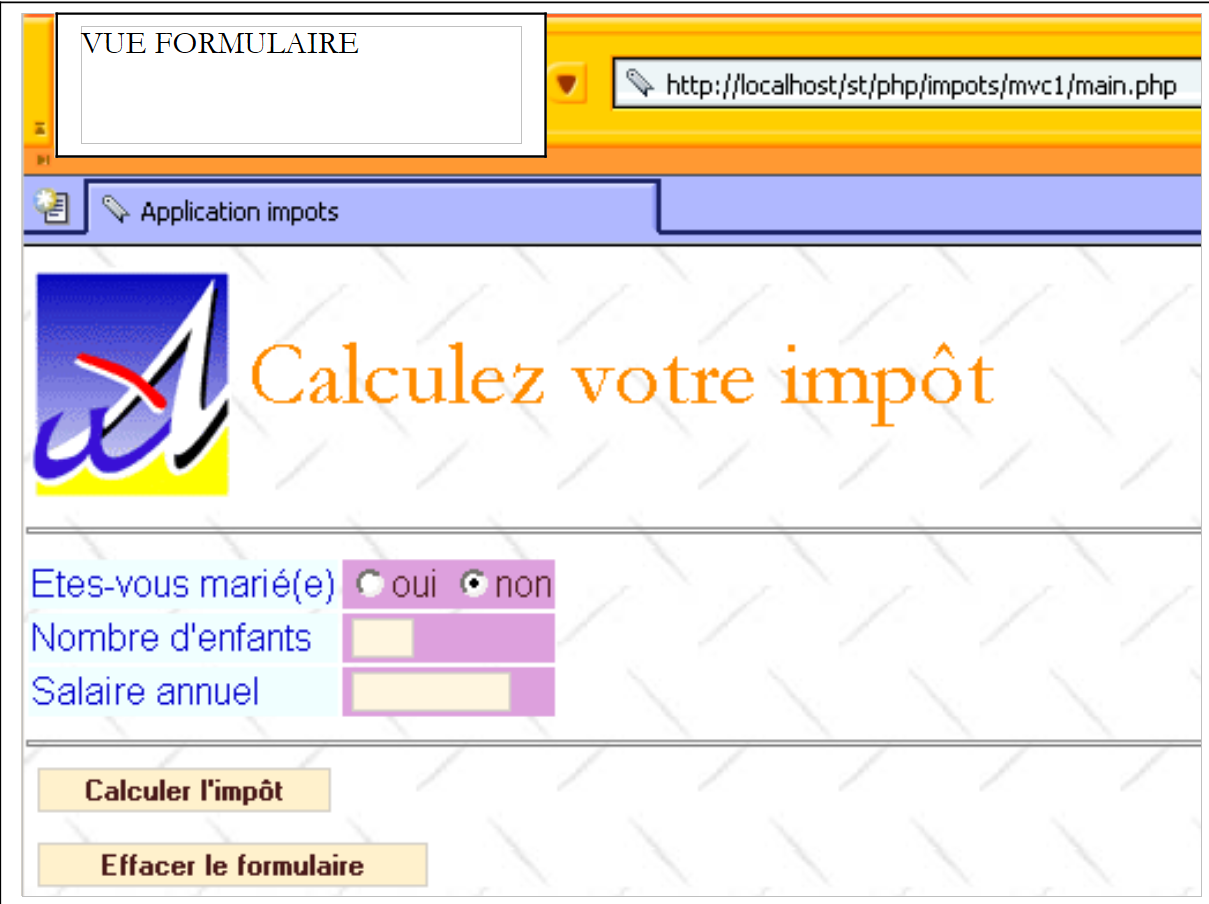
启动税务计算Web应用程序后,将显示以下视图 [v-formulaire]:
 |
用户填写字段并请求计算税款:
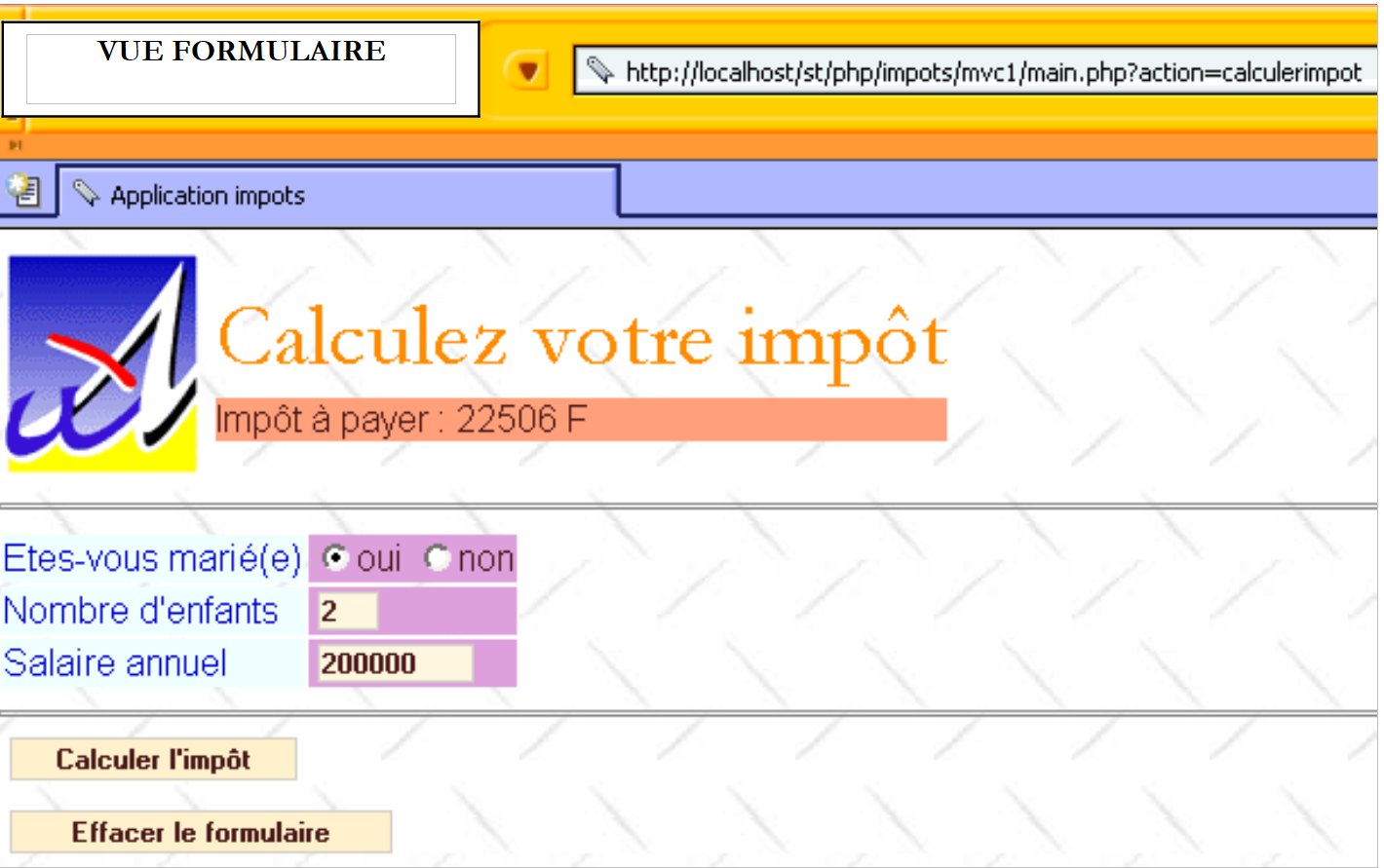 |
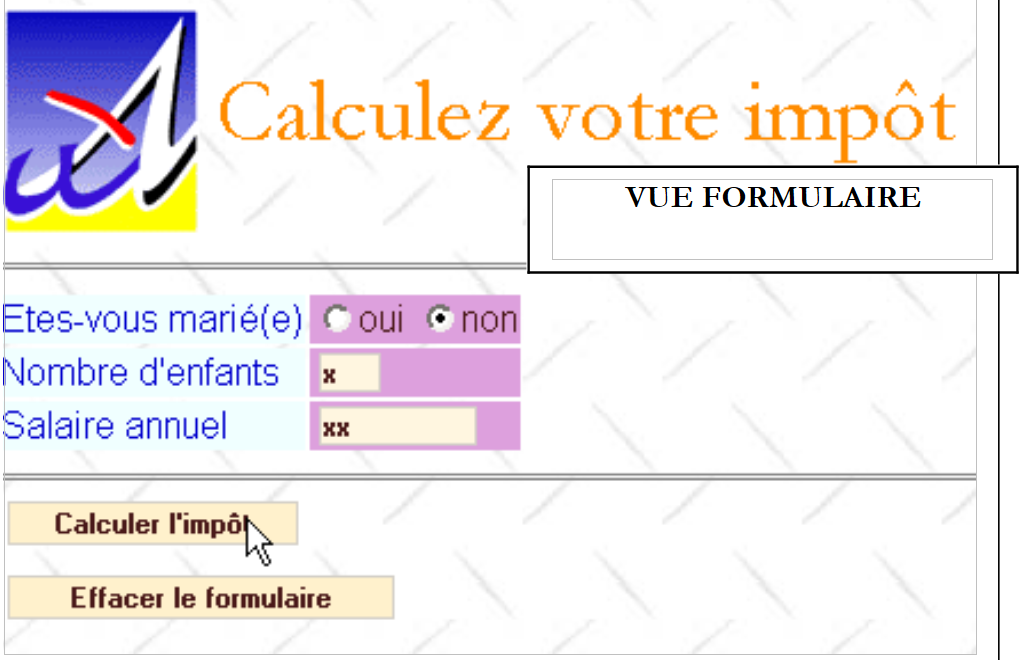
请注意,表单会以用户提交时的状态重新生成,并且还会显示应缴税额。用户可能会出现输入错误。系统会通过一个错误页面(称为视图 [v-erreurs])向用户提示这些错误。
 |
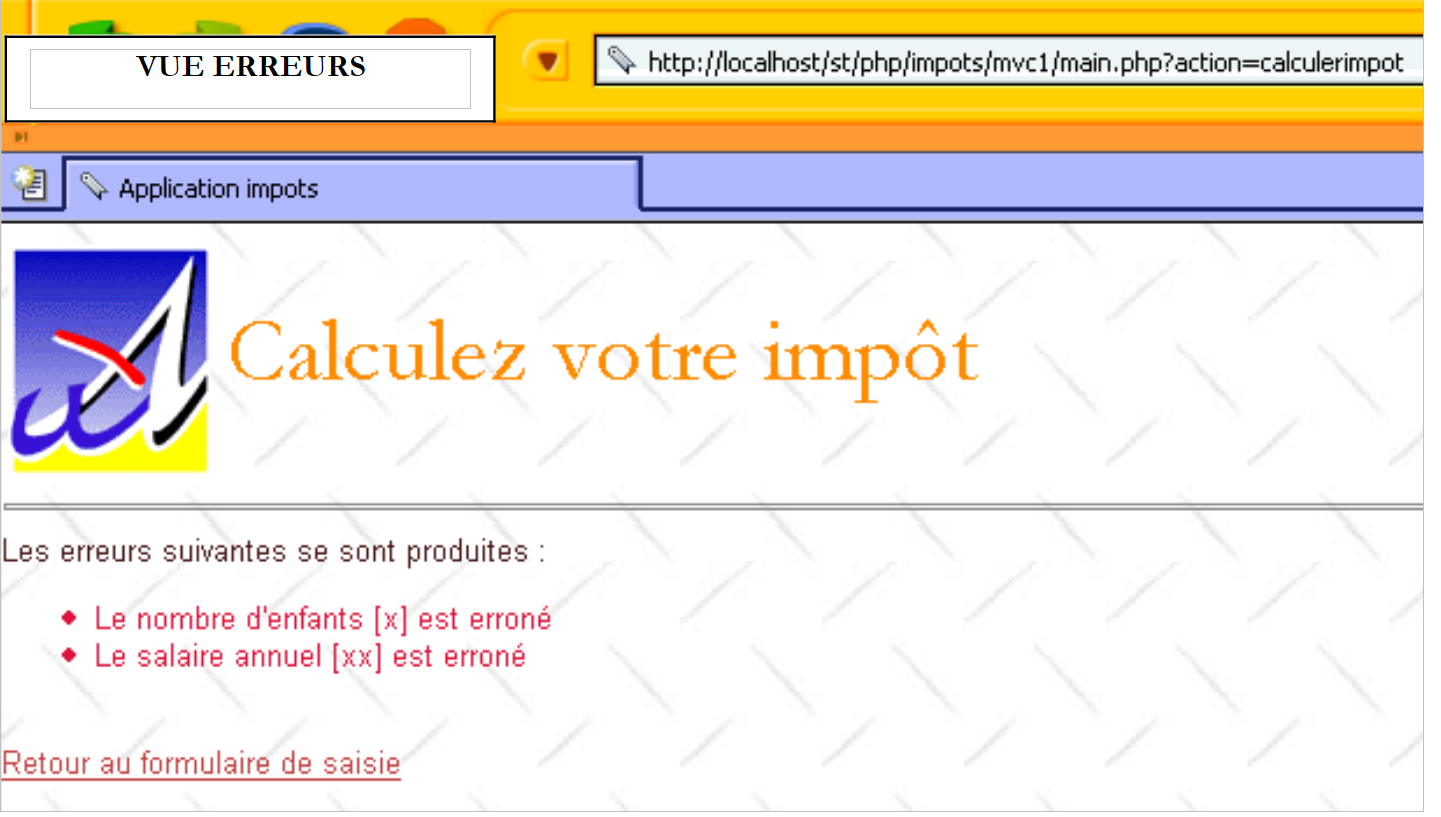 |
通过链接 [Retour au formulaire de saisie],用户可以查看其已提交的表单。
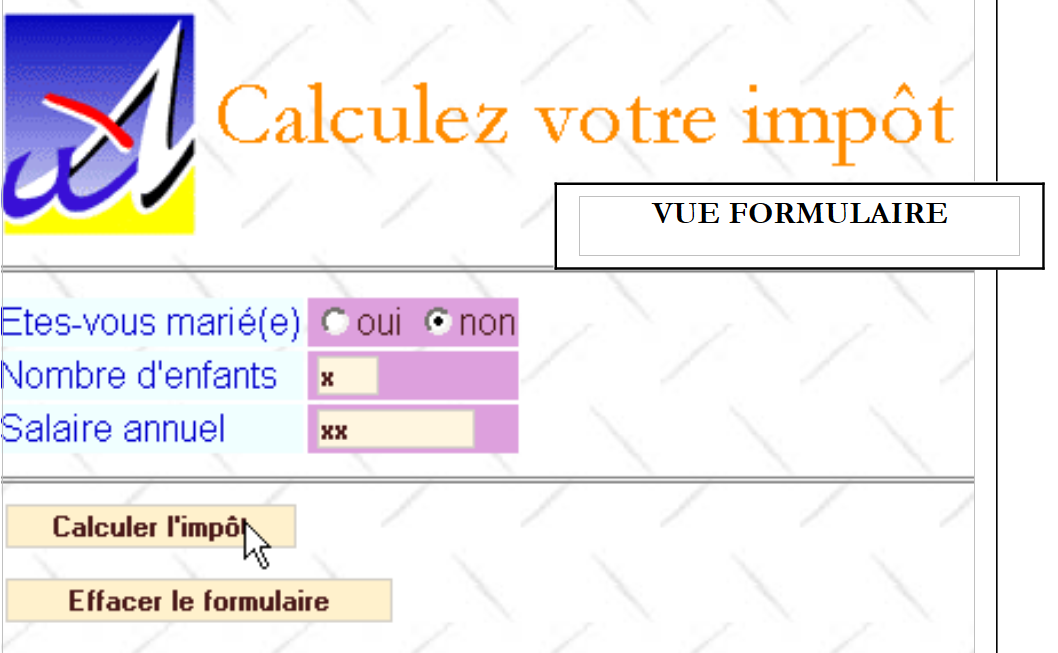 |
最后,按钮 [Effacer le formulaire] 将表单恢复为初始状态 c.a.d,即用户在初始请求时收到的状态。
4.7. 回顾应用程序的 MVC 架构
该应用程序具有以下架构:
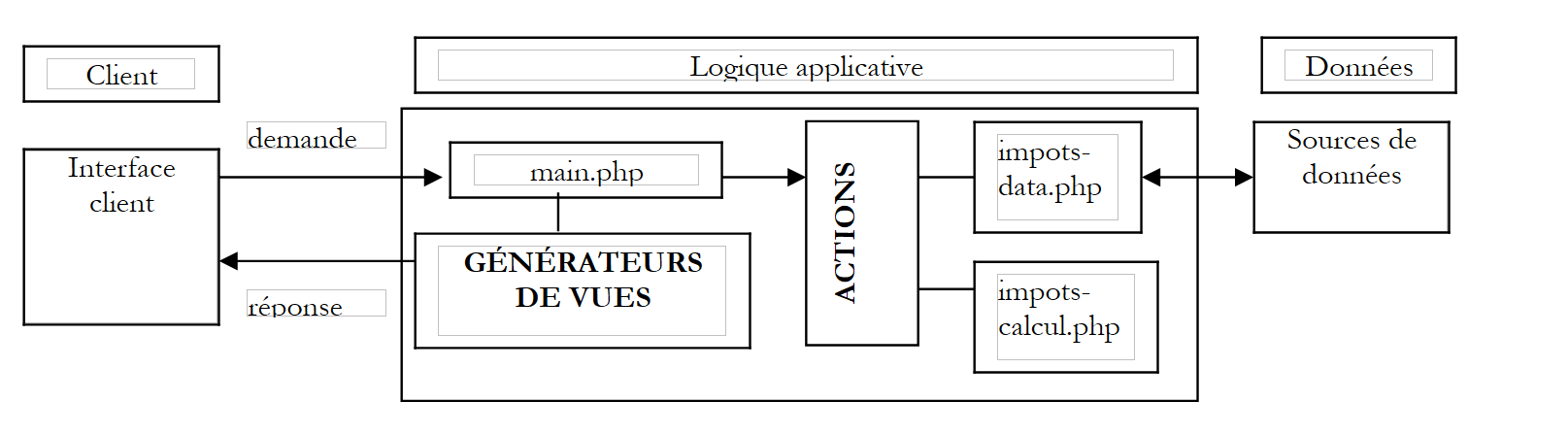 |
我们刚刚描述了 impots-data.php 和 impots-calcul.php 这两个类。现在我们将描述架构中的其他组件。
4.8. 应用程序控制器
该应用程序的控制器 main.php 即本章第一部分中描述的控制器。这是一个与应用程序无关的通用控制器。
<?php
     // 通用控制器

  // 读取配置
  include 'config.php';

  // 包含库
  for($i=0;$i<count($dConfig['includes']);$i++){
      include($dConfig['includes'][$i]);
  }//用于

  // 开始或恢复会话
  session_start();
  $dSession=$_SESSION["session"];
  if($dSession) $dSession=unserialize($dSession);

  // 获取待执行的操作
  $sAction=$_GET['action'] ? strtolower($_GET['action']) : 'init';
  $sAction=strtolower($_SERVER['REQUEST_METHOD']).":$sAction";

     // 操作序列是否正常?
  if( ! enchainementOK($dConfig,$dSession,$sAction)){
    // 流程异常
    $sAction='enchainementinvalide';
  }//if

     // 处理操作
  $scriptAction=$dConfig['actions'][$sAction] ?
    $dConfig['actions'][$sAction]['url'] :
    $dConfig['actions']['actionInvalide']['url'];
  include $scriptAction;


  // 将响应(视图)发送给客户端
  $sEtat=$dSession['etat']['principal'];
  $scriptVue=$dConfig['etats'][$sEtat]['vue'];
  include $scriptVue;

  // 脚本结束 - 除非存在错误,否则不应到达此处
  trace ("Erreur de configuration.");
  trace("Action=[$sAction]");
  trace("scriptAction=[$scriptAction]");
  trace("Etat=[$sEtat]");
  trace("scriptVue=[$scriptVue]");
  trace ("Vérifiez que les script existent et que le script [$scriptVue] se termine par l'appel à finSession.");
  exit(0);

  // ---------------------------------------------------------------
  function finSession(&$dConfig,&$dReponse,&$dSession){
    // $dConfig:配置字典
      // $dSession:包含会话信息的字典
         // $dReponse:响应页面的参数字典

    // 会话记录
    if(isset($dSession)){
      // 将请求参数放入会话中
      $dSession['requete']=strtolower($_SERVER['REQUEST_METHOD'])=='get' ? $_GET :
          strtolower($_SERVER['REQUEST_METHOD'])=='post' ? $_POST : array();
        $_SESSION['session']=serialize($dSession);
      session_write_close();
    }else{
        // 无会话
      session_destroy();
    }

        // 呈现响应
        include $dConfig['vuesReponse'][$dReponse['vuereponse']]['url'];

    // 脚本结束
    exit(0);
  }//结束会话

  //--------------------------------------------------------------------
    function enchainementOK(&$dConfig,&$dSession,$sAction){
      // 根据前一状态验证当前操作是否被授权
    $etat=$dSession['etat']['principal'];
    if(! isset($etat)) $etat='sansetat';

    // 操作验证
    $actionsautorisees=$dConfig['etats'][$etat]['actionsautorisees'];
    $autorise= ! isset($actionsautorisees) || in_array($sAction,$actionsautorisees);
        return $autorise;
  }

  //--------------------------------------------------------------------
  function dump($dInfos){
      // 显示信息词典
    while(list($clé,$valeur)=each($dInfos)){
        echo "[$clé,$valeur]<br>\n";
    }//while
  }//跟踪

  //--------------------------------------------------------------------
  function trace($msg){
      echo $msg."<br>\n";
  }//跟踪
?>
4.9. Web 应用程序的操作
共有四个操作:
- get:init:这是在向控制器发送初始无参数请求时触发的操作。它生成一个空的“表单”视图。
- post:effacerformulaire:由按钮 [Effacer le formulaire] 触发的操作。它生成空的视图 [v-formulaire]。
- post:calculerimpot:由按钮 [Calculer l'impôt] 触发的操作。它会生成包含应缴税额的视图 [v-formulaire],或者生成视图 [v-erreurs]。
- get:retourformulaire:由链接 [Retour au formulaire de saisie] 触发的操作。它生成预先填入错误数据的视图 [v-formulaire]。
这些操作在配置文件中的配置如下:
<?php
…
  // 配置应用程序操作
  $dConfig['actions']['get:init']=array('url'=>'a-init.php');
  $dConfig['actions']['post:calculerimpot']=array('url'=>'a-calculimpot.php');
  $dConfig['actions']['get:retourformulaire']=array('url'=>'a-retourformulaire.php');
  $dConfig['actions']['post:effacerformulaire']=array('url'=>'a-init.php');
  $dConfig['actions']['enchainementinvalide']=array('url'=>'a-enchainementinvalide.php');
  $dConfig['actions']['actionInvalide']=array('url'=>'a-actioninvalide.php');
每个操作都关联有一个负责处理它的脚本。每个操作都会将Web应用程序带入由元素$dSession['etat']['principal']定义的状态。该状态将保存在会话中。 此外,该操作还会在字典$dReponse中记录相关信息,以便显示与应用程序新状态相关的视图。
4.10. Web 应用程序的报表
共有两个:
- [e-formulaire]:展示视图 [v-formulaire] 不同变体的报表。
- [e-erreurs]:展示视图 [v-erreurs] 的状态。
这些状态下允许的操作如下:
<?php
…
  // 配置应用程序状态
  $dConfig['etats']['formulaire']=array(
       'actionsautorisees'=>array('post:calculerimpot','get:init','post:effacerformulaire'),
    'vue'=>'e-formulaire.php');
  $dConfig['etats']['erreurs']=array(
      'actionsautorisees'=>array('get:retourformulaire','get:init'),
      'vue'=>'e-erreurs.php');
  $dConfig['etats']['sansetat']=array('actionsautorisees'=>array('get:init'));
在一个状态中,允许的操作对应于与该状态相关联的视图中链接或按钮的目标。此外,'get:init' 操作始终被允许。 这允许用户从浏览器的历史记录中检索URL main.php,并无论应用程序处于何种状态都能重新播放。这是一种“手动”重置。 “无状态”状态仅在应用程序启动时存在。
应用程序的每个状态都关联有一个脚本,负责生成与该状态对应的视图:
- 状态 [e-formulaire]:脚本 e-formulaire.php
- 状态 [e-erreurs]:脚本 e-erreurs.php
状态 [e-formulaire] 将显示视图 [v-formulaire] 及其变体。实际上,视图 [v-formulaire] 可能为空、已预填,或包含税额。 将应用程序带入状态 [e-formulaire] 的操作会在变量 $dSession['etat']['principal'] 中指定应用程序的主状态。 控制器仅使用此信息。 在我们的应用程序中,将应用程序带入状态 [e-formulaire] 的操作,会在 $dSession['etat']['secondaire'] 中添加补充信息,以便响应生成器知道应生成空白表单、预填表单,以及是否包含税额。当然,我们也可以采取另一种做法,即认为这里存在三种不同的状态,因此需要编写三个视图生成器。
4.11. Web应用程序的配置文件 config.php
<?php

     // PHP 配置
  ini_set("register_globals","off");
  ini_set("display_errors","off");
  ini_set("expose_php","off");

  // 待包含模块列表
  $dConfig['includes']=array('c-impots-data.php','c-impots-calcul.php');

  // 应用程序控制器
  $dConfig['webapp']=array('titre'=>"Calculez votre impôt");

  // 应用程序视图配置
  $dConfig['vuesReponse']['modele1']=array('url'=>'m-reponse.php');
  $dConfig['vuesReponse']['modele2']=array('url'=>'m-reponse2.php');
  $dConfig['vues']['formulaire']=array('url'=>'v-formulaire.php');
  $dConfig['vues']['erreurs']=array('url'=>'v-erreurs.php');
  $dConfig['vues']['formulaire2']=array('url'=>'v-formulaire2.php');
  $dConfig['vues']['erreurs2']=array('url'=>'v-erreurs2.php');
  $dConfig['vues']['bandeau']=array('url'=>'v-bandeau.php');
  $dConfig['vues']['menu']=array('url'=>'v-menu.php');
  $dConfig['style']['url']='style1.css';

  // 应用程序操作配置
  $dConfig['actions']['get:init']=array('url'=>'a-init.php');
  $dConfig['actions']['post:calculerimpot']=array('url'=>'a-calculimpot.php');
  $dConfig['actions']['get:retourformulaire']=array('url'=>'a-retourformulaire.php');
  $dConfig['actions']['post:effacerformulaire']=array('url'=>'a-init.php');
  $dConfig['actions']['enchainementinvalide']=array('url'=>'a-enchainementinvalide.php');
  $dConfig['actions']['actionInvalide']=array('url'=>'a-actioninvalide.php');

  // 应用程序报表配置
  $dConfig['etats']['e-formulaire']=array(
       'actionsautorisees'=>array('post:calculerimpot','get:init','post:effacerformulaire'),
    'vue'=>'e-formulaire.php');
  $dConfig['etats']['e-erreurs']=array(
      'actionsautorisees'=>array('get:retourformulaire','get:init'),
      'vue'=>'e-erreurs.php');
  $dConfig['etats']['sansetat']=array('actionsautorisees'=>array('get:init'));

  // 应用程序模型配置
    $dConfig["DSN"]=array(
        "sgbd"=>"mysql",
        "user"=>"seldbimpots",
        "mdp"=>"mdpseldbimpots",
        "host"=>"localhost",
        "database"=>"dbimpots"
    );
?>
4.12. Web 应用程序的操作
4.12.1. 操作脚本的一般工作原理
- 控制器会根据从客户端接收的 action 参数调用操作脚本。
- 执行后,操作脚本必须告知控制器将应用程序置于何种状态。该状态需在 $dSession['etat']['principal'] 中指定。
- 操作脚本可能需要将信息存入会话。它通过将这些信息放入字典 $dSession 来实现,该字典会在请求-响应周期结束时由控制器自动保存到会话中。
- 一个操作脚本可能需要向视图传递信息。这一方面与控制器无关。这是操作与视图之间的接口,每个应用程序都有其独特的接口。在本例中,操作将通过一个名为 $dReponse 的字典向视图生成器提供信息。
4.12.2. get:init 操作
该操作负责生成空表单。配置文件显示,它将由脚本 a-init.php 处理:
脚本 a-init.php 的代码如下:
该脚本仅将应用程序应处于的状态固定在 $dSession['etat']['principal'] 中, 状态 [e-formulaire],并在 $dSession['etat']['secondaire'] 中对该状态进行详细说明。 配置文件显示,控制器将执行脚本 e-formulaire.php 来生成对客户端的响应。
<?php
…
  $dConfig['etats']['e-formulaire']=array(
       'actionsautorisees'=>array('post:calculerimpot','get:init','post:effacerformulaire'),
    'vue'=>'e-formulaire.php');
脚本 e-formulaire.php 将生成视图 [v-formulaire] 的变体 [init]、c.a.d。空表单。
4.12.3. 操作 post:calculerimpot
该操作用于根据表单中输入的数据计算税款。配置文件指定由脚本 a-calculimpot.php 处理此操作:
脚本 a-calculimpot.php 的代码如下:
<?php
     // 发起税款计算请求

  // 首先验证参数的有效性
  $sOptMarie=$_POST['optmarie'];
  if($sOptMarie!='oui' && $sOptMarie!='non'){
      $erreurs[]="L'état marital [$sOptMarie] est erroné";
  }
  $sEnfants=trim($_POST['txtenfants']);
  if(! preg_match('/^\d{1,3}$/',$sEnfants)){
      $erreurs[]="Le nombre d'enfants [$sEnfants] est erroné";
  }
  $sSalaire=trim($_POST['txtsalaire']);
  if(! preg_match('/^\d+$/',$sSalaire)){
      $erreurs[]="Le salaire annuel [$sSalaire] est erroné";
  }

  // 如有错误,则结束
  if(count($erreurs)!=0){
      // 准备错误页面
    $dReponse['erreurs']=&$erreurs;
    $dSession['etat']=array('principal'=>'e-erreurs','secondaire'=>'saisie');
      return;
  }//if

  // 输入的数据正确
  // 获取计算税款所需的数据
  if(! $dSession['limites']){
      // 数据不在会话中
    // 从数据源中获取数据
    list($erreurs,$limites,$coeffr,$coeffn)=getData($dConfig['DSN']);
    // 如有错误,则显示错误页面
    if(count($erreurs)!=0){
        // 准备错误页面
      $dReponse['erreurs']=&$erreurs;
        $dSession['etat']=array('principal'=>'e-erreurs','secondaire'=>'database');
      return;
    }//if
    // 无错误 - 将数据放入会话中
    $dSession['limites']=&$limites;
    $dSession['coeffr']=&$coeffr;
    $dSession['coeffn']=&$coeffn;
  }//if

  // 此处已获取计算税款所需的数据
  // 计算税额
  $dData=array('limites'=>&$dSession['limites'],
      'coeffr'=>&$dSession['coeffr'],
    'coeffn'=>&$dSession['coeffn']);
  $dPerso=array('enfants'=>$sEnfants,'salaire'=>$sSalaire,'marié'=>($sOptMarie=='oui'),'impot'=>0);
  new impots_calcul($dPerso,$dData);

    // 准备响应页面
  $dSession['etat']=array('principal'=>'e-formulaire','secondaire'=>'calculimpot');
  $dReponse['impot']=$dPerso['impot'];
  return;

  //-----------------------------------------------------------------------
  function getData($dDSN){
      // 连接由字典定义的数据源 $dDSN
        $oImpots=new impots_data($dDSN);
    if(count($oImpots->aErreurs)!=0) return array($oImpots->aErreurs);
    // 检索限额数据、coeffr、coeffn
        list($limites,$coeffr,$coeffn)=$oImpots->getData();
         // 断开连接
        $oImpots->disconnect();
    // 返回结果
    if(count($oImpots->aErreurs)!=0) return array($oImpots->aErreurs);
        else return array(array(),$limites,$coeffr,$coeffn);
  }//getData
该脚本完成了其应尽的职责:计算税款。处理代码的解析工作留给读者自行探索。我们关注的是此操作之后可能出现的状态:
- 如果输入的数据不正确或数据访问出现问题,应用程序将进入状态 [e-erreurs]。配置文件显示,将由脚本 e-erreurs.php 负责生成响应视图:
<?php
…
  $dConfig['etats']['e-erreurs']=array(
      'actionsautorisees'=>array('get:retourformulaire','get:init'),
      'vue'=>'e-erreurs.php');
- 在所有其他情况下,应用程序将进入状态 [e-formulaire],其中计算变体在 $dSession、['etat'] 和 ['secondaire'] 中指定。 配置文件显示,将由脚本 e-formulaire.php 生成响应视图。 它将使用 $dSession['etat']['secondaire'] 的值,生成一个预填充了用户输入值以及税额的表单。
4.12.4. post:effacerformulaire 操作
该操作通过配置与前文所述的脚本 a-init.php 相关联。
4.12.5. get:retourformulaire 操作
它允许从状态 [e-erreurs] 返回至状态 [e-formulaire]。处理此操作的是脚本 a-retourformulaire.php:
脚本 a-retourformulaire.php 内容如下:
<?php
     // 显示输入表单
  $dSession['etat']=array('principal'=>'e-formulaire','secondaire'=>'retourformulaire');
?>
我们只需将应用程序置于状态 [e-formulaire] 的变体 [retourformulaire] 中。配置文件显示,控制器将执行脚本 e-formulaire.php 来生成对客户端的响应。
<?php
…
  $dConfig['etats']['e-formulaire']=array(
       'actionsautorisees'=>array('post:calculerimpot','get:init','post:effacerformulaire'),
    'vue'=>'e-formulaire.php');
脚本 e-formulaire.php 将生成视图 [v-formulaire] 的变体 [retourformulaire]、c.a.d。 该表单将预先填入用户输入的值,但不包含税额。
4.13. 操作序列无效
从应用程序的特定状态开始,有效的操作由配置决定:
<?php
…
  // 配置应用程序状态
  $dConfig['etats']['e-formulaire']=array(
       'actionsautorisees'=>array('post:calculerimpot','get:init','post:effacerformulaire'),
    'vue'=>'e-formulaire.php');
  $dConfig['etats']['e-erreurs']=array(
      'actionsautorisees'=>array('get:retourformulaire','get:init'),
      'vue'=>'e-erreurs.php');
  $dConfig['etats']['sansetat']=array('actionsautorisees'=>array('get:init'));
我们已经解释过这种配置。如果检测到无效的操作序列,脚本 a-enchainementinvalide.php 将被执行:
该脚本的代码如下:
<?php
     // 操作序列无效
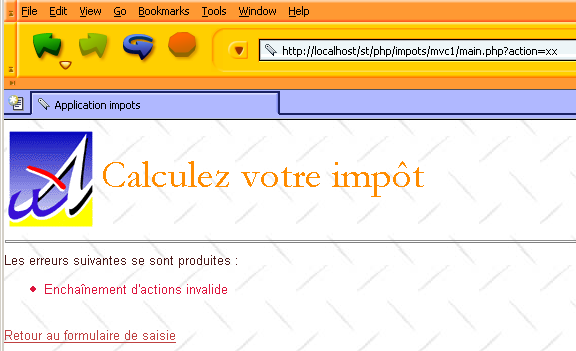
  $dReponse['erreurs']=array("Enchaînement d'actions invalide");
  $dSession['etat']=array('principal'=>'e-erreurs','secondaire'=>'enchainementinvalide');
?>
操作步骤是将应用程序置于状态 [e-erreurs]。 我们在 $dSession['etat']['secondaire'] 中提供了一条信息,该信息将由错误页面生成器利用。正如我们之前所见,该生成器是 e-erreurs.php:
<?php
…
  $dConfig['etats']['e-erreurs']=array(
      'actionsautorisees'=>array('get:retourformulaire','get:init'),
      'vue'=>'e-erreurs.php');
我们稍后将查看该生成器的代码。发送给客户端的视图如下:
4.14. 应用程序的视图
4.14.1. 显示最终视图
让我们看看控制器在执行客户端请求的操作后,是如何向客户端发送响应的:
<?php
…
....
  // 开始或恢复会话
  session_start();
  $dSession=$_SESSION["session"];
  if($dSession) $dSession=unserialize($dSession);

  // 获取待执行的操作
  $sAction=$_GET['action'] ? strtolower($_GET['action']) : 'init';
  $sAction=strtolower($_SERVER['REQUEST_METHOD']).":$sAction";

     // 操作序列是否正常?
  if( ! enchainementOK($dConfig,$dSession,$sAction)){
    // 流程异常
    $sAction='enchainementinvalide';
  }//if

     // 处理操作
  $scriptAction=$dConfig['actions'][$sAction] ?
    $dConfig['actions'][$sAction]['url'] :
    $dConfig['actions']['actionInvalide']['url'];
  include $scriptAction;

  // 向客户端发送响应(视图)
  $sEtat=$dSession['etat']['principal'];
  $scriptVue=$dConfig['etats'][$sEtat]['vue'];
  include $scriptVue;

.....

  // ---------------------------------------------------------------
  function finSession(&$dConfig,&$dReponse,&$dSession){
    // $dConfig:配置字典
      // $dSession:包含会话信息的字典
         // $dReponse:响应页面参数字典

    // 会话记录
...

         // 向客户端发送响应
        include $dConfig['vuesReponse'][$dReponse['vuereponse']]['url'];

    // 脚本结束
    exit(0);
  }//结束会话
当操作脚本返回时,控制器会从 $dSession['etat']['principal'] 中获取应用程序应处于的状态。该状态由刚刚执行的操作确定。 随后,控制器会调用与该状态关联的视图生成器。它会在配置文件中查找该视图生成器的名称。视图生成器的作用如下:
- 在 $dReponse['vuereponse'] 中确定要使用的响应模板名称。该信息将传递给控制器。模板是由基本视图组合而成的,这些基本视图集合起来形成最终视图。
- 准备在最终视图中显示的动态信息。此步骤独立于控制器。这是视图生成器与最终视图之间的接口,且因应用程序而异。
- 必须以调用控制器中的 finSession 函数作为结尾。该函数将
- 保存会话
- 发送响应
函数 finSession 的代码如下:
<?php
…
  // ---------------------------------------------------------------
  function finSession(&$dConfig,&$dReponse,&$dSession){
    // $dConfig:配置字典
      // $dSession:包含会话信息的字典
         // $dReponse:响应页面的参数字典

    // 会话记录
...

         // 向客户端发送响应
        include $dConfig['vuesReponse'][$dReponse['vuereponse']]['url'];

    // 脚本结束
    exit(0);
  }//结束会话
发送给用户的视图由实体 $dReponse['vuereponse'] 定义,该实体定义了用于最终响应的模板。
4.14.2. 响应模板
应用程序将根据以下唯一模板生成不同的响应:
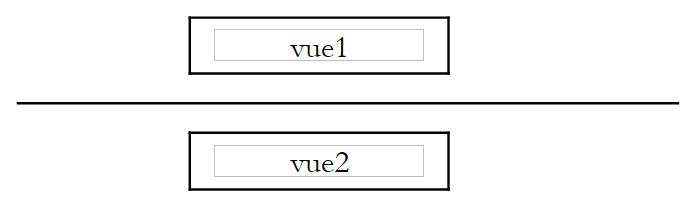 |
该模板与字典 $dConfig['vuesreponse'] 中的键 modéle1 相关联:
脚本 m-reponse.php 负责生成此模板:
<html>
    <head>
      <title>Application impots</title>
      <link type="text/css" href="<?php echo $dReponse['urlstyle'] ?>" rel="stylesheet" />
  </head>
  <body>
    <?php
            include $dReponse['vue1'];
        ?>
    <hr>
    <?php
            include $dReponse['vue2'];
        ?>
    </body>
</html>
该脚本包含三个动态元素,它们被放置在字典 $dReponse 中,并关联到以下键:
- urlstyle:模板样式表的 URL
- vue1:负责生成 vue1 视图的脚本名称
- vue2:负责生成 vue2 视图的脚本名称
希望使用 modèle1 模型的视图生成器必须定义这三个动态元素。现在,我们将定义可以替代模型中 [vue1] 和 [vue2] 元素的基本视图。
4.14.3. 基本视图 v-bandeau.php
脚本 v-bandeau.php 生成一个视图,该视图将被放置在区域 [vue1] 中:
<table>
    <tr>
      <td><img src="univ01.gif"></td>
    <td>
      <table>
        <tr>
          <td><div class='titre'><?php echo $dReponse['titre'] ?></div></td>
        </tr>
        <tr>
            <td><div class='resultat'><?php echo $dReponse['resultat']?></div></td>
        </tr>
      </table>
    </td>
  </tr>
</table>
视图生成器需定义两个动态元素,将其放置在字典 $dReponse 中,并关联以下键:
- 标题:要显示的标题
- resultat:应缴税额
4.14.4. 基本视图 v-formulaire.php
[vue2]部分对应于视图[v-formulaire]或视图[v-erreurs]。 视图 [v-formulaire] 由脚本 v-formulaire.php 生成:
<form method="post" action="main.php?action=calculerimpot">
    <table>
      <tr>
        <td class="libelle">Etes-vous marié(e)</td>
      <td class="valeur">
          <input type="radio" name="optmarie" <?php echo $dReponse['optoui'] ?> value="oui">oui
          <input type="radio" name="optmarie" <?php echo $dReponse['optnon'] ?> value="non">non
      <td>
    <tr>
        <td class="libelle">Nombre d'enfants</td>
      <td class="valeur">
          <input type="text" class="text" name="txtenfants" size="3" value="<?php echo $dReponse['enfants'] ?>"
      </td>
    </tr>
    <tr>
        <td class="libelle">Salaire annuel</td>
      <td class="valeur">
          <input type="text" class="text" name="txtsalaire" size="10" value="<?php echo $dReponse['salaire'] ?>"
      </td>
    </tr>
    </table>
  <hr>
  <input type="submit" class="submit" value="Calculer l'impôt">
</form>
<form method="post" action="main.php?action=effacerformulaire">
  <input type="submit" class="submit" value="Effacer le formulaire">
</form>
该视图中需由视图生成器定义的动态部分与字典 $dReponse 中的以下键相关联:
- optoui:名为 optoui 的单选按钮的状态
- optnon:名为 optnon 的单选按钮的状态
- children:应填入 txtenfants 字段的子女数量
- salaire:要放入 txtsalaire 字段的年薪
4.14.5. 基础视图 v-erreurs.php
视图 [v-erreurs] 由脚本 v-erreurs.php 生成:
Les erreurs suivantes se sont produites :
<ul>
    <?php
        for($i=0;$i<count($dReponse["erreurs"]);$i++){
            echo "<li class='erreur'>".$dReponse["erreurs"][$i]."</li>\n";
        }//for
    ?>
</ul>
<div class="info"><?php echo $dReponse["info"] ?></div>
<br>
<a href="<?php echo $dReponse["href"] ?>"><?php echo $dReponse["lien"] ?></a>
视图生成器需定义的此视图的动态部分与字典 $dReponse 中的以下键相关联:
- 错误:错误消息表
- info:信息消息
- 链接:链接文本
- href:上述链接的目标 URL
4.14.6. 样式表
所有视图均由样式表进行“装扮”。若要修改应用程序的外观,需修改其样式表。以下是样式表 style1.css:
div.menu {
    background-color: #FFD700;
    color: #F08080;
    font-weight: bolder;
    text-align: center;
}
td.separateur {
    background: #FFDAB9;
    width: 20px;
}

table.modele2 {
    width: 600px;
}

BODY {
    background-image : url(standard.jpg);
    margin-left : 0px;
    margin-top : 6px;
    color : #4A1919;
    font-size: 10pt;
    font-family: Arial, Helvetica, sans-serif;
    scrollbar-face-color:#F2BE7A;
    scrollbar-arrow-color:#4A1919;
    scrollbar-track-color:#FFF1CC;
    scrollbar-3dlight-color:#CBB673;
    scrollbar-darkshadow-color:#CBB673;
}

div.titre {
    font: 30pt Garamond;
    color: #FF8C00;
    background-color: Yellow;
}

table.menu {
    background-color: #ADD8E6;
}


A:HOVER {
    text-decoration: underline;
    color: #FF0000;
    background-color : transparent;
}
A:ACTIVE {
    text-decoration: underline;
    color : #BF4141;
    background-color : transparent;
}
A:VISITED {
    color : #BF4141;
    background-color : transparent;
}

.error {
    color : red;
    font-weight : bold;
}

INPUT.text {
    margin-left : 3px;
    font-size:8pt;
    font-weight:bold;
    color:#4A1919;
    background-color:#FFF6E0;
    border-right:1px solid;
    border-left:1px solid;
    border-top:1px solid;
    border-bottom:1px solid;
}
td.libelle {
    background-color: #F0FFFF;
    color: #0000CD;
}

td.valeur {
    background-color: #DDA0DD;
}

DIV.resultat {
    background-color : #FFA07A;
    font : bold 12pt;
}

div.info {
    color: #FA8072;
}

li.erreur {
    color: #DC143C;
}

INPUT.submit {
    margin-left : 6px;
    font-size:8pt;
    font-weight:bold;
    color:#4A1919;
    background-color:#FFF1CC;
    border-right:1px solid;
    border-left:1px solid;
    border-top:1px solid;
    border-bottom:1px solid;
}
4.15. 视图生成器
4.15.1. 视图生成器的作用
回顾一下触发视图生成器执行的控制器代码片段:
<?php
…
     // 处理操作
  $scriptAction=$dConfig['actions'][$sAction] ?
    $dConfig['actions'][$sAction]['url'] :
    $dConfig['actions']['actionInvalide']['url'];
  include $scriptAction;

  // 向客户端发送响应(视图)
  $sEtat=$dSession['etat']['principal'];
  $scriptVue=$dConfig['etats'][$sEtat]['vue'];
  include $scriptVue;
视图生成器与应用程序将要放置的状态相关联。状态与视图生成器之间的关联通过配置确定:
<?php
…
  // 配置应用程序状态
  $dConfig['etats']['e-formulaire']=array(
       'actionsautorisees'=>array('post:calculerimpot','get:init','post:effacerformulaire'),
    'vue'=>'e-formulaire.php');
  $dConfig['etats']['e-erreurs']=array(
      'actionsautorisees'=>array('get:retourformulaire','get:init'),
      'vue'=>'e-erreurs.php');
  $dConfig['etats']['sansetat']=array('actionsautorisees'=>array('get:init'));
我们之前已经说明了视图生成器的作用。在此再次回顾一下。视图生成器:
- 在 $dReponse['vuereponse'] 中确定要使用的响应模板名称。该信息将传递给控制器。模板是由基本视图组成的集合,这些基本视图组合在一起形成最终视图。
- 准备要在最终视图中显示的动态信息。这一步骤与控制器无关。它是视图生成器与最终视图之间的接口,且因应用程序而异。
- 必须以调用控制器中的 finSession 函数作为结尾。该函数将
- 保存会话
- 发送响应
4.15.2. 与状态 [e-formulaire] 关联的视图生成器
负责生成与报表 [e-formulaire] 关联视图的脚本名为 e-formulaire.php:
<?php
…
  $dConfig['etats']['e-formulaire']=array(
       'actionsautorisees'=>array('post:calculerimpot','get:init','post:effacerformulaire'),
    'vue'=>'e-formulaire.php');
其代码如下:
<?php
  // 准备表单响应
  $dReponse['titre']=$dConfig['webapp']['titre'];
    $dReponse['vuereponse']='modele1';
  $dReponse['vue1']=$dConfig['vues']['bandeau']['url'];
  $dReponse['vue2']=$dConfig['vues']['formulaire']['url'];
  $dReponse['urlstyle']=$dConfig['style']['url'];
  $dReponse['titre']=$dConfig['webapp']['titre'];

  // 根据要生成的表单类型进行配置
    $type=$dSession['etat']['secondaire'];
  if($type=='init'){
      // 空白表单
    $dReponse['optnon']='checked';
  }//if
  if($type=='calculimpot'){
      // 需要重新显示存储在请求中的输入参数
    $dReponse['optoui']=$_POST['optmarie']=='oui' ? 'checked' : '';
    $dReponse['optnon']=$dReponse['optoui'] ? '' : 'checked';
    $dReponse['enfants']=$_POST['txtenfants'];
    $dReponse['salaire']=$_POST['txtsalaire'];
    $dReponse['resultat']='Impôt à payer : '.$dReponse['impot'].' F';
  }//if
  if($type=='retourformulaire'){
      // 我们需要重新显示存储在会话中的输入参数
    $dReponse['optoui']=$dSession['requete']['optmarie']=='oui' ? 'checked' : '';
    $dReponse['optnon']=$dReponse['optoui']=='' ? 'checked' : '';
    $dReponse['enfants']=$dSession['requete']['txtenfants'];
    $dReponse['salaire']=$dSession['requete']['txtsalaire'];
  }//if
  // 发送响应
  finSession($dConfig,$dReponse,$dSession);
?>
请注意,视图生成器符合对视图生成器设定的条件:
- 在 $dReponse['vuereponse'] 中设定要使用的响应模板
- 向该模板传递信息。此处通过字典 $dReponse 进行传递。
- 最后调用控制器中的 finSession 函数
此处使用的模板为“modèle1”。因此,生成器定义了该模板所需的两项信息:$dReponse['vue1'] 和 $dReponse['vue2']。
就本应用的特定情况而言,与状态 [e-formulaire] 关联的视图依赖于存储在变量 $dSession['etat']['secondaire'] 中的信息。这是开发时做出的选择。 其他应用程序可能会选择以其他方式传递补充信息。 此外,此处显示最终视图所需的所有信息都放置在字典 $dReponse 中。同样,这也是开发人员的选择。状态 [e-formulaire] 可能在执行以下四种不同操作后出现:init、calculerimpot、retourformulaire、effacerformulaire。 在所有情况下,要显示的视图并不完全相同。因此,在 $dSession['etat']['secondaire'] 中,我们区分了以下三种情况:
- init:显示空表单
- 计算税款:表单显示税额及计算依据的数据
- retourformulaire:表单显示初始输入的数据
上文中的脚本 e-formulaire.php 利用这些信息,根据这三种情况呈现相应的响应。
4.15.3. 与报表 [e-erreurs] 关联的视图
负责生成与报表 [e-erreurs] 关联视图的脚本名为 e-erreurs.php,内容如下:
<?php

  // 准备错误响应
  $dReponse['titre']=$dConfig['webapp']['titre'];
    $dReponse['vuereponse']='modele1';
  $dReponse['vue1']=$dConfig['vues']['bandeau']['url'];
  $dReponse['vue2']=$dConfig['vues']['erreurs']['url'];
  $dReponse['urlstyle']=$dConfig['style']['url'];
  $dReponse['titre']=$dConfig['webapp']['titre'];
  $dReponse['lien']='Retour au formulaire de saisie';
  $dReponse['href']='main.php?action=retourformulaire';

  // 补充信息
  $type=$dSession['etat']['secondaire'];
  if($type=='database'){
      $dReponse['info']="Veuillez avertir l'administrateur de l'application";
  }

  // 发送响应
  finSession($dConfig,$dReponse,$dSession);
?>
4.15.4. 显示最终视图
生成这两个最终视图的两个脚本均以调用控制器中的 finSession 函数作为结尾:
<?php
…
  function finSession(&$dConfig,&$dReponse,&$dSession){
    // $dConfig:配置字典
      // $dSession:包含会话信息的字典
         // $dReponse:响应页面的参数字典

....

         // 呈现响应
        include $dConfig['vuesReponse'][$dReponse['vuereponse']]['url'];

    // 脚本结束
    exit(0);
  }//结束会话
发送给用户的视图由实体 $dReponse['vuereponse'] 定义,该实体定义了最终响应所使用的模板。 对于报表 [e-formulaire] 和 [e-erreurs],该模板已被定义为 modele1:
根据配置,该模板对应脚本 m-reponse.php:
4.16. 修改响应模板
在此我们假设决定更改发送给客户的响应外观,并关注此操作在代码层面产生的影响。
4.16.1. 新模板
响应的结构现将如下所示:
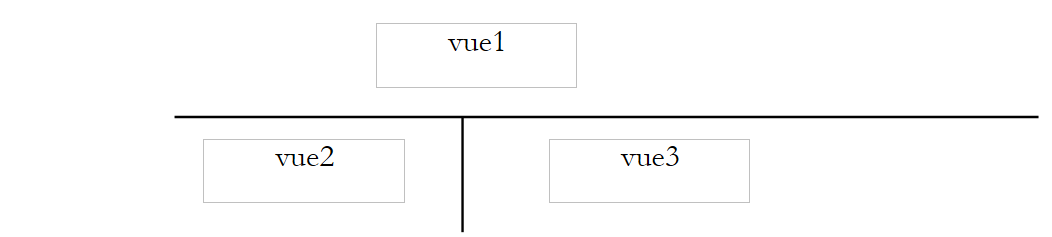 |
该模板将命名为 modele2,负责生成该模板的脚本将命名为 m-reponse2.php:
与该模板对应的脚本如下:
<html>
    <head>
      <title>Application impots</title>
      <link type="text/css" href="<?php echo $dReponse['urlstyle'] ?>" rel="stylesheet" />
  </head>
  <body>
      <table class='modele2'>
        <!-- 横幅开始 -->
        <tr>
          <td colspan="2"><?php    include $dReponse['vue1']; ?></td>
      </tr>
        <!-- 横幅结束 -->
      <tr>
            <!-- 菜单开始 -->
          <td><?php include $dReponse['vue2']; ?></td>
            <!-- 菜单结束 -->
            <!-- 区域 3 开始 -->
          <td><?php include $dReponse['vue3']; ?></td>
            <!-- 区域 3 结束 -->
      </tr>
   </table>
    </body>
</html>
该模板的动态元素如下:
- $dReponse['urlstyle']:要使用的样式表
- $dReponse['vue1']:用于生成 [vue1] 的脚本
- $dReponse['vue2']:用于生成 [vue2] 的脚本
- $dReponse['vue3']:用于生成 [vue3] 的脚本
这些元素应由视图生成器确定。
4.16.2. 不同的响应页面
应用程序将向用户呈现以下响应。在首次调用时,响应页面如下:
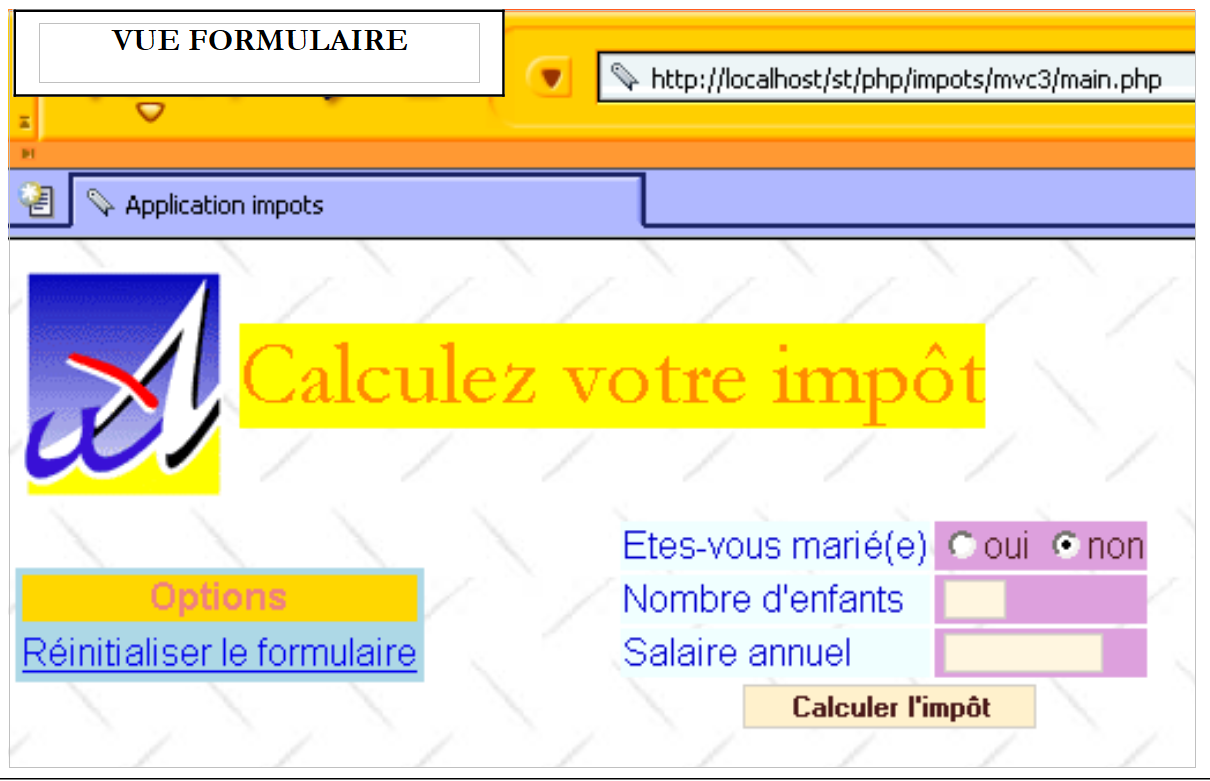 |
如果用户提供了有效数据,系统将计算税款:
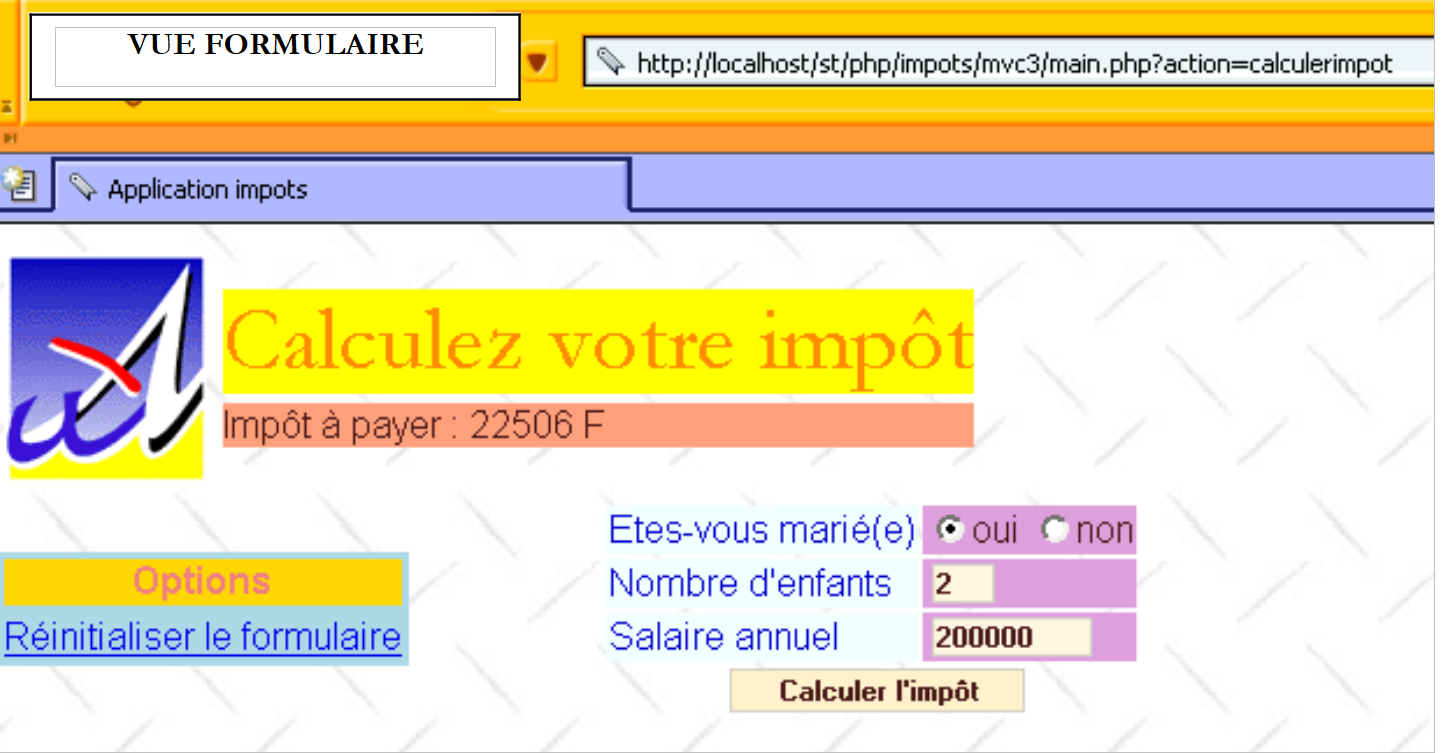 |
若用户输入有误,将显示错误页面:
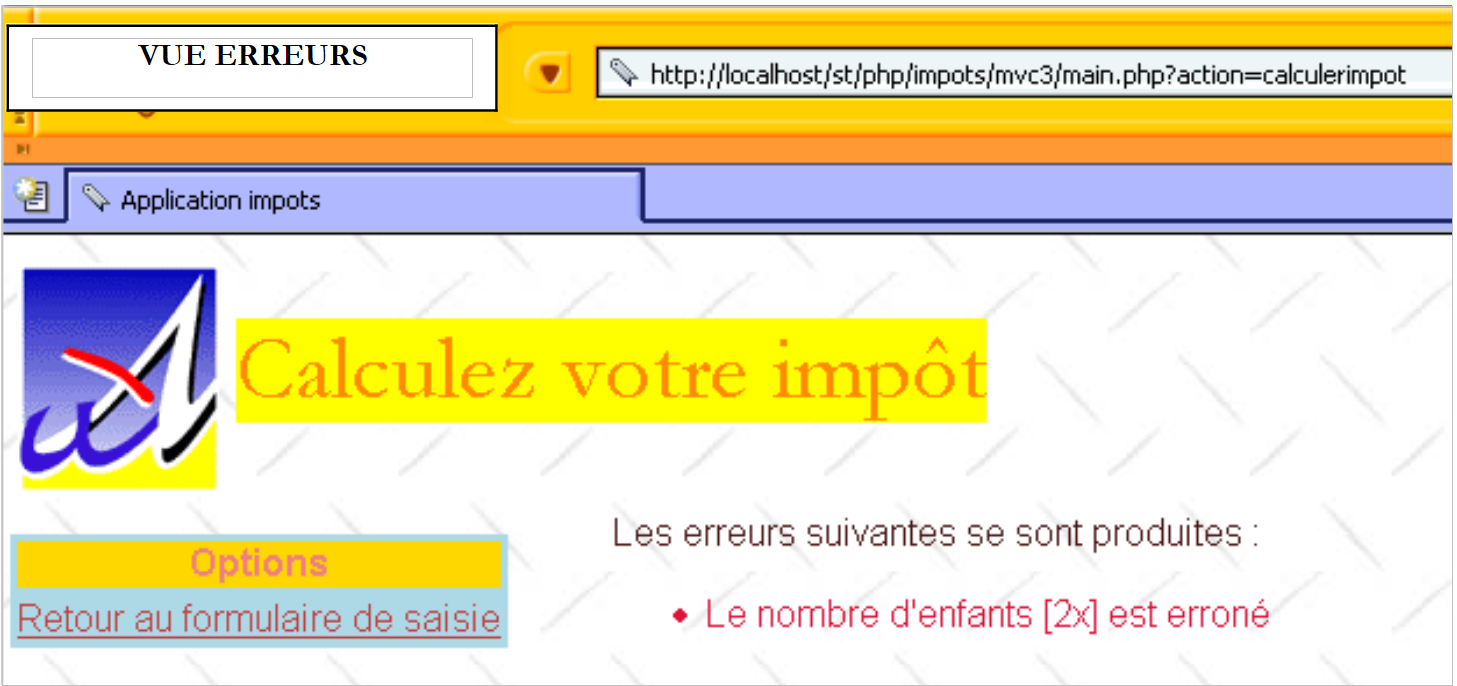 |
若用户点击链接 [Retour au formulaire de saisie],将返回其已提交的表单:
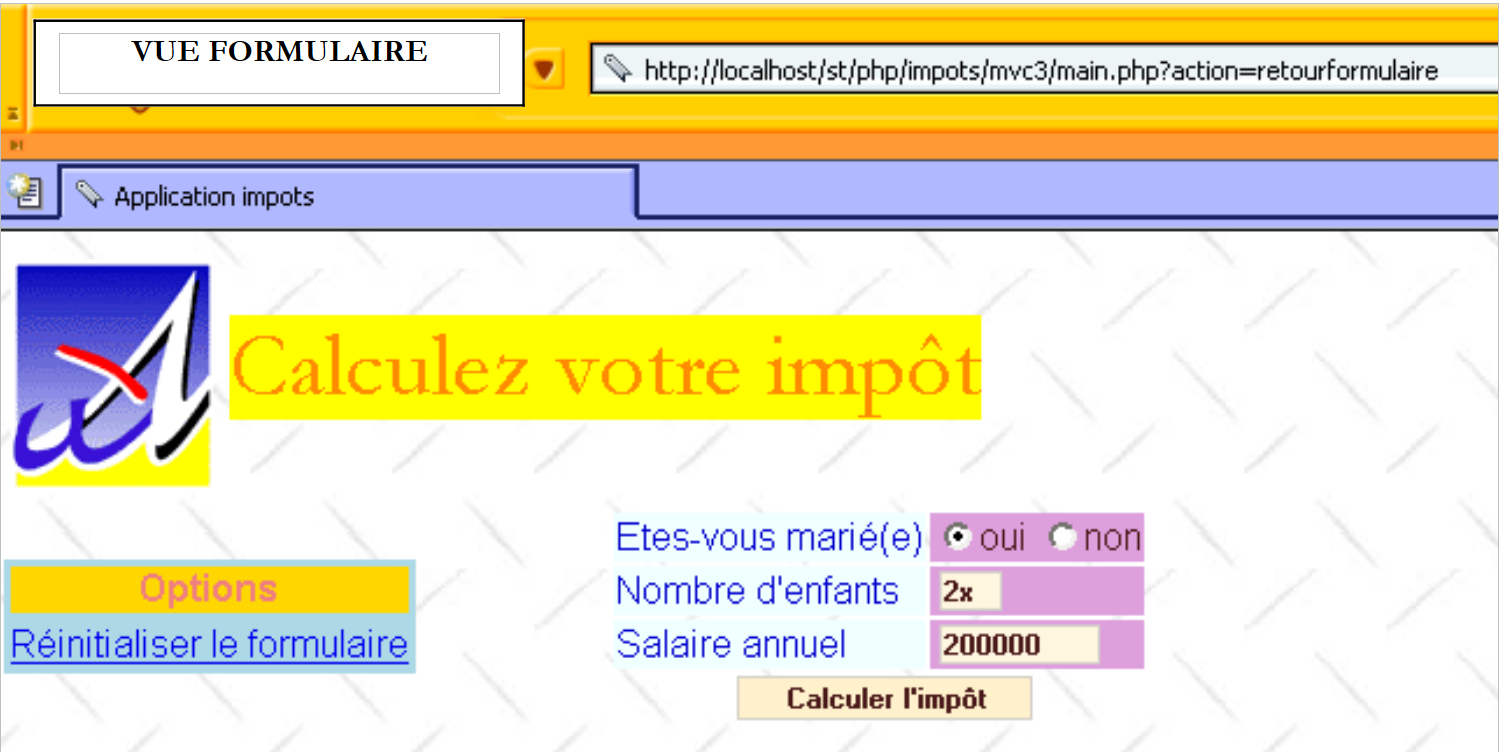 |
如果在此情况下,他使用链接 [Réinitialiser le formulaire],将看到一个空表单:
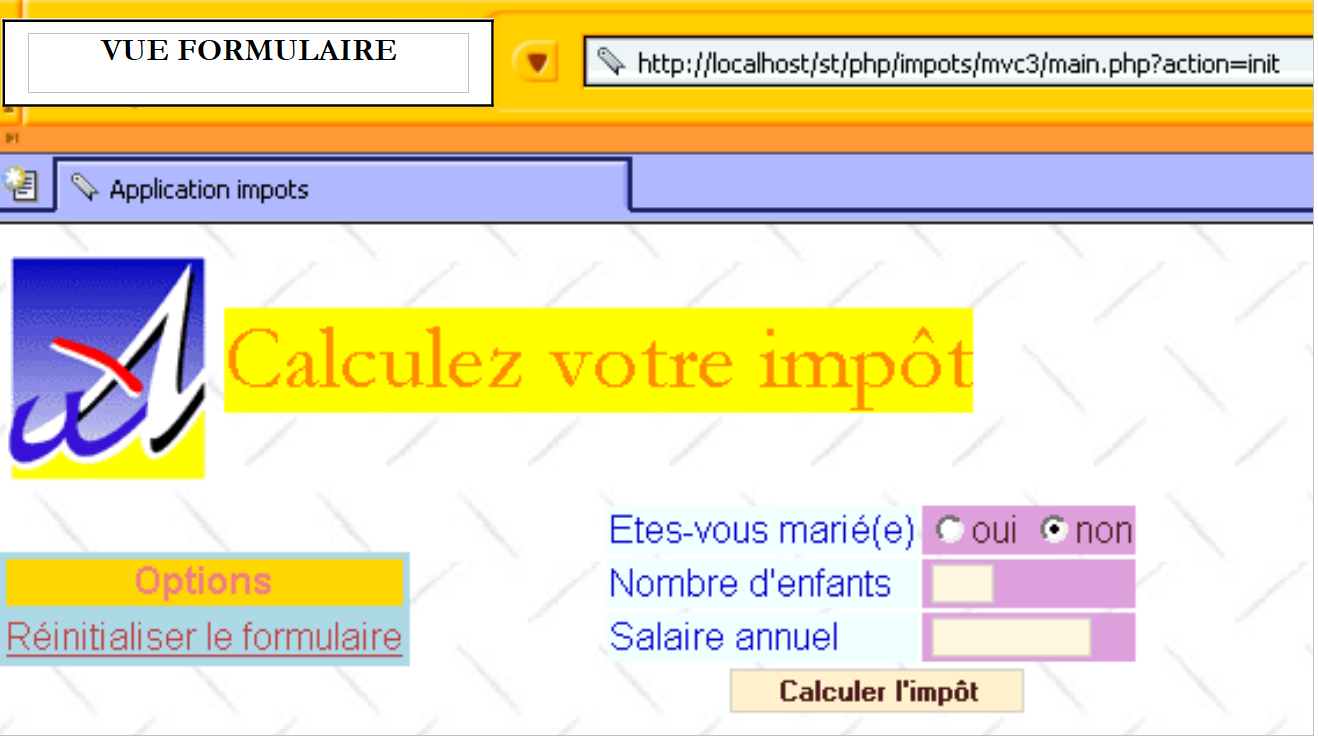 |
需要注意的是,应用程序确实使用了与之前相同的操作。唯一改变的是响应的呈现形式。
4.16.3. 基本视图
基本视图 [vue1] 将像前面的示例一样与脚本 v-bandeau.php 关联:
<table>
    <tr>
      <td><img src="univ01.gif"></td>
    <td>
      <table>
        <tr>
          <td><div class='titre'><?php echo $dReponse['titre'] ?></div></td>
        </tr>
        <tr>
            <td><div class='resultat'><?php echo $dReponse['resultat']?></div></td>
        </tr>
      </table>
    </td>
  </tr>
</table>
该视图包含两个动态元素:
- $dReponse['titre']:要显示的标题
- $dReponse['resultat']:应缴税额
基本视图 [vue2] 将与以下脚本 v-menu.php 相关联:
<table class="menu">
    <tr>
      <td><div class="menu">Options</div></td>
  </tr>
  <?php
      for($i=0;$i<count($dReponse['liens']);$i++){
        echo '<tr><td><div class="option"><a href="'.
          $dReponse['liens'][$i]['url'].
        '">'.$dReponseQZXW2HTMLBWydsaWVucyddZQXQZXW2HTMLBWyRpXQZQXQZXW2HTMLBWyd0ZXh0ZSddZQX."</a></div></td></tr>\n";
    }//$i
  ?>
</table>
该视图包含以下动态元素:
- $dReponse['liens']:要在 [vue2] 中显示的链接数组。数组中的每个元素都是一个包含两个键的字典:
- 'url':链接的目标网址
- '文本':链接文本
基础视图 [vue3] 将关联脚本 v-formulaire2.php(若需显示数据输入表单),或关联脚本 v-erreurs2.php(若需显示错误页面)。 脚本 v-formulaire2.php 的代码如下:
<form method="post" action="main.php?action=calculerimpot">
    <table>
      <tr>
        <td class="libelle">Etes-vous marié(e)</td>
      <td class="valeur">
          <input type="radio" name="optmarie" <?php echo $dReponse['optoui'] ?> value="oui">oui
          <input type="radio" name="optmarie" <?php echo $dReponse['optnon'] ?> value="non">non
      </td>
    </tr>
    <tr>
        <td class="libelle">Nombre d'enfants</td>
      <td class="valeur">
          <input type="text" class="text" name="txtenfants" size="3" value="<?php echo $dReponse['enfants'] ?>"
      </td>
    </tr>
    <tr>
        <td class="libelle">Salaire annuel</td>
      <td class="valeur">
          <input type="text" class="text" name="txtsalaire" size="10" value="<?php echo $dReponse['salaire'] ?>"
      </td>
    </tr>
    <tr>
        <td colspan="2" align="center"><input type="submit" class="submit" value="Calculer l'impôt"></td>
    </tr>
    </table>
</form>
该视图中需由视图生成器定义的动态部分与字典 $dReponse 中的以下键相关联:
- optoui:名为 optoui 的单选按钮的状态
- optnon:名为 optnon 的单选按钮的状态
- children:要放入 txtenfants 字段中的子女数量
- salaire:要放入 txtsalaire 字段的年薪
生成错误页面的脚本名为 v-erreurs2.php。其代码如下:
Les erreurs suivantes se sont produites :
<ul>
    <?php
        for($i=0;$i<count($dReponse["erreurs"]);$i++){
            echo "<li class='erreur'>".$dReponse["erreurs"][$i]."</li>\n";
        }//用于
    ?>
</ul>
<div class="info"><?php echo $dReponse["info"] ?></div>
视图生成器需定义的该视图的动态部分与字典 $dReponse 中的以下键相关联:
- 错误:错误消息表
- info:信息消息
4.16.4. 样式表
未发生变更。仍为 style1.css。
4.16.5. 新的配置文件
为了引入这些新视图,我们需要修改配置文件中的某些行。
<?php

     // PHP配置
  ini_set("register_globals","off");
  ini_set("display_errors","off");
  ini_set("expose_php","off");

  // 待包含模块列表
  $dConfig['includes']=array('c-impots-data.php','c-impots-calcul.php');

  // 应用程序控制器
  $dConfig['webapp']=array('titre'=>"Calculez votre impôt");

  // 应用程序视图配置
  $dConfig['vuesReponse']['modele1']=array('url'=>'m-reponse.php');
  $dConfig['vuesReponse']['modele2']=array('url'=>'m-reponse2.php');
  $dConfig['vues']['formulaire']=array('url'=>'v-formulaire.php');
  $dConfig['vues']['erreurs']=array('url'=>'v-erreurs.php');
  $dConfig['vues']['formulaire2']=array('url'=>'v-formulaire2.php');
  $dConfig['vues']['erreurs2']=array('url'=>'v-erreurs2.php');
  $dConfig['vues']['bandeau']=array('url'=>'v-bandeau.php');
  $dConfig['vues']['menu']=array('url'=>'v-menu.php');
  $dConfig['style']['url']='style1.css';

  // 应用程序操作配置
  $dConfig['actions']['get:init']=array('url'=>'a-init.php');
  $dConfig['actions']['post:calculerimpot']=array('url'=>'a-calculimpot.php');
  $dConfig['actions']['get:retourformulaire']=array('url'=>'a-retourformulaire.php');
  $dConfig['actions']['post:effacerformulaire']=array('url'=>'a-init.php');
  $dConfig['actions']['enchainementinvalide']=array('url'=>'a-enchainementinvalide.php');
  $dConfig['actions']['actionInvalide']=array('url'=>'a-actioninvalide.php');

  // 应用程序状态配置
  $dConfig['etats']['e-formulaire']=array(
       'actionsautorisees'=>array('post:calculerimpot','get:init','post:effacerformulaire'),
    'vue'=>'e-formulaire2.php');
  $dConfig['etats']['e-erreurs']=array(
      'actionsautorisees'=>array('get:retourformulaire','get:init'),
      'vue'=>'e-erreurs2.php');
  $dConfig['etats']['sansetat']=array('actionsautorisees'=>array('get:init'));

  // 应用程序模型配置
    $dConfig["DSN"]=array(
        "sgbd"=>"mysql",
        "user"=>"seldbimpots",
        "mdp"=>"mdpseldbimpots",
        "host"=>"localhost",
        "database"=>"dbimpots"
    );
?>
主要修改在于更改与报表 [e-formulaire] 和 [e-erreurs] 关联的视图生成器。完成此操作后,新的视图生成器将负责生成新的响应页面。
4.16.6. 与报表 [e-formulaire] 关联的视图生成器
在配置文件中,报表 [e-formulaire] 现已关联到视图生成器 e-formulaire2.php。该脚本的代码如下:
<?php
  // 准备表单响应
  $dReponse['titre']=$dConfig['webapp']['titre'];
    $dReponse['vuereponse']='modele2';
  $dReponse['vue1']=$dConfig['vues']['bandeau']['url'];
  $dReponse['vue2']=$dConfig['vues']['menu']['url'];
  $dReponse['vue3']=$dConfig['vues']['formulaire2']['url'];
  $dReponse['urlstyle']=$dConfig['style']['url'];
  $dReponse['titre']=$dConfig['webapp']['titre'];
  $dReponse['liens']=array(
      array('texte'=>'Réinitialiser le formulaire', 'url'=>'main.php?action=init')
  );

  // 根据要生成的表单类型进行配置
    $type=$dSession['etat']['secondaire'];
  if($type=='init'){
      // 空白表单
    $dReponse['optnon']='checked';
  }//if
  if($type=='calculimpot'){
      // 需要重新显示存储在请求中的输入参数
    $dReponse['optoui']=$_POST['optmarie']=='oui' ? 'checked' : '';
    $dReponse['optnon']=$dReponse['optoui'] ? '' : 'checked';
    $dReponse['enfants']=$_POST['txtenfants'];
    $dReponse['salaire']=$_POST['txtsalaire'];
    $dReponse['resultat']='Impôt à payer : '.$dReponse['impot'].' F';
  }//if
  if($type=='retourformulaire'){
      // 我们需要重新显示存储在会话中的输入参数
    $dReponse['optoui']=$dSession['requete']['optmarie']=='oui' ? 'checked' : '';
    $dReponse['optnon']=$dReponse['optoui']=='' ? 'checked' : '';
    $dReponse['enfants']=$dSession['requete']['txtenfants'];
    $dReponse['salaire']=$dSession['requete']['txtsalaire'];
  }//if
  // 发送响应
  finSession($dConfig,$dReponse,$dSession);
?>
主要修改如下:
- 视图生成器指示其希望使用响应模板 modele2
- 因此,它为响应模板modele2填充了动态元素$dReponse['vue1']、$dReponse['vue2']、 $dReponse['vue3'],这三个元素均是响应模板 modele2 所必需的。
- 生成器还会填充动态元素 $dReponse['liens'],该元素用于确定在响应的 [vue2] 区域中显示的链接。
4.16.7. 与报表 [e-erreurs] 关联的视图生成器
在配置文件中,报表 [e-erreurs] 现已关联到视图生成器 e-erreurs2.php。该脚本的代码如下:
<?php

  // 准备错误响应
  $dReponse['titre']=$dConfig['webapp']['titre'];
    $dReponse['vuereponse']='modele2';
  $dReponse['vue1']=$dConfig['vues']['bandeau']['url'];
  $dReponse['vue2']=$dConfig['vues']['menu']['url'];
  $dReponse['vue3']=$dConfig['vues']['erreurs2']['url'];
  $dReponse['urlstyle']=$dConfig['style']['url'];
  $dReponse['titre']=$dConfig['webapp']['titre'];
  $dReponse['liens']=array(
      array('texte'=>'Retour au formulaire de saisie', 'url'=>'main.php?action=retourformulaire')
  );

  // 补充信息
  $type=$dSession['etat']['secondaire'];
  if($type=='database'){
      $dReponse['info']="Veuillez avertir l'administrateur de l'application";
  }

  // 发送响应
  finSession($dConfig,$dReponse,$dSession);
?>
所做的修改与视图生成器 e-formulaire2.php 中的修改完全一致。
4.17. 结论
我们通过一个示例展示了通用控制器带来的优势。我们无需编写该控制器,只需编写应用程序中操作、视图生成器和视图的脚本即可。此外,我们还展示了将操作与视图分离的好处。这样,我们就能在不修改操作脚本任何一行代码的情况下,改变响应的外观。 仅修改了参与视图生成的脚本。要实现这一点,操作脚本不得对将要显示其计算结果的视图做任何假设。它只需将这些信息传递给控制器,由控制器转交给视图生成器进行格式化。这是一条铁律:操作必须与视图完全解耦。
在本章中,我们探讨了Java开发者熟知的Struts开发理念。一个名为php.mvc的开源项目,支持基于Struts理念进行Web/PHP开发。更多信息请访问网站 http://www.phpmvc.net/。