3. 第2条 - 三层Web架构示例
本文目标:
- 三层架构
- 基础MVC Web架构
- Struts MVC 架构
- Spring MVC 架构
使用的工具:
- Spring:http://www.springframework.org/
- Ibatis SqlMap:http://www.ibatis.com/
- JUnit:http://www.junit.org/index.htm
- Eclipse:http://www.eclipse.org/
- Struts:http://struts.apache.org/
- Firebird:http://firebird.sourceforge.net/:数据库管理系统(DBMS)、JDBC驱动程序。实际上,任何JDBC源代码均可使用。
- IBExpert 个人版:http://www.hksoftware.net/download/ibep_2005.2.14.1_full.exe(2005年3月)。IBExpert 允许您通过图形界面管理 Firebird 数据库管理系统。
- Tomcat:http://jakarta.apache.org/tomcat/
- Eclipse 的 Tomcat 插件:http://www.sysdeo.com/eclipse/tomcatPlugin.html。另请参阅文档 https://tahe.developpez.com/java/eclipse/
理解本文需要具备若干先决条件。其中部分内容可参见我撰写的其他文档。在这些情况下,我会予以引用。当然,这仅供参考,读者可自由选择自己偏好的资源。
- Java 语言:[https://tahe.developpez.com/java/cours]
- Java Web 编程:[https://tahe.developpez.com/java/web/]
- 使用 Java、Eclipse 和 Tomcat 进行 Web 编程:[https://tahe.developpez.com/java/eclipse/]
- 使用 Struts 进行 Web 编程:[https://tahe.developpez.com/java/struts/]
- 使用 Spring 的 IoC 特性:[https://tahe.developpez.com/java/springioc]
- JSTL 标签库:[https://tahe.developpez.com/java/eclipse/](部分内容)
- Ibatis SqlMap 文档:[https://prdownloads.sourceforge.net/ibatisnet/DevGuide.pdf?download]
- Firebird:[http://firebird.sourceforge.net/pdfmanual/Firebird-1.5-QuickStart.pdf](2005年3月)。
本文中的思路源于我2004年夏天读过的一本书,这是Rod Johnson的一部杰作:《J2EE Development without EJB》(Wrox出版社)。
3.1. webarticles 应用程序
在此,我们将介绍一个电子商务Web应用程序的若干组件。该应用程序将允许Web客户端
- 从数据库中查看商品列表
- 将部分商品加入电子购物车
- 确认购物车。此确认操作将仅更新数据库中已购商品的库存数量。
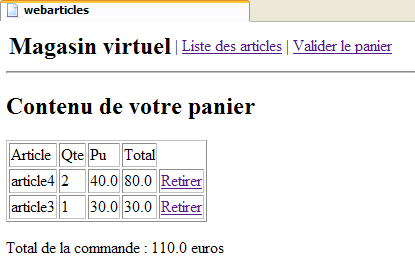
向用户展示的不同视图如下:
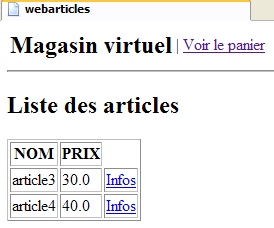
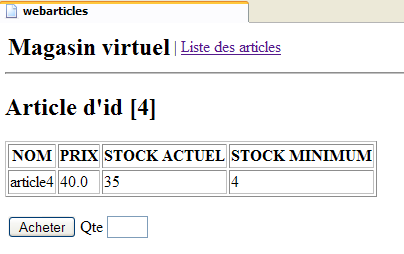
- [购物车] 视图,用于显示客户购物车中的商品
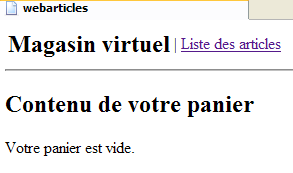
- [清空购物车] 视图,用于客户购物车为空的情况
- [ERRORS] 视图,用于报告任何应用程序错误
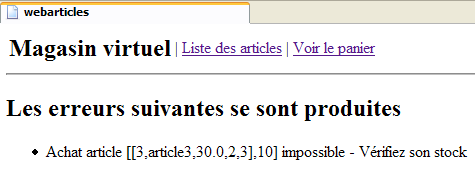
3.2. 应用程序总体架构
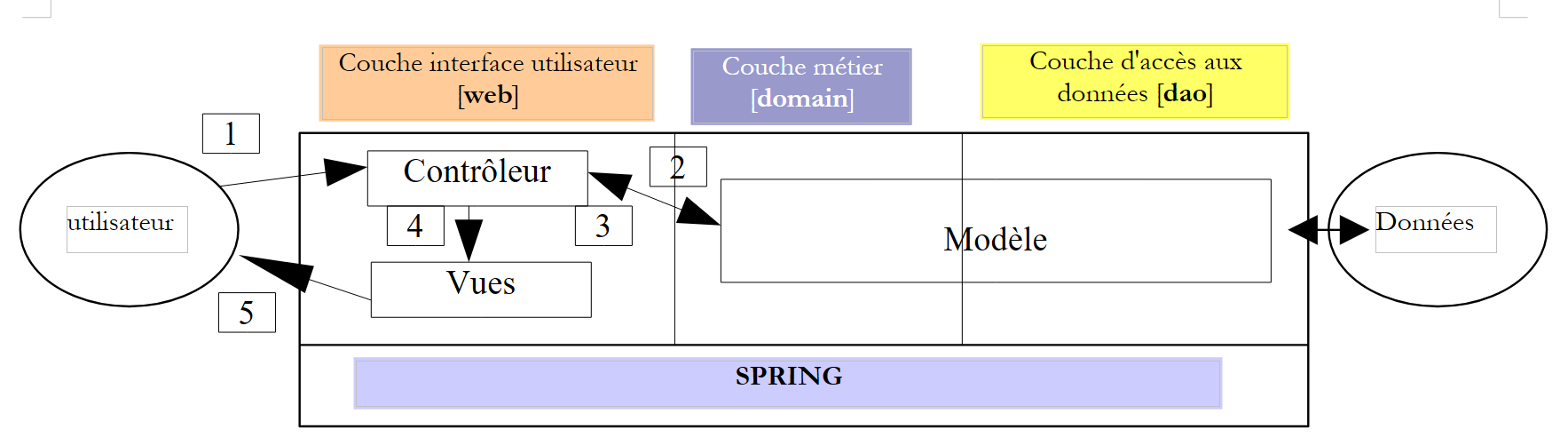
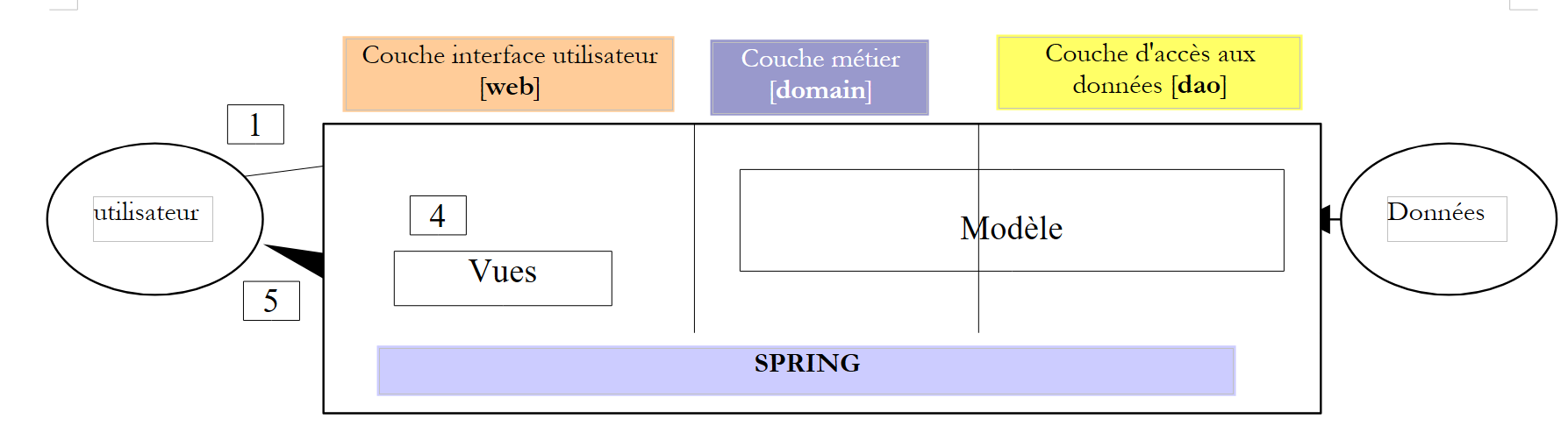
我们希望构建一个采用以下三层架构的应用程序:
- 通过使用 Java 接口,使这三层相互独立
- 不同层之间的集成由Spring负责
- 每个层都位于独立的包中:web(用户界面层)、domain(业务层)和DAO(数据访问层)。
在此我们假设 [domain] 和 [DAO] 层已经就位。我们将仅关注 [web] 层,并建议通过以下几种方式构建该层:
- 使用经典的Servlet控制器技术——JSP页面
- 使用 Struts MVC 技术
- 使用 Spring MVC 技术
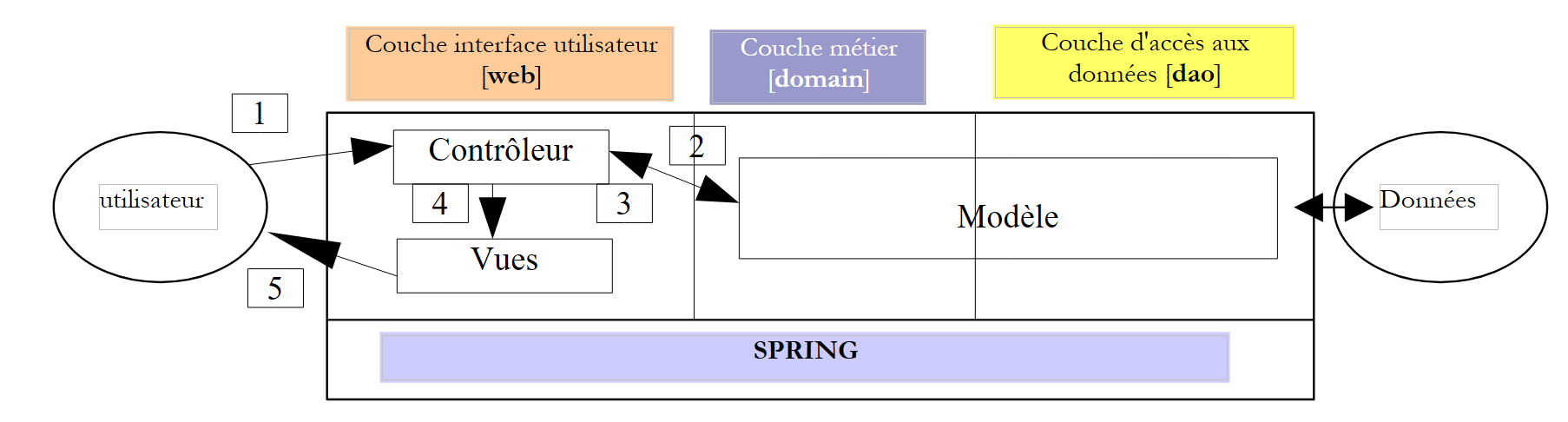
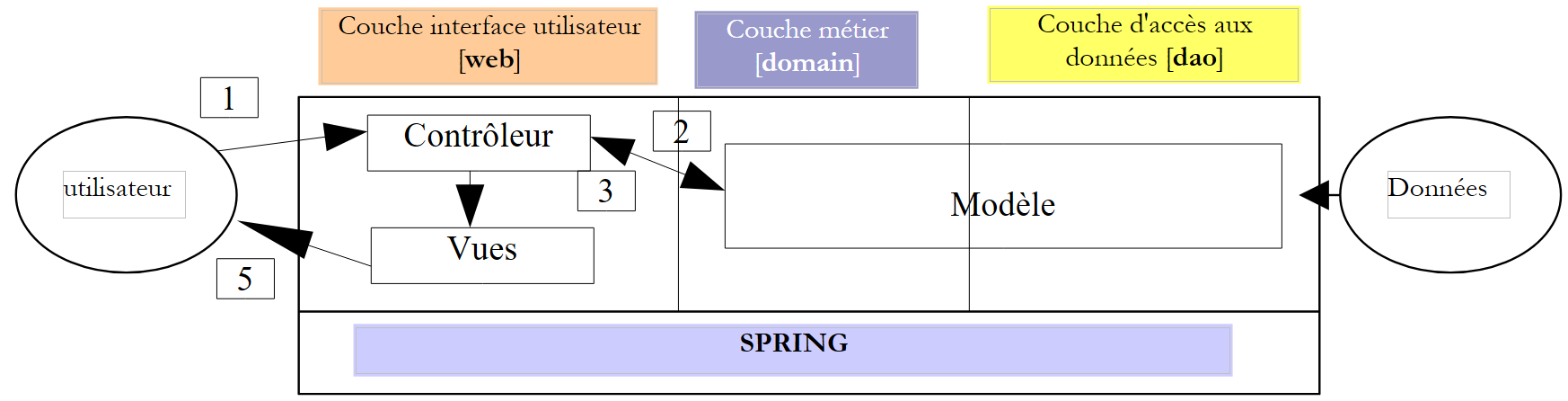
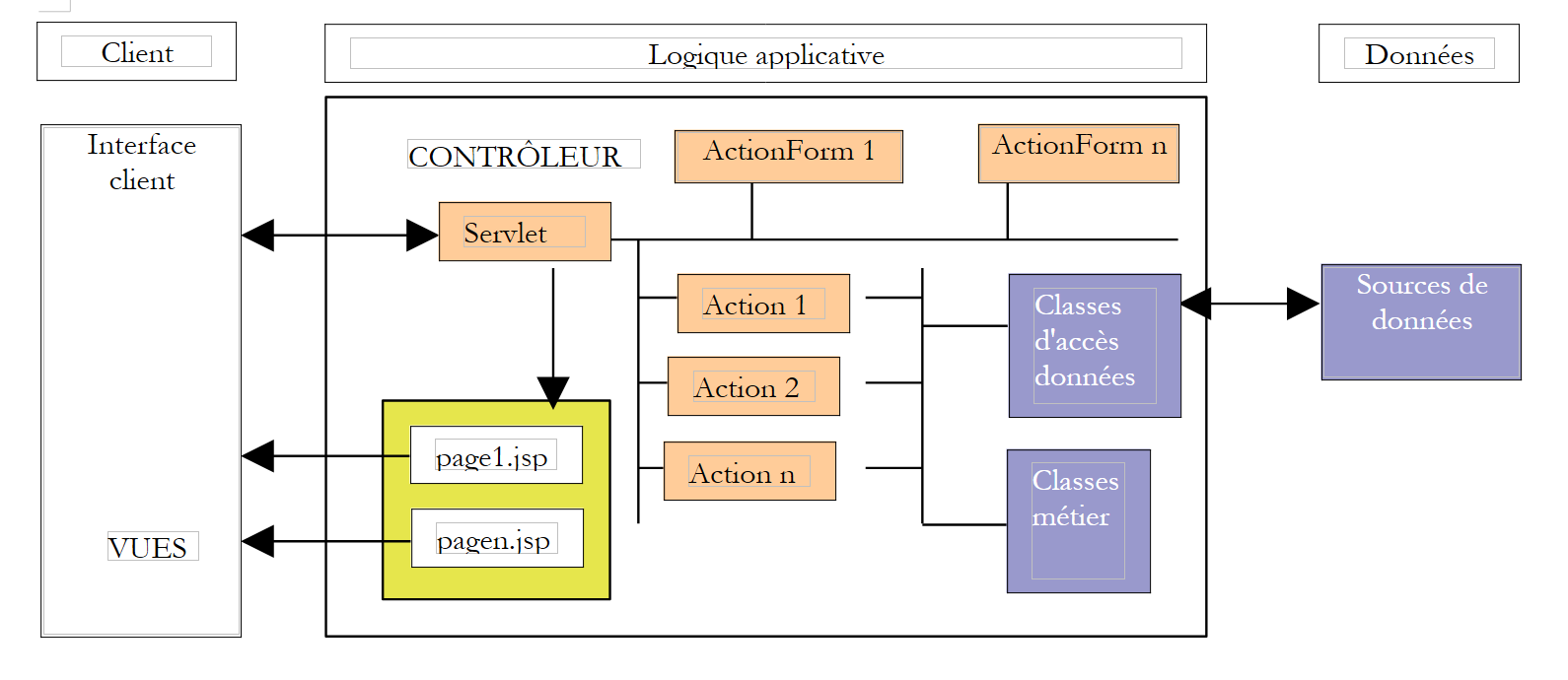
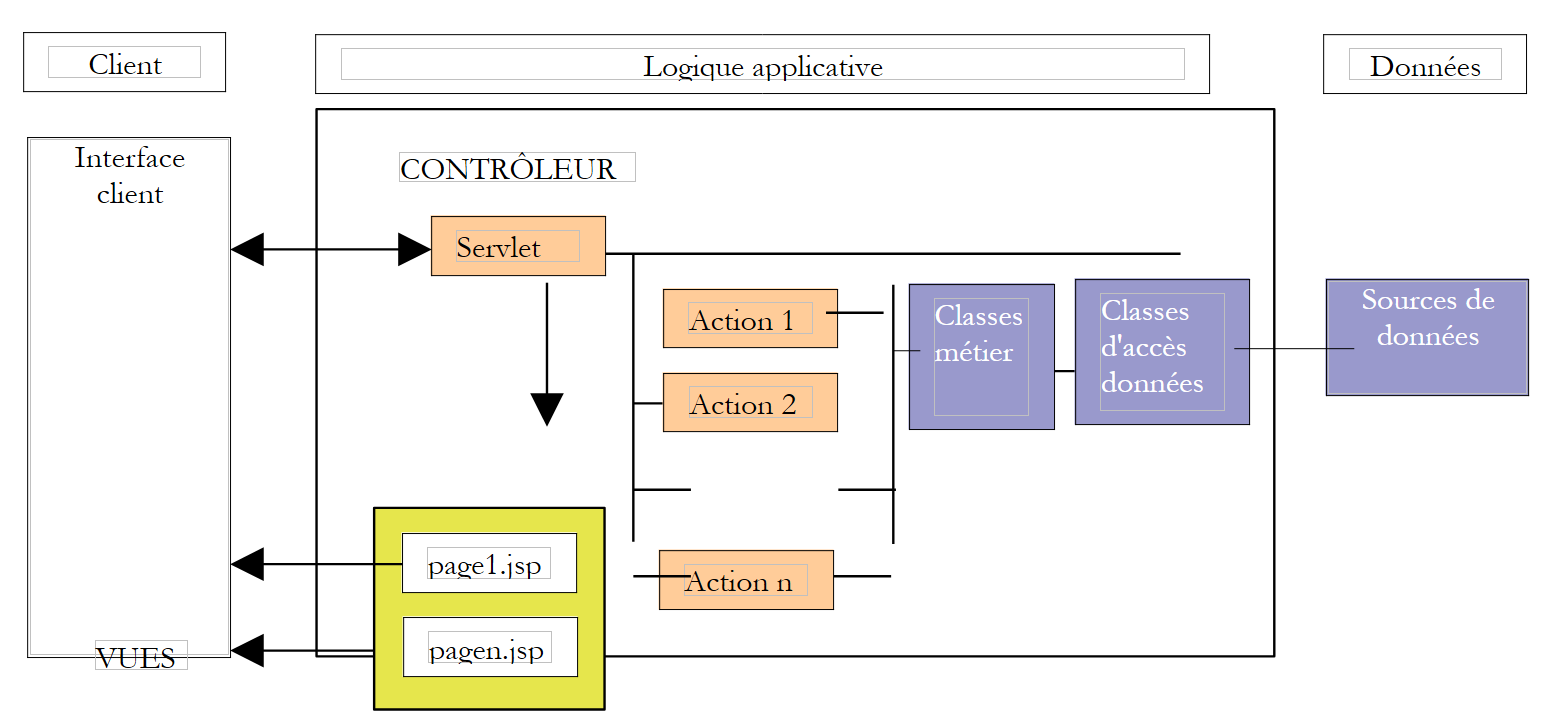
无论采用哪种方式,应用程序都将遵循 MVC(模型-视图-控制器)架构。若参考上文的分层图,MVC 架构在其中的位置如下:
处理客户端请求的步骤如下:
- 客户端向控制器发送请求。该控制器是一个处理所有客户端请求的Servlet,它是应用程序的入口点,即MVC架构中的“C”。
- 控制器处理该请求。为此,它可能需要业务层的协助,该层在MVC架构中被称为“M”(模型)。
- 控制器从业务层接收响应。客户端的请求已处理完毕。这可能会触发多种可能的响应。一个典型的例子是
- 若请求无法正确处理,则显示错误页面
- 否则则返回确认页面
- 控制器选择要发送给客户端的响应(即视图)。这通常是一个包含动态元素的页面。控制器将这些元素提供给视图。
- 视图被发送给客户端。这就是 MVC 中的 V。
3.3. 模型
接下来我们探讨MVC中的M。模型由以下元素组成:
- 业务类
- 数据访问类
- 数据库
3.3.1. 数据库
该数据库仅包含一个名为 ARTICLES 的表。该表是通过以下 SQL 命令生成的:
| CREATE TABLE ARTICLES (
ID INTEGER NOT NULL,
NOM VARCHAR(30) NOT NULL,
PRIX NUMERIC(15,2) NOT NULL,
STOCKACTUEL INTEGER NOT NULL,
STOCKMINIMUM INTEGER NOT NULL
);
/* constraints */
ALTER TABLE ARTICLES ADD CONSTRAINT CHK_STOCKACTUEL check (STOCKACTUEL>=0);
ALTER TABLE ARTICLES ADD CONSTRAINT CHK_STOCKMINIMUM check (STOCKMINIMUM>=0);
ALTER TABLE ARTICLES ADD CONSTRAINT CHK_PRIX check (PRIX>=0);
ALTER TABLE ARTICLES ADD CONSTRAINT CHK_NOM check (NOM<>'');
/* primary key */
ALTER TABLE ARTICLES ADD CONSTRAINT PK_ARTICLES PRIMARY KEY (ID);
|
| 用于唯一标识商品的主键 |
| 项目名称 |
| 其价格 |
| 当前库存 |
| 库存水平低于该值时必须下达补货订单 |
在以下测试中,使用了 [Firebird] 数据库。[Firebird] 是一款“开源”数据库管理系统(DBMS)。JDBC 驱动程序 [firebirdsql-full.jar] 位于 Web 应用程序的 [WEB-INF/lib] 文件夹中。
3.3.2. 模型包
此处的 M 模型以三个压缩包的形式提供:
- istia.st.articles.dao:包含 [DAO] 层的数据访问类
- istia.st.articles.exception:包含用于此文章管理的异常类
- istia.st.articles.domain:包含 [domain] 层的业务类
归档 | 内容 | role |
istia.st.articles.dao | - 包含 [istia.st.articles.dao] 包,该包本身包含以下元素: - [IArticlesDao]:用于访问 Dao 层的接口。这是 [domain] 层可见的唯一接口,它看不到其他接口。 - [Article]:定义文章的类 - [ArticlesDaoSqlMap]:使用 SqlMap 工具实现 [IArticlesDao] 接口的类 | 数据访问层——完全位于 Web 应用程序三层架构的 [dao] 层内 |
istia.st.articles.domain | - 包含 [istia.st.articles.domain] 包,该包本身包含以下元素: - [IArticlesDomain]:用于访问 [domain] 层的接口。这是 Web 层可见的唯一接口,它看不到其他接口。 - [ArticlePurchases]:一个实现 [IArticlesDomain] 的类 - [Purchase]:表示客户购买行为的类 - [ShoppingCart]:表示客户总购买量的类 | 代表 Web 购买模型 - 完全位于 Web 应用程序三层架构的 [domain] 层内 |
istia.st.articles.exception | - 包含 [istia.st.articles.exception] 包,该包本身包含以下元素: - [UncheckedAccessArticlesException]:定义 [RuntimeException] 异常的类。一旦发生数据访问问题,[dao] 层会立即抛出此类异常。 | |
3.3.3. [istia.st.articles.dao] 包
定义文章的类如下:
| package istia.st.articles.dao;
import istia.st.articles.exception.UncheckedAccessArticlesException;
/**
* @author ST - ISTIA
*
*/
public class Article {
private int id;
private String nom;
private double prix;
private int stockActuel;
private int stockMinimum;
/**
* constructeur par défaut
*/
public Article() {
}
public Article(int id, String nom, double prix, int stockActuel,
int stockMinimum) {
// init instance attributes
setId(id);
setNom(nom);
setPrix(prix);
setStockActuel(stockActuel);
setStockMinimum(stockMinimum);
}
// getters - setters
public int getId() {
return id;
}
public void setId(int id) {
// valid id?
if (id < 0)
throw new UncheckedAccessArticlesException("id[" + id + "] invalide");
this.id = id;
}
public String getNom() {
return nom;
}
public void setNom(String nom) {
// valid name?
if(nom==null || nom.trim().equals("")){
throw new UncheckedAccessArticlesException("Le nom est [null] ou vide");
}
this.nom = nom;
}
public double getPrix() {
return prix;
}
public void setPrix(double prix) {
// valid price?
if(prix<0) throw new UncheckedAccessArticlesException("Prix["+prix+"]invalide");
this.prix = prix;
}
public int getStockActuel() {
return stockActuel;
}
public void setStockActuel(int stockActuel) {
// valid stock?
if (stockActuel < 0)
throw new UncheckedAccessArticlesException("stockActuel[" + stockActuel + "] invalide");
this.stockActuel = stockActuel;
}
public int getStockMinimum() {
return stockMinimum;
}
public void setStockMinimum(int stockMinimum) {
// valid stock?
if (stockMinimum < 0)
throw new UncheckedAccessArticlesException("stockMinimum[" + stockMinimum + "] invalide");
this.stockMinimum = stockMinimum;
}
public String toString() {
return "[" + id + "," + nom + "," + prix + "," + stockActuel + ","
+ stockMinimum + "]";
}
}
|
该类提供:
- 一个用于设置项目 5 项信息的构造函数
- 用于读写这5项信息的访问器(通常称为getter/setter)。这些方法的名称遵循JavaBean标准。在DAO层中使用JavaBean对象与DBMS数据进行交互是标准做法。
- 对项目输入数据的验证。若数据无效,将抛出异常。
- 一个 toString 方法,用于将项的值转换为字符串返回。这在应用程序调试中通常非常有用。
[IArticlesDao] 接口定义如下:
| package istia.st.articles.dao;
import istia.st.articles.domain.Article;
import java.util.List;
/**
* @author ST-ISTIA
*
*/
public interface IArticlesDao {
/**
* @return : liste de tous les articles
*/
public List getAllArticles();
/**
* @param unArticle :
* l'article à ajouter
*/
public int ajouteArticle(Article unArticle);
/**
* @param idArticle :
* id de l'article à supprimer
*/
public int supprimeArticle(int idArticle);
/**
* @param unArticle :
* l'article à modifier
*/
public int modifieArticle(Article unArticle);
/**
* @param idArticle :
* id de l'article cherché
* @return : l'article trouvé ou null
*/
public Article getArticleById(int idArticle);
/**
* vide la table des articles
*/
public void clearAllArticles();
/**
*
* @param idArticle id de l'article dont on change le stock
* @param mouvement valeur à ajouter au stock (valeur signée)
*/
public int changerStockArticle(int idArticle, int mouvement);
}
|
接口中各个方法的作用如下:
| 返回 ARTICLES 表中所有条目,以 [Article] 对象列表的形式呈现 |
| 清空 ARTICLES 表 |
| 返回由主键标识的 [Article] 对象 |
| 允许您向 ARTICLES 表添加一篇文章 |
| 允许您修改 [ARTICLES] 表中的某条记录 |
| 允许您从 [ARTICLES] 表中删除一个项目 |
| 允许您修改 [ARTICLES] 表中某项商品的库存 |
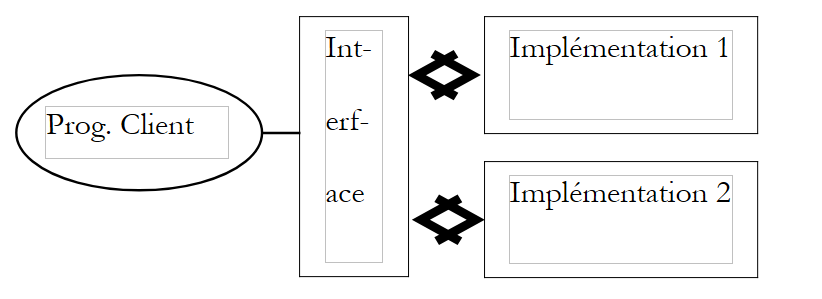
该接口为客户端程序提供了一系列仅由其签名定义的方法。它不关心这些方法将如何实际实现。这为应用程序带来了灵活性。客户端程序调用的是接口,而不是该接口的特定实现。
具体实现的选择将通过 Spring 配置文件来确定。在此,我们建议使用名为 SqlMap 的开源产品来实现 IArticlesDao 接口。这样可以让我们从 Java 代码中移除所有 SQL 语句。
实现类 [ArticlesDaoSqlMap] 定义如下:
| package istia.st.articles.dao;
// Imports
import com.ibatis.sqlmap.client.SqlMapClient;
import istia.st.articles.domain.Article;
import java.util.List;
public class ArticlesDaoSqlMap implements IArticlesDao {
// Fields
private SqlMapClient sqlMap;
// Constructors
public ArticlesDaoSqlMap(String sqlMapConfigFileName) { }
// Methods
public SqlMapClient getSqlMap() {}
public void setSqlMap(SqlMapClient sqlMap) { }
public synchronized List getAllArticles() {}
public synchronized int ajouteArticle(Article unArticle) {}
public synchronized int supprimeArticle(int idArticle) {}
public synchronized int modifieArticle(Article unArticle) {}
public synchronized Article getArticleById(int idArticle) {}
public synchronized void clearAllArticles() { }
public synchronized int changerStockArticle(int idArticle, int mouvement) {}
}
|
所有数据访问方法均已进行同步处理,以防止对数据源的并发访问问题。在任何给定时刻,只有一个线程可以访问某个特定方法。
[ArticlesDaoSqlMap] 类使用了 [Ibatis SqlMap] 工具。 该工具的优势在于,它允许将数据访问的 SQL 代码与 Java 代码分离,并将其放置在配置文件中。我们稍后将有机会再次探讨这一点。要实例化 [ArticlesDaoSqlMap] 类,需要一个配置文件,其名称作为参数传递给类构造函数。该配置文件定义了以下必要信息:
- 访问包含文章的数据库管理系统
- 管理连接池
- 管理事务
在本示例中,该文件将命名为 [sqlmap-config-firebird.xml],并定义对 Firebird 数据库的访问:
| <?xml version="1.0" encoding="UTF-8" ?>
<!DOCTYPE sqlMapConfig
PUBLIC "-//iBATIS.com//DTD SQL Map Config 2.0//EN"
"http://www.ibatis.com/dtd/sql-map-config-2.dtd">
<sqlMapConfig>
<transactionManager type="JDBC">
<dataSource type="SIMPLE">
<property name="JDBC.Driver" value="org.firebirdsql.jdbc.FBDriver"/>
<property name="JDBC.ConnectionURL"
value="jdbc:firebirdsql:localhost/3050:D:/data/Databases/firebird/dbarticles.gdb"/>
<property name="JDBC.Username" value="sysdba"/>
<property name="JDBC.Password" value="masterkey"/>
<property name="JDBC.DefaultAutoCommit" value="true"/>
</dataSource>
</transactionManager>
<sqlMap resource="articles.xml"/>
</sqlMapConfig>
|
上述引用的配置文件 [articles.xml] 定义了如何根据数据库管理系统(DBMS)中 [ARTICLES] 表的一行数据,构建类 [istia.st.articles.dao.Article] 的实例。它还定义了允许 [dao] 层从 Firebird 数据源检索数据的 SQL 查询。
| <?xml version="1.0" encoding="UTF-8" ?>
<!DOCTYPE sqlMap
PUBLIC "-//iBATIS.com//DTD SQL Map 2.0//EN"
"http://www.ibatis.com/dtd/sql-map-2.dtd">
<sqlMap namespace="Articles">
<!-- an alias to the istia.st.articles.dao.Article class -->
<typeAlias alias="article" type="istia.st.articles.dao.Article"/>
<!-- mapping ORM : row table ARTICLES - instance class Article -->
<resultMap id="article" class="article">
<result property="id" column="ID"/>
<result property="nom" column="NOM"/>
<result property="prix" column="PRIX"/>
<result property="stockActuel" column="STOCKACTUEL"/>
<result property="stockMinimum" column="STOCKMINIMUM"/>
</resultMap>
<!-- query SQL to obtain all items -->
<statement id="getAllArticles" resultMap="article">
select id, nom, prix,
stockactuel, stockminimum from ARTICLES
</statement>
<!-- query SQL to delete all items -->
<statement id="clearAllArticles">delete from ARTICLES</statement>
<!-- the SQL query to insert an article -->
<statement id="insertArticle">
insert into ARTICLES (id, nom, prix,
stockactuel, stockminimum) values
(#id#,#nom#,#prix#,#stockactuel#,#stockminimum#)
</statement>
<!-- the SQL query to delete a given item -->
<statement id="deleteArticle">delete FROM ARTICLES where id=#id#</statement>
<!-- query SQL to modify a given item -->
<statement id="modifyArticle">
update ARTICLES set nom=#nom#,
prix=#prix#,stockactuel=#stockactuel#,stockminimum=#stockminimum# where
id=#id#
</statement>
<!-- query SQL to obtain a given item -->
<statement id="getArticleById" resultMap="article">
select id, nom, prix,
stockactuel, stockminimum FROM ARTICLES where id=#id#
</statement>
<!-- query SQL to modify the stock of a given item -->
<statement id="changerStockArticle">
update ARTICLES set
stockActuel=stockActuel+#mouvement#
where id=#id# and stockActuel+#mouvement#>=0
</statement>
</sqlMap>
|
[dao] 包的代码可在附录中找到。
3.3.4. [istia.st.articles.domain] 包
[IArticlesDomain] 接口将 [business] 层与 [web] 层解耦。后者通过该接口访问 [business/domain] 层,而无需关心实际实现该接口的类。该接口定义了以下用于访问业务层的操作:
| package istia.st.articles.domain;
// Imports
import java.util.ArrayList;
import java.util.List;
public abstract interface IArticlesDomain {
// Methods
void acheter(Panier panier);
List getAllArticles();
Article getArticleById(int idArticle);
ArrayList getErreurs();
}
|
| 返回要显示给客户端的 [Article] 对象列表 |
Article getArticleById(int idArticle)
| 返回由 [idArticle] 标识的 [Article] 对象 |
| 处理客户的购物车,将已购商品的库存减去购买数量——若库存不足则可能失败 |
| 返回发生的错误列表——若无错误则为空 |
在此,[IArticlesDomain] 接口将由以下 [PurchaseItems] 类实现:
| package istia.st.articles.domain;
// Imports
import istia.st.articles.dao.IArticlesDao;
import istia.st.articles.exception.UncheckedAccessArticlesException;
import java.util.ArrayList;
import java.util.List;
public class AchatsArticles implements IArticlesDomain {
// Fields
private IArticlesDao articlesDao;
private ArrayList erreurs;
// Manufacturers
public AchatsArticles(IArticlesDao articlesDao) { }
// Methods
public ArrayList getErreurs() {}
public List getAllArticles() {}
public Article getArticleById(int id) {}
public void acheter(Panier panier) { }
}
|
该类实现了 [IArticlesDomain] 接口的四个方法。它有两个私有字段:
要创建该类的实例,必须提供允许访问 DBMS 数据的对象:
public PurchasesItems(IArticlesDao articlesDao)
| 构造函数 |
[Purchase] 类表示客户的购买行为:
| package istia.st.articles.domain;
public class Achat {
// Fields
private Article article;
private int qte;
// Manufacturers
public Achat(Article article, int qte) { }
// Methods
public double getTotal() {}
public Article getArticle() {}
public void setArticle(Article article) { }
public int getQte() {}
public void setQte() { }
public String toString() {}
}
|
[Purchase] 类是一个 JavaBean,具有以下字段和方法:
[Cart] 类表示客户的总购买金额:
| package istia.st.articles.domain;
// Imports
import java.util.ArrayList;
public class Panier {
// Fields
private ArrayList achats;
// Manufacturers
public Panier() { }
// Methods
public ArrayList getAchats() {}
public void ajouter(Achat unAchat) { }
public void enlever(int idAchat) { }
public double getTotal() {}
public String toString() { }
}
|
[Cart] 类是一个 JavaBean,具有以下字段和方法:
| 客户的购买记录列表——由 [Purchase] 类型对象组成的列表 |
void add(Purchase purchase)
| 将一项购买添加到购买列表中 |
| 移除商品 ID 为 idArticle 的购买记录 |
| 返回所有购买的总金额 |
| 返回购物车的字符串表示形式 |
| 返回购买项列表 |
[domain] 包的代码可在附录中找到。
3.3.5. [istia.st.articles.exception] 包
该包包含一个类,用于定义 [dao] 层在访问数据源时遇到问题所抛出的异常:
| package istia.st.articles.exception;
public class UncheckedAccessArticlesException
extends RuntimeException {
public UncheckedAccessArticlesException() {
super();
}
public UncheckedAccessArticlesException(String mesg) {
super(mesg);
}
public UncheckedAccessArticlesException(String mesg, Throwable th) {
super(mesg, th);
}
}
|
3.3.6. 模型测试
模型 M 在 Eclipse 中进行了测试,配置如下:
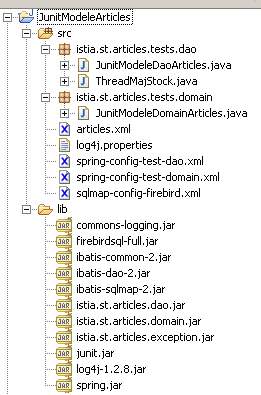
评论:
- 在 [WEB-INF/lib] 目录下,您将找到:
- 负责访问 Firebird 数据库管理系统(DBMS)的 [ibatis SqlMap] 工具所需的归档文件:ibatis-*.jar
- [Spring] 工具所需的文件:spring.jar
- 用于 [Firebird] 数据库管理系统 (DBMS) 的 JDBC 驱动程序:firebirdsql-full.jar
- 日志记录所需的压缩包:log4-*.jar、commons-logging.jar
- 用于测试模型的三个压缩包:istia.st.articles.*.jar
- [junit] 测试工具所需的压缩包
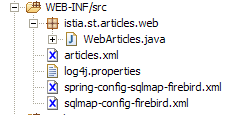
- 在 [WEB-INF/src] 目录下存放着配置文件,这些文件将由 Eclipse 自动复制到 [WEB-INF/classes] 目录:
- [sqlmap] 工具的配置文件:sqlmap-config-firebird.xml、articles.xml
- [spring] 工具的配置文件:spring-config-test-dao.xml、spring-config-test-domain.xml
- [log4j] 工具的配置文件:log4j.properties
- 在 [istia.st.articles.tests] 包中,您将找到模型测试类
3.3.6.1. 针对 [dao] 层的测试
[dao] 层的 JUnit 测试类如下所示。阅读它有助于理解 [IArticlesDao] 接口的方法是如何被调用的:
| package istia.st.articles.tests.dao;
import java.util.List;
import junit.framework.TestCase;
import istia.st.articles.dao.IArticlesDao;
import istia.st.articles.dao.Article;
import org.springframework.beans.factory.xml.XmlBeanFactory;
import org.springframework.core.io.ClassPathResource;
// test the ArticlesDaoSqlMap class
public class JunitModeleDaoArticles extends TestCase {
// an instance of the class under test
private IArticlesDao articlesDao;
protected void setUp() throws Exception {
// retrieves a data access instance
articlesDao = (IArticlesDao) (new XmlBeanFactory(new ClassPathResource(
"spring-config-test-dao.xml"))).getBean("articlesDao");
}
public void testGetAllArticles() {
// displays articles
listArticles();
}
public void testClearAllArticles() {
// empties item table
articlesDao.clearAllArticles();
// reads the ARTICLES table
List articles = articlesDao.getAllArticles();
assertEquals(0, articles.size());
}
public void testAjouteArticle() {
// delete contents of ARTICLES
articlesDao.clearAllArticles();
// reads the ARTICLES table
List articles = articlesDao.getAllArticles();
assertEquals(0, articles.size());
// insertion
articlesDao.ajouteArticle(new Article(3, "article3", 30, 30, 3));
articlesDao.ajouteArticle(new Article(4, "article4", 40, 40, 4));
// reads the ARTICLES table
articles = articlesDao.getAllArticles();
assertEquals(2, articles.size());
//the poster
listArticles();
}
public void testSupprimeArticle() {
// delete contents of ARTICLES
articlesDao.clearAllArticles();
// reads the ARTICLES table
List articles = articlesDao.getAllArticles();
assertEquals(0, articles.size());
// insertion
articlesDao.ajouteArticle(new Article(3, "article3", 30, 30, 3));
articlesDao.ajouteArticle(new Article(4, "article4", 40, 40, 4));
// reads the ARTICLES table
articles = articlesDao.getAllArticles();
assertEquals(2, articles.size());
// delete
articlesDao.supprimeArticle(4);
// reads the ARTICLES table
articles = articlesDao.getAllArticles();
assertEquals(1, articles.size());
// displays the table
listArticles();
}
public void testModifieArticle() {
// delete contents of ARTICLES
articlesDao.clearAllArticles();
// reads the ARTICLES table
List articles = articlesDao.getAllArticles();
assertEquals(0, articles.size());
// insertion
articlesDao.ajouteArticle(new Article(3, "article3", 30, 30, 3));
articlesDao.ajouteArticle(new Article(4, "article4", 40, 40, 4));
// reads the ARTICLES table
articles = articlesDao.getAllArticles();
assertEquals(2, articles.size());
// getById
Article unArticle = articlesDao.getArticleById(3);
assertEquals(unArticle.getNom(), "article3");
unArticle = articlesDao.getArticleById(4);
assertEquals(unArticle.getNom(), "article4");
// modification
articlesDao.modifieArticle(new Article(4, "article4", 44, 44, 44));
// getById
unArticle = articlesDao.getArticleById(4);
assertEquals(unArticle.getPrix(), 44, 1e-6);
// displays the table
listArticles();
}
public void testGetArticleById() {
// delete contents of ARTICLES
articlesDao.clearAllArticles();
// reads the ARTICLES table
List articles = articlesDao.getAllArticles();
assertEquals(0, articles.size());
// insertion
articlesDao.ajouteArticle(new Article(3, "article3", 30, 30, 3));
articlesDao.ajouteArticle(new Article(4, "article4", 40, 40, 4));
// reads the ARTICLES table
articles = articlesDao.getAllArticles();
assertEquals(2, articles.size());
// getById
Article unArticle = articlesDao.getArticleById(3);
assertEquals(unArticle.getNom(), "article3");
unArticle = articlesDao.getArticleById(4);
assertEquals(unArticle.getNom(), "article4");
}
private void listArticles() {
// reads the ARTICLES table
List articles = articlesDao.getAllArticles();
// display read articles
for (int i = 0; i < articles.size(); i++) {
System.out.println(((Article) articles.get(i)).toString());
}
}
public void testChangerStockArticle() throws InterruptedException {
// delete contents of ARTICLES
articlesDao.clearAllArticles();
// insertion
int nbArticles = articlesDao.ajouteArticle(new Article(3, "article3",
30, 101, 3));
assertEquals(nbArticles, 1);
nbArticles = articlesDao.ajouteArticle(new Article(4, "article4", 40,
40, 4));
assertEquals(nbArticles, 1);
// creation of 100 threads to update the stock of item 3
Thread[] taches = new Thread[100];
for (int i = 0; i < taches.length; i++) {
taches[i] = new ThreadMajStock("thread-" + i, articlesDao);
taches[i].start();
}
// we wait for the end of threads
for (int i = 0; i < taches.length; i++) {
taches[i].join();
}
// retrieve item 3 and check stock
Article unArticle = articlesDao.getArticleById(3);
assertEquals(unArticle.getNom(), "article3");
assertEquals(1, unArticle.getStockActuel());
// modification stock article 4
boolean erreur = false;
int nbLignes = articlesDao.changerStockArticle(4, -100);
assertEquals(0, nbLignes);
// displays the table
listArticles();
}
}
|
注释:
- 该测试类通过其 setUp 方法存储被测类的实例:
| // une instance de la classe testée
private IArticlesDao articlesDao;
protected void setUp() throws Exception {
// récupère une instance d'accès aux données
articlesDao = (IArticlesDao) (new XmlBeanFactory(new ClassPathResource(
"spring-config-test-dao.xml"))).getBean("articlesDao");
}
|
- 待测试的对象由 [Spring] 提供。在上文中,我们请求名为 [articlesDao] 的 Spring Bean。该 Bean 在 Spring 配置文件 [spring-config-test-dao.xml] 中定义:
| <?xml version="1.0" encoding="UTF-8"?>
<!DOCTYPE beans SYSTEM "http://www.springframework.org/dtd/spring-beans.dtd">
<beans>
<!-- data access class -->
<bean id="articlesDao" class="istia.st.articles.dao.ArticlesDaoSqlMap">
<constructor-arg index="0">
<value>sqlmap-config-firebird.xml</value>
</constructor-arg>
</bean>
</beans>
|
如上所示,[articlesDao] Bean 是 [istia.st.articles.dao.ArticlesDaoSqlMap] 类的实例。该类有一个构造函数,其参数为 [SqlMap] 工具的配置文件名称。该名称在此处提供。 该文件名为 [sqlmap-config-firebird.xml]。该文件已在前文中进行过说明,它提供了访问 DBMS 数据所需的所有必要信息。
[testChangerStockArticle] 方法会创建 100 个线程,负责减少指定商品的库存。此处的目的是测试对 DBMS 的并发访问。由于 [istia.st.articles.dao.ArticlesDaoSqlMap] 类的 [changerStockArticle] 方法已被同步,因此该测试通过。 如果我们移除同步,测试将不再通过。负责更新库存的类如下:
| package istia.st.articles.tests;
import istia.st.articles.dao.IArticlesDao;
public class ThreadMajStock extends Thread {
/**
* nom du thread
*/
private String name;
/**
* objet d'accès aux données
*/
private IArticlesDao articlesDao;
/**
*
* @param name
* le nom du thread afin de l'identifier
* @param articlesDao
* l'objet d'accès aux données du sgbd
*/
public ThreadMajStock(String name, IArticlesDao articlesDao) {
this.name = name;
this.articlesDao = articlesDao;
}
/**
* décrémente le stock de l'article 3 d'une unité fait un suivi écran des
* opérations
*/
public void run() {
// follow-up
System.out.println(name + " lancé");
// modification stock article 3
articlesDao.changerStockArticle(3, -1);
// follow-up
System.out.println(name + " terminé");
}
}
|
3.3.6.2. [域] 层测试
[领域]层的JUnit测试类如下:
| package istia.st.articles.tests.domain;
import java.util.List;
import junit.framework.TestCase;
import istia.st.articles.dao.Article;
import istia.st.articles.dao.IArticlesDao;
import istia.st.articles.domain.Achat;
import istia.st.articles.domain.IArticlesDomain;
import istia.st.articles.domain.Panier;
import org.springframework.beans.factory.xml.XmlBeanFactory;
import org.springframework.core.io.ClassPathResource;
// test the ArticlesDaoSqlMap class
public class JunitModeleDomainArticles extends TestCase {
// an instance of the domain access class
private IArticlesDomain articlesDomain;
// an instance of the data access class
private IArticlesDao articlesDao;
protected void setUp() throws Exception {
// retrieves a domain access instance
articlesDomain = (IArticlesDomain) (new XmlBeanFactory(
new ClassPathResource("spring-config-test-domain.xml")))
.getBean("articlesDomain");
// retrieves a data access instance
articlesDao = (IArticlesDao) (new XmlBeanFactory(new ClassPathResource(
"spring-config-test-domain.xml"))).getBean("articlesDao");
}
// retrieve a specific item
public void testGetArticleById() {
// delete contents of ARTICLES
articlesDao.clearAllArticles();
// reads the ARTICLES table
List articles = articlesDao.getAllArticles();
assertEquals(0, articles.size());
// insertion
articlesDao.ajouteArticle(new Article(3, "article3", 30, 30, 3));
articlesDao.ajouteArticle(new Article(4, "article4", 40, 40, 4));
// reads the ARTICLES table
articles = articlesDomain.getAllArticles();
assertEquals(2, articles.size());
// getById
Article unArticle = articlesDomain.getArticleById(3);
assertEquals(unArticle.getNom(), "article3");
unArticle = articlesDao.getArticleById(4);
assertEquals(unArticle.getNom(), "article4");
}
// screen display
private void listArticles() {
// reads the ARTICLES table
List articles = articlesDomain.getAllArticles();
// display read articles
for (int i = 0; i < articles.size(); i++) {
System.out.println(((Article) articles.get(i)).toString());
}
}
// article purchases
public void testAchatPanier(){
// delete contents of ARTICLES
articlesDao.clearAllArticles();
// reads the ARTICLES table
List articles = articlesDao.getAllArticles();
assertEquals(0, articles.size());
// insertion
Article article3=new Article(3, "article3", 30, 30, 3);
articlesDao.ajouteArticle(article3);
Article article4=new Article(4, "article4", 40, 40, 4);
articlesDao.ajouteArticle(article4);
// reads the ARTICLES table
articles = articlesDomain.getAllArticles();
assertEquals(2, articles.size());
// create a basket with two purchases
Panier panier=new Panier();
panier.ajouter(new Achat(article3,10));
panier.ajouter(new Achat(article4,10));
// checks
assertEquals(700.0,panier.getTotal(),1e-6);
assertEquals(2,panier.getAchats().size());
// shopping cart validation
articlesDomain.acheter(panier);
// checks
assertEquals(0,articlesDomain.getErreurs().size());
assertEquals(0,panier.getAchats().size());
// search article n° 3
article3=articlesDomain.getArticleById(3);
assertEquals(20,article3.getStockActuel());
// search article n° 4
article4=articlesDomain.getArticleById(4);
assertEquals(30,article4.getStockActuel());
// new basket
panier.ajouter(new Achat(article3,100));
// shopping cart validation
articlesDomain.acheter(panier);
// checks - we bought too much
// we must have an error
assertEquals(1,articlesDomain.getErreurs().size());
// search article n° 3
article3=articlesDomain.getArticleById(3);
// its stock must not have changed
assertEquals(20,article3.getStockActuel());
}
// withdraw purchases
public void testRetirerAchats(){
// delete contents of ARTICLES
articlesDao.clearAllArticles();
// reads the ARTICLES table
List articles = articlesDao.getAllArticles();
assertEquals(0, articles.size());
// insertion
Article article3=new Article(3, "article3", 30, 30, 3);
articlesDao.ajouteArticle(article3);
Article article4=new Article(4, "article4", 40, 40, 4);
articlesDao.ajouteArticle(article4);
// reads the ARTICLES table
articles = articlesDomain.getAllArticles();
assertEquals(2, articles.size());
// create a basket with two purchases
Panier panier=new Panier();
panier.ajouter(new Achat(article3,10));
panier.ajouter(new Achat(article4,10));
// checks
assertEquals(700.0,panier.getTotal(),1e-6);
assertEquals(2,panier.getAchats().size());
// add a previously purchased item
panier.ajouter(new Achat(article3,10));
// checks
// the total must be increased to 1000
assertEquals(1000.0,panier.getTotal(),1e-6);
// always 2 items in the basket
assertEquals(2,panier.getAchats().size());
// qty item 3 increased to 20
Achat achat=(Achat)panier.getAchats().get(0);
assertEquals(20,achat.getQte());
// article 3 is removed from the basket
panier.enlever(3);
// checks
// the total must be increased to 400
assertEquals(400.0,panier.getTotal(),1e-6);
// 1 item only in basket
assertEquals(1,panier.getAchats().size());
// this must be article no. 4
assertEquals(4,((Achat)panier.getAchats().get(0)).getArticle().getId());
}
}
|
注释:
- 该测试类使用其 setUp 方法来存储被测类的实例以及数据访问类的实例。最后这一点颇具争议。理论上,测试类本不应访问 [DAO] 层,甚至不应该知道该层的存在。 在此,我们忽略了这一“准则”,若遵循该准则,我们将需要在 [IArticlesDomain] 接口中创建新的方法。
| // une instance de la classe d'accès au domaine
private IArticlesDomain articlesDomain;
// une instance de la classe d'accès aux données
private IArticlesDao articlesDao;
protected void setUp() throws Exception {
        // récupère une instance d'accès au domaine
        articlesDomain = (IArticlesDomain) (new XmlBeanFactory(
                new ClassPathResource("spring-config-test-domain.xml")))
                .getBean("articlesDomain");
        // récupère une instance d'accès aux données
        articlesDao = (IArticlesDao) (new XmlBeanFactory(new ClassPathResource(
                "spring-config-test-domain.xml"))).getBean("articlesDao");
}
|
- 待测试的对象由 [Spring] 提供。在上文中,我们请求名为 [articlesDomain] 的 Spring Bean。该 Bean 在 Spring 配置文件 [spring-config-test-domain.xml] 中定义:
| <?xml version="1.0" encoding="UTF-8"?>
<!DOCTYPE beans SYSTEM "http://www.springframework.org/dtd/spring-beans.dtd">
<beans>
<!-- data access class -->
<bean id="articlesDao" class="istia.st.articles.dao.ArticlesDaoSqlMap">
<constructor-arg index="0">
<value>sqlmap-config-firebird.xml</value>
</constructor-arg>
</bean>
<!-- the business class -->
<bean id="articlesDomain" class="istia.st.articles.domain.AchatsArticles">
<constructor-arg index="0">
<ref bean="articlesDao"/>
</constructor-arg>
</bean>
</beans>
|
如上所示,[articlesDomain] Bean 是 [istia.st.articles.domain.AchatsArticles] 类的实例。该类有一个构造函数,其参数是一个提供对 [dao] 层访问的 [IArticlesDao] 类型对象。 在此,配置文件指定该对象即名为 [articlesDao] 的 Bean。这会强制 Spring 实例化该 Bean。[articlesDao] Bean 的实例化过程已在前文说明。因此,最终共实例化了两个 Bean:
- 类型为 [istia.st.articles.dao.ArticlesDaoSqlMap] 的 [articlesDao]
- 类型为 [istia.st.articles.domain.AchatsArticles] 的 [articlesDomain]
这两个实例化是由对 Spring 的首次调用触发的:
| // récupère une instance d'accès au domaine
articlesDomain = (IArticlesDomain) (new XmlBeanFactory(
new ClassPathResource("spring-config-test-domain.xml")))
.getBean("articlesDomain");
|
随后获取了 [articlesDomain] Bean。在第二次调用 Spring 时:
| // récupère une instance d'accès aux données
articlesDao = (IArticlesDao) (new XmlBeanFactory(new ClassPathResource(
"spring-config-test-domain.xml"))).getBean("articlesDao");
|
[Spring] 仅返回对 [articlesDao] Bean 的引用,该 Bean 已在之前的调用中创建。这就是单例原则。如果你向 Spring 请求一个 Bean,如果它还不存在,Spring 会实例化它;否则,它会返回对现有 Bean 的引用。
3.4. 三层 MVC Web 应用程序
接下来,我们要构建以下三层 Web 应用程序:
该应用程序将采用 MVC 架构。M 层(模型)已经编写并经过测试,即前文所述的内容。它以三个压缩包的形式提供给我们 [istia.st.articles.dao, istia.st.articles.domain, istia.st.articles.exception]。我们需要编写 C 层(控制器)和 V 层(视图)。
首先,让我们考虑一种经典的实现方式,其中:
- 控制器 C 由单个 Servlet 处理
- 视图 V 由 JSP 页面处理
3.5. 基于控制器 Servlet 和 JSP 页面的 MVC 架构
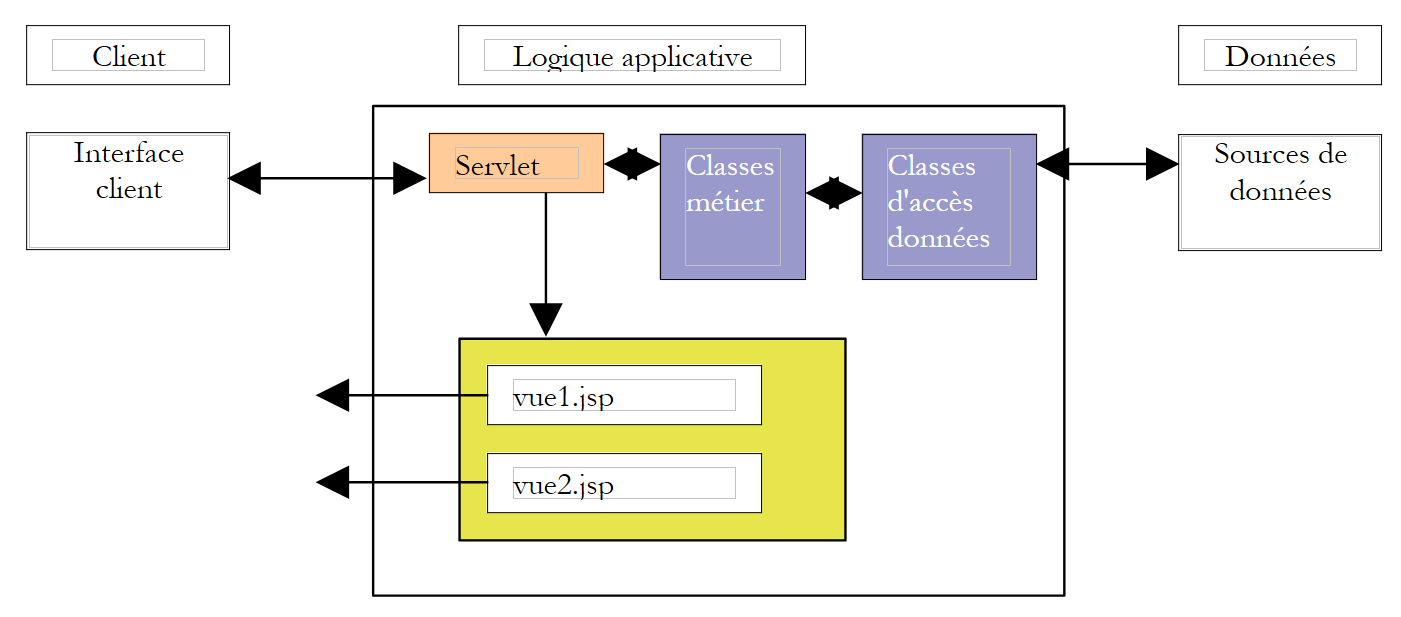
该应用程序的 MVC 架构如下:
| 业务类、数据访问类和数据库 |
| JSP 页面 |
| 处理客户端请求的Servlet |
3.5.1. 模型
此前已作介绍。它由以下 Java 归档文件组成:[istia.st.articles.dao, istia.st.articles.domain, istia.st.articles.exception]。
3.5.2. 视图
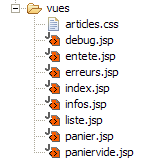
这些视图与本文开头展示的视图相对应:
| list.jsp | 这些视图位于应用程序的 [vues] 文件夹中 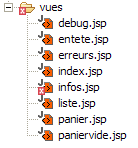 |
| info.jsp |
| cart.jsp |
| empty-cart.jsp |
| errors.jsp |
3.5.3. 控制器
控制器将由一个名为 [WebArticles] 的 Servlet 组成。它将处理各种客户端请求。这些请求将通过客户端 HTTP 请求中是否包含 [action] 参数来识别:
| 含义 | 控制器操作 | 可能的响应 |
| 客户端希望获取 项 | - 向 业务 | - [LIST] - [ERRORS] |
| 客户端请求 关于视图中显示的某项的详细信息 [LIST] | - 从业务层获取该项 | - [INFO] - [ERRORS] |
| 客户购买商品 | - 向业务层请求该商品,并 将其加入客户的购物车 | - [INFO] 若数量有误 - [LIST] 若无错误 |
| 客户希望从购物车中移除 购买项 | - 从会话中获取购物车并进行修改 | - [购物车] - [购物车为空] - [错误] |
| 客户希望查看他们的 购物车 | - 从会话中获取购物车 | - [购物车] - [购物车为空] - [错误] |
| 顾客已完成购物 并进入结账流程 | - 根据 已购商品的库存数量 - 从顾客的购物车中移除 已确认的商品 | - [列表] - [错误] |
3.5.4. 应用程序配置
我们将致力于配置应用程序,使其在应对以下变更时尽可能灵活:
- 各种视图的 URL 变更
- 实现 [IArticlesDao] 和 [IArticlesDomain] 接口的类发生变更
- 数据库管理系统(DBMS)、数据库或 articles 表的变更
3.5.5. URL 变更
视图 URL 名称将与其他几个参数一起放置在应用程序的 [web.xml] 配置文件中:
| <?xml version="1.0" encoding="ISO-8859-1"?>
<!DOCTYPE web-app
PUBLIC "-//Sun Microsystems, Inc.//DTD Web Application 2.3//EN"
"http://java.sun.com/dtd/web-app_2_3.dtd">
<web-app>
<servlet>
<servlet-name>webarticles</servlet-name>
<servlet-class>istia.st.articles.web.WebArticles</servlet-class>
<init-param>
<param-name>springConfigFileName</param-name>
<param-value>spring-config-sqlmap-firebird.xml</param-value>
</init-param>
<init-param>
<param-name>urlMain</param-name>
<param-value>/main</param-value>
</init-param>
<init-param>
<param-name>urlErreurs</param-name>
<param-value>/vues/erreurs.jsp</param-value>
</init-param>
<init-param>
<param-name>urlListe</param-name>
<param-value>/vues/liste.jsp</param-value>
</init-param>
<init-param>
<param-name>urlInfos</param-name>
<param-value>/vues/infos.jsp</param-value>
</init-param>
<init-param>
<param-name>urlPanier</param-name>
<param-value>/vues/panier.jsp</param-value>
</init-param>
<init-param>
<param-name>urlPanierVide</param-name>
<param-value>/vues/paniervide.jsp</param-value>
</init-param>
<init-param>
<param-name>urlDebug</param-name>
<param-value>/vues/debug.jsp</param-value>
</init-param>
</servlet>
<welcome-file-list>
<welcome-file>/vues/index.jsp</welcome-file>
</welcome-file-list>
<servlet-mapping>
<servlet-name>webarticles</servlet-name>
<url-pattern>/main</url-pattern>
</servlet-mapping>
</web-app>
|
在 [web.xml] 中
- 应用程序各视图的 URL
- Spring 配置文件的名称 [springConfigFileName],该文件将启用单例对象的创建,以便访问业务层和 DAO 层
- 当客户端请求的 URL 为 /<context> 时将显示的视图 [/vues/index.jsp],其中 <context> 表示应用程序上下文
3.5.6. 修改实现接口的类
遵循三层架构的原则,各层之间必须相互隔离。这种隔离通过以下方式实现:
- 各层通过接口而非具体类进行通信
- 某一层级的代码绝不会直接实例化另一层级的类来使用它。它只需向外部工具(此处指 [Spring])请求所需层级接口实现的实例。为此,我们知道它无需了解实现类的名称,只需知道其希望获取引用所对应的 Spring Bean 的名称即可。
在我们的应用程序中,Spring 配置文件可能如下所示:
| <?xml version="1.0" encoding="UTF-8"?>
<!DOCTYPE beans SYSTEM "http://www.springframework.org/dtd/spring-beans.dtd">
<beans>
<!-- data access class -->
<bean id="articlesDao" class="istia.st.articles.dao.ArticlesDaoSqlMap">
<constructor-arg index="0">
<value>sqlmap-config-firebird.xml</value>
</constructor-arg>
</bean>
<!-- the business class -->
<bean id="articlesDomain" class="istia.st.articles.domain.AchatsArticles">
<constructor-arg index="0">
<ref bean="articlesDao"/>
</constructor-arg>
</bean>
</beans>
|
要访问 [业务] 层,[用户界面(UI)] 层中的类可以请求 [articlesDomain] Bean。随后 Spring 将实例化一个类型为 [istia.st.articles.domain.AchatsArticles] 的对象。为此实例化过程,它需要一个类型为 [articlesDao] 的 Bean,即一个类型为 [istia.st.articles.dao.ArticlesDaoSqlMap] 类型的对象。Spring 随后将实例化该对象。此实例化过程将基于 [sqlmap-config-firebird.xml] 文件中的信息,该文件是用于通过 SqlMap 访问数据的配置文件。操作结束时,请求 [articlesDomain] Bean 的 [UI] 类便拥有了连接其与 DBMS 数据的完整链路:
3.5.7. 与 DBMS 或数据库相关的变更
在此,通过 SqlMap 的配置文件确保了 Web 应用程序不受与 DBMS 或数据库相关的变更影响。共有两个配置文件:
- [sql-map-config-firebird.xml] 文件
| <?xml version="1.0" encoding="UTF-8" ?>
<!DOCTYPE sqlMapConfig
PUBLIC "-//iBATIS.com//DTD SQL Map Config 2.0//EN"
"http://www.ibatis.com/dtd/sql-map-config-2.dtd">
<sqlMapConfig>
<transactionManager type="JDBC">
<dataSource type="SIMPLE">
<property name="JDBC.Driver" value="org.firebirdsql.jdbc.FBDriver"/>
<property name="JDBC.ConnectionURL"
value="jdbc:firebirdsql:localhost/3050:d:/data/databases/firebird/dbarticles.gdb"/>
<property name="JDBC.Username" value="sysdba"/>
<property name="JDBC.Password" value="masterkey"/>
<property name="JDBC.DefaultAutoCommit" value="true"/>
</dataSource>
</transactionManager>
<sqlMap resource="articles.xml"/>
</sqlMapConfig>
|
此文件指向一个 Firebird 数据库。只需更改 JDBC 驱动程序的名称,即可适配其他数据库管理系统。
- [articles.xml] 文件包含应用程序所需的各种 SQL 语句:
| <?xml version="1.0" encoding="UTF-8" ?>
<!DOCTYPE sqlMap
PUBLIC "-//iBATIS.com//DTD SQL Map 2.0//EN"
"http://www.ibatis.com/dtd/sql-map-2.dtd">
<sqlMap namespace="Articles">
<!-- an alias to the istia.st.articles.dao.Article class -->
<typeAlias alias="article" type="istia.st.articles.dao.Article"/>
<!-- mapping ORM : row table ARTICLES - instance class Article -->
<resultMap id="article" class="article">
<result property="id" column="ID"/>
<result property="nom" column="NOM"/>
<result property="prix" column="PRIX"/>
<result property="stockActuel" column="STOCKACTUEL"/>
<result property="stockMinimum" column="STOCKMINIMUM"/>
</resultMap>
<!-- query SQL to obtain all items -->
<statement id="getAllArticles" resultMap="article">
select id, nom, prix,
stockactuel, stockminimum from ARTICLES
</statement>
<!-- query SQL to delete all items -->
<statement id="clearAllArticles">delete from ARTICLES</statement>
<!-- the SQL query to insert an article -->
<statement id="insertArticle">
insert into ARTICLES (id, nom, prix,
stockactuel, stockminimum) values
(#id#,#nom#,#prix#,#stockactuel#,#stockminimum#)
</statement>
<!-- the SQL query to delete a given item -->
<statement id="deleteArticle">delete FROM ARTICLES where id=#id#</statement>
<!-- query SQL to modify a given item -->
<statement id="modifyArticle">
update ARTICLES set nom=#nom#,
prix=#prix#,stockactuel=#stockactuel#,stockminimum=#stockminimum# where
id=#id#
</statement>
<!-- the SQL query to obtain a given item -->
<statement id="getArticleById" resultMap="article">
select id, nom, prix,
stockactuel, stockminimum FROM ARTICLES where id=#id#
</statement>
<!-- query SQL to modify the stock of a given item -->
<statement id="changerStockArticle">
update ARTICLES set
stockActuel=stockActuel+#mouvement#
where id=#id# and stockActuel+#mouvement#>=0
</statement>
</sqlMap>
|
如果产品表或列的名称发生变更,我们只需重写此配置文件中的查询语句,而无需修改 Java 代码。如果出于性能考虑将查询替换为存储过程,情况也是如此。
3.5.8. [webarticles] 应用程序的整体架构
Java Web 应用程序就像一个由众多部件组成的拼图。采用 MVC 架构通常会增加这些部件的数量。在 [Eclipse] 环境下的 [webarticles] 应用程序结构如下:
总体结构 - 以下是
 Eclipse
 Eclipse
spring:用于 Spring
ibatis:用于 SqlMap
log4j、commons-logging:用于
 来自 Spring 和 SqlMap
firebird:用于 Firebird 数据库管理系统
mysql:用于 MySQL 数据库管理系统
jstl、standard:用于
 JSTL 标签库
|
Java 源代码文件夹:包含 Java 代码
 以及配置文件
 Eclipse 会自动复制
 这些文件
复制到 [WEB-INF/classes] 目录下。
应用程序将在此处找到它们。
|
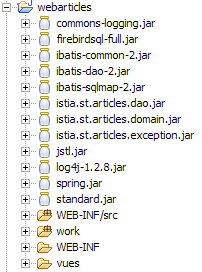 |  |
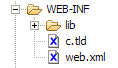
应用程序的 [WEB-INF] 文件夹:包含
 应用程序的 [web.xml] 描述符以及
 JSTL 库定义文件
| |
 |  |
3.5.9. JSP 视图
JSP 视图使用 JSTL 标签库。
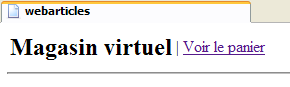
为确保不同视图之间的一致性,它们将共用同一个页眉,该页眉会显示应用程序名称以及菜单:
菜单是动态的,由控制器设置。控制器会在发送给 JSP 页面的请求中包含一个名为“actions”的键属性,其关联值为一个 Hastable[] 数组。该数组的每个元素都是一个字典,用于在页眉中生成一个菜单选项。每个字典包含两个键:
- href:与菜单选项关联的 URL
- link:菜单文本
应用程序的其他视图将使用以下 JSP 标签调用 [entete.jsp] 定义的页眉:
<jsp:include page="entete.jsp"/>
在运行时,此标签会将 [entete.jsp] 页面中的代码包含到包含该标签的 JSP 页面中。由于页面 URL 是相对 URL(末尾没有 /),因此系统会在包含 <jsp:include> 标签的页面所在的同一目录中查找 [entete.jsp] 页面。
代码:
| <%@ page language="java" %>
<%@ taglib uri="/WEB-INF/c.tld" prefix="c" %>
<html>
<head>
<title>webarticles</title>
</head>
<body>
<table>
<tr>
<td><h2>Magasin virtuel</h2></td>
<c:forEach items="${actions}" var="action">
<td>|</td>
<td><a href="<c:out value="${action.href}"/>"><c:out value="${action.lien}"/></a></td>
</c:forEach>
</tr>
</table>
<hr>
|
3.5.9.2. list.jsp
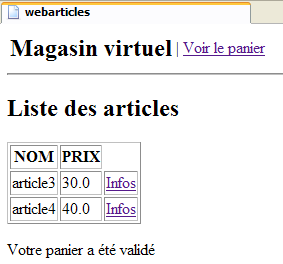
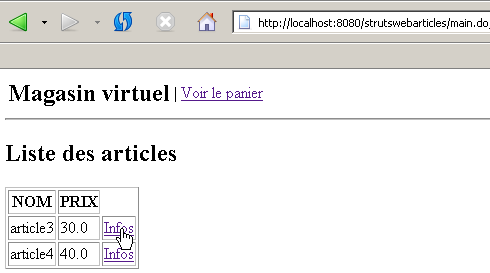
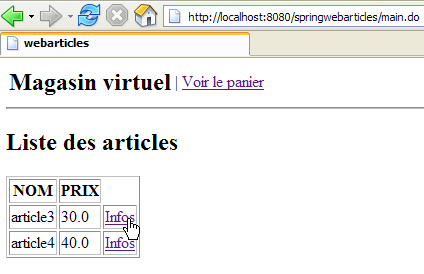
此视图显示可供销售的商品列表:
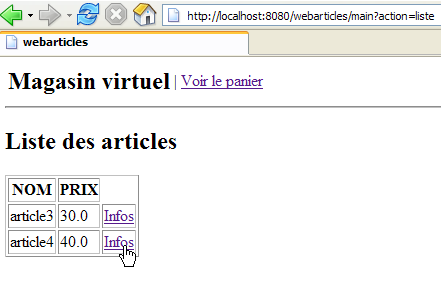
该页面在向 /main?action=list 或 /main?action=cartvalidation 发送请求后显示。控制器请求参数如下:
| Hashtable[] 对象 - 菜单选项数组 |
| 类型为 [Item] 的对象的 ArrayList |
| 字符串对象 - 页面底部显示的消息 |
文章 HTML 表格中的每个 [Info] 链接都包含一个 URL,格式为 [?action=infos&id=ID],其中 ID 是所显示文章的 id 字段。
代码:
| <%@ page language="java" %>
<%@ taglib uri="/WEB-INF/c.tld" prefix="c" %>
<jsp:include page="entete.jsp"/>
<h2>Liste des articles</h2>
<table border="1">
<tr>
<th>NOM</th><th>PRIX</th>
</tr>
<c:forEach var="article" items="${listarticles}">
<tr>
<td><c:out value="${article.nom}"/></td>
<td><c:out value="${article.prix}"/></td>
<td><a href="<c:out value="?action=infos&id=${article.id}"/>">Infos</a></td>
</tr>
</c:forEach>
</table>
<p>
<c:out value="${message}"/>
</body>
</html>
|
3.5.9.3. infos.jsp
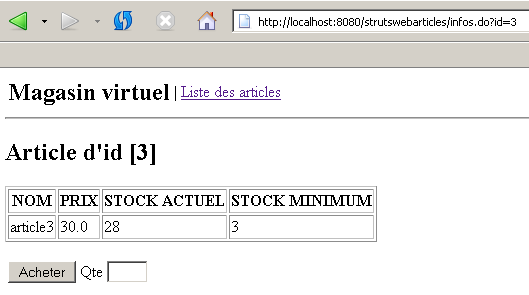
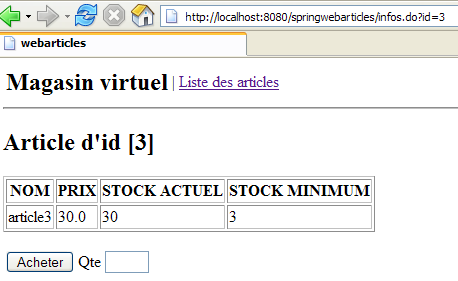
此视图显示商品信息,并支持购买:
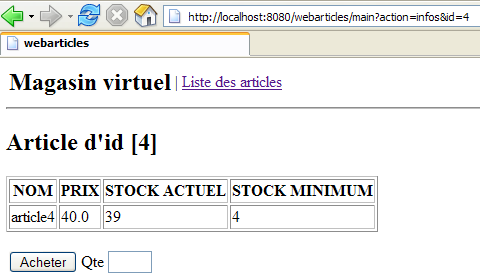
当收到 /main?action=infos&id=ID 请求,或收到 /main?action=achat&id=ID 请求且购买数量有误时,将显示此视图。控制器请求参数如下:
| Hashtable[] 对象 - 菜单选项数组 |
| 类型为 [Article] 的对象 - 要显示的项目 |
| 字符串对象 - 数量出现错误时显示的消息 |
| 字符串对象 - 在 [数量] 输入字段中显示的值 |
当数量输入出现错误时,将使用 [msg] 和 [qte] 字段:
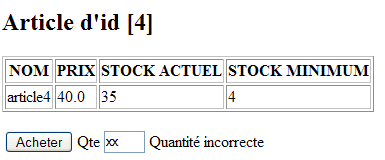
本页面包含一个表单,通过 [购买] 按钮提交。POST 请求的目标 URL 为 [?action=purchase&id=ID],其中 ID 代表所购商品的 ID。
代码:
| <%@ page language="java" %>
<%@ taglib uri="/WEB-INF/c.tld" prefix="c" %>
<jsp:include page="entete.jsp"/>
<h2>Article d'id [<c:out value="${article.id}"/>]</h2>
<table border="1">
<tr>
<th>NOM</th><th>PRIX</th><th>STOCK ACTUEL</th><th>STOCK MINIMUM</th>
</tr>
<tr>
<td><c:out value="${article.nom}"/></td>
<td><c:out value="${article.prix}"/></td>
<td><c:out value="${article.stockActuel}"/></td>
<td><c:out value="${article.stockMinimum}"/></td>
</tr>
</table>
<p>
<form method="post" action="?action=achat&id=<c:out value="${article.id}"/>"/>
<table>
<tr>
<td><input type="submit" value="Acheter"></td>
<td>Qte <input type="text" name="qte" size="3" value="<c:out value="${qte}"/>"></td>
<td><c:out value="${msg}"/></td>
</tr>
</table>
</form>
</body>
</html>
|
3.5.9.4. cart.jsp
此视图显示购物车中的内容:
当向 /main?action=cart 或 /main?action=remove&id=ID 发送请求后,该视图将被显示。控制器请求参数如下:
| Hashtable[] 对象 - 菜单选项数组 |
| 类型为 [Cart] 的对象 - 要显示的购物车 |
HTML 购物车表格中的每个 [Remove] 链接都包含一个 URL,格式为 [?action=removeitem&id=ID],其中 ID 是要从购物车中移除的商品的 [id] 字段。
代码:
| <%@ page language="java" %>
<%@ taglib uri="/WEB-INF/c.tld" prefix="c" %>
<jsp:include page="entete.jsp"/>
<h2>Contenu de votre panier</h2>
<table border="1">
<tr>
<td>Article</td><td>Qte</td><td>Pu</td><td>Total</td>
</tr>
<c:forEach var="achat" items="${panier.achats}">
<tr>
<td><c:out value="${achat.article.nom}"/></td>
<td><c:out value="${achat.qte}"/></td>
<td><c:out value="${achat.article.prix}"/></td>
<td><c:out value="${achat.total}"/></td>
<td><a href="<c:out value="?action=retirerachat&id=${achat.article.id}"/>">Retirer</a></td>
</tr>
</c:forEach>
</table>
<p>
Total de la commande : <c:out value="${panier.total}"/> euros
</body>
</html>
|
3.5.9.5. emptycart.jsp
此视图显示购物车为空的信息:
在向 /main?action=cart 或 /main?action=remove&id=ID 发送请求后,该视图会被显示。控制器请求参数如下:
代码:
| <%@ page language="java" %>
<%@ taglib uri="/WEB-INF/c.tld" prefix="c" %>
<jsp:include page="entete.jsp"/>
<h2>Contenu de votre panier</h2>
<p>
Votre panier est vide.
</body>
</html>
|
3.5.9.6. errors.jsp
发生错误时将显示此视图:
当任何请求导致错误时,该视图都会显示,但数量错误的购买操作除外,该情况由 [INFOS] 视图处理。控制器请求的元素如下:
| Hashtable[] 对象 - 菜单选项数组 |
| 表示要显示的错误消息的 String 对象的 ArrayList |
代码:
| <%@ page language="java" %>
<%@ taglib uri="/WEB-INF/c.tld" prefix="c" %>
<jsp:include page="entete.jsp"/>
<h2>Les erreurs suivantes se sont produites</h2>
<ul>
<c:forEach var="erreur" items="${erreurs}">
<li><c:out value="${erreur}"/></li>
</c:forEach>
</ul>
</body>
</html>
|
3.5.9.7. index.jsp
该页面在应用程序的 [web.xml] 文件中被定义为应用程序的首页:
| <?xml version="1.0" encoding="ISO-8859-1"?>
<!DOCTYPE web-app
PUBLIC "-//Sun Microsystems, Inc.//DTD Web Application 2.3//EN"
"http://java.sun.com/dtd/web-app_2_3.dtd">
<web-app>
<servlet>
....
</servlet>
<servlet-mapping>
....
</servlet-mapping>
<welcome-file-list>
<welcome-file>/vues/index.jsp</welcome-file>
</welcome-file-list>
</web-app>
|
[index.jsp] 视图仅将客户端重定向到应用程序的入口点:
| <%@ page language="java" %>
<%@ taglib uri="/WEB-INF/c.tld" prefix="c" %>
<c:redirect url="/main?action=liste"/>
|
3.5.10. 控制器
我们还需要编写Web应用程序的核心——控制器。其作用是:
- 获取客户端的请求,
- 使用业务类处理客户端请求的操作,
- 返回相应的视图作为响应。
3.5.10.1. 初始化控制器
当 Servlet 服务器加载控制器类时,会执行其 [init] 方法。此过程仅发生一次。一旦加载到内存中,控制器将驻留于此并处理来自不同客户端的请求。每个客户端由独立的执行线程处理,因此控制器的方法会由不同线程同时执行。请注意,正因如此,控制器绝不能包含其方法可能修改的字段。其字段必须为只读。 这些字段由 [init] 方法初始化,这也是该方法的主要作用。该方法具有一个独特特征:仅由单个线程执行一次。因此,在此方法内部,对控制器字段的并发访问不会产生问题。[init] 方法的目的是初始化 Web 应用程序所需的对象,这些对象将以只读模式被所有客户端线程共享。这些共享对象可以放置在两个位置:
- 控制器的私有字段
- 应用程序的执行上下文(ServletContext)
[webarticles] 应用程序的 [init] 方法将执行以下操作:
- 检查 [web.xml] 文件中是否包含应用程序正常运行所需的参数。这些参数已在第 3.5.5 节中进行过说明。
- 初始化一个私有字段 [ArrayList errors],其中包含所有错误的列表。如果没有错误,该列表将为空,但无论如何该字段都会存在。
- 若发生错误,[init] 方法将在此处终止。 否则,它将创建一个 [IArticlesDomain] 类型的对象,该对象将成为控制器用于满足其需求的业务对象。如 3.5.6 节所述,控制器将向 Spring 框架请求所需的 Bean。此实例化操作可能会导致各种错误。如果发生错误,它们将再次被存储在控制器的 [errors] 字段中。
3.5.10.2. doGet、doPost 方法
这两个方法处理来自客户端的 HTTP GET 和 POST 请求。它们将交替处理。因此,[doPost] 方法可能会重定向到 [doGet] 方法,反之亦然。客户端请求将按以下方式处理:
- 将检查 [errors] 字段。如果该字段不为空,则表示应用程序初始化过程中发生了错误,且应用程序无法运行。此时将返回 [ERRORS] 视图作为响应。
- 将检索并检查请求中的 [action] 参数。如果该参数不对应已知的操作,则会发送 [ERRORS] 视图并附上相应的错误信息。
- 如果 [action] 参数有效,则将客户端的请求传递给该操作对应的特定处理程序进行处理。处理 [uneAction] 操作的程序将具有以下签名:
| /**
* @param request la requête du client
* @param response la réponse au client
* @throws IOException
* @throws ServletException
*/
private void doUneAction(HttpServletRequest request, HttpServletResponse response)
throws ServletException, IOException;
|
3.5.10.3. 处理不同的操作
处理应用程序各种可能操作的方法如下:
方法 | 请求 | 处理 | 可能的响应 |
| GET /main?action=list | - 请求项目列表 从业务类 - 显示 | [LIST] 或 [ERRORS] |
| GET /main?action=info&id=ID | - 从 业务类中 - 显示该项 | [INFO] 或 [ERRORS] |
| POST /main?action=purchase&id=ID - 购买数量包含在提交的参数中 | - 从 业务类中 - 将其添加到 客户会话 | [LIST] 或 [INFO] 或 [ERRORS] |
| GET /main?action=removePurchase&id=ID | - 从 购物清单中 客户会话中的 | [CART] |
| GET /main?action=cart | - 显示 客户端会话 | [CART] 或 [EMPTY_CART] |
| GET /main?action=cartvalidation | - 减少 所有商品的库存 在客户 [LIST] 或 [ERRORS] | [LIST] 或 [ERRORS] |
3.5.10.4. 代码
| package istia.st.articles.web;
import java.io.IOException;
import java.util.ArrayList;
import java.util.Hashtable;
import java.util.List;
import istia.st.articles.domain.Achat;
import istia.st.articles.dao.Article;
import istia.st.articles.domain.IArticlesDomain;
import istia.st.articles.domain.Panier;
import istia.st.articles.exception.UncheckedAccessArticlesException;
import javax.servlet.ServletConfig;
import javax.servlet.ServletException;
import javax.servlet.http.HttpServlet;
import javax.servlet.http.HttpServletRequest;
import javax.servlet.http.HttpServletResponse;
import javax.servlet.http.HttpSession;
import org.springframework.beans.factory.xml.XmlBeanFactory;
import org.springframework.core.io.ClassPathResource;
/**
* @author ST
*
*/
public class WebArticles extends HttpServlet {
// private fields
private ArrayList erreurs = new ArrayList();
private IArticlesDomain articlesDomain = null;
private final String URL_MAIN = "urlMain";
private final String URL_ERREURS = "urlErreurs";
private final String URL_LISTE = "urlListe";
private final String URL_INFOS = "urlInfos";
private final String URL_PANIER = "urlPanier";
private final String URL_PANIER_VIDE = "urlPanierVide";
private final String URL_DEBUG = "urlDebug";
private final String SPRING_CONFIG_FILENAME = "springConfigFileName";
private final String[] parameters =
{
URL_MAIN,
URL_ERREURS,
URL_LISTE,
URL_INFOS,
URL_PANIER,
URL_PANIER_VIDE,
URL_DEBUG,
SPRING_CONFIG_FILENAME };
private ServletConfig config;
private final String ACTION_LISTE = "liste";
private final String ACTION_PANIER = "panier";
private final String ACTION_ACHAT = "achat";
private final String ACTION_INFOS = "infos";
private final String ACTION_RETIRER_ACHAT = "retirerachat";
private final String ACTION_VALIDATION_PANIER = "validationpanier";
private String urlActionListe;
private final String lienActionListe = "Liste des articles";
private String urlActionPanier;
private final String lienActionPanier = "Voir le panier";
private String urlActionValidationPanier;
private final String lienActionValidationPanier = "Valider le panier";
private Hashtable hActionListe = new Hashtable(2);
private Hashtable hActionPanier = new Hashtable(2);
private Hashtable hActionValidationPanier = new Hashtable(2);
public void init() {
// retrieve servlet initialization parameters
config = getServletConfig();
String param = null;
for (int i = 0; i < parameters.length; i++) {
param = config.getInitParameter(parameters[i]);
if (param == null) {
// we memorize the error
erreurs.add(
"Paramètre ["
+ parameters[i]
+ "] absent dans le fichier [web.xml]");
}
}
// mistakes?
if (erreurs.size() != 0) {
return;
}
// create a IArticlesDomain business layer access object
try {
articlesDomain =
(IArticlesDomain)
(
new XmlBeanFactory(
new ClassPathResource(
(String) config.getInitParameter(
SPRING_CONFIG_FILENAME)))).getBean(
"articlesDomain");
} catch (Exception ex) {
// we memorize the error
erreurs.add(
"Erreur de configuration de l'accès aux données : "
+ ex.toString());
return;
}
// memorize certain application urls
hActionListe.put("href", "?action=" + ACTION_LISTE);
hActionListe.put("lien", lienActionListe);
hActionPanier.put("href", "?action=" + ACTION_PANIER);
hActionPanier.put("lien", lienActionPanier);
hActionValidationPanier.put(
"href",
"?action=" + ACTION_VALIDATION_PANIER);
hActionValidationPanier.put("lien", lienActionValidationPanier);
// it's over
return;
}
public void doGet(HttpServletRequest request, HttpServletResponse response)
throws IOException, ServletException {
// check how the initialization of the servelet went
if (erreurs.size() != 0) {
// do we have the url of the error page?
if (config.getInitParameter(URL_ERREURS) == null) {
throw new ServletException(erreurs.toString());
}
// the error page is displayed
request.setAttribute("erreurs", erreurs);
request.setAttribute("actions", new Hashtable[] {
});
getServletContext()
.getRequestDispatcher(config.getInitParameter(URL_ERREURS))
.forward(request, response);
// end
return;
}
// action is processed
String action = request.getParameter("action");
if (action == null) {
// list of items
doListe(request, response);
return;
}
if (action.equals(ACTION_LISTE)) {
// list of items
doListe(request, response);
return;
}
if (action.equals(ACTION_INFOS)) {
// article info
doInfos(request, response);
return;
}
if (action.equals(ACTION_ACHAT)) {
// purchase an item
doAchat(request, response);
return;
}
if (action.equals(ACTION_PANIER)) {
// basket display
doPanier(request, response);
return;
}
if (action.equals(ACTION_RETIRER_ACHAT)) {
// remove an item from the basket
doRetirerAchat(request, response);
return;
}
if (action.equals(ACTION_VALIDATION_PANIER)) {
// shopping cart validation
doValidationPanier(request, response);
return;
}
// unknown share
ArrayList erreurs = new ArrayList();
erreurs.add("action [" + action + "] inconnue");
// the error page is displayed
request.setAttribute("actions", new Hashtable[] { hActionListe });
afficheErreurs(request, response, erreurs);
// end
return;
}
private void doValidationPanier(
HttpServletRequest request,
HttpServletResponse response)
throws ServletException, IOException {
// the buyer has confirmed his basket
Panier panier = (Panier) request.getSession().getAttribute("panier");
// validate this basket
try {
articlesDomain.acheter(panier);
} catch (UncheckedAccessArticlesException ex) {
// not normal
erreurs.add("Erreur d'accès aux données [" + ex.toString() + "]");
request.setAttribute("actions", new Hashtable[] { hActionListe });
afficheErreurs(request, response, erreurs);
return;
}
// error recovery
ArrayList erreurs = articlesDomain.getErreurs();
if (erreurs.size() != 0) {
request.setAttribute(
"actions",
new Hashtable[] { hActionListe, hActionPanier });
afficheErreurs(request, response, erreurs);
return;
}
// displays the list of items
request.setAttribute("message", "Votre panier a été validé");
doListe(request, response);
// end
return;
}
private void doRetirerAchat(
HttpServletRequest request,
HttpServletResponse response)
throws ServletException, IOException {
// remove a purchase from the basket
try {
Panier panier =
(Panier) request.getSession().getAttribute("panier");
String strIdAchat = request.getParameter("id");
panier.enlever(Integer.parseInt(strIdAchat));
} catch (NumberFormatException ignored) {
} catch (NullPointerException ignored) {
}
// the basket is displayed
doPanier(request, response);
}
private void doPanier(
HttpServletRequest request,
HttpServletResponse response)
throws ServletException, IOException {
// the basket is displayed
Panier panier = (Panier) request.getSession().getAttribute("panier");
// empty basket?
if (panier == null || panier.getAchats().size() == 0) {
request.setAttribute("actions", new Hashtable[] { hActionListe });
getServletContext()
.getRequestDispatcher(config.getInitParameter(URL_PANIER_VIDE))
.forward(request, response);
// end
return;
}
// there's something in the basket
request.setAttribute("panier", panier);
request.setAttribute(
"actions",
new Hashtable[] { hActionListe, hActionValidationPanier });
getServletContext()
.getRequestDispatcher(config.getInitParameter(URL_PANIER))
.forward(request, response);
// end
return;
}
private void doAchat(
HttpServletRequest request,
HttpServletResponse response)
throws ServletException, IOException {
// purchase an item
// we recover the quantity
int qté = 0;
try {
qté = Integer.parseInt(request.getParameter("qte"));
if (qté <= 0)
throw new NumberFormatException();
} catch (NumberFormatException ex) {
// wrong qty
request.setAttribute("msg", "Quantité incorrecte");
request.setAttribute("qte", request.getParameter("qte"));
String url =
config.getInitParameter(URL_MAIN)
+ "?action=infos&id="
+ request.getParameter("id");
getServletContext().getRequestDispatcher(url).forward(
request,
response);
// end
return;
}
// retrieve the client session
HttpSession session = request.getSession();
// we create the purchase
Article article = (Article) session.getAttribute("article");
Achat achat = new Achat(article, qté);
// the purchase is added to the customer's basket
Panier panier = (Panier) session.getAttribute("panier");
if (panier == null) {
panier = new Panier();
session.setAttribute("panier", panier);
}
panier.ajouter(achat);
// we return to the list of items
String url = config.getInitParameter(URL_MAIN) + "?action=liste";
getServletContext().getRequestDispatcher(url).forward(
request,
response);
// end
return;
}
private void afficheDebugInfos(
HttpServletRequest request,
HttpServletResponse response,
ArrayList infos)
throws ServletException, IOException {
// displays the list of items
request.setAttribute("infos", infos);
getServletContext()
.getRequestDispatcher(config.getInitParameter(URL_DEBUG))
.forward(request, response);
// end
return;
}
public void doPost(
HttpServletRequest request,
HttpServletResponse response)
throws IOException, ServletException {
// idem get
doGet(request, response);
}
private void doInfos(
HttpServletRequest request,
HttpServletResponse response)
throws IOException, ServletException {
// error list
ArrayList erreurs = new ArrayList();
// retrieve the requested id
String strId = request.getParameter("id");
// anything?
if (strId == null) {
// not normal
erreurs.add("action incorrecte([infos,id=null]");
request.setAttribute("actions", new Hashtable[] { hActionListe });
afficheErreurs(request, response, erreurs);
return;
}
// transform strId into an integer
int id = 0;
try {
id = Integer.parseInt(strId);
} catch (Exception ex) {
// not normal
erreurs.add("action incorrecte([infos,id=" + strId + "]");
request.setAttribute("actions", new Hashtable[] { hActionListe });
afficheErreurs(request, response, erreurs);
return;
}
// the key item id is requested
Article article = null;
try {
article=articlesDomain.getArticleById(id);
} catch (UncheckedAccessArticlesException ex) {
// not normal
erreurs.add("Erreur d'accès aux données [" + ex.toString() + "]");
request.setAttribute("actions", new Hashtable[] { hActionListe });
afficheErreurs(request, response, erreurs);
return;
}
if (article == null) {
// not normal
erreurs.add("Article de clé [" + id + "] inexistant");
request.setAttribute("actions", new Hashtable[] { hActionListe });
afficheErreurs(request, response, erreurs);
return;
}
// put the article in the session
request.getSession().setAttribute("article", article);
// the info page is displayed
request.setAttribute("actions", new Hashtable[] { hActionListe });
// request.setAttribute("urlMain",config.getInitParameter(URL_MAIN));
getServletContext()
.getRequestDispatcher(config.getInitParameter(URL_INFOS))
.forward(request, response);
// end
return;
}
private void afficheErreurs(
HttpServletRequest request,
HttpServletResponse response,
ArrayList erreurs)
throws ServletException, IOException {
// the error page is displayed
request.setAttribute("erreurs", erreurs);
getServletContext()
.getRequestDispatcher(config.getInitParameter(URL_ERREURS))
.forward(request, response);
// end
return;
}
private void doListe(
HttpServletRequest request,
HttpServletResponse response)
throws IOException, ServletException {
// list of errors
ArrayList erreurs = new ArrayList();
// the list of items is requested
List articles = null;
try {
articles = articlesDomain.getAllArticles();
} catch (UncheckedAccessArticlesException ex) {
// we memorize the error
erreurs.add(
"Erreur lors de l'obtention de tous les articles : "
+ ex.toString());
}
// mistakes?
if (erreurs.size() != 0) {
// the error page is displayed
request.setAttribute("erreurs", erreurs);
request.setAttribute("actions", new Hashtable[] { hActionListe });
getServletContext()
.getRequestDispatcher(config.getInitParameter(URL_ERREURS))
.forward(request, response);
// end
return;
}
// displays the list of items
request.setAttribute("listarticles", articles);
request.setAttribute("message","");
request.setAttribute("actions", new Hashtable[] { hActionPanier });
getServletContext()
.getRequestDispatcher(config.getInitParameter(URL_LISTE))
.forward(request, response);
// end
return;
}
/**
* suivi console pour débogage
* @param message : le message à afficher
*/
private void affiche(String message) {
System.out.println(message);
}
}
|
我们将留给读者时间来阅读并理解这段代码。希望这些注释能有所帮助。
3.5.10.5. 应用程序测试
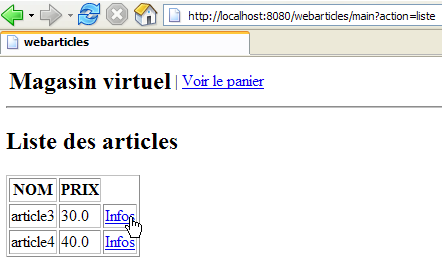
让我们来看几张测试截图。首先是应用程序的首页:
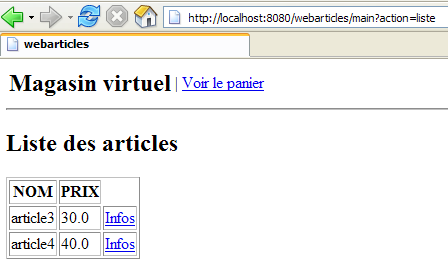
实际请求的 URL 是 [http://localhost:8080/webarticles]。读者会发现,在 [web.xml] 文件中,我们为应用程序定义了主页:
<welcome-file-list>
<welcome-file>/vues/index.jsp</welcome-file>
</welcome-file-list>
[index.jsp] 视图定义如下:
<%@ page language="java" %>
<%@ taglib uri="/WEB-INF/c.tld" prefix="c" %>

<c:redirect url="/main?action=liste"/>
因此,系统重定向到了 URL [http://localhost:8080/webarticles/main?action=liste],如截图中所示的浏览器地址栏所示。由此请求了 URL [/main?action=liste]。在 [web.xml] 中,URL /main 被关联到了 [webarticles] servlet:
<servlet-mapping>
<servlet-name>webarticles</servlet-name>
<url-pattern>/main</url-pattern>
</servlet-mapping>
此外,在 [web.xml] 中,[webarticles] Servlet 与 [istia.st.articles.web.WebArticles] Servlet 相关联:
<servlet-name>webarticles</servlet-name>
<servlet-class>istia.st.articles.web.WebArticles</servlet-class>
因此,如果 [istia.st.articles.web.WebArticles] Servlet 尚未被加载,Tomcat Servlet 容器将加载它,并执行其 [init] 方法:
| public void init() {
// retrieve servlet initialization parameters
config = getServletConfig();
String param = null;
for (int i = 0; i < parameters.length; i++) {
param = config.getInitParameter(parameters[i]);
if (param == null) {
// we memorize the error
erreurs.add(
"Paramètre ["
+ parameters[i]
+ "] absent dans le fichier [web.xml]");
}
}
// mistakes?
if (erreurs.size() != 0) {
return;
}
// create a IArticlesDomain business layer access object
try {
articlesDomain =
(IArticlesDomain)
(
new XmlBeanFactory(
new ClassPathResource(
(String) config.getInitParameter(
SPRING_CONFIG_FILENAME)))).getBean(
"articlesDomain");
} catch (Exception ex) {
// we memorize the error
erreurs.add(
"Erreur de configuration de l'accès aux données : "
+ ex.toString());
return;
}
// memorize certain application urls
hActionListe.put("href", "?action=" + ACTION_LISTE);
hActionListe.put("lien", lienActionListe);
hActionPanier.put("href", "?action=" + ACTION_PANIER);
hActionPanier.put("lien", lienActionPanier);
hActionValidationPanier.put(
"href",
"?action=" + ACTION_VALIDATION_PANIER);
hActionValidationPanier.put("lien", lienActionValidationPanier);
// it's over
return;
}
|
注释:[init] 方法
- 会检查某些配置参数是否存在
- 通过 Spring 实例化一个服务以访问应用程序域
- 设置一个错误列表以标记任何初始化错误
- 若干私有字段:
- errors:由 [init] 检测到的错误列表
- [hActionListe, hActionPanier, hActionValidationPanier]:字典。每个字典都包含在 [entete.jsp] 视图显示的主菜单中显示选项所需的信息
- acticlesDomain:用于访问应用程序模型的服务
[init] 方法仅在 Servlet 初始加载时执行一次。此后,将根据客户端请求的 [GET, POST] 类型执行 [doGet, doPost] 方法之一。在此,这两个方法执行相同的功能,且代码已放置在 [doGet] 中:
| public void doGet(HttpServletRequest request, HttpServletResponse response)
throws IOException, ServletException {
// check how the initialization of the servelet went
if (erreurs.size() != 0) {
// do we have the url of the error page?
if (config.getInitParameter(URL_ERREURS) == null) {
throw new ServletException(erreurs.toString());
}
// the error page is displayed
request.setAttribute("erreurs", erreurs);
request.setAttribute("actions", new Hashtable[] {
});
getServletContext()
.getRequestDispatcher(config.getInitParameter(URL_ERREURS))
.forward(request, response);
// end
return;
}
// action is processed
String action = request.getParameter("action");
if (action == null) {
// list of items
doListe(request, response);
return;
}
if (action.equals(ACTION_LISTE)) {
// list of items
doListe(request, response);
return;
}
if (action.equals(ACTION_INFOS)) {
// article info
doInfos(request, response);
return;
}
if (action.equals(ACTION_ACHAT)) {
// purchase an item
doAchat(request, response);
return;
}
if (action.equals(ACTION_PANIER)) {
// basket display
doPanier(request, response);
return;
}
if (action.equals(ACTION_RETIRER_ACHAT)) {
// remove an item from the basket
doRetirerAchat(request, response);
return;
}
if (action.equals(ACTION_VALIDATION_PANIER)) {
// shopping cart validation
doValidationPanier(request, response);
return;
}
// unknown share
ArrayList erreurs = new ArrayList();
erreurs.add("action [" + action + "] inconnue");
// the error page is displayed
request.setAttribute("actions", new Hashtable[] { hActionListe });
afficheErreurs(request, response, erreurs);
// end
return;
}
|
- [doGet] 方法首先检查 [init] 方法执行后是否发生了初始化错误。如果发生错误,则显示 [ERRORS] 视图,并终止处理。
- 否则,它将从客户端请求中获取 [action] 参数。请记住,该应用程序的设计是响应必须包含 [action] 参数的请求。
- 它将执行与该 action 关联的方法。在此情况下,即为 [doListe] 方法。
[doListe] 方法如下:
| private void doListe(
HttpServletRequest request,
HttpServletResponse response)
throws IOException, ServletException {
// error list
ArrayList erreurs = new ArrayList();
// the list of items is requested
List articles = null;
try {
articles = articlesDomain.getAllArticles();
} catch (UncheckedAccessArticlesException ex) {
// we memorize the error
erreurs.add(
"Erreur lors de l'obtention de tous les articles : "
+ ex.toString());
}
// mistakes?
if (erreurs.size() != 0) {
// the error page is displayed
request.setAttribute("erreurs", erreurs);
request.setAttribute("actions", new Hashtable[] { hActionListe });
getServletContext()
.getRequestDispatcher(config.getInitParameter(URL_ERREURS))
.forward(request, response);
// end
return;
}
// displays the list of items
request.setAttribute("listarticles", articles);
request.setAttribute("message","");
request.setAttribute("actions", new Hashtable[] { hActionPanier });
getServletContext()
.getRequestDispatcher(config.getInitParameter(URL_LISTE))
.forward(request, response);
// end
return;
}
|
- 请注意,[init] 方法已将用于访问应用程序模型(领域层)的服务存储在 Servlet 的私有字段中:
// champs privés
private IArticlesDomain articlesDomain = null;
| // la liste des erreurs
ArrayList erreurs = new ArrayList();
// on demande la liste des articles
List articles = null;
try {
articles = articlesDomain.getAllArticles();
} catch (UncheckedAccessArticlesException ex) {
// on mémorise l'erreur
erreurs.add(
"Erreur lors de l'obtention de tous les articles : "
+ ex.toString());
}
|
| // mistakes?
if (erreurs.size() != 0) {
// the error page is displayed
request.setAttribute("erreurs", erreurs);
request.setAttribute("actions", new Hashtable[] { hActionListe });
getServletContext()
.getRequestDispatcher(config.getInitParameter(URL_ERREURS))
.forward(request, response);
// end
return;
}
|
| // displays the list of items
request.setAttribute("listarticles", articles);
request.setAttribute("message","");
request.setAttribute("actions", new Hashtable[] { hActionPanier });
getServletContext()
.getRequestDispatcher(config.getInitParameter(URL_LISTE))
.forward(request, response);
|
在本示例中,一切进展顺利,我们成功获取了 [LIST] 视图。建议读者查阅 [LIST] 视图的代码,以验证该视图所需的动态参数是否确实由上方的控制器提供。对于每个视图,都应进行此类验证:
- 查找视图的动态参数
- 确保控制器将这些参数放入传递给视图的请求属性中
接下来,我们将简要概述应用程序用户所经历的屏幕流程。建议读者每次都采用与之前类似的推理方式:
用户可以从项目列表中选择一个项目:
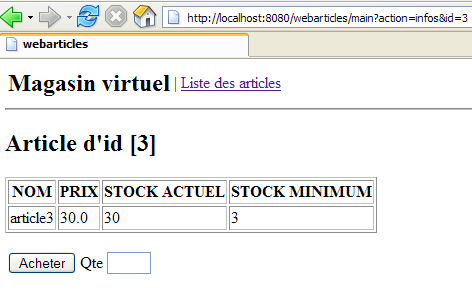
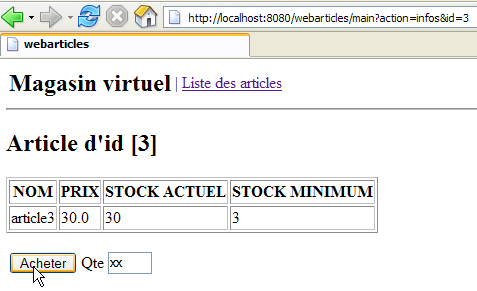
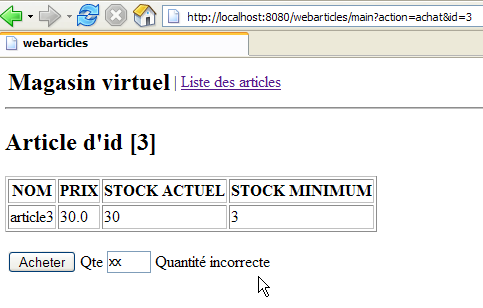
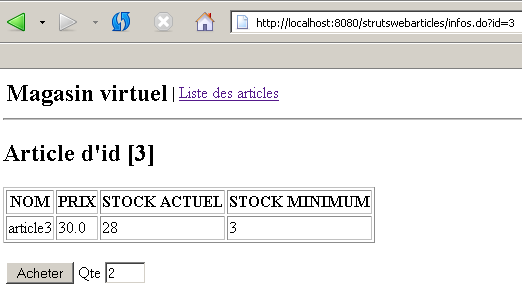
买家可以在这里购买第3号商品。让我们在数量上输入一个错误:
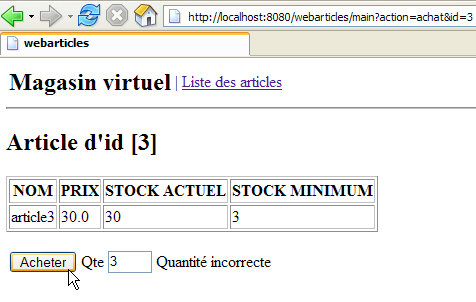
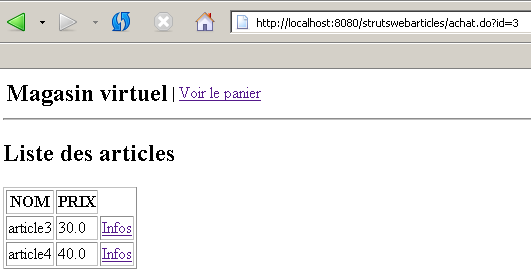
该错误已被标记。现在,让我们购买几件商品:
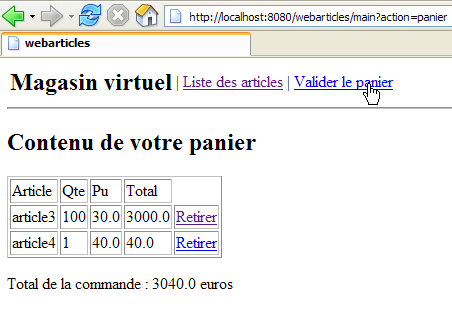
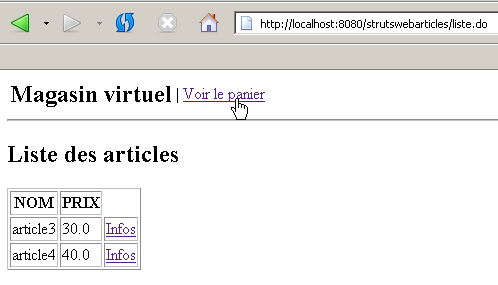
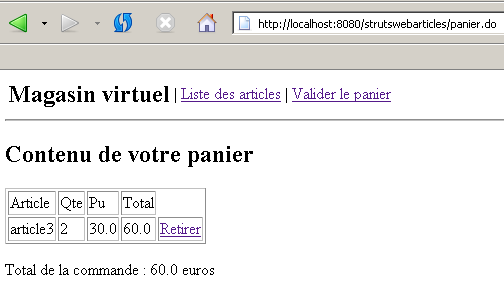
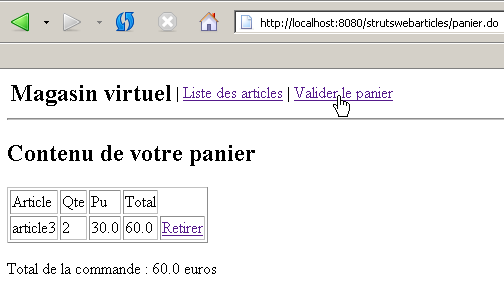
购买记录已保存,商品列表已重新显示。现在让我们查看购物车:
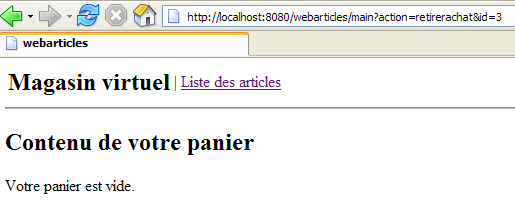
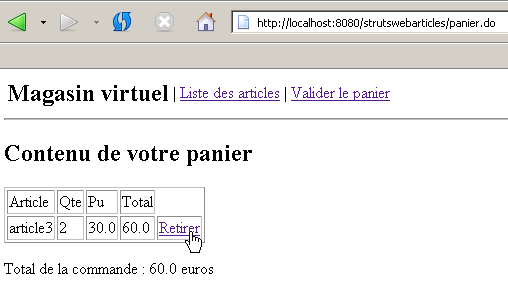
该商品确实已加入购物车。让我们将其移除:
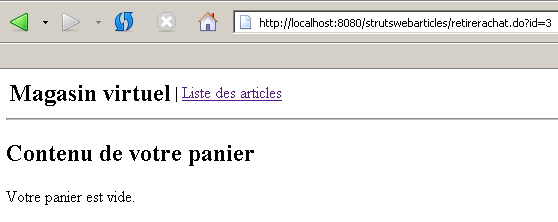
该商品已从购物车中移除,购物车已重新加载。现在购物车为空。
让我们购买100件商品#3和2件商品#4:
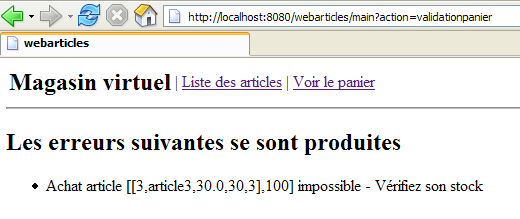
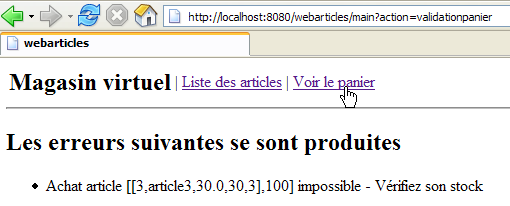
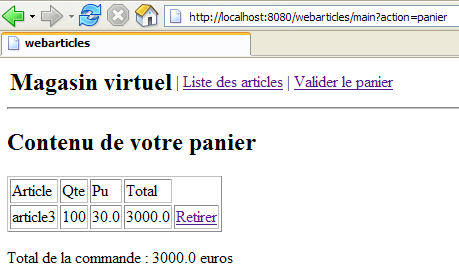
由于我们想购买100件商品#3,但库存仅有30件,因此无法完成购买。该商品仍保留在购物车中:
然而,商品#4已成功购买,其库存数量变为39(40-1):
3.6. 基于Struts的MVC架构
3.6.1. 通用应用程序架构
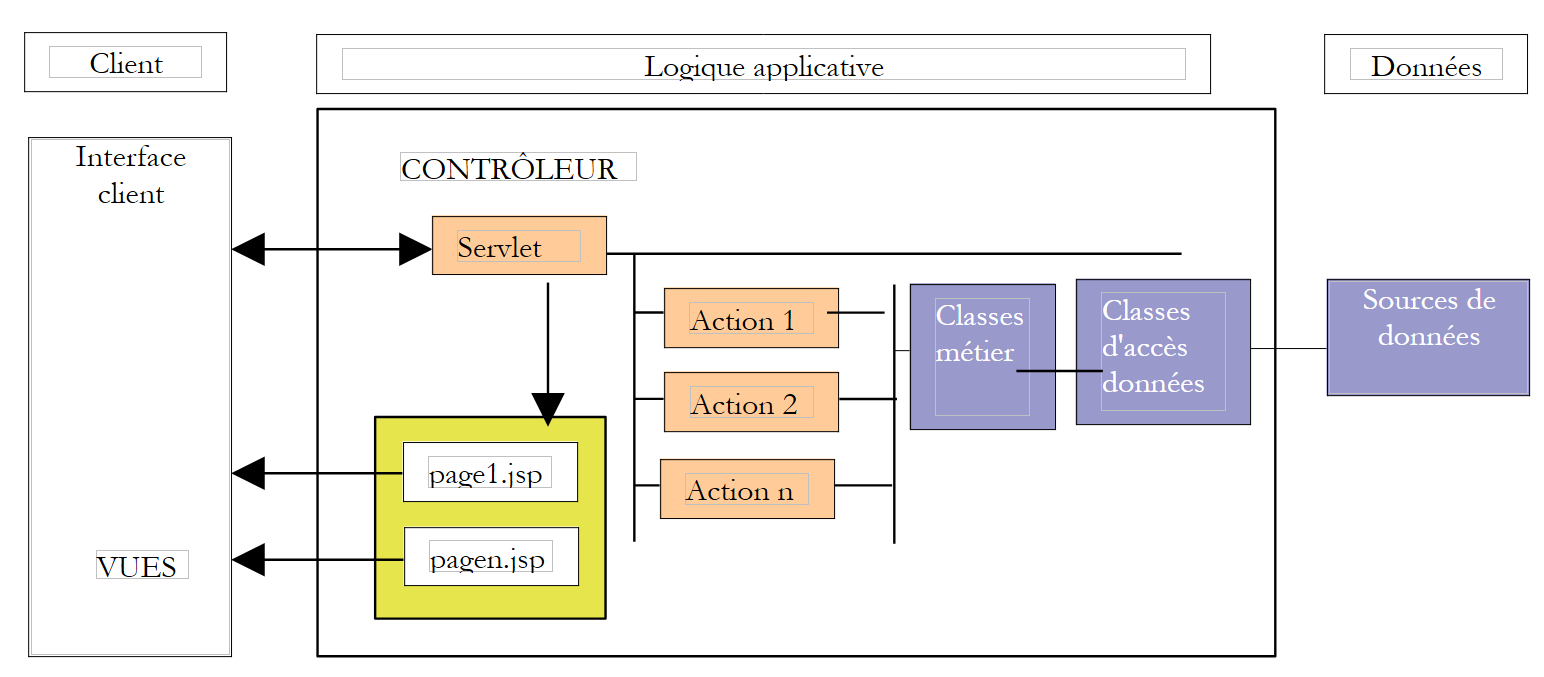
让我们重新审视该应用程序的 MVC 架构:
在上一版本中:
- 控制器由一个 Servlet 处理
- 视图由 JSP 页面处理
- 模型由一组三个 .jar 文件处理
在 Struts 版本中:
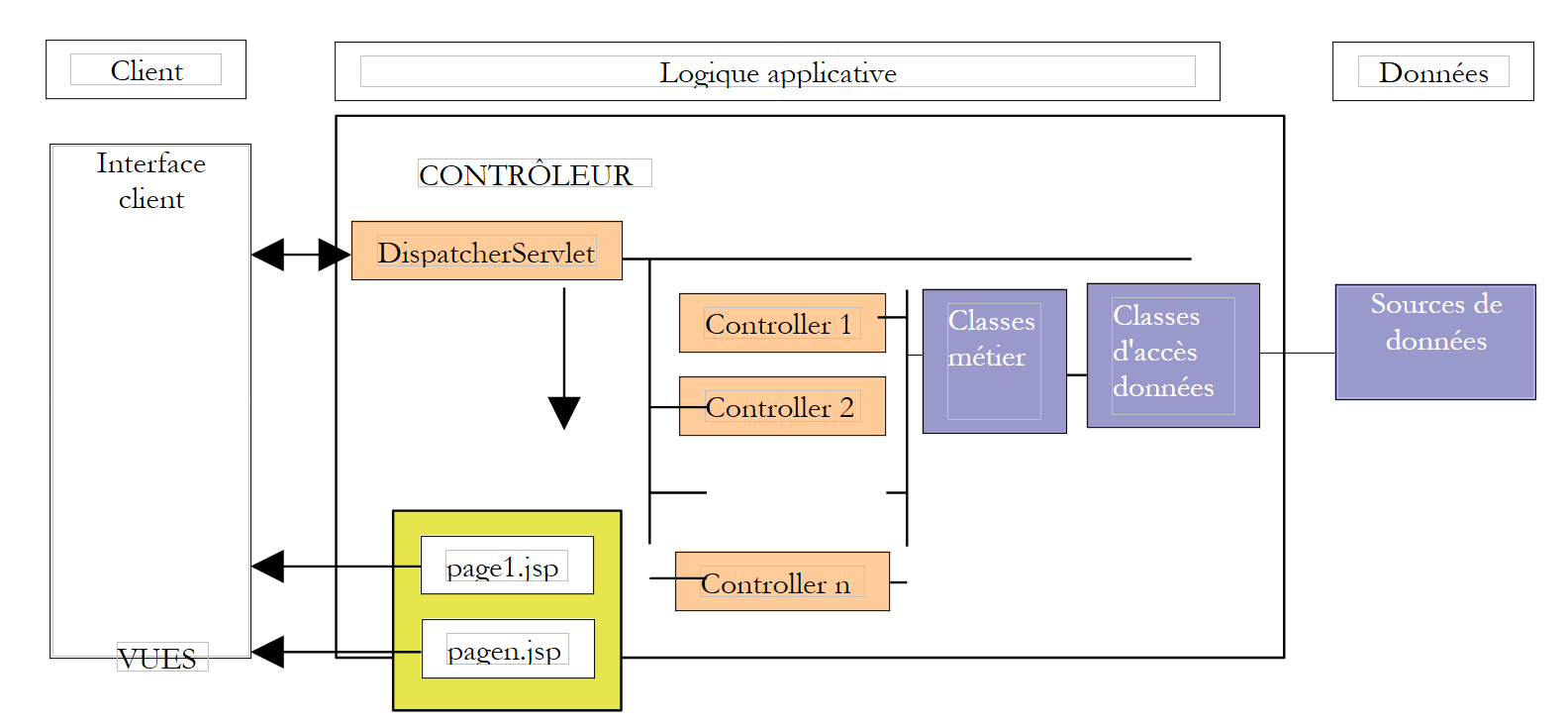
- 控制器将由一个继承自 Struts 通用 [ActionServlet] 的 Servlet 处理
- 视图将由与之前相同的 JSP 页面处理,仅有少量细微差异
- 模型将由原有的三个归档文件处理
我们将看到,将之前的应用程序迁移到 Struts 涉及以下任务:
- 以前由 Servlet/控制器特定方法处理的操作,现在由继承自 Struts [Action] 类的实例来处理
- 编写配置文件 [web.xml] 和 [struts-config.xml]
- 对 JSP 页面进行若干修改
让我们回顾一下 Struts 所采用的通用 MVC 架构:
| 业务类、数据访问类和数据库 |
| JSP页面 |
| 处理客户端请求的Servlet、[Action]对象以及与表单关联的[ActionForm] Bean。 |
- 控制器是应用程序的核心。所有客户端请求都需经过它。它是 STRUTS 提供的通用 Servlet。在某些情况下,您可能需要对其进行扩展。对于简单的情况,则无需如此。该通用 Servlet 通常从名为 struts-config.xml 的文件中获取所需信息。
- 如果客户端请求包含表单参数,控制器会将其放入 Bean 对象中。随时间创建的 Bean 对象将存储在会话或客户端请求中。此行为可通过配置进行调整。如果 Bean 对象已存在,则无需重新创建。
- 在 struts-config.xml 配置文件中,每个需要通过编程方式处理的 URL(因此不对应于可直接请求的 JSP 视图)都与特定信息相关联:
- 负责处理该请求的 Action 类的名称。同样,实例化的 Action 对象可以存储在会话或请求中。
- 如果请求的 URL 包含参数(例如表单提交给控制器时),则需指定负责存储表单数据的 Bean 的名称。
- 借助配置文件提供的这些信息,控制器在收到客户端的 URL 请求后,能够确定是否需要创建 Bean 以及具体创建哪个 Bean。一旦实例化,该 Bean 即可验证其存储的数据(来自表单)是否有效。 控制器会自动调用该 Bean 中的 `validate` 方法。Bean 由开发人员构建,因此开发人员将验证表单数据有效性的代码放置在 `validate` 方法中。如果发现数据无效,控制器将不再继续执行后续操作,而是将控制权移交给配置文件中指定的视图。至此,交互过程即告完成。 请注意,开发者可以选择不进行表单有效性检查。这同样在 struts-config.xml 文件中配置。在这种情况下,控制器不会调用 Bean 的 validate 方法。
- 如果 Bean 的数据正确,或者未进行验证,或者不存在 Bean,控制器将控制权传递给与该 URL 关联的 Action 对象。它通过调用该对象的 execute 方法来实现这一点,并向其传递可能已构建的 Bean 的引用。这就是开发人员执行所需操作的地方:他们可能需要调用业务类或数据访问类。 处理结束时,Action对象将需要发送给客户端的视图名称返回给控制器。
- 控制器将在其配置文件中查找与被要求显示的视图名称关联的 URL,随后发送该视图。至此,与客户端的交互即告完成。
在我们的应用程序中,不会使用 [Bean] 对象作为客户端与 [Action] 类之间的缓冲对象。[Action] 对象将直接从接收到的 [HttpServletRequest] 对象中获取客户端请求的参数。这有助于我们初始应用程序的移植。因此,我们应用程序的最终架构如下:
| 业务类、数据访问类和数据库 |
| JSP页面 |
| 用于处理客户端请求的Servlet,[Action]对象 |
3.6.2. 模型
此前已作介绍。它由 Java 归档文件 [istia.st.articles.dao, istia.st.articles.domain, istia.st.articles.exception] 组成。
3.6.3. 应用程序配置
3.6.3.1. 总体架构
该 Eclipse 项目的总体架构如下:
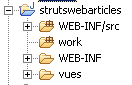
3.6.3.2. 数据访问配置
由于数据访问接口保持不变,相关的配置文件与上一版本相同。它们定义在 [WEB-INF/src] 目录下:
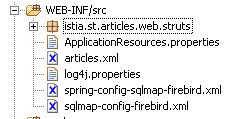
在上图截图中,文件 [articles.xml, spring-config-sqlmap-firebird.xml, sqlmap-config-firebird.xml, log4j.properties] 均来自上一版本。
3.6.3.3. 归档目录
在 [WEB-INF/lib] 目录中,您将找到与上一版本相同的库文件,以及 Struts 所需的库:
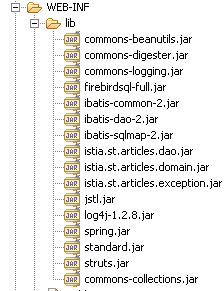
3.6.3.4. 应用程序配置
该应用程序通过 [WEB-INF] 文件夹中的两个文件 [web.xml] 和 [struts-config.xml] 进行配置:
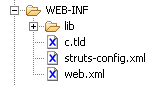
[web.xml] 文件内容如下:
| <?xml version="1.0" encoding="ISO-8859-1"?>
<!DOCTYPE web-app
PUBLIC "-//Sun Microsystems, Inc.//DTD Web Application 2.3//EN"
"http://java.sun.com/dtd/web-app_2_3.dtd">
<web-app>
<servlet>
<servlet-name>strutswebarticles</servlet-name>
<servlet-class>istia.st.articles.web.struts.MainServlet</servlet-class>
<init-param>
<param-name>config</param-name>
<param-value>/WEB-INF/struts-config.xml</param-value>
</init-param>
<init-param>
<param-name>springConfigFileName</param-name>
<param-value>spring-config-sqlmap-firebird.xml</param-value>
</init-param>
</servlet>
<servlet-mapping>
<servlet-name>strutswebarticles</servlet-name>
<url-pattern>*.do</url-pattern>
</servlet-mapping>
    <welcome-file-list>
        <welcome-file>/vues/index.jsp</welcome-file>
    </welcome-file-list>
</web-app>
|
这个文件的内容是什么?
- 应用程序的首页是 [views/index.jsp] (welcome-file)
- 格式为 *.do 的 URL 请求将被重定向到 [strutswebarticles] Servlet(servlet-mapping)
- [strutswebarticles] Servlet 是 [istia.st.articles.web.struts.MainServlet] 类的实例(servlet-name, servlet-class)
- 该 Servlet 接受两个初始化参数
- Struts 配置文件的名称 (config)
- Spring 配置文件的名称 (springConfigFileName)
[struts-config.xml] 文件内容如下:
| <?xml version="1.0" encoding="ISO-8859-1" ?>
<!DOCTYPE struts-config PUBLIC
"-//Apache Software Foundation//DTD Struts Configuration 1.1//EN"
"http://jakarta.apache.org/struts/dtds/struts-config_1_1.dtd">
<struts-config>
<action-mappings>
<action path="/main" type="istia.st.articles.web.struts.ListeArticlesAction">
<forward name="afficherListeArticles" path="/vues/liste.jsp"/>
<forward name="afficherErreurs" path="/vues/erreurs.jsp"/>
</action>
<action path="/liste" type="istia.st.articles.web.struts.ListeArticlesAction">
<forward name="afficherListeArticles" path="/vues/liste.jsp"/>
<forward name="afficherErreurs" path="/vues/erreurs.jsp"/>
</action>
<action path="/infos" type="istia.st.articles.web.struts.InfosArticleAction">
<forward name="afficherInfosArticle" path="/vues/infos.jsp"/>
<forward name="afficherErreurs" path="/vues/erreurs.jsp"/>
</action>
<action
path="/achat" type="istia.st.articles.web.struts.AchatArticleAction">
<forward name="afficherInfosArticle" path="/vues/infos.jsp"/>
<forward name="afficherListeArticles" path="/main.do"/>
</action>
<action
path="/panier" type="istia.st.articles.web.struts.VoirPanierAction">
<forward name="afficherPanier" path="/vues/panier.jsp"/>
<forward name="afficherPanierVide" path="/vues/paniervide.jsp"/>
</action>
<action
path="/retirerachat" type="istia.st.articles.web.struts.RetirerAchatAction">
<forward name="afficherPanier" path="/panier.do"/>
<forward name="afficherErreurs" path="/vues/erreurs.jsp"/>
</action>
<action
path="/validerpanier" type="istia.st.articles.web.struts.ValiderPanierAction">
<forward name="afficherListeArticles" path="/main.do"/>
<forward name="afficherErreurs" path="/vues/erreurs.jsp"/>
</action>
</action-mappings>
<message-resources parameter="ApplicationResources" null="false" />
</struts-config>
|
这个配置文件说明了什么?
| 用于显示文章列表 |
| 用于显示文章列表 |
| 用于显示特定商品的信息 |
| 用于购买特定商品 |
| 查看购物车 |
| 从购物车中移除商品 |
| 用于确认购物车 |
- 上述操作与上一版本中 Servlet 处理的操作一一对应。对于每项操作,提供了以下信息:
- 负责处理此操作的类名称
- 处理该操作后可能产生的响应(即视图)。控制器将从中选择其中一个。
- 应用程序的消息文件名称(message-resources)。此处文件虽存在但为空,不会被使用。该文件必须放置在应用程序的 [ClassPath] 中。在此示例中,它将放置在 [WEB-INF/classes] 目录下。在 Eclipse 中,可通过将其放置在 [WEB-INF/src] 目录中实现:
3.6.4. JSP 视图
此处使用的 JSP 视图也沿用了上一版本的。仅进行了极少量的修改:格式为 [?action=XX?id=YY& ...] 的 URL 已更改为 [/XX.do?id=YY&....]。 为避免用户需要回溯查看,我们将在此重复已有的说明。需要明确的是,控制器传递给视图的信息在两个版本中完全一致。在这方面没有任何变化。
3.6.4.1. entete.jsp
为确保不同视图之间的一致性,它们将共享相同的页眉,其中显示应用程序名称及菜单:
该菜单是动态的,由控制器定义。控制器会在发送给 JSP 页面的请求中包含一个名为“actions”的键属性,其关联值为一个 Hastable[] 数组。该数组的每个元素都是一个字典,用于在页眉中生成一个菜单选项。每个字典包含两个键:
- href:与菜单选项关联的 URL
- link:菜单文本
应用程序的其他视图将通过以下 JSP 标签使用 [entete.jsp] 定义的页眉:
<jsp:include page="entete.jsp"/>
执行时,此标签将把 [entete.jsp] 页面中的代码包含到包含该标签的 JSP 页面中。由于页面 URL 是相对 URL(末尾没有 /),因此系统将在包含 <jsp:include> 标签的页面所在的同一目录中查找 [entete.jsp] 页面。
代码:
| <%@ page language="java" %>
<%@ taglib uri="/WEB-INF/c.tld" prefix="c" %>
<html>
<head>
<title>webarticles</title>
</head>
<body>
<table>
<tr>
<td><h2>Magasin virtuel</h2></td>
<c:forEach items="${actions}" var="action">
<td>|</td>
<td><a href="<c:out value="${action.href}"/>"><c:out value="${action.lien}"/></a></td>
</c:forEach>
</tr>
</table>
<hr>
|
备注:与上一版本相比无变更
3.6.4.2. list.jsp
此视图显示可供销售的商品列表:
该视图在收到对 /main.do 或 /validerpanier.do 的请求后显示。控制器请求参数如下:
| Hashtable[] 对象 - 菜单选项数组 |
| 类型为 [Item] 的对象的 ArrayList |
| 字符串对象 - 页面底部显示的消息 |
文章 HTML 表格中的每个 [Info] 链接都包含一个 URL,格式为 [/infos.do?id=ID],其中 ID 是所显示文章的 id 字段。
代码:
| <%@ page language="java" %>
<%@ taglib uri="/WEB-INF/c.tld" prefix="c" %>
<jsp:include page="entete.jsp"/>
<h2>Liste des articles</h2>
<table border="1">
<tr>
<th>NOM</th><th>PRIX</th>
</tr>
<c:forEach var="article" items="${listarticles}">
<tr>
<td><c:out value="${article.nom}"/></td>
<td><c:out value="${article.prix}"/></td>
<td><a href="<c:out value="infos.do?id=${article.id}"/>">Infos</a></td>
</tr>
</c:forEach>
</table>
<p>
<c:out value="${message}"/>
</body>
</html>
|
注释:一项更改(如上所示)
3.6.4.3. infos.jsp
此视图显示有关某项商品的信息,并允许购买该商品:
当向 /infos.do?id=ID 发送请求,或在向 /achat.do?id=ID 发送请求时购买数量有误,将显示此视图。控制器请求的元素如下:
| object Hashtable[] - 菜单选项数组 |
| 类型为 [Article] 的对象 - 要显示的项目 |
| 字符串对象 - 数量出现错误时显示的消息 |
| 字符串对象 - 在 [数量] 输入字段中显示的值 |
当数量输入出现错误时,将使用 [msg] 和 [qte] 字段:
本页面包含一个表单,通过 [购买] 按钮提交。POST 请求的目标 URL 为 [/achat.do?id=ID],其中 ID 代表所购商品的 ID。
代码:
| <%@ page language="java" %>
<%@ taglib uri="/WEB-INF/c.tld" prefix="c" %>
<jsp:include page="entete.jsp"/>
<h2>Article d'id [<c:out value="${article.id}"/>]</h2>
<table border="1">
<tr>
<th>NOM</th><th>PRIX</th><th>STOCK ACTUEL</th><th>STOCK MINIMUM</th>
</tr>
<tr>
<td><c:out value="${article.nom}"/></td>
<td><c:out value="${article.prix}"/></td>
<td><c:out value="${article.stockActuel}"/></td>
<td><c:out value="${article.stockMinimum}"/></td>
</tr>
</table>
<p>
<form method="post" action="achat.do?id=<c:out value="${article.id}"/>"/>
<table>
<tr>
<td><input type="submit" value="Acheter"></td>
<td>Qte <input type="text" name="qte" size="3" value="<c:out value="${qte}"/>"></td>
<td><c:out value="${msg}"/></td>
</tr>
</table>
</form>
</body>
</html>
|
注释:一项更改(如上所示)
3.6.4.4. cart.jsp
此视图显示购物车中的内容:
在向 /panier.do 或 /retirerachat.do?id=ID 发送请求后,该视图将被显示。控制器请求参数如下:
| Hashtable[] 对象 - 菜单选项数组 |
| 类型为 [ShoppingCart] 的对象 - 要显示的购物车 |
HTML 购物车数组中的每个 [Remove] 链接都包含一个格式为 [removeitem.do?id=ID] 的 URL,其中 ID 是要从购物车中移除的商品的 [id] 字段。
代码:
| <%@ page language="java" %>
<%@ taglib uri="/WEB-INF/c.tld" prefix="c" %>
<jsp:include page="entete.jsp"/>
<h2>Contenu de votre panier</h2>
<table border="1">
<tr>
<td>Article</td><td>Qte</td><td>Pu</td><td>Total</td>
</tr>
<c:forEach var="achat" items="${panier.achats}">
<tr>
<td><c:out value="${achat.article.nom}"/></td>
<td><c:out value="${achat.qte}"/></td>
<td><c:out value="${achat.article.prix}"/></td>
<td><c:out value="${achat.total}"/></td>
<td><a href="<c:out value="retirerachat.do?id=${achat.article.id}"/>">Retirer</a></td>
</tr>
</c:forEach>
</table>
<p>
Total de la commande : <c:out value="${panier.total}"/> euros
</body>
</html>
|
备注:一项修改(如上所示)
3.6.4.5. emptycart.jsp
此视图显示购物车为空的信息:
在向 /panier.do 或 /retirerachat.do?id=ID 发送请求后,该视图会被显示。控制器请求参数如下:
代码:
| <%@ page language="java" %>
<%@ taglib uri="/WEB-INF/c.tld" prefix="c" %>
<jsp:include page="entete.jsp"/>
<h2>Contenu de votre panier</h2>
<p>
Votre panier est vide.
</body>
</html>
|
评论:无更改。
3.6.4.6. errors.jsp
发生错误时将显示此视图:
当任何请求导致错误时,该视图都会显示,但数量错误的购买操作除外,该情况由 [INFOS] 视图处理。控制器请求的元素如下:
| Hashtable[] 对象 - 菜单选项数组 |
| 表示要显示的错误消息的 String 对象的 ArrayList |
代码:
| <%@ page language="java" %>
<%@ taglib uri="/WEB-INF/c.tld" prefix="c" %>
<jsp:include page="entete.jsp"/>
<h2>Les erreurs suivantes se sont produites</h2>
<ul>
<c:forEach var="erreur" items="${erreurs}">
<li><c:out value="${erreur}"/></li>
</c:forEach>
</ul>
</body>
</html>
|
备注:无更改。
3.6.4.7. index.jsp
该页面在应用程序的 [web.xml] 文件中被定义为应用程序的首页:
| <?xml version="1.0" encoding="ISO-8859-1"?>
<!DOCTYPE web-app
PUBLIC "-//Sun Microsystems, Inc.//DTD Web Application 2.3//EN"
"http://java.sun.com/dtd/web-app_2_3.dtd">
<web-app>
<servlet>
....
</servlet>
<servlet-mapping>
....
</servlet-mapping>
<welcome-file-list>
<welcome-file>/vues/index.jsp</welcome-file>
</welcome-file-list>
</web-app>
|
[index.jsp] 视图仅将客户端重定向到应用程序的入口点:
<%@ page language="java" %>
<%@ taglib uri="/WEB-INF/c.tld" prefix="c" %>

<c:redirect url="/main.do"/>
注释:一项更改(如上所示)
3.6.5. Struts 控制器
Struts 提供了一个名为 [ActionServlet] 的通用控制器。我们知道,Servlet 具有 [init] 方法,该方法允许在应用程序启动时进行初始化。如果我们使用 Struts 的通用控制器 [ActionServlet],则无法访问其 [init] 方法。在此,我们需要在应用程序启动时执行一些任务,主要是实例化一个模型访问对象。因此,我们需要一个 [init] 方法。 因此,我们在下面的 [MainServlet] 类中继承了 [ActionServlet] 类:
| package istia.st.articles.web.struts;
import istia.st.articles.domain.IArticlesDomain;
import java.util.ArrayList;
import java.util.Hashtable;
import javax.servlet.ServletConfig;
import javax.servlet.ServletException;
import org.apache.struts.action.ActionServlet;
import org.springframework.beans.factory.xml.XmlBeanFactory;
import org.springframework.core.io.ClassPathResource;
/**
* @author ST - ISTIA
*
*/
public class MainServlet extends ActionServlet {
// private fields
private ArrayList erreurs = new ArrayList();
private IArticlesDomain articlesDomain = null;
private final String SPRING_CONFIG_FILENAME = "springConfigFileName";
private final String[] parameters = { SPRING_CONFIG_FILENAME };
private ServletConfig config;
private final String ACTION_LISTE = "liste.do";
private final String ACTION_PANIER = "panier.do";
private final String ACTION_ACHAT = "achat.do";
private final String ACTION_INFOS = "infos.do";
private final String ACTION_RETIRER_ACHAT = "retirerachat.do";
private final String ACTION_VALIDATION_PANIER = "validerpanier.do";
private String urlActionListe;
private final String lienActionListe = "Liste des articles";
private String urlActionPanier;
private final String lienActionPanier = "Voir le panier";
private String urlActionValidationPanier;
private final String lienActionValidationPanier = "Valider le panier";
private Hashtable hActionListe = new Hashtable(2);
private Hashtable hActionPanier = new Hashtable(2);
private Hashtable hActionValidationPanier = new Hashtable(2);
// getters - setters
public IArticlesDomain getArticlesDomain() {
return articlesDomain;
}
public void setArticlesDomain(IArticlesDomain articlesDomain) {
this.articlesDomain = articlesDomain;
}
public ArrayList getErreurs() {
return erreurs;
}
public void setErreurs(ArrayList erreurs) {
this.erreurs = erreurs;
}
public Hashtable getHActionListe() {
return hActionListe;
}
public void setHActionListe(Hashtable actionListe) {
hActionListe = actionListe;
}
public Hashtable getHActionPanier() {
return hActionPanier;
}
public void setHActionPanier(Hashtable actionPanier) {
hActionPanier = actionPanier;
}
public Hashtable getHActionValidationPanier() {
return hActionValidationPanier;
}
public void setHActionValidationPanier(Hashtable actionValidationPanier) {
hActionValidationPanier = actionValidationPanier;
}
public void init() throws ServletException{
// init parent class
super.init();
// retrieve servlet initialization parameters
config = getServletConfig();
String param = null;
for (int i = 0; i < parameters.length; i++) {
param = config.getInitParameter(parameters[i]);
if (param == null) {
// we memorize the error
erreurs.add("Paramètre [" + parameters[i]
+ "] absent dans le fichier [web.xml]");
}
}
// mistakes?
if (erreurs.size() != 0) {
return;
}
// create a IArticlesDomain business layer access object
try {
articlesDomain = (IArticlesDomain) (new XmlBeanFactory(
new ClassPathResource((String) config
.getInitParameter(SPRING_CONFIG_FILENAME))))
.getBean("articlesDomain");
} catch (Exception ex) {
// we memorize the error
erreurs.add("Erreur de configuration de l'accès aux données : "
+ ex.toString());
return;
}
// memorize certain application urls
hActionListe.put("href", ACTION_LISTE);
hActionListe.put("lien", lienActionListe);
hActionPanier.put("href", ACTION_PANIER);
hActionPanier.put("lien", lienActionPanier);
hActionValidationPanier.put("href", ACTION_VALIDATION_PANIER);
hActionValidationPanier.put("lien", lienActionValidationPanier);
// it's over
return;
}
}
|
注释:
- 该类的价值在于其 [init] 方法及其私有字段
- [init] 方法的功能与上一版本控制器中的 [init] 方法相同:
- 它会检查某些配置参数是否存在
- 它通过 Spring 实例化一个服务来访问应用程序域
- 它会设置一个错误列表,用于记录任何初始化错误
- 在开始工作之前,[init]方法会调用父类[ActionServlet]的[init]方法。该方法将处理Struts配置文件[struts-config.xml]。
- 定义了若干私有字段及其访问器:
- errors:由 [init] 方法检测到的错误列表
- [hActionListe, hActionPanier, hActionValidationPanier]:字典。每个字典都包含在 [entete.jsp] 视图显示的主菜单中显示选项所需的信息
- acticlesDomain:提供应用程序模型访问的服务
- Struts 应用程序的控制器可供负责处理各种可能操作的 [Action] 类访问。由于这些类提供了公共访问器,因此它们可以访问上述私有字段。
该控制器由 [web.xml] 文件进行实例化:
| <web-app>
<servlet>
<servlet-name>strutswebarticles</servlet-name>
<servlet-class>istia.st.articles.web.struts.MainServlet</servlet-class>
<init-param>
<param-name>config</param-name>
<param-value>/WEB-INF/struts-config.xml</param-value>
</init-param>
<init-param>
<param-name>springConfigFileName</param-name>
<param-value>spring-config-sqlmap-firebird.xml</param-value>
</init-param>
</servlet>
<servlet-mapping>
<servlet-name>strutswebarticles</servlet-name>
<url-pattern>*.do</url-pattern>
</servlet-mapping>
</web-app>
|
任何以 .do 结尾的 URL 都将由 [istia.st.articles.web.struts.MainServlet] 类的实例处理
3.6.6. Struts 应用程序操作
3.6.6.1. 简介
每个 Struts 操作都将作为类来实现。在上一版本中,每个操作都是作为应用程序控制器中的方法来实现的。编写 [Action] 类通常包括:
- 复制并粘贴上一版本中使用的方法
- 根据 Struts 规范调整代码
3.6.6.2. main.do、list.do
这两个 Action 完全相同,并在 [struts-config.xml] 中定义如下:
| <action path="/main" type="istia.st.articles.web.struts.ListeArticlesAction">
<forward name="afficherListeArticles" path="/vues/liste.jsp"/>
<forward name="afficherErreurs" path="/vues/erreurs.jsp"/>
</action>
<action path="/liste" type="istia.st.articles.web.struts.ListeArticlesAction">
<forward name="afficherListeArticles" path="/vues/liste.jsp"/>
<forward name="afficherErreurs" path="/vues/erreurs.jsp"/>
</action>
|
当浏览器执行其中一个操作 [main.do, liste.do] 时,将得到以下结果:
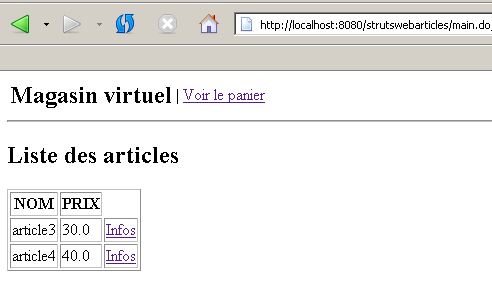
[ListeArticlesAction] 类的代码如下:
| package istia.st.articles.web.struts;
import istia.st.articles.domain.IArticlesDomain;
import istia.st.articles.exception.UncheckedAccessArticlesException;
import java.io.IOException;
import java.util.ArrayList;
import java.util.Hashtable;
import java.util.List;
import javax.servlet.ServletException;
import javax.servlet.http.HttpServletRequest;
import javax.servlet.http.HttpServletResponse;
import org.apache.struts.action.Action;
import org.apache.struts.action.ActionForm;
import org.apache.struts.action.ActionForward;
import org.apache.struts.action.ActionMapping;
/**
* @author ST - ISTIA
*
*/
public class ListeArticlesAction extends Action {
/**
* affichage de la liste des articles - s'appuie sur la couche [domain]
*
* @param mapping :
* configuration de l'action dans struts-config.xml
* @param form :
* le formulaire passé à l'action - ici aucun
* @param request :
* la requête HTTP du client
* @param response :
* la réponse HTTP au client
*/
public ActionForward execute(ActionMapping mapping, ActionForm form,
HttpServletRequest request, HttpServletResponse response)
throws IOException, ServletException {
     // the control servlet
    MainServlet mainServlet = (MainServlet) this.getServlet();
     // initialization errors?
    ArrayList erreursInit = mainServlet.getErreurs();
    if (erreursInit.size() != 0) {
       // the error page is displayed
      request.setAttribute("erreurs", erreursInit);
      request.setAttribute("actions", new Hashtable[] {});
      return mapping.findForward("afficherErreurs");
    }
// domain access object
IArticlesDomain articlesDomain = mainServlet.getArticlesDomain();
// list of errors
ArrayList erreurs = new ArrayList();
// the list of items is requested
List articles = null;
try {
articles = articlesDomain.getAllArticles();
} catch (UncheckedAccessArticlesException ex) {
// we memorize the error
erreurs.add("Erreur lors de l'obtention de tous les articles : "
+ ex.toString());
}
// mistakes?
if (erreurs.size() != 0) {
// the error page is displayed
request.setAttribute("erreurs", erreurs);
request.setAttribute("actions", new Hashtable[] { mainServlet
.getHActionListe() });
return mapping.findForward("afficherErreurs");
}
// displays the list of items
request.setAttribute("listarticles", articles);
request.setAttribute("message", "");
request.setAttribute("actions", new Hashtable[] { mainServlet
.getHActionPanier() });
return mapping.findForward("afficherListeArticles");
}
}
|
注释:
- 编写 [Action] 类的代码,本质上就是编写其 [execute] 方法的代码
- 控制器实例中已存储了某些信息。我们使用以下方式获取对其的引用:
// the control servlet
MainServlet mainServlet = (MainServlet) this.getServlet();
- 我们检索控制器存储的初始化错误列表。如果该列表不为空,则向客户端发送 [ERRORS] 视图:
| // initialization errors?
ArrayList erreursInit = mainServlet.getErreurs();
if (erreursInit.size() != 0) {
// the error page is displayed
request.setAttribute("erreurs", erreursInit);
request.setAttribute("actions", new Hashtable[] {});
return mapping.findForward("afficherErreurs");
}
|
实际发送给客户端的视图由 [struts-config.xml] 提供:
        <action path="/main" type="istia.st.articles.web.struts.ListeArticlesAction">
            <forward name="afficherListeArticles" path="/vues/liste.jsp"/>
            <forward name="afficherErreurs" path="/vues/erreurs.jsp"/>
        </action>
这是 [/vues/erreurs.jsp] 视图。请读者验证该视图应返回的内容。此信息由动作通过 [request] 对象作为属性提供。
- 同样,得益于控制器,该操作可以获取提供应用程序模型(领域层)访问权限的对象:
     // domain access object
    IArticlesDomain articlesDomain = mainServlet.getArticlesDomain();
| // la liste des erreurs
ArrayList erreurs = new ArrayList();
// on demande la liste des articles
List articles = null;
try {
articles = articlesDomain.getAllArticles();
} catch (UncheckedAccessArticlesException ex) {
// on mémorise l'erreur
erreurs.add("Erreur lors de l'obtention de tous les articles : "
+ ex.toString());
}
|
| // mistakes?
if (erreurs.size() != 0) {
// the error page is displayed
request.setAttribute("erreurs", erreurs);
request.setAttribute("actions", new Hashtable[] { mainServlet
.getHActionListe() });
return mapping.findForward("afficherErreurs");
}
|
| // displays the list of items
request.setAttribute("listarticles", articles);
request.setAttribute("message", "");
request.setAttribute("actions", new Hashtable[] { mainServlet
.getHActionPanier() });
return mapping.findForward("afficherListeArticles");
|
实际发送给客户端的视图由 [struts-config.xml] 提供:
        <action path="/main" type="istia.st.articles.web.struts.ListeArticlesAction">
            <forward name="afficherListeArticles" path="/vues/liste.jsp"/>
            <forward name="afficherErreurs" path="/vues/erreurs.jsp"/>
        </action>
这是 [/vues/liste.jsp] 视图。请读者验证该视图的预期内容。此处提供的信息由 [request] 对象中的 action 作为属性提供。
3.6.6.3. infos.do
此操作用于提供关于 [LIST] 视图中显示的某一项的信息:
在 [struts-config.xml] 中,此操作的配置如下:
        <action path="/infos" type="istia.st.articles.web.struts.InfosArticleAction">
            <forward name="afficherInfosArticle" path="/vues/infos.jsp"/>
            <forward name="afficherErreurs" path="/vues/erreurs.jsp"/>
        </action>
[InfosArticleAction] 类的代码如下:
| package istia.st.articles.web.struts;
import istia.st.articles.dao.Article;
import istia.st.articles.domain.IArticlesDomain;
import istia.st.articles.exception.UncheckedAccessArticlesException;
import java.io.IOException;
import java.util.ArrayList;
import java.util.Hashtable;
import javax.servlet.ServletException;
import javax.servlet.http.HttpServletRequest;
import javax.servlet.http.HttpServletResponse;
import org.apache.struts.action.Action;
import org.apache.struts.action.ActionForm;
import org.apache.struts.action.ActionForward;
import org.apache.struts.action.ActionMapping;
/**
* @author ST-ISTIA
*
*/
public class InfosArticleAction extends Action {
public ActionForward execute(ActionMapping mapping, ActionForm form,
HttpServletRequest request, HttpServletResponse response)
throws IOException, ServletException {
// the control servlet
MainServlet mainServlet = (MainServlet) this.getServlet();
// initialization errors?
ArrayList erreursInit = mainServlet.getErreurs();
if (erreursInit.size() != 0) {
// the error page is displayed
request.setAttribute("erreurs", erreursInit);
request.setAttribute("actions", new Hashtable[] {});
return mapping.findForward("afficherErreurs");
}
// domain access object
IArticlesDomain articlesDomain = mainServlet.getArticlesDomain();
// list of errors
ArrayList erreurs = new ArrayList();
// retrieve the requested id
String strId = request.getParameter("id");
// anything?
if (strId == null) {
// not normal
erreurs.add("action incorrecte([infos,id=null]");
request.setAttribute("erreurs", erreurs);
request.setAttribute("actions", new Hashtable[] { mainServlet
.getHActionListe() });
return mapping.findForward("afficherErreurs");
}
// transform strId into an integer
int id = 0;
try {
id = Integer.parseInt(strId);
} catch (Exception ex) {
// not normal
erreurs.add("action incorrecte([infos,id=" + strId + "]");
request.setAttribute("erreurs", erreurs);
request.setAttribute("actions", new Hashtable[] { mainServlet
.getHActionListe() });
return mapping.findForward("afficherErreurs");
}
// the key item id is requested
Article article = null;
try {
article = articlesDomain.getArticleById(id);
} catch (UncheckedAccessArticlesException ex) {
// not normal
erreurs.add("Erreur d'accès aux données [" + ex.toString() + "]");
request.setAttribute("erreurs", erreurs);
request.setAttribute("actions", new Hashtable[] { mainServlet
.getHActionListe() });
return mapping.findForward("afficherErreurs");
}
if (article == null) {
// not normal
erreurs.add("Article de clé [" + id + "] inexistant");
request.setAttribute("erreurs", erreurs);
request.setAttribute("actions", new Hashtable[] { mainServlet
.getHActionListe() });
return mapping.findForward("afficherErreurs");
}
// put the article in the session
request.getSession().setAttribute("article", article);
// the info page is displayed
request.setAttribute("actions", new Hashtable[] { mainServlet
.getHActionListe() });
return mapping.findForward("afficherInfosArticle");
}
}
|
注释:
- [execute] 方法的开头与之前讨论的完全相同。其他操作也是如此。
- 该方法会获取 [id] 参数,该参数通常应出现在 URL 中。URL 应采用 [/infos.do?id=X] 的形式。系统会执行多项检查以验证 [id] 参数是否存在且有效。若出现问题,则渲染 [ERRORS] 视图。
- 如果 [id] 有效,则向 [domain] 层请求对应的项目。如果此操作抛出异常或未找到该项目,则再次返回 [ERRORS] 视图。
- 若一切顺利,检索到的项目将存储在会话中。这一点尚有争议。在此,我们假设客户端可能会购买该项目。若确实购买,我们将从会话中检索该项目,而非再次向 [domain] 层发起请求。
- 最后,显示 [INFOS] 视图。实际发送给客户端的视图由 [struts-config.xml] 提供:
        <action path="/infos" type="istia.st.articles.web.struts.InfosArticleAction">
            <forward name="afficherInfosArticle" path="/vues/infos.jsp"/>
            <forward name="afficherErreurs" path="/vues/erreurs.jsp"/>
        </action>
这是 [/vues/infos.jsp] 视图。请读者验证该视图应呈现的内容。此处的信息由动作通过 [request] 对象作为属性提供。
3.6.6.4. purchase.do
此操作用于购买前一个 [INFOS] 视图中显示的商品:
购买完成后,将重新显示 [LIST] 视图(右侧视图)。如果查看上文左侧视图的 HTML 代码,我们会发现 <form> 标签的定义如下:
| <form method="post" action="achat.do?id=3"/>
<table>
<tr>
<td><input type="submit" value="Acheter"></td>
<td>Qte <input type="text" name="qte" size="3" value=""></td>
<td></td>
</tr>
</table>
</form>
|
我们可以看到,表单已通过 [achat.do] 操作提交给控制器。
该操作在 [struts-config.xml] 中配置如下:
<action
path="/achat" type="istia.st.articles.web.struts.AchatArticleAction">
<forward name="afficherInfosArticle" path="/vues/infos.jsp"/>
<forward name="afficherListeArticles" path="/main.do"/>
</action>
[AchatArticleAction] 类的代码如下:
| package istia.st.articles.web.struts;
import istia.st.articles.dao.Article;
import istia.st.articles.domain.Achat;
import istia.st.articles.domain.Panier;
import java.io.IOException;
import java.util.ArrayList;
import java.util.Hashtable;
import javax.servlet.ServletException;
import javax.servlet.http.HttpServletRequest;
import javax.servlet.http.HttpServletResponse;
import javax.servlet.http.HttpSession;
import org.apache.struts.action.Action;
import org.apache.struts.action.ActionForm;
import org.apache.struts.action.ActionForward;
import org.apache.struts.action.ActionMapping;
/**
* @author ST
*
*/
public class AchatArticleAction extends Action {
public ActionForward execute(ActionMapping mapping, ActionForm form,
HttpServletRequest request, HttpServletResponse response)
throws IOException, ServletException {
// the control servlet
MainServlet mainServlet = (MainServlet) this.getServlet();
// initialization errors?
ArrayList erreursInit = mainServlet.getErreurs();
if (erreursInit.size() != 0) {
// the error page is displayed
request.setAttribute("erreurs", erreursInit);
request.setAttribute("actions", new Hashtable[] {});
return mapping.findForward("afficherErreurs");
}
// the list of errors on this action
ArrayList erreurs = new ArrayList();
// the quantity purchased is recovered
int qté = 0;
try {
qté = Integer.parseInt(request.getParameter("qte"));
if (qté <= 0)
throw new NumberFormatException();
} catch (NumberFormatException ex) {
// wrong qty
request.setAttribute("msg", "Quantité incorrecte");
request.setAttribute("qte", request.getParameter("qte"));
request.setAttribute("actions", new Hashtable[] { mainServlet
.getHActionListe() });
return mapping.findForward("afficherInfosArticle");
}
// retrieve the client session
HttpSession session = request.getSession();
// we retrieve the article placed in session
Article article = (Article) session.getAttribute("article");
// session expired?
if(article==null){
// the error page is displayed
erreurs.add("Votre session a expiré");
request.setAttribute("erreurs", erreurs);
request.setAttribute("actions", new Hashtable[] { mainServlet
.getHActionListe() });
return mapping.findForward("afficherErreurs");
}
// create the new purchase
Achat achat = new Achat(article, qté);
// the purchase is added to the customer's basket
Panier panier = (Panier) session.getAttribute("panier");
if (panier == null) {
panier = new Panier();
session.setAttribute("panier", panier);
}
panier.ajouter(achat);
// we return to the list of items
return mapping.findForward("afficherListeArticles");
}
}
|
注释:
- [execute] 方法的开头与之前学习的内容完全相同。
- 让我们回顾一下发送给控制器表单的格式:
| <form method="post" action="achat.do?id=3"/>
<table>
<tr>
<td><input type="submit" value="Acheter"></td>
<td>Qte <input type="text" name="qte" size="3" value=""></td>
<td></td>
</tr>
</table>
</form>
|
- 请求中包含两个参数:[id]:商品编号,[qte]:购买数量。
- 系统会检查 [qte] 参数是否存在且有效。若发现该参数有误,将向用户返回 [INFOS] 视图并附带一条错误信息:
| // the list of errors on this action
ArrayList erreurs = new ArrayList();
// the quantity purchased is recovered
int qté = 0;
try {
qté = Integer.parseInt(request.getParameter("qte"));
if (qté <= 0)
throw new NumberFormatException();
} catch (NumberFormatException ex) {
// wrong qty
request.setAttribute("msg", "Quantité incorrecte");
request.setAttribute("qte", request.getParameter("qte"));
request.setAttribute("actions", new Hashtable[] { mainServlet
.getHActionListe() });
return mapping.findForward("afficherInfosArticle");
}
|
- 从会话中检索已购买的商品。会话可能已过期。在这种情况下,将显示 [ERRORS] 视图:
| // retrieve the client session
HttpSession session = request.getSession();
// we retrieve the article placed in session
Article article = (Article) session.getAttribute("article");
// session expired?
if(article==null){
// the error page is displayed
erreurs.add("Votre session a expiré");
request.setAttribute("erreurs", erreurs);
request.setAttribute("actions", new Hashtable[] { mainServlet
.getHActionListe() });
return mapping.findForward("afficherErreurs");
}
|
- 如果会话尚未过期,该商品将被添加到购物车中,购物车数据同样从会话中获取:
| // retrieve the client session
HttpSession session = request.getSession();
// we retrieve the article placed in session
Article article = (Article) session.getAttribute("article");
// session expired?
if(article==null){
// the error page is displayed
erreurs.add("Votre session a expiré");
request.setAttribute("erreurs", erreurs);
request.setAttribute("actions", new Hashtable[] { mainServlet
.getHActionListe() });
return mapping.findForward("afficherErreurs");
}
// create the new purchase
Achat achat = new Achat(article, qté);
// the purchase is added to the customer's basket
Panier panier = (Panier) session.getAttribute("panier");
if (panier == null) {
panier = new Panier();
session.setAttribute("panier", panier);
}
panier.ajouter(achat);
|
// on revient à la liste des articles
return mapping.findForward("afficherListeArticles");
- 实际发送给客户端的视图由 [struts-config.xml] 提供:
<action
path="/achat" type="istia.st.articles.web.struts.AchatArticleAction">
<forward name="afficherInfosArticle" path="/vues/infos.jsp"/>
<forward name="afficherListeArticles" path="/main.do"/>
</action>
这是 [/main.do] 视图。该视图并非视图,而是一个操作。因此,上述 [/main.do] 操作将被执行,并显示项目列表。
3.6.6.5. cart.do
此操作用于显示客户的所有购买记录。可通过 [查看购物车] 菜单选项访问:
与 [查看购物车] 链接相关的 HTML 代码如下:
<a href="panier.do">Voir le panier</a>
在 [struts-config.xml] 中,[panier.do] 操作配置如下:
<action
path="/panier" type="istia.st.articles.web.struts.VoirPanierAction">
<forward name="afficherPanier" path="/vues/panier.jsp"/>
<forward name="afficherPanierVide" path="/vues/paniervide.jsp"/>
</action>
[VoirPanierAction] 类的代码如下:
| package istia.st.articles.web.struts;
import istia.st.articles.domain.Panier;
import java.io.IOException;
import java.util.ArrayList;
import java.util.Hashtable;
import javax.servlet.ServletException;
import javax.servlet.http.HttpServletRequest;
import javax.servlet.http.HttpServletResponse;
import org.apache.struts.action.Action;
import org.apache.struts.action.ActionForm;
import org.apache.struts.action.ActionForward;
import org.apache.struts.action.ActionMapping;
/**
* @author ST-ISTIA
*
*/
public class VoirPanierAction extends Action {
public ActionForward execute(ActionMapping mapping, ActionForm form,
HttpServletRequest request, HttpServletResponse response)
throws IOException, ServletException {
// the control servlet
MainServlet mainServlet = (MainServlet) this.getServlet();
// initialization errors?
ArrayList erreursInit = mainServlet.getErreurs();
if (erreursInit.size() != 0) {
// the error page is displayed
request.setAttribute("erreurs", erreursInit);
request.setAttribute("actions", new Hashtable[] {});
return mapping.findForward("afficherErreurs");
}
// the basket is displayed
Panier panier = (Panier) request.getSession().getAttribute("panier");
if (panier == null || panier.getAchats().size() == 0) {
// empty basket
request.setAttribute("actions", new Hashtable[] { mainServlet
.getHActionListe() });
return mapping.findForward("afficherPanierVide");
} else {
// there's something in the basket
request.setAttribute("actions", new Hashtable[] { mainServlet
.getHActionListe(), mainServlet.getHActionValidationPanier() });
return mapping.findForward("afficherPanier");
}
}
}
|
注释:
- [execute] 方法的开头与之前讨论的完全相同。
- 购物车从通常存放它的会话中检索出来。会话可能已过期,这种情况下就没有购物车。我们不将此视为错误,而是直接假设购物车为空。
- 如果购物车为空,则显示 [EMPTY CART] 视图
- 否则,则显示 [PANIER] 视图
实际发送给客户端的视图由操作定义:
<action
path="/panier" type="istia.st.articles.web.struts.VoirPanierAction">
<forward name="afficherPanier" path="/vues/panier.jsp"/>
<forward name="afficherPanierVide" path="/vues/paniervide.jsp"/>
</action>
3.6.6.6. checkout.do
此操作将商品从购物车中移除:
执行 [retirerachat.do] 操作后,购物车将重新显示(如上图右侧所示)。如果查看上图左侧视图中 [确认购物车] 链接的 HTML 代码,我们会看到以下内容:
<a href="retirerachat.do?id=3">Retirer</a>
因此,[retirerachat.do] 操作会接收一个参数,即要从购物车中移除的商品 ID。该操作在 [struts-config.xml] 中的配置如下:
<action
path="/retirerachat" type="istia.st.articles.web.struts.RetirerAchatAction">
<forward name="afficherPanier" path="/panier.do"/>
<forward name="afficherErreurs" path="/vues/erreurs.jsp"/>
</action>
[RetirerAchatAction] 类的代码如下:
| package istia.st.articles.web.struts;
import istia.st.articles.domain.Panier;
import java.io.IOException;
import java.util.ArrayList;
import java.util.Hashtable;
import javax.servlet.ServletException;
import javax.servlet.http.HttpServletRequest;
import javax.servlet.http.HttpServletResponse;
import org.apache.struts.action.Action;
import org.apache.struts.action.ActionForm;
import org.apache.struts.action.ActionForward;
import org.apache.struts.action.ActionMapping;
/**
* @author ST-ISTIA
*
*/
public class RetirerAchatAction extends Action {
public ActionForward execute(ActionMapping mapping, ActionForm form,
HttpServletRequest request, HttpServletResponse response)
throws IOException, ServletException {
// the control servlet
MainServlet mainServlet = (MainServlet) this.getServlet();
// initialization errors?
ArrayList erreursInit = mainServlet.getErreurs();
if (erreursInit.size() != 0) {
// the error page is displayed
request.setAttribute("erreurs", erreursInit);
request.setAttribute("actions", new Hashtable[] {});
return mapping.findForward("afficherErreurs");
}
// the list of errors on this action
ArrayList erreurs = new ArrayList();
// we pick up the basket
Panier panier = (Panier) request.getSession().getAttribute("panier");
if (panier == null) {
// session expired
erreurs.add("Votre session a expiré");
request.setAttribute("erreurs", erreurs);
request.setAttribute("actions", new Hashtable[] { mainServlet
.getHActionListe() });
return mapping.findForward("afficherPanierVide");
}
// retrieve the id of the item to be removed
String strId = request.getParameter("id");
// anything?
if (strId == null) {
// not normal
erreurs.add("action incorrecte([retirerachat,id=null]");
request.setAttribute("erreurs", erreurs);
request.setAttribute("actions", new Hashtable[] { mainServlet
.getHActionListe() });
return mapping.findForward("afficherErreurs");
}
// transform strId into an integer
int id = 0;
try {
id = Integer.parseInt(strId);
} catch (Exception ex) {
// not normal
erreurs.add("action incorrecte([retirerachat,id=" + strId + "]");
request.setAttribute("erreurs", erreurs);
request.setAttribute("actions", new Hashtable[] { mainServlet
.getHActionListe() });
return mapping.findForward("afficherErreurs");
}
// we remove the purchase
panier.enlever(id);
// the basket is displayed again
return mapping.findForward("afficherPanier");
}
}
|
注释:
- [execute] 方法的开头与之前学习的内容完全相同。
- 以下代码用于检查 [id] 参数是否存在及其有效性。如果参数不正确,则返回 [ERRORS] 视图。
- 否则,将商品从购物车中移除:
// on enlève l'achat
panier.enlever(id);
// on affiche de nouveau le panier
return mapping.findForward("afficherPanier");
实际发送给客户端的视图由操作定义:
<action
path="/retirerachat" type="istia.st.articles.web.struts.RetirerAchatAction">
<forward name="afficherPanier" path="/panier.do"/>
<forward name="afficherErreurs" path="/vues/erreurs.jsp"/>
</action>
我们可以看到,就视图而言,将触发的是 [/cart.do] 操作。这一点之前已经描述过。它将根据购物车的状态显示 [CART] 或 [EMPTY CART] 视图。
3.6.6.7. confirmCart.do
此操作用于确认客户的购买。实际上,这仅涉及一个操作:在数据库中将已购商品的库存数量减少购买数量。此操作来自以下菜单:
[确认购物车]链接的HTML代码如下:
<a href="validerpanier.do">Valider le panier</a>
点击此链接后,库存数量将更新,并重新显示商品列表。
此操作在 [struts-config.xml] 中的配置如下:
<action
path="/validerpanier" type="istia.st.articles.web.struts.ValiderPanierAction">
<forward name="afficherListeArticles" path="/main.do"/>
<forward name="afficherErreurs" path="/vues/erreurs.jsp"/>
</action>
[ValiderPanierAction] 类的代码如下:
| package istia.st.articles.web.struts;
import istia.st.articles.domain.IArticlesDomain;
import istia.st.articles.domain.Panier;
import istia.st.articles.exception.UncheckedAccessArticlesException;
import java.io.IOException;
import java.util.ArrayList;
import java.util.Hashtable;
import javax.servlet.ServletException;
import javax.servlet.http.HttpServletRequest;
import javax.servlet.http.HttpServletResponse;
import org.apache.struts.action.Action;
import org.apache.struts.action.ActionForm;
import org.apache.struts.action.ActionForward;
import org.apache.struts.action.ActionMapping;
/**
* @author ST-ISTIA
*
*/
public class ValiderPanierAction extends Action {
public ActionForward execute(ActionMapping mapping, ActionForm form,
HttpServletRequest request, HttpServletResponse response)
throws IOException, ServletException {
// the control servlet
MainServlet mainServlet = (MainServlet) this.getServlet();
// initialization errors?
ArrayList erreursInit = mainServlet.getErreurs();
if (erreursInit.size() != 0) {
// the error page is displayed
request.setAttribute("erreurs", erreursInit);
request.setAttribute("actions", new Hashtable[] {});
return mapping.findForward("afficherErreurs");
}
// domain access object
IArticlesDomain articlesDomain = mainServlet.getArticlesDomain();
// the list of errors on this action
ArrayList erreurs = new ArrayList();
// the buyer has confirmed his basket
Panier panier = (Panier) request.getSession().getAttribute("panier");
if (panier == null) {
// session expired
erreurs.add("Votre session a expiré");
request.setAttribute("erreurs", erreurs);
request.setAttribute("actions", new Hashtable[] { mainServlet
.getHActionListe() });
return mapping.findForward("afficherErreurs");
}
// validate basket
try {
articlesDomain.acheter(panier);
} catch (UncheckedAccessArticlesException ex) {
// not normal
erreurs.add("Erreur d'accès aux données [" + ex.toString() + "]");
request.setAttribute("erreurs", erreurs);
request.setAttribute("actions", new Hashtable[] { mainServlet
.getHActionListe() });
return mapping.findForward("afficherErreurs");
}
// recover any errors
erreurs = articlesDomain.getErreurs();
if (erreurs.size() != 0) {
request.setAttribute("erreurs", erreurs);
request.setAttribute("actions", new Hashtable[] { mainServlet
.getHActionListe(),mainServlet.getHActionPanier() });
return mapping.findForward("afficherErreurs");
}
// everything looks OK - the item list is displayed
return mapping.findForward("afficherListeArticles");
}
}
|
注释:
- [execute] 方法的开头与之前学习的内容完全相同。
- 我们从会话中获取购物车。如果会话已过期,则显示 [ERRORS] 视图:
| // the list of errors on this action
ArrayList erreurs = new ArrayList();
// the buyer has confirmed his basket
Panier panier = (Panier) request.getSession().getAttribute("panier");
if (panier == null) {
// session expired
erreurs.add("Votre session a expiré");
request.setAttribute("erreurs", erreurs);
request.setAttribute("actions", new Hashtable[] { mainServlet
.getHActionListe() });
return mapping.findForward("afficherErreurs");
}
|
- 我们处理购物车中的订单。如果库存不足以满足订单需求,可能会发生错误。在这种情况下,我们会显示 [ERRORS] 视图:
| // validate basket
try {
articlesDomain.acheter(panier);
} catch (UncheckedAccessArticlesException ex) {
// not normal
erreurs.add("Erreur d'accès aux données [" + ex.toString() + "]");
request.setAttribute("erreurs", erreurs);
request.setAttribute("actions", new Hashtable[] { mainServlet
.getHActionListe() });
return mapping.findForward("afficherErreurs");
}
// recover any errors
erreurs = articlesDomain.getErreurs();
if (erreurs.size() != 0) {
request.setAttribute("erreurs", erreurs);
request.setAttribute("actions", new Hashtable[] { mainServlet
.getHActionListe(),mainServlet.getHActionPanier() });
return mapping.findForward("afficherErreurs");
}
|
// tout semble OK - on affiche la liste des articles
return mapping.findForward("afficherListeArticles");
实际发送给客户端的视图由该操作定义:
<action
path="/validerpanier" type="istia.st.articles.web.struts.ValiderPanierAction">
<forward name="afficherListeArticles" path="/main.do"/>
<forward name="afficherErreurs" path="/vues/erreurs.jsp"/>
</action>
我们可以看到,就视图而言,将触发的是 [/main.do] 操作。这一点之前已经描述过。它将显示 [LIST] 视图。
3.7. 基于 Spring 的 MVC 架构
3.7.1. 通用应用程序架构
让我们重新审视一下该应用程序的 MVC 架构:
在第一个版本中:
- 控制器由一个Servlet处理
- 视图由 JSP 页面处理
- 模型由一组三个 .jar 文件处理
在 Struts 版本中:
- 控制器由一个继承自 Struts 通用 [ActionServlet] 的 Servlet 处理
- 视图由与 [Struts] 版本相同的 JSP 页面处理
- 模型由相同的三个归档文件处理
在 Spring 版本中:
- 控制器将由 Spring 提供的 Servlet [DispatcherServlet] 处理
- 视图将由与之前相同的 JSP 页面处理,仅有少量细微差异
- 模型将由原有的三个文件处理
如果我们愿意放弃使用标准 Spring MVC 架构所推荐的所有组件,就会发现将应用程序从 Struts 迁移到 Spring 非常简单。主要变更如下:
- 以前由 Servlet/控制器中的特定方法处理,或由 Struts 中继承自 [Action] 类的类实例处理的操作,现在由实现 Spring [Controller] 接口的类实例来处理
- 所需的配置文件如下:
- [web.xml],因为这是一个 Web 应用程序。该文件包含一个监听器,当应用程序初始化时,该监听器将使用 [applicationContext.xml]
- [applicationContext.xml] 来创建应用程序所需的 Bean,特别是模型访问服务 Bean
- JSP 视图将与 Struts 中的视图完全相同。我们需要创建一个新的视图。
让我们回顾一下上一版本中使用的 Struts MVC 架构:
| 业务类、数据访问类和数据库 |
| JSP 页面 |
| 用于处理客户端请求的Servlet,[Action]对象 |
在 Spring 中,我们采用相同的架构:
| 业务类、数据访问类和数据库 |
| JSP页面 |
| 处理客户端请求的Servlet,以及实现[Controller]接口的对象 |
- 控制器是应用程序的核心。所有客户端请求都需经过它。它是由SPRING提供的通用Servlet,类型为[DispatcherServlet]。从现在起,我们将把这个控制器称为[Spring]控制器。
- [Spring]控制器将把客户端的请求路由到某个[Controller]实例。每个待处理的操作都会有一个这样的实例。这与Struts一样,由请求的URL定义。因此,由于请求的URL是[list.do],我们便知道所请求的操作是[list]操作
- 若 C 代表应用上下文,[Spring] 控制器会使用 [C-servlet.xml] 文件,该文件的作用与 Struts 版本中的 struts-config.xml 配置文件相同。对于应用需要处理的每个操作,我们会关联负责处理该请求的 Controller 类型类的名称。
- 控制器将控制权移交给与该操作关联的 Controller 类型对象。它通过调用该对象的 handleRequest 方法并向其传递客户端的请求来实现这一点。开发人员在此处执行必要的任务:他们可能需要调用业务逻辑类或数据访问类。处理结束时,Controller 对象将必须作为响应发送给客户端的视图名称返回给控制器。
- 控制器将在其配置文件中查找与被要求显示的视图名称关联的 URL,随后发送该视图。至此,与客户端的交互即告完成。
3.7.2. 模型
与前两个版本相同。它由以下 Java 归档文件组成:[istia.st.articles.dao, istia.st.articles.domain, istia.st.articles.exception]。
3.7.3. 应用程序配置
3.7.3.1. 总体架构
该Eclipse项目的总体架构如下:
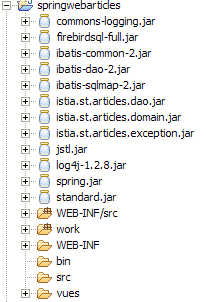
3.7.3.2. 数据访问配置
由于数据访问接口保持不变,相关的配置文件与上一版本相同。它们定义在 [WEB-INF/src] 目录下:
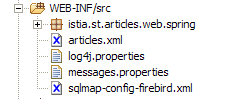
在上图截图中,文件 [articles.xml, spring-config-sqlmap-firebird.xml, sqlmap-config-firebird.xml, log4j.properties] 均来自旧版本。
3.7.3.3. 归档目录
在 [WEB-INF/lib] 中,您将找到与上一版本相同的库,但不再需要的 Struts 相关库除外:
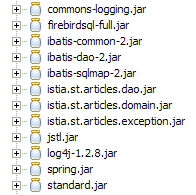
3.7.3.4. 应用程序配置
该应用程序通过 [WEB-INF] 文件夹中的三个配置文件进行配置:[web.xml, applicationContext.xml, springwebarticles-servlet.xml]:
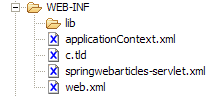
[web.xml] 文件内容如下:
| <?xml version="1.0" encoding="ISO-8859-1"?>
<!DOCTYPE web-app PUBLIC
"-//Sun Microsystems, Inc.//DTD Web Application 2.3//EN"
"http://java.sun.com/dtd/web-app_2_3.dtd">
<web-app>
<!-- application spring context loader -->
<listener>
<listener-class>
org.springframework.web.context.ContextLoaderListener</listener-class>
</listener>
<!-- the servlet -->
<servlet>
<servlet-name>springwebarticles</servlet-name>
<servlet-class>
org.springframework.web.servlet.DispatcherServlet</servlet-class>
</servlet>
<!-- url mapping -->
<servlet-mapping>
<servlet-name>springwebarticles</servlet-name>
<url-pattern>*.do</url-pattern>
</servlet-mapping>
<!-- entry document -->
<welcome-file-list>
<welcome-file>/vues/index.jsp</welcome-file>
</welcome-file-list>
</web-app>
|
这个文件的内容是什么?
- 应用程序的首页是 [/vues/index.jsp] (欢迎页面)
- 格式为 *.do 的 URL 请求将被重定向到 [springwebarticles] servlet(servlet-mapping)
- [springwebarticles] servlet 是 Spring 提供的 [org.springframework.web.servlet.DispatcherServlet] 类的实例(servlet-name, servlet-class)。
- 当应用程序启动时,将启动 [org.springframework.web.context.ContextLoaderListener] 监听器。其主要作用是实例化 [applicationContext.xml] 文件中定义的 Spring Bean
[applicationContext.xml] 文件内容如下:
| <?xml version="1.0" encoding="UTF-8"?>
<!DOCTYPE beans SYSTEM "http://www.springframework.org/dtd/spring-beans.dtd">
<beans>
<!-- data access class -->
<bean id="articlesDao" class="istia.st.articles.dao.ArticlesDaoSqlMap">
<constructor-arg index="0">
<value>sqlmap-config-firebird.xml</value>
</constructor-arg>
</bean>
<!-- the business class -->
<bean id="articlesDomain" class="istia.st.articles.domain.AchatsArticles">
<constructor-arg index="0">
<ref bean="articlesDao"/>
</constructor-arg>
</bean>
<!-- web application configuration-->
<bean id="config" class="istia.st.articles.web.spring.Config" init-method="init">
<property name="articlesDomain">
<ref bean="articlesDomain"/>
</property>
</bean>
</beans>
|
有些元素很熟悉,有些则不太熟悉。在应用程序初始化期间将实例化三个 Bean:
- articlesDao:提供对 [dao] 层访问的服务
- articlesDomain:提供模型访问的服务
- config:一个用于汇集所有客户端必须共享信息的 Bean。该 Bean 将承担传统上由应用程序上下文承担的角色,但其处理的是类型化信息而非非类型化信息。
最后一个文件 [springwebarticles.xml] 以与 Struts 文件 [struts-config.xml] 非常相似的方式定义了应用程序接受的操作。其内容如下:
| <?xml version="1.0" encoding="UTF-8"?>
<!DOCTYPE beans PUBLIC "-//SPRING//DTD BEAN//EN" "http://www.springframework.org/dtd/spring-beans.dtd">
<beans>
<!-- stock managers = controllers -->
<bean id="ListController" class="istia.st.articles.web.spring.ListController">
<property name="config">
<ref bean="config"/>
</property>
</bean>
<bean id="InfosController"
class="istia.st.articles.web.spring.InfosController">
<property name="config">
<ref bean="config"/>
</property>
</bean>
<bean id="AchatController"
class="istia.st.articles.web.spring.AchatController">
<property name="config">
<ref bean="config"/>
</property>
</bean>
<bean id="VoirPanierController"
class="istia.st.articles.web.spring.VoirPanierController">
<property name="config">
<ref bean="config"/>
</property>
</bean>
<bean id="RetirerAchatController"
class="istia.st.articles.web.spring.RetirerAchatController">
<property name="config">
<ref bean="config"/>
</property>
</bean>
<bean id="ValiderPanierController"
class="istia.st.articles.web.spring.ValiderPanierController">
<property name="config">
<ref bean="config"/>
</property>
</bean>
<!-- application mapping-->
<bean id="urlMapping"
class="org.springframework.web.servlet.handler.SimpleUrlHandlerMapping">
<property name="mappings">
<props>
<prop key="/liste.do">ListController</prop>
<prop key="/main.do">ListController</prop>
<prop key="/infos.do">InfosController</prop>
<prop key="/achat.do">AchatController</prop>
<prop key="/panier.do">VoirPanierController</prop>
<prop key="/retirerachat.do">RetirerAchatController</prop>
<prop key="/validerpanier.do">ValiderPanierController</prop>
</props>
</property>
</bean>
<!-- view manager -->
<bean id="viewResolver"
class="org.springframework.web.servlet.view.InternalResourceViewResolver">
<property name="viewClass">
<value>org.springframework.web.servlet.view.JstlView</value>
</property>
<property name="prefix">
<value>/vues/</value>
</property>
<property name="suffix">
<value>.jsp</value>
</property>
</bean>
<!-- message file -->
<bean id="messageSource"
class="org.springframework.context.support.ResourceBundleMessageSource">
<property name="basename">
<value>messages</value>
</property>
</bean>
</beans>
|
这个配置文件说明了什么?
| 用于显示文章列表 |
| 用于显示文章列表 |
| 用于显示特定商品的信息 |
| 用于购买特定商品 |
| 查看购物车 |
| 从购物车中移除商品 |
| 用于确认购物车 |
- 上述操作与旧版本中由控制器处理的操作一一对应。对于每项操作,都指定了负责处理它的类名。以 [/panier.do] 操作为例:
- 它必须由 [VoirPanierController] Bean 处理。这个名称是任意的,它仅仅是一个键。
<prop key="/panier.do">VoirPanierController</prop>
- 键 [VoirPanierController] 是同一配置文件中定义的 Bean 的名称:
<bean id="VoirPanierController"
class="istia.st.articles.web.spring.VoirPanierController">
<property name="config">
<ref bean="config"/>
</property>
</bean>
- [VoirPanierController] Bean 定义了:
- 要实例化的类 [istia.st.articles.web.spring.VoirPanierController],用于处理该操作
- 如何实例化该类。此处,由 [applicationContext.xml] 定义并在应用程序启动时实例化的 [config] Bean 被作为参数提供。此操作将适用于所有 [Controller] 操作。因此,每个 [Controller] 都会在私有字段中拥有 [config] 对象,其中包含所有客户端共享的信息。
<!-- gestionnaire de vues -->
<bean id="viewResolver"
class="org.springframework.web.servlet.view.InternalResourceViewResolver">
<property name="viewClass">
<value>org.springframework.web.servlet.view.JstlView</value>
</property>
<property name="prefix">
<value>/vues/</value>
</property>
<property name="suffix">
<value>.jsp</value>
</property>
</bean>
与 Struts 类似,处理操作的 [Controller] 实例在处理完成后会返回一个键给 Spring 控制器,以指示应显示哪个视图。根据该键,可能存在多种生成与该键关联的视图的策略。所使用的策略是由 [viewResolver] Bean 定义的。 在此,该 Bean 关联了 [org.springframework.web.servlet.view.InternalResourceViewResolver] 类,并带有各种初始化参数。简而言之,[viewResolver] Bean 在此指定:如果视图键为“XX”,则生成的视图将是 [/views/XX.jsp]。发送给客户端的视图类型可以通过多种方式进行更改:
- 通过更改 [viewResolver] Bean 的实现类
- 修改实现类的初始化参数
因此,您只需更改 [viewResolver] Bean 的值,即可从 HTML 视图切换为 XML 视图
- 应用程序的消息文件名称(messageSource)。此处该文件将存在但为空,不会被使用。它必须放置在应用程序的 [ClassPath] 中。此处将放置在 [WEB-INF/classes] 中。在 Eclipse 中,可通过将其放置在 [WEB-INF/src] 中实现:
3.7.4. JSP 视图
将使用 Struts 所用的 JSP 视图。所有视图均未进行修改:
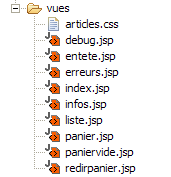
创建了一个新的视图:redirpanier.jsp。它仅用于将客户端重定向到 [/panier.do] 操作。其代码如下:
<%@ page language="java" %>
<%@ taglib uri="/WEB-INF/c.tld" prefix="c" %>
<c:redirect url="/panier.do"/>
建议读者查阅 Struts 版本中各种视图的定义。
3.7.5. 操作处理
处理各种操作所需的类已归类在 [istia.st.articles.web.spring] 包中:
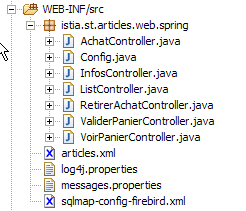
让我们通过一个示例来回顾 Spring 应用程序的工作原理:
- 用户请求 URL [http://localhost:8080/springwebarticles/main.do]
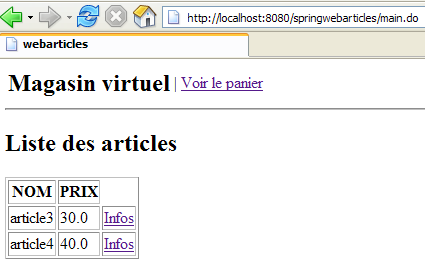
发生了什么?
- 查阅了 [springwebarticles] 应用程序的 [web.xml] 文件:
| <?xml version="1.0" encoding="ISO-8859-1"?>
<!DOCTYPE web-app PUBLIC
"-//Sun Microsystems, Inc.//DTD Web Application 2.3//EN"
"http://java.sun.com/dtd/web-app_2_3.dtd">
<web-app>
<!-- application spring context loader -->
<listener>
<listener-class>
org.springframework.web.context.ContextLoaderListener</listener-class>
</listener>
<!-- the servlet -->
<servlet>
<servlet-name>springwebarticles</servlet-name>
<servlet-class>
org.springframework.web.servlet.DispatcherServlet</servlet-class>
</servlet>
<!-- url mapping -->
<servlet-mapping>
<servlet-name>springwebarticles</servlet-name>
<url-pattern>*.do</url-pattern>
</servlet-mapping>
<!-- entry document -->
<welcome-file-list>
<welcome-file>/vues/index.jsp</welcome-file>
</welcome-file-list>
</web-app>
|
- 如果这是对应用程序的首次请求,则会触发以下操作:
- 加载了监听器 [org.springframework.web.context.ContextLoaderListener]
- 它解析了配置文件 [applicationContext.xml]:
| <?xml version="1.0" encoding="UTF-8"?>
<!DOCTYPE beans SYSTEM "http://www.springframework.org/dtd/spring-beans.dtd">
<beans>
<!-- data access class -->
<bean id="articlesDao" class="istia.st.articles.dao.ArticlesDaoSqlMap">
<constructor-arg index="0">
<value>sqlmap-config-firebird.xml</value>
</constructor-arg>
</bean>
<!-- the business class -->
<bean id="articlesDomain" class="istia.st.articles.domain.AchatsArticles">
<constructor-arg index="0">
<ref bean="articlesDao"/>
</constructor-arg>
</bean>
<!-- web application configuration-->
<bean id="config" class="istia.st.articles.web.spring.Config" init-method="init">
<property name="articlesDomain">
<ref bean="articlesDomain"/>
</property>
</bean>
</beans>
|
- 上述 Bean 是在应用程序上下文中创建的
- 随后使用了 [springwebarticles-servlet.xml] 文件:
| <?xml version="1.0" encoding="UTF-8"?>
<!DOCTYPE beans PUBLIC "-//SPRING//DTD BEAN//EN" "http://www.springframework.org/dtd/spring-beans.dtd">
<beans>
<!-- stock managers = controllers -->
<bean id="ListController" class="istia.st.articles.web.spring.ListController">
<property name="config">
<ref bean="config"/>
</property>
</bean>
<bean id="InfosController"
class="istia.st.articles.web.spring.InfosController">
<property name="config">
<ref bean="config"/>
</property>
</bean>
<bean id="AchatController"
class="istia.st.articles.web.spring.AchatController">
<property name="config">
<ref bean="config"/>
</property>
</bean>
<bean id="VoirPanierController"
class="istia.st.articles.web.spring.VoirPanierController">
<property name="config">
<ref bean="config"/>
</property>
</bean>
<bean id="RetirerAchatController"
class="istia.st.articles.web.spring.RetirerAchatController">
<property name="config">
<ref bean="config"/>
</property>
</bean>
<bean id="ValiderPanierController"
class="istia.st.articles.web.spring.ValiderPanierController">
<property name="config">
<ref bean="config"/>
</property>
</bean>
<!-- application mapping-->
<bean id="urlMapping"
class="org.springframework.web.servlet.handler.SimpleUrlHandlerMapping">
<property name="mappings">
<props>
<prop key="/liste.do">ListController</prop>
<prop key="/main.do">ListController</prop>
<prop key="/infos.do">InfosController</prop>
<prop key="/achat.do">AchatController</prop>
<prop key="/panier.do">VoirPanierController</prop>
<prop key="/retirerachat.do">RetirerAchatController</prop>
<prop key="/validerpanier.do">ValiderPanierController</prop>
</props>
</property>
</bean>
<!-- view manager -->
<bean id="viewResolver"
class="org.springframework.web.servlet.view.InternalResourceViewResolver">
<property name="viewClass">
<value>org.springframework.web.servlet.view.JstlView</value>
</property>
<property name="prefix">
<value>/vues/</value>
</property>
<property name="suffix">
<value>.jsp</value>
</property>
</bean>
<!-- message file -->
<bean id="messageSource"
class="org.springframework.context.support.ResourceBundleMessageSource">
<property name="basename">
<value>messages</value>
</property>
</bean>
</beans>
|
- 该文件定义的 [Controller] Bean 也已创建
- 现在一切就绪,可以处理客户端的请求了。该请求为:[http://localhost:8080/springwebarticles]。这里,我们请求的不是上下文中的某个 URL,而是上下文本身。因此,使用的是 [web.xml] 文件中的 [welcome-file] 部分。
<welcome-file-list>
<welcome-file>/vues/index.jsp</welcome-file>
</welcome-file-list>
<%@ page language="java" %>
<%@ taglib uri="/WEB-INF/c.tld" prefix="c" %>
<c:redirect url="/main.do"/>
- 因此,客户端会被提示重定向到 URL [http://localhost:8080/springwebarticles/main.do]。它执行了该操作。
- 随后,Spring控制器接收到了一个新的请求。它使用其 [springwebarticles-servlet.xml] 文件:
| <?xml version="1.0" encoding="UTF-8"?>
<!DOCTYPE beans PUBLIC "-//SPRING//DTD BEAN//EN" "http://www.springframework.org/dtd/spring-beans.dtd">
<beans>
<!-- stock managers = controllers -->
<bean id="ListController" class="istia.st.articles.web.spring.ListController">
<property name="config">
<ref bean="config"/>
</property>
</bean>
....
</bean>
<!-- application mapping-->
<bean id="urlMapping"
class="org.springframework.web.servlet.handler.SimpleUrlHandlerMapping">
<property name="mappings">
<props>
<prop key="/liste.do">ListController</prop>
<prop key="/main.do">ListController</prop>
<prop key="/infos.do">InfosController</prop>
<prop key="/achat.do">AchatController</prop>
<prop key="/panier.do">VoirPanierController</prop>
<prop key="/retirerachat.do">RetirerAchatController</prop>
<prop key="/validerpanier.do">ValiderPanierController</prop>
</props>
</property>
</bean>
</beans>
|
- 该文件指定 [/main.do] 操作必须由 [ListController] Bean 处理。
- 客户端的请求会被传递给 [ListController] Bean 的 [handleRequest] 方法。该方法执行相应操作后,会将待显示视图的键名返回给控制器。在此处,如果一切正常,该键名将是 [list]。
- Spring控制器使用来自 [springwebarticles-servlet.xml] 配置文件中的 [viewResolver] Bean 来确定与该键关联的视图。在此情况下,它将是 [/vues/liste.jsp] 视图
- 视图 [/vues/liste.jsp] 被发送至客户端
3.7.6. 初始化 Spring 应用程序
我们提到,当应用程序启动时,[applicationContext.xml] 文件中的 Bean 会被实例化:
| <?xml version="1.0" encoding="UTF-8"?>
<!DOCTYPE beans SYSTEM "http://www.springframework.org/dtd/spring-beans.dtd">
<beans>
<!-- data access class -->
<bean id="articlesDao" class="istia.st.articles.dao.ArticlesDaoSqlMap">
<constructor-arg index="0">
<value>sqlmap-config-firebird.xml</value>
</constructor-arg>
</bean>
<!-- the business class -->
<bean id="articlesDomain" class="istia.st.articles.domain.AchatsArticles">
<constructor-arg index="0">
<ref bean="articlesDao"/>
</constructor-arg>
</bean>
<!-- web application configuration-->
<bean id="config" class="istia.st.articles.web.spring.Config" init-method="init">
<property name="articlesDomain">
<ref bean="articlesDomain"/>
</property>
</bean>
</beans>
|
我们熟悉 [articlesDao] 和 [articlesDomain] 这两个 Bean,但不熟悉 [config] 这个 Bean。该 Bean 由以下 Java 类定义:
| package istia.st.articles.web.spring;
import java.util.Hashtable;
import istia.st.articles.domain.IArticlesDomain;
/**
* @author ST - ISTIA
*/
public class Config {
// private fields
private IArticlesDomain articlesDomain = null;
private final String ACTION_LISTE = "liste.do";
private final String ACTION_PANIER = "panier.do";
private final String ACTION_VALIDATION_PANIER = "validerpanier.do";
private final String lienActionListe = "Liste des articles";
private final String lienActionPanier = "Voir le panier";
private final String lienActionValidationPanier = "Valider le panier";
private Hashtable hActionListe = new Hashtable(2);
private Hashtable hActionPanier = new Hashtable(2);
private Hashtable hActionValidationPanier = new Hashtable(2);
// getters-setters
public IArticlesDomain getArticlesDomain() {
return articlesDomain;
}
public void setArticlesDomain(IArticlesDomain articlesDomain) {
this.articlesDomain = articlesDomain;
}
public Hashtable getHActionListe() {
return hActionListe;
}
public Hashtable getHActionPanier() {
return hActionPanier;
}
public Hashtable getHActionValidationPanier() {
return hActionValidationPanier;
}
// init web application
public void init() {
// memorize certain application urls
hActionListe.put("href", ACTION_LISTE);
hActionListe.put("lien", lienActionListe);
hActionPanier.put("href", ACTION_PANIER);
hActionPanier.put("lien", lienActionPanier);
hActionValidationPanier.put("href", ACTION_VALIDATION_PANIER);
hActionValidationPanier.put("lien", lienActionValidationPanier);
// it's over
return;
}
}
|
该类与 Web 应用程序 Servlet 的 [init] 方法功能相同。它负责初始化应用程序。在此,初始化操作如下所示:
- 因为 [config] Bean 在 [applicationContext.xml] 中定义如下:
<!-- la configuration de l'application web-->
<bean id="config" class="istia.st.articles.web.spring.Config" init-method="init">
<property name="articlesDomain">
<ref bean="articlesDomain"/>
</property>
</bean>
创建时,其私有字段 [articlesDomain] 会被初始化
- 随后,由于上述 Bean 的 [init-method="init"] 属性,将执行与该 Bean 关联的类的 [init] 方法。在此,它初始化了三个字典 [hActionListe, hActionPanier, hActionValidationPanier],这些字典用于生成提供给用户的三个可能的菜单链接。
- 创建了公共访问器,以便处理操作的 [Controller] 类型实例能够访问这些私有字段。
3.7.7. Spring 应用程序的 [Controller] 操作
3.7.7.1. 简介
每个 Spring 操作都将由一个 [Controller] 类型的类来实现。在 Struts 版本中,每个操作由一个 [Action] 类型的类来实现。编写 [Controller] 类通常包括:
- 复制并粘贴 Struts 版本中使用的 [Action] 类
- 根据 Spring 规范调整代码
3.7.7.2. main.do, liste.do
这两个 Action 完全相同,并在 [springwebarticles-servlet.xml] 中通过以下方式定义:
| <!-- le mapping de l'application-->
<bean id="urlMapping"
class="org.springframework.web.servlet.handler.SimpleUrlHandlerMapping">
<property name="mappings">
<props>
<prop key="/liste.do">ListController</prop>
<prop key="/main.do">ListController</prop>
...
</props>
</property>
</bean>
<bean id="ListController" class="istia.st.articles.web.spring.ListController">
<property name="config">
<ref bean="config"/>
</property>
</bean>
|
它们与 [istia.st.articles.web.spring.ListController] 类相关联,我们稍后将详细讨论该类。当在浏览器中执行其中一个操作时,将得到以下结果:
[istia.st.articles.web.spring.ListController] 类的代码如下:
| package istia.st.articles.web.spring;
import istia.st.articles.exception.UncheckedAccessArticlesException;
import java.util.ArrayList;
import java.util.Hashtable;
import java.util.List;
import javax.servlet.http.HttpServletRequest;
import javax.servlet.http.HttpServletResponse;
import org.springframework.web.servlet.ModelAndView;
import org.springframework.web.servlet.mvc.Controller;
public class ListController implements Controller {
// web app configuration
Config config;
public void setConfig(Config config) {
this.config = config;
}
// query processing
public ModelAndView handleRequest(HttpServletRequest request,
HttpServletResponse response) throws Exception {
// the list of items is requested
List articles = null;
try {
articles = config.getArticlesDomain().getAllArticles();
} catch (UncheckedAccessArticlesException ex) {
// we memorize the error
ArrayList erreurs = new ArrayList();
erreurs.add("Erreur lors de l'obtention de tous les articles : "
+ ex.toString());
// the error page is displayed
request.setAttribute("erreurs", erreurs);
request.setAttribute("actions", new Hashtable[] { config
.getHActionListe() });
// send error view
return new ModelAndView("erreurs");
}
// displays the list of items
request.setAttribute("listarticles", articles);
request.setAttribute("message", "");
request.setAttribute("actions", new Hashtable[] { config
.getHActionPanier() });
// send view
return new ModelAndView("liste");
}
}
|
注释:
- 该类有一个私有字段 [config]。该字段是在 [ListController] Bean 被实例化时由 Spring 初始化的:
<bean id="ListController" class="istia.st.articles.web.spring.ListController">
<property name="config">
<ref bean="config"/>
</property>
</bean>
如上所示,[ListController] 的 [config] 字段通过 [config] Bean 进行初始化。这是什么?它就是 [applicationContext.xml] 中定义的 [config] Bean,即上文所述的 [istia.st.articles.web.spring.Config] 的一个实例。
- 编写 [Controller] 类的代码,本质上就是编写其 [handleRequest] 方法的代码
- 我们从模型中请求文章列表。可通过 [config.getArticlesDomain()] 访问该列表。如果发生异常,则渲染 [ERRORS] 视图。[handleRequest] 返回的结果必须是 [ModelAndView] 类型。该类可以通过多种方式实例化。 在此处(且在所有情况下),我们通过传入待显示视图的键来创建 [ModelAndView] 的实例。请注意,根据 [viewResolver] Bean 的配置,请求键为 XX 的视图将导致 [/vues/XX.jsp] 视图被发送。
| // on demande la liste des articles
List articles = null;
try {
articles = config.getArticlesDomain().getAllArticles();
} catch (UncheckedAccessArticlesException ex) {
// on mémorise l'erreur
ArrayList erreurs = new ArrayList();
erreurs.add("Erreur lors de l'obtention de tous les articles : "
+ ex.toString());
// on affiche la page des erreurs
request.setAttribute("erreurs", erreurs);
request.setAttribute("actions", new Hashtable[] { config
.getHActionListe() });
// envoyer la vue erreurs
return new ModelAndView("erreurs");
}
|
| // on affiche la liste des articles
request.setAttribute("listarticles", articles);
request.setAttribute("message", "");
request.setAttribute("actions", new Hashtable[] { config
.getHActionPanier() });
// envoyer la vue
return new ModelAndView("liste");
|
3.7.7.3. infos.do
此操作用于提供关于 [LIST] 视图中显示的某一项的信息:
此操作在 [springwebarticles-servlet.xml] 中通过以下方式定义:
| <!-- le mapping de l'application-->
<bean id="urlMapping"
class="org.springframework.web.servlet.handler.SimpleUrlHandlerMapping">
<property name="mappings">
<props>
<prop key="/infos.do">InfosController</prop>
...
</props>
</property>
</bean>
...
<bean id="InfosController"
class="istia.st.articles.web.spring.InfosController">
<property name="config">
<ref bean="config"/>
</property>
</bean>
|
[InfosController] 类的代码如下:
| package istia.st.articles.web.spring;
import istia.st.articles.dao.Article;
import istia.st.articles.exception.UncheckedAccessArticlesException;
import java.util.ArrayList;
import java.util.Hashtable;
import javax.servlet.http.HttpServletRequest;
import javax.servlet.http.HttpServletResponse;
import org.springframework.web.servlet.ModelAndView;
import org.springframework.web.servlet.mvc.Controller;
public class InfosController implements Controller {
// web app configuration
Config config;
public void setConfig(Config config) {
this.config = config;
}
// query processing
public ModelAndView handleRequest(HttpServletRequest request,
HttpServletResponse response) throws Exception {
// error list
ArrayList erreurs = new ArrayList();
// retrieve the requested id
String strId = request.getParameter("id");
// anything?
if (strId == null) {
// not normal
erreurs.add("action incorrecte([infos,id=null]");
request.setAttribute("erreurs", erreurs);
request.setAttribute("actions", new Hashtable[] { config.getHActionListe() });
return new ModelAndView("erreurs");
}
// transform strId into an integer
int id = 0;
try {
id = Integer.parseInt(strId);
} catch (Exception ex) {
// not normal
erreurs.add("action incorrecte([infos,id=" + strId + "]");
request.setAttribute("erreurs", erreurs);
request.setAttribute("actions", new Hashtable[] { config.getHActionListe() });
return new ModelAndView("erreurs");
}
// the id key item is requested
Article article = null;
try {
article = config.getArticlesDomain().getArticleById(id);
} catch (UncheckedAccessArticlesException ex) {
// not normal
erreurs.add("Erreur d'accès aux données [" + ex.toString() + "]");
request.setAttribute("erreurs", erreurs);
request.setAttribute("actions", new Hashtable[] { config.getHActionListe() });
return new ModelAndView("erreurs");
}
if (article == null) {
// not normal
erreurs.add("Article de clé [" + id + "] inexistant");
request.setAttribute("erreurs", erreurs);
request.setAttribute("actions", new Hashtable[] { config.getHActionListe() });
return new ModelAndView("erreurs");
}
// put the article in the session
request.getSession().setAttribute("article", article);
// the info page is displayed
request.setAttribute("actions", new Hashtable[] { config.getHActionListe() });
return new ModelAndView("infos");
}
}
|
注释:
- [handleRequest] 方法用于检索 [id] 参数,该参数通常应包含在 URL 中。URL 应采用 [/infos.do?id=X] 的形式。系统会执行多项检查以验证 [id] 参数是否存在且有效。若出现问题,将显示 [ERRORS] 视图。
- 如果 [id] 有效,则向 [domain] 层请求相应的项目。如果此操作抛出异常或未找到该项目,则再次发送 [ERROR] 视图。
- 若一切顺利,检索到的商品将存储在会话中。这一点尚有争议。在此,我们假设客户可能会购买该商品。若客户确实购买,我们将从会话中检索该商品,而非再次向 [domain] 层发起请求。
- 最后,显示 [INFO] 视图。
3.7.7.4. purchase.do
此操作用于购买前一个 [INFO] 视图中显示的商品:
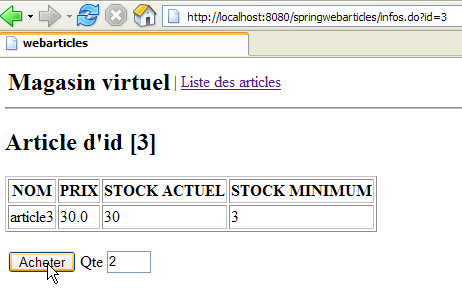
如果查看此视图的 HTML 代码,我们会发现 <form> 标签的定义如下:
        <form method="post" action="achat.do?id=3"/>
            <table>
                <tr>
                    <td><input type="submit" value="Acheter"></td>
                    <td>Qte <input type="text" name="qte" size="3" value=""></td>
                    <td></td>
                </tr>
            </table>
        </form>
我们可以看到,表单已通过 [achat.do] 操作提交给控制器。
该操作在 [springwebarticles-servlet.xml] 中配置如下:
<!-- le mapping de l'application-->
<bean id="urlMapping"
class="org.springframework.web.servlet.handler.SimpleUrlHandlerMapping">
<property name="mappings">
<props>
...
<prop key="/achat.do">AchatController</prop>
...
</props>
</property>
</bean>
<bean id="AchatController"
class="istia.st.articles.web.spring.AchatController">
<property name="config">
<ref bean="config"/>
</property>
</bean>
[AchatController] 类的代码如下:
| package istia.st.articles.web.spring;
import istia.st.articles.dao.Article;
import istia.st.articles.domain.Achat;
import istia.st.articles.domain.Panier;
import java.util.ArrayList;
import java.util.Hashtable;
import javax.servlet.http.HttpServletRequest;
import javax.servlet.http.HttpServletResponse;
import javax.servlet.http.HttpSession;
import org.springframework.web.servlet.ModelAndView;
import org.springframework.web.servlet.mvc.Controller;
public class AchatController implements Controller {
// web app configuration
Config config;
public void setConfig(Config config) {
this.config = config;
}
// query processing
public ModelAndView handleRequest(HttpServletRequest request,
HttpServletResponse response) throws Exception {
// the list of errors on this action
ArrayList erreurs = new ArrayList();
// the quantity purchased is recovered
int qté = 0;
try {
qté = Integer.parseInt(request.getParameter("qte"));
if (qté <= 0)
throw new NumberFormatException();
} catch (NumberFormatException ex) {
// wrong qty
request.setAttribute("msg", "Quantité incorrecte");
request.setAttribute("qte", request.getParameter("qte"));
request.setAttribute("actions", new Hashtable[] { config
.getHActionListe() });
return new ModelAndView("infos");
}
// retrieve the client session
HttpSession session = request.getSession();
// we retrieve the session item
Article article = (Article) session.getAttribute("article");
// session expired?
if (article == null) {
// the error page is displayed
erreurs.add("Votre session a expiré");
request.setAttribute("erreurs", erreurs);
request.setAttribute("actions", new Hashtable[] { config
.getHActionListe() });
return new ModelAndView("erreurs");
}
// create the new purchase
Achat achat = new Achat(article, qté);
// the purchase is added to the customer's basket
Panier panier = (Panier) session.getAttribute("panier");
if (panier == null) {
panier = new Panier();
session.setAttribute("panier", panier);
}
panier.ajouter(achat);
// we return to the list of items
return new ModelAndView("index");
}
}
|
注释:
        <form method="post" action="achat.do?id=3"/>
            <table>
                <tr>
                    <td><input type="submit" value="Acheter"></td>
                    <td>Qte <input type="text" name="qte" size="3" value=""></td>
                    <td></td>
                </tr>
            </table>
        </form>
- 请求中包含两个参数:[id]:商品编号,[qte]:购买数量。
- 系统会检查 [qte] 参数是否存在且有效。如果发现该参数有误,则向用户返回 [INFOS] 视图并附带一条错误信息:
| // la liste des erreurs sur cette action
ArrayList erreurs = new ArrayList();
// on récupère la quantité achetée
int qté = 0;
try {
qté = Integer.parseInt(request.getParameter("qte"));
if (qté <= 0)
throw new NumberFormatException();
} catch (NumberFormatException ex) {
// qté erronée
request.setAttribute("msg", "Quantité incorrecte");
request.setAttribute("qte", request.getParameter("qte"));
request.setAttribute("actions", new Hashtable[] { config
.getHActionListe() });
return new ModelAndView("infos");
}
|
- 从会话中检索已购买的商品。会话可能已过期。在这种情况下,将发送 [ERRORS] 视图:
| // on récupère la session du client
HttpSession session = request.getSession();
// on récupère l'article mis en session
Article article = (Article) session.getAttribute("article");
// session expirée ?
if (article == null) {
// on affiche la page des erreurs
erreurs.add("Votre session a expiré");
request.setAttribute("erreurs", erreurs);
request.setAttribute("actions", new Hashtable[] { config
.getHActionListe() });
return new ModelAndView("erreurs");
}
|
- 如果会话尚未过期,该商品将被添加到购物车中,购物车数据同样从会话中获取:
| // on crée le nouvel achat
Achat achat = new Achat(article, qté);
// on ajoute l'achat au panier du client
Panier panier = (Panier) session.getAttribute("panier");
if (panier == null) {
panier = new Panier();
session.setAttribute("panier", panier);
}
panier.ajouter(achat);
|
// on revient à la liste des articles
return new ModelAndView("index");
- 在上文中,我们发送了视图 [/views/index.jsp]。我们知道该视图会指示客户端浏览器重定向至 URL [/main.do]。正是这个重定向操作将显示商品列表。
3.7.7.5. cart.do
此操作用于显示客户的所有购买记录。可通过以下菜单访问:
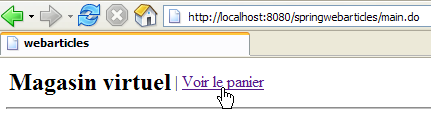
与上述链接关联的 HTML 代码如下:
<a href="panier.do">Voir le panier</a>
该链接返回的页面如下:
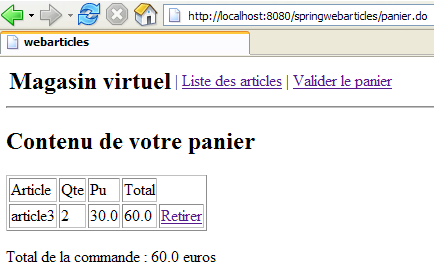
在 [springwebarticles-servlet.xml] 中,此操作的配置如下:
| <!-- le mapping de l'application-->
<bean id="urlMapping"
class="org.springframework.web.servlet.handler.SimpleUrlHandlerMapping">
<property name="mappings">
<props>
...
<prop key="/panier.do">VoirPanierController</prop>
...
</props>
</property>
</bean>
...
<bean id="VoirPanierController"
class="istia.st.articles.web.spring.VoirPanierController">
<property name="config">
<ref bean="config"/>
</property>
</bean>
|
[VoirPanierController] 类的代码如下:
| package istia.st.articles.web.spring;
import istia.st.articles.domain.Panier;
import java.util.Hashtable;
import javax.servlet.http.HttpServletRequest;
import javax.servlet.http.HttpServletResponse;
import org.springframework.web.servlet.ModelAndView;
import org.springframework.web.servlet.mvc.Controller;
public class VoirPanierController implements Controller {
// web app configuration
Config config;
public void setConfig(Config config) {
this.config = config;
}
// query processing
public ModelAndView handleRequest(HttpServletRequest request,
HttpServletResponse response) throws Exception {
// the basket is displayed
Panier panier = (Panier) request.getSession().getAttribute("panier");
if (panier == null || panier.getAchats().size() == 0) {
// empty basket
request.setAttribute("actions", new Hashtable[] { config
.getHActionListe() });
return new ModelAndView("paniervide");
} else {
// there's something in the basket
request.setAttribute("actions", new Hashtable[] {
config.getHActionListe(), config.getHActionValidationPanier() });
return new ModelAndView("panier");
}
}
}
|
注释:
- 购物车从通常存储它的会话中检索。会话可能已过期,这种情况下将不存在购物车。我们不将此视为错误,而是直接假设购物车为空。
- 如果购物车为空,则显示 [EMPTY CART] 视图
- 否则,显示 [购物车] 视图
3.7.7.6. removePurchase.do
此操作用于从购物车中移除商品:
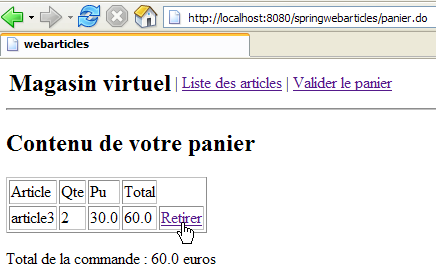
如果查看上述链接的 HTML 代码,我们会看到以下内容:
<a href="retirerachat.do?id=3">Retirer</a>
因此,[retirerachat.do] 操作会接收一个参数,即要从购物车中移除的商品 ID。该操作在 [springwebarticles-servlet.xml] 中配置如下:
| <!-- le mapping de l'application-->
<bean id="urlMapping"
class="org.springframework.web.servlet.handler.SimpleUrlHandlerMapping">
<property name="mappings">
<props>
...
<prop key="/retirerachat.do">RetirerAchatController</prop>
</props>
</property>
</bean>
...
<bean id="RetirerAchatController"
class="istia.st.articles.web.spring.RetirerAchatController">
<property name="config">
<ref bean="config"/>
</property>
</bean>
|
[RetirerAchatController] 类的代码如下:
| package istia.st.articles.web.spring;
import istia.st.articles.domain.Panier;
import java.util.ArrayList;
import java.util.Hashtable;
import javax.servlet.http.HttpServletRequest;
import javax.servlet.http.HttpServletResponse;
import org.springframework.web.servlet.ModelAndView;
import org.springframework.web.servlet.mvc.Controller;
public class RetirerAchatController implements Controller {
// web app configuration
Config config;
public void setConfig(Config config) {
this.config = config;
}
// query processing
public ModelAndView handleRequest(HttpServletRequest request,
HttpServletResponse response) throws Exception {
// the list of errors on this action
ArrayList erreurs = new ArrayList();
// we pick up the basket
Panier panier = (Panier) request.getSession().getAttribute("panier");
if (panier == null) {
// session expired
erreurs.add("Votre session a expiré");
request.setAttribute("erreurs", erreurs);
request.setAttribute("actions", new Hashtable[] { config
.getHActionListe() });
return new ModelAndView("erreurs");
}
// retrieve the id of the item to be removed
String strId = request.getParameter("id");
// anything?
if (strId == null) {
// not normal
erreurs.add("action incorrecte([retirerachat,id=null]");
request.setAttribute("erreurs", erreurs);
request.setAttribute("actions", new Hashtable[] { config
.getHActionListe() });
return new ModelAndView("erreurs");
}
// transform strId into an integer
int id = 0;
try {
id = Integer.parseInt(strId);
} catch (Exception ex) {
// not normal
erreurs.add("action incorrecte([retirerachat,id=" + strId + "]");
request.setAttribute("erreurs", erreurs);
request.setAttribute("actions", new Hashtable[] { config
.getHActionListe() });
return new ModelAndView("erreurs");
}
// we remove the purchase
panier.enlever(id);
// the basket is displayed again
request.setAttribute("actions",
new Hashtable[] { config.getHActionListe() });
return new ModelAndView("redirpanier");
}
}
|
注释:
- 该代码会检查 [id] 参数是否存在且有效。如果参数不正确,则返回 [ERRORS] 视图。
- 否则,将该商品从购物车中移除:
    // on enlève l'achat
    panier.enlever(id);
// on affiche de nouveau le panier
request.setAttribute("actions",
new Hashtable[] { config.getHActionListe() });
return new ModelAndView("redirpanier");
让我们回顾一下视图代码 [/vues/redirpanier.jsp]:
<%@ page language="java" %>
<%@ taglib uri="/WEB-INF/c.tld" prefix="c" %>

<c:redirect url="/panier.do"/>
我们可以看到,客户端将被重定向到 [/panier.do] 操作。这一点之前已经介绍过。根据购物车的状态,它将显示 [PANIER] 或 [PANIERVIDE] 视图。
3.7.7.7. confirmcart.do
此操作用于确认客户的购买。实际上,这仅涉及一个操作:在数据库中将已购商品的库存数量减去购买数量。此操作来自以下菜单:
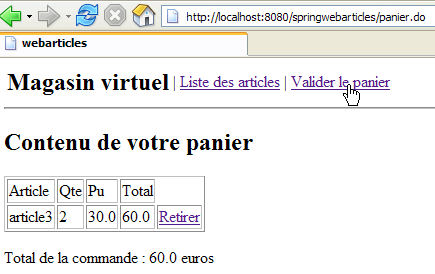
[确认购物车]链接的HTML代码如下:
<a href="validerpanier.do">Valider le panier</a>
点击此链接后,库存数量将更新,并重新显示商品列表。
此操作在 [springwebarticles-servlet.xml] 中配置如下:
| <!-- le mapping de l'application-->
<bean id="urlMapping"
class="org.springframework.web.servlet.handler.SimpleUrlHandlerMapping">
<property name="mappings">
<props>
...
<prop key="/validerpanier.do">ValiderPanierController</prop>
</props>
</property>
</bean>
...
<bean id="ValiderPanierController"
class="istia.st.articles.web.spring.ValiderPanierController">
<property name="config">
<ref bean="config"/>
</property>
</bean>
|
[ValiderPanierController] 类的代码如下:
| package istia.st.articles.web.spring;
import istia.st.articles.domain.Panier;
import istia.st.articles.exception.UncheckedAccessArticlesException;
import java.util.ArrayList;
import java.util.Hashtable;
import javax.servlet.http.HttpServletRequest;
import javax.servlet.http.HttpServletResponse;
import org.springframework.web.servlet.ModelAndView;
import org.springframework.web.servlet.mvc.Controller;
public class ValiderPanierController implements Controller {
// web app configuration
Config config;
public void setConfig(Config config) {
this.config = config;
}
// query processing
public ModelAndView handleRequest(HttpServletRequest request,
HttpServletResponse response) throws Exception {
// the list of errors on this action
ArrayList erreurs = new ArrayList();
// the buyer has confirmed his basket
Panier panier = (Panier) request.getSession().getAttribute("panier");
if (panier == null) {
// session expired
erreurs.add("Votre session a expiré");
request.setAttribute("erreurs", erreurs);
request.setAttribute("actions", new Hashtable[] { config
.getHActionListe() });
return new ModelAndView("erreurs");
}
// validate basket
try {
config.getArticlesDomain().acheter(panier);
} catch (UncheckedAccessArticlesException ex) {
// not normal
erreurs.add("Erreur d'accès aux données [" + ex.toString() + "]");
request.setAttribute("erreurs", erreurs);
request.setAttribute("actions", new Hashtable[] { config
.getHActionListe() });
return new ModelAndView("erreurs");
}
// recover any errors
erreurs = config.getArticlesDomain().getErreurs();
if (erreurs.size() != 0) {
request.setAttribute("erreurs", erreurs);
request.setAttribute("actions", new Hashtable[] { config
.getHActionListe(), config.getHActionPanier() });
return new ModelAndView("erreurs");
}
// everything looks OK - the item list is displayed
return new ModelAndView("index");
}
}
|
注释:
- 我们从会话中检索购物车。如果会话已过期,则显示 [ERRORS] 视图:
| // la liste des erreurs sur cette action
ArrayList erreurs = new ArrayList();
// l'acheteur a confirmé son panier
Panier panier = (Panier) request.getSession().getAttribute("panier");
if (panier == null) {
// session expirée
erreurs.add("Votre session a expiré");
request.setAttribute("erreurs", erreurs);
request.setAttribute("actions", new Hashtable[] { config
.getHActionListe() });
return new ModelAndView("erreurs");
}
|
- 我们处理购物车中的订单。如果库存不足以满足订单需求,可能会发生错误。在这种情况下,我们会显示 [ERRORS] 视图:
| // on valide le panier
try {
config.getArticlesDomain().acheter(panier);
} catch (UncheckedAccessArticlesException ex) {
// pas normal
erreurs.add("Erreur d'accès aux données [" + ex.toString() + "]");
request.setAttribute("erreurs", erreurs);
request.setAttribute("actions", new Hashtable[] { config
.getHActionListe() });
return new ModelAndView("erreurs");
}
// on récupère les éventuelles erreurs
erreurs = config.getArticlesDomain().getErreurs();
if (erreurs.size() != 0) {
request.setAttribute("erreurs", erreurs);
request.setAttribute("actions", new Hashtable[] { config
.getHActionListe(), config.getHActionPanier() });
return new ModelAndView("erreurs");
}
|
// tout semble OK - on affiche la liste des articles
return new ModelAndView("index");
我们知道视图 [/vues/index.jsp] 会将客户端重定向到操作 [/main.do]。该操作将显示 [LISTE] 视图。