8. 执行线程
本章介绍在单个程序中同时执行多段代码:线程 (执行线程)以及用于同步它们的工具。在 2008 年,大多数机器只有一个处理器,并行在很大程度上是由操作系统营造的假象。如今,即使最普通的笔记本电脑 也有多个核心:多个线程确实在同时运行,这使这里讨论的同步问题更加普遍。
示例是位于 [dotnet run threads-01.cs] 文件夹中的单文件应用程序([08-threads])。请注意,这些应用程序的隐式 [using] 指令包括 [System.Threading] 和 [System.Threading.Tasks]:类 [Thread]、[Lock]、[Mutex]、[Monitor]、[Interlocked]、[Task]……无需 [using] 指令即可使用。
开始之前先提醒一句:多线程程序的结果每次执行都可能不同。线程获得处理器的顺序取决于操作系统、处理器数量以及机器的负载。本章所示的结果是在一台与其他程序共享的双处理器 Linux 机器上得到的。如果你运行这些示例,会得到相似的结果,但很少会完全相同。
8.1. Thread 类
应用程序启动时,它在一个称为线程的执行流中运行。在 .NET 中对线程建模的类是 [System.Threading.Thread] 类。它的主要构造函数、属性和方法如下:
成员 | 作用 |
[Thread(ThreadStart start)] | 创建一个将执行 [start] 方法的线程。[ThreadStart] 委托引用一个无参数、无返回值的方法:[void M()] |
[Thread(ParameterizedThreadStart start)] | 同上,但方法带有一个 [object?] 类型的参数:[void M(object? obj)] |
[static Thread CurrentThread] | 正在执行请求此属性的代码的线程 |
[string? Name] | 线程名称,便于跟踪 |
[int ManagedThreadId] | 线程的唯一数字标识符 |
[bool IsBackground] | 指示该线程是否为后台线程(见下文) |
[bool IsAlive] | 指示该线程当前是否正在运行 |
[void Start()]、[void Start(object? obj)] | 启动线程的执行,还可以选择向其传递 [object] 类型的信息 |
[void Join()]、[bool Join(TimeSpan timeout)] | 执行 [T2.Join()]、的线程 T1 会被阻塞,直到线程 T2 结束。第二种形式限制等待的时长 |
[static void Sleep(int ms)] | 执行该方法的线程被挂起 [ms] 毫秒。它失去 CPU,CPU 被交给另一个线程 |
2008 年的课程还介绍了 [Abort] 方法,它会强行终止一个线程。该方法实际上已不复存在:自 .NET Core 起,它会抛出 [PlatformNotSupportedException] 异常。突然停止一个线程可能会使其正在处理的数据处于不一致的状态。如今,是以 协作的方式请求线程停止,即使用线程会定期检查的取消令牌([CancellationToken]):我们将在下一章中看到这一点。
下面是第一个演示主执行线程存在的应用程序——主执行线程就是执行程序顶级语句的线程(相当于 [Main] 方法)。[threads-01.cs] 程序如下:
| // 程序的主线程
// 执行此代码的线程
Thread main = Thread.CurrentThread;
// 起初它没有名称
Console.WriteLine($"Name of the current thread: [{main.Name}]");
// 我们给它起一个名称
main.Name = "Main";
Console.WriteLine($"Name of the current thread: [{main.Name}]");
// 几个属性
Console.WriteLine($"Identifier (ManagedThreadId): {main.ManagedThreadId}");
Console.WriteLine($"Background thread (IsBackground): {main.IsBackground}");
Console.WriteLine($"Pool thread (IsThreadPoolThread): {main.IsThreadPoolThread}");
Console.WriteLine($"Priority (Priority): {main.Priority}");
Console.WriteLine($"State (ThreadState): {main.ThreadState}");
Console.WriteLine($"Number of processors: {Environment.ProcessorCount}");
// 每秒显示一次
for (int i = 0; i < 5; i++)
{
Console.WriteLine($"{main.Name}: {DateTime.Now:HH:mm:ss}");
// 线程挂起 1 秒
Thread.Sleep(1000);
}
|
结果:
| > dotnet run threads-01.cs
Name of the current thread: []
Name of the current thread: [Main]
Identifier (ManagedThreadId): 1
Background thread (IsBackground): False
Pool thread (IsThreadPoolThread): False
Priority (Priority): Normal
State (ThreadState): Running
Number of processors: 2
Main: 11:35:54
Main: 11:35:55
Main: 11:35:56
Main: 11:35:57
Main: 11:35:58
|
说明:
- 第 4 行:获取对正在执行该程序的线程的引用;
- 第 5–9 行:我们显示它的名称,修改它,然后再次显示。最初,主线程没有名称(结果的第 2 行);
- 第 11–15 行:一些线程属性。主线程的 ID 为 1;它是一个 前台线程([IsBackground] 等于 [False]),不属于 线程池 (我们稍后讨论这两个概念);它当前正在运行([Running]);
- 第 16 行:运行该示例的机器有 2 个处理器;
- 第 19–23 行:每秒显示一条消息的循环。[Thread.Sleep(1000)] 将主线程挂起一秒。2008 年的课程在这里使用了一个用 Ctrl-C 终止的无限循环;我们只限于显示五次。请注意格式 [HH:mm:ss] (小时为 0 到 23):2008 年的课程使用 [hh],它显示的小时是 1 到 12。
8.2. 创建执行线程
应用程序中可以有一些代码段在不同的执行线程中“同时”执行。如果机器的处理器数量少于准备执行的线程数,这些线程就共享处理器:每个线程轮流使用处理器很短的时间(几毫秒)。在多处理器机器上,多个线程确实同时执行。分配给线程的时间取决于多种因素,包括它的优先级,该优先级有默认值,但也可以通过编程设置(属性 [Priority])。获得处理器的线程可以提前释放它:
- 通过等待某个事件(使用 [Join] 等待另一个线程结束、等待信号);
- 通过进入休眠状态一段指定的时间([Sleep])。
线程 T 首先使用上面介绍的某个构造函数创建,例如:
| Thread t = new Thread(Display);
|
其中 [Display] 是具有以下两种签名之一的方法:
| void Display();
void Display(object? obj);
|
创建线程并不会启动它:
- 线程 T 的执行由 [T.Start()] 启动:传给 T 的构造函数的方法随后由线程 T 执行。执行指令 [T.Start()] 的代码不会等待线程 T 结束;它会立即转到下一条指令。这样我们就有两个线程在并行运行。它们常常需要相互通信,以跟踪共同工作的进度:这就是线程 同步问题;
- 线程 T 一旦启动,就自主运行。当它所执行的方法完成时,它就停止;
- 我们可以使用 [T.Join()] 等待它执行完毕。这是一条阻塞指令:执行它的线程会被阻塞,直到线程 T 完成其工作。这是一种基本的同步方法。
程序 [threads-02.cs] 如下:
| // 创建执行线程
// 我们给主线程命名
Thread.CurrentThread.Name = "Main";
// 创建 5 个线程
var tasks = new Thread[5];
for (int i = 0; i < tasks.Length; i++)
{
// 第 i 号线程将执行 Display 方法
tasks[i] = new Thread(Display);
// 我们给它命名
tasks[i].Name = i.ToString();
// 我们启动它的执行(非阻塞操作)
tasks[i].Start();
}
// 主线程结束
Console.WriteLine($"End of thread {Thread.CurrentThread.Name} at {DateTime.Now:HH:mm:ss.fff}");
// 由各线程执行的方法
static void Display()
{
// 执行该方法的线程
Thread current = Thread.CurrentThread;
Console.WriteLine($"Start of execution of the Display method in thread {current.Name} (id {current.ManagedThreadId}): {DateTime.Now:HH:mm:ss.fff}");
// 休眠 1 秒
Thread.Sleep(1000);
Console.WriteLine($"End of execution of the Display method in thread {current.Name}: {DateTime.Now:HH:mm:ss.fff}");
}
|
说明:
- 第 4 行:我们给主线程命名;
- 第 7–15 行:创建并启动 5 个线程。它们的引用存储在数组中,以便以后获取。每个线程执行第 22–29 行的 [Display] 方法;
- 第 11 行:方法名 [Display] 被自动转换为 [ThreadStart] 类型的委托(委托在上一章中介绍过);
- 第 15 行:启动第 i 号线程。该操作是非阻塞的:第 i 号线程与启动它的主线程并行运行;
- 第 19 行:主线程到达程序末尾;
- 第 22–29 行:方法 [Display] 显示执行它的线程的名称和 ID,以及执行的开始和结束时间(精确到毫秒);
- 第 28 行:任何执行 [Display] 方法的线程都会暂停 1 秒。处理器随后交给另一个等待处理器的线程。1 秒的暂停结束时,被暂停的线程重新具备获得处理器的资格。轮到它时它就会得到处理器。
结果:
| > dotnet run threads-02.cs
Start of execution of the Display method in thread 2 (id 6): 11:36:01.725
Start of execution of the Display method in thread 4 (id 8): 11:36:01.725
End of thread Main at 11:36:01.725
Start of execution of the Display method in thread 0 (id 4): 11:36:01.725
Start of execution of the Display method in thread 1 (id 5): 11:36:01.725
Start of execution of the Display method in thread 3 (id 7): 11:36:01.725
End of execution of the Display method in thread 1: 11:36:02.779
End of execution of the Display method in thread 0: 11:36:02.778
End of execution of the Display method in thread 4: 11:36:02.779
End of execution of the Display method in thread 2: 11:36:02.779
End of execution of the Display method in thread 3: 11:36:02.779
|
这些结果提供了很多信息:
- 首先,我们看到启动线程是非阻塞的。主线程启动了 5 个线程,并在其中三个线程还没有显示第一条消息时就到达了程序末尾(第 4 行);
- 线程的执行顺序是不可预测的:在这次运行中,线程 2 和 4 在线程 0 之前显示了它们的开始消息。这里操作系统有 6 个线程和 2 个处理器;它按照自己的规则把处理器分配给这些线程;
- 我们还注意到,显示的顺序并不总是遵循所显示时间的顺序:时间是在 显示之前计算的,而在此期间,另一个线程可能已经向 控制台写入了内容。[Console.WriteLine] 是线程安全的:两个线程写入的两行不会混在一起,但它们的顺序无法保证;
- 每个线程用 [Sleep] 暂停一秒,然后完成 [Display] 方法的执行;
- 最后,程序并没有在主线程完成工作时停止:进程等待全部 5 个线程结束。这是因为这些线程是前台线程:当 .NET 进程的所有前台线程都结束时,进程才会终止。
反过来,可以在启动线程之前把它的 [IsBackground] 属性设为 [true] ,将其声明为后台线程。后台线程不会阻止进程终止:当最后一个前台线程终止时,它们就会被停止。程序 [threads-03.cs] 如下:
| // 后台线程
// 我们给主线程命名
Thread.CurrentThread.Name = "Main";
// 创建 5 个后台线程
var tasks = new Thread[5];
for (int i = 0; i < tasks.Length; i++)
{
tasks[i] = new Thread(Display)
{
Name = i.ToString(),
// 后台线程不会阻止进程结束
IsBackground = true
};
tasks[i].Start();
}
// 我们给线程留出启动的时间
Thread.Sleep(100);
// 主线程结束,因此进程也结束
Console.WriteLine($"End of thread {Thread.CurrentThread.Name} at {DateTime.Now:HH:mm:ss.fff}");
// 由各线程执行的方法
static void Display()
{
Thread current = Thread.CurrentThread;
Console.WriteLine($"Start of execution of the Display method in thread {current.Name}: {DateTime.Now:HH:mm:ss.fff}");
// 休眠 1 秒
Thread.Sleep(1000);
Console.WriteLine($"End of execution of the Display method in thread {current.Name}: {DateTime.Now:HH:mm:ss.fff}");
}
|
说明:
- 第 14 行:这 5 个线程是后台线程。属性 [Name] 和 [IsBackground] 通过对象初始值设定项设置;
- 第 20 行:主线程等待 100 毫秒,让线程有时间启动,然后终止。
结果:
| > dotnet run threads-03.cs
Start of execution of the Display method in thread 4: 11:36:04.770
Start of execution of the Display method in thread 3: 11:36:04.764
Start of execution of the Display method in thread 1: 11:36:04.766
Start of execution of the Display method in thread 0: 11:36:04.764
Start of execution of the Display method in thread 2: 11:36:04.766
End of thread Main at 11:36:04.872
|
全部 5 个线程都开始了执行,随后主线程终止(第 7 行)。后台线程于是在一秒钟的休眠期间被停止:没有显示任何结束消息。2008 年的课程通过用 [Main] 以 [Environment.Exit(0)] 结束来达到同样的结果,这条指令会停止应用程序中的所有线程,而不仅仅是执行它的线程。线程池中的线程(我们稍后讨论)是后台线程。
如果主线程想等待它创建的线程结束,就使用 [Join] 方法。程序 [threads-04.cs] 还演示了指定线程要执行的代码的另一种方式:Lambda。
| // 使用 Join 等待线程结束 - 用 lambda 创建的线程
// 我们给主线程命名
Thread.CurrentThread.Name = "Main";
// 创建 5 个线程
var tasks = new Thread[5];
for (int i = 0; i < tasks.Length; i++)
{
// i 的本地副本,被 lambda 捕获
int number = i;
// 线程执行 lambda,lambda 以带类型的参数调用 Display
tasks[i] = new Thread(() => Display(number, 1000 + 100 * number)) { Name = i.ToString() };
tasks[i].Start();
}
// 我们等待所有线程结束
foreach (Thread task in tasks)
{
// 主线程被阻塞,直到线程 [task] 结束
task.Join();
}
// 主线程结束
Console.WriteLine($"End of thread {Thread.CurrentThread.Name} at {DateTime.Now:HH:mm:ss.fff}");
// 由各线程执行的方法
static void Display(int number, int duration)
{
Console.WriteLine($"Start of execution of task {number} in thread {Thread.CurrentThread.Name}: {DateTime.Now:HH:mm:ss.fff}");
// 休眠 [duration] 毫秒
Thread.Sleep(duration);
Console.WriteLine($"End of execution of task {number} in thread {Thread.CurrentThread.Name}: {DateTime.Now:HH:mm:ss.fff}");
}
|
说明:
- 第 13 行:线程执行 Lambda [() => Display(number, 1000 + 100 * number)]。无参数、无返回值的 Lambda 与委托 [ThreadStart] 兼容。这种语法允许你调用带有类型化参数的方法(这里是两个 [int]),而不必采用规定的签名 [void M(object? obj)];
- 第 11 行:Lambda 使用的是循环变量 [i] 的副本。这是必不可少的:Lambda 捕获的是变量,而不是它的值。在 [for] 循环中,变量 [i] 在所有迭代中是唯一的;如果 Lambda 使用 [i],较晚启动的线程可能读到后续迭代中 [i] 的值,甚至读到最终值 5。相反,在循环体内声明的变量 [number] 在每次迭代中都是一个新变量(自 C# 5 起,[foreach] 循环变量在每次迭代中也是新的);
- 第 18–21 行:主线程等待每一个线程。它先被阻塞以等待线程 0,然后等待线程 1,依此类推。当它退出循环时,它启动的 5 个线程都已结束;
- 第 31 行:任务 #i 休眠 1,000 + 100 × i 毫秒,使线程按已知的顺序结束。
结果:
| > dotnet run threads-04.cs
Start of execution of task 1 in thread 1: 11:36:06.779
Start of execution of task 3 in thread 3: 11:36:06.779
Start of execution of task 0 in thread 0: 11:36:06.779
Start of execution of task 4 in thread 4: 11:36:06.779
Start of execution of task 2 in thread 2: 11:36:06.779
End of execution of task 0 in thread 0: 11:36:07.828
End of execution of task 1 in thread 1: 11:36:07.928
End of execution of task 2 in thread 2: 11:36:08.029
End of execution of task 3 in thread 3: 11:36:08.128
End of execution of task 4 in thread 4: 11:36:08.228
End of thread Main at 11:36:08.229
|
最后一行表明,主线程在它所启动的线程之后结束,即在其中最后一个线程结束的时刻结束。
8.3. 线程的好处
现在我们已经强调了默认线程(执行主程序的线程)的存在,并且知道如何创建其他线程,接下来我们来看看线程的好处。它们主要有两种用途:
- 为了在耗时的计算中利用 机器上所有的 处理器 :将工作分成若干块,分配给不同的线程。我们将在本章末尾使用 [Parallel] 库来做到这一点;
- 为了同时执行多个任务,尤其是当其中一些任务主要涉及等待(等待网络响应、磁盘读取或用户输入)时。客户端/服务器式的互联网应用程序就是这种情况,我们将在后面的章节中讨论。
在客户端/服务器式的互联网应用程序中,位于名为 S1 的机器上的服务器响应位于远程机器 C1、C2、……、Cn 上的客户端的请求:
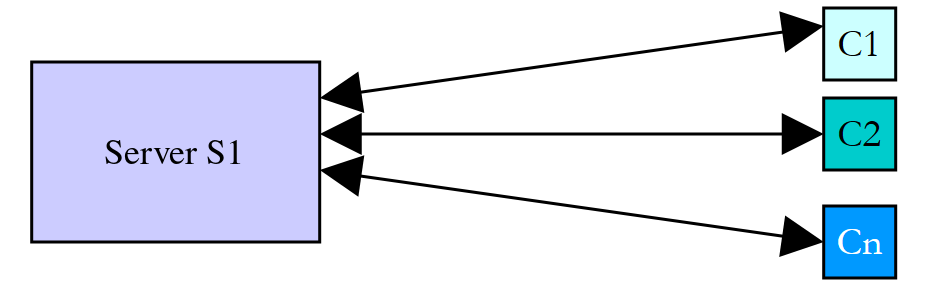
我们每天都在使用遵循这种模式的互联网应用程序:Web 服务、电子邮件、文件传输等等。在上图中,服务器 S1 必须同时为多个客户端 Ci 提供服务。以文件服务器为例,我们知道一次传输有时可能需要几分钟。绝不能让某一个客户端长时间独占服务器。常见的解决方案是由服务器创建与客户端数量一样多的执行线程。每个线程负责处理一个特定的客户端:
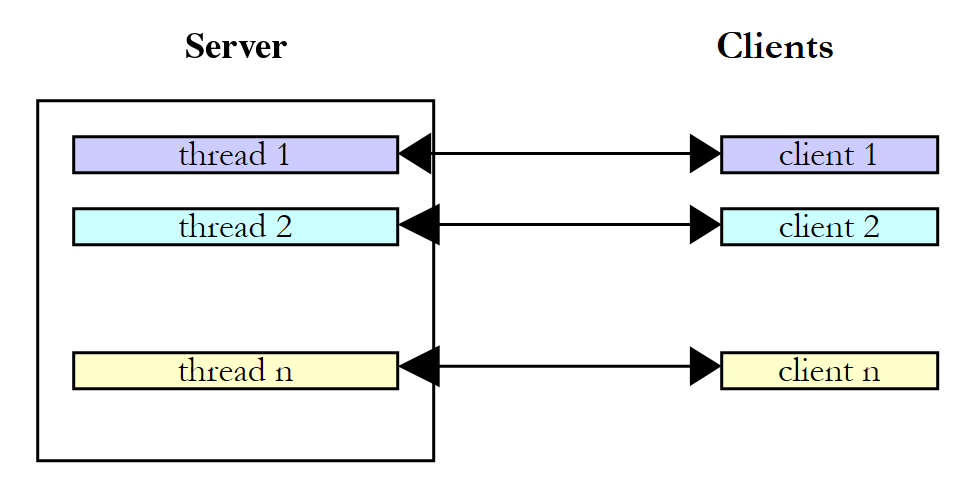
实际上,服务器使用线程数量有限的 线程池 ,后文将会介绍。现代服务器则更进一步:当客户端在等待网络响应时,不会为它保留任何线程。这是由异步编程实现的,它是下一章的主题。
8.4. 线程之间的信息交换
在前面的示例中,线程执行的是无参数的方法。[Thread(ParameterizedThreadStart)] 构造函数接受签名为 [void M(object? obj)] 的方法。这样就可以向被启动的线程传递信息:
启动线程 [t],然后它执行构造时与之关联的方法,并向其传递实参 [obj1]。程序 [threads-05.cs] 如下:
| // 线程之间交换信息
// 我们给主线程命名
Thread.CurrentThread.Name = "Main";
// 创建 5 个线程
var tasks = new Thread[5];
var data = new Data[5];
for (int i = 0; i < tasks.Length; i++)
{
// 第 i 号线程将执行方法 Sleep(object?)
tasks[i] = new Thread(Sleep) { Name = i.ToString() };
// 与线程交换的对象:启动线程设置 Start 和 Duration
data[i] = new Data { Start = DateTime.Now, Duration = i + 1 };
// 我们启动线程并把这个对象传给它
tasks[i].Start(data[i]);
}
// 我们依次等待各个线程
for (int i = 0; i < tasks.Length; i++)
{
// 等待第 i 号线程结束
tasks[i].Join();
// 第 i 号线程已填写其对象的 End 属性
Data d = data[i];
Console.WriteLine($"Thread {tasks[i].Name} finished: start {d.Start:HH:mm:ss}, scheduled duration {d.Duration} s, end {d.End:HH:mm:ss}, actual duration {(d.End - d.Start).TotalSeconds:F3} s");
}
// 主线程结束
Console.WriteLine($"End of thread {Thread.CurrentThread.Name} at {DateTime.Now:HH:mm:ss}");
// 由各线程执行的方法:签名为 void (object?)
static void Sleep(object? state)
{
// 我们以其实际类型取回参数
if (state is not Data info)
{
return;
}
// 休眠 Duration 秒
Thread.Sleep(info.Duration * 1000);
// 被启动的线程向启动线程返回一个结果
info.End = DateTime.Now;
}
// 启动线程与被启动线程之间交换的信息
class Data
{
// 由启动线程设置
public DateTime Start { get; init; }
public int Duration { get; init; }
// 由被启动线程设置
public DateTime End { get; set; }
}
|
说明:
- 第 46–52 行:传给线程的信息是一个 [Data] 对象。启动线程与被启动线程之间存在双向的信息交换。[Start] 和 [Duration] 是 [init] 属性:它们只能在创建对象时设置:
- [Start]:线程执行的开始时间,由启动线程设置;
- [Duration]:被启动线程休眠的时长(秒),由启动线程设置;
- [End]:线程执行的结束时间,由被启动线程设置;
- 第 12 行:每个线程都与第 32–42 行的 [Sleep] 方法关联,其签名 [void Sleep(object? state)] 对应于委托 [ParameterizedThreadStart];
- 第 14–16 行:创建一个 [Data] 对象,将其存储在 [data] 数组中,然后传给启动线程的 [Start] 方法;
- 第 20–26 行:主线程等待它所启动的每个线程结束,然后取回第 i 号线程的 [data[i]] 对象并显示其内容;
- 第 35 行:收到的参数类型为 [object?];模式过滤 [state is not Data info] 检查它的实际类型,并将其存储在类型化变量 [info] 中。2008 年的课程执行的是到 [(Data)state] 的类型转换,如果对象不是预期类型,就会抛出异常;
- 第 40 行:参数的属性 [Duration] 设置休眠时长;
- 第 42 行:设置参数的 [End] 属性。
结果:
| > dotnet run threads-05.cs
Thread 0 finished: start 11:36:10, scheduled duration 1 s, end 11:36:11, actual duration 1.044 s
Thread 1 finished: start 11:36:10, scheduled duration 2 s, end 11:36:12, actual duration 2.000 s
Thread 2 finished: start 11:36:10, scheduled duration 3 s, end 11:36:13, actual duration 3.000 s
Thread 3 finished: start 11:36:10, scheduled duration 4 s, end 11:36:14, actual duration 4.000 s
Thread 4 finished: start 11:36:10, scheduled duration 5 s, end 11:36:15, actual duration 5.000 s
End of thread Main at 11:36:15
|
这个示例表明两个线程可以交换信息:
- 调用线程可以通过向被调用线程提供信息来控制其执行;
- 被启动的线程可以向启动它的线程返回结果。
为了让调用线程知道它所期待的结果何时可用,必须在被调用线程结束时通知它。这里,它使用 [Join] 方法等待被调用线程结束。[Join] 还能确保被调用线程所做的任何写入对等待它的线程可见。稍后我们将介绍其他同步方式。
使用 Lambda 后,就不再需要使用类型 [object]:Lambda 直接捕获类型化的变量。第 12–16 行可以这样写:
| Data d = new() { Start = DateTime.Now, Duration = i + 1 };
data[i] = d;
tasks[i] = new Thread(() => Sleep(d)) { Name = i.ToString() };
tasks[i].Start();
|
使用方法 [static void Sleep(Data data)] ,它不再需要检查其参数的类型。这是如今最常见的做法。
8.5. 对共享资源的并发访问
8.5.1. 不同步的并发访问
在前面的段落中,信息只在两个线程之间、并且在非常明确的时刻交换:这是参数传递的经典例子。还有一些情况下,信息由多个线程共享,它们可能想同时读取或更新这些信息。这就引出了这些信息的完整性问题。假设共享的信息是一个结构 S,包含各种信息 I1、I2、……、In:
- 线程 T1 开始更新结构 S:它修改了字段 I1,并在完成对结构 S 的完整更新之前被中断;
- 获得处理器的线程 T2 随后读取结构 S 以作出决策。它读取到的是处于不稳定状态的结构:有些字段是最新的,有些则不是。
这种情况称为对共享资源的并发访问——在这里共享资源就是结构 S。这通常很难管理。我们来看下面的示例,以说明可能出现的问题:
- 应用程序将生成 n 个线程,其中 n 作为参数传入;
- 共享资源是一个计数器,每个生成的线程都必须使它递增;
- 在应用程序结束时,显示计数器的值。因此它应该等于 n。
程序 [threads-06.cs] 如下:
| // 对共享资源的未同步并发访问
// 检查参数:要创建的线程数
const int nbMaxThreads = 100;
if (args.Length != 1 || !int.TryParse(args[0], out int nbThreads) || nbThreads is < 1 or > nbMaxThreads)
{
Console.Error.WriteLine($"syntax: dotnet run threads-06.cs -- nbThreads (nbThreads between 1 and {nbMaxThreads})");
return 1;
}
// 创建并启动线程
var threads = new Thread[nbThreads];
for (int i = 0; i < nbThreads; i++)
{
threads[i] = new Thread(Counter.Increment) { Name = i.ToString() };
threads[i].Start();
}
// 等待线程结束
foreach (Thread thread in threads)
{
thread.Join();
}
// 显示计数器
Console.WriteLine($"Number of threads generated: {Counter.Value}");
return 0;
// 共享资源
static class Counter
{
// 线程计数器,由所有线程共享
public static int Value { get; private set; }
// 每个线程执行的方法
public static void Increment()
{
// 读取计数器
int value = Value;
Console.WriteLine($"At {DateTime.Now:HH:mm:ss.fff}, thread {Thread.CurrentThread.Name} read the counter value: {value}");
// 等待:线程让出处理器
Thread.Sleep(1000);
// 递增计数器
Value = value + 1;
Console.WriteLine($"At {DateTime.Now:HH:mm:ss.fff}, thread {Thread.CurrentThread.Name} wrote the counter value: {Value}");
}
}
|
说明:
- 第 4–8 行:线程数作为参数传入。第 5 行的条件综合了所有检查:必须有参数;它是整数([int.TryParse]);并且介于 1 和 100 之间(关系模式 [nbThreads is < 1 or > nbMaxThreads])。如果发生错误,程序返回退出代码 1,否则返回 0(第 25 行);
- 第 28–43 行:共享资源是静态属性 [Counter.Value]。计数器被封装在一个静态类中,由每个线程执行方法 [Increment]。顶级语句不能声明字段:因此,线程共享的数据是类的静态成员;
- 第 37 行:读取计数器;
- 第 40 行:线程暂停 1 秒。因此它失去 CPU;
- 第 42 行:计数器递增。
一秒钟的暂停只是为了迫使线程在读取和写入计数器之间失去处理器。实际上,无法保证线程不会在这两个时刻之间被中断,而且在多处理器机器上,两个线程甚至可能在完全相同的时刻读取计数器。一秒钟的暂停只是把这种风险系统化了。
要向单文件应用程序传递参数,请将它们放在 [--] 之后:
| > dotnet run threads-06.cs -- 5
At 11:36:17.169, thread 3 read the counter value: 0
At 11:36:17.169, thread 4 read the counter value: 0
At 11:36:17.169, thread 2 read the counter value: 0
At 11:36:17.169, thread 0 read the counter value: 0
At 11:36:17.169, thread 1 read the counter value: 0
At 11:36:18.216, thread 3 wrote the counter value: 1
At 11:36:18.216, thread 4 wrote the counter value: 1
At 11:36:18.217, thread 2 wrote the counter value: 1
At 11:36:18.217, thread 1 wrote the counter value: 1
At 11:36:18.217, thread 0 wrote the counter value: 1
Number of threads generated: 1
|
看这些结果,很清楚发生了什么:
- 第一个线程读取计数器,发现它是 0。它暂停 1 秒,因而失去 CPU;
- 第二个线程也读取计数器的值。由于前一个线程尚未使其递增,它仍然是 0。它也暂停 1 秒;
- 不到一秒钟,全部 5 个线程都来得及读取到值 0;
- 当它们醒来时,它们对自己读到的值 0 递增,并都把值 1 写入计数器,最后一行(第 12 行)证实了这一点。
有人可能会反驳说这个示例是人为设计的。那么我们去掉 [Sleep] ,改用 [++] 运算符,它给人一种单条指令的错觉。[threads-07.cs] 程序如下:
| // 不使用 Sleep 时会丢失更新:counter++ 不是原子操作
// 参数:线程数、每个线程的递增次数
int nbThreads = args.Length > 0 && int.TryParse(args[0], out int n) ? n : 4;
int nbIncrements = args.Length > 1 && int.TryParse(args[1], out int m) ? m : 50_000_000;
// 我们把实验重复三次
for (int attempt = 1; attempt <= 3; attempt++)
{
Counter.Value = 0;
// 创建并启动线程
var threads = new Thread[nbThreads];
for (int i = 0; i < nbThreads; i++)
{
threads[i] = new Thread(() =>
{
for (int j = 0; j < nbIncrements; j++)
{
// 读取、递增、写入:三个操作
Counter.Value++;
}
});
threads[i].Start();
}
// 等待线程结束
foreach (Thread thread in threads)
{
thread.Join();
}
// 结果
int expected = nbThreads * nbIncrements;
Console.WriteLine($"Attempt {attempt}: expected value {expected:N0}, obtained value {Counter.Value:N0}, lost updates {expected - Counter.Value:N0}");
}
// 共享资源
static class Counter
{
public static int Value;
}
|
说明:
- 第 4–5 行:线程数(默认为 4)和每个线程执行的递增次数(默认为 5000 万)可以作为参数传入。表达式 [args.Length > 0 && int.TryParse(args[0], out int n) ? n : 4] 在参数存在且有效时返回该参数;否则返回默认值。分隔符 [_] 使常量 [50_000_000] 便于阅读;
- 第 20 行:每个线程不做任何暂停地递增共享计数器;
- 第 38 行:这一次,计数器是一个字段;
- 第 32 行:格式 [N0] 显示带千位分隔符的整数。
结果:
| > dotnet run threads-07.cs
Attempt 1: expected value 200,000,000, obtained value 120,818,197, lost updates 79,181,803
Attempt 2: expected value 200,000,000, obtained value 121,419,329, lost updates 78,580,671
Attempt 3: expected value 200,000,000, obtained value 114,583,348, lost updates 85,416,652
|
数千万次更新丢失了,而且这个数字在每次测试中都不同。高级语言操作 [Counter.Value++] 实际上被翻译成若干条基本的处理器指令:从内存读取值,在寄存器中递增,并把结果写回内存。如果两个线程在其中一个写入自己的结果之前读取了相同的值,就会丢失一次递增,与前面的示例完全一样。需要大量迭代才能观察到这一点:每个线程执行一百万次递增时,每个线程往往在下一个线程开始之前就已完成工作,结果是正确的。这正是这类错误如此危险的原因:程序可以运行数月,然后恰恰在系统负载较重的那一天出错。
问题出在哪里?一个线程读到了过时的值,因为另一个线程在完成更新计数器的任务之前被中断了——或者正在另一个处理器上同时工作。这就引出了程序中的临界资源和临界区的概念:
- 临界资源 是一次只能被一个线程持有的资源。这里,临界资源就是计数器;
- 程序的临界区 是线程执行流中访问临界资源的一段指令序列。我们必须确保,在这个临界区内,该线程是唯一能访问该资源的线程。
在程序 [threads-06.cs] 中,临界区是读取计数器与写入其新值之间的代码:
| // 读取计数器
int value = Value;
// 等待:线程让出处理器
Thread.Sleep(1000);
// 递增计数器
Value = value + 1;
|
要执行这段代码,必须保证线程是唯一正在运行它的线程。它可以被中断,但在中断期间,不能有其他线程执行这同一段代码。.NET 平台提供了各种工具来确保对代码临界区的独占访问。我们现在来看其中的几个。
8.5.2. [lock] 子句和 [Lock] 类型
[lock] 子句按如下方式界定临界区:
| lock (padlock)
{
// 临界区
}
|
[padlock] 是所有执行该临界区的线程都可见的对象。[lock] 子句确保同一时刻只有一个线程执行该临界区:遇到被其他线程持有的锁的线程会被阻塞,直到锁被释放。
从 C# 13 和 .NET 9 开始,同步对象最好是专为此目的设计的 [System.Threading.Lock] 类型的实例。前面的示例在 [threads-08.cs] 中改写如下:
| // 由 lock 子句和 System.Threading.Lock 类型(C# 13 / .NET 9)保护的临界区
// 检查参数:要创建的线程数
const int nbMaxThreads = 100;
if (args.Length != 1 || !int.TryParse(args[0], out int nbThreads) || nbThreads is < 1 or > nbMaxThreads)
{
Console.Error.WriteLine($"syntax: dotnet run threads-08.cs -- nbThreads (nbThreads between 1 and {nbMaxThreads})");
return 1;
}
// 创建并启动线程
var threads = new Thread[nbThreads];
for (int i = 0; i < nbThreads; i++)
{
threads[i] = new Thread(Counter.Increment) { Name = i.ToString() };
threads[i].Start();
}
// 按线程创建的相反顺序等待线程结束
Thread.CurrentThread.Name = "Main";
for (int i = nbThreads - 1; i >= 0; i--)
{
Console.WriteLine($"At {DateTime.Now:HH:mm:ss.fff}, thread Main waits for the end of thread {threads[i].Name}");
threads[i].Join();
Console.WriteLine($"At {DateTime.Now:HH:mm:ss.fff}, thread Main was notified of the end of thread {threads[i].Name}");
}
// 显示计数器
Console.WriteLine($"Number of threads generated: {Counter.Value}");
return 0;
// 共享资源
static class Counter
{
// 线程计数器
public static int Value { get; private set; }
// 同步对象,对所有线程可见
private static readonly Lock padlock = new();
// 每个线程执行的方法
public static void Increment()
{
string name = Thread.CurrentThread.Name ?? "?";
Console.WriteLine($"At {DateTime.Now:HH:mm:ss.fff}, thread {name} waits for permission to enter the critical section");
// 每次只有一个线程执行下面的代码块
lock (padlock)
{
// 读取计数器
int value = Value;
Console.WriteLine($"At {DateTime.Now:HH:mm:ss.fff}, thread {name} read the counter value: {value}");
// 等待:线程让出处理器,但仍持有锁
Thread.Sleep(1000);
// 递增计数器
Value = value + 1;
Console.WriteLine($"At {DateTime.Now:HH:mm:ss.fff}, thread {name} wrote the counter value: {Value}");
}
Console.WriteLine($"At {DateTime.Now:HH:mm:ss.fff}, thread {name} left the critical section");
}
}
|
说明:
- 第 36 行:[padlock] 是用于同步所有线程的对象。它是 [readonly] 的:该引用绝不能改变;否则,两个线程可能会锁定两个不同的对象;
- 第 44–53 行:[Increment] 方法的临界区被 [lock] 子句包围。线程在休眠一秒钟期间一直持有锁:其他线程无法进入;
- 第 20–24 行:主线程按照与线程创建相反的顺序等待这些线程。
3 个线程时的结果:
| > dotnet run threads-08.cs -- 3
At 11:36:23.809, thread Main waits for the end of thread 2
At 11:36:23.809, thread 0 waits for permission to enter the critical section
At 11:36:23.809, thread 1 waits for permission to enter the critical section
At 11:36:23.809, thread 2 waits for permission to enter the critical section
At 11:36:23.855, thread 0 read the counter value: 0
At 11:36:24.855, thread 0 wrote the counter value: 1
At 11:36:24.856, thread 1 read the counter value: 1
At 11:36:24.856, thread 0 left the critical section
At 11:36:25.856, thread 1 wrote the counter value: 2
At 11:36:25.856, thread 1 left the critical section
At 11:36:25.856, thread 2 read the counter value: 2
At 11:36:26.856, thread 2 wrote the counter value: 3
At 11:36:26.856, thread 2 left the critical section
At 11:36:26.857, thread Main was notified of the end of thread 2
At 11:36:26.857, thread Main waits for the end of thread 1
At 11:36:26.857, thread Main was notified of the end of thread 1
At 11:36:26.857, thread Main waits for the end of thread 0
At 11:36:26.857, thread Main was notified of the end of thread 0
Number of threads generated: 3
|
- 三个线程几乎同时请求进入临界区;
- 只有一个线程进入——这里是线程 0(进入的顺序没有保证:不一定是最先到达的先进入)。它读取计数器,休眠一秒钟,写入新值,然后退出临界区;
- 另外两个线程被阻塞,直到第一个线程退出临界区,然后依次通过。每个线程读取的都是前一个线程写入的值;
- 主线程一直在等待线程 2 结束。当它收到通知后,再等待线程 1 结束,而线程 1 早已完成:它立即收到通知。线程 0 也是如此;
- 线程数是正确的(第 20 行)。
编译器将 [Lock] 对象上的子句 [lock (padlock) { ... }] 翻译为:
| using (padlock.EnterScope())
{
// 临界区
}
|
[EnterScope] 获取锁并返回一个结构,其方法 [Dispose]——在退出 [using] 块时调用——会释放锁,即使临界区抛出了异常也是如此。类型 [Lock] 还提供了方法 [Enter]、[TryEnter]、和 [Exit] ,用于无法通过块来管理锁的情况。
在 .NET 9 之前,以及在许多现有代码中,锁是一个通用对象,通常为 [object] 类型:
| private static readonly object synchro = new();
...
lock (synchro)
{
// 临界区
}
|
这种形式仍然有效:任何 .NET 对象都可以充当锁。编译器随后将其翻译为对 [Monitor] 类的调用,我们稍后会介绍该类:
| bool lockTaken = false;
try
{
Monitor.Enter(synchro, ref lockTaken);
// 临界区
}
finally
{
if (lockTaken) Monitor.Exit(synchro);
}
|
类型 [Lock] 效率更高,并且使意图更加明确。我们始终锁定 私有对象:锁定外部可见的对象([this]、带有 [typeof(...)] 的类型、字符串)会让外部代码获取同一个锁并阻塞我们的代码。
8.5.3. Mutex 类
[System.Threading.Mutex] 类同样可以界定临界区。它与 [lock] 子句在可见范围上有所不同:
- [lock] 子句在同一应用程序内同步线程;
- 如果给定名称,[Mutex] 类可以同步来自不同应用程序(或进程)的线程。
[Mutex] 是操作系统对象:使用它比使用 [lock] 消耗的资源多得多。因此,对于同一进程内的线程,我们更倾向于使用 [lock];[Mutex] 主要用于进程之间。我们将使用以下构造函数和方法:
成员 | 作用 |
[Mutex()] | 创建一个匿名 Mutex M,可供进程的线程使用 |
[Mutex(bool initiallyOwned, string name)] | 创建或打开具名互斥体 [name],由使用该名称的所有进程共享 |
[bool WaitOne()] | 执行 [M.WaitOne()]、的线程 T1 请求互斥体 M 的所有权。如果 M 不被任何线程持有,就授予 T1。如果线程 T2 随后尝试同样的操作,它会被阻塞:互斥体只能属于一个线程。当 T1 释放 M 时,T2 才会解除阻塞。因此,多个线程可能因等待 M 而被阻塞 |
[bool WaitOne(TimeSpan timeout)] | 同上,但等待时间限制为 [timeout]。如果无法获取互斥体,该方法返回 [false] |
[void ReleaseMutex()] | 持有 M 的线程释放它。随后,等待 M 的线程之一获得它 |
临界区的同步按如下方式进行:
| M.WaitOne();
try
{
// 只有该线程能进入这里:临界区
}
finally
{
M.ReleaseMutex();
}
|
不要忘记释放互斥体;否则,等待它的线程将永远处于阻塞状态。这就是为什么释放操作放在 [finally] 语句中,无论是否发生异常它都会执行。程序 [threads-09.cs] 使用互斥体改写了前面的示例:
| // 由 Mutex 保护的临界区
// 检查参数:要创建的线程数
const int nbMaxThreads = 100;
if (args.Length != 1 || !int.TryParse(args[0], out int nbThreads) || nbThreads is < 1 or > nbMaxThreads)
{
Console.Error.WriteLine($"syntax: dotnet run threads-09.cs -- nbThreads (nbThreads between 1 and {nbMaxThreads})");
return 1;
}
// 创建并启动线程
var threads = new Thread[nbThreads];
for (int i = 0; i < nbThreads; i++)
{
threads[i] = new Thread(Counter.Increment) { Name = i.ToString() };
threads[i].Start();
}
// 等待线程结束
foreach (Thread thread in threads)
{
thread.Join();
}
// 显示计数器
Console.WriteLine($"Number of threads generated: {Counter.Value}");
return 0;
// 共享资源
static class Counter
{
// 线程计数器
public static int Value { get; private set; }
// 同步对象:一个 Mutex
private static readonly Mutex synchro = new();
// 每个线程执行的方法
public static void Increment()
{
string name = Thread.CurrentThread.Name ?? "?";
Console.WriteLine($"At {DateTime.Now:HH:mm:ss.fff}, thread {name} waits for permission to enter the critical section");
// 我们请求获得 Mutex 的所有权
synchro.WaitOne();
try
{
// 读取计数器
int value = Value;
Console.WriteLine($"At {DateTime.Now:HH:mm:ss.fff}, thread {name} read the counter value: {value}");
// 等待
Thread.Sleep(1000);
// 递增计数器
Value = value + 1;
Console.WriteLine($"At {DateTime.Now:HH:mm:ss.fff}, thread {name} wrote the counter value: {Value}");
}
finally
{
// 无论是否发生异常,都释放 Mutex
Console.WriteLine($"At {DateTime.Now:HH:mm:ss.fff}, thread {name} leaves the critical section");
synchro.ReleaseMutex();
}
}
}
|
说明:
- 第 33 行:线程同步对象现在是一个互斥体;
- 第 41 行:临界区开始。线程被阻塞,直到互斥体空闲;
- 第 42–57 行:因为无论是否发生异常,互斥体都必须被释放,所以临界区被放在 [try] 中,其 [finally] 子句释放互斥体(第 57 行)。
结果:
| > dotnet run threads-09.cs -- 3
At 11:36:28.858, thread 2 waits for permission to enter the critical section
At 11:36:28.906, thread 2 read the counter value: 0
At 11:36:28.858, thread 0 waits for permission to enter the critical section
At 11:36:28.858, thread 1 waits for permission to enter the critical section
At 11:36:29.907, thread 2 wrote the counter value: 1
At 11:36:29.907, thread 2 leaves the critical section
At 11:36:29.907, thread 0 read the counter value: 1
At 11:36:30.907, thread 0 wrote the counter value: 2
At 11:36:30.907, thread 0 leaves the critical section
At 11:36:30.907, thread 1 read the counter value: 2
At 11:36:31.908, thread 1 wrote the counter value: 3
At 11:36:31.908, thread 1 leaves the critical section
Number of threads generated: 3
|
结果与前面的相似:线程逐个通过临界区,最终的计数器值是正确的。
互斥体的真正价值在 具名互斥体上才体现出来。程序 [threads-10.cs] 在两个不同的进程中运行两次,这两个进程共享一个临界区:
| // 具名 Mutex 可以同步不同进程的线程
// Mutex 的名称为所有使用它的进程所知
const string mutexName = @"Global\csharp-course-threads-10";
// 进程名称作为参数传入
string process = args.Length > 0 ? args[0] : "P";
// 我们打开具名 Mutex(如果尚不存在则创建它)
using var mutex = new Mutex(false, mutexName);
Console.WriteLine($"{DateTime.Now:HH:mm:ss.fff}: process {process} requests the Mutex");
// 不等待的尝试
if (!mutex.WaitOne(TimeSpan.Zero))
{
Console.WriteLine($"{DateTime.Now:HH:mm:ss.fff}: the Mutex is held by another process, {process} waits");
// 无时间限制地等待
mutex.WaitOne();
}
try
{
// 进程之间的临界区
Console.WriteLine($"{DateTime.Now:HH:mm:ss.fff}: process {process} obtained the Mutex, it works for 3 s");
Thread.Sleep(3000);
Console.WriteLine($"{DateTime.Now:HH:mm:ss.fff}: process {process} releases the Mutex");
}
finally
{
mutex.ReleaseMutex();
}
|
说明:
- 第 4 行:互斥体的名称。所有以该名称打开互斥体的进程使用的是同一个系统对象。前缀 [Global] 指定该互斥体对机器上的所有会话可见(默认前缀 [Local] 则将其限制在用户的会话内);
- 第 9 行:如果具名互斥体尚不存在,就创建它;否则,打开它。第一个参数 [false] 表示进程在创建时不请求其所有权。[using] 声明在程序结束时释放 [Mutex] 对象。
- 第 12 行:进程立即尝试获取互斥体([TimeSpan.Zero])。如果失败,它会报告失败,然后无限期地等待(第 16 行);
- 第 18–27 行:临界区,持续 3 秒,随后释放互斥体。
捕获脚本启动进程 A,等待 1.5 秒,然后启动进程 B。进程 A 的结果:
| > dotnet run threads-10.cs -- A
11:36:35.438: process A requests the Mutex
11:36:35.486: process A obtained the Mutex, it works for 3 s
11:36:38.487: process A releases the Mutex
|
进程 B 的结果:
| > dotnet run threads-10.cs -- B
11:36:36.908: process B requests the Mutex
11:36:36.957: the Mutex is held by another process, B waits
11:36:38.487: process B obtained the Mutex, it works for 3 s
11:36:41.487: process B releases the Mutex
|
进程 B 发现互斥体被进程 A 持有,于是等待。在 A 释放它的那一刻,B 就获得了它。具名互斥体的一个常见用途是防止同一应用程序的两个实例同时启动:第二个实例因无法获取互斥体而立即终止。如果一个进程在没有释放其所持有的互斥体的情况下终止,该互斥体就被称为 已放弃:下一个调用 [WaitOne] 的进程会获得它,但会抛出 异常 [AbandonedMutexException] ,以表明受保护的资源可能处于不一致的状态。
8.5.4. AutoResetEvent 类
[AutoResetEvent] 对象是一道一次只允许一个线程通过的屏障。它的构造方式如下:
| AutoResetEvent barrier = new AutoResetEvent(state);
|
布尔值 [state] 表示屏障是关闭的([false])还是打开的([true])。想要通过屏障的线程按如下方式表示:
- 如果屏障是打开的,线程就通过,并且屏障在其身后自动关闭(类名由此而来)。如果有多个线程在等待,则只有一个通过;
- 如果屏障是关闭的,线程就被阻塞。到时候会有另一个线程将其打开。这个时机完全取决于要解决的问题。屏障通过以下操作打开:
线程也可以使用 [barrier.Reset()] 关闭屏障。与互斥体不同,屏障不属于任何特定线程:任何线程都可以打开它。如果在前面的示例中,我们用 [AutoResetEvent] 替换互斥体,代码就变成如下的 [threads-11.cs]:
| // 由 AutoResetEvent 屏障保护的临界区
// 检查参数:要创建的线程数
const int nbMaxThreads = 100;
if (args.Length != 1 || !int.TryParse(args[0], out int nbThreads) || nbThreads is < 1 or > nbMaxThreads)
{
Console.Error.WriteLine($"syntax: dotnet run threads-11.cs -- nbThreads (nbThreads between 1 and {nbMaxThreads})");
return 1;
}
// 创建并启动线程
var threads = new Thread[nbThreads];
for (int i = 0; i < nbThreads; i++)
{
threads[i] = new Thread(Counter.Increment) { Name = i.ToString() };
threads[i].Start();
}
// 我们让线程到达处于关闭状态的屏障
Thread.Sleep(500);
// 我们打开临界区的屏障
Thread.CurrentThread.Name = "Main";
Console.WriteLine($"At {DateTime.Now:HH:mm:ss.fff}, thread Main opens the barrier of the critical section");
Counter.Synchro.Set();
// 等待线程结束
foreach (Thread thread in threads)
{
thread.Join();
}
// 显示计数器
Console.WriteLine($"Number of threads generated: {Counter.Value}");
return 0;
// 共享资源
static class Counter
{
// 线程计数器
public static int Value { get; private set; }
// 屏障,创建时为关闭状态(false)
public static readonly AutoResetEvent Synchro = new(false);
// 每个线程执行的方法
public static void Increment()
{
string name = Thread.CurrentThread.Name ?? "?";
Console.WriteLine($"At {DateTime.Now:HH:mm:ss.fff}, thread {name} waits for permission to enter the critical section");
// 通过屏障:线程通过后屏障会再次关闭
Synchro.WaitOne();
try
{
// 读取计数器
int value = Value;
Console.WriteLine($"At {DateTime.Now:HH:mm:ss.fff}, thread {name} read the counter value: {value}");
// 等待
Thread.Sleep(1000);
// 递增计数器
Value = value + 1;
Console.WriteLine($"At {DateTime.Now:HH:mm:ss.fff}, thread {name} wrote the counter value: {Value}");
}
finally
{
// 我们为另一个线程重新打开屏障
Console.WriteLine($"At {DateTime.Now:HH:mm:ss.fff}, thread {name} leaves the critical section");
Synchro.Set();
}
}
}
|
说明:
- 第 39 行:屏障以关闭状态创建。它将由主线程在第 23 行打开;
- 第 19 行:主线程等待半秒钟,让线程有时间到达屏障;
- 第 47 行:负责递增计数器的线程请求进入临界区的许可。各个线程在关闭的屏障前累积。当主线程打开屏障时,等待的线程之一通过,屏障随后再次关闭;
- 第 63 行:线程完成工作后,重新打开屏障,让另一个线程进入。
结果:
| > dotnet run threads-11.cs -- 3
At 11:36:43.413, thread 2 waits for permission to enter the critical section
At 11:36:43.407, thread 0 waits for permission to enter the critical section
At 11:36:43.411, thread 1 waits for permission to enter the critical section
At 11:36:43.914, thread Main opens the barrier of the critical section
At 11:36:43.915, thread 2 read the counter value: 0
At 11:36:44.915, thread 2 wrote the counter value: 1
At 11:36:44.915, thread 2 leaves the critical section
At 11:36:44.915, thread 0 read the counter value: 1
At 11:36:45.916, thread 0 wrote the counter value: 2
At 11:36:45.916, thread 0 leaves the critical section
At 11:36:45.916, thread 1 read the counter value: 2
At 11:36:46.916, thread 1 wrote the counter value: 3
At 11:36:46.916, thread 1 leaves the critical section
Number of threads generated: 3
|
结果与前面的相似。我们看到三个线程在屏障前等待,直到主线程将其打开(第 5 行)。
8.5.5. ManualResetEventSlim 类和 SemaphoreSlim 类
还有另外两个同步工具对前面的工具形成补充。
[ManualResetEventSlim] 对象 是一道屏障,一旦由 [Set] 打开,就一直保持打开,允许所有线程通过,直到被 [Reset] 显式关闭。这就是赛跑的“发令信号”。后缀 [Slim] 表示同步工具的轻量级版本,随 .NET 4 引入:只有在等待时间较长时它们才会调用操作系统,并且只在进程内部工作。程序 [threads-12.cs] 如下:
| // ManualResetEventSlim:让所有等待线程通过的屏障
// 屏障,创建时为关闭状态
using var start = new ManualResetEventSlim(false);
// 创建并启动 4 个线程
var threads = new Thread[4];
for (int i = 0; i < threads.Length; i++)
{
threads[i] = new Thread(() =>
{
string name = Thread.CurrentThread.Name ?? "?";
Console.WriteLine($"{DateTime.Now:HH:mm:ss.fff}: runner {name} waits for the start signal");
// 等待屏障打开
start.Wait();
Console.WriteLine($"{DateTime.Now:HH:mm:ss.fff}: runner {name} has started");
})
{ Name = i.ToString() };
threads[i].Start();
}
// 主线程等待 1 秒,然后发出起始信号
Thread.Sleep(1000);
Console.WriteLine($"{DateTime.Now:HH:mm:ss.fff}: start signal");
// 屏障打开并保持打开:所有线程都通过
start.Set();
// 等待线程结束
foreach (Thread thread in threads)
{
thread.Join();
}
Console.WriteLine($"Is the barrier open? {start.IsSet}");
|
说明:
- 第 4 行:屏障以关闭状态创建;
- 第 15 行:每个线程等待屏障打开;
- 第 26 行:主线程在一秒钟后打开屏障;
- 第 32 行:[IsSet] 属性指示屏障是否打开。
结果:
| > dotnet run threads-12.cs
11:36:48.866: runner 3 waits for the start signal
11:36:48.865: runner 0 waits for the start signal
11:36:48.866: runner 2 waits for the start signal
11:36:48.865: runner 1 waits for the start signal
11:36:49.865: start signal
11:36:49.865: runner 0 has started
11:36:49.865: runner 1 has started
11:36:49.865: runner 2 has started
11:36:49.865: runner 3 has started
Is the barrier open? True
|
发令信号发出后,四名赛跑者精确到毫秒地同时起跑。如果使用 [AutoResetEvent],则只会有一个起跑。
信号量 是配备了计数器的屏障:它一次最多允许 N 个线程进入一段代码。这对于限制数量有限的资源(数据库连接、对服务器的并发请求等)的使用很有用。程序 [threads-13.cs] 如下:
| // SemaphoreSlim:同一时间最多 N 个线程进入一段代码
// 一个有 2 个名额的信号量
using var semaphore = new SemaphoreSlim(2);
// 创建并启动 5 个线程
var threads = new Thread[5];
for (int i = 0; i < threads.Length; i++)
{
threads[i] = new Thread(() =>
{
string name = Thread.CurrentThread.Name ?? "?";
Console.WriteLine($"{DateTime.Now:HH:mm:ss.fff}: thread {name} waits for a slot");
// 我们请求一个名额:如果没有剩余名额则阻塞
semaphore.Wait();
try
{
Console.WriteLine($"{DateTime.Now:HH:mm:ss.fff}: thread {name} obtained a slot (free slots: {semaphore.CurrentCount})");
// 工作
Thread.Sleep(1000);
}
finally
{
// 我们归还名额
Console.WriteLine($"{DateTime.Now:HH:mm:ss.fff}: thread {name} releases its slot");
semaphore.Release();
}
})
{ Name = i.ToString() };
threads[i].Start();
}
// 等待线程结束
foreach (Thread thread in threads)
{
thread.Join();
}
|
说明:
- 第 4 行:信号量有 2 个名额;
- 第 15 行:线程请求一个名额。如果有可用名额,它就占用并继续;否则,它被阻塞,直到有名额可用;
- 第 18 行:仍然可用的名额数;
- 第 26 行:线程在 [finally] 子句中归还其名额。
结果:
| > dotnet run threads-13.cs
11:36:51.985: thread 3 waits for a slot
11:36:51.985: thread 1 waits for a slot
11:36:51.985: thread 0 waits for a slot
11:36:51.985: thread 4 waits for a slot
11:36:51.985: thread 2 waits for a slot
11:36:52.035: thread 3 obtained a slot (free slots: 0)
11:36:52.035: thread 2 obtained a slot (free slots: 0)
11:36:53.035: thread 2 releases its slot
11:36:53.037: thread 3 releases its slot
11:36:53.037: thread 1 obtained a slot (free slots: 0)
11:36:53.037: thread 4 obtained a slot (free slots: 0)
11:36:54.037: thread 1 releases its slot
11:36:54.037: thread 4 releases its slot
11:36:54.037: thread 0 obtained a slot (free slots: 1)
11:36:55.037: thread 0 releases its slot
|
全部五个线程都请求名额;两个立即获得,其余三个等待。每当一个线程释放其名额,就有一个等待的线程获得它。代码段中永远不会有超过两个线程。只有一个名额的信号量相当于一把锁。类 [SemaphoreSlim] 还有一个可与 [WaitAsync] 一起使用的方法 [await],我们将在下一章中遇到;资源消耗更大的 [Semaphore] 类(不带 [Slim])则可以——像 [Mutex]——一样被命名并在进程之间共享,但仅限于 Windows。
8.5.6. Interlocked 类
[Interlocked] 类使对变量的简单操作成为 原子操作:该操作由线程完整执行,其他线程不可能在操作中途观察或修改该变量。前面的工具([lock]、[Mutex]、[AutoResetEvent])都是用来使一组操作成为原子操作的,代价是阻塞其他线程。对于简单但频繁的操作,[Interlocked] 类通过使用特殊的处理器指令来避免这种阻塞。它的主要静态方法如下:
方法 | 作用 |
[int Increment(ref int x)] | 将 [x] 加 1 并返回新值 |
[int Decrement(ref int x)] | 将 [x] 减 1 并返回新值 |
[int Add(ref int x, int value)] | 将 [value] 加到 [x] 上并返回新值 |
[int Exchange(ref int x, int value)] | 将 [value] 赋给 [x] 并返回旧值 |
[int CompareExchange(ref int x, int value, int comparand)] | 仅当 [x] 等于 [comparand] 时,才将 [value] 赋给 [x];返回 [x] 的先前值 |
[long Read(ref long x)] | 以原子方式读取 64 位值(在 32 位处理器上很有用) |
这些方法适用于类型 [int]、[long]、[uint]、[ulong],而 [Exchange] 和 [CompareExchange]还适用于其他类型。方法 [And] 和 [Or] (.NET 5)以原子方式执行按位“与”或“或”运算。参数按引用传递([ref]):[Interlocked] 必须作用于变量本身,而不是副本。因此,该变量必须是字段或局部变量;属性不能按引用传递。
程序 [threads-14.cs] 在程序 [threads-07.cs] 的实验基础上,比较了递增共享计数器的三种方式:
| // Interlocked 类:无需锁的原子操作
using System.Diagnostics;
// 参数:线程数、每个线程的递增次数
int nbThreads = args.Length > 0 && int.TryParse(args[0], out int n) ? n : 4;
int nbIncrements = args.Length > 1 && int.TryParse(args[1], out int m) ? m : 10_000_000;
Console.WriteLine($"{nbThreads} threads, {nbIncrements:N0} increments per thread, expected value {nbThreads * nbIncrements:N0}");
// 递增共享计数器的三种方式
Measure("without synchronization", Counter.WithoutSynchronization);
Measure("with lock", Counter.WithLock);
Measure("with Interlocked", Counter.WithInterlocked);
// 启动所有线程,它们都执行 [increment] nbIncrements 次
void Measure(string method, Action increment)
{
Counter.Value = 0;
// 一个屏障,使所有线程同时开始
using var start = new ManualResetEventSlim(false);
var threads = new Thread[nbThreads];
for (int i = 0; i < nbThreads; i++)
{
threads[i] = new Thread(() =>
{
start.Wait();
for (int j = 0; j < nbIncrements; j++)
{
increment();
}
});
threads[i].Start();
}
// 开始!
var stopwatch = Stopwatch.StartNew();
start.Set();
foreach (Thread thread in threads)
{
thread.Join();
}
stopwatch.Stop();
Console.WriteLine($"{method,-23}: obtained value {Counter.Value,12:N0} in {stopwatch.ElapsedMilliseconds,5} ms");
}
// 共享资源
static class Counter
{
// 使用字段(而不是属性),以便可以按引用传递
public static int Value;
private static readonly Lock padlock = new();
// 读取、递增、写入:非原子操作
public static void WithoutSynchronization() => Value++;
// 由锁保护的临界区
public static void WithLock()
{
lock (padlock)
{
Value++;
}
}
// 原子递增,无需锁
public static void WithInterlocked() => Interlocked.Increment(ref Value);
}
|
说明:
- 第 3 行:用于测量时长的类 [Stopwatch] 位于命名空间 [System.Diagnostics] 中;
- 第 11–13 行:局部函数 [Measure] 以三种不同的递增方法调用,这些方法作为委托 [Action] 传入;
- 第 16–42 行:函数 [Measure] 启动 [nbThreads] 个线程,每个线程调用收到的方法 [nbIncrements] 次,并用 [Stopwatch] 测量总时间。格式 [{Counter.Value,12:N0}] 将值右对齐到 12 个字符;
- 第 20–26 行和第 36 行:线程都在 [ManualResetEventSlim] 屏障后等待,该屏障在它们全部启动后打开。这使它们能同时开始工作,从而比逐个启动线程更容易发生并发访问;
- 第 49 行:计数器是字段而不是属性,这样才能按引用传给 [Interlocked.Increment];
- 第 53 行:不同步的递增;
- 第 56–60 行:在受 [Lock] 保护的临界区内递增;
- 第 65 行:原子递增。
结果:
| > dotnet run threads-14.cs
4 threads, 10,000,000 increments per thread, expected value 40,000,000
without synchronization: obtained value 26,108,241 in 289 ms
with lock : obtained value 40,000,000 in 2484 ms
with Interlocked : obtained value 40,000,000 in 754 ms
|
- 没有同步时,结果再次不正确;
- 另外两种方法得到正确的结果;
- 在这次运行中,[Interlocked] 明显比 [lock] 快得多。这里锁的开销很大,因为四个线程为了一个微小的操作不断竞争同一把锁。所测得的时间在很大程度上取决于机器及其负载:只有它们的数量级才有意义。
[CompareExchange] 方法是“无锁”算法的基石:读取值,计算新值,然后仅当变量在此期间没有改变时才写入;否则,重新开始。稍后介绍的并发集合大量使用了它。
8.6. 对多个共享资源的并发访问
8.6.1. 死锁
在前面的示例中,各个线程共享的是单个资源。如果有多个资源且它们相互依赖,情况就会更复杂。特别是可能发生死锁:两个线程相互等待。考虑下面依次发生的操作:
- 线程 T1 获取锁 V1 以访问共享资源 R1;
- 线程 T2 获取锁 V2 以访问共享资源 R2;
- 线程 T1 请求锁 V2。它被阻塞;
- 线程 T2 请求锁 V1。它被阻塞。
线程 T1 和 T2 无限期地相互等待。有几种可行的解决方案:
- 使用单个锁同时请求两个资源。如果这会导致长时间锁定一个代价高昂的资源,这种做法并不总是可行;
- 始终 按相同的顺序获取锁:如果所有线程都先获取 V1 再获取 V2,就不可能发生死锁。这是最常用的规则;
- 持有 V1 但无法获取 V2 的线程释放 V1,以避免死锁。
程序 [threads-15.cs] 会造成死锁,并实现了最后一种解决方案:
| // 死锁:两个线程以不同的顺序获取两把锁
// 两个共享资源及其锁
Lock lockR1 = new();
Lock lockR2 = new();
// T1 获取 R1 然后请求 R2;2 秒后放弃
var t1 = new Thread(() => Work(lockR1, "R1", lockR2, "R2", TimeSpan.FromSeconds(2))) { Name = "T1" };
// T2 获取 R2 然后请求 R1;最多等待 5 秒
var t2 = new Thread(() => Work(lockR2, "R2", lockR1, "R1", TimeSpan.FromSeconds(5))) { Name = "T2" };
t1.Start();
t2.Start();
t1.Join();
t2.Join();
Console.WriteLine("End of Main");
// 获取第一个资源,然后在 [timeout] 内尝试获取第二个
static void Work(Lock first, string firstName, Lock second, string secondName, TimeSpan timeout)
{
string name = Thread.CurrentThread.Name ?? "?";
lock (first)
{
Console.WriteLine($"{DateTime.Now:HH:mm:ss.fff}: {name} obtained {firstName}");
// 我们给另一个线程留出时间获取它的第一个资源
Thread.Sleep(500);
Console.WriteLine($"{DateTime.Now:HH:mm:ss.fff}: {name} requests {secondName}");
// 带最长等待时间的请求,而不是无限期等待的锁
if (second.TryEnter(timeout))
{
try
{
Console.WriteLine($"{DateTime.Now:HH:mm:ss.fff}: {name} obtained {secondName} and works with {firstName} and {secondName}");
}
finally
{
second.Exit();
}
}
else
{
Console.WriteLine($"{DateTime.Now:HH:mm:ss.fff}: {name} did not obtain {secondName} within {timeout.TotalSeconds} s: it releases {firstName} and gives up");
}
}
}
|
说明:
- 第 4–5 行:两个资源的锁。这里它们是局部变量,被第 8–10 行的 Lambda 捕获;
- 第 8 行:线程 T1 获取 R1,然后请求 R2;它最多等待 2 秒;
- 第 10 行:线程 T2 获取 R2,然后请求 R1——也就是说顺序相反;它最多等待 5 秒;
- 第 21 行:线程获取它的第一个资源;
- 第 25 行:它等待半秒钟,这让另一个线程有时间获取它自己的第一个资源:于是死锁必然发生;
- 第 28 行:线程不使用会无限期等待的 [lock] ,而是带最长等待时间请求第二把锁。[TryEnter] 在获取到锁时返回 [true] ,超时则返回 [false];
- 第 36 行:通过 [TryEnter] 获取的锁必须在 [finally] 子句中通过 [Exit] 释放;
- 第 39–41 行:如果无法获取第二把锁,线程就中止。退出 [lock] 块时,它会释放自己的第一个资源。
结果:
| > dotnet run threads-15.cs
11:37:01.001: T1 obtained R1
11:37:01.001: T2 obtained R2
11:37:01.549: T1 requests R2
11:37:01.549: T2 requests R1
11:37:03.550: T1 did not obtain R2 within 2 s: it releases R1 and gives up
11:37:03.550: T2 obtained R1 and works with R2 and R1
End of Main
|
两个线程各自获取了第一个资源,然后请求第二个:它们陷入了死锁。2 秒后,T1 放弃并释放 R1;仍在等待的 T2 立即获得 R1,可以开始工作。如果没有等待时间,程序永远不会结束。
8.6.2. 示例:读者与写者
考虑下面的示例:
- 我们有一个数组,一些线程向其中写入数据(写者),另一些线程读取数据(读者);
- 写者彼此平等但互斥:同一时刻只有一个写者可以向数组存入数据;
- 读者彼此平等但互斥:同一时刻只有一个读者可以读取数组中存储的数据;
- 只有在写者放入数据之后,读者才能从数组中读取数据;只有在数组中已有的数据被读者读取之后,写者才能向数组放入新数据。
共享资源有两种类型:
- 被写入的数组:同一时刻只有一个写者可以访问它;
- 被读取的数组:同一时刻只有一个读者可以访问它。
并且这些资源的使用有先后顺序:
- 读者必须始终跟在写者之后;
- 写者必须始终跟在读者之后,第一次除外。
对这两个资源的访问可以使用两个 [AutoResetEvent] 类型的屏障来控制:
- [canWrite] 屏障控制写者对数组的访问;
- 屏障 [canRead] 控制读者对数组的访问;
- [canWrite] 屏障以打开状态创建,允许第一个写者通过并阻塞所有其他写者;
- [canRead] 屏障创建时处于关闭状态,阻塞所有读取者;
- 写入者完成工作后,会打开屏障 [canRead] 以放行一个读取者;
- 读取者完成工作后,会打开屏障 [canWrite] 以放行一个写入者。
演示这种同步的程序 [threads-16.cs] 如下:
| // 由两个 AutoResetEvent 屏障同步的读者和写者
// 每种线程的数量
const int nbThreads = 2;
// 创建并启动读者线程
for (int i = 0; i < nbThreads; i++)
{
new Thread(Board.Read) { Name = $"R{i}" }.Start();
}
// 创建并启动写者线程
for (int i = 0; i < nbThreads; i++)
{
new Thread(Board.Write) { Name = $"W{i}" }.Start();
}
// Main 结束:其他线程继续它们的工作
Console.WriteLine("End of Main...");
// 共享资源及其同步
static class Board
{
// 读者和写者之间共享的数组
private static readonly int[] data = new int[3];
// 表示可以读取 data 的内容:起初为关闭状态
private static readonly AutoResetEvent canRead = new(false);
// 表示可以写入 data:起初为打开状态
private static readonly AutoResetEvent canWrite = new(true);
// 读取数组的内容
public static void Read()
{
string name = Thread.CurrentThread.Name ?? "?";
Console.WriteLine($"Method [Read] started by thread {name}");
// 我们等待读取许可
canRead.WaitOne();
// 读取数组
for (int i = 0; i < data.Length; i++)
{
// 等待 0.5 秒:线程让出处理器
Thread.Sleep(500);
Console.WriteLine($"{DateTime.Now:HH:mm:ss.fff}: reader {name} read the number {data[i]}");
}
// 我们允许一个写者
canWrite.Set();
Console.WriteLine($"Method [Read] finished by thread {name}");
}
// 写入数组
public static void Write()
{
string name = Thread.CurrentThread.Name ?? "?";
Console.WriteLine($"Method [Write] started by thread {name}");
// 我们等待写入许可
canWrite.WaitOne();
// 写入数组
for (int i = 0; i < data.Length; i++)
{
// 等待 0.5 秒
Thread.Sleep(500);
// Random.Shared 可以被多个线程使用
data[i] = Random.Shared.Next(0, 1000);
Console.WriteLine($"{DateTime.Now:HH:mm:ss.fff}: writer {name} wrote the number {data[i]}");
}
// 我们允许一个读者
canRead.Set();
Console.WriteLine($"Method [Write] finished by thread {name}");
}
}
|
说明:
- 第 7–14 行:创建并启动两个读取者线程,随后创建并启动两个写入者线程。程序不保留对这些线程的引用:主线程不会等待它们;
- 第 17 行:主线程立即结束。进程会持续运行,直到四个线程(它们都是前台线程)全部结束;
- 第 23 行:数组 [data] 是读取者线程与写入者线程之间的共享资源;
- 第 25 行:屏障 [canRead] 向读取者发出信号,表示它们可以读取数组。它由填充了数组的写入者打开。它创建时处于关闭状态:必须先由写入者填充数组;
- 第 27 行:屏障 [canWrite] 通知写入者它们可以写入数组。它由读完整个数组的读取者打开。它创建时处于打开状态:数组一开始就是可写的;
- 第 35 行:读取者等待写入者发出数组已填充的信号。该信号到达时,只有一个等待中的读取者会继续执行;
- 第 37–41 行:读取数组,每个元素之间暂停半秒,以迫使线程让出 CPU;
- 第 44 行:读取者通知写入者数组已读完,可以再次填充;
- 方法 [Write] 与方法 [Read]是对称的;
- 第 61 行:写入的数字是随机生成的。属性 [Random.Shared] (.NET 6)提供了一个可被多个线程安全使用的共享生成器。2008 年的课程在线程之间共享的是一个普通的 [Random] 对象,其方法并不是为多个线程同时调用而设计的。
结果:
| > dotnet run threads-16.cs
Method [Read] started by thread R1
Method [Read] started by thread R0
Method [Write] started by thread W0
Method [Write] started by thread W1
End of Main...
11:37:06.185: writer W0 wrote the number 359
11:37:06.719: writer W0 wrote the number 226
11:37:07.219: writer W0 wrote the number 693
Method [Write] finished by thread W0
11:37:07.719: reader R0 read the number 359
11:37:08.220: reader R0 read the number 226
11:37:08.720: reader R0 read the number 693
Method [Read] finished by thread R0
11:37:09.220: writer W1 wrote the number 325
11:37:09.720: writer W1 wrote the number 935
11:37:10.221: writer W1 wrote the number 96
Method [Write] finished by thread W1
11:37:10.721: reader R1 read the number 325
11:37:11.221: reader R1 read the number 935
11:37:11.722: reader R1 read the number 96
Method [Read] finished by thread R1
|
以下几点值得注意:
- 同一时刻只有一个读取者,尽管该读取者在临界区 [Read] 中会失去处理器;
- 同一时刻只有一个写入者,尽管它在临界区 [Write] 中会失去处理器;
- 只有数组中有内容可读时,读取者才会读取;
- 只有数组被完全读完后,写入者才会写入;
- 不过,执行顺序是无法控制的:没有任何理由规定写入者 W0 必须先于写入者 W1,也没有理由规定读取者 R0 必须先于读取者 R1。再次执行时,顺序可能不同。
8.6.3. Monitor 类
在前面的示例中,当写入者在指令 [canWrite.WaitOne()] 处被阻塞时,其中一个(任意一个)会被操作 [canWrite.Set()] 解除阻塞。如果想为某个特定的写入者打开屏障,事情就变得复杂了。
以设有服务窗口的公共服务办事处为例。顾客到达时,从取号机上取一张编号的号码票,然后去坐下。顾客的号码会通过扩音器被叫到。等待期间,顾客可以做任何想做的事:看书或打盹。每次扩音器报出一个号码,他们就会被唤醒。如果是自己的号码,顾客就起身走向窗口;否则就回去继续做刚才的事。我们可以用类似的方式来操作线程。以写入者为例:
在办事窗口 | 对于线程 |
几位写入者在等待同一个窗口 | 它们的线程被阻塞 |
窗口空闲,下一位写入者的号码被叫到 | 刚才读取数组的线程通知写入者数组已可用。由该线程或另一个线程来决定应该由哪个写入者继续 |
每位写入者核对自己的号码;只有号码被叫到的那一位前往窗口,其他人回到等待队列 | 每个线程检查自己是否被选中。如果是,就通过屏障;否则回到等待队列 |
[Monitor] 类实现了这一场景。它的静态方法如下:
方法 | 作用 |
[Enter(object token)] | 请求令牌:如果令牌空闲,线程就获得它;否则线程被阻塞,直到令牌空闲 |
[bool TryEnter(object token, TimeSpan timeout)] | 与上面相同,但带有最长超时时间 |
[Exit(object token)] | 归还令牌 |
[bool Wait(object token)] | 归还令牌,并阻塞线程,直到另一个线程通过 [Pulse] 或 [PulseAll] 发出变化信号;线程随后必须重新取得令牌才能继续 |
[Pulse(object token)] | 唤醒在该令牌上被 [Wait] 阻塞的其中一个线程 |
[PulseAll(object token)] | 唤醒在该令牌上被 [Wait] 阻塞的所有线程 |
下面介绍一种标准模式,它由 J. 和 B. Albahari 所著《[C# in a Nutshell]》中的“Threading”一章提出,能够解决带有进入条件的屏障问题。
共享某一资源(窗口)的线程通过一个我们称为 令牌 的对象来访问它。要通过通往窗口的屏障,必须持有令牌,而令牌只有一个。因此线程之间必须相互传递令牌:
要前往窗口,线程首先使用 [Monitor.Enter(token)] 请求令牌,或者更简单地使用 [lock] 子句。如果取得了令牌,它就检查自己是否满足前往窗口的条件:
| lock (token)
{
while (!iAmTheOneExpected)
{
Monitor.Wait(token);
}
// 前往计数器
...
}
|
如果该线程不是窗口所期待的那个线程,它就通过 [Monitor.Wait(token)] 归还令牌,让出自己的轮次,并进入阻塞状态。当另一个线程发出访问条件已变化的信号时,它会被唤醒;随后它重新取得令牌,并再次检查条件。这就是为什么这里的检查是循环([while]) 而不是简单的 [if]。操作 [Monitor.Wait(token)] 只能由持有令牌的线程执行;否则会抛出 [SynchronizationLockException] 异常。在这种情形下,令牌只有在操作完成之后才会被释放。
修改窗口访问条件的线程同样必须持有令牌,并通知等待中的线程:
| lock (token)
{
// 修改访问计数器的条件
...
// 唤醒等待令牌的线程
Monitor.PulseAll(token);
}
|
唤醒线程意味着等待中的线程成为令牌的候选者;它们并不会立即获得令牌。令牌只有在 [lock] 块结束时才可用。所有被唤醒的线程随后会以不确定的顺序依次获得令牌,从而有机会再次检查访问条件。第一个满足条件的线程保留令牌,并前往窗口。
需要特别注意:[Wait]、[Pulse]和 [PulseAll] 这几个来自 [Monitor] 的方法适用于被 [lock (obj)] or [Monitor.Enter(obj)] 锁定的对象。它们不能用于 .NET 9 的 [Lock] 类型,该类型没有对应的方法。因此,本段中的令牌是类型为 [object] 的对象。
掌握了这些信息之后,我们就可以重写读取者/写入者应用程序,指定读取者和写入者访问各自窗口的顺序 [threads-17.cs]:
| // 读者和写者按规定的顺序前往计数器:Monitor.Wait / Monitor.PulseAll
// 每种线程的数量
const int nbThreads = 3;
// 读者的顺序:与创建顺序相反
Board.ReadOrder = [.. Enumerable.Range(0, nbThreads).Select(i => $"R{nbThreads - 1 - i}")];
// 写者的顺序:创建顺序
Board.WriteOrder = [.. Enumerable.Range(0, nbThreads).Select(i => $"W{i}")];
for (int i = 0; i < nbThreads; i++)
{
Console.WriteLine($"Reader {Board.ReadOrder[i]} is in position {i}, writer {Board.WriteOrder[i]} is in position {i}");
}
// 创建并启动读者线程,然后是写者线程
for (int i = 0; i < nbThreads; i++)
{
new Thread(Board.Read) { Name = $"R{i}" }.Start();
}
for (int i = 0; i < nbThreads; i++)
{
new Thread(Board.Write) { Name = $"W{i}" }.Start();
}
// 写入许可
Board.AllowWriting();
// Main 结束
Console.WriteLine("End of Main...");
// 共享资源及其同步
static class Board
{
// 读者和写者之间共享的数组
private static readonly int[] data = new int[3];
// 读计数器和写计数器的访问令牌
private static readonly object canRead = new();
private static readonly object canWrite = new();
// 计数器的访问条件
private static bool readingAllowed = false;
private static bool writingAllowed = false;
private static int nextReader = 0;
private static int nextWriter = 0;
// 读者和写者的顺序
public static string[] ReadOrder { get; set; } = [];
public static string[] WriteOrder { get; set; } = [];
// 打开写计数器
public static void AllowWriting()
{
lock (canWrite)
{
writingAllowed = true;
// 我们唤醒所有等待令牌的写者
Monitor.PulseAll(canWrite);
}
}
// 读取数组的内容
public static void Read()
{
string name = Thread.CurrentThread.Name ?? "?";
Console.WriteLine($"Method [Read] started by thread {name}");
// 我们请求读计数器的令牌
lock (canRead)
{
// 只要还没轮到我们,就归还令牌并等待
while (!readingAllowed || ReadOrder[nextReader] != name)
{
Monitor.Wait(canRead);
}
// 在计数器处:读取数组
for (int i = 0; i < data.Length; i++)
{
Thread.Sleep(500);
Console.WriteLine($"{DateTime.Now:HH:mm:ss.fff}: reader {name} read the number {data[i]}");
}
// 下一个读者
readingAllowed = false;
nextReader++;
// 我们通知写者可以写入了
lock (canWrite)
{
writingAllowed = true;
Monitor.PulseAll(canWrite);
}
Console.WriteLine($"Method [Read] finished by thread {name}");
}
}
// 写入数组
public static void Write()
{
string name = Thread.CurrentThread.Name ?? "?";
Console.WriteLine($"Method [Write] started by thread {name}");
// 我们请求写计数器的令牌
lock (canWrite)
{
// 只要还没轮到我们,就归还令牌并等待
while (!writingAllowed || WriteOrder[nextWriter] != name)
{
Monitor.Wait(canWrite);
}
// 在计数器处:写入数组
for (int i = 0; i < data.Length; i++)
{
Thread.Sleep(500);
data[i] = Random.Shared.Next(0, 1000);
Console.WriteLine($"{DateTime.Now:HH:mm:ss.fff}: writer {name} wrote the number {data[i]}");
}
// 下一个写者
writingAllowed = false;
nextWriter++;
// 我们通知读者可以读取了
lock (canRead)
{
readingAllowed = true;
Monitor.PulseAll(canRead);
}
Console.WriteLine($"Method [Write] finished by thread {name}");
}
}
}
|
对读取窗口的访问受以下元素约束:
- 第 36 行:令牌 [canRead];
- 第 39 行:布尔值 [readingAllowed];
- 第 44 行:已排序的读取者名称数组。读取者按该数组规定的顺序前往读取窗口;
- 第 41 行:[nextReader] 是该数组中下一个被授权前往窗口的读取者的索引。
对写入窗口的访问同样由令牌 [canWrite]、布尔值 [writingAllowed]、数组 [WriteOrder] 和索引 [nextWriter] 控制。
主程序:
- 第 7–9 行:读取者按创建顺序的逆序(R2、R1、R0)前往窗口,写入者按创建顺序(W0、W1、W2)前往窗口。这些数组通过集合表达式 [.. sequence] 构建,它从 LINQ 查询创建数组;
- 第 18–22 行:创建并初始化读取者,然后是写入者。它们都会被阻塞,因为此时既不允许读取也不允许写入;
- 第 26 行:允许写入,并通知写入者有变化发生(方法 [AllowWriting],第 48–54 行)。
[Read] 方法:
- 第 64–86 行:读取窗口的整个过程由 [lock] 对令牌 [canRead] 的加锁控制。获得该令牌的读取者在整个窗口停留期间都持有它;
- 第 67–69 行:已取得令牌的读取者,如果不允许读取或者还没轮到它,就归还令牌;
- 第 72–75 行:通过窗口(读取数组);
- 第 78–79 行:读取者修改读取窗口的访问条件。它仍然持有读取令牌,这些修改会阻止其他任何读取者访问窗口;
- 第 81–84 行:读取者修改写入窗口的访问条件,并通知所有等待中的写入者有变化发生。为此,它获取令牌 [canWrite]:由此可见,该线程同时持有两个令牌。写入者以相反的顺序做同样的事(它们持有 [canWrite] 并请求 [canRead]),这就是前面描述的死锁情形。不过这里没有风险:线程只在结束窗口访问时才请求第二个令牌;两个窗口永远不会同时被占用;其他线程持有令牌的时间仅够检查访问条件,并不会请求另一个令牌。
方法 [Write] 与方法 [Read]是对称的。2008 年的课程在主程序中使用了 [Monitor.Pulse],它只唤醒一个线程:如果该线程不是所期待的写入者,它会重新进入休眠,而所期待的写入者可能永远不会被唤醒。当访问条件指定了某个特定线程时,必须使用 [PulseAll]。
以下是一次执行的示例:
| > dotnet run threads-17.cs
Reader R2 is in position 0, writer W0 is in position 0
Reader R1 is in position 1, writer W1 is in position 1
Reader R0 is in position 2, writer W2 is in position 2
Method [Read] started by thread R0
Method [Read] started by thread R1
Method [Read] started by thread R2
End of Main...
Method [Write] started by thread W0
Method [Write] started by thread W2
Method [Write] started by thread W1
11:37:14.240: writer W0 wrote the number 550
11:37:14.789: writer W0 wrote the number 13
11:37:15.290: writer W0 wrote the number 5
Method [Write] finished by thread W0
11:37:15.790: reader R2 read the number 550
11:37:16.290: reader R2 read the number 13
11:37:16.791: reader R2 read the number 5
Method [Read] finished by thread R2
11:37:17.291: writer W1 wrote the number 962
11:37:17.791: writer W1 wrote the number 475
11:37:18.292: writer W1 wrote the number 167
Method [Write] finished by thread W1
11:37:18.792: reader R1 read the number 962
11:37:19.292: reader R1 read the number 475
11:37:19.793: reader R1 read the number 167
Method [Read] finished by thread R1
11:37:20.293: writer W2 wrote the number 849
11:37:20.793: writer W2 wrote the number 31
11:37:21.294: writer W2 wrote the number 817
Method [Write] finished by thread W2
11:37:21.794: reader R0 read the number 849
11:37:22.295: reader R0 read the number 31
11:37:22.795: reader R0 read the number 817
Method [Read] finished by thread R0
|
写入者和读取者在各自的窗口轮流进行,各自遵循指定的顺序:W0、R2、W1、R1、W2、R0。
8.7. 并发集合
前面的示例保护的是非常简单的共享数据(一个计数器、一个数组)。当线程共享集合(列表、字典、队列)时,可以用 [lock] 保护每一次访问。但是普通集合([List<T>]、[Dictionary<TKey,TValue>]、[Queue<T>])并不是为被多个线程同时修改而设计的:不加保护地使用可能导致元素丢失、触发意料之外的异常,甚至破坏集合的内部结构。从 .NET 4 开始,[System.Collections.Concurrent] 命名空间提供了无需显式加锁即可在线程之间共享的集合:
集合 | 作用 |
[ConcurrentDictionary<TKey,TValue>] | 一种字典,其操作(包括条件更新)都是安全的 |
[ConcurrentQueue<T>] | 队列(先进先出) |
[ConcurrentStack<T>] | 栈(后进先出) |
[ConcurrentBag<T>] | 包:一种无序集合 |
[BlockingCollection<T>] | 对上述集合的封装,当集合为空时阻塞消费者,并可在集合已满时阻塞生产者 |
8.7.1. ConcurrentDictionary 与 ConcurrentQueue
在程序 [threads-18.cs] 中,四个线程生成随机数,并在一个共享字典中统计每个数字出现的次数:
| // 并发集合:ConcurrentDictionary 和 ConcurrentQueue
using System.Collections.Concurrent;
// 共享字典:数字 -> 抽取次数
var draws = new ConcurrentDictionary<int, int>();
// 线程报告的共享队列
var reports = new ConcurrentQueue<string>();
// 4 个线程各自随机抽取 100,000 个数字
const int nbDraws = 100_000;
var threads = new Thread[4];
for (int i = 0; i < threads.Length; i++)
{
threads[i] = new Thread(() =>
{
for (int j = 0; j < nbDraws; j++)
{
int digit = Random.Shared.Next(0, 10);
// 添加值为 1 的键,或原子地更新已有的值
draws.AddOrUpdate(digit, 1, (key, oldValue) => oldValue + 1);
}
// 放入队列的报告
reports.Enqueue($"thread {Thread.CurrentThread.Name} has finished its {nbDraws:N0} draws");
})
{ Name = $"T{i}" };
threads[i].Start();
}
foreach (Thread thread in threads)
{
thread.Join();
}
// 报告,按到达顺序排列
while (reports.TryDequeue(out string? report))
{
Console.WriteLine(report);
}
// 抽取的结果
foreach (var (digit, count) in draws.OrderBy(pair => pair.Key))
{
Console.WriteLine($"digit {digit}: {count,6:N0} draws");
}
Console.WriteLine($"total: {draws.Values.Sum():N0} draws (expected: {threads.Length * nbDraws:N0})");
// GetOrAdd:返回与键关联的值,如果键不存在则先添加
Console.WriteLine($"GetOrAdd(10, 0) = {draws.GetOrAdd(10, 0)}, number of keys: {draws.Count}");
|
说明:
- 第 3 行:并发集合所在的命名空间;
- 第 6 行:共享字典将每个数字与其出现次数关联起来;
- 第 8 行:一个队列,每个线程在工作结束时向其中存放一份报告;
- 第 21 行:方法 [AddOrUpdate] 添加键 [digit] 并赋值为 1(如果该键不存在),否则用函数 [(key, oldValue) => oldValue + 1] 计算出的值替换其原值。该操作是原子的。我们不能写成 [draws[digit]++]:这个表达式先读取值再写入新值,分成两个操作,两个线程可能会丢失一次更新,就像示例 [threads-07.cs] 中那样;
- 第 24 行:每个线程把自己的报告放入队列;
- 第 35–37 行:主线程清空队列。当队列为空时,[TryDequeue] 返回 [false] 。并发集合只提供将检查与操作合并在一起的“Try…”方法:先检查 [Count > 0] 再执行移除是不安全的,因为在此期间另一个线程可能已经把队列清空;
- 第 40 行:按键的顺序遍历字典;每个键/值对被拆分到两个变量中;
- 第 46 行:[GetOrAdd] 方法返回与键关联的值;如果该键不存在,则先用提供的值添加该键。
结果:
| > dotnet run threads-18.cs
thread T0 has finished its 100,000 draws
thread T2 has finished its 100,000 draws
thread T1 has finished its 100,000 draws
thread T3 has finished its 100,000 draws
digit 0: 40,168 draws
digit 1: 39,980 draws
digit 2: 39,982 draws
digit 3: 39,856 draws
digit 4: 40,170 draws
digit 5: 40,271 draws
digit 6: 40,081 draws
digit 7: 39,704 draws
digit 8: 39,722 draws
digit 9: 40,066 draws
total: 400,000 draws (expected: 400,000)
GetOrAdd(10, 0) = 0, number of keys: 11
|
抽取总次数是正确的:没有丢失任何更新。报告按线程完成工作的先后顺序出现。
8.7.2. 生产者与消费者:BlockingCollection
读取者-写入者问题是经典的 生产者-消费者 问题的一种变体:一些线程生产数据,另一些线程消费数据。[BlockingCollection<T>] 类无需任何显式的同步工具即可解决该问题:
- [Add(element)] 添加一个元素。如果集合的容量有限且已满,生产者将被阻塞,直到有空位可用;
- [CompleteAdding()] 表示不会再添加更多元素;
- [GetConsumingEnumerable()] 返回一个逐个移除元素的枚举。如果集合为空,消费者将被阻塞,直到有元素到来;当集合为空且已调用 [CompleteAdding] 时,枚举结束。
程序 [threads-19.cs] 如下:
| // 使用 BlockingCollection<T> 的生产者 / 消费者
using System.Collections.Concurrent;
// 最多容纳 3 个元素的队列
using var queue = new BlockingCollection<int>(boundedCapacity: 3);
// 生产者放入 8 个数字,然后发出已完成的信号
var producer = new Thread(() =>
{
for (int i = 1; i <= 8; i++)
{
// 如果队列已满则阻塞
queue.Add(i);
Console.WriteLine($"{DateTime.Now:HH:mm:ss.fff}: P put {i} (waiting elements: {queue.Count})");
Thread.Sleep(100);
}
// 不会再添加元素
queue.CompleteAdding();
Console.WriteLine($"{DateTime.Now:HH:mm:ss.fff}: P has finished");
});
// 两个消费者只要还有数字就取走
var consumers = new Thread[2];
for (int i = 0; i < consumers.Length; i++)
{
consumers[i] = new Thread(() =>
{
string name = Thread.CurrentThread.Name ?? "?";
// 枚举会等待元素,并在队列为空且已完成时停止
foreach (int number in queue.GetConsumingEnumerable())
{
Console.WriteLine($"{DateTime.Now:HH:mm:ss.fff}: {name} took {number}");
// 处理该数字
Thread.Sleep(600);
}
Console.WriteLine($"{DateTime.Now:HH:mm:ss.fff}: {name} has finished");
})
{ Name = $"C{i + 1}" };
}
// 启动并等待所有线程
producer.Start();
foreach (Thread consumer in consumers)
{
consumer.Start();
}
producer.Join();
foreach (Thread consumer in consumers)
{
consumer.Join();
}
|
说明:
- 第 6 行:一个队列(默认的底层集合是 [ConcurrentQueue<int>]),最多包含 3 个元素。参数按名称传递,使调用更易读;
- 第 9–20 行:生产者存放数字 1 到 8,每十分之一秒存放一个,然后发出信号表示已完成;
- 第 24–37 行:两个消费者取出数字,每处理一个数字花费 0.6 秒。它们消费数字的速度比生产者生成数字的速度慢;
- 第 31 行:阻塞式枚举。每个数字只会被两个消费者中的一个取走。
结果:
| > dotnet run threads-19.cs
11:37:27.216: C2 took 1
11:37:27.213: P put 1 (waiting elements: 0)
11:37:27.366: P put 2 (waiting elements: 1)
11:37:27.366: C1 took 2
11:37:27.466: P put 3 (waiting elements: 1)
11:37:27.566: P put 4 (waiting elements: 2)
11:37:27.666: P put 5 (waiting elements: 3)
11:37:27.866: C2 took 3
11:37:27.866: P put 6 (waiting elements: 3)
11:37:27.966: C1 took 4
11:37:27.966: P put 7 (waiting elements: 3)
11:37:28.466: C2 took 5
11:37:28.466: P put 8 (waiting elements: 3)
11:37:28.566: C1 took 6
11:37:28.567: P has finished
11:37:29.066: C2 took 7
11:37:29.167: C1 took 8
11:37:29.667: C2 has finished
11:37:29.767: C1 has finished
|
可以看到,生产者很快就把前几个数字放入队列,随后——一旦队列中有 3 个元素——只有在消费者取走一个数字时才会放入一个数字:队列已满时,它会在 [Add] 处被阻塞。消费者们分摊这些数字,并在队列为空且处理完成时停止。请注意,消费者 C2 先显示了取走数字 1,然后生产者才显示它的插入:插入确实发生得更早,但生产者在 [Add] 与其显示之间被中断了。
命名空间 [Channel<T>] 中的类 [System.Threading.Channels] 为异步编程提供了相同的服务:等待元素的消费者不会阻塞任何线程。我们将在下一章讨论这一点。
8.8. 线程池
到目前为止,要管理线程,我们都是用 [new Thread(...)] 创建它们,然后用 [Start()] 执行。创建线程是相对昂贵的操作:特别是系统必须为它分配一个栈,而且每个线程在存在期间都会占用内存。我们将在数据库一章中看到,存在连接池:已打开的连接被保留备用,并借给请求它们的线程,因为打开连接的开销很大。线程也有类似的机制:.NET 的 线程池 (ThreadPool)。
- 只要池中的线程数低于最小阈值,池就会为每个找不到空闲线程的任务立即创建一个新线程。默认情况下,这个最小值是处理器数量;可以用 [ThreadPool.GetMinThreads(out min1, out min2)] 读取它,并用 [ThreadPool.SetMinThreads(min1, min2)] 修改它。线程池管理两类线程:执行分配给它们的作业的工作线程(min1),以及异步 I/O 线程(min2);
- 如果这个数量不够,线程池会逐步创建额外的线程,直到达到一个最大值,该最大值可以用 [ThreadPool.GetMaxThreads(out max1, out max2)] 读取,并用 [ThreadPool.SetMaxThreads(max1, max2)] 修改。达到最大值后,分配给线程池的作业会进入队列,直到有线程可用;
- 完成了任务的线程不会被销毁:它会被归还到线程池,并用于下一个任务。
线程池有两个优点:它节省了创建线程所花费的时间(少数几个线程就能处理数百个请求),并且通过限制线程数量,防止应用程序被过多的请求压垮。
要把任务分配给线程池,请使用 [ThreadPool.QueueUserWorkItem(WaitCallback callback, object? state)] 方法,其中 [WaitCallback] 是签名为 [void M(object? state)] 的委托。该任务将由线程池中的一个线程执行,参数为 [state]。程序 [threads-20.cs] 如下:
| // 线程池
// 主线程
Thread.CurrentThread.Name = "Main";
// 线程池中的最小线程数
ThreadPool.GetMinThreads(out int min1, out int min2);
Console.WriteLine($"Minimum number of worker threads in the pool: {min1}");
Console.WriteLine($"Minimum number of asynchronous I/O threads in the pool: {min2}");
ThreadPool.SetMinThreads(3, min2);
ThreadPool.GetMinThreads(out min1, out _);
Console.WriteLine($"Minimum number of worker threads after change: {min1}");
// 线程池中的最大线程数
ThreadPool.GetMaxThreads(out int max1, out int max2);
Console.WriteLine($"Maximum number of worker threads in the pool: {max1}");
Console.WriteLine($"Maximum number of asynchronous I/O threads in the pool: {max2}");
bool ok = ThreadPool.SetMaxThreads(5, max2);
ThreadPool.GetMaxThreads(out max1, out _);
Console.WriteLine($"Maximum number of worker threads after change: {max1} (SetMaxThreads returned {ok})");
// 我们把 7 个作业交给线程池;倒计时让我们能等待它们结束
using var remainingJobs = new CountdownEvent(7);
for (int i = 0; i < 7; i++)
{
var data = new Data { Number = i, Start = DateTime.Now, Duration = 3 };
ThreadPool.QueueUserWorkItem(Sleep, data);
}
Console.WriteLine($"At {DateTime.Now:HH:mm:ss.ff}, the Main thread has handed the 7 jobs to the pool and waits for their end");
// 等待 7 个作业结束
remainingJobs.Wait();
Console.WriteLine($"At {DateTime.Now:HH:mm:ss.ff}, end of the Main thread");
// 由线程池线程执行的作业
void Sleep(object? state)
{
if (state is not Data data)
{
return;
}
// 线程池的状态
ThreadPool.GetAvailableThreads(out int available, out _);
Console.WriteLine($"At {DateTime.Now:HH:mm:ss.ff}, job no. {data.Number} starts in thread {Thread.CurrentThread.ManagedThreadId} for {data.Duration} s (available worker threads: {available})");
// 休眠 Duration 秒
Thread.Sleep(data.Duration * 1000);
DateTime end = DateTime.Now;
Console.WriteLine($"At {end:HH:mm:ss.ff}, job no. {data.Number} ends: scheduled for {data.Duration} s, it lasted {(end - data.Start).TotalSeconds:F2} s since its request");
// 少了一个作业
remainingJobs.Signal();
}
// 传给每个作业的信息
class Data
{
public int Number { get; init; }
public DateTime Start { get; init; }
public int Duration { get; init; }
}
|
说明:
- 第 7–12 行:读取并显示线程池中两类线程当前的最小数量,然后把工作线程的最小数量设置为 3。参数 [out _] 是一个“被忽略的参数”:我们对返回的值不感兴趣;
- 第 14–19 行:我们用同样的方式把工作线程的最大数量设置为 5。如果请求的值被拒绝(例如小于处理器数量),[SetMaxThreads] 会返回 [false] ;
- 第 22 行:[CountdownEvent] 对象起到倒计时器的作用:每次调用它的 [Signal] 方法都会使其减 1,而它的 [Wait] 方法会阻塞调用线程,直到计数减到 0。这里,它让主线程可以等待 7 个作业完成:不能对线程池中的线程调用 [Join] ,因为你并不拥有它。2008 年的课程要求用户在作业完成后按 [Enter] 键;
- 第 23–26 行:我们向线程池分配 7 个任务,每个任务持续 3 秒,尽管线程池的工作线程永远不会超过 5 个。每个任务接收一个 [Data] 对象;
- 第 30 行:主线程等待 7 个作业完成;
- 第 34–48 行:由线程池中的线程执行的任务。这是一个非静态局部函数,因为它使用了局部变量 [remainingJobs];
- 第 41 行:仍然可用的工作线程数量(最大值减去忙碌线程的数量);
- 第 48 行:每个作业结束时计数器减 1。
结果:
| > dotnet run threads-20.cs
Minimum number of worker threads in the pool: 2
Minimum number of asynchronous I/O threads in the pool: 1
Minimum number of worker threads after change: 3
Maximum number of worker threads in the pool: 32767
Maximum number of asynchronous I/O threads in the pool: 1000
Maximum number of worker threads after change: 5 (SetMaxThreads returned True)
At 11:37:31.85, the Main thread has handed the 7 jobs to the pool and waits for their end
At 11:37:31.85, job no. 1 starts in thread 6 for 3 s (available worker threads: 2)
At 11:37:31.85, job no. 0 starts in thread 4 for 3 s (available worker threads: 2)
At 11:37:31.85, job no. 2 starts in thread 7 for 3 s (available worker threads: 2)
At 11:37:32.85, job no. 3 starts in thread 8 for 3 s (available worker threads: 1)
At 11:37:33.85, job no. 4 starts in thread 9 for 3 s (available worker threads: 0)
At 11:37:34.85, job no. 0 ends: scheduled for 3 s, it lasted 3.04 s since its request
At 11:37:34.85, job no. 1 ends: scheduled for 3 s, it lasted 3.00 s since its request
At 11:37:34.85, job no. 2 ends: scheduled for 3 s, it lasted 3.00 s since its request
At 11:37:34.85, job no. 5 starts in thread 7 for 3 s (available worker threads: 0)
At 11:37:34.85, job no. 6 starts in thread 4 for 3 s (available worker threads: 0)
At 11:37:35.85, job no. 3 ends: scheduled for 3 s, it lasted 4.00 s since its request
At 11:37:36.85, job no. 4 ends: scheduled for 3 s, it lasted 5.00 s since its request
At 11:37:37.85, job no. 6 ends: scheduled for 3 s, it lasted 6.00 s since its request
At 11:37:37.85, job no. 5 ends: scheduled for 3 s, it lasted 6.00 s since its request
At 11:37:37.85, end of the Main thread
|
- 在这台双处理器的机器上,线程池最初的最小工作线程数为 2,最大为 32,767;
- 作业 0、1 和 2 立即启动:线程池的最小值是 3 个线程;
- 作业 3 和 4 分别延迟一秒和两秒启动:已经没有空闲线程,而线程池——一旦超过其最小值——只要还有作业在等待,就只会逐步创建新线程。随后达到 5 个线程的最大值:不再有可用的线程;
- 作业 5 和 6 必须等到作业 0、1 和 2 结束后才有线程可用。可以看到,它们复用了执行最初几个作业的线程 7 和 4;
- 总计,作业 5 和 6 从被请求起共耗时 6 秒:3 秒等待加 3 秒执行。
很少需要修改线程池的限制:其默认值适用于大多数应用程序。实际上,[QueueUserWorkItem] 很少被直接使用:我们通过任务来工作,下文将对任务进行介绍。
8.9. 任务与并行库
8.9.1. Task.Run
从 .NET 4 开始,[System.Threading.Tasks.Task] 类表示一个异步运行的作业(任务)。[Task.Run(action)] 与 [QueueUserWorkItem] 一样把作业分配给线程池,但会返回一个 [Task] 对象,通过它可以跟踪该作业:检查它是否完成、等待它、获取它的结果或它抛出的异常。返回类型为 T 的结果的任务,其类型为 [Task<T>]。程序 [threads-21.cs] 如下:
| // Task.Run:把作业交给线程池并获取其结果
Console.WriteLine($"Main thread: id {Thread.CurrentThread.ManagedThreadId}, pool thread: {Thread.CurrentThread.IsThreadPoolThread}");
// 三个任务,各自返回一个 int 类型的结果
var tasks = new Task<int>[3];
for (int i = 0; i < tasks.Length; i++)
{
int number = i;
tasks[i] = Task.Run(() =>
{
Console.WriteLine($"{DateTime.Now:HH:mm:ss.fff}: task {number} runs in thread {Thread.CurrentThread.ManagedThreadId} (pool thread: {Thread.CurrentThread.IsThreadPoolThread})");
// 工作
Thread.Sleep(500 * (number + 1));
// 任务的结果
return number * 10;
});
}
// 等待三个任务结束(阻塞)
Task.WaitAll(tasks);
// 结果
for (int i = 0; i < tasks.Length; i++)
{
Console.WriteLine($"task {i}: status {tasks[i].Status}, result {tasks[i].Result}");
}
// 一个抛出异常的任务
Task failingTask = Task.Run(Fail);
try
{
// 任务的异常由 Wait 重新抛出,包装在 AggregateException 中
failingTask.Wait();
}
catch (AggregateException e)
{
Console.WriteLine($"{e.GetType().Name} containing {e.InnerException?.GetType().Name}: {e.InnerException?.Message}");
}
Console.WriteLine($"failed task: status {failingTask.Status}");
// 失败任务的工作
static void Fail() => throw new InvalidOperationException("test....");
|
说明:
- 第 10–16 行:每个任务执行一个 lambda,该 lambda 显示执行它的线程,休眠 0.5、1 或 1.5 秒,然后返回类型为 [int] 的结果。因此 [Task.Run] 返回一个 [Task<int>];
- 第 20 行:主线程等待这三个任务完成。这是阻塞式等待,类似于 [Join];
- 第 24 行:属性 [Status] 表示任务的状态;[RanToCompletion] 表示任务正常完成;
- 第 24 行:属性 [Result] 是任务的结果。如果任务尚未完成,读取 [Result] 会阻塞线程,直到任务结束;
- 第 28 行:一个执行 [Fail] 方法的任务,该方法会抛出异常;
- 第 32 行:任务中抛出的异常不会丢失:它被保存在 [Task] 对象中,然后在等待该任务的线程中重新抛出。[Wait] 将其包装在一个 [AggregateException] 中(一个任务可以把多个异常聚合在一起),其 [InnerException] 属性就是原始异常;
- 第 41 行:抛出异常的方法。我们本可以把 lambda [() => throw new InvalidOperationException(...)] 直接传给 [Task.Run]。
结果:
| > dotnet run threads-21.cs
Main thread: id 1, pool thread: False
11:37:39.970: task 0 runs in thread 4 (pool thread: True)
11:37:39.969: task 1 runs in thread 6 (pool thread: True)
11:37:40.516: task 2 runs in thread 4 (pool thread: True)
task 0: status RanToCompletion, result 0
task 1: status RanToCompletion, result 10
task 2: status RanToCompletion, result 20
AggregateException containing InvalidOperationException: test....
failed task: status Faulted
|
- 这些任务在线程池的线程中运行(第 3 行);
- 任务 2 直到任务 0 结束后才开始,并且是在任务 0 释放出来的线程中运行:线程池只有 2 个线程(这台机器上的默认最小值),没有及时创建第三个线程;
- 结果在任务结束之后获取;
- 失败任务的异常被主线程捕获,该任务的状态为 [Faulted]。
这个示例同时取代了 2008 年课程中 [BackgroundWorker] 类的示例,后者演示了如何在后台运行作业、获取其结果或异常以及取消它。[BackgroundWorker] 是为 Windows Forms 图形用户界面设计的;现在它已被任务所取代,取消操作由 [CancellationToken] 处理,进度跟踪由 [IProgress<T>] 接口处理,这些内容将在下一章与 [async] / [await] 一起介绍,它们使你可以在不阻塞线程的情况下等待任务。
8.9.2. Parallel.For 与 Parallel.ForEach
[System.Threading.Tasks.Parallel] 类(.NET 4)会自动把循环的各次迭代分配给线程池中的多个线程:
- [Parallel.For(start, end, i => ...)] 对 i 从 [start] 到 [end] - 1 的每个值执行循环体;
- [Parallel.ForEach(collection, element => ...)] 对集合中的每个元素执行循环体;
- 参数 [ParallelOptions] 可用于限制同时执行的迭代数量(属性 [MaxDegreeOfParallelism]);
- 这两个方法在所有迭代完成之前都不会交还控制权。调用它们的线程本身也参与工作。
只有当各次迭代是 相互独立的,这类循环才适用:它们的执行顺序是未定义的,而且如果它们更新共享数据,就必须保护这些数据。程序 [threads-22.cs] 如下:
| // 并行库:Parallel.For 和 Parallel.ForEach
using System.Collections.Concurrent;
using System.Diagnostics;
// 1 - 统计小于 N 的素数个数
const int N = 5_000_000;
// 顺序版本
var stopwatch = Stopwatch.StartNew();
int nbSequential = 0;
for (int i = 2; i < N; i++)
{
if (IsPrime(i))
{
nbSequential++;
}
}
Console.WriteLine($"sequential for : {nbSequential:N0} prime numbers in {stopwatch.ElapsedMilliseconds} ms");
// 并行版本 1:迭代分散到多个线程上
stopwatch.Restart();
int nbParallel1 = 0;
Parallel.For(2, N, i =>
{
if (IsPrime(i))
{
// 计数器是共享的:原子递增
Interlocked.Increment(ref nbParallel1);
}
});
Console.WriteLine($"Parallel.For no. 1: {nbParallel1:N0} prime numbers in {stopwatch.ElapsedMilliseconds} ms");
// 并行版本 2:每个线程在局部变量中计数,
// 只在最后一次性加到共享总数上
stopwatch.Restart();
int nbParallel2 = 0;
// 参与工作的线程以及各自找到的素数个数
var threads = new ConcurrentDictionary<int, int>();
Parallel.For(2, N,
// 初始化局部计数器
() => 0,
// 循环体返回局部计数器的新值
(i, state, local) => IsPrime(i) ? local + 1 : local,
// 线程工作结束:把它的局部计数器加到总数上
local =>
{
Interlocked.Add(ref nbParallel2, local);
threads.AddOrUpdate(Environment.CurrentManagedThreadId, local, (_, n) => n + local);
});
Console.WriteLine($"Parallel.For no. 2: {nbParallel2:N0} prime numbers in {stopwatch.ElapsedMilliseconds} ms");
foreach (var (id, nb) in threads.OrderBy(pair => pair.Key))
{
Console.WriteLine($" thread {id}: {nb:N0} prime numbers found");
}
// 2 - 处理一个集合,最多同时进行 2 个处理
string[] files = ["a.txt", "b.txt", "c.txt", "d.txt", "e.txt"];
var options = new ParallelOptions { MaxDegreeOfParallelism = 2 };
Parallel.ForEach(files, options, file =>
{
Console.WriteLine($"{DateTime.Now:HH:mm:ss.fff}: processing of {file} in thread {Environment.CurrentManagedThreadId}");
// 模拟的处理
Thread.Sleep(500);
});
Console.WriteLine("Parallel.ForEach finished");
// 素数判定(刻意写得简单)
static bool IsPrime(int n)
{
if (n < 2)
{
return false;
}
for (int d = 2; d * d <= n; d++)
{
if (n % d == 0)
{
return false;
}
}
return true;
}
|
说明:
- 第 7–18 行:我们用标准的 [for] 循环统计小于 5,000,000 的素数个数。函数 [IsPrime] (第 68–81 行)测试不超过该数平方根的除数:这是一个耗时的过程,并且各次迭代相互独立;
- 第 22–31 行:使用 [Parallel.For] 的同一个循环。计数器 [nbParallel1] 由所有线程共享:它由 [Interlocked.Increment] 递增(被 lambda 捕获的局部变量可以按引用传递);
- 第 36–50 行:[Parallel.For] 的一个重载版本允许使用一个 局部 变量:[Parallel.For] 把循环分解为若干任务,每个任务由单个线程执行,且每个任务都有自己的计数器。第一个 lambda(第 41 行)初始化任务的计数器;第二个(第 43 行)是循环体,它接收计数器并返回其新值;第三个(第 45 行)在每个任务工作结束时执行一次:它把该任务的计数器加到共享总数上。这大大减少了原子操作的次数;
- 第 48 行:对于每个参与的线程,我们记录它找到的素数个数;
- 第 57–65 行:[Parallel.ForEach] 处理一个文件名集合(处理过程用半秒的暂停来模拟),最多同时处理 2 个。
结果:
| > dotnet run threads-22.cs
sequential for : 348,513 prime numbers in 2061 ms
Parallel.For no. 1: 348,513 prime numbers in 2161 ms
Parallel.For no. 2: 348,513 prime numbers in 1928 ms
thread 1: 112,640 prime numbers found
thread 4: 118,169 prime numbers found
thread 5: 36,754 prime numbers found
thread 7: 80,950 prime numbers found
11:37:50.239: processing of c.txt in thread 7
11:37:50.239: processing of a.txt in thread 1
11:37:50.776: processing of d.txt in thread 7
11:37:50.776: processing of b.txt in thread 1
11:37:51.277: processing of e.txt in thread 7
Parallel.ForEach finished
|
- 三个循环找到的素数个数相同;
- 多个线程参与了并行循环,其中包括主线程(ID 为 1);
- [Parallel.ForEach] 的处理两个一组地进行,间隔半秒,且顺序与列表的顺序不一致;
- 这次运行节省的时间令人失望:只有 2 个处理器,而在截取结果时,我们程序的线程正与其他非常繁忙的程序共享它们。在负载较轻、拥有 n 个处理器的机器上,这样的并行循环可以比顺序循环快近 n 倍。在得出结论之前,务必先进行测量:并行化是有代价的(工作分配、同步),只有当每次迭代包含足够多的计算时才划算。
8.10. 线程本地数据
8.10.1. 原理
考虑一个三层应用程序:

假设该应用程序是多用户的,例如一个 Web 应用程序。每个用户请求由一个线程处理。该线程的生命周期如下:
- 创建线程,或从线程池中获取线程,以满足用户的请求;
- 如果该请求需要数据,线程就执行 [ui] 层中的一个方法,该方法调用 [business] 层中的一个方法,后者又调用 [dao] 层中的一个方法;
- 线程把响应返回给用户。然后它要么终止,要么被归还到线程池。
在第二步中,让线程拥有自己的数据可能很有用,也就是不与其他线程共享的数据。例如,这些数据可以属于该线程正在服务的特定用户,并在各个 [ui, business, dao] 层中使用,而无需作为参数传递给每个方法。
2008 年的课程为此使用了方法 [Thread.SetData] 和 [Thread.GetData] ,它们为线程管理一种私有的字典。它们仍然存在,但很少使用;人们更倾向于使用两种更简单、更高效的工具:
- 应用于静态字段的 [[ThreadStatic]] 特性:每个线程都有该字段自己的实例;
- [ThreadLocal<T>] 类:这个对象的 [Value] 属性对每个线程有不同的值。传给构造函数的函数为每个线程提供初始值。
程序 [threads-23.cs] 把普通静态字段与这两种工具进行了比较:
| // 线程本地数据:[ThreadStatic] 和 ThreadLocal<T>
Thread.CurrentThread.Name = "Main";
// 主线程写入它自己的值
Context.Shared = 100;
Context.PerThread = 100;
Context.User.Value = "admin";
// 三个线程写入然后重新读取这三个数据
var threads = new Thread[3];
for (int i = 0; i < threads.Length; i++)
{
int number = i;
threads[i] = new Thread(() =>
{
// 写入
Context.Shared = number;
Context.PerThread = number;
// 线程 T2 不设置用户:它将得到默认值
if (number != 2)
{
Context.User.Value = $"user{number}";
}
// 我们让其他线程依次写入
Thread.Sleep(200);
// 重新读取
Display();
})
{ Name = $"T{i}" };
threads[i].Start();
}
foreach (Thread thread in threads)
{
thread.Join();
}
// 由主线程重新读取
Display();
// 显示当前线程所看到的数据
static void Display()
{
Console.WriteLine($"{Thread.CurrentThread.Name,-4} : Shared={Context.Shared,-3} PerThread={Context.PerThread,-3} WithInitializer={Context.WithInitializer,-2} User={Context.User.Value}");
}
// 程序的数据
static class Context
{
// 普通静态字段:只有一份副本,由所有线程共享
public static int Shared;
// 每个线程一份副本
[ThreadStatic]
public static int PerThread;
// 陷阱:初始化器只会为第一个使用该类的线程执行
[ThreadStatic]
public static int WithInitializer = 5;
// 每个线程一份副本,由传给构造函数的工厂为每个线程初始化
public static readonly ThreadLocal<string> User = new(() => $"anonymous (thread {Thread.CurrentThread.Name})");
}
|
说明:
- 第 49 行:一个普通静态字段。它只有一个实例,由所有线程共享;
- 第 51–52 行:特性 [[ThreadStatic]] 为每个线程提供该字段的一个实例;
- 第 54–55 行:一个经典的陷阱。初始化器 [= 5] 由类的静态构造函数执行,且只执行一次,是在最先使用该类的线程中。对于其他线程,该字段取其类型的默认值,此处为 0;
- 第 57 行:一个 [ThreadLocal<string>] 对象。传给构造函数的 lambda 在某个线程第一次读取 [Value] 而尚未向其写入时执行;它为该线程提供初始值;
- 第 5–7 行:主线程写入它自己的值;
- 第 17–22 行:每个线程写入各自的值,但线程 T2 除外,它不设置用户;
- 第 25 行:每个线程先等待其他线程写入完毕,再重新读取这些值。
结果:
| > dotnet run threads-23.cs
T0 : Shared=2 PerThread=0 WithInitializer=0 User=user0
T2 : Shared=2 PerThread=2 WithInitializer=0 User=anonymous (thread T2)
T1 : Shared=2 PerThread=1 WithInitializer=0 User=user1
Main : Shared=2 PerThread=100 WithInitializer=5 User=admin
|
- 普通字段 [Shared] 对所有线程具有相同的值:最后写入的值(在这次执行中是线程 T2 的值);
- 字段 [PerThread] 在每个线程中都保留了该线程写入的值;
- 字段 [WithInitializer] 对主线程是 5,对其他线程是 0;
- 属性 [User.Value] 具有每个线程写入的值;未向其写入的线程 T2 得到的是构造函数的 lambda 提供的初始值。
线程本地数据有一个局限:它的作用域是 线程,而不是进程。在异步编程中(下一章将讨论),单个进程可以在一个线程中开始,等待之后在另一个线程中继续。在这种情况下,我们使用 [AsyncLocal<T>] 类,它的值可以跨线程保持。
8.10.2. 应用:跨层共享事务
考虑下面这个三层应用程序,其中 [dao] 层管理一张商品表:

假设 [dao] 层的接口最初如下:
| interface IDao
{
int InsertArticle(Article article);
List<Article> GetAllArticles();
void DeleteAllArticles();
}
|
后来,出现了在一个事务中插入一组商品的需求,因为系统必须以“全有或全无”的方式运行:要么插入所有商品,要么一个都不插入。可以向接口中添加一个名为 [InsertArticles(Article[] articles)] 的方法。随后,另一个应用程序又提出了在事务中删除一批商品的需求……为了满足不同的业务需求,[dao] 层会不断膨胀。我们可以换一种做法:
- 在 [dao] 层中只包含基本操作(插入、更新、删除、读取一件商品);
- 把同时更新多件商品的操作移到 [business] 层。这些操作使用 [dao] 层的基本操作。
这种方案的优点是,同一个 [dao] 层可以不加修改地与不同的 [business] 层配合使用。它带来了一个挑战:如何管理把需要原子执行的更新组合在一起的事务:
- 事务必须由 [business] 层在调用 [dao] 层的方法之前启动;
- [dao] 层中的方法必须知道事务的存在,才能参与其中;
- 事务必须由 [business] 层来结束(提交或回滚)。
为了让 [dao] 层的方法知道是否有正在进行的事务,可以把事务作为参数添加到 [dao] 层的每个方法中。这个参数将出现在接口方法的签名中,从而把接口与某个特定的数据源绑定在一起。线程本地数据提供了一种更优雅的解决方案:由 [business] 层把事务放入线程本地数据,[dao] 层再从那里取出它。[dao] 层的方法签名无需更改。多个线程(多个用户)可以同时工作:每个线程都有自己的事务。
2008 年的课程使用的是 SQL Server Compact 数据库,该产品此后已停止维护。数据库将在 ADO.NET 和 Entity Framework Core 的章节中讲解。为了让重点放在线程上,这里我们使用内存中的表和模拟的事务。[threads-24.cs] 程序把所有层合并在一个文件中。实体如下:
| // 一篇文章
record Article(int Id, string Name, decimal Price, int CurrentStock, int MinimumStock);
// 模拟事务:它记录如何撤销每次更新
class Transaction
{
private static int counter;
private readonly Stack<Action> undos = new();
public int Number { get; } = Interlocked.Increment(ref counter);
// 记录撤销某次更新的操作
public void Log(Action undo) => undos.Push(undo);
// 提交事务:更新被保留
public void Commit() => undos.Clear();
// 回滚事务:更新被撤销,从最后一个到第一个
public void Rollback()
{
while (undos.TryPop(out Action? undo))
{
undo();
}
}
}
// 各层共享的线程本地数据
static class ThreadContext
{
// 线程的当前事务(如果没有则为 null)
public static readonly ThreadLocal<Transaction?> Transaction = new();
}
|
- 第 60 行:商品是一个 [record] ,其标识符 [Id] 由 [dao] 层设置;
- 第 63–78 行:一个模拟的事务。在事务内进行的每次更新都会记录撤销它所需的操作(方法 [Log]);[Commit] 提交事务,同时忽略这些操作;[Rollback] 通过从最后一个到第一个依次执行回滚操作来回滚事务(因此使用栈 [Stack<Action>])。真正的数据库以类似的方式运作,使用事务日志;
- 第 67 行:每个事务都分配一个唯一编号。由于事务可能被多个线程同时创建,计数器以原子方式递增;
- 第 84–87 行:各层共享的线程本地数据:线程当前的事务,如果没有则为 [null]。
[dao] 层如下:
| // [dao] 层:内存中的文章表,对名称有唯一性约束
interface IDao
{
    int InsertArticle(Article article);
    List<Article> GetAllArticles();
    void DeleteAllArticles();
}
class Dao : IDao
{
// 表及其锁,由所有线程共享
private readonly List<Article> table = [];
private readonly Lock padlock = new();
private int nextId = 1;
public int InsertArticle(Article article)
{
// 当前线程中是否有正在进行的事务?
Transaction? transaction = ThreadContext.Transaction.Value;
lock (padlock)
{
if (table.Any(a => a.Name == article.Name))
{
throw new InvalidOperationException($"an article named [{article.Name}] already exists");
}
Article inserted = article with { Id = nextId++ };
table.Add(inserted);
// 在事务中,我们记录如何撤销这次插入
transaction?.Log(() =>
{
lock (padlock)
{
table.Remove(inserted);
}
});
string mode = transaction is null ? "outside a transaction" : $"in transaction {transaction.Number}";
Console.WriteLine($"[{Thread.CurrentThread.Name}] [dao] insertion of {inserted.Name} (id {inserted.Id}) {mode}");
return 1;
}
}
public List<Article> GetAllArticles()
{
lock (padlock)
{
return [.. table];
}
}
public void DeleteAllArticles()
{
lock (padlock)
{
table.Clear();
}
}
}
|
- 第 101 行:商品表,由所有线程共享。对它的访问由第 102 行的锁保护;
- 第 108 行:方法 [InsertArticle] 会从 [business] 层放入当前线程的本地数据中取出可能存在的事务;
- 第 111–113 行:该表对商品名称有唯一约束:插入名称已存在的商品会抛出异常;
- 第 115 行:被插入的商品是所接收商品的副本,其标识符由 [dao] 层分配。表达式 [with] 通过修改某些属性来创建 [record] 的副本;
- 第 118–122 行:如果有事务正在进行,[dao] 层就通过记录如何撤销该插入来参与其中。只有当 [transaction] 不是 [null] 时,运算符 [?.] 才会调用 [Log];
- 第 125 行:一条跟踪消息显示线程、被插入的商品,以及事务(如果有的话);
- 第 131–135 行:返回的商品列表是表的一个副本(集合表达式 [.. table]),这样调用者在遍历它时,就不会遇到另一个线程正在修改它的情况。
[business] 层如下:
| // [business] 层
interface IBusiness
{
void InsertArticlesInTransaction(Article[] articles);
void InsertArticlesOutOfTransaction(Article[] articles);
List<Article> GetAllArticles();
void DeleteAllArticles();
}
class Business(IDao dao) : IBusiness
{
// 插入一个文章数组:要么全部成功,要么全部失败
public void InsertArticlesInTransaction(Article[] articles)
{
// 事务开始,存储在线程本地数据中
var transaction = new Transaction();
ThreadContext.Transaction.Value = transaction;
try
{
foreach (Article article in articles)
{
// [dao] 层会在线程中找到该事务
dao.InsertArticle(article);
// 模拟的处理,给其他线程介入的时间
Thread.Sleep(200);
}
transaction.Commit();
Console.WriteLine($"[{Thread.CurrentThread.Name}] [business] transaction {transaction.Number} committed");
}
catch
{
transaction.Rollback();
Console.WriteLine($"[{Thread.CurrentThread.Name}] [business] transaction {transaction.Number} rolled back");
throw;
}
finally
{
// 该线程不再有正在进行的事务
ThreadContext.Transaction.Value = null;
}
}
// 不使用事务插入一个文章数组
public void InsertArticlesOutOfTransaction(Article[] articles)
{
foreach (Article article in articles)
{
dao.InsertArticle(article);
}
}
public List<Article> GetAllArticles() => dao.GetAllArticles();
public void DeleteAllArticles() => dao.DeleteAllArticles();
}
|
- 第 157 行:[dao] 层通过主构造函数注入;
- 第 163–164 行:[InsertArticlesInTransaction] 方法启动一个事务,并把它保存到线程的本地数据中;
- 第 170 行:对每件商品调用 [dao] 层的插入方法,但不向它传递事务;
- 第 172 行:用暂停来模拟处理过程,以便让另一个线程有时间在事务期间介入(测试程序的第三部分);
- 第 174 行:如果程序执行到这一点,说明没有发生异常:事务被提交;
- 第 177–181 行:如果发生异常,事务被回滚,并把异常重新抛给调用者;
- 第 186 行:无论如何,线程都不再有活动的事务。如果线程被复用(池化线程),这一点很重要;
- 第 191 行:同样的插入,但不使用事务。
测试程序如下:
| // 线程本地数据:[business] 层把事务放在这里,[dao] 层在这里找到它
// 应用程序的各层
IDao dao = new Dao();
IBusiness business = new Business(dao);
Thread.CurrentThread.Name = "Main";
// 两篇名称相同的文章:第二篇违反了名称的唯一性约束
Article[] articles = [new(0, "article", 100, 10, 1), new(0, "article", 100, 10, 1)];
// 1 - 在事务之外插入
Console.WriteLine("Inserting the articles outside a transaction...");
Execute(() => business.InsertArticlesOutOfTransaction(articles));
DisplayArticles(business);
// 2 - 在事务之内插入
business.DeleteAllArticles();
Console.WriteLine("Inserting the articles inside a transaction...");
Execute(() => business.InsertArticlesInTransaction(articles));
DisplayArticles(business);
// 3 - 两个同时运行的线程:线程 A 的事务对线程 B 不可见
business.DeleteAllArticles();
Console.WriteLine("Two simultaneous threads...");
Article[] articlesA = [new(0, "keyboard", 20, 5, 1), new(0, "mouse", 10, 5, 1), new(0, "keyboard", 20, 5, 1)];
Article[] articlesB = [new(0, "screen", 150, 2, 1)];
var threadA = new Thread(() => Execute(() => business.InsertArticlesInTransaction(articlesA))) { Name = "A" };
var threadB = new Thread(() => Execute(() => business.InsertArticlesOutOfTransaction(articlesB))) { Name = "B" };
threadA.Start();
Thread.Sleep(100);
threadB.Start();
threadA.Join();
threadB.Join();
DisplayArticles(business);
// 执行一个操作,并显示可能出现的异常
static void Execute(Action action)
{
try
{
action();
}
catch (Exception e)
{
Console.WriteLine($"[{Thread.CurrentThread.Name}] {e.GetType().Name} : {e.Message}");
}
}
// 显示文章列表
static void DisplayArticles(IBusiness business)
{
Console.WriteLine("List of articles:");
foreach (Article article in business.GetAllArticles())
{
Console.WriteLine($" {article}");
}
}
|
- 第 9 行:我们创建一个包含两件同名商品的数组。第二件商品的插入将被拒绝。如果插入是在事务之外执行的,第一件商品会被插入并保留在数组中。如果是在事务内执行的,第一件商品会被插入,然后在事务回滚时被移除;
- 第 11–14 行:在事务之外插入该数组,然后显示表;
- 第 16–20 行:在事务内执行同样的过程;
- 第 22–34 行:两个线程同时工作。线程 A 在一个事务中插入三件商品(第三件违反唯一性约束);与此同时,线程 B 在事务之外插入一件商品;
- 第 37–45 行:函数 [Execute] 执行一个动作,并显示可能出现的异常,前面加上线程名称。
结果:
| > dotnet run threads-24.cs
Inserting the articles outside a transaction...
[Main] [dao] insertion of article (id 1) outside a transaction
[Main] InvalidOperationException : an article named [article] already exists
List of articles:
Article { Id = 1, Name = article, Price = 100, CurrentStock = 10, MinimumStock = 1 }
Inserting the articles inside a transaction...
[Main] [dao] insertion of article (id 2) in transaction 1
[Main] [business] transaction 1 rolled back
[Main] InvalidOperationException : an article named [article] already exists
List of articles:
Two simultaneous threads...
[A] [dao] insertion of keyboard (id 3) in transaction 2
[B] [dao] insertion of screen (id 4) outside a transaction
[A] [dao] insertion of mouse (id 5) in transaction 2
[A] [business] transaction 2 rolled back
[A] InvalidOperationException : an article named [keyboard] already exists
List of articles:
Article { Id = 4, Name = screen, Price = 150, CurrentStock = 2, MinimumStock = 1 }
|
- 事务之外的插入在表中留下了第一条记录(第 6 行);
- 在事务内的插入没有在表中留下任何记录:ID 为 2 的记录被回滚移除了;
- 在第三部分中,线程 B 在线程 A 的事务 2 进行期间插入了显示器:它是 在事务之外进行的,因为事务是线程 A 的局部变量。事务 2 的回滚移除了 A 插入的键盘和鼠标,但没有移除 B 插入的显示器。
8.10.3. 结论
前面的示例展示了线程本地数据在事务管理中的价值。但不应原样照搬它。.NET 通过 [System.Transactions.TransactionScope] 类开箱即用地提供了这一机制:一个“环境”事务,可通过 [Transaction.Current] 访问,数据库连接会自动参与其中。Entity Framework Core 等框架同样能管理事务,而无需 [dao] 层的代码去处理它们。而在如今异步的 Web 应用程序中,这种上下文信息是由 [AsyncLocal<T>] 而不是线程本地数据来承载的。
8.11. 延伸阅读
线程同步是一个颇具挑战性的领域。本章介绍了主要的工具;若要深入学习:
- Microsoft 文档中的“Threading in .NET”一章:托管线程,尤其是“同步原语概述”一页;
- Microsoft 文档中的“Parallel Programming”一章:.NET 中的并行编程,其中涵盖 [Parallel] 库、任务和并发集合;
- Joseph Albahari 所著《[C# in a Nutshell]》中的“Threading”一章,2008 年的课程已经推荐过 C# 3.0 版。该章较早但仍然很有参考价值的版本可在线获得:Threading in C#。
在现代代码中,很少直接操作 [Thread] 对象。人们更倾向于使用 任务 ([Task]),因为它们在线程池中运行,尤其是使用关键字 [async] 和 [await] 的异步编程,它使你可以在等待耗时操作(网络、数据库或文件访问)时不阻塞线程。这是下一章的主题。尽管如此,本章所涉及的概念依然至关重要:任务在线程中运行,它们共享的数据必须用同样的工具([lock]、[Interlocked]、并发集合)来保护。