6. 视图国际化
在此我们将探讨视图国际化的问题。这是一个复杂的问题,Scott Hanselman 在以下文章中对此进行了很好的阐述:
首先,让我们回顾一下他对视图国际化相关术语的定义:
国际化 (i18n) | 使应用程序支持不同的语言和区域设置 |
本地化 (l10n) | 使应用程序支持特定的语言/区域设置组合 |
全球化 | 国际化和本地化的结合 |
语言 | 所使用的语言——由 ISO 代码指定(fr:法语,es:西班牙语,en:英语,……) |
区域设置 | 语言的变体——同样由 ISO 代码标识(en_GB:英式英语,en_US:美式英语,……) |
让我们通过一个例子来解决这个问题。
6.1. 实数的局域化
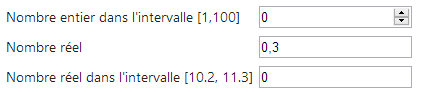
你可能会注意到前面的输入表单中存在一个异常:

对于实数,我们输入了 [0,3],但系统未接受。你必须输入 [0.3]:
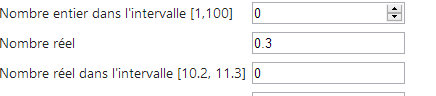
因此,系统期望的格式是英式格式,而非法式格式。网上快速搜索后发现了一些解决方案。以下是一种。
[GET] 和 [POST] 操作变为如下形式:
    // Action13-GET
    [HttpGet]
    public ViewResult Action13Get()
    {
      return View("Action13Get", new ViewModel11());
}
    // Action13-POST
    [HttpPost]
    public ViewResult Action13Post(ViewModel11 modèle)
    {
      return View("Action13Get", modèle);
}
[Action13Get.cshtml] 视图与 [Action12Get.cshtml] 视图完全相同,仅 JavaScript 脚本有所不同:
<head>
  <meta name="viewport" content="width=device-width" />
  <title>Action13Get</title>
  <link rel="stylesheet" href="~/Content/Site.css" />
  <script type="text/javascript" src="~/Scripts/jquery-1.8.2.min.js"></script>
  <script type="text/javascript" src="~/Scripts/jquery.validate.min.js"></script>
  <script type="text/javascript" src="~/Scripts/jquery.validate.unobtrusive.min.js"></script>
...
  <script type="text/javascript" src="~/Scripts/myscripts.js"></script>

</head>
注意:第 5 行,请根据您使用的 Visual Studio 版本调整 jQuery 版本。
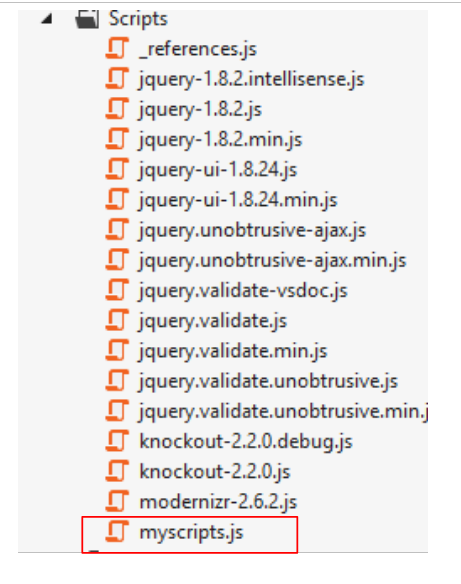 |
// http://blog.instance-factory.com/?p=268
$.validator.methods.number = function (value, element) {
  return this.optional(element) ||
      !isNaN(Globalize.parseFloat(value));
}

$.validator.methods.date = function (value, element) {
  return this.optional(element) ||
      !isNaN(Globalize.parseDate(value));
}

jQuery.extend(jQuery.validator.methods, {
  range: function (value, element, param) {
    //Use the Globalization plugin to parse the value
    var val = Globalize.parseFloat(value);
    return this.optional(element) || (
        val >= param[0] && val <= param[1]);
  }
});

// au chargement du document
$(document).ready(function () {
  var culture = 'fr-FR';
  Globalize.culture(culture);
});
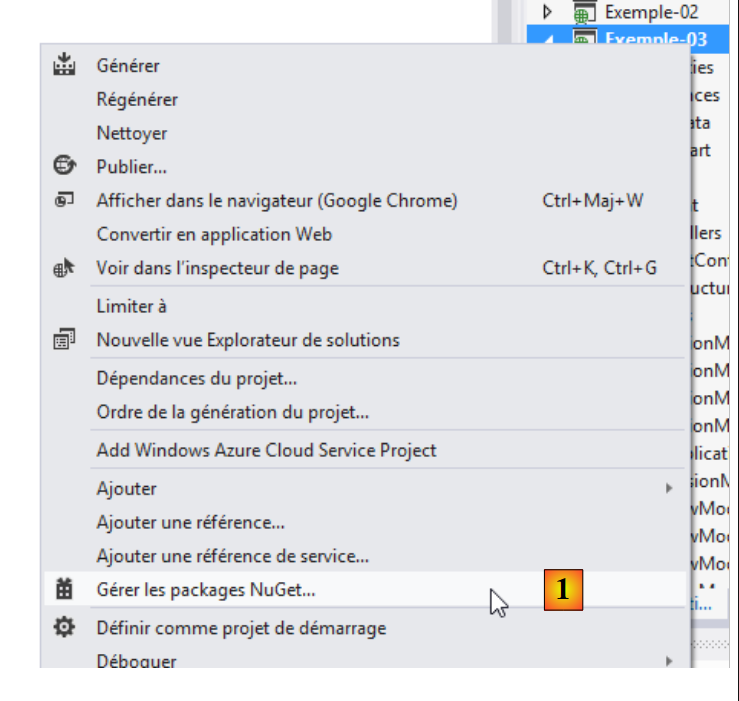
我在第 1 行标注了该脚本的位置。我不会尝试解释它,因为我也不太明白。JavaScript 有时确实有些晦涩难懂。在第 4、9 和 15 行中,使用了一个 [Globalize] 对象。该对象由 jQuery Globalization 库提供,可通过 [NuGet] 获取:
 |
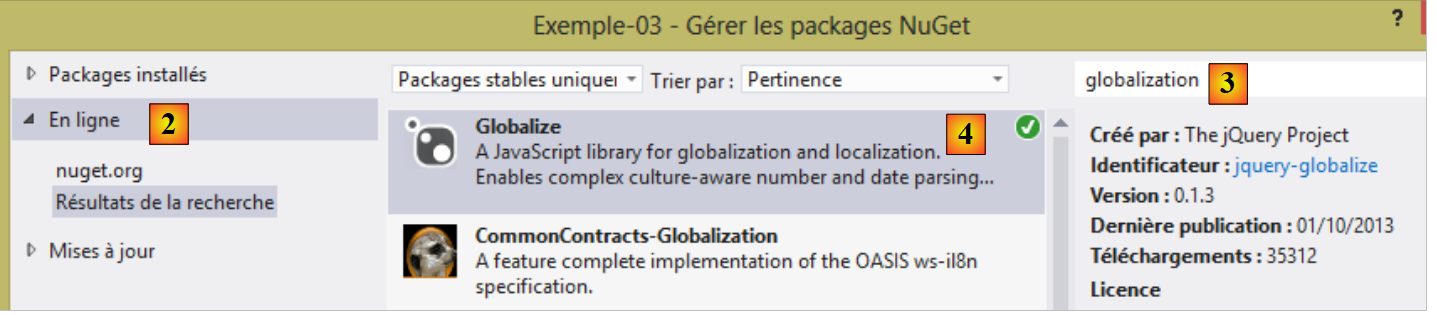 |
- 在 [1] 中,管理 [Example-03] 项目的 [NuGet] 包;
- 在 [2] 中,在线浏览包;
- 在 [3] 中,输入关键词 [globalization];
- 在 [4] 中,为 JQuery 项目安装 [Globalize] 包。
安装 [Globalize] 包后,[Scripts] 文件夹中会出现一个新文件夹:
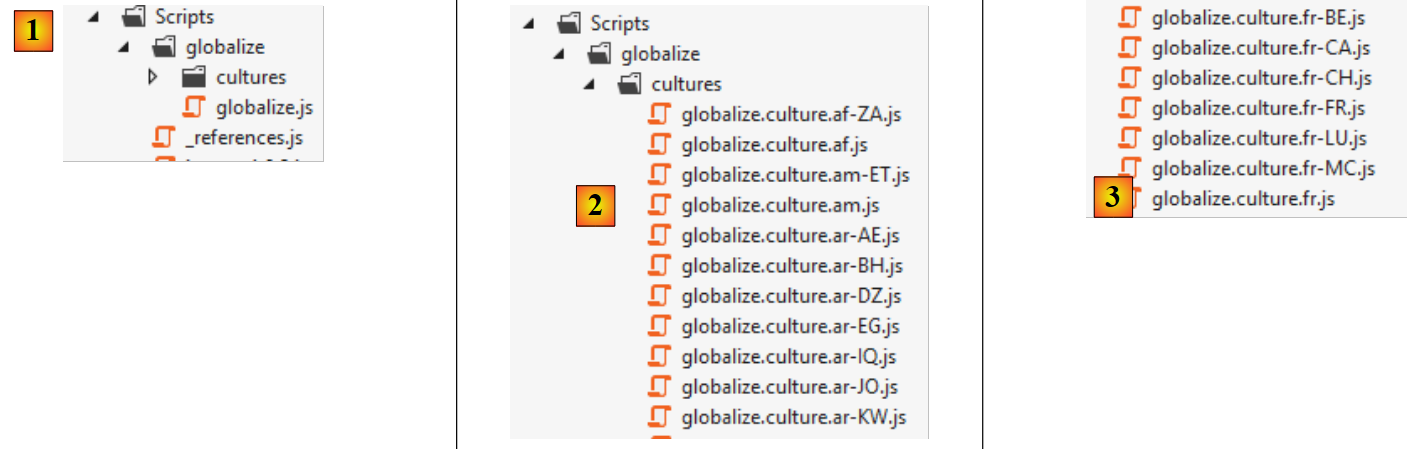 |
- 在 [1] 中,已创建名为 [globalize] 的文件夹,其中包含主脚本 [globalize.js];
- 在 [2] 中,主脚本 [globalize.js] 由针对特定语言和区域设置的脚本进行补充;
- 在 [3] 中,包含针对法语以及比利时 (BE)、加拿大 (CA)、法国 (FR)、瑞士 (CH)、卢森堡 (LU) 和摩纳哥 (MC) 地区设置的专用脚本。
[globalize.js] 脚本以及我们的文化脚本 [globalize.culture.fr-FR.js] 必须包含在 [Action13Get.cshtml] 页面的脚本列表中:
<head>
  <meta name="viewport" content="width=device-width" />
  <title>Action13Get</title>
...
  <script type="text/javascript" src="~/Scripts/globalize/globalize.js"></script>
  <script type="text/javascript" src="~/Scripts/globalize/cultures/globalize.culture.fr-FR.js"></script>
  <script type="text/javascript" src="~/Scripts/myscripts.js"></script>
</head>
- 第 5 行:[globalize] 脚本;
- 第 6 行:[globalize.culture.fr-FR.js] 脚本;
- 第 7 行:[myscripts.js] 脚本;
让我们仔细看看最后这个脚本:
// http://blog.instance-factory.com/?p=268
$.validator.methods.number = function (value, element) {
  return this.optional(element) ||
      !isNaN(Globalize.parseFloat(value));
}

...

// au chargement du document
$(document).ready(function () {
  var culture = 'fr-FR';
  Globalize.culture(culture);
});
第 10–13 行将客户端区域设置为 [fr-FR]:
- 第 10 行:当包含该脚本的文档被浏览器完全加载后,jQuery 的 [ready] 函数会被执行;
- 第 11–12 行:将客户端区域设置为 [fr-FR]。要使此功能生效,文件 [globalize.culture.fr-FR.js] 必须包含在与该文档关联的 JavaScript 脚本列表中。
现在我们可以测试这个新应用程序了:
现在我们可以输入 [0.3] 作为实数,这是之前无法做到的。然而,我们遇到了另一个问题:

在上文中,客户端验证允许我们使用英制记法输入 [11.2]。但在提交表单时,服务器端不接受该值:

我们必须输入 [11,2],这样在客户端和服务器端都能正常工作。在客户端,不应接受盎格鲁-撒克逊记法。这应该是有办法实现的……
现在让我们来探讨视图的国际化。我们将延续前一个表单的示例,提供法语和英语两种语言版本。
6.2. 管理区域设置
视图的语言由 [Thread.CurrentThread.CurrentUICulture] 对象控制。若要在 [fr-FR] 文化环境中显示页面,我们编写如下代码:
本地化(日期、数字、货币、时间等)由 [Thread.CurrentThread.CurrentCulture] 对象控制。与之前写的内容类似,我们编写如下代码:
这两条语句可以放在应用程序中每个控制器的构造函数中。不过,我们也可能希望将这段所有控制器共有的代码提取出来。我们将采用这种做法。
我们创建两个新的控制器:
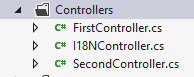
- [I18NController] 将作为所有使用国际化的控制器的基类;
- [SecondController] 是从 [I18NController] 派生出的一个示例控制器。
[I18NController] 控制器的代码如下:
using System.Threading;
using System.Web;
using System.Web.Mvc;

namespace Exemples.Controllers
{
  public abstract class I18NController : Controller
  {
    public I18NController()
    {
      // retrieve the context of the current query
      HttpContext httpContext = HttpContext.Current;
      // examine the query for the [lang] parameter
      // look for it in the URL parameters
      string langue = httpContext.Request.QueryString["lang"];
      if (langue == null)
      {
        // look for it in the posted parameters
        langue = httpContext.Request.Form["lang"];
      }
      if (langue == null)
      {
        // search for it in the user's session
        langue = httpContext.Session["lang"] as string;
      }
      if (langue == null)
      {
        // 1st header parameter HTTP AcceptLanguages
        langue = httpContext.Request.UserLanguages[0];
      }
      if (langue == null)
      {
        // culture fr-FR
        langue = "fr-FR";
      }
      // put your tongue in session
      httpContext.Session["lang"] = langue;
      // changing thread cultures
      Thread.CurrentThread.CurrentCulture = new System.Globalization.CultureInfo(langue);
      Thread.CurrentThread.CurrentUICulture = Thread.CurrentThread.CurrentCulture;
    }
  }
}
- 第 7 行:[I18NController] 继承自 [Controller] 类;
- 第 7 行:该类被声明为 [abstract] 以防止直接实例化:它只能通过派生来使用;
- 第 9 行:每次实例化从 [I18NController] 派生的控制器时,都会执行该类的构造函数;
- 第 12 行:我们获取当前由控制器处理的 HTTP 请求的上下文;
- 第 15 行:我们假设语言由 [lang] 参数设定,该参数可能位于不同位置。我们将按以下顺序进行搜索:
- 第 15 行:在 URL 参数 [?lang=en-US] 中,
- 第 19 行:在提交的参数 [lang=de] 中,
- 第 24 行:在用户的会话中,
- 第 29 行:在 HTTP 客户端发送的语言偏好设置中,
- 第 26 行:如果未找到任何信息,则将区域设置为 [fr-FR];
- 第 37 行:我们将区域设置存储在会话中。后续请求将从此处获取该设置。用户可通过在 GET 或 POST 请求的参数中包含该设置来更改它;
- 第 39–40 行:我们为当前请求处理完成后将显示的视图设置语言环境。
[SecondController] 控制器将如下所示:
using Exemple_03.Models;
using Exemples.Controllers;
using System.Web.Mvc;

namespace Exemple_03.Controllers
{
    public class SecondController : I18NController
    {
      // Action14-GET
      [HttpGet]
      public ViewResult Action14Get()
      {
        return View("Action14Get", new ViewModel14());
      }

      // Action14-POST
      [HttpPost]
      public ViewResult Action14Post(ViewModel14 modèle)
      {
        return View("Action14Get", modèle);
      }
    }
}
- 第 7 行:[SecondController] 继承自 [I18NController]。这确保了待显示视图的区域设置已初始化;
- 第 13 行:我们使用视图模型 [ViewModel14],稍后将对此进行介绍;
- 第 13 行和第 20 行:视图 [Action14Get.cshtml] 显示表单。
6.3. 视图模型 [ViewModel14] 的国际化
视图模型 [ViewModel14] 如下所示:
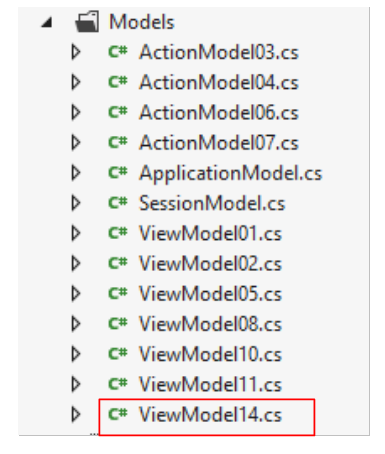 |
using Exemple_03.Resources;
using System;
using System.Collections.Generic;
using System.ComponentModel.DataAnnotations;
using System.Globalization;
using System.Net.Mail;

namespace Exemple_03.Models
{
  public class ViewModel14 : IValidatableObject
  {

    [Required(ErrorMessageResourceType = typeof(MyResources), ErrorMessageResourceName = "infoRequise")]
    [Display(ResourceType = typeof(MyResources), Name = "chaineaumoins4")]
    [RegularExpression(@"^.{4,}$", ErrorMessageResourceType = typeof(MyResources), ErrorMessageResourceName = "infoIncorrecte")]
    public string Chaine1 { get; set; }

    [Display(ResourceType = typeof(MyResources), Name = "chaineauplus4")]
    [Required(ErrorMessageResourceType = typeof(MyResources), ErrorMessageResourceName = "infoRequise")]
    [RegularExpression(@"^.{1,4}$", ErrorMessageResourceType = typeof(MyResources), ErrorMessageResourceName = "infoIncorrecte")]
    public string Chaine2 { get; set; }

    [Required(ErrorMessageResourceType = typeof(MyResources), ErrorMessageResourceName = "infoRequise")]
    [Display(ResourceType = typeof(MyResources), Name = "chaine4exactement")]
    [RegularExpression(@"^.{4,4}$", ErrorMessageResourceType = typeof(MyResources), ErrorMessageResourceName = "infoIncorrecte")]
    public string Chaine3 { get; set; }

    [Required(ErrorMessageResourceType = typeof(MyResources), ErrorMessageResourceName = "infoRequise")]
    [Display(ResourceType = typeof(MyResources), Name = "entier")]
    public int Entier1 { get; set; }

    [Display(ResourceType = typeof(MyResources), Name = "entierentrebornes")]
    [Required(ErrorMessageResourceType = typeof(MyResources), ErrorMessageResourceName = "infoRequise")]
    [Range(1, 100, ErrorMessageResourceType = typeof(MyResources), ErrorMessageResourceName = "infoIncorrecte")]
    public int Entier2 { get; set; }

    [Display(ResourceType = typeof(MyResources), Name = "reel")]
    [Required(ErrorMessageResourceType = typeof(MyResources), ErrorMessageResourceName = "infoRequise")]
    public double Reel1 { get; set; }

    [Display(ResourceType = typeof(MyResources), Name = "reelentrebornes")]
    [Required(ErrorMessageResourceType = typeof(MyResources), ErrorMessageResourceName = "infoRequise")]
    [Range(10.2, 11.3, ErrorMessageResourceType = typeof(MyResources), ErrorMessageResourceName = "infoIncorrecte")]
    public double Reel2 { get; set; }

    [Display(ResourceType = typeof(MyResources), Name = "email")]
    [Required(ErrorMessageResourceType = typeof(MyResources), ErrorMessageResourceName = "infoRequise")]
    [EmailAddress(ErrorMessageResourceType = typeof(MyResources), ErrorMessageResourceName = "infoIncorrecte", ErrorMessage="")]
    public string Email1 { get; set; }

    [Display(ResourceType = typeof(MyResources), Name = "date1")]
    [RegularExpression(@"\s*\d{2}/\d{2}/\d{4}\s*", ErrorMessageResourceType = typeof(MyResources), ErrorMessageResourceName = "infoIncorrecte")]
    [Required(ErrorMessageResourceType = typeof(MyResources), ErrorMessageResourceName = "infoRequise")]
    public string Regexp1 { get; set; }

    [Display(ResourceType = typeof(MyResources), Name = "date2")]
    [Required(ErrorMessageResourceType = typeof(MyResources), ErrorMessageResourceName = "infoRequise")]
    [DataType(DataType.Date)]
    public DateTime Date1 { get; set; }

    // validation
    public IEnumerable<ValidationResult> Validate(ValidationContext validationContext)
    {
      // error list
      List<ValidationResult> résultats = new List<ValidationResult>();
      // the same error msg for all
      string errorMessage=MyResources.ResourceManager.GetObject("infoIncorrecte", new CultureInfo(System.Web.HttpContext.Current.Session["lang"] as string)).ToString();

      // Date 1
      if (Date1.Date <= DateTime.Now.Date)
      {
        résultats.Add(new ValidationResult(errorMessage, new string[] { "Date1" }));
      }
      // Email1
      try
      {
        new MailAddress(Email1);
      }
      catch
      {
        résultats.Add(new ValidationResult(errorMessage, new string[] { "Email1" }));
      }
      // Regexp1
      try
      {
        DateTime.ParseExact(Regexp1, "dd/MM/yyyy", CultureInfo.CreateSpecificCulture("fr-FR"));
      }
      catch
      {
        résultats.Add(new ValidationResult(errorMessage, new string[] { "Regexp1" }));
      }

      // return the list of errors
      return résultats;
    }
  }
}
此模型是前一个模型 [ViewModel11] 的国际化版本。我们将描述第一个属性第一个属性的国际化机制。其余属性遵循相同的机制。
    [Required(ErrorMessageResourceType = typeof(MyResources), ErrorMessageResourceName = "infoRequise")]
public string Chaine1 { get; set; }
在之前的模型 [ViewModel11] 中,这些代码如下:
[Required(ErrorMessage = "Information requise")]
public string Chaine1 { get; set; }
在国际化版本中,第 1 行中要显示的文本被放置在资源文件中。此处,该文件名为 [MyResources.resx](typeof),并已放置在项目根目录下。它被称为资源文件。
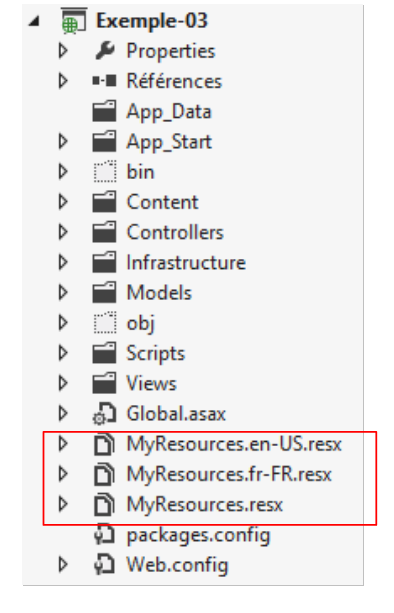 |
我们在此创建了三个资源文件:
- [MyResources]:当当前语言环境没有资源时使用的默认资源;
- [MyResources.fr-FR]:针对 [fr-FR] 语言环境的资源;
- [MyResources.en-US]:适用于 [en-US] 语言环境的资源;
要创建资源文件,请按照以下步骤操作 [1, 2, 3]:
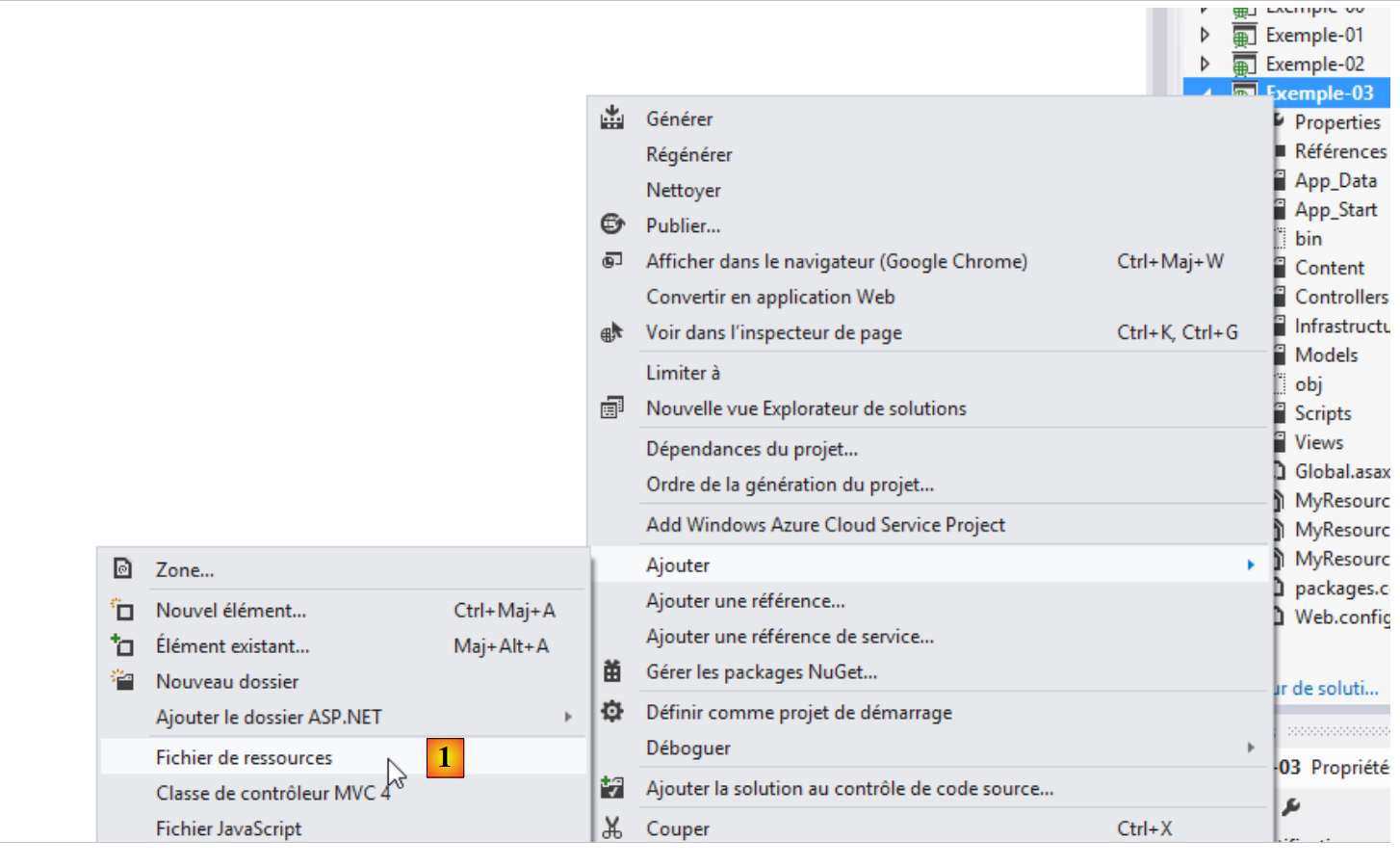 |
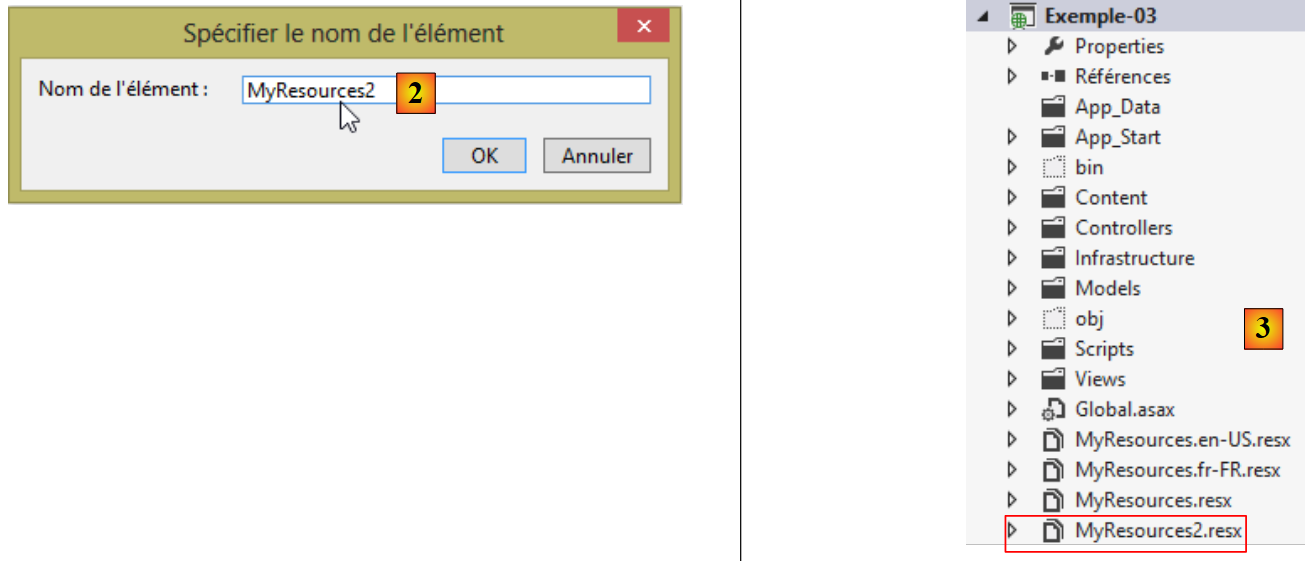 |
这将生成资源文件 [MyResources2.resx]。双击该文件后,您将看到以下页面:
 |
资源文件是一个字典,其中包含键及其对应的值。请在 [1] 中输入键,在 [2] 中输入值,并在 [3] 中输入资源作用域。为了使这些资源可读,它们必须具有 [Public] 作用域。让我们回到这一行:
[Required(ErrorMessageResourceType = typeof(MyResources), ErrorMessageResourceName = "infoRequise")]
- [ErrorMessageResourceType]:指代资源文件。参数 [typeof] 即文件名。该文件在编译过程中会被转换为类,其二进制文件将包含在项目程序集之中。因此,最终 [MyResources] 即为资源类的名称;
- [ErrorMessageResourceName = "infoRequise"]: 指代资源文件中的一个键。最终,该行代码表示要显示的错误消息是 [MyResources] 文件中与 [infoRequise] 键关联的值。
要在 [MyResources] 文件中创建 [infoRequise] 键及其关联值,请按以下步骤操作:
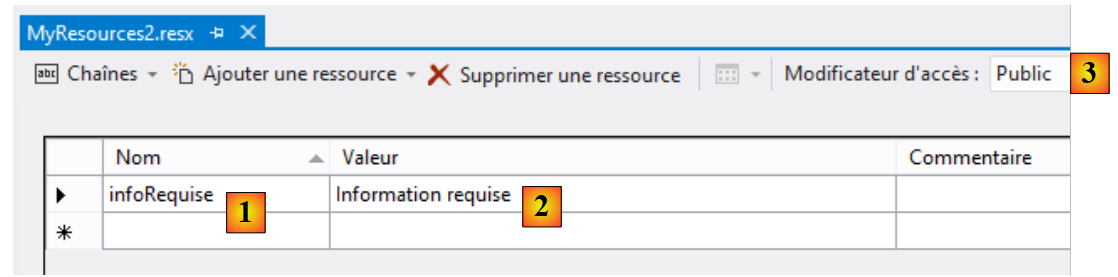 |
在 [1] 中输入键名,在 [2] 中输入值,并在 [3] 中输入资源作用域。
还有一点需要说明:[MyResources] 类的命名空间。该命名空间在 [MyResources.resx] 文件的属性中定义:
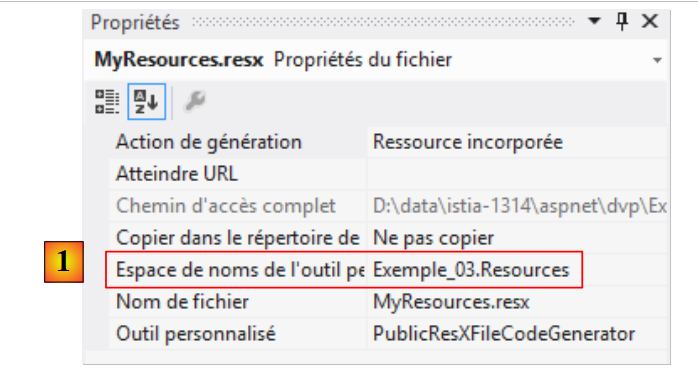 |
在 [1] 中,我们定义了将从 [MyResources.resx] 资源文件创建的 [MyResources] 类的命名空间。让我们回到之前分析过的国际化行:
[Required(ErrorMessageResourceType = typeof(MyResources), ErrorMessageResourceName = "infoRequise")]
typeof 运算符期望接收一个类,在本例中即 [MyResources] 类。为了能够找到该类,必须将其命名空间导入到 [ViewModel14] 类中:
using Exemple_03.Resources;
要使 [MyResources] 类可见,自 [MyResources] 资源文件创建以来,项目必须至少构建过一次。该类的代码可在 [MyResources.Designer.cs] 文件中查看:
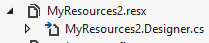
双击此文件,即可访问 [MyResources] 类的代码:
namespace Exemple_03.Resources {
    using System;


[global::System.CodeDom.Compiler.GeneratedCodeAttribute("System.Resources.Tools.StronglyTypedResourceBuilder", "4.0.0.0")]
    [global::System.Diagnostics.DebuggerNonUserCodeAttribute()]
    [global::System.Runtime.CompilerServices.CompilerGeneratedAttribute()]
    public class MyResources2 {

  ...
         public static string infoRequise {
            get {
                return ResourceManager.GetString("infoRequise", resourceCulture);
            }
        }
    }
}
- 第 1 行:类命名空间;
- 第 11 行:[infoRequise] 键已成为 [MyResources] 类的静态属性。可通过 [MyResources.infoRequise] 这种写法访问它。此外,请注意该属性具有 [public] 作用域。若无此声明,则无法访问该属性。 这一点必须牢记,因为默认作用域是 [internal],若忘记修改作用域,可能会导致难以理解的错误。
为什么现在有三个资源文件?
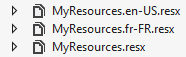
我们创建了 [MyResources.resx],这是根资源文件。接下来,我们需要根据需要管理的语言环境(语言)数量,创建相应数量的 [MyResources.locale.resx] 资源文件。 这里我们处理的是法语 [fr-FR] 和美式英语 [en-US]。当当前语言环境既不是 [fr-FR] 也不是 [en-US] 时,将使用根资源文件 [MyResources.resx]。
[MyResources.resx] 的最终内容如下:
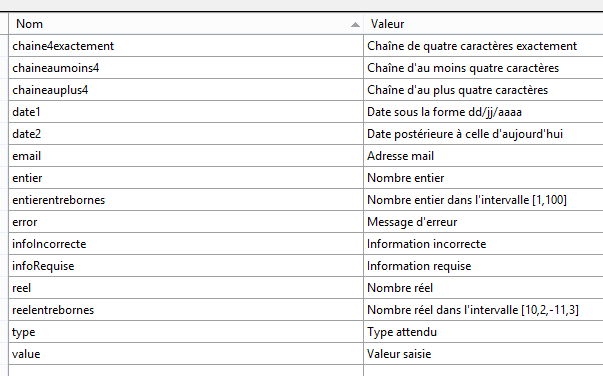
当无法识别语言环境时,消息将显示为法语。文件 [MyResources.fr-FR.resx] 的最终内容与之完全相同,只需复制该文件即可获得。
[MyResources.en-US.resx] 的最终内容也是通过复制该文件获得的,然后按以下方式进行修改:
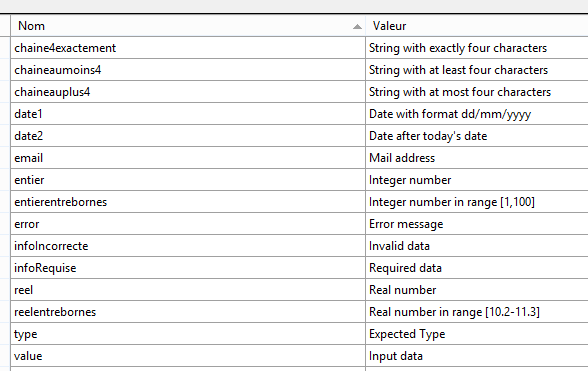
让我们回到 [ViewModel14] 视图及其 [Validate] 方法:
    // validation
    public IEnumerable<ValidationResult> Validate(ValidationContext validationContext)
    {
      // liste des erreurs
      List<ValidationResult> résultats = new List<ValidationResult>();
      // le même msg d'erreur pour tous
      string errorMessage=MyResources.ResourceManager.GetObject("infoIncorrecte", new CultureInfo(System.Web.HttpContext.Current.Session["lang"] as string)).ToString();

      // Date 1
      if (Date1.Date <= DateTime.Now.Date)
      {
        résultats.Add(new ValidationResult(errorMessage, new string[] { "Date1" }));
      }
...
      // on rend la liste des erreurs
      return résultats;
}
第 7 行演示了如何从 [MyResources] 资源文件中获取一条消息。在此,我们希望获取当前区域设置下与键 [infoIncorrecte] 关联的消息:
- MyResources.ResourceManager.GetObject("infoIncorrecte", new CultureInfo("en-US")):从资源文件 [MyResources.en-US.resx] 中检索与键 [infoIncorrecte] 关联的对象;
- 我们看到 [I18NController] 控制器通过 [lang] 键在会话中设置了当前区域设置。因此,可以通过 System.Web.HttpContext.Current.Session["lang"] as string 获取当前区域设置;
- 资源被检索为 [object] 类型。为了获取错误消息,我们对其应用 [ToString] 方法。
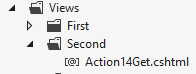
6.4. 视图 [Action14Get.cshtml] 的国际化
我们按以下方式更新表单显示视图:
@model Exemple_03.Models.ViewModel14
@using Exemple_03.Resources
@{
  Layout = null;
}

<!DOCTYPE html>

<html>
<head>
  <meta name="viewport" content="width=device-width" />
  <title>Action14Get</title>
  <link rel="stylesheet" href="~/Content/Site.css" />
  <script type="text/javascript" src="~/Scripts/jquery-1.8.2.min.js"></script>
  <script type="text/javascript" src="~/Scripts/jquery.validate.min.js"></script>
  <script type="text/javascript" src="~/Scripts/jquery.validate.unobtrusive.min.js"></script>
  <script type="text/javascript" src="~/Scripts/globalize/globalize.js"></script>
  <script type="text/javascript" src="~/Scripts/globalize/cultures/globalize.culture.fr-FR.js"></script>
  <script type="text/javascript" src="~/Scripts/globalize/cultures/globalize.culture.en-US.js"></script>
  <script type="text/javascript" src="~/Scripts/myscripts2.js"></script>
  <script>
    $(document).ready(function () {
      var culture = '@System.Threading.Thread.CurrentThread.CurrentCulture';
        Globalize.culture(culture);
      });
  </script>

</head>
<body>
  <h3>Formulaire ASP.NET MVC - Internationalisation</h3>
  @using (Html.BeginForm("Action14Post", "Second"))
  {
    <table>
      <thead>
        <tr>
          <th>@MyResources.type</th>
          <th>@MyResources.value</th>
          <th>@MyResources.error</th>
        </tr>
      </thead>
      <tbody>
        <tr>
          <td>@Html.LabelFor(m => m.Chaine1)</td>
          <td>@Html.EditorFor(m => m.Chaine1)</td>
          <td>@Html.ValidationMessageFor(m => m.Chaine1)</td>
        </tr>
...
      </tbody>
    </table>
    <p>
      <input type="submit" value="Valider" />
    </p>
  }
</body>
</html>
<!-- choice of language -->
@using (Html.BeginForm("Lang", "Second"))
{
  <table>
    <tr>
      <td><a href="javascript:postForm('fr-FR','/Second/Action14Get')">Français</a></td>
      <td><a href="javascript:postForm('en-US','/Second/Action14Get')">English</a></td>
    </tr>
  </table>
}
注意:第 14 行——请确保 jQuery 版本与您的 Visual Studio 版本匹配。
让我们从最简单的部分开始,即第 36–38 行。它们使用了我们刚才描述的 [MyResources] 类的静态属性。要访问 [MyResources] 类,必须导入其命名空间(第 2 行)。
在国际化消息中,还必须包含客户端验证框架显示的消息。为此,请使用第 17 至 19 行中的 jQuery 库。我们为支持的两个语言环境使用了相应的 jQuery 文件:[fr- FR] 和 [en-US]。此外,您可能还记得,[Action13Get] 视图使用了以下 JavaScript 脚本 [myscripts.js]:
// document loading
$(document).ready(function () {
  var culture = 'fr-FR';
  Globalize.culture(culture);
});
现在,语言环境不再仅仅是 [fr-FR];它会发生变化。因此,第 21 至 26 行代码现在由 [Action14Get] 视图本身生成。这六行代码将被包含在发送给客户端的 HTML 页面中。
- 第 23 行:JavaScript 变量 [culture] 被初始化为处理请求的线程的当前区域设置。您可能还记得,该变量是由 [I18NController] 类的构造函数初始化的:
      // on met la langue en session
      httpContext.Session["lang"] = langue;
      // on modifie les cultures du thread
      Thread.CurrentThread.CurrentCulture = new System.Globalization.CultureInfo(langue);
Thread.CurrentThread.CurrentUICulture = Thread.CurrentThread.CurrentCulture;
如果当前区域设置为 [en-US],则嵌入在 HTML 页面中的 JavaScript 脚本变为:
  <script>
    $(document).ready(function () {
      var culture = 'en-US';
        Globalize.culture(culture);
      });
</script>
我们之前已经提到,[$(document).ready] 函数会在浏览器完成页面加载后执行。该函数的执行将设置客户端验证框架的语言环境。使用 [en-US] 语言环境时,框架的错误消息将显示为英文,并来自 [MyResources.en-US.resx] 资源文件。下面我们将具体了解其实现方式。
现在让我们来分析第 57–65 行:
<!-- language selection -->
@using (Html.BeginForm("Lang", "Second"))
{
  <table>
    <tr>
      <td><a href="javascript:postForm('fr-FR','/Second/Action14Get')">Français</a></td>
      <td><a href="javascript:postForm('en-US','/Second/Action14Get')">English</a></td>
    </tr>
  </table>
}
这是第二个表单;第一个表单位于第31至53行。该表单在页面底部显示以下链接:
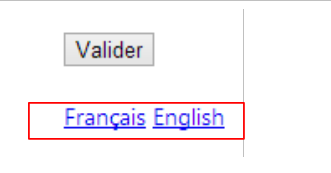 |
- 第2行:表单数据将提交至[Second]控制器中的[Lang]操作。目前,我们尚未看到任何可提交的值;
- 第 6 行和第 7 行:点击这些链接会触发 JavaScript 函数 [postForm] 的执行。该函数位于何处?就在视图第 20 行引用的脚本 [myscripts2.js] 中:
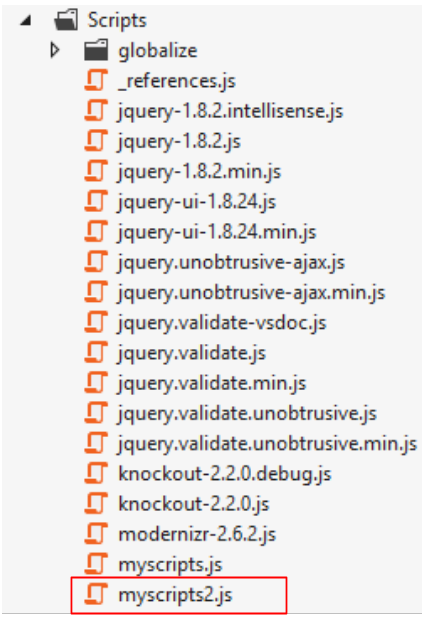 |
其内容如下:
function postForm(lang, url) {
  // on récupère le deuxième formulaire du document
  var form = document.forms[1];
  // on lui ajoute l'hidden attribute lang
  var hiddenField = document.createElement("input");
  hiddenField.setAttribute("type", "hidden");
  hiddenField.setAttribute("name", "lang");
  hiddenField.setAttribute("value", lang);
  // ajout du champ caché dans le formulaire
  form.appendChild(hiddenField);
  // on lui ajoute l'hidden attribute url
  var hiddenField = document.createElement("input");
  hiddenField.setAttribute("type", "hidden");
  hiddenField.setAttribute("name", "url");
  hiddenField.setAttribute("value", url);
  // ajout du champ caché dans le formulaire
  form.appendChild(hiddenField);
  // soumission
  form.submit();
}

// http://blog.instance-factory.com/?p=268
$.validator.methods.number = function (value, element) {
  return this.optional(element) ||
      !isNaN(Globalize.parseFloat(value));
}

$.validator.methods.date = function (value, element) {
  return this.optional(element) ||
      !isNaN(Globalize.parseDate(value));
}

jQuery.extend(jQuery.validator.methods, {
  range: function (value, element, param) {
    //Use the Globalization plugin to parse the value
    var val = Globalize.parseFloat(value);
    return this.optional(element) || (
        val >= param[0] && val <= param[1]);
  }
});
第 22–40 行与前一个示例中使用的 [myscripts.js] 脚本中的内容相同。此处不再赘述。当点击语言链接时执行的 [postForm] 函数位于第 1–20 行:
- 第 1 行:该函数接受两个参数,[lang] 表示用户选择的语言环境,[url] 表示语言环境更改完成后客户端浏览器应重定向到的 URL。这两个参数在调用时指定:
<td><a href="javascript:postForm('fr-FR','/Second/Action14Get')">Français</a></td>
<td><a href="javascript:postForm('en-US','/Second/Action14Get')">English</a></td>
- 第3行:我们获取文档中第二个表单的引用;
- 第5-8行:我们通过编程方式创建该标签
其中 [xx-XX] 是该函数 [lang] 参数的值;
- 第 10 行:同样通过代码,我们将该字段添加到第二个表单中。最终,该字段的行为就如同它从一开始就存在于第二个表单中一样。因此,其值将会被提交。这正是我们想要的效果;
- 第 11–17 行:我们对一个标签重复相同的操作
,其中 [url] 是该函数 [url] 参数的值;
- 第 19 行:现在提交了第二个表单。提交到哪个 URL?
我们需要回到 [Action14Get.cshtml] 页面中第二个表单的代码:
@using (Html.BeginForm("Lang", "Second"))
{
...
}
因此,表单将提交至 URL [/Second/Lang]。接下来,我们需要在 [SecondController] 控制器中定义一个 [Lang] 操作。具体如下:
public class SecondController : I18NController
    {
      // Action14-GET
      [HttpGet]
      public ViewResult Action14Get()
      {
        return View("Action14Get", new ViewModel14());
      }

      // Action14-POST
      [HttpPost]
      public ViewResult Action14Post(ViewModel14 modèle)
      {
        return View("Action14Get", modèle);
      }

      // language
      [HttpPost]
      public RedirectResult Lang(string url)
      {
        // we redirect the client to url
        return new RedirectResult(url);
      }

    }
- 第 18 行:该操作仅响应 [POST] 请求;
- 第 19 行:它仅获取名为 [url] 的参数;
- 第 22 行:它指示客户端重定向到此 URL。
但名为 [lang] 的参数去哪儿了?我们必须记住,[SecondController] 控制器继承自 [I18NController] 类(见下文第 1 行)。正是这个控制器处理 [lang] 参数:
  public abstract class I18NController : Controller
  {
    public I18NController()
    {
      // on récupère le contexte de la requête courante
      HttpContext httpContext = System.Web.HttpContext.Current;
      // on examine la requête à la recherche du paramètre [lang]
      // on le cherche dans les paramètres de l'URL
      string langue = httpContext.Request.QueryString["lang"];
      if (langue == null)
      {
        // on le cherche dans les paramètres postés
        langue = httpContext.Request.Form["lang"];
      }
      if (langue == null)
      {
        // on le cherche dans la session de l'utilisateur
        langue = httpContext.Session["lang"] as string;
      }
      if (langue == null)
      {
        // 1er paramètre de l'entête HTTP AcceptLanguages
        langue = httpContext.Request.UserLanguages[0];
      }
      if (langue == null)
      {
        // culture fr-FR
        langue = "fr-FR";
      }
      // on met la langue en session
      httpContext.Session["lang"] = langue;
      // on modifie les cultures du thread
      Thread.CurrentThread.CurrentCulture = new CultureInfo(langue);
      Thread.CurrentThread.CurrentUICulture = Thread.CurrentThread.CurrentCulture;
}
在本示例中,[lang] 参数是通过引用传递的。因此,它将在第 13 行被获取,在第 31 行存储到会话中,并在第 33–34 行用于更新当前线程的区域设置。
接下来会发生什么?让我们重新审视这些链接:
<td><a href="javascript:postForm('fr-FR','/Second/Action14Get')">Français</a></td>
<td><a href="javascript:postForm('en-US','/Second/Action14Get')">English</a></td>
重定向 URL 为 [/Second/Action14Get]。因此将执行 [Action14Get] 操作:
public class SecondController : I18NController
    {
      // Action14-GET
      [HttpGet]
      public ViewResult Action14Get()
      {
        return View("Action14Get", new ViewModel14());
      }
...
}
此前,[I18NController] 类的构造函数会被执行:
  public abstract class I18NController : Controller
  {
    public I18NController()
    {
      // on récupère le contexte de la requête courante
      HttpContext httpContext = System.Web.HttpContext.Current;
      // on examine la requête à la recherche du paramètre [lang]
      // on le cherche dans les paramètres de l'URL
      string langue = httpContext.Request.QueryString["lang"];
      if (langue == null)
      {
        // on le cherche dans les paramètres postés
        langue = httpContext.Request.Form["lang"];
      }
      if (langue == null)
      {
        // on le cherche dans la session de l'utilisateur
        langue = httpContext.Session["lang"] as string;
      }
      if (langue == null)
      {
        // 1er paramètre de l'entête HTTP AcceptLanguages
        langue = httpContext.Request.UserLanguages[0];
      }
      if (langue == null)
      {
        // culture fr-FR
        langue = "fr-FR";
      }
      // on met la langue en session
      httpContext.Session["lang"] = langue;
      // on modifie les cultures du thread
      Thread.CurrentThread.CurrentCulture = new CultureInfo(langue);
      Thread.CurrentThread.CurrentUICulture = Thread.CurrentThread.CurrentCulture;
}
这次,第 18 行将在会话中找到 [lang] 参数。假设其值为 [en-US]。因此,该区域设置将成为执行请求的线程的区域设置(第 33–34 行)。让我们回到 [Action14Get] 操作:
      // Action14-GET
      [HttpGet]
      public ViewResult Action14Get()
      {
        return View("Action14Get", new ViewModel14());
}
第 5 行,将创建视图模型 [ViewModel14] 的一个实例:
  public class ViewModel14 : IValidatableObject
  {

    [Required(ErrorMessageResourceType = typeof(MyResources), ErrorMessageResourceName = "infoRequise")]
    [Display(ResourceType = typeof(MyResources), Name = "chaineaumoins4")]
    [RegularExpression(@"^.{4,}$", ErrorMessageResourceType = typeof(MyResources), ErrorMessageResourceName = "infoIncorrecte")]
    public string Chaine1 { get; set; }
....
由于当前线程的区域设置为 [en-US],因此将使用 [MyResources.en-US.resx] 文件。因此,错误消息将显示为英文。
一旦 [ViewModel14] 模型被实例化,[Action14Get.cshtml] 视图就会显示出来:
@model Exemple_03.Models.ViewModel14
@using Exemple_03.Resources
@using System.Threading
@{
  Layout = null;
}

<!DOCTYPE html>

<html>
<head>
  <meta name="viewport" content="width=device-width" />
  <title>Action14Get</title>
  ...
  <script>
    $(document).ready(function () {
      var culture = '@Thread.CurrentThread.CurrentCulture';
        Globalize.culture(culture);
      });
  </script>

</head>
<body>
  <h3>Formulaire ASP.NET MVC - Internationalisation</h3>
  @using (Html.BeginForm("Action14Post", "Second"))
  {
    <table>
      <thead>
        <tr>
          <th>@MyResources.type</th>
          <th>@MyResources.value</th>
          <th>@MyResources.error</th>
        </tr>
      </thead>
      <tbody>
        <tr>
...
        </tr>
<tr>
由于当前线程的区域设置为 [en-US],页面第 15–20 行中嵌入的脚本为:
  <script>
    $(document).ready(function () {
      var culture = 'en-US';
        Globalize.culture(culture);
      });
  </script>
这确保了验证框架将使用美国格式(日期、货币、数字等)。出于同样的原因,第30至32行中的消息将从资源文件 [MyResources.en-US.resx] 中获取,因此将显示为英文。
6.5. 执行示例
以下是一些执行示例:
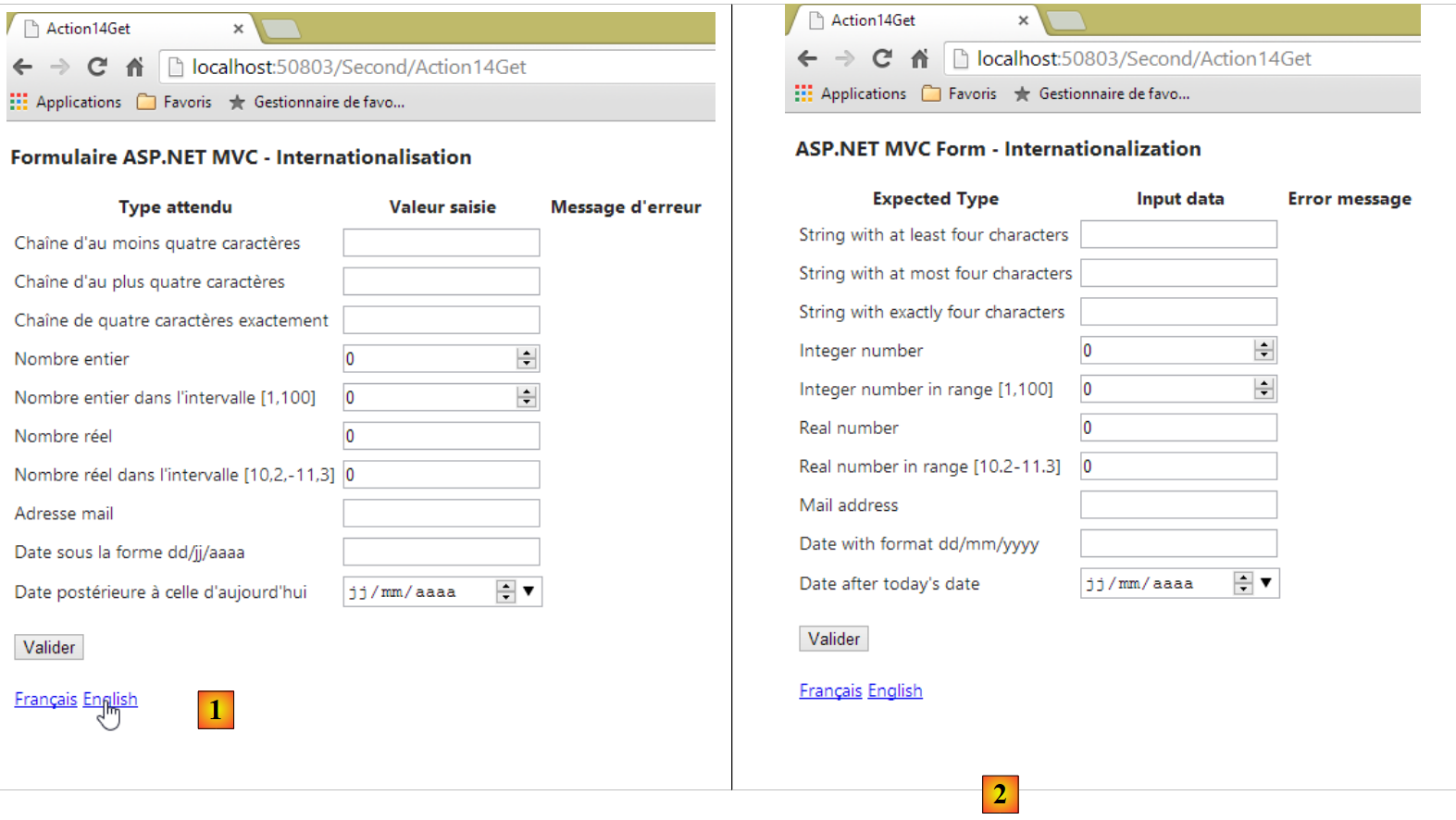 |
- [1] 中的表单为法语版本;[2] 中的表单为英语版本。
 |
- 在[3]中,客户端的错误信息现已改为英文。
如果查看页面的源代码,我们会发现这些错误消息已被嵌入到页面中,这意味着它们是由 ASP.NET 视图 [Action14Get] 及其视图模型 [ViewModel14] 生成的:
        <tr>
          <td><label for="Reel1">Real number</label></td>
          <td><input class="text-box single-line" data-val="true" data-val-number="The field Real number must be a number." data-val-required="Required data" id="Reel1" name="Reel1" type="text" value="0" /></td>
          <td><span class="field-validation-valid" data-valmsg-for="Reel1" data-valmsg-replace="true"></span></td>
        </tr>
        <tr>
          <td><label for="Reel2">Real number in range [10.2-11.3]</label></td>
          <td><input class="text-box single-line" data-val="true" data-val-number="The field Real number in range [10.2-11.3] must be a number." data-val-range="Invalid data" data-val-range-max="11.3" data-val-range-min="10.2" data-val-required="Required data" id="Reel2" name="Reel2" type="text" value="0" /></td>
          <td><span class="field-validation-valid" data-valmsg-for="Reel2" data-valmsg-replace="true"></span></td>
</tr>
6.6. 日期国际化
国际化是一个复杂的问题。让我们来看看 [Date1] 属性及其日历:
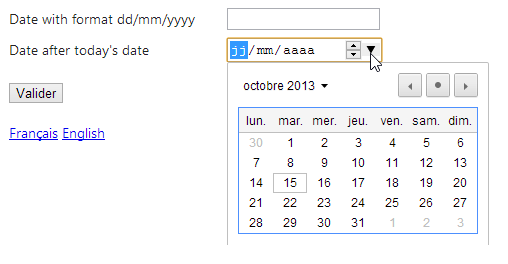
我们可以看到,尽管页面的区域设置为 [en-US],但日历却是法语日历。在 HTML5 中,有一个 [lang] 属性,允许您设置页面或页面组件的语言。然后,我们可以在 [Action14Get.cshtml] 视图中编写以下代码:
@model Exemple_03.Models.ViewModel14
@using Exemple_03.Resources
@using System.Threading
@{
  Layout = null;
  var lang = Session["lang"] as string;
}

<!DOCTYPE html>

<html lang="@lang">
<head>
...
- 第 6 行:从会话中获取区域设置;
- 第 11 行:我们将页面的 [lang] 属性设置为该值。
测试表明,即使页面以英语显示,日历仍保持法语界面。表单中的另一个日期字段也存在问题:
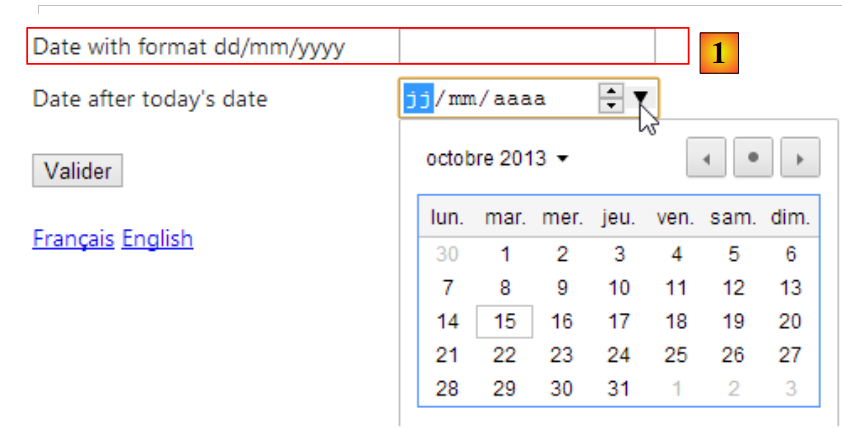 |
在[1]中,日期仍按法语格式 dd/mm/yyyy(20/11/2013)进行请求,而美式格式应为 mm/dd/yyyy(10/21/2013)。我们将尝试通过新的视图和视图模型来解决这两个问题。
jQuery UI 是从 jQuery 项目衍生出的一个项目,它提供了包括日历在内的表单组件。该日历支持本地化,这正是我们将要演示的内容。
首先,让我们将 [jQuery UI] 添加到项目中。
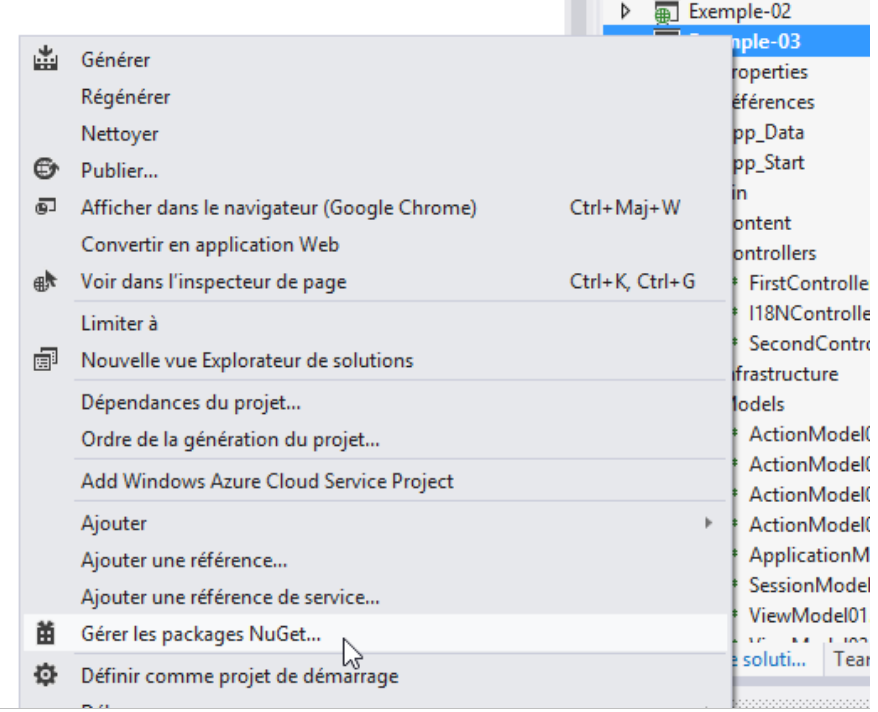 |
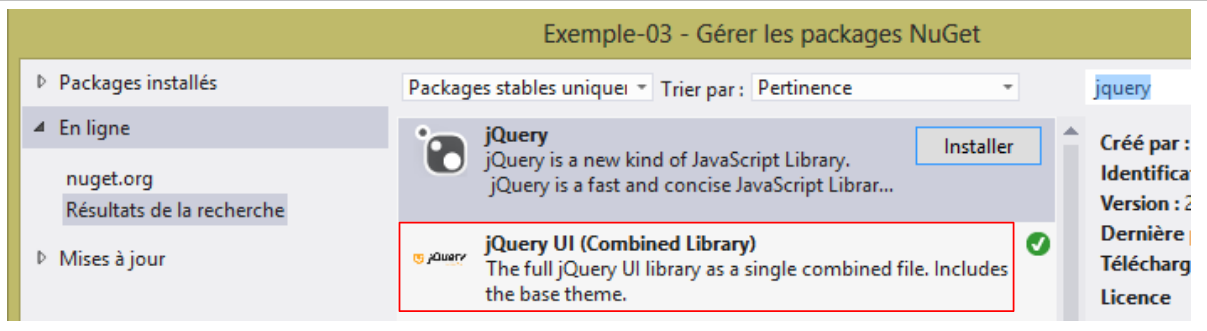 |
安装 jQuery UI 后,项目中会出现新的元素:
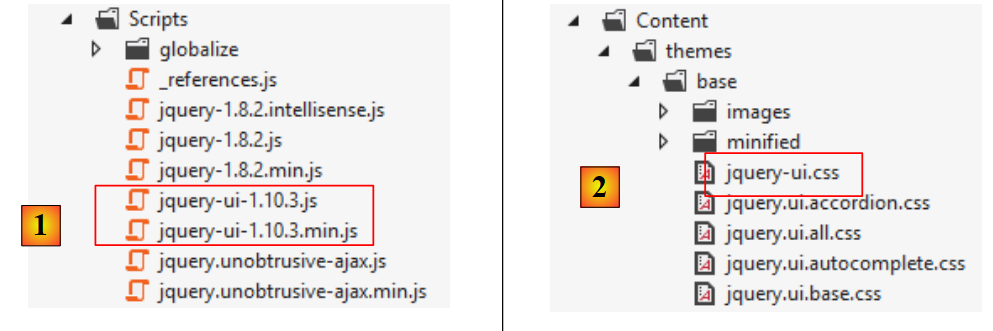 |
- 在 [1] 中,包含 [jQuery UI] 库的普通版和压缩版;
- 在 [2] 中,[JQuery UI] 样式表;
jQuery UI 日历默认使用英语。若要实现国际化,您需要添加位于 [https://github.com/jquery/jquery-ui/tree/master/ui/i18n] 网址下的脚本:
 |
若要将 jQuery UI 日历设置为法语,请将上述 [jquery.ui.datepicker-fr.js] 文件的内容复制到项目的 [Scripts] 文件夹中。
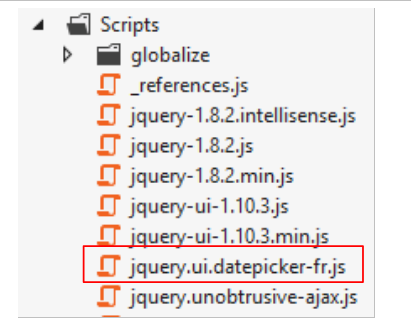 |
新视图 [Action15.cshtml] 的代码是通过复制之前的视图 [Action14.cshtml] 并对其进行修改获得的。我们仅展示修改部分:
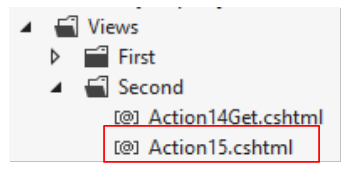 |
@model Exemple_03.Models.ViewModel15
@using Exemple_03.Resources
@using System.Threading
@{
  Layout = null;
}

<!DOCTYPE html>

<html lang="@Model.Culture">
<head>
  <meta name="viewport" content="width=device-width" />
  <title>Action15</title>
...
  <link rel="stylesheet" href="~/Content/themes/base/jquery-ui.css" />
  <script type="text/javascript" src="~/Scripts/jquery-ui-1.10.3.js"></script>
  <script type="text/javascript" src="~/Scripts/jquery.ui.datepicker-fr.js"></script>
  <script>
    $(document).ready(function () {
      var culture = '@Thread.CurrentThread.CurrentCulture';
      Globalize.culture(culture);
      $("#Date1").datepicker($.datepicker.regional['@Model.Regionale']);
    });
  </script>
</head>
<body>
  <h3>@MyResources.titre</h3>
  @using (Html.BeginForm("Action15", "Second"))
  {
    <table>
...
        <tr>
          <td>@Html.LabelFor(m => m.Date1)</td>
          <td>@Html.TextBox("Date1", Model.StrDate1)</td>
          <td>@Html.ValidationMessageFor(m => m.Date1)</td>
        </tr>
      </tbody>
    </table>
    <p>
      <input type="submit" value="Valider" />
    </p>
  }
  <!-- language selection -->
  @using (Html.BeginForm("Lang", "Second"))
  {
    <table>
      <tr>
        <td><a href="javascript:postForm('fr-FR','/Second/Action15')">Français</a></td>
        <td><a href="javascript:postForm('en-US','/Second/Action15')">English</a></td>
      </tr>
    </table>
  }
</body>
</html>
注意:第 16 行,请将 jQuery UI 版本调整为您下载的版本。
- 第 15 行:引用 jQuery UI 样式表;
- 第 16 行:引用下载的 jQuery UI 版本;
- 第 17 行:引用我们刚刚下载的法语日历脚本;
- 第 34 行:[Html.TextBox] 方法将在此处生成一个 [input] 标签,类型为 [text],ID 为 [Date1],名称为 [Date1];
- 第 19 行:页面加载完成后,jQuery UI 的 [datepicker] 函数将应用于 id 为 [Date1] 的元素,即第 34 行中的元素。该函数确保当用户将焦点移至 [Date1] 输入框时,会弹出日历供其选择日期。 [datepicker] 函数接受一个指定日历语言的参数。变量 [@Model.Regionale] 必须设置为:
- 'fr' 表示法语日历,
- '' 表示英文日历;
前一个视图 [Action15.cshtml] 的模型将是以下 [ViewModel15] 模型:
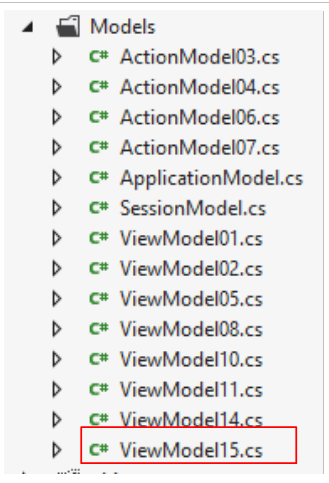 |
其代码基于 [ViewModel14] 模型稍作修改。此处仅展示修改部分:
using Exemple_03.Resources;
...
using System.Web;

namespace Exemple_03.Models
{
  [Bind(Exclude = "Culture,Regionale,StrDate1,FormatDate")]
  public class ViewModel15 : IValidatableObject
  {

...
    [Display(ResourceType = typeof(MyResources), Name = "date1")]
    [RegularExpression(@"\s*\d{2}/\d{2}/\d{4}\s*", ErrorMessageResourceType = typeof(MyResources), ErrorMessageResourceName = "infoIncorrecte")]
    [Required(ErrorMessageResourceType = typeof(MyResources), ErrorMessageResourceName = "infoRequise")]
    public string Regexp1 { get; set; }

    [Display(ResourceType = typeof(MyResources), Name = "date2")]
    [Required(ErrorMessageResourceType = typeof(MyResources), ErrorMessageResourceName = "infoRequise")]
    [DataType(DataType.Date)]
    public DateTime Date1 { get; set; }

    // manufacturer
    public ViewModel15()
    {
      // Culture of the moment
      Culture = HttpContext.Current.Session["lang"] as string;
      cultureInfo=new CultureInfo(Culture);
      // Regional calendar JQuery
      Regionale = MyResources.ResourceManager.GetObject("regionale", cultureInfo).ToString();
      // date format
      FormatDate = MyResources.ResourceManager.GetObject("formatDate", cultureInfo).ToString();
    }


    // validation
    public IEnumerable<ValidationResult> Validate(ValidationContext validationContext)
    {
      // error list
      List<ValidationResult> résultats = new List<ValidationResult>();
      // the same error msg for all
      string errorMessage = MyResources.ResourceManager.GetObject("infoIncorrecte", cultureInfo).ToString();
...
      // Regexp1
      try
      {
        DateTime.ParseExact(Regexp1, FormatDate, cultureInfo);
      }
      catch
      {
        résultats.Add(new ValidationResult(errorMessage, new string[] { "Regexp1" }));
      }

      // return the list of errors
      return résultats;

    }

    // fields outside the action model
    public string Culture { get; set; }
    public string Regionale { get; set; }
    public string StrDate1 { get; set; }
    public string FormatDate { get; set; }

    // local data
    private CultureInfo cultureInfo;
  }
}
与之前的模型 [ViewModel14] 相比,我们增加了四个属性:
- 第 60 行:视图的区域设置,'fr-FR' 或 'en-US'。该区域设置在第 26 行的构造函数中初始化;
- 第 61 行:jQuery 日历的区域文化,'fr' 表示法语日历,'' 表示英语日历。该字段由构造函数第 29 行初始化;
- 第 63 行:来自第 15 行的日期格式:'dd/MM/yyyy' 表示法语日期,'MM/dd/yyyy' 表示英语日期。该字段由构造函数第 31 行初始化;
- 第 62 行:在 [Date1] 输入字段中显示的字符串。该字段将由操作进行初始化;
- 第 47 行:日期 [Regexp1] 现根据当前区域设置的格式进行验证。
[Regionale] 和 [FormatDate] 属性的值位于 [MyResources] 资源文件中。法语资源文件 [MyResources] [MyResources.fr-FR] [1] 和英语资源文件 [2] 的更改如下:
 |
我们已经准备就绪。我们在控制器 [SecondController] 中添加一个操作 [Action15]:
      // Action15
      public ViewResult Action15(FormCollection formData)
      {
        // method HTTP
        string method = Request.HttpMethod.ToLower();
        // model
        ViewModel15 modèle = new ViewModel15();
        if (method == "get")
        {
          modèle.StrDate1 = "";
        }
        else
        {
          TryUpdateModel(modèle, formData);
          modèle.StrDate1 = modèle.Date1.ToString(modèle.FormatDate);
        }
        // view display
        return View("Action15", modèle);
}
- 第 2 行:[Action15] 方法同时处理 [GET] 和 [POST] 请求。在后一种情况下,提交的值将通过 [formData] 参数获取;
- 第 5 行:获取请求的 HTTP 方法;
- 第 7 行:创建待显示的视图模板(表单);
- 第 8–11 行:如果是 [GET] 请求,则将 [Date1] 输入字段初始化为空字符串;
- 第 12–16 行:如果是 [POST] 请求:
- 第 14 行:使用提交的值初始化模型;
- 第 15 行:将 [Date1] 输入字段初始化为一个字符串,该字符串是 [Date1] 的值,并根据当前区域设置进行格式化(法语日期格式为 [dd/MM/yyyy],英语日期格式为 [MM/dd/yyyy]);
- 第 18 行:使用其模板显示 [Action15.cshtml] 视图。
让我们进行一些测试:
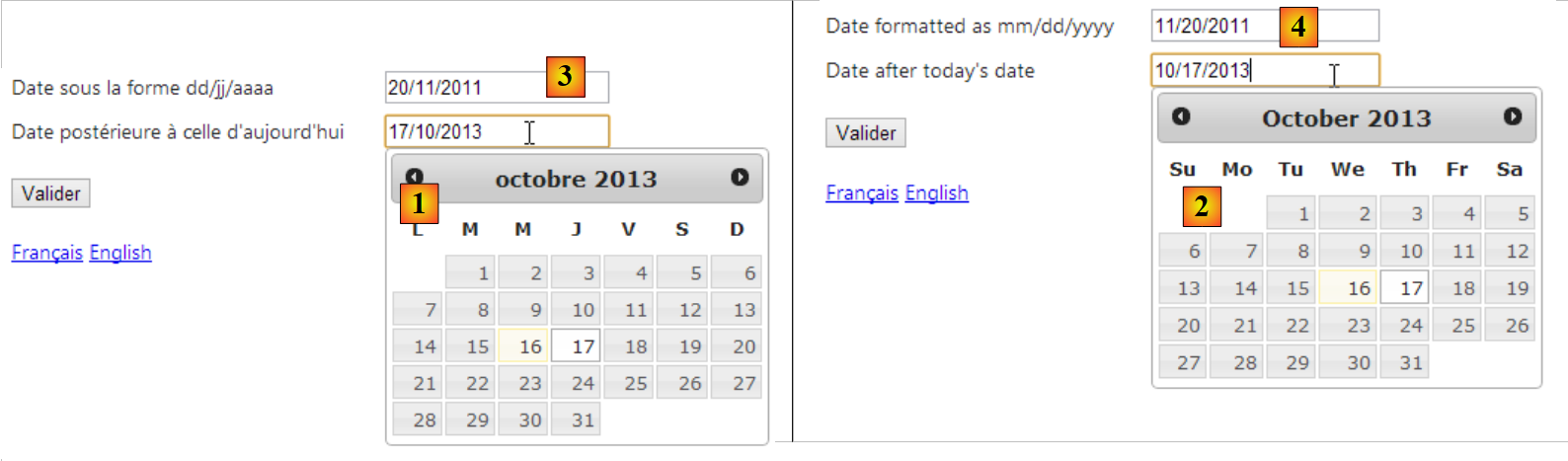 |
- 在 [1] 中,当页面为法语时显示法语日历;
- 在 [2] 中,当页面为英文时显示英文日历;
- 在 [3] 中,当页面为法语时显示法语格式的日期;
- 在 [4] 中,当页面为英文时,显示相同日期的英文格式;
6.7. 结论
如我们所见,应用程序国际化是一个复杂的话题……