6. 视图的国际化
我们将在此探讨视图国际化的问题。这是一个复杂的问题,Scott Hanselman 的以下文章对此有很好的描述:
[http://www.hanselman.com/blog/GlobalizationInternationalizationAndLocalizationInASPNETMVC3JavaScriptAndJQueryPart1.aspx]
首先,让我们回顾一下他对视图国际化相关术语的定义:
国际化(i18n) | 使应用程序支持不同的语言和区域设置 |
本地化 (l10n) | 使应用程序支持特定的语言/区域设置组合 |
全球化 | Internationalisation 与 Localisation 的组合 |
语言 | 使用语言——由代码 ISO 表示(fr:法语,es:西班牙语,en:英语,……) |
区域设置 | 语言的变体——同样由代码 ISO 表示(en_GB:英国英语,en_US:美国英语,……) |
让我们通过一个初步的例子来探讨这个问题。
6.1. 实数本地化
在之前的输入表单中,我们可以注意到一个异常:
 |
对于实数,我们输入了 [0,3],但系统未接受。应输入 [0.3]:
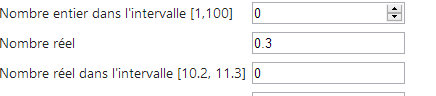 |
因此,系统要求的格式是英式格式,而非法式格式。通过网络搜索,可以找到一些解决方案。以下是一种方法。
操作 [GET] 和 [POST] 应修改为:
    // 操作13-GET
    [HttpGet]
    public ViewResult Action13Get()
    {
      return View("Action13Get", new ViewModel11());
}
    // Action13-POST
    [HttpPost]
    public ViewResult Action13Post(ViewModel11 modèle)
    {
      return View("Action13Get", modèle);
}
视图 [Action13Get.cshtml] 与视图 [Action12Get.cshtml] 完全相同,仅 JavaScript 脚本略有差异:
<head>
  <meta name="viewport" content="width=device-width" />
  <title>Action13Get</title>
  <link rel="stylesheet" href="~/Content/Site.css" />
  <script type="text/javascript" src="~/Scripts/jquery-1.8.2.min.js"></script>
  <script type="text/javascript" src="~/Scripts/jquery.validate.min.js"></script>
  <script type="text/javascript" src="~/Scripts/jquery.validate.unobtrusive.min.js"></script>
...
  <script type="text/javascript" src="~/Scripts/myscripts.js"></script>

</head>
注意:第 5 行,请将 jQuery 的版本号调整为您所使用的 Visual Studio 版本。
- 第 9 行,我们添加了一个名为 [myscripts.js] 的脚本 。该脚本内容如下:
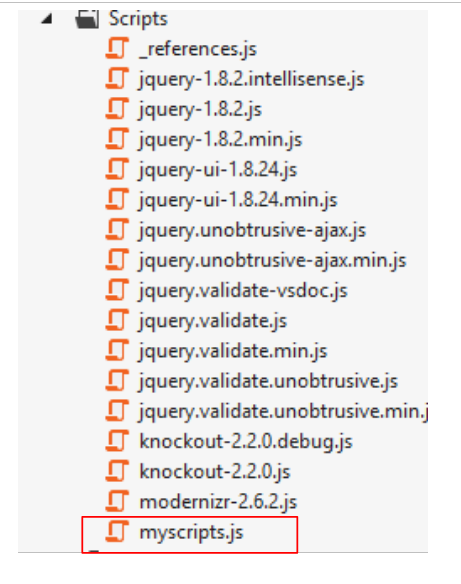 |
// http://blog.instance-factory.com/?p=268
$.validator.methods.number = function (value, element) {
  return this.optional(element) ||
      !isNaN(Globalize.parseFloat(value));
}

$.validator.methods.date = function (value, element) {
  return this.optional(element) ||
      !isNaN(Globalize.parseDate(value));
}

jQuery.extend(jQuery.validator.methods, {
  range: function (value, element, param) {
    //使用全球化插件解析该值
    var val = Globalize.parseFloat(value);
    return this.optional(element) || (
        val >= param[0] && val <= param[1]);
  }
});

// 在加载文档时
$(document).ready(function () {
  var culture = 'fr-FR';
  Globalize.culture(culture);
});
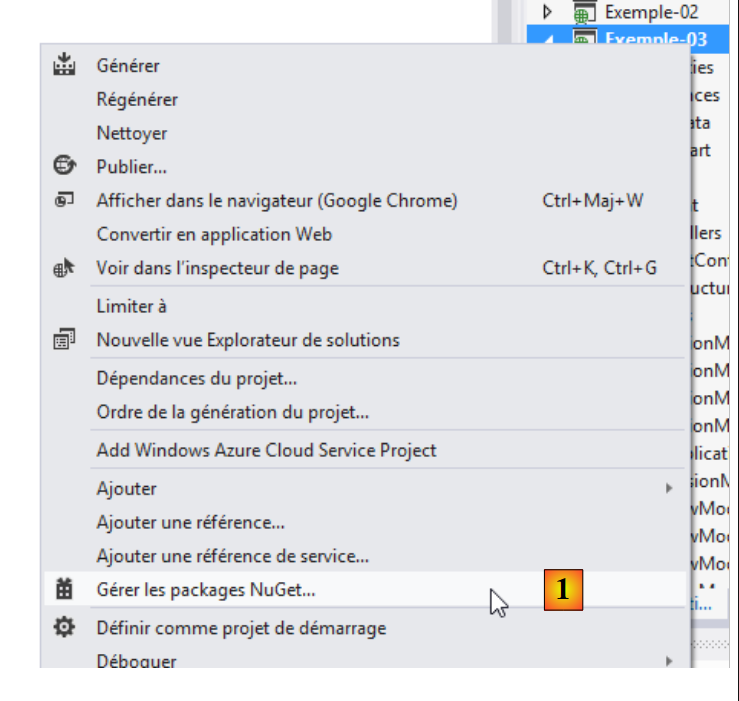
我在第1行标注了该脚本的来源。我不会尝试解释它,因为我自己也不明白。 JavaScript 有时确实有些晦涩难懂。在第 4、9、15 行中,使用了一个名为 [Globalize] 的对象。该对象由 JQuery Globalization 库提供,可通过 [NuGet] 获取:
 |
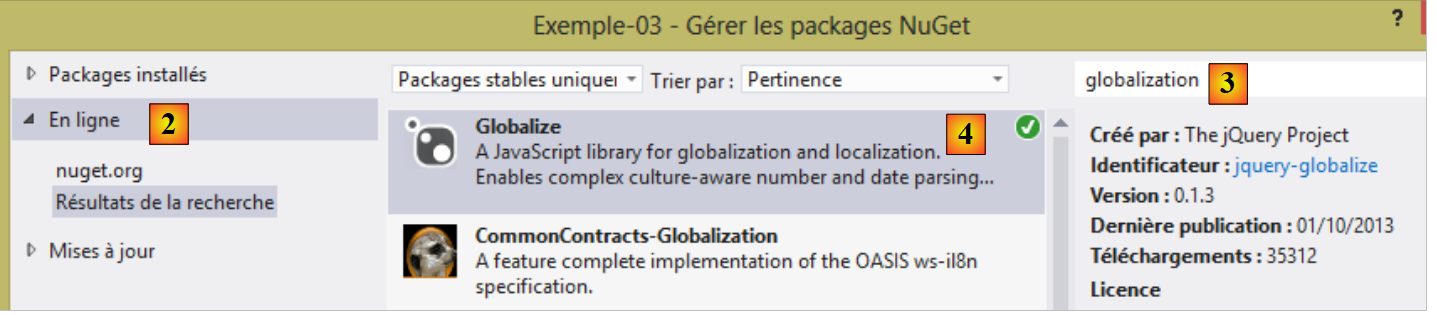 |
- 在 [1] 中,管理 [NuGet] 项目的软件包;
- 在 [2] 中,查看在线包;
- 在 [3] 中,输入术语 [globalization];
- 在 [4] 中,安装 JQuery 项目的 [Globalize] 软件包。
安装完 [Globalize] 包后,[Scripts] 文件夹中会出现一个新分支:
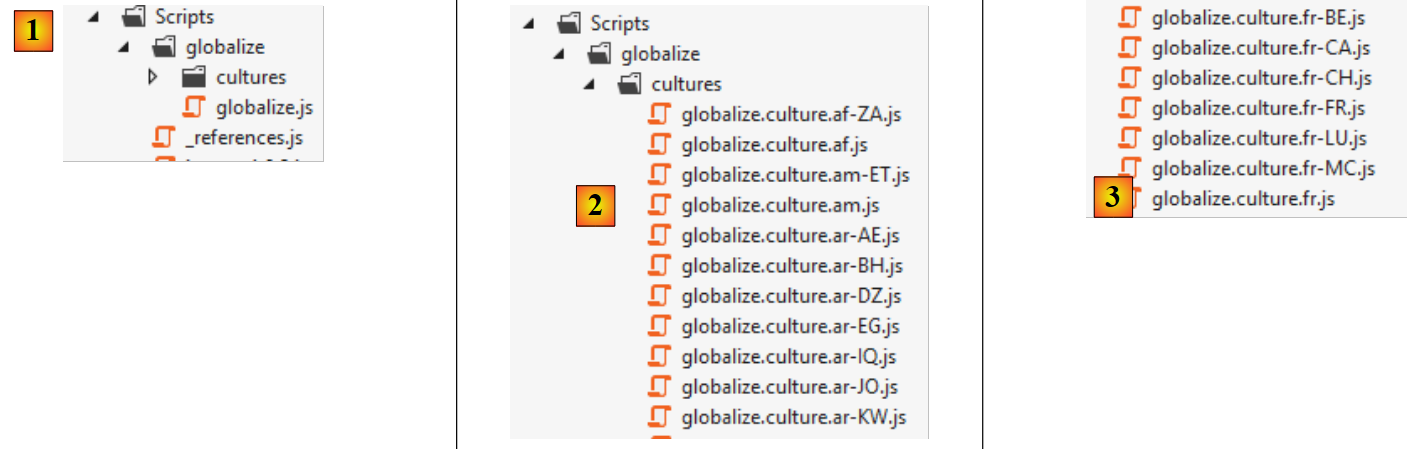 |
- 在 [1] 中,创建了一个名为 [globalize] 的文件夹,其中包含主脚本 [globalize.js];
- 在 [2] 中,主脚本 [globalize.js] 已通过特定语言和区域设置的脚本进行补充;
- 在 [3] 中,针对法语的脚本已包含以下地区(变体):比利时(BE)、 加拿大(CA)、法国(FR)、瑞士(CH)、卢森堡(LU)、 摩纳哥语(MC)。
[globalize.js] 脚本和我们的文化脚本 [globalize.culture.fr-FR.js] 必须包含在我们的页面 [Action13Get.cshtml] 所列的脚本列表中:
<head>
  <meta name="viewport" content="width=device-width" />
  <title>Action13Get</title>
...
  <script type="text/javascript" src="~/Scripts/globalize/globalize.js"></script>
  <script type="text/javascript" src="~/Scripts/globalize/cultures/globalize.culture.fr-FR.js"></script>
  <script type="text/javascript" src="~/Scripts/myscripts.js"></script>
</head>
- 第 5 行:脚本 [globalize];
- 第 6 行:脚本 [globalize.culture.fr-FR.js];
- 第 7 行:脚本 [myscripts.js];
让我们回到最后一个脚本:
// http://blog.instance-factory.com/?p=268
$.validator.methods.number = function (value, element) {
  return this.optional(element) ||
      !isNaN(Globalize.parseFloat(value));
}

...

// 在加载文档时
$(document).ready(function () {
  var culture = 'fr-FR';
  Globalize.culture(culture);
});
第10-13行将客户端区域设置为[fr-FR]:
- 第 10 行:当包含该脚本的文档被浏览器完全加载后,将执行函数 JQuery [ready];
- 第 11-12 行:将客户端语言环境设置为 [fr-FR]。为此,必须将文件 [globalize.culture.fr-FR.js] 包含在与该文档关联的 JavaScript 脚本列表中。
现在,我们可以测试新应用程序:
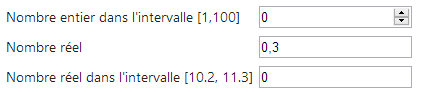 |
现在可以输入 [0,3] 作为实数,这是之前无法做到的。但我们遇到了另一个异常:
 |
如上所示,客户端验证允许我们使用英制表示法输入 [11.2]。但在提交表单进行服务器端验证时,该值不被接受:
 |
必须输入 [11,2],这样客户端和服务器端都能正常工作。客户端本不应接受英式记法。这应该是有办法解决的……
现在让我们来探讨视图的国际化。我们将延续前面的表单示例,并提供法语和英语两种语言版本。
6.2. 管理区域设置
视图的语言由对象 [Thread.CurrentThread.CurrentUICulture] 控制。若要在 [fr-FR] 文化中显示页面,应编写:
本地化设置(日期、数字、货币、时间等)由对象 [Thread.CurrentThread.CurrentCulture] 控制。与前文类似,编写代码如下:
这两条指令可以放在应用程序中每个控制器的主构造函数中。但我们可能也希望将所有控制器共有的代码进行提取。我们将采取这种做法。
我们创建两个新的控制器:
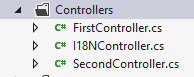 |
- [I18NController] 将作为所有使用国际化的控制器的父类;
- [SecondController] 是从 [I18NController] 派生出的示例控制器。
控制器 [I18NController] 的代码如下:
using System.Threading;
using System.Web;
using System.Web.Mvc;

namespace Exemples.Controllers
{
  public abstract class I18NController : Controller
  {
    public I18NController()
    {
      // 获取当前请求的上下文
      HttpContext httpContext = HttpContext.Current;
      // 检查请求以查找参数 [lang]
      // 在 URL 的参数中查找该参数
      string langue = httpContext.Request.QueryString["lang"];
      if (langue == null)
      {
        // 在提交的参数中查找该参数
        langue = httpContext.Request.Form["lang"];
      }
      if (langue == null)
      {
        // 在用户会话中查找
        langue = httpContext.Session["lang"] as string;
      }
      if (langue == null)
      {
        // HTTP 头部的第一个参数AcceptLanguages
        langue = httpContext.Request.UserLanguages[0];
      }
      if (langue == null)
      {
        // 文化 fr-FR
        langue = "fr-FR";
      }
      // 将语言设置到会话中
      httpContext.Session["lang"] = langue;
      // 修改线程的区域设置
      Thread.CurrentThread.CurrentCulture = new System.Globalization.CultureInfo(langue);
      Thread.CurrentThread.CurrentUICulture = Thread.CurrentThread.CurrentCulture;
    }
  }
}
- 第 7 行:[I18NController] 继承自类 [Controller];
- 第 7 行:声明类 [abstract] 以防止其直接实例化:该类只能通过派生才能使用;
- 第 9 行:该类的构造函数将在每次实例化从 [I18NController] 派生的控制器时执行;
- 第 12 行:获取控制器正在处理的请求 HTTP 的上下文;
- 第15行:假设语言由参数[lang]确定,该参数可能位于不同位置。按以下顺序进行查找:
- 第 15 行:在 URL 和 [?lang=en-US] 的参数中,
- 第19行:在提交的参数[lang=de]中,
- 第24行:在用户会话中,
- 第29行:在客户端发送的语言偏好设置中(HTTP),
- 第26行:若未找到任何信息,则将区域设置设为 [fr-FR];
- 第37行:将区域设置存储在会话中。后续请求将在此处检索该设置。用户可通过在GET或POST命令的参数中设置该值来修改它;
- 第39-40行:设定当前请求处理完成后将显示的视图的区域设置。
控制器 [SecondController] 的代码如下:
using Exemple_03.Models;
using Exemples.Controllers;
using System.Web.Mvc;

namespace Exemple_03.Controllers
{
    public class SecondController : I18NController
    {
      // 操作14-GET
      [HttpGet]
      public ViewResult Action14Get()
      {
        return View("Action14Get", new ViewModel14());
      }

      // 操作14-POST
      [HttpPost]
      public ViewResult Action14Post(ViewModel14 modèle)
      {
        return View("Action14Get", modèle);
      }
    }
}
- 第 7 行:[SecondController] 继承自 [I18NController]。这样可以确保待显示视图的区域设置已初始化;
- 第 13 行:使用我们将要介绍的视图模板 [ViewModel14];
- 第13行和第20行:视图[Action14Get.cshtml]负责显示表单。
6.3. 视图模板 [ViewModel14] 的国际化
视图模板 [ViewModel14] 如下所示:
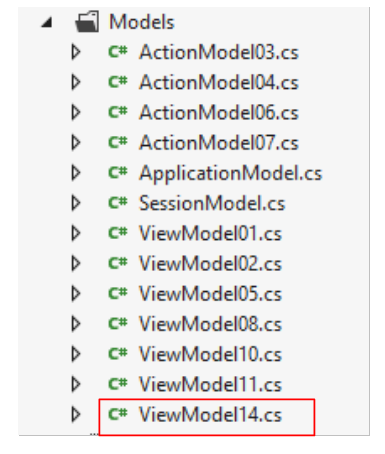 |
using Exemple_03.Resources;
using System;
using System.Collections.Generic;
using System.ComponentModel.DataAnnotations;
using System.Globalization;
using System.Net.Mail;

namespace Exemple_03.Models
{
  public class ViewModel14 : IValidatableObject
  {

    [Required(ErrorMessageResourceType = typeof(MyResources), ErrorMessageResourceName = "infoRequise")]
    [Display(ResourceType = typeof(MyResources), Name = "chaineaumoins4")]
    [RegularExpression(@"^.{4,}$", ErrorMessageResourceType = typeof(MyResources), ErrorMessageResourceName = "infoIncorrecte")]
    public string Chaine1 { get; set; }

    [Display(ResourceType = typeof(MyResources), Name = "chaineauplus4")]
    [Required(ErrorMessageResourceType = typeof(MyResources), ErrorMessageResourceName = "infoRequise")]
    [RegularExpression(@"^.{1,4}$", ErrorMessageResourceType = typeof(MyResources), ErrorMessageResourceName = "infoIncorrecte")]
    public string Chaine2 { get; set; }

    [Required(ErrorMessageResourceType = typeof(MyResources), ErrorMessageResourceName = "infoRequise")]
    [Display(ResourceType = typeof(MyResources), Name = "chaine4exactement")]
    [RegularExpression(@"^.{4,4}$", ErrorMessageResourceType = typeof(MyResources), ErrorMessageResourceName = "infoIncorrecte")]
    public string Chaine3 { get; set; }

    [Required(ErrorMessageResourceType = typeof(MyResources), ErrorMessageResourceName = "infoRequise")]
    [Display(ResourceType = typeof(MyResources), Name = "entier")]
    public int Entier1 { get; set; }

    [Display(ResourceType = typeof(MyResources), Name = "entierentrebornes")]
    [Required(ErrorMessageResourceType = typeof(MyResources), ErrorMessageResourceName = "infoRequise")]
    [Range(1, 100, ErrorMessageResourceType = typeof(MyResources), ErrorMessageResourceName = "infoIncorrecte")]
    public int Entier2 { get; set; }

    [Display(ResourceType = typeof(MyResources), Name = "reel")]
    [Required(ErrorMessageResourceType = typeof(MyResources), ErrorMessageResourceName = "infoRequise")]
    public double Reel1 { get; set; }

    [Display(ResourceType = typeof(MyResources), Name = "reelentrebornes")]
    [Required(ErrorMessageResourceType = typeof(MyResources), ErrorMessageResourceName = "infoRequise")]
    [Range(10.2, 11.3, ErrorMessageResourceType = typeof(MyResources), ErrorMessageResourceName = "infoIncorrecte")]
    public double Reel2 { get; set; }

    [Display(ResourceType = typeof(MyResources), Name = "email")]
    [Required(ErrorMessageResourceType = typeof(MyResources), ErrorMessageResourceName = "infoRequise")]
    [EmailAddress(ErrorMessageResourceType = typeof(MyResources), ErrorMessageResourceName = "infoIncorrecte", ErrorMessage="")]
    public string Email1 { get; set; }

    [Display(ResourceType = typeof(MyResources), Name = "date1")]
    [RegularExpression(@"\s*\d{2}/\d{2}/\d{4}\s*", ErrorMessageResourceType = typeof(MyResources), ErrorMessageResourceName = "infoIncorrecte")]
    [Required(ErrorMessageResourceType = typeof(MyResources), ErrorMessageResourceName = "infoRequise")]
    public string Regexp1 { get; set; }

    [Display(ResourceType = typeof(MyResources), Name = "date2")]
    [Required(ErrorMessageResourceType = typeof(MyResources), ErrorMessageResourceName = "infoRequise")]
    [DataType(DataType.Date)]
    public DateTime Date1 { get; set; }

    // 验证
    public IEnumerable<ValidationResult> Validate(ValidationContext validationContext)
    {
      // 错误列表
      List<ValidationResult> résultats = new List<ValidationResult>();
      // 所有情况均显示相同的错误信息
      string errorMessage=MyResources.ResourceManager.GetObject("infoIncorrecte", new CultureInfo(System.Web.HttpContext.Current.Session["lang"] as string)).ToString();

      // 日期 1
      if (Date1.Date <= DateTime.Now.Date)
      {
        résultats.Add(new ValidationResult(errorMessage, new string[] { "Date1" }));
      }
      // Email1
      try
      {
        new MailAddress(Email1);
      }
      catch
      {
        résultats.Add(new ValidationResult(errorMessage, new string[] { "Email1" }));
      }
      // 正则表达式1
      try
      {
        DateTime.ParseExact(Regexp1, "dd/MM/yyyy", CultureInfo.CreateSpecificCulture("fr-FR"));
      }
      catch
      {
        résultats.Add(new ValidationResult(errorMessage, new string[] { "Regexp1" }));
      }

      // 返回错误列表
      return résultats;
    }
  }
}
该模型是前一版本[ViewModel11]的国际化版本。我们将描述第一个属性中第一个属性的国际化机制。其余属性遵循相同的机制。
    [Required(ErrorMessageResourceType = typeof(MyResources), ErrorMessageResourceName = "infoRequise")]
public string Chaine1 { get; set; }
在前一个模型 [ViewModel11] 中,这些行如下所示:
[Required(ErrorMessage = "Information requise")]
public string Chaine1 { get; set; }
在国际化版本中,第 1 行中要显示的文本被放置在资源文件中。此处该文件名为 [MyResources.resx](typeof),并位于项目根目录下。我们称之为资源文件。
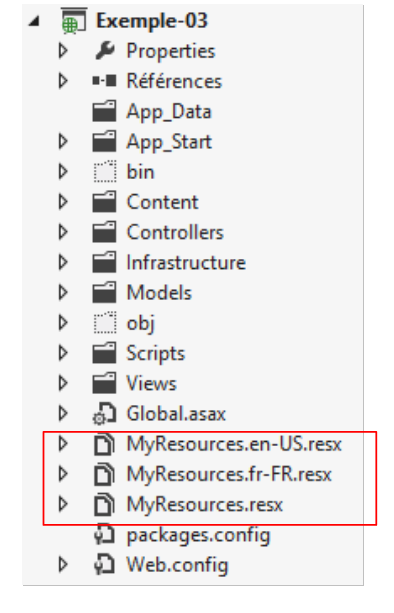 |
我们在此创建了三个资源文件:
- [MyResources]:当当前语言环境没有资源时使用的默认资源;
- [MyResources.fr-FR]:用于 [fr-FR] 语言环境的资源;
- [MyResources.en-US]:适用于语言环境 [en-US] 的资源;
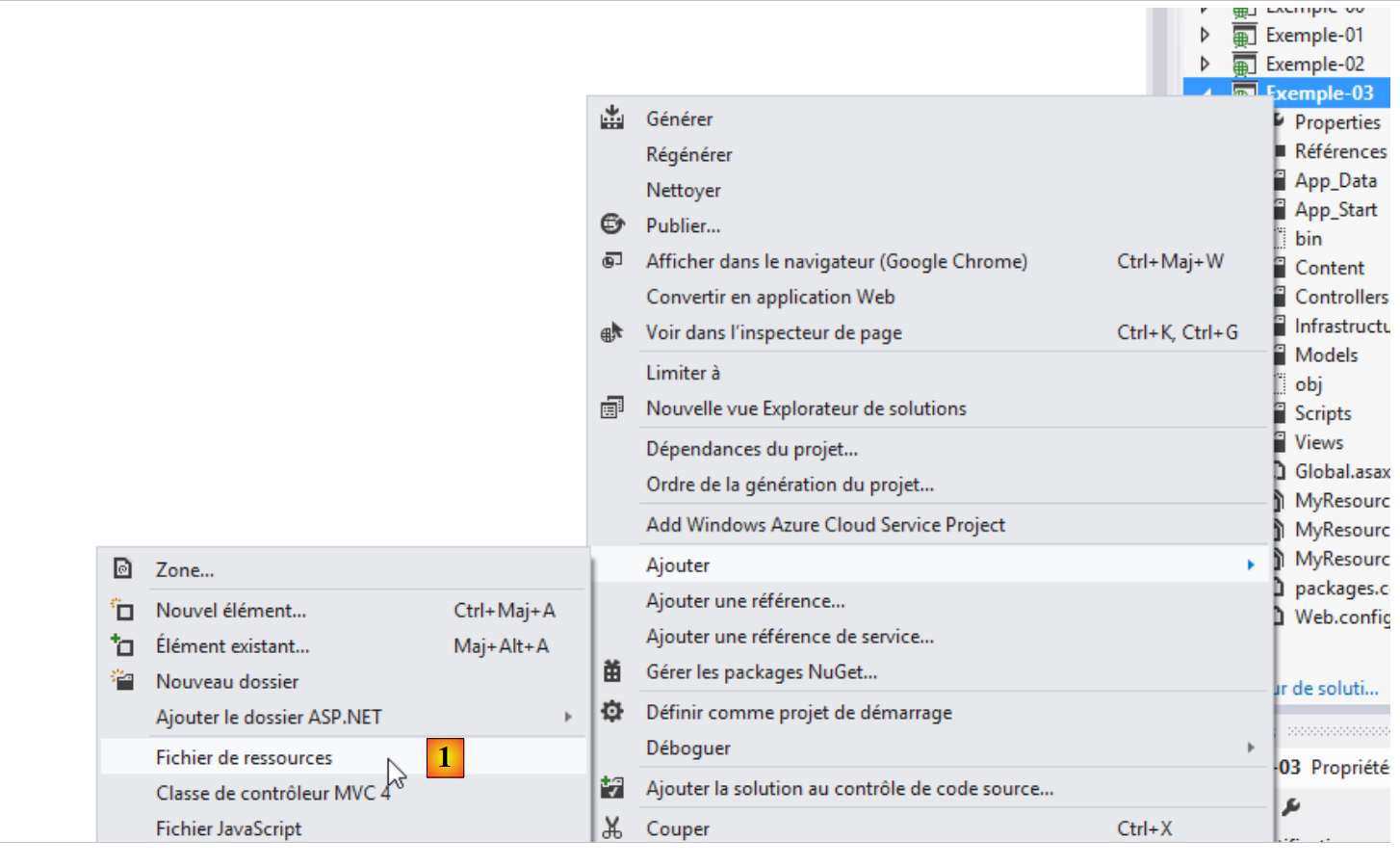
创建资源文件的步骤如下:[1, 2, 3]:
 |
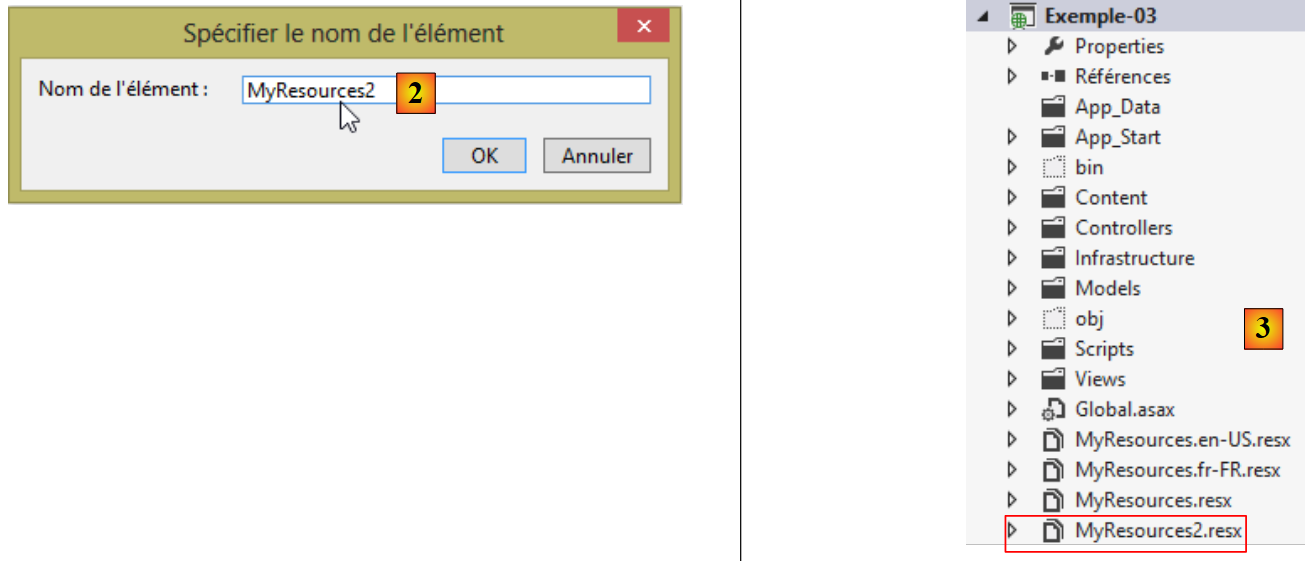 |
这将生成资源文件 [MyResources2.resx]。双击该文件后,将显示以下页面:
 |
资源文件是一个字典,其中包含键及其关联的值。键的定义位于 [1],值的定义位于 [2],资源的作用域定义位于 [3]。 为了使这些资源可读,它们必须具有作用域 [Public]。让我们回到这一行:
[Required(ErrorMessageResourceType = typeof(MyResources), ErrorMessageResourceName = "infoRequise")]
- [ErrorMessageResourceType]:指代资源文件。 [typeof] 参数是文件名。该文件在编译过程中会被转换为类,其二进制文件会被包含在项目的程序集之中。因此最终 [MyResources] 是资源类的名称;
- [ErrorMessageResourceName = "infoRequise"]:指资源文件中的一个键。最终,该行表示要显示的错误消息是文件 [MyResources] 中与键 [infoRequise] 关联的值。
要在文件 [MyResources] 中创建键 [infoRequise] 及其关联值,请按以下步骤操作:
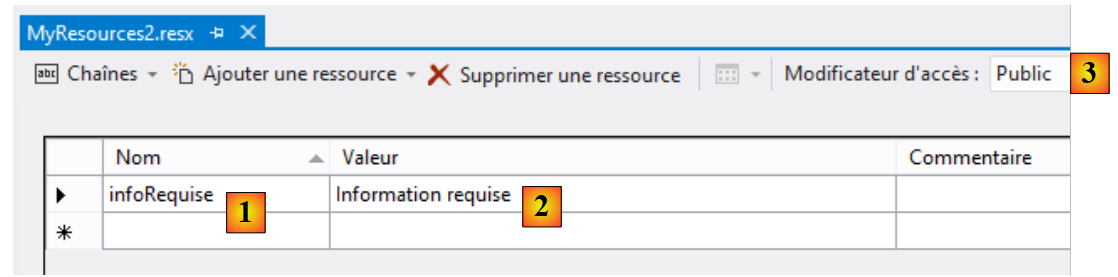 |
在 [1] 中输入键,在 [2] 中输入值,在 [3] 中输入资源作用域。
还有最后一点需要澄清:类 [MyResources] 的命名空间。该命名空间在文件 [MyResources.resx] 的属性中定义:
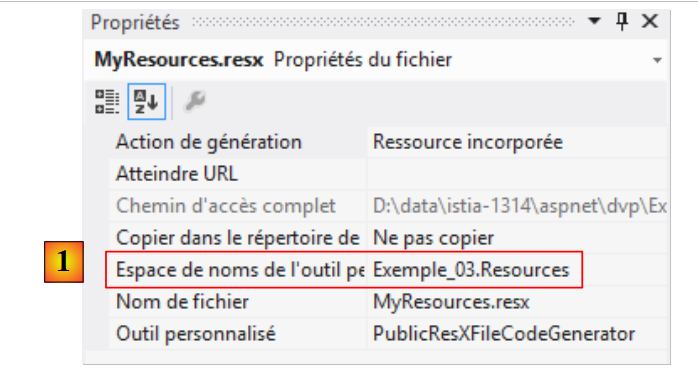 |
在 [1] 中,我们定义了类 [MyResources] 的命名空间,该类将基于资源文件 [MyResources.resx] 创建。让我们回到之前分析的国际化行:
[Required(ErrorMessageResourceType = typeof(MyResources), ErrorMessageResourceName = "infoRequise")]
运算符 typeof 需要一个类,此处即为类 [MyResources]。为了找到该类,必须将其命名空间导入到类 [ViewModel14] 中:
using Exemple_03.Resources;
要使类 [MyResources] 可见,必须在创建资源文件 [MyResources] 之后,该项目至少已生成过一次。该类的代码可在文件 [MyResources.Designer.cs] 中查看:
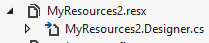 |
双击该文件后,即可查看类 [MyResources] 的代码:
namespace Exemple_03.Resources {
    using System;


[global::System.CodeDom.Compiler.GeneratedCodeAttribute("System.Resources.Tools.StronglyTypedResourceBuilder", "4.0.0.0")]
    [global::System.Diagnostics.DebuggerNonUserCodeAttribute()]
    [global::System.Runtime.CompilerServices.CompilerGeneratedAttribute()]
    public class MyResources2 {

  ...
         public static string infoRequise {
            get {
                return ResourceManager.GetString("infoRequise", resourceCulture);
            }
        }
    }
}
- 第 1 行:类的命名空间;
- 第 11 行:键 [infoRequise] 已成为类 [MyResources] 的静态属性。可通过 [MyResources.infoRequise] 这种写法访问它。 此外,需注意该属性的作用域为 [public]。若未设置此作用域,则无法访问该属性。这一点值得特别注意,因为默认作用域是 [internal],若忘记更改作用域,往往会导致难以理解的错误。
为什么现在需要三个资源文件?
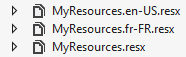 |
我们创建了 [MyResources.resx],这是根资源文件。随后,我们根据需要管理的语言(locales)数量,创建相应数量的 [MyResources.locale.resx] 资源文件。 这里我们管理法语 [fr-FR] 和美式英语 [en-US]。 当当前语言既不是 [fr-FR] 也不是 [en-US] 时,将使用根资源 [MyResources.resx]。
[MyResources.resx] 的最终内容如下:
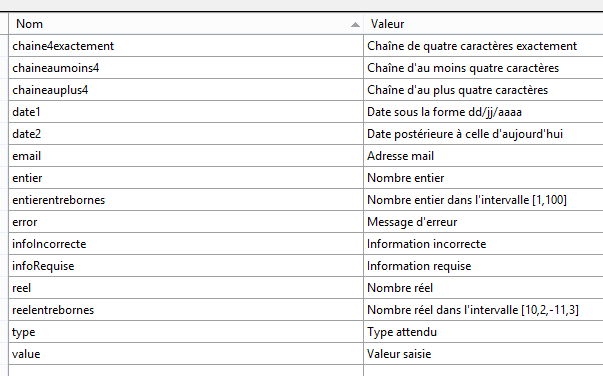 |
当无法识别区域设置时,消息将显示为法语。[MyResources.fr-FR.resx]的最终内容与之相同,仅需通过简单复制文件即可获得。
[MyResources.en-US.resx]的最终内容同样通过复制文件获得,随后按以下方式修改:
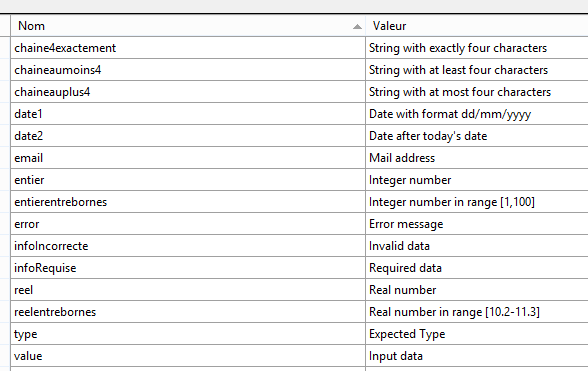 |
让我们回到视图 [ViewModel14] 及其方法 [Validate]:
    // 验证
    public IEnumerable<ValidationResult> Validate(ValidationContext validationContext)
    {
      // 错误列表
      List<ValidationResult> résultats = new List<ValidationResult>();
      // 所有错误均显示相同消息
      string errorMessage=MyResources.ResourceManager.GetObject("infoIncorrecte", new CultureInfo(System.Web.HttpContext.Current.Session["lang"] as string)).ToString();

      // 日期 1
      if (Date1.Date <= DateTime.Now.Date)
      {
        résultats.Add(new ValidationResult(errorMessage, new string[] { "Date1" }));
      }
...
      // 显示错误列表
      return résultats;
}
第 7 行展示了如何从资源文件 [MyResources] 中获取消息。此处需要获取与键 [infoIncorrecte] 关联的消息,并以当前文化环境显示:
- MyResources.ResourceManager.GetObject("infoIncorrecte", new CultureInfo("en-US")):获取资源文件 [MyResources.en-US.resx] 中与键 [infoIncorrecte] 关联的对象;
- 我们看到,[I18NController] 控制器将当前区域设置设置为与键 [lang] 关联的会话。因此,可以通过 System.Web.HttpContext.Current.Session["lang"] as string 获取当前区域设置;
- 该资源以类型 [object] 获取。要获取错误消息,需对其调用方法 [ToString]。
6.4. 将视图 [Action14Get.cshtml] 国际化
我们按以下方式改进表单的显示视图:
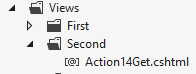 |
@model Exemple_03.Models.ViewModel14
@using Exemple_03.Resources
@{
  Layout = null;
}

<!DOCTYPE html>

<html>
<head>
  <meta name="viewport" content="width=device-width" />
  <title>Action14Get</title>
  <link rel="stylesheet" href="~/Content/Site.css" />
  <script type="text/javascript" src="~/Scripts/jquery-1.8.2.min.js"></script>
  <script type="text/javascript" src="~/Scripts/jquery.validate.min.js"></script>
  <script type="text/javascript" src="~/Scripts/jquery.validate.unobtrusive.min.js"></script>
  <script type="text/javascript" src="~/Scripts/globalize/globalize.js"></script>
  <script type="text/javascript" src="~/Scripts/globalize/cultures/globalize.culture.fr-FR.js"></script>
  <script type="text/javascript" src="~/Scripts/globalize/cultures/globalize.culture.en-US.js"></script>
  <script type="text/javascript" src="~/Scripts/myscripts2.js"></script>
  <script>
    $(document).ready(function () {
      var culture = '@System.Threading.Thread.CurrentThread.CurrentCulture';
        Globalize.culture(culture);
      });
  </script>

</head>
<body>
  <h3>Formulaire ASP.NET MVC - Internationalisation</h3>
  @using (Html.BeginForm("Action14Post", "Second"))
  {
    <table>
      <thead>
        <tr>
          <th>@MyResources.type</th>
          <th>@MyResources.value</th>
          <th>@MyResources.error</th>
        </tr>
      </thead>
      <tbody>
        <tr>
          <td>@Html.LabelFor(m => m.Chaine1)</td>
          <td>@Html.EditorFor(m => m.Chaine1)</td>
          <td>@Html.ValidationMessageFor(m => m.Chaine1)</td>
        </tr>
...
      </tbody>
    </table>
    <p>
      <input type="submit" value="Valider" />
    </p>
  }
</body>
</html>
<!-- 选择语言 -->
@using (Html.BeginForm("Lang", "Second"))
{
  <table>
    <tr>
      <td><a href="javascript:postForm('fr-FR','/Second/Action14Get')">Français</a></td>
      <td><a href="javascript:postForm('en-US','/Second/Action14Get')">English</a></td>
    </tr>
  </table>
}
注意:第 14 行,请将 jQuery 的版本调整为与您的 Visual Studio 版本一致。
我们先从最简单的部分开始,即第 36-38 行。这些代码使用了我们刚刚描述的 [MyResources] 类的静态属性。要访问 [MyResources] 类,必须导入其命名空间(第 2 行)。
在国际化消息中,还需包含由客户端验证框架显示的消息。 为此,需使用第17至19行中的JQuery库。针对我们管理的两种语言环境,我们分别使用JQuery、[fr-FR]和[en-US]文件。 此外,大家可能还记得,视图 [Action13Get] 曾使用过以下 JavaScript 脚本 [myscripts.js]:
// 加载文档
$(document).ready(function () {
  var culture = 'fr-FR';
  Globalize.culture(culture);
});
现在,数据源不再仅限于 [fr-FR],而是有所变化。 因此,这些代码行现在由视图 [Action14Get] 自身在第 21-26 行生成。这六行代码将被包含在发送给客户端的页面 HTML 中。
- 第 23 行:JavaScript 变量 [culture] 被初始化为当前正在处理的请求线程的当前区域设置。您可能还记得,该变量是由 [I18NController] 类的构造函数初始化的:
      // 将语言设置为会话语言
      httpContext.Session["lang"] = langue;
      // 修改线程的区域设置
      Thread.CurrentThread.CurrentCulture = new System.Globalization.CultureInfo(langue);
Thread.CurrentThread.CurrentUICulture = Thread.CurrentThread.CurrentCulture;
如果当前区域设置为 [en-US],则页面 HTML 中嵌入的 JavaScript 脚本将变为:
  <script>
    $(document).ready(function () {
      var culture = 'en-US';
        Globalize.culture(culture);
      });
</script>
前文已提及,函数 [$(document).ready] 会在浏览器完成页面加载后执行。其执行将设定客户端验证框架的区域设置。 在 [en-US] 语言环境下,框架的错误消息将显示为英文,并来自资源文件 [MyResources.en-US.resx]。我们将详细说明其实现原理。
现在让我们查看第 57-65 行:
<!-- 选择语言 -->
@using (Html.BeginForm("Lang", "Second"))
{
  <table>
    <tr>
      <td><a href="javascript:postForm('fr-FR','/Second/Action14Get')">Français</a></td>
      <td><a href="javascript:postForm('en-US','/Second/Action14Get')">English</a></td>
    </tr>
  </table>
}
这里有一个第二个表单,第一个表单位于第 31-53 行。该表单在页面底部显示以下链接:
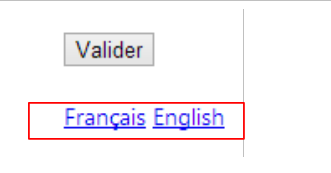 |
- 第2行:表单被提交至控制器[Second]的[Lang]操作。目前尚未发现任何可能被提交的值;
- 第 6 和 7 行:点击这些链接会触发 JavaScript 函数 [postForm] 的执行。该函数位于何处?位于视图第 20 行引用的脚本 [myscripts2.js] 中:
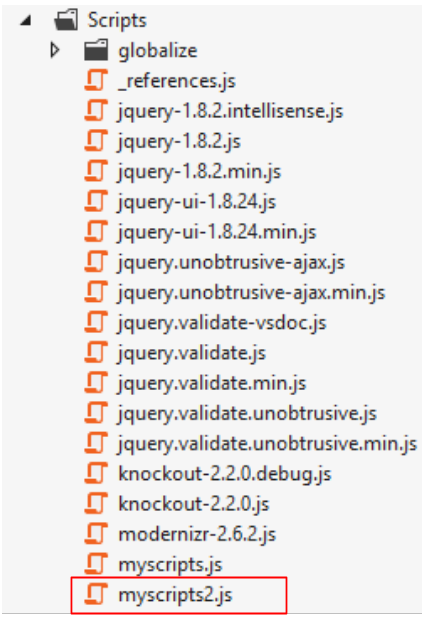 |
其内容如下:
function postForm(lang, url) {
  // 获取文档中的第二个表单
  var form = document.forms[1];
  // 为其添加隐藏属性 lang
  var hiddenField = document.createElement("input");
  hiddenField.setAttribute("type", "hidden");
  hiddenField.setAttribute("name", "lang");
  hiddenField.setAttribute("value", lang);
  // 在表单中添加隐藏字段
  form.appendChild(hiddenField);
  // 为其添加隐藏属性 url
  var hiddenField = document.createElement("input");
  hiddenField.setAttribute("type", "hidden");
  hiddenField.setAttribute("name", "url");
  hiddenField.setAttribute("value", url);
  // 在表单中添加隐藏字段
  form.appendChild(hiddenField);
  // 提交
  form.submit();
}

// http://blog.instance-factory.com/?p=268
$.validator.methods.number = function (value, element) {
  return this.optional(element) ||
      !isNaN(Globalize.parseFloat(value));
}

$.validator.methods.date = function (value, element) {
  return this.optional(element) ||
      !isNaN(Globalize.parseDate(value));
}

jQuery.extend(jQuery.validator.methods, {
  range: function (value, element, param) {
    //使用全球化插件解析该值
    var val = Globalize.parseFloat(value);
    return this.optional(element) || (
        val >= param[0] && val <= param[1]);
  }
});
第22至40行是前例中使用的脚本[myscripts.js]中已有的内容。我们不再赘述。点击语言链接时执行的函数[postForm]位于第1至20行:
- 第1行:该函数接受两个参数,[lang]表示用户选择的区域设置,[url]表示在完成区域设置更改后,客户端浏览器应重定向到的URL。 这两个参数在调用时需明确指定:
<td><a href="javascript:postForm('fr-FR','/Second/Action14Get')">Français</a></td>
<td><a href="javascript:postForm('en-US','/Second/Action14Get')">English</a></td>
- 第 3 行:获取文档中第二个表单的引用;
- 第5-8行:通过编程创建标签
其中 [xx-XX] 是该函数参数 [lang] 的值;
- 第10行:同样通过编程,将该标签添加到第二个表单中。最终效果就好像该标签从一开始就存在于第二个表单中一样。因此,其值将被提交。这正是我们想要的;
- 第 11-17 行:针对标签
,其中 [url] 是该函数中参数 [url] 的值;
- 第 19 行:第二个表单现已提交。提交到哪个 URL ?
需要回到页面 [Action14Get.cshtml] 中的第二个表单代码:
@using (Html.BeginForm("Lang", "Second"))
{
...
}
因此,表单将提交至 URL [/Second/Lang]。接下来,我们需要在控制器 [SecondController] 中定义一个 [Lang] 操作。具体如下:
public class SecondController : I18NController
    {
      // Action14-GET
      [HttpGet]
      public ViewResult Action14Get()
      {
        return View("Action14Get", new ViewModel14());
      }

      // Action14-POST
      [HttpPost]
      public ViewResult Action14Post(ViewModel14 modèle)
      {
        return View("Action14Get", modèle);
      }

      // 语言
      [HttpPost]
      public RedirectResult Lang(string url)
      {
        // 将客户端重定向至 url
        return new RedirectResult(url);
      }

    }
- 第 18 行:该操作仅响应 [POST];
- 第 19 行:该操作仅接收名为 [url] 的参数;
- 第22行:它响应客户端,将其重定向至该URL。
但名为 [lang] 的参数去哪了?现在需要记住的是,控制器 [SecondController] 继承自类 [I18NController](见下文第 1 行)。 正是该控制器管理参数 [lang]:
  public abstract class I18NController : Controller
  {
    public I18NController()
    {
      // 获取当前请求的上下文
      HttpContext httpContext = System.Web.HttpContext.Current;
      // 检查请求以查找参数 [lang]
      // 在 URL 的参数中搜索该参数
      string langue = httpContext.Request.QueryString["lang"];
      if (langue == null)
      {
        // 在提交的参数中查找该参数
        langue = httpContext.Request.Form["lang"];
      }
      if (langue == null)
      {
        // 在用户会话中查找
        langue = httpContext.Session["lang"] as string;
      }
      if (langue == null)
      {
        // HTTP 头部的第一个参数AcceptLanguages
        langue = httpContext.Request.UserLanguages[0];
      }
      if (langue == null)
      {
        // 文化 fr-FR
        langue = "fr-FR";
      }
      // 将语言设置到会话中
      httpContext.Session["lang"] = langue;
      // 修改线程的区域设置
      Thread.CurrentThread.CurrentCulture = new CultureInfo(langue);
      Thread.CurrentThread.CurrentUICulture = Thread.CurrentThread.CurrentCulture;
}
在我们研究的示例中,参数 [lang] 已被发布。因此,它将在第 13 行被找到,在第 31 行被纳入会话,并用于在第 33-34 行更新当前线程的上下文。
接下来会发生什么?让我们回顾一下这些链接:
<td><a href="javascript:postForm('fr-FR','/Second/Action14Get')">Français</a></td>
<td><a href="javascript:postForm('en-US','/Second/Action14Get')">English</a></td>
重定向的 URL 是 [/Second/Action14Get]。因此将执行操作 [Action14Get]:
public class SecondController : I18NController
    {
      // 操作14-GET
      [HttpGet]
      public ViewResult Action14Get()
      {
        return View("Action14Get", new ViewModel14());
      }
...
}
此前,[I18NController]类的构造函数被执行:
  public abstract class I18NController : Controller
  {
    public I18NController()
    {
      // 获取当前请求的上下文
      HttpContext httpContext = System.Web.HttpContext.Current;
      // 检查请求以查找参数 [lang]
      // 在 URL 的参数中查找该参数
      string langue = httpContext.Request.QueryString["lang"];
      if (langue == null)
      {
        // 在提交的参数中查找该参数
        langue = httpContext.Request.Form["lang"];
      }
      if (langue == null)
      {
        // 在用户会话中查找
        langue = httpContext.Session["lang"] as string;
      }
      if (langue == null)
      {
        // HTTP 头部的第一个参数AcceptLanguages
        langue = httpContext.Request.UserLanguages[0];
      }
      if (langue == null)
      {
        // 文化 fr-FR
        langue = "fr-FR";
      }
      // 将语言设置到会话中
      httpContext.Session["lang"] = langue;
      // 修改线程的区域设置
      Thread.CurrentThread.CurrentCulture = new CultureInfo(langue);
      Thread.CurrentThread.CurrentUICulture = Thread.CurrentThread.CurrentCulture;
}
此时,第 18 行将在会话中查找参数 [lang]。假设其值为 [en-US]。因此,该区域设置将成为请求执行线程的区域设置(第 33-34 行)。 让我们回到操作 [Action14Get]:
      // 操作14-GET
      [HttpGet]
      public ViewResult Action14Get()
      {
        return View("Action14Get", new ViewModel14());
}
第 5 行,将创建一个 [ViewModel14] 视图模型的实例:
  public class ViewModel14 : IValidatableObject
  {

    [Required(ErrorMessageResourceType = typeof(MyResources), ErrorMessageResourceName = "infoRequise")]
    [Display(ResourceType = typeof(MyResources), Name = "chaineaumoins4")]
    [RegularExpression(@"^.{4,}$", ErrorMessageResourceType = typeof(MyResources), ErrorMessageResourceName = "infoIncorrecte")]
    public string Chaine1 { get; set; }
....
由于当前线程的区域设置为 [en-US],因此将使用文件 [MyResources.en-US.resx]。因此,错误消息将显示为英文。
实例化 [ViewModel14] 模板后,将显示 [Action14Get.cshtml] 视图:
@model Exemple_03.Models.ViewModel14
@using Exemple_03.Resources
@using System.Threading
@{
  Layout = null;
}

<!DOCTYPE html>

<html>
<head>
  <meta name="viewport" content="width=device-width" />
  <title>Action14Get</title>
  ...
  <script>
    $(document).ready(function () {
      var culture = '@Thread.CurrentThread.CurrentCulture';
        Globalize.culture(culture);
      });
  </script>

</head>
<body>
  <h3>Formulaire ASP.NET MVC - Internationalisation</h3>
  @using (Html.BeginForm("Action14Post", "Second"))
  {
    <table>
      <thead>
        <tr>
          <th>@MyResources.type</th>
          <th>@MyResources.value</th>
          <th>@MyResources.error</th>
        </tr>
      </thead>
      <tbody>
        <tr>
...
        </tr>
<tr>
由于当前线程的区域设置为 [en-US],因此页面第 15-20 行中嵌入的脚本为:
  <script>
    $(document).ready(function () {
      var culture = 'en-US';
        Globalize.culture(culture);
      });
  </script>
这确保了验证框架将支持美国格式(日期、货币、数字等)。出于同样的原因,第30至32行的消息将从资源文件[MyResources.en-US.resx]中提取,因此将显示为英文。
6.5. 运行示例
以下是几个执行示例:
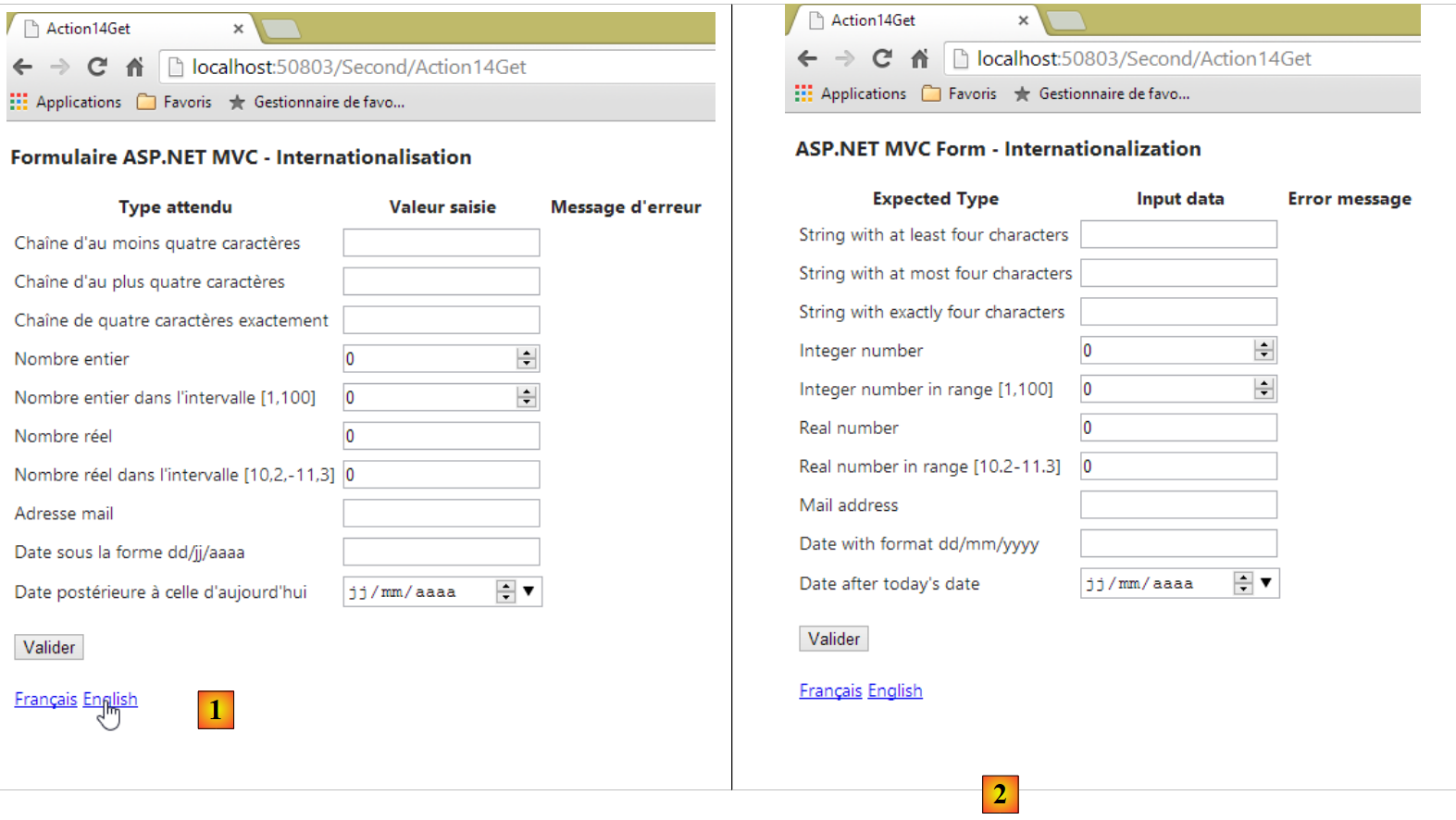 |
- 在 [1] 中,法语表单;在 [2] 中,英语表单。
 |
- 在[3]中,客户端的错误信息现在显示为英文。
查看页面源代码可发现,这些错误信息已嵌入页面中,因此是由视图 ASP.NET、[Action14Get] 及其模板 [ViewModel14] 生成的:
        <tr>
          <td><label for="Reel1">Real number</label></td>
          <td><input class="text-box single-line" data-val="true" data-val-number="The field Real number must be a number." data-val-required="Required data" id="Reel1" name="Reel1" type="text" value="0" /></td>
          <td><span class="field-validation-valid" data-valmsg-for="Reel1" data-valmsg-replace="true"></span></td>
        </tr>
        <tr>
          <td><label for="Reel2">Real number in range [10.2-11.3]</label></td>
          <td><input class="text-box single-line" data-val="true" data-val-number="The field Real number in range [10.2-11.3] must be a number." data-val-range="Invalid data" data-val-range-max="11.3" data-val-range-min="10.2" data-val-required="Required data" id="Reel2" name="Reel2" type="text" value="0" /></td>
          <td><span class="field-validation-valid" data-valmsg-for="Reel2" data-valmsg-replace="true"></span></td>
</tr>
6.6. 日期的国际化
国际化是一个复杂的问题。因此,让我们看看属性 [Date1] 及其日历:
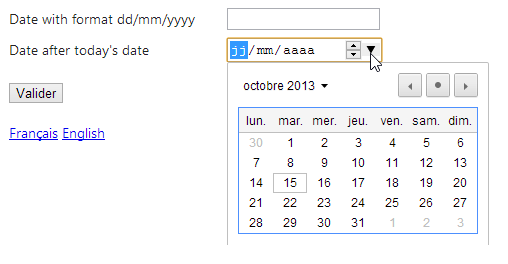 |
可以发现,日历是法语日历,而页面的文化设置却是 [en-US]。 在 HTML5 中存在一个 [lang] 属性,用于设置页面或页面组件的语言。因此,我们可以在 [Action14Get.cshtml] 视图中编写以下代码:
@model Exemple_03.Models.ViewModel14
@using Exemple_03.Resources
@using System.Threading
@{
  Layout = null;
  var lang = Session["lang"] as string;
}

<!DOCTYPE html>

<html lang="@lang">
<head>
...
- 第 6 行:从会话中获取区域设置;
- 第 11 行:将该值设置为页面的 [lang] 属性。
测试表明,即使页面以英语显示,日历仍保持法语界面。表单中的另一个日期字段也存在问题:
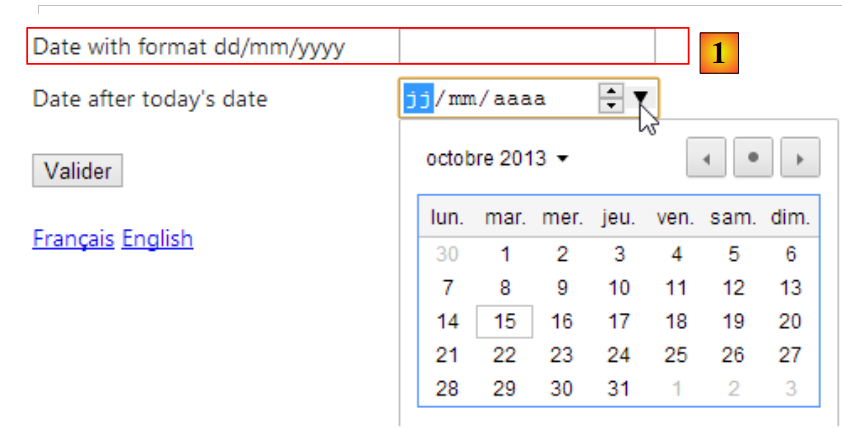 |
在 [1] 中,日期仍按法语格式 dd/mm/yyyy(20/11/2013)进行请求,而美国格式应为 mm/dd/yyyy(10/21/2013)。我们将尝试通过创建一个新的视图和视图模型来解决这两个问题。
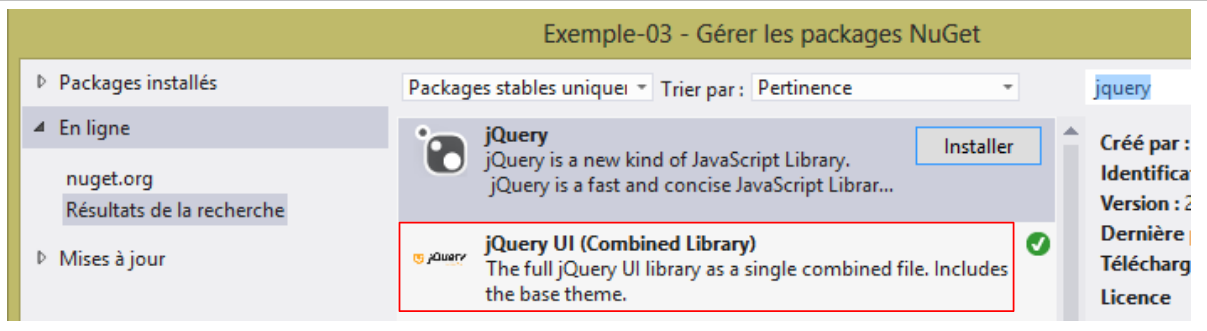
JQueryUI是基于JQuery项目衍生出的子项目,提供了包括日历在内的表单组件。该日历支持国际化,接下来我们将演示这一功能。
首先,我们将 [JQuery UI] 添加到我们的项目中。
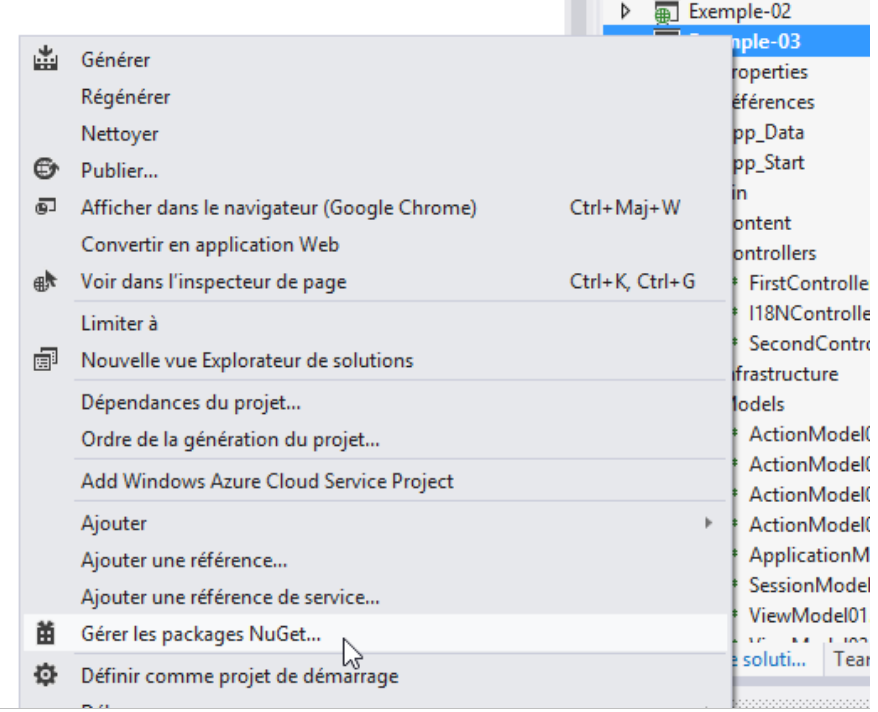 |
 |
安装 JQuery 和 UI 后,项目中会出现新的组件:
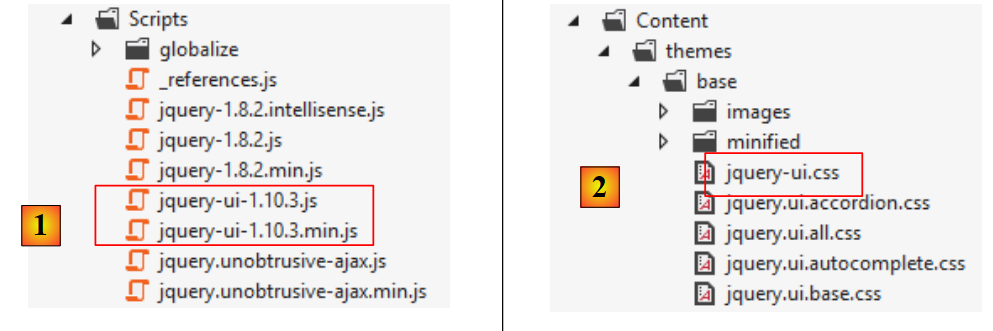 |
- 在 [1] 中,包含 [JQuery UI] 库的标准版和压缩版;
- 在 [2] 中,包含样式表 [JQuery UI];
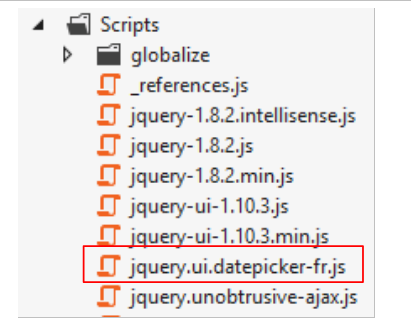
JQuery UI 日历默认使用英语。若要实现国际化,需添加可在 URL [https://github.com/jquery/jquery-ui/tree/master/ui/i18n] 中找到的脚本:
 |
若要将日历 JQuery UI 设置为法语,请将上述 [jquery.ui.datepicker-fr.js] 文件的内容复制到项目的 [Scripts] 文件夹中。
 |
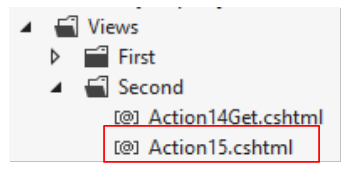
新视图 [Action15.cshtml] 的代码是通过复制前一个视图 [Action14.cshtml] 并进行修改获得的。此处仅展示修改部分:
 |
@model Exemple_03.Models.ViewModel15
@using Exemple_03.Resources
@using System.Threading
@{
  Layout = null;
}

<!DOCTYPE html>

<html lang="@Model.Culture">
<head>
  <meta name="viewport" content="width=device-width" />
  <title>Action15</title>
...
  <link rel="stylesheet" href="~/Content/themes/base/jquery-ui.css" />
  <script type="text/javascript" src="~/Scripts/jquery-ui-1.10.3.js"></script>
  <script type="text/javascript" src="~/Scripts/jquery.ui.datepicker-fr.js"></script>
  <script>
    $(document).ready(function () {
      var culture = '@Thread.CurrentThread.CurrentCulture';
      Globalize.culture(culture);
      $("#Date1").datepicker($.datepicker.regional['@Model.Regionale']);
    });
  </script>
</head>
<body>
  <h3>@MyResources.titre</h3>
  @using (Html.BeginForm("Action15", "Second"))
  {
    <table>
...
        <tr>
          <td>@Html.LabelFor(m => m.Date1)</td>
          <td>@Html.TextBox("Date1", Model.StrDate1)</td>
          <td>@Html.ValidationMessageFor(m => m.Date1)</td>
        </tr>
      </tbody>
    </table>
    <p>
      <input type="submit" value="Valider" />
    </p>
  }
  <!-- 选择语言 -->
  @using (Html.BeginForm("Lang", "Second"))
  {
    <table>
      <tr>
        <td><a href="javascript:postForm('fr-FR','/Second/Action15')">Français</a></td>
        <td><a href="javascript:postForm('en-US','/Second/Action15')">English</a></td>
      </tr>
    </table>
  }
</body>
</html>
注:第16行,请将jQuery-ui的版本调整为您下载的版本。
- 第 15 行:引用 JQuery 和 UI 的样式表;
- 第16行:引用已下载的JQuery UI版本;
- 第 17 行:引用我们刚刚下载的法国日历脚本;
- 第34行:方法[Html.TextBox]将在此处生成一个类型为[text]的标签[input], 其ID为[Date1],名称为[Date1];
- 第 19 行:当页面加载完成后,函数 JQuery UI [datepicker] 将应用于 ID 为 [Date1] 的元素, 即第34行的元素。该函数的作用是:当用户将焦点移至[Date1]输入框时,将弹出日历供用户输入日期。函数[datepicker]接受一个参数,用于指定日历的语言。 变量 [@Model.Regionale] 的值应为:
- 'fr' 表示法语日历,
- '' 表示英语日历;
前一视图的模板 [Action15.cshtml] 将采用以下模板 [ViewModel15]:
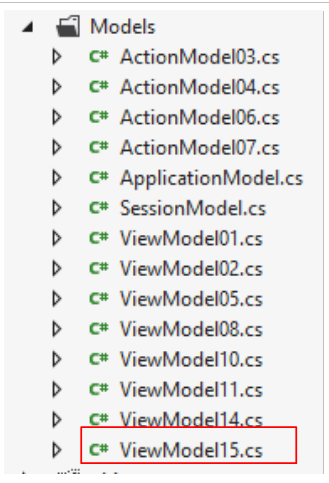 |
其代码是稍作修改的 [ViewModel14] 模板。我们仅列出修改部分:
using Exemple_03.Resources;
...
using System.Web;

namespace Exemple_03.Models
{
  [Bind(Exclude = "Culture,Regionale,StrDate1,FormatDate")]
  public class ViewModel15 : IValidatableObject
  {

...
    [Display(ResourceType = typeof(MyResources), Name = "date1")]
    [RegularExpression(@"\s*\d{2}/\d{2}/\d{4}\s*", ErrorMessageResourceType = typeof(MyResources), ErrorMessageResourceName = "infoIncorrecte")]
    [Required(ErrorMessageResourceType = typeof(MyResources), ErrorMessageResourceName = "infoRequise")]
    public string Regexp1 { get; set; }

    [Display(ResourceType = typeof(MyResources), Name = "date2")]
    [Required(ErrorMessageResourceType = typeof(MyResources), ErrorMessageResourceName = "infoRequise")]
    [DataType(DataType.Date)]
    public DateTime Date1 { get; set; }

    // 构造函数
    public ViewModel15()
    {
      // 当前区域设置
      Culture = HttpContext.Current.Session["lang"] as string;
      cultureInfo=new CultureInfo(Culture);
      // 日历区域设置JQuery
      Regionale = MyResources.ResourceManager.GetObject("regionale", cultureInfo).ToString();
      // 日期格式
      FormatDate = MyResources.ResourceManager.GetObject("formatDate", cultureInfo).ToString();
    }


    // 验证
    public IEnumerable<ValidationResult> Validate(ValidationContext validationContext)
    {
      // 错误列表
      List<ValidationResult> résultats = new List<ValidationResult>();
      // 所有错误均显示相同消息
      string errorMessage = MyResources.ResourceManager.GetObject("infoIncorrecte", cultureInfo).ToString();
...
      // 正则表达式1
      try
      {
        DateTime.ParseExact(Regexp1, FormatDate, cultureInfo);
      }
      catch
      {
        résultats.Add(new ValidationResult(errorMessage, new string[] { "Regexp1" }));
      }

      // 返回错误列表
      return résultats;

    }

    // 字段超出操作模板范围
    public string Culture { get; set; }
    public string Regionale { get; set; }
    public string StrDate1 { get; set; }
    public string FormatDate { get; set; }

    // 本地数据
    private CultureInfo cultureInfo;
  }
}
与前一个模板 [ViewModel14] 相比,我们增加了四个属性:
- 第60行:视图的区域设置,'fr-FR' 或 'en-US'。该区域设置在第26行的构造函数中初始化;
- 第 61 行:JQuery 日历的区域设置,'fr' 表示法语日历,'' 表示英语日历。该字段由构造函数的第 29 行初始化;
- 第63行:第15行的日期格式:'dd/MM/yyyy' 表示法语日期,'MM/dd/yyyy' 表示英语日期。该字段由构造函数第31行初始化;
- 第62行:在[Date1]输入字段中显示的字符串。该字段将由操作初始化;
- 第 47 行:现在根据当前区域设置的格式对日期 [Regexp1] 进行验证。
属性 [Regionale] 和 [FormatDate] 的值可在资源文件 [MyResources] 中找到。 法语资源文件 [MyResources]、[MyResources.fr-FR]、[1] 以及英语资源文件 [2] 的变更如下:
 |
我们已经准备就绪。我们将操作 [Action15] 添加到控制器 [SecondController] 中:
      // Action15
      public ViewResult Action15(FormCollection formData)
      {
        // 方法HTTP
        string method = Request.HttpMethod.ToLower();
        // 模板
        ViewModel15 modèle = new ViewModel15();
        if (method == "get")
        {
          modèle.StrDate1 = "";
        }
        else
        {
          TryUpdateModel(modèle, formData);
          modèle.StrDate1 = modèle.Date1.ToString(modèle.FormatDate);
        }
        // 视图显示
        return View("Action15", modèle);
}
- 第 2 行:方法 [Action15] 既处理 [GET],也处理 [POST]。在后一种情况下,提交的值将从参数 [formData] 中获取;
- 第5行:从请求中获取方法HTTP;
- 第 7 行:创建待显示的视图模板(表单);
- 第8-11行:对于命令[GET],将[Date1]的输入字段初始化为空字符串;
- 第12-16行:对于订单[POST]:
- 第14行:模板初始化为已发布的值,
- 第 15 行:[Date1] 的输入字段初始化为一个字符串,该字符串是 [Date1] 的值,并根据当前区域设置进行格式化(对于法国日期为 [dd/MM/yyyy], [dd/MM/yyyy] 用于法国日期;
- 第 18 行:显示视图 [Action15.cshtml] 及其模板。
进行测试:
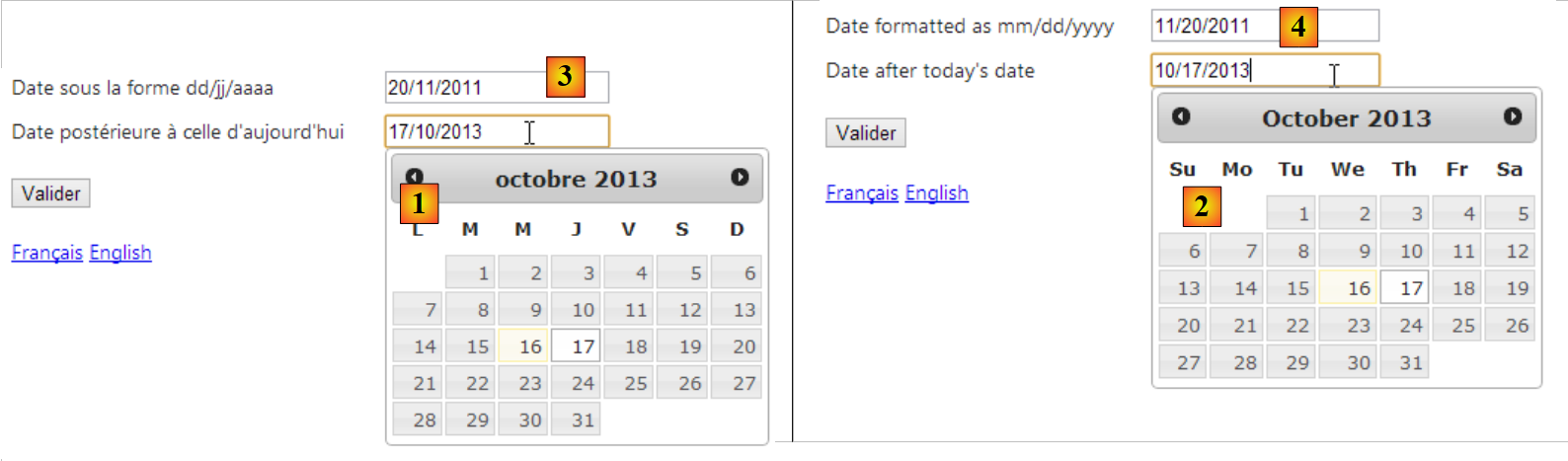 |
- 当页面为法语时,使用[1]作为法语日历;
- [2],当页面为英文时,显示英式日历;
- [3],当页面为法语时,显示法语格式的日期;
- 当页面为英文时,使用 [4] 生成相同日期的英文格式;
6.7. Conclusion
由此可见,应用程序的国际化是一个复杂的话题……